

Page 1
User Guide
Capacity Controller
AK-PC 551
ADAP-KOOL® Refrigeration Control System
Page 2
Introduction
Application
The controller is used for capacity regulation of compressors
and condensers in small refrigeration applications. A maximum of
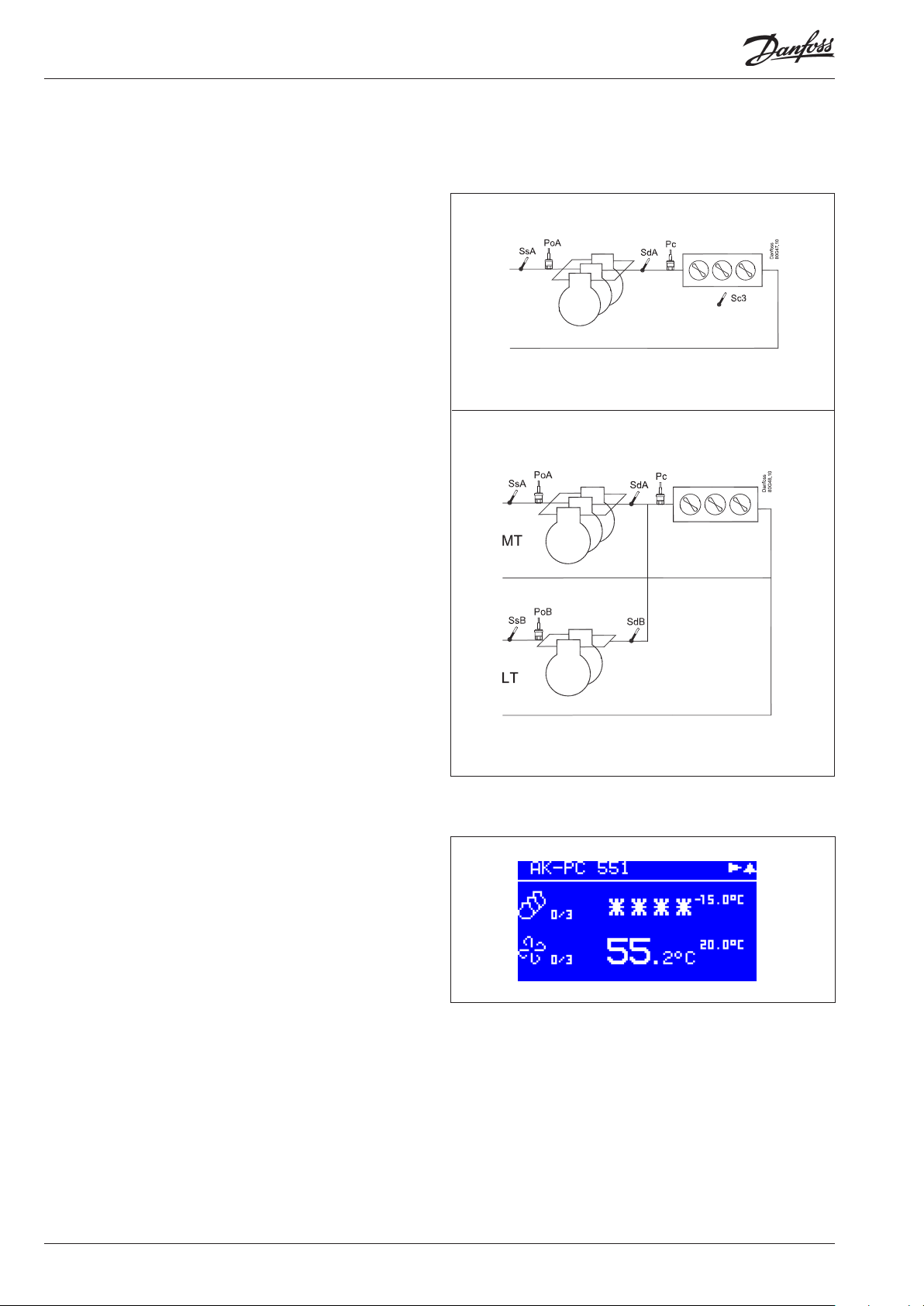
8 compressors and one condenser can be regulated. For example:
• One suction group + one condenser group
• Two suction groups + one shared condenser (max. 4 + 4 steps)
• One compressor group, max. 8 steps
• One condenser group, max. 8 steps
Advantages
• Energy savings via:
- Optimisation of suction pressure
- Night time increase
- Floating condensing pressure
- Load limitation
Input and output
There are a limited number of available inputs and outputs.
For each signal type, though, the following can be connected:
• Analogue inputs, max. 8 pcs.
Signal from pressure transmitters, temperature sensors,
voltage signal, etc.
• Digital inputs, max. 8 pcs.
Signal from automatic safety control, day/night signal, etc.
• Relay outputs, max. 6 pcs.
Connection of compressors, condenser fans
• Solid state outputs, max. 2 pcs.
- Control of capacity valve on a Copeland digital scroll
- Control of unloader on a Copeland stream compressor.
- Control of both unloaders on a Bitzer CRII
If the outputs are not used for these functions, they can be used
as ordinary relay outputs
• Analogue outputs, max. 2 pcs.
Speed control of compressors or condenser fans.
Operation
The daily operation can be set up directly on the controller or
via an external display device.
During set-up, the display images will be adjusted so that only
the relevant images are opened for additional setting and
end-user operation.
The operation is password protected, and three levels of
access can be granted.
The controller contains several languages. Select the preferred
language at start-up.
Data communication
The controller has built-in modbus data communication, and it
can be connected to an AK-SM 800 type system device.
2 User Guide RS8GY402 © Danfoss 2016-11 AK-PC 551
Page 3
Suction Group
Compressor types
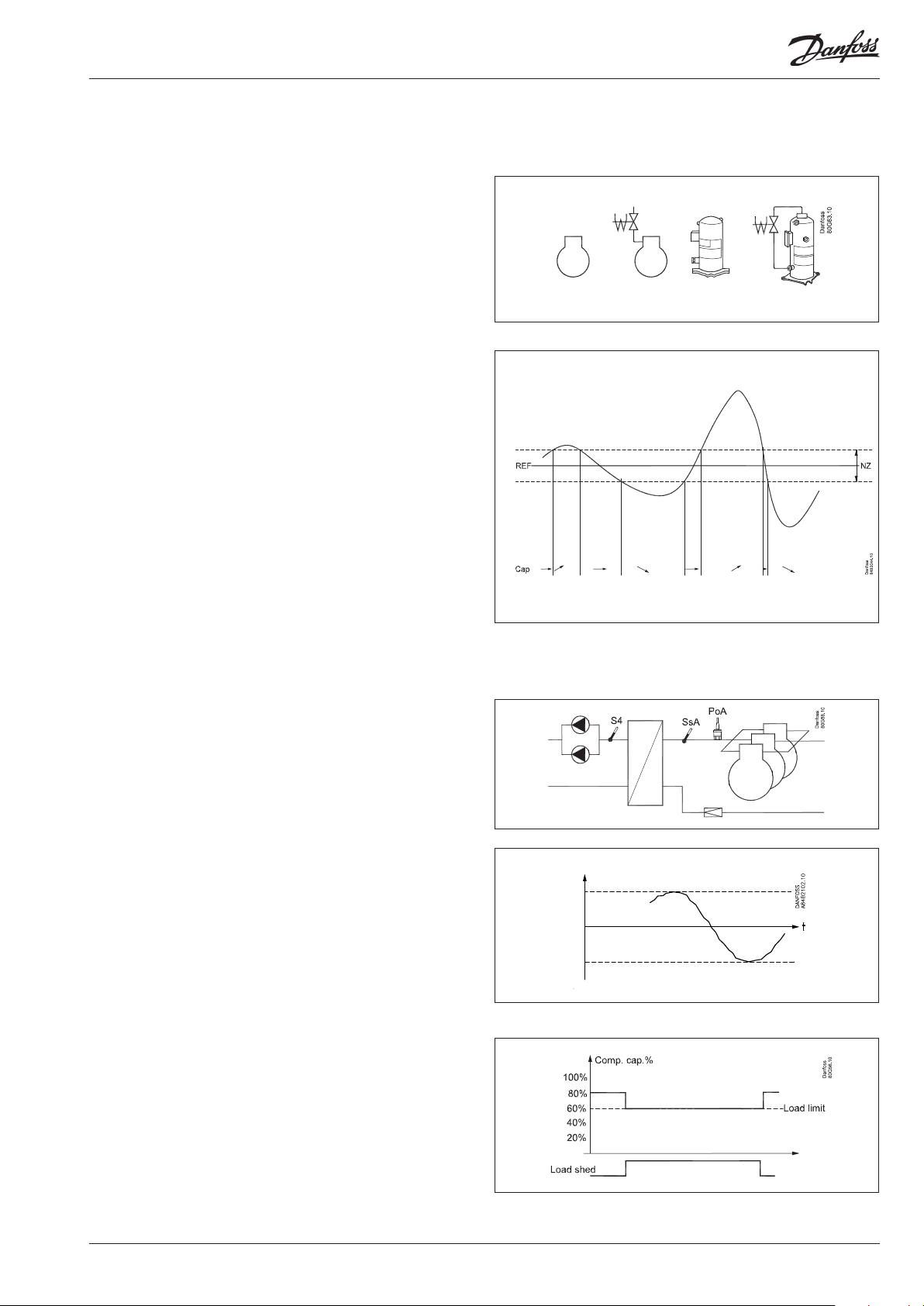
The following types of compressors can be used for regulation:
• Single-step compressors (one can be speed-regulated)
• Compressor with unloaders
• Scroll compressors (one can be a digital scroll)
• Copeland Stream compressor with one unloader (4 cylinders)
• Bitzer CRII compressor with two unloaders (4-cylinders)
Capacity regulation
The cut-in capacity is controlled by signals from the connected
pressure transmitter/temperature sensor and the set reference.
Set a neutral zone around the reference .
In the neutral zone, the regulating compressor controls the
capacity so that pressure can be maintained. When it can no
longer maintain the pressure within the neutral zone, the controller will cut out or cut in the next compressor in the sequence.
When further capacity is either cut out or cut in, the capacity
from the regulating compressor will be modified accordingly
to maintain the pressure within the neutral zone (only where
the compressor has variable capacity).
– When the pressure is higher than the “reference + a half neutral
zone”, cut-in of the next compressor (arrow up) is permitted.
– When the pressure is lower than the “reference - a half neutral
zone”, cut-out of a compressor (arrow down) is permitted.
– When the pressure is within the neutral zone, the process
will continue with the currently activated compressors.
Control sensor
Normally, a suction group is controlled based on a signal from
the Po pressure transmitter.
If control on a brine, the S4 sensor must be the control sensor. The
Po pressure transmitter must also be installed, as it is used for frost
protection.
The reference
At set or variable reference can be used for regulation. For
example, the variable reference can be used for a night time
increase or Po optimisation. Enter a set point here so that a
contribution from the Po optimisation or night time increase
is added. This contribution can raise or lower the reference,
as determined by the momentary cooling need.
To limit the reference from values that are too high or too low, set
a max. and min. limit.
Load shedding
When the load shedding function is activated, the maximum
permissible compressor capacity will be limited to the set limit.
In this way, the total electrical load in the store is limited.
The threshold value may not be set lower than the compressor’s
lowest capacity step/”Start speed”.
Po ref.
Max.
Min.
AK-PC 551 User Guide RS8GY402 © Danfoss 2016-11 3
Page 4
Condenser
Fan control
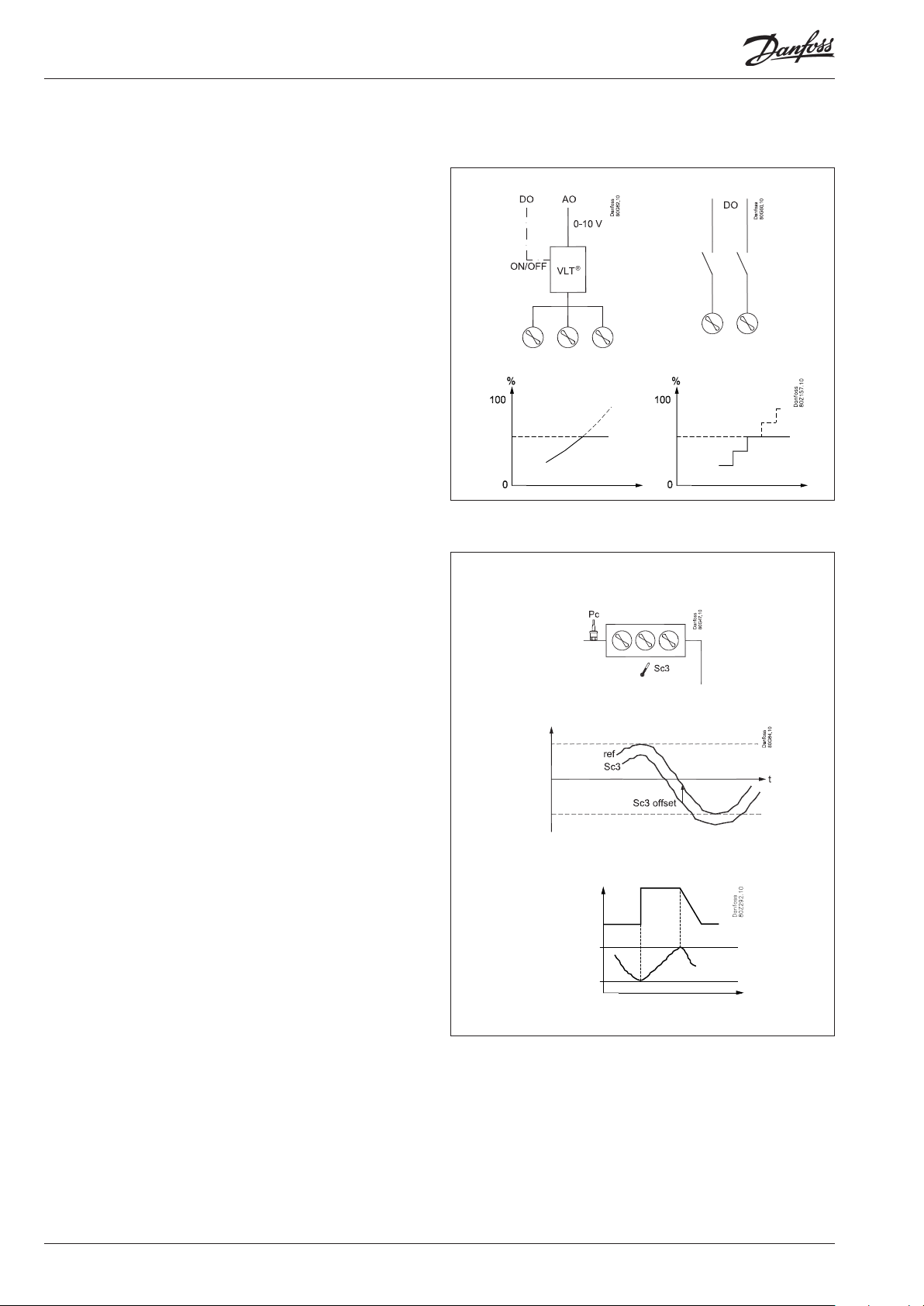
The fans can be controlled incrementally using the controller’s
relays, or they can be speed-controlled via the controller’s
analogue output.
Speed control can be via a frequency VLT-type transformer.
If the fans have EC motors, the 0-10 V signal can be used directly.
Step and speed simultaneously. (Parallel signals in step with each
other.) This function is primarily used to control a frequency converter, but if the frequency converter fails, external wiring will
switch over to step control.
During night operation, the noise level of the fans can be kept
down. This is done by limiting the cutin capacity.
For speed control, keep the number of revolutions low.
Omit step cutin for step-by-step activation.
The limitation is bypassed if safety functions Sd max. and
Pc max. start to function.
Control
Regulation is carried out based on a signal from the Pc pressure
transmitter or an S7 media temperature sensor. The signal is compared with the regulation reference.
The regulation reference can originate from one or more of the
following functions:
• Fixed reference
• Variable reference, which follows the outdoor temperature.
When the outdoor temperature drops, the reference will drop
by a corresponding amount.
This variable reference requires the installation of an Sc3
outdoor temperature sensor. The sensor must be positioned
so that it registers the correct outdoor temperature. In other
words, it must be shielded from direct sunlight and located
near the airway of the condenser.
This regulation requires setting a min. and max. reference,
so that the regulation process is kept within the given limits.
• Increase the reference for heat recovery.
Here the reference is raised to a fixed value when a signal is
received on a DI input. The reference value can be higher
than the set max. reference.
When the temperature of the heat recovery has been reached
and the DI signal disappears, the reference will drop once again,
though it will do so over the course of a few minutes to prevent
abrupt changes in the reference.
Media temperature
If controlling a media temperature, the control sensor
must be set to S7. This temperature sensor must be located
in the desired medium.
The Pc pressure transmitter must also be installed. It is used for
high-pressure monitoring.
Max. ref.
Min. ref.
Ref. for heat recovery
Temperature sequence for
heat recovery
4 User Guide RS8GY402 © Danfoss 2016-11 AK-PC 551
Page 5
Safety functions
Min./max. suction pressure Po
The suction pressure is recorded continuously.
If the measured value falls below the set minimum limit,
the compressors will immediately cut out.
If it exceeds the max. value, an alarm will be generated once
the time delay has elapsed.
Max. condensing pressure Pc
If the condensing pressure reaches the upper permissible value,
the controller will connect all condenser fans to keep the pressure
down. At the same time, a portion of the compressor capacity will
be disconnected. If the pressure remains near the threshold value,
even more compressors will be disconnected.
All compressors will be disconnected immediately if the threshold
value is exceeded.
LP switch
On/off signal on a DI input
If a signal is received, all compressors will immediately be stopped.
HP switch
On/off signal on a DI input
If a signal is received, all compressors will immediately be stopped.
Fan capacity will increase depending on how much the
Pc measurement exceeds the reference.
Sensor failure
If lack of signal from one of the connected temperature sensors or
pressure transmitters is registered an alarm will be given.
• In the event of a Po error, regulation will continue with a set
capacity in daytime operation (e.g. 50%), and a set capacity in
night operation (e.g. 25%), but with a minimum of one step.
• In the event of a Pc error, the condenser capacity that
corresponds to how much compressor capacity is connected
will cut in. Compressor regulation will remain normal.
• When there is an error on the Sd sensor the safety monitoring of
the discharge gas temperature will be discontinued.
• When there is an error on the Ss sensor the monitoring of the
superheat on the suction line will be discontinued.
• In the event of an error on the outdoor temperature sensor,
Sc3, the permanent setting value will be used as a reference.
• In the event of an error on the S4 sensor, regulation will continue
with the Po signal, but the reference will be lowered by 5 K.
• In the event of an error on the Saux sensor, the thermostat
output will go to the rest position.
NB: A faulty sensor must be OK within 10 minutes before a sensor
alarm is cancelled.
A sensor alarm can be reset manually by pushing the "Xbutton" for 2 seconds when the alarm is shown in the display
"Active alarms".
General DI alarms
On/off signal on a DI input
The regulator contains three general alarm inputs, to which alarm
text and delay times can be connected.
Alarm and text will appear when the delay time has elapsed.
Min./max superheating via Ss measurement
Temperature sensor on an AI input.
If superheating is higher or lower than the set limits, an alarm
will be generated once the time delay has elapsed.
Max. discharge gas temperature Sd
Temperature sensor on an AI input.
A signal can be received from a Pt 1000 Ohm sensor on
the pressure pipe.
• Common Sd for the whole compressor group
If the temperature nears the set max. temperature, the capacity
of the compressor will be reduced
• Compressor Sd
if it is an Sd from a Copeland digital scroll, a Copeland stream or
Bitzer CRII the capacity will be increased so that the compressor
can cool down itself).
The compressors will be stopped if the temperature nears
the set max. temperature value.
General thermostat
It is possible to install one general thermostat if there is a relay
output and an analogue input available.
AK-PC 551 User Guide RS8GY402 © Danfoss 2016-11 5
Page 6
Display overview
End-user overview
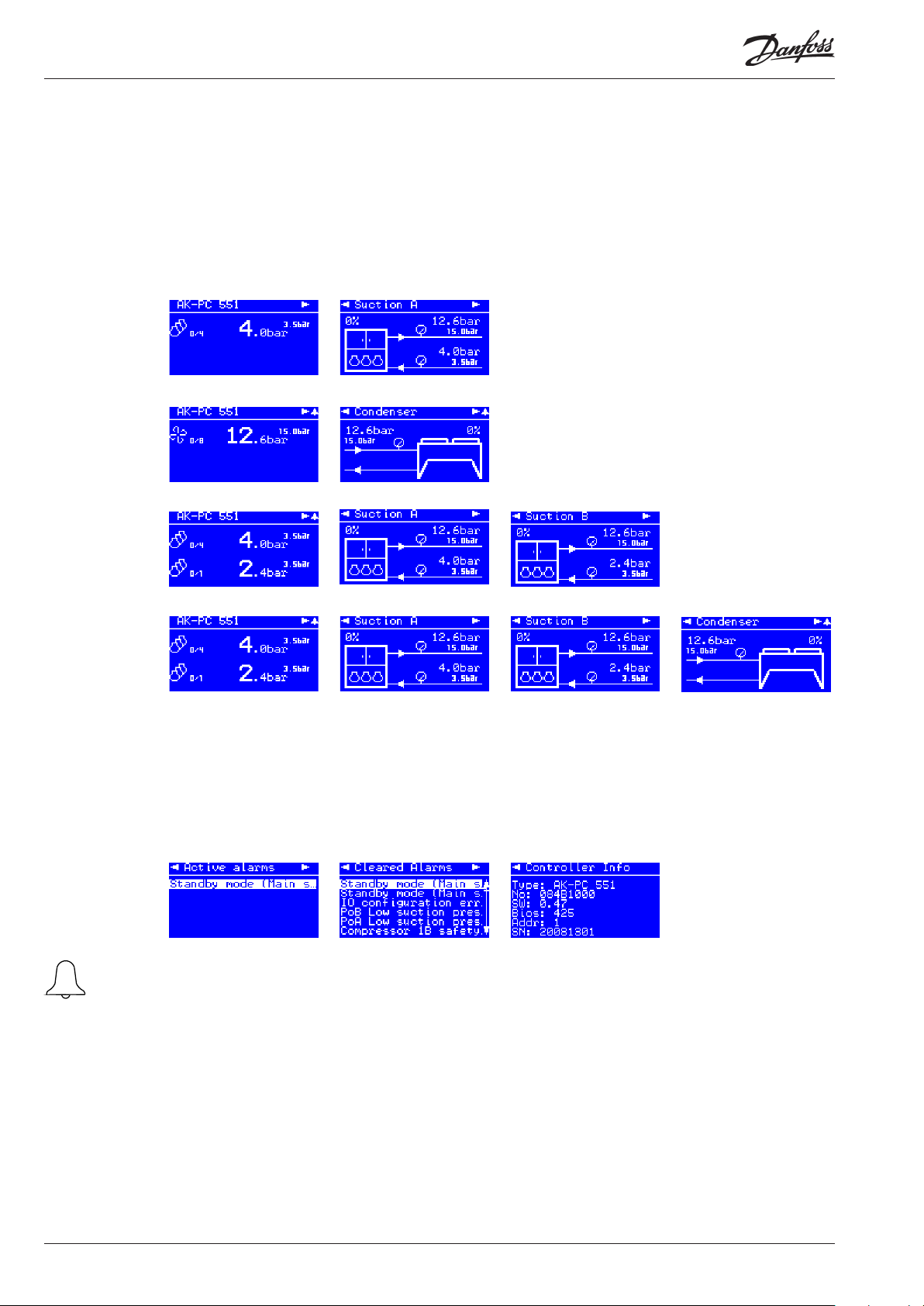
The images in this daily user interface will depend on how the set-up is made. They will illustrate what is regulated.
For example: One or two suction groups, one condenser group, or a combination. See examples below:
1 suction
groupe
1 condenser
group
2 suction groups
2 suction groups
and
1 condenser
group
Each of the four rows above is continued with three additional displays.
The arrow in the top corner of the display shows the way to the next display in the same area
of operation. By clicking the right arrow you can see these three displays:
Active alarms Cleared Alarms Information on the controller
When an alarm is sent
from the controller, you
must advance to this
display to see the
alarm text.
6 User Guide RS8GY402 © Danfoss 2016-11 AK-PC 551
Page 7
Set-up overview
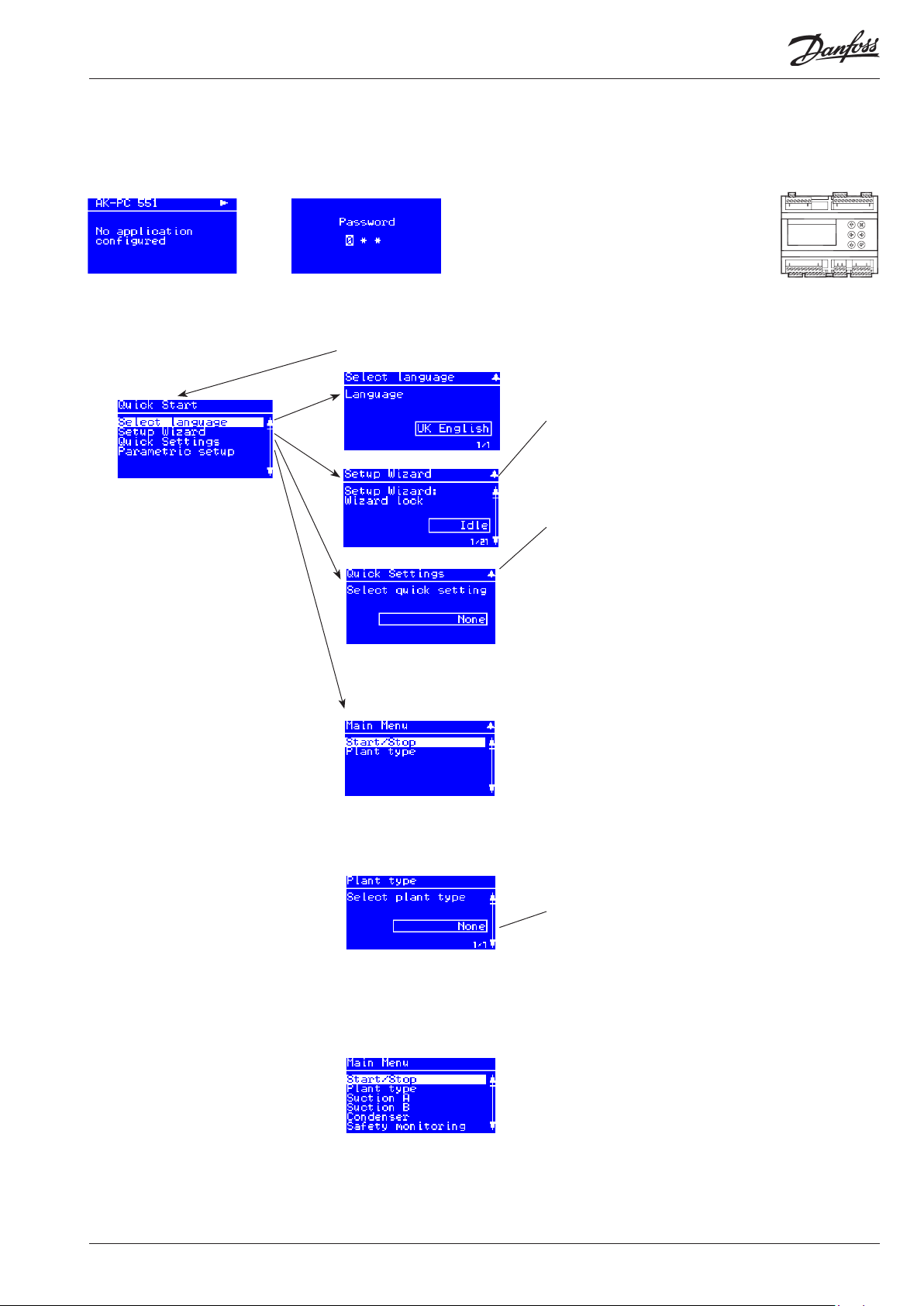
There are three ways in which the controller can be set up. Select the one that is easiest for you: either “Wizard”, “Quick settings” or a
review of “all parameters”.
Start screen upon delivery
Operating principles
1. Select position using arrow keys
2. Select using “Enter”
3. Use the “X” to return
Hold “Enter” down
for 2 seconds to come to
password entry
Select a set-up method. End
by pressing “Enter”
The default password upon
delivery is 300. Use the arrow
keys to set the password. End
by pressing “Enter”
Main Menu
The first setting is the
Plant type
Wizard
Here you will be led through a series of settings, after
which the controller will be ready for start.
Image 1 of 28 is displayed here.
Quick
Select from the different combinations of compressors
and fans here.
Also see the overview on pages 18 and 19.
3CDA + 2CB + FS
2CDA + 2CB + 3F
3CSA + 2CB + FS
2CSA + 2CB + 3F
4CA + 3CB + FS
3CA + 2CB + FS
2CA + 2CB + 3F
4CDA + FS
3CDA + FS
3CDA + 3F
2CDA + 2F
4CSA + FS
Example:
3CDA + 2CB + FS =
3 Compressors,
one Digital,
suction group A
+
2 Compressors,
suction group B
+
one fan,
Speed controlled
4CA + FS
4CA + 4F
3CSA + FS
3CA + FS
3CA + 3F
None
The following options are available here:
2 Comp + 1 Cond = suction group A + B and condenser
Comp. + Cond. = suction group A and condenser
Condenser = condenser only
When the Plant type has
been selected, it will al-
Compressor = suction group A only
None
low several settings to be
made.
For example:
Continue to the next
menus.
All settings are explained
on the pages that follow.
AK-PC 551 User Guide RS8GY402 © Danfoss 2016-11 7
Page 8
Menu
Start/stop
Plant type
Suction A
Main switch Main switch
Start and stop regulating here.
The configuration settings will require that regulating is stopped.
If you try to enter a configuration setting when regulating has started, the controller will
ask if regulating should be stopped.
When all settings have been made and the main switch is set to “ON”, the controller will
enable the display of the various measurements. Regulation will start. (If an external main
switch has been defined, it must also be “ON” before regulating starts.)
Extern Main swich External main switch
It is possible to connect an external switch which can be used to start and stop regulating.
Both the internal and external main switch must be ON before regulating starts.
An external main switch can be defined in the menu “Plant type” - “Main switch via DI”.
Select Plant type Plant settings:
The following must be regulated:
• Compressor group
• Condenser group
• One compressor group (A) + One condenser group
• Two compressor groups (A) and (B) + One condenser group
Refrigerant type Refrigerant setting
Before refrigeration is started, the refrigerant must be defined. You may choose between
the following refrigerants:
R12, R22, R134a, R502, R717, R13, R13b1, R23, R500, R503, R114, R142b, user defined,
R32, R227, R401A, R507, R402A, R404A, R407C, R407A, R407B, R410A, R170, R290, R600,
R600a, R744, R1270, R417A, R422A, R413A, R422D, R427A, R438A, R513A (XP10), R407F,
R1234ze, R1234yf, R448A, R449A, R452A.
Warning: Wrong selection of refrigerant may cause damage to the compressor.
Other refrigerants: Here Setting "user defined" is selected and then three factors - fac1, fac2
and fac3 and temperature glide (if necessary).
Unit of setpoints Device for controlling compressor and condenser
Select pressure or saturation temperature.
(Can be set during initial set-up and must not be subsequently changed.)
Night signal via DI Night time operation via DI signal
Define an external switch here, so that the regulation reference can be raised and lowered
externally.
1. Set the function to “Yes”
2. Go to I/O configuration and select an available digital input. Set this input to
“Night condition”
3. Next, define whether the function is to be active when the signal is ON, or when it is OFF.
Main Switch via DI Main switch via DI
Define an external main switch here, so that regulation can be started and stopped
externally.
1. Set the function to “Yes”
2. Go to I/O configuration and select an available digital input. Set this input to “Main switch”
3. Next, define whether the function is to be active when the signal is ON, or when it is OFF.
Mains frequency Frequency
Set the net frequency
Alarm output Alarm relay
Define an alarm relay here that will be activated in the event of an alarm.
1. Select the alarm priority that will activate the relay
• No relay
• Critical alarm
• Severe alarm
• All alarms
2. Go to I/O configuration and select an available digital output. Set this output to “Alarm”
3. Next, define whether the relay will be active (pulled) when the alarm is ON, or when it is
OFF.
Alarm buzzer Alarm sound
Here the sound generator can be defined to emit a sound in the event of an alarm.
Select which alarm priority will activate the sound generator:
• No buzzer
• Critical alarm
• Severe alarm
• All alarms
(In the event of an alarm, the sound generator can be stopped by moving across the
active alarm screen; see page 6)
Control status Regulation status
SW: 1.6x
On / Off
Fac: None
Fac: None
Temp. / press
Fac: Saturated
DI-demand
No / Yes
Fac: No
DI-demand
No / Yes
Fac: No
50 Hz / 60 Hz
Fac: 50 Hz
DO-demand
Fac: No relay
Fac: No buzzer
8 User Guide RS8GY402 © Danfoss 2016-11 AK-PC 551
Page 9

Control status Read the status of the control circuit here e.g.:
• No comp. - No compressor capacity available
• Normal ctrl - Normal control
• Alarm Comp. - Cannot start compressor due to alarm condition
• ON timer - Cannot stop compressor due to ON timer restriction
• Start timer - Cannot start compressor due to Start timer restriction
• Normal ctrl - Normal control - no compressor staging
• Inj. On Delay - Waiting for injection on delay to expire
• Cascade
• 1st comp del - First compressor run timer
• Pump down - Last compressor running to pump down limit
• Sensor error - Emergency control due to sensor error
• Load shed - Load shedding function active
• Sd High - Capacity control in High Sd safety prevention mode
• Pc High - Capacity control in High Pc safety prevention mode
• Manual ctrl - Capacity control in manual mode
• Main switch OFF - OFF
Actuel zone You will be able to see how the regulation is in relation to the reference here:
P0 error: No regulation
- Zone: The desired pressure is below the reference value
NZ: The pressure is in place in relation to the reference value
+ Zone: The desired pressure is above the reference value
Control temp. The current value of the regulation sensor can be read here
Reference The total regulation reference can be read here
Running capacity Here the connected capacity can be read as a % of total capacity
Requested capacity Here the preferred connected capacity can be read as a % of total capacity
No. of running comp. The number of compressors in operation can be read here
PoA Pressure The measured pressure for the PoA pressure transmitter can be read here
ToA Saturated temp. The measured PoA pressure converted to temperature can be read here
MC PoA offset The size of a reference displacement on Po required from the system unit
(suction pressure optimisation function) can be read here
Pc Pressure The measured pressure for pressure transmitter Pc can be read here
Tc Saturated temp. The measured Pc pressure converted to temperature can be read here
Day / Night status The status of the day/night function can be read here
Load shed The status of the load shed function can be read here
Injection ON A The status of the injection ON signal sent to the evaporator controllers can be read here
MC Load Shedding The status of the load shed signal received from the system device can be read here
MC Night Setback The status of the night increase signal received from the system device can be read here
Control settings Regulation settings
Control mode Regulation type
The regulation is normally set to “Auto”, but it can be changed to “Off” or “Manual”.
When setting to “Manual”, a forced capacity setting can subsequently be entered in %.
Setpoint Enter the set point for the regulation (regulation reference = set point + different offsets) here
An offset can originate from a night increase signal or from an override function on the
system device.
Neutral zone Set the neutral zone around the reference here. Also see the illustration on page 3.
Night offset If necessary, set the value by which the reference will be raised at night.
Keep the setting at 0 if regulating with Po optimisation from a system device.
Max Reference Set the highest permissible regulation reference here
Min Reference Set the lowest permissible regulation reference here
PI control selection Set how quickly the PI regulation must react here: 1 = slowly, 10 = very quickly.
(For “Custom” setting 0, the special settings options will open, i.e. Kp, Tn and time settings
around the neutral zone. These options are only for trained staff.)
Gain factor Kp The amplification factor, Kp (can only be seen and set when the previous menu is set to “0”)
Integration time Tn Integration time Tn (see above)
+ Zone rate of change Change coefficient for + zone (see above)
- Zone rate of change Change coefficient for - zone (see above)
First step runtime At start-up, the cooling system must have time to cool down before PI regulation takes over
the regulation role and can cut in the next compressor.
Set the time before the next compressor may be started here.
MAN / OFF / AUTO
Fac: AUTO
Min: 0 %
Max: 100%
Min: -80°C (-1.0 bar)
Max: 30°C (50 bar)
Fac: -15°C (3.5 bar)
Min: 0,1 K (0.1 bar)
Max: 20 K (5.0 bar)
Fac: 6 K (0.4 bar)
Min: -25 K (-5.0 bar)
Max: 25 K (5.0 bar)
Fac: 0 K (0.0 bar)
Min: -50°C (-1.0 bar)
Max: 80°C (50.0 bar)
Fac: 80°C (40.0 bar)
Min: -80°C (-1.0 bar)
Max: 25°C (40.0 bar)
Fac: -80°C (-1.0 bar)
Min: 0 (custom)
Max: 10
Fac: 5
Min: 0 s
Max: 300 s
Fac: 120 s
AK-PC 551 User Guide RS8GY402 © Danfoss 2016-11 9
Page 10

Pump down Pump-down function
To avoid too many compressor starts/stops at a low load, it is possible to define a pumpdown function for the last compressor. In this case, the compressor will be cut out when the
current suction pressure is down at the set “Pump-down limit Po”.
(The setting must be greater than the safety limit for low suction pressure “PoA Min Limit”.)
Load shed limit Capacity limitation at “low shed signal”
Set how much compressor capacity can be cut in when a signal is received from either a DI
input or a system device via data communication.
Emergency cap. day Emergency capacity in the event of a malfunction of the regulation sensor (suction pressure
sensor)
Set the desired capacity that will apply during daytime operation.
(If the S4 media temperature sensor becomes damaged/defective, use Po for regulation.)
Emergency cap. night Emergency capacity in the event of a malfunction of the regulation sensor (suction pressure
sensor)
Set the desired capacity that will apply during night operation.
(If the S4 media temperature sensor becomes damaged/defective, use Po for regulation.)
Comp. start delay Delay of compressor start after forced closing of expansion valves (at the end of a forced
close signal)
The delay will result in the system device receiving a start signal for all the evaporator controls involved before the first compressor is started.
Injection OFF delay Delay of the forced closing of expansion valves, if the controller calls for cut in of compres-
sors, but the compressors are in a locked situation and therefore cannot start.
Configuration Configuration
Control sensor Select the regulating sensor for the suction circuit:
• Pressure transmitter Po
• Media temperature sensor S4 (brine regulation). (Po is used for safety)
Compressor mode Set the type of compressor to be used for regulation:
• Multi all:****) All compressors have unloaders
• Multi + Single:****) First compressor has unloaders. The remaining ones are one-step units
• Speed+Multi: ***) First compressor is speed-controlled. The remaining ones are with unload-
ers.
• Speed+Single: ***) First compressor is speed-controlled. The remaining ones are
one-step units
• CRII4+Multi **) First compressor is CRII4 compressor. The remaining ones are with unloaders
• CRII4+Single **) First compressor is CRII4 compressor. The remaining ones are
one-step units
• Stream 4+Multi: **) First compressor is a stream compressor. The remaining ones are with
unloaders
• Stream 4+Single: **) First compressor is a stream compressor. The remaining ones are
one-step units
• Digital scroll: *) First compressor is a digital scroll. The remaining ones are one-step units
• Single-step only: All are one-step compressors
• None:
No. of compressors Set the number of compressors on the suction circuit
This is a total amount.
(If both suction groups are selected, the max. number will be 4 for A and 4 for B.)
Lead comp. size Set the nominal compressor capacity for the first compressor (it is defined under
“Compressor mode”)
That is, the capacity of either a “Digital scroll”, “Stream”, “Variable speed CRII” or
“First compressor with unloaders”
Comp. size Set the nominal compressor capacity of the other compressors
For single-step only: All are of the same size, including the first.
For unloader all: All are of the same size, including the first.
VSD Min. speed ***: For speed
Min. speed at which the compressor will cut out
VSD Start speed ***: For speed
Minimum speed at which the compressor will start (must be set to a higher value than
“VSD Min. speed”)
VSD Max speed ***: For speed
Highest permitted speed for compressor
PWM period time *, **: For “Scroll” and “Stream”
Set the period time for the unloader valve (on time + off time)
CRII Period time **: For CRII
Set the period time for the unloader valve (on time + off time)
Yes /No
Fac: No
Min: -80°C (-1.0 bar)
Max: 30°C (50.0 bar)
Facb: -40°C (0.3 bar)
Min: 0 %
Max: 100%
Fac: 100%
Min: 0 %
Max: 100%
Fac: 50%
Min: 0 %
Max: 100%
Fac: 25%
Min: 0 s
Max: 180 s
Fac: 30 s
Min: 0 s
Max: 300 s
Fac: 120 s
AI-demand
Po / S4
Fac: Po
DO-demand /
AO-demand
Fac:
Single step only
DO-demand
Min: 1
Max: 8
Fac: 0
Min: 1 kW
Max: 100 kW
Fac: 1 kW
Min: 1 kW
Max: 100 kW
Fac: 1 kW
Min: 10 Hz
Max: 60 Hz
Fac: 30 Hz
Min: 20 Hz
Max: 60 Hz
Fac: 45 Hz
Min: 40 Hz
Max: 120 Hz
Fac: 60 Hz
Min: 10 s
Max: 20 s
Fac: 20 s
Min: 10 s
Max: 20 s
Fac: 60 s
10 User Guide RS8GY402 © Danfoss 2016-11 AK-PC 551
Page 11

Comp. 1 min cap.
*: For scroll and CRII
Minimum capacity in the time period (without a minimum capacity the compressor
will not be cooled)
Comp. 1 start cap
*: For scroll and CRII
Start capacity: the compressor will only start when the capacity requirement reaches
the value
Comp. 1 Sd temp. *, **: For “Scroll”, “Stream” and CRII
Define whether the controller should monitor the discharge gas temperature Sd from the
compressor (NTC 86K or Pt 1000 Ohm).
Comp. 1 Sd max. *, **: For Scroll, Stream, CRII and yes to “Comp.1 Sd temp”
Set the maximum Sd temperature
No.of unloaders ****: For compressor with unloaders
Set how many unloaders there are on the compressor
Comp. safety input Compressor safety circuit
Define whether a DI input should be reserved for registration of each compressor safety
circuit
LP switch via DI Low pressure safety circuit
Define whether a DI input should be reserved for registration of the signal from an LP switch
Load shedding via DI Load limitation
Define whether a DI input should be reserved for registration of the signal from
a power meter
• None:
• DI: Load limitation must follow a DI input
• Night Mode: Load limitation must follow the status of the day/night signal.
(The day/night signal can be received via a DI input, via time schedule or network.)
Sd disch. gas temp. Shared discharge temperature
Define whether signals from a common Sd sensor on the suction line (Pt 1000) should be
received
Ss suction superheat Monitoring of superheat
Define whether a signal from a common Ss sensor on the suction line should be received
Injection ON fct. Stop injection into evaporators
If the compressors are prevented from starting, stop injection into the evaporators.
Here define whether the function should be active and how the signal should be
communicated.
No: The function is not used
Network: The controller sends a signal to the system unit, which then forwards it to
the evaporator controls
Relay: The function reserves a relay that pulls in if all compressors are stopped.
All evaporator controls must be wired to this signal from the relay.
Compressor timers Compressor timers
Lead comp. Min ON Min. On-time for first compressor
Set a forced On-time here during which the compressor will remain in operation before it
can be switched off again. The setting is to prevent incorrect operation.
To prevent a compressor breakdown, the setting must be made in accordance with the
requirements of the compressor supplier.
Lead comp. Min OFF Min. Off-time for first compressor
Set the forced Off-time during which the compressor must be off before it can be switched
on again. The setting is to prevent incorrect operation.
Lead comp. Restart Min. period of time for re-starting the first compressor.
Set the forced Off-time during which the compressor must be off before it can be switched
on again. The setting is to prevent incorrect operation.
To prevent a compressor breakdown, the setting must be made in accordance with the
requirements of the compressor supplier.
Lead comp. Safety
delay
Delay time before compressor no. 1 cut out for reasons of safety
The time begins when a signal is received on the DI input (configure the DI input via
“Configuration” and “Comp. safety inlet”).
Comp. Min ON Min. On-time for remaining compressors
Set a forced On-time here during which the compressor will remain in operation before it
can be switched off again. The setting is to prevent incorrect operation.
Comp. Min OFF Min. Off-time for remaining compressors
Set the forced Off-time during which the compressor must be off before it can be switched
on again. The setting is to prevent incorrect operation.
Comp. Restart Min. period of time for restarting remaining compressors
Set the forced Off-time during which the compressor must be off before it can be
switched on again. The setting is to prevent incorrect operation.
Min: 10%
Max: 50%
Fac: 10%
Min: 10%
Max: 60%
Fac: 30%
AI-demand
No / Yes
Fac: No
Min: 0°C
Max: 195°C
Fac: 125°C
DO-demand
Min: 1
Max: 3
Fac: 1
DI-demand
Yes /No
Fac: Yes
DI-demand
Yes /No
Fac: No
DI-demand
Yes /No
Fac: No
AI-demand
Yes /No
Fac: No
AI-demand
Yes /No
Fac: No
DO-demand
No /Network /Relay
Fac: No
Min: 0 min
Max: 60 min
Fac: 0 min
Min: 0 min.
Max: 30 min
Fac: 0 min
Min: 1 min.
Max: 60 min
Fac: 4 min
Min: 1 min.
Max: 10 min
Fac: 1 min
Min: 0 min.
Max: 60 min
Fac: 0 min
Min: 0 min.
Max: 30 min
Fac: 0 min
Min: 1 min.
Max: 60 min
Fac: 4 min
AK-PC 551 User Guide RS8GY402 © Danfoss 2016-11 11
Page 12

Suction B
Condenser
Comp. Safety delay Delay time before compressors cut out for reasons of safety
The time begins when a signal is received on the DI input (configure the DI input via
“Configuration” and “Comp. safety inlet”).
Compressor status Compressor status
Comp. 1 Sd gas Read the Sd temperature of the compressor here.
Comp. 1 status Read the operating status for compressor 1 here. The following information may appear:
Alarm - Alarm situation
Main Sw. off - Compressor is stopped
Manual ctrl. - Compressor is cut out on safety input (DI safety input)
High Sd temp. - Stopped due to high Sd temperature
Ready - Compressor is ready to start
OFF timer - Compressor is waiting for Min OFF timer to expire
Min. ON timer - Compressor is waiting for Min ON timer to expire
Running - Compressor is running
Disabled - Compressor has been taken out of operation (compressor service)
Comp. 2.... The same function for the remaining compressors
Compressor capacity Compressor capacity
Comp. 1 cap Read the connected capacity of the compressor (0-100%) here
Comp. 2...... The same function for the remaining compressors
Compressor runhours Compressor run hours
Reset runtime/cycles Reset all of the hour counters and start counters for the subsequent compressors here.
Comp.1 Runtime L Read the total operating time of the compressor (in hours) here
Comp.2..... The same function for the remaining compressors
Compressor cycles Compressor cycles
Comp.1 Cycle total Read the number of times the compressor has been started here
Comp.2..... The same function for the remaining compressors
Compressor service Compressor service
Comp.1 out of service The compressor can be taken out of operation, so that the controller regulates without this
compressor.
No = Normal regulation
Yes = Regulating is carried out without this compressor, and no alarms are generated by it.
Comp.2..... The same function for the remaining compressors
Suction group B. Please see descriptions under suction group A
(Bitzer CRII can not be used in suction group B.)
Control status Regulation status
Control status Here you can read the status of the condenser circuit, e.g.:
• Main Sw. off - Main switch = OFF
• Ready - Capacity control is ready
• Running - Capacity control is in normal run mode
• Capacity control is stopped because all compressors are stopped
• Manual ctrl - Capacity control is set in manual control mode
• High Pc/Sd - Capacity forced to 100% due to High Pc/High Sd prevention functions
• Safety limit - Capacity forced to 100% due to external HP switch/HP safety/Sd safety limit
violation
• Night limit - Capacity control limited due to night silencer limitation
Control temp. The current value of the regulation sensor can be read here
Reference The total regulation reference can be read here
Running capacity Here the connected capacity can be read as a % of total capacity
Requested capacity Here the preferred connected capacity can be read as a % of total capacity
No. of running fans The number of fans in operation can be read here
Tc Saturated temp. The measured Pc pressure converted to temperature can be read here
Pc Pressure The measured pressure for pressure transmitter Pc can be read here
S7 Media Here the measured media temperature with sensor S7 can be read (only if S7 has been
selected as the regulation sensor during “Fan configuration”)
Sc3 air on cond. The measured outdoor temperature with sensor Sc3 can be read here
Heat recovery status Here the status of the heat recovery function can be read
HP safety switch The status of the HP safety switch can be read here
Control settings Control settings
Control mode Regulation type
The regulation is normally set to “Auto”, but it can be changed to “Off” or “Manual”.
When setting to “Manual”, capacity can then be forced set in %.
Setpoint Enter the set point for the condenser regulation here.
Also set a value if regulating with a fluid reference (set point value used in the event of an
outside temperature sensor error).
Min: 1 min.
Max: 10 min
Fac: 0 min
Yes /No
Fac: No
MAN / OFF / AUTO
Fac: AUTO
Min: 0 %
Max: 100%
Min: -25°C (-1.0 bar)
Max: 90°C (159 bar)
Fac: 35°C (15.0 bar)
12 User Guide RS8GY402 © Danfoss 2016-11 AK-PC 551
Page 13

Sc3 offset Temperature offset for regulation with fluid reference.
Regulation reference = Sc3 measurement + Sc3 offset
Min. reference Set the lowest permissible regulation reference here
Max. reference Set the highest permissible regulation reference here
Heat recocery SP Temperature set point for heat recovery function (only when the function is selected during
configuration)
Heat rec. ramp down Ramp-down of regulation reference after heat recovery
Set how quickly the reference for condenser pressure should be made after heat recovery
ends. Enter the change in degrees Kelvin per minute.
Capacity limit night Capacity limitation at night
The speed of the fans can be limited here when regulating using speed control.
During step-by-step activation, the start of the step-by-step process is limited.
Gain factor Kp Amplification factor for PI regulation
If the Kp value is lowered, regulation runs more smoothly
Integration time Tn Integration time for PI regulation
If the Tn value is increased, regulation will run more smoothly
Fan configuration Configuration of fans
Control sensor Selection of regulation sensor:
• Pc pressure transmitter
• S7 media temperature sensor (Pc must be installed for safety monitoring)
Reference mode Set the reference for regulation here
• Fixed reference; the reference here will be the defined set point
• Variable reference; the reference here will follow the outside temperature, which is meas-
ured with Sc3.
Capacity ctrl. mode Set the way in which the fans should be controlled here
• Variable; the fans are controlled by a 0-10 V signal from an analogue output. If it is defined in
“VSD Start via DO”, a relay will be able to start and stop the frequency converter.
• Step; on/off control of fans will be via relays
• Variable + step. The signals are parallel, so external wiring can switch over to step, e.g. if the
frequency converter fails.
No. of fans Enter the number of fans here.
For step-by-step activation, select the number of relays. The relays will cut in/out sequentially,
e.g. 123-321.
For speed control, select 1 or higher. No relay is reserved, but the setting makes it possible to
define the monitoring of fans.
Control type Normally, PI-regulation is used, but this can be changed to a P-regulation if the design of the
system necessitates this.
• PI Ctrl: Regulation is carried out here with as little deviation between the reference and
measurement as possible.
• P-band ctrl: Capacity is cut in here after proportional regulation.
VSD Start speed Set the start value of the frequency converter here.
The value must be higher than the VSD min. speed value.
VSD Min speed Set the minimum speed of the frequency converter here.
If lower capacity is required, this minimum speed should be maintained all the way down to
0% capacity. At 0% capacity, the system stops completely.
VSD Start via DO Define whether a relay should be connected to the frequency converter start/stop function
here:
• No: no relay
• Yes: the relay pulls in when the frequency converter needs to be in operation.
Monitor fan safety Define whether safety monitoring of the condenser fans should be performed.
• None: no monitoring
• Individual: a DI input is reserved for each fan
• Common: a DI input that is common for all condenser fans is reserved .
Fan at comp. OFF Select the way in which the fans should be controlled when all the compressors have
stopped.
• Normal regulation: Fans to be controlled in compliance with normal regulation.
• Energy-optimised: Fan capacity will be maintained at between 0 and 49% in a p-band of
5-15 K above reference.
Heat recovery via DI Define whether a heat recovery cycle should be started with a signal on a DI input here.
• No: No function
• Yes: A DI input is reserved. When a signal is registered, the heat recovery function reference
will become active.
Min: 0 K
Max: 20 K
Fac: 6 K
Min: -25°C (-1.0 bar)
Max: 100°C (159 bar)
Fac: 10°C (5.0 bar)
Min: -25°C (-1.0 bar)
Max: 100°C (159 bar)
Fac: 50°C (35.0 bar)
Min: 20°C (-1.0 bar)
Max: 90°C (159 bar)
Fac: 50°C (30.0 bar)
Min: 0,1 K
Max: 100 K
Fac: 1 K
Min: 0 %
Max: 100%
Fac: 100%
Min: 0.5
Max: 50
Fac: 10
Min: 10 s
Max: 900 s
Fac: 180 s
AI-demand
Pc / S7
Fac: Pc
AI-demand
Setpoint / Floating
Fac: Setpoint
AO-demand
Step / Speed
Fac: Step
DO-demand
Min: 0
Max: 8
Fac: 0
P / PI
Fac: PI
Min: 0%
Max: 60%
Fac: 35%
Min: 0%
Max: 40%
Fac: 20%
DO-demand
Yes / No
Fac: No
DI-demand
Common /Individual
Fac: None
Normal/Optimized
Fac.: Normal
DI-demand
Yes / No
Fac: No
AK-PC 551 User Guide RS8GY402 © Danfoss 2016-11 13
Page 14

Fan status Fan status
Fan speed Here a reading of the desired condenser fan capacity is provided in %
VSD start/stop Fan operation (frequency converter) status can be read here
Fan 1 The status of relay 1 (step 1 or relay for frequency transformer) is indicated here
Fan 2..... The status of relay 2, 3, etc. (step 2, 3, etc.) is indicated here
Fan Runhours Fan Run hours
VSD Runtime total The number of hours the fans have been in operation (frequency converter operation) can
Fan 1 Runtime total The number of hours fan relay 1 has been in the On-position (frequency transformer
Fan 2..... The same function for the remaining fans
Fan cycles Number of fans starting
VSD cycles The number of fan starts (frequency converter) can be read here
Fan 1 Cycles total The number of times fan relay 1 has been in the On-position (frequency converter
Fan 2... The same function for the remaining fans
Safety monitoring
PoA Min limit Safety limits for min. PoA
PoA Max alarm Alarm limit for high PoA
PoA Max delay Delay time for issuing a PoA max. alarm
Superheat Min lim A Alarm limit for insufficient superheating
Superheat Max lim A Alarm limit for excess superheating
Superheat delay A Delay time before alarm is generated for insufficient or excess superheating
SdA Max limit Safety limit for max. SdA
PoB Min limit Same settings for a suction group B
PoB Max alarm
PoB Max delay
Superheat Min lim B
Superheat Max lim B
Superheat delay B
SdB Max limit
Pc max limit Safety limit for max. Pc
Tc Max limit Safety limit for max. Tc
Pc Max delay Time delay for Pc max. alarm
HP switch via DI Signal from an HP switch
Safety restart time Delayed start-up following safety cut-out
Sensor alarm reset Reset alarm after sensor error
be read here
has been On) is indicated here
has been on) is indicated here
The controller checks that the fan has been active within the last 24 hours. If not,
it will be forced to start in 5 minutes, in rotation with the other fans.
If a low value is registered, all compressors will cut out
If a high value is registered, an alarm will be generated
If a higher value is registered during a load limitation, the load limitation will be cancelled
until Po has returned to the reference.
(Superheating is measured in the suction line by PoA and SsA.)
At 10 K under the set value, the compressor capacity will be reduced, and the entire
condenser capacity will cut in.
If the threshold is exceeded, the entire compressor capacity will cut out.
If Pc exceeds the value set here minus 3 K, the entire condenser capacity will cut in,
and compressor capacity will be reduced by 1/3 for every 30 seconds.
If Pc exceeds the threshold value, the entire compressor capacity will immediately cut out,
and an alarm will be generated when the delay time expires.
The above setting for Pc max. limit can be read as a temperature here.
The alarm will only be generated when the time delay has elapsed.
Define whether a signal is to be received on a DI input here.
The status of the signal can be read, and an alarm can be linked to it.
Once a signal is received, compressor capacity will cut out.
If a safety cut-out has occurred due to “Sd max. limit”, “Pc max. limit” or “Po min. limit”,
the compressors must be kept stopped for a defined period of time. The amount of
time can be set here.
When a sensor error has occurred, an O.K. signal must be registered within a specified
number of minutes before the controller resets the alarm. The regulation will be resumed
as soon as the sensor signal is O.K.
Min: -120°C (-1.0 bar)
Max: 30°C (159 bar)
Fac: -40°C (0.5 bar)
Min: -30°C (-1.0 bar)
Max: 100°C (159 bar)
Fac: 100°C (5.0 bar)
Min: 0 min.
Max: 240 min.
Fac: 5 min.
Min: 0 K
Max: 20 K
Fac: 0 K
Min: 20 K
Max: 80 K
Fac: 80 K
Min: 0 min.
Max: 60 min.
Fac: 5 min.
Min: 0°C
Max: 195°C
Fac: 80°C
Min: -1 bar
Max: 159 bar
Fac: 40 bar
-
Min: 0 min.
Max: 240 min.
Fac: 0 min.
DI-demand
Yes /No
Fac: No
Min: 0 min.
Max: 60 min.
Fac: 1 min.
Min: 0 min.
Max: 30 min.
Fac: 10 min.
14 User Guide RS8GY402 © Danfoss 2016-11 AK-PC 551
Page 15

General functions
Digital input alarms General on/off alarm
No. of DI alarm fct. 1. Define how many general alarms there should be
DI1 Alarm text The following alarm texts can be selected:
Di1 Alarm delay Delay time for the DI1 alarm
DI2....3 The same setting option for a DI2 alarm and a DI3 alarm.
Thermostat General thermostat
Thermostat cut in Here set the temperature value at which the thermostat will cut in
Thermostat cut out Here set the temperature value at which the thermostat will cut out
Thermostat temp. The current sensor temperature of the thermostat can be read here
System
Display Select views on the display
Language Choose from the following languages:
Engineering units Device
Pressure units Pressure unit
Temperature units Temperature unit
Time format Time format
Screen saver time Screen saver time
User logout time Log-off time
Display contrast Adjust contrast
Here you can define up to 3 alarms that are not related to the regulation function. When
a signal is received on the input, the controller will generate an alarm, but only after the
related delay time has elapsed.
The alarm can be defined to be active for an on/off signal.
An alarm text can be entered for the alarm. This text can be seen in the display and can
be sent to a system device.
1. Define the appurtenant alarm text
2. Set the delay time for the alarm
3. Go to I/O configuration and select an available digital input. Set this input to “General
alarm (no.)”
4. In the subsequent menu, define whether the alarm is to be active for an on/off signal.
• General alarm
• High pressure alarm
• Low pressure alarm
• High temperature alarm
• Low temperature alarm
• Oil level alarm
• Oil temperature alarm
• Liquid level alarm
• Leak detection alarm
• Inverter fault
One general thermostat can be defined.
1. Define the function
2. Go to I/O configuration and select an available analogue input. Set this input to
“Saux thermostat”
3. Go to I/O configuration and select an available relay output. Set the output to “thermostat”.
(But only once the sensor input has been defined and the main switch has been set to “On”.)
English, German, French, Danish, Spanish, Italian, Portuguese, Dutch, Russian, Polish, Czech,
Turkish, Hungarian, Croatian, Serbian, Romanian
Select SI or Imperial (when setting the compressor capacity with U.S. values).
Select bar or PSIG
Select °C or °F.
Choose 12-hour or 24-hour format.
If no buttons have been pushed for a specific period of time, the light in the display will be
minimised.
The light level will be restored upon renewed activity.
If buttons have not been pressed within a specified period of time, the screen will return to
the overview display. Afterwards, the user will have to log on again.
If the time is changed, the new time will apply the next time the user logs in.
If you log out here without waiting for the time-out period to elapse, go to the overview
display and hold down the “X” button for 3 seconds.
DI-demand
Min: 0
Max: 3
Fac: 0
Min: 0 min.
Max: 360 min.
Fac: 5 min.
AI-demand
Yes / No
Fac: No
Min: -50°C
Max: 150°C
Fac: 5°C
Min: -50°C
Max: 150°C
Fac: 10°C
-
-
Fac: UK English
SI / Imperial
Fac: SI
Bar / PSIG
Fac: bar
°C / °F
Fac: °C
12 / 24
Fac: 24 h
Min: 1 min.
Max: 60 min.
Fac: 1 min.
Min: 1 min.
Max: 60 min.
Fac: 2 min.
Min: 0
Max: 100
Fac: 30
AK-PC 551 User Guide RS8GY402 © Danfoss 2016-11 15
Page 16

Password Access code
Password level 1
Password level 2
Password level 3
Real time clock Date and time
Weekly schedule Weekly plan
Monday open Time of opening, Monday
Monday close Time of closing, Monday
Tuesday op..... Times for remaining weekdays
Network Network
Modbus Address Set the address of the controller here if it is connected to a system device via data communi-
Baudrate The system unit usually communicates with 38.4.
Serial mode The value must not be changed
Reset to factory Return to factory settings
I/O configuration
Here you can select functions for the individual inputs and outputs. To prevent faulty settings, only select functions that
have been set up via the configuration menus for the suction groups and the condenser.
For digital outputs, define whether the function will be active for an activated or deactivated relay.
For digital inputs, define whether the function/alarm will be active for an interrupted or shut-off switch.
For analogue outputs, define whether the output signal should be 0-5 V or 0-10 V
For analogue inputs, define:
Temperature sensors:
Normally, the sensor type is a Pt1000 model, but for digital scroll/stream discharge gas temperature monitoring, an NTC
86K@25°C can also be selected.
Calibration value (+/- 10°C)
Pressure sensors:
Signal type: 0-20mA, 4-20mA, AKS32 (1-5V) or AKS32R (10-90% ratiometric of 5 V supply voltage)
Minimum and maximum pressure range
Calibration value (+/- 5.0 bar)
If you have used “Quick configurations” or “Wizard” to set up the controller, the inputs and outputs will be automatically
set up (for additional information, see the “Quick configuration” or “Wizard” sections)
Limitations:
PWM outputs for digital scroll or stream compressors can only be selected on DO5 or DO6
Pressure transmitters with a current signal of 0-20 mA or 4-20 mA must be placed on analogue inputs AI1-AI4
Please note:
If a function has been connected to an input or output and is subsequently deselected in the configuration, the function
in question will be marked with an exclamation mark (!). In this case, you must either activate the function in the configuration, or deselect the function on the input or output in question.
Digital outputs
1:
2:
3:
4:
.
.
8:
Digital inputs
1:
2:
3:
..
8:
The settings in the controller can be protected with three levels of access codes.
Level 1: End user settings, such as changing the weekly plan
Level 2: Adjusting installer level
Level 3: Configuration of system settings (configuration menu)
The access code is a number between 001 and 999.
Used by weekly plan and alarm function.
Set the opening and closing hours of the store here
The times can be used to change the regulation reference for suction pressure and for lower
fan speeds at night.
cation.
If it is changed in the system unit to for example, "SLV" mode (19.2), setting must also be
changed to 19.2 here in the controller.
If this function is set to “YES”, all settings will be returned to factory default settings, and the
alarm list will be cleared.
On/off outputs
When a function that needs to use an output is defined, it will be possible to select
this function on one of the available relay outputs.
Select a relay and continue with the setting. In the last setting you will have the option
of selecting the function you wish to connect to the relay and whether the function is to
be active when the relay is activated or deactivated. Attention! Relay outputs must not be
inverted at unloader valves. The controller inverts the function itself.
There will be no voltage at the bypass valves when the compressor is not in operation.
Power is connected immediately before the compressor is started.
If it is a function that requires frequent switching between on/off (e.g. unloader on a scroll
compressor, a Stream or a Bitzer CRII), use the solid state relay for this connection. There are
solid state relays on output numbers 5 and 6.
On/off inputs
When a function is defined that uses an input, it will be possible to select this function
on one of the available on/off inputs.
Select an input and continue on into the setting. In the final setting you will have be able
to select which function you wish to connect to the input.
Fac: 100
Fac: 200
Fac: 300
Year, month, date
Hours, minutes
-
Hours, minutes
Hours, minutes
-
-
Min: 0 1
Max: 120
Fac: 1
Fac: 384
Fac: 8E1
On
Off
On
Off
16 User Guide RS8GY402 © Danfoss 2016-11 AK-PC 551
Page 17

Analog outputs
3:
4:
Analog inputs
1:
2:
3:
4:
.
.
8:
I/O Status
Digital outputs
1:
.
8:
Digital inputs
1:
.
8:
Analogue outputs
3:
4:
Analog inputs
1:
.
8:
I/O Summary
DO: Max 8, Used:__
DI: Max 8, Used:__
AO: Max 2, Used:__
AI: Max 8, Used:__
I/O Manual control
Digital outputs Manual control of a relay output
Analog outputs Manual control of analogue output
Alarm priorities
General
Standby mode:
Sensor error:
Refrigerant:
Output in MANUAL:
Suction group A
Low pressure:
High pressure:
Compressor safety:
Suction group B
Low pressure:
High pressure:
Compressor safety:
Condenser
High pressure:
Fan safety:
0-10 V outputs
When a function has been defined that needs to use a variable voltage outlet, it will be possible to select this function on one of the available AO outputs (only AO3 and AO4
are available).
Select one of the two outputs and continue on in the setting process. In the last setting you
will have the option of selecting which function you wish to link to the output.
Analogue inputs
When a function is defined that needs to use a temperature sensor or a pressure transmitter,
it will be possible to select this function on one of the available AI inputs.
Select an input and continue on into the setting. In the final setting you will be able to select
which function you wish to connect to the input.
Saux is a sensor for a general thermostat.
(A type AKS 2050 pressure transmitter, for high pressure, emits a signal as an AKS 32R.)
Status of on/off outputs
Here you can see if the function is on or off.
Status of on/off inputs
Here you can see the status of the function/alarm.
Status of analogue outputs
Here you can see the size of the output signals as a % of max. signal.
Status of analogue inputs
Here you can see pressure and temperature values received by the controller.
The values include calibration
Inputs and outputs used
Here you can see how many of the different inputs and outputs are available.
You can also compare this amount with how many have been configured.
If too many have been defined, an exclamation mark (!) will appear.
Under normal regulation, the function of the relay will be in “Auto”.
In the event of an override, the function will be switched to either “On” or “Off”.
Remember to switch to “Auto” when the override is to be completed.
During normal regulation, the function of the output will be “Auto”.
In the event of an override, the function must first be changed to “Manual”,
after which the output signal can be changed from 0-100%.
Remember to switch to “Auto” when the override is to be completed.
Alarm priorities
The controller will issue an alarm notification if a specific incident occurs.
Each incident is set to indicate the importance of each alarm, but it is possible to modify the
importance of each. Choose from between the following priority levels:
Critical: Important alarms that require a high level of attention.
Severe: Alarms of intermediate importance
Normal: No important alarms
Disable: Alarms set to this priority level will be cancelled.
Factory setting for the alarm can be seen on page 21.
0-10 V
0-5 V
Pressure signal:
AKS 33
AKS 32R
AKS 32
2-10 V
0-20 mA
0-10 V
0-5 V
Temperature signal:
NTC-86K
Pt 1000 ohm
None
Auto / On / Off
Auto / Man
0-100%
Critical
Servere
Normal
Disable
AK-PC 551 User Guide RS8GY402 © Danfoss 2016-11 17
Page 18

Quick setup
Quick configurations This setting will reserve inputs and outputs for the following compressors and fans:
The various connections are shown on the next page.
App. no. Display Suction group A Suction group BCondenser
Speed Digital
(Scroll / steam)
17 3CDA + 2CB + FS 1 2 2 x
16 2CDA + 2CB + 3F 1 1 2 3
15 3CSA + 2CB + FS 1 2 2 x
14 2CSA + 2CB + 3F 1 1 2 3
13 4CA + 3CB + FS 4 3 x
12 3CA + 2CB + FS 3 2 x
11 2CA + 2CB + 3F 2 2 3
10 4CDA + FS 1 3 x
9 3CDA + FS 1 2 x
8 3CDA + 3F 1 2 3
7 2CDA + 2F 1 1 2
6 4CSA + FS 1 3 x
5 4CA + FS 4 x
4 4CA + 4F 4 4
3 3CSA + FS 1 2 x
2 3CA + FS 3 x
1 3CA + 3 F 3 3
0 None After making a selection, the setting will return to “None”
After making a selection you must:
1. Set the type of refrigerant
2. Check the types of pressure transmitters
3. Check the min. and max. settings on the pressure transmitters
Factory setting:
Po A/B = AKS 32R, min=-1.0 bar, max.=12 bar
Pc = AKS 32R, min. = -1.0 bar, max. = 34 bar
SdA = NTC 86K
Setup Wizard This wizard will lead you through the necessary settings, i.e. a total of approximately
20 to 35 display screens, depending on what is selected along the way.
The selection will also result in a connection to a given input and output. You yourself
will see this connection in the IO configuration menu. If applicable, see page 20.
1-step 1-step Step Speed
18 User Guide RS8GY402 © Danfoss 2016-11 AK-PC 551
Page 19

Fan
C1A C2A C3A C1B C2B Main
safe.
Fan
safe.
Fan
safe.
Fan
safe.
safe.
Fan
safe.
Fan
safe.
Fan
safe.
Fan
safe.
Fan
safe.
Fan
safe.
Fan
safe.
Fan
safe.
Fan
safe.
Fan
safe.
Fan
safe.
Fan
safe.
Sw.
Sw.
Sw.
Sw.
C1A C2A C1B C2B Main
Digi
Digi
Sw.
Sw.
Sw.
Sw.
Sw.
Sw.
Sw.
Sw.
Sw.
Sw.
Sw.
Sw.
C1 C2 C3 C4 Main
C1 C2 C3 Main
C1 C2 C3 Main
C1 C2 Main
Digi
Digi
Digi
Digi
On/Off Analog Analog Digital
DO1 DO2 DO3 DO4 DO5 DO6 DO7 DO8 AO3 AO4 AI1 AI2 AI3 AI4 AI5 AI6 AI7 AI8 DI1 DI2 DI3 DI4 DI5 DI6 DI7 DI8
PoA PoB Pc Sc3 SdA
Alarm Fan
C2B Fan
Speed
VSD
Fan1 Fan2 Fan3 PoA PoB Pc Sc3 SdA
PWM
PWM
PoA PoB Pc Sc3 C1A C2A C3A C1B C2B Main
Fan
Alarm C1A
PoA PoB Pc Sc3 C1A C2A C1B C2B Main
Speed
Speed
VSD
PoA PoB Pc Sc3 C1A C2A C3A C4A C1B C2B C3B Fan
Speed
PoA PoB Pc Sc3 C1A C2A C3A C1B C2B Main
Speed
Alarm Fan
Speed
VSD
PoA Pc Sc3 SdA
Alarm Fan
Fan
PoA Pc Sc3 SdA
Speed
Alarm Fan
VSD
Fan
PWM
Speed
VSD
Fan2 Fan3 Alarm PoA Pc Sc3 SdA
PWM
PWM
Alarm PoA Pc Sc3 SdA
PWM
PoA Pc Sc3 C1 C2 C3 C4 Main
Fan
Alarm C1
PoA Pc Sc3 C1 C2 C3 C4 Main
Speed
Speed
Alarm Fan
VSD
Speed
VSD
PoA Pc Sc3 C1 C2 C3 Main
Fan
Alarm C1
PoA Pc Sc3 C1 C2 C3 Main
Speed
Speed
Alarm Fan
VSD
Speed
VSD
App. no. Display Output Input
Connections used in “Quick configurations”
17 3CDA + 2CB + FS C1A C2A C3A C1B C1A
16 2CDA + 2CB + 3F C1A C2A C1B C2B C1A
15 3CSA + 2CB + FS C1A C2A C3A C1B C2B Fan
14 2CSA + 2CB + 3F C1A C2A C1B C2B Fan1 Fan2 Fan3 Alarm C1A
13 4CA + 3CB + FS C1A C2A C3A C4A C1B C2B C3B Alarm Fan
12 3CA + 2CB + FS C1A C2A C3A C1B C2B Fan
11 2CA + 2CB + 3F C1A C2A C1B C2B Fan1 Fan2 Fan3 Alarm PoA PoB Pc Sc3 C1A C2A C1B CB2 Main
10 4CDA + FS C1 C2 C3 C4 C1
9 3CDA + FS C1 C2 C3 C1
8 3CDA + 3F C1 C2 C3 Fan1 C1
7 2CDA + 2F C1 C2 Fan1 Fan2 C1
6 4CSA + FS C1 C2 C3 C4 Fan
5 4CA + FS C1 C2 C3 C4 Fan
4 4CA + 4F C1 C2 C3 C4 Fan1 Fan2 Fan3 Fan4 PoA Pc Sc3 C1 C2 C3 C4 Main
3 3CSA + FS C1 C2 C3 Fan
2 3CA + FS C1 C2 C3 Fan
1 3CA + 3 F C1 C2 C3 Fan1 Fan2 Fan3 Alarm PoA Pc Sc3 C1 C2 C3 Main
0 None
Example of display view:
3CDA + 2CB + FS = 3 compressors, one is digital, suction group A + 2 compressors, suction group B + one fan, are speed-controlled
AK-PC 551 User Guide RS8GY402 © Danfoss 2016-11 19
Page 20

Connections when using Setup Wizard
If you have used the Setup Wizard for the configuration, the controller will automatically assign the selected functions
to inputs and outputs in accordance with the following prioritised order:
Digital outputs (DO1-DO8):
• Pulse output for control of the
capacity valves for digital scroll,
stream or Bitzer CRII will be
located on solid state outputs
DO5 and DO6
• Compressor start and unloaders for suction groups A and B,
respectively
• Fans
• Injection ON
• Alarm
Digital inputs (DI1-DI8):
• Compressor safety inputs for suction groups A and B, respectively
• Fan safety input
• External main switch (start/stop)
• HP safety switch
• LP safety switch for suction
groups A and B, respectively
• Night status
• Heat recovery
• Load sheeding
• General alarm inputs DI1-DI3
Analogue outputs (AO3-AO4)
• Compressor speed control for
suction groups A and B, respectively
• Condenser speed control
The assignment of functions on the respective inputs and outputs can be regulated
in “IO configuration”. Here is an example of 3 compressors and 3 fans:
Analogue inputs (AI1-AI8)
• PoA and PoB suction pressure is
located on AI1 and AI2, respectively
• Pc condensation pressure is
located on AI3
• Sc3 outside temperature is
located on AI4
S4A and S4B media temperature
• S7 media temperature, condenser
• Sd comp. 1 discharge gas temperature for digital scroll/stream
compressor for suction groups A
and B, respectively
• Ss suction gas temperature for
section groups A and B, respectively
• Sd discharge gas temperature
for suction groups A and B,
respectively
• Saux for general thermostat
In this image you can see how
many outputs and inputs your
settings have provided.
20 User Guide RS8GY402 © Danfoss 2016-11 AK-PC 551
Page 21

Alarm list
Alarm text Reason Priority
General alarms
Standby mode (Main sw. OFF) Alarm when control is stopped by internal or external Main Switch (DI input "Main Switch") Standby mode Normal
PoA sensor error Pressure transmitter signal from PoA defective
PoB sensor error Pressure transmitter signal from PoB defective
S4A sensor error Temperature signal from S4A media temp. sensor defective
S4B sensor error Temperature signal from S4B media temp. sensor defective
SsA sensor error Temperature signal from SsA suction gas temp. defective
SsB sensor error Temperature signal from SsB suction gas temp. defective
SdA sensor error Temperature signal from SdA discharge gas temp. Sd defective
SdB sensor error Temperature signal from SdB discharge gas temp. Sd defective
Pc sensor error Pressure transmitter signal from Pc defective
S7 sensor error Temperature signal from S7 media sensor on condenser defective
Sc3 sensor error Temperature signal from Sc3 air on condenser defective
Sd Comp. 1A sensor error Temperature signal from "Sd comp. 1A" discharge gas temp. on digital scroll/Stream compressor is
Sd Comp. 1B sensor error Temperature signal from "Sd comp. 1B" discharge gas temp. on digital scroll/Stream compressor is
Saux - sensor error Temperature signal from Saux thermostat sensor is defective
Refrigerant not selected Alarm if no refrigerant has been selected Refrigerant not set Normal
Output in manual mode An output is set in manual mode Output in MAN mode Normal
IO configuration error Not all inputs and output functions have been assigned to hardware Inputs or outputs* (can not be set) Normal
GA1 - "Alarm text" Alarm on general alarm input DI 1 (DI input "Gen. Alarm 1 - alarm text depend upon configured text) General alarm 1 Normal
GA2 - "Alarm text" Alarm on general alarm input DI 2 (DI input "Gen. Alarm 2 - alarm text depend upon configured text) General alarm 2 Normal
GA3 - "Alarm text" Alarm on general alarm input DI 3 (DI input "Gen. Alarm 3 - alarm text depend upon configured text) General alarm 3 Normal
Suction A alarms
PoA Low suction pressure Minimum safety limit for suction pressure PoA has been violated
LP A safety switch cut out Low safety limit for external low pressure switch has been violated (DI input "LP switch A")
PoA High suction pressure High alarm limit for PoA has been exceeded High pressure PoA Critical
SsA High superheat Superheat in suction line A too high (measured by PoA and SsA)
SsA Low superheat Superheat in suction line A too low (measured by PoA and SsA)
SdA High discharge temp. Safety prevention limit for SdA discharge temperature has been exceeded (10K below safety limit) High disch. temp.SdA Critical
Comp. 1A High disch. temp Safety limit for discharge gas temperature of digital scroll/Stream/CRII compressor has been exceeded
Compressor 1-8A safety cut
out
Suction B alarms
PoB Low suction pressure Minimum safety limit for suction pressure PoB has been violated Low pressure PoB
LP B safety switch cut out Low safety limit for external low pressure switch has been violated (DI input "LP switch B")
PoB High suction pressure High alarm limit for PoB has been exceeded High pressure PoB Critical
SsB High superheat Superheat in suction line B too high (measured by PoB and SsB)
SsB Low superheat Superheat in suction line B too low (measured by PoB and SsB)
SdB High discharge temp. Safety prevention limit for SdB discharge temperature has been exceeded (10K below safety limit) High disch. temp.SdB Critical
Comp. 1B High disch. temp Safety limit for discharge temperature of digital scroll/Stream compressor has been exceeded
Compressor 1-4B safety cut
out
Condenser alarms
Pc High condensing pressure High prevention safety limit for condensing pressure Pc has been violated (3K below safety limit)
HP safety switch cutout High safety limit for external high pressure switch has been violated (DI input "HP switch")
Common fan safety cut out A Fan is reported defective via common safety input (DI input "Fan safety")
Fan 1 safety cut out Fan no. 1-8 is reported defective via individual safety input (DI input "Fan 1-8 safety")
defective
defective
Compressor no. 1-8 A has been cut out on general safety input (DI input "Comp.1-8 A safety")
Compressor no. 1-4 B has been cut out on general safety (DI input "Comp.1-4 B safety")
setting
Sensor error Normal
Low pressure PoA Normal
Superheat A Normal
Compressor safety A Normal
Superheat B Normal
Compressor safety B Normal
High pressure Pc Critical
Fan safety Normal
Default
value
Normal
* The alarm "IO configuration error" is activated if not all IO functions have been assigned to a hardware Input or output.
Often the reason is that too many functions have been selected via the configuration of the controller.
Go to the menu point "Main menu => IO status => IO summary".
In this screen you can see if you have configured too many functions of a certain type - indicated by an exclamation mark " ! "
Please refer to the screen example, were too many DO functions have been configured.
Solve the problem by adapting the DO functions to the max. No of DO outputs.
Sensor alarms
Sensor alarms shut off automatically when the sensor has been O.K. for 10 minutes.
If you have corrected the sensor error and want to perform a manual, forced removal of the alarm, go to the “Alarm detail display”
Press and hold the “X” key for 2 seconds here.
AK-PC 551 User Guide RS8GY402 © Danfoss 2016-11 21
Page 22

ERR31
Alarm on the external display - MMIGRS2
If the communication to the display is not carried out correctly, it will send
an “ERR31” error notification.
This may be caused by the displayed terminations not being installed, or
that there have been interruptions in data communication during the time
when the display retrieves the basic information from the controller.
Once the terminations have been inspected, you should then check the
software version of the external display. This is done by holding down
the Enter key and the X key for 5 seconds, until the Bios menu appears.
Next, press the X key and read off the software version in the bottom right
corner. The software version must be 1.13 or newer.
Once the display’s software version has been checked, check the display’s
settings as follows:
1. Hold the Enter key and the X key down for 5 seconds, until the Bios
menu appears.
2. Select the “MCX selection” menu
- Select the “Clear UI” line and press Enter
- Select the “Autodetect” line and press Enter
3. Press the X key to return to the Bios menu
4. Select the “COM selection” menu
- Select the “CAN” line and press Enter
5. Press the X key to return to the Bios menu
6. Select the “Start up mode” menu
- Select the “Remote application” line and press Enter
7. Press the X key to return to the Bios menu
8. Select the “CAN” menu
- Select the “Baudrate” line and then select the “Autobaud” setting and
press Enter
- Select the “Node ID” line and set the value to 126 and press Enter
9. Press the X key to return to the Bios menu
10. Select the “Application” menu and press Enter.
The display will once again retrieve data from the controller. This process
will take about 5 minutes.
22 User Guide RS8GY402 © Danfoss 2016-11 AK-PC 551
Page 23

Connections
Connection, lower level Connection, upper level
Separate
supply!
Electric noise
Signal cables for sensors, DI inputs, data communication
DO DO1 DO2 DO3 DO4 DO5 DO6 DO7 DO8 Σ 1-8
I Max. 10 A
U All 24 V or all 230 V a.c.
Supply Voltage.
(3.5)
10 A
(3.5)
6 A
(4)
6 A
(4)
0.5 A
min. 50 mA
Ioff < 1,5 mA
0.5 A
min. 50 mA
Ioff < 1,5 mA
6 A
(4)
6 A
32 A
(4)
AO - Analogue output, 2 pcs. AO3 - AO4
The supply voltage is either 24 V or 110-230 V. See the label on
the reverse side of the controller.
÷ = Plugs normally not used
However, if connecting to an external display, a jumper must
be inserted between the connections "H" and "R".
Must be used when using a frequency converter or EC motors.
Connect 24 V on N and L (separate supply). Avoid earth fault
current. Use double-insulated transformer. The secondary side
must not be earthed.
Obtain 0-10 volts from terminals N and AO3, respectively N and
AO4. PAY ATTENTION TO THE POLARITY of N.
and display must be kept separate from high voltage
(230 V) electric cables:
- Use separate cable trays
- Keep a distance between high voltage and signal cables
of at least 10 cm
- Cables longer than 3 m at the DI input should be avoided
Warning
The supply voltage of AI may not share
the signal with other controllers.
Modbus
It is important that the installation of the data communication
cable be done correctly. Cf. separate literature No. RC8AC.
Remember termination at the bus termination.
AI - Analogue inputs, 4 pcs. AI1 - AI4
Pressure transmitters
• Ratiometric: 10-90% of supply, AKS 32R
• Signal: 1-5 V, AKS 32
• Power: 0-20 mA / 4-20 mA, AKS 33 (supply = 12 V)
Temperature sensor
DO - Digital outputs, 8 pcs. DO1 - DO8
DO5 and DO6 are solid state relays.
The relays are de-rated to the specified values.
If an alarm relay is defined, it will be driven under normal op-
• Pt 1000 ohm, AKS 11 or AKS 21.
• NTC 86K ohm @ 25°C, from digital scroll.
Factory settings
AI1=PoA, AI2=PoB, AI3=Pc, AI4=Outdoor temperature SC3.
eration and it will drop in the event of alarms and insufficient
power to the controller.
DI - Digital switch inputs, 8 pcs. DI1 - DI8
The connection may be a shut-down or interruption function.
Select what is to be activated during configuration.
÷ = Plugs normally not used
AKS 32R
10-90% ratiometric
AI - Analogue inputs, 4 pcs. AI5 - AI8
AKS 32
1-5 V
Pressure transmitters
• Ratiometric: 10-90% of supply, AKS 32R
• Signal: 1-5 V, AKS 32
Temperature sensor
• Pt 1000 ohm, AKS 11 or AKS 21.
• NTC 86K ohm @ 25°C, from digital scroll
AKS 33
0-20mA
4-20mA
AK-PC 551 User Guide RS8GY402 © Danfoss 2016-11 23
Page 24

The capacity from the digital scroll compressor
Only DO5 or DO6
The capacity is divided into period times as "PWM period time". 100% capacity is delivered when cooling takes place for the whole period. An off time is required by the bypass valve within the period and an on time is also permitted. There is "no cooling" when the valve
is on.
The controller itself calculates the capacity needed and will then vary it according to the cut-in time of the capacity control valve.
A limit is introduced if low capacity is needed so that the cooling does not go below 10%. This is because the compressor can cool itself.
This value can be increased if necessary.
Refrigeration
No refrigeration
Period time
Min. Capacity
Copeland Stream compressor
The pulse signal can also be used to control one stream compressor with one unloader valve *(4 cylinders version).
The compressor capacity is distributed by up to 50% for one relay and the remaining 50-100% for the unloader. The unloader is connected to DO5 or DO6.
Bitzer CRII
The pulse signal can also be used to control one of the CRII with 2 unloaders (4 cylinders version).
Compressor capacity can be controlled from 10 to 100% depending on the pulsation of the unloaders. The unloaders are connected to
DO5 and DO6..
Unloader 1
Unloader 2
Unloader 2 follows unloader 1
but is offset a ½ period.
Sd monitoring
When regulating with Sd monitoring, one of the three compressor types will increase capacity if the temperature nears the Sd limit. This
will result in better cooling of the unloaded compressor.
Injection off
The electronic expansion valves in the cooling appliances must be closed when all the compressors are prevented from starting.
As a result, the evaporators will not be filled with fluid that can be led to a compressor when the regulation process restarts.
One of the compressor control relays can be used for this function, or the function can be prompted via data communication.
24 User Guide RS8GY402 © Danfoss 2016-11 AK-PC 551
Page 25

Data External display
Supply voltage
8 analog Input
8 digital input
Relay output to capacity control
2 Voltage output
Display output For type MMIGRS2
Data communication
Environments
Enclosure IP 20
Weight 0,4 kg
Mounting DIN-rail
Connection terminals max. 2.5 mm2 multi core
Approvals
Pressure transmitter / temperature sensor
Kindly refer to catalogue RK0YG...
Capacitive load
The relays are not suitable for the direct coupling of the capacitive loads such as LED
and on / off control of EC motors.
All loads with a switch mode power supply has to be connected with a suitable
contactor or the like.
24 V a.c. +/-15% 50/60 Hz, 17 VA
24 V d.c. (20-60 V ), 17 VA
230 a.c. (85-265 V) 50/60 Hz, 20 VA
Pressure meauring:
Ratiometric pressure transmitter type AKS 32R
1-5 volt pressure transmitter type AKS 32
0-20 (4-20) mA pressure transmitter type AKS 33
Temperature measurement
Pt 1000 ohm/0°C
NTC - 86K from digital scroll / stream
From contact function
E.g. to:
Start/stop of regulation
Monitoring of safety circuits
General alarm function
4 pcs. SPDT (8A)
2 pcs. SPST (16A)
2 pcs. Solid State.
PWM for scroll unload
0-10 V d.c. Ri = 1kohm
Separate 24 V supply required
Modbus
for AK-SM 800
-20 - 60°C, During operations
-40 - 70°C, During transport
20 - 80% Rh, not condensed
No shock influence / vibrations
EU Low Voltage Directive and EMC demands re
CE-marking complied with
LVD tested acc. EN 60730-1 and EN 60730-2-9
EMC-tested acc. EN61000-6-2 and 3
UL approval
AC-1: 6 A (ohmic)
AC-15: 4 A (inductive)
AC-1: 10 A (ohmic)
AC-15: 3.5 (inductive)
Imax. = 0.5A
Imin. = 50 mA.
Leak<1.5 mA
Not short-circuit protected
An external display is only for front assembly (IP 20)
Connection only via cable with plug. See ordering.
Termination
Connect H-R
Important!!
Termination
Connect H-R
Ordering
Type Function Operation Supply voltage Code no.
230 V 080G0281
With buttons and display
AK-PC 551 Capacity controller
With external display and
1.5 m wire for display unit
MMIGRS2 Display unit With buttons and display - 080G0294
Wire for display unit, L = 1.5 m, 1 pcs. 080G0075
Wire for display unit, L = 3 m, 1 pcs. 080G0076
AK-PC 551 User Guide RS8GY402 © Danfoss 2016-11 25
24 V 080G0283
230 V 080G0282
24 V 080G0288
Page 26

Mounting /Dimensions
For DIN rail mounting only (IP 20)
Installation considerations
List of literature
Accidental damage, poor installation, or site conditions, can give
rise to malfunctions of the control system, and ultimately lead to a
plant breakdown.
Every possible safeguard is incorporated into our products to
Installation guide for extended operation RC8AC
Here you can see how a data communication connection to ADAP-
KOOL® Refrigeration control systems can be established.
prevent this. However, a wrong installation, for example, could still
present problems. Electronic controls are no substitute for normal,
good engineering practice.
Danfoss will not be responsible for any goods, or plant components, damaged as a result of the above defects. It is the installer's
responsibility to check the installation thoroughly, and to fit the
necessary safety devices.
Special reference is made to the necessity of signals to the controller when the compressor is stopped and to the need of liquid
receivers before the compressors.
Your local Danfoss agent will be pleased to assist with further
advice, etc.
Danfoss can accept no responsibility for possible errors in catalogues, brochures and other printed material. Danfoss reserves the right to alter its products without notice. This also applies to products
already on order provided that such alternations can be made without subsequential changes being necessary in specifications already agreed.
All trademarks in this material are property of the respecitve companies. Danfoss and Danfoss logotype are trademarks of Danfoss A/S. All rights reserved.
26 User Guide RS8GY402 © Danfoss 2016-11 AK-PC 551
ADAP-KOOL®
 Loading...