

Page 1
Page 2
CONTENT
1. Introduction .....................................3
2. DALI IO-12 Technology and Sound Quali.........4
3. Geing to Know Your DALI IO-12 Headphones ....6
4. Using Your DALI IO-12 Headphones ..............7
4.1 Geing started ................................7
4.2 Connection Modes ...........................8
4.3 Bluetooth Connection .......................10
4.4 Wired Connections ...........................11
4.5 Controlling Your DALI IO-12 Headphones ... 13
4.6 Noise-Cancelling..............................14
4.7 Sound Modes ................................ 15
5. Maintaining Your DALI IO-12 headphones ........16
5.1 Ear Pads ..................................... 16
5.2 Cleaning...................................... 16
5.3 Restart and Reset ............................17
6. DALI IO-12 Technical Specifications .............18
2
Page 3
1. INTRODUCTION
Thank you for choosing DALI IO-12 headphones. At DALI, we are driven by a raw passion for music and its honest
reproduction. The development and refinement of new technologies to increase the realism of the sound experience is the
main objective in our quest to create what we believe to be the finest audiophile wired and wireless headphones in the world.
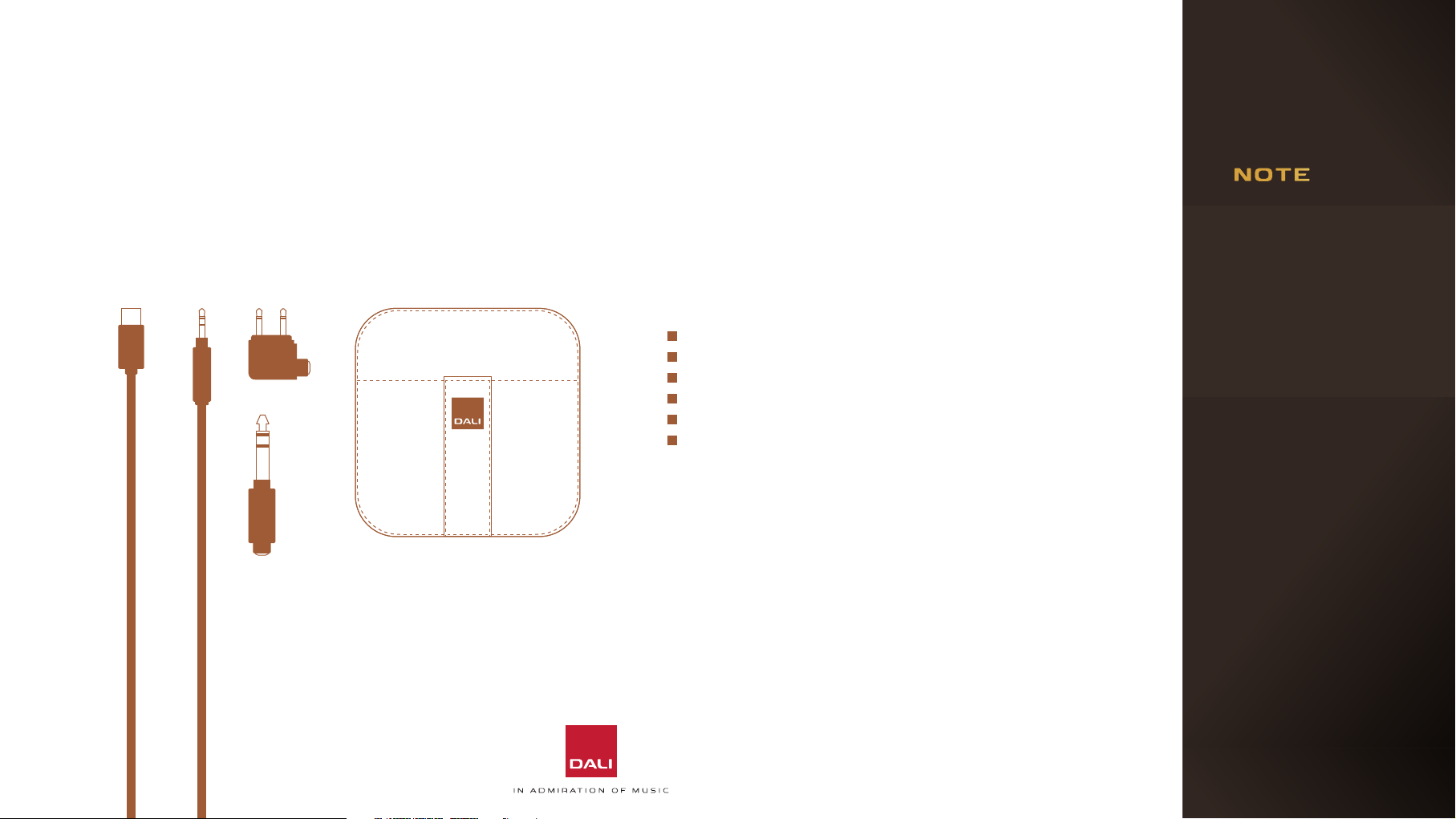
Your DALI IO-12 headphone packaging contains:
1.2 m USB-C cable (for charging and USB audio)
1.2 m long 3.5 mm mini jack stereo cable
3 m long 3.5 mm mini jack stereo cable
3.5 mm stereo mini jack to 6.3 mm jack adaptor
Flight adaptor
Luxury travel case
Please be careful not to
damage any items while
unpacking the carton.
In the unlikely event
that anything is missing,
please contact your
DALI retailer or distributor. You may wish to
consider keeping the
packaging for potential
future use. Otherwise,
please dispose of the
packaging responsibly,
recycling components
as appropriate.
3
Page 4
2. DALI IO-12 TECHNOLOGY AND SOUND QUALITY
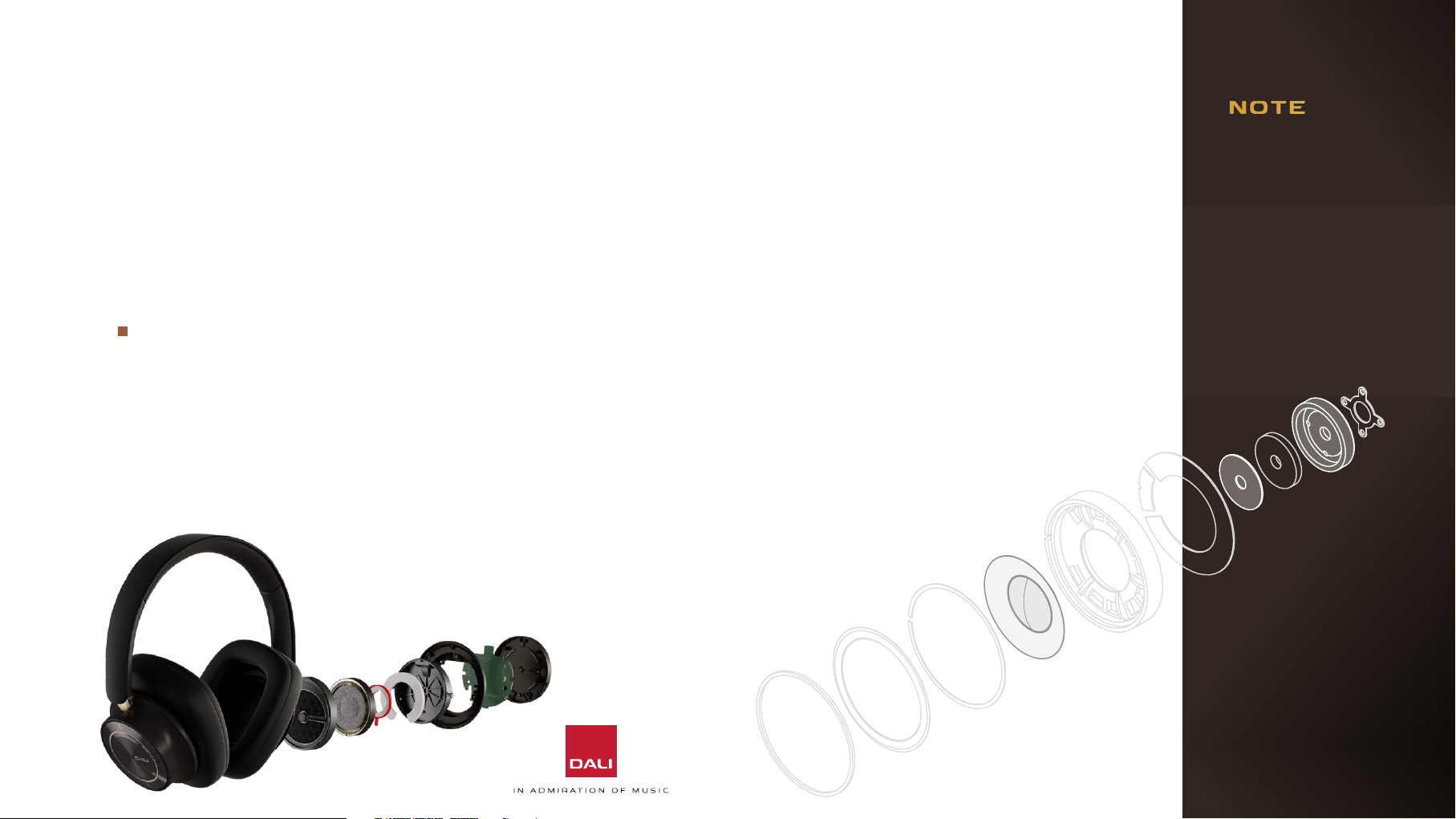
Your DALI IO-12 headphones incorporate multiple
technologies and engineering solutions designed to
perfect their audio performance and ensure that their
sound quali is among the best available.
SMC Drivers
DALI is acknowledged worldwide as a pioneer in the
use of non-conducting magnetic materials, such as our
unique So Magnetic Compound (SMC), in speaker
drivers. Our DALI KORE flagship audiophile speaker,
for example, owes its genre-defining performance
partly to SMC. And now, with the IO-12, the same
patented SMC technology has been incorporated in a
pair of headphones for the first time.
Despite their dierence in size, headphone and speaker
drivers share a very similar architecture. As is the case
with DALI SMC speaker drivers, DALI SMC headphone
driver components that would normally be made from
iron based materials are manufactured in SMC. While it is
intensely conductive to magnetic fields, SMC is electrically
non-conducting, so its use ensures that distortion causing
eddy currents set up by voice-coil movement in conductive
motor components are prevented. SMC also minimises
voice-coil inductance modulation, again significantly
reducing distortion. SMC in the DALI IO-12 results in a
significant increase in clari and musical communication.
SMC defines a ground-breaking advance in headphone
audio quali, and it is unique to DALI.
The top plate, boom
plate and pole piece of the
magnet system is made
entirely from SMC.
Along with the neodymium
magnet disc, this means
that the IO-12 is our very
first driver to not use any
iron in the magnet system.
4
Page 5

2. DALI IO-12 TECHNOLOGY
AND SOUND QUALITY
Paper Fibre Driver Diaphragms
DALI speaker driver diaphragms are made exclusively
from proprietary paper and wood fibre materials
refined over decades of development. A closely
related paper fibre material is used in the IO-12
drivers that employs randomly aligned fibres of
variable length to create a light yet sti diaphragm that
oers optimal damping. The result is natural, relaxed
sound quali brimming with detail.
Hi-Res Audio Certified
The IO-12 supports from 16 - 24 bit audio with sample
rates from 32 – 96 kHz. The DALI IO-12 internal audio
processing is based on 48kHz audio sampling – the
same rate as most USB and Bluetooth aptX Adaptive
streamed audio sources. This means that sample rate
conversion, a process that oen results in audible
artefacts, is unnecessary. The result is clearer and
more insightful sound quali. The IO-12 also supports
up to 96kHz sample rate over USB, with full 48 kHz
audio bandwidth and no down sampling applied, for
ultimate sound quali.
Wired or Wireless
Our aim with the new IO-12 is simple – to produce
a headphone model that covers both wired or
wireless use, equally brilliantly. The IO-12 is among the
highest performing conventional, passive analogue
headphones available, yet it can also play the wireless,
noise-cancelling, on-the-go convenience role to
perfection.
Bluetooth aptX Adaptive
DALI IO-12 headphones are compatible with the latest
and highest performance iteration of the Bluetooth
wireless audio streaming protocol: aptX Adaptive. It
oers all the sound quali of previous iterations but
incorporates both a significantly more eective lowlatency codec and adaptive features that intelligently
optimises the streaming bit rate for dierent media
pes and wireless environments.
More detailed and comprehensive information about
IO-12 technologies can be found in the IO-12 White Paper
available for download from the DALI website.
5
Page 6
3 x
2 x
1 x
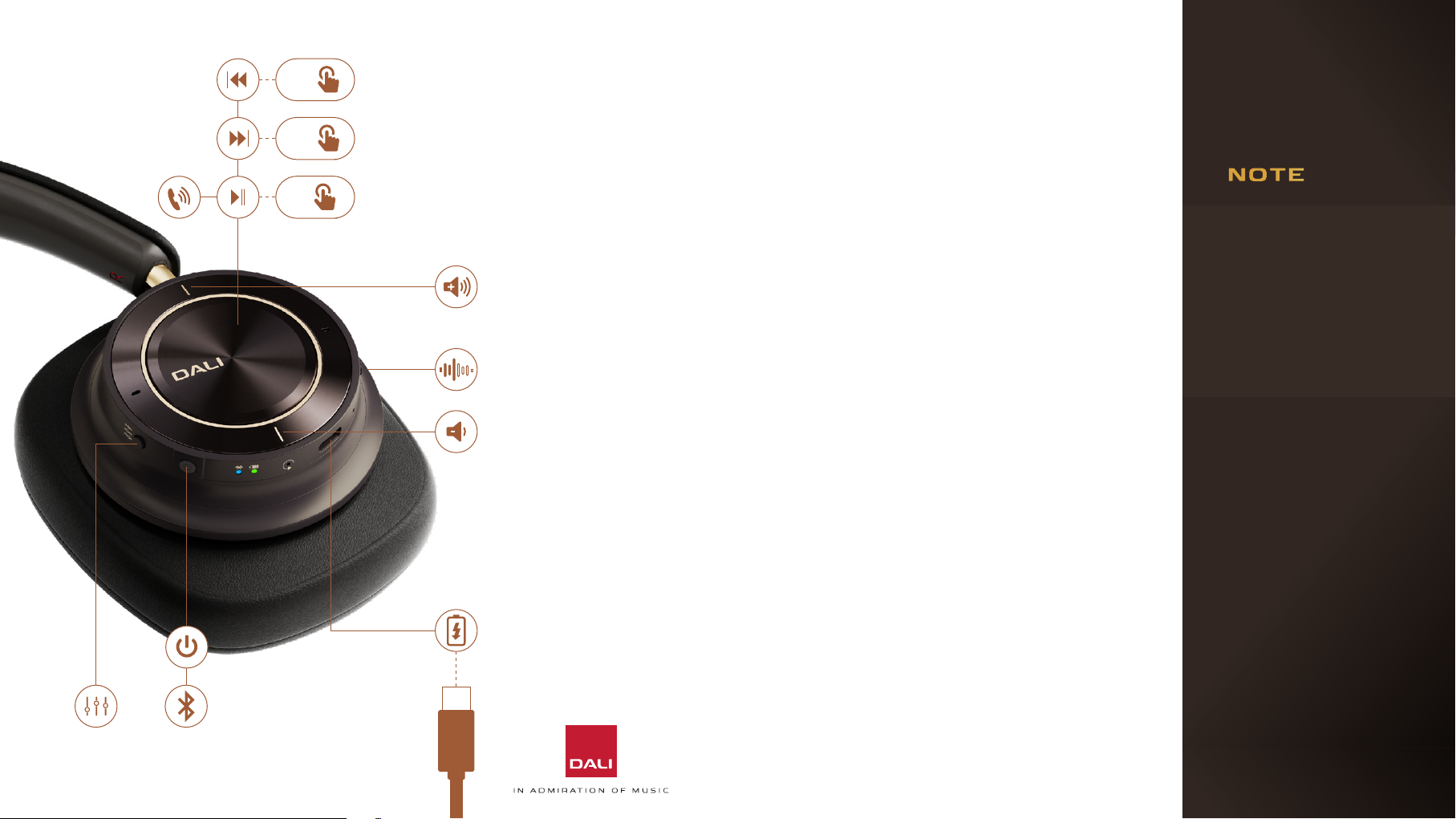
3. GETTING TO KNOW YOUR DALI IO-12 HEADPHONES
Your IO-12 headphones
will play messages to
guide and alert you to
their operational status.
ANC
DALI IO-12 are rechargeable, Bluetooth wireless, noisecancelling (ANC) headphones that can also be used with either
a USB or a conventional wired connection with the same
outstanding performance, no maer the connection pe.
The control buons, connection sockets and indicators of
the IO-12 headphones are illustrated in the diagram to the le.
They are described in the next sections.
No complex and smart
phone baery draining
app is required for the
enjoyment of your DALI
IO-12 headphones. All
the controls you need
are on the right ear cup.
IO-12 headphones boast
a remarkable 35 hour
pical baery life. You
should only need to
charge your IO-12 headphones occasionally.
6
Page 7
4. USING YOUR DALI IO-12 HEADPHONES
4.1 Geing started
Your IO-12 headphones are shipped with adequate baery
charge for initial use so they can be switched on and enjoyed
immediately.
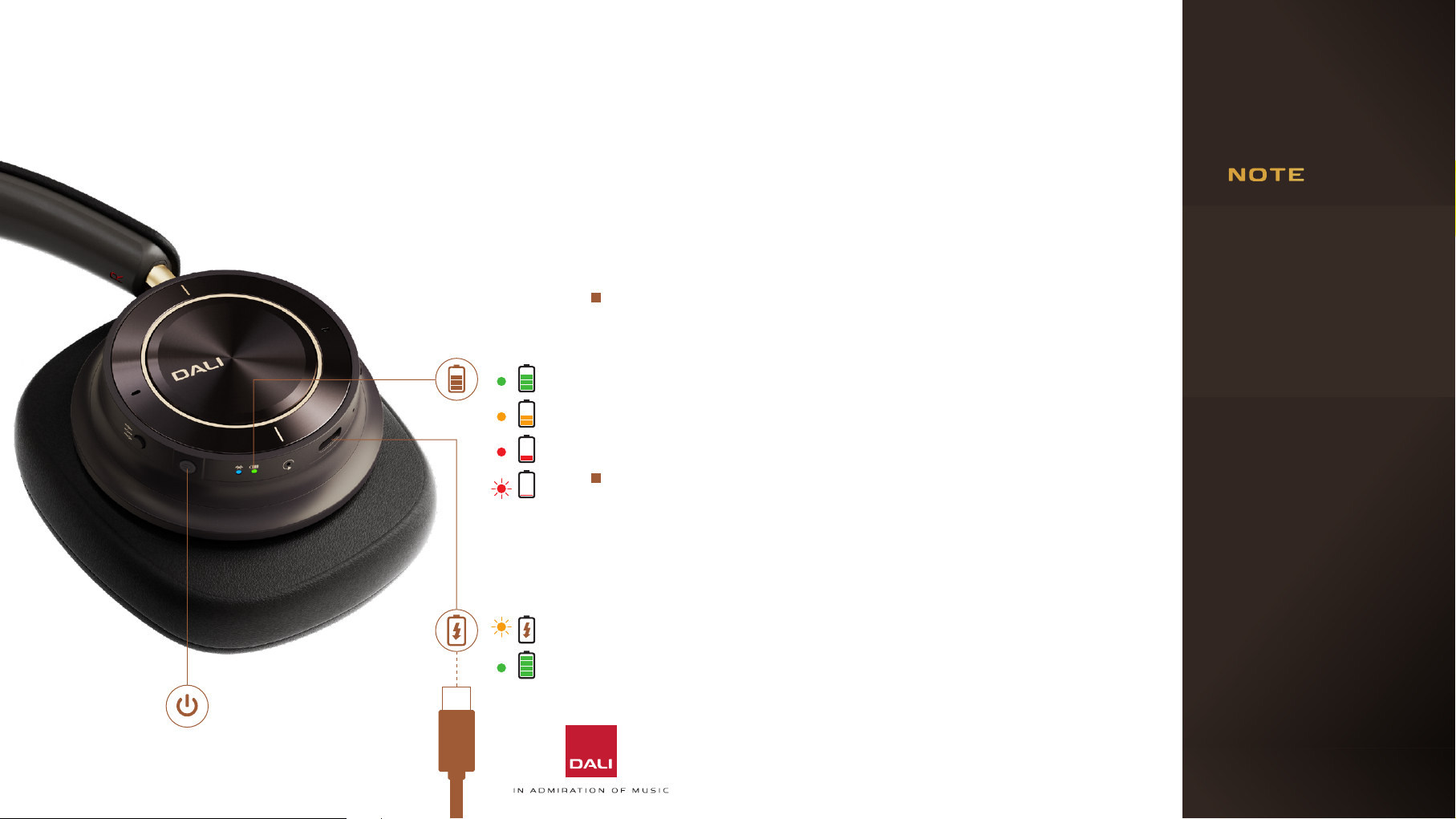
Baery charge level is
reported audibly by a
headphone voice prompt
at switch on and when
To switch on your IO-12 headphones press the power
critically low.
buon so that the green indicator illuminates. When
switched on and disconnected from a baery charger,
the remaining baery charge level will be displayed by the
baery indicator. The baery indicator will change colour
from green (>50% charge) via orange to red to indicate
decreasing charge. The indicator will flash red when
baery charge is critically low.
Even though your IO-12 headphones will have baery
charge when first switched on, it is recommended that you
If your IO-12 headphones
are le switched on with
no audio source playing,
with no mini jack connection, and with noise-cancelling disengaged, they
will switch o automatically aer 20 minutes.
connect them to a charger using the USB cable supplied. A
standard USB mobile phone charger or a computer USB
socket that incorporates an appropriate power supply can
be used. When connected to a charger, the headphone
baery indicator will flash amber while charging and
illuminate in solid green when fully charged.
7
Page 8

4. USING YOUR DALI IO-12 HEADPHONES
4.2 Connection Modes
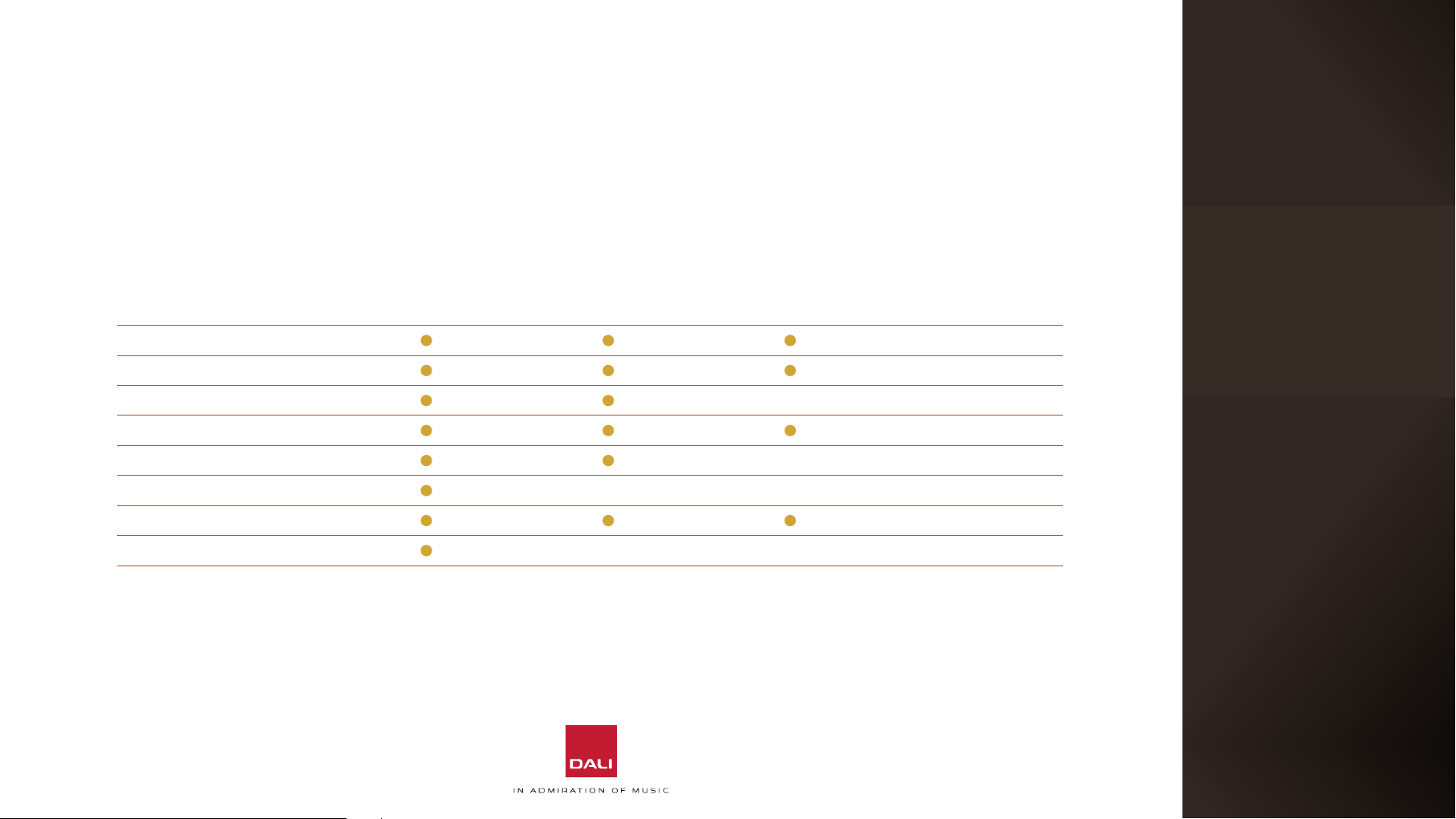
Your IO-12 headphones incorporate four dierent
connection modes. Each mode oers features suited to
dierent needs and scenarios. The table on the following
page illustrates the features of each connection mode
described in the paragraphs below.
Wireless Active Mode
Switch on and connect your headphones via Bluetooth
to a source device such as a smart phone, tablet or
computer. All the IO-12 active noise-cancelling, DSP and
sound mode functions will be available. This is the best
connection mode for headphone use on-the-go when
travelling, for freedom of movement and for avoiding
cables.
Wired Active USB Mode
Switch on and connect your headphones using the
supplied USB cable to a computer with a USB audio
output socket. All the IO-12 active noise-cancelling, DSP
and sound mode functions will be available.
Analogue Wired Active Mode
Switch on and connect your headphones via the supplied
3.5 mm mini jack cable to a source device with an
analogue jack output. All the IO-12 active noise-cancelling,
DSP and sound mode functions will be available. This is
the best connection mode to use with a source device
fied with a conventional analogue headphone output. For
instance, use this mode when flying/connected to in-flight
entertainment systems.
Analogue Wired Passive Mode
With your IO-12 headphones switched-o, connect
them using the supplied 3.5 mm mini jack cable to a
source device with an analogue jack output. In this
passive connection mode none of the IO-12 active
noise-cancelling, DSP and sound mode functions will be
available. Use this connection mode if your IO-12 baery
is exhausted or simply if you prefer the inherent sound
of a particular source device or headphone amplifier.
Headphone volume control in passive, and wired active
mode will default to the source device.
8
Page 9
4. USING YOUR DALI IO-12 HEADPHONES
4.2 Connection Modes
The IO-12 connection modes described on the previous page are illustrated in the table below.
Wireless Active
Mode
Internal Amplification –
Digital Signal Processing –
D to A Conversion – –
Active Noise Cancellation –
Control Buons – –
Voice Assistance – – –
Sound Modes –
Hands-free Telephony – – –
Wired Active USB
Mode
Analogue Wired
Active Mode
Analogue Wired
Passive Mode
9
Page 10
4. USING YOUR DALI IO-12 HEADPHONES
4.3 Bluetooth Connection
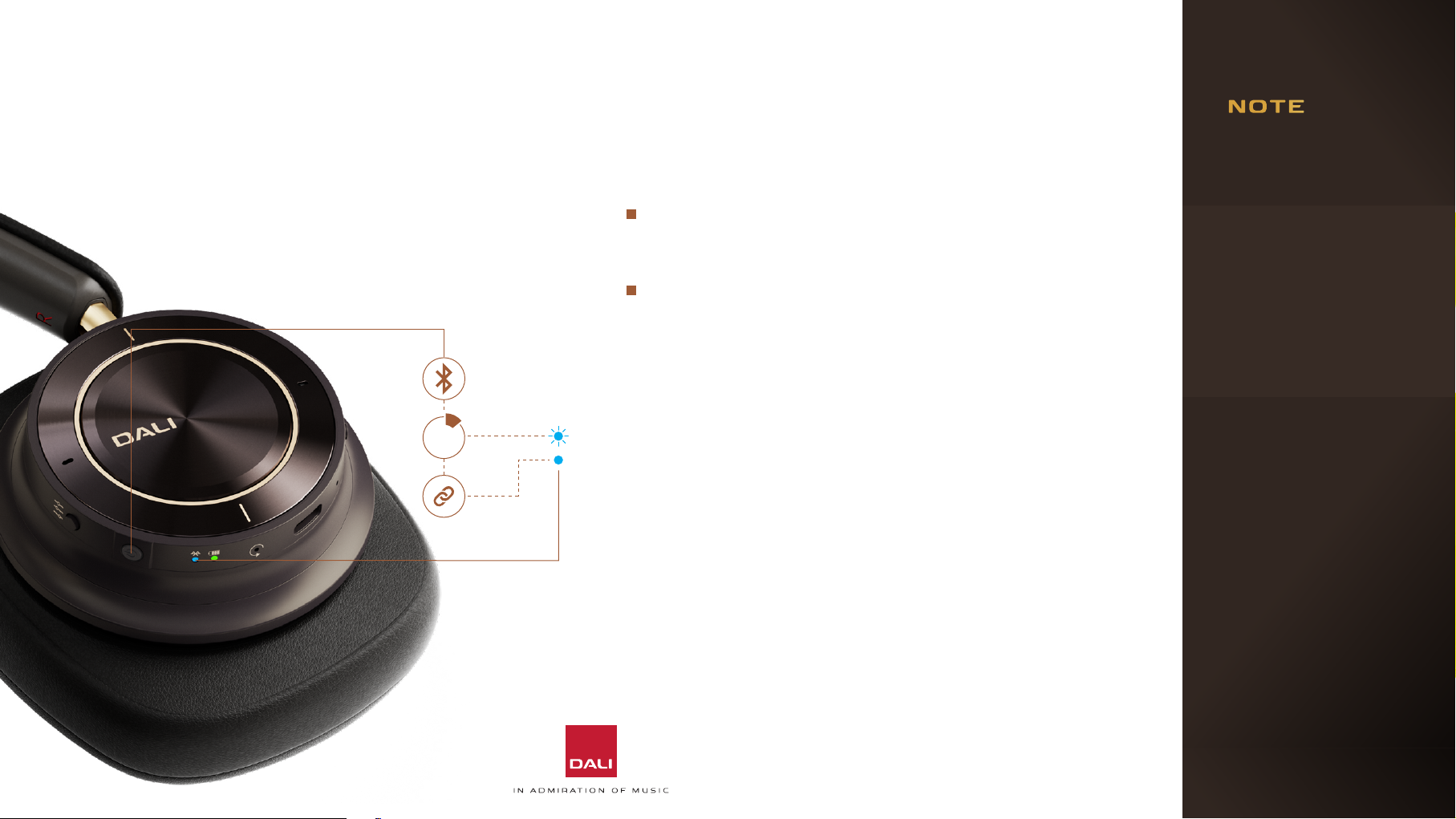
To connect your IO-12 headphones to a Bluetooth
audio source such as a smart phone, the headphones
must be switched to Bluetooth pairing mode.
1 sec
To engage Bluetooth pairing mode, press and hold the Power
buon for 1 second. The headphone Bluetooth indicator will
pulse blue to indicate pairing mode.
Now, open the Bluetooth setup menu on the device you wish to
pair with your IO-12 headphones and select “DALI IO-12” in the
list of available connections.
The Bluetooth indicator on the headphones will illuminate
continuously blue when connected to a Bluetooth device. When
you subsequently play music or make and receive calls from the
Bluetooth device, its audio stream will be routed through the
headphones.
Your IO-12 headphones will remember a total of four previously
connected Bluetooth devices and will automatically aempt to
connect to the most recently used device when switched on. If the
most recently used device is not available, the headphones will work
down the list of previously used devices.
The IO-12 additionally supports Bluetooth Dual Mode that enables
simultaneous connection of two sources to the same headphones,
– a smartphone and a computer for example.
If no device is paired
within 3 minutes, your
IO-12 headphones will
automatically disengage
Bluetooth pairing mode.
You may need specifically to select your IO-12
headphones as the
playback device in some
audio apps.
If required, you can rename your IO-12 headphones via the Bluetooth
setup menu of a paired
audio device.
If your IO-12 headphones
are playing audio via a
USB connection when a
Bluetooth connection is
made, the Bluetooth connection will take priori.
10
Page 11
4. USING YOUR DALI IO-12 HEADPHONES
4.4 Wired Connections
Analogue Audio Connections
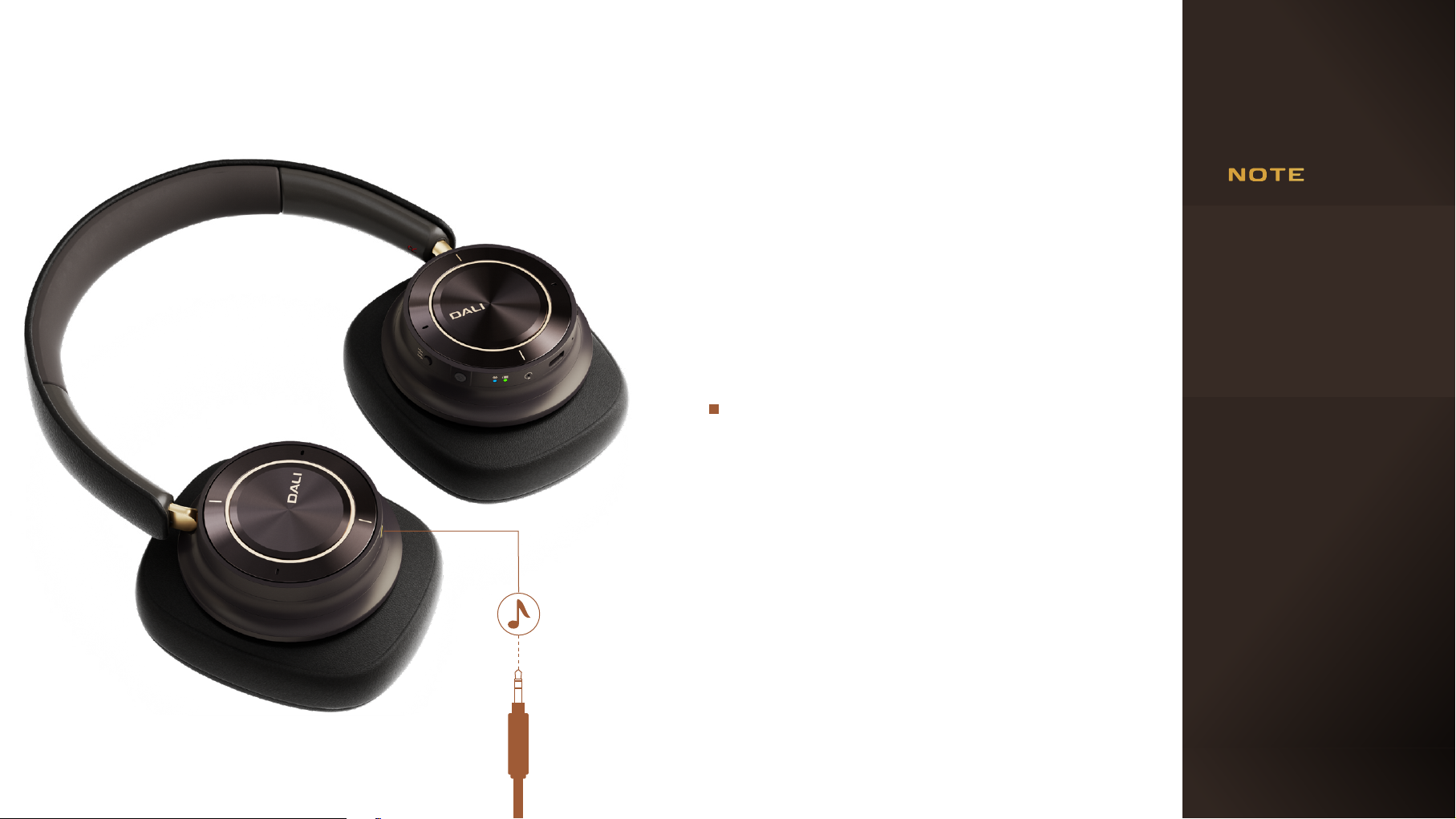
You can use a mini jack cable to connect
your IO-12 headphones to a device with a
conventional headphone output.
Simply connect the supplied cable to the
socket in the le headphone cup and to the
source device’s headphone socket.
Your IO-12 headphones don’t need to be
switched on to play audio via a mini jack cable
connection so they can be used in this passive
mode even if their baery is exhausted, and
with no loss of sound quali either.
Active noise-cancelling will not function
when IO-12 headphones
are used in passive mode.
If your IO-12 headphones
are playing audio via a
Bluetooth or USB connection when a mini jack
plug is inserted, the mini
jack connection will take
priori.
11
Page 12
4. USING YOUR DALI IO-12 HEADPHONES
4.4 Wired Connections
USB Connections
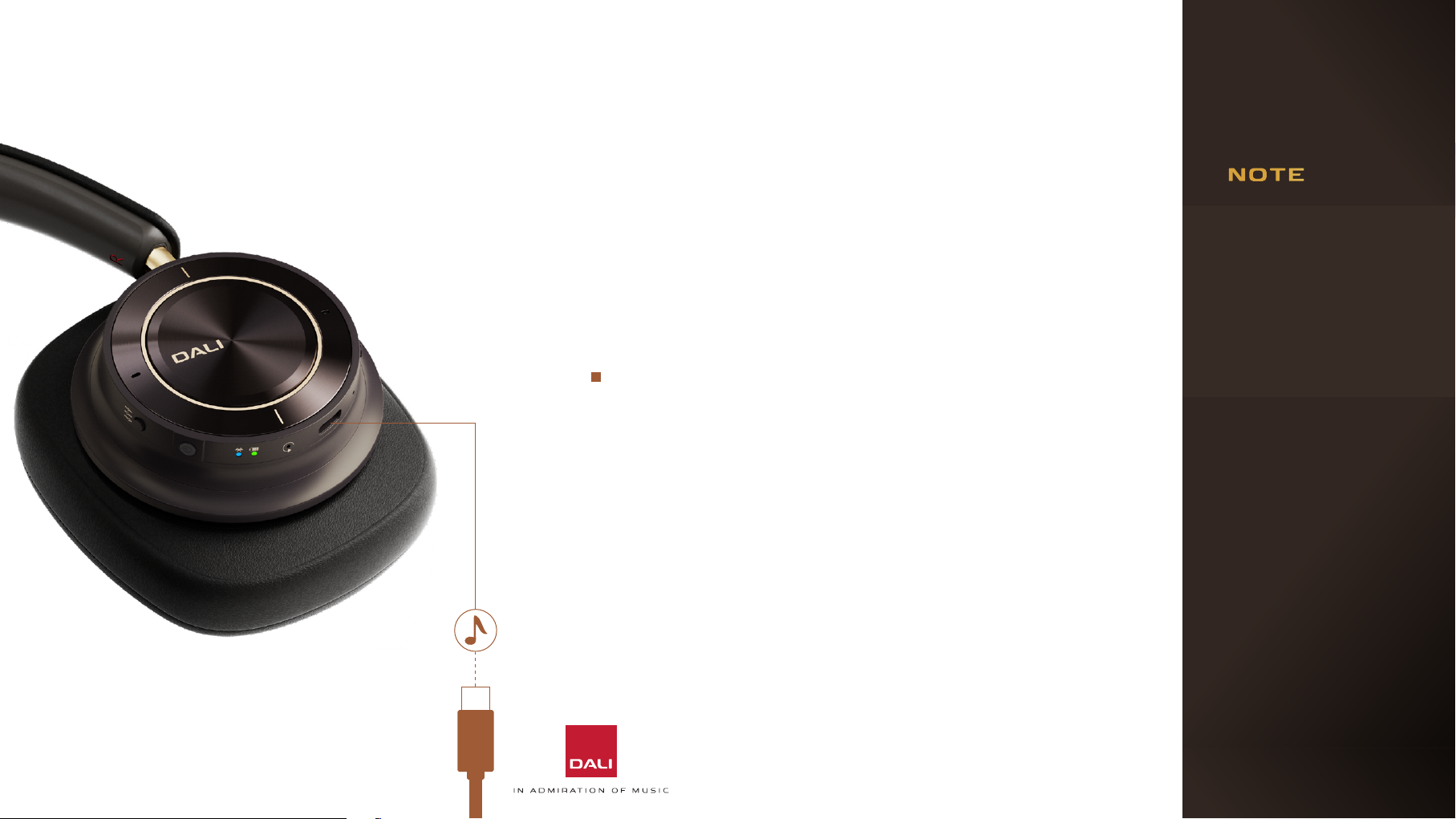
You can play audio on your IO-12 headphones via a USB
connection to a laptop or desktop computer.
If the computer USB
socket incorporates
an appropriate power
supply, the headphone
baery will charge while
connected.
12
Simply connect an appropriate USB cable to
the socket on the right headphone cup and to a
computer USB socket.
The headphones will become available to the computer
as a USB audio output device.
Of all the IO-12 headphones connection modes, USB is
likely to provide the best sound quali. This is because
a USB connection avoids the extra digital signal
processing and potential for transmission errors of
wireless connection.
Mini jack and Bluetooth
audio have priori over
USB audio. USB audio will
mute when a headphone
Mini jack connection is
made or Bluetooth audio
is played.
Page 13
4. USING YOUR DALI IO-12 HEADPHONES
4.5 Controlling Your DALI IO-12 Headphones
3 x
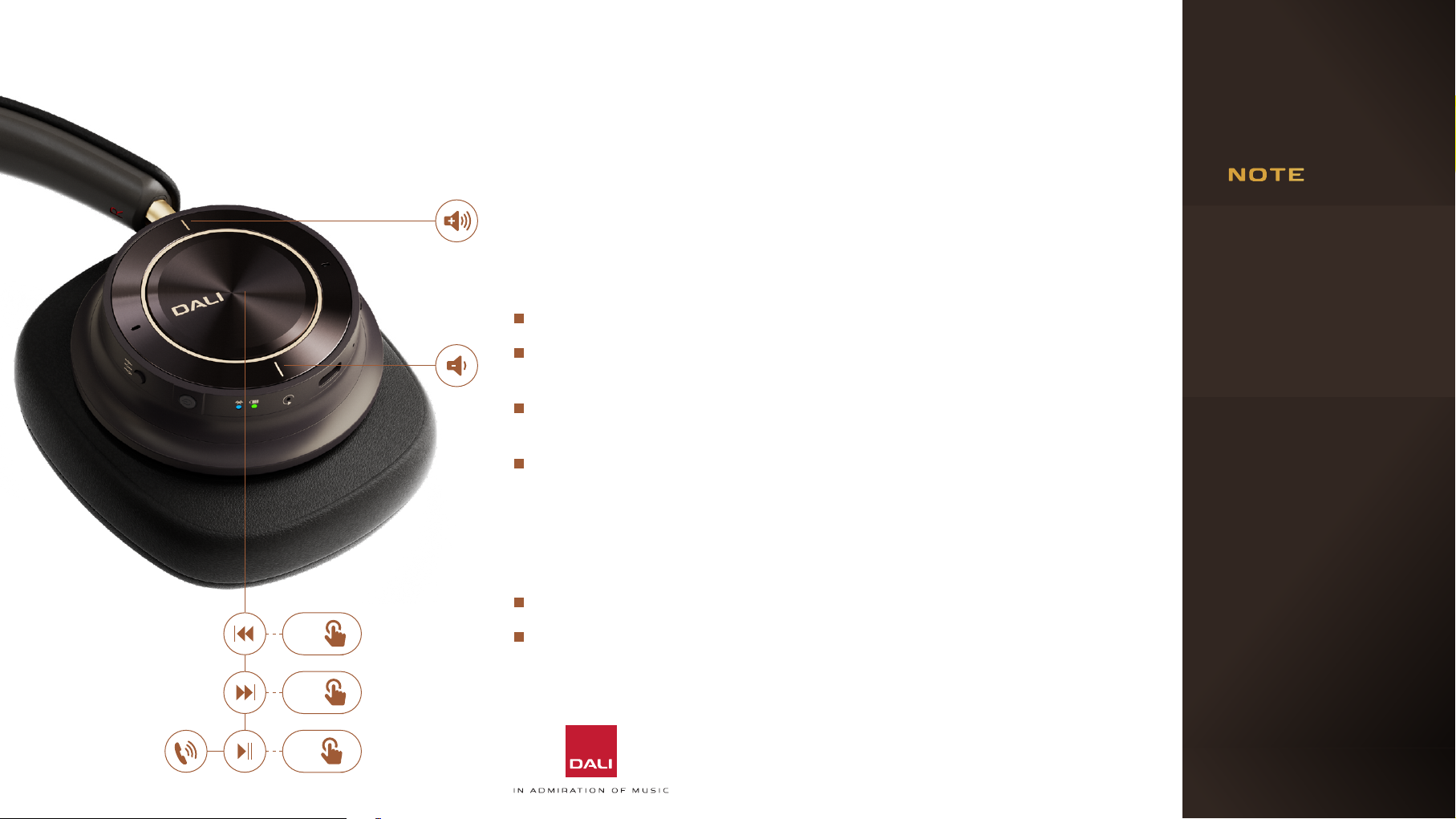
When your IO-12 headphones are connected to an audio device via Bluetooth
you can control audio playback via a buon built into the centre panel of the
right headphone cup. If the Bluetooth audio device is a smart phone, the buon
can also be used to answer and end phone calls.
Press the buon once to play or pause audio, or to take or end a phone call.
Press the buon twice in quick succession to skip audio playback to the
next track.
Press the buon three times in quick succession to skip audio playback to
the previous track.
Press and hold the buon to engage a smart phone virtual assistant (Siri,
Google Assistant for example). Press the buon once to disengage the
virtual assistant.
Headphone volume for Bluetooth and USB audio sources is controlled via
buons built into the outer ring of the right headphone cup.
Press the upper side of the outer ring to increase headphone volume.
Press the lower side of the outer ring to decrease headphone volume.
IO-12 noise-cancelling
will not function when the
headphones are used in
passive mode.
13
2 x
1 x
Page 14
4. USING YOUR DALI
IO-12 HEADPHONES
4.6 Noise-Cancelling
IO-12 headphones incorporate active noise-cancelling
technology (ANC) that can significantly reduce the
disturbance of ambient noises – for example, general ci
noise or aircra cabin noise.
IO-12 active noise-cancelling technology also incorporates
a transparency option that enables ambient sounds to pass
through the headphones unimpeded. Transparency can
enable you to hear conversations or important ambient
sounds without the need to remove your IO-12 headphones.
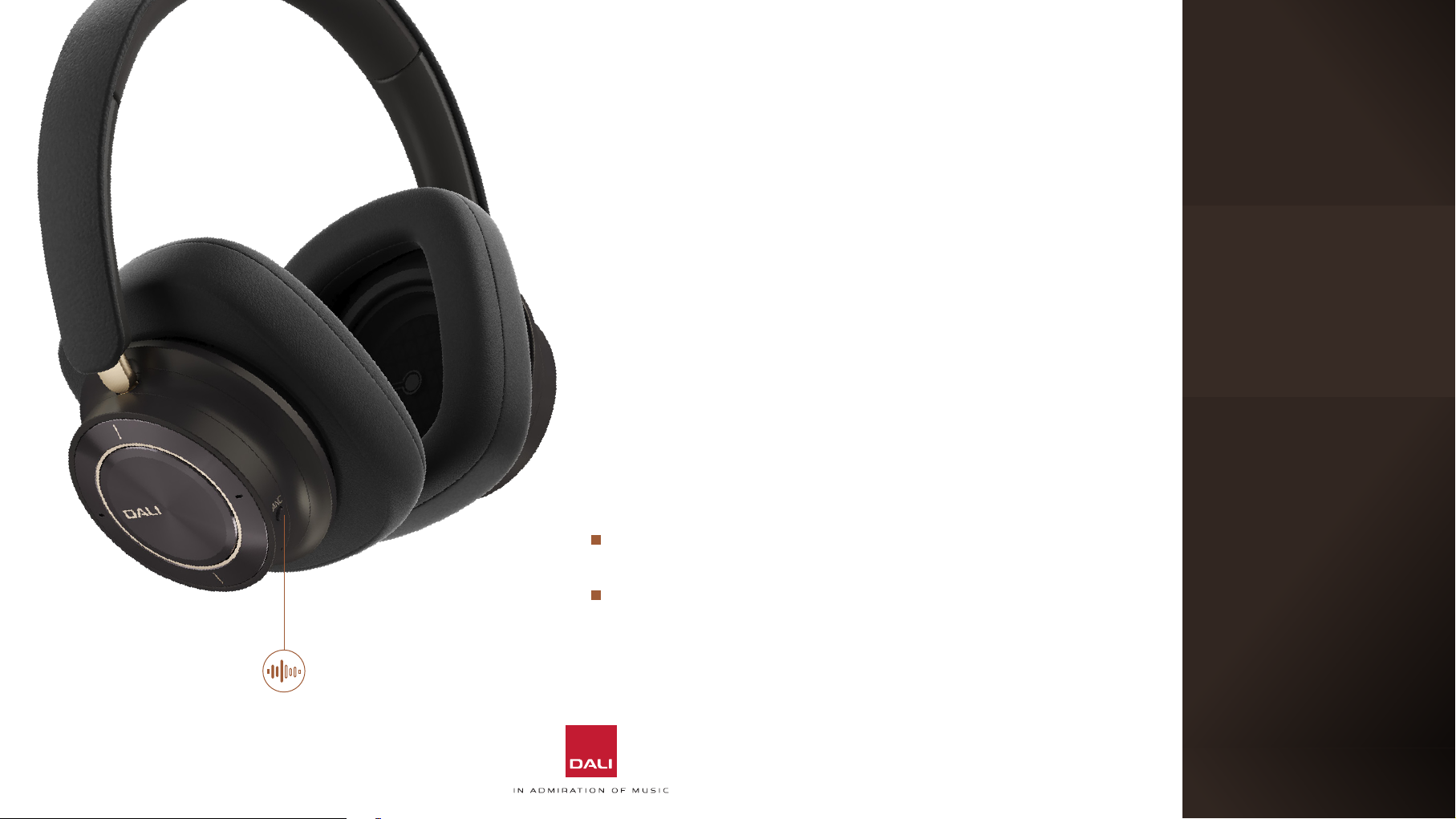
Noise-cancelling is controlled from a push buon on the edge
of the right headphone cup.
Press the buon once to engage noise-cancelling and a
second time to select the transparency option
14
Press the buon once again to disengage noise-cancelling
and transparency.
ANC
Page 15
4. USING YOUR DALI
IO-12 HEADPHONES
4.7 Sound Modes
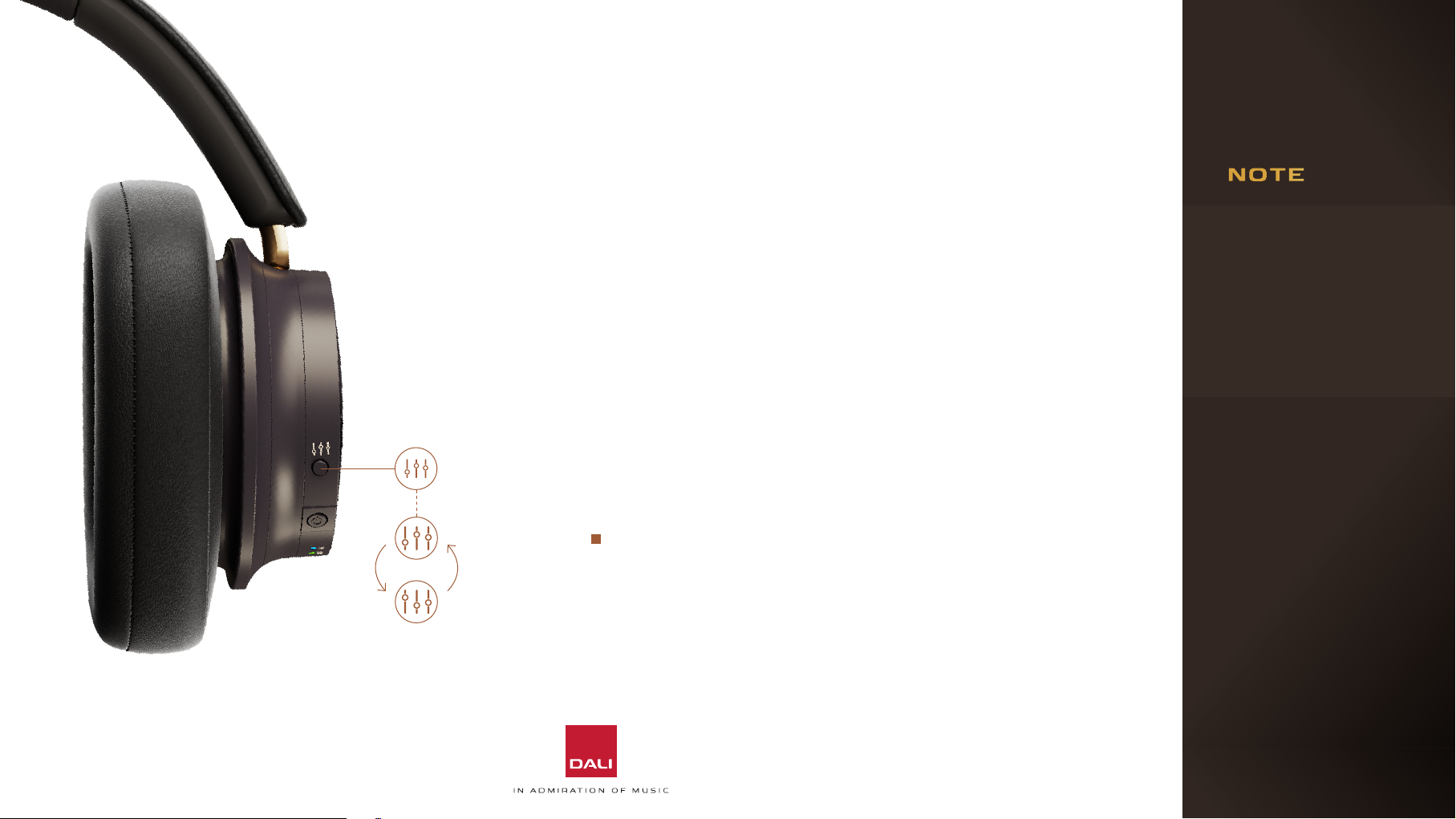
IO-12 headphones incorporate two sound mode options that
oer alternative audio equalisation profiles; Hi-Fi and Bass
mode.
In Hi-Fi sound mode, IO-12 sound quali will reflect the
frequency balance of the incoming audio signal. In Bass sound
mode, IO-12 sound quali will be enhanced at low frequencies
to emphasise bass instruments and musical elements. Sound
Modes are selected using a push buon on the edge of the
right headphone cup.
Bass sound mode can
be useful for those who
wear glasses by compensating for the bass
reduction that may result
from the arms of the
glasses disturbing the
headphone ear pad seal.
IO-12 Sound Modes
options are not available
when the headphones
are used in passive
mode.
15
Hi-Fi
Bass
Press the Sound Mode buon to toggle between Hi-Fi
mode and Bass mode.
Page 16
5. MAINTAINING YOUR DALI IO-12 HEADPHONES
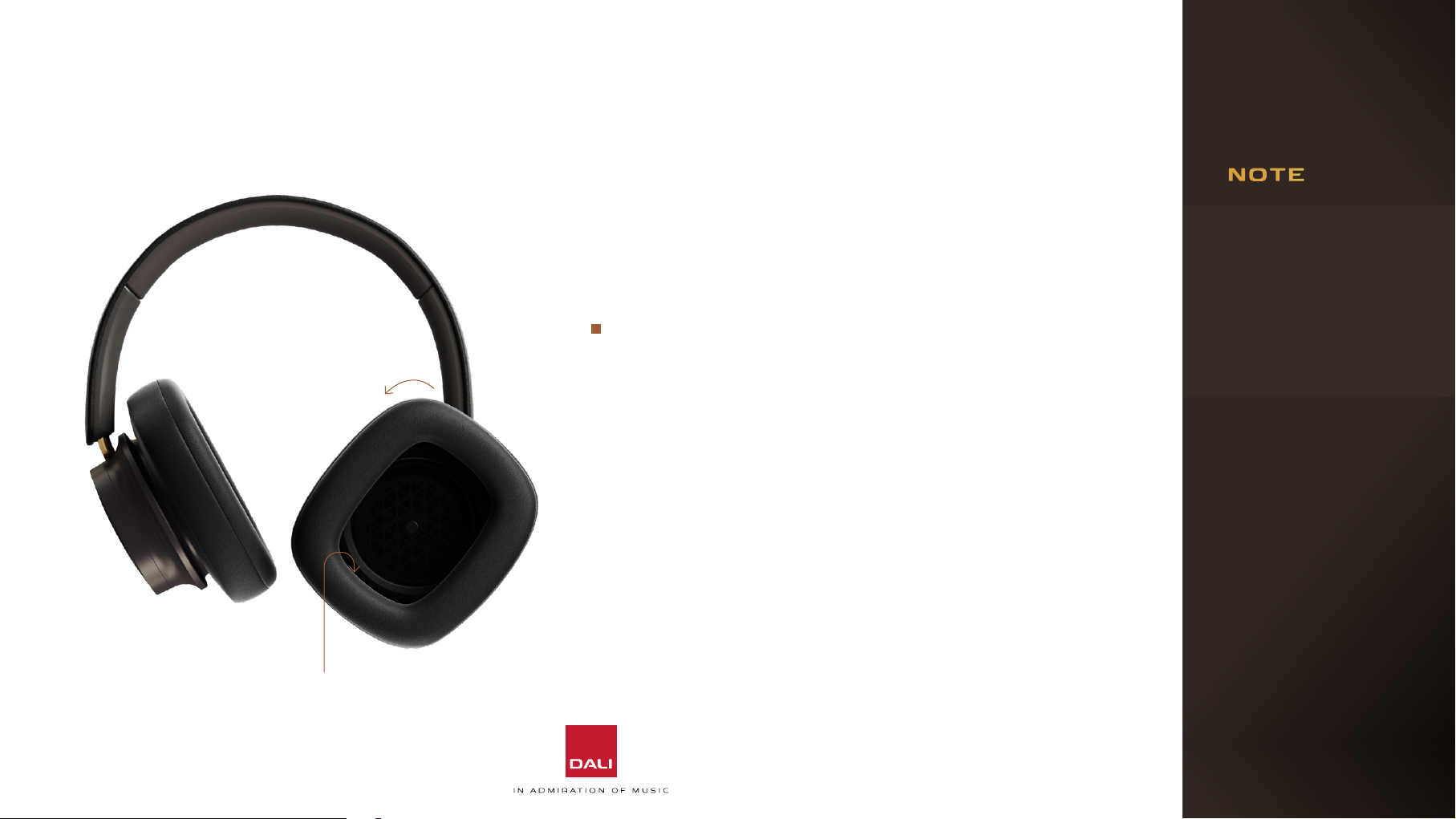
Twist the ear pad
anti-clockwise to
remove it.
5.1 Ear Pads
IO-12 headphone ear pads can be removed for cleaning or
replacement. The ear pads aach via a bayonet fiing.
To remove an ear pad, simply turn it anti-clockwise and li
it away from the headphone cup.
Replacement ear pads can be ordered through your local
DALI retailer or distributor, or directly from DALI at
www.dali-speakers.com
5.2 Cleaning
If your IO-12 headphones need cleaning, wipe their surfaces
with a so, lint-free cloth. A slightly damp cloth may be used
for stubborn marks, but it is important that your IO-12
headphones do not get wet. The use of abrasive or solvent
based cleaning fluids is not recommended.
When replacing ear pads
ensure that they are rotated fully clockwise and
click twice into position.
Incorrectly fied ear
pads will impact on headphone bass reproduction and noise-cancelling
performance.
16
Use markings on inside of ear pad and
housing to align ear pad correctly.
Page 17
5. MAINTAINING YOUR DALI
IO-12 HEADPHONES
5.3 Restart and Reset
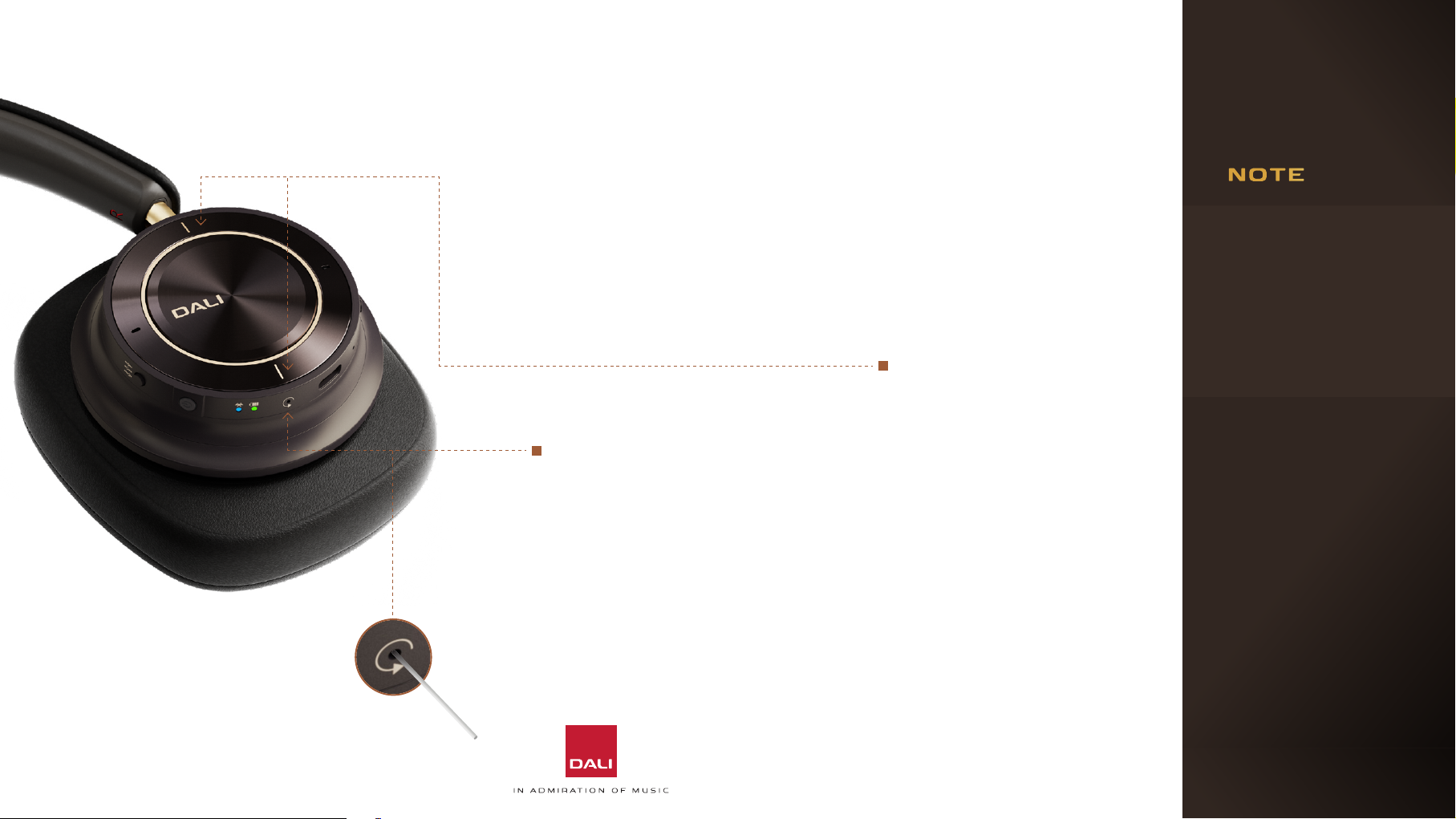
If at any time your IO-12 headphones behave erratically they
may need to be restarted or, in some cases, reset to their
factory configuration.
To reset your IO-12
headphones to their factory
configuration, press and hold
both the volume up and down
To restart your IO-12
headphones, use a small pin,
(e.g. a paper clip) to press
and hold the restart buon
located on the right ear cup
for three seconds.
The headphones will retain their
Bluetooth device memory when
they restart.
buons while at the same
briefly pressing the power
buon while the headphones
are switched on.
The headphones will restart
in factory (unused) condition
with no Bluetooth devices
memorised.
If you have any questions concerning the
operation or performance of your IO-12
headphones you can
contact DALI support at:
www.dalispeakers.com
17
Page 18
6. DALI IO-12 TECHNICAL SPECIFICATIONS
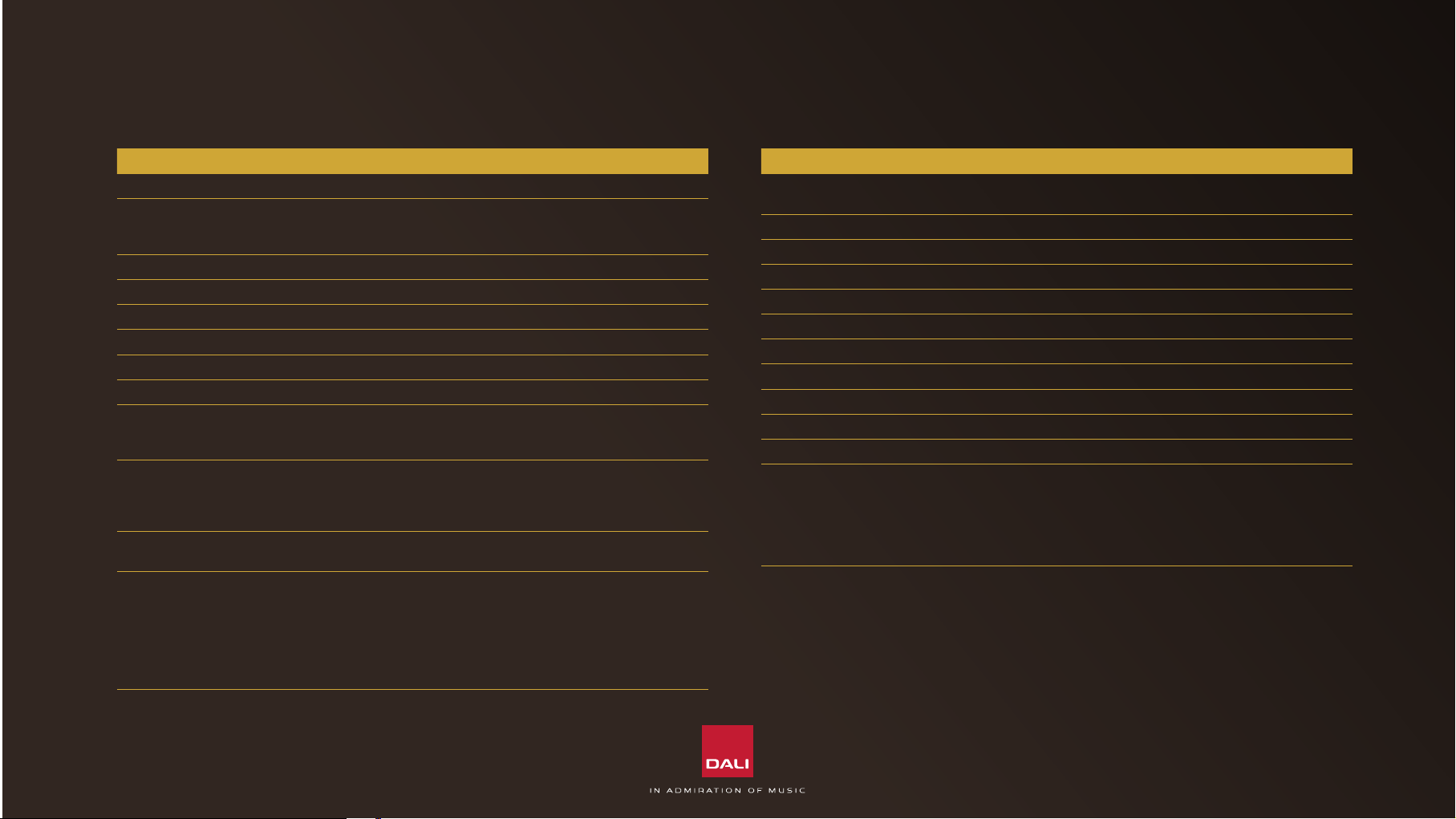
IO-12
Frequency range 10 - 48,000 Hz ±3 dB
Analogue input sensitivi
Passive mode
Active mode
Impedance (Passive mode) 25 Ohm
Maximum SPL 100 dBA
Headphone principle Closed back circumaural (over ear)
Full range driver 50 mm with SMC based magnet system
Driver diaphragm Free edge paper fibre cone
Amplifier principle Fully bridged (BTL) Class D output stage
Connection input(s) Bluetooth 5.2 (wireless)
Wireless input audio codecs AAC
Supported input audio formats 16 - 24 bit audio
Functions Power ON/OFF
91 dB SPL, 1 mW @ 1 kHz
300 mV rms, 94 dB SPL @ 1 kHz
3.5 mm mini jack stereo
USB-C
aptX
aptX HD
aptX Adaptive
32 / 44.1 / 48 / 96 kHz sample rate
Bluetooth pair/release
Volume up/down
Play/pause/skip track
Take call
ANC modes (ON/Transparency/OFF)
Sound modes (Hi-Fi/Bass)
IO-12
Other features Wind Noise Suppression
Hi-Res Audio Certified
Noise reduction Active Noise Cancellation (ANC)
Hands-free calls and voice assist Updated Clear Voice Communication (CVC)
Baery - playback time Up to 35 hours
Baery - charge time 1 hour and 50 minutes
Replaceable earpads Ye s
Compact storage One-way foldable
IP rating IP52
Weight 0.37 kg / 0.82 lb
Shipping weight 2.25 kg / 4.96 lb
Finish Dark Chocolate
Accessories included 1.2 m USB-C cable (charging + USB audio)
1.2 m stereo mini jack cable
3.0 m stereo mini jack cable
3.5 mm stereo mini jack to 6.3 mm jack adaptor
Flight adaptor
Luxury travel case
All technical specifications are subject to change without notice.
 Loading...