

Page 1

CUBE
1. Install APP on your smart phone or tablet
2. Open the app and follow on screen instructions to connect your CUBE.
3. Name your connected CUBE and take a picture of what it is connected to if
4. Add additional CUBE trackers using the + button on the home screen.
Key Finder
Instruction
Pairing
IOS: search “CUBE Tracker” on Apple App Store.
Android: search “CUBE Tracker” on Google Play Store.
desired using on screen instructions.
Search for a CUBE
Open the CUBE app, a list of connected CUBE trackers will display. Select the
CUBE you want to locate. Press find and the lost CUBE will ring.
Search for Phone
Double press the button on your CUBE, phone rings.
*The following 3 functions require you to set up a username and
password on the app. You can choose to “Continue as Guest” and a login will
not be required and the below functions will not work. As always, all features of
the Cube are free and we do not share your information with anyone.
-Crowd Find
Mark a Cube as lost and every phone on the Cube network will be looking for
your lost item and will send you a private message if your Cube is located.
-Locate Cube with more than one phone
Sign into your Cube account from as many phones as you like to locate your
Cube or see its last known location. If your Cube is connected to a different
phone your app will notify you what phone and give the location. You will have
to use the connected phone to ring the Cube. Otherwise turn off Bluetooth on
the connected phone and Cube will connect with the next closest phone that is
signed into the account and has Bluetooth on. Double pressing the Cube button
will only ring the one connected phone.
-Locate Cube or Phone from Website
Sign into your Cube account at CubeTracker.com to locate your Cube or Phone
Page 2
on a computer.
Dimensions: L42mm x W42mm x H6.5mm
Weight: 21g
Wireless: Bluetooth 4.0 (Bluetooth Low Energy)
Range: 0~200 Feet (Depending on the environment, it’s most effective at 30
ft indoor)
Buzzer: 88dB
Battery: CR2025 button battery
Working Time: Up to 12 months
Temperature Range: -4 to 150 Fahrenheit
Water-proof: IP67
Selfie
Select a CUBE from the list. Press the to open up the camera, press the
button on your CUBE to take selfie.
CUBE Settings
You can adjust the settings for each Cube separately by selecting a Cube from
the list then press to open the settings box. Here you can personalize the
settings such as
-Name or picture of the Cube
-Phone or Cube notification of connection or disconnection
-Phone alarm settings
-Quiet times and zones
-Ringtones
Specification:
Supported phone list
Supported Apple Devices using iOS 7 or higher:
iPhone 4S, 5, 5C, 5S, 6, 6P, 6S, 6SP, SE, 7, 7P, 8, 8P, X or later
iPad 3rd Gen, 4th Gen, Air or later
iPad Mini or later
iPod Touch5 or later
Supported Android Devices using 4.4 or higher:
Page 3
Samsung Galaxy S4, 5, 6, 6E, 7, 7E, 8, 9
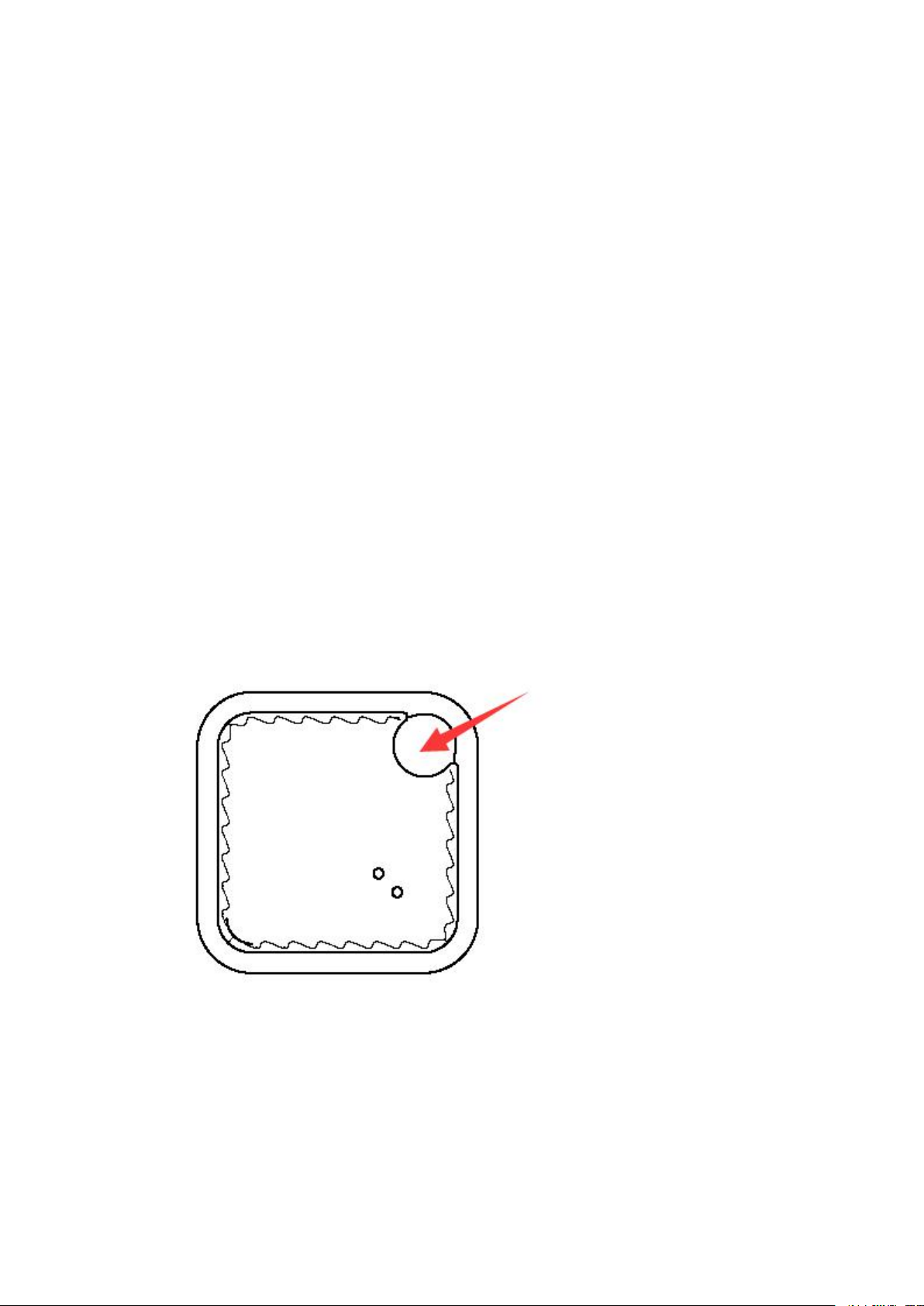
1. Open the outer shell using battery replacement tool or small screwdriver.
2. Replace CR2025 battery. Please mind the polarity of battery.
3. Close the outer shell.
Samsung Note 3, 4, 5, 8
Nexus 4, 5, 5x, 6, 6p, Pixel, Pixel2
Moto Droid Turbo, Turbo2, G4
HTC One M8, M9, U1
LG G3, G4, G5, G6
If your device is not on this list but uses Android 4.4 and Bluetooth 4.0, there is
a good chance CUBE key finder will work fine, but we are not able to offer the
same level of support in troubleshooting scenarios.
About Bluetooth Low Energy
CUBE key finders use Bluetooth Low Energy (BLE) technology to help you locate
your items. While Bluetooth technology is a wireless technology, there are
significant differences between Bluetooth, Wi-Fi, and GPS technology. The
Bluetooth range of CUBE key finder is up to 150 feet. Bluetooth is most effective
at the 30 foot range, depending on the environment.
Replacing the battery
No battery removal tool on Cube Pro
Safety and instruction
1. The CUBE key finder can not be used without installing and running the CUBE
Tracker App on your phone.
2. Keep it dry and away from moisture and corrosive material.
Page 4

3. Do not disassemble this product or attempt to repair or modify it in any way.
4. CHOKING HAZARD-Cubes are not toys, please keep out of reach of young
children.
5. All products have gone through a thorough quality assurance inspection.
6. Always return used batteries to your local battery-recycling center.
CUBE Hardware Limited Warranty
Cube warrants that your Cube hardware product (“the Product”) will be free
from defects in materials and workmanship for a period of one (1) year from the
date of purchase to the original retail purchaser (“the Warranty Period”). If a
defect in the Product arises within the Warranty Period, Cube will, at its sole
option and subject to applicable laws: (a) repair or replace it with a new or
refurbished product or component; or (b) refund the original purchase price
upon return of the defective Product. This Warranty does not apply to Products
you purchase from unauthorized resellers, or where the instructions for use and
activation of the Product are not complied with or where the Product is damaged
as a result of abuse, accident modification or other causes beyond our
reasonable control.
ALL IMPLIED WARRANTIES OF MERCHANTABILITY OR FITNESS FOR A
PARTICULAR PURPOSE WITH RESPECT TO THE PRODUCTS ARE LIMITED TO THE
DURATION OF THE APPLICABLE EXPRESS WARRANTY. ALL OTHER EXPRESS OR
IMPLIED CONDITIONS, REPRESENTATIONS AND WARRANTIES, INCLUDING
ANY IMPLIED WARRANTY OF NON-INFRINGEMENT, ARE DISCLAIMED. Some
jurisdictions do not allow limitations on how long an implied warranty last, so
the above limitation may not apply to you. This warranty gives you specific legal
rights, and you may also have other rights which vary by jurisdiction.
TO THE EXTENT NOT PROHIBITED BY LAW, IN NO EVENT WILL CUBE BE LIABLE
FOR ANY LOST DATA OR REVENUE, OR FOR SPECIAL, INDIRECT,
CONSEQUENTIAL, INCIDENTAL OR PUNITIVE DAMAGES, HOWEVER CAUSED
REGARDLESS OF THE THEORY OF LIABILITY, ARISING OUT OF OR RELATED TO
THE USE OF OR INABILITY TO USE THE PRODUCT, EVEN IF CUBE HAS BEEN
ADVISED OF THE POSSIBILITY OF SUCH DAMAGES. IN NO EVENT WILL CUBE’S
LIABILITY EXCEEN THE AMOUNT PAID BY YOU FOR THE PRODUCT.
The foregoing limitations will apply even if any warranty or remedy provided
under this Agreement fails of its essential purpose. Some jurisdictions do not
allow the exclusion or limitation of incidental or consequential damages, so the
above limitation or exclusion may not apply to you.
CUBE Refund Policy
We have worked very hard to create a product you will love and we believe you
Page 5

will love your CUBE product. However, we realize the Product you receive from
CUBE may not be exactly what you expected. Should this rare occurrence take
place, the original retail purchaser of the Product may return all Cubes
purchased in the original transaction, in their original condition, with the original
receipt and packaging, within 30 days of the date of purchase to the original
retail purchaser and Cube will exchange it or provide a full refund of the original
purchase price. Please note that this policy applies only to Products you
purchase directly from Cube or an authorized Cube supplier. This is in addition to
your legal rights and your rights under the Cube hardware one (1) year Limited
Warranty referred to above.
CUBE Tracker
www.CubeTracker.com
[email protected]
Page 6

FCC Statement
This equipment has been tested and found to comply with the limits for a Class B digital device, pursuant to
Part 15 of the FCC Rules. These limits are designed to provide reasonable protection against harmful
interference in a residential installation. This equipment generates uses and can radiate radio frequency
energy and, if not installed and used in accordance with the instructions, may cause harmful interference to
radio communications. However, there is no guarantee that interference will not occur in a particular
installation. If this equipment does cause harmful interference to radio or television reception, which can be
determined by turning the equipment off and on, the user is encouraged to try to correct the interference by
one or more of the following measures:
-- Reorient or relocate the receiving antenna.
-- Increase the separation between the equipment and receiver.
-- Connect the equipment into an outlet on a circuit different from that to which the receiver is connected.
-- Consult the dealer or an experienced radio/TV technician for help.
This device complies with part 15 of the FCC Rules. Operation is subject to the following two conditions:
(1) This device may not cause harmful interference, and (2) this device must accept any interference received,
including interference that may cause undesired operation.
Changes or modifications not expressly approved by the party responsible for compliance could void the
user's authority to operate the equipment.
 Loading...