

Page 1

Pt-HDMI401/801S
Pt-HDMI401/801S
Switcher
Switcher
User
User’’ss
Manual
Manual
Version 1.1
CREATOR CORPORATION CHINA
CREATOR CORPORATION(CHINA)
Page 2
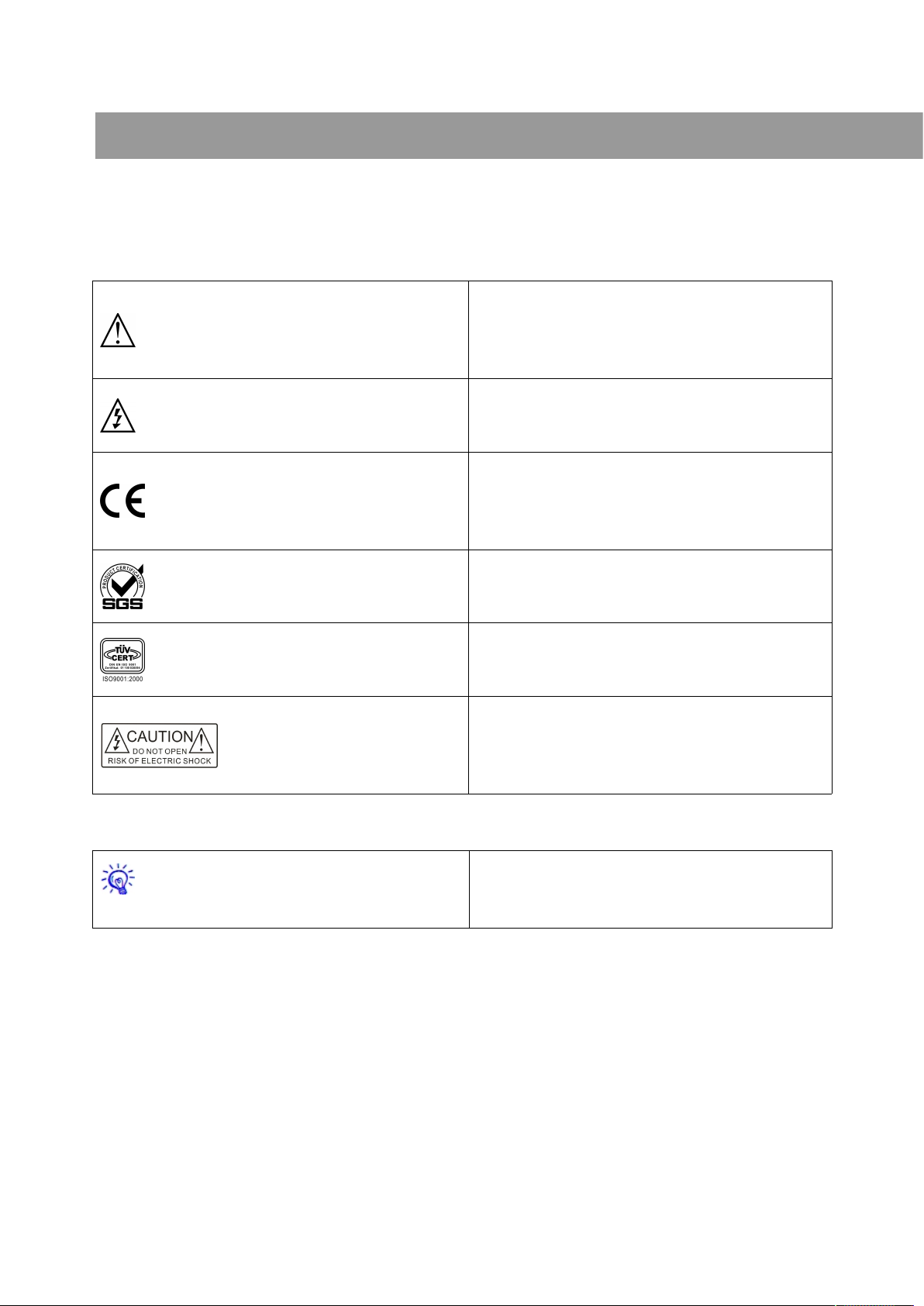
The meaning of symbols
■ Safety instructions
For your safe and correct use of equipments, we use a lot of symbols on the equipments and in the manuals,
demonstrating the risk of body hurt or possible damage to property for the user or others. Indications and their
meanings are as follow. Please make sure to correctly understand these instructions before reading the manual.
This is A level product, which may cause radio
interference in the living environment. In this case,
users may need to take the feasible measures to get
around the interference.
Remind users that the dangerous voltage without
insulation occurring within the equipment may cause
people suffer from shock
CE certification means that the product has reached
the directive safety requirements defined by the
European Union. Users can be assured about the use
of it
SGS certification means that the product has reached
the quality inspection standards proposed by the
world's largest SGS.
This product passed the ISO9001 international
quality certification (certification body: TUV
Rheinland, Germany).
Warning: in order to avoid electrical shock, do not
open the machine cover, nor is the useless part
allowed to be placed in the box. Please contact the
qualified service personnel.
■ General information instructions
It lists the factors leading to the unsuccessful
operation or set and the relevant information to pay
attention to
Page 3

Important note
Warning
In order to ensure the reliable performance of the
equipment and the safety of the user, please observe
the following matters during the process of
installation, use and maintenance:
The matters needing attention of installation
◆ Please do not use this product in the following
places: the place of dust, soot and electric
conductivity dust, corrosive gas, combustible gas; the
place exposed to high temperature, condensation,
wind and rain; the occasion of vibration and impact .
Electric shock, fire, wrong operation can lead to
damage and deterioration to the product, either;
◆In processing the screw holes and wiring, make
sure that metal scraps and wire head will not fall into
the shaft of controller, as it could cause a fire, fault,
or incorrect operation;
◆When the installation work is over, it should be
assured there is nothing on the ventilated face,
including packaging items like dust paper. Otherwise
this may cause a fire, fault, incorrect operation for the
cooling is not free;
◆Should avoid wiring and inserting cable plug in
charged state, otherwise it is easy to cause the shock,
or electrical damage;;
◆The installation and wiring should be strong and
reliable, contact undesirable may lead to false action;
◆For a serious interference in applications, should
choose shield cable as the high frequency signal input
or output cable, so as to improve the anti-jamming
ability of the system.
Attention in the wiring
◆Only after cutting down all external power source,
can install, wiring operation begin, or it may cause
electric shock or equipment damage;
◆This product grounds by the grounding wires .To
avoid electric shocks, grounding wires and the earth
must be linked together. Before the connection of
input or output terminal, please make sure this
product is correctly grounded;
◆Immediately remove all other things after the
wiring installation. Please cover the terminals of the
products cover before electrification so as to avoid
cause electric shock;
Matters needing attention during operation and
maintenance
◆Please do not touch terminals in a current state, or
it may cause a shock, incorrect operation;
◆Please do cleaning and terminal tighten work after
turning off the power supply. These operations can
lead to electric shock in a current state;
◆Please do the connection or dismantle work of the
communication signal cable , the expansion module
cable or control unit cable after turning off the power
supply, or it may cause damage to the equipment,
incorrect operation;
◆Please do not dismantle the equipment, avoid
damaging the internal electrical component;
◆Should be sure to read the manual, fully confirm
the safety, only after that can do program changes,
commissioning, start and stop operation;
Matters needing attention in discarding product
◆Electrolytic explosion: the burning of electrolytic
capacitor on circuit boards may lead to explosion;
◆Please collect and process according to the
Page 4

classification, do not put into life garbage;
◆Please process it as industrial waste, or according
to the local environmental protection regulations.
Preface
Pt-HDMI401/801S Switcher User's Manual mainly introduces the operation methods of Pt-HDMI401S 、
Pt-HDMI801S.
This manual is only used as user instruction, not for a repair service usage. The functions or related
parameters may be changed since the date of issue, please inquire the supplemental information from CREATOR
Electronics or local distributors.
The copyright of this manual belongs to CREATOR Electronics. Without permission, no unit or individual
shall adopt part or all of its content for commercial use.
The manual is protected by of the Copyright Law of the Peoples Republic of China and other regulations
about intellectual property rights. Without written permission shall not be copied or distributed.
Page 5

Catalog
Chapter 1 Summary...........................................................................................................................1
1.1 Products............................................................................................................................................1
1.2 Features............................................................................................................................................ 1
1.3 Controller Installation.......................................................................................................................... 1
Chapter 2 System Controller Description............................................................................ 2
2.1 Introduction of the front and rear panels........................................................................................ 2
2.2 Interface Description......................................................................................................................... 3
2.2.1 COM port description................................................................................................................. 3
2.2.2 HDMI-A Type Link Interface Description.................................................................................3
2.3 Connection diagram...........................................................................................................................3
2.4 RS-232 Control instructions..............................................................................................................4
Chapter 3 Parameters.....................................................................................................................5
Chapter4 Accessories.................................................................................................................. 6
4.1 Power Cord.........................................................................................................................................6
4.2 Manual / Warranty card....................................................................................................................6
Chapter 5 Troubleshooting...................................................................................................... 7
Page 6
1
Pt-HDMI401/801S Switcher User’s Manual
Chapter 1 Summary
CREATOR Pt-HDMI401/801S switcher can
switch 4/8 channel audio and video input signals
into one channel audio and video output signal.
High-quality circuit design ensures the quality of
audio and video transmission. It is the idea A/V
processing equipment matching the video
conferencing system, broadcast TV system,
CCTV system, and TV monitoring system.
1.1 Products
Depending on the situations and needs of
different users, HDMI switcher has the following
models:
Parameter
Type
Video and Audio
Input Output
Pt
-HDMI401S
4 1
Pt
-HDMI801S
8 1
1.2 Features
◆
Compatible with HDMI1.3b, HDCP1.2, DVI1.0
standards;
◆
Pt-HDMI401S/801S supports the maximum
TMDS clock 225MHz;
◆
Pt-HDMI401S/801S supports 36 bit deep color
high resolution 1080P; supports a maximum
resolution of:
Normal PC:1600X1200@60_24bit
HDPC:1920X1200@60_24bit
HDTV:1920X1080@60_36bit;
◆
clock regeneration and equalization techniques
rebuild longer transmission distance of digital
signal, up to 30m (28AWG Cable).
◆
Compact, high quality and cost-effective
1.3 Controller Installation
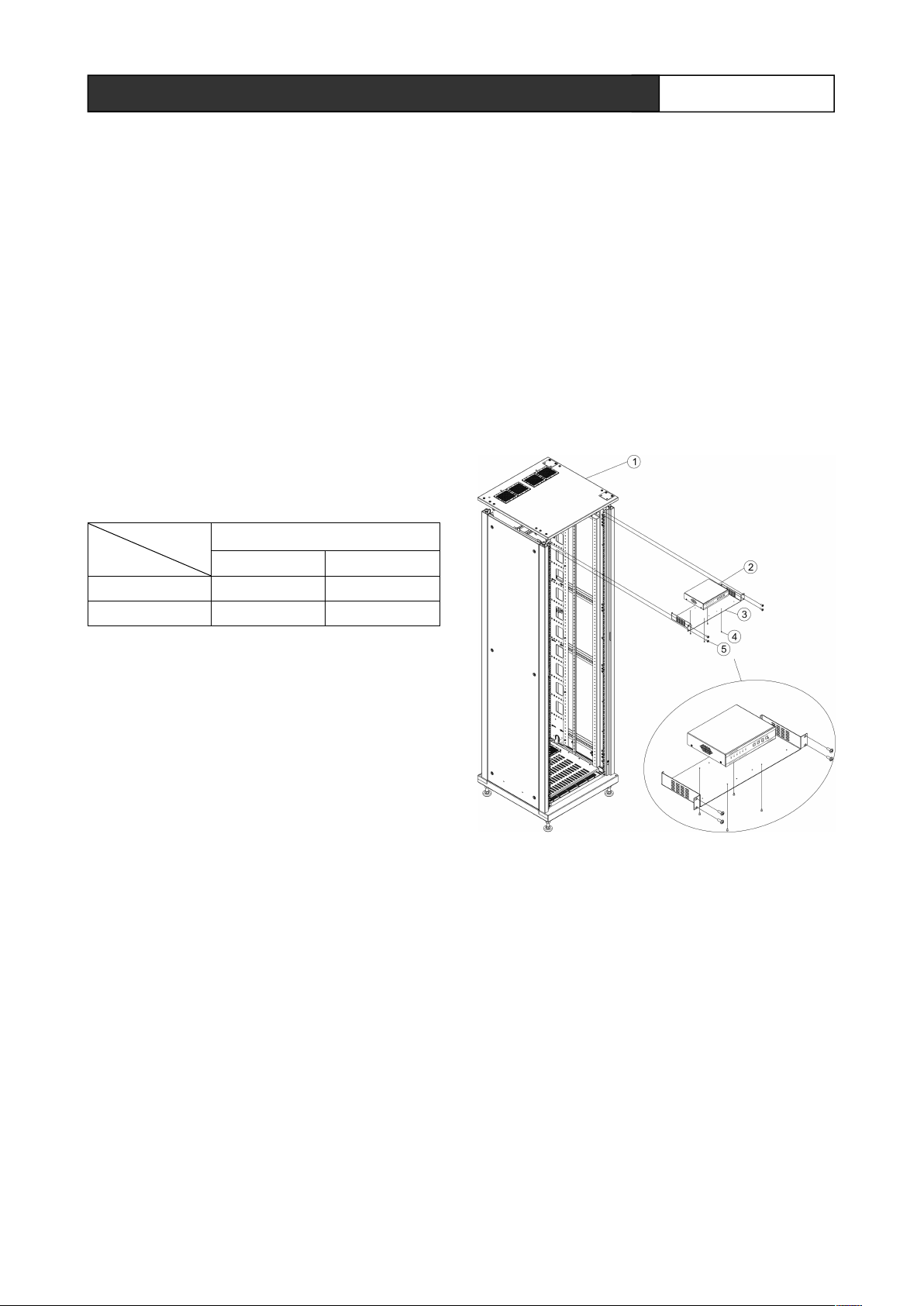
Pt-HDMI401/801S switch controller can be
mounted in a standard 19-inch rack.
Pt-HDMI401S switch controller is 1/2U chassis,
optional accessories including a rack-mounted
tray, 4/8 KM3X6 countersunk head screws and 4
BM6X16 screws, assembly methods shown
below:
①
Standard 19-inch rack
②
Pt-HDMI401S switch cotroller
③
cabinet installation tray
④
KM3X6 countersunk head screws
⑤ BM6X16 screws
Installation steps:
1, First fix Pt-HDMI401S switch controller and
cabinet installation tray with 4PCS KM3X6
countersunk head screws;
CREATOR CORPORATION(CHINA) 2011-05 WWW.CREATOR1997.COM
Page 7
2
Pt-HDMI401/801S Switcher User’s Manual
2, put the tray fixed the controller horizontally into
the cabinet, and fix it with 4PCS BM6X16 screws.
As shown on the detailed chart;
Two Pt-HDMI401S switch controllers or its
equivalent-sized chassises can be installed on
one installation tray.
Pt-HDMI801S switch controller is standard 1U
chassis. The standard accessories of controller
contain a pair of mounting brackets and a bag of
screws. When install, firstly screw the mounting
brackets on the chassis. Then place the controller
chassis in a standard 19-inch rack, and fix it with
screws.
Chapter 2 System Controller Description
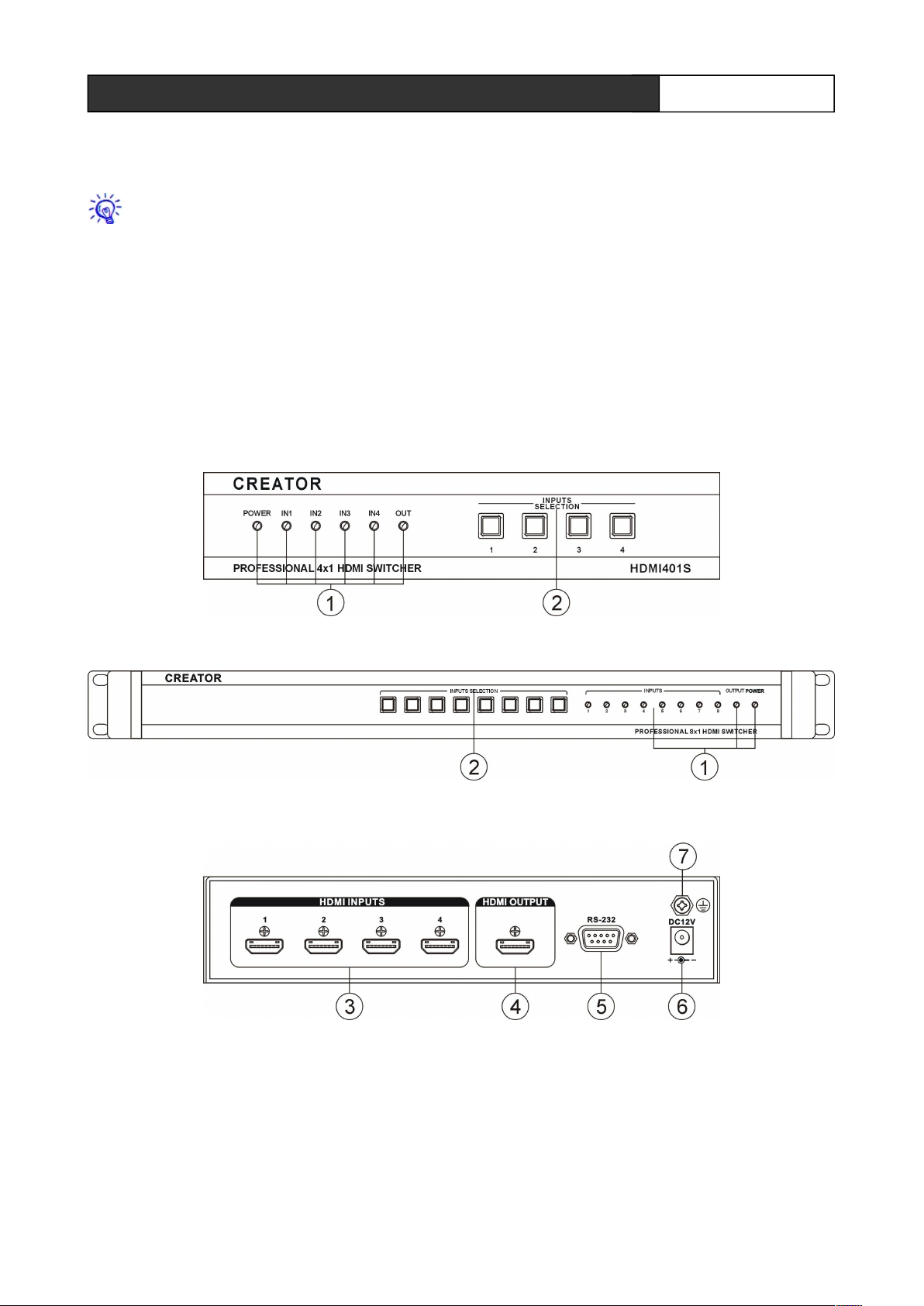
2.1 Introduction of the front and rear panels
Pt-HDMI401S front panel:
Pt-HDMI801S front panel:
Pt-HDMI401S rear panel:
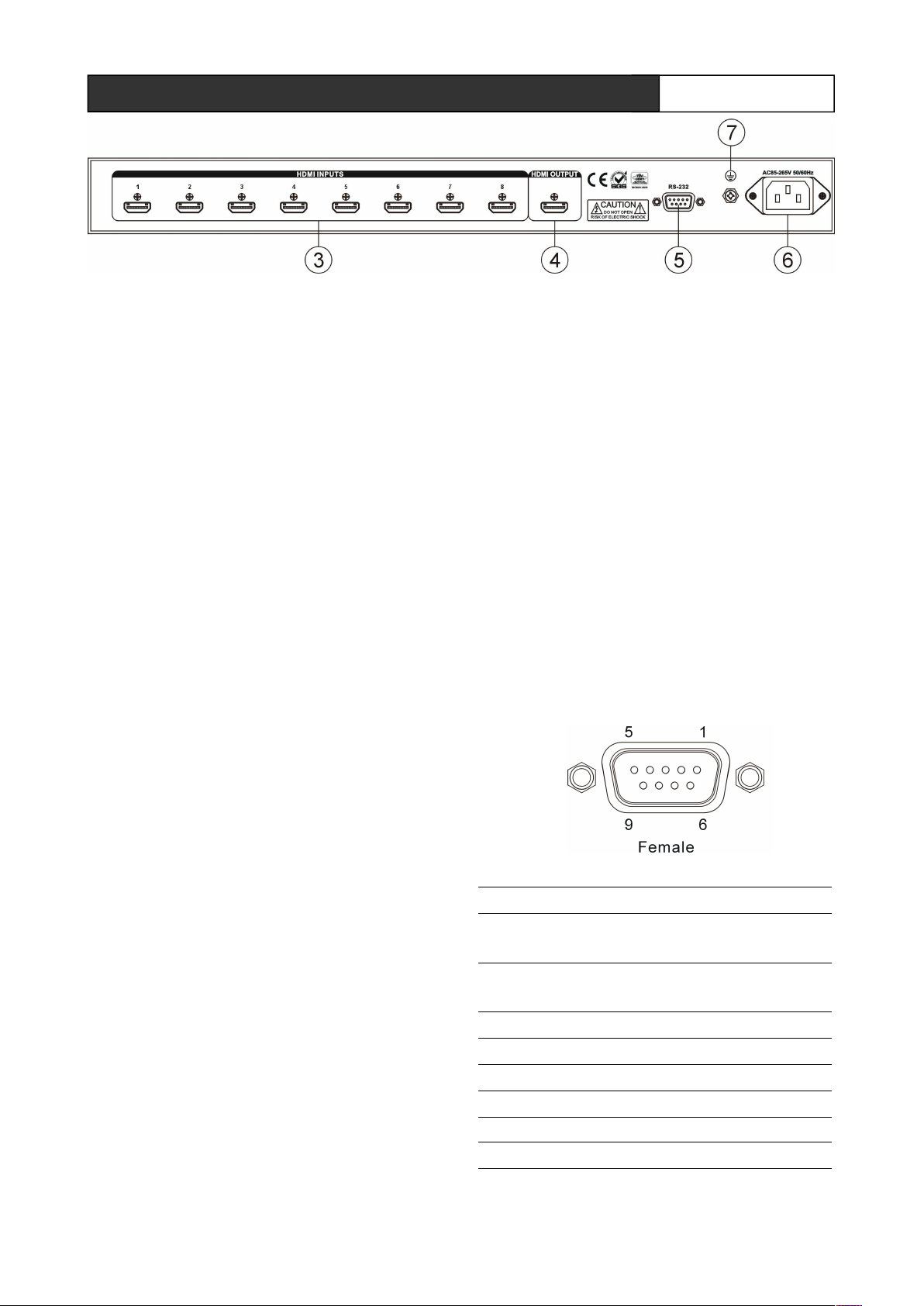
Pt-HDMI801S rear panel:
CREATOR CORPORATION(CHINA) 2011-05 WWW.CREATOR1997.COM
Page 8
3
Pt-HDMI401/801S Switcher User’s Manual
① POWER——Power Indicator
When the controller is powered, the
indicator is lit, vice versa, it does not
shine.
INPUTS——Input signal indicator
When there is input signal passing through,
indicator is lit, and vice versa it does not
shine.
OUTPUT——Output signal indicator
When there is an output signal passing
through, indicator is lit, and vice versa it
does not shine.
② INPUTS SELECTION——audio and video
input selection key
Audio and video HDMI input interface can provide
4/8 audio and video input channels.
In the operation, shortly pressing an input
button is to switch the selected input signal onto
the input terminal display.
③ HDMI INPUTS——audio and video signal
input port
With 4/8 HDMI signal ports, can be
connected to peripheral device with HDMI
interface, such as DVD and so on.
④ HDMI OUTPUT——audio and video signal
output port
Single HDMI output, can be connected to
device like plasma displays.
⑤ COM——RS-232control port
Used to connect computers and other control
equipment.
⑥ Power input port
CR-HDMI401S controller support DC12V input;
CR-HDMI801S controller support AC100 ~ 240V
50/60Hz input.
⑦ Ground column.
2.2 Interface Description
2.2.1 COM port description
CR-HDMI401/801S switch can be used to
control a variety of control systems. It can control
matrix via RS-232 serial interface, and RS-232
interface pins are described below:
Pin Signal Description
1 -
-
2 TXD
RS-232 protocol used to send
data
3 RXD
RS-232 protocol, to receive
data
4 -
-
5 GND
GND
6 -
-
7 -
-
8 -
-
CREATOR CORPORATION(CHINA) 2011-05 WWW.CREATOR1997.COM
Page 9
3
Pt-HDMI401/801S Switcher User’s Manual
9 -
-
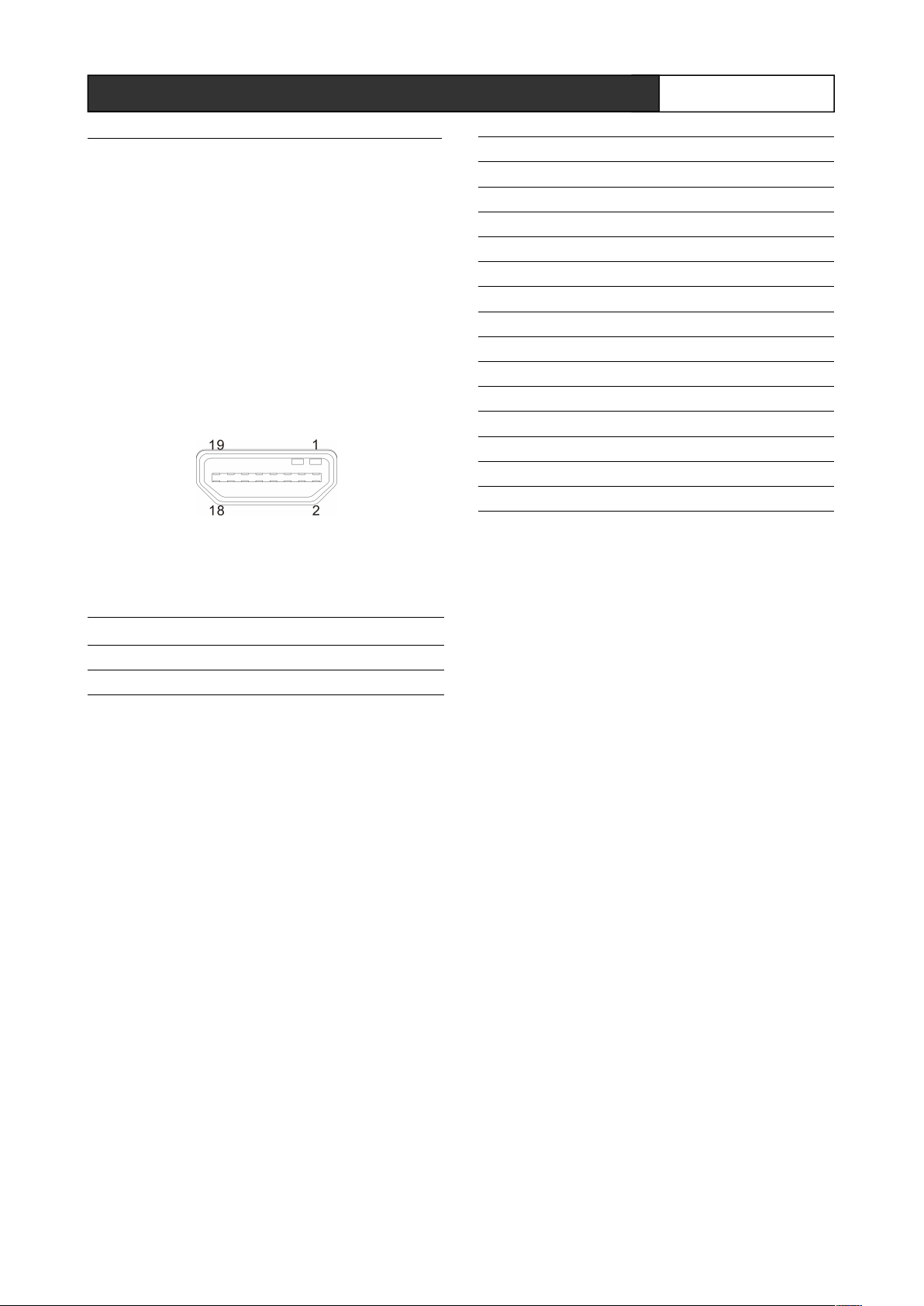
2.2.2 HDMI-A Type Link Interface
Description
HDMI switcher provides different number of
input and output interface according to its distinct
models. Users can connect its input interface with
a variety of computer signals, audio and video
signal equipment, such as DVD players, desktop
computers, graphic workstations, and number
displays according to different occasions. And the
output interface can be connected to projectors,
VCR, computer monitors, amplifiers and so on.
HDMI-A interface pin definition table
PIN Function
1 TMDS Data2+
2 TMDS Data2 Shield
3 TMDS Data2–
4 TMDS Data1+
5 TMDS Data1 Shield
6 TMDS Data1–
7 TMDS Data0+
8 TMDS Data0 Shield
9 TMDS Data0–
10 TMDS Clock+
11 TMDS Clock Shield
12 TMDS Clock–
13 CEC
14 Reserved (in cable but N.C. on device)
15 SCL
16 SDA
17 DDC/CEC Ground
18 +5V Power
19 Hot Plug Detect
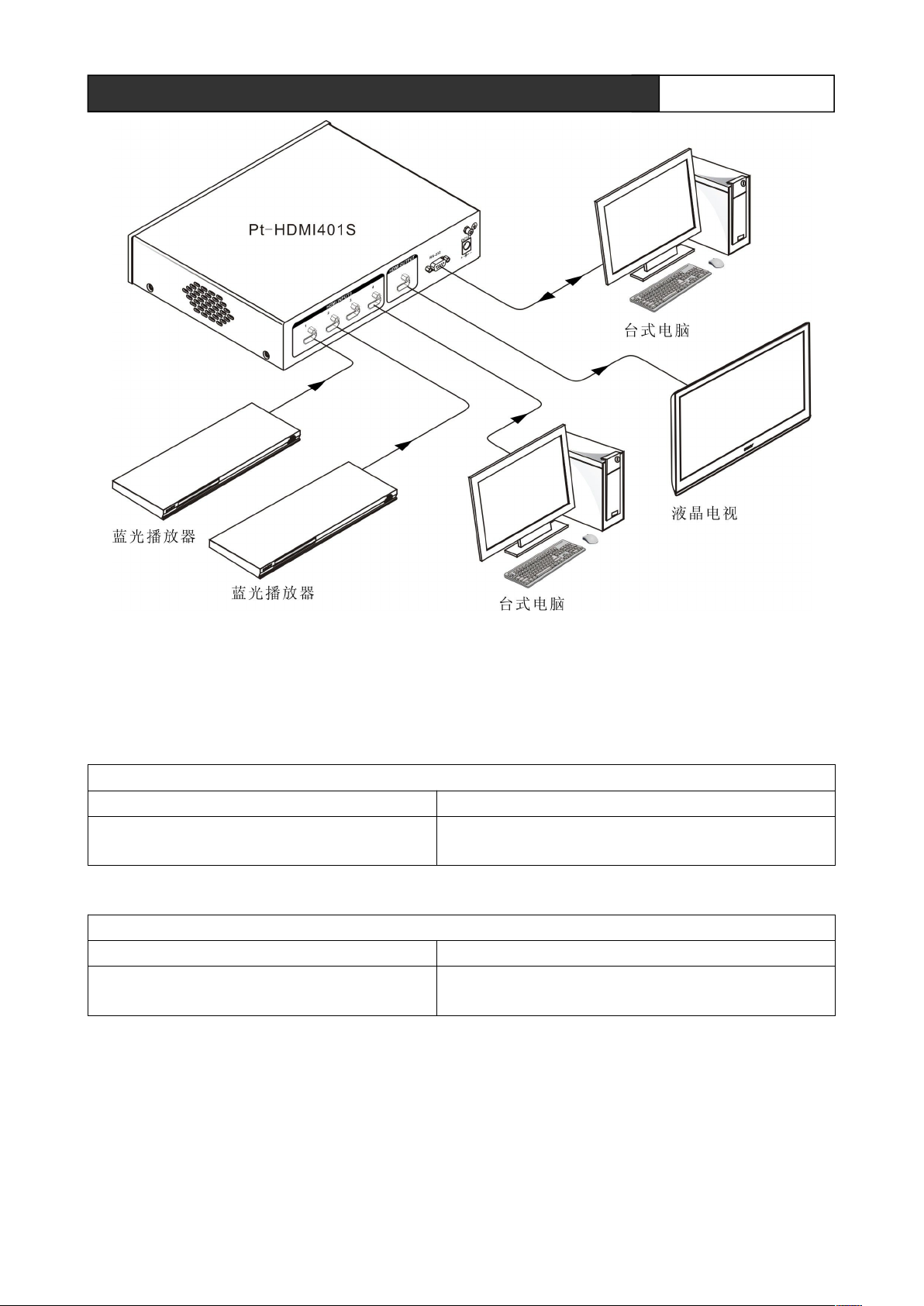
2.3 Connection diagram
Here, Pt-HDMI401S is chosen to illustrate the HDMI switcher connection method. The connection
method of Pt-HDMI801S is similar to it.
CREATOR CORPORATION(CHINA) 2011-05 WWW.CREATOR1997.COM
Page 10
4
Pt-HDMI401/801S Switcher User’s Manual
台式电脑 Desktop PC
Switch the input channel xx to the output channel xx.=
[01,08]
液晶电视 LCD TV
蓝光播放器 Blu-ray player
2.4 RS-232 Control instructions
Pt-HDMI401S
Baud: 9600bps 8,n,1 format: ASCII
Code Function
XX$01!
Pt-HDMI801S
Baud: 9600bps 8,n,1 format: ASCII
Code Function
XX$01!
Switch the input channel xx to the output channel xx. =
[01,04]
CREATOR CORPORATION(CHINA) 2011-05 WWW.CREATOR1997.COM
Page 11
5
Pt-HDMI401/801S Switcher User’s Manual
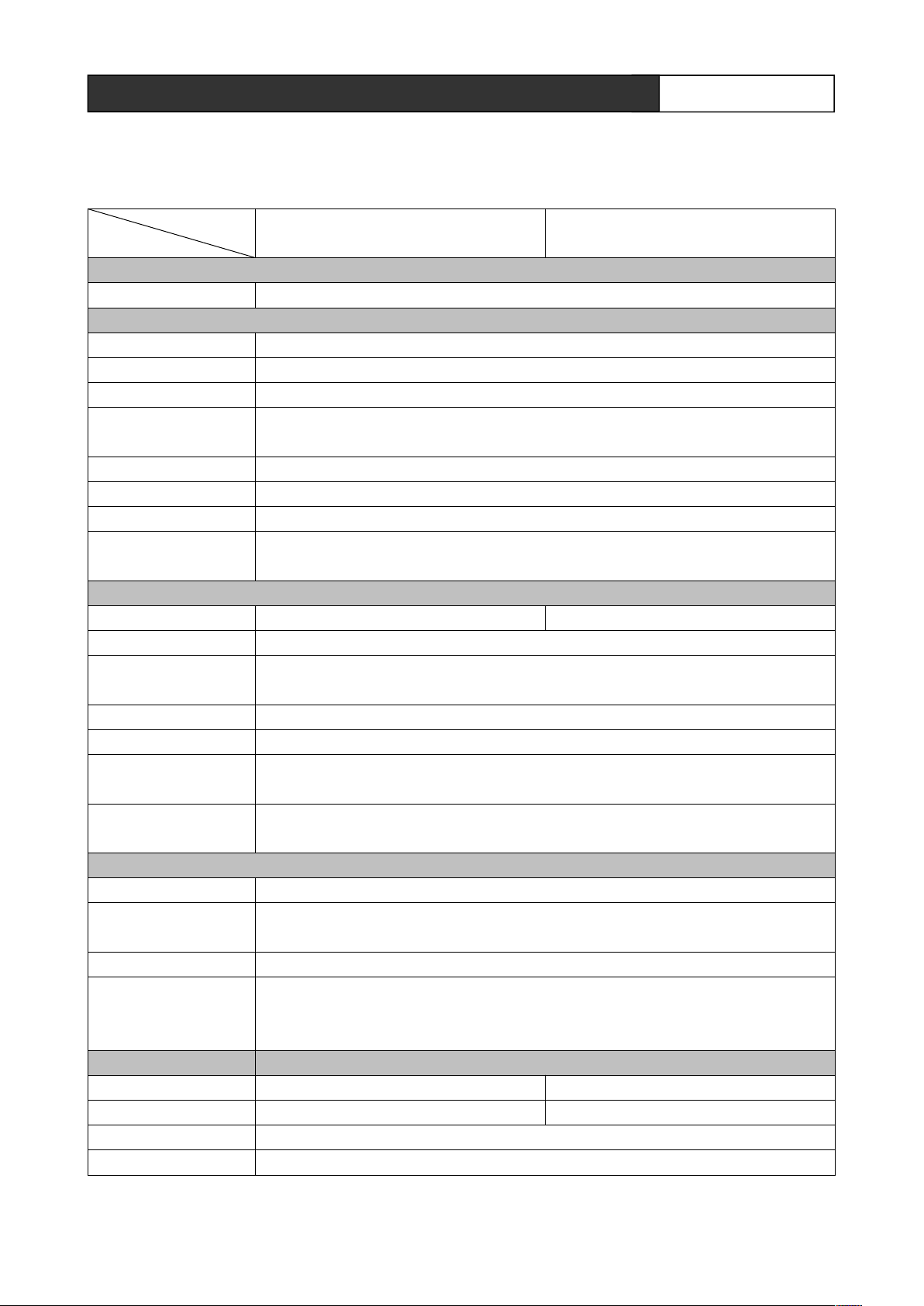
Chapter 3 Parameters
Maximum DC offset
error
Less than 30 m, at 1600x1200 @ 60 (recommend the certified HDMI dedicated wire, such
as the wire of Molex TM)
Recommended
maximum output
distance
Less than 7 meters, at 1600x1200 @ 60 (recommend the certified HDMI dedicated
wire,such as the wire of Molex TM)
Model
Technical Specifications
Protocol
HDMI1.3b,HDCP1.2,DVI1.0
Pt-HDMI401S Pt-HDMI801S
Video
Gain
Pixel Bandwidth
Interface bandwidth
Maximum supported
resolution
Clock Jitter
Risetime
Falltime
maximum propagation
delay
Video Input
Interface 4 HDMI-A female interface 8 HDMI-A female interface
Signal Strength T.M.D.S. +/- 0.4Vpp
Minimum / maximum
level
Impedance 50 Ω
Input EDID Automatically read display EDID
0 dB
165MHz, all-digital
2.25Gbps, all-digital (A total of 6.75Gbps, each color is 2.25Gbps)
Normal-PC:1600x1200@60_24bit, HDPC: 1920x1200P@ 60_24bit,
HDTV:1920x1080P@60_36bit
<0.15 Tbit
<0.3Tbit (20%--80%)
<0.3Tbit (20%--80%)
5nS(±1nS)
T.M.D.S. 2.9V/3.3V
15mV
Recommended
maximum input distance
Video Output
Interface 1 HDMI-A female interface
Minimum / maximum
level
Impedance 50 Ω
Specification
Power supply DC12V AC100~240V 50/60Hz
Power Maximum 6w Maximum 12w
Temperature Storage temperature: -20° ~ +70°C
Humidity Storage, use humidity:10% ~ 90%
CREATOR CORPORATION(CHINA) 2011-05 WWW.CREATOR1997.COM
T.M.D.S. 2.9V/3.3V
Page 12

6
Pt-HDMI401/801S Switcher User’s Manual
Model
Technical Specifications
Dimensions 215(W)X43.6(H)X164.5(D)mm 428.6(W)X43.6(H)X164.5(D)mm
Weight About 1.2kg About 2.2kg
MTBF 30,000 hours
Warranty 1 year free warranty and lifetime maintenance
Pt-HDMI401S Pt-HDMI801S
Chapter4 Accessories
4.1 Power Cord
Used to connect the power and controller power input port.
4.2 Manual / Warranty card
Manual contains the operating instructions and parameters of the system and so on. Warranty card is used for
warranty and maintenance.
CREATOR CORPORATION(CHINA) 2011-05 WWW.CREATOR1997.COM
Page 13

7
Pt-HDMI401/801S Switcher User’s manual
Chapter 5 Troubleshooting
In this section, a list of simple troubleshooting guide
is to make up some consequences caused by improper
use or installation. If the more serious faults or
problems are arising, please contact the specialized
technical personnel.
Power-on, the front panel power light is lit, but no audio
and video output.
● Check whether the audio and video circuitry is intact.
● Check the audio and video sources and display
devices to make sure they are working properly.
Symptom Remedy
Power-on, the front panel power light is not lit.
● Check whether the normal power is supplied.
CREATOR CORPORATION(CHINA) 2011-05 WWW.CREATOR1997.COM
Page 14

Page 15

CREATOR CORPORATION(CHINA)
Copyright by CREATOR
Page 16

Last Revision:05/2011
 Loading...