

Page 1

MAX1301/MAX1301-TV USER MANUAL
CREATOR Electronics
MAX1301/MAX1301-TV SCALER SWITCHER
USER MANUAL
Please read this manual carefully before using the system
1
Page 2

MAX1301/MAX1301-TV USER MANUAL
Content table
1.Function.......................................................................................................................................5
2.Connection..................................................................................................................................5
3.Front Panel..................................................................................................................................6
4.Real Panel...................................................................................................................................6
5.Description for Video part.........................................................................................................7
6.Description for S-Video part.....................................................................................................7
7.TV Function Guide.....................................................................................................................7
8.Problems solving & Maintenance..........................................................................................12
2
Page 3
MAX1301/MAX1301-TV USER MANUAL
This manual is only for operational instruction
not for any maintenance service. The
manufacturer will make a supplement for any function or parameter revision. Please ask
the local dealers for detailed information.
The copyright of
belongs to the manufacturer,
any compa
ny or individual uses part of, or all content of the manual for any commercial
purpose without the consent of manufacturer is prohibited.
The TV function of
All product function is valid till
Attention:
MAX1301/MAX1301-TV USER MANUAL
MAX1301-TV is only for Chinese market for temporary.
,
2006-6-30
3
Page 4
MAX1301/MAX1301-TV USER MANUAL
!
Operation Notice
nsure the credibility use of the product and the user’s safety, please comply with the
nsure the
lease keep the working environment good in ventilation to
the following
voltage component
In order to e
following items during installation and maintenance:
The system must be earthed properly. Please do not use two blades plugs and e
alternating power supply ranged from 100v to 240v and from 50Hz to 60Hz.
Do not put the machine in a place of too hot or too cold.
To avoid any damage by over heat, p
radiate the heat when running the machine.
The machine should be turned off when in rainy and humid days or nonuse for a long time.
The AC power supply line should be disconnected with the power socket during
operation.
A. Take out or reinstall any component of the machine.
B. Disconnect or re-connect any connector of the machine.
Please do not attempt to maintain and uncover the machine for there is a highinside and the risk of the electric shock.
Do not splash any chemical product or liquid on or near the equipment.
4
Page 5
MAX1301/MAX1301-TV USER MANUAL
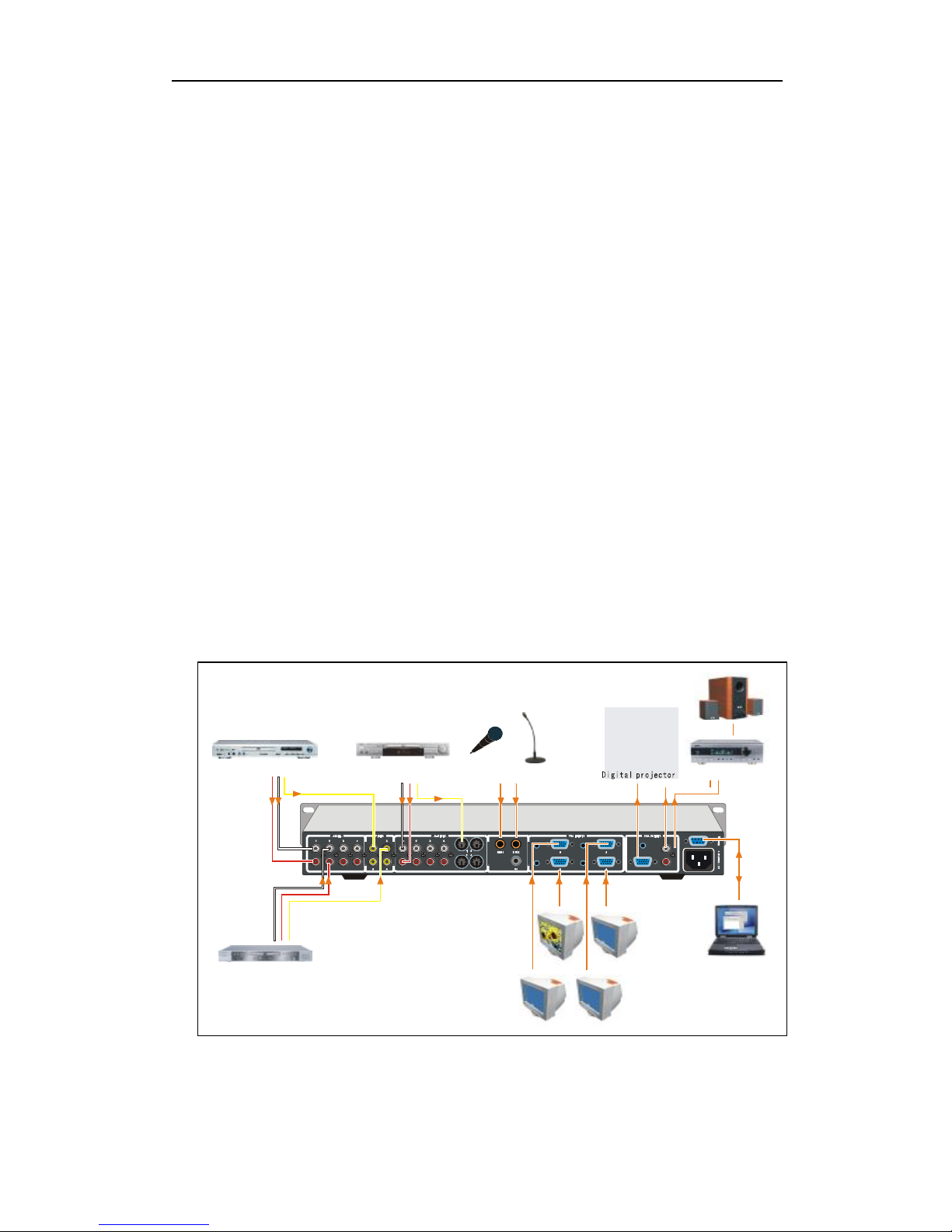
MIC 2
Amplifier
Speaker
PC1
PC2
Notework
MIC 1
1.Function
MAX1301/MAX1301-TV is a scale switcher designed for multi-signal processing, signals
of Composite VIDEO, S-VIDEO, VGA, TV and microphone can be scaled to
high-resolution VGA format and switched out.
l CVBS composite video, and S-Video can be switched to VGA signals with following
resolution,
SVGA 800X600 @60Hz
XGA 1024X768@60Hz
SXGA 1280X1024@60Hz
l Fit with CVBS (including NTST, PAL and SECAM) and S-VIDEO
l 3 MIC inputs, separated volume circuit enable the connection with the master audio
signal
l 4 wide-band VGA input signals switching
l CATV receiving
l Adjustable Brightness, contrast, saturation of TV, VIDEO(CVBS), S-Video
l IR remote control and serial control
l Built-in memory card with the power-fail protection
l Specially dedicated to the high-resolution A/V presentation display, multimedia
classrooms, command centers, conference rooms, etc..
2.Connection
DVD
VCD
DVD
PC3
PC4
5
Page 6
MAX1301/MAX1301-TV USER MANUAL
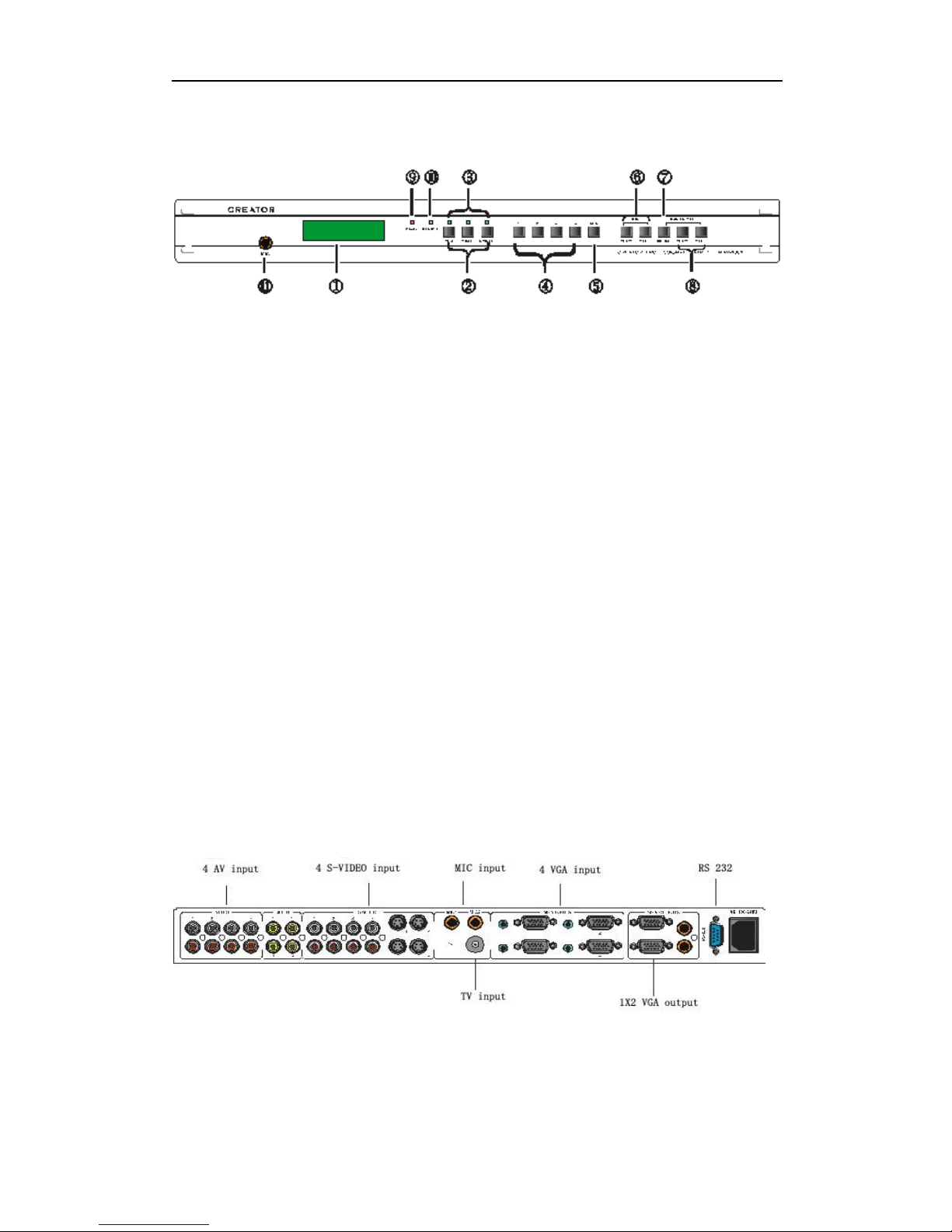
3.Front Panel
l ①LCD displayer
l ②Signal Source selection, working with ④ to select the input Signal Source (VGA,
Composite Video, S-Video ,TV etc.)
VGA Signal: Mainly for PC or NOTEBOOK
Composite Video: CVBS, such as DVD,VCD,VCR ,etc.
S-Video: super DVD, VCD or video card, etc.
l ③Signal Indication light
l ④Source Switching: Selecting the corresponding input channel (1,2,3,4) of current
signal source. Please select before switching.
l ⑤Resolution Display: Press it to enter the setting mode, press again to change the
resolution, with LCD status displaying.
l ⑥MIC volume adjustment, with LCD and bar indicator.
l ⑦Mute/Backlight setting: 1. Mute is available for both MIC and master volume; 2.
Under power-off status, pressing MUTING continuously while resuming power supply
to enter back light setting mode, setting range is 0-99 minutes.
l ⑧Master vol adjustment. with LCD and bar indicator.
l ⑨Power status indication
l ⑩IR Sensor
l ⑩MIC
4.Real Panel
6
Page 7

MAX1301/MAX1301-TV USER MANUAL
5.Description for Video part
Press Video for 3 seconds under Video mode to enter the setting mode.
5.1 function_1: 1 CV brightness, brightness adjustment, work with parameter+,
parameter_.
5.2 function_2: 2 CV Contrast, Contrast adjustment, work with parameter+, parameter_.
5.3 function_3: 3 CV Saturation, Saturation adjustment, work with parameter+,
parameter_.
5.4 function_4: 4 RESTORE CVBS DEFAULT VALUE?, work with ENTER. Come back
to default.
6.Description for S-Video part
Press S-Video for 3 seconds under S-Video mode to enter the setting mode.
5.1 function_1: 1 SV brightness, brightness adjustment, work with parameter+,
parameter_.
5.2 function_2: 2 SV Contrast, Contrast adjustment, work with parameter+, parameter_.
5.3 function_3: 3 SV Saturation, Saturation adjustment, work with parameter+,
parameter_.
5.4 function_4: 4 RESTORE SV DEFAULT VALUE?, work with ENTER. Come back to
default.
7.TV Function Guide
Part A: Manual operation
Part B: Remote operation
Part C: PC or RS232 control
Part A: Manual operation
1.1 Access TV mode or quit TV mode. Press VGA/TV button twice under AV,S--Video
mode to enter TV mode. Press VGA/AV button once under VGA switching mode to
enter TV mode. At this time, lights of AV, S-VIDEO, VGA are all turned off. After
accessing TV mode, refer the words in blue under the key for definition of the front
panel.
1.2 Under TV mode, press VGA/TV again to quit TV mode and go back to AV,S-VIDEO
and
VGA switching mode. At this time, there is one of the indication lights for AV,S-VIDEO
and VGA is on at least.
2. Under TV mode: use FUNCTION to select TV functions, part of the functions should
be used with PARAMETER± and ENTER.
7
Page 8

MAX1301/MAX1301-TV USER MANUAL
2.1 FUNCTION_1: AUTO SEARCH CHANNEL : Search all TV channels and save
them. Press ENTER again to start this function, after which press ENTER again to
start manual operation, at this time, channels found will also be saved and covered the
original ones. It will stop automatically after it finish the searching and go back to
the last channel found.
·2.2 FUNCTION_2: BRIGHTNESS: Adjust the luminance of TV image. This function
should be used together with PARAMETER±.
2.3 FUNCTION_3: CONTRAST: Adjust the contrast. This function should be used
together with PARAMETER±.
2.4 FUNCTION_4: SATURATION : Adjust the color saturation. This function should be
used together with PARAMETER±.
2.5 FUNCTION_5: RESTORE DEFAULT VALUE : Restore default value for
luminance, contrast, the color of TV image. (the original one is 50%). Select this
function than press ENTER again, this operation will be executed.
2.6 FUNCTION_6:SWAP TO: Change channel saving positions. This function should
be used together with PARAMETER± and ENTER. Select this function, than press
PARAMETER+,the saving position of current channel will go backward. Press
PARAMETER-,it will go forward. Press ENTER to save this operation. At this time,
the current channel will be saved to a new position.
When auto-searching is finished, the channel position may stay in undesired order,
SWAP TO can be used to adjust the favorite channel to the foremost.
2.7 FUNCTION_7: SEARCH NEXT CHANNEL: Semiautomatic button used to search
for next channel. On the basis of current channel, go forward/backward to search a
new channel and saved it at current memory position. This function should be used
together with PARAMETER±.
2.8 FUNCTION_8: VHFH:16.72: Adjust the channel frequency. This function should
be used together with PARAMETER± and ENTER. Select this function first, than
press ENTER again to save it. This function can be used when the sound and
image is not good enough after auto-searching. But the problems may still exist
due to weak signal of this channel.
3. TV SYSTEM SELECT: Select TV standard
A CHINA use in China PAL D/K
B USA use in US NTSC M
C ITALY use in ITALY PAL B/G
D HONGKONG use in HONGKONG PAL I
8
Page 9
MAX1301/MAX1301-TV USER MANUAL
Please select the right system before searching.
. PARAMETER±: Parameters up/down, this function should be used with the options of
4
FUNCTION, keep pressing it to up/down continuously, PARAMETER± is defaulted to
relate with channel frequency when the front panel is under TV mode.
5. Press CHANNEL±: Channel up/down
Press PARAMETER+: Channel switches up one by one automatically, up to 99
Press PARAMETER-: Channel switches down one by one automatically, up to 01
6. MIC VOL±: MIC volume up/down
7. MUTE: Master volume mute operation
8. MASTER VOLUME±: Master volume up/down
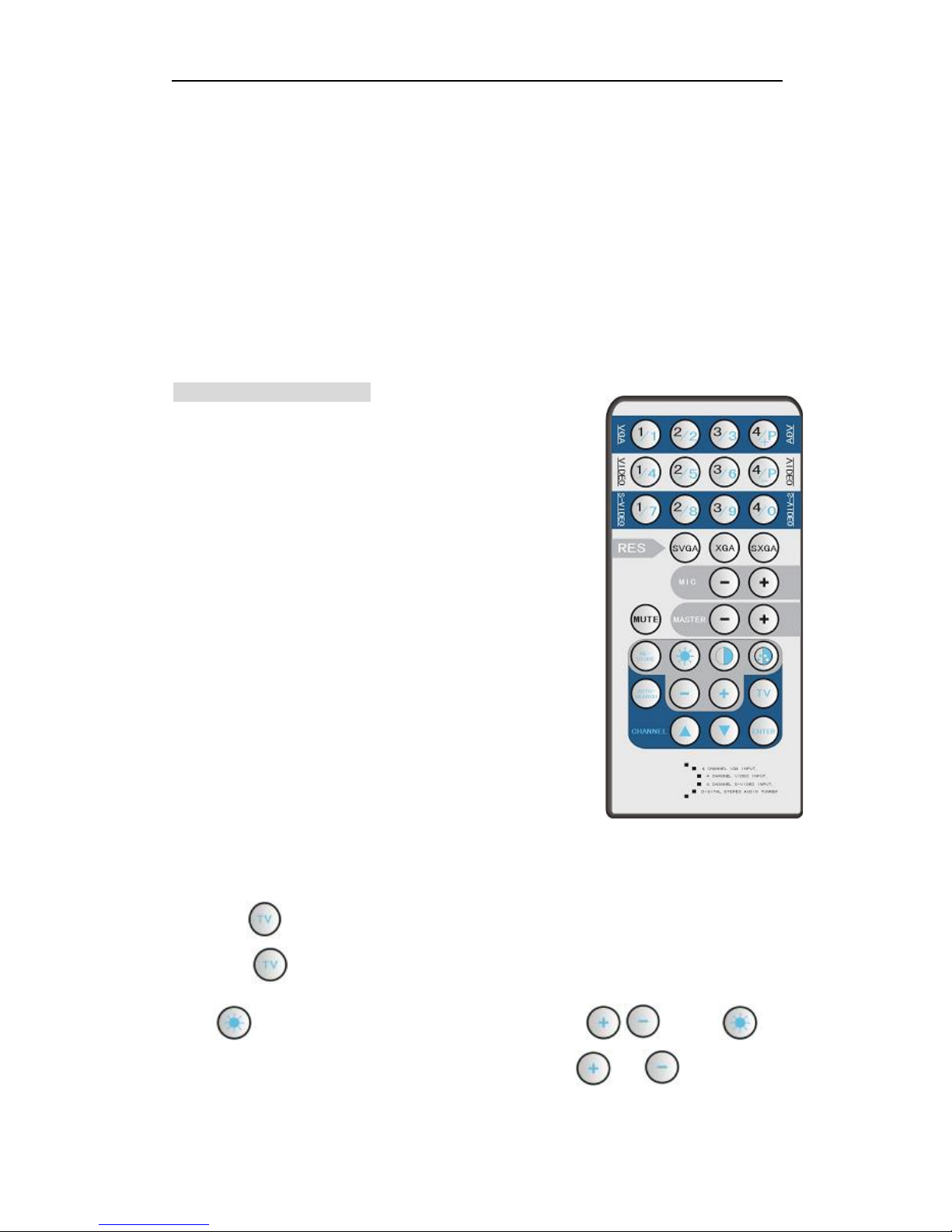
Part B: Remote operation
Under TV mode, the function of SVGA, XGA, SXGA, MIC-, MIC+, MUTE, MASTER,
MASTER- is the same, for function of other buttons, please refer to the words in blue,
description below is the operation guide of TV part.
1. Access/quit mode. Press once under AV,S-VIDEO,VGA switching mode,
Press once again at TV mode,quit TV mode.
2. Luminance adjustment key used together with . Press
once to select the function of luminance adjustment, up, down.
9
Page 10
MAX1301/MAX1301-TV USER MANUAL
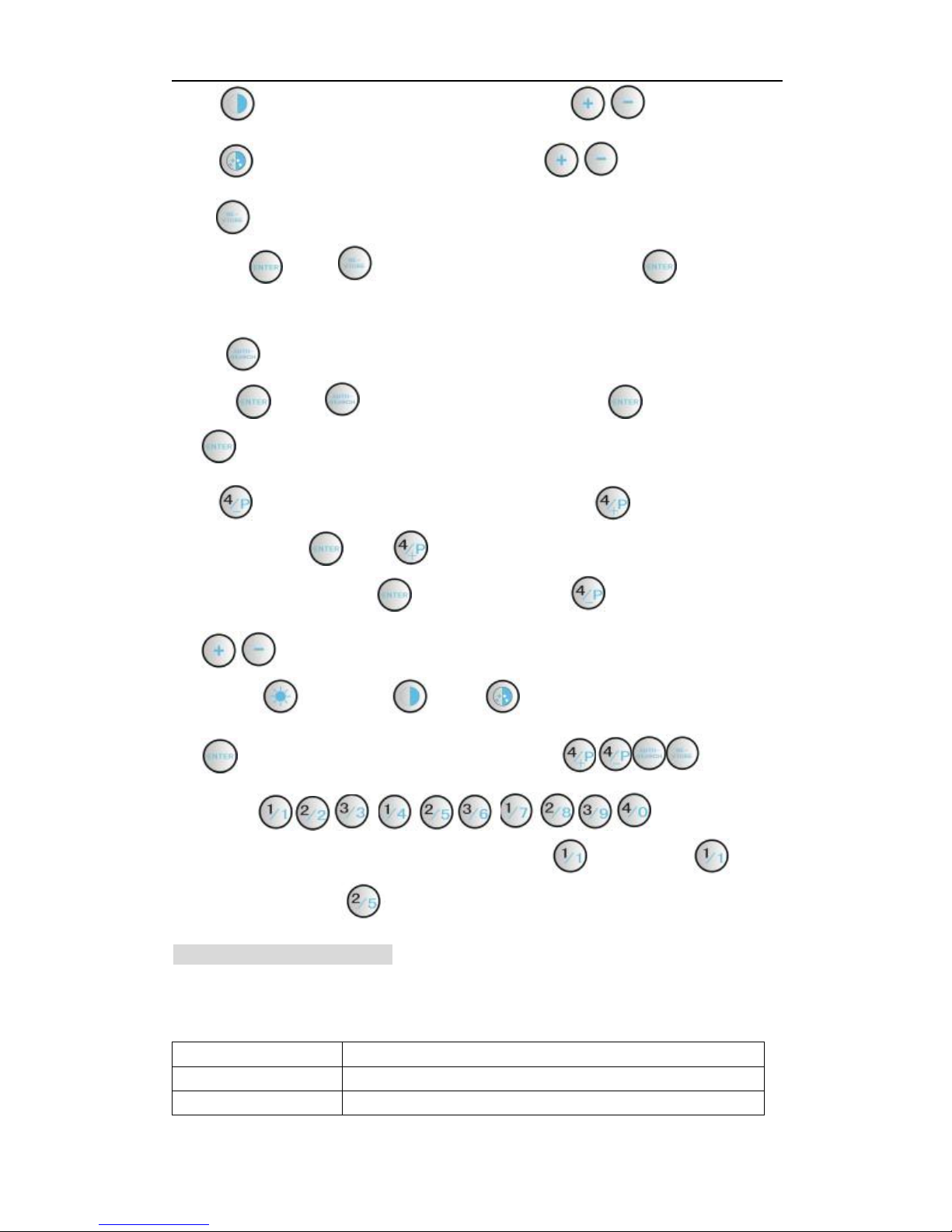
3. Contrast adjustment key used together with .
4. Color adjustment key used together with .
5. Restore luminance, contrast, color to default value. This key should be used
with . Press once to enter this function, than press again to start
this function.
6. Automatically search for all the channels. This key should be used together
with . Press once to select this function,press twice to start, press
again to stop searching.
7. Exchange the memory positions of the channel. Should be used
together with . Press ,the new memory position of current channel keep
going backward, press to start SWAP, press to go forward.
8. Adjust Luminance, contrast, color up/down continuously. Select
contrast , luminance or color before using this key.
9. Function start/confirmation, use together with .
10. Press to select TV
channels directly. For example, selecting 11,press first and press again.
Selecting 5,press and wait for 2 seconds to finish the switching.
Part C: PC or RS232 control
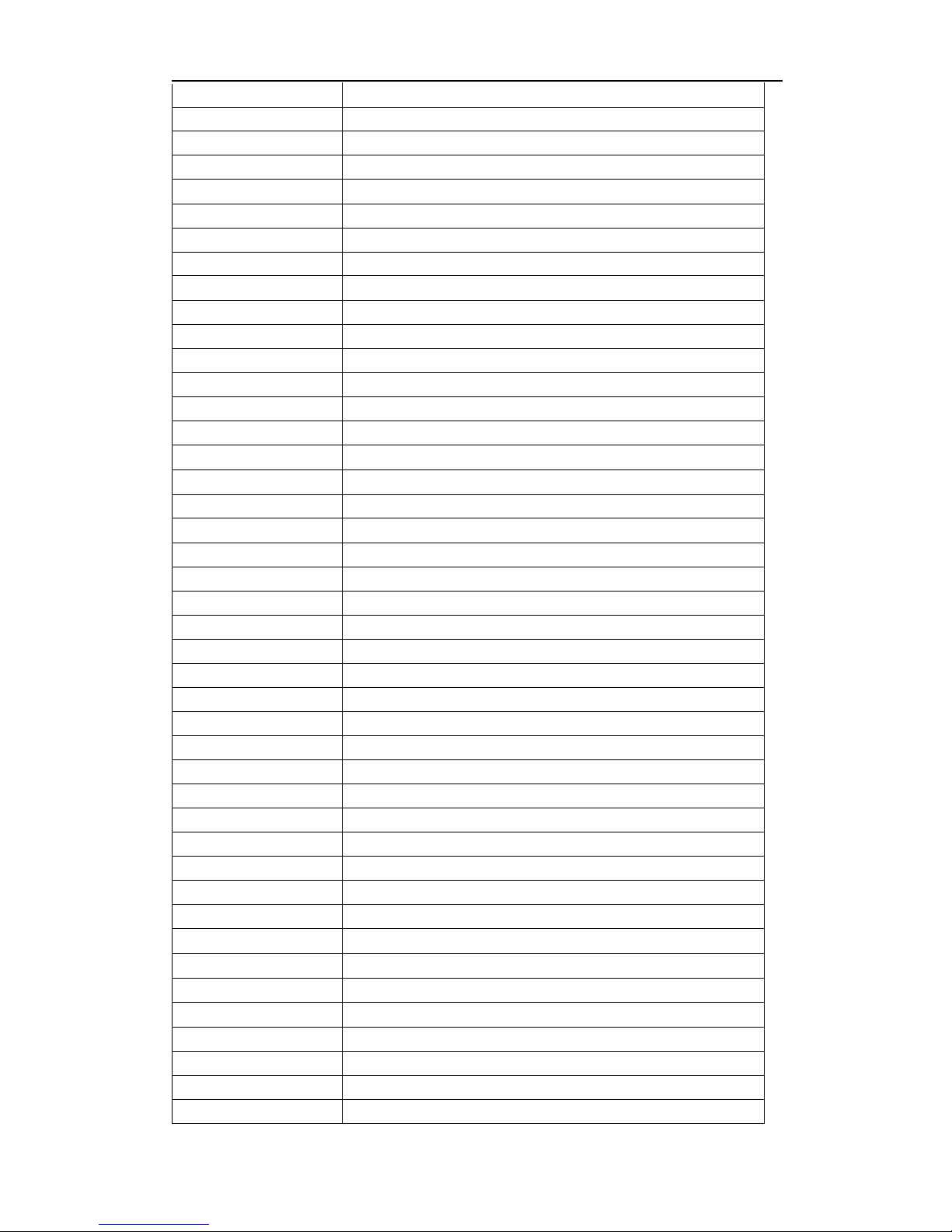
RS-232 Protocol
Baud: 9600bps 8,n,1 format: ASCII
Code
01*01!
02*01!
Function
VGA1 with audio switch out
VGA2 with audio switch out
10
Page 11
MAX1301/MAX1301-TV USER MANUAL
ency
03*01!
04*01! VGA4 with audio switch out
05*01!
06*01!
07*01!
08*01! S-Video 4 with audio switch out
09*01!
10*01!
11*01!
12*01! COMPOSITE4 VIDEO1 with audio switch out
13*01!
14*01!
01$01!
02$01! XGA 1024*768 (default)
03$01!
04$01!
05$01!
06$01!
07$01!
08$01! Mute on
09$01!
11$01!
12$01! Restore the S-Video (YC) brightness to default value
xx$02! Adjust the Video brightness, 00-99% (0<xx<100)
xx$03! Adjust the Video Contrast, 00-99% (0<xx<100)
xx$04! Adjust the Video Saturation, 00-99% (0<xx<100)
xx$05! Adjust the S-Video brightness, 00-99% (0<xx<100)
xx$06! Adjust the S-Video Contrast, 00-99% (0<xx<100)
xx$07! Adjust the S-Video Saturation, 00-99% (0<xx<100)
01#02!
VGA3 with audio switch out
S-Video 1 with audio switch out
S-Video 2 with audio switch out
S-Video 3 with audio switch out
COMPOSITE1 VIDEO1 with audio switch out
COMPOSITE2 VIDEO1 with audio switch out
COMPOSITE3 VIDEO1 with audio switch out
Enter to the TV mode
Quit TV mode and restore the old mode
SVGA 800*600
SXGA 1280*1024
MIC volume up
MIC volume down
Master volume up
Master volume down
Mute off
Restore the Video(CVBX) brightness to default value
Select the channel 1
… …
99#02! Select the channel 99
01#03!
Swap current position to Position 01
… …
99#03! swap current position to Position 99
xx#04!
xx#05! Adjust the Contrast, 00--99% (0< xx <100)
xx#06! Adjust the saturation, 00--99% (0< xx <100)
01#07!
02#07! Restore the TV brightness to the default value
03#07! Search forward for next TV channel from current frequency
04#07!
05#07!
Adjust the TV brightness, 00--99% (0< xx <100)
Start/stop Auto Searching of TV channels
Search backward for next TV channel from current frequ
TV frequency ++ a unit
11
Page 12

MAX1301/MAX1301-TV USER MANUAL
06#07! TV frequency -- a unit.
07#07! Select the TV standard: CHINA (PAL D/K)
08#07!
09#07!
10#07! Select the TV standard: HONG KONG (PAL H/I )
01#08! Read current state
02#08!
03#08!
Select the TV standard: USA (NTSC M/N )
Select the TV standard: ITALY (PAL B/G)
Read present Firmware Version.
Read system information
8.Problems solving & Maintenance
1.When images of terminal unit output with ghost, such as the projector output with ghost,
please check the projector’s setting or try another high quality connection cord.
2.When there is a color losing or no video signal output, please check the input and output
end connection of VGA cable.
3.When the remote controller doesn’t works:
A. The battery has no power, please change a new one.
B. The controller was broken, please repair it.
4.When user cannot control the switcher by computer through its COM port, please check
the COM port number in the software and make sure the COM port is in good condition.
5. No image, no sound under the TV mode:
A. Please check the connection between TV port of the switcher and antenna.
B. Check if there are channels saved, if no, please try auto searching again.
6.When switching, there are codes back but no output image, please check with if there is
any signal at the input end. If there is no signal input, maybe the input connection cord
broken or the connectors loosen.
7.If the POWER indicator doesn’t work and there is no display on LCD or no respond to
any operation, please make sure the power cord connection is well.
8.If the output image is interfered, please make sure the system is grounded well.
9.If the static becomes stronger when connecting the BNC connectors, it maybe due to
the incorrect grounding, please correct it otherwise it would damage the switcher.
10.If the switcher cannot be controlled by the buttons on the front panel, RS232 port or
remote controller, the switchers may has broken. Please send it to the dealer for
repairing.
12
 Loading...