

Page 1
Page 2

User’s Guide
Creative Prodikeys DM
Information in this document is subject to change without notice and does not represent a commitment on the part of Creative
Technology Ltd. No part of this manual may be reproduced or transmitted in any form or by any means, electronic or mechanical,
including photocopying and recording, for any purpose without the written permission of Creative Technology Ltd. The software
described in this document is furnished under a license agreement and may be used or copied only in accordance with the terms of
the license agreement. It is against the law to copy the software on any other medium except as specifically allowed in the license
agreement. The licensee may make one copy of the software for backup purposes.
The Software License Agreement is found in a separate folder on the installation CD.
Copyright © 1998-2003 Creative Technology Ltd. All rights reserved.
Version 1. 0
September 2003
Sound Blaster and Blaster and Prodikeys are trademarks or registered trademarks of Creative Technology Ltd in the United States
and/or other countries. Microsoft, MS-DOS, Windows and the Windows logo are registered trademarks of Microsoft Corporation. Intel
and Pentium are registered trademarks of Intel Corporation. All rights reserved. All other products are trademarks or registered
trademarks of their respective owners.
Page 3
Contents
Page 4

Contents
Introduction
Introduction ...................................................................................................................................................... i
Minimum System Requirements ....................................................................................................... i
More Help................................................................................................................................................ i
Getting More Information ................................................................................................................. ii
Online Registration .............................................................................................................................. ii
Technical Support and Warranty .................................................................................................... ii
Document Conventions.................................................................................................................... iii
1 About Your Creative Prodikeys DM
Parts of your Creative Prodikeys DM ................................................................................................. 1-1
Removing the Music Keyboard Cover ................................................................................................ 1-2
Maintaining Creative Prodikeys DM..................................................................................................... 1-2
2 Setting Up Your Creative Prodikeys DM
Installing Hardware ................................................................................................................................... 2-1
Installing Software....................................................................................................................................... 2-2
3 Getting Started
Starting the Software................................................................................................................................. 3-1
Learning how to use the Software........................................................................................................ 3-2
Play Modes.................................................................................................................................................... 3-3
Programming the Hot Keys .................................................................................................................... 3-3
Configuring Power Management settings ........................................................................................... 3-4
Page 5

A General Specifications
General Specifications .............................................................................................................................. A-1
Software features....................................................................................................................................... A-1
B Troubleshooting
Problems with installing Creative Prodikeys DM............................................................................ B-1
Page 6
Introduction
Page 7

Introduction i
Introduction
Introduction
Thank you for choosing Creative Prodikeys® DM, another quality product from
Creative Technology Ltd., the worldwide leader in digital entertainment products.
Creative Prodikeys DM is a revolutionary keyboard that consists of both a
computer keyboard and a music keyboard with 37 touch-sensitive MIDI keys. It
comes with the new Creative Prodikeys DM software, which makes it easier than
ever to create music on your computer.
Creative Prodikeys DM is for everyone, even if you have no background in music.
With Creative Prodikeys DM, you can create music easily. Learn to play songs in a
fun and easy way. You can even record what you have played, and then send it to
friends or post it on the Internet.
Learning and producing music has never been easier.
Minimum System
Requirements
Your Prodikeys DM requires at least:
❑
Intel® Pentium® 233 MHz (or faster) processor
❑ Desktop computer system with Intel or 100% compatible motherboard chipset
(Notebooks currently not supported)
❑ PS/2 keyboard port
❑ 128 MB RAM
❑ 360 MB free hard disk space
❑ Microsoft
®
Windows® 98 SE, Windows Me, Windows 2000 or Windows XP
❑ Onboard audio device or audio card (Sound Blaster
®
audio card recommended)
❑
CD-ROM drive for software installation
❑ Speakers or headphones
❑ Internet connection for downloading Internet content
More Help In the Creative Prodikeys DM software, the How to Play button offers basic step-
by-step instructions on using the mode that you are currently in. For detailed
information, click the Help button.
Page 8

Introduction ii
Getting More
Information
Visit www.creative.com or www.prodikeys.com for the latest news and updates on
your Creative Prodikeys DM. Additional content such as Fun Mixes, Penta Tunes,
Rhythms and Learnable Songs can also be downloaded from the websites.
Online
Registration
Enjoy a host of benefits by registering your products during installation, or at
www.creative.com/register. Benefits include:
• Service and product support from Creative
• Exclusive updates on promotions and events
Technical Support
and Warranty
Technical Support information can be found in the Installation CD.
d:\Support\<Language>\Support.pdf.
For Warranty information, can also be found in the Installation CD.
d:\Warranty\<Region>\<Language>\Warranty.pdf
(replace d: with the drive letter of your CD-ROM; <Region> represents the region
you are in, and <Language> represents the language the document is in).
Please keep your Proof of Purchase for the duration of the Warranty
period.
Page 9
Introduction iii
Document
Conventions
Tip. This tells you about short cuts or hints relating to a feature.
Note. This highlights additional or important information about a
feature.
Caution! This highlights proper usage of your product. Use this
information to avoid risky situations.
Warning! This warns you of possible hazards to yourself or your
product, that may result in injury or damage.
Page 10
1
About Your Creative Prodikeys
DM
Page 11
About Your Creative Prodikeys DM 1-1
About Your Creative Prodikeys DM
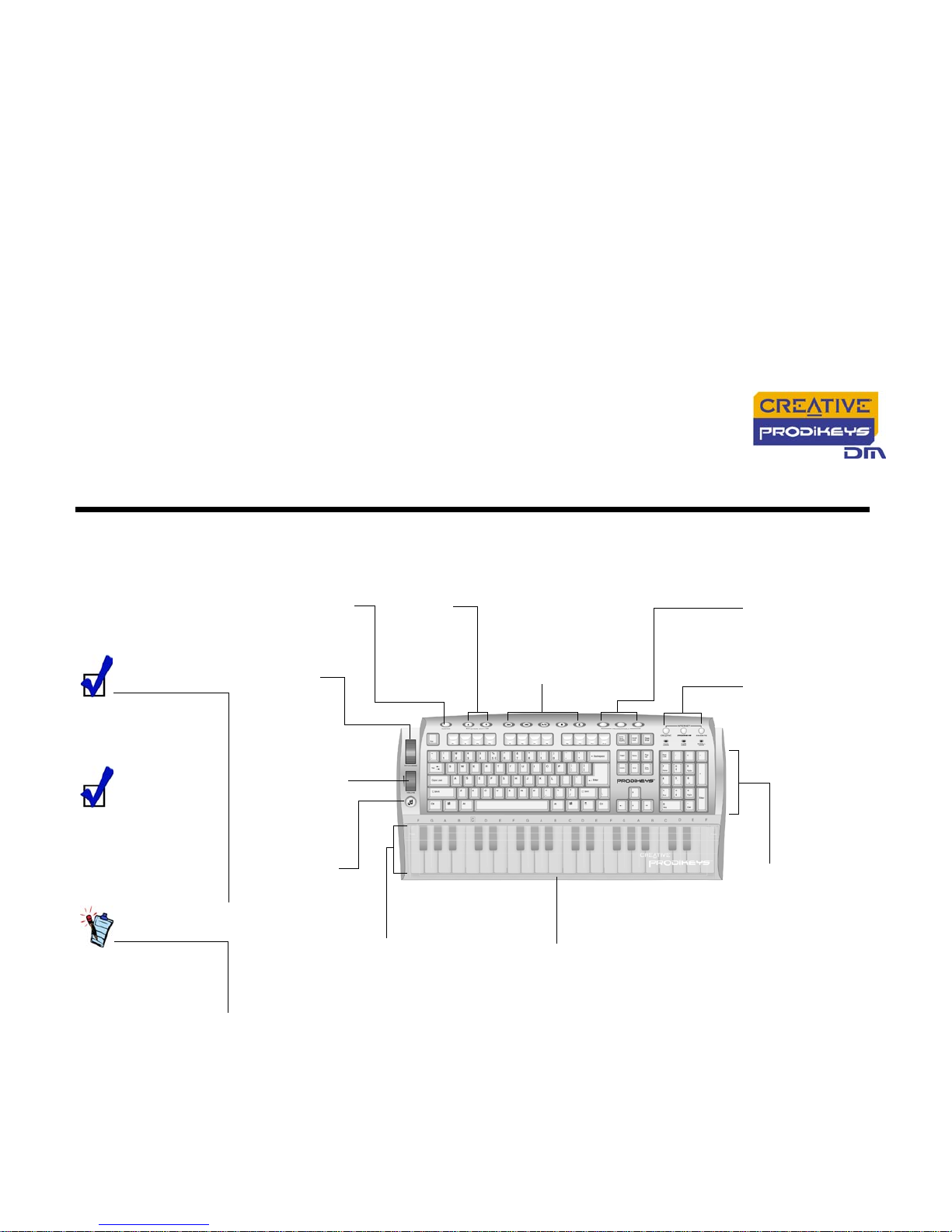
In this chapter, we will familiarize you with the different parts of your Prodikeys
DM, so that you can follow the instructions in the other chapters easily.
Parts of your
Creative
Prodikeys DM
To use the music
keyboard, start the
included Prodikeys DM
software.
To program the Hot
Keys, use the Hot
Keys Configuration
software in the
Creative Prodikeys
program group.
*Windows 98 users
can visit
www.prodikeys.com
for the latest drivers.
Figure 1-1: Parts of your Creative Prodikeys DM
Volume Control
wheel
Use this to adjust
the volume
Multimedia Playback
buttons
Press these buttons to
control multimedia playback
on your software media
player in Windows Me and
later operating systems*
Music keyboard
Press the keys to play music
notes. The 37 keys are touchsensitive — the harder you
strike the keys, the louder the
sound
Palm Rest
Rest your palms while you type.
The palm rest also acts as a dust
cover to protect the music
keyboard
Pitch Bend
wheel
Use this to
change the
pitch of a music
note quickly
Music button
Press this to start
the Prodikeys DM
software
QWERTY keyboard
Use these keys for
normal typing. When
playing music, use
these keys as
shortcuts to access
music settings
SUSTAIN button
Press this button
to make each note
fade out slowly
Octave Shift
buttons
Press these
buttons to play a
wider range of
notes on the
music keyboard
Internet Hot Keys
Use these buttons to
access your favourite
websites when you
are connected to the
Internet
Programmable Hot
Keys
Assign your favourite
application shortcuts t
o
these buttons
Page 12
About Your Creative Prodikeys DM 1-2
Removing the
Music
Keyboard
Cover
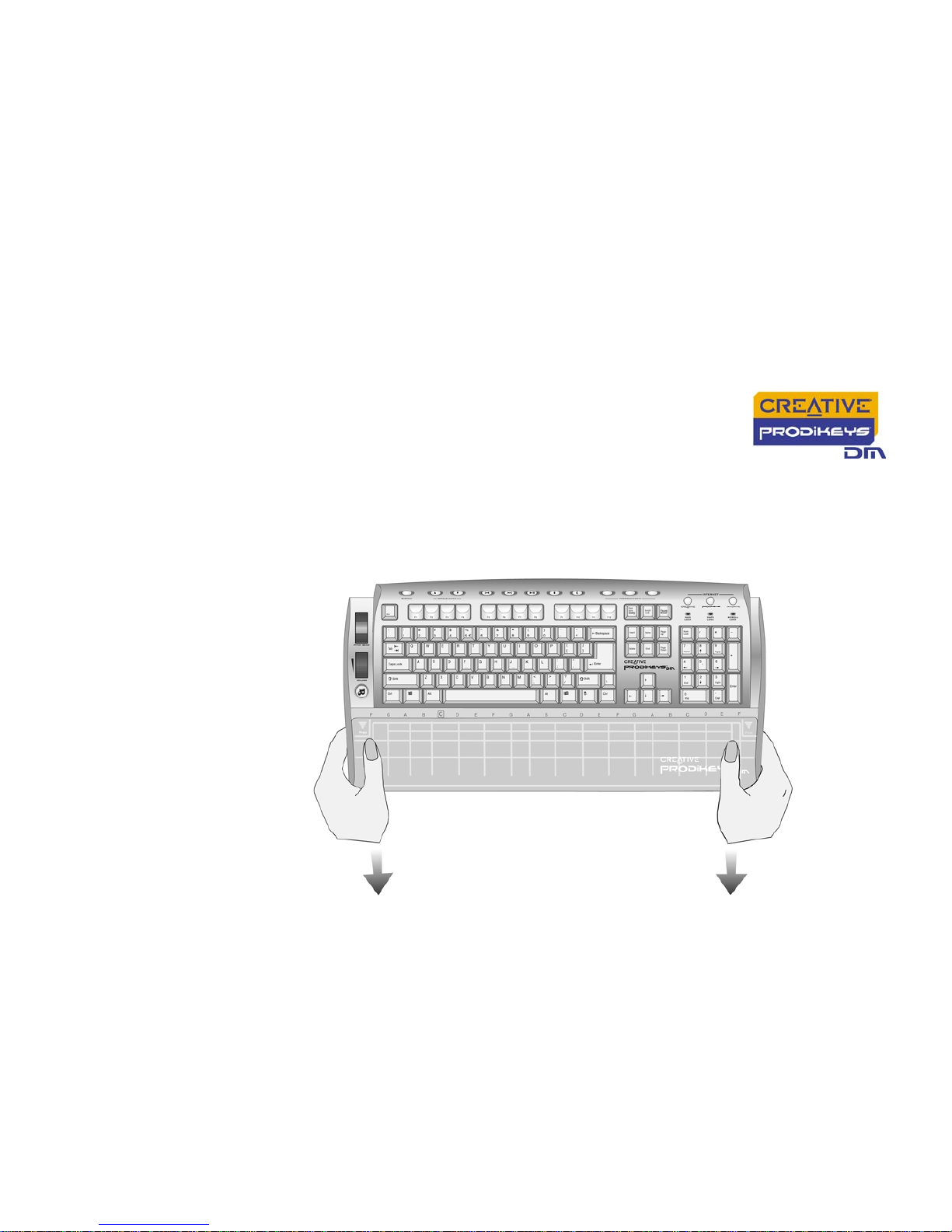
The music keyboard on your Creative Prodikeys DM is protected by a cover, which
also acts as a palm rest as you type. To use the music keyboard, you will need to
remove the cover.
To remove the palm rest: Press down the upper corners of the cover and slide it
out, as shown below.
Maintaining
Creative
Prodikeys DM
To clean your Prodikeys DM, use a soft, damp cloth to clean the exterior. Do not
use any liquid or aerosol cleaners as these may damage your keyboard.
Figure 1-2: Removing the palm rest.
Page 13
2
Setting Up Your Creative
Prodikeys DM
Page 14
Setting Up Your Creative Prodikeys DM 2-1
Setting Up Your Creative Prodikeys DM
Installing
Hardware
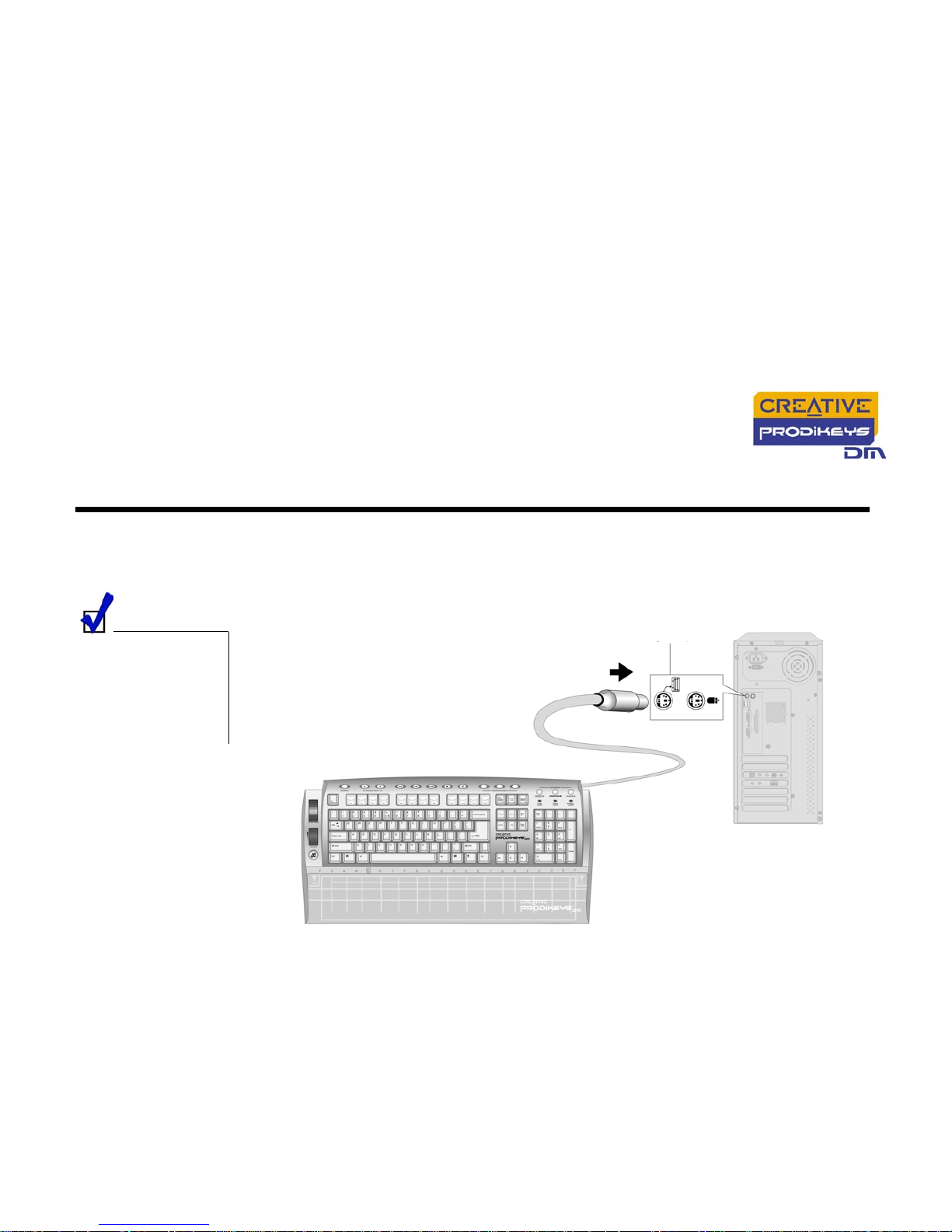
Connect your Creative Prodikeys DM to your computer’s PS/2 keyboard port as
shown below.
Creative Prodikeys DM
is not hot-pluggable.
You must turn off your
computer before
connecting or
disconnecting Creative
Prodikeys DM.
Figure 2-1: Connecting Creative Prodikeys DM to your computer.
Creative Prodikeys DM
Computer
PS/2
cable
PS/2 keyboard port
Page 15
Setting Up Your Creative Prodikeys DM 2-2
Installing
Software
To install the software:
1. Insert the Creative Prodikeys DM software Installation CD into your CD-ROM
drive. An installation screen appears. If not, start Windows Explorer, right-click
the CD-ROM drive icon, and then select AutoPlay.
2. Follow the instructions on the screen to complete the installation.
3. Restart the computer when prompted to do so.
You have to install the
included software for
your Creative
Prodikeys DM to
function as a music
keyboard. Third-party
MIDI software can also
be used.
Page 16
3
Getting Started
Page 17
Getting Started 3-1
Getting Started
Starting the
Software
You will need to start the included Creative Prodikeys DM software before you can
fully use the Creative Prodikeys DM’s music keyboard.
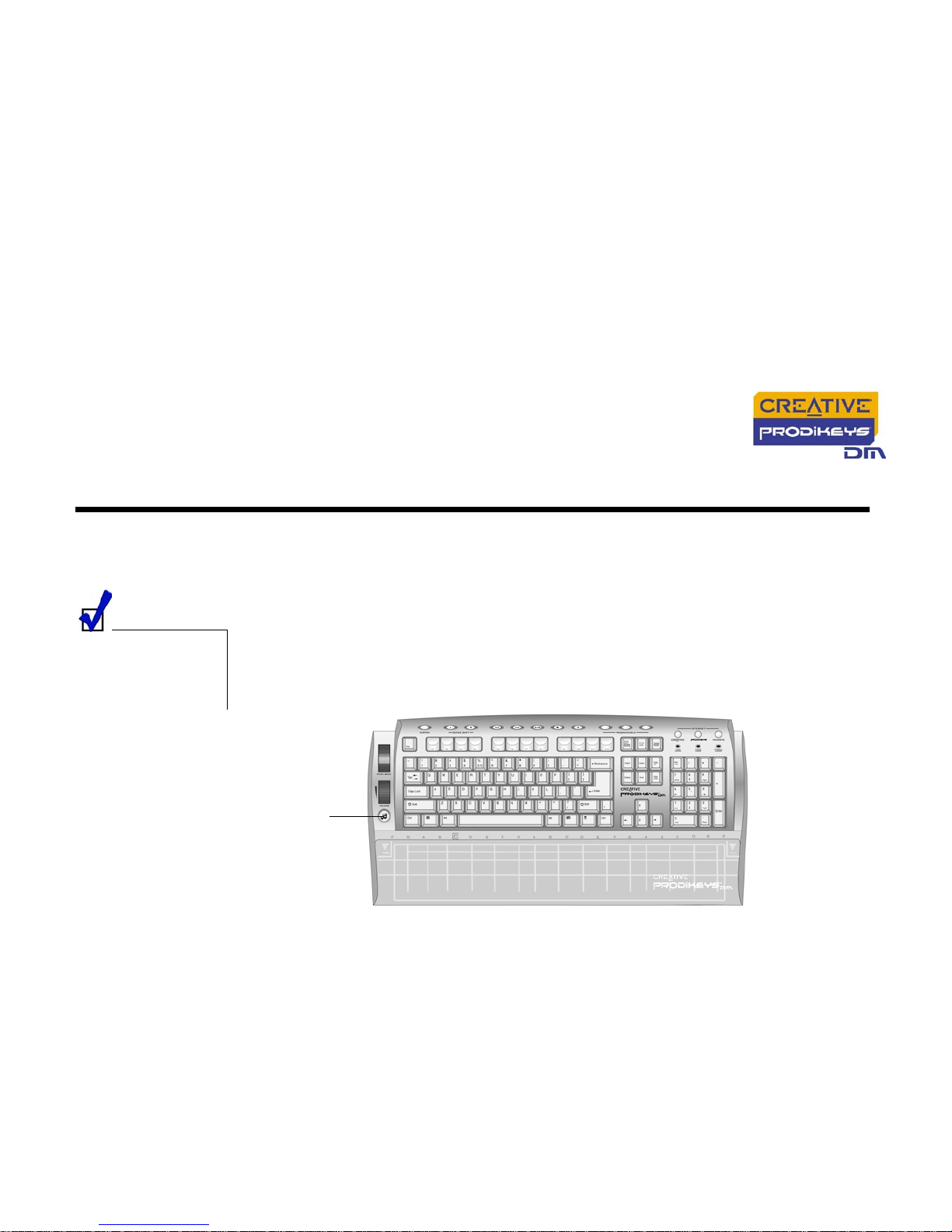
To start the software: Press the Music button on the Creative Prodikeys DM
keyboard.
After starting the
software, press the
Music button to switch
between minimized
and maximized views.
Figure 3-1: Creative Prodikeys DM keyboard.
Music
button
Page 18
Getting Started 3-2
Learning how
to use the
Software
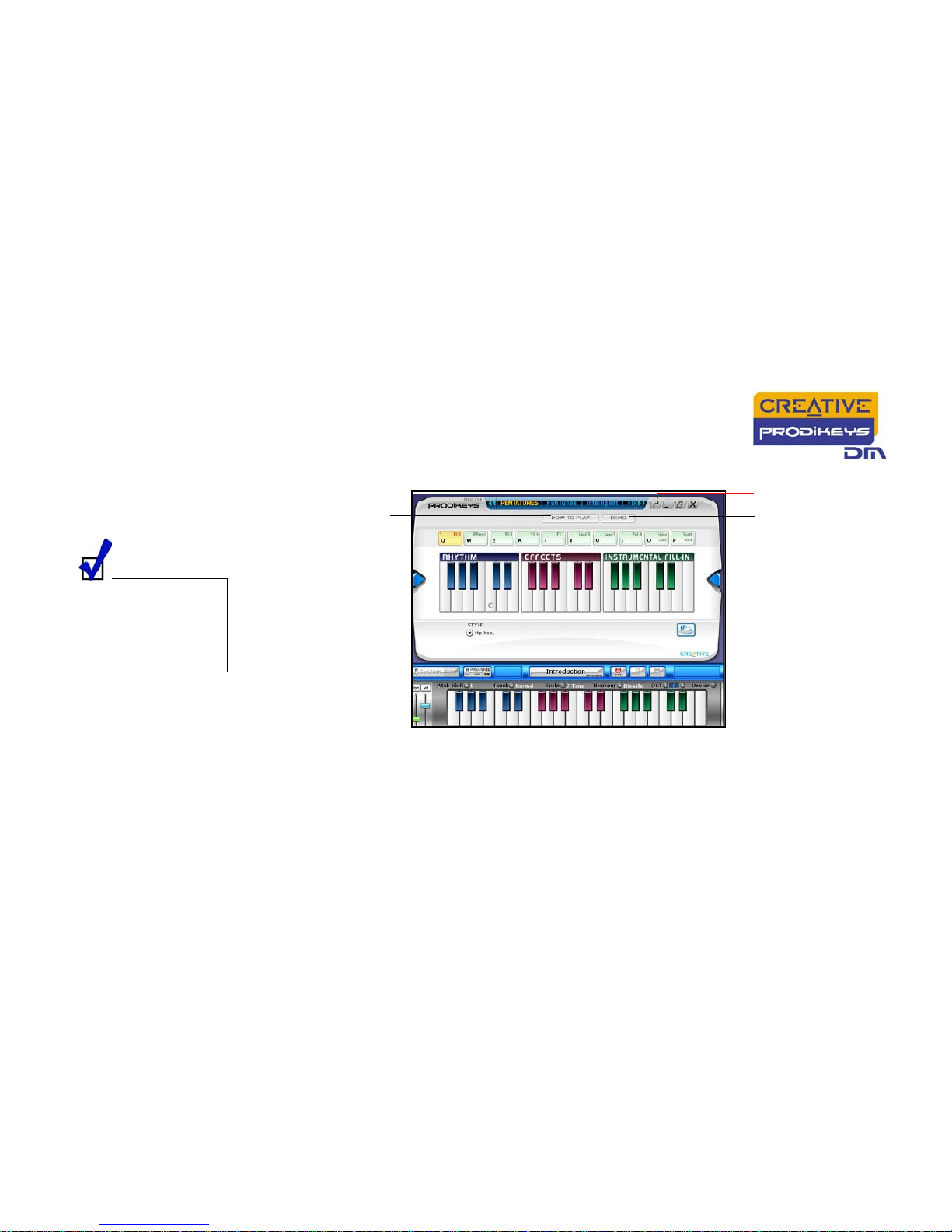
After launching the software, you should see a screen similar to Figure 3-2.
For a simple demonstration of what you can do with the software, click the Demo
button. The Demo button can be found in the PentaTunes and FunTunes modes.
For basic step-by-step instructions on using the mode that you are currently in,
click the How to Play button.
For instructions on how to use the software, click the Help button and refer to the
Help file.
This Help file contains a tutorial that is designed to give you a quick overview of
how to use the software. We recommend that you read through all the lessons of
the tutorial before you begin using the software.
If you have completed the tutorial and need help while using the software, you can
quickly refer to specific Help topics in the Help file for detailed instructions.
Press the Music
button to switch
between minimized
and maximized views
of the Prodikeys
software.
Figure 3-2: Creative Prodikeys DM software startup
screen — PentaTunes mode
Help button
How To Play button
Demo button
Page 19
Getting Started 3-3
Play Modes
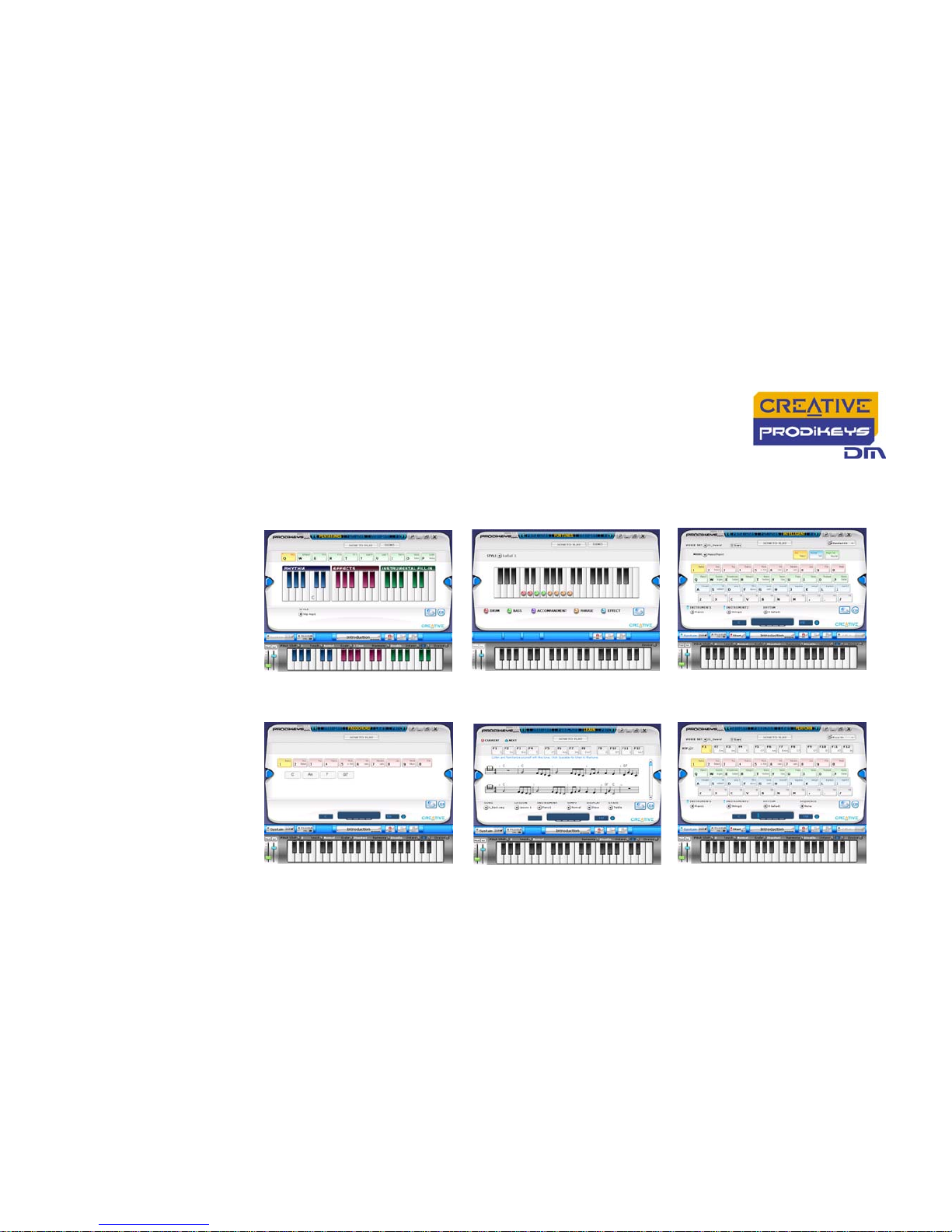
The six different Play Modes of your Prodikeys DM software allow you to have fun
playing and learning music. Press the How To Play button in each mode for more
information.
Programming
the Hot Keys
Some of the buttons on your keyboard marked "Internet" and "Programmable" can
be programmed using the Hot Keys Configuration software installed during setup.
To program or reprogram a key, press and hold down they key for about two
seconds. The Hot Keys Configuration software will launch automatically.
Alternatively, you can locate the program’s shortcut in your Start Menu, inside the
Creative Prodikeys program group.
PentaTunes mode FunTunes mode Intelligent mode
FixedChord mode Learn mode Perform mode
Page 20

Getting Started 3-4
Configuring
Power
Management
settings
If you have enabled power saving or power management on your computer, you
should set your monitor's power management properties to Never. You should
also configure your screen saver so that it deactivates when you move your
mouse.
Page 21
A
General Specifications
Page 22

General Specifications A-1
General Specifications
General
Specifications
❑ Standard IBM-compatible computer PS/2 keyboard with 104 keys
❑ Integrated music keyboard with 37 touch-sensitive accordian-sized MIDI keys (also acts
as a standard MIDI input device)
❑ PS/2 connector for connecting to computer's PS/2 keyboard port
❑ Removable palm rest
❑ Pitch Bend wheel
❑ Volume Control wheel
❑ MUSIC button
❑ Sustain button
❑ Octave Shift buttons
❑ Multimedia Playback buttons
❑ Internet Hot Keys
❑ Programmable Hot Keys
Software
features
❑ Six different modes for easy music playing and learning: Fun Tunes, Penta Tunes, Learn,
Intelligent Chord, Fixed Chord, Perform
❑ Step-by-Step "How To Play" instructional guide
❑ FunTunes and PentaTunes modes with matching rhythm, instrumental and effect presets
for simple music playing
❑ Learn mode with five guided lessons
❑ Perform mode for easy customizable chord accompaniment with Function Key Chords
❑ Intelligent and Fixed Chord mode for auto-generated accompaniment to music playing
❑ Scoring system to monitor learning progress
❑ Up to 50 songs included (easy, average and difficult categories) for learning
❑ Up to 128 General MIDI instruments and sound effects
❑ Up to 100 rhythms classified under 10 style categories: Ballad, Slow Ballad, Pop, Dance,
Rock & Roll, Old Latin, Modern Latin, Jazz, World Music and Folk
❑ Record function for saving music in MP3, Wav or MIDI formats
❑ Downloadable and expandable content libraries for PentaTunes, FunTunes, Rhythms and
Learnable Songs
Page 23
B
Troubleshooting
Page 24

Troubleshooting B-1
Troubleshooting
Problems with
installing
Creative
Prodikeys DM
Creative Prodikeys DM cannot be detected, even after the
connections are checked and the software installed.
There may be a conflict with a USB Legacy Device setting on your computer’s
motherboard.
Refer to your computer’s motherboard manual to disable the USB Legacy Device
setting.
 Loading...