

Page 1
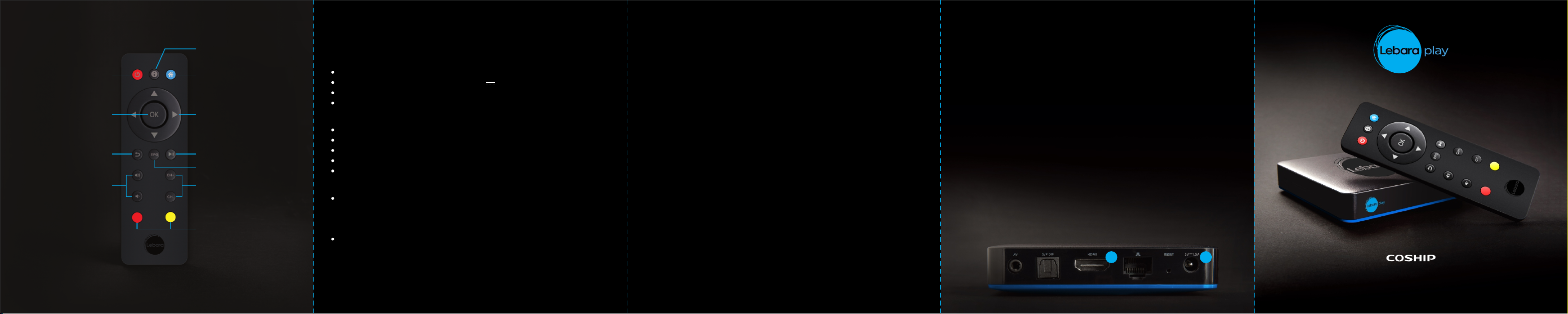
REMOTE CONTROL
N9090
Specifications
Trouble Shooting FAST INSTALLATION GUIDE
Information
Power on/Standby
Confirm to selection
Back to previous menu
or exit from operation
Volume adjust +/-
Note: The ke ys me nti on ed in t he ma nu al re fer t o RC U key s exc ep t for s pec ia l exp lan at ion s.
Pleas e ope rate ac cor din g to k ey in str uc tio ns on s cr een .
Go to Home page
Move cursor
Up/Down/Left/Right
Pause/Resume playing
Display EPG
Channel switch +/-
Functions depend on
specific applications
Resolution
Power adapter
Input Voltage
Output Voltage
Output Current
Power Consumption
Physical Characteristics
Size
Weight
Operating Temperature -10°C~+40°C
Storage Temperature -40°C~+60°C
Storage Humidity ≤93%
Wireless connectivity:
Wi-Fi module
Output power: <15dBm@11a, < 18dBm@11b,
Hereb y, She nzh en Cosh ip El ectro nic s Co., Lt d dec lares t hat t he ra di o equ ipm en t typ e
N9090 i s in co mplia nce w ith Dir ect ive 201 4/5 3/EU.
The f ul l tex t of th e EU d ecl ara ti on of c onf or mit y is av ai lab le at t he f oll owi ng i nte rne t ad dre ss:
www.co shi p.com
1080p/1080i/720p/480i/480p
100-240V~ 50/60Hz
5V
1.5A
7.5W max
100mmX100mmX23mm
255g
IEEE 802.11a/b/g/n compliant,
support 20 MH z, 40 MH z bandwidth
in 5GHz, and 2 0M Hz ,4 0M Hz
bandwidth in 2.4GHz.
< 17dBm@11g, < 17dBm@11n.
DISP LAY on f ro nt panel is off
Power ad ap te r is disconnected. Make sure po we r ad ap te r is plugged
into a p ro pe r power socket.
No sound a nd n o picture
The r ec ei ve r i s i n standby mode. Press key to sw it ch it to operation
mode.
No sound
1. Audio cable is disconnected o r inc or re ct ly co nn ec te d. Co nn ec t
audio cable correctly.
2. The r ec ei ve r is in mut e mode. Press key to restore sound.
3. Volume is set to min im um . Inc re as e vol um e to a proper level.
No pictu re
Video cable is disconnected or incorrectly connected. Connect video
cable correctly.
RCU do es n’ t work
1. No enough power in batteries. Replace the batteries.
2. RCU is not aimed at the receiver. Aim RCU at the receiver.
Progra m ca nnot be played
1. Please check and make sure the network connection is normal.
2. Please make sure the program is authorized.
Please refer to following figure and instructions to connect
Ethernet, TV and other devices
TV set and STB are con ne ct ed the HDMI c ab le (Included).
1
If the TV hasn’t HDMI input you can connect the ana lo gu e
cable ( 3 i n 1, Optional).
Connect the STB to the power adapter in accessories.
2
Tur n on t he TV
3
Select t he correct input s ou rc e (HDMI input o r analogue in pu t)
4
that c or re sp on di ng output of t he STB by TV r em ot e control.
Tur n on the STB f ol lo w the instructions to enj oy the LEBARA
5
video service.
Set up the connection of th e ST B to t he modem, either through
6
Wi-Fi or Ethernet cable.
Note: To ensur e a bet ter ser vic e, re co mme ndi ng t o set u p the c on nec tio n
thr ou gh th e Eth er net c abl e.
1
2
USER’S MANUAL
OTT STB V3 N9090
Page 2

Read following items carefully before operating this receiver.
Installation:
Install the receiver in a place with:
Good ve ntil atio n (leave space not less than 10 cm around thi s receiver)
No heat source
(burning candle, radiator, heater, fireplace, amplifier, etc)
Suitable temperature
Against humidity (especially bathroom, kitchen, etc )
No direct sunlight
Low vibration
Precautions:
Do not cover ven ts of thi s receiver wi th newspaper, ta bl e cloth, cu rt ai n,
etc.
Don’t put heavy objects on this receiver.
Do no t let liquid and spray flow into thi s device to av oi d serious damage
Power Socket and Power Adapter
Power socket should be ava il ab le near the receiver and well grounded.
Do not insert or pull out power adapter with wet hands to avoid electric
shock or fire.
Do not use da ma ge d p ow er ad ap te r, w hi ch mu st be re pl ac ed to avoid
risk of fire o r e le ct ri c s ho ck .
RCU Battery
Batteries should be installed in ac co rd an ce with the po la ri ty markings
(+/-) o n battery compartment.
Remove batteries if RCU is not used for a long time.
Replace batteries if there is no eno ug h power and d is po se battery
waste properly f or environmental protection
Maintenance
Don’t un pl ug or insert au di o and video cab le s wh en this receiver is on.
Unplug th is receiver f ro m power s oc ke t before ch an gi ng connections
between t hi s unit an d other r el at ed equipment.
To avo id the risk of lightning s tr ik e, unplug power ad ap te r of the
receiver f ro m power socket in lightning s to rm .
This device is restricted to indoor use where operated in the European
Community using frequency i n 515 0M Hz ~ 5350MHz to red uc e the
potential fo r in te rf er en ce
Unplug p ow er adapter from power s oc ke t wh en the unit i s no t used for
a lo ng tim e or damaged ac ci de nt al ly.
Tur n off thi s unit first, aft er 1 t o 2 hours tur n it on w he n move this
receiver f ro m a c ol d environment t o a h ot environment or vice v er sa .
To avoid the r is k o f fire or electric s ho ck , d on ’t expose this receiver t o
rain, splashing and do n’ t p ut object with liquid o n t hi s unit.
Unplug pow er adapter of this r ec ei ve r from power soc ke t b ef or e
cleaning.
Accessory
Only use accessories specified by the m an uf ac tu re r, as ot he r
unsupported accessories may cause d am ag e to th e receiver.
Main Features
Chipset: 28nm, 1.5G Cortex-A7 Quad core with Neon
HEVC (H.265) / H.264 / MPEG-4 1080P/30p HW decoder
HD+HD simultaneous video stream HW decode
Maili450 MP4 Quad core
OpenGL ES 1 .1 /2 .0 3 D gr ap hi c ac ce le ra to r ca pa bl e
OpenVG1.1 vector graphics accelerator
OS: Android 4.4 KitKat
Flash: 4GB eMMC flash
Memory: 1GB DDR3
Wi-Fi: 2.4G/5G Dual band (802.11a/b/g/n,Antena 2X2)
HDMI 1.4 wi th H DC P 1.4, su pp or t HD MI CEC, Support 3D vi de o format
DRM: Encrypted HLS
RF Exposure Information and Statement
The manufacturer is not responsible f or a ny r ad io or TV interference
ca use d by un aut horiz ed mo difi cat ion s to this equi pme nt. S uch
modificationscould vo id t he u se r ’s authority to op er at e th e equipment.
NOTE:
This equipment has been tes te d an d found to comply with th e li mi ts f or
a Class B digital dev ic e, p ur su an t to part 15 of the F CC R ul es .
These l im it s are designed t o provide reasonable p ro te ct io n against
harmful i nt er fe re nc e in a res id en ti al installation.
This equipment g en er at es uses and c an radiate radio fre qu en cy en er gy
and, if not in st al le d an d us ed i n ac co rd an ce w it h th e in st ru ct io ns , may
cause ha rm fu l interference to radio communications.
However, there is n o g ua ra nt ee tha t interference will not occur in a
particular installation.
If this equ ip me nt does cause har mf ul i nt er fe re nc e to radio or television
reception, wh ic h can b e determined by turning th e equipment o ff and
on, the user is en co ur ag ed to tr y t o c or re ct th e i nt er fe re nc e by one or
more of the fol lo wi ng m ea su re s:
Reorient or relocate the receiving antenna.
Increase the separation between the equipment and receiver.
Connect the eq ui pm en t i nt o a n o ut le t on a circuit different from that
to which t he re ce iv er is co nn ec te d.
Consult the dealer or an experienced radio/TV technician for help
This device and i ts a nt en na (s ) must not be c o- lo ca te d or operating
in conjunction with a ny o th er antenna or transmitter.
This dev ic e c om pl ie s with part 1 5 o f the FCC rul es and RSS-247of
Industry Ca na da . Operation i s subject t o the follo wi ng two conditions:
(1) this de vi ce ma y not cause ha rm fu l i nt er fe re nc e, an d (2) this d ev ic e
must a cc ep t an y in te rf er en ce received, including interference that
may cause undesired operation.
Le pr és en t appareil est c on fo rm e aux CN R d'Industrie Canada
applicables au x ap pa re il s ra di o exempts de licence. L'exploitation
est autorisée aux deux conditions s ui va nt es : (1) l' ap pa re il ne doit
pas pr od ui re de b ro ui ll ag e, et ( 2) l 'u ti li sa te ur de l 'a pp ar ei l doit
accepter tou t brouillage r ad io él ec tr iq ue subi, m êm e si l e brouillage
est susceptible d'en compromettre le fonctionnement.
This Class B digital apparatus complies with Canadian ICES-003.
Cet appareil numérique de l a c la ss e B est conforme à la norme
NMB-003 du Canada.
Radiation Exposure Statement
This equipment c om pl ie s with FCC/IC r ad ia ti on exposure limits set
forth f or an unc on tr ol le d e nv ir on me nt . T hi s equipment sho ul d be
installed and operated with minimum distance 20cm between the
radiator & your body.
This d ev ic e co mp li es with part 1 5 of the FCC ru le s. O pe ra ti on is
subject to the following two conditions: (1 ) thi s device may not
cause h ar mf ul interference, and (2) this device m us t accept any
interference received, including interference that may cause undesired
operation.
 Loading...