

Page 1
Page 2

i
Copyright 2002 Compex Systems Pte Ltd
All rights reserved.
This document contains information, which is protected by copyright. Reproduction, adaptation
or translation without prior permission is prohibited, except as allowed under the copyright
laws.
Trademark Information
Compex, ReadyLINK® and MicroHub® are registered trademarks of Compex, Inc. Microsoft
Windows and the Windows logo are the trademarks of Microsoft Corp. NetWare is the
registered trademark of Novell Inc. All other brand and product names are trademarks or
registered trademarks of their respective owners.
Notice: Copyright © 2002 by Compex, Inc. All rights reserved. Reproduction, adaptation, or
translation without prior permission of Compex, Inc. is prohibited, except as allowed under the
copyright laws.
Manual Revision by Hin
Manual Number: U-0352-V1.2C Version 1.2December 2002
Disclaimer
Compex, Inc. provides this guide without warranty of any kind, expressed or implied, including
but not limited to the implied warranties of merchantability and fitness for a particular purpose.
Compex, Inc. may make improvements and/or changes to the product and/or specifications of
the product described in this guide, without prior notice. Compex, Inc will not be liable for any
technical inaccuracies or typographical errors found in this guide. Changes are periodically
made to the information contained herein and will be incorporated into later versions of the
guide. The information contained is subject to change without prior notice.
Your Feedback
We value your feedback. If you find any errors in this user’s manual, or if you have suggestions
on improving, we would like to hear from you. Please contact us at:
Telephone: (65) 6381-0139
Fax: (65) 6280-9947
Email: feedback@compex.com.sg
Page 3

ii
FCC Notice
This device has been tested and found to comply with the limits for a Class B digital device,
pursuant to Part 15 of the FCC Rules. These limits are designed to provide reasonable
protection against harmful interference in a residential installation. This device generates, uses
and can radiate radio frequency energy and, if not installed and used in accordance with the
instructions, may cause harmful interference to radio communications. However, there is no
guarantee that interference will not occur in a particular installation. If this device does cause
harmful interference to radio or television reception, the user is encouraged to try to correct the
interference by one or more of the following measures:
• Reorient or relocate the receiving antenna.
• Connect the computer into an outlet on a circuit different from that to which the receiver
is connected.
• Increase the separation between the computer and receiver.
• Consult the dealer or an experienced radio/TV technician for help.
Caution: Any changes or modifications not expressly approved by the grantee of this device
could void the user's authority to operate the equipment
.
FCC Compliance Statement: This device complies with Part 15B of the FCC Rules.
Operation is subject to the following two conditions:
• This device may not cause harmful interference, and
• This device must accept any interference received, including interference that may cause
undesired operation.
Declaration of Conformity
Compex, Inc. declares the following:
Product Name: Broadband Internet Gateway Model No.: NetPassage 15-C conforms to the
following Product Standards: Radiated Emission Standards: FCC: 47 CFR Part 15, Subpart B,
ANSI C63.4-1992; 47 CFR Part 15, Subpart C (Section 15.247), ANSI C63.4-1992. ;ETSI EN
300 328-2: July 2000;EN55022. Conducted Emission Standards: FCC Part 15 Class B;ETS 300
826: Nov. 1997.;EN55022 conducted emission Immunity Standards: EN 55024 (FOR CE) Low
Voltage Directive: EN 60 950:1992+A1: 1993+A2: 1993+A3; 1995+A4; 1996+A11: 1997
(FOR CE).Therefore, this product is in conformity with the following regional standards
:
FCC Class B - following the provisions of FCC Part 15 directive;
CE Mark - following the provisions of the EC directive.
This Class B digital apparatus complies with Canadian ICES-003.
18
th
December 2002
Page 4

iii
Technical Support Information
The warranty information and the registration form are found in the Quick Install Guide.
For technical support, you may contact COMPEX or its subsidiaries. For your convenience, you
may also seek technical assistance from the local distributor, or from the authorized
dealer/reseller that you have purchased this product from. For technical support by email, write
to support@compex.com.sg
.
Refer to the table below for the nearest Technical Support Centers:
Technical Support Centers
Contact the technical support center that services your location.
U.S.A., Canada, Latin America and South
America
Write
Compex, Inc.
4051 E. La Palma, Unit A
Anaheim, CA 92807, USA
Call
Fax
Tel:
Tel:
Fax:
BBS:
+1 (714) 630-7302 (8 a.m.-5 p.m. Pacific time)
+1 (800) 279-8891 ext.122 Technical Support
+1 (714) 630-6521
+1 (714) 630-2570 (24-hour access)
Europe
Write
ReadyLINK Networktechnology GmbH
Albert Einstein Straβe 34 / M21
63322 Rödermark, Germany
Call
Tel:
Fax:
BBS:
+49 (0) 6074 - 98017 (8 a.m.-5 p.m. local time)
+49 (0) 6074 - 90668
+49 (0) 6074 - 93974 (24-hour access)
Email:readylink@compex.com.sg
Asia, Australia, New Zealand, Middle East
and the rest of the World
Write
Compex Systems Pte Ltd
135, Joo Seng Road #08-01, PM Industrial Building
Singapore 368363
Call
Tel:
Tel:
Fax:
BBS:
(65) 6286-1805 (8 a.m.-5 p.m. local time)
(65) 6286-2086 ext.199 Technical Support
(65) 6283-8337
(65) 6282-8854 (24-hour access)
Internet
access/
E-mail:
FTPsite:
support@compex.com.sg
ftp.compex.com.sg
Website:
http://www.cpx.com or http://www.compex.com.sg
Fax
Fax
Page 5
iv
About this Document
The product described in this document, Compex NetPassage 15-C is a licensed product of
Compex Systems Pte Ltd. This document contains instructions for installing, configuring and
using the NetPassage 15-C. It also gives an overview of the key applications and the
networking concepts with respect to the product.
This documentation is for both Network Administrators and the end user with basic
understanding and knowledge in the networking structure and protocols.
A few assumptions had been made, such as the host computer has already been installed with
TCP/IP and already up & running and accessing the Internet. Procedures for Windows
95/98/ME/2000/XP operating systems are included in this document. However, for other
operating system, you may need to refer to your operating system’s documentation for
networking.
Please take note that this User’s Manual is written based on NetPassage 15-C Firmware
Release 2.79 build 1201.
Universal Configuration (uConfig) software
Conventions
This document uses special conventions to present the information clearly. Please take note of
the conventions used below.
NOTE
This section will consist of important features or instructions
CAUTION
This section concerns risk of injury, system damage or loss of data
WARNING
This section concerns risk of severe injury
References on Menu Command, Push Button, Radio Button, LED and Label appear in Bold.
For example, “Press the Save button”
Page 6

Table of Contents
v
Copyright 2002 Compex Systems Pte Ltd i
Trademark Information i
Disclaimer i
Your Feedback i
FCC Notice ii
Declaration of Conformity ii
Technical Support Information iii
About this Document iv
Universal Configuration (uConfig) software iv
Conventions iv
Chapter 1 Product Overview 1
1.1
Introduction 1
1.2
Key Features 1
1.3
Package Contents 3
1.4 Panel Views & Descriptions 4
1.4.1 Panel Views 4
1.4.2 Panel Description 5
1.5 Technical Data 6
1.5.1 NetPassage 15-C Specifications 6
Chapter 2 Getting Started 7
2.1 Hardware Setup 7
2.1.1 Distributing Broadband Internet Access to Fast Ethernet Network 7
2.2 Using Universal Configuration (uConfig) Program to access to Internet 8
Chapter 3
Configuring NetPassage 15-C 11
3.1 Setting up your LAN 11
3.1.1 Configuring IP Addressing 11
3.1.2 Advanced Option for DHCP Server 12
3.2 Configuring NetPassage 15-C with your Broadband Internet Account 14
3.2.1 Cable Internet with Dynamic IP Assignment 14
3.2.2 Cable Internet with Static IP Assignment 16
3.2.3 ADSL Internet using PPP over Ethernet (PPPoE) 17
3.2.4 Singapore SingTel Magix SuperSurf 19
3.2.5 Australia Big Pond Cable Internet 20
3.3 Network Address Translator (NAT) 20
3.3.1 Introduction to Virtual Servers 21
3.3.2 Defining Virtual Server based on Port Forwarding 23
3.3.3 Defining Virtual Server based on IP Forwarding 24
3.3.4 Defining De- Militarized Zone 25
3.4 Configuring Routing Protocol 26
3.4.1 Static Routing 27
3.4.2 Dynamic Routing 27
3.5 Managing NetPassage 15-C from the Internet 28
3.5.1 Activating Remote Router Management 28
3.6 Load Balancing & Fail-Over Redundancy with Parallel Broadband 29
3.6.1 Implementing Parallel Broadband 29
3.7 Static Address Translation (SAT) 30
3.7.1 Enable/Disable Static Address Translation 30
Page 7

Table of Contents
vi
3.8 DNS Redirection 31
3.9 Firewall Configuration 32
3.9.1 Security Level 33
3.9.2 Log Information 33
3.9.3 Adding Firewall Rules 34
3.10 Firewall Log 35
3.11 IP-Packet Filtering 35
3.11.1 Time-based Access Management 35
3.12 Internet APplication Filtering 37
3.13 8e6 Internet Filtering 38
3.13.1 Time Selection 38
3.13.2 URL Addition 38
3.13.3 Advanced Configuration 39
3.14 NetPassage 15-C’s System Tools 40
3.14.1 Setting Router Identity 40
3.14.2 Synchronizing Router’s Clock with your Computer 40
3.14.3 Upgrading Router’s Firmware 41
3.14.4 Profile Saving, Restore & Reset to Defaults 42
3.14.5 Rebooting NetPassage 15-C 42
3.14.6 Changing Administrative Password 43
3.14.7 NetPassage 15-C Firmware Recovery Procedure 43
3.14.8 Using the Reset Button 44
Appendix A
Console Commands 45
Appendix B ISP-Specific Notes 47
B.1 Singapore SingNet Broadband 47
B.2 Singapore Pacific Internet Broadband 47
B.3 Germany T-DSL & T-Online 47
B.4 Australia Optus@Home 47
Appendix C Alternative Method for Configuring NetPassage 15-C 48
C.1 TCP/IP Configuration of the Computers 48
C.2 Configuring your Computer to Dynamically Obtain IP Address 48
C.3 Configuring your Computer with Static IP Address 50
C.5 Web-based Configuration Interface 54
C.6 TELNET Command Console 54
Appendix D
Frequently Asked Questions 56
Page 8
Chapter 1 Product Overview
1
Chapter 1 Product Overview
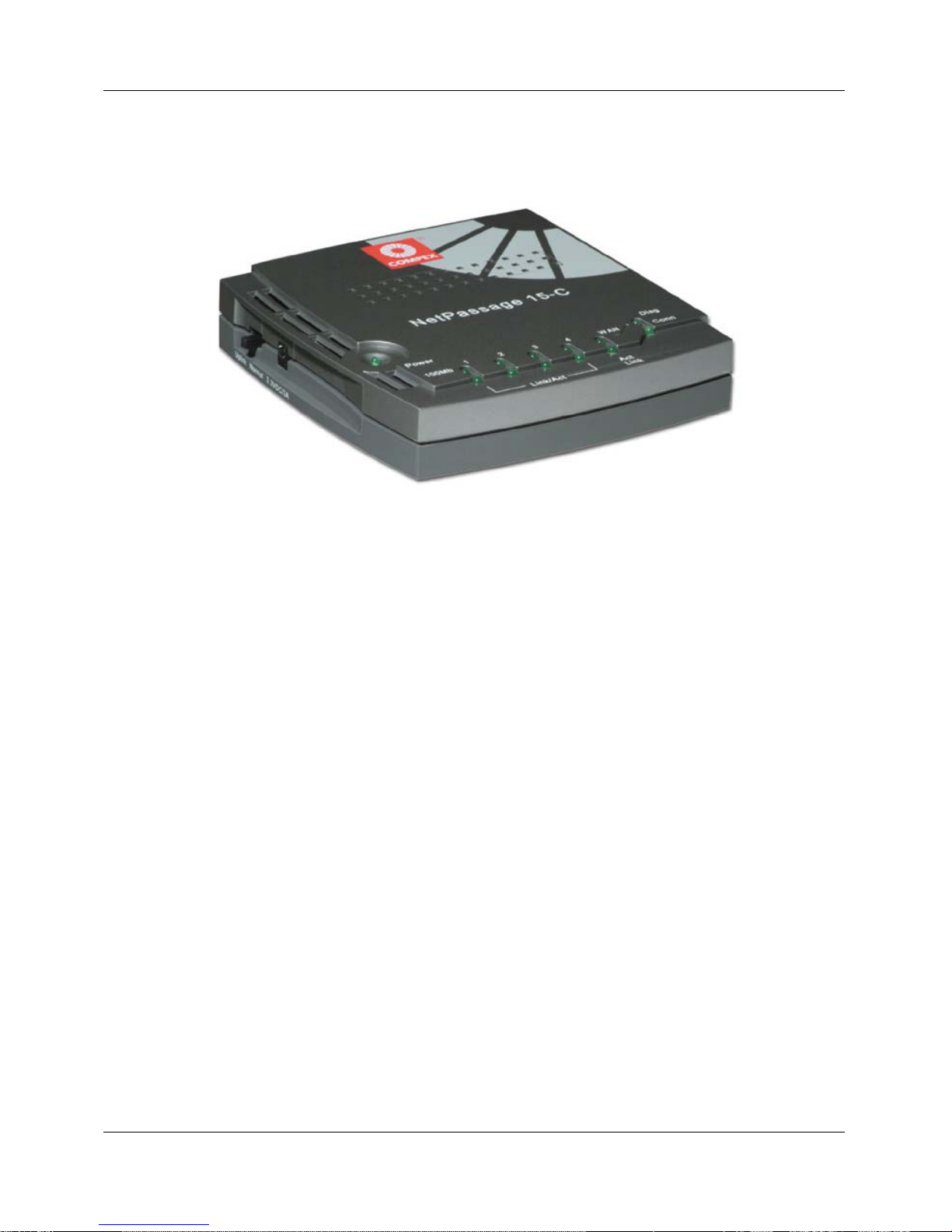
Figure 1-1 NetPassage 15-C
1.1 Introduction
Compex NetPassage 15-C is a Broadband Internet Gateway supporting external
Cable/ADSL modem for broadband Internet sharing. It is integrated with a 4-port
10/100Mbps Fast Ethernet Switch and can seamlessly distribute Internet access to the
wired networks.
With the unique Parallel Broadband, NetPassage 15-C delivers scalable Internet
bandwidth to your network, supporting Load Balancing and Fail-Over Redundancy with
multiple broadband channels.
In addition, Compex NetPassage 15-C is also designed with advanced features such as
Virtual Server, Static Address Translation, 8e6 Internet Filtering, Time-based Access
Management, IP Packet Filtering, Remote Management and optional SPI Firewall have
been designed on NetPassage 15-C. It is the perfect Internet solution for your home and
office.
1.2 Key Features
Compex NetPassage 15-C, the Broadband Internet Gateway, is designed with the
following features:
Broadband Internet Sharing
Compex NetPassage 15-C comes with a RJ45 Ethernet WAN port supporting external
Cable or ADSL modem, sharing a single Cable/ADSL Internet subscription with
multiple users.
Page 9

Chapter 1 Product Overview
2
Integrated 4-port 10/100Mbps Switch
Integrated with a 4-port 10/100Mbps Fast Ethernet Switch, Compex NetPassage 15-C
provides an immediate solution for four users on private LAN switching. With the autocrossover mechanism, Hubs or Switches can be cascaded to NetPassage 15-C easily to
support more users.
Parallel Broadband
Parallel Broadband, uniquely found on NetPassage series broadband routers, delivers
scalable Internet bandwidth to your office network. Multiple units of Compex
NetPassage 15-C may be installed in your network, enabling Load Balancing and FailOver Redundancy with multiple broadband channels.
Built-In DHCP Server
Compex NetPassage 15-C is integrated with a DHCP server, dynamically assigns IP
address, gateway information and DNS server address to your PCs in the wired and
wireless networks. Simply configure your PCs to dynamically obtain IP addresses.
Virtual Server
Compex NetPassage 15-C supports Virtual Server that enables hosting of Internet
servers in your private network. Virtual Server based on Port Forwarding and IP
Forwarding may be defined on NetPassage 15-C.
Time-based Access Management
With Time-based Access Management, the network administrators may define
administrative function on NetPassage 15-C, restricting certain PCs to access to the
Internet during a pre-defined time.
IP Packet Filtering
The network administrators may also define functions on NetPassage 15-C to filter
undesired Internet applications in the private network based on the TCP/UDP ports.
Web-based Configuration Interface
Compex NetPassage 15-C is integrated with an embedded HTTP server, facilitating the
configuration process with a user-friendly web-based interface. Simply connect to
NetPassage 15-C with a JAVA-enabled web browser and complete the configuration
process in just a few minutes.
Remote Management
Remote Management may be activated on NetPassage 15-C, enabling the network
administrator to manage the Broadband Internet Gateway over the Internet with a HTTP
or TELNET session.
Page 10
Chapter 1 Product Overview
3
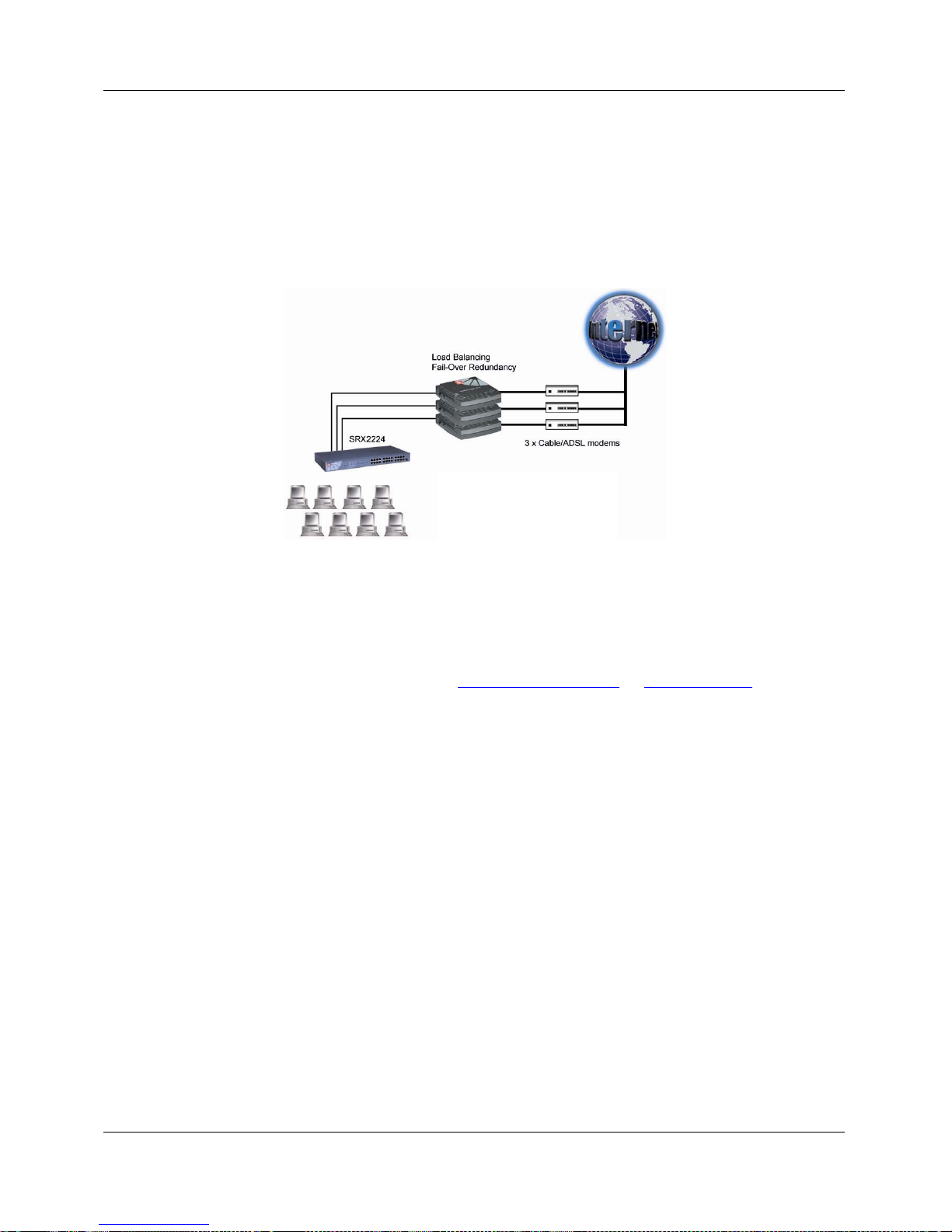
Load Balancing & Fail-Over Redundancy with Parallel Broadband
Designed with the unique Parallel Broadband technology, Compex NetPassage 15-C
provides scalable Internet bandwidth with Load Balancing and Fail-Over Redundancy.
If multiple units of Compex NetPassage 15-C are installed in the network, the Internet
traffic will be balanced across multiple broadband channels, delivering virtually a
combined aggregated bandwidth while functioning as Fail-Over Redundancy.
SPI Firewall
Compex NetPassage 15-C is specially designed with firewall function to prevent
unauthorized access to or from the network. All messages entering or leaving Compex
NetPassage 15-C will pass through the firewall. It will then examine each message and
block those that do not meet the specified security criteria. The firewall can be activated
by purchasing an activation key from www.compex.com.sg
or www.cpx.com website.
8e6 Internet Filtering
8e6 Technologies is the original developer of X-Stop filtering solutions which has been
a pioneer in Internet Access Management technology. It develops customized Internet
Access Management network applications for businesses, ISPs and the education
market. Internet Filtering is important in this technological society as it helps to secure
others from accessing to certain websites, such as accessing to undesirable content
website in school or library, etc.
1.3 Package Contents
Your NetPassage 15-C retail package contains the following items:
- 1 x NetPassage 15-C
- 1 x External Power Adapter (3.3V
DC
, 3A)
- 1 x Quick Install Guide with Warranty Registration Form
- 1 x Product CD (consist of User’s Manual, Firmware Recovery Tool & Utility)
Figure 1.2-1 Compex’s
Unique Parallel
Broadband Technology
Page 11
Chapter 1 Product Overview
4
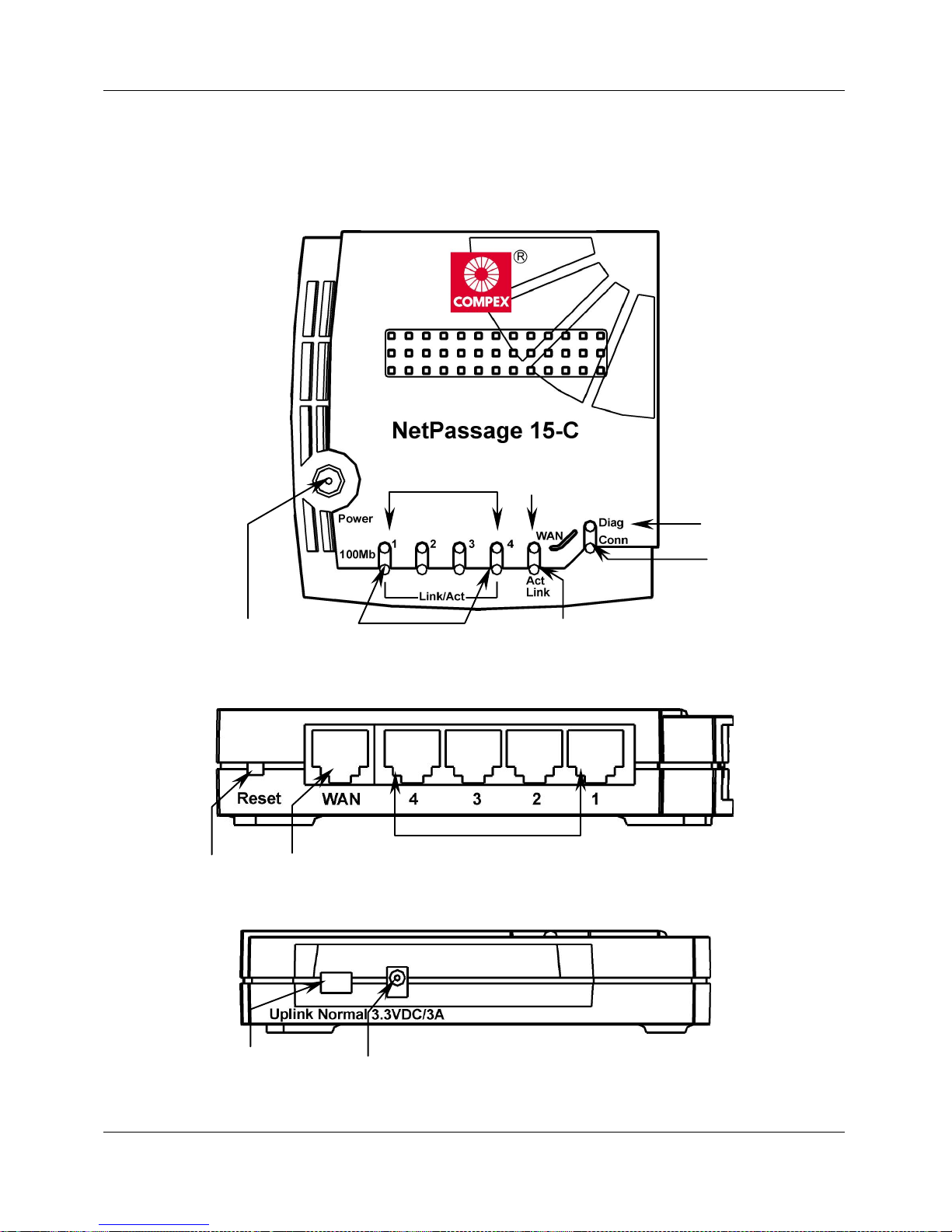
1.4 Panel Views & Descriptions
1.4.1 Panel Views
Figure 1.4.1-1 Top View
Figure 1.4.1-2 Side View
Figure 1.4.1-3 Side View
1 7 6
8
9
10
11
12
Page 12

Chapter 1 Product Overview
5
1.4.2 Panel Description
Index Indicator
Description
1 Power LED (Green)
LED lights up steadily indicate that the power is
applied to the router.
2 LAN 100Mb LED (Green) LED lights up steadily indicate that the respective
LAN connection is at 100Mbps.
LED lights off indicate that the respective LAN
connection is at 10Mbps.
3 WAN 100Mb LED (Green) LED lights up steadily indicate that the respective
WAN connection is at 100Mbps.
LED lights off indicate that the respective WAN
connection is at 10Mbps.
4 Diag LED (Green) Firmware diagnostic LED.
5 Conn LED (Green) LED blinks when WAN disconnects or not
connected to the broadband service.
6 WAN Link LED (Green) LED blinks indicate that the WAN connection
has activity.
LED lights up steadily indicate that there is a
good cable connection to the respective WAN
ports.
7 LAN Link/Act LED (Green) LED blinks indicate that the LAN connection has
activity.
LED lights up steadily indicate that there is a
good cable connection to the respective LAN
ports.
8 Reset button Reset NP15-C to factory default
9 WAN Port 10Base-T Port connects to cable modem or xDSL
modem.
10 Local LAN ports Up to a maximum of 4 10Base-T/ 100Base-TX
Ethernet devices can be directly connected to the
router.
11 Uplink Selector Dip Switch for Uplink mode
12 3.3 V/3A Power Connector Accept 3.3V DC/3A input.
Page 13

Chapter 1 Product Overview
6
1.5 Technical Data
1.5.1 NetPassage 15-C Specifications
♦
Industry Standards
Complies with:
IEEE 802.3 10Base-T,
IEEE 802.3u 100Base-TX,
IEEE 802.3x Flow Control
CE Mark, FCC Class B, Gost, C-Tick, UL
♦
WAN Interface
One RJ45 Ethernet port (for external
Cable/ADSL modem)
♦
WAN Type
Static IP
Dynamic IP
PPP Over Ethernet (PPPoE)
RAS
♦
LAN Interface
Integrated 4-port 10/100Mbps Switch
♦
IP Addressing
All Classful/Classless Subnets
♦
Built-In DHCP Server
Yes
♦
DHCP Reservation
By MAC Address
♦
NAT Firewall
Yes
♦
Load Balancing
Parallel Broadband
♦
Fail-Over Redundancy
Parallel Broadband
♦
Virtual Server
Based on Port Forwarding & IP Forwarding
♦
Time-based Access Management
Yes
♦
IP Packet Filtering
By TCP Port
By Source IP
♦
IP Routing
Static & Dynamic Entry
♦
Routing Protocol
RIP1 & RIP2
♦
VPN Client Pass-Through
PPTP
IPSec
♦
Microsoft NetMeeting
Yes
♦
Configuration Interface
Web-based Configuration Interface
TELNET
♦
Remote Management
HTTP & TELNET Session
♦
Profile Backup & Restore
Yes
♦
Firmware Upgrade
Yes
♦
Environmental Requirement
Temperature
Humidity
Operating:
Storage:
Operating:
Storage:
0ºC to 40ºC
-20ºC to 70ºC
10% to 80% RH
5% to 90% RH
♦
Physical Dimensions
122mm x 119mm x 26mm (LxWxH)
Page 14
Chapter 2 Getting Started
7
Chapter 2 Getting Started
Compex NetPassage 15-C may be used in different application. It is integrated with an
embedded HTTP server providing a user-friendly web-based configuration interface to ensure
fast and easy configuration process for these applications. This chapter provides the information
on how to connect to the configuration interface, how to setup the hardware for configuration
and operation.
2.1 Hardware Setup
Compex NetPassage 15-C may be installed in different applications. This section
summarizes the hardware setup for each application.
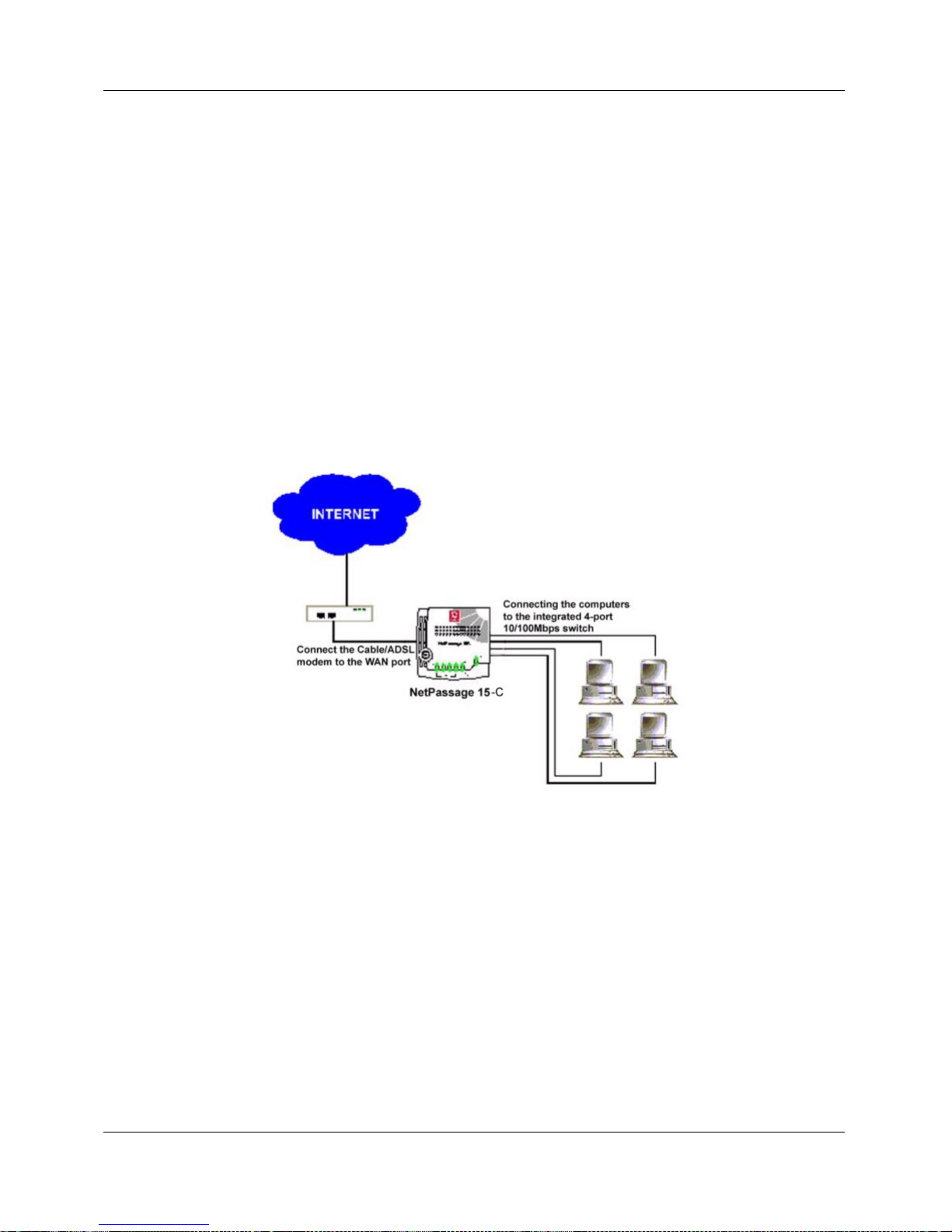
2.1.1 Distributing Broadband Internet Access to Fast Ethernet Network
In this hardware setup, 4 computers are connected to the integrated 4-port 10/100Mbps
Fast Ethernet Switch of NetPassage 15-C. These computers are able to share a single
broadband Internet account as well as their resources. You may also cascade the
NetPassage 15-C to another Hub or Switch to support more users. The Fast Ethernet
ports of NetPassage 15-C are designed with auto-crossover mechanism that can be easily
connected to another Hub or Switch regardless of the orientation of the UTP cable
(straight or crossover).
Figure 2.1.1-1
NetPassage 15-C
distributes broadband
Internet access to the
Fast Ethernet segment
Page 15
Chapter 2 Getting Started
8
2.2 Using Universal Configuration (uConfig) Program to access to Internet
Compex NetPassage 15-C supports Universal Configuration (uConfig) that enables you
to connect to the Web-based Configuration Interface effortlessly. There is no need to
fiddle with the TCP/IP configuration of your computer. Compex NetPassage 15-C
comes with a uConfig agent integrated and a window-based utility UCONFIG.EXE.
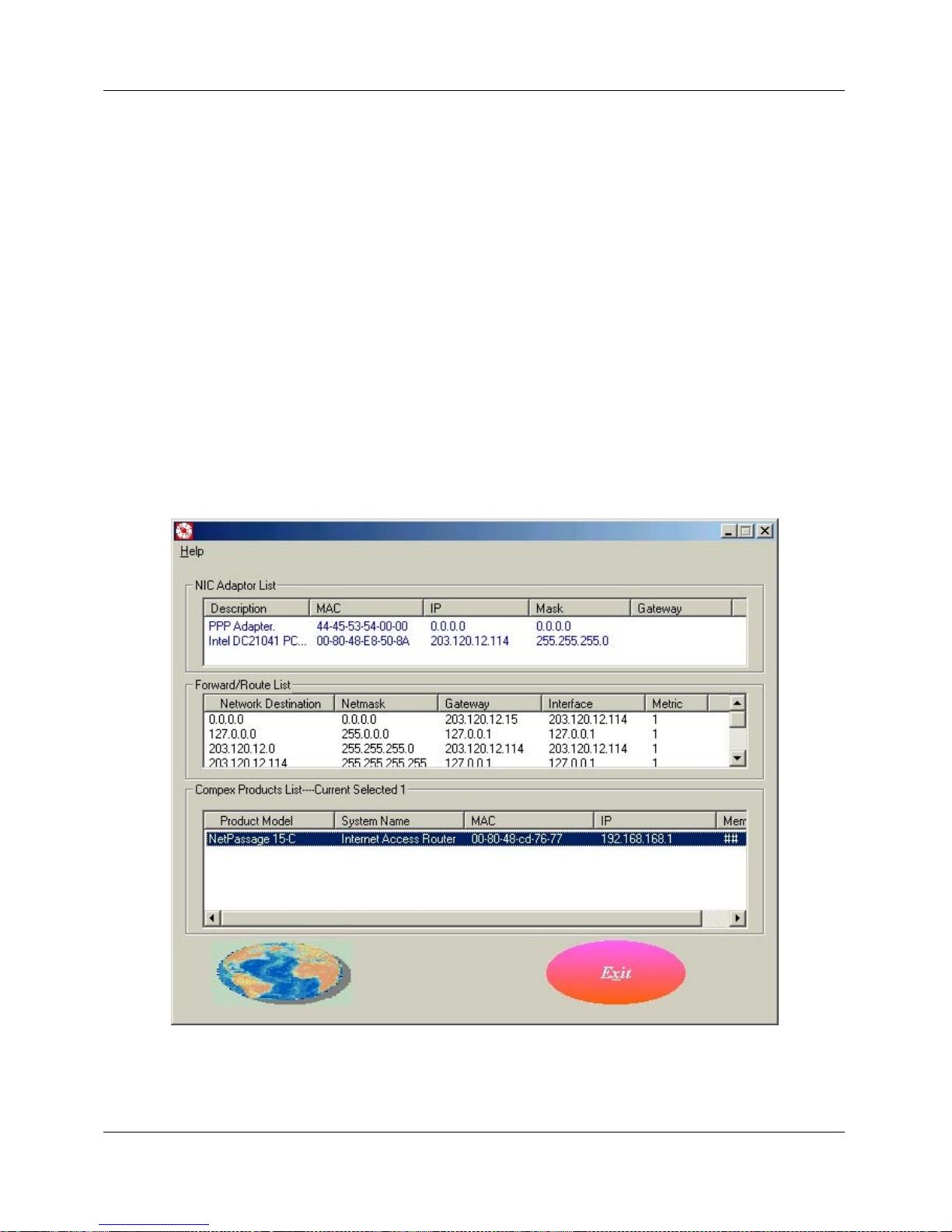
To connect to Compex NetPassage 15-C’s Web-based Configuration Interface via
Universal Configuration (uConfig):
1. Save the file UCONFIG.EXE from the Product CD into your preferred directory.
2. Launch the Universal Configuration by double-clicking the file UCONFIG.EXE.
3. Universal Configuration will then display the information collected in the network,
as shown below.
Figure 2.2-1Universal Configuration
Page 16
Chapter 2 Getting Started
9
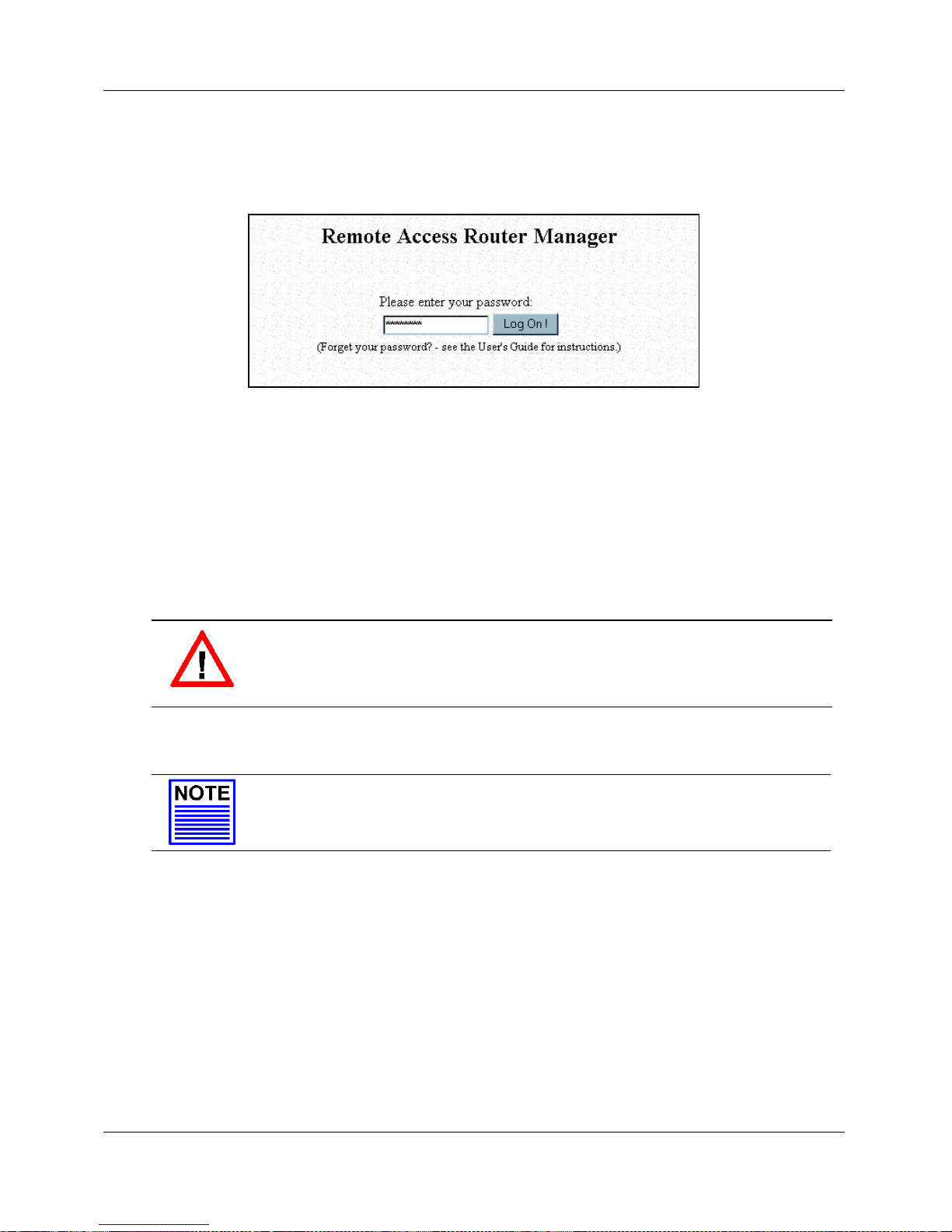
4. Select Compex NetPassage 15-C from Compex Product List window and press the
OpenWeb button. The login prompt shall appear.
Figure 2.2-2Logon Page
5. Enter the password and press the Log On! button to login. The default password for
NetPassage 15-C is password.
6. After you have completed the configuration, click on the ExitUconfig from the
Command Menu. The Compex NetPassage 15-C will then reboot.
7. Please proceed to Section 3.1 to read more about network configuration.
CAUTION
Click on the ExitUconfig from the Command Menu to exit from the
uConfig mode. If you do not exit the uConfig mode, the router may not
function correctly.
NOTE
An alternative configuration of the NetPassage 15-C can be found in
Appendix C.
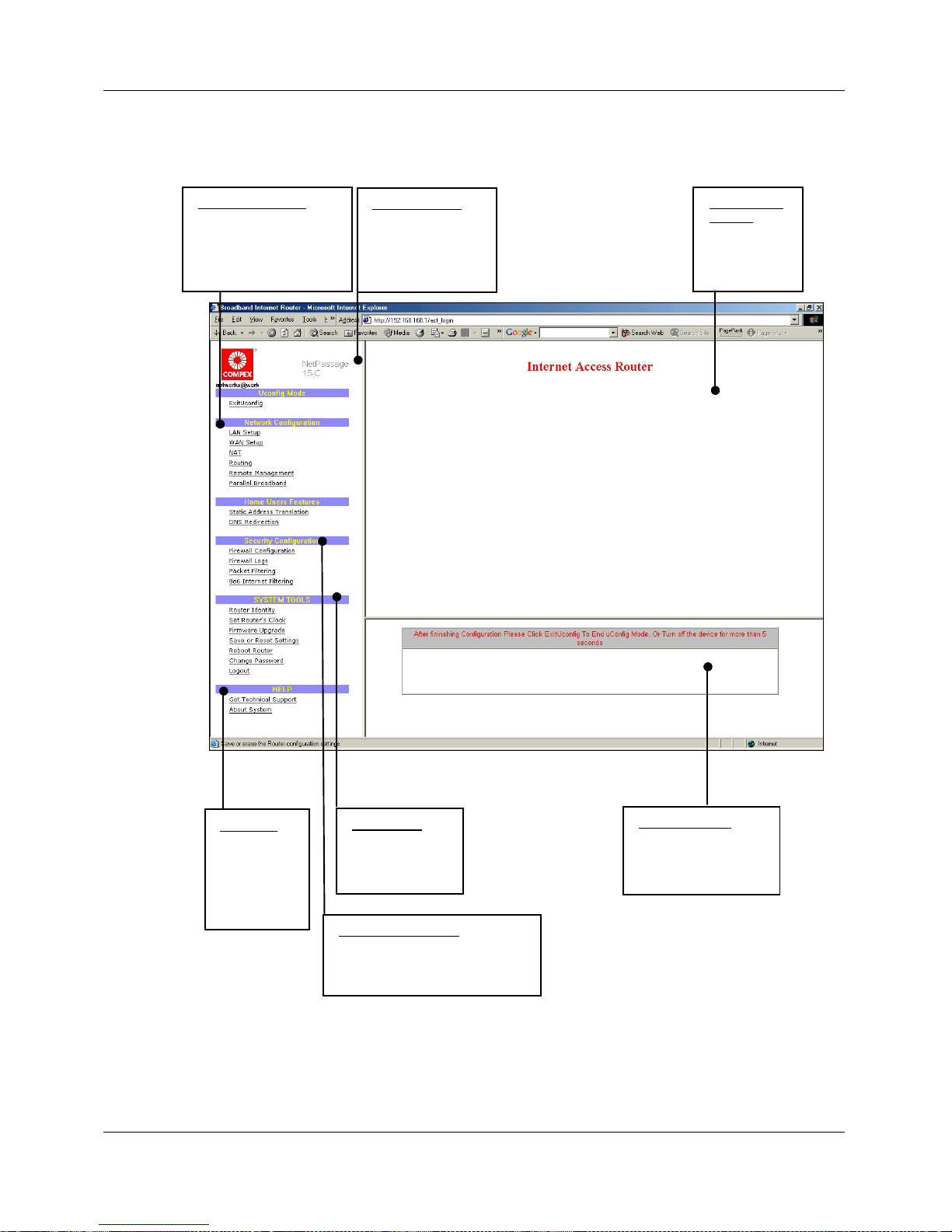
Once log on, you will see a web page consist of three frames, the Command Menu,
Configuration Window and Message Window, as shown in Figure 2.2-3.
Command Menu Enable the user to select feature to be configured
Configuration Window Enable the user to configure the parameters associated
with the selected feature
Message Window Display the message (if any) associated with the
configuration process
Page 17
Chapter 2 Getting Started
10
Figure 2.2-.3 NetPassage 15-C Configuration Interface
Command Menu
Consists of 3 main
menus.
• Configuration
• System Tools
• Help
Configuration
Window
Edit various
attributes of
the menu here.
System Tools
Edit various
internal settings of
NetPassage 15-C.
Message Window
Give you a history of the
various events. Various
configuration messages
are also displayed here.
Configuration Menu
Allows you to set up your
NetPassage 15-C to
connect to your network
easily. Hyperlinks connect
you to various menus.
Hel p me nu
Get advice
from our
friendly
technical
support
engineer.
Security Configuration
Allows you to set up firewall
configurations to limit unauthorized
applications entering your computer.
Page 18
Chapter 3 Configuring NetPassage 15-C
11
Chapter 3 Configuring NetPassage 15-C
This chapter explains the features of NetPassage 15-C in sections and how to implement them.
3.1 Setting up your LAN
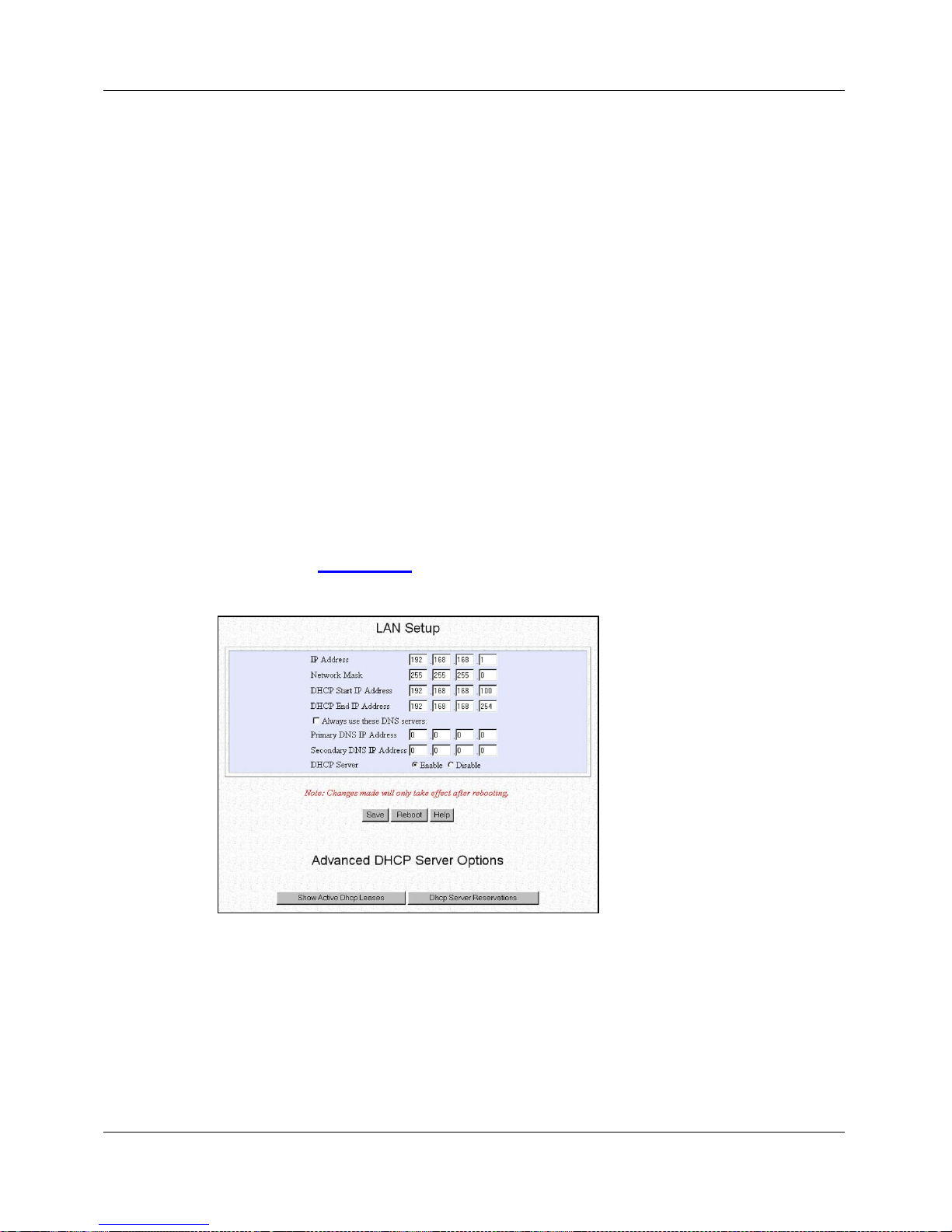
Compex NetPassage 15-C is pre-configured with a default IP address 192.168.168.1
with a network mask of 255.255.255.0. By default, the DHCP Server has also been preconfigured to assign IP addresses starting from 192.168.168.100 to 192.168.168.254. If
you do not wish to use these for your network, you may change these settings.
3.1.1 Configuring IP Addressing
If you wish to modify the IP addressing of your NetPassage 15-C, you may do so in the
web-based configuration interface.
1. Log on to the web-based configuration interface of NetPassage 15-C with a web
browser.
2. Click on the LAN Setup
URL from the Command Menu and the LAN setup
window shall appear, as shown in Figure 3.1.1-1
Figure 3.1.1-1
LAN Setup
3. Fill in the parameters in the respective text boxes:
IP Address
This is the IP address of your NetPassage 15-C
Network Mask
This is the Network Mask of your NetPassage 15-C’s IP
address. It decides the subnet of your NetPassage 15-C.
For example, if the IP address and network mask of
your NetPassage 15-C is 192.168.168.1 and
255.255.255.0 respectively, the subnet of your
NetPassage 15-C is 192.168.168.0.
Page 19

Chapter 3 Configuring NetPassage 15-C
12
DHCP Start IP Address
This is the first IP address where the built-in DHCP
server of NetPassage 15-C assigns. It should be in the
same subnet as your NetPassage 15-C. For example, if
the IP address and network mask of your NetPassage
15-C is 192.168.168.1 and 255.255.255.0 respectively,
the DHCP Start IP Address should be 192.168.168.X
DHCP End IP Address
This is the last IP address where the built-in DHCP
server of NetPassage 15-C assigns. It should be in the
same subnet as your NetPassage 15-C. For example, if
the IP address and network mask of your NetPassage
15-C is 192.168.168.1 and 255.255.255.0 respectively,
the DHCP End IP Address should be 192.168.168.X
Always use these DNS servers
This checkbox is associated with the built-in DHCP
Server of NetPassage 15-C. If this box is “checked”, the
built-in DHCP Server will configure the DNS
information of the computers. If this box is NOT
“checked”, you need to manually configure the DNS
information in every computer in the network.
Primary DNS IP Address
If the Always use these DNS servers checkbox is
“checked”, fill in an IP address of a DNS server. This
information is normally provided by your ISP.
Secondary DNS IP Address
This field contains the IP address of a secondary DNS
server (optional)
DHCP Server
Enable or disable the DHCP server. If you disable the
DHCP server, you need to manually configure the
TCP/IP of every computer in the network.
4. Press the Save button followed by Reboot button to complete the process.
3.1.2 Advanced Option for DHCP Server
You may configure the built-in DHCP Server of NetPassage 15-C to release a specific
IP address to a specific computer via the web-based configuration interface. You may
also view the IP releases online.
To reserve IP addresses for specific computers:
1. Press the DHCP Server Reservations button from the LAN Setup window shown
in Figure 3.1.1-1. The configuration window for DHCP server reservation will be
displayed, as shown in Figure 3.1.2-1.
Page 20

Chapter 3 Configuring NetPassage 15-C
13
Figure 3.1.2-1
DHCP Server Reservations
2. Specify the reserved IP Address, the Host Name or the Hardware Address in the
respective text boxes:
IP Address
This is the reserved IP address for a specific computer
Host Name
This is the host name of the computer
Hardware Address
This is the hardware MAC address of the Ethernet
interface of the computer
NOTE
The reserved IP address must not be within the range of DHCP start
and end IP addresses.
3. Press the Add button to add this entry, and the Apply button to make it effective.
To view the IP released by the DHCP Server:
1. Press the Show Active Dhcp Leases button in the LAN Setup window shown in
Figure 3.1.1-1. The list of released IP addresses will be displayed, as shown in
Figure 3.1.2-2.
Figure 3.1.2-2
DHCP Server Reservations
NOTE
Invalid date and time shown under Expires column indicates that the
router’s clock of your NetPassage 15-C has not been set. Refer to
Section 3.14.2 on how to set the router’s clock.
Page 21

Chapter 3 Configuring NetPassage 15-C
14
3.2 Configuring NetPassage 15-C with your Broadband Internet Account
Compex NetPassage 15-C shares a single Cable or ADSL Internet account with multiple
computers in the network. It supports these broadband Internet connections with
different types of WAN protocol. This includes Dynamic IP, Static IP and PPP over
Ethernet (PPPoE). NetPassage 15-C has also been customized to support Big Pond
Cable Internet in Australia and Singtel Magix SuperSurf in Singapore. Successful
configuration of NetPassage 15-C to work with your broadband Internet account
requires you to identify the type of broadband Internet connection you have subscribed.
Refer to the following to select the correct WAN type for your broadband Internet
subscription.
i. If you have subscribed to Cable Internet of which your ISP dynamically
assigns IP address to you, please go to Section 3.2.1 titled Cable Internet
with Dynamic IP Assignment.
ii. If you have subscribed to Cable Internet of which your ISP provides you with
an IP or a range of IP addresses, please go to Section 3.2.2 titled Cable
Internet with Static IP Assignment.
iii. If you have subscribed to ADSL Internet that requires standard PPP over
Ethernet (PPPoE) for authentication, please go to Section 3.2.3 titled ADSL
Internet using PPPoE.
iv. If you are a subscriber of Singtel Magix SuperSurf in Singapore, please go to
Section 3.2.4 titled Singapore Singtel Magix SuperSurf.
v. If you are a subscriber of Big Pond Cable Internet in Australia, please go to
Section 3.2.5 titled Australia Big Pond Cable Internet.
You may find some important information concerning the broadband ISP in your country in
Appendix B of this User’s Manual.
3.2.1 Cable Internet with Dynamic IP Assignment
By default, Compex NetPassage 15-C is pre-configured to support a WAN type that
dynamically obtain an IP address from the ISP. If you have subscribed to Cable Internet
of which your ISP dynamically assign an IP address, you do not need to configure the
WAN type.
However, there are exceptional cases where additional configuration is required before
an IP address is successfully obtained from the ISP:
i. Certain ISPs log the MAC address of the first device connected to the
broadband channel, and refuse to release an IP address unless the MAC
address matches the one in the log. If this is not a new Cable Internet
subscription and that the ISP refuses to release an IP address to you, you may
clone the “approved” MAC address to NetPassage 15-C. Refer to the
paragraph titled Cloning MAC Address to NetPassage 15-C in this section.
ii. Certain ISPs requires a DHCP Client ID to be authenticated before releasing
an IP address. To successfully obtain an IP address from such ISPs, you need
to configure NetPassage 15-C with a DHCP Client ID. NetPassage 15-C uses
Page 22

Chapter 3 Configuring NetPassage 15-C
15
Router Identity as the DHCP Client ID to request for IP release. Refer to
Section 3.14.1 titled Setting Router Identity.
If your NetPassage 15-C has previously been configured with other WAN type, you may
re-configure it to support Cable Internet with Dynamic IP Assignment.
1. Click on the WAN Setup
URL from the Command Menu and the WAN
configuration page will be displayed, as shown in Figure 3.2.1-1.
Figure 3.2.1-1
Changing WAN Type
NOTE
Figure 3.2.1-1 shows a WAN interface configured with static IP. If
your NetPassage 15-C has previously configured with PPPoE or other
WAN type, this page will show the respective configuration page.
2. Press the Change button and the list of supported WAN type will be displayed, as
shown in Figure 3.2.1-2.
Figure 3.2.1-2
Selecting the WAN Type
3. Check the Dynamic IP Address radio button and press the Save button.
4. Press the Reboot button on the configuration menu to restart the NetPassage 15-C.
Cloning MAC Address to NetPassage 15-C
1. Click on the WAN Setup
URL from the Command Menu and the WAN
configuration page will be displayed, as shown in Figure 3.2.1-3.
Page 23

Chapter 3 Configuring NetPassage 15-C
16
Figure 3.2.1-3
Cloning MAC Address
2. Press the Clone Mac button to clone the MAC address of your managing computer
to NetPassage 15-C. The configuration interface will then prompt you to reboot the
router. Press the Reboot button on the configuration menu to restart your
NetPassage 15-C.
3.2.2 Cable Internet with Static IP Assignment
Certain ISPs lease a static IP for their Internet subscriptions. For such Cable Internet
subscription, you need to configure the WAN interface of NetPassage 15-C with static
IP address.
3. Click on the WAN Setup
URL from the Command Menu and the WAN
configuration page will be displayed, as shown in Figure 3.2.2-1.
Page 24

Chapter 3 Configuring NetPassage 15-C
17
Figure 3.2.2-1
Changing WAN Type
4. Press the Change button and the list of supported WAN type will be displayed, as
shown in Figure 3.2.1-2.
5. Check the Static IP Address radio button and press the Save button. The Static IP
Configuration page will then be displayed, as shown in Figure 3.2.2-2.
Figure 3.2.2-2
Static IP Configuration
Page
6. Enter the IP Address, the Network Mask and the ISP’s Gateway IP Address into
the fields. These information are provided by your ISP. Press the Save button
followed by the Reboot button to complete the configuration process.
3.2.3 ADSL Internet using PPP over Ethernet (PPPoE)
If you have subscribed to ADSL Internet service using standard PPP over Ethernet
(PPPoE) for authentication, you need to configure your NetPassage 15-C to support
PPPoE.
1. Click on the WAN Setup
URL from the Command Menu and the WAN
configuration page will be displayed, as shown in Figure 3.2.2-1.
Page 25

Chapter 3 Configuring NetPassage 15-C
18
2. Press the Change button and the list of supported WAN type will be displayed, as
shown in Figure 3.2.1-2.
3. Check the PPP over Ethernet radio button and press the Save button. The PPPoE
Configuration page will then be displayed, as shown in Figure 3.2.3-1.
Figure 3.2.3-1
PPPoE Configuration Page
4. Fill in the parameters for your ADSL Internet service:
Username
Enter the username of your ADSL Internet subscription in
this field
Password
Enter the password of the username
Service Name
Enter the service name of your ADSL Internet subscription
(optional)
On-Demand
When this box is “checked”, your NetPassage 15-C will
automatically connect to the ISP when an Internet request
is present in the network.
Idle Timeout
This field is associated with On-Demand option. This
field allows you to specify the idling timeout value for
NetPassage 15-C to disconnect from the ISP. “0” value in
this field disables idling timeout function. When set to “0”,
NetPassage 15-C remains connected unless disconnected
by the ISP. Once disconnected, the NetPassage 15-C will
stay offline until the next Internet request is detected in the
network.
Always-On
When this box is “checked”, your NetPassage 15-C will
always connect to the ISP, with and without Internet
requests.
Page 26

Chapter 3 Configuring NetPassage 15-C
19
Reconnect Time Factor
This field is associated with Always-On option. This field
allows you to specify a Reconnect Time Factor (RTF). The
default value is 30 seconds. If Always-On option is
selected with an RTF of 30 seconds, your NetPassage 15C will stay connected to the ISP even when there is no
Internet traffic present. If disconnected by the ISP,
NetPassage 15-C will perform a delay for a random period
between 1 to RTF seconds (for RTF value of 30, the
random period is drawn between 1 to 30 seconds), and
reconnect to the ISP.
Use non-standard PPPOE
Ethernet type
Certain Ethernet-based ADSL modem requires nonstandard PPP over Ethernet for authentication. If you are
uncertain about this, DO NOT “check” this box.
5. Press the Save button followed by the Reboot button to complete the configuration
process.
3.2.4 Singapore SingTel Magix SuperSurf
You should use this WAN type only if you are a subscriber of SingTel Magix SuperSurf
in Singapore. If you have subscribed to SingNet Broadband or Pacific Internet
Broadband, please go to Section 3.2.3 titled ADSL Internet using PPP over Ethernet
(PPPoE).
1. Click on the WAN Setup
URL from the Command Menu and the WAN
configuration page will be displayed, as shown in Figure 3.2.2-1.
2. Press the Change button and the list of supported WAN type will be displayed, as
shown in Figure 3.2.1-2.
3. Check the Singapore ADSL (Ethernet 512K) radio button and press the Save
button. The configuration page for SingTel Magix SuperSurf will be displayed, as
shown in Figure 3.2.4-1.
Figure 3.2.4-1
SingTel Magix SuperSurf
Configuration Page
Page 27

Chapter 3 Configuring NetPassage 15-C
20
4. Enter the Username, Password and Idling Timeout value to the fields and press
the Save button.
5. Press the Reboot button on the configuration menu to complete the configuration
process.
3.2.5 Australia Big Pond Cable Internet
You should select this WAN type only if you are a subscriber of Big Pond Cable
Internet in Australia. If you have subscribed to OPTUS in Australia, please go to
Section 3.2.1 titled Cable Internet with Dynamic IP Assignment. Please note that
OPTUS requires a DHCP Client ID before releasing an IP address to you.
1. Click on the WAN Setup
URL from the Command Menu and the WAN
configuration page will be displayed, as shown in Figure 3.2.2-1.
2. Press the Change button and the list of supported WAN type will be displayed, as
shown in Figure 3.2.1-2.
3. Check the Australia BPA Cable radio button and press the Save button. The
configuration page for Big Pond Australia will be displayed, as shown in Figure
3.2.5-1.
Figure 3.2.5-1
Big Pond Australia
Configuration Page
4. Enter the Username, Password and Idling Timeout to the fields and press the
Save button.
5. Press the Reboot button to complete the configuration process.
3.3 Network Address Translator (NAT)
Compex NetPassage 15-C has been designed with a Network Address Translator (NAT)
that supports Port Address Translation (PAT), sharing a single public IP address with
multiple computers in the private network by using different TCP ports for different
computers. By default, the NAT is enabled.
Page 28

Chapter 3 Configuring NetPassage 15-C
21
CAUTION
Disabling the NAT will cause your computers not being able to share the
broadband Internet service. DO NOT disable the NAT unless you are
certain on what you are doing.
Due to the translation, the computers behind the NAT are not reachable from the
Internet. However, with the support of Virtual Server, you may host the Internet servers
behind the NAT based on Port Forwarding or IP Forwarding.
3.3.1 Introduction to Virtual Servers
Compex NetPassage 15-C supports two types of Virtual Server, one based on Port
Forwarding and the other based on IP Forwarding, where IP Forwarding option is only
available when the WAN interface of NetPassage 15-C has been configured with a static
IP.
Virtual Server based on Port Forwarding
When Virtual Server based on Port Forwarding is implemented, Internet requests to the
IP address of NetPassage 15-C’s WAN interface will be forwarded to a specific
computer in the private network based on the TCP port of the Internet request. Refer to
Figure 3.3.1-1.
Figure 3.3.1-1 shows two Virtual Servers implemented, HTTP Virtual Server and FTP
Virtual Server. To implement the Virtual Server, you need to know the TCP port that the
intended application is using.
For example, suppose that your ISP has assigned an IP address of 203.120.12.10 to your
NetPassage 15-C, and you wish to host a web server in your private network on a
computer with an IP address of 192.168.168.10; you need to define a Virtual Server at
TCP Port 80 (used by HTTP by default) to be forwarded to 192.168.168.10. Once
implemented, all “http://203.120.12.10” requests will be forwarded to the computer with
192.168.168.10 IP address. If you wish to host another FTP server in your private
network on a computer with an IP address of 192.168.168.20; you will then need to
define a Virtual Server at TCP Port 21 (used by FTP by default) to be forwarded to
192.168.168.20.
Figure 3.3.1-1
Virtual Server based
on Port Forwarding
Page 29

Chapter 3 Configuring NetPassage 15-C
22
Virtual Server based on IP Forwarding
If you have subscribed to a range of IP addresses from your ISP, you may also define
Virtual Servers based on IP Forwarding. This type of Virtual Server forwards all Internet
requests, regardless of the TCP port of the application, to a computer in the private
network. Refer to Figure 3.3.1-2.
Figure 3.3.1-2 shows two Virtual Servers based on IP Forwarding. One maps the public
IP 203.120.12.11 to private IP 192.168.168.10, and the other maps the public IP
203.120.12.12 to private IP 192.168.168.20.
Defining Virtual Server based on De-Militarized Zone (DMZ)
Due to the nature of Network Address Translator (NAT), the subnet behind the NAT
cannot be reached from the Internet. If you know the TCP/UDP port of an application,
such as HTTP, you can easily define a Virtual Server based on Port Forwarding behind
the NAT to support a Web Server in your private subnet. However, if you are uncertain
on the TCP/UDP port used by an application (certain Internet games), or an application
utilizes varying TCP/UDP port, you may define a DMZ host of which the NetPassage
15-C will direct all the unresolved Internet requests to.
For example, if the WAN interface of NetPassage 15-C has been assigned an IP address
of 203.120.12.20 and you have defined a DMZ host with IP address of 192.168.168.10,
all the unresolved Internet requests to 203.120.12.20 will be forwarded to
192.168.168.10, regardless of the TCP/UDP port.
Figure 3.3.1-2
Virtual Server based
on IP Forwarding
Page 30

Chapter 3 Configuring NetPassage 15-C
23
3.3.2 Defining Virtual Server based on Port Forwarding
To define Virtual Server based on Port Forwarding:
1. Click on the NAT
URL from the Command Menu and the NAT configuration page
will be displayed, as shown in Figure 3.3.2-1.
Figure 3.3.2-1
NAT Configuration Page
2. Press the Port Forwarding button and the list of defined Virtual Server will be
displayed, as shown in Figure 3.3.2-2.
Figure 3.3.2-2
Table Showing Defined
Virtual Server based on
Port Forwarding
3. Press the Add button to define new Virtual Server, as shown in Figure 3.3.2-3.
Figure 3.3.2-3
Defining New Virtual
Server based on Port
Forwarding
Page 31

Chapter 3 Configuring NetPassage 15-C
24
4. For Known Server, select the Server Type from the drop down menu and specify
the private IP address of your Virtual Server.
For Custom Server, specify the IP address of the Virtual Server, select the
Protocol used by this application from the drop down menu, specify the TCP/UDP
port used by this application, and enter your preferred reference name in the Server
Type field.
5. Press the Add button to add this new Virtual Server into the list.
6. Press the Save or Reset Settings
URL from the Command Menu and press the
Save button.
3.3.3 Defining Virtual Server based on IP Forwarding
If you have configured your NetPassage 15-C with Static IP WAN type, you have the
option to define Virtual Server based on IP Forwarding.
1. Click on the NAT
URL from the Command Menu and the NAT configuration page
will be displayed, as shown in Figure 3.3.3-1.
Figure 3.3.3-1
NAT Configuration
Window for Static IP
WAN Type
2. Press the Static Ip Address Entries button and the list of defined Virtual Server
will be displayed, as shown in Figure 3.3.3-2.
Figure 3.3.3-2
Table Showing Defined
Virtual Server based on
IP F orwarding
3. Press the Add button to define new Virtual Server, as shown in Figure 3.3.3-3.
Page 32

Chapter 3 Configuring NetPassage 15-C
25
Figure 3.3.3-3
Defining New Virtual
Server based on IP
Forwarding
4. Enter the Public IP Address and the Private IP Address which it maps to. Please
ensure that you have subscribed to this Public IP Address.
5. Press the Add button to add this new Virtual Server into the list.
6. Click on the Save or Reset Settings
URL from the Command Menu and press the
Save button.
3.3.4 Defining De- Militarized Zone
To define a DMZ host:
7. Click on the NAT URL from the Command Menu and the NAT configuration page
will be displayed, as shown in Figure 3.3.4-1.
Figure 3.3.4-1
NAT Configuration Page
8. Press the DMZ button and the DMZ Host Definition Window will be displayed, as
shown in Figure 3.3.4-2.
Figure 3.3.4-2
Configuring DMZ
9. Enter the IP address of the your designated computer and press the Apply button.
10. Save the configuration profile.
NOTE
To disable DMZ, please enter the IP address as 0.0.0.0.
Page 33

Chapter 3 Configuring NetPassage 15-C
26
3.4 Configuring Routing Protocol
Compex NetPassage 15-C allows the network administrator to add a static routing entry
into the routing table. Other than the default gateway to the Internet, NetPassage 15-C
may reroute the IP packets to another network. This is very useful for a network with
more than one router.
CAUTION
If you are configuring NetPassage 15-C for broadband Internet sharing,
you DO NOT need to configure any routing information. The default
routing settings of NetPassage 15-C are sufficient for broadband Internet
sharing. Improper routing configuration will cause undesired effect.
For example, if you have two routers in the network, where one functions as an Internet
gateway and the other as a gateway to a remote office. You may define a static route in
NetPassage 15-C to re-route the packets to the remote office. Refer to Figure 3.4-1.
Figure 3.4-1
Network with multiple gateways. One to the
Internet and the other to the remote office.
In this network, the main office of subnet 192.168.168.0 contains two routers, one
connected to the broadband Internet via NetPassage 15-C (IP 192.168.168.1) and the
other connected to a remote office via NetPassage 11A (IP 192.168.168.254). The
remote location resides on subnet 192.168.100.0. You may add a static routing entry into
NetPassage 15-C’s routing table to point the gateway 192.168.168.254 to subnet
192.168.100.0. Once added, packets with destination IP address of 192.168.100.X will
be re-routed to NetPassage 11A (IP 192.168.168.254).
Page 34

Chapter 3 Configuring NetPassage 15-C
27
Alternatively, you may also activate dynamic routing protocol on NetPassage 15-C.
Compex NetPassage 15-C supports two types of routing protocol, RIP1 and RIP2.
3.4.1 Static Routing
To add a static routing entry into NetPassage 15-C’s routing table:
1. Click on the Routing
URL from the Command Menu, and the routing
configuration page will be displayed, as shown in Figure 3.4.1-1.
Figure 3.4.1-1
Routing Configuration
Page
2. To define a new static routing entry into the routing table, press the Add button.
The following page will be displayed, as shown in Figure 3.4.1-2.
Figure 3.4.1-2
Adding New Static
Routing Entry into the
Routing Table
3. Enter the destination network address into the Destination IP Address field and
the IP address of the gateway connected to this network into the Gateway IP
Address field. For example if a gateway of IP 192.168.168.254 is connected to a
remote network 192.168.100.0, enter the Destination IP Address and Gateway IP
Address as 192.168.100.0 and 192.168.168.254 respectively.
4. Press the Apply button to add the new static routing entry into NetPassage 15-C’s
routing table
3.4.2 Dynamic Routing
To enable dynamic routing protocol:
Page 35

Chapter 3 Configuring NetPassage 15-C
28
1. Click to expand the Dynamic Routing drop down menu and select the preferred
dynamic routing protocol, RIP1 or RIP2. (Figure 3.4.1-1)
2. Press the Apply button for the changes to be effective.
3.5 Managing NetPassage 15-C from the Internet
Compex NetPassage 15-C is integrated with an HTTP Server, enabling router
management from the private network with just a JAVA-enabled web browser. It may
also be managed via a Command Console. In addition, Compex NetPassage 15-C
supports Remote Router Management, allowing the network administrators to manage
the router from the Internet, either by a web browser or via a TELNET session.
3.5.1 Activating Remote Router Management
To activate Remote Router Management from the Internet:
1. Click on the Remote Management
URL from the Command Menu and the remote
management activation page will be displayed, as shown in Figure 3.5.1-1.
Figure 3.5.1-1
Activating Remote
Router Management
2. Enter the desired TCP port that you wish to use for Remote Router Management.
Default value of “0” disables this feature.
HTTP Port
Specify the desired port for remote router management via a
web browser. If you have specified a non-standard TCP port for
this field, you need to specify the port number when you
connect to the management interface from the Internet.
For example, if your ISP has assigned 203.120.12.30 to
NetPassage 15-C’s WAN interface and you have chosen to use
port 2000 for HTTP remote management, you may connect to
the router management interface by using
http://203.120.12.30:2000
.
TELNET Port
Specify the desired port for remote router management via a
TELNET session (Command Console). If you have specified a
non-standard TCP port for this field, you need to specify the
port number when you connect to the command console from
the Internet.
Page 36

Chapter 3 Configuring NetPassage 15-C
29
For example, if your ISP has assigned 203.120.12.30 to
NetPassage 15-C’s WAN interface and you have chosen to use
port 5000 for TELNET remote console management, you may
connect to the router command console by TELNET to port
5000 of 203.120.12.30
3. Press the Save button followed by the Reboot button to complete the process.
3.6 Load Balancing & Fail-Over Redundancy with Parallel Broadband
Designed with the unique Parallel Broadband technology, Compex NetPassage 15-C
provides scalable Internet bandwidth with Load Balancing and Fail-Over Redundancy. If
multiple units of NetPassage 15-C are installed in the network, the Internet traffic will be
balanced across multiple broadband channels, delivering virtually a combined
aggregated bandwidth while functioning as Fail-Over Redundancy.
3.6.1 Implementing Parallel Broadband
To implement Parallel Broadband, you need to install two or more units of NetPassage
15-C in the network, each connected to its broadband Internet service account. There is
no restriction on the type of broadband Internet accounts that they are connected to. For
example, if you have two NetPassage 15-Cs in the network, you may have one
connected to Cable Internet whereas the other connected to ADSL line. Once the
Parallel Broadband is implemented, these two NetPassage 15-Cs will balance the
Internet traffic among them while functioning as Fail-Over Redundancy to each other.
To activate Parallel Broadband:
1. Click on the Parallel Broadband
URL from the Command Menu and the Parallel
Broadband activation page will be displayed, as shown in Figure 3.6.1-1.
Figure 3.6-1
Parallel Broadband with
Multiple Broadband
Channels
Page 37

Chapter 3 Configuring NetPassage 15-C
30
Figure 3.6.1-1
Activating Parallel
Broadband
2. Check the Enable radio button and press the Apply button.
NOTE
You DO NOT need to implement Parallel Broadband for Internet sharing
using one unit of NetPassage 15-C.
3.7 Static Address Translation (SAT)
If you are a notebook user, it is probably very often that you connect to the Internet at
your home to retrieve emails or surf the Internet. NetPassage 15-C supports Static
Address Translation that allows your notebook computer to connect to the Internet even
if it is NOT configured with the same subnet as Compex NetPassage 15-C’s.
For example, if Compex NetPassage 15-C is configured with a Class C IP of
192.168.168.1 and your notebook is configured with Class C IP of 203.120.12.47, you
may access to the broadband Internet via Compex NetPassage 15-C without the need of
reconfiguring the TCP/IP of your notebook. By default, this feature is disabled.
NOTE
If you are unsure whether to activate the SAT functionality, please disable
this function.
If your Compex NetPassage 15-C is still using the older firmware, please
go to Compex’s website at www.compex.com.sg to download the latest
firmware.
3.7.1 Enable/disable Static Address Translation
1. Click on Static Address Translation option from the Command Menu
and the following window shall be displayed.
Page 38

Chapter 3 Configuring NetPassage 15-C
31
Figure 3.7.1 Static Address Translation
2. Press the Enable or Disable radio button to enable/disable this feature.
3. Press the Apply button for the changes to be affective.
4. Save the configuration.
3.8 DNS Redirection
Compex NetPassage 15-C enables you to access to the internet without knowing the IP
Address of DNS server. You can simply key in any legal IP Address in the field of the
TCP/IP Properties window such as 10.10.10.10. Please refer to the figures shown
below:
Figure 3.8-1 TCP/IP for Windows 95/98 Figure 3.8-2 TCP/IP for Windows 2000
Page 39

Chapter 3 Configuring NetPassage 15-C
32
Click on the Enabled radio button followed by Apply button as shown below.
Figure 3.8-3 DNS Redirection
Now, you can easily surf the net without worries.
NOTE
If you set the IP Address of your PC to dynamic, enabling the DNS
Redirection function will not be activated.
CAUTION
You should not leave the DNS Server field in the TCP/IP Properties
window blankly or the router will not be able to assign an IP Address to
your PC. And this leads to inaccessible to the internet.
3.9 Firewall Configuration
Compex NetPassage 15-C is specially designed with firewall function to prevent
unauthorized access to or from the network. All messages entering or leaving Compex
NetPassage 15-C will pass through the firewall. It will then examine each message and
block those that do not meet the specified security criteria. The firewall can be activated
by purchasing an activation key from www.compex.com.sg
or www.cpx.com website.
Compex NetPassage 15-C uses Packet Filtering and Static inspection methods to control
the traffic flowing in and out of the network. The packets that make it through the filters
are sent to the requesting system and the rest are discarded. Static inspection compares
certain key parts of the packet to a database of trusted information. All information that
travels through the firewall is monitored for specified defining characteristics, and the
incoming information is compared to these characteristics. If the comparison matches,
the information is allowed to pass through, otherwise, it is discarded.
Page 40

Chapter 3 Configuring NetPassage 15-C
33
Figure 3.9-1 Configuration on Firewall
3.9.1 Security Level
The level of security that you have chosen (low, medium, high) will determine how
many of these threats can be stopped by firewall. The highest level of security would be
to simply block almost everything. You can restrict the traffic flows through the firewall
so that only certain information, such as email, can get through.
3.9.2 Log Information
Different protocols served differently for filtering purposes:
TCP (Transport Control Protocol) is used to rebuild information that travels over the
Internet.
UDP (User Datagram Protocol) is used for the information that requires no response,
such as streaming audio and video.
ICMP (Internet Control Message Protocol) is used by Compex NetPassage 15-C to
exchange the information with other routers.
IGMP (Internet Group Management Protocol) is used to establish host memberships in
particular multicast groups on a single network.
Page 41

Chapter 3 Configuring NetPassage 15-C
34
If you select any of packets from the Accepted section, these received packets which
has passed the filtering rules will be displayed in the firewall log section – Figure 3.11a.
This also applies to the Denied section.
3.9.3 Adding Firewall Rules
If you wish to add in more rules for security purposes, simply,
1. Click on Add button and the following GUI will appear.
Figure 3.9.3-1 Firewall Rule Configuration
2. After entering your preference entry to individual field, hit on the Apply button to
confirm the rules configuration.
Page 42

Chapter 3 Configuring NetPassage 15-C
35
3.10 Firewall Log
This Firewall log displays all necessary information such as the reasons on why the
packets are being accepted or discarded. The log will also inform you about the attack
on UDP flooding or SYN flooding.
Figure 3.10-1 Firewall Log
Click on Refresh button to update the latest information.
3.11 IP Packet Filtering
Compex NetPassage 15-C enables the users to define administrative functions based on
packet filtering rule. With IP packet filtering, you may perform Time-based Access
Management and Internet Application Filtering.
Time-based Access Management selectively allow or disallow certain computers in
the network to access to the Internet in different time frame. For example, you may
define a function to allow your children to access to the Internet only between 8:00PM
to 10:00PM.
Internet Application Filtering selectively allow/disallow certain application to connect
to the Internet. For example, if you wish to allow only web browsing in the network,
you may define a function to allow only HTTP protocol to pass through Compex
NetPassage 15-C.
3.11.1 Time-based Access Management
To define a function for Time-based Access Management:
1. Before proceeding to define a function for Time-based Access Management, ensure
that your Compex NetPassage 15-C’s router clock has been synchronized with your
computer. Refer to Section 3.14.2 titled Synchronizing Router’s Clock with your
Computer on how to synchronize the router’s clock.
2. Click on the Filtering from the Command Menu and the table listing defined packet
filter function will be displayed, as shown in Figure 3.12a. In this page, you may Add,
Page 43

Chapter 3 Configuring NetPassage 15-C
36
Delete or Edit a filtering function. You may also select to send or discard the packet if it
matches the filtering rules.
Figure 3.11.1-1 Table Listing Defined Filter Functions
3. Press the Add button to define a new function for Time-based Access Management.
The following page will be displayed as shown.
Figure 3.11.1-2 Defining Filtering Function
4. To define a rule for Time-based Access Management, you need to know the IP
address of the computers where this rule applies. For example, if you wish to disallow
two computers (IP address of 192.168.168.10 and 192.168.168.11) to access to the
Internet between 10:00PM to 8:00AM, you may define a rule with the following
parameters:
Rule Name Enter your preferred name for this rule
IP Address Select Range from the drop down menu
(From) 192.168.168.10
(To) 192.168.168.11
Destination Port Any
(From) <blank>
(To) <blank>
Day of the Week Any
Page 44

Chapter 3 Configuring NetPassage 15-C
37
(From) Sun
(To) Sun
Time of the day Select Range from the drop down menu
(From) 22:00
(To) 08:00
5. Press the Apply button to add this filtering function into the list.
6. Ensure that the Sent radio button is “checked”.
7. Press the Apply button for the changes to be effective.
3.12 Internet Application Filtering
To define a function to perform Internet Application Filtering:
1. Press the Add button at the filtering configuration page as shown in
Figure 3.11.1-1.
2. To define a rule to perform Internet Application Filtering, you need to
know the TCP port of the application of which this rule applies. For
example, if you wish to stop the computers from connecting to the Internet
via a TELNET (uses TCP Port 23) session, you may define a rule with the
following parameters:
Rule Name Enter your preferred name for this rule
IP Address Select Any from the drop down menu
(From) <blank>
(To) <blank>
Destination Port Select Single from the drop down menu
(From) 23
(To) <blank>
Day of the Week Any
(From) Sun
(To) Sun
Time of the day Select Any from the drop down menu
(From) <blank>
(To) <blank>
3. Press the Apply button to add this filtering function into the list.
4. Ensure that the Sent radio button is “checked”.
5. Press the Apply button for the changes to be effective.
Page 45

Chapter 3 Configuring NetPassage 15-C
38
3.13 8e6 Internet Filtering
8e6 Technologies is the original developer of X-Stop filtering solutions which has been
a pioneer in Internet Access Management technology. It develops customized Internet
Access Management network applications for businesses, ISPs and the education
market. Internet Filtering is important in this technological society as it helps to secure
others from accessing to certain websites, such as accessing to undesirable content
website in school or library, etc.
Figure 3.13 -1 8e6 Internet Filtering
3.13.1 Time Selection
Enabling the filtering function will prompt 8e6 to start checking the packets that are
being sent or received. If you wish to select certain period of time to activate the
filtering function, you can simply hit on the Time Selection option and the following
GUI will appears. Click on the Apply button to confirm the configuration.
Figure 3.13.1-1 Time Selection Configuration
3.13.2 URL Addition
For some of the website which the system administrator does not wish to others to
access, he can simply:
Page 46

Chapter 3 Configuring NetPassage 15-C
39
1. Open a new text document.
2. Type in the URL address and saved the document.
3. Click the URL Addition option as shown in Figure 3.13 -1.
4. The GUI in Figure 3.13.2-1
will appear. Click on the Browse.. button and locate
your saved text document.
5. Hit on the Load button to activate the filtering configuration.
Figure 3.13.2-1 URL Filter Configuration
3.13.3 Advanced Configuration
You may leave this section as its default setting. The information for this section is
provided by 8e6, therefore you do not need to do anything.
Figure 3.13.3-1 8e6 Parameter Configuration
Page 47

Chapter 3 Configuring NetPassage 15-C
40
3.14 NetPassage 15-C’s System Tools
The web-based configuration interface of NetPassage 15-C comes with a set of system
tools for you to define name for your NetPassage 15-C, setting the router’s clock,
upgrading the firmware, saving & restore router’s profile and changing the
administrative password.
3.14.1 Setting Router Identity
You may define a name for your NetPassage 15-C. This name will also be used as a
DHCP Client ID when it negotiates for an IP release from your ISP.
1. Click on the Router Identity
URL from the Command Menu and the router
identity configuration page will be displayed, as shown in Figure 3.14.1-1.
Figure 3.14.1-1
Configuring Router’s
Identity
2. Enter the Name, the Contact person and the Location of the NetPassage 15-C.
3. Press the Apply button for the changes to be effective.
3.14.2 Synchronizing Router’s Clock with your Computer
Compex NetPassage 15-C is specially designed with a SNTP compatibility and router’s
clock that can be synchronized with the managing computer. The administrative
function such as Time-based Access Control relies on the router’s clock. Therefore, it is
important that the router’s clock is set correctly.
1. Click on the Set Router’s Clock
URL from the Command Menu and the System
Time Setting window will be displayed, as shown in Figure 3.14.2-1.
Page 48

Chapter 3 Configuring NetPassage 15-C
41
Figure 3.14.2-1
Synchronizing Router’s
Clock
2. The Proposed Router Time will display the system time of your managing
computer.
3. Select the Enable radio button at Auto Time Setting and enter your preferred time
server in the text box. (please refer to Figure 3.14.2-1)
4. Press the Apply button for the changes to be effective.
5. Save the configuration profile.
3.14.3 Upgrading Router’s Firmware
Compex NetPassage 15-C comes with the firmware upgrade capability. You may
download the latest firmware from Compex corporate website
(http://www.compex.com.sg
or http://www.cpx.com) and update the firmware of your
NetPassage 15-C.
1. Click on the Firmware Upgrade
URL from the Command Menu and the firmware
upgrade page will be displayed, as shown in Figure 3.14.3-1
Figure 3.14.3-1
Upgrading Router’s
Firmware
2. Press the Browse button and locate the firmware image from your computer.
3. Press the Upgrade button to update your NetPassage 15-C’s firmware. It is critical
that the power supply is not cut off during the firmware upgrade process. Once the
firmware upgrade process is completed, your NetPassage 15-C will restart.
Page 49

Chapter 3 Configuring NetPassage 15-C
42
CAUTION
Make sure that the power supply is not cut off during the firmware
upgrade process. If the NetPassage 15-C loses power supply during
firmware upgrade process, the firmware will be corrupted and the
NetPassage 15-C will no longer be functional.
3.14.4 Profile Saving, Restore & Reset to Defaults
You may save the configuration profile of your NetPassage 15-C onto the hard disk of
your managing computer and restore this profile in a later time. You may also reset the
configuration of your NetPassage 15-C to factory defaults.
1. Click on the Save or Reset Settings
URL from the Command Menu and the
following page will be displayed, as shown in Figure 3.14.4-1.
Figure 3.14.4-1
Saving, Restore and
Reset Profile
2. Press the Save button if you wish to save the configuration profile into NetPassage
15-C’s flash ROM. Press the Backup button if you want to save the configuration
profile onto the hard disk. If you want to restore a profile, press the Browse button
to select the file from the hard disk and press the Restore button. If you wish to
reset your NetPassage 15-C back to factory defaults, press the Clear and Reset
button.
CAUTION
Pressing the Clear and Reset button will discard all the
configuration you have saved to NetPassage 15-C’s flash ROM.
3.14.5 Rebooting NetPassage 15-C
You may reboot your NetPassage 15-C manually from the web-based management
interface. Please always ensure that the changes have been saved before rebooting the
router.
Page 50

Chapter 3 Configuring NetPassage 15-C
43
CAUTION
If you reboot the NetPassage 15-C without saving the configuration, all
the unsaved configuration will be lost after reboot.
1. Click on the Reboot Router
URL from the Command Menu.
2. Press the Yes button to reboot the router.
3.14.6 Changing Administrative Password
By default, the administrative password is “password”. You may change the password to
your preferred string.
1. Click on the Change Password
URL from the Command Menu.
2. Type in the Old Password, the New Password and Confirm Password. Press the
Change Password button to make the changes effective.
3.14.7 NetPassage 15-C Firmware Recovery Procedure
This procedure shows how to reload the firmware to NP15-C should something go
wrong and router could not startup properly. NP15-C automatically switches to loader
mode when this happens. The router LEDs will indicate as follows: CONN steady light
on and DIAG blinking rapidly (about 10 times per second).
How to Recover Router from Failed Firmware
After powering ON the NP15-C, check the DIAG and CONN LEDs status according to the
table above. If the LEDs blink in a different way, it might be a different problem. Check 1.4.2
Panel Description on Page 5 for a more accurate diagnosis.
1) Power OFF and disconnect router from the network.
2) Connect one end of a MDI cable to the LAN port on the NP15-C then connect the other
end to your computer's LAN adapter.
3) Configure your computer's IP to: 192.168.168.100 with netmask 255.255.255.0
By default, the PC will be assigned the IP 192.168.168.100 from router.
4) Insert NP15-C CD containing the recovery file in CD-ROM tray. Run the batch file,
15crecvr.bat to start the firmware recovery process.
5) When completed, the DIAG LED will blink slowly, about 1 flash per second.
6) Reset the router and it will start up normally.) If you still have problems, please call technical
support for further assistance.
Router Operation State CONN DIAG
Firmware corrupted, need reload ON Blinking quickly.(10/sec)
Firmware upload successfully ON Blinking slowly (1/sec)
Firmware upload failed, need reload ON Blinking quickly.(10/sec)
Page 51

Appendix A Console Commands
44
3.14.8 Using the Reset Button
NP15-C comes with a reset button (near the WAN Port)
What the Reset button can do:
1) Manually reboot the router.
Press button once and release, router will reboot
2) Reset forgotten password to default i.e. password
Press and hold button till DIAG light starts to blink fast (2 flashes/sec) then release
button. Router’s password will be reset to factory default., i.e. password.
3) Clear router configuration to factory default.
Press and hold button, DIAG light starts to blink fast (2 flashes/sec) at first then it will
blink slowly (1 flash/sec) then release button. Router’s configuration will reset to
factory default.
If you have pressed and started the Reset button sequence, you can avoid
accidentally resetting router’s configuration by continuously holding down
the Reset button until the DIAG light becomes steady then release button.
Page 52

Appendix A Console Commands
45
Appendix A Console Commands
SHOW Command
SYNTAX DESCRIPTION
SHOW IP Display the IP information of the LAN and WAN interface
SHOW IP STAT Display the statistics of the IP packets
SHOW ICMP STAT Display the statistics of the ICMP packets
SHOW UDP STAT Display the statistics of the UDP packets
SHOW TCP STAT Display the statistics of the TCP packets
SHOW IP ROUTE TABLE Display the routing table
SHOW IP STATIC NAT TABLE List defined virtual servers based on IP forwarding
SHOW PORT STATIC NAT TABLE List defined virtual servers based on port forwarding
SHOW SYSTEM Display the system information
SHOW RIP Display the status of the dynamic routing protocol
SHOW GATEWAY Display the gateway IP address of the WAN interface
SHOW DHCP Display the DHCP information
SHOW DHCP RESERVE Display the DHCP reservations
SHOW DHCP LEASE Display the leased IP information
SHOW ETHERNET ADDRESS Display the MAC address of the LAN & WAN interface
SHOW TELNET SESSION Display the source IP of the open TELNET console session
SHOW TIME Display current router’s time
SHOW NAT STAT Display the status of the NAT
SHOW ARP TABLE Display the ARP table in the router
SHOW FILTER List defined IP packet filtering rules
SET Command
SYNTAX DESCRIPTION
SET IP LAN <IP ADDR> <NETMASK> Set the IP address of the LAN interface
SET IP WAN <IP ADDR> <NETMASK> Set the IP address of the WAN interface
SET GATEWAY <IP ADDR> Set the gateway IP address of the WAN interface
SET SYSTEM NAME <STRING> Set the router’s identity
SET SYSTEM CONTACT <STRING> Specify the contact person for this router
SET SYSTEM LOCATION <STRING> Specify the location of this router
SET PASSWORD Changing the administrative password
SET TIMEZONE <GMT DIFF> Set the timezone based on GMT time difference
SET TIME <HH:MM:SS> Set the router’s time
SET DATE <MM/DD/YYYY> Set the router’s date
SET DHCP SERVER Configure the DHCP server
SET PROMPT “<STRING>” Set the text appear at the command console
SET WAN TYPE Select the WAN type
SET FILTER MODE Set the option on IP packet filtering rules
PING Command
SYNTAX DESCRIPTION
PING <IP ADDR> Ping a host by its IP address
DELETE Command
SYNTAX DESCRIPTION
DELETE ARP <IP ADDR> Remove an IP address from the ARP table
DELETE IP ROUTE <DES> <GATEWAY> Remove an entry from the routing table
DELETE IP STATIC NAT <INDEX> Delete an entry from the list of defined virtual server based on IP
forwarding. You may obtain the <INDEX> by listing the defined IP
Page 53

Appendix A Console Commands
46
forwarding table with the command “SHOW IP STATIC NAT TABLE”
DELETE PORT STATIC NAT <INDEX> Delete an entry from the list of defined virtual server based on port
forwarding. You may obtain the <INDEX> by listing the defined port
forwarding table with the command “SHOW PORT STATIC NAT
TABLE”
DELETE DHCP RESERVE <INDEX> Delete a DHCP reservation from the list. The <INDEX> is the sequence
from top by listing the DHCP reservation table with the command
“SHOW DHCP RESERVE”
DELETE FILTER <INDEX> Delete an IP packet filtering rule. You may obtain the <INDEX> by
listing the defined IP filtering rule with the command “SHOW FILTER”
RESET Command
SYNTAX DESCRIPTION
RESET SYSTEM Reboot the router
RESET CONFIG Reset the configuration back to factory defaults
ADD Command
SYNTAX DESCRIPTION
ADD IP ROUTE <DES> <GATEWAY> Add an entry to the routing table
ADD IP STATIC NAT <PRI IP> <PUB IP> Add a virtual server based on IP forwarding
ADD PORT STATIC NAT <PRI IP>
<TCP/UDP> <FROM PORT> <TO PORT>
“<RULE NAME>”
Add a virtual server based on Port Forwarding
ADD DHCP RESERVE <PRIV IP> “<HOST
NAME>” <MAC ADDR>
Add a DHCP reservation
ADD FILTER Add a IP packet filtering rule
ENABLE Command
SYNTAX DESCRIPTION
ENABLE RIP <VERSION> Enable RIP version 1 or 2
ENABLE NAT Enable Network Address Translator
ENABLE DHCP SERVER Enable DHCP server
DISABLE Command
SYNTAX DESCRIPTION
DISABLE RIP Disable RIP
DISABLE NAT Disable Network Address Translator
DISABLE DHCP SERVER Disable DHCP server
SAVE Command
SYNTAX DESCRIPTION
SAVE CONFIG Save the changes in configuration to the router’s flash ROM
DISCONNECT Command
SYNTAX DESCRIPTION
DISCONNECT TELNET SESSION Disconnect from the TELNET console management
EDIT Command
SYNTAX DESCRIPTION
EDIT FILTER <INDEX> Edit a defined IP packet filtering rule
Page 54

Appendix B ISP-Specific Notes
47
Appendix B ISP-Specific Notes
B.1 Singapore SingNet Broadband
WAN Type: PPP over Ethernet (PPPoE)
Username Format: <username>@singnet
B.2 Singapore Pacific Internet Broadband
WAN Type: PPP over Ethernet (PPPoE)
Username Format: <username>@pacific.net.sg
B.3 Germany T-DSL & T-Online
WAN Type: PPP over Ethernet (PPPoE)
Username Format: <Connection ID><T-Online Number>#0001@t-online.de
NOTE
The <Connection ID> and <T-Online Number> are provided by German
Telecom.
B.4 Australia Optus@Home
WAN Type: Dynamic IP
DHCP Client ID: Set as Router’s Identity
Page 55

Appendix C Alternative Method for Configuring NetPassage 15-C
48
Appendix C Alternative Method for Configuring
NetPassage 15-C
C.1 TCP/IP Configuration of the Computers
Compex NetPassage 15-C is designed with a built-in DHCP server. You may manually
configure the TCP/IP settings of your computers, or simply configure them to
dynamically obtain IP address from the DHCP server. If you are not an expert user, you
are advised to configure your computers to dynamically obtain IP addresses from the
built-in DHCP server of NetPassage 15-C.
Before proceeding, please take note of the following default settings of NetPassage 15C:
IP (LAN): 192.168.168.1
Subnet Mask: 255.255.255.0
DHCP Server: Enabled
C.2 Configuring your Computer to Dynamically Obtain IP Address
To configure your computers to dynamically obtain IP address, gateway and DNS
information from NetPassage 15-C, perform the following actions:
For Microsoft Windows 95/98/ME
1. Open the Control Panel from the Start menu
2. Double-click on the Network icon, the network configuration window shall be
displayed, as shown in Figure C.2-1.
Please ensure that the
TCP/IP protocol is installed
and bind to the network
adapter.
Figure C.2-1
Network Configuration
Window
3. Double-click on the TCP/IP that is bound to your network adapter, the TCP/IP
configuration window shall be displayed, as shown in Figure C.2-2.
Page 56

Appendix C Alternative Method for Configuring NetPassage 15-C
49
Press on the Obtain an IP
address automatically
radio button and press the
OK button.
Figure C.2-2
Network Configuration
Window
4. Press the OK button again to close the network configuration window. The
Microsoft Windows will then prompt you to restart the computer. Press the OK
button to reboot.
When the Microsoft Windows restarts, NetPassage 15-C will assign an IP address,
Subnet Mask and Gateway information to the computer.
For Microsoft Windows 2000/XP
1. Open the Control Panel from the Start menu
2. Double-click on the Network Connections icon.
3. Double-click on the network icon that you will be using to connect to NetPassage
15-C for configuration, the network configuration window shall be displayed as
shown in Figure C.2-3.
Please ensure that the correct
network adapter is selected.
Figure C.2-3
Network Configuration
Window
4. Double-click on the TCP/IP connection, the TCP/IP configuration window shall be
displayed, as shown in Figure C.2-4.
Page 57

Appendix C Alternative Method for Configuring NetPassage 15-C
50
Press on the Obtain an IP
address automatically radio
button and press the OK
button.
Figure C.2-4
Network Configuration
Window
5. Press the OK button again to close the network configuration window. The new
network configuration will be registered on your network card.
C.3 Configuring your Computer with Static IP Address
If you have chosen to configure your computer with Static IP address, please take note
of the following default settings on NetPassage 15-C.
IP (LAN): 192.168.168.1
Netmask: 255.255.255.0
To log on to the Web-based Configuration Interface of NetPassage 15-C and to surf the
Internet, you need to configure your computer with the following network settings:
IP: 192.168.168.X
Subnet Mask: 255.255.255.0
Gateway: 192.168.168.1
DNS Server: <IP address of DNS server>
X is any integer from 2 to 254, and you cannot configure more than one
computer with the same IP address.
<IP address of DNS server> is the IP address of a DNS server. This
information is usually provided by your broadband Internet service
provider.
NOTE
NetPassage 15-C is pre-configured with a subnet of 192.168.168.0. If you
wish to configure your network with another subnet, you may do so after
logging on to the configuration interface of NetPassage 15-C.
For Microsoft Windows 95/98/ME
1. Open the Control Panel from the Start menu
Page 58

Appendix C Alternative Method for Configuring NetPassage 15-C
51
2. Double-click on the Network icon, the network configuration window shall be
displayed, as shown in Figure C.3-1.
3. Double-click on the TCP/IP that is bound to your network adapter, the TCP/IP
configuration window shall be displayed, as shown in Figure C.3-1.
Type in the IP Address and
Subnet Mask of
192.168.168.X and
255.255.255.0 respectively.
Figure C.3-1
Network Configuration
Window
4. Select Gateway from the menu and the gateway configuration page shall be
displayed, as shown in Figure C.3-2.
Type in the New gateway
as 192.168.168.1 and press
the Add button.
Figure C.3-2
Gateway Configuration
Window
5. Select DNS Configuration from the menu and the DNS configuration page shall
be displayed, as shown in Figure C.3-3.
Page 59

Appendix C Alternative Method for Configuring NetPassage 15-C
52
Select the Enable DNS
button. Type in a preferred
name as the Host. Type in
the IP address of your DNS
server in the DNS Server
Search Order field and
press the Add button. Press
the OK button to close this
window.
Figure C.3-3
DNS Configuration
Window
NOTE
You must not configure more than one computer with the same host
name. This creates conflict in the network.
NOTE
The IP address of your DNS Server should be provided by your ISP.
If you are still not sure about it, please contact your ISP.
6. Press the OK button again to close the network configuration window. The
Microsoft Windows will then prompt you to restart the computer. Press the OK
button to reboot.
For Microsoft Windows 2000/XP
1. Open the Control Panel from the Start menu
2. Double-click on the Network Connections icon.
3. Double-click on the network icon that you will be using to connect to NetPassage
15-C for configuration, the network configuration window shall be displayed as
shown in Figure C.3-4.
Please ensure that the correct
network adapter is selected.
Figure C.3-4
Network Configuration
Window
Page 60

Appendix C Alternative Method for Configuring NetPassage 15-C
53
4. Double-click on the TCP/IP connection, the TCP/IP configuration window shall be
displayed, as shown in Figure C.3-5.
Type in the IP Address and
Subnet Mask of
192.168.168.X and
255.255.255.0 espectively.
Type in the Default gateway
as 192.168.168.1. Type in
the IP address of your DNS
server in the Preferred DNS
Server field.
Figure C.3-5
Network Configuration
Window
5. Press the OK button again to close the network configuration window. The new
network configuration will be registered on your network card.
C.4 Connecting to the Configuration Interface
Compex NetPassage 15-C is integrated with an embedded HTTP Server to provide a
user-friendly web-based configuration interface. Alternatively, you may also connect to
the Command Console of NetPassage 15-C via a TELNET session or a direct serial
connection.
This section assumes that the IP address of your NetPassage 15-C has not been changed.
It is still the default IP of 192.168.168.1.
This section also assumes that the TCP/IP settings of your computer have been
configured properly. To make sure that the TCP/IP of your computer has been
configured properly, perform the following command at the DOS prompt:
C:\WINDOWS\PING 192.168.168.1
If you receive replies from the above command, it indicates that your computer has been
properly configured with TCP/IP.
Page 61

Appendix C Alternative Method for Configuring NetPassage 15-C
54
C.5 Web-based Configuration Interface
To connect to the Web-based Configuration Interface of NetPassage 15-C, all you need
is a web browser. The requirement of the web browser is stated below:
Web Browser: Netscape Navigator 4.0 & above
or Internet Explorer 4.0 & above
JAVA: Enabled
Proxy Settings: Cleared
Proxy Auto Discovery: Disabled
Connecting to Web-based Configuration Interface
1. Launch the Internet Explorer or Netscape Navigator
2. Open the URL using the default IP of NetPassage 15-C. Eg. Type in
http://192.168.168.1
in the Address field of Internet Explorer.
3. The logon page will then be displayed, as shown in Figure 2.3.1-1. The default
password of NetPassage 15-C is “password” which is pre-filled in the password
text box. Press the Log On! button to log in to NetPassage 15-C’s Configuration
Interface.
Figure C.5-1
Logon Page
NOTE
If the proxy settings of your web browser is not cleared, you will not
be able to connect to NetPassage 15-C’s web-based configuration
interface.
C.6 TELNET Command Console
Alternatively, the user may connect to the Command Console of NetPassage 15-C via a
TELNET session to the default IP of NetPassage 15-C, 192.168.168.1. This section uses
Microsoft TELNET command for instruction. You may use any TELNET client.
Connecting to NetPassage 15-C’s Command Console via TELNET
1. Connect to NetPassage 15-C’s Command Console with the following command at
DOS prompt. The TELNET application will then be launched and connect to
NetPassage 15-C.
C:\WINDOWS\TELNET 192.168.168.1
Page 62

Appendix C Alternative Method for Configuring NetPassage 15-C
55
2. At the login prompt, type in “password” (default password) and press the
<ENTER> key, as shown in Figure C.6-1. You will then login to the Command
Console of NetPassage 15-C.
Figure C.6-1
Command Console
Login
NOTE
Please refer to Appendix A for the list of commands available at the
console.
Page 63

Appendix D Troubleshooting
56
Appendix D Frequently Asked Questions
D.1 Based on which firmware release was this User’s Manual written?
This User’s Manual is written based on NetPassage 15-C firmware release 2.79 build
1201.
D.2 I have forgotten the IP address that I have set on my NetPassage 15-C, what should
I do?
You may run the utility uConfig.exe located in the Product CD, it will open a Graphic
User Interface (GUI) that allows the user to select the NetPassage for configuration.
D.3 The “DIAG” LED on my NetPassage 15-C is flashing rapidly, and I cannot connect
to the web-based configuration interface, why?
The rapid flashing of the “DIAG” LED indicates that the router firmware has been
corrupted. The firmware recovery utility may be found on the Product CD.
D.4 I have configured NetPassage 15-C with my broadband Internet account. I am able
to PING the ISP gateway IP address. However, I cannot surf the Internet.
If you have not configured the DHCP server to configure the DNS information of the
computers in the network, you need to manually configure the DNS entry on every
computer. Without the DNS server, your will not be able to resolve domain name (eg
www.compex.com.sg
) into IP address. Refer to Section 2.2 on how to configure for
DNS server on the computer.
D.5 I am using Cable Internet and have tried to configure NetPassage 15-C to work
with it. I just couldn’t get the ISP to release an IP to me. When I connected my
computer directly to the Cable modem, I am able to surf the Internet.
Your ISP has probably logged the MAC address of your computer. You should clone the
MAC address of your computer to NetPassage 15-C. Refer to paragraph titled Cloning
MAC Address to NetPassage 15-C under Section 3.2
D.6 I have forgotten the IP address and the log in password. Is there any possibility to
reset NetPassage 15-C to factory’s default.
You can perform a hardware reset by pressing the reset button located on the side panel
of NetPassage 15-C.
 Loading...