

Page 1
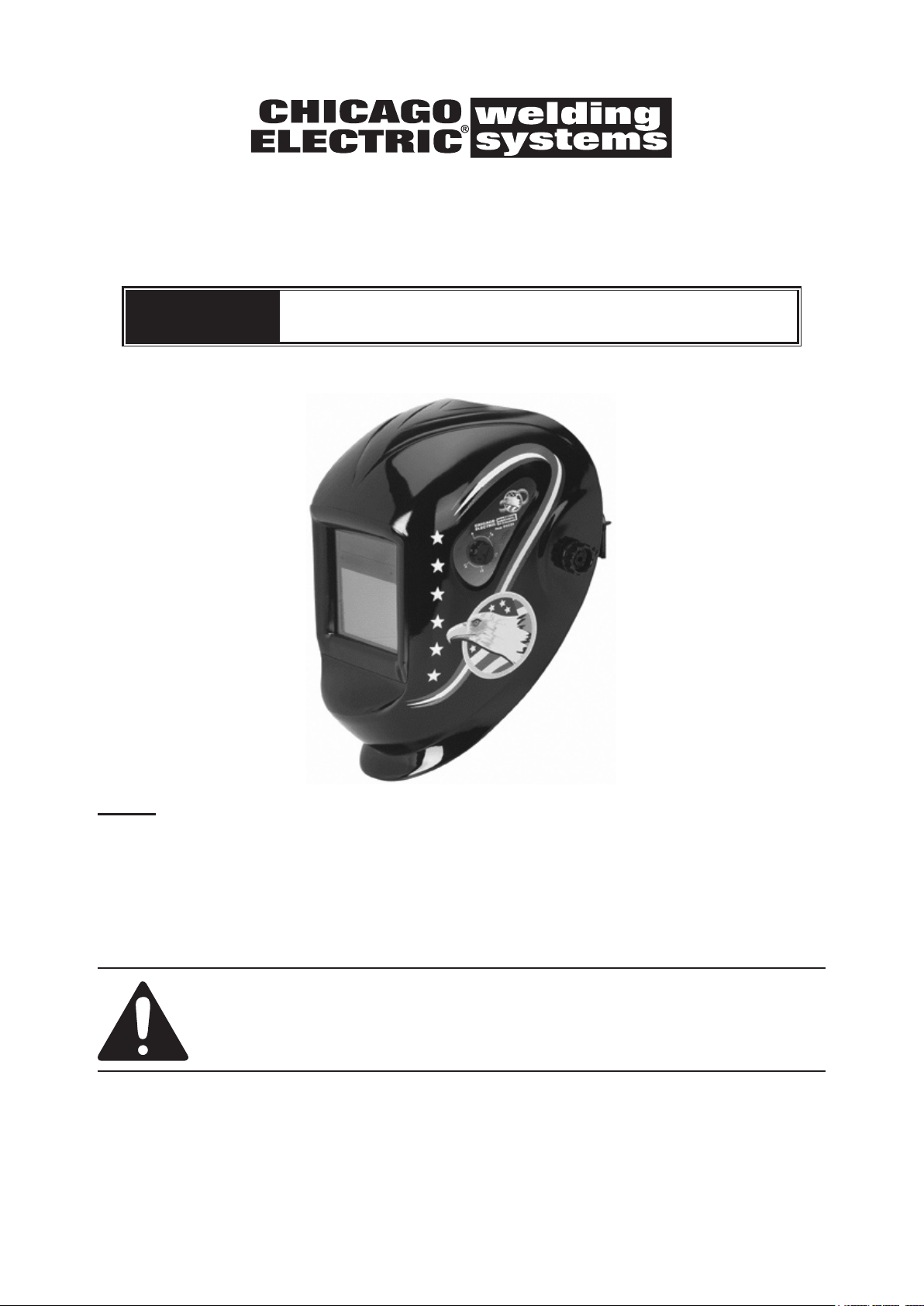
AUTO-DARKENING WELDING HELMET
with ANSI-Approved Lens
Models
91212, 91214, 94336, 94337
SET UP AND OPERATING INSTRUCTIONS
NOTE: YOUR Helmet may appear different from the Helmet pictured in this
manual. Aside from the slight differences noted in this manual, the warnings,
operation instructions, and maintenance procedures will remain the same.
Distributed exclusively by Harbor Freight Tools®.
3491 Mission Oaks Blvd., Camarillo, CA 93011
Visit our website at: http://www.harborfreight.com
Read this material before using this product.
Failure to do so can result in serious injury.
SAVE THIS MANUAL.
Copyright© 2006 by Harbor Freight Tools®. All rights reserved. No portion of this manual or any artwork
contained herein may be reproduced in any shape or form without the express written consent of Harbor
Freight Tools. Diagrams within this manual may not be drawn proportionally. Tools required for assembly
and service may not be included.
For technical questions or replacement parts, please call 1-800-444-3353.
Manual revised 10c
Page 2
SAVE THIS MANUAL
Keep this manual for the safety
warnings and precautions, assembly,
operating, inspection, maintenance and
cleaning procedures. Write the product’s
serial number in the back of the manual near
the assembly diagram (or month and year of
purchase if product has no number). Keep
this manual and the receipt in a safe and dry
place for future reference.
IMPORTANT SAFETY
INFORMATION
In this manual, on the labeling, and
all other information provided with
this product:
This is the safety alert
symbol. It is used to alert
you to potential personal
injury hazards. Obey all
safety messages that
follow this symbol to avoid
possible injury or death.
DANGER indicates a
hazardous situation
which, if not avoided, will result
in death or serious injury.
WARNING indicates
a hazardous
situation which, if not avoided,
could result in death or serious
injury.
CAUTION, used with
the safety alert
symbol, indicates a hazardous
situation which, if not avoided,
could result in minor or
moderate injury.
NOTICE is used to
address practices
not related to personal injury.
CAUTION, without
the safety alert
symbol, is used to address
practices not related to
personal injury.
SAFETY WARNINGS AND
PRECAUTIONS
WARNING: When using helmet, basic
safety precautions should always
be followed to reduce the risk of
personal injury and damage to
equipment.
The warnings, cautions, and instructions
discussed in this instruction manual
cannot cover all possible conditions and
situations that may occur. It must be
understood by the operator that common
sense and caution are factors which
cannot be built into this product, but
must be supplied by the operator.
Read all instructions before using
this helmet!
Do not use the Welding Helmet if 1.
the lens is cracked, if the lens or
sensors are dirty, or if the lens or
front retaining frame is loose.
Keep work area clean2. . Cluttered
areas invite injuries.
Observe work area conditions3. . Do
not use welding helmets in damp or wet
locations. Do not expose to rain. Keep
work area well lit. Do not use autodarkening helmets in the presence of
ammable gases or liquids.
Keep children away4. . Children must
never be allowed in the work area. Do
not let them handle this helmet.
Store idle equipment5. . When not in
use, helmets must be stored in a dry
location to inhibit rust. Always lock
up helmets and keep out of reach of
children.
Page 2 For technical questions, please call 1-800-444-3353. Auto-darkening
Welding Helmet
Page 3

Dress properly6. . Do not wear loose
clothing or jewelry as they can be
caught in moving parts. Protective
gear is essential to protect against
welding rays, some examples are: a
leather welding apron, welding sleeves,
jeans without cuffs, work boots. Wear
restrictive hair covering to contain long
hair.
7. Use eye and ear
protection. When
welding, wear ANSIapproved impact safety
goggles under the Welding Helmet.
Wear a NIOSH-approved respirator
and hearing protection when welding.
Stay alert8. . Watch what you are doing,
use common sense. Do not weld when
you are tired.
Check for damaged parts9. . Before
using any helmet, any part that appears
damaged should be carefully checked
to determine that it will operate
properly and perform its intended
function. Check for alignment and
binding of moving parts; any broken
parts or mounting xtures; and any
other condition that may affect proper
operation. Any part that is damaged
should be properly repaired or replaced
by a qualied technician. Do not use
the helmet if any switch does not
operate properly.
Replacement parts and accessories10. .
When servicing, use only identical
replacement parts. Use of any other
parts can render helmet ineffective,
possibly causing eye damage, and
will void the warranty. Only use
accessories intended for use with this
helmet. Approved accessories are
available from Harbor Freight Tools.
Do not weld if under the inuence 11.
of alcohol or drugs. Read warning
labels on prescriptions to determine if
your judgment or reexes are impaired
while taking drugs. If there is any
doubt, do not weld.
Maintenance12. . For your safety, service
and maintenance should be performed
regularly only by a qualied technician.
This helmet provides protection 13.
for intended purposes only. There
are certain applications for which this
helmet was designed. Do not modify
this helmet and do not use this helmet
for a purpose for which it was not
intended.
The Welding Helmet is not suitable for •
laser welding processes.
The Welding Helmet will not protect •
against severe impact hazards,
including fragmenting grinding disks;
do not use Welding Helmet when
grinding.
The Welding Helmet will not protect •
against explosive devices or corrosive
liquids.
Use only at temperatures within the 14.
operating range for your model as
stated on the specications chart in
this manual.
Maintain the helmet and lens 15.
correctly to help ensure reliable
protection.
Clean lter’s surfaces regularly.•
Keep sensors and solar cells clean
using a clean lint-free tissue/cloth. Do
not use any solvents on lter’s screen
or helmet components. Protect lter
from liquid and dirt contact. Do not
immerse the lter in water.
Should the Auto-Darkening Welding •
Helmet not darken upon striking
an arc, stop welding immediately
and have the helmet checked by a
qualied service technician.
Regularly replace the Front Lens •
Cover if it becomes cracked,
scratched, pitted, or otherwise
damaged.
Welding Helmet
Page 3For technical questions, please call 1-800-444-3353.Auto-darkening
Page 4

Do not make any modications to •
INHALATION HAZARD:
Welding and Plasma Cutting Produce
TOXIC FUMES.
Exposure to welding or cutting exhaust
fumes can increase the risk of developing
certain cancers, such as cancer of the
larynx and lung cancer. Also, some
diseases that may be linked to exposure
to welding or plasma cutting exhaust
fumes are:
• Early onset of Parkinson’s Disease
• Heart disease • Ulcers
• Damage to the reproductive organs
• Inammation of the small intestine or
stomach • Kidney damage
• Respiratory diseases such as
emphysema, bronchitis, or pneumonia
Use natural or forced air ventilation and
wear a respirator approved by NIOSH to
protect against the fumes produced to
reduce the risk of developing the above
illnesses.
either the Auto-Darkening Filter or
the rest of the helmet, other than
those specied in this manual.
Do not use any replacement parts
other than those specied in this
manual. Unauthorized modications
and replacement parts will void the
warranty and expose the user to the
risk of personal injury. Do not open
or tamper with the Auto-Darkening
Filter.
Do not place the Welding Helmet’s 16.
Auto-Darkening Filter on a hot
surface.
SEVERE PERSONAL INJURY17. and/
or BLINDNESS may occur if the user
fails to follow the aforementioned
warnings and/or fails to follow the
operation instructions.
WARNING
Model 91212 91214 94336 94337
Shell Designs Blue Flames Eagle Skull
Power Source
Viewing Area 3.86” x 1.73” 3.74” x 2.44”
Operating Temp. 23 to 158° F 14 to 158° F
Clear State 4 DIN 3.5 DIN
Weight 1.3 lb. 1.6 lb.
Shade Range 9 to 13
Ultraviolet / Infrared Protection up to shade 16 all the time
Welding Protection Types
Shell Material High Impact-Resistant Plastic Polyamide Nylon
Page 4 For technical questions, please call 1-800-444-3353. Auto-darkening
Lens
Power ON / OFF Fully Automatic
Storing Temperature -4 to 158° F
SPECIFICATIONS
(rechargeable battery included,
Solar Cells
no additional battery required)
For All Arc Welding Processes;
Not for Laser Welding or Oxyacetylene Welding/Cutting
Switching Speed (Clear to Dark): 1/25,000 second
ANSI Z87.1-2003 - approved Lens
3V CR2450 battery
(lifetime ~6,000 hours)
REV 06l; 09e; 09h; 10c
Welding Helmet
Page 5
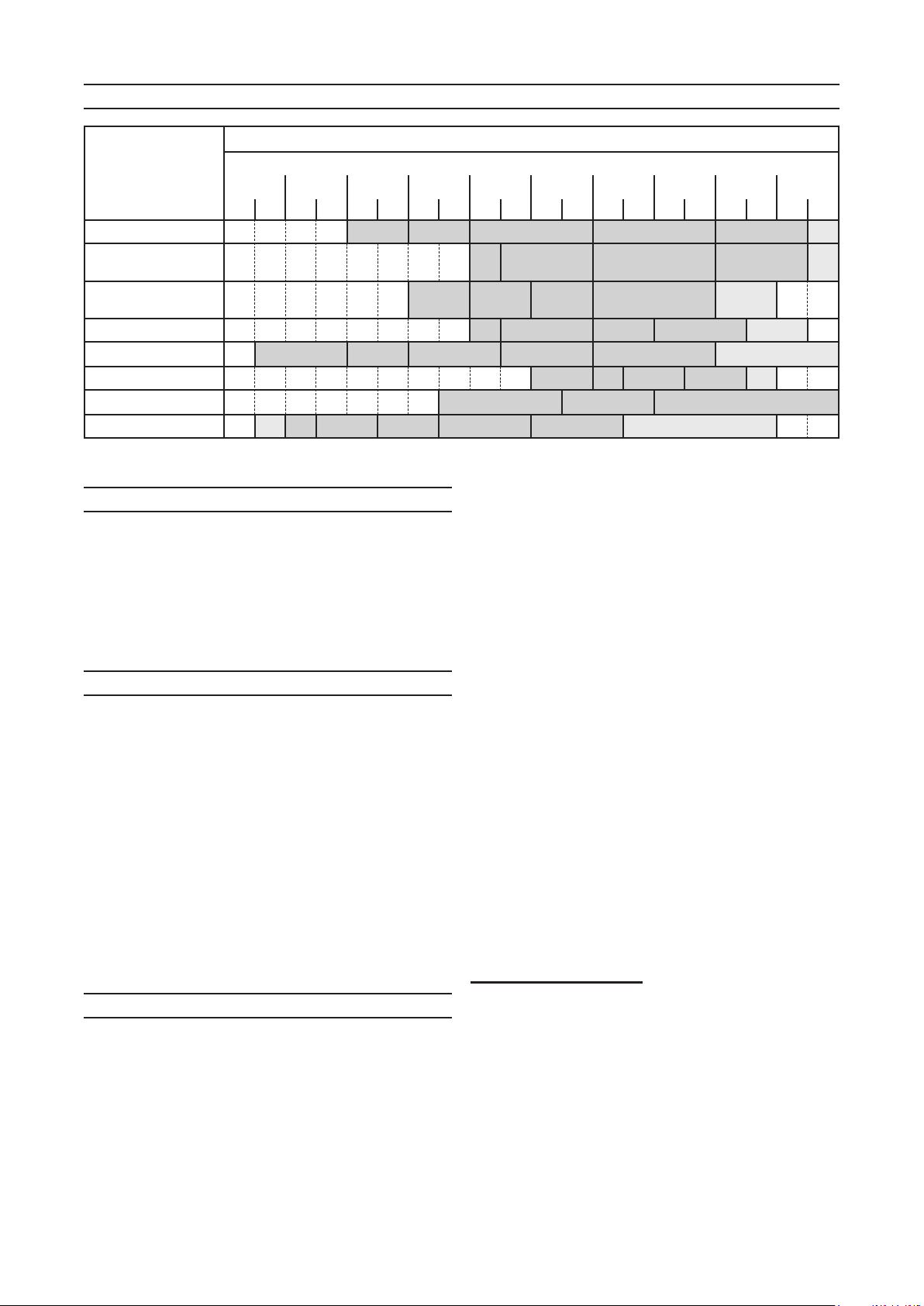
SHADE GUIDE CHART
Arc Current (Amperes)
Welding Process
Stick/Arc 9 10 11 12 13 14
Mild Steel MIG
(argon shielded)
Mild Steel MIG,
(CO2 shielded)
Aluminum MIG 10 11 12 13 14
TIG 9 10 11 12 13 14
Flux Core 10 11 12 13 14
Plasma Cutting 11 12 13
Plasma Welding 8 9 10 11 12 13 14
10 20 40 80 125 175 250 300 450
5 15 30 60 100 150 225 275 350 500
10 11 12 13 14
10 11 12 13 14
UNPACKING
When unpacking, make sure that the
item is intact and undamaged. If any parts
are missing or broken, please call Harbor
Freight Tools at 1-800-444-3353 as soon as
possible.
BEFORE FIRST USE
The Auto-Darkening Welding Helmet 1.
needs to be charged prior to use
and after extended storage. Leave
the solar panel on the helmet facing the
sun for at least 4 hours before rst use.
Remove the protective lm from both 2.
sides of the front lens (if not already
done).
Follow the 3. Before Each Use
instructions below.
BEFORE EACH USE
Check the Front Lens Cover to makes 1.
sure that it is clean, and that no dirt is
covering the two sensors on the front
of the Filter Cartridge. Also, check the
Front/Inside Lens Cover and the Front
Lens Retaining Frame, and make sure
that they are secure in place. Check
for light tightness before each use.
Inspect all operating parts before each 2.
use for signs of wear or damage. Any
scratched, cracked, or pitted parts
should be replaced immediately before
using again to avoid severe personal
injury.
Turn the shade knob to the correct 3.
shade for the application as shown
in the chart above. If a selection of
shades are recommended for your
application, try the darkest setting
rst.
Adjust headband so that the helmet is 4.
seated on the head as low as possible
and close to your face. Adjust helmet’s
angle when in the lowered position by
turning the adjustable limitation washer.
IMPORTANT NOTE: Test the helmet auto-
darkening lter lens before welding.
While wearing the helmet, briey
strike an arc, keeping your face and
eyes turned slightly away, and to
one side. The lens should darken
evenly when not directly facing the
arc. If it does not darken properly,
do not use the Welding Helmet.
REV 09e
Welding Helmet
Page 5For technical questions, please call 1-800-444-3353.Auto-darkening
Page 6

PRODUCT FEATURES/
SKU 91214
DELAY TIMESENSITIVITY
LOW HIGH SLOW FAST
ANSI Z87.1-2003
CSA Z94.3
Variable Shade 4/9-13
OPERATION
At the moment the welding operation
is started, the lter screen automatically
changes from clear to dark in only
1/25,000th of a second.
Dark to clear delay adjustment:
Operator can vary the time for the lter to
return to clear state. At the moment welding
is stopped, the lter screen automatically
changes from dark to clear state according
to the time setting you select.
Switch Sensitivity Adjustment: The
operator can adjust the amount of light
needed to cause the Lens to darken.
Models 94336 & 94337
Battery
Cover
This Welding Helmet utilizes high
performance solar cells as power supply,
and has built-in battery(ies) as power
backup, see below. Under normal welding
conditions, users can expect a battery
lifetime of more than 6 years.
User-selectable variable shades from
9 to 13 are adjusted at the turn of a shade
knob (shade variable). This product is in
full conformity with related DIN, ISO, EN379
safety standards and ANSI Z87.1-2003
standard.
Auto-darkening lters provide
protection against UV and IR radiation to the
user’s eyes and face, even in the clear state.
(View from
inside of
helmet.)
Low
Battery
Light
Dark to Clear Delay Adjustment
Adjusts the amount of time until the
(View from
inside of
helmet.)
Switch Sensitivity Adjustment
Adjusts the amount of light the lens
requires to respond and darken with.
These models include built-in batteries. Battery removal/replacement is not possible.
Page 6 For technical questions, please call 1-800-444-3353. Auto-darkening
lens turns back to clear.
These models include one built-in 3V CR2450 battery.
Low Battery Light will illuminate when replacement is needed.
Sensitivity Adjustment
Adjusts the amount of light the lens
requires to respond and darken with.
Models 91212 & 91214
Dark to Clear Delay Adjustment
In FAST Position = .25-.35 Second
In SLOW Position = .50-.80 Second
Welding Helmet
Page 7

TROUBLESHOOTING
MAINTENANCE
Irregular Darkening or Dimming1.
Headband has been set unevenly on a.
the two sides of the helmet (unequal
distances from the eyes to the lter’s
lens).
Reset headband to reduce the b.
difference in distances to lter, if
necessary.
Auto-Darkening Filter Does Not 2.
Darken Or Flickers
Helmet was not properly charged a.
before rst use.
Front Lens Cover is soiled or b.
damaged (change the Lens Cover).
Sensors are soiled (clean surface of c.
the sensors).
Welding current is too low (increase d.
the delay time, if necessary.
Slow Response3.
Operating temperature is too low (see
specication chart).
Poor Vision4.
Front/Inside Lens Cover and/or lter a.
soiled (change it).
Insufcient ambient light.b.
Shade number is incorrectly set (reset c.
shade number).
Welding Helmet Slips5.
Headband is not adjusted properly
(must be lowered).
WARNING: Stop using the Auto-
Darkening Welding Helmet
IMMEDIATELY if any of the
above-mentioned problems
can’t be corrected.
REPLACING THE LENS COVER
FOR SKU 91212 AND 91214
1. Replace the Front Lens Cover (2) if
it is damaged (cracked, scratched,
soiled or pitted). Refer to the
illustration above.
Remove the Front Lens Cover (2) by a.
gently pulling up the central part of the
Lens.
Remove the protection lm from both b.
sides of the new Lens if it comes with
the lm on. Place the new Lens into
the right position by bending it slightly,
enough to t in between the tabs at
each side of the lens and putting the
lens in place.
Check and make sure that the Lens is c.
securely installed.
Clean the Filter Lens with a clean lint-2.
free tissue or cotton cloth.
Do not immerse the lens in water or 3.
any other liquid. Do not use abrasives,
solvents or oil based cleaners.
To remove the Auto-Darkening Filter 4.
(3): Open the Spring (15) inside the
helmet, remove the Shade Knob (4),
loosen the nut holding the shade dial
to the helmet, and remove the dial and
lter. Do not try to open the Auto-
darkening Filter (3).
Storage temperature: -4 to 158° F.5.
Welding Helmet
Page 7For technical questions, please call 1-800-444-3353.Auto-darkening
Page 8

REPLACING THE LENS COVER
FOR SKU 94337 AND 94336.
Replace the Front Lens Cover (2) if 1.
it is damaged (cracked, scratched,
soiled or pitted).
Frame (1)
Tab
Tab
Tab
Press tabs up with a screwdriver to
remove Frame (1).
a. To remove the Front Lens Cover (2)
rst remove the frame (1). Inside
the helmet on the cartridge there are
4 tabs, (two on the top and two on
the bottom). Use a small at-head
screwdriver to pry the frame (1) off the
helmet.
Tab
b. Pull off the Frame (1).
Remove the protection lm from both c.
sides of the new Lens if it comes with
the lm on. Place the new Lens into
the right position by bending it slightly,
enough to t in between the tabs at
each side of the lens and putting the
lens in place.
Check and make sure that the Lens is d.
securely installed.
Clean the Filter Lens with a clean lint-2.
free tissue or cotton cloth.
Do not immerse the lens in water or 3.
any other liquid. Do not use abrasives,
solvents or oil based cleaners.
To remove the Auto-Darkening Filter 4.
(3): Open the Spring (15) inside the
helmet, remove the Shade Knob (4),
loosen the nut holding the shade dial
to the helmet, and remove the dial and
lter. Do not try to open the Auto-
darkening Filter (3).
Re-attach the frame by pressing it back 5.
on over the cartridge from the front.
Secure it using the tabs inside the
helmet.
Storage temperature: -4 to 158° F.6.
REV 07j; 10c
Page 8 For technical questions, please call 1-800-444-3353. Auto-darkening
Welding Helmet
Page 9

PARTS LIST AND ASSEMBLY DIAGRAM
IMPORTANT: Parts are not necessarily interchangeable. When ordering parts,
always specify which model they are for.
1
2
Part Description Q’ty
1 Frame (sku 94336 & 94667 only)
2 Front Lens Cover 1
3 Auto-Darkening Filter Cartridge* 1
4 Shade Knob 1
5 Inside Lens Cover 1
6 Shell (Welding mask) 1
7 Front Headband 1
8 Adjustable Headband 1
2
Part Description Q’ty
9 Block Nut 2
10 Washer 4
11 Adjustable Limitation Washer 2
12 Left Limitation Washer 1
13 Screw 2
14 Right Limitation Washer 1
15 Lens Retaining Spring (not shown) 1
*Includes Delay and Sensitivity Dials/Switches
NOTE: Some parts are listed and shown for illustration purposes only and are not available
individually as replacement parts.
PLEASE READ THE FOLLOWING CAREFULLY
THE MANUFACTURER AND/OR DISTRIBUTOR HAS PROVIDED THE PARTS LIST AND ASSEMBLY DIAGRAM
IN THIS MANUAL AS A REFERENCE TOOL ONLY. NEITHER THE MANUFACTURER OR DISTRIBUTOR
MAKES ANY REPRESENTATION OR WARRANTY OF ANY KIND TO THE BUYER THAT HE OR SHE IS
QUALIFIED TO MAKE ANY REPAIRS TO THE PRODUCT, OR THAT HE OR SHE IS QUALIFIED TO REPLACE
ANY PARTS OF THE PRODUCT. IN FACT, THE MANUFACTURER AND/OR DISTRIBUTOR EXPRESSLY
STATES THAT ALL REPAIRS AND PARTS REPLACEMENTS SHOULD BE UNDERTAKEN BY CERTIFIED
AND LICENSED TECHNICIANS, AND NOT BY THE BUYER. THE BUYER ASSUMES ALL RISK AND LIABILITY ARISING OUT OF HIS OR HER REPAIRS TO THE ORIGINAL PRODUCT OR REPLACEMENT PARTS
THERETO, OR ARISING OUT OF HIS OR HER INSTALLATION OF REPLACEMENT PARTS THERETO.
REV 07j
Welding Helmet
Page 9For technical questions, please call 1-800-444-3353.Auto-darkening
Page 10

LIMITED 90 DAY WARRANTY
Harbor Freight Tools Co. makes every
effort to assure that its products meet
high quality and durability standards, and
warrants to the original purchaser that this
product is free from defects in materials
and workmanship for the period of 90 days
from the date of purchase. This warranty
does not apply to damage due directly or
indirectly, to misuse, abuse, negligence or
accidents, repairs or alterations outside
our facilities, criminal activity, improper
installation, normal wear and tear, or to
lack of maintenance. We shall in no event
be liable for death, injuries to persons
or property, or for incidental, contingent,
special or consequential damages arising
from the use of our product. Some states
do not allow the exclusion or limitation of
incidental or consequential damages, so the
above limitation of exclusion may not apply
to you. THIS WARRANTY IS EXPRESSLY
IN LIEU OF ALL OTHER WARRANTIES,
EXPRESS OR IMPLIED, INCLUDING THE
WARRANTIES OF MERCHANTABILITY
AND FITNESS.
To take advantage of this warranty,
the product or part must be returned to
us with transportation charges prepaid.
Proof of purchase date and an explanation
of the complaint must accompany the
merchandise. If our inspection veries
the defect, we will either repair or replace
the product at our election or we may
elect to refund the purchase price if we
cannot readily and quickly provide you
with a replacement. We will return repaired
products at our expense, but if we determine
there is no defect, or that the defect resulted
from causes not within the scope of our
warranty, then you must bear the cost of
returning the product.
This warranty gives you specic legal
rights and you may also have other rights
which vary from state to state.
3491 Mission Oaks Blvd. • PO Box 6009
• Camarillo, CA 93011 • (800) 444-3353
REV 09e
Page 10 For technical questions, please call 1-800-444-3353. Auto-darkening
Welding Helmet
 Loading...