

Page 1
Product Data Sheet
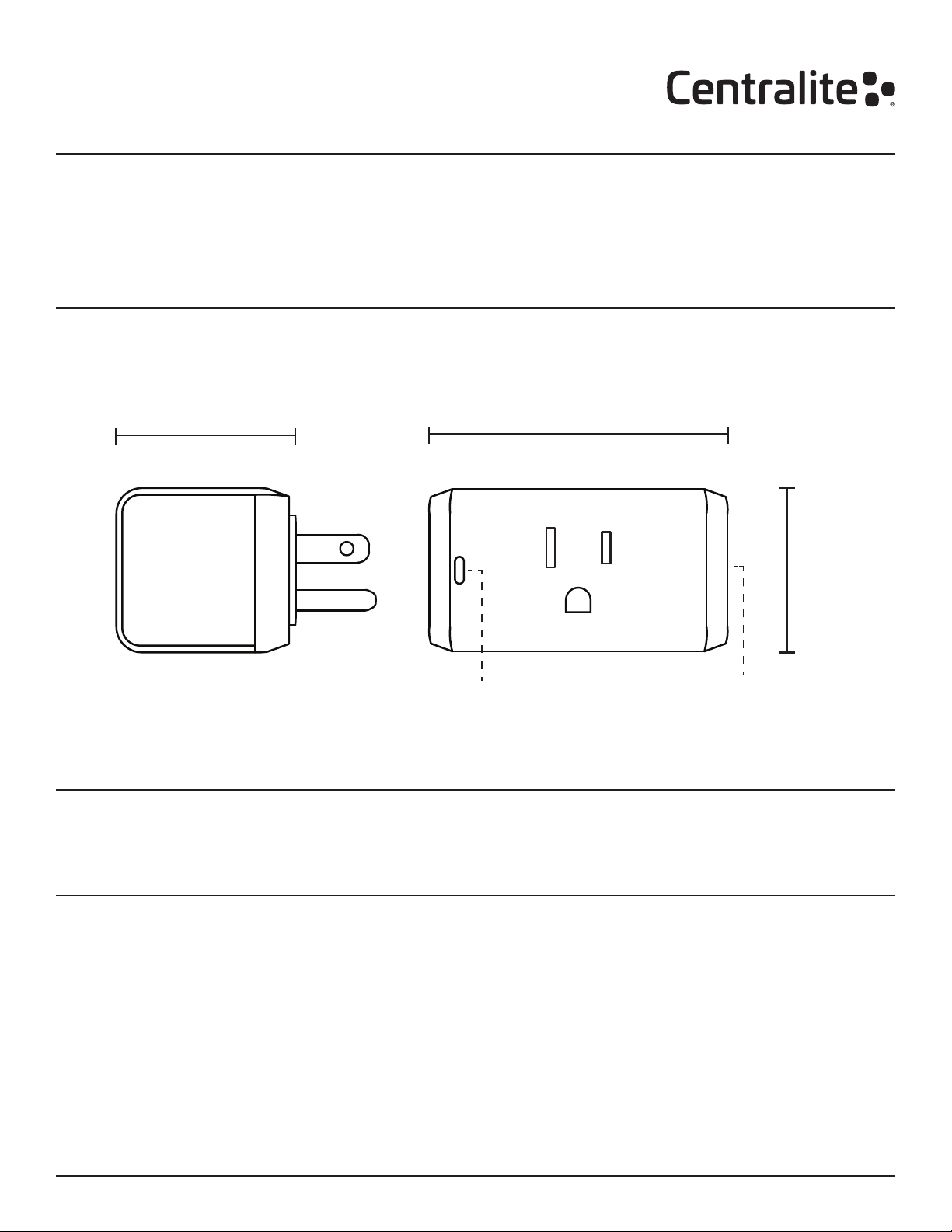
1.5”
(38mm)
4-Series Smart Outlet
4200-C
Last Updated: November 2018
Product Overview
The 4-Series Smart Outlet introduces new functionality to existing appliances and lighting devices. By placing
the Smart Outlet between an outlet and any appliance in your home, you can instantly add advanced automation
features. Not only can the Smart Outlet be switched on and off remotely, but it also can be used with your existing
ZigBee hub to respond to alerts, schedules, and scenes.
Dimensions
1.65”
(52mm)
SIDE
In the Box:
1x - 4-Series Smart Outlet
1x - Quick Start Guide
Status LED
2.72”
(69mm)
On/Off Button
FRONT VIEW
Key Features:
• Built-in power amplier for exceptional range.
• Easy compatibility with other manufacturers’
ZigBee devices.
• Override button for direct on/off control.
Data Sheet: 4-Series Smart Outlet (4200-C) Page 1 of 3
© 2018 Centralite. All rights reserved.
• LED indicator for at-a-glance on/off status.
• Over-the-air rmware updates.
Page 2

Use Cases
• Include appliances in your automated home
schedules and events.
• Automatically turn off devices that are dangerous
to leave on.
Automatically turn off devices that are dangerous
to leave on.
Can’t remember if you turned off the curling iron?
Not only can the Smart Outlet automatically turn off
a device after a set period of time, it can send you
notications and let you check the status of a device.
Special Features
High-quality, latching relays
The high-quality latching relay included in the Smart
Outlet is rated for loads up to 15 amps. This allows
users the ability to safely control loads from larger,
higher current devices like computers, monitors, TVs,
coffee makers, and large stereo systems.
Superior Range and Updatability
The 4-Series Smart Outlet includes a built-in power
amplier, giving the module superior range and stability
in large homes or areas with wireless interference.
The Smart Outlet also supports over-the-air updates
• Trigger coffee pot or toaster to turn on when there
is motion in your bedroom in the morning.
• Include window units and space heaters in your
home automation system.
Turn your Crock-Pot into a “smart Crock-Pot.”
Plug-in your Crock-Pot to a 4-Series Smart Outlet
and experience “connected” cooking. Schedule your
home to begin cooking at noon—no more coming
home during your lunch break to start a meal.
providing for seamless upgrades and feature additions
without the need for any user interaction.
Easy 2-Step Join Process
The Smart Outlet is factory-congured to search for
open ZigBee networks the rst time it is plugged in.
Simply open the hub for joining, plug in the Smart
Outlet, and the module will join the open network.
ZigBee Compatibility
The 4-Series Smart Outlet is fully ZigBee HA
1.2-compatible.
Getting Started Troubleshooting
Step 1: Open ZigBee Network or Phone for Joining
Using your controller or hub’s interface, enable the
ZigBee network for joining.
Step 2: Plug-In Smart Outlet
Plug the Smart Outlet into a receptacle and it will
immediately begin searching for a network to join
(while green LED ashes slowly). After the Smart
Outlet has successfully joined a ZigBee network, the
status LED will turn solid green.
Step 3: Finish Joining at Hub or Phone (optional)
Some hubs and controllers require additional steps
such as naming or categorizing the device.
Turning On and Off
You can use the button on the side of the Smart
Outlet to turn the load on and off. When the load is
on, the status LED will be solid blue.
Unplug Module from Receptacle
Begin by unplugging the module from the wall
receptacle. Then plug it in again and test operation.
Also, try plugging the lamp or appliance into a nonswitched wall receptacle to ensure the lamp works.
Step 2: Factory Reset and Rejoin
Unplug any devices from the module and unplug from
the wall. Now hold the on/off button while plugging
it back into the wall. Hold the button until the status
LED illuminates red, then release. Repeat the “Getting
Started” steps to rejoin the ZigBee network.
Compatibility
The 4-Series Smart Outlet features out-of-the-box compatibility with any ZigBee-certied hub, controller, bridge,
or platform.
Data Sheet: 4-Series Smart Outlet (4200-C) Page 2 of 3
© 2018 Centralite. All rights reserved.
Page 3
Technical Specications
Electrical
120 VAC, 60Hz
Supported Loads
120VAC 15A General Purpose
Environmental
Operating Temperature: 0° to 40°C
Approvals:
Safety Warnings
Shipping / Storage
Temperature: -20° to 50°C
Humidity Range: 0 to 90% RH.
(non-condensing)
Wireless RF
Protocol: ZigBee HA 1.2
TX Strength: < +20 dBm
RF Channels: 16
Range: 130+ ft. (40+ m) L.O.S.
NOTE:
Each module outlet is rated to 15A only if the
connecting cord is rated at 90C or greater.
WARNING!
If a load greater than 15 amps is attached to the
output, the Smart Outlet will be damaged and will no
longer function.
For Centralite retail-branded products, Centralite
provides direct support for all products. Customers
can contact us via e-mail at [email protected]
and by toll-free phone at 877-466-5483.
Contact Sales
For more information about sales or distribution,
please contact:
877-466-5483
[email protected]
WARNING!
The total current limit of the device is 15A. Do not
exceed this value!
WARNING!
If a direct short is created on the output, the Smart
Outlet will be damaged and will no longer function.
Standard WarrantySupport
Centralite offers a standard 12-month limited warranty
on the 4-Series Smart Outlet.
Additional mandatory warranty period in compliance
with local law product is being sold.
Centralite Systems, Inc.
1000 Cody Road
Mobile, AL 36695
www.centralite.com
FCC NOTICE:
This device complies with Part 15 of the FCC Rules. Operation is subject to the following two conditions: (1) This device
may not cause harmful interference. (2) This device must accept any interference received, including interference that
may cause undesired operation.
NOTE: This equipment has been tested and found to comply with the limits for a Class B digital device, pursuant to
Part 15 of the FCC Rules. These limits are designed to provide reasonable protection against harmful interference in
a residential installation. This equipment generates uses and can radiate radio frequency energy and, if not installed
and used in accordance with the instructions, may cause harmful interference to radio communications. However,
there is no guarantee that interference will not occur in a particular installation. If this equipment does cause harmful
interference to radio or television reception, which can be determined by turning the equipment off and on, the user
is encouraged to try to correct the interference by one or more of the following measures: -Reorient or relocate the
receiving antenna. -Increase the separation between the equipment and receiver. -Connect the equipment into an
outlet on a circuit different from that to which the receiver is connected. -Consult the dealer or an experienced radio/
TV technician for help.
WARNING: Changes or modications not expressly approved by the party responsible for compliance could void the
user’s authority to operate the equipment.
RF Exposure: The equipment complies with FCC radiation exposure limits set forth for an uncontrolled environment.
This device should be installed and operated with minimum distance 20cm between the radiator & your body.
Data Sheet: 4-Series Smart Outlet (4200-C) Page 3 of 3
© 2018 Centralite. All rights reserved.
IC NOTICE:
This device complies with Canada Industry licence-exempt RSS standard(s). Operation is subject to the following two
conditions: (1) this device may not cause interference; and (2) this device must accept any interference. Including
interference that may cause undesired operation of the device.
CAN ICES-3 (B)
Avis d’Industrie Canada
Le présent appareil est conforme aux CNR d’industrie Canada applicables aux appareils radio exem pts de licence
L’exploitation est autorisée aux deux conditions suivantes: 1) I’appareil ne doit pas produire de brouillage; et 2) I’utillsateur
de I’appareil doit accepter brouillage radio électrique subi meme si le brouillage est susceptible d’encompromettre le
fonctionnement. mauvais fonctionnement de I’appareil.
Cet appareil numériquie de la classe B est conforme à la norme NMB-003 du Canada. CAN NMB-3 (B)
Radiation Exposure Statement: This equipment complies with IC radiation exposure limits set forth for an uncontrolled
environment. This equipment should be installed and operated with minimum distance 20cm between the radiator &
your body.
Déclaration d’exposition aux radiations: Cet équipement est conforme aux limites d’exposition aux rayonnements IC
établies pour un environnement non contrôlé. Cet équipement doit être installé et utilisé avec un minimum de 20 cm de
distance entre la source de rayonnement et votre corps.
 Loading...