

Page 1
Product Data Sheet
3-Series Temp & Humidity Sensor
3310-G
Last Updated: November 2018
Product Overview
By detecting changes in in-home temperature and humidity, the 3-Series Temperature & Humidity Sensor can add
a whole range of climate control features to your connected home. By reporting these changes in climate, your
HVAC system can respond to your comfort level and help to reduce wasted energy.
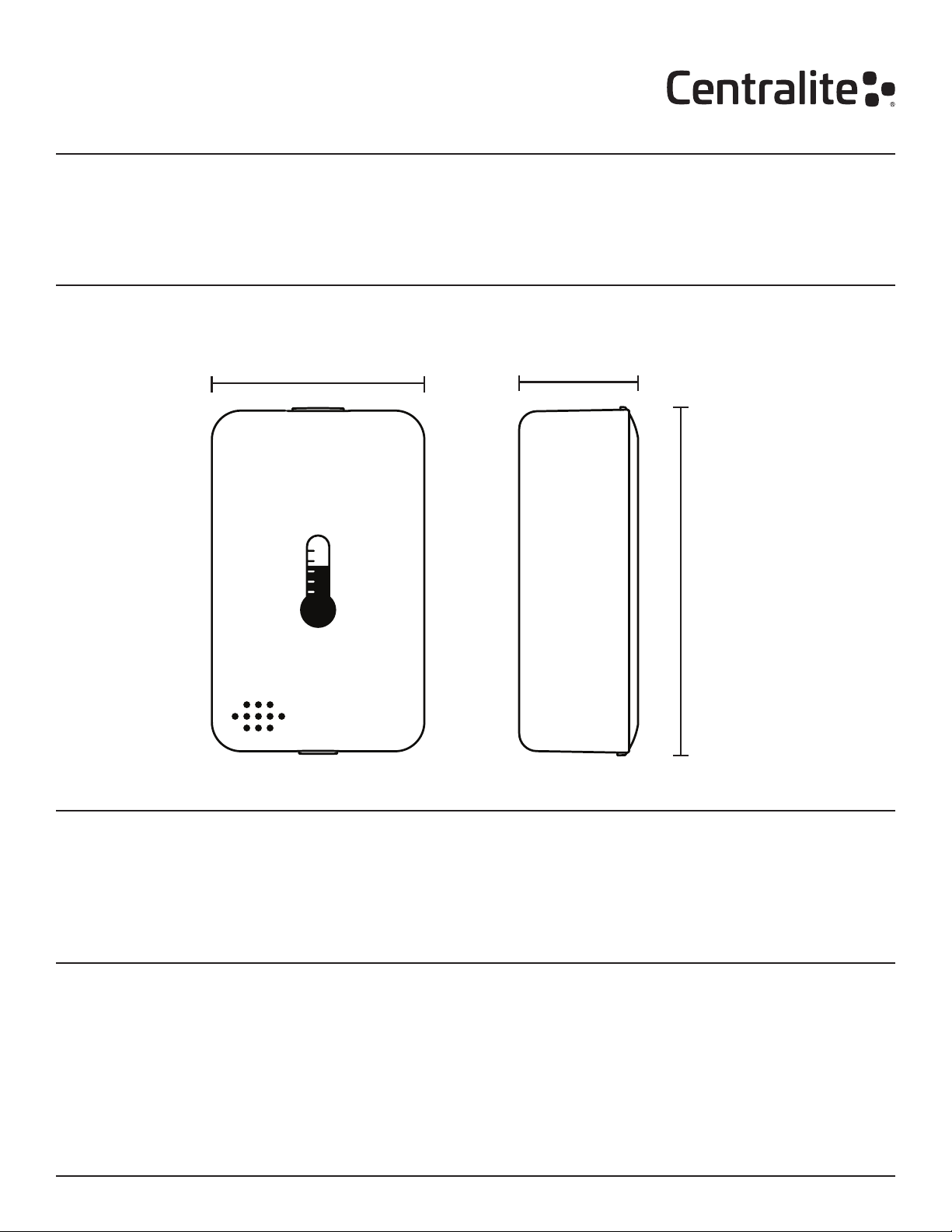
Dimensions
1.49”
(37.8mm)
FRONT VIEW
0.82”
(20.8mm)
2.34”
(59.4mm)
SIDE
In the Box:
1x - 3-Series Temp & Humidity Sensor
1x - Mounting Bracket
1x - CR-2 Battery
1x - Quick Start Guide
Key Features:
• Built-in power amplier for exceptional range.
• Accurate temperature reporting down to 0.1°C.
• Humidity reporting down to 1% RH.
• Easy-to-install mounting plate for sensor.
Data Sheet: 3-Series Temp & Humidity Sensor (3310-G) Page 1 of 3
© 2018 Centralite. All rights reserved.
• Easy compatibility with other manufacturers’
ZigBee HA 1.2 devices.
• Pull-to-pair joining process.
• Over-the-air rmware updates.
Page 2

Use Cases
• Track and report temperature and humidity
changes throughout the day.
• Trigger A/C to turn on when humidity levels rise.
• Keep the perfect temperature for the right room.
Keep the perfect temperature for the right room.
Most home thermostats are located in hallways,
kitchens, or living rooms. The problem is that we
don’t always spend all of our time there. This causes
hot and cold spots throughout the house. By placing
a Temp & Humidity Sensor in your bedroom, the
system can now tailor the HVAC system to keep the
temperature you want in the bedroom at night.
Trigger A/C to turn on when humidity levels rise.
Many homes are predisposed to mold and mildew
issues. Homes in humid climates or with damp
basements are constantly battling to prevent mold
Special Features
Easy Mounting Options
The 3-Series Temp & Humidity Sensor can be installed
using either adhesive strips or mounting screws (both
included). The easy-to-install mounting plate attaches
with a single screw and the sensor simply slides into
place on the mount.
Pull-to-Pair Join Process
All 3-Series sensors feature “pull-to-pair” joining. The
device ships with the battery pre-installed and all that
is needed to begin the joining process is to pull out
a small plastic tab from the bottom of the device.
There is nothing for the user to take apart or put back
together.
• Get alerts when your HVAC system isn’t running
properly.
• Set events triggered by temperature and humidity
changes.
and mildew from forming. By monitoring the humidity
levels throughout the home with the 3-Series Temp &
Humidity Sensor, your HVAC system can proactively
run the A/C to pull damaging humidity out of the air.
Get alerts when your HVAC system isn’t running
properly.
By monitoring temperature in different areas of the
house, your connected home can notify you if there
are problems with your unit. The unit not being able
to keep up or longer running times are both signs that
your unit may be having problems.
ZigBee Home Automation 1.2 Compatibility
The 3-Series Temp & Humidity Sensor is fully ZigBee
HA 1.2 certied and is guaranteed to function with all
open, ZigBee HA 1.2-certied hubs and devices.
Superior Range and Updatability
The 3-Series Temp & Humidity Sensor includes a builtin power amplier, giving the module superior range
and stability in large homes or areas with wireless
interference.
The Temp & Humidity Sensor also supports overthe-air updates providing for seamless upgrades
and feature additions without the need for any user
interaction.
Getting Started Troubleshooting
Step 1: Open ZigBee Network for Joining
Using your controller or hub’s interface, enable the
ZigBee network for joining.
Step 2: Pull Tab from Bottom of Sensor
Pull the small plastic tab out of the bottom of the
sensor and it will immediately begin searching for a
network to join.
Step 2: Finish Joining at Hub (optional)
Some hubs and controllers require additional steps
such as naming or categorizing the device.
Data Sheet: 3-Series Temp & Humidity Sensor (3310-G) Page 2 of 3
© 2018 Centralite. All rights reserved.
Step 1: Remove and Replace Battery from Device
Slide the sensor off the mount and remove cover.
Remove battery and replace with a new CR-2 battery.
Reassemble and test operation.
Step 2: Factory Reset and Rejoin
Slide the sensor off the mount, remove cover, and
remove battery. While holding down the reset button,
reinsert battery to factory reset the device. Repeat the
“Getting Started” steps to rejoin the ZigBee network.
Page 3

Compatibility
The 3-Series Temp & Humidity Sensor features out-of-the-box compatibility with any ZigBee HA 1.2-certied hub,
controller, bridge, or platform.
Technical Specications
Power
Rated: 3V
Battery: CR-2 (1x)
Battery Life: Up to 2 years
Environmental
Operating Temperature: -40° to 85°C
Shipping / Storage
Temperature: -20° to 50°C
Humidity Range: 0 to 90% RH.
(non-condensing)
Centralite offers both Tier-1 and Tier-2 support
structures to meet the needs of different customers.
For those customers that provide existing, in-house
support for systems, Centralite can serve as Tier2 support specialists. For Centralite retail-branded
products, Centralite provides direct Tier-1 support for
all products.
Approvals:
Wireless RF
Protocol: ZigBee HA 1.2
TX Strength: +18 dBm
RF Channels: 16
Range: 300+ ft. (90+ m) L.O.S.
Temp Accuracy: ± 2 °C (max), –10 to 85 °C
Precision: ±0.1 °C
Standard WarrantySupport
Centralite offers a standard 12-month limited warranty
on the 3-Series Temp & Humidity Sensor.
Additional mandatory warranty period in compliance
with local law product is being sold.
Contact Sales
For more information about sales or distribution,
please contact:
877-466-5483
+1 251-607-9119 (Int’l)
[email protected]
Centralite Systems, Inc.
1701 Industrial Park Drive
Mobile, AL 36693
http://centralite.com
Notice: Any content, factual information, or specications containing errors in this document are solely inadvertent and will be corrected
upon discovery. Specications for unreleased/planned products are subject to change.
Data Sheet: 3-Series Temp & Humidity Sensor (3310-G) Page 3 of 3
© 2018 Centralite. All rights reserved.
 Loading...