

Page 1
Customer Care Department • The Group Ltd. • Harby Road • Langar • Nottinghamshire • NG13 9HY
T : 01949 862 012 F : 01949 862 003 E : customer.care@cda.eu W : www.cda.eu
www.cda.eu
PC71 American
Style Fridge
Freezer
Installation, Use and Maintenance
Page 2
2
Important
The CDA Group Ltd cannot be held responsible for injuries or losses
caused by incorrect use or installation of this product. Please note
that CDA reserve the right to invalidate the guarantee supplied with
this product following incorrect installation or misuse of the appliance.
Under no circumstances should any external covers be removed for
servicing or maintenance except by suitably qualified personnel.
Appliance information:
Please enter the details on the appliance rating plate below for
reference, to assist CDA Customer Care in the event of a fault with
your appliance and to register your appliance for guarantee purposes.
Appliance Model
Serial Number
CE Declarations of Conformity:
This appliance has been designed, constructed and marketed in
compliance with safety requirements of EEC Directive 2006/95/EEC
(Low voltage) and requirements of EMC Directive 2004/108/EEC.
This appliance has been manufactured to the strictest standards and
complies with all applicable legislation, including Electrical safety (LVD)
and Electromagnetic interference compatibility (EMC). Parts intended
to come into contact with food conform to EEC/89/109.4.
Page 3

3
IMPORTANT INFORMATION FOR CORRECT DISPOSAL OF THE
PRODUCT IN ACCORDANCE WITH EC DIRECTIVE 2002/96/EC.
At the end of its working life, the product must not be disposed
of as urban waste. It must be taken to a special local authority
dierentiated waste collection centre or to a dealer providing this
service.
Disposing of a household appliance separately avoids possible
negative consequences for the environment and health deriving from
inappropriate disposal and enables the constituent materials to be
recovered to obtain significant savings in energy and resources. As a
reminder of the need to dispose of household appliances separately,
the product is marked with a crossed-out wheeled dustbin
.
Before First Use of the Fridge/Freezer
You must allow the fridge to settle for at least twenty four hours
prior to switching the power on.
It is recommended that you clean the interior of the appliance prior to
first use, using a solution of bicarbonate of soda and warm water then
thoroughly dry the interior.
The fridge may have an odour to it at first use. This will disappear
as the appliance cools.
Page 4

4
Please note:
The appliance will work continuously until it comes down to the
correct temperature.
If the appliance is switched o, you should allow five minutes
before switching it on again to prevent unnecessary damage to the
compressor.
Fridge Use
• Never put liquids in the refrigerator uncovered.
• Never put hot foods in the refrigerator. Warm food should
be allowed to cool to room temperature before being put
into the refrigerator.
• Nothing should rest against the rear wall of the
refrigerator, as this will cause frost and possible
condensation problems which will be dicult to remove.
• Make sure food is clean and any extra water is wiped
away before putting into the fridge.
• Wrap or cover food before putting into the fridge. This
will help prevent the loss of moisture, keep food fresh and
avoid unpleasant odours.
• Sort foods prior to storing. Any foods to be used soon
should be stored at the front of the shelf to prevent
deterioration caused by the door being open for
prolonged periods.
• Do not overfill the fridge. There should be sucient space
between the foods to allow the cool air to circulate.
• Thawing frozen foods in the fridge compartment will help
to keep the temperature low and save energy.
Page 5

5
Freezer Use
• The freezer compartments are designed to store only
frozen food.
• Never put hot or warm foods in the freezer, allow them to
cool fully before putting them into the freezer.
• Follow the instructions on the food packaging for storage
of frozen food. If no information is provided, foods
should not be stored for more than three months after the
purchase date.
• Store food in small packages (ideally less than 2.5kg).
This reduces the freezing time and improves the quality of
the food after thawing.
• Wrap food before putting into the freezer. To stop the
wrapping sticking together, ensure it is dry.
• Label the food before freezing with information including
type of food and dates of storage and expiry.
• Once food is thawed, it must not be refrozen unless it has
been completely cooked. Only defrost as much food as is
required to prevent wastage.
• Bottled or canned drinks should not be stored in the
freezer compartments as they could explode.
• Check the rating plate to confirm the maximum amount
of fresh food (10kg) that can be frozen within a 24 hour
period.
• Do not attempt to freeze more than the maximum amount.
• To freeze fresh food more quickly, switch on the quick
freeze function a few hours prior to placing the food in the
freezer.
Page 6

6
• Do not use the quick freeze function for more than
48 hours. Use over the recommended time will place
unnecessary strain on the refrigeration system.
Page 7
7
Fig. 1
1
2
6
9
11
4
3
5
7
8
10
9
9
10
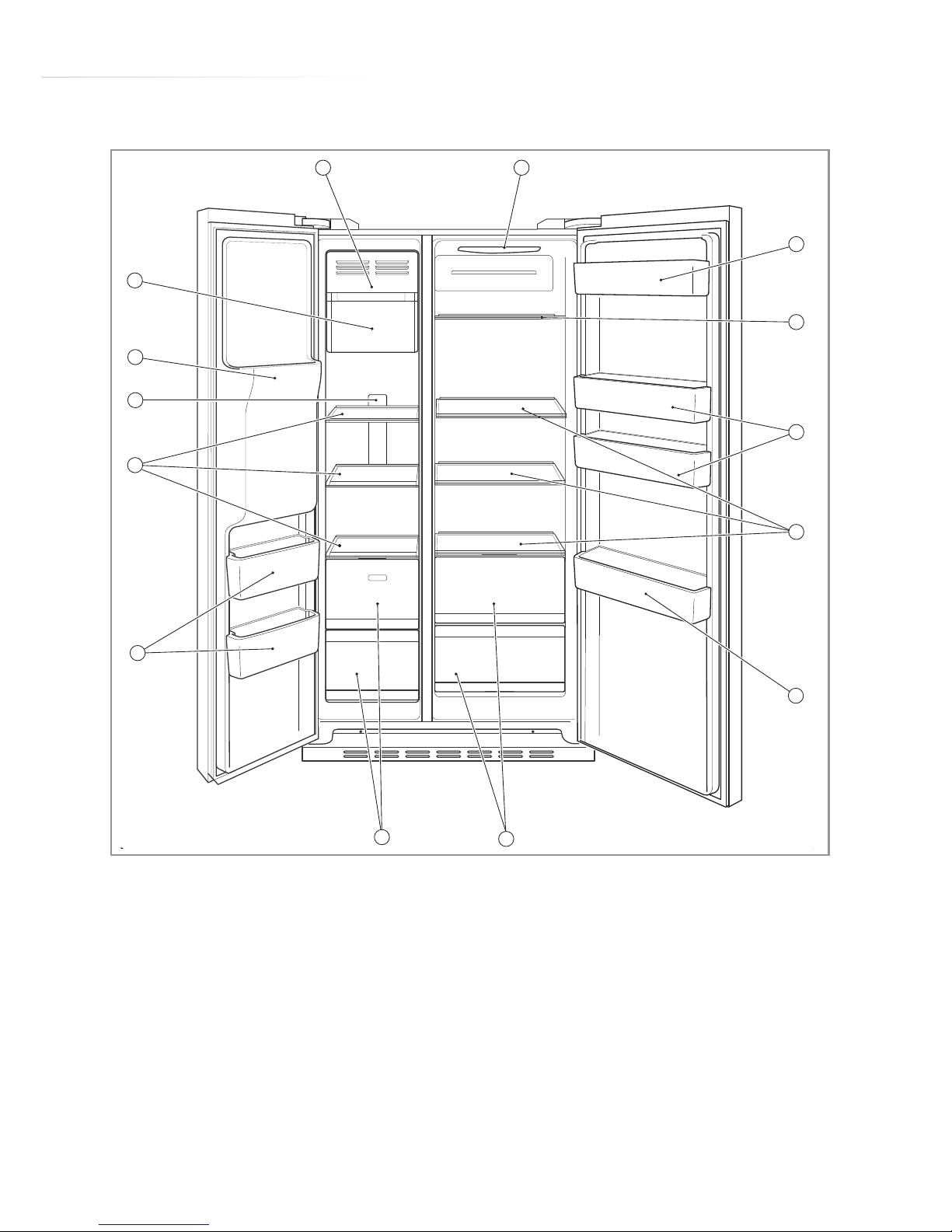
Freezer compartment
Fridge compartment
Fig.2-1(HRF-628I*6)
PC71 Features
1: Ice cream shelf 7: Freezer drawers
2: Ice maker 8: Salad crispers
3: Water & ice dispenser 9: Fridge balconies
4: Freezer light 10: Fridge shelves
5: Freezer shelves 11: Fridge light
6: Freezer balconies (2* freezing)
Page 8
8
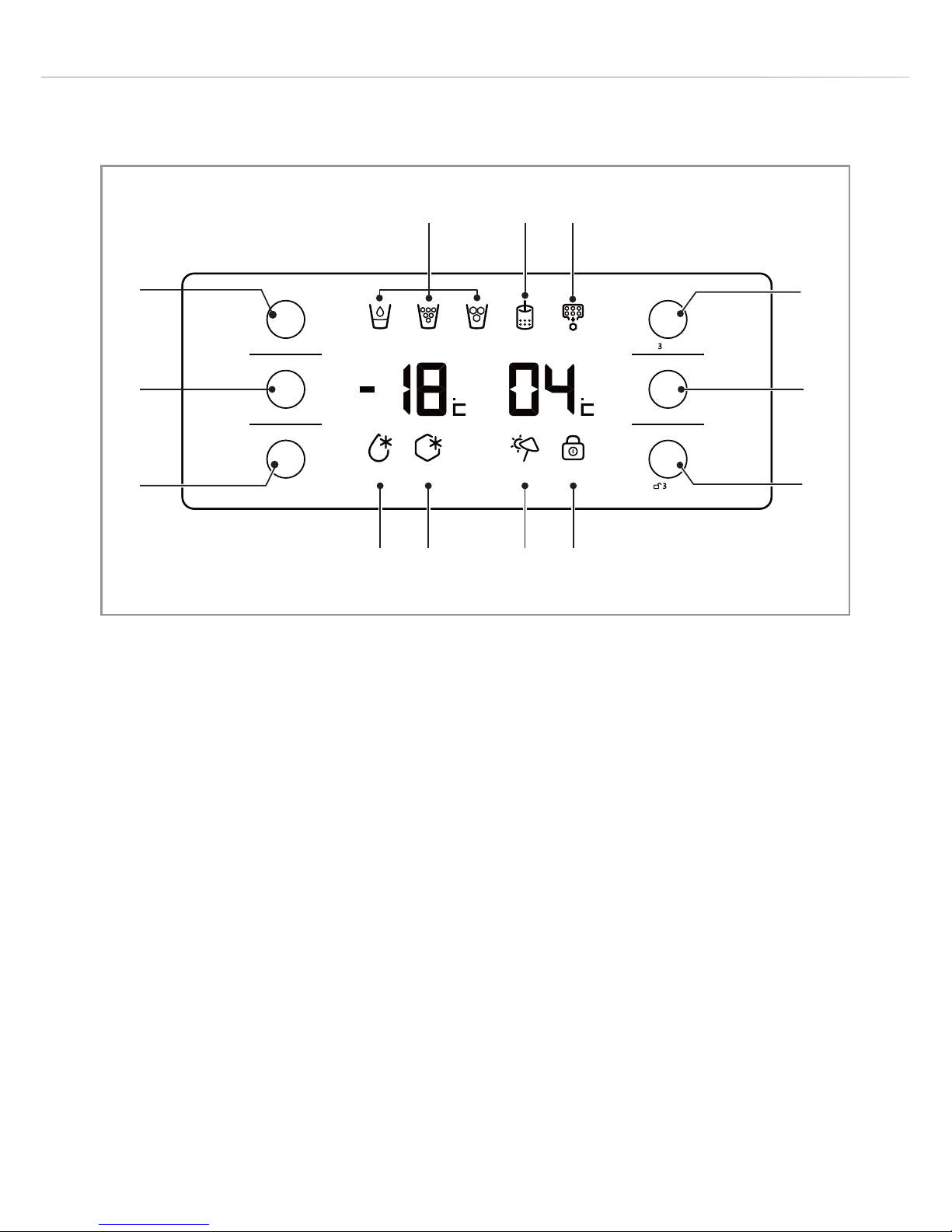
Control Panel
A: Dispenser selection key H: Filter change light
B: Ice maker on/o key I: Ice maker on light
C: Freezer temperatrure key J: Super cool light
D: Fridge temperatrure key K: Super freeze light
E: Function selector key L: Holiday mode light
F: OK key M: Key lock light
G: Dispenser lights
NOTE:
The display dims automatically 30 seconds after the last key was
touched. It is necessary to touch any key briefly to re-activate the
display before attempting any adjustments.
Fig. 2
21
AB
CD
E
F
Frz.
Temp
Sec.
Sec.
Func.
Set
Ref.
Temp
OK
Disp
-enser
Ice
On/Off
S-Cool S-Fr z. Holiday Lock
Water Ice onCubedCrushed Filter
G HI
J K LM
Page 9

9
Setting the Fridge Temperature
• Ensure the appliance is not in “Lock” mode - make sure the “Lock”
light (M) is not illuminated. If it is in “Lock” mode touch the “OK” key
(F) for three seconds to switch the “Lock” mode o, you will see the
“Lock” light (M) is extinguished.
• Touch the “Fridge temperature” key (D) once so the fridge
temperature display flashes.
• While the fridge temperature display is still flashing, touch the
“Fridge temperature” key (D) to scroll through the available
temperatures. This may be set between 1°C and 9°C.
• Leave the display for around five seconds to stop flashing and the
temperature is set.
Setting the Freezer Temperature
• Ensure the appliance is not in “Lock” mode - make sure the “Lock”
light (M) is not illuminated. If it is in “Lock” mode touch the “OK” key
(F) for three seconds to switch the “Lock” mode o, you will see the
“Lock” light (M) is extinguished.
• Touch the “Freezer temperature” key (C) once so the freezer
temperature display flashes.
• While the freezer temperature display is still flashing, touch the
“Freezer temperature” key (C) to scroll through the available
temperatures. This may be set between -14°C and -24°C.
• Leave the display for around five seconds to stop flashing and the
temperature is set.
Page 10

10
Ice and Water Dispenser
When the appliance is first switched on the ice maker will default to
the “o” setting.
Ice maker on/o key
• To switch the ice maker on or o, touch the “Ice maker on/o” key
(B) and hold it for three seconds. The “Ice maker on” light lights up
when the ice maker is on and switches o when the ice maker is
switched o.
Note: Ensure that you empty the ice maker when you switch it o to
avoid spilling the thawed water.
• The ice-making process takes approximately two hours. The ice
maker will make ice automatically once it is switched on and will
continue to make ice until the ice compartment is full. Whenever ice
is removed, the ice maker will make more ice until the compartment
is full again.
• When crushed ice is dispensed, ensure the container is close to the
nozzle to prevent spillage.
Dispenser selection key
The ice and water dispenser can provide ice cubes, crushed ice or
cool filtered water. Touch the “Dispenser selection” key (A) to cycle
through the options. The display will show the symbol for each option.
Once the display shows the water or ice option required, place the
container underneath the dispenser nozzle and push the switch back
to start dispensing.
Page 11

11
Notes:
After initial connection of the water supply, or after a lengthy period
without being used, the first water and ice produced should be
discarded.
Do not use excessively deep, narrow, fragile or delicate glasses.
Hold the glass as close as possible to the dispenser to reduce the risk
of spillage or splashing.
Clean the ice and water dispenser regularly to avoid the build-up of
bacteria.
To maintain the water quality we recommend that the water filter is
replaced every 6 months. It may be necessary to replace it more
frequently than this if the water quality deteriorates.
Do not place canned drinks or foods inside the ice dispenser as this
can damage the crushing mechanism.
Do not place ice cubes that have not been made in this ice maker
into the storage drawer. Inserting the wrong type of ice cubes could
damage the mechanism.
Restriction to the water supply may result in smaller ice cubes being
produced than intended.
Excessive water pressure may result in larger ice cubes being
produced that may stick together resulting in leaks or blocking the
dispenser.
Filter change light
The filter change light illuminates approximately six months after the
appliance was first plugged in, or after it was last reset, to remind you
to change the filter.
To reset the light when the filter is changed, touch the “Function
selector” key for three seconds.
Page 12

12
Holiday Mode
This appliance is equipped with a holiday mode function, this allows
you to switch the fridge o and leave the freezer running. This
maintains frozen food during a holiday, without running the fridge as
well.
To switch the holiday mode on
• Touch the “Function selector” key (E) to cycle through the function
options. Stop when the “Holiday mode” light (L) flashes.
• Touch the “OK” key (F) to confirm the selection, the “Holiday mode”
light (L) will stay on and the holiday mode will be activated.
Note that if this key is not touched within approx. five seconds the
“Holiday mode” light (L) will stop flashing and this mode will not be
switched on.
NOTE: After the display automatically dims it is necessary to touch
any key briefly to re-activate the display before you can check
whether the fridge is in holiday mode or not.
To switch the holiday mode o
• Touch the “Function selector” key (E) to cycle through the function
options. Stop when the “Holiday mode” light (L) flashes.
• Touch the “OK” key (F) to confirm the selection, the “Holiday mode”
light (L) will switch o.
Note that if this key is not touched within approx. five seconds the
“Holiday mode” light (L) will continue flashing and this mode will stay
switched on.
• The fridge will then return to the setting it was at before holiday
mode was switched on.
Page 13

13
Super Freeze Function
The super freeze function can be used to freeze large quantities of
fresh food as quickly as possible. For best results, switch the super
freeze function on 12 hours prior to introducing large quantities of
food to be frozen.
To switch the super freeze function on
• Touch the “Function selector” key (E) to cycle through the function
options. Stop when the “Super freeze” light (K) flashes.
• Touch the “OK” key (F) to confirm the selection, the “Super freeze”
light (K) will stay on and the super freeze will be activated.
Note that if this key is not touched within approx. five seconds the
“Super freeze” light (K) will stop flashing and this mode will not be
switched on.
To switch the super freeze function o
• Touch the “Function selector” key (E) to cycle through the function
options. Stop when the “Super freeze” light (K) flashes.
• Touch the “OK” key (F) to confirm the selection, the “Super freeze”
light (K) will switch o.
Note that if this key is not touched within approx. five seconds the
“Super freeze” light (K) will continue flashing and this mode will stay
switched on.
• The fridge will then return to the setting it was at before the super
freeze mode was switched on.
Page 14

14
Super Cool Function
The super cool function can be used to maintain the fridge
temperature when large quantities of fresh food are introduced into
the fridge.
To switch the super cool function on
• Touch the “Function selector” key (E) to cycle through the function
options. Stop when the “Super cool” light (J) flashes.
• Touch the “OK” key (F) to confirm the selection, the “Super cool”
light (J) will stay on and the super cool will be activated.
Note that if this key is not touched within approx. five seconds the
“Super cool” light (J) will stop flashing and this mode will not be
switched on.
To switch the super cool function o
• Touch the “Function selector” key (E) to cycle through the function
options. Stop when the “Super cool” light (J) flashes.
• Touch the “OK” key (F) to confirm the selection, the “Super cool”
light (J) will switch o.
Note that if this key is not touched within approx. five seconds the
“Super cool” light (J) will continue flashing and this mode will stay
switched on.
• The fridge will then return to the setting it was at before the super
cool mode was switched on.
Page 15

15
Safety Key Lock
The fridge is equipped with a safety key lock to prevent accidental
reprogramming of the fridge.
To switch the safety key lock on
• Touch the “OK” key (F) and hold it for 3 seconds. The “Key lock”
light (M) will illuminate; the temperature and function settings will be
locked.
NOTE: After the display automatically dims it is necessary to
touch any key briefly to re-activate the display before you can
check whether the key lock is switched on or not.
To switch the safety key lock o
• Touch the “OK” key (F) and hold it for 3 seconds. The “Key lock”
light (M) will extinguish; the temperature and function settings will be
unlocked
Page 16

16
Door Open Alarm
This appliance is equipped with an alarm to alert you if a door or
drawer is left open.
In the event that a door or drawer is left open for more than approx.
three minutes the appliance will start beeping, this continues until
both doors are properly shut.
Defrosting the Fridge
The fridge is cooled by convection using cold air forced through
channels at the rear of the fridge. No defrosting is required.
Defrosting the Freezer
The freezer is frost free and as such is designed not to require
defrosting.
Page 17

17
Care and Cleaning
Always disconnect the appliance from the power before any
cleaning or maintenance.
• The refrigerator and freezer sections should be cleaned using a
solution of bicarbonate of soda and lukewarm water.
• Do not use abrasive products or detergents. After washing, rinse
and dry thoroughly.
• Clean the shelves and balconies separately by hand using soap and
water. Do not put them in the dishwasher.
• Once cleaning is complete, then reconnect the power.
• If the appliance is not used for prolonged periods of time, unplug
and clean it. The doors should be left slightly open to prevent the
formation of mildew and smell.
Page 18

18
To remove and replace the icebox for cleaning
• To remove the icebox for cleaning, lift the middle of the drawer and
pull it toward you.
• To replace the icebox after cleaning, simply locate it on its runners
then push in until it drops into its position.
NOTE: Do not apply excessive force. If the icebox doesn’t slide back
easily:
• Take the icebox out again.
• Rotate the cam mechanism at the back of the freezer CLOCKWISE
by 90° (Fig. 3).
• Slide the icebox into position.
Fig. 3
Cam
mechanism
2
Page 19

19
Troubleshooting
If you have any problems with your appliance, you should check
the troubleshooting prior to calling CDA Customer Care, to prevent
unnecessary service calls and potential cost.
If the appliance is not working
• Check there is power to the appliance.
• The control panel is lit.
• The house fuses are intact and the fuse in the plug has not blown.
• The fridge is not in holiday mode.
• The plug socket is functioning correctly. To check this, plug another
electrical appliance in to see if the socket is working.
The appliance is working, but not very well
• The appliance is not overloaded.
• The temperature is set to an appropriate level.
• The doors are closing properly.
• The cooling system at the rear of the appliance is clean and free of
dust, and not touching the rear wall.
• There is enough ventilation at the side and rear walls.
The appliance is noisy
• The appliance is level and stable.
• The side and rear walls are clear, and there is nothing resting on the
appliance.
• The cooling gas in the refrigerator will make a slight bubbling noise,
even when the compressor is not running.
Page 20

20
Installation and
Ventilation
This appliance must never be
installed close to heat sources
i.e. heating elements and cookers or
in damp places.
Failure to provide adequate ventilation
can lead to increased running costs
and premature failure; it may also
invalidate the warranty provided with
the product.
• The plug should be fully accessible at all times.
• Ensure ventilation openings are kept clear.
• Do not use a multi-plug adaptor in the socket to connect this
appliance alongside other appliances.
• Do not tilt the fridge beyond 45º.
• Do not exert excessive pressure on the appliance.
• Locate the appliance in a well ventilated position, away from heat
sources, damp and direct sunlight.
• Ensure that there is a gap of no less than 10cm above and to the
sides of the appliance to allow for ventilation. The clearance
between the sides and adjacent furniture will also allow the doors
to open fully. Note that a greater side gap will be required if the
appliance is to be positioned next to a wall to allow the doors to
open fully.
• A gap of 5cm must be allowed for ventilation between the rear wall
and the back of the appliance.
Fig. 4
690
1800
908
Page 21

21
Electrical Information
Warning! This appliance must be earthed.
The mains lead of this appliance has been fitted with a BS 1363A 13A
fused plug. To change a fuse in this type of plug, follow the steps
below:
1. Remove the fuse cover and fuse.
2. Fit replacement 13A fuse, ASTA approved to BS 1362 type, into the
fuse cover.
3. Replace fuse cover.
Important: do not use the appliance without the fuse cover in
position.
How to connect an alternative plug
If the fitted plug is not suitable for your socket outlet, then it should
be cut o and disposed of safely to avoid possible shock hazard. A
suitable alternative plug of at least 13 Amp rating to BS 1363 should be
used.
Fig. 5
Page 22

22
As the colours of the wires in the mains lead of this appliance may not
correspond with the coloured markings identifying the terminals in
your plug, proceed as follows:-
• The wire which is coloured GREEN and YELLOW must be connected
to the terminal which is marked with letter (E) or by the Earth symbol
or coloured GREEN and YELLOW.
• The wire which is coloured BLUE must be connected to the terminal
which is marked with the letter (N) or coloured BLACK.
• The wire which is coloured BROWN must be connected to the
terminal which is marked with the letter (L) or coloured RED.
If in doubt regarding the electrical connection of this appliance,
consult a qualified electrician. Do not shorten the supply cable, the
appliance may require removing for servicing.
N.B. Ensure that the plug socket is situated in an easily accessible
place.
If the power supply cable is damaged, it must be replaced by a
CDA authorised agent.
Page 23

23
E & O E. All instructions, dimensions and illustrations are provided for guidance only. CDA reserve the
right to change specifications without prior notice.
Page 24

Customer Care Department • The Group Ltd. • Harby Road • Langar • Nottinghamshire • NG13 9HY
T : 01949 862 012 F : 01949 862 003 E : customer.care@cda.eu W : www.cda.eu
www.cda.eu
Customer Care Department • The Group Ltd. • Harby Road • Langar • Nottinghamshire • NG13 9HY
T : 01949 862 012 F : 01949 862 003 E : customer.care@cda.eu W : www.cda.eu
www.cda.eu
Please contact our Customer Care Department for Service on the details below
Customer Care Department
The Group Ltd. • Harby Road • Langar • Nottinghamshire • NG13 9HY
T : 01949 862 012 F : 01949 862 003 E : customer.care@cda.eu
Copyright © CDA 2016
 Loading...