

Page 1
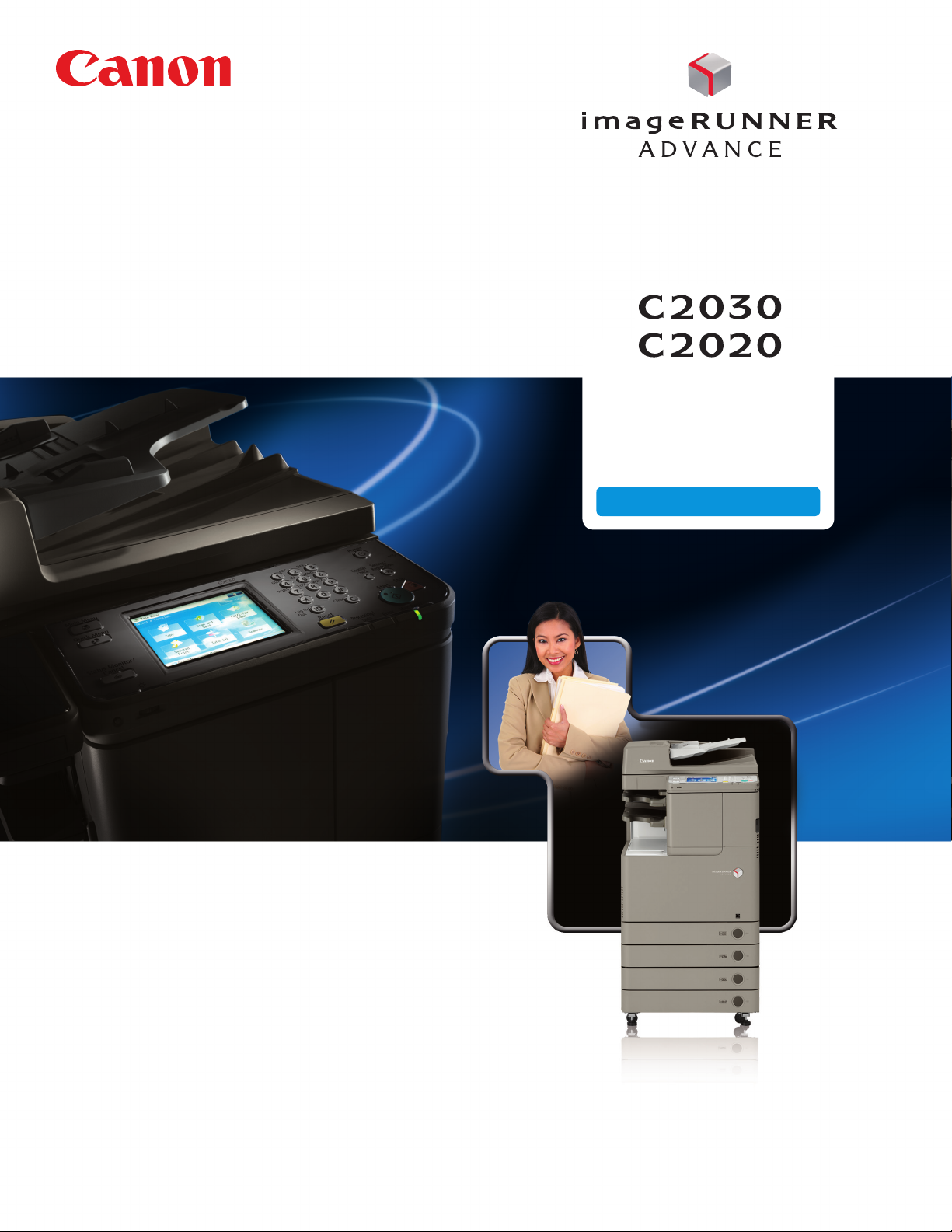
multifunction printer
color/black and white
compact design
OFFICE SOLUTIONS
advancing business
Page 2
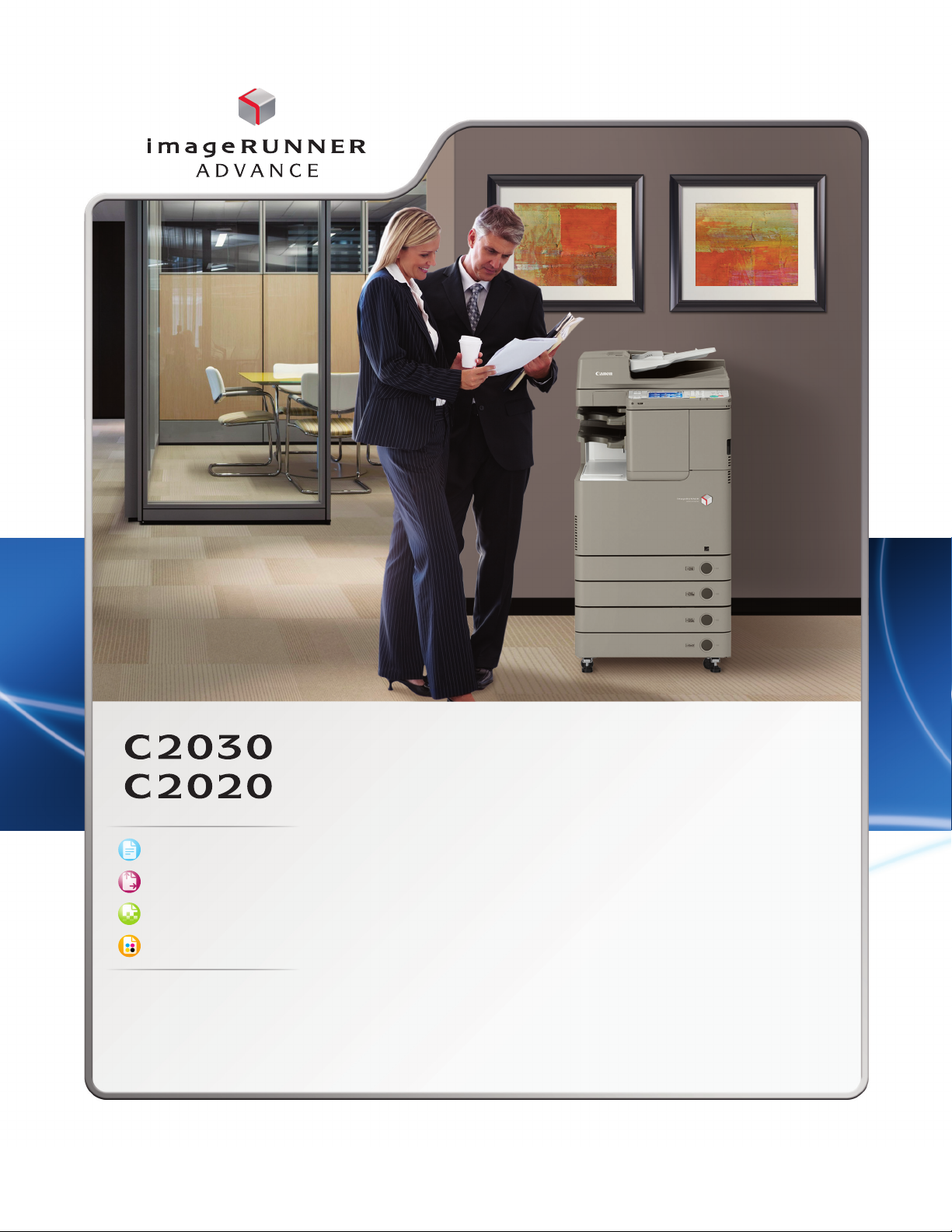
Copy/Print/Send/Fax
Up to 12"x 18"*
Up to 1200 x 1200 dpi**
Color
* Not available in top cass ette.
* * If 1200 dpi print is selec ted,
engine speed will slow down.
Exceptional power
>
Advanced imageCHIP system architecture
>
80GB HDD; 2GB RAM standard
Productive speeds
>
Up to 30 ppm (C2030) and 20 ppm (C2020)
>
Up to 44 ipm scanning at 300 dpi (BW/Color)
Outstanding paper handling
>
Up to 2,000-sheet maximum paper capacity
>
17 lb. Bond to 80 lb. Cover
>
Plain, heavy, coated, envelopes
Internal finishing
>
50-sheet corner or double-stapling
>
Up to 750-sheet output capacity
† B oth models act as a client and can access
the Advanced B ox of anothe r networke d
imageRUNNER ADVANCE system.
†† Supports Sending capabilities.
Enhanced collaboration
>
Standard Universal Send
>
Scan/print via USB
>
Adobe® PostScript® 3TM and Adobe
PDF formats
>
Network Advanced Box Access†
>
Easy fleet integration
>
MEAP® enabled
imageRUNNER ADVANCE Essentials
>
imageRUNNER ADVANCE Desktop
>
imageRUNNER ADVANCE Tracker
>
Workflow Composer and Connectors††
Strong environmental focus
>
ENERGY STAR® qualified
>
Reduction of CO2 emissions in
manufacturing process
>
Exceeds EU RoHS Directive standards
Page 3

imageRUNNER ADVANCE C2030/C2020
Communicate. Collaborate. Captivate.
Smart business solutions.
A welcome addition
Now workgroups, branch oces, and small businesses can
enjoy the astonishing productivity and performance of the
imageRUNNER ADVANCE Series. Incorporating a redefined
platform, the Canon imageRUNNER ADVANCE C2030/C2020
models help you create spectacular work eciently and
eectively — all at a comfortable cost.
Smaller and smarter
Inside a sleek design and compact footprint, these models
really take advantage of Canon’s next-generation technologies
to bridge the paper and digital worlds. Create and finish
professional-quality documents in vivid color and black
and white. Easily perform tasks right from your PC. And
streamline information exchange with colleagues by readily
retrieving, editing, and sharing files through smooth integration
with other networked imageRUNNER ADVANCE systems.
User-centric from all viewpoints
Users will be delighted by the friendly interface and their
ability to access functions with ease. IT administrators will
applaud the new centralized device management solutions
and vigorous security features. And business owners will
value automated workflow options that boost productivity
and help reduce costs.
A reliable advantage
As part of a fleet or as stand-alone systems for small
businesses, the imageRUNNER ADVANCE C2030/C2020
models deliver an impressive return on investment. Designed
with maximum uptime and reliability in mind, these models
keep your work moving eciently day after day. Their range
of innovative features will save you time and money without
sacrificing quality.
Even greener
Canon’s commitment to protecting and sustaining the
environment is stronger than ever. With the imageRUNNER
ADVANCE Series, Canon has incorporated new green
technologies that further conserve energy and resources,
reduce CO
emissions and heat, and help prevent pollution.
2
A truly advanced partner
Great partnerships deliver a strong competitive advantage.
The imageRUNNER ADVANCE C2030/C2020 models oer
cutting-edge tools and features that allow you to do better
work more eciently. This lets you focus on the powerful
ideas that will advance your business now and in the future.
32
Page 4
You’ll wonder how you did it all before.
ADVANCED DESIGN
Beautifully engineered
The warm, natural color palette of the Canon imageRUNNER
ADVANCE C2030/C2020 systems is a beautiful complement
to any work environment. Designed to optimize space, these
compact and lightweight models boast fully integrated features
such as an optional internal finisher. With the intelligent
functions and the cost savings these models oer, you’ll
experience smart improvements in your business.
Power for exceptional performance
You can accomplish multiple tasks with the eciency your work
demands. These imageRUNNER ADVANCE models incorporate
Canon’s Advanced imageCHIP system architecture, which
uses two processors to deliver outstanding performance
and quality.
The image processor board works with the scanner, adjusts
image size, and ensures superb image quality and fast
processing. The information processor board controls the user
interface and coordinates device networking and connectivity.
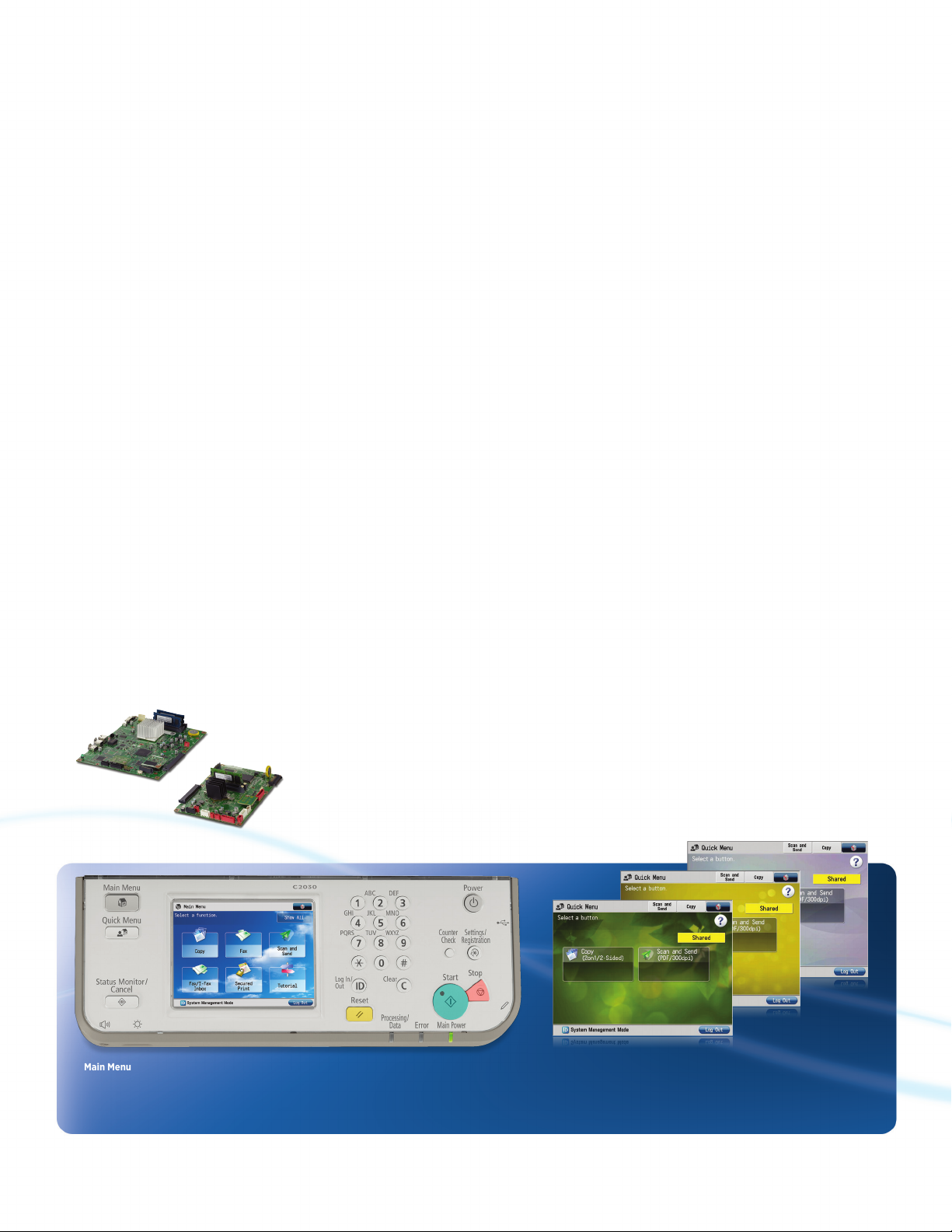
Advanced imageCHIP
system architecture
Simple, friendly operation
Completely redesigned, the highly responsive, flexible user
interface allows you to accomplish complicated tasks with
ease. Because users have dierent tasks and work styles,
the interface readily adapts to work the way you need to.
And large, clearly identified onscreen buttons let you quickly
access the functions you need.
Size. The 5.7” full-color, high-resolution TFT screen boasts
wide viewing angles and exceptional clarity.
Menus. Two menus streamline your workflow. Just a stroke
of the Main Menu keys gives you instant access to system
functions. The Quick Menu powers productivity by allowing
you to combine and access routine tasks at the touch of just
one button.
Customization. Organize the onscreen buttons to fit the way
you work by determining their number, size, and layout. And
you can even select an onscreen background.
Tutorial. For users who have “how to” questions, these Canon
imageRUNNER ADVANCE models have a tutorial button right
on the screen. Quickly access clear, step-by-step instructions.
Main Menu
Customize the number, size, and layout of
the function buttons, and select a background.
Quick Menu
Combine and access commonly
performed tasks with just one button.
Wallpaper
Choose from a palette of
background designs.
Page 5

Outstanding image quality
Make a big impression in vibrant color or striking black
and white. Canon’s innovative technologies make it easy to
produce consistently accurate, high-quality images. With
true 1200 x 1200 dpi* print resolution and oil-free pQ toner,
text is sharp with smooth corners, and the rich, clear images
display subtle gradient transitions and a high-quality finish.
Output Samples
Essential solutions
Canon has raised the bar on productivity and cost control.
Introducing imageRUNNER ADVANCE Essentials—specially
created solutions that seamlessly connect the MFP to the
user. Now, right from their PCs, users can perform document
workflow tasks. Administrators can track and manage use
and even influence behavior. And with amazing ease, the
imageRUNNER ADVANCE C2030/C2020 models can quickly
link to your external systems or existing network.
Up and running
With the imageRUNNER ADVANCE C2030/C2020 models,
installation is a snap. You’ll value the ongoing productivity
these systems deliver. Stay prepared with status notifications.
Maximize uptime with the ability to automatically move
waiting jobs up in the queue if the correct paper for a job
is unavailable.
Easily access and
replace toner
Walk-up convenience
Designed to make your work easier, the Canon imageRUNNER
ADVANCE C2030/C2020 models allow you to store to, or
print from, a USB drive or other memory media such as an SD
card or a CompactFlash card. To allow more comfortable data
entry, an optional keyboard may be attached.
USB Memory Media Keyboard
*If 1200 dpi is selected, the engine speed will slow down.
54
Page 6

Work smarter, faster, easier. Productivity redefined.
ADVANCED WORKFLOW
Accelerated performance
To keep pace, branch oces, workgroups, and small
businesses demand the powerful performance and versatility
that the Canon imageRUNNER ADVANCE C2030/C2020
models deliver.
Warm-up Time. A fast warm-up time ensures less time
waiting to scan, print, copy, or send documents.
Scanner. The 50-sheet capacity, fast automatic duplex
color scanner readily converts paper documents to color
RUNNER ADVANCE Desktop
or black-and-white digital files.
Send. Files breeze across the network with Universal Send
and formats such as High Compression PDF/XPS, which
significantly reduces color file sizes.
Processing. Scan, print, copy, fax, and send jobs smoothly
with the latest system architecture.
Finishing. The space-saving internal finisher can corner
or double-staple multipage documents.
Highly productive solutions
There’s no need to compromise functionality, either. With a
wide range of software solutions, Canon gives your business
the edge in lowering costs and improving quality. Multistep
and frequently performed operations can be reduced to the
touch of a button on the Quick Menu. Interface buttons can be
named to match your business processes. And with Canon’s
MEAP® development platform, you can easily address specific
business and workflow needs.
Right from your PC
Whether from the imageRUNNER ADVANCE model or
your own desk, you have direct access to the functions
that help make your work easier. The imageRUNNER
ADVANCE Desktop utility features a clear, comprehensive
PC interface that transforms your computer into a central
command station.
Now you can control personal document workflow by
archiving, merging, and distributing from your desktop
with “drag-and-drop” ease. You can find documents
quickly, and even monitor the status of a job from any
location on the network.
image
Inner Finisher
Proximity Card ReaderDocument Feeder
Page 7

Scan, send, and collaborate
In today’s collaborative world, small businesses, workgroups, and remote oces need to share and distribute
documents eortlessly. The imageRUNNER ADVANCE
C2030/C2020 models keep information flowing reliably.
Universal Send. In one process, you can scan color and black-
and-white documents and immediately distribute them to
multiple destinations, such as network folders and e-mail and
fax addresses. And now, when you enter the initial letters of
a destination, possible candidates from the address book are
displayed, eliminating keystrokes to speed up your work.
Universal Send now oers an expanded range of file formats,
including High Compression PDF/XPS, Adobe PDF Reader
Extensions, Searchable PDF, and Encrypted PDF.
Work better together
Designed to work seamlessly together, your networked fleet
of imageRUNNER ADVANCE systems supports enhanced
collaboration. When connected, the imageRUNNER ADVANCE
C2030/C2020 models can store and access files in the
Advanced Box folders of another imageRUNNER ADVANCE
model, and users can also access remote address books.
Versatile print solutions
Canon’s proprietary UFR II print technology is standard
with these models. Options including Adobe® PostScript®
TM
3
and PCL 5c/6 are also supported.
Eectively manage and control your print environment
with Canon’s Driver Configuration Tool. Easily set up
drivers that allow selected users to print only in black
and white. With the environment in mind, set parameters
that limit users to duplex printing. Even enhance security
by opting for a forced watermark.
Universal Send Screen
Fax. These imageRUNNER ADVANCE models support up to
two fax lines and have the ability to share the fax functions
of another model on the same network. And with the Job
Forwarding feature, incoming faxes can be automatically
routed to other destinations such as an e-mail address or
a shared folder on the network.
76
Page 8

Extensive security options. Valuable management features.
ADVANCED CONTROL
Powerful command.
Robust security
The imageRUNNER ADVANCE C2030/C2020 models oer
multilayered solutions that help businesses meet their goals of
privacy and protection yet keep work flowing. From installation to retirement, this Series has solutions that help safeguard
your confidential information and support security compliance.
Access Management System. Control access by user, group,
or role. You can even limit access for a specific function, such
as Universal Send.
Adobe® LiveCycle® Rights Management ES Integration.
Protect access to documents at every stage. After documents
are scanned, specify security policies and select authorized
recipients.
Trusted Platform Module. Safeguard vulnerable settings, such
as passwords, with a new security chip featuring tamperresistant hardware.
Data Encryption and Erase Options. Disguise information
before it’s written to the hard drive, and permanently remove
it by overwriting when the job is complete.
Removable Hard Disk Drive. With this option, the Hard Disk
Drive can be removed and placed in a secure location when
not in use.
Centralized control
Control individual models. Remarkably intuitive, the Remote
User Interface gives you centralized control right from your
desktop. With this easy-to-use Web-based interface, you can
access the information for any individual device. Check supply
levels, monitor jobs, and stay completely informed.
A fleet of systems. Highly scalable, the imageWARE Enterprise
Management Console oers one central point of control for
all systems across your organization. This Web-based utility
makes it easy to install and manage multiple Canon and
third-party networked devices. Uptime is maximized by your
ability to monitor jobs and supply levels—even receive e-mail
notifications if toner is low or a tray is out of paper.
Security Feature Overview
Document Security
• Document Scan Lock and Tracking*
• Adobe LiveCycle Rights Management
ES2 Integration
• Encrypted Secured Print
• Watermark/Secure Watermark
• Copy Set Numbering
• Encrypted PDF
• Digital Signature PDF
• Fax Forwarding
• Fax Destination Conrmation
Data Security
• Trusted Platform Module
• HDD Data Erase
• HDD Encryption
• Job Log Conceal
• Removable Hard Disk Drive
Note: Some features may be optional.
* Check with your Canon Authorized Dealer for availability.
Mail Server Security
• POP Authentication before SMTP
• SMTP Authentication
HDD
Logging/Auditing Security
• imageWARE Secure Audit Manager
Network Security
• IP/MAC Address Filtering
• SSL Encryption
• Network Application On/O
• USB Port On/O
• Destination Restriction
• IPSec
• IEEE 802.1x (Wire/Wireless)
Authentication
• Department ID/Control Card Systems
• Device Level Log-in (SSO-H)
• Access Management System (AMS)
• Function Level Log-in via AMS
• Authorized Send
• Smart Card Authentication
• Advanced Authentication –
Proximity Card*
Page 9

ADVANCED PERFORMANCE
Outstanding quality. Easy connectivity. True reliability.
All the essentials for success.
Lots of uptime
With the goal of virtually nonstop operation, these compact
imageRUNNER ADVANCE C2030/C2020 models are big
winners. Their new design and innovative technologies
deliver outstanding reliability. Remote service monitoring,
automated dispatching, and synchronized hard-drive
backup maximize uptime. And with access to the latest
technology and straightforward, clear upgrades, you can
power through your jobs, giving you more time to devote
to other business areas.
Standout performance
Just because your oce is small in size doesn’t mean you
can’t enjoy big results. The imageRUNNER ADVANCE C2030/
C2020 models give you the edge with the ability to print
high-quality documents, right in house. Proposals, reports,
brochures, and contracts are a standout in brilliant color
or stunning black and white. And with the ability to finish
documents eortlessly, you’ll stay ahead of the game.
Easy integration
You’ll appreciate the seamless integration of these models
into your network. Readily save or retrieve files from a
networked PC or another imageRUNNER ADVANCE model.
If a model is busy, scan or print documents from another on
the network. With Remote Fax you can share the fax function
of another imageRUNNER ADVANCE system, reducing the
cost of maintaining multiple fax devices and lines. Improved
connector and link support enhances communication with
existing systems and integrates with those you acquire in
the future.
A positive bottom line
Whether as stand-alone systems for a small business or
part of a larger fleet, these models have the advanced
features that boost productivity and deliver outstanding
professional results—all at an aordable price. And you’ll
stay firmly in control of the bottom line with Canon’s
imageRUNNER ADVANCE Tracker* utility. Right from their
desktops, administrators can manage all copy/print/scan/
fax use. They can even add a message to the model’s display
screen, reminding users about double-sided or black-andwhite printing. From every point of view, the imageRUNNER
ADVANCE C2030/C2020 models make sense.
imageRUNNER ADVANCE Tracker screen on control panel
* Included with imageRUNNER ADVANCE Essentials.
98
Page 10

Solutions that propel your business while
ADVANCED RESPONSIBILITY
reducing our environmental footprint—and yours.
Product Development Procurement of Parts
Product Collection and Recycling
Canon Product Life Cycle
Recycle
Reduction of CO2 emissions
Through its Life Cycle Assessment (LCA) System, Canon has
lowered CO
models by focusing on each stage of the product life cycle,
including manufacturing, energy use, and logistics. These
products are designed to be compact with less packaging,
to make transportation more ecient.
emissions by more than 30% over previous
2
Eco-friendly design
Canon is making a dierence through creative ecological
thinking. The imageRUNNER ADVANCE models employ
certain components fabricated with 100% recycled plastic
from retired products. Canon’s innovative green technologies
also include bio-based plastic, a plant-derived compound
that replaces certain petroleum-based plastic parts.
A greener way to work
A visionary company, Canon knows that the world and
the workplace need a greener workflow. The imageRUNNER
ADVANCE Series delivers just that. Now organizations across
the globe can seamlessly share and distribute digital
documents. And because you can preview files prior to
printing, changes can be made before committing toner
to paper to avoid print errors. Administrators can even
encourage duplex printing to help reduce waste and save
paper throughout the enterprise.
Produce
Production at the Factory
Use
Product Usage
Means of Transport
Greater energy eciency
From the inside out, the imageRUNNER ADVANCE Series is
designed for high energy eciency and stellar performance.
The combination of Canon’s fusing technologies and new pQ
toner helps reduce overall energy consumption by minimizing
heat and power requirements. The Automatic Document
Feeder captures superb-quality images at impressive speeds
while using less energy than ever. Canon’s RAPID Fusing
Technology helps reduce power use. And when devices are
in Sleep Mode, power consumption is 1W or less. With
advanced technologies present in each model, the Series
meets ENERGY STAR® standards.
Reducing pollution
All suppliers are required to meet our stringent Green
Procurement policy and environmental terms. This helps
Canon exceed the toughest global standards set by the
EU RoHS Directive, which requires the restriction of six
specified hazardous substances. Canon currently restricts
the use of 33 such substances.
Page 11

imageRUNNER ADVANCE C2030/C2020
Advance your business with these optional accessories.
Finishing Options
Inner Finisher-C1 with optional
Inner Finisher Additional Tray-A1
• 750-sheet capacity*
• Corner and double stapling
up to 50 sheets
Output Options
Inner 2-way Tray-F1
• Upper tray: 250-sheet capacity
• Lower tray: 200-sheet capacity
Copy Tray-J1
• 100-sheet capacity
Printer Options**
PCL Printer Kit-AG1
PS Printer Kit-AG1
Direct Print Kit (for PDF/XPS)-H1
Security Options
Universal Send Security Feature Set-D1
Universal Send Digital User Signature Kit-C1
Encrypted Secure Print Software-D1
Secure Watermark-B1
Document Scan Lock Kit-A3
Data Erase Kit-C1
HDD Data Encryption Kit-C3
Removable HDD Kit-AE1
IPSec Board-B2
††
†
Paper Feeding Options
Cassette Feeding Unit-AF1
• 550-sheet x 2-cassette capacity
• 17 lb. Bond to 60 lb. Cover
• Supports up to 12" x 18"
Envelope Feeder Attachment-D1
• 50-sheet capacity
• Supports COM10 No.10,
Monarch, DL, ISO-C5
Cabinet Type-D
Accessibility Options
Remote Operator’s Software Kit-B1
Voice Operation Kit-C2
Voice Guidance Kit-F2
Braille Label Kit-F1
ADF Access Handle-A1
* 450 -sheet capacity when Inner Finisher Additional Tray-A1 is attached.
** UFR II standard.
† Check with your Canon Authorized Dealer for availabilit y.
†† Requires Expansion Bus-F2.
Note: For additional options and specifications, please refer to the back page.
Some options may not b e available at time of launch. Please check with your
Canon Authorized Dealer for availability.
1110
Page 12

Product Specifications
Main Unit
Operation Panel
5.7" VGA Full Color TFT Screen
Memory
Standard: 2GB RAM
Maximum: 2GB RAM
Hard Disk Drive
Standard: 80GB
Maximum: 80GB
Network Interface Connection
Standard:
Optional: Wireless LAN (IEEE 802.1X)
Other Interface
Standard: USB 2.0 (Host)x2
Optional: Device Port [USB 2.0 (Host)x2]
Copy/Print Output Speed (BW/Color)
Letter: C2030: Up to 30/30 ppm
First-Copy-Out Time (Letter)
BW: 5.9 Seconds
Color: 8.9 Seconds
Paper Sources (20 lb. Bond)
Standard: 250-sheet Cassette
Maximum: 2,000 Sheets
Output Paper Capacity (20 lb. Bond)
Standard: 250 Sheets (Inner Tray)
Maximum: 850 Sheets (w/Inner Finisher
Output Paper Sizes
Cassette 1: 11" x 17", Legal, Letter, Letter-R,
Cassette 2-4: 12" x 18", 11" x 17", Legal,
Bypass: 12" x 18", 11" x 17", Legal,
Acceptable Paper Weights
Cassette 1: 17 lb. Bond to 32 lb. Bond
Cassette 2-4:
Bypass: 17 lb. Bond to 80 lb. Cover
10/100Base-TX
1000Base-TX
USB 2.0 (Device)
Copy Control Interface
C2020: Up to 20/20 ppm
550-sheet Cassette
100-sheet Stack Bypass
and Copy Tray)
Statement-R, Executive,
Custom Size [5-7/8" x 7-1/8"
to 11-3/4" x 16-1/2" (148mm x
182mm to 297mm x 420mm)]
Letter, Letter-R, Statement-R,
Executive, Custom Size [5-1/2"
x 7-1/8" to 12" x 15-3/8"
(140mm x 182mm to 304mm
x 457mm)]
Letter, Letter-R, Statement,
Statement-R, Executive,
Custom Size [3-7/8" x 5-1/2"
to 12-5/8" x 18" (99mm x
140mm to 320mm x 457mm)]
(64 to 120g/m
17 lb. Bond to 60 lb. Cover
(64 to 163g/m
(64 to 220g/m
2
)
2
)
2
)
Warm-up Time
From Power
On:
Power Requirements/Plug
120V AC, 60Hz, 7.5A/NEMA 5-15P
Dimensions (H x W x D)
36-1/2” x 22-1/4” x 26-3/4”
(928mm x 565mm x 680mm)
Installation Space (W x D)
33-1/4” x 26-3/4” (846mm x 680mm)
(When the Stack Bypass Tray is extended)
Weight
Approximately 209 lb. (95kg)*
Toner (Estimated Yield @ 5% Coverage)
Black: 23,000 images
Color (C,M,Y): 19,000 images
38 Seconds
Image Reader Unit
Scan Resolution
Up to 600 x 600 dpi
Acceptable Originals
Sheet, Book, 3-Dimensional objects
[up to 4.4 lb. (2kg)]
Maximum Original Size
Up to 11" x 17"
Document Feeder
Scan Method
Duplex Automatic Document Feeder
Acceptable Originals
Paper Sizes: 11" x 17", Legal, Letter, Letter-R,
Scan Speed (BW/Color; Letter)
Simplex: Up to 44/44 ipm (300 dpi)
Duplex: Up to 19/19 ipm (300 dpi)
Paper Capacity (20 lb. Bond)
50 Sheets
Statement, or Statement-R
Up to 30/30 ipm (600 dpi)
Up to 13/13 ipm (600 dpi)
Print Specifications
Maximum Engine Resolution
1200 x 1200 dpi**
PDL Support
Standard: UFR II
Optional: PCL 5c/6, Adobe® PostScript®
Print Driver Supported OS
UFR II,
PCL 5c/6,
Adobe PS3:
XPS: Windows (Windows Vista/7/
Direct Print Support
Standard: TIFF, JPEG, EPS***
Optional: PDF, XPS***
TM
3
Windows® (Windows 2000/
XP/Windows Vista®/7/Server
2003/Server 2008), Citrix
MetaFrame, Macintosh® (OS X
10.2.8 or Later)
Server 2003/Server 2008)
Universal Send Specifications
Sending Method
E-Mail, I-Fax, File Server (FTP, SMB, WebDAV),
Super G3 Fax (Optional)
Communication Protocol
File: FTP (TCP/IP), SMB (TCP/IP),
E-mail/I-Fax SMTP, POP3, I-Fax (Simple, Full)
WebDAV
File Format
Standard: TIFF, JPEG, PDF, PDF
Optional: PDF (Trace & Smooth), PDF/
(Compact), PDF (Apply
Policy), PDF (Optimized for
Web), PDF/A-1b, XPS, XPS
(Compact)
XPS (OCR), PDF (Encrypted),
PDF/XPS (Digital Signature),
PDF (Reader Extensions)
Fax Specifications
Maximum Number of Connection Lines
2
Modem Speed
Super G3: 33.6 Kbps
G3: 14.4 Kbps
Compression Method
MH, MR, MMR, JBIG
Sending/Recording Size
Statement to 11" x 17"
Store Specifications
Memory Media
Standard : USB Memory
Optional: SD, SDHC, CompactFlash,
Memory Stick, Microdrive
Security Specifications
Standard
Department ID Management, Single Sign
On-H, Access Management System (Device
and Function Level log-in), Secured Print,
Trusted Platform Module, IPV6, Restricting
Features (Restricting the Send Function,
Restricting New Addresses on Address
Book), SSL Encrypted Communication,
SNMPv1/v3, MAC/IP Address Filtering, SMTP
Authentication, POP Authentication before
SMTP, HDD Format, Adobe® LiveCycle® Rights
Management ES2 Integration
Other Optional Accessories
• Utility Tray-A2
• USB Keyboard
• Copy Card Reader-C1
• Copy Card Reader
Attachment-B2
• Copy Control
Interface Kit-A1
• Stamp Ink
Cartridge-C1
• Stamp Unit-B1
• imageRUNNER
ADVANCE Essentials
• Barcode Printing
Kit-D1
• Web Access
Software-H1
* Includes consumables.
** If 1200 dpi is selected, engine speed will slow down.
EPS and XPS cannot be printed from Memory Media.
***
Note: Some accessories require additional
equipment or may be prerequisites for other
options. Some accessories cannot be installed
simultaneously. Check with your Canon Authorized
Dealer for details.
• Universal Send
Advanced Feature
Set-E1
• Super G3 FAX Board-
AH1
• Super G3 2nd Line
FAX Board-AH1
• Remote Fax Kit-A1
• Wireless LAN
Board-B2
• USB Device Port-C1
• Multimedia Reader/
Writer-A2
• Expansion Bus-F2
• eCopy Suite
• imageWARE Suite
As an ENERGY STAR® Partner, Canon U.S.A., Inc. has determined that these products meet the ENERGY STAR guidelines for energy
efficiency. ENERGY STAR and the ENERGY STAR mark are registered U.S. marks. CANON, IMAGERUNNER, IMAGEPASS, MEAP, and the
GENUINE logo are registered trademarks of Canon Inc. in the United States and may also be registered trademarks or trademarks
in other countries. IMAGEWARE is a registered trademark of Canon U.S.A., Inc. in the United States and is a trademark of Canon Inc.
in certain other countries. IMAGEANYWARE is a trademark of Canon. All other referenced product names and marks are trademarks
of their respective owners and hereby acknowledged. Some items may not be available at this time; please check for availability.
Specifications and availability subject to change without notice. All printer output images are simulated. Products are shown with
optional accessories.
Canon U.S.A. does not provide legal counsel or regulatory compliance consultancy, including without limitation, Sarbanes-Oxley,
HIPAA, GLBA, Check 21 or the USA Patriot Act. Each customer must have its own qualified counsel determine the advisability of a
particular solution as it relates to regulatory and statutory compliance.
©2013 Canon U.S.A., Inc. All rights reserved.
Federal Law prohibits copying of certain documents. Violators may be subject to penalties. We suggest that
you check with your own legal counsel. Canon U.S.A., Inc. and Canon Canada, Inc. intend to cooperate with
Law Enforcement Agencies in connection with claims of unauthorized copying.
1212RA-C2000SRS-PDF-IH
1-800-OK-CANON
www.usa.canon.com
Canon U.S.A., Inc.
One Canon Park
Melville, NY 11747
 Loading...