

Page 1
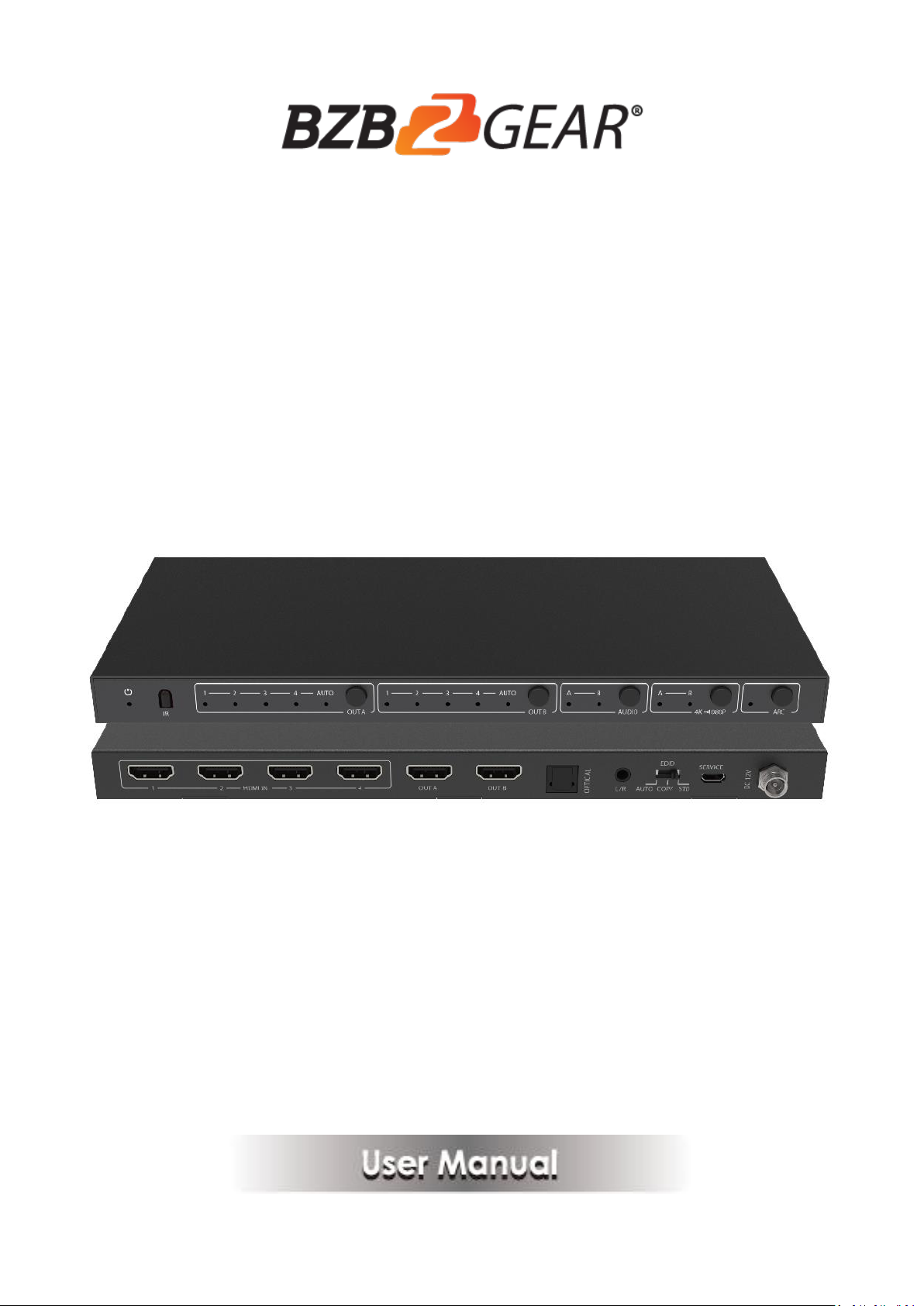
BG-UHD-42M
4x2 HDMI 2.0 Matrix Switcher with Audio
Extract/Scale/ARC/EDID function
Page 2

2
Thank you for purchasing this product
For optimum performance and safety, please read these instructions carefully
before connecting, operating or adjusting this product. Please keep this
manual for future reference.
Surge protection device recommended
This product contains sensitive electrical components that may be damaged
by electrical spikes, surges, electric shock, lighting strikes, etc. Use of surge
protection systems is highly recommended in order to protect and extend the
life of your equipment.
Table of Contents
1. Introduction .............................................................................................................. 2
2. Features .................................................................................................................... 3
3. Package Contents ..................................................................................................... 3
4. Specifications............................................................................................................ 4
5. Operation Controls and Functions ........................................................................... 5
5.1 Front Panel....................................................................................................... 5
5.2 Rear Panel ........................................................................................................ 6
6. IR Remote ................................................................................................................. 7
7. Application Example .............................................................................................. 10
8. FAQ .......................................................................................................................... 10
9. Mission Statement…………………………………………..……………………11
10. Warranty Information………………………………………………………...…11
Page 3

3
1. Introduction
The BZ-UHD-42M HDMI Matrix Switcher can switch any of four HDMI sources
to two HDMI displays. It supports resolution up to 4K2K@60Hz YCbCr 4:4:4
and HDCP 2.2. It can extract HDMI source device audio to optical and analog
L/R output. It supports 4K→1080P downscale function if source is 4K but TV
only supports up to 1080P. It also supports ARC and EDID (AUTO/COPY/
STD) function. With its 18Gbps bandwidth and the additional features with
latest HDMI standards. Flexible control via front panel buttons and IR remote.
2. Features
☆ HDMI 2.0, HDCP 2.2 / HDCP 1.4 and DVI 1.0 compliant
☆ Supports 4 HDMI inputs and 2 HDMI outputs
☆ Video resolution up to 4K2K@60Hz YCbCr 4:4:4
☆ Supports 18Gbps uncompressed bandwidth on all HDMI
☆ Supports Dolby Vision, HDR 10+, HLG and CEC function
☆ Supports extract HDMI input source device audio of OUT A or OUT B
to optical and analog L/R output
☆ OUT A and OUT B support 4K to 1080P downscale function
☆ Supports ARC (Audio Return Channel) function
☆ Supports advanced EDID management including AUTO, COPY and STD
☆ Control is via front panel buttons and IR remote
3. Package Contents
① 1× 4×2 HDMI2.0 Matrix Switcher
② 1× 12V/1A Locking Power Adapter
Page 4

4
③ 2× Mounting Ears
④ 1× IR Remote
⑤ 1× User Manual
4. Specifications
Technical
HDMI Compliance
HDMI 2.0
HDCP Compliance
HDCP 2.2 and HDCP 1.4
Video Bandwidth
18 Gbps
Video Resolution
Up to 4K2K@50/60Hz (YCbCr 4:4:4),[email protected] HDMI
3D TV format, etc.
Color Space
RGB, YCbCr4:4:4, YCbCr4:2:2, YCbCr 4:2:0
Color Depth
8-bit, 10-bit, 12-bit [1080P, 4K30Hz, 4K60Hz (YCbCr 4:2:0)]
8-bit [4K60Hz (YCbCr4:4:4)]
HDMI Audio Formats
PCM2.0/5.1/7.1CH, Dolby Digital/Plus/EX, Dolby True HD,
DTS, DTS-EX, DTS-96/24, DTS High Res, DTS-HD Master
Audio, DSD
Optical Audio Formats
PCM2.0, Dolby Digital / Plus, DTS
L/R Audio Formats
PCM2.0CH
(Note: If ARC function is turned on, the audio port will
mute.)
ESD Protection
Human-body Model: ±8kV (Air-gap discharge),
±4kV (Contact discharge)
Connections
Input Ports
4×HDMI Type A [19-pin female]
Output Ports
2×HDMI Type A [19-pin female]
1×L/R audio out [3.5mm Stereo Mini-jack]
1×OPTICAL audio out [S/PDIF]
Mechanical
Housing
Metal Enclosure
Color
Black
Dimensions
251mm(W)×105mm(D)×20mm(H)
Weight
620g
Power Supply
Input: AC100~240V 50/60Hz
Output: DC12V/1A
Power Consumption
3.8W (max)
Page 5
5
Operating Temperature
0°C ~ 40°C / 32°F ~ 104°F
Storage Temperature
-20°C ~ 60°C / -4°F ~ 140°F
Relative Humidity
20~90% RH (non-condensing)
5. Operation Controls and Functions
5.1 Front Panel
Number
Name
Function description
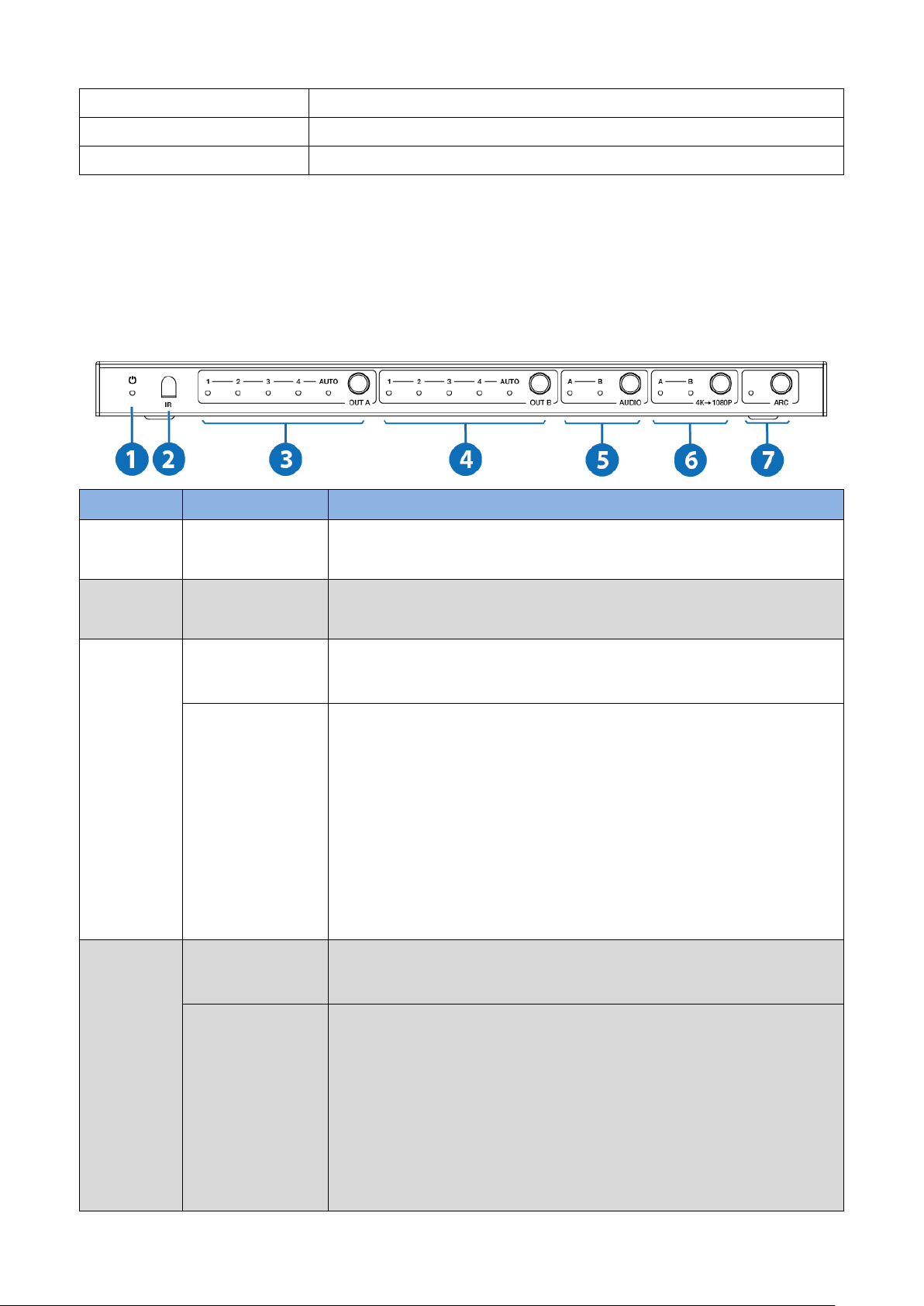
1
Power LED
The blue LED will illuminate when the product is
connected power supply.
2
IR
IR receiver window. It only receives IR remote signal
from this product.
3
OUT A button
and LED
Press the OUT A button to select an input source to OUT
A output, the corresponding blue LED will illuminate.
AUTO LED
The blue AUTO LED will illuminate and the AUTO
function will be turned on when you press the OUT A
button up to 3 seconds, press the OUT A button up to 3
seconds again will turn off the AUTO function.
AUTO function: Detect input signal source. The AUTO
function is turned on, if an or a few HDMI IN ports are
connected source device, OUT A port will output the
signal from the last connected input source.
4
OUT B button
and LED
Press the OUT B button to select an input source to OUT
B output, the corresponding blue LED will illuminate.
AUTO LED
The blue AUTO LED will illuminate and the AUTO
function will be turned on when you press the OUT B
button up to 3 seconds, press the OUT B button up to 3
seconds again will turn off the AUTO function.
AUTO function: Detect input signal source. The AUTO
function is turned on, if an or a few HDMI IN ports are
connected source device, OUT B port will output the
Page 6
6
signal from the last connected input source.
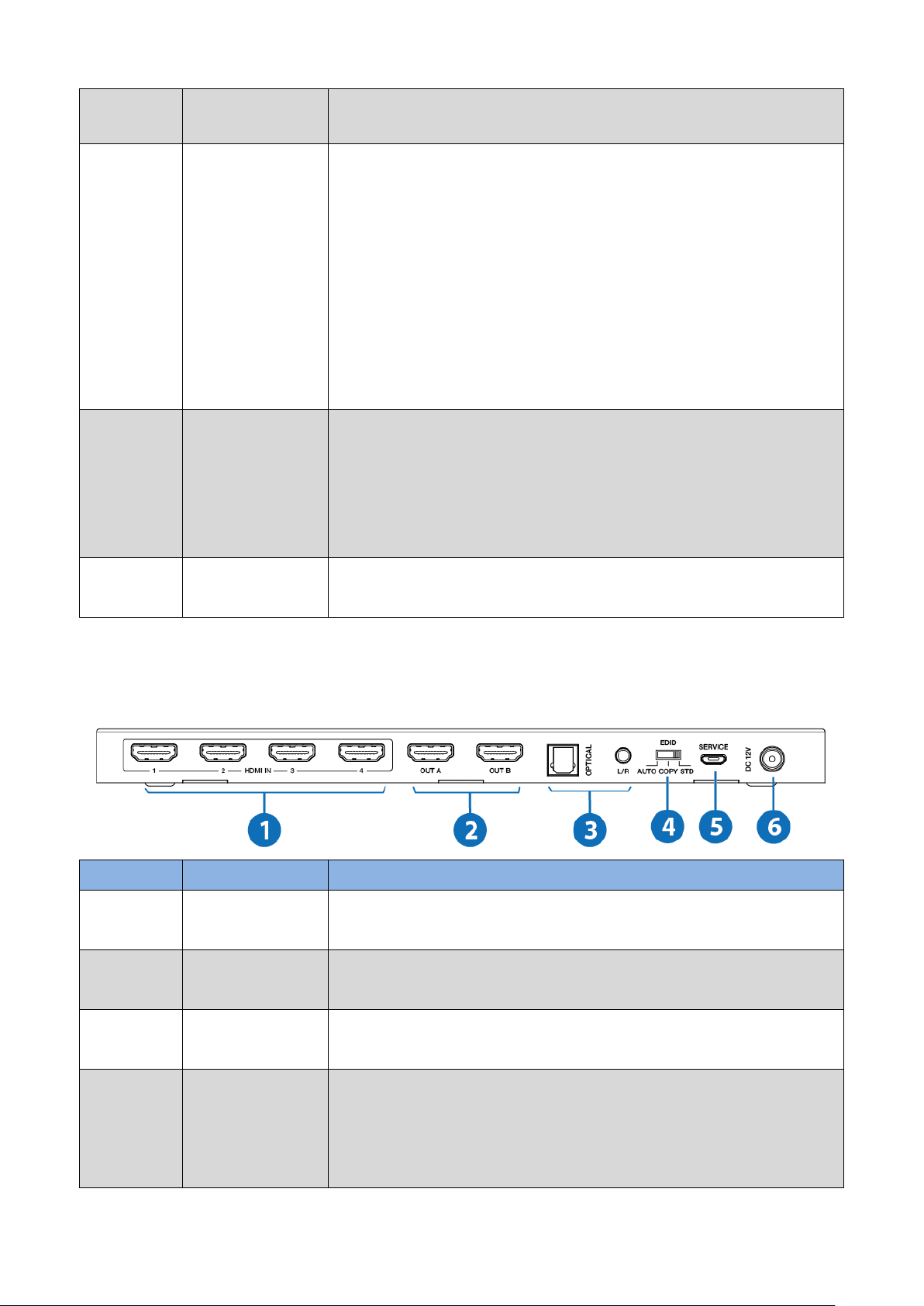
5
AUDIO button
▪ Press AUDIO button to select extract the input
source audio from OUT A port or OUT B port to optical
and analog L/R output, the corresponding blue LED will
illuminate.
▪ If ARC function is turned on, press Audio button to
select return the audio signal from OUT A or OUT B
display device to optical output, the corresponding blue
LED will illuminate. At this time, the analog L/R port is
mute.
6
4k→1080P
button
Press the button to select OUT A or OUT B 4k→1080P
downscale function, the corresponding blue LED will
illuminate. For example, if source is 4K but TV only
supports 1080P, at this time the input resolution with 4K
will downscale to 1080P to TV output.
7
ARC button
Turn on / off ARC function. The ARC LED will illuminate
when you turn on the ARC function.
5.2 Rear Panel
Number
Name
Function description
1
HDMI IN port
HDMI input ports, connect to HDMI source device such
as DVD or PS4 with an HDMI cable.
2
HDMI OUT A /
OUT B port
HDMI output ports, connect to HDMI display device
such as TV or Monitor with an HDMI cable.
3
OPTICAL / L/R
port
Connect to audio output device such as amplifier or
speaker with optical and analog audio cable.
4
EDID AUTO /
COPY / STD
AUTO: Compare with Out A and Out B display device’s
EDID information, and then sending the best EDID
information to source device of Out A and Out B. The
source device of Out A and Out B will send the EDID
Page 7
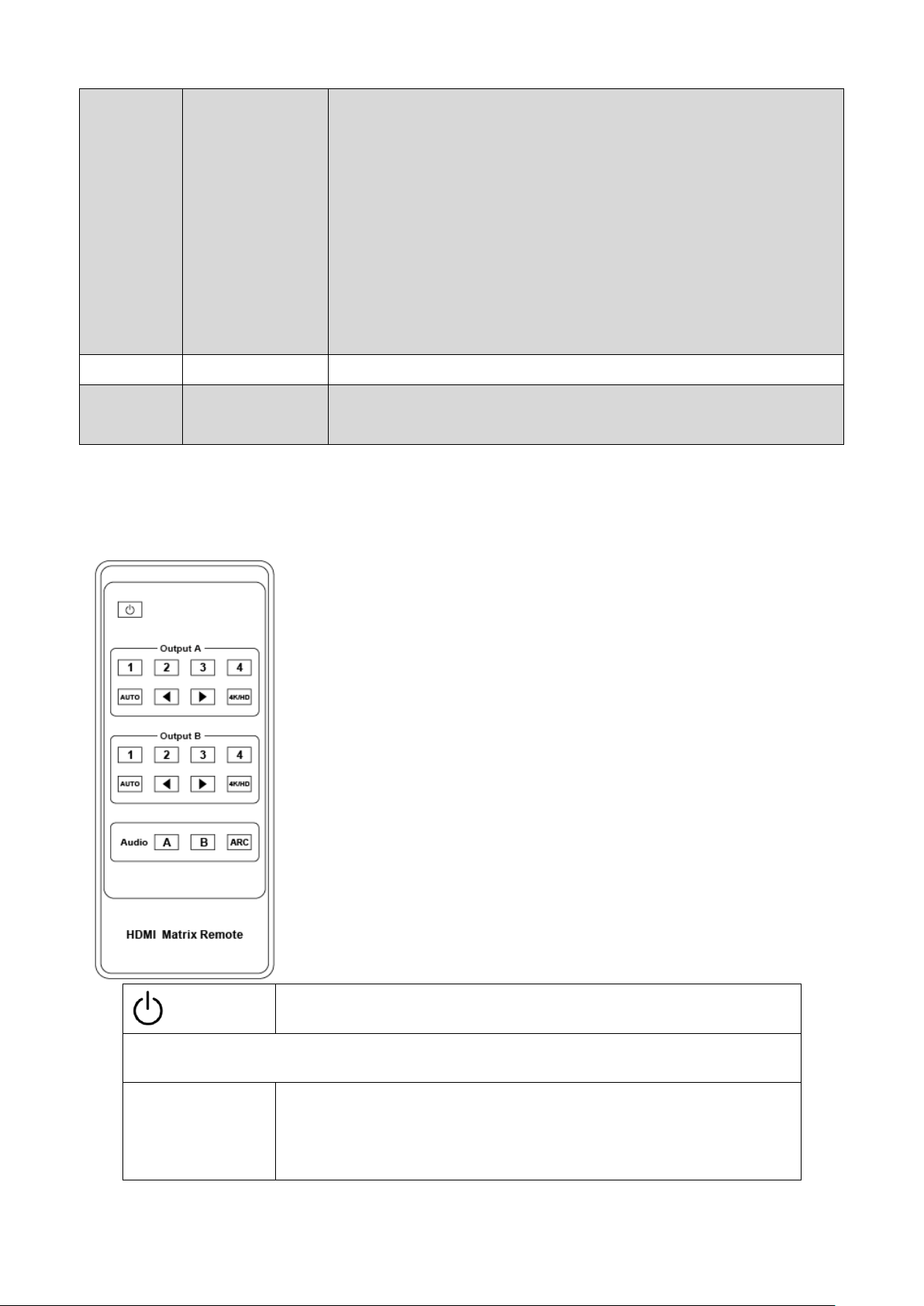
7
information again to Out A and Out B display device
output.
COPY: Copy Out A display device’s EDID information to
source device of Out A and Out B. Then the source
device of Out A and Out B will send the EDID
information again to Out A and Out B display device
output.
STD: Out A and Out B display device output default
1080P.
5
SERVICE port
Firmware update port.
6
DC 12V
Plug in 12V/1A adapter to AC wall outlet for power
supply.
6. IR Remote
Power on the product or set it to standby mode.
Output A
1/2/3/4
Select input source signal to Out A port output,
the corresponding blue LED on the front panel
Page 8

8
will illuminate.
Select the last or next input source signal to OUT A
port output, the corresponding blue LED on the
front panel will illuminate.
AUTO
Detect input signal source. The Auto function is
turned on, if an or a few HDMI IN ports are
connected source device, Out A port will output
the signal from the last connected input source.
4K/HD
Select Out A 4k→1080P downscale function.
For example, if source is 4K but TV only supports
1080P, at this time the input resolution with 4K
will downscale to 1080P to TV output
Output B
1/2/3/4
Select input source signal to Out B port output, the
corresponding blue LED on the front panel will illuminate.
Select the last or next input source signal to OUT B port
output, the corresponding blue LED on the front panel
will illuminate.
AUTO
Detect input signal source. The Auto function is turned
on, if an or a few HDMI IN ports are connected source
device, Out B port will output the signal from the last
connected input source.
4K/HD
Select Out B 4k→1080P downscale function. For
Page 9

9
example, if source is 4K but TV only supports 1080P, at
this time the input resolution with 4K will downscale to
1080P to TV output
Audio function
ARC
Turn on / off ARC function.
Audio A / B
▪ If ARC function is turned on, press Audio A or B button
to select return the audio signal from Out A or Out B
display device to optical port (TOSLINK) output. At this
time, the analog L/R port (Audio out) is mute.
▪ If ARC function is turned off, press Audio A or B button
to select extract the input source audio from Out A port
or Out B port to optical port (TOSLINK) and analog L/R
port (Audio out) output.
Page 10
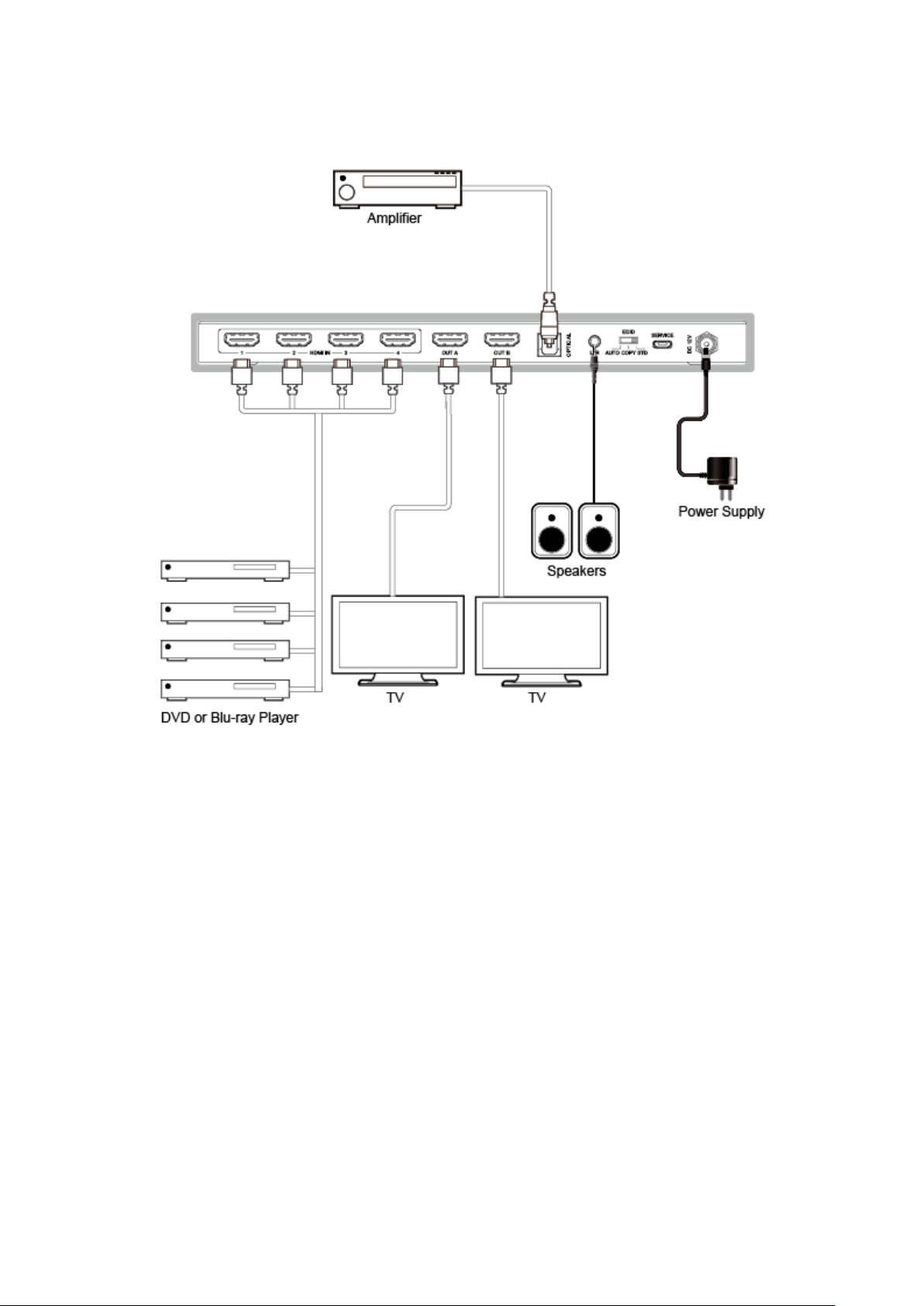
10
7. Application Example
8. FAQ
Q: Does this product require an HDMI line length for the connection interface?
A: According to HDMI line length test, HDMI input / output with 4K60Hz YCbCr
4:4:4 is the longest line length up to 8m / 3m. The use of “Premium High Speed
HDMI” cable is highly recommended. IR remote sends signal distance for 0~7
meters, and angle is plus-minus 45 degrees.
Page 11

11
9. Mission Statement
BZB Gear manifests from the competitive nature of the audiovisual industry to
innovate while keeping the customer in mind. AV solutions can cost a pretty penny,
and new technology only adds to it. We believe everyone deserves to see, hear, and
feel the advancements made in today’s AV world without having to break the bank.
BZB Gear is the solution for small to medium-sized applications requiring the latest
professional products in AV.
We live in a DIY era where resources are abundant on the internet. With that in mind,
our team offers system design consultation and expert tech support seven days a
week for the products in our BZB Gear catalog. You’ll notice comparably lower prices
with BZB Gear solutions, but the quality of the products is on par with the top
brands in the industry. The unparalleled support from our team is our way of
showing we care for every one of our customers. Whether you’re an integrator,
home theater enthusiast, or a do-it-yourselfer, BZB Gear offers the solutions to allow
you to focus on your project and not your budget.
10. Warranty Information
BZB Gear | Second Year Assurance
BZB Gear wants to assure you peace of mind. We're so confident in the quality of our
products that along with the manufacturer's one-year limited warranty, we are
offering free second-year warranty coverage upon registration*!
Page 12

12
Taking advantage of this program is simple, just follow the steps below:
1. Register your product within 90 days of purchase by visiting
BZBGear.com/warranty.
2. Complete the registration form. Provide all necessary proof of purchase details,
including serial number and a copy of your sales receipt.
For questions, please call 1.888.660.2962 or email [email protected].
For complete warranty information, please visit BZBGear.com/warranty or scan the
QR code below.
*Terms and conditions apply. Registration is required.
 Loading...