

Page 1
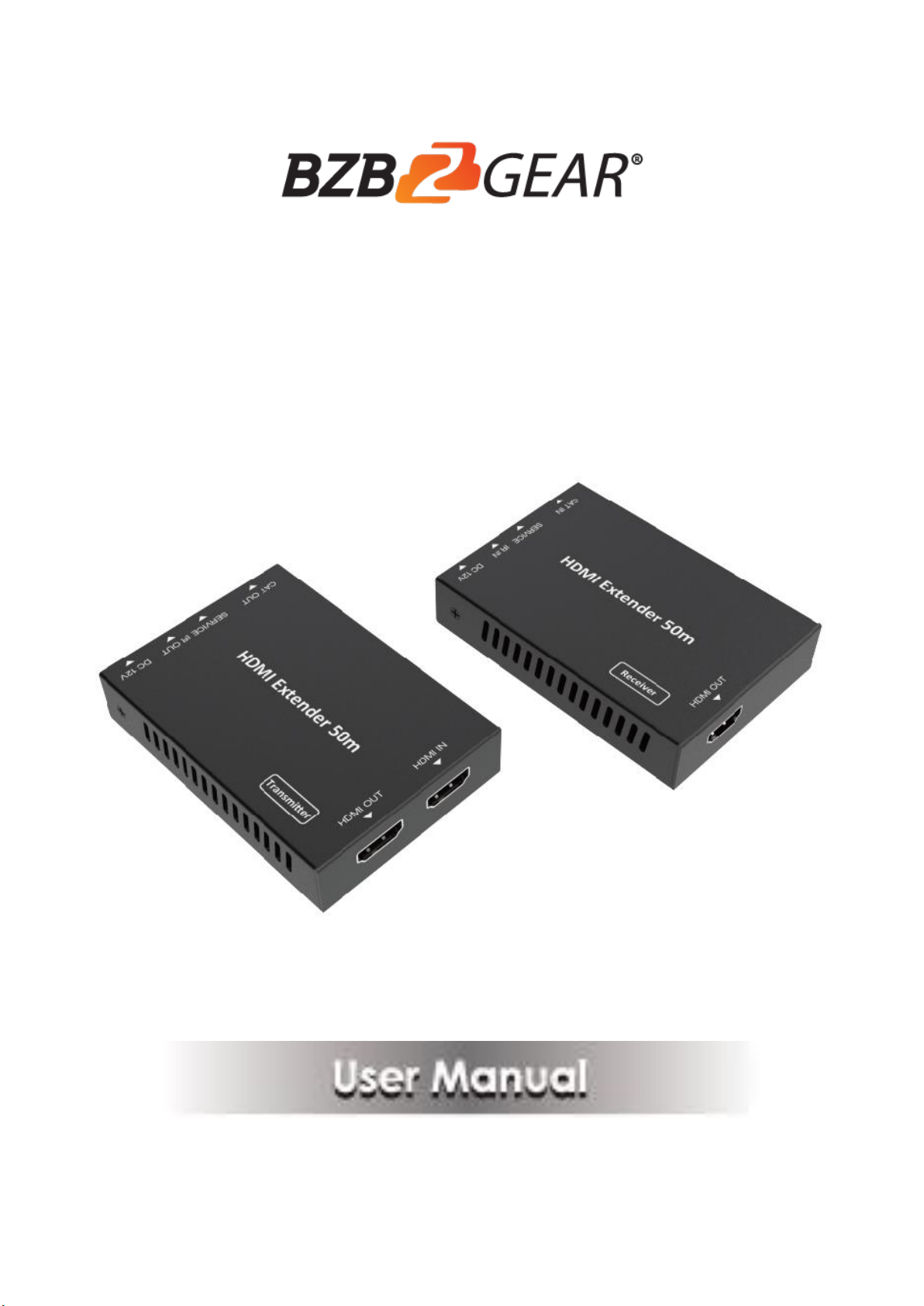
BG-EXH-50C
HDMI 18Gbps Extender with one-way IR (50M)
Page 2

2
Thank you for purchasing this product
For optimum performance and safety, please read these instructions carefully
before connecting, operating or adjusting this product. Please keep this manual
for future reference.
Surge protection device recommended
This product contains sensitive electrical components that may be damaged
by electrical spikes, surges, electric shock, lighting strikes, etc. Use of surge
protection systems is highly recommended in order to protect and extend the
life of your equipment.
Table of Contents
1. Introduction ...................................................................................................... 3
2. Features ............................................................................................................ 4
3. Package Contents .............................................................................................. 4
4. Specifications .................................................................................................... 5
5. Operation Controls and Functions ...................................................................... 6
5.1 Transmitter Panel ...................................................................................... 6
5.2 Receiver Panel ........................................................................................... 7
5.3 IR Pin Definition ........................................................................................ 8
6. Application Example .......................................................................................... 9
7. Mission Statement………………………………………………………………..10
8. Warranty Information…………………………………………………………….11
Page 3

3
1. Introduction
The BZB-EXH-50C can extend high definition video / audio signal
and one-way IR, and the distance is up to 164ft / 50 meters between
transmitter and receiver over a single Cat5e/6/7 cable. It supports resolution up to
4K2K@60Hz 4:4:4, 18Gbps and HDCP 2.2. In addition, the extender is equipped
with one-way IR pass-through which allows for source control and one
HDMI loop output.
The extender includes two units: transmitter unit and receiver unit. The
transmitter unit is responsible for capturing HDMI input signal and carries the signal
via one cost effective Cat6 cable, and emitting IR control signals. The receiver
unit is responsible for receiving the HDMI signal and transmitting IR control
signal.
The extender offers the most convenient solution for HDMI extension over a single
Cat5e/6/7 with long distance capability, and is the perfect solution for
any application.
Page 4

4
2. Features
☆ HDMI 2.0, HDCP 2.2 / HDCP 1.4 and DVI 1.0 compliant
☆ Supports 18Gbps bandwidth
☆ Supports input and output video resolution up to 4k2k@60Hz 4:4:4, extends
distance up to 164ft / 50 meters
☆ Supports one HDMI loop output
☆ Supports one-way IR pass-through
☆ Supports HDR function
☆ Supports power over cat 5e/6/7 function, it means that either transmitter or
receiver is powered supply by 12V/1A power adapter, the other doesn’t
need power supply.)
☆ Supports automatic copy EDID function
☆ Compact design for easy and flexible installation.
3. Package Contents
① 1× HDMI 18Gbps Extender (Transmitter)
② 1× HDMI 18Gbps Extender ( Receiver)
③ 1× IR Blaster cable (1.5 meters)
④ 1× 20~60KHz IR Receiver cable (1.5 meters)
⑤ 1× 12V/1A Locking Power adapter
⑥ 4× Mounting Ears
⑦ 1× User Manual
Page 5

5
4. Specifications
Technical
HDMI Compliance
HDMI 2.0
HDCP Compliance
HDCP 2.2 / HDCP 1.4
Video Bandwidth
18Gbps
Video Resolution
Up to 4K60Hz 4:4:4
Color Space
RGB / YCbCr 4:4:4, YCbCr 4:2:2/4:2:0, YUV 4:4:4
Color Depth
8/10/12-bit (1080P60Hz, 4K30Hz, 4K60Hz YCbCr
4:2:2/4:2:0)
8-bit (4K60Hz 4:4:4)
HDMI Audio Formats
LPCM 2.0/2.1/5.1/6.1/7.1, Dolby Digital, Dolby
TrueHD, Dolby Digital Plus (DD+), DTS-ES, DTS
HD Master, DTS HD-HRA, DTS-X
ESD Protection
Human body model — ±8kV (Air-gap discharge) &±4kV
(Contact discharge)
Connections
Transmitter
Inputs: 1x HDMI Type A [19-pin female]
1x SERVICE [Micro USB, Update port]
Outputs: 1x HDMI Type A [19-pin female]
1x IR OUT [3.5mm Stereo Mini-jack]
1x CAT OUT [RJ45, 8-pin female]
Receiver
Inputs: 1x IR IN [3.5mm Stereo Mini-jack]
1x CAT IN [RJ45, 8-pin female]
1x SERVICE [Micro USB, Update port]
Outputs: 1x HDMI Type A [19-pin female]
Mechanical
Housing
Metal Enclosure
Color
Black
Dimensions
Transmitter / Receiver:
61mm [W] x 88mm [D] x 18mm [H]
Weight
Transmitter: 160g, Receiver: 155g
Power Supply
Input: AC 100 - 240V 50/60Hz
Output: DC 12V/1A
Power Consumption
3.84 W
Operating
Temperature
32 - 104°F / 0 - 40°C
Storage Temperature
-4 - 140°F / -20 - 60°C
Relative Humidity
20 - 90% RH (no condensation)
Resolution / Distance
4K60 - Feet / Meters
4K30 / 1080P - Feet / Meters
CAT5e
164ft / 50M
164ft / 50M
CAT6/6a/7
197ft / 60M
230ft / 70M
HDMI IN/OUT
10ft / 3M
30ft / 10M
The use of “Premium High Speed HDMI” cable is highly recommended.
Page 6
6
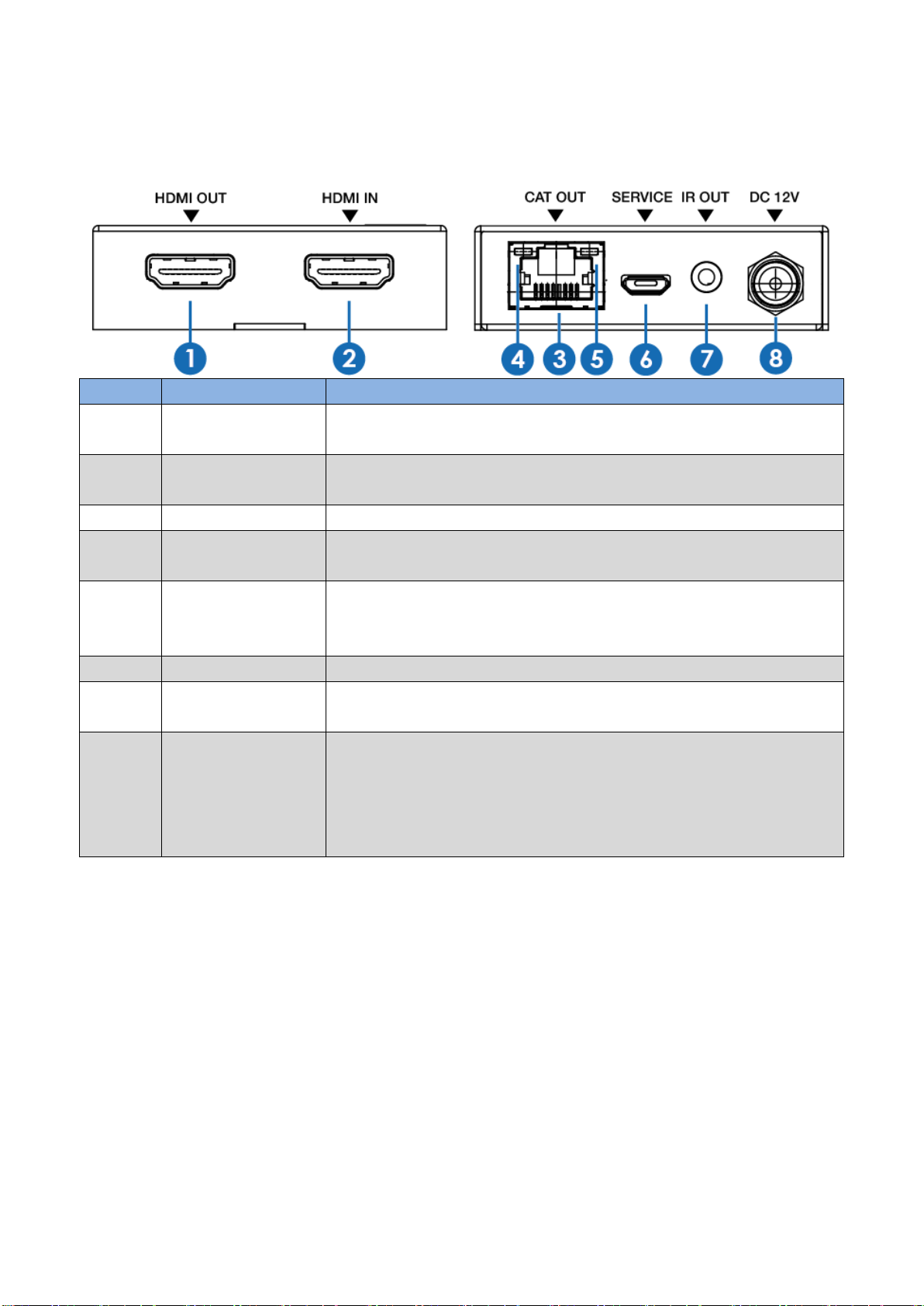
5. Operation Controls and Functions
Number
Name
Function description
1
HDMI OUT
HDMI loop output port, connect to HDMI display device such as
TV or Projector with an HDMI cable.
2
HDMI IN
HDMI input port, connect to HDMI source device such as DVD or
PS4 player with an HDMI cable.
3
CAT OUT
Connect to CAT IN port on the receiving end with a CAT6 cable.
4
Power Indicator
Lamp (Green)
The lamp will illuminate when the transmitter is powered on.
5
Data signal
Indicator Lamp
(Orange)
The lamp will illuminate when the transmitter and the receiver
have signal transmission.
6
SERVICE port
For firmware updated use.
7
IR OUT
Connect to wideband IR Blaster cable. The IR signal is from the IR
IN port of the receiver.
8
DC 12V
Plug DC 12V/1A power supply into the unit and connect the
adapter to an AC outlet.
transmitter or receiver is powered by 12V/1A power adapter; the
other doesn’t need power supply.)
5.1 Transmitter Panel
(Note: The extender supports power over cat5e/6/7 function,
it means that either
Page 7
7
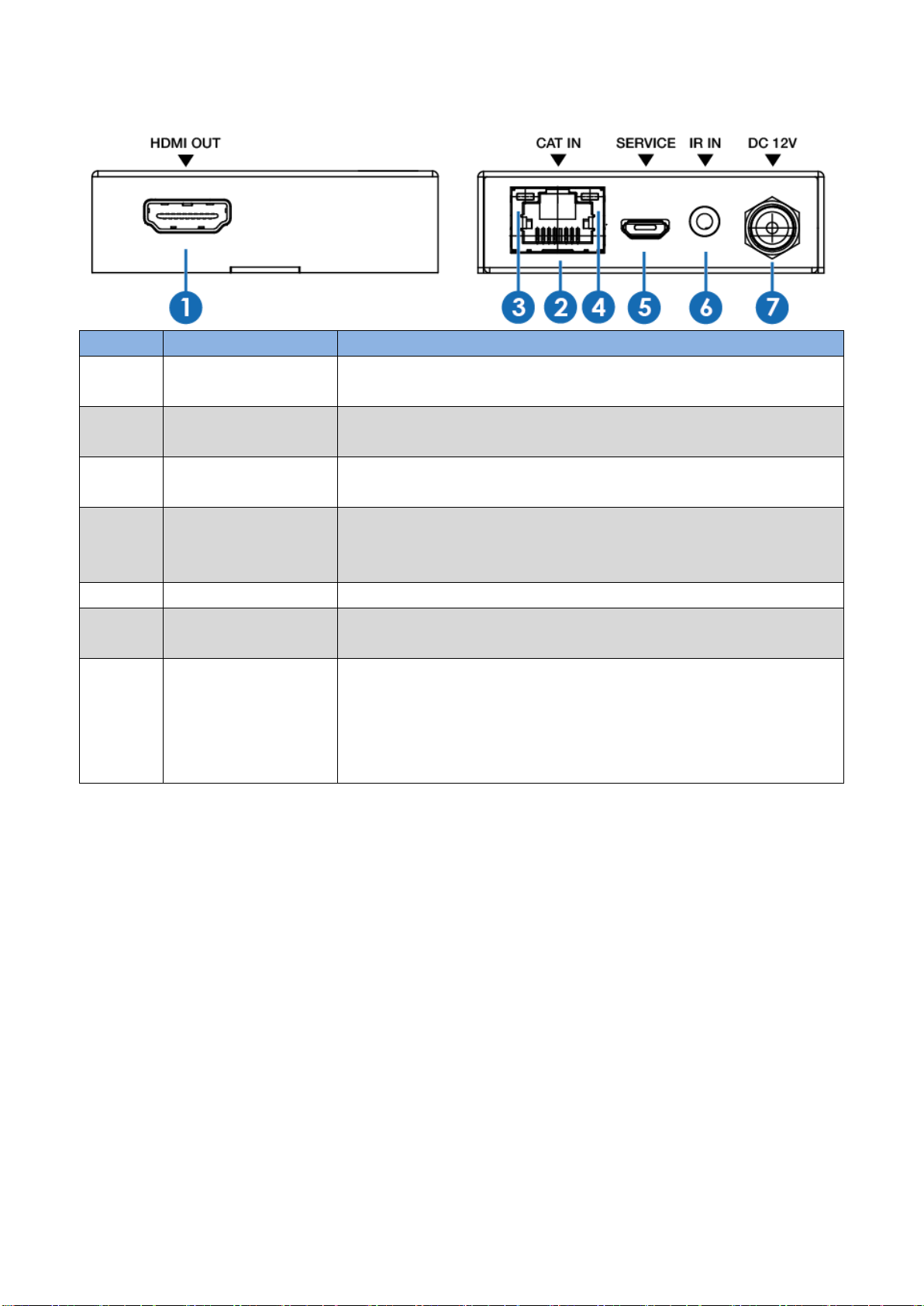
5.2 Receiver Panel
Number
Name
Function description
1
HDMI OUT
HDMI output port, connect to HDMI display device such as TV or
Projector with an HDMI cable.
2
CAT IN
Connect to CAT OUT port on the transmitter end with a CAT6
cable.
3
Power Indicator
Lamp (Green)
The lamp will illuminate when the receiver is powered on.
4
Data signal
Indicator Lamp
(Orange)
The lamp will illuminate when the transmitter and the receiver
have signal transmission.
5
SERVICE port
For firmware updated use.
6
IR IN
Connect to wideband IR Receiver cable. The IR signal will send to
the IR OUT port of the transmitter.
7
DC 12V
Plug DC 12V/1A power supply into the unit and connect the
adapter to an AC outlet.
(Note: The extender supports power over cat5e/6/7 function, it
means that either transmitter or receiver is powered by
12V/1A power adapter; the other doesn’t need power supply.)
Page 8
8
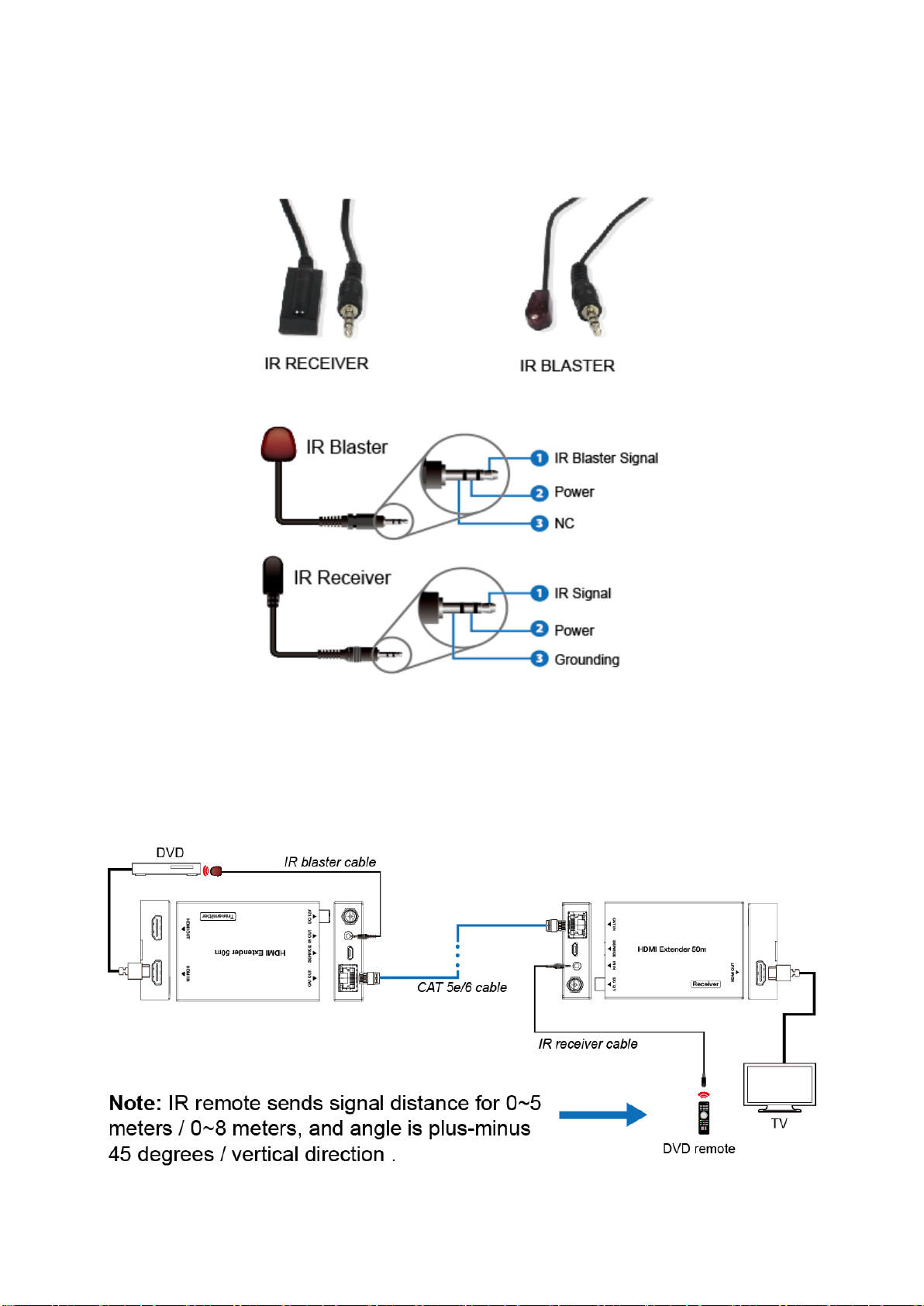
5.3 IR Pin Definition
IR Receiver and Blaster pin’s definition as below:
The following is IR system diagram about IR cable use method.
Page 9
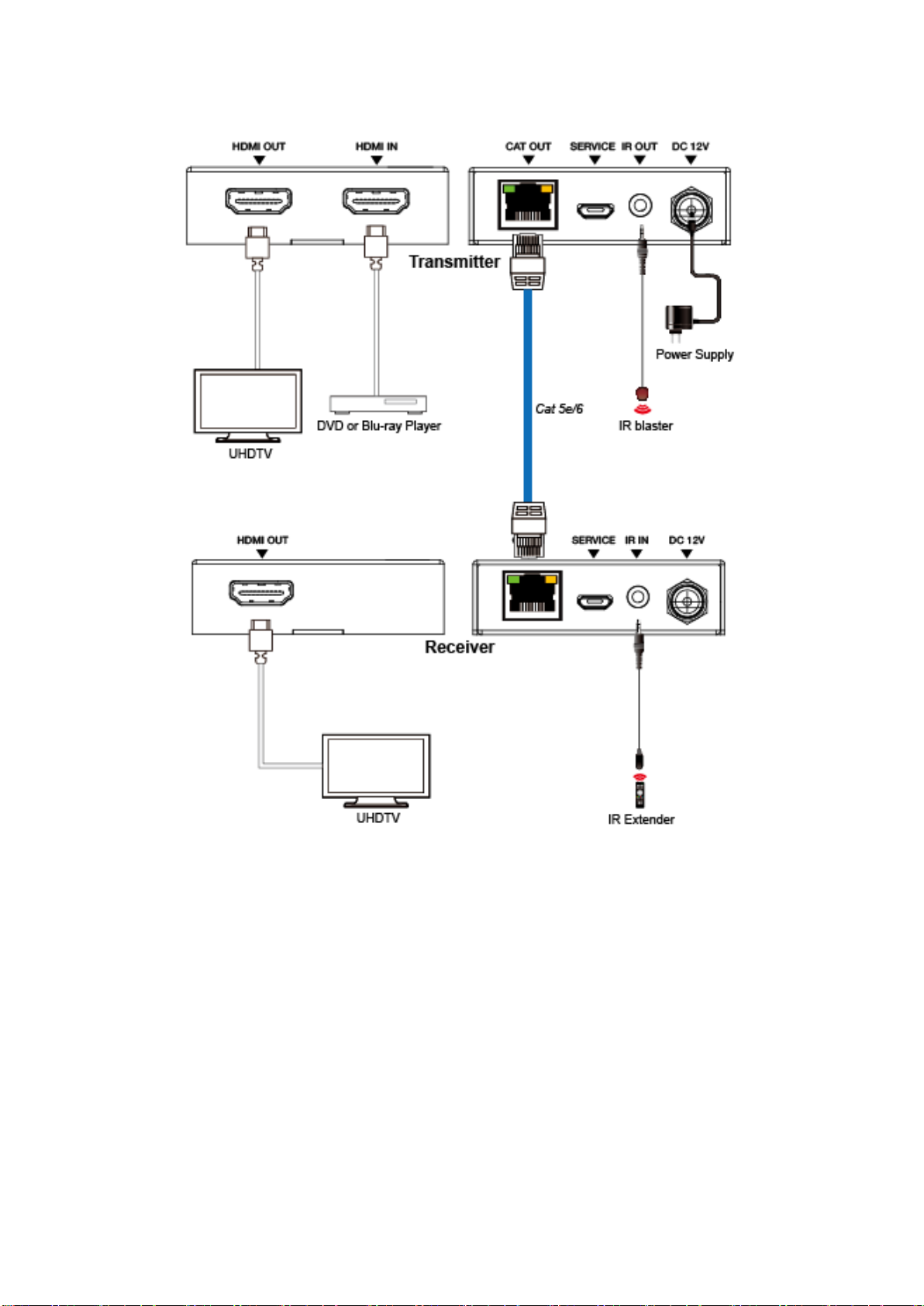
9
6. Application Example
Page 10

10
7. Mission Statement
BZB Gear manifests from the competitive nature of the audiovisual industry to
innovate while keeping the customer in mind. AV solutions can cost a pretty penny,
and new technology only adds to it. We believe everyone deserves to see, hear, and
feel the advancements made in today’s AV world without having to break the bank.
BZB Gear is the solution for small to medium-sized applications requiring the latest
professional products in AV.
We live in a DIY era where resources are abundant on the internet. With that in mind,
our team offers system design consultation and expert tech support seven days a
week for the products in our BZB Gear catalog. You’ll notice comparably lower prices
with BZB Gear solutions, but the quality of the products is on par with the top
brands in the industry. The unparalleled support from our team is our way of
showing we care for every one of our customers. Whether you’re an integrator,
home theater enthusiast, or a do-it-yourselfer, BZB Gear offers the solutions to allow
you to focus on your project and not your budget.
Page 11

11
8. Warranty Information
BZB Gear | Second Year Assurance
BZB Gear wants to assure you peace of mind. We're so confident in the quality of our
products that along with the manufacturer's one-year limited warranty, we are
offering free second-year warranty coverage upon registration*.
Taking advantage of this program is simple, just follow the steps below:
1. Register your product within 90 days of purchase by visiting
BZBGear.com/warranty.
2. Complete the registration form. Provide all necessary proof of purchase details,
including serial number and a copy of your sales receipt.
For questions, please call 1.888.660.2962 or email [email protected].
For complete warranty information, please visit BZBGear.com/warranty or scan the
QR code below.
*Terms and conditions apply. Registration is required.
 Loading...