

Page 1
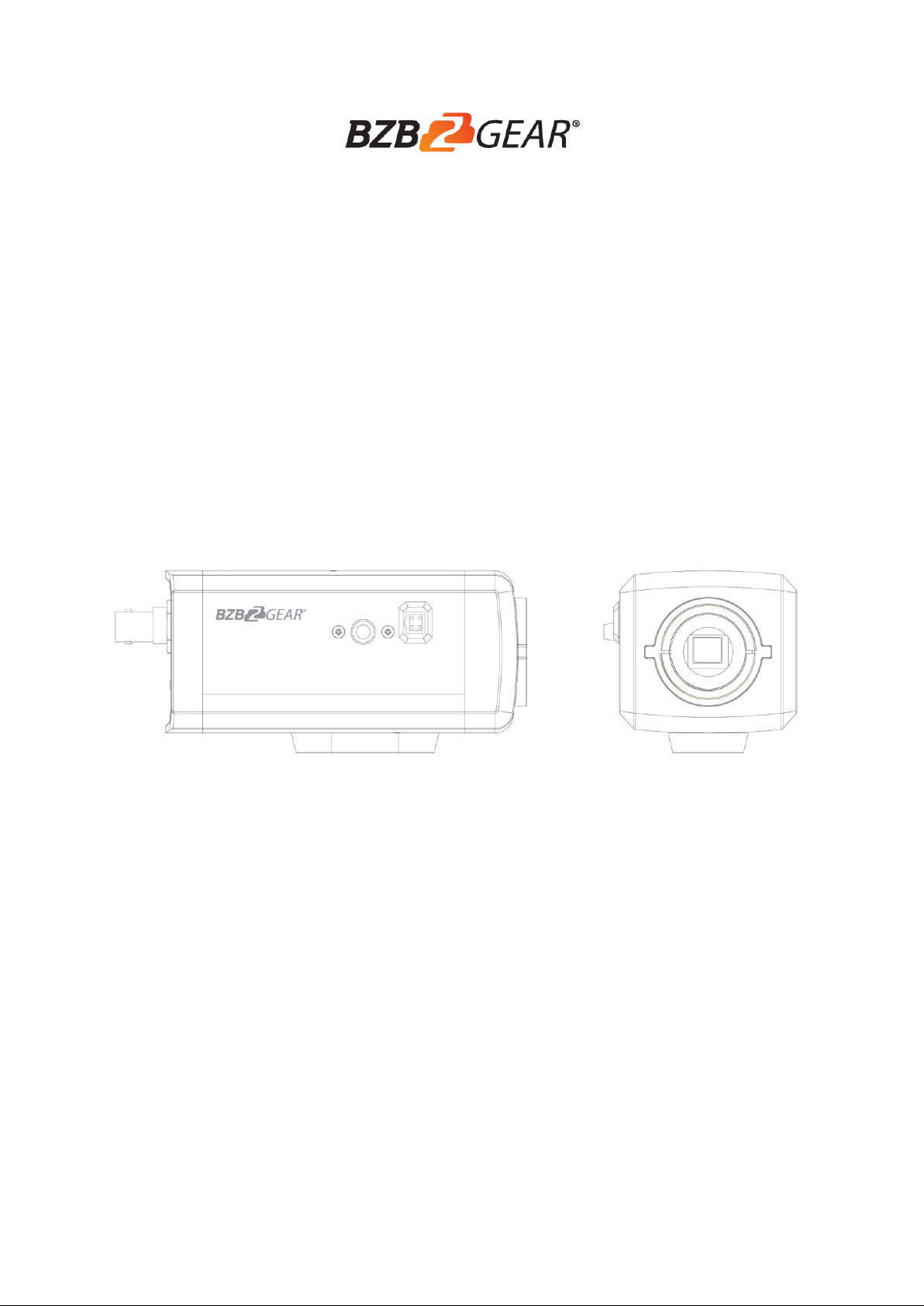
BG-BFS
User Manual
Page 2
- 1 -
Attention
Electrical Safety
Installation and operation must be performed in accordance with local safety standards.
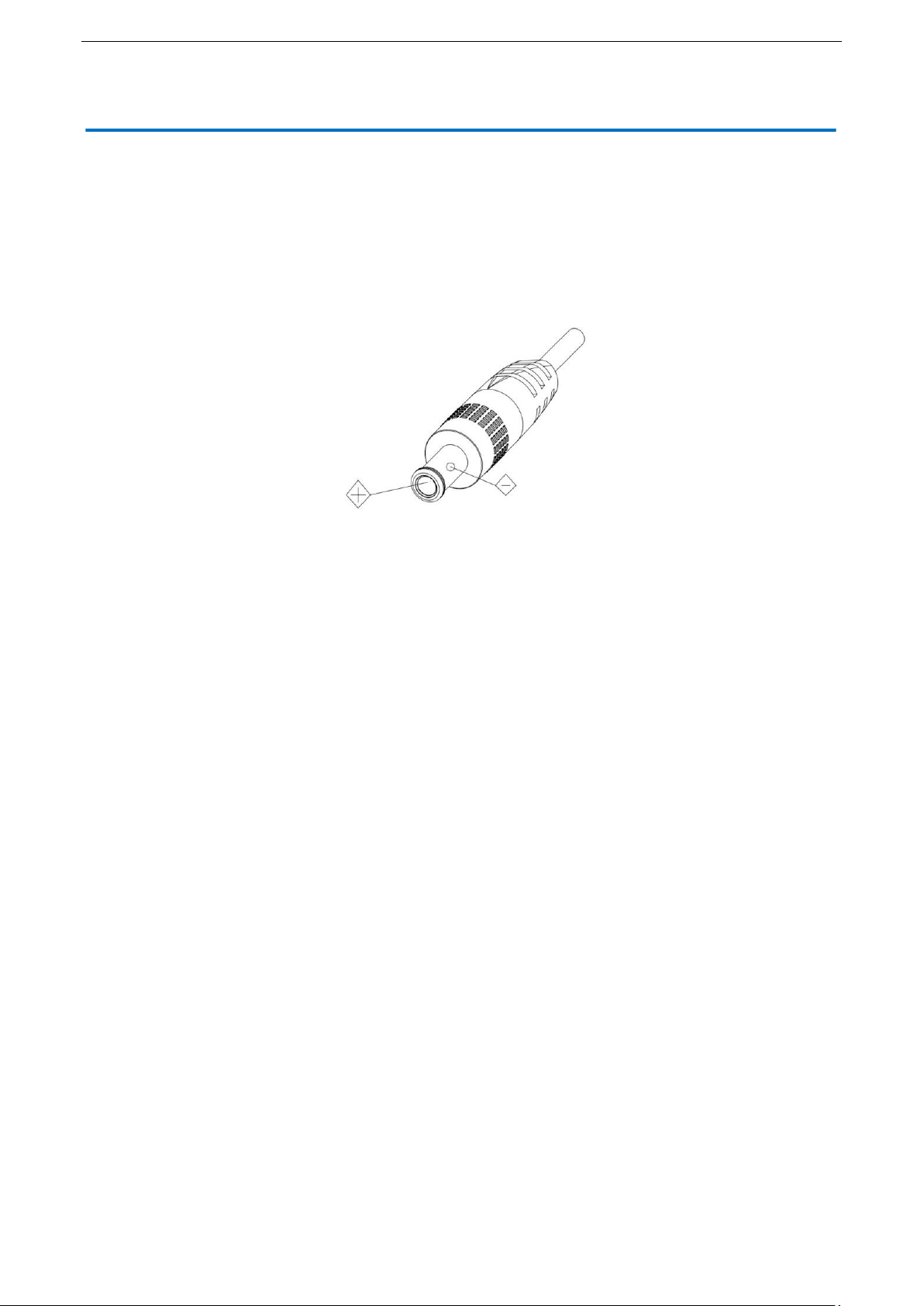
Polarity of power supply
The power supply of the product is DC 12V and following is the polarity of the power supply drawing.
Handle with care
Never move the camera by seizing the camera head. Never rotate camera head by hand, mechanical
damage will occur.
Never power on before installation is completed.
Do not disassemble camera
We are not responsible for any unauthorized modification or dismantling.
Attention:
Electromagnetic fields may affect camera image!
Page 3

- 2 -
Content
ATTENTION ........................................................................................................................................ - 1 -
1.1 CAMERA INTERFACE EXPLANATION........................................................................................................... - 3 -
1.2 POWER ON ............................................................................................................................................. - 3 -
1.3 VIDEO OUTPUT ........................................................................................................................................ - 3 -
1.4 BRACKET MOUNTING ............................................................................................................................... - 4 -
2. PRODUCT OVERVIEW ................................................................................................................ - 5 -
2.1 PRODUCT INTRODUCTION ........................................................................................................................ - 5 -
2.1.1 Dimension ..................................................................................................................................... - 5 -
2.1.2 Accessories ................................................................................................................................... - 6 -
2.2 MAIN FEATURES ...................................................................................................................................... - 6 -
2.2.1 Camera performance .................................................................................................................... - 6 -
2.2.2 Network performance .................................................................................................................... - 6 -
2.3 TECHNICAL SPECIFICATION ...................................................................................................................... - 7 -
2.4 INTERFACE INSTRUCTION ......................................................................................................................... - 8 -
2.4.1 External Interface .......................................................................................................................... - 8 -
2.4.2 RS-485 interface ........................................................................................................................... - 8 -
3. APPLICATION INSTRUCTION ..................................................................................................... - 9 -
3.1 VIDEO OUTPUT ....................................................................................................................................... - 9 -
3.1.1 Power-On Initial Configuration ...................................................................................................... - 9 -
3.1.2 Video output .................................................................................................................................. - 9 -
3.2 MENU SETTING ................................................................................................................................... - 9 -
3.2.1 Main menu..................................................................................................................................... - 9 -
4. NETWORK CONNECTION......................................................................................................... - 14 -
4.1 CONNECTING MODE .............................................................................................................................. - 14 -
4.2 WEBGUI LOG IN ................................................................................................................................... - 15 -
4.2.1 Web client .................................................................................................................................... - 15 -
4.2.2 Preview ........................................................................................................................................ - 16 -
4.2.3 Configuration ............................................................................................................................... - 16 -
4.2.4 Video configuration ..................................................................................................................... - 17 -
4.2.5 Network configuration ................................................................................................................. - 19 -
4.2.6 System configuration ................................................................................................................... - 20 -
4.2.7 Logout ......................................................................................................................................... - 21 -
5. CAMERA MAINTENANCE AND TROUBLESHOOTING ............................................................ - 21 -
5.1 CAMERA MAINTENANCE ......................................................................................................................... - 21 -
5.2 TROUBLESHOOTING .............................................................................................................................. - 21 -
WARRANTY / MISSION STATEMENT .............................................................................................. - 22 -
Page 4
- 3 -
1. FAST INSTALLATION
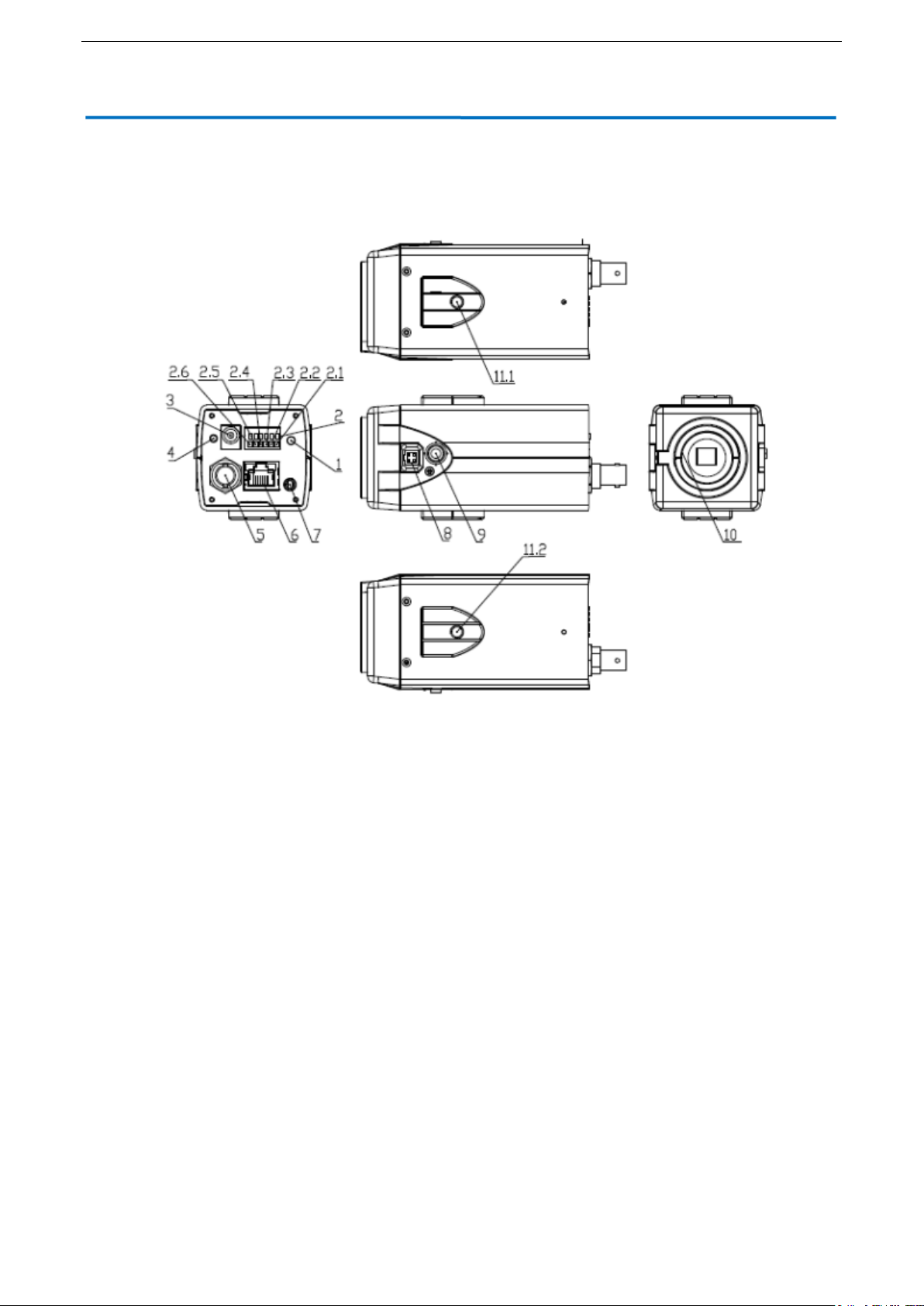
1.1 Camera Interface Explanation
Figure 1.1
1. RESET
2. RS485 and alarm interface
3. DC12V Power Supply Socket
4. Power Indicator
5. 3G-SDI Interface
6. Network Interface
7. Audio Input Interface
8. Auto Iris Interface
9. Function Key
10. Lens Interface
11.1. Tripod screw hole
11.2. Tripod screw hole
1.2 Power on
Power on: connect DC12V power supply adapter. Then the power indicator light on and it is always mode.
1.3 Video output
1) Video output from LAN
a. Network cable connection port: No.6 in above Figure
b. Webpage Login: open your browser and enter 192.168.5.163 in the address bar (factory default); press Enter to enter
into the login page; click on the “player is not installed, please download and install!" and follow the installation steps
Page 5
- 4 -
for installation. Then enter the username admin and password admin (factory default); press Enter to enter into the
preview page, users can carry out PTZ control, video recording, playback, configuration and other operations.
2) 3G-SDI video output
a. 3G-SDI video cable connection: S model refer to No5 in above Figure.
b. Connect the camera and the monitor via 3G-SDI video cable; video output is available after camera power on.
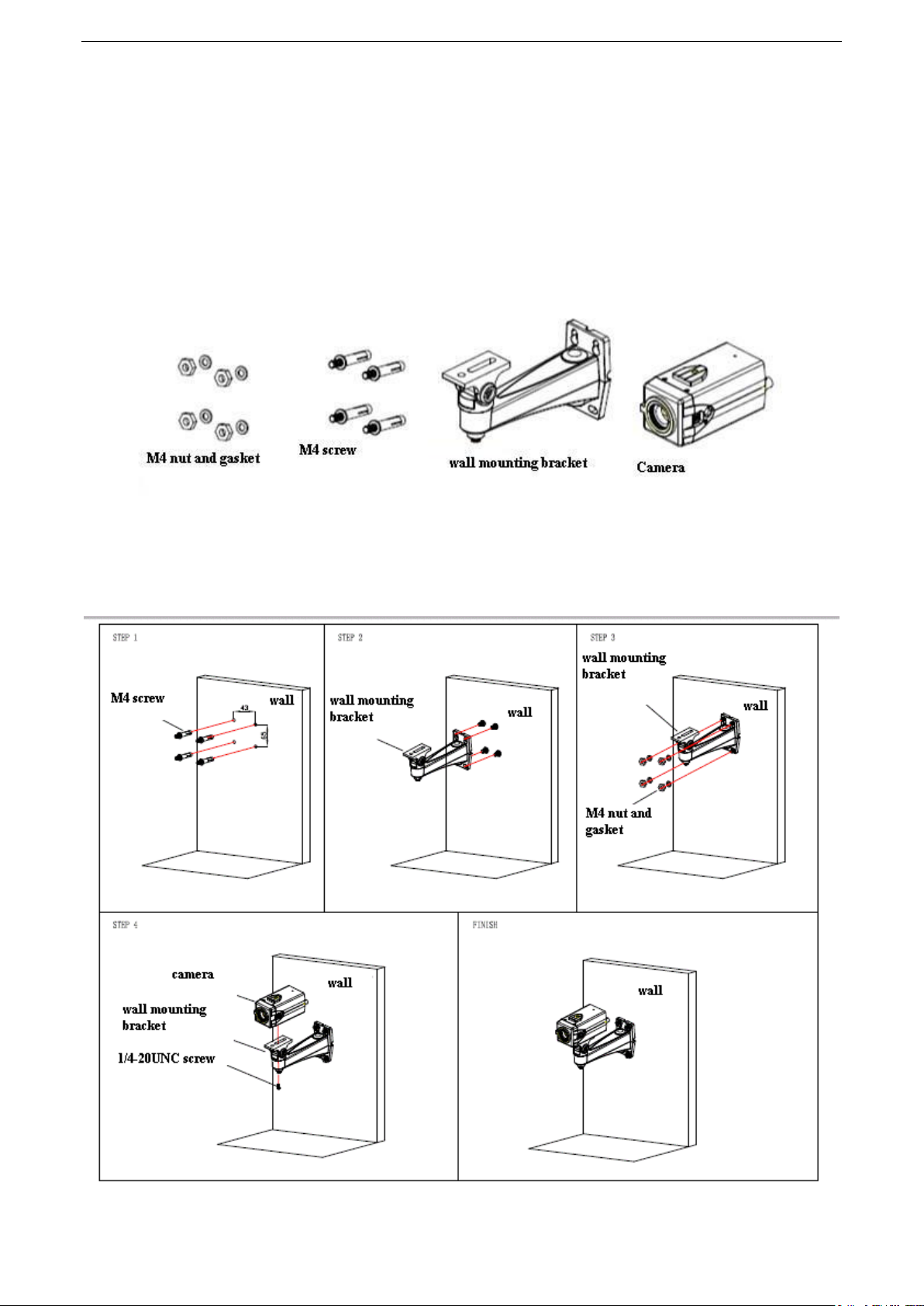
1.4 BRACKET MOUNTING
1) Bracket installation accessory introduction
2) Bracket installation steps
Page 6
- 5 -
2. Product overview
2.1 Product introduction
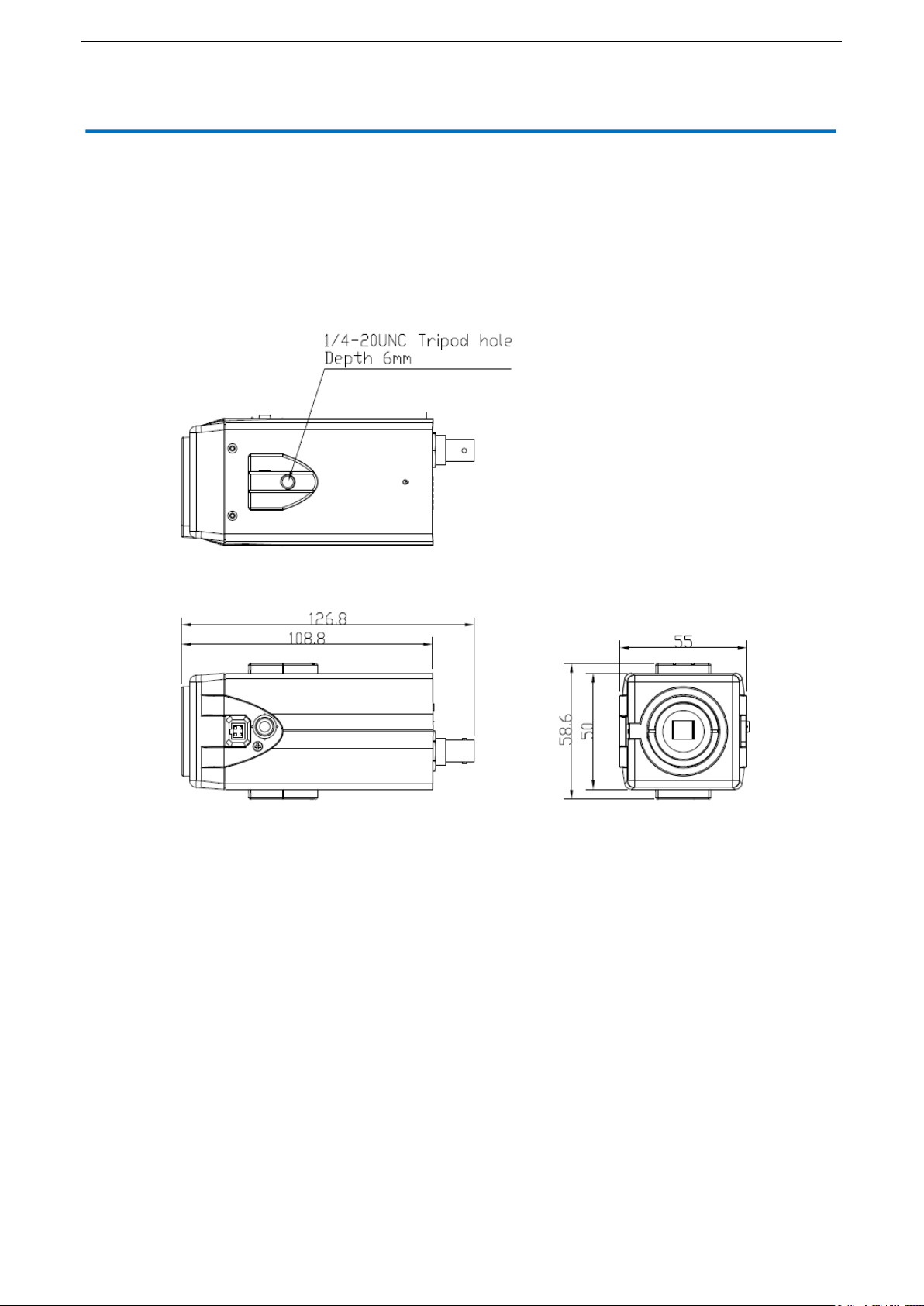
2.1.1 Dimension
Page 7

- 6 -
2.1.2 Accessories
Accessories
Power adapter
User manual
Warranty card
2.2 Main Features
2.2.1 Camera performance
This camera features advanced ISP processing algorithms to provide vivid images with a strong sense of depth, high
resolution and fantastic color rendition. It supports H.264/H.265 encoding which makes motion video fluent and clear even
with less than ideal bandwidth conditions.
1.Superb high-definition image: It employs 1/2.8-inch high quality CMOS sensor. Resolution is up to 1920x1080 with
frame rate up to 60 fps.
2. Low noise and High SNR: Low Noise CMOS effectively ensure high SNR of camera video.
Advanced 2D/3D noise reduction technology is also used to further reduce the noise, while ensuring image sharpness.
3.Multi-Format Video Outputs: support 3G SDI and LAN interfaces
The 3G-SDI is available for 100m transmission at 1080p60 format.
4.Multiple Video compression: Support H.264/H.265 video compression; Support compression of resolution up to
1920x1080 with frame up to 60 fps and 2 channel 1920x1080p with 30 fps compression.
5. Multiple network protocol: Support ONVIF, RTSP, RTMP protocols and RTMP push mode, easy to link streaming
media server (Wowza, FMS)
6. Support Multiple Control Protocol: Support VISCA, PELCO-D, PELCO-P protocols which can also be automatically
recognized. Support VISCA control protocol through IP port.
7. Wide application:
Tele-education, lecture capture, Webcasting, Videoconferencing, Tele-training, Tele-medicine, Interrogation and
Emergency command systems.
2.2.2 Network performance
1. Audio Input Interface: Support 16000,32000,44100,48000 sampling frequency and AAC, MP3, PCM audio coding.
2. Multiple Audio/Video compression: Support H.264/H.265 video compression; AAC, MP3 and PCM audio
compression; Support compression of resolution up to 1920x1080 with frame up to 60 fps and 2 channel 1920x1080p
with 30 fps compression.
3. Multiple network protocol: Support ONVIF, RTSP, RTMP protocols and RTMP push mode, easy to link streaming
media server (Wowza, FMS)
Page 8
- 7 -
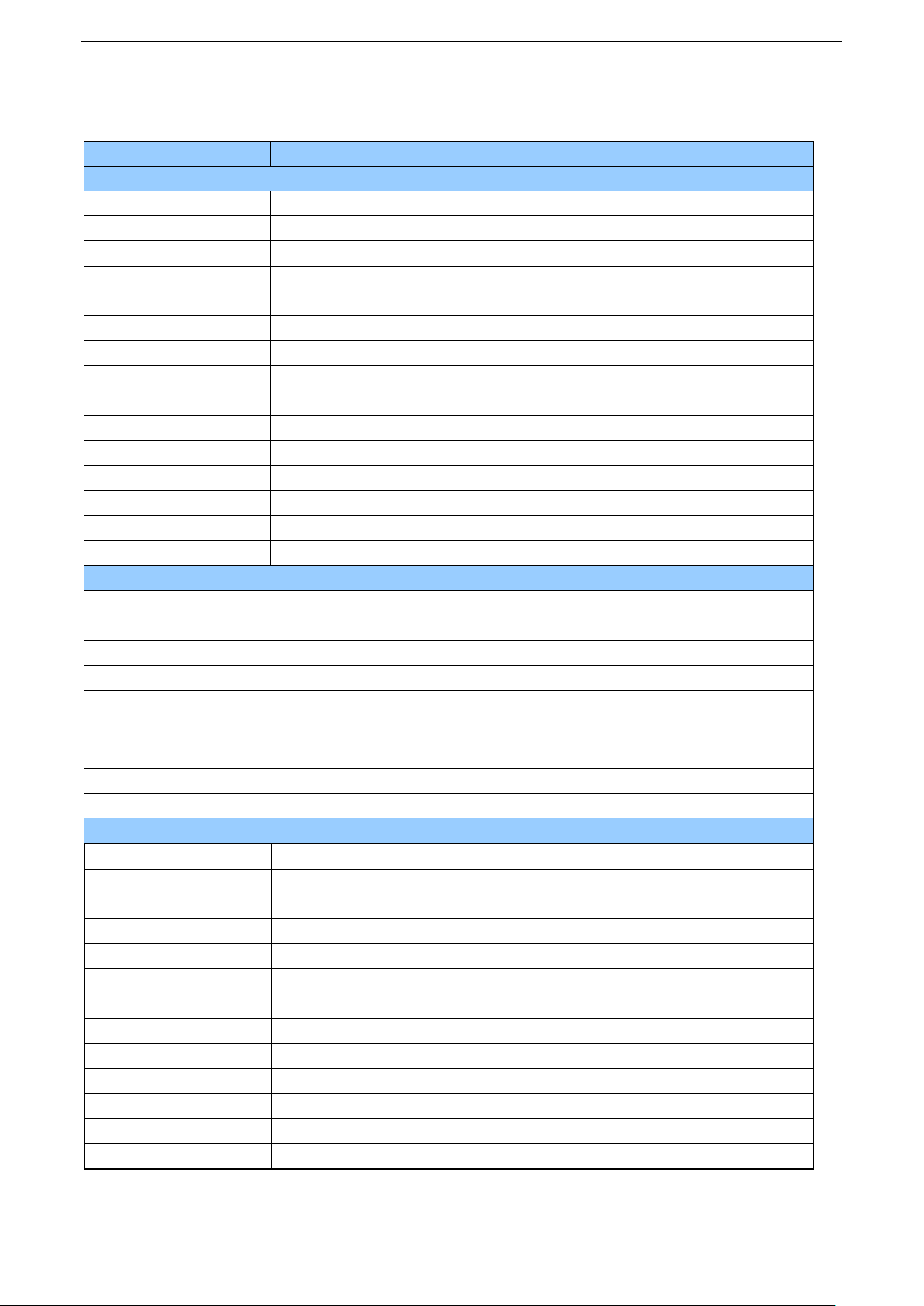
2.3 Technical specification
Model
Camera Parameter
Sensor
1/2.8-inch high quality HD CMOS sensor
Effective Pixels
16: 9; 2.07 megapixel
Video Format
1080P60/30/25/59.94/29.97 ,720P60/30/25/59.94/29.97
Auto Iris
DC driving mode
Digital Zoom
X5
Minimum Illumination
0.5Lux (F1.8, AGC ON)
DNR
2D﹠3D DNR
White Balance
Auto/Manual/One Push/ 3000K/ 4000K/5000K/6500K
Focus
Auto/Manual
Aperture
Auto/Manual
Electronic Shutter
Auto/Manual
BLC
ON/OFF
WDR
OFF/ Dynamic level adjustment
Video Adjustment
brightness, color, saturation, contrast, sharpness, B/W mode, gamma curve
SNR
>55dB
Input/output Interface
Video Interface
3G-SDI
Image Code Stream
Dual streams output
Video Compression Format
H.264/H.265
Control Interface
RS-485
Control Protocol
VISCA/Pelco-D/Pelco-P; Baud Rate: 115200/9600/4800/2400bps
5 Control Keys
UP/DOWN/LEFT/RIGHT/CONFIRM keys for OSD setting, EPTZ controlling
HD IP Interface
100M IP port (10/100BASE-TX), Support VISCA protocol control through IP port.
Network Protocol
RTSP, RTMP, ONVIF
Power Interface
Standard DC interface
Other Parameters
Power Adaptor
Input AC110V-AC220V, output DC12V/1A, support POE (optional)
Input Voltage
DC12V±10%
Input Current
400mA(max)
Consumption
4.8W (max)
Store Temperature
-10℃~+60℃
Store Humidity
20%~95%
Working Temperature
-10℃~+50℃
Working Humidity
20%~80%
Dimension
126.8mmX55mmX58.6mm
Weight
0.5kg
Remote Operation (IP port)
remote upgrade, remote reboot and remote reset
Accessory
12V/1A power supply, user manual, warranty card
Optional Accessory
Installation Bracket
Page 9
- 8 -
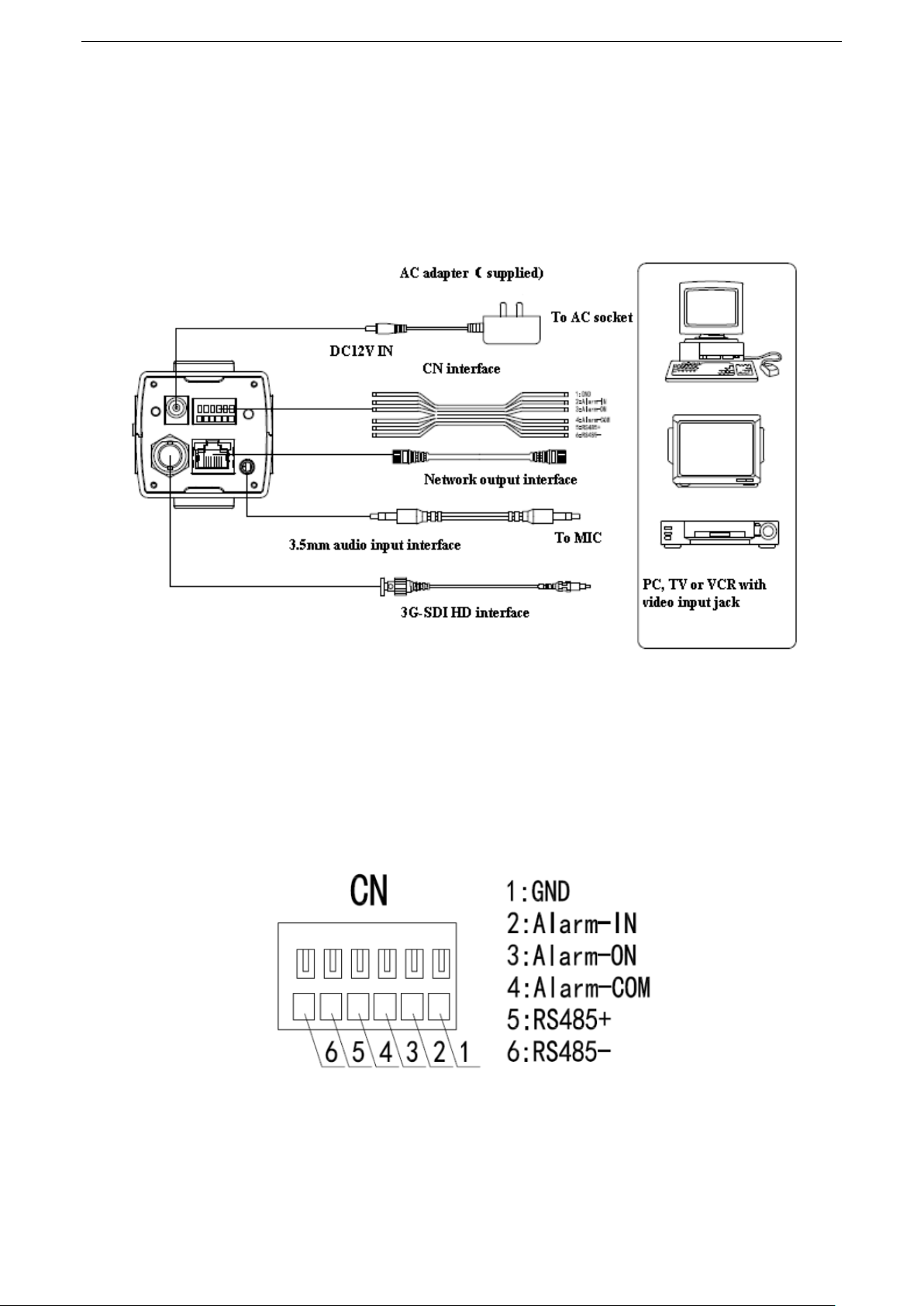
2.4 Interface instruction
2.4.1 External Interface
1) RS485 interface, alarm input output, audio input interface, 3G-SDI output, LAN, DC12V power interface, auto iris
interface
2.4.2 RS-485 interface
Page 10

- 9 -
3. Application Instruction
3.1.1 Power-On Initial Configuration
Connecting the DC12V power cable, and then the power indicator light will be flashing.
3.1.2 Video output
1) Network output: connect this product and your computer through network cable, then open the browser, enter the
camera IP address (factory default 192.168.5.163) in the address bar, then to the login page and input a username
and password (factory defaults are “admin”). Finally enter the preview page, and the image comes out.
(Note: If you forget your username, password, IP address, you can manually restore the default by the RESET key
at the bottom of the machine.)
2)3G-SDI output: Connect the monitor with the corresponding video output interface, then the monitor output image.
3.2 MENU SETTING
3.2.1 Main menu
In normal working mode, press 【Function】 key to display the menu(as shown in No. 9 Figure 1.1), using scroll arrow to
point at or highlight the selected items.
LANGUAGE: Language setting, Chinese / English
Exposure: enter sub menu
Color: enter sub menu
Image: enter sub menu
Noise Reduction: enter sub menu
Video format: enter sub menu
VERSON: enter sub menu
Restore Default: enter reset setting, select YES or NO to confirm
MENU
================
Language English
(Exposure)
(Color)
(Image)
(Noise Reduction)
(Video Format)
(Version)
(Restore Default)
Back
[↑↓]Select [← →]Change Value
[Menu]Back [Home]OK
Page 11

- 10 -
[↑↓] Select: for selecting menu
[← →] Change value: for modify parameters
[MENU] Back: Press [MENU] to return
[Home] OK: Press [Home] to confirm
3.2.1.1 Exposure
Move the pointer to the (Exposure) in the Main Menu, click the【HOME】key and enter into the (Exposure sub menu) as
shown below,
MODE: Auto, Manual, Shutter priority, Iris priority and Brightness priority.
EV: On/Off (only available in auto mode)
Compensation level: -7~7 (only available in auto mode when EV is ON)
BLC: ON/OFF for options (only available in auto mode)
Anti-Flicker: OFF/50Hz/60Hz for options (only available in Auto/Iris priority/Brightness priority modes)
Gain limit: 0~15(only available in Auto/ Iris priority /Brightness priority mode)
BRIGHTNESS: 0~23 (only available in Brightness priority mode)
WDR: Off, 1~8
Shutterpriority:1/25,1/30,1/50,1/60,1/90,1/100,1/120,1/180,1/250,1/350,1/500,1/1000,1/2000,1/3000,1/4000,1/6000,
1/10000 (only available in Manual and Shutter priority mode)
IRIS priority: OFF,F11.0,F9.6,F8.0,F6.8,F5.6,F4.8,F4.0,F3.4,F2.8,F2.4,F2.0,F1.8(only available in Manual and Iris priority
mode)
3.2.1.2 COLOR
Move the pointer to the (COLOR) in the Main Menu, click the【HOME】and enter the (COLOR sub menu) as follow,
EXPOSURE
=================
Mode Auto
EV OFF
BLC OFF
Flicker 50Hz
G. Limit 7
WDR 5
[↑↓]Select [← →]Change Value
Page 12

- 11 -
WB MODE: Auto,3000K,4000K,5000K,6500K,Manual,One Push
RED GAIN: 0~255(only available in Manual mode)
BLUE GAIN: 0~255(only available in Manual mode)
SATURATION: 60%, 70%, 80%, 90%, 100%, 110%, 120%, 130%
Hue: 0~14
AWB Sensitivity: high/middle/low
Color Style: Default, style1~4.
Color temp: high/middle/low
3.2.1.3 IMAGE
Move the pointer to the (IMAGE) in the Menu, click the【HOME】and enter into the (IMAGE sub menu) as follow,
Brightness: 0~14
IMAGE
================
Brightness 6
Contrast 8
Sharpness 7
Flip-H OFF
Flip-V OFF
B&W-Mode Color
Gamma Default
DCI 1
[↑↓]Select [← →]Change Value
[Menu]Back
COLOR
================
WB Mode Auto
Saturation 80%
Hue 7
AWB Sensitivity High
Color style Default
Color temp Middle
[↑↓]Select [← → ]Change
Value
Page 13

- 12 -
Contrast: 0~14
Sharpness:0~15
Flip-H: On/Off
Flip-V: On/Off
B&W mode: color, black/white
Gamma: default/0.47/0.50/0.52/0.55
DCI: Dynamic Contrast: Off/1~8
3.2.1.4 NOISE REDUCTION
Move the pointer to the (NOISE REDUCTION) in the Menu, click the【HOME】and enter the (NOISE
REDUCTION) as follows,
2D NOISE REDUCTION: Auto, close, 1~7
3D NOISE REDUCTION: Close, 1 ~8
Dynamic Hot Pixel: Close, 1~5
3.2.1.5 Video Format
Move the pointer to the (Video Format) in the Menu, click the【HOME】and enter the (Video Format) as follow,
3.2.1.6 Version
Move the pointer to the (VERSION) in the Main Menu, click the【HOME】and enter the (VERSION) as
follow,
VIDEO FORMAT
================
1080P60 1080P50
1080I60 1080I50
1080P30 1080P25
720P60 720P50
720P30 720P25
1080P59.94 1080I59.94
1080P29.97 720P59.94
720P29.97
[ ↑↓]Select
[Menu]Back
NOISE REDUCTION
=================
NR-2D Auto
NR-3D 3
Dynamic Hot Pixel OFF
[↑↓]Select [← →]Change Value
[Menu]Back
Page 14

- 13 -
Note: version information would be different after FM upgrading.
3.2.1.7 RESTORE DEFAULT
Move the pointer to the (RESTORE DEFAULT) in the Main Menu, click the【HOME】and enter the
(RESTORE DEFAULT) as follow.
Restore default: YES/NO.
RESTORE DEFAULT
=================
Restore Default? NO
[↑↓]Select [← →]Change
Value
VERSION
=================
Version 2.0.0.2 2016-1-27
Back
Page 15
- 14 -
4. Network Connection
4.1 Connection Mode
Direct connection: Connect the camera directly to the computer by using an ethernet cable.
Internet connection mode: Connect the camera and computer to a router or switch and access via the local area
network (LAN).
Note: Ensure power and network connections are secured to prevent video issues caused by poor connection
quality.
The computer must be on the same subnet as the camera to connect successfully. The device will not be accessible
otherwise. The camera default IP address is 192.168.5.163, therefore the computer must be connected to the 192.168.5.x
subnet.
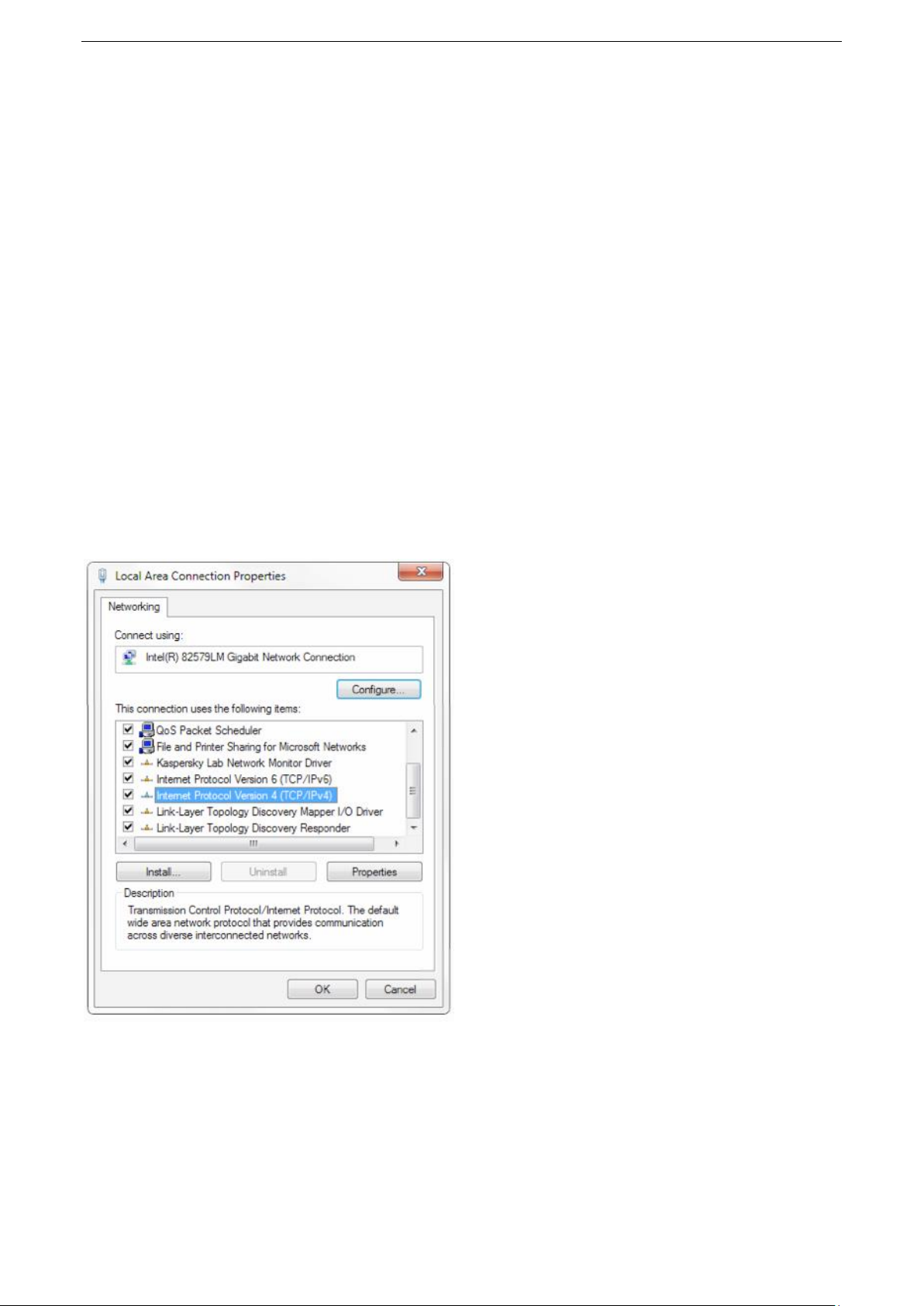
To connect to the camera open the Local Area Connection Properties on the computer.
For Windows users right-click on the internet connection in the lower right corner of the desktop.
Select “Open Network & Internet Settings”.
Select “Change Adapter Options”.
Right-click on your connection (Wi-Fi or Ethernet) and select “Properties”.
Select “Internet protocol version 4 (TCP/IPv4” as shown below and click “Properties”.
Page 16
- 15 -
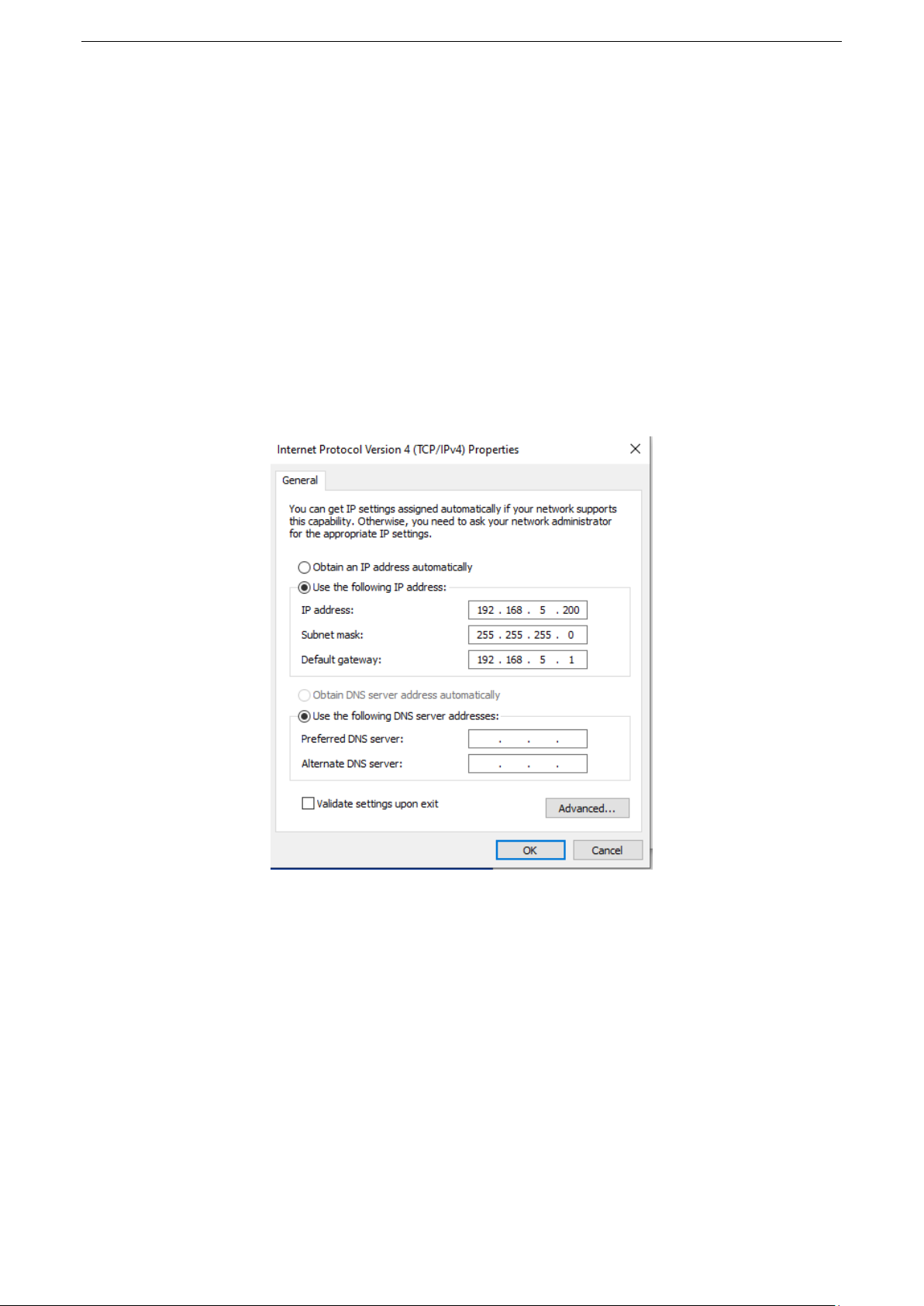
For the following steps refer to the diagram below.
Click on the bubble for “Use the following IP address”
In the IP address field enter a non-conflicting IP address on the same subnet as the camera. If there is another device with
the same IP address you will not be able to connect. In the example below we are using 192.168.5.200
In the Subnet mask field enter 255.255.255.0
In the Default gateway field type 192.168.5.1
You can leave the DNS fields blank.
Click OK to apply your settings.
NOTE: When you are finished configuring the camera you will need to return to this screen and click the bubbles for
“Obtain an IP address automatically” and “Obtain DNS server automatically” to restore internet connectivity to your
computer. Also make sure to reconnect any ethernet cables you may have unplugged.
4.2 WebGUI Log In
4.2.1 Web client
1) Web client Log In
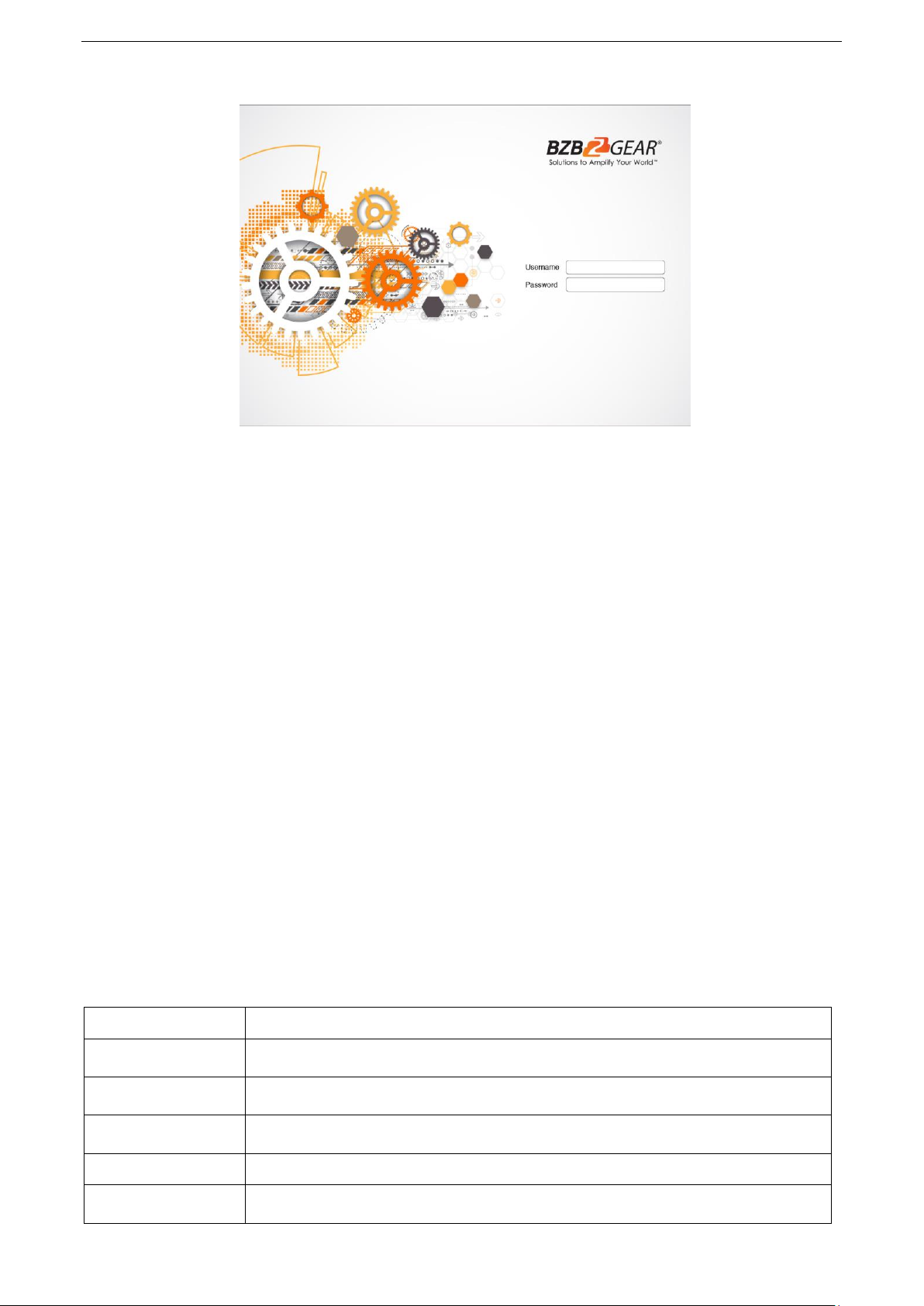
Input the IP address 192.168.5.163 of the device in the address filed of browser and click Enter button to
enter into Web Client login page as below picture. User can login as administrator and normal user. If log
in as administrator (Default: Username – admin / Password – admin), users can preview, playback,
configuration and cancel in the Web Client. If log in in as normal user (Default: Username/Password –
user1 or user2), users can only preview, playback and cancel; no option for configuration.
Page 17
- 16 -
Supported browsers for WebGUI access include Chrome, Firefox, and Safari
4.2.2 Preview
After successful login into the management interface, it enters the video preview interface. In the preview
screen, users can control PTZ, zoom, focus, video capture, sound, focus, full screen and set the preset
position, run, delete and other operations.
1) Login as administrator
Default Username/password: admin
PTZ control can be carried out, zoom, focus, video capture, sound, zoom, full screen and set the preset
position, run, and delete; you can preview, playback, configuration, log off.
2) Login as normal user
Default Username/password: user1 or user2
PTZ control can be carried out, zoom, focus, video capture, sound, zoom, full screen and set the preset
position, run, and delete; you can preview, playback and log off.
NOTE: There is no configuration rights for normal user login.
4.2.3 Configuration
Click Configuration to enter into the device parameters setting page
There are the following options: Local configuration, audio configuration, video configuration, network
configuration, PTZ configuration, internet access configuration, system configuration. For detailed
descriptions, see the following table.
Menu
Explanation
Local configure
Including video preview mode, record video packing time, record video storage
route settings etc.
Audio configure
Including audio compressing format, sampling frequency, sampling precision,
compressing code rate settings etc.
Video configure
Including video encoding, video parameters, character-overlapping, character
size, video output setting etc.
Network configure
Including basic parameters, Ethernet, DNS, wireless network setting etc.
System configure
Including equipment property, system time, user management, version update,
Reset, Reboot device settings etc.
Page 18

- 17 -
1) Local configuration
Video Preview Mode: user can choose real-time priority or fluency priority: The delay will be small
when under real time priority mode and fluency will be good when under fluency priority mode. Setting
based on the user need (Default value: real time normal (2), real time best (1), fluency normal (3), fluency
good (4) and fluency best (5))
Recording packing time(minute): Set recording video packing time (default is 10, range from
1~120 minutes)
Recording/Snapshot file storage route: Set local recording video/snapshot file storage route.
(Default D:\MyIPCam\)
Click the Save button to make settings effective.
2) Audio Configuration
Switch: Choose to enable the audio or not.
Compressing format: Set audio compressing format and the device will reboot automatically after
change (default MP3, PCM, AAC optional)
Sampling frequency: Set sampling frequency and the device will reboot automatically after change
(default 44100,16000,32000 and 48000 optional)
Sampling precision: Set sampling precision (default 16bits)
Compressing code rate: Set audio compressing code rate (default 64bits,32,48,96,128bits
optional)
Note: Click “SAVE”, it will remind Enable has changed. Restart the device to take effect after the
success of the save. Then reboot the camera to make new settings take effect.
4.2.4 Video configuration
1) Video encoding
Code stream: Stream: Different video output mode setting, use different streams. (Main stream,
secondary stream)
Compression Format: Set the video compression format, save and reboot to take it effect (primary /
secondary stream default: H.264,H.265 optional)
Video Size: Set video image resolution, save and reboot to take it effect (main stream default 1920 *
1080 or 1280 * 720 optional; default secondary stream 640 * 320,320 * 180,1280 * 720,1920 * 1080
optional)
Stream Rate control: Set rate control mode, save and reboot to take it effect (Primary / secondary
stream default variable bit rate, fixed rate is for option).
Image Quality: Set the image quality, image quality can be changed only when rate control is variable bit
rate, (main stream defaulted is better, secondary stream default is not good, there are best, better, good,
bad, worse, worst for options).
Rate (Kb / s): Set the video bit rate (main stream default 4096Kb / s,64-12288Kb / s optional; secondary
stream default 1024Kb / s,64-10240Kb / s optional).
Frame rate (F / S): Set the video frame rate (primary / secondary stream default 25F / S, primary stream
5-60F/S optional, secondary stream 5-30F / S optional).
Keyframe interval: Set the key frame interval (primary / secondary stream default 75F, primary / stream
1-300F optional. secondary stream 1-150F optional).
Click the "Save" button to display the "saved successfully" message, then settings take effect.
2) Stream Release
Switch: To turn on/off the main / secondary stream.
Protocol: primary / secondary stream applies RTMP protocol.
Host Port: server port number (default 1935,0-65535 optional)
Host Address: server IP addresses (default 192.168.5.11)
Stream Name: choose a different stream name (live / av0, live / av1 optional).
User: Set the username.
Password: Set the password.
Click on the "Save" button to display the "Save successful" message, then settings take effect.
Method of obtaining RTSP: rtsp: // device IP address: 554 / live / av0 (av0 main stream; av1 secondary
stream)
Page 19

- 18 -
3) Video Parameters
a. Focus: Focus mode, focus range, focus sensitivity can be set.
Focus Mode: set the focus mode (the default auto, manual optional)
Focus range: set the focus range (the default middle, the upper and lower optional)
Focus Sensitivity: Set the focus sensitivity (default is low, high, medium optional)
b. Exposure: Exposure mode, exposure compensation, back light compensation, anti-flicker,
gain limit, wide dynamic, shutter speed, aperture value and brightness can be set.
Exposure Mode: Set the exposure mode (the default automatic, manual, shutter priority, aperture priority,
Brightness priority optional)
Exposure compensation: Exposure compensation setting is active when it is auto status (default is off).
Exposure compensation value: Set the exposure compensation value, valid when it is set for auto
(default 0-7 to 7 optional).
BLC: Set back light compensation, valid when it is auto status (default is off).
Anti-flicker: Set up anti-flicker mode, valid when status of automatic, aperture or brightness priority
(default 50Hz, closed,60Hz optional).
Gain limit: set the gain limits, auto, active when it is status of aperture or brightness priority (default
7,0-15 optional).
Dynamic range: set the dynamic range (default 3,0-8 optional).
Shutter speed: active when it is status of manual or shutter-priority (default 1 / 90,1 / 90,1 / 100,1 / 1/120
/ 180,1 / 250,1 / 350,1 / 500,1 / 725 1 / 1000,1 / 1500,1 / 2000,1 / 3000,1 / 1/4000 / 6000,1 / 10000
optional).
Aperture value: Set the aperture value, active when it is status of manual or aperture-priority(default
F1.8,closed,F9.6,F8.0,F6.8,F5.6,F4.8,F4.0,F3.4,F2 .8,F2.4,F2.0,F1.8 optional).
Brightness: Set the brightness value, active when it is a state of brightness priority (default 7,0-23
optional).
c. Color: White balance, saturation, color, white balance, sensitivity, color temperature, gain red
and blue gain can be set.
White balance modes: Set the white balance mode (the default
automatic,3000K,4000K,5000K,6500K, manual, One-push optional). Note: Click the “Correction” button
when selected the One-push white balance mode.
Saturation: Set the saturation (default 80%,60%,70%,80%,90%,100%,110%,120%,130%, optional).
Auto white balance Sensitivity: Sensitivity Auto white balance settings (default is low, high, medium
optional).
Chroma: Set the chrome (default 7,0-14 optional).
Color Temperature: set color temperature (Default setting: High, with low, middle for options)
Red Gain: Set the red gain, effective when it is manual (default 255,0-255 optional).
Blue Gain: Sets the Blue gain, effective when it is manual (default 199,0-255 optional).
d. Image: Brightness, contrast, sharpness, black and white mode,the gamma curve, Horizontal
Flip and Vertical Flip can be set.
Brightness: Set the brightness (default 6,0-14 optional).
Contrast: set the contrast (default 8,0-14 optional).
Sharpness: Set the sharpness value (default 7,0-15 optional).
Black and white mode: Set black and white mode (default color, black/white optional ).
Gamma: Gamma value setting (default,0.45,0.50,0.52,0.55 optional).
Flip Horizontal: Set Flip Horizontal (default Off, On optional).
Flip Vertical: Set vertical flip (default Off, On optional).
e. Noise Reduction: 2D noise reduction,3D noise reduction and dynamic dead pixel correction
available.
2D Noise Reduction: Set 2D noise reduction level (default Auto,1-7 and Off optional).
3D Noise Reduction: Set 3D noise reduction level (default 3,1-7 and Off optional).
Dynamic dead pixel correction: Set Dynamic dead pixel correction (default Off,1-8
optional).
Note: Click “Refresh” to make revision of any video parameters of a,b,c,d,e effective .
Page 20

- 19 -
4) Character-Overlapping
Display date and time: Set whether to display the time and date (default display).
Display Title: Set whether to display the title (default display).
Font Color of Time: Set font color of time and date (default white, black, yellow, red, blue
optional).
Font Color of Title: Set font color of title (default white, black, yellow, red, blue optional).
Moving characters: Set the display position of moving date, time and title, click on the "up,
down, left, right" buttons to move the corresponding character position.
Title Content: Set title content (default CAMERA1).
Time Content: Set time content (default 1970/01/10 05:36:00)
Click on the "Save" button and display the "Save successful" message, then valid
5)Character Size
Main stream character size: Set the character size of the display, the device will restart
automatically after changed and saved (default 24,24,16 optional)
Secondary stream character size: Set the character size of the display, the device will restart
automatically after changed and saved (default 16,24,16 optional)
Click on the "Save" button to display "Parameter saved successfully" message, set to take effect
6)Video output
S model output Format: 1080P60, 1080P50, 1080P30, 1080P25, 1080I60, 1080I50, 720P60, 720P50,
720P30,720P25,1080P59.94,1080I59.94,1080P29.97,720P59.94,720P29.97.
M model output format: 1080P30, 1080P25, 720P30, 720P25, 1080I59.94, 1080I60, 1080I50,
1080P29.97, 720P29.97
Click on the "Save" button, it will be valid when display "Save successful".
4.2.5 Network configuration
1) Network port
Data port: set the data port, the device will restart automatically after changed (default 3000,0-65535
optional).
Web Port: Set Web port, the device will restart automatically after changed (default is 80,0-65535 is
optional).
Onvif Port: Set Onvif port, the device will restart automatically after changed (default 2000,0-65535
optional).
Soap Port: Set Soap port (default 1936,0-65535 optional).
RTMP Port: Set RTMP port (default 1935,0-65535 optional).
RTSP Port: Set RTSP port, the device will restart automatically after changed (default 554,0-65535
optional).
Visca Port: Set Visca port, the device will restart automatically after changed (default 3001,0-65535
optional).
Click on the "Save" button, it will be valid when display "Save successful".
RTMP Obtaining method: rtmp: // device IP address: 1935 / live / av0 (av0 main stream; av1 secondary
stream)
2) Ethernet parameters
DHCP: Enable or disable obtain IP automatically can be set. Save changes and reboot the device to
takes effect (Default: OFF)
IP Address: Set the IP address, save changes and reboot the device to takes effect (default
192.168.5.163). Note: This IP address is the same with the one used to login Web page.
Subnet Mask: Set the subnet mask (default 255.255.5.0).
Default Gateway: Set the default gateway (default 0.0.0.0).
Physical Address: Set the physical address (the parameter is read-only but cannot be modified).
Click on the "Save" button, it will be valid when display "Save successful". (Note: To prevent IP conflicts
When modify).
3) DNS parameters
Preferred DNS server: set the preferred DNS server. (Default 0.0.0.0).
Page 21

- 20 -
Alternate DNS server: Alternate DNS server settings. (Default 0.0.0.0).
Click on the "Save" button, it will be valid when display "Save successful".
4) GB28181
Switch: set whether open GB28181, can check
Time Synchronization: whether synchronization time is set, you can check
Stream Type: stream type setting (the default main stream, secondary stream optional)
Sign effective time (in seconds): 3600 Range 5-65535
Heartbeat time (seconds): 60 Range 1-65535
Register ID: 34020000001320000001
Register Username: IPC
Register Password: 12345678
Equipment ownership: Users can add their own
Administrative regions: Users can add their own
Alarm Zone: Users can add their own
Equipment installation address: Users can add their own
Local SIP Port: 5060 Range 0-65535
GB28181 Server Address: IP address of the computer
Server SIP Port: 5060 Range 0-65535
Server ID: 34020000002000000001
Click on the "Save" button, it will be valid when display "Save successful".
4.2.6 System configuration
1) Device Properties
Device Name: Set the device name (the default Camera1, user can add their own).
Device ID: Set the device ID (default 1, Read-Only).
System Language: Set the system language (default Simplified Chinese, English optional). Need to
re-login after modify and save the setting.
Click on the "Save" button, it will be valid when display "Save successful".
2) System Time
Date Format: Set the date format (YYYY-MM-DD default That year - month - day, MM-DD-YYYY namely
Month - Day - Year, DD-MM-YYYY date - month - year Optional).
Date separator: set the date separator (default '/','.','-' Optional).
Time Zone: Set the time zone (default East eight districts, other time zones optional).
Time Type: Set the time types (default 24 hours, optional 12 hours).
Time setting: Set time mode (to choose the computer time synchronization, NTP server time
synchronization, or set manually).
Computer Time: Set the computer synchronization valid.
Update interval: Set the NTP server automatic updated time interval. Valid after setting NTP server
synchronization (default one day,2-10 days Optional).
NTP server address or domain name: Set NTP server address or domain name (default time.nits.gov).
Valid after setting NTP server synchronization.
NTP Server Port: Sets the NTP server port (default 123). Valid after setting NTP server synchronization.
Set the time manually, Effective when set manually.
Click on the "Save" button, it will be valid when display "Save successful".
3) User Management
Select users: Set the user type (the default administrator, Common User 1, Common User 2 optional)
Username: set the username (Select User Administrator default admin; select a common user1 default
user1; to select a common user 2 default user2; user can modify their own)
Password: Set a password (Select User Administrator default admin; select a common user1 default
user1; to select a common user 2 default user2; user can modify their own).
Password confirmation: Confirm the input passwords are the same or not.
Click on the "Save" button to display the "Save successfully" message, then the set is to take effect.
Note: Please note the case-sensitivity of the username and password.
If login page by a common user’s name and password, one does not have configuration privileges but can
only operate to preview, playback, logoff.
4) Version upgrade
Page 22

- 21 -
MCU version V2.0.0.16 2015-12-18
Camera version V2.0.0.16 2015-12-18
Focus version V2.0.0.6 2015-12-11
Users only read the version information above which is consistent with the menu version but cannot
modify. Different types of the machine has different information.
Update file:
Click "Browse ..." installation, to select the upgrade file in the pop-up window.
Click on the "Upgrade" button, the upgrade dialog will appear. the device will reboot automatically after
update successfully. (Note: make sure the power and network is keeping connected during the process or
the upgrade will fail)
5) Restore factory setting
Click on pop-up "Restore Factory Defaults" button and choose “yes” or “no”, then the device will restart
automatically and restore factory setting.
6) Reboot
Click on the pop-up "Reboot" button and choose “yes” or “no”, then the device will restart automatically
4.2.7 Logout
Point "Logout" pop-up "Confirmation" dialog; select "Yes" or "No", choose “Yes” to exit the current page
and return to the user login interface again.
5. Camera Maintenance and Troubleshooting
5.1 Camera Maintenance
1) If camera is not used for long time, please turn off power adapter switch and AC plug.
2) Use soft cloth or tissue to clean the camera cover.
3) Use soft cloth to clean the lens; Use neuter cleanser if bad smeared. No use strong or corrosive cleanser or
corrosive cleanser avoiding scuffing.
5.2 Troubleshooting
1) No video output Check whether the camera power supply is connected, the voltage is normal, and the power indicator is lit.
Check whether the camera performed a self-test after restart.
Check whether the bottom of the DIP switch is the normal operating mode.
Verify that output cable and display monitor are working properly.
2) Image cuts out-
Verify that output cable and video display are working properly.
3) Image distorts when camera is moving Check whether the camera installation position is solid.
Page 23

- 22 -
Check whether there is machinery or objects nearby that could be transmitting vibration to the camera.
4) Remote control does not work Verify remote control address is set to 1.
Check remote control batteries.
Verify the camera is in the normal operating mode.
Verify the OSD has been exited. Camera cannot be controlled while the menu is being displayed.
5) Serial port not working-
Verify that camera serial device protocol, baud rate, address is correct.
Check whether the control cable is connected properly.
Check whether the camera working mode is the normal operating mode.
6) Cannot connect to Web UI
Check whether the camera output is being displayed normally.
Check whether the network cable is connected properly (Ethernet port yellow light flashes to indicate normal network
cable connection).
Verify your computer is connected to the same subnet as the camera.
6. Warranty
BZBGEAR wants to assure you peace of mind. All BZBGEAR cameras and camera-related products
include our Stress-Free Three-Year Warranty.
For complete warranty information, please visit BZBGEAR.com/warranty.
For questions, please call 1.888.499.9906 or email [email protected].
7. Mission Statement
BZBGEAR manifests from the competitive nature of the audiovisual industry to innovate while keeping the
customer in mind. AV solutions can cost a pretty penny, and new technology only adds to it. We believe
everyone deserves to see, hear, and feel the advancements made in today’s AV world without having to
break the bank. BZBGEAR is the solution for small to medium-sized applications requiring the latest
professional products in AV.
We live in a DIY era where resources are abundant on the internet. With that in mind, our team offers
system design consultation and expert tech support seven days a week for the products in our BZBGEAR
catalog. You’ll notice comparably lower prices with BZBGEAR solutions, but the quality of the products is
on par with the top brands in the industry. The unparalleled support from our team is our way of showing
we care for every one of our customers. Whether you’re an integrator, home theater enthusiast, or a
do-it-yourselfer, BZBGEAR offers the solutions to allow you to focus on your project and not your budget.
Copyright Notice
All the contents in this manual and its copyright are owned by BZBGEAR. No one is allowed to imitate, copy, or translate this manual without BZBGEAR’s permission. This
manual contains no guarantee, standpoint expression or other implies in any form. Product specification and information in this manual is for reference only and subject to
change without notice.
All rights reserved. No reproducing is allowed without acknowledgement.
 Loading...