

Page 1

ACE Canada
Library Reference
ACE Canada 7.80c Revision 1
September 2007
Page 2

Contact information Contact us on the Web at http://www.firstlogic.com/customer
If you find any problem with this documentation, please report it to Business Objects
in writing at
Copyright Copyright © 2007 Business Objects. All rights reserved.
Patents Business Objects owns the following U.S. patents, which may cover products that are
.
offered and sold by Business Objects: 5,555,403, 6,247,008 B1, 6,578,027 B2,
6,490,593 and 6,289,352.
Trademarks Business Objects, the Business Objects logo, Crystal Reports, and Crystal Enterprise
are trademarks or registered trademarks of Business Objects SA or its affiliated
companies in the United States and other countries. All other names mentioned herein
may be trademarks of their respective owners.
Third-party contributors Business Objects products in this release may contain redistributions of software
licensed from third-party contributors. Some of these individual components may
also be available under alternative licenses. A partial listing of third-party
contributors that have requested or permitted acknowledgments, as well as required
notices, can be found at: http://www.businessobjects.com/thirdparty
2
ACE Canada Library Reference
Page 3

Preface
Purpose and contents
of this manual
This manual is a training aid and reference for programmers working with the
ACE Canada Library (CACE). The first chapter explains how to make your
application work with the library. Chapters 2, 3, and 4 contain detailed reference
pages about each of the function calls.
In writing this manual we have assumed that you already are familiar with the C
programming language, your operating system, and with basic concepts of
database management, mail processing, and address processing.
Installation To install the ACE Canada Library and postal directories, please follow the
instructions in our System Administrator’s Guide. The ACE Canada Library will
be installed in a directory called cacelib.
Sample application
program
The ACE Canada Library comes with source code for a simple application
program called caddrtst. It is an interactive program (using the standard I/O) for
processing individual addresses. While you’re becoming acquainted with ACE,
you may find it helpful to refer to the source-code file, caddrtst.c, for examples
of ACE calls.
Please note that this program is an example intended for use only as a learning
tool. It is not a prototype or product per se. We do not support or authorize any
use for commercial purposes, and we disclaim any warranty regarding such use.
Conventions This document adheres to the following documentation conventions:
Convention Description
Bold We use bold type for file names, paths, emphasis, and text that you
should type exactly as shown. For example, “Type
Italics We use italics for emphasis and text for which you should substitute
your own data or values. For example, “Type a name for your file, and
the
.txt
Menu
commands
!
extension (
We indicate commands that you choose from menus in the following
format: Menu Name > Command Name. For example, “Choose File >
New.”
We use this symbol to alert you to important information and potential
problems.
We use this symbol to point out special cases that you should know
about.
We use this symbol to draw your attention to tips that may be useful to
you.
testfile
.txt
).”
cd\dirs
.”
3
Page 4

Documentation
Other documentation Documentation related to this product .
Your complete ACE documentation set includes the following:
ACE Canada Library Reference
Quick Reference for Library Products
System Administrator’s Guide
Database Prep
Access the latest
documentation
You can access documentation in several places:
On your computer. Release notes, manuals, and other documents for each
product that you’ve installed are available in the Documentation folder.
Choose Start > Programs > Business Objects Applications >
Documentation.
On the Customer Portal. Go to www.firstlogic.com/customer, and then
click the Documentation link to access all the latest documentation. You can
view the PDFs online, save them to your computer, or order professionally
printed documents that will be delivered to you. To order printed documents,
see the following instructions.
4
ACE Canada Library Reference
Page 5

Contents
Chapter 1:
How to set up the ACE Canada library ...................................................... 7
How to install and make executables ...............................................................8
Error handling ..................................................................................................9
Three options for initialization and termination.............................................10
ACE function calls for address processing ....................................................13
Address input and output................................................................................14
Chapter 2:
Functions for basic address processing ..................................................... 17
cace_AAS(), cace_AAS_file().......................................................................18
cace_cfg_open(), cace_cfg_close(), cace_cfg_read() ....................................20
cace_evaluate_ah() .........................................................................................22
cace_findf() ....................................................................................................23
cace_get_cert_expire_date(), cace_get_cert_version() ..................................24
cace_get_component(), cace_get_source() ..................................................25
cace_get_error_info() .....................................................................................26
cace_get_file_date() .......................................................................................27
cace_get_lettermatch(), cace_get_simil().......................................................28
cace_get_line_name().....................................................................................29
cace_get_offset() ............................................................................................30
cace_get_revision() ........................................................................................31
cace_get_stats() ..............................................................................................32
cace_init(), cace_term()................................................................................33
cace_init_addr(), cace_term_addr() .............................................................34
cace_open(), cace_close() ............................................................................35
cace_set_error_rtn() .......................................................................................36
cace_set_file(), cace_get_file() ....................................................................37
cace_set_input_length(), cace_get_input_length().......................................38
cace_set_line(), cace_get_line() ...................................................................39
cace_set_mode(), cace_get_mode() ...............................................................40
cace_set_option(), cace_get_option().............................................................41
Chapter 3:
Suggestion lists............................................................................................. 43
How to handle suggestion lists.......................................................................44
cace_get_sugg()..............................................................................................45
cace_get_sugg_cmpt()....................................................................................47
cace_get_suggno()..........................................................................................48
cace_set_range().............................................................................................49
cace_set_sugg() ..............................................................................................50
How to customize suggestion lists .................................................................51
cace_set_sugg_filter() ....................................................................................53
cace_set_sugg_option(), cace_get_sugg_option() .........................................54
Contents
5
Page 6

Chapter 4:
How to query the postal directories .......................................................... 55
Introduction to directory queries.................................................................... 56
How to query the Canadian national directory .............................................. 57
cace_clear_query()......................................................................................... 58
cace_get_query()............................................................................................ 59
cace_init_query() ...........................................................................................61
cace_init_show()............................................................................................ 62
cace_set_query() ............................................................................................ 63
cace_show() ................................................................................................... 64
cace_term_show(), cace_term_query().......................................................... 65
How to query the City and FSA directories................................................... 66
cace_ll_clear_query()..................................................................................... 67
cace_ll_get_query() .......................................................................................68
cace_ll_init_query().......................................................................................69
cace_ll_init_show()........................................................................................ 70
cace_ll_set_query()........................................................................................ 71
cace_ll_show()............................................................................................... 72
cace_ll_term_show(), cace_ll_term_query() ................................................. 73
Appendix A:
GeoCoding .................................................................................................... 75
Set up GeoCoding.......................................................................................... 77
Index.............................................................................................................. 79
6
ACE Canada Library Reference
Page 7

Chapter 1:
How to set up the ACE Canada library
This chapter explains how to initialize the ACE Canada library, and how to
control the way that ACE Canada processes your addresses. It also describes error
handling, initializing and terminating configuration files, as well as function calls
for address processing.
Chapter 1: How to set up the ACE Canada library
7
Page 8

How to install and make executables
Microsoft Windows We provide the ACE Canada Library as a 16 or 32-bit dynamically linked library
(DLL). Versions of the DLL are available for Windows NT/2000/XP/2003
Server.
Install ACE Canada following the instructions in our System Administrator’s
Guide. ACE Canada will be installed in \pw\cacelib.
We support a variety of Windows compilers and programming languages,
including Microsoft C, Visual C++, and Visual Basic. The compiling instructions
below are for the Windows SDK and Microsoft C 8.0. If you use any other
language, contact us for instructions.
We provide a make file that you may use as an example. The command to make
caddrtst is:
C:\PW\CACELIB> nmake caddrtst.mak
Unix Install ACE Canada following the instructions in our Unix System
Administrator’s Guide. ACE Canada will be installed in .../postware/cacelib.
We compile ACE Canada with the cc(1). Specify the operating system and
hardware platform as arguments to your compiler command, as shown in the
command line below.
To compile our sample program on a Hewlett-Packard 9000 series, use
mk_caddrtst or:
$ cc -DPS_UNIX -DPS_UNIX_HP caddrtst.c -o caddrtst lcace -lmas -llgen -loptec -lgmi
-lliud -lpsthr
8
ACE Canada Library Reference
Page 9

Error handling
Many ACE functions return the same data that they output. This makes these
functions easy to use in printf() statements. However, there may be no error
indication other than an empty return.
Some ACE functions return CACE_ERROR when the execution results in an
error. Any
Default error handling Some languages do not support function pointers. If you cannot set your own
error handler, ACE will present error messages directly to the end user:
Most versions will present a printf() message on the standard out.
Windows DLLs will present a pop-up window (a default MsgBox).
CACE_ERROR return indicates a fatal error.
Setting your own error handler
You may set up a callback (or exit, if you prefer that term) to your own errorhandling function. Call cace_set_error_rtn() with a pointer to your function.
ACE will call your function whenever any ACE function returns
CACE_ERROR.
Your function can then process the error as desired. Your function may call
cace_get_error_info() to obtain error information. These functions give you an
error-code number, as well as two character strings that provide additional
information about the error or status.
The Visual Basic compiler now supports passing function pointers.
So if you are using version 5.0 or later, you can create your own
error-handling function. Your function must be in a .bas file. Here is
an example:
Function ErrorHandler() As Integer
Dim errorcode As Integer
Dim title As String * CACE_ERR_MAX_MSG_LEN
Dim msgbody As String * 1000
cace_get_error_info errorcode, title, msgbody
MsgBox msgbody
End Function
When you register your error handler with ACE, be sure to use the AddressOf
operator. For example:
Call cace_set_error_rtn(AddressOf ErrorHandler)
Chapter 1: How to set up the ACE Canada library
9
Page 10

Three options for initialization and termination
ACE stores configuration settings, file handles, and input and output data in a
structure called the address handle (graphic, page Address input and output).
Most ACE functions require the address handle as an input parameter. Most of the
work of initializing ACE is about preparing the address handle. ACE offers three
ways to initialize and terminate the address handle:
Full use of configuration files, with minimal API function calls. This
approach is good for fast prototyping and some applications.
Selective use of configuration files and API function calls. This method was
developed specifically for client/server applications, where some aspects of
configuration are set on the client side, by an end user (style options, choice
of input fields) and other aspects (pathnames of auxiliary files) need to be set
on the server side, by an administrator.
No use of configuration files; do everything with API function calls. This
approach gives the application engineer maximum flexibility and control, but
requires more coding.
The sections below explain the typical function-call sequence for each method.
For the moment, we’ll skip over address processing (page ACE function calls for
address processing), and focus only on initialization and termination. For
simplicity, some optional “get information” calls are ignored. In addition, we’ll
say only a little about the optional functions covered in chapters 4 and 5.
Option #1: Full use of configuration files and minimal API function calls
1. Call cace_init() to allocate memory and initialize global data for ACE.
2. Call cace_cfg_open() open the directories and initialize an address handle
based on settings in the configuration files. An error in a configuration file
will cause this function to return CACE_ERROR, so the error handler will be
invoked.
3. Recommended: If you intend to use your own function for handling errors,
call cace_set_error_rtn() to set up your function. Inside your function, you
may call cace_get_error_info() to retrieve information about errors.
4. Process addresses as explained on page ACE function calls for address
processing.
5. Optional: Call cace_AAS() to generate the Address Accuracy Statement.
6. Call cace_cfg_close() to close the ACE auxiliary files and free the address
handle.
7. Call cace_term() to free global memory used by ACE.
10
ACE Canada Library Reference
Page 11

Option #2: Selective use of configuration files and API function calls
1. Call cace_init() to allocate memory and initialize global data used by ACE.
2. Call cace_init_addr() to allocate and initialize an address handle.
3. Recommended: If you intend to use your own function for handling errors,
call cace_set_error_rtn() to set up your function. Inside your function, you
may call cace_get_error_info() to retrieve information about errors.
4. Call cace_cfg_read() up to three times, to load settings from three
configuration files. The table below shows the API calls that you can skip if
you use each configuration file—or, viewed the other way, the API calls you
must make if you are not using a particular configuration file.
Config file API calls
Auxiliary Call
Options By default, ACE standardizes addresses in a style fully conforming
Input_Fields ACE offers a set of about two dozen input fields. These are
cace_set_file
to the SERP testing regulations of Canada Post. You are not required
to process your own data in SERP-conforming style. If you wish,
you may call
of your choosing. SERP rules and the stylistic options are fully
explained in the
explained in the
will use, call
cace_evaluate_ah
set up.
() to register the pathnames of the auxiliary files.
cace_set_option
ACE User’s Guide
Quick Reference
cace_set_input_length
() to verify that a valid combination of fields is
() as necessary to set stylistic options
.
. Having selected which fields you
() once per field. Then call
5. Call cace_open() to open the auxiliary files.
Your address handle should now be ready to begin processing addresses.
6. Process addresses as explained on page ACE function calls for address
processing.
7. Optional: Call cace_AAS() to generate the Address Accuracy Statement.
8. Call cace_close() to close the ACE auxiliary files.
9. Call cace_term_addr() to free the address handle.
10. Call cace_term() to free global memory used by ACE.
Chapter 1: How to set up the ACE Canada library
11
Page 12

Option #3: No use of configuration files; do everything with API function calls.
1. Call cace_init() to allocate memory and initialize global data used by ACE.
2. Call cace_init_addr() to allocate and initialize an address handle.
3. Recommended: If you intend to use your own function for handling errors,
call cace_set_error_rtn() to set up your function. Inside your function, you
may call cace_get_error_info() to retrieve information about errors.
4. Call cace_set_file() to register the pathnames of the auxiliary files.
5. Call cace_open() to open the auxiliary files.
6. ACE offers a set of about two dozen input fields. These are explained in the
Quick Reference. Having selected which fields you will use, call
cace_set_input_length() once per field. Then call cace_evaluate_ah() to
verify that a valid combination of fields is set up.
7. Optional: By default, ACE standardizes addresses in a style fully conforming
to the SERP testing regulations of Canada Post. You are not required to
process your own data in SERP-conforming style. If you wish, you may call
cace_set_option() as necessary to set stylistic options of your choosing.
SERP rules and the stylistic options are fully explained in the ACE User’s
Guide.
8. Optional: If you intend to support suggestion lists, you may need to call some
of those functions to set up handling and options. See Chapter 4 for details.
Your address handle should now be ready to begin processing addresses.
9. Process addresses as explained on page 13.
10. Optional: Call cace_AAS() to generate the Address Accuracy Statement.
11. Call cace_close() to close the ACE auxiliary files.
12. Call cace_term_addr() to free the address handle.
13. Call cace_term() to free global memory used by ACE.
12
ACE Canada Library Reference
Page 13

ACE function calls for address processing
Process addresses 1. Loop through the ACE input fields you chose. Call cace_set_line() to pass
input data one field at a time. If you have no input data for a field, pass an
empty string.
2. Call cace_findf() to perform address parsing and directory look-up and
retrieval.
3. Check the return status of cace_findf() and proceed as explained in the table
below.
Return value Action
CACE_ABORT Something bad happened. Time to exit.
CACE_FOUND The address was assigned. Go ahead and retrieve the pro-
cessed address data from ACE. Most applications make a
combination of calls to
cace_get_component
14.
CACE_
ERROR_E* The address was not assigned. (To find out why not,
check the C
standardized the address and populated the output lines
and components as best it can. The extent of standardization is very modest, and some components are blank.
ACE_ERROR_CODE
cace_get_line
(). Read more about this on page
() and
component.) ACE has
Go ahead and retrieve the processed address data from
ACE. Most applications make a combination of calls to
cace_get_line
about this on page 14.
CACE_USER_CITY
CACE_USER_ADDRESS
CACE_INVALID_HANDLE The address handle was invalid. This error might occur in
Invoke your suggestion-list handler. (See Chapter 4 for
information about handling suggestion lists.)
debugging but should not occur in a tested, production
application.
() and
cace_get_component
(). Read more
Chapter 1: How to set up the ACE Canada library
13
Page 14

Address input and output
You will pass input address data to ACE by calling cace_set_line() once for each
input field to be loaded. Then call cace_findf() to process the address. For output,
ACE offers two methods. The diagram on the next page may be helpful.
Choose cace_get_line() when you want to keep output address data in the
same arrangement of fields as were input.
ACE applies intelligent abbreviation, when necessary, to keep the data within
the lengths you specified via cace_set_input_length().
Data is capitalized and standardized according to way you set those stylistic
options.
Choose cace_get_component() when you want the output address broken
down into smaller elements than you input (as shown in diagram). Also you
can retrieve additional fields created by ACE, such as the error/status code.
You may retrieve unstandardized or standardized components by setting a
flag with your call. To obtain the best setting for this flag, we recommend that
you call cace_get_source().
The style of standardized components is partially controlled by the stylistic
options. No abbreviation is applied.
If you retrieve a component that is part of something larger, the stylistic
option will apply. For example, within CACE_ADDRESS, the abbreviated or
spelled-out style of suffix and directional is controlled by those options. The
same is true for the place-name conversion of city name within
CACE_LASTLINE.
But if your retrieve the suffix, directional, or city name by itself, then the
stylistic option does not apply. Instead, you make your stylistic choice by
selecting from two or three flavors of components, each with a different
symbol. For example, compare CACE_SUFFIX with CACE_APL_SUFFIX.
Line and component symbols are defined in cace.h and explained in our Quick
Reference. Line symbols all begin with
CACE_*.
with
CACE_I* and components simply begin
14
ACE Canada Library Reference
Page 15
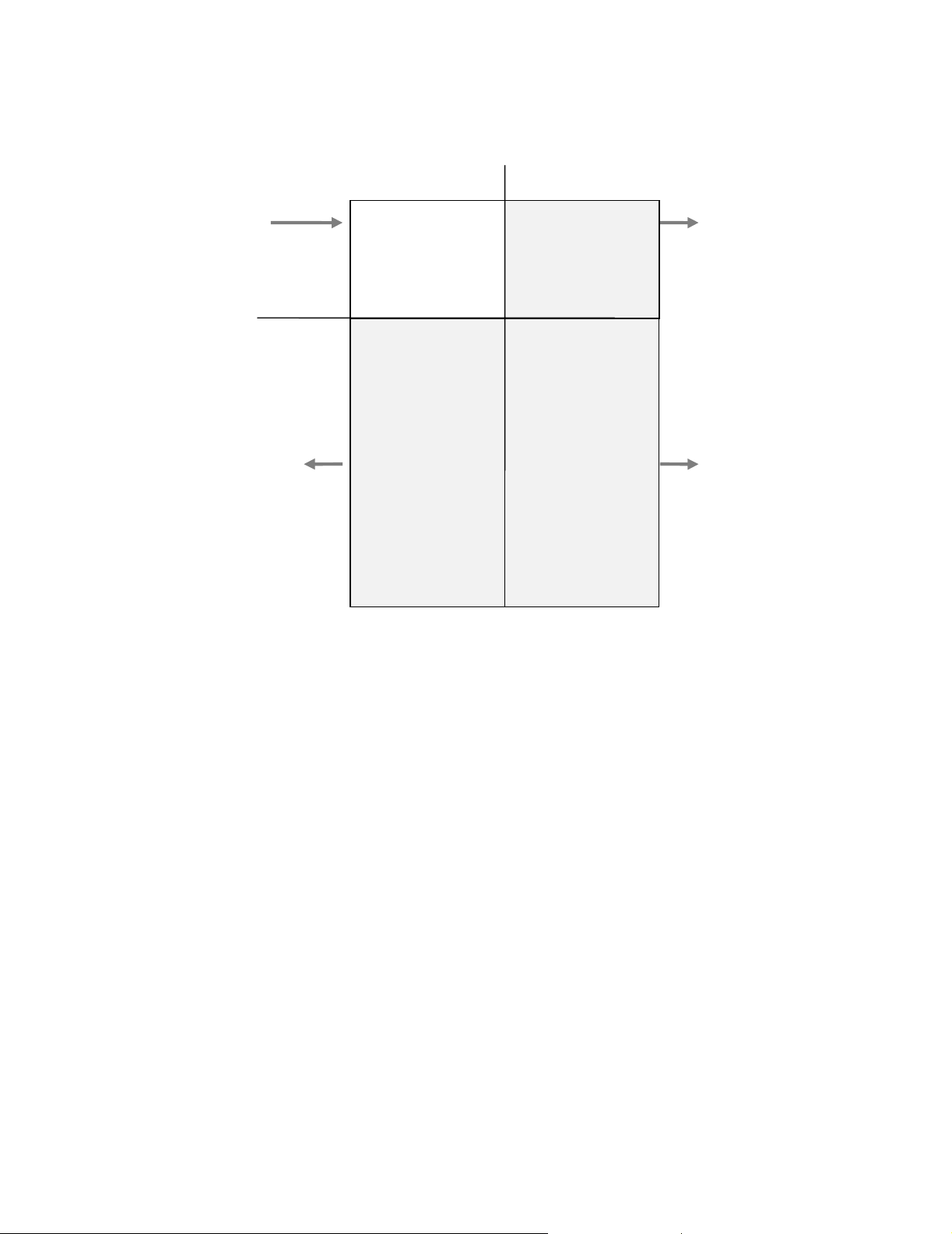
Think of the address handle as having four sections or quadrants. When you call
cace_set_line(), you are loading one line in the first quadrant (upper left corner of
diagram). ACE populates the other three quadrants when you call cace_findf().
StandardizedUnstandardized
cace_set_line()
Lines
Components
cace_get_component(
…, CACE_OLD, …)
Input Lines
CACE_ILASTLINE
•
CACE_IADDRESS
•
...
Parsed,
Unstandardized
Components
CACE_CITY
•
CACE_PROVINCE
•
CACE_POSTAL
•
CACE_PRIM_RANGE
•
CACE_PRIM_NAME
•
CACE_SUFFIX
•
CACE_DIR
•
CACE_UNIT_DESIG
•
CACE_SEC_RANGE
•
...
Standardized Lines
CACE_ILASTLINE
•
CACE_IADDRESS
•
...
Parsed,
Standardized
Components
CACE_CITY
•
CACE_PROVINCE
•
CACE_POSTAL
•
CACE_PRIM_RANGE
•
CACE_PRIM_NAME
•
CACE_SUFFIX
•
CACE_DIR
•
CACE_UNIT_DESIG
•
CACE_SEC_RANGE
•
...
cace_get_line()
cace_get_component(
…, CACE_NEW, …)
Chapter 1: How to set up the ACE Canada library
15
Page 16

16
ACE Canada Library Reference
Page 17

Chapter 2:
Functions for basic address processing
This chapter contains reference data about ACE functions for ordinary address
processing. Chapters 3 and 4 describe other functions used in more advanced
programs.
Chapter 2: Functions for basic address processing
17
Page 18

cace_AAS(), cace_AAS_file()
Synopsis char* cace_AAS(ten parameters);
CADDR_HANDLE cah; Input: address handle
int ext_ascii; Input: use extended ASCII to draw lines
char* list_processor; Input: company name of list processor
char* mailers_address1;
char* mailers_address2; Input: mailing company’s name
char* mailers_address3; and address
char* mailers_address4;
char* cpc_number; Input: Canada Post customer number
char* list_name; Input: name of list processed
char* file_name; Input: name of file processed
int cace_AAS_file(eleven parameters);
CADDR_HANDLE cah; Input: address handle
char* report_file; Input: path and name of output file
int ext_ascii; Input: use extended ASCII to draw lines
char* list_processor; Input: company name of list processor
char* mailers_address1;
char* mailers_address2; Input: mailing company’s name
char* mailers_address3; and address
char* mailers_address4;
char* cpc_number; Input: Canada Post customer number
char* list_name; Input: name of list processed
char* file_name; Input: name of file processed
TRUE
FALSE
TRUE
FALSE
Description Both functions generate a facsimile of the CPC form, “Statement of Address
Accuracy.” (For background information and a sample, refer to the ACE User’s
Guide.) The cace_AAS() function writes the report into a character array. The
cace_AAS_file() function places the report directly into a file (which it creates,
opens, writes, and closes).
ASCII
18
The ext_ascii parameter controls whether ACE will use extended
characters to draw smooth lines on the form. If your printer does not support
extended
The remaining parameters all correspond to blanks on the AAS form.
ACE Canada Library Reference
ASCII, set FAL SE , and ACE will instead use simple lines and dashes.
Page 19

Returns The cace_AAS() function returns a pointer to a character array containing the
form. It is your responsibility to free the memory allocated for this array. If for
some reason the form could not be built (perhaps because memory for it could not
be allocated), then cace_AAS() returns
NULLP.
The cace_AAS_file() function returns
CACE_ERROR if the file could not be opened and closed, or the report could not
be written. It returns
CACE_INVALID_HANDLE if the input address handle was
CACE_OK if successful. It returns
invalid.
Chapter 2: Functions for basic address processing
19
Page 20

cace_cfg_open(), cace_cfg_close(), cace_cfg_read()
Synopses int cace_cfg_open(two parameters);
char* pathname; Input: pathname of overall config file
CADDR_HANDLE* cah; Output: address handle
int cace_cfg_close(one parameter);
CADDR_HANDLE* cah; Input: address handle
int cace_cfg_read(three parameters);
CADDR_HANDLE cah; Input: address handle
int config_type; Input: config file type
CACE_CFG_AUXILIARY_FILES
CACE_CFG_INPUT_FIELDS
CACE_CFG_OPTIONS
char* pathname; Input: pathname of overall config file
Description CACE supports four types of configuration files. The “vanilla” configuration files
(table below) may be found in your cacelib subdirectory. You should copy these
files before edit them, and use your own filenames.
The configuration files are heavily commented. There is no separate or further
documentation for the parameters in these files.
Type of file Original name Description
Overall
Auxiliary
Input_Fields
Options
cace.cfg
caceaux.cfg
caceflds.cfg
caceopts.cfg
Pathnames of the other three configuration files.
Pathnames of the directories, dictionaries, etc.
Selection and lengths of input fields
Style and suggestion-list options.
The cace_cfg_open() function opens the auxiliary files and initializes one address
handle based on settings in configuration files. It calls cace_init_addr() and
cace_open(). The cace_cfg_close() function calls cace_term_addr() and
cace_close().
The cace_cfg_read() function is an alternative to cace_cfg_open(). It is provided
for client/server or other applications where you may need to employ
configuration files selectively. For example, in a client/server environment, the
Options and Input_Fields files might be set on the client side, by the end user,
while the Auxiliary file would be on the server side, and set by an administrator.
The cace_cfg_read() function loads settings into an address handle which you
must provide. This means that you must make your own call to cace_init_addr().
Likewise, cace_cfg_read() does not open the auxiliary files, so you must make
your own call to cace_open().
Returns Returns CACE_OK if successful; otherwise, CACE_ERROR. An error usually
indicates that something is wrong in one of the configuration files. Returns
CACE_INVALID_HANDLE if the input address handle was invalid.
20
ACE Canada Library Reference
Page 21

See also After cace_cfg_open(), make cace_get_*() calls to obtain the settings that were
read from the configuration files. For example, call cace_get_option() to obtain
current settings for address standardization.
Chapter 2: Functions for basic address processing
21
Page 22

cace_evaluate_ah()
Synopsis int cace_evaluate_ah(one parameter);
CADDR_HANDLE cah; Input: address handle
Description The cace_evaluate_ah() functions checks the input address structure for validity.
You do not have to call cace_evaluate_ah(), but if you do, call it after
cace_init_addr().
Returns Returns CACE_OK if the input lines structure is valid for parsing. Returns
CACE_INVALID_HANDLE if the input address handle was invalid. Returns
CACE_ERROR if an internal error occurred. The following returns indicate a
problem in the selection of input fields:
Symbol Description
CACE_2MANYLINES Too many fields were set. For example, you would get
this error if you set up 18 or more input lines.
Note:
The discrete, province, and postcode count as
one line. The discrete country filed is valid with any
combination of input fields.
CACE_BADMLP An invalid combination of input fields was set. For
example, you would get this error if you have not
selected any fields for address-line data. Or if you
select any of the multiline fields while also selecting
the discrete address-line, last-line, or city/state/postalcode fields.
CACE_DUP_LL_FIELDS You have set up too many last-line fields. If you are
using CACE_ILASTLINE, you should not also use
the city, province, or postal code fields for input.
CACE_MULTI1 The multiline fields defined don't start with
CACE_ILINE1. If you have three multiline fields,
you must use CACE_ILINE1-3, not 4-6, for example.
CACE_MULTI2 The multiline fields are not consecutive. For example,
you would get this error if you set up the multiline
fields CACE_ILINE1, CACE_ILINE3, and
CACE_ILINE4.
CACE_NO_AL_FIELDS You have not set up any field(s) for address-line data.
CACE_NO_LL_FIELDS You have not set up enough fields for last-line data.
You must set either the last-line field or a combination
of city, province, postal code.
22
ACE Canada Library Reference
Page 23

cace_findf()
Synopsis int cace_findf(one parameter);
CADDR_HANDLE cah; Input: address handle
Description The cace_findf() function searches for the address in the postal databases, assigns
postal codes, and writes the standardized address into the data structure pointed to
by the address handle.
Returns The cace_findf() call may return any of the following codes.
Symbol Description
CACE_FOUND The address was assigned. Go ahead and retrieve the processed address data from ACE Can-
ada. Most applications make a combination of calls to
cace_get_component
CACE_USER_ADDRESS The last line was matched, but the address line was not. An address suggestion list was gener-
ated. Invoke your suggestion-list handler. (See Chapter 4 for information about handling
suggestion lists.)
CACE_USER_SECONDARY A SECONDARY address suggestion list was generated. Invoke your suggestion-list handler.
(See Chapter 4 for information about handling suggestion lists.)
CACE_USER_CITY The last line was not matched. A last-line suggestion list was generated. Invoke your sugges-
tion-list handler. (See Chapter 4 for information about handling suggestion lists.)
CACE_ERROR_E* The address was not matched and no suggestion list could be generated. ACE has standard-
ized the address and populated the output lines and components as best it can. The extent of
standardization is very modest, and some components are blank.
().
cace_get_line
() and
Go ahead and retrieve the processed address data from ACE. Most applications make a combination of calls to
page .
Note: To find out why the address was not assigned, check the C
nent. Error defines all end with a three-digit error number. The
of these numbers and a description of each error condition.
CACE_INVALID_HANDLE The address handle was invalid. This error might occur in debugging but should not occur in a
tested, production application.
CACE_ABORT A fatal error occurred. Something bad happened. Time to exit.
Example
CADDR_HANDLE cah;
ret = cace_findf(cah);
cace_get_line
() and
cace_get_component
(). Read more about this on
ACE_ERROR_CODE
Quick Reference
compo-
presents a list
Chapter 2: Functions for basic address processing
23
Page 24

cace_get_cert_expire_date(), cace_get_cert_version()
Synopses char *cace_get_cert_expire_date(one parameter);
char *serp_expiry_date; Output: expiration date string
char *cace_get_cert_version(one parameter);
char *serp_version; Output: software version string
Description ACE offers two functions that you can use to retrieve information about our
SERP certification. Both functions return strings.
Call cace_get_cert_expire_date() to retrieve the date that SERP recognition
will expire, in dd-mmm-yyyy format.
Note: The U.S. ACE program offers a similar function. However, that function
produces the date on which CASS certification was achieved, not when it will
expire.
Call cace_get_cert_version() to retrieve the product name and version
number, as they appear on the SERP recognition. For example: “
ACE CANADA
2.30”
POSTWARE
Returns Both functions return the same buffer pointer that you passed in.
24
ACE Canada Library Reference
Page 25

cace_get_component(), cace_get_source()
Synopsis char* cace_get_component(four parameters);
CADDR_HANDLE cah; Input: address handle
int component; Input: component name
int oldnew_flag; Input: original or standardized address
CACE_OLD
CACE_NEW
char* comp_data; Output: retrieved data
int cace_get_source(two parameters);
CADDR_HANDLE cah; Input: address handle
int component; Input: component name
Description You can use cace_get_component() to retrieve from ACE any component from
either the original (input) or the standardized address.
Before calling cace_get_component(), call cace_get_source() for advice. The
cace_get_source() function returns the “best” source for the component type
passed in. To retrieve any component of the original address, set oldnew_flag to
CACE_OLD; to get a component of the standardized address, use CACE_NEW.
Symbols for component are listed and explained in our Quick Reference.
The receiving buffer should be long enough to contain the longest possible
component being retrieved. Instead of a fixed number of characters, you may
want to use the
also an
CACE_component_LEN definition. These lengths are defined as the
CACE_MAXFLD_LEN constant. For each component, there is
maximum length plus one (for the null terminator).
Returns The cace_get_component() function returns a pointer to a buffer containing the
requested component. If any of the input parameters is invalid, the buffer will be
empty. There is no error indication.
CACE_OLD or CACE_NEW. Returns
Example
The cace_get_source() function returns
CACE_INVALID_HANDLE if the input address handle was invalid.
int oldnew_flag;
char streetname[CACE_PRIM_NAME_LEN];
oldnew_flag = cace_get_source(cah, CACE_PRIM_NAME);
cace_get_component(cah, CACE_PRIM_NAME, &oldnew_flag,
streetname);
Chapter 2: Functions for basic address processing
25
Page 26

cace_get_error_info()
Synopsis int cace_get_error_info(four parameters);
CADDR_HANDLE cah; Input: address handle
int *err_code; Output: error code
char *message1; Output: error type message
char *message2; Output: specific error message
Description When any ACE function returns CACE_ERROR, you can get information about
the error by calling cace_get_error_info(). This function produces an error code
number, as well as two character strings that provide additional information about
the error or status. The first string provides a short error description and the
second provides additional details. The second string is usually the name of the
file that was being processed when the error occurred.
The buffers receiving message1 and message2 should be large enough to contain
the descriptive strings. Instead of a fixed number of characters, you may want to
use the constant
Returns Returns CACE_INVALID_HANDLE if the input address handle was invalid;
otherwise,
CACE_ERRMSG_LEN.
CACE_OK.
Example
CADDR_HANDLE cah;
int err_code;
char msg1[CACE_ERRMSG_LEN];
char msg2[CACE_ERRMSG_LEN];
if (cace_open() == CACE_ERROR) {
cace_get_error_info(cah, &err_code, msg1, msg2);
printf("Error number %d has occurred\n", err_code);
printf("%s\n, %s\n", msg1, msg2);
exit(err_code);
}
See also cace_set_error_rtn()
26
ACE Canada Library Reference
Page 27

cace_get_file_date()
Synopsis char* cace_get_file_date(three parameters);
CADDR_HANDLE cah; Input: address handle
int
file_ID; Input: file identifier
CACE_DIR_CAN
CACE_DIR_CITY
CACE_DIR_FSA
CACE_DIR_PCI
CACE_DCT_ADDRLN
CACE_DCT_LASTLN
CACE_DCT_CAP
CACE_DIR_ADDRESS_GEO
CACE_DIR_CENTROID_GEO
char* date_string Output: date directory or dictionary was
generated
Description These functions extract a date from the directory and return it as a date_string in
the format mm/yyyy (for example, 06/1998). This is the date that we processed
the directory. It is not the file timestamp.
This also returns a creation date of dictionaries. These dates are returned in DDMMM-YYYY format. For example,
Address-line dictionary
CA Address Line Parsing Dictionary
Version: xx.yy
Date: DD-MMM-YYYY
Copyright © 1995-2007 Business Objects
You mu st ca ll cace_open() before calling cace_get_file_date(). If the directory
has not been opened, the date_string buffer will be blank.
Returns Returns the same pointer to the date_string buffer that you passed in. The
date_string buffer will be empty if either of the input parameters was invalid.
Example
printf("The directory date is %s\n",
cace_get_file_date(cah, CACE_DIR_CAN,
date_string));
Chapter 2: Functions for basic address processing
27
Page 28

cace_get_lettermatch(), cace_get_simil()
Synopses int cace_get_lettermatch(two parameters);
CADDR_HANDLE cah; Input: address handle
int component; Input: component name
CACE_PRIM_NAME
CACE_CITY
int cace_get_simil(two parameters);
CADDR_HANDLE cah; Input: address handle
int component; Input: component name
CACE_PRIM_NAME
CACE_CITY
Description
If your address data has been drastically abbreviated or truncated, this can
occasionally cause a bad match to the postal directories. For example:
Input name: Standardized to:Should be:
RIVERCR ST RIVER STRIVERCREST ST
MILW RD MILL RDMILWAUKEE RD
If you wish, you can detect such errors by calling cace_get_lettermatch() and/or
cace_get_simil(). Run the test after cace_findf() returns, but before writing the
standardized address into the database file. When you detect a possibly incorrect
standardization, you might set aside the addresses so that it can be processed
manually.
Returns The cace_get_lettermatch() function returns TRUE if, and only if, every letter in
the input component also appears in the name CACE assigned. It is not sensitive
to the order of letters. If the return is
FALSE, this means that the letters in the
input name do not all appear in the output name.
The cace_get_simil() function returns an integer percentage between 0 and 100.
This provides a relative measure of the similarity of the original name to the
standardized name. The higher the return value, the greater the before-and-after
similarity. It’s up to you to decide what threshold score you will use; we suggest
70 as a starting point. The similarity level takes into account both the characterby-character likeness of the names and their length. Case (upper or lower) does
not matter; spaces do.
28
These functions work only on the primary (street) name and city name fields. If
you pass in any other component number, these functions will return
CACE_ERROR. Both functions return CACE_INVALID_HANDLE if the input
address handle was invalid.
ACE Canada Library Reference
Page 29

cace_get_line_name()
Synopsis char* cace_get_line_name(two parameters);
int line_ID; Input: line number
CACE_INAME
CACE_IFIRM
CACE_IADDRESS
CACE_ISUITE
CACE_ILASTLINE
CACE_ICITY
CACE_IPROVINCE
CACE_IPOSTAL
CACE_ICOUNTRY
CACE_ILINE1 - 6
CACE_ILANGUAGE
char* line_name; Output: user-friendly line name
Description Given a line_ID, cace_get_line_name() produces an English, user-friendly field
name suitable for use in your user interface. For example, given the input
CACE_ICITY, you get “City”.
Refer to the ACE User’s Guide for discussion of the ACE input fields. You may
retrieve the name of any line, whether or not it was activated through
cace_set_input_length().
Returns The cace_get_line_name() function returns the same line_name buffer pointer
that you passed in. The buffer will be empty if the input line_ID was invalid.
There is no specific error indication.
Chapter 2: Functions for basic address processing
29
Page 30

cace_get_offset()
Synopsis int cace_get_offset(four parameters);
CADDR_HANDLE cah; Input: address handle
int component; Input: component name
int* row; Output: row number (
int* column; Output: column number (zero-based)
Description The cace_get_offset() function can be used to find the position of an input
component within an input field. The function sets parameters for the row
number, and the column offset within that row, where the specified component
was located. Columns are numbered from zero. If the requested component was
not present in the input, row and column will both be set to 1.
Symbols for component are listed and explained in our Quick Reference.
Returns Returns CACE_OK if the request could be fulfilled (even if the component was
not present in the input address); otherwise, returns
CACE_INVALID_HANDLE if the input CADDR_HANDLE is invalid.
ACE_ILINE1, etc.)
CACE_ERROR. Returns
Example
int row, column;
CADDR_HANDLE cah;
cace_get_offset(cah, CACE_PRIM_NAME, &row, &column);
printf("Primary Name found in %d row and %d column\n", row,
column);
30
ACE Canada Library Reference
Page 31

cace_get_revision()
Synopsis int cace_get_revision(one parameter);
char* version_string; string identifying CACE and supporting
library versions
Description The cace_get_revision() function produces a string that identifies the version of
ACE Canada being used. It also identifies the version numbers of the underlying
support libraries. For example, here is a typical result:
CACE:7.10cr2 LGEN:3.20 OPTEC:3.20 MAS:610a GMI:4 LIUD:3/10
If you call for technical support, you may be asked for this string.
When allocating the version_string buffer, use our defined length,
CACE_MAX_REVISION_STR_LEN.
Returns Returns CACE_OK if successful; otherwise, CACE_ERROR.
Chapter 2: Functions for basic address processing
31
Page 32

cace_get_stats()
Synopsis int cace_get_stats(two parameters);
CADDR_HANDLE cah; Input: address handle
int component; Input: component name
Description To find out how an address component was standardized, call the function
cace_get_stats() with the name of the component. For a complete list of
component names, refer to our Quick Reference.
Note: The return value from this function does not reflect any capitalization
changes. Although
returned.
CACE_CASE_CHANGED is defined in cace.h, it is never
Returns Returns one of the integers listed at right. Your
program could tally these returns to generate a
statistical report. Returns
if the input address handle was invalid.
CACE_INVALID_HANDLE
• CACE_SAME
• CACE_MODIFIED
• CACE_DELETED
• CACE_ADDED
32
ACE Canada Library Reference
Page 33

cace_init(), cace_term()
Synopses int cace_init(no parameters);
int cace_term(no parameters);
Description The cace_init() function initializes global data used internally by the ACE
system. The cace_init() call must precede any other ACE library calls.
The cace_term() function releases all memory allocated by the ACE system
functions.
Returns The cace_init() function returns CACE_OK if ACE was successfully initialized;
otherwise,
CACE_ERROR.
The cace_term() function always returns
Example
See also cace_term_addr(), cace_close()
if (cace_init() == CACE_ERROR)
printf("Unable to initialize CACE");
/* address processing */
cace_term():
CACE_OK.
Chapter 2: Functions for basic address processing
33
Page 34

cace_init_addr(), cace_term_addr()
Synopses int cace_init_addr(one parameter);
CADDR_HANDLE* cah; Output: address handle
int cace_term_addr(one parameter);
CADDR_HANDLE* cah; Input: address handle
Description The cace_init_addr() function creates and initializes the address object and
returns the address handle. This routine allocates memory. It is your responsibility
to call cace_term_addr() when the handle is no longer needed. The
cace_term_addr() function frees all dynamic memory allocated to the address
object and sets the address handle to null.
Important: When you allocate your CADDR_HANDLE, use our type-define
!
and initialize it to
The cace_term_addr() function is provided for the sole purpose of releasing
memory before exiting an application program that uses CACE. It is not
necessary to call cace_term_addr() before re-using an address handle.
NULLP.
Returns Both functions can return CACE_OK or CACE_ERROR. The term function also
CACE_INVALID_HANDLE if the input address handle was invalid.
Example
returns
CADDR_HANDLE cah;
ret = cace_init_addr(cah);
/* address processing */
cace_term_addr(&cah);
34
ACE Canada Library Reference
Page 35

cace_open(), cace_close()
Synopses int cace_open(one parameter);
CADDR_HANDLE cah; Input: address handle
int cace_close(one parameter);
CADDR_HANDLE cah; Input: address handle
Description The cace_open() function opens the postal directories, parsing dictionaries, and
other auxiliary files used by the ACE system.
By default, cace_open() expects to find the auxiliary files in the current directory.
If the files are located in another directory, you must call the appropriate
cace_set_file() functions before cace_open().
The cace_close() function closes all supporting files opened by cace_open(), and
releases all memory allocated by the ACE system. It accepts no parameters.
Returns Both functions can return CACE_OK, CACE_INVALID_HANDLE, or
CACE_ERROR.
See also cace_init(), cace_term()
Chapter 2: Functions for basic address processing
35
Page 36

cace_set_error_rtn()
Synopsis int cace_set_error_rtn(two parameters);
CADDR_HANDLE cah;Input: address handle
int (*routine)(
Description Your application program should include a function to handle error returns from
ACE. Use cace_set_error_rtn() to give ACE a pointer to your error-handling
function. ACE will call your function whenever any ACE function returns
CACE_ERROR.
ACE will pass one parameter to your exit function: the address handle.
function should return an integer (we suggest
Your function may, in turn, call cace_get_error_info() to retrieve error
information from ACE. If you would like to see an example of an error-handling
function, examine the source code in caddrtst.c.
Returns Returns CACE_OK if the function was successfully registered, or
CACE_INVALID_HANDLE if the input CADDR_HANDLE was invalid.
CADDR_HANDLE);Input: pointer to handling function
1
You r
TRUE), which ACE will ignore.
Synopsis for your error handler
Example
int my_error_handler(one parameter);
CADDR_HANDLE cah; Input: address handle
NULL
CADDR_HANDLE cah;
int myfunction()
{
printf("ACE has detected an error");
return (TRUE);
}
cace_set_error_rtn(cah, myfunction);
36
1. Note: The address handle passed to your error handler will be NULL. In a future release, when ACE
Canada becomes thread-safe, a real address handle will be passed.
ACE Canada Library Reference
Page 37

cace_set_file(), cace_get_file()
Synopses int cace_set_file(three parameters);
CADDR_HANDLE cah; Input: address handle
int
file_ID; Input: file identifier (see table below)
char* pathname; Input: pathname
int cace_get_file(three parameters);
CADDR_HANDLE cah; Input: address handle
file_ID; Input: file identifier (same as above)
int
char* pathname; Output: pathname
Description By default, CACE expects to find its auxiliary files in the current directory. If you
store them in another location, you must call cace_set_file(), once per file, to
register each pathname with CACE. Make these calls before cace_open().
The pathname string may be a full or relative path. When you allocate space for
pathname strings, you may use the CACE define
The table at right
shows the file_ID
symbols and file
Symbol File name Location
CACE_FRM_AAS
names. The locations
shown are where our
installation programs
CACE_DCT_ADDRLN
CACE_DCT_CAP
will place the files on
your development
platform. You might
use different locations
when you install your
application on end-user
systems.
As an alternative, you
may use the
CACE_AUX_CFG_FIL
E
configuration file.
When you call
cace_cfg_open() or
cace_cfg_read(),
pathname settings will
be registered from the
configuration file.
CACE_DCT_LASTLN
CACE_DIR_CITY
CACE_DIR_FSA
CACE_DIR_CAN
CACE_DIR_PCI
CACE_KEYFILE
CANALGLOC
CANCTRLOC
CACE_DIR_ADDRESS_
GEO
CACE_DIR_CENTROID
_GEO
PATH _M AX .
caceaas.frm
addrlnca.dct
pwcasca.dct
lastlnca.dct
cancity.dir
canfsa.dir
canada.dir
canpci.dir
cacelib.key
canalg.dir
canctr.dir
canalg.dir
canctr.dir
cacelib
cacelib
cacelib
cacelib
dirs
dirs
dirs
dirs
cacelib
dirs
dirs
dirs
dirs
Returns Both functions return CACE_OK, CACE_INVALID_HANDLE, or
CACE_ERROR.
The set function does not test whether the file actually exists at the specified
pathname. That test occurs when you call cace_open().
Chapter 2: Functions for basic address processing
37
Page 38

cace_set_input_length(), cace_get_input_length()
Synopses int cace_set_input_length(three parameters);
CADDR_HANDLE cah; Input: address handle
int line; Input: input/output field
int length; Input: maximum length, for standardization
int cace_get_input_length(three parameters);
CADDR_HANDLE cah; Input: address handle
int line; Input: line number
int* length; Output: current length
Description Use cace_set_input_length() to set up one input line.
Call it once for each input line that you plan to use.
Symbols for the line parameter are listed at right. For
details, refer to our Quick Reference.
With each call, specify a maximum length for
standardization. Do not add one byte for the null
terminator. ACE will do that for you.
CACE_INAME
CACE_IFIRM
CACE_IADDRESS
CACE_ISUITE
CACE_ILASTLINE
CACE_ICITY
CACE_IPROVINCE
CACE_IPOSTAL
CACE_ICOUNTRY
CACE_ILINE1-6
CACE_ILANGUAGE
After processing the address, ACE writes into the
CADDR_HANDLE structure a similar set of fields, albeit containing standardized
data. When necessary, ACE will abbreviate data to fit the field length you have
set. This is important if you are going to use cace_get_line() to retrieve whole
fields.
To find out which input fields are currently being used, you may call
cace_get_input_length(). It produces the registered length of one line. Any line
with a length of zero is not being used.
Returns The set function can return CACE_OK, CACE_INVALID_HANDLE, or
CACE_ERROR. An error return can be caused by a shortage of available memory,
because this function allocates memory.
The get function returns the field length
if the call was successful; otherwise,
CACE_INVALID_HANDLE or CACE_ERROR.
See also cace_evaluate_ah(), cace_init_addr()
38
ACE Canada Library Reference
Page 39
cace_set_line(), cace_get_line()
Synopses int cace_set_line(three parameters);
CADDR_HANDLE cah; Input: address handle
int line; Input: line number (see Quick Reference)
char* line_buffer; Input: raw address data
char* cace_get_line(three parameters);
CADDR_HANDLE cah; Input: address handle
int line; Input: line number
char* line_buffer; Output: standardized address data
Description The cace_set_line() function loads an input address component into the address
handle.
The cace_get_line() function retrieves one line from the
CADDR_HANDLE
structure.
Note: ACE does not check the size of the receiving line_buffer. It is your
responsibility to provide adequate space for the data you retrieve.
Symbols for the line parameter are explained in our Quick Reference.
Caution: Even if you have no data to load, be sure to clear unused lines by
!
calling cace_set_line() with the empty string (""). ACE never clears the input
lines.
Returns The set function can return CACE_OK, CACE_INVALID_HANDLE, or
CACE_ERROR. The get function returns the same line_buffer pointer that you
passed in. If either of the input parameters was invalid, this buffer will be empty;
there is no specific error indication.
Example
char line_buffer [80];
cace_set_line(cah, CACE_IPOSTAL, &line__buffer);
ret = cace_findf(cah);
printf("%d/n", cace_get_line(cah, CACE_ILASTLINE, line_buffer0));
Chapter 2: Functions for basic address processing
39
Page 40

cace_set_mode(), cace_get_mode()
Synopses int cace_set_mode(three parameters);
CADDR_HANDLE cah; Input: address handle
int
mode_ID; Input: mode identifier (see table below)
int mode; Input: desired mode (TRUE/FALSE)
char* cace_get_mode(three parameters);
CADDR_HANDLE cah; Input: address handle
mode_ID; Input: mode identifier (see table below)
int
int* mode; Output: current mode (TRUE/FALSE)
Description When the mode is set, only the original parsed components will be populated.
Standardization is done according to your preference, with the exception of
settings that require the use of the directories.
The mode idendtifiers are as follows:
\CACE_MODE_GEO can take values CACE_CENTROID_GEO /
CACE_ADDRESS_GEO / CACE_BOTH_GEO / CACE_NONE_GEO. This is
used to set the geo information to be assigned at centroid level / address level /
'both' mode / disable geo code assignment
Mode identifier Values Description
CACE_MODE_PARSE_ONLY TRUE Enable Parse-only mode.
FALSE Disable parse-only mode.
CACE_MODE_GEO CACE_ADDRESS_GEO Perform Address-level GeoCoding processing only. Lati-
tude and longitude information on each address is unique
to that address. ACE Canada searches the Address-Level
GeoCensus directory for this information.
CACE_CENTROID_GEO Perform Centroid-level GeoCoding processing only. Lati-
tude and longitude information on each address is based
on a circular area (a centroid circle) in which the address
is located. ACE Canada searches the Centroid GeoCensus directory for this information.
CACE_BOTH_GEO Perform Address and Centroid-level GeoCoding process-
ing. ACE Canada first checks to see if the address has
Address-Level GeoCensus data, and if it does, ACE Canada returns that information. If it does not, ACE Canada
searches the Centroid-Level GeoCensus data and returns
that information. ACE Canada does not return both the
address-level and the centroid-level information.
CACE_NONE_GEO Do not perform GeoCoding.
Returns The return values are CACE_OK, CACE_INVALID_HANDLE, or
CACE_ERROR.
40
ACE Canada Library Reference
Page 41

cace_set_option(), cace_get_option()
Synopses int ace_set_option(three parameters);
CADDR_HANDLE cah; Input: address handle
int
option_ID; Input: option identifier (see table)
int setting; Input: option setting (see table)
int ace_get_option(three parameters);
CADDR_HANDLE cah; Input: address handle
int
option_ID; Input: option identifier (see table)
int* setting; Input: option setting (see table)
Description By default, CACE standardizes addresses in a style fully conforming to the SERP
testing regulations of the Canada Post Corporation.
You are not required to process your own data in SERP-conforming style. If you
wish, you may call cace_set_option() as necessary to set stylistic options of your
choosing.
SERP rules and the stylistic options are fully explained in the ACE User’s Guide.
As an alternative, you may use the
CACE_OPTS_CFG_FILE configuration file.
When you call cace_cfg_open() or cace_cfg_read(), options settings will be
registered from the configuration file.
Call cace_get_option() to get the currently registered setting.
Returns Returns CACE_OK, CACE_INVALID_HANDLE, or CACE_ERROR.
Symbol for option_ID Symbols for setting Default setting
CACE_OPT_ALIAS
CACE_OPT_CAPITALIZATION CACE_UPPERCASE
CACE_OPT_DIR_STYLE
CACE_OPT_SFX_STYLE
CACE_OPT_DUAL_TYPE CACE_DUAL_POSITION
CACE_OPT_FRENCH_ACCENTS CACE_ACCENT_ALL
CACE_CONVERT_ALIAS
CACE_PRESERVE_ALIAS
CACE_MIXEDCASE
CACE_STYLE_OPTIMAL
CACE_STYLE_LONG
CACE_STYLE_PRESERVE
CACE_DUAL_MAILING
CACE_DUAL_STREET
CACE_ACCENT_NONE
CACE_ACCENT_IGNORE
CACE_PRESERVE_ALIAS
CACE_UPPERCASE
CACE_STYLE_OPTIMAL
CACE_DUAL_POSITION
CACE_ACCENT_IGNORE
Chapter 2: Functions for basic address processing
41
Page 42

Symbol for option_ID Symbols for setting Default setting
CACE_OPT_LANGUAGE CACE_BY_EXAMPLE
CACE_FORCE_ENGLISH
CACE_FORCE_FRENCH
CACE_BY_PROVINCE
CACE_BY_FIELD
CACE_OPT_LVR_RULE
CACE_OPT_RURAL_RULE
CACE_OPT_MULTI_COMBINE_AL
CACE_OPT_MULTI_COMBINE_LL
CACE_OPT_MULTI_SWAP CACE_SWAP_TOP
CACE_OPT_MULTI_UPDATE_PC CACE_UPDATE
CACE_OPT_PC_ONLY TRUE
CACE_OPT_NONPREF_CITY CACE_CONVERT_NONPREF_CITY
CACE_OPT_POBOX_SEARCH TRUE
CACE_OPT_STND_ADDR_LINE
CACE_OPT_STND_LAST_LINE
CACE_OPT_STND_UNASSIGNED
CACE_OPT_SRANGE CACE_SRANGE_STYLE_DASHED
CACE_OPT_WEIGH_PNAME_OVER_PC TRUE
CACE_OPT_ENGLISH_UNITDES CACE_ENG_DEF_UNITDES_SUITE CACE_ENG_DEF_UNITDES_SUITE
CACE_OPT_FRENCH_UNITDES CACE_FRC_DEF_UNITDES_
TRUE
FAL SE
TRUE
FAL SE
CACE_SWAP_BOTTOM
CACE_SWAP_NONE
CACE_DONT_UPDATE
CACE_ERASE_THEN_UPDATE
FAL SE
CACE_PRESERVE_NONPREF_CITY
FAL SE
TRUE
FAL SE
CACE_SRANGE_STYLE_TRAILING
CACE_SRANGE_STYLE_PRESERVE
FAL SE
CACE_ENG_DEF_UNITDES_
APARTMENT
CACE_ENG_DEF_UNITDES_UNIT
BUREAU
CACE_FRC_DEF_UNITDES_
APPARTEMENT
CACE_FRC_DEF_UNITDES_UNITE
CACE_BY_EXAMPLE
TRUE
FALSE
CACE_NONE
CACE_UPDATE
TRUE
CACE_CONVERT_NONPREF_CITY
TRUE
TRUE
TRUE
FALSE
CACE_SRANGE_STYLE_PRESERVE
FALSE
CACE_FRC_DEF_UNITDES_
BUREAU
42
ACE Canada Library Reference
Page 43

Chapter 3:
Suggestion lists
If Canadian ACE cannot assign an address, it can provide a suggestion at what the
address is. This chapter explains what suggestion lists are, and how your
application may process them.
Chapter 3: Suggestion lists
43
Page 44

How to handle suggestion lists
The process is as follows:
1. Call cace_set_sugg_option(cah,
enable suggestion lists.
2. Optional: You may want to call cace_set_sugg_option() or
cace_set_sugg_filter() to set other options for customized suggestion lists.
These options are explained on page How to customize suggestion lists.
3. Call cace_findf() as usual. If address processing results in a suggestion list,
cace_findf() exits, returning a special code (CACE_USER_CITY or
CACE_USER_ADDRESS). You detect this return code and step in to process
the suggestion list.
4. Retrieve the list from CACE. First, call cace_get_suggno() to get the number
of suggestions available. Then if it’s a city suggestion list, call
cace_get_sugg() to retrieve suggestion text. If it’s an address suggestion list,
call either cace_get_sugg() or cace_get_sugg_cmpt().
5. Display the suggestion list to the user. The user may choose one suggestion,
or reject the list and abandon the assignment. Capture the user’s choice, and
pass it to ACE by calling cace_set_sugg(). Pass either a suggestion number
or, to indicate rejection, pass -1.
The user might choose an address suggestion that does not match the primary
range of the input record. For example, suppose the input address is 3310 Main,
and the suggestion list shows Main extends only to the 800 block. The user might
decide that the first digit of the input range had been double-typed, and the true
range should be 310. So the user selects the address suggestion 300-399 Main. In
this event your call to cace_set_sugg() will return
You should prompt the user to enter a new range. Then call cace_set_range() to
pass the user’s range into CACE.
CACE_SUGG_OPT_GENERATE, TRUE) to
CACE_USER_RANGE_BAD.
6. Call cace_findf() a second time. It attempts assignment based on the chosen
suggestion.
Or, if the user has rejected the suggestion list, treat the record as unassigned.
44
ACE Canada Library Reference
Page 45

cace_get_sugg()
Synopsis int cace_get_sugg(three parameters);
C
ADDR_HANDLE cah; Input: address handle
int suggestion_number; Input: suggestion number (zero-based)
char* suggestion_buffer; Output: suggestion string
Description The cace_get_sugg() function returns one suggestion string at a time. Call it from inside a
loop. The suggestion_number argument may range from zero to the number of suggestions
available, minus one.
Make sure that your receiving suggestion_buffer is long enough. Each suggestion is a
variable-length string delimited by vertical bars (|). Of course, when you display
suggestions to the user, you will probably want to align fields in orderly columns, so your
display may be wider than the ACE suggestion string.
Last-line suggestions
Address-line suggestions
Postal address
(PO Box, Rural
Route, General
Delivery)
A last-line suggestion string contains a city name and province abbreviation. They are up to
34 characters long with the
NULL terminator. For example:
OTTAWA|ON
city province
Address suggestions are up to 132 characters long with the NULL. This function also
returns secondary information if present. The low- and high-range numbers each occupy ten
bytes and are left-padded with spaces. With one space in between, the total is 21 bytes. For
example:
Delivery
Inst Type
Delivery Inst
Qualifier
Postcode
Address
Type
Odd/Even
Indicator
Primary
name
Low
number
Deliver Inst
name
PO BOX | 10 20 | AIRDRIE | STN | MAIN | T4B2K6 | P | B
High
number
Street address
Low
number
Primary
name
Directional
Address
Typ e
304 404 | MAIN | ST | S | T4B3C3 | S | E
High
number
Street Type
Postcode
Chapter 3: Suggestion lists
Odd/Even
Odd/Even
Indicator
Indicator
45
Page 46

Street address with unit
information
Low
number
Primary
name
Directional
Address
Type
Low Unit
number
Secondary
name
Unit Odd/Even
Indicator
649 649 | MAIN | ST | N | T4B1Z8 | H | O | 26 33 | BUSINESS BUILDING | H | B
High
number
Street
Type
Postcode
Odd/Even
Indicator
High Unit
number
Secondary
Type
Street served by route
address
Low
number
Primary
name
Directional
Delivery
Inst Type
Address
Typ e
901 937 | MAIN | ST | SE | SS | 1 | T0J2P0 | SR | O
High
number
Street
Type
Delivery
Inst Name
Postcode
Odd/Even
Indicator
Returns Returns CACE_OK, CACE_INVALID_HANDLE, or CACE_ERROR. Returns
CACE_ERROR if:
an error occurred while retrieving the suggestion, or
the input suggestion_number was out of range (for example, greater than the
number of suggestions available.)
See also Call cace_get_suggno() to find the number of suggestions available. As an
alternative to cace_get_sugg(), you may retrieve individual components of
suggestions by calling cace_get_sugg_cmpt().
46
ACE Canada Library Reference
Page 47

cace_get_sugg_cmpt()
Synopsis char* cace_get_sugg_cmpt(four parameters);
CADDR_HANDLE cah; Input: address handle
int sugg_number; Input: suggestion number (zero-based)
int component; Input: component to be retrieved; see
cace_get_query(), page 59
char* cmpt_buffer; Input: retrieved component
Description The cace_get_sugg_cmpt() function retrieves one component of one address-line
suggestion. Call it inside a nested loop—the inner loop on component, the outer
loop on sugg_number. You can obtain the maximum value of sugg_number by
calling cace_get_suggno().
For the component parameter, use the field names of cace_get_query().
Remember, you are retrieving data from the Canadian national directory records,
not the components of a processed address. Do not use the field names of
cace_get_component().
Returns Returns a pointer to the cmpt_buffer containing the retrieved component. If any of
the input parameters was invalid, this buffer will be empty.
See also As an alternative to cace_get_sugg_cmpt(), you may retrieve an entire
suggestion—as one delimited string—by calling cace_get_sugg().
Chapter 3: Suggestion lists
47
Page 48

cace_get_suggno()
Synopsis int cace_get_suggno(one parameter);
CADDR_HANDLE cah; Input: address handle
Description Call cace_get_suggno() to determine the number of suggestions on the current
list. You might call it before drawing a suggestion list window to determine how
large to make the window.
Returns Returns the number of suggestions in the current suggestion list, or
CACE_INVALID_HANDLE, or CACE_ERROR.
See also Call cace_get_suggno() before calling cace_set_sugg() or
cace_get_sugg_cmpt().
48
ACE Canada Library Reference
Page 49

cace_set_range()
Synopses int cace_set_range (three parameters);
CADDR_HANDLE cah; Input: address handle
int range_type; Input: range type
char* range; Input: new range
Description This function comes into play when a user is viewing an address suggestion list. It
is possible that the user will choose a suggestion that does not match the primary
or secondary range of the input record. If the ACE user can enter a new, correct
range, then ACE can assign the address.
In this situation, ACE Canada needs the user to set a new primary or secondary
range that falls within the range of the chosen suggestion. This function provides
a way for the user to set a new range.
If your call to cace_set_sugg() returns CACE_USER_PRANGE_BAD,
CACE_USER_SRANGE_BAD, or CACE_USER_BOTH_RANGES_BAD,
prompt the user to enter a new range. Call cace_set_range() to pass the user’s
range into CACE, then call cace_findf().
The range types can be CACE_PRIM_RANGE which updates the primary range,
or CACE_SEC_RANGE which updates the secondary range.
Returns Returns the following values:
Value Description
CACE_USER_PRANGE_BAD The primary range is invalid.
CACE_USER_SRANGE_BAD The secondary range is invalid.
Chapter 3: Suggestion lists
49
Page 50

cace_set_sugg()
Synopsis int cace_set_sugg(three parameters);
CADDR_HANDLE cah; Input: address handle
int sugg_num; Input: suggestion number (zero-based)
int sugg_list_type; Input: list type
CACE_USER_ADDRESS
CACE_USER_CITY
Description
Call the cace_set_sugg() function to select a particular suggestion line from an
array of suggestions produced by cace_findf().
Note: If the suggestion number that you set is negative or greater than the list
size, then ACE will assume that the suggestion list was rejected. The address
will not be assigned.
Returns Returns CACE_OK, CACE_INVALID_HANDLE, CACE_ERROR,
CACE_USER_PRANGE_BAD, CACE_USER_SRANGE_BAD,
CACE_USER_SECONDARY, or CACE_USER_BOTH_RANGES_BAD
Returns CACE_ERROR if the suggestion number was negative or greater than the
total number on the list.
Returns
CACE_USER_PRANGE_BAD if the primary range of the input address
does not fall within the range of the chosen address suggestion. See the
cace_set_range() page for details on handling this return.
Returns CACE_USER_SRANGE_BAD, if the secondary range is invalid.
Returns CACE_USER_SECONDARY to indicate that secondary address
suggestions are available.
Returns
CACE_USER_BOTH_RANGES_BAD, if both the primary and secondary
ranges are invalid.
.
50
ACE Canada Library Reference
Page 51

How to customize suggestion lists
ACE offers several options for customizing suggestion lists. These options affect
only the style of suggestion lists, not procedures for handling suggestions. You
can set these options by calling cace_set_sugg_option() or
cace_set_sugg_filter().
If you decide to call the customizing functions, you will probably make those
calls during initialization, before the first cace_findf() call. However, you may
change suggestion modes at any time. Your new choices will take effect upon the
next cace_findf() call.
Consolidate ranges Address suggestions are Canadian national directory records
that ACE has called potential matches for the input address.
Normally, each Canadian national directory record is
returned as a separate suggestion.
For example, given the input data 114 Main, ACE might
produce the suggestions shown at right.
If you want, ACE can consolidate these suggestions. The
result is a more compact list that is easier and faster for you to display, and
perhaps easier for your end users to grasp. ACE offers two styles of
consolidation; they differ in their treatment of primary ranges:
CNSL In the first style, ACE ignores gaps and
overlaps in primary ranges, so
consolidation is more aggressive. The
above suggestion list would be
compressed as shown here.
CNSL2 In the second style, ACE preserves gaps
in primary ranges, but overlapping
ranges are consolidated. The above
suggestion list would be compressed as
shown here.
100 - 199 Main St
111 - 117 Main St
200 - 299 Main St
300 - 300 Main St
100 - 199 Main St E
231 - 233 Main St E
235 - 235 Main St E
100 - 399 Main St
100 - 235 Main St E
100 - 399 Main St
100 - 199 Main St E
231 - 233 Main St
235 - 235 Main St E
Note: When ACE consolidates, it produces only one suggestion for each
unique combination of primary name, directional, suffix, and postal code.
However, once a user selects a suggestion, normal assignment can proceed.
Chapter 3: Suggestion lists
51
Page 52

Filter by primary range
Another way to shorten address suggestion lists is to filter them by primary range.
This approach is different from simply consolidating ranges. ACE offers two
ways to filter suggestions by range:
Range Match: The first approach is just an on/off switch.
If you turn it on, ACE returns only those suggestions that
100 - 117 Main St
100 - 199 Main St
match the input primary range.
Range Window: The other approach is a little more
liberal. You set a span around the input range—in effect,
limiting suggestions to an area a few blocks on either side
of the input address.
The example at right shows the suggestions we would get
100 - 199 Main St
111 - 117 Main St
200 - 299 Main St
100 - 199 Main St E
231 - 233 Main St E
235 - 235 Main St E
with window set at 100. Again, the effect is to limit
suggestions to one block on either side of the primary range that was input.
Notice that the 300 block of Main Street has been dropped.
Adjust simil level A simil score is a number between zero and 100; the higher the number, the
greater the similarity between two strings. ACE uses simil scores when
comparing input street names with streets in the Canadian national directory. The
same is true when ACE compares an input city name with cities in the City
directory.
During the normal assignment process, ACE requires a simil score in the upper
70s to determine a match. A looser standard applies when generating suggestion
lists; a simil score of 60 or higher is close enough to earn a directory record a
place on the suggestion list.
You can raise or lower the threshold simil score for suggestions lists. If you raise
the threshold, expect shorter suggestion lists, and vice versa.
Filter by query You can filter address suggestions more generally. This method may be useful in
situations where you know something more about your addresses than is stored in
your records.
The mechanism for creating filters is the same
CACE_QUERY structure that you
can use to query the Canadian national directory (as described in Appendix C).
Then you attach the
by calling cace_set_sugg_filter(). Not all
CACE_QUERY structure to the suggestion-building process
CACE_QUERY fields are available; see
the cace_set_sugg_filter() page for details.
52
ACE Canada Library Reference
Page 53

cace_set_sugg_filter()
Synopsis #include <caceshow.h>
int cace_set_sugg_filter(two parameters);
CADDR_HANDLE cah; Input: address handle
from cace_init_addr()
CACE_QUERY_HANDLE caq; Input: query handle
from cace_init_query()
Description To make address suggestion lists more focused, you can filter suggestions. The
mechanism for creating filters is the same
query the Canadian national directory.
We suggest that you make the calls listed below before you process addresses.
However, you may change your filter setting at any time. Your new filter will take
effect upon your next call to cace_findf().
1. Call cace_init_query() to allocate a query handle.
2. Call cace_clear_query() to clear the query handle.
3. Call cace_set_query() to write your criteria into the query handle. Query
fields are listed on the cace_set_query() page (63). Note, you may use only
the query fields listed below. Other query fields are invalid for suggestion
filtering.
CACE_QUERY structure that is used to
CACEQ_CTYIDX
CACEQ_DIRIDX
CACEQ_SUFFIX
CACEQ_LOWRANGE
CACEQ_HIGHRANGE
4. Call cace_set_sugg_filter() to attach the query handle to the suggestion-
building process.
5. During termination, call cace_term_query() to free the query handle.
Returns Returns CACE_OK, CACE_INVALID_HANDLE, or CACE_ERROR.
See also If you are also consolidating with cace_set_sugg_style(), note that your filter will
be applied to suggestions before they are consolidated.
Chapter 3: Suggestion lists
53
Page 54

cace_set_sugg_option(), cace_get_sugg_option()
Synopses int cace_set_sugg_option(two parameters);
CADDR_HANDLE cah; Input: address handle
int
option_ID; Input: option identifier (see table)
int setting; Input: option setting (see table)
int cace_get_sugg_option(two parameters);
CADDR_HANDLE cah; Input: address handle
int
option_ID; Input: option identifier (see table)
int* setting; Input: option setting (see table)
Description The cace_set_sugg_option() function sets the state of suggestion list processing. Your new
setting will take effect upon your next call to cace_findf().
Returns Returns CACE_OK, CACE_INVALID_HANDLE, or CACE_ERROR.
Symbol for option_ID Setting values Description
CACE_SUGG_OPT_GENERATE
CACE_SUGG_OPT_AL_SIZE 1 to ? Maximum number of address-line suggestions.
CACE_SUGG_OPT_LL_SIZE 1 to ? Maximum number of last-line suggestions.
CACE_SUGG_OPT_RANGEMATCH
CACE_SUGG_OPT_RANGEWINDOW 0 to ? A span around the input range, limiting address-line
CACE_SUGG_OPT_AL_SIMIL 0 to 100 Threshold simil score for address suggestions.
CACE_SUGG_OPT_LL_SIMIL 0 to 100 Threshold simil score for last-line suggestions.
CACE_SUGG_OPT_STYLE
TRUE
or
FAL SE
TRUE
or
FAL SE
CACE_NORMAL_SUGG
CACE_CNSL_SUGG
CACE_CNSL2_SUGG
If
TRUE
, CACE generates a suggestion lists when
ranking results in a tie condition. If
treats the address as unassigned.
If
TRUE
, CACE returns only those address-line suggestions that match the primary range of the input
address.
suggestions to an area a few blocks on either side of
the input address.
CACE ignores gaps and overlaps in primary ranges,
so consolidation is more aggressive.
CACE preserves gaps in primary ranges, but overlapping ranges are consolidated.
Suggestions are not consolidated.
Note
: To consolidate suggestions, CACE may create
temporary work files. They are placed in the user’s
current working directory. During initialization, verify that the user has read/write permission in the current directory.
FALSE
, CACE
54
ACE Canada Library Reference
Page 55

Chapter 4:
How to query the postal directories
You can use ACE to extract records from the postal directories. There are many
reasons why you might want to do this. For example, when ACE does not assign
an address, the reasons why might become clearer if you compare the faulty
address with entries in the directories.
This appendix explains how to use ACE to extract records from the directories.
Chapter 4: How to query the postal directories
55
Page 56

Introduction to directory queries
Overview ACE offers two separate, but similar, sets of functions for directory queries. The
first set is used for querying the Canadian national directory about address-line
data. The second set is for querying the City and FSA directories about last-line
data.
When you perform queries, two ACE handles are involved: An input query
handle, and an output browse handle. There are separate init and term functions
for each handle.
Note: ACE matches your query fields to directory records using the same
match rules that ACE follows when you process addresses normally.
Address-line queries in the
Canadian national directory
Functions cace_init_query()
cace_clear_query()
cace_set_query()
cace_init_show()
cace_show()
cace_get_query()
cace_term_query()
cace_term_show()
Handles CACE_QUERY_HANDLE
CACE_BROWSE_HANDLE
Header file
Sample C
source code
Ready-to-run
sample program
caceshow.h cllshow.h
cshowtst.c tstllshw.c
cshowtst
or
cshowtst.exe tstllshw
Last-line queries in the City
and FSA directories
cace_ll_init_query()
cace_ll_clear_query()
cace_ll_set_query()
cace_ll_init_show()
cace_ll_show()
cace_ll_get_query()
cace_ll_term_query()
cace_ll_term_show()
CACE_LL_QUERY_HANDLE
CACE_LL_BROWSE_HANDLE
or
tstllshw.exe
56
ACE Canada Library Reference
Page 57

How to query the Canadian national directory
If you’re anxious to begin making address queries, you might compile our
cshowtst.c program, or use the Show utility. You also receive a ready-to-run
Show executable, cshowtst.
1. Include the header file caceshow.h when you compile your application.
2. Call cace_init(), cace_init_addr(), and cace_set_error_rtn() as usual.
3. Call cace_set_file() to register the pathnames of all of the auxiliary files.
4. Call cace_open() to open the ACE auxiliary files.
5. Call cace_init_query() to allocate a query handle.
6. Call cace_clear_query() to clear the query handle.
7. Call cace_set_query() to write your criteria into the query handle. Query
fields are listed on the cace_set_query() reference page.
8. Call cace_init_show() to verify that the query is valid. If the query is valid,
cace_init_show() returns a browse handle. This is where retrieved Canadian
national records will be written by cace_show().
9. Enter a loop:
• Call cace_show() to perform the query and write the next record into the
browse handle. If there is at least one more qualifying record,
cace_show() returns
TRUE.
Call cace_get_query() to retrieve individual fields (one per call) from the
current Canadian national record. Retrieved fields are listed and described on
the cace_get_query() reference page.
Exit the loop when cace_show() returns FAL SE, indicating that no more
records meet the search criteria. To limit the maximum number of records
extracted, you might set your own counter.
When you have finished with the browse handle, call cace_term_show() to
free it.
10. If you want to make additional queries, repeat steps 6 through 9.
11. Call cace_term_query() to free the query handle, and cace_term_addr() to
free the address handle.
Chapter 4: How to query the postal directories
57
Page 58

cace_clear_query()
Synopsis #include <caceshow.h>
int cace_clear_query(one parameter);
CACE_QUERY_HANDLE can_qhandle;from cace_init_query()
Description Call cace_clear_query() between queries against the national directory. This
function clears the query handle data.
If you do not call this function between queries, data may remain in the handle
that would corrupt the next query.
Returns Returns CACE_OK if successful. Returns CACE_INVALID_HANDLE if the
input query handle was invalid.
58
ACE Canada Library Reference
Page 59

cace_get_query()
Synopsis #include <caceshow.h>
int cace_get_query(three parameters);
CACE_BROWSE_HANDLE cace_bhandle;from cace_init_show()
int browse_field; component name
char* buffer; pointer to retrieved string
Description The cace_get_query() function retrieves one field from the current record of the
current query. Valid browse_field names are listed on the next page.
You may choose to retrieve any combination of address components, except city
and province. Your options are listed on the next page.
Note: ACE does not check the size of the receiving buffer. It is your
responsibility to provide adequate space for the data you retrieve.
Returns Returns CACE_OK if successful. Returns CACE_INVALID_HANDLE if the
input browse handle was invalid.
Chapter 4: How to query the postal directories
59
Page 60

Browse fields for cace_get_query()
Name Description
CACEQ_ODDEVEN An E, O, or B to indicate whether the record covers the
even-numbered side of the street, odd, or both.
CACEQ_LOWRANGE
The range of house, route, or box numbers covered.
CACEQ_HIGHRANGE
CACEQ_PNAME Primary (street) name.
CACEQ_SODDEVEN An E, O, or B to indicate whether the secondary record
covers the even-numbered side of the street, odd, or both.
CACEQ_DIR Directional (N, NE, E, SE, S, SW, and so on).
CACEQ_SFX Street suffix (Ave, St, Rue, and so on).
CACEQ_SNAME The firm or business name for this record.
CACEQ_SLOWRANGE
CACEQ_SHIGHRANGE
CACEQ_CTYIDX
CACEQ_SCTYIDX
The range of apartment or office suite numbers for an
apartment or office building.
The city index number for the primary or secondary
record. Each valid city name within a directory area has
its own city index number.
CACEQ_PCODE The postal code you want to query.
CACEQ_TYPE
CACEQ_STYPE
The type of the primary or secondary record. ACE supports eight types. A secondary records does not have to be
the same type as its primary record.
G
(general delivery)
S
(street)
P
(post office box)
R
(rural service)
H
(high-rise)
F
(firm)
SR
(street served by route number)
BN
(building name)
CACEQ_DIRIDX The directory area index number you want to query.
CACEQ_DELINST For delivery-type records, such as post office box, rural
route, or general delivery records, the delivery installation
area name for the record. This is usually the city name for
most records.
CACEQ_DELTYPE For delivery-type records, such as post office box, rural
route, or general delivery records, the delivery installation
type. Some current supported values are Station (STN),
Post Office (PO), Letter Carrier Depot (LCD), and Commercial Dealership Outlet (CDO).
CACEQ_DELQUAL For delivery-type records, such as post office box, rural
route, or general delivery records, the name of the delivery installation.
CACEQ_LVR Returns a T if the address is a Large Volume Receiver
and an F if it is not.
60
ACE Canada Library Reference
Page 61

cace_init_query()
Synopsis #include <caceshow.h>
int cace_init_query(two parameters);
CADDR_HANDLE cah; Input: address handle
CACE_QUERY_HANDLE *can_qhandle; Output: query handle
Description Call cace_init_query() to initialize an ACE query handle. You will use this
handle in later calls related to your query.
Returns Returns CACE_OK, CACE_INVALID_HANDLE, or CACE_ERROR.
See also Each call to cace_init_query() should be paired with a call to
cace_term_query(). Do not rely on cace_term() to free the query handle.
Chapter 4: How to query the postal directories
61
Page 62

cace_init_show()
Synopsis #include <caceshow.h>
int cace_init_show(two parameters);
CACE_QUERY_HANDLE can_qhandle; Input: query handle
CACE_BROWSE_HANDLE *cace_bhandle; Output: browse handle
Description The cace_init_show() function evaluates your query handle. If the query is valid,
it creates a browse handle. This pointer is used as input to cace_show(), which
actually performs the query.
Returns Returns CACE_OK, CACE_INVALID_HANDLE, or CACE_ERROR.
Most of the remaining return values (table below) indicate an error in the query
date. Previously, these conditions were reported through a query_status integer.
Now they are return values.
Return Description
CACESHOW_INVALID_QUERY The input query was invalid (something was wrong
in one of the query fields).
CACESHOW_NOMEM The browse handle could not be created because
memory was exhausted.
See also Each call to cace_init_show() should be paired with a call to cace_term_show().
Do not rely on cace_term() to free the browse handle.
62
ACE Canada Library Reference
Page 63

cace_set_query()
Synopsis #include <caceshow.h>
int cace_set_query(three parameters);
CACE_QUERY_HANDLE can_qhandle; from cace_init_query()
int query_field; query field (see table below)
char* query_data; data to be matched
Description Call cace_set_query() function to load one component into the query handle.
You may query on any combination of fields listed below.
Returns Returns CACE_OK, CACE_INVALID_HANDLE, or CACE_ERROR.
Postal fields
Name Description
CACEQ_CTYIDX Set the city index to query the directories for.
CACEQ_DIR Set the directional to search for.
CACEQ_DIRIDX Set the directory index to limit the search.
CACEQ_FRENCH_ACCENTS Set either of the strings “Y” or “N”. As an alternative,
you may use the full spelling “YES” or “NO.” Only
the first letter of the string is checked for Y or N. The
default is No, for no accented characters. If you set
Yes, ACE produces accents where available on
CACEQ_SNAME, CACEQ_PNAME, and
CACEQ_DELINST.
CACEQ_LOWRANGE
CACEQ_HIGHRANGE
CACEQ_PCODE Set the postal code to search.
CACEQ_PNAME Set a primary name to search for. You can use wild-
CACEQ_SDR_ONLY Set either of the strings “Y” or “N”.3 Set No for nor-
CACEQ_SFX Set the suffix to search for.
To search for a particular house number, load it into
CACEQ_LOWRANGE and set
CACEQ_HIGHRANGE empty. To search within a
range of house numbers, load the low end into
CACEQ_LOWRANGE, and load the high end into
CACEQ_HIGHRANGE.
cards.
mal queries. If you set Yes, ACE only retrieves Street
Descriptor records (street names).
Chapter 4: How to query the postal directories
63
Page 64

cace_show()
Synopsis #include <caceshow.h>
int cace_show(two parameters);
CACE_BROWSE_HANDLE can_bhandle; from cace_init_show()
int* show_status; status of current retrieval
Description The cace_show() function retrieves a record from the directory, following search
criteria stored in a
CACE_BROWSE_HANDLE.
The show_status integer indicates the status of the current retrieval.
Symbol for show_status Description
CACESHOW_GOTLINE A line was returned.
CACESHOW_DONE The query is completed (all records matching the search
CACESHOW_ABORT An internal error occurred, or the input browse handle
CACE_QUERY_HANDLE, and storing the result in the
criteria have been retrieved).
was invalid.
Returns Returns TRUE if an additional record was retrieved, or FAL SE if the query is now
complete.
64
ACE Canada Library Reference
Page 65

cace_term_show(), cace_term_query()
Synopses int cace_term_show(one parameter);
CACE_BROWSE_HANDLE *cace_bhandle; from cace_init_show()
#include <caceshow.h>
int cace_term_query(one parameter);
CACE_QUERY_HANDLE *can_qhandle; from
cace_init_query()
Description The cace_term_query() function frees all dynamic memory allocated the query
handle.
The cace_term_show() function frees all dynamic memory allocated for the ACE
browse handle.
Returns Returns CACE_OK, CACE_INVALID_HANDLE, or CACE_ERROR.
See also Each call to cace_init_query() should be paired with a call to
cace_term_query(). Each call to cace_init_show() should be paired with a call
to cace_term_show(). Do not rely on cace_term() to free the query or browse
handle.
Chapter 4: How to query the postal directories
65
Page 66

How to query the City and FSA directories
If you’re anxious to begin making last-line queries, you might compile our
tstllshw.c program, or use the Show utility. (With ACE Library you receive a
ready-to-run Show executable, tstllshw.)
1. Include the header file cllshow.h when you compile your application.
2. Call cace_init(), cace_init_addr(), and cace_set_error_rtn() as usual.
3. Call cace_set_file() to register the pathnames of all of the auxiliary files.
4. Call cace_open() to open the ACE auxiliary files.
5. Call cace_ll_init_query() to allocate a query handle.
6. Call cace_ll_clear_query() to clear the query handle.
7. Call cace_ll_set_query() to write your criteria into the query handle. Query
fields are listed on the cace_ll_set_query() reference page. The only query
field that you must set is
8. Call cace_ll_init_show() to verify that the query is valid. If the query is
valid, cace_ll_init_show() returns a browse handle. This is where retrieved
records will be written by cace_ll_show().
9. Enter a loop:
CACE_LLQ_TYPE.
Call cace_ll_show() to perform the query and write the next record into the
browse handle. If there is one more qualifying record, cace_ll_show() returns
CACE_LLSHOW_GOTLINE.
Call cace_ll_get_query() to retrieve individual fields (one per call) from the
current record. Retrieved fields are listed and described on the
cace_ll_get_query() page.
Exit the loop when cace_ll_show() returns FALSE, indicating that no more
records meet the search criteria. To limit the maximum number of records
extracted, you might set your own counter.
When you are finished with the browse handle, call cace_ll_term_show() to
free it.
10. If you want to make additional queries, repeat steps 6 through 9.
11. Call cace_ll_term_query() to free the query handle, and
cace_term_addr() to free the address handle.
66
ACE Canada Library Reference
Page 67

cace_ll_clear_query()
Synopsis #include <cllshow.h>
int cace_ll_clear_query(one parameter);
CACE_LL_QUERY_HANDLE can_ll_qhandle;from cace_ll_init_query()
Description Call cace_ll_clear_query() between queries against the City and FSA
directories. This function clears the query handle.
If you do not call this function between queries, data might remain in the handle
that would corrupt the next query.
Returns Returns CACE_OK if successful. Returns CACE_INVALID_HANDLE if the
input query handle was invalid.
Chapter 4: How to query the postal directories
67
Page 68

cace_ll_get_query()
Synopsis #include <cllshow.h>
int cace_ll_get_query(three parameters);
CACE_LL_BROWSE_HANDLE can_ll_bhandle;from cace_ll_init_show()
int browse_field; browse field (see below)
char* buffer; retrieved string
Description The cace_ll_get_query() function retrieves one field from the current record of
the current query. Browse fields are listed below.
Note: ACE does not check the size of the receiving buffer. It is your
responsibility to provide adequate space for the data you retrieve.
Name Description
CACE_LLQ_CTY_ABBR This city has an abbreviation. Returns T or F.
CACE_LLQ_CTY_ABBR13 This is a 13 character city abbreviation. Returns T or F.
CACE_LLQ_CTY_ABBR18 This is an 18 character city abbreviation. Returns T or F.
CACE_LLQ_CTY_VALID This city is valid for mailing. Returns T or F.
CACE_LLQ_CTY_RURAL This city is rural. Returns T or F.
CACE_LLQ_CTY_SOLE_STATION This city is a sole delivery station. Returns T or F.
CACE_LLQ_CTY_FSA_LIMITED This city is limited by FSA. Returns T or F.
CACE_LLQ_CITYNAME City name.
CACE_LLQ_CTYIDX CACE_LLQ_ALTCTYIDX City index into the postal directories.
CACE_LLQ_DIRIDX The directory index.
CACE_LLQ_FSA The three-character FSA (forward sortation area).
CACE_LLQ_LDU The three-character LDU (local delivery unit).
CACE_LLQ_LVR Indicates whether an address is a Large Volume Receiver (com-
parable to a U.S.Unique ZIP Code). Returns T or F.
CACE_LLQ_PROVINCE The two-letter province abbreviation.
Returns Returns CACE_OK if successful. Returns CACE_INVALID_HANDLE if the
input query handle was invalid.
68
ACE Canada Library Reference
Page 69

cace_ll_init_query()
Synopsis #include <cllshow.h>
int cace_ll_init_query(two parameters);
CADDR_HANDLE cah; Input: address handle
CACE_LL_QUERY_HANDLE* can_ll_qhandle; Output: query handle
Description Call cace_ll_init_query() to initialize a ACE last-line query handle. You will use
this handle in later calls related to your query.
Returns Returns CACE_OK, CACE_INVALID_HANDLE, or CACE_ERROR.
See also Each call to cace_ll_init_query() should be paired with a call to
cace_ll_term_query() . Do not rely on cace_term() to free the query handle.
Chapter 4: How to query the postal directories
69
Page 70

cace_ll_init_show()
Synopsis #include <cllshow.h>
int cace_ll_init_show(two parameters);
CACE_LL_QUERY_HANDLE can_ll_qhandle;Input: query handle
CACE_LL_BROWSE_HANDLE *can_ll_bhandle;Output: browse handle
Description The cace_ll_init_show() function evaluates the query handle. If the query is
valid, it creates a browse handle. This pointer is used as input to cace_ll_show(),
which actually performs the query.
Returns Returns CACE_OK, CACE_INVALID_HANDLE, or CACE_ERROR.
Most of the remaining return values (table below) indicate an error in the query
date. Previously, these conditions were reported through a query_status integer.
Now they are return values.
Return Description
CACE_LLSHOW_NEED_CITY The input query was invalid; a city name is
needed to complete the query.
CACE_LLSHOW_BAD_PROVINCE The input query was invalid; the providence
field contained an invalid abbreviation.
CACE_LLSHOW_INVALID_QUERY The input query data was invalid, resulting in
no matching records in the directory.
CACE_LLSHOW_NOMEM The browse handle could not be created
because memory was exhausted.
See also Each call to cace_ll_init_show() should be paired with a call to
cace_ll_term_show() . Do not rely on cace_term() to free the browse handle.
70
ACE Canada Library Reference
Page 71

cace_ll_set_query()
Synopsis #include <cllshow.h>
int cace_ll_set_query(three parameters);
CACE_LL_QUERY_HANDLE can_ll_qhandle;from cace_ll_init_query()
int query_field;query field (see below)
char* query_data;data to be matched
Description The cace_ll_set_query() function loads one component into the query handle.
Query fields are listed below. The only mandatory query field is
CACE_LLQ_TYPE. You must set that field so that ACE can determine which file
to query.
Returns Returns CACE_OK, CACE_INVALID_HANDLE, or CACE_ERROR.
Fields for setting query options
Name Description
CACE_LLQ_CTYIDX
CACE_LLQ_ALTCTYIDX
CACE_LLQ_DIRIDX Set the directory index to limit the search.
CACE_LLQ_FRENCH_ACCENTS For the option value, use the string “Y” or “N”. As
CACE_LLQ_FSA Set the FSA (Forward Sortation Area) to limit the
CACE_LLQ_POSTCODE Confine the query to a particular postcode.
CACE_LLQ_PROVINCE To confine the query to a particular province, set
CACE_LLQ_TYPE Tells ACE what type of query to perform: City,
CACE_LLQ_CITYNAME You must spell the city name correctly in order for
Set the city index to query the directories for.
an alternative, you may use the full spelling
“YES” or “NO.” Only the first letter of the string
is checked for Y or N. The default is N, for no
accented characters. The default is No, for no
accented characters. If you set Yes, ACE produces
accents where available on
CACE_LLQ_CITYNAME.
scope of the search.
its two-letter abbreviation.
FSA, or PCI.
ACE to find it in the directory. Wildcards are supported—for example, VANC* finds Vancouver
and Vancouver Airport.
Chapter 4: How to query the postal directories
71
Page 72

cace_ll_show()
Synopsis #include <cllshow.h>
int cace_ll_show(two parameters);
CACE_LL_BROWSE_HANDLE can_ll_bhandle;from cace_ll_init_show()
int* show_status;status of current retrieval
Description The cace_ll_show() function retrieves one record from the City or FSA directory
and writes to the browse handle.
The show_status integer indicates the status of the current retrieval.
Symbol for show_status Description
CACE_LLSHOW_GOTLINE A line was returned.
CACE_LLSHOW_DONE The query is completed (all records matching the search
criteria have been retrieved).
CACE_LLSHOW_ABORT An internal error occurred, or the input browse handle
was invalid.
Returns Returns TRUE if an additional record was retrieved, or FAL SE if the query is now
complete.
72
ACE Canada Library Reference
Page 73

cace_ll_term_show(), cace_ll_term_query()
Synopses #include <cllshow.h>
int cace_ll_term_show(one parameter);
CACE_LL_BROWSE_HANDLE *can_ll_bhandle;from cace_ll_init_show()
#include <cllshow.h>
int cace_ll_term_query(one parameter);
CACE_LL_QUERY_HANDLE *can_ll_qhandle;from cace_ll_init_query()
Description The cace_ll_term_show() function frees all dynamic memory allocated for the
ACE last-line browse handle.
The cace_ll_term_query() function frees all dynamic memory allocated the ACE
last-line query handle.
Returns Returns CACE_OK, CACE_INVALID_HANDLE, or CACE_ERROR.
See also Each call to cace_ll_init_query() should be paired with a call to
cace_ll_term_query(). Each call to cace_ll_init_show() should be paired with a
call to cace_ll_term_show(). Do not rely on cace_term() to free handles.
Chapter 4: How to query the postal directories
73
Page 74

74
ACE Canada Library Reference
Page 75

Appendix A:
GeoCoding
With GeoCoding, ACE Canada can append latitude and longitude to your
records, based on postal codes.
The data in GeoCoding is based on geographic information from the Tele Atlas.
Tele Atlas is recognized for the accuracy of their geo-positional data.
GeoCoding is an extra-cost option available to ACE Canada users. If you’d like
information about acquiring the GeoCoding Option, call Product Information.
ACE Canada forms the basis
GeoCoding options:
Centroid and AddressLevel
Get the most from the GeoCoding data
Market analysis You can use mapping applications to analyze market penetration, for instance.
ACE Canada does not draw maps. However, you can use the latitude and
longitude assigned by ACE Canada as input to third-party mapping software.
Those programs enable you to plot the locations of your customers and filter your
database to cover a particular geographic area.
Two GeoCoding options are available:
Address-Level. Latitude and longitude are based on an individual address.
ACE Canada assigns to the individual dwelling or not at all.
Centroid. Latitude and longitude are based on the postal code, so precision
of assignment is typically at the block-face level.
You can combine GeoCoding with the functionality of mapping software to view
your geo-enhanced information. It will help your organization build its sales and
marketing strategies. Here are some of the ways you can use the GeoCoding data,
with or without mapping products.
Companies striving to gain a clearer understanding of their markets employ
market analysis. This way they can view sales, marketing, and demographic data
on maps, charts, and graphs. The result is a more finely targeted marketing
program. You will understand both where your customers are and the penetration
you have achieved in your chosen markets.
Predictive modeling and
target marketing
Media planning For better support of your advertising decisions, you may want to employ media
You can more accurately target your customers for direct response campaigns
using geographic selections. Predictive modeling or other analytical techniques
allow you to identify the characteristics of your “ideal” customer. This method
incorporates demographic information used to enrich your customer database.
From this analysis, it is possible to identify the best prospects for mailing or
telemarketing programs.
planning. Coupling a visual display of key markets with a view of media outlets
can help your organization make more strategic use of your advertising dollars.
Appendix A: GeoCoding
75
Page 76

Territory management GeoCoding data provides a more accurate market picture for your organization. It
can help you distribute territories and sales quotas more equitably.
Direct sales Using GeoCoding data with market analysis tools and mapping software, you can
track sales leads gathered from marketing activities.
Directory files The following directory files are required for GeoCoding.
Directory File Description
GeoCoding components
canalg.dir
canctr.dir
The address level geo code directory file.
The centroid geo code directory file.
The following GeoCoding components are available for ACE Canada Library and
Job. Include these components in your setup when you plan to perform
GeoCoding.
Library Length Description
CACE_ADDRESS_GEO_LAT 12 Latitude (degrees north of the equator)
in the format +
12.123456.
CACE_ADDRESS_GEO_LNG 12 Longitude (degrees east of the Green-
wich Meridian) in the format
+
12.123456.
CACE_CENTROID_GEO_LAT 12 Latitude (degrees north of the equator)
in the format +
12.123456.
CACE_CENTROID_GEO_LNG 12 Longitude (degrees east of the Green-
wich Meridian) in the format
+
12.123456.
CACE_GEO_MATCH 9 Match code indicating the precision of
the latitude and longitude assignment.
0
Match in Address-level.
1
Match on Centroid-level
7
No match on Centroid-level
8
No match on Address-level
9
Both options tried, but no match on
Address or Centroid-level.
76
ACE Canada Library Reference
Page 77

Set up GeoCoding
The following functions support GeoCoding.
cace_set_mode() and cace_get_mode()
Call cace_set_mode() and cace_get_mode() with the CACE_MODE_GEO
parameter to set and retrieve the GeoCoding mode. Include one of the following
values to specify the type of GeoCoding you want to perform.
Mode identifier Values Description
CACE_MODE_GEO CACE_ADDRESS_GEO Perform Address-level GeoCoding processing only.
Latitude and longitude information on each address is
unique to that address. ACE Canada searches the
Address-Level GeoCensus directory for this information.
CACE_CENTROID_GEO Perform Centroid-level GeoCoding processing only.
Latitude and longitude information on each address is
based on a circular area (a centroid circle) in which
the address is located. ACE Canada searches the Centroid GeoCensus directory for this information.
CACE_BOTH_GEO Perform Address and Centroid-level GeoCoding pro-
cessing. ACE Canada first checks to see if the address
has Address-Level GeoCensus data, and if it does,
ACE Canada returns that information. If it does not,
ACE Canada searches the Centroid-Level GeoCensus
data and returns that information. ACE Canada does
not return both the address-level and the centroidlevel information.
CACE_NONE_GEO Do not perform GeoCoding.
cace_set_file() and cace_get_file()
Call cace_set_file() and cace_get_file() with the following values to specify and
retrieve the location and filename of the Address-level and Centroid-level
GeoCoding directory files.
Symbol File name Location Description
CACE_DIR_ADDRESS_GEO
CACE_DIR_CENTROID_GEO
canalg.dir
canctr.dir
dirs The address-level GeoCoding directory file.
dirs The centroid-level GeoCoding directory file.
cace_get_file_date() Call cace_get_file_date() with the following values to retrieve the file date for the
Address-level and Centroid-level GeoCoding directory files.
Symbol File name Location Description
CACE_DIR_ADDRESS_GEO
CACE_DIR_CENTROID_GEO
canalg.dir
canctr.dir
dirs The address-level GeoCoding directory file.
dirs The centroid-level GeoCoding directory file.
Appendix A: GeoCoding
77
Page 78

78
ACE Canada Library Reference
Page 79

Index
A
address
standardization, 28
Address Accuracy Statement (AAS), 18, 37
address format, 38
cace_get_input_length(), 38
address handles, 34, 38, 39
cace_cfg_open(), 20
cace_get_input_length(), 38
address processing
function call sequence
address standardization checks
cace_get_stats(), 32
lettermatch and simil, 28
, 13
C
cace_AAS(), 18
cace_AAS_file(), 18
cace_browse_ptr structure, 56, 59
cace_cfg_close(), 20
cace_cfg_open(), 20
cace_cfg_read(), 20
cace_clear_query(), 58
cace_close(), 35
cace_findf()
suggestion lists, 51
cace_get_cert_expire_date(), 24
cace_get_cert_version(), 24
cace_get_component(), 25
cace_get_dir_date(), 27
cace_get_error_info(), 9
cace_get_file(), 37
cace_get_input_length(), 38
cace_get_lettermatch(), 28
cace_get_line(), 39
cace_get_mode(), 40
cace_get_option(), 41
cace_get_query(), 59
cace_get_simil(), 28
cace_get_source(), 25
cace_get_stats(), 32
cace_get_sugg_option(), 54
cace_init(), 33
cace_init_addr(), 34
cace_init_query(), 61
cace_init_show(), 62
cace_ll_browse_ptr structure, 56, 68
cace_ll_clear_query(), 67
cace_ll_get_query(), 68
cace_ll_init_query(), 69
cace_ll_init_show(), 70
cace_ll_query_PTR structure, 71
cace_ll_query_ptr structure, 56
cace_ll_set_query(), 71
cace_ll_show(), 72
cace_ll_term_query(), 73
cace_ll_term_show(), 73
cace_open(), 35
cace_query structure, 56
cace_set_error_rtn(), 9
cace_set_file(), 37
cace_set_input_length(), 38
cace_set_line(), 39
cace_set_mode(), 40
cace_set_option(), 41
cace_set_sugg_filter(), 52
cace_set_sugg_option(), 54
cace_set_sugg_rangematch(), 52
cace_set_sugg_rangewindow(), 52
cace_set_sugg_simil(), 52
cace_set_sugg_style(), 51
cace_show(), 64
cace_term(), 33
cace_term_addr(), 34
cace_term_query(), 65
cace_term_show(), 65
caddr_handle structure
cace_cfg_open(), 20
cace_get_input_length(), 38
caddrtst (sample program), 3
can.dir, 35
Canada Post Corporation (CPC)
Address Accuracy Statement
canaddr.dct, 35, 37
Canadian national directory retrieval
browse fields
create query structure, 62
get next query, 64
get one field, 59
shutdown, 65
cancase.dct, 35
cancity.dir, 35, 37
canfsa.dir, 35
canlast.dct, 28, 35, 37
city directory, 37
queries, 56
city lettermatch and simil, 28
city name
abbreviations, how to find
last-line query field, 71
compile and link, 8
, 59
, 18, 37
, 71
D
direct sales, 75
directional, query field, 59
directories
Index
79
Page 80

get date, 27
get or set pathname, 37
E
error handling, 9, 36
F
forward sortation area (FSA)
directory, get pathname
function call sequence
basic address processing
, 37
, 13
O
output, 25, 39
cace_get_input_length(), 38
P
postal code directory, 37
primary name
lettermatch and simil, 28
query field, 59
primary range, query field, 59
pwcas.dct, 37
G
GeoCoding
components
description, 76
directory files, 37, 76
mode, 40
setup, 77
, 76
H
header files, 56
I
initialization, 33, 34, 35, 38
cace_cfg_open(), 20
cace_get_input_length(), 38
input fields, 38, 39
L
last-line queries, 56
browse fields, 68
cace_ll_set_query(), 71
create query structure, 70
function calls, 56, 73
header files, 56
query fields, 71
structure pointers, 56
M
MakeProcInstance(), 9
Microsoft Windows
DLL error handling
SDK, 9
, 9
S
sample program, 3
sequence of function calls
basic address processing
shutdown, 33, 34
Software Evaluation and Recognition Program (SERP)
Address Accuracy Statement
standardization checks, 28
cace_get_stats(), 32
lettermatch and simil, 28
suffix, query field, 59
suggestion lists, 52
consolidation, 51
filtering, 52
how to customize, 52
, 13
, 18, 37
T
termination, 33, 34
cace_cfg_close(), 20
cace_ll_term_query(), 73
cace_ll_term_show(), 73
cace_term_query(), 65
cace_term_show(), 65
U
unit designator, query field, 59
Unix compile and link, 8
V
Visual Basic, 9
W
Windows DLL, 8
80
ACE Canada Library Reference
 Loading...