

Page 1
Pixie-FS
Time Base Corrector
Manual Version V1.02
BURST ELECTRONICS INC
ALBUQUERQUE, NM 87109 USA
(505) 898-1455 VOICE
Made in USA
(505) 890-8926 Tech Support
(505) 898-0159 FAX
www.burstelectronics.com
Hardware, software and manual copyright by Burst Electronics. All rights reserved. No part
of this publication may be reproduced or distributed in any form or by any means without the
written permission of Burst Electronics.
Page 2
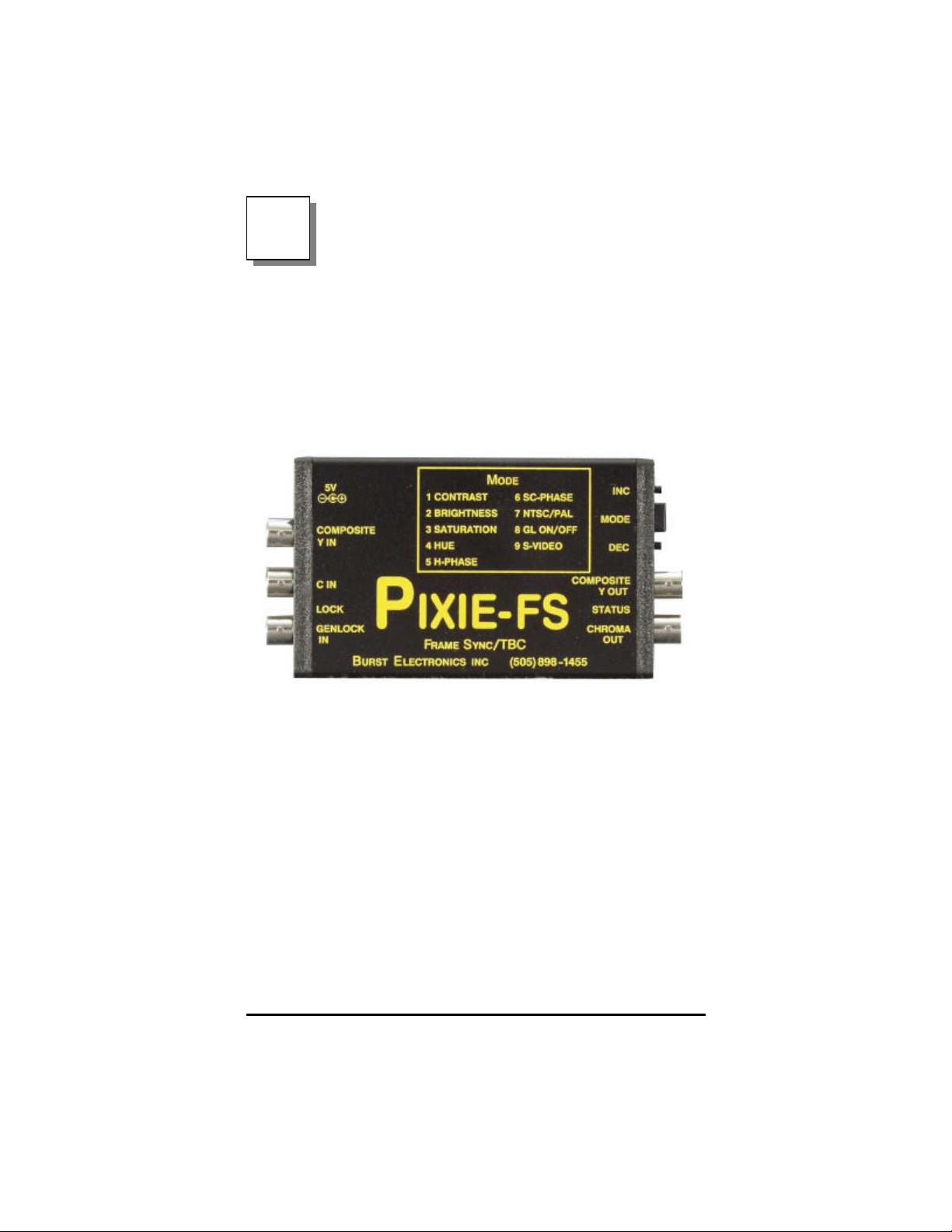
Pixie- FS Analog TBC w/ Infinite
Window Frame Store
Congratulations on your purchase of the Burst
Electronics model Pixie-FS Time Base Corrector with
Infinite Window Frame Store. This is a fully functional
TBC in an extremely compact enclosure (small
enough to fit in a pocket). This product is designed to
take an asynchronous video source and synchronize
this video to an external reference video signal (ie.
House Black). Several adjustments to the video output
are controlled by the Mode dial and Inc/Dec buttons.
Features
• Full Frame Time Base Correction
• Adaptive Comb Filter Decoding
• Input Anti-Aliasing Filters
• NTSC/PAL
• Genlock capability
• Composite to S-Video Transcoding
Pixie-FS Time Base Corrector 2
Page 3

• S-Video to Composite Transcoding
Mode Dial (Burst Electronics recommends using a
Vectorscope and Waveform Monitor while adjusting
the Mode functions)
1. Contrast (video gain) - adjusts the range between
full White and full Black. At its minimum level,
White and Black converge at +47IRE. At near the
maximum level, Black rests at 0IRE and White at
112IRE. Each step of adjustment is approximately
0.3IRE. Caution should be observed not to
exceed this range. D igitally created artifacts will
appear across the video frame if this adjustment is
overdriven.
2. Brightness (setup) - adjusts the level of DC offset
of the active video. At its minimum level, Black
rests at 0IRE and Whiter Than White at 27IRE. At
the maximum level, Black rides at 69IRE and
Whiter Than White at 112IRE. Each step of
adjustment is approximately 0.3IRE.
3. Saturation - adjusts the amount of amplitude
allotted to the Chromanance. At its minimum level
(assuming Contrast and Brightness are set to
NTSC standards), color vectors align to the center
of the color boxes on a Vectorscope. At its
maximum levels, color vectors amplitude are
doubled.
4. Hue (phase) - adjust the phase angle of the
Chromanance with respect to subcarrier. 0-360
degrees of phase can be achieved.
5. H-Phase - adjusts the Horizontal Phase
relationship with respect to the reference video
source. Depress either the Inc or the Dec button
four (4) times for each 0.3uS step.
6. SC-Phase - adjusts the Subcarrier Phase
relationship with respect to the reference video
Pixie-FS Time Base Corrector 3
Page 4

source.
7. NTSC/PAL - Selects between NTSC and PAL as
the video input/output.
8. GL On/Off - Selects whether a reference video
source is being used to synchronize the input
video source.
9. S-Video - Selects the type of input video source,
either Composite video or S-Video (Y/C).
Saving Settings
The Pixie-FS will save the settings you have made
automatically. After a setting has been adjusted, let
the Pixie-FS sit for approximately 15 seconds. The
LOCK LED will rapidly flash 5 times when the settings
are being saved. Once the LED goes steady your
settings are saved.
Transcoding
The Transcoding function allows the input video signal
to be converted from either Composite video to SVideo or S-Video to Composite video. This function is
controlled by both the “Mode #9 S-Video” control and
an internal jumper at JP3. The jumper at JP3
commands the Pixie to output video as either
Composite or S-Video. Transcoding is configured as
follows
Mode #9 JP3 Input Output
Composite In Out-CVS Composite Composite
Composite In Y-Out Composite S-Video
S-Video In Out-CVS S-Video Composite
S-Video In Y-Out S-Video S-Video
Pixie-FS Time Base Corrector 4
Page 5

Specifications
Inputs:
• Composite or S-Video, BNC connectors
• Genlock (High-Z or 75 ohms)
• AGC - Sync priority
• Input Level +/ - 6dB
• 4:2:2 CCIR656 Processing
• 9-bit A/D quantization
• 27MHz Sampling
• 4-line Adaptive Comb Filter
Outputs:
• Composite or S-Video, BNC connectors
• Level 1vpp
Performance:
• Frequency Response +/-1.0dB to 5.5MHz
• Differential Gain < 2%
• Differential Phase < 2
• SNR > 52dB
• K Factor M < 1%
• Infinite Frame Sync
Adjustments:
• Luminance
• Chroma
• Hue
• Brightness
• Genlock H-Phase +/ - 2us
• Genlock Subcarrier Phase 0-360
• Genlock on/off
• Standards NTSC or PAL
0
0
Pixie-FS Time Base Corrector 5
Page 6

• Input Selection CVS / S-Video
Power:
• 5VDC @ 420ma
Environmental:
•
Operational Temperature Range 00 to 500 C
• Storage -20
• Humidity to 98% non-condensing
0
to +850 C
Dimensions:
• 2.8W x 0.8H x 4.5D
Pixie-FS Time Base Corrector 6
Page 7

Pixie-FS Time Base Corrector 7
Page 8

8
 Loading...