

Page 1
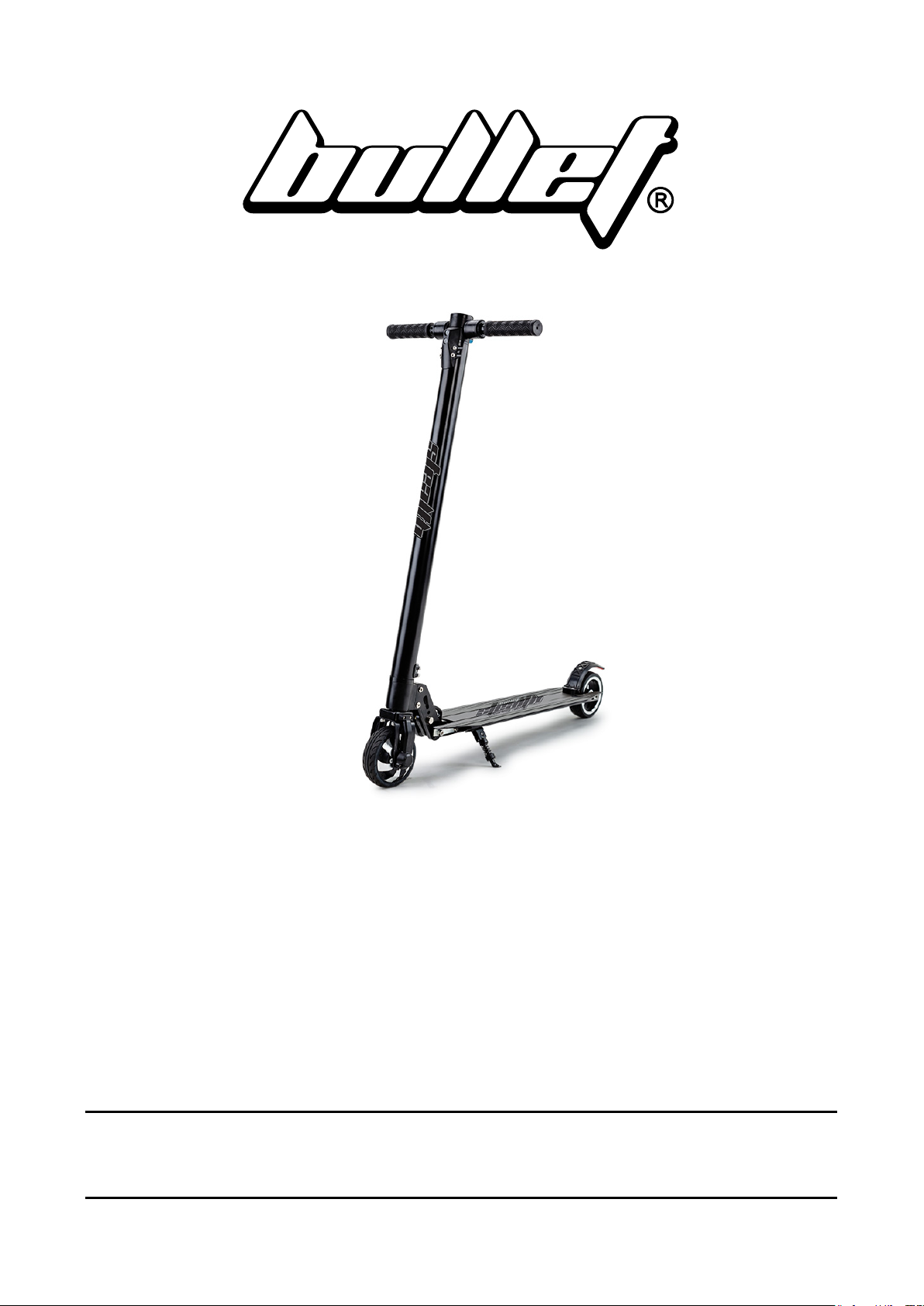
Carbon-Fibre Electric
Scooter
User Manual
[Revision 14.0 March 2019]
READ THIS MANUAL CAREFULLY BEFORE USE – FAILURE TO DO SO MAY RESULT IN INJURY,
PROPERTY DAMAGE AND MAY VOID WARRANTY. • KEEP THIS MANUAL FOR FUTURE REFERENCE.
• Products covered by this manual may vary in appearance, assembly, inclusions, specifications, description
and packaging.
E&OE ©2019 Bullet
Page 2

Carbon-Fibre Electric Scooter
Safety
•
WARNING! Riding can be a hazardous activity. Certain conditions may cause the equipment to fail
without fault of the manufacturer. The product can and is intended to move, and it is therefore possible to
lose control, fall-off and/or get into dangerous situations that no amount of care, instruction or expertise
can eliminate. If such things occur, you can be seriously injured or die, even when using safety
equipment and other precautions. RIDE AT YOUR OWN RISK AND USE COMMON SENSE.
•
APPROPRIATE RIDER USE AND PARENTAL SUPERVISION
− The recommended minimum rider age of 8 years is an estimate only, and can be affected by the
rider’s size, weight or skills. Any rider unable to adequately understand the controls or techniques
required to ride the product should not attempt to ride it. A parent’s decision to allow his or her child
to ride this product should be based on the child’s maturity, skill and ability to follow rules.
− DO NOT EXCEED THE WEIGHT LIMIT OF 100KGS.
Rider weight does not necessarily mean a person’s size is appropriate to fit or maintain control of the
product, moreover the ability of the product to safely support the loads placed on it due to rider
weight.
•
ACCEPTABLE RIDING PRACTICES AND CONDITIONS
− Always check and obey any local laws or regulations which may affect the locations where the
product may be used. Ride defensively. Watch out for potential obstacles that could catch the
wheels or force you to swerve suddenly or lose control. Avoid pedestrians etc who may enter your
path and respect the rights and property of others.
− The product is meant to be used on private property and on closed courses and not on public streets
or pavements. Do not ride in any areas where pedestrian or vehicle traffic is present.
− Do not activate the product unless you are in a suitable environment for safe riding.
− The product is not for indoor use.
− This product was manufactured for performance and durability but are not impervious to damage.
Stunts or other aggressive riding can over-stress and damage the product, and the rider assumes all
risks associated with how the product is looked after.
− Be careful and know your limitations. Risk of injury increases as the degree of riding difficulty
increases. The rider assumes all risk associated with aggressive riding activity.
− Maintain a hold on the handlebars at all times.
− Never carry passengers or allow more than one person at a time to ride the product.
− Never use near steps, drops or bodies of water, such as swimming pools.
− Keep your fingers and other body parts away from the wheels and all other moving components.
− Never use headphones or a phone when riding.
− Never hitch the product to another vehicle or person.
− Do not ride the product in rain or wet conditions and never immerse the product in water – electrical
components may be damaged by water or create other possible unsafe conditions.
− Bumpy, slippery, uneven or rough surfaces may increase risks.
− Do not touch the brakes or electric motor when in use and/or immediately after riding as they can
become very hot.
− Do not ride at night or when visibility is limited.
E&OE ©2019 Bullet 2
Page 3

Carbon-Fibre Electric Scooter
•
PROPER RIDING ATTIRE
− Always wear proper protective equipment, such as an approved safety helmet (with chin strap
securely buckled), elbow and knee pads. A helmet may be legally required by local law or regulation
in your area. A long-sleeved shirt, long pants and gloves are recommended. Always wear closed
shoes (preferably lace-up shoes with rubber soles), never ride barefoot or in sandals or thongs, and
keep shoe laces tied and out of the way of the wheels, motor and drive system.
•
USING THE CHARGER
− The supplied charger should be regularly examined for damage to the electrical cord, plug,
enclosure and other parts. If any damage or malfunction occurs, do NOT use the charger again until
it has been repaired or replaced.
− Use only with the recommended charger.
− Use caution when charging.
− The charger is not a toy,and should be operated by adults only.
− Do not operate the charger near flammable materials.
− Do Not clean or perform any maintenance on the product when it is being charged.
FAILURE TO USE COMMON SENSE AND HEED THE ABOVE WARNINGS INCREASES RISK OF
SERIOUS INJURY. USE THE PRODUCT ONLY WITH APPROPRIATE CAUTION AND SERIOUS
ATTENTION TO SAFE OPERATION.
E&OE ©2019 Bullet 3
Page 4

Carbon-Fibre Electric Scooter
Table of Contents
Safety ................................................................................................................................................... 2
Parts Identification and Assembly ................................................................................................... 5
Operation ............................................................................................................................................ 7
Folding ....................................................................................................................................................... 7
Unfolding .................................................................................................................................................... 8
Controls and Features................................................................................................................................ 9
Console Features ..................................................................................................................................... 10
Maintenance and Storage ............................................................................................................... 11
Cleaning and Storage .............................................................................................................................. 11
Battery Care and Charging ...................................................................................................................... 11
Battery Charging ................................................................................................................................ 11
Battery Disposal ................................................................................................................................ 11
Troubleshooting ............................................................................................................................... 12
Specifications ................................................................................................................................... 12
E&OE ©2019 Bullet 4
Page 5
Carbon-Fibre Electric Scooter
3
4
1 3 5
2
A
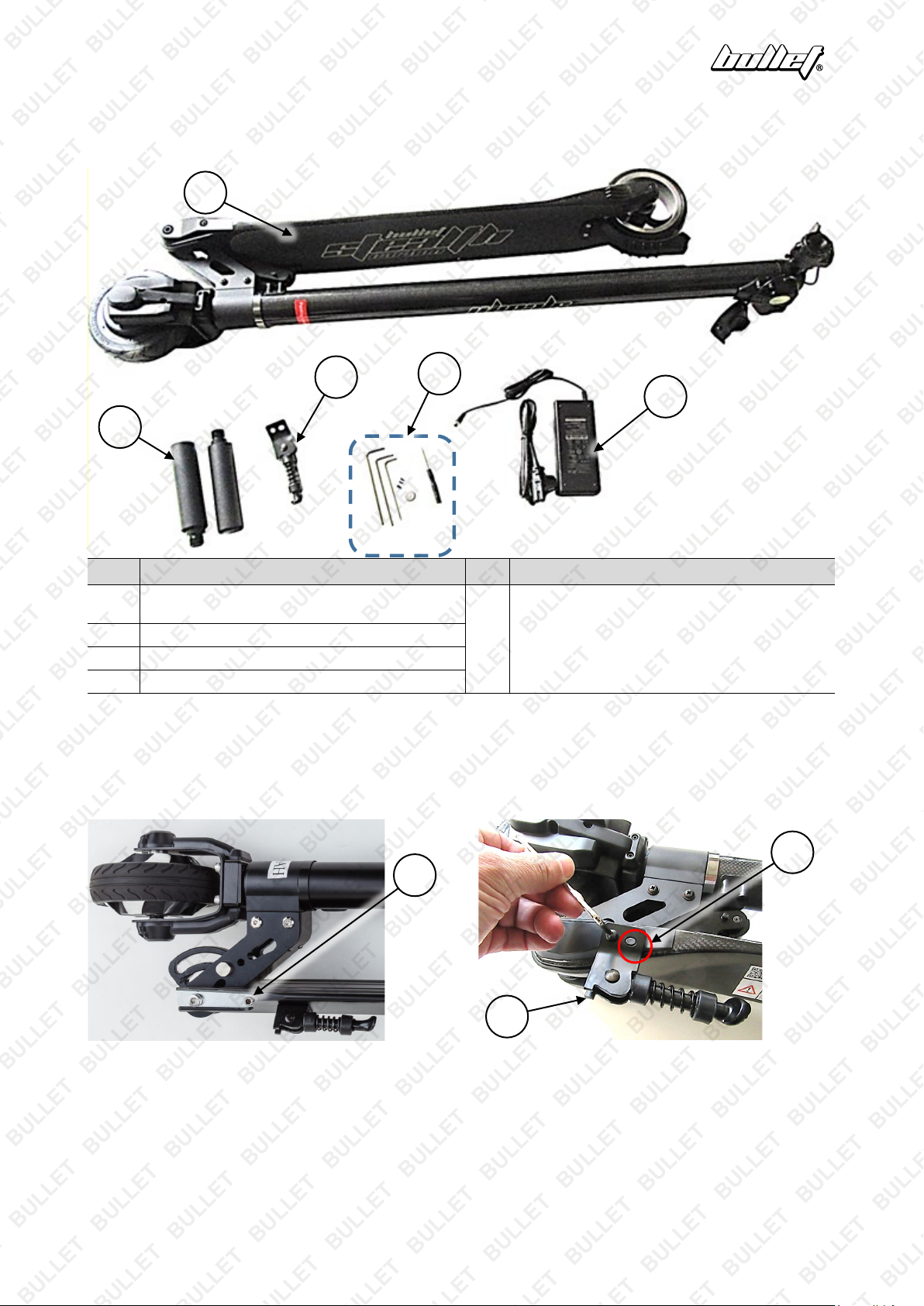
Parts Identification and Assembly
2
4
No. Name No. Name
Scooter Assembly (Deck, Wheels, Steering Tube,
1
Motor, Batteries, Console)
2 Handlebar Left and Right
Side-Stand
Battery Charger and Connection Cables
Parts / Fasteners / Tools:
5
Spare Small Screws (may be supplied)
Screwdriver
Allen Key
The scooter comes with some minor assembly required and includes the necessary tools.
1. If necessary, use the Allen key to remove (rotate left) the side-stand screw (1) located on the left-side of
the scooter.
2. Place the side-stand (2) into position so the oval hole and locating pin on the scooter line up (A). Re-
install the site-stand screw and tighten (rotate right) firmly using the Allen key.
1
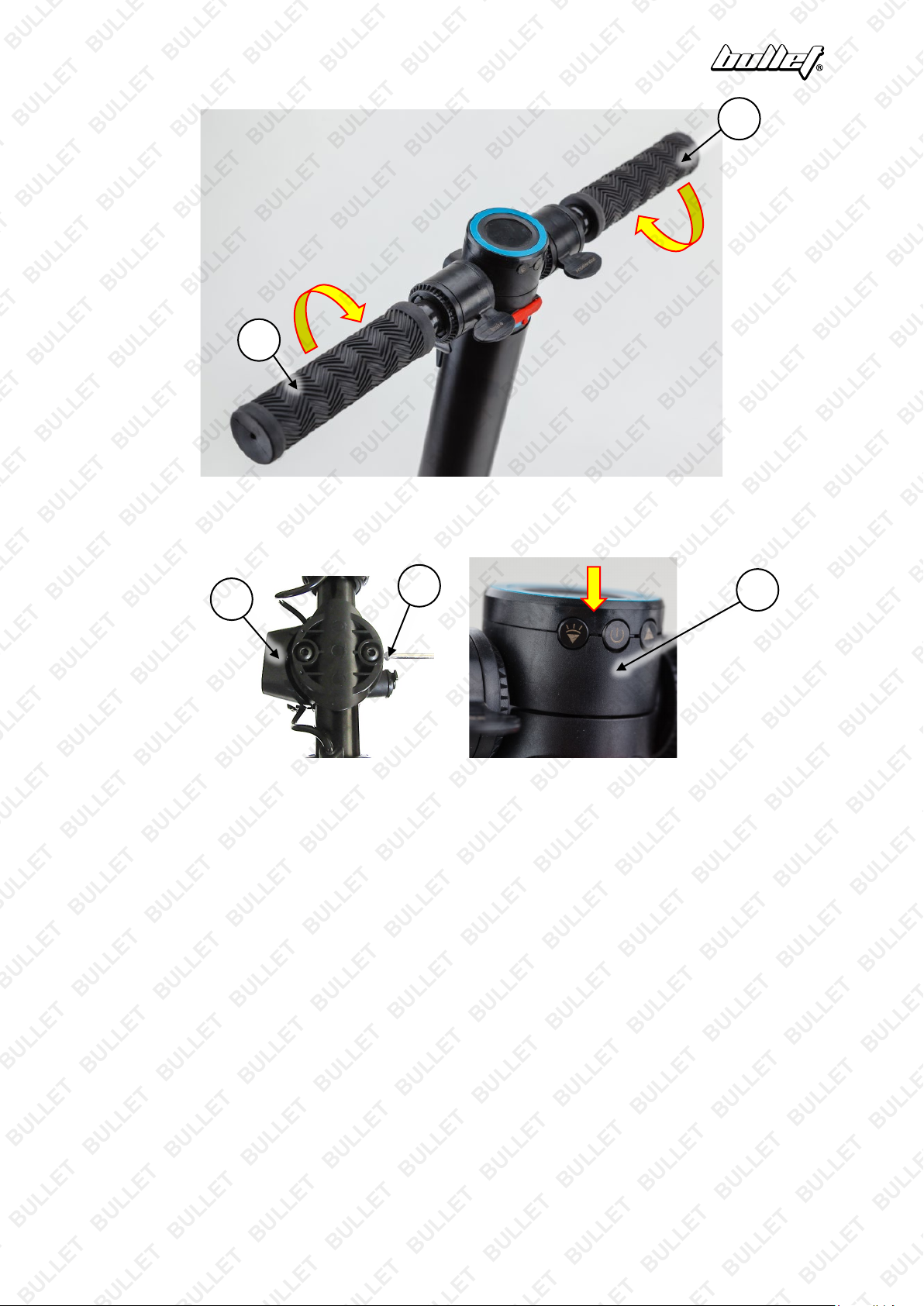
3. Install the right-hand handlebar (3), marked "R", to the "steering head". The right-hand handlebar
features a "left-hand" thread, so you must rotate it left (anti-clockwise) to screw it in. Tighten it firmly by
hand.
4. Install the left-hand handlebar (4), marked "L", to the "steering head" – rotate it right (clockwise) to screw
it in, and tighten firmly by hand.
E&OE ©2019 Bullet 5
Page 6
Carbon-Fibre Electric Scooter
3 4 5 5 6
5. If necessary, use the screwdriver to remove (rotate left) the 2 console screws (5) located at the top of the
"steering head". Place the console (6) in position (it is already connected electrically) on the steering
head, then use the screwdriver to tighten (rotate right) the 2 console screws.
E&OE ©2019 Bullet 6
Page 7
Carbon-Fibre Electric Scooter
Video Tutorial:
Folding Your New
Carbon-Fibre Scooter
Operation
Charge the battery prior to use. • Make sure that the power is turned OFF when the scooter
is not in use. • Always wear a helmet and appropriate safety equipment and always keep
both hands on the handlebars and both feet on the deck whilst riding. • Monitor battery usage when in
use, the scooter may suddenly slow down as the battery charge reduces.
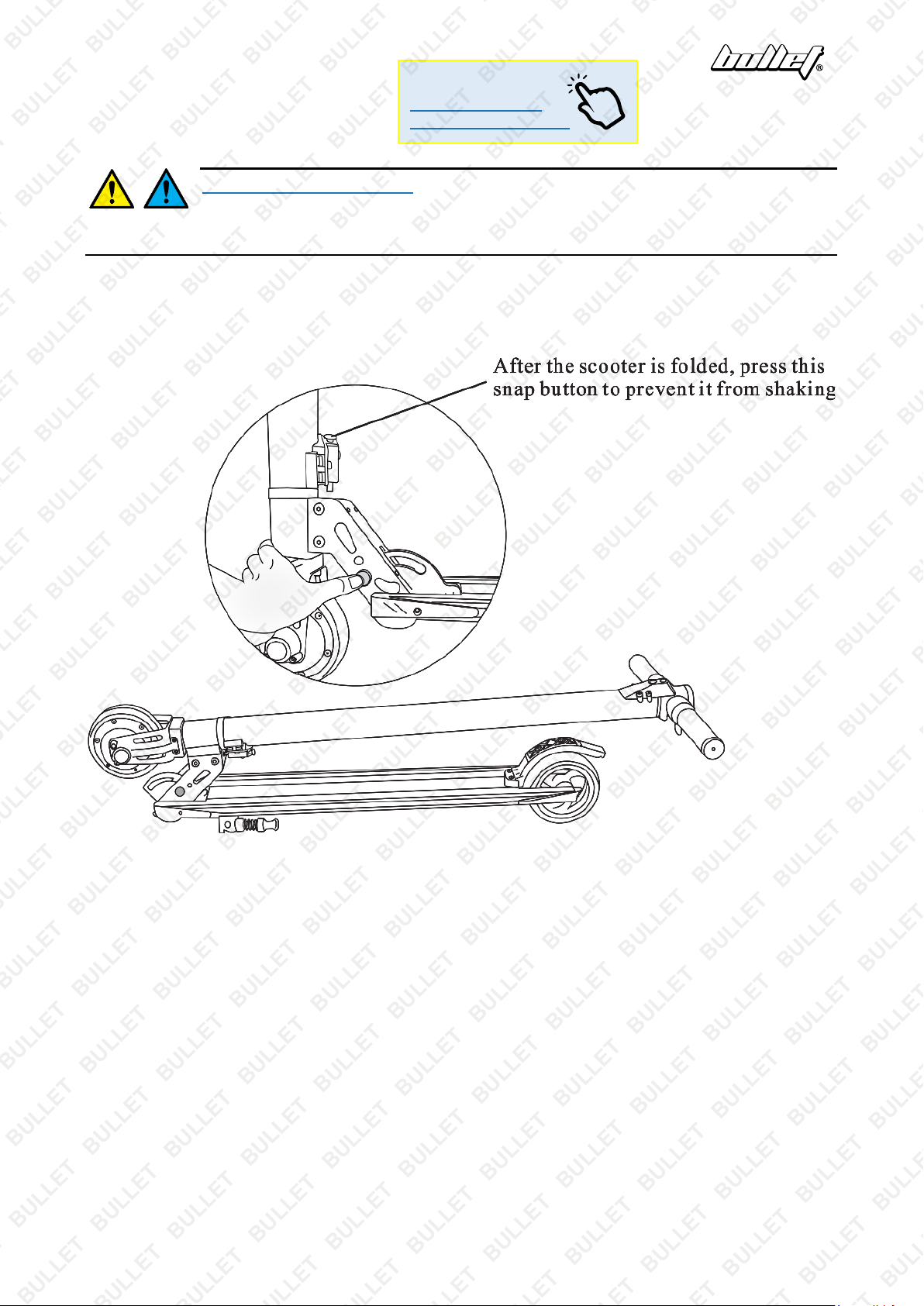
Folding
Press the folding switch and put down the scooter tube about 90°. After hearing a clicking sound, the scooter
is fully folded.
E&OE ©2019 Bullet 7
Page 8
Carbon-Fibre Electric Scooter
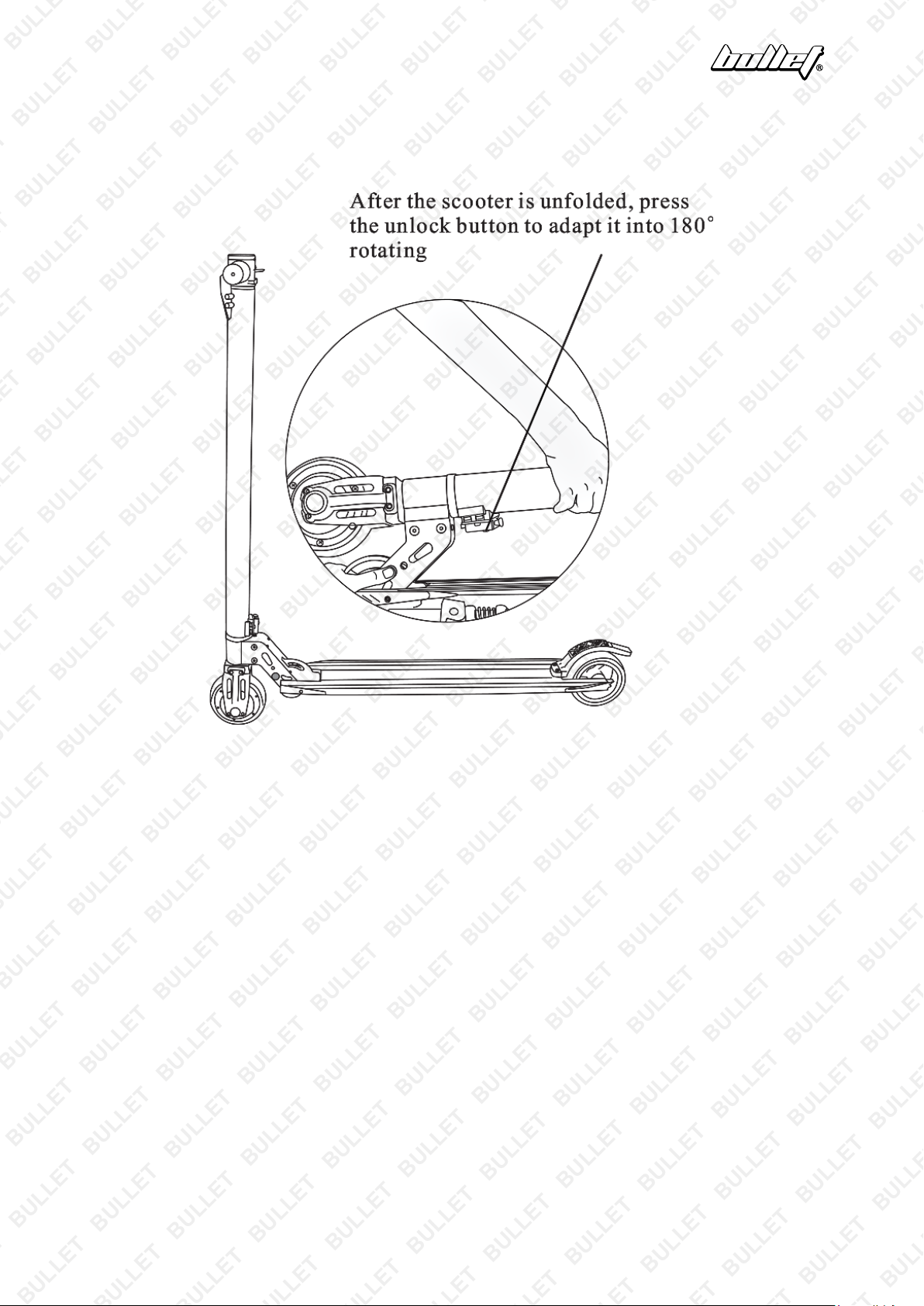
Unfolding
Press the folding switch and lift the scooter tube about 90°. After hearing a clicking sound, the scooter is fully
unfolded.
E&OE ©2019 Bullet 8
Page 9
Carbon-Fibre Electric Scooter
3 8 2 1 6 4 5 7 9
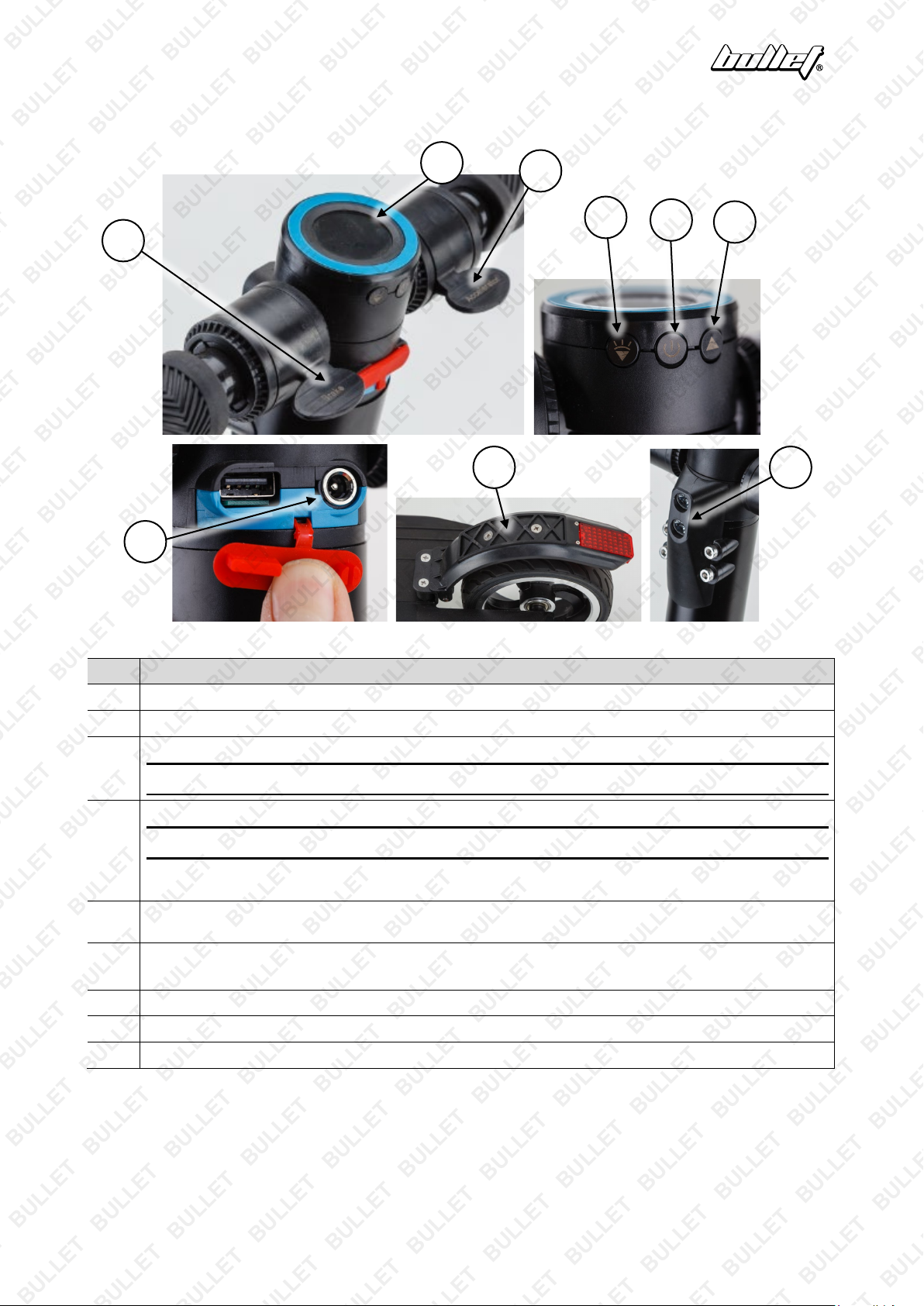
Controls and Features
No. Control / Feature
1 Console – Provides scooter and trip information.
2 Accelerator Paddle – Press downward to accelerate.
3 Decelerator Paddle – Press downward to cut power to the motor and use the motor as a brake.
Note: The console displays a "brake" symbol when the brakes are being applied.
4 ON / OFF – Press and hold for approximately 3 seconds to switch the scooter on or off.
Note: The scooter will automatically switch OFF if left idle for 3 minutes.
Select Display – Press to alter scooter display information between trip time, trip distance meter, odometer,
motor speed (RPM) and battery voltage.
Decrease Speed – Press to lower motor speed from "3" to "2" or "2" to "1". Press and hold to turn the
5
headlight ON/OFF.
6 Increase Speed – Press to increase motor speed from "1" to "2" or "2" to "3".
Reset Trip Distance Meter – Press and hold to reset trip meter to "zero".
7 Battery Charging Port – Connection point for the battery charger.
8 Rear Brake – Step on mudguard to apply rear brake.
9 Headlight – Safety feature for added visibility.
E&OE ©2019 Bullet 9
Page 10
Carbon-Fibre Electric Scooter
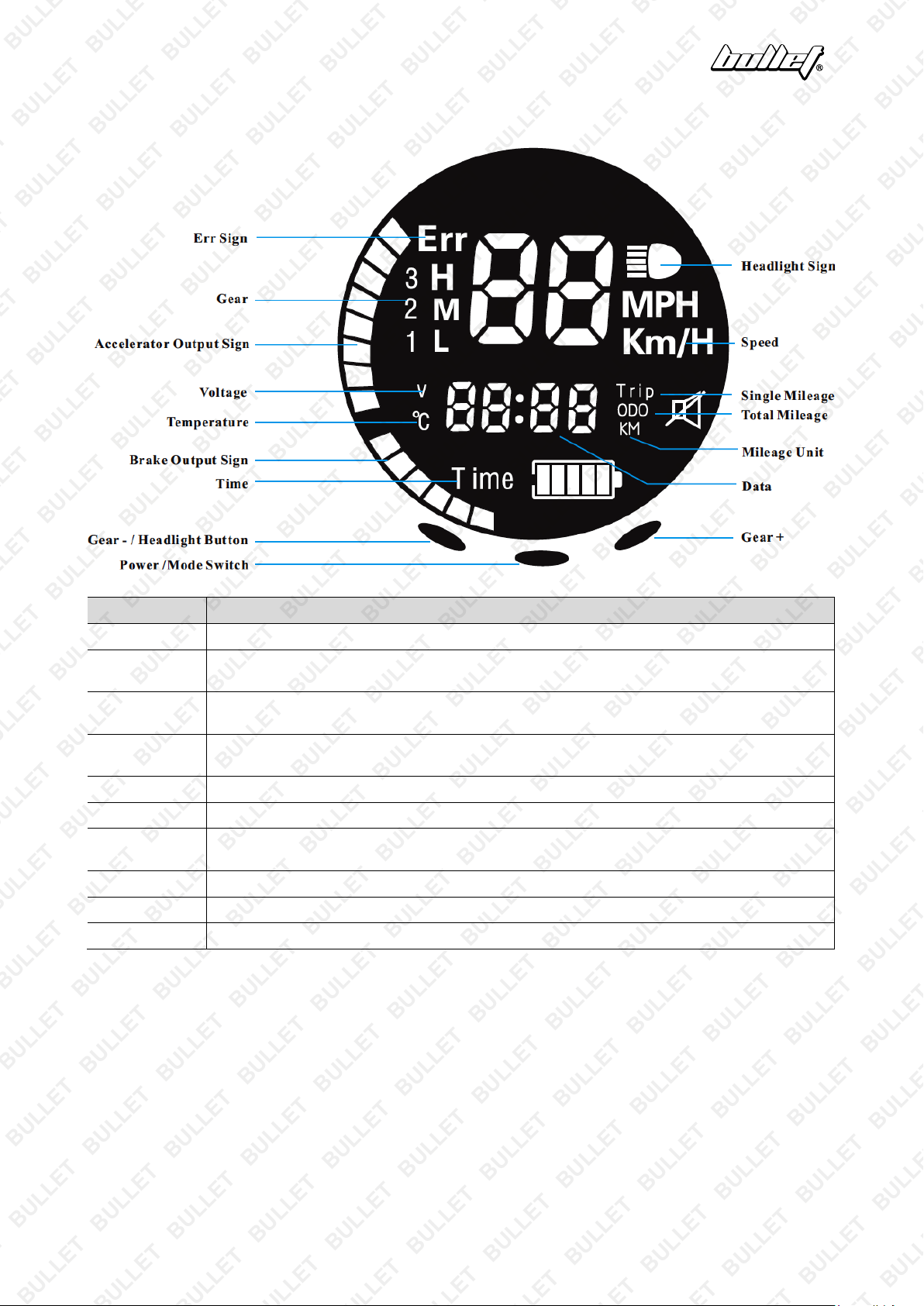
Console Features
Name Control / Feature
Err Sign Shows a system error and the scooter will stop working for troubleshooting.
Accelerator
Output
Gear Shows the current gear the scooter is in. there are three gears: 1, 2, 3 (Low, Medium, High,
Data Shows mode switching, battery voltage, motherboard temperature, riding time, single mileage and
Voltage Shows the current battery voltage, accurate up to 0.1V
Temperature Shows the MOS temperature of the motherboard.
Brake Output This feature is related to the brake output. The deeper the brake button is pressed, the higher the
Total Mileage Shows the total mileage the rider has travelled so far.
Single Mileage Shows the mileage after switching ON the scooter for the first time.
Headlight Shows that the headlight is either turned OFF or ON.
This feature is related to the accelerator output. The deeper the acceleration button is pressed, the
higher the progress bar.
respectively) and different gears correspond to different power output.
total mileage.
progress bar.
E&OE ©2019 Bullet 10
Page 11
Carbon-Fibre Electric Scooter
X
Maintenance and Storage
Make sure that the power is turned OFF before performing any maintenance activities. •
Some maintenance activities described may be beyond the scope of some users. For
procedures that you are not comfortable with or have the tools or experience for, have the unit serviced by a
service centre or qualified technician.
Cleaning and Storage
• Clean the scooter using a soft dry cloth only.
• Do NOT use chemicals, solvents, abrasives or any form of liquid to clean the scooter as this may
damage the electronics or surface finishes.
• Store the scooter indoors in a cool, dry place. It is recommended to keep the scooter covered when not
in use.
• Store at temperatures between -23°C (-10°F) and 45°C (113°F). Avoid storage areas that are subject to
large temperature variations.
• When storing for extended periods, discharge and recharge the batteries every 3 months.
Battery Care and Charging
Never modify the electrical system. Alterations could cause a fire resulting in serious injury
and could also damage the electrical system. • Charge with the supplied or recommended
charger only. Use of the wrong charger could cause a fire or explosion resulting in serious injury. • Battery
charging must be performed by adults only. Never allow children to charge the battery. • Ensure the voltage
and frequency of the charger is compatible with mains electrical supply. • Use the battery charger in dry
locations only. • The battery must be charged before first use. • Battery charging generally takes 4 hours
from discharged to fully charged.
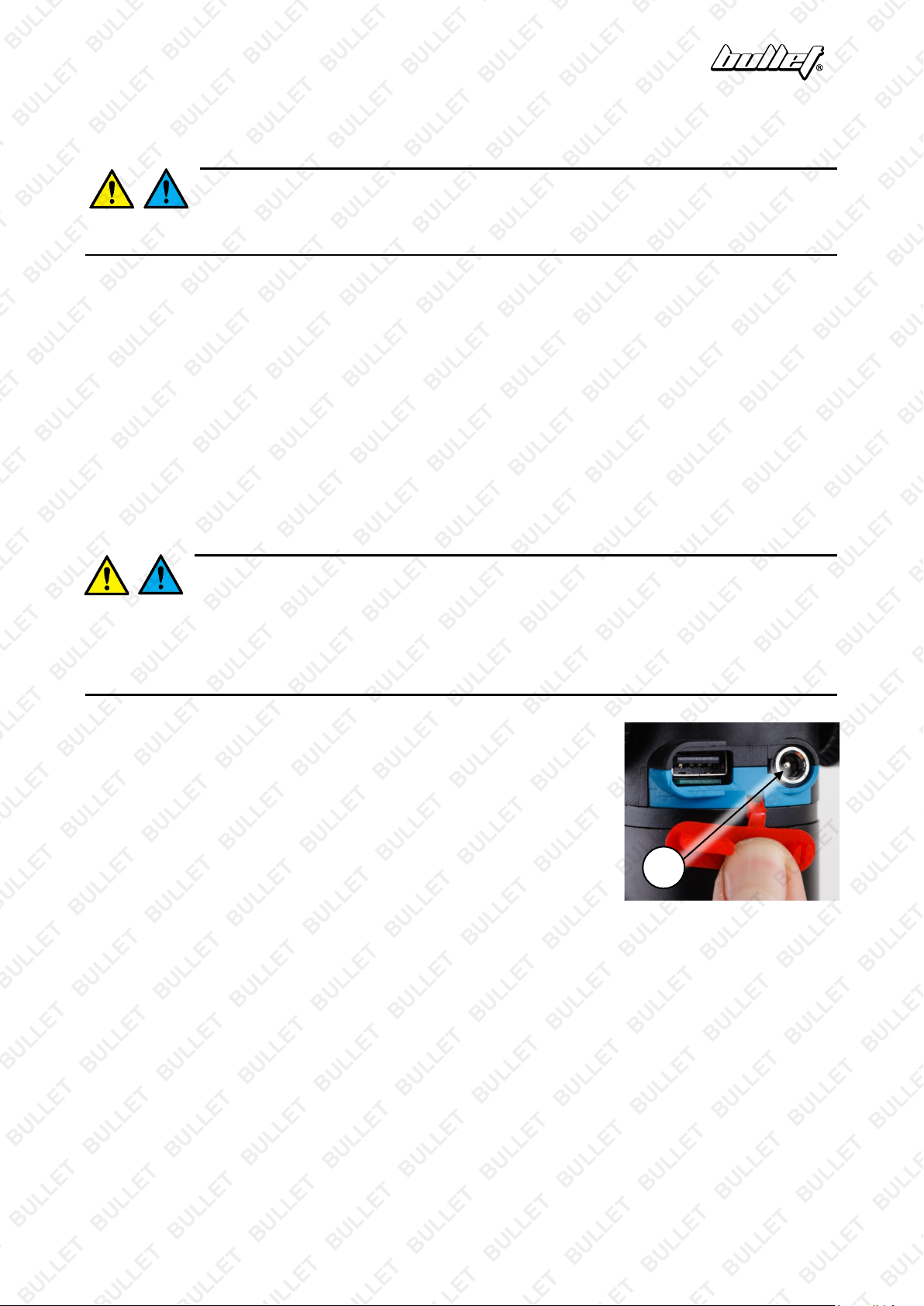
Battery Charging
1. Ensure that the scooter is OFF.
2. Insert the battery charger connector into the charger port (X), beneath
the console.
3. Connect the charger to a standard 240VAC electrical supply and switch
it ON. When charging, the indicator on the charger illuminates red. The
charger may feel warm during charging – this is normal and not a cause
for concern.
4. When charging is complete, the indicator on the charger illuminates
green. Disconnect the charger from the electrical supply and unplug the battery connector from the
charger port.
Battery Disposal
•
The batteries are Lithium-Ion. They must be recycled or disposed of it in an environmentally responsible
manner.
•
Never dispose of a battery as normal rubbish.
•
Never burn or dispose of batteries in a fire.
E&OE ©2019 Bullet 11
Page 12

Carbon-Fibre Electric Scooter
Troubleshooting
Malfunction Possible Cause Possible Solution
Scooter not running or was
running but suddenly
stopped
Short run time 1. Under-charged battery.
Scooter runs sluggishly. 1. Unsuitable riding conditions. 1. Vehicle being overloaded or used on
Scooter turns on and off
intermittently.
1. Under-charged battery.
2. "Rolling start" set to "1".
3. Dead battery.
4. Battery charger not working.
5. Motor electrics or switches
damaged / faulty.
2. "Under-voltage" setting
changed from default value.
1. Main body electrics or switches
damaged / faulty.
1. Charge battery and ensure battery
charging and care procedures are
followed.
2. Scooter must be moving before motor can
be activated, or set "rolling start to "0".
3. Vehicle battery no longer holding charge
or serviceable. Have battery checked by
authorised service center.
4. Have charger professionally checked. If
not working – replace.
5. Seek diagnosis and repair from authorised
service center.
1. Charge battery and ensure battery
charging and care procedures are
followed.
2. Set "under-voltage" setting to "21.5".
unsuitable surfaces. Unload vehicle
(100kg max.) and/or use on suitable
surface.
1. Seek diagnosis and repair from authorised
service center.
Speed not showing on
display
Speed showing in "MPH" 1. "Speed units" set to "1". 1. Set "speed units" setting to "0".
Scooter not slowing when
accelerator released
Display showing speed /
RPM that is incorrect
1. "Show speed" set to "0". 1. Set "show speed" setting to "1".
1. "Cruise control" set to "1". 1. Set "cruise control" setting to "0".
1. "Wheel diameter" and/or "motor
poles" incorrectly set.
2. Set "wheel diameter" to "02" and "motor
poles" to "04".
Specifications
Battery Type
Charging Time
Maximum Load
Lithium-Ion
Approximately 4 hours
100kg (rider weight)
E&OE ©2019 Bullet 12
Page 13
Carbon-Fibre Electric Scooter
Some experts believe the incorrect or prolonged use of almost any product could cause serious
injury or death. For information that may reduce your risk of serious injury or death, consult the
points below and additionally, the information available at www.datastreamserver.com/safety
• Consult all documentation, packaging and product
labelling before use. Note that some products feature
online documentation which should be printed and kept
with the product.
• Check product for loose / broken / damaged / missing
parts, wear or leaks (if applicable) before each use.
Never use a product with loose / broken / damaged /
missing parts, wear or leaks (if applicable).
• Products must be inspected and serviced (if applicable)
by a qualified specialist every 6 months assum ing
average residential use by a person of average weight
and strength, above average technical aptitude, on a
property matching average metropolitan specification.
Intended use outside these guidelines could indicate the
product is not suitable for intended use or may require
more regular inspection or servicing.
• Ensure all possible users of the product have completed
an industry recognized training course before being
given access to the product.
• The product has been supplied by a general merchandise retailer that
may not be familiar with your specific application or your description of
the application. Be sure to attain third-party approval for your
application from a qualified specialist before use regardless of prior
assurances by the retailer or its representatives.
• This product is not intended for use where fail-safe operation is
required. As with any product (take an automobile, aircraft, computer
or ball point pen for example), there is always a small chance of
technical issues that needs to be repaired or may require replacement
of the product or a part. If the possibility of such failure and the
associated time it takes to rectify could in any situation inconvenience
the user, business or employee then the product is not suitable for
your requirements. This product is not for use where incorrect
operation or a failure of any kind, including but not limited to a
condition requiring product return, replacement, service by a technician
or replacement of parts could cause a financial loss, loss of employee
time or an inconvenience requiring compensation.
• If this item has been purchased in error after considering the point s
above, simply contact the retailer directly for details of their returns
policy, if required.
©2019 Bullet. All rights reserved. No part of this document, including descriptive content, concepts, ideas,
diagrams or images may be reproduced or transmitted in any form or by any means, electronic or
mechanical, including photocopying, scanning or recording, or any information storage and retrieval system,
without express permission or consent from the publisher.
E&OE ©2019 Bullet 13
 Loading...