

Page 1

File and Volume Management
Bull DPS 7000
User’s Guide
Cartridge Tape Library UNIX Server
47 A2 63UU Rev05
Page 2

File and Volume Management
Bull DPS 7000
User’s Guide
Cartridge Tape Library UNIX Server
Subject:
Special Instructions:
Software Supported:
Software/Hardware required:
Date:
Cartridge Tape Library (CTL) UNIX server is an automated
storage and retrieval system for magnetic tape cartridges.
This Revision 05 cancels and replaces Revision 04.
GCOS 7 HPS/EXMS Releases V7, V8, V9 and V10
OPEN7 on native DPS7000, V7000 on DPS7000-XTA
August 2001
Bull S.A.
CEDOC
Atelier de reprographie
357, Avenue Patton BP 20845
49008 ANGERS Cedex 01
FRANCE
47 A2 63UU Rev05
Bull HN Information Systems Inc.
Publication Order Entry
FAX: (800) 611-6030
MA30/415
300 Concord Rd.
Billerica, MA 01821
U.S.A.
Page 3

Copyright © Bull S.A., 1994, 1996, 1998, 1999, 2001
Bull acknowledges the rights of proprietors of trademarks mentioned herein.
Your suggestions and criticisms concerning the form, contents and presentation of this manual are in vited.
A form is provided at the end of this manual for this purpose.
No part of this publication may be reproduced, stored in a retrieval system or transmitted in a ny form or by any
means, electronic, mechanical or otherwise without the prior written permission of the publisher.
Bull disclaims the implied warranties of merchantability and fitness for a particular purpose and makes no
express warranties except as may be stated in its written agreement with and for its customer. In no event is Bull
liable to anyone for any indirect, special, or consequential damages.
The information and specifications in this document are subject to change without notice.
Consult your Bull Marketing Representative for product or service availability.
47 A2 63UU Rev05
Page 4

Preface
Scope and
Objectives
XTA case
Intended
Readers
Structure
The Cartridge Tape Library UNIX Server User’s Guide provides necessary
information to DPS 7000 users using cartridge tape libraries connected to the
DPS 7000 through a UNIX server. It describes the hardware and software
components of the Cartridge Tape Library (CTL), including the Library Storage
Module (LSM), ACS Library Manager (LM), the library server (DPX/20 or
ESTRELLA running the ACSLS) and the CLX (DPS 7000 software responsible for
the interface with the library server). It gives information on how to install and
configure the CLX on the DPS 7000. It gives advice on efficient use of the library,
and the correct responses to error conditions and messages.
This document is available for native DPS7000 (ARTEMIS, AURIGA, VEGA)
and for the new DPS7000-XTA architecture. The new specifications for the
XTA DPS7000 architecture are mention by “XTA case” notes.
The Cartridge Tape Library UNIX Server User’s Guide is intended for developers,
operators, software support personnel, and System Administrators using the
Cartridge Tape Library connected to the DPS 7000 through a UNIX server. It is
assumed that the reader has knowledge of the ACSLS library server and GCOS 7.
Section 1 provides an overview of the Cartridge Tape Library
service.
Section 2 explains how to set up the cartridge tape library. It
provides information about installation, configuration
of the CLX, ACSLS and GCOS 7 configuration.
Section 3 describes how to start the software including
initializing and starting up the ACSLS and CLX.
Section 4 describes how to label the cartridges and how to enter
cartridges in the library.
Section 5 describes operation procedures for the CTL.
Section 6 describes the CLX commands available to an operator
through an IOF terminal.
Section 7 provides information on sharing the library among
several systems.
47 A2 63UU Rev05 iii
Page 5

Cartridge Tape Library UNIX Server User’s Guide
Section 8 discusses error conditions, including system reaction
and recommended user action, and lists the messages
associated with these errors.
Section 9 discusses error detection and recovery.
Section 10 describes the operator messages.
Section 11 provides information about Return status.
This document is completed by five appendices, a glossary and an index.
Appendix A presents CLX command syntax. Appendix B describes what to supply
to Bull in problem situations. Appendix C describes the CLX.SLLIB library
content. Appendix D lists the GCOS 7 messages not already described. Appendix E
discusses the PREPARE_TAPESET utility.
Bibliography
XTA case
Bull Documents
CNS7 A2 NGL Reference Manual.......................................................... 39 A2 32DN
CNS7 System Generation CNS A1......................................................... 39 A2 40DM
DNS System Generation DNS C1.......................................................... 39 A2 84DM
DNS V4 System Generation................................................................... 39 A2 22DN
Data Management Utilities User’s Guide............................................... 47 A2 26UF
Full Screen Editor User’s Guide............................................................. 47 A2 06UP
GCOS 7 System Installation Configuration and Updating Guide V8......47 A2 19US
GCOS 7 System Installation Configuration and Updating Guide V9......47 A2 23US
JCL User’s Guide.................................................................................... 47 A2 12UJ
Library Maintenance Reference Manual................................................ 47 A2 01UP
Library Maintenance User’s Guide ........................................................ 47 A2 02UP
Console Messages Directory................................................................. 47 A2 61UU
System Operator’s Guide V8and V9 ....................................................... 47 A2 53US
Text Editor User’s Guide......................................................................... 47 A2 05UP
Operator’s Guide CTS, ACS, TCU......................................................... 77 A1 92UU
UFT User’s Guide................................................................................... 47 A2 13UC
Interoperability Software Installation 7 Administrator’s Guide............. 47 A2 56UU
Interop7 users Guide ...........................................................................47 A2 91 US
StorageTek 4400 Automated Cartridge System Documents
ACSLS AIX6000 Configuration Guide
ACSLS AIX6000 Library Control System Installation Guide
ACSLS System Administrator’s Guide
ACSLS Programmer’s Guide
These documents are delivered with the DPX/20 or ESTRELLA server and the
ACSLS software package.
iv 47 A2 63UU Rev05
Page 6

Table of Contents
1. Overview ....................................................................................................... 1-1
1.1 The Control Path Components........................................................................................1-3
1.2 The Data Path Components............................................................................................1-5
1.3 The Cartridge Tape Libraries..........................................................................................1-7
1.3.1 StorageTek Cartridge Tape Library.................................................................1-7
1.4 The Library Server.........................................................................................................1-10
1.5 The Host System...........................................................................................................1-14
1.5.1 GCOS 7 and the CLX Software..................................................................... 1-15
1.6 Configurations Support ed .............................................................................................1-17
1.6.1 ACS Mono-LSM Configuration ......................................................................1-17
1.6.2 Mono-ACS Multi-LSM Configuration..............................................................1-18
1.6.3 Mono-ACS Multi-Host Configuration.............................................................. 1-19
2. Setting Up Your CTL on the DPS 7000........................................................ 2-1
2.1 Prerequisites ...................................................................................................................2-1
2.2 Installation of CLX ...........................................................................................................2-2
2.2.1 Installation of CLX on GCOS 7........................................................................2-2
2.2.2 Installation/Configurati on of SSI ......................................................................2-3
2.3 Installation Procedure ..................................................................................................... 2-4
2.3.1 Installation Procedure of CLX..........................................................................2-4
2.3.2 Installation procedure of CLX for DPS 7000-XTA
2.4 Configuration.................................................................................................................2-17
2.4.1 UNIX Library Server Configuration ................................................................ 2-18
2.4.2 System Configuration .................................................................................... 2-18
2.4.3 CLX Configuration on GCOS 7......................................................................2-19
2.4.4 SSI Configuration under OPEN7...................................................................2-30
2.4.5 SSI Configuration on UNIX library server for DPS 7000-XTA.......................2-32
47 A2 63UU Rev05 v
...........................................2-7
Page 7

Cartridge Tape Library UNIX Server User’s Guide
2.5 Errors in Mount Processing...........................................................................................2-33
2.5.1 Volumes Not in the Library ............................................................................2-33
2.5.2 Volumes in Busy State ................................................................................... 2-33
2.5.3 Write Protected Work Volumes ...................................................................... 2-34
2.5.4 Scratch Non-Work Volumes ..........................................................................2-34
2.5.5 CLX Log Files ................................................................................................ 2-35
2.5.6 Volume Access Rights...................................................................................2-36
2.5.7 Mixed Media / Mixed Format Support............................................................2-37
3. Starting the Software ................................................................................... 3-1
3.1 Starting The CLX Service................................................................................................3-1
3.1.1 ACSLS Initialization and Startu p ...................................................................... 3-1
3.1.2 Starting OPEN7 ...............................................................................................3-2
3.1.3 Starting SSI......................................................................................................3-2
3.1.4 Starting CLX.....................................................................................................3-3
3.1.5 CLX Initialization ..............................................................................................3-4
3.2 Configuring Automatic Restarts ......................................................................................3-6
3.3 Messages Issued at ISL System Load............................................................................3-7
4. How to Enter a Cartridge ............................................................................. 4-1
4.1 Labeling the Cartridges...................................................................................................4-1
4.2 Label Consistency...........................................................................................................4-3
4.3 Write Protection...............................................................................................................4-4
4.4 Entering Cartridges into the Library ................................................................................4-5
4.4.1 Automatic Entry................................................................................................4-5
4.4.2 Manual Entry....................................................................................................4-5
5. Operating Y our CTL...................................................................................... 5-1
5.1 Cleaning Cartridges.........................................................................................................5-1
5.2 User Application Information...........................................................................................5-2
5.2.1 Referring to Cartridge Library Volumes...........................................................5-2
5.2.2 Mounting Library Volumes...............................................................................5-3
5.2.3 Dismounting Library Volume s.......................................................................... 5-3
5.2.4 END, ABEND, and ENDVOL Parameters .......................................................5-5
5.2.5 Data Compaction .............................................................................................5-5
5.3 Volume Preparation.........................................................................................................5-7
5.3.1 How to Prepare a New Volume ....................................................................... 5-7
5.3.2 How to Prepare a Work Volume......................................................................5-7
5.3.3 Re-establishing Consistency of Label s............................................................5-8
vi 47 A2 63UU Rev05
Page 8

5.3.4 How to Prepare a Large Number of Volumes..................................................5-8
5.4 DPS 7000 Response to Preparing a Work Volume........................................................5-9
5.5 What Happens When a Job Assigns / Deassign s a Standard Volu me ......................... 5-10
5.6 Use of a Non-Standard Volume....................................................................................5-11
5.7 Use of Work Volumes ...................................................................................................5-12
5.8 What Happens When a Job Assigns a Work Volume...................................................5-14
5.9 Canceling a Request During Mounting ......................................................................... 5-14
6. Operator Commands.................................................................................... 6-1
6.1 Command Summary .......................................................................................................6-1
6.1.1 Summary of CLX Commands.......................................................................... 6-2
6.1.2 Summary of ACSSA Commands.....................................................................6-2
6.1.3 Summary of CLX Library Commands.............................................................. 6-4
6.1.4 Summary of Relevant Directives .....................................................................6-5
6.2 Operability Consideratio ns..............................................................................................6-6
6.3 CLX Commands..............................................................................................................6-7
6.3.1 Addressing SSI for a DPS 7000-XTA..............................................................6-8
6.3.2 Starting SSI (SSSI)..........................................................................................6-8
6.3.3 Starting CLX (SCLX) ........................................................................................ 6-9
6.3.4 Displaying Devices (DCLX) ...........................................................................6-10
6.3.5 Displaying the SSI Status (DSSI) ..................................................................6-14
6.3.6 Starting / Stopping the CLX Trace (MDCLX).................................................6-15
6.3.7 Terminating CLX (TCLX)...............................................................................6-19
6.3.8 Terminating SSI (TSSI)..................................................................................6-24
6.3.9 Resetting CLX Tables....................................................................................6-26
6.4 CLX Utilities...................................................................................................................6-28
6.4.1 Volume Report Utility (EXEC_CLX_VOLRPT - VOLRPT).............................6-28
6.4.2 File Transfer ( GET_CLX_FILE - GTCLXF)................................................... 6-30
6.5 ACSSA Commands.......................................................................................................6-31
6.5.1 Audit...............................................................................................................6-33
6.5.2 Cancel............................................................................................................6-33
6.5.3 Clear ..............................................................................................................6-34
6.5.4 Define.............................................................................................................6-35
6.5.5 Delete.............................................................................................................6-36
6.5.6 Dismount........................................................................................................6-36
6.5.7 Eject...............................................................................................................6-37
6.5.8 Enter ..............................................................................................................6-38
6.5.9 Idle .................................................................................................................6-39
6.5.10 Lock ...............................................................................................................6-40
47 A2 63UU Rev05 vii
Page 9

Cartridge Tape Library UNIX Server User’s Guide
6.5.11 Logoff.............................................................................................................6-41
6.5.12 Mount.............................................................................................................6-41
6.5.13 Query .............................................................................................................6-42
6.5.14 Set..................................................................................................................6-44
6.5.15 Show..............................................................................................................6-45
6.5.16 Start ...............................................................................................................6-46
6.5.17 Unlock............................................................................................................6-46
6.5.18 Vary................................................................................................................6-47
6.5.19 Venter ............................................................................................................6-48
6.6 LIBRARY Commands ...................................................................................................6-50
6.6.1 AUDIT_CARTRIDGE_LIBRARY (abbr. AUDLIB)..........................................6-51
CANCEL_LIB_REQUEST (abbr. CLIBR) .....................................................................6-55
6.6.2 DEFINE_SCRATCH_POOL (abbr. DFPOOL)...............................................6-56
6.6.3 DELETE_SCRATCH_POOL (abbr. DLPOOL)..............................................6-60
6.6.4 EJECT_LIB_VOLUMES (abbr. EJ ECT_ VOLUMES, EJVOL).......................6-62
6.6.5 ENTER_LIB_VOLUMES (abbr. ENTER_VOLUMES, ENVOL).....................6-67
6.6.6 ENTER_UNLAB_VOLUMES (abbr. ENUVOL) .............................................6-71
6.6.7 EXTRACT_CLX_ERROR (abbr. EXTERR)................................................... 6-73
6.6.8 QUERY_CARTRIDGE_LIBRARY (abbr. QLIB) ............................................6-76
6.6.9 SET_CAP_ATTRIBUTES (abbr. SETCAP)...................................................6-89
6.6.10 SET_CLEAN_ATTRIBUTE (abbr. SETCLN).................................................6-91
6.6.11 SET_SCRATCH_ATTRIBUTE (abbr. SETSCR)...........................................6-93
6.7 ACSSA Utilities..............................................................................................................6-96
6.8 Determining the Status of a Device...............................................................................6-97
6.8.1 How to Get a Device Current Status..............................................................6-97
6.8.2 Device Isolation..............................................................................................6-98
6.8.3 Reintroducing a Device .................................................................................. 6-98
6.9 Halting the Library Server (ACSLS)..............................................................................6-99
7. Static Sharing............................................................................................... 7-1
7.1 Sharing the Library Among Severa l Sy ste m s ................................................................. 7-1
7.1.1 Sharing of Cartridge Transports ...................................................................... 7-1
7.1.2 Sharing of Cartridge Volumes..........................................................................7-3
8. CLX Error Conditions................................................................................... 8-1
8.1 Introduction......................................................................................................................8-1
8.2 Errors During Initialization...............................................................................................8-2
8.2.1 Installation Errors.............................................................................................8-2
8.2.2 CLX Configuration Errors.................................................................................8-2
8.2.3 Error in CLX Job Submission...........................................................................8-3
viii 47 A2 63UU Rev05
Page 10

8.2.4 GCOS 7 Environment Errors ...........................................................................8-3
8.2.5 Device Status Resynchronization Errors .........................................................8-4
8.3 Errors During Operation..................................................................................................8-5
8.3.1 GCOS 7 Environment Errors ...........................................................................8-5
8.3.2 Robot (LSM) Errors..........................................................................................8-5
8.3.3 Server or Telecommunication Failure..............................................................8-6
8.3.4 Errors During Preparation of WORK Volumes ................................................ 8-7
8.3.5 Volume Mounting Errors..................................................................................8-9
8.3.6 Work Volume Dismounting Errors .................................................................8-17
8.3.7 Volume Mounting/Dismoun tin g Warni ng Me ssage s...................................... 8-17
8.3.8 Errors Produced by System Limits ................................................................8-18
9. How to Detect and Recover from Failures ................................................. 9-1
9.1 GCOS 7 Crash................................................................................................................9-1
9.2 CLX Abort........................................................................................................................9-1
9.3 CANCEL_JOB CLX.........................................................................................................9-3
9.4 ACSLS Not Operational ..................................................................................................9-4
9.5 Communication Link Failure (SSI - TNS - OPEN7 - HSL)..............................................9-7
9.6 Robot Failure.................................................................................................................9-10
9.7 CICC or PSI Failure.......................................................................................................9-11
9.8 Transport or Cartridge Failure.......................................................................................9-12
9.9 Operation In Degraded Mode........................................................................................9-13
9.9.1 Manual Mode.................................................................................................9-13
9.9.2 Semi-Automatic Mode ...................................................................................9-14
9.1.3 Device Status Inconsistency Between CLX Tables, GCOS 7, and ACSLS..9-19
9.10 CLX Resynchronization and Recovery ......................................................................... 9-23
10. CLX Operator Messages............................................................................ 10-1
10.1 TU00..............................................................................................................................10-1
10.1.1 TU00 <clx version> CLX FACILITY IS NOT AVAILABLE ON YOUR SITE ..10-1
10.1.2 TU00 <clx version> CLX CONFLICT WITH ANOTHER CARTRIDGE
LIBRARY COMPONENT (CLX OR CLC)......................................................10-1
10.2 TU01..............................................................................................................................10-2
10.2.1 TU01 <clx version> CLX INITIALIZATION IN PROGRESS..........................10-2
10.3 TU02..............................................................................................................................10-2
10.3.1 TU02 <clx version> CLX WAITING FOR ACSLM TO BE RUNNING ...........10-2
10.4 TU03..............................................................................................................................10-3
10.4.1 TU03 <clx version> CLX IS RUNNING..........................................................10-3
47 A2 63UU Rev05 ix
Page 11

Cartridge Tape Library UNIX Server User’s Guide
10.5 TU04..............................................................................................................................10-3
10.5.1 TU04 <clx version> CLX WAITING FOR LSM TO BE ONLINE.................... 10-3
10.6 TU05..............................................................................................................................10-4
10.6.1 TU05 <clx version> LSMs ARE ONLINE.......................................................10-4
10.6.2 TU05 <clx version> LSM <acs> <lsm> STATE: OFFLINE............................10-4
10.6.3 TU05 <clx version> LSMs <acs> <lsm> STATE: OFFLINE PENDING ........ 10-4
10.6.4 TU05 <clx version > LSMs <a cs> < lsm> STATE: DIAGNOSTIC ................... 10-5
10.6.5 TU05 <clx version > LSMs <a cs> < lsm> STATE: RECOVERY..................... 10-5
10.7 TU06..............................................................................................................................10-6
10.7.1 TU06 <clx version> CLX RECOVERY IN PROGRESS ................................10-6
10.7.2 TU06 <clx version> CLX IS CLEANING LOCKS ON VOLUMES SET BY
PREVIOUS CLX SESSION...........................................................................10-6
10.8 TU07..............................................................................................................................10-7
10.8.1 TU07 <clx version> CLX SHUTDOWN IN PROGRESS ...............................10-7
10.9 TU08..............................................................................................................................10-7
10.9.1 TU08 <clx version> IMMEDIATE SHUTDOWN ............................................10-7
10.10 TU09..............................................................................................................................10-8
10.10.1 TU09 <clx version> ACSLM IS RUNNING....................................................10-8
10.10.2 TU09 <clx version> ACSLM STATE: IDLE....................................................10-8
10.10.3 TU09 <clx version> ACSLM STATE: IDLE PENDING..................................10-9
10.10.4 TU09 <clx version> ACSLM STATE: RECOVERY .......................................10-9
10.11 TU11..............................................................................................................................10-9
10.11.1 TU11 <clx version> <de v ice > IN LIBR AR Y: <v olu me > MOU NTED..............10-9
10.12 TU12............................................................................................................................10-10
10.12.1 TU12 <clx version> <de v ice > IN LIBR AR Y: <v olu me > DISMO UNT ED......10-10
10.13 TU13............................................................................................................................10-10
10.13.1 TU13 <clx version> NUMBER OF CARTRIDGES IN SCRATCH POOL
<dvchar> (POOLID = <poolid>) AT LOW WATER MARK .........................10-10
10.13.2 TU13 <clx version> NUMBER OF CARTRIDGES IN SCRATCH POOL
<dvchar> (POOLID = <poolid>) AT HIGH WATER MARK......................... 10-11
10.14 TU14............................................................................................................................10-11
10.14.1 TU14 <clx version> DISPLAY_CLX COMMAND COMPLETED.................10-11
10.14.2 TU14 <clx version> CLX COMMAND IN PROGRESS................................10-11
10.15 TU15............................................................................................................................10-12
10.16 TU16............................................................................................................................10-12
10.16.1 TU16 <clx version> CLX TIMEOUT ON REQUEST <device> MOUNT
<volume> FOR <ron>.................................................................................10-12
10.17 TU17............................................................................................................................10-13
10.17.1 TU17 <clx version> VERIFY DEVICE <device> STATUS ..........................10-13
10.17.2 TU17 <clx version> VER IFY JO B <ro n> WHICH USES <device> .............10-13
x 47 A2 63UU Rev05
Page 12

10.17.3 TU17 <clx version> VER IFY JO B <ro n> WHI CH U SES <v olume > ............10-14
10.18 TU18............................................................................................................................10-14
10.18.1 TU18 <clx version> H_CLX CANNOT ACCESS THE SHARABLE MODULE:
H_CTLIB......................................................................................................10-14
10.19 TU20............................................................................................................................10-15
10.19.1 TU20 <clx version> CLX TABLE OF MESSAGES OVERFLOW................10-15
10.20 TU21............................................................................................................................10-15
10.20.1 TU21 <clx vers ion > ACSL M STAT U S OF <d ev ic e>( <dr i ve id >): OFF LIN E.10-15
10.20.2 TU21 <clx vers ion > ACS LM STAT U S OF <d ev ice>(<driveid>):
AVAILABLE..................................................................................................10-16
10.20.3 TU21 <clx vers ion > ACS LM STAT U S OF <d ev ice>(<driveid>):
LOCKED BY ANOTHER SYSTEM <system>.............................................10-16
10.20.4 TU21 <clx vers ion > ACS LM STAT U S OF <d ev ice>(<driveid>):
<volume> MOUNTED.................................................................................. 10-16
10.20.5 TU21 <clx vers ion > ACS LM STAT U S OF <d ev ice>(<driveid>):
LOCKED BY HOST SYSTEM <system>..................................................... 10-17
10.21 TU22............................................................................................................................10-17
10.21.1 TU22 <clx version > ACS LM ST ATUS OF <volume> - LOCKED BY
ANOTHER SYSTEM <system>...................................................................10-17
10.21.2 TU22 <clx vers ion > ACSLM ST ATUS OF <volume>:
MOUNTED ON <driveid> - AN AUDIT IS REQUIRED................................10-18
10.22 TU23............................................................................................................................10-18
10.22.1 TU23 <clx version> DVMGT STATUS OF <device>: HELD.......................10-18
10.22.2 TU23 <clx version> DVMGT STATUS OF <device>: STANDBY................10-19
10.22.3 TU23 <clx version> DVMGT STATUS OF <device>:
READY WITH <volume> MOUNTED ..........................................................10-19
10.22.4 TU23 <clx version> DVMGT STATUS OF <device>:
<volume> MOUNTED.................................................................................. 10-21
10.23 TU24............................................................................................................................10-21
10.23.1 TU24 <clx vers ion > CLX STAT U S OF <dr i ve id >: < volume> MOUNTED ...10-21
10.24 TU25............................................................................................................................10-21
10.24.1 TU25 <clx version> NOW MOUNT & DISMOUNT REQUESTS ARE
NO MORE HANDLED BY CLX....................................................................10-21
10.25 TU26............................................................................................................................10-22
10.25.1 TU26 <clx version> NOW MOUNT & DISMOUNT REQUESTS ARE
HANDLED AUTOMATICALLY..................................................................... 10-22
10.26 TU27............................................................................................................................10-22
10.26.1 TU27 <clx version> CONFLICT BETWEEN OPTICAL AND MAGNETIC
LABELS OF CARTRIDGE ON <device>.....................................................10-22
10.27 TU30............................................................................................................................10-23
10.27.1 TU30 <clx version> DVMGT REQUEST REJECTED.................................10-23
47 A2 63UU Rev05 xi
Page 13

Cartridge Tape Library UNIX Server User’s Guide
10.28 TU31............................................................................................................................10-25
10.28.1 TU31 <clx version> CLX ATTEMPTS TO UNLOCK <volume> ..................10-25
10.29 TU32............................................................................................................................10-25
10.29.1 TU32 <clx version> CLX ATTEMPTS TO CANCEL MOUNT REQUEST
OF <volume> ON <device>.........................................................................10-25
10.29.2 TU32 <clx version> CLX ATTEMPTS TO CANCEL MOUNT REQUEST
OF <volume> ON <device>: ILLEGAL ACCESS TO VOLUME..................10-26
10.30 TU33............................................................................................................................10-26
10.30.1 TU33 <clx version> CLX ATTEMPTS TO DISMOUNT <volume>
ON <device>................................................................................................10-26
10.30.2 TU33 <clx version> CLX ATTEMPTS TO DISMOUNT <volume>
ON <device>: BY FORCE ...........................................................................10-27
10.31 TU34............................................................................................................................10-27
10.31.1 TU34 <clx version> CLX ATTEMPTS TO TAKE <device> OUT OF
CONFIGURATION.......................................................................................10-27
10.32 TU35............................................................................................................................10-28
10.32.1 TU35 <clx version> CLX REPEATS REQUEST
"<acslm_command_code> <volume> ON <device> (<driveid>)"................10-28
10.32.2 TU35 <clx version> CLX REPEATS REQUEST
"<acslm_command_code> <device> (<driveid>)".......................................10-29
10.32.3 TU35 <clx version> CLX REPEATS REQUEST
"<acslm_command_code> <volume>" ........................................................10-29
10.32.4 TU35 <clx version> CLX WAITING FOR RESPONSE TO REQUEST
"<acslm_command_code> <volume> ON <device> (<driveid>)"................ 10-29
10.32.5 TU35 <clx version> CLX WAITING FOR RESPONSE TO REQUEST
"<acslm_command_code> <device> (<driveid>)".......................................10-30
10.32.6 TU35 <clx version> CLX WAITING FOR RESPONSE TO REQUEST
"<acslm_command_code> <volume>" ........................................................10-30
10.33 TU36............................................................................................................................10-31
10.33.1 TU36 <clx version> CLX CANNOT DETERMINE THE STATUS
OF <device> ................................................................................................10-31
10.33.2 TU36 <clx version> DVMGT STATUS OF <device>: UNSTABLE STATE. 10-31
10.34 TU37............................................................................................................................10-32
10.34.1 TU37 <clx version> CLX REJECTS REQUEST "MOUNT <volume>
ON <device>": DEVICE HELD.....................................................................10-32
10.34.2 TU37 <clx version> CLX REJECTS REQUEST "MOUNT <volume>
ON <device>": <acslm_response_status> ..................................................10-32
10.34.3 TU37 <clx version> CLX REJECTS REQUEST "MOUNT <volume>
ON <device>": UNKNOWN DEVICE...........................................................10-33
10.34.4 TU37 <clx version> CLX REJECTS REQUEST "DISMOUNT <volume>
ON <device>": DEVICE AVAILABLE...........................................................10-34
10.35 TU38............................................................................................................................10-34
10.35.1 TU38 <clx version> DVMGT PENDING REQUEST....................................10-34
xii 47 A2 63UU Rev05
Page 14

10.36 TU39............................................................................................................................10-35
10.36.1 TU39 <clx version> DVMGT OUTSTANDING REQUEST.......................... 10-35
10.37 TU50............................................................................................................................10-35
10.37.1 TU50 <clx version> CLX INITIALIZATION FAILED:
< ERRNB = error_number, return-code >................................................... 10-35
10.37.2 TU50 <clx version> CLX CONFIGURATION FILE ERROR:
< ERRNB = error_number, return-code >................................................... 10-36
10.37.3 TU50 <clx version> CLX CONFIGURATION FILE ERROR:
VSN TABLE OVERFLOW ........................................................................... 10-36
10.37.4 TU50 <clx version> CLX CONFIGURATION FILE ERROR -
WRONG VSN: <volume range>.................................................................10-36
10.37.5 TU50 <clx version> CLX CONFIGURATION FILE ERROR:
INVALID TO<xxx> < value> ........................................................................ 10-37
10.37.6 TU50 <clx version> CLX CONFIGURATION FILE ERROR:
NO VALUE FOR TO<xxx> - DEFAULT VALUE IS ASSUMED ..................10-38
10.37.7 TU50 <clx version> CLX CONFIGURATION FILE ERROR -
WRONG DEVICE NAME: <device>............................................................10-38
10.37.8 TU50 <clx version> CLX CONFIGURATION FILE ERROR -
WRONG DRIVE_ID: <driveid> .................................................................... 10-39
10.37.9 TU50 <clx version> CLX CONFIGURATION FILE ERROR:
NO LSMID DEFINED...................................................................................10-39
10.37.10 TU50 <clx version> CLX CONFIGURATION FILE ERROR:
NO DEVICE DEFINED ................................................................................10-40
10.37.11 TU50 <clx version> CLX CONFIGURATION FILE ERROR -
DUPLICATE DRIVE_ID: <driveid>.............................................................10-41
10.37.12 TU50 <clx version> CLX CONFIGURATION FILE ERROR -
DUPLICATE DEVICE NAME: <device>......................................................10-41
10.37.13 TU50 <clx version> CLX CONFIGURATION FILE ERROR -
UNKNOWN LSMID IN DRIVE_ID: <driveid>...............................................10-41
10.37.14 TU50 <clx version> CLX CONFIGURATION FILE ERROR -
FILE NOT FOUND....................................................................................... 10-42
10.37.15 TU50 <clx version> CLX CONFIGURATION FILE ERROR -
INVALID LSMID: <lsmid> ............................................................................10-42
10.37.16 TU50 <clx version> CLX CONFIGURATION FILE ERROR -
INVALID POOLID: <poolid> ........................................................................10-43
10.37.17 TU50 <clx version> CLX CONFIGURATION FILE ERROR -
UNKNOWN PARAMETER: <valu e> ............................................................ 10-43
10.37.18 TU50 <clx version> CLX CONFIGURATION FILE ERROR:
<device> IS NOT IN SYSTEM CONFIGURATION .....................................10-44
10.37.19 TU50 <clx version> CLX CONFIGURATION FILE ERROR:
<device> IS NOT DECLARED IN CLX CONFIGURATION FILE................10-44
10.37.20 TU50 <clx version> CLX CONFIGURATION FILE ERROR -
DUPLICATE VSN MODELE: <volume>.....................................................10-45
10.37.21 TU50 <clx version> CLX CONFIGURATION FILE ERROR: INVALID
NO_AUTOCR PARAMETER - NO_ AUTOCR OPTION IGNORED...........10-45
47 A2 63UU Rev05 xiii
Page 15

Cartridge Tape Library UNIX Server User’s Guide
10.37.22 TU50 <clx version> CLX CONFIGURATION FILE ERROR:
INVALID VSN MODEL <vsn>......................................................................10-46
10.37.23 TU50 <clx version> CLX CONFIGURATION FILE ERROR:
INVALID LOG OPTION <param>................................................................10-46
10.37.24 TU50 < version> CLX CONFIGURATION FILE ERROR:
NO VALUE FOR MAXTOACSLM - DEFAULT VALUE IS ASSUMED........10-46
10.37.25 TU50 <clx vers ion > KE YWO R D POO L ID NO MO RE SUPPORTED -
USE POOLID_18T AND (OR) POOLID_36T .............................................. 10-47
10.37.26 TU50 <clx version> CLX CONFIGURATION FILE ERROR:
INVALID MAXTOACSLM <param> .............................................................10-47
10.38 TU51............................................................................................................................10-48
10.38.1 TU51 <clx version> DOF7-PO SESSION CANNOT BE OPENED .............10-48
10.39 TU52............................................................................................................................10-49
10.39.1 TU52 <clx version> FILTERS CANNOT BE CREATED:
ACCESS RIGHTS VIOLATION ................................................................... 10-49
10.39.2 TU52 <clx version> FILTERS NOT CREATED - CLX STOPS ...................10-49
10.40 TU53............................................................................................................................10-50
10.40.1 TU53 <clx version> OPERATOR COMMAND CANNOT BE CREATED:
< return-code > ............................................................................................10-50
10.41 TU54............................................................................................................................10-51
10.41.1 TU54 <clx version> CLX CANNOT SEND REQUEST TO ACSLS
(VERIFY THAT COMMUNICATION LINK ARE ACTIVE) ...........................10-51
10.42 TU55............................................................................................................................10-52
10.42.1 TU55 <clx version> SSI FAILURE............................................................... 10-52
10.42.2 TU55 <clx version> HSL IS NOT ACTIVE...................................................10-52
10.42.3 TU55 <clx version> SOCKET SERVER IS NOT ACTIVE........................... 10-53
10.43 TU56............................................................................................................................10-54
10.43.1 TU56 <clx version> CLX INTERNAL ERROR: TABLE OF RESOURCE
<table> OVERFLOW ...................................................................................10-54
10.44 TU57............................................................................................................................10-54
10.44.1 TU57 <clx version> UNSUCCESSFUL REQUEST
"<acslm_command_code> <volume> ON <device> (<driveid>)":
acslm_response_status...............................................................................10-54
10.45 TU58............................................................................................................................10-58
10.45.1 TU58 <clx version> UNSUCCESSFUL REQUEST
"<acslm_command_code> <device> (<driveid>)":
<acslm_response_status>...........................................................................10-58
10.45.2 TU58 <clx version> UNSUCCESSFUL REQUEST
"<acslm_command_code> <volume>": <acslm_response_status>............10-59
10.45.3 TU58 UNSUCCESSFUL REQUEST "<acslm_command_code>":
acslm_response_status...............................................................................10-59
xiv 47 A2 63UU Rev05
Page 16

10.46 TU59............................................................................................................................10-60
10.46.1 TU59 <clx version> ACSLM CANNOT FIND CARTRIDGE <volume> -
AN AUDIT IS REQUIRED............................................................................10-60
10.47 TU60............................................................................................................................10-60
10.47.1 TU60 <clx version> DISPLAY_CLX COMMAND REJECTED:
<device> NOT IN LIBRARY.........................................................................10-60
10.47.2 TU60 <clx version> DISPLAY_CLX COMMAND REJECTED:
CLX NOT RUNNING....................................................................................10-61
10.48 TU61............................................................................................................................10-61
10.48.1 TU61 <clx version> TERMINATE_CLX COMMAND REJECTED:
CLX NOT RUNNING....................................................................................10-61
10.48.2 TU61 <clx version> OPERATOR COMMAND REJECTED:
INVALID SYNTAX........................................................................................10-61
10.48.3 TU61 <clx version> TERMINATE_CLX REJECTED:
DEVICES IN USE........................................................................................10-62
10.49 TU62............................................................................................................................10-62
10.49.1 TU62 <clx version> TIMEOUT ON ACSLM REQUEST
"<acslm_command_code> <volume> ON <drive> (<driveid>)":
NOT ACKNOWLEDGED ............................................................................. 10-62
10.49.2 TU62 <clx version> TIMEOUT ON ACSLM REQUEST
"<acslm_command_code> <drive> (<driveid>)": NOT ACKNOWLEDGED 10-63
10.49.3 TU62 <clx version> TIMEOUT ON ACSLM REQUEST
"<acslm_command_code> <volume>": NOT ACKNOWLEDGED .............. 10-63
10.49.4 TU62 <clx version> TIMEOUT ON ACSLM REQUEST:
NO RESPONSE TO "<acslm_command_code> <volume>
ON <device> (<driveid>)" ............................................................................ 10-64
10.49.5 TU62 <clx version> TIMEOUT ON ACSLM REQUEST:
NO RESPONSE TO "<acslm_command_code> <device> (<driveid>)" .....10-64
10.49.6 TU62 <clx version> TIMEOUT ON ACSLM REQUEST:
NO RESPONSE TO "<acslm_command_code> <volume>".......................10-64
10.49.7 TU62 <clx version> TIMEOUT ON ACSLM REQUEST:
NO RESPONSE TO "<acslm_command_code>" .......................................10-65
10.50 TU64............................................................................................................................10-65
10.50.1 TU64 <clx version> ACSLM OR CL X INTERN AL ERRO R.........................10-65
10.50.2 TU64 <clx version> ACSLM ERROR: <device> STATUS =
IN_USE, NOT LOCKED, NO VOLUME.......................................................10-66
10.50.3 TU64 <clx version> ACSLM ERROR: <device> STATUS =
AVAILABLE WITH <volume> MOUNTED...................................................10-66
10.51 TU65............................................................................................................................10-67
10.51.1 TU65 <clx version> CLX EMERGENCY SHUTDOWN:
CLX ERROR < proc_name >, ERRNB = error_number , retur n- code > ..... 10-67
10.51.2 TU65 <clx version> CLX EMERGENCY SHUTDOWN: SSI FAILURE.......10-67
10.51.3 TU65 <clx version> CLX EMERGENCY SHUTDOWN: ACSLM DOWN....10-68
47 A2 63UU Rev05 xv
Page 17

Cartridge Tape Library UNIX Server User’s Guide
10.52 TU66............................................................................................................................10-68
10.52.1 TU66 <clx version > VO LUM E <vol ume > NOT IN LIBRA RY :
OPERATOR INTERVENTION REQUIRED.................................................10-68
10.52.2 TU66 <clx version> WORK VOLUME <volume> WRITE PROTECTED:
EJECTION REQUIRED...............................................................................10-69
10.52.3 TU66 <clx version > VO LUM E <vol ume > SCR AT CH NO WOR K:
EJECTION OR PREPARE_TAPE REQUIRED...........................................10-69
10.52.4 TU66 <clx version > VOLUM E <vol ume > ERRO R ON LOCK ING CLX
LOG FILE <rc>.............................................................................................10-69
10.52.5 TU66 <clx version > VOLUM E <v ol ume > ERROR ON OPENING CLX
LOG FILE <rc>.............................................................................................10-70
10.52.6 TU66 <clx version > VOLUM E <v ol ume > ERROR ON WRIT ING CLX
LOG FILE <rc>.............................................................................................10-70
10.52.7 TU66 <clx version> ERROR ON CLOSING CLX LOG FILE <rc> ..............10-71
10.52.8 TU66 <clx version> ERROR ON ACC ESSING CLX LOG FILE < rc> ........10-71
10.53 TU70............................................................................................................................10-71
10.53.1 TU70 <clx version> SSI IS RUNNING.........................................................10-71
10.53.2 TU70 <clx version> SSI IS STOPPED ........................................................10-72
10.53.3 TU70 <clx version> SSI STARTED ............................................................. 10-72
10.53.4 TU70 <clx version> SSI ALREADY ACTIVE...............................................10-72
10.53.5 TU70 <clx version> YOU ARE NOT ALLOWED TO RUN CLX PRODUCT10-73
10.53.6 TU70 <clx version> SSI IS NO MORE RUNNING ......................................10-73
10.53.7 TU70 <clx version> SSI CANNOT BE STARTED.......................................10-73
10.53.8 TU70 <clx version> ERROR ON SUBMITTING UNIX COMMAND
RETURN CODE = <Return Code>..............................................................10-74
10.53.9 TU70 <clx version> ERROR ON GETTING UNIX RESPONSE
RETURN CODE = <Return Code>..............................................................10-74
10.53.10 TU70 <clx version> SSI CANNOT BE STOPPED.......................................10-75
10.53.11 TU70 <clx version> SSI CANNOT BE STARTED.......................................10-76
10.53.12 TU70 <clx version> THE FILE TRANSFER OF <unix file> FROM
OPEN 7 TO GCOS 7 HAS FAILED/ UNKNOWN FILE OR
ACCESS RIGHTS FORBIDDEN .................................................................10-76
10.53.13 TU70 <clx version> THE FILE TRANSFER OF <unix file> FROM
“SSI SYSTEM” TO GCOS 7 IS COMPLETED ............................................10-77
10.53.14 TU70 <clx version> THE FILE TRANSFER OF <unix file>
FROM <unix server> TO GCOS 7 HAS FAILED: UNKNOWN FILE OR
ACCESS RIGHTS FORBIDDEN .................................................................10-77
10.53.15 TU70 <clx version> THE FILE TRANSFER OF <unix file> FROM
<unix server> TO GCOS 7 IS COMPLETED ..............................................10-78
10.53.16 TU70 <clx version> THE RESULT OF VOLRPT IS ON
THE UNIX SERVER IN THE FILE /export/home/ACSSS/log/volrpt.log ->
LAUNCH GET_CLX_FILE TO TRANSFER IT ON GCOS 7.......................10-78
10.53.17 TU70 <clx version> THE VOLUME REPORT HAS FAILED,
UNIX FAILURE MESSAGE IS BEFORE THIS MESSAGE.........................10-79
xvi 47 A2 63UU Rev05
Page 18

10.54 TU71............................................................................................................................10-79
10.54.1 TU71 <clx version> <command> ACCEPTED - REQUEST NUMBER:
< request identifier>.....................................................................................10-79
10.54.2 TU71 <clx version> <com man d> < com ma nd stat e>................................... 10-81
10.54.3 TU71 <clx version> ACS= <ACS identifier> -<state>- FREECELLS=
<free cells number> REQ. C/P: AU= <au_c> / <au_p> MO=
<mo_c> / <mo_p> DI= <di_c> / <di_p> EN= <en_c> / <en_p> EJ=
<ej_c> / <ej_p>............................................................................................10-82
10.54.4 TU71 <clx version> CAP= <CAP identifier> <status> -PR=
<priority> SZ= <size> <mode> -<state>-.....................................................10-83
10.54.5 TU71 <clx version> CAP= <CAP identifier> <status> [PRTY=
<priority>] [MODE: <mode>]........................................................................10-84
10.54.6 TU71 <clx version> DR= <drive identifier> <status> -<state>-
TYPE=<drive_type> [VOL= <volume ident ifi er >]........................................10-85
10.54.7 TU71 <clx version> DR= <drive identifier> <status> -LCK=
<lock identifier> LCK-DURATION= <lock duration> LCK-PENDING=
<lock_pending number> USR= <user identifier> ........................................10-86
10.54.8 TU71 <clx version> LSM= <LSM identifier> <status>.................................10-86
10.54.9 TU71 <clx version> LSM=<LSM identifier>-<state>-<status>FREECELLS=<free cells number> REQ.C/P: AU= <au _c >/ <a u_p>
MO=<mo_c>/<mo_p> DI=<di_c>/<di_p> EN=<en_c>/<en_p>
EJ=<ej_c>/<ej_p>........................................................................................10-87
10.54.10 TU71 <clx version> NO LOCKED DRIVE ................................................... 10-88
10.54.11 TU71 <clx version> NO LOCK ED VOLUM E ...............................................10-89
10.54.12 TU71 <clx version> NUMBER OF VOLSERS EXTRACTED FROM
CLX LOG = <number of volsers> ................................................................ 10-89
10.54.13 TU71 <clx version> NUMBER OF VOLUMES EJECTED
<number of volumes>..................................................................................10-89
10.54.14 TU71 <clx version> NUMBER OF VOLUMES NOT EJECTED
<number of volumes>..................................................................................10-90
10.54.15 TU71 <clx version > PL ACE LAB ELE D CARTRIDGES IN CAP
<CAP identifier> IF NO ERROR FOLLOWS ...............................................10-90
10.54.16 TU71 <clx version> PLACE <number of volume s> UNLAB EL ED
CARTRIDGE(S) IN CAP <CAP identifier> IF NO ERROR FOLLOWS.......10-90
10.54.17 TU71 <clx version> POOL= <scratch pool identifier> - <status> -LWM=
<low water mark> HWM= <high water mark> [<attribute>].........................10-91
10.54.18 TU71 <clx version > PO OL= < s cratch pool identifier> <statu s> .................10-92
10.54.19 TU71 <clx version > PO O L= <scratch pool identifier> < stat us > -CNT=
<count> LWM= <low water mark> HWM= <high water mark>
[<attribute>]..................................................................................................10-92
10.54.20 TU71 <clx vers ion > POO L= < scratch pool identifier> VO L =
<volume identifier> <status> -MEDIA_TYPE= <media_type> CELL=
<cell identifier>.............................................................................................10-93
10.54.21 TU71 <clx_version> POOL(S) NOT FOUND OR EMPTY...........................10-94
10.54.22 TU71 <clx_version> PORT = <port identifier> [<status>] [-<state>-] ..........10-94
47 A2 63UU Rev05 xvii
Page 19

Cartridge Tape Library UNIX Server User’s Guide
10.54.23 TU71 <clx_version> REMOVE <volume identifier> FROM CAP
<CAP identifier> IF NO ERROR FOLLOWS ...............................................10-95
10.54.24 TU71 <clx version > REQ = <re que st ide nti fier > <s tatu s> <command>.......10-95
10.54.25 TU71 <clx version> REQUEST NUMBER <request identifier>
CANCELLED ...............................................................................................10-96
10.54.26 TU71 <clx version> SERVER -<state>- FREECELLS= <free cells number>
REQ.C/P: AU= <au_c> / <au_p> MO= <mo_c> / <mo_p> DI=
<di_c> / <di_p> EN= <en_c> / <en_p> EJ= <ej_c> / <ej_p>......................10-97
10.54.27 TU71 <clx version > VOL= <volu me ide ntif ier> <status>.............................10- 98
10.54.28 TU71 <clx version > VO L= <volu me ide ntifier> <status> -MED IA_T Y PE =
<media_type> CELL= <ce ll id ent ifi er > MA X USE = <m ax usage number>
CUR USE= <current usage number>..........................................................10-99
10.54.29 TU71 <clx version> VOL= <volume identif ier > <st atus> -LCK=
<lock identifier> LCK-DURATION= <lock duration> LCK-PENDING=
<lock_pending number> USR=<user identifier> ........................................10-99
10.54.30 TU71 <clx version > VO L= <volu me ide ntifier> <status> -MED IA_T Y PE =
<media_type> LOC= <location >................................................................10-100
10.54.31 TU71 <clx version> VOL= <volume identifier> <status> <result>
[<max usage number>].............................................................................. 10-101
10.54.32 TU71 <clx version> VOL= <volume identifier> <status> <result>
[<pool identifier>] .......................................................................................10-101
10.54.33 TU71 <clx version> VOL= <volume identifier> EJECTED FROM CAP
<cap identifier> ..........................................................................................10-102
10.55 TU72..........................................................................................................................10-103
10.55.1 TU72 <clx vers ion > <c om man d> < stat us > [- <obj ect > =
<object identifier>]......................................................................................10-103
10.55.2 TU72 <clx vers ion > <com man d > - SUBCO M MAND: <subcommand>
<return code>.............................................................................................10-106
10.55.3 TU72 <clx version> ABNORMAL MESSAGE CATALOG .........................10-108
10.55.4 TU72 <clx version> ACSLS ERRO R N.<er ror _n umb er> ..........................10-108
10.55.5 TU72 <clx version> CHECK THAT CLX HAS BEEN ACTIVATED...........10-108
10.55.6 TU72 <clx version> CHECK THAT SSI/SYSTEM IS ACTIVE ..................10-109
10.55.7 TU72 <clx version> CLX FACILITY IS NOT AVAILABLE ......................... 10-109
10.55.8 TU72 <clx version> CLX HAS NOT BEEN ACTIVATED...........................10-109
10.55.9 TU72 <clx version> ERRONEOUS CAP IDENTIFIER AT POSITION
<position in the list>...................................................................................10-110
10.55.10 TU72 <clx version> ERRONEOUS CATALOGED MESSAGE, KEY=
<key> .........................................................................................................10-110
10.55.11 TU72 <clx vers ion> ERRONEOUS DRIV E IDEN TIF I ER AT PO SIT IO N
<position in the list>...................................................................................10-111
10.55.12 TU72 <clx vers ion > ERR ONEOUS LSM IDENTIFI ER AT PO SIT IO N
<position in the list>...................................................................................10-111
10.55.13 TU72 <clx vers ion > ERR O N EO US PA NE L ID ENT IFIER AT POSITION
<position in the list>...................................................................................10-112
xviii 47 A2 63UU Rev05
Page 20

10.55.14 TU72 <clx vers ion > ERR ONEOUS POOL IDENTIFI ER AT PO SITIO N
<position in the list>...................................................................................10-112
10.55.15 TU72 <clx version> ERRONEOUS PORT IDENTIFIER AT POSITION
<position in the list>...................................................................................10-112
10.55.16 TU72 <clx vers ion > ER RO N EO US REQ UEST IDENTIFIER AT
POSITION <position in the list>................................................................10-113
10.55.17 TU72 <clx vers ion> ERRONEOUS SUBP ANEL IDENTIFIER AT
POSITION <position in the list>................................................................10-113
10.55.18 TU72 <clx version> ERRONEOUS VOLUME SERIAL NUMBER AT
POSITION <position in the list>................................................................10-114
10.55.19 TU72 <clx version> ERRONEOUS VERSION : GCL =<G C L vers io n>
HPL=<HPL version>..................................................................................10-114
10.55.20 TU72 <clx version > ERROR AT LIBR ARY ASS IG NM ENT: <r eturn code>10-115
10.55.21 TU72 <clx version> ERROR AT LIBRARY AND SUBFILE
ASSIGNMENT <return code> .................................................................... 10-115
10.55.22 TU72 <clx version> ERROR DURING CLOSING FILE <return code>.....10-115
10.55.23 TU72 <clx version> ERROR DURING LOCKING <file name>
<return code>.............................................................................................10-116
10.55.24 TU72 <clx version> ERROR DURING OPENING <subfile name>
<return code>.............................................................................................10-116
10.55.25 TU72 <clx version> ERROR DURING UNLOCKING <file name>
<return code>.............................................................................................10-117
10.55.26 TU72 <clx version> ERROR DURING UPDATING <subfile name>
<return code>.............................................................................................10-117
10.55.27 TU72 <clx version> ERROR WHILE READING THE CLX LOG
<subfile name> <return code>..................................................................10-117
10.55.28 TU72 <clx version> ERROR WHILE READING THE FILE <return code>10-118
10.55.29 TU72 <clx version> ERROR WHILE WRITING IN THE SUBFILE
<subfile name> <return code>..................................................................10-119
10.55.30 TU72 <clx version> INTERN AL ERRO R N.< err or_nu mber>....................10-119
10.55.31 TU72 <clx version> LOOK AT LMU OR SERVER TO KNOW IF ACTION IS
REQUIRED................................................................................................10-119
10.55.32 TU72 <clx version> NO RESPONSE FROM THE LIBRARY SERVER....10-120
10.55.33 TU72 <clx version> NO VOLU ME ENTERED...........................................10-120
10.55.34 TU72 <clx version> NO VOLUME TO EXTRACT.....................................10-121
10.55.35 TU72 <clx version > SCR ATCH ATT RIB UTE SET ON NONE VOLU ME..10-121
10.55.36 TU72 <clx version> STATUS OUT OF RANGE: <status>........................10-121
10.55.37 TU72 <clx version> SUBFILE <subfile name> ALREADY EXISTS..........10-122
10.55.38 TU72 <clx version> SUBFILE <subfile name> ALREADY OPEN.............10-122
10.55.39 TU72 <clx version> TOO LONG RECORD <record> ... IN SUBFILE
<subfile-name> (MAX LENGTH=6)...........................................................10-123
10.55.40 TU72 <clx version> UNKNOWN LIBRARY: <library name>.....................10-123
10.55.41 TU72 <clx version> UNKNOWN SUBFILE: <subfile name>.....................10-124
47 A2 63UU Rev05 xix
Page 21

Cartridge Tape Library UNIX Server User’s Guide
10.55.42 TU72 <clx version> VOLUME(S) NOT IN LIBRARY.................................10-124
10.55.43 TU72 <clx version> WRONG VOLUME ID IN SUBFILE AT
LINE NUMBER <line number> ..................................................................10-125
11. Return Status Information......................................................................... 11-1
11.1 Status code descriptions...............................................................................................11-1
A. Syntax of Commands...................................................................................A-1
A.1 CLX COMMANDS...........................................................................................................A-1
A.1.1 SET_CLX_SSI (SCLXSSI) (new command for XTA)......................................A-1
A.1.2 START_SSI (SSSI)..........................................................................................A-2
A.1.3 TERMINATE_SSI (TSSI).................................................................................A-3
A.1.4 DISPLAY_SSI (DSSI)......................................................................................A-4
A.1.5 START_CLX (SCLX) .......................................................................................A-4
A.1.6 TERMINATE_CLX (TCLX) ..............................................................................A-5
A.1.7 DISPLAY_CLX (DCLX)....................................................................................A-5
A.1.8 MODIFY_CLX (MDCLX)..................................................................................A-6
A.1.9 RESET_CLX....................................................................................................A-6
A.2 LIBRARY COMMANDS ..................................................................................................A-7
A.2.1 AUDIT_CARTRIDGE_LIBRARY (AUDLIB).....................................................A-7
A.2.2 CANCEL_LIB_REQUEST (CLIBR) .................................................................A-9
A.2.3 DEFINE_SCRATCH_POOL (DFPOOL)........................................................A-10
A.2.4 DELETE_SCRATCH_POOL (DLPOOL) .......................................................A-12
A.2.5 EJECT_LIB_VOLUMES (EJECT_VOLUMES, EJVOL) ................................A-13
A.2.6 ENTER_LIB_VOLUMES (ENTER_VOLUMES, ENVOL)..............................A-15
A.2.7 ENTER_UNLAB_VOLUMES (ENUVOL).......................................................A-17
A.2.8 EXTRACT_CLX_ERROR, (EXTERR)...........................................................A-19
A.2.9 QUERY_CARTRIDGE_LIBRARY (QLIB)......................................................A-20
A.2.10 SET_CAP_ATTRIBUTES (SETCAP)............................................................A-27
A.2.11 SET_CLEAN_ATTRIBUTE (SETCLN)..........................................................A-28
A.2.12 SET_SCRATCH_ATTRIBUTE (SETSCR) ....................................................A-30
A.3 CLX UTILITIES..............................................................................................................A-31
A.3.1 GET_CLX_FILE (GTCLXF) ...........................................................................A-31
A.3.2 EXEC_CLX_VOLRPT (VOLRPT)..................................................................A-32
B. What to Supply to Bull in Case of a Problem.............................................B-1
C. Subfiles Delivered in CLX.SLLIB................................................................. C-1
xx 47 A2 63UU Rev05
Page 22

D. Other GCOS 7 Messages.............................................................................D-1
D.1 DW Messages................................................................................................................ D-1
D.2 DV Messages................................................................................................................. D-2
D.3 Avail Message................................................................................................................D-2
D.4 Utilities Message............................................................................................................D-3
E. The PREPARE_TAPESET Utility..................................................................E-1
E.1 Introduction......................................................................................................................E-1
E.2 GCL Syntax.....................................................................................................................E-2
E.3 JCL Syntax......................................................................................................................E-7
Glossary ...............................................................................................................g-1
Index ...................................................................................................................... i-1
47 A2 63UU Rev05 xxi
Page 23

Cartridge Tape Library UNIX Server User’s Guide
xxii 47 A2 63UU Rev05
Page 24

Table of Graphics
Figures
1-1. Hardware Components of the Cartridge Tape Library System.......................................1-2
1-2. Data Path and Control Path in the Cartridge Tape Library System................................1-6
1-3. PowderHorn Library Storage Module Wall Division s ......................................................1-8
1-4. GCOS 7 and the ACSLS (DPX/20 or ESTRELLA) Software Components for
the native DPS7000 ......................................................................................................1-10
1-5 GCOS 7 and the ACSLS (DPX/20 or ESTRELLA) Software Components for
DPS7000-XTA...............................................................................................................1-11
1-6. ACS Mono-LSM Configuration...................................................................................... 1-17
1-7. Mono-ACS Multi-LSM Configuration............................................................................. 1-18
1-8. Mono-ACS Multi-Host Configuration............................................................................. 1-19
4-1. Cartridge Labels.............................................................................................................. 4-1
4-2. Cartridge File Protect Selector........................................................................................4-4
7-1. Example of Static Sharing...............................................................................................7-2
Tables
2-1. CLX Configuration Timers.............................................................................................2-27
6-1. Availability of CLX Library Commands:......................................................................... 6-50
47 A2 63UU Rev05 xxiii
Page 25

Cartridge Tape Library UNIX Server User’s Guide
xxiv 47 A2 63UU Rev05
Page 26

1. Overview
The Cartridge Tape Library (CTL) is an automated storage and retrieval system for
magnetic tape cartridges that are in libraries connected to a DPS 7000 via a UNIX
server. Libraries handled by the CTL system include:
• StorageTek ACS 4400,
• PowderHorn,
• Wolfcreek,
• TimberWolf.
The CTL system performs automated mounting and dismounting of the tape
cartridges in response to the host application or library user requests. It controls the
movement and location of the cartridges within the silo, identifying them by the
external bar-coded label also called the optical label.
A cartridge tape library is made up of one or several silos (also called library
storage modules). Each silo contains a robot arm with a bar code reader, cartridge
drives and control units. A silo is a cylindrical device, which houses the cartridges.
The robot arm is a mechanical arm, which moves around inside the silo, retrieves
cartridges, mounts and dismounts them. The cartridges are mounted into a cartridge
drive, where information is read fr om /w rit ten to the magnetic tape.
The libraries are connected to DPS 7000 hosts through two separate paths--the
control path used for library control and the data path used for data transfer
between the host and the cartridges.
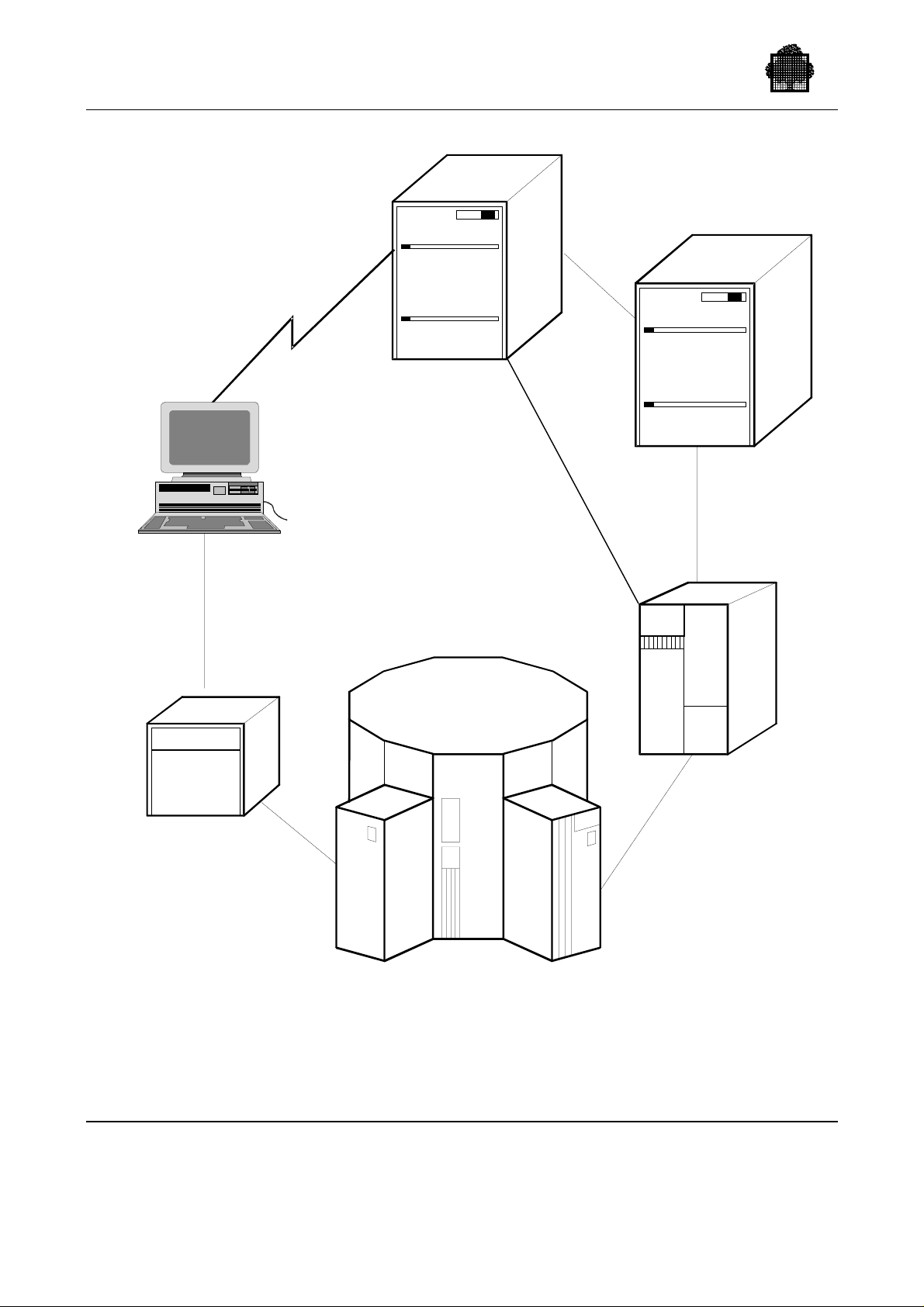
The hardware components of the Cartridge Tape Library (CTL) system are shown
in Figure 1-1.
47 A2 63UU Rev05 1-1
Page 27
Cartridge Tape Library UNIX Server User’s Guide
DPS 7000
DPS 7000
DPX/20-ACSLS
LIBRARY SERVER
FAC
WSP-SCSI
Library
Management
Unit
Library
Control
Unit
Control
Unit
LIBRARY
STORAGE
MODULE
Cartridge
Drive
Cabinet
Cartridge
Access
Ports
Figure 1-1. Hardware Components of the Cartridge Tape Library System
1-2 47 A2 63UU Rev05
Page 28

1.1 The Control Path Components
The Control Path allows the DPS 7000 to pass commands to the library robot(s). It
is composed of the following components (shown in Figure 1-2):
• One or several Library Storage Modules (LSM), also called storage silos. Each
LSM contains a robot, storage cells and connections for cartridge drives. The
robot automatically mounts/dismounts cartridges in drives: it retrieves any
cartridge in the LSM, delivers it to a transport, then replaces the cartridge in its
storage cell.
Each LSM has a door in the outer wall allowing access to the interior. The
access door in the wall contains one or more CAPs (Cartridge Access Ports). An
operator can introduce cartridges to or remove cartridges from the LSM using
CAP(s).
LSMs are linked together by PTP (Pass-Thru Ports), and cartridges are passed
from LSM to LSM using a PTP (see also Figure 1-3).
• A Library Control Unit (LCU), a microprocessor that controls the robot
movements. There is one LCU per LSM. The LCU translates gross movement
requests received from the LMU into the discrete servo commands required to
control the robot.
Overview
• One Library Management Unit (LMU), which manages a set of LSMs (up to
24). The LMU receives cartridge movement requests from the Library Server,
translates them into robot movement instructions, and relays these instructions to
the correct Library Control Unit (LCU). The LMU communicates with the
LSMs across a Local Area Network (LAN). The set of silos (LSMs) controlled
by an LMU is called an ACS (Automated Control System).
• The UNIX Library Server (Bull ESCALA or ESTRELLA), which houses the
library server software called Automated Cartridge System Library Software
(ACSLS). This library server is the inter fac e between cl i en t systems and the
library. The library server communicates with the LMU through an RS 423
interface. Two redundant serial connections are provided between the server and
the LMU.
• Bull DPS 7000 running GCOS 7 and in particular the CLX (Cartridge Library
Client through UNIX Server) job. The DPS 7000-to-Library Server
telecommunications link is based on RPC, Ethernet, and TCP/IP services. The
Ethernet network adapter acts as a buffered communications controller to move
messages between the server and the DPS 7000.
47 A2 63UU Rev05 1-3
Page 29

Cartridge Tape Library UNIX Server User’s Guide
Library control commands are passed to the library robots as follows:
1. Mount and dismount messages are issued on the DPS 7000 operator console
when cartridges need to be mounted/dismounted to run applications or
commands (i.e. LIST_VOLUME). These messages specify on which drives
the cartridges must be mounted or dismounted. When the "device class"
specifies that the cartridge is located in a given cartridge tape library, GCOS 7
mount and dismount requests are passed to the Library Server running the
ACSLS software.
2. The ACSLS then passes the request to the LMU.
3. The LMU selects the correct LSM for the request and sends it to the LCU of
that LSM.
4. The LCU instructs the robot to select the cartridge according to the optical
cartridge label and to mount the cartridge on the selected drive.
5. The LMU then returns a report status to GCOS 7 via the ACSLS.
6. The robot (and the library server) identify the cartridges by their external bar-
coded label. Once the robot selects a cartridge, the cartridge is loaded into the
cartridge drive transport to be read from and/or written to. The transport is
connected to the Data path on to which data are transferred.
1-4 47 A2 63UU Rev05
Page 30

1.2 The Data Path Components
The Data Path is used for the transfer of data between GCOS 7 and a given tape
cartridge. StorageTek ACS 4400, PowderHorn, and Wolfcreek cartridge tape
libraries include the following hardware components (shown in Figure 1-2):
• one or more FIPS Adapter Cabinets (FACs). Each FAC contains up to four
General Purpose Adapters (GPAs), and these GPAs are in turn connected to the
Control Units (CUs).
A GPA performs PSI/FIPS conversion: The GPA receives and interprets PSI
channel commands, generates status and sense information for the channel,
formats the data that will be written on the cartridge, converts the read data into
data bytes for the channel, and performs error checking.
• The CUs are connected to the Cartridge Drive (CD) cabinets in the LSM. A CD
cabinet may have two or four cartridge transports. The maximum number of
Cartridge Drive cabinets contained in a LSM depends on the LSM type. A
PowderHorn LSM can contain from one to four cartridge drive cabinets, that
is, from two to sixteen transports.
Overview
In TimberWolf cartridge tape libraries, the DPS 7000 is connected to the CUs via a
WSP/SCSI interface, which controls the data flow; the FAC and GPA components
are not needed. CUs are connected to the new mono-transport STK CTS 4890
cartridge drives (CDs). A TimberWolf LSM can contain up to 6 CTS 4890
Cartridge Drive (CD) cabinets. A Timber Wolf 9740 LSM can contain 2 or 4
CTS 9740 Cartridges drives.
47 A2 63UU Rev05 1-5
Page 31
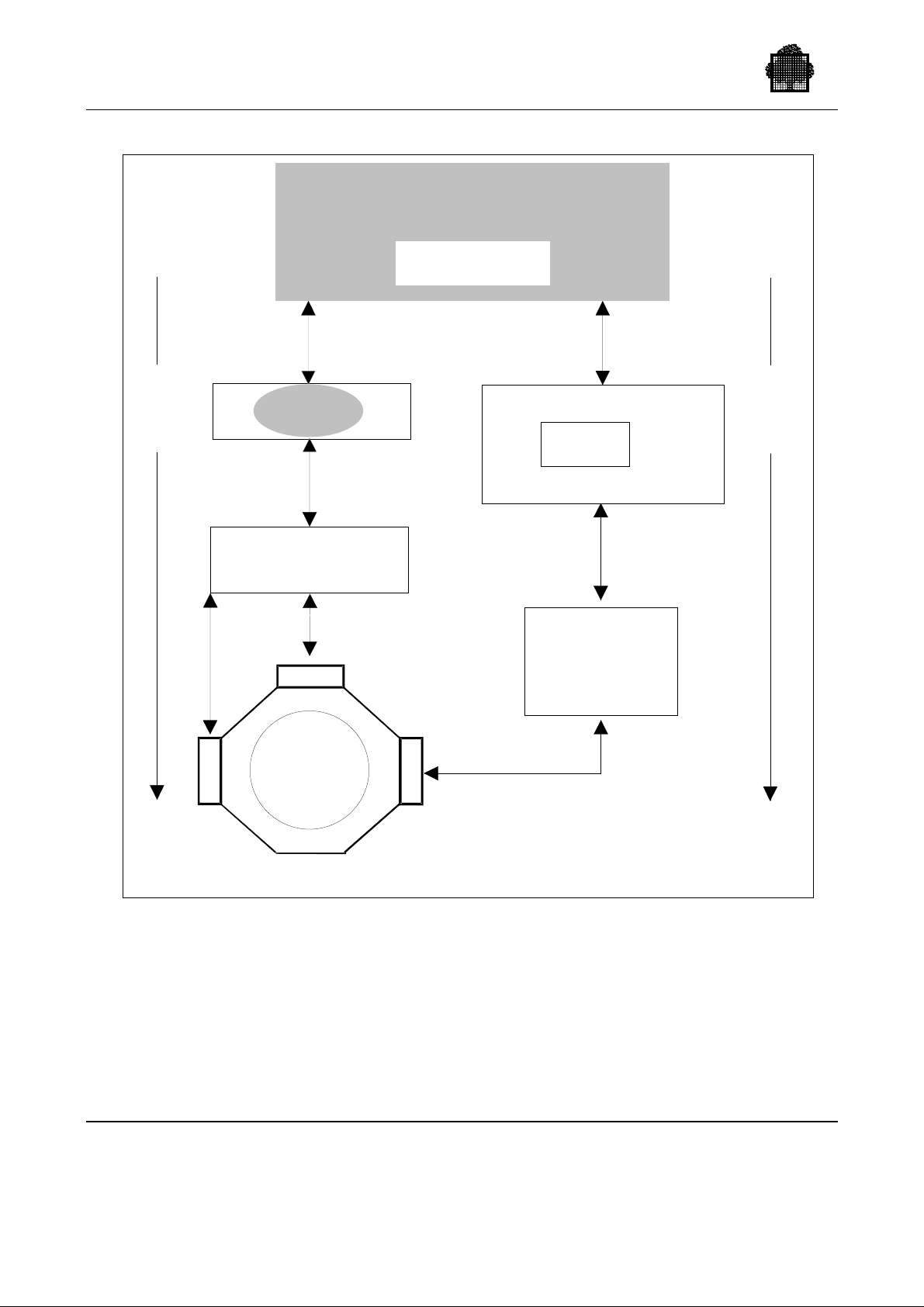
Cartridge Tape Library UNIX Server User’s Guide
DPS 7000
CLX
Data
Path
C
D
PSI-S
GPA
FIPS 60
Control
Unit (CU)
CD
Library
Storage
Module
(LSM)
FAC
Ethernet
TCP/IP
DPX/20
UNIX
ACSLS
Library
Management
Unit
(LMU)
L
C
U
GPA = General Purpose Adapter
FAC = FIPS Adapter Cabinet
CD = Cartridge Drive Ca binet (2 or 4 transports)
LCU = Library Control Unit
LAN
Library
Server
RS 423
Control
Path
Figure 1-2. Data Path and Control Path in the Cartridge Tape Library
System
1-6 47 A2 63UU Rev05
Page 32

1.3 The Cartridge Tape Libraries
All Wolfcreek, PowderHorn, and ACS 4400 Cartridge Tape Libraries that can be
used in the CTL system use the industry-standard 3480, 18-track, 1/2 inch
magnetic tape cartridges and 18-track drives. 36-track drives can also be
connected. There is no restriction: you can connect 18-track and 36-track drives to
the same library. Drives are fully compatible with all manually and automatically
operated systems using those types of cartridges.
With the TimberWolf Cartridge Tape Library, only 36-track (CTS 4890 or
CTS 9490) drives using 36-track tapes can be connected.
Any cartridge tape library can be shared statically by several DPS 7000 systems in
a multi-host environment.
1.3.1 StorageTek Cartridge Tape Library
The StorageTek Cartridge Tape Library (or CTL) is offered in different models.
The different models are offered to provide a range of capacity and performance.
Overview
Wolfcreek Cartridge Tape Library
The Wolfcreek CTL is offered in a range of models which can house between
500 and 950 cartridges which are loaded in the drives by a robot arm with a choice
of 3 speeds (90, 190 and 350 exchanges/hour). Storage cells are distributed into 5
panels at the most, numbered from 0 to 4. The Wolfcreek CTL can contain up to
3 Cartridge Access Ports (CAPs) (1, 20, 30 cartridges) and up to 8 transports. In
case of Control Units equipped with IDRC, each 18-track cartridge can contain up
to 600 Megabytes, and each 36-track cartridge can contain up to 1.2 Gigabytes in
standard length, or up to 2.4 Gigabytes with a long tape (E-tape).
PowderHorn and ACS 4400 Cartridge Tape Libraries
PowderHorn and ACS 4400 Cartridge Tape Libraries are 12-sided cylindrical
structures designed to house between 2000 and 6000 cartridges. In case of Control
Units equipped with IDRC (Improved Data Recording Capacity), each 18-track
cartridge can contain up to 600 Megabytes, or 1.2 Gigabytes with 36-track standard
length, or 2.4 Gigabytes with long tape (E-tape).
There is no restriction: Storage cells are distributed in up to 20 panels numbered
from 0 to 19. These Cartridge Tape Libraries can contain up to 3 Cartridge Access
Ports (CAPs)
(1, 40, 40 cartridges) and up to 16 transports. The difference between ACS 4400
and PowderHorn lies mainly in the robot speed.
47 A2 63UU Rev05 1-7
Page 33
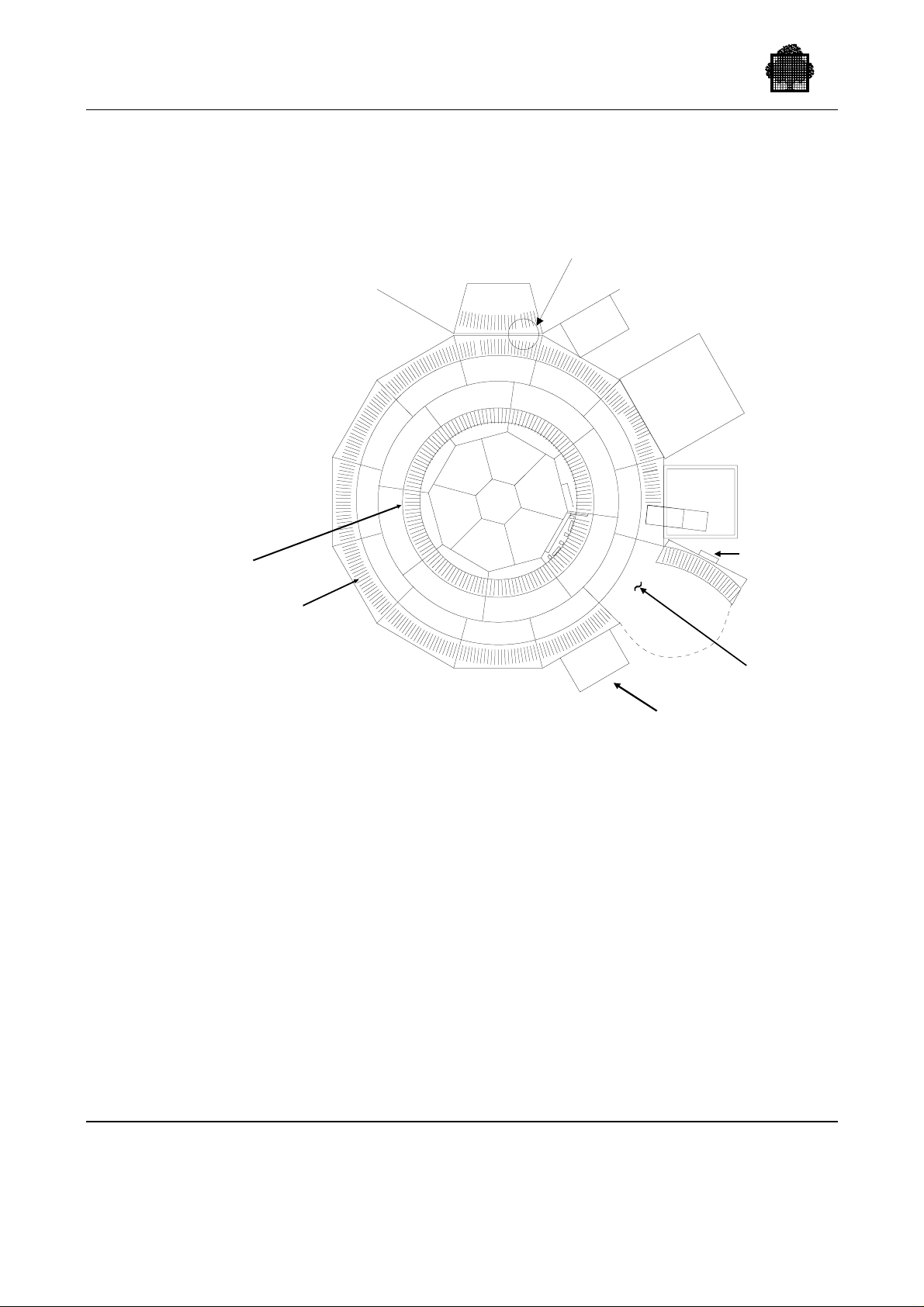
Cartridge Tape Library UNIX Server User’s Guide
Figure 1-3 shows two PowderHorn LSMs connected with a Pass-Thru Port (PTP).
PASS-THRU
PORT (PTP)
SLAVE
LCU
POSSIBLE
ADDITIONAL
CARTRIDGE DRIVE
(MAXIMUM OF 4
CARTRIDGE
9
10
DRIVES
PER LSM)
LIBRARY
CONTROL
UNIT (LCU)
INNER
WALLS
OUTER
WALLS
7
6
17
5
16
4
15
3
14
2
13
1
18
8
19
12
11
0
LCU
Figure 1-3. PowderHorn Library Storage Module Wall Divisions
TimberWolf Cartridge Tape Library
CARTRIDGE
DRIVE (CD)
CARTRIDGE
ACCESS
PORT (CAP)
LSM
ACCESS
DOOR
The STK TimberWolf 9710 Cartridge Tape Library is composed of:
• the Library Storage Module (LSM)
• the robotic mechanism
• 14 Cartridge Access Ports (CAPs) and 1 Priority Access Port (PCAP)
• CTS 4890 controller(s) and drive(s)
The TimberWolf CTL enables 36-track, mono-transport CTS 4890 drives (also
known as Twin Peaks drives) to be used with the DPS 7000, at low cost, without
the need of a GPA/FAC to perform the PSI/FIPS conversion. Instead, data
conversion is performed via the WSP/SCSI interface, which connects Control
Unit(s) to the DPS 7000.
1-8 47 A2 63UU Rev05
Page 34

Overview
The TimberWolf CTL can support up to 6 STK CTS 4890 drives, which can handle
both standard-length (CST) and extended-length (ECCST) media.
The TimberWolf CTL has storage cells for 238 to 602 tape cartridges. The
TimberWolf robot is based on the same mechanism as the Wolfcreek robot and can
perform up to 180 exchanges per hour.
The STK Timber Wolf 9740 tape library is composed of:
• One to six LSMs that cab be attached toge ther, a CEM (cartridge Exchange
Mechanism) makes the cartridge transfer between contiguous LSMs.
• A Cartridge Access Port (CAP).
• CTS 9490 (Timberline) controllers and drives cabinet attached to each LSM.
This 9490 cabinet can have 2 or 4 drives inside (M42 oe M44).
Library capacity can vary from 326 cartridges with standard door to 494 cartridges
with expansion door, per LSM, to a maximum of 1916 cartriges with 6 LSMs.
The CTS 9490 Units are connected directly to the DPS 7000 system throught SCSI
interface driven by WSP controller.
Drive Units quantity will vary from 2 with one LSM up to 24 with six LSMs.
CTS 9490 handle both standard, lengh (CST) and extended lengh (CECCST)
media.
47 A2 63UU Rev05 1-9
Page 35
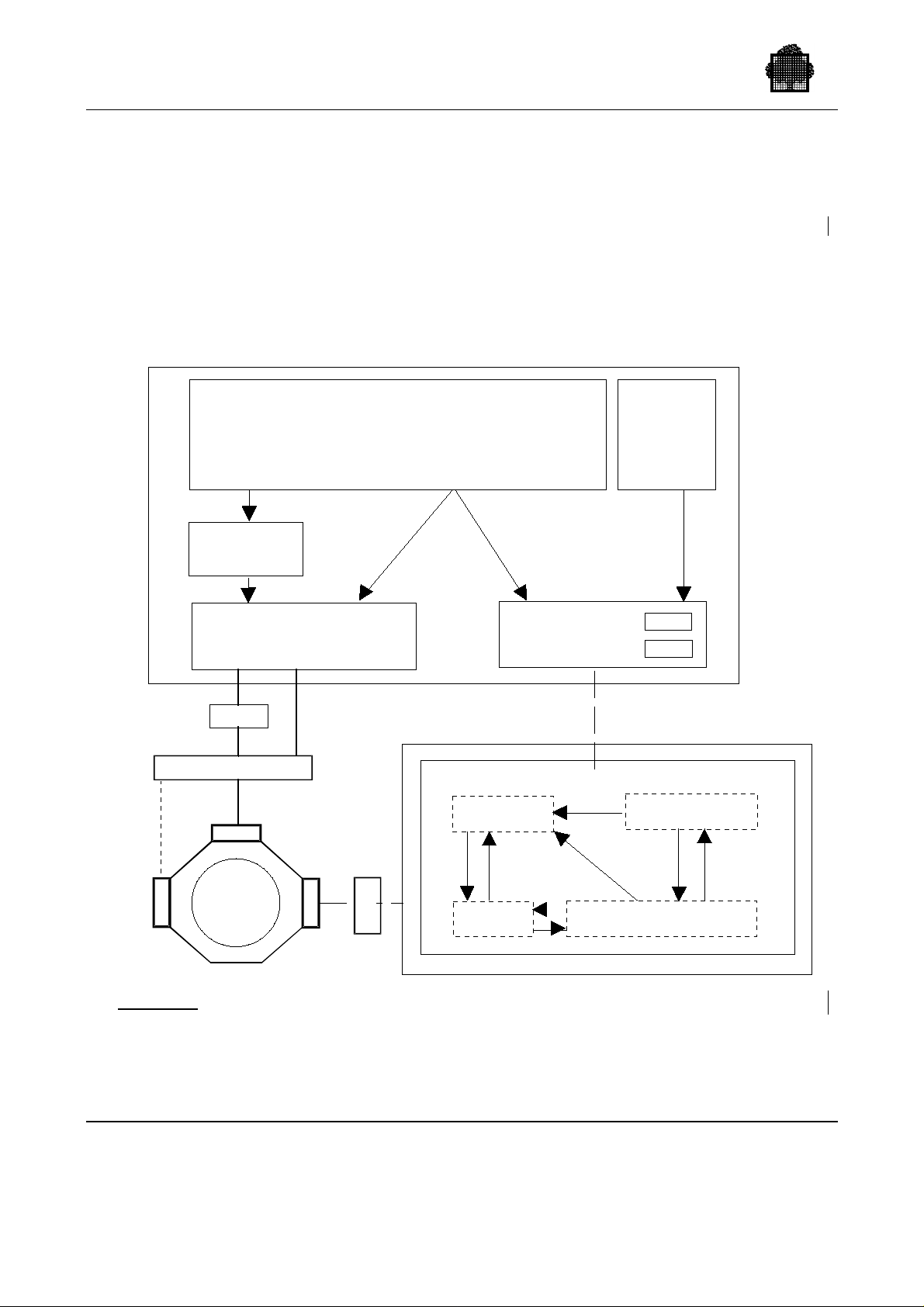
Cartridge Tape Library UNIX Server User’s Guide
1.4 The Library Server
ACSLS (Automated Cartridge System Library Software) is a software package
running on a ESCALA or ESTRELLA UNIX server that is used as a cartridge tape
library server. ACSLS interfaces with the Library Management Unit (LMU) to
control the library robot.
Components of ACSLS (as well as relevant software components on the
DPS 7000) are shown in Figure 1-4.
GCOS 7
Control Unit
get
put
Access
Method
IO Supervisor
GPA
User Application
WSP-SCSI
assign dvc = CT/LIB
deassign
ACSLS
CLX
Control
Path
DPS 7000
Operator
Commands
dclx
volrpt
etc.
CLX
SSI
ESCALA or ESTRELLA
DPX/20 or ESTRELLA
CSI
ACSLM
C
D
Native case
ACSEL
CD
ACS
Library
L
C
U
L
M
U
ACSSA
Figure 1-4. GCOS 7 and the ACSLS (ESCALA or ESTRELLA)
Software Components for the native DPS7000
1-10 47 A2 63UU Rev05
Page 36
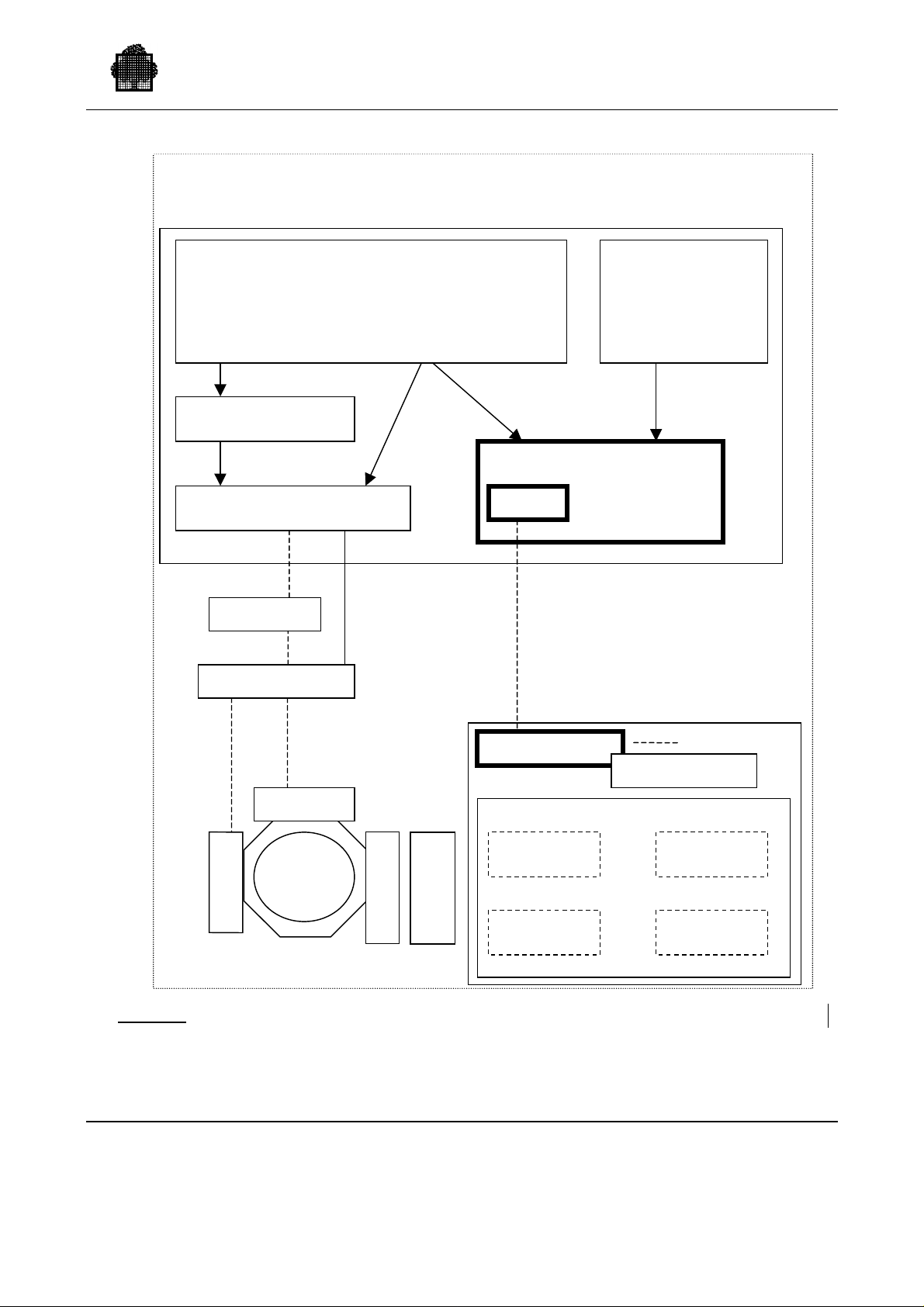
GCOS7 DPS7000-XTA
A
Overview
User Application
Get assign dvc=CT/LIB
Put deassign
Operator
Commands
Dclx, volrpt …
Access Method
CLX
IO Supervisor
Control path
WSP
GP
DPX/20 or ESTRELLA
Control Unit
SCSI
CLX
ESCALA or ES TRE LLA
SSI for GCOS-1
SSI for GCOS-n
CD
ACSLS
L
M
U
XTA case
C
D
ACS
Library
L
C
U
Figure 1-5 GCOS 7 and the ACSLS (ESCALA or ESTRELLA) Software
Components for DPS7000-XTA
47 A2 63UU Rev05 1-11
ACSEL
ACSSA ACSLM
CSI
Page 37

Cartridge Tape Library UNIX Server User’s Guide
The five components of ACSLS are described below:
1. NI (Network Interface), which handles the communication with the
DPS 7000. It interacts with the DPS 7000 interface to control the flow of
requests and responses and to perform error recovery if necessary.
2. CSI (Client System Interface), which is the interface between the ACS Library
Manager (ACSLM; see 3 below) and the SSI of the DPS 7000. CSI presents a
control path format to client applications independent of the host and network.
CSI communicates through the NI and re-establishes communications paths if
failures occur between the ACSLM and the CSI or between the CSI and the
NI. CSI also routes error messages to the Event Logger (see 4).
3. ACSLM (ACS Library Manager), which controls the library. ACSLM
processes library requests from client applications (through the CSI) or from
library users (through ACS System Administration (ACSSA); see 5). ACSLM
validates the requests and passes accepted requests to the LMU. When
responses are returned, ACSLM routes them to the appropriate requester
(ACSSA or CSI). ACSLM monitors error messages from ACSLM to the
Event Logger and passes significant messages to ACSSA.
Native case
XTA case
4. ACSEL (Event Logger), which records library error messages and software
errors not normally tracked by the operating system. ACSLM and CSI
independently send messages to ACSEL, which writes these messages to the
Event Log. These messages can be used later for analysis.
5. ACSSA (ACS System Administration), which provides a screen interface
allowing library operators and users to monitor and control library server
operations. The screen interface is referred to as the Command Processor.
Generally, the native DPS 7000 systems run OPEN7 subsystem(s) including SSI
software package for inter face with ACSLS.
Since OPEN7 no longer exists on DPS 7000-XTA, it is necessary to activate on
the UNIX library server one SSI for each DPS 7000-XTA connected to ACSLS.
ACSSA commands can be entered from a local or remote UNIX terminal
connected to the ESCALA or ESTRELLA library server. A subset of the ACSSA
commands (called CLX library commands) can be entered from an IOF terminal
connected to the DPS 7000 and sent to the library server. (See Chapter 6, "Operator
Commands," for details about both types of commands.)
Once a Cartridge Tape Library has been installed, the UNIX terminal is usually
used to:
• audit the whole library or a part of the library,
• enter and eject cartridges,
• define volume work pools (called scratch pools),
• get a volume list of the library,
• get the state of the library components.
1-12 47 A2 63UU Rev05
Page 38

Overview
The UNIX terminal also needs to be used to backup/restore ACSLS when
necessary.
ACSLS uses a database to manage the library and the contents of the library.
ACSLS must be backed up periodically to empty the database journals. Refer to
"ACSSA Utilities" in Chapter 6 for more information.
Native case
XTA case
A single ACSLS may simultaneously serve the native DPS 7000 systems running
SSI on (one of their) OPEN7 subsystem(s)
A single ACSLS may simultaneously serve DPS 7000-XTA systems with
dedicated SSI software package instantiations running for each of them on the
UNIX library server.
47 A2 63UU Rev05 1-13
Page 39
Cartridge Tape Library UNIX Server User’s Guide
1.5 The Host System
The Cartridge Tape Library is supported by the following Bull systems:
• DPS 7000/4xx
• DPS 7000/MTxx
• DPS 7000/TAxx
• DPS 7000/8xx
• DPS 7000-XTA
When DPS 7000 applications use a cartridge tape library, the following
components must be operational on the DPS 7000:
XTA case
Native case
Native case
XTA case
Native case
Native case
XTA case
• INTEROP7
• OPEN7 on other native DPS 7000 systems
• CLX, which includes:
− CLX on the GCOS 7 (several load modules only one permanent job being
CLX)
− SSI on an OPEN7 subsystem
− SSI on the ACSLS server
• the GPA(s) (General Purpose Adapter)
• Control Unit(s)
• Communication Controller(s) (TNS or OCS)
The OPEN7 startup and the CLX startup can be included in the system startup.
Control units are automatically initialized when they are switched on.
The GPA is automatically initialized:
- by SIP,
- by V7000 installation/update,
- or by a MDHW IN command. This command can be included in the
system startup.
Native Case
The SSI can be started automatically when OPEN7 is activated, and should be
started before the CLX (this is not mandatory), and (TNS or OCS) must be active
during the OPEN7 activation step..
ACSLS must be operational on the UNIX server. ACSLS can be started
automatically when the UNIX server is switched on or rebooted.
1-14 47 A2 63UU Rev05
Page 40

1.5.1 GCOS 7 and the CLX Software
Whenever a user program or a GCOS 7 utility program references a volume in the
cartridge library, the following DPS 7000 actions are performed:
• GCOS 7 assigns the files and volumes required for execution of the program.
• GCOS 7 allocates the devices required to mount the volumes assigned to the
program. It also supervises the mounting and dismounting of volumes on the
devices.
• CLX ensures the interface between the GCOS 7 and the ACSLS
(see Figure 1-4).
• CLX receives MOUNT / DISMOUNT requests for cartridge devices attached to
the library, maps each request to one or more ACSLM commands, and sends
them to the ACSLM on the UNIX server. CLX manages the exchanges with
ACSLM and manages the communication link with the library server using the
RPC facilities
Overview
Native case
XTA case
- Between the local ssi on OPEN7 and the remote ACSLS server
- On the remote server between the ssi and the ACSLS
• The Access Method ensures access to the data in the files. It transforms the
reading, writing, positioning, etc. into input/output/rewind/load/unload
operations, while always accounting for the specific requirements of the device.
• The I/O Supervisor executes (on the PSI channel) the channel programs defined
by the Access Method. The I/O Supervisor is responsible for error recovery
procedures for the cartridge transport, the control unit, and the GPA.
The principal functions of CLX are to:
• synchronize the databases containing device statuses of the library server and of
GCOS 7:
− at startup,
− after an ACSLS failure,
− after an LSM failure.
• ensure the automatic mount/dismount operations requested by the Device
Manager,
• handle specific operations concerning work volumes,
• ensure that all requests that cannot be executed immediately are placed on a wait
queue and are restarted when the necessary resource--device and (or)
cartridge--becomes available,
• disable the automatic processing as long as ACSLM is not operational and (or)
LSMs are not on-line,
47 A2 63UU Rev05 1-15
Page 41

Cartridge Tape Library UNIX Server User’s Guide
• abort jobs and commands by performing a ’CANCEL REQUEST’ command for
mount/dismount requests which cannot be processed automatically (for example,
when the protect selector is in the wrong position on the tape),
• offer a GCL operator interface that permits effective monitoring and control of
library usage. CLX offers CLX commands to start, terminate and trace the
automatic mounting/dismounting processing and lib rary commands (most of
the ACSSA commands available on the library server, such as QUERY and
AUDIT). CLX also offers CLX utilities to generate a history report of cartridge
usage and to transfer SSI and ACSLS log files into a GCOS 7 file.
CLX is initialized in the following manner:
1. It waits until the SSI is active
Native case
- on the OPEN7,
- in the proper directory on the UNIX library server.
XTA case
2. It waits until ACSLM is active on the UNIX server.
3. It resynchronizes the statu s of the devices between GCOS 7 and ACSLM.
Then, CLX is ready to process mount/dismount requests issued by GCOS 7.
The waiting times can be limited to the time specified in the CLX configuration.
1-16 47 A2 63UU Rev05
Page 42
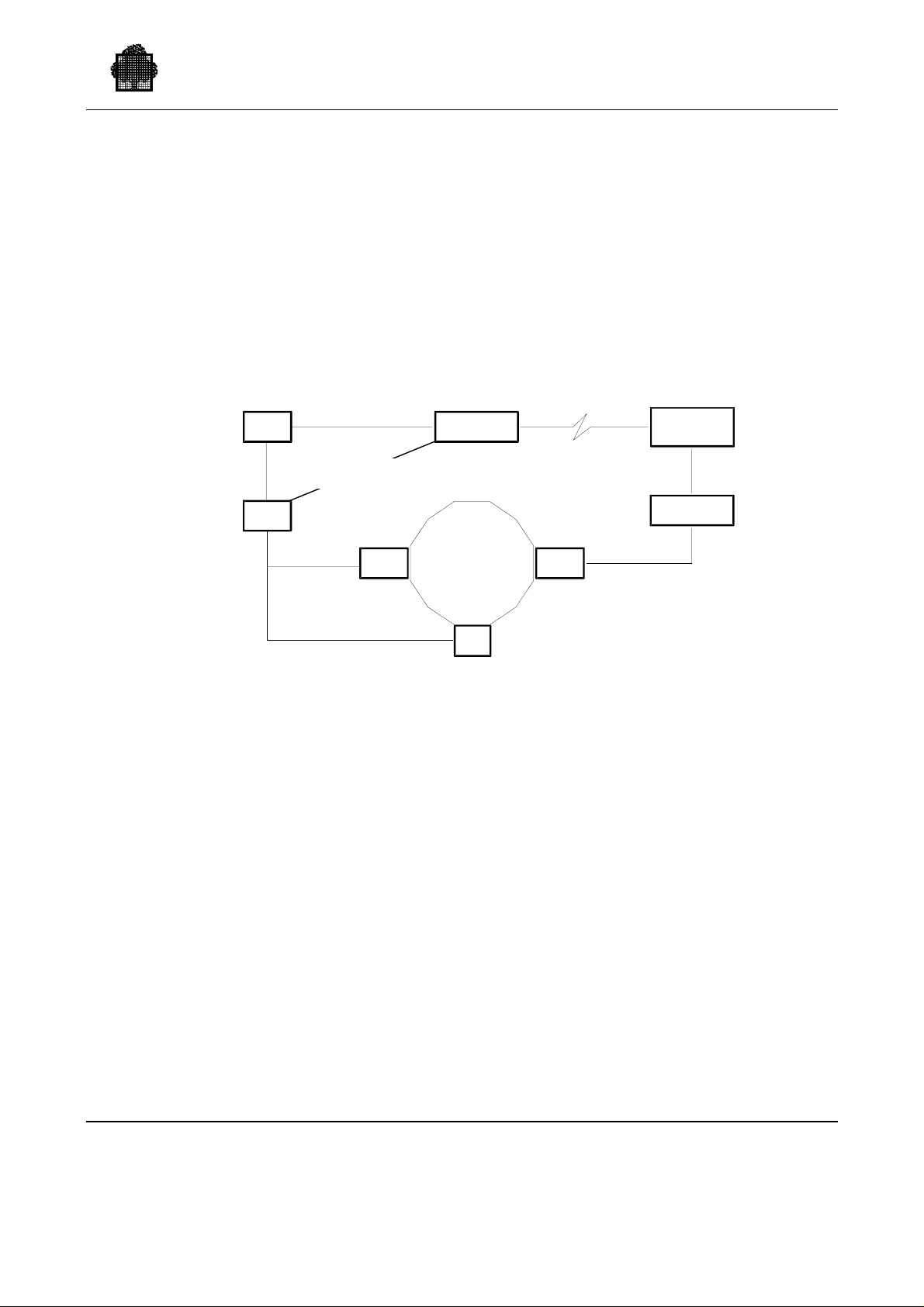
1.6 Configurations Supported
This section describes the Cartridge Tape Library configurations that are supported,
with some recommendations about performance. Examples of basic configurations
are given.
1.6.1 ACS Mono-LSM Configuration
The basic configuration supported is an ACS mono-LSM system:
Overview
GPA
CU
WSP SCSI
CD
DPS 7000
LSM
CD
LCU
ACSLS
SERVER
LMU
Figure 1-6. ACS Mono-LSM Configuration
Another Control Unit (CU) is necessary in a configuration containing 3 or 4
cartridge drive cabinets.
47 A2 63UU Rev05 1-17
Page 43
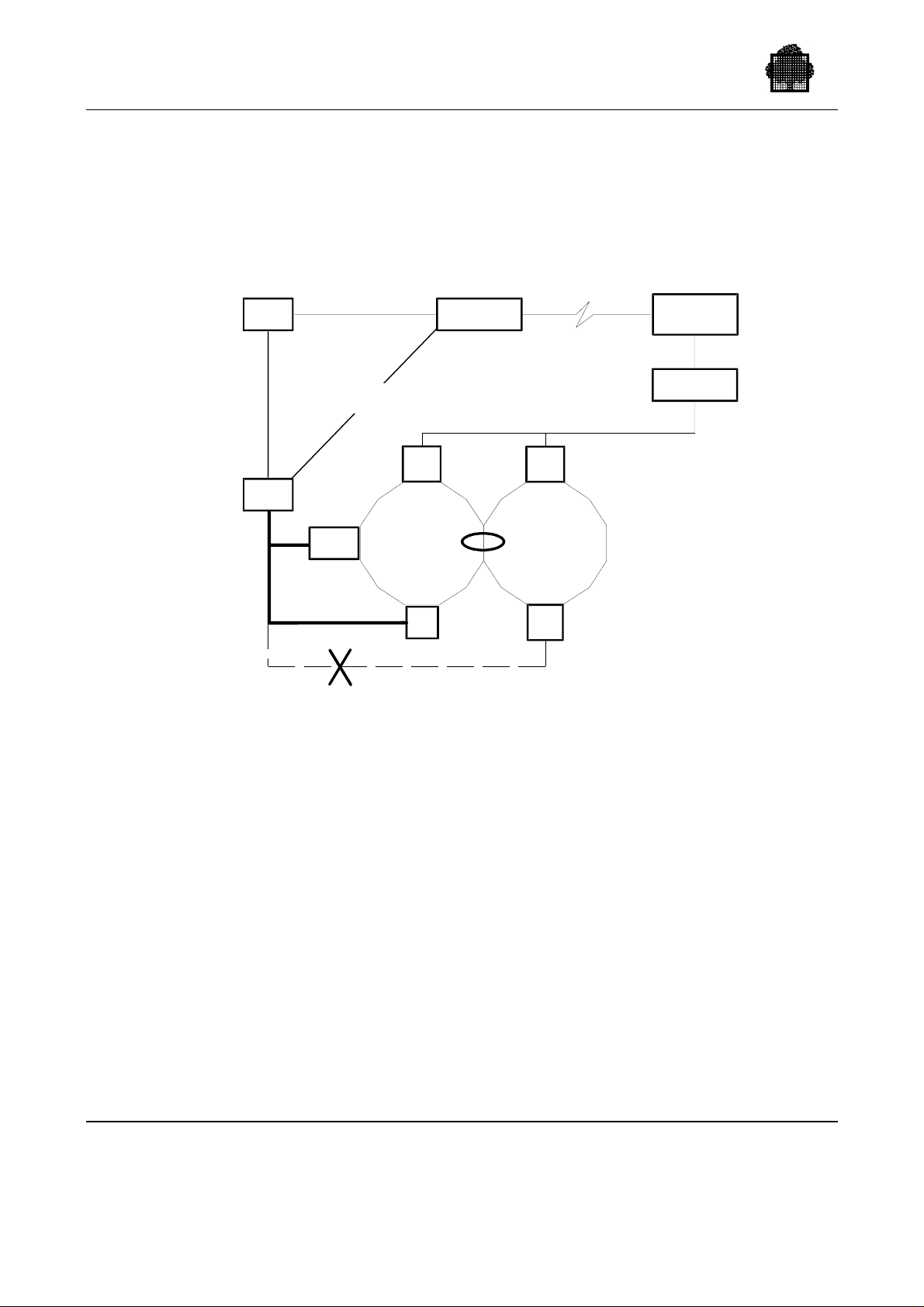
Cartridge Tape Library UNIX Server User’s Guide
1.6.2 Mono-ACS Multi-LSM Configuration
A mono-ACS multi-LSM configuration consists of two or more silos (LSMs and
LCUs) linked together through Pass-Thru Ports (PTPs), where silos are controlled
by the same LMU and the same library server. Each silo can contain its own group
of cartridge transports.
GPA
CU
WSP SCSI
CD
DPS 7000
LCU
LSM
CD
not recommended
LCU
LSM
CD
ACSLS
SERVER
LMU
Figure 1-7. Mono-ACS Multi-LSM Configuration
When the host system issues a mount request, it specifies a volume and a device.
This request is optimized if the tran spo rt is conne cte d to the silo where the
requested volume is stored.
During the mounting of a volume, GCOS 7 selects an available transport before it
knows in which silo the volume is stored. If the volume is not stored in the silo of
the selected drive, the server moves the volume, via the Pass-Thru Port, from its
silo to the silo containing the drive. Since this process takes time, the following
recommendations should be followed in a mono-ACS multi-LSM configuration:
• A GCOS 7 system should have all of its transports connected to the same silo.
• This silo should contain the most important volumes required by the connected
system.
If Cartridge Drive (CD) cabinets are connected to several silos, in case of failure of
one LSM, the whole set of silos becomes unavailable until the failu re is fix e d.
NOTE:
The multi-ACS configuration is not supported.
1-18 47 A2 63UU Rev05
Page 44
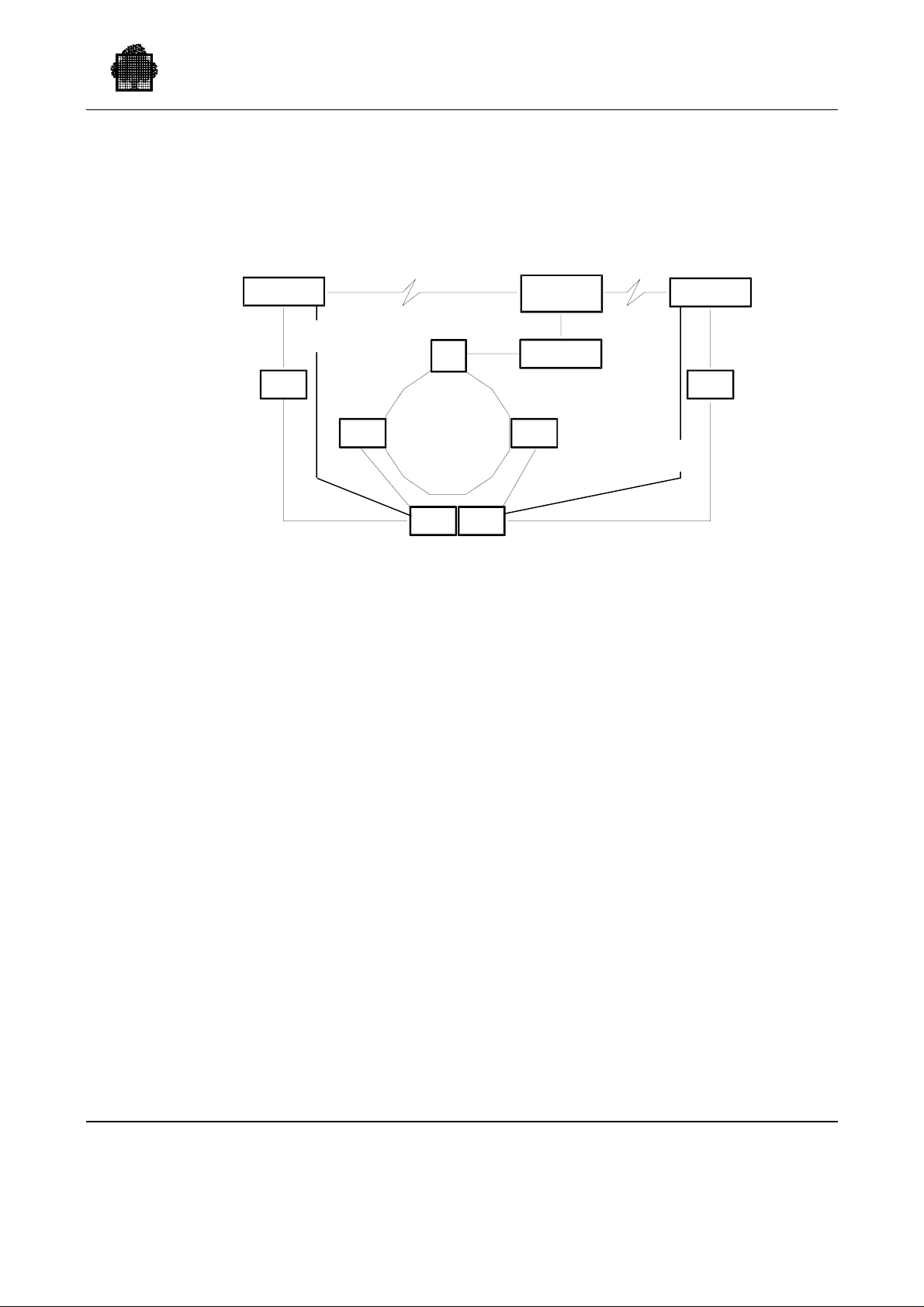
1.6.3 Mono-ACS Multi-Host Configuration
Multiple GCOS 7 systems can be connected to an ACS system through the ACSLS
server:
Overview
DPS 7000
WSP SCSI
GPA
CD
LCU
CU
LSM
CU
ACSLS
SERVER
LMU
CD
DPS 7000
GPA
WSP SCSI
Figure 1-8. Mono-ACS Multi-Host Configuration
DPS 7000 systems can share Control Units (CUs).
Static sharing of cartridges and transports is supported. This is described in more
detail in Chapter 7, "Static Sharing."
47 A2 63UU Rev05 1-19
Page 45

Cartridge Tape Library UNIX Server User’s Guide
❑
1-20 47 A2 63UU Rev05
Page 46

2.1 Prerequisites
ISI7 (Interoperability Standard Installation on GCOS7) must be used to install
CLX on GCOS7 as well as other interoperability components.
2. Setting Up Your CTL on the DPS 7000
Native case
Native case
XTA case
Native case
Before you can set up your CTL, the following software components must be
present or installed :
• OPEN7,
• NFS,
• TCP-IP,
• TNS or OCS.
The CLX software to be installed on GCOS 7 has two separate Marketing
Identifiers (MIs), one for the ACS4400 and PowderHorn library, and one for the
Wolfcreek and TimberWolf library. It is available from the following technical
status number:
• GCOS 7-TS 7560,
• OPEN7-4.5.
• INTEROP7 ID143 and follow.
• GCOS7 V10
CLX requires less than 12 Megabytes of system disk. The system must have at
least 64 Megabytes for central memory. It is delivered on a single tape or cartridge.
OPEN7 must be installed first. A reinstallation of OPEN7 or INTEROP7 does not
require a reinstallation of CLX.
CLX 3.2 requires OPEN7 V4 and is delivered on ISI 7 tape.
XTA case
47 A2 63UU Rev05 2-1
A reinstallation of V7000 does not require a reinstallation of CLX.
Page 47

Cartridge Tape Library UNIX Server User’s Guide
2.2 Installation of CLX
For the installation of CLX 4.1, refer to
Native case
XTA case
- Interoperability Software Installation 7 - Administrator’s Guide. (56UU)
- Interoperability 7 software – user’s Guide (91 US)
The installation of CLX on the DPS 7000 requires the following three phases:
1. Installation of CLX on GCOS 7,
2. Installation/configuration of SSI
Native case
XTA case
- on OPEN7,
- on UNIX library server
3. Manual configuration of CLX on GCOS 7.
2.2.1 Installation of CLX on GCOS 7
The installation of CLX is executed within ISI7 job launched on GCOS7 from ISI7
self-loading tape or cartridge (or thanks to an ISI7 compact-disc if OPEN7 or
INTEROP7 is already available on the DPS 7000). See ISI7 manual 47A2 56UU.
CLX installation performs the following tasks on GCOS7:
• creates the project CLX unless it already exists,
• creates a user CLX with password CLX,
• creates the directory CLX unless it already exists,
• creates the private catalog CLX.CATALOG unless it already exists,
• deletes the old CLX files unless otherwise stated,
• (creates and) loads the private system CLX.SYSTEM,
• (creates and) loads the libraries: CLX.SLLIB, CLX.LMLIB and CLX.BIN,
• stores CLX help in the file SITE.HELP,
• stores H_CLX_CAT0 message catalog in the SYS.HBINLIB library,
NOTE:
The GIUF function UPDATE_GCOS delete members of the SYS.HBINLIB
library, and thus the subfile H_CLX_CAT0. Without this subfile, all CLX
commands will abort with a message like: ERROR IN CATALOG OPEN
RC=4E901008 -> QL 16,SFNUNKN To avoid this situation, it is necessary to
save the subfile H_CLX_CATO of the SYS.HBINLIB library before an
UPDATE_GCOS.
(it can be saved in the CLX.BIN library with the copy command of the
LIBMAINT processor).
After the UPDATE_GCOS, restore the H_CLX_CAT0 in the SYS.HBINLIB.
2-2 47 A2 63UU Rev05
Page 48

Setting Up Your CTL on the DPS 7000
Native case
• creates the file OPEN7.CLX which is changed into an OPEN7 file by the script
OPEN7_INIT_CLX.
The job INSTALL_CLX is stored in the CLX.SLLIB library.
2.2.2 Installation/Configuration of SSI
Native case
This is performed by the script OPEN7_INIT_CLX. The script:
• creates the partition /dev/clx,
• executes the script /clx/install/load which:
− checks the OPEN7 version,
− deletes the old SSI files,
− creates the group clx and the user clx,
− creates the SSI directories,
− updates the permission bits for the SSI files,
− processes the script /clx/insta ll /co nfig_c lx wh ich per forms the SSI
configuration.
XTA case
This is performed by the script install_ssi on AIX The script:
− creates the group clx and the user clx,
− creates the SSI directories,
− updates the AIX startup
− starts the installed SSI
47 A2 63UU Rev05 2-3
Page 49

Cartridge Tape Library UNIX Server User’s Guide
2.3 Installation Procedure
Native case
XTA case
See ISI7 manual 47A2 56UU.
See INTEROP7 manual 47 A2 91 US
2.3.1 Installation Procedure of CLX
2.3.1.1 Prerequisites
CLX is installed only if the corresponding MI is validated.
These following media must be installed:
Native case
XTA case
- the ID143 CLX tape installation through the INSTAL ISI7command.
- the ID143_CD CD installation through the INSTALLSHIELD
command.
Only users declared in the SYSADMIN project of GCOS 7 can use the ISI7
installation facility.
For systems with the SECUR’ACCESS product, only the user SECADMIN is
allowed to run the INSTAL or LOAD_PRODUCT_FILES commands.
2.3.1.2 Impact on the environment
CLX can be installed in any environment in the CLX directory. The latest
installation overlaps the previous one.
COUPLED environment
Not possible.
Site securized by SECUR’ACCESS
The installation of CLX on a securized site is taken in account.
2-4 47 A2 63UU Rev05
Page 50

2.3.1.3 Automatic Actions to Reach LOADED State
If you run the INSTAL_PRODUCTS command when CLX is already present, ISI 7
proceeds as follows. It:
Setting Up Your CTL on the DPS 7000
Native case
• stops the CLX daemon,
• removes the partition <open7dir>.clx,
• loads CLX components on GCOS 7.
2.3.1.4 Automatic Actions to Reach CONGURED State
Native state
CLX installation aborts in the LOADED state if OPEN 7 is not in the CONFIGured
state.
If OK, ISI 7:
• creates and mounts the partition <open7dir>clx,
• starts the CLX daemon.
•
2.3.1.5 Reinstallation of CLX
Native case
ISI7 procedure for CLX (re)installation stops the CLX daemon and removes the /clx
partition before CLX reinstallation.
Before running CLX reinstallation, the main operator must not have attached the
library CLX.BIN in his/her startup. If this library is attached (this may be checked
by the DP LIBS command), you must remove this attachment from the statrtup file,
log off the operator, and login to run the installation.
Customer’s private file: (CLX_CONFIG, ....) stored in CLX.SLLIB library are kept
end left unchanged after CLX re-installation. After CLX re-installation, it may be
necessary to update CLX_CONFIG file with new parameters. A model is provided
in CLX_CONFIG_REF.
2.3.1.6 Displaying the CLX and OPEN7 Versions
The CLX version is included in each TU message displayed by CLX and in the
outputs of the DISPLAY_CLX GCL command.
Native case
47 A2 63UU Rev05 2-5
- the CLX version is also stored on OPEN7 in the file:
/install/ident/clx/vers
Page 51

Cartridge Tape Library UNIX Server User’s Guide
- the OPEN7 version is stored in the file:
/install/ident/open7/vers
-To read these files, log in to OPEN7 as the root user and use a UNIX print
command.
XAMPLE: more /install/ident/clx/vers
E
2.3.1.7 CLX Configuration File Parameters on Native DPS7000
Load parameters
CLX_VOLUME Disk volume name for CLX, for example:
BFU706:MS/B10
OPEN7_NAME Main directory name of the OPEN 7 catalog
Configuration parameters
REMOTE_IP_NAME The ACSLS remote IP name. This name will be
automatically set or updated in /etc/hosts.
REMOTE_IP_ADRESS The ACSLS remote IP server address.
GATEWAY_NAME This optional parameter is the name of the remote
UNIX server (an IP_NAME) on the local OPEN 7
subnetwork whichsubnetwork, which is to be used as
the gateway to access REMOTE_IP_NAME when the
remote server is on a subnetwork other than OPEN 7.
This name is inserted in the corresponding routing.
GATEWAY_IP_ADDRESS The internet address of GATEWAY_NAME. It must
have the format: AAA.BBB.CCC.DDD where AAA,
BBB, CCC, and DDD are numbers in the range 0 TO
255.
2-6 47 A2 63UU Rev05
Page 52

Setting Up Your CTL on the DPS 7000
2.3.2 Installation procedure of CLX for DPS 7000-XTA
2.3.2.1 CLX on GCOS7 installation
- SI7 tool installation
This is the very first step of the installation procedure to be carried out. It consists
in downloading the SI7 tool from the INTEROP7 MEDIAS. Following this step,
the SI7 command processor that provides the automatic installation facilities can be
activated.
To download the SI7 tool, proceed as follows:
S: EJ INFILE=SI7INS:ID143:CT/LIB [VL=(DIR=INTEROP_STD)]
08.42 X9544 IN SI7INS USER=SYSADMIN CLASS=P SPR=7
STATION=ASSE
29/ X9544 *** Input tape device type [default MT/T9] ***
S: REP 29 CT/LIB
30/ X9544 *** Disk media name where SI7 libraries locates ***
S: REP 30 SYSG7
31/ X9544 *** Disk device type (D500 B10 FSA) ? ***
S: REP 31 FSA
08.43 X9544 STARTED SI7INS SYSADMIN P
FROM SYSADMIN X9544: >>> INSTALL for SI7 version =
1.5.0 <<<
FROM SYSADMIN X9544: >>> Environment: installation
(directory=INTEROP_STD)<<<
FROM SYSADMIN X9544: >>> Installation of SI7 tools OK
(directory=INTEROP_STD)<<<
08.43 X9544 COMPLETED SI7INS SYSADMIN P
- Setting Filters
This is the second step of the installation procedure, where you select the products
to be configured then installed throug h ISI 7. The APPLY_FILTER command is
systematically and automatically called each time you enter the SI7 command
monitor. This is to avoid unnecessary rejection in the CONFIG_PRODUCT
procedure because of an omission to set the product filters. The filters you set are
memorised only for the duration of an SI7 session.
Below is an example of setting product filters, where CLX are selected. Only CLX
is involved in the following examples:
47 A2 63UU Rev05 2-7
Page 53

Cartridge Tape Library UNIX Server User’s Guide
Connect as IOF SYSADMIN
S: MWINLIB BIN INTEROP_STD.BINLIB
S: SI7 ID143:CT/LIB;
>>>16:21 SI7 1.4
>>>>>>>> WARNING <<<<<<<<
NEW Filter Visibility!
Filter Now mandatory!
NOW, Choose your products from the list below!
toggle product name choice site_version status tape_version
-------------------------------------------------------------------------- | 1 | INTEROP_BASIC | - | | | 1.5 0 |
| 2 | FTP7 | - | 3.1 2 | CONFIG | 1.5 0 |
| 3 | OPENGTW | - | | | 1.3 0 |
| 4 | CLX | - | | | 4.2 1 |
| 5 | DA7NGEN | - | 6.0 3 | CONFIG | 8.0 0 |
| 6 | ESP7NGEN | - | 6.1 0b | CONFIG | 7.2 0 |
---------------------------------------------------------------------------
c: clear selection
i: select all products
<number>: select a product (toggle switch)
<number list>: select a list of products
l: list selection
q (or /): apply and quit this selection
Command or ?:
I: 1, 4, 16 (select the products you want to install)
NOW, choose your products from the list below!
toggle product name choice site_version status tape_version
-------------------------------------------------------------------------- | 1 | INTEROP_BASIC | - | | | 1.5 0 |
| 2 | FTP7 | - | 3.1 2 | CONFIG | 1.5 0 |
| 3 | OPENGTW | - | | | 1.3 0 |
| 4 | CLX | - | | | 4.2 1 |
| 5 | DA7NGEN | - | 6.0 3 | CONFIG | 8.0 0 |
| 6 | ESP7NGEN | - | 6.1 0b | CONFIG | 7.2 0 |
---------------------------------------------------------------------------
c: clear selection
i: select all products
<number>: select a product (toggle switch)
<number list>: select a list of products
l: list selection
q (or /): apply and quit this selection
Command or ?:
I: q
C:
2-8 47 A2 63UU Rev05
Page 54

Setting Up Your CTL on the DPS 7000
- Configuration set up
This is the third step of the installation. The SI7 CONFIG_PRODUCTS
(CONFPROD) command allows you to describe a configuration file for
all the products the ISI7 media deliver. This has to be done once, at the
installation time, then this configuration will be re-used each time a
product will be updated or re-installed.
The following example applies for a complete installation, i.e., when
INTEROP_BASIC and CLX have to be installed. When
INTEROP_BASIC is already installed and up to date, use the previous
configuration file and only supply the parameters for CLX.
C: confprod
----------------------------------------------------------------------------1/1 CONFIG_PRODUCTS -->:
Configuration of products
OUTPUT_CONF + The output configuration file: CLX_CONFIG
if no INPUT_CONF, SITE configuration is taken
INPUT_CONF The input configuration file:(transmit if none)
------------------------------------------------------------------------------
C: CONFIG_PRODUCTS CLX_CONFIG;
-----------------------------------------------------------------------------1/1 MODIFY_load_clx -->:
Modify clx parameters
CLX_VOLUME + Disk volume name for CLX product: SYSG7:MS/FSA
REMOTE_IP_NAME + The ACSLS IP name : resnais
SSI_PORT_NUM + The SSI server port number :51001
------------------------------------------------------------------------------
Warning:
as UNIX is case sensitive, protect from lower cases translation (if any)
with quotes (line mode only ).
- INSTALLATION
47 A2 63UU Rev05 2-9
Page 55

Cartridge Tape Library UNIX Server User’s Guide
This is the fourth and final step of the installation. Running the
INSTAL_PRODUCTS command triggers the automatic installation and
configuration of the previously selected products.
C: instal
-------------------------------------------------------------------------1/1 INSTAL_PRODUCTS (+) -->:
Instal. of Iterop. Soft. products
CONFIG_FILE + Configuration file: CLX_CONFIG
Start from beginning or current state
FROM + BEGIN or CURRENT: BEGIN
SILENT + Silent mode ?: 0
--------------------------------------------------------------------------C: INSTAL_PRODUCTS CLX_CONFIG;
---------------------------------------------------------------------| CURRENT | ON TAPE | | |
| PRODUCT RELEASE CORR | RELEASE CORR |ACTIONS| TAPE |
|--------------------------------------------------------------------|
| CLX | 4.1 1 | 3 I |ID143 |
|--------------------------------------------------------------------|
These actions will be executed.
(Actions: I for Instal, N for No instal)
Do you agree ? (Y, N or a product number)
I: y
09.43 X9590 IN INSTAL USER=SYSADMIN CLASS=P SPR=7 STATION=DPS7
09.43 X9590 STARTED INSTAL SYSADMIN P
SI7:INIT : writing in SI7.SLLIB..LOG file
Wait for the complete installation process where finally the
selected products must reach the LOADED status:
SI7:-----------------------------------------------------------------SI7: PRODUCT RELEASE CORR STATUS
SI7:-----------------------------------------------------------------SI7: CLX 3.2 6 LOADED
SI7:-----------------------------------------------------------------SI7:END : 10:43:42 February 25, 2000
10.43 X9590 COMPLETED INSTAL SYSADMIN P
10.19 X781 IN CLXINS USER=GCOS7 CLASS=P SPR=7 STATION=DPS7
10.19 X781 STARTED CLXINS GCOS7 P
10.23 X781.46 COMPLETED CLXINS GCOS7 P
10.23 X780.1 COMPLETED INSTAL GCOS7 P
2-10 47 A2 63UU Rev05
Page 56

Setting Up Your CTL on the DPS 7000
The LOG installation is:
<<<10:25
-->10.19 X780 IN INSTAL USER=GCOS7 CLASS=P SPR=7 STATION=DPS7
-->10.19 X780 STARTED INSTAL GCOS7 P
--> SI7:INIT : rename LOG to LOG_OLD in INTEROP_STD.SLLIB
--> SI7:INIT : writing in INTEROP_STD.SLLIB..LOG file
--> SI7:>>> INIT : Product = CLX (or CLX ), Status = LOADED
--> SI7:>>> INIT : LIST of PRODUCTS to be installed :
--> SI7:>>> INIT : - CLX (or CLX )
--> SI7:>>> CLX : ---------- INSTALLATION STARTED ------------
--> SI7:>>> CLX : LOADED --> DELIV in progress ...
--> SI7:>>> CLX : DELIV done.
--> SI7:>>> CLX : DELIV --> LOADED in progress ...
--> SI7:>>>>>>>>
>>>>>>> CLX : LOAD from tape = ID143
>>>>>>>> Verify that this tape is premounted
--> SI7: Launching job from INTEROP_STD.sllib SUBFILE = CLXINS
--> SI7: WAITING -> TIMER set : 15 MINUTES
--> SI7:>>> CLX : LOADED done.
--> SI7:>>> CLX : ---------- INSTALLATION COMPLETED ---------
47 A2 63UU Rev05 2-11
Page 57
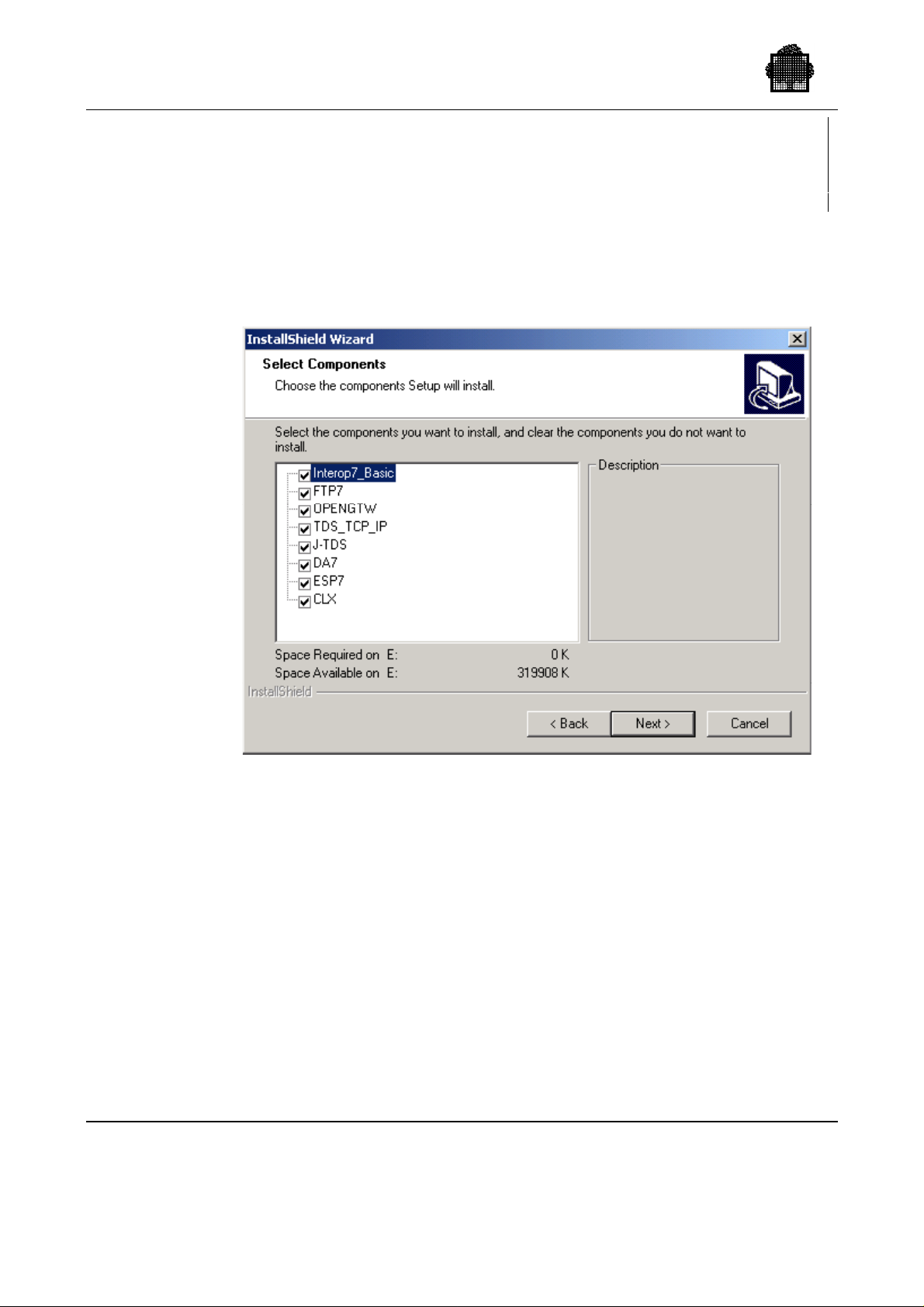
Cartridge Tape Library UNIX Server User’s Guide
2.3.2.2 CLX on W2000 installation
Use the ID143_CD media and use the start\settings\control Panel and
add/remove program to start INTEROP7 installation
The automatic instalshield starts. You must verify if the CLX options are
selected
The clx_ssi.tar components are loaded on <INTEROPDIRECTORY>\CLX\web
2-12 47 A2 63UU Rev05
Page 58
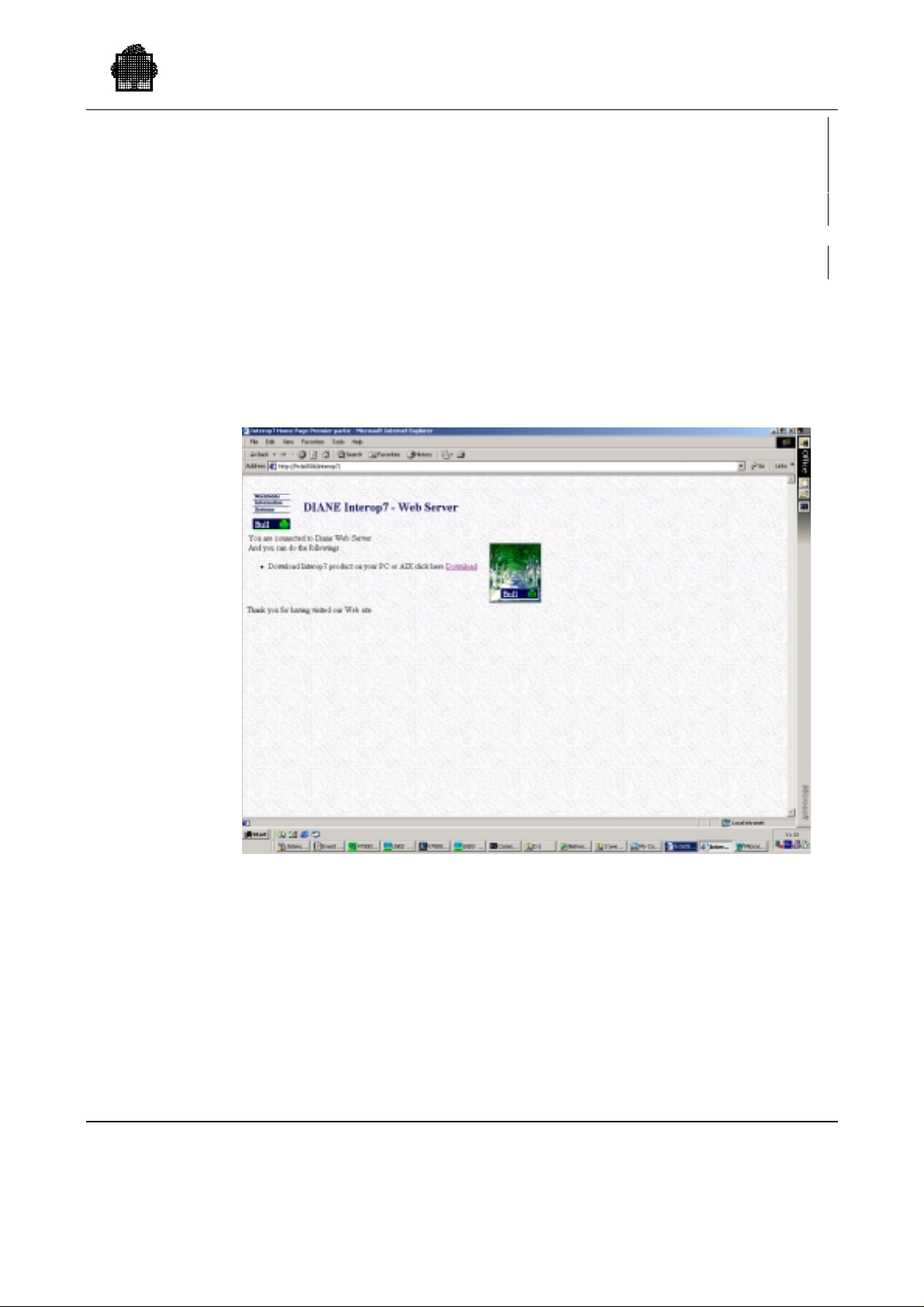
2.3.2.3 CLX on remote ACSLS installation
Remote components can be downloaded on the ACSLS server :
with a web browser
or with FTP
- with a web BROWSER
Start on the ACSLS server the Netscape browser and type
http:/<XTA_ip_name>
The following screen are displayed:
Setting Up Your CTL on the DPS 7000
47 A2 63UU Rev05 2-13
Page 59
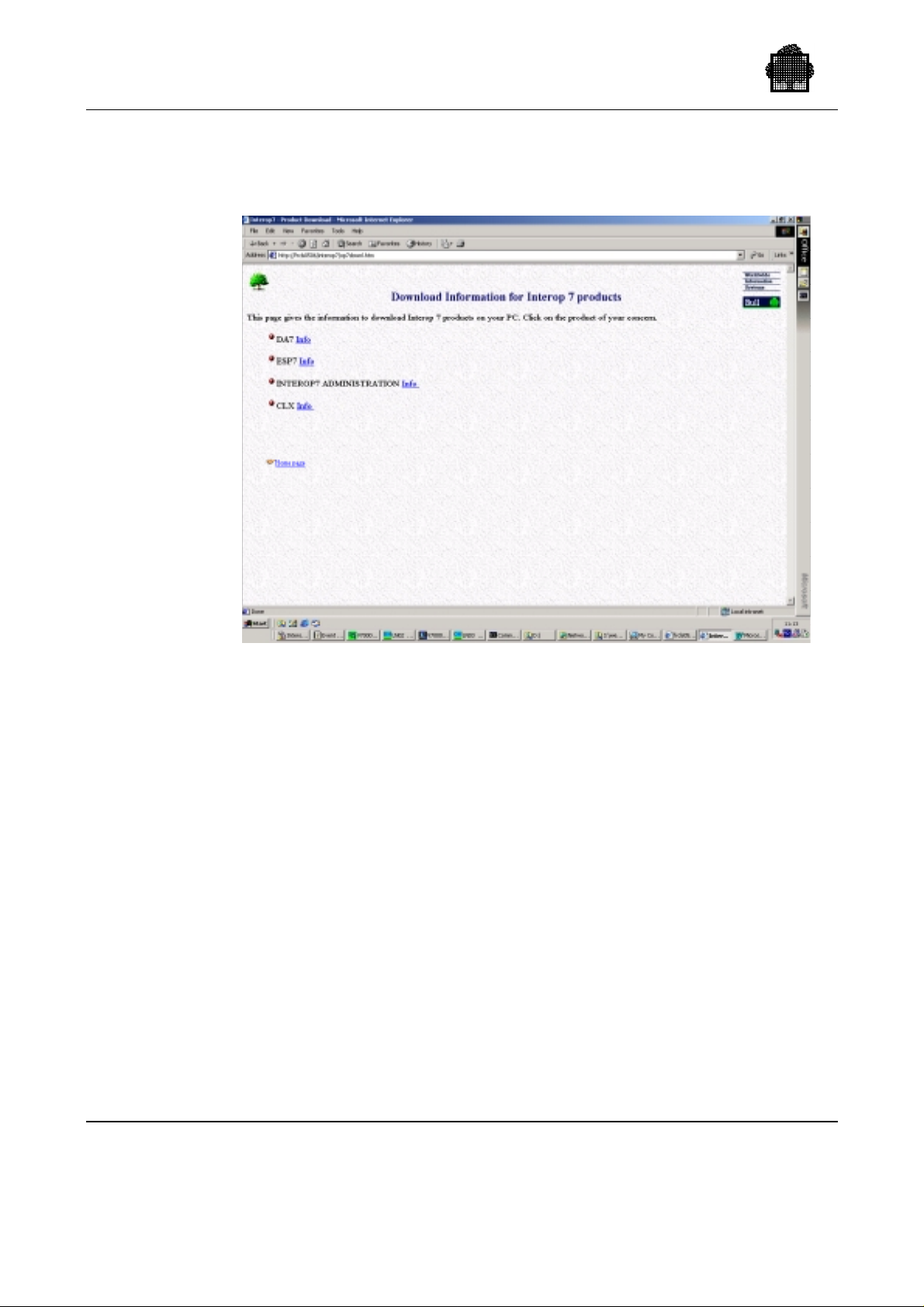
Cartridge Tape Library UNIX Server User’s Guide
Click on the Download field, the following screen is displayed:
2-14 47 A2 63UU Rev05
Page 60
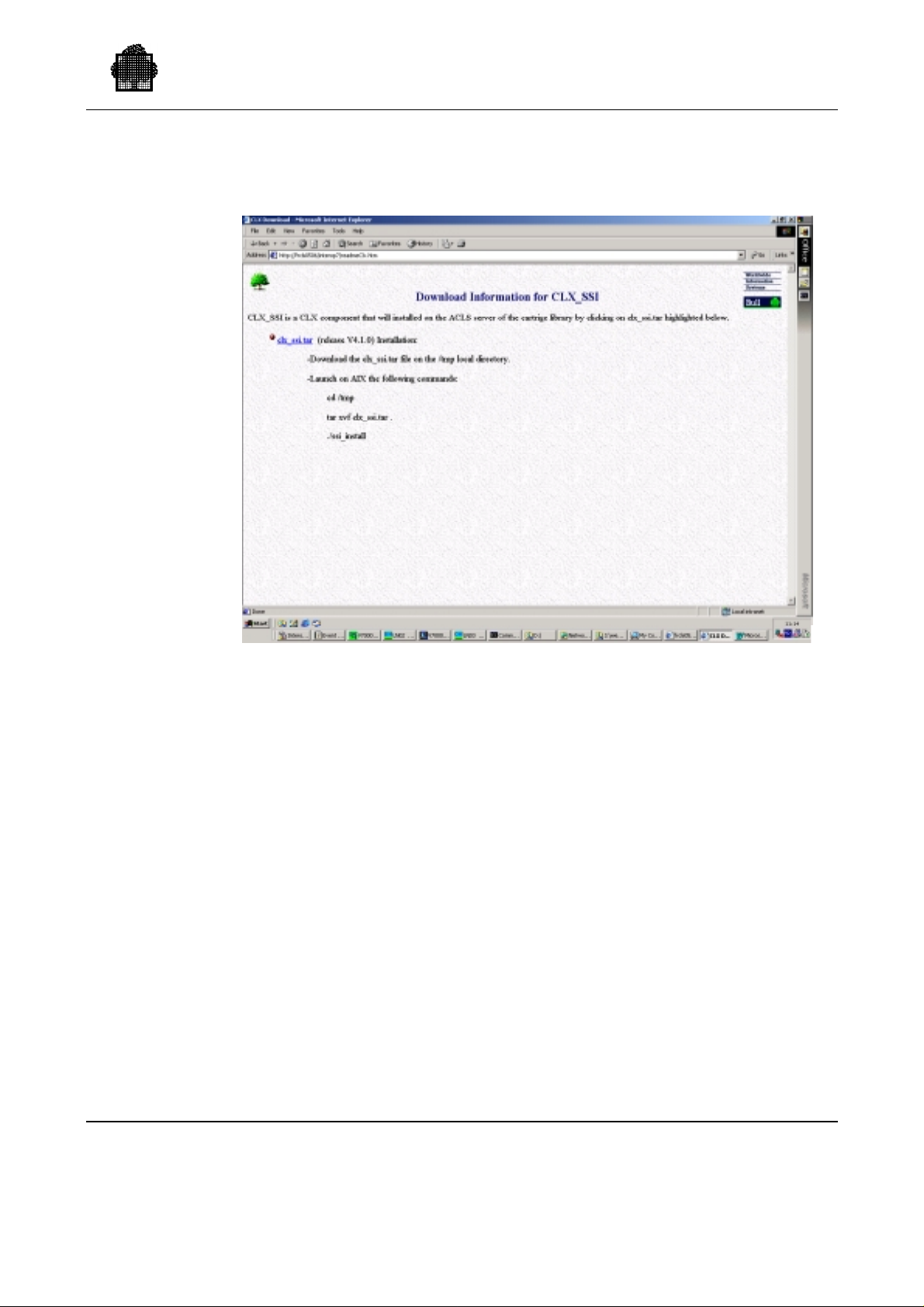
Then click on the CLX info field:
Setting Up Your CTL on the DPS 7000
- with FTP :
On the local XTA server type the following commands:
$ ftp <ACSLS_ip_name>
ftp> cd /tmp
ftp> bin
ftp> put <INTEROP_DIRECTORY>\CLX\web\clx_ssi.tar
ftp> quit
Then on the ACSLS server log as root user and type the commands:
$ cd /tmp
$ tar xvf clx_ssi.tar .
$ ./ssi_install
The installation starts: One Acsls server can receive one different ssi daemon
per GCOS7 on XTA, if you have many XTA platforms to be managed. GCOS7
with OPEN7 can always use this server.
47 A2 63UU Rev05 2-15
Page 61

Cartridge Tape Library UNIX Server User’s Guide
CLX installation on your system is being started
-----------------------------------------------
--> GCOS name of the XTA server (4 chars) ? :
BC06
(type the DSA name of the GCOS7 which is on XTA platform)
--> Port number of this ssi server? ; advice : 5100x
51001
(Each SSI server must have a specific port number for the XTA
plateform that it wants to manage)
--> IP address of the XTA server (aaa.bbb.ccc.ddd)?
:
129.197.182.23
++++++++++++++++++++++++++++++++++++
WARNING 129.197.182.23 is unknown in /etc/hosts
++++++++++++++++++++++++++++++++++++
--> Would you update the /etc/hosts file ? :
no
(depend on your network management with DNS or..You have this
question only if this IP address is not in your /etc/hosts)
Automatic startup of SSI at UNIX reboot (yes/no)?
Yes
(If yes a reboot AIX will automatically restart ssi daemon)
CLX installation on your system is terminated
----------------------------------------------
NOTE:
If the user clx does not exist before the installation, a clx entry is created
in the /etc/passwd file then enter manually the password for clx user. Try
manually one connection with the user and password clx.
All AIX ssi software is installed in /clx/<G CO S _NA ME> di rec tory.
2.3.2.4 5.2.3 Customization phase
- First installation of CLX
Create and initialize the CLX configuration (CLX_CONFIG file) by following
the model stored in the subfile CLX_CONFIG_REF in the library
<CLX>.SLLIB, and comply with the rules described below. § 2.4.1
2.3.2.5 Reinstallation of CLX
Customer's private files (CLX_CONFIG,...) stored in the CLX_SLLIB library
are kept and left unchanged after the CLX reinstallation.
2-16 47 A2 63UU Rev05
Page 62

2.4 Configuration
You must configure:
• UNIX library server ACSLS on ESCALA or ESTRELLA,
• GCOS 7:
− CLX on GCOS 7,
− GCOS 7 system,
• SSI:
Native case
XTA case
− on OPEN7,
− on UNIX library server.
The GCOS 7 configuration includes:
• the system configuration file which gives the list of hardware resources as seen
by the DPS 7000,
• the CLX configuration which specifies the network timeout parameters, the silos
containing transports, the addresses of transports as seen by the library server,
the identifier of scratch pool from which work volumes must be taken and
optionally, the list of volumes allowed for the local system.
Setting Up Your CTL on the DPS 7000
The CLX configuration file must be modified when:
• transports are physically added to/removed from the library,
• a silo containing one or more transports is added/removed,
• the list of authorized volumes is modified,
• the scratch pool identifier is changed,
• a new CLX version with new functions is installed.
Modifications of CLX configuration take effect after a CLX restart.
47 A2 63UU Rev05 2-17
Page 63

Cartridge Tape Library UNIX Server User’s Guide
2.4.1 UNIX Library Server Configuration
ACSSS configuration on UNIX library server
Once the library server is successfully installed and configured following the
instructions in the ACSLS Installation Guide, you must declare in the
/export/home/ACSSS/.rhosts file on the UNIX server
Native case
XTA case:
- the IP network name of the local OPEN7,
- the IP network name of the DPS 7000-XTA itself,
under the format:
<IP name of the local OPEN7 or DPS 7000-XTA> clx
The permission bits on the /export/home/ACSSS/.rhosts must be – r w – r - - r - -.
If they need to be changed, enter on UNIX library server:
chmod 644 /export/home/ACSSS/.rhosts
This enables you to transfer files from the UNIX server to the DPS 7000, using the
GET_CLX_FILE command.
2.4.2 System Configuration
All devices attached to the library must be declared in the system resource table.
The Cartridge Tape library transports and the GPAs (including the control units)
must be declared in the SRST. The device names are:
• TCnn: control units and GPAs, with TC-STK as model name or WSP-C
(SCSI),
• CTnn: transports, with CT-STK as model name or CT-3 [LIB] (SCSI),
• CT/LIB: device/class which designates the library cartridge transport. It is
CT/LIB/M5 for 18-track devices
CT/LIB/36T for 36-track devices
• TC/M7: designates the GPA and channel of the associated control units.
CONFIG must be run to validate the modified SRST.
2.4.2.1 Ressource management
Connect the load module H_CLX to the ARM system dimension (SYS). By
default, the CLX job is executed in the default class for batch jobs. Depending on
the load of your installation, you may wish to specify a CLASS in the $JOB
statement of the JCL that starts the CLX, then modify the subfile CLX in the
CLX.SLLIB library.
2-18 47 A2 63UU Rev05
Page 64

Save the modified subfile so it can be restored in case of any re-installation of
CLX.
2.4.2.2 Configuration of the System Startup
CLX can be activated by the command START_CLX (SCLX), submitted by the
GCOS 7 operator. However, you are advised to start CLX within the system startup
sequence by adding the following command to :
Setting Up Your CTL on the DPS 7000
Native case
the member SYSTEM of the library SITE.STARTUP:
EJR CLX LIB=CLX.SLLIB WHEN=+xm;
This command must be placed after the startup of OPEN 7 and the value x of the
WHEN parameter must be sufficient to let OPEN 7 start and be ready when the
CLX will start.
XAMPLE:
E
EJR CLX LIB=CLX.SLLIB WHEN=+5M;
The CLX will start 5 minutes after the execution of the SYSTEM member of the
SITE.STARTUP library.
XTA case
The startup file of CLX is automatically set by the CLX installation in the
INTEROP_STD.SLLIB..STARTUP subfile with :
EJR PROC=START_CLX CLX.BIN WHEN=+3M HOLDOUT NAME=CLX;
Above line can be modified by the administartor if necessary.
2.4.3 CLX Configuration on GCOS 7
A default configuration is delivered with CLX in the subfile CLX_CONFIG_REF
in the library CLX.SLLIB. Using the CLX_CONFIG_REF, your System
Administrator must create or update the CLX_CONFIG file to your specific site
requirements.
The name of the configuration file can be provided by the operator when CLX is
started. The library name and the subfile name can be supplied as parameters of the
SCLX command. By default, the CLX_CONFIG file in CLX.SLLIB is used.
The System Administrator can perform the configuration in one of two ways:
47 A2 63UU Rev05 2-19
Page 65

Cartridge Tape Library UNIX Server User’s Guide
• modify the CLX_CONFIG file. This file is saved before any further installation
of CLX. Then, no parameter needs to be specified for the SCLX command.
• store the configuration in a subfile of a private Iibrary. Then, the library and
subfile names must be specified for the SCLX command.
Description of Configuration Parameters
The following rules apply to the parameters in the configuration file:
• Each parameter must be on a separate line.
• Keywords can be in any order, except for CTnn and LSMID.
• There can be either no blank characters or several blank characters between the
keyword and the ’=’ sign.
• There can be either no blank characters or several blank characters between the
’=’ sign and the <value>.
E
XAMPLE: KEYWORD = <value>
TOACSLM
TOSSI
The available keywords are described below:
Definition: timeout value for watching ACSLM.
Value: 3 mn to 30 mn (expressed in ms).
Default: 5 mn.
This parameter is used by CLX in its process to check that ACSLM is operational.
Periodically CLX sends a "query server" command. TOACSLM gives the time
delay between 2 "query server" commands. The timer is triggered as soon as CLX
is operational and remains operational as long as CLX is active. If the library
server does not answer a "query server" command, the request "query server" is
retried until the maximum number of retries is reached (see MAXTOACSLM
parameter).
The default value is set if this keyword is not specified in the CLX_CONFIG file.
CLX displays an error and stops if an incorrect value is specified.
This parameter should not be modified by the operator unless requested by Bull
support.
Definition: timeout value for watching SSI.
Value: 3 mn to 30 mn (expressed in ms).
Default: 5 mn.
This parameter is used when CLX detects a SSI failure for a library request. It
gives the time delay after which the library request is retried by CLX. The library
2-20 47 A2 63UU Rev05
Page 66

Setting Up Your CTL on the DPS 7000
request is retried until the SSI failure disappears unless the maximum number of
retries is reached (see MAXTOSSI parameter).
The default value is set if this keyword is not specified in the CLX_CONFIG file.
CLX displays an error and stops if an incorrect value is specified.
This parameter should not be modified by the operator unless requested by Bull
support.
TOLSM
TORPRQ
Definition: timeout value for watching the LSMs (silos).
Value: 3 mn to 30 mn (expressed in ms).
Default: 5 mn.
This parameter is used when CLX detects that at least one LSM is not operational.
It gives the time delay after which CLX asks for the LSMs state by using the
request "query LSM". Th e tim er is tr ig g e red afte r an abnormal status is returned to
the CLX on a library request, which says that an LSM is offline. Every TOLSM,
CLX performs a "query LSM" request until all LSMs are online.
The default value is set if this keyword is not specified in the CLX_CONFIG file.
CLX displays an error and stops if an incorrect value is specified.
This parameter should not be modified by the operator unless requested by Bull
support.
Definition: timeout value for watching a response to a library
request.
Value: 2 mn to 5 mn (expressed in ms).
Default: 2 mn.
It specifies time delay between 2 repetitions of a request sent to the server.
A timer is triggered by CLX each time it sends a request to the library server. When
this timer times out, the request is repeated unless a response to the request has
been received and the maximum number of repetitions is reached:
• If the library request is MOUNT, DISMOUNT, LOCK or UNLOCK, the library
request is repeated 2 or 3 times depending on whether the request has been
acknowledged or not. If, despite the repetitions, there is no answer, the CLX
asks for the status of the A CS LM (re fer to the TOACSLM parameter).
• If the library request is not MOUNT, DISMOUNT, LOCK or UNLOCK, the
request is repeated up to 10 times. If, despite the repetitions, there is no answer,
the step H_CLX of the CLX job issues error messages and then aborts setting
the severity 4 status 23000 and the job CLX stops unless the CLX.SLLIB..CLX
subfile has been modified by the System Administrator.
The default value is set if this keyword is not specified in the CLX_CONFIG file.
CLX displays an error and stops if an incorrect value is specified.
47 A2 63UU Rev05 2-21
Page 67

Cartridge Tape Library UNIX Server User’s Guide
This parameter should not be modified by the operator unless requested by Bull
support.
TORPREAD
MAXTOACSLM
Definition: delay between "get response" requests. These
requests are used by CLX to receive messages coming
from the library server.
Value: 30ms to 5s (expressed in ms).
Default: 2s.
This is used to specify the time delay between ACSLS pooling.
The default value is set if this keyword is not specified in the CLX_CONFIG file.
CLX displays an error and stops if an incorrect value is specified.
This parameter should not be modified by the operator unless requested by Bull
support.
Definition: number of retries in case of library failure.
Value: any numeric value, 0 means no limit.
Default: 0 (no limit).
This parameter is used in case of library failure, i.e. when the server does not
answer to GCOS requests. This keyword defines the maximum number of time
"query server" request is sent to the library server expecting it returns a "run" state.
Indirectly, it gives the maximum time the CLX waits for a restart of ACSLS.
When MAXTOACSLM tries have been reached, the H_CLX step of the CLX job
issues error messages and then stops with the severity 4 status 2300. CLX stops
unless the CLX.SLLIB..CLX subfile has been modified by the System
Administrator.
MAXTOSSI
Definition: number of retries for getting response from SSI.
Value: any numeric value, 0 means no limit.
Default: 0 (no limit).
This is used when a SSI failure is detected. It gives the maximum number of
repetitions of a request sent to the library server. When MAXTOSSI tries have
been reached, the H_CLX step of the CLX job issues error messages and then
aborts setting the severity 4 status 24000. CLX stops unless the CLX.SLLIB..CLX
file has been modified by the System Administrator.
If an incorrect value is specified, CLX issues a message and stops.
2-22 47 A2 63UU Rev05
Page 68

Setting Up Your CTL on the DPS 7000
POOLID_18T
POOLID_36T
LSMID
Definition: scratch pool identifier for 18-track cartridges.
Value: numeric value from 0 to 65534.
Default: 0.
This parameter specifies the scratch pool where 18-track work volumes are to be
taken from. The specified scratch pool must have been nested in the ACSLS by the
"DEFINE POOL" ACSSA command.
The value 0 designates the common pool. This value must not be used in case of
18 tracks and 36-track transports are connected to the library.
Definition: scratch pool identifier for 36-track cartridges.
Value: numeric value from 0 to 65534.
Default: 0.
This parameter specifies the scratch pool where 36-track work volumes are to be
taken from. The specified scratch pool must have been nested in the ACSLS by the
"DEFINE POOL" ACSSA command.
The value 0 designates the common pool. This value must not be used in case of
18-track and 36-track transports are connected to the library.
Definition: LSM (silo) identifier.
Syntax: <acs>,<lsm> where <acs> must contain 0.
Default: None.
This is the LSM identifier as defined by StorageTek. Only LSM with drives
attached must be declared. This parameter must be declared before the CTnn
statements defining the devices (transports) installed in the silo. For multi-LSM
configurations, the list of LSMs and devices must be given as follows:
LSMID = <acs>,<lsm>
CTnn = <acs>,<lsm>,<panel>,<driveid>
CTnn = <acs>,<lsm>,<panel>,<driveid>
CTnn = <acs>,<lsm>,<panel>,<driveid>
CTnn = <acs>,<lsm>,<panel>,<driveid>
LSMID =<acs>,<lsm>
CTnn etc.
CLX issues a message and stops if an incorrect LSMID is supplied.
47 A2 63UU Rev05 2-23
Page 69

Cartridge Tape Library UNIX Server User’s Guide
CTnn
Definition: gives the drive identifier of the device CTnn. CTnn is
the DPS 7000 device name. The drive identifier stands
for the library server identifier of the drive, it is the
physical address of the transport as defined by the
hardware configuration.
Syntax: <device name> = <driveid>.
nn value: from 00 to ZZ (only capital letters). The drive
identifier is composed of 4 numbers separated by
commas:
<acs-number> (0), <lsm-number> (0 to 23),<panelnumber> (0-19), <drive-number> (0-4).
CTnn parameters defining the transports connected to a LSM must follow the
LSMID parameter declaring this LSM.
The CTnn declared in the CLX configuration must be declared in the GCOS 7
configuration file otherwise the following message is displayed by CLX and the
device is ignored:
TU50 <clx version> CLX CONFIGURATION FILE ERROR : <device> IS
NOT IN SYSTEM CONFIGURATION
If a CTnn is declared in the GCOS 7 configuration but is not declared in the CLX
configuration, MOUNT messages specifying this device are not processed by the
CLX.
VSN
CLX does not check the driveid value. If the driveid is not an address of a
transport, an error is reported by CLX on mount requests for the CTnn. If the
driveid is an address of another CTnn, abnormal behavior appears on mount
requests (refer to "CLX Configuration Errors" in Chapter 8).
The job CLX issues a message and stops if there is a syntax error or if the lsmid is
not declared by a previous LSM parameter.
Definition: it gives the range(s) of volumes authorized for the
DPS 7000 application. Only mount requests are
controlled (not enter and eject).
Syntax: VSN = xxxxxx
Value: 1 to 6 characters.
Default: all volumes are allowed.
This parameter is optional.
2-24 47 A2 63UU Rev05
Page 70

Setting Up Your CTL on the DPS 7000
Up to 40 VSN ranges can be specified. A VSN (Volume Serial Number) range is a
volume name of 1 to 6 characters. The characters may be replaced by asterisks (*)
or periods (.). An asterisk or period designates any alphanumeric character. In
addition, asterisks or periods at the end of the name can signify a space ( ).
XAMPLES:
E
LOG
VSN = A*****
VSN = A**
VSN = A****0
means all VSNs of 1 to 6 characters beginning with "A".
means all VSNs of 1 to 3 characters beginning with "A".
means all VSNs of 6 characters beginning with "A" and ending
with "0".
VSN = *B****
means all VSNs of 2 to 6 characters whose second character is
"B".
❑
If no VSN range is specified, the default range is VSN = ******.
Definition: is used to activate the logging of Volume Serial
Number of volumes which are selected as work
volumes but they cannot be used because either they
have not the WORK attribute or they are protected by
the file protector switch.
Parameters must be associated with LOG to specify
which kind of incident must be logged: scratch non
work volumes or write protected work volumes or
both.
Parameter list:
SCRATCH_NWORK: logging in the CLX.SLLIB..SCRATCH_NONWORK
file the Volume Serial Number of scratch volumes
without the WORK attribute.
WORK_PROTECT: logging in the CLX.SLLIB..WORK_PROTECT file
the Volume Serial Number of WORK volumes write
protected by the file selector switch.
Syntax: LOG = [SCRATCH_NWORK], [WORK_PROTECT]
each parameter must be separated by a comma.
Default: If the LOG parameter is not specified, or if a param eter
is missing, in the CLX configuration no logging is
performed.
In this case such a volume is removed from the
SCRATCH list (it will never be selected as a WORK
volume). It is to the system administrator
responsibility to reintroduce these volumes in the
SCRATCH pool or reset the file protect selector.
47 A2 63UU Rev05 2-25
Page 71

Cartridge Tape Library UNIX Server User’s Guide
This parameter is optional.
If the WORK_PROTECT option is selected in the CLX configuration file, Work
volumes in write protect state are registered in the
CLX.SLLIBWORK_PROTECTED file else, the logging is not performed.
If the SCRATCH_NWORK option is selected in the configuration file, SCRATCH
volume without the WORK attribute ar e regis te red in the
CLX.SLLIBSCRATCH_NONWORK file else, the logging is not performed.
For more details about this facility, see "CLX Log Files" later in this chapter.
NO_AUTOCR
Definition: is used to select the processing mode in case of
incident during a mount volume operation.
Parameter list:
VOL_ABS: no automatic CANCEL_REQUEST for a mount
request which requires a volume not present in the
library.
If this option is selected in the CLX configur at ion file,
jobs requesting a volume not in the library waits until
the volume is inserted or until a CANCEL_REQUEST
command is issued by the operator.
VOL_BUSY: no automatic "CANCEL_REQUEST" for a job which
requires a volume used by another job (this situation
may happen only is case of a library shared by
different system).
Syntax: NO_AUTOCR = [VOL_ABS], [VOL_BUSY]
each parameter must be separated by a comma.
Default: If the NO_AUTOCR keyword is not specified, or if a
parameter is missing in the CLX configuration, an
automatic "CANCEL_REQUEST" is performed
according to the NO_AUTOCR specification.
This parameter is optional.
If that option is selected in the CLX configuration file, jobs requesting a volume
not present in the library or volume busy (used by another job of another system
accessing the library) waits until the volume is inserted in the library by the
operator or released by the other job. The MOUNT request can be canceled by a
"CANCEL_REQUEST" command performed by the operator.
For more detail about this functionality, see "Errors in Mount Processing."
Configuration Timers: see table below.
2-26 47 A2 63UU Rev05
Page 72
XTA case
Setting Up Your CTL on the DPS 7000
Table 2-1. CLX Configuration Timers
Parameter Minimum Value Maximum Value Defaul t Value
TORPREAD 30 milliseconds 5 seconds 2 seconds
TORPRQ 2 minutes 5 minutes 2 minutes
TOSSI 3 minutes 30 minutes 5 minutes
TOACSLM 3 minutes 30 minutes 5 minutes
TOLSM 3 minutes 30 minutes 5 minutes
SSIHOST
SSIPORT
Definition: is used to specify the DSA network name of the UNIX
library server where SSI software package is installed
for the service of CLX running on a DPS 7000-XTA.
Syntax: SSIHOST=<network name>
This parameter is necessary if CLX is to run on a DPS 7000-XTA,
and should not be specified if CLX is to run on a DPS 7000 non-XTA
(or may be specified with no value from OPEN7 I5430).
On DPS 7000-XTA, a wrong network name specification will lead to failures in
CLX initial communications with UNIX library server.
Definition: is used to specify the port on which SSI server is to run
on the UNIX library server for a DPS 7000-XTA.
Syntax: SSIPORT=1001 to 65535 (not checked)
Default: 50001
This parameter is necessary if CLX is to run on a DPS 7000-XTA if its default
value is not convenient (for example if several SSI instances must run to serve
several DPS 7000, each on a different port). A wrong SSIPORT value may lead to
CLX initialization failure. It is not checked that different SSI instances launched on
UNIX library server work each with a different port number, and 2 CLX clients
using the same SSIPORT value from 2 different DPS 7000 will have unpredictable
troubles.
47 A2 63UU Rev05 2-27
Page 73

Cartridge Tape Library UNIX Server User’s Guide
The following are configuration examples:
XAMPLE 1: One silo with 4 transports.
E
Content of CLX TOACSLM = 180000
configuration file: TOSSI = 180000
TOLSM = 180000
TORPRQ = 120000
TORPREAD = 3000
MAXTOACSLM =300
POOLID_18T = 3
POOLID_36T = 6
MAXTOSSI = 100
LSMID = 0,0
CT15 = 0,0,1,0
CT16 = 0,0,1,1
CT17 = 0,0,1,2
CT18 = 0,0,1,3
VSN = 00186*
VSN = 0019**
VSN = A*****
Timeout values: TOACSLM = 3mn
TOSSI = 3mn
TOLSM = 3mn
TORPRQ = 2mn
TORPREAD = 3 sec
Authorized volumes: 00186<followed by at most one character>
0019<followed by one or 2 alphanumeric characters>
A<followed by one to 5 alphanumeric characters>
Selected scratch pool: Scratch pool 3 for 18-track formatted devices.
Scratch pool 6 for 36-track formatted devices.
Logging: No logging performed for scratch no-Work volume
and work volume in write protect state.
Automatic Cancel Request:
Automatic Cancel will be performed by CLX in case
of volume not in library or volume busy (used by
another job on another system).
When a SSI failure occurs, the step H_CLX of the CLX job repeats failed requests
up to 100 times before aborting.
2-28 47 A2 63UU Rev05
Page 74

Setting Up Your CTL on the DPS 7000
EXAMPLE 2: One ACS4400 silo with 4 transport s.
Content of CLX POOLID_18T =10
configuration file: POOLID_36T =15
MAXTOSSI = 0
LSMID = 0,0
CT15 = 0,0,10,0
CT16 = 0,0,10,1
CT17 = 0,0,10,2
CT18 = 0,0,10,3
LOG = SCRATCH_NWORK, WORK_PROTECT
NO_AUTOCR = VOL_BUSY, VOL_ABS
Timeout values: Not specified. Default CLX values apply.
When a SSI failure occurs, the step H_CLX of the CLX job waits until the SSI
becomes operational.
When a library failure occurs, the step H_CLX of the CLX job waits until ACSLS
becomes operational.
Authorized volumes: All volumes are authorized.
Selected scratch pool: Scratch pool 10 for 18-track formatted devices.
Scratch pool 15 for 36-track formatted devices.
Logging: Scratch volumes detected non-work will be registered
in the CLX.SLLIB..SCRATCH_NONWORK file.
Work volumes detected write protected by the file
protect switch are registered in the
CLX.SLLIB..WORK_PROTECTED file.
Automatic Cancel Request:
In case of "Volume not in the library" or "Volume
Busy" (Volume used by another system) an operator
intervention will be required, no automatic
"CANCEL_REQUEST" will be performed by CLX.
47 A2 63UU Rev05 2-29
Page 75

Cartridge Tape Library UNIX Server User’s Guide
2.4.4 SSI Configuration under OPEN7
The SSI is automatically configured on OPEN7 during the installation of CLX,
however this configuration can be modified later by the System Administrator.
2.4.4.1 Description of the Configuration Parameters
CSI_HOSTNAME
EVENT_FILE_
NUMBER
AUTO_STARTUP
Definition: This is the UNIX server name. This is the name you
give to connect to the server from a remote UNIX
terminal by using rlogin or telnet commands.
Value: alpha-numeric character string.
You must declare this name in the /etc/hosts file of the local OPEN7 (refer to Step
7 in "Installation Procedure" earli er in thi s chapte r) .
Definition: Number of archive event log files to be retained.
Value: 1 to 10.
When the current log file has reached 32 Kbytes, the data is transferred to the file
event0.log. The next time the log file reaches 32 Kbytes, the event0.log data is
transferred to event1.log, and the event log data is moved to event0.log. This cycle
continues until the specified number of retained files is reached, data is discarded
from the oldest file.
Definition: This parameter specifies whether the SSI is to be
started automatically at OPEN7 startup.
Value: Yes (automatic startup) or No (manual startup).
If set to No, SSI must be started by the System Operator using the START_SSI
command from an IOF terminal. The SSI must be started after the OPEN7 startup
is completed.
If set to Yes, SSI starts automatically at OPEN7 startup.
In both cases, if SSI aborts, it can be restarted by the System Operator using the
START_SSI command.
The configuration parameters CSI_HOSTNAME and EVENT_FILE_NUMBER
are registered on OPEN7 in the script file /clx/t_ssi.sh.
2-30 47 A2 63UU Rev05
Page 76

2.4.4.2 Configuration at Installation
When SSI is being installed you are prompted to enter information regarding SSI
on OPEN7. The configuration parameters are initialized as follows:
Name of the UNIX server [default value: svrx] ?
CSI_HOSTNAME is initialized with this UNIX server name.
Number of log files to retain ?
EVENT_FILE_NUMBER is initialized with this number of log files to retain.
Automatic startup of SSI at OPEN7 reboot (yes/no)?
OPEN7 system files are modified for automatic startup if you enter ’Yes’
2.4.4.3 Reconfiguration of SSI
Setting Up Your CTL on the DPS 7000
You can start a configuration of SSI by:
4. Stopping SSI and CLX from the GCOS 7 operator terminal:
Enter TCLX and TSSI.
5. Logging in to OPEN7 with the user name root and re-running the script
/clx/install/clx_config,
6. Restarting SSI and CLX from the GCOS 7 operator terminal:
Enter SSSI then SCLX
If you only want to modify CSI_HOSTNAME (UNIX server name) or
EVENT_FILE_NUMBER (number of archive log files), you can do this by
updating the environment variables in the CLX script file by:
7. Stopping SSI and CLX (you may keep CLX running and ignore the error
messages displayed on the operator terminal) from the GCOS 7 operator
terminal:
Enter (TCLX and) TSSI.
8. Logging in with the user name root or clx and updating the
CSI_HOSTNAME
value or the EVENT_FILE_NUMBER in the script file: /clx/t_ssi.sh.
Restarting SSI (and CLX if necessary) from the GCOS 7 operator terminal:
Enter SSSI (and SCLX).
47 A2 63UU Rev05 2-31
Page 77

Cartridge Tape Library UNIX Server User’s Guide
2.4.5 SSI Configuration on UNIX library server for DPS 7000-XTA
When SSI is being installed you are prompted to enter information regarding SSI
on OPEN7. The configuration parameters are initialized as follows:
Name of the XTA server ?
This name is used to install each ssi daemon for each GCOS7 in a different
directory.
When SSI is being installed you are prompted to enter information regarding SSI
on OPEN7. The configuration parameters are initialized as follows:
Port number of this ssi server ?
Each ssi server on AIX must have a different port number. You can choose any port
number not used yet. Acsls uses 50xxx ports. You can use 510xx for ssi
IP address of XTA server ?
Give the XTA address only if you want to introduce it in the AIX /etc/hosts file.
Else give a false address and answer no for updating the /etc/hosts file.
Number of log files to retain ?
In XTA version, this question is not asked. But if you want to modify the
EVENT_FILE_NUMBER, edit the ssi_start file with a new value. The default
value is 3.
Automatic startup of SSI at AIX reboot (yes/no
AIX system files are modified for automatic startup if you enter ’Yes’
The SSI is automatically configured on OPEN7 during the installation of CLX,
however this configuration can be modified later by the System Administrator.
2-32 47 A2 63UU Rev05
Page 78

2.5 Errors in Mount Processing
2.5.1 Volumes Not in the Library
This incident happens when a mount request is issued for a volume not located in
the library.
If the option NO_AUTOCR = VOL_ABS is selected in the CLX configuration,
periodically and until the cartridge is inserted in the library or until a
CANCEL_REQUEST command is issued by the operator, a message requesting
user intervention is display ed on the operator console:
TU66 <clx version> VOLUME <volume> NOT IN LIBRARY : OPERATOR
INTERVENTION REQUIRED.
NOTE:
The device selected by the DPS7 for the volume remains allocated to the step.
Setting Up Your CTL on the DPS 7000
Without the option NO_AUTOCR = VOL_ABS, a "CANCEL_REQUEST" is
automatically performed by CLX, the step which requires the volume is aborted.
2.5.2 Volumes in Busy State
This incident can happen in case of volumes shared by GCOS7 systems. It can
happen when a mount request is issued for a specific volume already mounted for a
job of another system, the volume being assigned to the current step or not.
If the option NO_AUTOCR = VOL_BUSY is selected in the CLX configuration,
when job requests a volume used by another job periodically and until the cartridge
is released (and the volume dismounted) or until a CANCEL_REQUEST command
is issued by the operator, a message requesting an operator intervention is
displayed on the operator console:
TU67 <clx version> VOLUME <volume> IN USE : JOB PENDING.
NOTE:
The device selected by the DPS7 for the volume remains allocated to the step.
Without the option NO_AUTOCR = VOL_BUSY, a "CANCEL_REQUEST" is
automatically performed by CLX, the step which requires the volume is aborted.
In case of volumes shared by heterogeneous systems the processing is very likely
to be identical, nevertheless the result cannot be guaranteed.
47 A2 63UU Rev05 2-33
Page 79

Cartridge Tape Library UNIX Server User’s Guide
NOTE:
If the option is selected, jobs can stay waiting forever if the other job never
dismounts the volume (for example step without UNLOAD option, such as
LSV command). No specific processing allows to limit the time a job waits for
a volume but the command CANCEL_REQUEST.
2.5.3 Write Protected Work Volumes
The following processing is performed on a mount work request when the selected
volume is protected by the file protector switch:
• the following message is displayed on the operator console:
TU66 <clx version> WORK VOLUME <volume> WRITE PROTECTED :
EJECTION REQUIRED
•
the cartridge is automatically and immediately dismounted
• the volume is removed from the scratch pool so that it cannot be selected for
another mount work request.
• the incident is logged if the option LOG = WORK_PROTECT is selected in the
CLX configuration.
• another work volume is mounted
Note that this incident does not happen if work volumes have been assigned the
work attribute by means of the PREPARE_TAPESET utility after they have been
inserted in the library.
2.5.4 Scratch Non-Work Volumes
The following processing is performed on the mount work request when the
selected volume is not a work volume:
• the following message is displayed on the operator console:
TU66 <clx version> VOLUME <volume> SCRATCH NO WORK : EJECTION OR
PREPARE_TAPE REQUIRED.
•
the cartridge is automatically and immediately dismounted
• the volume is removed from the scratch pool so that it cannot be selected for
another mount work request
• the incident is logged if the option LOG = WORK_NWORK is selected in the
CLX configuration
• another work volume is mounted.
2-34 47 A2 63UU Rev05
Page 80

This incident may happen for example if non-work volumes have been inserted in
the library by the ENTER_VOLUMES SCRATCH command (this command is
described later in this section). It may also happen if a set scratch ACSSA
command was performed for a non-work cartridge.
Note that this incident does not happen if work volumes have been assigned the
work attribute by means of the PREPARE_TAPESET utility after they have been
inserted in the library.
2.5.5 CLX Log Files
The following logs are stored in the CLX.SLLIB library if the LOG keyword is
specified in the CLX configuration file.
• subfile SCRATCH_NONWORK :
It contains volume serial numbers of scratch non-work volumes, which have
been selected to satisfy a WORK mount request. For more details, refer to the
LOG keyword in the section dealing with the CLX configuration.
Setting Up Your CTL on the DPS 7000
• subfile WORK_PROTECTED :
It contains volume serial numbers of WORK volumes write protected by the file
protect selector switch which have been selected to satisfy a WORK mount
request.
The content of the logs can be read and cleaned by the EXTRACT_CLX_ERROR
(abbr. EXTERR ) command.
The site operator must use the EXTRACT_CLX_ERROR command from time to
time so that the logs do not fill the CLX.SLLIB library up.
However, when it happens that the CLX.SLLIB library is full, no other events are
logged, warning messages are displayed on the GCOS7 operator console, the
logging function resumes as soon as space is available.
These subfiles are not modified at the CLX installation.
3
1
IMPORTANT:
3
The name and record format of these logs can be modified in next CLX
releases.
47 A2 63UU Rev05 2-35
Page 81

Cartridge Tape Library UNIX Server User’s Guide
2.5.6 Volume Access Rights
GCOS 7 does not keep in its database the list and location of cartridge volumes
contained in the library, this is done by the library server.
The library volumes authorized to GCOS 7 users can be specified in the CLX
configuration file. The System Adm inist ra tor des ig nates rang e(s) of autho riz ed
volumes using the VSN keyword. When a job requests a cartridge mount, the name
of the volume requested is compared to specified range(s). If the name is not in the
range(s), the request is canceled and an error message is sent to the JOR or to the
IOF console.
During its initialization sequence, the CLX reads the configuration file and
constructs the table of authorized volumes. When the link with the library server
becomes operational, this table becomes accessible to the device manager and the
control becomes effective.
If an unauthorized mount request is submitted during operation, it is canceled by
the device manager with the following message sent to the JOR or to the IOF
console:
DV53.ILLEGAL ACCESS TO THE VOLUME <volume> OF DEVICE CLASS CT/LIB
If an unauthorized mount request is submitted before the link with the cartridge
library is operational, it is rejected by the CLX at the moment the link becomes
active with the operator messag e:
TU32. V3.0 CLX ATTEMPTS TO CANCEL MOUNT REQUEST OF <volume> ON
<device>: ILLEGAL ACCESS TO VOLUME
Also, the following message is written to the JOR or to the IOF console:
DV02.MEDIA <volnm> HAS BEEN DECLARED UNAVAILABLE BY THE OPERATOR
This control mechanism does not apply to requests for work volumes. To monitor
the use of work volumes, define the default Scratch Pool during configuration of
the library server.
2-36 47 A2 63UU Rev05
Page 82

2.5.7 Mixed Media / Mixed Format Support
Two kinds of devices, with their associated mode of recording, can be connected to
the same Wolfcreek, PowderHorn, or ACS 4400 library, to the same silo and can be
used by the same DPS 7000 system:
• 18-track devices (CTS 4780)
• 36-track devices (CTS 9490) - Timberline
With CTS 9490, standard length tapes and enhanced length tapes (E-tape) can be
used. Standard-length tapes are used also with STK CTS 4780. E-tape cannot be
used with STK CTS 4780.
New device classes are supported by the DPS 7000 which allow jobs and utility to
select either a CTS4780 or a CTS9490 device.
• CT/LIB/M5 : CTS 4780
• CT/LIB/36T : CTS 9490 or CTS 4490 or CTS 4890
When a single type of device attached to the library is connected to a DPS 7000,
the device class CT/LIB can be used.
Setting Up Your CTL on the DPS 7000
2.5.7.1 Recording Format of Devices
1. CTS 4780 :
They write (or prepare) standard tapes using 18-track format.
They can read 18-track format recorded standard tapes.
They can neither read nor write E-tapes.
A tape (cartridge) prepared using a CTS 4780 is said to be 18-track tape
(cartridge).
2. CTS 9490 or CTS 4490 or CTS 4890:
They write (or prepare) standard tapes and E-tapes using 36-track format.
They can read 36-track format recorded standard tapes and E-tapes.
They can read 18-track format recorded standard tapes.
A tape (cartridge) prepared using a CTS 9490 is said to be 36-track tape
(cartridge).
2.5.7.2 Media Type
• 3480 Standard tape
• 3490E E_tape.
47 A2 63UU Rev05 2-37
Page 83

Cartridge Tape Library UNIX Server User’s Guide
2.5.7.3 Error Cases
36-track standard length tapes mounted on CTS 4780
They can only be prepared, and then become 18-track cartridges. To write on them,
volume preparation must be performed first. Volume preparation must be
performed using PREPARE_TAPESET (PREPARE_TAPE cannot be used).
A 36-track standard length tape mounted on a CTS4780 is considered as a NSTD
tape, no message is sent to the operator, the cartridge is automatically dismounted
and the step aborted. The following message is registered in the JOR of the job
requesting the volume:
DV25. USE OF <volume> 36-TRACK CARTRIDGE NOT ALLOWED ON
<device-class> DEVICE.
CAUTION:
When both CTS4780 and CTS9490 are connected to the library, care must be
taken not to erase 36-track recorded tapes by preparing them on CTS4780.
For more details, refer to the JCL Reference Manual, Data Management Utilities
User’s Guide and IOF Terminal User’s Reference Manual.
E-tapes mounted on CTS 4780
If an attempt is done to mount an E-tape on a CTS4780, the tape is automatically
dismounted. No message is sent to the operator. The following message is
registered in the JOR of the job requesting the volume.
DV24. USE OF <volume> E-TAPE NOT ALLOWED ON <device-class> DEVICE.
For more details, refer to the JCL Reference Manual, Data Management Utilities
User’s Guide and IOF Terminal User’s Reference Manual.
18-track standard length mounted on a CTS9490
They can be prepared, read and written only. If they are used in update mode, an
I/O error is generated, an error message is displayed in the JOR:
TS47 : IFN : <internal-file-name> APPEND ON 18-TRACK CARTRIDGE NOT
ALLOWED ON 36T DEVICE.
2-38 47 A2 63UU Rev05
Page 84
3.1 Starting The CLX Service
This section describes how to start the software required to run the CTL service
and how to configure for automatic restarts.
You must start the following components in this order:
On the ESCALA or ESTRELLA: On the DPS 7000:
3. Starting the Software
• ACSLS,
• SSI for DPS 7000-XTA
If you happen to start these components in the wrong order, warning messages may
be displayed on the operator console until all the components are started.
3.1.1 ACSLS Initialization and Startup
The ACSLS is started by the command <rc.acsss>, which is entered by the acsss
user connected to the UNIX server. The ACSLS is operational when the following
processes are running:
• acsss_daemon,
• acssa: System Administrator,
• acslh: library handler,
• acslm: library manager activity scheduler,
• acsmt: mount/dismount activity processor,
• acsel: event logger,
• TNS and OPEN7 if they are not active,
• SSI on OPEN7 on native DPS 7000
• CLX.
• acslock: lock manager,
47 A2 63UU Rev05 3-1
Page 85

Cartridge Tape Library UNIX Server User’s Guide
• acscm: cap manager,
• acssv: scratch volume selection manager,
• csi: client system interface.
These processes are run for the user <acsss>.
The ACSLS can be started automatically when the UNIX server is (re)booted. The
automatic startup can be specified during ACSLS configuration.
For more information about ACSLS Initialization and Startup, refer to the ACSLS
Installation and Administrator’s Guides.
3.1.2 Starting OPEN7
OPEN7 can be started automatically at GCOS 7 startup otherwise it must be started
by the OPEN7 user with the OPEN7 START command (the OPEN7 user’s name is
identical to your OPEN7 system name).
For more details, refer to the OPEN7 Administrator’s Guide.(sockg7 server on
W2000) will be automatically started by the V7000 startup
3.1.3 Starting SSI
The SSI can be started manually by the command
command is delivered in the CLX.BIN library. This library must be declared in
your search path using the MWINLIB BIN command.
This command can be submitted from an IOF terminal working under a project
with MAIN attribute.
XTA case
STARTSSI and other SSI and ACS commands must address the UNIX library
server. The SET_CLX_SSI (or SCLXSSI) command, delivered in CLX.BIN
library, reads CLX.SLLIB..CLX_CONFIG (or any user-specified library
member) and sets G_CLX_SSI global variable with
-UNIX library server network name (found after SSIHOST=)
-/port number to be used by SSI package (found after SSIPORT=).
Any other valid method may be used to modify G_CLX_SSI global variable
value for easier use of SSI and ACS commands on GCOS7 DPS 7000-XTA.
The command DISPLAY_SSI (or DSSI) allows the GCOS7 operator (or any
other interactive user) to know whether the SSI is operational.
START_SSI(or SSSI). This
START_SSI(SSSI) starts the following process on the UNIX library server.
3-2 47 A2 63UU Rev05
Page 86

Starting the Software
Native case
XTA case
- OPEN7
- ACSLS server
is (re)started. This option must be specified during SSI configuration.
START_SSI (SSSI) starts the following process on the local system: ssi: storage
server interface manag er
The ssi process manages the communication with the library server, via the CSI of
ACSLS.
This process always run for the account of the user <clx> (group=clx) E
S: MWINLIB BIN, CLX.BIN
S: SET_CLX_SSI
S: START_SSI
11.16 X550 IN CLX_SSI USER=OPERATOR CLASS=P SPR=6 STATION=BCA9
11.16 X550 STARTED CLX_SSI OPERATOR P
JB08 X550.1 STEP H_CLX_CMDSSI XPR=8 PGID=22
TU70 V4.0 SSI STARTED
11.16 X550.1 COMPLETED CLX_SSI OPERATOR P
3.1.4 Starting CLX
XAMPLE:
CLX can be started manually by the command
START_CLX (SCLX). This starts
the job CLX on the GCOS 7 system. This job controls the step H_CLX.
START_CLX must be submitted from an IOF terminal working under a project with
the MAIN attribute.
This command is delivered in the CLX.BIN library. This library must be declared
in your search path using the MWINLIB BIN, CLX.BIN command.
Parameters for this command allow you to indicate the name and location of the
CLX configuration file. By default, the CLX_CONFIG subfile in the library
CLX.SLLIB is used.
The command
DISPLAY_CLX allows the GCOS 7 operator to know whether the
CLX job has started.
47 A2 63UU Rev05 3-3
Page 87

Cartridge Tape Library UNIX Server User’s Guide
3.1.5 CLX Initialization
The following example illustrates the CLX initialization sequence:
S: START_CLX
14.47 X1987 IN CLX USER=OPERATOR CLASS=P SPR=6 STATION=BCA9
14.47 X1987 STARTED CLX OPERATOR P
JB08 X1987.1 STEP H_CLX XPR=8 PGID=19
TU01 V3.0 CLX INITIALIZATION IN PROGRESS
TU02 V3.0 CLX WAITING FOR ACSLM TO BE RUNNING
TU09 V3.0 ACSLM IS RUNNING
TU06 V3.0 CLX RECOVERY IN PROGRESS
TU06 V3.0 CLX IS CLEANING LOCKS ON VOLUMES SET BY PREVIOUS CLX
SESSION
TU03 V3.0 CLX IS RUNNING
TU26 V3.0 NOW MOUNT & DISMOUNT REQUESTS ARE HANDLED AUTOMATICALLY
The TUxx messages are sent to the terminal from which the START_CLX
command was entered and to every operator. The following activities take place:
The TU01 message is displayed at the beginning of the initialization stage.
The TU02 message is displayed at the end of the initialization stage.
The CLX waits for the ACSLM to be running, as indicated in the TU02 message.
The CLX sends a query server request to the ACSLS.
If the communication link is operational and all components are running, the
library server acknowledges the request and returns the ACSLS state.
If ACSLM is active, the message TU09 is displayed and the CLX enters the
recovery stage (also called resynchronization stage) which matches device status
between the GCOS 7 and the library server (ACSLS).
The first TU06 message is displayed at the beginning of the recovery stage. This
step can last 2 or 3 minutes.
The second TU06 message is displayed at the end of the recovery stage. The CLX
then starts cleaning locks on volumes set by previous CLX jobs. This consists of
unlocking volumes which could not be released by the previous CLX job.
The TU03 message appears when the CLX has cleaned all locks on the volumes.
When the message TU26 is issued, the CLX service is operational.
3-4 47 A2 63UU Rev05
Page 88

Starting the Software
NOTE:
Locks on devices and volumes are cleaned during the recovery stage. This
process is described in Section 9, "CLX Error Conditions and Messages". The
user identifier value supplied by the CLX for the interface with ACSLS is the
DPS 7000 local system name. When CLX starts, it asks ACSLS to release all
locks set for this user identifier.
47 A2 63UU Rev05 3-5
Page 89

Cartridge Tape Library UNIX Server User’s Guide
3.2 Configuring Automatic Restarts
The step H_CLX can detect errors, such as:
• a UNIX server failure,
• an ACSLM or ACSLS failure,
• an SSI failure,
• a telecommunication failure,
• a system error.
When errors are detected, the step H_CLX aborts, setting a severity and a status
value. These can be checked in the JCL which controls the step H_CLX. The JCL
is delivered in the subfile CLX of the CLX.SLLIB library. Comments are included
in this subfile, they give the list of severity status values and the fa ilu re for each
value.
The delivered CLX subfile requests an automatic restart if CLX aborts following a
recoverable error (severity 3). You can modify the JCL to request automatic restarts
in other cases. Refer to Section 9, "CLX Error Conditions and Messages" for more
information.
You can also use the CLX configuration parameters to prevent CLX from aborting
if there is a SSI failure. This is described in "CLX Configuration on GCOS 7" in
Chapter 2.
CLX does not abort in case of robot or LSM failure; it only suspends automatic
processing until all LSMs are operational.
You can launch the CLX from the SITE.STARTUP after launching OPEN 7. To do
this, include the following in SITE startup:
ejr clx lib = clx.sllib when = +xm
When = enqueing time (after the complete starting of OPEN or of INTEROP7).
For more detailed information about the when parameter, see the UFT User’s
Guide.
3-6 47 A2 63UU Rev05
Page 90

3.3 Messages Issued at ISL System Load
At ISL system load, the Device Manager may issue the message:
DV17 <<device>> PREMOUNTED <volume>
followed by:
DW10 <<device>> DISMOUNT < volume> <type>
This sequence occurs because the initial AVRs detect the presence of cartridges that
have not been unloaded during the previous GCOS 7 session. You should ignore
these messages, as the CLX will resolve the problem as soon as it starts.
Starting the Software
47 A2 63UU Rev05 3-7
Page 91

Cartridge Tape Library UNIX Server User’s Guide
❑
3-8 47 A2 63UU Rev05
Page 92
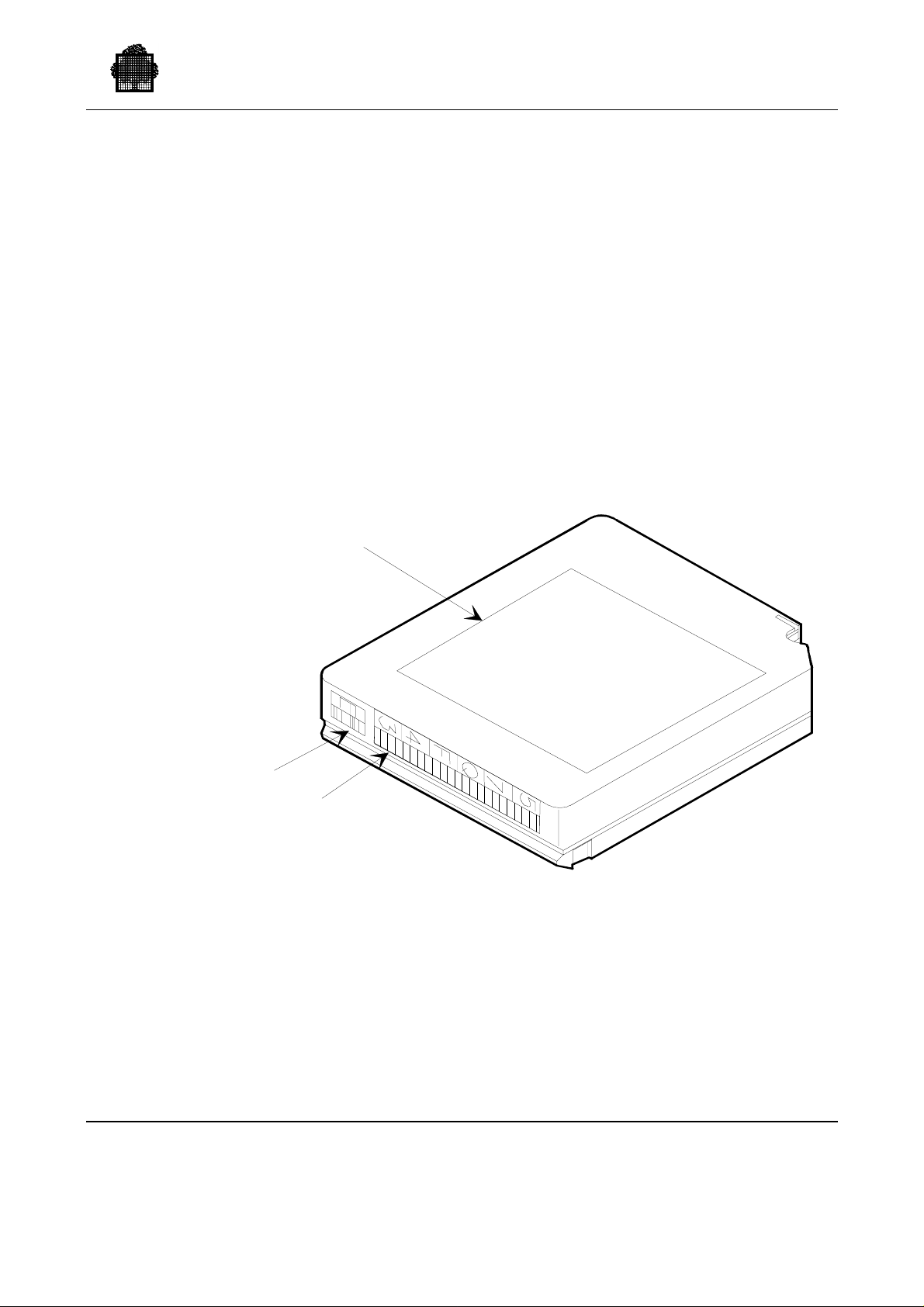
4.1 Labeling the Cartridges
For the robot, the library cartridges must have an OCR/bar code optical label which
contains the VOLSER of the volume.
CUSTOMER
LABEL
4. How to Enter a Cartridge
EXTENDED
MEDIA
LABEL
Figure 4-1. Cartridge Labels
47 A2 63UU Rev05 4-1
VOLSER
LABEL
Page 93

Cartridge Tape Library UNIX Server User’s Guide
For GCOS 7, library cartridges must have a magnetic label. This label is registered
in the first block of the tape and contains the VOLSER of the volume.
The extended media label is used for extended length (ECCST) media, i.e., 3490E
cartridges.
A VOLSER is composed of 1 to 6 alphanumeric characters. Valid characters are
hyphen, underscore, A-Z (only capital letters are allowed), 0-9, blank characters
but with no leading blanks. Embedded blanks are used only for test cartridges. On
the magnetic label, this name is left-justified and, if necessary, completed with
blanks. A cartridge with a correct magnetic label is called a stand ard (S TD)
volume, a cartridge without magnetic label or with a non-standard label is called a
non-standard (NSTD) volume. The VOLSER in the magnetic label and the
VOLSER in the optical label must be ident ica l.
Cartridges without an optical label can be introduced into the library. In this case,
the server asks the library operator to specify the VOLSER of the cartridge when it
is loaded into the Cartridge Access Port (CAP). The library operator must use the
specific venter command to introduce the cartridge.
4-2 47 A2 63UU Rev05
Page 94

4.2 Label Consistency
Before using a cartridge for data storage, you must ensure that the VOLSER on the
optical label is identical to the VOLSER recorded on the magnetic label volume.
A cartridge without magnetic label or a cartridge with a non-standard magnetic
label is considered by GCOS 7 as non-standard cartridge. This is the case for new
cartridges. Such cartridges must be "prepared" using the PREPARE_TAPESET or
PREPARE_TAPE utility before data can be written on the tape.
Once you have stuck the optical label and entered the cartridge into the library, use
the PREPARE_TAPESET/PRPTPST or PREPARE_TAPE/PRPTP utility.
After PREPARE_TAPESET or PREPARE_TAPE is completed, cartridges are
standard cartridges, their magnetic label is identical to the optical label.
You can prepare again this cartridge any time supplying the same parameter values
if you want to erase its content or you want to set or remove the work attribute.
If for any reason you need to change the optical label of a cartridge, proceed as
follows:
How to Enter a Cartridge
• if necessary save the content of the cartridge onto another cartridge
• eject the cartridge from the silo
• change the optical label
• reenter the cartridge into the silo
• prepare the cartridge using PREPARE_TAPE SE T. This reestablishe s the
VOLSER of the magnetic label to the value of the VOLSER of the optical label.
(PREPARE_TAPE is not allowed in this case.)
GCOS 7 checks the consistency of labels when a cartridge is just mounted in a
device. When it detects an inconsistency, the following messages are issued and the
cartridge is automatically dismounted.
TU27 V3.0 conflict between optical and magnetic labels of the
cartridge on <device>
TU21 V3.0 ACSLM STATUS OF <device> : <optical label>
mounted
TU23 V3.0 DVMGT STATUS OF <device> : <magnetic label>
mounted
You can reestablish consistency of labels by conserving the optical label: use
PREPARE_TAPESET/PRPTPST.
For further information on PREPARE_TAPESET, refer to Appendix E, "The
PREPARE_TAPESET Utility."
47 A2 63UU Rev05 4-3
Page 95
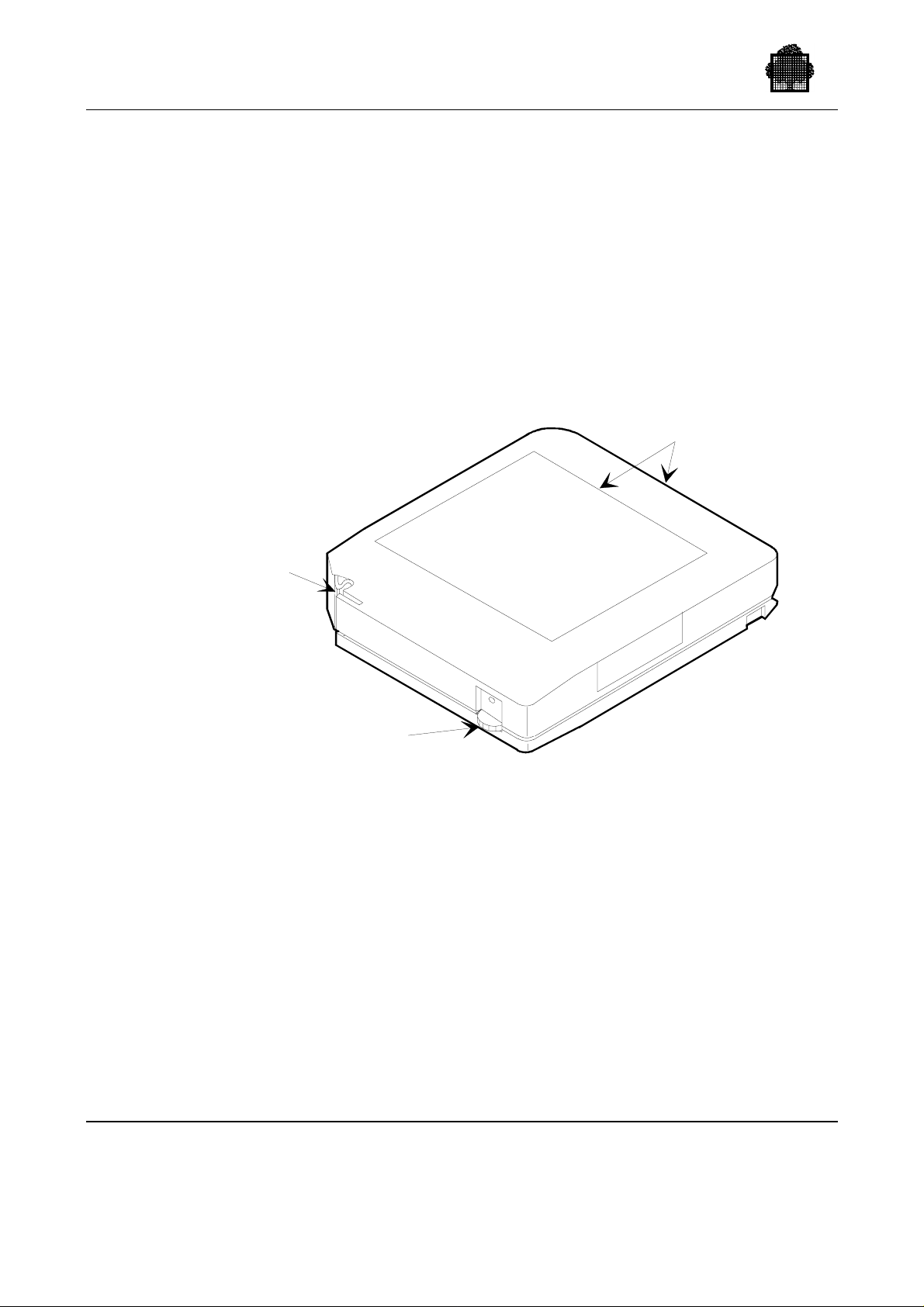
Cartridge Tape Library UNIX Server User’s Guide
4.3 Write Protection
To protect a cartridge against unwanted write operation, either use the File Protect
Selector switch of the cartridge or use "electronic" write protection (ACS Virtual
Thumbwheel) through JCL/GCL assign parameters (NVOLWR).
When accessing cartridges (whether writing is permitted or not), you must ensure
the compatibility between:
• your GCL/JCL and the position of the protect selector switch of the cartridge,
• the types of access required by the different steps of your job for the sam e
cartridge.
LABELS
LEADER
BLOCK
FILE
PROTECT
SELECTOR
Figure 4-2. Cartridge File Protect Selector
If a request for write protection is included in the mount request (message DW11),
the write protection request is transmitted to the CLX, which ensures that the
cartridge is mounted while providing it with "electronic" write protection. The
following requests: "SWITCH TO PERMIT" and "SWITCH TO PROTECT" are
not supported for cartridge library devices if the selected volume is not a WORK
volume. These requests provoke a CANCEL_REQUEST on the part of the CLX
and a premature end of the step that issued the request. If your job runs successive
stops with different access rights, use the option UNLOAD to force the cartridge
unloading and dismounting between steps.
4-4 47 A2 63UU Rev05
Page 96

4.4 Entering Cartridges into the Library
Cartridges can be entered manually or automatically. Before being entered, all
cartridges must have an optical label attached.
4.4.1 Automatic Entry
Cartridges are entered through the Cartridge Access Port(s). If a CAP is set in
automatic mode, it is unlocked, allowing an operator to enter cartridges at any time.
If a CAP is set in manual mode, the CAP is locked. To enter cartridges through the
CAP, the System Operator do the following:
• use the ACSSA "enter" command from the library server, this unlocks the CAP,
• enter the cartridges: open the CAP, put cartridges into the CAP, close the CAP
and repeat these operations until all cartridges have been entered,
• enter control-C onto the ACSSA window to stop the enter mode.
You can use the ACSSA command "set cap" to change the CAP mode. Refer to the
relevant storage library documentation for more details.
How to Enter a Cartridge
4.4.2 Manual Entry
Manual entry of cartridges can be convenient to enter a large number of cartridges
which may be the case in the initial loading of the silo. In this mode, the operator
does not use the CAP; the operator places the cartridges directly in their home
cells.
To enter cartridges manually:
• put the silo offline using the ACSSA command "vary lsm",
• enter in the LSM and place the cartridges in the storage cells,
• exit of the LSM, and close the door,
• put the LSM on line using the ACSSA command "vary lsm",
• perform a full or partial audit to update the library server database using the
ACSSA command audit. This audit is necessary to let the ACSLS know of the
new cartridges just entered.
If you are using a Wolfcreek library, the LMU runs a physical audit of the silo
when you close the door. This does not update the ACSLS database, which is
updated only if you run an ACSSA command audit from the UNIX server.
47 A2 63UU Rev05 4-5
Page 97

Cartridge Tape Library UNIX Server User’s Guide
❑
4-6 47 A2 63UU Rev05
Page 98

This section describes how to operate your Cartridge Tape Library (CTL) and
shows what happens during normal operation.
5.1 Cleaning Cartridges
The cartridge cleaning operation is performed automatically if specified so at
ACSLS installation (AUTOCLEAN set to TRUE in the ACSLS file .acsss_env). If
not, the operator must mount cleaning cartridges using the ACSSA commands
"mount" and "dismount."
A cartridge is a cleaning cartridge if the ACSSA command "set clean" has been
performed for this cartridge. The ACSSA command "query clean all" allows you to
get the list of all cleaning cartridges in the library.
The number of cleaning cartridges in the silo must be equal to or greater than the
number of devices attached to the silo. If no cleaning cartridge is available,
messages are issued in the ACSLS log file.
5. Operating Your CTL
47 A2 63UU Rev05 5-1
Page 99

Cartridge Tape Library UNIX Server User’s Guide
5.2 User Application Information
5.2.1 Referring to Cartridge Library Volumes
When you declare a cartridge tape library in the site configuration, ensure that the
references to cartridge volumes clearly indicate the complete device class (device
type and device attribute). You must modify all JCLs which specify only CT for the
device class, for example:
• CT/36T refers to CTS 9490 or CTS4490 or CTS4890 devices not connected to
the library.
• CT/M5 refers to CTS4780 devices not connected to the library.
• CT/LIB/M5 refers to CTS4780 devices connected to the library (18-track
formatted devices).
• CT/LIB/36T refers to CTS9490 or CTS4490 or CTS4890 devices connected to
the library (36-track formatted devices).
The use of CT is not allowed; it will cause a step abort and the following
message in the JOR:
DV52.INCOMPLETE DEVICE ATTRIBUTES FOR CT DEVICE
Therefore, if you want to refer to a volume in the cartridge library, you must
specify the device class CT/LIB/M5 or CT/LIB/36T:
• in the GCL and JCL file assign comm ands,
• in the file and volume definitions used by utilities,
• when cataloguing files.
For example, to refer to file FIC1 on the multi-file library cartridge C192 18-track
formatted volume:
• In GCL:
FIC1:C192:CT/LIB/M5$MFT
In JCL:
•
(FIC1,MEDIA=C192,DEVCLASS=CT/LIB/M5,FSN=ANY)
VOLSAVE INVOL=(MD=DISK1,DVC=MS/B10),
OUTFILE=(DISK1,DVC=CT/LIB/M5,
MD=(001700,001701,001702,001703)),
FAST;
PREALLOC DBSAV.DB1*G+1,
UFAS=(SEQ=(BLKSIZE=1400,RECSZ=200)),
DVC=CT/LIB/M5,GBL=(MD=001780),CATNOW;
5-2 47 A2 63UU Rev05
Page 100

The assigning of the type "any media" is not supported for library cartridge
volumes. An "MD=*, DVC=CT/LIB" type reference causes a step abort and the
following message in the JOR:
DV51.ANY MEDIA OPTION NOT ALLOWED FOR CT/LIB
When working with filesets (INSET/OUTSET), specify the REQDEV parameter.
For further information about this resource-reservation parameter, refer to the Data
Management Utilities User’s Guide.
5.2.2 Mounting Library Vol umes
The following criteria determine when volumes are mounted:
• When a file is assigned statically (JCL command ASSIGN), the first ’n’ volumes
of the file (’n’ specified by the parameter MOUNT=n, 1 by default) are mounted:
− at the beginning of the Step,
− at file Open, if option DEFER has been specified.
• Subsequent volumes of the file are mounted as soon as they are referenced by
the application.
Operating Your CTL
• When a file is assigned dynamically, the first ’n’ volumes of the file (parameter
MOUNT=n) are mounted at file Open. Subsequent volumes of the file are
mounted as soon as they are referenced by the application.
• Multi-file volumes: reference to a file beginning on the nth volume of a media
list (use of the option FSN= or $MFT) can require the mounting of the first n-1
volumes of the media list.
5.2.3 Dismounting Library Volumes
5.2.3.1 General Dismounting Criteria
The following criteria determine when volumes are dismounted:
• While a job is running, the dismounting of volumes is the responsibility of the
user via the END=UNLOAD, ABEND=UNLOAD, or ENDVOL=UNLOAD
option.
• Volume preparation utilities, VOLDUPLI and VOLCOMP force dismounting at
the end of execution.
• WORK volumes are dismounted by the system when they are no longer used.
• After a file is deassigned, a volume can remain premounted, but the device is no
longer assigned to the job. If the device is the only device available and another
job is waiting for a device, the volume is dismounted and the device is assigned
to the waiting job.
47 A2 63UU Rev05 5-3
 Loading...