

Page 1
™
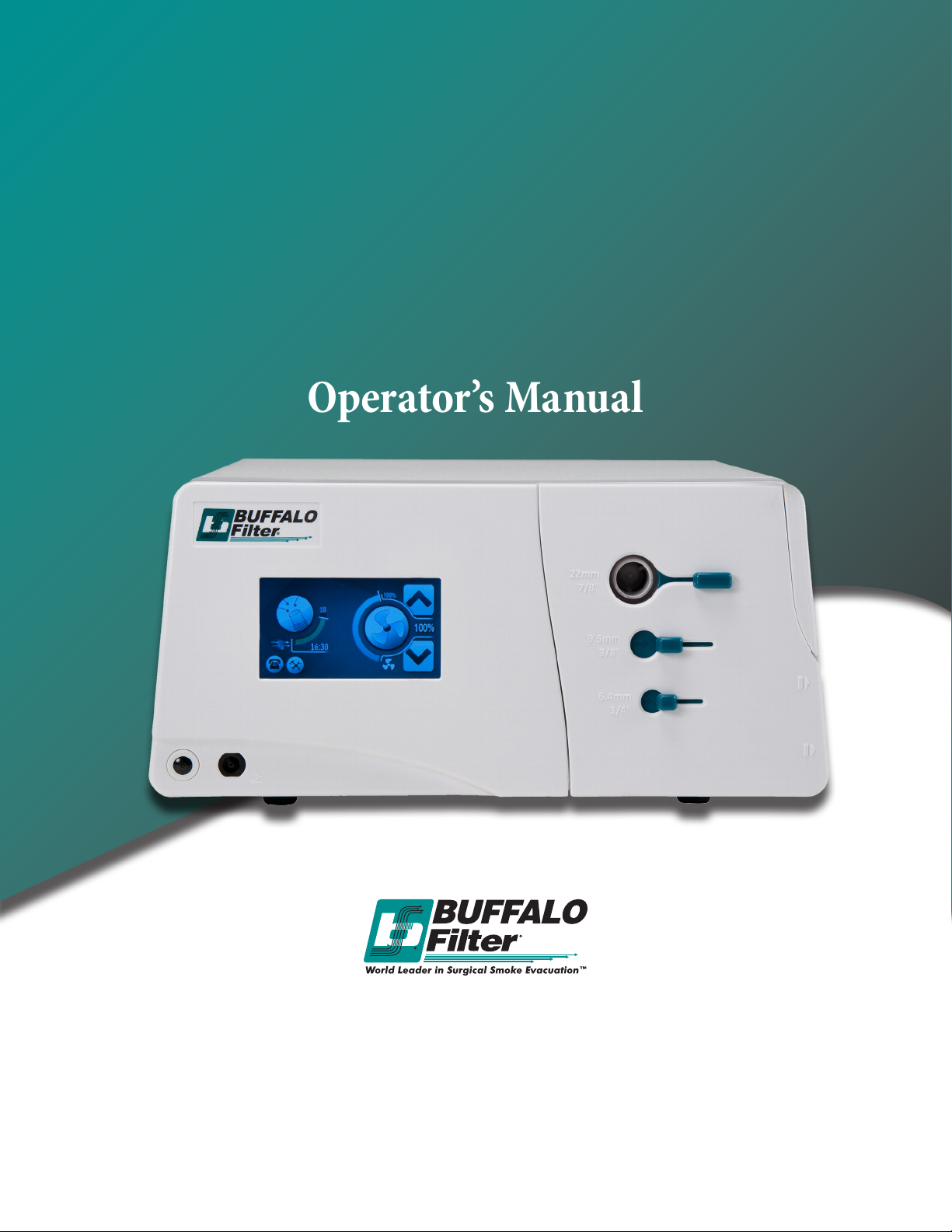
VisiClear
Surgical Smoke Plume Evacuator
Operator’s Manual
© 2014 BUFFALO FILTER®
5900 Genesee Street
Lancaster, New York 14086, USA
(716) 835-7000 or (716) 835-3414 fax
www.bualolter.com
Customer Service: 800-343-2324 (U.S. Only)
1-716-835-7000 (International)
Page 2

For a period of three (3) years following the date of delivery, BUFFALO FILTER® warrants
the VisiClear™ against any defects in material or workmanship. BUFFALO FILTER® will
repair or replace (at BUFFALO FILTER’s option) the same without charge, provided that
routine maintenance as specied in this manual has been performed using replacement
parts approved by BUFFALO FILTER®. is warranty is void if the product is
used in a manner or for purposes other than intended.
© 2014 BUFFALO FILTER®
Lancaster, New York USA 14086
(716) 835-7000
www.bualolter.com
Customer Service: 800-343-2324 (U.S. Only)
1-716-835-7000 (International)
e revision level of this manual is specied by the highest revision letter found
on either the inside front cover or enclosed errata pages (if any).
Manual Number 902909REVA
Unit Serial Number ______________________
MEDICAL – GENERAL MEDICAL EQUIPMENT
AS TO ELECTRICAL SHOCK, FIRE AND MECHANICAL HAZARDS ONLY
IN ACCORDANCE WITH UL 60601-1, ANSI/AAMI ES60601-1 (2005, 3rd ed.),
CAN/CSA C22.2 NO. 601.1, AND CAN/CSA-C22.2 No. 60601-1 (2008)
9D93
is device complies with Part 15 of the FCC Rules. Operation is subject to the following
two conditions: (1) this device may not cause harmful interference and (2) this device must
accept any interference received, including interference that may cause undesired operation.
2Bualo Filter® VisiClear™ Operator’s Manual
Page 3

Table of Contents
and List of Illustrations
Section Title Page
1.0 SYSTEM DESCRIPTION 4
1.1 Introduction
1.2 Inspection
1.3 Operational Information
1.4 Cautions and Warnings
2.0 OPERATING INSTRUCTIONS 10
2.1 System Controls
2.2 VisiClear™ Filter Instructions
2.3 Set-up and Operation
2.4 Specications
3.0 MAINTENANCE 25
3.1 General Maintenance Information
3.2 Cleaning
3.3 Periodic Inspection
3.4 Troubleshooting
4.0 CUSTOMER SERVICE 28
4.1 Equipment Return
4.2 Ordering Information
5.0 TERMS & WARRANTY 30
Table of Contents
3Bualo Filter® VisiClear™ Operator’s Manual
and List of Illustrations
Page 4

System Description
Section 1.0
1.1 Introduction
Indications for use for the VisiClear™ Surgical Smoke Plume Evacuator include:
To remove and lter smoke and aerosols from a surgical site produced during electrosurgical
and laser procedures.
e VisiClear™ Surgical Smoke Plume Evacuators have been designed with a vacuum motor.
e motor is used to draw the surgical smoke from the surgical site through the vacuum
tubing and into the VisiClear™ lter where the surgical smoke is processed by a series of
lters. A single disposable lter is used to simplify the installation and removal during lter
changes. e lter is completely enclosed to protect the healthcare personnel from potential
contamination during lter changes. One BUFFALO FILTER® VisiClear™ lter contains four
dierent stages within to capture the smoke plume.
e rst stage ltration is a prelter whose function is to trap and remove gross particulate.
e second stage ltration is ULPA grade (Ultra Low Penetration Air) lter whose high-tech
patented (U.S. Patent #5874052) design captures particulates and micro-organisms from
.1 to .2 microns at an eciency of 99.999%.
e third stage ltration is comprised of virgin activated carbon.
e fourth stage ltration is a woven berglass ltration media used to reduce the amount of
activated carbon nes from migrating out of the lter.
e electronic controls on the face panel of the VisiClear™ Surgical Smoke Plume Evacuator has
been designed “user friendly” and facilitate unit set up and operation. Please refer to Section
2.0 for Operating Instructions.
1.2 Inspection
e VisiClear™ Surgical Smoke Plume Evacuator has been thoroughly tested and inspected
before shipment from the factory. Please check the unit before using it to insure that no damage
has occurred in transit. If damage is evident, please contact BUFFALO FILTER® Customer
Service at 1-800-343-2324 (US Only) or (716) 835-7000 (Outside the US).
In addition, please compare the accessories you receive with the standard accessories list below.
If an item is missing, please notify BUFFALO FILTER® Customer Service.
System Description
4Bualo Filter® VisiClear™ Operator’s Manual
Section 1.0
Page 5

Standard Accessories:
• Operator’s Manual
• Power Cord
• Pneumatic Footswitch
Please contact BUFFALO FILTER® Customer Service to purchase the following accessories:
• Replacement Filters
• EZLink™ Automatic Activation Device
• Hoses, Tubing, Laparoscopic Kits, Adapters, Wands & Other Accessories
1.3 Operational Information
e operational information contained in this section is intended for the customer review of
regulatory issues. e information pertains to the use of the products both domestically and
internationally:
1. e BUFFALO FILTER® VisiClear™ Surgical Smoke Plume Evacuator(s) complies
with IEC60601-1:2005 electrical specications in the following systems:
100/120 VAC, 50/60 Hz, 220/240 VAC, 50/60 Hz
2. Type of protection against electrical shock: Class I
3. Degree of protection against electric shock: Type CF Applied Part
4. Degree of protection against ingress of water: IPX1
5. Method of sterilization or disinfection recommended by BUFFALO FILTER®:
Unplug Unit. Wipe unit with a damp cloth containing mild disinfectant solution
or soapy water. Wipe dry with a clean cloth. Do not steam sterilize.
6. Degree of safety of application in the presence of ammable anesthetic mixture with air or
with oxygen or nitrous oxide: Not Suitable
7. Mode of operation: Continuous
8. e fuses on the circuit board are (F1, F20 to be serviced by an authorized BUFFALO
FILTER® technician as follows:
100/120 VAC, 50/60 Hz use 10 Amp 250 Volt Fuse (Slo-Blo)
with Interruption Rating: 1500A@250V
220/240 VAC, 50/60 Hz use 8 Amp 250 Volt Fuse (Slo-Blo)
with Interruption Rating: 1500A@250V
9. e fuse on the transformer circuit (F6) to be serviced by an authorized BUFFALO FILTER®
technician as follows:
100/120 VAC, 50/60 Hz use 100 Amp 250 Volt Fuse (Fast-Act)
with interruption rating: 1500A@250V
220/240 VAC, 50/60 Hz use 50Amp 250 Volt Fuse (Fast-Act)
with interruption rating: 1500A@250V
10. e fuses on the motor circuit are to be serviced by an authorized BUFFALO FILTER®
technician as follows: 220/240 VAC, 50/60 Hz use 3,15 Amp 250 Volt Fuse (Fast-Acting), (F3)
with Interruption Rating: 1500A@250V
11. is equipment needs special precautions regarding Electro Magnetic Compatibility and
needs to be installed according to EMC information found in this manual.
5Bualo Filter® VisiClear™ Operator’s Manual
Page 6

12. is equipment utilizes mobile RF communications equipment that can aect medical
electrical equipment.
13. is equipment has been tested and found to comply with the limits for a Class A digital
device, pursuant to Part 15 of the FCC rules. ese limits are designed to provide reasonable
protection against harmful interference when the equipment is operated in a commercial
environment. is equipment generates, uses, and can radiate radio frequency energy and,
if not installed and used in accordance with the instruction manual, may cause harmful
interference to radio communications. Operation of this equipment in a residential area is
likely to cause harmful interference in which case the user will be required to correct the
interference at their expense.
14. is equipment operates in the following radio frequency specications:
RX modulation: Pulse-width coded, AM 100% modulation
TX Frequencies: Manchester encoded,
A = fc =/- 423.75kHz, B = fc +/- 484.29kHz
Low bit: transition A to B
High bit: transition B to A
15. To isolate equipment from supply mains, unplug the power cord from the appliance inlet
on the unit or receptacle in the wall. Position the equipment to allow for ease of unplugging
power cord.
16. Potential Equalization Conductor: Terminal located on back panel for connection of
potential equalization. Conductor complies with requirements per IEC 60601-1 (2005).
e VisiClear™ Surgical Smoke Plume Evacuator(s) and all lters are not intended for contact
with patients.
1.4 Cautions and Warnings
Please note that all Cautions and Warnings should be read and understood before any
use of this equipment.
Please note that all Cautions and Warnings should be read
and understood before any use of this equipment.
is device does not have any contradictions for use.
6Bualo Filter® VisiClear™ Operator’s Manual
Page 7

1.4.1 WARNINGS:
• Read this manual thoroughly and be familiar with its contents prior to using this equipment.
• is equipment is intended for use by trained healthcare professionals only.
• is equipment may cause radio interference or may disrupt the operation of nearby
equipment. It may be necessary to take mitigation measures, such as re-orienting or
relocating the VisiClear™ or shielding the location.
• Test this equipment prior to a surgical procedure. is product was thoroughly tested at the
factory before shipment.
• Disconnect the unit from the electrical outlet prior to inspecting system components.
• e VisiClear™ system is only intended and suitable for the applications that are mentioned
in the operating instructions.
• e smoke plume evacuator produces a strong vacuum. Adjust the airow and the
position of the inlet end of the wand or tubing to prevent patient injury and to prevent
suction of surgical materials and surgical specimens.
• If the smoke plume evacuator is activated while the airow is set to a high speed, it may
produce a sudden, strong suction action. Check the airow setting before activating the
smoke evacuator to prevent patient injury and to prevent suction of surgical materials
and surgical specimens.
• To maximize patient safety, the tubing or wand should not come into direct contact with
tissue. Otherwise, patient injury may result.
• e BUFFALO FILTER® VisiClear™ lters and single-use accessories are completely
disposable. Please dispose of according to your local codes or regulations and hospital policy.
ese lters may be disposed of or incinerated, whichever is appropriate for your institution.
• Care should be taken to route the power cord, foot pedal, smoke evacuation tubing, and EZLink™
Automatic Activation Device cable as to not cause a tripping hazard or crimping of cords.
• Do not operate this device in the presence of ammable or explosive gases.
• To avoid risk of electric shock, this equipment must only be connected to a supply mains with
protective earth.
• e use of ACCESSORIES other than those specied by BUFFALO FILTER®, or sold by
BUFFALO FILTER® as replacement parts for internal components, may result in increased
emissions or decreased immunity of the VisiClear™.
• is equipment should not be used adjacent to or stacked with other equipment and that if
adjacent or stacked use is necessary, the VisiClear™ should be observed to verify normal
operation in the conguration in which it will be used.
• Refer routine servicing to qualied biomedical technical personnel.
7Bualo Filter® VisiClear™ Operator’s Manual
Page 8

• Changes or modications not expressly approved by BUFFALO FILTER® could void the user’s
authority to operate the equipment.
e warranty on this product is void if any of these warnings are disregarded.
1.4.2 CAUTIONS:
• Federal law (United States of America) restricts this device to be used by, or on the order
of a physician.
• e VisiClear™ motor generates heat during operation. To prevent exposure to heat generated
by the motor, avoid hand placement on or around the exhaust louvers on the bottom of the
unit during or immediately aer operation.
• Do not block either the tubing or the lter. If either becomes occluded or signicantly
restricted, the motor/blower may overheat and cause the unit to fail.
• Only ViroSafe™ 135 lters were demonstrated to be compatible with the VisiClear™ smoke
evacuator. Do not use any other lters with this system.
• Care must be exercised in the installation of hoses, adapters and suction canisters. Failure to
follow the procedures outlined in this manual may result in overheating of the motor and may
void the unit warranty.
• e installation of this equipment must be performed such that the intake and exhaust vents
located on the bottom of the system are not obstructed. Failure to properly install the unit
may cause reduced performance, damage and/or cause the system to be inoperable and may
void the warranty.
• is device is not intended for evacuation of uid. If uid is expected to be aspirated to the
Filter, uid collection devices must be installed with the vacuum hose assembly.
Failure to install a uid collection device could cause lter blockage and electrical damage.
• e VisiClear™ Filter should be changed according to the life of the lter. e VisiClear™
Filter, used with the VisiClear™ Surgical Smoke Plume Evacuator(s), should not be used for
more the time specied for each lter. Failure to change the lter may result in decreased
eciency and contamination of the electric motor, vacuum pump, and sound absorbing media
within the unit. e lter life time and RFID Technology is a measure of time only, not
a measure of lter performance.
• e ambient temperature during operation must be kept between 50°F to 104°F (10°C to 40°C).
• e relative humidity during operation must be kept between 10% to 75%.
• An atmospheric pressure range of 700 hPA to 1,060 hPa.
• Storage environmental ambient temperature 14°F to140°F (-10°C to 60°C).
• Storage environmental relative humidity 10% to 75%.
ere are no user serviceable components in the VisiClear™ Surgical Smoke Plume
Evacuator(s). Refer service to qualied service personnel.
Use only with the power cord provided and always plug into a grounded outlet.
8Bualo Filter® VisiClear™ Operator’s Manual
Page 9
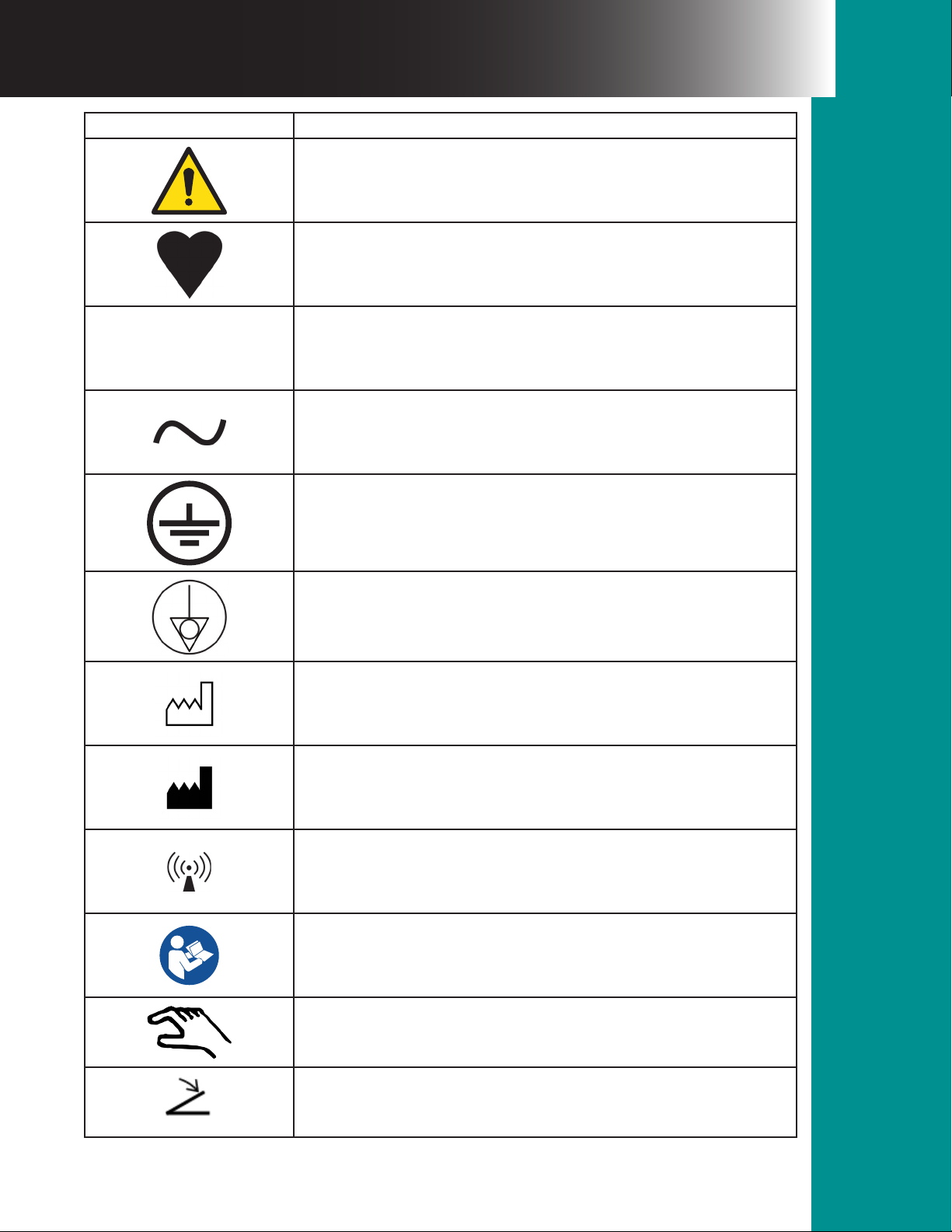
Symbol Description / Meaning
CAUTION
TYPE CF APPLIED PART
PROTECTION AGAINST INGRESS OF WATER AS DETAILED
IPX1
IN IEC 60529
ALTERNATING CURRENT
PROTECTIVE EARTH, (GROUND)
EQUIPOTENTIALITY
DENOTES THE DATE THE EQUIPMENT WAS MANUFACTURED
DENOTES THE MANUFACTURER OF THE DEVICE
NON-IONIZING RADIATION
CONSULT INSTRUCTIONS
AUTOMATIC ACTIVATION DEVICE
FOOTSWITCH
9Bualo Filter® VisiClear™ Operator’s Manual
Page 10
Operating Instructions
Section 2.0
2.1 System Controls
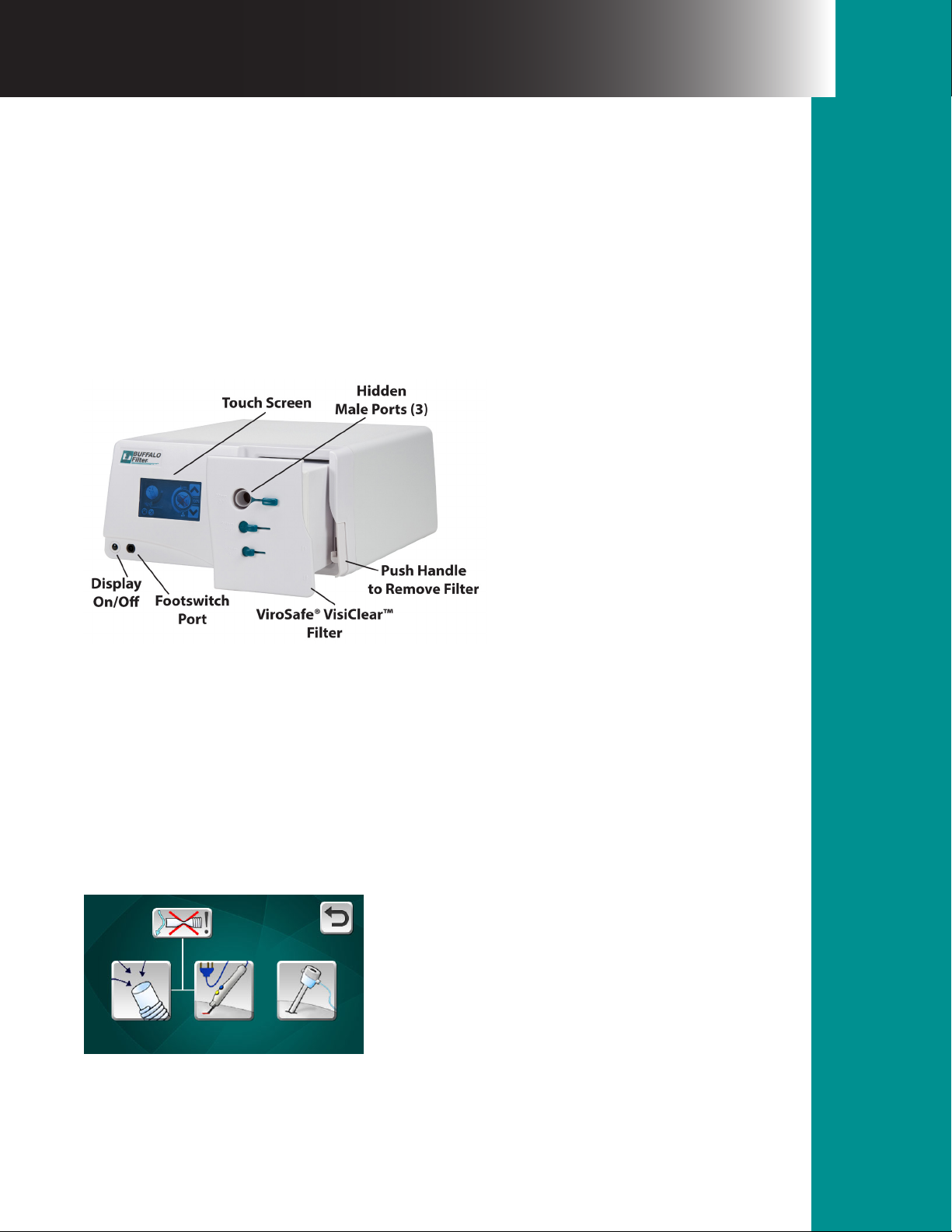
e electronic system controls on the VisiClear™ Surgical Smoke Plume Evacuator(s) are easy
to understand and simple to use. To power up the machine, connect the supplied power cord
to a grounded outlet and the appliance inlet on the back of the smoke evacuation system. Once
power has been applied, the unit’s touch screen will illuminate and a start up process will begin.
is will take about 20 seconds to complete. During this time, Bualo Filter’s logo will appear
on the touch screen followed by the name of the system; VisiClear™.
NOTE: Please be sure to read all instructions before installing accessories or operating this
equipment. Failure to do so may result in damage to the unit and/or personal injury.
e Display On/O button located on the front of the panel of the VisiClear™ system will
activate or deactivate the touch screen control panel as well as any unit functionality. Power will
remain to the system unless the system’s power cord is unplugged.
MODE OF OPERATION
Aer the start-up process is complete, the touch screen control panel will appear and contain
buttons to select mode of operation. e choices are Open Tubing, Electrosurgical Pencil
Attachment/Integrated Smoke Plume Evacuation Pencil, or Laparoscopic Tubing. See Figure 1.
Figure 1.
Please select the mode that is appropriate for your clinical application. e VisiClear™ system
will automatically adjust lter life based on the amount of ow needed for these applications.
Operating Instructions
10Bualo Filter® VisiClear™ Operator’s Manual
Section 2.0
Page 11
During an open procedure in which a smoke plume evacuation hose will be utilized, please
select the Open Tubing Button. When using either an attachment to your electrosurgical
pencil or an integrated smoke plume evacuation pencil such as Bualo Filter’s PlumePen™,
please select the Electrosurgical/Diathermy Mode Button. Finally, when attaching to a surgical
cannula during laparoscopic procedures, please select the Laparoscopic Button.
At any point, when you would like to return to the previous menu on the VisiClear™ touch
screen, use the Back Button to return to the previous screen. See Figure 2.
Figure 2.
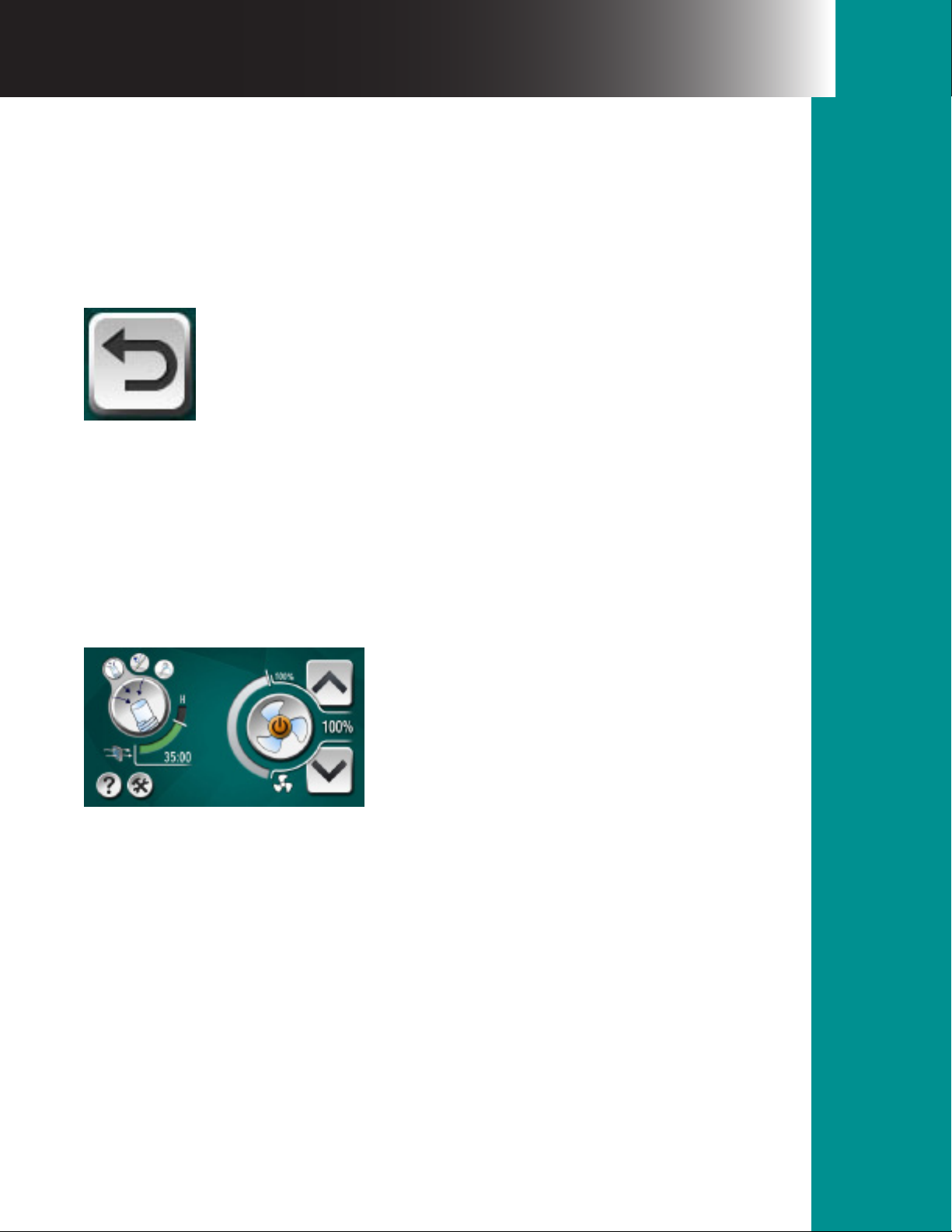
SUCTION ON & STANDBY
Once the mode is selected on the touch screen interface (See Figure 1), the mode you have
selected will appear on the le side of the touch screen. You can activate or deactivate the ow
of suction by pressing the button that appears like a fan blade on the unit’s touch screen. e fan
image will begin to rotate to indicate that the unit’s motor is running and the ow of suction has
begun. See Figure 3.
Figure 3.
SUCTION CONTROL
e amount of suction may be adjusted by pressing the suction control buttons located to the
right of the fan image. Each time the suction control up or down button is depressed, the motor
speed is increased or decreased by 10%. e suction speed will not loop. e suction control
should be set at the lowest practical setting to completely remove the surgical smoke from the
operative site. See Figure 4.
11Bualo Filter® VisiClear™ Operator’s Manual
Page 12

Figure 4.
FOOTSWITCH / EZLINK AUTOMATIC ACTIVATION DEVICE
e VisiClear™ Surgical Smoke Plume Evacuator also comes equipped with a pneumatic
footswitch. A footswitch or an EZLink Automatic Activation Device may be added to any
system by simply plugging in a BUFFALO FILTER® activation accessory into the appropriate
jack on either the front (footswitch) or back (EZLink) panel of the unit. When the footswitch
is plugged in, the unit may be turned on or o by depressing the footswitch pedal once for
each operation. For directions on using the EZLink Automatic Activation Device, please see
instructions that accompany that product.
FILTER LIFE INDICATOR
e filter life indicator on the touch screen control panel provides a visual indication of the
status of the life of the filter in use. e filter life indicator for the VisiClear™ Surgical Smoke
Plume Evacuator will automatically adjust according to the mode setting selected.
CAUTION: Using e lter life time and RFID Technology is a measure of time only, not a
measure of lter performance.
Laparoscopic Mode = 35 hours of filter life
Electrosurgical/Diathermy Mode = 21 hours of filter life
Open Tubing Mode = 18 hours of filter life
e VisiClear™ Filter Life Indicator is factory set. All filter life timing is automatic. See Figure 5.
12Bualo Filter® VisiClear™ Operator’s Manual
Page 13
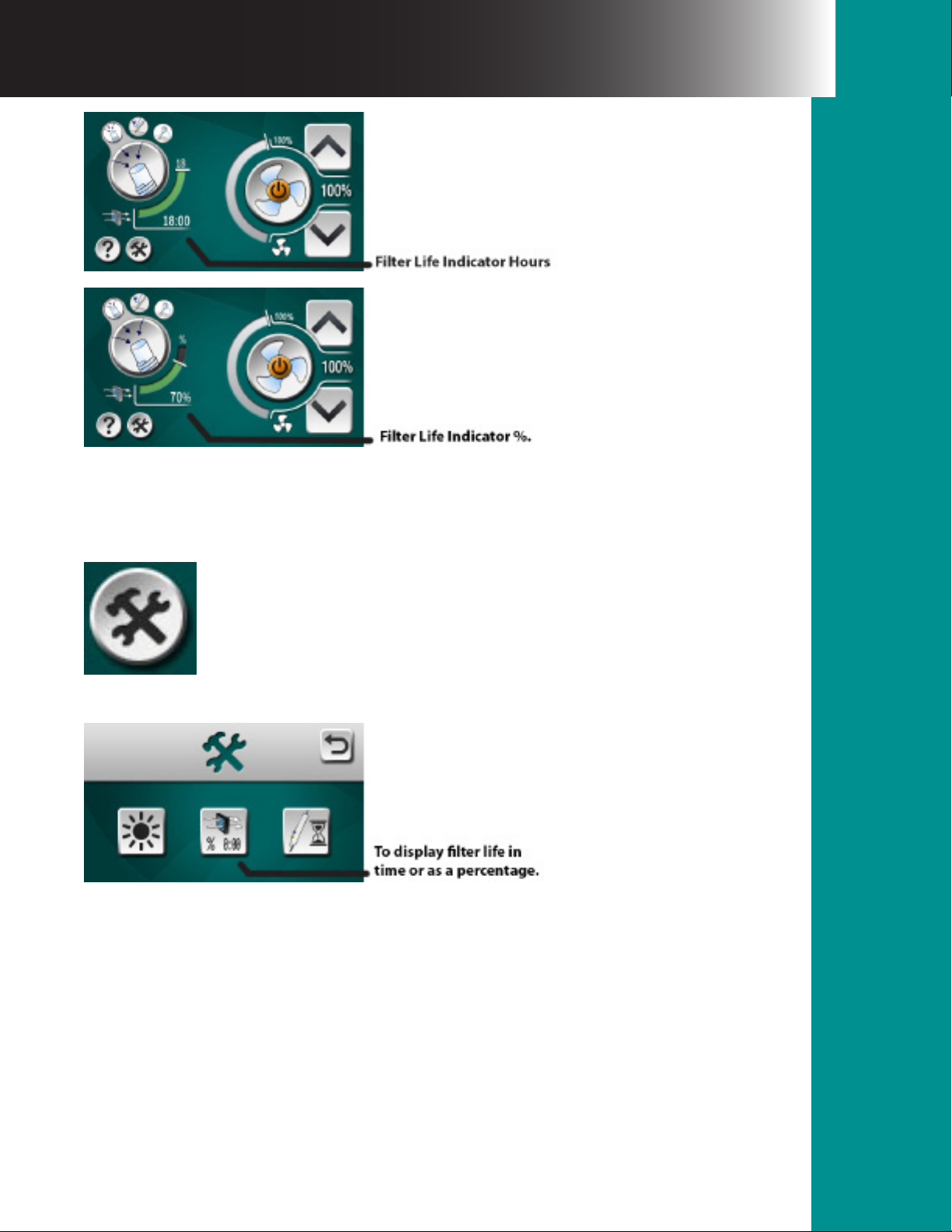
Figure 5.
Filter life can be displayed in both hours and minutes or as a percentage using the Settings
button located in the lower le section of the touch screen. See Figures 6 and 7.
Figure 6.
Figure 7.
When the maximum lter life is consumed, the following warning screen will appear indicating
that a lter replacement is needed. Aer inserting a new VisiClear™ Filter, press the green
check mark to clear the warning and resume normal operation. During operation, if a lter
expires the system will not turn o but will remain running until the system is powered down
or 6 hours passes, whichever comes rst. At that point, the VisiClear™ will no longer operate
until a new lter is inserted into the system. It is always best practice to replace an expired
lter immediately; however, a validated contingency life is built into the lter to ensure no
interruption to the operative procedure. See Figure 8.
13Bualo Filter® VisiClear™ Operator’s Manual
Page 14
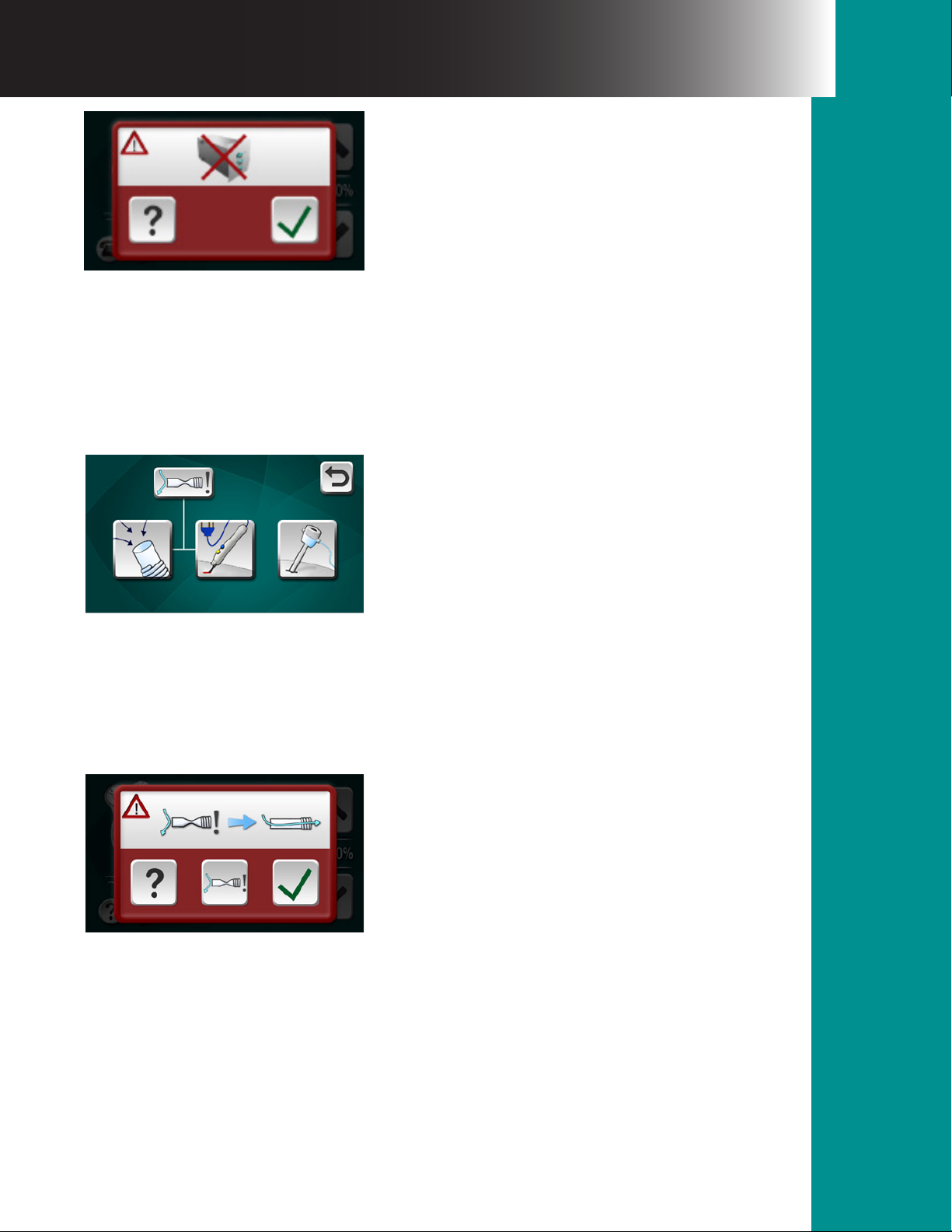
Figure 8.
VISICLEAR™ OCCLUSION ALARM:
e VisiClear™ Surgical Smoke Plume Evacuator is equipped with an occlusion alarm for
certain system settings. e default setup for the device has this option disabled. If you wish
to utilize the occlusion alarm, during initial start-up please enable by pressing the alarm icon
located on the top le of the screen until the red X is not visible. See Figure 9.
Figure 9.
OPEN TUBING MODE:
When the system is in an open tubing mode, the unit will alarm if suction is obstructed by an
object. If an obstruction occurs, the system will alarm, the suction will stop, and the following
screen will display. See Figure 10.
Figure 10.
14Bualo Filter® VisiClear™ Operator’s Manual
Page 15
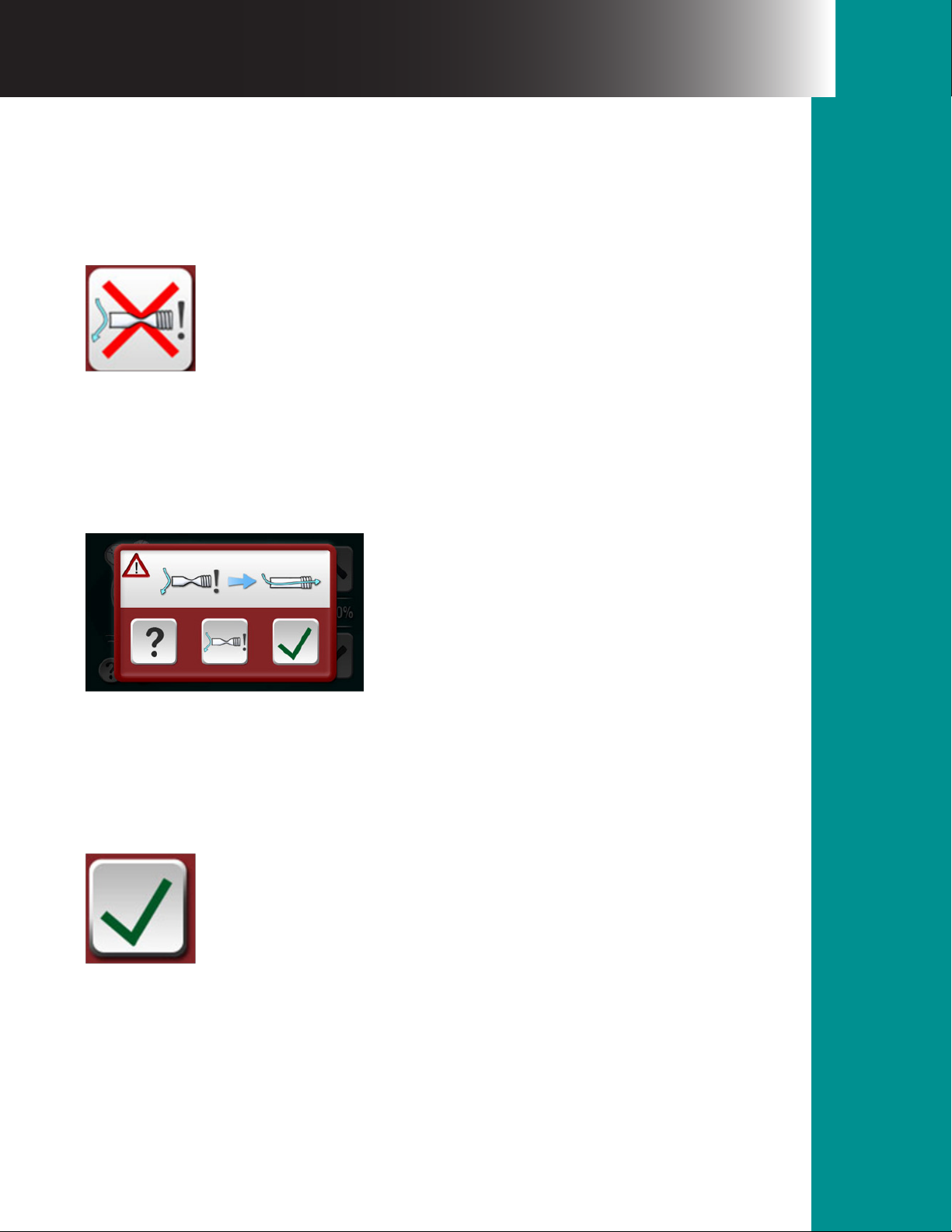
e unit will continue to cycle the suction, checking to see if the obstruction has been cleared.
If the obstruction is cleared, the alarm will automatically turn o and the system will resume
normal operation. e user also has the option of disabling the alarm during continued use.
If the obstruction is not removed or you wish to disable this feature, you may disable the alarm
by pressing the following button on the alarm screen until the red X appears on the occlusion
symbol as shown. See Figure 11.
Figure 11.
ESU PENCIL MODE:
When the system is in an ESU Pencil mode and suction setting is 50% or higher, the unit will
alarm and the suction will stop if obstructed by an object. If an obstruction occurs, the system
will alarm and the following screen will display. See Figure 12.
Figure 12.
You have the option of clearing the obstruction (recommended) or disabling the alarm. Please
note: If the obstruction is cleared in ESU Pencil mode, the alarm will not automatically turn
o. Once the obstruction is removed, to reactivate the unit to normal operation, please press
following button on the alarm screen. See Figure 13.
Figure 13.
15Bualo Filter® VisiClear™ Operator’s Manual
Page 16
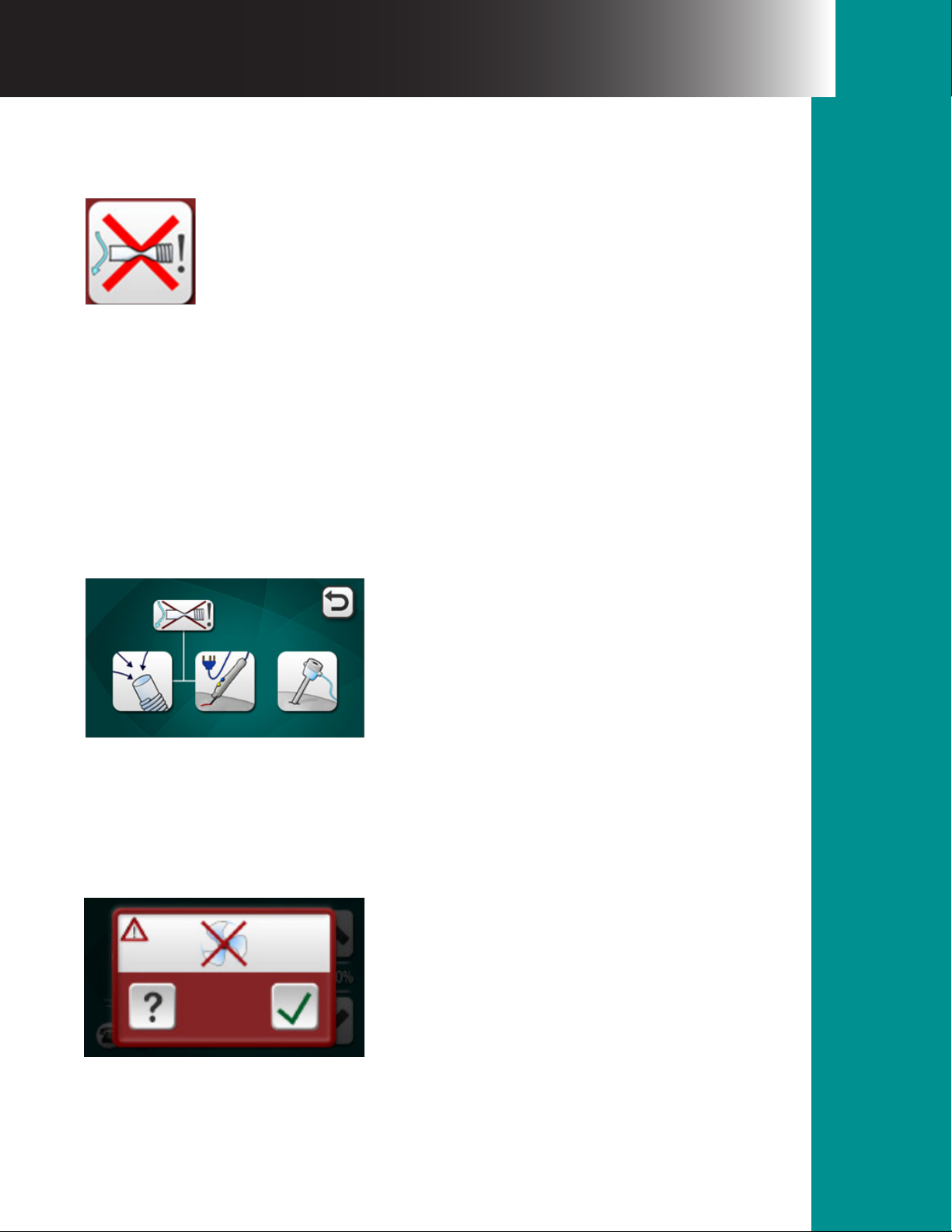
If the obstruction is not removed or you wish to disable this feature, you may disable the alarm
by pressing the following button on the alarm screen until the red X appears on the occlusion
symbol as shown. See Figure 14.
Figure 14.
Once the alarm is disabled, please press the green checkmark to remove the warning screen and
resume normal operation.
LAPAROSCOPIC MODE:
e occlusion alarm is not functional in the Laparoscopic mode on the VisiClear™ system and
will default o in this mode.
In any of the system’s modes, if you choose to deactivate the occlusion alarm, you may do so on
the home screen by pressing the alarm icon located on the top le of the screen until a red X
appears on the occlusion symbol as shown. See Figure 15.
Figure 15.
ADDITIONAL WARNING SCREENS
If the VisiClear™ motor nears the end of its life or if a problem arises with the motor, the
following warning screen will appear. See Figure 16.
Figure 16
16Bualo Filter® VisiClear™ Operator’s Manual
Page 17
If this message occurs, it is appropriate to notify BioMed or contact BUFFALO FILTER® to
arrange service of the VisiClear™ system. e system will continue to operate by pressing the
check mark button unless a fatal condition has taken place with the motor. If the system does
not respond aer the check mark button is pressed, contact BioMed or BUFFALO FILTER® to
arrange service of the VisiClear™ system.
Bualo Filter’s contact information can be located by pressing the question mark button located
on the lower le section of each of the warning screens as well as the lower le portion of the
main screen. See Figure 17.
Figure 17.
SERVICE AND CONTACT
Should you need to contact BUFFALO FILTER® for service or other customer support needs,
simply press the button shown in Figure 11 from any of the three warning screens or from the
main operating screen and the following information will appear. See Figure 18.
Figure 18.
SETTINGS
e VisiClear™ Surgical Smoke Plume Evacuator is exible in its user settings and can be
customized in a number of fashions. As explained in the Filter Life Indicator section above,
lter life can be displayed in both hours and minutes or as a percentage of remaining life.
Simply press the Settings Button shown in Figure 5 and press the % 0:00 lter setting button
to toggle between time and percentage lter life display. See Figure 19.
Figure 19.
17Bualo Filter® VisiClear™ Operator’s Manual
Page 18
You may also adjust the brightness of your touch screen display by pressing the button that
contains a sun illustration. See Figure 20.
Figure 20.
Once you press this button, the screen below will appear and you may use the negative button
to decrease brightness or positive button to increase brightness. See Figure 21.
Figure 21.
e VisiClear™ also allows you to increase or decrease the amount of time the VisiClear™ System
remains on aer release of the electrosurgical button when the system is coupled with our
EZLink Automatic Activation Device. is delay is for the purpose of capturing residual smoke
plume that may linger aer the electrosurgical unit is deactivated. By pressing the button
indicated an electrosurgical pencil and hourglass, you can adjust the delay from 0-10 seconds by
pressing the negative sign to decrease the delay or the positive sign to increase the delay. If the
EZLink is set to 3 seconds and the VisiClear™ is set to +5 the actual delay time will be 8 seconds.
See Figures 22 and 23. You may press the Back Button to return to the previous menu.
Figure 22.
18Bualo Filter® VisiClear™ Operator’s Manual
Page 19

Figure 23.
FUSES (circuit board)
Two 10 AMP fuses (8 AMP for 220/240 VisiClear™ Systems) are located on the circuit board
within the housing of the system. It electrically protects both the systems and the operator from
damage or injury. If the system is overheated or if there is an electrical surge in the electrical
system, fuses will break and the system will not operate.
When the Service light illuminates, please contact BUFFALO FILTER® Customer Service for
system service instructions.
2.2 VisiClear™ Filter Instructions
Bualo Filter VisiClear™ P / N VSI35 (also available in 2 pack and 4 pack)
VisiClear™ Filter - Multi Port Filter 4-Stage Filtration in One Casing,
(Pre-Filter, ULPA, Carbon, Post-Filter)
Filter(s) ULPA
Particle Size, mm 0.1 to 0.2 Microns at 99.999% Eciency
Filter Life Automatic Factory Set Filter Sensor
Filter Life Indicator Time Replacement
NOTE: Before installing or removing any lter, be sure that the system is turned o.
Filter Installation Instructions:
e installation of the VisiClear™ Filter into the BUFFALO FILTER® VisiClear™ Surgical Smoke
Plume Evacuator(s) is quick and simple.
1. Remove the VisiClear™ Filter from the shipping box and discard any protective wrapping.
Examine all lters for damage during shipping and storage. Do not install any lter with
visible signs of structural damage.
19Bualo Filter® VisiClear™ Operator’s Manual
Page 20

2. Insert the VisiClear™ Filter into lter receptacle. Be sure that the lter is seated completely
against the bottom of the lter chamber and clip is fully engaged.
WARNING: is device is not intended for evacuation of uid. If uid is expected to be
aspirated using the VisiClear™ Filter or the BUFFALO FILTER® VisiClear™ system, uid
collection devices must be installed with the vacuum hose assembly. Failure to install a uid
collection device may cause lter blockage and/or electrical damage.
Filter Removal Instructions:
1. Aer the VisiClear™ Filter has been exhausted and requires changing, turn the smoke
evacuation system o and disconnect any accessory tubing attached to the lter.
2. Depress the tab and pull the VisiClear™ Filter from the smoke evacuation system and
dispose of in accordance with hospital policy. e VisiClear™ Filter may be disposed of or
incinerated.
3. Clean the unit with appropriate germicide prior to re-use. Follow the indicated instructions
for maintenance and installation of a new VisiClear™ Filter.
CAUTION: Using any other lter or accessory not supplied by BUFFALO FILTER® may
cause damage to the system and/or cause the system to be inoperable and may void the
warranty.
WARNING: e VisiClear™ Filter should be changed when the Filter Life Indicator touch
screen indicates an expired lter. Failure to change this lter may result in decreased
eciency and contamination of the electric motor, vacuum pump, and sound absorbing
media within the system, or non-operation of smoke evacuator.
20Bualo Filter® VisiClear™ Operator’s Manual
Page 21

2.4 Performance References*
Performance
Model Number VisiClear™
Maximum Flow Setting (CFM-U.S.)
Standard Hose I.D.
7/8” 30 CFM **
3/8” 4.6 CFM
1/4” 1.9 CFM
Standard Hose I.D.
22 mm 850 LPM **
9.5 mm 130 LPM
6.4 mm 54 LPM
Dimensions (H x W x D ) inches 7 x 14 x 16
Dimensions (H x W x D ) centimeters 17.8 x 35.6 x 40.6
Weight lbs (kg) 17 lbs (7.7 kg)
Noise Level, dBA MAXIMUM 55 dBA
Footswitch Pneumatic Standard
Remote Control Activation YES (optional)
Safety Features UL Classied
CE Marked
Fuse protection
Display Touch Screen
Filter Status
Flow Rate
Service Information
Voltage Available 100/120 VAC, 220/240 VAC
Frequency, auto sensed 50/60 Hz
Variable Flow Control Ye s
Motor Watt s 1000 ± 10%
Motor Static Suction kPa (6.5 mm orice) 25.69
*For reference purposes only
**Using a new 7/8 in x 6 in (22 mm x 1.8 m) hose
21Bualo Filter® VisiClear™ Operator’s Manual
Page 22

2.5 Electromagnetic Compatibility Information per IEC60601-1-2
Table 1
Guidance and Manufacturer’s Declaration - Electromagnetic Emissions
e Surgical Smoke Plume Evacuator model VisiClear™ is intended for use in the electromagnetic environment
specied below. e customer or user of the VisiClear™ should assure that it is used in such an environment.
Emissions Test Compliance Electromagnetic Environment - Guidance
RF Emissions
CISPR 11
RF Emissions
CISPR 11
Harmonic
Emissions
IEC 61000-3-2
Voltage Fluctuations/
Flicker Emissions
IEC 61000-3-3
Group 1 e VisiClear™ uses RF energy only for its internal function.
erefore, its RF emissions are very low and are not likely to
cause any interference in nearby electronic equipment.
Class A e model VisiClear™ is suitable for use in all establishments,
other than domestic establishments and those directly
connected to the public low-voltage power supply network
that supplies buildings used for domestic purposes.
Class A Not applicable.
Class A Not applicable.
22Bualo Filter® VisiClear™ Operator’s Manual
Page 23

Table 2
Guidance and Manufacturer’s Declaration - Electromagnetic Immunity
e model VisiClear™ is intended for use in the electromagnetic environment specied below.
e customer or user of the model VisiClear™ should assure that it is used in such an environment.
IEC 60601
Immunity Test
Electromagnetic
discharge (ESD)
IEC 61000-4-2
Electrical fast
transient/burst
IEC 61000-4-4
Surge
IEC 61000-4-5
Voltage dips, short
interruptions, and
voltage variations on
power supply input
lines.
IEC 61000-4-11
Test Level Compliance Level Electromagnetic Environment - Guidance
+6 kV contact
+6 kV contact
Floors should be wood, concrete or ceramic
tile. If oors are covered with synthetic
+8 kV air
+8 kV air
material, the relative humidity should be at
least 30 %.
+2 kV for power
supply lines
+2 kV for power
supply lines
Mains power quality should be that
of a typical commercial or hospital
environment.
+1 kV for input/
output lines
+1 kV dierential
mode
+1 kV for input/
output lines
+1 kV dierential
mode
Mains power quality should be that
of a typical commercial or hospital
environment.
+2 kV common
mode
<5 % U
T
(>95 % dip in UT)
for 0.5 cycle
+2 kV common
mode
<5 % U
T
(>95 % dip in UT)
for 0.5 cycle
Mains power quality should be that
of a typical commercial or hospital
environment. If the user of the Model
VisiClear™ requires continued operation
40 % U
T
(60 % dip in UT)
for 5 cycles
40 % U
T
(60 % dip in UT)
for 5 cycles
during power mains interruptions, it is
recommended that the Model VisiClear™
be powered from an uniterruptible power
supply or a battery.
70 % U
T
(30 % dip in UT)
for 25 cycles
70 % U
T
(30 % dip in UT)
for 25 cycles
Power frequency
(50/60 Hz) magnetic
eld
IEC 61000-4-8
<5 % U
T
(>95 % dip in UT)
for 5 sec
<5 % U
T
(>95 % dip in UT)
for 5 sec
3 A/m 3 A/m Power frequency magnetic elds should
be at levels characteristic of a typical
location in a typical commercial or hospital
environment.
23Bualo Filter® VisiClear™ Operator’s Manual
Page 24
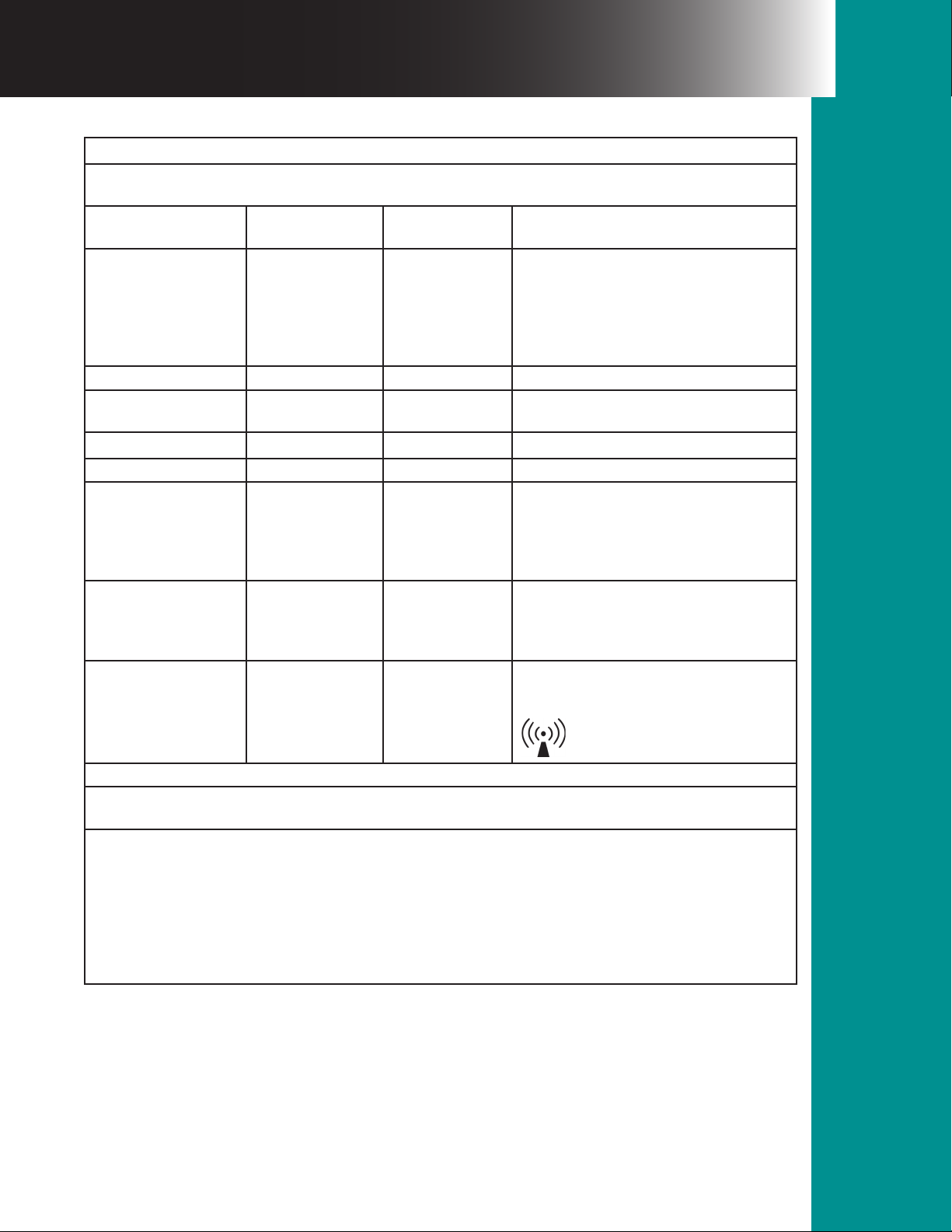
Table 3
Guidance and Manufacturer’s Declaration - Electromagnetic Emissions
e model VisiClear™ is intended for use in the electromagnetic environment specied below.
e customer or user of the model VisiClear™ should assure that it is used in such an environment.
IEC 60601
Immunity Test
Radiated RF 3 V/m
IEC 61000-4-3 80 MHz to 2.5
Conducted RF
IEC 61000-4-6
Test Level Compliance Level Electromagnetic Environment - Guidance
Portable and mobile RF communications
equipment should be used no closer to any
part of the Model EVL including cables,
than the Recommended separation distance
calculated from the equation applicable to
the frequency of the transmitter.
d = 1.7 √P 80 MHz to 800 MHz
3 V/m
GHz
3 Vrms
150 kHz to 80
MHz
d = 2.3 √P 800 MHz to 2.5 GHz
d = [3.5/V1} √P
Where P is the maximum output power
rating of the transmitter in watts (W)
according to the transmitter manufacturer
and d is the recommended separation
distance in meters (m).
Field strengths from xed RF transmitters,
as determined by an electromagnetic site
survey, should be less than the compliance
level in each frequency range.
Interference may occur in the vicinity of
equipment marked with the following
symbol:
NOTE 1: At 80 MHz and 800 MHz, the higher frequency range applies.
NOTE 2: ese guidelines may not apply in all situations. Electromagnetic propagation is aected by absorption
and reection from structure, objects and people.
Field strengths from xed transmitters, such as base stations for radio (cellular/cordless) telephones and land
mobile radios, amateur radio, AM and FM radio broadcast and TV broadcast cannot be predicted theoretically
with accuracy. To assess the electromagnetic environment due to xed RF transmitters, an electromagnetic site
survey should be considered. If the measured eld strength in the location in which the Model EVL is used
exceeds the applicable RF compliance level above, the model VisiClear™ should be observed to verify normal
operation. If abnormal performance is observed, additional measures may be necessary, such as reorienting or
relocating the model VisiClear™.
Over the frequency range 150 kHz to 80 MHz, eld strengths should be less than 3 V/m.
24Bualo Filter® VisiClear™ Operator’s Manual
Page 25
Maintenance
Section 3.0
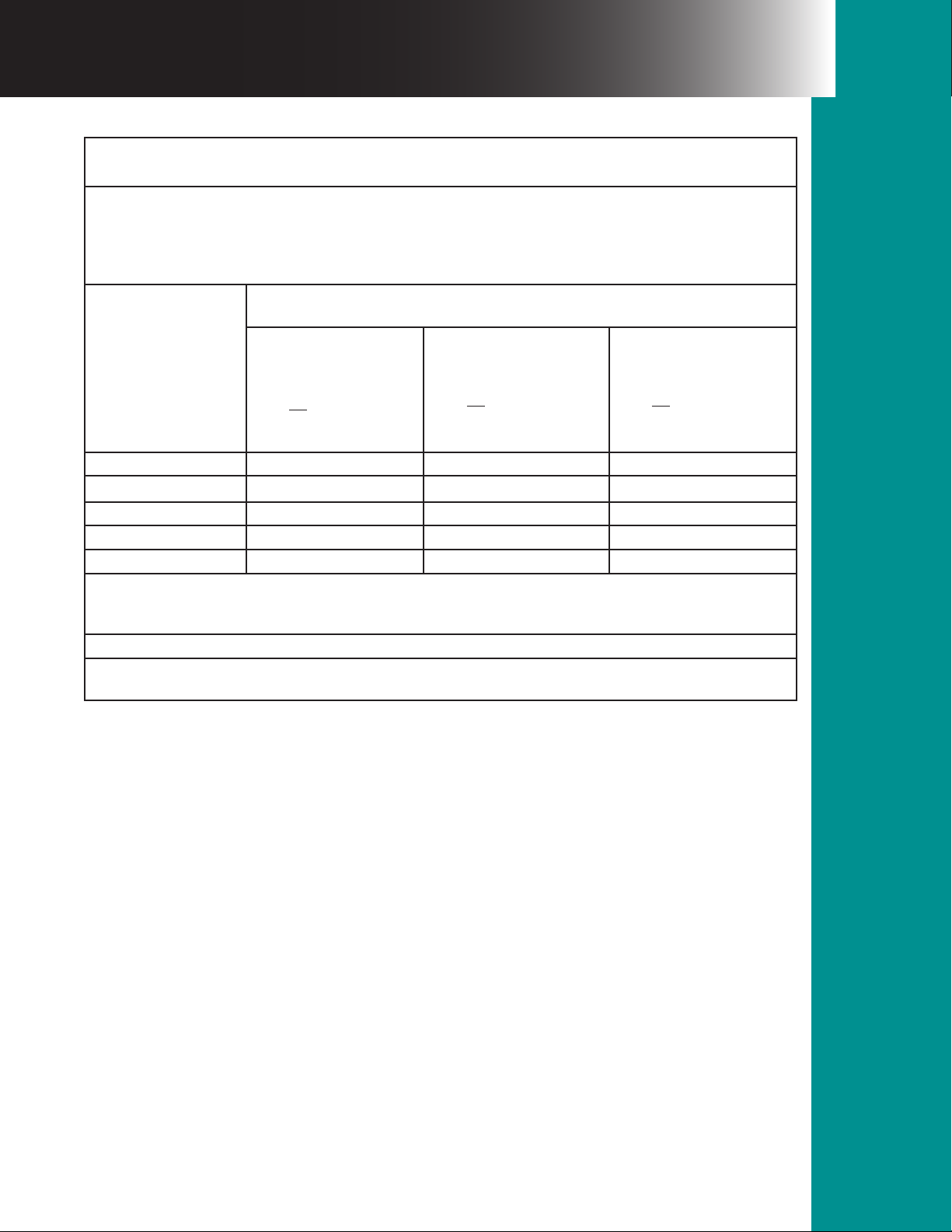
Table 4
Recommended Separation Distance Between
Portable and Mobile RF Communications Equipment and the Model @ 3 Vrms
e model VisiClear™ is intended for use in the electromagnetic environment in which radiated RF
disturbances are controlled. e customer or the user of the model VisiClear™ can help prevent electromagnetic
interference by maintaining a minimum distance between portable and mobile RF communications equipment
(transmitters) and the model VisiClear™ as recommended below, according to the maximum output power of the
communications equipment.
Separation distance according to frequency of transmitter m
150 kHz to 80 MHz
Rated maximum
output power of
transmitter W
0.01 0.12 0.12 0.23
0.1 0.34 0.34 0.74
1 1.7 1.7 2.3
10 3.7 3.7 7.4
100 11.7 11.7 23.3
For transmitters rated at a maximum output power not listed above, the recommended separation distance (D)
in meters (M) can be estimated using the equation applicable to the frequency of the transmitter, where (P) is the
maximum output rating of the transmitter in watts (W) according to the transmitter manufacturer.
NOTE 1: At 80 MHz and 800 MHz, the separation distance for the higher frequency range applies.
NOTE 2: ese guidelines may not apply in all situations. Electromagnetic propagation is aected by absorption
and reection from structure, objects, and people.
3.5
d = √P
[ ] [ ] [ ]
v
1
80 kHz to 800 MHz
3.5
d = √P
v
1
800 kHz to 2.5 GHz
3.5
d = √P
v
1
Maintenance
Section 3.0
25Bualo Filter® VisiClear™ Operator’s Manual
Page 26

3.1 General Maintenance Information
is section contains information for ordinary upkeep of the BUFFALO FILTER® VisiClear™.
While the system has been designed and manufactured to high industry standards, it is
recommended that periodic inspection and performance testing be performed by a qualied
Biomedical Technician to ensure continued safe and eective operation.
3.2 Cleaning
Unplug unit prior to cleaning. Wipe unit with a damp cloth containing mild disinfectant
solution. Do not clean smoke evacuator with abrasive cleaning or disinfectant compounds,
solvents, or other materials that could scratch the touch panel or damage the smoke evacuator.
Wipe dry with a clean cloth. Do not steam sterilize.
3.3 Periodic Inspection
e VisiClear™ Surgical Smoke Plume Evacuator should be visually inspected at least every year.
is inspection should include checks for:
• Damage to the power cord.
• Damage to the power plug or power inlet module.
• Proper mating, cleanliness, and absence of damage to the lter inlet.
• Obvious external or internal damage to the system.
26Bualo Filter® VisiClear™ Operator’s Manual
Page 27

3.4 Troubleshooting the System – see below.
PROBLEM POTENTIAL CAUSE CORRECTIVE ACTION
1. Smoke Evacuation
System is ON but
suction is minimal
or none.
1. Filter is not seated
completely.
2. Filter is clogged.
3. Vacuum hose or tube is
clogged.
4. Motor/blower is
obstructed.
1. Re-install VisiClear™ Filter, press rmly into place
and fully engage clip.
2. Replace lter with a genuine Bualo Filter
VisiClear™ Filter.
3. Replace vacuum hose or tube with genuine
Bualo Filter products.
4. Call BioMed or BUFFALO FILTER® Technical
Services at 1.800.343.2324 or 716.835.7000.
2. Smoke Evacuation
System does not
function even though
suction ON button is
depressed.
1. Not plugged into an
electrical outlet.
2. Fuses are blown.
3. Electronic system
failure.
4. Filter life has expired or
invalid lter inserted.
1. Check power outlet and connection to rear or side
panel of the machine.
2./3. Call BioMed or BUFFALO FILTER® Technical
Services at 1.800.343.2324 or 716.835.7000.
4. Replace lter with a genuine Bualo Filter
VisiClear™ Filter.
27Bualo Filter® VisiClear™ Operator’s Manual
Page 28

Customer Service
Section 4.0
4.1 Equipment Return
For the quickest response to your service needs, please follow these procedures:
Step 1: Write down model and the serial number of the VisiClear™ Surgical Smoke Plume
Evacuator.
Step 2: Call Customer Service at the toll free or local number listed and describe the problem.
Step 3: If the problem cannot be resolved over the phone and the equipment must be returned
for repair, you must obtain a “Return Material Authorization” (RMA) number from Customer
Service before returning the system.
Step 4: If you have the original packing for your VisiClear™ Surgical Smoke Plume Evacuator,
use it to properly return your unit. If you do not have the original packing material, ask
Customer Service for advice on how to pack the unit for return shipment.
Step 5: Freight for all returned goods should be prepaid by the shipper. Address will be supplied
by Customer Service.
4.2 Ordering Information
To reorder, obtain replacement parts or to return a unit for service, call Customer Service at:
800-343-2324
OR
1 (716) 835-7000
or contact your authorized BUFFALO FILTER® Distributor/Representative.
BUFFALO FILTER® VisiClear™ Surgical Smoke Plume Evacuator versions available:
• 100/120 VAC 50/60 Hz
• 220/240 VAC 50/60 Hz
Available accessories:
• VisiClear™ Filters
• Suction Canister
• EZLink Automatic Activation Device
• Hoses & Tubing
• Reducer Fittings
• Electrosurgical Pencil Adapters
• Electrosurgical Smoke Pencil
Customer Service
28Bualo Filter® VisiClear™ Operator’s Manual
Section 4.0
Page 29

5.1 Specications
Specications are subject to change without notice.
SHIPMENT OF ORDER:
BUFFALO FILTER® will try to accommodate individual customer requests for shipping
method. BUFFALO FILTER® reserves the right to decide shipping method on prepaid orders.
Care is exercised in the checking and packaging of all merchandise to avoid error, but should
discrepancies arise, claims should be made within 24 hours aer delivery. Bualo Filter’s
responsibility ceases with the safe delivery to the carrier at our dock. If the merchandise is
damaged in transit, a claim must be made to the carrier involved. BUFFALO FILTER® will assist
customers in pursuing these claims.
RETURN OF MATERIAL:
Return merchandise must have a pre-authorized return number from BUFFALO FILTER®
and be marked with this number prior to returning. Transportation costs must be prepaid
by the shipper and all risks of loss and damage of goods are the responsibility of the shipper.
Unauthorized returns will be refused. Include a copy of the packing papers and/or invoice
with the return. Exchange will be of an equivalent dollar value of returned merchandise less a
restocking and handling fee on new, unused, unopened equipment or disposables.
EXCEPTIONS:
1. Defective merchandise may be returned for replacement only. Please contact
BUFFALO FILTER® Customer Service before shipping back merchandise.
2. Incorrectly shipped merchandise is exempt from restocking fees. Please contact
BUFFALO FILTER® Customer Service before shipping back merchandise.
29Bualo Filter® VisiClear™ Operator’s Manual
Page 30

Terms & Warranty
Section 5.0
5.2 Warranty
BUFFALO FILTER® warrants that the lter system manufactured by BUFFALO FILTER® shall
be free from defects in material and workmanship. Products are warranted only to the extent
that BUFFALO FILTER® will replace without charge any lter systems proved to have defects
within three(3) years of the date of delivery for P/N VC120 & VC220 and provided BUFFALO
FILTER® has been given the opportunity to inspect the system alleged to be defective and the
installation or use thereof. No warranty is included for incidental or consequential damages of
any nature arising from any defect. e warranty above is the only warranty made by BUFFALO
FILTER® and is expressly in lieu of all other warranties, expressed or implied, including, without
limitation, the warranties of merchantability and tness for a particular purpose. All warranties
implied by any course of dealing or usage between parties are expressly excluded.
CONFIDENTIAL INFORMATION:
e information, drawings, plans, and specications being furnished by BUFFALO FILTER®
have been developed at Bualo Filter’s expense and shall not be used or disclosed by purchaser
for any purpose other than to install, operate, and maintain the system supplied.
CONSEQUENTIAL DAMAGES/LIMITS OF LIABILITY:
BUFFALO FILTER® shall not in any case whatsoever be liable for special, incidental, indirect
or consequential damages of any kind. In no case shall Bualo Filter’s liability exceed the
amount paid BUFFALO FILTER® by purchaser for the specic system giving rise to the liability.
Purchaser agrees to indemnify and hold BUFFALO FILTER® harmless from and against all
liabilities, claims, and demands of third parties of any kind relating to the system and its use.
ENTIRE AGREEMENT:
Purchaser by acceptance of Bualo Filter’s oer does acknowledge and agree to the terms and
conditions contained herein. All matters involving the validity, interpretation and application
of this agreement shall be controlled by the laws of New York State. Using any lter not
manufactured by BUFFALO FILTER® may cause damage to the systems and will be cause for
voiding the warranty.
JURISDICTION:
Purchaser hereby consents to the jurisdiction of the New York Courts with respect to any
controversy or dispute arising out of this agreement or the merchandise sold hereunder.
© 2014 BUFFALO FILTER®
5900 Genesee Street, Lancaster, New York 14086, USA
(716) 835-7000 or (716) 835-3414 fax
www.bualolter.com
Customer Service: 800-343-2324 (U.S. Only)
1-716-835-7000 (International)
Terms & Warranty
30Bualo Filter® VisiClear™ Operator’s Manual
Section 5.0
 Loading...