

Page 1

Operating Guide
V1 | 20-12-2016
Phone: (02) 9792 4188 www.boomerangpaging.com.au
Page 2

iFlex Chef Operating Instructions
Table of Contents (This page will be updated when this Operating Guide is done)
Congratulations ………………………………………………………………………………………………………………………………………………….. 1
Installing your system …………………………………………………………………………………………………………………………………………. 1
Getting to know your new system ………………………………………………………………………………………………………………………. 1
1. iFlex Chef Tablet ………………………………………………………………………………………………………………………………..1
2. Staff Pagers …………………………………………………………………………………………………………..………………..……….. 1
3. iFlex Wi-Fi Watches and Mini Pagers………..……………………………..……………………………………………………….. 1
INITIAL SETTING ……………………………………………………………………………………………………………………………………………….…. 2
1. User Setup………………………………………………………………………………………………………………………………………… 3
2. Devices Setup……………………………………………………………………………………………………………………………….…… 3
3. Escalations Setup………………………………………………………………………………………………………………………………. 3
4. Application Settings…………………………………………………………………………………………………………………………… 4
5. Pre Canned Messages………………………………………………………………………….……………………………………….…… 4
6. Operating Instructions………………………………………………………………………………………………………………………. 4
7. Login…………………………………………………………………………………………………………………………………………………. 5
8. Logout………………………………………………………………………………………………………………………………………………. 5
9. Page All…………………………………………………………………………………………………………………………………………….. 5
10. Page Individual…………………………………………………………………………………………………………………………………. 5
11. Reports…………………………………………………………………………………………………………………………………………….. 5
WI-FI WATHCES…………………………………………………………………………………………………………………………………………………... 6
1. Login Screen………………………………………………………………………………………………………………………………..…… 6
2. Receiving Messages…………………………………………………………………………………………………………………...……. 6
3. Bumping Calls………………………………………………………………………………………………………………………………..… 6
4. Escalations Setup…………………………………………………………………………………………………………………………….. 6
Page 3
iFlex Chef Operating Instructions
1 | P a g e
Congratulations
Congratulations on your purchase/rental of the iFlex Chef System. This on premise paging system incorporates many
advances in electronics and wireless technologies. The Boomerang family of paging products allows your business to
serve your customers more effectively, increase convenience for your customers, your staff, and additionally manage
your customer’s expectations more efficiently.
Installing your system
1. Unpack all components.
2. Ensure that the power supplies for the transmitter and the charging racks/bases remain with the correct
components as per labels on the power supply units.
3. Insert pagers into the charging rack.
4. Attach power supply to charging rack.
5. Connect Tablet to power supply
6. Leave your system on charge for at least 12 hours prior to use to allow batteries to fully charge in order
to ensure optimum batter life from the outset.
7. Ensure your system remains plugged into power source to ensure optimum performance.
Getting to know your new system
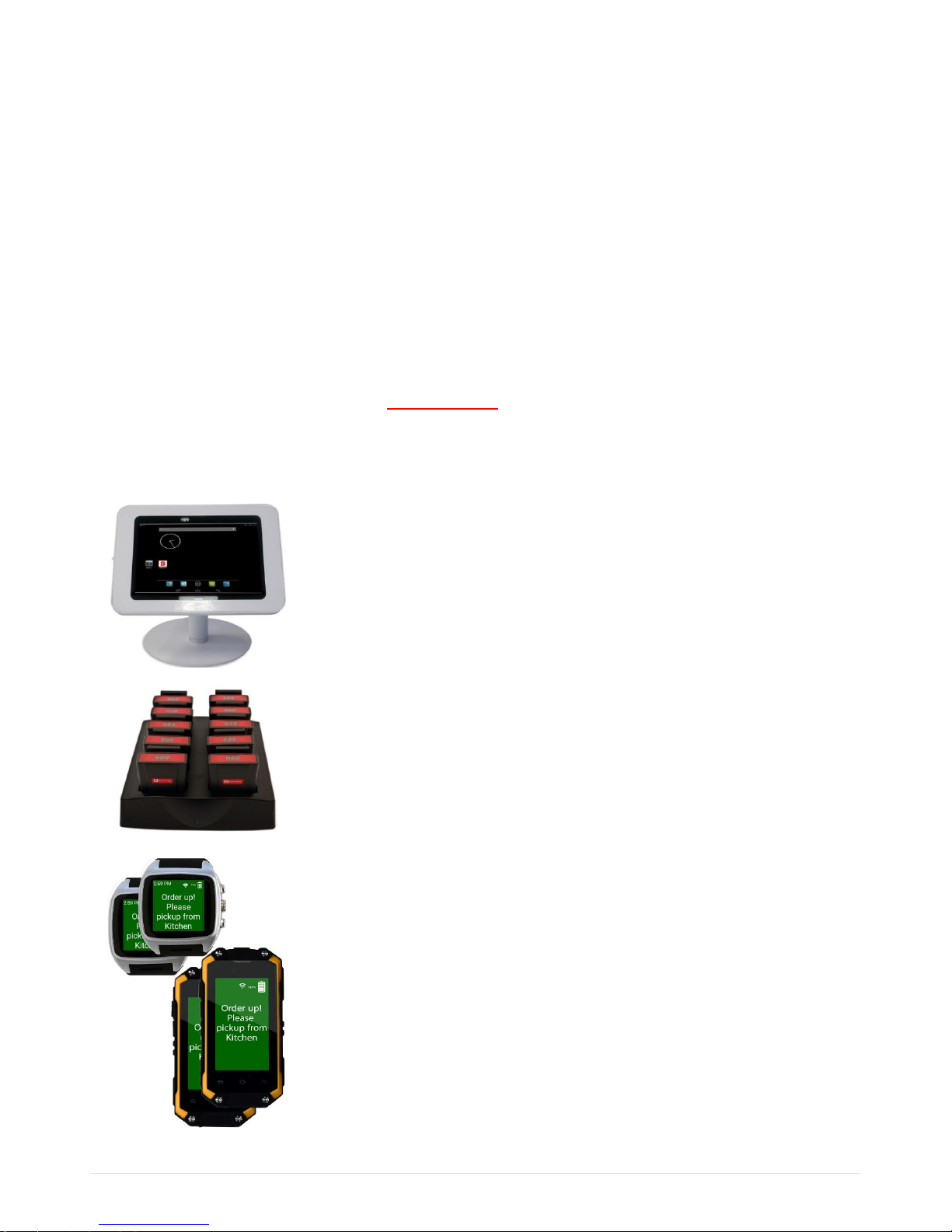
iFlex Chef Tablet
The iFlex Chef Tablet is used to send messages to the paging devices
allocated to staff.
Depending on the type of devices you have selected messages will be sent
via wireless technology to staff pagers or Wi-Fi smart devices
Staff Pagers
The Staff Call Pagers are used for one way communication, where an alert
is sent to staff to return.
iFlex Wi-Fi Watches and Mini Pagers
The Wi-Fi Watches and Mini Pagers are programed to receive messages
from the iFlex Chef Tablet.
Staff can acknowledge receipt of message or “bump call” to another staff
member.
Wi-Fi Devices allow true two way communication.
ATTENTION!
DO NOT UNPLUG THE POWER AFTER SETUP TO PREVENT THE SYSTEM FROM RESETING
Page 4
iFlex Chef Operating Instructions
2 | P a g e
INITIAL SETTING
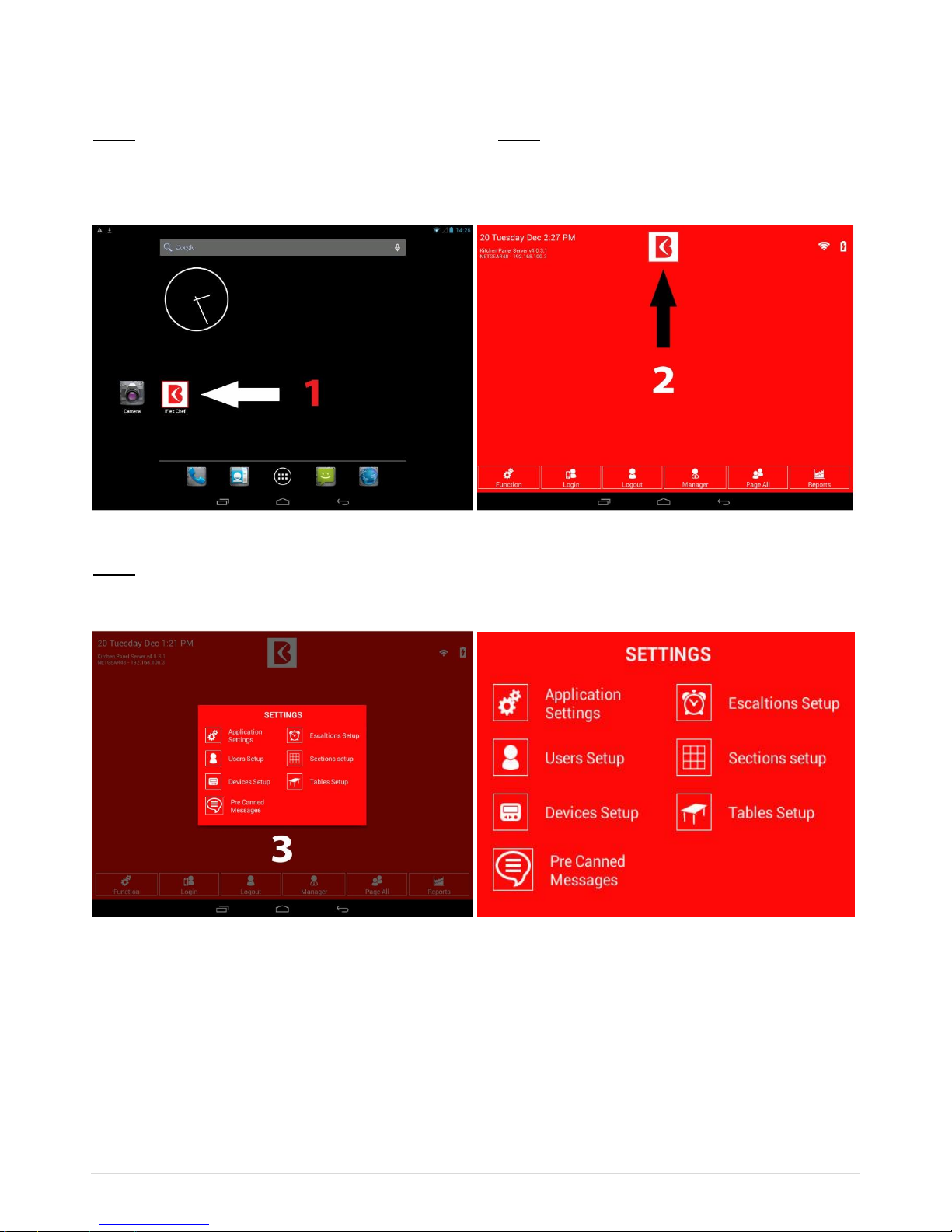
Step 1 Step 2
Tap the iFlex Chef Button to access iFlex Chef Application Tap the iFlex ‘Chef Button’ to access menu screen
(See image below) (See image below)
Image 1 Image 2
Step 3
From the Settings Menu, Select which setting you wish to update
Image 3 Image 4
The Settings Menu will allow you to update
1. Application Settings.
2. Users Setup
3. Devices Setup
4. Pre Canned Messages
5. Escalation Setup
6. Sections Setup (Please contact BTG to learn more about this function)
7. Tables Setup (Please contact BTG to learn more about this function)
Page 5
iFlex Chef Operating Instructions
3 | P a g e
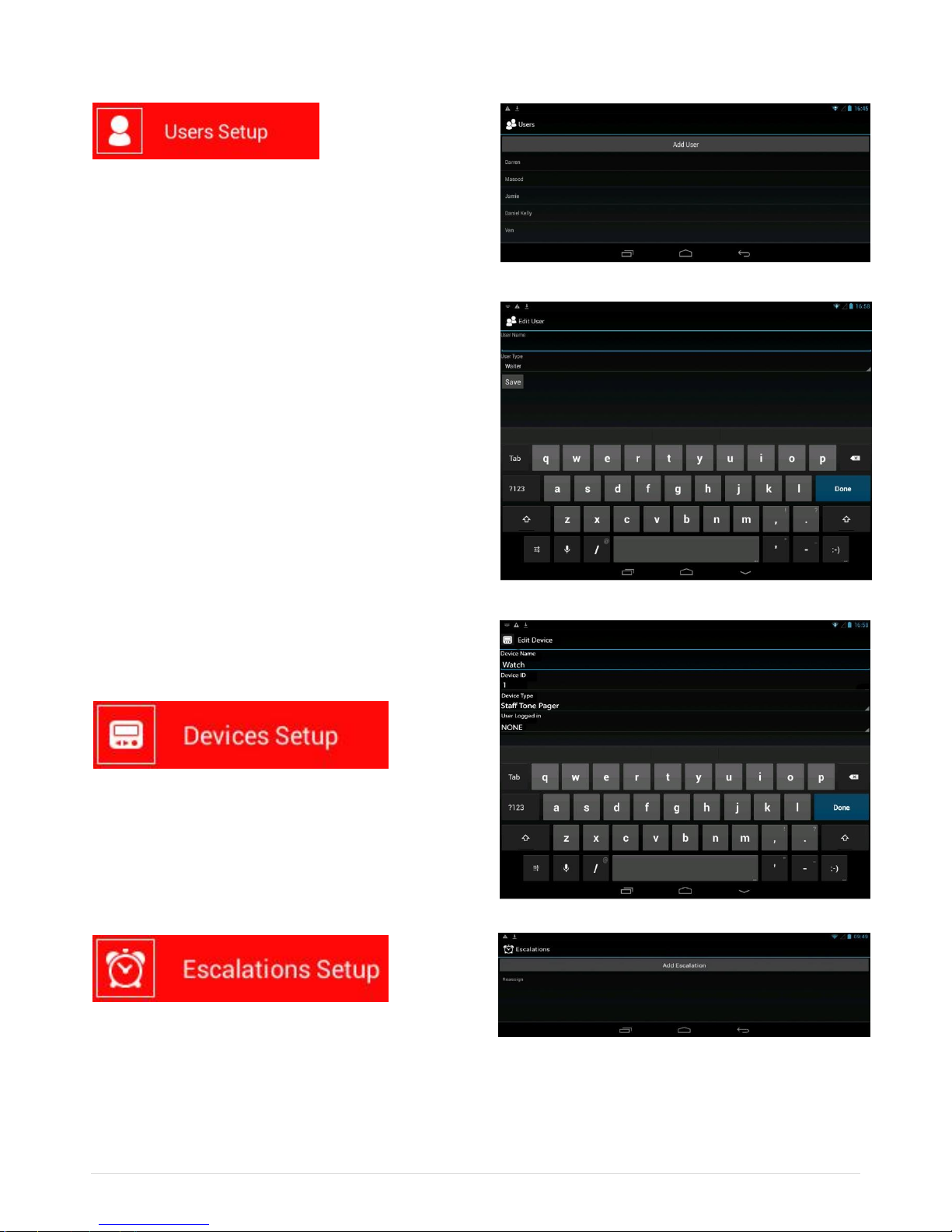
Different user types have different permissions. There are
4 user types to select from using the dropdown menu:
Manager, Waiter, Runner and Barman
ADD USER
Tap on “Add User” button
- Add name
- Select user type
- Select ‘SAVE’
EDIT EXISTING USER
- Select “existing user”
- Edit name or user type
- Select “Save”
DELETE USER
Select existing user
- Remove user name
- Select “Save”.
To edit devices and users, you can select device type and
user from the dropdown menu.
Note: For this feature, you can only use iFlex Chef and Staff
Tone Pager.
This Escalations Setup gives the option to escalate the call
to a manager. When a call has not been picked up after a set amount of time, an escalation can be sent to the manager.
Use the ‘Add Escalation’ option to configure the escalation.
Page 6
iFlex Chef Operating Instructions
4 | P a g e
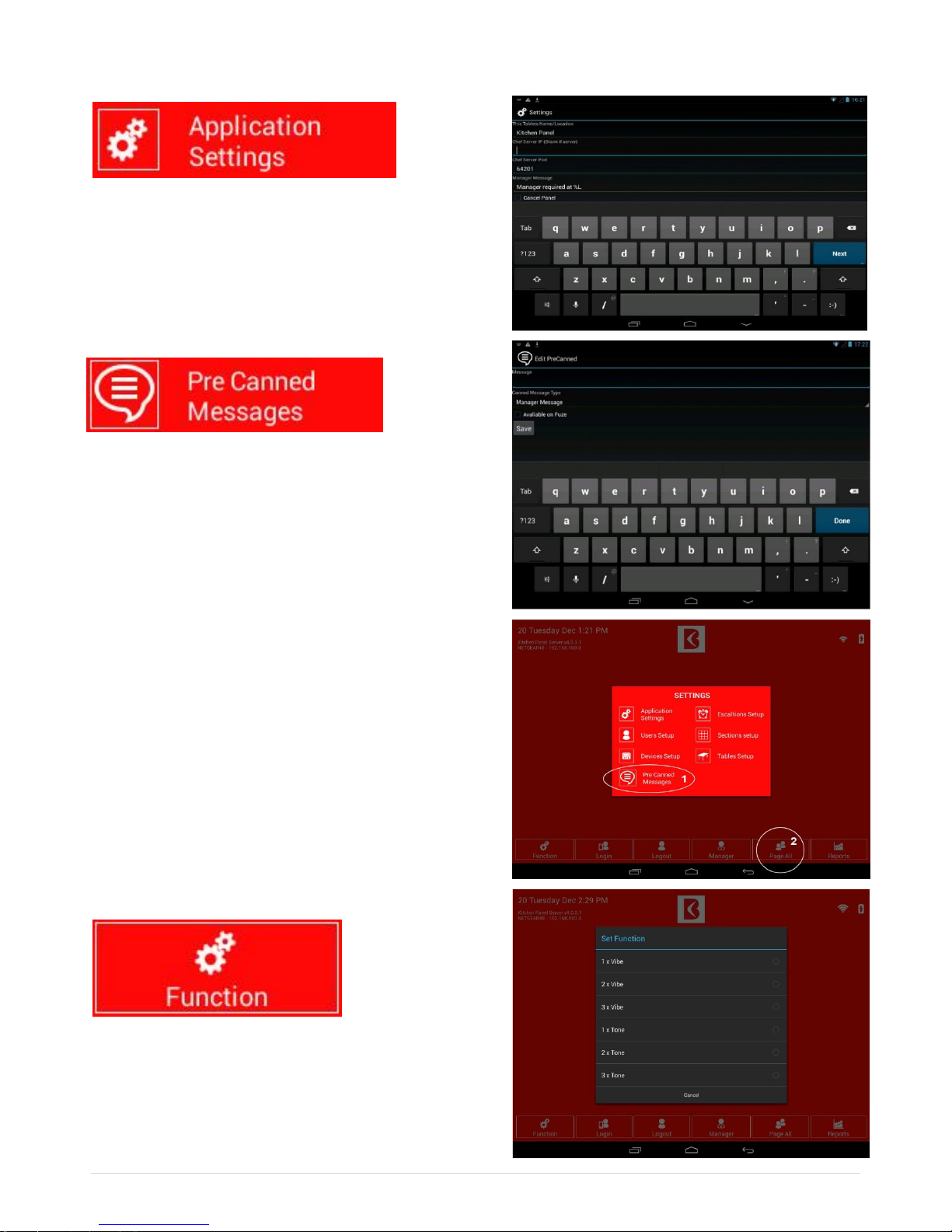
From screen 3, tap the Application Setting button to update
message (to manager only).
NOTE: You need User Login and Password to access this
setting.
(ONLY AVAILABLE TO WI-FI WAITERS)
This feature gives you the option to type a text messages to
be sent to smart devices such as iFlex Chef Watches or
smart phones.
Sending Pre Canned Messages
After adding messages from Pre Canned Message page (1),
go to Page All Menu (2) select Pre Canned Message that you
have added. Once you tap the message, this message will
immediately alert all iFlex Chef Watches or mobile phones.
Operating Instructions
You can select the type of alert sent to all pagers.
Once selected, all pagers will receive the programed alert.
Options:
- 1 x Vibe - 2 x Vibe - 3 x Vibe
- 1 x Tone - 2 x Tone - 3 x Tone
Page 7
iFlex Chef Operating Instructions
5 | P a g e
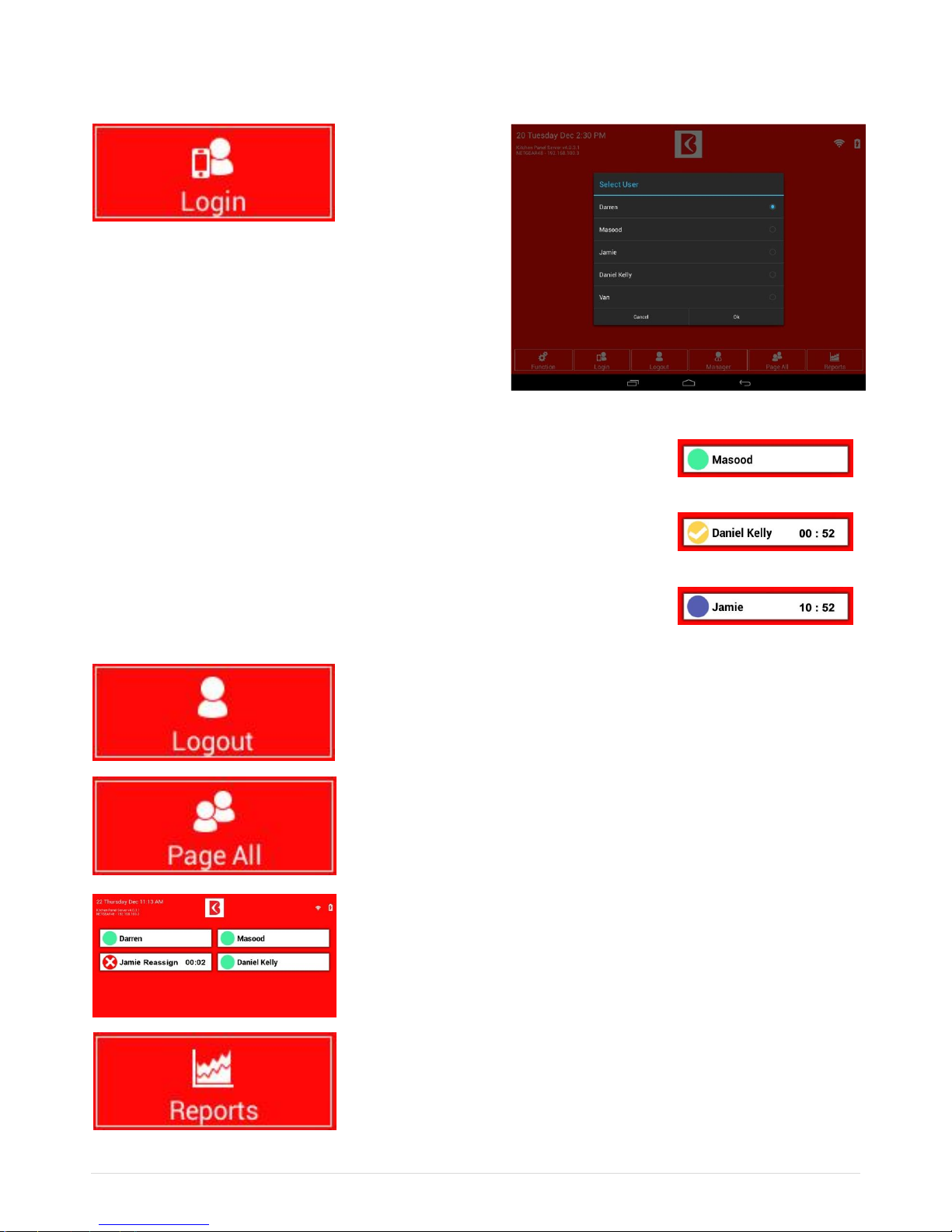
Once the user is added, you can log this user into the system
and select the device to use.
To perform this task:
- Select user
- Select device
- Select OK.
USER STATUS
All active users should appear on the Menu screen with a green circle. This indicates
They are ready to perform the task.
All Paged users will appear on the Menu screen with a ticked yellow circle, includes
the time elapsed since user was paged.
The blue circle indicates this user could not response back in time and system has
automatically escalated this call to the manager.
To logout: Tap the “Logout” button > tap the user that you want to logout >
and tap OK
You can page all users by simply tapping the “Page All” button.
To page individual user, just tap an active user (Green circle). This will alert
attendant to return for pick up.
You can view the response time of selected dates and selected time by
tapping reports and choose the ranges as you wish
Page 8
iFlex Chef Operating Instructions
6 | P a g e
WI-FI WATCHES
Login Screen
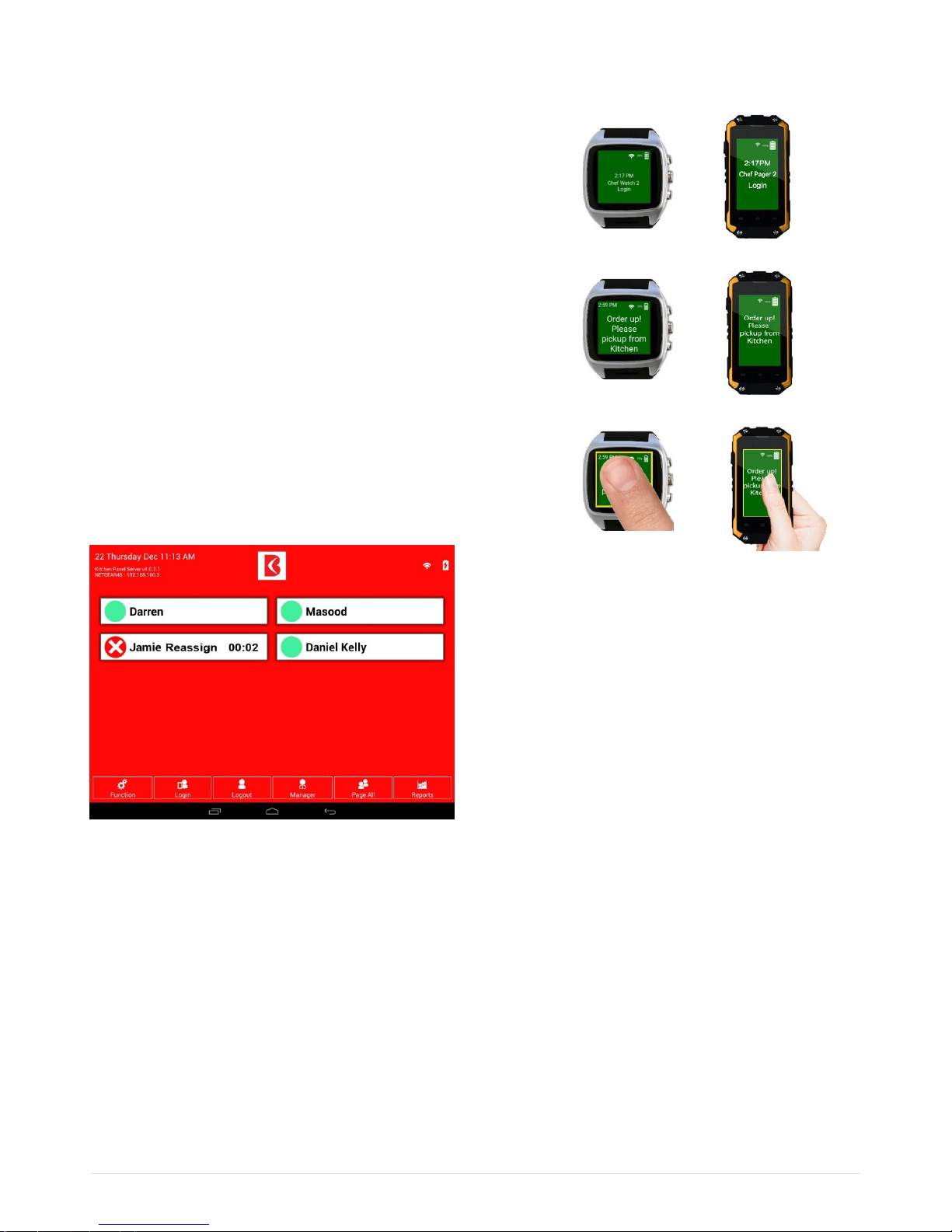
Let’s assume Jamie is an existing user and logged in as a waiter.
This is a login screen and Jamie is ready to take calls.
Receiving Messages
Jamie will receive a text message sent from the iFlex
Chef Tablet: “Order up! Please pickup from kitchen panel”.
Bumping Calls
If Jamie could not pick up the order due to serving another
customer, Jamie would “bump call” to another staff member.
To perform this task, press and hold the screen.
Alert message will appear on iFlex Chef screen as
“Jamie Reassign”. For this instance, Chef can tap
“Jamie Reassign” to clear the call and assign the task
to another staff member.
Calls can be bumped automatically to another staff
via setting from Escalations Setup.
Escalations Setup (bumping calls another staff)
This option will transfer the page to another staff if the first staff could not take call.
1. Tap the iFlex Chef Button and select Escalation Setup.
2. Select “Reassign” to access dropdown menu
3. Select Decline Escalation Radio Button
4. Select Move to Next Available Staff Member tick box
5. Select “Save”.
www.boomerangpging.com.au
 Loading...