

Page 1

BCE 4012IM
CD-ReWritable Drive
User’s Manual
Page 2

DANGER INVISIBLE LASER RADIATION WHEN OPEN AVOID DIRECT EXPOSURE TO BEAM
VORSICHT INSICHTBARE LASERSTRAHLUNG WENN ABDECKUNG GEÖFFNET NICHT DEM STRAHL AUSSETSEN
ATTENTION RADIATION DU FAISCEAU LASER INVISIBLE EN CAS D’OUVERTURE. EVITER TOUTE EXPOSITION
AUX RAYONS.
CLASS 1 LASER PRODUCT
APPAREIL A LASER DE CLASSE 1
LASER KLASSE 1
LUOKAN 1 LASERLAITE
PRODUIT LASER
CATEGORIE 1
Copyright Statement
It is a criminal offence, under applicable copyright laws, to make unauthorised copies of
copyright-protected material, including computer programs, films, broadcasts and sound
recordings. This equipment should not be used for such purposes.
Page 3
FCC Compliance Statement
This device complies with Part 15 of the FCC Rules. Operation is subject to the following
two conditions:
1. this device may not cause harmful interference, and
2. this device must accept any interference received, including interference that may
cause undesired operation.
FCC Warning Statement
This equipment has been tested and found to comply with the limits for a Class B digital
device, pursuant to Part 15 of the FCC Rules. These limits are designed to provide
reasonable protection against harmful interference in a residential installation. This
equipment generates, uses and can emit radio frequency energy and, if not installed or used
in accordance with the instructions, may cause interference to radio communications.
However, television reception interference can be determined by turning the equipment off
and on. The user is encouraged to correct the interference by one or more of the following
measures:
• Reorient or relocate the receiving antenna
• Increase the separation between the equipment and the receiver
• Connect the equipment into an outlet different from that to which the receiver is
connected
• Consult the dealer or an experienced radio/TV technician for help.
CAUTION
Changes or modifications not expressly approved by the party responsible for compliance
could void the user’s authority to operate the equipment.
FOR EUROPE
“The drive is in conformity with the EMC directive and low-voltage directive.”
Page 4

Table of Contents
INTRODUCTION 1
SYSTEM REQUIREMENTS 1
PACKAGE CONTENTS 2
INSTALLATION 3
HOST INTERFACE CONNECTIONS 3
HARDWARE INSTALLATION 4
DRIVER INSTALLATION 6
Windows Environment 6
DOS Mode 6
SOFTWARE INSTALLATION 6
Windows Environment 6
CONNECTION & OPERATION 7
FRONT PANEL 7
REAR VIEW 8
TECHNICAL DATA 10
TROUBLESHOOTING 13
Page 5

BCE 4012IM CD-ReWritable Drive
INTRODUCTION
BCE 4012IM is a half-height CD-ReWritable drive of standard IDE
interface. It supports maximum 40x speed writing ability on CD-R discs,
12x speed on CD-RW discs and 48x speed reading performance. The
drive backs up all writing modes and different CD formats and it
automatically recognizes the media placed in the drive, whether a CD, a
CD-R or a CD-RW. With the bundled CD-RW mastering software, BCE
4012IM is an ideal model for creating customized audio and data CDs,
and for archiving or distributing big files to achieve data interchange and
backup. Here are some important features of BCE 4012IM CDReWritable drive:
♦ 8X, 16X, 20X, 24X, 32X and 40X writing speed on CD-R media
♦ 4X, 8X, 10X and 12X writing speed on CD-RW media
♦ Adopts Buffer Underrun Prevention technology
♦ Supports MultiRead function
♦ Supports writing modes of TAO, DAO, SAO and packet writing
♦ Large internal buffer: 2MB
♦ Advanced dust-sealed design
♦ Low power consumption
♦ Firmware upgrade possibility via Flash Memory
System Requirements
For IBM compatible PCs, the system requirements recommended
are as follows:
♦ PC sufficient to run Windows 95/98/ME or WindowsNT/2000/XP
♦ Pentium II 300MHz above with at least 64MB of memory
1
Page 6

BCE 4012IM CD-ReWritable Drive
♦ Fast and sufficient hard disk space (minimum 150MB for
installation, 1GB or more is recommended.)
♦ IDE host interface supporting ATAPI MMC command
♦ Operating system: Microsoft Windows 95/98/ME or Windows
NT/2000/XP
Package Contents
♦ BCE 4012IM CD-ReWritable drive
♦ Audio cable
♦ Data cable
♦ Application software disc (optional)
♦ CD-RW blank disc (optional)
2
Page 7
BCE 4012IM CD-ReWritable Drive
INSTALLATION
Host Interface Connections
Most current mainboard models have two IDE ports (primary and
secondary) which can connect two IDE cables. Two IDE cables
allow you to connect up to four devices, but it is recommended that
you separate IDE ports for your hard drive and your CD-ReWritable
drive. This will ensure that your hard drive’s performance and speed
won’t be affected by having the CD-RW drive on the same cable.
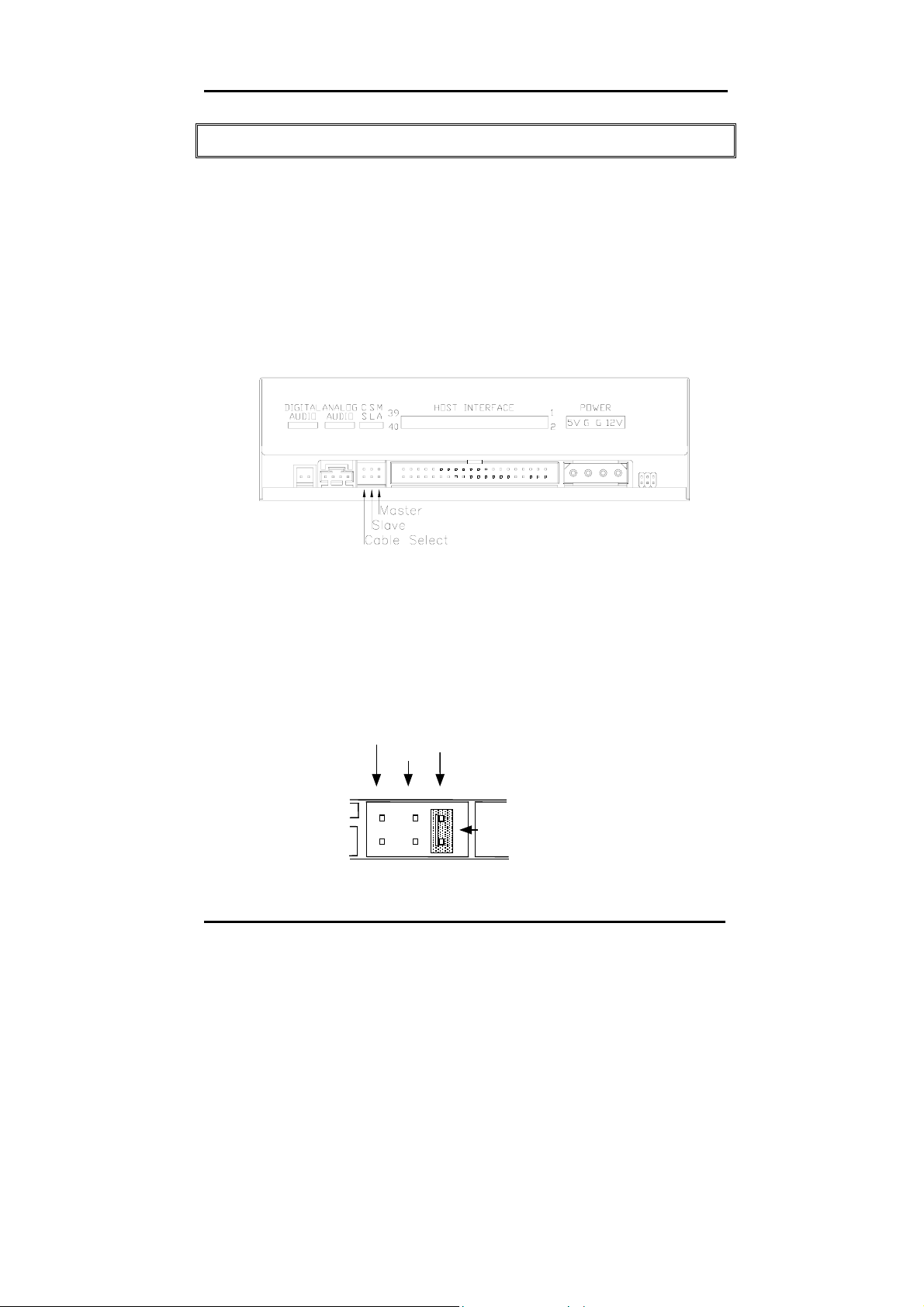
If you connect only one device on the cable, you can set the jumper
as “master” or “slave”.
If you connect two devices (e.g. CD-ROM & CD-RW) on the same
cable, set different jumper for each device (CD-ROM as “master”,
CD-RW as “slave” and vice versa.) The same rule goes for the
connection of having your hard disk and one other device on the
same cable.
CSEL
SLAVE
MASTER
JUMPER
3
Page 8

BCE 4012IM CD-ReWritable Drive
You may consider one of the two ways recommended below to
connect your drive.
♦ To get the most stable performance for the CD-RW drive to write:
Primary IDE Master: Hard Disk
Primary IDE Slave: CD-ROM Drive
Secondary IDE Master: CD-RW drive
♦ For best hard disk performance:
Primary IDE Master: Hard Disk
Secondary IDE Master: CD-ROM drive
Secondary IDE Salve: CD-RW drive
Hardware Installation
1. Turn off the power to the computer system and all peripheral
devices.
2. Disconnect all cables and connectors from the back of your
computer, then remove the cover from the computer.
3. Insert the CD-ReWritable drive into one of the vacant 5.25" drive
bays and secure it with screws to your PC.
In order to prevent interference between the CD-ReWritable drive and the
computer, please make sure to mount the drive using all four mounting
screws.
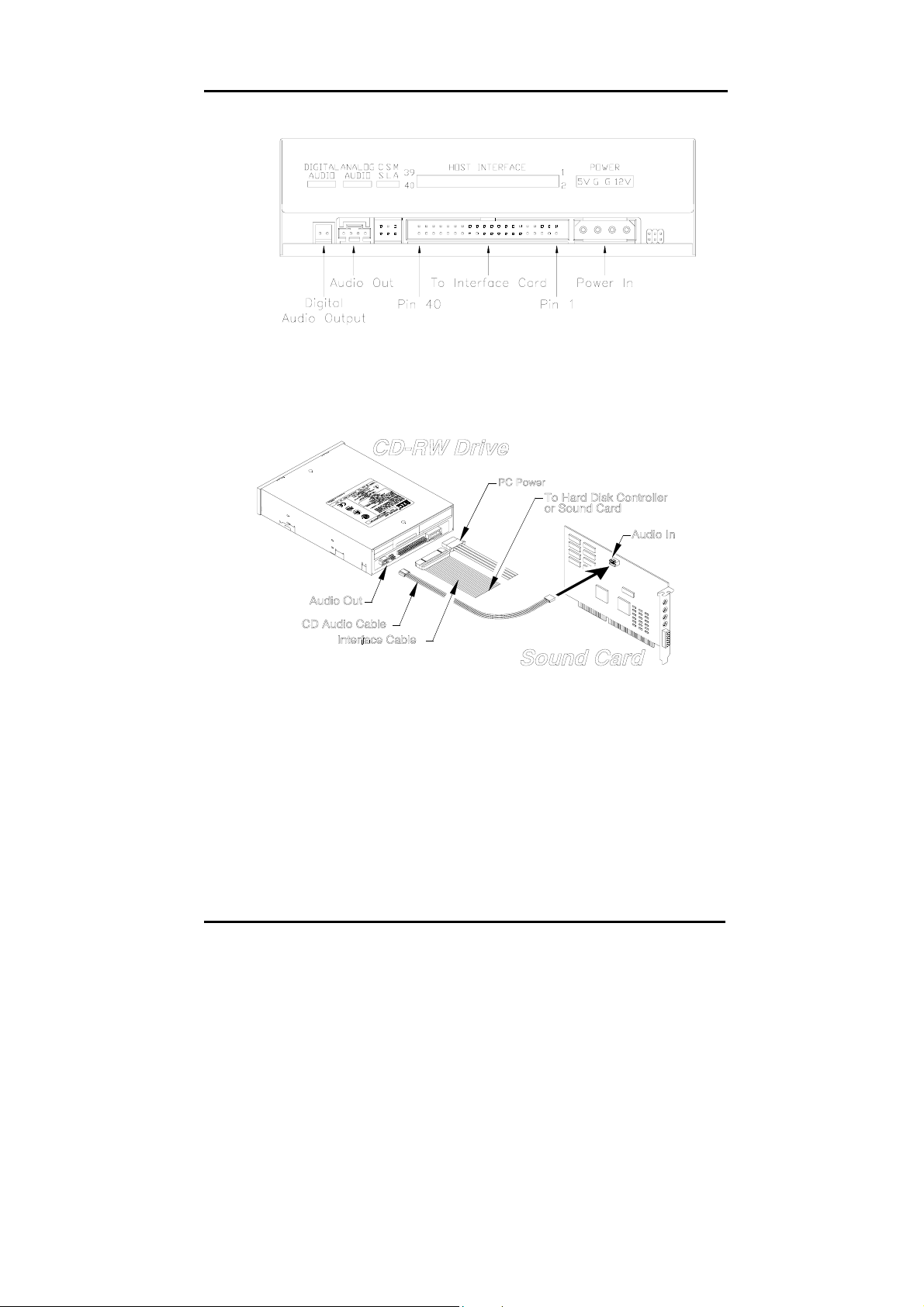
4. Connect the 40-pin IDE cable from one of the IDE ports on the
mainboard to the 40-pin connector of your CD-ReWritable drive.
Also, connect the power
supply cable to the back of the CD-
ReWritable drive.
4
Page 9
BCE 4012IM CD-ReWritable Drive
The red-edge of the IDE Cable must be connected to Pin 1 on the CD-
ReWritable drive.
5. If you have a sound card that can be connected to this CDReWritable drive, you can connect the drive (as Audio-out) and the
sound card (as Audio-in) with a 4-pin audio cable. (See figure above.)
If your mainboad is integrated with built-in sound system, plug the 4pin audio cable into the CD-IN connector on the mainboard as
Audio-in.
6. Reinstall the cover of your computer, and reconnect the power
supply.
5
Page 10

BCE 4012IM CD-ReWritable Drive
Driver Installation
Windows Environment
BCE 4012IM is a PnP device, and Windows 95/98/ME and Windows
NT/2000/XP can automatically detect the drive and load the
appropriate driver. If Windows cannot detect the drive, you can
operate manually:
1. Click the Control Panel Icon in My Computer and then click
Add New Hardw are. The Add New Hardware window appears.
2. The program will automatically search for your new drive and
load the appropriate driver.
DOS Mode
If you need the device driver for DOS, please access the following
web sites to download:
Taiwan – http://www.btc.com.tw
U.S.A. – http://www.btcusa.com
Europe – http://www.btceurope.nl
Software Installation
The bundled mastering software gives you the complete solution for
making audio/data CDs right from your desktop. It allows you to copy
files from your computer to a recordable compact disc. In addition,
the audio CDs you create can be played in your home or car CD
player. For the CD-RW media, you can write and erase data on the
CD as you do with a floppy disk.
Windows Environment
(1) Run install.exe or setup.exe
or
(2) Refer to the manual in the software disc.
6
Page 11
BCE 4012IM CD-ReWritable Drive
CONNECTION & OPERATION
Front Panel
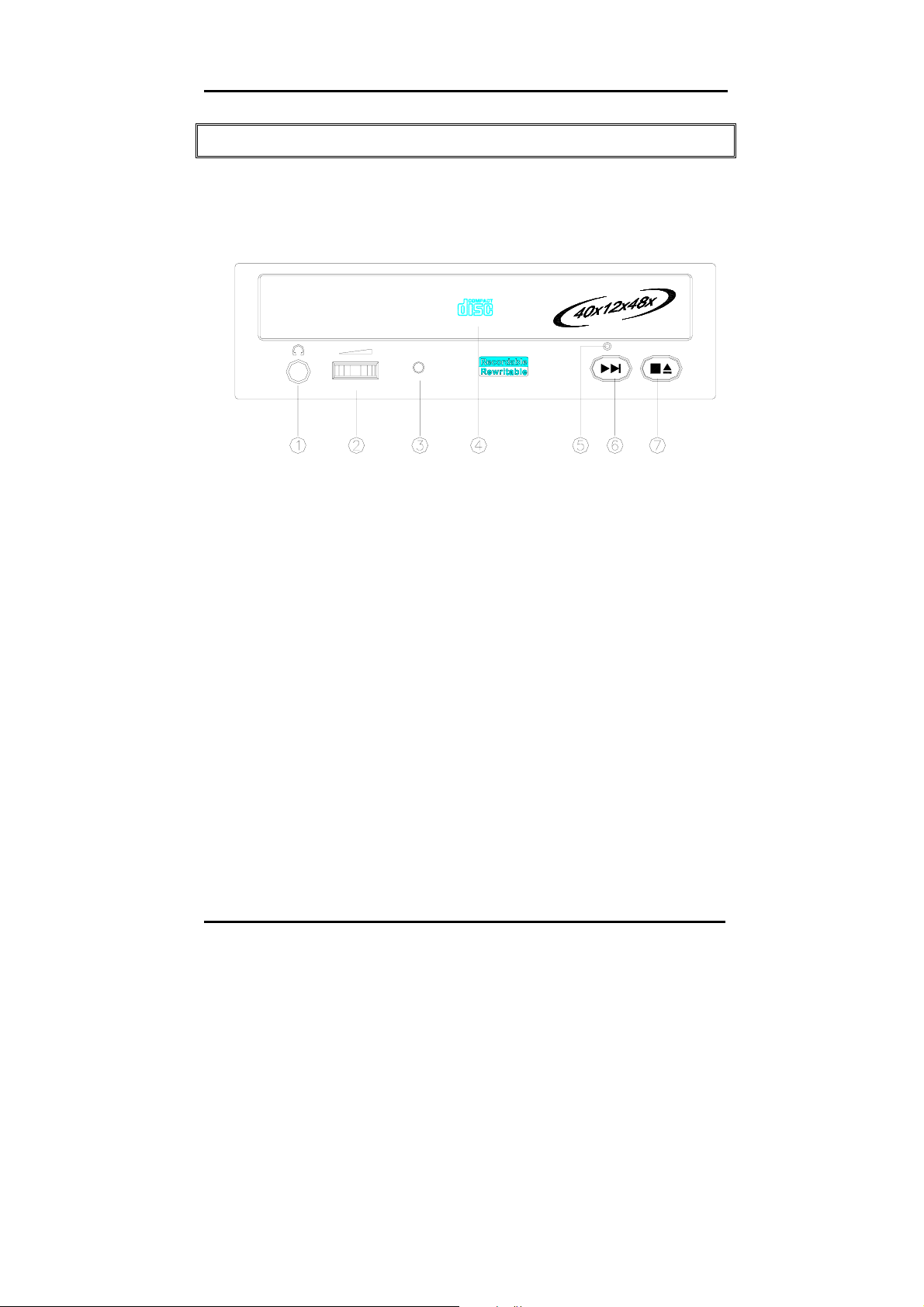
BUSY
1. Headphone Plug
By plugging in the headphone jack here, you can listen to an
audio CD (CD-DA disc) directly playing from the CD-ReWritable
drive.
2. Headphone Volume Control
This knob adjusts the audio output level. Turn the wheel to the
right to increase the audio volume of your headphone.
3. LED Indicator (dual color)
Flashes “green” while verifying or reading a disc.
Flashes “amber” while writing a CD-R/CD-RW disc.
4. Disc Tray
This is the tray for the disc. Place the disc in the tray, then press
the Close/Eject button or lightly push the tray to close it.
5. Emergency Eject Hole
When the Close/Eject button can’t work properly and the disc tray
can’t be opened, you can insert a paper clip or a small rod into
7
Page 12
BCE 4012IM CD-ReWritable Drive
this hole for manual ejection. Please make sure to power off the
system before you do that.
6. Play/Skip button
Press this button to play tracks or skip to next track during the
playing state.
7. Close/Eject button
This button opens and closes the disc tray. If the tray is closed,
pressing the button will eject it. If the drive is playing, pressing
this button will stop it.
NOTE: The front panel is subject to change without notice.
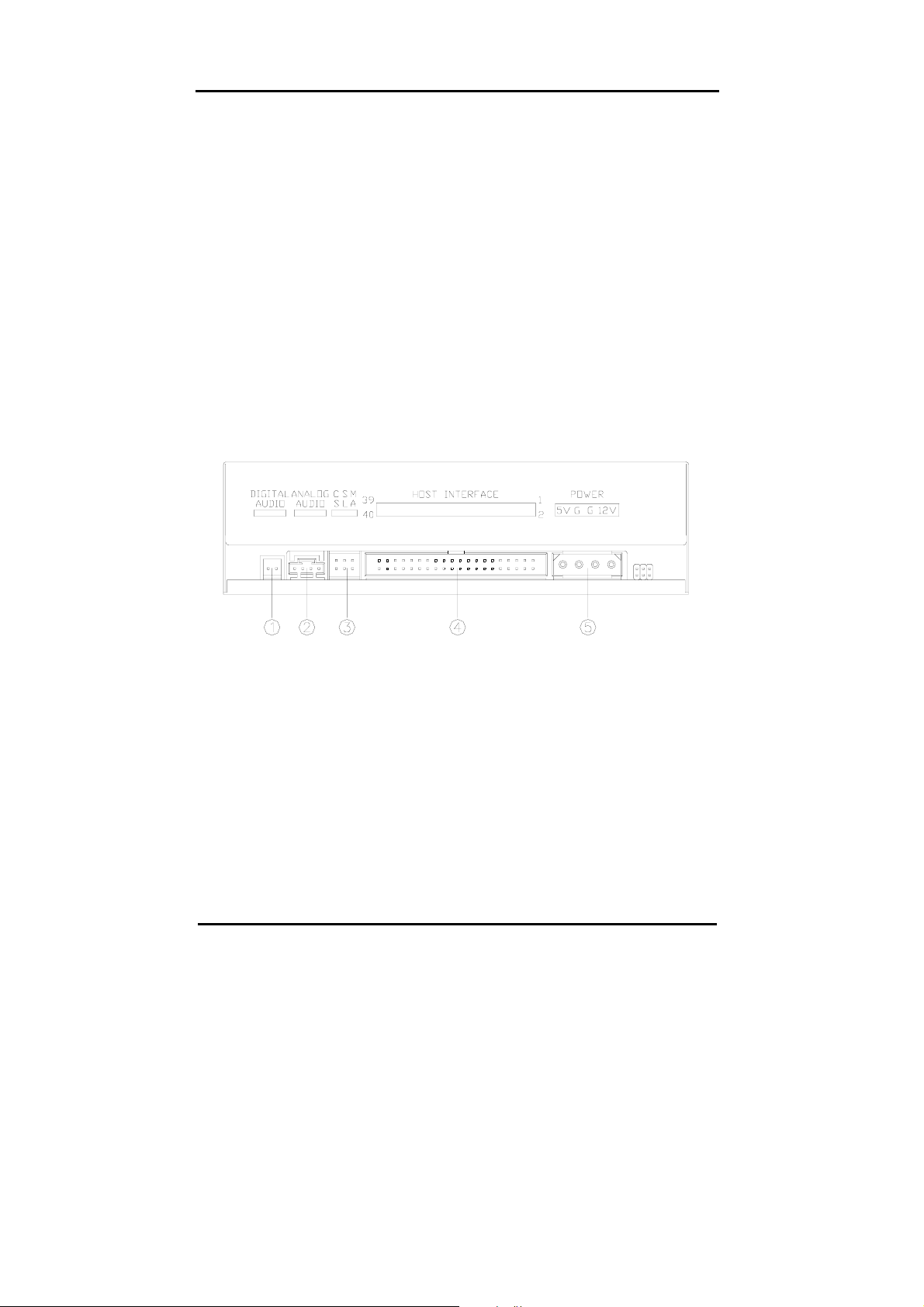
Rear View
1. Digital Audio Output Connector
If your sound card has a digital audio IEC958 format connector, you
can connect it to this digital audio output connector with a 2-pin
audio cable.
2. Analog Audio Output Connector
This connector allows you to connect the drive to your sound card
with a 4-pin audio cable.
8
Page 13

BCE 4012IM CD-ReWritable Drive
3. Device Configuration Jumper
Set the jumper to Master, Slave or Cable Select according to your
system configuration.
4. IDE Interface Connector
Plug one end of the 40-pin IDE cable here to join the 40-pin IDE
connector on the motherboard. The red-edge of the IDE cable must
be connected to Pin 1 of each connector.
5. Power Supply Connector
By plugging the computer’s power supply cable here, you can
connect the CD-RW drive and your computer system.
9
Page 14

BCE 4012IM CD-ReWritable Drive
TECHNICAL DATA
Performance
Transfer rate Read: 7200kb/s (up to 48X)
Write: CD-R 6000kb/s (up to 40X)
CD-RW 1800kb/s (up to
12X)
Access time (⅓ stroke) 100ms
(full stroke) 200ms
Data buffer 2MB
CD format support CD-Audio, CD-EXTRA, CD-ROM,
CD-ROM XA, CD-I, Video CD,
Photo CD, CD-Text
Writing modes TAO (Track at once), DAO (Disc
at
Once), SAO (Session at once),
Multi-session, Incremental Packet
Writing (fixed and variable packet
size)
Writing speed CD-R: 8X/16X/20X/24X/32X/40X
CD-RW: 4X/8X/10X/12X
Specification
Interface IDE
Form factor 5.25" Half Height
Disc loading Tray (motorised)
Audio output level Line out = 0.6 ± 10%Vrms
Headphone out = 0.6± 10%Vrms
10
Page 15

BCE 4012IM CD-ReWritable Drive
Power 5 VDC & 12VDC
Dimensions
Height 41.8 ± 0.2 mm
Width 148.6 ± 0.3 mm
Depth 193.3 ± 0.5 mm
Weight 1 kg
Disc Specification
Capacity
120mm disc: 63min 553Mbytes Mode-1
74min 656MBytes Mode-1
80min 703MBytes Mode-1
80mm disc: 18min 158Mbytes Mode-1
21min 184MBytes Mode-1
Disc Type CD-Recordable media (Orange
Book Part II), CD-ReWritable
media (Orange Book Part III)
Environment
Temperature
Operating temperature 5°C to 45°C
Non-operating temperature -20°C to 60°C
11
Page 16

BCE 4012IM CD-ReWritable Drive
Humidity
Operating humidity 8% ~ 80%RH
Non-operating humidity 5% ~ 95%RH
12
Page 17

BCE 4012IM CD-ReWritable Drive
TROUBLESHOOTING
To help you get more familiar with BCE 4012IM, the following FAQ lists
some common problems you might encounter. Please read it for reference
before you request RMA support from your dealer.
Q1. BCE 4012IM cannot be recognized.
(1) The drive might not be connected properly. Please check whether the
IDE cable and power connector are tightly connected.
(2) Check if there is jumper conflict. Normally, if 2 drives connected with
one IDE cable, the jumper has to separate one to MASTER & the other
to SLAVE.
(3) If Windows can’t detect BCE 4012IM, click on the “Add New Hardware”
in the Control Panel. Windows will start detecting.
Q2. The external speaker doesn’t have sound when playing music CD.
(1) Please check if the audio cable is connected to the audio connector
properly.
(2) Check both rear side of the CD-RW drive and sound card on M/B (If
Audio chipset is on board). If they are well connected, check if the
sound card is working.
Q3. The drive can’t read former session(s) of the CD-R disc which has
been written twice or more times.
Before writing CD-R discs with data copy, remember to choose “Import
session” so as to read the former sessions.
Q4. There is noise while reading.
If the disc is eccentric or the label sticks on the disc surface, it will cause
noise.
13
Page 18

BCE 4012IM CD-ReWritable Drive
Q5. BCE 4012IM doesn’t have power.
Please check if the power cord is connected securely.
Q6. The tray cannot be ejected.
There are two possible reasons:
(1) Need to be ejected by the application.
Some of the burning or playing application will lock the drive. You have
to eject by application and close it so as to restore the use of panel
buttons.
(2) The CD is inserted incorrectly.
Please insert a paper clip or small rod into the emergency hole on the
front panel for manual ejection.
Q7. The CD-RW drive cannot read some general discs.
Please check if the disc has deep scratches, fingerprints, or other
contaminants on the discs surface. Clean the disc if it’s necessary.
Q8. BCE 4012IM drive cannot write.
We suggest as follows:
(1) Use the burning software which is provided by original supplier and
bundled with this CD-ReWritable drive or download the update file from
internet.
(2) More capacity of hard disk is needed if using hard disk as temporary
buffer.
(3) Place the disc correctly.
(4) The blank disc needs full format first if using packet writing software.
Q9. “Buffer underrun” always occurs while writing discs.
Here are some suggestions:
(1) Close the screen saver & TSR (Terminate and Stay Resident).
(2) Quit other redundant application when burning.
14
Page 19

BCE 4012IM CD-ReWritable Drive
(3) Select good quality and high-speed supported blank discs.
(4) Increase main memory capacity.
(5) Select other burning software.
(6) De-fragment the hard disk.
(7) Keep the source & destination discs clean. (no scratches, fingerprints or
contamination.)
(8) Copy data as image file to hard drive to avoid buffer underrun.
(9) Keep the system clean. Do not install redundant driver or application to
reduce system loading as well as confliction.
(10) Enable Buffer Underrun Protection mode if your software supports it.
Q10. Should I update BCE 4012IM with the latest version of firmware?
It is not definitely necessary to update the firmware unless your computer
does encounter problems.
Q11. Does this CD-RW drive support over-burning?
Yes, but please use burning software which supports this function.
Q12. What burning software supports this CD-RW drive?
Software such as Adaptec EasyCD Creator, Ahead Nero-Burning ROM,
NTI CDMaker…etc.
Q13. Does BCE 4012IM support CD-Text & SAO (Session At Once)
function?
Yes, it does support CD-Text & SAO function and you may edit the title or
content into your music CD.
15
Page 20

Page 21

Page 22

3974400010
Version 1.0
March 2002
 Loading...