

Page 1

Owner’s Manual
BDP-1USB
Page 2

IMPORTANT SAFETY INSTRUCTIONS
The lightning flash with arrowhead symbol within an equilateral triangle, is intended to alert the user to the presence of un-insulated “dangerous voltage “ within the product’s enclosure that may be of sufficient magnitude to constitute a risk of electric shock to persons
.
The exclamation point within an equilateral triangle is intended to alert the user to the presence of important operating and maintenance
(servicing) instructions in the literature accompanying the product.
1. Read these instructions.
2. Keep these instructions.
3. Heed all warnings.
4. Follow all instructions.
5. Do not use this apparatus near water.
6. Clean only with dry cloth.
7. Do not block any ventilation openings. Install in accordance with the manufacturer’s instructions.
8. Do not install near any heat sources such as radiators, heat registers, stoves, or other apparatus (including amplifiers) that produce heat.
9. Do not defeat the safety purpose of the polarized or grounding-type plug. A polarized plug has two blades with one wider than the other. A
grounding type plug has two blades and a third grounding prong. The wide blade or the third prong are provided for your safety. If the provided plug does not fit into your outlet, consult an electrician for replacement of the obsolete outlet.
10. Protect the power cord from being walked on or pinched particularly at plugs, convenience receptacles, and the point where they exit from the
apparatus.
11. Only use attachments/accessories specified by the manufacturer.
12. Use only with the cart, stand, tripod, bracket, or table specified by the manufacturer, or sold with the apparatus. When a cart is
used use caution when moving the cart/apparatus combination to avoid injury from tip-over.
13. Unplug this apparatus when moving it & during lightning storms or when unused for long periods of time.
14. Refer all servicing to qualified service personnel. Servicing is required when the apparatus has been damaged in any way, such
as power-supply cord or plug is damaged, liquid has been spilled or objects have fallen into the apparatus, the apparatus has been exposed to
rain or moisture, does not operate normally, or has been dropped.
WARNING: TO REDUCE THE RISK OF FIRE OR ELECTRIC SHOCK, DO NOT EXPOSE THIS APPARATUS TO RAIN OR MOISTURE.
DO NOT EXPOSE THIS EQUIPMENT TO DRIPPING OR SPLASHING AND ENSURE THAT NO OBJECTS FILLED WITH LIQUIDS, SUCH AS VASES, ARE
PLACED ON THE EQUIPMENT.
TO COMPLETELY DISCONNECT THIS EQUIPMENT FROM THE AC MAINS, DISCONNECT THE POWER SUPPLY CORD PLUG FROM THE AC
RECEPTACLE.
THE MAINS PLUG OF THE POWER SUPPLY CORD SHALL REMAIN READILY OPERABLE.
UNPLUG MAINS CORD DURING TRANSPORTATION.
BRYSTON LIMITED WARRANTY
Bryston analog audio circuits are warranted to be free from manufacturing defects for twenty (20) years from the original date of manufacture. The
warranty includes parts and labour.
Bryston Digital circuits and cables are warranted for five years from the original date of manufacture. The warranty includes parts and labour.
Bryston products having motorized moving parts, excluding motorized volume controls, are warranted for three years from the original date of manufacture. The warranty includes parts and labour.
Bryston will remedy the problem by repair or replacement, as we deem necessary, to restore the product to full performance. Bryston will pay only
return shipping costs for the full length of the specific products warranty.
In the event of a defect or malfunction, contact Bryston’s repair centers for return authorization. Products must be returned using original packaging
material only. Packing material may be purchased from Bryston if necessary. This warranty is considered void if the defect, malfunction or failure of the
product or any component part was caused by damage (not resulting from a defect or malfunction) or abuse while in the possession of the customer.
Tampering by persons other than factory authorized service personnel or failure to fully comply with Bryston operating instructions voids the warranty.
This warranty gives you specific legal rights and you may also have other rights which may vary from province to province and country to country.
As of 2006-02-22 Bryston will only warranty Bryston products purchased through authorized Bryston dealers. Bryston products with a date code
of 0608 or higher (date code format is “yyww”, where “yy” is the two least significant digits of the year and “ww” is the week of the year) must be
accompanied by a copy of the bill-of-sale from a Bryston authorized dealer to qualify for warranty service. The warranty is transferable from the original
owner to a subsequent owner as long as a copy of the bill-of-sale from the original authorized Bryston dealer accompanies the re-sale. The copy of the
bill of sale to any subsequent owner need ONLY include the Name of the Bryston Authorized Dealer and the Model and Serial number of the Bryston
product The warranty will only be honored in the country of the original purchase unless otherwise pre-authorized by Bryston.
Postal address: P.O. BOX 2170, Stn. Main
PETERBOROUGH, ONTARIO
CANADA K9J 7Y4
Courier address: 677 NEAL DRIVE
PETERBOROUGH, ONTARIO
CANADA K9J 6X7
79 COVENTRY ST., Suite 5
NEWPORT, VERMONT
U.S.A. 05855-2100
BRYSTON SERVICE in CANADA: BRYSTON SERVICE in the USA:
contact your local distributor or
CHECK OUR WEB SITE: www.bryston.ca
E-MAIL BRYSTON DIRECTLY: [email protected]
FAX BRYSTON DIRECTLY: 01-705-742-0882
PHONE BRYSTON DIRECTLY: 01-705-742-5325
BRYSTON SERVICE outside Canada and the USA:
SAFETY_INSTRUCTIONS_WARRANTY_CONTACT_SHEET_20120816
Table of Contents
General.........................................................4
Welcome ......................................................4
Features .......................................................4
Power Considerations ................................. 5
Fuses & Electrical Safety .............................5
Firmware Updates ....................................... 5
Display Brightness & Auto Shuto .............. 5
Front and Rear Panel ...................................6
1. RS232: ..............................................6
2. USB Ports: ....................................... 6
3. Infrared Sensor: ............................... 6
4. Ethernet Port: .................................. 6
5. Dot Matrix VFD Display: .................. 6
6. Remote Power ON/OFF Trigger: ..... 6
7. Navigation Keys: ..............................7
8. Data Plate: ...................................... 7
9. Transport Function Keys: ...............7
10. Power Button & LED Indicator: ....... 7
11. IEC Power Inlet: ...............................7
Connecting To Your System ........................8
Audio Connection ........................................8
Local Storage Connection ...........................8
Network Connection ................................... 8
Wireless Bridge ............................................ 9
Dimensions .................................................. 9
Front Panel Menu Navigation ...................10
Error Codes ................................................ 10
Page 3

BDP-1USB
General
Welcome
Thank you for your purchase of a Bryston BDP1USB; a state-of-the-art digital music player that
can play back the vast majority of digital music
le formats including today’s most popular
lossless codecs including AIFF, FLAC, WAVE, APPLE
LOSSLESS, and more at resolutions up to 192kHz /
24 bit PCM and up to DSD 128 into compatible USB
DACs.
Music stored on both locally attached USB media
and network attached storage (NAS) devices is
aggregated and indexed into a single library. The
BDP-1USB includes intuitive soware for controlling
your BDP that requires no installation and is
accessible from any modern web browser. A wide
variety of compatible third-party applications are
also available for iOS and Android mobile devices.
In stand-alone systems, the BDP-1USB can also be
controlled via front-panel buttons and the 2-line
dot-matrix display, or with our optional BR-2 IR
remote control. Integration with whole-house
control systems is also possible using the provided
RS-232 connector.
We have designed the BDP-1USB to provide the
highest sound quality possible and an enjoyable
user experience free from the hassles normally
associated with computer-based audio playback.
A Quick Start Guide has been provided to help
you setup and play music right away. This manual
provides a technical reference for hardware, setup,
interconnectivity, warranty, and safety. Bryston
stands committed to ongoing improvement and
soware development. For that reason, we have
separated the Firmware User’s Manual in which
you’ll nd detailed information on day to day use
from this document. See www.bryston.com for the
most current edition.
Again, thank you for choosing Bryston.
Features
Extensive technical research and development
has been undertaken to ensure the highest quality
playback and durability of your BDP-1USB. The
following details describe some of these features.
• Linear power supply for audio processing
circuitry.
• A separate power supply for microprocessors
and for maintaining standby mode.
• Four USB 2.0 (backwards compatible with USB
1.1 and 1.0 specications) ports.
• Wide variety of control options including:
• Front panel push button controls
• Responsive web interface compatible with
iOS, Android, Macintosh, and windows
devices
• Third party app compatibility with diverse
soware such as MPoD and MPaD for iOS,
and MPDroid for Android.
• IR Remote control such as Bryston’s BR-2 or
other universal remote controls
• RS-232 2-way control
• Interconnectivity with USB Class 2.0 digital to
analog converters including those that support
DSD over PCM (DoP)
• Extensive compatibility with dierent music
le formats. See current rmware manual for
details.
• User upgradeable rmware
• Remote 12 Volt On/O trigger (IN & OUT) via
3.5mm / 2 conductor phono jacks
• Compatible with USB hard disk, and solid-state
storage media as well as network attached
storage.
• Cosmetic unity with other Bryston products.
Power Considerations
In general, if your BDP-1USB has a three prong
grounded line cord, you can reduce the possibility
of local ground loops which could cause hum or
noise in the system by plugging its line cord into the
same wall outlet next to the power amp and other
equipment in your system.
Fuses & Electrical Safety
The BDP-1USB contains two (5x20mm cylindrical)
glass fuses. One is for the standby power supply and
one is for the main linear power supply. If it should
become necessary to replace either, we recommend
that you seek the assistance of qualied service
personnel. If you decide to change the fuse yourself,
we advise the following:
1. Turn o the BDP-1USB
2. Disconnect ALL cables from the rear of the
BDP-1USB especially the power cord.
3. Remove all 10 screws securing the top cover to
the chassis using a Torx T8 driver and remove
the top cover.
4. Locate the 5x20mm glass fuses on the power
supply board (near the IEC power inlet).
Replace blown fuses only with the same type
and value. All fuses are rated at 250V and are
slow acting (time lag) types. Refer to the fuse
label inside the unit for the exact replacement
value.
5. Replace the top cover and all screws and
reconnect all cables before reconnecting the
unit to AC power and turning it back on.
MAINS
VOLTAGE
100 250 218.250 500 218.500
120
200
230
240
STANDBY FUSE MAIN FUSE
mA Part Number mA Part Number
250
218.250 500 218.500
315
218.315 315 218.315
315
218.315 315 218.315
Firmware Updates
BDP-1USB rmware updates will periodically
become available from Bryston. Upon availability,
the Dashboard on the web interface will notify
you. To identify which version of rmware you are
currently running, you may either use the front
panel, or the web interface. To determine the
current version of the rmware from the front panel,
press the up and le buttons to return to the
home screen. Then press the up button.
The example indicates that the rmware version is
S2.04 2014-06-08.
To discover your current rmware version from
the Bryston Web Interface, please consult your
Firmware User’s Manual.
Display Brightness & Auto Shutoff
Your BDP-1USB is equipped with a very high quality
VFD dot-matrix display designed to operate without
fail for many years. To adjust its brightness and
congure its automatic shuto feature, press and
in rapid succession by sliding your nger across
them.
Use the up and down buttons to switch
between setting the brightness (from 1 to 4) and the
time delay (from always ON, 10 seconds, 1 minute,
5 minutes, OFF) using the le and right buttons.
The menu will disappear approximately 10 seconds
aer the last button press and settings will be saved.
4 5
Page 4
BDP-1USB
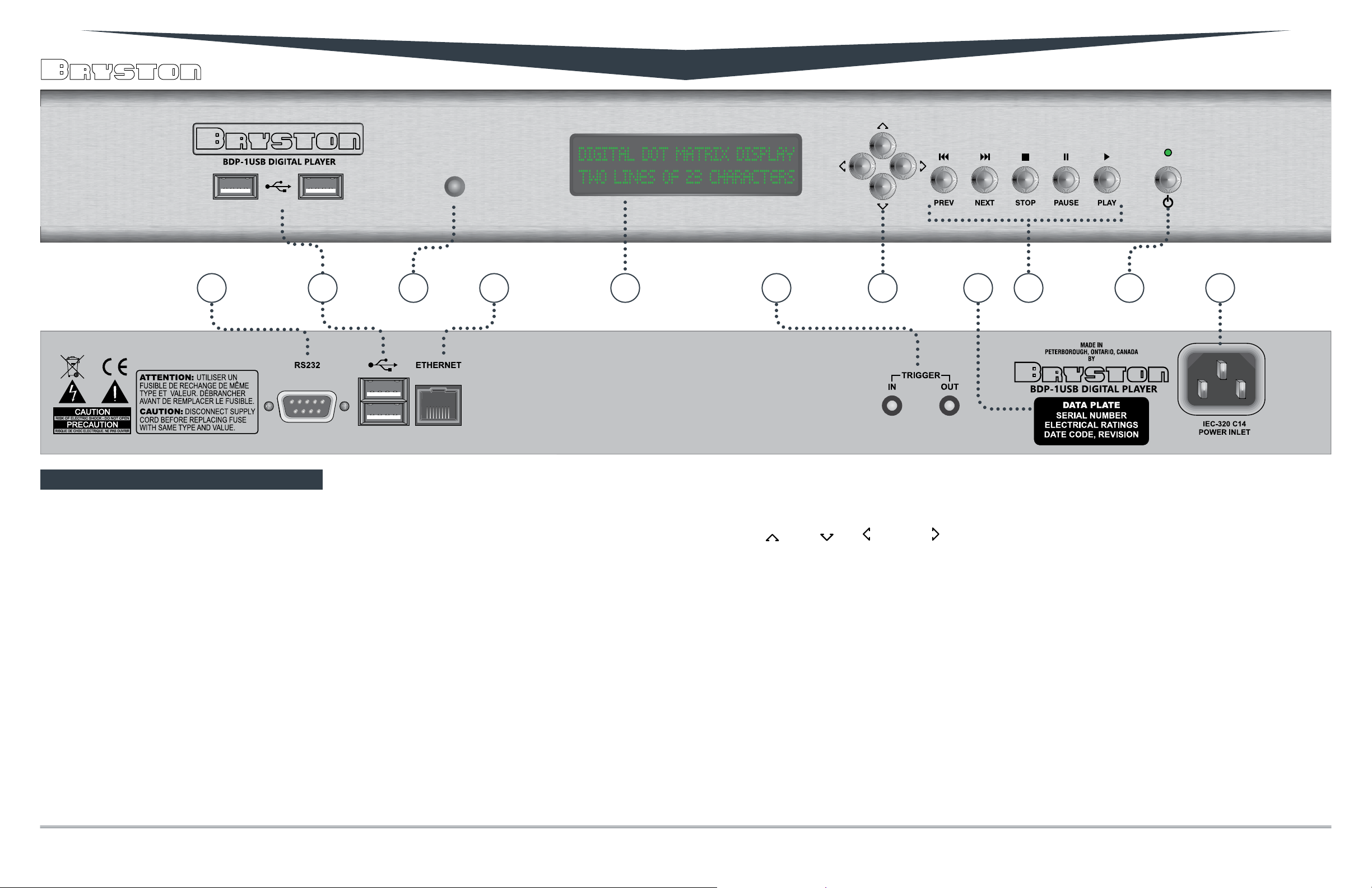
1 2 3 4 5 6 7 8 9 10 11
Front and Rear Panel
1. RS232:
For connecting hard-wired control systems like
AMX, Crestron, Savant, etc. See Firmware User’s
Manual to enable.
2. USB Ports:
The BDP-1USB has four USB 2.0 ports; two each
on the front and back. When connecting portpowered USB drives, use the rear ports. Low
power draw or self powered devices like thumb
drives and DACs can use either the front or rear.
The combined amperage draw from the two rear
ports cannot exceed 500mA.
3. Infrared Sensor:
Receives control signals from IR remote controls
such as the Bryston BR-2 to control basic
transport operations (play, pause, next, etc.)
4. Ethernet Port:
Cat-5 or later ethernet with RJ45 connector
(standard ethernet network cable) connects
here to facilitate local network and internet
connectivity for control via tablet, smartphone
and computer devices. Port is 10/100
compatible.
5. Dot Matrix VFD Display:
Provides basic visual feedback when navigating
menu or playing back music.
6. Remote Power ON/OFF Trigger:
The BDP-1USB is equipped with two 3.5mm
two conductor phone jacks for implementing
a remote power On/O function. Supplying a
DC control voltage between 3 and 12 volts (at
greater than or equal to 1mA) to the Trigger IN
port will allow you to remotely power your BDP-
1 on or o. The control voltage is applied to the
IN port will be routed to the OUT connector via
an isolated relay aer the BDP-1USB has fully
powered up. The remote trigger input takes
precedence over the front panel push-button
switch. When a valid control voltage is present at
the IN port, the unit cannot be powered o.
7. Navigation Keys:
Up , Down , Le , and Right . Use the
Up and Down keys to step through a list of
connected USB storage devices (thumb drives,
hard drives) and to scroll through menus and
options. Use Right and Le keys to select
options and step backwards through the
hierarchy respectively. See “Front Panel Menu
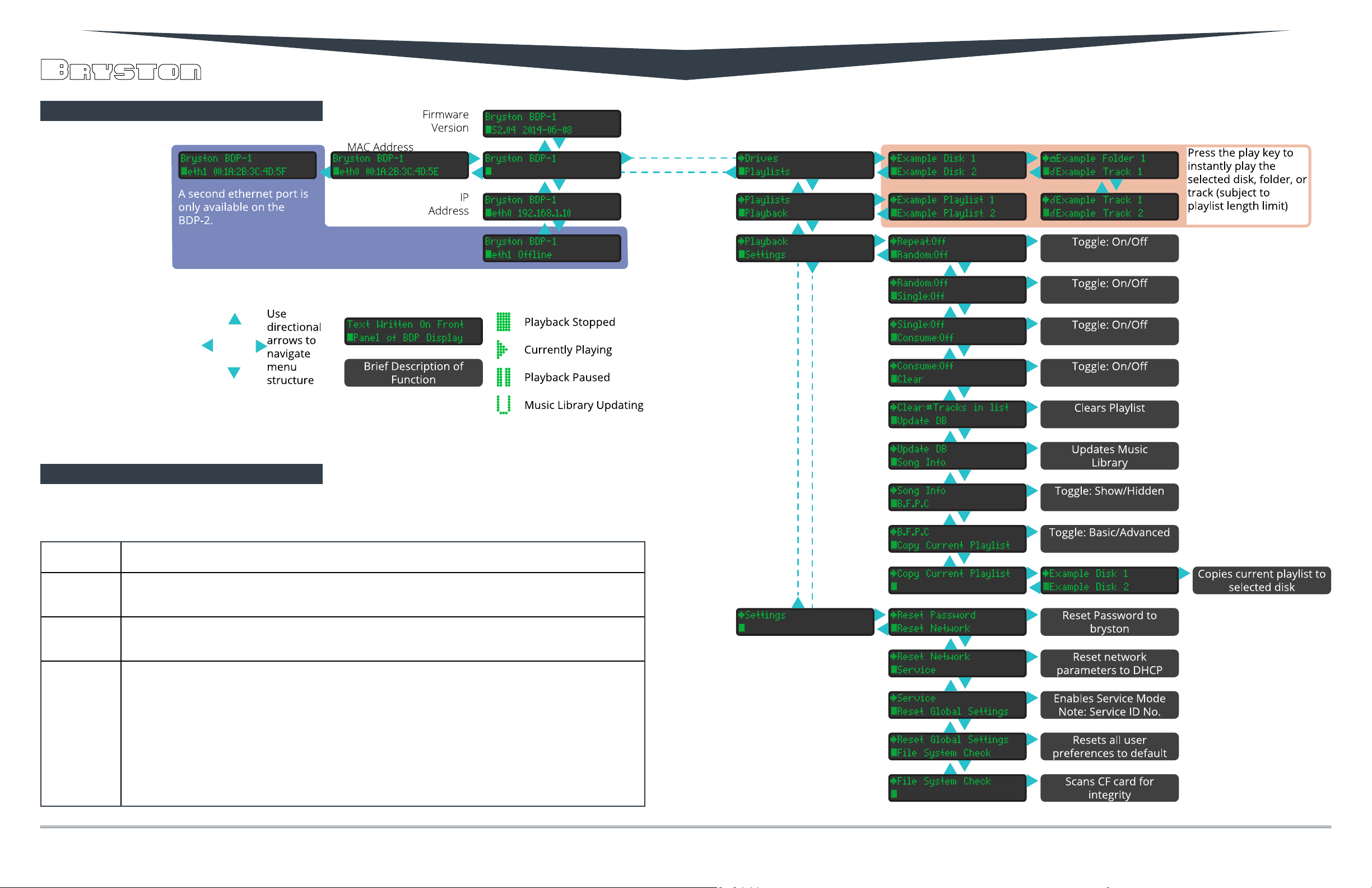
Navigation” on page 10 for the full menu tree.
When using these keys to initiate playback, the
Right key will open selected folders identied by
a icon and will Play the selected track when
a le identied by the icon is selected. Press
the Play button when a drive, folder or playlist is
selected to play all les contained within.
8. Data Plate:
This label provides the unit’s exact model
number, serial number, electrical rating and
date of manufacture. Do not remove.
9. Transport Function Keys:
Play, Pause, Stop, Previous, and Next function
in essentially the same manner as they would
on a CD player. Next and Previous skip ahead or
behind the currently queued track in the playlist.
10. Power Button & LED Indicator:
When the LED above the power switch is lit red,
the unit is in standby. When it is green, the unit
is fully powered up. If your unit is equipped with
an optional blue/red LED, blue represents the
power on state.
11. IEC Power Inlet:
The IEC -320 C14 power inlet accepts IEC-320
C13 equipped power cords such as the unit
provided. Use only appropriate power cords
that have been approved for your region.
6 7
Page 5
BDP-1USB
Connecting To Your System
The BDP-1USB is designed for the explicit purposes
of playing back your digital music library in a bitperfect manner. As a very precisely engineered
digital audio device, sound quality can vary based
on the digital to analog converter to which it is
connected. A high quality converter such as those
oered by Bryston are recommended. Compatible
digital to analog converters will have USB inputs
that are USB Audio Class 2.0 Compliant. No other
digital outputs are provided.
The BDP-1USB also requires that you store and
organize your music library on a connected USB
drive and/or via network attached storage.
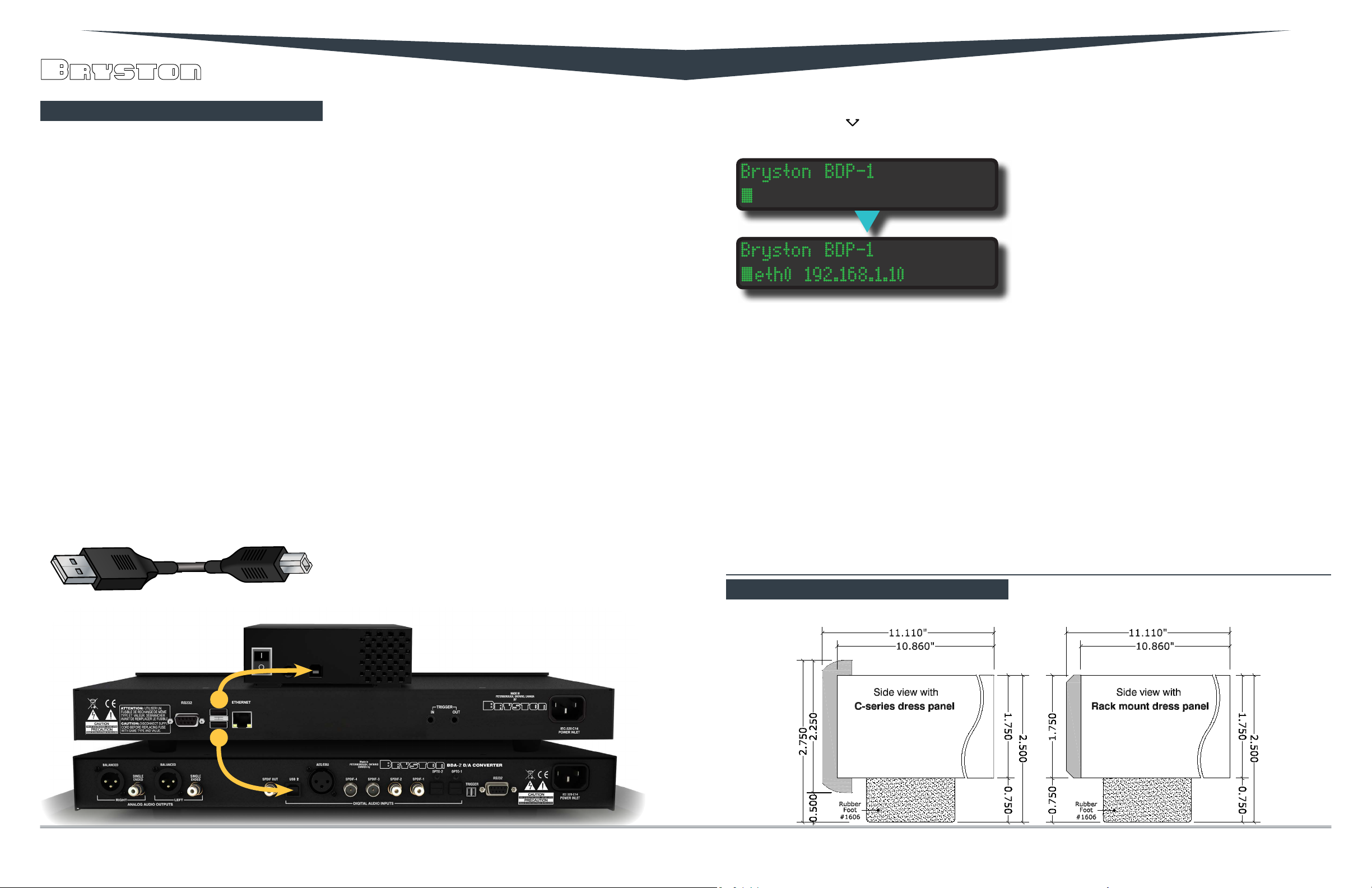
Thus, the minimum hookup requirements include
attaching a music storage device like the portable
hard drive pictured below and a USB DAC such as
the BDA2 to the BDP-1USB.
Audio Connection
Prior to powering your BDP-1USB on, connect your
BDP-1USB to your DAC using a cable with a USB “A”
Type connector on the BDP-1USB end, and the end
specied by the DAC manufacturer on the other. For
a Bryston BDA, that is a “B” Type connector.
USB “A” Type USB “B” Type
Local Storage Connection
Your BDP-1USB can accept most USB storage media
including thumb drives, buss-powered hard drives,
and self-powered hard drives. Buss powered hard
drives must be connected at the rear USB ports,
and the total power draw from the two rear ports
combined cannot exceed 500mA. Please check
the literature that came with your hard drive to
determine its power requirements if you have
trouble with your drive.
The preferred disk format scheme for USB attached
media is FAT32. HFS+ and EXT3 are supported as
well. NTFS is not recommended.
Network Connection
Your BDP-1USB features a single 10/100 ethernet
port designed to connect to your home network
router to facilitate control via portable devices or
computer, and to obtain internet connection useful
for streaming internet radio, downloading rmware
updates, and if needed, permit Bryston support
personnel to acces the unit via service mode upon
your request.
Use a CAT-5, CAT-5e, or CAT6 patch cable to connect
your BDP-1USB to an available ethernet port in your
room, or directly to your home router.
Successful network connection will be indicated by
green and amber LEDs lighting on the BDP-1USB
ethernet port, and by assignment of an IP address
by the router. View the IP address on the front panel
by pressing the Down key. Your IP Address begins
aer eth0
You can use this IP address to access the Bryston
Web Interface from any web-enabled device on the
same local network as the BDP-1USB. Enter the IP
address in your web browser’s address bar. Also,
any device running the Bonjour service will respond
to the URL http://bryston-bdp-1.local instead of
the IP address. All Macintosh computers and iOS
have this service built in. Windows computers can
run this service once downloaded from the Apple
website. Android devices do not currently support
Bonjour and must use the numerical IP address.
Since virtually all modern routers assign IP
addresses to client devices, this IP address may
periodically change which can be a nuissance. To
x your BDP-1USB’s IP address, either invoke the
Dimensions
DHCP reservation function in your router, or simply
set a Static IP address in Bryston Web Interface.
Instructions on how to do so are located in the
Firmware User’s Manual.
Wireless Bridge
If you do not have easy access to an ethernet
connection in your listening room, you may
purchase an aer-market “wireless bridge” from
most computer electronics stores. Contact Bryston
for further information as needed.
8 9
Page 6
BDP-1USB
Front Panel Menu Navigation
Error Codes
Your BDP-1USB may display an error code in certain power line disruption events or if there is a problem
booting. The following is a brief description of each.
ERROR 03
ERROR 04
ERROR 05
ERROR 09
Microprocessor does not detect voltage on main Analog Power Supply perhaps due to blown fuse faulty power
supply wiring harness. BEFORE INVESTIGATING POWER SUPPLY ISSUES, DISCONNECT MAINS POWER FROM UNIT!
AC Line voltage has momentarily sagged below threshold suicient to maintain power to main board. Minimum
line voltage specs for 120V and 240V units are 100V and 190V respectively. Simply rebooting the unit will clear this
error presuming the faulty AC mains condition no longer exists.
AC Line voltage has momentarily exceeded the high threshold the power supply can tolerate. Maximum line
voltage specs for 120V and 240V units are 128V and 254V respectively. Simply rebooting the unit will clear this error
presuming the faulty AC mains condition no longer exists.
This message occurs if the microprocessor doesn’t hear from the main board running the main operating system.
This can happen if the rmware on the built-in ash card becomes corrupted, if the BDP is mistakenly trying to
boot from an attached drive, or in rare instances, if the serial cable connecting the main board to the power supply
is loose.
If the error occurs aer a power failure, failed rmware upgrade, or other major system disruption, contact
Bryston for information on how to re-ash your BDP-1USB’s internal CF card. If the error occurs upon the rst
boot sequence aer connecting a new USB drive, try removing the drive and restarting again. If it boots with no
problem, contact Bryston for instructions on resolving the problem with your drive.
If neither of these work, contact Bryston for instructions on how to verify the integrity of the internal serial cable.
10 11
Page 7

Bryston Limited | 677 Neal Drive | Peterborough, Ontario K9J 6X7
Canada | Phone: 705-742-5325 | www.bryston.com
11/20/14
 Loading...