

Page 1

VR965
VR975
Lynnfield VR™Series
965/75 MANUAL 11/99rev1 1/14/00 12:04 PM Page 1
Page 2

2
Important Safety Instructions
WARNING: To reduce the risk of fire or electric shock, do not expose this product to rain or moisture.
The lightning flash with arrowhead symbol, within an equilateral triangle, is intended to alert the user to the presence of uninsulated
“dangerous voltage” within the product’s enclosure that may be of sufficient magnitude to constitute a risk of electric shock to persons.
The exclamation point within an equilateral triangle is intended to alert you to the presence of important operating and maintenance
(servicing) instructions in the literature accompanying the product.
1. Read Instructions: All the safety and operating instructions should be
read before the product is operated.
2. Retain Instructions: The safety and operating instructions should be
retained for future reference.
3. Heed Warnings: All warnings on the product and in the operating
instructions should be adhered to.
4. Follow Instructions: All operating and use instructions should be fol-
lowed.
5. Water and Moisture: The product should not be used near water—
for example, a bathtub, washbowl, kitchen sink, laundry tub, in a wet
basement, or near a swimming pool, etc.
6. Carts and Stands: The product should be used only with a cart or
stand that is recommended by the manufacturer. A prod-
uct and cart combination should be moved with care.
Quick stops, excessive force, and uneven surfaces may
cause the product and cart combination to overturn.
7. Wall- or Ceiling-Mounting: The product should be mounted to a wall
or ceiling only as recommended by the manufacturer.
8. Ventilation: The product should be situated so that its location or
position does not interfere with its proper functioning. For example, the
product should not be situated on a bed, sofa, rug, or similar surface
that may obstruct the heat sink surfaces; nor placed in a built-in installa-
tion, such as a bookcase or cabinet that may impede the flow of air near
the heat sink surfaces.
9. Heat: The product should be situated away from heat sources such as
radiators, stoves, or other products that produce heat.
10. Power Sources: The product should be connected to a power sup-
ply only of the type described in the operating instructions or as marked
on the product.
11. Grounding or Polarization: This product may be equipped with a
polarized alternating-current line plug (a plug having one blade wider
than the other). This plug will fit into the power outlet only one way.
This is a safety feature. If you are unable to insert the plug fully into the
outlet, try reversing the plug. If the plug should still fail to fit, contact
your electrician to replace your obsolete outlet. Do not defeat the safe-
ty purpose of the polarized plug.
12. Power Cord Protection: Power supply cords should be routed so
that they are not likely to be walked on or pinched by items placed upon
or against them. Pay particular attention to cords and plugs, conve-
nience receptacles, and the point where they exit from the product.
13. Cleaning: Unplug this product from the wall outlet before cleaning.
Do not use liquid cleaners or aerosol cleaners. Use a damp cloth for
cleaning.
14. Nonuse Periods: The power cord should be unplugged from the
outlet when left unused for long periods of time.
15. Object and Liquid Entry: Care should be taken so that objects do
not fall into and liquids are not spilled into the inside of the product.
16. Lightning: For added protection for this product during a lightning
storm, or when it is left unattended and unused for long periods of time,
unplug it from the wall outlet and disconnect the cable system. This will
prevent damage to the product due to lightning and power line surges.
17. Damage Requiring Service: The product should be serviced if any
of the following events occur:
A. The power supply cord or the plug has been damaged;
B. Objects have fallen or liquid has been spilled into the
product;
C. The product has been exposed to rain;
D. The product does not appear to operate normally or
exhibits a marked change in performance; or
E. The product has been dropped or the enclosure damaged.
F. When the product exhibits a distinct change in performance - this
indicates a need for service.
18. Servicing: The user should not attempt to service the product
beyond what is described in the operating instructions. For all other ser-
vicing, consult your dealer or contact Boston Acoustics.
19. Overloading: Do not overload wall outlets, extension cords, or inte-
gral convenience receptacles as this can result in a risk of fire or electric
shock.
20. Accessories: Do not place this product on an unstable cart, stand, tri-
pod, bracket, or table. The product may fall, causing serious injury to a
child or adult, and serious damage to the product. Use only with a cart,
stand, tripod, bracket, or table recommended by the manufacturer, or
sold with the product. Any mounting of the product should follow the
manufacturer's instructions, and should use a mounting accessory rec-
ommended by the manufacturer.
21. Replacement Parts: When replacement parts are required, be sure
the service technician has used replacement parts specified by the man-
ufacturer or have the same characteristics as the original part.
Unauthorized substitutions may result in fire, electric shock, or other haz-
ards.
22. Safety Check: Upon completion of any service or repairs to this
product, ask the service technician to perform safety checks to deter-
mine that the product is in proper operating condition.
CAUTION
RISK OF ELECTRIC SHOCK
DO NOT OPEN
S3125A
965/75 MANUAL 11/99rev1 1/14/00 12:04 PM Page 2
Page 3

3
Regulatory Compliance Statements
American Users:
This equipment has been tested and found to
comply with the limits for a Class B digital
device, pursuant to part 15 of the FCC Rules.
These limits are designed to provide reasonable protection against harmful interference
in a residential installation. This equipment
generates, uses, and can radiate radio frequency energy and, if not installed and used
in accordance with the instructions, may
cause harmful interference to radio or television reception. However, there is no guarantee that interference will not occur in a particular installation. If this equipment does cause
harmful interference to radio or television
reception, which can be determined by turning the equipment off and on, the user is
encouraged to try to correct the interference
by one or more of the following measures:
1. Reorient or relocate the receiving
antenna.
2. Increase the separation between the
equipment and receiver.
3. Connect the equipment into an outlet
on a circuit different from that to
which the receiver is connected.
4. Consult the dealer or an experienced
radio/TV technician for help.
Canadian Users:
This digital apparatus does not exceed the
Class B limits for radio noise emissions from
digital apparatus as set out in the radio
interference regulations of Industry Canada.
Caution! Disconnect power before servicing.
Le présent appareil numérique n’émet pas de
bruits radioélectriques dépassant les limites
applicables aux appareils numériques de Classe
B prescrites dans le règlement sur le brouillage
radioélectrique édicté par Industrie Canada.
Attention! Couper le courant avant’entretien.
Declaration of Conformity
Konformitätserklärung
Déclaration de Conformité
Declaración de Conformidad
Verklaring de Overeenstemming
Dichiarazione di Conformità
We/Wir/Nous/WIJ/Noi:
Boston Acoustics, Inc.
300 Jubilee Drive, Peabody, MA 01960 U.S.A.
declare under sole responsibility that
the product
VR965/975
to which this declaration relates, is in conformity
with the following standards or other normative
documents: auf das sich diese Erklärung
bezieht, mit der/den folgenden Norm(en) oder
Richtlinie(n) übereinstimmt: auquel se réfère
cette déclaration est conforme à la (aux)
norme(s) ou au(x) document(s) normatif(s): al
que se refiere esta declaración es conforme a
la(s) norma(s) u otro(s) documento(s) normati-
965/75 MANUAL 11/99rev1 1/14/00 12:04 PM Page 3
Page 4
4
Australian and New Zealand Users:
This device has been tested and found to
comply with the limits for a Class B digital
device, pursuant to the Australian/New
Zealand standard AS/NZS 3548 set out by
the Spectrum Management Agency.
Caution! Disconnect power before servicing.
N-93
vo(s): waarnaar deze verklaring verwijst, aan
de volende noem(en) of richtlijn(en) beantwoordt: a cui si riferisce questa dichiarazione è
conforme alla/e sehuente/i norma/o documento/i normativo/i:
European Users:
This equipment has been tested and found to
comply with the following European directive:
(i) EMC Directive 89/336/EEC amending
directive 92/31/EEC 93/68 EEC as per
EN 50081-1: 1992 according to
EN55013: 1990 Class B
EN50082-1: 1997 according to
EN61000-4-2: 1995
EN61000-4-3: 1997
EN61000-4-4: 1995
(ii) Low Voltage Directive (Safety) 72/23/EEC
as per EN60065: 1993
Japanese Users:
This equipment is in the Class 2 category
(Information Technology Equipment to be
used in a residential area or an adjacent area
thereto) and conforms to the standards set by
the Voluntary Control Council for Interference
by Information Technology Equipment aimed
at preventing radio interference in such residential areas.
When used near a radio or TV receiver, this
equipment may become the cause of radio
interference. Read the instructions for correct
handling.
965/75 MANUAL 11/99rev1 1/14/00 12:04 PM Page 4
Page 5

5
Description
The Lynnfield VR965 and VR975 deliver accurate, wide-range performance that conveys all the
power and impact of the most demanding program material. These floorstanding speakers
combine integrated powered subwoofers with Boston-built midranges and tweeters into sleek
cabinets that blend gracefully in any listening room.
Both models feature high-current subwoofer amplifiers driving our long-excursion, Deep
Channel Design (DCD
TM
) bass units for deep, authoritative low frequencies. In addition, they
both feature BassTrac
TM
, a proprietary new Boston-designed circuit that tracks the input signal to
the subwoofer and prevents its amplifier from being driven into audible distortion. Unlike conventional limiters, BassTrac preserves the waveform’s shape, maintaining the fidelity of the signal. The benefit: The bass stays clean and strong at any listening level. For user convenience, an
auto on/off function turns the subwoofer amplifier on when a bass signal is sensed, and turns it
off approximately fifteen minutes after the last signal is received.
Our midrange units feature copolymer cones, butyl rubber surrounds, and a computeroptimized magnet structure for smooth, accurate midrange reproduction. A 1" (25mm)
anodized aluminum Lynnfield VR tweeter, with our exclusive Amplitude Modification Device
(AMD), produces extended, sparkling high frequencies.
The cabinets are constructed of Medium Density Fiberboard (MDF), chosen for its outstanding
acoustic characteristics, and have extensive internal bracing. The result is superb structural
integrity that eliminates the spurious resonances and vibration that degrade the sound of ordinary speakers.
MagnaGuard
®
magnetic shielding ensures the speaker’s magnetic field does not interfere with
the television’s picture, allowing placement next to a TV in a home theater system.
Specifications
VR975 VR965
Frequency Response (±3dB) 25–20,000Hz 29–20,000Hz
Recommended Amplifier Power 15–200 watts 15–150 watts
Nominal Impedance 8Ω 8Ω
Sensitivity [1 watt (2.83v) at 1m] 91dB 90dB
Subwoofer Amplifier Power 125 watts RMS 80 watts RMS
Bass Unit 10" (250mm) DCD
TM
8" (200mm) DCD
TM
Passive Radiator 12" (305mm) —
Midrange Dual 4
1
⁄
2" (115mm) 4
1
⁄
2" (115mm)
Tweeter 1" (25mm) anodized aluminum anodized aluminum
Crossover Frequency 2500Hz 2600Hz
Dimensions (HxWxD) 48
1
⁄
4 x 6
1
⁄
2 x 15" 42
1
⁄
2 x 6
1
⁄
2 x 14"
(1118 x 165 x 381mm) (1016 x 165 x 356mm)
Foot Width 11
3
⁄
8" (290mm) 11
3
⁄
8" (290mm)
Weight 70 lbs (32kg) 50 lbs (23kg)
Finish Charcoal gray cloth Charcoal gray cloth
with gloss black top with gloss black top
965/75 MANUAL 11/99rev1 1/14/00 12:04 PM Page 5
Page 6
6
How to Connect Your Speakers
Correctly wiring your speakers is important for achieving the best sound quality. Wiring should
take just a few minutes, but it’s important to do it carefully, since incorrect wiring (such as
reversed connections) can result in a poor soundstage and poor bass.
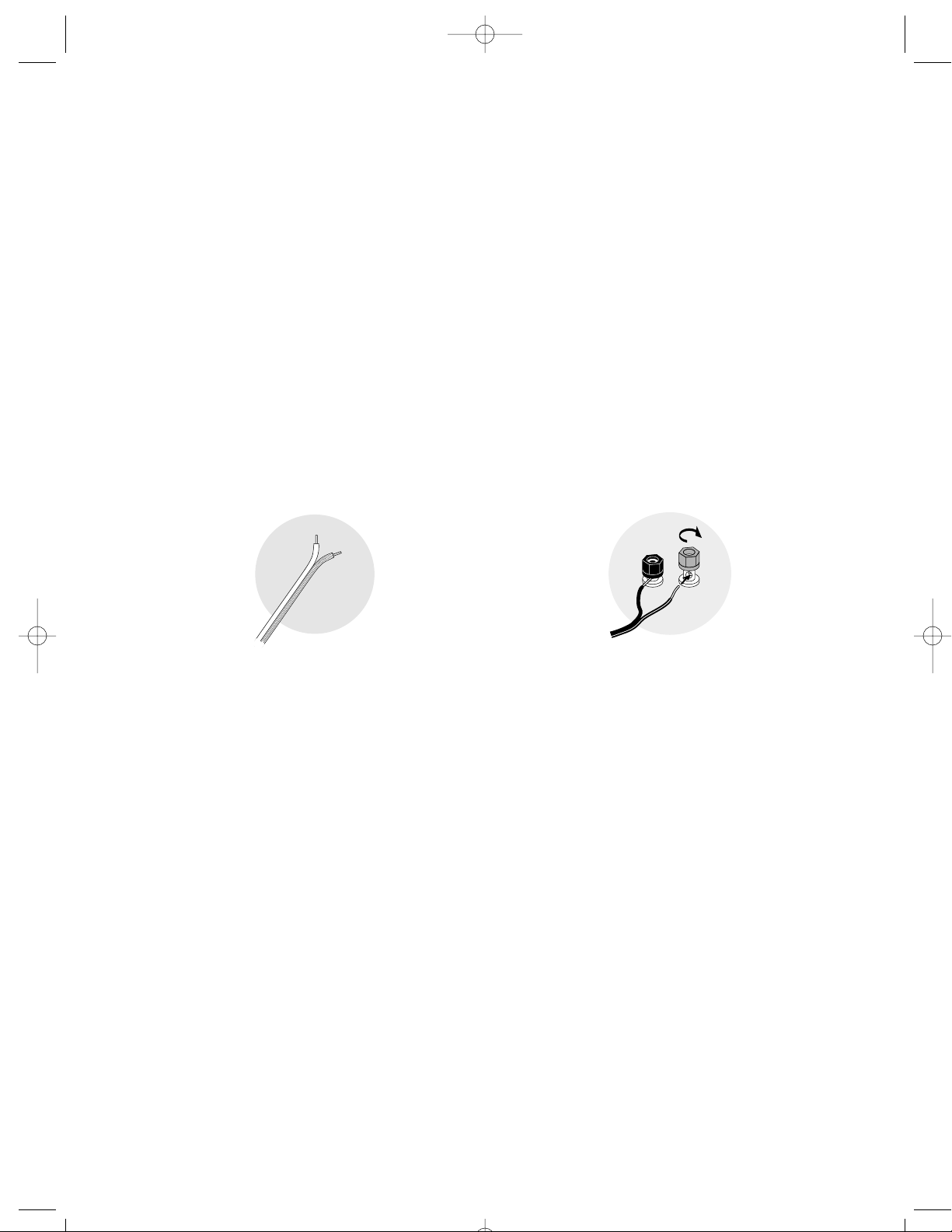
We recommend 18-gauge wire or thicker for runs up to 25 feet (8 meters) and 16-gauge wire or
thicker for longer runs. Separate the first few inches of the wire conductors. Strip off 1/2-inch
(12mm) of insulation from the ends of each speaker wire to expose the two conductors and
tightly twist the wire strands.
WARNING: To prevent electrical shock hazard, always switch off your amplifier or receiver when
making connections to the speaker. After wiring your speakers, plug them into an AC wall outlet.
We recommend you do not plug them into a switched outlet on the back of your receiver or into
a power strip that will be turned on and off.
IMPORTANT: Typically, one side of the wire is
smooth. Connect this side to the – (black)
connection. The other side has a rib or stripe.
Connect this to the + (red) connection.
Using the five-way binding posts: The binding posts permit easy connection to banana
plugs, spade lugs, and bare wire.
Insert the wire in the hole and tighten.
965/75 MANUAL 11/99rev1 1/14/00 12:04 PM Page 6
Page 7
7
Connecting the VR965 or VR975
to Stereo or Dolby
®
Pro Logic®Systems
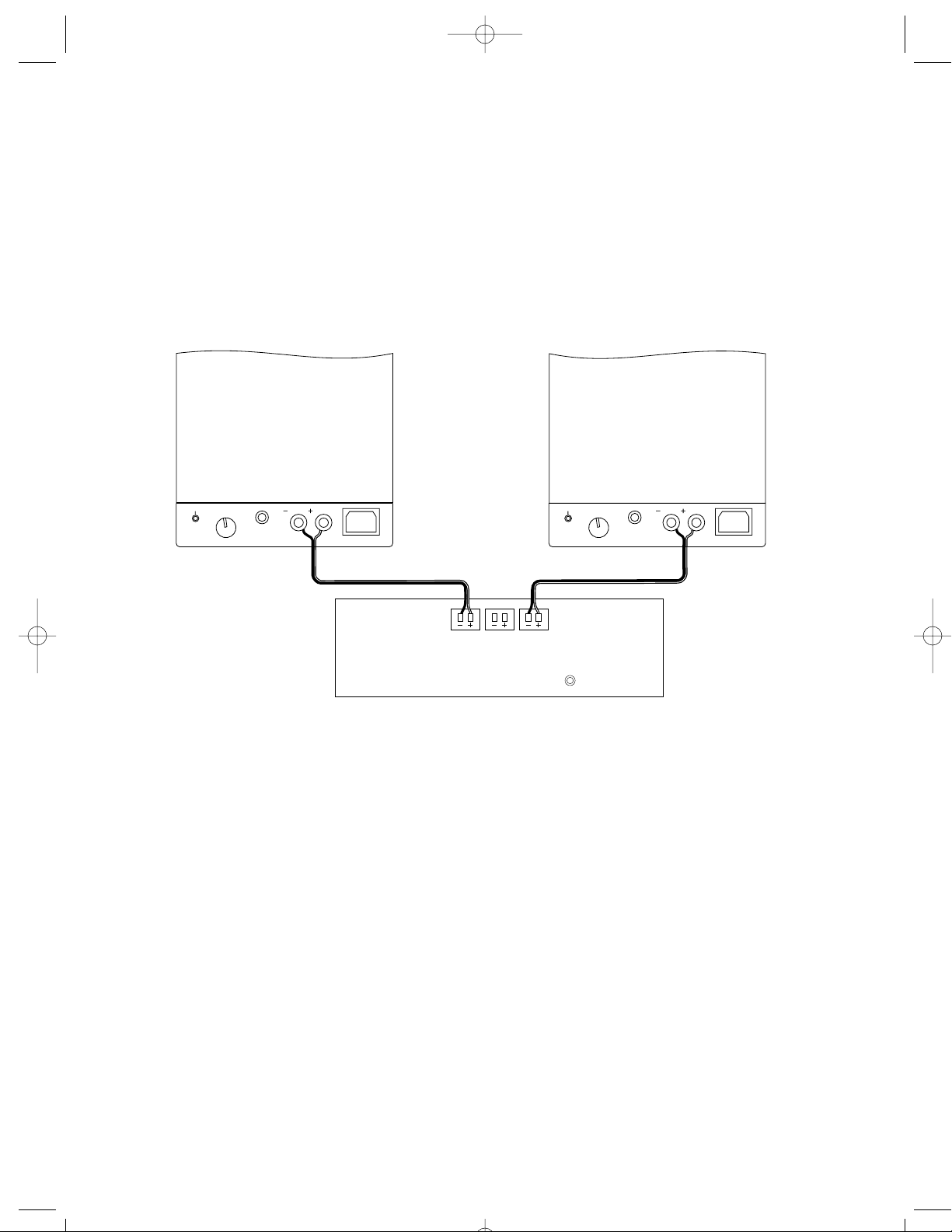
For stereo or Dolby Pro Logic systems, the easiest method is to use speaker wire connections as
shown. You may also use the “sub out” connection from your receiver to the input on the speaker marked “sub in,” but you will need RCA cables and a Y-connector to split the “sub out” signal
between the two speakers (see illustration on page 8).
Be sure to connect + to + (red) and – to – (black).
965/75 MANUAL 11/99rev1 1/14/00 12:04 PM Page 7
on/standby
bass/sub
sub
in
left center right
on/standby
Subwoofer out
bass/sub
sub
in
Page 8
8
Connecting the VR965 or VR975
to Digital Theater Systems
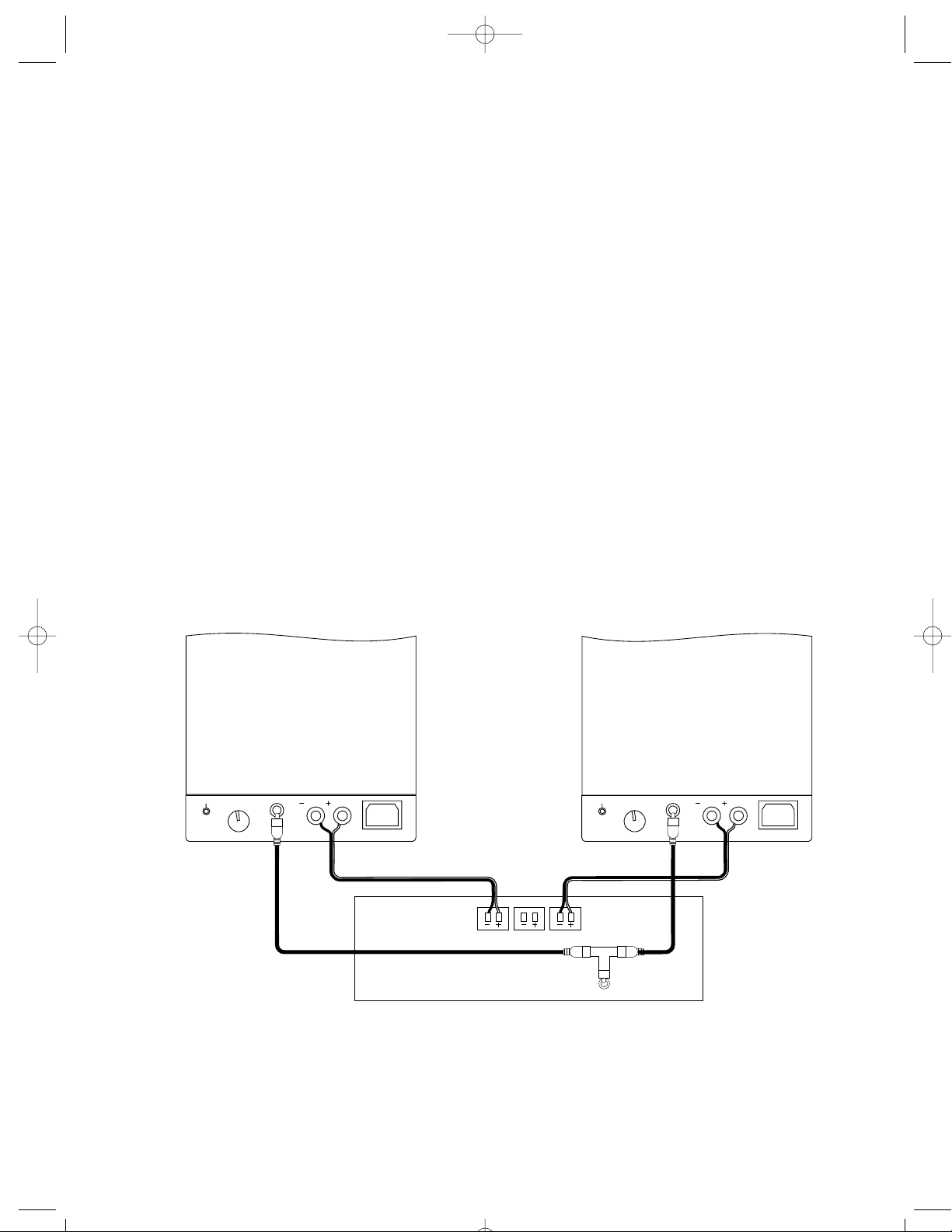
Digital 5.1 home theater electronics dedicate one channel (the “.1” of 5.1) to reproduce the special low-frequency information (such as explosions and thunder) contained in digital-encoded
soundtracks.
Use RCA cables and a Y-connector (not included) as shown to connect your digital receiver’s
subwoofer output to the speakers. Select “subwoofer-yes” from your receiver’s set-up menu.
Hooked up this way, the receiver’s amplifier is relieved of having to reproduce the difficult low
bass signals that can drive the receiver into audible distortion. In addition, the LFE signal will be
cleaner, since it is taken directly from the pre-amp/processor section of the receiver and doesn’t
pass through an additional layer of circuitry (the receiver’s amplifier) before going to the speaker.
Generally, you will get the best results by selecting “small” for the front left and right speakers
from your receiver’s set-up menu. However, we suggest you try both settings (“small” and
“large”) to see which sounds best with your particular receiver.
If you do not wish to run RCA cables to your speakers, you may configure your electronics to
send the LFE signal along with the left and right channel signal using the speaker wire connection (see illustration on page 7). Select “subwoofer-no” from your receiver’s set-up menu. This
sends the LFE signal to the main left and right speakers. Consult your system electronics owner’s
manual for more details.
965/75 MANUAL 11/99rev1 1/14/00 12:04 PM Page 8
on/standby
bass/sub
sub
in
left center right
on/standby
bass/sub
sub
in
Subwoofer out
Page 9
9
Checking the Speaker Connections
It is important that your speakers are hooked up with similar polarity, or “in phase.” A simple listening test will tell you if your speakers are connected properly. While listening to music with
your amplifier set to MONO, reverse the speaker wire connections at one speaker only. You’ll
hear a dramatic change in sound. The connection that yields the fuller bass and louder sound is
correct.
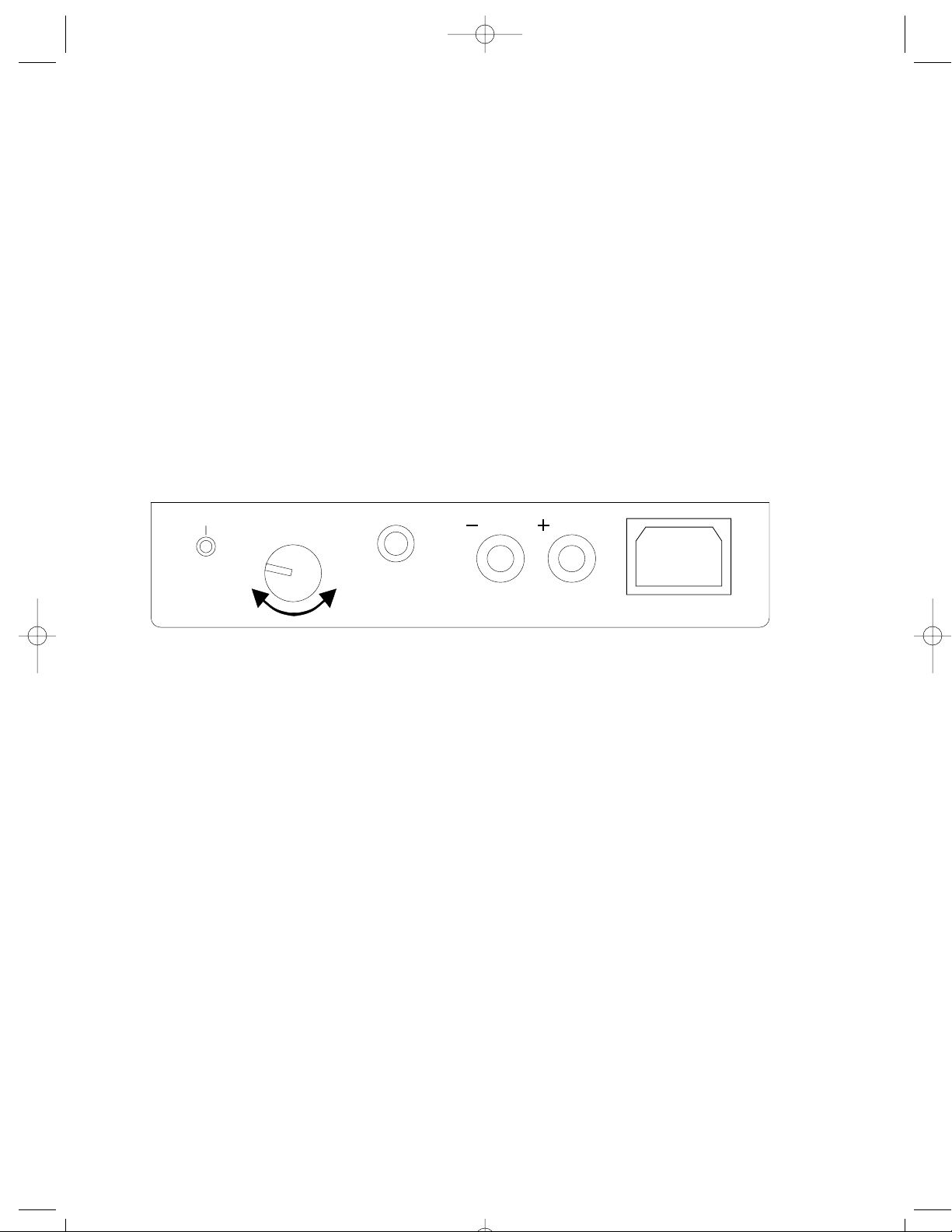
Bass/Sub Control
This control adjusts the amount of deep bass produced by the speakers. Use this control to
increase or decrease the bass level to compensate for the effects of room placement or personal taste.
NOTE: The most musically accurate response will be obtained when the control is in approximately the 9:00 o’clock position.
965/75 MANUAL 11/99rev1 1/14/00 12:04 PM Page 9
on/standby
bass/sub
sub
in
Page 10
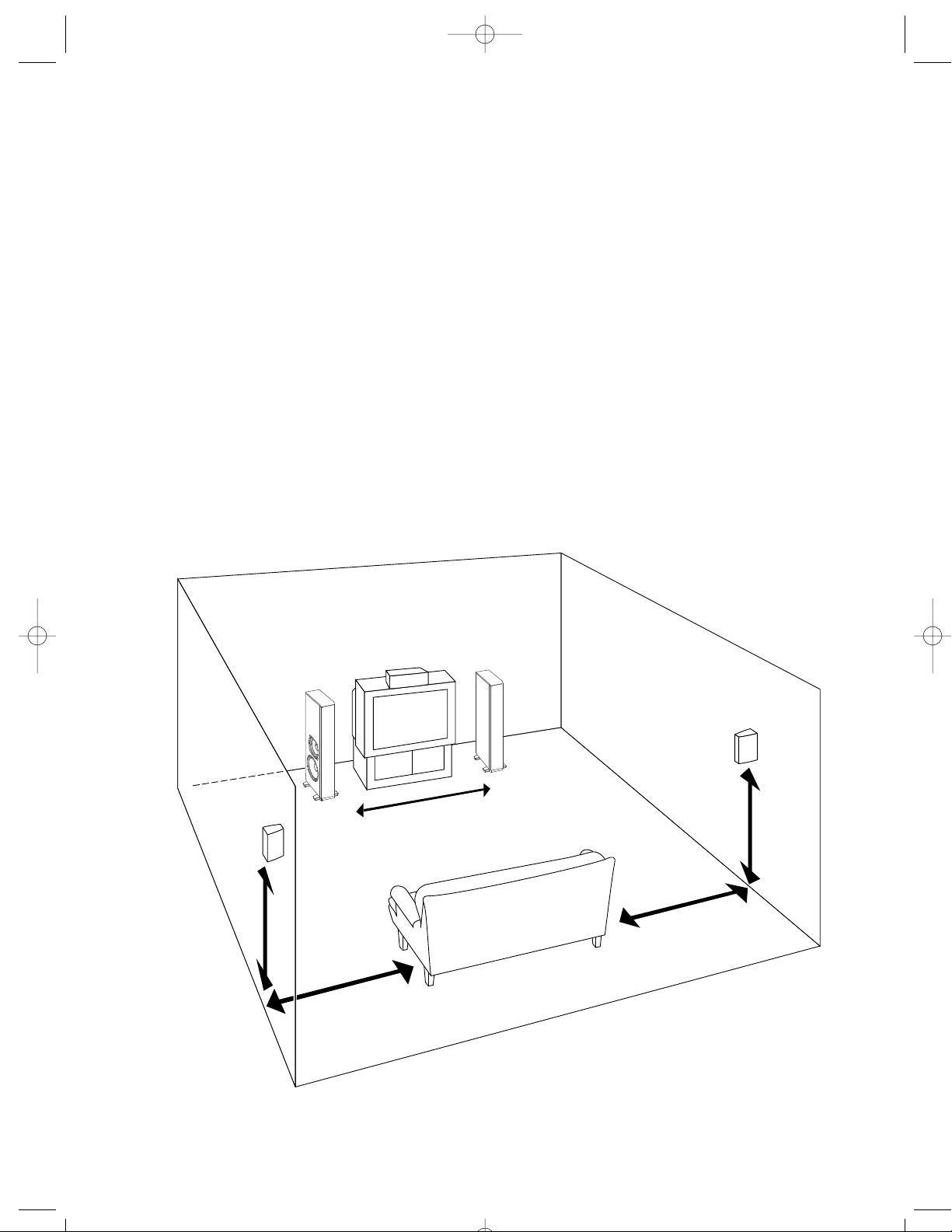
How to Place Your Speakers
As a starting point, place the speakers 6 to 12 feet (2-4m) apart, so they form a triangle with your
favorite listening position. The speakers should be at least 2 feet (0.6m) from the corners of the
room. Placement near the walls or corner will reinforce the bass. Placement too far away from
the walls or corner may result in a “thin,” bass-shy balance. Putting the speakers too close to a
corner can produce an unnatural bass reinforcement that detracts from their balanced, uncolored sound. If a speaker must be placed near a corner, move it away from the wall directly
behind it to preserve its natural tonal balance. Use the bass/sub control to obtain the best balance in your room.
Generally, the best results will be obtained when the woofers face out, away from each other.
However, the nondirectional nature of bass propagation means that either orientation will produce satisfactory results. If you do place the woofers facing in, make sure they have at least six
inches of “breathing room” from the furniture or TV stand for proper bass reproduction.
10
6-12 ft. (2-4m)
Place the surround
speaker beside or
behind the listeners
Center channel
flush with
front of TV
5-9 ft.
(1.5-3m)
Left speaker
Right speaker
965/75 MANUAL 11/99rev1 1/14/00 12:04 PM Page 10
Page 11

11
Listening Levels and Power Handling
The listed power recommendations assume you will operate your system in a way that will not
produce distortion. Even these rugged systems can be damaged by a modest amplifier if it produces distortion. If you hear a harsh, gritty noise, turn down the volume. Prolonged or repeated
operation of your speaker with a distorted signal can cause damage that is not covered by the
warranty.
Limited Warranty
For five years from the date of purchase, Boston Acoustics will repair for the original owner any
defect in materials or workmanship that occurs in the drivers (woofer, midrange, tweeter) of the
VR965 or VR975, without charge for parts and labor. For one year from the date of purchase,
Boston Acoustics will repair for the original owner any defect in materials or workmanship that
occurs in the amplifier of the VR965 or VR975, without charge for parts and labor.
Your responsibilities are to use the system according to the instructions supplied, to provide safe
and secure transportation to an authorized Boston Acoustics service representative, and to present proof of purchase in the form of your sales slip when requesting service.
Excluded from this warranty is damage that results from abuse, misuse, accidents, shipping, repairs,
or modifications by anyone other than an authorized Boston Acoustics service representative.
This warranty is void if the serial number has been removed or defaced.
This warranty gives you specific legal rights, and you may also have other rights which vary from
state to state.
If Service Seems Necessary
First, contact the dealer from whom you purchased the speakers. If that is not possible, write to:
Boston Acoustics, Inc. 300 Jubilee Drive Peabody, MA 01960 U.S.A. 978.538.5000
We will promptly advise you of what action to take. If it is necessary to return your speaker to the
factory, please ship it prepaid. After it has been repaired, we will return it freight prepaid in the
U.S.A. and Canada.
965/75 MANUAL 11/99rev1 1/14/00 12:04 PM Page 11
Page 12

300 Jubilee Drive
Peabody, MA 01960 U.S.A.
978.538.5000
www.bostonacoustics.com
VR, BassTrac, and DCD are trademarks and
MagnaGuard, Boston, and Boston Acoustics are
registered trademarks of Boston Acoustics, Inc.
Dolby and Pro Logic are registered trademarks of
Dolby Laboratories Licensing Corporation.
© 2000 Boston Acoustics, Inc. All rights reserved.
Specifications subject to change without notice.
42-001013-1
965/75 MANUAL 11/99rev1 1/14/00 12:04 PM Page 12
 Loading...