

Page 1
ULTRA OPEN EARBUDS
Page 2
IMPORTANT SAFETY INSTRUCTIONS
Please read and keep all safety and use instructions.
Bose Corporation hereby declares that this product is in compliance with the essential requirements
and other relevant provisions of Directive 2014/53/EU and all other applicable EU directive
requirements. The complete declaration of conformity can be found at: www.Bose.com/compliancewww.Bose.com/compliance
This product conforms to all applicable Electromagnetic Compatibility Regulations 2016 and all other
applicable UK regulations. The complete declaration of conformity can be found at:
Bose Corporation hereby declares that this product is in compliance with the essential requirements
per Radio Equipment Regulations 2017 and all other applicable UK regulations. The complete
declaration of conformity can be found at: www.Bose.com/compliancewww.Bose.com/compliance
Important Safety Instructions
Only use aachments/accessories specified by the manufacturer.
Refer all servicing to qualified personnel. Servicing is required when the apparatus has been damaged in any
way, such as power-supply cord or plug is damaged, liquid has been spilled or objects have fallen into the
apparatus, the apparatus has been exposed to rain or moisture, does not operate normally, or has
been dropped.
WARNINGS/CAUTIONS
• To avoid accidental ingestion, keep the product away from children and pets. The product contains a baery,
and may be hazardous if swallowed. If ingested, seek immediate medical aention. When not in use, store
the product out of reach of children and pets.
• Product is not intended for use by children.
• To avoid hearing damage, do not use your headphones at a high volume. Turn the volume down on your
product before placing the headphones in/on your ears, then turn the volume up gradually until you reach a
comfortable, moderate listening level.
• To avoid hearing damage, do not insert the earbud speaker directly into your ear canal. Wear the earbuds
with the speaker resting on the inner surface of your ear and the barrel behind your ear. For more information
about how to wear the earbuds, see page 13.
• Use of this product while operating a vehicle may be prohibited by law in some locations. Use caution
and follow applicable laws. Stop using this product immediately if it interferes with your ability to remain
aentive or interferes with your ability to hear surrounding sounds, including alarms and warning signals,
while operating a vehicle.
• Use caution if using these headphones while performing any activity that requires your aention. Do not use
the headphones when the inability to clearly hear surrounding sounds may present a danger to yourself or
others, for example while riding a bicycle or walking in or near traic, a construction site, railroad, etc.
• Do NOT submerge the product in water or expose the product to water for extended periods.
• Remove product immediately if you notice heat coming from the product.
2
ENG
|
Page 3

IMPORTANT SAFETY INSTRUCTIONS
Contains small parts which may be a choking hazard. Not suitable for children under age 3.
This product contains magnetic material. Consult your physician on whether this might aect your
implantable medical device.
• Do NOT make unauthorized alterations to this product.
• Keep the product away from fire and heat sources. Do NOT place naked flame sources, such as lighted
candles, on or near the product.
• Use this product only with an agency-approved LPS power supply that meets local regulatory requirements
(e.g., UL, CSA, VDE, CCC).
• The baery provided with this product may present a risk of fire or chemical burn if mishandled, incorrectly
replaced or replaced with an incorrect type.
• If the baery leaks, do not allow the liquid to come in contact with the skin or eyes. If contact is made, seek
medical advice.
• Do not expose products containing baeries to excessive heat (e.g. from storage in direct sunlight, fire or
the like).
• Wipe o sweat from the earbuds and the charging case before charging.
• IPX4 and IPX1 are not permanent conditions, and resistance might decrease as a result of normal wear.
3
ENG
|
Page 4
REGULATORY AND LEGAL INFORMATION
NOTE: This equipment has been tested and found to comply with the limits for a Class B digital device,
pursuant to Part 15 of the FCC Rules. These limits are designed to provide reasonable protection against
harmful interference in a residential installation. This equipment generates, uses, and can radiate radio
frequency energy and, if not installed and used in accordance with the instructions, may cause harmful
interference to radio communications. However, there is no guarantee that interference will not occur in a
particular installation. If this equipment does cause harmful interference to radio or television reception,
which can be determined by turning the equipment o and on, the user is encouraged to try to correct the
interference by one or more of the following measures:
• Reorient or relocate the receiving product or antenna.
• Increase the separation between the equipment and receiver.
• Connect the equipment into an outlet on a circuit dierent from that to which the receiver is connected.
• Consult the dealer or an experienced radio/TV technician for help.
Changes or modifications not expressly approved by Bose Corporation could void the user’s authority to
operate this equipment.
This device complies with part 15 of the FCC Rules and with ISED Canada license-exempt RSS standard(s).
Operation is subject to the following two conditions: (1) This device may not cause harmful interference, and
(2) this device must accept any interference received, including interference that may cause
undesired operation.
This device complies with FCC and ISED Canada radiation exposure limits set forth for general population. This
transmier must not be co-located or operating in conjunction with any other antenna or transmier.
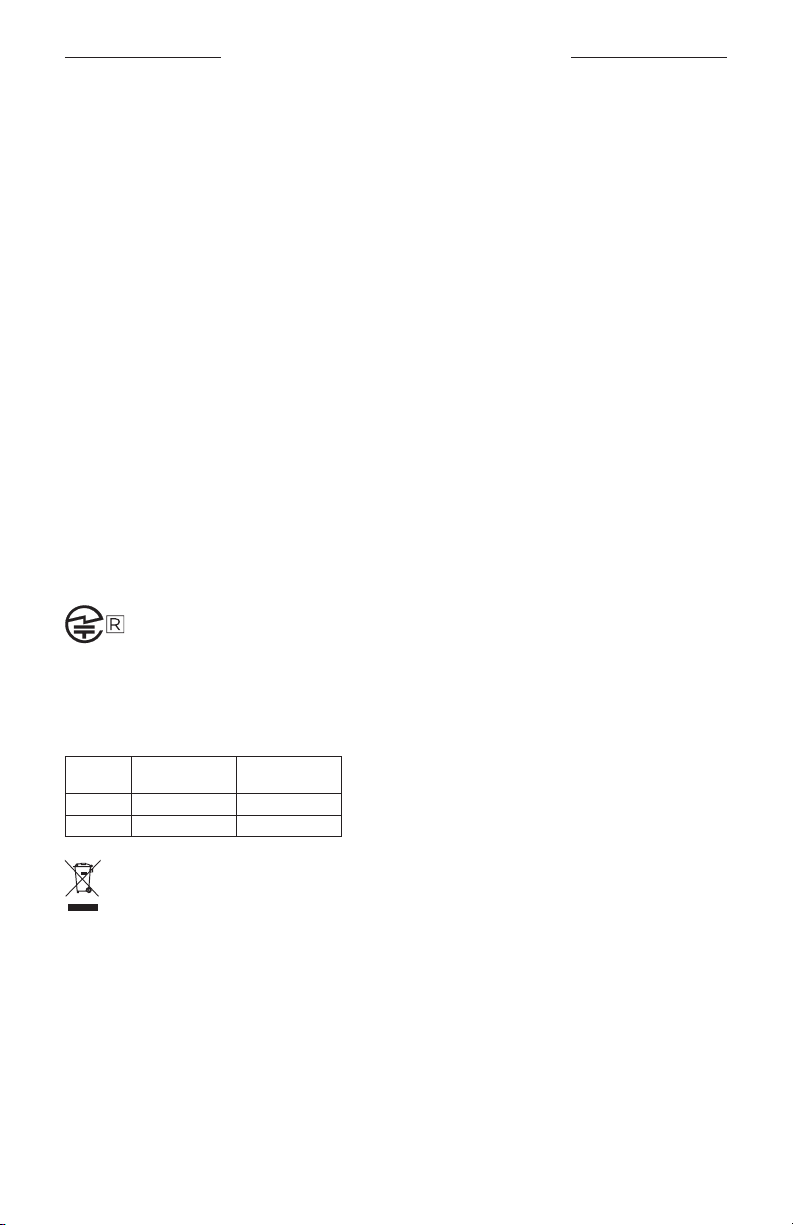
FCC ID: A94926L / A94926R | IC: 3232A-926L / 3232A-926R
Case Model: 438926 | Right Earbud Model: 926R | Left Earbud Model: 926L
The earbuds in this system have been certified in accordance with the provisions set out in the Radio Law.
020-230336
020-230337
CAN ICES-3(B)/NMB-3(B)
For Europe: Frequency band of operation 2400 to 2483.5 MHz. | Maximum transmit power less than
20 dBm EIRP.
SAR Information
Earbud
Left 0.46 0 .18
Right 0.57 0.22
Measured
1-g SAR W/kg
This symbol means the product must not be discarded as household waste, and should be delivered to
an appropriate collection facility for recycling. Proper disposal and recycling helps protect natural
resources, human health and the environment. For more information on disposal and recycling of this
product, contact your local municipality, disposal service, or the shop where you bought this product.
Measured
10-g SAR W/kg
Low-power Radio-frequency Devices Technical Regulations
Without permission granted by the NCC, any company, enterprise, or user is not allowed to change frequency,
enhance transmiing power or alter original characteristic as well as performance to an approved low power
radio-frequency devices. The low power radio-frequency devices shall not influence aircraft security and
interfere legal communications; If found, the user shall cease operating immediately until no interference is
achieved. The said legal communications means radio communications is operated in compliance with the
Telecommunications Management Act. The low power radio-frequency devices must be susceptible with the
interference from legal communications or ISM radio wave radiated devices.
4
ENG
|
Page 5
REGULATORY AND LEGAL INFORMATION
DON’T aempt to remove the rechargeable lithium-ion baery from this product. Contact your local Bose
retailer or other qualified professional for removal.
Please dispose of used baeries properly, following local regulations. Do not incinerate.
R-C-Bos-926L (L)
R-C-Bos-926R (R )
R-R-Bos-438926 (Case)
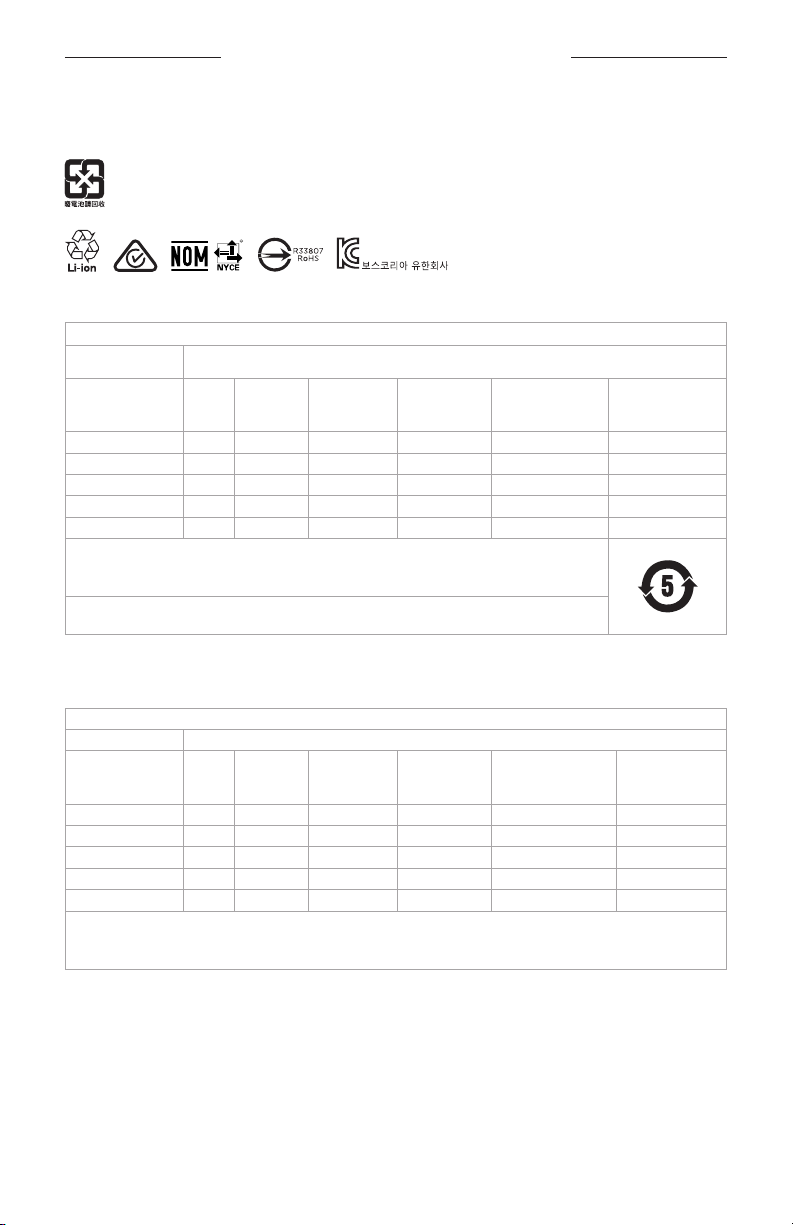
China Restriction of Hazardous Substances Table
Names and Contents of Toxic or Hazardous Substances or Elements
Toxic or Hazardous Substances and Elements
Lead
Part Name
PCBs X O O O O O
Metal Parts X O O O O O
Plastic Parts O O O O O O
Speakers X O O O O O
Cables X O O O O O
This table is prepared in accordance with the provisions of SJ/T 11364.
O: Indicates that this toxic or hazardous substance contained in all of the homogeneous materials for
this part is below the limit requirement of GB/T 26572.
X: Indicates that this toxic or hazardous substance contained in at least one of the homogeneous
materials used for this part is above the limit requirement of GB/T 26572.
(Pb)
Mercury
(Hg)
Cadmium
(Cd)
Hexavalent
(CR(VI))
Polybrominated
Biphenyl
(PBB)
Polybrominated
diphenylether
(PBDE)
Taiwan Restriction of Hazardous Substances Table
Equipment name: Earbuds and Charging Case Type designation: 438926
Restricted substances and its chemical symbols
Lead
Unit
PCBs -
Metal Parts -
Plastic Parts
Speakers -
Cables -
Note 1: “b” indicates that the percentage content of the restricted substance does not exceed the percentage of reference
value of presence.
Note 2: The “−” indicates that the restricted substance corresponds to the exemption.
5
Mercury
(Pb)
b b b b b b
Cadmium (Cd)
(Hg)
b b b b b
b b b b b
b b b b b
b b b b b
Hexavalent
chromium
ENG
|
(Cr+6)
Polybrominated
biphenyls (PBB)
Polybrominated
diphenyl ethers
(PBDE)
Page 6

REGULATORY AND LEGAL INFORMATION
Date of Manufacture: The eighth digit in the serial number indicates the year of manufacture; “4” is 2014
or 2024.
China Importer: Bose Electronics (Shanghai) Company Limited, Level 6, Tower D, No. 2337 Gudai Rd. Minhang
District, Shanghai 201100 | EU Importer: Bose Products B.V., Gorslaan 60, 1441 RG Purmerend, The Netherlands
| Mexico Importer: Bose de México S. de R.L. de C.V., Avenida Prado Sur #150, Piso 2, Interior 222 y 223, Colonia
Lomas de Chapultepec V Sección, Miguel Hidalgo, Ciudad de México, C.P. 11000 Phone Number: +5255 (5202)
3545 | Taiwan Importer: Bose Limited Taiwan Branch (H.K.), 9F., No.10, Sec. 3, Minsheng E. Road, Zhongshan
Dist. Taipei City 10480, Taiwan Phone Number: +886-2-2514 7676 | UK Importer: Bose Limited, Bose House,
Quayside Chatham Maritime, Chatham, Kent, ME4 4QZ, United Kingdom
Output Capacity: 350mAh | IPXX Rating: IPX4 (for the earbuds), IPX1 (for the charging case)
The CMIIT ID is located on the carton.
The Bose Terms of Use apply to this product:
License Disclosures: To view the license disclosures that apply to the third-party software packages included
as components of the Bose Ultra Open Earbuds, use the Bose Music app. You can access this information
from the Seings menu.
Apple, the Apple logo, iPad, and iPhone are trademarks of Apple Inc., registered in the U.S. and other countries.
The trademark “iPhone” is used in Japan with a license from Aiphone K.K. App Store is a service mark of
Apple Inc.
Use of the Made for Apple badge means that an accessory has been designed to connect specifically to the
Apple product(s) identified in the badge, and has been certified by the developer to meet Apple performance
standards. Apple is not responsible for the operation of this device or its compliance with safety and
regulatory standards.
The Bluetooth® word mark and logos are registered trademarks owned by Bluetooth SIG, Inc. and any use of
such marks by Bose Corporation is under license.
Google, Android, and Google Play are trademarks of Google LLC.
Snapdragon Sound is a product of Qualcomm Technologies, Inc. and/or its subsidiaries. Qualcomm,
Snapdragon and Snapdragon Sound are trademarks or registered trademarks of Qualcomm Incorporated.
USB Type-C® and USB-C® are registered trademarks of USB Implementers Forum.
Bose, the Bose Music logo, and SimpleSync are trademarks of Bose Corporation. | Bose Corporation
Headquarters: 1-877-230-5639 | ©2024 Bose Corporation. No part of this work may be reproduced, modified,
distributed, or otherwise used without prior wrien permission.
Please complete and retain for your records
The earbud date code is located on the flat inner surface of the earbud. The model numbers and charging
case serial number are located in the charging case lid.
Serial number:
Model number: 438926
Please keep your receipt. Now is a good time to register your Bose product. You can easily do this by going to
6
___________________________________________________________________________
ENG
|
Page 7

CONTENTS
WHAT’S IN THE BOX
Contents ............................................................................................................................................................................. 11
BOSE MUSIC APP SETUP
Download the Bose Music app.................................................................................................................................. 12
Add the earbuds to an existing account ............................................................................................................... 12
HOW TO WEAR
Put on the earbuds ......................................................................................................................................................... 13
Check your fit .................................................................................................................................................................... 14
POWER
Power on ............................................................................................................................................................................. 15
Power o ............................................................................................................................................................................. 16
EARBUD CONTROLS
Media playback ................................................................................................................................................................ 17
Volume functions ............................................................................................................................................................ 18
Phone calls ......................................................................................................................................................................... 19
Call notifications ................................................................................................................................................... 19
Adjust the audio EQ ....................................................................................................................................................... 19
SHORTCUTS
Use your shortcut ............................................................................................................................................................ 20
Change or disable your shortcut .............................................................................................................................. 20
7
ENG
|
Page 8

CONTENTS
IMMERSIVE AUDIO
Immersive audio seings ............................................................................................................................................. 21
Change the immersive audio seing ...................................................................................................................... 22
Change the mode ................................................................................................................................................ 22
Use your shortcut ................................................................................................................................................. 22
Immersive audio while on a call ................................................................................................................................ 22
Calibrate immersive audio ........................................................................................................................................... 22
LISTENING MODES
Modes................................................................................................................................................................................... 23
Change the mode ........................................................................................................................................................... 24
Add or remove modes from the earbuds ................................................................................................... 24
DEVICE VOICE CONTROL
Device voice control functions .................................................................................................................................. 25
BATTERY
Charge the earbuds ....................................................................................................................................................... 26
Charge the charging case ............................................................................................................................................ 27
Check the earbud baery level ................................................................................................................................. 28
While using the earbuds ................................................................................................................................... 28
While charging the earbuds ............................................................................................................................. 28
Check the charging case baery level ................................................................................................................... 28
Charging time ................................................................................................................................................................... 29
EARBUD AND CHARGING CASE STATUS
Earbud status lights ....................................................................................................................................................... 30
Bluetooth® status ................................................................................................................................................. 30
Baery, update, and error status ................................................................................................................... 30
Charging case status light ........................................................................................................................................... 31
Baery, update, and error status ................................................................................................................... 31
8
ENG
|
Page 9

CONTENTS
BLUETOOTH CONNECTIONS
Connect using the Bose Music app ........................................................................................................................ 32
Connect using the Bluetooth menu on your device ........................................................................................ 32
Disconnect a device ...................................................................................................................................................... 33
Reconnect to a device .................................................................................................................................................. 34
Reconnect to the most recently-connected device ............................................................................. 34
Reconnect to a dierent device .................................................................................................................... 34
Clear the earbud device list ........................................................................................................................................ 35
Android™ devices only ................................................................................................................................................. 36
Connect using Fast Pair .................................................................................................................................... 36
Snapdragon Sound™ technology .................................................................................................................. 37
CONNECT BOSE PRODUCTS
Connect to a Bose Smart Speaker or Soundbar ................................................................................................ 38
Benefits .................................................................................................................................................................... 38
Compatible products .......................................................................................................................................... 38
Connect using the Bose Music app ............................................................................................................. 39
Reconnect to a Bose Smart Speaker or Soundbar ........................................................................................... 39
SWEAT AND WEATHER RESISTANCE ................................................................................................. 40
9
ENG
|
Page 10

CONTENTS
CARE AND MAINTENANCE
Store the earbuds ........................................................................................................................................................... 41
Clean the earbuds and charging case.................................................................................................................... 41
Replacement parts and accessories ...................................................................................................................... 41
Limited warranty .............................................................................................................................................................. 41
Update the earbuds ....................................................................................................................................................... 42
Update the charging case ........................................................................................................................................... 42
View the earbud date code ......................................................................................................................................... 42
View the charging case serial number ................................................................................................................... 42
TROUBLESHOOTING
Try these solutions first ................................................................................................................................................. 43
Other solutions................................................................................................................................................................. 43
Reboot the earbuds and charging case ................................................................................................................ 53
Restore the earbuds to factory seings ................................................................................................................ 54
10 | ENG
Page 11
WHAT’S IN THE BOX
CONTENTS
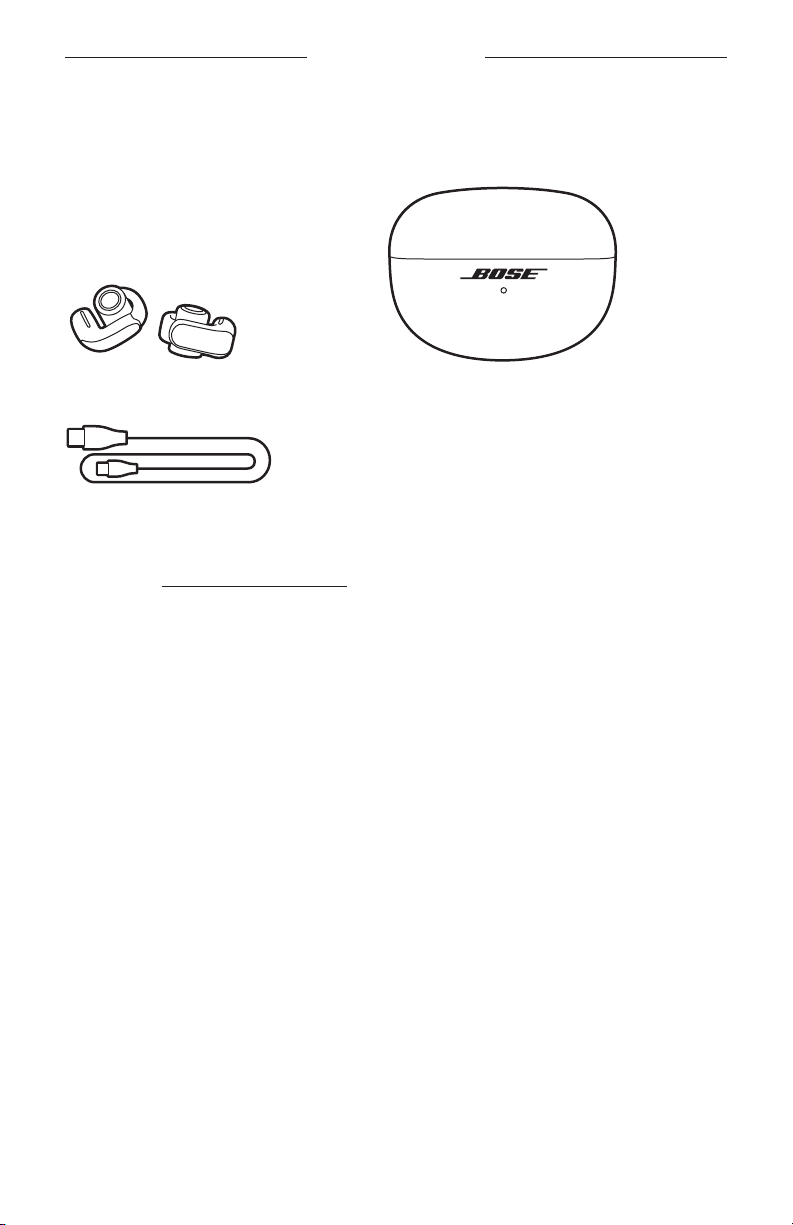
Confirm that the following parts are included:
Bose Ultra Open Earbuds Charging case
USB Type-C® to USB-A cable
NOTE: If any part of your product appears to be missing or damaged, don’t use it.
Visit support.Bose.com/UOEsupport.Bose.com/UOE for troubleshooting articles, videos, and product
repair or replacement.
11 | ENG
Page 12
BOSE MUSIC APP SETUP
The Bose Music app lets you set up and control the earbuds from any device, such as
a smartphone or tablet.
Using the app, you can manage Bluetooth connections, manage earbud seings,
adjust the audio, choose your voice prompt language, and get any future updates and
new features made available by Bose.
NOTE: If you have already created a Bose account for another Bose product,
see “Add the earbuds to an existing account.”
DOWNLOAD THE BOSE MUSIC APP
1. On your device, download the Bose Music app.
NOTE: If you’re located in Mainland China, download the Bose8 app.
BOSE MUSIC
2. Follow the app instructions.
ADD THE EARBUDS TO AN EXISTING ACCOUNT
To add your Bose Ultra Open Earbuds, open the Bose Music app, then add the
earbuds from the product list screen.
12 | ENG
Page 13
HOW TO WEAR
PUT ON THE EARBUDS
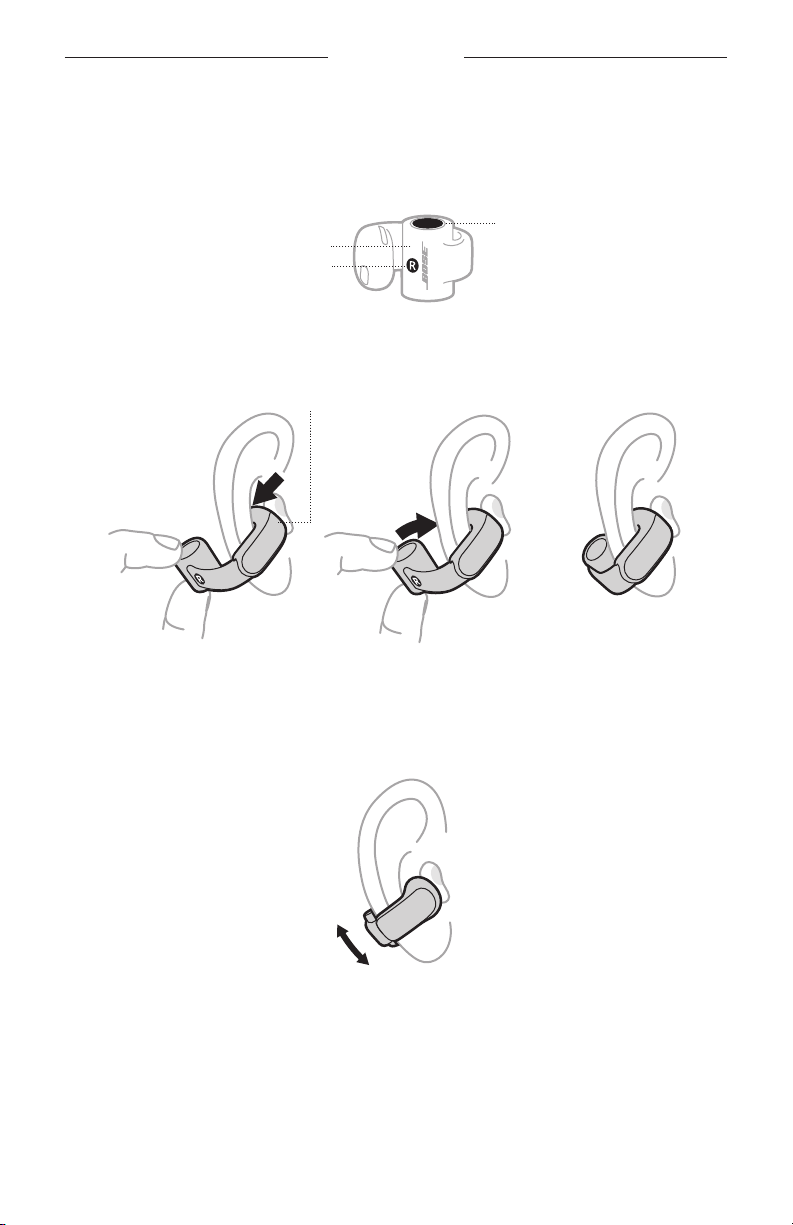
1. Hold the barrel-shaped part of the earbud so that the buon is on top and the
R (right) or L (left) marking is facing you.
Buon
Barrel
R/L marking
2. Hook the earbud speaker in your ear, then wrap the barrel around so it rests
behind your ear.
Speaker
Hook Wrap Rest
3. For best sound quality and performance, adjust the earbud so that it's at about a
45° angle on your ear. If it doesn't feel comfortable or secure, slide it up or down
slightly to find the best position for you.
4. Check the fit (see page 14).
5. Repeat steps 1 – 4 to put on the other earbud.
13 | ENG
Page 14
HOW TO WEAR
CHECK YOUR FIT
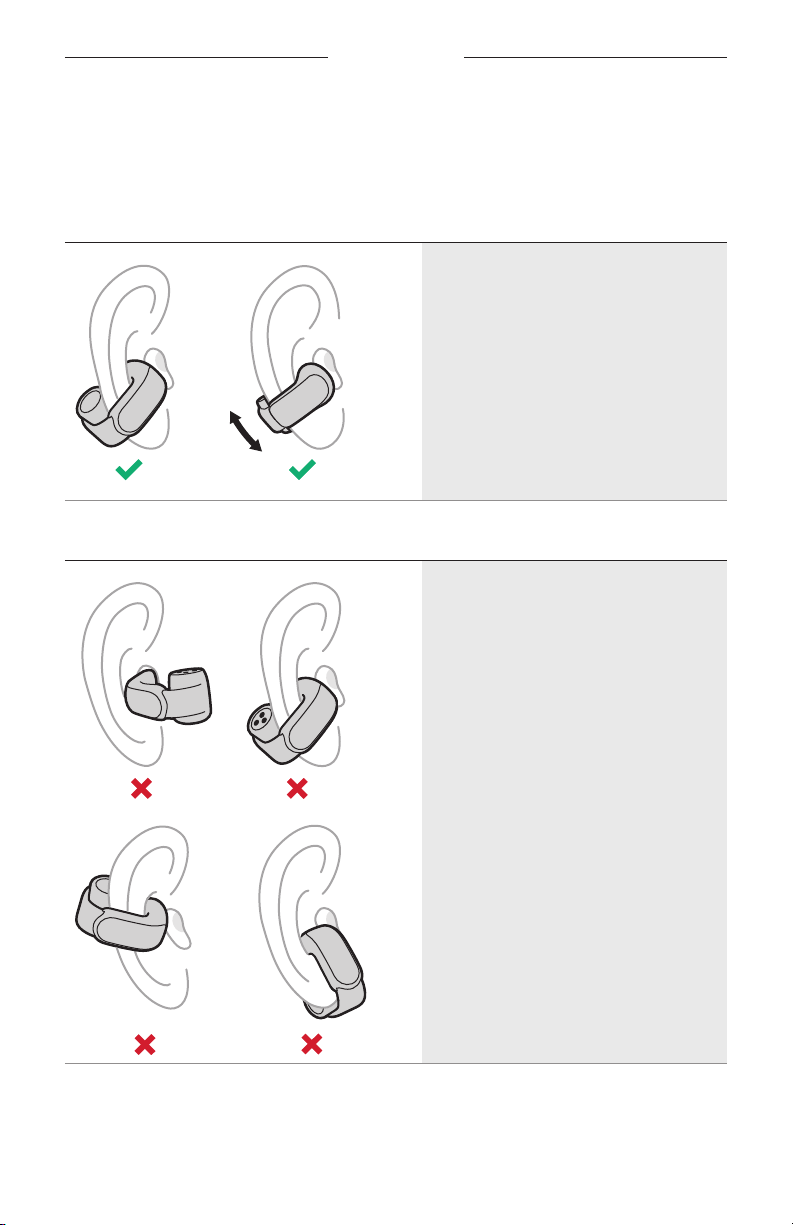
Move your head up and down and side to side to make sure the earbuds are stable
and comfortable. Then, check your fit using a mirror.
PROPER FIT
• The earbud barrel is behind your ear
and the buon is facing upwards.
• The earbud speaker is resting on the
inner surface of your ear and isn't
inserted into your ear canal.
• The earbud sits at about a 45° angle on
your ear, although you can slide it up or
down slightly for comfort.
• The earbud feels comfortable
IMPROPER FIT
and secure.
14 | ENG
• The earbud barrel is on the front
side of your ear or the buon is
facing downwards.
• The earbud speaker is inserted into
your ear canal instead of resting on the
inner surface of your ear.
• The earbud is angled downwards
towards your chin or mouth.
• The earbud feels uncomfortable,
pinches your ear, or feels loose
or unstable.
Page 15
POWER
POWER ON
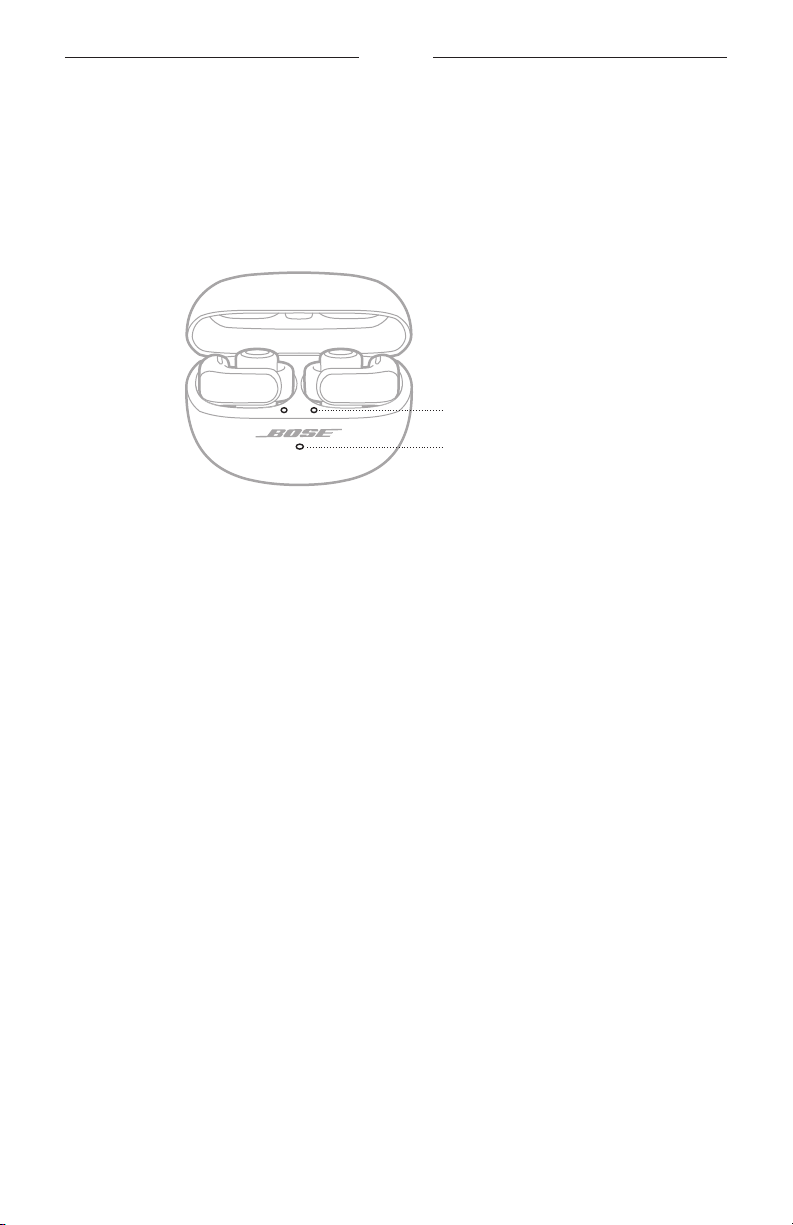
Open the charging case.
The earbuds power on. The earbud status lights glow according to the earbud
charging status (see page 30). The charging case status light glows according to
the case baery level (see page 31).
Earbud status lights
Charging case status light
NOTE: When you remove the earbuds from the charging case, close the case to help
preserve the baery life and keep the case free of debris.
15 | ENG
Page 16
POWER
POWER OFF
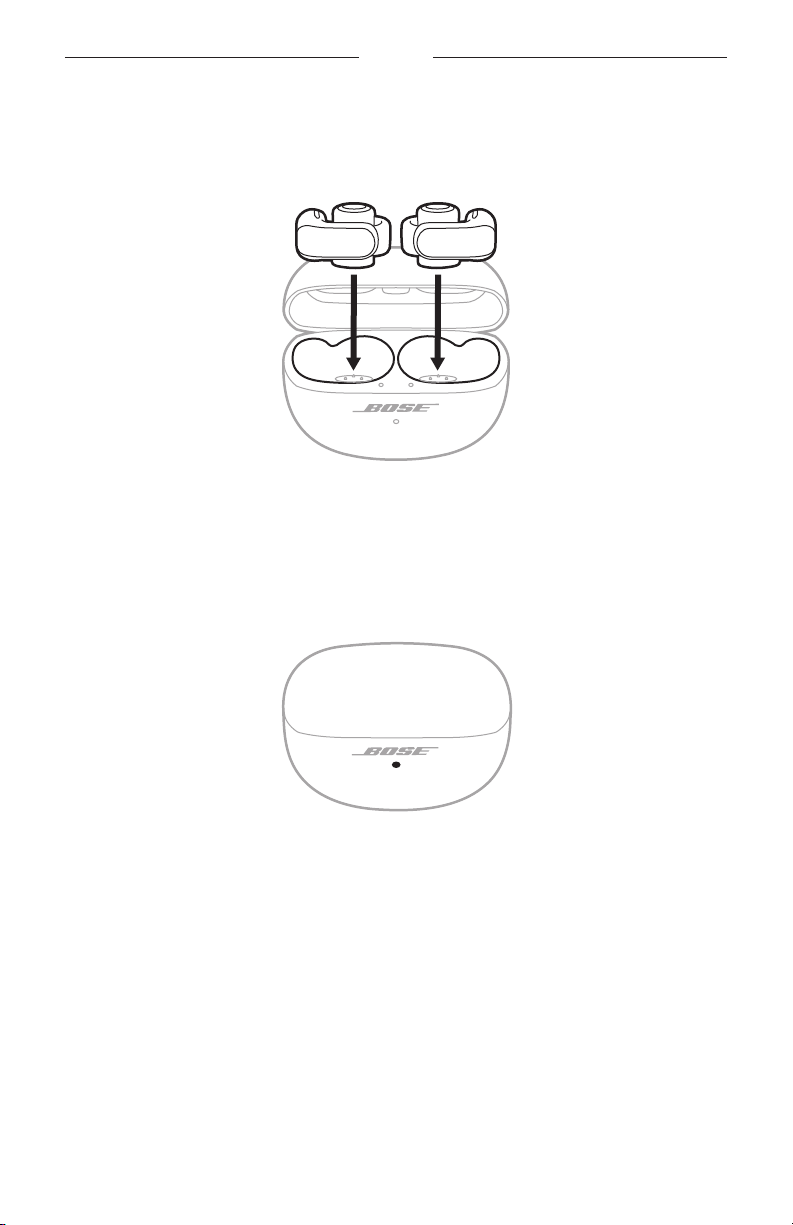
1. Place both earbuds in the charging case.
The earbuds disconnect from your device and power o. The earbud status lights
glow according to the earbud charging status (see page 31)
2. Close the case.
The charging case status light glows according to the case baery level
(see page 31).
16 | ENG
Page 17
EARBUD CONTROLS
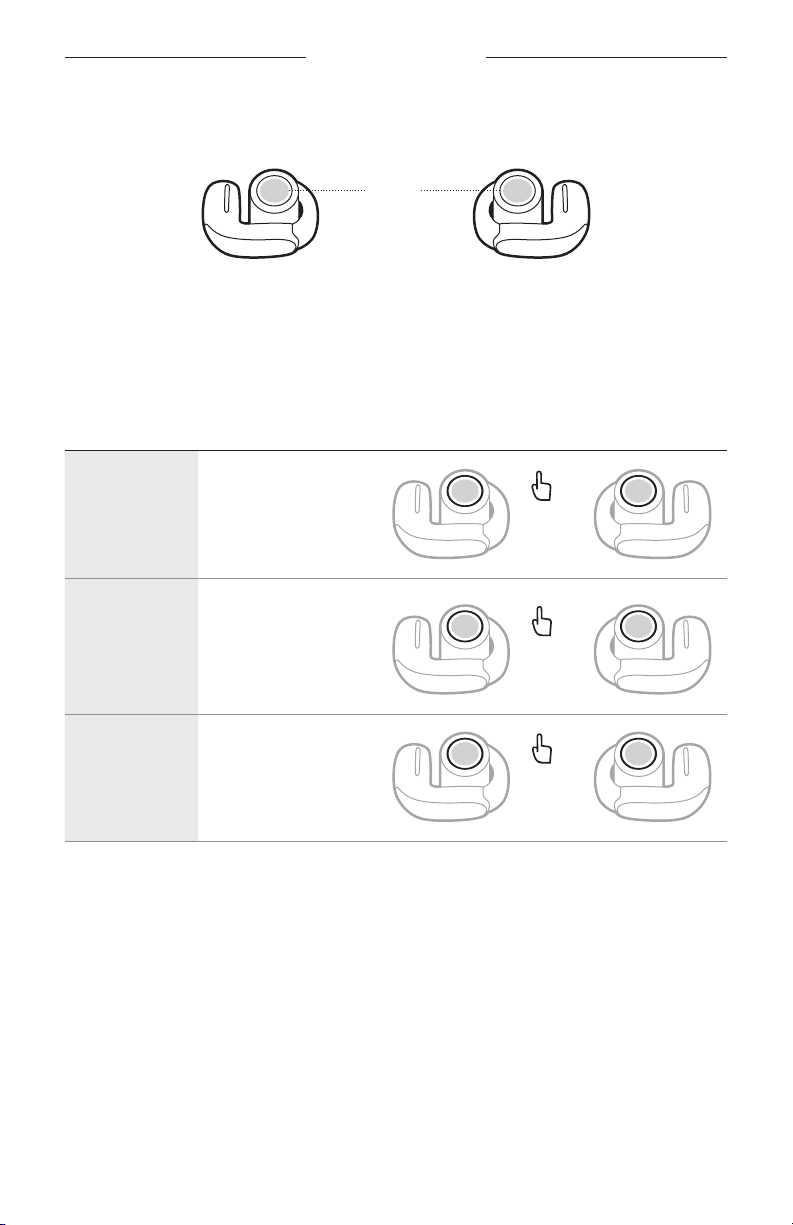
A buon is located on the top of the barrel-shaped part of each earbud. The buons
control media playback, volume, phone calls, and your shortcut (see page 20).
Buons
NOTE: You can use either earbud buon to control all functions except for volume.
When controlling volume, the left and right earbud buons have dierent
functions (see page 18).
MEDIA PLAYBACK
CONTROL WHAT TO DO
Play/Pause
Skip to the
next track
Skip to the
previous track
Press either
earbud buon.
Double-press either
earbud buon.
Triple-press either
earbud buon.
1x
2x
3x
17 | ENG
Page 18
EARBUD CONTROLS
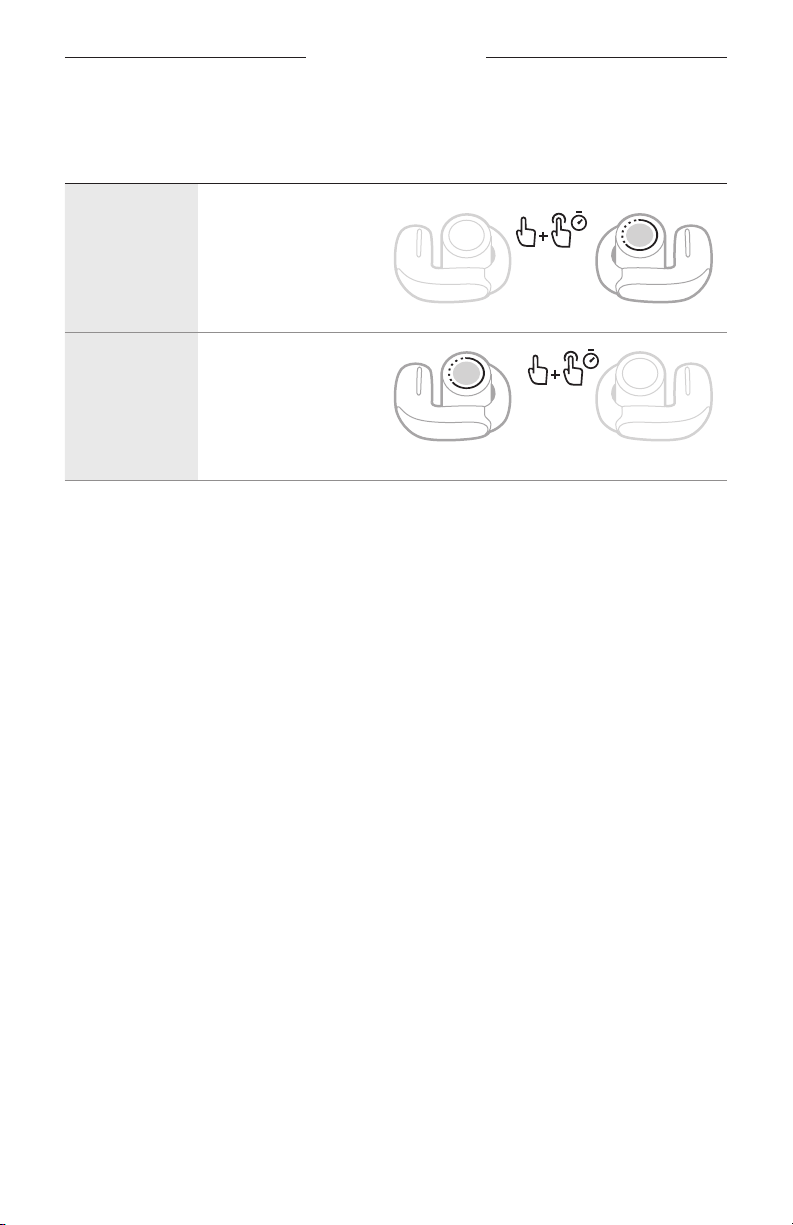
VOLUME FUNCTIONS
CONTROL WHAT TO DO
Double-press and hold
the right earbud buon.
Increase the
volume
Decrease the
volume
TIP: You can also increase or decrease the volume using the volume controls on your
device or in the Bose Music app.
The volume increases
as you hold the buon.
Release when you reach
the desired volume.
Double-press and hold
the left earbud buon.
The volume decreases
as you hold the buon.
Release when you reach
the desired volume.
18 | ENG
Page 19
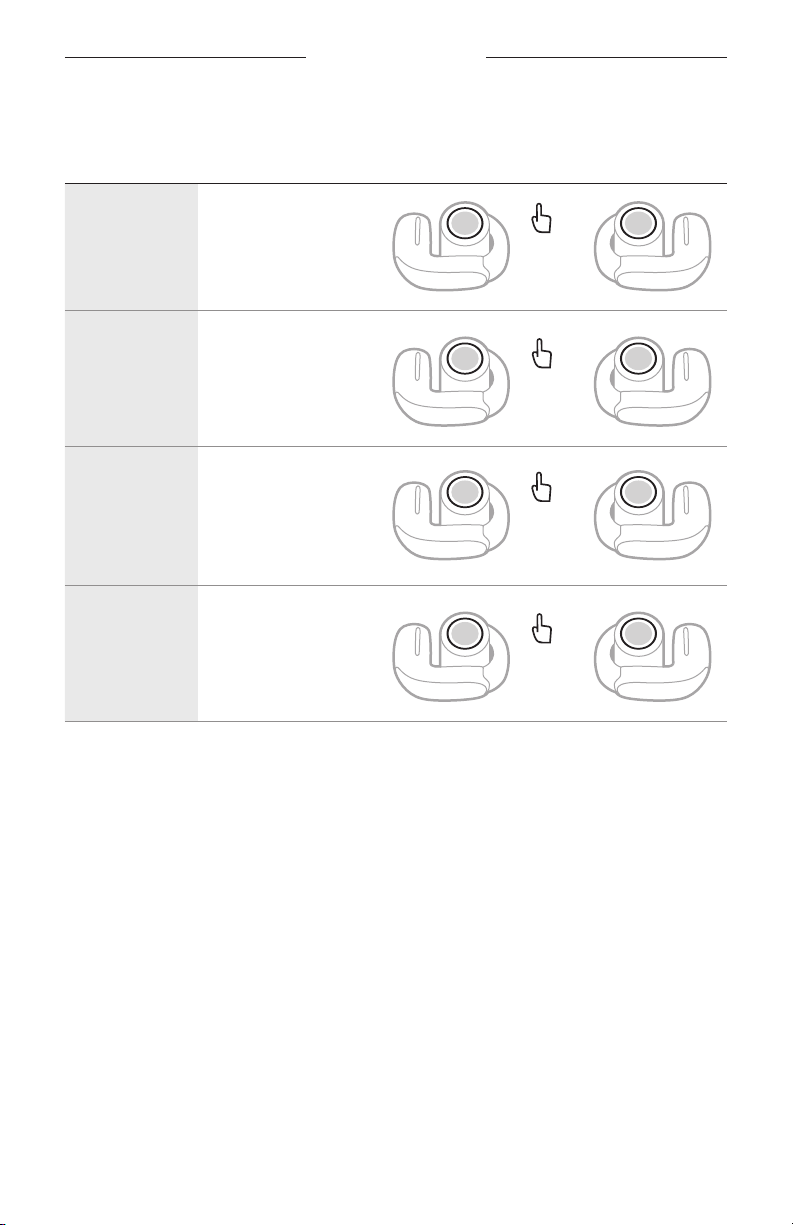
PHONE CALLS
CONTROL WHAT TO DO
EARBUD CONTROLS
1x
2x
1x
2x
Answer a call
End/Decline
a call
Answer a
second
incoming call
and put the
current call
on hold
Decline a
second
incoming call
and stay on
current call
Press either
earbud buon.
Double-press either
earbud buon.
Press either
earbud buon.
Double-press either
earbud buon.
Call notifications
A voice prompt announces incoming callers and call status.
To stop call notifications, disable voice prompts using the Bose Music app. You can
access this option from the Seings menu.
ADJUST THE AUDIO EQ
To adjust the bass, midrange, and treble, use the Bose Music app. You can access
these options from the product control screen.
NOTE: At high volumes, the eects of these adjustments may be reduced to
avoid distortion.
19 | ENG
Page 20
SHORTCUTS
A shortcut enables you to quickly and easily access one of the following functions:
• Cycle through modes (see page 23)
• Cycle through immersive audio seings (see page 21)
• Reconnect to a device (see page 34)
• Use your device voice control (see page 25)
NOTE: By default, cycling through modes is set as your shortcut on both earbuds.
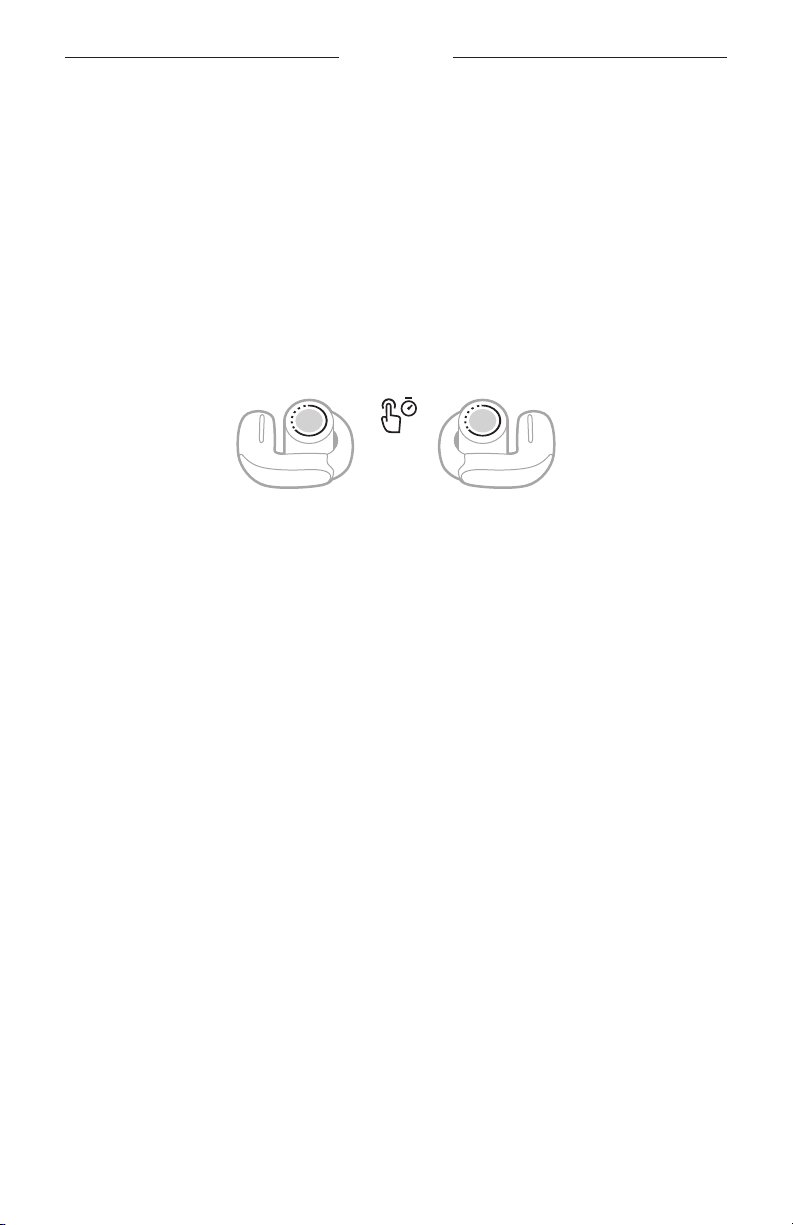
USE YOUR SHORTCUT
Press and hold either earbud buon.
CHANGE OR DISABLE YOUR SHORTCUT
To change or disable a shortcut or to assign a dierent shortcut to each earbud,
use the Bose Music app. To access this option, tap Shortcut on the product
control screen.
NOTE: If you assign a dierent shortcut to each earbud, you must press and hold the
appropriate earbud buon. If you place one of the earbuds in the case, you
can only use the shortcut assigned to the other earbud.
20 | ENG
Page 21
IMMERSIVE AUDIO
Immersive audio takes what you're hearing out of your head and places it in front of
you—like you're always in the acoustic sweet spot. It feels like the sound is coming
from outside the earbuds, resulting in a more natural listening experience. Immersive
audio works on any streaming content from any source, taking it to new heights with
beer sound clarity and richer sound quality.
NOTE: When you make or receive a phone call, immersive audio is temporarily set to
O (see page 22).
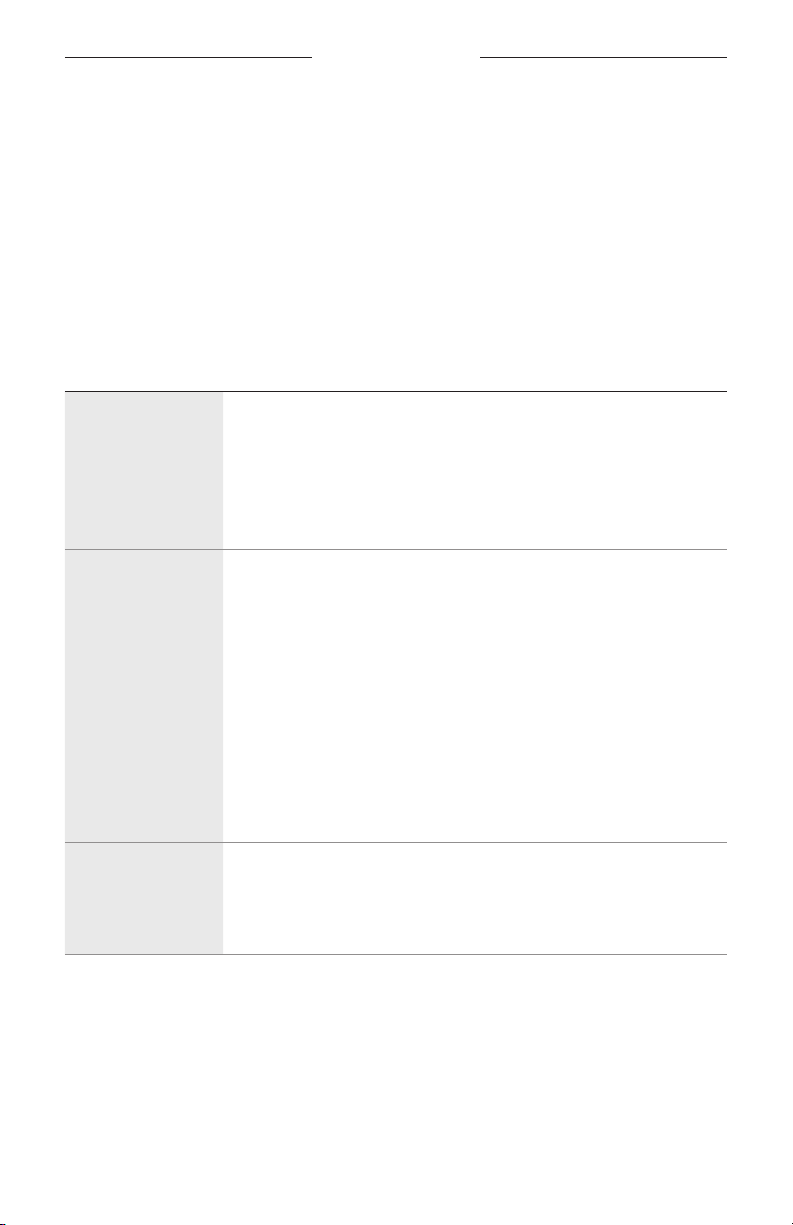
IMMERSIVE AUDIO SETTINGS
SETTING DESCRIPTION WHEN TO USE
Motion
Still
Off
Audio sounds like it's coming from two
stereo speakers in front of you that follow
the movements of your head.
NOTE: This seing is used by default in
Immersion mode.
Audio sounds like it's coming from two
stereo speakers in front of you that stay
where they are when you move your head.
NOTES:
• A few seconds after you stop moving
your head, the speakers recenter on
your position.
• To access this seing, use the Bose
Music app to change the immersive audio
seing, create a custom mode (see
page 23), or set a shortcut to cycle
through immersive audio seings (see
page 22).
Audio sounds like it's coming from
your earbuds.
NOTE: This seing is used by default in
Stereo mode.
Use for the most
consistent experience.
Best for when you're
doing activities
that require you to
frequently turn your
head or look down.
Use for the most
realistic and powerful
experience. Best for
when you're stationary.
Use when you want
a classic listening
experience or want to
conserve baery life.
21 | ENG
Page 22
IMMERSIVE AUDIO
CHANGE THE IMMERSIVE AUDIO SETTING
You can change the immersive audio seing by changing the mode or seing a
shortcut to cycle through immersive audio seings.
TIP: You can also change the immersive audio seing using the Bose Music app. You
can access this option from the product control screen.
Change the mode
For information about changing the mode, see page 24.
NOTE: You can also create a custom mode with your preferred immersive audio
seing (see page 23).
Use your shortcut
You can set a shortcut to cycle through immersive audio seings. This temporarily
customizes the current mode until you power the earbuds o or change the mode.
NOTE: To change the immersive audio seing using the earbuds, it must be set as a
shortcut (see page 20).
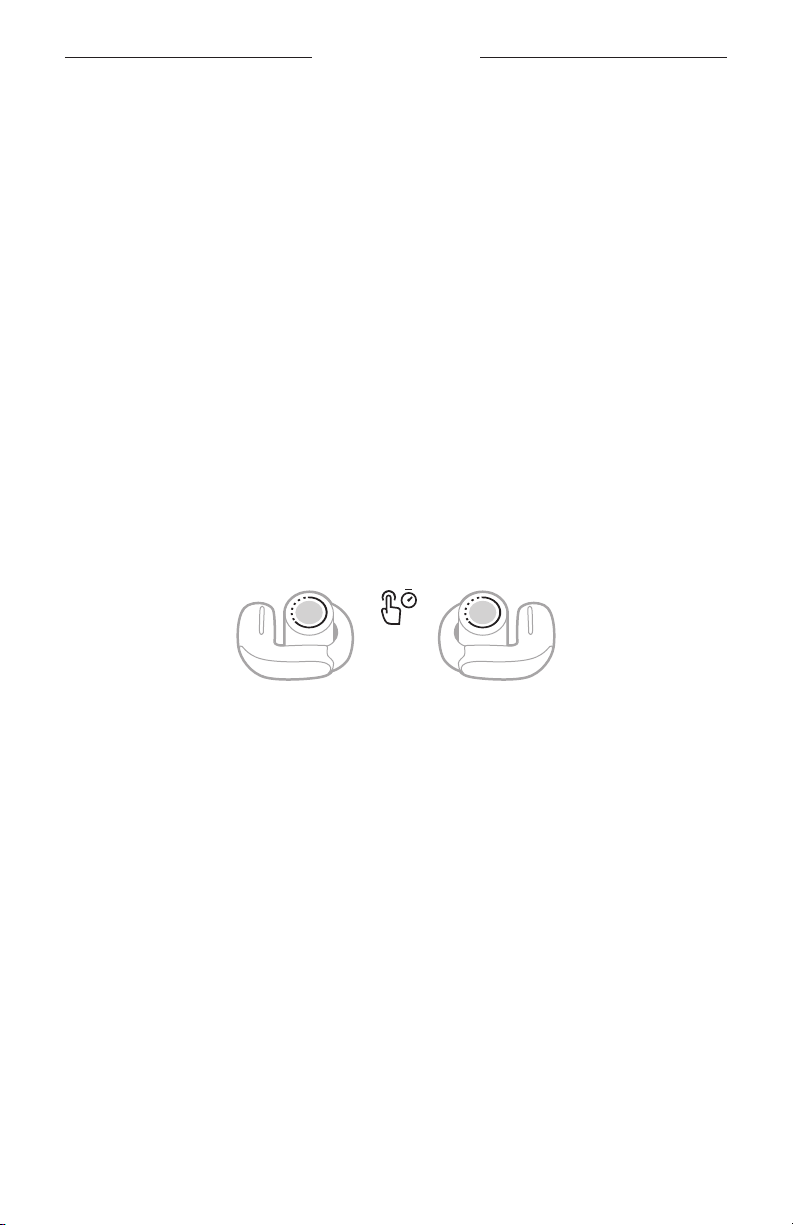
1. Press and hold the earbud buon assigned to this shortcut.
A voice prompt announces each immersive audio seing in a loop.
2. When you hear the name of your preferred seing, release the buon.
IMMERSIVE AUDIO WHILE ON A CALL
When you make or receive a phone call, immersive audio is temporarily set to O.
When you end the call, the earbuds return to the previous immersive audio seing.
CALIBRATE IMMERSIVE AUDIO
If immersive audio doesn't sound right or feels too close to you, you can calibrate it to
beer match the position of the earbuds on your ears. The calibration is saved to the
earbuds and used anytime you enable immersive audio in the future.
To calibrate immersive audio, use the Bose Music app. You can access this option
from the Seings menu.
22 | ENG
Page 23
LISTENING MODES
Listening modes are preset audio seings that you can switch between based on your
listening preferences and environment. By default, they consist of commonly-used
immersive audio seings.
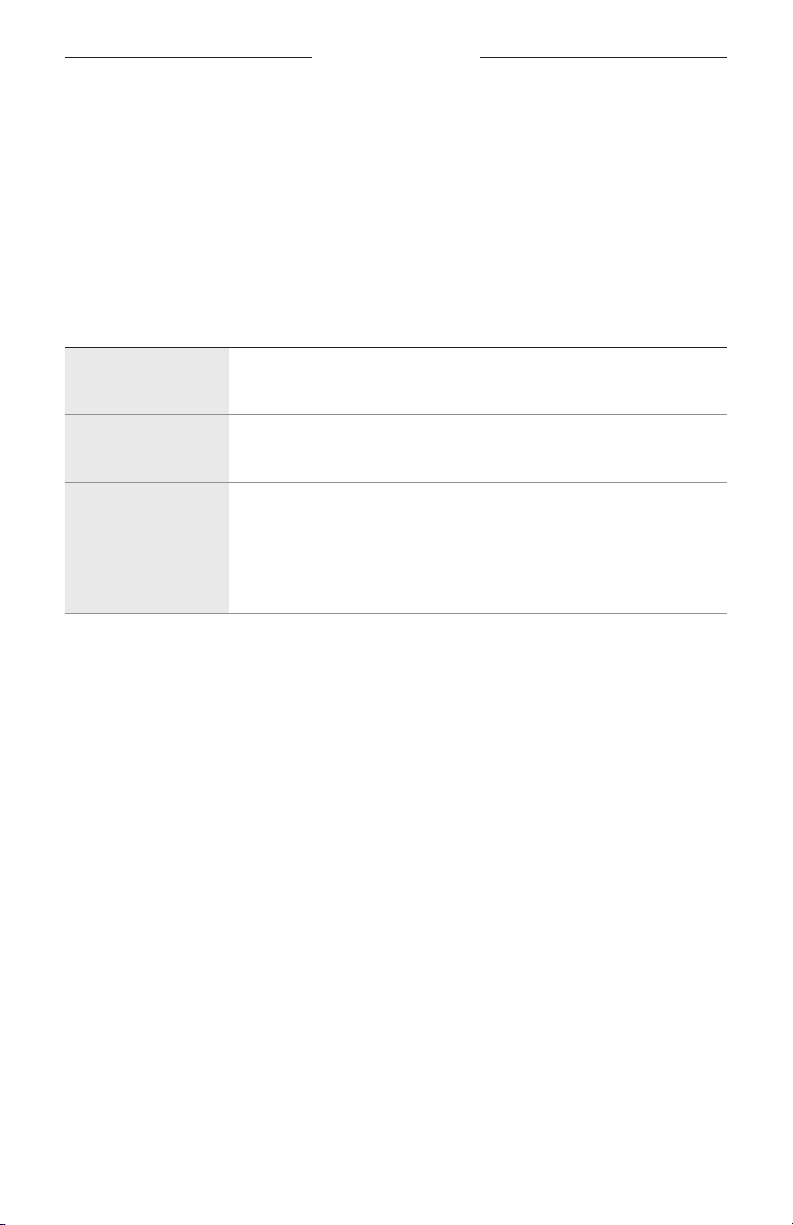
You can choose between two pre-configured modes — Stereo and Immersion — or
create up to eight of your own custom modes.
MODES
MODE DESCRIPTION
Stereo
Immersion
Custom
Audio plays in Bose-optimized stereo audio. Allows you to enjoy a
classic listening experience and conserve baery life.
Audio plays with immersive audio set to Motion. Allows you to
immerse yourself in lifelike audio.
Custom immersive audio seings based on your listening preferences
and environment.
NOTE: You can create up to eight custom modes using the Bose
Music app. To access this option, tap Modes on the product
control screen.
NOTES:
• By default, the earbuds power on with the last mode used. To disable this seing,
use the Bose Music app. You can access this option from the Seings menu.
• For information about immersive audio seings, see page 21.
23 | ENG
Page 24
LISTENING MODES
CHANGE THE MODE
NOTE: To change the mode using the earbuds, it must be set as a shortcut
(see page 20). By default, cycling through modes is set as your shortcut on
both earbuds.
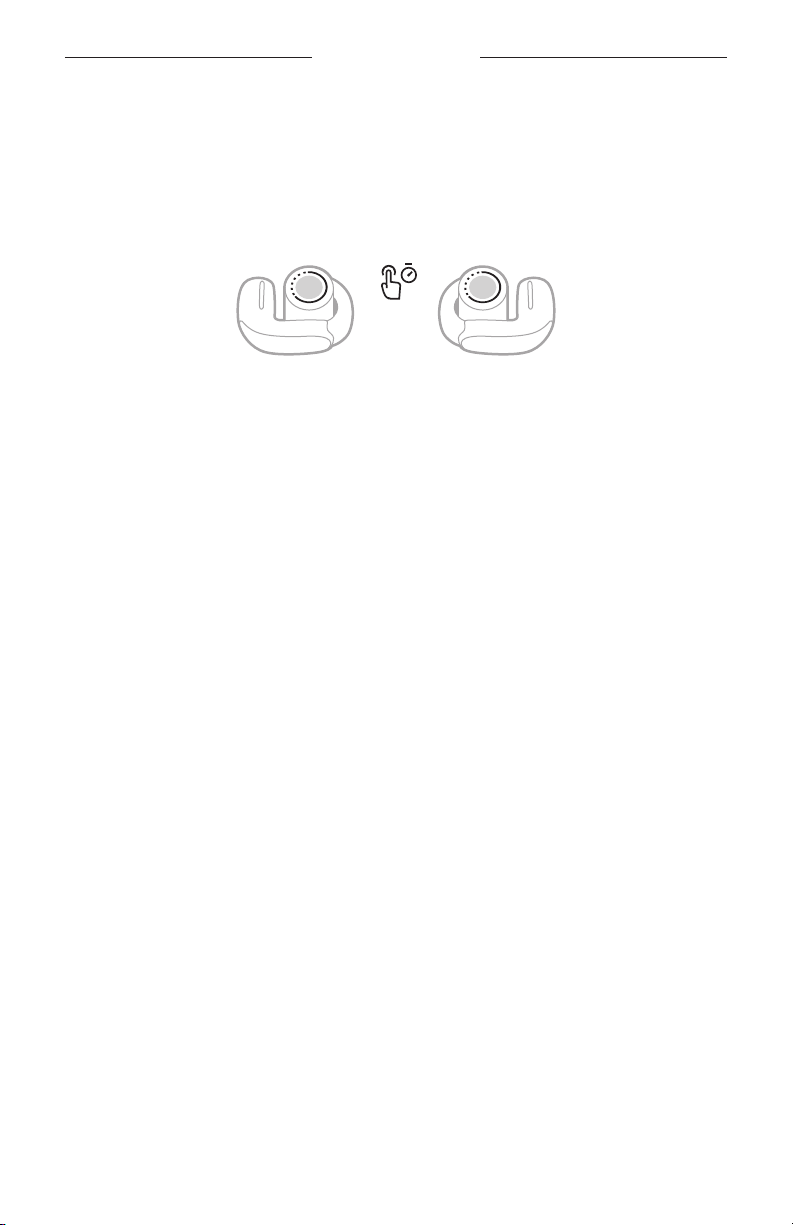
1. To cycle through modes, press and hold either earbud buon.
A voice prompt announces each mode in a loop.
2. When you hear the name of your preferred mode, release the buon.
TIP: You can also change the mode using the Bose Music app. To access this option,
tap Modes on the product control screen.
Add or remove modes from the earbuds
To access modes on the earbuds, they must be set as favorites in the Bose Music app.
By default, Stereo and Immersion modes are set as favorites.
To add or remove modes from the earbuds, tap Modes on the product control screen
and customize which modes are set as favorites.
24 | ENG
Page 25
DEVICE VOICE CONTROL
You can set a shortcut to access your device voice control using the earbuds. The
microphones on the earbuds act as an extension of the microphone on
your device.
NOTE: To access device voice control using the earbuds, it must be set as a shortcut
(see page 20).
DEVICE VOICE CONTROL FUNCTIONS
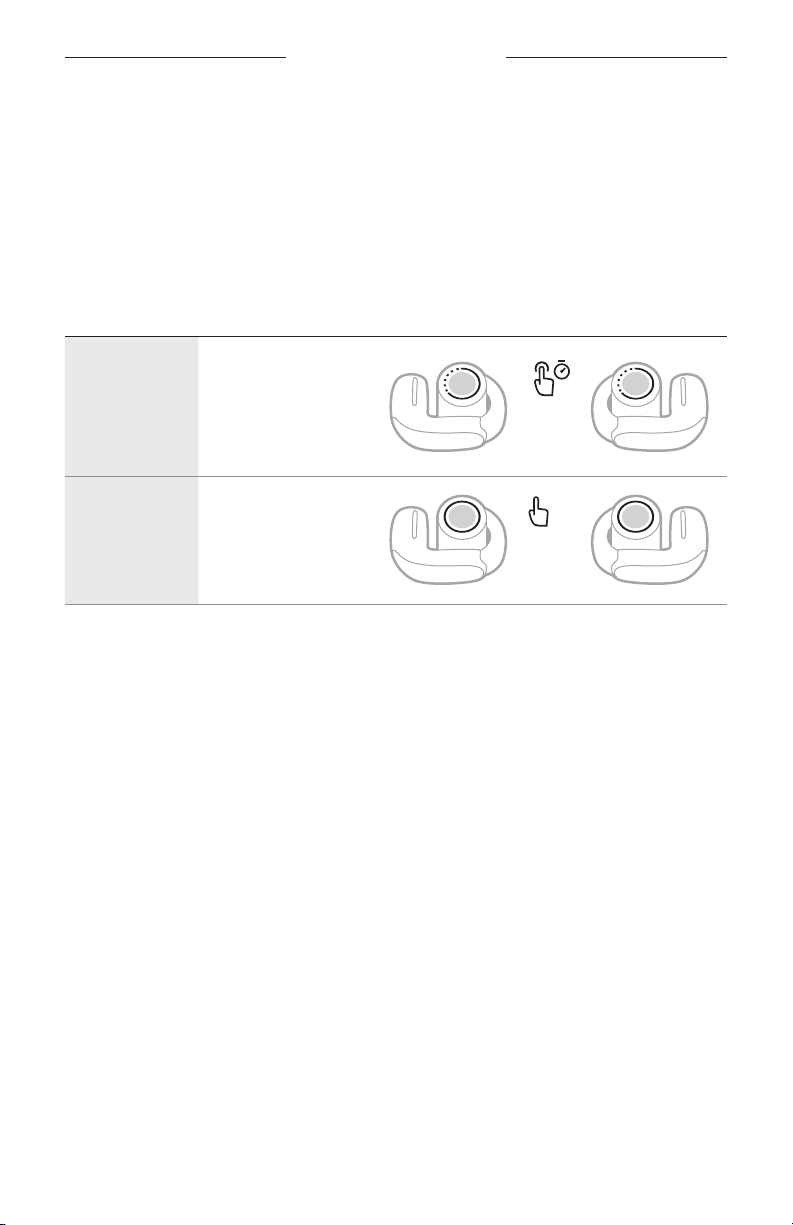
CONTROL WHAT TO DO
Press and hold
the earbud buon
Access device
voice control
assigned to this
shortcut until you hear
a tone. Release, then
say your request.
Stop device
voice control
Press the earbud
buon assigned to
this shortcut.
1x
25 | ENG
Page 26
BATTERY
CHARGE THE EARBUDS
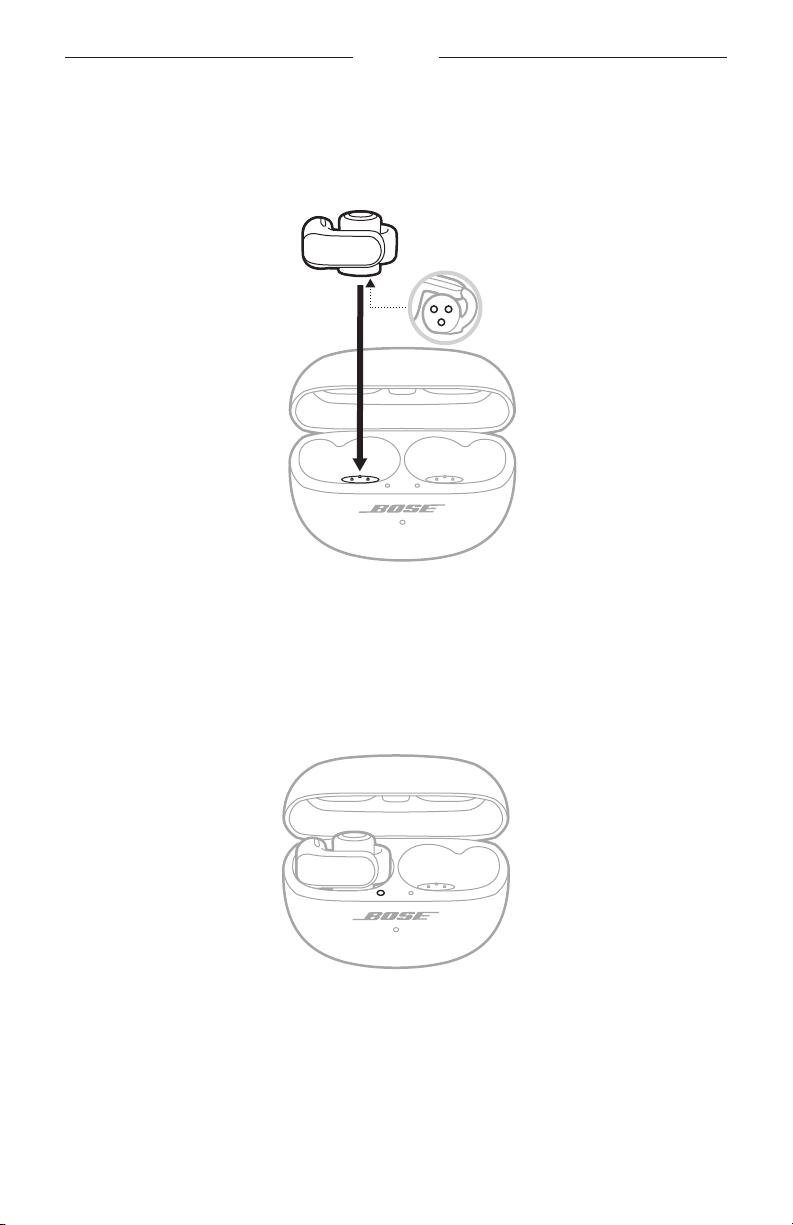
1. Align the charging contacts on the left earbud with the charging pins on the left
side of the charging case.
Charging
contacts
NOTE: Before charging, make sure the earbuds are at room temperature, between
46° F (8° C) and 102° F (39° C).
2. Place the earbud in the case until it magnetically snaps into place.
The left earbud status light glows according to the charging status
(see page 30).
3. Repeat steps 1 – 2 for the right earbud.
NOTE: The earbuds charge if the case is open or closed.
26 | ENG
Page 27
BATTERY
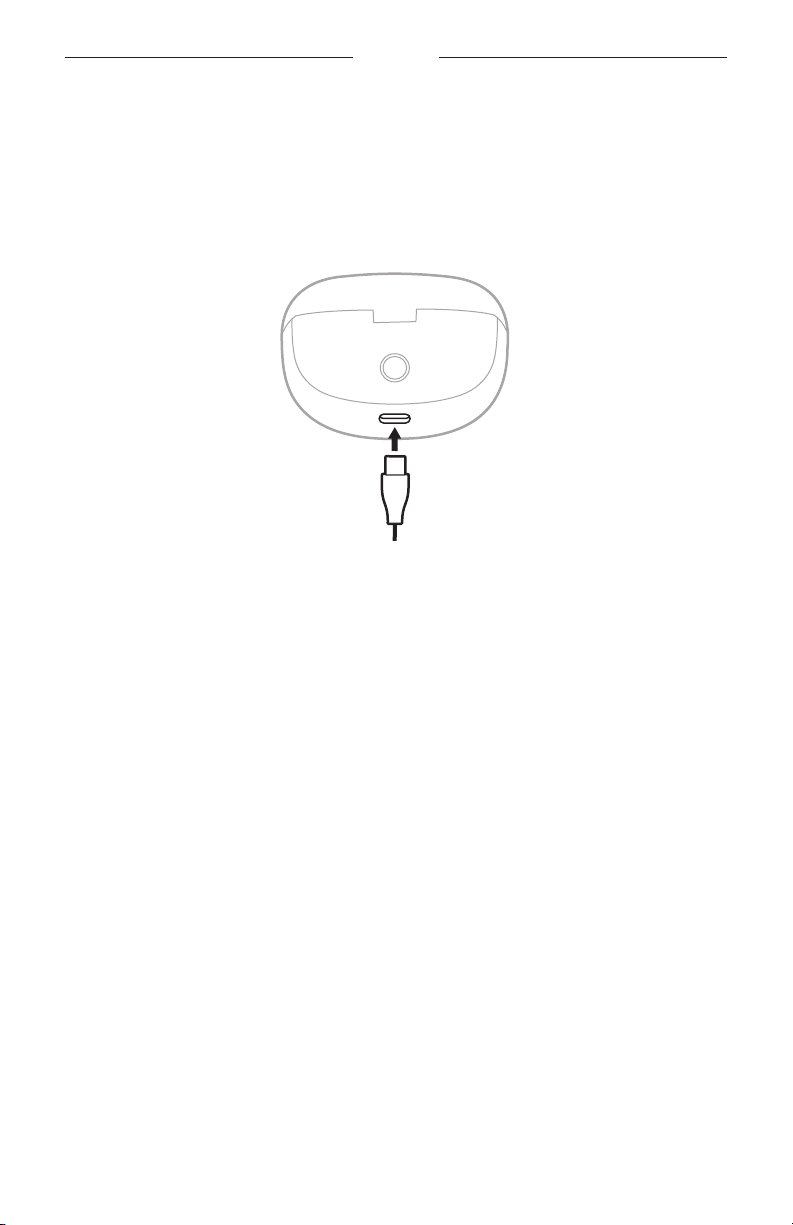
CHARGE THE CHARGING CASE
CAUTION: Use this product only with an agency-approved LPS power supply that
meets local regulatory requirements (e.g., UL, CSA, VDE, CCC).
1. Connect the small end of the USB cable to the USB-C® port on the boom of the
charging case.
2. Connect the other end to a USB-A wall charger (not provided) or computer.
The charging case status light slowly blinks amber (see page 31).
NOTE: Before charging, be sure the case is at room temperature,
between 46° F (8° C) and 102° F (39° C).
27 | ENG
Page 28
BATTERY
CHECK THE EARBUD BATTERY LEVEL
While using the earbuds
• A few seconds after you remove the earbuds from the charging case, a voice
prompt announces the earbud baery level.
• Use the Bose Music app. The earbud baery level is displayed on the product
control screen.
NOTE: If one earbud has a lower baery level than the other, the voice prompt
announces the lower baery level. If the baery is low, you hear “Baery low.”
While charging the earbuds
When you place the earbuds into the charging case, the earbud status lights glow
according to the earbud charging status (see page 30).
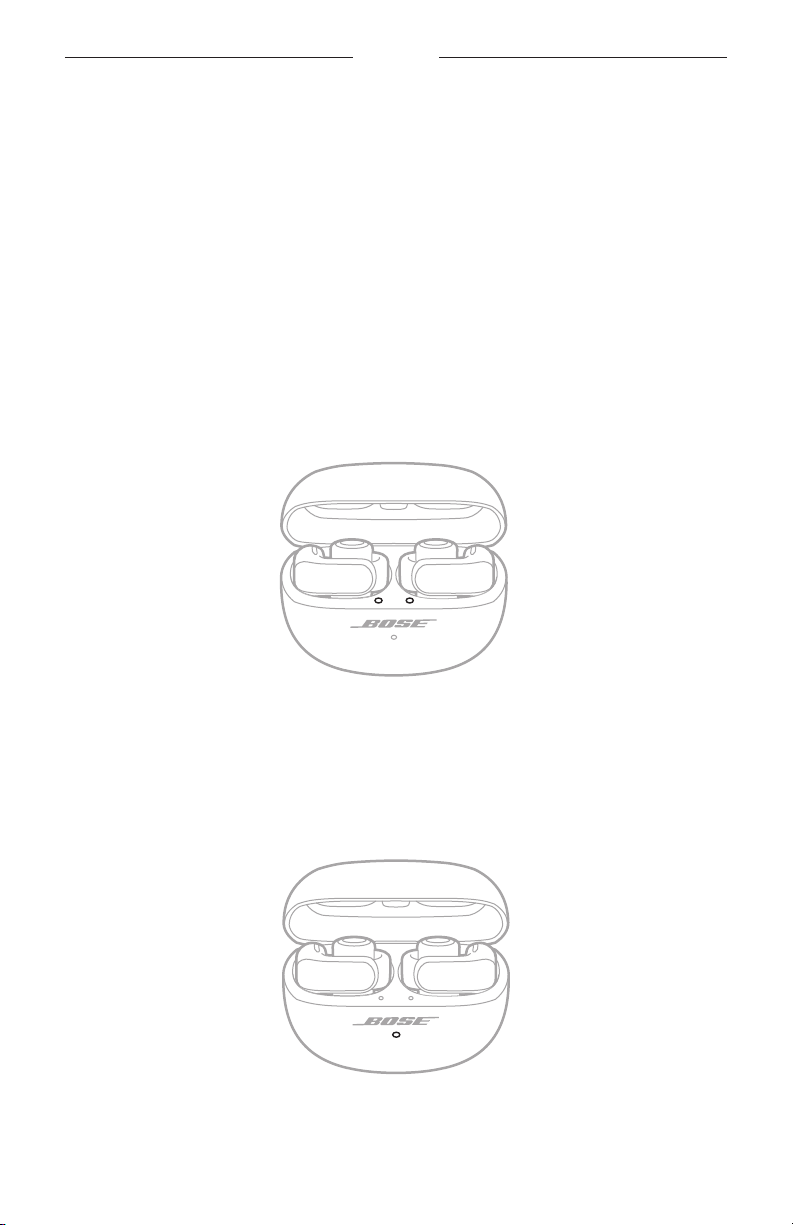
CHECK THE CHARGING CASE BATTERY LEVEL
Open the charging case.
The charging case status light glows according to the case baery level
(see page 31).
28 | ENG
Page 29

BATTERY
CHARGING TIME
COMPONENT CHARGING TIME
Earbuds Up to 1 hour
1
Charging case Up to 3 hours
NOTES:
• When the earbud baery level is low, a 10-minute charge with the case closed
powers the earbuds for up to 2 hours.
• When the earbuds are fully charged, they can play audio for up to 7.5 hours with
immersive audio set to O (up to 4.5 hours with immersive audio set to On).
2
3
• When the case is fully charged, it can provide up to an additional 19.5 hours of
audio playback with immersive audio set to O (up to an additional 12 hours with
immersive audio set to On).4
• When both the earbuds and case are fully charged, the total audio playback time
is up to 27 hours with immersive audio set to O (up to 16.5 hours with immersive
audio set to On).
• When fully charged, the earbuds can stay connected to a device while not playing
audio for up to 48 hours.
5
6
• When the earbuds are inside of the case, the case charging time varies.
1 Testing conducted by Bose in October 2023 using production-representative Bose Ultra Open Earbuds and Bose Ultra Open
Earbuds charging case. Quick charge testing consisted of inserting earbuds with baery depleted (to the point of no audio
playback) into a fully charged case and charging earbuds for 10 minutes, then resuming Bluetooth A2DP audio playback with
volume set to a loudness of 75 dBA, 3-band EQ set to zero, and Immersive Audio o, resulting in up to 2 hours of playback time
before baery depletion. Time to achieve fully charged earbuds was determined by inserting earbuds with baery depleted
(to the point of no audio playback) into a fully charged case and charging earbuds to 100% baery charge.
2 See 1.
3 Testing conducted by Bose in October 2023 using production-representative Bose Ultra Open Earbuds playing IEC 60268-1
pink noise using A2DP Bluetooth audio streaming at an RSSI of 75 dBm. Volume was set to a playback loudness of 75 dBA
and 3-band EQ was set to zero. With Immersive Audio o, playback time was up to 7.5 hours before baery depletion. With
Immersive Audio on, playback time was up to 4.5 hours before baery depletion. Baery life varies based on seings
and usage.
4 Testing conducted by Bose in October 2023 by inserting production-representative Bose Ultra Open Earbuds with baery
depleted (to the point of no audio playback) into a fully charged Bose Ultra Open Earbuds charging case and charging earbuds
to 100% (or until the case baery was depleted). Then, the earbuds played IEC 60268-1 pink noise using A2DP Bluetooth audio
streaming at an RSSI of 75 dBm until baery depletion. Volume was set to a playback loudness of 75 dBA and 3-band EQ
was set to zero. Testing repeated until the case baery was depleted. Additional earbud playback time added through case
charging was 19.5 hours with Immersive Audio o and 12 hours with Immersive Audio on.
5 See 4.
6 Testing conducted by Bose in October 2023 by removing fully charged production-representative Bose Ultra Open Earbuds
from a Bose Ultra Open Earbuds charging case, connecting to a phone with no content playing, and maintaining connection
until earbud baery depletion.
29 | ENG
Page 30
EARBUD AND CHARGING CASE STATUS
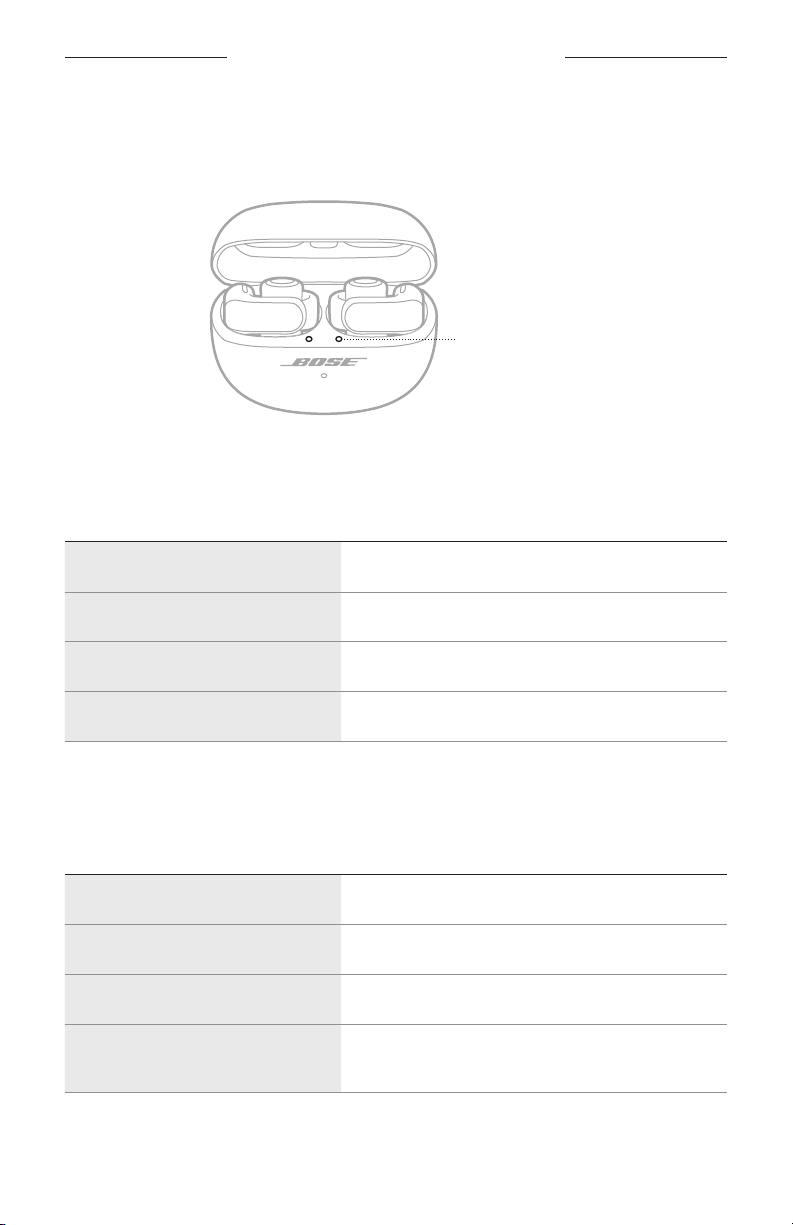
EARBUD STATUS LIGHTS
The earbud status lights are located on the inside surface of the charging case next to
each earbud.
Earbud status lights
Bluetooth status
Shows the Bluetooth connection status.
LIGHT ACTIVITY SYSTEM STATE
Slowly blinks blue Ready to connect
Quickly blinks blue Connecting
Solid blue (5 seconds) Connected
Blinks white 2 times Device list cleared
Battery, update, and error status
Shows the earbud baery, update, and error status.
LIGHT ACTIVITY SYSTEM STATE
Glows solid white (10 minutes) Fully charged
Slowly blinks amber (10 minutes) Charging
Blinks white Determining earbud baery status
Blinks white 2 times, slowly blinks
blue, and turns off
30 | ENG
Reboot complete
Page 31
EARBUD AND CHARGING CASE STATUS
LIGHT ACTIVITY SYSTEM STATE
Blinks white 3 times (repeated) Updating software
Blinks amber (3 seconds) Restoring factory seings
Blinks amber and white Error – contact Bose customer service
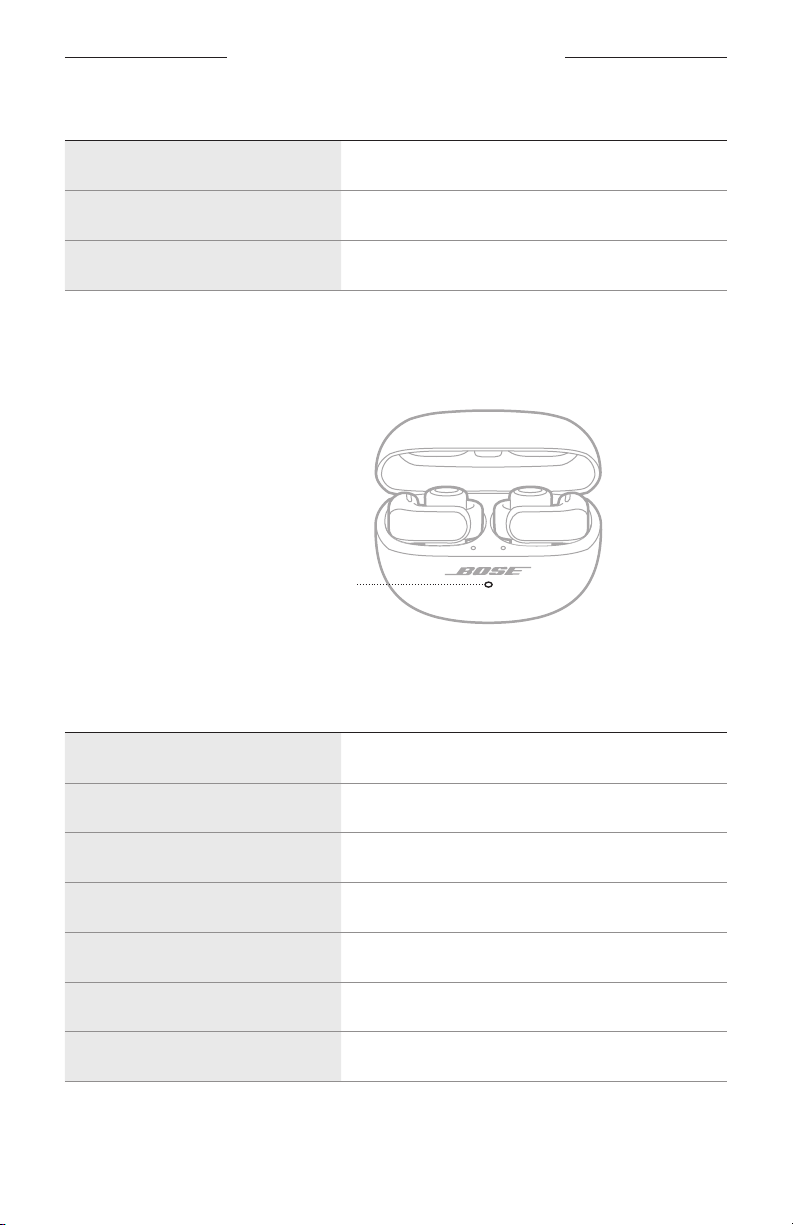
CHARGING CASE STATUS LIGHT
The charging case status light is located on the front of the charging case.
Charging case status light
Battery, update, and error status
Shows the charging case baery, update, and error status.
LIGHT ACTIVITY SYSTEM STATE
Solid white Fully charged (100%) and plugged in
Solid white (5 seconds) Charged (34% – 99%)
Solid amber (5 seconds) Low charge (10% – 33%)
Blinks amber 2 times Need to charge (less than 10%)
Slowly blinks amber Charging and plugged in
Blinks white 3 times (repeated) Updating software
Blinks amber and white Error – contact Bose customer service
31 | ENG
Page 32
BLUETOOTH CONNECTIONS
You can connect the earbuds to your device using the Bose Music app, the Bluetooth
menu on your device, or Fast Pair (Android devices only).
You can store up to six devices in the earbud device list. You can connect and play
audio from only one device at a time.
NOTES:
• For the best experience, use the Bose Music app to set up and connect your device
(see page 12).
• For information about connecting using Fast Pair, see page 36.
CONNECT USING THE BOSE MUSIC APP
To connect the earbuds and manage Bluetooth seings using the Bose Music app,
see page 12.
CONNECT USING THE BLUETOOTH MENU ON YOUR DEVICE
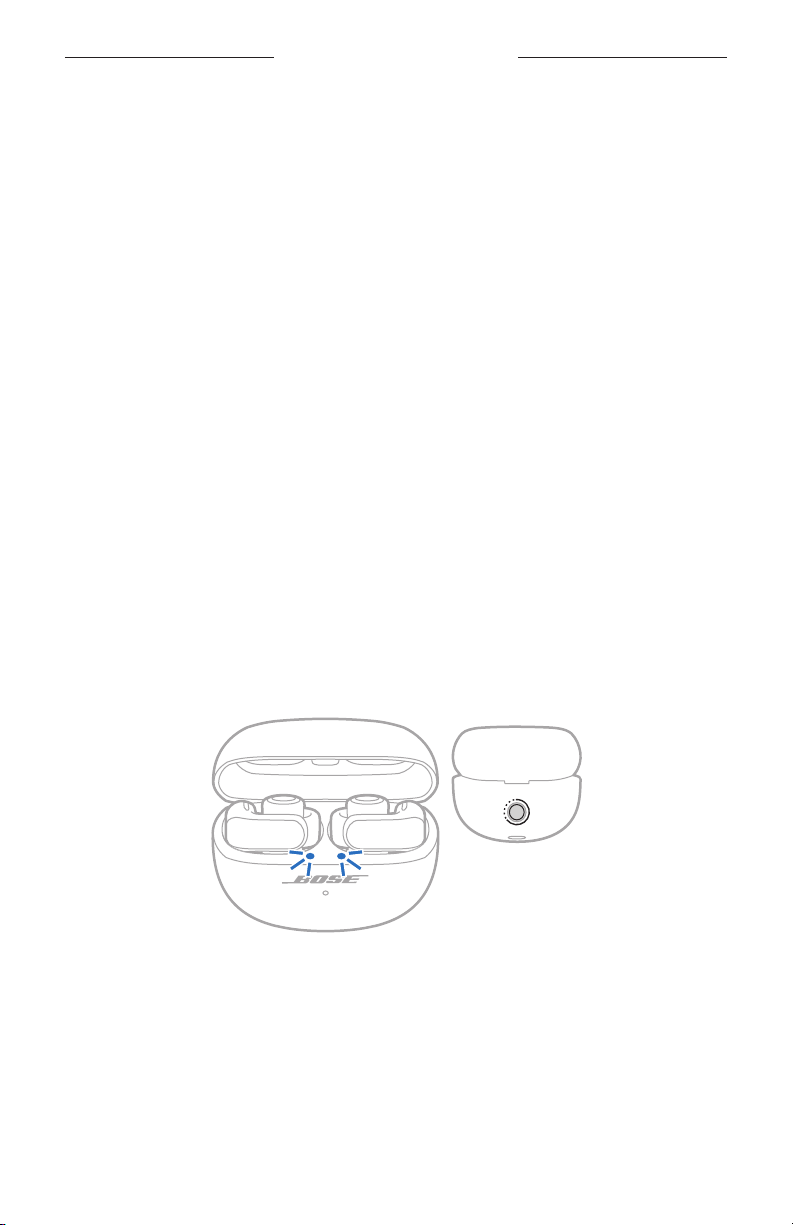
1. With the earbuds in the charging case and the case open, press and hold the
buon on the back of the case until the earbud status lights slowly blink blue.
NOTE: Make sure both earbuds are in the case and the case is open.
TIP: You can also make the earbuds ready to connect even if you don't have the
case nearby. To do so, use the Bose Music app to set a shortcut to Switch
Devices (see page 20). Then, press and hold the earbud buon assigned
to that shortcut until you hear "Ready to connect."
32 | ENG
Page 33
BLUETOOTH CONNECTIONS
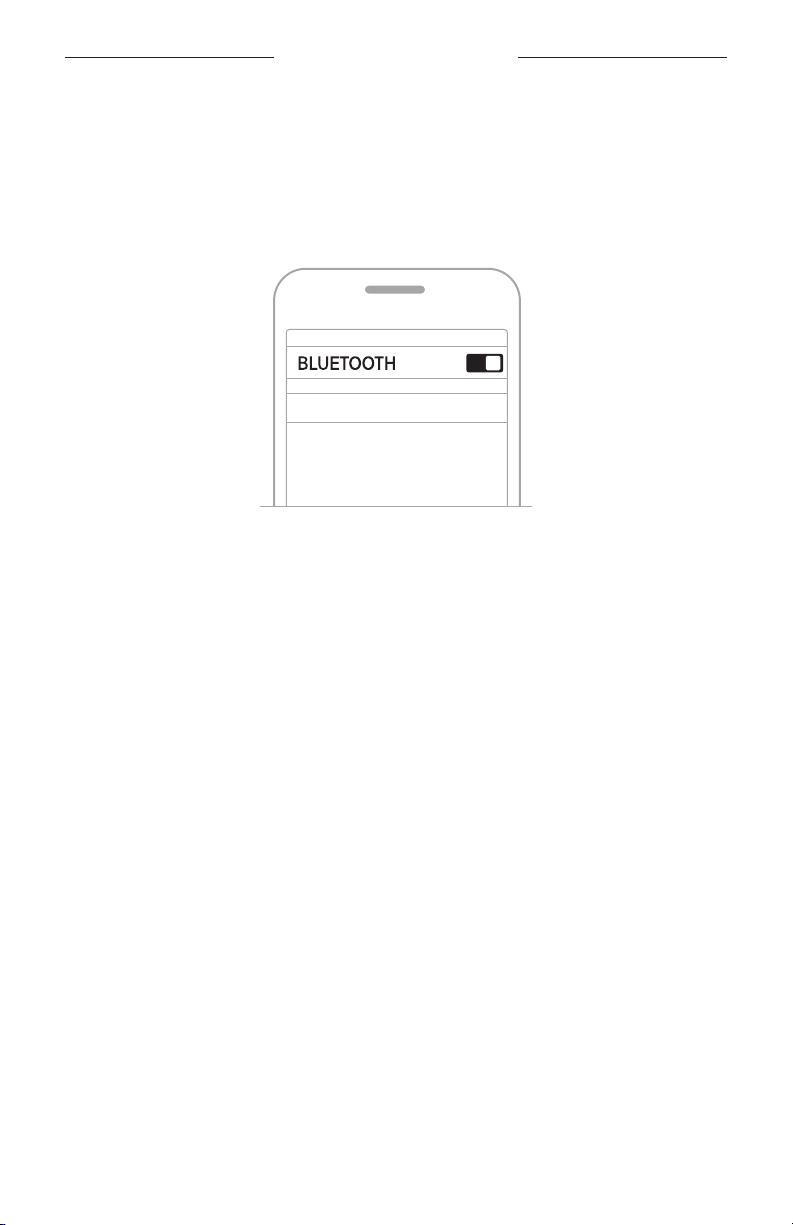
2. On your device, enable the Bluetooth feature.
NOTE: The Bluetooth feature is usually found in the Seings menu.
3. Select the earbuds from the device list.
NOTE: Look for the name you entered for your earbuds in the Bose Music app. If
you didn’t name your earbuds, the default name appears.
Bose Ultra Open Earbuds
The earbuds name appears in the device list. The earbud status lights glow solid
blue (see page 30).
DISCONNECT A DEVICE
Place the earbuds in the charging case.
TIP: You can also use the Bose Music app or your Bluetooth seings to disconnect
your device. Disabling the Bluetooth feature on your device disconnects the
earbuds and all other devices.
33 | ENG
Page 34
BLUETOOTH CONNECTIONS
RECONNECT TO A DEVICE
Reconnect to the most recently-connected device
When the earbuds are removed from the case, they connect to the most
recently-connected device.
NOTES:
• The device must be within range (30 ft or 9 m) and powered on.
• Make sure the Bluetooth feature is enabled on your device.
Reconnect to a different device
You can set a shortcut to reconnect to a dierent device in the earbud device list.
NOTE: To reconnect to a dierent device using the earbuds, you must set a shortcut
to Switch Devices (see page 20).
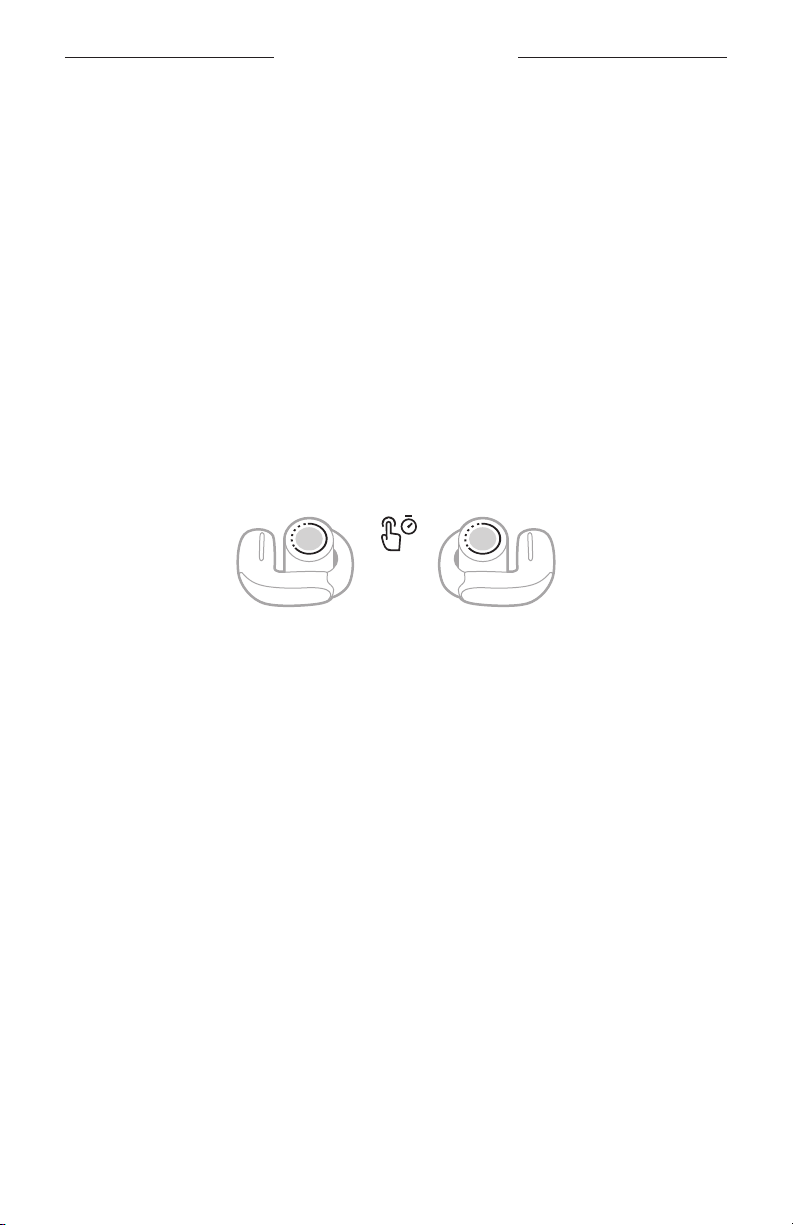
1. Press and hold the earbud buon assigned to this shortcut.
A voice prompt announces the name of the currently-connected device, followed
by the names of the other devices in the earbud device list.
2. When you hear the correct device name, release the buon.
You hear a tone that indicates when the device is connected.
TIP: You can also reconnect to a dierent device using the Bose Music app
(see page 12) or the device Bluetooth seings.
34 | ENG
Page 35
BLUETOOTH CONNECTIONS
CLEAR THE EARBUD DEVICE LIST
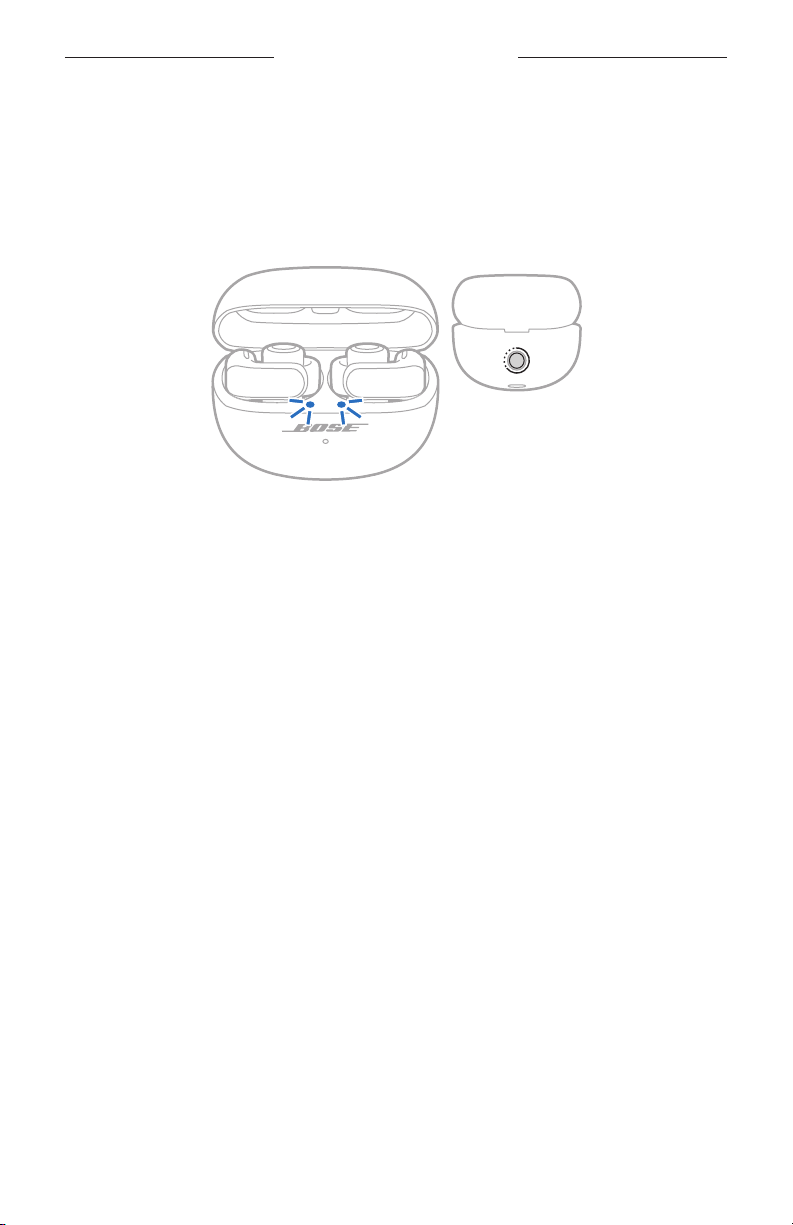
1. With the earbuds in the charging case and the case open, press and hold the
buon on the back of the case for 15 seconds until the earbud status lights blink
white 2 times and then slowly blink blue.
NOTE: Make sure both earbuds are in the case and the case is open.
2. Delete the earbuds from the Bluetooth list on your device.
All devices are cleared, and the earbuds are ready to connect (see page 12).
35 | ENG
Page 36
BLUETOOTH CONNECTIONS
ANDROID DEVICES ONLY
If you have an Android device, you can access the following additional
connection features.
Connect using Fast Pair
In one tap, the earbuds enable quick, eortless Bluetooth pairing with your
Android devices.
NOTES:
• To use Fast Pair, you need an Android device running Android 6.0 or higher.
• Your Android device must have the Bluetooth and Location features enabled.
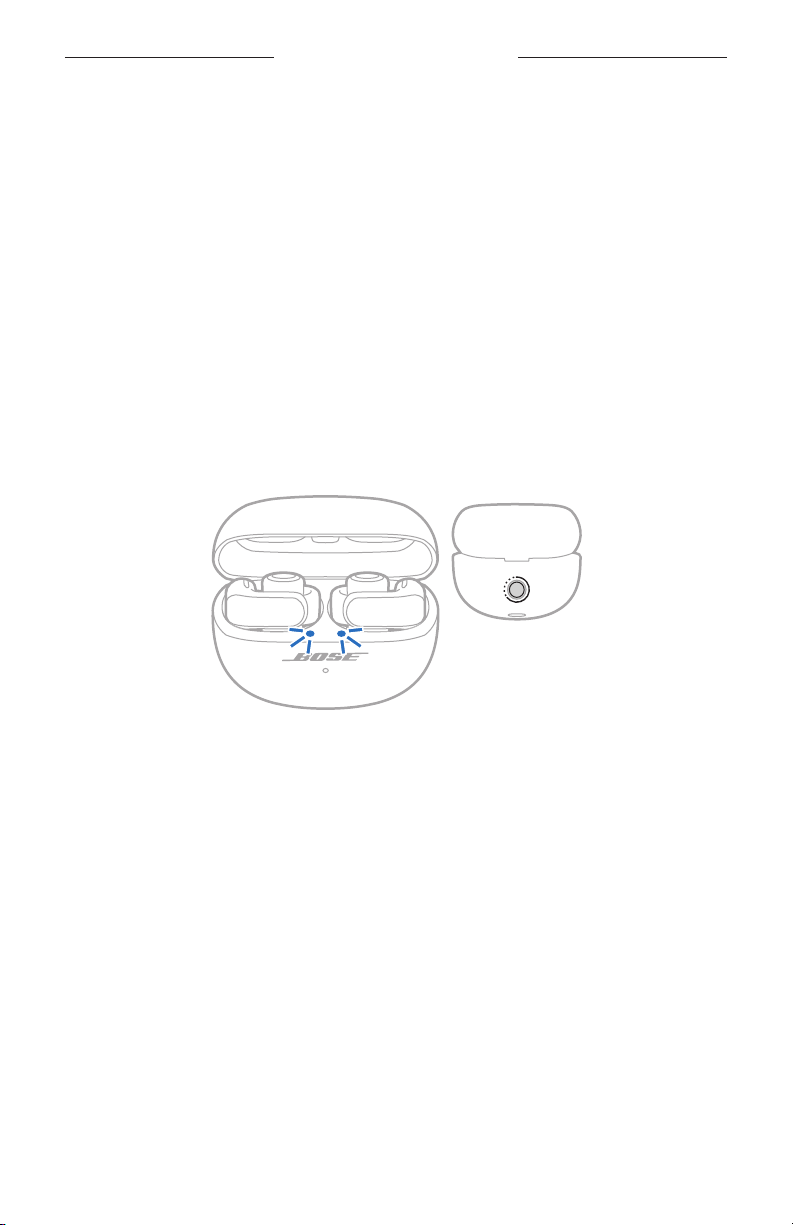
1. With the earbuds in the charging case and the case open, press and hold the
buon on the back of the case until the earbud status lights slowly blink blue.
NOTE: Make sure both earbuds are in the case and the case is open.
2. Place the case next to your Android device.
A notification appears on your device prompting you to pair the earbuds.
NOTE: If you don't see a notification, check that notifications are enabled for the
3. Tap the notification.
NOTE: You can also tap the buon on the notification to download the Bose
36 | ENG
Google Play Services app on your device.
Once the earbuds are connected, a notification appears confirming that the
connection is complete.
Music app and finish seing up the earbuds.
Page 37

BLUETOOTH CONNECTIONS
Snapdragon Sound technology
Bose Ultra Open Earbuds feature Snapdragon Sound technology. Snapdragon Sound
optimizes Qualcomm® audio technologies across connected devices to ensure the
best sound quality, connection stability, and latency for your streaming audio.
To experience Snapdragon Sound, you need a Snapdragon Sound-certified device,
such as a compatible Android device. Once you connect the earbuds, your device will
automatically stream audio using the aptX Adaptive Bluetooth codec.
NOTE: To see which Snapdragon Sound features the earbuds support and check if
your device is compatible, visit: support.Bose.com/UOEsupport.Bose.com/UOE
37 | ENG
Page 38

CONNECT BOSE PRODUCTS
CONNECT TO A BOSE SMART SPEAKER OR SOUNDBAR
Using SimpleSync technology, you can connect the earbuds to a Bose Smart Speaker
or Bose Smart Soundbar for a personal listening experience.
Benefits
• Use independent volume controls on each product to lower or mute your Bose
Smart Soundbar while keeping the earbuds as loud as you like.
• Hear your music clearly from the next room by connecting the earbuds to your Bose
Smart Speaker.
NOTE: SimpleSync technology has a Bluetooth range of up to 30 ft (9 m). Walls and
construction materials can aect reception.
Compatible products
You can connect the earbuds to any Bose Smart Speaker or Bose Smart Soundbar.
Popular compatible products include:
• Bose Smart Ultra Soundbar/Bose Ultra Soundbar
• Bose Smart Soundbar 900
• Bose Smart Soundbar 700/Bose Soundbar 700
• Bose Smart Soundbar 600
• Bose Soundbar 500
• Bose Smart Speaker 500/Bose Home Speaker 500
• Bose Home Speaker 300
• Bose Portable Smart Speaker/Bose Portable Home Speaker
New products are added periodically. For a complete list and more information, visit:
38 | ENG
Page 39
CONNECT BOSE PRODUCTS
Connect using the Bose Music app
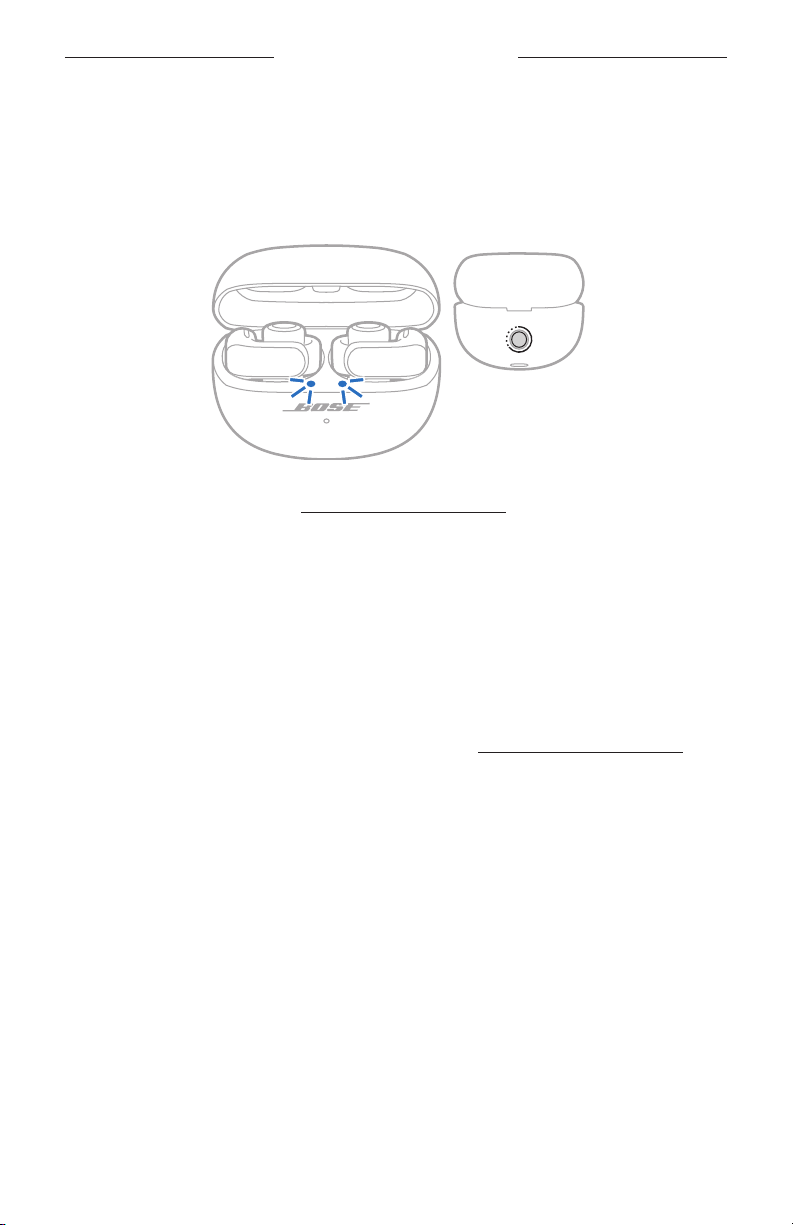
1. With the earbuds in the charging case and the case open, press and hold the
buon on the back of the case until the earbud status lights slowly blink blue.
NOTE: Make sure both earbuds are in the case and the case is open.
2. Use the Bose Music app to connect the earbuds to a compatible Bose product.
For more information, visit:
NOTES:
• It could take up to 30 seconds to connect.
• Make sure that the earbuds are within 30 ft (9 m) of your soundbar or speaker.
• You can connect the earbuds to only one product at a time.
RECONNECT TO A BOSE SMART SPEAKER OR SOUNDBAR
Use the Bose Music app to reconnect the earbuds to a previously-connected
compatible Bose product. For more information, visit: support.Bose.com/Groupssupport.Bose.com/Groups
NOTES:
• Your soundbar or speaker must be within range (30 ft or 9 m) and powered on.
• If the earbuds don’t reconnect, see “Earbuds don’t reconnect to a
previously-connected Bose Smart Soundbar or Speaker” on page 52.
39 | ENG
Page 40
SWEAT AND WEATHER RESISTANCE
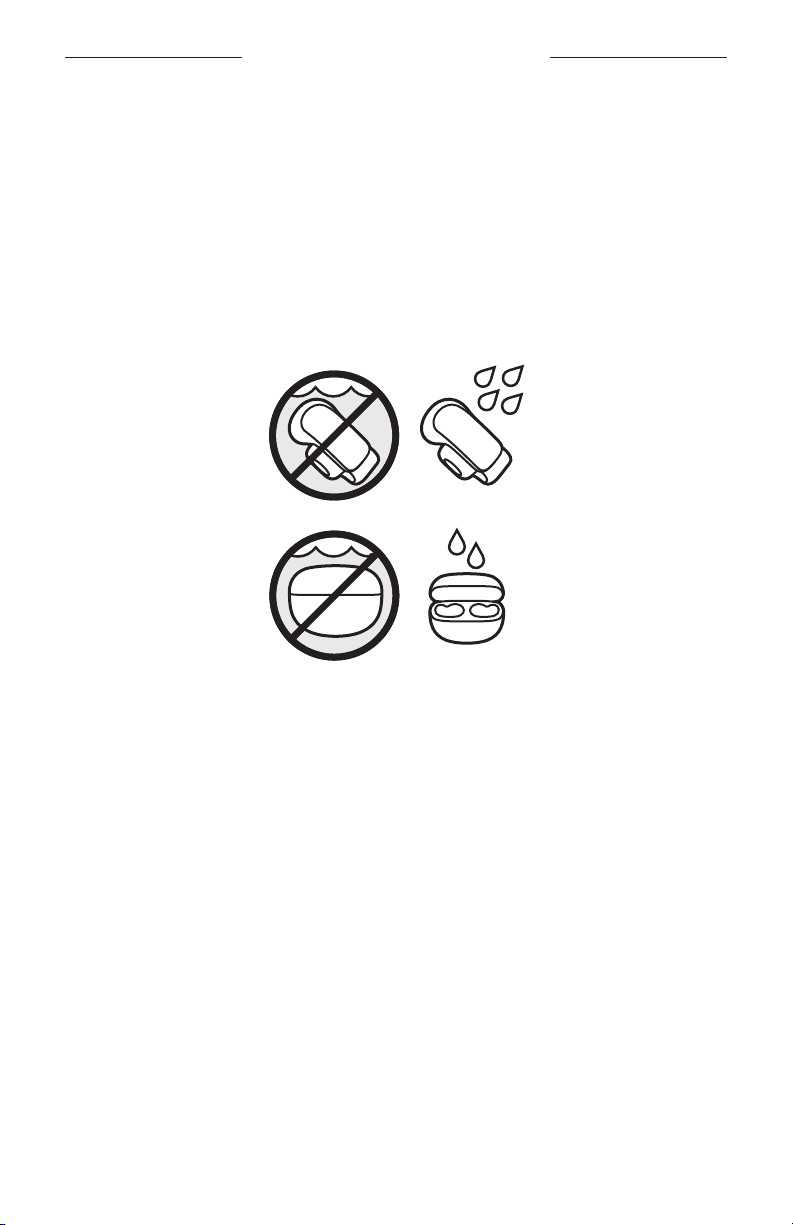
The earbuds are rated IPX4 water resistant. They are designed to be sweat and
weather resistant but aren’t meant to be submerged under water.
The charging case is rated IPX1 water resistant. It's designed to be resistant to light
water exposure, such as light vertical rainfall, but isn't meant to be splashed
or submerged.
CAUTIONS:
• Do NOT swim or shower with the earbuds or case.
• Do NOT submerge the earbuds or case.
• Do NOT splash the case.
NOTES:
• To prevent corrosion, regularly clean the charging contacts on the earbuds with a
dry, soft coon swab or equivalent.
• IPX4 and IPX1 aren't permanent conditions, and resistance might decrease as a
result of normal wear.
40 | ENG
Page 41
CARE AND MAINTENANCE
STORE THE EARBUDS
When you’re not using the earbuds, store them in the charging case. Close the
charging case to help preserve baery life and keep the charging case free of debris.
CLEAN THE EARBUDS AND CHARGING CASE
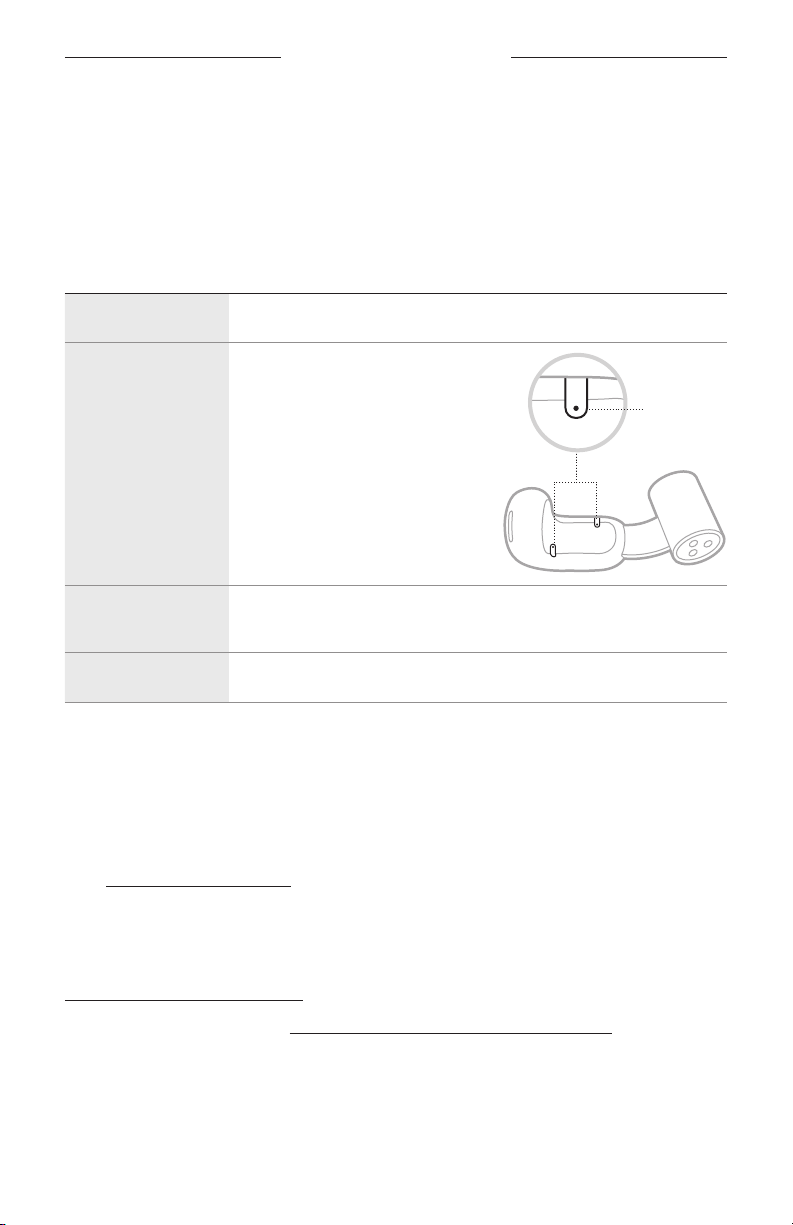
COMPONENT PROCEDURE
Earbuds Wipe with a soft coon swab or damp cloth (water only).
Microphone ports
To prevent oil or debris buildup,
regularly wipe with a soft coon
swab or gently brush with a soft
bristle brush.
CAUTION: Do NOT blow air into or
vacuum the microphone
ports, as this may
damage the earbud.
Microphone
ports
Charging contacts
(on earbuds)
Charging case Wipe with a soft coon swab or damp cloth (water only).
To prevent corrosion, wipe only with a dry, soft coon swab
or equivalent.
CAUTION: Do not use any solvents, chemicals, or cleaning solutions containing
alcohol, ammonia, or abrasives.
REPLACEMENT PARTS AND ACCESSORIES
Replacement parts and accessories can be ordered through Bose customer service.
Visit:
LIMITED WARRANTY
The earbuds are covered by a limited warranty. Visit our website at
To register your product, visit
instructions. Failure to register will not aect your limited warranty rights.
41 | ENG
Page 42
CARE AND MAINTENANCE
UPDATE THE EARBUDS
The earbuds begin updating automatically when connected to the Bose Music app
and an update is available. Follow the app instructions.
UPDATE THE CHARGING CASE
If Bose customer service tells you to update the charging case, you can do so using
the Bose updater website. On your computer, visit:
screen instructions.
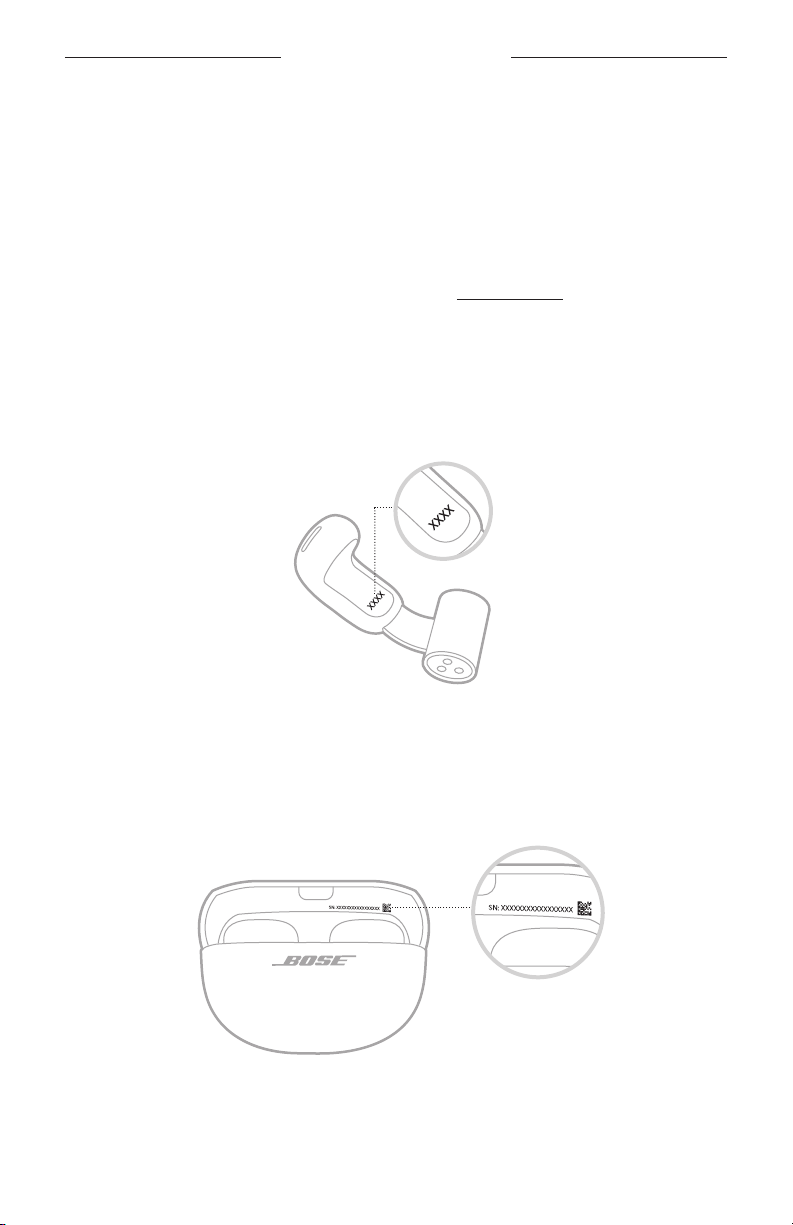
VIEW THE EARBUD DATE CODE
Remove the earbud from the charging case and flex the barrel open. The date code is
located on the flat inner surface of the earbud.
Date code
VIEW THE CHARGING CASE SERIAL NUMBER
Remove the earbuds from the charging case.
The charging case serial number is located in the charging case lid.
42 | ENG
Page 43

TROUBLESHOOTING
TRY THESE SOLUTIONS FIRST
If you experience problems with the earbuds, try these solutions first:
• Charge the earbuds and the charging case (see page 26).
• Place the earbuds in the charging case, then close the case (see page 16).
Re-open the case and remove the earbuds (see page 15).
• Check the earbud status lights (see page 30) and charging case status light
(see page 31).
• Check the earbud fit using a mirror (see page 14).
• Move your device closer to the earbuds (30 ft or 9 m) and away from any
interference or obstructions.
• Increase the volume on the earbuds, your device, and the music app.
• Make sure your device supports Bluetooth connections (see page 32).
• Download the Bose Music app and run available software updates (see page 12).
• Connect a dierent device (see page 12).
OTHER SOLUTIONS
If you could not resolve your issue, see the table below to identify symptoms and
solutions to common problems. You can also access troubleshooting articles, videos,
and other resources at: support.Bose.com/UOEsupport.Bose.com/UOE
If you’re unable to resolve your issue, contact Bose customer service.
Visit:
SYMPTOM SOLUTION
Place both earbuds in the charging case until they
magnetically snap into place. Close and re-open the case.
The earbud status lights display charging status
Earbuds don’t power on
43 | ENG
(see page 30).
If the earbuds have been exposed to high or low
temperatures, let the earbuds return to room temperature.
See “Earbuds don’t charge” on page 50.
Page 44

TROUBLESHOOTING
SYMPTOM SOLUTION
Connect using the Bluetooth menu on your device
(see page 32).
Disable the Bluetooth feature on your device and then
re-enable.
Clear the earbud device list (see page 35). Delete the
earbuds from the Bluetooth list on your device, including any
duplicate listings labeled LE (Low Energy). Connect again
Earbuds don’t connect
with device
(see page 12).
Place both earbuds in the charging case until they
magnetically snap into place. Close and re-open the case.
The earbud status lights display charging status
(see page 30). Connect again (see page 12).
Make sure both earbuds are in the charging case securely
(see page 25).
Visit:
Reboot the earbuds and charging case (see page 53).
Uninstall the Bose Music app on your device. Reinstall the
app (see page 12).
Make sure you’re using the Bose Music app for setup
(see page 12).
Make sure you have given the Bose Music app access to
Earbuds don’t respond
during app setup
Bluetooth connections in your device Seings menu.
Make sure the Bluetooth feature is on in your device
Seings menu.
Place both earbuds in the charging case until they
magnetically snap into place. Close and re-open the case.
The earbud status lights display charging status
(see page 30). Remove the earbuds.
Uninstall the Bose Music app on your device. Reinstall the
app (see page 12).
Make sure you have given the Bose Music app access to
Bluetooth connections in your device Seings menu.
Place both earbuds in the charging case until they
Bose Music app can’t
find earbuds
magnetically snap into place. Close and re-open the case.
The earbud status lights display charging status
(see page 30). Remove the earbuds.
With the earbuds in the charging case and the case open,
press and hold the buon on the back of the case until the
earbud status lights slowly blink blue.
See
“Earbuds don’t connect with device.”
44 | ENG
Page 45
TROUBLESHOOTING
SYMPTOM SOLUTION
Make sure your device is compatible with the Bose Music
Bose Music app doesn’t
work on device
app and meets minimum system requirements. For more
information, refer to the app store on your device.
Uninstall the Bose Music app on your device. Reinstall the
app (see page 12).
Make sure that you're puing the earbuds on correctly
(see page 13).
Check the earbud fit using a mirror (see page 14). For
Earbuds aren't comfortable
or secure
best sound quality and microphone performance, adjust the
earbuds so that they’re at about a 45° angle on your ears. If
they don’t feel comfortable or secure, slide them up or down
slightly to find the best position for you.
Visit:
Remove any earrings or piercings before puing on the
earbuds. When the earbuds are secure, put your earrings or
piercings back on.
Check the earbud fit using a mirror (see page 14). For
Can't wear earbuds
comfortably with earrings
or piercings
best sound quality and microphone performance, adjust the
earbuds so that they’re at about a 45° angle on your ears. If
your earrings or piercings make that position uncomfortable,
slide the earbuds up or down slightly to find the best position
for you.
If the magnets on the boom of the earbud barrels stick
to your earrings or piercings, slide the earbuds up or down
slightly to separate them.
Clear the earbud device list (see page 35). Delete the
earbuds from the Bluetooth list on your device, including any
duplicate listings labeled LE (Low Energy). Connect again
Intermittent Bluetooth
connection
(see page 12).
Move your device closer to the earbuds (30 ft or 9 m) and
away from any interference or obstructions.
Reboot the earbuds and charging case (see page 53).
45 | ENG
Page 46
TROUBLESHOOTING
SYMPTOM SOLUTION
Make sure you're wearing the correct earbud on the correct
ear. Look for the L (left) and R (right) markings on the barrel of
each earbud.
Check the earbud fit using a mirror (see page 14).
Visit:
No sound
Make sure the volume is turned up (see page 17).
Press play on your device to make sure audio is playing.
Play audio from a dierent application or music service.
Play audio from content stored directly on your device.
Clear any debris or wax buildup from the speaker ports.
Restart your device.
Check the earbud fit using a mirror (see page 14).
Visit:
Make sure the software in the Bose Music app is up to date
(see page 42).
No sound from one earbud
Clear any debris or wax buildup from the speaker ports.
Place both earbuds in the charging case until they
magnetically snap into place. Close and re-open the case.
The earbud status lights display charging status
(see page 30). Remove the earbuds.
Close and re-open the application or music service.
Play audio from a dierent application or music service.
Audio and video are out
of sync
Place both earbuds in the charging case until they
magnetically snap into place. Close and re-open the case.
The earbud status lights display charging status
(see page 30). Remove the earbuds.
46 | ENG
Page 47

TROUBLESHOOTING
SYMPTOM SOLUTION
Make sure you're wearing the correct earbud on the correct
ear. Look for the L (left) and R (right) markings on the barrel of
each earbud.
Check the earbud fit using a mirror (see page 14). For
best sound quality and microphone performance, adjust the
earbuds so that they’re at about a 45° angle on your ears. If
they don’t feel comfortable or secure, slide them up or down
slightly to find the best position for you.
Visit:
Make sure you’re using the Bose Music app for setup
(see page 12).
Try a dierent audio track.
Play audio from a dierent application or music service.
Clear any debris or wax buildup from the speaker ports.
Poor sound quality
Turn o any audio enhancement features on the device or
music app.
If you're wearing only one earbud, place the other earbud in
the case until it magnetically snaps into place.
Make sure your earbuds are connected over the correct
Bluetooth profile: Stereo A2DP. Check your device’s
Bluetooth/audio seings menu to make sure the correct
profile is selected.
Lower the volume on the earbuds, your device, or the
music app.
Disable the Bluetooth feature on your device and then
re-enable.
Clear the earbud device list (see page 35). Delete the
earbuds from the Bluetooth list on your device, including any
duplicate listings labeled LE (Low Energy). Connect again (see
page 12).
47 | ENG
Page 48

TROUBLESHOOTING
SYMPTOM SOLUTION
Make sure the volume is turned up (see page 17).
Make sure you're wearing the correct earbud on the correct
ear. Look for the L (left) and R (right) markings on the barrel of
each earbud.
Check the earbud fit using a mirror (see page 14). For
Audio is quiet
best sound quality and microphone performance, adjust the
earbuds so that they’re at about a 45° angle on your ears. If
they don’t feel comfortable or secure, slide them up or down
slightly to find the best position for you.
Try sliding the earbuds down slightly so that the speaker
ports are closer to your ear canal.
Clear any debris or wax buildup from the speaker ports.
Check the earbud fit using a mirror (see page 14). For
best sound quality and microphone performance, adjust the
earbuds so that they’re at about a 45° angle on your ears. If
they don’t feel comfortable or secure, slide them up or down
Too much bass
slightly to find the best position for you.
Adjust the bass level using the Bose Music app
(see page 19).
Try sliding the earbuds up slightly so that the speaker is
further away from your ear canal.
Check the earbud fit using a mirror (see page 14). For
best sound quality and microphone performance, adjust the
earbuds so that they’re at about a 45° angle on your ears. If
they don’t feel comfortable or secure, slide them up or down
Too little bass
slightly to find the best position for you.
Adjust the bass level using the Bose Music app
(see page 19).
Try sliding the earbuds down slightly so that the speaker is
closer to your ear canal.
Audio volume is different
between earbuds
Immersive audio doesn't
sound right or feels too
close to you
48 | ENG
Slide the quieter earbud down slightly on your ear until it
matches the volume of the other earbud.
Using the Bose Music app, calibrate immersive audio to
beer match the position of the earbuds on your ears. You
can access this option from the Seings menu.
Page 49

TROUBLESHOOTING
SYMPTOM SOLUTION
The earbuds may be angled too far downwards towards your
mouth or chin. Check the earbud fit using a mirror
(see page 14). For best sound quality and microphone
performance, adjust the earbuds so that they’re at about
a 45° angle on your ears. If they don’t feel comfortable
or secure, slide them up or down slightly to find the best
position for you.
Try another phone call.
Microphone doesn’t
pick up sound
Clear any debris or wax buildup from the microphone ports
(see page 41).
Try another compatible device.
Move to a quiet location and try again.
Disable the Bluetooth feature on your device and
then re-enable.
Clear the earbud device list (see page 35). Delete the
earbuds from the Bluetooth list on your device, including any
duplicate listings labeled LE (Low Energy). Connect again (see
page 12).
Place both earbuds in the charging case until they
magnetically snap into place. Close and re-open the case.
The earbud status lights display charging status
(see page 30). Remove the earbuds.
If you customized your shortcut to be on a specific earbud,
make sure you press and hold the buon on the
Can’t adjust the mode
correct earbud.
If you customized your shortcut to be on a specific earbud,
use the Bose Music app to assign the shortcut to the other
earbud and try again. Visit:
how-to videos.
Use the Bose Music app to adjust the mode. You can
access this option from the product control screen
(see page 12).
Difficulty hearing caller
while on a phone call
Increase the volume using your device.
Place both earbuds in the charging case until they
magnetically snap into place. Close and re-open the case.
The earbud status lights display charging status
Earbuds don’t respond
(see page 30). Remove the earbuds.
Reboot the earbuds and charging case (see page 53). If
that doesn't work, restore the earbuds to factory seings
(see page 54).
49 | ENG
Page 50

TROUBLESHOOTING
SYMPTOM SOLUTION
For multi-press functions, vary the speed of presses.
Make sure your music app supports the function.
Earbuds don't respond to
button presses
If the earbuds have been exposed to high or low
temperatures, let the earbuds return to room temperature.
Connect a dierent device and try again.
Reboot the earbuds and charging case (see page 53).
Make sure you have set a shortcut using the Bose Music app
(see page 20).
If you customized the shortcut to be on a specific earbud,
make sure you press and hold the buon on the
Can’t access shortcut
correct earbud.
If you customized your shortcut to be on a specific earbud,
use the Bose Music app to assign the shortcut to the other
earbud and try again. Visit:
how-to videos.
Make sure the earbuds are properly placed in the charging
case. To help preserve the baery life, the case should be
closed while the earbuds are charging (see page 25).
Make sure there is no dirt, debris, or liquid covering the
charging contacts on the earbuds or the charging pins in
the case.
Make sure the USB cable is correctly aligned with the port on
Earbuds don’t charge
the charging case.
Secure both ends of the USB cable.
Try another USB cable.
Try another wall charger.
If the earbuds or charging case have been exposed to high
or low temperatures, let the earbuds or case return to room
temperature. Charge again (see page 25).
50 | ENG
Page 51

TROUBLESHOOTING
SYMPTOM SOLUTION
Make sure the USB cable is correctly aligned with the port on
the charging case.
If the charging case baery is fully depleted, make sure the
USB cable is aached long enough for the case to gain an
initial charge. If you remove the cable and the charging case
status light goes out, reaach the USB cable.
Secure both ends of the USB cable.
Try another USB cable.
Charging case
doesn’t charge
Make sure the charging case is closed. To help preserve the
baery life, the case should be closed while it’s charging.
Try another wall charger.
If the charging case has been exposed to high or low
temperatures, let the case return to room temperature.
Charge again (see page 27).
If the charging case has been exposed to water, wait until the
USB-C port is completely dry. Charge again (see page 27).
Make sure any charging case accessories are properly
installed and don't prevent the USB cable from securely
connecting to the port on the charging case.
Voice prompt language
isn’t correct
Change the voice prompt language using the Bose Music
app (see page 12). You can access this option from the
Seings menu.
Make sure your device isn’t set to Do Not Disturb.
Make sure voice prompts are enabled using the Bose Music
Not receiving
call notifications
app (see page 12). You can access this option from the
Seings menu.
Make sure you have given the earbuds access to your
contacts in your device Bluetooth menu.
Make sure you are connecting to a compatible Bose product.
For a list of compatible products, visit:
Earbuds don’t connect to a
Bose Smart Soundbar
or Speaker
With the earbuds in the charging case and the case open,
press and hold the buon on the back of the case until the
earbud status lights slowly blink blue.
Make sure that the earbuds are within 30 ft (9 m) of your
soundbar or speaker.
51 | ENG
Page 52

TROUBLESHOOTING
SYMPTOM SOLUTION
Earbuds don’t reconnect
to a previously-connected
Bose Smart Soundbar
or Speaker
Delayed audio between
products when connected
to a Bose Smart Soundbar
or Speaker
With the earbuds in the charging case and the case open,
press and hold the buon on the back of the case until the
earbuds status light slowly blinks blue. Use the Bose Music
app to connect the earbuds to a compatible Bose product.
For more information, visit: support.Bose.com/Groupssupport.Bose.com/Groups
Download the Bose Music app and run available
software updates.
52 | ENG
Page 53
TROUBLESHOOTING
REBOOT THE EARBUDS AND CHARGING CASE
If the earbuds or charging case are unresponsive, you can reboot them.
NOTE: Rebooting the earbuds clears the earbud device list. It doesn’t clear
other seings.
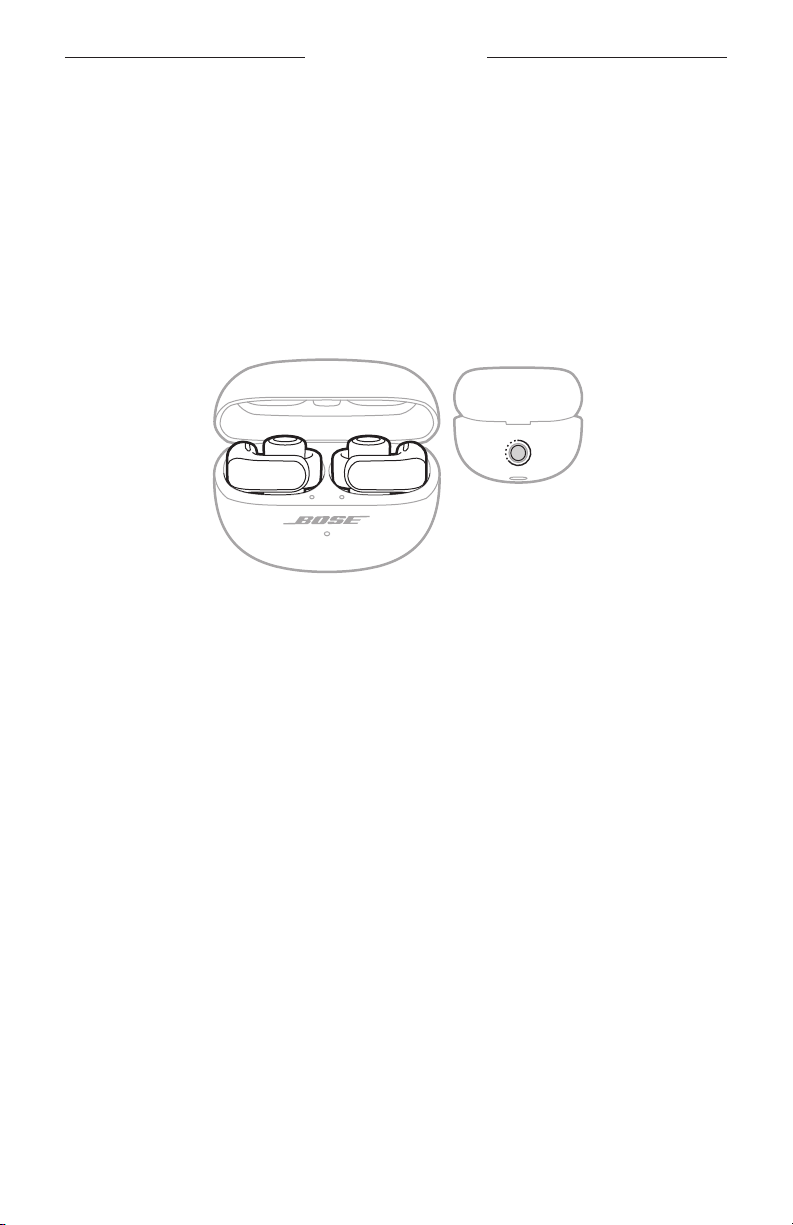
With the earbuds in the charging case and the case open, press and hold the buon
on the back of the case for 20 seconds until the earbud status lights blink white 2
times, slowly blink blue, and then turn o.
NOTE: Make sure both earbuds are in the case and the case is open.
When the reboot is complete, the earbud status lights glow according to the charging
status, then slowly blink blue (see page 30). The charging case status light glows
according to the case baery level (see page 31).
53 | ENG
Page 54
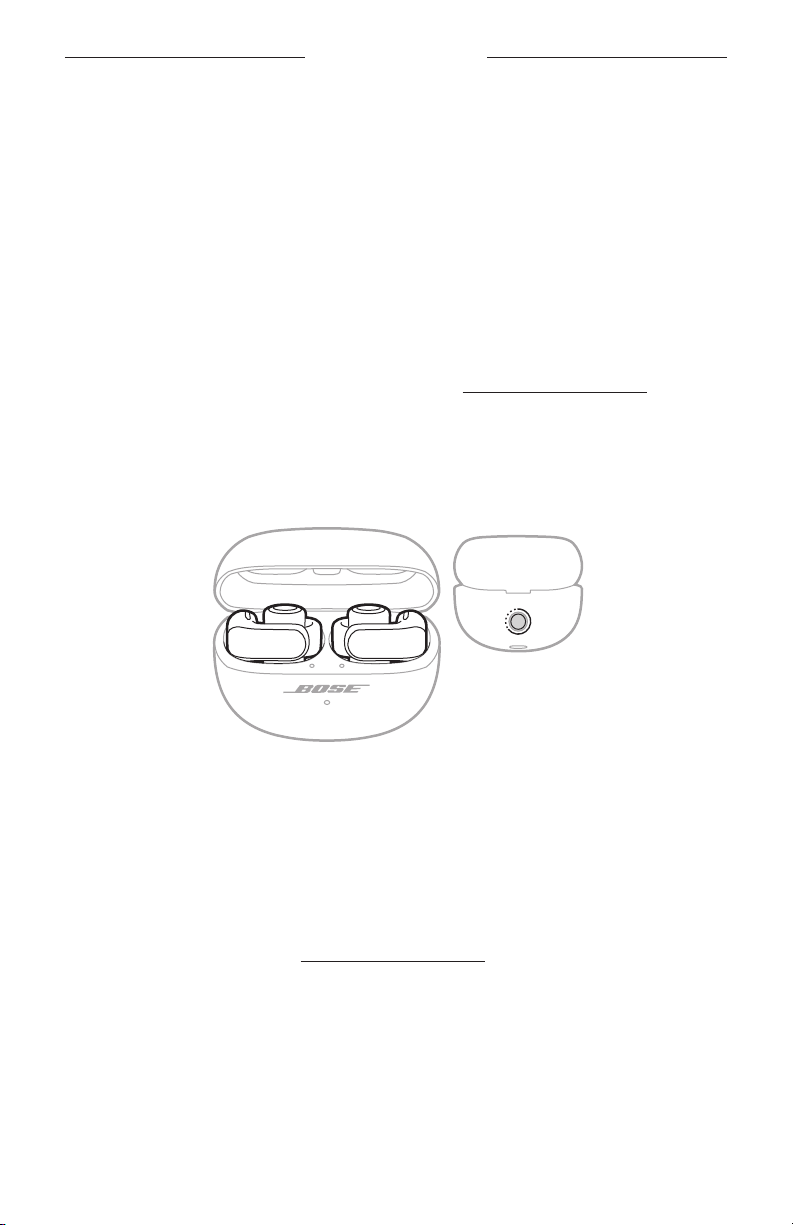
TROUBLESHOOTING
RESTORE THE EARBUDS TO FACTORY SETTINGS
A restore to factory seings clears all seings and return the earbuds to their original
out-of-box state. After, the earbuds can be configured as if they were being set up for
the first time.
Restoring to factory seings is only recommended if you are having issues with the
earbuds or you have been instructed to do so by Bose customer service.
1. Remove the earbuds from the Bluetooth list on your device.
2. Remove the earbuds from your Bose account using the Bose Music app.
NOTE: For more information about how to remove the earbuds from your Bose
account using the Bose Music app, visit:
3. With the earbuds in the charging case and the case open, press and hold the
buon on the back of the case for 20 seconds until the earbuds status lights blink
white 2 times, slowly blink blue, and then turn o.
NOTE: Make sure both earbuds are in the case and the case is open.
4. Repeat the previous step 2 more times.
After the third time, the status lights blink amber for 3 seconds to indicate factory
seings are being restored.
When the restore is complete, the status lights slowly blink blue. The earbuds are
now in their original out-of-box state.
NOTE: If you’re unable to resolve your issue, additional troubleshooting and
support is available at:
54 | ENG
Page 55
VIGTIGE SIKKERHEDSINSTRUKTIONER
Læs og opbevar venligst alle sikkerheds- og brugsinstruktioner.
Bose Corporation erklærer hermed, at dette produkt stemmer overens med de væsentlige krav og
andre relevante bestemmelser i direktiv 2014/53/EU og alle andre krav i EU-direktiver. Den fulde
overensstemmelseserklæring kan findes på:
Dette produkt efterlever alle relevante regler for elektromagnetisk kompatibilitet pr. 2016 og alle andre
relevante UK-regler. Den fulde overensstemmelseserklæring kan findes på:
Bose Corporation erklærer hermed, at dette produkt stemmer overens med de væsentlige
krav i henhold til reglerne for radioudstyr pr. 2017 og alle andre relevante UK-regler. Den fulde
overensstemmelseserklæring kan findes på:
Vigtige sikkerhedsinstruktioner
Brug kun tilslutningsudstyr/tilbehør, der er angivet af producenten.
Overlad al service til kvalificeret servicepersonale. Et serviceeftersyn er påkrævet, når apparatet på nogen
måde er beskadiget, hvis f.eks. netledningen eller stikket er beskadiget, der er blevet spildt væske, eller der er
kommet genstande ind i apparatet, hvis apparatet er blevet udsat for regn eller fugt, ikke virker normalt eller er
blevet tabt.
ADVARSLER/FORSIGTIGHEDSFORHOLDSREGLER
• Hold produktet væk fra små børn og kæledyr, så de ikke sluger dem ved et uheld. Produktet indeholder et
batteri og kan være farligt at sluge. Søg øjeblikkeligt læge, hvis hovedtelefonerne sluges. Når produktet ikke
bruges, skal det opbevares utilgængeligt for børn og kæledyr.
• Produktet er ikke beregnet til at bruges af børn.
• For at undgå høreskader bør du ikke bruge dine hovedtelefoner ved høj lydstyrke. Skru ned for lyden på dit
produkt, inden du placerer hovedtelefonerne i/på dine ører, og skru derefter gradvist op for lyden, indtil du
når et behageligt, moderat lytteniveau.
• For at undgå høreskader bør du ikke sætte in-ear hovedtelefonernes højttaler direkte ind i din øregang.
Brug in-ear hovedtelefonerne med højttaleren på ydersiden af øret og bøjlen bag øret. På side 13 kan du
finde flere oplysninger om, hvordan du opbevarer dine in-ear hovedtelefoner.
• Brug af dette produkt som fører af et køretøj kan være forbudt ved lov visse steder. Vær forsigtig, og følg
gældende lovgivning. Hold straks op med at bruge dette produkt, hvis det forstyrrer din evne til at være
opmærksom eller forstyrrer din evne til at høre lyde fra omgivelserne, herunder alarmer og advarselssignaler,
mens du fungerer som fører af et køretøj.
• Vær forsigtig, hvis du bruger disse hovedtelefoner, mens du udfører en aktivitet, der kræver din
opmærksomhed. Brug ikke hovedtelefonerne, hvis det kan udgøre en fare for dig selv eller andre, hvis
du ikke kan høre de omkringliggende lyde tydeligt, f.eks. når du cykler eller går i eller i nærheden af trafik,
en byggeplads, en jernbane osv.
• Produktet må IKKE nedsænkes i vand eller udsættes for vand i længere perioder.
• Fjern straks produktet, hvis du bemærker, at der kommer varme fra produktet.
2
DAN
|
Page 56

VIGTIGE SIKKERHEDSINSTRUKTIONER
Indeholder små dele, som kan udgøre en kvælningsfare. Egner sig ikke til børn under 3 år.
Dette produkt indeholder magnetisk materiale. Kontakt din læge for at finde ud af, om dette kan
påvirke din implanterbare medicinske enheds funktion.
• Foretag IKKE nogen uautoriserede ændringer af produktet.
• Hold altid produktet væk fra ild og andre varmekilder. Placer IKKE nogen form for åben ild (f.eks. stearinlys)
på eller tæt ved produktet.
• Brug kun dette produkt med en godkendt LPS-strømforsyning, der overholder de lokale love og regler (f.eks.
UL, CSA, VDE, CCC).
• Det batteri, der følger med dette produkt, kan udgøre en risiko for brand eller kemisk forbrænding, hvis det
håndteres forkert eller udskiftes med en forkert type.
• Hvis batterierne lækker, må væsken ikke komme i kontakt med huden eller øjnene. Hvis der finder kontakt
sted, skal der søges læge.
• Udsæt ikke produkter, der indeholder batterier, for voldsom varme (f.eks. ved opbevaring i direkte sollys,
brand eller lignende).
• Tør sved af hovedtelefonerne og opladningsetuiet før opladning.
• IPX4 og IPX1 er ikke varige forhold, og vandtætheden kan blive reduceret på grund af normalt slid.
3
DAN
|
Page 57
OPLYSNINGER OM REGLER OG LOVE
BEMÆRK: Dette udstyr er testet og det er blevet konstateret, at det overholder grænseværdierne for en
digital enhed i Klasse B i henhold til afsnit 15 i FCC-reglerne. Disse grænser er udviklet til at yde rimelig
beskyttelse mod skadelig interferens i en privat installation. Dette udstyr genererer, bruger og kan udstråle
radiofrekvensenergi, og kan – hvis det ikke installeres og bruges i overensstemmelse med instruktionerne –
forårsage skadelig interferens i forbindelse med radiokommunikation. Dette garanterer dog ikke, at der ikke kan
forekomme interferens i en bestemt installation. Hvis dette udstyr forårsager skadelig interferens i forbindelse
med radio- og tv-modtagelsen, hvilket kan kontrolleres ved at slukke og tænde for udstyret, opfordres brugere
til at forsøge at eliminere interferensen ved hjælp af en eller flere af følgende fremgangsmåder:
• Ret det modtagende produkt eller antennen i en anden retning, eller flyt dem.
• Skab større afstand mellem udstyret og modtageren.
• Tilslut udstyret til en stikkontakt på et andet kredsløb end det, som modtageren er tilsluttet.
• Kontakt forhandleren eller en radio/tv-tekniker for at få hjælp.
Ændringer eller modifikationer, der ikke udtrykkeligt er godkendt af Bose Corporation, kan ophæve brugerens
ret til at betjene dette udstyr.
Denne enhed overholder del 15 i FCC-reglerne og ISED Canadas licensfritagede RSS-standard(er). Driften er
underlagt følgende to betingelser: (1) Denne enhed må ikke forårsage skadelig interferens, og (2) denne enhed
skal acceptere enhver modtaget interferens, herunder interferens, der kan forårsage uønsket drift.
Denne enhed overholder FCC’s og ISED Canadas strålingseksponeringsgrænser for befolkningen i almindelighed.
Denne sender må ikke placeres eller anvendes sammen med nogen andre antenner eller sendere.
FCC-ID: A94926L / A94926R | IC: 3232A-926L / 3232A-926R
Etuimodel: 438926 | Model for højre in-ear hovedtelefon: 926R | Model for venstre in-ear hovedtelefon: 926L
In-ear hovedtelefonerne i dette system er certificeret i henhold til bestemmelserne i radiolovgivningen.
020-230336
020-230337
CAN ICES-3(B)/NMB-3(B)
Europa: Frekvensbåndets driftsområde er 2400 til 2483,5 MHz. | Maksimal sendeeffekt mindre end 20 dBm EIRP.
SAR-oplysninger
In-ear
hovedtelefon
Venstre 0,46 0,1 8
Højre 0,57 0,22
Dette symbol betyder, at produktet ikke må smides ud som husholdningsaffald og bør indleveres til en
passende indsamlingsordning med henblik på genanvendelse. Korrekt bortskaffelse og genanvendelse
bidrager til at beskytte naturressourcer, menneskets sundhed og miljøet. Hvis du ønsker flere
oplysninger om bortskaffelse og genanvendelse af dette produkt, kan du kontakte din kommune,
dit renovationsselskab eller den butik, hvor du har købt dette produkt.
Målt
1-g SAR W/kg
Målt
10-g SAR W/kg
Tekniske regler for laveffektradiofrekvensenheder
Ingen virksomhed, organisation eller bruger må uden tilladelse fra NCC ændre frekvensen,
øge transmissionseffekten eller ændre de oprindelige egenskaber eller ydelsen for godkendte
laveffektradiofrekvensenheder. Laveffektradiofrekvensenhederne må ikke påvirke flysikkerheden eller forstyrre
lovlig kommunikation; hvis dette konstateres, skal brugeren øjeblikkeligt ophøre med at bruge enheden, indtil
der opnås en tilstand uden forstyrrelser. Den omtalte lovlige kommunikation vil sige radiokommunikation, der
anvendes i overensstemmelse med Telecommunications Management Act. Laveffektradiofrekvensenhederne
skal kunne modtage forstyrrelser fra lovlig kommunikation eller enheder, der udsender ISM-radiobølger.
4
DAN
|
Page 58
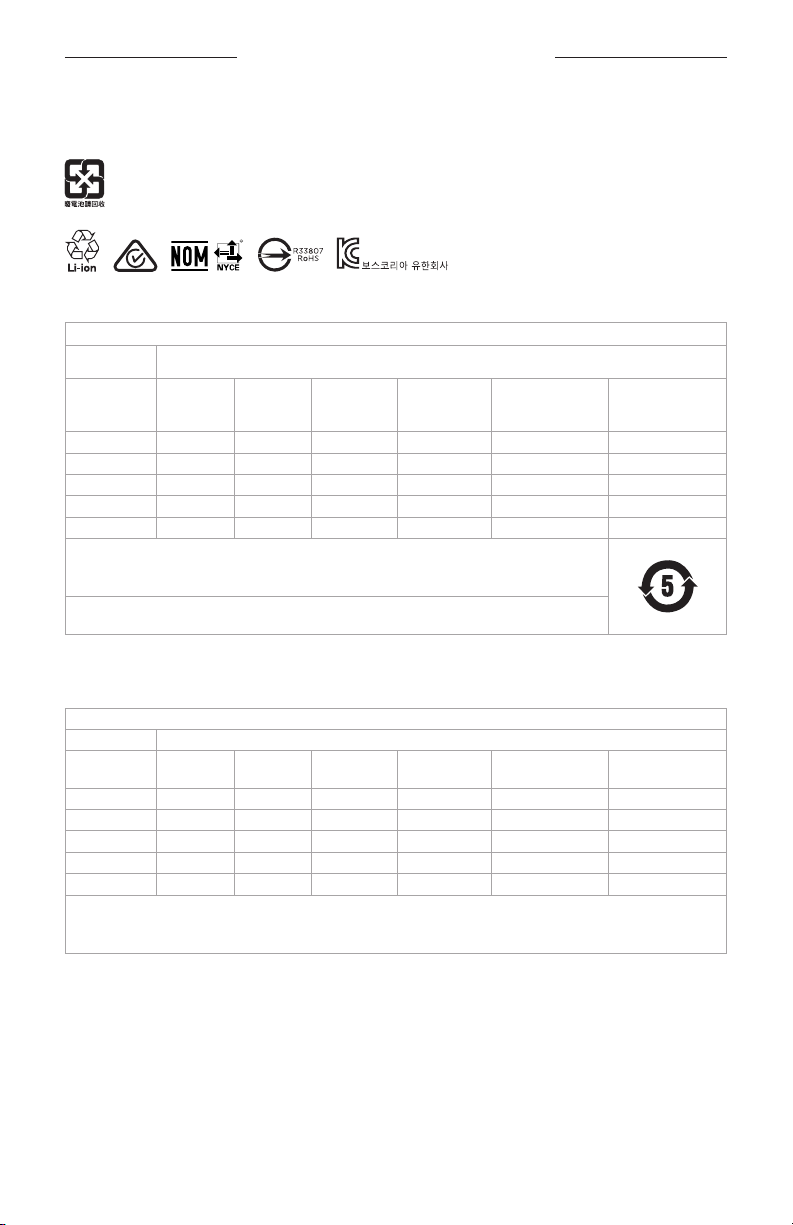
OPLYSNINGER OM REGLER OG LOVE
UNDLAD forsøg på at fjerne det genopladelige litium-ion batteri fra dette produkt. Kontakt din lokale Boseforhandler eller en anden kvalificeret tekniker vedrørende fjernelse.
Bortskaf brugte batterier i henhold til lokale bestemmelser. Batterier må ikke brændes.
R-C-Bos-926L (V)
R-C-Bos-926R (H )
R-R-Bos-438926 (Etui)
Tabel med begrænsninger for farlige stoffer (Kina)
Navne på og indhold af giftige eller farlige stoffer eller elementer
Giftige eller farlige stoffer og elementer
Delens navn Bly (Pb) Kviksølv (Hg) Cadmium (Cd)
PCB’er X O O O O O
Metaldele X O O O O O
Plastikdele O O O O O O
Højttalere X O O O O O
Kabler X O O O O O
Denne tabel er oprettet i henhold til bestemmelserne i SJ/T 11364.
O: Angiver, at dette giftige eller farlige stof indeholdt i alle de homogene materialer til denne del er under
grænsekravet i GB/T 26572.
X: Angiver, at dette giftige eller skadelige stof, som findes i mindst ét af de homogene materialer,
der anvendes til denne del, er over grænsekravet i GB/T 26572.
Hexavalent
(CR(VI))
Polybromeret
biphenyl (PBB)
Polybromeret
diphenylether
(PBDE)
Tabel med begrænsninger for farlige stoffer (Taiwan)
Navn på udstyr: In-ear hovedtelefoner og opladningsetuiets typebetegnelse: 438926
Begrænsede stoffer og deres kemiske symboler
Enhed Bly (Pb) Kviksølv (Hg) Cadmium (Cd)
PCB’er Metaldele Plastikdele
Højttalere Kabler Note 1: ”b” angiver, at indholdet af det begrænsede stofs procentindhold ikke overstiger procentdelen af referenceværdien for
tilstedeværelsen.
Note 2: ”−” angiver, at det begrænsede stof svarer til undtagelsen.
5
b b b b b b
b b b b b
b b b b b
b b b b b
b b b b b
Hexavalent
krom (Cr+6)
DAN
|
Polybromerede
biphenyler (PBB)
Polybromeret
diphenylether (PBDE)
Page 59

OPLYSNINGER OM REGLER OG LOVE
Fremstillingsdato: Det ottende ciffer i serienummeret angiver fremstillingsåret: ‘‘4’’ er 2014 eller 2024.
Importør i Kina: Bose Electronics (Shanghai) Company Limited, Level 6, Tower D, No. 2337 Gudai Rd. Minhang
District, Shanghai 201100 | Importør i EU
Importør i Mexico: Bose de México S. de R.L. de C.V., Avenida Prado Sur #150, Piso 2, Interior 222 y 223,
Colonia Lomas de Chapultepec V Sección, Miguel Hidalgo, Ciudad de México, C.P. 11000 Telefonnummer:
+5255 (5202) 3545 | Importør i Taiwan: Bose Limited Taiwan Branch (H.K.), 9F., No. 10, Sec. 3, Minsheng E. Road,
Zhongshan Dist. Taipei City 10480, Taiwan Telefonnummer: +886-2-2514 7676 | Importør i UK: Bose Limited,
Bose House, Quayside Chatham Maritime, Chatham, Kent, ME4 4QZ, Storbritannien
Udgangskapacitet: 350 mAh | IPXX-klassifikation: IPX4 (for in-ear hovedtelefonerne),
IPX1 (for opladningsetuiet)
CMIIT-id’et findes på æsken.
Boses vilkår for brug gælder for dette produkt: worldwide.Bose.com/termsofuseworldwide.Bose.com/termsofuse
Licensoplysninger: Du kan få vist de licensmeddelelser, der gælder for de tredjepartssoftwarepakker, som er
inkluderet som komponenter i Bose Ultra åbne in-ear hovedtelefoner, ved at bruge Bose Music-appen. Du kan
få adgang til disse oplysninger fra menuen Indstillinger.
Apple, Apple-logoet, iPad og iPhone er varemærker, der tilhører Apple Inc., og er registreret i USA og andre
lande. Varemærket "iPhone" bruges i Japan med en licens fra Aiphone K.K. App Store er et servicemærke,
der tilhører Apple Inc.
Anvendelse af mærket Made for Apple betyder, at et tilbehør er designet til at tilsluttes specifikt til de de(t)
Apple-produkt(er), som identificeres i mærket, og at det er certificeret af udvikleren til at leve op til Apples
ydelsesstandarder. Apple er ikke ansvarlig for denne enheds virkemåde eller for dens overensstemmelse med
sikkerhedsstandarder og regler.
Bluetooth®-ordmærket og -logoerne er registrerede varemærker, der ejes af Bluetooth SIG, Inc., og enhver brug
af sådanne mærker fra Bose Corporations side finder sted under licens.
Google, Android og Google Play er varemærker, der tilhører Google LLC.
Snapdragon Sound er et produkt tilhørende Qualcomm Technologies, Inc. og/eller dennes datterselskaber.
Qualcomm, Snapdragon og Snapdragon Sound er varemærker eller registrerede varemærker, der tilhører
Qualcomm Incorporated.
USB Type-C® og USB-C® er registrerede varemærker, der tilhører USB Implementers Forum.
Bose, Bose Music-logoet og SimpleSync er varemærker tilhørende Bose Corporation. | Bose Corporations
hovedkontor: 1-877-230-5639 | ©2024 Bose Corporation. Gengivelse, ændring, distribution eller anden brug af
dette dokument eller dele heraf er forbudt uden forudgående skriftlig tilladelse.
: Bose Products B.V., Gorslaan 60, 1441 RG Purmerend, Holland |
Bedes udfyldt og opbevaret, så du har det til rådighed
In-ear hovedtelefonernes datokode findes på den indvendige overflade på hver in-ear hovedtelefon.
Modelnumrene og opladningsetuiets serienummer findes i opladningsetuiets låg.
Serienummer:
Modelnummer: 438926
Du bedes gemme din kvittering. Dette er et godt tidspunkt til at registrere dit Bose-produkt. Du kan nemt gøre
det ved at gå til
6
___________________________________________________________________________
DAN
|
Page 60

INDHOLD
HVAD ER DER I ÆSKEN?
Indhold ................................................................................................................................................................................. 11
OPSÆTNING AF BOSE MUSIC-APPEN
Download Bose Music-appen.................................................................................................................................... 12
Tilføj in-ear hovedtelefonerne til en eksisterende konto................................................................................ 12
SÅDAN BRUGES DE
Tag in-ear hovedtelefonerne på ................................................................................................................................ 13
Tjek pasformen ................................................................................................................................................................ 14
TÆND/SLUK
Tænd ..................................................................................................................................................................................... 15
Sluk ........................................................................................................................................................................................ 16
BETJENING AF IN-EAR HOVEDTELEFONERNE
Medieafspilning ................................................................................................................................................................ 17
Lydstyrkefunktioner ....................................................................................................................................................... 18
Telefonopkald .................................................................................................................................................................... 19
Opkaldsnotifikationer ......................................................................................................................................... 19
Justering af lyd-EQ......................................................................................................................................................... 19
GENVEJE
Brug din genvej ................................................................................................................................................................. 20
Skift eller deaktiver din genvej ................................................................................................................................... 20
7
DAN
|
Page 61

INDHOLD
MEDRIVENDE LYD
Indstillinger for medrivende lyd ................................................................................................................................. 21
Skift indstilling for medrivende lyd .......................................................................................................................... 22
Skift tilstanden ...................................................................................................................................................... 22
Brug din genvej ...................................................................................................................................................... 22
Medrivende lyd under et opkald ............................................................................................................................... 22
Kalibrer medrivende lyd ................................................................................................................................................ 22
LYTTETILSTANDE
Tilstande.............................................................................................................................................................................. 23
Skift tilstanden ................................................................................................................................................................. 24
Tilføj eller fjern tilstande fra in-ear hovedtelefonerne .......................................................................... 24
STEMMESTYRING AF ENHED
Funktioner til stemmestyring af enhed ................................................................................................................. 25
BATTERI
Oplad in-ear hovedtelefonerne ................................................................................................................................. 26
Oplad opladningsetuiet ................................................................................................................................................ 27
Tjek batteriniveauet for in-ear hovedtelefonerne ............................................................................................. 28
Under brug af in-ear hovedtelefonerne ...................................................................................................... 28
Under opladning af in-ear hovedtelefonerne ........................................................................................... 28
Kontrollér opladningsetuiets batteriniveau .......................................................................................................... 28
Opladningstid ................................................................................................................................................................... 29
STATUS FOR IN-EAR HOVEDTELEFONER OG OPLADNINGSETUI
In-ear hovedtelefonernes statuslamper ................................................................................................................ 30
Bluetooth®-status ................................................................................................................................................ 30
Batteri-, opdaterings- og fejlstatus ............................................................................................................... 30
Opladningsetuiets statuslampe ............................................................................................................................... 31
Batteri-, opdaterings- og fejlstatus ............................................................................................................... 31
8
DAN
|
Page 62

INDHOLD
BLUETOOTH-FORBINDELSER
Tilslut ved hjælp af Bose Music-appen .................................................................................................................. 32
Tilslut ved hjælp af Bluetooth-menuen på din enhed ..................................................................................... 32
Frakobl en enhed ............................................................................................................................................................. 33
Genopret forbindelse til en enhed ........................................................................................................................... 34
Genopret forbindelsen til den senest tilsluttede enhed ..................................................................... 34
Genopret forbindelsen til en anden enhed ............................................................................................... 34
Ryd in-ear hovedtelefonernes enhedsliste .......................................................................................................... 35
Kun Android™-enheder ................................................................................................................................................ 36
Tilslutning ved hjælp af Fast Pair ................................................................................................................... 36
Snapdragon Sound™-teknologi ..................................................................................................................... 37
TILSLUT PRODUKTER FRA BOSE
Opret forbindelse til en Bose Smart Speaker eller Soundbar ....................................................................... 38
Fordele ...................................................................................................................................................................... 38
Kompatible produkter ........................................................................................................................................ 38
Tilslut ved hjælp af Bose Music-appen ....................................................................................................... 39
Genopret forbindelsen til en Bose Smart Speaker eller Soundbar ............................................................ 39
SVED- OG VEJRBESTANDIGE .................................................................................................................... 40
9
DAN
|
Page 63

INDHOLD
PLEJE OG VEDLIGEHOLDELSE
Opbevaring af in-ear hovedtelefonerne ................................................................................................................ 41
Rengør in-ear hovedtelefonerne og opladningsetuiet .................................................................................... 41
Reservedele og tilbehør ................................................................................................................................................ 41
Begrænset garanti .......................................................................................................................................................... 41
Opdater in-ear hovedtelefonerne ............................................................................................................................ 42
Opdater opladningsetuiet ........................................................................................................................................... 42
Visning af datokoden for in-ear hovedtelefonen ............................................................................................... 42
Se opladningsetuiets serienummer ........................................................................................................................ 42
FEJLFINDING
Prøv disse løsninger først ............................................................................................................................................. 43
Andre løsninger ................................................................................................................................................................ 43
Genstart in-ear hovedtelefonerne og opladningsetuiet ................................................................................. 53
Gendan in-ear hovedtelefonernes fabriksindstillinger .................................................................................... 54
10 | DAN
Page 64
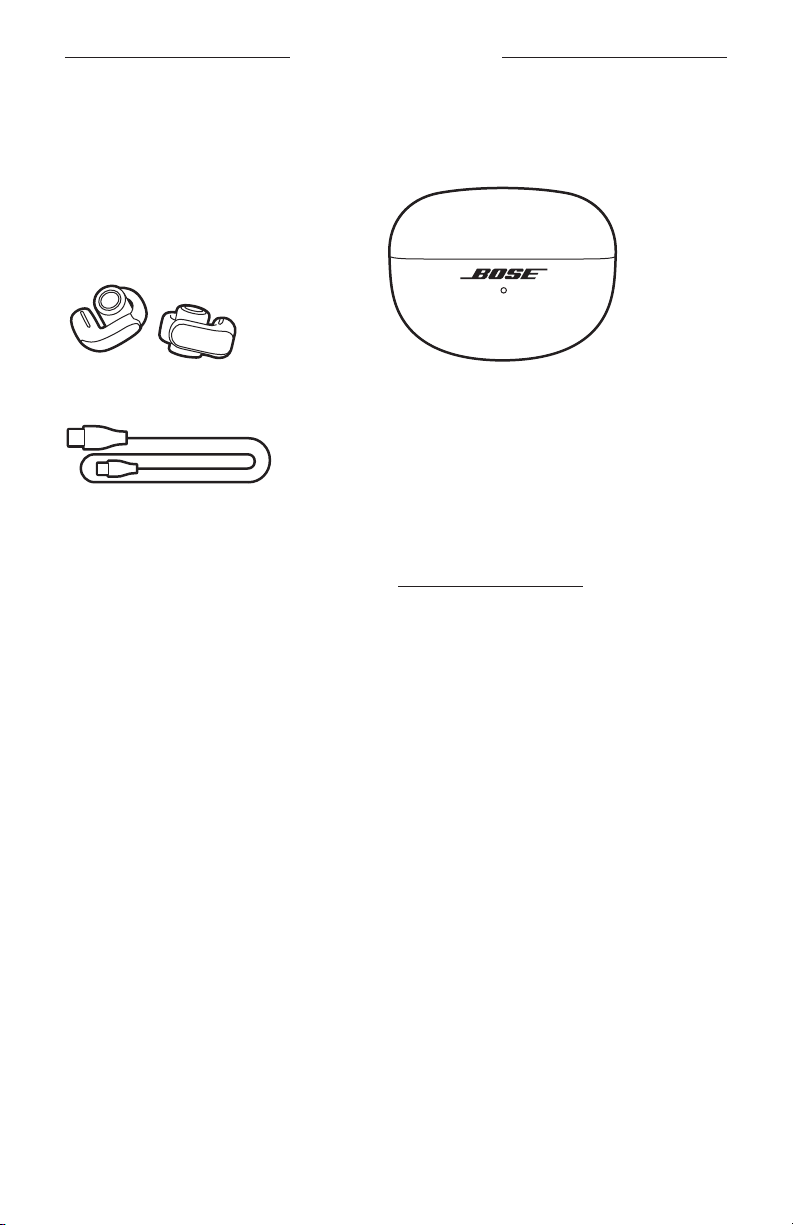
HVAD ER DER I ÆSKEN?
INDHOLD
Bekræft, at følgende dele er i æsken:
Bose Ultra åbne in-ear hovedtelefoner Opladningsetui
USB Type-C® til USB-A-kabel
BEMÆRK: Hvis en hvilken som helst del af dit produkt mangler eller er beskadiget,
må du ikke anvende det. Besøg
fejlfindingsartikler, videoer og produktreparation eller -udskiftning.
11 | DAN
Page 65
OPSÆTNING AF BOSE MUSIC-APPEN
Med Bose Music-appen kan du indstille og kontrollere in-ear hovedtelefonerne fra en
hvilken som helst enhed som f.eks. en smartphone eller tablet.
Ved hjælp af appen kan du administrere Bluetooth-forbindelser, administrere
indstillinger for in-ear hovedtelefonerne, justere lyden, vælge dit talemeddelelsessprog
og få alle fremtidige opdateringer og nye funktioner, som Bose stiller til rådighed.
BEMÆRK: Hvis du allerede har oprettet en Bose-konto for et andet Bose-produkt,
kan du finde flere oplysninger under ”Tilføj in-ear hovedtelefonerne til en
eksisterende konto”.
DOWNLOAD BOSE MUSIC-APPEN
1. Download Bose Music-appen på din enhed.
BEMÆRK: Hvis du befinder dig på det kinesiske fastland, skal du hente
appen Bose8.
BOSE MUSIC
2. Følg appinstruktionerne.
TILFØJ IN-EAR HOVEDTELEFONERNE TIL EN EKSISTERENDE KONTO
Du kan tilføje dine Bose Ultra åbne in-ear hovedtelefoner ved at åbne Bose Musicappen og derefter tilføje dine in-ear hovedtelefoner fra produktlisteskærmen.
12 | DAN
Page 66
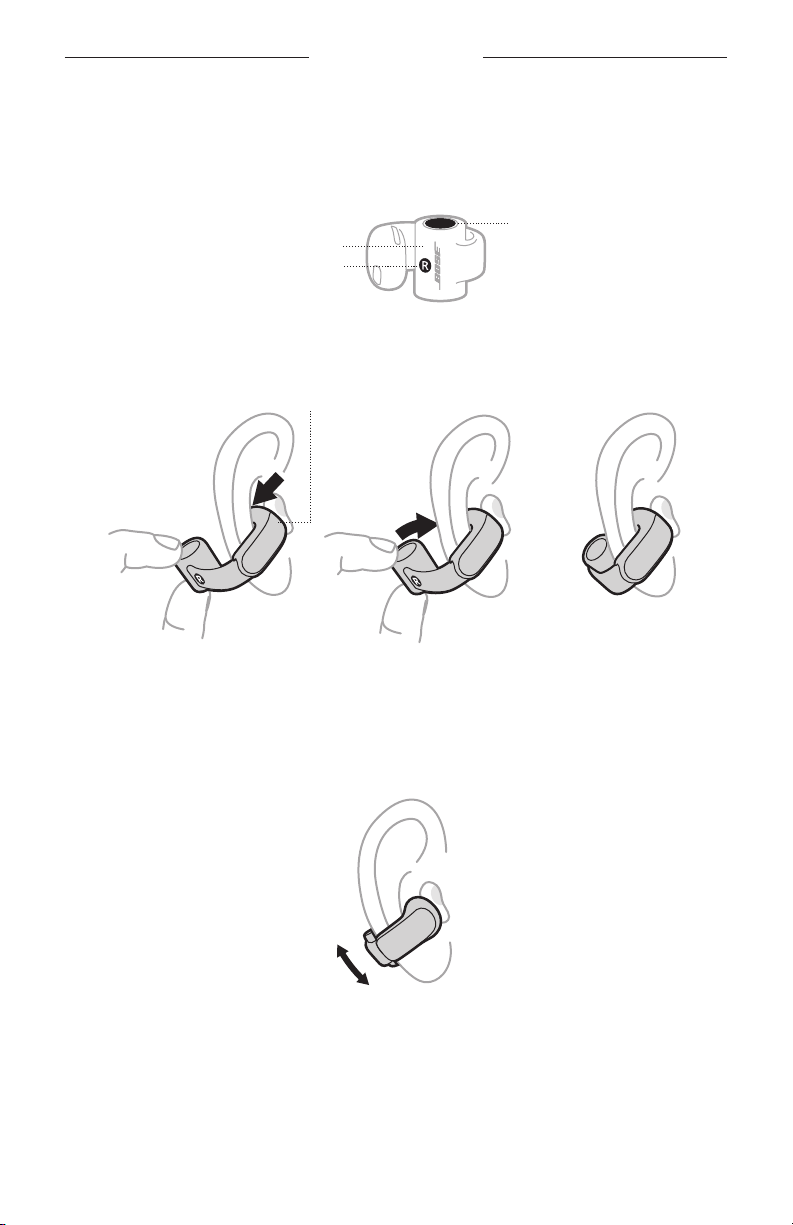
SÅDAN BRUGES DE
TAG IN-EAR HOVEDTELEFONERNE PÅ
1. Hold i den cylinderformede del, så knappen er øverst, og markeringen R (højre)
eller L (venstre) vender mod dig.
Knap
Cylinder
R/L-markering
2. Hægt in-ear hovedtelefonernes højttaler i øret, og drej derefter cylinderen rundt,
så den hviler bag dit øre.
Højttaler
Hægt Drej Hvil
3. For at opnå den bedste lydkvalitet og ydelse skal du justere in-ear
hovedtelefonerne, så de er i en vinkel på ca. 45° på dit øre. Hvis det ikke føles
behageligt eller sikkert, skal du skubbe dem lidt op eller ned for at finde den
placering, der passer dig bedst.
4. Tjek, om de sidder rigtigt (se side 14).
5. Gentag trin 1-4 for at tage den anden in-ear hovedtelefon på.
13 | DAN
Page 67
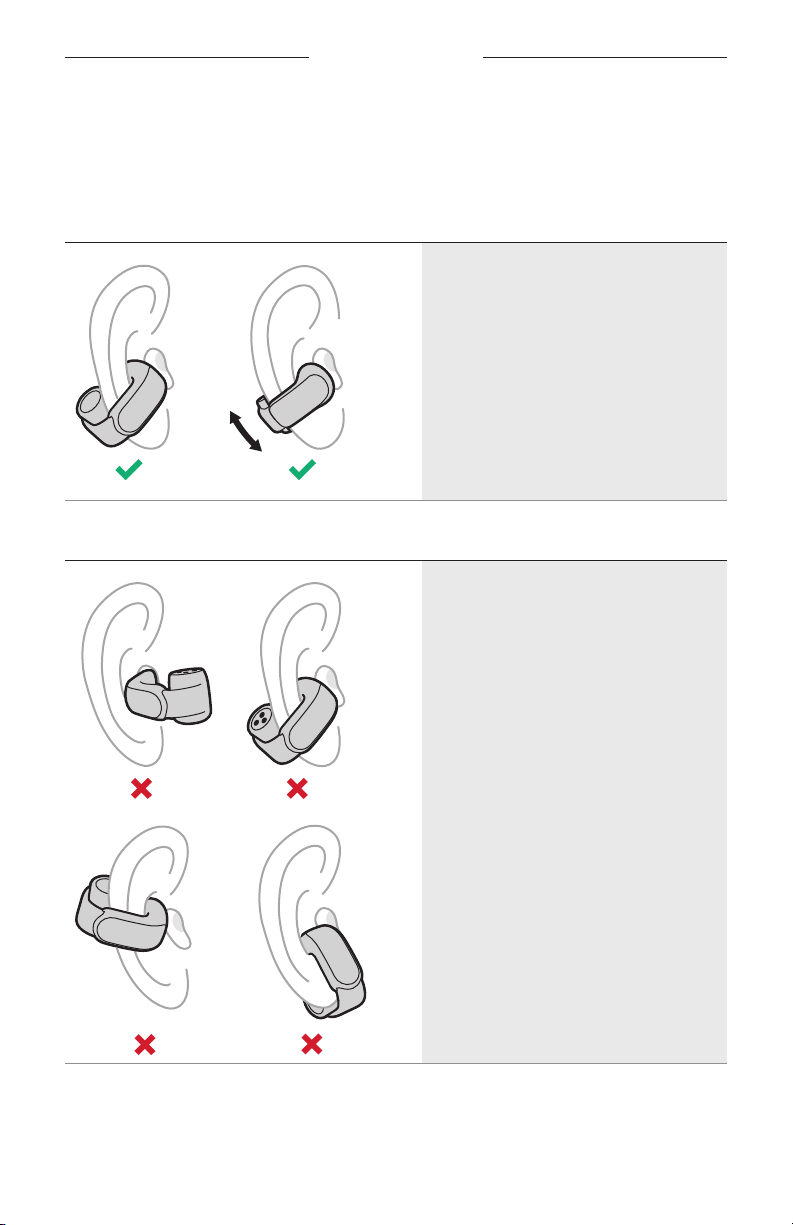
SÅDAN BRUGES DE
TJEK PASFORMEN
Bevæg hovedet op og ned og fra side til side for at sikre, at in-ear hovedtelefonerne
sidder stabilt og komfortabelt. Kontrollér så pasformen ved hjælp af et spejl.
KORREKT PASFORM
• In-ear hovedtelefonernes cylinder er
bag øret, og knappen vender opad.
• In-ear hovedtelefonernes højttaler
hviler på ydersiden af øret og er ikke
sat ind i din ørekanal.
• In-ear hovedtelefonerne sidder i en
vinkel på ca. 45° på dit øre, selvom du
kan skubbe dem lidt op eller ned for at
opnå optimal komfort.
• In-ear hovedtelefonerne føles
FORKERT PASFORM
behagelige og sikre.
14 | DAN
• In-ear hovedtelefonernes cylinder er
foran øret, eller knappen vender nedad.
• In-ear hovedtelefonernes højttaler er
sat ind i din ørekanal i stedet for at
hvile på ydersiden af øret.
• In-ear hovedtelefonerne sidder skråt
nedad mod din hage eller mund.
• In-ear hovedtelefonerne føles
ubehagelige at have på, de klemmer dit
øre eller føles løse eller ustabile.
Page 68
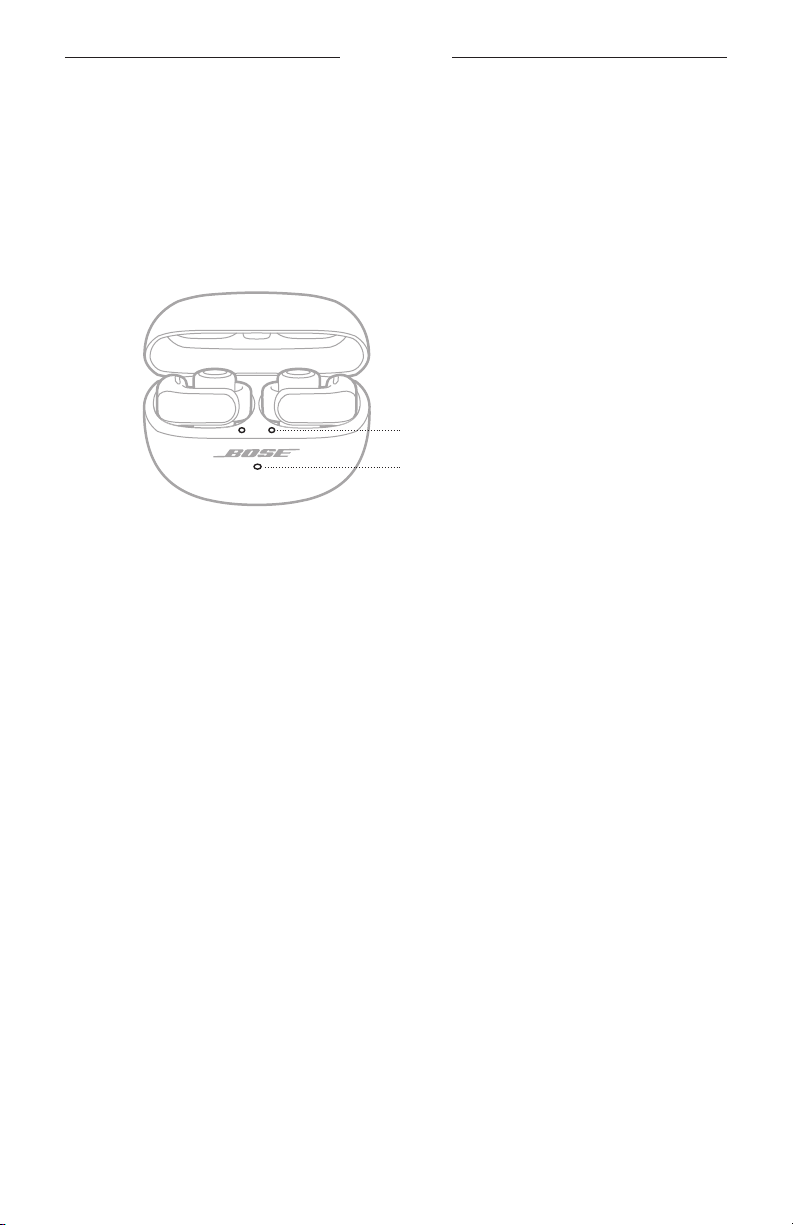
TÆND/SLUK
TÆND
Åbn opladningsetuiet.
In-ear hovedtelefonerne tændes. Statuslamperne for in-ear hovedtelefonerne lyser i
overensstemmelse med in-ear hovedtelefonernes opladningsstatus (se
Opladningsetuiets statuslampe lyser i overensstemmelse med etuiets batteriniveau
(se
side 31).
In-ear hovedtelefonernes statuslamper
Opladningsetuiets statuslampe
side 30).
BEMÆRK: Når du fjerner in-ear hovedtelefonerne fra opladningsetuiet, skal du lukke
etuiet for at bevare batterilevetiden og holde etuiet frit for snavs.
15 | DAN
Page 69
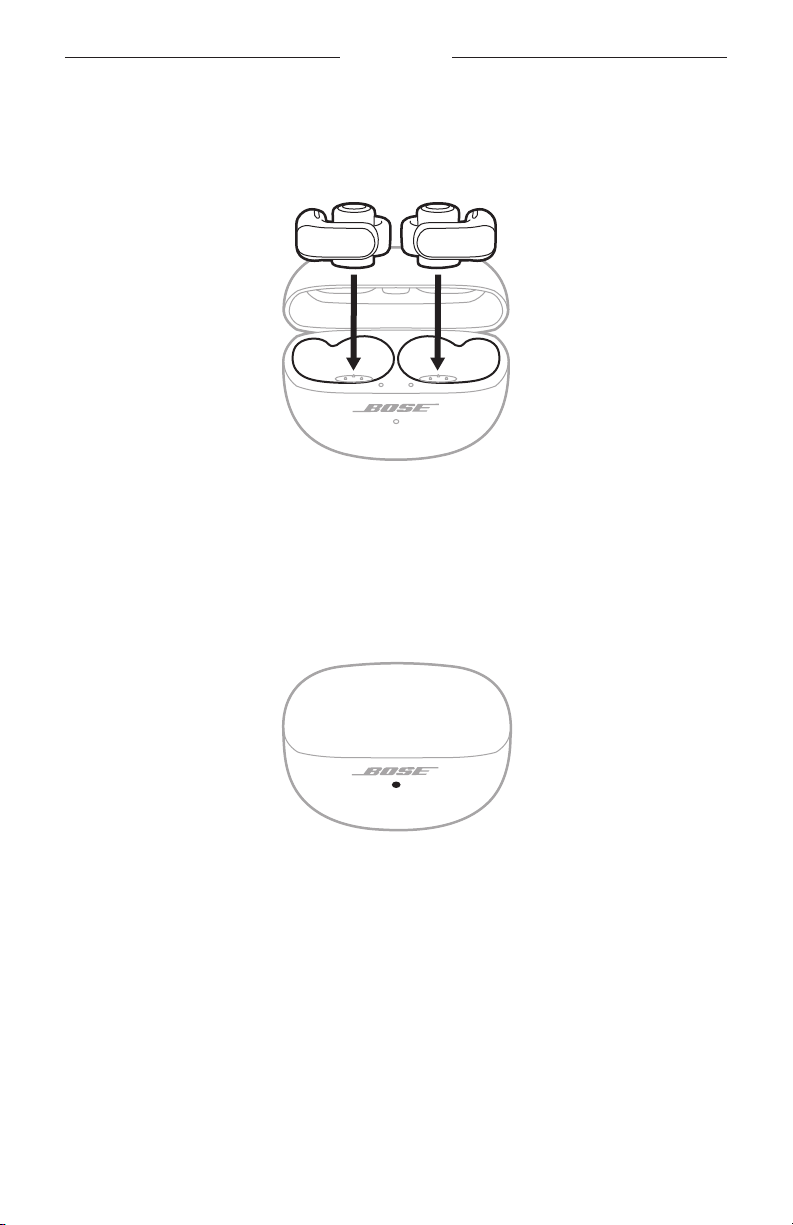
TÆND/SLUK
SLUK
1. Anbring begge in-ear hovedtelefoner i opladningsetuiet.
Forbindelsen mellem in-ear hovedtelefonerne og din enhed afbrydes, og in-ear
hovedtelefonerne slukkes. Statuslamperne for in-ear hovedtelefonerne lyser i
overensstemmelse med in-ear hovedtelefonernes opladningsstatus (se
2. Luk etuiet.
Opladningsetuiets statuslampe lyser i overensstemmelse med etuiets
batteriniveau (se
side 31).
side 31).
16 | DAN
Page 70
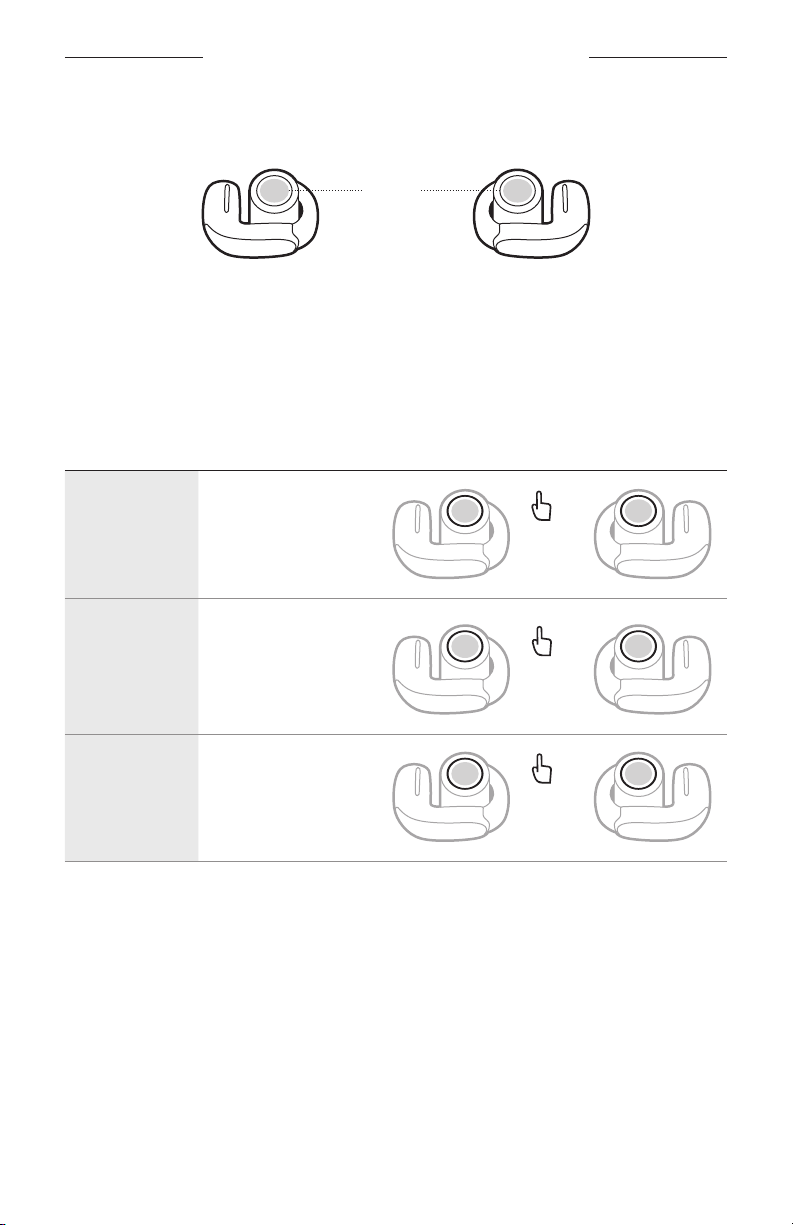
BETJENING AF IN-EAR HOVEDTELEFONERNE
Der er placeret en knap oven på den cylinderformede del af hver in-ear hovedtelefon.
Knapperne styrer medieafspilning, lydstyrke, telefonopkald og din genvej (se
Knapper
side 20).
BEMÆRK: Du kan bruge begge knapperne på in-ear hovedtelefonerne til at styre
alle funktioner undtagen lydstyrken. Ved regulering af lydstyrken har
knapperne på venstre og højre in-ear hovedtelefon forskellige funktioner
(se
side 18).
MEDIEAFSPILNING
BETJENING GØR FØLGENDE
1x
2x
3x
Afspil/pause
Gå til
næste nummer
Gå til
forrige nummer
Tryk på knappen
på en af in-ear
hovedtelefonerne.
Tryk to gange på
knappen på en af in-ear
hovedtelefonerne.
Tryk tre gange på
knappen på en af in-ear
hovedtelefonerne.
17 | DAN
Page 71
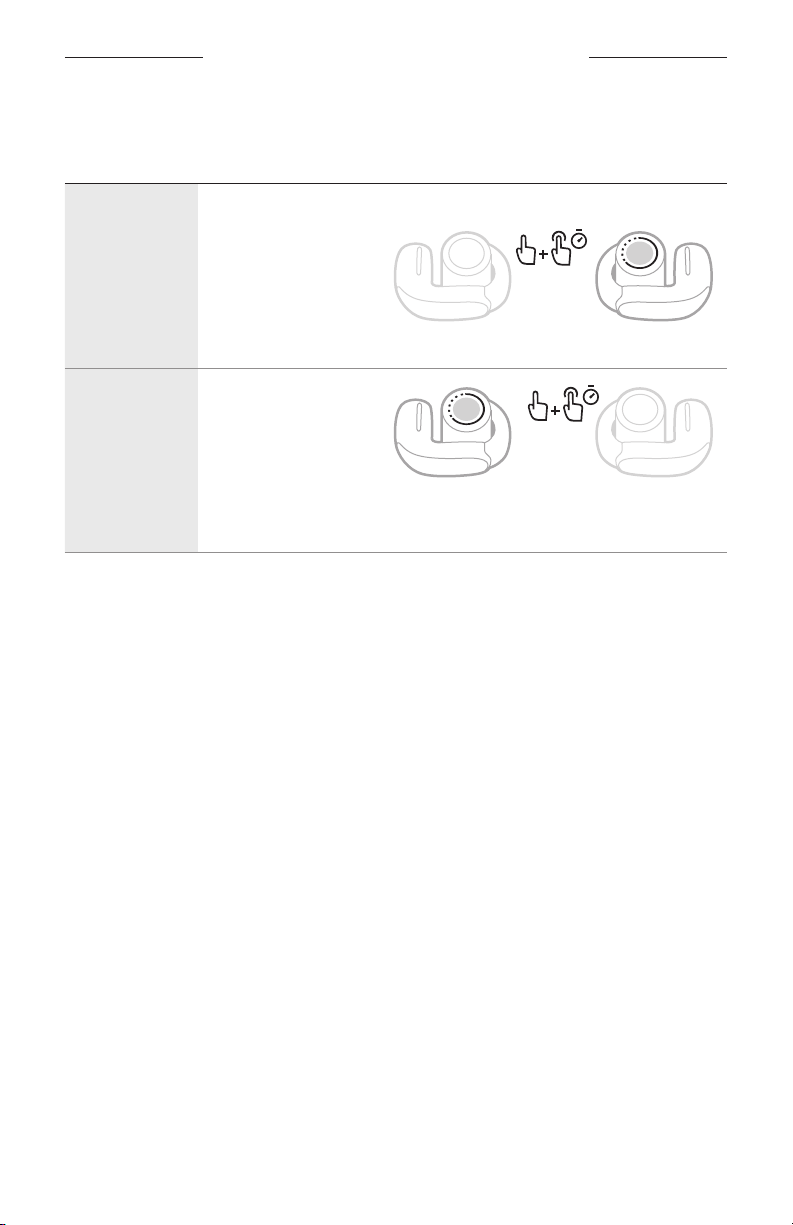
BETJENING AF IN-EAR HOVEDTELEFONERNE
LYDSTYRKEFUNKTIONER
BETJENING GØR FØLGENDE
Tryk to gange på
knappen på den højre
in-ear hovedtelefon,
Forøg
lydstyrken
Reducer
lydstyrken
TIP: Du kan også øge eller reducere lydstyrken ved hjælp af lydstyrkeknapperne på
din enhed eller i Bose Music-appen.
og hold den nede.
Lydstyrken øges,
mens du holder knappen
nede. Slip, når du når den
ønskede lydstyrke.
Tryk to gange på
knappen på den venstre
in-ear hovedtelefon,
og hold den nede.
Lydstyrken reduceres,
mens du holder knappen
nede. Slip, når du når den
ønskede lydstyrke.
18 | DAN
Page 72
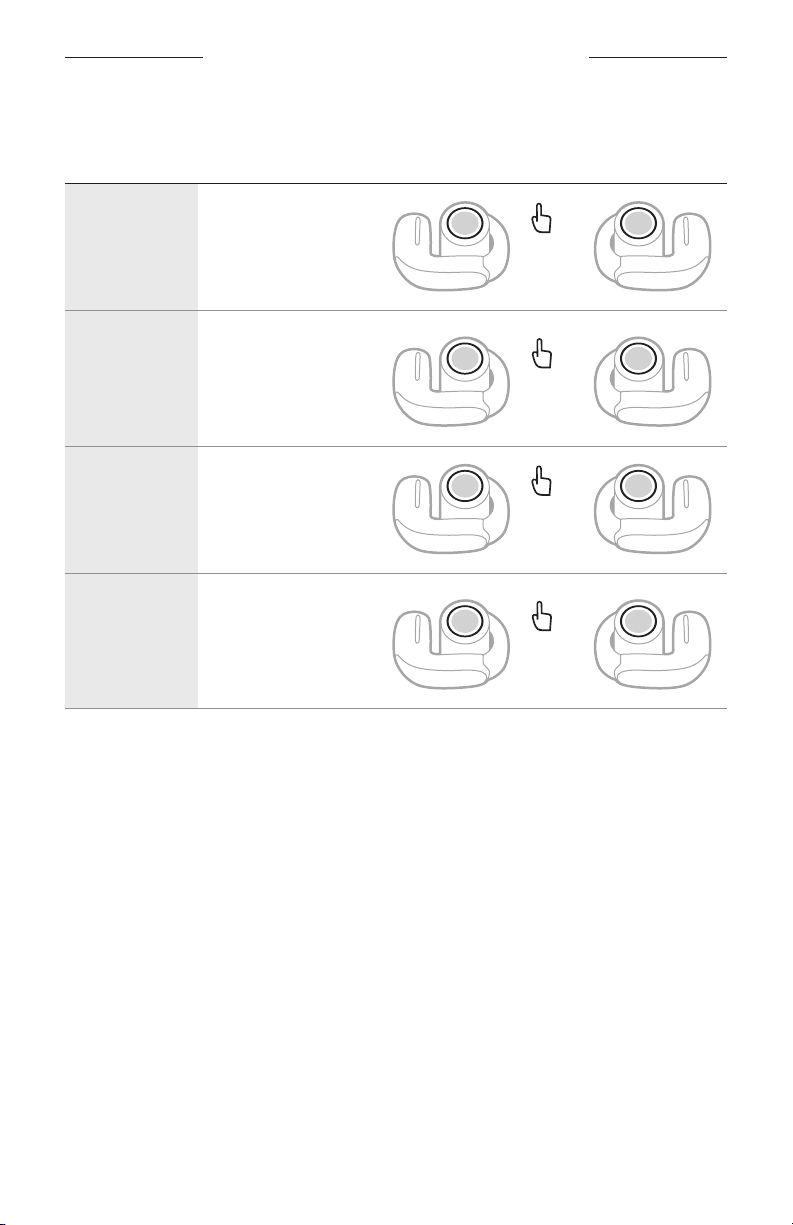
BETJENING AF IN-EAR HOVEDTELEFONERNE
TELEFONOPKALD
KONTROL GØR FØLGENDE
1x
2x
1x
2x
Besvar et opkald
Afslut/afvis et
opkald
Besvar et andet
indgående
opkald, og
parker det
aktuelle opkald
Afvis et nyt
opkald, og
bliv i det
aktuelle opkald
Tryk på knappen
på en af in-ear
hovedtelefonerne.
Tryk to gange på
knappen på en af in-ear
hovedtelefonerne.
Tryk på knappen
på en af in-ear
hovedtelefonerne.
Tryk to gange på
knappen på en af in-ear
hovedtelefonerne.
Opkaldsnotifikationer
En talemeddelelse angiver indgående opkald og opkaldsstatus.
Du kan stoppe opkaldsunderretninger ved at deaktivere talemeddelelser ved hjælp af
Bose Music-appen. Du kan få adgang til denne indstilling i menuen Indstillinger.
JUSTERING AF LYD-EQ
Hvis du vil justere bassen, mellemtoneområdet og diskanten, skal du
bruge Bose Music-appen. Du kan få adgang til disse indstillinger fra
produktstyringsskærmen.
BEMÆRK: Ved høje lydstyrker kan effekten af disse justeringer blive reduceret for at
19 | DAN
undgå forvrængning.
Page 73
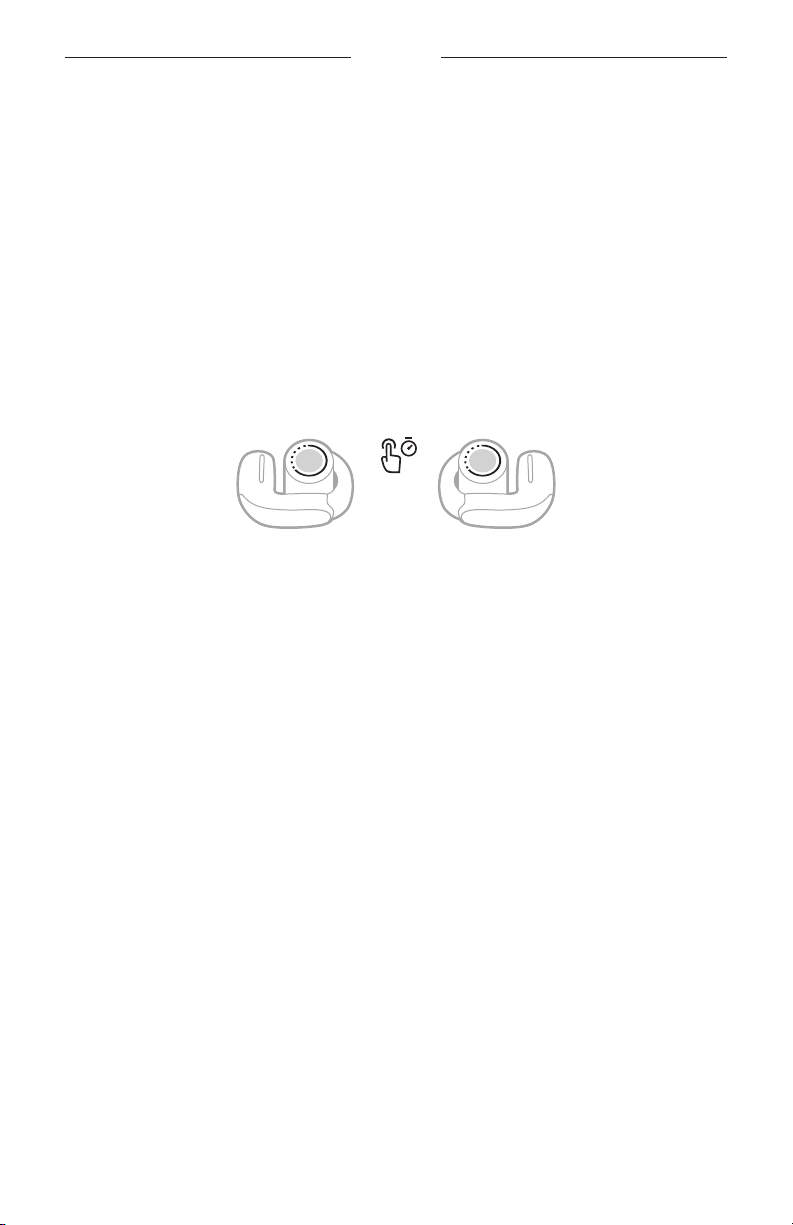
GENVEJE
En genvej giver dig mulighed for hurtigt og nemt at få adgang til en af følgende
funktioner:
• Gennemgå tilstandene (se side 23)
• Gennemgå indstillingerne for medrivende lyd (se side 21)
• Oprette forbindelse til en enhed igen (se side 34)
• Bruge stemmestyring af enhed (se side 25)
BEMÆRK: Som standard er gennemgang af tilstande indstillet som din genvej på
begge in-ear hovedtelefoner.
BRUG DIN GENVEJ
Tryk på knappen på en af in-ear hovedtelefonerne, og hold den nede.
SKIFT ELLER DEAKTIVER DIN GENVEJ
Hvis du vil ændre eller deaktivere en genvej eller tildele en forskellig genvej til hver
in-ear hovedtelefon, skal du bruge Bose Music-appen. Du kan få adgang til denne
indstilling ved at trykke på Genvej på produktstyringsskærmen.
BEMÆRK: Hvis du tildeler en forskellig genvej til hver in-ear hovedtelefon, skal du
trykke på knappen på den relevante in-ear hovedtelefon og holde den
nede. Hvis du anbringer en af in-ear hovedtelefonerne i etuiet, kan du kun
bruge den genvej, der er tildelt til den anden in-ear hovedtelefon.
20 | DAN
Page 74
MEDRIVENDE LYD
Medrivende lyd tager det, du hører, ud af dit hoved og anbringer det foran dig – som
om du altid er i det akustiske sweet spot. Det føles, som om lyden kommer fra uden
for in-ear hovedtelefonerne, hvilket giver en mere naturlig lytteoplevelse. Medrivende
lyd fungerer på alt streamingindhold fra en hvilken som helst kilde og tager det til nye
højder med bedre lydklarhed og en mere fyldig lydkvalitet.
BEMÆRK: Når du foretager eller modtager et telefonopkald, indstilles medrivende lyd
midlertidigt til Fra (se
side 22).
INDSTILLINGER FOR MEDRIVENDE LYD
INDSTILLING BESKRIVELSE TIDSPUNKT FOR BRUG
Bevægelse
Stille
Det virker, som om lyden kommer fra to
stereohøjttalere foran dig, som følger dit
hoveds bevægelser.
BEMÆRK: Denne indstilling bruges
som standard i tilstanden
Medrivende.
Det virker, som om lyden kommer fra to
stereohøjttalere foran dig, som bliver,
hvor de er, når du bevæger hovedet.
BEMÆRKNINGER:
• Et par sekunder efter at du holder op med
at bevæge hovedet, centreres højttalerne
igen på din position.
• For at få adgang til denne indstilling skal
du bruge Bose Music-appen til at ændre
indstillingen for medrivende lyd, oprette
en brugerdefineret tilstand (se side 23)
eller indstille en genvej til at gennemgå
indstillingerne for medrivende lyd
(se side 22).
Anvendes for at få
den mest ensartede
oplevelse. Fungerer
bedst, når du udfører
aktiviteter, der kræver,
at du ofte drejer
hovedet eller ser ned.
Anvendes for at få den
mest realistiske og
kraftfulde oplevelse.
Fungerer bedst, når du
ikke bevæger dig.
Det virker, som om lyden kommer fra dine
Slukket
21 | DAN
in-ear hovedtelefoner.
BEMÆRK: Denne indstilling bruges som
standard i tilstanden Stereo.
Anvendes, når du
ønsker en klassisk
lytteoplevelse
eller vil bevare
batterilevetiden.
Page 75
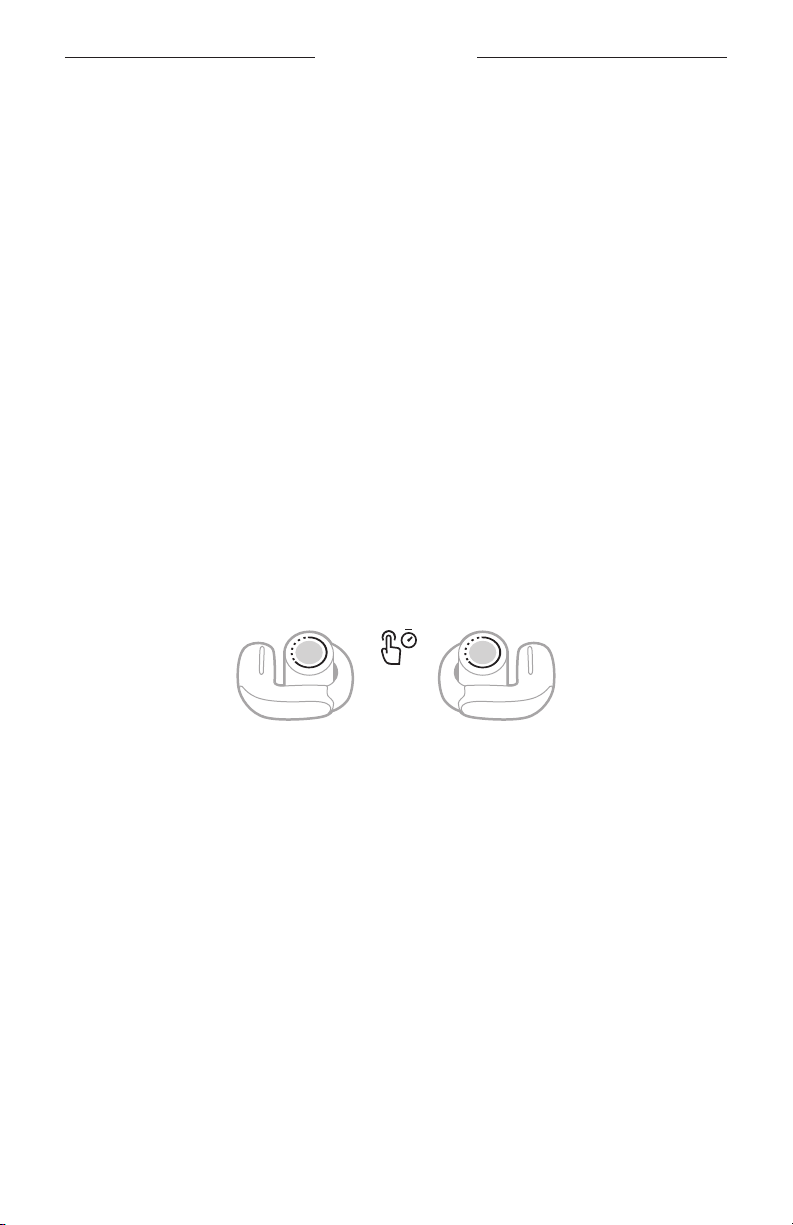
MEDRIVENDE LYD
SKIFT INDSTILLING FOR MEDRIVENDE LYD
Du kan ændre indstillingen for medrivende lyd ved at skifte tilstand eller indstille en
genvej til at gennemgå indstillingerne for medrivende lyd.
TIP: Du kan også ændre indstillingen for medrivende lyd ved hjælp af Bose Music-
appen. Du kan få adgang til denne indstilling fra produktstyringsskærmen.
Skift tilstanden
Du kan finde oplysninger om skift af tilstand på side 24.
BEMÆRK: Du kan også oprette en brugerdefineret tilstand med din foretrukne
indstilling for medrivende lyd (se
side 23).
Brug din genvej
Du kan indstille en genvej til at gennemgå indstillingerne for medrivende lyd. Denne
tilpasser midlertidigt den aktuelle tilstand, indtil du slukker in-ear hovedtelefonerne
eller skifter tilstanden.
BEMÆRK: Hvis du vil ændre indstillingen for medrivende lyd ved hjælp af in-ear
1. Tryk på knappen på den in-ear hovedtelefon, der er tildelt til denne genvej, og hold
den nede.
En talemeddelelse angiver hver indstilling for medrivende lyd i en løkke.
2. Når du hører navnet på din foretrukne indstilling, skal du slippe knappen.
hovedtelefonerne, skal den indstilles som en genvej (se
side 20).
MEDRIVENDE LYD UNDER ET OPKALD
Når du foretager eller modtager et telefonopkald, indstilles medrivende lyd
midlertidigt til Fra. Når du afslutter opkaldet, vender in-ear hovedtelefonerne tilbage til
den tidligere indstilling for medrivende lyd.
KALIBRER MEDRIVENDE LYD
Hvis medrivende lyd ikke lyder rigtigt eller føles, som om den er for tæt på dig, kan du
kalibrere den, så den passer bedre til placeringen af in-ear hovedtelefonerne på dine
ører. Kalibreringen gemmes til in-ear hovedtelefonerne og bruges, når du fremover
aktiverer medrivende lyd.
Brug Bose Music-appen til at kalibrere medrivende lyd. Du kan få adgang til denne
indstilling i menuen Indstillinger.
22 | DAN
Page 76
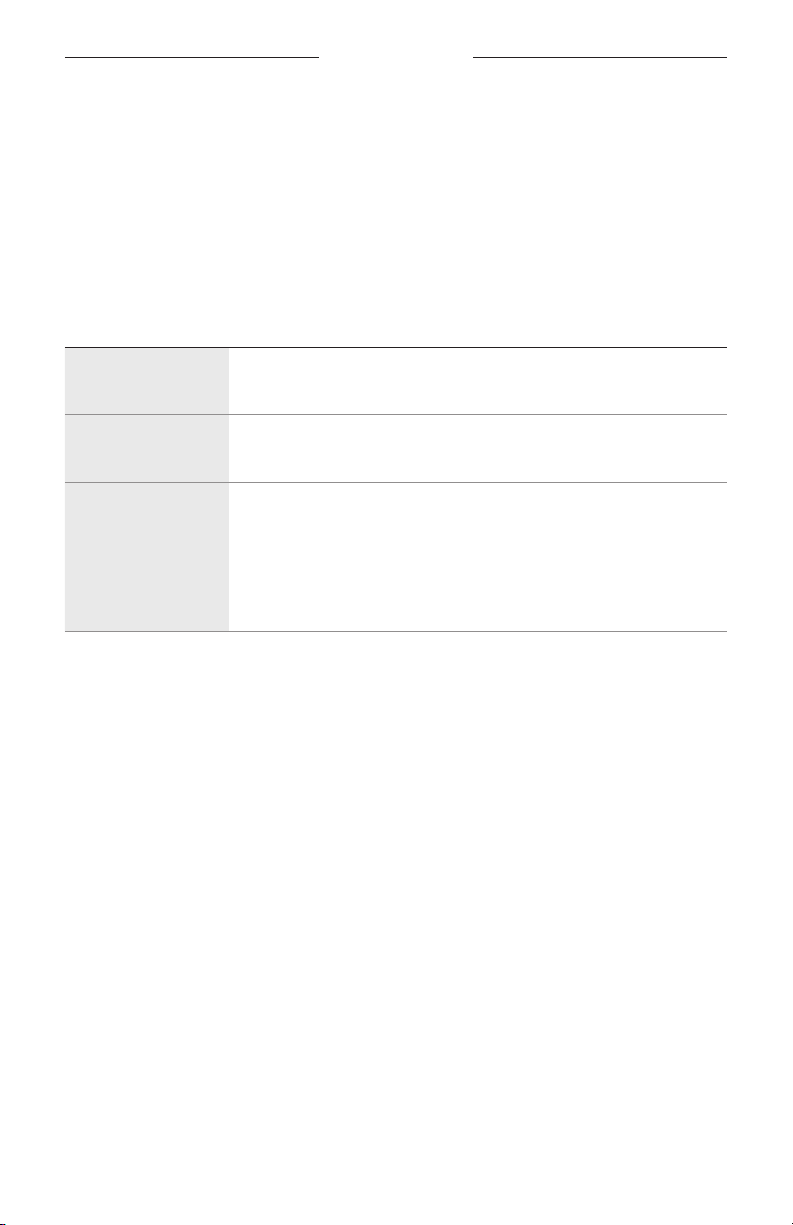
LYTTETILSTANDE
Lyttetilstande er forudindstillede lydindstillinger, som du kan skifte mellem baseret
på dine lyttepræferencer og omgivelserne. De består som standard af ofte anvendte
indstillinger for medrivende lyd.
Du kan vælge mellem to forhåndskonfigurerede tilstande – Stereo og Medrivende –
eller oprette op til otte af dine egne brugerdefinerede tilstande.
TILSTANDE
TILSTAND BESKRIVELSE
Stereo
Medrivende
Brugerdefineret
Lyden afspilles i optimeret Bose-stereolyd. Giver dig mulighed for at
nyde en klassisk lytteoplevelse og bevare batterilevetiden.
Lyden afspilles med medrivende lyd sat til Bevægelse. Giver dig
mulighed for at fordybe dig i livagtig lyd.
Brugerdefinerede indstillinger for medrivende lyd baseret på dine
lyttepræferencer og omgivelserne.
BEMÆRK: Du kan oprette op til otte brugerdefinerede tilstande
ved hjælp af Bose Music-appen. Du kan få adgang
til denne indstilling ved at trykke på Tilstande på
produktstyringsskærmen.
NOTER:
• Som standard tændes in-ear hovedtelefonerne i den senest anvendte tilstand.
Brug Bose Music-appen til at deaktivere denne indstilling. Du kan få adgang til
denne indstilling i menuen Indstillinger.
• Du kan finde oplysninger om indstillingerne for medrivende lyd på side 21.
23 | DAN
Page 77
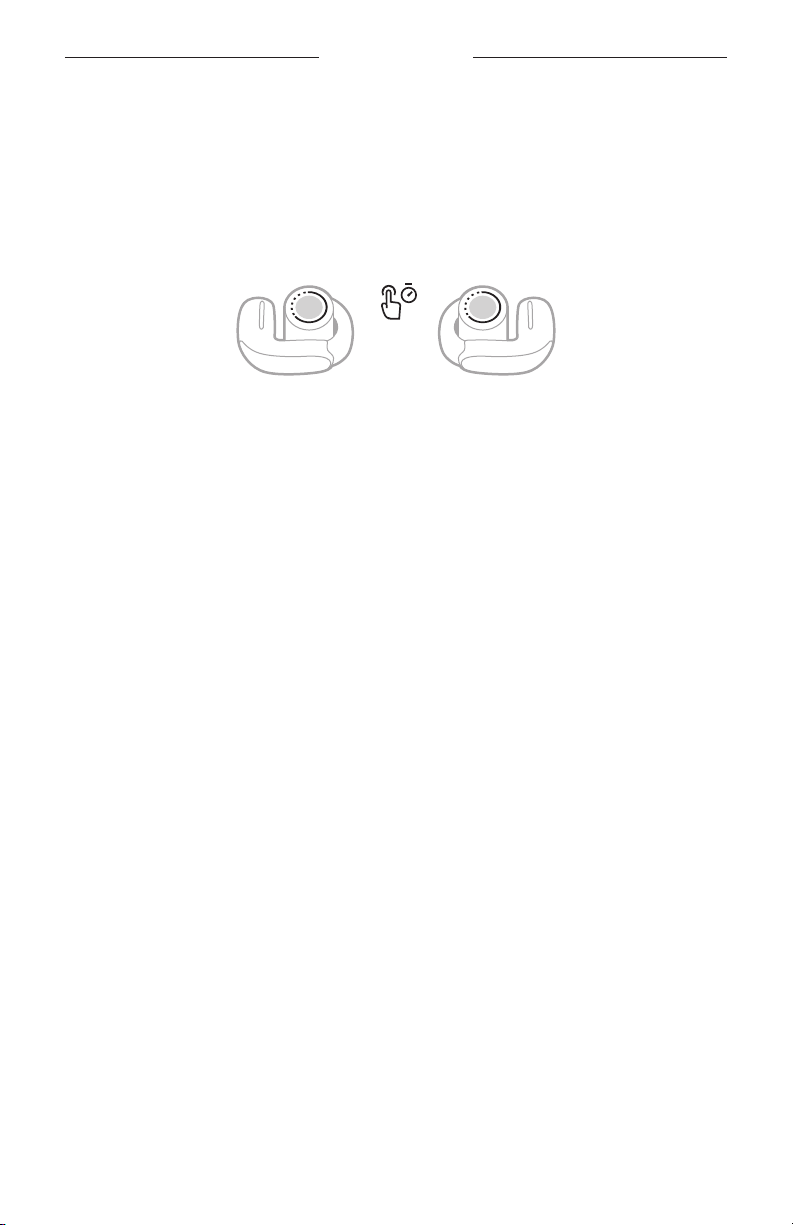
SKIFT TILSTANDEN
LYTTETILSTANDE
BEMÆRK: Hvis du vil ændre tilstanden ved hjælp af in-ear hovedtelefonerne, skal
1. Tryk på knappen på en af in-ear hovedtelefonerne, og hold den nede for at
gennemgå tilstandene.
En talemeddelelse angiver hver tilstand i en løkke.
2. Når du hører navnet på din foretrukne tilstand, skal du slippe knappen.
TIP: Du kan også ændre tilstanden ved hjælp af Bose Music-appen. Du kan få adgang
den indstilles som en genvej (se
af tilstande indstillet som din genvej på begge in-ear hovedtelefoner.
til denne indstilling ved at trykke på Tilstande på produktstyringsskærmen.
side 20). Som standard er gennemgang
Tilføj eller fjern tilstande fra in-ear hovedtelefonerne
For at få adgang til tilstandene på in-ear hovedtelefonerne skal du være indstillet som
favoritter i Bose Music-appen. Som standard er tilstandene Stereo og Medrivende
indstillet som favoritter.
For at tilføje eller fjerne tilstande fra in-ear hovedtelefonerne skal du trykke på
Tilstande på produktstyringsskærmen og tilpasse, hvilke tilstande der er indstillet som
favoritter.
24 | DAN
Page 78
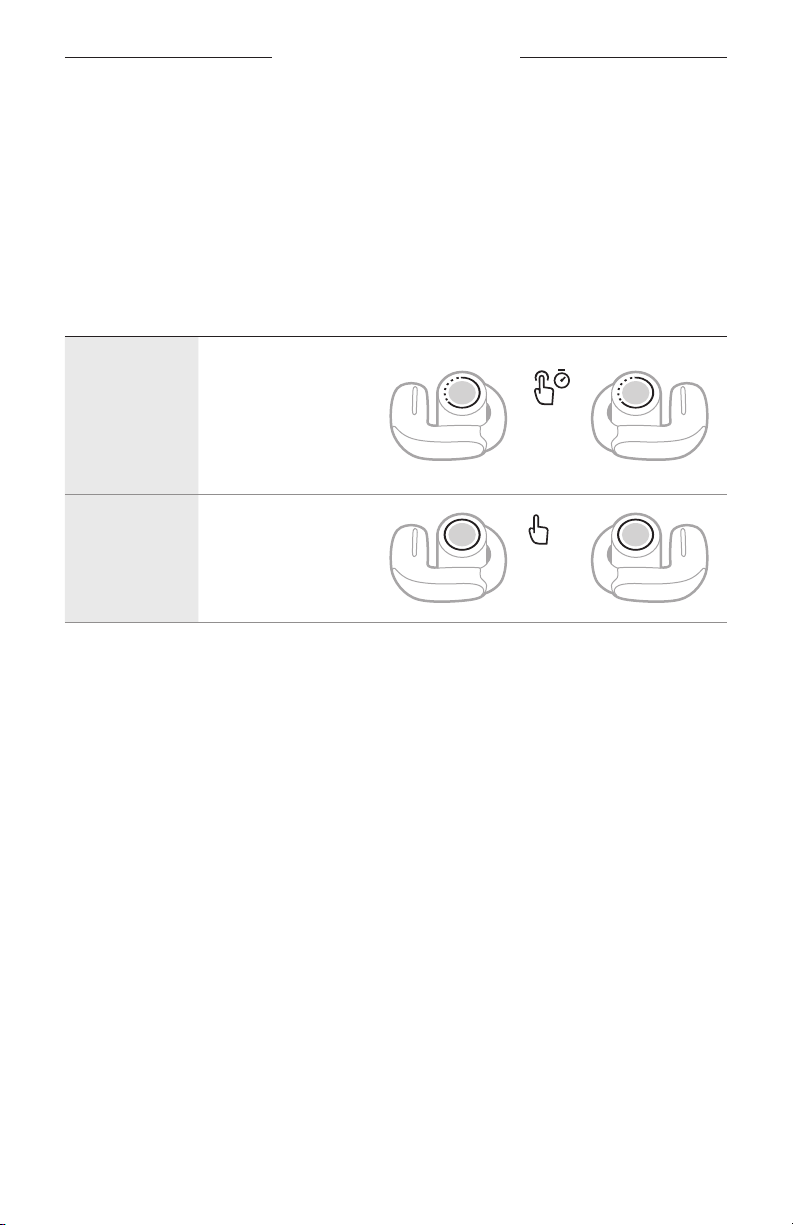
STEMMESTYRING AF ENHED
Du kan indstille en genvej for at få adgang til stemmestyring for din enhed ved hjælp
af in-ear hovedtelefonerne. Mikrofonerne på in-ear hovedtelefonerne fungerer som en
udvidelse af mikrofonen på din enhed.
BEMÆRK: Hvis du skal have adgang til stemmestyring af enheden ved hjælp af in-ear
hovedtelefonerne, skal det indstilles som en genvej (se
side 20).
FUNKTIONER TIL STEMMESTYRING AF ENHED
BETJENING GØR FØLGENDE
Tryk på knappen på den
Anvend
stemmestyring
af enhed
Stop
stemmestyring
af enhed
in-ear hovedtelefon,
der er tildelt til denne
genvej, og hold den
nede, indtil du hører
en tone. Slip, og sig
derefter din anmodning.
Tryk på knappen
på den in-ear
hovedtelefon, der er
tildelt til denne genvej.
1x
25 | DAN
Page 79
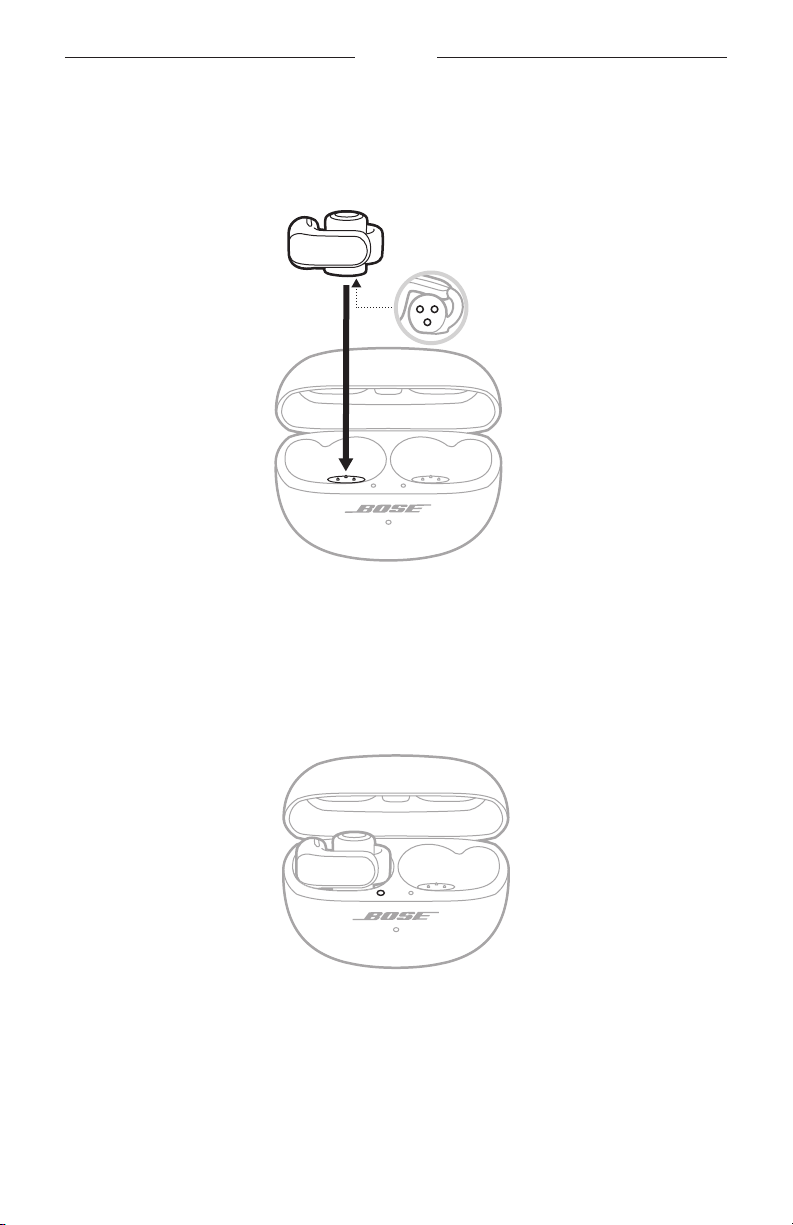
BATTERI
OPLAD IN-EAR HOVEDTELEFONERNE
1. Juster opladningskontakterne på den venstre in-ear hovedtelefon, så de passer til
opladningsbenene på venstre side af opladningsetuiet.
Opladningskontakter
BEMÆRK: Inden opladning skal du sørge for, at in-ear hovedtelefonerne har
stuetemperatur, mellem 8 °C og 39 °C.
2. Placer in-ear hovedtelefonen i etuiet, indtil den klikker på plads magnetisk.
Statuslampen for den venstre in-ear hovedtelefon lyser i overensstemmelse med
opladningsstatussen (se
side 30).
3. Gentag trin 1-2 for den højre in-ear hovedtelefon.
BEMÆRK: In-ear hovedtelefonerne oplades, hvis etuiet er åbent eller lukket.
26 | DAN
Page 80
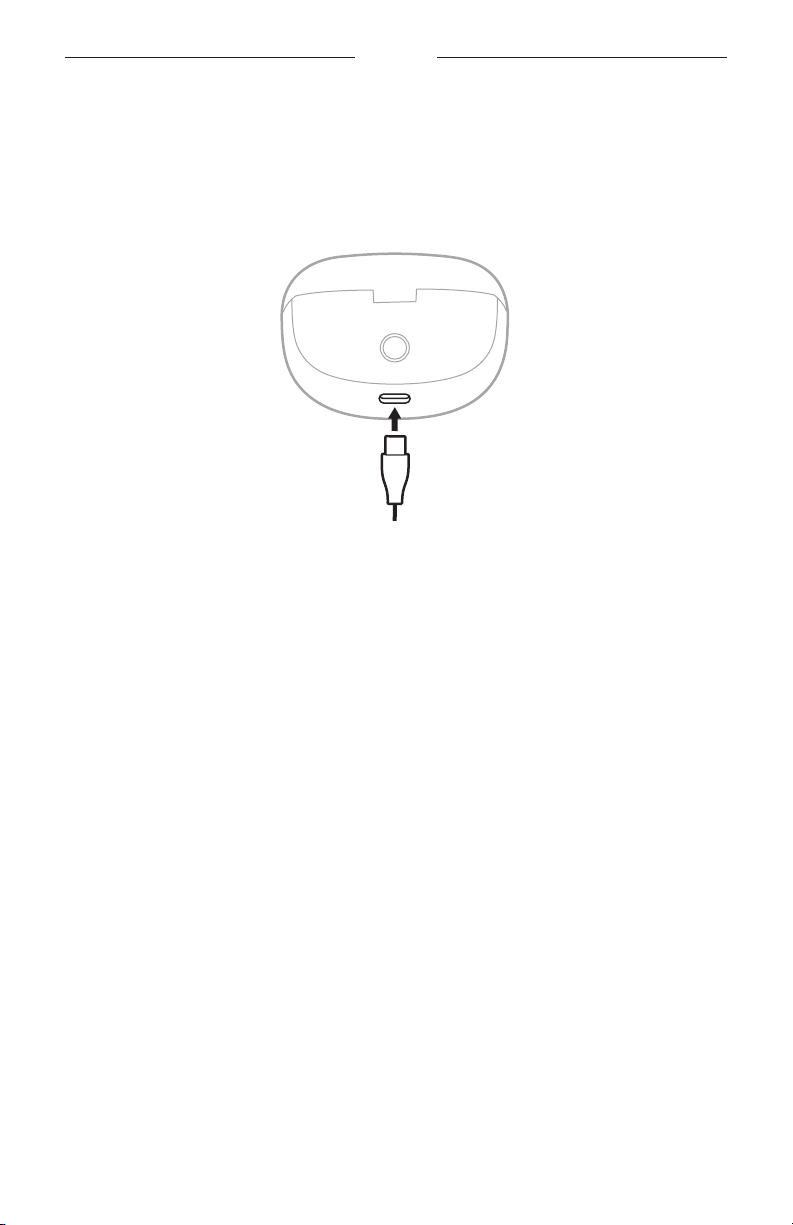
BATTERI
OPLAD OPLADNINGSETUIET
FORSIGTIG: Brug kun dette produkt med en godkendt LPS-strømforsyning,
der overholder de lokale love og regler (f.eks. UL, CSA, VDE, CCC).
1. Tilslut USB-kablets lille ende til USB-C®-porten på bunden af opladningsetuiet.
2. Tilslut den anden ende til en USB-A-vægoplader (medfølger ikke) eller en computer.
Opladningsetuiets statuslampe blinker langsomt gult (se
side 31).
BEMÆRK: Inden opladning skal du sørge for, at etuiet har stuetemperatur, mellem
8 °C og 39 °C.
27 | DAN
Page 81
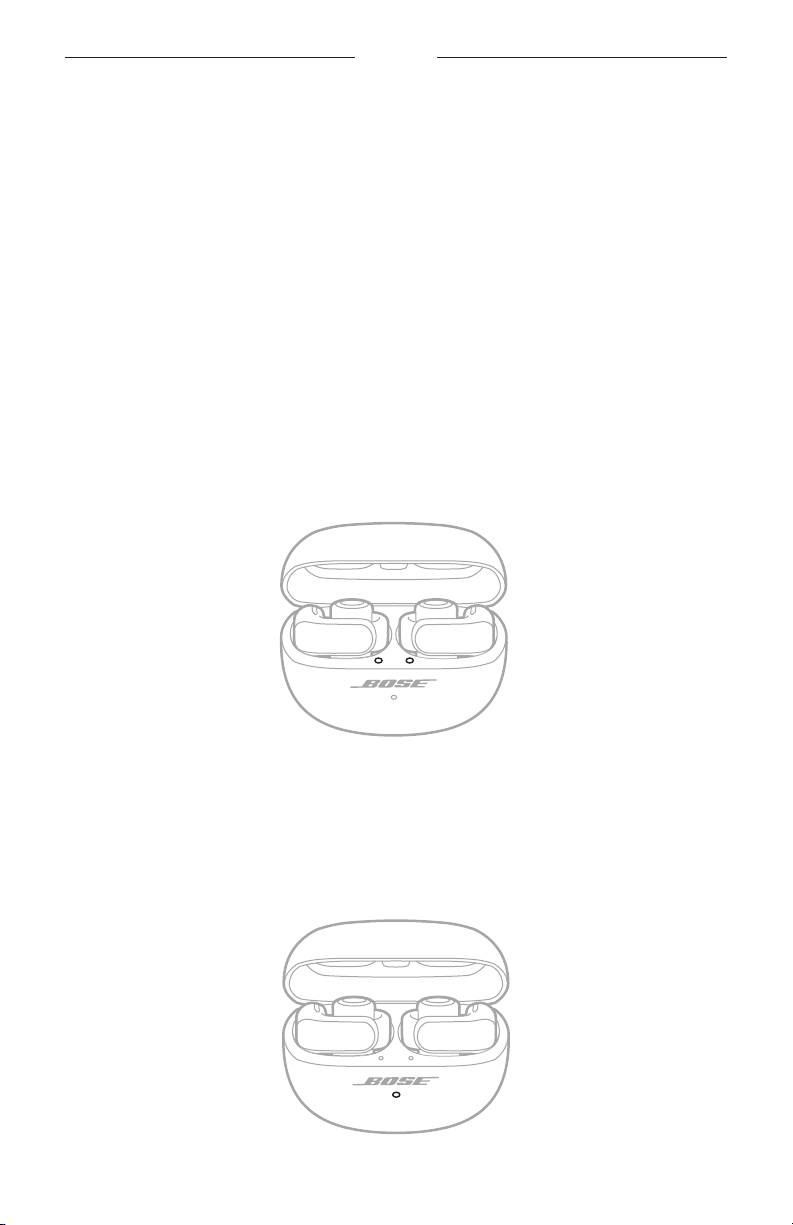
BATTERI
TJEK BATTERINIVEAUET FOR IN-EAR HOVEDTELEFONERNE
Under brug af in-ear hovedtelefonerne
• Et par sekunder efter at du har fjernet in-ear hovedtelefonerne fra
opladningsetuiet, fortæller en talemeddelelse dig om batteriniveauet for in-ear
hovedtelefonerne.
• Brug Bose Music-appen. In-ear hovedtelefonernes batteriniveau vises på
produktstyringsskærmen.
BEMÆRK: Hvis den ene in-ear hovedtelefon har et lavere batteriniveau end den
anden, fortæller talemeddelelsen dig om det laveste batteriniveau.
Hvis batteriniveauet er lavt, hører du ”Lav batteriladning.”
Under opladning af in-ear hovedtelefonerne
Når du anbringer in-ear hovedtelefonerne i opladningsetuiet, lyser in-ear
hovedtelefonernes statuslamper i overensstemmelse med in-ear hovedtelefonernes
opladningsstatus (se
side 30).
KONTROLLÉR OPLADNINGSETUIETS BATTERINIVEAU
Åbn opladningsetuiet.
Opladningsetuiets statuslampe lyser i overensstemmelse med etuiets batteriniveau
(se
side 31).
28 | DAN
Page 82

BATTERI
OPLADNINGSTID
KOMPONENT OPLADNINGSTID
In-ear hovedtelefoner Op til 1 time
1
Opladningsetui Op til 3 timer
NOTER:
• Når in-ear hovedtelefonernes batteriniveau er lavt, gør opladning i 10 minutter med
etuiet lukket det muligt at have in-ear hovedtelefonerne tændt i op til 2 timer.
2
• Når in-ear hovedtelefonerne er fuldt opladet, kan de afspille lyd i op til 7,5 timer
med medrivende lyd indstillet til Fra (op til 4,5 timer med medrivende lyd indstillet
3
til Til).
• Når etuiet er fuldt opladet, kan det levere op til 19,5 timers lydafspilning mere med
medrivende lyd indstillet til Fra (op til 12 timer mere med medrivende lyd indstillet
4
til Til).
• Når både in-ear hovedtelefonerne og etuiet er fuldt opladet, er den samlede
lydafspilningstid op til 27 timer med medrivende lyd indstillet til Fra (op til 16,5 timer
med medrivende lyd indstillet til Til).
• Når in-ear hovedtelefonerne er fuldt opladet, kan de være tilsluttet til en enhed i op
til 48 timer, mens de ikke afspiller lyd.
5
6
• Når in-ear hovedtelefonerne er i etuiet, varierer opladningstiden for etuiet.
1 Test udført af Bose i oktober 2023 med produktionsrepræsentative Bose Ultra åbne in-ear hovedtelefoner og
opladningsetuiet til Bose Ultra åbne in-ear hovedtelefoner. Testen med hurtig opladning bestod i at indsætte in-ear
hovedtelefonerne med afladet batteri (så der ikke kunne afspilles lyd) i et fuldt opladet etui og oplade in-ear hovedtelefonerne
i 10 minutter og derefter genoptage Bluetooth A2DP-lydafspilningen med lydstyrken indstillet til 75 dBA, 3-bånds EQ indstillet
til nul, med Medrivende lyd slået fra, hvilket medførte op til 2 timers afspilningstid, før batteriet blev afladet. Tiden til at opnå
fuldt opladede in-ear hovedtelefoner blev bestemt ved at oplade in-ear hovedtelefoner med afladet batteri (så der ikke kunne
afspilles lyd) i et fuldt opladet etui og oplade in-ear hovedtelefonerne til 100 % batteriopladning.
2 Se 1.
3 Test udført af Bose i oktober 2023 med produktionsrepræsentative Bose Ultra åbne in-ear hovedtelefoner, der afspiller
IEC 60268-1 lyserød støj ved anvendelse af A2DP Bluetooth-lydstreaming ved en RSSI på 75 dBm. Lydstyrken blev sat til et
afspilningslydniveau på 75 dBA, og 3-bånds EQ blev indstillet til nul. Med Medrivende lyd slået fra var afspilningstiden op til
7,5 timer, før batteriet blev afladet. Med Medrivende lyd slået til var afspilningstiden op til 4,5 timer, før batteriet blev afladet.
Batterilevetiden varierer afhængigt af indstillingerne og brugen.
4 Test udført af Bose i oktober 2023 ved at indsætte produktionsrepræsentative Bose Ultra åbne in-ear hovedtelefoner med
afladet batteri (så der ikke kunne afspilles lyd) i et fuldt opladet opladningsetui til Bose Ultra åbne in-ear hovedtelefoner og
oplade in-ear hovedtelefonerne til 100 % (eller indtil etuiets batteri var afladet). Derefter afspillede in-ear hovedtelefonerne
IEC 60268-1 lyserød støj ved anvendelse af A2DP Bluetooth-lydstreaming ved en RSSI på 75 dBm, indtil batteriet var afladet.
Lydstyrken blev sat til et afspilningslydniveau på 75 dBA, og 3-bånds EQ blev indstillet til nul. Testen fortsatte, indtil etuiets
batteri var afladet. Yderligere afspilningstid for in-ear hovedtelefonerne tilføjet gennem opladning af etuiet var 19,5 timer med
Medrivende lyd indstillet til Fra og 12 timer med Medrivende lyd indstillet til Til.
5 Se 4.
6 Test udført af Bose i oktober 2023 ved at fjerne fuldt opladede produktionsrepræsentative Bose Ultra åbne in-ear
hovedtelefoner fra et opladningsetui til Bose Ultra åbne in-ear hovedtelefoner og tilslutte dem til en telefon uden at afspille
indhold og bevare tilslutningen, indtil in-ear hovedtelefonerne var afladet.
29 | DAN
Page 83
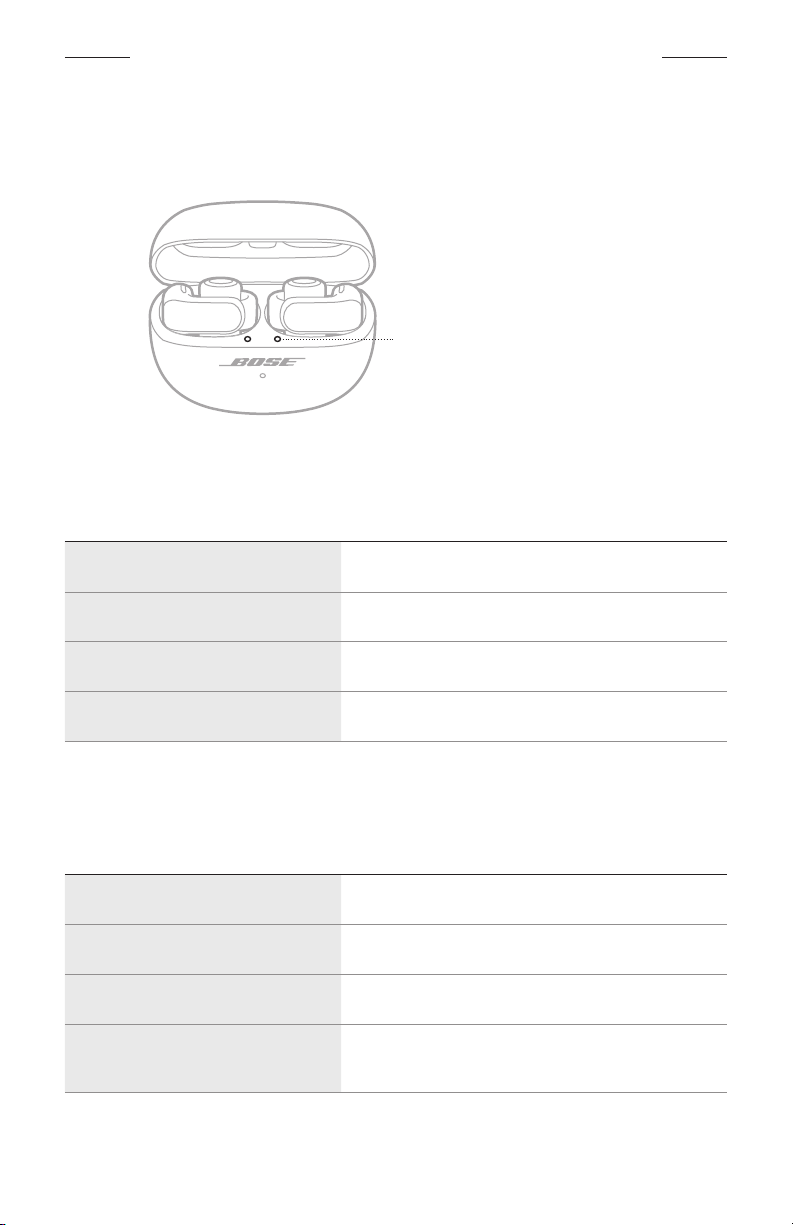
STATUS FOR IN-EAR HOVEDTELEFONER OG OPLADNINGSETUI
IN-EAR HOVEDTELEFONERNES STATUSLAMPER
In-ear hovedtelefonernes statuslamper er placeret på den indvendige overflade af
opladningsetuiet ved siden af hver in-ear hovedtelefon.
In-ear hovedtelefonernes statuslamper
Bluetooth-status
Viser status for Bluetooth-forbindelsen.
LYSAKTIVITET SYSTEMTILSTAND
Blinker langsomt blåt Klar til tilslutning
Blinker hurtigt blåt Opretter forbindelse
Lyser konstant blåt (5 sekunder) Tilsluttet
Blinker hvidt 2 gange Enhedslisten er ryddet
Batteri-, opdaterings- og fejlstatus
Viser batteri-, opdaterings- og fejlstatus for in-ear hovedtelefonerne.
LYSAKTIVITET SYSTEMTILSTAND
Lyser konstant hvidt (10 minutter) Fuldt opladet
Blinker langsomt gult (10 minutter) Oplader
Blinker hvidt Bestemmer batteristatus for in-ear hovedtelefonerne
Blinker hvidt 2 gange, blinker
langsomt blåt og slukkes
30 | DAN
Genstart gennemført
Page 84
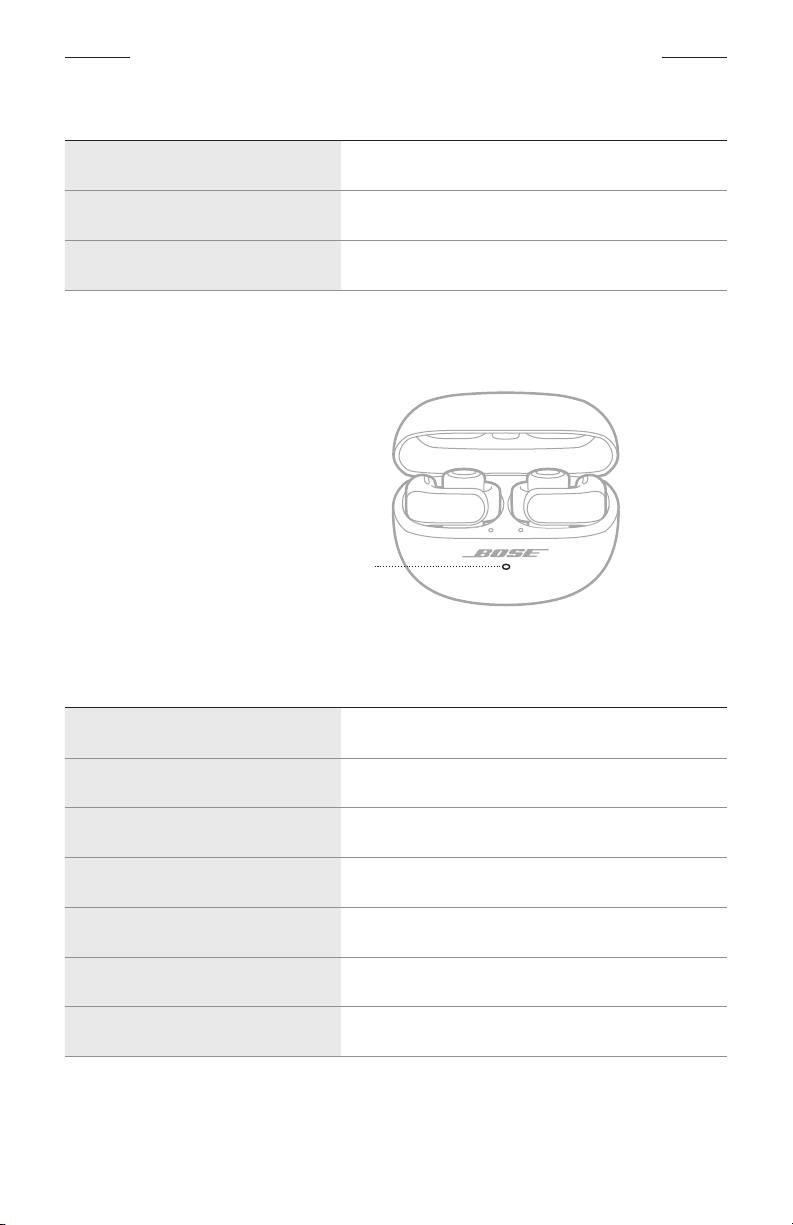
STATUS FOR IN-EAR HOVEDTELEFONER OG OPLADNINGSETUI
LYSAKTIVITET SYSTEMTILSTAND
Blinker hvidt 3 gange (gentages) Opdaterer software
Blinker gult (3 sekunder) Gendannelse af fabriksindstillinger
Blinker gult og hvidt Fejl – kontakt Bose kundeservice
OPLADNINGSETUIETS STATUSLAMPE
Opladningsetuiets statuslampe er placeret på forsiden af opladningsetuiet.
Opladningsetuiets statuslampe
Batteri-, opdaterings- og fejlstatus
Viser batteri-, opdaterings- og fejlstatus for opladningsetuiet.
LYSAKTIVITET SYSTEMTILSTAND
Lyser hvidt
Lyser konstant hvidt (5 sekunder) Opladet (34 % - 99 %)
Lyser konstant gult (5 sekunder) Lav opladning (10 % - 33 %)
Blinker gult 2 gange Skal oplades (mindre end 10 %)
Blinker langsomt gult Oplader og er tilsluttet
Blinker hvidt 3 gange (gentages) Opdaterer software
Blinker gult og hvidt Fejl – kontakt Bose kundeservice
31 | DAN
Fuldt opladet (100 %) og tilsluttet
Page 85
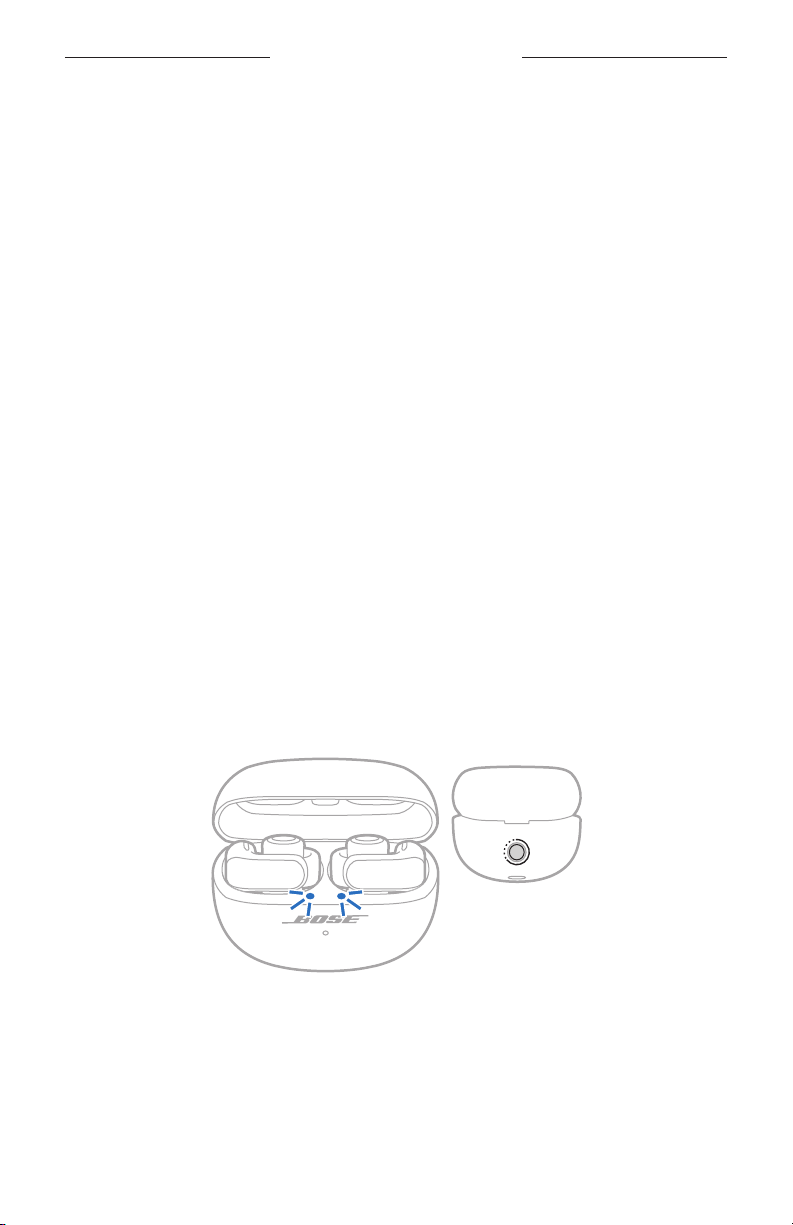
BLUETOOTH-FORBINDELSER
Du kan tilslutte in-ear hovedtelefonerne til din enhed ved hjælp af Bose Music-appen,
Bluetooth-menuen på din enhed eller Fast Pair (kun Android-enheder).
Du kan gemme op til seks enheder på in-ear hovedtelefonens enhedsliste. Du kan kun
tilslutte og afspille lyd fra én enhed ad gangen.
NOTER:
• For at få den bedste oplevelse skal du bruge Bose Music-appen til at konfigurere og
tilslutte din enhed (se
• Du kan finde oplysninger om tilslutning ved hjælp af Fast Pair på side 36.
side 12).
TILSLUT VED HJÆLP AF BOSE MUSIC-APPEN
Oplysninger om, hvordan du tilslutter in-ear hovedtelefonerne og administrerer
Bluetooth-indstillinger ved hjælp af Bose Music-appen, finder du på
side 12.
TILSLUT VED HJÆLP AF BLUETOOTH-MENUEN PÅ DIN ENHED
1. Når in-ear hovedtelefonerne er i opladningsetuiet, og etuiet er åbent, skal
du trykke på knappen på bagsiden af etuiet og holde den nede, indtil in-ear
hovedtelefonernes statuslamper blinker blåt langsomt.
BEMÆRK: Sørg for, at begge in-ear hovedtelefoner er i etuiet, og at etuiet er åbent.
TIP: Du kan også gøre in-ear hovedtelefonerne klar til tilslutning, selvom du ikke
har etuiet i nærheden. Det gør du ved at bruge Bose Music-appen til at
indstille en genvej til Skift enheder (se
på den in-ear hovedtelefon, der er tildelt til den pågældende genvej, og hold
den nede, indtil du hører "Klar til tilslutning."
32 | DAN
side 20). Tryk derefter på knappen
Page 86
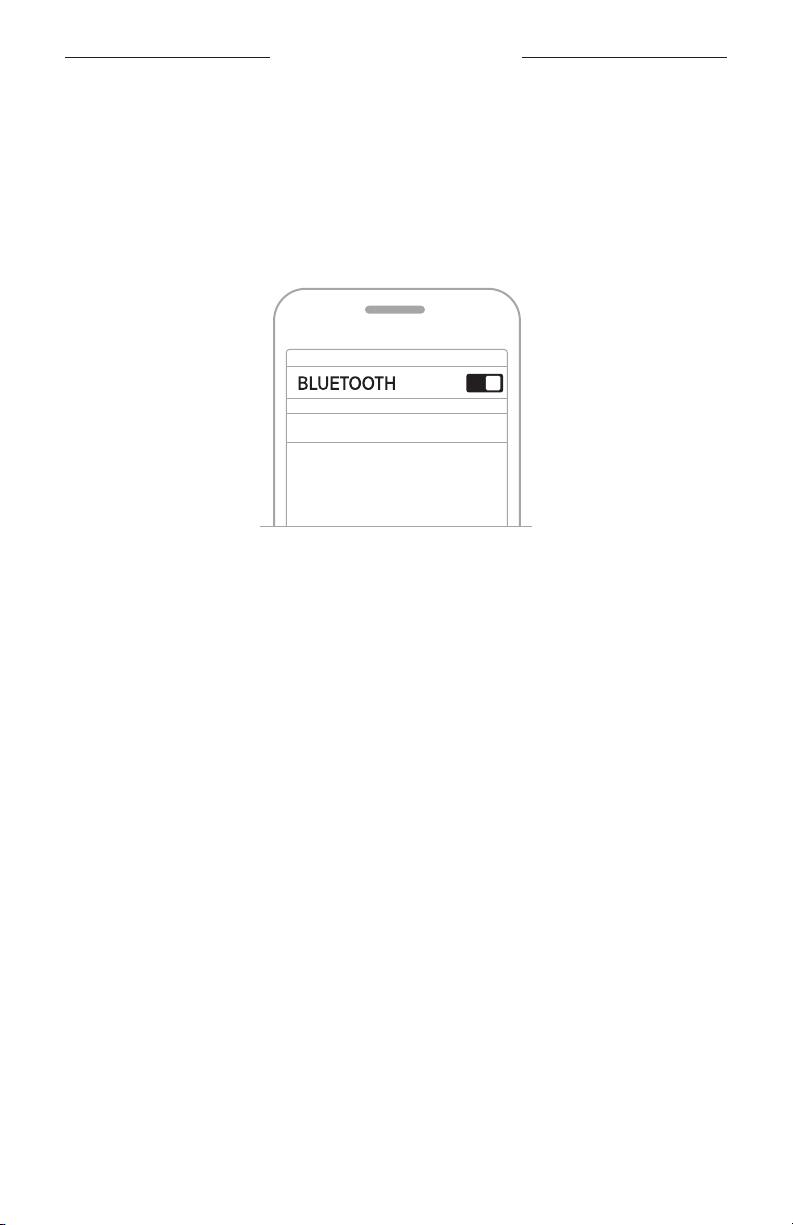
BLUETOOTH-FORBINDELSER
2. Aktivér Bluetooth-funktionen på din enhed.
BEMÆRK: Bluetooth-funktionen findes normalt i menuen Indstillinger.
3. Vælg in-ear hovedtelefonerne på enhedslisten.
BEMÆRK: Led efter det navn, du angav for dine in-ear hovedtelefoner,
i Bose Music-appen. Hvis du ikke navngav dine in-ear hovedtelefoner,
vises standardnavnet.
Bose Ultra åbne in-ear hovedtelefoner
In-ear hovedtelefonernes navn vises på listen med enheder. In-ear
hovedtelefonernes statuslamper lyser blåt (se
side 30).
FRAKOBL EN ENHED
Anbring in-ear hovedtelefonerne i opladningsetuiet.
TIP: Du kan også bruge Bose Music-appen eller dine Bluetooth-indstillinger til at
frakoble din enhed. Hvis du deaktiverer Bluetooth-funktionen på din enhed,
frakobles in-ear hovedtelefonerne og alle andre enheder.
33 | DAN
Page 87
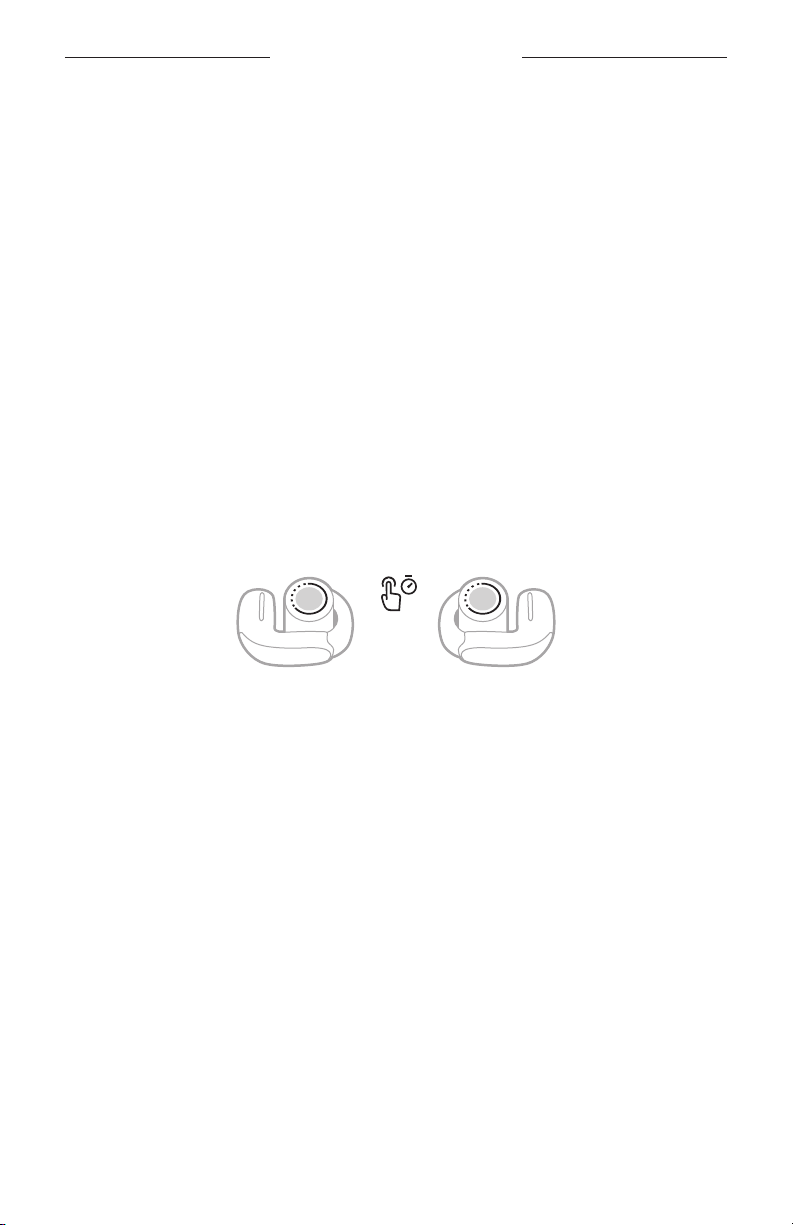
BLUETOOTH-FORBINDELSER
GENOPRET FORBINDELSE TIL EN ENHED
Genopret forbindelsen til den senest tilsluttede enhed
Når in-ear hovedtelefonerne fjernes fra etuiet, genopretter de forbindelsen til den
senest tilsluttede enhed.
NOTER:
• Enheden skal være inden for rækkevidde (9 meter) og tændt.
• Sørg for, at Bluetooth-funktionen er aktiveret på din enhed.
Genopret forbindelsen til en anden enhed
Du kan indstille en genvej for at genoprette forbindelsen til en anden enhed på in-ear
hovedtelefonens enhedsliste.
BEMÆRK: Hvis du vil genoprette forbindelsen til en anden enhed ved hjælp af
1. Tryk på knappen på den in-ear hovedtelefon, der er tildelt til denne genvej, og hold
den nede.
En talemeddelelse fortæller dig navnet på den aktuelt tilsluttede enhed efterfulgt
af navnene på de andre enheder på in-ear hovedtelefonernes enhedsliste.
2. Når du hører det rigtige enhedsnavn, skal du slippe knappen.
Du hører en tone, der angiver, at enheden er tilsluttet.
TIP: Du kan også tilslutte en anden enhed igen ved hjælp af Bose Music-appen
in-ear hovedtelefonerne, skal du indstille en genvej til Skift enheder
(se side 20).
(se side 12) eller enhedens Bluetooth-indstillinger.
34 | DAN
Page 88
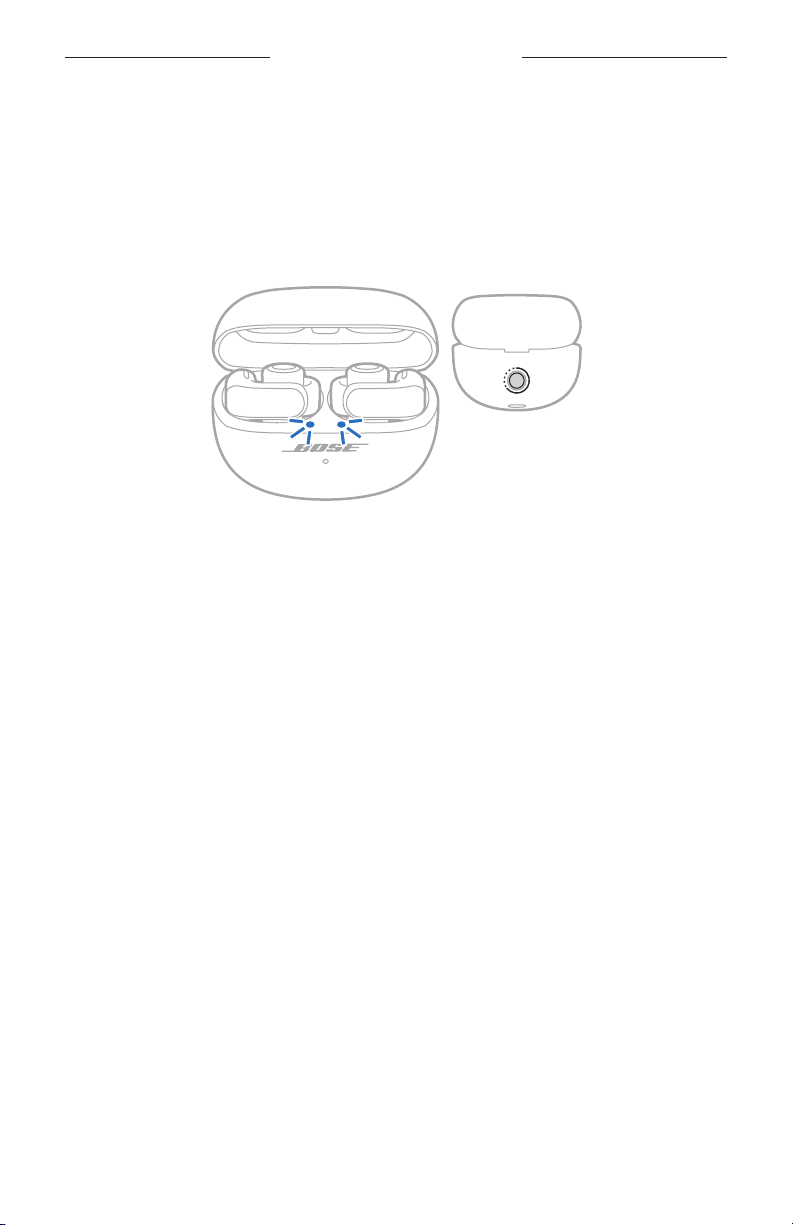
BLUETOOTH-FORBINDELSER
RYD IN-EAR HOVEDTELEFONERNES ENHEDSLISTE
1. Mens in-ear hovedtelefonerne er i opladningsetuiet, og etuiet er åbent, skal du
trykke på knappen bag på etuiet og holde den nede i 15 sekunder, indtil inear hovedtelefonernes statuslamper blinker hvidt 2 gange og derefter blinker
blåt langsomt.
BEMÆRK: Sørg for, at begge in-ear hovedtelefoner er i etuiet, og at etuiet er åbent.
2. Slet in-ear hovedtelefonerne fra Bluetooth-listen på din enhed.
Alle enheder slettes, og in-ear hovedtelefonerne er klar til at blive tilsluttet
(se side 12).
35 | DAN
Page 89
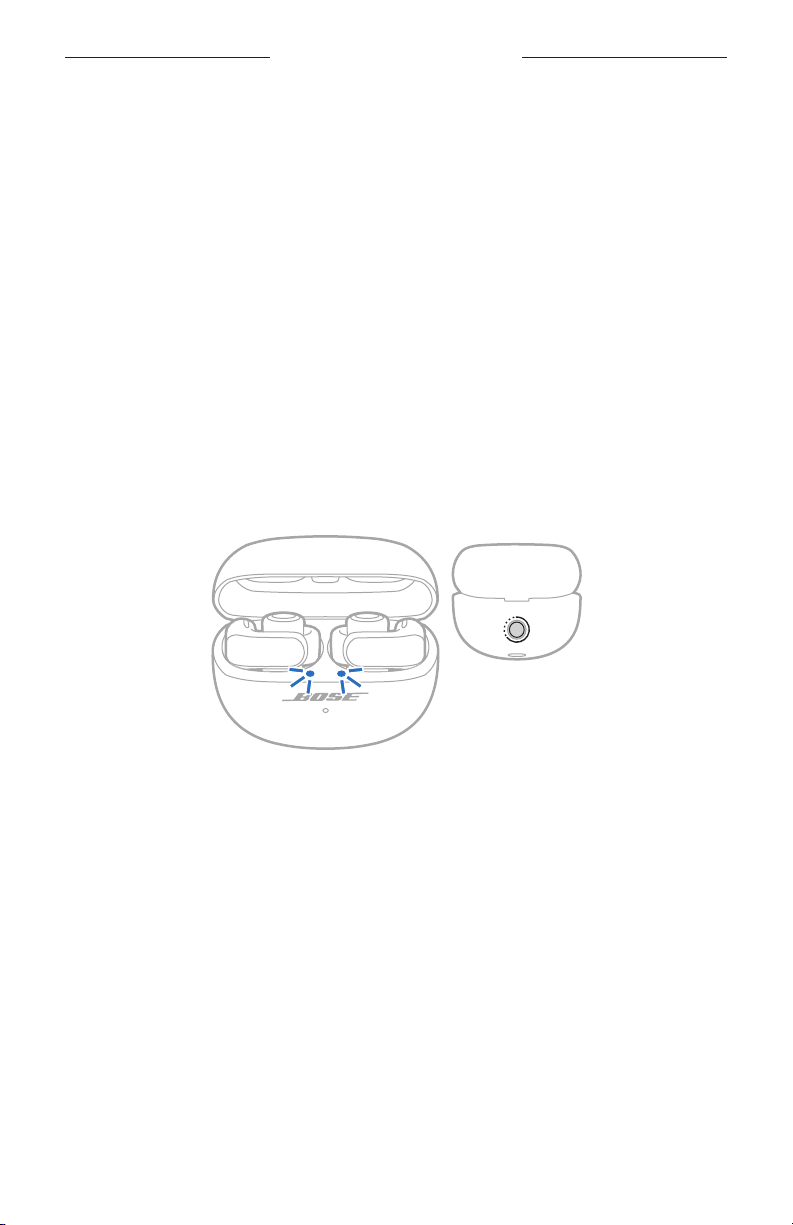
BLUETOOTH-FORBINDELSER
KUN ANDROID-ENHEDER
Hvis du har en Android-enhed, kan du få adgang til følgende ekstra
tilslutningsfunktioner.
Tilslutning ved hjælp af Fast Pair
Med et enkelt tryk giver in-ear hovedtelefonerne mulighed for hurtigt og nem
Bluetooth-parring med dine Android-enheder.
NOTER:
• For at kunne bruge Fast Pair skal du have en Android-enhed, der kører Android 6.0
eller nyere.
• Din Android-enhed skal have funktionerne Bluetooth og Placering aktiveret.
1. Når in-ear hovedtelefonerne er i opladningsetuiet, og etuiet er åbent, skal
du trykke på knappen på bagsiden af etuiet og holde den nede, indtil in-ear
hovedtelefonernes statuslamper blinker blåt langsomt.
BEMÆRK: Sørg for, at begge in-ear hovedtelefoner er i etuiet, og at etuiet er åbent.
2. Anbring etuiet ved siden af din Android-enhed.
En notifikation vises på din enhed og angiver, at du skal parre in-ear
hovedtelefonerne.
BEMÆRK: Hvis du ikke får vist en notifikation, skal du kontrollere, at notifikationer
3. Tryk på notifikationen.
Når in-ear hovedtelefonerne er tilsluttet, vises en notifikation, der bekræfter,
at forbindelsen er oprettet.
BEMÆRK: Du kan også trykke på knappen på meddelelsen for at
36 | DAN
er aktiveret for appen Google Play-tjenester på din enhed.
downloade Bose Music-appen og afslutte opsætningen af in-ear
hovedtelefonerne.
Page 90

BLUETOOTH-FORBINDELSER
Snapdragon Sound-teknologi
Bose Ultra åbne in-ear hovedtelefoner har Snapdragon Sound-teknologi. Snapdragon
Sound optimerer Qualcomm®-lydteknologier på tværs af forbundne enheder for at
sikre den bedste lydkvalitet, forbindelsesstabilitet og latenstid for din streaminglyd.
Hvis du vil opleve Snapdragon Sound, skal du have en Snapdragon Sound-certificeret
enhed, f.eks. en kompatibel Android-enhed. Når du tilslutter in-ear hovedtelefonerne,
vil din enhed automatisk streame lyd ved hjælp af aptX Adaptive Bluetooth-codec’en.
BEMÆRK: Hvis du vil se, hvilke Snapdragon Sound-funktioner in-ear
hovedtelefonerne understøtter, og undersøge, om din enhed er
kompatibel, skal du besøge:
37 | DAN
Page 91

TILSLUT PRODUKTER FRA BOSE
OPRET FORBINDELSE TIL EN BOSE SMART SPEAKER ELLER SOUNDBAR
Med SimpleSync-teknologi kan du tilslutte in-ear hovedtelefonerne til en Bose Smart
Speaker eller en Bose Smart Soundbar og få en personlig lytteoplevelse.
Fordele
• Brug den uafhængige lydstyrkeregulering på hvert produkt til at reducere lyden
eller slå den helt fra på din Bose Smart Soundbar, mens du kan have lyden lige så
høj, som du vil, i in-ear hovedtelefonerne.
• Hør musik tydeligt fra et andet rum ved at tilslutte in-ear hovedtelefonerne til din
Bose Smart Speaker.
BEMÆRK: SimpleSync-teknologien har en Bluetooth-rækkevidde på op til 9 meter.
Vægge og byggematerialer kan påvirke modtagelsen.
Kompatible produkter
Du kan tilslutte in-ear hovedtelefonerne til enhver Bose Smart Speaker eller
Bose Smart Soundbar.
Populære kompatible produkter omfatter:
• Bose Smart Ultra Soundbar/Bose Ultra Soundbar
• Bose Smart Soundbar 900
• Bose Smart Soundbar 700/Bose Soundbar 700
• Bose Smart Soundbar 600
• Bose Soundbar 500
• Bose Smart Speaker 500/Bose Home Speaker 500
• Bose Home Speaker 300
• Bose Portable Smart Speaker/Bose Portable Home Speaker
Nye produkter tilføjes jævnligt. Du kan finde en komplet liste og flere oplysninger her:
38 | DAN
Page 92
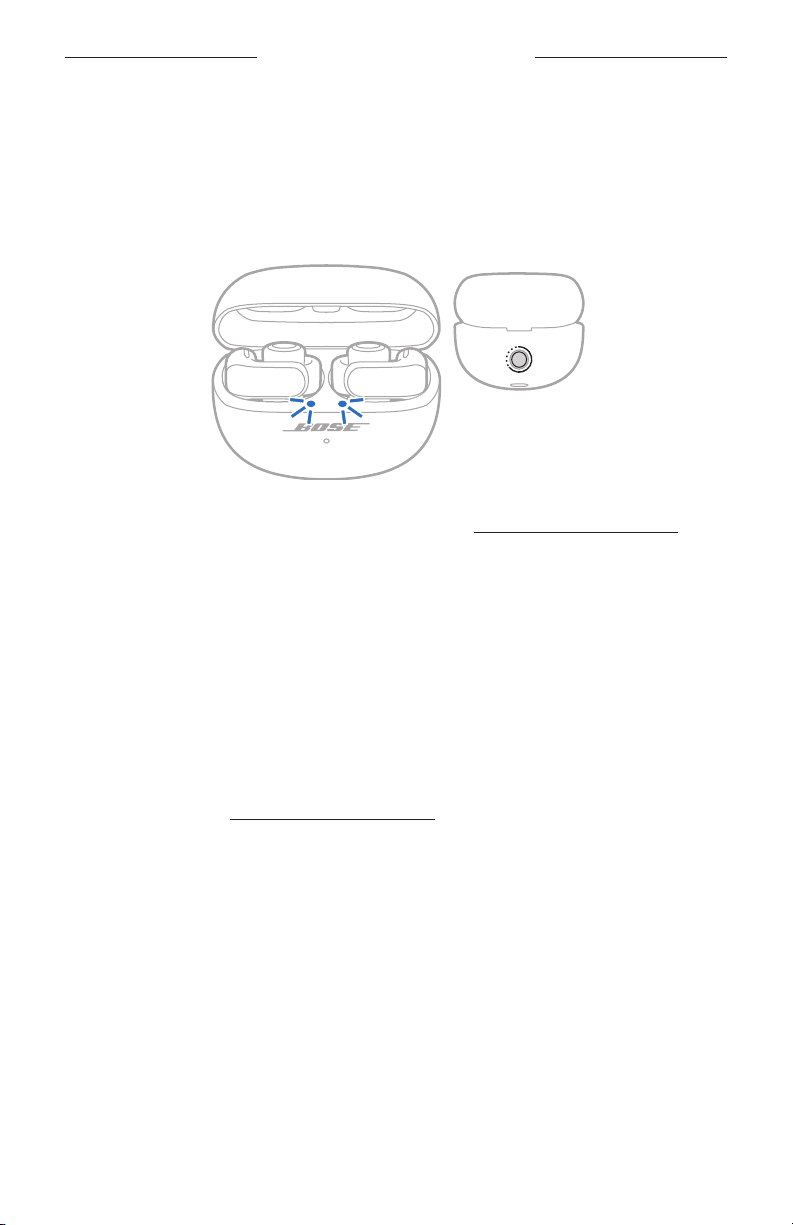
TILSLUT PRODUKTER FRA BOSE
Tilslut ved hjælp af Bose Music-appen
1. Når in-ear hovedtelefonerne er i opladningsetuiet, og etuiet er åbent, skal
du trykke på knappen på bagsiden af etuiet og holde den nede, indtil in-ear
hovedtelefonernes statuslamper blinker blåt langsomt.
BEMÆRK: Sørg for, at begge in-ear hovedtelefoner er i etuiet, og at etuiet er åbent.
2. Brug Bose Music-appen til at tilslutte in-ear hovedtelefonerne til et kompatibelt
Bose-produkt. Du kan finde flere oplysninger her:
NOTER:
• Det kan tage op til 30 sekunder at oprette forbindelse.
• Sørg for, at in-ear hovedtelefonerne er inden for 9 m fra din soundbar eller din højttaler.
• Du kan kun tilslutte in-ear hovedtelefonerne til ét produkt ad gangen.
GENOPRET FORBINDELSEN TIL EN BOSE SMART SPEAKER ELLER SOUNDBAR
Brug Bose Music-appen til at genoprette forbindelsen mellem in-ear
hovedtelefonerne og et tidligere tilsluttet kompatibelt Bose-produkt. Du kan finde
flere oplysninger her:
NOTER:
• Din soundbar eller din højttaler skal være inden for rækkevidde (9 meter) og tændt.
• Hvis in-ear hovedtelefonerne ikke opretter forbindelse igen, skal du læse ”In-ear
hovedtelefonerne genopretter ikke forbindelsen til en tidligere tilsluttet Bose Smart
Soundbar eller Speaker” på side 52.
39 | DAN
Page 93
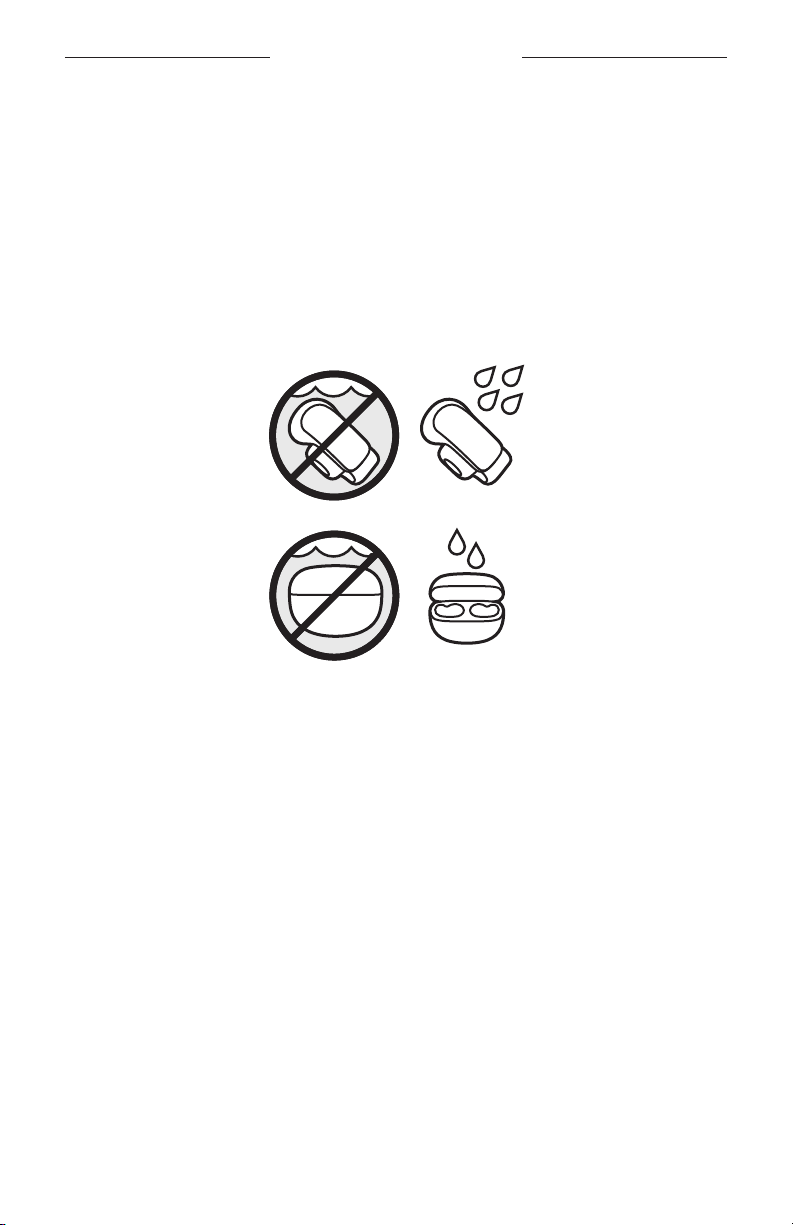
SVED- OG VEJRBESTANDIGE
In-ear hovedtelefonerne er klassificeret som vandtætte i IPX4-klassen. De er designet
til at være sved- og vejrbestandige, men er ikke beregnet til at være nedsænket i vand.
Opladningsetuiet er klassificeret som vandtæt i IPX1-klassen. Det er designet til at
kunne tåle let eksponering for vand, f.eks. let lodret regn, men er ikke beregnet til at
blive oversprøjtet eller nedsænket.
FORSIGTIG:
• Undgå at svømme eller tage brusebad med in-ear hovedtelefonerne eller etuiet.
• Nedsænk IKKE in-ear hovedtelefonerne eller etuiet i vand.
• Oversprøjt IKKE etuiet med vand.
NOTER:
• For at forhindre korrosion skal opladningskontakterne på in-ear hovedtelefonerne
regelmæssigt rengøres med en tør, blød vatpind eller lignende.
• IPX4 og IPX1 er ikke varige forhold, og vandtætheden kan blive reduceret på grund
af normalt slid.
40 | DAN
Page 94
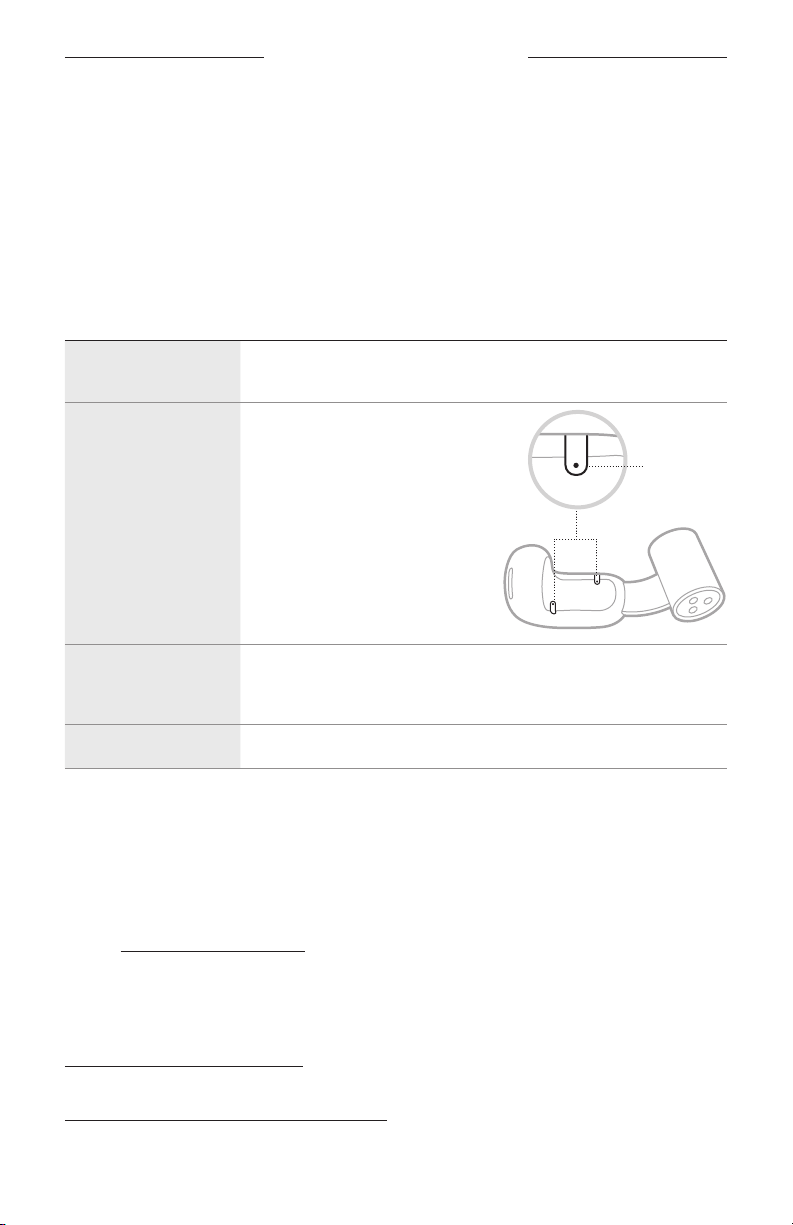
PLEJE OG VEDLIGEHOLDELSE
OPBEVARING AF IN-EAR HOVEDTELEFONERNE
Når du ikke bruger in-ear hovedtelefonerne, skal du placere dem i opladningsetuiet.
Luk opladningsetuiet for at bevare batterilevetiden og holde opladningsetuiet frit
for snavs.
RENGØR IN-EAR HOVEDTELEFONERNE OG OPLADNINGSETUIET
KOMPONENT FREMGANGSMÅDE
In-ear
hovedtelefoner
Mikrofonporte
Opladningskontakter
(på in-ear
hovedtelefonerne)
Opladningsetui Tør med en blød vatpind eller en fugtig klud (kun vand).
Tør med en blød vatpind eller en fugtig klud (kun vand).
For at undgå olie eller snavs skal du
regelmæssigt tørre af med en blød
vatpind eller forsigtigt børste med
en børste med bløde børstehår.
FORSIGTIG: Blæs IKKE luft ind
i mikrofonportene,
og støvsug dem
IKKE, da det kan
beskadige in-ear
hovedtelefonerne.
For at forhindre korrosion skal de kun tørres af med en tør,
blød vatpind eller tilsvarende.
FORSIGTIG: Brug ikke opløsningsmidler, kemikalier eller rengøringsmidler,
der indeholder sprit, ammoniak eller slibemiddel.
RESERVEDELE OG TILBEHØR
Reservedele og tilbehør kan bestilles via Boses kundeservice.
Besøg:
Mikrofonporte
BEGRÆNSET GARANTI
In-ear hovedtelefonerne er dækket af en begrænset garanti. Se vores websted på
worldwide.Bose.com/Warranty for at få flere oplysninger om den begrænsede garanti.
Hvis du vil registrere dit produkt, kan du finde instruktioner på
worldwide.Bose.com/ProductRegistration. Hvis du undlader at registrere produktet,
har det ingen betydning for den begrænsede garanti.
41 | DAN
Page 95
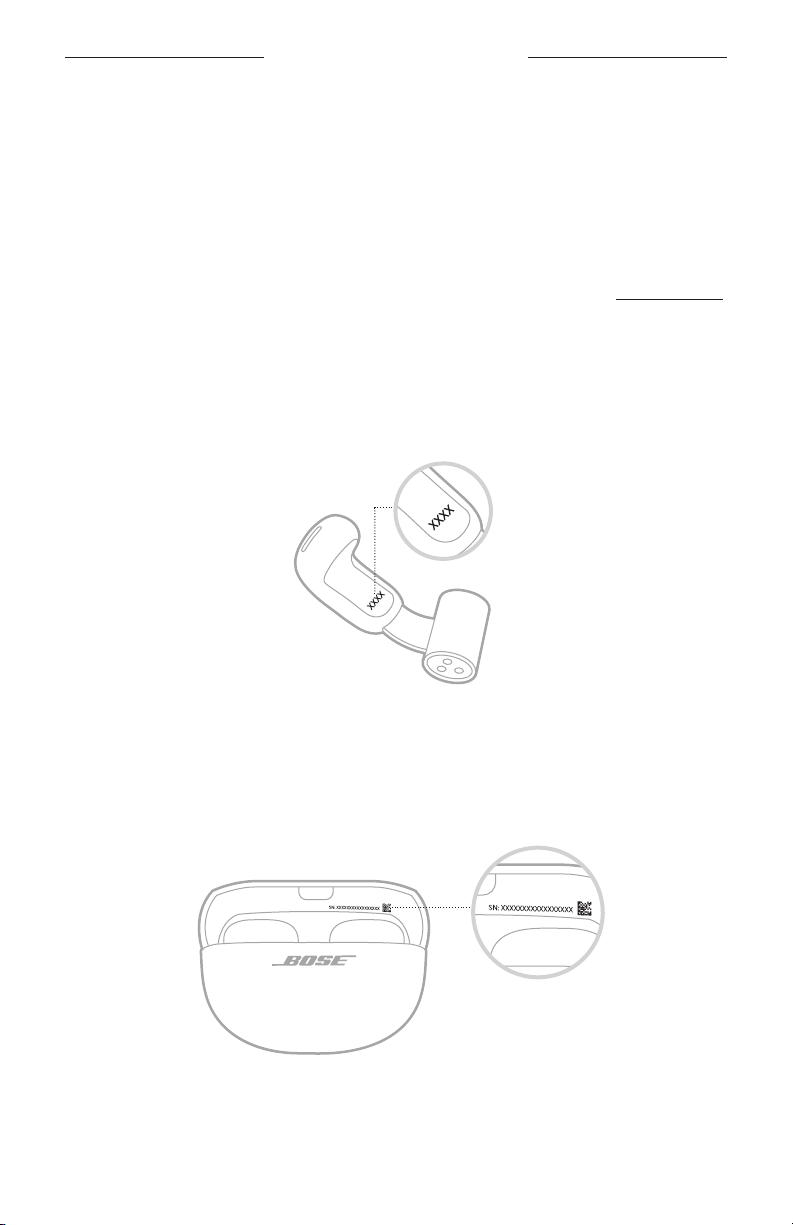
PLEJE OG VEDLIGEHOLDELSE
OPDATER IN-EAR HOVEDTELEFONERNE
In-ear hovedtelefonerne begynder opdatering automatisk, når de er tilsluttet
Bose Music-appen, og der findes en opdatering. Følg appinstruktionerne.
OPDATER OPLADNINGSETUIET
Hvis Boses kundeservice beder dig om at opdatere opladningsetuiet, kan du gøre det
ved hjælp af Boses opdateringswebsted. På din computer skal du gå til:
og følge vejledningen på skærmen.
VISNING AF DATOKODEN FOR IN-EAR HOVEDTELEFONEN
Fjern in-ear hovedtelefonen fra opladningsetuiet, og bøj cylinderen åben. Datokoden
findes på den flade indvendige overflade på hver in-ear hovedtelefon.
Datokode
SE OPLADNINGSETUIETS SERIENUMMER
Fjern in-ear hovedtelefonerne fra opladningsetuiet.
Opladningsetuiets serienummer findes i opladningsetuiets låg.
42 | DAN
Page 96

FEJLFINDING
PRØV DISSE LØSNINGER FØRST
Hvis du oplever problemer med in-ear hovedtelefonerne, kan du prøve disse
løsninger først:
• Oplad in-ear hovedtelefonerne og opladningsetuiet (se side 26).
• Placer dine in-ear hovedtelefoner i opladningsetuiet, og luk derefter etuiet
(se side 16). Åbn etuiet igen, og fjern in-ear hovedtelefonerne (se side 15).
• Kontrollér in-ear hovedtelefonernes statuslamper (se side 30)
og opladningsetuiets statuslampe (se side 31).
• Kontrollér ved hjælp af et spejl, hvordan in-ear hovedtelefonerne sidder
(se side 14).
• Flyt din enhed tættere på in-ear hovedtelefonerne (9 meter) og væk fra eventuel
interferens eller forhindringer.
• Øg lydstyrken på in-ear hovedtelefonerne, din enhed og musikappen.
• Tjek, at din enhed understøtter Bluetooth-forbindelser (se side 32).
• Download Bose Music-appen, og kør tilgængelige softwareopdateringer
(se side 12).
• Tilslut en anden enhed (se side 12).
ANDRE LØSNINGER
Hvis dette ikke løser problemet, kan du i nedenstående tabel identificere symptomer
og løsninger på almindelige problemer. Du kan også få adgang til artikler om
fejlfinding, videoer og andre ressourcer på:
Kontakt Bose kundeservice, hvis du ikke kan løse dit problem.
Besøg:
SYMPTOM LØSNING
Placer begge in-ear hovedtelefoner i opladningsetuiet, indtil de
klikker på plads magnetisk. Luk etuiet, og åbn det igen. In-ear
hovedtelefonernes statuslamper viser opladningsstatussen
In-ear hovedtelefonerne
bliver ikke tændt
43 | DAN
(se side 30).
Hvis in-ear hovedtelefonerne har været udsat for høje eller
lave temperaturer, skal du lade in-ear hovedtelefonerne vende
tilbage til stuetemperatur.
Se ”In-ear hovedtelefonerne oplades ikke” på side 50.
Page 97

SYMPTOM LØSNING
Tilslut ved hjælp af Bluetooth-menuen på din enhed
(se side 32).
Deaktiver Bluetooth-funktionen på din enhed, og slå den
derefter til igen.
Ryd in-ear hovedtelefonernes enhedsliste (se
Slet in-ear hovedtelefonerne fra Bluetooth-listen på din
enhed, herunder eventuelle dubletposter med angivelsen
In-ear hovedtelefonerne
kan ikke tilsluttes til
en enhed
LE (Low Energy). Tilslut igen (se side 12).
Placer begge in-ear hovedtelefoner i opladningsetuiet, indtil de
klikker på plads magnetisk. Luk etuiet, og åbn det igen. In-ear
hovedtelefonernes statuslamper viser opladningsstatussen
(se side 30). Tilslut igen (se side 12).
Sørg for, at begge in-ear hovedtelefoner er placeret sikkert i
opladningsetuiet (se
Gå til
Genstart in-ear hovedtelefonerne og opladningsetuiet
(se side 53).
Fjern Bose Music-appen på din enhed. Geninstaller appen
(se side 12).
Sørg for, at du bruger Bose Music-appen til opsætning
(se side 12).
In-ear hovedtelefonerne
reagerer ikke under
appopsætningen
Sørg for, at du har givet Bose Music-appen adgang til
Bluetooth-forbindelser i menuen Indstillinger på din enhed.
Sørg for, at Bluetooth-funktionen er aktiveret i menuen
Indstillinger på din enhed.
Placer begge in-ear hovedtelefoner i opladningsetuiet, indtil de
klikker på plads magnetisk. Luk etuiet, og åbn det igen. In-ear
hovedtelefonernes statuslamper viser opladningsstatussen
(se side 30). Fjern in-ear hovedtelefonerne.
FEJLFINDING
side 35).
side 25).
Fjern Bose Music-appen på din enhed. Geninstaller appen
(se side 12).
Sørg for, at du har givet Bose Music-appen adgang til
Bluetooth-forbindelser i menuen Indstillinger på din enhed.
Placer begge in-ear hovedtelefoner i opladningsetuiet, indtil de
Bose Music-appen
kan ikke finde in-ear
hovedtelefonerne
klikker på plads magnetisk. Luk etuiet, og åbn det igen. In-ear
hovedtelefonernes statuslamper viser opladningsstatussen
(se side 30). Fjern in-ear hovedtelefonerne.
Når in-ear hovedtelefonerne er i opladningsetuiet, og etuiet
er åbent, skal du trykke på knappen på bagsiden af etuiet og
holde den nede, indtil in-ear hovedtelefonernes statuslamper
blinker blåt langsomt.
Se
”In-ear hovedtelefonerne kan ikke tilsluttes til en enhed”.
44 | DAN
Page 98
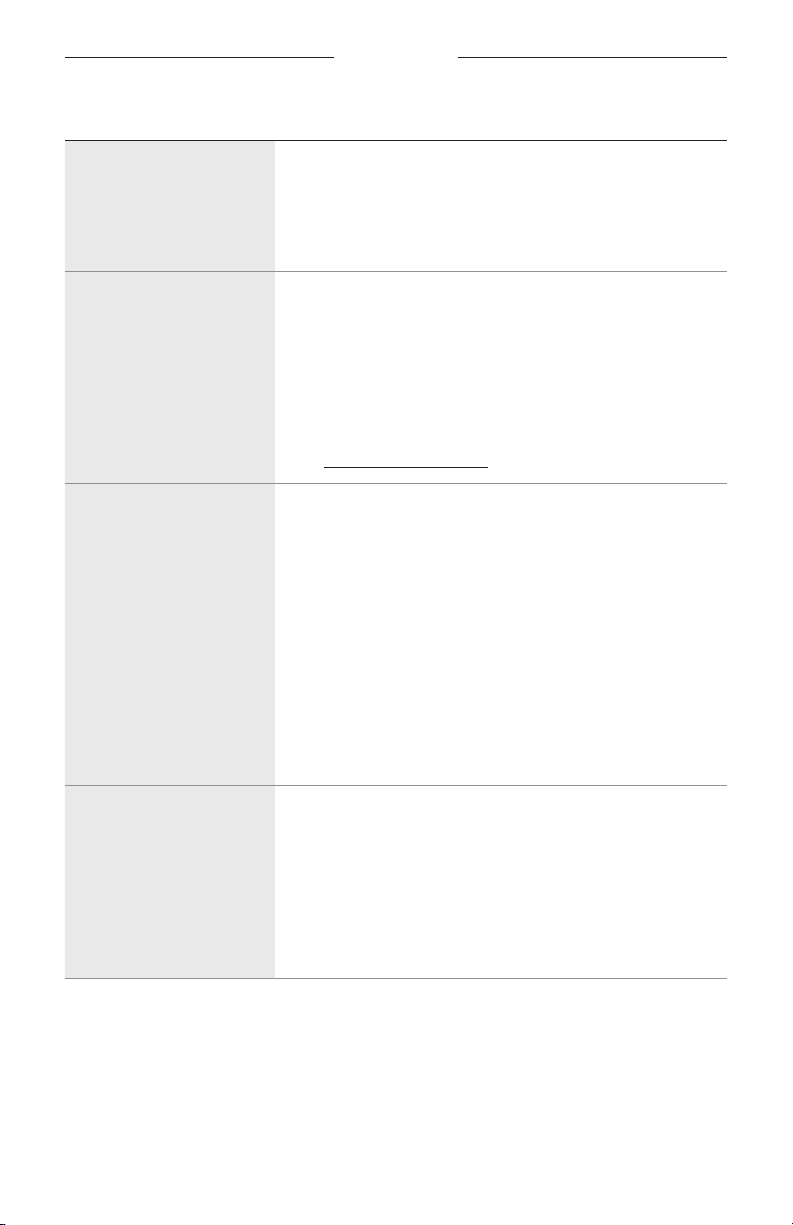
SYMPTOM LØSNING
Kontrollér, at din enhed er kompatibel med Bose Music-appen
Bose Music-appen virker
ikke på min enhed
og opfylder minimumskravene til systemet. Du kan finde flere
oplysninger i appbutikken på din enhed.
Fjern Bose Music-appen på din enhed. Geninstaller appen
(se side 12).
Sørg for, at du tager in-ear hovedtelefonerne på korrekt
(se side 13).
Kontrollér ved hjælp af et spejl, hvordan in-ear hovedtelefonerne
In-ear hovedtelefonerne er
ikke behagelige eller sikre
sidder (se
mikrofonydelse skal du justere in-ear hovedtelefonerne, så de er
i en vinkel på ca. 45° på dine ører. Hvis de ikke føles behagelige
eller sikre, skal du skubbe dem lidt op eller ned for at finde den
placering, der passer dig bedst.
Gå til
Fjern eventuelle øreringe eller piercinger, inden du tager in-ear
hovedtelefonerne på. Når in-ear hovedtelefonerne sidder
sikkert, kan du tage dine øreringe eller piercinger på igen.
Kontrollér ved hjælp af et spejl, hvordan in-ear
Det er ikke behageligt
at have in-ear
hovedtelefonerne på
sammen med øreringe
eller piercinger
hovedtelefonerne sidder (se
bedste lydkvalitet og mikrofonydelse skal du justere in-ear
hovedtelefonerne, så de er i en vinkel på ca. 45° på dine
ører. Hvis dine øreringe eller piercinger gør, at den placering
ikke føles behagelig eller sikker, skal du skubbe in-ear
hovedtelefonerne lidt op eller ned for at finde den placering,
der passer dig bedst.
Hvis magneterne nederst på in-ear hovedtelefonernes cylinder
sidder fast på dine øreringe eller piercinger, skal du skubbe
in-ear hovedtelefonerne lidt op eller ned for at skille dem ad.
FEJLFINDING
side 14). For at opnå den bedste lydkvalitet og
side 14). For at opnå den
Ryd in-ear hovedtelefonernes enhedsliste (se
Slet in-ear hovedtelefonerne fra Bluetooth-listen på din
enhed, herunder eventuelle dubletposter med angivelsen
Uregelmæssig Bluetoothforbindelse
LE (Low Energy). Tilslut igen (se side 12).
Flyt din enhed tættere på in-ear hovedtelefonerne (9 meter)
og væk fra eventuel interferens eller forhindringer.
Genstart in-ear hovedtelefonerne og opladningsetuiet
(se side 53).
45 | DAN
side 35).
Page 99
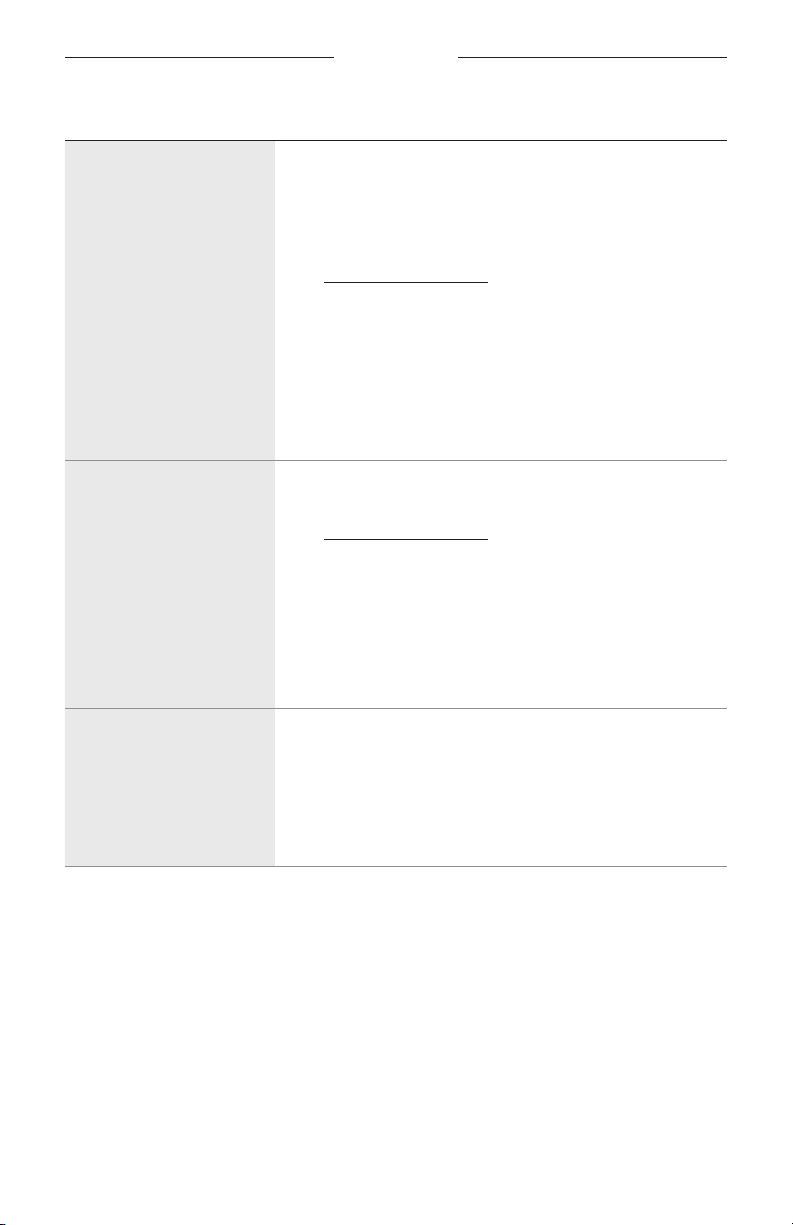
SYMPTOM LØSNING
Sørg for, at du bærer den rigtige in-ear hovedtelefon på det
rigtige øre. Se efter L (venstre) og R (højre) på cylinderen på
hver in-ear hovedtelefon.
Kontrollér ved hjælp af et spejl, hvordan in-ear
hovedtelefonerne sidder (se
Gå til
Ingen lyd
Sørg for, at der er skruet op for lyden (se
Tryk på afspil på din enhed for at kontrollere, om lyden afspilles.
Afspil lyd fra en anden applikation eller musiktjeneste.
Afspil lyd fra indhold, der er gemt direkte på din enhed.
Sørg for, at der ikke er snavs eller voks på højttalerportene.
Genstart din enhed.
Kontrollér ved hjælp af et spejl, hvordan in-ear
hovedtelefonerne sidder (se side 14).
Gå til
Sørg for, at softwaren i Bose Music-appen er opdateret
Ingen lyd fra den ene
in-ear hovedtelefon
(se side 42).
Sørg for, at der ikke er snavs eller voks på højttalerportene.
Placer begge in-ear hovedtelefoner i opladningsetuiet, indtil de
klikker på plads magnetisk. Luk etuiet, og åbn det igen. In-ear
hovedtelefonernes statuslamper viser opladningsstatussen
(se side 30). Fjern in-ear hovedtelefonerne.
FEJLFINDING
side 14).
side 17).
Luk programmet eller musiktjenesten, og åbn det/den igen.
Afspil lyd fra en anden applikation eller musiktjeneste.
Lyd og video er ikke
synkroniserede
Placer begge in-ear hovedtelefoner i opladningsetuiet, indtil de
klikker på plads magnetisk. Luk etuiet, og åbn det igen. In-ear
hovedtelefonernes statuslamper viser opladningsstatussen
(se side 30). Fjern in-ear hovedtelefonerne.
46 | DAN
Page 100

SYMPTOM LØSNING
Sørg for, at du bærer den rigtige in-ear hovedtelefon på det
rigtige øre. Se efter L (venstre) og R (højre) på cylinderen på
hver in-ear hovedtelefon.
Kontrollér ved hjælp af et spejl, hvordan in-ear hovedtelefonerne
sidder (se
mikrofonydelse skal du justere in-ear hovedtelefonerne, så de er
i en vinkel på ca. 45° på dine ører. Hvis de ikke føles behagelige
eller sikre, skal du skubbe dem lidt op eller ned for at finde den
placering, der passer dig bedst.
Gå til
Sørg for, at du bruger Bose Music-appen til opsætning
(se side 12).
Prøv et andet lydspor.
Afspil lyd fra en anden applikation eller musiktjeneste.
Sørg for, at der ikke er snavs eller voks på højttalerportene.
Dårlig lydkvalitet
Sluk eventuelle lydforbedringsfunktioner på enheden eller
musikappen.
Hvis du kun bærer én in-ear hovedtelefon, skal du placere
den anden in-ear hovedtelefon i etuiet, indtil den klikker på
plads magnetisk.
Sørg for, at dine in-ear hovedtelefoner er tilsluttet over den
korrekte Bluetooth-profil: Stereo A2DP. Kontrollér din enheds
menu med Bluetooth-/lydindstillinger for at sikre, at den
korrekte profil er valgt.
Reducer lydstyrken på in-ear hovedtelefonerne, din enhed eller
musikappen.
Deaktiver Bluetooth-funktionen på din enhed, og slå den
derefter til igen.
Ryd in-ear hovedtelefonernes enhedsliste (se
Slet in-ear hovedtelefonerne fra Bluetooth-listen på din
enhed, herunder eventuelle dubletposter med angivelsen
LE (Low Energy). Tilslut igen (se side 12).
FEJLFINDING
side 14). For at opnå den bedste lydkvalitet og
side 35).
47 | DAN
 Loading...