

Page 1

Developer’s Guide
Enterprise Server
6
Page 2

Borland Software Corporation
100 Enterprise Way
Scotts Valley, California 95066-3249
www.borland.com
Borland Software Corporation may have patents and/or pending patent applications covering subject
matter in this document. Please refer to the product CD or the About dialog box for the list of
applicable patents.The furnishing of this document does not give you any license to these patents.
C
OPYRIGHT © 1992-2004 Borland Software Corporation. All rights reserved. All Borland brand and
product names are trademarks or registered trademarks of Borland Software Corporation in the
United States and other countries. All other marks are the property of their respective owners.
This product includes software developed by the Apache Software Foundation (http://
www.apache.org/).
This product include software developed by Steve Viens and contributors. All rights reserved (http://
juddi.org/).
BES0060WW21002
0102030405-98765432
PDF
Page 3

Contents
Chapter 1
Introduction to Borland Enterprise
Server 1
BES Product overview. . . . . . . . . . . . . . . 1
Web Edition . . . . . . . . . . . . . . . . . . 2
Web Edition features . . . . . . . . . . . . 2
VisiBroker Edition . . . . . . . . . . . . . . . 3
VisiBroker Edition features . . . . . . . . . 3
VisiBroker Standalone (installation option). . . 3
Team Edition . . . . . . . . . . . . . . . . . . 3
Team Edition features. . . . . . . . . . . . 4
Borland Enterprise Server “AppServer Edition” 4
Borland Enterprise Server “AppServer
Edition” features . . . . . . . . . . . . . . 4
Borland Enterprise Server (BES) Documentation. 4
Accessing the BES Standalone online Help
Topics . . . . . . . . . . . . . . . . . . . . . 5
Accessing online Help Topics from within BES 6
Documentation conventions . . . . . . . . . . . . 6
Platform conventions . . . . . . . . . . . . . . 6
Contacting Borland support . . . . . . . . . . . . 7
Online resources . . . . . . . . . . . . . . . . 7
World Wide Web . . . . . . . . . . . . . . . . 8
Borland newsgroups . . . . . . . . . . . . . . 8
Chapter 2
Borland Enterprise Server overview
and architecture 9
BES architecture overview . . . . . . . . . . . . 9
BES services overview . . . . . . . . . . . . . 10
Web Server. . . . . . . . . . . . . . . . . . 10
JMS . . . . . . . . . . . . . . . . . . . . . 11
Smart Agent . . . . . . . . . . . . . . . . . 11
2PC Transaction Service . . . . . . . . . . . 12
Management . . . . . . . . . . . . . . . . . 12
The Partition and its services . . . . . . . . . . 12
Connector Service . . . . . . . . . . . . . . 13
EJB Container . . . . . . . . . . . . . . . . 13
JDataStore Server . . . . . . . . . . . . . . 13
Lifecycle Interceptor Manager . . . . . . . . 13
Naming Service . . . . . . . . . . . . . . . 13
Session Storage Service. . . . . . . . . . . 14
Transaction Manager. . . . . . . . . . . . . 14
Web Container . . . . . . . . . . . . . . . . 14
Borland Enterprise Server and J2EE APIs . . . 14
JDBC . . . . . . . . . . . . . . . . . . . . 15
Java Mail . . . . . . . . . . . . . . . . . . . 15
JTA. . . . . . . . . . . . . . . . . . . . . . 15
JAXP. . . . . . . . . . . . . . . . . . . . . 16
JNDI . . . . . . . . . . . . . . . . . . . . . 16
RMI-IIOP. . . . . . . . . . . . . . . . . . . 16
Other Technologies . . . . . . . . . . . . . 16
OptimizeIt Profiler . . . . . . . . . . . . . . 16
Chapter 3
Partitions 17
Partitions Overview . . . . . . . . . . . . . . . 17
Creating Partitions . . . . . . . . . . . . . . . 18
Running Partitions . . . . . . . . . . . . . . . 19
Running unmanaged Partitions . . . . . . . 19
Running managed Partitions . . . . . . . . 21
Partition logging . . . . . . . . . . . . . . . 21
Configuring Partitions . . . . . . . . . . . . . . 22
Application archives . . . . . . . . . . . . . 22
Working with Partition services . . . . . . . 22
Partition handling of services . . . . . . . 23
Configuring individual services . . . . . . 23
Gathering Statistics . . . . . . . . . . . . . 23
Security management and policies . . . . . 24
Classloading policies . . . . . . . . . . . . 24
Partition Lifecycle Interceptors. . . . . . . . 24
Chapter 4
Web components 27
Apache web server implementation . . . . . . 27
Apache configuration . . . . . . . . . . . . 27
Apache configuration syntax. . . . . . . . . 28
Using the .htaccess files . . . . . . . . . . . 28
Apache directory structure . . . . . . . . 29
Borland web container implementation . . . . . 29
Servlets and JavaServer Pages . . . . . . . 30
Typical web application development process 30
Web application archive (WAR) file . . . . . 31
Borland-specific DTD. . . . . . . . . . . 31
Adding ENV variables for the web container .
36
Microsoft Internet Information Services (IIS) web
server . . . . . . . . . . . . . . . . . . . . . 36
IIS/IIOP redirector directory structure . . . . 37
Smart Agent implementation . . . . . . . . . . 37
i
Page 4

Connecting an Apache web server to a Borland
web container. . . . . . . . . . . . . . . . 38
Connecting Borland web containers to Java
Session Service . . . . . . . . . . . . . . 38
Chapter 5
Web server to web container
connectivity 41
Apache to Borland web container connectivity . 41
Modifying the Borland web container IIOP
configuration . . . . . . . . . . . . . . . . 41
Modifying the IIOP configuration in Apache . 43
Additional Apache IIOP directives . . . . 46
Apache IIOP connector configuration . . . . 47
Adding new clusters. . . . . . . . . . . . 47
Adding new web applications . . . . . . . 48
Large data transfer . . . . . . . . . . . . . . . 49
Downloading large data . . . . . . . . . . . 50
Implementing chunked download . . . . . 50
Enabling chunked download . . . . . . . 50
Known content length versus unknown . . 50
Chunked download with known content
length . . . . . . . . . . . . . . . . . . 51
Chunked download with unknown content
length . . . . . . . . . . . . . . . . . . 51
Browsers supporting only the HTTP 1.0
protocol . . . . . . . . . . . . . . . . . 51
Implementing non-chunked download . . 52
Uploading large data . . . . . . . . . . . . . 52
Implementing chunked upload . . . . . . 52
Enabling chunked upload . . . . . . . . . 53
Changing the upload buffer size . . . . . 53
Known content length versus unknown . . 53
Chunked upload with known content length
54
Chunked upload with unknown content length
54
Implementing non-chunked upload . . . . 54
IIS to Borland web container connectivity . . . . 55
Modifying the IIOP configuration in the Borland
web container. . . . . . . . . . . . . . . . 55
Microsoft Internet Information Services (IIS)
server-specific IIOP configuration . . . . . 55
Windows 2000/IIS version 5.0 . . . . . . 55
Windows XP/IIS version 5.1 . . . . . . . 57
IIS/IIOP redirector configuration . . . . . . . 59
Adding new clusters. . . . . . . . . . . . 59
Adding new web applications . . . . . . . 61
Chapter 6
Java Session Service (JSS)
configuration 63
Session management with JSS . . . . . . . . . 63
Managing and configuring the JSS . . . . . . . 66
Configuring the JSS Partition service . . . . 67
Chapter 7
Clustering web components 69
Stateless and stateful connection services . . . 69
The Borland IIOP connector . . . . . . . . . . 70
Load balancing support . . . . . . . . . . . 70
OSAgent based load balancing . . . . . 70
Corbaloc based load balancing. . . . . . 70
Fault tolerance (failover) . . . . . . . . . . . 71
Smart session handling . . . . . . . . . . . 72
Setting up your web container with JSS . . . . 72
Modifying a Borland web container for failover73
Session storage implementation. . . . . . . 73
Programmatic implementation . . . . . . 73
Automatic implementation . . . . . . . . 73
Using HTTP sessions. . . . . . . . . . . . . . 74
Chapter 8
Apache web server to CORBA server
connectivity 77
Web-enabling your CORBA server . . . . . . . 77
Determining the urls for your CORBA methods .
78
Implementing the ReqProcessor IDL in your
CORBA server . . . . . . . . . . . . . . . 78
The process() method . . . . . . . . . . 79
Configuring your Apache web server to invoke a
CORBA server . . . . . . . . . . . . . . . . 80
Apache IIOP configuration . . . . . . . . . . 80
Adding new CORBA servers (clusters). . 81
Mapping URIs to defined clusters . . . . 82
Chapter 9
Borland Enterprise Server Web
Services 85
Web Services Overview. . . . . . . . . . . . . 85
Web Services Architecture . . . . . . . . . 85
Web Services and Partitions . . . . . . . . . . 86
Web Service providers . . . . . . . . . . . . . 88
Specifying web service information in a
deploy.wsdd file . . . . . . . . . . . . . . 89
ii
Page 5

Java:RPC provider . . . . . . . . . . . . 89
Java:EJB provider. . . . . . . . . . . . . 89
Java:VISIBROKER provider . . . . . . . 90
Java:MDB provider . . . . . . . . . . . . 92
How Borland Web Services work . . . . . . . . 92
Web Service Deployment Descriptors. . . . . . 93
Creating a server-config.wsdd file . . . . . . 94
Viewing and Editing WSDD Properties . . . 94
Packaging Web Service Application Archives . . 94
Borland Web Services examples . . . . . . . . 95
Using the Web Service provider examples. . 95
Steps to build, deploy, and run the examples
95
Apache Axis Web Service samples . . . . . 96
Tools Overview . . . . . . . . . . . . . . . . . 96
Apache ANT tool . . . . . . . . . . . . . . . 96
Java2WSDL tool . . . . . . . . . . . . . . . 96
WSDL2Java tool . . . . . . . . . . . . . . . 97
Axis Admin tool. . . . . . . . . . . . . . . . 97
Chapter 10
Web applications bundled with BES 99
About Cocoon . . . . . . . . . . . . . . . . . . 99
Chapter 11
Writing enterprise bean clients 101
Client view of an enterprise bean . . . . . . . 101
Initializing the client . . . . . . . . . . . . 102
Locating the home interface . . . . . . . . 102
Obtaining the remote interface . . . . . . . 103
Session beans . . . . . . . . . . . . . 103
Entity beans. . . . . . . . . . . . . . . 104
Find methods and primary key class . . 104
Create and remove methods . . . . . . 105
Invoking methods . . . . . . . . . . . . . 105
Removing bean instances . . . . . . . . . 106
Using a bean's handle . . . . . . . . . . . 106
Managing transactions . . . . . . . . . . . . 108
Getting information about an enterprise bean. 109
Support for JNDI . . . . . . . . . . . . . . . 109
EJB to CORBA mapping . . . . . . . . . . . 110
Mapping for distribution . . . . . . . . . . 110
Mapping for naming . . . . . . . . . . . . 111
Mapping for transaction . . . . . . . . . . 112
Mapping for security . . . . . . . . . . . . 113
Chapter 12
The VisiClient Container 115
Application Client architecture. . . . . . . . . 115
Packaging and deployment . . . . . . . . .116
Benefits of the VisiClient Container . . . . . 117
Document Type Definitions (DTDs) . . . . . . . 117
Example XML using the DTD . . . . . . . . 118
Support of references and links. . . . . . . . .120
Using the VisiClient Container . . . . . . . .121
VisiClient Container usage example. . . . . 121
Running a J2EE client application on machines
not running BES . . . . . . . . . . . . . .121
Embedding VisiClient Container functionality into
an existing application . . . . . . . . . . . . .122
Use of Manifest files . . . . . . . . . . . . . . 123
Example of a Manifest file . . . . . . . . . . 123
Exception handling . . . . . . . . . . . . . . .124
Using resource-reference factory types. . . . . 124
Other features. . . . . . . . . . . . . . . . . . 124
Using the Client Verify tool. . . . . . . . . .125
Chapter 13
Caching of Stateful Session Beans 127
Passivating Session Beans . . . . . . . . . . . 127
Simple Passivation. . . . . . . . . . . . . .128
Aggressive Passivation . . . . . . . . . . .128
Sessions in secondary storage . . . . . . . . . 129
Setting the keep alive timeout in Containers.129
Setting the keep alive timeout for a particular
session bean . . . . . . . . . . . . . . . .130
Chapter 14
Entity Beans and CMP 1.1 in Borland
Enterprise Server 131
Entity Beans . . . . . . . . . . . . . . . . . .131
Container-managed persistence and Relationships
132
Implementing an entity bean . . . . . . . . . .132
Packaging Requirements . . . . . . . . . .133
Entity Bean Primary Keys . . . . . . . . . .133
Generating primary keys from a user class .
134
Generating primary keys from a custom class
134
Support for composite keys. . . . . . . . 134
Reentrancy . . . . . . . . . . . . . . . . .135
Container-Managed Persistence in Borland
Enterprise Server . . . . . . . . . . . . . . .135
BES CMP engine's CMP 1.1 implementation . .
136
Providing CMP metadata to the Container . .
137
iii
Page 6

Constructing finder methods . . . . . . 137
Constructing the where clause . . . . . 138
Parameter substitution . . . . . . . . . 138
Compound parameters . . . . . . . . . 139
Entity beans as parameters . . . . . . . 139
Specifying relationships between entities 140
Container-managed field names . . . . 142
Setting Properties . . . . . . . . . . . . . . . 142
Using the Deployment Descriptor Editor . . 142
J2EE 1.2 Entity Bean using BMP or CMP 1.1
143
Container-managed data access support . 144
Using SQL keywords . . . . . . . . . . 144
Using null values . . . . . . . . . . . . 145
Establishing a database connection . . 145
Container-created tables . . . . . . . . 145
Mapping Java types to SQL types . . . 146
Automatic table mapping . . . . . . . . . . 147
Chapter 15
Entity Beans and Table Mapping for
CMP 2.0 149
Entity Beans . . . . . . . . . . . . . . . . . . 149
Container-managed persistence and Relationships
150
Packaging Requirements. . . . . . . . . . 150
A note on reentrancy. . . . . . . . . . . . 151
Container-Managed Persistence in Borland
Enterprise Server . . . . . . . . . . . . . . 152
About the Persistence Manager . . . . . . 152
Borland CMP engine's CMP 2.0 implementation
153
Optimistic Concurrency Behavior . . . . . 153
Pessimistic Behavior . . . . . . . . . . 154
Optimistic Concurrency . . . . . . . . . 154
SelectForUpdate . . . . . . . . . . . . 155
SelectForUpdateNoWAIT . . . . . . . . 155
UpdateAllFields . . . . . . . . . . . . . 155
UpdateModifiedFields. . . . . . . . . . 155
VerifyModifiedFields. . . . . . . . . . . 155
VerifyAllFields . . . . . . . . . . . . . 156
Persistence Schema . . . . . . . . . . . . 156
Specifying tables and datasources . . . 156
Basic Mapping of CMP fields to columns 158
Mapping one field to multiple columns . 158
Mapping CMP fields to multiple tables . 159
Specifying relationships between tables 160
Using cascade delete and database cascade
delete . . . . . . . . . . . . . . . . . . . 164
Database cascade delete support . . . .165
Chapter 16
Using BES Properties for CMP 2.x 167
Setting Properties. . . . . . . . . . . . . . . . 167
Using the Deployment Descriptor Editor. . . 167
The EJB Designer . . . . . . . . . . . . . . 168
J2EE 1.3 Entity Bean. . . . . . . . . . .168
Setting CMP 2.x Properties . . . . . . . . .169
Editing Entity properties . . . . . . . . . . .169
Editing Table and Column properties . . . . 170
Entity Properties . . . . . . . . . . . . . . .172
Table Properties . . . . . . . . . . . . . . .174
Column Properties. . . . . . . . . . . . . . 177
Security Properties . . . . . . . . . . . . .178
Chapter 17
EJB-QL and Data Access Support 179
Selecting a CMP Field or Collection of CMP Fields
179
Selecting a ResultSet . . . . . . . . . . . .180
Aggregate Functions in EJB-QL . . . . . . . .180
Data Type Returns for Aggregate Functions. 181
Support for ORDER BY. . . . . . . . . . . . .182
Support for GROUP BY. . . . . . . . . . . . .183
Sub-Queries . . . . . . . . . . . . . . . . . .184
Dynamic Queries . . . . . . . . . . . . . . . . 184
Overriding SQL generated from EJB-QL by the
CMP engine . . . . . . . . . . . . . . . . 185
Container-managed data access support. . . . 187
Support for Oracle Large Objects (LOBs) . . 188
Container-created tables. . . . . . . . . . .188
Chapter 18
Generating Entity Bean Primary Keys
191
Generating primary keys from a user class . . . 192
Generating primary keys from a custom class .192
Implementing primary key generation by the CMP
engine . . . . . . . . . . . . . . . . . . . . .192
Oracle Sequences: using
getPrimaryKeyBeforeInsertSql . . . . . . . . 192
SQL Server: using getPrimaryKeyAfterInsertSql
and ignoreOnInsert . . . . . . . . . . . . .193
JDataStore JDBC3: using useGetGeneratedKeys . .
193
Automatic primary key generation using named
sequence tables . . . . . . . . . . . . . .193
iv
Page 7

Key cache size . . . . . . . . . . . . . 194
Chapter 19
Transaction management 195
Understanding transactions . . . . . . . . . . 195
Characteristics of transactions . . . . . . . 195
Transaction support . . . . . . . . . . . . 196
Transaction manager services . . . . . . . . 197
Distributed transactions and two-phase commit
197
When to use two-phase commit transactions198
EJBs and 2PC transactions . . . . . . . . 199
Example runtime scenarios . . . . . . . 201
Declarative transaction management in Enterprise
JavaBeans . . . . . . . . . . . . . . . . . . 203
Understanding bean-managed and container-
managed transactions . . . . . . . . . . 204
Local and Global transactions . . . . . . . 205
Transaction attributes . . . . . . . . . . . 206
Programmatic transaction management using JTA
APIs . . . . . . . . . . . . . . . . . . . . . 207
JDBC API Modifications. . . . . . . . . . . . 208
Modifications to the behavior of the JDBC API.
208
Overridden JDBC methods. . . . . . . . . 208
Handling of EJB exceptions . . . . . . . . . . 209
System-level exceptions . . . . . . . . . . 210
Application-level exceptions . . . . . . . . 210
Handling application exceptions . . . . . . 210
Transaction rollback . . . . . . . . . . . 211
Options for continuing a transaction . . 211
Chapter 20
Message-Driven Beans and JMS 213
JMS and EJB . . . . . . . . . . . . . . . . . 213
EJB 2.0 Message-Driven Bean (MDB) . . . 214
Client View of an MDB . . . . . . . . . . . . 214
Naming Support and Configuration . . . . . . 215
Connecting to JMS Connection Factories from
MDBs . . . . . . . . . . . . . . . . . . . 215
Clustering of MDBs . . . . . . . . . . . . . . 217
Error Recovery . . . . . . . . . . . . . . . . 218
Rebinding . . . . . . . . . . . . . . . . . 218
Redelivered messages . . . . . . . . . . . 218
MDBs and transactions . . . . . . . . . . . . 220
Chapter 21
Connecting to Resources with BES:
using the Definitions Archive (DAR)
221
JNDI Definitions Module . . . . . . . . . . . . 222
Migrating to DARs from previous versions of
Borland Enterprise Server . . . . . . . . .223
Creating and Deploying a new JNDI Definitions
Module . . . . . . . . . . . . . . . . . . . .223
Disabling and Enabling a JNDI Definitions Module .
224
Packaging JNDI Definitions Modules in an
application EAR . . . . . . . . . . . . . . . . 224
JNDI service provider for hosting resource factories
224
Configuring persistent storage locations for
Serial Context . . . . . . . . . . . . . . .225
Chapter 22
Using JDBC 227
Configuring JDBC Datasources. . . . . . . . . 228
Deploying Driver Libraries . . . . . . . . . .231
Defining the Connection Pool Properties for a
JDBC Datasource . . . . . . . . . . . . . . . 232
Getting debug output . . . . . . . . . . . . . . 238
Descriptions of Borland Enterprise Server's pooled
connection states . . . . . . . . . . . . . . .238
Support for older JDBC 1.x drivers . . . . . . . 239
Advanced Topics for Defining JDBC Datasources .
240
Connecting to JDBC Resources from Application
Components. . . . . . . . . . . . . . . . . .242
Chapter 23
Using JMS 245
Configuring JMS Connection Factories and
Destinations . . . . . . . . . . . . . . . . . .246
Queue creation . . . . . . . . . . . . . . .247
Enabling Sonic. . . . . . . . . . . . . . . .247
JMS and Transactions . . . . . . . . . . . . .247
Enabling the JMS services security. . . . . . .249
Advanced Concepts for Defining JMS Connection
Factories. . . . . . . . . . . . . . . . . . . .249
Connecting to JMS Connection Factories from
Application Components . . . . . . . . . . . 250
Connecting to JMS Connection Factories from
components other than MDBs . . . . . . . 250
v
Page 8

Chapter 24
JMS provider pluggability 253
Runtime pluggability. . . . . . . . . . . . . . 253
Configuring JMS admin objects (connection
factories, queues and topics) . . . . . . . 254
Service management . . . . . . . . . . . 254
Runtime pluggability. . . . . . . . . . . . . . 254
Tibco and Sonic . . . . . . . . . . . . . . 255
Other JMS providers . . . . . . . . . . . . 255
Configuring admin objects. . . . . . . . . . . 255
Tibco and Sonic . . . . . . . . . . . . . . 255
Tibco Admin Console . . . . . . . . . . 256
Configuring admin objects for other JMS
providers . . . . . . . . . . . . . . . . . 256
Service management for supported and other
JMS providers . . . . . . . . . . . . . . 258
Other JMS providers . . . . . . . . . . . . 258
Required libraries for other JMS providers .
259
Added value for Tibco . . . . . . . . . . . 259
Enabling Sonic . . . . . . . . . . . . . . . 259
Creating a clustered JMS service . . . . . . . 260
Tibco . . . . . . . . . . . . . . . . . . . . 260
Integrating clustered Tibco servers into BES 261
Sonic . . . . . . . . . . . . . . . . . . . . 263
Enabling security for JMS . . . . . . . . . . . 263
Tibco . . . . . . . . . . . . . . . . . . . . 263
Enabling security for Tibco: . . . . . . . 263
Disabling security for Tibco:. . . . . . . 263
Sonic . . . . . . . . . . . . . . . . . . . . 264
Enabling security for Sonic: . . . . . . . 264
Disabling security for Sonic: . . . . . . 264
Chapter 25
Implementing Partition Interceptors 267
Defining the Interceptor . . . . . . . . . . . . 267
Creating the Interceptor Class. . . . . . . . . 268
Creating the JAR file . . . . . . . . . . . . . 270
Deploying the Interceptor . . . . . . . . . . . 270
Chapter 26
VisiConnect overview 271
J2EE™ Connector Architecture . . . . . . . . 271
Components. . . . . . . . . . . . . . . . . . 272
System Contracts . . . . . . . . . . . . . . . 273
Connection Management . . . . . . . . . 274
Transaction Management . . . . . . . . . 275
One-Phase Commit Optimization . . . . 276
Security Management . . . . . . . . . . . .276
Component-Managed Sign-on . . . . . . 277
Container-Managed Sign-on . . . . . . .277
EIS-Managed Sign-on . . . . . . . . . . 277
Authentication Mechanisms . . . . . . . 277
Security Map . . . . . . . . . . . . . . . 278
Security Policy Processing . . . . . . . .279
Common Client Interface (CCI) . . . . . . . . .279
Packaging and Deployment. . . . . . . . . . .281
VisiConnect Features . . . . . . . . . . . . . . 283
VisiConnect Container. . . . . . . . . . . . 283
Local and Remote Connectors Support . 283
Additional Classloading Support . . . . .284
Secure Password Credential Storage . . 285
Connection Leak Detection . . . . . . . . 285
Security Policy Processing of ra.xml
Specifications . . . . . . . . . . . . . .285
Resource Adapters . . . . . . . . . . . . . . .285
Chapter 27
Using VisiConnect 287
VisiConnect Container . . . . . . . . . . . . .287
Container Overview . . . . . . . . . . . . . 288
Container built on top of VisiBroker and RMI-
IIOP . . . . . . . . . . . . . . . . . . . . 288
Container is a CORBA Server . . . . . . . . 288
Container as a partition service and standalone
process. . . . . . . . . . . . . . . . . . .289
Connection Management . . . . . . . . . . . .289
Configuring Connection Properties . . . . . 289
Minimizing the Runtime Performance Cost
Associated with Creating Managed
Connections . . . . . . . . . . . . . . . .290
Controlling Connection Pool Growth. . . . . 290
Controlling System Resource Usage . . . . 291
Detecting Connection Leaks . . . . . . . . . 291
Garbage Collection . . . . . . . . . . . .292
Idle Timer. . . . . . . . . . . . . . . . . 292
Security Management with the Security Map . . 292
Authorization Domain . . . . . . . . . . . .293
Default Roles . . . . . . . . . . . . . . . . 294
Generating a Resource Vault . . . . . . . .294
Resource Adapter Overview . . . . . . . . . .297
Development Overview . . . . . . . . . . .298
Editing existing Resource Adapters . . . 298
Resource Adapter Packaging . . . . . . . . 299
Deployment Descriptors for the Resource Adapter .
300
Configuring ra.xml . . . . . . . . . . . . . . 300
vi
Page 9

Configuring the Transaction Level Type. 300
Configuring ra-borland.xml. . . . . . . . . 300
Anatomy of ra-borland.xml . . . . . . . 301
Configuring the <ra-link-ref> element . . 302
Configuring the Security Map . . . . . . 303
Developing the Resource Adapter. . . . . . . 303
Connection Management . . . . . . . . . 303
Transaction Management . . . . . . . . . 304
Security Management . . . . . . . . . . . 304
Packaging and Deployment . . . . . . . . 305
Deploying the Resource Adapter . . . . . . . 305
The ra-borland.xml deployment descriptor DTD 306
Editing Descriptors . . . . . . . . . . . . . 306
DOCTYPE Header Information . . . . . 306
Element Hierarchy . . . . . . . . . . . . . 308
The DTD . . . . . . . . . . . . . . . . . . 309
Application Development Overview . . . . . . 315
Developing Application Components. . . . 315
Common Client Interface (CCI) . . . . . 315
Managed Application Scenario . . . . . 316
Non-Managed Application Scenario . . 317
Code Excerpts - Programming to the CCI 317
Deployment Descriptors for Application
Components . . . . . . . . . . . . . . . 320
EJB 2.x example . . . . . . . . . . . . 321
EJB 1.1 example . . . . . . . . . . . . 322
Other Considerations . . . . . . . . . . . . . 324
Converting a Local Connector to a Remote
Connector . . . . . . . . . . . . . . . . 324
Conversion . . . . . . . . . . . . . . . 324
Working with Poorly Implemented Resource
Adapters . . . . . . . . . . . . . . . . . 326
Examples of Poorly Implemented Resource
Adapters. . . . . . . . . . . . . . . . 326
Working with a Poor Resource Adapter
Implementation . . . . . . . . . . . . 327
Chapter 28
Apache Ant and running BES examples
333
Syntax and general usage. . . . . . . . . . . 334
Translating BES commands into Ant tasks . . 335
Basic Syntax . . . . . . . . . . . . . . . . 335
Omitting attributes . . . . . . . . . . . . . 335
Multiple File Arguments . . . . . . . . . . 336
Building the example . . . . . . . . . . . . . 336
Deploying the example . . . . . . . . . . . . 337
Running the example . . . . . . . . . . . . . 337
Undeploying the example . . . . . . . . . . . 337
Troubleshooting . . . . . . . . . . . . . . . . . 337
Chapter 29
iastool command-line utility 339
Using the iastool command-line tools. . . . . .339
compilejsp . . . . . . . . . . . . . . . . . . 341
compress . . . . . . . . . . . . . . . . . . 342
deploy . . . . . . . . . . . . . . . . . . . . 343
dumpstack . . . . . . . . . . . . . . . . . .345
genclient . . . . . . . . . . . . . . . . . . .346
gendeployable . . . . . . . . . . . . . . . .347
genstubs . . . . . . . . . . . . . . . . . . . 348
info . . . . . . . . . . . . . . . . . . . . . . 349
kill . . . . . . . . . . . . . . . . . . . . . . 350
listpartitions . . . . . . . . . . . . . . . . . 352
listhubs. . . . . . . . . . . . . . . . . . . . 353
listservices . . . . . . . . . . . . . . . . . .354
merge . . . . . . . . . . . . . . . . . . . . 355
migrate. . . . . . . . . . . . . . . . . . . . 357
patch . . . . . . . . . . . . . . . . . . . . . 357
ping . . . . . . . . . . . . . . . . . . . . . 358
pservice . . . . . . . . . . . . . . . . . . .360
removestubs . . . . . . . . . . . . . . . . . 362
restart . . . . . . . . . . . . . . . . . . . . 362
setmain . . . . . . . . . . . . . . . . . . . 364
start . . . . . . . . . . . . . . . . . . . . . 365
stop . . . . . . . . . . . . . . . . . . . . . 366
uncompress . . . . . . . . . . . . . . . . . 368
undeploy . . . . . . . . . . . . . . . . . . . 369
usage . . . . . . . . . . . . . . . . . . . . 370
verify . . . . . . . . . . . . . . . . . . . . . 370
Executing iastool command-line tools from a script
file . . . . . . . . . . . . . . . . . . . . . . . 372
Piping a file to the iastool utility . . . . . . . 373
Passing a file to the iastool utility . . . . . .373
Chapter 30
Partition XML reference 375
<partition> element . . . . . . . . . . . . . . . 375
<statistics.agent> element . . . . . . . . . .376
<security> element . . . . . . . . . . . . .377
<container> element. . . . . . . . . . . . . 377
<user.orb> element . . . . . . . . . . . . .378
<management.orb> element. . . . . . . . .378
<shutdown> element . . . . . . . . . . . .379
<services> element . . . . . . . . . . . . . 380
<service> element . . . . . . . . . . . . 380
<properties> element. . . . . . . . . . .381
<archives> element. . . . . . . . . . . .382
vii
Page 10

<archive> element . . . . . . . . . . . 382
Chapter 31
EJB, JSS, and JTS Properties 385
EJB Container-level Properties . . . . . . . . 385
EJB Customization Properties: Deployment
Descriptor level . . . . . . . . . . . . . . . 390
Complete Index of EJB Properties . . . . . . 392
Properties common for any kind of EJB . . 392
Entity Bean Properties (applicable to all types of
entities - BMP, CMP 1.1 and CMP 2) . . . 392
Message Driven Bean Properties . . . . . 395
Stateful Session Bean Properties . . . . . 398
EJB Security Properties . . . . . . . . . . 399
Session Service (JSS) Properties. . . . . . . 399
Old style EJB Container and JSS Properties 403
Partition Transaction Service (Transaction
Manager) . . . . . . . . . . . . . . . . . . 404
JTS System Properties. . . . . . . . . . . 405
Chapter 32
ejb-borland.xml 407
DTD . . . . . . . . . . . . . . . . . . . . . . 407
Chapter 33
application-client-borland.xml 411
DTD . . . . . . . . . . . . . . . . . . . . . . 411
Chapter 34
ra-borland.xml 413
DTD . . . . . . . . . . . . . . . . . . . . . . 413
Chapter 35
jndi-definitions.xml 421
DTD . . . . . . . . . . . . . . . . . . . . . . 421
Chapter 36
web.xml 423
DTD . . . . . . . . . . . . . . . . . . . . . . 423
Index 425
viii
Page 11

Ta bles
3.1 Partition command options . . . . . . . 20
3.2 Partition command available arguments 21
4.1 Apache-specific directories . . . . . . . 29
4.2 Borland-specific new elements . . . . . 32
4.3 Borland additional attributes on existing
elements. . . . . . . . . . . . . . . . . 34
4.4 IIS/IIOP redirector directories . . . . . . 37
5.1 IIOP connector attributes . . . . . . . . 42
5.2 IIOP directives for Apache. . . . . . . . 44
5.3 Additional Apache IIOP directives . . . . 46
5.4 Apache IIOP connection configuration files
47
5.5 Cluster definition attributes . . . . . . . 48
5.6 IIS/IIOP redirector configuration files . . 59
5.7 Cluster definition attributes . . . . . . . 60
8.1 Apache IIOP connection configuration files
81
8.2 Cluster definition attributes . . . . . . . 82
12.1 Elements in a VisiClient container
command . . . . . . . . . . . . . . . 121
27.1 DOCTYPE headers . . . . . . . . . . 307
29.1 iastool command-line utilities . . . . . 339
ix
Page 12

Figures
3.1 Partition Footprint . . . . . . . . . . . . 19
4.1 Client program binding to an object
reference . . . . . . . . . . . . . . . . 38
4.2 Connecting multiple web containers to a
single JSS . . . . . . . . . . . . . . . . 39
6.1 JSS Management with a Centralized JSS
and Two Web Containers . . . . . . . . 64
6.2 JSS Management with Two Web Containers
and a Centralized Backend Datastore. . 66
8.1 Connecting from Apache to a CORBA
server . . . . . . . . . . . . . . . . . . 80
9.1 Standard Web Services Architecture . . 86
9.2 Borland Web Services Architecture . . . 88
12.1 VisiClient architecture . . . . . . . . . 116
26.1 VisiConnect within the Borland Enterprise
Server . . . . . . . . . . . . . . . . . 272
26.2 Packaging and Deployment in the Borland
Enterprise Server and VisiConnect . . 282
x
Page 13

Chapter
1
Chapter1Introduction to Borland
Enterprise Server
The Borland Enterprise Server is a set of services and tools that enable you to
build, deploy, and manage enterprise applications in your corporate
environment. These applications provide dynamic content by using JSP,
servlets, and Enterprise Java Bean (EJB) technologies.
BES Product overview
Borland provides the following different flavors of its Enterprise Server in order
to better meet your specific deployment requirements:
■
Web Edition: For those who do not require a full J2EE compliant application
server, Borland provides the Web Edition which is designed for developing
and deploying web applications using JavaServer pages and Servlets with
a Java-based database.
■
VisiBroker Edition: For the CORBA developer, Borland provides the
VisiBroker Edition, which includes both VisiBroker for Java and VisiBroker
for C++ to leverage the industry-leading VisiBroker Object Request Broker
(ORB). Both are complete implementations of the CORBA 2.6 specification.
VisiBroker Edition also includes the Web Edition and it's feature set.
■
VisiBroker Standalone (installation option): An installation option for those
who purchase VisiBroker Edition, but prefer a smaller footprint - the
standalone VisiBroker is comprised of only VisiBroker for Java and
VisiBroker for C++.
Chapter 1: Introduction to Borland Enterprise Server 1
Page 14

BES Product overview
■
Team Edition: Provides a full J2EE 1.3 implementation and can service up
to 25 concurrent users on a single box. The aim of the Team Edition is to
support scalability within an architecture that delivers performance and
reliability at an affordable price. In short, the Team Edition is the optimal
solution for small to medium deployment scales that require full J2EE
capabilities.
■
Borland Enterprise Server: The complete Borland Enterprise Server
product provides full J2EE support. On top of the Web Edition, Team
Edition, and VisiBroker Edition features, BES supports unlimited concurrent
users and Partitions (applications), adds enterprise-level clustering and
other high-end features.
Each BES offering is built upon the same server core, and interact with each
other seamlessly. You can choose the degree of functionality and services you
need, and if your needs change, it is simple to upgrade your license. See the
BES Installation Guide for details.
Web Edition
The Web Edition is designed for developing and deploying web applications
using JavaServer Pages and Servlets with a Java-based database. The Web
Edition includes:
■
the open-source Apache Web Server version 2.0.
■
the Borland web container based on the open-source Tomcat web
container version 4.1.
■
the Smart Agent for object referencing and directory service for server
connection.
■
Java Session Service (JSS) to store session information for recovery in
case of container failure.
■
Naming Service to associate one or more logical names with an object
reference as well as hosting associations between serial names of data
sources and the JNDI names.
■
IIOP Connector that enables Apache to communicate with the Tomcatbased, Borland web container and CORBA servers via Internet Inter-ORB
Protocol (IIOP). The IIOP Plug-in leverages the power of VisiBroker to allow
for CORBA connectivity directly from Apache.
■
IIOP redirector that enables Microsoft IIS to communicate with the Borland
web container and CORBA servers.
■
Borland's all Java relational database, JDataStore and support for JDBC
datasources.
Web Edition features
The Web Edition offers the following features:
■
2 BES Developer’ s Guide
a complete deployment platform for web applications.
Page 15

BES Product overview
■
Web Services support, including Apache SOAP server integration, Borland
XML toolkit, and development tools like the Deployment Descriptor Editor.
■
industry-proven load balancing and fault tolerance.
■
automatic session management.
■
web-enabled CORBA servers.
■
a homogeneous integration to an all-Java database with support for
multiple connections.
VisiBroker Edition
VisiBroker is primarily for deployments that require CORBA to communicate
with non-Java objects, and is comprised of both the VisiBroker for Java and
the VisiBroker for C++ ORBs. Using VisiBroker's IIOP Connector, you can
quickly move CORBA applications on-line with very little coding.
Visibroker includes:
■
the VisiBroker ORB, the industry-leading Object Request Broker.
■
the VisiNaming Service, a complete implementation of the Interoperable
Naming Specification in the CORBA 2.6 specification from the OMG.
■
the IIOP Plug-in for CORBA which routes Apache requests to Interface
Definition Language (IDL) and CORBA via IIOP, and then routes them back
as HTTP requests. Thus, Java and C++ CORBA objects can be used to
service HTTP requests.
VisiBroker Edition features
VisiBroker features:
■
"out-of-the-box" security and web connectivity.
■
CORBA 2.6 compliance.
■
a seamless migration to the J2EE Platform.
■
CORBA support like naming and event services.
VisiBroker Standalone (installation option)
VisiBroker Standalone is a smaller footprint option for VisiBroker Edition, it is
comprised only of VisiBroker for Java and VisiBroker for C++.
Team Edition
The Team Edition is a scaled down version of the full Borland Enterprise
Server. This option is optimal for small to medium-sized deployments. Using
the Team Edition, only one server can be installed per physical machine.
Clustering is not supported.
Chapter 1: Introduction to Borland Enterprise Server 3
Page 16

Borland Enterprise Server (BES) Documentation
Team Edition features
■
provides a full Web Container.
■
provides a full EJB Container.
■
includes the Borland JMS services, the bundled database, JDataStore
■
Fully J2EE 1.3 compliant.
■
services up to 25 concurrent users on a single box.
■
services 1 running Partition at a time.
Borland Enterprise Server “AppServer Edition”
The Borland Enterprise Server “AppServer Edition” allows you to deploy and
manage your distributed Java and CORBA applications that implement the
J2EE 1.3 platform standard. The AppServer Edition includes all the features
and services of the Web Edition and Visibroker with the addition of:
■
provides a full EJB Container.
■
a Java Messaging Service (JMS).
■
VisiConnect, Borland's J2EE Connector Architecture (Connectors)
implementation for connecting to general Enterprise Information Systems
(EIS).
■
Security for the Borland Enterprise Server.
■
support for the HP-UX and IBM AIX platforms.
With the AppServer Edition, the number of server instances per installation is
unlimited, so the maximum of concurrent users is unlimited.
Borland Enterprise Server “AppServer Edition” features
The AppServer Edition offers the following features:
■
a complete implementation of J2EE 1.3 and EJB 2.0 standards.
■
leading Java Messaging Solutions.
■
"out-of-the-box" EIS integration through Connectors.
■
integration with the Borland JBuilder integrated development environment.
■
seamless integration with the VisiBroker ORB infrastructure.
■
fully supported clustering.
Borland Enterprise Server (BES) Documentation
The Borland Enterprise Server documentation set includes the following:
■
BES Installation Guide - describes how to install BES on your network. It is
written for system administrators who are familiar with Windows or UNIX
operating systems.
4 BES Developer’ s Guide
Page 17

Borland Enterprise Server (BES) Documentation
■
BES Developer's Guide - provides detailed information about packaging,
deployment, and management of distributed object-based applications in
their operational environment.
■
Borland Management Console User's Guide - provides information about
using the Borland Management Console GUI.
■
BES VisiBroker for Java Developer's Guide - describes how to develop
VisiBroker applications in Java. It familiarizes you with configuration and
management of the Visibroker ORB and how to use the programming tools.
Also described is the IDL compiler, the Smart Agent, the Location, Naming
and Event Services, the object Activation Daemon, the Quality of Service,
and the Interface Repository.
■
BES VisiBroker for C++ Developer's Guide - describes how to develop
VisiBroker applications in C++. It familiarizes you with configuration and
management of the Visibroker ORB and how to use the programming tools.
Also described is the IDL compiler, the Smart Agent, the Location, Naming
and Event Services, the object Activation Daemon, the Quality of Service,
and the Interface Repository.
■
BES VisiBroker for C++ API Reference - provides a description of the
classes and interfaces supplied with VisiBroker for C++.
■
BES VisiBroker VisiNotify Guide - describes Borland's implementation of
the OMG standard, Notification Service, how to use the major features of
the notification messaging framework, in particular, the Quality of Service
(QoS) properties, Filtering, and Publish/Subscribe Adapter (PSA).
■
BES VisiBroker VisiTransact Guide - describes Borland's implementation of
the OMG standard, Transaction Service, discusses the components of the
CORBA Transaction Service and transaction processing in a distributed
environment.
■
BES VisiBroker GateKeeper Guide - describes how to use the VisiBroker
GateKeeper to enable VisiBroker clients to communicate with servers
across networks, while still conforming to the security restrictions imposed
by web browsers and firewalls.
Important The documentation in PDF format and updates to the product documentation
are available on the web at http://www.borland.com/techpubs/bes.
Accessing the BES Standalone online Help Topics
To access the standalone online Help Topics on a machine where the product
is installed, use one of the following methods:
Windows
UNIX Open a command shell and go to the product installation /bin directory and
■
Choose Start | Programs | Borland Deployment Platform | Help Topics
■
or, open the Command Prompt and go to the product installation /bin
directory and type the following command:
help
enter the command:
Chapter 1: Introduction to Borland Enterprise Server 5
Page 18

Documentation conventions
help
Accessing online Help Topics from within BES
To access the online Help Topics when running the Management Console,
use one of the following methods:
■
From within the Borland Management Console, choose | Help
■
From within the DDEditor, choose | Help
■
From within the VisiBroker Console, choose | Help
Documentation conventions
The documentation for the Borland Enterprise Server uses the typefaces and
symbols described below to indicate special text:
Convention Used for
italics Used for new terms and book titles.
computer
bold computer In text, bold indicates information the
[ ] Optional items.
... Previous argument that can be repeated.
| Two mutually exclusive choices.
Information that the user or application
provides, sample command lines and
code.
user types in. In code samples, bold
highlights important statements.
Platform conventions
The Borland Enterprise Server documentation uses the following symbols to
indicate platform-specific information:
Windows: All supported Windows platforms.
Win2003: Windows 2003 only
WinXP: Windows XP only
Win2000: Windows 2000 only
UNIX: UNIX platforms
Solaris: Solaris only
Linux: Linux only
6 BES Developer’ s Guide
Page 19

Contacting Borland support
Borland offers a variety of support options. These include free services on the
Internet where you can search our extensive information base and connect
with other users of Borland products. In addition, you can choose from several
categories of telephone support, ranging from support on installation of
Borland products to fee-based, consultant-level support and detailed
assistance.
For more information about Borland's support services, please see our web
site at: http://www.borland.com/devsupport and select your geographic region.
For Borland support worldwide information, visit: http://www.borland.com/
devsupport/contacts.
When contacting Borland's support, be prepared to provide the following
information:
■
Name
■
Company and site ID
■
Telephone number
■
Your Access ID number (U.S.A. only)
■
Operating system and version
■
Borland product name and version
■
Any patches or service packs applied
■
Client language and version (if applicable)
■
Database and version (if applicable)
■
Detailed description and history of the problem
■
Any log files which indicate the problem
■
Details of any error messages or exceptions raised
Contacting Borland support
Online resources
You can get information from any of these online sources:
World Wide Web http://www.borland.com
Online Support http://support.borland.com (access ID
required)
Listserv To subscribe to electronic newsletters,
use the online form at: http://
www.borland.com/contact/listserv.html
or, for Borland's international listserver,
http://www.borland.com/contact/
inlist.html
Chapter 1: Introduction to Borland Enterprise Server 7
Page 20

Contacting Borland support
World Wide Web
Check http://www.borland.com regularly. The Borland Enterprise Server
Product Team posts white papers, competitive analyses, answers to FAQs,
sample applications, updated software, updated documentation, and
information about new and existing products.
You may want to check these URLs in particular:
■
http://www.borland.com/products/downloads (updated software and other
files)
■
http://www.borland.com/techpubs/bes (documentation updates, html and
PDFs)
■
http://community.borland.com (contains our web-based news magazine for
developers)
Borland newsgroups
You can participate in many threaded discussion groups devoted to the
Borland Enterprise Server products.
You can find user-supported newsgroups for Enterprise Server and other
Borland products at http://borland.com/newsgroups.
Note These newsgroups are maintained by users and are not official Borland sites.
8 BES Developer’ s Guide
Page 21

Chapter
Chapter2Borland Enterprise Server
overview and architecture
This section contains an overview of the Borland Enterprise Server products,
Editions, and architecture.
Important For documentation updates, go to www.borland.com/techpubs/bes.
2
BES architecture overview
The Borland Enterprise Server is a CORBA-based, J2EE server that utilizes
distributed objects throughout its architecture. With the Borland Enterprise
Server, you can establish connectivity to platforms from corporate mainframes
to simpler systems with small-business applications and remote databases.
The Borland Enterprise Server components process your enterprise
application based on how it is packaged and how the deployment descriptors
describe the application's modules.
Chapter 2: Borland Enterprise Server overview and architecture 9
Page 22
BES services overview
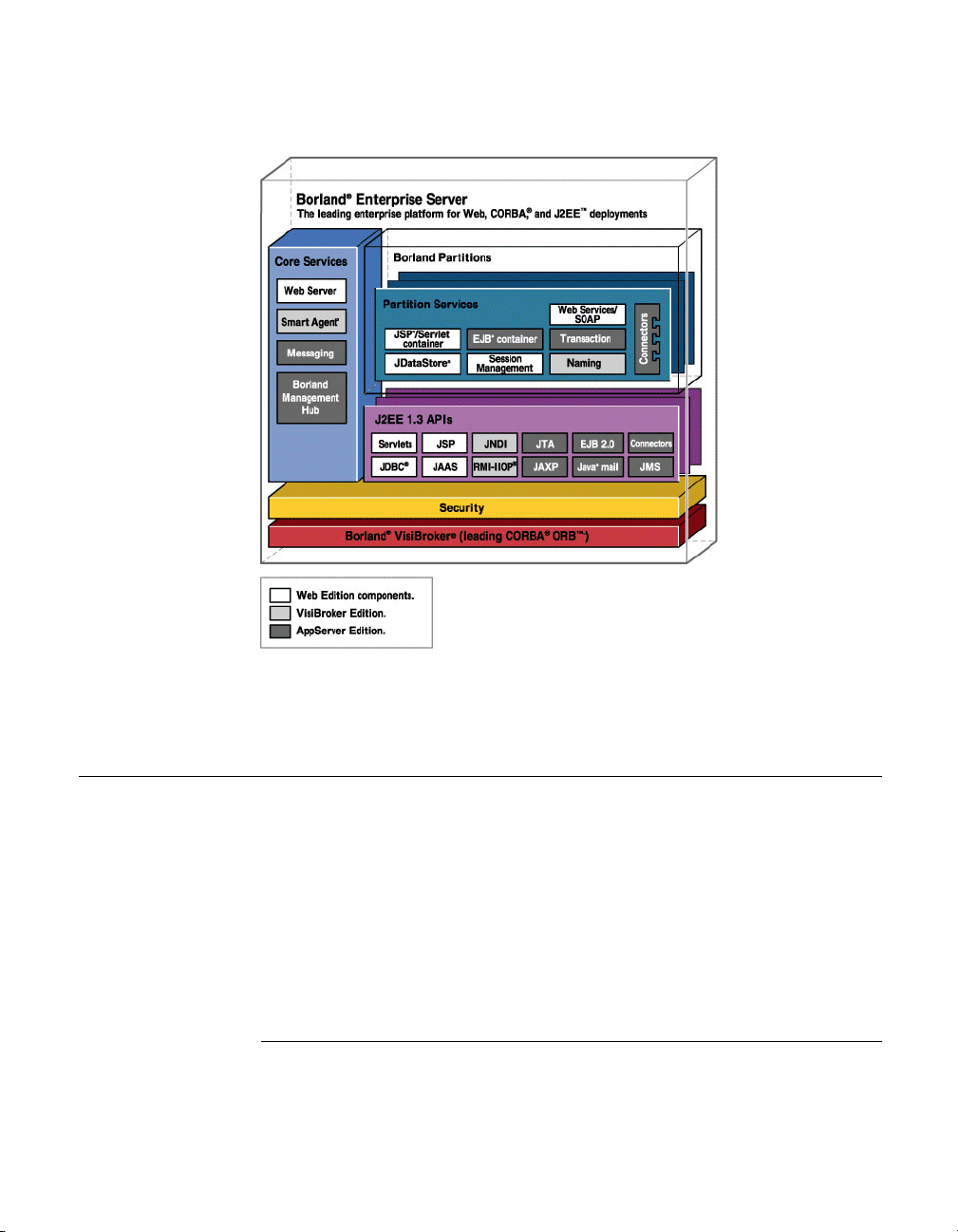
In the following architectural diagram, your enterprise applications sit on top of
the Borland Enterprise Server. An application server installation contains BES
core services and Partitions.
BES services overview
BES services are those services available to all applications being hosted on
the Borland Enterprise Server. They are:
■
Web Server
■
Java Messaging (JMS)
■
Smart Agent
■
2PC Transaction Service
■
Management
Web Server
Borland Enterprise Server includes the Apache Web Server version 2.0. The
Apache web server is a robust, commercial grade reference implementation of
10 BES Developer’ s Guide
Page 23

BES services overview
the HTTP. protocol. The Apache web server is highly configurable and
extensible through the addition of third-party modules. Apache supports
clients with varying degrees of sophistication and supports content negotiation
to this end. Apache also provides unlimited URL ailing.
Borland has added an IIOP Plug-in to the Apache web server. The IIOP Plugin allows Apache and the Borland web container to communicate via Internet
Inter-ORB Protocol (IIOP), allowing users to add the power of CORBA with
their Web applications in new ways. In addition, IIOP is the protocol of the
VisiBroker ORB, allowing your Web applications to fully leverage the services
provided by the object-request-broker provided by Borland.
JMS
Borland Enterprise Server provides support for standard JMS pluggability, and
currently bundles the Tibco messaging service. Additionally, BES is certified to
support SonicMQ. Refer to Chapter 24, “JMS provider pluggability” for vendorspecific information on JMS services.
Smart Agent
The Smart Agent is a distributed directory service provided by the VisiBroker
ORB used in BES. The Smart Agent provides facilities used by both client
programs and object implementations, and must be started on at least one
host within the local server network.
Note Users of the Web Edition do not have to use the Smart Agent if they expect
their Web server and Web containers to communicate through HTTP or
another Web protocol. To leverage the IIOP Plug-in (and, by extension, the
ORB provided with the Web Edition), however, the Smart Agent must be
turned on.
More than one Smart Agent can be configured to run on your network. When a
Smart Agent is started on more than one host, each Smart Agent will
recognize a subset of the objects available and communicate with the other
Smart Agents to locate objects it cannot find. In addition, if one of the Smart
Agent processes should terminate unexpectedly, all implementations
registered with that Smart Agent discover this event and they will automatically
re-register with another Smart Agent. It should be noted that If a heavy
services lookup load is necessary, it is advisable to use the Naming Service
(VisiNaming). VisiNaming provides persistent storage capability and cluster
load balancing whereas the Smart Agent only provides a simple round robin
on a per osagent basis.
For more information, go to the VisiBroker for Java Developer's Guide Using
the Smart Agent section.
Chapter 2: Borland Enterprise Server overview and architecture 11
Page 24

The Partition and its services
2PC Transaction Service
The Two-Phase Commit (2PC) Transaction Service exists provides a
complete recoverable solution for distributed transactional CORBA
applications. Implemented on top of the VisiBroker ORB, the 2PC Transaction
Service simplifies the complexity of distributed transactions by providing an
essential set of services, including a transaction service, recovery and logging,
integration with databases, and administration facilities within one, integrated
architecture.
Management
The Borland Management Service encompasses a set of Management Agents
which communicate with a Management Hub. The Hub is installed on a single
host in your network from which you carry out management tasks such as
clustering. The Management Hub lets you monitor and control resources
installed on the local host on which Borland Enterprise Server is installed.
Note Borland Deployment Op-Center (purchased separately) provides the ability to
manage distributed resources installed on remote hosts with network facing
services.
The Partition and its services
A Partition is an application's deployment target. The Partition provides the
J2EE server-side runtime environment required to support a complete J2EE
1.3 application. While a Partition is implemented as a single native process, its
core implementation is Java. When a Partition starts, it creates an embedded
Java Virtual Machine (JVM) within itself to run the Partition implementation
and the J2EE application code.
Partitions are present in each BES Edition and product but they host less
diverse archives in the Web Services, Team and VisiBroker Editions. This
section describes the full-featured functional Partitions offered in the full
Borland Enterprise Server. Each Partition instance provides:
■
“Connector Service” on page 13
■
“EJB Container” on page 13
■
“JDataStore Server” on page 13
■
“Lifecycle Interceptor Manager” on page 13
■
“Naming Service” on page 13
■
“Session Storage Service” on page 14
■
“Session Storage Service” on page 14
■
“Web Container” on page 14
12 BES Developer’ s Guide
Page 25

The Partition and its services
Connector Service
The Connector Service, also known as VisiConnect, is the Borland
implementation of the Connectors 1.0 standard, which provides a simplified
environment for integrating various EISs with the Borland Enterprise Server.
The Connectors provide a solution for integrating J2EE-platform application
servers and EISs, leveraging the strengths of the J2EE platform - connection,
transaction and security infrastructure - to address the challenges of EIS
integration. For more information see Chapter 26, “VisiConnect overview”.
EJB Container
The Borland Enterprise Server provides integrated EJB container services.
These services allow you to create and manage integrated EJB containers or
EJB containers across multiple Partitions. Use this service to deploy, run, and
monitor EJBs. Tools include a Deployment Descriptor Editor (DDEditor) and a
set of task wizards for packaging and deploying EJBs and their related
descriptor files. EJB containers can also make use of J2EE connector
architecture, which enables J2EE applications to access Enterprise
Information Systems (EISs).
JDataStore Server
Borland's JDataStore is a relational database service written entirely in
Java. You can create and manage as many JDataStores as desired. For more
information on JDataStore, see the JDatastore online documentation at
www.borland.com/techpubs/bes.
Lifecycle Interceptor Manager
You can use Lifecycle Interceptors to further customize your implementation.
Partition Lifecycle Interceptors allow you to perform operations at certain
points in a Partition's lifecycle. For more information see Chapter 25,
“Implementing Partition Interceptors”.
Naming Service
The Naming Service is provided by the VisiBroker ORB. It allows developers,
assemblers, and/or deployers to associate one or more logical names with an
object reference and store those names in a VisiBroker namespace. It also
allows application clients to obtain an object reference by using the logical
name assigned to that object. Object implementations can bind a name to one
of their objects within a namespace which client applications can then use to
resolve a name using the resolve() method. The method returns an object
reference to a naming context or an object. For more information refer to the
VisiBroker for Java Developer's Guide Using the Smart Agent section.
Chapter 2: Borland Enterprise Server overview and architecture 13
Page 26

Borland Enterprise Server and J2EE APIs
Session Storage Service
The Java Session Service (JSS) is a service that stores information pertaining
to a specific user session. The JSS provides a mechanism to easily store
session information into a database. For example, in a shopping cart scenario,
information about your session (your login name, the number of items in the
shopping cart, and such) is polled and stored by the JSS. So when a session
is interrupted by a Borland web container unexpectedly going down, the
session information is recoverable by another Tomcat instance through the
JSS. The JSS must be running on the local network. Any web container
instance (in the cluster configuration) will find the JSS, connect to it, and
continue session management. For more information, go to Chapter 6, “Java
Session Service (JSS) configuration”.
Transaction Manager
A Partition Transaction Manager exists in each Borland Enterprise Server
Partition. It is a Java implementation of the CORBA Transaction Service
Specification. The Partition Transaction Manager supports transaction
timeouts, one-phase commit protocol, and can be used in a two-phase commit
protocol under special circumstances. For more information, go to Chapter 19,
“Transaction management”.
Web Container
The Web Container is designed to support deployment of web applications or
web components of other applications (for example, servlets and JSP files).
BES provides the Borland Web Container, which is based on Tomcat 4.1.
Tomcat is a sophisticated and flexible open-source tool that provides support
for servlets, JavaServer Pages, and HTTP. Borland has also provided an IIOP
plug-in with its Web Container, enabling communication with application
components and the web server over IIOP rather than strict HTTP. Other
features of the Web Container are:
■
EJB referencing
■
DataSource referencing
■
Environment referencing
■
Integration into industry-standard web servers
For more information, go to Chapter 4, “Web components”.
Borland Enterprise Server and J2EE APIs
Since Borland Enterprise Server is fully J2EE 1.3 compliant, it supports the
use of the following J2EE 1.3 APIs:
14 BES Developer’ s Guide
Page 27

Borland Enterprise Server and J2EE APIs
■
JNDI: the Java Naming and Directory interface
■
RMI-IIOP: remote method invocation (RMI) carried out via internet interORB protocol (IIOP)
■
JDBC: for getting connections to and modeling data from databases
■
EJB 2.0: the Enterprise JavaBeans 2.0 APIs
■
Servlets 1.0: the Sun Microsystems servlets APIs
■
JSP: JavaServer Pages APIs
■
JMS: Java Messaging Service
■
JTA: the Java transactional APIs
■
Java Mail: a Java email service
■
Connectors: the J2EE Connector Architecture
■
JAAS: the Java Authentication and Authorization Service
■
JAXP: the Java API for XML parsing
JDBC
Borland implements the Java DataBase Connection APIs version 2.0 from
Sun Microsystems. JDBC 2.0 provides APIs for writing database drivers and a
full Service Provider Interface (SPI) for those looking to develop their own
drivers. JDBC 2.0 also supports connection pooling and distributed transaction
features. For more information, go to the Transaction management and JDBC,
JDBC API Modifications section.
Java Mail
Java Mail is an implementation of Sun's Java Mail API. It is a set of abstract
APIs that model a mail system. The API provides a platform independent and
protocol independent framework to build Java-technology-based email client
applications.
JTA
The Java Transactional API (JTA) defines the UserTransaction interface
required by application components to start, stop, rollback, or commit
transactions. EJBs establish transaction participation through the
getUserTransaction method, while other components do so using JNDI lookups.
JTA also specifies the interfaces needed by Connectors and resource
managers to communicate with an application server's transaction manager.
Chapter 2: Borland Enterprise Server overview and architecture 15
Page 28

Borland Enterprise Server and J2EE APIs
JAXP
The Java APIs for XML Parsing (JAXP) enable the processing of XML
documents using the DOM, SAX, and XSLT parsing implementations.
Developers can easily use the parser provided with the reference
implementation of the API to XML-enable their Java applications.
JNDI
The Java Naming and Directory Interface is used to allow developers to
customize their application components at assembly and deployment without
changes to the component's source code. The container implements the
runtime environment for the components and provides the environment to the
component as a JNDI naming context. The components' methods access the
environment through JNDI interfaces. The JNDI naming context itself stores
the application environment information and makes it available to all
application components at runtime.
RMI-IIOP
The VisiBroker ORB supports RMI-over-IIOP protocol. When used in
conjunction with the IIOP Connector Module for Apache and the Borland web
container, it allows distributed web applications built on CORBA foundations.
For more information, go to the VisiBroker for Java Developer's Guide,Using
RMI over IIOP section.
Other Technologies
It is also possible to wrap other technologies, provide them as services, and
run them in the Borland Enterprise Server.
OptimizeIt Profiler
Borland's OptimizeIt Profiler (purchased separately) helps you track memory
and CPU usage issues during the development of Java applications. Borland
Enterprise Server runs OptimizeIt at the Partition level.
See the Sun Java Center for more information on these APIs.
16 BES Developer’ s Guide
Page 29

Chapter
Chapter3Partitions
This section explains what Partitions are and how they work. It explores the
Partition's footprint, facilities, configuration, and how to run a Partition.
Important For documentation updates, go to www.borland.com/techpubs/bes.
3
Partitions Overview
Partitions are the runtime hosting environment for J2EE and web service
application components. A Partition is a process that can be tuned to suit the
application it is hosting. You can create any number of Partitions to isolate,
scale, or cluster your application deployment to meet your own requirements.
Extensive tooling enables you to simply create, configure, and distribute
Partitions to your needs.
A Partition provides containers and services needed for your applications:
■
Web Container
■
EJB Container
■
Naming Service
■
Session Service
■
Transaction Service
■
Connector Service
■
JDataStore Database Server
■
Partition Lifecycle Interceptor Service
Chapter 3: Partitions 17
Page 30

Creating Partitions
Additional applications and application components are also provided that can
be used in your applications:
■
UDDI Server
■
Apache Struts
■
Apache Cocoon
■
Petstore J2EE blueprint application
■
SmarTicket J2EE blueprint application
By enabling and disabling the various Partition containers and services, and
configuring the Partition's environment, you can "right-size" the Partition to its
specific task. Typical use cases for a Partition include:
■
Providing a complete isolated J2EE server platform for an application with
all relevant J2EE container and services enabled.
■
Providing a platform for a component of a distributed application such as its
Web Tier with just the Web Container and Session Service enabled.
■
Providing a central service such as a platform for the BES UDDI server with
just its Web Container enabled.
■
Providing a diagnostic platform for an application such as running under
OptimizeIt.
Avoiding monolithic J2EE server Partitions hosting many applications also
allows you to fine tune the Java environment the application needs. The
version and type of JDK together with such configuration as heap space
available ensures a satisfactory environment in which to run, while not overallocating resources. Limits on pooled resources such as threads and
connections may similarly be configured for optimal total performance.
Partitions also have their own individual security settings for authentication
mechanisms, authorization tables, and so on. A user who has authority to
access all resources in a development Partition may be granted much more
limited authority in a production Partition.
Creating Partitions
Partitions are created as managed objects in a "configuration" from templates
provided in the Borland Management Console. Typically the Partition disk
footprint is created in:
<install-dir>/var/domains/<domain-name>/configurations/<configurationname>/
You can specify another location for the Partition and add a pre-existing
Partition to a configuration. The Management Console provides a rich
configuration experience for a Partition and is discussed in the Management
Console User's Guide Using Partitions section. Most configuration data for the
Partition and its services is captured in its Partition XML reference file
described in Chapter 30, “Partition XML reference”.
18 BES Developer’ s Guide
Page 31
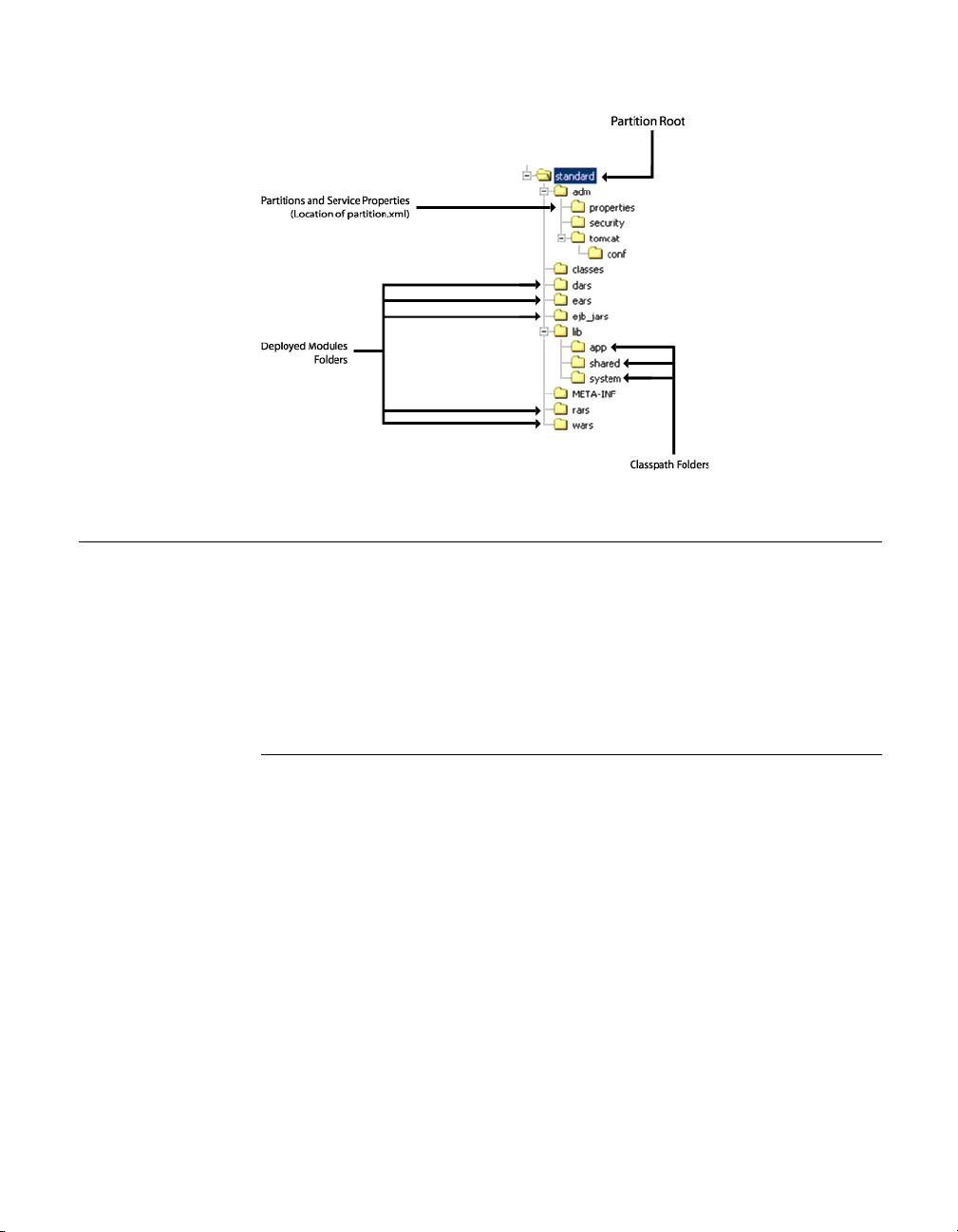
Figure 3.1 Partition Footprint
Running Partitions
Partitions are typically run under the control of a management agent within a
configuration, but they can also be run directly from the command line as
unmanaged Partitions. In both cases the Partition requires that a Smart Agent
(osagent) be running in the same sub-net on the same Smart Agent port.
See the Management Console User's Guide, Using Partitions section, for
information about managing Partitions within a configuration.
Running Partitions
Running unmanaged Partitions
To run an unmanaged Partition (not managed by SCU), use the following
command:
partition [-path <my_partition_path>]
If no -path is specified, then the current directory is used.
The full list of Partition arguments is available in the following tables. Many of
these arguments are for use by the management agents and not by a user.
partition [<-options>] [-path <partitionpath>] [-management_agent <true|
false> [-management_agent_id <id>]] [-no_user_services] [-unique_cookie
<cookie>]
<-options> are the usual Java options and VM system properties recognized by
the Partition.
Chapter 3: Partitions 19
Page 32

Running Partitions
Note Options that are typically static, and pertinent to both managed and
unmanaged Partitions, are best encapsulated in the Partition's configuration
files.
Table 3.1 Partition command options
Option Description
-Dlog4j.configuration Path to the Partition's log4j
-Dlog4j.configuration.update.delay Specifies the period, in milliseconds,
-Dpartition.ignore_shutdown_on_signal=<true|
false>
-Dpartition.default.smartagent.port Overrides the User ORB Smart Agent
-Dpartition.default.smartagent.addr Overrides User ORB Smart Agent addr
-Dvbroker.agent.port Ultimate override for the User ORB
-Dvbroker.agent.addr Ultimate override for the User ORB
configuration file. Default is
<partitionpath>/adm/properties/
logConfiguration.xml
between checks for updates to the
log4j configuration file. Default is
60000 milliseconds (1 minute).
Use this property to decide whether to
ignore shutdown signals and wait for a
shutdown request via the Partition's
management interface(s). Note that
UNIX sends a Ctrl-C signal to all
processes in a process group.
A Partition in control of its own life
cycle would not set this. When the
Partition is invoked by some parent
controlling process, such as the SCU,
then this would be set to true to ensure
that the Partition does not immediately
exit when the parent is issued a
shutdown signal.
port and overrides all Partition
configuration. This property is only
overridden by -Dvbroker.agent.port.
Typically used by a parent controlling
process, such as the SCU.
property and overrides all Partition
configuration. Is only overridden by Dvbroker.agent.addr.
Typically used by a parent controlling
process, such as the SCU.
Smart Agent port.
This is typically never used by a parent
controlling process, but it may be used
by a command-line user.
Smart Agent addr.
Typically never used by a parent
controlling process, but it may be used
by a command-line user.
20 BES Developer’ s Guide
Page 33

Running Partitions
Table 3.1 Partition command options
Option Description
-Dpartition.management_domain.port Sets the Management ORB Smart
-DTomcatLoaderDebug Sets the Web Container debug level.
Table 3.2 Partition command available arguments
Agent port. Default 42424.
Typically used by a parent controlling
process, such as the SCU.
Default 0 (zero).
Arguments Description
-path <partitionpath> Partition footprint path.
-management_agent <true|false> The default is false which disables the
-management_agent_id <id> Sets the identity to be used for the
-unique_cookie <cookie> Sets the cookie to be used to construct
-no_autostart_user_services <true|false> If set to true, disables the autostart of
Partition management agent and runs a
standalone Partition. To enable the
Partition management agent, set to true.
Partition's management interface object
name.
unique identities in the Partition. In
particular, used to construct default
external interface names. The default is:
<host><partitionpath>.
user domain Partition services that are
configured to be started.
Running managed Partitions
Managed Partitions are started when the configuration to which they belong
starts. Typically the Partition starts according to a default mechanism, but you
can configure additional command-line options to be passed at creation-time.
Or, you can edit configuration.xml. Open the file, search for <partition-
process>, and find the <arguments> data block. Insert new command-line
arguments within <argument> tags.
Partition logging
The Partition uses log4j for its logging mechanism. It is configured using a
DOMConfigurator from the file <partitionpath>/adm/properties/
logConfiguration.xml. The default configuration is to log in an XML layout to
rolling log files in <partitionpath>/adm/logs. The Partition logConfiguration.xml
file is monitored for updates with a default check interval of 1 minute. See
previous table of Partition options for information about configuring the
configuration file and monitor check interval.
Chapter 3: Partitions 21
Page 34

Configuring Partitions
Any output sent to System.out or System.err is redirected as log4j events to the
logs. System.out is logged at the INFO level and System.err is logged at the
ERROR level.
If your application uses log4j then to configure application logging you should
edit the Partition's <partitionpath>/adm/properties/logConfiguration.xml file.
Configuring Partitions
Partitions offer a variety of fully-configurable services. This section discusses
how to work with Partition services, including archives, security, application
services, and statistics.
Application archives
Application components are hosted in the Partition itself. You can dynamically
deploy application archives to Partitions prior to running them or when they
are running. If the application archive is already hosted by the Partition, then it
is unloaded and the new archive loaded. To deploy modules to a Partition,
simply right-click its icon in the Management Console's Navigation Pane, and
select Deploy Modules. The deployed modules appear in the Partition
footprint, as shown in the Partition Footprint figure in “Creating Partitions” on
page 18.
You can also host modules at locations outside the Partition footprint. To do
so, open the partition.xml file for the Partition whose module paths you want
to configure. Search for the <archives> element node. Within this node, you
can configure archive repositories for all your archives by type, or provide the
location of a specific archive that you want hosted outside the Partition
repositories. See <archives> element in Chapter 30, “Partition XML reference”
for syntax.
In the Management Console, archives hosted within the Partition's footprint
are called "Deployed Modules". Archives that are hosted outside the
Partition's footprint are called "Hosted Modules".
Working with Partition services
The Partition allows you to specify which services will run within it and how
they will behave in the context of the Partition instance. You can configure the
Partition to automatically start some or all of its services at Partition startup.
You can specify the order in which Partition services start and shut down.
Additionally, you can configure which Partition services are configurable
through the Management Console. Again, the partition.xml file captures this
information as attributes of its <services> element.
22 BES Developer’ s Guide
Page 35

Configuring Partitions
Partition handling of services
The <services> element has four attributes, which are:
autostart The services to be started with the
Partition.
startorder The startup order imposed on the
Partition services included in the
autostart.
shutdownorder The shutdown order imposed on the
Partition services running at shutdown.
administer The Partition services that will appear
in the Management Console as
configurable.
To set any one of these attributes, use either the Management Console or
search the Partition's partition.xml file for the <services> node. The valid value
for each attribute is a space-separated list of Partition service names, which
are read left to right. For example, if you wanted to shutdown a Partition
service named ejb_container before a service named transaction_service, you
would set the value of shutdownorder to:
ejb_container transaction_service
Configuring individual services
Each Partition service is configurable within the context of its Partition parent.
The partition.xml file captures information about individual services in the
<service> node, the child node of <services>. In addition, you can use the
<properties> sub-element within <service> to set service-specific properties that
do not come under the auspices of the Partition's runtime executable.
If your services are to be included in the service node lists, you must define
them with a service data block and give them a unique name using the name
attribute. For a full description of the attributes that are configurable for
Partition services, see Chapter 30, “Partition XML reference”.
Gathering Statistics
Each Partition has a Statistics Agent that can be enabled for the short-term
gathering of statistics data. The data is stored onto disk, and is viewable using
the Management Console. Statistics are collected in snapshots performed at a
specified interval, and are cleaned up (removed from disk) at discreet intervals
and after the collection period. This function is called reaping.
You can enable, disable, and configure statistics gathering using the
Management Console or by setting attributes in the <statistics.agent> attribute
of partition.xml. For more information, see Chapter 30, “Partition XML
reference”.
Chapter 3: Partitions 23
Page 36

Configuring Partitions
Security management and policies
Each Partition can have its own security settings. You can specify the security
manager to use for each Partition by specifying a valid security class. You can
also set the Policy to use for that manager (generally using a .policy file). You
can configure security using either the Management Console or by setting the
attributes of the <security> node of partition.xml. For more information, see
Chapter 30, “Partition XML reference”.
Classloading policies
You can configure the Partition's classloading policies, including the prefixes
to load, the classloader policy, and whether or not to verify JARs as they are
being loaded. You can configure classloading either using the Management
Console or by setting attributes of the <container> node of partition.xml.
The system.classload.prefixes attribute takes a comma-separated list of
resource prefixes as its value. These prefixes are delegated from the custom
classloader to the system classloader prior to attempting its own load. The
classloader.classpath attribute contains a semicolon-separated list of JARs to
be loaded by each instance of the application classloader. To verify the JARs
as they load, set the verify.on.load attribute to true, the default.
The classloader policy is set in the classloader.policy element. There are two
acceptable values:
per_module Creates a separate application
container Loads all deployed modules in the
Partition Lifecycle Interceptors
You can use Partition Lifecycle Interceptors to further customize your
implementation. Partition Lifecycle Interceptors allow you to perform
operations at certain points in a Partition's lifecycle. You deploy a Java class
that implements:
com.borland.enterprise.server.Partition.service.PartitionInterceptor
and contains code to perform operations at one or more of the following
interception points:
■
At Partition initialization before any Partition services (Tomcat, for example)
are created and initialized.
24 BES Developer’ s Guide
classloader for each deployed module.
This policy is required for hot
deployments (deployments while the
Partition is running).
shared classloader. This policy
prevents the ability to hot deploy.
Page 37

Configuring Partitions
■
At Partition initialization after any services are started but prior to the
loading of any modules.
■
At Partition startup after all Partition services have loaded their respective
modules.
■
At Partition shutdown before Partition services have unloaded their
respective modules but prior to the services themselves shutting down.
■
At Partition termination after Partition services have been shut down.
Partition Interceptors have a variety of uses, including pre-loading JARs prior
to startup, inserting debugging operations during module loading, or even
simple messaging upon the completion of certain events.
For information about how to implement a Partition Lifecycle Interceptor, see
Chapter 25, “Implementing Partition Interceptors”.
Chapter 3: Partitions 25
Page 38

26 BES Developer’ s Guide
Page 39

Chapter
4
Chapter4Web components
This section provides information about the web components which are
included in all Borland Enterprise Server product offerings with the exception
of the VisiBroker Standalone installation option.
Important For documentation updates, go to www.borland.com/techpubs/bes.
Apache web server implementation
BES includes an implementation of the open-source Apache web server
version 2.0 (an httpd server) with all product offerings except in the case of the
VisiBroker Standalone installation option. The Apache web server 2.0 is HTTP
1.1-compliant and is highly customizable through the Apache modules.
Apache configuration
The Apache web server comes pre-configured and ready-to-use when it is
initially started. Many modules are dynamically loaded during the Apache
startup. You can later customize its configuration for the IIOP connector,
clustering, failover, and load balancing with one or more web container(s). You
can use the BES Management Console to modify the configuration file, or you
can use the directives in the plain text configuration file, httpd.conf.
By default, the Apache httpd.conf file is located in the following directory:
<install_dir>/var/domains/<domain_name>/configurations/
<configuration_name>/mos/apache2/conf
Chapter 4: Web components 27
Page 40

Apache web server implementation
Otherwise, for the location of the httpd.conf file, go to the configuration.xml file
located in:
<install_dir>/var/domains/<domain_name>/configurations/
<configuration_name>/mos/
and search for the Apache Managed Object apache-processsub-element httpd-
conf attribute:
httpd-conf=
For more information about the Apache Managed Object elements and
attributes, go to the BDOC Reference, Managed Object elements and
attributes, apache-process Managed Object type section.
For information about configuring the httpd.conf file for the IIOP connector/
redirector, go to Chapter 5, “Web server to web container connectivity”.
Apache configuration syntax
When you edit the httpd.conf file, you must adhere to the following
configuration syntax guidelines:
■
The httpd.conf files contain one directive per line.
■
To indicate that a directive continues onto the next line, use a back-slash "\
" as the last character on a line.
■
No other characters or white space must appear between the back-slash "\
" and the end of the line.
■
Arguments to directives are often case-sensitive, but directives are not
case-sensitive.
■
Lines which begin with the hash character "#" are considered comments.
■
Comments cannot be included on a line after a configuration directive.
■
Blank lines and white space occurring before a directive are ignored, so you
can indent directives for clarity.
Note For additional information on the Apache web server configuration options and
general directive usage, go to the Apache Software Foundation web site
at:Apache2 www.apache.org, or go to the online Help Topics, Java API
Reference, Apache2 APIs.
Using the .htaccess files
The Apache web server allows for decentralized management of configuration
through the .htaccess files placed inside the web tree. These files are specified
in the AccessFileName directive.
Directives placed in .htaccess files apply to the directory where you place the
file, and all sub-directories. The .htaccess files follow the same syntax as the
main configuration files. Since .htaccess files are read on every request,
changes made in these files take immediate effect. To find which directives
28 BES Developer’ s Guide
Page 41

Borland web container implementation
can be placed in .htaccess files, check the Context of the directive. You can
control which directives can be placed in .htaccess files by configuring the
AllowOverride directive in the main configuration files.
Apache directory structure
After installing the Apache web server, by default, the following Apachespecific directory structure appears in:
<install_dir>/var/domains/<domain_name>/configurations/
<configuration_name>/mos/<apache_managedobject_name>/
Table 4.1 Apache-specific directories
Apache-specific Directory Name Description
conf Contains all configuration files.
htdocs Contains all HTML documents and web
logs Contains all log files.
CGI-bin Contains all CGI scripts.
proxy Contains the proxies for your web
icons Contains the icon images in .gif format.
pages.
application.
Borland web container implementation
The Borland web container supports development and deployment of web
applications. All BES products (with the exception of VisiBroker Standalone
installation option) provide the Borland web container which is based on
Tomcat 4.1. The Borland web container is a sophisticated and flexible tool that
provides support for Servlets 2.3 and JSP 1.2 specifications.
As a "Partition service", all the Borland web container configuration files are
located in each of your Partitions' data directory under:
adm/tomcat/conf/
By default, a Partition's data directory is located in:
<install_dir>/var/domains/<domain_name>/configurations/
<configuration_name>/mos/<partition_name>/
For example, for a Partition named "standard", by default the Borland web
container configuration files are located in:
<install_dir>/var/domains/<domain_name>/configurations/
<configuration_name>/mos/standard/adm/tomcat/conf/
Otherwise, for the location of a Partition data directory, go to the
configuration.xml file located in:
<install_dir>/var/domains/<domain_name>/configurations/
<configuration_name>/
Chapter 4: Web components 29
Page 42

Borland web container implementation
and search for the Partition managed object, partition-process sub-element
directory attribute:
<partition-process directory=
For more information about the Partition type Managed Object and its
elements and attributes, go to the BDOC Reference, Managed Object
elements and attributes, partition Managed Object type section.
Servlets and JavaServer Pages
A servlet is a Java program that extends the functionality of a web server,
generating dynamic content and interacting with web clients using a requestresponse paradigm.
JavaServer Pages (JSP) are a further abstraction to the servlet model. JSPs
are an extensible web technology that uses template data, custom elements,
scripting languages, and server-side Java objects to return dynamic content to
a client. Typically the template data is HTML or XML elements, and in many
cases the client is a web browser.
Servlets and JSPs are server components that normally run within a web
server. Servlets are written as web server extensions separate from the HTML
page, while JSP embeds the Java code directly in the HTML. At runtime, the
JSP Java code is automatically converted into a servlet.
Servlets process web requests, pass them into the back-end enterprise
application systems, and dynamically render the results as HTML or XML
client interfaces. Servlets also manage the client session information, so that
users do not need to repeatedly input the same information.
Typical web application development process
In a typical development phase for a web application:
1 The web designer writes the JSP components, and the software developer
creates the servlets for handling presentation logic.
2 In conjunction, other software engineers write Java source code for servlets
and the .jsp and .html for processing client request to the server-side
components (EJB application tier, CORBA object, JDBC object).
3 The Java class files, .jsp files, and the .html files are bundled with a
deployment descriptor as a Web ARchive (WAR) file.
4 The WAR file (or web module) is deployed in the Borland web container as
a web application.
For more information about using the BES Deployment Descriptor Editor
(DDE) to create a Web ARchive (WAR) file, go to the Management Console
User’s Guide, Using the Deployment Descriptor Editor, Adding WAR
information section.
30 BES Developer’ s Guide
Page 43

Borland web container implementation
Web application archive (WAR) file
In order for the Borland web container to deploy a web application, the web
application must be packaged into a Web ARchive (WAR) file. This is
achieved by using the standard Java Archive tool jar command.
The WAR file includes the WEB-INF directory. This directory contains files that
relate to the web application. Unlike the document root directory of the web
application, the files in the WEB-INF directory do not have direct interaction with
the client. The WEB-INF directory contains the following:
Directory/File name Contents
/WEB-INF/web.xml the deployment descriptor
/WEB-INF/web-borland.xml the deployment descriptor with Borland-
/WEB-INF/classes/* the servlets and utility classes. The
/WEB-INF/lib/*.jar the Java ARchive (JAR) files which
specific extensions.
application class loader loads any class
in this directory.
contain servlets, beans, and other utility
classes useful to the web application. All
JAR files are used by the web application
class loader to load classes from.
Borland-specific DTD
The web.xml file contains the standard deployment descriptor facilities for web
applications. However, the web-borland.xml file contains some Borland-specific
extensions. The following tables describes the Borland-specific elements and
how to use them. Some of these augment the standard constructs and some
are new constructs.
Chapter 4: Web components 31
Page 44

Borland web container implementation
Note All attributes listed for each element are required.
Table 4.2 Borland-specific new elements
Element
context-root no Specifies a user-
web-deploypath(service,
engine, host)
Require
d
no Specifies exactly
Description Default Behavior DDEditor Pane
defined name for
the web
application. To
designate the
application as the
root web
application, type
"!ROOT!".
where to deploy the
web application
(service, engine,
host). The Borland
web container
(based on Tomcat)
has a notion of a
host being part of
an engine which in
itself is a part of a
service. There can
be multiple hosts
under an engine
and there can be
multiple engines
under a given
service. A given
web application
can be deployed to
one or more of
these hosts. The
service, engine,
and host you
specify using this
element, override
the defaults.
However, this
element does
accept multiple
entries.
By default, the
WAR name
(without the .war
extension) is
used for the
application if
there is no
context-root at
the EAR level.
By default, the
web-deploy-path is
defined in the
following file:
<install_dir>\
var\domains\
<domain_name>\
configurations\
<configuration_na
me>\
<partition_manage
d-object_name>\
adm\tomcat\conf\
web-borland.xml
If no web-deploypath is defined in
this file, then the
default is:
service=HTTP
,
engine=HTTP,
and host=*
(deploy to
all hosts
available
under the
specified
engine)
General
Web Deploy
Paths
32 BES Developer’ s Guide
Page 45

Table 4.2 Borland-specific new elements
Require
Element
authorizationdomain
security-role
(role-name,
deploymentrole?)
d
no Specifies which
no Maps the roles
Description Default Behavior DDEditor Pane
authorization
domain is used for
the web
application.
Because multiple
authorization
domains can be
defined in an
application server,
you must specify
the one for the web
application. The
authorization
domain specified
must be one of the
domains previously
defined. For more
information, see
the VisiSecure
Guide, Security
Authorization
section.
used in the web
application to the
real roles defined in
the application
server by
specifying the (role
name, deployment
role).
Borland web container implementation
If not defined in
the EAR, the
domain specified
in the WAR is
used. If not
specified in the
WAR also, then
the domain
specified for the
Partition is used.
n/a Open up .war,
General
expand
Security roles
node, select a
defined
security role to
access the
Security Roles
pane.
Chapter 4: Web components 33
Page 46

Borland web container implementation
Table 4.3 Borland additional attributes on existing elements
Element
resource-ref (res-ref-name,
resource-env-ref (resource-env-ref-
Additional
Attribute
jndi-name)
name, jndi-name)
Description DDEditor Pane
Specifies a JNDI name
to associate with the
resource reference. At
runtime, when a servlet
looks up the specified
resource reference
name, the web
application looks up the
JNDI name in the JNDI.
Note: The res-ref-name
that the additional jndi-
name element modifies is
required.
Specifies a JNDI name
to associate with the
resource environment
reference. At runtime,
when a servlet looks up
the specified resource
environment reference
name, the web
application looks up the
JNDI name in the JNDI.
Note: The resource_envref-name that the
additional jndi-name
element modifies is
required.
Resource
References
Resource Env
Refs
34 BES Developer’ s Guide
Page 47

Borland web container implementation
Table 4.3 Borland additional attributes on existing elements
Additional
Element
ejb-ref (ejb-ref-name,
ejb-local-ref (ejb-local-ref-
Attribute
jndi-name)
name, jndi-name)
Description DDEditor Pane
Specifies a JNDI name
to associate with the
EJB reference name. At
runtime, when a servlet
looks up the specified
EJB reference name,
the web application
looks up the JNDI name
in the JNDI. Note: The
ejb-ref-name that the
additional jndi-name
element modifies is
required.
Specifies a JNDI name
to associate with the
EJB local reference
name. At runtime, when
a servlet looks up the
specified EJB local
reference name, the
web application looks
up the JNDI name in
the JNDI. Note: The
ejb-local-ref-name that
the additional jndi-name
element modifies is
required.
EJB
References
EJB Local
References
This is the DTD for the web-borland.xml file:
Note "*" means you can specify more than one, "?" means you can only specify
one.
<!ELEMENT web-app(context-root?, resource-env-ref*, resource-ref*,
ejb-ref*, ejb-local-ref*, property*, web-deploy-path*,
authorization-domain?, security-role*)>
<!ELEMENT ejb-ref (ejb-ref-name, jndi-name)>
<!ELEMENT ejb-local-ref (ejb-ref-name, jndi-name?)>
<!ELEMENT resource-ref (res-ref-name, jndi-name)>
<!ELEMENT resource-env-ref (resource-env-ref-name, jndi-name)>
<!ELEMENT web-deploy-path (service, engine, host)>
<!ELEMENT context-root (#PCDATA)>
<!ELEMENT prop-name (#PCDATA)>
<!ELEMENT prop-type (#PCDATA)>
<!ELEMENT prop-value (#PCDATA)>
<!ELEMENT ejb-ref-name (#PCDATA)>
<!ELEMENT jndi-name (#PCDATA)>
<!ELEMENT res-ref-name (#PCDATA)>
<!ELEMENT resource-env-ref-name (#PCDATA)>
<!ELEMENT service (#PCDATA)>
Chapter 4: Web components 35
Page 48

Microsoft Internet Information Services (IIS) web server
<!ELEMENT engine (#PCDATA)>
<!ELEMENT host (#PCDATA)>
<!ELEMENT authorization-domain (#PCDATA)>
<!ELEMENT security-role (role-name, deployment-role?)>
<!ELEMENT role-name (#PCDATA)>
<!ELEMENT deployment-role (#PCDATA)>
Adding ENV variables for the web container
You add web container ENV variables for a Partition the same way you set
any ENV variables for any Partition service; you use the <env-vars> element
and insert the xml code within the partition-process sub-element.
Note When adding web container ENV variables, be sure to type space-separated,
value pairs.
The configuration.xml file is located in the following directory:
<install_dir>/var/domains/<domain_name>/configurations/
<configuration_name>/
To add web container ENV variables for a Partition Managed Object, use the
env-vars element and env-var sub-element and the following syntax:
<managed-object name="standard"> ...>
<partition-process ...>
<env-vars ...>
<env-var name="name" value="value"/>
</env-vars>
...
</managed-object>
where <name> is the ENV variable name and <value> is the value you want to set
for the named ENV variable.
For example:
<managed-object name="standard"> ...>
<partition-process ...>
<env-vars ...>
<env-var name="ABC" value="val_abc"/>
</env-vars>
...
</managed-object>
For more information, go to the BDOC Reference, Managed Object elements
and attributes, process sub-elements section.
Microsoft Internet Information Services (IIS) web server
The Microsoft Internet Information Services (IIS) web server is not included
with any BES product offerings. However, BES does include the IIOP
redirector which provides connectivity from the Borland Tomcat-based web
36 BES Developer’ s Guide
Page 49

Smart Agent implementation
container to the IIS web server, and from the IIS web server to a CORBA
server. The IIOP redirector is supported for the following IIS versions:
■
Microsoft Windows 2000/IIS version 5.0
■
Microsoft Windows XP/IIS version 5.1
■
Microsoft Windows 2003/IIS version 6.0
For more information, go to Chapter 5, “Web server to web container
connectivity”.
IIS/IIOP redirector directory structure
After installing any of the BES products, by default, the following IIS/IIOP
redirector-specific directory structure appears in:
<install_dir>/etc/iisredir2/
Table 4.4 IIS/IIOP redirector directories
IIS/IIOP redirector-specific directory
name Description
conf Contains all configuration files.
logs Contains all log files.
Smart Agent implementation
The Smart Agent is a service that helps in locating and mapping client
programs and object implementation. The Smart Agent is automatically
started with default properties. For information on configuring the Smart
Agent, go to the VisiBroker for Java Developer's Guide, Using the Smart
Agent section, or the VisiBroker for C++ Developer's Guide, Using the Smart
Agent section.
The Smart Agent is a dynamic, distributed directory service that provides
facilities for both the client programs and object implementation. The Smart
Agent maps client programs to the appropriate object implementation by
correlating the object or service name used by the client program to bind to an
object implementation. The object implementation is an object reference
provided by a server, such as the Borland web container.
The Smart Agent must be started on at least one host within your local
network. When your client program invokes an object (using the bind method),
the Smart Agent is automatically consulted. The Smart Agent locates the
specified object implementation so that a connection can be established
between the client and the object implementation. The communication with the
Smart Agent is transparent to the client program.
The following are examples of how the Smart Agent is used by the BES web
components:
Chapter 4: Web components 37
Page 50
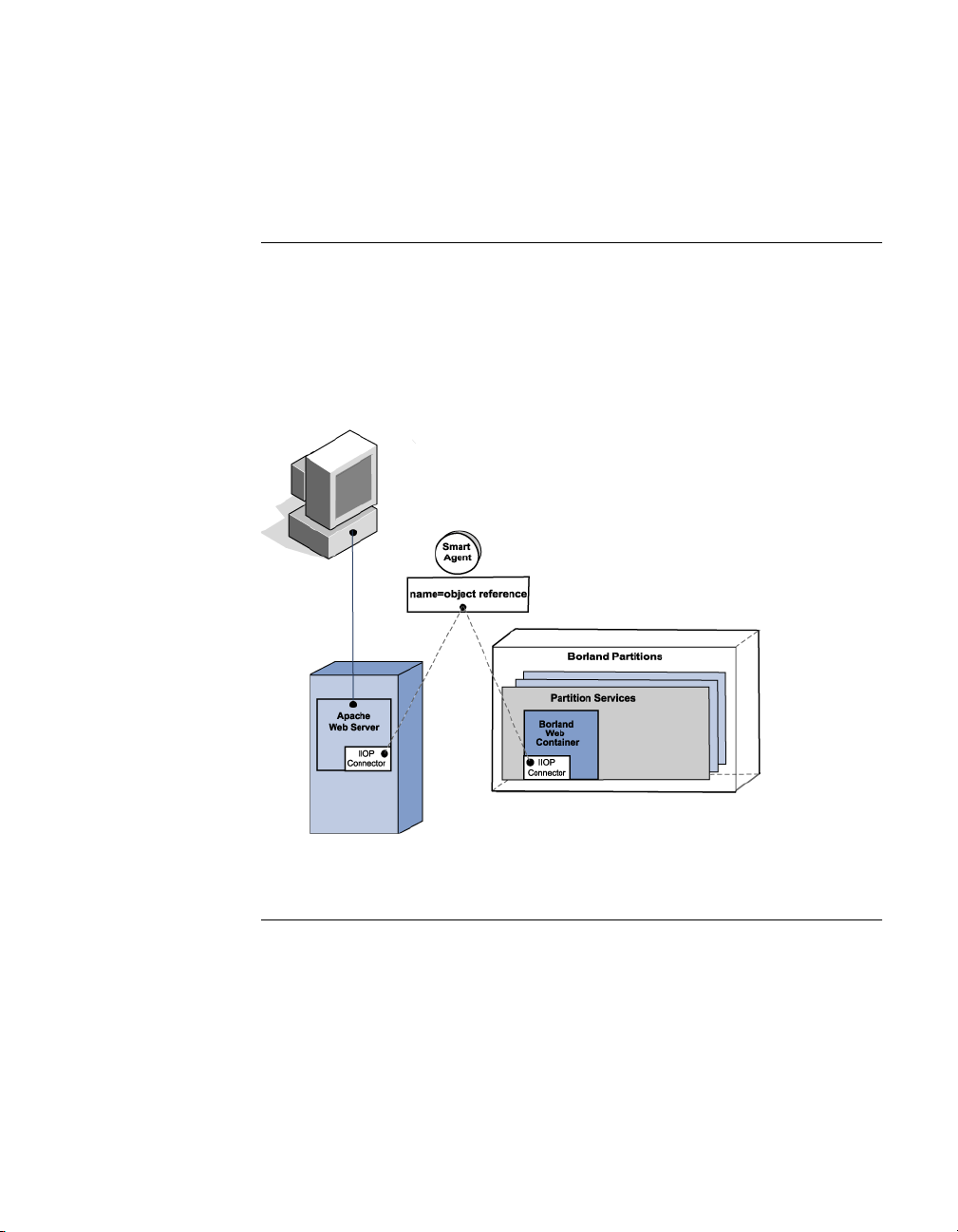
Smart Agent implementation
■
“Connecting an Apache web server to a Borland web container” on
page 38.
■
“Connecting Borland web containers to Java Session Service” on page 38.
Connecting an Apache web server to a Borland web container
As a distributed directory service, the Smart Agent registers an active ID of an
object reference for the client programs to use. The following diagram shows
the interaction between the client program binding to an object through the
Smart Agent. In this example, the Apache web server is acting as a client and
the Borland web container is acting as a server (and provides the object
reference).
Figure 4.1 Client program binding to an object reference
Connecting Borland web containers to Java Session Service
In this scenario, there are multiple web containers that need to connect to a
Java Session Service during start up. The Smart Agent is used to make a
client/server connection. The following diagram shows multiple instances of
the Borland web container. Each web container is acting as a client. During
start up, the Smart Agent is consulted as a directory service to find and
connect a JSS object reference. For more information about the Java Session
Service (JSS), go to Chapter 6, “Java Session Service (JSS) configuration”.
38 BES Developer’ s Guide
Page 51
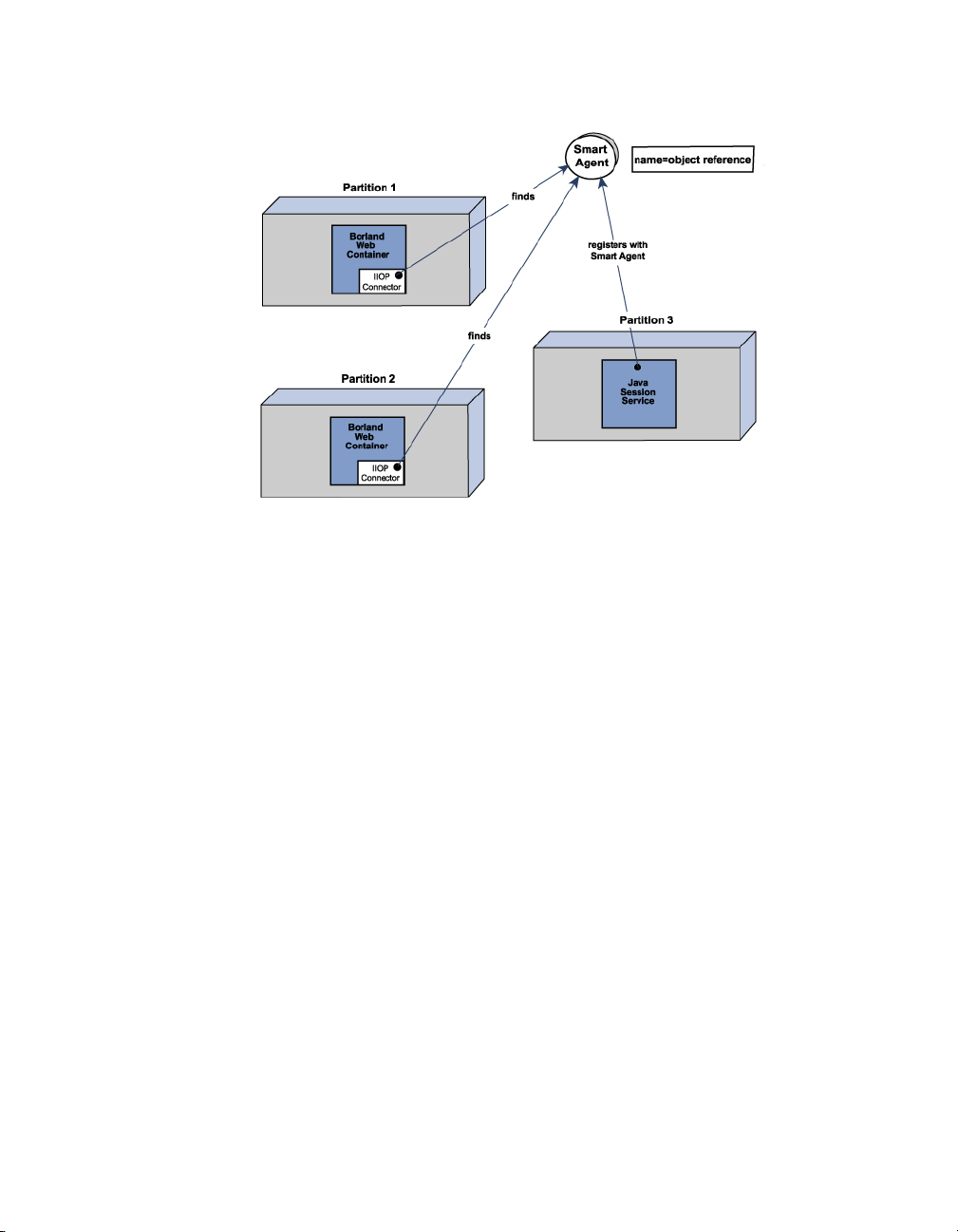
Smart Agent implementation
Figure 4.2 Connecting multiple web containers to a single JSS
Chapter 4: Web components 39
Page 52

40 BES Developer’ s Guide
Page 53

Chapter
Chapter5Web server to web container
connectivity
This section describes the web server to web container IIOP connectivity
provided in the BES products. For information about Apache to CORBA
connectivity, go to Chapter 8, “Apache web server to CORBA server
connectivity”.
Important For documentation updates, go to www.borland.com/techpubs/bes.
5
Apache to Borland web container connectivity
All BES product offerings include an implementation of the open-sourced
Apache web server version 2.0 as well as the Tomcat-based Borland web
container (with the exception of the VisiBroker Standalone installation option).
Also included is the IIOP connector, which provides connectivity from the
Apache web server to the Tomcat-based Borland web container.
Modifying the Borland web container IIOP configuration
The server.xml is the main configuration file for the Borland web container and
is stored in your Partition's data directory:
adm/tomcat/conf/
For more information, go to Chapter 4, “Web components”.
Chapter 5: Web server to web container connectivity 41
Page 54

Apache to Borland web container connectivity
Within the server.xml file are the following lines of code that pertain to the IIOP
connector configuration.
<Connector className="com.borland.catalina.connector.iiop.IiopConnector"
name="tc_inst1 debug="0" minProcessors="5" maxProcessors="75""
enableChunking="false" port="0" canBufferHttp10Data="true"
downloadBufferSize="4096" />
Use these lines of code and the following attributes to configure the Borland
web container IIOP connector.
Table 5.1 IIOP connector attributes
Attribute Default Description
name tc_instl The name by which this connector can be reached by
debug 0 (zero) Integer that sets the level of debug information.
minProcessors 5 The number of minimum threads previously created
maxProcessors 75 The number of maximum threads that will be created
enableChunking false Enables chunking behavior on the connector. To
downloadBufferSize 4096 Defines the "chunked" buffer size employed when
Apache and IIS servers.
When set to 0 (zero) - the default, debug is turned off.
To turn debug on, set to 1. For very detailed debug
messages, set to 99.
to service requests on this connector.
on this connector to service requests.
enable chunking, set this attribute to true. Important:
To enable chunking, you must also set the servlet
response header Transfer-Encoding value to chunked.
For more information, go to “Downloading large data”
on page 50 .
enableChunking is set to true. This directive accepts a
numeric value >0. Essentially, the larger the number
of bytes you set this directive to, the less the number
of CORBA RPCs that are required to send the data to
Apache or IIS. However, the larger you set this
directive, the more memory will be consumed in
servicing the transaction. Tuning this parameter
allows you to fine-tune the performance charactistics.
This enables the administrator to weigh the RPC
costs against memory resource usage to optimize
uploading on their system.
Note: If an invalid value is presented (non numeric/
negative number) then the default 4096 value is
employed. For more information, go to “Downloading
large data” on page 50.
42 BES Developer’ s Guide
Page 55

Apache to Borland web container connectivity
Table 5.1 IIOP connector attributes
Attribute Default Description
port 0 (zero) The IIOP connector port. If set to 0 (zero) - the
canBufferHttp10Data true When the HTTP protocol is less than 1.1 and the
default, a random port gets picked. If the corbaloc
mechanism must be used to locate this connector
from Apache or IIS, then port must be set to a value
other than 0 (zero).
content length is not set on a servlet, the following
two choices are available for the web container. It
can buffer up the data, compute the content length,
and then send the response or it can raise an error
message. To avoid buffering the data and consuming
memory, set this attribue to false.For more
information, go to “Browsers supporting only the
HTTP 1.0 protocol” on page 51.
Modifying the IIOP configuration in Apache
The httpd.conf file is the global configuration file for the Apache web server.
Within the httpd.conf file are the following lines which pertain to the IIOP
connector.
Windows LoadModule iiop2_module <install_dir>/lib/apache2/mod_iiop2.dll
IIopLogFile <install_dir>/var/domains/<domain_name>/
configurations/<configuration_name>/mos/apache2/logs/mod_iiop.log
IIopLogLevel error
IIopClusterConfig <install_dir>/var/domains/<domain_name>/
configurations/<configuration_name>/mos/apache2/conf/WebClusters.properties
IIopMapFile <install_dir>/var/domains/<domain_name>/
configurations/<configuration_name>/mos/apache2/conf/UriMapFile.properties
Chapter 5: Web server to web container connectivity 43
Page 56

Apache to Borland web container connectivity
Use these lines of code to configure the Apache web server IIOP connector.
Table 5.2 IIOP directives for Apache
Directive default Description
LoadModule <install_dir>/lib/
IIopLogFile <install_dir>/var/domains/
IIopLogLevel error Specifies the level of log
IIopClusterConfig <install_dir>/var/domains/
IIopMapFile <install_dir>/var/domains/
apache2/mod_iiop2.dll
<domain_name>/
configurations/
<configuration_name>/mos/
apache2/logs/mod_iiop.log
<domain_name>/
configurations/
<configuration_name>/mos/
apache2/conf/
WebClusters.properties
<domain_name>/
configurations/
<configuration_name>/mos/
apache2/conf/
UriMapFile.properties
Enables Apache 2.0 to
load the IIOP connector.
This directive instructs the
Apache web server to load
the Apache mod_iiop2
module from the location
specified. Once the
module is loaded, the
following four directives
are required to enable the
IIOP connector to locate
the web container(s) or
CORBA server(s) it must
communicate with and
perform other functions.
Specifies the location
where the IIOP connector
writes log output.
information to write. This
directive can take one of
the following: debug | warn |
info | error.
Specifies the location of
the "cluster" instance file.
For CORBA servers,
identifies the file that
contains the "cluster"
name by which they are
known to the IIOP
connector
Specifies the location of
the URI-to-Instance
mapping file. For CORBA
servers, maps HTTP URIs
to a specific "cluster"
known to the IIOP
connector.
1
.
1
"cluster" is used to represent a CORBA server instance that is known to the
system by a single name or URI. The IIOP connector is able to load-balance
across multiple instances, hence the term "cluster" is used.
The following are examples of typical configurations of these 5 lines for the
IIOP connector for Apache 2.0:
Windows example LoadModule iiop2_module C:/BES/lib/apache2/mod_iiop2.dll
IIopLogFile C:/BES/var/domains/base/configurations/j2ee/mos/
44 BES Developer’ s Guide
Page 57

Apache to Borland web container connectivity
apache2/logs/mod_iiop.log
IIopLogLevel error
IIopClusterConfig C:/BES/var/domains/base/configurations/j2ee/
mos/apache2/conf/WebClusters.properties
IIopMapFile C:/BES/var/domains/base/configurations/j2ee/mos/
apache2/conf/UriMapFile.properties
Solaris example LoadModule iiop2_module /opt/BES/lib/apache2/mod_iiop2.so
IIopLogFile /opt/BES/var/domains/base/configurations/j2ee/mos/
apache2/logs/mod_iiop.log
IIopLogLevel error
IIopClusterConfig /opt/BES/var/domains/base/configurations/j2ee/
mos/apache2/conf/WebClusters.properties
IIopMapFile /opt/BES/var/domains/base/configurations/j2ee/mos/
apache2/conf/UriMapFile.properties
Chapter 5: Web server to web container connectivity 45
Page 58

Apache to Borland web container connectivity
Additional Apache IIOP directives
The following optional additional directives are available for you to use to
further customize your Apache IIOP configuration.
Table 5.3 Additional Apache IIOP directives
Directive default Description
IIopChunkedUploading (commented
out) false
IIopUploadBufferSize (commented
out) 4096
IIopSessionAffinity true Controls whether Apache employs "session
Controls whether Apache attempts "chunked"
uploads to the Borland web container IIOP
connector. To enable Apache to "chunk" large
size data that is greater than the
IIopUploadBufferSize value, uncomment and set
to true. Note: "Chunked" upload must also be
enabled on the web container by setting the
server.xml attribute enablechunking="true".
If you want Apache to wait until it has collected
all data before invoking the CORBA RPC to
send the large size data to the Borland web
container, leave commented out or set to false.
For more information, go to “Implementing
chunked download” on page 50.
Defines the "chunked" buffer size employed
when IIopChunkedUploading is set to true. This
directive accepts a numeric value >0.
Essentially, the larger the number of bytes you
set this directive to, the less the number of
CORBA RPCs that are required to send the
data to the Borland web container. However,
the larger you set this directive, the more
memory will be consumed in servicing the
transaction. Tuning this parameter allows you
to fine-tune the performance charactistics. This
enables the administrator to weigh the RPC
costs against memory resource usage to
optimize uploading on their system. Note: If an
invalid value is presented (non numeric/
negative number) then the default 4096 value is
employed. For more information, go to
“Implementing chunked upload” on page 52.
affinity" in it's request handling. When
uncommented and set to true, Apache ensures
that all requests associated with a particular
session id are routed to the Borland web
container from which the request originated. To
disable this mechanism and have all requests
be subject to the round-robin model configured
for the particular cluster, set to false. Note: If
session affinity is disabled (=false), it is crucial
to ensure that the Borland web container's
shared session store is correctly configured;
otherwise the session data's integrity will be
compromised. For more information, go to the
Clustering of multiple Web components, Smart
session handling section.
46 BES Developer’ s Guide
Page 59

Apache to Borland web container connectivity
Apache IIOP connector configuration
The Apache IIOP connector has a set of configuration files that you must
update with web server cluster information. By default, these IIOP connector
configuration files are located in:
<install_dir>/var/domains/<domain_name>/configurations/
<configuration_name>/mos/apache2/conf
The two configuration files are:
Table 5.4 Apache IIOP connection configuration files
IIOP configuration file Description
WebClusters.properties
UriMapFile.properties
Note Modifying either of these configuration files can be done so without starting up
or shutting down the Apache web server(s) or CORBA server(s) because the
file is automatically loaded by the IIOP connector.
Adding new clusters
The WebClusters.properties file tells the IIOP connector:
■
The name of each available cluster - (ClusterList).
■
The web container identification.
■
Whether to provide automatic load balancing (enable_loadbalancing) for a
particular cluster.
To add a new cluster, in the WebClusters.properties file:
1 add the name of the configured cluster to the ClusterList. For example:
ClusterList=cluster1,cluster2,cluster3
2 define each cluster by adding a line in the following format specifying the
cluster name, the required webcontainer_id attribute, and any additional
attributes (see the following table, “Cluster definition attributes” on
page 60). For example:
<clustername>.webcontainer_id = <id> <attribute>
Specifies the cluster(s) and the
corresponding web container(s) for each
cluster.
Maps URI references to the clusters
defined in the WebClusters.properties file.
Chapter 5: Web server to web container connectivity 47
Page 60

Apache to Borland web container connectivity
Note Failover and smart session are always enabled, for more information go to
Chapter 7, “Clustering web components”.
Table 5.5 Cluster definition attributes
Attribute Required Definition
webcontainer_id yes the object "bind" name or corbaloc string
enable_loadbalancing no To enable load balancing, do not include this
For example:
ClusterList=cluster1,cluster2,cluster3
cluster1.webcontainer_id = tc_inst1
cluster2.webcontainer_id =
corbaloc::127.20.20.2:20202,:127.20.20.3:20202/tc_inst2
cluster2.enable_loadbalancing = true
identifying the web container implementing the
cluster.
attribute or include and set to true; load balancing
is enabled by default. To disable load balancing,
set to false indicating that this cluster instance
should not employ load-balancing techniques.
Warning: Ensure that when entering the
enable_loadbalancing attribute you give it a legal
value (true or false).
cluster3.webcontainer_id = tc_inst3
cluster3.enable_loadbalancing = false
In the above example, the following three clusters are defined:
1 The first, uses the osagent naming scheme and is enabled for load
balancing.
2 The second cluster employs the corbaloc naming scheme, and is also
enabled for load balancing.
3 The third uses the osagent naming scheme, but has the load balancing
features disabled.
Note To disable use of a particular cluster, simply remove the cluster name from the
ClusterList list. However, we recommend you do not remove clusters with
active http sessions attached to the web server (attached users), because
requests to these "live" sessions will fail.
Note Modifications you make to the WebClusters.properties file automatically take
effect on the next request. You do not need to restart your server(s).
Adding new web applications
Important By default, your web application is not made available through Apache. In
order to make it available through Apache, you must add some information to
the web application descriptor. For step-by-step instructions on how to do so,
48 BES Developer’ s Guide
Page 61

Large data transfer
go to the Management Console User's Guide, Using the Deployment
Descriptor Editor, Web Deploy Paths section.
For new applications that you have deployed to the Borland web container,
you need to do the following to make them available through the Apache web
server. Use the UriMapFile.properties file to map HTTP URI strings to web cluster
names configured in the WebClusters.properties file (see “Adding new clusters”
on page 47).
■
In the UriMapFile.properties file, type:
<uri-mapping> = <clustername>
where <uri-mapping> is a standard URI string or a wild-card string, and
<clustername> is the cluster name as it appears in the ClusterList entry in the
WebClusters.properties file.
For example:
/examples = cluster1
/examples/* = cluster1
/petstore/index.jsp = cluster2
/petstore/servlet/* = cluster2
In this example:
■
Any URI that starts with /examples will be forwarded to a web container
running in the "cluster1" web cluster.
■
URIs matching either /petstore/index.jsp or starting with /petstore/servlet
will be routed to "cluster2".
Note With the URI mappings, the wild-card "*" is only valid in the last term of the
URI and may represent the follow cases:
■
the whole term (and all inferior references) as in /examples/*.
■
the filename part of a file specification as in /examples/*.jsp.
Note Modifications you make to the UriMapFile.properties file automatically take
effect on the next request. You do not need to restart your server(s).
If the WebCluster.properties or UriMapFile.properties is altered, then it is
automatically loaded by the IIOP connector. This means that the adding and
removing of web applications and the altering of cluster configurations may be
done so without starting up or shutting down the Apache web server(s) or
Borland web container(s).
Large data transfer
This section details the BES options available to you for handling large data
transfers between a client and the Borland web container with Apache 2.0 in
between. The data to be transferred may be either:
■
static content obtained from a file, or
■
dynamically generated content
Chapter 5: Web server to web container connectivity 49
Page 62

Large data transfer
Note If an invalid value is presented (non numeric/negative number) then the
Typically, the content length is known in advance for static content, but is not
known for dynamic content.
Downloading large data
The following modes are available for downloading large data from the
Borland web container to the browser:
■
Chunked download
■
Non-chunked download
Implementing chunked download
In the chunked download mode, the Borland web container does not wait until
it has all the data to send. As soon as servlet generates the data, the web
container starts sending the data to the browser via Apache in fixed size
buffers.
Because the data is flushed as soon as it is available, the chunked download
mode of transfer has low memory requirements both on Apache and the
Borland web container. The browser user sees data as it arrives rather than as
one large lump at the end of the full transfer.
Enabling chunked download
To enable chunked download mode, you update the Borland web container
server.xml file which is stored in your Partition's data directory:
adm/tomcat/conf/
For more information, go to Chapter 4, “Web components”.
To enable the chunked download:
1 In the Borland web container server.xml, locate the <Service name="IIOP">
section of the code.
2 By default, the enableChunking attribute is set to false. Change this value to
enableChunking="true"
3 By default, the download buffer size is set to 4096. To change it, use the
downloadBufferSize attribute as follows:
downloadBufferSize=<value>
Where <value> is a numeric value >0.
default 4096 value is employed.
The chunked download mode of transfer has an overhead of an extra thread
per each request.
Known content length versus unknown
Based on whether content length is known in advance or not, chunked
download mode can take one of the following two paths:
50 BES Developer’ s Guide
Page 63

Large data transfer
■
chunked download with known content length
■
chunked download with unknown content length
Chunked download with known content length
In this case, a servlet or JSP knows the content length of the data in advance
of the transfer. The servlet sets the Content-Length HTTP header before writing
out the data. The Borland web container writes out a single response header
followed by multiple chunks of data. Apache receives this from the web
container and sends data in the same fashion to the browser.
The response header contains the following header:
Content-Length=<actual data size>
Chunked download with unknown content length
HTTP protocol version 1.1 adds a new feature to handle the case of data
transfer when data length is not known in advance. This feature is called
HTTP chunking. In this case, a servlet does not know the content length of the
data in advance of a transfer. The servlet does not set the Content-Length
HTTP header.
The Borland web container sends the data to the Apache web server in
exactly the same way as in the case of the chunked download where the
content length is known in advance; a single response header is sent followed
by multiple data chunks. The response header contains the following header:
Transfer-Encoding="chunked"
If the browser protocol is HTTP 1.1 and the Content-Length header is not set by
the servlet, the Borland web container automatically adds the Transfer-
Encoding="chunked" header.
When an Apache web server sees this Transfer-Encoding header, it starts
sending the data as "HTTP chunks" - a response header followed by multiple
combinations of "chunked" header, "chunked" data, and "chunked" trailers.
Note Per the HTTP 1.1 specification, if a servlet sets both the Content-Length and
Transfer-Encoding headers, the Content-Length header is dropped by the
Borland web container.
Browsers supporting only the HTTP 1.0 protocol
If the browser only supports the HTTP 1.0 protocol or less and a servlet does
not set the Content-Length header, the Borland web container can not
automatically add the Transfer-Encoding header. The reason being that to the
HTTP 1.0 protocol, the Transfer-Encoding header has no meaning. In this case,
the Borland web container:
1 buffers all the data until the data is finished,
2 calculates the content length, and
3 sets the Content-Length header itself.
Chapter 5: Web server to web container connectivity 51
Page 64

Large data transfer
Note When the canBufferHttp10Data attribute is set to false, the following error
If you do not want the Borland web container to perform this buffering
behavior, you can set the IIOP connector attribute canBufferHttp10Data="false".
By default, this attribute is set to true.
message is sent to the browser:
Servlet did not set the Content-Length
Implementing non-chunked download
This is the default transfer of data mode for the IIOP connector. In the nonchunked download mode, the Borland web container waits until it has all the
data to send. Then it calculates the content length and sets the Content-Length
header to the actual content length. The Borland web container then sends the
response header followed by a single huge data block.
This mode of transfer has high memory requirements both on the Apache web
server and the Borland web container, because the data is cached until all of it
is available. Only when all the data is transferred does the browser user see
the data.
The non-chunked download mode of transfer has no overhead of extra thread
per each request. This download mode works well under both the HTTP
protocol versions 1.0 and 1.1, because the Transfer-Encoding header is never
set in this mode.
Uploading large data
The following modes are available for uploading large data initiated by a client
(which can be either a browser or a non-browser (such as Java) client that
speaks HTTP):
■
Chunked upload
■
Non-chunked upload
The browser always sends the data to an Apache web server in a "chunked"
fashion. Chunked and non-chunked upload refers to the data transfer mode
between an Apache web server and a Borland web container.
Implementing chunked upload
By default, Apache will try to upload large size data in "chunks". In this mode,
Apache does not wait until it has all the data from the browser before it starts
sending data to a Borland web container. Apache sends the data in fixed size
buffers as the data becomes available from the browser.
Because the data is flushed as soon as possible, the chunked mode of upload
transfer has low memory requirements both on Apache and the Borland web
container.
The chunked mode of transfer has an overhead of an extra thread per each
request on the Borland web container?.
52 BES Developer’ s Guide
Page 65

Large data transfer
Enabling chunked upload
To enable chunked upload mode, you must update both of the following:
■
the Borland web container server.xml file, which is stored in your Partition's
data directory:
adm/tomcat/conf
For more information, go to the Chapter 4, “Web components”.
■
the Apache httpd.conf file, which by default is located in the following
directory:
<install_dir>/var/domains/<domain_name>/configurations/
<configuration_name>/mos/apache2/conf
For more information, go to Chapter 4, “Web components”.
To enable the chunked upload:
1 In the Borland web container server.xml, locate the <Service name="IIOP">
section of the code.
2 By default, the enableChunking attribute is set to false. Change this value to
enableChunking="true"
3 In the Apache httpd.conf file, locate and uncomment the following IIOP
directive:
#IIopChunkedUploading true
Note The chunked upload mode of transfer has an overhead of an extra thread per
each request for the Borland web container.
Changing the upload buffer size
By default, IIopUploadBufferSize is set to 4096 bytes. To change this value:
1 In the Apache httpd.conf, locate the following commented out directive:
#IIopUploadBufferSize 4096
2 Uncomment this directive and set as follows:
IIopUploadBufferSize <value>
where <value> is a numeric value >0 (greater than zero).
Note If you specify an invalid value (non numeric/negative number) then the default
4096 value is employed.
Known content length versus unknown
Based on whether content length is known in advance or not, chunked upload
mode can take one of the following two paths:
■
chunked upload with known content length
■
chunked upload with unknown content length
Chapter 5: Web server to web container connectivity 53
Page 66

Large data transfer
Chunked upload with known content length
In this case, the client knows the content length of the data in advance of the
transfer. The client sets the Content-Length HTTP header before writing out the
data. The client writes out a single response header followed by multiple
chunks of data. Apache receives this from the browser and sends data in the
same fashion to the Borland web container.
The response header contains the following header:
Content-Length=<actual data size>
Chunked upload with unknown content length
HTTP protocol version 1.1 adds a new feature to handle the case of data
transfer when data length is not known in advance. This feature is called
HTTP chunking.
In this case, a client does not know the content length of the data in advance
of a transfer. The client does not set the Content-Length HTTP request header.
Instead, the client sets the Transfer-Encoding HTTP request header to a value
of chunked as follows:
Transfer-Encoding="chunked"
The client sends the data to the Apache web server as "HTTP chunks"; a
single request header followed by multiple combinations of chunk header,
chunk data, and chunk trailer.
When the Apache web server sees this Transfer-Encoding header, it strips out
the chunk header and chunk trailers and sends the data as normal data
chunks to the Borland web container.
At this time, no major browsers support uploading data without knowing the
content length. In other words, browsers never add a Transfer-
Encoding="chunked" header to an HTTP request. However, a non-browser client
can add this header to an HTTP request.
Implementing non-chunked upload
This is the default transfer of data mode for the IIOP connector. In the nonchunked upload mode, the Apache web server waits until it has all the data to
send. Then it calculates the content length and sets the Content-Length header
to the actual content length. Apache then sends the request header followed
by a single huge data block.
This mode of transfer has high memory requirements both on the Apache web
server and the Borland web container, because the data is cached until all of it
is available.
The non-chunked upload mode of transfer has no overhead of extra thread
per each request (in the Borland web container). This download mode works
well under both the HTTP protocol versions 1.0 and 1.1, because the Transfer-
Encoding header is never set in this mode.
54 BES Developer’ s Guide
Page 67

IIS to Borland web container connectivity
IIS to Borland web container connectivity
All BES product offerings (with the exception of the VisiBroker Standalone
installation option) include the Tomcat-based Borland web container and its
IIOP connector. Also included is the IIS/IIOP redirector which provides
connectivity from the Microsoft Internet Information Services (IIS) web server
(not included with BES products) to the Borland web container.
Modifying the IIOP configuration in the Borland web container
The server.xml is the main configuration file for the Borland web container and
is stored in your Partition's data directory:
adm/tomcat/conf/
Within the server.xml file is a section that pertains to the IIOP connector
configuration. For detailed configuration information, go to “Modifying the
Borland web container IIOP configuration” on page 41 under the Apache to
Borland web container connectivity section.
Microsoft Internet Information Services (IIS) server-specific IIOP configuration
Before the IIS/IIOP redirector can be used on your system, you need to
complete the following IIS/IIOP redirector configuration by implementing the
following steps. For information on IIOP configuration for Windows 2003/IIS
version 6.0, go to: www.borland.com/devsupport/bes/faq.
Windows 2000/IIS version 5.0
1 Configure the System PATH variable to include <install_dir>\bin\ folder.
As IIS runs as a system process, in order for the IIS/IIOP redirector to load
successfully, the Visibroker ORB dlls need to be in the system path. Ensure
that the \<install_dir>\bin\ is included in the Windows 2000 system path.
2 Add the IIS/IIOP redirector as an ISAPI filter.
a Right-click My Computer and choose Manage.
The Computer Management dialog appears.
b Expand the tree, expand the Services and Applications node.
c Expand the Internet Information Services node.
d Right-click the Default Web Site node and choose Properties.
The Default Web Site Properties dialog appears.
e Go to the ISAPI Filters tab.
f Click Add.
Chapter 5: Web server to web container connectivity 55
Page 68

IIS to Borland web container connectivity
g In the Filter Properties dialog, type a Filter Name and the path for the
Executable in the corresponding entry boxes.
By convention, the name of the filter should reflect its task, for example:
iisredir2
Also, the executable should point to the iisredir2.dll in the
<install_dir>\bin. For example:
C:\BDP\bin\iisredir2.dll
h Click OK.
Your new ISAPI filter appears on the list. You do not need to change the
filter Priority.
i Click OK.
3 Add a "borland" virtual directory to your IIS web site.
a In the Computer Management dialog, right-click Default Web Site and
choose New | Virtual Directory.
The Virtual Directory Creation Wizard appears.
b Click Next.
c For the Alias, enter "borland".
The borland virtual directory is required to allow the IIS/IIOP redirector
extension to be located by the IIS web server when it responds to a URI
of: http://localhost/borland/iisredir2.dll.
d For the Directory, browse to <install_dir>\bin.
e Click Next to proceed.
f For Access Permissions, select "Execute" in addition to "Read"and "Run
scripts" which are selected by default.
g Click Next.
h Click Finish.
4 Restart IIS by stopping then starting the IIS Service:
a In the Computer Management dialog, right-click the Internet Information
Services node and choose Restart IIS.
b In the Stop/Start/Reboot dialog, from the dropdown choose "Stop
Internet Services on <name of your IIS web server>"
c Click OK.
The web service unloads any dlls loaded by the IIS administrator.
d After shut down of the server is complete, right-click the Internet
Information Services node and choose Restart IIS.
e In the Stop/Start/Reboot dialog, choose "Start Internet Services on
<your IIS web server name>".
f Click OK.
The web service reloads any dlls loaded by the IIS administrator.
56 BES Developer’ s Guide
Page 69

IIS to Borland web container connectivity
5 Make sure the iisredir2 filter is active.
a In the Computer Management dialog, right-click the Default Web Site
node and choose Properties.
b In the Default Web Site Properties dialog, go to the ISAPI Filters tab.
c The iisredir2 filter should be marked with a green up-pointing arrow
indicating that it has been activated.
If not, then check the iisredir2.log file for details of why it may not have
loaded correctly. This file can be found in:
<install_dir>\etc\iisredir2\logs.
d To exit, click OK.
6 Attempt to access the \examples context via the IIS web-server.
If you have followed the previous steps, the \examples context should be
accessible following a restart of your IIS Server.
Note In the example the port number of the web server should match that
configured for your site. For instance, if your IIS administrator has
configured IIS to listen on port 6060, then a valid URL is:
http://localhost:6060/examples
Of course, if your IIS is configured as per Microsoft defaults, then it listens
on port 80, in which case you may dispense with a port number. For
example:
http://localhost/examples
Windows XP/IIS version 5.1
1 Configure the System PATH variable to include <install_dir>\bin\ folder.
As IIS runs as a system process, in order for the IIS/IIOP redirector to load
successfully, the Visibroker ORB dlls need to be in the system path. Ensure
that the <\install_dir>\bin\ is included in the Windows 2000 system path.
2 Add the IIS/IIOP redirector as an ISAPI filter.
a Right-click My Computer and choose Manage.
The Computer Management dialog appears.
b Expand the tree, expand the Services and Applications node.
c Expand the Internet Information Services node and the Web Sites node.
d Under the Web Sites node, right-click the Default Web Site node and
choose Properties.
The Default Web Site Properties dialog appears.
e Go to the ISAPI Filters tab.
f Click Add.
g In the Filter Properties dialog, type a Filter Name and the path for the
Executable in the corresponding entry boxes.
By convention, the name of the filter should reflect its task, for example:
Chapter 5: Web server to web container connectivity 57
Page 70

IIS to Borland web container connectivity
iisredir2
Also, the executable should point to the iisredir2.dll in the
<install_dir>\bin. For example:
C:\BDP\bin\iisredir2.dll
h Click OK.
Your new ISAPI filter appears on the list. You do not need to change the
filter Priority.
i Click OK.
3 Add a "borland" virtual directory to your IIS web site.
a In the Computer Management dialog, right-click Default Web Site and
choose New | Virtual Directory.
The Virtual Directory Creation Wizard appears.
b Click Next.
c For the Alias, enter "borland".
The borland virtual directory is required to allow the IIS/IIOP redirector
extension to be located by the IIS web server when it responds to a URI
of: http://localhost/borland/iisredir2.dll.
d For the Directory, browse to <install_dir>\bin.
e Click Next to proceed.
f For Access Permissions, select "Execute" in addition to "Read"and "Run
scripts" which are selected by default.
g Click Next.
h Click Finish.
4 Restart IIS by stopping then starting the IIS Service:
a In the Computer Management dialog, right-click the Internet Information
Services node and choose All Tasks | Restart IIS.
b In the Stop/Start/Reboot dialog, from the dropdown choose "Stop
Internet Services on <name of your IIS web server>"
c Click OK.
The web service unloads any dlls loaded by the IIS administrator.
d After shut down of the server is complete, right-click the Internet
Information Services node and choose All Tasks | Restart IIS.
e In the Stop/Start/Reboot dialog, choose "Start Internet Services on
<your IIS web server name>".
f Click OK.
The web service reloads any dlls loaded by the IIS administrator.
5 Make sure the iisredir2 filter is active.
a In the Computer Management dialog, right-click the Default Web Site
node and choose Properties.
58 BES Developer’ s Guide
Page 71

IIS to Borland web container connectivity
b In the Default Web Site Properties dialog, go to the ISAPI Filters tab.
c The iisredir2 filter should be marked with a green up-pointing arrow
indicating that it has been activated.
If not, then check the iisredir2.log file for details of why it may not have
loaded correctly. This file can be found in:
<install_dir>\etc\iisredir2\logs.
d To exit, click OK.
6 Attempt to access the \examples context via the IIS web-server.
If you have followed the previous steps, the \examples context should be
accessible following a restart of your IIS Server.
Note In the example the port number of the web server should match that
configured for your site. For instance, if your IIS administrator has
configured IIS to listen on port 6060, then a valid URL is:
http://localhost:6060/examples
Of course, if your IIS is configured as per Microsoft defaults, then it listens
on port 80, in which case you may dispense with a port number. For
example:
http://localhost/examples
IIS/IIOP redirector configuration
The IIS/IIOP redirector has a set of configuration files that you must update
with web server cluster information. By default, these IIOP redirector
configuration files are located in the following directory:
<install_dir>/etc/iisredir2/conf
The configuration files are:
Table 5.6 IIS/IIOP redirector configuration files
IIOP configuration file Description
WebClusters.properties
UriMapFile.properties
Note Modifying either of these configuration files can be done so without starting up
Specifies the cluster(s) and the
corresponding web container(s) for each
cluster.
Maps URI references to the clusters
defined in the WebClusters.properties file.
or shutting down the IIS web server(s) or Borland web container(s) because
the file is automatically loaded by the IIOP redirector.
Adding new clusters
The WebClusters.properties file tells the IIOP redirector:
■
the name of each available cluster: (ClusterList).
Chapter 5: Web server to web container connectivity 59
Page 72

IIS to Borland web container connectivity
■
the web container identification.
■
whether to provide automatic load balancing (enable_loadbalancing) for a
particular cluster.
To add a new cluster, in the WebClusters.properties file:
1 add the name of the configured cluster to the ClusterList. For example:
ClusterList=cluster1,cluster2,cluster3
2 define each cluster by adding a line in the following format specifying the
cluster name, the required webcontainer_id attribute, and any additional
attributes (see the following table, “Cluster definition attributes” on
page 60). For example:
<clustername>.webcontainer_id = <id> <attribute>
Note Failover and smart session are always enabled, for more information go to
Chapter 7, “Clustering web components”.
Table 5.7 Cluster definition attributes
Attribute Required Definition
webcontainer_id yes the object "bind" name or corbaloc string
enable_loadbalancing =
true|false
identifying the web container(s) implementing
the cluster.
no To enable load balancing, do not include this
attribute or include and set to true; load
balancing is enabled by default. To disable
load balancing, set to false indicating that this
cluster instance should not employ loadbalancing techniques. Warning: Ensure that
when entering the enable_loadbalancing
attribute you give it a legal value (true or
false).
For example:
ClusterList=cluster1,cluster2,cluster3
cluster1.webcontainer_id = tc_inst1
cluster2.webcontainer_id =
corbaloc::127.20.20.2:20202,:127.20.20.3:20202/tc_inst2
cluster2.enable_loadbalancing = true
cluster3.webcontainer_id = tc_inst3
cluster3.enable_loadbalancing = false
In the above example, the following three clusters are defined:
1 The first, uses the osagent naming scheme and is enabled for load
balancing.
2 The second cluster employs the corbaloc naming scheme, and is also
enabled for load balancing.
60 BES Developer’ s Guide
Page 73

IIS to Borland web container connectivity
3 The third uses the osagent naming scheme, but has the load balancing
features disabled.
Note To disable use of a particular cluster, simply remove the cluster name from the
ClusterList list. However, we recommend you do not remove clusters with
active http sessions attached to the web server (attached users), because
requests to these "live" sessions will fail.
Note Modifications you make to the WebClusters.properties file automatically take
effect on the next request. You do not need to restart your server(s).
Adding new web applications
Important By default, your web applications are not made available through IIS. In order
to make a web application available through IIS, you must add some
information to the web application descriptor. For step-by-step instructions on
how to do so, go to the Management Console User's Guide, Using the
Deployment Descriptor Editor, Web Deploy Paths section.
The \examples context is useful for verifying your IIS/IIOP installation
configuration, however, for new applications that you have deployed to the
Borland web container, you need to do the following to make them available
through the IIS web server. Use the UriMapFile.properties file to map HTTP URI
strings to web cluster names configured in the WebClusters.properties file (see
“Adding new clusters” on page 47).
■
In the UriMapFile.properties file, type:
<uri-mapping> = <clustername>
where <uri-mapping> is a standard URI string or a wild-card string, and
<clustername> is the cluster name as it appears in the ClusterList entry in the
WebClusters.properties file.
For example:
/examples = cluster1
/examples/* = cluster1
/petstore/index.jsp = cluster2
/petstore/servlet/* = cluster2
In this example:
■
Any URI that starts with /examples will be forwarded to a web container
running in the "cluster1" web cluster.
■
URIs matching either /petstore/index.jsp or starting with /petstore/servlet
will be routed to "cluster2".
Note With the URI mappings, the wild-card "*" is only valid in the last term of the
URI and may represent the follow cases:
■
the whole term (and all inferior references) as in /examples/*.
■
the filename part of a file specification as in /examples/*.jsp.
Chapter 5: Web server to web container connectivity 61
Page 74

IIS to Borland web container connectivity
Note Modifications you make to the UriMapFile.properties file automatically take
effect on the next request. You do not need to restart your server(s).
If the WebCluster.properties or UriMapFile.properties is altered, then it is
automatically loaded by the IIOP redirector. This means that the adding and
removing of web applications and the altering of cluster configurations may be
done so without starting up or shutting down the IIS web server(s) or Borland
web container(s).
62 BES Developer’ s Guide
Page 75

Chapter
6
Chapter6Java Session Service (JSS)
configuration
The Java Session Service (JSS) is a service that stores information pertaining
to a specific user session. JSS is used to store session information for
recovery in case of container failure.
Borland provides an Interface Definition Language (IDL) interface for the use
of JSS. Two implementations are bundled, one using DataExpress and
another with any JDBC capable database.
JSS provides a mechanism to easily store session information in a database.
For example, in a shopping cart scenario, information about your session (the
number of items in the shopping cart, and such) is stored by the JSS. So, if a
session is interrupted by a Borland web container unexpectedly going down,
the session information is recoverable by another Borland web container
instance through the JSS. The JSS must be running on the local network. Any
web container (within the cluster configuration) finds the JSS and connects to
it and continues session management.
For more information about the Borland web container, go Chapter 4, “Web
components”.
Session management with JSS
The following diagrams show typical landscapes of web components and how
session information is managed by the JSS. The JSS session management is
completely transparent to the client.
Chapter 6: Java Session Service (JSS) configuration 63
Page 76
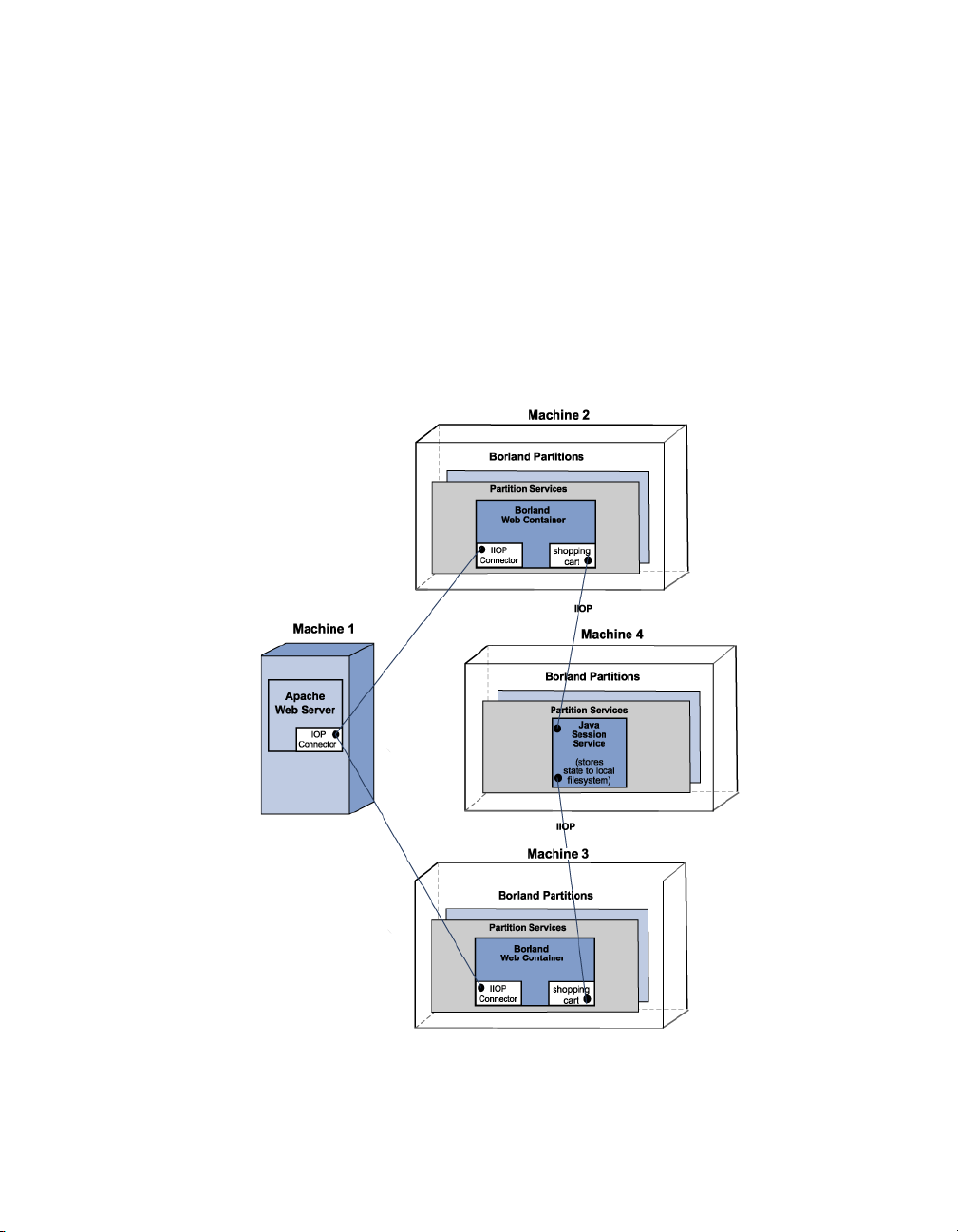
Session management with JSS
In the diagram, “JSS Management with a Centralized JSS and Two Web
Containers” on page 64, there are four virtual machines:
■
The first machine hosts the Apache web server,
■
two other machines contain an instance of the Borland web container,
■
and the fourth machine hosts the JSS and relational database (JDataStore
or a JDBC datasource).
If an interruption occurs between the Apache web server (Machine 1) which is
passing a client request to the first web container instance (Machine 2), then
the second web container instance (Machine 3) can continue processing the
client request by retrieving the session information from the JSS (Machine 4).
The items in the Shopping Cart are retained and the client request continues
to be processed.
Figure 6.1 JSS Management with a Centralized JSS and Two Web Containers
In the diagram, “JSS Management with Two Web Containers and a
Centralized Backend Datastore” on page 66, are the following four virtual
machines:
64 BES Developer’ s Guide
Page 77

Session management with JSS
■
The first machine hosts the Apache web server,
■
the two other machines contain an instance of the Borland web container
as well as each hosting the JSS,
■
and the fourth machine hosts the relational database (JDataStore or a
JDBC datasource).
If an interruption occurs between the Apache web server (Machine 1) which is
passing a client request to the first web container instance (Machine 2), then
the second web container instance (Machine 3) can continue processing the
client request by retrieving the session information from the JSS (Machine 4).
The items in the Shopping Cart are retained and the client request continues
to be processed.
Chapter 6: Java Session Service (JSS) configuration 65
Page 78
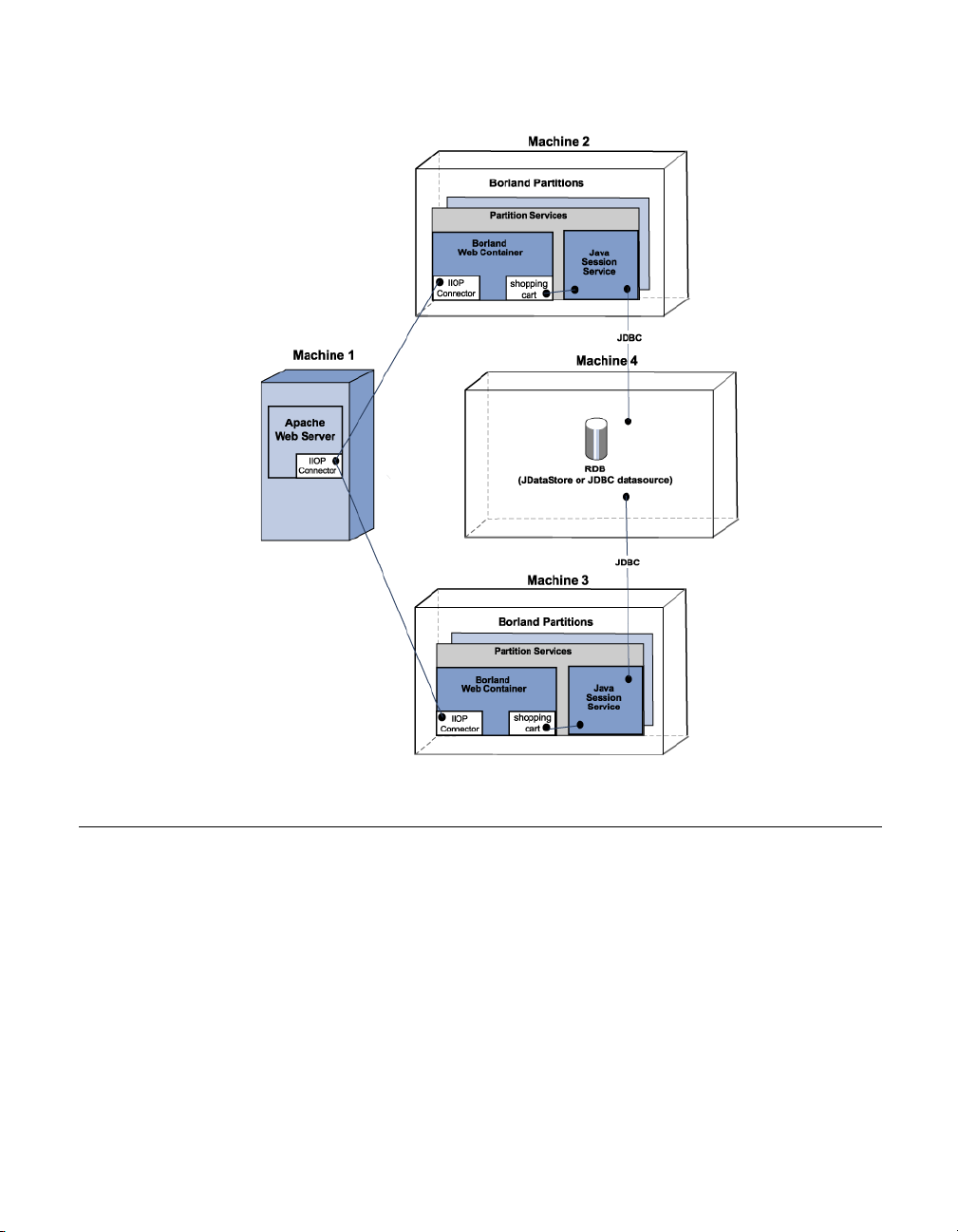
Managing and configuring the JSS
Figure 6.2 JSS Management with Two Web Containers and a Centralized Backend
Datastore
Managing and configuring the JSS
The JSS configuration is defined through its properties. BES supports two
types of configurations; the default is to use a JDatastore, but BES supports
any JDBC datasource.
■
If JSS is configured to use a JDataStore file, the database tables are
automatically created by JSS.
■
If JSS is configured to use a JDBC datasource, three database tables
needs to be pre-created in the backend database by your system
administrator using the following SQL statements:
CREATE TABLE "JSS_KEYS" ("STORAGE_NAME" STRING PRIMARY KEY, "KEY_BASE"
BIGINT);
CREATE TABLE "JSS_WEB" ("KEY" STRING PRIMARY KEY, "VALUE" BINARY,
"EXPIRATION" BIGINT);
66 BES Developer’ s Guide
Page 79

Managing and configuring the JSS
CREATE TABLE "JSS_EJB" ("KEY" STRING PRIMARY KEY, "VALUE" BINARY,
"EXPIRATION" BIGINT);
The JSS can run as part of the Partition side-by-side with other Partition
services.
Configuring the JSS Partition service
As a "Partition service", JSS configuration information is located in each
Partition's data directory in the partition.xml file. By default, this file is located
in the following directory:
<install_dir>/var/domains/base/configurations/<configuration_name>/mos/
<partition_name>/adm/properties.
For example, for a Partition named "MyPartition", by default the JSS
configuration information is located in:
<install_dir>/var/domains/base/configurations/<configuration_name>/mos/
mypartition/adm/properties/partition.xml
For more information, go to the Chapter 30, “Partition XML reference”,
<service> element section.
Otherwise, for the location of a Partition data directory, go to the
configuration.xml file located in:
<install_dir>/var/domains/base/configurations/<configuration_name>/
and search for the Partition managed object (mo) directory attribute:
<partition-process directory=
For more information about the configuration.xml, go to the BDOC Reference,
Configurations and the configuration.xml file section.
For a listing and description of the session service (JSS) level properties, go to
Chapter 31, “EJB, JSS, and JTS Properties”.
Chapter 6: Java Session Service (JSS) configuration 67
Page 80

68 BES Developer’ s Guide
Page 81

Chapter
7
Chapter7Clustering web components
This section discusses the clustering of multiple web components which
includes Apache web servers and the Tomcat-based Borland web containers.
In a typical deployment scenario, you can use multiple Borland Partitions to
work together in providing a scalable n-tier solution.
Each Borland Partition can have the same or different services. Depending on
your clustering scheme, these services can be turned off or on. In any case,
leveraging these resources together or clustering, makes deployment of your
web application more efficient. Clustering of the web components involves
session management, load balancing and fault tolerance (failover).
Stateless and stateful connection services
Interaction between the client and server involves two types of services:
stateless and stateful. A stateless service does not maintain a state between
the client and the server. There is no "conversation" between the server and
the client while processing a client request. In a stateful service, the client and
server maintains a dialog of information.
For information about the location of the Borland web container configuration
files, go to Chapter 4, “Web components”.
Important For documentation updates, go to www.borland.com/techpubs/bes.
Chapter 7: Clustering web components 69
Page 82

The Borland IIOP connector
The Borland IIOP connector
The IIOP connector is software that is designed to allow an http web server to
redirect requests to the Borland web container. The Borland Enterprise Server
includes the IIOP connector for the Apache 2.0 and Microsoft Internet
Information Server(IIS) versions 5.0, 5.1 and 6.0 web servers. The job of
handling the redirection of http requests is split between two components:
■
a native library running on the web server.
■
a jar file running of the web container.
BES supports clustering of web components. The Borland IIOP connector
uses the IIOP protocol. The following unique features are provided:
■
“Load balancing support” on page 70
■
“Fault tolerance (failover)” on page 71
■
“Smart session handling” on page 72
Load balancing support
Load balancing is the ability to direct http requests across a set of web
containers. This enables the system administrator to spread the load of the
http traffic across multiple web containers. Load balancing techniques can
significantly improve the scalability of a given system. The Borland IIOP
connector can be configured to offer load balancing in the following two ways:
■
“OSAgent based load balancing” on page 70
■
“Corbaloc based load balancing” on page 70
OSAgent based load balancing
This is simple to achieve and requires the least amount of configuration. In this
setup, you start a number of Borland web container instances and name the
IIOP connector in those Borland web container with the same name.
For more information about setting the name attribute, go to Chapter 5, “Web
server to web container connectivity”.
Apache does load balancing across Borland web container instances for each
request. Essentially, Apache does a new bind for each request. The newly
started Borland web container containers can be dynamically discovered.
Important All Borland web containers and Apache must be running in the same ORB
domain; osagent based load balancing is not possible in cases where you are
using different Partitions on different ORB domains.
Corbaloc based load balancing
This approach uses a static configuration of the web containers that make up
the cluster. However, it can span ORB domains. In this case you specify the
70 BES Developer’ s Guide
Page 83

The Borland IIOP connector
locations where the web containers are running using the CORBA corbaloc
semantics. For example:
corbaloc::172.20.20.28:30303,:172.20.20.29:30304/tc_inst1
In the above corbaloc example string:
■
two TCP/IP endpoints are configured for a web container named "tc_inst1"
■
a web container with an object name of "tc_inst1" is running on host
172.20.20.28 with its IIOP connector at port 30303
■
there is another web container running with the same object name on host
172.20.20.29 with it's IIOP connector listening on port 30304.
For more information about setting the port attribute, go to Chapter 5, “Web
server to web container connectivity”.
The web server side IIOP connector converts this corbaloc string into CORBA
objects using orb.string_to_object and uses the underlying features of
VisiBroker to load balance across these "endpoints" specified in the corbaloc
string. There can be any number of endpoints.
Note All of the listed web containers do not have to be running for the load
balancing to function. The ORB simply moves on to the next endpoint until a
valid connection is obtained.
However, corbaloc based load balancing does require the web container's
IIOP connector be started at a known port and be available for corbaloc kind of
object naming. The following is a snippet of the web container IIOP connector
configuration that is required:
<Connector className="org.apache.catalina.connector.iiop.IiopConnector"
name="tc_inst1" port="30303"/>
This snippet starts the IIOP connector at port 30303 and names the Borland
web container object "tc_inst1". The port attribute is optional. However, if you
do not specify the port, a random port gets picked up by the ORB and you will
be unable to use the corbaloc scheme to locate the object.
Your organization can impose policies on how to name web containers and
the IIOP port or port ranges used.
Fault tolerance (failover)
Failover using osagent bind naming and corbaloc naming is automatic in both
cases. In corbaloc naming, the next configured endpoint in the corbaloc name
string is tried and so on in a cyclic fashion until all endpoints in the corbaloc
string are tried.
For osagent bind naming, the osagent automatically redirects the client to an
alternative (but equivalent) object instance.
Note If there is no object available to the osagent, or none of the endpoints
specified in the corbaloc name string are running, then the http request fails.
Chapter 7: Clustering web components 71
Page 84

Smart session handling
When there is no session involved, the IIOP connector can do indiscriminate
round robining. However, when sessions are involved, it is important that
Apache routes its session requests to the web container that initiated the
session.
In other http-to-servlet redirectors (and in the earlier version of the IIOP
connector) this is achieved by maintaining a list of sessions-ids-to-webcontainer-id's in the web server's cache. This presents numerous issues with
maintaining the state of this list. This list can be very large and wasteful of
system resources. It can become out of date, for example, sessions can
timeout and, in general, is an inefficient and problematic facet of the web
server to web container redirection paradigm.
The IIOP connector resolves this by utilizing a technique called "smart session
ids". This is where the IOR of the web container is embedded within the
session id returned by the web container as part of the session cookie (or URL
in the case of url-rewriting).
When the web container generates the session ID, it first determines if the
request originated from the IIOP connector. If so, it obtains the stringified IOR
of the IIOP connector through which the request is received. The web
container generates the normal session ID as it always generates, but prefixes the stringified IOR in front of it. For example:
Stringified IOR: IOR:xyz
Normal session ID: abc
The new session ID: xyz_abc
In the case where the original web container has stopped running, failover is
employed to locate another instance of an equivalent web container.
In the case of corbaloc identified web containers, where automatic osagent
failover is not guaranteed, the IIOP connector performs a manual "rebind" to
obtain a valid reference to the running equivalent web container.
Obviously, if there are no other running instances of the web container, then
the http request fails.
The new web container obtains the old state from the session database and
continues to service the request. When returning the response the new web
container changes the session ID to reflect its IOR. This should be transparent
to Apache as it does not look at the session ID on the way back to the browser
client.
Setting up your web container with JSS
To properly failover when sessions are involved, you must set up the web
containers with the same JSS backend.
72 BES Developer’ s Guide
Page 85

Setting up your web container with JSS
Modifying a Borland web container for failover
In the Borland web container configuration file, server.xml, you need to add an
entry similar to the following code sample for each web application. For more
information about the server.xml file, go to Chapter 5, “Web server to web
container connectivity”.
<Manager className="org.apache.catalina.session.PersistentManager">
<Store className="org.apache.catalina.session.BorlandStore"
storeName="jss_factory"/>
</Manager>
The preceding code specifies the use of a PersistentManager with a storage
class BorlandStore. It also specifies the connection to a BorlandStore factory
named jss_factory. There must be a JSS with that factory name running in the
local network.
For a description of jss.factoryName, go to Chapter 6, “Java Session Service
(JSS) configuration”.
Session storage implementation
There are two methods of implementing session storage for your clustered
web components:
■
“Programmatic implementation” on page 73
■
“Automatic implementation” on page 73
Programmatic implementation
The Programmatic implementation assumes that each time you change the
session attributes, you call session.SetAttribute() to notify the Borland web
container that you have changed the session attributes.
This is a common operation in servlet development and when executed, there
is no need to modify the server.xml file. Each time you change the session
data, it is immediately written to the database through the JSS. Then if your
web container instance unexpectedly goes down, the next web container
instance designated to pick up the session accesses the session data. In
essence, the Programmatic implementation guarantees to save changes
immediately.
Automatic implementation
The Automatic implementation lets you store the session data periodically to
JSS, regardless of whether the data has changed. By using this
implementation, you do not need to notify the web container that the session
attribute has changed.
For example, you can change state without calling setAttribute () as depicted
in the following code example:
Chapter 7: Clustering web components 73
Page 86

Using HTTP sessions
Note When using the Automatic implementation, you need to consider the following
Object myState = session.getAttribute("myState");
// Modify mystate here and do not call setAttribute ()
Your configuration file, server.xml, will have the following code snippet:
<Manager className=
"org.apache.catalina.session.PersistentManager"
maxIdleBackup="xxx">
<Store className=
"org.apache.catalina.session.BorlandStore"
storeName="jss_factory">
</Manager>
where xxx is the time interval in seconds that you want the session data to be
stored.
For more information about the server.xml file, go to Chapter 5, “Web server to
web container connectivity”.
limitations:
1 If the web container goes down between two save intervals, the latest
changes are not visible for the next web container instance. This is an
important concern when defining the time interval value for the heartbeat.
2 The data is saved at the specified time interval no matter if the data is
changed or not. This can be wasteful if a session frequently does not
change and the defined time interval value is set too low.
Using HTTP sessions
The HyperText Transfer Protocol (HTTP) is a stateless protocol. In the client/
server paradigm, it means that all client requests that the Apache web server
receives are viewed as independent transactions. There is no relationship
between each client request. This is a typical stateless connection between
the client and the server.
However, there are times when the client deems it necessary to have a
session concept for transaction completeness. A session concept typically
means having a stateful interaction between the client and server. An example
of the session concept is shopping online with an interactive shopping cart.
Every time you add a new item into your shopping cart, you expect to see that
new item added to a list of previously added items. HTTP is not usually
regarded for handling client request in a stateful manner. But it can.
BES supports the HTTP sessions through two methods of implementations:
■
Cookies: The web server send a cookie to identify a session. The web
browser keeps sending back the same cookie with future requests. This
cookie helps the server-side components to determine how to handle the
transaction for a given session.
74 BES Developer’ s Guide
Page 87

Using HTTP sessions
■
URL rewriting: The URL that the user clicks on is dynamically rewritten to
have session information.
Chapter 7: Clustering web components 75
Page 88

76 BES Developer’ s Guide
Page 89

Chapter
8
Chapter8Apache web server to CORBA
server connectivity
The Apache IIOP connector can be configured to enable your web server to
communicate with any standalone CORBA server implementing the
ReqProcessor Interface Definition Language (IDL). This means you can easily
put a web-based front-end on almost any CORBA server.
Note In order to implement the ReqProcessor IDL, you need to be running one of the
following BES product offerings:
■
Team Edition
■
VisiBroker Edition
■
AppServer Edition
Important For documentation updates, go to www.borland.com/techpubs/bes.
Web-enabling your CORBA server
The following steps are required to make your CORBA server accessible over
the internet:
■
“Determining the urls for your CORBA methods” on page 78.
■
“Implementing the ReqProcessor IDL in your CORBA server” on page 78.
Chapter 8: Apache web server to CORBA server connectivity 77
Page 90

Web-enabling your CORBA server
Determining the urls for your CORBA methods
In order to make your CORBA server accessible over the internet, you need
to:
1 Decide what business operations you want to expose.
2 Provide a url for those business operations (CORBA methods).
For example, your banking company's CORBA server is implementing the
methods: debit(), credit(), and balance() and you want to expose these
business methods to users through the internet. You need to map each of the
CORBA server operations to what the user types in a browser.
Your bank company web site is http://www.bank.com.
To provide a url for each of the business operations you want to expose to the
internet users:
1 Append the web application name to the company root url.
For example:
http://www.bank.com/accounts
where accounts is the web application name.
Important By default, your web application is not made available through the web
server. In order to make it available through Apache, you must add some
information to the web application descriptor. For step-by-step instructions
on how to do so, go to the Management Console User's Guide, Using the
Deployment Descriptor Editor, Web Deploy Paths.
2 Append a name that is meaningful to users for the method in the web
application that you want to expose.
For example:
http://www.bank.com/accounts/balance
where balance is the meaningful name for the balance() method.
Implementing the ReqProcessor IDL in your CORBA server
The ReqProcessor IDL allows communication between a web server and a
CORBA server using IIOP. Once you implement the ReqProcessor IDL in your
CORBA server, http requests can be passed from your web server to your
CORBA server.
In implementing this IDL, you must expect the request url as part of the
HttpRequest and invoke the appropriate CORBA method in response to that url.
IDL Specification for ReqProcessor Interface
*/
module apache {
struct NameValue {
78 BES Developer’ s Guide
Page 91

Web-enabling your CORBA server
string name;
string value;
};
typedef sequence<NameValue> NVList;
typedef sequence<octet> OctetSequence_t;
struct HttpRequest {
string authType; // auth type
(BASIC,FORM etc)
string userid; // username
associated with request
string appName; // application name
(context path)
string httpMethod; // PUT, GET etc,
string httpProtocol; // protocol HTTP/1.0, HTTP/
1.1 etc
string uri; // URI associated
with request
string args; // query string
associated with this request
string postData; // POST (form) data
associated with request
boolean isSecure; // whether client
specified https or http
string serverHostname; // server hostname
specified with URI
string serverAddr; // [optionally]
server IP address specified with URI
long serverPort; // server port
number specified with URI
NVList headers; // headers
associated with this request format: header-name:value
};
struct HttpResponse {
long status; // HTTP status, OK etc.
boolean isCommit; // server intends to commit
this request
NVList headers; // header array
OctetSequence_t data; // data buffer
};
interface ReqProcessor {
HttpResponse process(in HttpRequest req);
};
};
The process() method
The ReqProcessor IDL includes the process() method which your Apache web
server calls for internet requests. The web server passes the user's request as
an argument to the process() method. Basically, the input for the process()
Chapter 8: Apache web server to CORBA server connectivity 79
Page 92
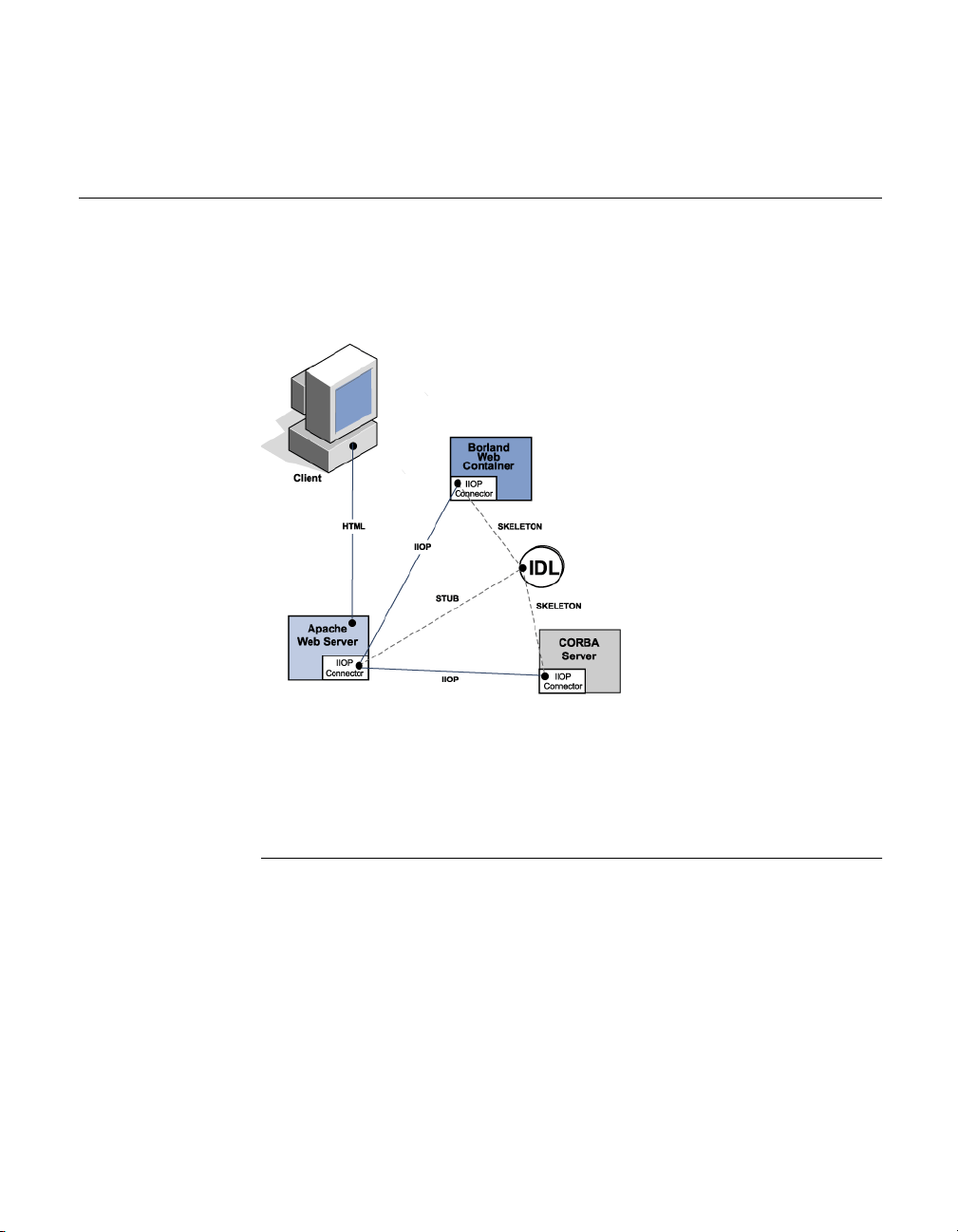
Configuring your Apache web server to invoke a CORBA server
method is a request from a browser: HttpRequest, and the output for the
process() method is an html page contained in: HttpResponse.
Configuring your Apache web server to invoke a CORBA server
Before an Apache web server can invoke a CORBA server, you must modify
the lines of code that pertain to the IIOP connector in the httpd.conf file. For
detailed information, go to Chapter 5, “Web server to web container
connectivity”.
Figure 8.1 Connecting from Apache to a CORBA server
Apache IIOP configuration
The Apache IIOP connector has a set of configuration files that you must
update with web server cluster information. By default, these IIOP connector
configuration files are located in:
<install_dir>/var/domains/<domain_name>/configurations/
<configuration_name>/mos/apache2/conf
Note "cluster" is used to represent a CORBA object instance(s) that is known to the
system by a single name or URI. The IIOP connector is able to load-balance
across multiple instances, hence the term "cluster" is used.
80 BES Developer’ s Guide
Page 93

Configuring your Apache web server to invoke a CORBA server
The two configuration files are:
Table 8.1 Apache IIOP connection configuration files
IIOP configuration file Description
WebClusters.properties
UriMapFile.properties
Specifies the cluster(s) and the
corresponding CORBA server(s) for each
cluster.
Maps URI references to the clusters
defined in the WebClusters.properties file.
Modifying either of these configuration files can be done so without starting up
or shutting down the Apache web server(s) or CORBA server(s) because the
file is automatically loaded by the IIOP connector.
Adding new CORBA servers (clusters)
CORBA servers are known as "clusters" to the IIOP connector. To configure
your CORBA server for use with the IIOP connector, you need to define and
add a "cluster" to the WebClusters.properties file.
The WebClusters.properties file tells the IIOP connector:
■
The name of each available cluster - (ClusterList).
■
The web container identification.
■
Whether to provide automatic load balancing (enable_loadbalancing) for a
particular cluster.
To add a new cluster:
■
In the WebClusters.properties file:
a add the name of the configured cluster to the ClusterList. For example:
ClusterList=cluster1,cluster2,cluster3
b define each cluster by adding a line in the following format specifying the
cluster name, the required webcontainer_id attribute, and any additional
attributes (see the following table, “Cluster definition attributes” on
page 82). For example:
<clustername>.webcontainer_id = <id> <attribute>
Chapter 8: Apache web server to CORBA server connectivity 81
Page 94

Configuring your Apache web server to invoke a CORBA server
Note Failover and smart session are always enabled, for more information go to
Chapter 7, “Clustering web components”..
Table 8.2 Cluster definition attributes
Attribute Required Definition
webcontainer_id yes the object "bind" name or corbaloc string
enable_loadbalancing no Load balancing is enabled by default; to enable
identifying the web container implementing the
cluster.
load balancing, do not include this attribute or
include and set to true. To disable load
balancing, set to false indicating that this
cluster instance should not employ loadbalancing techniques. Warning: Ensure that
when entering the enable_loadbalancing attribute
you give it a legal value (true or false).
For example:
ClusterList=cluster1,cluster2,cluster3
cluster1.webcontainer_id = tc_inst1
cluster2.webcontainer_id =
corbaloc::127.20.20.2:20202,:127.20.20.3:20202/tc_inst2
cluster2.enable_loadbalancing = true
cluster3.webcontainer_id = tc_inst3
cluster3.enable_loadbalancing = false
In the above example, the following three clusters are defined:
1 The first, uses the osagent naming scheme and is enabled for load
balancing.
2 The second cluster employs the corbaloc naming scheme, and is also
enabled for load balancing.
3 The third uses the osagent naming scheme, but has the load balancing
features disabled.
Note To disable use of a particular cluster, simply remove the cluster name from the
ClusterList list. However, we recommend you do not remove clusters with
active http sessions attached to the CORBA server (attached users), because
requests to these "live" sessions will fail.
Note Modifications you make to the WebClusters.properties file automatically take
effect on the next request. You do not need to restart your server(s).
Mapping URIs to defined clusters
Once the cluster entry is defined, all that remains is to identify which HTTP
requests received by the web server need to be forwarded to your CORBA
82 BES Developer’ s Guide
Page 95

Configuring your Apache web server to invoke a CORBA server
server. Use the UriMapFile.properties file to map http uri strings to web cluster
names (CORBA instances) configured in the WebClusters.properties file.
■
In the UriMapFile.properties file, type:
<uri-mapping> = <clustername>
where <uri-mapping> is a standard URI string or a wild-card string, and
<clustername> is the cluster name as it appears in the ClusterList entry in the
WebClusters.properties file.
For example:
/examples = cluster1
/examples/* = cluster1
/petstore/index.jsp = cluster2
/petstore/servlet/* = cluster2
In this example:
■
Any URI that starts with /examples will be forwarded to a CORBA server
running in the "cluster1" web cluster.
■
URIs matching either /petstore/index.jsp or starting with /petstore/servlet
will be routed to "cluster2".
Note With the URI mappings, the wild-card "*" is only valid in the last term of the
URI and may represent the follow cases:
■
the whole term (and all inferior references) as in /examples/*.
■
the filename part of a file specification as in /examples/*.jsp.
Note Modifications you make to the UriMapFile.properties file automatically take
effect on the next request. You do not need to restart your server(s).
If the WebCluster.properties or UriMapFile.properties is altered, then it is
automatically loaded by the IIOP connector. This means that modifications to
either of these files can be done so without starting up or shutting down the
web server(s) or CORBA server(s).
Chapter 8: Apache web server to CORBA server connectivity 83
Page 96

84 BES Developer’ s Guide
Page 97

Chapter
Chapter9Borland Enterprise Server Web
Services
The Borland Enterprise Server provides an out-of-the-box web services
capability in all Borland Partitions.
Important For documentation updates, go to www.borland.com/techpubs/bes.
9
Web Services Overview
A Web Service is an application component that you can describe, publish,
locate, and invoke over a network using standardized XML messaging.
Defined by new technologies like Simple Object Access Protocol (SOAP),
Web Services Description Language (WSDL), and Universal Discovery,
Description and Integration (UDDI), this is a new model for creating ebusiness applications from reusable software modules that are accessed on
the World Wide Web.
Web Services Architecture
The standard Web Service architecture consists of the three roles that perform
the web services publish, find, and bind operations:
1 The Service Provider registers all available web services with the Service
Broker.
Chapter 9: Borland Enterprise Server Web Services 85
Page 98
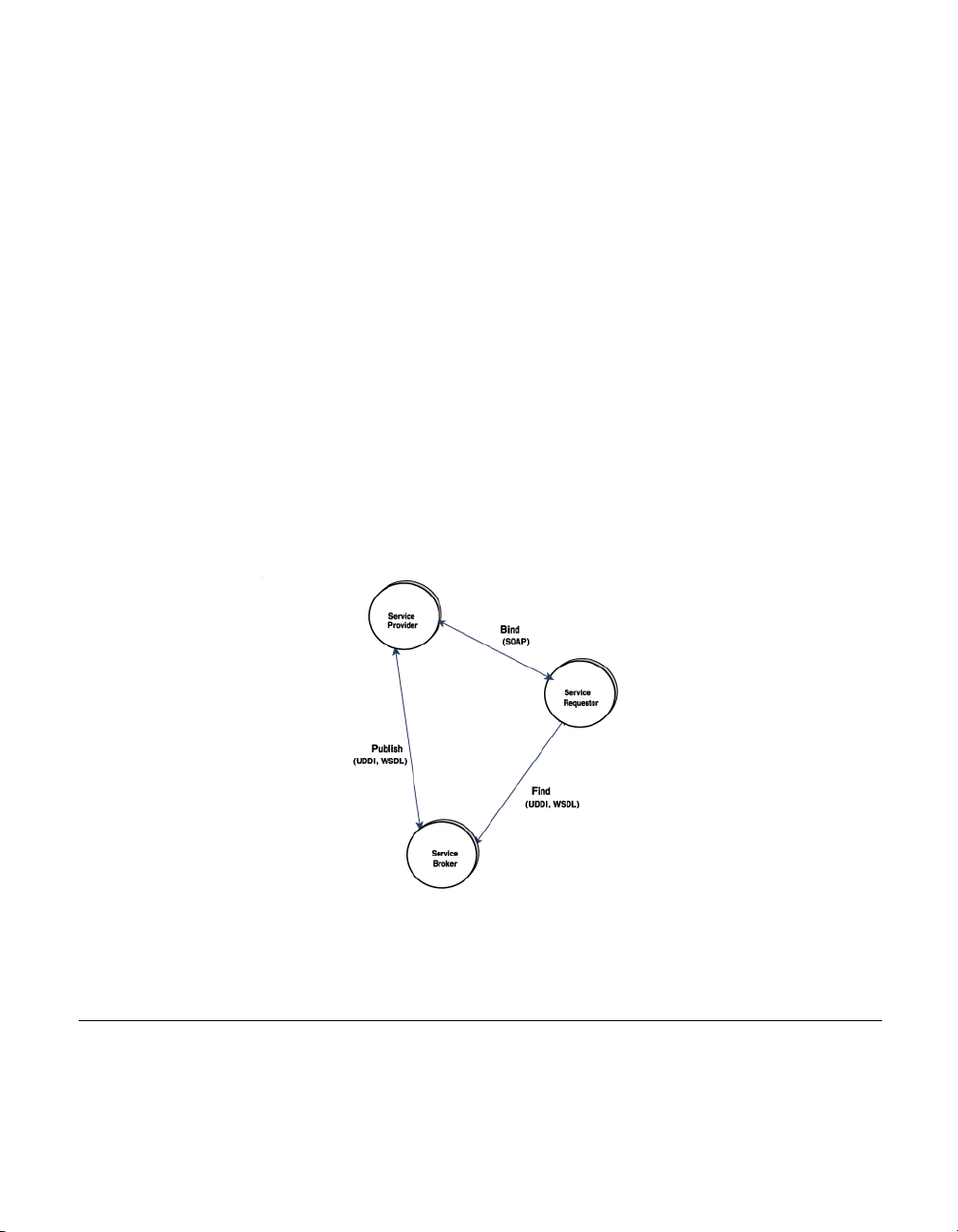
Web Services and Partitions
2 The Service Broker publishes the web services for the Service Requestor
to access. The information published describes the web service and its
location.
3 The Service Requestor interacts with the Service Broker to find the web
services. The Service Requestor can then bind or invoke the web services.
■
The Service Provider hosts the web service and makes it available to
clients via the Web. The Service Provider publishes the web service
definition and binding information to the Universal Description, Discovery,
and Integration (UDDI) registry. The Web Service Description Language
(WSDL) documents contain the information about the web service,
including its incoming message and returning response messages.
■
The Service Requestor is a client program that consumes the web service.
The Service Requestor finds web services by using UDDI or through other
means, such as email. It then binds or invokes the web service.
■
The Service Broker manages the interaction between the Service Provider
and Service Requestor. The Service Broker makes available all service
definitions and binding information. Currently, SOAP (an XML-based,
messaging and encoding protocol format for exchange of information in a
decentralized, distributed environment) is the standard for communication
between the Service Requestor and Service Broker.
Figure 9.1 Standard Web Services Architecture
Web Services and Partitions
All BES Partitions are configured to support web services. You simply need to
start a Partition and deploy WARs (or EARs containing WARs) containing web
services.
86 BES Developer’ s Guide
Page 99

Web Services and Partitions
Additionally, you can expose a previously deployed stateless session bean as
a web service. For more information, see the Management Console User's
Guide, Export EJB as a Web Service Wizard.
The Borland web services is based on the Apache Axis technology and
supports dispatch of incoming SOAP web services requests to the following
"Web Service providers":
■
EJB providers
■
RPC/Java providers
■
VisiBroker providers (Java and/or C++)
■
MDB/Java providers
Chapter 9: Borland Enterprise Server Web Services 87
Page 100
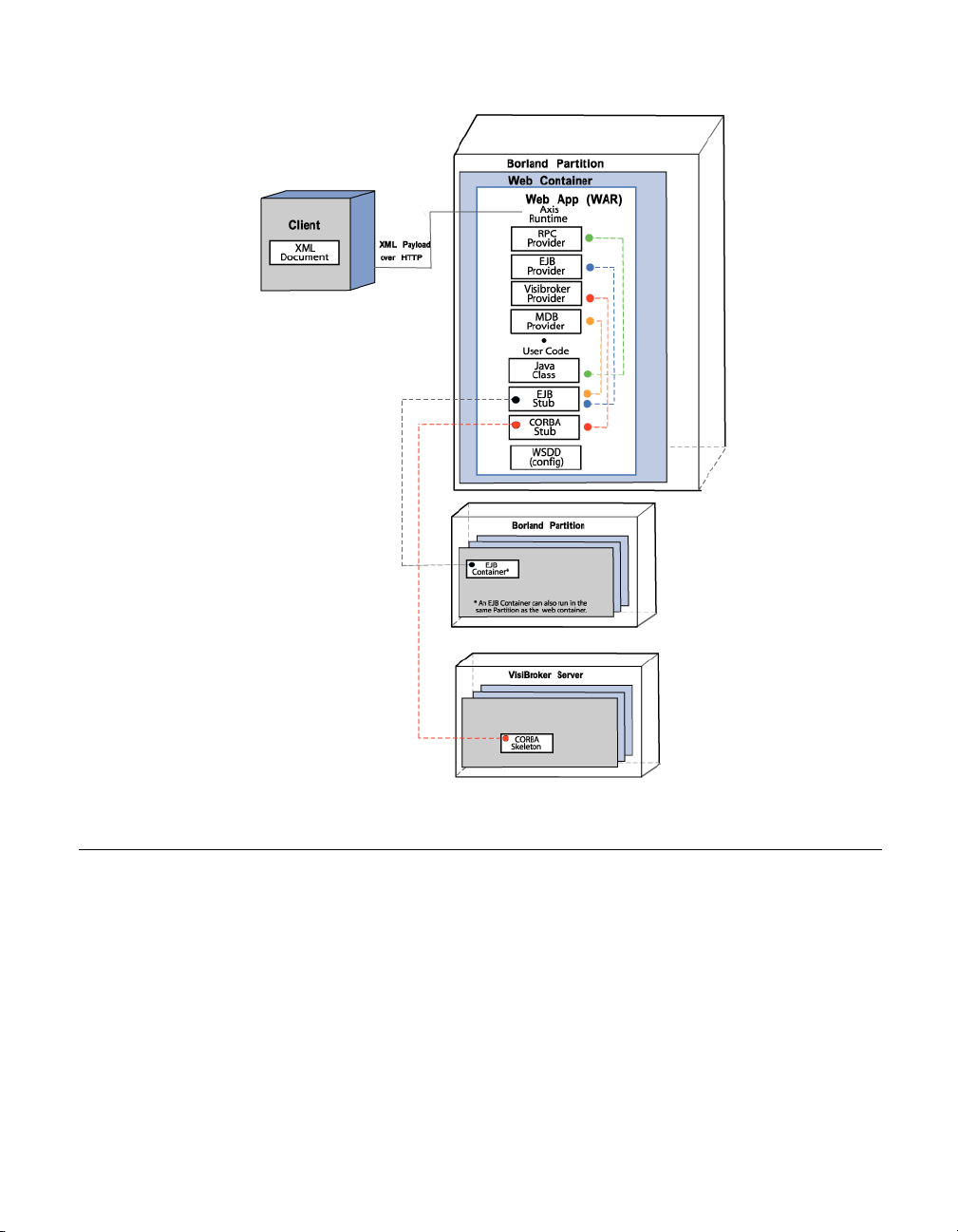
Web Service providers
Figure 9.2 Borland Web Services Architecture
Web Service providers
The Borland web services engine includes a number of providers. A provider
is the link that connects a client web service request to the user's class on the
server side.
All providers do the following:
■
Create an instance of an object on which they can invoke methods. The
exact way of creating this object differs from provider to provider.
■
Invoke the methods on that object and pass all the parameters that the
XML client sent.
■
Pass the return value to the Axis Runtime engine, which then converts it to
XML and sends it back to the client.
88 BES Developer’ s Guide
 Loading...