

Page 1
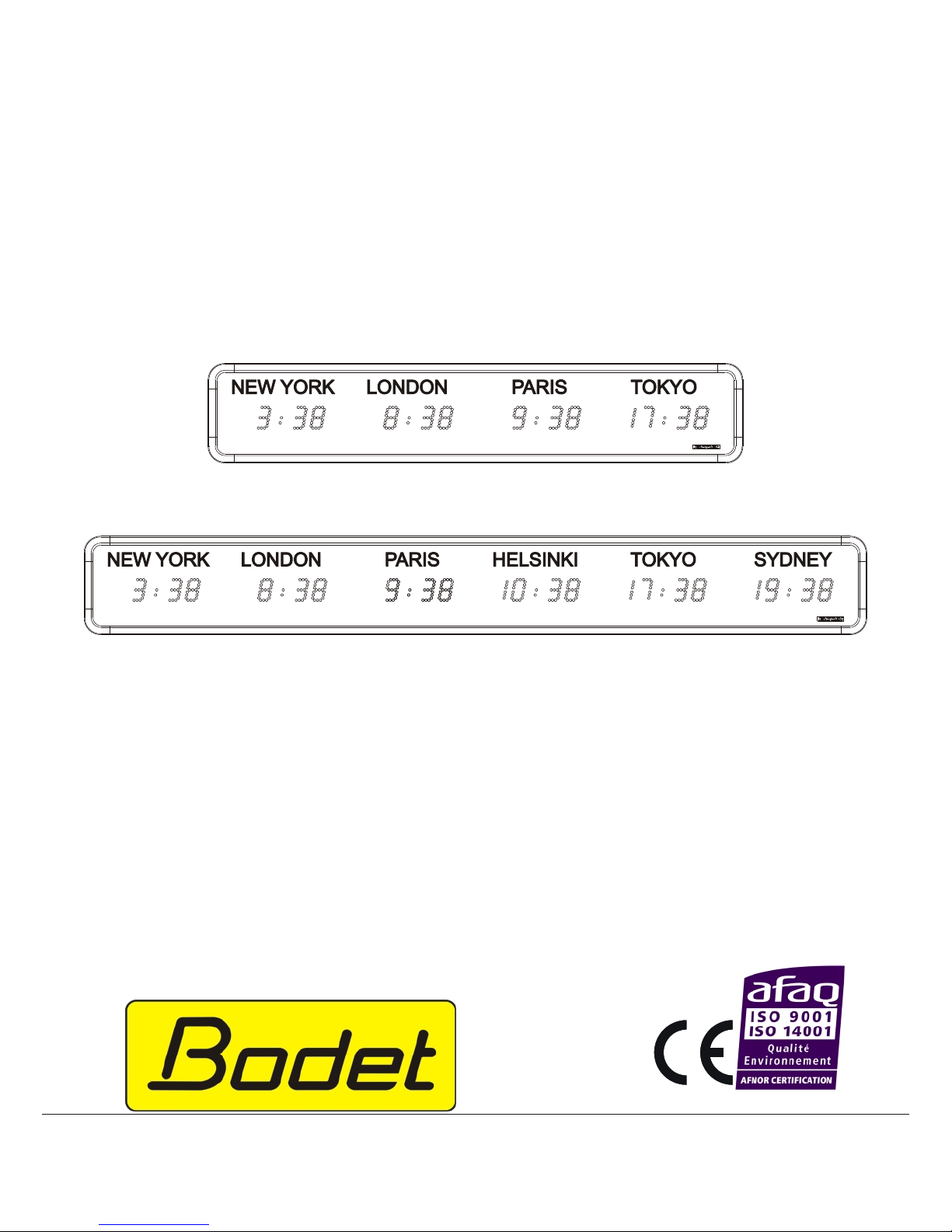
WORLD STYLE
Multi time-zone clock
Quartz independent or radio
Irig B / Afnor receiver
On receipt, check carefully that the product has not been damaged during transport and, if necessary,
submit reservations to the carrier.
B.P. 1
49340 TRÉMENTINES
FRANCE
Tél. : (33) 2 41 71 72 00
Fax : (33) 2 41 71 72 02
www.bodet.com
Réf.: 605418 I
Page 2

Ta ble of con tents
1 - CHECKING THE EQUIPMENT SUPPLIED .............3
2 - ELECTRICAL SAFETY STANDARDS ................3
3 - WORLD STYLE CLOCK INSTALLATION ..............4
3.1 - Wall sup port in stal la tion : ......................5
3.2 - Ceil ing bracket in stal la tion : .....................5
4 - ELECTRICAL CONNECTIONS ....................5
4.1 - Power sup ply ............................5
4.2 - Ex ter nal syn chro ni sa tion.......................6
4.3 - Irig B / AFNOR coded time out put (In de pend ent ver sion) ......7
5 - DISPLAYS AND TESTING CONFIGURATION ............7
5.1 - Set ting the time :...........................8
Independent clock : ..........................8
IRIG B/AFNOR receiver clock : ....................8
5.2 - Con fig u ra tion menu of dis plays ...................8
5.2.1 - Selecting the summer / winter time changes : .........9
5.2.2 - Example of programming: programmable mode .......12
5.2.3 - Selecting the time difference : ................13
5.3 - Testing ...............................13
5.4 - An nex for time dif fer ence......................14
6 - TECHNICAL CHARACTERISTICS .................16
7 - ADJUSTING THE LIGHT INTENSITY ................18
8 - BACKUP ...............................18
9 - PRECAUTIONS FOR USE AND MAINTENANCE .........18
10 - WHAT TO DO IF...?.........CHECK : ................19
2
Page 3

1 - CHECKING THE EQUIPMENT SUPPLIED
On receipt, check carefully that the product you received fits with what you have
ordered :
n
World Style Clock model : 3, 4, 5 or 6 cities.
n
Clock version: Quartz independent or IRIG B/AFNOR coded time receiver.
n
Text sticker marking for each city.
n
Colour of diodes (red, yellow, green, blue).
n
If you have chosen an option: France Inter or DCF synchronisation antenna,
ceiling bracket or double sided bracket.
2 - ELECTRICAL SAFETY STANDARDS
n
Installation and maintenance of this equipment should only be carried out by
qualified personnel.
n
Since the World Style clock is connected to a mains power supply, its
installation must comply with standard IEC 364 (NFC 15.100 for France).
n
Indoor assembly (IP 41).
n
The power supply for this clock should include a max. 6A live neutral circuit
breaker, which can be quickly accessed upstream of the power line,
live/neutral interlocked. This circuit breaker must be switched off during
maintenance.
n
This equipment should be fixed in place before switching on.
n
Connection of the earth on the installation according to diagram EE or EN
(earth/earth or earth/neutral).
n
This product should be installed in a residential, commercial or light industrial
environment.
Bodet accepts no responsibility for any use not in compliance with these
instructions.
Any modification to the product will invalidate the guarantee
3
Page 4
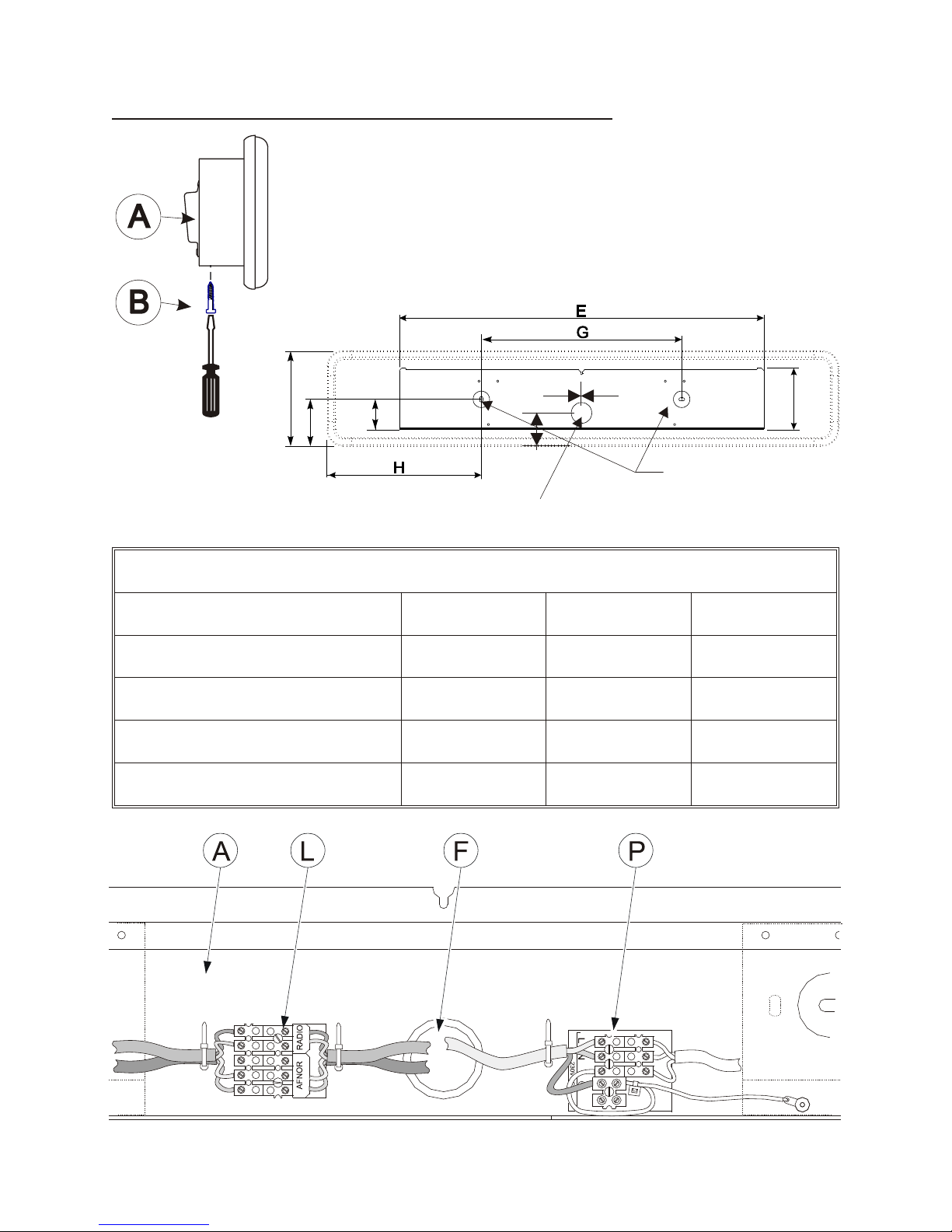
3 - WORLD STYLE CLOCK INSTALLATION
Before deciding on the location, ensure good legibility of the
clock with regard to the angle of reading (120o) and possible
reflections of light. This clock is intended for installation
indoors.
Fixing holes position of wall mounting plate
Lengths in mm H G E
3 cities
176,5 420 773
4 cities
260 520 1040
5 cities
279,5 826 1307
6 cities
374 826 1574
4
64
130
105
210
76
=
=
2 oblong holes
Ø7 x 5
Cable entry
Page 5
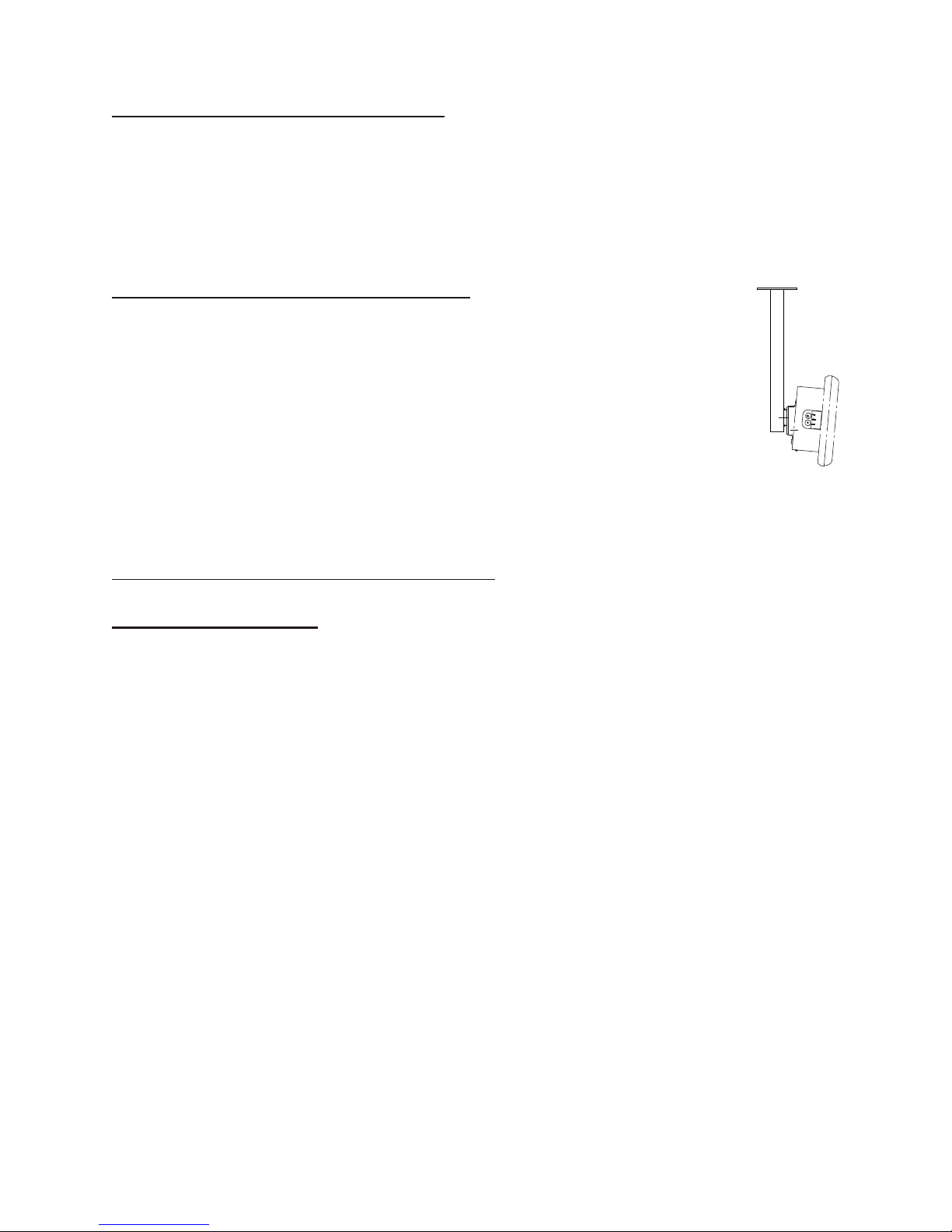
3.1 - Wall support installation :
Having loosened screw (B), unhook the clock from its wall bracket, then
remove the connectors.
Fix bracket (A) to the chosen location on the wall after threading the cables
through the cable carrier (F).
3.2 - Ceiling bracket installation :
The ceiling hanging adjusts to bracket (A) in the same way as when
wall hanging. Warning: do not forget to first put the cables through
the conduit on the bracket before fixing.
Having loosened screw (B), unhook the clock from its wall bracket,
then remove the connectors.
Fix bracket (A) to the chosen location on the wall after threading the
cables through the cable carrier (F).
4 - ELECTRICAL CONNECTIONS
4.1 - Power supply
n
Remove the black protective cover on the terminal block (P).
n
Connect the 230 Volts 50/60 Hz mains power supply (depending on the
model) to the terminal block (maximum wire cross section 1.5 mm² with 5 mm
bare).
n
Replace the protective cover. Block the wires with cable clips.
N.B. : The mains supply unit for this display must include a max. 6A
live/neutral interlocked circuit breaker. This circuit breaker must be
switched off during maintenance.
The electronic card for each display is protected by a 0.8A 250 V fuse (F1).
The world clocks have been designed for a mains power supply of 230 Volts
± 10 % (depending on the model). For example, 230 V clocks will work
equally well in countries where the nominal mains voltage is 220 Volts or 240
Volts.
5
Page 6
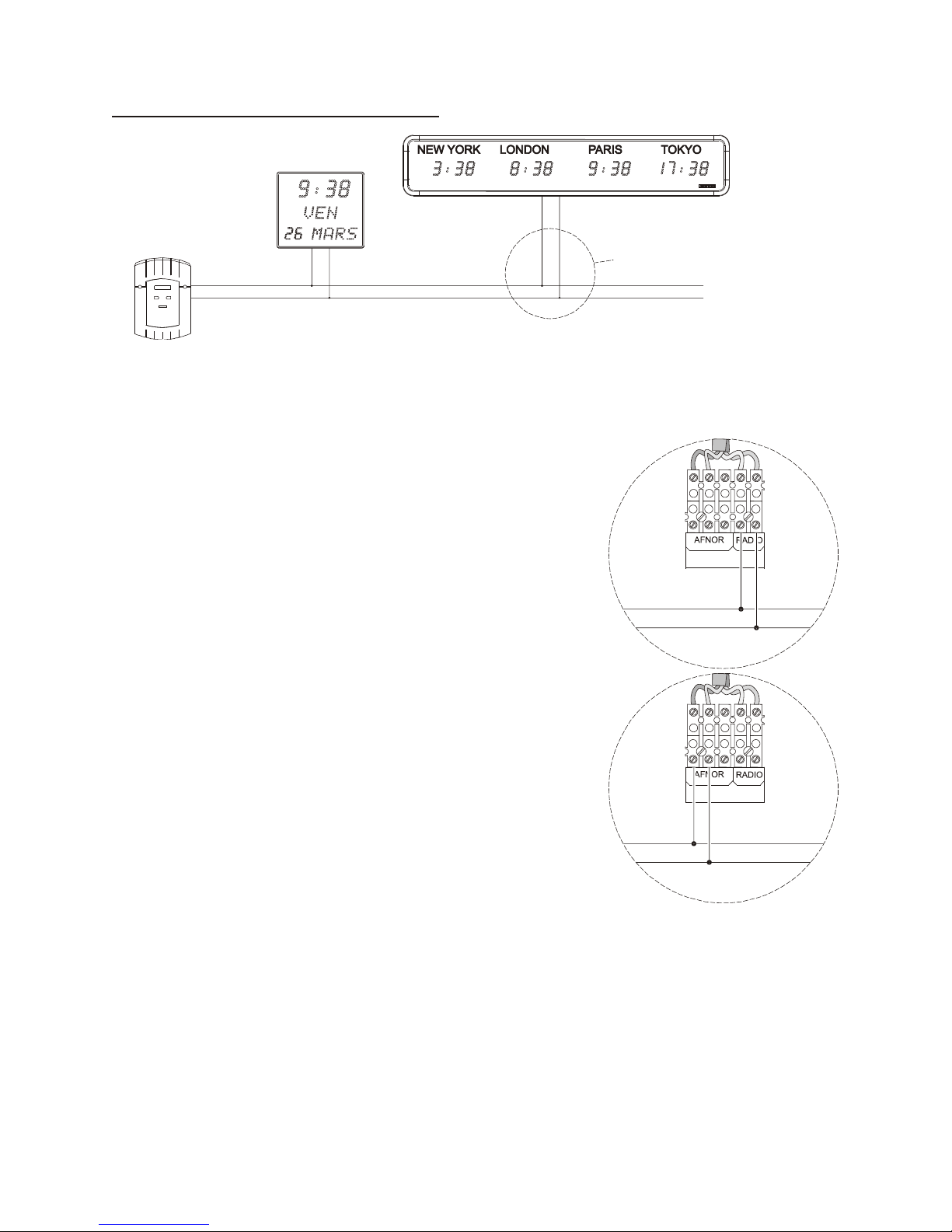
4.2 - External synchronisation
The clock can be synchronised via a radio antenna or an IRIG B/AFNOR
network.
n
With a France Inter / DCF radio antenna or
FI/DCF output on MIC GPS : connect the 2 wires
of the antenna or the Mic GPS to the radio input of
the world clock. (Refer to the diagram on page 4
ref. L)
Refer to the radio antenna instructions for
positioning the antenna.
n
With a France Inter / DCF radio antenna or
FI/DCF output on MIC GPS : connect the 2 wires
of the antenna or the Mic GPS to the radio input of
the world clock (Refer to the diagram on page 4
ref. L).
Refer to the radio antenna instructions for
positioning the antenna.
Note: A fixing hole is provided on the lefthand side
of the World clock for fixing the FI / DCF antenna. Thread the antenna cable
through the hole (ref. F page 4) on the wall bracket.
6
See details according to
the synchronisation type
Page 7
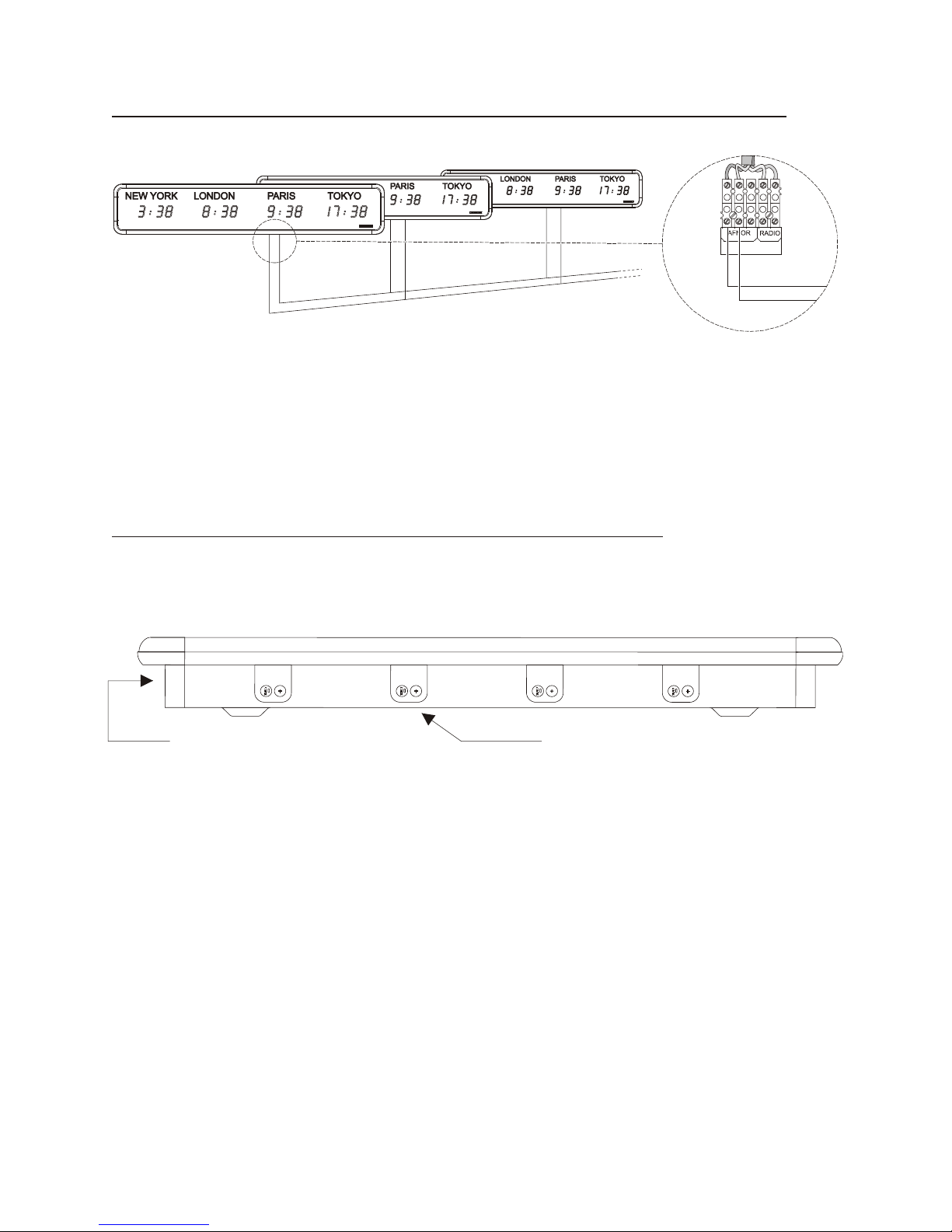
4.3 - Irig B / AFNOR coded time output (Independent version)
An independent clock can synchronise another IRIG B / AFNOR receiver.
Connect the 2 wires for the IRIG B/AFNOR signal to terminal block (L) on the
transmitting World clock, as well as to terminal (L) on the world receiver clock.
5 - DISPLAYS AND TESTING CONFIGURATION
For models 3 to 6 cities, each display is linked to a keyboard with 2 keys “+”
and “Select” to ensure programming and light intensity adjustment (4 levels).
For the “radio quartz independent” clock versions an additional keyboard is
positioned on the lefthand side of the box in order to adjust the time base (no
keyboard for IRIG B/AFNOR coded time receiver versions).
For IRIG B/AFNOR coded time versions :
configure the coded time generator (master clock or world clock) so that it
distributes GMT time. Do not programme the summer / winter time change.
Carry out installation and electrical connections before setting the time.
7
World clock mas ter
World clocks re ceiver
View from above
2 adjustment keys on the left-hand
side of the box. Independent quartz
model only
Keyboard with 2 keys “+” and “Select” for
each display (interior edge).
Page 8

5.1 - Setting the time :
Independent clock :
n
When switched on the clock is automatically set to the correct time. With a
radio antenna, the time is automatically synchronised.
n
The 2 keys “+” and “Select” on the lefthand side of the box are used to adjust
the time displayed (Correcting the time if there is any discrepancy).
Pressing “Select”: decreases the time readout by one minute with each
pressure, altering the hour readout accordingly as it goes back. Warning :
wait 3 seconds to display the readout.
Pressing on “+” : increases the time readout by one minute with each
pressure, altering the hour readout accordingly as it goes forwards.
Warning : wait 3 seconds to display the readout.
The second counter is reset to zero with each pressure on “+” or “Select”.
IRIG B/AFNOR receiver clock :
The readouts give the time in the corresponding city as soon as power is
switched on and on reception of the time code from the master clock or World
clock.
n
Warning: in the event of loss of AFNOR signal, each display will operate
independently for 1 hour before the readout disappears. Only the separating
dots in the centre of the display remain lit, showing that the clock is still on.
n
The World clock is programmed in the factory in order to configure each
display according to the name of the city required (city name on sticker).
n
In the event of the time or time change not agreeing, refer to paragraph B
below for how to configure the displays.
5.2 - Configuration menu of displays
Each display is configured separately. Repeat programming below for the
different World clock displays according to the number of cities.
n
Access the configuration menu for each display : press the “Select” key and
while holding it down, then press the “+” key for 3 seconds. (keyboard
situated below the corresponding display).
The World clock calculates and displays the local time corresponding to the
city according to the GMT time received with the summer / winter changes
and the time difference programmed for each display.
8
Page 9
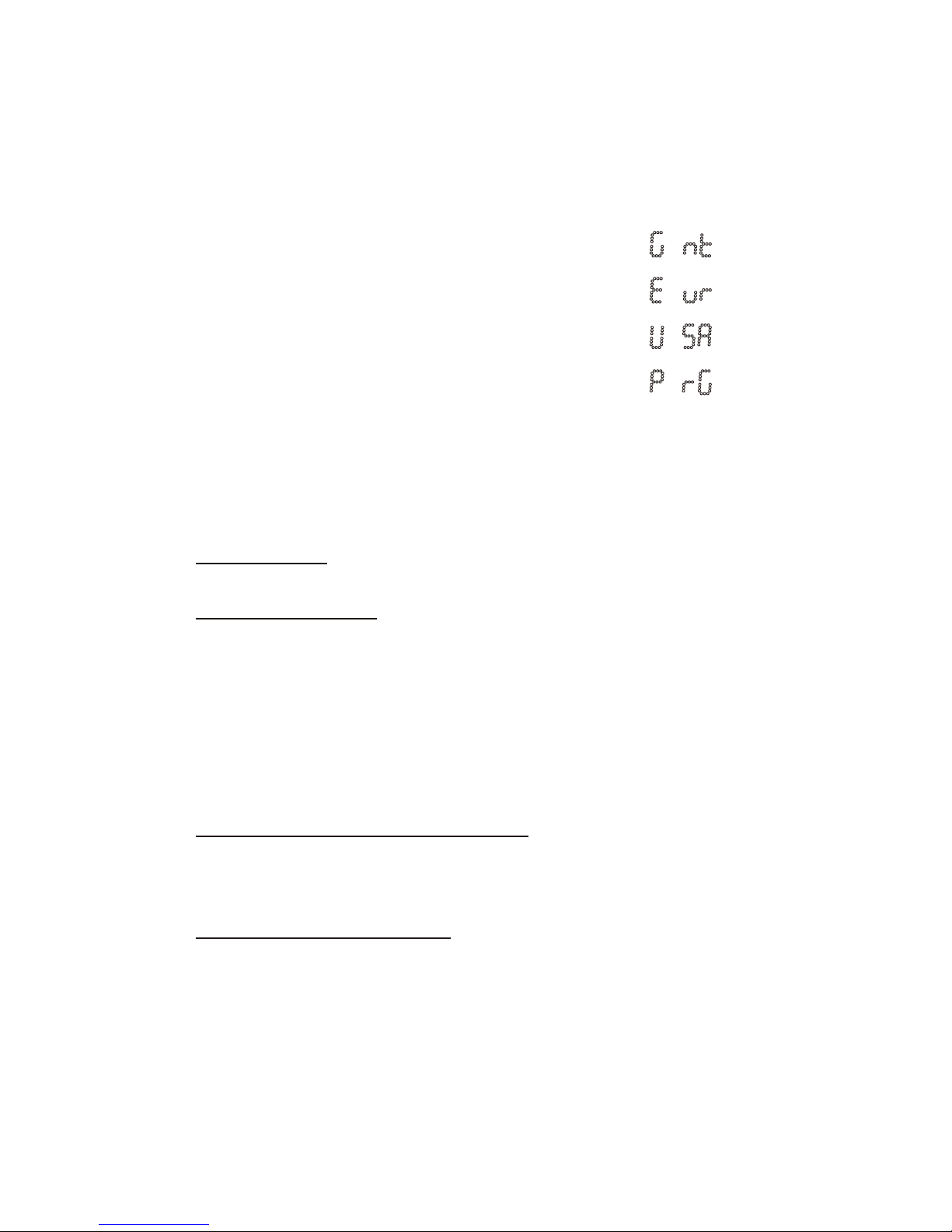
5.2.1 - Selecting the summer / winter time changes :
Using the “+” key, select the zone acting as reference for the summer/winter
time change dates, then confirm by pressing the “Select” key..
Reference Zone Display
No time change
Europe time change
United States/Canada time change
Programmable mode time change
or time changes at fixed dates.
Rules followed by Styles clocks to determine the summer periods :
Nota : for GMT, EUR, USA selection, see also the chapter 5.2.3 selecting the time
difference (page 13).
– G.M.T. mode : No winter / summer change.
– Europe mode (Eur) : from the last Sunday in March to the last Sunday
in October. The time change takes effect at 1 o’clock GMT. (In March
at 2 o’clock local time, forward + 1 hour. In October at 3 o’clock local
time, back – 1 hour).
Nota : Europe is divided in 3 hourly groups :
Continental Europe : France, Germany, Spain, ...
Western Europe : England, Ireland, Portugal, ...
Eastern Europe : Finland, Greece, ...
– United States / Canada Mode (USA): from the second Sunday of
March to the first Sunday of November. The time change takes effect
at 2 o’clock, local time.
– Programmable Mode (PrG): Every year dates for the hour change are
automatically calculated according to the programming below.
a) repetitive mode :
- selection of month (1 to 12) January (1) to December (12).
- selection of the day number (1 to 5) for the 1st, 2nd, 3rd, 4th or
last (5) of the month)
- selection of the day type (1 to 7) for Monday (1) to Sunday (7).
9
Page 10
b) fixed date mode : input of an exact date for the summer time
change and an exact date for the winter time change.
The dates are defined each year in the country concerned.
For the 2 modes –1hr in summer to winter and +1hr in winter to
summer.
The time changes take effect at 2.00am local time.
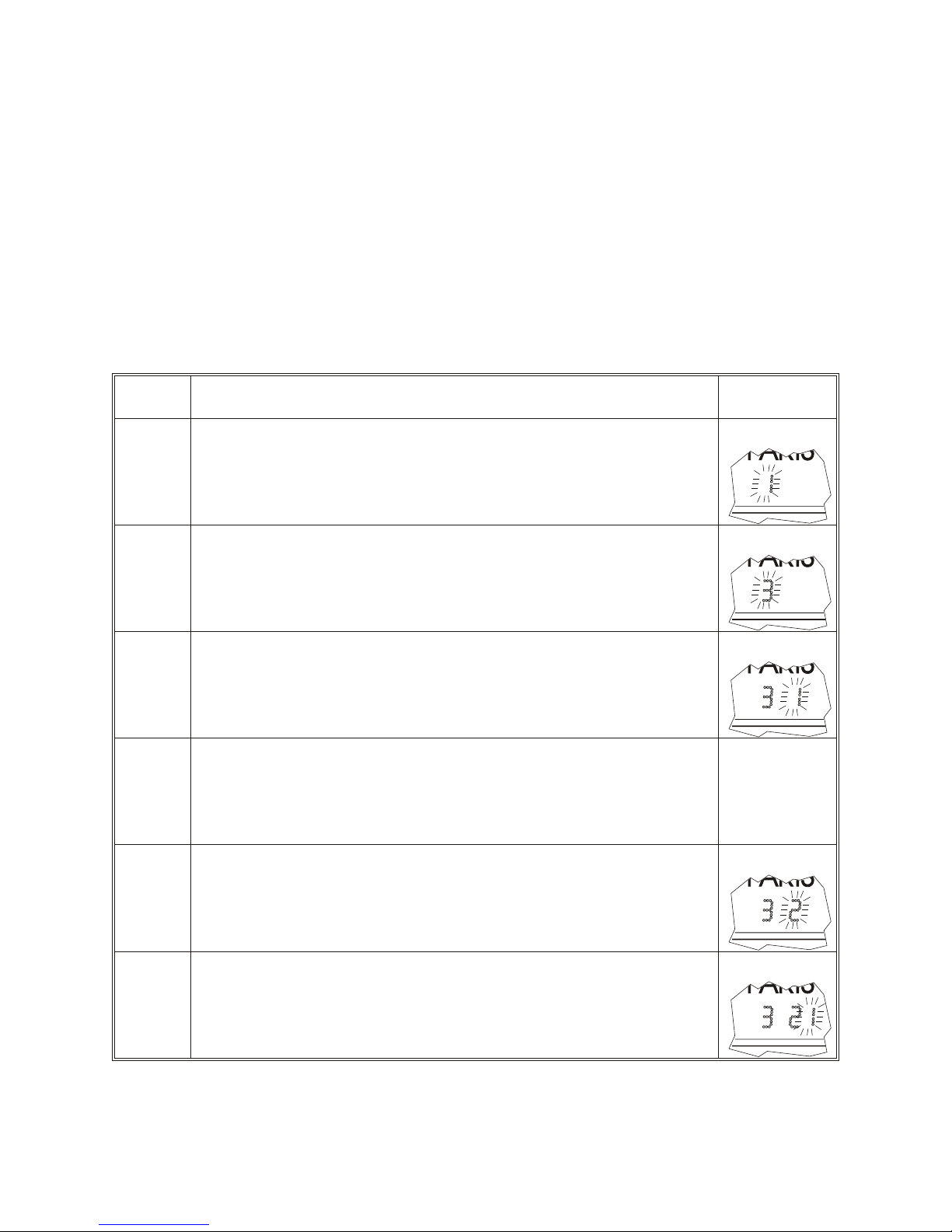
Time changeover in PRG mode :
Step Display
1
To access the configuration menu, press the “Select”
key and while holding it down, then press the “+” key for
3 seconds for each keyboard situated below the display.
Display (2nd digit) flashes to start up programming
2
Press “+” to select the time change month choice of 1 to
12 (e.g. March 3 for the Northern Hemisphere and
October 10 for the Southern Hemisphere).
3
Confirm with “Select”, the 3rd digit flashes
4
Press “+” to select the 1st, 2nd, 3rd, 4th or last (5th) day of
the week or the fixed date (F) for the time change.
If choice is 1 to 5, go to the following step.
If choice is F, go to step 9.
5
Your selection of the day (the 2nd of the month) in the
month flashes.
6
Confirm with “Select”, the last digit flashes.
10
Page 11
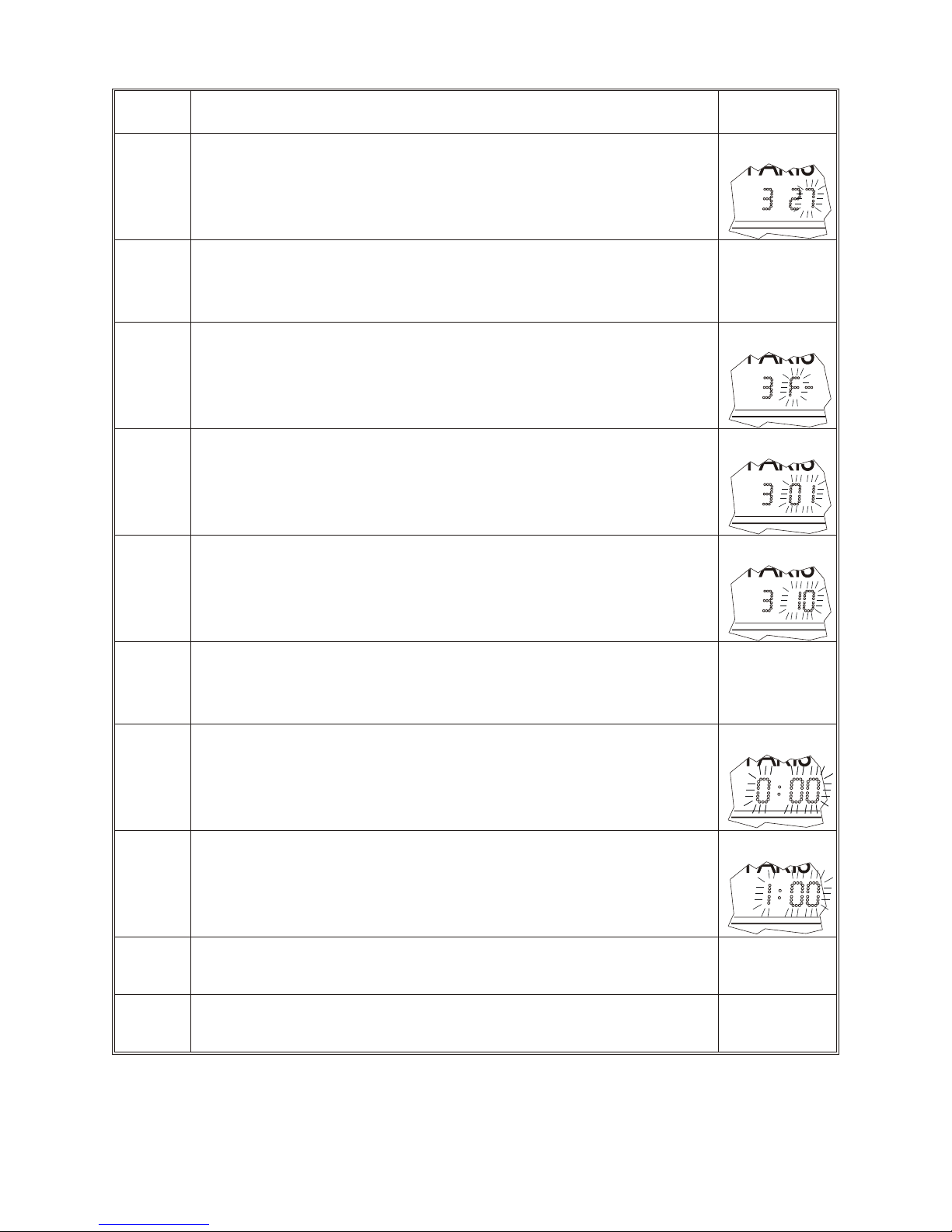
Step Display
7
Enter the type of repetitive day Monday to Sunday (1
to 7) by pressing “+”
(e.g. change on the 2nd Sunday in March)
8
Confirm with “Select”.
To enter the second time change date, go back to the
step 2, either go to step 13.
9
Your fix date selection (F) flashes
10
Confirm with “Select”, flashing display of last 2 digits.
11
Press “+” to scroll through the date changes, choice 1
to 31 (e.g. March 10)
12
Confirm with “Select”.
To enter the second time change date, go back to the
step 2, either go to following step.
13
The time difference flashes (0:00 by default ).
14
Select the time difference, -12H30 to +12H30 (in 30
minutes step), using the “+” key.
Example : for Rio de Janeiro program -3 hours / GMT
15
Confirm with the “Select” key.
The program version appears.
16
Valid, the leds test appears.
Valid a last time to exit the menu.
11
Page 12
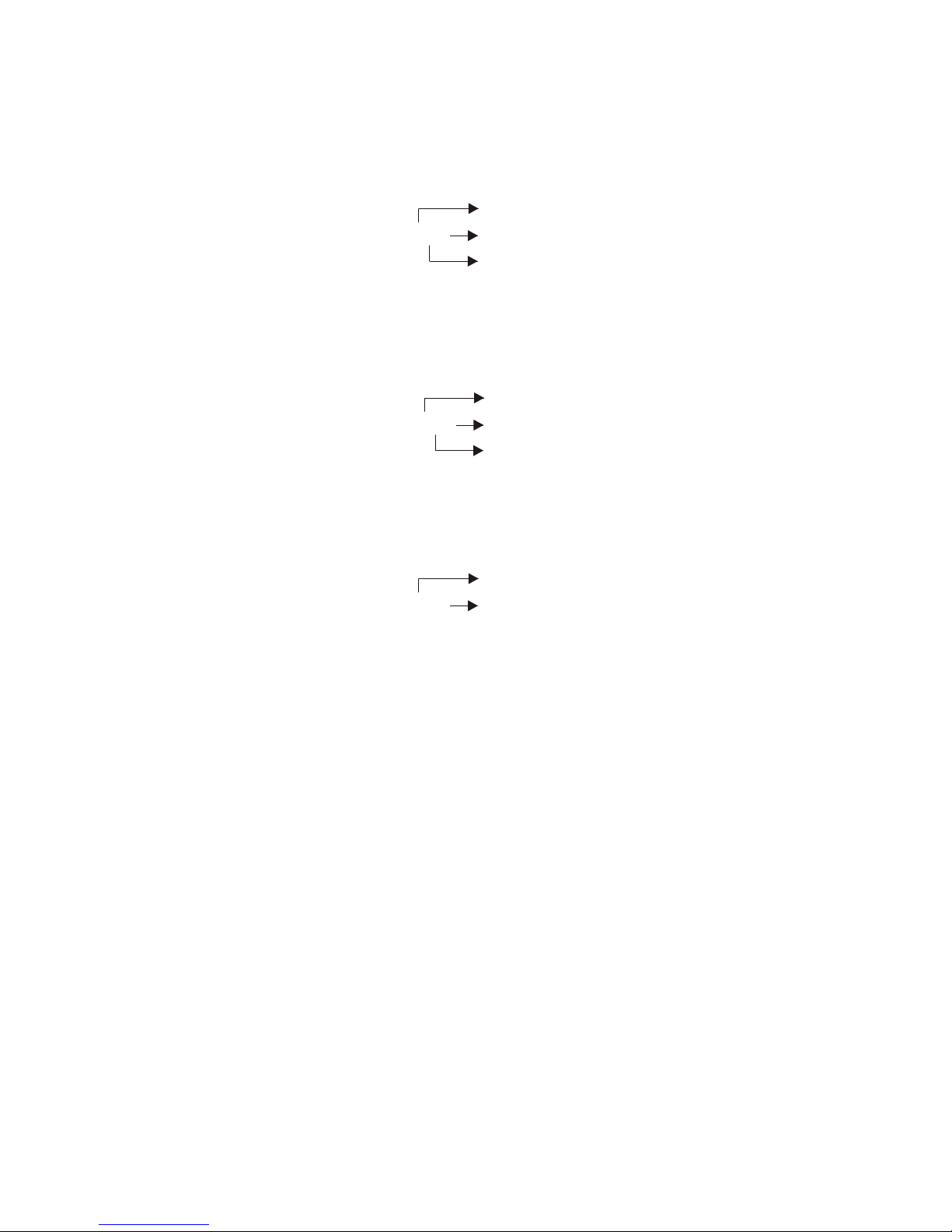
5.2.2 - Example of programming: programmable mode
– Change every 2nd Saturday in February.
February
programme : 2 26 6th day = Saturday
2nd Saturday in the month
– Change every last Tuesday in November.
November
programme : 11 52 2nd day = Tuesday
Last = 5th as max. 5 weeks in the
month
Change at fixed date on 12 April.
April
programme : 4 12 date 12 after confirming F
NB : the change from summer time to winter time is at the end of the year
(» October) for the Northern Hemisphere and at the beginning of the year
(» March) for the Southern Hemisphere. For the change from winter time to
summer time the months are reversed.
Refer to chapter 5.4 to know various cities programming to achieve.
12
Page 13
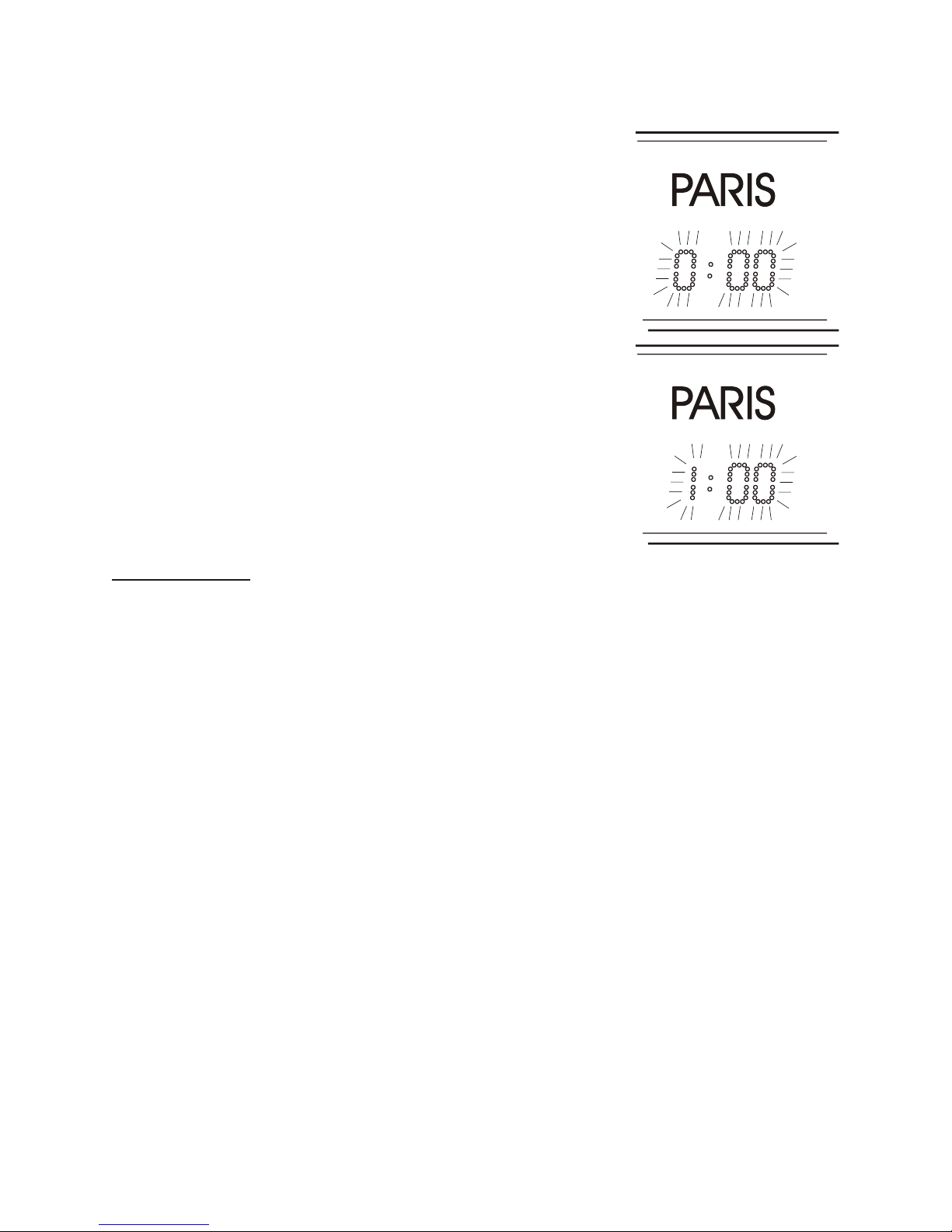
5.2.3 - Selecting the time difference :
The time difference (0:00 by default) flashes.
Select the time difference, -12.30H to +12.30H
(in 30 minute steps), using the “+” key then
confirm with the “Select” key
Example:
for Paris program + 1 hour / GMT
5.3 - Testing
Having adjusted the time difference, display of all diodes concerned alternately
with the software version no.
Press “Select” to exit the configuration menu.
13
Page 14
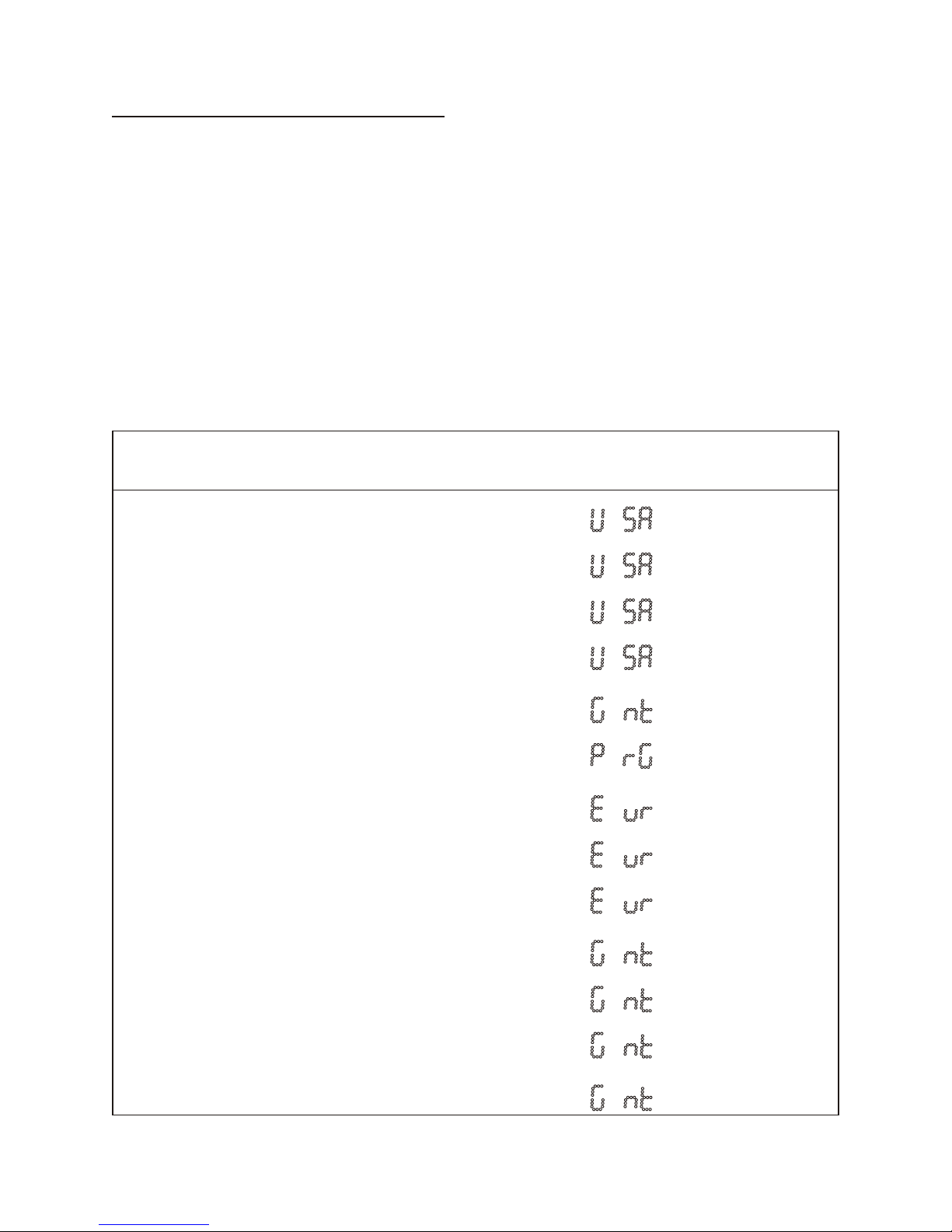
5.4 - Annex for time difference
Select the reference zone for the summer/winter changes, as well as the time
difference, according to the city or country for which you wish to display the
local time.
These values don’t take in charge the time difference for summer/winter
changeover, neither for the season change according to hemispheres.
Example : At Paris in winter, the time difference is of one hour, but at Sydney it
is the summer and the time difference is of 10 hours, more one hour of time
difference summer/winter, that is to say, 11 hours.
CITY Reference zone Display Time diff. /
GMT hour
LOS ANGELES United states / Canada
-08
MEXICO United states / Canada
-06
CHICAGO United states / Canada
-06
NEW YORK,
TORONTO
United states / Canada
-05
BUENOS AIRES No change
-03
RIO DE
JANEIRO
Programmable mode
-03
LONDON Europe
00
PARIS (*) Europe
+01
HELSINKI,
ATHENS
Europe
+02
JOHANNESBURG No change
+02
MOSCOW No change
+04
SINGAPORE
(**)
No change
+08
TOKYO, SEOLE No change
+09
14
Page 15
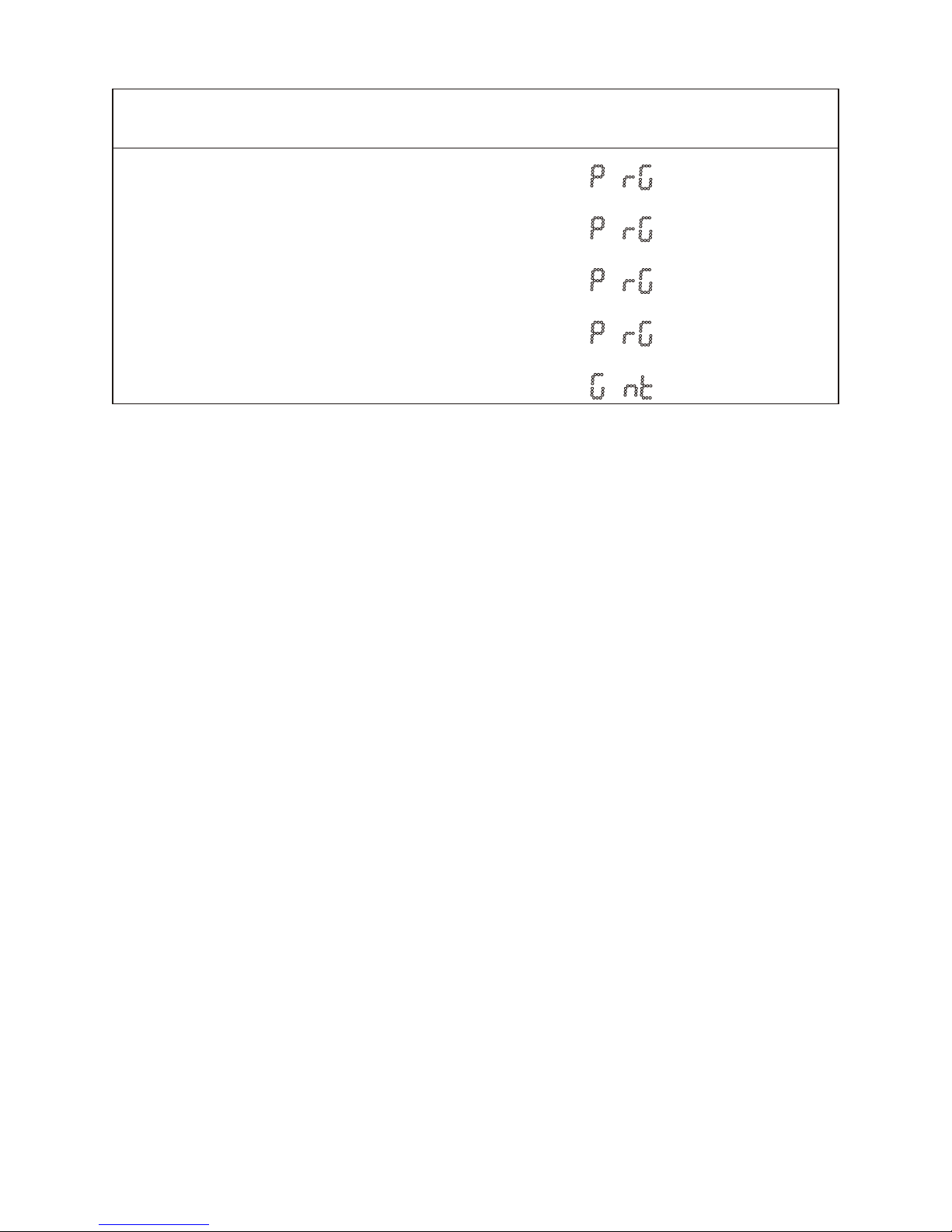
CITY Reference zone Display Time diff. /
GMT hour
SYDNEY Programmable mode
+10
WELLINGTON Programmable mode
+12
PARAGUAY Fixed date (change every
year)
-04
TEHERAN Fixed date (change every
year)
+3.30
BOMBAY No change
+5.30
(*) Paris and the following cities : Frankfurt, Madrid, Stockholm, Oslo,
Zurich, Milan, Amsterdam, etc
(**) SINGAPORE, and the following cities : Taipeh, Bangkok,
Hong-Kong, Kuala Lumpur, Beijing (Peking), …
15
Page 16
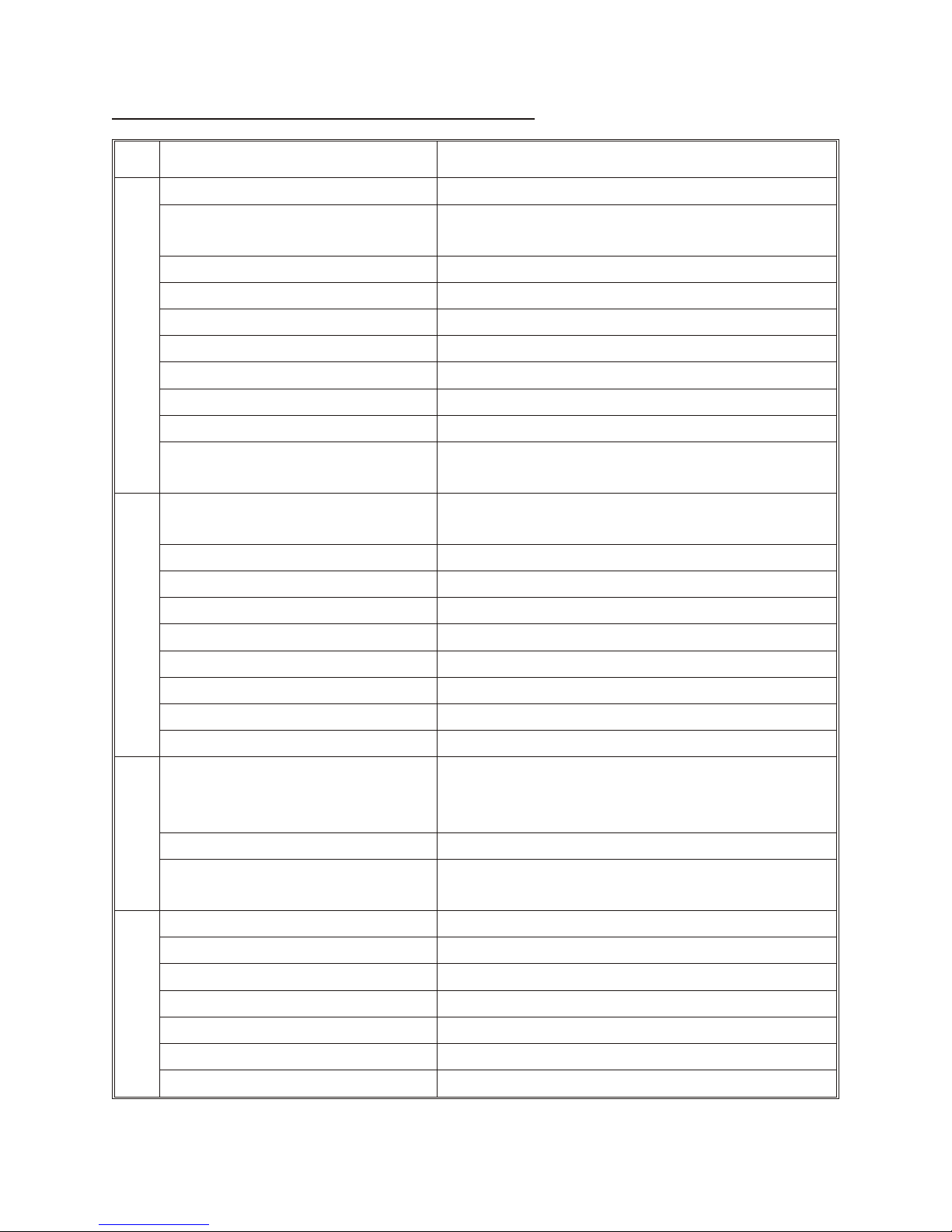
6 - TECHNICAL CHARACTERISTICS
Designation Characteristics
re woP yl ppus
Autonomy of operation : no display without power supply
Hour and date backup in the event
of a mains power failure :
permanent, 10 year lithium battery
Backup of other parameters : permanent
Power supply : 230 V ±10% 50 / 60 Hz
Mains terminals : 1.5 to 2.5 mm² section, baring / 5 mm
Power supply diagram : EE or EN diagram (Earth / Earth or Earth / Neutral)
Consumption in mA. : 3 c./120mA -4 c./160mA -5 c./200mA -6 cities/240mA
Electrical insulation : class I
Fuses (on clock card) : 0,8 A type T
Time base : precision ±0.2 sec/day for 20 to 25°C
(absolute with radio synchronisation)
la ci nah ceM
Control of displays : by tactile keyboard without opening the clock
(1 keyboard per display)
IP box : IP 41
Incline : 5°
Material : aluminium
Colour : black polyurethane paint
Shape : injected rounded corners
Fixing bracket : wall hanging with 2 screws or double sided bracket
height of bracket arm : on request
bracket material : steel
snoitpO
FI / DCF radio synchronisation : (red
light diode on FI antenna; green light
diode on DCF antenna)
2 wires without polarity, 5 m cable length supplied
with antenna - 6/10 section cable – max. length
100m
GPS synchronisation : Via MIC GPS on 2 cables
IRIG B / AFNOR coded time
synchronisation :
2 wires without polarity 6/10 section cable
y ti li bi geL
Display : electroluminescent LED
Legibility : Up to 25 metres
height of figures : 50 mm
adjustment of diode light intensity : on 4 levels
colour of diodes : red, green, blue or yellow
anti-reflective antistatic film : yes
Angle of reading : 120°
16
Page 17
Designation Characteristics
y ti la nnoi tcnuF
Setting the time after a mains power
failure :
Automatic
Summer/winter time changes for
time difference :
Prog, Eur, USA and GMT Mode.
-12h30 +12h30
Display : Hours, minutes with time difference of 4 or 6 cities
C°T
Operating temperature : 0° to +40°C
Storage temperature : -10° to +60°C
sdra dnatS
European and French standards : CE
Electromagnetic compatibility
directive:
89/336/CEE.
radio-electric disturbances produced
by information processing units :
NF EN 50082-1 (June 1992)
low voltage directive : 73/23/EEC by reference to the norm EN60950
electrical : IEC 364 (NFC 15.100 for France)
FI (France Inter) : NFC 90002
AFNOR (IRIG B) :
NFS 87500A
sre viD
Weight :
3 cities/9 Kg - 4 cities/12 Kg - 5 cities/15 Kg -
6 cities/18 Kg
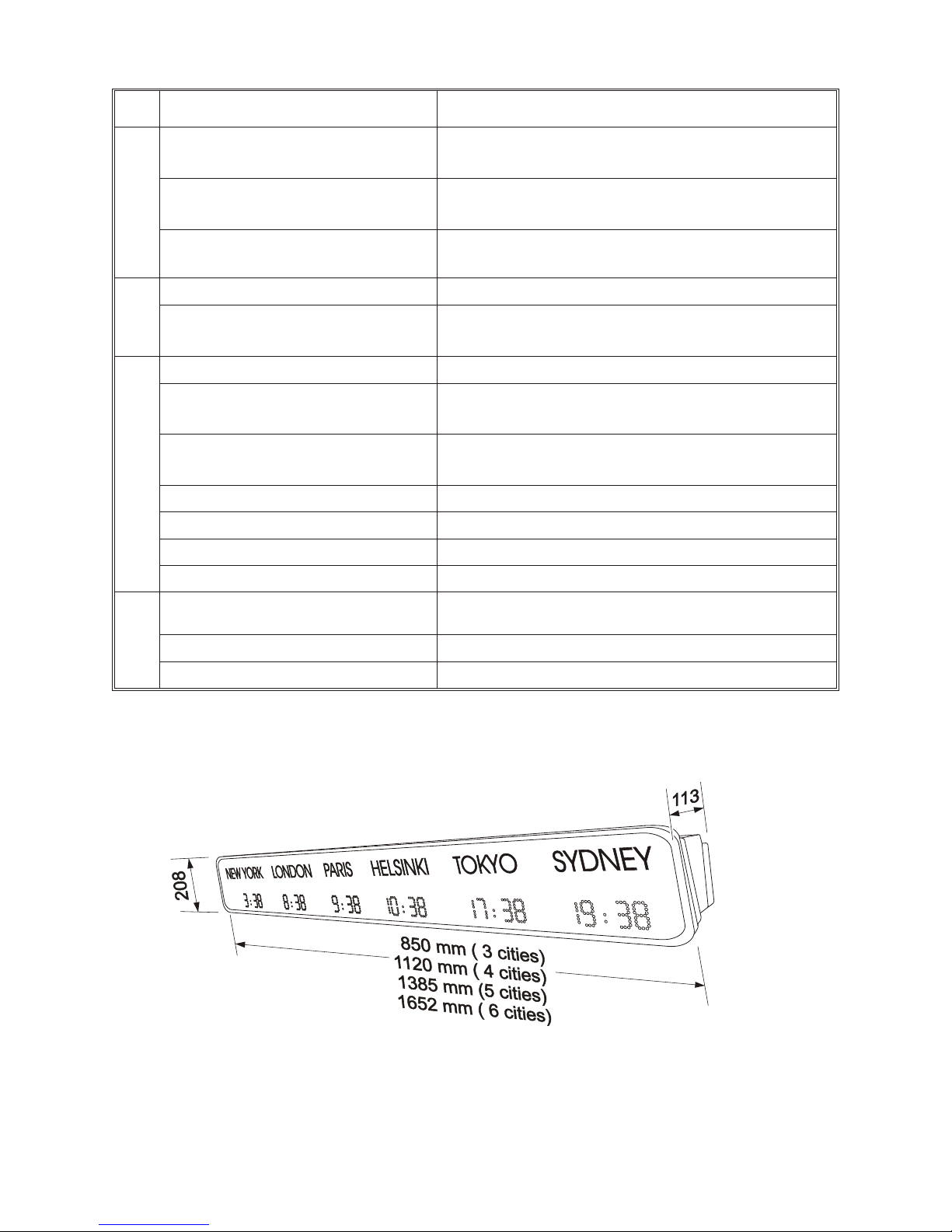
Sizes : See diagram.
Name of cities or countries Sticker, 30 mm high, max. length 250 mm
Sizes (mm) :
17
Page 18

7 - ADJUSTING THE LIGHT INTENSITY
n
Light intensity adjustment can be carried out on each display separately
when the World clock is not in the configuration menu (time display).
n
Pressing the “+” key a number of times enables you to select directly from 4
different levels whichever display intensity is best suited to the surrounding
lighting conditions.
n
Be careful that all displays have the same light intensity.
8 - BACKUP
n
The World clock is fitted with a device for storing the configuration
parameters even in the event of an extended power failure.
9 - PRECAUTIONS FOR USE AND MAINTENANCE
n
Use an antistatic product of similar type to the one shipped in the original
packaging.
n
Never use alcohol, acetone or any other solvent liable to damage the casing
and filter on your World clock.
n
Read carefully the paragraph on electrical safety standards before carrying
out.
18
Page 19
10 - WHAT TO DO IF...?.........CHECK :
n
All displays disappear and
only display two fixed points.
n
No AFNOR reception for over one hour on
all displays. Check the connection and
reception of the AFNOR signal.
n
One of the displays shows
only 2 fixed points.
n
No Irig-B/AFNOR reception. Check the
corresponding display.
n
The time shown on 1 or
more displays is incorrect.
n
Check programming in relation to the name
of the city. The time signal from the time
base or the AFNOR signal must be GMT
and not local time. Check the time
difference programmed.
n
The time change was correct
last year but is not correct
this year.
n
Check programming of the time change,
(programmable mode or fixed date) as well
as the programmed value.
n
The light intensity on one
display is different from the
other displays.
n
Press the “+” key on the display concerned,
to obtain the same light intensity. If there is
no change, have your clock checked by an
authorised dealer.
19
Page 20

20
 Loading...