

Page 1
1
Page 2
ITA
Italiano
Manuale d’Uso ................................................................................................................. 9
1.1 Introduzione al prodotto ...................................................................................... 9
1.2 Contenuto della confezione ................................................................................ 9
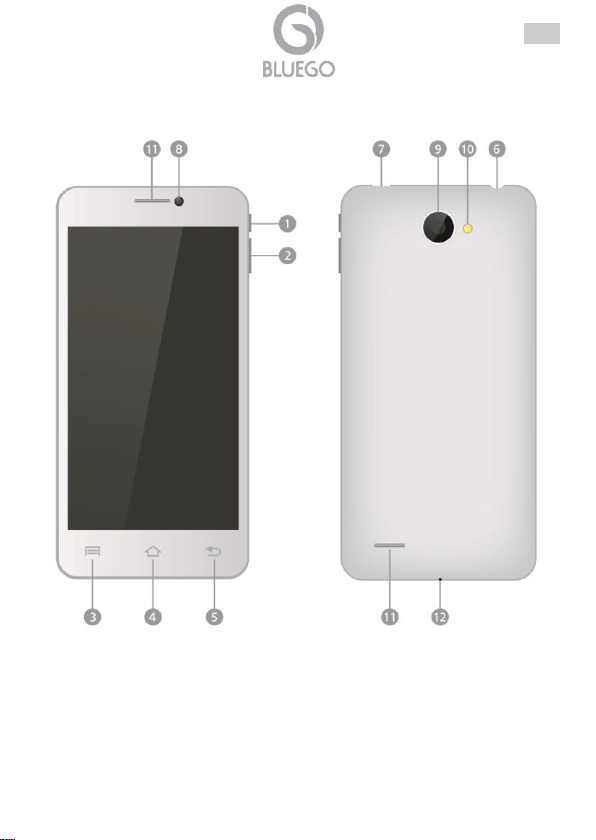
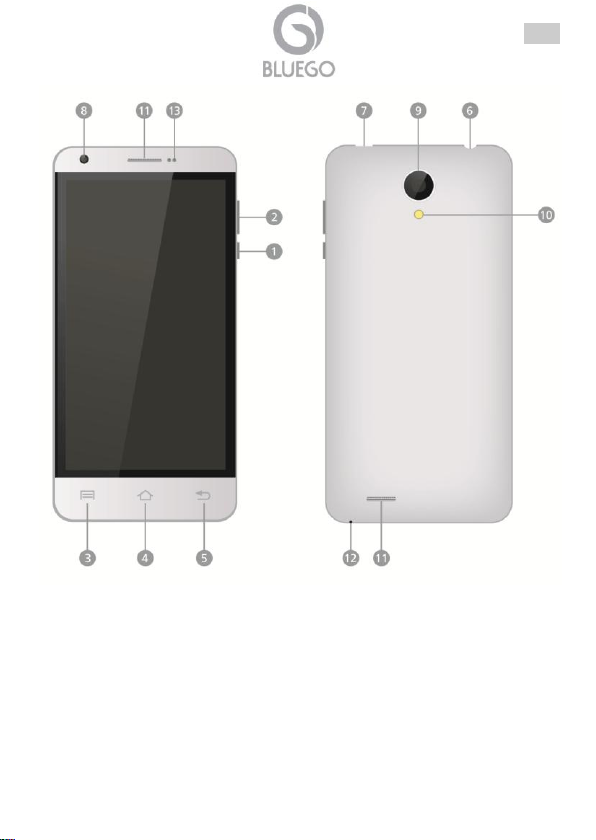
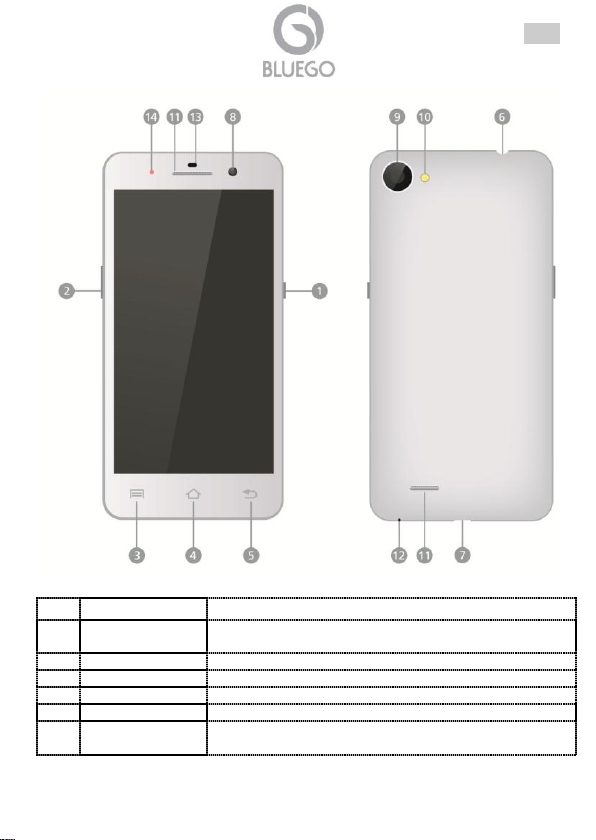
1.3 Panoramica del Dispositivo ............................................................................... 10
1.4 Inserimento SIM e scheda Micro SD ................................................................ 13
1.5 Accensione e Caricamento Batteria ................................................................. 14
1.6 Accensione/Sospensione/Spegnimento ........................................................... 14
1.7 Supporto Offerto ............................................................................................... 14
APPENDICE A: Risoluzione dei problemi e Supporto .................................................. 15
English
Manual ........................................................................................................................... 23
1.1 Important Safety Instructions ............................................................................ 23
1.2 Package Contents ............................................................................................. 23
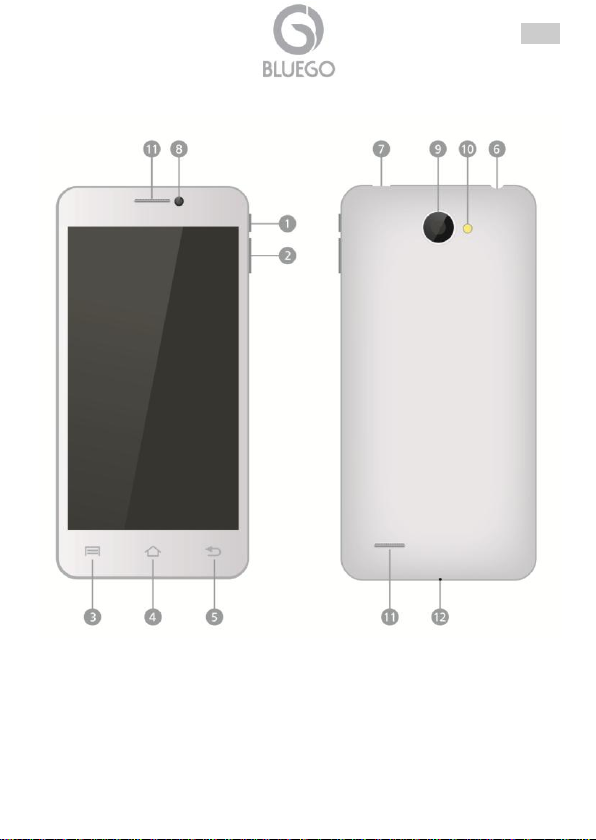
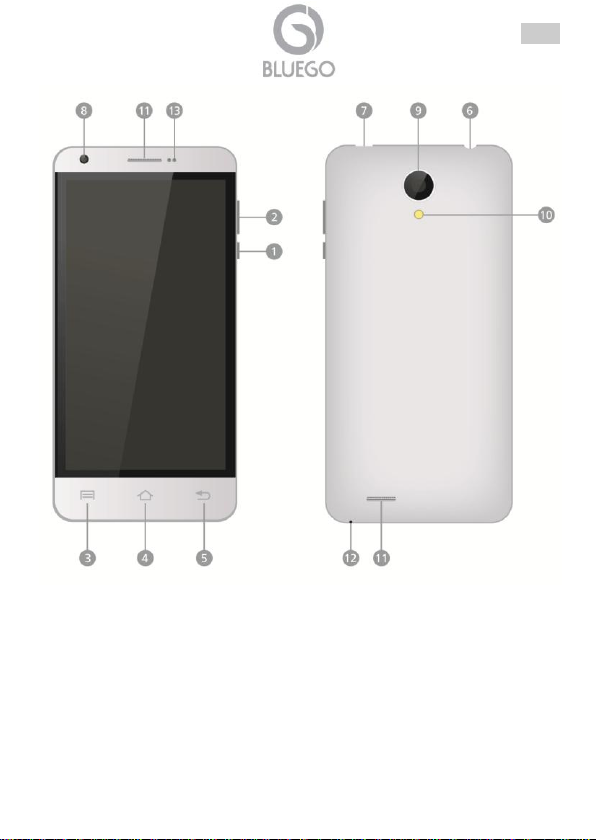
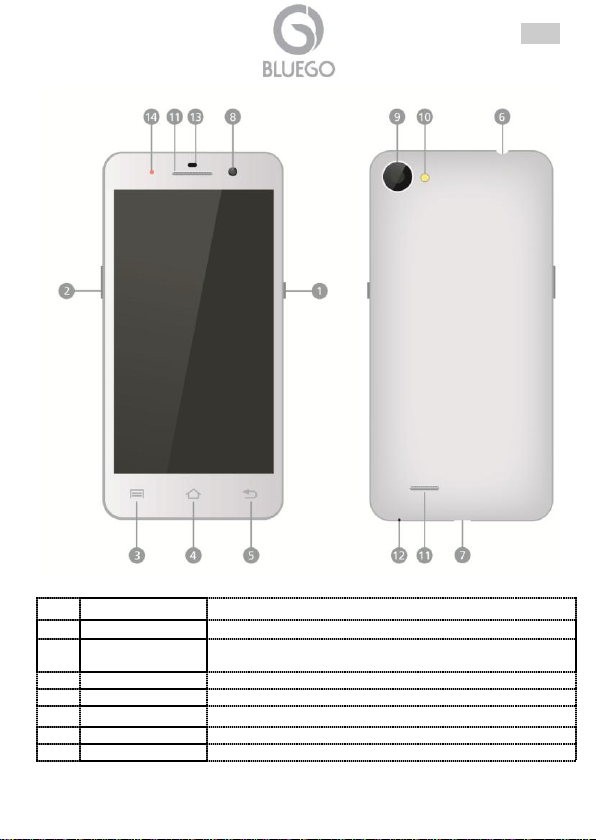
1.3 OverView ...................................................................................................... 24
1.4 Insert SIM1/2 and Micro SD card ...................................................................... 27
1.5 Charging and Power On ................................................................................... 27
1.6 Power on/Sleep Mode/Power off ...................................................................... 28
1.7 Support ....................................................................................................... 28
Appendix A: Troubleshooting ........................................................................................ 29
Français
Manuel Utilisateur .......................................................................................................... 36
1.1 Introduction........................................................................................................ 36
1.2 Dans la Boîte ..................................................................................................... 36
1.3 Présentation du Produit .................................................................................... 37
1.4 Insérer les cartes SIM et la carte Micro SD ...................................................... 40
1.5 Allumage et Chargement de la Batterie ............................................................ 40
1.6 Allumer/Mode veille/Éteindre ............................................................................ 40
1.7 Support ...................................................................................................... 41
ANNEXE A: Dépannage et assistance ......................................................................... 42
Español
Manual de Uso .............................................................................................................. 49
1.1 Introducción al producto .................................................................................... 49
1.2 Contenido de la caja ......................................................................................... 49
1.3 Panorámica del dispositivo ............................................................................... 50
1.4 Inserir la SIM y la tarjeta Micro SD ................................................................... 53
1.5 Encendido y carga de la batería ....................................................................... 54
1.6 Encendido/Suspensión/Apagado ...................................................................... 54
1.7 Soporte Técnico ................................................................................................ 54
Apéndice A: resolución de problemas y soporte .......................................................... 55
2
Page 3
ITA
Deutsch
Schnellstartanleitung ..................................................................................................... 63
1.1 Produktseinführung ........................................................................................... 63
1.2 Inhalt ........................................................................................................ 63
1.3 Geräteüberblick ................................................................................................. 64
1.4 SIM-Karten und microSD-Karte einlegen ......................................................... 67
1.5 Einschalten und die Batterie aufladen .............................................................. 68
1.6 Anschalte/Schlafmodus/Ausschalten ................................................................ 68
1.7 Hilfe ....................................................................................................... 68
APPENDIX A: Problemelösung und Hilfe ..................................................................... 69
ελληνικά
ΕΓΧΕΙΡΙΔΙΟ ΧΡΗΣΗΣ ................................................................................................... 76
1.1 Σημαντικές οδηγίες ασφάλειας ......................................................................... 76
1.2 Περιεχόμενα συσκευασίας ................................................................................ 76
1.3 Επισκόπηση ...................................................................................................... 77
1.4 Εισαγωγή SIM1/2 και Micro SD κάρτας. ........................................................... 80
1.5 Charging and Power On ................................................................................... 80
1.6 Ενεργοποίηση/Λειτουργια ύπνου/Απενεργοποίηση ......................................... 81
1.7 Υποστήριξη ....................................................................................................... 81
1. Παράρτημα A: Επίλυση προβλημάτων ..................................................................... 82
Teachnical Features
Technical Features ........................................................................................................ 86
BG-QSG01(V1.01, April 2014)
3
Page 4
ITA
AVVERTENZE
Abbiamo fatto di tutto al fine di evitare che nel testo, nelle immagini e nelle tabelle
presenti in questo manuale, nel software e nell'hardware fossero presenti degli
errori. Tuttavia, non possiamo garantire che non siano presenti errori e/o omissioni.
Infine, non possiamo essere ritenuti responsabili per qualsiasi perdita, danno o
incomprensione compiuti direttamente o indirettamente, come risulta dall'utilizzo del
manuale, software e/o hardware.
Il contenuto di questo manuale è fornito esclusivamente per uso informale, è
soggetto a cambiamenti senza preavviso (a tal fine si invita a consultare il sito
www.bluego.eu per reperirne gli aggiornamenti) e non deve essere interpretato
come un impegno da parte nostra che non ci assumiamo alcuna responsabilità
per qualsiasi errore/omissione o inesattezza che possa essere presente in questo
manuale. Nessuna parte di questa pubblicazione può essere riprodotta o trasmessa
in altra forma o con qualsiasi mezzo, elettronicamente o meccanicamente,
comprese fotocopie, riproduzioni, o registrazioni in un sistema di salvataggio,
oppure tradotti in altra lingua e in altra forma senza un espresso permesso scritto
da parte nostra. Tutti i nomi di produttori e dei prodotti e qualsiasi marchio,
registrato o meno, menzionati in questo manuale sono usati al solo scopo
identificativo e rimangono proprietà esclusiva dei loro rispettivi proprietari.
Informazioni generali e sulla Sicurezza
Solo personale qualificato, al fine di evitare shock elettrici, è autorizzato ad
interventi sull’apparato.
La pulizia del prodotto va effettuata evitando di utilizzare spray detergenti e
soluzioni contenenti alcool o liquidi infiammabili.
E’ fondamentale evitare che l’apparato possa surriscaldarsi. Questo potrebbe
drasticamente accorciarne la vita.
E’ opportuno proteggere l’apparato da elevata umidità, irraggiamento solare
diretto e da temperature estremamente basse o elevate (non superare i 45°C).
Non depositare liquidi sopra o accanto l’apparecchio.
Utilizzare solo i cavi specifici per le applicazioni. Utilizzare le porte indicate senza
forzare.
Verificare regolarmente che tutti i cavi di connessione non siano danneggiati. In
caso lo fossero sostituirli immediatamente.
Verificare che nella prese di collegamento non entrino oggetti e/o cavi estranei.
Utilizzare esclusivamente l’adattatore di rete AC/DC incluso nella confezione. In
caso contrario l’apparecchio potrebbe manifestare malfunzionamenti.
Utilizzare solo accessori (antenne e/o alimentatori) contenuti nell’imballo.
Lasciare almeno 30cm di distanza tra l’antenna del dispositivo e l’utilizzatore.
Taluni apparati hanno antenna/e integrata/e.
Non usare la stessa presa di corrente per connettere altri apparecchi al di fuori
del dispositivo in oggetto.
4
Page 5
ITA
Non aprire mai l'housing plastico del dispositivo né cercare di ripararlo da soli.
Se il dispositivo dovesse essere troppo caldo, spegnerlo immediatamente e
rivolgersi a personale qualificato.
Non utilizzare lo smartphone mentre si guida l'autovettura, questo potrebbe
essere rischioso.
Quando utilizzato in autovettura, assicurarsi che sia saldamente fissato
all'apposita struttura di supporto. Lo smartphone non va assolutamente montato
in prossimità degli airbag.
Lo smartphone è un dispositivo estremamente complesso e composto da decine
di moduli differenti. Ogni urto/caduta potrebbe danneggiare il prodotto. Prestare la
massima attenzione in tal senso.
Oggetti che producono un campo elettromagnetico possono inficiare le
prestazioni del dispositivo.
Non utilizzare cover e/o strutture protettive con chiusure magnetiche. Non
lasciare inoltre il dispositivo a contatto con oggetti che emettono un campo
elettromagnetico.
Il dispositivo emana campi elettromagnetici e potrebbe interferire con altri oggetti
sensibili a questi campi (quali pacemaker, apparecchi acustici, dispositivi medici).
Contattare il produttore di tali dispositivi al fine di risolvere i problemi di
interferenza.
Lo smartphone va tenuto lontano dalla portata dei bambini, che non dovrebbero
poter giocare con questo dispositivo.
Scariche elettrostatiche potrebbero compromettere il funzionamento dello
smartphone. In tal caso spegnere il dispositivo, rimuovere la batteria per circa un
minuto e riaccendere il dispositivo.
Danni all'udito
Questo dispositivo è conforme alle norme vigenti sulla limitazione del volume in
uscita dei dispositivi audio ad un livello sicuro.
Ascoltando il dispositivo ad un elevato livello di volume con cuffie o auricolari si
corre il rischio di generare danni permanenti all'udito. Ridurre il volume del
dispositivo ad un livello ragionevole per evitare questa tipologia di problematiche.
Se doveste sentire un fischio alle orecchie, è opportuno ridurre immediatamente il
volume del dispositivo e/o spegnerlo.
Il dispositivo è stato testato con le cuffie auricolari in dotazione, l'utilizzo di altri
accessori (cuffie/auricolari) può produrre danni all'udito.
Si consiglia comunque, nel caso di utilizzo di cuffie/auricolari di produttori terzi, di
acquistare accessori conformi alle normative in vigore.
Avvertenze sulla Batteria
5
Page 6
ITA
Questo smartphone è dotato di una batteria agli ioni di Litio. Questa batteria non va
per alcuna ragione forata, aperta, disassemblata, utilizzata in ambienti umidi o
corrosivi.
In caso di contatto con eventuali fluidi fuoriusciti dalla batteria è opportuno lavare
immediatamente con acqua abbondante la parte interessata e rivolgersi
immediatamente ad un medico. Si prega di osservare scrupolosamente le istruzioni
riportatate in questa guida, la mancata osservazione può portare alla fuoriuscita di
acido dalla batteria, ad un eccessivo surriscaldamento sino all'esplosione e/o
incendio con conseguenti lesioni e/o danni.
Non lasciare mai in carica la batteria per tempi prolungati (oltre 10 ore). Questo
potrebbe provocarne il sovraccarico ed accorciarne così la durata di servizio.
Un lungo periodo di inutilizzo dello smartphone porterà alla scarica completa della
batteria. Prima di accendere il dispositivo è opportuno caricare la batteria per
qualche ora.
Scollegare il caricatore dalla presa a muro quando questo non viene utilizzato per
caricare lo smartphone.
Utilizzare soltanto batterie originali del produttore nello smartphone.
Utilizzare soltanto il caricatore originale fornito a corredo.
L'uso di caricatori e/o batterie non originali possono danneggiare il prodotto ed
invalidarne la garanzia.
L'uso di accessori non originali può provocare problematiche di varia natura
(shock elettrici, fiamme etc..)
Non gettare mai la batteria tra le fiamme, in zone dove la temperatura è elevata o
vicino ad oggetti che emanano calore. Le batterie se si scaldano eccessivamente
possono esplodere.
La batteria non va per alcuna ragione forata e schiacciata (questo potrebbe
generare un corto circuito interno).
La batteria non va posta in ambienti la cui temperatura è superiore ai 45°C.
Questo dispositivo è stato testato ed è risultato conforme alla direttiva 2011/65/CE e
1999/5/CE del parlamento Europeo e della Commissione Europea, a proposito di
apparecchiature radio e periferiche per telecomunicazioni e loro mutuo
riconoscimento. La dichiarazione di conformità è disponibile presso la nostra sede.
Questa apparecchiatura può pertanto essere utilizzata in tutti i paesi della Comunità
Economica Europea ed in tutti i paesi dove viene applicata la Direttiva 1999/5/CE,
senza restrizioni eccezion fatta per:
Dichiarazione di Conformità Sintetica
6
Page 7
ITA
Italia(IT): Questa periferica è conforme con l’Interfaccia Radio Nazionale e rispetta i
requisiti sull’Assegnazione delle Frequenze. L’utilizzo di questa apparecchiatura al
di fuori di ambienti in cui opera il proprietario, richiede un’autorizzazione generale.
Per ulteriori informazioni si prega di consultare: www.comunicazioni.it.
Norvegia (NO): apparecchiatura da non utilizzare in un area geografica di 20 km di
raggio nei pressi di Ny Alesund.
La dichiarazione in forma completa e la documentazione tecnica sono disponibili
presso la nostra sede.
questa apparecchiatura
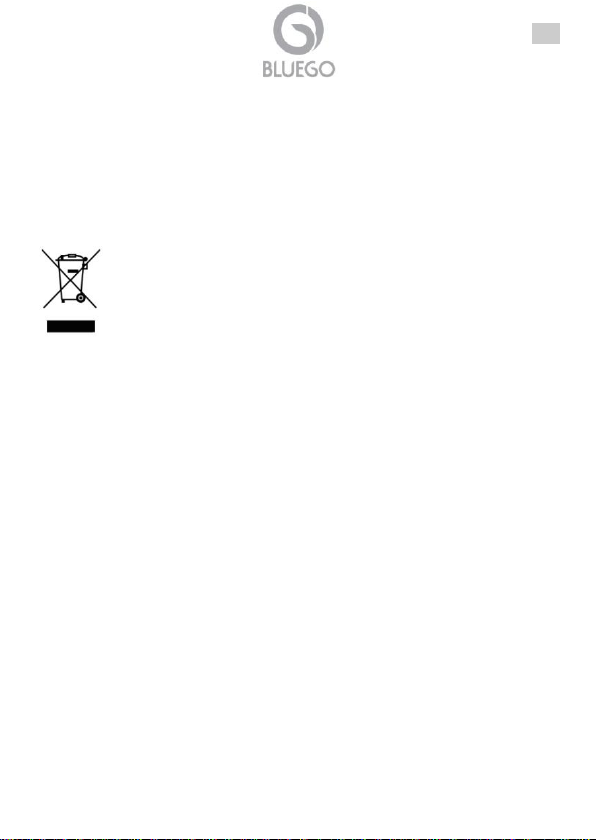
Importanti informazioni per il corretto riciclaggio/smaltimento di
Il simbolo qui sotto indicato, riportato sull'apparecchiatura elettronica da Lei
acquistata e/o sulla sua confezione, indica che questa apparecchiatura elettronica
non potrà essere smaltita come un rifiuto qualunque ma dovrà essere oggetto di
raccolta separata.
Infatti i rifiuti di apparecchiatura elettroniche ed elettroniche devono essere
sottoposti ad uno specifico trattamento, indispensabile per evitare la dispersione
degli inquinanti contenuti all''interno delle apparecchiature stesse, a tutela
dell'ambiente e della salute umana. Inoltre sarà possibile riutilizzare/riciclare parte
dei materiali di cui i rifiuti di apparecchiature elettriche ed elettroniche sono
composti, riducendo così l'utilizzo di risorse naturali nonché la quantità di rifiuti da
smaltire.
Il titolare del marchio Bluego, in qualità di produttore di questa apparecchiatura, è
impegnato nel finanziamento e nella gestione di attività di trattamento e recupero
dei rifiuti di apparecchiature elettriche ed elettroniche compatibili con l'ambiente e
con la salute umana.
E' Sua responsabilità, come utilizzatore di questa apparecchiatura elettronica,
provvedere al conferimento della stessa al centro di raccolta di rifiuti di
apparecchiature elettriche ed elettroniche predisposto dal Suo Comune. Per
maggiori informazioni sul centro di raccolta a Lei più vicino, La invitiamo a
contattare i competenti uffici del Suo Comune.
Qualora invece avesse deciso di acquistare una nuova apparecchiata elettronica di
tipo equivalente e destinata a svolgere le stesse funzioni di quella da smaltire, potrà
portare la vecchia apparecchiatura al distributore presso cui acquista la nuova. Il
distributore sarà tenuto ritirare gratuitamente la vecchia apparecchiatura1.
7
Page 8
ITA
Le batterie utilizzate nei prodotti BlueGo sono removibili,
vanno pertanto rimosse e smaltite esclusivamente negli
appositi punti di raccolta designati a questo scopo.
Per usufruire delle condizioni di garanzia migliorative
associate al prodotto è opportuno provvedere alla
registrazione dello stesso sul sito www.bluego.eu entro
e non oltre 15 giorni dalla data di acquisto. La mancata
registrazione entro il termine di sopra farà si che il
prodotto sia coperto esclusivamente dalla condizioni
standard di garanzia.
Si tenga presente che l'abbandono ed il deposito incontrollato di rifiuti sono puniti
con sanzione amministrativa pecuniaria da € 103 a € 619, salvo che il fatto
costituisca più grave reato. Se l'abbandono riguarda rifiuti non pericolosi od
ingombranti si applica la sanzione amministrativa pecuniaria da € 25 a € 154.
Il suo contributo nella raccolta differenziata dei rifiuti di apparecchiature elettriche ed
elettroniche è essenziale per il raggiungimento di tutela della salute umana
connessi al corretto smaltimento e recupero delle apparecchiature stesse.
1 Il distributore non sarà tenuto a ritirare l'apparecchiatura elettronica qualora vi sia un rischio di
contaminazione del personale incaricati o qualora risulti evidente che l'apparecchiatura in
questione non contiene i suoi componenti essenziali o contiene rifiuti diversi da apparecchiature
elettriche e/o elettroniche.
NB: le informazioni sopra riportate sono redatte in conformità alla Direttiva 2002/96/CE ed al D.
nonché particolari modalità di trattamento e smaltimento dei rifiuti di apparecchiature elettriche ed
elettroniche (RAEE). Per ulteriori informazioni in materia, la invitiamo a consultare il nostro sito
www.bluego.eu.
ferenziata
8
Page 9
ITA
Manuale d’Uso
La ringraziamo per aver scelto uno smartphone della famiglia Bluego. Si consiglia la
lettura di questo documento al fine di un corretto utilizzo del prodotto. La guida
completa è disponibile online nel sito www.bluego.eu alla pagina del prodotto.
1.1 Introduzione al prodotto
Seguire attentamente tutte le istruzioni durante l’installazione. Leggere
attentamente l’intera guida rapida prima di iniziare l’installazione del dispositivo.
1.2 Contenuto della confezione
Una volta aperta la confezione dovrebbero essere presenti i seguenti componenti:
SmartPhone
Alimentatore AC/DC
Cavo Micro USB
Guida rapida multilingua
Auricolari
Batteria
Batteria di Ricambio(nei modelli BG-G509-W, BG-G509-B e BG-G509K-B)
Cover/Flip Cover aggiuntiva (secondo il modello)
Tagliando di Garanzia
Avvisi Legali e di Sicurezza
Qualora mancasse uno qualsiasi di questi componenti rivolgersi immediatamente al
rivenditore.
9
Page 10
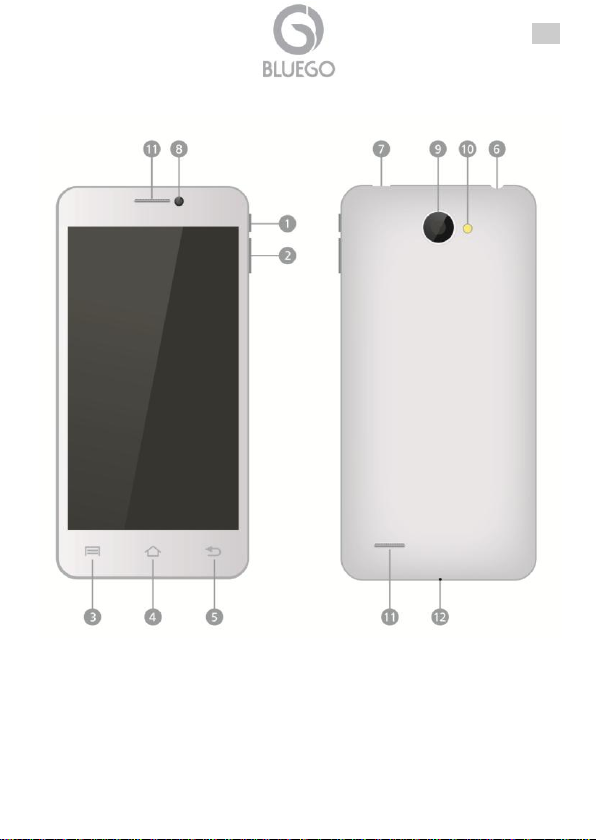
1.3 Panoramica del Dispositivo
ITA
10
Page 11
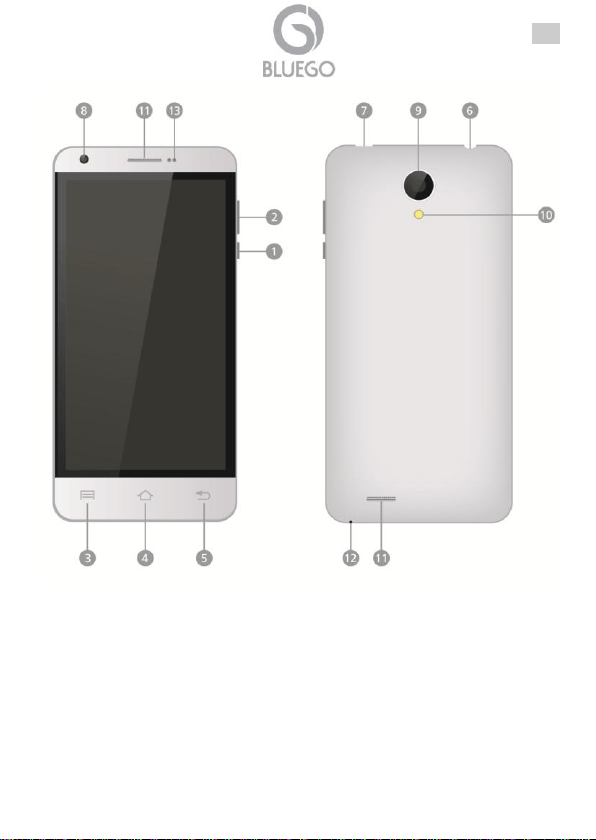
ITA
11
Page 12
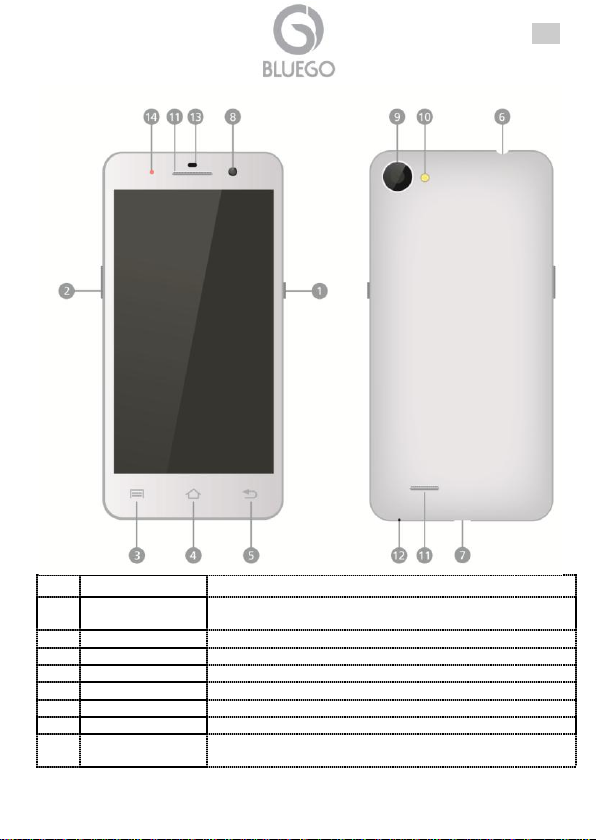
ITA
Informazione
Funzionalità
1
Tasto
Accensione
Permette di accendere/spegnere il dispositivo e/o
metterlo in modalità stand-by.
2
Volume +/-
Permette la regolazione del livello del volume.
3
Menu
Visualizza le opzioni del menu.
4
Home
Torna alla schermata Home.
5
Indietro
Torna alla shermata precedente.
6
Presa Auricolari
Utilizzare per la connessioni agli auricolari.
7
Porta USB
Utilizzare per ricaricare la batteria e/o scambio dati.
8
Obiettivo
Camera
Permette di scattare foto, effettuare videochiamate e la
registrazione di video.
12
Page 13
ITA
Anteriore
9
Obiettivo
Camera
Posteriore
Permette di scattare foto e la registrazione di video.
10
Flash
Permette di scattare foto in condizioni di scarsa
luminosità.
11
Altoparlante
Permette di ascoltare suoni riprodotti dallo smartphone
(musica o chiamate entranti).
12
Microfono
Permette la cattura suoni.
13
Sensori
Sensori ambientali.
14
LED
Led utili a conoscere lo stato del dispositivo.
1.4 Inserimento SIM e scheda Micro SD
Anzitutto, dopo aver spento il cellulare, è opportuno aprire il dispositivo
rimuovendone la cover posteriore (sfruttando l'apposita scanalatura presente in
prossimità della fotocamera posteriore o nell'angolo inferiore destro).
Rimuovere a questo punto la batteria
Inserire l'eventuale scheda MicroSD (supporta sino ad un massimo di 32GB) utile
per aumentare la memoria interna del dispositivo. Fare attenzione e verificare che
i contatti metallici siano rivolti verso il basso. Spingere la scheda di espansione
sino in fondo. La scheda può essere rimossa dall'alloggiamento semplicemente
sfilandola.
BG-G509-W/B o BG-G509K-B: Inserire la/le SIM negli appositi Slot. Il dispositivo
ha 2 alloggiamenti per SIM. L'alloggiamento per la SIM1 (dimensioni standard,
supporta GSM/WCDMA) mentre l'alloggiamento per la SIM2 (MicroSim, supporta
GSM/WCDMA). Fare attenzione e verificare che i contatti metallici dorati siano
rivolti verso l'alto per la SIM1 e verso il basso per la MicroSIM2.
BG-V503-K: Inserire la/le SIM negli appositi Slot. Il dispositivo ha 2 alloggiamenti
per SIM. L'alloggiamento per la SIM1 (dimensioni standard, supporta GSM/
WCDMA) mentre l'alloggiamento per la SIM2 (MicroSim, solo GSM). Fare
attenzione e verificare che i contatti metallici dorati siano rivolti verso l'alto per la
SIM1 e verso il basso per la MicroSIM2.
BG-A451-W/B: Inserire la/le SIM negli appositi Slot. Il dispositivo ha 2
alloggiamenti per SIM. L'alloggiamento per la SIM1 (dimensioni standard,
supporta GSM/WCDMA) come l'alloggiamento per la SIM2 (dimensioni standard,
GSM/WCDMA). Fare attenzione e verificare che i contatti metallici dorati siano
rivolti verso il basso per la SIM1/2.
Reinserire la batteria e riposizionare la cover posteriore, chiudendola saldamente.
13
Page 14
ITA
Se lo SmartPhone non viene utilizzato per un lungo periodo
di tempo, la batteria perderà comunque la carica. Prima di
riutilizzare il dispositivo provvedere ad effettuare la ricarica
della batteria connettendo il dispositivo al caricatore.
1.5 Accensione e Caricamento Batteria
Collegare poi il caricatore alla presa elettrica. Inserire un'estremità del cavo USB
fornito alla porta USB del dispositivo (identificativo n°7) e l'altro capo al caricatore.
La procedura di ricarica della batteria richiede diverse ore, a seconda della carica
residua. Nel caso in cui si decidesse di utilizzare il dispositivo durante questo
processo, i tempi di ricarica potrebbero allungarsi.
1.6 Accensione/Sospensione/Spegnimento
Accensione: Per accendere il dispositivo è necessario tenere premuto il pulsante
di accensione per qualche secondo. Dopo qualche secondo lo SmartPhone
visualizzerà la schermata di Home.
Sospensione: Per mandare il dispositivo in modalità sospensione, premere il
pulsante di accensione. Premere nuovamente per riattivare il dispositivo.
Spegnimento: Per spegnere il dispositivo è necessario tenere premuto il
pulsante di accensione per qualche secondo, poi toccare la voce Spegni e quindi
confermare toccando su OK. Dopo qualche secondo lo smartphone inizierà la
procedura di spegnimento.
1.7 Supporto Offerto
Per qualunque altro problema o dubbio sul funzionamento del prodotto, è possibile
contattare il servizio di assistenza tecnica tramite l’apertura di un ticket on-line sul
portale http://www.bluego.eu. Per esporre eventuali richieste di supporto prevendita
o richieste di contatto, si invita ad utilizzare gli indirizzi mail [email protected] oppure
14
Page 15
ITA
Situazione
Controllo
Soluzione
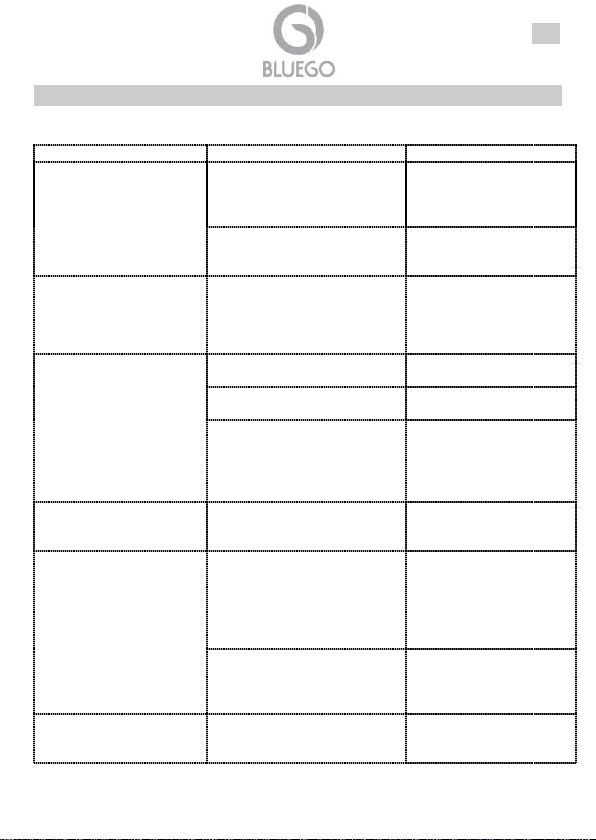
L'accesso ad internet
non avviene
correttamente (browser).
Verificare che l'operatore
eroghi il servizio di accesso
dati verso internet e che il
contratto in essere lo preveda.
Contattare l'operatore
telefonico su come
attivare ed utilizzare la
modalità dati.
I settaggi non sono corretti.
Contattare l'operatore
telefonico per avere i
settaggi corretti.
Che tipo di Garanzia
copre questo
dispositivo?
Leggere attentamente le
condizioni di garanzia
allegate.
Errore sulla SIM.
SIM card è danneggiata.
Contattare l'operatore
telefonico per sostituirla.
La SIM card non è installata
correttamente.
Aprire lo smartphone e
controllare attentamente.
I contatti metallici della Sim
Card sono sporchi.
Aprire lo smartphone,
rimuovere la batteria,
estrarre la SIM e
provvedere ad una pulizia
dei contatti metallici.
Errore nel PIN.
Se avete immesso per 3 volte
consecutive un PIN errato la
scheda sarà inutilizzabile.
Contattare l'operatore
telefonico.
La qualità della ricezione
è scadente.
Lo smartphone è utilizzato in
un'area con un segnale
estremamente debole (ad
esempio per la presenza di
pareti importanti, o in zone
sotto il livello del suolo).
Spostarsi in una zona
dove il segnale è più forte
e provare ad
effettuare/ricevere una
chiamata.
La rete dell'operatore è
congestionata a causa di un
alto numero di chiamate
contemporanee.
Attendere qualche minuto
e/o spostarsi in una nuova
cella, se possibile, e
riprovare.
Lo smartphone non si
accende.
La batteria è completamente
scarica.
Collegare lo smartphone
al caricatore e riprovare
ad accenderlo dopo 15
APPENDICE A: Risoluzione dei problemi e Supporto
Questo capitolo illustra come identificare e risolvere eventuali problemi riscontrati
con l’utilizzo del dispositivo.
15
Page 16
ITA
minuti.
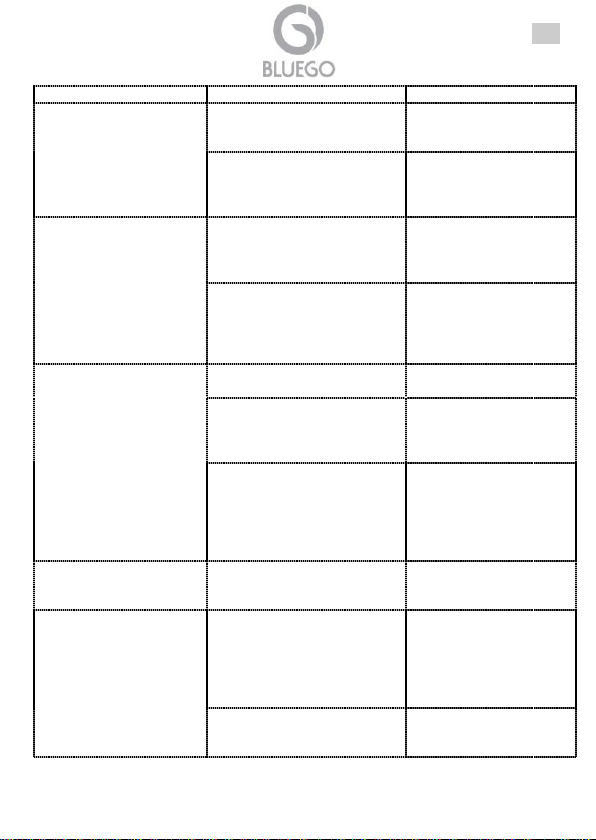
Non riesco ad effettuare
una chiamata.
La funzionalità di blocco
chiamate (Call barring) è
attiva.
Disattivare la funzionalità
di blocco chiamate (Call
barring).
La funzionalità di chiamate
permesse a numeri fissi è
attiva.
Disattivare la funzionalità
chiamate permesse a
numeri fissi (Fixed dialing
number).
Presenza di un forte eco
o rumori durante la
comunicazione.
La rete dell'operatore è
congestionata a causa di un
alto numero di chiamate
contemporanee.
Chiudere la chiamata e
riprovare dopo aver atteso
qualche minuto.
Lo smartphone è utilizzato in
un'area con un segnale
estremamente debole.
Spostarsi in una zona
dove il segnale è più forte
e provare ad
effettuare/ricevere una
chiamata.
Impossibile accedere
alla rete dati.
SIM card è danneggiata/non
attiva/non funzionante.
Contattare l'operatore
telefonico.
La zona non è coperta dal
segnale dati (3G/HSDPA) del
proprio operatore.
Spostarsi in una zona
dove il segnale è presente
e provare nuovamente.
Lo smartphone è utilizzato in
un'area con un segnale
estremamente debole (ad
esempio per la presenza di
pareti importanti, o in zone
sotto il livello del suolo).
Spostarsi in una zona
dove il segnale è più forte
e provare nuovamente.
Alcuni servizi di rete non
sono attivabili.
L'operatore non offre tali
servizi oppure verificare che il
contratto in essere lo preveda.
Contattare l'operatore
telefonico su come
attivare tali servizi.
Il prodotto presenta un
comportamento
anomalo.
Chiudere tutte le applicazioni e
provare a riavviare lo
smartphone.
Spegnere il cellulare,
rimuovere la batteria,
aspettare un paio di
minuti, reinserire la
batteria e riaccendere il
cellulare.
Provare ad effettuare il reset
del prodotto.
Andare in Impostazioni-
>Backup e Ripristino>Ripristino Dati di
16
Page 17
Fabbrica. Questa
operazione cancellerà
l'intero contenuto del
cellulare.
La durata della batteria
non è soddisfacente.
Chiudere tutte le applicazioni
in background non utili e
disattivare i network non
utilizzati (ad esempio
bluetooth/Wi-Fi).
Premere il tasto Home
per qualche secondo e
chiudere le applicazioni
non utilizzate facendole
scivolare sulla parte
destra.
In Impostazioni
disattivare, se non
utilizzati, i moduli
bluetooth e Wi-Fi.
Se la batteria ha effettuato un
alto numero di cicli di carica
scarica potrebbe accumulare
meno carica che non ad inizio
vita.
Cambiare la batteria con
una nuova orginale.
La batteria raggiunge il suo
massimo dopo alcuni cicli di
carica e scarica completi.
Utilizzare il telefono per
alcuni giorni, dopo
l'acquisto, per far salire la
carica immagazzinata
nella batteria.
Quando la ricezione del
segnale è debole, lo
smartphone cercherà
continuamente di connettersi
alla rete consumando buona
parte della carica residua della
batteria.
In Impostazioni
disattivare la/le Sim
oppure spostarsi in una
zona dove il segnale è più
forte.
Lo SmartPhone non
carica la batteria
(benché connesso al
caricatore).
La rete elettrica cui il
caricatore è connesso non è
entro i limiti di tolleranza
accettati dal caricatore.
Utilizzare il caricatore solo
con reti elettriche entro i
limiti di tolleranza riportati
nell'etichetta del prodotto.
Il caricatore utilizzato è fuori
strandard.
Utilizzare il caricatore
originale o almeno con
caratteristiche equivalenti.
Cavo non inserito
correttamente.
Controllare che il cavo sia
saldamente inserito tanto
lato cellulare che
ITA
17
Page 18
caricatore.
La batteria va ricaricata in
condizioni ambientali
comprese tra i -10℃ ed i 55℃.
Spostare lo smartphone in
un ambiente nel rispetto di
queste condizioni.
Impossible aggiungere
un nuovo contatto alla
rubrica.
La memoria della rubrica dello
smartphone è prossima
all'esaurimento.
Cancellare alcuni contatti
dalla Rubrica.
Il PlayStore non è
disponibile.
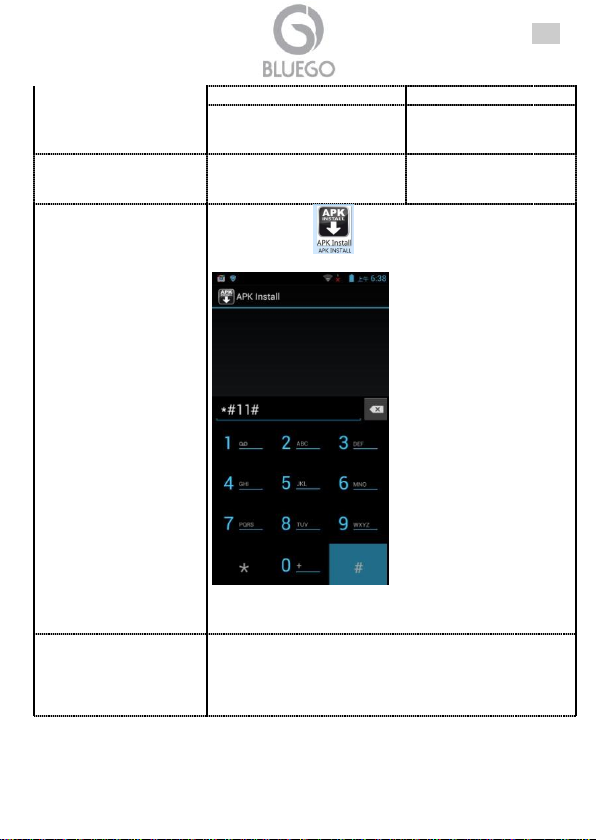
Lanciare l'icona e quindi digitare il codice *#11#,
come da figura seguente:
. L'icona del PlayStore verrà
adesso installata e sarà possibile accedere al market.
Digitando invece il codice *#22# , l'icona del PlayStore
verrà rimossa.
Talune applicazioni
presentano
problematiche minori.
Cosa posso fare?
Android non è un sistema omogeneo come altri ambienti e
pertanto gli sviluppatori non possono testare ogni
funzionalità su tutti gli apparati esistenti. Solitamente è
sufficiente segnalare la problematica per permettere agli
sviluppatori di risolvere l’inconveniente in breve tempo.
ITA
18
Page 19
ENG
Copyright Statement
No part of this publication may be reproduced, stored in a retrieval system, or
transmitted in any form or by any means, whether electronic, mechanical,
photocopying, recording or otherwise without the prior writing of the publisher.
All other names mentioned mat be trademarks or registered trademarks of their
respective owners. Subject to change without notice. No liability for technical errors
and/or omissions.
IMPORTANT SAFETY INSTRUCTIONS
Please read the following instructions carefully in order to avoid any risk or damage
to the device caused by fire or electric power failure:
Only qualified personnel should carry out any technical work on the device.
To prevent risks of electric shock, this unit must only be opened by qualified
service personnel. Power off and disconnect the power supply cable before
opening the unit.
When cleaning, avoid using cleaning sprays or any product containing alcohol or
other flammable liquids.
Avoid overheating. This may reduce the life of the device.
Do not expose it to temperatures over 45 C.
Do not allow the device to come in close contact to a flame.
Do not use the smartphone near water. Do no place any liquids on or close to the
unit.
Check the cable regularly. Damaged cables must be replaced immediately.
Please use the supplied AC/DC Adapter included in the package. If you connect it
to other devices, this product or power supply unit may be damaged.
Do not attempt to service the smartphone yourself, as opening or removing
covers may expose you to dangerous voltage points or other risks as well as ruin
product warranty. Refer all servicing to qualified service personnel.
Install your product carefully Make sure your product and its accessories are
solidly secured when you are using them in a car.
For driving safety, only a passenger should operate the device when the car is in
motion and not the driver. Laws governing th, usage of electronic devices by the
driver may be applicable in your jurisdiction and/or country.
Avoiding mounting your smartphone and its accessories near the airbag opening
areas. Equipment that is not securely fixed in a car could result in serious injury w
the airbag activates.
Your device is a complex electronic product. Keep it protected from falls and
physical shock. Do not subject it to violent movements. Do not paint your product.
Doing so could make movable parts unusable and reduce or limit its functionality
Other products that create a magnetic field could hamper the functionality of your
product.
19
Page 20
ENG
Do not use protective covers or cases that have magnetic closures. Do not allow
your device to stay in prolonged contact with electromagnetic fields.
Avoid interference with other electronic products. Your device radiates radio
frequency (RF) signals that could interfere with the functioning of other electronic
devices that .d insufficiently or incorrectly protected from RF energy (such as
pacemakers, hearing aids, medical devices, or any other device found in your
home or car)
Do not use or store your product in an area that is dusty or dirty. This can
deteriorate the components in your device.
Keep the device away from children. Do not allow children to play with this device.
Normal functioning of the product may be disturbed by electrostatic discharge. If
so, simply reset the product to resume normal operation by following the
instruction manual.
Protect your device from humidity, direct sunlight as well as high and extremely
low temperatures.
Use only accessories that are Bluego branded or certified by manufacturer. The
use of incompatible accessories with the product can cause several problems.
AVOIDING HEARING DAMAGE
This product respects the current regulations for limiting the output volume of
consumer audio devices to a safe level.
By listening to your device with headphones or earbuds at high volumes, you run
the risk of permanent damage to your ears.
Even if you get used to listening at high volumes and it seems normal to you, you
still risk the possibility of damaging your hearing.
Reduce the volume of your device to a reasonable level to avoid permanent
hearing damage.
If you hear ringing in your ears, reduce the volume or shut off your device.
This device has been tested with the supplied earphones.
In order to preserve your hearing, it is advised that you use only the following
headphone models: the earphones supplied with your device, or any other
headphones that respect the current regulations. Other types of headphones may
produce higher volume levels.
So think don’t pump up the volume.
LITHIUM-ION BATTERY CAUTION
This product is equipped with a Lithium-Ion battery. Do not pierce, open,
disassemble it, or use it in a humid and/or corrosive environment. If the battery
leaks and you come into contact with the leaked fluids, rinse thoroughly with water
and seek medical attention immediately. Failure to follow these instructions could
cause the Lithium-Ion battery to leak acid, become hot, explode or ignite and cause
injury and/or damage.
20
Page 21
ENG
Do not put, store or leave your product in or near sources of heat, in direct strong
sunlight, in a high temperature location, in a pressurized container or in a
microwave oven.
Do not leave your battery charging for more than 10hrs.
Doing so runs the risk of overcharging the battery and shortening its total life
span.
Use only an original manufacturer's battery in the device.
If the device is not used for an extended period of time, the battery will slowly
discharge and the device will need to be completely recharged before using
again.
Unplug the charger from the wall when it is not being used.
Handle the batteries and charger with care and respect the recycling instructions.
Use only manufacturer's certified batteries and charger for your product. Using
batteries or a charger that is not certified by the manufacturer can result in serious
injury or damage your product.
Never throw a battery into a fire. See your current local regulations for information
on battery re cycling.
Avoid exposing the battery to high external pressure which could provoke an
internal short-circuit and overheating.
Product complies with 1999/5/CE-2011/65/CE Directive. The declaration in full
version and the technical documentations are available at our headquarters. Keep
the packaging for future references. This equipment may be used in all European
Union contries and in all countries applying Directive 1999/5/CE, without restriction,
with the exception of the following countries:
Italy(IT): For more info, consult the website www.comunicazioni.it
Norway (NO): This subsection does not apply for geographical area within a radius
of 20 km from the center of Ny Alesund.
of this equipment
Declaration of Conformity
Important information for the correct recycle/treatment procedures
21
Page 22
ENG
This Smartphone contains a detachable battery pack, you
should only dispose of it in a designated collection point for
m used batteries
The crossed-out wheeled bin symbol printed on the unit label or unit packaging
indicates that this equipment must not be disposed of as unsorted municipal waste
but it should be collected separately.
The waste of electric and electronic equipment must be treated separately, in order
to ensure that hazardous materials contained inside the equipment are not buried
thereby providing potential future problems for the environment and human health.
Moreover, it will be possible to reuse and recycle some parts of the waste of electric
and electronic equipment, contributing to reduce the quantities of waste to be
disposed of and the depletion of natural resources.
As user of this equipment, you are responsible to return this waste of electronic
equipment to an authorised collection facility set up by your Municipality. More
detailed information on your nearest collection centre can be obtained from your
Municipality or from other competent local entities.
If you are replacing the old equipment with a new equivalent product, the distributor
must take-back the old equipment free of charge on a one-to one basis as long as
the equipment is of equivalent type and fulfilled the same functions as the supplied
equipment.
Your rôle in participating to the separate collection of waste of electric and electronic
equipment is essential to ensure that environmental protection and human health
objectives connected to a responsible treatment and recycling activities are
achieved.
PS.: The above mentioned information are reported herewith in compliance with
Directive 2002/96/CE, which requires a separate collection system and specific
treatment and disposal procedures for the waste of electric and electronic
equipments (WEEE). For further and more detailed information, we invite you to visit
our website at www.bluego.eu.
22
Page 23
ENG
Manual
Congratulations on your purchase this BlueGo smartphone. This manual discusses
how to install and use this device. Please download the full manual on the website
(www.bluego.eu).
1.1 Important Safety Instructions
This manual contains important safety instructions. Please follow all instructions
carefully during installation. Read this manual thoroughly before attempting to
unpack, install or operate.
1.2 Package Contents
Make sure that you have the following items :
SmartPhone
AC/DC Adapter
Micro USB Cable
Multilanguage Quick Start Guide
Earphone
Battery
2nd Battery (BG-G509-W, BG-G509-B, BG-G509K-B)
Cover or Flip Cover
Warranty
If any of the above items are missing, please contact your reseller.
23
Page 24
1.3 OverView
ENG
24
Page 25
ENG
25
Page 26
ENG
Information
Function
1
Power
Turn on/off the device or Suspend/Activate the device.
2
Vol +\ Vol Button
Adjust the volume level.
3
Menu
Display menu options.
4
Home
Back to the Home screen.
5
Back
Back up to the previous page.
6
Earphone Jack
Earphone connection.
7
USB port
Micro USB cable connection.
26
Page 27
ENG
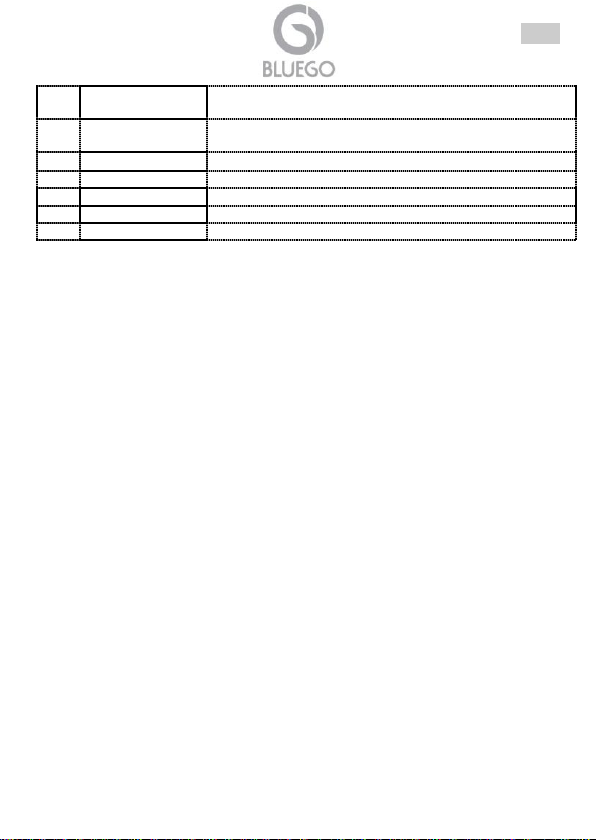
8
Front Camera
Lens
Take pictures while facing the screen.
9
Back Camera
Lens
For taking photos or Video.
10
Flash
To take photos in tow-light conditions.
11
Speaker
To listen to music (or phone call) offered by your phone.
12
Receiver
To receive the voice of the coming calls.
13
Sensor
Light/P Sensor.
14
LED
Led for status.
1.4 Insert SIM1/2 and Micro SD card
Your device must be powered off before exchanging or uninstalling the battery
(press and hold the Power Button, and then tap on Power off to power off the
device).
Hold the side of device tightly with one hand and lift up the back cover at its
buckle with the other hand.
Hold the side of device tightly with one hand and pull up the battery handle with
the other hand.
Taking out the battery.
Insert Micro SD card into the Micro SD card slot with the metallic pins facing
downwards. Push the card until it locks into place. This device can manage up to
32GB.
BG-A451-W/B: Installing the SIM cards (please make sure the gold contact area
on the card is facing downwards).
BG-G509-W/B or BG-G509K-B or BG-V503-K: Installing the SIM cards (please
make sure the gold contact area on the MicroSIM2 card is facing downwards).
1.5 Charging and Power On
Insert one end of USB cable into the USB port on the device and plug the power
adapter to the electrical socket.
Usually it takes approximately 4-5 hours to fully charge the device. Operating the
device while charging with the AC adapter may extend the time of full charging.
Press and hold the Power Button for a few seconds. It will automatically enter the
Home screen after start-up screen (usually after 30 seconds).
27
Page 28
ENG
If the device is not used for an extended period of time, the
battery will slowly discharge and the device will need to be
completely recharged before using again.
1.6 Power on/Sleep Mode/Power off
Power ON: Press and hold the Power Button for a few seconds. It will
automatically enter the Home screen after start-up screen (usually after 30
seconds).
Sleep Mode: Press the Power Button once to enter sleep mode and press it
again to awake the device.
Power OFF: Press and hold the Power Button, and then tap on Power off to
power off the device.
1.7 Support
For technical questions and support, please contact our help-desk by ticket on
http://www.bluego.eu. For generic informations, please send an e-mail to
[email protected]. For presales informations, please send an e-mail to
[email protected].
28
Page 29
ENG
Problem
Reason
Solution
Can’t access Internet
normally when using
browser.
The network operator doesn’t
provide this service or you
hasn’t applied this service
Please contact and
consult your network
operator for information of
how to apply and use this
service.
The setting is not correct.
Please refer to specific
introductions of the
browser.
SIM card error.
SIM card is damaged.
Please contact your
network operator.
The SIM card isn‘t installed
properly.
Check the SIM card.
The metal surface of the SIM
card is dirty.
Clean it with clean cloth.
PIN code error.
Enter incorrect PIN codes for
three times in succession.
Contact your network
service provider.
Poor receiving.
The mobile phone is used in
bad signal receiving area, for
example, near tall building or
in basement, the radio waves
can’t reach these area
effectively.
Please make or answer a
call in places with strong
signal
The mobile phone is used
when communication is busy
and lines are congested.
Try to avoid using mobile
phone when
communication is busy
Can’t switch on.
Battery is too low.
Charge the battery.
Can’t make a call.
Call barring is active.
Cancel call barring.
The fixed dialing number
feature is used.
Cancel the fixed dialing
number settings.
Echoes or noises.
The trunk line of network is in
bad condition. It is a regional
problem.
Hang off the call and dial
again. Choose another
better line.
In some areas, the call lines
are in bad condition.
Can’t connect to
SIM card is invalid.
Please contact your
Appendix A: Troubleshooting
Please refer to the following list of problems and solutions if there is any abnormity
when you use the mobile phone. Please contact the distributor or service provider if
it still doesn’t work.
29
Page 30
ENG
network.
network operator.
Beyond service area.
Move to service area of
your network operator.
Weak signal.
Move to a place with
strong signal and try
again.
Failed to set up some
features.
Your network service provider
does not provide the services,
or you haven’t subscribed
them.
Contact your network
service provider.
Shorter standby time.
The standby time is relevant to
network settings.
In poor reception areas,
turn off your phone
temporarily.
Replace the batteries.
Change with a new
battery.
When no signals are received,
your phone will continue
searching for base stations,
thus consuming a large
amount of battery power and
reducing standby time.
Use your phone at strong
signal areas or Turn off
the phone temporarily.
Can’t charge.
The voltage is not within rated
range of the charger
Use an allowed voltage
within the rated range of
the charger.
Nonstandard charger is used.
Use a charger specially
designed for the mobile
phone.
Poor contact.
Check whether the plug is
connected properly.
Charge the battery when
ambient temperature is lower
than -10℃ or above 55℃.
Change the environment.
Failed to add contacts to
phonebook.
The storage space of
phonebook is used up.
Delete some contacts
from the phonebook.
Playstore icon isn't
available.
Click on this and input *#11#
30
Page 31
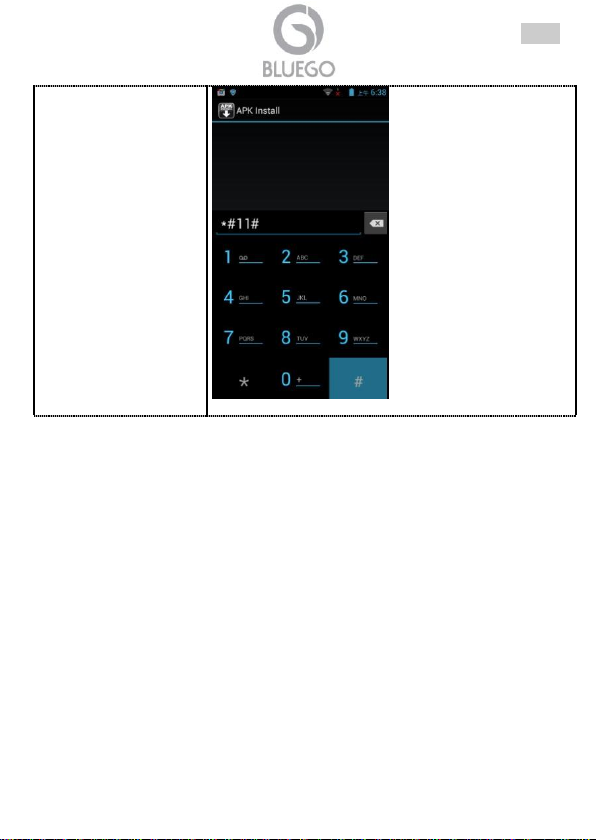
,play store will be appearance
(input *#22# ,play store will be hidden).
ENG
31
Page 32
FRA
Copyright
Tout droits réservés. Sont interdites, la reproduction, la transmission, la
transcription, la mémorisation dans un système de sauvegarde où la traduction
dans une autre langue ou en langage informatique quels qu’ils soient, de la
présente publication, sous quelque forme que ce soit ou quelque en soit le moyen,
électronique, mécanique, magnétique, optique, chimique, manuel ou de tout autre
genre, sans avoir obtenu préalablement l’autorisation de notre entreprise.
Non-responsabilité
La présente entreprise n’admet pas de requêtes ni de garantie, explicites ou
implicites, au sujet du contenu et de manière spécifique exclue la possibilité de
garantie, communicabilité ou adaptabilité pour des finalités particulières. Le logiciel
décrit dans le présent manuel est vendu ou concédé en licence “tel quel”. Si les
programmes devaient présenter des problèmes après l’achat, l’acquéreur (et non
pas la présente entreprise, son distributeur ou concessionnaire) est tenu de
prendre en charge tous les coûts de manutention ainsi que les coûts dus à des
dommages accidentels ou des conséquences dérivants d’un défaut du logiciel. La
présente entreprise se réserve en outre le droit de revoir le contenu de cette
publication et d’y apporter des modifications de temps en temps, sans obligation
d’informer les utilisateurs de ces changements. Nous avons fait tout notre possible
afin d’éviter la présence d’erreurs dans le texte, les images, les tableaux présents
dans ce manuel et dans le Cd-Rom. Cependant, nous ne pouvons pas garantir
l’absence totale d’erreurs et/ou d’omissions, nous vous remercions donc de nous les
signaler et vous prions de nous en excuser. Enfin, nous ne pouvons être tenus pour
responsables dans quelque perte que ce soit, dommage ou incompréhension à la
suite directe ou indirecte de l’utilisation de notre manuel, le logiciel Cd-Rom et/ou
disque dur. Toutes les marques ou noms de produits mentionnés dans le présent
manuel sont des marques commerciales et/ou brevetées par leurs propriétaires
respectifs.
Marquage CE
Cet appareil peut causer des interférences radio, dans ce cas nous vous invitons à
prendre les contre-mesures appropriées.
32
Page 33
FRA
Attention
Ce manuel contient des informations importantes à propos de la sécurité. Suivez
attentivement les instructions pendant l’installation. Lisez les instructions avant de
déballer, installer et mettre en fonction cet appareil.
Adressez -vous uniquement à des personnes qualifiées pour réparer votre produit
Bluego. En faisant appel à des personnes non qualifiées pour réparer votre
produit, vous risquez de l’endommager et de voir sa garantie annulée.
N’essayez pas de démonter, ni désassembler votre Bluego.
Pour prévenir les risques de feu ou de choc électrique, installez dans une pièce
dont la température (max 45°C) et l’humidité sont contrôlées.
Gardez le produit à l’abri de tout environnement humide et/ou corrosif.
Maintenir l'appareil à l'écart des enfants.
Eviter les Alterations Auditives
Ce produit respecte la législation en vigueur en ce qui concerne la limitation du
volume des appareils audio des consommateurs pour maintenir un volume de sortie
à un niveau non nocif pour la santé.
En écoutant votre appareil avec un casque ou des écouteurs à des volumes
élevés, vous risquez de causer des dommages irréversibles à vos oreilles.
Même si vous avez l'habitude d'écouter à un volume élevé et que cela vous
semble normal, vous courez toujours le risque de causer des dégâts à vos
oreilles.
Réduire le volume de votre appareil à un niveau raisonnable pour éviter de
dégâts irréversibles. Si cela résonne dans vos oreilles, réduire le volume ou
éteindre votre appareil.
Cet appareil a été testé avec les écouteurs fournis.
Pour préserver votre audition, il est conseillé d'utiliser seulement les modèles
d'écouteurs Bluego. D'autres types d'écouteurs peuvent produire des niveaux de
volume plus élevés.
Mises en garde sur la batterie Lithium
Ce produit est équipé d’une batterie Lithium
En cas de fuite et de contact avec du liquide s’échappant de la batterie, rincez
soigneusement à l’eau la zone exposée et consultez immé diatement un médecin.
Le non respect de ces recommandations risquerait de provoquer des fuites d’acide
ou une surchauffe de la batterie, laquelle pourrait alors s’enflammer ou exploser et
causer des dommages matériels et/ou corporels sévères.
La batterie s’épuisera si elle n’est pas utilisée pendant une période prolongée
après son chargement.
N’essayez pas de percer la batterie, de l’ouvrir ou bien de la démonter.
La batterie ne doit pas être exposé à une température supérieure à 45°C.
33
Page 34
FRA
Ne chargez pas systématiquement votre batterie entre chaque utilisation.
Attendez que la batterie soit déchargée pour la recharger, vous augmenterez
ainsi s a durée de vie.
Ne jetez jamais vos batteries au feu, elles risqueraient d'exploser
Ce produit est conforme à la directive 1999/5/CE-2011/65/CE. Le formulaire de
déclaration et de documentation technique complète est disponible à notre bureau.
Gardez la boîte d'emballage pour référence future.
Ce matériel peut être utilisé dasn tous les pays de l’Union Européenne et dans tous
les pays appliquant la Directive 1999/5/CE, sans limitations, à l’exception des pays
suivants :
Italie :Cet appareil est conforme à l’interface radio nationale et aux exigences de la
table d’allocation des fréquences. L’utilisation de ce produit sans fil en dehors du
cadre de la propriété de l’acquéreur nécessite une autorisation générale. Pour da
plus amples informations, consultez le site www.comunicazioni.it
Norvège (NO): il est interdit d’utiliser cet appareil (20Km) proche de Ny Alesund.
Déclaration de Conformité
équipement
Le symbole représentant une poubelle sur roues barrée d'une croix, qui est imprimé
sur l'étiquette ou l'emballage du produit, indique que cet équipement ne doit pas
être éliminé avec les déchets municipaux non triés mais doit faire l'objet d'une
collecte sélective.
Les déchets d'équipements électriques et électroniques doivent être traités
séparément afin d'éviter que les matières dangereuses contenues dans ces
équipements ne soient enterrées, ce qui pourrait occasionner des risques futurs
pour l'environnement et la santé humaine. De plus, certains éléments des déchets
d'équipements électriques et électroniques pourront être réutilisés et recyclés, ce
qui contribuera à réduire les quantités de déchets à éliminer et à limiter
l'épuisement des ressources naturelles.
En tant qu'utilisateur de cet équipement, vous êtes chargé de rapporter ce déchet
d'équipement électronique à un centre de collecte autorisé par votre commune.
Information importante sur le recyclage et le traitement de cet
34
Page 35
FRA
Vous pouvez obtenir, auprès de votre commune ou du groupement auquel elle
appartient, de plus amples informations sur votre centre de collecte le plus proche.
Si vous achetez un équipement électrique ou électronique, le distributeur reprendra
gratuitement l'équipement usagé que vous lui cèderez, dans la limite de la quantité
et du type d'équipement vendu.
Votre participation à la collecte sélective des déchets d'équipements électriques et
électroniques est essentielle pour garantir que les objectifs de protection de
l'environnement et de la santé humaine seront atteints.
PS: Les informations susmentionnées sont fournies ici en conformité avec la Directive
2002/96/CE et le Décret n° 2005-829 du 20 juillet 2005 relatif à la composition des équipements
électriques et électroniques et à l'élimination des déchets issus de ces équipements qui prévoient
des procédures de collecte sélective et de traitement et d'élimination spécifiques aux déchets
d'équipements électriques et électroniques. Pour de plus amples informations, nous vous invitons
à consulter notre site Internet à l'adresse suivante www.bluego.eu.
35
Page 36
FRA
Manuel Utilisateur
Ce manuel a été rédigé pour une utilisation avancée du produit, pour cette raison y
sont abordés des sujets qui peuvent rebuter certains utilisateurs.
Ce guide d’installation rapide vous permet d’installer et de configurer le smartphone
en suivant des paramètres standards. Pour plus de précisions reportez-vous au
manuel sous format électronique (PDF) disponible sur le web (www.bluego.eu).
1.1 Introduction
Ce manuel contient d’importantes informations de sécurité. Suivez attentivement les
instructions pendant l’installation. Nous vous prions de lire attentivement ce manuel
avant l’installation et la mise en service de votre smartphone, en vous rappelant que
la garantie n’est plus valable si toutes les normes et les prescriptions indiquées
dans ce manuel ne sont pas respectées.
1.2 Dans la Boîte
Une fois ouverte, vous devriez trouver les éléments suivants:
SmartPhone
Adaptateur secteur AC/DC
Câble Micro USB
Guide Rapide
Écouteur
Batterie
Deuxième Batterie (BG-G509-W, BG-G509-B, BG-G509K-B)
Cover ou Flip Cover
Coupon de Garantie
Si vous constatez qu’un de ces composants manque, merci de vous adressez à
votre revendeur.
36
Page 37
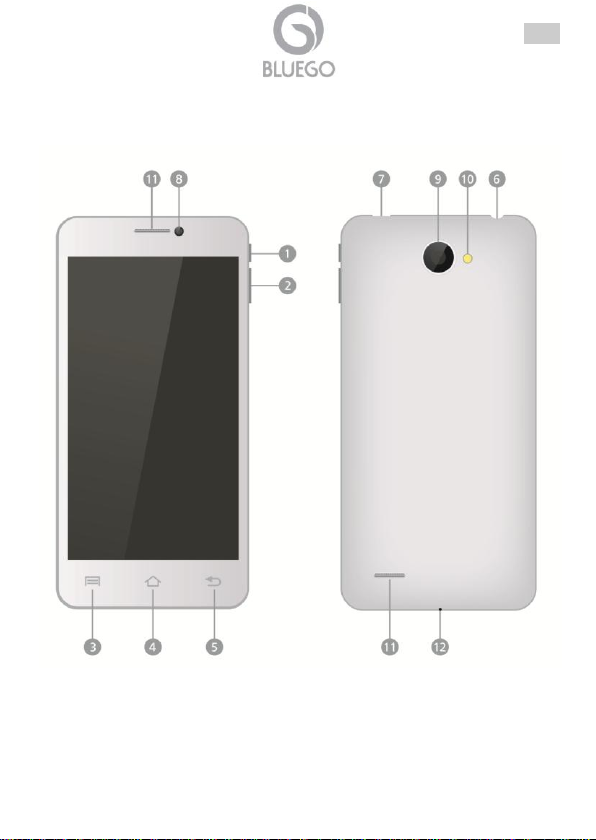
1.3 Présentation du Produit
FRA
37
Page 38
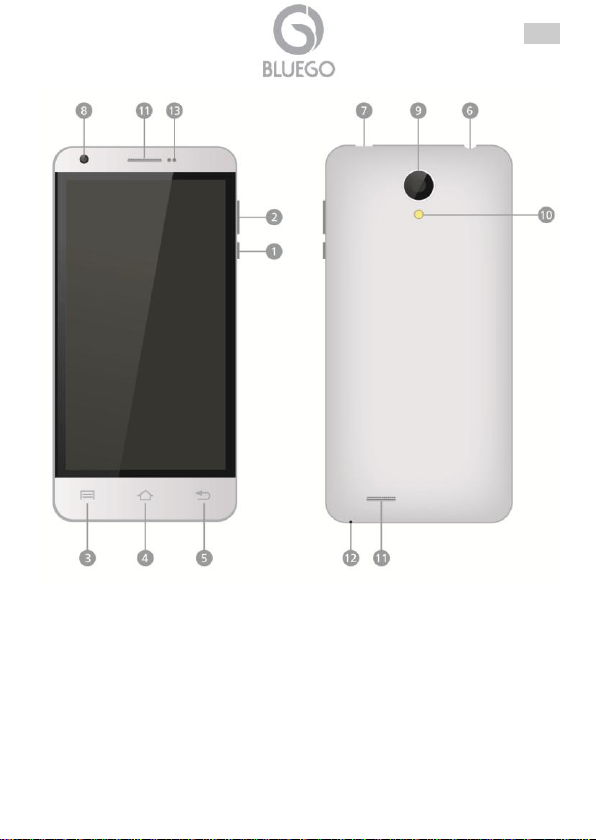
FRA
38
Page 39
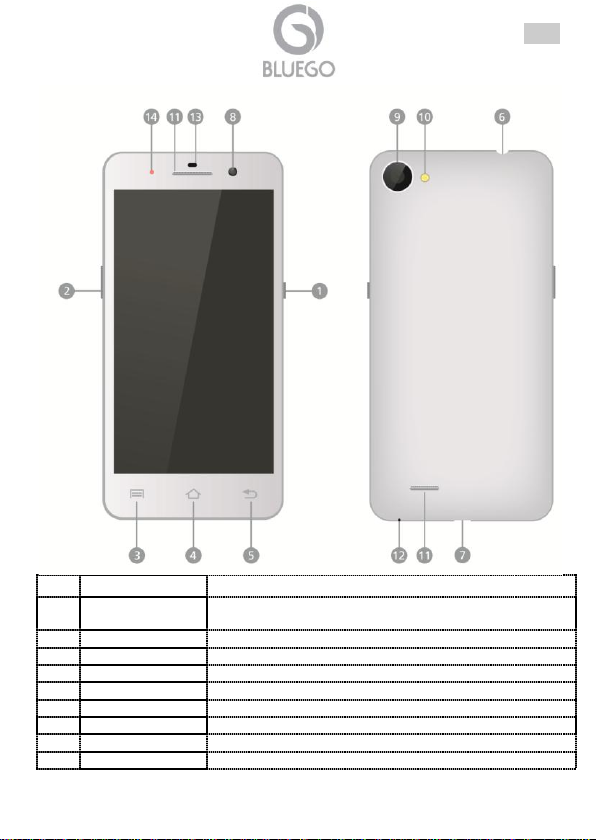
FRA
Information
Fonctionnalité
1
Bouton
Alimentation
Pour Allumer/ Éteindre ou pour Suspendre/Activer le
produit.
2
Boutons +/-
Pour changer le niveau de volume.
3
Touche Menu
Pour afficher à l'écran la liste des options disponibles.
4
Touche Accueil
Pour retourner à l'écran d'accueil.
5
Touche Retour
Pour retourner à la page précédente.
6
Prise Audio
Prise pour la casque d'écoute (écouteur).
7
Port USB
Pour la connexion du câble Micro USB.
8
Objectif (avant)
Pour prendre des photos face à l'écran.
9
Objectif (arrière)
Pour prendre des photos/video.
39
Page 40
FRA
10
Flash
Pour prendre des photos en conditions d'éclairage
faible.
11
Haut Parleur
Pour écouter la musique ou la voix des appels entrants.
12
Microphone
Pour capturer les sons.
13
Capteur
14
LED
Pour voir l'état de fonctionnement.
Si vous n'utilisez pas votre téléphone depuis longtemps, il
déchargera graduellement la batterie. Pour utiliser votre
appareil, vous devez d'abord recharger la batterie.
1.4 Insérer les cartes SIM et la carte Micro SD
Tout d'abord, après avoir éteint le téléphone, vous devez ouvrir l'appareil en
retirant la coque (couvercle) arrière (en utilisant la rainure).
À ce stae il faut enlever la batterie.
Insérez la carte Micro SD dans le logement de la carte Micro SD avec les broches
métalliques orientées vers e bas. Poussez la carte jusqu'à ce qu'elle se verrouille
en place. Le produit peut gérer jusqu'à 32GB. Pour enlever la carte micro SD, il
suffit de la retirer du logement.
BG-G509-W/B, BG-G509K-B et BG-V503-K: Inserez les cartes SIM. Veuillez vous
assurer que la zone de contact orée de ta carte SIM soit orientée vers le bas
(MicroSIM2).
BG-A451-W/B: Inserez les cartes SIM. Veuillez vous assurer que la zone de
contact orée de ta carte SIM soit orientée vers le bas (pour toutes les 2 SIM).
Pour terminer il suffit de replacer la batterie et la coque (couvercle).
1.5 Allumage et Chargement de la Batterie
Insérez une éxtrémité du câble USB sur le port USB de l'appareil et branchez
l'adaptateur secteur sur la prise électrique.
Normalement cela prend environ 4/5 heures pour charger complètement
l'appareil. Le fonctionnement de l'appareil pendant la charge avec l'adaptateur
secteur peut prolonger la durée de charge.
1.6 Allumer/Mode veille/Éteindre
Allumer: Appuyez et maintenez enfoncé le Bouton d'Alimentation pour quelques
secondes.
40
Page 41
FRA
Mode veille: Appuyez sur le Bouton d'Alimentation une fois pour entrer en mode
veille et appuyez sur ce bouton à nouveau pour réveiller l'appareil.
Éteindre: Appuyez et maintenez enfoncé le Bouton d'Alimentation, puis appuyez
sur Éteindre pour éteindre l'appareil.
1.7 Support
Pour tous problèmes ou renseignements vous pouvez contacter le service
d’assistence web www.bluego.eu.
Pour avoir des info vous pouvez contacter [email protected] ou
41
Page 42
ANNEXE A: Dépannage et assistance
Situation
Contrôle
Solution
Lo smartphone non si
accende.
Le smartphone ne
s'allume pas.
La batterie est complètement
déchargée.
Connectez votre
smartphone avec le
chargeur et essayer de le
mettre en marche après
15 minutes.
Le produit a un
comportement étrange.
Fermez toutes les applications
et essayez de redémarrer
votre smartphone.
Éteignez le téléphone,
retirez la batterie,
attendez quelques
minutes, remettre la
batterie et redémarrer le
téléphone.
Essayez de réinitialiser le
produit.
Allez dans Paramètres->
Sauvegarde et
rèinitialiser-> Restaurer
valeurs d'usine. Cette
opération va effacer tout
le contenu de la cellule.
La durée de vie de la
batterie n'est pas
satisfaisante.
Fermez toutes les applications
d'arrière-plan qui ne sont pas
utiles et désactiver le réseau
pas utilisé (par exemple
Bluetooth / Wi-Fi).
Appuyez sur le bouton
Home pendant quelques
secondes et fermer les
applications qui ne sont
pas utilisés en glissant sur
le côté droit.
Sous Paramètres,
désactivez le Bluetooth
et/ou le Wi-Fi.
Si la batterie a réalisé un
grand nombre de cycles de
charge et décharge peut
accumuler moins de charge
que le début de la vie.
Changer la batterie.
La batterie atteint son
maximum au bout de quelques
cycles de charge et de
décharge.
Quand la réception du signal
est faible, le smartphone veut
Déplacer vers une autre
zone où le signal est plus
Ce chapitre explique comment identifier et résoudre les problèmes avec l'utilisation
de l'appareil.
FRA
42
Page 43
se se connecter au réseau en
consommant beaucoup de la
charge de la batterie.
fort
ou desactiver la SIM.
Le Playstore n'est pas
disponible.
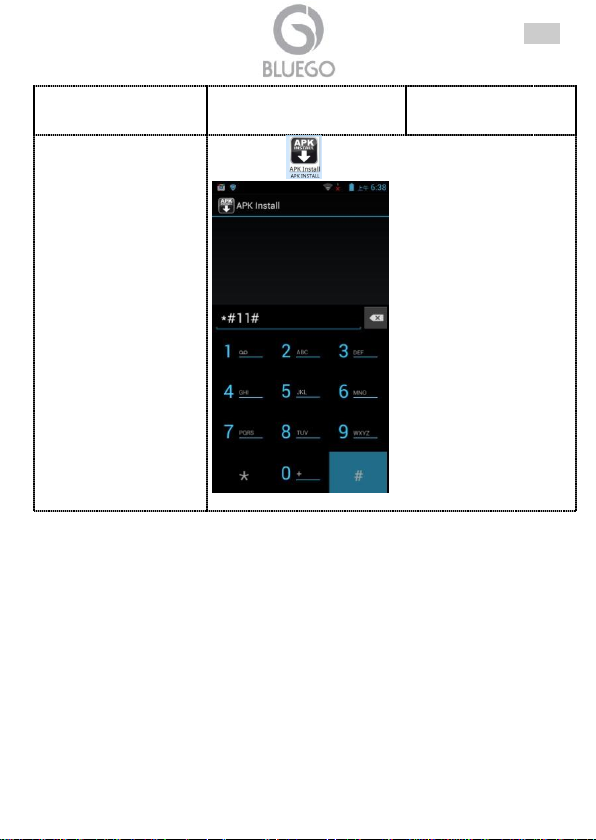
Cliquez sur et puis tapez *#11#
,à ce stade le playstore sera
disponible (tapez *#22#, pour effacer le playstore).
FRA
43
Page 44
ESP
ADVERTENCIA
Hemos hecho todo a nuestro alcance para evitar que en el texto, las imágenes y
recuadros presentes en este manual, y también en el software y en el hardware
hayan errores. Sin embargo no podemos garantizar que no hayan presente errores
y/o omisiones. En fin no podemos ser considerados responsables por cualquier
perdida, daño o incomprensión cumplidos directa o indirectamente como resultado
de un incorrecto utilizo del manual, del software y/o del hardware.
El contenido de este manual es suministrado exclusivamente para uso informal,
puede ser cambiado sin previo aviso (para tal fin invitamos a consultar el sitio
www.bluego.eu para encontrar las actualizaciones) no se debe interpretar como un
compromiso de nuestra parte ya que no nos asumimos alguna responsabilidad por
errores, omisiones o imprecisión que se pueda encontrar en este manual. Ninguna
parte de este manual puede ser replicada o transmitida en otra forma, ni con otro
medio, sea electrónico o mecánico, incluso fotocopias, replicas o registraciones en
un sistema de rescate, ni traducida en otro idioma o forma sin un explicito permiso
escrito de nuestra parte. Todos los nombres de productores y de los productos y
cualquier marca, registrado o no, mencionados en este manual son usados con el
solo objetivo identificativo y permanecen propiedad exclusiva de sus respectivos
propietarios.
Informaciones generales y de Seguridad
Solo un personal autorizado, con el fin de evitar descargas eléctricas está
autorizado a intervenir con el aparato.
La limpieza del aparato debe ser efectuada evitando de utilizar spray detergente
y soluciones que contienen alcohol o líquidos inflamables.
Es fundamental evitar que el aparato se sobrecaliente. Podría reducir
drásticamente la vida del aparato.
Es oportuno proteger el aparato de una humedad elevada, radiación solar directa
y temperaturas extremamente bajas o altas (no superiores a 45°C).
No depositar líquidos sobre o alrededor del aparato.
Utilizar solo los cables específicos para las aplicaciones. Utilizar los puertos
indicados sin forzar.
Verificar regularmente que todos los cables de conexión no sean dañados. En el
caso que lo sean sustituirlos inmediatamente.
Verificar que en la toma de conexión no entren objetos y/o cables extraños.
Utilizar exclusivamente el adaptador de red AC/DC incluido en la caja. En caso
contrario el aparato podría manifestar malfuncionamientos.
Utilizar solo accesorios (antenas y/o alimentadores) incluidos en la caja.
Dejar al menos 30cm de distancia entre la antena del dispositivo y el usuario.
Ciertos aparatos tienen antena/s integrada/s.
No utilizar la misma toma de corriente para conectar otros aparatos que no sean
el dispositivo en cuestión.
44
Page 45
ESP
No abrir nunca el housing plástico del dispositivo ni trate de repararlo solo.
Si el dispositivo resulta demasiado caliente, apáguelo inmediatamente y póngase
en contacto con un personal calificado.
No utilice el SmartPhone mientras conduce el coche, podría ser peligroso.
Cuando es utilizado en el coche asegúrese que este firmemente fijado a la
estructura de soporte. El SmartPhone no debe montarse cerca de las bolsas de
aire (airbag).
El SmartPhone es un dispositivo extremamente complicado y compuesto de
decenas de módulos diferentes. Cada golpe o caída podría dañar el producto.
Tenga mucho cuidado en este sentido.
Objetos que producen un campo magnético podrían perjudicar el rendimiento del
dispositivo.
No utilice Cover y/o estructuras protectoras con cierres magnéticos. No dejar el
dispositivo en contacto con objetos que emiten un campo electromagnético.
El dispositivo emana campos electromagnéticos y podría interferir con otros
objetos sensibles a estos campos (como pacemaker, aparatos acústicos,
dispositivos médicos). Contactar los productores de tales dispositivos para
resolver los problemas de interferencia.
El SmartPhone debe estar fuera del alcance de los niños, los cuales no deberían
jugar con este dispositivo.
Descargas electroestáticas podrían comprometer el funcionamiento del
SmartPhone. En tal caso apague el dispositivo, quitar la batería por al menos un
minuto y encienda nuevamente el dispositivo.
Daños a los oídos
Este dispositivo respeta las normas vigentes sobre las limitaciones del volumen de
salida de los dispositivos audio a un nivel seguro.
Escuchando el dispositivo a un elevado nivel de volumen con auriculares o
audífonos se corre el riesgo de generar daños permanentes al oído. Reducir el
volumen del dispositivo a un nivel razonable para evitar que este tipo de
problemas al aparato auditivo.
Si sentir un silbido en los oídos, es oportuno reducir inmediatamente el volumen
del dispositivo y/o apagarlo.
El dispositivo ha sido probado con los auriculares suministrados, el utilizo de
otros accesorios (auriculares/audífonos) puede producir daños al oído.
En el caso que utilice auriculares/audífonos de otros productores, se aconseja
que estos respeten las normas en vigor.
Advertencia sobre la batería
Este SmartPhone tiene una batería a iones de Litio. Esta batería no debe ser
perforada, abierta, desmontada o utilizada en ambientes húmedos o corrosivos.
45
Page 46
ESP
Las baterías utilizadas en los productos BlueGo son
removibles, por lo tanto deben ser extraídas y colocadas en
los puntos designados para la recogida de este material.
Para disfrutar de las condiciones de garantía de
mejoras asociadas al producto es coportuno proveer a
la registración del mismo en el sitio www.bluego.eu
dentro de 15 días a partir de la fecha de comprado. Si
no se registra dentro del periodo establecido hará que
el producto tengo solo las condiciones estándar de
garantía.
En caso de contacto con fluidos salidos de la batería es oportuno lavar
inmediatamente con abundante agua la parte en cuestión y acudir inmediatamente
a un medico. Por favor observe escrupulosamente las instrucciones de este
manual, la falta de cuidado puede provocar una perdida de acido de la batería o un
excesivo sobrecalentamiento hasta la explosión y/o incendio con consecuentes
lesiones y/o daños.
No dejar nunca la batería en carga por largo tiempo (más de 10 horas). Esto
podría provocar una sobrecarga y así disminuir la duración del servicio.
Un largo periodo de inutilizo del SmartPhone comporta a la descarga completa
de la batería. Antes de encender el dispositivo es oportuno cargar la batería por
algunas horas.
Desconectar el cargador de la toma eléctrica cuando no sea utilizado para cargar
el SmartPhone.
Utilizar solamente baterías originales del productor del SmartPhone.
Utilizar solamente el cargador original suministrado.
El utilizo de cargadores y/o baterías no originales podrían dañar el producto e
invalidar la garantía.
El uso de accesorios no originales podría causar problemas de diversa
naturaleza (descargas eléctricas, fuego, etc.).
No arroje nunca la batería al fuego, en zonas con temperatura alta o cerca de
objetos que emiten calor. Las baterías si se calientan excesivamente podrían
explotar.
La batería no debe ser forzada o escachada por ninguna razón (esto podría
provocar un corto circuito interno).
La batería no debe ser colocada en ambientes donde la temperatura sea superior
a los 45°C.
46
Page 47
ESP
Producto cumple con la Directiva 1999/5/CE-2011/65/CE. La declaración en versión
completa y la documentación técnica está disponible en nuestra sede. Mantener el
envase para futuras referencias.
Este dispositivo puede ser utilizado en todos los países de la Comunidad
Económica Europea sin restricción alguna y en aquellos, que aún sin permanecer a
esta, aplican la Directiva 1999/5/CE, a excepción de:
Italia: Este dispositivo es conforme la normativa de Radio Nacional y respeta los
requisitos de Asignación de las Frecuencias. El uso de este dispositivo fuera del
uso doméstico necesita de una autorización general. Para más información
diríjanse al sitio: www.comunicazioni.it
reciclaje/tratamiento de este aparato
El símbolo del contenedor de basura tachado sobre la etiqueta o envase indica que
este aparato no debe ser eliminado como residuo urbano no seleccionado sino que
debería ser recogido de modo selectivo.
Los residuos de aparatos eléctricos y electrónicos deben ser tratados de modo
selectivo, en orden de asegurar que los materiales peligrosos contenidos en los
aparatos no sean quemados causando potenciales problemas futuros para el medio
ambiente y la salud humana. Por otro lado, será posible la reutilización y reciclaje
de algunas partes de los residuos de aparatos eléctricos y electrónicos,
contribuyendo a reducir las cantidades de residuos a eliminar y el agotamiento de
los recursos naturales.
Como usuario de esto aparato, usted es responsable de la devolución de este
residuo de aparato electrónico en la instalación de recogida oficial establecido por
su Municipio. Para más información sobre las instalaciones de recogida más
próximas consulte en sus entidades locales.
Si usted reemplaza un antiguo aparato por un producto nuevo equivalente, el
distribuidor deberá recepcionar el antiguo de forma gratuita y uno por uno siempre
que este aparato sea de tipo equivalente y realice las mismas funciones que el
aparato suministrado.
Declaración de Conformidad
Información importante para el correcto procedimiento de
47
Page 48
ESP
Su papel en la recogida selectiva de los residuos de aparatos eléctricos y
electrónicos es esencial para asegurar que los objetivos de protección del medio
ambiente y de la salud humana, en conexión con un tratamiento y reciclaje
responsable, sean logrados.
PD: la información arriba mencionada ha sido redactada en concordancia con el RD
208/2005 de 25 de Febrero, el cual establece la recogida separada y el diferente
tratamiento y eliminación de los residuos de aparatos eléctricos y eléctronicos. Para
información adicional y en más detalle le invitamos a visitor nuestra página web
www.bluego.eu
48
Page 49
ESP
Manual de Uso
Le agradecemos por haber escogido un SmartPhone de la familia Bluego. Se
aconseja de leer este documento para el correcto utilizo del producto.
1.1 Introducción al producto
Seguir atentamente todas las instrucciones durante la instalación. Leer atentamente
todo el manual antes de iniciar la instalación del dispositivo.
1.2 Contenido de la caja
Una vez abierta la caja de cartón debería haber los siguientes componentes:
SmartPhone
Alimentador AC/DC
Cable micro USB
Guía rápida multilingüe
Auriculares
Batería
Batería de reserva
Cover/Flip Cover adicional
Cupón de garantía
Aviso legal y de seguridad
En el caso que falte alguno de estos componentes recurrir inmediatamente al
venderor.
49
Page 50
1.3 Panorámica del dispositivo
ESP
50
Page 51
ESP
51
Page 52
ESP
Información
Funcionalidad
1
Botón de
encendido
Permite de encender/apagar el dispositivo y de meterlo
en modalidad stand-by.
2
Volumen +/-
Permite de regular el nivel del volumen.
3
Menú
Visualiza las opciones del menú.
4
Home
Regresa a la pantalla principal.
5
atrás
Regresa a la pantalla anterior.
6
Toma de
Auriculares
Utilizar para conectar los auriculares.
52
Page 53
ESP
7
Puerto USB
Utilizar para recargar la batería y/o intercambio de
datos.
8
Objetivo cámara
anterior
Permite tomar fotos, efectuar video llamadas y grabar
videos.
9
Objetivo cámara
posterior
Permite tomar fotos y grabar videos.
10
Flash
Permite tomar fotos en condiciones de baja
luminosidad.
11
Altoparlante
Permite escuchar sonidos reproducidos por el
SmartPhone.
12
Micrófono
Permite capturar sonidos.
1.4 Inserir la SIM y la tarjeta Micro SD
En primer lugar, después de haber apagado el celular, abrir el dispositivo
extrayendo la Cover posterior (mediante la ranura presente cerca de la cámara
posterior).
Extraer la batería
Inserir la tarjeta MicroSD (soporta al máximo 32GB) útil para aumentar la
memoria interna del dispositivo. Se asegure que los contactos metálicos estén
hacia abajo. Empuje la tarjeta de expansión hasta el fondo. La tarjeta puede ser
removida simplemente jalándola.
BG-G509-W/B, BG-G509K-B: y Inserir la/s SIM en los Slot. El dispositivo tiene 2
alojamientos para SIM. El alojamiento para la SIM1 (dimensión estándar, soporta
GSM/WCDMA) mientras el alojamiento para la SIM2 (MicroSim, soporta
GSM/WCDMA). Se asegure que los contactos metálicos dorados estén hacia
arriba para la SIM1 y hacia abajo para la MicroSIM2.
BG-V503-K: y Inserir la/s SIM en los Slot. El dispositivo tiene 2 alojamientos para
SIM. El alojamiento para la SIM1 (dimensión estándar, soporta GSM/WCDMA)
mientras el alojamiento para la SIM2 (MicroSim, solo GSM). Se asegure que los
contactos metálicos dorados estén hacia arriba para la SIM1 y hacia abajo para
la MicroSIM2.
BG-A451-W/B: y Inserir la/s SIM en los Slot. El dispositivo tiene 2 alojamientos
para SIM. El alojamiento para la SIM1 (dimensión estándar, soporta
GSM/WCDMA) mientras el alojamiento para la SIM2 (dimensión estándar,
soporta GSM/WCDMA). Se asegure que los contactos metálicos dorados estén
hacia arriba hacia abajo para la SIM1 y SIM2.
Reinsertar la batería y posicionar la Cover posterior, cerrándola firmemente.
53
Page 54
1.5 Encendido y carga de la batería
Si el SmartPhone no se utiliza por un largo periodo de
tiempo, la batería perderá la carga. Antes de reutilizar el
dispositivo recargue la batería conectando el dispositivo al
cargador.
Insertar una extremidad del cable USB suministrado al puerto USB del dispositivo
(identificativo n°7) y la otra parte al cargador. Conectar el cargador a la toma
eléctrica.
El proceso de carga de la batería requiere varias horas, dependiendo de la carga
residual. En el caso que se decida usar el SmartPhone durante este proceso, el
tiempo de recarga podría durar más.
1.6 Encendido/Suspensión/Apagado
Encendido: Para encender el dispositivo es necesario mantener presionado el
botón de encendido por algunos segundos. Después de algunos segundos el
SmartPhone visiona la pantalla Home.
Suspensión: Para mandar el dispositivo en modalidad suspensión, presionar el
pulsante de encendido. Pulsar nuevamente para reactivar el dispositivo.
Apagado: Para apagar el dispositivo es necesario mantener presionado el botón
de encendido por algunos segundos, después seleccione Apagar y confirmar
tocando OK. Después de algunos segundos el SmartPhone iniciará el proceso de
apagado.
1.7 Soporte Técnico
Consultar el sitio Web http://www.bluego.eu o contactarnos a las siguientes
direcciones de correo electrónico ([email protected] y [email protected]).
54
ESP
Page 55
ESP
Situación
Control
Solución
El acceso a internet no
ocurre correctamente
(browser).
Verificar que el operador
ofrezca el servicio de
datos con acceso a
internet y que el contrato
telefónico lo permita.
Contactar el operador telefónico
para saber como activar y utilizar
la modalidad de datos.
Los ajustes no son
correctos.
Contactar el operador telefónico
para obtener los ajustes validos.
Error con la SIM.
La tarjeta SIM está
dañada.
Contactar el operador telefónico
para sustituirla.
La tarjeta SIM no está
instalada correctamente.
Abrir el SmartPhone y controlar
atentamente.
Los contactos metálicos
de la SIM están sucios.
Abrir el SmartPhone extraer la
batería, extraer la SIM y limpiar
los contactos metaliacos.
PIN incorrecto
Si introduce por 3 veces
consecutivas un PIN
incorrecto la tarjeta será
inutilizable.
Contactar el operador telefónico.
La calidad de la
recepción es
deficiente
El SmartPhone es
utilizado en un área con
un señal extremamente
débil (por ejemplo la
presencia de paredes
importantes, o en zonas
bajo el nivel del suelo).
Desplazarse a una zona donde
la señal sea más fuerte y probar
a efectuar/recibir una llamada.
La red del operador está
congestionada a causa de
un alto numero de
llamadas
contemporáneas.
Esperar algunos minutos y/o
desplazarse en una nueva
célula, si es posible e inténtelo
de nuevo.
El SmartPhone no se
enciende.
La batería está
completamente agotada.
Conectar el SmartPhone al
cargador e intente encenderlo
después de 15 minutos.
No logro efectuar una
llamada
La función de bloqueo
llamada (Call barring) está
activada.
Desactiva la función de bloqueo
llamada (Call barring).
La función de llamadas
Desactivar la función de
Apéndice A: resolución de problemas y soporte
Este capitulo muestra como identificar y resolver posibles problemas encontrados
con el uso del dispositivo.
55
Page 56
ESP
permitidas a números fijos
está activada.
llamadas permitidas a números
fijos (Fixed dialing number).
Presencia de un fuerte
eco o rumor durante la
comunicación.
La red del operador está
congestionada a causa de
un alto numero de
llamadas
contemporáneas.
Finalizar la llamada y volver a
intentarlo después de algunos
minutos.
El SmartPhone es
utilizado en un área con
señal extremamente débil.
Desplazarse a una zona donde
la señal sea más fuerte y probar
a efectuar/recibir una llamada.
Imposible acceder a la
red de datos.
La tarjeta SIM está
dañada/no activada/no
funciona.
Contactar el operador telefónico
En la zona no está
disponible la señal de
datos (3G/HSDPA) del
propio operador.
Desplazarse en una zona donde
haya señal y inténtelo
nuevamente.
El SmartPhone es
utilizado en un área
donde el señal es
extremamente débil (por
ejemplo la presencia de
paredes importantes, o en
zonas bajo el nivel del
suelo).
Desplazarse en una zona donde
haya señal y inténtelo
nuevamente.
Algunos servicios de
red no se pueden
activar
Los operadores no
ofrecen tales servicios,
verificar que el contrato
telefónico lo permita.
Contactar el operador telefónico
para activar tales servicios.
El producto presenta
un comportamiento
anormal.
Cerrar todas las
aplicaciones y pruebe a
reiniciar el SmartPhone.
Apagar el celular, extraer la
batería, esperar dos minutos,
reinsertar la batería y encienda
el teléfono celular.
Pruebe a efectuar el reset
del producto
Ir a Ajuste->Backup y
Restauro->Restaurar Datos de
Fabrica. Esta operación
eliminará todo el contenido del
teléfono celular.
La duración de la
batería no es
Cierra todas las
aplicaciones en
Pulsar el botón Home por
algunos segundos y cerrar las
56
Page 57
satisfactoria.
background no útiles y
desactiva los netowork
no utilizados (por ejemplo
bluetooth/Wi-Fi).
aplicaciones no utilizadas
haciéndola deslizar hacia la
derecha.
En Ajuste desactivar,si no se
utilizan los módulos bluetooth y
Wi-Fi.
Si la batería ha efectuado
un alto numero de ciclos
de carga y descarga
podría acumular menos
carga que al inicio.
Cambiar la batería con una
nueva original.
La batería alcanza su
máximo después de
algunos ciclos de carga y
descarga completos.
Utilizar el teléfono por algunos
días después de comprado para
hacer que aumente la carga
acumulada en la batería.
Cuando la recepción de la
señal es débil, el
SmartPhone tratara de
conectarse continuamente
a la red consumiendo
buena parte de la carga
residual de la batería.
En ajustes desactivar la Sim o
desplazarse hacia una zona
donde la señal sea más fuerte.
El SmartPhone no
carga la batería
(Aunque esté
conectado al
cargador)
La red eléctrica a la cual
está conectado el
cargador no está dentro
de los limites de
tolerancia aceptados por
el cargador.
Utilizar el cargador solo con red
eléctrica dentro de los limites de
tolerancia mostrados en la
etiqueta del producto.
El cargador utilizado no
es estándar.
Utilizar el cargador original o al
menos con características
equivalentes.
Cable no correctamente
insertado.
Controlar que el cable esté
correctamente insertado en el
teléfono celular y en el cargador.
La batería debe ser
recargada en condiciones
ambientales entre los 10ºC y los 55ºC.
Colocar el SmartPhone en
ambientes que respeten estas
condiciones.
Imposible agregar un
nuevo contacto a la
agenda de contactos.
La memoria de la agenda
de contactos del
SmartPhone está casi
Cancelar algunos contactos de
la agenda.
ESP
57
Page 58
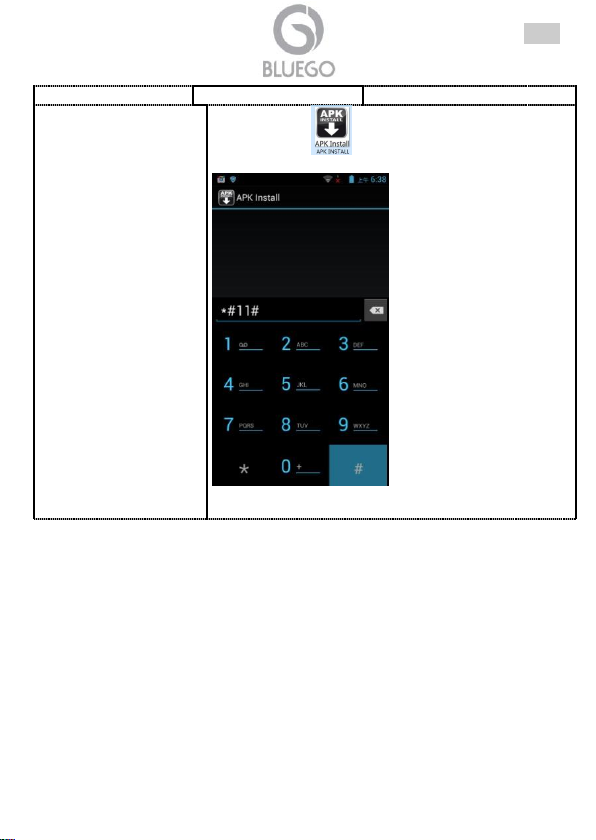
agotada.
El PlayStoreno (Play
Store) está disponible.
Lanzar el icono y digitar el código *#11#, como en
la figura siguiente:
El icono del PlayStore será
instalado y será posible acceder al market. Digitando el
código *#22# , el icono del PlayStore será eliminado.
ESP
58
Page 59
DEU
Warnungen und Sicherheitsanweisungen (sarebbe meglio)
Zur Vermeidung des Risikos elektrischer Schläge darf dieses Gerät nur durch
qualifiziertes Servicepersonal geöffnet werden.
Für die Produktsreinigung sollten Sie vermeiden, Reinigungssprays und
Lösungen, die Alkohol oder brennbare Flüssigkeiten enthalten, zu benutzen.
Das Gerät muß niemals überhitzen.
Halten Sie das Produkt von Feuchtigkeitsquellen, direkter starken Sonnenlicht
und einem Ort mit hoher oder niedriger Temperatur (unter 45°C) entfernt.
Setzen Sie das Gerät nicht Regen oder Feuchtigkeit aus.
Benutzen Sie nur geeignete Kabel. Benutzen Sie die korrekte Anschlusse.
Regelmäßing alle Verbindungskabel kontrollieren. Im falls von Schaden, sollen
sie sofort ersetzt werden.
Keine unpassende Kabel und/oder Gegenstände im Verbindungssteckdosen
hineinstecken.
Verwenden Sie ausschließlich original AC/DC Netzsteckdose, um Schläge zu
vermeiden.
Verwenden Sie ausschließlich inbegriffene Zubehörteile (Antenne und/oder
Aggregat)
Lassen Sie wenigstens 30cm Entfernung zwischen Gerätsantenne und Benutzer.
Einige Geräte haben eine integrierte Antenne.
Verwende Sie die selbe Steckdose nicht für andere Geräte
Dieses Gerät darf nur durch qualifiziertes Servicepersonal geöffnet oder repariert
werden.
Wenn das Gerät überhitzt, schalten Sie es aus und wenden Sien qualifiziertem
Personnel an.
Aus Gründen der verkehrssicherheit darf während der Fahrt nur ein Passagier
das Gerät bedienen, nicht der Fahrer.
Ihr Produkt mußsicher befestigt sein, wenn Sie dies in Ihrem Fahrzeug
verwenden. Installieren Sie das gerät und dessen Zubehörteile nicht in der Nähe
von Airbag-Őffnungsbereichen.
Ihr Gerät ist ein komplexes elektronische Produkt. Schützen Sie es vor dem
Herunterlaffen und vor Stoßen.
Andere Produkte, die ein magnetisches Feld erzeugen, können die Funktionalität
Ihres Produktes beeinflussen.
Verwenden Sie keine Schutzabdeckungen doer Kassetten mit
Magnetverschlüssen. Lassen Sie Ihr Gerät nicht längere Zeit in
elektromagnetischen Feldern liegen.
Ihr Gerät sendet Funksignale aus, welche die Funktion anderer Elektronikgeräte,
die unzureichend oder falsch gegen Funkenergie geschützt sind, wie z.B.
59
Page 60
DEU
Herzschrittmacher, Hörgeräte, medizinische Geräte). Kontaktieren Sie den
Hersteller der betreffenden Geräte, um mögliche Funkstörungsprobleme zu lösen.
Halten Sie das Gerät von Kindern entfern. Lassen Sie Kinder nicht mit dem Gerät
spielen.
Die normale Funktion des Produktes kann durch ESD gestört sein. Wenn dies der
Fall ist, schalten Sie es aus, entfernen Sie die Batterie eine Minute und schalten
Sie das Gerät ein.
Vermeidung von Hörschäden
Dieses Produkt respektiert die aktuellen Bestimmungen zur Begrenzung der
Lautstärke von Verbraucher-Audiogeräten auf einen sicheren Pegel.
Wenn Sie dieses Gerät mit Kopfhörern oder Ohrhörern bei hoher Lautstärke
betreiben, gehen Sie das Risiko von permanenten Hörschäden. Reduzieren Sie
die Lautstärke Ihres Gerätes auf einen vernünftigen Wert, um diese Probleme zu
vermeiden.
Wenn Sie ein Klingeln in den Ohren haben, reduzieren Sie die Lautstärke oder
schalten sie das Gerät ab.
Dieses Gerät wurde mit den mitgelieferten Ohrhörern getestet. Zum Schutz Ihres
Gehörs wird empfohlen, ausschliesslich die inbegriffene Ohrhörern zu erwenden.
Vorsicht beim Umgang mit Lithium-Ion-Batterien
Dieses Produkt ist mit einer Lithium-Ionen-Batterie ausgerüstet. Die Batterie nicht
öffnen, nicht hineinstechen, nicht zerlegen und nicht in einer feuchten und/oder
korrosiven Umgebung verwenden.
Wenn die Batterie undicht wird und Sie in Kontakt mit ausgetretenen
Batterieflüssigkeiten kommen, sofort gründlich mit Wasser spülen und einen Arzt
aufsuchen. Die Nichtbefolgung dieser Hinweise kann dazu führen, daß Säure aus
der Lithium-Ionen-Batterie austritt, die Batterie heiß wird, explodiert oder sich
entzündet und Verletzungen und/oder Schäden verursacht.
Lassen Sie Ihre Batterie nicht länger als 10 Stunden. Anderenfalls besteht das
Risiko einer Überladung der Batterie und der Verkürzung ihrer
Gesamtlebensdauer.
Wenn das Gerät für einen längeren Zeitraum nicht gebraucht wird, entlädt sich
die Batterie langsam und das Gerät muss vor der erneuten Verwendung ein paar
Stunden geladen werden.
Ziehen Sie den Netzstecker des Ladegerätes aus der Netzsteckdose, wenn es
nicht verwendet wird.
Verwenden Sie in diesem Gerät ausschließlich originale Batterien des Herstellers.
Verwenden Sie ausschließlich original Ladegerätes.
Die Verwendung von Batterien oder Ladegeräten, die nicht original sind, kann zu
schweren Verleztungen oder Schäden am Produkt führen und Ihre Garantier
erlöschen.
60
Page 61
DEU
Werfen Sie niemals eine Batterie ins Feuer. Stellen Sie die Batterie niemals in
oder auf ein Heizgerät. Wenn Batterien sich aufheizen, besteht Explosionsgefahr.
Die Batterie darf niemals zerbrochen oder in sie hineingestochen werden (Diese
können einen internen Kurzschluss verursachen)
Die Batterie nicht in Temperaturen über 45° aussetzen.
Dieses Smartphone entspricht den Grundanforderungen und anderen relevanten
Bestimmungen der EU-Direktive 2011/65/CE und 1999/5/CE über Radio-und
Telekommunikationsgeräte. Die vollständige Version der Konformitätserklärung gibt
es auf unseren Sitz. Dieses Gerät darf in allen Länder der Europäischen
Wirtschaftsgemeinschaft und in allen Länder mit EU-Direktive 1999/5/CE, ohne
Beschränkungen außer:
Italien (IT): dieses Gerät entspricht die nationale Radio Schnittstelle und Bedarf für
die Frequenzzuordnung. Für weitere Informationen sehen Sie bitte:
www.comunicazioni.it.
Norwegen (NO): dieses Gerät darf nicht in der Reichweite von 20Km in der Nähe
von Ny Alesund verwendet sein.
Die vollständige Version und technische Dokumentation gibt es auf unseren Sitz.
werden daher erteilt, um das Freisetzen dieser Substanzen zu vermeiden und den
Umgang mit den natürlichen Ressourcen zu verbessern. Elektrische und
elektronische Geräte dürfen nicht zusammen mit dem normalen Hausmüll entsorgt
werden, sondern müssen für ihre korrekte Beseitigung einer entsprechenden
Sammelstelle zugeführt werden. Das Symbol der durchgestrichenen Mülltonne auf
dem Produkt und auf dieser Seite weist auf die Notwendigkeit hin, das Produkt am
Ende seiner Lebensdauer angemessen zu entsorgen. Auf diese Weise ist es
möglich zu vermeiden, dass eine unspezifische Behandlung der in diesen
Produkten enthaltenen Substanzen oder eine unsachgemäße Verwendung von
Teilen davon zu schädlichen Auswirkungen auf die Umwelt und die Gesundheit des
Menschen führen können. Außerdem wird so zur Wiedergewinnung, zum Recycling
und zur Wiederverwendung vieler in diesen Produkten enthaltenen Materialien
Schnelle Konformitätserklärung
Informationen zum umweltschutz
Dieses Produkt kann Substanzen enthalten, die für die Umwelt und
die Gesundheit des Menschen schädlich sein können, wenn es nicht
auf angemessene Weise entsorgt wird. Die folgenden Informationen
61
Page 62
DEU
Die Batterie des Produktes BlueGo können entfernt sein.
Sie müssen bei einer Sammelstelle für Altbatterien
abgeben werden.
Um weitere Verbessungsgarantiebedingungen zu
haben, registrieren Sie bitti das Gerät in unserem
Website www.bluego.eu innerhalb 15 Tage vom
Kaufdatum. Wenn nicht, wird das Gerät nur die
standard Garantie haben.
beigetragen. Zu diesem Zweck organisieren die Hersteller und Händler von
elektrischen und elektronischen Geräten entsprechende Systeme zur Sammlung
und Entsorgung dieser Geräte. Wenden Sie sich am Ende der Lebensdauer des
Produkts wegen Informationen zu Sammelstellen an Ihren Händler. Im Moment des
Kaufs dieses Produkts wird Ihr Händler Sie außerdem über die Möglichkeit
informieren, ein anderes nicht mehr benutztes Gerät kostenlos zurückzugeben,
vorausgesetzt es entspricht dem gleichen Typ und hat die gleichen Funktionen
erfüllt wie das erworbene Produkt. Eine Entsorgung des Produkt auf andere als die
oben beschriebene Weise unterliegt den von den geltenden Bestimmungen
vorgesehenen Sanktionen, die in dem Land gelten, in dem das Produkt entsorgt
wird. Wir empfehlen außerdem weitere Maßnahmen zum Umweltschutz zu
ergreifen: Recyceln der Innen- und Außenverpackung, mit denen das Produkt
geliefert wird und angemessene Entsorgung der Altbatterien (nur, wenn diese im
Produkt enthalten sind). Mit Ihrer Hilfe kann die Menge der zur Herstellung von
elektrischen und elektronischen Geräte eingesetzten natürlichen Ressourcen
verringert, die Inanspruchnahme von Müllhalden zur Entsorgung der Produkte
minimiert und die Lebensqualität verbessert werden, indem vermieden wird, das
potentiell gefährliche Substanzen in die Umwelt gelangen.
Beachten Sie, dass die unkontrollierte Ablagerung von Abfällen mit Geldbußen von
€ 103 bis € 619 bestraft werden, außer der Tatbestand stellt ein schwereres
Vergehen dar. Betrifft die Ablagerung ungefährliche oder sperrige Abfälle, findet
eine Geldbuße von € 25 bis € 154 Anwendung.
N.B.: Die oben aufgeführten Informationen wurden in Einklang mit der Richtlinie
2002/96/EG und der Gesetzesverordnung vom 22. Juli 2005 verfasst, die die
Verpflichtung der Einführung eines System der getrennten Sammlung vorsehen
sowie besondere Beseitigungs- und Entsorgungsmethoden für Elektronikschrott.
Wegen weiterer Informationen diesbezüglich bitten wir Sie, unsere Website
www.bluego.eu zu besuchen.
62
Page 63
DEU
Schnellstartanleitung
Wir bedanken uns für Ihre Wahl von einem Smartphone der Bluego Familie. Bitte
lesen Sie diese Anleitungen für eine korrekte Benutzung des Produktes durch. Sie
finden die Vollanleitung in Website www.bluego.eu, Produktseite.
1.1 Produktseinführung
Bitte folgen Sie die Antleitungen in der Installation. Lesen Sie auch die Vollanleitung
vor der Installation.
1.2 Inhalt
SmartPhone
AC/DC Netzadapter
Micro USB Kabel
Schnellanleitung
Ohrhörer
Batterie
Ersatzbatterie (für Modelle BG-G509-W, BG-G509-B und BG-G509K-B)
Ersatzcover/Flip Cover (nach Modelle)
Garantiekarte
Anmerkungen zu Gesetz und Sicherheit
Wenn jeder von diesen Komponenten fehlt, kontaktieren Sie sofort den Händler.
63
Page 64
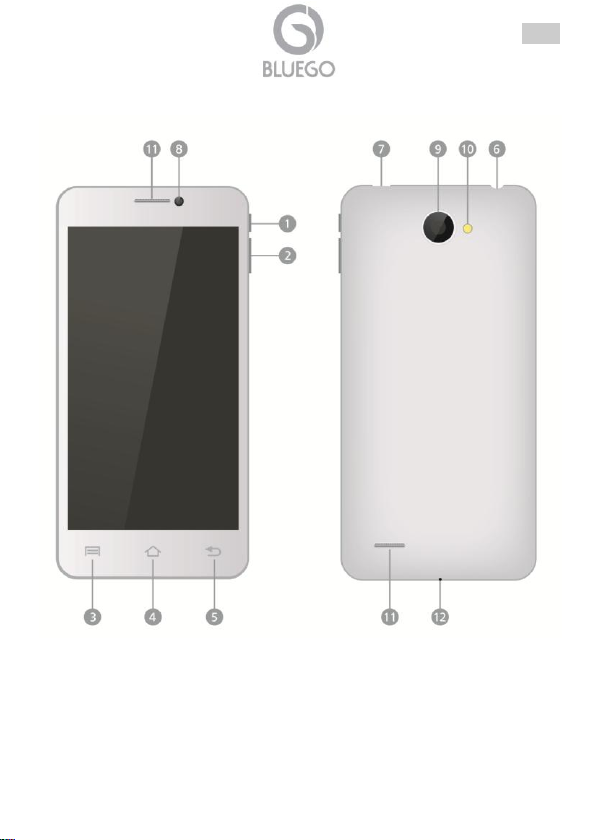
1.3 Geräteüberblick
DEU
64
Page 65
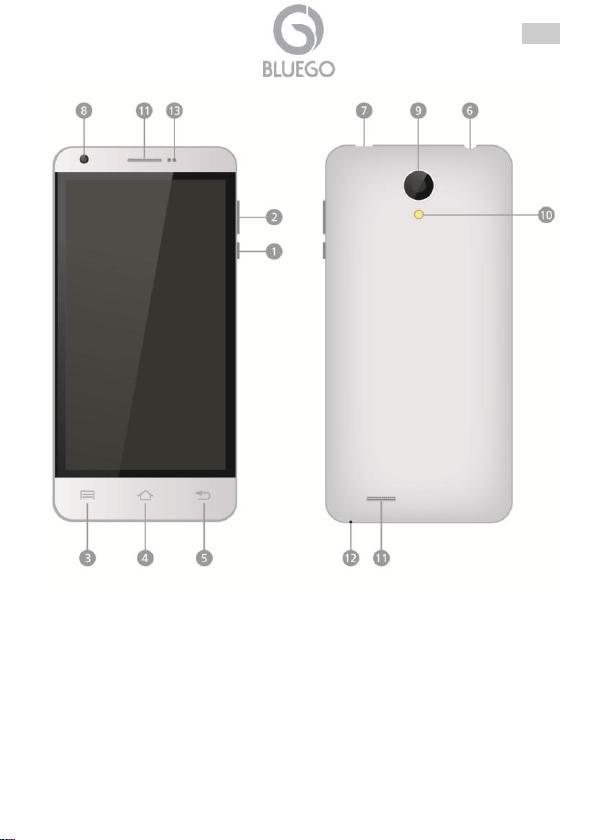
DEU
65
Page 66
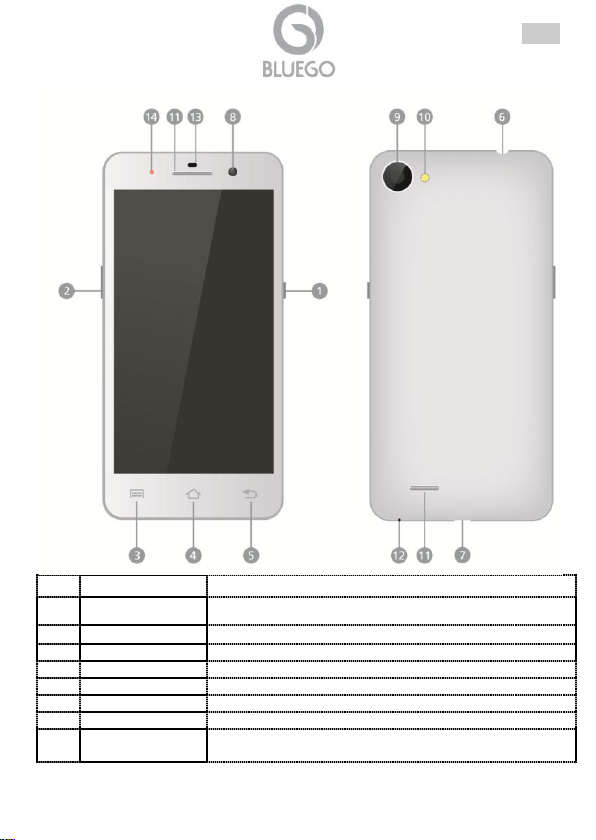
DEU
Element
Funtionalität
1
Power
Schaltet das Gerät an/aus oder setzt es in Stand-by
2
Vol +/- Taste
Stellt die Lautstärke ein.
3
Menu
Menüoptionen anzeigen.
4
Home
Zurück zum Start-Bildschirm
5
Rück
Zurück zur vorigen Seite.
6
Ohrhörerbuchse
Ohrhöreranschluss
7
USB-Anschluss
Zum Ausladung der Batterie und/oder Datenaustausch.
8
Linse der
Frontkamera
Zum Aufnahme von Fotos, Videoruf und Videos.
66
Page 67
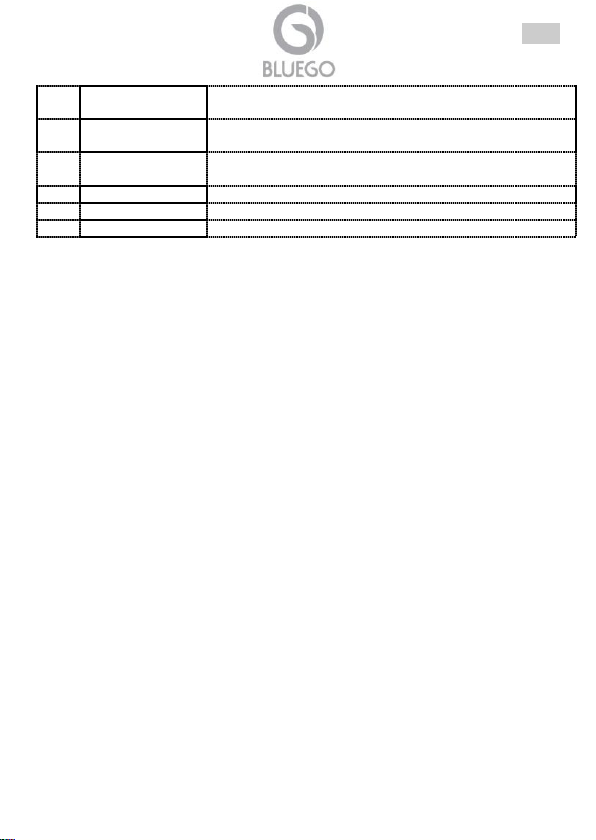
DEU
9
Linse der
Rückcamera
Zum Aufnahme von Fotos und Videos.
10
Blitzlicht
Zum Aufnahme von Fotos unter schlechten
Lichtbedingungen.
11
Lautsprecher
Klänge ertönt vom Smartphone (Musik oder Anrufe) zu
hören
12
Mikrophone
Klänge einzunehmen
13
Sensoren
Umweltsensoren
14
LED
Led um das Gerätstatus zu erkennen.
1.4 SIM-Karten und microSD-Karte einlegen
Machen Sie das Gerät aus und öffnen Sie es mit Abnehmung der hinteren
Abdeckung(benutzen Sie die Rille in der Nähe von der Rückkamera oder in der
unteren rechten Ecke).
Abnehmen Sie die Batterie
Einlegen Sie die MicroSD Karte (ab zu 32GB), um die innere Speicher zu
erhöhen. Überzeugen Sie sich bitte davon, dass der goldenen Kontaktbereich auf
der Karten ach unten zeigt. Drücken Sie die Karte, bis sie einrasten. Um die
microSD-Karte herauszunehmen, ziehen Sie die Karte aus.
BG-G509-W/B o BG-G509K-B: stecken Sie die SIM Karte in seiner Steckplatz.
Das Gerät hat 2 Steckplätze. Der Steckplatz für SIM1 (standard Abmessungen)
ist kompatibel mit GSM/WCDMA, der Steckplatz für SIM2 (MicroSim) ist
kompatibel mit GSM/WCDMA. Überzeugen Sie sich bitte davon, dass der
goldenen Kontaktbereich auf der Karte nach oben für SIM1 und nach unten für
MicroSIM2 zeigt.
BG-V503-K: legen Sie das SIM in seiner Steckplatz. Das Gerät hat 2 Steckplätze.
Der Steckplatz für SIM1 (standard Abmessungen) ist kompatibel mit
GSM/WCDMA, der Steckplatz für SIM2 (MicroSim) ist kompatibel nur mit GSM.
Überzeugen Sie sich bitte davon, dass der goldenen Kontaktbereich auf der Karte
nach oben für SIM1 und nach unten für MicroSIM2 zeigt.
BG-A451-W/B: legen Sie das SIM in seiner Steckplatz. Das Gerät hat 2
Steckplätze. Der Steckplatz für SIM1 (standard Abmessungen) ist kompatibel mit
GSM/WCDMA, der Steckplatz für SIM2 ist kompatibel mit GSM/WCDMA.
Überzeugen Sie sich bitte davon, dass der goldenen Kontaktbereich auf der Karte
nach unten für SIM1/2 zeigt.
Legen Sie die Batterie ein und die hintere Abdeckung.
67
Page 68
DEU
Wenn sie Ihre Batterie lägere Zeit nicht benutzt haben, wir
der allmählich entladen. Wenn das passiert und Sie Ihr
Gerät benutzen möchten, müssen Sie zuerst die Batterie
neu laden.
1.5 Einschalten und die Batterie aufladen
Stecken Sie den Netzadapter an die Steckdose. Stecken Sie das eine Ende des
USB-Kabels in den USB-Anschluss am Gerät (nr. 7) und die andere Ende an
Netzadapter.
Normalerweise dauert es einige Stunden, um das Gerät voll zu laden. Wenn das
Gerät während des Ladens mit dem Netzadapter betrieben wird, kann die Zeit für
das Vollladen verlängern.
1.6 Anschalte/Schlafmodus/Ausschalten
Anschalten: um das Gerät anzuschalten, halten Sie die Power-Taste ein paar
Sekunden lang gedrückt. Nach dem Hochfahr-Bildschirm öffnet sich automatisch
der Start-Bildschirm.
Schlafmodus: um den Schlafmodus zu öffnen, drücken Sie die Power-Taste.
Drcken Sie es nochmal, um das Gerät aufzuwecken.
Ausschalten: um das Gerät auszuschalten, halten Sie die Power-Taste gedrückt,
dann drücken das Wort Spegni und OK. Nach ein paar Sekunden start die
Ausschaltung.
1.7 Hilfe
Um jeder Zweifel oder Problem zu erklären, können Sie unsere technische Dienst
kontaktieren: Sie werden eine Tickenöffnung on-line an http://www.bluego.eu
machen. Für jede Voraufverkaufsanfrage oder Kontaktsanfrag, schreiben Sie bitte
an [email protected] oder [email protected].
68
Page 69
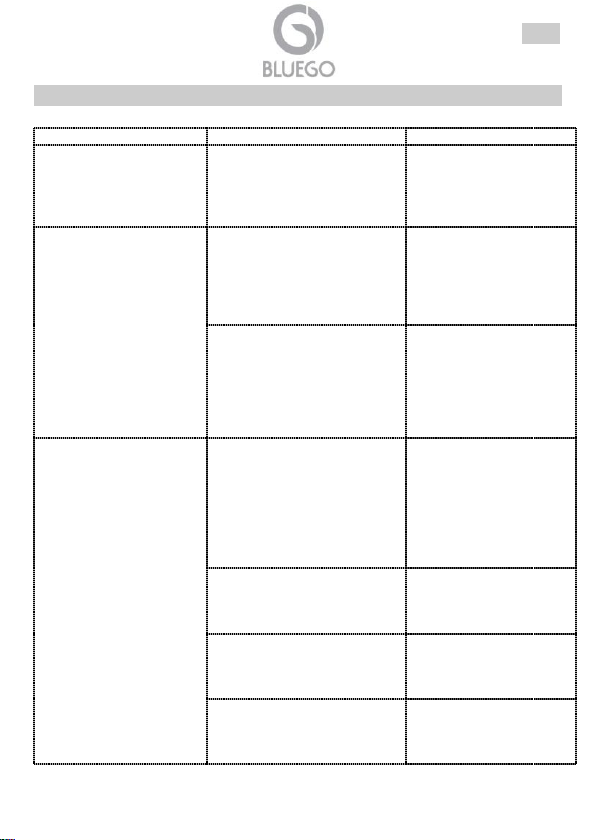
APPENDIX A: Problemelösung und Hilfe
Situation
Kontrolle
Lösung
Das Smartphone kann
nicht anschalten
Die Batterie ist ganz leer.
Stecken Sie das
Smartphone in dem
Adapter und probieren Sie
die Anschaltung nach 15
Minuten.
Das Produkt has ein
abnormales Verhalten
Schließen Sie alle Fenster und
starten das Gerät.
Spegnere il cellulare,
rimuovere la batteria,
aspettare un paio di
minuti, reinserire la
batteria e riaccendere il
cellulare.
Setzen Sie das Produkt zurück
Öffnen Sie Impostazioni-
>Backup und Ripristino>Ripristino Dati di
Fabbrica. Diese
Operation wird das ganze
Inhalt des Telefones
absetzen.
Die Batteriedauer ist
nicht ausreichend
Schließen Sie alle Fenster in
Background, die nicht nützlich
sind, und schalten Sie die
nicht benutzte Network ab
(z.B. Bluetooth/We-Fi).
Drücken Sie Home ein
paar Sekunden lang und
schließen Sie die Fenster,
die Sie nicht benutzen:
lassen Sie sie nach rechts
gleiten. In Impostazioni
schalten Sie die Bluetooth
und Wi-Fi ab.
Wenn die Batterie hat viele
Ladung/Entladung gemacht,
kann sie weniger Ladung
speichern als Anfang.
Setzen Sie die Batterie
mit einer Originale zurück.
Die Batterie ist nur nach
einiger Phasen voll geladet.
Benutzen Sie das Telefon
für einige Tage nach der
Kauf, um die gespeicherte
Ladung erhöhen.
Wenn der Signalempfang
schwach ist, wird das
Smartphone nicht aufhören,
mit dem Netz sich zu
In Impostazioni schalten
Sie die Sim ab gehen Sie
in einer Platz, wo der
Signal krafter ist.
DEU
69
Page 70
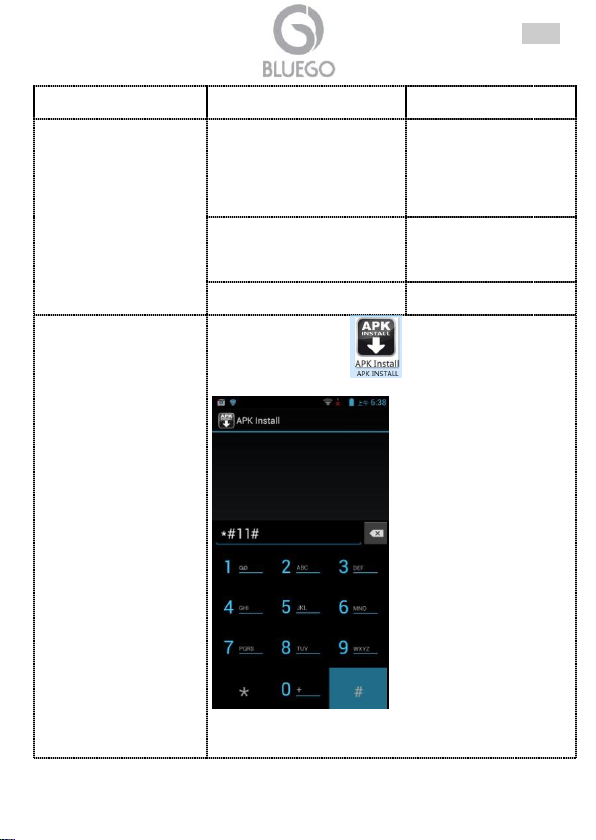
verbinden, und es wird viele
Batterie benutzen.
SmartPhone kann die
Batterie nicht laden
(obwohl in verbindung
mit dem Ladegerät).
Das Netz ist nicht in der
Toleranzgrenze akzeptiert.
Benutzen Sie das
Ladegerät nur mit
elektrischen Netzen
innerhalb
Toleranzgrenzen wie in
der Produktetikette.
Das Ladegerät ist aussen
standard
Benutzen Sie das
originale Ladegerät oder
mit gleichwertigen
Charakteristiken..
Der Kabel ist nicht korrekt
eingesteckt
Kontrollieren Sie beide
Ende des Kabels.
PlayStore ist nicht
verfügbar.
Starten Sie die Ikone und drücken Sie die Kode
*#11#, wie hier unter:
. Die Ikone des PlayStore
wird jetzt installiert und es wird möglich, die Market
erreichen. Nach den Kode *#22# , wird die Ikone des
PlayStore beseitigt.
DEU
70
Page 71
ελλ
Δήλωση πνευματικών δικαιωμάτων
Κανένα μέρος αυτής της δημοσίευσης δεν μπορεί να αναπαραχθεί, να αποθηκευτεί
σε ένα σύστημα ανάκτησης, ή να μεταβιβαστεί σε οποιαδήποτε μορφή ή με
οποιοδήποτε μέσο, είτε ηλεκτρονικό, μηχανικό, φωτοαντιγραφικό, εγγραφής ή άλλο
χωρίς την προηγούμενη έγγραφη συναίνεση του εκδότη.
Όλες οι άλλες ονομασίες που αναφέρονται είναι τα εμπορικά σήματα ή τα
καταχωρημένα εμπορικά σήματα των αντίστοιχων ιδιοκτητών τους. Αλλαγές
μπορούν να πραγματοποιηθούν χωρίς να έχει προηγηθεί οποιαδήποτε ειδοποίηση.
Δεν υπάρχει ευθύνη για τεχνικά σφάλματα ή/και παραλήψεις.
ΣΗΜΑΝΤΙΚΕΣ ΟΔΗΓΙΕΣ ΑΣΦΑΛΕΙΑΣ
Παρακαλούμε διαβάστε τις ακόλουθες πληροφορίες προσεχτικά προκειμένου να
αποφύγετε κάθε κίνδυνο ή ζημιά στη συσκευή που θα οφείλεται σε πυρκαγιά ή
πτώση του ηλεκτρικού ρεύματος:
Μόνο εξουσιοδοτημένο προσωπικό θα πρέπει να εκτελεί τις τεχνικές εργασίες στη
συσκευή.
Για να αποτραπούν οι κίνδυνοι ηλεκτροπληξίας, τη μονάδα αυτή θα πρέπει να την
ανοίγει μόνο καταρτισμένο προσωπικό με ειδικότητα στο service. Θέστε τη
μονάδα εκτός λειτουργίας και αποσυνδέστε την τροφοδοσία ρεύματος πριν να
ανοίξετε τη μονάδα.
Κατά τον καθαρισμό, αποφύγετε τα σπρέι καθαρισμού ή κάθε προϊόν που
περιέχει αλκοόλ ή άλλα εύφλεκτα υγρά.
Αποφύγετε την υπερθέρμανση. Η υπερθέρμανση μπορεί να μειώσει τη διάρκεια
ζωής της συσκευής.
Μην την εκθέτετε σε θερμοκρασίες πάνω από 45 C.
Μην επιτρέπετε στη συσκευή να έρθει σε επαφή με φλόγα.
Μην κάνετε χρήση του smartphone κοντά σε νερό. Μην τοποθετείτε υγρά πάνω
σε ή κοντά στη μονάδα.
Ελέγχετε τακτικά το καλώδιο. Τα καλώδια που έχουν υποστεί ζημιά θα πρέπει να
αντικαθίστανται άμεσα.
Παρακαλούμε χρησιμοποιήστε τον παρεχόμενο υποδοχέα AC/DC που
περιλαμβάνεται στη συσκευασία. Εάν τον συνδέσετε με άλλες συσκευές, το
προϊόν ή η μονάδα τροφοδοσίας ενδέχεται να υποστούν ζημιά.
Μην επιχειρήσετε να επισκευάσετε μόνοι σας το smartphone, καθώς το άνοιγμα ή
η αφαίρεση των καλυμμάτων μπορεί να σας εκθέσει σε σημεία επικίνδυνης τάσης
ή άλλους κινδύνους ενώ θα ακυρωθεί και η εγγύηση του προϊόντος σας. Για το
σέρβις απευθυνθείτε σε καταρτισμένους επαγγελματίες.
Εγκαταστήστε το προϊόν σας προσεχτικά. Βεβαιωθείτε ότι το προϊόν σας και τα
εξαρτήματά του είναι καλά ασφαλισμένα στη θέση τους όταν τα χρησιμοποιείτε
στο αυτοκίνητο.
71
Page 72
ελλ
Για την ασφάλειά σας κατά την οδήγηση, μόνο κάποιος επιβάτης θα πρέπει να
χρησιμοποιεί τη συσκευή όταν το αυτοκίνητο είναι εν κινήσει και όχι ο οδηγός. Στη
χώρα σας ενδέχεται να ισχύουν νόμοι σχετικά με τη χρήση ηλεκτρονικών
συσκευών από τους οδηγούς.
Αποφύγετε την τοποθέτηση του smartphone σας και τον εξαρτημάτων του κοντά
στις περιοχές ανοίγματος των αερόσακων. Ο εξοπλισμός που δεν είναι ασφαλώς
στερεωμένος σε ένα αυτοκίνητο μπορεί να προκαλέσει σοβαρό τραυματισμό όταν
ενεργοποιείται ο αερόσακος.
Η συσκευή σας είναι ένα σύνθετο ηλεκτρονικό προϊόν. Διατηρήστε την
προστατευμένη από πτώσεις και συγκρούσεις με άλλα αντικείμενα. Αποφύγετε τις
απότομες κινήσεις κατά τη χρήση του. Μην βάφετε το προϊόν σας. Εάν το κάνετε
αυτό τα αφαιρούμενα μέρη θα καταστούν μη χρησιμοποιήσιμα και η
λειτουργικότητά τους μπορεί να μειωθεί ή να περιοριστεί.
Άλλα προϊόντα που δημιουργούν ένα μαγνητικό πεδίο θα μπορούσαν να
επιβαρύνουν τη λειτουργικότητα του προϊόντος σας.
Μην χρησιμοποιείτε προστατευτικά καλύμματα ή θήκες που έχουν μαγνητικά
κλεισίματα. Μην αφήνετε τη συσκευή σας να παραμένει για μεγάλο χρονικό
διάστημα σε επαφή με ηλεκτρομαγνητικά πεδία.
Αποφύγετε τις παρεμβολές με άλλες ηλεκτρονικές συσκευές. Η συσκευή σας
εκπέμπει σήματα ραδιοσυχνοτήτων (RF) που θα μπορούσαν να επηρεάσουν τη
λειτουργία των άλλων ηλεκτρονικών συσκευών που ανεπαρκώς ή εσφαλμένα
προστατεύονται από την ενέργεια ραδιοσυχνοτήτων (όπως βηματοδότες,
βοηθήματα ακοής, ιατρικές συσκευές, ή οποιαδήποτε άλλη συσκευή που
βρίσκεται στο σπίτι ή το αυτοκίνητό σας)
Μην χρησιμοποιείτε και μην αποθηκεύετε το προϊόν σας σε περιοχές με σκόνη ή
βρωμιά. Αυτό μπορεί να επιβαρύνει τα εξαρτήματα της συσκευής σας.
Διατηρήστε τη συσκευή μακριά από τα παιδιά. Μην αφήνετε τα παιδιά να παίζουν
με αυτή τη συσκευή.
Η κανονική λειτουργία του προϊόντος μπορεί να διαταραχθεί από την
ηλεκτροστατική εκκένωση. Εάν συμβεί αυτό, απλά κάντε επανεκκίνηση στο
προϊόν σας για να ξεκινήσει και πάλι η κανονική λειτουργία.
Προστατεύστε τη συσκευή σας από την υγρασία, την άμεση έκθεση στο φως του
ήλιου καθώς και στις πολύ υψηλές ή χαμηλές θερμοκρασίες
Να χρησιμοποιείτε μόνο εξαρτήματα που φέρουν την εμπορική ονομασία Bluego
ή έχουν πιστοποίηση του κατασκευαστή. Η χρήση ασύμβατων εξαρτημάτων με το
προϊόν μπορεί να προκαλέσει σοβαρά προβλήματα.
ΑΠΟΦΥΓΗ ΠΡΟΚΛΗΣΗΣ ΖΗΜΙΑΣ ΣΤΗΝ ΑΚΟΗ
Το προϊόν αυτό τηρεί τους ισχύοντες κανονισμούς για τον περιορισμό του όγκου
παραγωγής των καταναλωτικών συσκευών ήχου σε ένα ασφαλές επίπεδο.
Ακούγοντας τη συσκευή σας με τα ακουστικά σε υψηλή ένταση, διατρέχετε τον
κίνδυνο πρόκλησης ζημιάς στα αυτιά σας.
72
Page 73
ελλ
Ακόμα και αν συνηθήσετε τον ήχο σε υψηλή ένταση και το θεωρείτε κάτι το
φυσιολογικό, εξακολουθεί να υπάρχει η δυνατότητα πρόκλησης ζημιάς στην ακοή
σας.
Μειώστε την ένταση του ήχου της συσκευής σας σε ένα λογικό επίπεδο για να
αποφύγετε μόνιμη βλάβη στην ακοή σας.
Εάν ακούσετε κουδούνισμα στα αυτιά σας, μειώστε την ένταση ή
απενεργοποιήστε τη συσκευή σας.
Η συσκευή αυτή έχει ελεγχθεί με τα παρεχόμενα ακουστικά.
Για να διατηρήσετε την ακοή σας, συνιστάται να χρησιμοποιείτε μόνο τα
ακόλουθα μοντέλα ακουστικών : τα ακουστικά που παρέχονται μαζί με τη
συσκευή σας, ή οποιαδήποτε άλλα ακουστικά που τηρούν τους εν ισχύ
κανονισμούς. Άλλοι τύποι ακουστικών μπορούν να παράγουν υψηλότερα
επίπεδα έντασης του ήχου.
Θα πρέπει να είστε προσεχτικοί στη ρύθμιση της έντασης του ήχου.
ΠΡΟΣΟΧΗ. ΜΠΑΤΑΡΙΑ ΛΙΘΙΟΥ-ΙΟΝΤΟΣ
Το προϊόν αυτό είναι εξοπλισμένο με μια μπαταρία Λιθίου- ιόντος. Μην τη
διατρυπάτε, ανοίγετε, αποσυναρμολογείτε και μην τη χρησιμοποιείτε σε ένα υγρό
ή/και διαβρωτικό περιβάλλον. Εάν η μπαταρία σημειώσειδ ιαρροή και έρθετε σε
επαφή με τα υγρά που έχουν διαρρεύσει, θα πρέπει να ξεπλύνετε με άφθονο νερό
και να αναζητήσετε αμέσως ιατρική φροντίδα. Σε περίπτωση αδυναμίας τήρησης
αυτών των οδηγιών υπάρχει το ενδεχόμενο από τη μπαταρία λιθίου- ιόντος να
διαρρεύσει οξύ, να αυξηθεί η θερμότητα και να σημειωθεί έκρηξη ή ανάφλεξη,
προκαλώντας τραυματισμό ή/και ζημιά.
Μην τοποθετείτε, φυλάγετε ή αφήνετε το προϊόν σας μέσα ή κοντά σε πηγές
θερμότητας, άμεσο ισχυρό φως του ήλιου, σε περιοχή υψηλής θερμοκρασίας, σε
ένα δοχείο υπό πίεση ή σε φούρνο μικροκυμάτων.
Μην αφήνετε τη μπαταρία να φορτίζει για περισσότερο από 10 ώρες.
Εάν το κάνετε αυτό υπάρχει ο κίνδυνος υπερφόρτωσης της μπαταρίας και
συντόμευσης της συνολικής διάρκειας ζωής της.
Να χρησιμοποιείτε μόνο η αυθεντική μπαταρία του κατασκευαστή της συσκευής.
Εάν η συσκευή δεν χρησιμοποιείται για παρατεταμένο χρονικό διάστημα, η
μπαταρία εκφορτίζεται αργά και η συσκευή θα πρέπει να επαναφορτιστεί πλήρως
πριν από τη χρήση της.
Αποσυνδέστε τον φορτιστή από τον τοίχο όταν κάνετε χρήση της συσκευής.
Χειριστείτε τις μπαταρίες και τον φορτιστή με προσοχή και τηρείτε τις οδηγίες
ανακύκλωσης.
Να χρησιμοποιείτε μόνο τις πιστοποιημένες μπαταρίες του κατασκευαστή και τον
αυθεντικό φορτιστή για το προϊόν σας. Η χρήση μπαταριών ή φορτιστή που δεν
έχουν πιστοποιηθεί από τον κατασκευαστή μπορεί να οδηγήσει σε σοβαρό
τραυματισμό ή βλάβη του προϊόντος σας.
73
Page 74
ελλ
Ποτέ μην ρίχνετε τη μπαταρία στη φωτιά. Ανατρέξτε στους ισχύοντες τοπικούς
κανονισμούς για πληροφορίες σχετικά με την ανακύκλωση της μπαταρίας.
Αποφύγετε την έκθεση της μπαταρίας σε υψηλή εξωτερική πίεση, κάτι που
μπορεί να οδηγήσει σε ένα εσωτερικό βραχυκύκλωμα και υπερθέρμανση.
Το προϊόν είναι σύμφωνο με την οδηγία 1999/5/CE-2011/65/CE. Η δήλωση στην
πλήρη έκδοσή της και οι τεχνικοί φάκελοι είναι διαθέσιμα στα κεντρικά μας γραφεία.
Φυλάξτε τη συσκευασία για μελλοντική αναφορά. Ο εξοπλισμός αυτός μπορεί να
χρησιμοποιηθεί σε όλες τις χώρες της Ευρωπαϊκής Ένωσης και σε όλες τις χώρες
που εφαρμόζουν την οδηγία 1999/5/ΕΚ, χωρίς περιορισμούς, με εξαίρεση τις
ακόλουθες χώρες:
Ιταλία (IT): Για περισσότερες πληροφορίες, συμβουλευθείτε τον δικτυακό τόπο
www.comunicazioni.it
Νορβηγία (NO): Η υποενότητα αυτή δεν ισχύει για την γεωγραφική περιοχή εντός
μιας ακτίνας 20 χλμ από το κέντρο της Ny Alesund.
χειρισμού αυτού του εξοπλισμού
Το σύμβολο του διαγραμμένου καλαθιού που υπάρχει εκτυπωμένο πάνω στην
ετικέτα της μονάδας ή τη συσκευασία της μονάδας δηλώνει ότι ο εξοπλισμός αυτός
δεν πρέπει να διατίθεται ως μη διακεκριμένο δημοτικό απόβλητο αλλά θα πρέπει να
συλλέγεται ξεχωριστά.
Η απόρριψη του ηλεκτρικού και ηλεκτρονικού εξοπλισμού θα πρέπει να γίνεται
ξεχωριστά, προκειμένου να διασφαλιστεί ότι τα επικίνδυνα υλικά που περιέχονται
εντός του εξοπλισμού δεν θάβονται με τον τρόπο αυτό θέτοντας πιθανά μελλοντικά
προβλήματα για το περιβάλλον και την υγεία του ανθρώπου. Επιπλέον, θα είναι
δυνατή η εκ νέου χρήση και η ανακύκλωση ορισμένων τμημάτων των
απορριμμάτων του ηλεκτρικού και ηλεκτρονικού εξοπλισμού, συμβάλλοντας στη
μείωση των ποσοτήτων των απορριμμάτων που προορίζονται για απόρριψη και την
αραίωση των φυσικών πόρων.
Δήλωση Συμμόρφωσης
Σημαντικές πληροφορίες για τις σωστές διαδικασίες ανακύκλωσης /
74
Page 75
ελλ
Αυτό το Smartphone περιέχει μια μπαταρία με δυνατότητα
αφαίρεσης, Θα πρέπει να την απορρίπτετε μόνο στα
καθορισμένα σημεία συλλογής για τις χρησιμοποιημένες
μπαταρίες
Ως χρήστης αυτού του εξοπλισμού, είστε υπεύθυνος για την επιστροφή των
απορριμμάτων του ηλεκτρονικού εξοπλισμού σε μια εξουσιοδοτημένη εγκατάστασης
συλλογής που έχει οριστεί από τον Δήμο σας. Πιο αναλυτικές πληροφορίες σχετικά
με το πλησιέστερο κέντρο συλλογής μπορείτε να λάβετε από τον Δήμο σας ή από
άλλους αρμόδιους τοπικούς φορείς.
Εάν αντικαθιστάτε τον παλιό εξοπλισμό με ένα νέο ισοδύναμο προϊόν, ο διανομής
θα πρέπει να πάρει πίσω τον παλιό εξοπλισμό χωρίς χρέωση σε μία βάση ένα προς
ένα για το διάστημα κατά το οποίο ο εξοπλισμός είναι αντίστοιχου τύπου και εκτελεί
τις ίδιες λειτουργίες με τον παρεχόμενο εξοπλισμό.
Ο ρόλος σας στη συμμετοχή στην ξεχωριστή συλλογή απορριμμάτων ηλεκτρικού
και ηλεκτρονικού εξοπλισμού είναι σημαντικός για να διασφαλιστεί ότι οι στόχοι
περιβαλλοντικής προστασίας και ανθρώπινης υγείας συνδέονται με μια υπεύθυνη
επεξεργασία και ότι εκτελούνται οι δραστηριότητες ανακύκλωσης.
Σημείωση Οι πιο πάνω πληροφορίες δίδονται εδώ σύμφωνα με την Οδηγία
Directive 2002/96/CE, που απαιτεί ένα ξεχωριστό σύστημα συλλογής και μια
συγκεκριμένη επεξεργασία και διαδικασίες απόρριψης για την απόρριψη του
ηλεκτρικού και ηλεκτρονικού εξοπλισμού (WEEE). Για περαιτέρω και πιο αναλυτικές
πληροφορίες, σας προσκαλούμε να επισκεφθείτε τη δικτυακή μας τοποθεσία
www.bluego.eu
75
Page 76
ελλ
ΕΓΧΕΙΡΙΔΙΟ ΧΡΗΣΗΣ
Συγχαρητήρια για την αγορά σας BlueGo SmartPhone. Αυτό το εγχειρίδιο
περιγράφει πώς να εγκαταστήσετε και να χρησιμοποιήσετε αυτήν τη συσκευή.
1.1 Σημαντικές οδηγίες ασφάλειας
Αυτό εγχειρίδιο περιέχει Σημαντικές οδηγείες ασφάλειας. Ακολουθήστε όλες τις
οδηγίες προσεκτικά κατά την εγκατάσταση. Διαβάστε αυτό το εγχειρίδιο προσεκτικά
πριν να επιχειρήσετε να αποσυμπιέσετε, να εγκαταστήσετε ή να λειτουργείσετε τη
συσκεύη.
1.2 Περιεχόμενα συσκευασίας
Βεβαιωθείτε ότι έχετε τα ακόλουθα στοιχεία:
SmartPhone (συσκευή smartphone)
AC/DC Adapter (Φορτιστή για τη συσκευή σας)
Micro USB Cable (Καλώδιο micro USB)
Πολυγλωσσικό οδηγό γρήγορης εκκίνησης
Ακουστικά
Μπαταρία
2η μπαταρία (G509, G509K)
Κάλλυμα ή κάλλυμα flip
Εγγύηση.
Εάν λείπει κάποιο από τα παραπάνω στοιχεία, επικοινωνήστε με το κατάστημα από
το οποίο αγοράσατε τη συσκευή.
76
Page 77
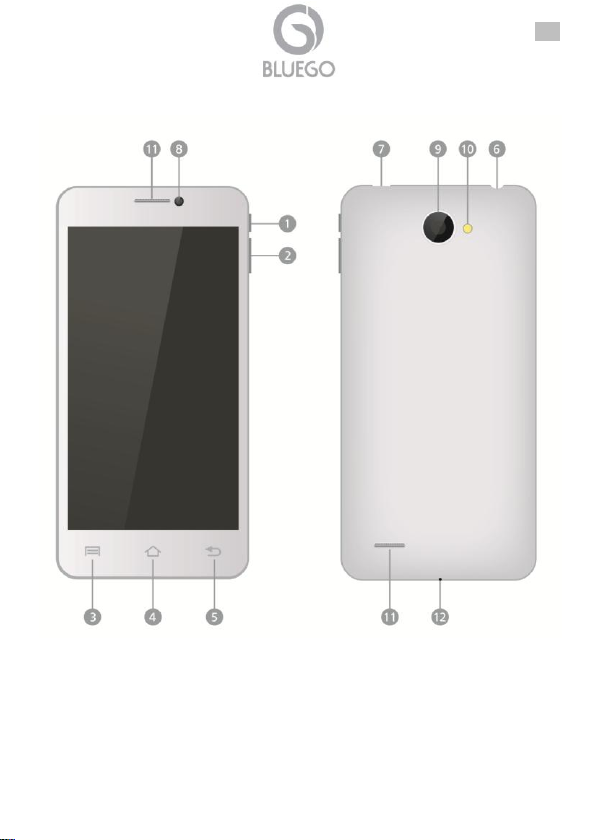
1.3 Επισκόπηση
ελλ
77
Page 78
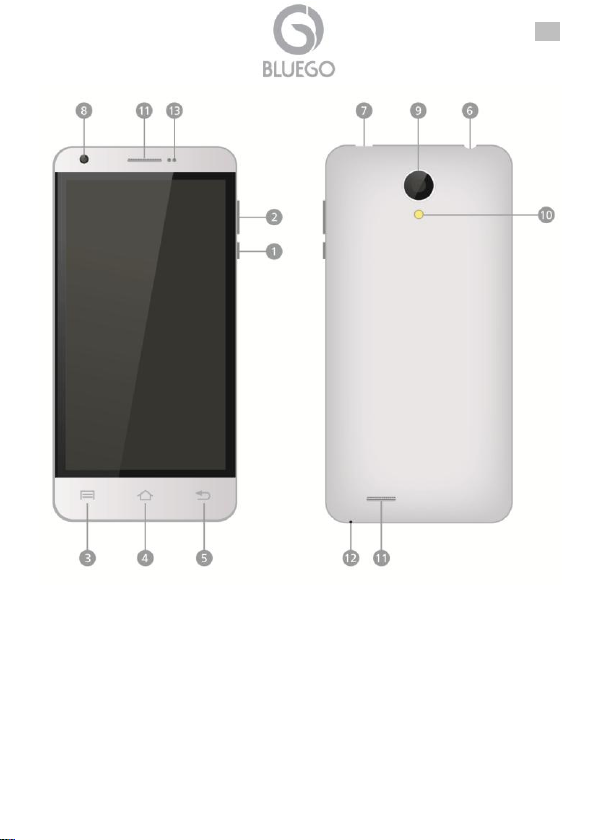
ελλ
78
Page 79
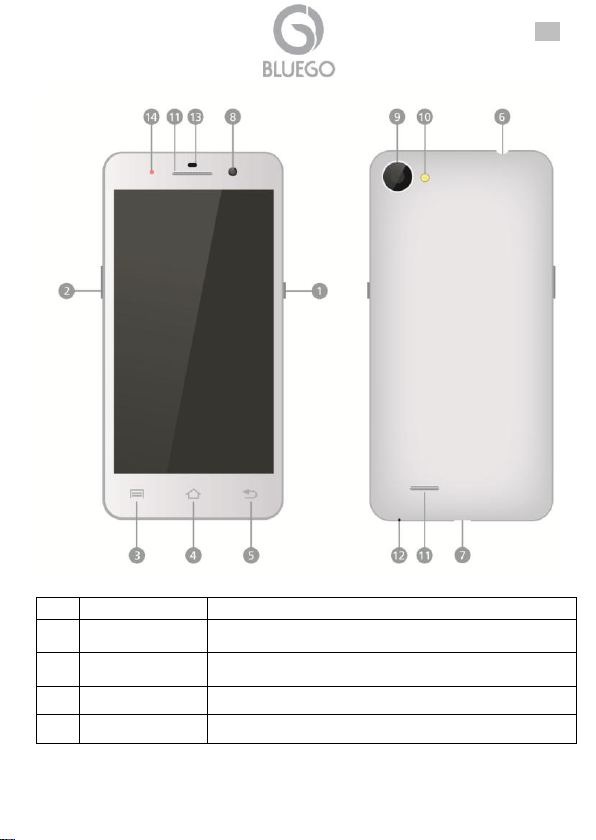
ελλ
Πληροφορίες
Λειτουργία
1
Power
Ενεργοποίηση/απενεργοποίηση της συσκευής ή
αναστολή/ενεργοποίηση της συσκευής.
2
Κουμπί Vol +\
Vol –
Ρυθμίσετε την ένταση ήχου.
3
Μενού
Εμφανίστε τις επιλογές του μενού.
4
Αρχή
Επιστρέψτε στη αρχική οθόνη.
79
Page 80
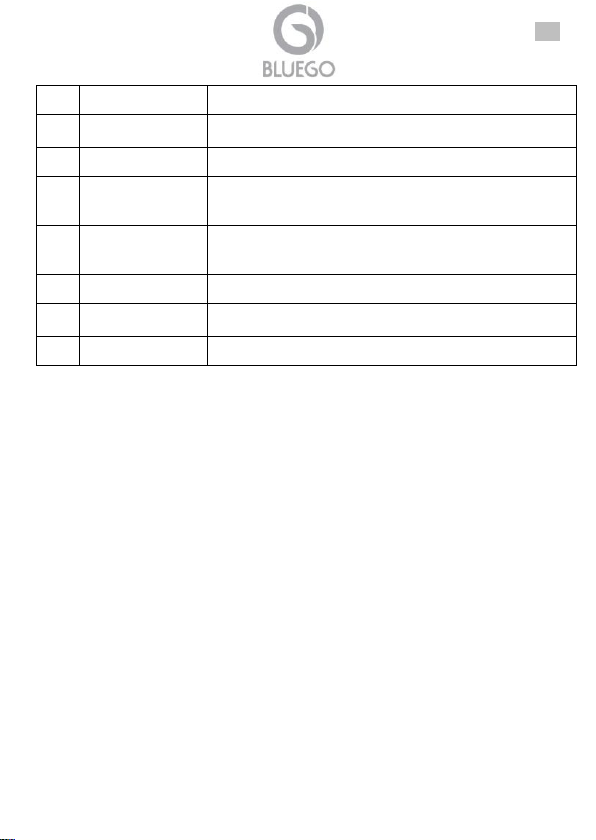
ελλ
5
Πίσω
Αντίγραφα ασφαλείας στην προηγούμενη σελίδα.
6
Υποδοχή
ακουστικών
Σύνδεση ακουστικών.
7
Θύρα USB
Καλωδιακή σύνδεση Micro USB.
8
Μπροστινή
φωτογραφική
μηχανή φακού
Τραβάτε φωτογραφίες ενώ κοιτάζετε την οθόνη.
9
Οπίσθια
φωτογραφική
μηχανή φακού
Για την λήψη φωτογραφιών ή βίντεο.
10
Φλας
To take photos in tow-light conditions.
11
Ηχείο
Ακούστε τη μουσική που προσφέρεται από το
τηλέφωνό σας..
12
Δέκτης
Λαμβάνετε τον ήχο των εισερχόμενων κλήσεων.
1.4 Εισαγωγή SIM1/2 και Micro SD κάρτας.
Η συσκευή σας πρέπει να κλέισει πριν την αλλαγή ή την απεγκατάσταση της
μπαταρίας (πιέστε και κρατήστε πατημένο το κουμπί τροφοδοσίας (power) και
στη συνέχεια επιλέξτε απενεργοποίηση στην οθόνη της συσκευής). .
Κρατήστε την πλευρά της συεκυής σφιχτά με το ένα χέρι και ανασηκώστε το πίσω
κάλυμμα με το άλλο χέρι.
Βγάλτε έξω την μπαταρία.
Εγκαταστήστε τις κάρτες SIM (παρακαλούμε να βεβαιωθείτε ότι η περιοχή
επαφών της κάρτας με χρυσό χρώμα είναι στραμμένη προς τα κάτω).
Τοποθετήστε την κάρτα Micro SD στην υποδοχή κάρτας Micro SD με τις
μεταλλικές ακίδες στραμμένη προς τα κάτω. Ωθήστε την κάρτα μέχρι να
κουμπώσει. Αυτή η συσκευή μπορεί να διαχειριστεί μέχρι 32GB.sert Micro SD
card into the Micro SD card slot with the metallic pins facing downwards. Push the
card until it locks into place. This device can manage up to 32GB.
1.5 Charging and Power On
Τοποθετήστε το ένα άκρο του καλωδίου USB στη θύρα USB στη συσκευή και
συνδέστε το μετασχηματιστή στην ηλεκτρική υποδοχή.
Συνήθως διαρκεί περίπου 4-5 ώρες για την πλήρη φόρτιση της συσκευής.
Ενεργοποίηση της συσκευής κατά τη φόρτιση με τον προσαρμογέα AC μπορεί
να παρατείνει το χρόνο της πλήρους φόρτισης.
80
Page 81
ελλ
Εάν η συσκευή δεν χρησιμοποιείται για ένα μεγάλο χρονικό
διάστημα, η μπαταρία θα αποφορτιστεί σιγά-σιγά και η
συσκευή θα πρέπει να επαναφορτιστεί πλήρως πριν την
χρησιμοποιήσετε ξανά.
Πατήστε και κρατήστε πατημένο το κουμπί λειτουργίας για λίγα δευτερόλεπτα.
Θα εισαγάγει αυτόματα την αρχική οθόνη μετά από την οθόνη εκκίνησης
(συνήθως μετά από 30 δευτερόλεπτα).
1.6 Ενεργοποίηση/Λειτουργια ύπνου/Απενεργοποίηση
Ενεργοποίηση: Πατήστε και κρατήστε πατημένο το κουμπί λειτουργίας για
λίγα δευτερόλεπτα. Θα εισαγάγει αυτόματα την αρχική οθόνη μετά από την
οθόνη εκκίνησης (συνήθως μετά από 30 δευτερόλεπτα).
Λειτουργία ύπνου: Πιέστε το κουμπί ενεργοποίησης, μια φορά για να μπέι σε
κατάσταση “ύπνου» και πατήστε το ξανά για να ξυπνήσει τη συσκευή.
Απενεργοποίηση: πιέστε και κρατήστε πατημένο το κουμπί τροφοδοσίας
(power) και στη συνέχεια επιλέξτε απενεργοποίηση στην οθόνη της
συσκευής.
1.7 Υποστήριξη
Για τεχνική υποστήριξη κι ερωτήσεις, παρακαλούμε επικοινωνείστε μαζί μας στο
γραφείο βοήθειας ( help desk by ticket) http://www.bluego.eu. Για γενικές
πληροφορίες παρακαλούμε στείλτε μας e-mail στο info@ bluego.eu. Για
πληροφορίες προπώλησης, παρακαλούμε στείλτε e-mail στο prevendite@
bluego.eu.
81
Page 82
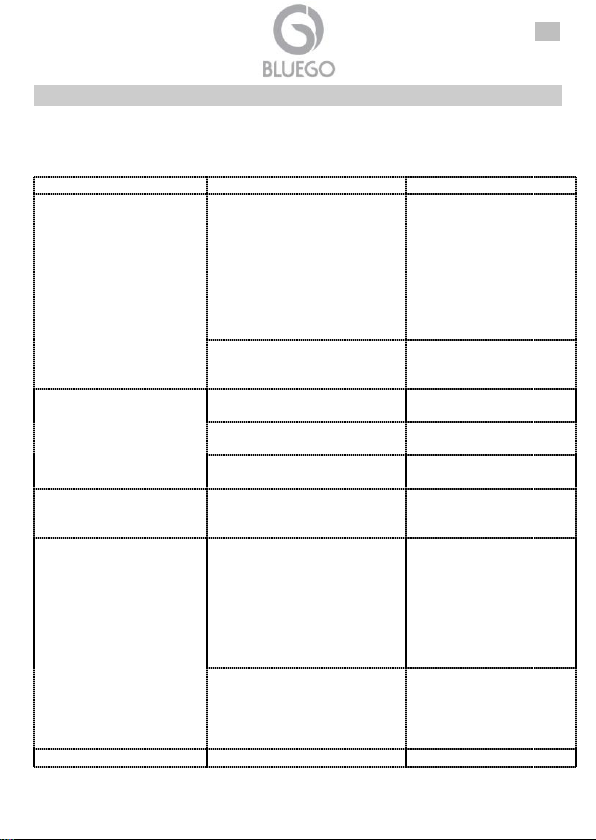
ελλ
Πρόβλημα
Αιτία
Λύση
Δεν υπάρχει δυνατότητα
στο Internet κανονικά
κατά τη χρήση του
browser.
Ο χειριστής του δικτύου δεν
παρέχει την υπηρεσία αυτή ή
δεν έχετε εφαρμόσει αυτή την
υπηρεσία
Παρακαλούμε
επικοινωνήστε και
συμβουλευτείτε τον
χειριστή του δικτύου σας
για πληροφορίες για το
πώς μπορείτε να
εφαρμόσετε και να
χρησιμοποιήσετε αυτή την
υπηρεσία.
Η ρύθμιση δεν είναι σωστή.
Παρακαλούμε ανατρέξτε
στις συγκεκριμένες
οδηγίες του browser.
Σφάλμα κάρτας SIM.
Η κάρτα SIM έχει υποβληθεί
σε ζημιά.
Επικοινωνήστε με τον
χειριστή του δικτύου σας.
Η κάρτα SIM δεν είναι σωστά
τοποθετημένη.
Ελέγξτε την κάρτα SIM.
Η μεταλλική επιφάνεια της
κάρτας SIM είναι βρώμικη.
Καθαρίστε την με ένα
καθαρό κομμάτι ύφασμα.
Σφάλμα κωδικού PIN.
Εισάγατε εσφαλμένους
κωδικούς PIN για τρεις φορές
διαδοχικά.
Επικοινωνήστε με τον
παροχέα υπηρεσιών
δικτύου.
Κακή λήψη.
Το κινητό τηλέφωνο
χρησιμοποιείται σε περιοχή
λήψης με κακό σήμα, για
παράδειγμα, κοντά σε ψηλό
κτήριο ή σε υπόγειο, ενώ τα
ραδιοκύματα δεν μπορούν να
φτάσουν την περιοχή αυτή
αποτελεσματικά.
Παρακαλούμε
πραγματοποιείτε ή
απαντάτε τις κλήσεις σας
σε περιοχές με ισχυρό
σήμα
Το κινητό τηλέφωνο
χρησιμοποιείται όταν
υπάρχουν μεγάλοι όγκοι
επικοινωνίας και οι γραμμές
είναι υπερφορτωμένες.
Προσπαθήστε να
αποφύγετε τη χρήση του
κινητού τηλεφώνου όταν ο
όγκος της επικοινωνίας
είναι μεγάλος
Δεν υπάρχει η
Η μπαταρία είναι πολύ
Φορτίστε τη μπαταρία.
1. Παράρτημα A: Επίλυση προβλημάτων
Παρακαλούμε ανατρέξτε στον ακόλουθο κατάλογο προβλημάτων και λύσεων εάν
εμφανιστεί οποιοδήποτε πρόβλημα όταν χρησιμοποιείτε το κινητό σας τηλέφωνο.
Παρακαλούμε επικοινωνήστε με τον διανομέα σας ή με τον παροχέα υπηρεσιών εάν
το πρόβλημα στη λειτουργία εξακολουθήσει.
82
Page 83
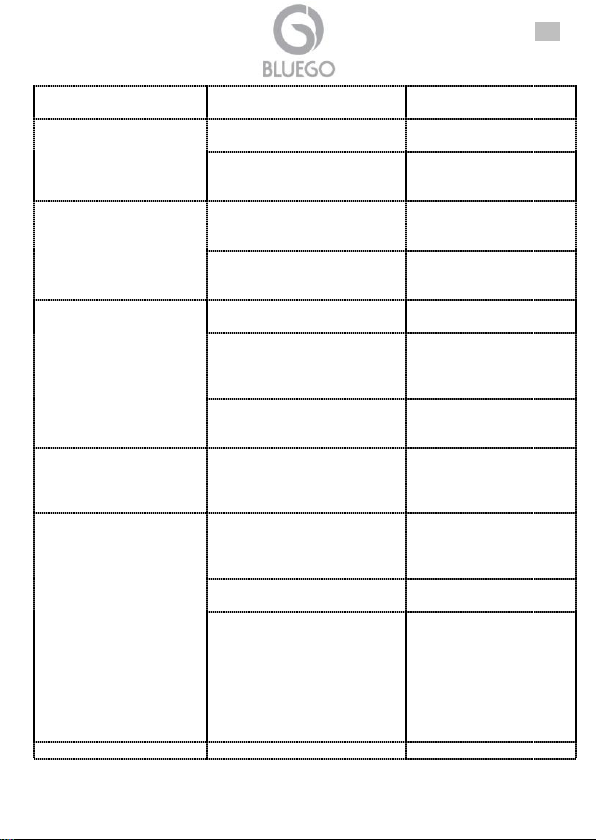
ελλ
δυνατότητα
ενεργοποίησης.
χαμηλή.
Αδύνατη η
πραγματοποίηση
κλήσης.
Η φραγή κλήσεων είναι
ενεργή.
Ακύρωση της φραγής
κλήσεων.
Χρησιμοποιείται το
χαρακτηριστικό του σταθερού
αριθμού κλήσης.
Ακυρώστε τις ρυθμίσεις
του σταθερού αριθμού
κλήσης.
Αντηχήσεις ή θόρυβοι.
Η γραμμή του δικτύου είναι σε
κακή κατάσταση. Πρόκειται για
πρόβλημα της περιοχής.
Κλείστε και επαναλάβετε
την κλήση. Επιλέξτε μια
άλλη καλύτερη γραμμή.
Σε κάποιες περιοχές, οι
γραμμές κλήσεων είναι σε
κακή κατάσταση.
Δεν υπάρχει δυνατότητα
σύνδεσης με το δίκτυο.
Η κάρτα SIM είναι άκυρη.
Επικοινωνήστε με τον
χειριστή του δικτύου σας.
Πέρα της περιοχής
εξυπηρέτησης.
Μετακινηθείτε στην
περιοχή εξυπηρέτησης
του χειριστή του δικτύου
σας.
Αδύναμο σήμα.
Μετακινηθείτε σε ένα
σημείο με ισχυρό σήμα
και προσπαθήστε ξανά.
Αποτυχία στη ρύθμιση
ορισμένων
χαρακτηριστικών.
Ο παροχέας υπηρεσιών
δικτύου σας δεν παρέχει τις
υπηρεσίες, ή δεν έχετε κάνει
εγγραφή.
Επικοινωνήστε με τον
παροχέα υπηρεσιών
δικτύου.
Συντομότερος χρόνος
αναμονής.
Ο χρόνος αναμονής είναι
σχετικός με τις ρυθμίσεις
δικτύου.
Σε περιοχές με κακή
λήψη, απενεργοποιήστε
το κινητό σας τηλέφωνο
προσωρινά.
Αντικαταστήστε τις μπαταρίες.
Αλλάξτε με μια
καινούργια μπαταρία.
Όταν δεν λαμβάνονται άλλα
σήματα, το κινητό σας
τηλέφωνο θα συνεχίσει να
αναζητά σταθμούς βάσεων,
καταναλώνοντας έτσι ένα
μεγάλο μέρος της ισχύος της
μπαταρίας και μειώνοντας τον
χρόνο αναμονής.
Χρησιμοποιήστε το
τηλέφωνό σας στις
περιοχές με ισχυρό σήμα
ή απενεργοποιήστε το
τηλέφωνό σας προσωρινά
Αδύνατη η φόρτιση.
Η τάση δεν είναι εντός του
Χρησιμοποιήστε την
83
Page 84
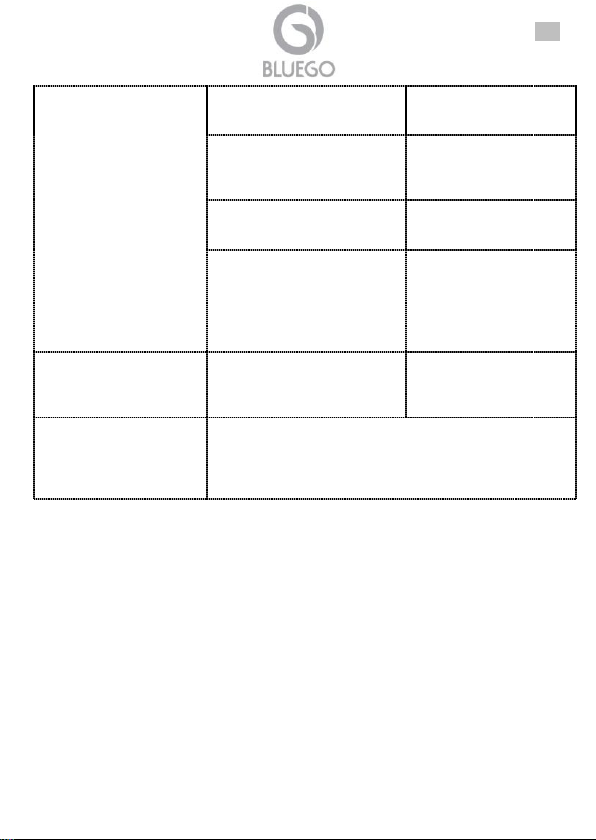
ελλ
αποδεκτού εύρους για τον
φορτιστή
επιτρεπόμενη τάση εντός
του αποδεκτού εύρους
του φορτιστή.
Χρησιμοποιείται μη τυπικός
φορτιστής.
Χρησιμοποιήστε έναν
φορτιστή ειδικά
σχεδιασμένο για το κινητό
τηλέφωνο.
Κακή επαφή.
Ελέγξτε κατά πόσο το
βύσμα είναι σωστά
συνδεδεμένο.
Φορτίστε τη μπαταρία όταν η
θερμοκρασία περιβάλλοντος
είναι κάτω
από -10οC ή πάνω από 55 οC.
Αλλάξτε το περιβάλλον.
Αποτυχία προσθήκης
επαφών στον
τηλεφωνικό κατάλογο.
Ο χώρος αποθήκευσης του
τηλεφωνικού καταλόγου έχει
εξαντληθεί.
Διαγράψτε ορισμένες
επαφές από τον
τηλεφωνικό σας
κατάλογο.
Η εικόνα δεν είναι
παρούσα Playstore.
kante klik sτο εικονίδιο και, στη συνέχεια, πληκτρολογήστε
τον κωδικό *#11* όπως φαίνεται παρακάτω
Η εικόνα τηςPlaystore τώρα θα εγκατασταθεί και θα
mporesete να mpeite στην αγορά. Εάν πληκτρολογήσετε
τον κωδικό *#22*, το εικονίδιο tou Playstore θα αφαιρεθεί
84
Page 85
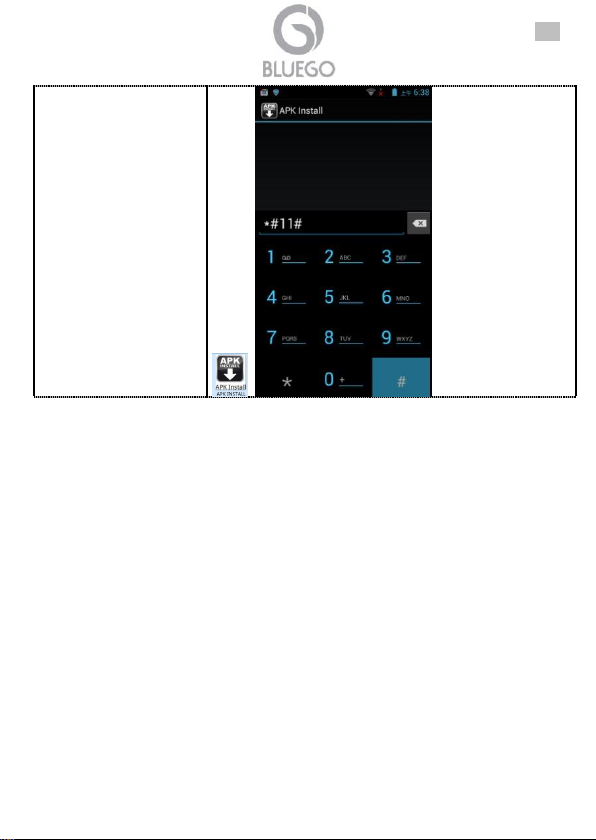
ελλ
85
Page 86
Technical Features
Model
BG-G509-W/B
Display
5" IPS LCD HD capacitive Multitouch
Resolution
1280 X 720 pixels
Processor
MKT 6582 Quad Core, 1.3Ghz Cortex A7
Memory
1GB RAM, 8GB ROM
Expansion memory Slot
Micro SD up to 32GB
OS
Android 4.2.2
Dual Sim
2 SIM
Front Camera
2MP
Back Camera
8MP, Autofocus, LED
Net
2G:GSM (850/900/1800/1900Mhz)
3G: WCDMA(2100/850Mhz)
Interfaces
Micro USB(5pin), Micro SD, Ear Jack (3,5mm)
Wireless
802.11 b/g/n
Bluetooth
4.0
Positioning
GPS, AGPS
Sensors
Proximity, G-Sensor, Light
Battery
1640mAh rechargeable Li-Polymer Battery
Dimensions
147*71*7,5mm
Weight
134g
Accessory
Charger, USB Cable, earphone, Quick Start Guide, Flip
Cover, 2nd Battery 2100mAh
Model
BG-G509K-B
Display
5" IPS LCD HD capacitive Multitouch
Resolution
1280 X 720 pixels
Processor
MKT 6592 8 Core, 1.7Ghz Cortex A7
Memory
1GB RAM, 8GB ROM
Expansion memory Slot
Micro SD up to 32GB
OS
Android 4.2.2
Dual Sim
2 SIM
Front Camera
2MP
Back Camera
8MP, Autofocus, LED
Net
2G:GSM (850/900/1800/1900Mhz)
3G: WCDMA(2100/850Mhz)
Interfaces
Micro USB(5pin), Micro SD, Ear Jack (3,5mm)
Wireless
802.11 b/g/n
Bluetooth
4.0
86
Page 87
Positioning
GPS, AGPS
Sensors
Proximity, G-Sensor, Light
Battery
1640mAh rechargeable Li-Polymer Battery
Dimensions
147*71*7,5mm
Weight
134g
Accessory
Charger, USB Cable, earphone, Quick Start Guide, Flip
Cover, 2nd Battery 2100mAh
Model
BG-V503-K
Display
5" IPS LCD HD capacitive Multitouch
Resolution
960 X 540 pixels
Processor
MKT 6582 Quad Core, 1.3Ghz Cortex A7
Memory
1GB RAM, 4GB ROM
Expansion memory Slot
Micro SD up to 32GB
OS
Android 4.2.2
Dual Sim
2 SIM
Front Camera
2MP
Back Camera
5MP, Autofocus, LED
Net
2G:GSM (850/900/1800/1900Mhz)
3G: WCDMA(2100Mhz)
Interfaces
Micro USB(5pin), Micro SD, Ear Jack (3,5mm)
Wireless
802.11 b/g/n
Bluetooth
3.0
Positioning
GPS, AGPS
Sensors
Proximity, G-Sensor, Light
Battery
1750mAh rechargeable Li-Polymer Battery
Dimensions
144*73.5*8.2mm
Weight
152g
Accessory
Charger, USB Cable, Earphone, Quick Start Guide, Flip
Cover
Model
BG-A451-W/K
Display
4,5" IPS LCD HD capacitive Multitouch
Resolution
960 X 540 pixels
Processor
BCM23550 Qaud Core, 1.2Ghz Cortex A7
Memory
1GB RAM, 4GB ROM
Expansion memory Slot
Micro SD up to 32GB
OS
Android 4.2.2
Dual Sim
2 SIM
87
Page 88
Front Camera
0,3MP
Back Camera
5MP, Autofocus, LED
Net
2G:GSM (850/900/1800/1900Mhz)
3G: WCDMA(2100/900Mhz)
Interfaces
Micro USB(5pin), Micro SD, Ear Jack (3,5mm)
Wireless
802.11 b/g/n
Bluetooth
4.0
Positioning
GPS, AGPS
Sensors
Proximity, G-Sensor, Light
Battery
1500mAh rechargeable Li-Polymer Battery
Dimensions
134*67*9.2mm
Weight
146g
Accessory
Charger, USB Cable, Earphone, Quick Start Guide, 2
extra Covers (white Perlage and Orange for BG-A451W and Black Rubber and Yellow for BG-A451-K)
88
Page 89

 Loading...