

Page 1
UNPACKING THE CONTENTS
The following are included with your system. Please
inspect these and the other system components while
unpacking:
•
Quick Start Guide
•
Server and documentation
•
MS Windows 7 Professional DVD
•
Intelli-M® Access DVD
•
Hex security key Allen wrench
•
External Power Supply
CHOOSE A PROPER LOCATION
Select a location for the server that meets the following requirements.
Excessive heat can shorten the life of electronics.
•
Adequate ventilation to avoid excessive heat (climate-controlled environment)
•
Uninterrupted Power Supply (UPS)
•
Moisture-free environment
•
A place away from direct sunlight
•
An area with minimal dust or debris
ACS
Quick Start Guide
Page 2
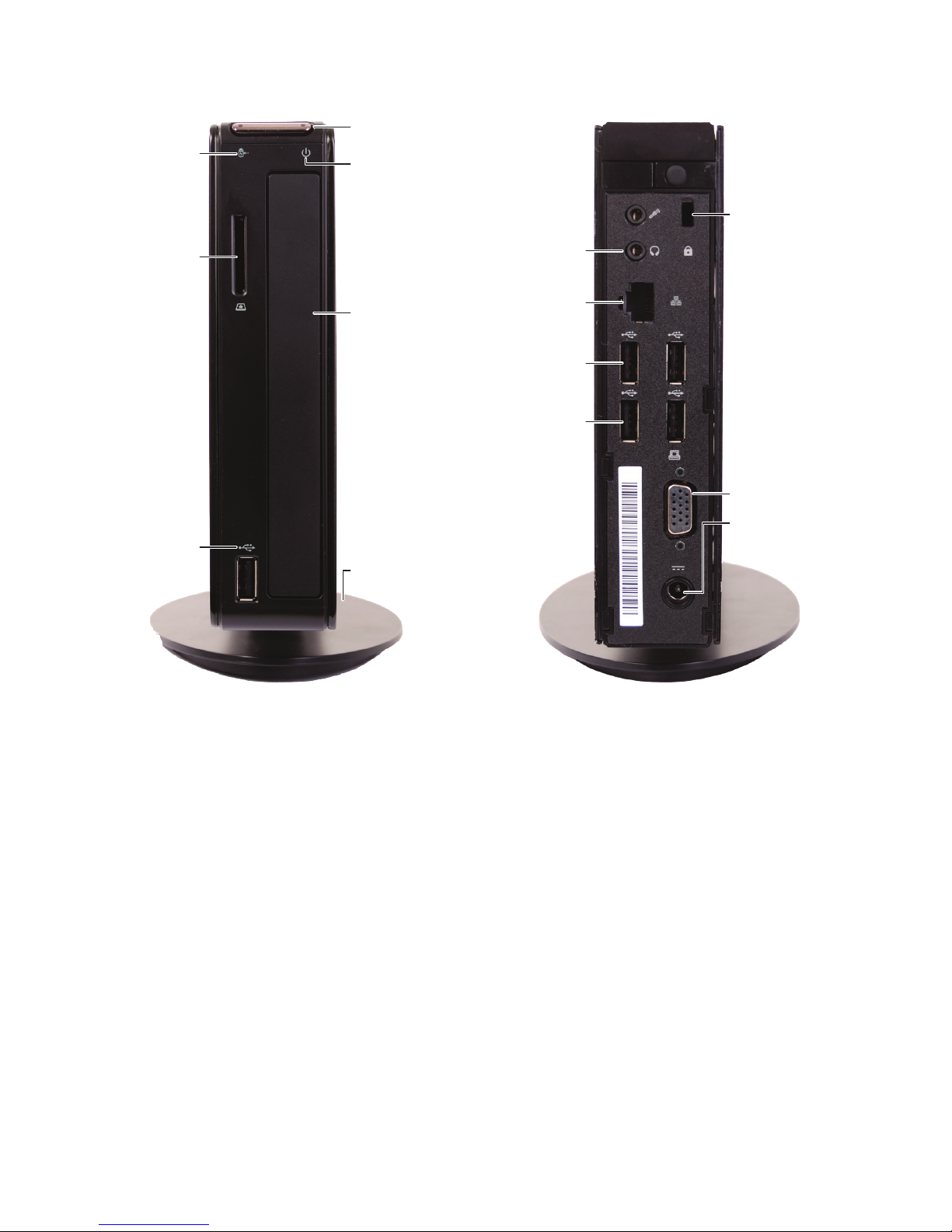
ABOUT THE SERVER
*NOTE: Do not remove the 16GB USB ash drive. Intelli-M Access will backup to this drive.
This drive must be set as D:\ .
HDD
Status
Headphone/Line Out
LAN Port
USB 2.0 Port (4)
16GB Flash Drive
Installed Here*
Power
Button
Kensington
Lock
VGA Port
Power
Connector
(DC IN)
Vertical
Stand
Drive Bay
(not used)
Power
Status
4-in-1
Card
Reader
USB 2.0
Port
FRONT BACK
Page 3
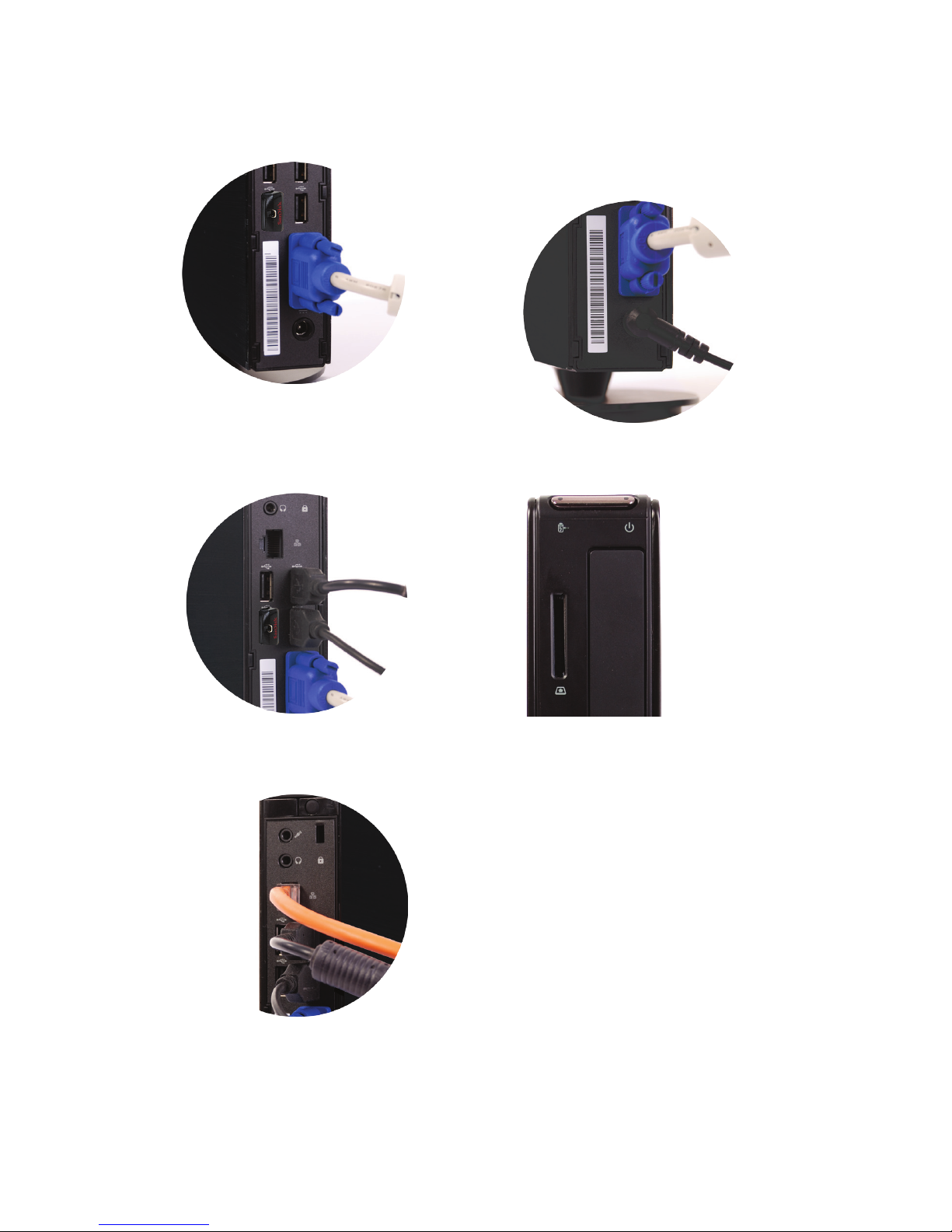
SETTING UP YOUR SERVER
1 Connect your monitor to the VGA port.
2 Connect your keyboard and mouse. You
can use any of the available USB ports.
3 Connect the network cable.
4 Connect the power adapter to the
computer, then plug it into a standard
120 VAC outlet.
5 Power on the computer and monitor.
6 Setup the server.
•
Login to the system using the
following credentials. Please change
your password to improve the
security of your system.
•
Windows 7 Professional login:
Username: Stanley
Password: 5tan1ey
Page 4

GETTING THE MOST OUT OF YOUR SERVER
2 Year Warranty/Tech Support
The server hardware comes with a 2 year return to Stanley warranty. For any issues please
contact Technical Support at 800-392-5209.
Automatic benefits
The ACS server will back up the Intelli-M Access databases nightly to the local drive in D:\. Files
in this folder should be copied to another computer or to removable storage on a regular basis.
Server SYSTEM features
•
Intel® Atom™ processor D525 (dual core)
•
2GB memory
•
500GB hard disk drive
•
16GB USB ash drive for non-volatile storage
•
10/100/1000BASE-T LAN
•
Desktop or VESA Mount (with additional purchase of VESA mounting bracket - contact
Stanley sales)
•
Microsoft Windows 7 Professional
•
Intelli-M Access Essentials installed and licensed
•
Database and key les automatically backed up
•
Automatic event archiving
Additional System information
•
LOGGING IN - Connecting to Intelli-M Access:
From this computer: http://localhost/intellim
From another computer: http://<ipaddress>/intellim
http://<machinename>/intellim
where <ipaddress> and <machinename> are the IP address
and name of this server
•
Intelli-M Access: Username: admin Password: admin
SOFTWARE UPDATES
Please visit www.stanleysecuritysolutions.com/el for latest software updates upon
installation.
 Loading...