

Page 1

USER GUIDE
ACR1002DP-T ACR1002DP-R ACR1002FDP-T ACR1002FDP-R
AGILITY
ACR1002DP
EXTENDERS
24/7 TECHNICAL SUPPORT AT 1.877.877.2269 OR VISIT BLACKBOX.COM
Page 2

1. 8 7 7. 877. 226 9 BLACKBOX.COM
NEED HELP?
LEAVE T HE TECH TO US
LIVE 24/7
TECHNICAL
SUPPORT
1.877.877.2269
TRADEMARKS USED IN THIS MANUAL
Black Box and the Black Box logo type and mark are registered trademarks of Black Box Corporation.
Any other trademarks mentioned in this manual are acknowledged to be the property of the trademark owners.
We‘re here to help! If you have any questions about your application
or our products, contact Black Box Tech Support
at 877-877-2269 or visit blackbox.com.
You’ll be live with one of our technical experts in less than 60 seconds.
2
Page 3

1. 8 7 7. 877. 226 9 BLACKBOX.COM
NEED HELP?
LEAVE T HE TECH TO US
LIVE 24/7
TECHNICAL
SUPPORT
1.877.877.2269
FEDERAL COMMUNICATIONS COMMISSION AND INDUSTRY CANADA RADIO FREQUENCY INTERFERENCE
STATEMENTS
This equipment generates, uses, and can radiate radio-frequency energy, and if not installed and used properly, that is, in strict
accordance with the manufacturer’s instructions, may cause inter ference to radio communication. It has been tested and
found to comply with the limits for a Class A computing device in accordance with the specifications in Subpart B of Part 15 of
FCC rules, which are designed to provide reasonable protection against such interference when the equipment is operated in a
commercial environment. Operation of this equipment in a residential area is likely to cause interference, in which case the user
at his own expense will be required to take whatever measures may be necessary to correct the interference.
Changes or modifications not expressly approved by the party responsible for compliance could void the user’s authority to
operate the equipment.
This digital apparatus does not exceed the Class A limits for radio noise emis sion from digital apparatus set out in the Radio
Interference Regulation of Industry Canada.
Le présent appareil numérique n’émet pas de bruits radioélectriques dépassant les limites applicables aux appareils numériques
de la classe A prescrites dans le Règlement sur le brouillage radioélectrique publié par Industrie Canada.
Disclaimer:
Black Box Network Services shall not be liable for damages of any kind, including, but not limited to, punitive, consequential or
cost of cover damages, resulting from any errors in the product information or specifications set forth in this document and Black
Box Network Services may revise this document at any time without notice.
3
Page 4

1. 8 7 7. 877. 226 9 BLACKBOX.COM
NEED HELP?
LEAVE T HE TECH TO US
LIVE 24/7
TECHNICAL
SUPPORT
1.877.877.2269
INSTRUCCIONES DE SEGURIDAD
(NORMAS OFICIALES MEXICANAS ELECTRICAL SAFETY STATEMENT)
1. Todas las instrucciones de seguridad y operación deberán ser leídas antes de que el aparato eléctrico sea operado.
2. Las instrucciones de seguridad y operación deberán ser guardadas para referencia futura.
3. Todas las advertencias en el aparato eléctrico y en sus instrucciones de operación deben ser respetadas.
4. Todas las instrucciones de operación y uso deben ser seguidas.
5. El aparato eléctrico no deberá ser usado cerca del agua—por ejemplo, cerca de la tina de baño, lavabo, sótano mojado o cerca
de una alberca, etc.
6. El aparato eléctrico debe ser usado únicamente con carritos o pedestales que sean recomendados por el fabricante.
7. El aparato eléctrico debe ser montado a la pared o al techo sólo como sea recomendado por el fabricante.
8. Servicio—El usuario no debe intentar dar servicio al equipo eléctrico más allá a lo descrito en las instrucciones de operación.
Todo otro servicio deberá ser referido a personal de servicio calificado.
9. El aparato eléctrico debe ser situado de tal manera que su posición no interfiera su uso. La colocación del aparato eléctrico
sobre una cama, sofá, alfombra o superficie similar puede bloquea la ventilación, no se debe colocar en libreros o gabinetes
que impidan el flujo de aire por los orificios de ventilación.
10. El equipo eléctrico deber ser situado fuera del alcance de fuentes de calor como radiadores, registros de calor, estufas u otros
aparatos (incluyendo amplificadores) que producen calor.
11. El aparato eléctrico deberá ser connectado a una fuente de poder sólo del tipo descrito en el instructivo de operación, o como
se indique en el aparato.
12. Precaución debe ser tomada de tal manera que la tierra fisica y la polarización del equipo no sea eliminada.
13. Los cables de la fuente de poder deben ser guiados de tal manera que no sean pisados ni pellizcados por objetos colocados
sobre o contra ellos, poniendo particular atención a los contactos y receptáculos donde salen del aparato.
14. El equipo eléctrico debe ser limpiado únicamente de acuerdo a las recomendaciones del fabricante.
15. En caso de existir, una antena externa deberá ser localizada lejos de las lineas de energia.
16. El cable de corriente deberá ser desconectado del cuando el equipo no sea usado por un largo periodo de tiempo.
17. Cuidado debe ser tomado de tal manera que objectos liquidos no sean derramados sobre la cubierta u orificios de ventilación.
18. Servicio por personal calificado deberá ser provisto cuando:
A: El cable de poder o el contacto ha sido dañado; u
B: Objectos han caído o líquido ha sido derramado dentro del aparato; o
C: El aparato ha sido expuesto a la lluvia; o
D: El aparato parece no operar normalmente o muestra un cambio en su desempeño; o
E: El aparato ha sido tirado o su cubierta ha sido dañada.
4
Page 5

1. 8 7 7. 877. 226 9 BLACKBOX.COM
NEED HELP?
LEAVE T HE TECH TO US
LIVE 24/7
TECHNICAL
SUPPORT
1.877.877.2269
CONTENTS
CONTENTS ................................................................................................................................. 5
CHAPTER 1: SPECIFICATIONS
Technical Specifications ............................................................................................................................................................................6
..................................................................................................... 6
CHAPTER 2: WELCOME .............................................................................................................. 7
Welcome ......................................................................................................................................................................................................7
Agility ACR1002DP (and ACR1002FDP) features ..................................................................................................................................... 8
CHAPTER 3: INSTALLATION ..................................................................................................... 10
Locations ...................................................................................................................................................................................................10
Transmitter video link(s) .......................................................................................................................................................................... 11
Transmitter audio links ............................................................................................................................................................................ 12
Transmitter USB links ...............................................................................................................................................................................12
Transmitter power in ................................................................................................................................................................................13
Transmitter/Receiver high speed links ................................................................................................................................................... 14
Receiver video displays ............................................................................................................................................................................ 18
Receiver audio devices ............................................................................................................................................................................ 19
Receiver USB devices ............................................................................................................................................................................... 20
Receiver power in .....................................................................................................................................................................................21
CHAPTER 4: CONFIGURATION .................................................................................................. 22
Agility configuration via web pages ........................................................................................................................................................ 22
Performing a manual factory reset ......................................................................................................................................................... 24
Placing the device into recovery mode ................................................................................................................................................... 24
Configuring dual touchscreens ............................................................................................................................................................... 25
Creating an unmanaged matrix ............................................................................................................................................................... 26
Creating and editing presets ...................................................................................................................................................................27
CHAPTER 5: OPERATION ..........................................................................................................29
Indicators ..................................................................................................................................................................................................29
Using the On Screen Display ...................................................................................................................................................................30
CHAPTER 6: FURTHER INFORMATION ...................................................................................... 31
Appendix A - Configuration pages .......................................................................................................................................................... 32
Appendix B - Tips for success when networking Agility units .............................................................................................................54
Appendix C - Troubleshooting ................................................................................................................................................................. 56
Appendix D - Glossary .............................................................................................................................................................................58
Appendix E - Fiber/copper modules and cables
Appendix F - Using the optional Agility rack shelves
Appendix G - Open source licenses ........................................................................................................................................................ 64
.................................................................................................................................... 61
............................................................................................................................ 62
SAFETY INFORMATION ............................................................................................................ 99
5
Page 6

1. 8 7 7. 877. 226 9 BLACKBOX.COM
NEED HELP?
LEAVE T HE TECH TO US
LIVE 24/7
TECHNICAL
SUPPORT
1.877.877.2269
CHAPTER 1: SPECIFICATIONS
TECHNICAL SPECIFICATIONS
OPERATING/STORAGE CONDITIONS
Operating temperature: 0 to 40ºC / 32 to 104ºF
Storage temperature: 0 to 40ºC / 32 to 104ºF
Storage and operating relative humidity: 10 to 90% non-condensing
Altitude: < 2000m
POWER
External power: 12VDC, 1.5A
Typical power consumption: 7W
PHYSICAL
LOCAL UNIT - TRANSMITTER (TX)
Dimensions: 136mm/5.3” (w) x 150mm/5.9” (d) x 39mm/1.5” (h)
Weight: 0.8kg / 1.7 lbs
REMOTE UNIT - RECEIVER (RX)
Dimensions: 186mm/7.3” (w) x 150mm/5.9” (d) x 39mm/1.5” (h)
Weight: 1.1kg / 2.4 lbs
MATERIALS
Aluminium and steel construction
CONNECTORS
LOCAL UNIT - TRANSMITTER (TX)
Computer: 2x DisplayPort™ connections, 1x 3.5mm socket for Audio in, 1x USB Type B, 1x USB
Type A for auxiliary connections, 1x 8p8c and 1x SFP for 1GbE network connections
(2x SFP for ACR1002FDP variants)
REMOTE UNIT - RECEIVER (RX)
Desk: 2x DisplayPort™ connections, 1x 3.5mm socket for Audio out, 1x 3.5mm socket
for headset/microphone, 4x USB Type A, 1x 8p8c and 1x SFP for 1GbE network
connections (2x SFP for ACR1002FDP variants)
USB2.0 WITH CLASS CONTROL
Supports USB2.0 devices (low, full and high speed). Security feature allows the blocking of non-HID devices. Isochronous devices
are not supported (e.g. USB audio or video devices)
VIDEO RESOLUTION
The system supports up to 1x 2560x1600@60Hz or 2x 1920x1200 @60Hz
AUDIO
USB audio 2 channel 16bit 48KHz (bi-directional)
ETHERNET
In-built support for 1GbE CATx*
Support for second CATx (up to 1GbE) or fiber (up to 1GbE) via SFP modules*
* ACR1002FDP variants have 2x SFP and no in-built CATx port
APPROVALS / COMPLIANCE
CE, UKCA, FCC, ICES, cULus
PRODUCT INFORMATION LABELS
The product information labels are located on the base of each unit.
6
Page 7
1. 8 7 7. 877. 226 9 BLACKBOX.COM
NEED HELP?
LEAVE T HE TECH TO US
LIVE 24/7
TECHNICAL
SUPPORT
1.877.877.2269
CHAPTER 2: WELCOME
WELCOME
Thank you for choosing the Black Box Agility ACR1002DP high performance extenders, which offer dual-head video, audio
and USB delivered over a single fiber connection. The extenders offer pixel-perfect color and accurate picture quality at up to
2560x1600@60Hz and USB2.0 with fast switching.
PRODUCT IN BRIEF
• In-built support for CATx links at speeds up to 1GbE with additional support for dual CATx or fiber at up to 1GbE using optional
SFP modules (2x SFP for ACR1002FDP variants),
• Support for 1x 2560x1600@60Hz or 2x 1920x1200@60Hz,
• Bi-directional analog audio (with combined headset jack on the receiver),
• USB True Emulation for fast switching,
• Support for advance diagnostic and troubleshooting tools,
• Backwards compatibility with existing Agility range,
• Plug and play.
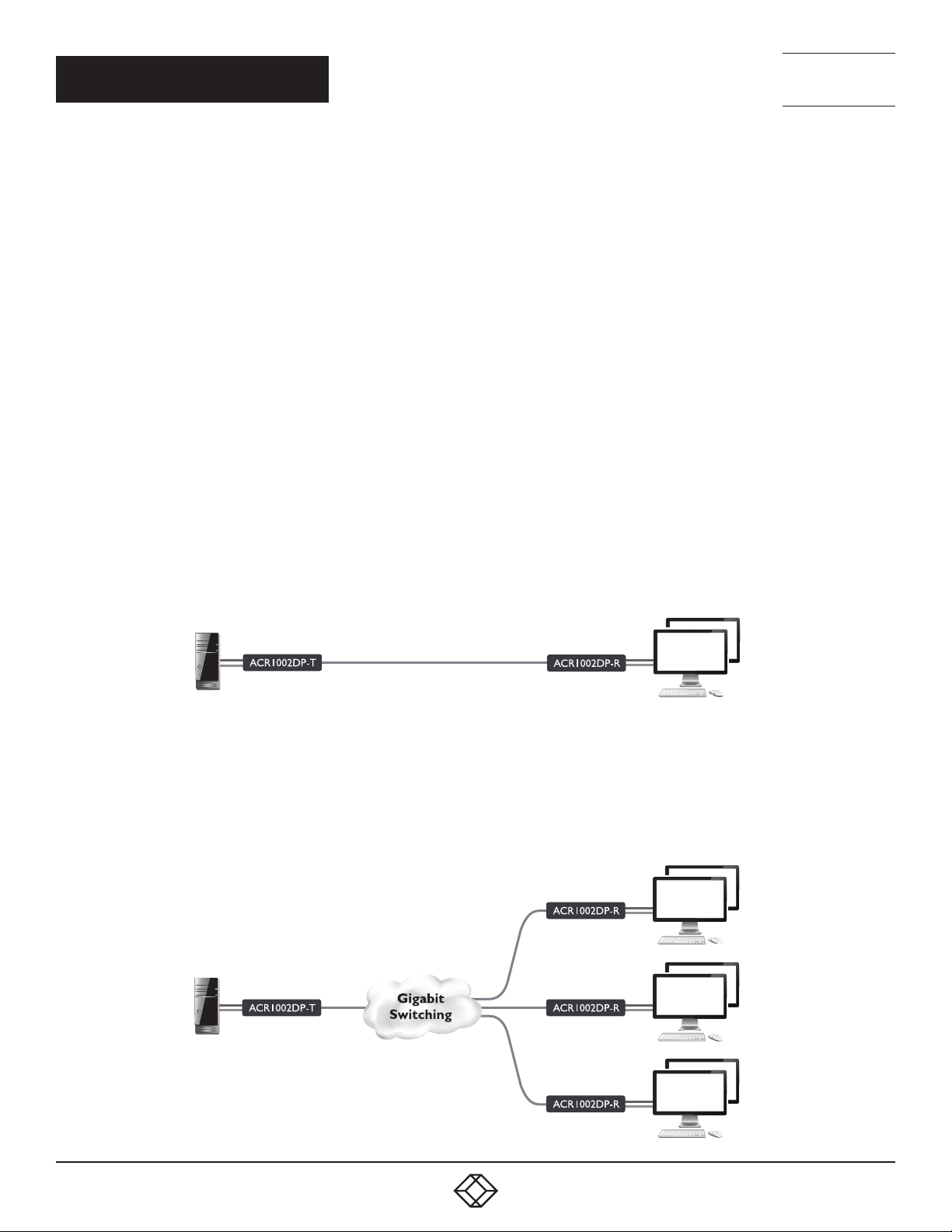
LINKING
Agility units can be linked in two mains ways: Direct or Networked.
DIRECT LINKING
Where Agility transmitters and receivers are directly linked to each other, very little configuration action is required, provided that
they both have their factory default settings in place - just link them together. If the standard settings have been changed in a
previous installation, you merely need to perform a manual factory reset on each unit - see page 24.
NETWORKED LINKING
Where Agility units are connected via networked links, you can either configure them individually, or configure them collectively
using an iPATH server:
• Configuring networked units individually - In the absence of an iPATH server, unallocated Agility units have the ability to locate
each other. You can alter settings via the OSD on the console connected to the receiver by pressing CTRL + ALT + C.
• Configuring networked units collectively - The iPATH server allows you to configure, control and coordinate any number of
transmitters and receivers from a single application.
Note: If you are using one or more transmitters within
an installation managed by an iPATH server, the iPATH
server must be running firmware version 4.9 or above.
IMPORTANT: When using iPATH to configure Agility units, it is
vital that all units that you wish to locate and control are set
to their factory default settings. Otherwise they will not be
located by the iPATH server. If necessary, perform a manual
factory reset on each Agility unit.
7
Page 8
1. 8 7 7. 877. 226 9 BLACKBOX.COM
NEED HELP?
LEAVE T HE TECH TO US
LIVE 24/7
TECHNICAL
SUPPORT
1.877.877.2269
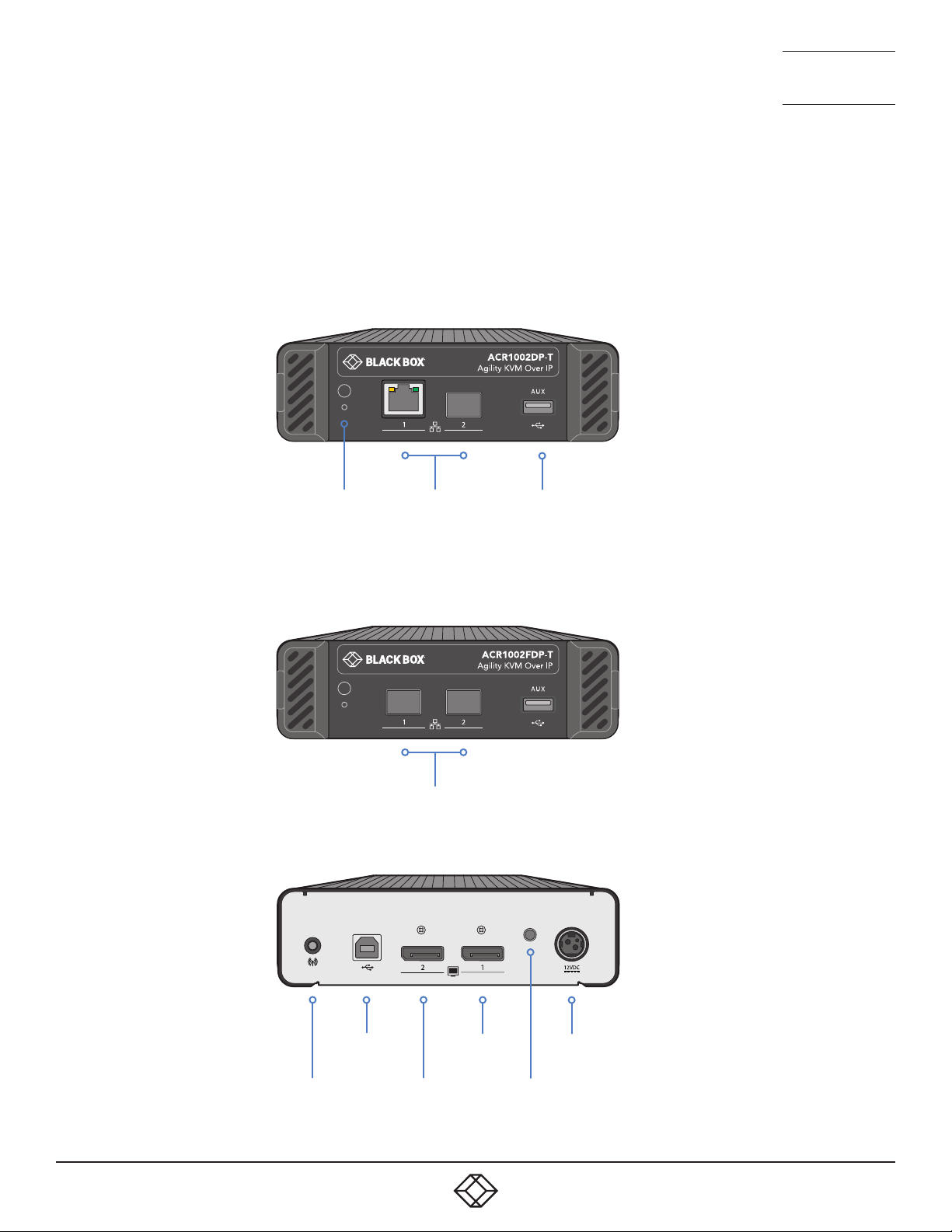
AGILITY ACR1002DP (AND ACR1002FDP) FEATURES
The transmitter and receiver modules are housed within durable, vented enclosures with connectors situated on the front and
rear panels. The FDP model variants have two SFP ports rather than a mix of CATx and SFP, but are otherwise identical.
AGILITY TRANSMITTER MODULE
ACR1002DP-T model
Reset
switch and status
indicator
CATx and
SFP link
ports
2 x SFP link
ports
USB AUX port
(for use with USB-
to-serial convert-
ers)
ACR1002FDP-T model
USB
Analog
audio in
8
Secondary
video in
Primary
video in
indicator
Power
in
Status
Page 9
1. 8 7 7. 877. 226 9 BLACKBOX.COM
NEED HELP?
LEAVE T HE TECH TO US
LIVE 24/7
TECHNICAL
SUPPORT
1.877.877.2269
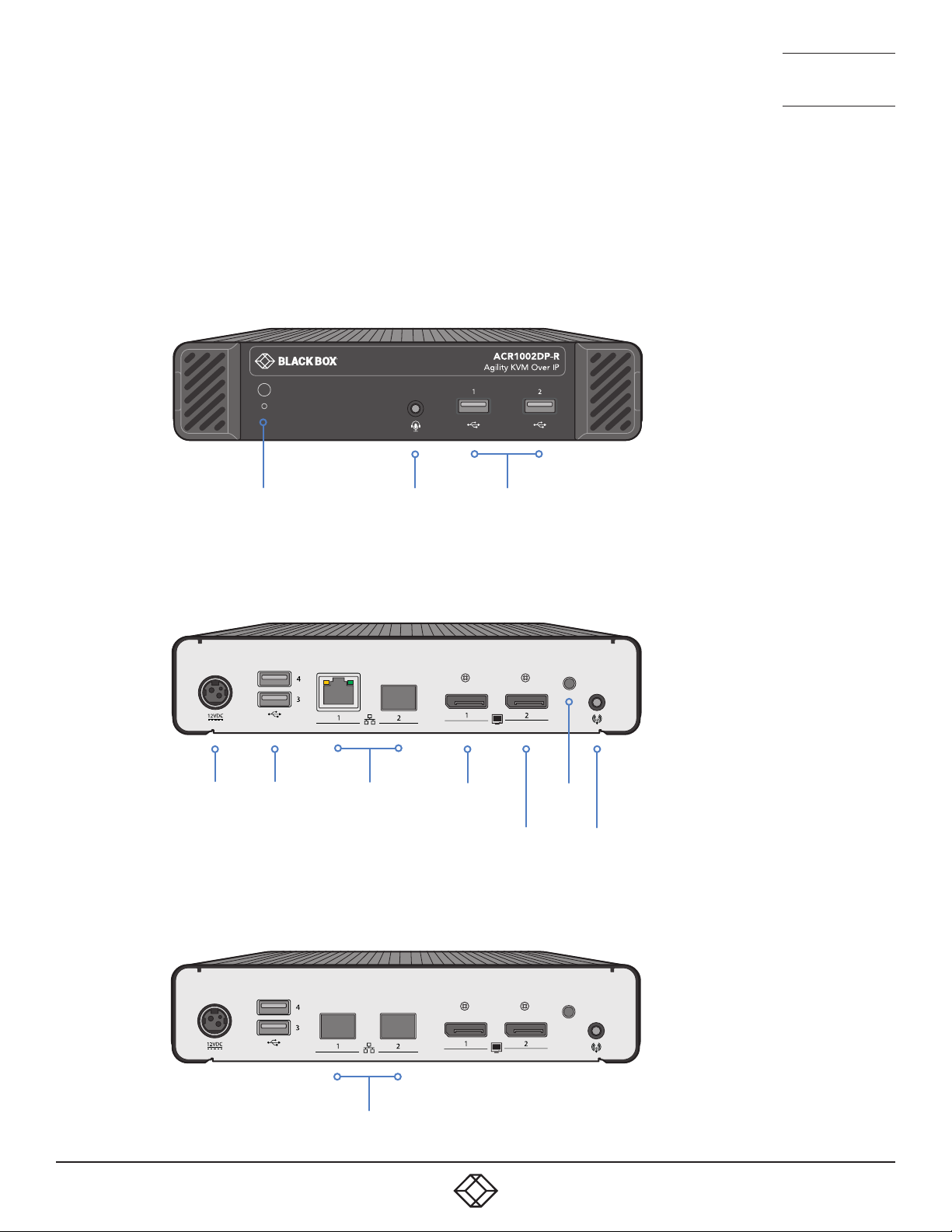
AGILITY RECEIVER MODULE
Reset
switch and status
indicator
Power
in
USB
ports
Combined
analog audio
headphone/
mic/headset
CATx and
SFP link ports
port
Primary
display
USB
ports
Secondary
display
ACR1002DP-R model
Status
indicator
Analog
audio line
out
2 x SFP link
ports
ACR1002FDP-R model
9
Page 10

1. 8 7 7. 877. 226 9 BLACKBOX.COM
NEED HELP?
LEAVE T HE TECH TO US
LIVE 24/7
TECHNICAL
SUPPORT
1.877.877.2269
CHAPTER 3: INSTALLATION
LOCATIONS
Please consider the following important points when planning the position of the modules:
• Situate the transmitter module close to the system to which it will be connected and near to a source of mains power. Place the
receiver module in similar close proximity to the peripherals that it will connect with, plus a source of mains power.
• Consult the precautions listed within the supplied safety leaflet.
• Connections do not need to be carried out in the order given within this guide, however, where possible connect the power in as
the final step.
Suitable for installation in Information Technology Rooms in accordance with Article 645 of the National Electrical Code and
NFPA 75.
Peut être installé dans des salles de matériel de traitement de l’information conformément à l’article 645 du National Electrical
Code et à la NFPA 75.
10
Page 11
1. 8 7 7. 877. 226 9 BLACKBOX.COM
NEED HELP?
LEAVE T HE TECH TO US
LIVE 24/7
TECHNICAL
SUPPORT
1.877.877.2269
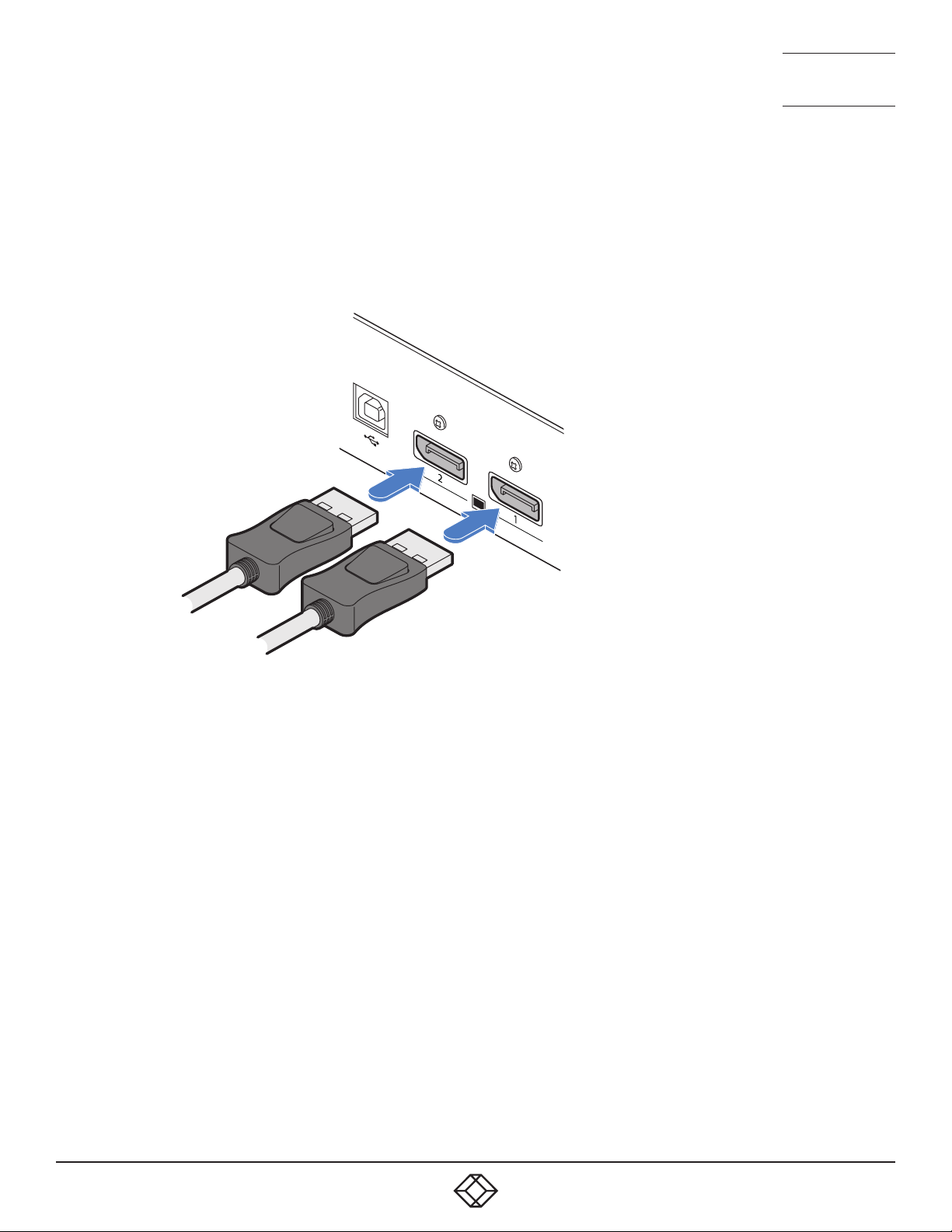
TRANSMITTER VIDEO LINK(S)
The transmitter supports a single DisplayPort™ connection at up to 2560x1600@60Hz or two connections, each up to
1920x1200@60Hz.
TO MAKE A VIDEO LINK
1 Connect your digital video link cable(s) to the DisplayPort socket(s) on the transmitter rear panel:
To secondary
video output
port
To primary
video output
port
2 Connect the plug at the other end of the cable(s) to the corresponding video output socket(s) of the host computer.
11
Page 12
1. 8 7 7. 877. 226 9 BLACKBOX.COM
NEED HELP?
LEAVE T HE TECH TO US
LIVE 24/7
TECHNICAL
SUPPORT
1.877.877.2269
TRANSMITTER AUDIO LINKS
Audio is supported in the initial product release solely via the USB link with the host computer. In subsequent firmware updates
further audio capabilities will be added.
Conversion between the USB derived digital audio and the receiver compatible audio format audio is carried out at the
transmitter.
TRANSMITTER USB LINKS
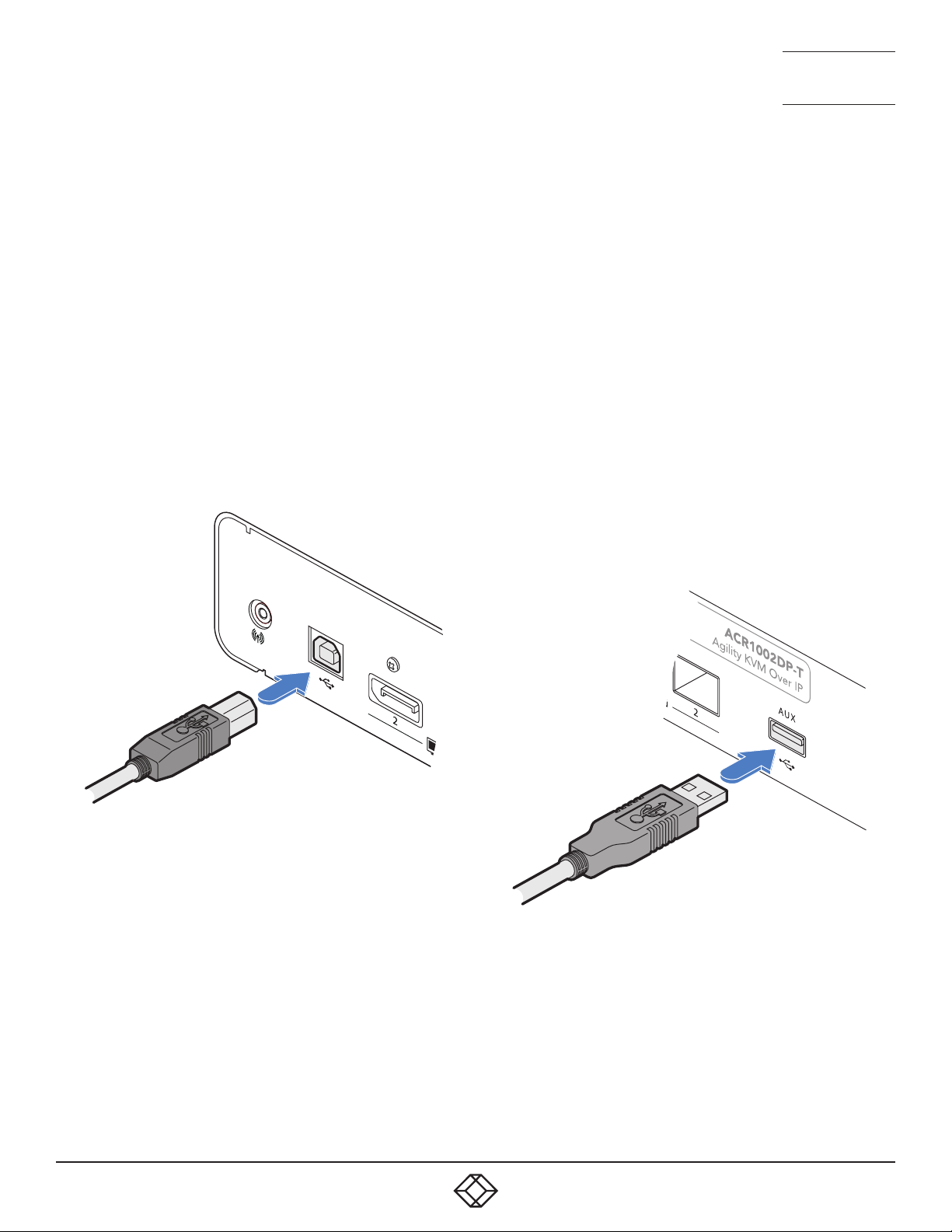
The transmitter has a USB type B socket on the rear panel to link with the host computer. Additionally, the unit also has a type A
socket on the front panel to allow an optional USB-to-serial converter device to be attached.
TO MAKE A USB LINK
1 Connect the type B connector of the supplied USB cable
to the USB port 1 on the transmitter rear panel.
USB link from
host computer
2 Connect the type A connector of the supplied cable to a
vacant USB socket on the host computer.
RS232 SERIAL SUPPORT
To support RS232 serial connections, use third-party USB-toserial adapters on both the transmitters and receivers.
TO ATTACH A USB-TO-SERIAL CONVERTER
1 If required, connect a USB-to-serial converter to the AUX
port on the transmitter front panel.
12
2 Connect an accompanying USB-to-serial converter to a
vacant USB socket on the receiver.
Page 13
1. 8 7 7. 877. 226 9 BLACKBOX.COM
NEED HELP?
LEAVE T HE TECH TO US
LIVE 24/7
TECHNICAL
SUPPORT
1.877.877.2269
TRANSMITTER POWER IN
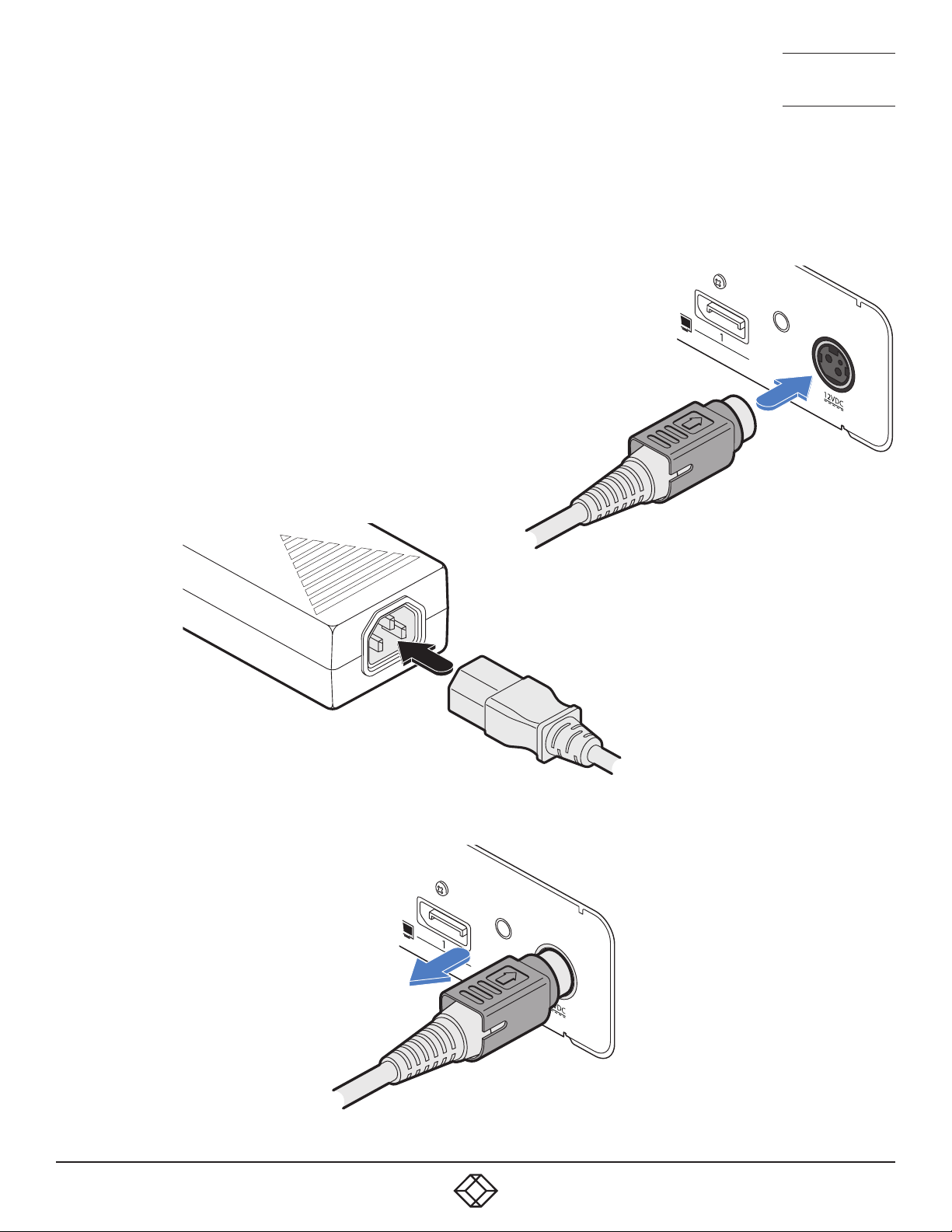
Each unit is supplied with a power adapter and country-specific power cord. The supplied power adapter uses a locking-type
plug to help prevent accidental disconnection; follow the instructions shown on the right when disconnecting a power adapter.
TO CONNECT THE POWER ADAPTER
1 Attach the output plug of the supplied power adapter to the power input
socket on the right side of the rear panel. As you insert the plug, pull back
slightly on the outer body to assist the locking mechanism until the plug is
fully inserted.
From the
power
2 Insert the IEC connector of the supplied country-specific
power cord to the socket of the power adapter.
adapter
3 Connect the power cord to a nearby mains supply socket.
TO DISCONNECT THE POWER ADAPTER
1 Isolate the power adapter from the mains
supply.
2 Grasp the outer body of the power adapter
plug where it connects with the node.
3 Gently pull the body of the outer plug away
from the node. As the body of the plug
slides back, it will release from the socket
and you can fully withdraw the whole plug.
IMPORTANT: Please read and
adhere to the electrical safety
information given within
the supplied safety leaflet.
In particular, do not use an
unearthed power socket or
extension cable.
Note: Both the modules and
the power supplies generate
heat when in operation and will
become warm to the touch. Do
not enclose them or place them
in locations where air cannot
circulate to cool the equipment.
Do not operate the equipment in
ambient temperatures exceeding
40 degrees Centigrade (104
degrees Fahrenheit). Do not
place the products in contact
with equipment whose surface
temperature exceeds 40 degrees
Centigrade (104 degrees
Fahrenheit).
Gently pull back the plug outer
body to release the lock.
13
Page 14
1. 8 7 7. 877. 226 9 BLACKBOX.COM
NEED HELP?
LEAVE T HE TECH TO US
LIVE 24/7
TECHNICAL
SUPPORT
1.877.877.2269
TRANSMITTER/RECEIVER HIGH SPEED LINKS
Agility units can be either connected directly to each other or via a high speed (up to 1GbE) network. Links can be made:
• Using the in-built CATx ports (see below),
• Using additional CATx connections within the SFP ports (see next page),
• Using the SFP ports with optional fiber (FCoE) modules (see page 16).
• Using the dual SFP ports with optional fiber (FCoE) modules on ACR1002FDP variants (see page 17 ).
TEAMING
Agility units are ready to automatically invoke teaming whenever the CATx and SFP (with either CATx or fiber modules installed)
ports are both used to link transmitters and receivers. Teaming potentially doubles the available bandwidth for video intensive
applications and also provides redundancy in case one link is lost.
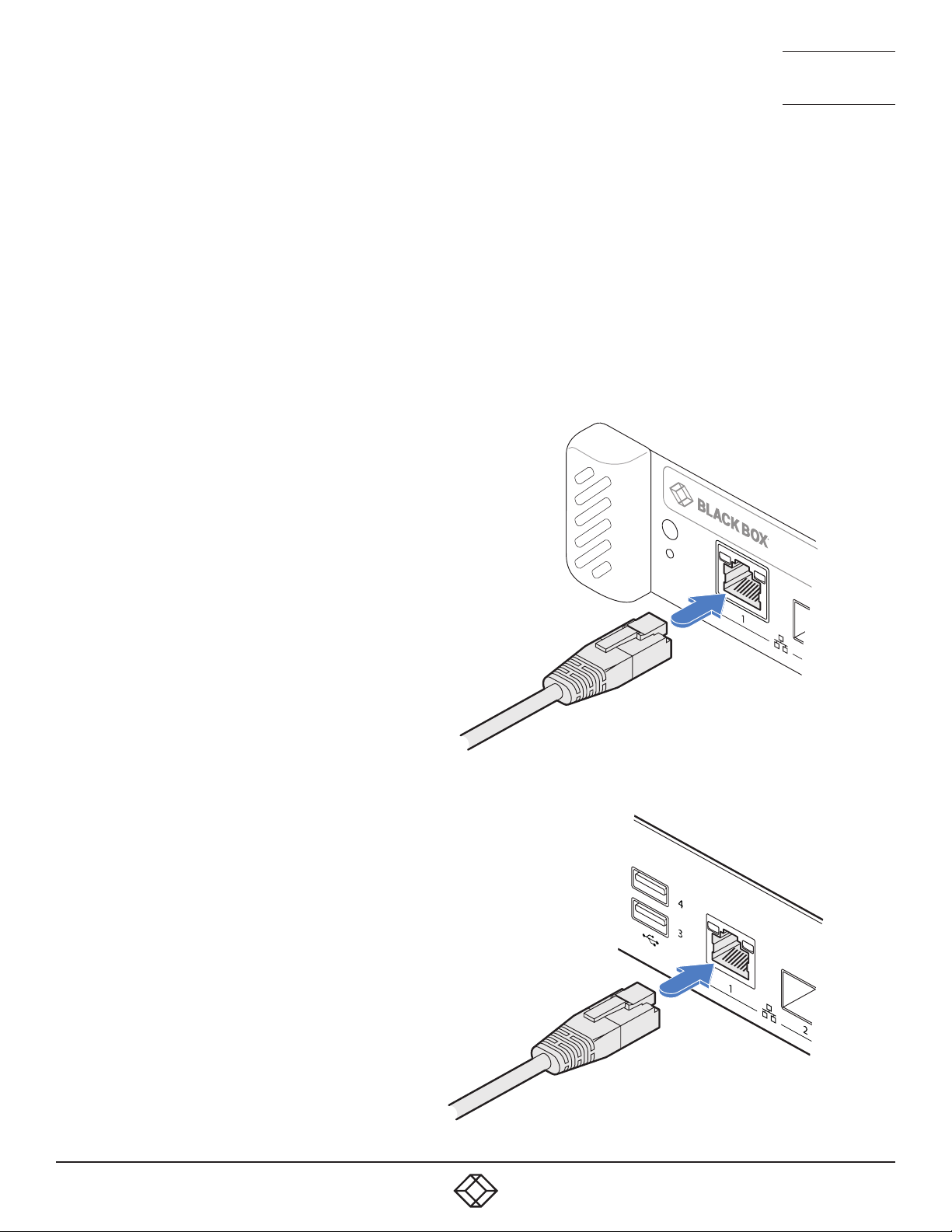
TO LINK USING THE IN-BUILT CATX PORT
1 Insert a suitable CATx cable into the RJ45 port on the front panel of
the transmitter.
2 Connect the other end(s) of the CATx cable(s) to either a network
switch or...
Transmitter
front panel
14
CATx link
cable
Receiver
rear panel
... connect directly to the receiver - to the
RJ45 port on the rear panel of the receiver.
CATx link
cable
Page 15
1. 8 7 7. 877. 226 9 BLACKBOX.COM
NEED HELP?
LEAVE T HE TECH TO US
LIVE 24/7
TECHNICAL
SUPPORT
1.877.877.2269
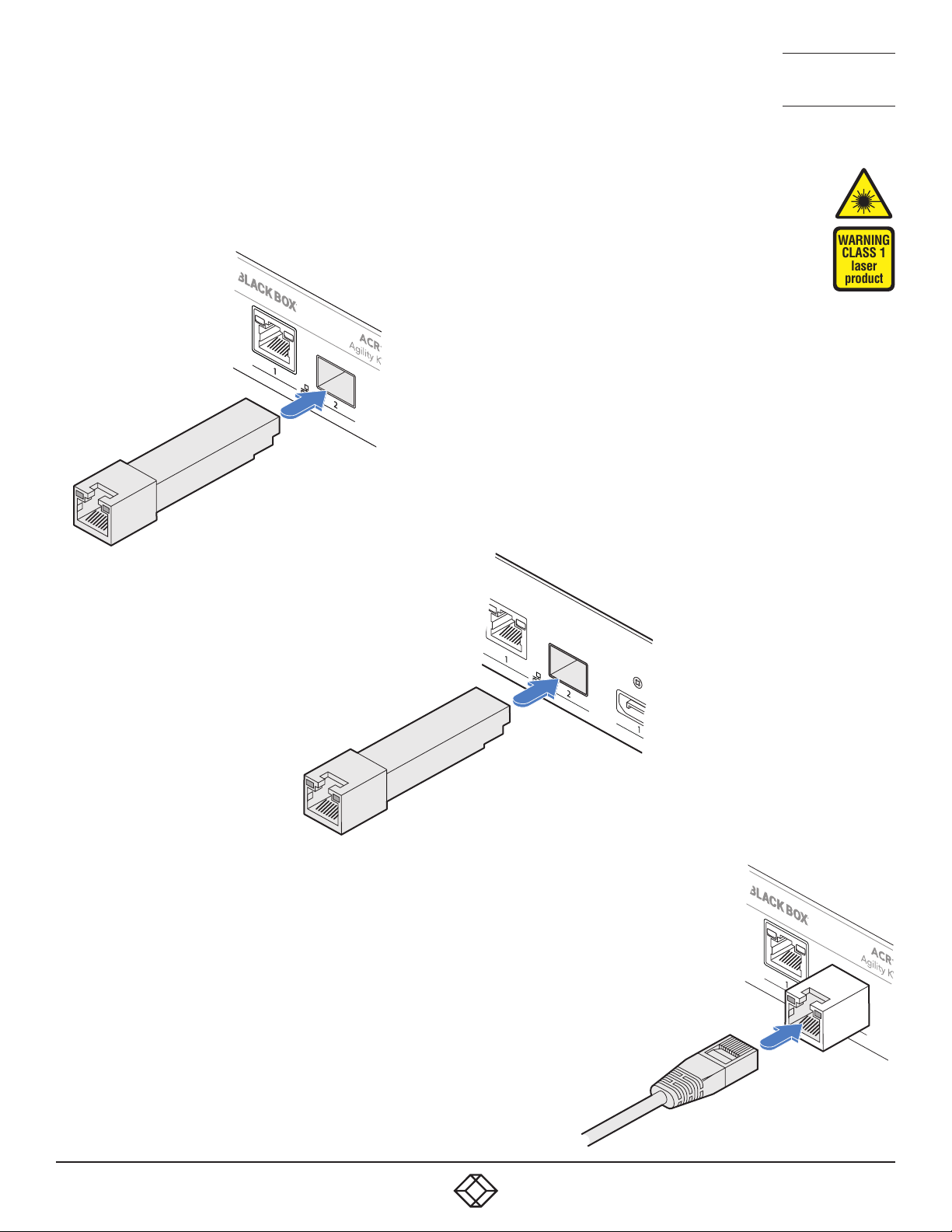
TO INSTALL ADDITIONAL CATX MODULES
1 Insert the appropriate optional SFP module into socket 2 located on the
front panel of the transmitter...
Transmitter
front panel
WARNING
CLASS 1
laser
product
CATx SFP
module
Receiver
rear panel
...and the rear panel of the
receiver:
CATx SFP
module
2 Make your CATx connection(s)
between the SFP module and
either the other Agility unit or a
suitable network switch.
CATx link
cable
15
Page 16
1. 8 7 7. 877. 226 9 BLACKBOX.COM
NEED HELP?
LEAVE T HE TECH TO US
LIVE 24/7
TECHNICAL
SUPPORT
1.877.877.2269
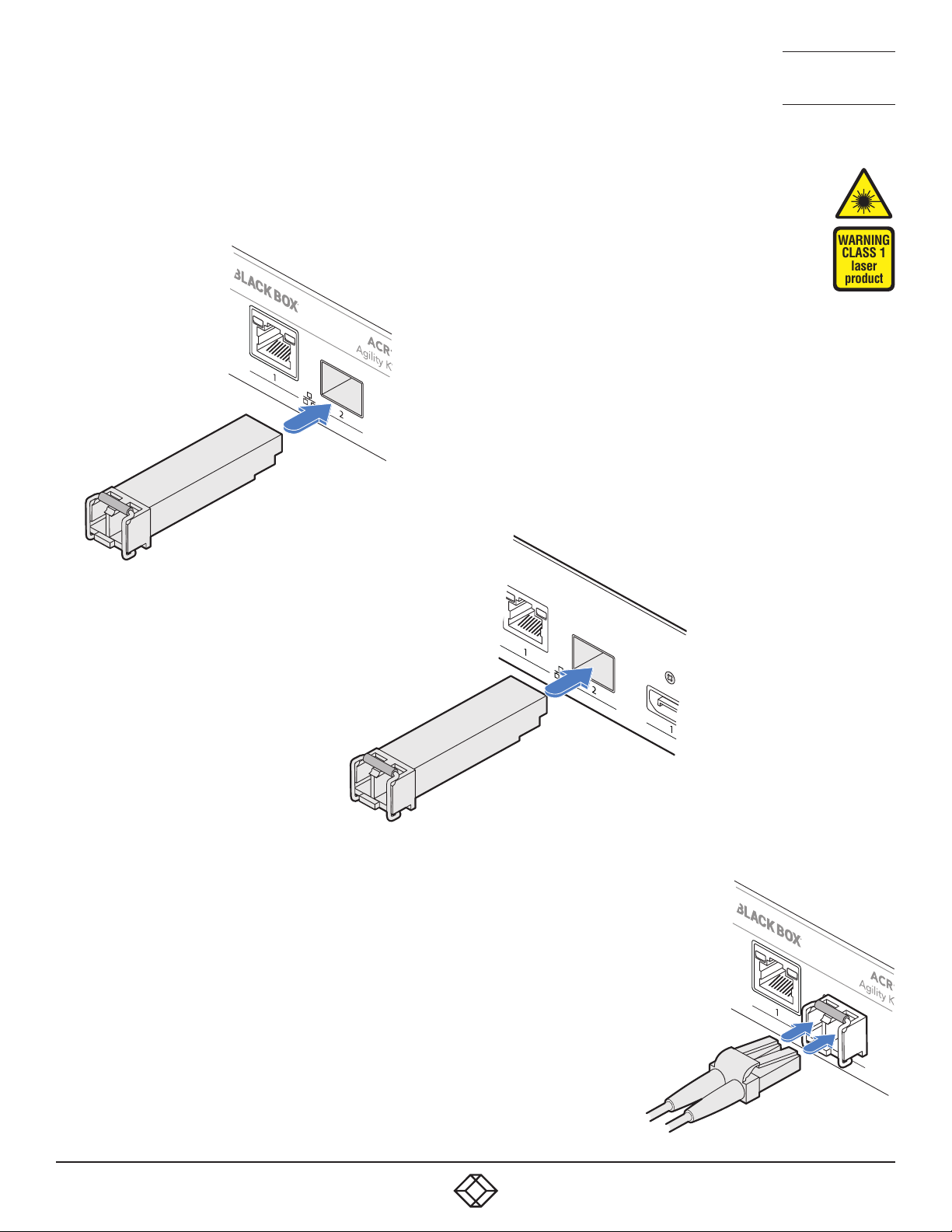
TO LINK AGILITY ACR1002DP UNITS VIA FIBER MODULES
1 Insert the appropriate optional SFP module into socket 2 located on
the front panel of the transmitter...
Transmitter
front panel
Fiber SFP
module
WARNING
CLASS 1
laser
product
...and the rear panel of
the receiver:
2 Make your fiber connection(s) between
the SFP module and either the other
Agility unit or a suitable fiber network
switch.
3 Close the latch over the link connectors
to lock them into place.
Receiver
rear panel
Fiber SFP
module
16
Transmit and receive
ber links
Page 17
1. 8 7 7. 877. 226 9 BLACKBOX.COM
NEED HELP?
LEAVE T HE TECH TO US
LIVE 24/7
TECHNICAL
SUPPORT
1.877.877.2269
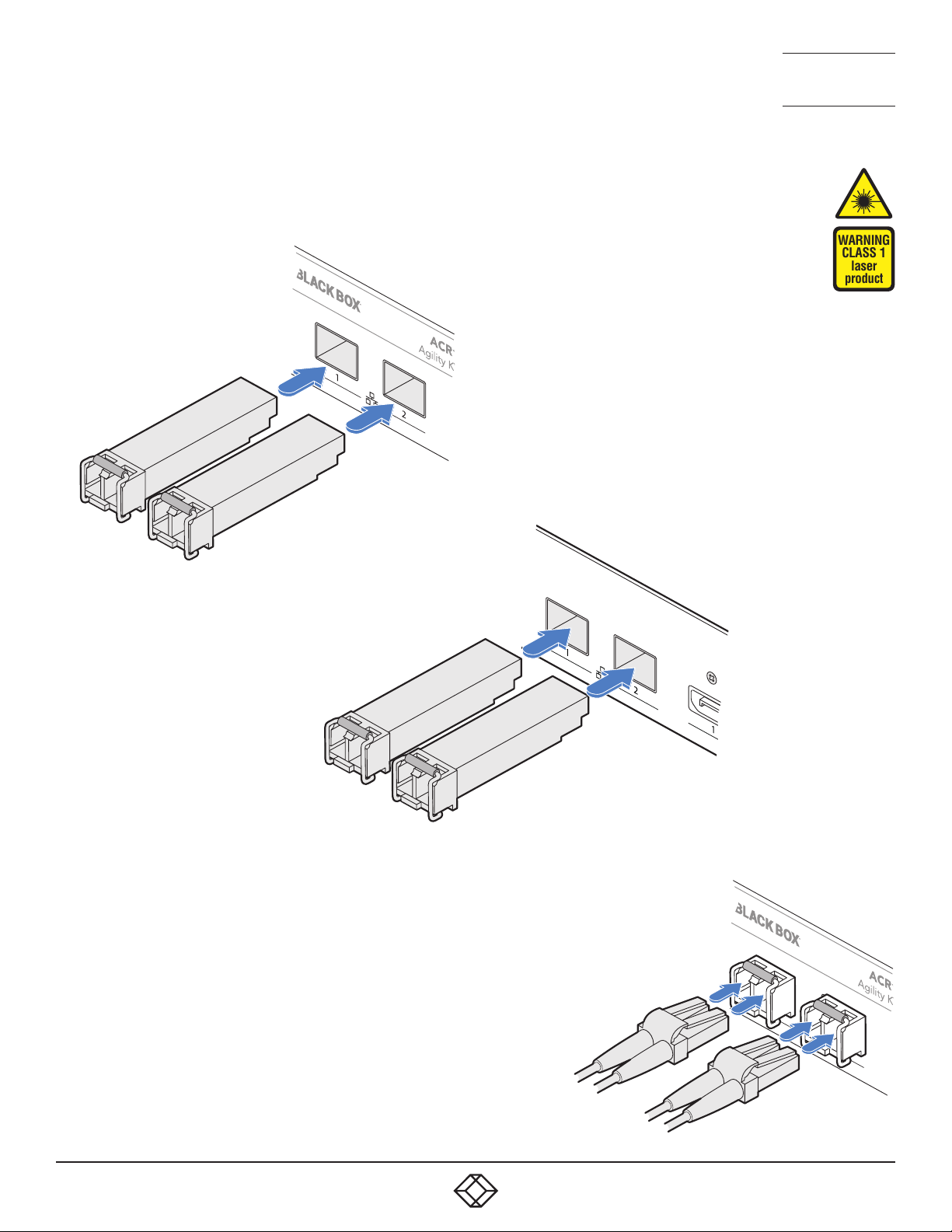
TO LINK AGILITY ACR1002FDP UNITS VIA FIBER MODULES
1 Insert the appropriate optional SFP modules into sockets 1 and 2
located on the front panel of the transmitter...
Transmitter
front panel
WARNING
CLASS 1
laser
product
Fiber SFP
modules
Receiver
rear panel
...and the rear panel of
the receiver:
Fiber SFP
modules
2 Make your fiber connection(s) between
the SFP modules and either the other
Agility unit or a suitable fiber network
switch.
3 Close the latch over the link connectors
to lock them into place.
Transmit and receive
ber links
17
Page 18
1. 8 7 7. 877. 226 9 BLACKBOX.COM
NEED HELP?
LEAVE T HE TECH TO US
LIVE 24/7
TECHNICAL
SUPPORT
1.877.877.2269
RECEIVER VIDEO DISPLAYS
The receiver supports a single DisplayPort™ connection at up to
2560x1600@60Hz or two connections, each up to 1920x1200@60Hz.
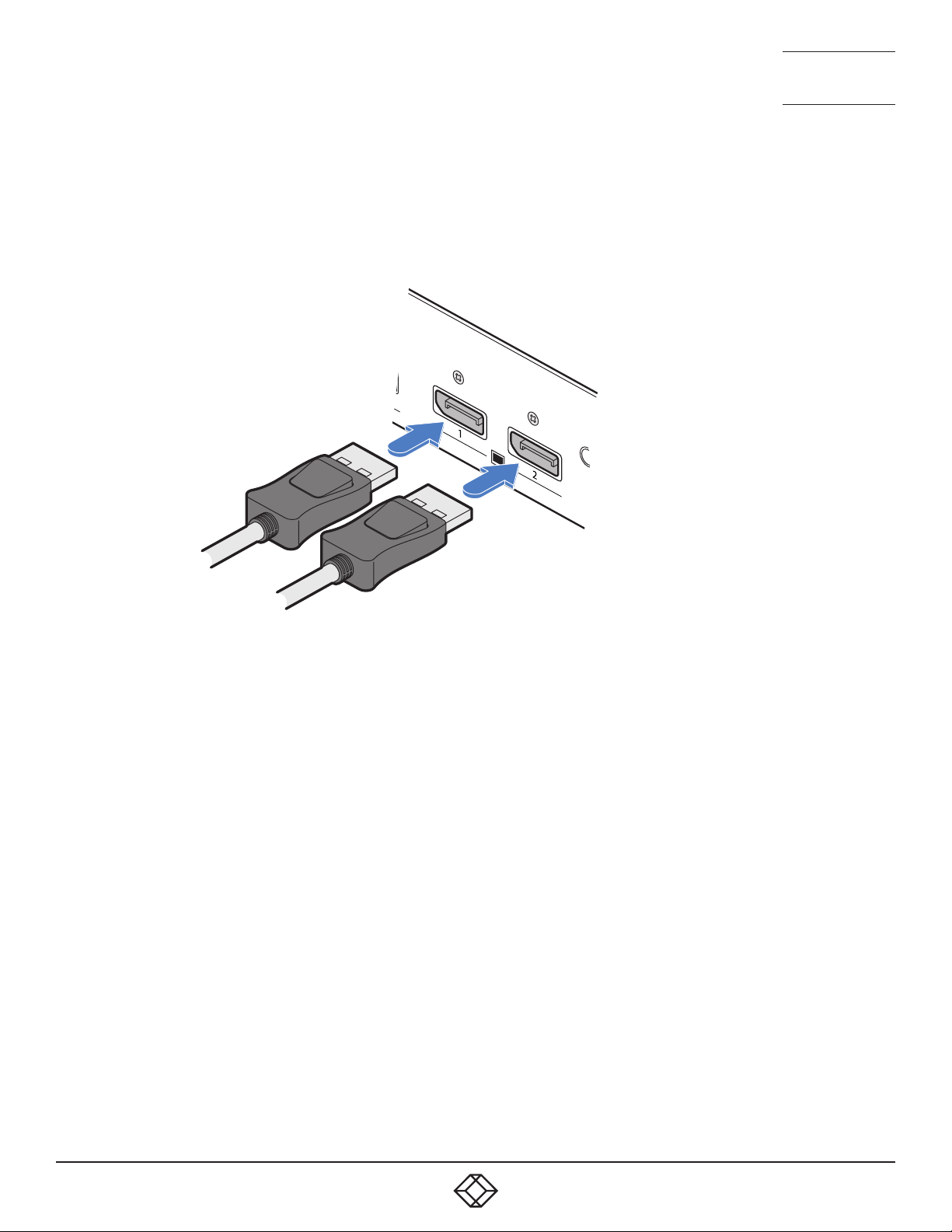
TO CONNECT VIDEO DISPLAYS
1 Connect the lead from the primary
video display to the DisplayPort socket
marked ‘1’ on the receiver rear panel:
To primary
video
display
To secondary
video display
2 If required, connect the lead from the second video display to the
DisplayPort socket marked ‘2’ on the receiver rear panel.
18
Page 19
1. 8 7 7. 877. 226 9 BLACKBOX.COM
NEED HELP?
LEAVE T HE TECH TO US
LIVE 24/7
TECHNICAL
SUPPORT
1.877.877.2269
RECEIVER AUDIO DEVICES
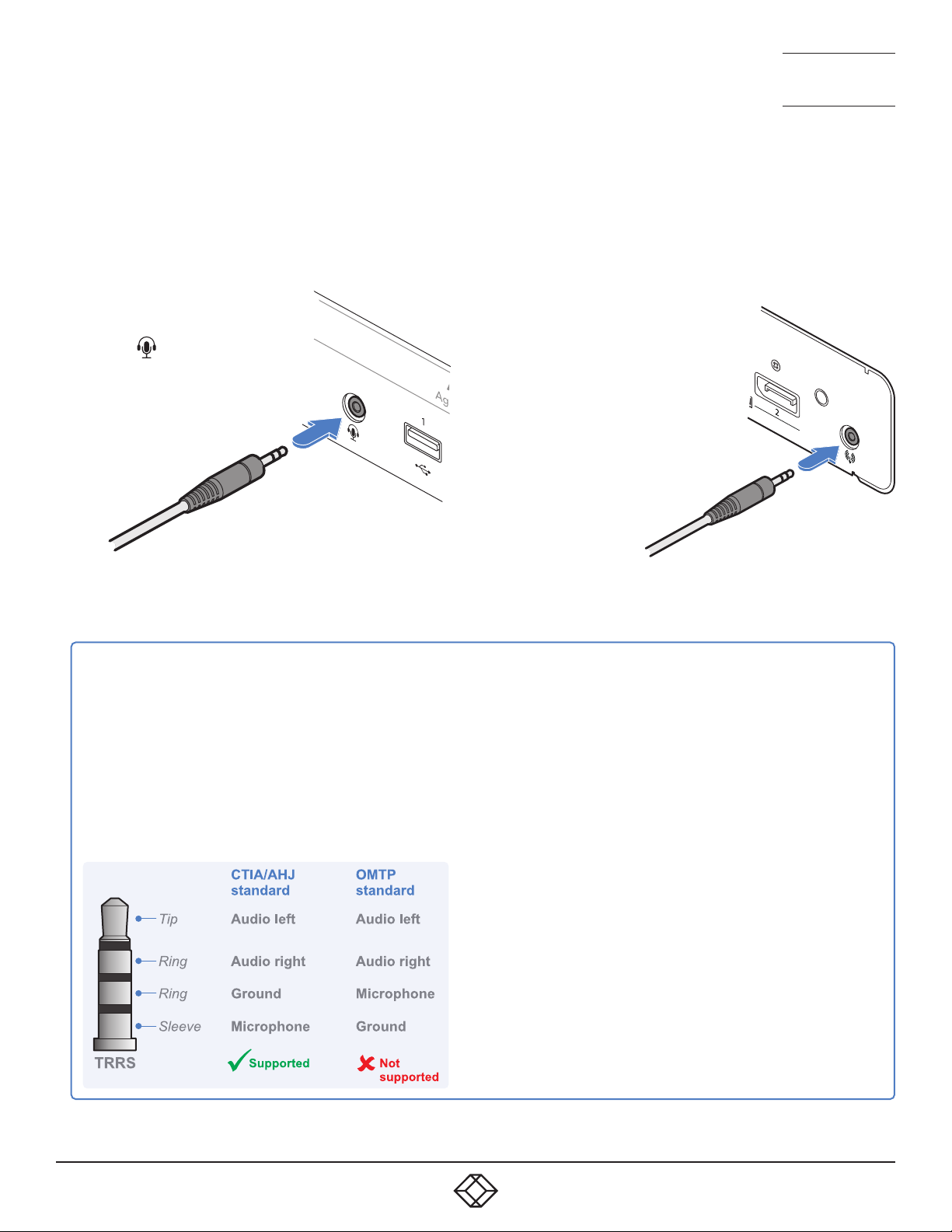
The receiver can support headphones and a mono microphone via its front panel jack socket. On the rear panel a line out jack
socket can be used to drive powered speakers. A USB link must be made between the transmitter and the host computer for
audio to operate.
TO CONNECT HEADPHONES AND/OR HEADSETS
1 Connect your chosen audio
device to the 3.5mm socket
labeled
panel. Please see below for a
compatibility list.
on the front
To headphones/
headset
HEADPHONE, HEADSET AND MICROPHONE SUPPORT
The combined jack socket can accommodate
any standard stereo headphones; it can also
support headsets which conform to the CTIA/AHJ
standard. The lesser-used OMTP standard is not
directly supported as its microphone and ground
connections are swapped. If used, the audio may be
distorted and/or the mic will not operate. Suitable
OMTP to CTIA/AHJ converters are available.
TO CONNECT AMPLIFIED SPEAKERS
1 Connect your speakers to
the 3.5mm line out socket
on the rear panel.
To speakers
SUPPORTED DEVICES
All standard headphones and some headsets are directly
supported, others require a suitable converter. It can be
difficult to distinguish different headset standards, however,
some (but not all) CTIA/AHJ devices use white dividers on their
jack plugs.
SUPPORTED
• Stereo headphones - Yes
• Mono microphone – Supported when used with an adapter
• CTIA/AHJ-compliant headset with mic - Yes
• CTIA/AHJ-compliant adapter with mic and headphones
plugged in - Yes
NOT SUPPORTED
• OMTP-compliant headset with mic – Not supported directly
• OMTP-compliant adapter with headset plugged in – Not
supported directly
19
Page 20
1. 8 7 7. 877. 226 9 BLACKBOX.COM
NEED HELP?
LEAVE T HE TECH TO US
LIVE 24/7
TECHNICAL
SUPPORT
1.877.877.2269
RECEIVER USB DEVICES
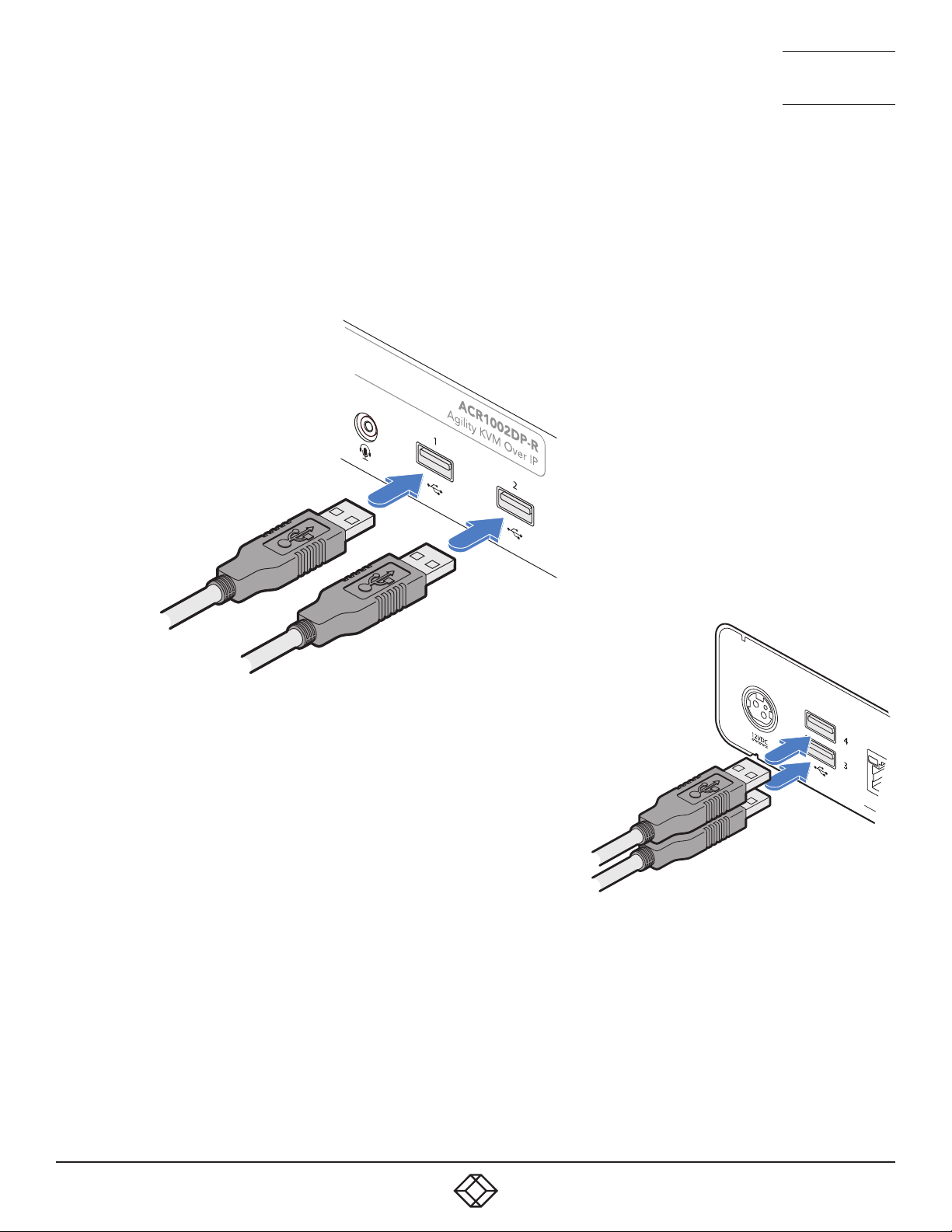
The receiver has two USB ports on the front panel to which peripherals may be connected.
To connect more than two peripherals, a USB hub may be used. The total current that may be drawn from the USB ports is 1.2A,
which should be sufficient for a keyboard, mouse (no more than 100mA each) and any two other devices (500mA maximum
each). If more power for USB devices is required, use a powered USB hub.
TO CONNECT USB DEVICES
1 Connect the lead from the device(s)
to either of the two USB sockets on
the front panel of the receiver...
To USB peripherals
...and/or either of the two USB
sockets on the rear panel.
To USB peripherals
RS232 SERIAL SUPPORT
To support RS232 serial connections, use third-party USB-to-serial adapters on both the transmitter and receiver.
20
Page 21
1. 8 7 7. 877. 226 9 BLACKBOX.COM
NEED HELP?
LEAVE T HE TECH TO US
LIVE 24/7
TECHNICAL
SUPPORT
1.877.877.2269
RECEIVER POWER IN
Each unit is supplied with a power adapter and country-specific power cord. The supplied power adapter uses a locking-type
plug to help prevent accidental disconnection; follow the instructions shown on the right when disconnecting a power adapter.
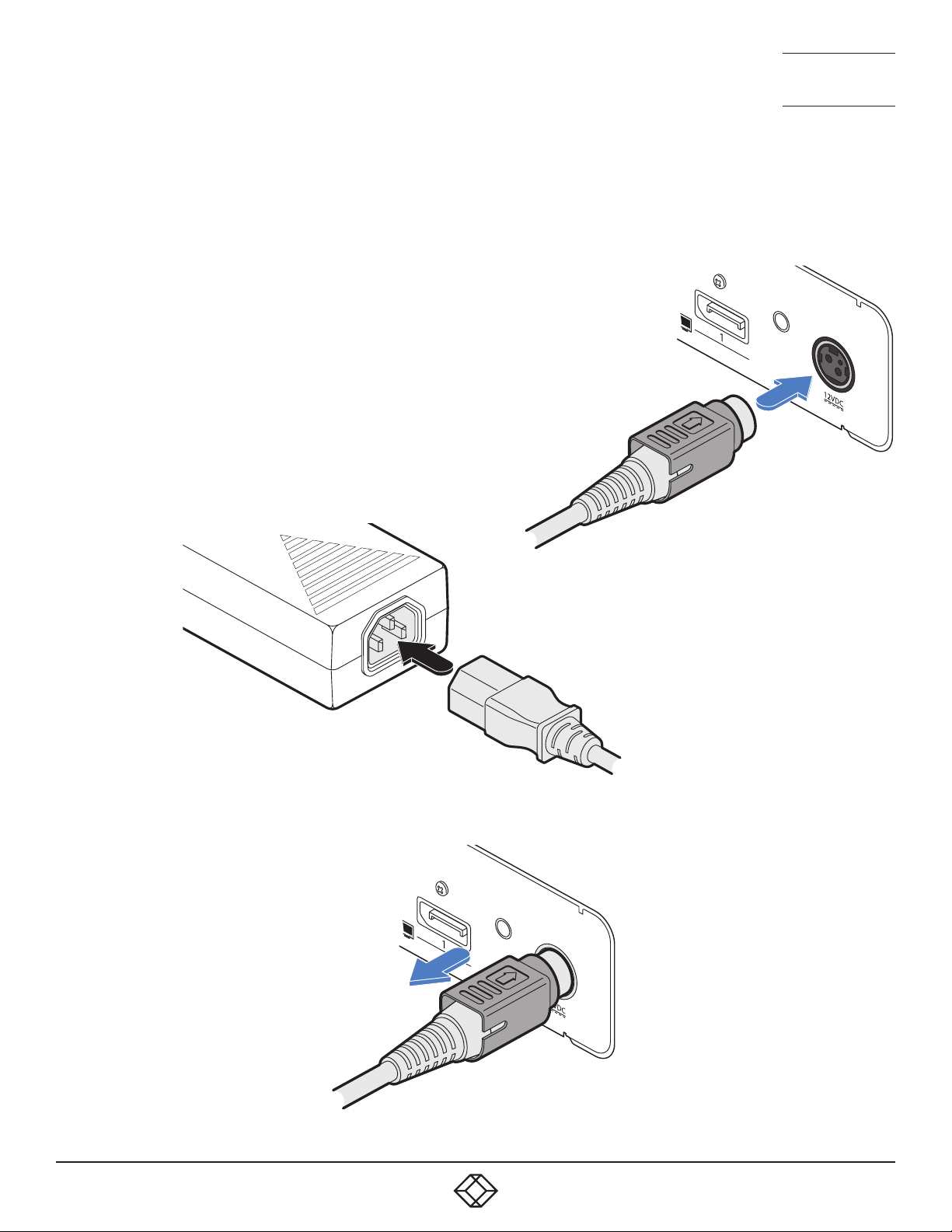
TO CONNECT THE POWER ADAPTER
1 Attach the output plug of the supplied power adapter to the power input
socket on the right side of the rear panel. As you insert the plug, pull back
slightly on the outer body to assist the locking mechanism until the plug is
fully inserted.
From the
power
2 Insert the IEC connector of the supplied country-specific
power cord to the socket of the power adapter.
adapter
3 Connect the power cord to a nearby mains supply socket.
TO DISCONNECT THE POWER ADAPTER
1 Isolate the power adapter from the mains
supply.
2 Grasp the outer body of the power adapter
plug where it connects with the node.
3 Gently pull the body of the outer plug away
from the node. As the body of the plug
slides back, it will release from the socket
and you can fully withdraw the whole plug.
IMPORTANT: Please read and
adhere to the electrical safety
information given within
the supplied safety leaflet.
In particular, do not use an
unearthed power socket or
extension cable.
Note: Both the modules and
the power supplies generate
heat when in operation and will
become warm to the touch. Do
not enclose them or place them
in locations where air cannot
circulate to cool the equipment.
Do not operate the equipment in
ambient temperatures exceeding
40 degrees Centigrade (104
degrees Fahrenheit). Do not
place the products in contact
with equipment whose surface
temperature exceeds 40 degrees
Centigrade (104 degrees
Fahrenheit).
Gently pull back the plug outer
body to release the lock.
21
Page 22
1. 8 7 7. 877. 226 9 BLACKBOX.COM
NEED HELP?
LEAVE T HE TECH TO US
LIVE 24/7
TECHNICAL
SUPPORT
1.877.877.2269
CHAPTER 4: CONFIGURATION
AGILITY CONFIGURATION VIA WEB PAGES
Each Agility unit hosts its own internal set of web pages which contain all configuration details and settings (see also Start of
Life, shown right). You will need to use a computer connected to the same network as each Agility unit to access the web pages.
Additionally, on the console attached to the receiver, you can access its configuration details via the On Screen Display (OSD) by
pressing CTRL + ALT + C (or by tapping the
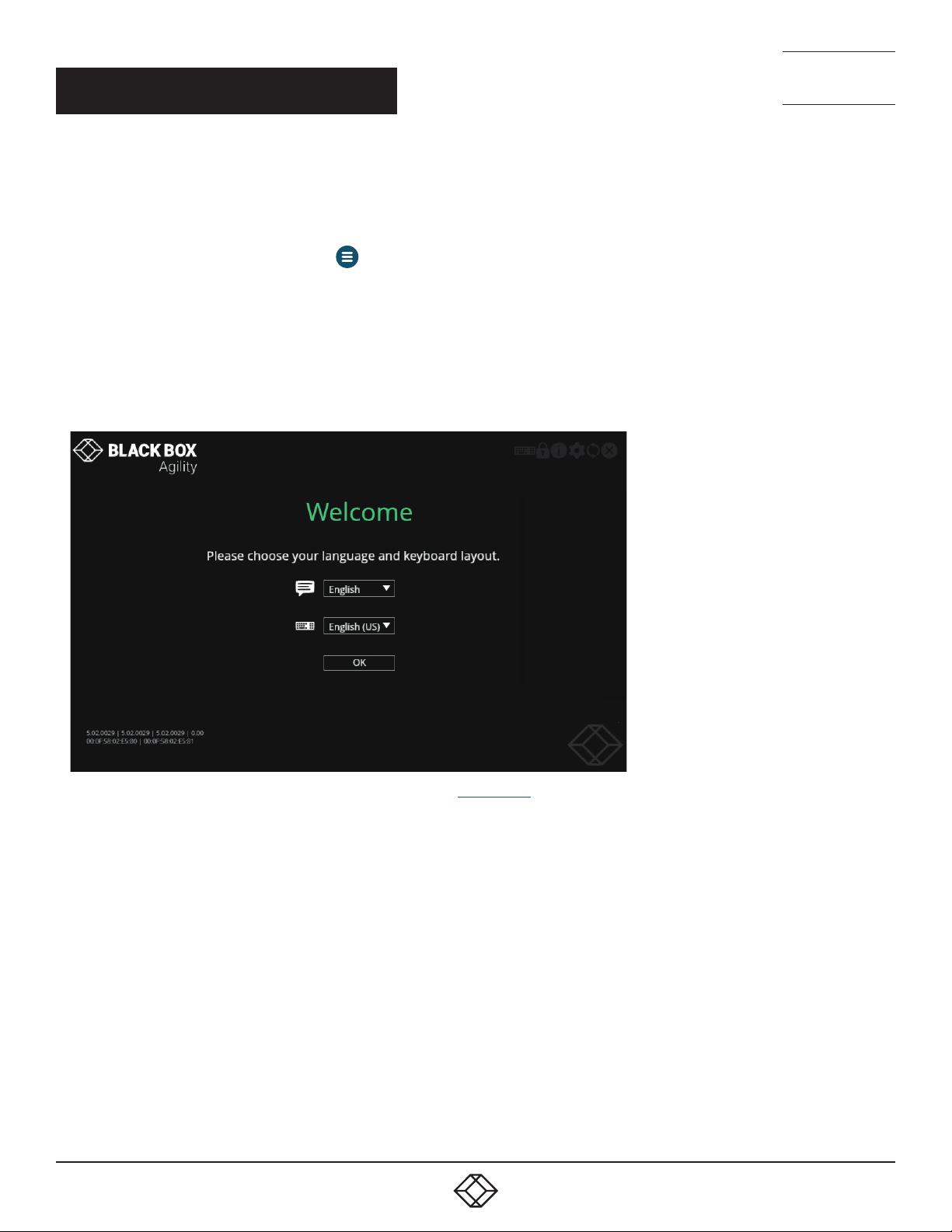
TO MANUALLY CONFIGURE AGILITY UNITS VIA THEIR WEB PAGES
Run a web browser on your computer and enter the IP address of the required Agility unit:
The default addresses (if using port 1
Receiver: https://169.254.1.32
The default addresses (if using port 2) are: Transmitter: https://169.254.1.43
Receiver: https://169.254.1.42
The opening page should be displayed:
) are: Transmitter: https://169.254.1.33
icon on the touchscreen) - see page 30.
For explanations of the options within each page, please see Appendix A.
22
Page 23
1. 8 7 7. 877. 226 9 BLACKBOX.COM
NEED HELP?
LEAVE T HE TECH TO US
LIVE 24/7
TECHNICAL
SUPPORT
1.877.877.2269
START OF LIFE: IPATH OR POINT TO POINT CONFIGURATION
To streamline initial configuration processes,
all Agility ACR1002DP units employ a Start
of Life (SoL) procedure when they are in an
unconfigured state; either because they
are new or because they have undergone a
factory reset.
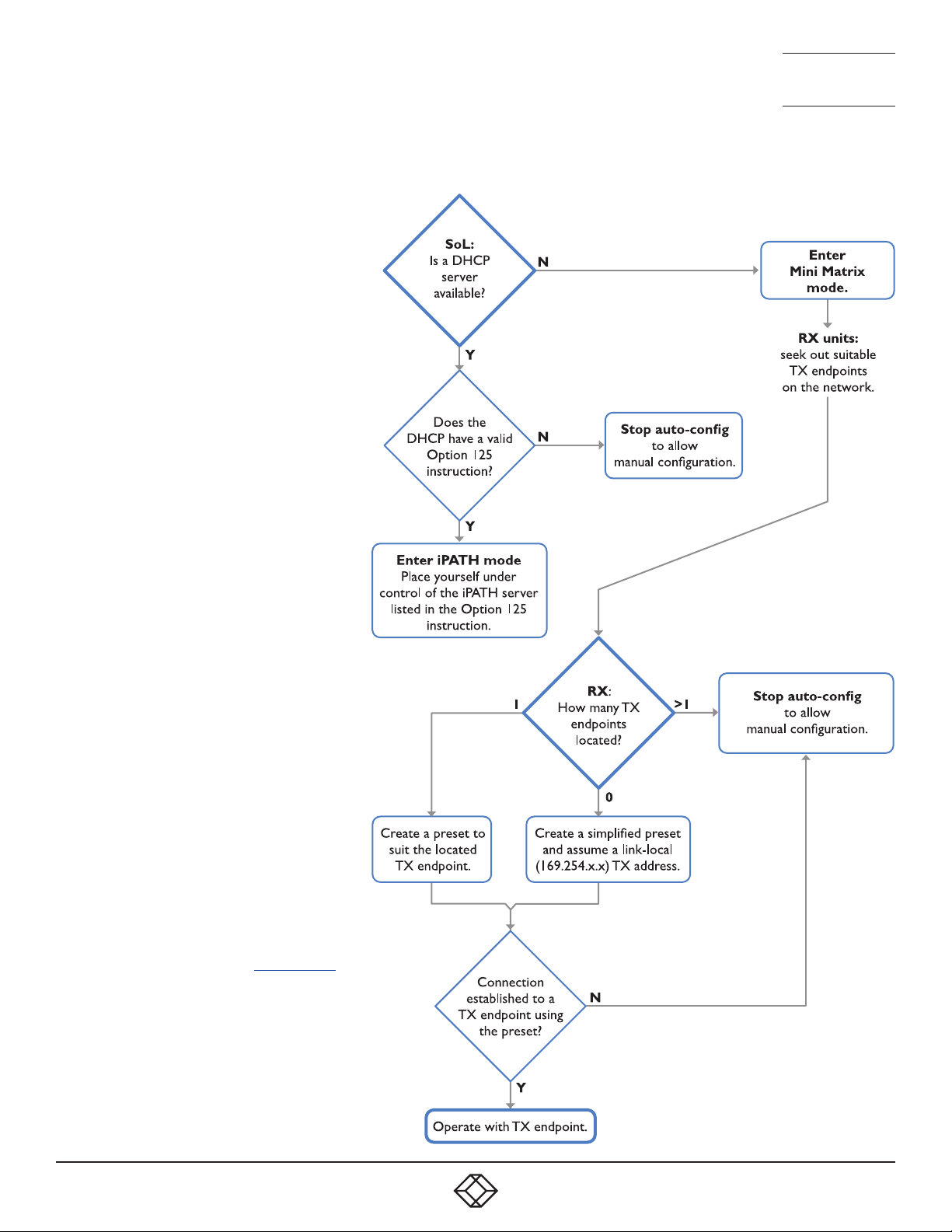
When an unconfigured Agility ACR1002DP
unit boots, its SoL procedure will guide it to
automatically determine which of two modes
it should adopt:
• iPATH mode - place itself into the control
of a specific iPATH server on the network,
whereupon the Agility unit will be assigned
suitable configuration details to fit within
the network of similar units.
• Mini Matrix (P2P) mode - place itself into
Mini Matrix (Point to Point) mode to allow
manual configuration of links with other
Agility units.
The SoL procedure follows this basic logic
flow to determine the correct mode:
Note: If an iPATH server is present on the
network then the modules don’t have to
be within SoL procedure for it to be placed
under iPATH control.
Once the mode has been set to iPATH
control, an Agility unit will remain operating
that way until it undergoes a factory reset. If
set to P2P mode, an Agility unit will remain
thus until it undergoes a factory reset or is
discovered by an iPATH server.
Note: When the modules enter Mini Matrix
mode, you can cancel auto-SoL at any point
by pressing Ctrl-Alt-C.
23
Page 24
1. 8 7 7. 877. 226 9 BLACKBOX.COM
NEED HELP?
LEAVE T HE TECH TO US
LIVE 24/7
TECHNICAL
SUPPORT
1.877.877.2269
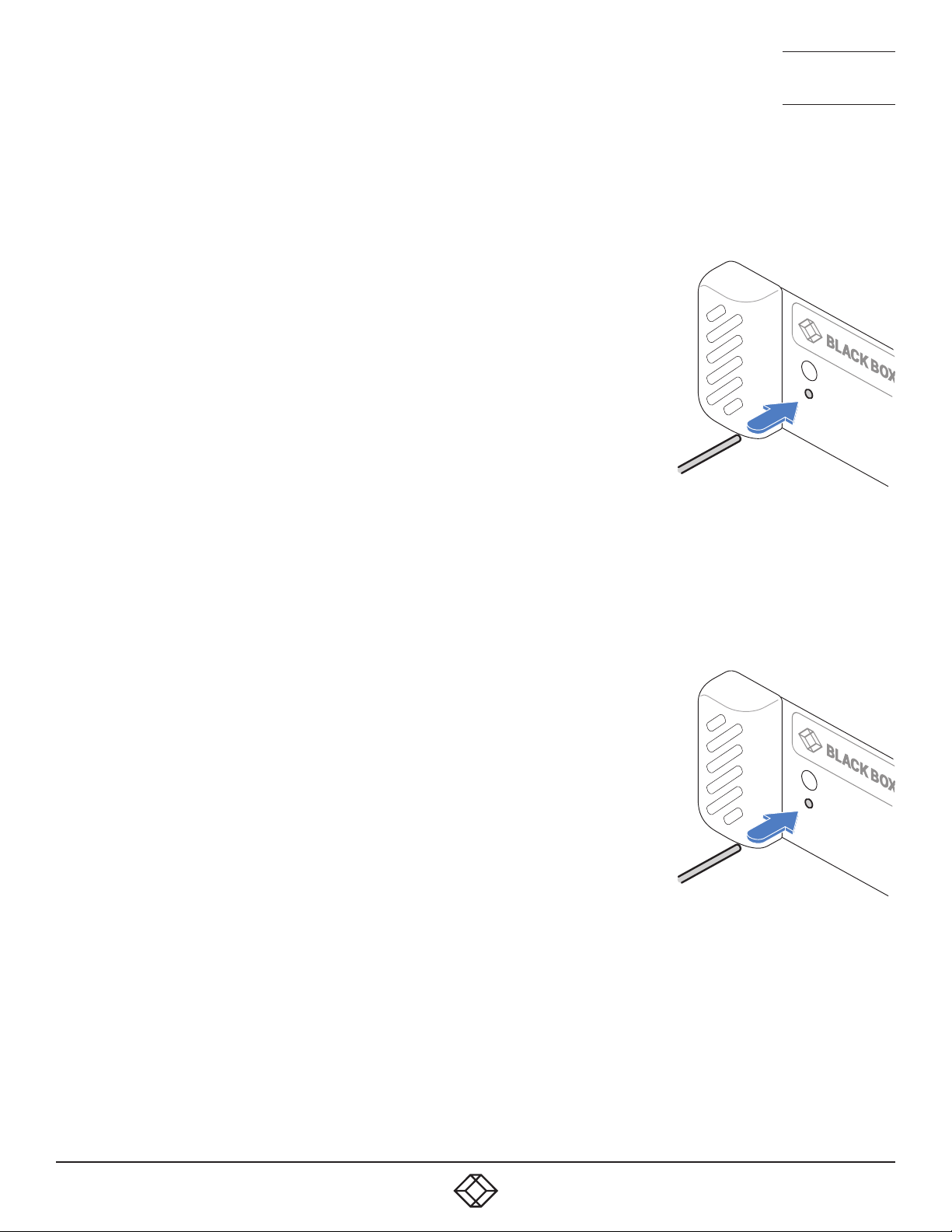
PERFORMING A MANUAL FACTORY RESET
A factory reset returns Agility unit to its default configuration.
TO PERFORM A MANUAL FACTORY RESET
1 Power on the Agility unit.
2 Use a long narrow implement (e.g., a straightened-out paper clip) to press-and-hold
the recessed reset button on the front panel for roughly ten seconds, until the status
indicator turns blue (Note: alternating red/green indications will occur during the ten
second period while the button is still pressed).
3 Release the reset switch. The indicator will change to red for a short time (less
than ten seconds) and then back to blue while Agility unit performs the reset and
should then change to an alternative color, usually orange initially, signifying that the
operation is complete.
Note: If you are performing a factory reset and intend to disconnect the power immediately after the
reset, you must wait at least 30 seconds after you have released the reset button for it to complete
the process.
PLACING THE DEVICE INTO RECOVERY MODE
Recovery mode may allow an Agility unit to be diagnosed or upgraded in the event of the
main mode being non-operational.
TO BOOT THE DEVICE INTO RECOVERY MODE
1 Power on the Agility unit.
2 Use a long narrow implement (e.g., a straightened-out paper clip) to press-and-hold
the recessed reset button on the front panel (for less than ten seconds) until the
status indicator starts alternating red/green. Note: A solid blue indication will occur
after the ten second period.
3 Release the reset switch. The indicator will change to red for a short time (less than
ten seconds) and then alternating red/green signifying that the device is in recovery
mode. Note: If the indicator turns blue, then a factory reset has been performed
instead, the device will not be in recovery mode and the operation will need to be
attempted again.
24
Page 25
1. 8 7 7. 877. 226 9 BLACKBOX.COM
NEED HELP?
LEAVE T HE TECH TO US
LIVE 24/7
TECHNICAL
SUPPORT
1.877.877.2269
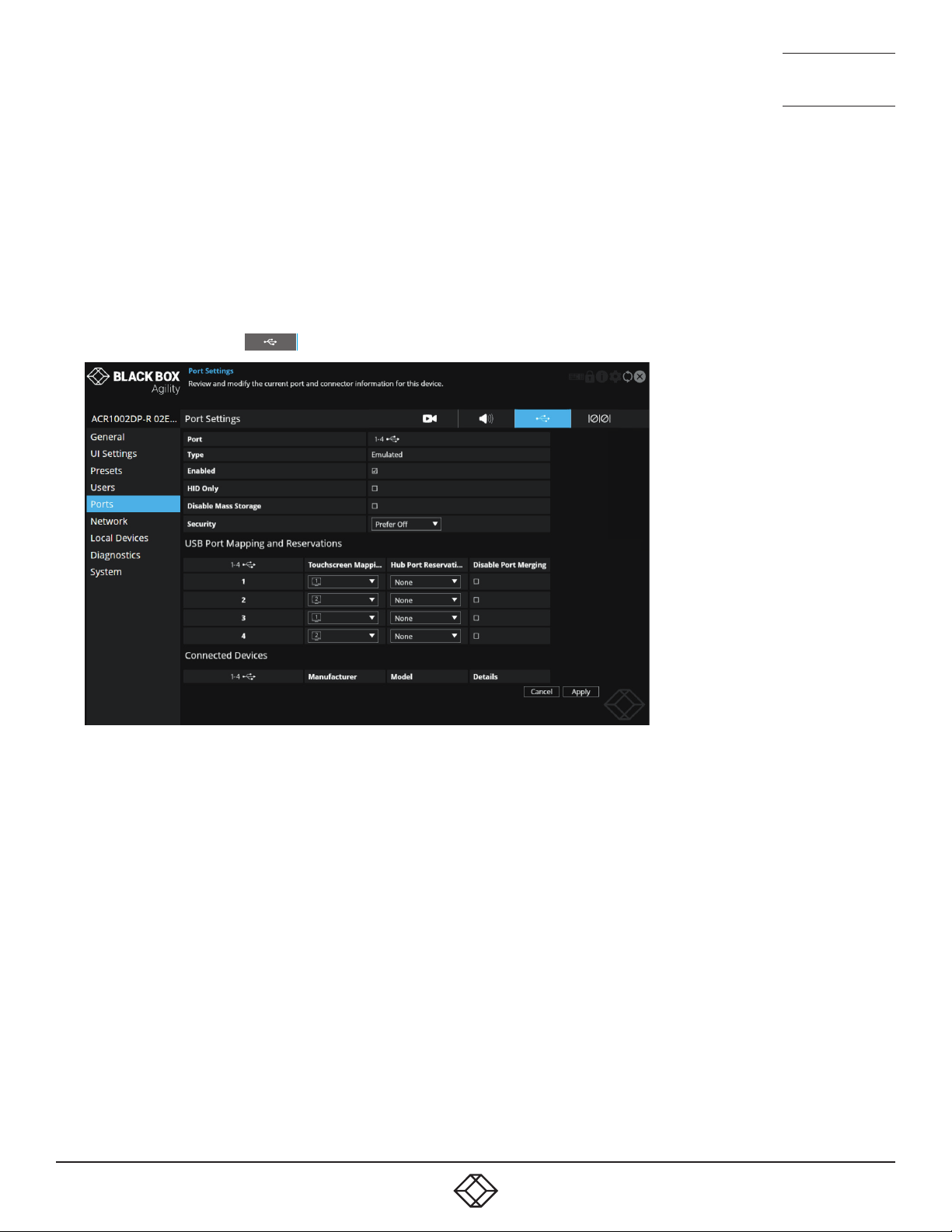
CONFIGURING DUAL TOUCHSCREENS
When a single touchscreen is used with a receiver, it should operate correctly as soon as the USB link is made between the
screen and the receiver. However, if two touchscreens are installed it may be necessary to instruct the receiver which screen to
correctly attribute to each USB input.
TO ATTRIBUTE DUAL TOUCHSCREENS
1 Access the Configuration pages on the receiver - see page 30.
2 Click the Ports entry from the list of pages on the left side.
3 Click the USB page icon: to display the following:
4 In the USB Port Mapping and Reservations section, match the primary touchscreen to the port number (1-4) that its USB cable
is connected to.
5 Repeat step 4 for the secondary touchscreen.
6 Click the Apply button and exit from the configuration pages.
25
Page 26
1. 8 7 7. 877. 226 9 BLACKBOX.COM
NEED HELP?
LEAVE T HE TECH TO US
LIVE 24/7
TECHNICAL
SUPPORT
1.877.877.2269
CREATING AN UNMANAGED MATRIX
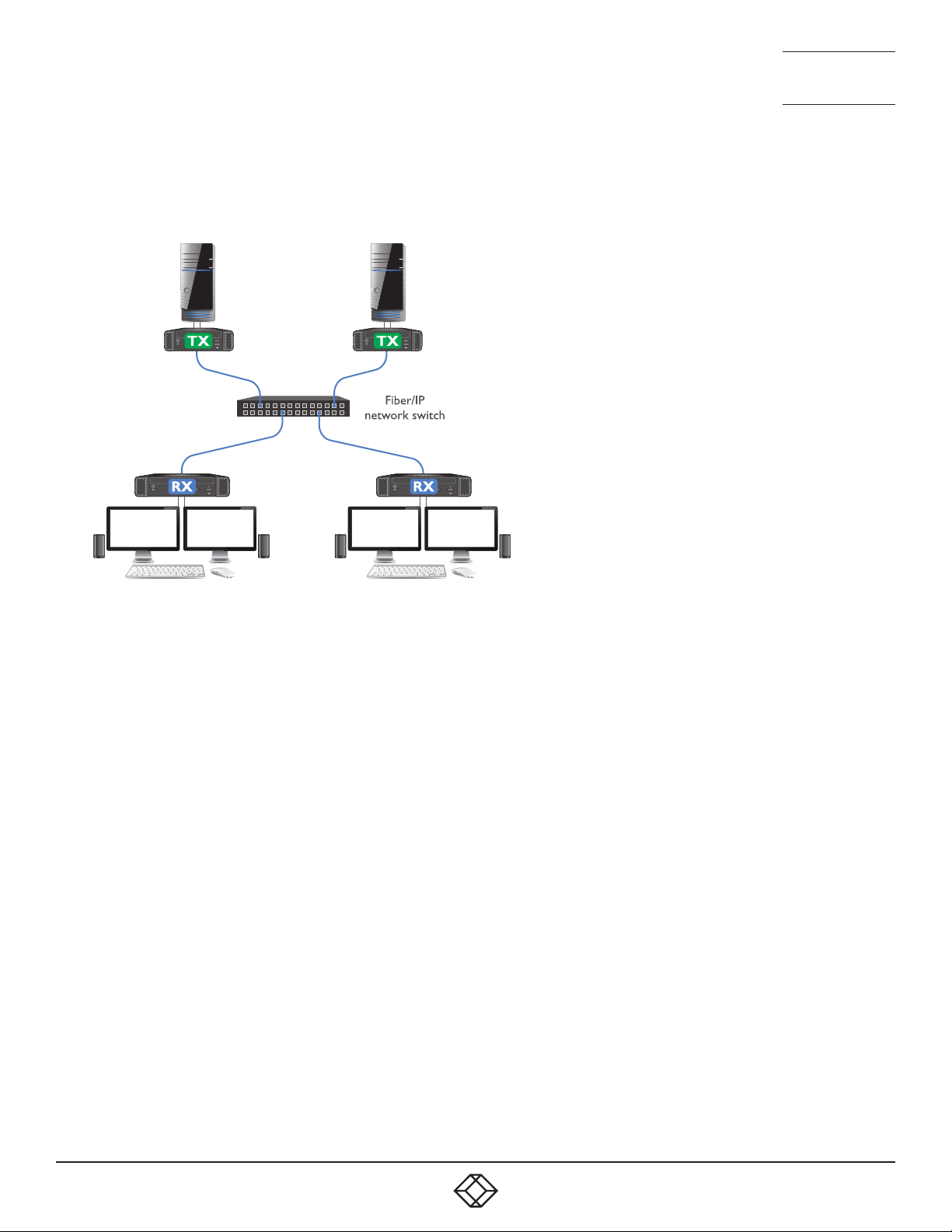
Although Agility units are most often organised and managed by a central iPATH server, it is possible to create small networks of
Agility units, most often in matrix arrangements, i.e., multiple transmitters and receivers which can freely cross-connect.
This method of connection works well for small numbers of transmitters and receivers, but will become more difficult to manage
as more units are attached. The maximum number of transmitter sources that can be made available to any receiver is sixteen.
TO CREATE AN UNMANAGED MATRIX
1 Connect Agility transmitters and receivers (with their various hosts and peripherals) to a suitable switch, as described in the
Installation section - see page 10.
Note: If any device was previously managed by iPATH, then it will need to be given a factory reset before continuing with this
procedure. There must not be an iPATH connected on the matrix network otherwise, when such devices undergo a factory
reset, they will automatically revert to iPATH control.
You now need to perform the following procedure on each receiver in turn:
2 Access the Configuration pages - see page 30.
3 Click the Transmitters option from the list on the left side. This page will list all of the available transmitters which are not
under iPATH control. See page 41.
4 Click the Presets option from the list on the left side. Use this page to add each transmitter to the list of presets for the receiver
that you are editing. See page 35.
TO USE THE MATRIX
• On each receiver, use the OSD to access the required transmitters in the usual manner. See page 30.
26
Page 27
1. 8 7 7. 877. 226 9 BLACKBOX.COM
NEED HELP?
LEAVE T HE TECH TO US
LIVE 24/7
TECHNICAL
SUPPORT
1.877.877.2269
CREATING AND EDITING PRESETS
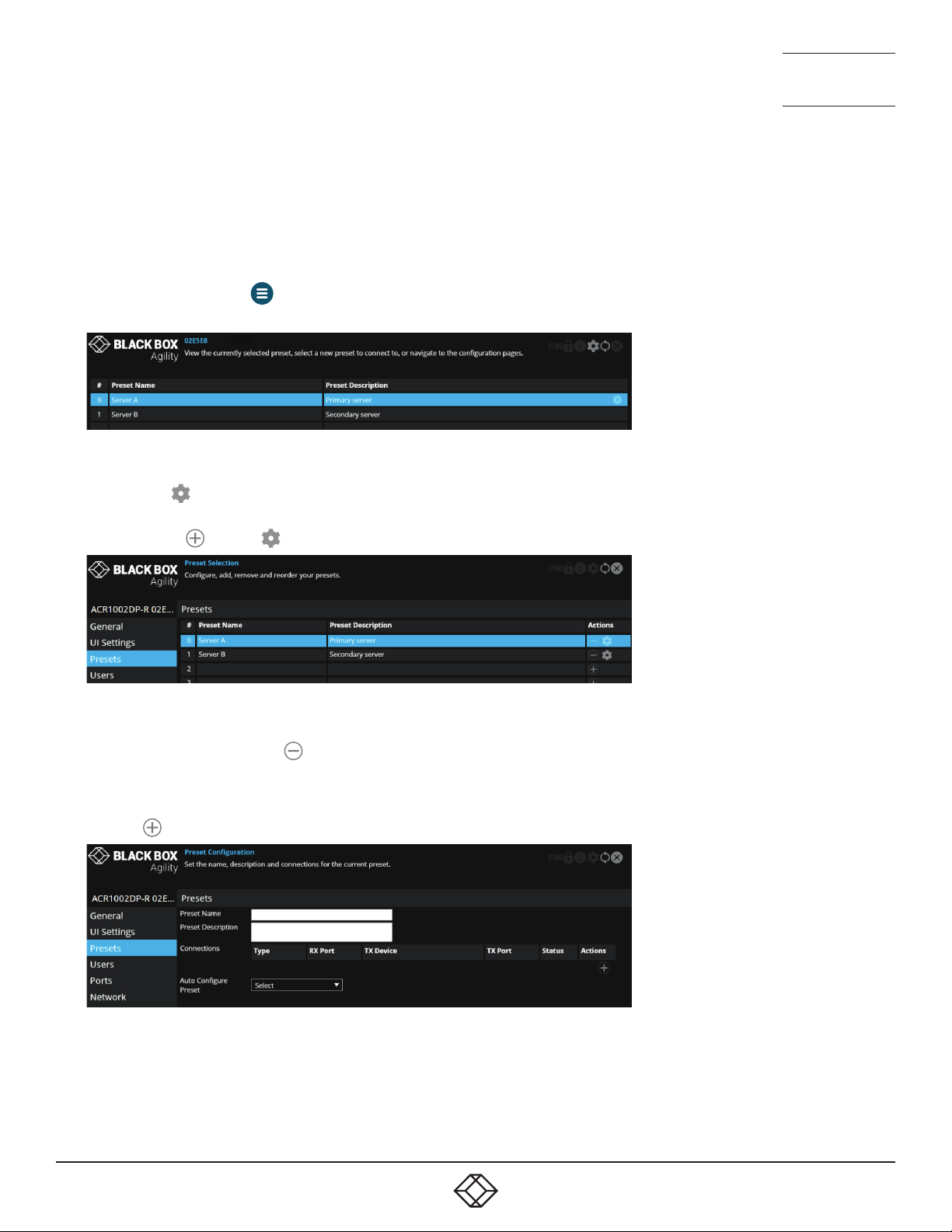
Presets allow you to create shortcuts from any Agility receivers to any available Agility transmitters. These are particularly useful
when using an Agility installation that is not under iPATH control.
TO ACCESS THE PRESET CONFIGURATION PAGE
1 On the console keyboard attached to the receiver, access the OSD by pressing
CTRL + ALT + C or tap the
2 The Preset Selection page will be displayed:
Note: The number on the left corresponds to the hotkey sequence that will connect to that channel, e.g., press Ctrl-Alt-4 to
connect to the 4th preset.
3 Click/tap the icon in the top right corner.
4 Choose the Presets option from the list on the left side of the screen. This page will show the same list of presets, but with
options to add (
) or edit ( ) entries:
icon on the touchscreen.
TO REMOVE A PRESET
1 Access the Preset configuration page as discussed above.
2 In the Actions column, click the icon for the entry that you wish to remove.
TO ADD A PRESET
1 Access the Preset configuration page as discussed above.
2 Click the icon on the right of a vacant preset entry to display the configuration page:
3 Enter a name and description for the new preset.
continued
27
Page 28
1. 8 7 7. 877. 226 9 BLACKBOX.COM
NEED HELP?
LEAVE T HE TECH TO US
LIVE 24/7
TECHNICAL
SUPPORT
1.877.877.2269
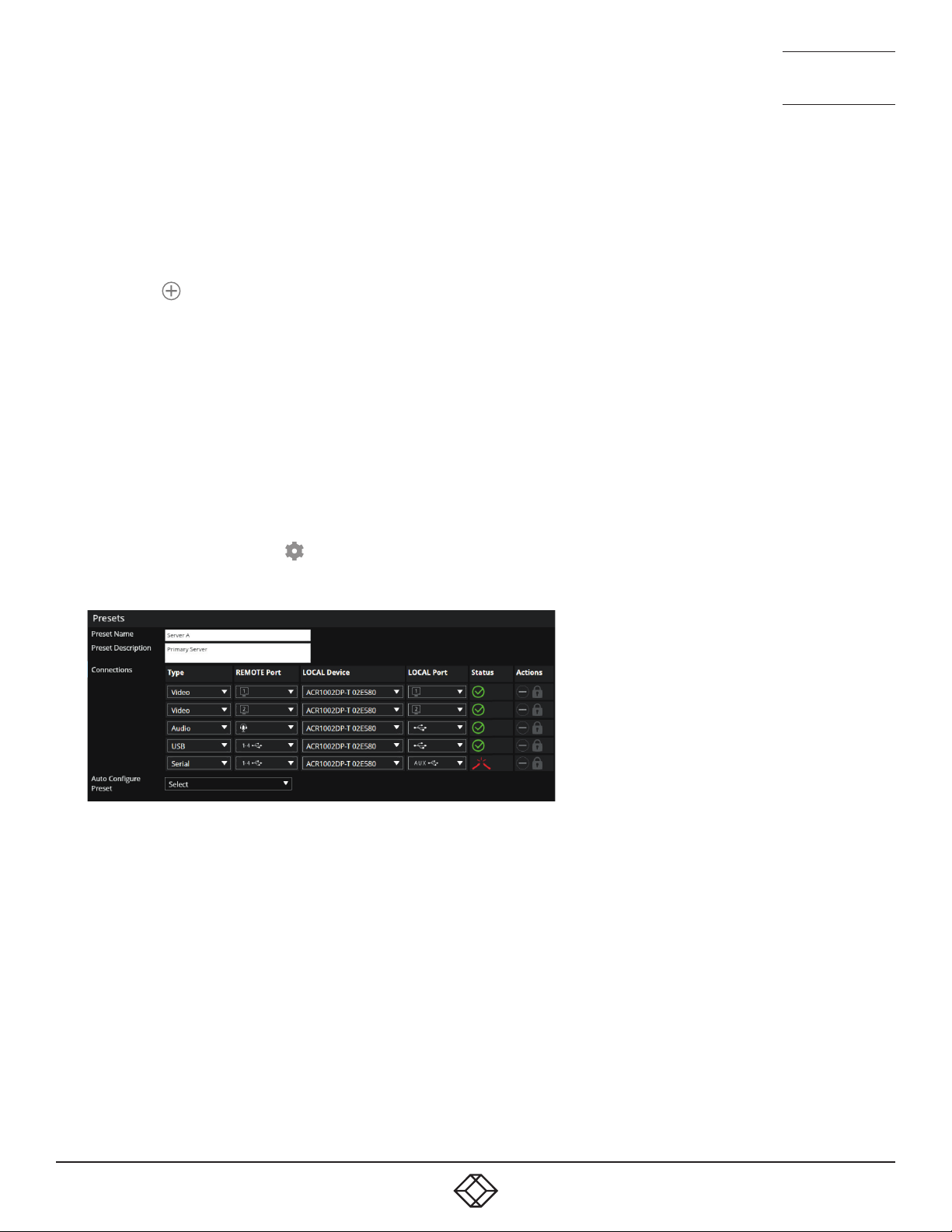
4 You can now choose how to configure your new preset - Auto or Custom:
• Auto - Click the Auto Configure Preset drop down and choose the Agility transmitter that you wish to connect with. All of
the required connections will be configured (on a 1-to-1 basis) between the receiver and chosen transmitter. Click the Apply
button.
• Custom - Configure individual connections (useful when unusual cross connections are required).
1 Click the icon on the right side to add a new connection entry.
2 Check that the correct module is shown in the TX Device column. Click and change this entry, if required.
3 In the Type column, click the Select option and choose the type of connection: Video, Audio, USB or Serial.
4 Click the RX Port drop down and choose the required port.
5 Click the TX Port drop down and choose the port that you wish the current RX port to connect with. If only one option is
available it will be auto-selected.
6 Repeat steps 1 to 5 for each of the required ports.
7 Click the Apply button.
TO EDIT A PRESET
1 Access the Preset configuration page as discussed left.
2 In the Actions column, click the icon for the preset entry you wish to edit. An editable list of connections will be shown,
together with their status representations:
3 Make your changes as required and then click the Apply button to save.
TO RE-ORDER PRESETS
1 Access the Preset configuration page as discussed on the previous page.
2 Click and drag a preset to the required position within the list.
For more information about the options and status indications, see page 35.
28
Page 29

1. 8 7 7. 877. 226 9 BLACKBOX.COM
NEED HELP?
LEAVE T HE TECH TO US
LIVE 24/7
TECHNICAL
SUPPORT
1.877.877.2269
CHAPTER 5: OPERATION
In operation, many Agility installations require no intervention once configured. The transmitters and receivers take care of all
connection control behind the scenes so that you can continue to work unhindered.
INDICATORS
The front and rear panels of each Agility unit feature an indicator capable of producing numerous color and flash patterns to
provide a useful guide to operation. The dual indicators provide the same color and flash patterns.
INDICATOR COLOR AND FLASH PATTERNS
The front and rear panel indicators use varying color and flashing patterns to signal key status:
Off No power.
Green All services present as compared to the configuration required.
Amber Running but video, USB or network link missing (or not connected to another Agility unit).
Red Booting before processor loaded or failed.
Red rapid flash A critical error has been detected that is preventing the device from being used (a malfunction message will
also be displayed within the OSD.)
Blue Factory reset mode active.
Red/green flash Booting into factory recovery mode.
Green/blue flash Upgrade mode active.
Fast green flash Identify mode active.
29
Page 30
1. 8 7 7. 877. 226 9 BLACKBOX.COM
NEED HELP?
LEAVE T HE TECH TO US
LIVE 24/7
TECHNICAL
SUPPORT
1.877.877.2269
USING THE ON SCREEN DISPLAY
The OSD provides a quick and easy way to access Agility transmitters as well as configuration details.
TO ACCESS THE OSD
1 On the console of your Agility receiver, either:
• Press CTRL + ALT + C on the keyboard,
or
• Tap the icon* on the touchscreen.
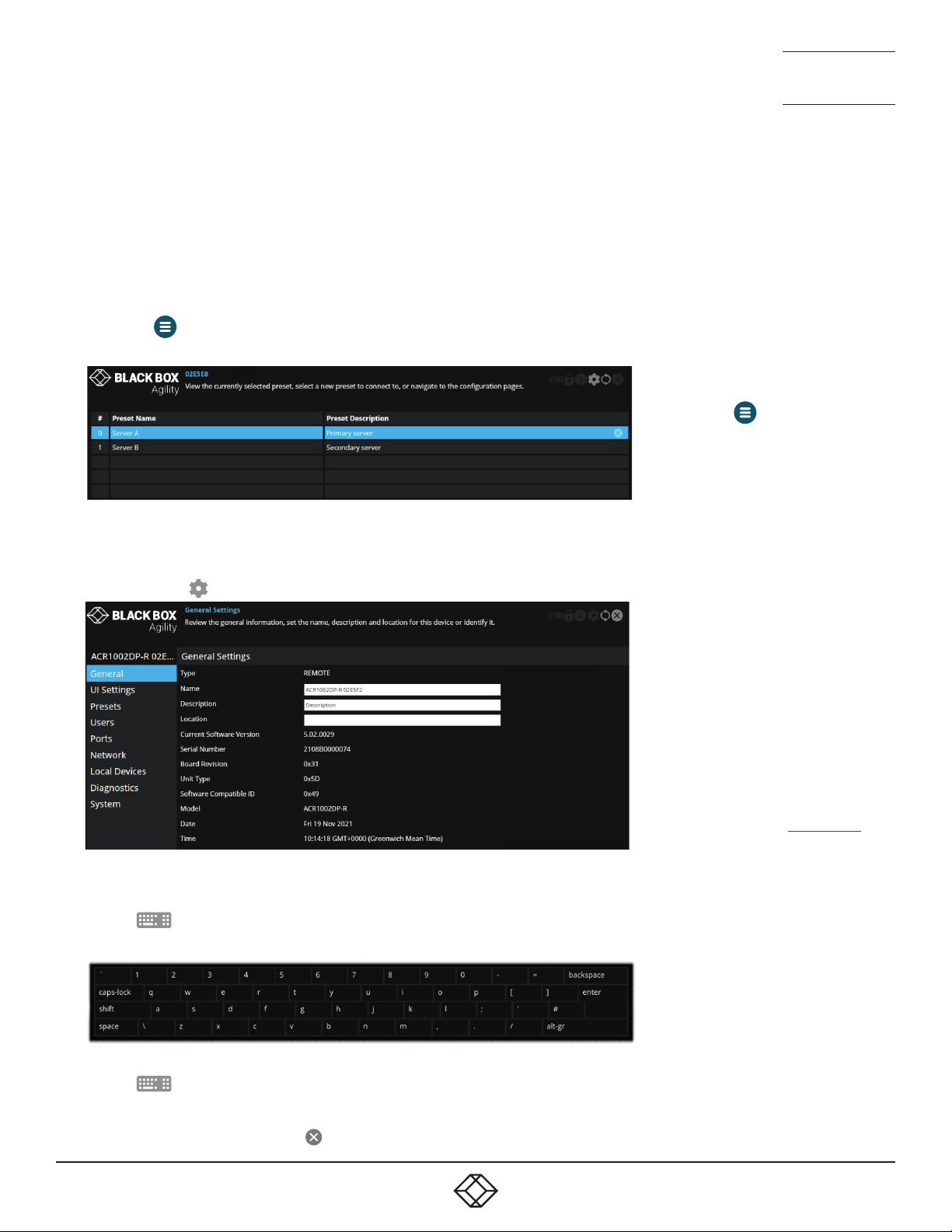
2 The Preset Selection page will be displayed:
3 On the preset page, either
• Click/tap a preset entry to connect with the required transmitter,
or
• Click/tap the icon to enter the first Configuration page:
* To move the
touchscreen, tap and hold it until it
changes color and then drag it to the
best position.
For explanations of the options within
each page, please see Appendix A.
icon on your
TO USE THE OSD KEYBOARD (WHEN USING A TOUCHSCREEN)
1 Access the OSD as discussed left.
2 Tap the icon in the top right corner.
3 The OSD keyboard will be displayed to assist you when entering text and numerics:
TO HIDE THE OSD KEYBOARD
1 Tap the icon in the top right corner.
TO EXIT THE OSD
1 Either press the Esc key or tap the icon in the top right corner.
30
Page 31

1. 8 7 7. 877. 226 9 BLACKBOX.COM
NEED HELP?
LEAVE T HE TECH TO US
LIVE 24/7
TECHNICAL
SUPPORT
1.877.877.2269
CHAPTER 6: FURTHER INFORMATION
This chapter contains a variety of information, including the following:
• Getting assistance - see right
• Appendix A - Configuration pages
• Appendix B - Tips for success when networking Agility units
• Appendix C - Troubleshooting
• Appendix D - Glossary
• Appendix E - Fiber/copper modules and cables
• Appendix F - Using the optional Agility rack shelves
• Appendix G - Open source licenses
31
Page 32
1. 8 7 7. 877. 226 9 BLACKBOX.COM
NEED HELP?
LEAVE T HE TECH TO US
LIVE 24/7
TECHNICAL
SUPPORT
1.877.877.2269
APPENDIX A - CONFIGURATION PAGES
This section covers the web page configuration for the Agility units:
• Receiver - General Information
• Receiver - UI Settings
• Receiver - Presets
• Receiver - Users
• Receiver - Ports
• Receiver - Network
• Receiver - Local Devices
• Receiver - Diagnostics and Statistics
• Receiver - System
TO ACCESS THE OSD
1 On the console of your Agility receiver, either:
• Press CTRL + ALT + C on the keyboard,
or
• Tap the icon* on the touchscreen.
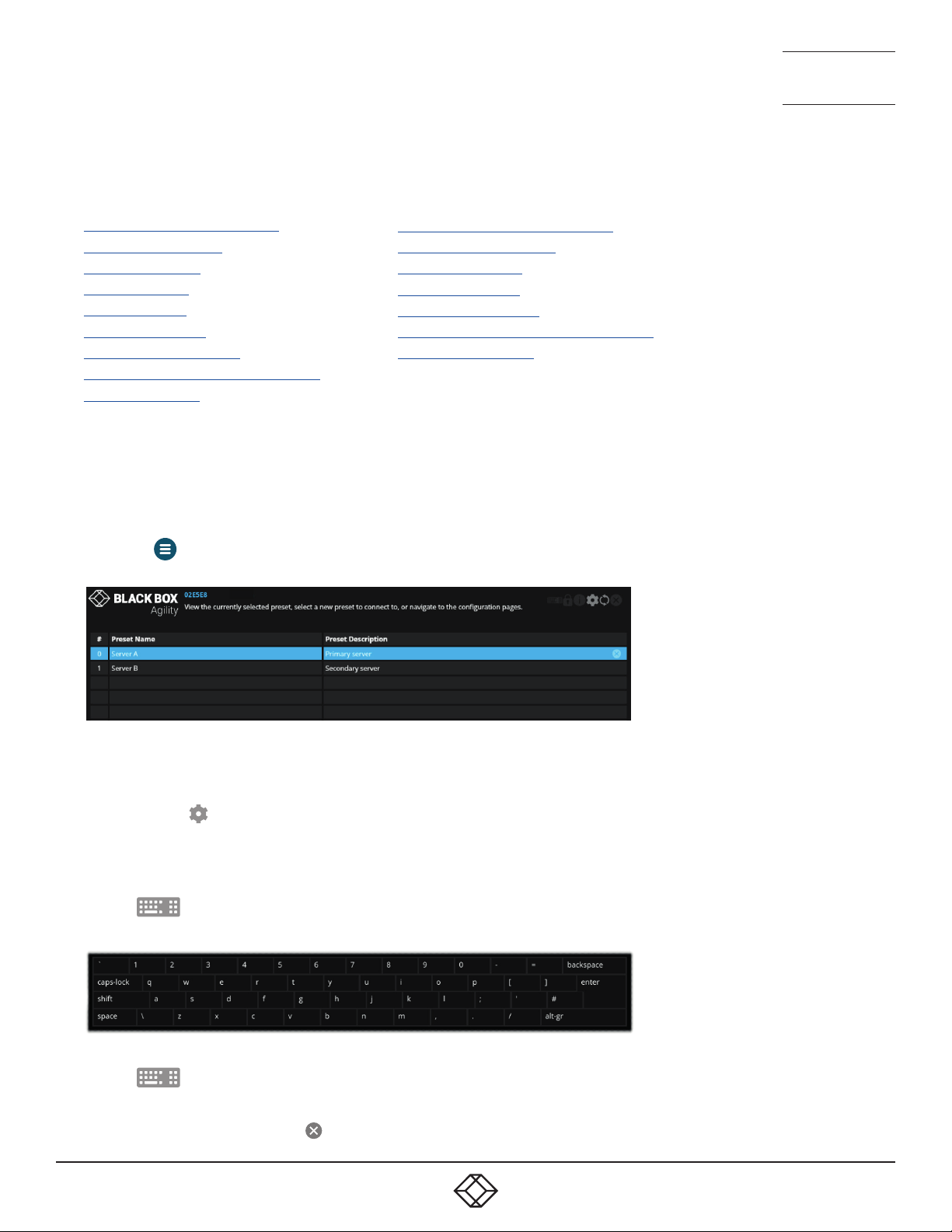
2 The Preset Selection page will be displayed:
• Transmitter - General Information
• Transmitter - UI Settings
• Transmitter - Users
• Transmitter - Ports
• Transmitter - Network
• Transmitter - Diagnostics and Statistics
• Transmitter - System
3 On the preset page, either
• Click/tap a preset entry to connect with the required transmitter,
or
• Click/tap the icon to enter the first Configuration page.
TO USE THE OSD KEYBOARD (WHEN USING A TOUCH SCREEN)
1 Access the OSD as discussed on page 30.
2 Tap the icon in the top right corner of the screen.
3 The OSD keyboard will be displayed to assist you when entering text and numerics:
TO HIDE THE OSD KEYBOARD
1 Tap the icon in the top right corner.
TO EXIT THE OSD
1 Either press the Esc key or tap the icon in the top right corner.
32
Page 33
1. 8 7 7. 877. 226 9 BLACKBOX.COM
NEED HELP?
LEAVE T HE TECH TO US
LIVE 24/7
TECHNICAL
SUPPORT
1.877.877.2269
1. 8 7 7. 877. 226 9 BLACKBOX.COM
NEED HELP?
LEAVE T HE TECH TO US
LIVE 24/7
TECHNICAL
SUPPORT
1.877.877.2269
RECEIVER - GENERAL INFORMATION
To get here
You can access this page in two ways,
however, the rst method is not available if
the module is under iPATH control:
1 On the console keyboard attached to
the receiver, access the OSD by pressing
CTRL + ALT + C or tap the touchscreen
icon. The Preset Selection page will be
displayed.
2 Click the icon in the top right corner.
3 If necessary, click the General link.
OR
1 Connect a computer to the same network
as the receiver.
2 Run a web browser and enter the
IP address of the receiver:
https://169.254.1.32 (this is the default
address when using port 1). If you are
using SFP port 2, then the default ad-
dress will be https://169.254.1.42 Note:
These default addresses can be changed.
3 Click the icon in the top right corner.
4 If necessary, click the General link.
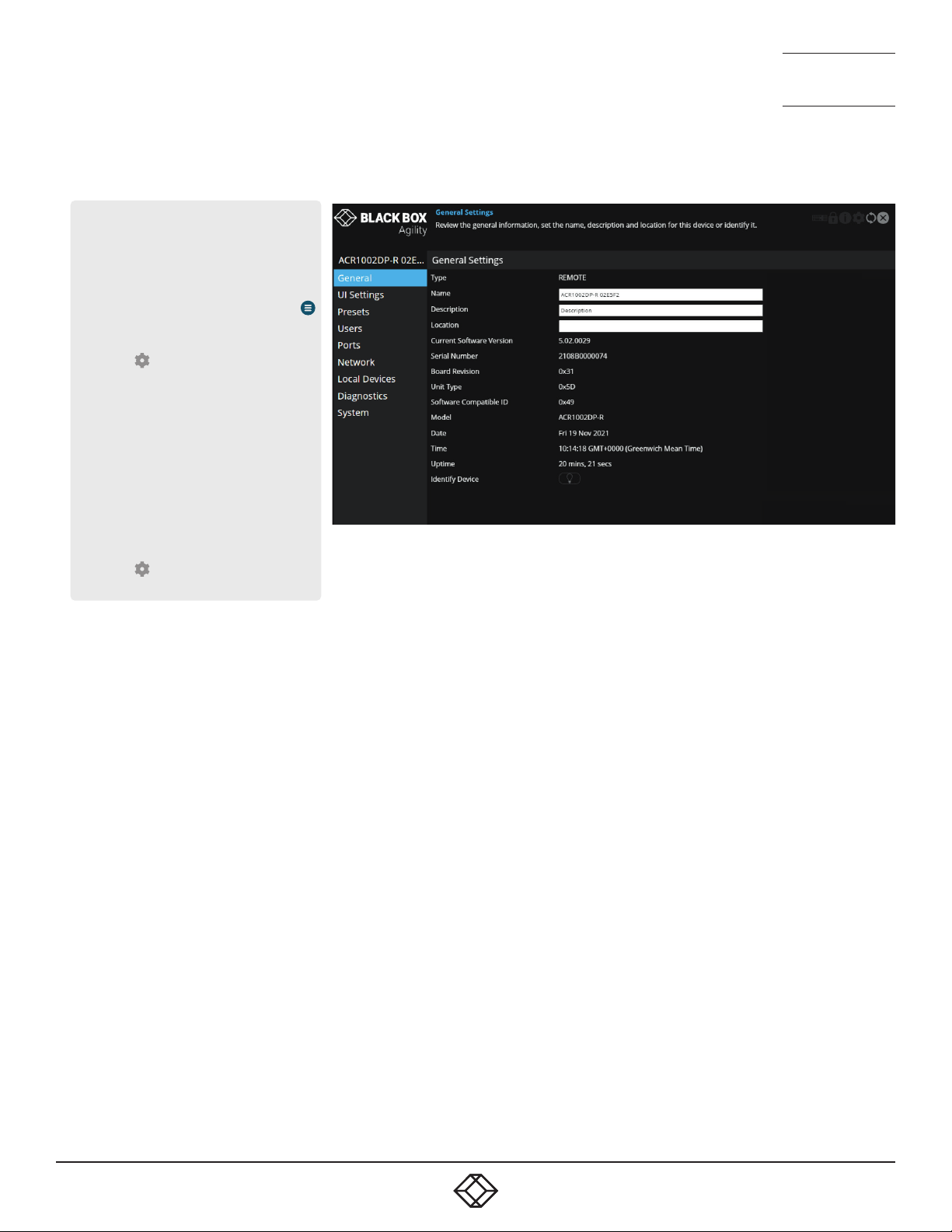
General Information
Type - States whether the device is a transmitter (TX) or a receiver
(RX).
Name - Name details that you can alter to distinguish this unit from all
others. Not shown when operating under iPATH server control.
Description - Allows you to optionally add a description of the device.
Useful when many Agility units are being used. Not shown when operating under iPATH server control.
Location - Allows you to optionally add a description of the device’s
location. Useful when many Agility units are being used. Not shown
when operating under iPATH server control.
Current Software Version - Displays the version number of the currently installed (and active) internal software.
Serial Number - Displays the xed serial number of the device.
Board Revision - Displays the revision number of the device’s main
circuit board.
Model - Displays the model number of the device.
Date and Time - Displays the current date and time used by the device
when this page was last loaded (select refresh icon to update).
Uptime - Shows the time period for which the device has currently being
running since the last time this page was loaded (select refresh icon to
update).
Identify Device - When clicked, this button will cause the indicator on
the front panel of the device to flash to assist with identication when
multiple units are installed in the same area. A popup dialog will also be
displayed on screen showing all relevant identication details. Click the
Cancel button to stop the identication process or click the OK button to
close the popup (and then click the Identify Device button when you’re
ready to cancel this operation).
33
33
Page 34
1. 8 7 7. 877. 226 9 BLACKBOX.COM
NEED HELP?
LEAVE T HE TECH TO US
LIVE 24/7
TECHNICAL
SUPPORT
1.877.877.2269
1. 8 7 7. 877. 226 9 BLACKBOX.COM
NEED HELP?
LEAVE T HE TECH TO US
LIVE 24/7
TECHNICAL
SUPPORT
1.877.877.2269
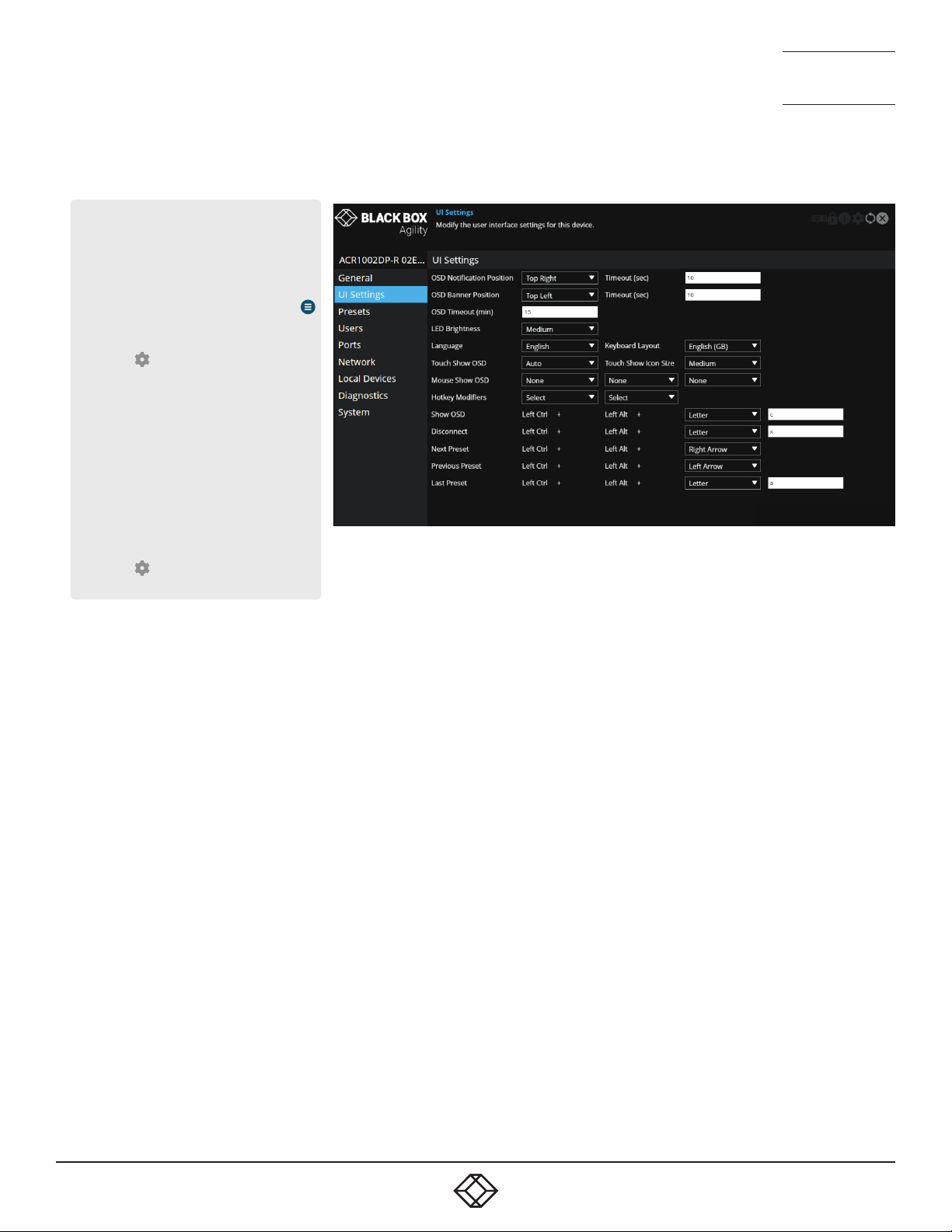
RECEIVER - UI SETTINGS
To get here
You can access this page in two ways,
however, the rst method is not available if
the module is under iPATH control:
1 On the console keyboard attached to
the receiver, access the OSD by pressing
CTRL + ALT + C or tap the touchscreen
icon. The Preset Selection page will be
displayed.
2 Click the icon in the top right corner.
3 If necessary, click the UI Settings link.
OR
1 Connect a computer to the same network
as the receiver.
2 Run a web browser and enter the
IP address of the receiver:
https://169.254.1.32 (this is the default
address when using port 1). If you are
using SFP port 2, then the default ad-
dress will be https://169.254.1.42 Note:
These default addresses can be changed.
3 Click the icon in the top right corner.
4 If necessary, click the UI Settings link.
UI Settings
OSD Notication Position (plus Timeout) - Determines the location and
persistence of notications issued on users’ screens.
OSD Banner Position (plus Timeout) - Determines the location and persistence of banners (a banner is a popup showing the current preset/
channel name) displayed on users’ screens.
OSD Timeout - Determines the persistence of the OSD if no interaction
has taken place.
LED brightness - Determines the brightness of the front and rear panel
LED indicators.
The following entries are also displayed when the unit is not under
iPATH control:
Language - Determines the language used for all text labels within the
conguration pages.*
Keyboard Layout - Determines the appropriate keyboard layout for use
with the conguration pages.*
* These entries are all visible but are not configurable under iPATH
control.
Touch Show OSD - (When touch screens are used) Determines whether
the Show OSD icon is displayed continually, not at all or automatically.*
Touch Show Icon Size - (When touch screens are used) Determines the
size of the Show OSD icon. Options range from Small to Very Large.*
Mouse Show OSD - Determines the mouse button press combination that
should be used to call the OSD.
Hotkey Modiers - Determines the special modier keys that will be used
to form the basis of all the hotkey functions listed below.
Show OSD... ...Last Preset - These entries determine the hotkey letters
required (together with the modier keys selected above) to enact various presets and modes. Not shown when operating under iPATH server
control.
34
34
Page 35
1. 8 7 7. 877. 226 9 BLACKBOX.COM
NEED HELP?
LEAVE T HE TECH TO US
LIVE 24/7
TECHNICAL
SUPPORT
1.877.877.2269
1. 8 7 7. 877. 226 9 BLACKBOX.COM
NEED HELP?
LEAVE T HE TECH TO US
LIVE 24/7
TECHNICAL
SUPPORT
1.877.877.2269
RECEIVER - PRESETS
To get here
You can access this page in two ways,
however, the rst method is not available if
the module is under iPATH control:
1 On the console keyboard attached to
the receiver, access the OSD by pressing
CTRL + ALT + C or tap the touchscreen
icon. The Preset Selection page will be
displayed.
2 Click the icon in the top right corner.
3 If necessary, click the Presets link.
OR
1 Connect a computer to the same network
as the receiver.
2 Run a web browser and enter the
IP address of the receiver:
https://169.254.1.32 (this is the default
address when using port 1). If you are
using SFP port 2, then the default ad-
dress will be https://169.254.1.42 Note:
These default addresses can be changed.
3 Click the icon in the top right corner.
4 If necessary, click the Presets link.
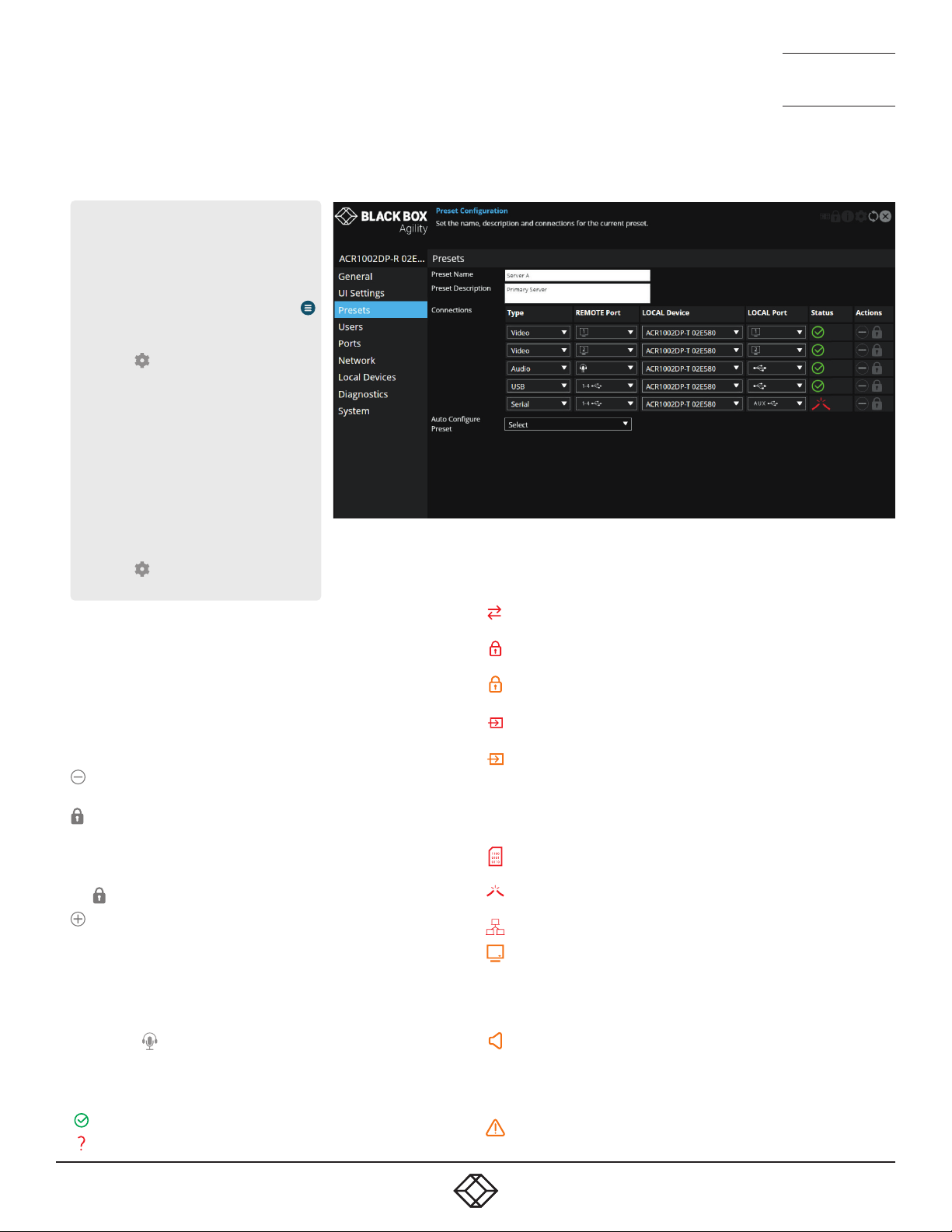
Preset Information
This page lists the details and connection status for the current channel/preset which the receiver is using. Under iPATH control this lists
the connection details for the channel that the receiver is currently
connected to.
Each row details one type of connection which has been made. It lists the
output port on the receiver and the source port from the transmitter which
it is connected to, as well as the name of the device it is connected to.
Click this icon in the Actions column to remove a particular row of
connections from the list.
Click this icon to manually set the password for the specied
device so that it has the necessary permission to access the appropriate channel on the selected transmitter. In most connections,
the access passwords for all the peripherals will be set collectively
during the initial linking between the receiver and transmitter. The
links given here provide an alternative method as backup.
Click this icon to add a new connection to the list.
Auto Congure Preset - Select to automatically create a new set of
connection presets from the selected transmitter.
Audio
Agility units support audio connections from the host PC via the USB
connection (which is converted at the transmitter). The only option
given will be
the front panel.
Status
The following icons may be shown within the Status column:
The connection is fully operational.
A connection has not been established.
, which represents the combined analog audio port on
The control protocol version is incompatible/unsupported between
the peer and this device.
The control protocol security settings are incompatible/unsupported
between the peer and this device.
The connection failed the authorisation stage (most likely a bad
password).
The connection is established but there is no input signal being
received from the peer device.
The connection has an invalid or unsupported input source signal
peer device (audio and video connections only), or
The connection is currently out of resources at the peer device, or
There is insufcient network bandwidth to support the requested data
for this connection.
The encoding of the source data at the peer has stopped (due to an
error or fault).
There is no output device available on the port for this connection
(e.g., no monitor connected).
There is no data currently being received by the device.
The video data for the connection produces an output signal that is
out of range for the capabilities of this device, or the appliance connected to this device, or
The device is currently out of resources to process the video data for
this connection.
The audio data for the connection produces an output signal that is
out of range for the capabilities of this device, or the appliance connected to this device, or
The device is currently out of resources to process the audio data for
this connection.
The decoding of the data at this device has stopped (due to an error
or fault).
35
35
Page 36
1. 8 7 7. 877. 226 9 BLACKBOX.COM
NEED HELP?
LEAVE T HE TECH TO US
LIVE 24/7
TECHNICAL
SUPPORT
1.877.877.2269
1. 8 7 7. 877. 226 9 BLACKBOX.COM
NEED HELP?
LEAVE T HE TECH TO US
LIVE 24/7
TECHNICAL
SUPPORT
1.877.877.2269
RECEIVER - USERS
To get here
You can access this page in two ways,
however, the rst method is not available if
the module is under iPATH control:
1 On the console keyboard attached to
the receiver, access the OSD by pressing
CTRL + ALT + C or tap the touchscreen
icon. The Preset Selection page will be
displayed.
2 Click the icon in the top right corner.
3 If necessary, click the Users link.
OR
1 Connect a computer to the same network
as the receiver.
2 Run a web browser and enter the
IP address of the receiver:
https://169.254.1.32 (this is the default
address when using port 1). If you are
using SFP port 2, then the default ad-
dress will be https://169.254.1.42 Note:
These default addresses can be changed.
3 Click the icon in the top right corner.
4 If necessary, click the Users link.
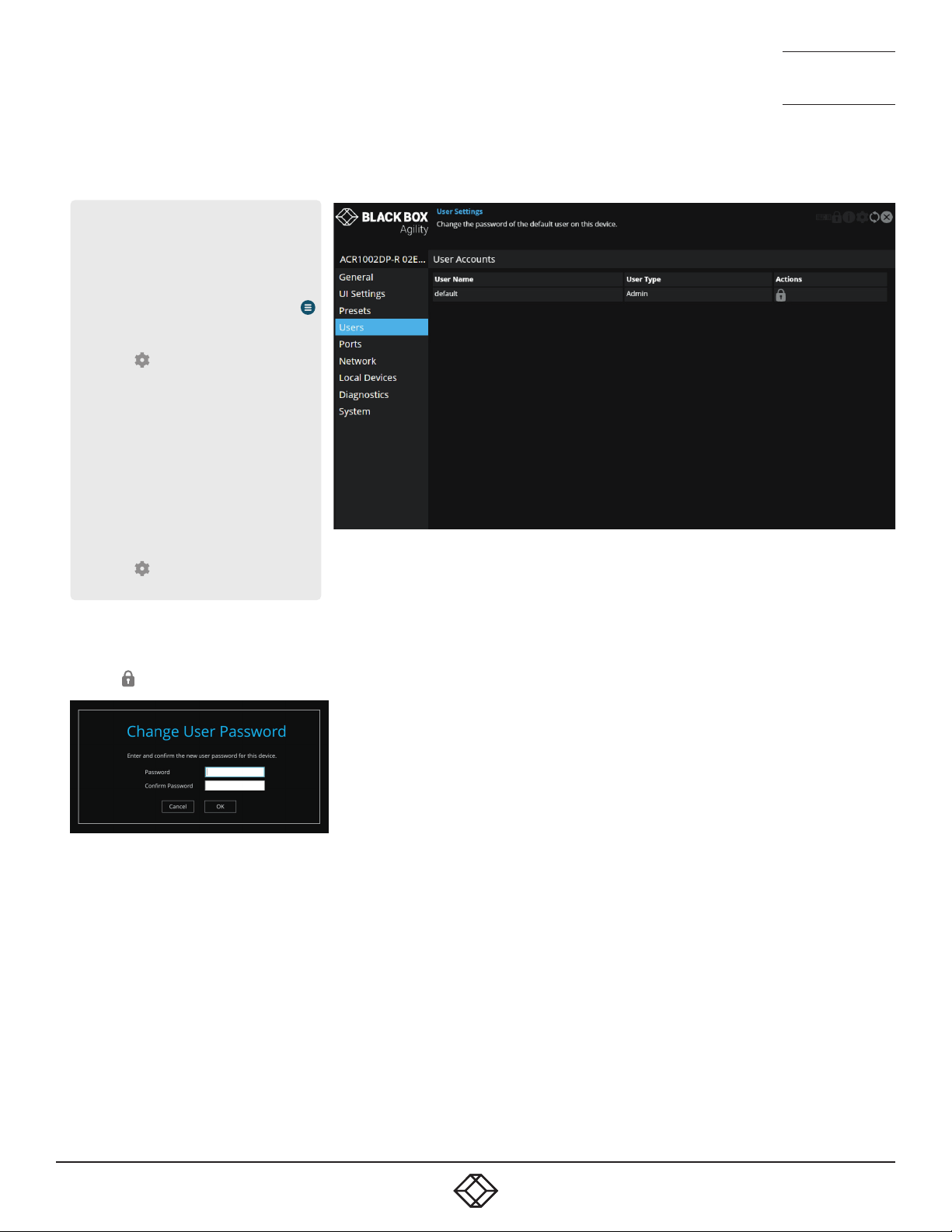
User accounts
This page allows you to change the password for the admin user.
Click the
Enter and conrm the current and new admin password and click OK.
icon to display the following dialog:
36
36
Page 37
1. 8 7 7. 877. 226 9 BLACKBOX.COM
NEED HELP?
LEAVE T HE TECH TO US
LIVE 24/7
TECHNICAL
SUPPORT
1.877.877.2269
1. 8 7 7. 877. 226 9 BLACKBOX.COM
NEED HELP?
LEAVE T HE TECH TO US
LIVE 24/7
TECHNICAL
SUPPORT
1.877.877.2269
RECEIVER - PORTS
To get here
You can access this page in two ways,
however, the rst method is not available if
the module is under iPATH control:
1 On the console keyboard attached to
the receiver, access the OSD by pressing
CTRL + ALT + C or tap the touchscreen
icon. The Preset Selection page will be
displayed.
2 Click the icon in the top right corner.
3 If necessary, click the Ports link.
OR
1 Connect a computer to the same network
as the receiver.
2 Run a web browser and enter the
IP address of the receiver:
https://169.254.1.32 (this is the default
address when using port 1). If you are
using SFP port 2, then the default ad-
dress will be https://169.254.1.42 Note:
These default addresses can be changed.
3 Click the icon in the top right corner.
4 If necessary, click the Ports link.
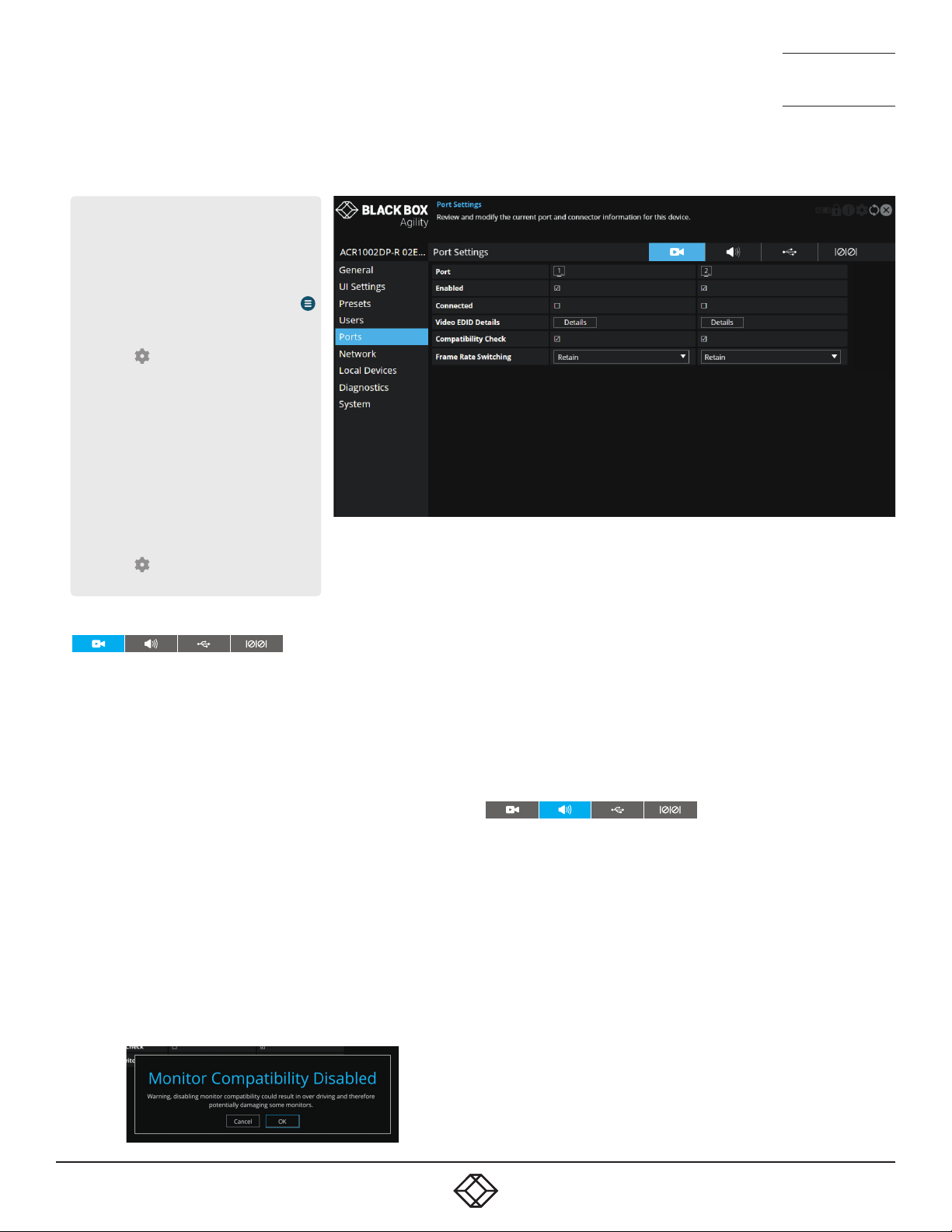
Video Ports
This page provides basic information about the two video ports located
on the receiver.
Enabled - Conrms whether each video port is enabled or disabled.
Connected - Conrms whether functioning video displays are con-
nected to the two video ports.
Video EDID Details - Click the Details button to show a popup for the
connected video display. EDID details listed include: Manufacturer,
model, serial number, manufacture date, EDID version as well as supported (and preferred) EDID modes, maximum bits per color, encodings,
colourimetry and dynamic range masterings supported by the monitor.
Note: EDID modes that are supported by the monitor but not by the
device will be greyed out. In cases where a resolution reported by the
video display is supported, but at a lower frame rate than the display
calls for, such entries will be shown in italics.
Compatibility Check - WARNING: Disabling this option can result in
damage to display monitors in certain circumstances. When ticked this
option conrms video compatibility between the source and display
device, (such as the video display’s maximum resolution, bpc, etc.) and
prevents signals being sent that the video display can’t support. When
unticked, signals will always be sent regardless of video display’s
declared capabilities. If you untick the option, the following warning
will be displayed:
Frame Rate Switching - Determines the strategy to use for the frame rate
when switching resolutions. Similar in function to the Match Frame Rate
setting on iPATH servers:
Force 60 - The frame rate is always forced to be 60Hz unless the Compatibility check option is on and the monitor does not indicate it supports
60Hz.
Retain - When switching to the same resolution with a potentially different frame rate, it will retain the current frame.
Auto - The frame rate always changes to match the mode it is connected to.
Audio Ports
This page provides basic information about the analog and digital audio
ports located on the receiver.
Enabled - Conrms whether the audio ports are enabled or disabled.
Connected - Conrms whether devices are connected to respective ports.
Gain - (Analog audio only) Determines the microphone amplication level:
None - no device connected on this port.
Mic - standard gain for normal microphone input devices.
Mic boost - 20dB boost to volume for microphone input devices.
Audio EDID Details - DisplayPort audio functionality will be added in
future rmware updates.
Compatibility Check - DisplayPort audio functionality will be added in
future rmware updates.
37
37
Page 38

1. 8 7 7. 877. 226 9 BLACKBOX.COM
NEED HELP?
LEAVE T HE TECH TO US
LIVE 24/7
TECHNICAL
SUPPORT
1.877.877.2269
1. 8 7 7. 877. 226 9 BLACKBOX.COM
NEED HELP?
LEAVE T HE TECH TO US
LIVE 24/7
TECHNICAL
SUPPORT
1.877.877.2269
USB Ports
This page provides basic information about the USB ports numbered 1
to 4 inclusive, located on the receiver.
Type - Identies the type of USB ports. All are listed as Emulated.
Enabled - Conrms whether the USB ports are enabled or disabled.
HID Only - When ticked, all ports are limited to supporting Human
Interface Devices only, such as keyboards and mice.
Disable Mass Storage - When ticked, this option prevents the use of
USB mass storage devices on the receiver unit. This could be useful
in situations where smart card readers need to be used for security
purposes but the use of USB drives need to be prevented.
Security - Controls whether USB data is encrypted. On forces always
on, Off forces always off and Prefer off will be off unless the transmitter requests it.
USB Port Mapping and Reservations - This section is useful when
multiple touchscreens are in use and allows you to match each USB
port input to the correct touchscreen.
Connected Devices - This section lists all connected devices with
manufacturer and model details where reported. Click the Details button against each device to view further information, such as the Device
Type, Protocol Version, Speed and Max Power Consumption.
Serial Port
This page provides basic information about the serial option port located
on the receiver.
Port - Indicates that an optional USB-to-serial converter may be connected to ports 1 - 4 of the receiver (a similar device needs to also be
connected to the AUX port on the transmitter).
Enabled - Conrms whether the serial port is enabled or disabled.
38
38
Page 39
1. 8 7 7. 877. 226 9 BLACKBOX.COM
NEED HELP?
LEAVE T HE TECH TO US
LIVE 24/7
TECHNICAL
SUPPORT
1.877.877.2269
1. 8 7 7. 877. 226 9 BLACKBOX.COM
NEED HELP?
LEAVE T HE TECH TO US
LIVE 24/7
TECHNICAL
SUPPORT
1.877.877.2269
RECEIVER - NETWORK
To get here
You can access this page in two ways,
however, the rst method is not available if
the module is under iPATH control:
1 On the console keyboard attached to
the receiver, access the OSD by pressing
CTRL + ALT + C or tap the touchscreen
icon. The Preset Selection page will be
displayed.
2 Click the icon in the top right corner.
3 If necessary, click the Network link.
OR
1 Connect a computer to the same network
as the receiver.
2 Run a web browser and enter the
IP address of the receiver:
https://169.254.1.32 (this is the default
address when using port 1). If you are
using SFP port 2, then the default ad-
dress will be https://169.254.1.42 Note:
These default addresses can be changed.
3 Click the icon in the top right corner.
4 If necessary, click the Network link.
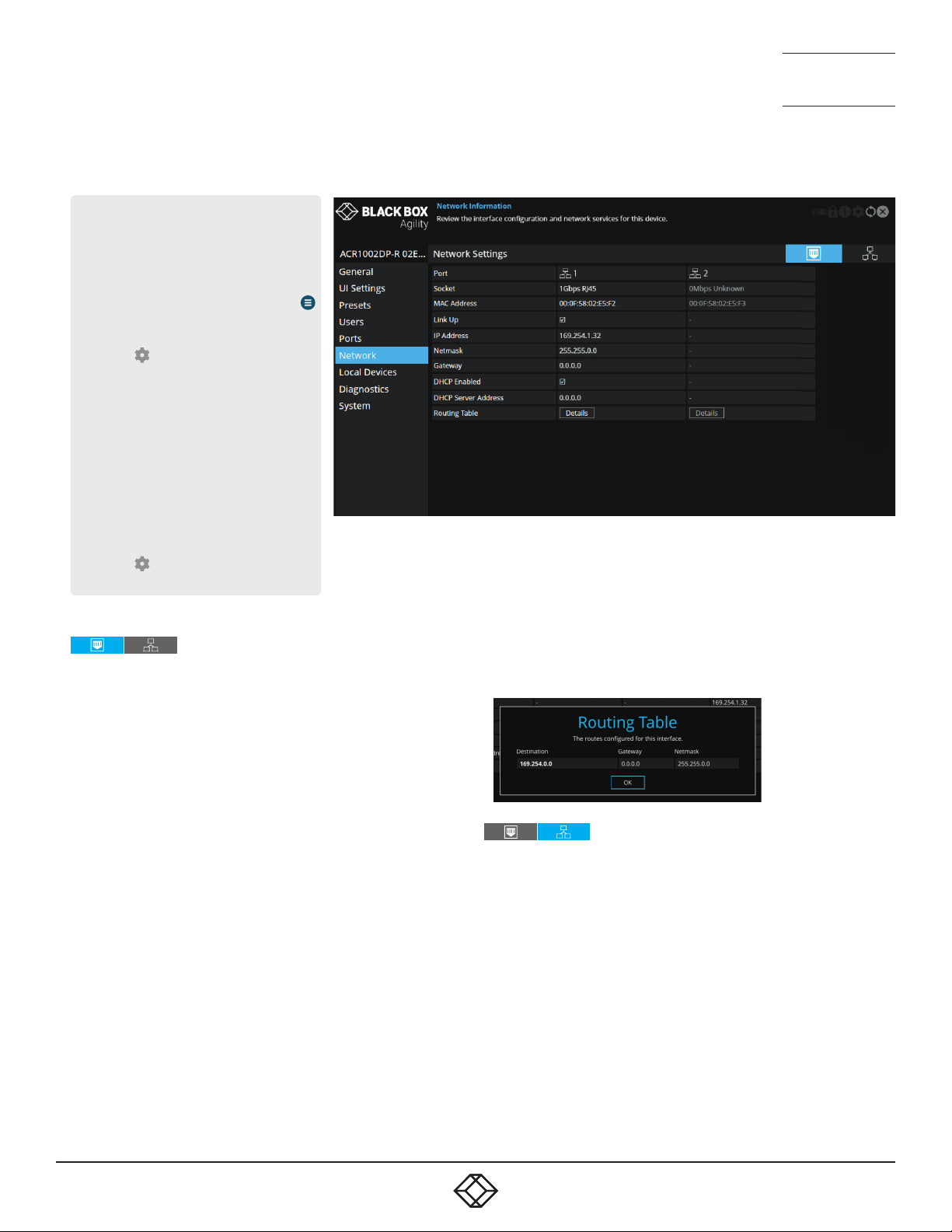
Port Settings
This page provides numerous network details for each of the installed
ports on the receiver.
Socket - Details each operational network socket and what connection speeds they have established. Socket 2 is determined by the SFP
modules plugged into it.
MAC Address - Displays the unique, xed hardware identication num-
ber for each port.
Link Up - Indicates whether the link state of this network interface is
up. This should be the case if the device is connected to a functioning
network.
IP Address - The IP address of this network interface. This is not con-
gurable, the device can function in a network zero-cong state which
does not require the setting of a static IP address.
Netmask - The netmask of this network interface. This is not congurable, the device can function in a network zero-cong state which does
not require the setting of a static netmask.
Gateway - The gateway address of this network interface. This is not
congurable, the device can function in a network zero-cong state
which does not require the setting of a static gateway.
DHCP Enabled - When ticked, the corresponding port will derive its IP
Address, Netmask and Gateway details from the DHCP server listed in
the eld below.
DHCP Server Address - Indicates the server that provided the DHCP
details.
Routing Table - Click on ‘Details’ to show the routing table entries
corresponding to this network interface. In it are the destination address, gateway and netmask for the routes to particular
network destinations.
Network Information
Default Domain - Reserved for future use.
Independent Networks - When ticked, the Agility receiver will treat its two
main network ports as independent routes to the transmitter(s) and not
attempt to nd secondary cross connections, which may not be possible
due to the network topology. This setting will have no effect when Agility
receivers link with Agility transmitters due to their use of auto discovery.
However, when an Agility receiver links with other dual port Agility transmitters, enabling this option can prevent unnecessary delays due to the
time taken looking for routes that are effectively network dead ends.
Route of Last Resort - In a multi-interface device such as this, the interface
which is ticked will be used as the default whenever it is unclear which
interface should be used for network trafc.
Dynamic DNS Servers - List of DNS server addresses obtained via DHCP.
Static DNS Servers - Lists DNS server addresses that have been manually
congured.
39
39
Page 40

1. 8 7 7. 877. 226 9 BLACKBOX.COM
NEED HELP?
LEAVE T HE TECH TO US
LIVE 24/7
TECHNICAL
SUPPORT
1.877.877.2269
1. 8 7 7. 877. 226 9 BLACKBOX.COM
NEED HELP?
LEAVE T HE TECH TO US
LIVE 24/7
TECHNICAL
SUPPORT
1.877.877.2269
NTP Enabled - When ticked, the unit will derive its time and date information from a suitable NTP server.
NTP Key ID - The ID of the key used for secure NTP.
NTP Key Value - The value of the key used for secure NTP as a hexa-
decimal string.
Dynamic NTP Servers - Lists NTP server addresses obtained via DHCP.
Static NTP Servers - Lists NTP server addresses that have been manu-
ally congured.
iPATH Enabled - Indicates whether server management is enabled for
this device.
Dynamic iPATH Servers - Lists iPATH server addresses obtained via
DHCP.
Static iPATH Servers - Lists management server addresses that have
been manually congured.
40
40
Page 41
1. 8 7 7. 877. 226 9 BLACKBOX.COM
NEED HELP?
LEAVE T HE TECH TO US
LIVE 24/7
TECHNICAL
SUPPORT
1.877.877.2269
1. 8 7 7. 877. 226 9 BLACKBOX.COM
NEED HELP?
LEAVE T HE TECH TO US
LIVE 24/7
TECHNICAL
SUPPORT
1.877.877.2269
RECEIVER - LOCAL DEVICES
To get here
You can access this page in two ways,
however, the rst method is not available if
the module is under iPATH control:
1 On the console keyboard attached to
the receiver, access the OSD by pressing
CTRL + ALT + C or tap the touchscreen
icon. The Preset Selection page will be
displayed.
2 Click the icon in the top right corner.
3 If necessary, click the Local Devices link.
OR
1 Connect a computer to the same network
as the receiver.
2 Run a web browser and enter the
IP address of the receiver:
https://169.254.1.32 (this is the default
address when using port 1). If you are
using SFP port 2, then the default ad-
dress will be https://169.254.1.42 Note:
These default addresses can be changed.
3 Click the icon in the top right corner.
4 If necessary, click the Local Devices link.
Local Devices
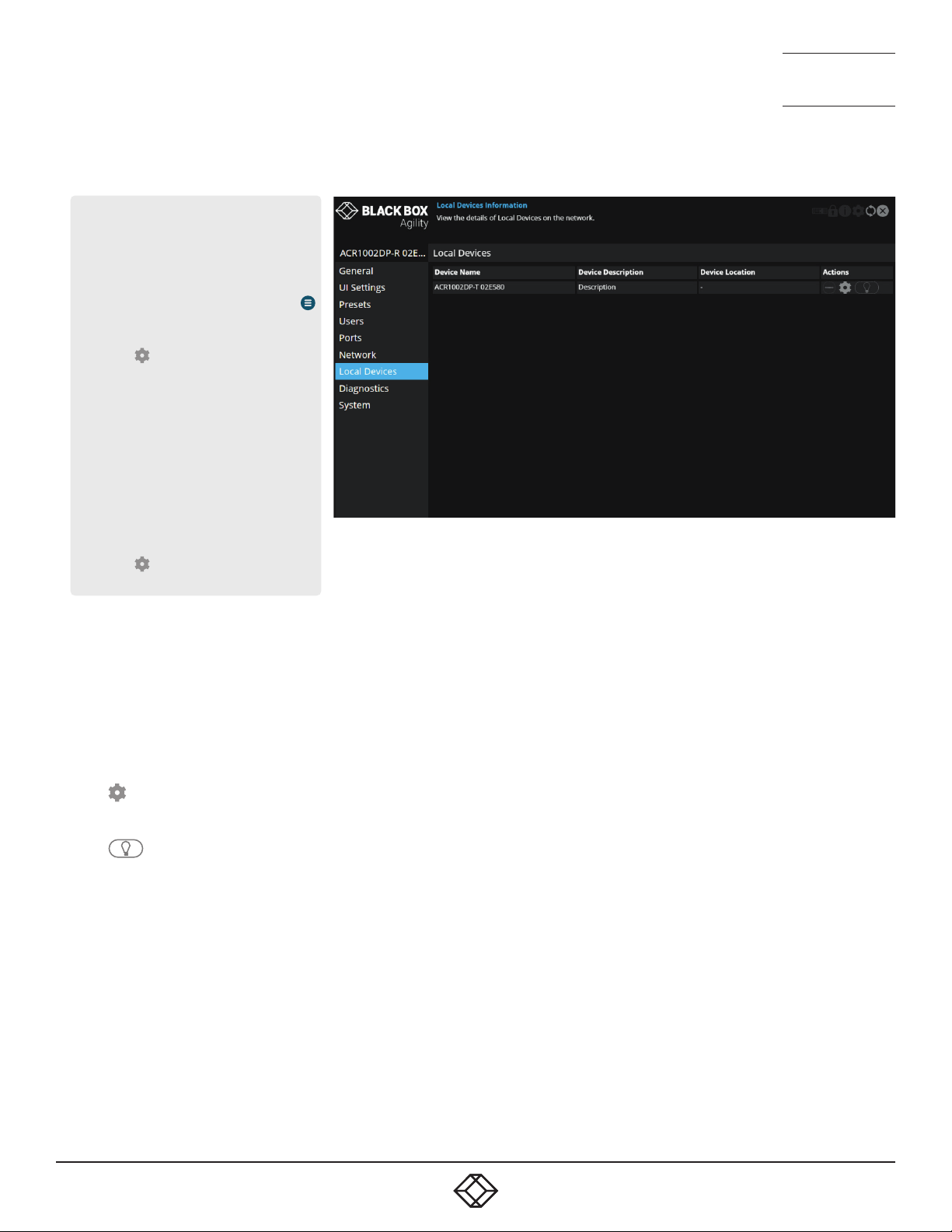
This page lists the available transmitters on the network which aren’t
under iPATH control - Note: Older Agility units are generally not discov-
erable using this process, however, if the Start of Life process was able
to connect point-to-point to an ACR1002DP then it will have created a
‘static’ device entry and thus it will appear on this screen. However, the
cog and light bulb icons will not function for the entry.
In the Actions column you can perform the following functions for each
listed transmitter:
• Click to view the conguration page of the transmitter. When
clicked, you will be directed to the General page for the chosen transmitter.
• Click to flash the front panel indicators on the transmitter to
assist with identication.
• Click the X button in the top right corner to return to return to the
receiver pages.
41
41
Page 42
1. 8 7 7. 877. 226 9 BLACKBOX.COM
NEED HELP?
LEAVE T HE TECH TO US
LIVE 24/7
TECHNICAL
SUPPORT
1.877.877.2269
1. 8 7 7. 877. 226 9 BLACKBOX.COM
NEED HELP?
LEAVE T HE TECH TO US
LIVE 24/7
TECHNICAL
SUPPORT
1.877.877.2269
RECEIVER - DIAGNOSTICS AND STATISTICS
To get here
You can access this page in two ways,
however, the rst method is not available if
the module is under iPATH control:
1 On the console keyboard attached to
the receiver, access the OSD by pressing
CTRL + ALT + C or tap the touchscreen
icon. The Preset Selection page will be
displayed.
2 Click the icon in the top right corner.
3 If necessary, click the Diagnostics link.
OR
1 Connect a computer to the same network
as the receiver.
2 Run a web browser and enter the
IP address of the receiver:
https://169.254.1.32 (this is the default
address when using port 1). If you are
using SFP port 2, then the default ad-
dress will be https://169.254.1.42 Note:
These default addresses can be changed.
3 Click the icon in the top right corner.
4 If necessary, click the Diagnostics link.
Log Settings
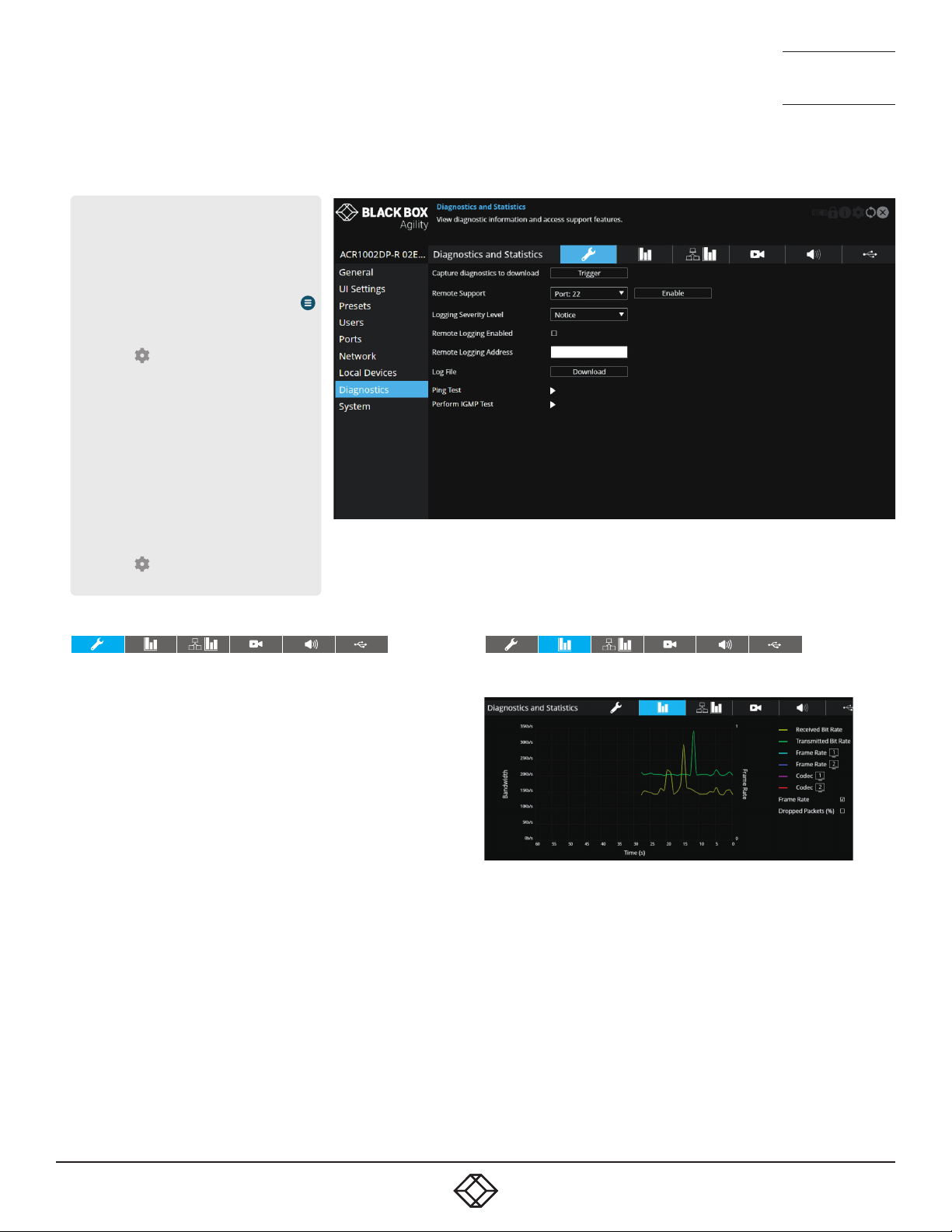
This page provides numerous key diagnostic log settings.
Capture diagnostics to download - Request generation of a diagnos-
tics dump le. This will then be downloaded by the host computer’s
browser, this is an encrypted diagnostics le which can be used by
technical support to diagnose and x an issue. If using the local OSD,
then this will show ‘Capture diagnostics to USB’ and will download the
same le onto a USB memory stick inserted into USB ports 1-4. Note:
When in point to point mode, you will need to plug in a USB flash drive
and capture the logs to it.
Remote Support - When using the remote server, this option determines which port will be used. Multiple options are offered in case one
or more ports are blocked by your rewall.
Logging Severity Level - Denes the level of messages that will be
logged (according to RFC5424). Level 5 (Notice: normal but signicant
condition) is the default setting; Agility supports levels 1 to 7. Choosing levels 6 (Informational) or 7 (Debug) will cause larger numbers of
lesser events to also be logged, with a potential impact to overall performance. These levels should only be used if working with the support
team to diagnose a specic issue.
Remote Logging Enabled - Tick to send log les to the chosen Remote
Logging Address.
Remote Logging Address - Enter a valid IP address for a syslog server
on the local network where status logs can be sent.
Log File - If viewing this page using a browser: Click to download the log
le to the host computer’s browser. If viewing this page via the OSD, the
log will be shown as a scrollable list.
Ping Test - Allows you to conduct a ping test to any selected address or
device.
Perform IGMP Test - Allows you to conduct an IGMP test on connected
devices, selectable from the drop-down list.
Basic Graph
This page shows a real time graph with the following entries:
• Received and Transmitted Bit Rates - the values of these correspond to
the bandwidth axis on the left.
• Frame Rate - for both heads. Values are labeled when they change and
correspond to the axis on the right.
• Codec - for both heads. These represent the compression used: 1 is
better than 4.
• Dropped Packets - for both heads. Values are labeled when they change
and correspond to the axis on the right.
Note: Use the Frame Rate and Dropped Packets tick box options to
determine which is displayed at any given time.
42
42
Page 43

1. 8 7 7. 877. 226 9 BLACKBOX.COM
NEED HELP?
LEAVE T HE TECH TO US
LIVE 24/7
TECHNICAL
SUPPORT
1.877.877.2269
1. 8 7 7. 877. 226 9 BLACKBOX.COM
NEED HELP?
LEAVE T HE TECH TO US
LIVE 24/7
TECHNICAL
SUPPORT
1.877.877.2269
Network Statistics
This page allows you to view current communication statistics
and also to create graphs in real time.
Capture and Graph Statistics - When ticked, the page will create
a real time graph plotting Received Bytes alongside Received
Packets.
After Capture and Graph Statistics is enabled, the Show Legend
checkbox will show all other items that can be included on the
plot. Click an item to tick and include it.
Video Port Status and Statistics
This page provides wide ranging information for support purposes.
Audio Port Status and Statistics
This page provides wide ranging information for support purposes.
USB Port Status and Statistics
Not yet implemented.
43
43
Page 44
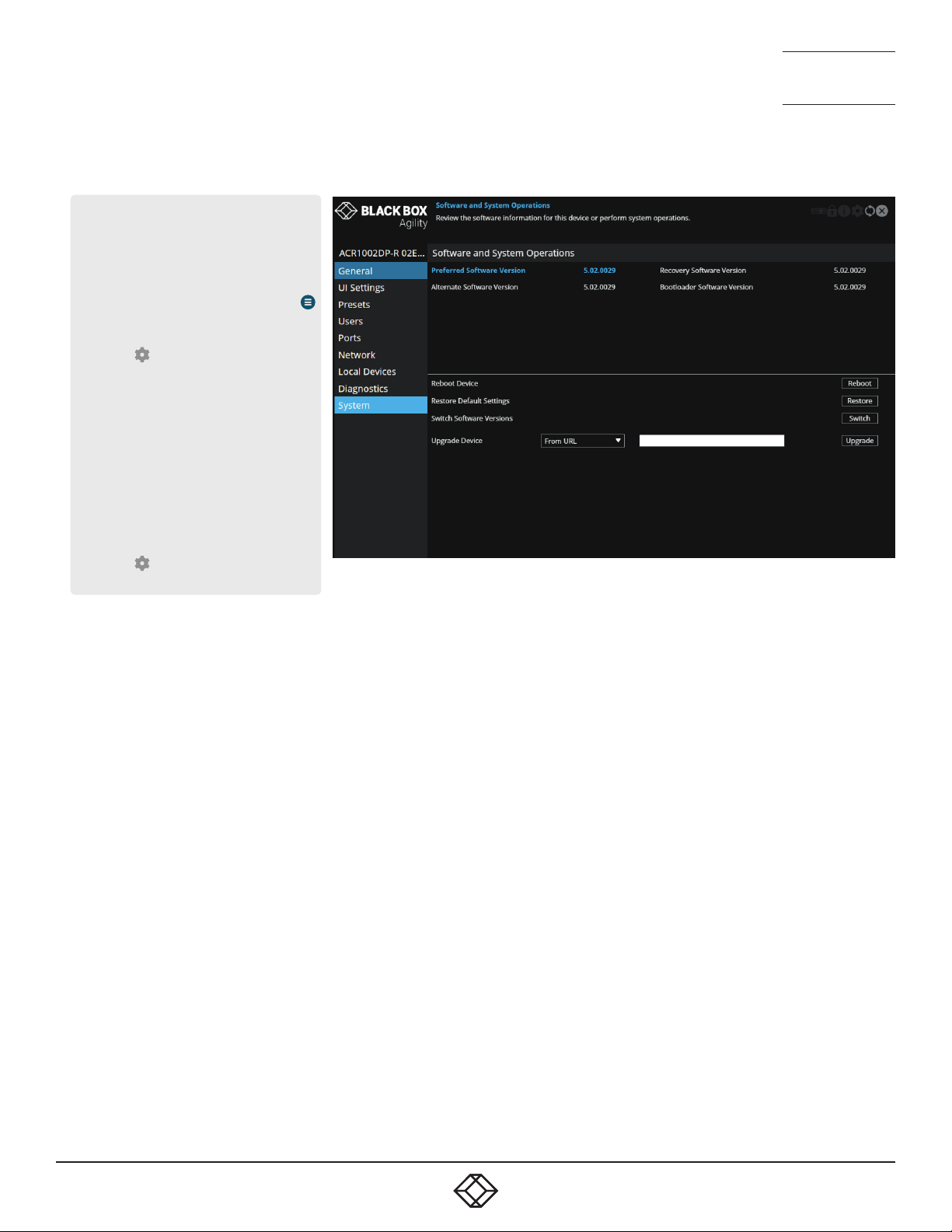
1. 8 7 7. 877. 226 9 BLACKBOX.COM
NEED HELP?
LEAVE T HE TECH TO US
LIVE 24/7
TECHNICAL
SUPPORT
1.877.877.2269
1. 8 7 7. 877. 226 9 BLACKBOX.COM
NEED HELP?
LEAVE T HE TECH TO US
LIVE 24/7
TECHNICAL
SUPPORT
1.877.877.2269
RECEIVER - SYSTEM
To get here
You can access this page in two ways,
however, the rst method is not available if
the module is under iPATH control:
1 On the console keyboard attached to
the receiver, access the OSD by pressing
CTRL + ALT + C or tap the touchscreen
icon. The Preset Selection page will be
displayed.
2 Click the icon in the top right corner.
3 If necessary, click the System link.
OR
1 Connect a computer to the same network
as the receiver.
2 Run a web browser and enter the
IP address of the receiver:
https://169.254.1.32 (this is the default
address when using port 1). If you are
using SFP port 2, then the default ad-
dress will be https://169.254.1.42 Note:
These default addresses can be changed.
3 Click the icon in the top right corner.
4 If necessary, click the System link.
Software and System Operations
This page contains various indications and options related to the internal software of the unit.
Note: The highlighted (and colored) entry is the version of software
currently running.
Preferred Software Version - The software version the device will boot
into upon a reboot.
Recovery Software Version - The software version the device will boot
into if placed into recovery mode.
Alternate Software Version - The other (backup) version of software
the device has available.
Reboot Device - Click the Reboot button to Reboot the device.
Restore Default Settings - Click the Restore button to restore the de-
vice to factory default settings.
Switch Software Versions - Click to switch to the listed ‘Alternative
Software Version’.
Upgrade Device - If viewing this page using a browser: Allows you to
upgrade the rmware either from a trusted URL or from a locally stored
le. Use the eld to dene the source and then click the Upgrade but-
ton.
44
44
Page 45
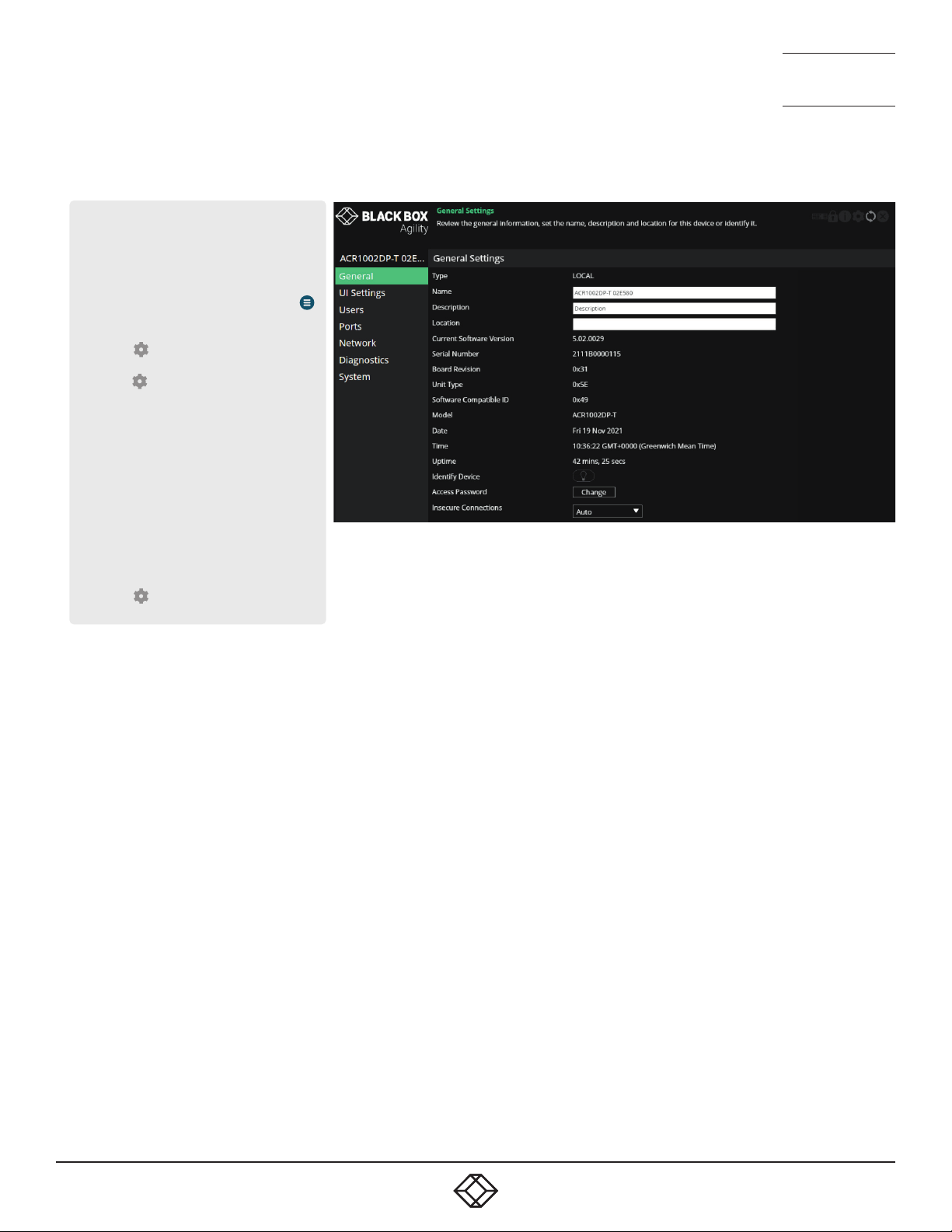
1. 8 7 7. 877. 226 9 BLACKBOX.COM
NEED HELP?
LEAVE T HE TECH TO US
LIVE 24/7
TECHNICAL
SUPPORT
1.877.877.2269
1. 8 7 7. 877. 226 9 BLACKBOX.COM
NEED HELP?
LEAVE T HE TECH TO US
LIVE 24/7
TECHNICAL
SUPPORT
1.877.877.2269
TRANSMITTER - GENERAL INFORMATION
To get here
You can access this page in two ways,
however, the rst method is not available if
the module is under iPATH control:
1 On the console keyboard attached to
the receiver, access the OSD by pressing
CTRL + ALT + C or tap the touchscreen
icon. The Preset Selection page will be
displayed.
2 Click the icon in the top right corner.
3 Click the Local Devices option and then
click the icon for the required
transmitter.
4 If necessary, click the General link.
OR
1 Connect a computer to the same network
as the transmitter.
2 Run a web browser and enter the IP address
of the transmitter: https://169.254.1.33
(this is the default address when us-
ing port 1). If you are using SFP port
2, then the default address will be
https://169.254.1.43 Note: These default
addresses can be changed.
3 Click the icon in the top right corner.
4 If necessary, click the General link.
General Information
Type - States whether the device is a transmitter (TX) or a receiver
(RX).
Name - Name details that you can alter to distinguish this unit from all
others. Not shown when operating under iPATH server control.
Description - Allows you to optionally add a description of the device.
Useful when many Agility units are being used. Not shown when operating under iPATH server control.
Location - Allows you to optionally add a description of the device’s
location. Useful when many Agility units are being used. Not shown
when operating under iPATH server control.
Current Software Version - Displays the version number of the currently installed and running internal software (unit can have two different software versions installed at once).
Serial Number - Displays the xed serial number of the device.
Board Revision - Displays the revision number of the device’s main
circuit board.
Model - Displays the model number of the device.
Date and Time - Displays the current date and time used by the device
when this page was last loaded (select refresh icon to update).
Uptime - Shows the time period for which the device has currently
being running since the last time this page was loaded (select refresh
icon to update).
Identify Device - When clicked, this button will cause the indicator on
the front panel of the device to flash to assist with identication when
multiple units are installed in the same area. A popup dialog will also be
displayed on screen showing all relevant identication details. Click the
Cancel button to stop the identication process or click the OK button to
close the popup (and then click the Identify Device button when you’re
ready to cancel this operation).
Access Password - Sets the password that a receiver must provide in
order to connect (video, audio, etc.) to the transmitter
Insecure Connections - Controls whether the transmitter will accept insecure connections from receivers. Insecure connections are those from
older Agility products where the security credentials are not implemented.
Initially, the transmitter will default to ‘auto’ which allows it to decide the
setting based on the type of device that rst connects to it. Once a device
has connected, the setting will be changed to either ‘Allowed’ or ‘Disallowed’.
45
45
Page 46
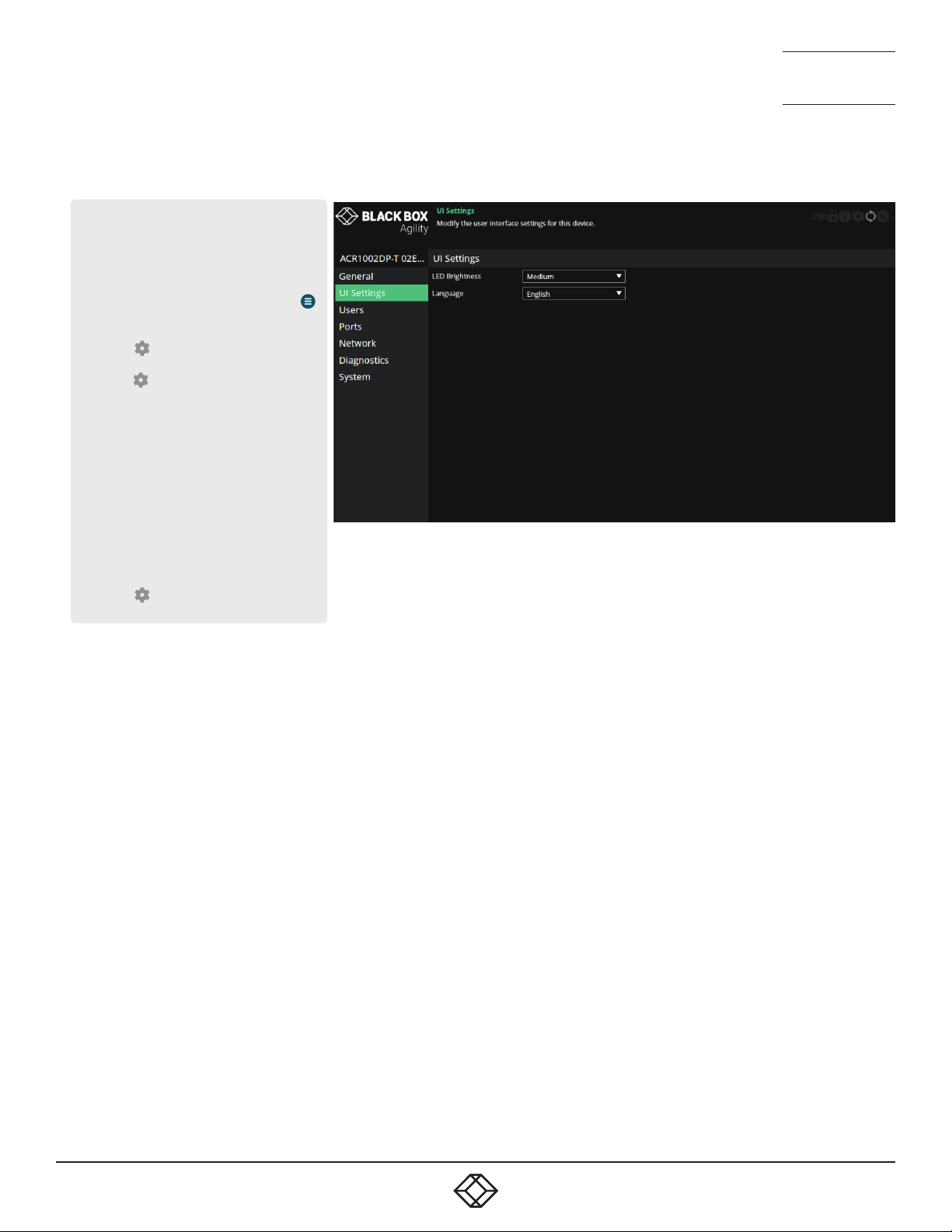
1. 8 7 7. 877. 226 9 BLACKBOX.COM
NEED HELP?
LEAVE T HE TECH TO US
LIVE 24/7
TECHNICAL
SUPPORT
1.877.877.2269
1. 8 7 7. 877. 226 9 BLACKBOX.COM
NEED HELP?
LEAVE T HE TECH TO US
LIVE 24/7
TECHNICAL
SUPPORT
1.877.877.2269
TRANSMITTER - UI SETTINGS
To get here
You can access this page in two ways,
however, the rst method is not available if
the module is under iPATH control:
1 On the console keyboard attached to
the receiver, access the OSD by pressing
CTRL + ALT + C or tap the touchscreen
icon. The Preset Selection page will be
displayed.
2 Click the icon in the top right corner.
3 Click the Local Devices option and then
click the icon for the required
transmitter.
4 If necessary, click the UI Settings link.
OR
1 Connect a computer to the same network
as the transmitter.
2 Run a web browser and enter the IP address
of the transmitter: https://169.254.1.33
(this is the default address when us-
ing port 1). If you are using SFP port
2, then the default address will be
https://169.254.1.43 Note: These default
addresses can be changed.
3 Click the icon in the top right corner.
4 If necessary, click the UI Settings link.
UI Settings
LED brightness - Determines the brightness of the front and rear panel
LED indicators.
Language - Determines the language used for all text labels within the
conguration pages.
46
46
Page 47
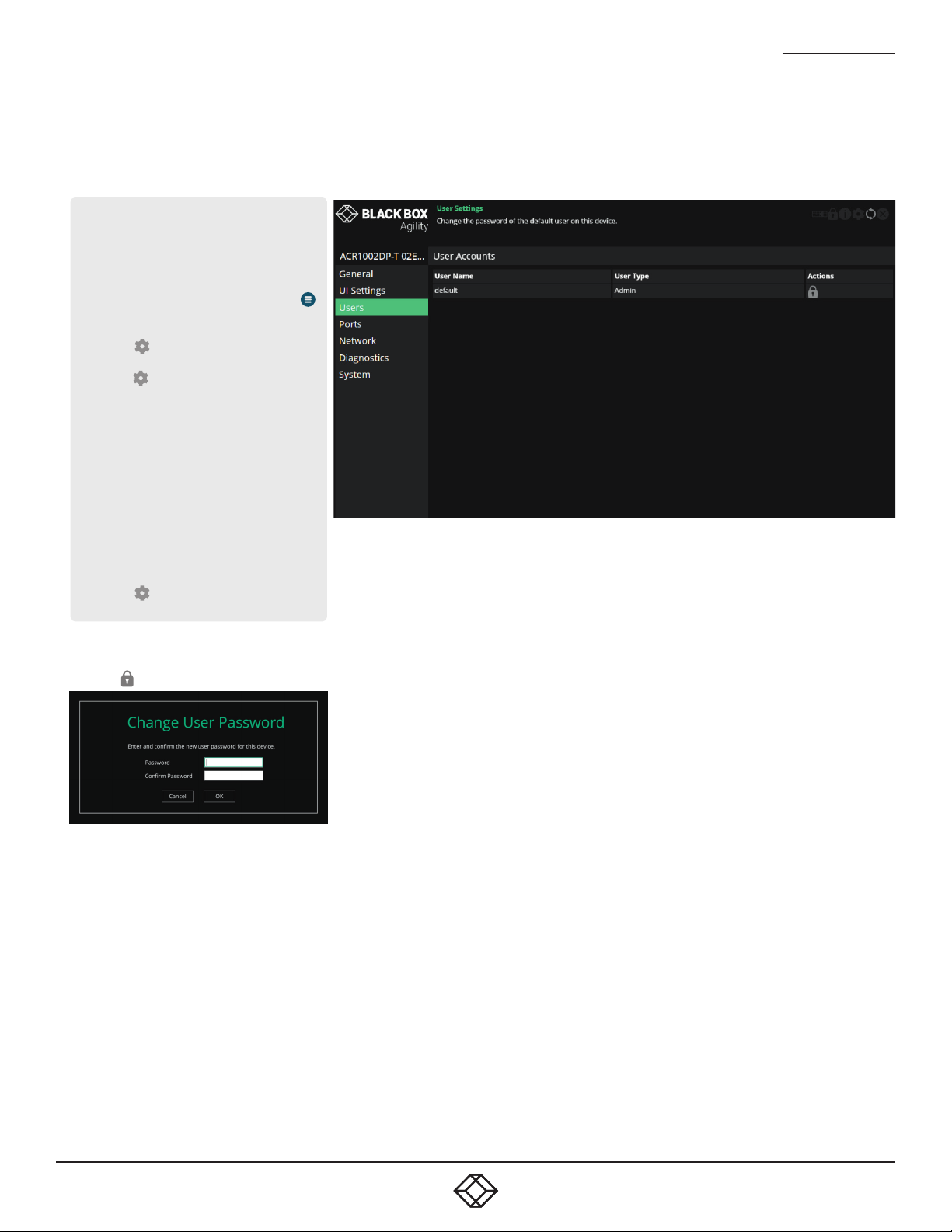
1. 8 7 7. 877. 226 9 BLACKBOX.COM
NEED HELP?
LEAVE T HE TECH TO US
LIVE 24/7
TECHNICAL
SUPPORT
1.877.877.2269
1. 8 7 7. 877. 226 9 BLACKBOX.COM
NEED HELP?
LEAVE T HE TECH TO US
LIVE 24/7
TECHNICAL
SUPPORT
1.877.877.2269
TRANSMITTER - USERS
To get here
You can access this page in two ways,
however, the rst method is not available if
the module is under iPATH control:
1 On the console keyboard attached to
the receiver, access the OSD by pressing
CTRL + ALT + C or tap the touchscreen
icon. The Preset Selection page will be
displayed.
2 Click the icon in the top right corner.
3 Click the Local Devices option and then
click the icon for the required
transmitter.
4 If necessary, click the Users link.
OR
1 Connect a computer to the same network
as the transmitter.
2 Run a web browser and enter the IP address
of the transmitter: https://169.254.1.33
(this is the default address when us-
ing port 1). If you are using SFP port
2, then the default address will be
https://169.254.1.43 Note: These default
addresses can be changed.
3 Click the icon in the top right corner.
4 If necessary, click the Users link.
User accounts
This page allows you to change the password for the admin user.
Click the
Enter and conrm the current and new admin password and click OK.
icon to display the following dialog:
47
47
Page 48
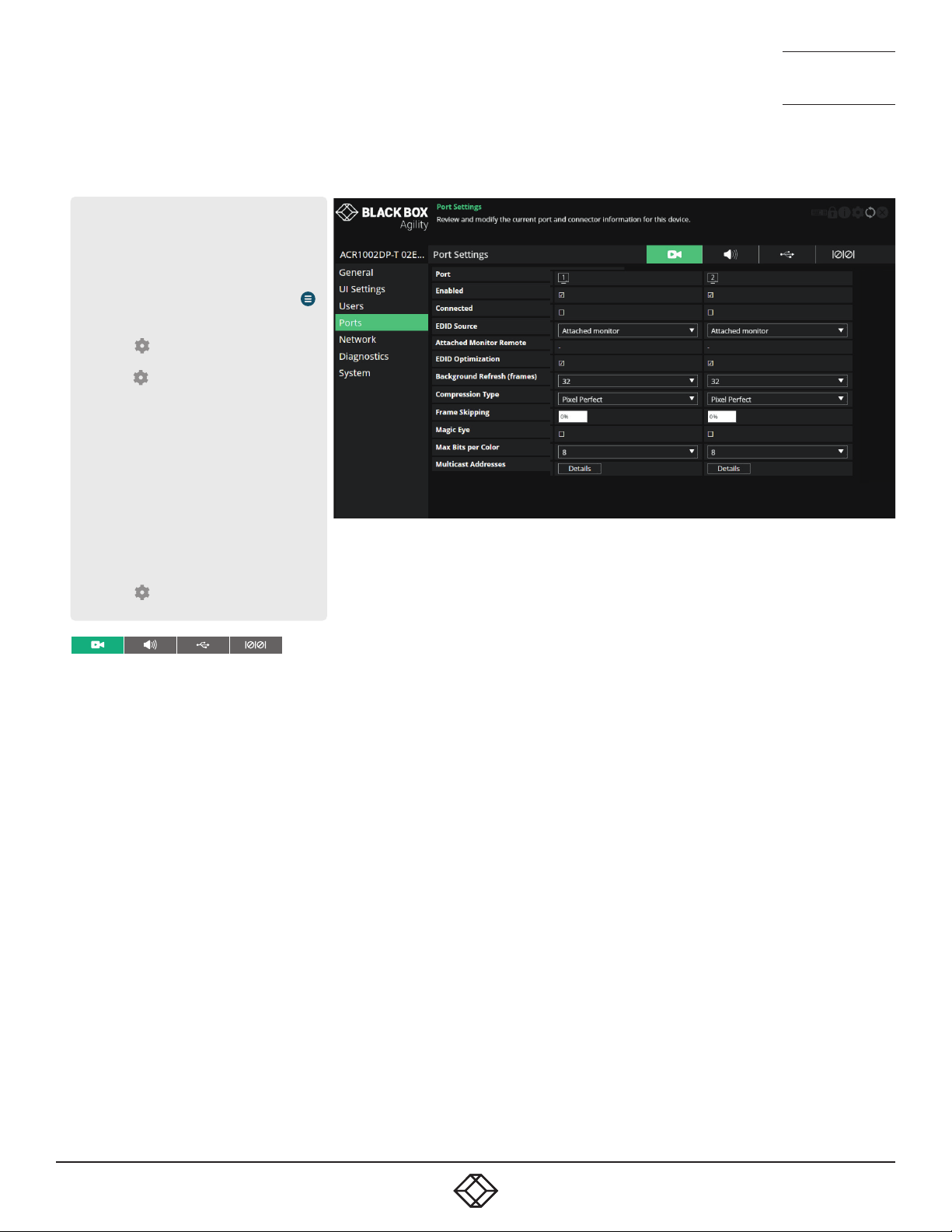
1. 8 7 7. 877. 226 9 BLACKBOX.COM
NEED HELP?
LEAVE T HE TECH TO US
LIVE 24/7
TECHNICAL
SUPPORT
1.877.877.2269
1. 8 7 7. 877. 226 9 BLACKBOX.COM
NEED HELP?
LEAVE T HE TECH TO US
LIVE 24/7
TECHNICAL
SUPPORT
1.877.877.2269
TRANSMITTER - PORTS
To get here
You can access this page in two ways,
however, the rst method is not available if
the module is under iPATH control:
1 On the console keyboard attached to
the receiver, access the OSD by pressing
CTRL + ALT + C or tap the touchscreen
icon. The Preset Selection page will be
displayed.
2 Click the icon in the top right corner.
3 Click the Local Devices option and then
click the icon for the required
transmitter.
4 If necessary, click the Ports link.
OR
1 Connect a computer to the same network
as the transmitter.
2 Run a web browser and enter the IP address
of the transmitter: https://169.254.1.33
(this is the default address when us-
ing port 1). If you are using SFP port
2, then the default address will be
https://169.254.1.43 Note: These default
addresses can be changed.
3 Click the icon in the top right corner.
4 If necessary, click the Ports link.
Video Ports
This page provides basic information about the two video ports located
on the transmitter.
Enabled - Conrms whether each video port is enabled or disabled.
Connected - Conrms whether functioning host video drivers are con-
nected to the two video ports.
EDID Source - Lists the EDID mode currently being output on the two
video connectors. .
Attached Monitor Receiver - If the ‘Attached monitor’ option has been
selected as the ‘EDID Source’, then this displays the name of the receiver that supplied the EDID currently being used.
EDID Optimization - When ticked, and if the EDID source option is set
to ‘Attached monitor’; upon connecting with a new receiver, the transmitter will compare the preferred video mode of the new monitor with
the current video output from the host PC. Only if they differ will the
transmitter present the new monitor’s EDID to the host PC. This option
speeds up switching as the host PCs graphics card does not have to
go through a hotplug detect routine each time a new receiver is connected. If this setting is unticked, the transmitter will always present a
new EDID to the host PC.
Background Refresh (frames) - The system will send all changing video as soon as it changes. In addition, it is possible to send
unchanging video in the background, to overcome problems of lost
network trafc. This control will congure how often a whole frame of
video will be sent alongside changing video. In situations of frequently
changing video, or high reliability networks, this value can be set to a
higher number, or even set to disabled.
Compression Type - Allows you to select the compression method to best
suit the nature of the video sources. Settings are: Pixel Perfect, Adaptive,
Smoothest Video or Advanced (which allows you to set the maximum and
minimum compression levels).
Frame Skipping - Frame Skipping involves ‘missing out’ video frames
between those captured by the transmitter. For video sources that update
only infrequently or for those that update very frequently but where high
delity is not required, frame skipping is a good strategy for reducing the
overall bandwidth consumed by the system. Range: 0 to 100%.
Magic Eye - When ticked, this feature increases performance and reduces
network trafc if Agility units are used with host computers that have
dithered video output. It also improves performance if the video source is
noisy.
Max Bits per Colour - These settings are xed at 8bpc for this model.
Multicast Addresses - This section lists all video multicast IP addresses
that have been congured. Setting the eld to a blank (empty string) value
will cause the system to automatically generate a default multicast address.
48
48
Page 49

1. 8 7 7. 877. 226 9 BLACKBOX.COM
NEED HELP?
LEAVE T HE TECH TO US
LIVE 24/7
TECHNICAL
SUPPORT
1.877.877.2269
1. 8 7 7. 877. 226 9 BLACKBOX.COM
NEED HELP?
LEAVE T HE TECH TO US
LIVE 24/7
TECHNICAL
SUPPORT
1.877.877.2269
Audio Ports
This page provides basic information about the audio ports located on
the transmitter.
Enabled - Conrms whether the audio ports are enabled or disabled.
Connected - Conrms whether devices are connected to respective
ports.
EDID Source - DisplayPort™ audio functionality will be added in future
rmware updates.
EDID Optimization - DisplayPort audio functionality will be added in
future rmware updates.
Quality Mode - Analog audio only. This option is currently xed at
48khz, 16bit.
Multicast Addresses - Not supported on this model.
USB Ports
This page provides basic information about the USB ports located on
the transmitter.
Type - Identies the type of the USB port.
Enabled - Conrms whether the USB ports are enabled or disabled.
Connected - Conrms whether valid devices are connected to either
USB port. Note: As both USB ports share the same physical port, it is
not possible to detect whether a specic port has a device connected.
Present Boot Keyboard - When ticked, the transmitter will report a
virtual dummy boot keyboard to the attached PC to ensure that a keyboard is always reported when the PC boots up. The dummy boot keyboard uses one of the 13 USB endpoints, therefore if all 13 endpoints
are required elsewhere for USB devices (or a KVM switch only supports
two HID devices) then it can be disabled by deselecting this option.
Max Hub Size - Using this option you can select whether the transmitter should report itself as a 13 or a 7 port USB hub. Some USB hosts
are only able to support 7 port USB hubs. If this option is set to 7, then
only 7 USB devices are supported by the PC.
Security - Controls whether USB data is encrypted. On forces always
on, Off forces always off and Prefer off will be off unless the receiver
requests it.
Serial Port
This page provides basic information about the serial option port located
available on the AUX USB port located on the front panel of the transmitter.
Enabled - Conrms whether the serial port is enabled or disabled.
Speed - The ‘baud rate’ of the serial device.
Data Bits - The number of data bits to be used (5, 6, 7, or 8).
Stop Bits - The number of stop bits to be used (1 or 2).
Parity - The parity checking to be used (none, odd or even).
49
49
Page 50
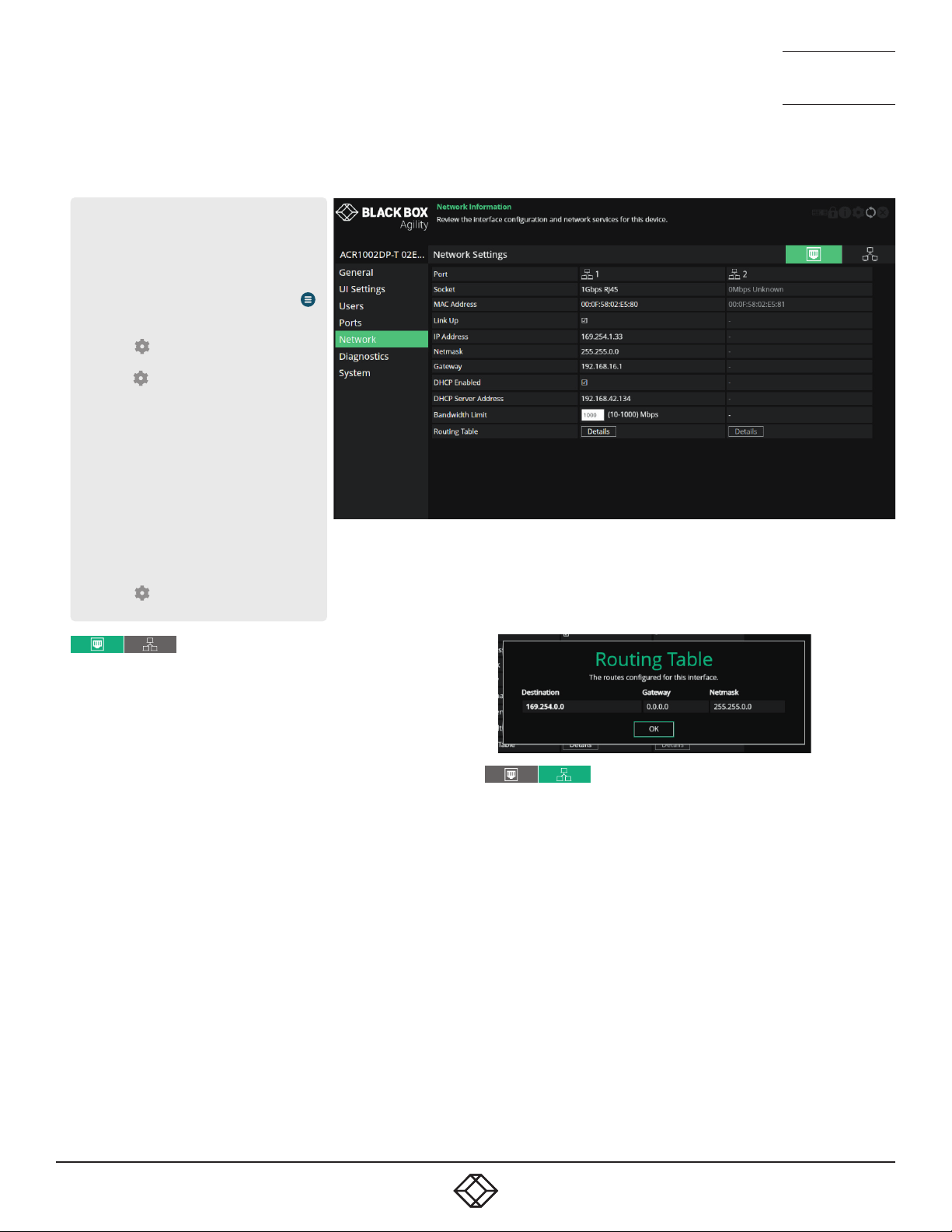
1. 8 7 7. 877. 226 9 BLACKBOX.COM
NEED HELP?
LEAVE T HE TECH TO US
LIVE 24/7
TECHNICAL
SUPPORT
1.877.877.2269
1. 8 7 7. 877. 226 9 BLACKBOX.COM
NEED HELP?
LEAVE T HE TECH TO US
LIVE 24/7
TECHNICAL
SUPPORT
1.877.877.2269
TRANSMITTER - NETWORK
To get here
You can access this page in two ways,
however, the rst method is not available if
the module is under iPATH control:
1 On the console keyboard attached to
the receiver, access the OSD by pressing
CTRL + ALT + C or tap the touchscreen
icon. The Preset Selection page will be
displayed.
2 Click the icon in the top right corner.
3 Click the Local Devices option and then
click the icon for the required
transmitter.
4 If necessary, click the Network link.
OR
1 Connect a computer to the same network
as the transmitter.
2 Run a web browser and enter the IP address
of the transmitter: https://169.254.1.33
(this is the default address when us-
ing port 1). If you are using SFP port
2, then the default address will be
https://169.254.1.43 Note: These default
addresses can be changed.
3 Click the icon in the top right corner.
4 If necessary, click the Network link.
Port Settings
This page provides numerous network details for each of the installed
ports on the transmitter.
Socket - Details each operational network socket. Sockets 3 and 4 are
determined by the SFP modules plugged into them.
MAC Address - Displays the unique, xed hardware identication num-
ber for each port.
Link Up - Indicates whether the link state of this network interface is
up. This should be the case if the device is connected to a functioning
network.
IP Address - The IP address of this network interface. This is not con-
gurable, the device can function in a network zero-cong state which
does not require the setting of a static IP address.
Netmask - The netmask of this network interface. This is not congurable, the device can function in a network zero-cong state which does
not require the setting of a static netmask.
Gateway - The gateway address of this network interface. This is not
congurable, the device can function in a network zero-cong state
which does not require the setting of a static gateway.
DHCP Enabled - When ticked, the corresponding port will derive its IP
Address, Netmask and Gateway details from the DHCP server listed in
the eld below.
DHCP Server Address - Indicates the server that provided the DHCP
details.
Bandwidth Limit - This option can be used to set an upper limit (between 10 and 1000 Mbps aka 1Gbps) to the amount of the network
bandwidth used on the physical interface. This could be useful if multiple devices share a common network link upstream; without a limit, the
link could become overloaded and drop data.
Routing Table - Click on ‘Details’ to show the routing table entries corresponding to this network interface. In it are the destination address,
gateway and netmask for the routes to particular network destinations:
Network Settings
Default Domain - Reserved for future use.
Route of Last Resort - In a multi interface device such as this, the in-
terface which is ticked will be used as the default whenever it is unclear
which interface should be used for network trafc.
Dynamic DNS Servers - List of DNS server addresses obtained via DHCP.
Static DNS Servers - Lists DNS server addresses that have been manually
congured.
NTP Enabled - When ticked, the unit will derive its time and date information from a suitable NTP server.
NTP Key ID - The ID of the key used for secure NTP.
NTP Key Value - The value of the key used for secure NTP as a hexadeci-
mal string.
Dynamic NTP Servers - Lists NTP server addresses obtained via DHCP.
Static NTP Servers - Lists NTP server addresses that have been manually
congured.
iPATH Enabled - Indicates whether server management is enabled for this
device.
Dynamic iPATH Servers - Lists iPATH server addresses obtained via
DHCP.
Static iPATH Servers - Lists management server addresses that have
been manually congured.
50
50
Page 51
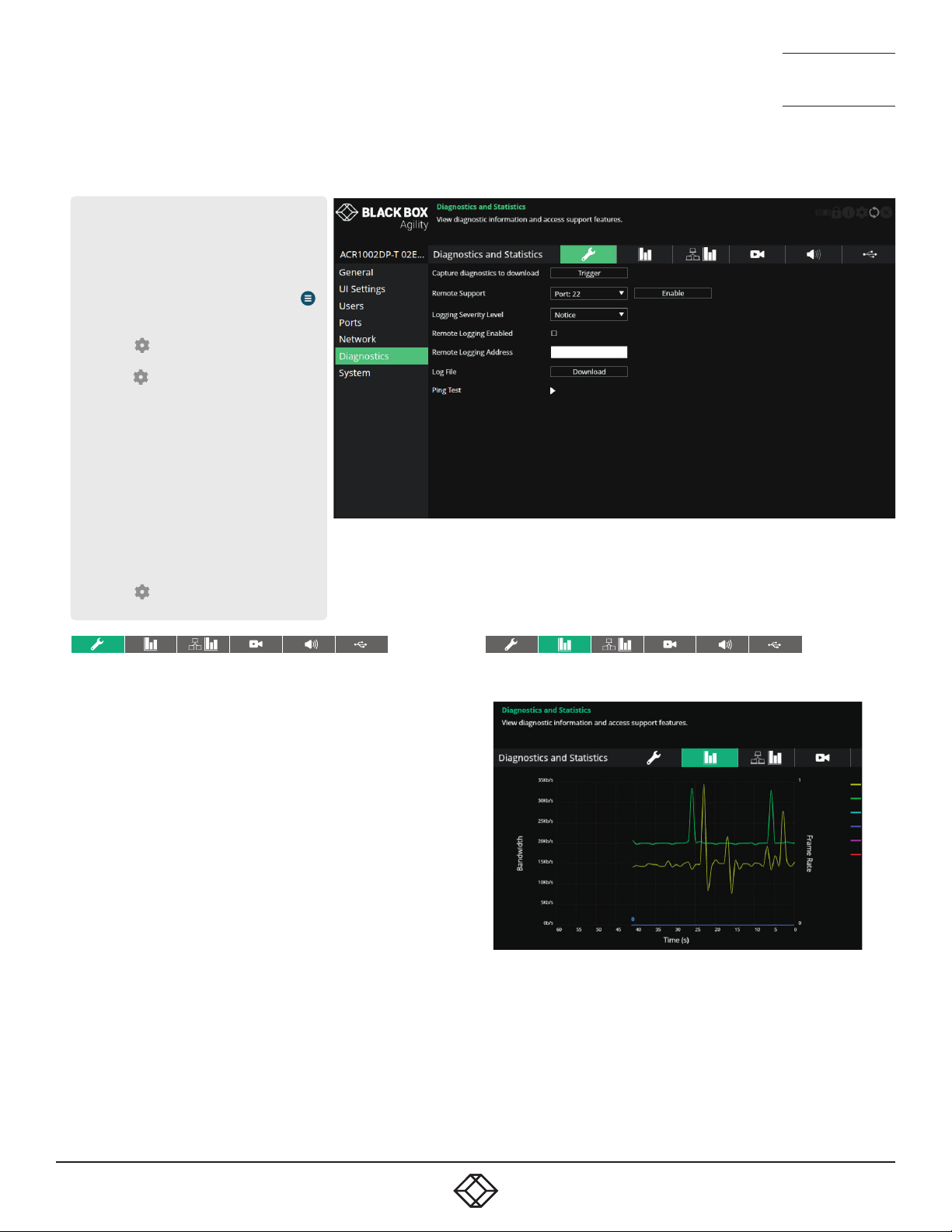
1. 8 7 7. 877. 226 9 BLACKBOX.COM
NEED HELP?
LEAVE T HE TECH TO US
LIVE 24/7
TECHNICAL
SUPPORT
1.877.877.2269
1. 8 7 7. 877. 226 9 BLACKBOX.COM
NEED HELP?
LEAVE T HE TECH TO US
LIVE 24/7
TECHNICAL
SUPPORT
1.877.877.2269
TRANSMITTER - DIAGNOSTICS AND STATISTICS
To get here
You can access this page in two ways,
however, the rst method is not available if
the module is under iPATH control:
1 On the console keyboard attached to
the receiver, access the OSD by pressing
CTRL + ALT + C or tap the touchscreen
icon. The Preset Selection page will be
displayed.
2 Click the icon in the top right corner.
3 Click the Local Devices option and then
click the icon for the required
transmitter.
4 If necessary, click the Diagnostics link.
OR
1 Connect a computer to the same network
as the transmitter.
2 Run a web browser and enter the IP address
of the transmitter: https://169.254.1.33
(this is the default address when us-
ing port 1). If you are using SFP port
2, then the default address will be
https://169.254.1.43 Note: These default
addresses can be changed.
3 Click the icon in the top right corner.
4 If necessary, click the Diagnostics link.
Log Settings
This page provides numerous key diagnostic log settings.
Capture diagnostics to download - (Only shown when viewing this
page using a PC browser). Request generation of a diagnostics dump
le. This will then be downloaded by the host computer’s browser, this
is an encrypted diagnostics le which can be used by technical support to diagnose and x an issue.
Remote Support - When using the remote server, this option determines which port will be used. Multiple options are offered in case one
or more ports are blocked by your rewall. When the Enable button is
clicked, it will indicate the password to be used.
Logging Severity Level - Denes the level of messages that will be
logged (according to RFC5424). Level 5 (Notice: normal but signicant
condition) is the default setting; Agility supports levels 1 to 7. Choosing levels 6 (Informational) or 7 (Debug) will cause larger numbers of
lesser events to also be logged, with a potential impact to overall performance. These levels should only be used if working with the support
team to diagnose a specic issue.
Remote Logging Enabled - Tick to send log les to the chosen Remote
Logging Address.
Remote Logging Address - Enter a valid IP address for a syslog server
on the local network where status logs can be sent.
Log File - If viewing this page using a browser: Click to download the log
le to the host computer’s browser. If viewing this page via the OSD, the
log will be shown as a scrollable list.
Ping Test - Provides a quick and easy way to check the link status to a receiver. You can specify either an IP address or choose the device from a list.
Click the Start button to begin; a summary of the results will be displayed.
Basic Graph
This page shows a real time graph with the following entries:
• Received and transmitted bit rates - the values of these correspond to
the bandwidth axis on the left.
• Frame rate - for both heads. Values are labeled when they change and
correspond to the axis on the right.
• Codec - for both heads. These represent the compression used: 1 is
better than 4.
51
51
Page 52
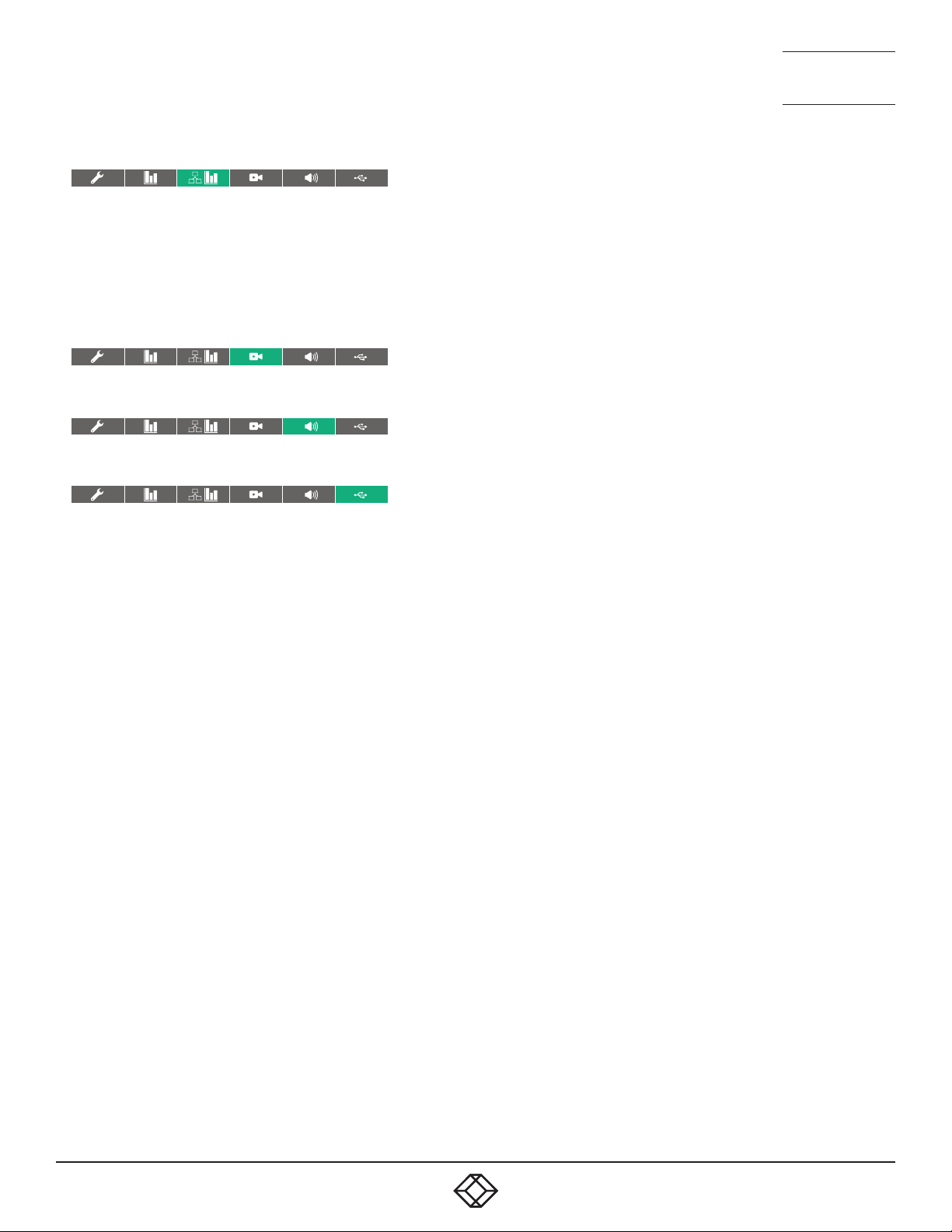
1. 8 7 7. 877. 226 9 BLACKBOX.COM
NEED HELP?
LEAVE T HE TECH TO US
LIVE 24/7
TECHNICAL
SUPPORT
1.877.877.2269
1. 8 7 7. 877. 226 9 BLACKBOX.COM
NEED HELP?
LEAVE T HE TECH TO US
LIVE 24/7
TECHNICAL
SUPPORT
1.877.877.2269
Network Statistics
This page allows you to view current communication statistics and
also to create graphs in real time.
Capture and Graph Statistics - When ticked, the page will create a real
time graph plotting Received Bytes alongside Received Packets.
After Capture and Graph Statistics is enabled, the Show Legend checkbox will show all other items that can be included on the plot. Click an
item to tick and include it.
Video Port Status and Statistics
This page provides wide ranging information for support purposes.
Audio Port Status and Statistics
This page provides wide ranging information for support purposes.
USB Port Status and Statistics
Not yet implemented.
52
52
Page 53
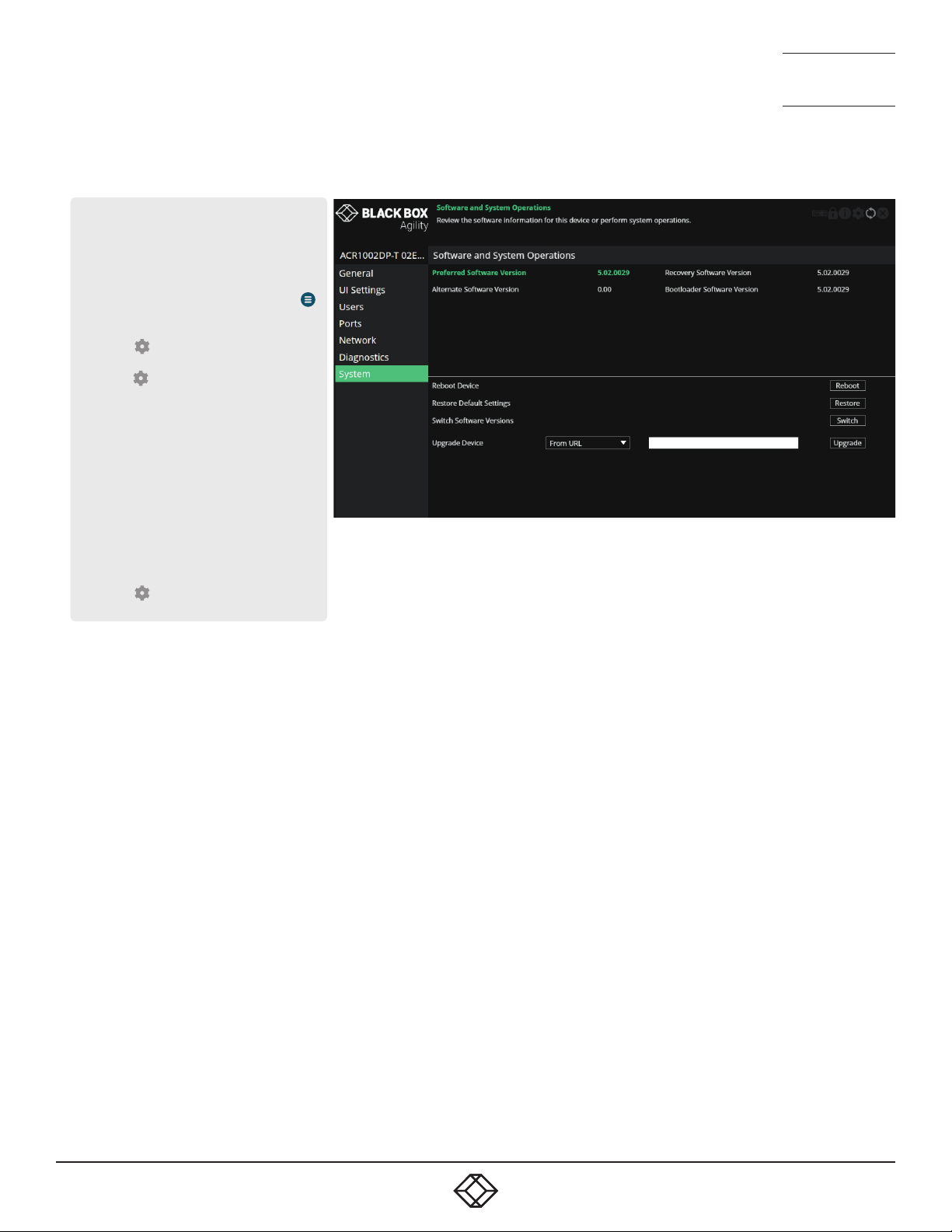
1. 8 7 7. 877. 226 9 BLACKBOX.COM
NEED HELP?
LEAVE T HE TECH TO US
LIVE 24/7
TECHNICAL
SUPPORT
1.877.877.2269
1. 8 7 7. 877. 226 9 BLACKBOX.COM
NEED HELP?
LEAVE T HE TECH TO US
LIVE 24/7
TECHNICAL
SUPPORT
1.877.877.2269
TRANSMITTER - SYSTEM
To get here
You can access this page in two ways,
however, the rst method is not available if
the module is under iPATH control:
1 On the console keyboard attached to
the receiver, access the OSD by pressing
CTRL + ALT + C or tap the touchscreen
icon. The Preset Selection page will be
displayed.
2 Click the icon in the top right corner.
3 Click the Local Devices option and then
click the icon for the required
transmitter.
4 If necessary, click the System link.
OR
1 Connect a computer to the same network
as the transmitter.
2 Run a web browser and enter the IP address
of the transmitter: https://169.254.1.33
(this is the default address when us-
ing port 1). If you are using SFP port
2, then the default address will be
https://169.254.1.43 Note: These default
addresses can be changed.
3 Click the icon in the top right corner.
4 If necessary, click the System link.
Software and System Operations
This page contains various indications and options related to the internal software of the unit.
Note: The highlighted (and colored) entry is the version of software
currently running.
Preferred Software Version - The software version the device will boot
into upon a reboot.
Recovery Software Version - The software version the device will boot
into if placed into recovery mode.
Alternate Software Version - The other (backup) version of software
the device has available.
Reboot Device - Click the Reboot button to Reboot the device.
Restore Default Settings - Click the Restore button to restore the de-
vice to factory default settings.
Switch Software Versions - Click to switch to the listed ‘Alternative
Software Version’.
Upgrade Device - Allows you to upgrade the rmware either from a
trusted URL or from a locally stored le. Use the eld to dene the
source and then click the Upgrade button.
53
53
Page 54

1. 8 7 7. 877. 226 9 BLACKBOX.COM
NEED HELP?
LEAVE T HE TECH TO US
LIVE 24/7
TECHNICAL
SUPPORT
1.877.877.2269
APPENDIX B - TIPS FOR SUCCESS WHEN NETWORKING AGILITY UNITS
Agility units use multiple strategies to minimize the amount of data that they send across networks. However, data overheads
can be quite high, particularly when very high resolution video is being transferred, so it is important to take steps to maximize
network efficiency and help minimize data output. The tips given in this section have been proven to produce very beneficial
results.
SUMMARY OF STEPS
• Choose the right kind of switch.
• Create an efficient network layout.
• Configure the switches and devices correctly.
CHOOSING THE RIGHT SWITCH
Layer 2 switches are what bind all of the hosts together in the subnet. However, they are all not created equally, so choose
carefully. In particular look for the following:
• 10Gigabit ports,
• Support for IGMP v2 (or v3) snooping,
• Support for Jumbo frames up to 9216-byte size,
• High bandwidth connections between switches, preferably Fiber Channel.
• Look for switches that perform their most onerous tasks (e.g., IGMP snooping) using multiple dedicated processors (ASICS).
• Ensure the maximum number of concurrent ‘snoopable groups’ the switch can handle meets or exceeds the number of Agility
transmitters that will be used to create multicast groups.
• Check the throughput of the switch: Full duplex, 10Gbps up- and down- stream speeds per port.
• Use the same switch make and model throughout a single subnet.
• You also need a Layer 3 switch. Ensure that it can operate efficiently as an IGMP Querier.
CREATING AN EFFICIENT NETWORK LAYOUT
Network layout is vital. The use of IGMP snooping also introduces certain constraints, so take heed:
• Keep it flat. Use a basic line-cascade structure rather than a pyramid or tree arrangement.
• Keep the distances between the switches as short as possible.
• Ensure sufficient bandwidth between switches to eliminate bottlenecks.
• Where the iPATH server is used to administer multiple Agility transceivers, ensure the iPATH server and all Agility units reside in
the same subnet.
• Do not use VGA to DisplayPort converters, instead replace VGA video cards in older systems with suitable DisplayPort
replacements. Converters cause transmitters to massively increase data output.
• Wherever possible, create a private network.
54
Page 55
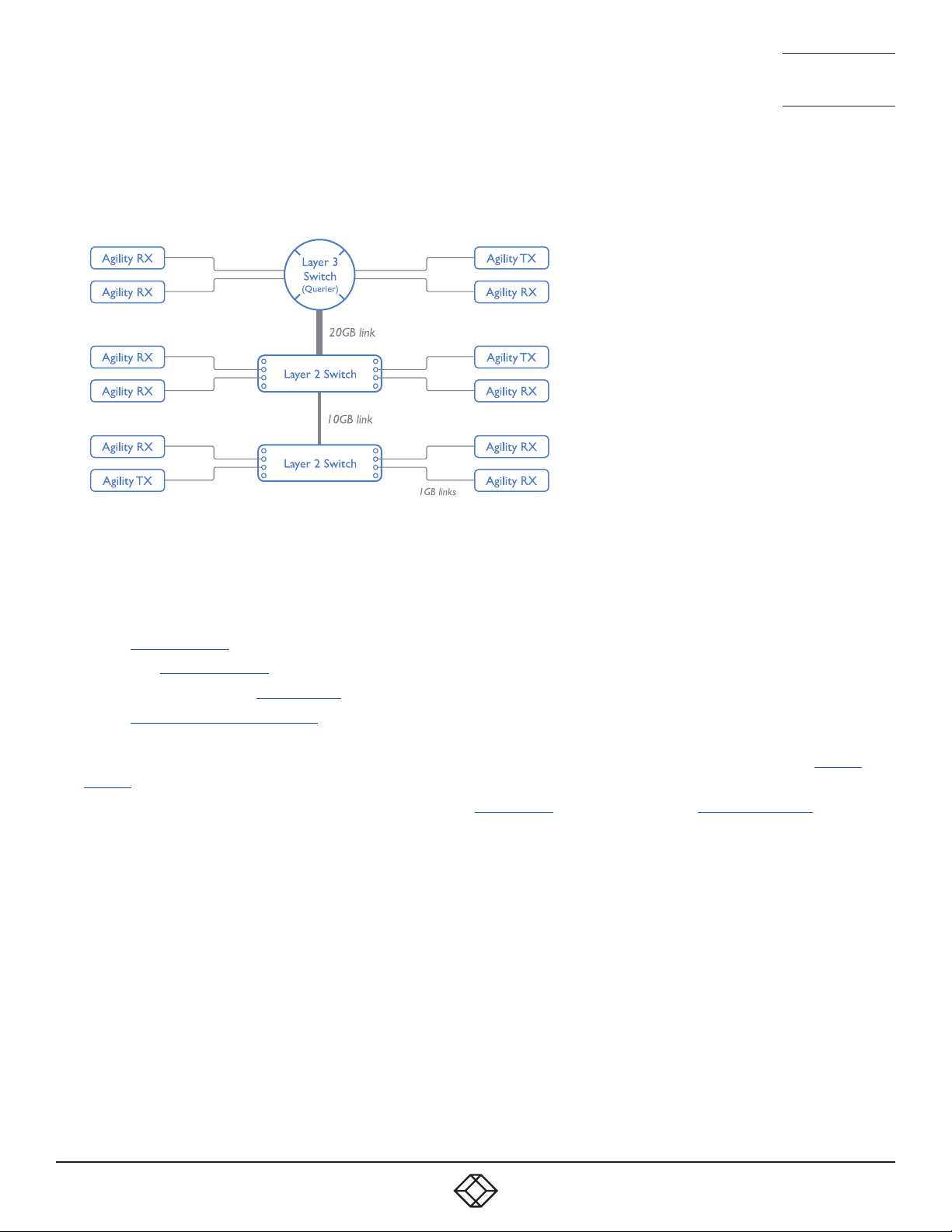
1. 8 7 7. 877. 226 9 BLACKBOX.COM
NEED HELP?
LEAVE T HE TECH TO US
LIVE 24/7
TECHNICAL
SUPPORT
1.877.877.2269
THE RECOMMENDED LAYOUT
The layout shown below has been found to provide the most efficient network layout for rapid throughput when using IGMP
snooping:
• Use no more than two cascade levels.
• Ensure high bandwidth between the two L2 switches and very high bandwidth between the top L2 and the L3. Typically 10GB
and 20GB, respectively for 48 port L2 switches.
CONFIGURING THE SWITCHES AND DEVICES
The layout is vital but so too is the configuration:
• Enable IGMP Snooping on all L2 switches.
• Ensure that IGMP Fast-Leave is enabled on all switches with Agility units connected directly to them.
• Enable the L3 switch as an IGMP Querier.
• Enable Spanning Tree Protocol (STP) on all switches and importantly also enable portfast (only) on all switch ports that have
Agility units connected.
• If any hosts will use any video resolutions using 2048 horizontal pixels (e.g. 2048 x 1152, 2048 x 2048), ensure that Jumbo
Frames are enabled on all switches.
• Choose an appropriate forwarding mode on all switches. Use Cut-through if available, otherwise Store and forward.
• Optimize the settings on the Agility transmitters:
• If moving video images are being shown frequently, then leave Frame Skipping at a low percentage and instead reduce the
Peak bandwidth limiter.
• Where screens are quite static, try increasing the Background Refresh interval and/or increasing the Frame skipping
percentage setting.
Make changes to the Agility transmitters one at a time, in small steps, and view typical video images so that you can attribute
positive or negative results to the appropriate control.
• Ensure that all Agility units are fully updated to the latest firmware version (at least v2.1).
55
Page 56

1. 8 7 7. 877. 226 9 BLACKBOX.COM
NEED HELP?
LEAVE T HE TECH TO US
LIVE 24/7
TECHNICAL
SUPPORT
1.877.877.2269
APPENDIX C - TROUBLESHOOTING
PROBLEM: THE VIDEO IMAGE OF THE AGILITY RECEIVER SHOWS HORIZONTAL LINES ACROSS THE SCREEN.
This issue is known as Blinding because the resulting video image looks as though you’re viewing it through a venetian blind.
When video is transmitted by Agility units, the various lines of each screen are divided up and transmitted as separate data
packets. If the reception of those packets is disturbed, then blinding is caused. The lines are displayed in place of the missing
video data packets.
There are several possible causes for the loss of data packets:
• Incorrect switch configuration. The problem could be caused by multicast flooding, which causes unnecessary network traffic.
This is what IGMP snooping is designed to combat, however, there can be numerous causes of the flooding.
• Speed/memory bandwidth issues within one or more switches. The speed and capabilities of different switch models varies
greatly. If a switch cannot maintain pace with the quantity of data being sent through it, then it will inevitably start dropping
packets.
• One or more Agility units may be outputting Jumbo frames due to the video resolution (2048 horizontal pixels) being used.
If Jumbo frames are output by an Agility unit, but the network switches have not been configured to use jumbo frames, the
switches will attempt to break the large packets down into standard packets. This process introduces a certain latency and
could be a cause for dropped packets.
• One or more Agility units may be using an old firmware version. Firmware versions prior to v2.1 exhibited an issue with the
timing of IGMP join and leave commands that caused multicast flooding in certain configurations.
REMEDIES:
• Ensure that IGMP snooping is enabled on all switches within the subnet.
• Where each Agility unit is connected as the sole device on a port connection to a switch, enable IGMP Fast-Leave (aka
Immediate Leave) to reduce unnecessary processing on each switch.
• Check the video resolution(s) being fed into the Agility transmitters. If resolutions using 2048 horizontal pixels are unavoidable
then ensure that Jumbo frames are enabled on all switches.
• Check the forwarding mode on the switches. If Store and forward is being used, try selecting Cut-through as this mode causes
reduced latency on lesser switch designs.
• Ensure that one device within the subnet is correctly configured as an IGMP Querier, usually a layer 3 switch or multicast router.
• Ensure that the firmware in every Agility unit is version 2.1 or greater.
• Try adjusting the transmitter settings on each Agility to make the output data stream as efficient as possible. See Agility
transmitter video settings for details.
PROBLEM: THE AUDIO OUTPUT OF THE AGILITY RECEIVER SOUNDS LIKE A SCRATCHED RECORD.
This issue is called Audio crackle and is a symptom of the same problem that produces blinding (see previous page). The issue is
related to missing data packets.
REMEDIES:
As per blinding discussed previously.
56
Page 57

1. 8 7 7. 877. 226 9 BLACKBOX.COM
NEED HELP?
LEAVE T HE TECH TO US
LIVE 24/7
TECHNICAL
SUPPORT
1.877.877.2269
PROBLEM: IPATH CANNOT LOCATE WORKING AGILITY UNITS.
There are a few possible causes:
• The Agility units must be reset back to their zero config IP addresses for iPATH discovery. If you have a working network of
Agility units without iPATH and then add iPATH to the network, iPATH will not discover the Agility units until they are reset to the
zero config IP addresses.
• This could be caused by Layer 2 Cisco switches that have Spanning Tree Protocol (STP) enabled but do not also have portfast
enabled on the ports to which Agility units are connected. Without portfast enabled, Agility units will all be assigned the same
zero config IP address at reboot and iPATH will only acquire them one at a time on a random basis.
You can easily tell whether portfast is enabled on a switch that is running STP: When you plug the link cable from a working
Agility unit into the switch port, check how long it takes for the port indicator to change from orange to green. If it takes roughly
one second, portfast is on; if it takes roughly thirty seconds then portfast is disabled.
REMEDIES:
• Ensure that the Agility units and the iPATH server are located within the same subnet because iPATH cannot cross subnet
boundaries.
• Manually reset the Agility units to their zero config IP addresses.
• Enable portfast on all switch ports that have Agility units attached to them or try temporarily disabling STP on the switches
while iPATH is attempting to locate Agility units.
57
Page 58

1. 8 7 7. 877. 226 9 BLACKBOX.COM
NEED HELP?
LEAVE T HE TECH TO US
LIVE 24/7
TECHNICAL
SUPPORT
1.877.877.2269
APPENDIX D - GLOSSARY
INTERNET GROUP MANAGEMENT PROTOCOL
Where an Agility transmitter is required to stream video to two or more receivers, multicasting is the method used.
Multicasting involves the delivery of identical data to multiple receivers simultaneously without the need to maintain individual links.
When multicast data packets enter a subnet, the natural reaction of the switches that bind all the hosts together within the subnet,
is to spread the multicast data to all of their ports. This is referred to as Multicast flooding and means that the hosts (or at least their
network interfaces) are required to process plenty of data that they didn’t request. IGMP offers a partial solution.
The Internet Group Management Protocol (IGMP) is designed to prevent multicast flooding by allowing Layer 3 switches to
check whether host computers within their care are interested in receiving particular multicast transmissions. They can then direct
multicast data only to those points that require it and can shut off a multicast stream if the subnet has no recipients.
There are currently three IGMP versions: 1, 2 and 3, with each version building upon the capabilities of the previous one:
• IGMPv1 allows host computers to opt into a multicast transmission using a Join Group message, it is then incumbent on the
router to discover when they no longer wish to receive; this is achieved by polling them (see IGMP Querier below) until they no
longer respond.
• IGMPv2 includes the means for hosts to opt out as well as in, using a Leave Group message.
• IGMPv3 encompasses the abilities of versions 1 and 2 but also adds the ability for hosts to specify particular sources of
multicast data.
Black Box Agility units make use of IGMPv2 when performing multicasts to ensure that no unnecessary congestion is caused.
IGMP SNOOPING
The IGMP messages are effective but only operate at layer 2 - intended for routers to determine whether multicast data should
enter a subnet. A relatively recent development has taken place within the switches that glue together all of the hosts within each
subnet: IGMP Snooping. IGMP snooping means these layer 2 devices now have the ability to take a peek at the IGMP messages.
As a result, the switches can then determine exactly which of their own hosts have requested to receive a multicast – and only
pass on multicast data to those hosts.
IGMP QUERIER
When IGMP is used, each subnet requires one Layer 3 switch to act as a Querier. In this lead role, the switch periodically sends
out IGMP Query messages and in response all hosts report which multicast streams they wish to receive. The Querier device and
all snooping Layer 2 switches then update their lists accordingly (the lists are also updated when Join Group and Leave Group
(IGMPv2) messages are received).
IGMP FAST-LEAVE (AKA IMMEDIATE LEAVE)
When a device/host no longer wishes to receive a multicast transmission, it can issue an IGMP Leave Group message as
mentioned above. This causes the switch to issue an IGMP Group-Specific Query message on the port (that the Leave Group was
received on) to check no other receivers exist on that connection that wish to remain a part of the multicast. This process has a
cost in terms of switch processor activity and time.
Where Agility units are connected directly to the switch (with no other devices on the same port) then enabling IGMP Fast-Leave
mode means that switches can immediately remove receivers without going through a full checking procedure. Where multiple
units are regularly joining and leaving multicasts, this can speed up performance considerably.
JUMBO FRAMES (JUMBO PACKETS)
Since its commercial introduction in 1980, the Ethernet standard has been successfully extended and adapted to keep pace with
the ever improving capabilities of computer systems. The achievable data rates, for instance, have risen in ten-fold leaps from the
original 10Mbit/s to a current maximum of 100Gbit/s.
While data speeds have increased massively, the standard defining the number of bytes (known as the Payload) placed into each
data packet has remained resolutely stuck at its original level of 1500 bytes. This standard was set during the original speed era
58
Page 59

1. 8 7 7. 877. 226 9 BLACKBOX.COM
NEED HELP?
LEAVE T HE TECH TO US
LIVE 24/7
TECHNICAL
SUPPORT
1.877.877.2269
(10Mbits/s) and offered the best compromise at that speed between the time taken to process each packet and the time required
to resend faulty packets due to transmission errors.
But now networks are much faster and files/data streams are much larger; so time for a change? Unfortunately, a wholesale
change to the packet size is not straightforward as it is a fundamental standard and changing it would mean a loss of backward
compatibility with older systems.
Larger payload options have been around for a while, however, they have often been vendor specific and at present they remain
outside the official standard. There is, however, increased consensus on an optional ‘Jumbo’ payload size of 9000 bytes and this
is fully supported by the Agility units.
Jumbo frames (or Jumbo packets) offer advantages for Agility units when transmitting certain high resolution video signals
across a network. This is because the increased data in each packet reduces the number of packets that need to be transferred
and dealt with - thus reducing latency times.
The main problem is that for jumbo frames to be possible on a network, all of the devices on the network must support them.
SPANNING TREE PROTOCOL (STP)
In order to build a robust network, it is necessary to include certain levels of redundancy within the interconnections between
switches. This will help to ensure that a failure of one link does not lead to a complete failure of the whole network.
The danger of multiple links is that data packets, especially multicast packets, become involved in continual loops as
neighbouring switches use the duplicated links to send and resend them to each other.
To prevent such bridging loops from occurring, the Spanning Tree Protocol (STP), operating at layer 2, is used within each
switch. STP encourages all switches to communicate and learn about each other. It prevents bridging loops by blocking newly
discovered links until it can discover the nature of the link: is it a new host or a new switch?
The problem with this is that the discovery process can take up to 50 seconds before the block is lifted, causing problematic
timeouts.
The answer to this issue is to enable the portfast variable for all host links on a switch. This will cause any new connection to go
immediately into forwarding mode. However, take particular care not to enable portfast on any switch to switch connections as
this will result in bridging loops.
FORWARDING MODES
In essence, the job of a layer 2 switch is to transfer as fast as possible, data packets arriving at one port out to another port as
determined by the destination address. This is known as data forwarding and most switches offer a choice of methods to achieve
this. Choosing the most appropriate forwarding method can often have a sizeable impact on the overall speed of switching:
• Store and forward is the original method and requires the switch to save each entire data packet to buffer memory, run an error
check and then forward if no error is found (or otherwise discard it).
• Cut-through was developed to address the latency issues suffered by some store and forward switches. The switch begins
interpreting each data packet as it arrives. Once the initial addressing information has been read, the switch immediately
begins forwarding the data packet while the remainder is still arriving. Once all of the packet has been received, an error check
is performed and, if necessary, the packet is tagged as being in error. This checking ‘on-the-fly’ means that cut-through
switches cannot discard faulty packets themselves. However, on receipt of the marked packet, a host will carry out the discard
process.
• Fragment-free is a hybrid of the above two methods. It waits until the first 64 bits have been received before beginning to
forward each data packet. This way the switch is more likely to locate and discard faulty packets that are fragmented due to
collisions with other data packets.
• Adaptive switches automatically choose between the above methods. Usually they start out as a cut-through switches and
change to store and forward or fragment-free methods if large number of errors or collisions are detected.
So which one to choose? The Cut-through method has the least latency so is usually the best to use with Agility units. However,
59
Page 60
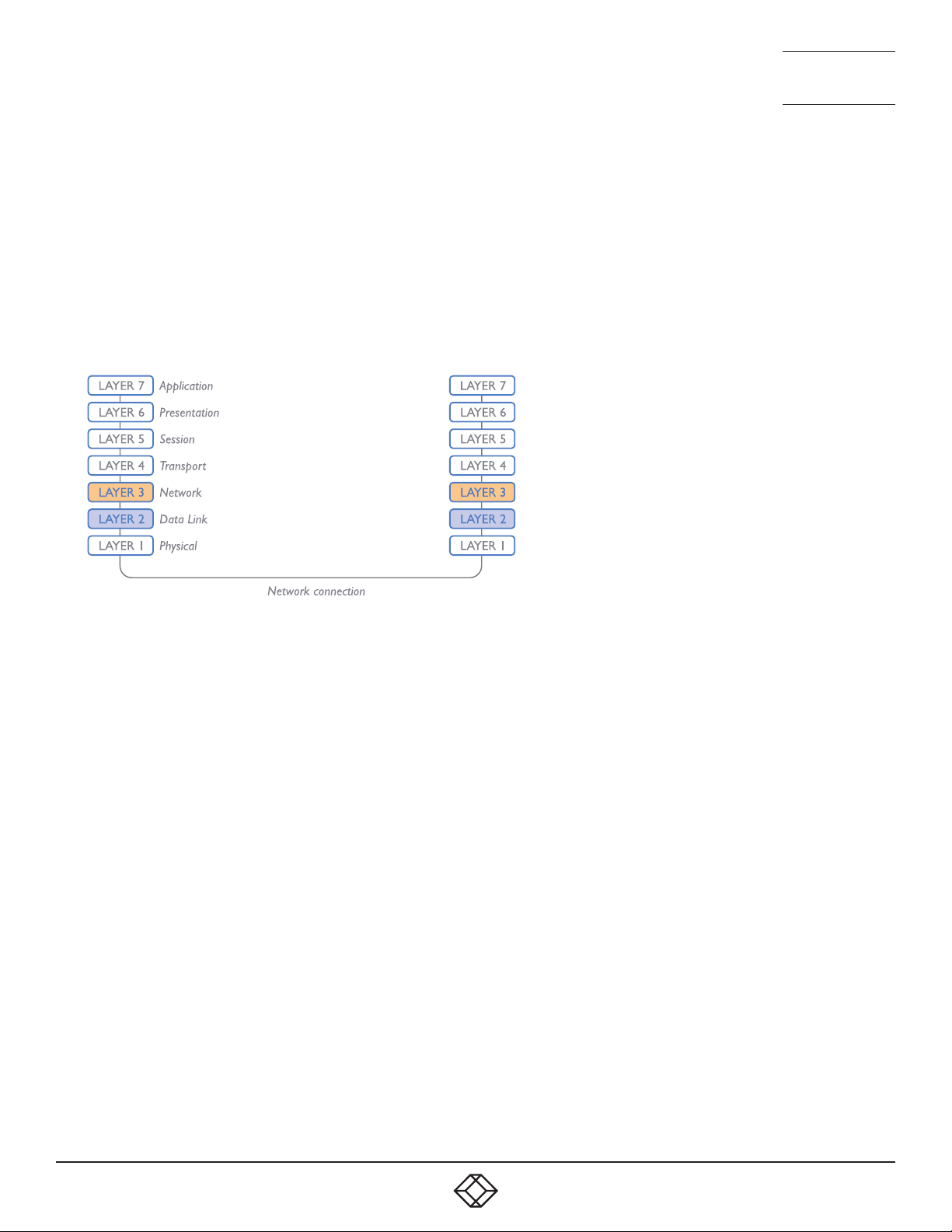
1. 8 7 7. 877. 226 9 BLACKBOX.COM
NEED HELP?
LEAVE T HE TECH TO US
LIVE 24/7
TECHNICAL
SUPPORT
1.877.877.2269
if the network components and/or cabling generate a lot of errors, the Store and forward method should probably be used. On
higher end store and forward switches, latency is rarely an issue.
LAYER 2 AND LAYER 3: THE OSI MODEL
When discussing network switches, the terms Layer 2 and Layer 3 are very often used. These refer to parts of the Open System
Interconnection (OSI) model, a standardized way to categorize the necessary functions of any standard network.
There are seven layers in the OSI model and these define the steps needed to get the data created by you (imagine that you are
Layer 8) reliably down onto the transmission medium (the cable, optical fiber, radio wave, etc.) that carries the data to another
user; to complete the picture, consider the transmission medium is Layer 0. In general, think of the functions carried out by the
layers at the top as being complex, becoming less complex as you go lower down.
As your data travel down from you towards the transmission medium (the cable), they are successively encapsulated at each
layer within a new wrapper (along with a few instructions), ready for transport. Once transmission has been made to the intended
destination, the reverse occurs: Each wrapper is stripped away and the instructions examined until finally only the original data
are left.
So why are Layer 2 and Layer 3 of particular importance when discussing Agility units? Because the successful transmission of
data relies upon fast and reliable passage through network switches – and most of these operate at either Layer 2 or Layer 3.
The job of any network switch is to receive each incoming network packet, strip away only the first few wrappers to discover the
intended destination then rewrap the packet and send it in the correct direction.
In simplified terms, the wrapper that is added at Layer 2 (by the sending system) includes the physical address of the intended
recipient system, i.e. the unique MAC address (for example, 09:f8:33:d7:66:12) that is assigned to every networking device at
manufacture. Deciphering recipients at this level is more straightforward than at Layer 3, where the address of the recipient is
represented by a logical IP address (e.g. 192.168.0.10) and requires greater knowledge of the surrounding network structure. Due
to their more complex circuitry, Layer 3 switches are more expensive than Layer 2 switches of a similar build quality and are used
more sparingly within installations.
60
Page 61

1. 8 7 7. 877. 226 9 BLACKBOX.COM
NEED HELP?
LEAVE T HE TECH TO US
LIVE 24/7
TECHNICAL
SUPPORT
1.877.877.2269
APPENDIX E - FIBER/COPPER MODULES AND CABLES
To suit your installation layout, fiber and copper modules are available for the Agility units to support various fiber optic and CATx
cables. The specifications for all are summarized in this table:
Name Fiber size Type Coding Distance
Normal
Suggested print nomenclature
applications
OM1 (62.5/125) Multimode
Orange 62.5/125 220m
(TIA-492AAAA)
OM2 (50/125) Multimode
Orange 50/125 550m
(TIA-492AAAB)
OM3 (50/125) Multimode
Aqua 850 LO 50 /125 550m
(850 nm Laser-optimized)
(TIA-492AAAC)
OM4 (50/ 125) Multimode
Aqua 850 LO 50 /125 550m
(850 nm Laser-optimized)
(TIA-492AAAC)
OS1 and
OS2
(9/125) Single-mode
(TIA-492C000 / TIA-
Yellow SM/NZDS, SM 20km
492E000)
CATx n/a CAT5e and above n/a n/a 100m
at 1Gbps
61
Page 62
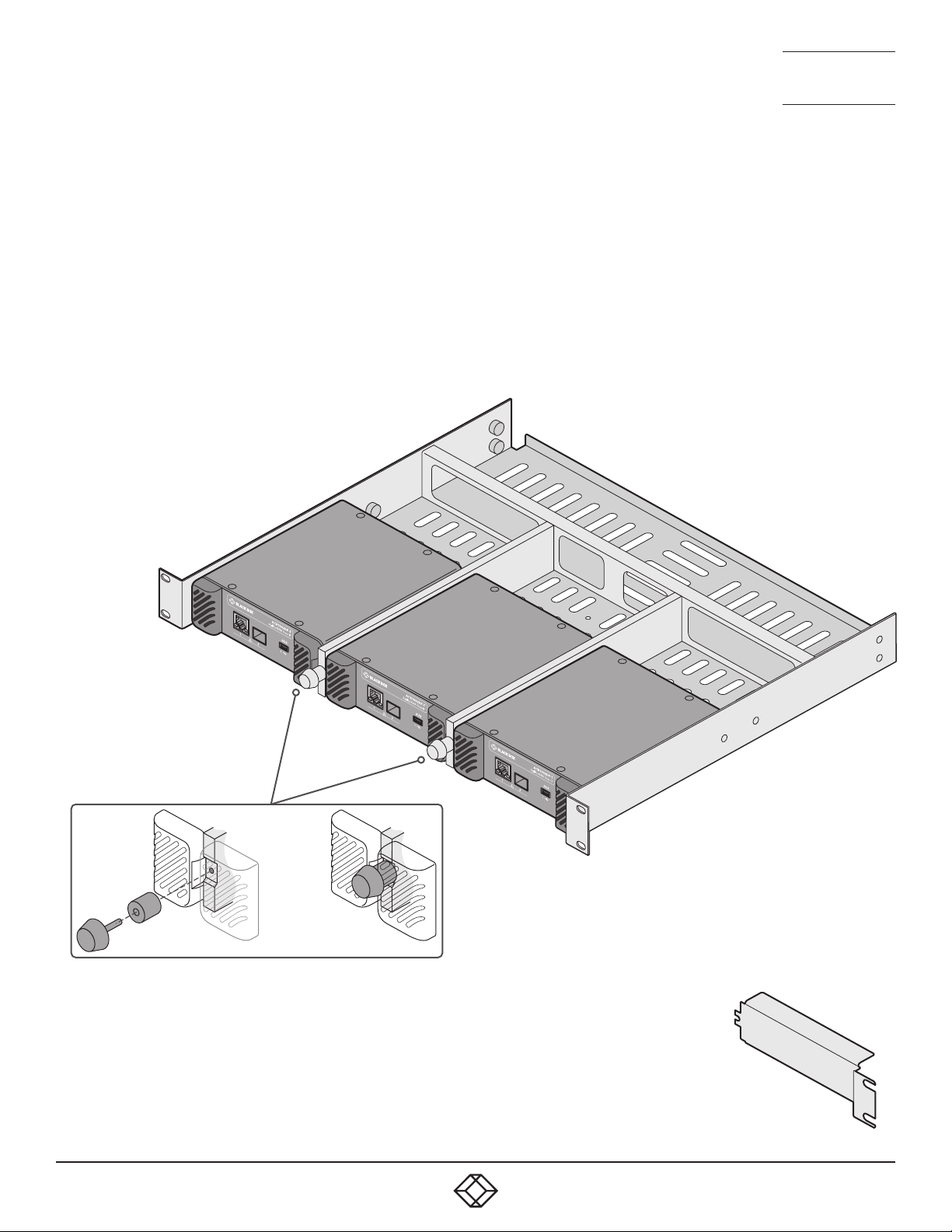
1. 8 7 7. 877. 226 9 BLACKBOX.COM
NEED HELP?
LEAVE T HE TECH TO US
LIVE 24/7
TECHNICAL
SUPPORT
1.877.877.2269
APPENDIX F - USING THE OPTIONAL AGILITY RACK SHELVES
ACR-RMK3 RACK MOUNT FOR AGILITY ACR1002DP AND ACR1002FDP TRANSMITTERS
1 Install the empty rack mount into your 19” rack frame and fully secure it.
2 Place compatible modules into the three bays of the rack mount so that their rear panels butt up against the small pegs located
on each of the side walls.
3 Locate the supplied thumbscrews and spacers.
4 Insert the thumbscrew through the spacer; then insert into the small hole at the end of a divider (A).
5 Gently tighten the thumbscrew so that the spacer engages with the inner edges of the modules that are either side of the
divider to hold them in place (B).
6 Repeat steps 4 and 5 for the other thumbscrew and
spacer.
7 Place the power adapters in the rear section
of the rack mount and connect them
to their respective modules.
8 Make all other necessary
connections to the
modules.
IMPORTANT: When mounting the Agility
units (and their power adapters), ensure
that the vents are not obscured and that
there is sufficient airflow. The operating
temperature range is 0 to 40ºC (0 to
104ºF) and must not be exceeded.
(A)
(B)
USING A BLANKING PLATE WHEN A SINGLE MODULE IS INSTALLED
In order to maintain suitable cooling airflow, if only two modules are installed within the rack
mount, you are recommended to install an optional blanking plate: ACR-RMK3-BP
Note: The outer edge of the blanking plate needs to overlap the ears of the rack mount itself, so you
need to either install the blanking plate before the tray is installed or briefly remove the mounting
bolts on the blanked side (while supporting the weight of the tray) to allow the blanking plate to be
put in place.
62
ACR-RMK3-BP
blanking plate
Page 63
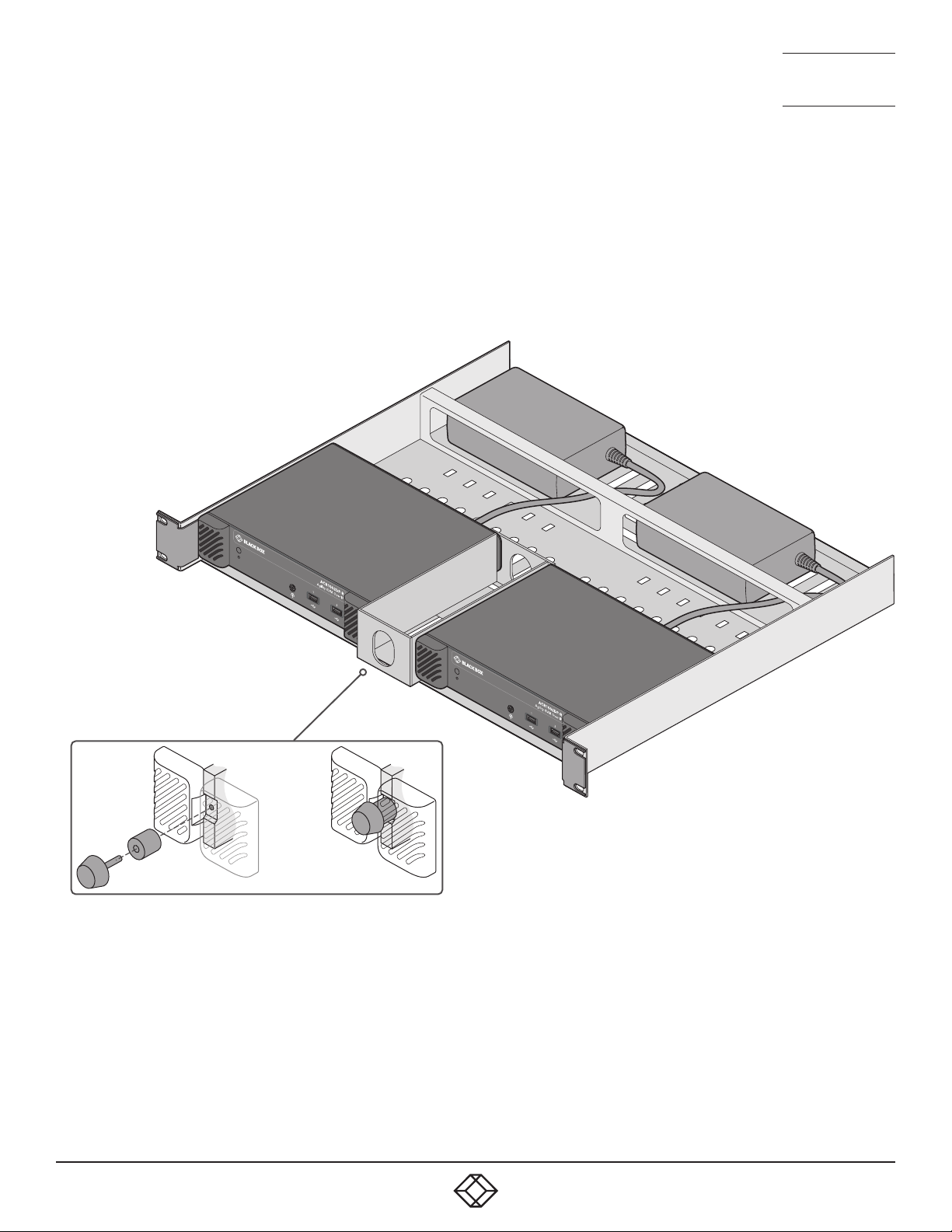
1. 8 7 7. 877. 226 9 BLACKBOX.COM
NEED HELP?
LEAVE T HE TECH TO US
LIVE 24/7
TECHNICAL
SUPPORT
1.877.877.2269
KVXHP-RMK RACK MOUNT FOR AGILITY ACR1002DP AND ACR1002FDP RECEIVERS
1 Install the empty rack mount into your 19” rack frame and fully secure it.
2 Place a compatible module into each side of the rack mount so that their rear panels butt up against the small pegs located on
each of the side walls.
3 Locate the supplied thumbscrew and spacer.
4 Insert the thumbscrew through the spacer; then insert into the small hole at the end of the center divider (A).
5 Gently tighten the thumbscrew so that the spacer engages with the
inner edges of the two modules and holds them in place (B).
6 Place the power adapters in the rear section of
the rack mount and connect them to their
respective modules.
7 Make all other necessary
connections to the modules.
(A)
(B)
ACR-RMK3 and KVXHP-RMK rack mounts:
Suitable for installation in Information Technology Rooms in accordance with
Article 645 of the National Electrical Code and NFPA 75.
Peut être installé dans des salles de matériel de traitement de l’information
conformément à l’article 645 du National Electrical Code et à la NFPA 75.
IMPORTANT: When mounting the Agility units (and
their power adapters), ensure that the vents are
not obscured and that there is sufficient airflow.
The operating temperature range is 0 to 40ºC (0 to
104ºF) and must not be exceeded.
63
Page 64

1. 8 7 7. 877. 226 9 BLACKBOX.COM
NEED HELP?
LEAVE T HE TECH TO US
LIVE 24/7
TECHNICAL
SUPPORT
1.877.877.2269
1. 8 7 7. 877. 226 9 BLACKBOX.COM
NEED HELP?
LEAVE T HE TECH TO US
LIVE 24/7
TECHNICAL
SUPPORT
1.877.877.2269
APPENDIX G - OPEN SOURCE LICENSES
The software included in this product contains copyrighted
software that is licensed under the GNU General
Public License (GPL) v2. You may obtain the complete
Corresponding Source Code from Black Box for a period of
three years after the last shipment of this product, which will
be no earlier than 2028, by contacting [email protected]
Please write “Source for product XXXXXXXX” in the subject
line, where XXXXXXXX is the model and version number.
This offer is valid to anyone in receipt of this information.
dtc
u-boot-xlnx
linux/linux
busybox
termcap
util-linux
libcap
systemd
e2fsprogs
rng-tools
db us-1
freetype
qt5
libpbe
libfftw
A complete copy of the GNU General Public License v2 license text is included at the end
of this file.
This product includes binaries that are derived from the open source community. The
modules listed be low are licenced under the GNU Lesser General Public License v2.1 and
must be p rovided, in source form , on request:
kmod
systemd
libdaemon
avahi
glib
libgpg-error
libgcrypt
gnutls
libmicrohttpd
strace
A complete copy of the GNU Lesser General Public License v2.1 license text is included at
the end of this file.
This product includes binaries that are derived from the open source community. The
modules listed be low are licenced under the GNU Lesser General Public License v3 and
must be p rovided, in source form , on request:
libunistring
gmp
nettle
A complete copy of the GNU Lesser General Public License v3 license text is included at the
end of this file.
This product includes binaries that are derived from the open source community. The
modules listed be low are licenced under the Mozilla Public License Version 2.0 and must
be provided, in source form, on request:
dhcp
libjwt
A complete copy of the Mozilla Public License Version 2.0 license tex t is included at the
end of this file.
In addition to the GPL modules listed, this p roduct also includes binaries derived from 3 rd
part y open sources that have their own lice nse requirements. Each module is listed below with
their required Copyright statement and distribution conditions.
----------------------------------------------------------------------------
-
- Module: freebsd-libc
-
---------------------------------------------------------------------------# @(#)COPYRIGHT 8.2 (Berkeley) 3/21/94
All of the documentation and software included in the 4.4BSD and 4.4BSD-Lite Releases is
copyrighted by Th e Regents of the University of Califo rnia.
Co pyri ght 1979, 1980, 19 83, 19 86, 19 88, 19 89, 1991, 1992, 199 3, 199 4
The Rege nts of the University of California. All rights reserved.
Redistribution and use in source and binary forms, with or without modification, are permitted
provided that the following conditions are met:
1. Redistributions of source code must retain the above copyright notice, this list of conditions
and the following disclaimer.
2. Redistributions in binary form must reproduce the above copyright notice, this list of
conditions and the following disclaimer in thedocumentation and/or other materials provided
with the distribution.
3. All advertising materials mentioning features or use of this software must display the
following acknowledgement:
This product includes software developed by the U niversity of California, Berke ley and its
contributors.
4. Neither the name of the University nor the names of its contributors may be used to endorse
or promote products derived from this sof tware without specif ic prior written permission.
THIS SOFTWARE IS PROVIDED BY THE REGENTS AND CONTRIBUTORS ``AS IS’’ AND ANY
EXPRESS OR IMPLIED WARRANTIES, INCLUDING, BUT NOT LIMITED TO, THE IMPLIED
WARRANTIES OF MERCHANTABILITY AND FITNESS FOR A PARTICULAR PURPOSE ARE
DISCL AIMED. IN NO EVENT SHALL THE REGENTS OR CONTRIB UTORS BE LIABLE FOR ANY
DIRECT, INDIRECT, INCIDENTAL, SPECIAL, EXEMPLARY, OR CONSEQUENTIAL DAMAGES
(INCLUDING, BUT NOT LIMITED TO, PROCUREMENT OF SUBSTITUTE GOODS OR SERVICES;
LOSS OF USE, DATA, OR PROFITS; OR BUSINESS INTERRUPTION) HOWEVER CAUSED AND
ON ANY THEORY OF LIABILITY, WHETHER IN CONTRACT, STRICT LIABILITY, OR TORT
(INCLUDING NEGLIGENCE OR OTHERWISE) ARISING IN ANY WAY OUT OF THE USE OF THIS
SOFTWARE, EVEN IF ADVISED OF THE POSSIBILITY OF SUCH DAMAGE.
The Institute of Electrical and Electronics Engineers and the American National Standards
Committee X3, on Information Processing Systems have given us permission to reprint
portions of their documentation.
In the following statement, the phrase ``this text’’ refers to portions of the system
documentation.
Portions of this text are reprinted and re produced in electronic form in the second BSD
Networking Sof tware Release, from IEEE Std 1003.1-1988 , IEEE Standard Portable Operating
System Interface for Computer Environments (POSIX), copyright C 1988 by the Institute of
Electrical and Electronics Engineers, Inc. In the event of any discrepancy between these
versions and the original IEEE Standard, the original IEEE Standard is the referee document.
In the following statement, the phrase ``This material’’ refers to portions of the system
documentation.
This material is reproduced with permission from American National Standards C ommittee
X3, on Information Processing Systems. Computer and Business Equipment Manufacturers
Association (CBEMA), 311 First St., NW, Suite 500, Washington, DC 20001-2178. The
developmental work of Programming Language C was completed by the X3J11 Technical
Committee.
The views and conclusions contained in the software and docu mentation are those of the
autho rs and should not be interp reted as representing of ficial policies, either expressed or
implied, of the Regents of the U niversity of California.
----------------------------------------------------------------------------
-
- Module: openssl
-
--------------------------------------------------------------------------- LICENSE ISSUES
==============
The OpenSSL toolkit stays under a double license, i.e. both the conditions of the OpenSSL
License and the original SSLeay license apply to the toolkit. See below for the actual license
texts.
64
64
Page 65

1. 8 7 7. 877. 226 9 BLACKBOX.COM
NEED HELP?
LEAVE T HE TECH TO US
LIVE 24/7
TECHNICAL
SUPPORT
1.877.877.2269
1. 8 7 7. 877. 226 9 BLACKBOX.COM
NEED HELP?
LEAVE T HE TECH TO US
LIVE 24/7
TECHNICAL
SUPPORT
1.877.877.2269
OpenSSL License
--------------/* =================================================================
* Copyright (c) 1998-2019 The OpenSSL Project. All rights reser ved.
*
* Redistribution and use in source and binary forms, with or without
* modification, are permitted provided that the following conditions
* are met:
*
* 1. Redistributions of source code must retain the above copyright
* notice, this list of conditions and the following disclaimer.
*
* 2. Redistributions in binary form must reproduce the above copyright
* notice, this list of conditions and the following disclaimer in
* the doc umentation and/or other materials provided with the
* distribution.
*
* 3. All advertising materials mentioning features or use of this
* software must display the following acknowledgment:
* “This product includes software developed by the OpenSSL Project
* for use in the OpenSSL Toolkit. (http://www.openssl.org/)”
*
* 4. The na mes “OpenSSL Toolkit” and “OpenSSL Project” must not be used to
* endorse or promote products derived from this software without
* prior written permissio n. For writte n permission, please contact
* [email protected].
*
* 5. Products derived from this software may not be called “OpenSSL”
* nor may “OpenSSL” appear in their names without prior written
* permission of the OpenSSL Project.
*
* 6. Redistributions of any form whatsoeve r must retain the following
* acknowledgment:
* “This product includes software developed by the OpenSSL Project
* for use in the OpenSSL Toolkit (http://www.op enssl.org/)”
*
* THIS SOFTWARE IS PROVIDED BY THE OpenSSL PROJECT ``AS IS’’ AND ANY
* EXPRESSED OR IMPLIED WARRANTIES, INCLUDING, BU T NOT LIMITED TO, THE
* IMPLIED WARRANTIES OF MERCHANTABILIT Y AND FITNESS FOR A PARTICULAR
* PURPOSE ARE DISCL AIMED. IN NO EVENT SHALL THE OpenS SL PROJECT OR
* ITS CONTRIBUTORS BE LIABLE FOR ANY DIRECT, INDIRECT, INCIDENTAL,
* SPECIAL, EXEMPLARY, OR CONSEQUENTIAL DAMAGES (INCLUDING, BUT
* NOT LIMITED TO, PROCUREMENT OF SUBSTIT UTE GOODS OR SERVICES;
* LOSS OF USE, DATA, OR PROFITS; OR BUSINESS INTERRUPTION)
* HOWE VER CAUSED AND ON ANY THEORY OF LIABILITY, WHETHER IN CONTR ACT,
* STRIC T LIABILIT Y, OR TORT (INCLUDING NEGLIGENCE OR OTHERWISE)
* ARISING IN ANY WAY OUT OF THE USE OF THIS SOF TWARE, EVEN IF ADVISED
* OF THE POSSIBILIT Y OF SUCH DAMAGE.
* =================================================================
*
* This product includes cryptographic software written by Eric Young
* (eay@cr yptsoft.com). This product includes soft ware writte n by Tim
* Hudson ([email protected]).
*
*/
Original SSLeay License
----------------------/* Copyright (C) 1995-1998 Eric Young ([email protected])
* All rights reserved.
*
* This package is an SSL implementation written
* by Eric Young ([email protected]).
* The implementation was written so as to conform with Netscapes SSL.
*
* This library is free for commercial and non-commercial use as long as
* the following conditions are aheared to. T he following conditions
* apply to all code found in this distribution, be it the RC4, RSA,
* lhash , DES, etc., code; not just the SSL code. The SSL documentation
* inclu ded with this distribution is covered by the same copyright terms
* except that the holder is Tim Hudson ([email protected]).
*
* Copyright remains Eric Young’s, and as such any Copyright notices in
* the code are not to be removed.
* If this package is used in a product, Eric Young should be given attribution
* as the author of the parts of the library use d.
* This ca n be in the form of a textual message at prog ram startup or
* in docu mentation (online or tex tual) provided with the package.
*
* Redistribution and use in source and binary forms, with or without
* modification, are permitted provided that the following conditions
* are met:
* 1. Redistributions of source code must retain the copyright
* notice, this list of conditions and the following disclaimer.
* 2. Redistributions in binary form must reproduce the above copyright
* notice, this list of conditions and the following disclaimer in the
* documentation and/or other materials provided with the distribution.
* 3. All advertising materials mentioning features or use of this software
* must display the following acknowledgement:
* “This product includes cr yptographic software writte n by
* Eric Young ([email protected])”
* The word ‘cryptographic’ can be left out if the rouines from the library
* being used are not cryptographic related :-).
* 4. If you include any Windows specific code (or a derivative thereof) from
* the apps director y (application code) you must include an acknowledgeme nt:
* “This product includes software written by Tim Hudson ([email protected])”
*
* THIS SO FTWARE IS PR OVIDED BY ERIC YOU NG ``AS IS ’’ AND
* ANY EXPRESS OR IMPLIED WARRANTIES, IN CLUDING, BU T NOT LIMITED TO, THE
* IMPLIE D WARRANTI ES OF MERCHAN TABILITY AND F ITNESS FOR A PAR TICULAR P URPOSE
* ARE DISCLAIMED. IN N O EVENT SH ALL THE AUTH OR OR CONTRIBUTORS BE LI ABLE
* FOR ANY DIRECT, INDIRECT, INCIDENTAL, SPECI AL, EXEMPLARY, OR CONSEQUENTIAL
* DAMAGE S (INCLUDING , BUT NOT LIMIT ED TO, PROCUR EMENT OF SUB STITUTE GO ODS
* OR SERV ICES; LOSS OF USE, DATA, OR PROFI TS; OR BUSINES S INTERRUP TION)
* HOWE VER CAUSED A ND ON ANY THEO RY OF LIABILI TY, WHETHE R IN CONTRAC T, ST RICT
* LIABI LITY, OR TORT (IN CLUDING NEGL IGENCE OR OTHE RWISE) ARISING IN ANY WAY
* OUT OF T HE USE OF THIS SOF TWARE, E VEN IF ADVIS ED OF THE POSSIBILITY OF
* SUCH DAMAGE.
*
* The licence and distribution terms for any publically available version or
* derivative of this code cannot be changed. i.e. this co de cannot simply be
* copied and put under another distribution licence
* [including the GNU Public Licence.]
*/
65
65
Page 66

1. 8 7 7. 877. 226 9 BLACKBOX.COM
NEED HELP?
LEAVE T HE TECH TO US
LIVE 24/7
TECHNICAL
SUPPORT
1.877.877.2269
1. 8 7 7. 877. 226 9 BLACKBOX.COM
NEED HELP?
LEAVE T HE TECH TO US
LIVE 24/7
TECHNICAL
SUPPORT
1.877.877.2269
----------------------------------------------------------------------------
-
- Module: libcvt
-
---------------------------------------------------------------------------Copyright (c) 2001, Andy Ritger [email protected]
All rights reserved.
Redistribution and use in source and binary forms, with or without modification, are permitted
provided that the following conditions are met:
o Redistributions of source code must retain the above copyright notice, this list of conditions
and the following disclaimer.
o Redistributions in binar y form must reproduce th e above copyright notice , this list of
conditions and the following disclaimer in the documentation and/or other materials provide d
with the distribution.
o Neith er the name of NV IDIA nor the names of its contributors may be used to endorse or
promote products derived from this software without specific prior written permission.
THIS SOFTWARE IS PROVIDED BY THE COPYRIGHT HOLDERS AND CONTRIB UTORS “AS
IS” AND ANY EXPRESS OR IMPLIED WARRANTIES, INCLUDING, BUT NOT LIMITED TO, THE
IMPLIE D WARRANTIES OF MERCHANTABILITY AND FITNESS FOR A PARTICULAR PURPOSE
ARE DISCLAIMED. IN NO EVENT SHALL THE REGENTS OR CON TRIBUTORS BE LIABLE FOR
ANY DIRECT, INDIRECT, INCIDENTAL, SPECIAL, EXEMPLARY, OR CONSEQUENTIAL DAMAGES
(INCLUDING, BUT NOT LIMITED TO, PROCUREMENT OF SUBSTITUTE GOODS OR SERVICES;
LOSS OF USE, DATA, OR PROFITS; OR BUSINESS INTERRUPTION) HOWEVER CAUSED AND
ON ANY THEORY OF LIABILITY, WHETHER IN CONTRACT, STRICT LIABILITY, OR TORT
(INCLUDING NEGLIGENCE OR OTHERWISE) ARISING IN ANY WAY OUT OF THE USE OF THIS
SOFTWARE, EVEN IF ADVISED OF THE POSSIBILITY OF SUCH DAMAGE.
This program is based on the Generalized Timing Formula (GTF TM)
Standard Version: 1.0, Revision: 1.0
The GTF Document contains the following Copyright information:
Copyright (c) 1994, 1995, 1996 - Video Electronics S tandards Association. Duplication of this
document within VESA member companies for review purposes is permit ted. All other rights
reserved.
While every precaution has been taken in the preparation of this standard, the Vide o
Electronics Standards Association and its contributors assume no responsibility for er rors or
omissions, and make no warranties, expressed or implied, of functionality of suitability for any
purpose. The sample code contained within this standard may be used without restriction.
----------------------------------------------------------------------------
-
- Module: libdrm
-
--------------------------------------------------------------------------- Copyright 1999, 2000 Precision Insight , Inc., Cedar Park, Texas.
Copyright 2000 VA Linux Systems, Inc., Sunnyvale , California.
All Rights Reserved.
Permission is hereby granted, free of charge, to any person obtaining a copy of this software
and associated documentation files (the “Software”), to deal in the Sof tware witho ut
restriction, including without limitation the rights to use, copy, modify, merge, publish,
distribute, sublicense , and/or sell copies of the Software, and to permit persons to whom the
Soft ware is furnished to do so, subject to the following conditions:
The above copyright notice and this permission notice (including the next paragraph) shall be
inclu ded in all copies or substantial por tions of the Software.
THE SOF TWARE IS PROV IDED “AS IS”, WITHOUT WARRANTY OF ANY KIND, EXPRESS OR
IMPLIE D, INCLUDING BU T NOT LIMITED TO THE WARRANTIES OF MERCHANTABILITY,
FITNESS FOR A PARTIC ULAR PURPOSE AND NONINFRINGEMENT. IN NO EVENT SHALL
PRECISION INSIGHT AND/OR ITS SUPPLIERS BE LIABLE FOR ANY CLAIM, DAMAGES OR
OTHER LIABILIT Y, WHE THER IN AN ACTION OF CONTRACT, TORT OR OTHERWISE, A RISING
FROM, OUT OF OR IN CONNECTION WITH THE SOF TWARE OR THE USE OR OTHER DE ALINGS
IN THE SOFTWARE.
------Copyright (c) 2007-2008 Tungsten Graphics, Inc., Cedar Park, Texas.
Copyright (c) 2007-2008 Dave Airlie <[email protected]>
Copyright (c) 2007-2008 Jakob Bornecrantz <[email protected]>
Permission is hereby granted, free of charge, to any person obtaining a copy of this software
and associated documentation files (the “Software”), to deal in the Sof tware witho ut
restriction, including without limitation the rights to use, copy, modify, merge , publish,
distribute, sublicense , and/or sell copies of the Software, and to permit persons to whom the
Soft ware is furnished to do so, subject to the following conditions:
The above copyright notice and this permission notice shall be included in all copies or
substantial por tions of the Software.
THE SOF TWARE IS PROV IDED “AS IS”, WITHOUT WARRANTY OF ANY KIND, EXPRESS OR
IMPLIED, INCLUDING BUT NOT LIMITED TO THE WARRANTIES OF MERCHANTABILIT Y,
FITNESS FOR A PARTIC ULAR PURPOSE AND NONINFRINGEMENT. IN NO EVENT SHALL THE
AUTHORS OR COPYRIGHT HOLDERS BE LIABLE FOR ANY CLAIM, DAMAGES OR OTHER
LIABILITY, WHET HER IN AN ACTION OF CONTRACT, TORT OR OTHERWISE, ARISING
FROM, OUT OF OR IN CONNECTION WITH THE SOF TWARE OR THE USE OR OTHER DE ALINGS
IN THE SOFTWARE.
----------------------------------------------------------------------------
-
- Module: libpcap
-
----------------------------------------------------------------------------
Copyright (c) 1999 - 2005 NetGroup, Politecnico di Torino (Italy).
Copyright (c) 2005 - 2010 CACE Technologies, Davis (California).
All rights reserved.
Redistribution and use in source and binary forms, with or without
modification, are permitted provided that the following conditions
are met:
1. Redistributions of source code must retain the above copyright
notice, this list of conditions and the following disclaimer.
2. Redistributions in binary form must reproduce the above copyright
notice, this list of conditio ns and the following disclaimer in the
documentation and/or other materials provided with the distribution.
3. Neither the name of the Politecnico di Torino, CACE Technologies
nor the names of its contributors may be used to endorse or promote
products derived from this software without spe cific prior written
permission.
THIS SOFTWARE IS PROVIDED BY THE COPYRIGHT HOLDERS AND CONTRIBUTORS
“AS IS” AND ANY EXPRESS OR IMPLIED WARRANTIES, INCLUDING, BUT NOT
LIMITED TO, THE IMPLIED WARRAN TIES OF MERCHANTABILIT Y AND FITNESS FOR
A PARTICULAR PURPOSE ARE DISCLAIMED. IN NO EVENT SHALL THE COPYRIGHT
OWNER OR CONTRIBUTORS BE LIABLE FOR ANY DIRECT, INDIRECT, INCIDENTAL,
SPECIAL, EXEMPLARY, OR CONSEQUENTIAL DAMAGES (INCLUDING, BUT NOT
LIMITED TO, PROCUREMENT OF SUBSTITU TE GOODS OR SERVICES; LOSS OF USE,
DATA, OR PROFI TS; OR BUSINESS INTERRUPTION) HOWEVER CAUSED AND ON ANY
THEORY OF LIABILITY, WHETHER IN CONTRACT, STRICT LIABILITY, OR TORT
(INCLUDING NEGLIGENCE OR OTHERWISE) ARISING IN ANY WAY OUT OF THE USE
OF THIS SOFTWARE, EVEN IF ADVISED OF THE POSSIBILITY OF SUCH DAMAGE.
This product includes software developed by the U niversity of
California, Lawrence Berkeley Laboratory and its contributors.
This product includes software developed by the Kungliga Tekniska
Högskolan and its contributors.
This product includes software developed by Yen Yen Lim and North
Dakota State University.
---------------------------------------------------------------------
66
66
Page 67

1. 8 7 7. 877. 226 9 BLACKBOX.COM
NEED HELP?
LEAVE T HE TECH TO US
LIVE 24/7
TECHNICAL
SUPPORT
1.877.877.2269
1. 8 7 7. 877. 226 9 BLACKBOX.COM
NEED HELP?
LEAVE T HE TECH TO US
LIVE 24/7
TECHNICAL
SUPPORT
1.877.877.2269
Portions Copyright (c) 1990, 1991, 1992, 1993, 1994, 1995, 1996, 1997
The Regents of the Universit y of California. All rights reserved.
Redistribution and use in source and binary forms, with or without
modification, are permitted provided that the following conditions
are met:
1. Redistributions of source code must retain the above copyright
notice, this list of conditions and the following disclaimer.
2. Redistributions in binary form must reproduce the above copyright
notice, this list of conditio ns and the following disclaimer in the
documentation and/or other materials provided with the distribution.
3. All advertising materials mentioning features or use of this
software must display the following acknowledgement: “This product
inclu des software develope d by the University of California, Berkeley
and its contributors.”
4. Neither the name of the University nor the names of its contributors
may be used to endorse or promote products derived from this software
without specific prior written permission.
THIS SOFTWARE IS PROVIDED BY THE INSTITUTE AND CONTRIBUTORS ``AS IS’’
AND ANY EXPRESS OR IMPLIED WARRANTIES, INCLUDING, BUT NOT LIMITED TO,
THE IMPLIED WARRANTIES OF MERCHANTABILITY AND FITNESS FOR A PARTICULAR
PURPOSE ARE DISCL AIMED. IN NO EVENT SHALL THE REGENTS OR CONTRIBUTORS
BE LIABLE FOR ANY DIRECT, INDIRECT, INCIDENTAL, SPECIAL, EXEMPLARY, OR
CONSEQUENTIAL DAMAGES (INCLUDING, BU T NOT LIMITED TO, PROCUREMENT OF
SUBSTITUTE GOODS OR SERVICES; LOSS OF USE, DATA, OR PROFITS; OR
BUSINESS INTERRUPTION) HOWEVER CAUSED AND ON ANY THEORY OF LIABILIT Y,
WHETHER IN CONT RACT, STRICT LIABILIT Y, OR TORT (INCLUDING NEGLIGENCE OR
OTHERWISE) ARISING IN ANY WAY OUT OF THE USE OF THIS SOFTWARE , EVEN IF
ADVISED OF THE POSSIBILITY OF SUCH DAMAGE.
---------------------------------------------------------------------
Portions Copyright (c) 1983 Regents of the University of California.
All rights reserved.
Redistribution and use in source and binary forms are permitted provided
that the above copyright notice and this paragraph are duplicated in all
such forms and that a ny documentation, advertising materials, and other
materials related to such distribution and use acknowledge that the
software was developed by the Universit y of California, Berkeley. The
name of the University may not be used to endorse or promote products
derived from this software without specific prior written permission.
THIS SOFTWARE IS PROVIDED ``AS IS’’ AND WITHOUT ANY EXPRESS OR IMPLIED
WARRANTIES, INCLUDING, WITHOUT LIMITATION, THE IMPLIED WARRANTIES OF
MERCHANTIBILI TY AND FITNESS FOR A PARTICULAR PURPOSE.
---------------------------------------------------------------------
Portions Copyright (c) 1995, 1996, 1997 Kungliga Tekniska Högskolan
(Royal Institute of Technology, Stockholm , Sweden). All rights reserved.
notice, this list of conditions and the following disclaimer.
2. Redistributions in binary form must reproduce the above copyright
notice, this list of conditio ns and the following disclaimer in the
documentation and/or other materials provided with the distribution.
3. All advertising materials mentioning features or use of this
software must display the following acknowledgement: “This product
inclu des software develope d by the Kungliga Tekniska Högskolan and
its contributors.”
4. Neither the name of the University nor the names of its contributors
may be used to endorse or promote products derived from this software
without specific prior written permission.
THIS SOFTWARE IS PROVIDED BY THE INSTITUTE AND CONT RIBUTORS ``AS IS’’
AND ANY EXPRESS OR IMPLIED WARRANTIES, INCLUDING, BUT NOT LIMITED TO,
THE IMPLIED WARRANTIES OF MERCHANTABILITY AND FITNESS FOR A PARTICULAR
PURPOSE ARE DISCL AIMED. IN NO EVENT SHALL THE INSTITUTE OR CONTRIBUTORS
BE LIABLE FOR ANY DIRECT, INDIRECT, INCIDENTAL, SPECIAL, EXEMPLARY, OR
CONSEQUENTIAL DAMAGES (INCLUDING, BU T NOT LIMITED TO, PROCUREMENT OF
SUBSTITUTE GOODS OR SERVICES; LOSS OF USE, DATA, OR PROFITS; OR BUSINESS
INTERRUPTION) HOWEVER CAUSED AND ON ANY THEORY OF LIABILITY, WHETHER IN
CONTRACT, STRICT LIABILITY, OR TORT (INCLUDING NEGLIGENCE OR OTHERWISE)
ARISING IN ANY WAY OUT OF THE USE OF THIS SOF TWARE, EVEN IF ADVISED OF
THE POSSIBILIT Y OF SUCH DAMAGE.
---------------------------------------------------------------------
Portions Copyright (c) 1997 Yen Yen Lim and North Dakota State University.
All rights reserved.
Redistribution and use in source and binary forms, with or without
modification, are permitted provided that the following conditions
are met:
1. Redistributions of source code must retain the above copyright notice,
this list of conditions and the following disclaimer.
2. Redistributions in binary form must reproduce the above copyright
notice, this list of conditio ns and the following disclaimer in the
documentation and/or other materials provided with the distribution.
3. All advertising materials mentioning features or use of this software
must display the following acknowledgement: “This product includes software
developed by Yen Yen Lim and North Dakota State University”
4. The name of the author may not be used to endorse or promote products
derived from this software without specific prior written permission.
THIS SOFTWARE IS PROVIDED BY THE AUTHOR ``AS IS’’ AND ANY EXPRESS OR
IMPLIED WARRANTIES, INCLUDING, BUT NOT LIMITED TO, THE IMPLIED WARRANTIES
OF MERCHANTABILITY AND FITNESS FOR A PARTICULAR PURPOSE ARE DISCLAIMED.
IN NO EV ENT SHALL THE AUTHOR BE LIABLE FOR ANY DIRECT, INDIRECT, INCIDENTAL ,
SPECIAL, EXEMPLARY, OR CONSEQUENTIAL DAMAGES (INCLUDING, BUT NOT LIMIT ED TO,
PROCUREMENT OF SUBSTITUTE GOODS OR SERVICES; LOSS OF USE, DATA, OR PROFITS;
OR BUSINESS INTERRUPTION) HOWEVER CAUSED AND ON ANY THEORY OF LIABILITY,
WHETHER IN CONT RACT, STRICT LIABILIT Y, OR TORT (INCLUDING NEGLIGENCE OR
OTHERWISE) ARISING IN ANY WAY OUT OF THE USE OF THIS SOFTWARE , EVEN IF
ADVISED OF THE POSSIBILITY OF SUCH DAMAGE.
Redistribution and use in source and binary forms, with or without
modification, are permitted provided that the following conditions
are met:
1. Redistributions of source code must retain the above copyright
---------------------------------------------------------------------
Portions Copyright (c) 1993 by Digital Equipment Corporation.
67
67
Page 68

1. 8 7 7. 877. 226 9 BLACKBOX.COM
NEED HELP?
LEAVE T HE TECH TO US
LIVE 24/7
TECHNICAL
SUPPORT
1.877.877.2269
1. 8 7 7. 877. 226 9 BLACKBOX.COM
NEED HELP?
LEAVE T HE TECH TO US
LIVE 24/7
TECHNICAL
SUPPORT
1.877.877.2269
Permission to use, copy, modif y, and distrib ute this soft ware for any
purpose with or without fee is hereby granted, provided that the above
copyright notice and this permission notice appear in all copies, and
that the name of Digital Equipment Corporation not be used in advertising
or publicity pertaining to distribution of the document or software without
specific, written prior permission.
THIS SOFTWARE IS PROVIDED ``AS IS’’ AND WITHOUT ANY EXPRESS OR IMPLIED
WARRANTIES, INCLUDING, WITHOUT LIMITATION, THE IMPLIED WARRANTIES OF
MERCHANTABILIT Y AND FITNESS FOR A PARTICULAR PURPOSE.
---------------------------------------------------------------------
THE SOF TWARE IS PROV IDED “AS IS” AND DIGI TAL EQUIPMENT CORP. DISCLAIMS ALL
WARRANTIES WITH REGARD TO THIS SOFTWARE, INCLUDING ALL IMPLIED WARRANTIES
OF MERCHANTABILITY AND FITNESS. IN NO EVENT SHALL DIGITAL EQUIPMENT
CORPORATION BE LIABLE FOR ANY SPECIAL, DIRECT, INDIRECT, OR CONSEQUENTIAL
DAMAGES OR ANY DAMAGES WHATSOEVER RESULTING FROM LOSS OF USE, DATA OR
PROFITS, WHETHER IN AN ACTION OF CONTRACT, NEGLIGENCE OR OTHER TORTIOUS
ACTION, ARISING OUT OF OR IN CONNECTION WITH THE USE OR PERFORMANCE OF THIS
SOF TWARE.
---------------------------------------------------------------------
Portions Copyright (C) 1995, 1996, 1997, 1998, and 1999 WIDE Project.
All rights reserved.
Redistribution and use in source and binary forms, with or without
modification, are permitted provided that the following conditions
are met:
1. Redistributions of source code must retain the above copyright
notice, this list of conditions and the following disclaimer.
2. Redistributions in binary form must reproduce the above copyright
notice, this list of conditio ns and the following disclaimer in the
documentation and/or other materials provided with the distribution.
3. Neither the name of the project nor the names of its contributors
may be used to endorse or promote products derived from this software
without specific prior written permission.
THIS SOFTWARE IS PROVIDED BY THE PROJECT AND CONTRIBUTORS ``AS IS’’
AND ANY EXPRESS OR IMPLIED WARRANTIES, INCLUDING, BUT NOT LIMITED TO,
THE IMPLIED WARRANTIES OF MERCHANTABILITY AND FITNESS FOR A PARTICULAR
PURPOSE ARE DISCL AIMED. IN NO EVENT SHALL THE PROJEC T OR CONTRIBUTORS
BE LIABLE FOR ANY DIRECT, INDIRECT, INCIDENTAL, SPECIAL, EXEMPLARY, OR
CONSEQUENTIAL DAMAGES (INCLUDING, BU T NOT LIMITED TO, PROCUREMENT OF
SUBSTITUTE GOODS OR SERVICES; LOSS OF USE, DATA, OR PROFITS; OR BUSINESS
INTERRUPTION) HOWEVER CAUSED AND ON ANY THEORY OF LIABILITY, WHETHER IN
CONTRACT, STRICT LIABILITY, OR TORT (INCLUDING NEGLIGENCE OR OTHERWISE)
ARISING IN ANY WAY OUT OF THE USE OF THIS SOF TWARE, EVEN IF ADVISED OF
THE POSSIBILIT Y OF SUCH DAMAGE.
---------------------------------------------------------------------
Portions Copyright (c) 1996 Juniper Networks, Inc. All rights reserved.
Portions Copyright (c) 2001 Daniel Hartmeier All rights reserved.
Redistribution and use in source and binary forms, with or without
modification, are permitted provided that the following conditions
are met:
- Redistributions of source code must retain the above copyright
notice, this list of conditions and the following disclaimer.
- Redistributions in binar y form must reproduce th e above copyright
notice, this list of conditio ns and the following disclaimer in the
documentation and/or other materials provided with the distribution.
THIS SOFTWARE IS PROVIDED BY THE COPYRIGHT HOLDERS AND CONTRIBUTOR “AS IS”
AND ANY EXPRESS OR IMPLIED WARRANTIES, INCLUDING, BUT NOT LIMITED TO, THE
IMPLIE D WARRANTIES OF MERCHANTABILITY AND FITNESS FOR A PARTICULAR PURPOSE
ARE DISCLAIMED. IN NO EVENT SHALL THE COPYRIGHT HOLDERS OR CONTRIBUTORS BE
LIABLE FOR ANY DIRECT, INDIRECT, INCIDENTAL, SPECIAL, EXEMPLARY, OR
CONSEQUENTIAL DAMAGES (INCLUDING, BU T NOT LIMITED TO, PROCUREMENT OF
SUBSTITUTE GOODS OR SERVICES; LOSS OF USE, DATA, OR PROFITS; OR BUSINESS
INTERRUPTION) HOWEVER CAUSED AND ON ANY THEORY OF LIABILITY, WHETHER IN
CONTRACT, STRICT LIABILITY, OR TORT (INCLUDING NEGLIGENCE OR OTHERWISE)
ARISING IN ANY WAY OUT OF THE USE OF THIS SOF TWARE, EVEN IF ADVISED OF THE
POSSIBILITY OF SUCH DAMAGE.
---------------------------------------------------------------------
Portions Copyright 1989 by Carnegie Mellon.
Permission to use, copy, modif y, and distrib ute this program for any
purpose and without fee is hereby granted, provide d that this copyright
and permission notice appear on all copies and supporting documentation,
the name of Carnegie Mellon not be used in advertising or publicity
pertaining to distribution of the program without specif ic prior per mission,
and notice be given in supporting documentation that copying and
distribution is by permission of Carnegie Mellon and Stanford University.
Carnegie Mellon makes no representations about the suitability of this
software for any purpose. It is provided “as is” without express or implied
warranty.
----------------------------------------------------------------------------
-
- Module: libupnp
-
----------------------------------------------------------------------------
Redistribution and use in source and binary forms, with or without
modification, are permitted provided that:
(1) source code distributions retain the above copyright notice and this
paragraph in its entirety,
(2) distributions including binary code include the above copyright
notice and this paragraph in its entirety in the documentation or other
materials provided with the distribution. The name of Junipe r Networks
may not be used to endorse or promote products derived from this software
without specific prior written permission.
68
68
Copyright (c) 2000-2003 Intel Corporation
All rights reserved.
Redistribution and use in source and binary forms, with or without
modification, are permitted provided that the following conditions are met:
* Redistributions of source code must retain the above copyright notice,
this list of conditions and the following disclaimer.
* Redistributions in binar y form must reproduce the above copyright notice,
Page 69

1. 8 7 7. 877. 226 9 BLACKBOX.COM
NEED HELP?
LEAVE T HE TECH TO US
LIVE 24/7
TECHNICAL
SUPPORT
1.877.877.2269
1. 8 7 7. 877. 226 9 BLACKBOX.COM
NEED HELP?
LEAVE T HE TECH TO US
LIVE 24/7
TECHNICAL
SUPPORT
1.877.877.2269
this list of conditions and the following disclaimer in the documentation
and/or other materials provided with the distribution.
* Neith er name of Intel C orporation nor the names of its contributors
may be used to endorse or promote products de rived from this software
without specific prior written permission.
THIS SOFTWARE IS PROVIDED BY THE COPYRIGHT HOLDERS AND CONTRIB UTORS
``AS IS’’ AND ANY EXPRESS OR IMPLIED WARRANTIES, INCLUDING, BUT NOT
LIMITED TO, THE IMPLIED WARRAN TIES OF MERCHANTABILIT Y AND FITNESS FOR
A PARTICULAR PURPOSE ARE DISCLAIMED. IN NO EVENT SHALL INTEL OR
CONTRIBUTORS BE LIABLE FOR ANY DIRECT, INDIRECT, INCIDENTAL, SPECIAL,
EXEMPLARY, OR CONSEQUENTIAL DAMAGES (INCLUDING, B UT NOT LIMITED TO,
PROCUREMENT OF SUBSTITUTE GOODS OR SERVICES; LOSS OF USE, DATA, OR
PROFITS; OR BUSINESS INTERRUPTION) HOWEVER CAUSED AND ON ANY THEORY
OF LIABILITY, WHETHER IN CONTRACT, STRICT LIABILITY, OR TORT (INCLUDING
NEGLIGENCE OR OTHERWISE) ARISING IN ANY WAY OUT OF THE USE OF THIS
SOFTWARE, EVEN IF ADVISED OF THE POSSIBILITY OF SUCH DAMAGE.
----------------------------------------------------------------------------
-
- Module: libev
-
----------------------------------------------------------------------------
All files in libev are
Copyright (c)2007,2008,2009,2010,2011,2012,2013 Marc Alexander Lehmann.
Redistribution and use in source and binary forms, with or without
modification, are permitted provided that the following conditions are
met:
* Redistributions of source code must retain the above copyright
notice, this list of conditions and the following disclaimer.
* Redistributions in binar y form must reproduce the above
copyright notice, this list of conditions and the following
disclaimer in the documentation and/or other materials provided
with the distribution.
LICENSE TERMS
The redistribution and use of this software (with or without changes)
is allowed without the payment of fees or royalties provided that:
1. source code distributions include the above copyright notice, this
list of conditions and the following disclaimer;
2. binary distributions include the above copyright notice, this list
of conditions and the following disclaimer in their documentation;
3. the name of the copyright holder is not used to endorse products
built using this software without specific written permission.
DISCLAIMER
This software is provided ‘as is’ with no explicit or implied warranties
in respect of its properties, including, but not limited to, correctness
and/or fitness for purpose.
----------------------------------------------------------------------------
-
- Module: libgcrypt
-
----------------------------------------------------------------------------
Additional license notices for Libgcrypt. -*- org -*-
This file contains the copying permission notices for various files in
the Lib gcrypt dis tribution w hich are not covered by the GNU Lesser
General Public License (LGPL) or the GNU General Public License (GPL).
These notices all require that a copy of the notice be included
in the accompanying documentation and be distributed with binary
distributions of the code, so be sure to include this file along
with any binary distributions derived from the GNU C Library.
* BSD_3Clause
THIS SOFTWARE IS PROVIDED BY THE COPYRIGHT HOLDERS AND CONTRIB UTORS
“AS IS” AND ANY EXPRESS OR IMPLIED WARRANTIES, INCLUDING, BUT NOT
LIMITED TO, THE IMPLIED WARRAN TIES OF MERCHANTABILIT Y AND FITNESS FOR
A PARTICULAR PURPOSE ARE DISCLAIMED. IN NO EVENT SHALL THE COPYRIGHT
OWNER OR CONTRIBUTORS BE LIABLE FOR ANY DIRECT, INDIRECT, INCIDENTAL,
SPECIAL, EXEMPLARY, OR CONSEQUENTIAL DAMAGES (INCLUDING, BUT NOT
LIMITED TO, PROCUREMENT OF SUBSTITU TE GOODS OR SERVICES; LOSS OF USE,
DATA, OR PROFI TS; OR BUSINESS INTERRUPTION) HOWEVER CAUSED AND ON ANY
THEORY OF LIABILITY, WHETHER IN CONTRACT, STRICT LIABILITY, OR TORT
(INCLUDING NEGLIGENCE OR OTHERWISE) ARISING IN ANY WAY OUT OF THE USE
OF THIS SOFTWARE, EVEN IF ADVISED OF THE POSSIBILITY OF SUCH DAMAGE.
----------------------------------------------------------------------------
-
- Module: libaes
-
----------------------------------------------------------------------------
Copyright (c) 1998-2008, Brian Gladman, Worcester, UK. All rights reserved.
For files:
- cipher/sha256-avx-amd64.S
- cipher/sha256-avx2-bmi2-amd64.S
- cipher/sha256-ssse3-amd64.S
- cipher/sha512-avx-amd64.S
- cipher/sha512-avx2-bmi2-amd64.S
- cipher/sha512-ssse3-amd64.S
#+begin_quote
Copyright (c) 2012, Intel Corporation
All rights reserved.
Redistribution and use in source and binary forms, with or without
modification, are permitted provided that the following conditions are
met:
* Redistributions of source code must retain the above copyright
notice, this list of conditions and the following disclaimer.
69
69
Page 70

1. 8 7 7. 877. 226 9 BLACKBOX.COM
NEED HELP?
LEAVE T HE TECH TO US
LIVE 24/7
TECHNICAL
SUPPORT
1.877.877.2269
1. 8 7 7. 877. 226 9 BLACKBOX.COM
NEED HELP?
LEAVE T HE TECH TO US
LIVE 24/7
TECHNICAL
SUPPORT
1.877.877.2269
* Redistributions in binar y form must reproduce the above copyright
notice, this list of conditions and the following disclaimer in the
documentation and/or other materials provided with the
distribution.
* Neith er the name of the Intel Corporation nor the names of its
contributors may be used to endorse or promote products derived from
this software without specific prior written permission.
* WHICH ARE HEREBY DISCLAIMED. IN NO EVENT SHALL THE AUTHOR BE
* LIABLE FOR ANY DIRECT, INDIRECT, INCIDENTAL, SPECIAL, EXEMPLARY, OR
* CONSEQUENTIAL DAMAGES (INCLUDING, BU T NOT LIMITED TO, PROCUREMENT
* OF SUBSTITUTE GOODS OR SERVICES; LOSS OF USE, DATA, OR PROFITS; OR
* BUSINESS INTERRUPTION) HOWEVER CAUSED AND ON ANY THEORY OF
* LIABILITY, WHET HER IN CONTR ACT, STRICT LIABILITY, OR TORT
* (INCLU DING NEGLIGENCE OR OTHERWISE) ARISING IN ANY WAY OUT OF THE
* USE OF THIS SOFTWARE, EVEN IF NOT ADVISED OF THE POSSIBILITY OF SUCH
* DAMAGE.
#+end_quote
THIS SOFTWARE IS PROVIDED BY INTEL CORPORATION “AS IS” AND ANY
EXPRESS OR IMPLIED WARRANTIES, INCLUDING, BUT NOT LIMITED TO, THE
IMPLIED WARRANTIES OF MERCHANTABILIT Y AND FITNESS FOR A PARTICULAR
PURPOSE ARE DISCL AIMED. IN NO EVENT SHALL INTEL CORPORATION OR
CONTRIBUTORS BE LIABLE FOR ANY DIRECT, INDIRECT, INCIDENTAL, SPECIAL,
EXEMPLARY, OR CONSEQUENTIAL DAMAGES (INCLUDING, BUT NOT LIMIT ED TO,
PROCUREMENT OF SUBSTITUTE GOODS OR SERVICES; LOSS OF USE, DATA, OR
PROFITS; OR BUSINESS INTERRUPTION) HOWEVER CAUSED AND ON ANY THEORY OF
LIABILITY, WHET HER IN CONTR ACT, STRICT LIABILITY, OR TORT (INCLUDING
NEGLIGENCE OR OTHERWISE) ARISING IN ANY WAY OUT OF THE USE OF THIS
SOFTWARE, EVEN IF ADVISED OF THE POSSIBILITY OF SUCH DAMAGE.
#+end_quote
For files:
- random/jitterentropy-base.c
- random/jitterentropy.h
- random/rndjent.c (plus common Libgcrypt copyright holders)
#+begin_quote
* Copyright Stephan Mueller <smueller@chro nox.de>, 2013
*
* License
* =======
*
* Redistribution and use in source and binary forms, with or without
* modification, are permitted provided that the following conditions
* are met:
* 1. Redistributions of source code must retain the above copyright
* notice, and the entire permission notice in its entirety,
* including the disclaimer of warranties.
* 2. Redistributions in binary form must reproduce the above copyright
* notice, this list of conditions and the following disclaimer in the
* documentation and/or other materials provided with the distribution.
* 3. The name of the author may not be used to endorse or promote
* products derived from this software without spe cific prior
* written permission.
*
* ALTERNATIVELY, this produc t may be distributed unde r the terms of
* the GNU General Public License, in which case the provisions of the GPL are
* required INSTEAD OF the above restrictions. (This clause is
* necessary due to a potential bad interaction between the GPL and
* the restrictions contained in a BSD-style copyright.)
*
* THIS SOFTWARE IS PROVIDED ``AS IS’’ AND ANY EXPRESS OR IMPLIED
* WARRANTIES, INCLUDING, BUT NOT LIMITED TO, THE IMPLIED WARRANTIES
* OF MERCHANTABILITY AND FITNESS FOR A PARTICULAR PURPOSE, ALL OF
* X License
For files:
- install.sh
#+begin_quote
Copyright (C) 1994 X Consortium
Permission is hereby granted, free of charge, to any person obtaining a copy
of this software and associated documentation files (the “Software” ), to
deal in the Software without restriction, including without limitation the
rights to use, copy, modify, merge, publish, distribute, sublicense, and/or
sell copies of the Software, and to permit persons to w hom the Soft ware is
furnished to do so, subject to the following conditions:
The above copyright notice and this permission notice shall be included in
all copies or substantial portions of the Software.
THE SOF TWARE IS PROV IDED “AS IS”, WITHO UT WARRANT Y OF ANY KIND, E XPRESS
OR IMPLIED, INCLUDING BUT NOT LIMITED TO THE WARRANTIES OF MERCHANTABILITY,
FITNESS FOR A PARTIC ULAR PURPOSE AND NONINFRINGEMENT. IN NO EVENT SHALL THE
X CONSORTIUM BE LIABLE FOR ANY CLAIM, DAMAGES OR OTHER LIABILITY, WHETHER IN AN
ACTION OF CONTRACT, TORT OR OTHERWISE, ARISING FROM, OUT OF OR IN CONNECTION
WITH THE SOFTWARE OR THE USE OR OTHER DEALINGS IN THE SOFTWARE.
Except as contained in this notice, the name of the X Consortium shall not
be used in advertising or otherwise to promote the sale, use or other deal ings in this Software without prior written authorization from the X Consor tium.
#+end_quote
* Public domain
For files:
- cipher/arcfour-amd64.S
#+begin_quote
Author: Marc Bevand <bevand _m (at) epita.fr>
Licence: I hereby disclaim the copyright on this code and place it
in the pu blic domain.
#+end_quote
* OCB license 1
For files:
- cipher/cipher-ocb.c
#+begin_quote
OCB is covered by several patents but may be used freely by most
70
70
Page 71

1. 8 7 7. 877. 226 9 BLACKBOX.COM
NEED HELP?
LEAVE T HE TECH TO US
LIVE 24/7
TECHNICAL
SUPPORT
1.877.877.2269
1. 8 7 7. 877. 226 9 BLACKBOX.COM
NEED HELP?
LEAVE T HE TECH TO US
LIVE 24/7
TECHNICAL
SUPPORT
1.877.877.2269
software. See http://web.cs.ucdavis.edu/~rogaway/ocb/license.htm .
In particular license 1 is suitable for Libgcrypt: See
http://web.cs.ucdavis.edu/~rogaway/ocb/license1.pdf for the full
license document; it basically says:
License 1 — License for Open-Source Software Implementations of OCB
(Jan 9, 2013)
Under this license, you are authorized to make, use, and
distribute open-source software implementations of OCB. This
license terminates for you if you sue someone over their
open-source sof tware implementation of OCB claiming that you have
a patent covering their implementation.
License for Open Source Software Implementations of OCB
January 9, 2013
1 Definitions
1.1 “Licensor” means Phillip Rogaway.
1.2 “Licensed Patents” means any patent that claims priority to United
States Patent Application No. 09/918,615 entitled “Method and Apparatus
for Facilitating Ef ficient Authenticated Encryption,” and any utility,
divisional, provisional, continuation, continuations-in-part, reexamination,
reissue, or foreign counterpart patents that may issue with respect to the
aforesaid patent application. This includes, but is not limited to, United
States Patent No. 7,046,802; United States Patent No. 7,200,227; United
States Patent No. 7,949,129; United States Patent No. 8,321,675 ; and any
patent that issues out of United S tates Patent Application No. 13/669,114.
1.3 “Use” means any practice of any invention claimed in the Licensed Patents.
1.4 “Soft ware Implementation” means any practice of any invention
claimed in the Licensed Patents that takes the form of software executing on
a user-programmable, general-pur pose computer or that takes the form of a
computer-readable medium storing such software. Software Implementation does
not include, for example, application-specific integrated circuits (ASICs),
field-programmable gate arrays (FPGAs), embedded systems, or IP cores.
1.5 “Open Source Software” means software whose source code is published
and made available for inspection and use by anyone because either (a) the
source code is subject to a license that permits recipients to copy, modify,
and distribute th e source code without payment of fees o r royalties, or
(b) the source code is in the public domain, including code released for
public use through a CC0 waiver. All licenses certif ied by the Open Source
Initiative at opensource.org as of Januar y 9, 2013 and all Creative Commons
licenses identified on the creativecommons.org website as of January 9,
2013, including the Public License Fallback of the CC0 waiver, satisf y these
requirements for the purposes of this license.
1.6 “Open Source Software Implementation” means a Software
Implementation in which the software implicating the Licensed Patents is
Open Source Software. Open Source Software Implementation does not include
any Software Implementation in which the software implicating the Licensed
Patents is combined, so as to form a larger program, with software that is
not Ope n Source Software.
2 License Grant
2.1 License. Subject to your compliance with the term s of this license ,
inclu ding the restriction set forth in Section 2.2 , Licensor hereby
grants to you a perpetual, worldwide, non-exclusive, non-transferable,
non-sublicenseable, no-charge, royalty-free, irrevocable license to practice
any invention claimed in the Licensed Patents in any Open Source Software
Implementation.
2.2 Restriction. If you or your affiliates institute patent litigation
(including, but not limited to, a cross-claim or counterclaim in a lawsuit)
against any entit y alleging that any Use authorized by this license
infringes anoth er patent, then any rights granted to you under this license
automatically te rminate as of the date such litigation is filed.
3 Disclaimer
YOUR USE OF THE LICENSED PATENTS IS AT YOUR OWN RISK AND UNLESS REQUIRED
BY APPLICABLE LAW, LICENSOR MAKES NO REPRESENTATIONS OR WARRANTIES OF ANY
KIND CONCERNING THE LICENSED PATENTS OR ANY PRODUCT EMBODYING ANY LICENSED
PATENT, EXPRESS OR IMPLIED, STATUT ORY OR OTHERWISE, INCLUDING, WITHOUT
LIMITATION, WARRANTIES OF TITLE, MERCHANTIBILITY, FITNESS FOR A PARTICULAR
PURPOSE, OR NONINFRINGEMENT. IN NO EVENT WILL LICENSOR BE LIABLE FOR ANY
CLAIM, DAMAGES OR OTHER LIABILITY, WHETHER IN CONTRACT, TORT OR OTHERWISE ,
ARISING FROM OR REL ATED TO ANY USE OF THE LICENSED PATENTS, INCLUDING,
WITHOUT LIMITATION, DIRECT, INDIRECT, INCIDENTAL, CONSEQUENTIAL, PUNITIVE
OR SPECIAL DAMAGES, EVEN IF LICENSOR HAS BEEN ADVISED OF THE POSSIBILITY OF
SUCH DAMAGES PRIOR TO SUCH AN OCCURRENCE.
#+end_quote
----------------------------------------------------------------------------
-
- Module: jansson
-
----------------------------------------------------------------------------
Copyright (c) 2009-2020 Petri Lehtinen <[email protected]>
Permission is hereby granted, free of charge, to any person obtaining a copy
of this software and associated documentation files (the “Software” ), to deal
in the Software without restriction, including without limitation the rights
to use, copy, modify, merge, publish, distribute, sublicense, and/or sell
copies of the Soft ware, and to permit persons to whom the Software is
furnished to do so, subject to the following conditions:
The above copyright notice and this permission notice shall be included in
all copies or substantial portions of the Software.
THE SOF TWARE IS PROV IDED “AS IS”, WITHOUT WARRANTY OF ANY KIND, EXPRESS OR
IMPLIED, INCLUDING BUT NOT LIMITED TO THE WARRANTIES OF MERCHANTABILIT Y,
FITNESS FOR A PARTIC ULAR PURPOSE AND NONINFRINGEMENT. IN NO EVENT SHALL
THE AUT HORS OR COPYRIGHT HOLDERS BE LIABLE FOR ANY CLAIM, DAMAGES OR OTHER
LIABILITY, WHET HER IN AN ACTION OF CONTRACT, TORT OR OTHERWISE, ARISING FROM,
OUT OF OR IN CONNECTION WITH THE SOFTWARE OR THE USE OR OTHER DEALINGS IN THE
SOF TWARE.
----------------------------------------------------------------------------
-
- Module: mtdev
-
71
71
Page 72

1. 8 7 7. 877. 226 9 BLACKBOX.COM
NEED HELP?
LEAVE T HE TECH TO US
LIVE 24/7
TECHNICAL
SUPPORT
1.877.877.2269
1. 8 7 7. 877. 226 9 BLACKBOX.COM
NEED HELP?
LEAVE T HE TECH TO US
LIVE 24/7
TECHNICAL
SUPPORT
1.877.877.2269
----------------------------------------------------------------------------
mtdev - Multitouch Protocol Translation Library (MIT license)
Copyright (C) 2010 Henrik Rydberg <[email protected]>
Copyright (C) 2010 Canonical Ltd.
Permission is hereby granted, free of charge, to any person obtaining a
copy of this software and associated documentation files (the “Software”),
to deal in the Software without restriction, including without limitation
the rig hts to use, copy, modify, merge, publish, distribute, sub license,
and/or sell copies of the Software, and to permit persons to whom the
Soft ware is furnished to do so, subject to the following conditions:
The above copyright notice and this permission notice (including the next
paragraph) shall be included in all copies or substantial portions of the
Software.
THE SOF TWARE IS PROV IDED “AS IS”, WITHOUT WARRANTY OF ANY KIND, EXPRESS OR
IMPLIED, INCLUDING BUT NOT LIMITED TO THE WARRANTIES OF MERCHANTABILIT Y,
FITNESS FOR A PARTIC ULAR PURPOSE AND NONINFRINGEMENT. IN NO EVENT SHALL
THE AUT HORS OR COPYRIGHT HOLDERS BE LIABLE FOR ANY CLAIM, DAMAGES OR OTHER
LIABILITY, WHET HER IN AN ACTION OF CONTRACT, TORT OR OTHERWISE, ARISING
FROM, OUT OF OR IN CONNECTION WITH THE SOF TWARE OR THE USE OR OTHER
DEALINGS IN THE SOFTWARE.
----------------------------------------------------------------------------
-
- Module: libevdev
-
----------------------------------------------------------------------------
Copyright © 2013 Red Hat, Inc.
Copyright © 2013 David Herrmann <[email protected]>
Permission to use, copy, modif y, distribute, and sell this software and its documentation for
any purpose is here by granted without fee, provided that the above copyright notice appear in
all copies and that both that copyright notice and this permission notice appear in supporting
documentation, and that the name of the copyright holders not be used in advertising or
publi city pertaining to distribution of the software without specific, written prior permission.
The copyright holders make no representations about the suitability of this soft ware for any
purpose. It is provided “as is” without express or implied warranty.
THE COPYRIGHT HOLDERS DISCL AIM ALL WARRANTIES WITH REGARD TO THIS SOFTWARE,
INCLUDING ALL IMPLIED WARRAN TIES OF MERCHANTABILIT Y AND FITNESS, IN NO
EVENT SHALL THE COPYRIGH T HOLDERS BE LIABLE FOR ANY SPECIAL, INDIRECT OR
CONSEQUENTIAL DAMAGES OR AN Y DAMAGES WHATSOEVER RESULTING FROM LOS S OF
USE, DATA OR PROFITS, WHE THER IN AN ACTION OF CONTRACT, NEGLIGENCE OR OTHER
TORTIOUS ACTION, ARISING OUT OF OR IN CONNECTION WITH THE USE OR PERFORMANCE
OF THIS SOFTWARE.
The following license is from a Linux kernel header file and there is no GPL
code this package links to.
Copyright (c) 1999-2002 Vojtech Pavlik
- Module: libinput
-
----------------------------------------------------------------------------
Copyright © 2006-2009 Simon Thum
Copyright © 2008-2012 Kristian Høgsberg
Copyright © 2010-2012 Intel Corporation
Copyright © 2010-2011 Benjamin Franzke
Copyright © 2011-2012 Collabora, Ltd.
Copyright © 2013-2014 Jonas Åda hl
Copyright © 2013-2015 Red Hat, Inc.
Permission is hereby granted, free of charge, to any person obtaining a
copy of this software and associated documentation files (the “Software”),
to deal in the Software without restriction, including without limitation
the rig hts to use, copy, modify, merge, publish, distribute, sub license,
and/or sell copies of the Software, and to permit persons to whom the
Soft ware is furnished to do so, subject to the following conditions:
The above copyright notice and this permission notice (including the next
paragraph) shall be included in all copies or substantial portions of the
Software.
THE SOF TWARE IS PROV IDED “AS IS”, WITHOUT WARRANTY OF ANY KIND, EXPRESS OR
IMPLIED, INCLUDING BUT NOT LIMITED TO THE WARRANTIES OF MERCHANTABILIT Y,
FITNESS FOR A PARTIC ULAR PURPOSE AND NONINFRINGEMENT. IN NO EVENT SHALL
THE AUT HORS OR COPYRIGHT HOLDERS BE LIABLE FOR ANY CLAIM, DAMAGES OR OTHER
LIABILITY, WHET HER IN AN ACTION OF CONTRACT, TORT OR OTHERWISE, ARISING
FROM, OUT OF OR IN CONNECTION WITH THE SOF TWARE OR THE USE OR OTHER
DEALINGS IN THE SOFTWARE.
libinput ships a copy of the GPL-licensed Linux kernel’s linux/input.h
heade r file. [1] This does not make libinput GPL.
This co py is provided to provide consistent be havior regardless which kernel
version libinput is compiled against . The header is used during compilation
only, libinput does not link against GPL libraries.
[1] http://cgit.freedesktop.org/wayland/libinput/tree/include/linux/input.h
----------------------------------------------------------------------------
-
- Module: tcpdump
-
----------------------------------------------------------------------------
Licensed under the 3-clause BSD license:
Redistribution and use in source and binary forms, with or without
modification, are permitted provided that the following conditions
are met:
This program is free software; you can redistribute it and/or modify it
under the terms of the GNU General Public License version 2 as published by
the Free Software Foundation.
----------------------------------------------------------------------------
-
72
72
1. Redistributions of source code must retain the above copyright
notice, this list of conditions and the following disclaimer.
2. Redistributions in binary form must reproduce the above copyright
notice, this list of conditions and the following disclaimer in
the documentation and/or other materials provided with the
distribution.
Page 73

1. 8 7 7. 877. 226 9 BLACKBOX.COM
NEED HELP?
LEAVE T HE TECH TO US
LIVE 24/7
TECHNICAL
SUPPORT
1.877.877.2269
1. 8 7 7. 877. 226 9 BLACKBOX.COM
NEED HELP?
LEAVE T HE TECH TO US
LIVE 24/7
TECHNICAL
SUPPORT
1.877.877.2269
3. The names of the authors may not be used to endorse or promote
products derived from this software without specific prior
written permission.
THIS SOFTWARE IS PROVIDED ``AS IS’’ AND WITHOUT ANY EXPRESS OR
IMPLIED WARRANTIES, INCLUDING, WITHOUT LIMITATION, THE IMPLIED
WARRANTIES OF MERCHANTABILITY AND FITNESS FOR A PARTICULAR PURPOSE.
Some files in this package are licensed under the 4-clause BSD license,
the copyright on most of them be longs to The Regents of the University
of California. Since the license was retroactively changed in 1999 to
remove the advertising clause, they are effectively under the 3-clause
license even if the text of the license in the f iles hasn’t been
updated. See the following do cument for more details:
ftp://ftp.cs.berkeley.edu/pub/4bsd/README.Impt.License.Change>
Other files under the 4-clause BSD license and whose copyright doesn’t
belong to the The Regents of the University of California are listed
below:
- aodv.h, Copyright (c) 2003 Bruce M. Simpson
- atmuni31.h, Copyright (c) 1997 Yen Yen Lim and North Dakota State Unive rsity
- ieee802_11.h, Copyright (c) 2001 For tress Technologies and Charlie Lenahan
- print-802_11.c, Copyright (c) 2001 Fortress Technologies and Charlie Lenahan
- print-aodv.c, Copy right (c) 2003 Bruce M. Simpson
- print-ascii.c, Copyright (c) 1997, 1998 The NetBSD Foundation, Inc.
- print-cnfp.c, Copyright (c) 1998 Michael Shalayeff
- print-gre.c, Copyright (c) 2002 Jason L. Wright
- print-mobile.c , Copyright (c) 1998 The NetBSD Foundation, Inc.
- print-sunatm.c, Copyright (c) 1997 Yen Yen Lim and North Dakota State
University
- print-telnet.c, Copyright (c) 1997, 1998 The NetBSD Foundation, Inc.
- print-timed.c, Copyright (c) 2000 Ben Smithurst
- missing/inet _aton.c, Copyright (c) 1995, 1996, 1997 Kungliga Tekniska Högskolan (Royal
Institute of Technology, Stockholm, Sweden).
- missing/inet_ntop.c, Copyright (c) 1995, 1996, 1997 Kungliga Tekniska
Högskolan (Royal Institute of Technology, Stockholm,
Sweden).
- missing/inet_pton.c, Copyright (c) 1995, 1996, 1997 Kungliga Tekniska
Högskolan (Royal Institute of Technology, Stockholm,
Sweden).
----------------------------------------------------------------------------
-
- Module: ntp
-
--------------------------------------------------------------------------- _________________________________________________________________
The following copyright notice applies to all files collectively
called the Network Time Protocol Version 4 Distribution. Unless
specifically declared otherwise in an individual file, this entire
notice applies as if the text was explicitly included in the file.
***********************************************************************
* *
* Copyright (c) University of Delaware 1992-2015 *
* *
* Permission to use, copy, modif y, and distrib ute this soft ware and *
* its documentation for any purpose with or without fe e is hereby *
* granted, provided that the above copyright notice appears in all *
* copies and that both the copyright notice and this permission *
* notice appear in supporting documentation, and that the name *
* University of Delaware not be used in adver tising or publicity *
* pertaining to distribution of the software without specific, *
* written prior permissio n. The University of Delaware makes no *
* representations about the suitability this software for a ny *
* purpose. It is provided “as is” without express or implied *
* warranty. *
* *
***********************************************************************
Content starting in 2011 from Harlan Stenn, Danny Mayer, and Martin
Burnicki is:
***********************************************************************
* *
* Copyright (c) Network Time Foundation 2011-2017 *
* *
* All Rights Reserved *
* *
* Redistribution and use in source and binary forms, with or without *
* modif ication, are permitted provided that the following conditions *
* are met: *
* 1. Redistributions of source code must retain the above copyright *
* notice, this list of conditions and the following disclaimer. *
* 2. Redistributions in binary form must reproduce the above *
* copyright notice, this list of conditions and the following *
* disclaimer in the documentation and/or other materials provided *
* with the distribution. *
* *
* THIS SOFTWARE IS PROVIDED BY THE AUTHORS ``AS IS’’ AND ANY EXPRESS *
* OR IMPLIED WARRANTIES, INCLUDING, BUT NOT LIMITED TO, THE IMPLIED *
* WARRANTIES OF MERCHANTABILITY AND FITNESS FOR A PARTICULAR PURPOSE *
* ARE DISCLAIMED. IN NO EVENT SHALL THE AUTHORS OR CONTRIBUTORS BE *
* LIABLE FOR ANY DIRECT, INDIRECT, INCIDENTAL, SPECIAL, EXEMPLARY, OR *
* CONSEQUENTIAL DAMAGES (INCLUDING, BU T NOT LIMITED TO, PROCUREMENT *
* OF SUBSTITUTE GOODS OR SERVICES; LOSS OF USE, DATA, OR PROFITS; OR *
* BUSINESS INTERRUPTION) HOWEVER CAUSED AND ON ANY THEORY OF *
* LIABILITY, WHET HER IN CONTR ACT, STRICT LIABILITY, OR TORT *
* (INCLU DING NEGLIGENCE OR OTHERWISE) ARISING IN ANY WAY OUT OF THE *
* USE OF THIS SOFTWARE, EVEN IF ADVISED OF THE POSSIBILITY OF SUCH *
* DAMAGE. *
***********************************************************************
The following individuals contributed in part to the Network Time
Protocol Distribution Version 4 and are acknowledged as authors of
this work.
1. [1]Takao Abe <[email protected]> Clock driver for JJY receivers
2. [2]Mark Andrews <[email protected]> Leitch atomic clock
controller
3. [3]Bernd Altmeier <[email protected]> hopf Elektronik serial
line and PCI-bus devices
4. [4]Viraj Bais <[email protected]> and [5]Clayton Kirkwood
<[email protected]> port to WindowsNT 3.5
5. [6]Michael Barone <michael,[email protected]> GPSVME fixes
6. [7]Karl Berry <[email protected]> syslog to file option
7. [8]Greg Brackley <[email protected]> Major rework of WINNT
port . Clean up recvbuf and iosignal code into separate modules.
8. [9]Marc Brett <Ma [email protected]> Magnavox GPS clock driver
73
73
Page 74

1. 8 7 7. 877. 226 9 BLACKBOX.COM
NEED HELP?
LEAVE T HE TECH TO US
LIVE 24/7
TECHNICAL
SUPPORT
1.877.877.2269
1. 8 7 7. 877. 226 9 BLACKBOX.COM
NEED HELP?
LEAVE T HE TECH TO US
LIVE 24/7
TECHNICAL
SUPPORT
1.877.877.2269
9. [10]Piete Brooks <[email protected]> MSF clock driver,
Trimble PARSE support
10. [11]Nelson B Bolyard <[email protected]> update and complete
broadcast and cr ypto features in sntp
11. [12]Jean-Francois Boudreault
<[email protected]> IPv6 support
12. [13]Reg Clemens <[email protected]> Oncore driver (Current maintainer)
13. [14]Steve Clift <[email protected]> OMEGA clock driver
14. [15]Casey Crellin <[email protected]> vxWorks (Tornado) port and
help with target configuration
15. [16]Sven Dietrich <[email protected]> Palisade reference
clock driver, NT adj. residuals, integrated Greg’s Winnt port.
16. [17]John A. D undas III <[email protected]> Apple A/UX port
17. [18]Torsten Duwe <[email protected]> Linux
port
18. [19]Dennis Ferguson <[email protected]> foundation code for
NTP Version 2 as specified in RFC-1119
19. [20]John Hay <[email protected]> IP v6 support and testing
20. [21]Dave Hart <[email protected]> General maintenance, Windows
port interpolation rewrite
21. [22]Claas Hilbrecht <[email protected]> NeoClock4X clock driver
22. [23]Glenn Hollinger <[email protected]> GOES clock driver
23. [24]Mike Iglesias <[email protected] u> DEC Alpha port
24. [25]Jim Jagielski <[email protected]> A/UX port
25. [26]Jeff Johnson <[email protected]> massive prototyping
overhaul
26. [27]Hans Lambermont <[email protected]> or
[28]<[email protected]> ntpsweep
27. [29]Poul-Henning Kamp <[email protected]> Oncore driver (Original
author)
28. [30]Frank Kardel [31]<kardel (at) ntp (dot) org> PARSE <GENERIC>
(driver 14 reference clocks), STRE AMS modules for PARSE, support
scripts, syslog cleanup, dynamic interface handling
29. [32]Johannes Maximilian Kuehn <kue [email protected]> Rewrote sntp to
comply with NTPv4 specification, ntpq saveconfig
30. [33]William L. Jones <[email protected]> RS/6000 AIX
modifications, HPUX modifications
31. [34]Dave Katz <dkatz @cisco.com> RS/6000 AIX port
32. [35]C raig Leres <[email protected]> 4.4BSD por t, ppsclock, Magnavox
GPS clock driver
33. [36]George Lindholm <[email protected]> SunOS 5.1 port
34. [37]Louis A. Mamakos <[email protected]> MD5-based authentication
35. [38]Lars H. Mathiesen <[email protected]> adaptation of foundation
code for Version 3 as specified in RFC-1305
36. [39]Danny Mayer <[email protected]>Net work I/O, Windows Port, C ode
Maintenance
37. [40]David L. Mills <[email protected]> Version 4 foundation,
precision kernel; clock drivers: 1, 3, 4, 6, 7, 11, 13, 18, 19,
22, 36
38. [41]Wolfgang Moeller <[email protected]> VMS port
39. [42]Jeffrey Mogul <[email protected]> ntptrace utility
40. [43]Tom Moore <[email protected]> i386 svr4 port
41. [44]Kamal A Mostafa <[email protected]> SCO OpenServer port
42. [45]Derek Mulcahy <[email protected]> and [46]Damon
Hart-Davis <[email protected]> ARCRON MSF clock driver
43. [47]Rob Neal <[email protected]> Bancomm refclock and config/parse code
maintenance
44. [48]Rainer Pruy <[email protected]>
monitoring/trap scripts, statistics file handling
45. [49]Dirce Richards <[email protected]> Digital UNIX V4.0 port
46. [50]Wilfredo Sánchez <[email protected]> added support for
NetInfo
47. [51]Nick Sayer <[email protected]> SunOS streams modules
48. [52]Jack Sasportas <[email protected]> Saved a Lot of
space on the stuff in the html/pic/ subdirectory
49. [53]Ray Schnitzler <[email protected]> Unixware1 port
50. [54]Michael Shields <[email protected]> USNO clock driver
51. [55]Jeff Steinman <[email protected]> Datum PTS clock
driver
52. [56]Harlan Stenn <[email protected]> GNU automake/autoconfigure
makeover, various other bits (see the Change Log)
53. [57]Kenneth Stone <[email protected]> HP-UX port
54. [58]Ajit Thyagarajan <[email protected]>IP multicast/anycast
support
55. [59]Tomoaki TSURUOKA <[email protected]>TRAK clock
driver
56. [60]Brian Utterback <[email protected]> General codebase, Solaris issues
57. [61]Loganaden Velvindron <[email protected]> Sandboxing
(libseccomp) support
58. [62]Paul A Vixie <[email protected]> TrueTime GPS driver, generic
TrueTime clock driver
59. [63]Ulrich Windl <[email protected]> corrected and
validated HTML documents according to the HTML DTD
_________________________________________________________________
----------------------------------------------------------------------------
-
- Module: libjpeg
-
----------------------------------------------------------------------------
This software is based in part on the work of the Independent JPEG Group.
----------------------------------------------------------------------------
-
- Module: libpng
-
----------------------------------------------------------------------------
COPYRIGHT NOTICE, DISCLAIMER, and LICENSE
=========================================
PNG Reference Library License version 2
---------------------------------------
* Copyright (c) 1995-2019 The PNG Reference Library Authors.
* Copyright (c) 2018-2019 Cosmin Truta.
* Copyright (c) 2000-2002, 2004, 2006-2018 Glenn Randers-Pehrson .
* Copyright (c) 1996-1997 Andreas Dilger.
* Copyright (c) 1995-1996 Guy Eric Schalnat , Group 42, Inc.
The sof tware is supplied “as is”, without warranty of any kind,
express or implied, including, without limitation, the warranties
of merchantability, fitness for a particular purpose, title, and
non-infringement. In no event shall the Copyright owners, or
anyone distributing the sof tware, be liable for any damages or
74
74
Page 75

1. 8 7 7. 877. 226 9 BLACKBOX.COM
NEED HELP?
LEAVE T HE TECH TO US
LIVE 24/7
TECHNICAL
SUPPORT
1.877.877.2269
1. 8 7 7. 877. 226 9 BLACKBOX.COM
NEED HELP?
LEAVE T HE TECH TO US
LIVE 24/7
TECHNICAL
SUPPORT
1.877.877.2269
other liability, whether in contract, tort or otherwise, arising
from, out of, or in connection with the sof tware, or the use or
other dealings in the softwa re, even if advised of the possibilit y
of such damage.
Permission is hereby granted to use, copy, modify, and distribute
this software, or portions hereof, fo r any purpose , without fee ,
subject to the following restrictions:
1. The origin of this sof tware must not be misrepresented; you
must not claim that you wrote the original software. If you
use this software in a product , an acknowle dgment in the product
documentation would be app reciated, but is not required.
2. Altered source versions must be plainl y marked as such, and must
not be misrepresented as being the original software.
3. This C opyright notice may not be removed or altered from any
source or altered source distribution.
PNG Reference Library License version 1 (for libpng 0.5 through 1.6.35)
-----------------------------------------------------------------------
libpng versions 1.0.7, July 1, 20 00, through 1.6.35, July 15, 2018 are
Copyright (c) 2000-2002, 2004, 2006-2018 Glenn Randers-Pehrson, are
derived from libpng-1.0.6, and are distributed according to the same
disclaimer and license as libpng-1.0.6 with the following individuals
added to the list of Contributing Authors:
Simon-Pierre Cadieux
Eric S. Raymond
Mans Rullgard
Cosmin Truta
Gilles Vollant
James Yu
Mandar Sahastrabuddhe
Google Inc.
Vadim Barkov
and with the following additions to the disclaimer:
Tom Lan e
Glenn Randers-Pehrson
Willem van Schaik
libpng versions 0.89, June 1996, through 0.96, May 1997, are
Copyright (c) 1996-1997 Andreas Dilger, are derived from libpng-0.88,
and are distributed according to the same disclaimer and license as
libpng-0.88, with the following individuals added to the list of
Contributing Authors:
John Bowler
Kevin Bracey
Sam Bushell
Magnus Holmgren
Greg Roelofs
Tom Tanner
Some files in the “scripts” directory have other copyright owners,
but are released under this license.
libpng versions 0.5, May 1995, through 0.88, Ja nuary 1996, are
Copyright (c) 1995-1996 Guy Eric Schalnat , Group 42, Inc.
For the purposes of this copyright and license, “Contributing Authors”
is defined as the following set of individuals:
Andreas Dilger
Dave Martindale
Guy Eric Schalnat
Paul Schmidt
Tim Wegner
The PNG Reference Library is supplied “AS IS”. The Contributing
Authors and Group 42 , Inc. disclaim all warranties, expressed or
implied, including, without limitation, the warranties of
merchantability and of fitness for any purpose. The Contributing
Authors and Group 42 , Inc. assume no liabilit y for direct, indirect ,
incidental, special, exemplary, or consequential damages, which may
result from the use of the PNG Reference Library, even if advised of
the possibility of such damage.
There is no warrant y against interference with your e njoyment of
the library or against infringement. There is no warranty that our
efforts or the library will fulfill any of your particular pu rposes
or needs. This library is provided with all faults, and the entire
risk of satisfactory qualit y, performa nce, accuracy, and effort is
with the user.
Some files in the “contrib” directory and some configure-generated
files that are distributed with libpng have other copyright owners, and
are released unde r other open source lice nses.
libpng versions 0.97, January 1998, through 1.0.6, March 20, 2000, are
Copyright (c) 1998-2000 Glenn Randers-Pehrson, are derived from
libpng-0.96, and are distributed according to the same disclaimer and
license as libpng-0.96, with the following individuals added to the
list of Contributing Authors:
Permission is hereby granted to use, copy, modify, and distribute this
source code, or portions hereof, for any purpose, without fee, subject
to the following restrictions:
1. The origin of this source code must not be misrepresented.
2. Altered versions must be plainly marked as such and must not
be misrepresented as being the original source.
3. This C opyright notice may not be removed or altered from any
source or altered source distribution.
The Contributing Authors and Group 42, Inc. specifically p ermit,
without fee, and e ncourage the use of this source code as a component
to supporting th e PNG file format in commercial products. If you use
this source code in a product, acknowle dgment is not required bu t would
be appreciated.
75
75
Page 76

1. 8 7 7. 877. 226 9 BLACKBOX.COM
NEED HELP?
LEAVE T HE TECH TO US
LIVE 24/7
TECHNICAL
SUPPORT
1.877.877.2269
1. 8 7 7. 877. 226 9 BLACKBOX.COM
NEED HELP?
LEAVE T HE TECH TO US
LIVE 24/7
TECHNICAL
SUPPORT
1.877.877.2269
authorization from the authors.
----------------------------------------------------------------------------
-
- Module: libxkbcommon
-
----------------------------------------------------------------------------
-------------------------------------------------------------------------------
Copyright © 2009-2012, 2016 Daniel Stone
Copyright © 2012 Ran Benita <[email protected]>
Copyright © 2010, 2012 Intel Corporation
Copyright © 2008, 2009 Dan Nicholson
Copyright © 2010 Francisco Jerez <[email protected]>
Permission is hereby granted, free of charge, to any person obtaining a
copy of this software and associated documentation files (the “Software”),
to deal in the Software without restriction, including without limitation
the rig hts to use, copy, modify, merge, publish, distribute, sub license,
and/or sell copies of the Software, and to permit persons to whom the
Soft ware is furnished to do so, subject to the following conditions:
The above copyright notice and this permission notice (including the next
paragraph) shall be included in all copies or substantial portions of the
Software.
THE SOF TWARE IS PROV IDED “AS IS”, WITHOUT WARRANTY OF ANY KIND, EXPRESS OR
IMPLIED, INCLUDING BUT NOT LIMITED TO THE WARRANTIES OF MERCHANTABILIT Y,
FITNESS FOR A PARTIC ULAR PURPOSE AND NONINFRINGEMENT. IN NO EVENT SHALL
THE AUT HORS OR COPYRIGHT HOLDERS BE LIABLE FOR ANY CLAIM, DAMAGES OR OTHER
LIABILITY, WHET HER IN AN ACTION OF CONTRACT, TORT OR OTHERWISE, ARISING
FROM, OUT OF OR IN CONNECTION WITH THE SOF TWARE OR THE USE OR OTHER
DEALINGS IN THE SOFTWARE.
-------------------------------------------------------------------------------
Copyright 1985, 1987, 1988, 1990, 1998 The Open Group
Permission is hereby granted, free of charge, to any person obtaining a
copy of this software and associated documentation files (the “Software”),
to deal in the Software without restriction, including without limitation
the rig hts to use, copy, modify, merge, publish, distribute, sub license,
and/or sell copies of the Software, and to permit persons to whom the
Soft ware is furnished to do so, subject to the following conditions:
The above copyright notice and this permission notice shall be included in
all copies or substantial portions of the Software.
THE SOF TWARE IS PROV IDED “AS IS”, WITHOUT WARRANTY OF ANY KIND, EXPRESS OR
IMPLIE D, INCLUDING BU T NOT LIMITED TO THE WARRANTIES OF MERCHANTABILITY,
FITNESS FOR A PARTIC ULAR PURPOSE AND NONINFRINGEMENT. IN NO EVENT SHALL THE
AUTHORS BE LIABLE FOR ANY CLAIM, DAMAGES OR OTHER LIABILITY, WHETHER IN AN
ACTION OF CONTRACT, TORT OR OTHERWISE, ARISING FROM, OUT OF OR IN CONNECTION
WITH THE SOFTWARE OR THE USE OR OTHER DEALINGS IN THE SOFTWARE.
-------------------------------------------------------------------------------
Copyright (c) 1993, 1994, 1995, 1996 by Silicon Graphics C omputer Systems, Inc.
Permission to use, copy, modif y, and distrib ute this
software and its documentation for any purpose and without
fee is hereby granted, provided that the above copyright
notice appear in all copies and that both that copyrig ht
notice and this permission notice appear in supporting
documentation, and that the name of Silicon Graphics not be
used in advertising or publicity pertaining to distribution
of the sof tware without specific prior written pe rmission.
Silicon Graphics makes no representation about the suitability
of this software for any purpose. It is provided “as is”
without any express or implied warrant y.
SILICON GRAPHICS DISCLAIMS ALL WARRANTIES WITH REGARD TO THIS
SOFTWARE, INCLUDING ALL IMPLIED WARRANTIES OF MERCHANTABILITY
AND FITNESS FOR A PARTICULAR PURPOSE. IN NO EVENT SHALL SILICON
GRAPHICS BE LIABLE FOR ANY SPECIAL, INDIRECT OR CONSEQUENTIAL
DAMAGES OR ANY DAMAGES WHATSOEVER RESULTING FROM LOSS OF USE,
DATA OR PROFITS, WHETHER IN AN ACTION OF CONTRACT, NEGLIGENCE
OR OTHER TORTIOUS ACTION, ARISING OUT OF OR IN CONNECTION WITH
THE USE OR PERFORMA NCE OF THIS SOF TWARE.
-------------------------------------------------------------------------------
Copyright 1987, 1988 by Digital Equipment Corporation, Maynard, Massachusetts.
All Rights Reserved
Permission to use, copy, modif y, and distrib ute this soft ware and its
documentation for any purpose and without fee is hereby grante d,
provided that the above copyright notice appear in all copies and that
both that copyright notice an d this permission notice appear in
supporting documentation, and that the name of Digital not be
used in advertising or publicity pertaining to distribution of the
software without specific, written prior permission.
DIGITAL DISCLAIMS ALL WARRANTIES WITH REGARD TO THIS SOFTWARE, INCLUDING
ALL IMPLIED WARRANTIES OF MERCHANTABILITY AND FITNESS, IN NO EVENT SHALL
DIGITAL BE LIABLE FOR ANY SPECIAL , INDIRECT OR CONSEQUENTIAL DAMAGES OR
ANY DAM AGES WHATSOEVER RESULTING FROM LOSS OF USE, DATA OR PROFITS,
WHETHER IN AN ACTION OF CONTRACT, NEGLIGENCE OR OTHER TORTIOUS AC TION,
ARISING OUT OF OR IN CONNECTION WITH THE USE OR PERFORMA NCE OF THIS
SOF TWARE.
-------------------------------------------------------------------------------
Except as contained in this notice, the names of the authors or their
institutions shall not be used in advertising or otherwise to promote the
sale, use or other dealings in this Software without prior written
76
76
Copyright (C) 2011 Joseph Adams <[email protected]>
Page 77

1. 8 7 7. 877. 226 9 BLACKBOX.COM
NEED HELP?
LEAVE T HE TECH TO US
LIVE 24/7
TECHNICAL
SUPPORT
1.877.877.2269
1. 8 7 7. 877. 226 9 BLACKBOX.COM
NEED HELP?
LEAVE T HE TECH TO US
LIVE 24/7
TECHNICAL
SUPPORT
1.877.877.2269
Permission is hereby granted, free of charge, to any person obtaining a copy
of this software and associated documentation files (the “Software” ), to deal
in the Software without restriction, including without limitation the rights
to use, copy, modify, merge, publish, distribute, sublicense, and/or sell
copies of the Soft ware, and to permit persons to whom the Software is
furnished to do so, subject to the following conditions:
Permission is hereby granted, free of charge, to any person obtaining
a copy of this software and associated documentation files (the
“Software”), to deal in the Software without restriction , including
without limitation the rights to use, copy, modify, me rge, publish,
distribute, sublicense , and sell copies of the Software, and to
permit persons to whom the Sof tware is furnished to do so, subject to
the following conditions:
The above copyright notice and this permission notice shall be included in
all copies or substantial portions of the Software.
THE SOF TWARE IS PROV IDED “AS IS”, WITHOUT WARRANTY OF ANY KIND, EXPRESS OR
IMPLIED, INCLUDING BUT NOT LIMITED TO THE WARRANTIES OF MERCHANTABILIT Y,
FITNESS FOR A PARTIC ULAR PURPOSE AND NONINFRINGEMENT. IN NO EVENT SHALL THE
AUTHORS OR COPYRIGHT HOLDERS BE LIABLE FOR ANY CLAIM, DAMAGES OR OTHER
LIABILITY, WHET HER IN AN ACTION OF CONTRACT, TORT OR OTHERWISE, ARISING FROM,
OUT OF OR IN CONNECTION WITH THE SOFTWARE OR THE USE OR OTHER DEALINGS IN
THE SOFTWARE.
-------------------------------------------------------------------------------
----------------------------------------------------------------------------
-
- Module: xkeyboard-config
-
----------------------------------------------------------------------------
Copyright 1996 by Joseph Moss
Copyright (C) 2002-2007 Free Soft ware Foundation, Inc.
Copyright (C) Dmitry Golubev <[email protected]>, 2003-2004
Copyright (C) 2004, Gregory Mokhin <[email protected]>
Copyright (C) 2006 Erdal Ronahî
The above copyright notice and this permission notice shall be included
in all copies or substantial portions of the Software.
THE SOF TWARE IS PROV IDED “AS IS”, WITHOUT WARRANTY OF ANY KIND, EXPRESS
OR IMPLIED, INCLUDING BUT NOT LIMITED TO THE WARRANTIES OF
MERCHANTABILIT Y, FITNESS FOR A PARTICULAR PURPOSE AND NONINFRINGEMENT.
IN NO EV ENT SHALL DIGITAL EQUIPMEN T CORPORATION BE LIABLE FOR ANY CLAIM,
DAMAGES OR OTHER LIA BILITY, WHETHER IN AN ACTION OF CONTRACT, TORT OR
OTHERWISE, ARISING FROM, OU T OF OR IN CONNECTION WITH THE SOFTWARE OR
THE USE OR OTHER DEALINGS IN THE SOFTWARE.
Except as contained in this notice, the name of the Digital Equipment
Corporation shall not be used in advertising or otherwise to promote
the sale, use or other dealings in this Software without prior written
authorization from Digital Equipment Corporation.
Copyright 1996, 1998 The Open Group
Permission to use, copy, modif y, distribute, and sell this software and its
documentation for any purpose is hereby granted without fee, provided that
the above copyright notice appear in all copies and that both that
copyright notice and this permission notice appear in supporting
documentation.
The above copyright notice and this permission notice shall be
inclu ded in all copies or substantial por tions of the Software.
Permission to use, copy, modif y, distribute, and sell this software and its
documentation for any purpose is hereby granted without fee, provided that
the above copyright notice appear in all copies and that both that
copyright notice and this permission notice appear in supporting
documentation, and that the name of the copyright holder(s) not be used in
advertising or publicity pertaining to distribution of the software without
specific, written prio r permission. The copy right holde r(s) makes no
representations about the suitability of this software for any purpose. It
is provided “as is” without express or implied warranty.
THE COPYRIGHT HOLDER(S) DISCL AIMS ALL WARRANTIES WITH REGARD TO THIS
SOF TWARE,
INCLUDING ALL IMPLIED WARRAN TIES OF MERCHANTABILIT Y AND FITNESS, IN NO
EVENT SHALL THE COPYRIGH T HOLDER(S) BE LIABLE FOR ANY SPECIAL, INDIRECT OR
CONSEQUENTIAL DAMAGES OR AN Y DAMAGES WHATSOEVER RESULTING FROM LOS S OF
USE,
DATA OR PROFITS, WHETHER IN AN ACTION OF CONTRACT, NEGLIGENCE OR OTHER
TORTIOUS ACTION, ARISING OUT OF OR IN CONNECTION WITH THE USE OR
PERFORMANCE OF THIS SOFTWARE.
Copyright (c) 1996 Digital Equipment Corporation
THE SOF TWARE IS PROV IDED “AS IS”, WITHOUT WARRANTY OF ANY KIND,
EXPRESS OR IMPLIED, INCLUDING BUT NOT LIMI TED TO THE WARRANTIES OF
MERCHANTABILIT Y, FITNESS FOR A PARTICULAR PURPOSE AND NONINFRINGEMENT.
IN NO EV ENT SHALL THE OPEN GROUP BE LIABLE FOR ANY CLAIM, DAMAGES OR
OTHER LIABILIT Y, WHE THER IN AN ACTION OF CONTRACT, TORT OR OTHERWISE,
ARISING FROM, OUT OF OR IN CONNEC TION WITH THE SOFTWARE OR THE USE OR
OTHER DEALINGS IN THE SOFT WARE.
Except as contained in this notice, the name of The Open Group shall
not be used in advertising or otherwise to promote the sale, use or
other dealings in this Software without prior written authorization
from Th e Open Group.
Copyright 2004-2005 Sun Microsystems , Inc. All rights reserved.
Permission is hereby granted, free of charge, to any person obtaining a
copy of this software and associated documentation files (the “Software”),
to deal in the Software without restriction, including without limitation
the rig hts to use, copy, modify, merge, publish, distribute, sub license,
and/or sell copies of the Software, and to permit persons to whom the
Soft ware is furnished to do so, subject to the following conditions:
77
77
Page 78

1. 8 7 7. 877. 226 9 BLACKBOX.COM
NEED HELP?
LEAVE T HE TECH TO US
LIVE 24/7
TECHNICAL
SUPPORT
1.877.877.2269
1. 8 7 7. 877. 226 9 BLACKBOX.COM
NEED HELP?
LEAVE T HE TECH TO US
LIVE 24/7
TECHNICAL
SUPPORT
1.877.877.2269
The above copyright notice and this permission notice (including the next
paragraph) shall be included in all copies or substantial portions of the
Software.
THE SOF TWARE IS PROV IDED “AS IS”, WITHOUT WARRANTY OF ANY KIND, EXPRESS OR
IMPLIED, INCLUDING BUT NOT LIMITED TO THE WARRANTIES OF MERCHANTABILIT Y,
FITNESS FOR A PARTIC ULAR PURPOSE AND NONINFRINGEMENT. IN NO EVENT SHALL
THE AUT HORS OR COPYRIGHT HOLDERS BE LIABLE FOR ANY CLAIM, DAMAGES OR OTHER
LIABILITY, WHET HER IN AN ACTION OF CONTRACT, TORT OR OTHERWISE, ARISING
FROM, OUT OF OR IN CONNECTION WITH THE SOF TWARE OR THE USE OR OTHER
DEALINGS IN THE SOFTWARE.
Copyright (c) 1996 by Silicon Graphics Computer Systems, Inc.
Permission to use, copy, modif y, and distrib ute this
software and its documentation for any purpose and without
fee is hereby granted, provided that the above copyright
notice appear in all copies and that both that copyrig ht
notice and this permission notice appear in supporting
documentation, and that the name of Silicon Graphics not be
used in advertising or publicity pertaining to distribution
of the sof tware without specific prior written pe rmission.
Silicon Graphics makes no representation about the suitability
of this software for any purpose. It is provided “as is”
without any express or implied warrant y.
SILICON GRAPHICS DISCLAIMS ALL WARRANTIES WITH REGARD TO THIS
SOFTWARE, INCLUDING ALL IMPLIED WARRANTIES OF MERCHANTABILITY
AND FITNESS FOR A PARTICULAR PURPOSE. IN NO EVENT SHALL SILICON
GRAPHICS BE LIABLE FOR ANY SPECIAL, INDIRECT OR CONSEQUENTIAL
DAMAGES OR ANY DAMAGES WHATSOEVER RESULTING FROM LOSS OF USE,
DATA OR PROFITS, WHETHER IN AN ACTION OF CONTRACT, NEGLIGENCE
OR OTHER TORTIOUS ACTION, ARISING OUT OF OR IN CONNECTION WITH
THE USE OR PERFORMA NCE OF THIS SOF TWARE.
Copyright (c) 1996 X Consortium
Except as contained in this notice, the name of the X Consortium shall
not be used in advertising or otherwise to promote the sale, use or
other dealings in this Software without prior written authorization
from the X Consortium.
Copyright (C) 2004, 2006 Ævar Arnfjörð Bjarmason <[email protected]>
Permission to use, copy, modif y, distribute, and sell this software and its
documentation for any purpose is hereby granted without fee, provided that
the above copyright notice appear in all copies and that both that
copyright notice and this permission notice appear in supporting
documentation.
The above copyright notice and this permission notice shall be
inclu ded in all copies or substantial por tions of the Software.
THE SOF TWARE IS PROV IDED “AS IS”, WITHOUT WARRANTY OF ANY KIND,
EXPRESS OR IMPLIED, INCLUDING BUT NOT LIMI TED TO THE WARRANTIES OF
MERCHANTABILIT Y, FITNESS FOR A PARTICULAR PURPOSE AND NONINFRINGEMENT.
IN NO EV ENT SHALL THE OPEN GROUP BE LIABLE FOR ANY CLAIM, DAMAGES OR
OTHER LIABILIT Y, WHE THER IN AN ACTION OF CONTRACT, TORT OR OTHERWISE,
ARISING FROM, OUT OF OR IN CONNEC TION WITH THE SOFTWARE OR THE USE OR
OTHER DEALINGS IN THE SOFT WARE.
Except as contained in this notice, the name of a copyright holde r shall
not be used in advertising or otherwise to promote the sale, use or
other dealings in this Software without prior written authorization of
the copyright holder.
Copyright (C) 1999, 2000 by Anton Zinoviev <anto [email protected]>
This software may b e used, modified, copied, distributed , and sold,
in both source and binary form provided that the above copyright
and these terms are retained. Under no circumstances is the author
responsible for the proper functioning of this sof tware, nor does
the author assume any responsibility for damages incurred with its
use.
Permission is hereby granted, free of charge, to any person obtaining
a copy of this software and associated documentation files (the
“Software”), to deal in the Software without restriction , including
without limitation the rights to use, copy, modify, me rge, publis h,
distribute, sublicense , and/or sell copies of the Software, and to
permit persons to whom the Sof tware is furnished to do so, subject to
the following conditions:
The above copyright notice and this permission notice shall be
inclu ded in all copies or substantial por tions of the Software.
THE SOF TWARE IS PROV IDED “AS IS”, WITHOUT WARRANTY OF ANY KIND,
EXPRESS OR IMPLIED, INCLUDING BUT NOT LIMI TED TO THE WARRANTIES OF
MERCHANTABILIT Y, FITNESS FOR A PARTICULAR PURPOSE AND NONINFRINGEMENT.
IN NO EV ENT SHALL THE X CONSORTIUM BE LIABLE FOR ANY CLAIM, DAMAGES OR
OTHER LIABILIT Y, WHE THER IN AN ACTION OF CONTRACT, TORT OR OTHERWISE,
ARISING FROM, OUT OF OR IN CONNEC TION WITH THE SOFTWARE OR THE USE OR
OTHER DEALINGS IN THE SOFT WARE.
78
78
Permission is granted to anyone to use, distribute and modify
this file in any way, provided that the above copyright notice
is left intact and the author of the modification summarizes
the cha nges in this header.
This file is distributed without any expressed or implied warranty.
----------------------------------------------------------------------------
-
- Module: icu
-
----------------------------------------------------------------------------
COPYRIGHT AND PERMISSION NOT ICE (ICU 58 and later)
Copyright © 1991-2020 Unicode, Inc. All rights reserved.
Distributed under the Terms of Use in https://www.unicode.org/copyright.html.
Page 79

1. 8 7 7. 877. 226 9 BLACKBOX.COM
NEED HELP?
LEAVE T HE TECH TO US
LIVE 24/7
TECHNICAL
SUPPORT
1.877.877.2269
1. 8 7 7. 877. 226 9 BLACKBOX.COM
NEED HELP?
LEAVE T HE TECH TO US
LIVE 24/7
TECHNICAL
SUPPORT
1.877.877.2269
Permission is hereby granted, free of charge, to any person obtaining
a copy of the Unicode data files and any associated documentation
(the “Data Files”) or Unicode software a nd any associated documentation
(the “Software” ) to deal in the Data Files or Software
without restriction, including without limitation the rights to use,
copy, modify, merge, publish, distribute, and/or sell copies of
the Data Files or Sof tware, and to permit persons to whom the Data Files
or Software are furnished to do so, provided that either
(a) this copyright and permission notice appear with all copies
of the Data Files or Software, or
(b) this copyright and permission notice appear in associated
Documentation.
THE DATA FILES AND SOFTWARE ARE PROVIDED “AS IS”, WITHOUT WARRA NTY OF
ANY KIND, EXPRESS OR IMPLIED, INCLUDING BUT NOT LIMITED TO THE
WARRANTIES OF MERCHANTABILITY, FITNESS FOR A PARTICULAR PURP OSE AND
NONINFRINGEMENT OF THIRD PARTY RIGHTS.
IN NO EV ENT SHALL THE COPYRIGHT HOLDER OR HOLDERS INCLUDED IN THIS
NOTICE BE LIABLE FOR ANY CLAIM, OR ANY SPECIAL INDIRECT OR CONSEQUENTIAL
DAMAGES, OR ANY DAMAGES WHATSOE VER RESULTING FROM LOSS OF USE,
DATA OR PROFITS, WHETHER IN AN ACTION OF CONTRACT, NEGLIGENCE OR OTHER
TORTIOUS ACTION, ARISING OUT OF OR IN CONNECTION WITH THE USE OR
PERFORMANCE OF THE DATA FILES OR SOFTWARE.
Except as contained in this notice, the name of a copyright holde r
shall not be used in advertising or other wise to promote the sale,
use or other dealings in these Data Files or Software without prior
written authorization of the copyright holder.
---------------------
Third-Party Software Licenses
This section contains third-party software notices and/or additional
terms for licensed third-party software components included within ICU
libraries.
1. ICU License - ICU 1.8.1 to ICU 57.1
COPYRIGHT AND PERMISSION NOT ICE
Copyright (c) 1995-2016 International Business Mac hines Corporation and others
All rights reserved.
Permission is hereby granted, free of charge, to any person obtaining
a copy of this software and associated documentation files (the
“Software”), to deal in the Software without restriction , including
without limitation the rights to use, copy, modify, me rge, publis h,
distribute, and/or sell copies of the Sof tware, and to permit persons
to whom the Software is furnished to do so, provided that the above
copyright notice(s) and this pe rmission notice appear in all copies of
the Sof tware and that both the above copyright notice(s) and this
permission notice appear in supporting documentation.
THE SOF TWARE IS PROV IDED “AS IS”, WITHOUT WARRANTY OF ANY KIND,
EXPRESS OR IMPLIED, INCLUDING BUT NOT LIMI TED TO THE WARRANTIES OF
MERCHANTABILIT Y, FITNESS FOR A PARTICULAR PURPOSE AND NONINFRINGEMENT
OF THIRD PARTY RIGHTS. IN NO EVENT SHALL THE COPYRIGHT HOLDER OR
HOLDERS INCLUDED IN THIS NOTICE BE LIABLE FOR ANY CLAIM, OR ANY
SPECIAL INDIRECT OR CONSEQUENTIAL DAMAGES, OR ANY DAMAGES WHATSOEVER
RESULTING FROM LOSS OF USE, DATA OR PROFITS, WHETHER IN AN ACTION OF
CONTRACT, NEGLIGENCE OR OTHER TORTIOUS AC TION, ARISING OUT OF OR IN
CONNECTION WITH THE USE OR PERFORMANCE OF THIS SOFTWARE.
Except as contained in this notice, the name of a copyright holde r
shall not be used in advertising or other wise to promote the sale, use
or othe r dealings in this Software without prior written authorization
of the copyright holder.
All trademarks an d registered trademarks mentioned herein are the
prope rty of their respective owners.
2. Chinese/Japanese Word Break Dictionary Data (cjdict.txt)
# The Google Chrome software developed by Google is licensed under
# the BSD license. O ther software includ ed in this distribution is
# provided under other licenses, as set forth below.
#
# The BSD License
# http://opensource.org/licenses/bsd-license.php
# Copyright (C) 2006 -200 8, Google Inc.
#
# All rights reserved.
#
# Redistribution and use in source and binary forms, with or without
# modification, are permitted provided that the following conditions are met:
#
# Redistributions of source code must retain the above copyright notice,
# this list of conditions and the following disclaimer.
# Redistributions in binar y form must reproduce the above
# copyright notice, this list of conditions and the following
# disclaimer in the d ocumentation and/or other materials provided with
# the distribution.
# Neith er the name of Google Inc. nor the names of its
# contributors may be used to endorse or promote products derived from
# this software without specific prior written permission.
#
#
# THIS SOFTWARE IS PROVIDED BY THE COPYRIGHT HOLDERS AND
# CONTRIBUTORS “AS IS ” AND ANY EXPRESS OR IMPLIED WARRANTIES,
# INCLUDING, BUT NOT LIMITED TO, THE IMPLIED WARRANTIES OF
# MERCHANTABILIT Y AND FITNESS FOR A PARTICULAR PURPOSE ARE
# DISCL AIMED. IN NO EVENT SHALL T HE COPYRIGHT OWNER OR CONTRIBUTORS BE
# LIABLE FOR ANY DIRECT, INDIRECT, INCIDENTAL, SPECIAL, EXEMPLARY, OR
# CONSEQUENTIAL DAMAGES (INCLUDING, BU T NOT LIMITED TO, PROCUREMENT OF
# SUBSTITUTE GO ODS OR SERVICES; LOSS OF USE , DATA, OR PROFITS; OR
# BUSINESS INTERRUPTION) HOWEVER CAUSED AND ON ANY THEORY OF
# LIABILITY, WHET HER IN CONTR ACT, STRICT LIABILITY, OR TORT (INCLUDING
# NEGLIGENCE OR OTHERWISE) ARISING IN ANY WAY OUT OF THE USE OF THIS
# SOFTWARE, EVEN IF ADVISED OF THE POSSIBILITY OF SUCH DAMAGE.
#
#
# The word list in cjdict.txt are generated by combining three word lists
# listed below with further processing for compound word breaking. The
# frequency is generated with an iterative training against Goo gle web
# corpora.
79
79
Page 80

1. 8 7 7. 877. 226 9 BLACKBOX.COM
NEED HELP?
LEAVE T HE TECH TO US
LIVE 24/7
TECHNICAL
SUPPORT
1.877.877.2269
1. 8 7 7. 877. 226 9 BLACKBOX.COM
NEED HELP?
LEAVE T HE TECH TO US
LIVE 24/7
TECHNICAL
SUPPORT
1.877.877.2269
#
# * Libtabe (Chinese)
# - https://sourceforge.net/project/?group_id=1519
# - Its license terms and conditions are shown below.
#
# * IPADIC (Japanese)
# - http://chasen.aist-nara.ac.jp/chasen/distribution.html
# - Its license terms and conditions are shown below.
#
# ---------COPYING.libtabe ---- BEGIN------------------- #
# /*
# * Copyr ight (c) 1999 TaBE Project.
# * Copyr ight (c) 1999 Pai-Hsiang Hsiao.
# * All rights reserved.
# *
# * Redistribution and use in source and binary forms, with or without
# * modif ication, are permitted provided that the following conditions
# * are met:
# *
# * . Redistributions of source code must retain the above copyright
# * notice, this list of conditions and the following disclaimer.
# * . Redistributions in binar y form must reproduce the above copyright
# * notice, this list of conditions and the following disclaimer in
# * the documentation and/or other materials provided with the
# * distribution.
# * . Neither the name of the TaBE Project nor the names of its
# * contributors may be used to endorse or promote products derived
# * from this software without specific prior writ ten permission.
# *
# * THIS SOFTWARE IS PROVIDED BY THE COPYRIGHT HOLDERS AND CONTRIBUTORS
# * “AS IS” AND ANY EXPRESS OR IMPLIED WARRANTIES, INCLUDING, BUT NOT
# * LIMITED TO, THE IMPLIED WARRAN TIES OF MERCHANTABILIT Y AND FITNESS
# * FOR A PARTICULAR PURPOSE ARE DISCLAIMED. IN NO EVENT SHALL THE
# * REGENTS OR CONTRIBUTORS BE LIABLE FOR ANY DIRECT, INDIRECT,
# * INCIDENTAL, SPECIAL, EXEMPLARY, OR CONSEQUENTIAL DAMAGES
# * (INCLUDING, BUT NOT LIMITED TO, PROCUREMENT OF SUBSTITUTE GOODS OR
# * SERVICES; LOSS OF USE, DATA, OR PROFITS; OR BUSINESS INTERRUPTION)
# * HOWE VER CAUSED AND ON ANY THEORY OF LIABILITY, WHETHER IN CONTR ACT,
# * STRIC T LIABILIT Y, OR TORT (INCLUDING NEGLIGENCE OR OTHERWISE)
# * ARISING IN ANY WAY OUT OF THE USE OF THIS SOF TWARE, EVEN IF ADVISED
# * OF THE POSSIBILIT Y OF SUCH DAMAGE.
# */
#
# /*
# * Copyright (c) 1999 Computer Systems and Communication Lab,
# * Institute of Information Science, Academia
# * Sinica. All rights reserved.
# *
# * Redistribution and use in source and binary forms, with or without
# * modif ication, are permitted provided that the following conditions
# * are met:
# *
# * . Redistributions of source code must retain the above copyright
# * notice, this list of conditions and the following disclaimer.
# * . Redistributions in binar y form must reproduce the above copyright
# * notice, this list of conditions and the following disclaimer in
# * the documentation and/or other materials provided with the
# * distribution.
# * . Neither the name of the Computer Systems and Communication Lab
# * nor the names of its contributors may be used to endorse or
# * promote products derived from this software without specific
# * prior written permission.
# *
# * THIS SOFTWARE IS PROVIDED BY THE COPYRIGHT HOLDERS AND CONTRIBUTORS
# * “AS IS” AND ANY EXPRESS OR IMPLIED WARRANTIES, INCLUDING, BUT NOT
# * LIMITED TO, THE IMPLIED WARRAN TIES OF MERCHANTABILIT Y AND FITNESS
# * FOR A PARTICULAR PURPOSE ARE DISCLAIMED. IN NO EVENT SHALL THE
# * REGENTS OR CONTRIBUTORS BE LIABLE FOR ANY DIRECT, INDIRECT,
# * INCIDENTAL, SPECIAL, EXEMPLARY, OR CONSEQUENTIAL DAMAGES
# * (INCLUDING, BUT NOT LIMITED TO, PROCUREMENT OF SUBSTITUTE GOODS OR
# * SERVICES; LOSS OF USE, DATA, OR PROFITS; OR BUSINESS INTERRUPTION)
# * HOWE VER CAUSED AND ON ANY THEORY OF LIABILITY, WHETHER IN CONTR ACT,
# * STRIC T LIABILIT Y, OR TORT (INCLUDING NEGLIGENCE OR OTHERWISE)
# * ARISING IN ANY WAY OUT OF THE USE OF THIS SOF TWARE, EVEN IF ADVISED
# * OF THE POSSIBILIT Y OF SUCH DAMAGE.
# */
#
# Copyright 1996 Chih-Hao Tsai @ Beckman Institute,
# University of Illinois
# [email protected] http://casper.beckman.uiuc.edu/~c-tsai4
#
# ---------------COPYING.libtabe-----END------------------------------- #
#
# ---------------COPYING.ipadic-----BEGIN------------------------------ #
# Copyright 2000, 2001, 2002, 2003 Nara Institute of Science
# and Technology. All Rights Reser ved.
#
# Use, reproduction, and distribution of this sof tware is permitted.
# Any copy of this soft ware, whether in its original form or modifie d,
# must include both the above copyright notice and the following
# paragraphs.
#
# Nara Ins titute of Scie nce and Technology (NAIST),
# the copyright holders, disclaims all warranties with regard to this
# software, including all implied warranties of me rchantability and
# fitness, in no event shall NAIST be liable for
# any special, indirect or consequential damages or any damages
# whatsoever resulting from loss of use, data or profits, whether in an
# action of contract, neglig ence or other tortuous action, arising out
# of or in connection with the use or performance of this software.
#
# A large portion of the dictionary entr ies
# originate from ICOT Free Soft ware. The following conditions for ICOT
# Free Sof tware applies to the current dictionary as well.
#
# Each User may also freely distribute the Program, whether in its
# original form or modified , to any third par ty or parties, PROVIDED
# that the provisions of Section 3 (“NO WARRANTY”) will ALWAYS appear
# on, or be attache d to, the Program, which is distributed substantially
# in the same form as set o ut herein and that such intended
# distribution, if actuall y made, will neither violate or otherwise
# contravene any of the laws and regulations of the countries having
# jurisdiction over the User or the intended distribution itself.
80
80
Page 81

1. 8 7 7. 877. 226 9 BLACKBOX.COM
NEED HELP?
LEAVE T HE TECH TO US
LIVE 24/7
TECHNICAL
SUPPORT
1.877.877.2269
1. 8 7 7. 877. 226 9 BLACKBOX.COM
NEED HELP?
LEAVE T HE TECH TO US
LIVE 24/7
TECHNICAL
SUPPORT
1.877.877.2269
#
# NO WARRANTY
#
# The program was produced on an experime ntal basis in the course of th e
# research and development conducted during the project and is provided
# to users as so produced on an experimental basis. Accordingly, the
# program is provided without any warranty whatsoever, whether express,
# implied, statutory or otherwise. The term “warranty” used herein
# inclu des, but is not limited to, any warranty of the qualit y,
# performance , merchantability and fitness for a particular purpose of
# the program and the nonexistence of any infringement or violation of
# any right of any third party.
#
# Each user of the program will agree and understand, and be deemed to
# have agreed and understood, that there is no warrant y whatsoever for
# the program and, accordingly, the entire risk arising from or
# other wise connected with the program is assumed by the user.
#
# Therefore, neither ICOT, the c opyright holder, or any other
# organization that participated in or was otherwise related to the
# development of the program and their respective of ficials, directors,
# officers and other employees shall be held liable for any and all
# damages, including, without limitation, general, special, incidental
# and consequential damages, arising out of or otherwise in connectio n
# with the use or inability to use the program or any produc t, material
# or result produce d or otherwise obtained by using the program,
# regardless of whether they have been advised of, or otherwise had
# knowledge of, the possibility of such damages at any time during the
# project or thereafter. Each user will be deemed to have agreed to the
# foregoing by his or her commencement of use of the program. The term
# “use” as used herein includes, but is not limited to, the use,
# modif ication, copying and distribution of the program and th e
# production of secondary products from the program.
#
# In the case where the program, whether in its original form or
# modif ied, was distributed or delivered to or received by a user from
# any person, organization or entity other than ICOT, unless it makes or
# grants independently of IC OT any specific warrant y to the user in
# writing, such person, organization or entity, will also be exempted
# from and not be held liable to the user for any such damages as noted
# above as far as the program is conce rned.
#
# ---------------COPYING.ipadic-----END----------------------------------
3. Lao Word Break Dictionary Data (laodict.txt)
# Copyright (c) 2013 International Business Machines Corporation
# and others. All Rights Reser ved.
#
# Project: https://github.com/veer66/lao-dictionary
# Dictionary: https://github.com/veer66/lao-dictionary/blob/master/Lao-Dictionary.txt
# License: https://github.com/veer66/lao-dictionary/blob/master/Lao-Dictionary-LICENSE.
txt
# (copied below)
#
# This file is derived from the above dictionary, with slight
# modifications.
# --------------------------------------------------------------------- # Copyright (C) 2013 Brian Eugene Wilson, Robert Martin Campbell.
# All rights reserved.
#
# Redistribution and use in source and binary forms, with or without
# modification,
# are per mitted provided that the following conditions are met:
#
#
# Redistributions of source code must retain the above copyright notice, this
# list of conditions and the following disclaimer. Redistributions in
# binar y form must reproduce the above copyright notice, this list of
# conditions and the following disclaimer in the documentation and/or
# other materials provided with the distribution.
#
#
# THIS SOFTWARE IS PROVIDED BY THE COPYRIGHT HOLDERS AND CONTRIB UTORS
# “AS IS” AND ANY EXPRESS OR IMPLIED WARRANTIES, INCLUDING, BUT NOT
# LIMITED TO, THE IMPLIED WARRAN TIES OF MERCHANTABILIT Y AND FITNESS
# FOR A PARTICULAR PURPOSE ARE DISCLAIMED. IN NO EVENT SHALL THE
# COPYRIGHT HOLDE R OR CONTRIBUTORS BE LIABLE FOR ANY DIRECT,
# INDIRECT, INCIDENTAL, SPECIAL, EXEMPLARY, OR CONSEQUENTIAL DAMAGES
# (INCLU DING, BUT NOT LIMITED TO, PROCUREMEN T OF SUBSTIT UTE GOODS OR
# SERVICES; LOSS OF USE, DATA, OR PROFITS; OR BUSINESS INTERRUPTION)
# HOWE VER CAUSED AND ON ANY THEORY OF LIABILITY, WHETHER IN CONTR ACT,
# STRIC T LIABILIT Y, OR TORT (INCLUDING NEGLIGENCE OR OTHERWISE)
# ARISING IN ANY WAY OUT OF THE USE OF THIS SOF TWARE, EVEN IF ADVISED
# OF THE POSSIBILIT Y OF SUCH DAMAGE.
# --------------------------------------------------------------------------
4. Burmese Word Break Dictionary Data (burmesedict.txt)
# Copyright (c) 2014 International Business Mac hines Corporation
# and others. All Rights Reser ved.
#
# This list is part of a project hosted at:
# github.com/kanyawtech/myanmar-karen-word-lists
#
# ------------------------------------------------------------------------- # Copyright (c) 2013, LeRoy Benjamin Sharon
# All rights reserved.
#
# Redistribution and use in source and binary forms, with or without
# modification, are permitted provided that the following conditions
# are met: Redistributions of source code must retain the above
# copyright notice, this list of conditions and the following
# disclaimer. Redistributions in binar y form must reproduce the
# above co pyright notice, this list of conditions and the following
# disclaimer in the d ocumentation and/or other materials provided
# with the distribution.
#
# Neither the name Myanmar Karen Word Lists, nor the names of its
# contributors may be used to endorse or promote products derived
# from this software without specific p rior written permission.
#
# THIS SOFTWARE IS PROVIDED BY THE COPYRIGHT HOLDERS AND
# CONTRIBUTORS “AS IS ” AND ANY EXPRESS OR IMPLIED WARRANTIES,
# INCLUDING, BUT NOT LIMITED TO, THE IMPLIED WARRANTIES OF
# MERCHANTABILIT Y AND FITNESS FOR A PARTICULAR PURPOSE ARE
# DISCL AIMED. IN NO EVENT SHALL T HE COPYRIGHT HOLDER OR CONTRIBUTORS
81
81
Page 82

1. 8 7 7. 877. 226 9 BLACKBOX.COM
NEED HELP?
LEAVE T HE TECH TO US
LIVE 24/7
TECHNICAL
SUPPORT
1.877.877.2269
1. 8 7 7. 877. 226 9 BLACKBOX.COM
NEED HELP?
LEAVE T HE TECH TO US
LIVE 24/7
TECHNICAL
SUPPORT
1.877.877.2269
# BE LIABLE FOR ANY DIRECT, INDIRECT, INCIDENTAL, SPECIAL,
# EXEMPLARY, OR CONSEQUENTIAL DAMAGES (INCLUDING, BUT NOT LIMIT ED
# TO, PROCUREMENT OF SUBSTIT UTE GOODS OR SERVICES; LOSS OF USE,
# DATA, OR PROFITS; OR BUSINESS INTERRUPTION) HOWEVER CAUSED AND ON
# ANY THEORY OF LIABILITY, WHET HER IN CONTR ACT, STRICT LIABILITY, OR
# TORT (INCLUDING NEGLIGENCE OR OTHERWISE ) ARISING IN ANY WAY OUT OF
# THE USE OF THIS SOFT WARE, EVEN IF ADVISED OF THE POSSIBILITY OF
# SUCH DAMAGE.
# --------------------------------------------------------------------------
5. Time Zone Database
ICU uses the public domain data and code derived from Time Zone
Database for its time zone support. The ownership of the TZ database
is explained in BCP 175: Procedure for Maintaining the Time Zone
Database section 7.
# 7. Database Ownership
#
# The TZ database itself is not an IETF Contribution o r an IETF
# document. Rather it is a pre-existing and regularly updated work
# that is in the public domain, and is intende d to remain in the
# public domain. Therefore , BCPs 78 [RFC5378] and 79 [RFC 3979] do
# not apply to the TZ Database or contributions that individuals make
# to it. Should any claims be made and substantiated against the TZ
# Database, the organization that is providing the IANA
# Considerations defined in this RFC, under the me morandum of
# understanding with the IETF, currentl y ICANN, may act in accordance
# with all competent court orders. No ownership claims will be made
# by ICANN or the IETF Trust on the database or the co de. Any person
# making a contribution to the database or code waives all rights to
# future claims in that contribution or in the TZ Database.
THEORY OF LIABILITY, WHETHER IN CONTRACT, STRICT LIABILITY, OR TORT
(INCLUDING NEGLIGENCE OR OTHERWISE) ARISING IN ANY WAY OUT OF THE USE
OF THIS SOFTWARE, EVEN IF ADVISED OF THE POSSIBILITY OF SUCH DAMAGE.
----------------------------------------------------------------------------
-
- Module: dropbear
-
----------------------------------------------------------------------------
Dropbear contains a number of components from different sources, hence there
are a few licenses and authors involved. All licenses are fairly
non-restrictive.
The majority of code is written by Matt Johnston, under the license below.
Portions of the client-mode work are (c) 2004 Mihnea Stoenescu, under the
same license:
Copyright (c) 2002-2020 Matt Johnston
Portions copyright (c) 2004 Mihnea Stoe nescu
All rights reserved.
Permission is hereby granted, free of charge, to any person obtaining a copy
of this software and associated documentation files (the “Software” ), to deal
in the Software without restriction, including without limitation the rights
to use, copy, modify, merge, publish, distribute, sublicense, and/or sell
copies of the Soft ware, and to permit persons to whom the Software is
furnished to do so, subject to the following conditions:
6. Google double-conversion
Copyright 2006-2011, the V8 p roject authors. All rights reser ved.
Redistribution and use in source and binary forms, with or without
modification, are permitted provided that the following conditions are
met:
* Redistributions of source code must retain the above copyright
notice, this list of conditions and the following disclaimer.
* Redistributions in binar y form must reproduce the above
copyright notice, this list of conditions and the following
disclaimer in the documentation and/or other materials provided
with the distribution.
* Neither the name of Google Inc. nor the names of its
contributors may be used to endorse or promote products derived
from this software without specific prior written permission.
THIS SOFTWARE IS PROVIDED BY THE COPYRIGHT HOLDERS AND CONTRIB UTORS
“AS IS” AND ANY EXPRESS OR IMPLIED WARRANTIES, INCLUDING, BUT NOT
LIMITED TO, THE IMPLIED WARRAN TIES OF MERCHANTABILIT Y AND FITNESS FOR
A PARTICULAR PURPOSE ARE DISCLAIMED. IN NO EVENT SHALL THE COPYRIGHT
OWNER OR CONTRIBUTORS BE LIABLE FOR ANY DIRECT, INDIRECT, INCIDENTAL,
SPECIAL, EXEMPLARY, OR CONSEQUENTIAL DAMAGES (INCLUDING, BUT NOT
LIMITED TO, PROCUREMENT OF SUBSTITU TE GOODS OR SERVICES; LOSS OF USE,
DATA, OR PROFI TS; OR BUSINESS INTERRUPTION) HOWEVER CAUSED AND ON ANY
The above copyright notice and this permission notice shall be included in all
copies or substantial portions of the Software.
THE SOF TWARE IS PROV IDED “AS IS”, WITHOUT WARRANTY OF ANY KIND, EXPRESS OR
IMPLIED, INCLUDING BUT NOT LIMITED TO THE WARRANTIES OF MERCHANTABILIT Y,
FITNESS FOR A PARTIC ULAR PURPOSE AND NONINFRINGEMENT. IN NO EVENT SHALL THE
AUTHORS OR COPYRIGHT HOLDERS BE LIABLE FOR ANY CLAIM, DAMAGES OR OTHER
LIABILITY, WHET HER IN AN ACTION OF CONTRACT, TORT OR OTHERWISE, ARISING FROM,
OUT OF OR IN CONNECTION WITH THE SOFTWARE OR THE USE OR OTHER DEALINGS IN THE
SOF TWARE.
=====
LibTomCry pt and LibTomMath are written by Tom St Denis and others, see
libtomcrypt/LICENSE and libtommath/LICENSE.
=====
sshpt y.c is taken from OpenSSH 3.5p1,
Copyright (c) 1995 Tatu Ylonen <[email protected]>, Espoo, Finland
All rights reserved
“As far as I am concerned, the code I have written for this software
can be used freely for any purpose. Any derived versions of this
software must be clearly marked as such, and if the derived work is
incompatible with the protocol description in the RFC file, it must be
82
82
Page 83

1. 8 7 7. 877. 226 9 BLACKBOX.COM
NEED HELP?
LEAVE T HE TECH TO US
LIVE 24/7
TECHNICAL
SUPPORT
1.877.877.2269
1. 8 7 7. 877. 226 9 BLACKBOX.COM
NEED HELP?
LEAVE T HE TECH TO US
LIVE 24/7
TECHNICAL
SUPPORT
1.877.877.2269
called by a name other than “ssh” or “Secure Shell”. “
=====
loginrec.c
loginrec.h
atomicio.h
atomicio.c
and strlcat() (included in util.c) are from OpenSSH 3.6.1p2, and are licensed
under the 2 point BSD license.
login rec is written primarily by Andre Lucas, atomicio.c by Theo de Raadt.
strlc at() is (c) Todd C. Miller
=====
Import code in keyimport.c is modified from PuTTY’s import.c, licensed as
follows:
PuTTY is copyright 1997-2003 Simon Tatham.
Portions copyright Robert de Bath, Joris van Rantwijk, Delian
Delchev, Andreas Schultz, Jeroen Massar, Wez Furlong, Nicolas Barry,
Justin Bradford, and CORE SDI S.A.
Permission is hereby granted, free of charge, to any person
obtaining a copy of this software and associated docu mentation f iles
(the “Software” ), to deal in the Software without restriction,
inclu ding without limitation the rights to use, copy, modify, merge,
publish, distribute, sublicense , and/or sell copies of the Software,
and to permit persons to whom the Software is furnished to do so,
subject to the following conditions:
The above copyright notice and this permission notice shall be
inclu ded in all copies or substantial por tions of the Software.
Peter Schwabe, Radboud Universiteit Nijmegen
Sjaak Smetsers, Radboud Universiteit Nijmege n
Acknowledgments
This work was supported by the U.S. National Science Fo undation under grant
1018836. “Any opinions, findings, and conclusions or recommendations expressed
in this material are those of the author(s) and do not necessarily reflect the
views of the National Science Foundation.”
This work was supported by the Netherlands Organisation for Scientific
Research (NWO) under grant 639.073.005 an d Veni 2013 project 13114.
----------------------------------------------------------------------------
-
- Module: libcurl
-
----------------------------------------------------------------------------
COPYRIGHT AND PERMISSION NOT ICE
Copyright (c) 1996 - 2020, Daniel Stenberg, <[email protected]>, and many
contributors, see the THANKS file.
All rights reserved.
Permission to use, copy, modif y, and distrib ute this soft ware for any purpose
with or without fee is hereby granted, provided that the above copyright
notice and this permission notice appear in all copies.
THE SOF TWARE IS PROV IDED “AS IS”, WITHOUT WARRANTY OF ANY KIND, EXPRESS OR
IMPLIED, INCLUDING BUT NOT LIMITED TO THE WARRANTIES OF MERCHANTABILIT Y,
FITNESS FOR A PARTIC ULAR PURPOSE AND NONINFRINGEMENT OF THIRD PARTY RIGHTS.
IN
NO EVENT SHALL T HE AUTHORS OR COPYRIGHT HOLDERS BE LIABLE FOR AN Y CLAIM,
DAMAGES OR OTHER LIA BILITY, WHETHER IN AN ACTION OF CONTRACT, TORT OR
OTHERWISE, ARISING FROM, OU T OF OR IN CONNECTION WITH THE SOFTWARE OR THE USE
OR OTHER DEALINGS IN THE SOFT WARE.
THE SOF TWARE IS PROV IDED “AS IS”, WITHOUT WARRANTY OF ANY KIND,
EXPRESS OR IMPLIED, INCLUDING BUT NOT LIMI TED TO THE WARRANTIES OF
MERCHANTABILIT Y, FITNESS FOR A PARTICULAR PURPOSE AND
NONINFRINGEMEN T. IN NO EVENT SHALL THE COPYRIGHT HOLDERS BE LIABLE
FOR ANY CLAIM, DAMAGES OR OTHER LIABILITY, WHETHER IN AN ACTION OF
CONTRACT, TORT OR OT HERWISE, ARISING FROM, OUT OF OR IN CONNECTION
WITH THE SOFTWARE OR THE USE OR OTHER DEALINGS IN THE SOFTWARE.
=====
curve25519.c:
Modif ied TweetNaCl version 20140427, a self-contained public-domain C library.
https://tweetnacl.cr.yp.to/
Contributors (alphabetical order)
Daniel J. Bernstein, University of Illinois at Chicago and Technische
Universiteit Eindhoven
Bernard van Gastel, Radboud Universiteit Nijmegen
Wesley Janssen, Radboud Universiteit Nijmegen
Tanja Lange, Technische Universiteit Eindhoven
Except as contained in this notice, the name of a copyright holde r shall not
be used in advertising or otherwise to promote the sale, use or other dealings
in this Software without prior written authorization of the copyright holder.
----------------------------------------------------------------------------
-
- Module: ssmping
-
----------------------------------------------------------------------------
Copyright (C) 2005, 2006 Stig Venaas <[email protected]>
Permission to use, copy, modif y, and distrib ute this soft ware for any
purpose with or without fee is hereby granted, provided that the above
copyright notice and this permission notice appear in all copies.
----------------------------------------------------------------------------
-
- Module: fonts
-
----------------------------------------------------------------------------
83
83
Page 84

1. 8 7 7. 877. 226 9 BLACKBOX.COM
NEED HELP?
LEAVE T HE TECH TO US
LIVE 24/7
TECHNICAL
SUPPORT
1.877.877.2269
1. 8 7 7. 877. 226 9 BLACKBOX.COM
NEED HELP?
LEAVE T HE TECH TO US
LIVE 24/7
TECHNICAL
SUPPORT
1.877.877.2269
Fonts are (c) Bitstream (see below). DejaVu changes are in public domain.
Glyphs imported from Arev fonts are (c) Tavmjong B ah (see below)
Bitstream Vera Fonts Copyrig ht
------------------------------
Copyright (c) 2003 by Bitstream , Inc. All Rights Reserved. Bitstream Vera is
a trademark of Bitstream, Inc.
Permission is hereby granted, free of charge, to any person obtaining a copy
of the fonts accompanying this license (“Fonts”) and associated
documentation files (the “Font Soft ware”), to reproduce and distribute the
Font Software, including without limitation the rights to use, copy, merge,
publish, distribute, and/or sell copies of the Font Software, and to permit
persons to whom the Font Software is furnished to do so, subject to the
following conditions:
The above copyright and trademark notices and this p ermission notice shall
be included in all copies of one o r more of the Font S oftware ty pefaces.
The Font Software may be modif ied, altered, or added to, and in par ticular
the designs of glyphs or characters in the Fonts may be modified and
additional glyphs or characters may be added to the Fonts, only if the fonts
are renamed to names not containing either the words “Bitstream” or the word
“Ve ra”.
This License bec omes null and void to the extent applicable to Fonts or Font
Soft ware that has been modified and is distributed under the “Bitstream
Vera” names.
The Font Software may be sold as part of a larger software package but no
copy of one or more of the Font Software typefaces may be sold by itself.
THE FON T SOFTWARE IS PROVIDED “AS IS”, WITHOUT WARRANTY OF ANY KIND, EXPRESS
OR IMPLIED, INCLUDING BUT NOT LIMITED TO ANY WARRANTIES OF MERCHANTABILITY,
FITNESS FOR A PARTIC ULAR PURPOSE AND NONINFRINGEMENT OF COPYRIGHT, PATENT,
TRADEMARK, OR OTHER RIGHT. IN NO E VENT SHAL L BITSTREAM OR THE GNOME
FOUNDATION BE LIABLE FOR ANY CLAIM, DAMAGES OR OTHER LIA BILITY, INCLUDING
ANY GENERAL, SPECIAL, INDIRECT, INCIDENTAL, OR CONSEQUENTIAL DAMAGES,
WHETHER IN AN ACTION OF CONTRACT, TORT OR OTHERWISE, ARISING FROM, OUT OF
THE USE OR INABILIT Y TO USE THE FONT SOFTWARE OR FROM OTHER DEALINGS IN THE
FONT SOFTWARE.
Except as contained in this notice, the names of Gnome, the Gnome
Foundation, and Bitstream Inc., shall not be used in advertising or
other wise to promote the sale, use or other dealings in this Font Software
without prior written authorization from the Gnome Foundation or Bitstream
Inc., respectively. For further information, contact: fonts at gnome dot
org.
and distribute th e modifications to the Bitstream Vera Font Soft ware,
inclu ding without limitation the rights to use, copy, merge, publish,
distribute, and/or sell copies of the Font Software, and to permit
persons to whom the Font Software is furnished to do so, subject to
the following conditions:
The above copyright and trademark notices and this p ermission notice
shall be included in all copies of one or more of the Font Sof tware
typefaces.
The Font Software may be modif ied, altered, or added to, and in
particular the designs of gl yphs or characters in the Fonts may be
modif ied and additional gly phs or characters may be added to the
Fonts, only if the fo nts are renamed to names not containing either
the words “Tavmjong Bah” or the word “Arev”.
This License bec omes null and void to the extent applicable to Fonts
or Font Software that has been modified and is distributed under the
“Tavmjong Bah Arev” names.
The Font Software may be sold as part of a larger software package but
no copy of one or more of the Font Software typefaces may be sold by
itself.
THE FON T SOFTWARE IS PROVIDED “AS IS”, WITHOUT WARRANTY OF ANY KIND,
EXPRESS OR IMPLIED, INCLUDING BUT NOT LIMI TED TO ANY WARRANTIES OF
MERCHANTABILIT Y, FITNESS FOR A PARTICULAR PURPOSE AND NONINFRINGEMENT
OF COPY RIGHT, PATENT, TRADEMARK, OR OT HER RIGHT. IN NO EVENT SHALL
TAVMJONG BAH BE LIABLE FOR ANY CLAIM, DAMAGES OR OTHER LIABILITY,
INCLUDING ANY GENERAL, SPECIAL, INDIRECT, INCIDENTAL, OR CONSEQUENTIAL
DAMAGES, WHETHER IN AN ACTION OF CONTR ACT, TORT OR OTHERWISE, ARISING
FROM, OUT OF THE USE OR INABILITY TO USE THE FONT SOFT WARE OR FROM
OTHER DEALINGS IN THE FONT SOF TWARE.
Except as contained in this notice, the name of Tavmjong Bah shall not
be used in advertising or otherwise to promote the sale, use or other
dealings in this Font Software without prior writ ten authorization
from Tavmjong Bah. For further information, contact: tavmjong @ free
. fr.
=====
Apache License
Version 2.0, Januar y 2004
http://www.apache.org/licenses/
TERMS AND CONDITIONS FOR USE, REPRODUCTION, AND DISTRIBUTION
1. Definitions.
Arev Fonts Copyright
------------------------------
Copyright (c) 2006 by Tavmjong Bah. All Rights Reserved.
Permission is hereby granted, free of charge, to any person obtaining
a copy of the fonts accompanying this license (“Fonts”) and
associated documentation files (the “Font Software”), to reproduce
84
84
“Lice nse” shall mean the terms and conditions for use, reproduction,
and distribution as defined by Sections 1 through 9 of this document.
“Lice nsor” shall mean the copyright owner or entit y authorized by
the copyright own er that is granting the License.
“Legal Entity” shall mean the union of the acting entity and all
other e ntities that control, are controlled by, or are und er common
Page 85

1. 8 7 7. 877. 226 9 BLACKBOX.COM
NEED HELP?
LEAVE T HE TECH TO US
LIVE 24/7
TECHNICAL
SUPPORT
1.877.877.2269
1. 8 7 7. 877. 226 9 BLACKBOX.COM
NEED HELP?
LEAVE T HE TECH TO US
LIVE 24/7
TECHNICAL
SUPPORT
1.877.877.2269
control with that entity. For the purposes of this definition,
“control” means (i) the power, direct or indirect, to cause the
direction or management of such entit y, whether by contract or
other wise, or (ii ) ownership of fifty percent (50%) or more of the
outstanding shares, or (iii) beneficial owne rship of such entity.
“You” (or “Your”) shall mean an individual or Legal Entity
exercising permissions granted by this License.
“Source” form shall mean the preferred form for making modifications,
including but not limited to software source code, documentation
source, and configuration files.
“Obje ct” form shall mean any form resulting from mechanical
transformation or translation of a Source form, including but
not limited to compiled object code, generated documentation,
and conversions to other media types.
“Work ” shall mean the work of authorship, whether in Source or
Objec t form, made available under the License, as indicated by a
copyright notice that is included in or at tached to the work
(an example is provided in the App endix below).
“Derivative Works” shall mean any work, whether in Source or Object
form, that is based on (or derived from) the Work and for which the
editorial revisions, annotations, elaborations, or other modifications
represent, as a whole, an original work of authorship. For the purposes
of this License, Derivative Works shall not include works that remain
separable from, or merely link (or bind by name) to the interfaces of,
the Work and Derivative Works thereof.
worldwide, non-exclusive, no-charge, royalty-free, irrevocable
(except as stated in this section) patent lice nse to make, have made,
use, of fer to sell, sell, impor t, and otherwise transfer the Work,
where such license applies o nly to those patent claims licensable
by such Contributor that are necessarily infring ed by their
Contribution(s) alone or by combination of their Contribution(s)
with the Work to which such Contribution(s) was submitted. If You
institute patent litigation against any entity (including a
cross- claim or counterclaim in a lawsuit) alleging that the Work
or a Contribution incorporated within the Work constitutes direct
or contributor y patent infringement, then any patent licenses
grante d to You under this License for that Work shall terminate
as of the date such litigation is filed.
4. Redistribution. You may reproduce and distribute copies of the
Work or Derivative Works thereof in any medium, with or without
modif ications, and in Source or Object form, provided that You
meet the following conditions:
(a) You must give any other recipients of the Work or
Derivative Works a copy of this License; and
(b) You must cause any modified files to carry prominent notices
stating that You changed the files; and
(c) You must retain, in the Source form of any Derivative Works
that You distribute, all copyright, patent, trademark, and
attribution notices from the Source form of the Work ,
excluding those notices that do not pertain to any part of
the Derivative Works; and
“Contribution” shall mean any work of authorship, including
the original version of the Work and any modifications or additions
to that Work or Derivative Works thereof, that is intentionally
submitted to Licensor for inclusion in the Work by the copyright owner
or by an individual or Legal Entity authorized to submit on behalf of
the copyright own er. For the purposes of this definition, “submitted”
means any form of electronic, verbal, or written communication sent
to the Licensor or its representatives, including but not limited to
communication on electronic mailing lists, source code control systems,
and issue tracking systems that are managed by, or on behalf of, the
Licensor for the purpose of discussing and improving the Work, but
excluding communication that is conspicuously marked or otherwise
designated in writing by the copyright owner as “Not a Contribution.”
“Contributor” shall mean Licensor and any indiv idual or Legal Entity
on behalf of whom a Contribution has been received by Licensor and
subsequently incorporated within the Work.
2. Grant of Copyright License. Subject to the terms and conditions of
this License, each Contributor here by grants to You a perpetual,
worldwide, non-exclusive, no-charge, royalty-free, irrevocable
copyright license to reproduce, prepare Derivative Works of,
publicly display, publicly perform, sublicense, and distribute the
Work and such Derivative Works in Source or Object form.
3. Grant of Patent License. Subject to the ter ms and conditions of
this License, each Contributor here by grants to You a perpetual,
(d) If the Work includes a “NOTICE” text file as part of its
distribution, then any Derivative Works that You distribute must
include a readable copy of the at tribution notices contained
within such NOTICE file, excluding those notices that do not
pertain to any par t of the Derivative Works, in at least one
of the following places: within a NOTICE text file distributed
as part of the Derivative Works; within the Source form or
docum entation, if provided along with the Derivative Works; or,
within a display generated by the Derivative Works, if and
wherever such third-part y notices normally appear. The contents
of the NOT ICE file are for informational purposes only and
do not modify the License. You may add Your own attribution
notices within Derivative Works that You distribute, alongside
or as an addendum to the NOTICE tex t from the Work , provided
that such additional attribution notices cannot be construed
as modifying the L icense.
You may add Your own copyright stateme nt to Your modifications and
may provide additional or different license terms and conditions
for use, reproduction, or distribution of Your modifications, or
for any su ch Derivative Works as a whole, provided Your use,
reproduction , and distribution of the Work other wise complies with
the con ditions stated in this License.
5. Submission of Co ntributions. Unless You explicitly state otherwise,
any Contribution intentionally submitted for inclusion in the Work
by You to the Licensor shall be under the terms and conditions of
85
85
Page 86

1. 8 7 7. 877. 226 9 BLACKBOX.COM
NEED HELP?
LEAVE T HE TECH TO US
LIVE 24/7
TECHNICAL
SUPPORT
1.877.877.2269
1. 8 7 7. 877. 226 9 BLACKBOX.COM
NEED HELP?
LEAVE T HE TECH TO US
LIVE 24/7
TECHNICAL
SUPPORT
1.877.877.2269
this License, without any additional terms or conditions.
Notwithstanding the above, nothing herein shall supersede or modify
the terms of any separate license agreement you may have executed
with Licensor regarding such Contributions.
6. Trademarks. This License does not grant pe rmission to use the trade
names, trademarks, service marks, or product names of the Licensor,
except as required for reasonable and customary use in describing the
origin of the Work and reproducing the content of the NOTICE file.
7. Disclaimer of Warranty. Unless required by applicable law or
agree d to in writing, Licensor provides the Work (and each
Contributor provides its Contributions) on an “AS IS” BASIS,
WITHOUT WARRANTIES OR CONDITIONS OF ANY KIND, either express or
implied, including, without limitation, any warranties or conditions
of TITLE, NON-INF RINGEMENT, MERCHANTABILITY, or FITNESS FOR A
PARTICULAR PURPOSE. You are solely responsible for determining the
appropriateness of using or redistributing the Wo rk and assume any
risks associated with Your exercise of permissions under this License.
8. Limitation of Liability. In no event and under no legal theory,
wheth er in tort (in cluding negligence), contract, or other wise,
unless required by applicable law (such as deliberate and grossly
negligent acts) or agreed to in writing, shall any Contributor be
liable to You for damages, including any direct, indirect, special,
incidental, or consequential damages of any character arising as a
result of this License or out of the use or inability to use the
Work (including but not limited to damages for loss of goodwill,
work stoppage, computer failure or malfunction, or any and all
other commercial damages or losses), even if such Contributor
has bee n advised of the possibility of such damages.
9. Accepting Warranty or Additional Liability. While redistributing
the Work or Derivative Works thereof, You may choose to offer,
and charge a fee for, acceptance of support, warrant y, indemnit y,
or other liability obligations and/or rights consistent with this
License. However, in accepting such obligations, You may act only
on Your own behalf and on Your sole responsibilit y, not on behalf
of any other Contributor, and only if You agree to indemnif y,
defend, and hold each Contributor harmless for any liabilit y
incur red by, or claims asserted against, such Contributor by reason
of your ac cepting any such warranty or additional liability.
END OF TE RMS AND CONDITIONS
APPENDIX: How to apply the Apache License to your work.
To apply the Apache License to your work, attach the following
boilerplate notice, with the fields enclosed by brackets “[]”
replaced with your own identifying information. (Don’t include
the brackets!) The text should be enclosed in the appropriate
comme nt syntax for the file format. We also recommend that a
file or class name and description of purpose be included on the
same “p rinted page” as the copyright notice for easier
identification within third-party archives.
Copyright [yyyy] [name of copyright owner]
Licensed under the Apache License, Version 2.0 (the “License”);
you may not use this file except in compliance with the License.
You may obtain a copy of the License at
http://www.apache.org/licenses/LICENSE-2.0
Unless required by applicable law or agreed to in writing, soft ware
distributed under the License is distributed on an “AS IS” BASIS,
WITHOUT WARRANTIES OR CONDITIONS OF ANY KIND, either express or implied.
See the License for the specific language governing permissions and
limitations under the License.
----------------------------------------------------------------------------
-
- Modules: dtc u-boot-xlnx linux/linux busybox termcap util-linux libcap
systemd e2fsprogs rng-tools dbus-1 freetype qt5 libpbe libfftw
-
----------------------------------------------------------------------------
GNU GENERAL PUBLIC LICENSE
Version 2, June 1991
Copyright (C) 1989, 1991 Free Software Foundation, Inc.,
51 Franklin Street, Fifth Floor, Boston, MA 02110-1301 USA
Everyone is permitted to copy and distribute verbatim copies
of this license document, but changing it is not allowed.
Preamble
The licenses for most software are designed to take away your
freed om to share and change it. By contrast, the GNU General Public
License is intended to guarantee your freedom to share and change free
software--to make sure the software is fre e for all its users. This
General Public License applies to most of the Free Software
Foundation’s software and to any other program whose authors commit to
using it. (Some other Free Soft ware Foundation software is covered by
the GNU Lesser General Public License instead.) You can apply it to
your programs, too.
When we speak of free software , we are referring to freedom, not
price. Our General Public Licenses are designed to make sure that you
have the freedom to distribute copies of fre e software (and charge for
this service if you wish), that you receive source code or can get it
if you want it, that you can change the software or use pieces of it
in new free programs; and that you know you can do these things.
To protect your rights, we need to make restrictions that forbid
anyone to deny you these rights or to ask you to surrender the r ights.
These restrictions translate to certain responsibilities for you if you
distribute copies of the software, or if you modify it.
For example, if you distribute copies of su ch a program, whether
gratis or for a fee, you must give the recipients all the rig hts that
you have. You must make sure that they, too, receive or ca n get the
source code. And you must show them these terms so they know their
rights.
We protect your rights with two steps: (1) copyright the sof tware, and
86
86
Page 87

1. 8 7 7. 877. 226 9 BLACKBOX.COM
NEED HELP?
LEAVE T HE TECH TO US
LIVE 24/7
TECHNICAL
SUPPORT
1.877.877.2269
1. 8 7 7. 877. 226 9 BLACKBOX.COM
NEED HELP?
LEAVE T HE TECH TO US
LIVE 24/7
TECHNICAL
SUPPORT
1.877.877.2269
(2) offer you this lice nse which gives you legal permission to copy,
distribute and/or modify the software.
Also, for each author’s protection and ours, we want to make certain
that eve ryone unde rstands that there is no warranty for this free
software. If the software is modified by someone else and passed on, we
want its recipients to know that what they have is not the original, so
that any problems introduced by others will not reflect on the original
authors’ reputations.
Finally, any free program is threatened constantly by software
patents. We wish to avoid the danger that redistributors of a free
program will individually o btain patent licenses, in effect making the
program proprietary. To prevent this, we have made it clear that any
patent must be licensed for everyone’s free use or not licensed at all.
The precise terms and conditions for copying, distribution and
modification follow.
GNU GENERAL PUBLIC LICENSE
TERMS AND CONDITIONS FOR COPYING, DISTRIBUTION AND MODIFICATION
0. This License applies to any program or other work which contains
a notice placed by the copyright holder saying it may be distributed
under the terms of this General Public License. The “Program”, below,
refers to any such program or work, and a “wor k based on the Program”
means either the Program or any derivative work under copyright law:
that is to say, a work containing the Program or a portion of it ,
either verbatim or with modifications and/or translated into another
language. (Hereinafter, translation is included without limitation in
the term “modification”.) Each license e is addressed as “you”.
Activities other than copying, distribution and modification are not
covered by this Lice nse; they are outside its scope. The act of
running the Program is not restricted, and the output from the Program
is covered only if its contents co nstitute a work based on the
Program (independent of having been made by running the Program).
Whether that is true depends on what the Program does.
1. You may copy and distribute verbatim copies of the Program’s
source code as you receive it, in any medium , provided that you
conspicuously and appropriately publish on each copy an appropriate
copyright notice and disclaimer of warranty; keep intact all the
notices that refer to this License and to the absence of any warranty ;
and give any other recipients of the Program a copy of this License
along with the Program.
You may charge a fee for the physical act of transferring a copy, and
you may at your option offer warranty protection in exchange for a fee.
2. You may modify your copy or copies of the Program or any portion
of it, thus forming a work based on the Program, and copy and
distribute such modifications or work under the terms of Section 1
above, provided that you also meet all of these conditions:
a) You must cause the modified files to carry p rominent notices
stating that you changed the files and the date of any change.
b) You must cause any work that you distribute or pub lish, that in
whole o r in part contains or is der ived from the Program or any
part thereof, to be licensed as a whole at no charge to all third
parties under the terms of this License.
c) If the modified program normally reads commands interactively
when run, you must cause it, when started running for such
interactive use in the most ordinary way, to print or display an
annou ncement including an appropriate copyright notice and a
notice that there is no warranty (or else, saying that you provide
a warranty) and that users may redistribute the program under
these conditions, and telling the user how to view a copy of this
License. (Exce ption: if the Program itself is interac tive but
does not normally p rint such an an nouncement, your wor k based on
the Program is not required to print an annou ncement.)
These requirements apply to the modified work as a whole. If
identifiable sections of that work are not derived from the Program,
and can be reasonably considered independent and separate works in
themselves, then this License, and its terms, do not apply to those
sections when you distribute them as separate works. But when you
distribute the same sections as part of a whole which is a work based
on the Program, the distribution of the whole must be on the terms of
this License, whose permissions for other licensees exte nd to the
entire whole, and thus to each and every part regardless of who wrote it.
Thus, it is not the intent of this section to claim rights or contest
your rights to work written entirely by you; rather, the intent is to
exercise the right to control the distribution of derivative or
collective works based on the Program.
In addition, mere aggregation of another work not based on the Program
with the Program (or with a work based on the Prog ram) on a volume of
a storage or distribution medium does not bring the other work under
the sco pe of this License.
3. You may copy and distribute the Program (or a work based on it,
under Section 2) in object code or executable form under the terms of
Sections 1 and 2 above provided that you also do one of the following:
a) Accompany it with the complete corresponding machine-readable
source code, which must be distributed under the terms of Sections
1 and 2 above on a medium customarily used for software interchange; or,
b) Accompany it with a written offer, valid for at least three
years, to give any third party, for a charge no more than your
cost of physically p erforming source distribution, a complete
machine-readable copy of the corresponding source code, to be
distributed under the terms of Sections 1 and 2 above on a medium
customarily used for software interchange; or,
c) Accompany it with the information you received as to the offer
to distribute corresponding source code. (This alternative is
allowed only for noncommercial distribution and only if you
received the program in object code or exe cutable form with such
an offe r, in accord with Subsection b above.)
The source code for a work means the preferred form of the work for
87
87
Page 88

1. 8 7 7. 877. 226 9 BLACKBOX.COM
NEED HELP?
LEAVE T HE TECH TO US
LIVE 24/7
TECHNICAL
SUPPORT
1.877.877.2269
1. 8 7 7. 877. 226 9 BLACKBOX.COM
NEED HELP?
LEAVE T HE TECH TO US
LIVE 24/7
TECHNICAL
SUPPORT
1.877.877.2269
making modifications to it. For an executable work, comple te source
code means all the source code for all modules it contains, plus any
associated inter face definition files, plus the scripts used to
control compilation and installation of the executable. However, as a
special exception, the source code distributed need not include
anything that is normally distribute d (in either source or binary
form) with the major components (compile r, kernel, and so on) of the
operating system on which the executable runs, unless that co mponent
itself accompanies the executable.
If distribution of executable or object code is made by offering
access to copy from a designated place, the n offering equivalent
access to copy the source code from the same place counts as
distribution of the source code, even though third parties are not
compelled to copy the source along with th e object code.
4. You may not copy, modify, sublicense, or distribute the Program
except as expressly provided under this License. A ny attempt
other wise to copy, modify, sublicense or distribute the Program is
void, and will automatically terminate your rights under this License.
However, parties who have received copies, or rights, from you under
this License will not have their licenses te rminated so long as such
parties remain in full compliance.
5. You are not required to accept this License, since you have not
signe d it. However, nothing else grants you permission to modify or
distribute the Program or its derivative works. These actions are
prohibited by law if you do not accept this License. Therefore, by
modif ying or distributing the Program (or any work based on the
Program), you indicate your acceptance of this License to do so, and
all its te rms and conditions for co pying, distributing or modifying
the Program or works based on it.
6. Each time you redistribute the Program (or any work based on the
Program), the recipient automatically receives a license from the
original licensor to copy, distribute or modify the Program subject to
these terms and conditions. You may not impose any further
restrictions on the recipients’ exercise of the rights granted herein.
You are not responsible for enforcing compliance by third parties to
this License.
7. If, as a consequence of a court judgment or allegation of patent
infringement or for any other reason (not limited to pate nt issues),
conditions are im posed on you (whether by court order, agreement or
other wise) that contradict the conditions of this License, they do not
excuse you from the co nditions of this License. If you cannot
distribute so as to satisfy simultaneously your obligations under this
License and any other pertinent obligations, then as a consequence you
may not distribute the Program at all. For example, if a patent
license would not permit royalty-free redistribution of the Program by
all those who receive copies directly or indirectly through you, then
the only way you could satisfy both it and this License would be to
refrain entirely from distribution of the Program.
If any portion of this section is held invalid or unenforceable under
any par ticular circumstance, the balance of the section is inte nded to
apply and the section as a whole is intended to apply in other
circumstances.
It is not the purpose of this section to induce you to infringe any
patents or other property right claims or to contest validity of any
such claims; this section has the sole purpose of protecting the
integrity of the free software distribution system, which is
imple mented by public license practices. Many people have made
generous contributions to the wide range of software distributed
through that system in reliance on consistent application of that
system; it is up to the author/donor to decide if he or she is willing
to distribute software through any othe r system and a licensee can not
impose that choice.
This se ction is intended to make thoroughly clear what is believed to
be a consequence of the rest of this License.
8. If the distribution and/or use of the Program is restricted in
certain countries either by patents or by copyrig hted interfaces, the
original copyright holde r who places the Program under this License
may add an explicit geographical distribution limitation excluding
those countries, so that distribution is permit ted only in or among
countries not thus excluded. In such case, this License incorporates
the limitation as if written in the body of this License.
9. The Free Software Foundation may publish revised and/or new versions
of the General Public License from time to time. Such new versions will
be similar in spirit to the present version, but may dif fer in detail to
address new problems or concerns.
Each ve rsion is given a distinguishing version number. If the Program
specifies a version numbe r of this License which applies to it and “any
later ve rsion”, you have the option of following the terms and conditions
either of that version or of any later version published by the Free
Soft ware Foundation. If the Program does not specif y a version num ber of
this License, you may choose any version ever published by the Free Software
Foundation.
10. If you wish to incorpo rate parts of the Program into other fre e
programs whose distribution conditions are different, write to the author
to ask for permission. For software which is copyrighted by the Free
Soft ware Foundation, write to the Free Sof tware Foundation; we sometimes
make exceptions for this. Our decision will be guided by the two goals
of preserving the free status of all derivatives of our free software and
of promoting the sharing and re use of software generally.
NO WARRANTY
11. BECAUSE THE PROGRAM IS LICENSED FREE OF CHARGE, THERE IS NO WARRANTY
FOR THE PROGRAM, TO THE EXTENT PERMITTED BY APPLICABLE L AW. EXCEPT WHEN
OTHERWISE STATED IN WRITING THE COPYRIGHT HOLDERS AND/OR OT HER PARTIES
PROVIDE THE PROGRAM “AS IS” WITHOUT WARRANTY OF ANY K IND, EITHER EXPRESSED
OR IMPLIED, INCLUDING, BUT NOT LIMITED TO, THE IMPLIED WARRANTIES OF
MERCHANTABILIT Y AND FITNESS FOR A PARTICULAR PURPOSE. THE ENTIRE RISK AS
TO THE QUA LITY AND PERFORMANCE OF THE PROGR AM IS WITH YOU. SHOULD THE
PROGR AM PROVE DEFECTIVE, YOU ASSUME THE COST OF ALL NECESSARY SERVICING,
REPAIR OR CORRECTION.
12. IN NO EVENT UNLESS REQUIRED BY APPLICABLE LAW OR AGREED TO IN WRITING
WILL AN Y COPYRIGHT HOLDER, OR A NY OTHER PARTY WHO MAY MODIFY AND/OR
88
88
Page 89

1. 8 7 7. 877. 226 9 BLACKBOX.COM
NEED HELP?
LEAVE T HE TECH TO US
LIVE 24/7
TECHNICAL
SUPPORT
1.877.877.2269
1. 8 7 7. 877. 226 9 BLACKBOX.COM
NEED HELP?
LEAVE T HE TECH TO US
LIVE 24/7
TECHNICAL
SUPPORT
1.877.877.2269
REDISTRIBUTE THE PROGRAM AS PERMITTED ABOVE, BE LIABLE TO YOU FOR DAMAGES,
INCLUDING ANY GENERAL, SPECIAL, INCIDENTAL OR CONSEQUENTIAL DAMAGES ARISING
OUT OF THE USE OR INABILITY TO USE THE PROGRAM (INCLUDING BUT NOT LIMITED
TO LOSS OF DATA OR DATA BEING RENDERED INACCURATE OR LOSSES SUSTAINED BY
YOU OR THIRD PARTIES OR A FAILURE OF THE PROGRAM TO OPERATE WITH ANY OTHER
PROGR AMS), EVEN IF SUCH HOLDER OR OTHER PART Y HAS BEEN ADVISED OF THE
POSSIBILITY OF SUCH DAMAGES.
END OF TERMS AND CONDITIONS
How to Apply These Terms to Your New Programs
If you develop a new program, and you want it to be of the greatest
possible use to the public, the best way to achieve this is to make it
free software which everyone can redistribute and change under these terms.
To do so, attach the following notices to the program. It is safest
to attach them to the start of each source file to most effectively
convey the exclusion of warrant y; and each file should have at least
the “copyright” line and a pointer to where the full notice is found.
<one line to give the program’s name and a brief idea of what it does.>
Copyright (C) <year> <name of author>
This program is free software; you can redistribute it and/or modify
it unde r the terms of the GNU General Public License as published by
the Free Software Foundation; either version 2 of the License, or
(at your option) any later version.
This program is distributed in the hope that it will be useful,
but WITHOUT ANY WARRANTY; without even the implied warranty of
MERCHANTABILIT Y or FITNESS FOR A PARTICUL AR PURPOSE . See the
GNU General Public License for more details.
You should have received a copy of the GNU General Public License along
with this program; if not, write to the Free Sof tware Foundation, Inc.,
51 Franklin Street , Fifth Floor, Boston, M A 02110-1301 USA.
Also add information on how to contact you by electronic and paper mail.
If the program is inte ractive, make it output a short notice like this
when it starts in an interactive mode:
Gnomovision version 69, Copyright (C) year name of author
Gnomovision comes with ABSOLUTELY NO WARR ANTY; for details type `show w’.
This is free software, and you are welcome to redistribute it
under certain conditions; type `show c’ for details.
The hypothetical commands `show w’ and `show c’ should show the appropriate
parts of the General Public License. Of course, the commands you use may
be called something other than `show w’ and `show c’; they could even be
mouse -clicks or menu items--whatever suits your program.
You should also get your employer ( if you work as a programmer) o r your
schoo l, if any, to sign a “copyright disclaimer” for the program, if
necessary. Here is a sample; alter the names:
`Gnomovision’ (which makes passes at compilers) written by James Hacker.
<signature of Ty Coon>, 1 April 1989
Ty Coon, President of V ice
This Ge neral Public License does not permit incorporating your program into
propr ietary programs. If your program is a subroutine librar y, you may
consider it more useful to permit linking proprietary applications with the
library. If this is what you want to do, use the GNU Lesser General
Public License instead of this License.
----------------------------------------------------------------------------
-
- Modules: kmod systemd libdaemon avahi glib libgpg-error libgcrypt gnutls
libmicrohttpd strace
-
----------------------------------------------------------------------------
GNU LESSER GENERAL PUBLIC LICENSE
Version 2.1, February 1999
Copyright (C) 1991, 1999 Free Sof tware Foundation, Inc.
51 Franklin Street, Fifth Floor, Boston, MA 02110-1301 USA
Everyone is permitted to copy and distribute verbatim copies
of this license document, but changing it is not allowed.
[This is the first released version of the Lesser GPL. It also counts
as the successor of the GNU Library Public License, version 2, hence
the version number 2.1.]
Preamble
The licenses for most software are designed to take away your
freed om to share and change it. By contrast, the GNU General Public
Licenses are intended to guarantee your freedom to share and change
free software--to make sure the software is free for all its users.
This license, the Lesser General Public License, applies to some
specially designated software packages--typically libraries--of the
Free Sof tware Foundation and other authors who decide to use it. You
can use it too, but we suggest you first think carefully about whether
this license or the ordinary General Public Lice nse is the better
strate gy to use in any par ticular case, based on the explanations below.
When we speak of free software , we are referring to freedom of use,
not price. Our General Public Licenses are designed to make sure that
you have the freedom to distribu te copies of free software (and charge
for this service if you wish); that you receive source code or can get
it if you want it; that you can change the software and use pieces of
it in new free programs; and that you are informed that you ca n do
these things.
To protect your rights, we need to make restrictions that forbid
distributors to deny you these rights or to ask you to surrender these
rights. These restrictions translate to certain responsibilities for
you if you distribute copies of the library or if you modify it.
Yoyodyne, Inc., hereby disclaims all copyright interest in the program
For example, if you distribute copies of the library, whether gratis
89
89
Page 90

1. 8 7 7. 877. 226 9 BLACKBOX.COM
NEED HELP?
LEAVE T HE TECH TO US
LIVE 24/7
TECHNICAL
SUPPORT
1.877.877.2269
1. 8 7 7. 877. 226 9 BLACKBOX.COM
NEED HELP?
LEAVE T HE TECH TO US
LIVE 24/7
TECHNICAL
SUPPORT
1.877.877.2269
or for a fee, you must give the recipients all th e rights that we gave
you. You must make sure that they, too, receive or can g et the source
code. If you link other code with the librar y, you must provide
complete object files to the recipients, so that they can relink them
with the library after making changes to the library and recompiling
it. And you must show them these terms so they k now their rights.
We protect your rights with a two-step method: (1) we copyright the
library, and (2) we offer you this license, which gives you legal
permission to copy, distribute and/or modify the lib rary.
To protect each distributor, we want to make it very clear that
there is no warrant y for the free library. Also, if the library is
modif ied by someone else and passed on, the recipients should k now
that what they have is not the original version, so that the original
autho r’s reputation will not be affected by p roblems that might be
introduced by others.
Finally, software patents pose a constant threat to the existence of
any free program. We wish to make sure that a company cannot
effectively restrict the users of a free program by obtaining a
restrictive license from a patent holder. Therefore, we insist that
any patent license obtained for a version of the librar y must be
consistent with the full free dom of use specified in this license.
Most GNU software , including some libraries, is cove red by the
ordinary GNU General Public License. This license, the GNU Lesser
General Public License, applies to certain designated libraries, and
is quite different from the ordinary General Public License. We use
this license for ce rtain libraries in order to permit linking those
libraries into non-free programs.
When a program is linked with a library, whether statically or using
a shared library, the combination of the t wo is legally speaking a
combined work, a derivative of the original library. The ordinary
General Public License therefore permits such linking only if the
entire combination fits its criteria of freedom. The Lesser General
Public License permits more lax criteria for linking other code with
the library.
We call this license the “Lesser” General Public License because it
does Less to protect the user’s freedom than the ordinary General
Public License. It also provides other free software developers Less
of an advantage over competing non-free programs. These disadvantages
are the reason we use the ordinar y General Public License for many
libraries. However, the Lesser license provides advantages in certain
special circumstances.
For example, on rare occasions, there may be a special need to
encourage the widest possible use of a certain library, so that it becomes
a de-facto standard. To achieve this, non-free programs must be
allowe d to use the library. A more frequent case is that a free
library does the same job as widely used non-free libraries. In this
case, there is little to gain by limiting the free library to free
software only, so we use the Lesser General Public License.
In other cases, permission to use a particular library in non-free
programs enables a greater number of peo ple to use a large body of
free software. For example, permission to use the GNU C Library in
non-free programs enables many more people to use the whole GNU
operating system, as well as its variant, the GNU/Linux operating
system.
Altho ugh the Lesser General Public License is Less protective of the
users’ freedom, it does ensure that the user of a program that is
linked with the Library has th e freedom and the wherewithal to run
that program using a modified version of the Librar y.
The precise terms and conditions for copying, distribution and
modif ication follow. Pay close at tention to the difference between a
“work based on the library” and a “work that uses the library”. The
forme r contains code derived from the library, whereas the latter must
be combined with the librar y in order to run.
GNU LESSER GENERAL PUBLIC LICENSE
TERMS AND CONDITIONS FOR COPYING, DISTRIBUTION AND MODIFICATION
0. This License Agreement ap plies to any software library or other
program which contains a notice placed by the copyright holder or
other authorized party saying it may be distributed under the terms of
this Lesser General Public License (also called “this License”).
Each licensee is addressed as “you”.
A “library” means a collection of soft ware functions and/or data
prepared so as to be conveniently linked with application programs
(which use some of those functions and data) to form executables.
The “Library”, below, refers to any such software library or work
which has been distributed under these terms. A “work based on the
Library” means either the Library or any derivative work under
copyright law: that is to say, a work containing the Librar y or a
portion of it, either verbatim or with modifications and/or translated
straightforwardly into another language. (Hereinafter, translation is
included without limitation in the term “modification”.)
“Source code” for a work means the preferred form of the work for
making modifications to it. For a librar y, complete so urce code means
all the source code for all modules it contains, plus any associate d
inter face definition files, plus the scripts used to control compilation
and installation of the library.
Activities other than copying, distribution and modification are not
covered by this Lice nse; they are outside its scope. The act of
running a program using the Library is not restricted, and output from
such a program is cove red only if its contents constitute a work based
on the Library (independent of the use of the Library in a tool for
writing it). Whether that is true depends on what the Library does
and what the program that uses the Library does.
1. You may copy and distribute verbatim copies of the Library’s
complete source c ode as you receive it, in any medium, provided that
you conspicuously and appropriately publish on each copy an
appro priate copyr ight notice and disclaimer of warranty; keep intact
all the notices that refer to this License and to the absence of any
warranty; and distribute a copy of this License along with the
Library.
90
90
Page 91

1. 8 7 7. 877. 226 9 BLACKBOX.COM
NEED HELP?
LEAVE T HE TECH TO US
LIVE 24/7
TECHNICAL
SUPPORT
1.877.877.2269
1. 8 7 7. 877. 226 9 BLACKBOX.COM
NEED HELP?
LEAVE T HE TECH TO US
LIVE 24/7
TECHNICAL
SUPPORT
1.877.877.2269
You may charge a fee for the physical act of transferring a copy,
and you may at your option offer war ranty protection in exchange for a
fee.
instead of to this License. (If a newer version than version 2 of the
ordinary GNU General Public License has appeared, then you can specify
that version instead if you wish.) Do not make any other chang e in
these notices.
2. You may modify your copy or copies of the Library or any por tion
of it, thus forming a work based on the Librar y, and copy and
distribute such modifications or work under the terms of Section 1
above, provided that you also meet all of these conditions:
a) The modified work must itself be a software librar y.
b) You must cause the files modified to carry prominent notices
stating that you changed the files and the date of any change.
c) You must cause the whole of the work to be licensed at no
charge to all third pa rties unde r the terms of this License.
d) If a facility in the modifie d Library refers to a function or a
table of data to be supplied by an application program that uses
the facility, othe r than as an argument passed when the facility
is invoke d, then you must make a good faith effor t to ensure that,
in the event an application does not supply such function or
table , the facilit y still operates, and performs whatever part of
its purpose remains meaningful.
(For example, a function in a library to compute square roots has
a purpose that is entirely well-defined independent of the
application. Therefore, Subsection 2d requires that any
application-supplied function or table used by this function must
be optional: if the application does not supply it, the square
root function must still compute square roots.)
These requirements apply to the modified work as a whole. If
identifiable sections of that work are not derived from the Library,
and can be reasonably considered independent and separate works in
themselves, then this License, and its terms, do not apply to those
sections when you distribute them as separate works. But when you
distribute the same sections as part of a whole which is a work based
on the Library, the distribution of the whole must be on the terms of
this License, whose permissions for other licensees exte nd to the
entire whole, and thus to each and every part regardless of who wrote
it.
Once this change is made in a given copy, it is irreversible for
that copy, so the ordinary GNU General Public License applies to all
subsequent copies and derivative works made from that copy.
This option is useful when you wish to copy par t of the code of
the Lib rary into a program that is not a library.
4. You may copy and distribute the Library (or a portion or
derivative of it, under Section 2) in object code or exe cutable for m
under the terms of Sections 1 and 2 above provided that you accompany
it with the complete corresponding machine-readable source code, which
must be distributed under the terms of Sections 1 and 2 a bove on a
mediu m customarily used for sof tware interchange.
If distribution of object code is made by offering access to copy
from a designated place, then offering equivalent access to copy the
source code from the same place satisfies the requirement to
distribute the source code, even though third par ties are not
compelled to copy the source along with th e object code.
5. A program that contains no der ivative of any portion of the
Library, but is designed to wor k with the Library by being compile d or
linked with it, is called a “work that uses the Library”. Such a
work, in isolation, is not a derivative wor k of the Librar y, and
therefore falls outside the scope of this License.
However, linking a “work that uses the Library” with the Librar y
creates an executable that is a derivative of the Librar y (because it
contains portions of the Library), rather than a “work that uses the
library”. The executable is therefore covered by this License .
Section 6 states terms for distribution of such executables.
When a “ work that uses the Librar y” uses material from a header file
that is part of the Library, the object code for the work may be a
derivative work of the Librar y even though the source code is not.
Whether this is true is especially significant if the work can be
linked without the Library, or if the work is itself a library. The
threshold for this to be true is not precisely defined by law.
Thus, it is not the intent of this section to claim rights or contest
your rights to work written entirely by you; rather, the intent is to
exercise the right to control the distribution of derivative or
collective works based on the Library.
In addition, mere aggregation of another work not based on the Library
with the Library (or with a work based on the Library) on a volume of
a storage or distribution medium does not bring the other work under
the sco pe of this License.
3. You may opt to apply the terms of the ordinary GNU General Public
License instead of this License to a given copy of the Library. To do
this, you must alter all the notices that refer to this License, so
that they refer to the ordinary GNU General Public License, version 2,
If such an object file uses only numerical parameters, data
structure layouts and accessors, and small macros and small inline
functions (ten lines or less in length), then the use of the object
file is unrestricted, regardless of wh ether it is legally a derivative
work. (Executables containing this object code plus portions of the
Library will still fall under Section 6.)
Otherwise, if the work is a derivative of the Library, you may
distribute the object code for the work under the ter ms of Section 6.
Any executables containing that work also fall under Section 6,
whether or not they are linked directly with the Library itself.
6. As an exception to the Sections above, you may also combine or
link a “work that uses the Library” with the Librar y to produce a
91
91
Page 92

1. 8 7 7. 877. 226 9 BLACKBOX.COM
NEED HELP?
LEAVE T HE TECH TO US
LIVE 24/7
TECHNICAL
SUPPORT
1.877.877.2269
1. 8 7 7. 877. 226 9 BLACKBOX.COM
NEED HELP?
LEAVE T HE TECH TO US
LIVE 24/7
TECHNICAL
SUPPORT
1.877.877.2269
work containing p ortions of the Library, and distribute that work
under terms of your c hoice, provided that the terms per mit
modif ication of the work for the customer’s own use and reverse
engineering for debugging such modifications.
You must give prominent notice with each copy of the work that the
Library is used in it and that the Library and its use are covered by
this License. You must supply a copy of this License. If the work
during execution displays copyright notices, you must include the
copyright notice for the Library among them, as well as a reference
directing the user to the copy of this License. Also, you must do one
of these things:
a) Accompany the work with the complete corresponding
machine-readable source code for the Library including whatever
chang es were used in the work (which must be distributed under
Sections 1 and 2 above); and, if the work is an executable linked
with the Library, with the complete machine-readable “wor k that
uses the Library”, as object code and/or source code, so that the
user can modify the Librar y and then relink to produce a modified
executable containing the modified Library. (It is understood
that the user who changes the co ntents of definitions f iles in the
Library will not necessarily be able to recompile the application
to use the modified definitions.)
b) Use a suitable shared library mechanism for linking with the
Library. A suitable mechanism is one that (1) uses at run time a
copy of the library already present on the user’s computer system,
rather than copying librar y functions into the executable, and (2)
will operate properly with a modified version of the library, if
the user installs one, as long as the modified version is
inter face-compatible with the version that the work was made with.
c) Accompany the work with a written offer, valid for at
least three years, to give the same user the materials
specified in Subsection 6a, above, for a charge no more
than the cost of per forming this distribution.
d) If distribution of the work is made by offering access to copy
from a designated place, offer equivalent access to copy the above
specified materials from the same place.
e) Verify that the user has already received a copy of these
materials or that you have already sent this user a copy.
For an executable, the required form of the “work that uses the
Library” must include any data and utility programs needed for
reproducing the executable from it. However, as a special exception,
the materials to be distributed need not in clude anything that is
normally distributed (in e ither source or binary form) with the major
components (compiler, kernel, and so on) of the operating system on
which the executable runs, unless that component itself accompanies
the executable.
It may hap pen that this requirement contradicts the license
restrictions of other proprietary libraries that do not normally
accompany the operating system. Such a contradiction means you cannot
use both them and the Library together in an executa ble that you
distribute.
7. You may place library facilities that are a work based on the
Library side-by-side in a single library together with other librar y
facilities not cove red by this License, and distribute such a combined
library, provided that the separate distribution of the work based on
the Lib rary and of the other library facilities is otherwise
permitted, and provided that you do these two things:
a) Accompany the com bined library with a copy of the same work
based on the Library, uncombined with any other library
facilities. This must be distributed under the terms of the
Sections above.
b) Give prominent notice with the combined library of the fact
that part of it is a work based on the Library, and explaining
where to find the accompanying uncomb ined form of the same work.
8. You may not copy, modify, sublicense, link with, or distribute
the Lib rary except as expressly provided under this License. A ny
attempt otherwise to copy, modify, sublicense, link with, or
distribute the Library is void, and will automatically terminate your
rights under this License. However, parties who have received copies,
or rights, from you under this License will not have their licenses
terminated so long as such parties remain in full compliance.
9. You are not re quired to accept this License, since you have not
signe d it. However, nothing else grants you permission to modify or
distribute the Library or its derivative works. These actions are
prohibited by law if you do not accept this License. Therefore, by
modif ying or distributing the Librar y (or any work based on the
Library), you indicate your acceptance of this License to do so, and
all its te rms and conditions for co pying, distributing or modifying
the Lib rary or works based on it.
10. Each time you redistribute the Library (or any work based on the
Library), the recipient automatically receives a license from the
original licensor to copy, distribute, link with or modify the Library
subject to these terms and conditions. You may not impose any further
restrictions on the recipients’ exercise of the rights granted herein.
You are not responsible for enforcing compliance by third parties with
this License.
11. If, as a consequence of a court judgment or allegation of patent
infringement or for any other reason (not limited to pate nt issues),
conditions are im posed on you (whether by court order, agreement or
other wise) that contradict the conditions of this License, they do not
excuse you from the co nditions of this License. If you cannot
distribute so as to satisfy simultaneously your obligations under this
License and any other pertinent obligations, then as a consequence you
may not distribute the Librar y at all. For example, if a patent
license would not permit royalty-free redistribution of the Library by
all those who receive copies directly or indirectly through you, then
the only way you could satisfy both it and this License would be to
refrain entirely from distribution of the Librar y.
If any portion of this section is held invalid or unenforceable under any
particular circumstance, the balance of the section is inte nded to apply,
92
92
Page 93

1. 8 7 7. 877. 226 9 BLACKBOX.COM
NEED HELP?
LEAVE T HE TECH TO US
LIVE 24/7
TECHNICAL
SUPPORT
1.877.877.2269
1. 8 7 7. 877. 226 9 BLACKBOX.COM
NEED HELP?
LEAVE T HE TECH TO US
LIVE 24/7
TECHNICAL
SUPPORT
1.877.877.2269
and the section as a whole is intended to apply in other circumstances.
It is not the purpose of this section to induce you to infringe any
patents or other property right claims or to contest validity of any
such claims; this section has the sole purpose of protecting the
integrity of the free software distribution system which is
imple mented by public license practices. Many people have made
generous contributions to the wide range of software distributed
through that system in reliance on consistent application of that
system; it is up to the author/donor to decide if he or she is willing
to distribute software through any othe r system and a licensee can not
impose that choice.
This se ction is intended to make thoroughly clear what is believed to
be a consequence of the rest of this License.
12. If the distribution and/or use of the Librar y is restricted in
certain countries either by patents or by copyrig hted interfaces, the
original copyright holde r who places the Library under this License may add
an explicit geographical distribution limitation excluding those countries,
so that distribution is permitted only in or among countries not thus
excluded. In such case, this License incorporates the limitation as if
written in the body of this License.
13. The Free Software Foundation may publish revised and/or new
versions of the Lesser General Public License from time to time.
Such new versions will be similar in spirit to the present version,
but may differ in detail to address new problems or concerns.
16. IN NO EVENT UNLESS REQUIRED BY APPLICABLE LAW OR AGREED TO IN
WRITING WILL ANY COPYRIGHT HOLDER, OR ANY OTHER PARTY WHO MAY MODIFY
AND/OR REDISTRIBU TE THE LIBRA RY AS PERMITTED ABOVE , BE LIABLE TO YOU
FOR DAMAGES, INCLUDING ANY GENERAL, SPECIAL, INCIDENTAL OR
CONSEQUENTIAL DAMAGES ARISING OUT OF THE USE OR INABILITY TO USE THE
LIBRARY (INCLUDING BUT NOT LIMITED TO LOSS OF DATA OR DATA BEING
RENDERED INACCURATE OR LOSSES SUSTAINED BY YOU OR THIRD PARTIES OR A
FAILURE OF THE LIBRA RY TO OPERATE WIT H ANY OTHER SOFTWARE), EVEN IF
SUCH HOLDER OR OTHER PARTY HAS BEEN ADVISED OF THE POSSIBILITY OF SUCH
DAMAGES.
END OF TERMS AND CONDITIONS
How to Apply These Terms to Your New Libraries
If you develop a new lib rary, and you want it to be of the greatest
possible use to the public, we re commend making it free software that
everyone can redistribute and change. You can do so by permitting
redistribution under these terms (or, alternatively, under the terms of the
ordinary General Public License).
To apply these terms, attach the following notices to the library. It is
safest to attach them to the start of each source file to most effectively
convey the exclusion of warrant y; and each file should have at least the
“copyright” line and a pointer to where the full notice is found.
<one line to give the library’s name and a brief idea of what it does.>
Copyright (C) <year> <name of author>
Each ve rsion is given a distinguishing version number. If the Library
specifies a version numbe r of this License which applies to it and
“any late r version”, you have the option of following the terms and
conditions either of that version or of any later version published by
the Free Software Foundation. If the Library does not specif y a
license version number, you may choose any version ever publishe d by
the Free Software Foundation.
14. If you wish to incorporate parts of the Library into other free
programs whose distribution conditions are incompatible with these,
write to the author to ask for permission. For software which is
copyrighted by the Free Software Foundation, write to the Free
Soft ware Foundation; we sometimes make exceptions for this. Our
decision will be guided by the t wo goals of preserving the free status
of all derivatives of our free software and of promoting the sharing
and reuse of software generally.
NO WARRANTY
15. BECAUSE THE LIBRARY IS LICENSED FREE OF CHARGE, THERE IS NO
WARRANTY FOR THE LIBRARY, TO THE EXTENT PERMITTED BY APPLICABLE LAW.
EXCEP T WHEN OTHERWISE STATED IN WRITING THE COPYRIGHT HOLDERS AND/OR
OTHER PARTIES PROVIDE THE LIBRARY “AS IS” WITHOUT WARRANTY OF ANY
KIND, EITHER EXPRESSED OR IMPLIED, INCLUDING, BUT NOT LIMITED TO, THE
IMPLIE D WARRANTIES OF MERCHANTABILITY AND FITNESS FOR A PARTICULAR
PURPOSE. THE ENTIRE RISK AS TO THE QUALITY AND PERFORMANCE OF THE
LIBRARY IS WITH YOU. SHOULD THE LIBRARY PROVE DEFECTIVE, YOU ASSUME
THE COST OF ALL NECESSARY SERVICING, REPAIR OR CORRECTION.
This library is free software; you can redistribute it and/or
modif y it under the terms of the GNU Lesser General Public
License as published by the Free Software Foundation; either
version 2.1 of the License, or (at your option) any later version.
This library is distribute d in the hope that it will be useful,
but WITHOUT ANY WARRANTY; without even the implied warranty of
MERCHANTABILIT Y or FITNESS FOR A PARTICUL AR PURPOSE . See the GNU
Lesser General Public Lice nse for more details.
You should have received a copy of the GNU Lesser General Public
License along with this library; if not , write to the Free Software
Foundation, Inc., 51 Franklin Street, Fifth Floor, Boston, MA 02110-1301 USA
Also add information on how to contact you by electronic and paper mail.
You should also get your employer ( if you work as a programmer) o r your
schoo l, if any, to sign a “copyright disclaimer” for the library, if
necessary. Here is a sample; alter the names:
Yoyodyne, Inc., hereby disclaims all copyright interest in the
library `Frob’ (a library for tweaking knobs) written by James Random Hacker.
<signature of Ty Coon>, 1 April 1990
Ty Coon, President of V ice
That’s all there is to it!
----------------------------------------------------------------------------
93
93
Page 94

1. 8 7 7. 877. 226 9 BLACKBOX.COM
NEED HELP?
LEAVE T HE TECH TO US
LIVE 24/7
TECHNICAL
SUPPORT
1.877.877.2269
1. 8 7 7. 877. 226 9 BLACKBOX.COM
NEED HELP?
LEAVE T HE TECH TO US
LIVE 24/7
TECHNICAL
SUPPORT
1.877.877.2269
-
- Modules: libunistring gmp nettle
-
----------------------------------------------------------------------------
GNU LESSER GENERAL PUBLIC LICENSE
Version 3, 29 June 2007
Copyright (C) 2007 Free Software Foundation, Inc. <https://fsf.org/>
Everyone is permitted to copy and distribute verbatim copies
of this license document, but changing it is not allowed.
This version of the GNU Lesser General Public License incorporates
the terms and conditions of version 3 of the GNU General Public
License, supplemented by the additional permissions listed below.
0. Additional Definitions.
As used herein, “this License” refers to version 3 of the GNU Lesser
General Public License, and the “GNU GPL” refers to version 3 of the GNU
General Public License.
“The Library ” refers to a covered work governed by this License,
other than an Application or a Combined Work as defined below.
An “Application” is any work that makes use of an interface provided
by the Library, but which is not otherwise based on the Library.
Defining a subclass of a class defined by the Library is deemed a mode
of using an interface provided by the Library.
A “Combined Work ” is a work produced by combining or linking an
Application with the Library. The par ticular version of the Library
with which the Com bined Work was made is also called the “Linked
Version”.
The “Minimal Corresponding Source” for a Combined Work means the
Corresponding Source for the Combined Work, excluding any source code
for por tions of the Combined Work that, considered in isolation, are
based on the Application, and not on the Linked Versio n.
The “Corresponding Application Code” for a Combined Wor k means the
objec t code and/or source code for the Application, including any data
and utility programs needed for reproducing the Combined Work from the
Application, but excluding the System Libraries of the Combined Work.
1. Exception to Section 3 of the GNU GPL.
You may convey a covered wor k under sections 3 and 4 of this License
without being bound by section 3 of the GNU GPL.
2. Conveying Modified Versions.
If you modify a copy of the Librar y, and, in your modifications, a
facility refers to a function or data to be supplied by an Application
that uses the facility (other than as an argument passed when the
facility is invoked), then you may convey a copy of the modified
version:
a) under this License, provided that you make a good faith effort to
ensure that, in the event an Application does not supply the
function or data , the facility still operates, and performs
whatever part of its purpose remains meaningful, o r
b) under the GNU GPL, with none of the additional permissions of
this License applicable to that copy.
3. Object Code Incorporating Material from Library Heade r Files.
The object code form of an Application may incorporate material from
a heade r file that is part of the Lib rary. You may convey such object
code under terms of your choice, provided that, if th e incorporated
material is not limited to numerical parameters, data structure
layouts and accessors, or small macros, inline functions and templates
(ten or fewer lines in length), you do both of the following:
a) Give prominent notice with each copy of the object code that the
Library is used in it and that the Library and its use are
covered by this Lice nse.
b) Accompany the object code with a copy of the GNU GPL and this license
document.
4. Combined Works.
You may convey a Combine d Work under terms of your choice that,
taken together, effectively do not restrict modification of the
portions of the Library contained in the Combined Work and reverse
engineering fo r debugging such modif ications, if you also do each of
the following:
a) Give prominent notice with each copy of the Combined Work that
the Lib rary is used in it and that the Library and its use are
covered by this Lice nse.
b) Accompany the Combined Work with a copy of the GNU GPL and this license
document.
c) For a Combined Work that displays copyright notices during
execution, include the copyright notice for the Library among
these notices, as well as a refere nce directing the user to the
copies of the GNU GPL and this license document.
d) Do one of the following:
0) Convey the Minimal Corresponding Source under the terms of this
License, and the Correspo nding Application Code in a form
suitable for, and under terms that permit, the user to
recombine or relink the Application with a modified version of
the Linked Version to produce a mo dified Combined Work, in the
manne r specified by section 6 of the GNU GPL for conveying
Corresponding Source.
1) Use a suitable shared library mechanism for linking with the
Library. A suitable mechanism is one that (a) uses at run time
a copy of th e Library already present on the user’s computer
94
94
Page 95

1. 8 7 7. 877. 226 9 BLACKBOX.COM
NEED HELP?
LEAVE T HE TECH TO US
LIVE 24/7
TECHNICAL
SUPPORT
1.877.877.2269
1. 8 7 7. 877. 226 9 BLACKBOX.COM
NEED HELP?
LEAVE T HE TECH TO US
LIVE 24/7
TECHNICAL
SUPPORT
1.877.877.2269
system , and (b) will operate properly with a modified version
of the Library that is interface-compatible with the Linked
Version.
e) Provide Installation Information, but only if you would other wise
be required to provide such info rmation under section 6 of the
GNU GPL, and only to the extent that such information is
necessary to install and execute a modif ied version of the
Combined Work produced by recombining or relinking the
Application with a modified version of the Linked Version. (If
you use option 4d0, the Installation Information must accompany
the Minimal Corresponding Source and Corresponding Application
Code. If you use option 4d1, you must provide the Installation
Information in the manner specified by section 6 of the GNU GPL
for conveying Corresponding Source.)
5. Combined Libraries.
You may place library facilities that are a work based on the
Library side by side in a single library together with other library
facilities that are not Applications and are not covered by this
License, and convey such a combined library under terms of your
choice, if you do both of the following:
a) Accompany the combined library with a copy of the same work based
on the Library, uncombined with any other library facilities,
conveyed under the terms of this License.
-
---------------------------------------------------------------------------Mozilla Public License Version 2.0
==================================
1. Definitions
--------------
1.1. “Contributor”
means each individual or legal entity that creates, contributes to
the creation of, or owns Covered Software.
1.2. “Contributor Version”
means the combination of the Contributions of othe rs (if any) used
by a Contributor and that particular Contributor’s Contribution.
1.3. “Contribution”
means Covered Software of a particular Contributor.
1.4. “Covered Software”
means Source Code Form to which the initial Contributor has attached
the notice in Exhibit A, the E xecutable Form of such Source Code
Form, and Modifications of such Source Code Form, in each case
including portions thereof.
1.5. “Incompatible With Secondary Licenses”
means
b) Give prominent notice with the combined library that part of it
is a work based on the Library, and explaining where to find the
accompanying uncombined form of the same work.
6. Revised Versions of the GNU Lesser General Public License.
The Free Software Foundation may publish revised and/or new versions
of the GNU Lesser General Public License from time to time. Such new
versions will be similar in spirit to the present version, but may
diffe r in detail to address new problems or concerns.
Each ve rsion is given a distinguishing version number. If the
Library as you received it specifies that a certain numbered version
of the GNU Lesser General Public License “or any later version”
applies to it, you have the option of following the terms and
conditions either of that published ve rsion or of any later version
published by the Free Software Foundation. If the Library as you
received it does not specify a version number of the GNU Lesser
General Public License, you may choose a ny version of the GNU Lesser
General Public License ever published by the Free Software Foundation.
If the Library as you received it specifies that a prox y can decide
whether future versions of the GNU Lesser General Public Lice nse shall
apply, that proxy’s public statement of acceptance of any version is
permanent authorization for you to choose that version for the
Library.
----------------------------------------------------------------------------
-
- Modules: dhcp libjwt
(a) that the initial Contributor has attached the notice described
in Exhibit B to the Covered Soft ware; or
(b) that the Covered Software was made available under the terms of
version 1.1 or earlier of the License, but not also un der the
terms of a Secondary License.
1.6. “Exec utable Form”
means any form of the work other than Source Code Form.
1.7. “Larger Work”
means a work that combines Covered Software with other material, in
a separate file or files, that is not Covered Software.
1.8. “License”
means this document.
1.9. “Licensable”
means having the right to grant, to the maximum extent p ossible,
whether at the time of the initial grant or subsequently, any and
all of the rights conveyed by this License.
1.10. “Modifications”
means any of the following:
(a) any file in Source Code Form that results from an addition to,
deletion from, or modification of the contents of Covered
Software; or
(b) any new file in Source Code Form that contains any Cove red
95
95
Page 96

1. 8 7 7. 877. 226 9 BLACKBOX.COM
NEED HELP?
LEAVE T HE TECH TO US
LIVE 24/7
TECHNICAL
SUPPORT
1.877.877.2269
1. 8 7 7. 877. 226 9 BLACKBOX.COM
NEED HELP?
LEAVE T HE TECH TO US
LIVE 24/7
TECHNICAL
SUPPORT
1.877.877.2269
Software.
1.11. “Patent Claims” of a Contributor
means any patent claim(s), including without limitation, method,
process, and apparatus claims, in any patent Licensable by such
Contributor that would be infringed, but for the grant of the
License, by the making, using, selling, offering for sale, having
made, import, or transfer of either its Contributions or its
Contributor Version.
1.12. “Secondary License”
means either the GNU General Public License, Version 2.0, the GNU
Lesser General Public Lice nse, Version 2.1, the GNU Affero General
Public License, Version 3.0, or any later versions of those
licenses.
1.13. “Source Code Form”
means the form of the work preferred for making modifications.
1.14. “You” (or “Your”)
means an individual or a legal entity exercising rights under this
License. For legal entities, “You” includes any entity that
controls, is controlled by, or is under common control with You. For
purposes of this definition, “control” means (a) the power, direc t
or indirect, to cause the direction or management of such entity,
whether by contract or other wise, or (b) ownership of more than
fifty percent (50%) of the outstanding shares or beneficial
ownership of such e ntity.
2. Lice nse Grants and C onditions
--------------------------------
2.1. Grants
Each Contributor hereby grants You a world-wide, royalty-free,
non-exclusive license:
Notwithstanding Section 2.1(b) above, no pate nt license is granted by a
Contributor:
(a) for any code that a Contributor has removed from Covered Software;
or
(b) for infringements cause d by: (i) Your and any other third party’s
modif ications of Covered Software, or (ii) the combination of its
Contributions with other software (except as part of its Contributor
Version); or
(c) under Patent Claims infringed by Covered Software in the absence of
its Contributions.
This License does not grant any rights in the trademar ks, service marks,
or logos of any Contributor (except as may be necessary to comply with
the notice requirements in Section 3.4).
2.4. Subsequent Licenses
No Contributor makes additional grants as a result of Your choice to
distribute the Covered Software unde r a subsequent version of this
License (see Section 10.2) or unde r the terms of a Secondary License (if
permitted under the terms of Section 3.3).
2.5. Representation
Each Contributor represe nts that the Contributo r believes its
Contributions are its original creation(s) or it has sufficie nt rights
to grant the rights to its Contributions co nveyed by this License.
2.6. Fair Use
This License is not intended to limit any rights You have unde r
applicable copyright doctrines of fair use, fair dealing, or other
equivalents.
(a) under intellectual property rights (other than patent or trademark)
Licensable by such Contributor to use, reproduce, make available,
modif y, display, per form, distr ibute, and otherwise exploit its
Contributions, either on an unmodified basis, with Modifications, or
as part of a Larger Work; and
(b) under Patent Claims of such Contributor to make, use, sell, offer
for sale, have made, import, and other wise transfe r either its
Contributions or its Contributor Version.
2.2. Effective Date
The licenses granted in Section 2.1 with respect to any Contribution
become effective for each Contribution on the date the Contributor first
distributes such Contribution.
2.3. Limitations on Grant Scope
The licenses granted in this Section 2 are the only rights granted under
this License. No additional rights or licenses will be implied from the
distribution or licensing of Covered Software under this License.
96
96
2.7. Conditions
Sections 3.1, 3.2, 3.3, and 3.4 are conditions of the licenses granted
in Section 2.1.
3. Responsibilities
-------------------
3.1. Distribution of Source Form
All distribution of Covered Software in Source Code Form, including any
Modif ications that You create or to which You contribute, must be under
the terms of this License. You must inform recipients that the Source
Code Form of the Cove red Software is governe d by the terms of this
License, and how they can obtain a copy of this License. You may not
attempt to alter or restrict the recipients’ rights in the Sourc e Code
Form.
3.2. Distribution of Executable Form
If You distribute Covered Software in Executable Form then:
Page 97

1. 8 7 7. 877. 226 9 BLACKBOX.COM
NEED HELP?
LEAVE T HE TECH TO US
LIVE 24/7
TECHNICAL
SUPPORT
1.877.877.2269
1. 8 7 7. 877. 226 9 BLACKBOX.COM
NEED HELP?
LEAVE T HE TECH TO US
LIVE 24/7
TECHNICAL
SUPPORT
1.877.877.2269
(a) such Covered Soft ware must also b e made available in Source Code
5. Termination
--------------
the Executable Form how they can obtain a copy of such Source Code
Form by reasonable means in a timely manner, at a charge no more
than the cost of distribution to the recipient; and
(b) You may dis tribute such Executable Form under the terms of this
License, or sublicense it under different terms, provided that the
license for the Executable Form does not attempt to limit or alter
the recipients’ rights in the Source Code Form under this Lice nse.
3.3. Distribution of a Larger Work
You may create and distribute a Larger Work under terms of Your choice,
provided that You also comply with the requirements of this License for
the Covered Software. If the Larger Work is a combination of Covered
Soft ware with a work governed by one or more Secondary Licenses , and the
Covered Software is not Incompatible With Secondary Licenses, this
License permits You to additionally distribute such Covered Software
under the terms of such Secondary License(s), so that the recipient of
the Larger Work may, at their option, further distribute the Covered
Soft ware under the terms of either this License or such Seconda ry
License(s).
3.4. Notices
You may not remove or alter the substance of any lice nse notices
(including copyright notices, pate nt notices, disclaimers of warranty,
or limitations of liability) contained within the Source Code Form of
the Covered Software, except that You may alter any license notices to
the extent required to remedy known factual inaccuracies.
3.5. Application of Additional Terms
You may choose to offer, and to charge a fee for, warrant y, support,
indemnity or liability obligations to one or more recipients of Covered
Soft ware. However, You may do so only on Your own behalf, and not on
behalf of any Contributor. You must make it absolutely clear that any
such warranty, support, indemnit y, or liability obligation is offered by
You alone , and You hereby agree to indem nify every Contributor for any
liability incurred by such C ontributor as a result of warranty, support,
indemnity or liability te rms You offer. You may include additional
disclaimers of war ranty and limitations of liabilit y specific to any jurisdiction.
4. Inability to Comply Due to Statute or Regulation
---------------------------------------------------
5.1. The rights granted under this License will terminate automatically
if You fail to comply with any of its terms. However, if You become
compliant, then the rights granted under this License from a particular
Contributor are reinstated (a) provisionally, unless and until such
Contributor explicitly and finally terminates Your grants, and (b) on an
ongoing basis, if such Contributor fails to notify You of the
non-compliance by some reasonable means prior to 60 days after You have
come back into compliance. Moreover, Your grants from a particular
Contributor are reinstated on an ongoing basis if such Contributor
notifies You of the non-compliance by some reasonable means, this is the
first time You have received notice of non-compliance with this License
from such Contributor, and You become compliant prior to 30 days after
Your receipt of the notice.
5.2. If You initiate litigation against any entity by asserting a patent
infringement claim (excluding declaratory judgment actions,
counter-claims, and cross-claims) alleging that a Contributor Version
directly or indirectly infringes any patent, then the rights granted to
You by any and all Contributors for the Covered Software under Section
2.1 of this License shall terminate.
5.3. In the event of termination under Sections 5.1 or 5.2 above, all
end use r license agreements (excluding distributors and resellers) which
have bee n validly granted by You or Your distributors under this License
prior to termination shall survive termination .
************************************************************************
* *
* 6. Disclaimer of Warranty *
* ------------------------- *
* *
* Covere d Software is p rovided under this License on an “as is” *
* basis, without warranty of any kind, either expressed, implied, or *
* statutory, including, without limitation, warranties that the *
* Covere d Software is f ree of defects, merchantable, fit for a *
* particular purpose or non-infringing. The entire risk as to the *
* quality and per formance of the Covered Software is with You. *
* Should any Covered Software prove defective in any respect, You *
* (not any Contributor) assume the cost of any ne cessary se rvicing, *
* repair, or correction. This disclaime r of warranty constitutes an *
* essential part of this License. No use of any Covered Sof tware is *
* autho rized under this License except under this disclaimer. *
* *
************************************************************************
If it is impossible for You to comply with any of the terms of this
License with respect to some or all of the Cove red Software due to
statute, judicial order, or regulation then You must: (a) comply with
the terms of this License to the maximum extent possible; and (b)
describe the limitations and the code they affect. Such description must
be placed in a text file included with all distributions of the Covered
Soft ware under this License. Except to the extent prohibited by statute
or regu lation, such description must be sufficiently detailed for a
recipient of ordinary skill to be able to un derstand it.
************************************************************************
* *
* 7. Limitation of Liability *
* -------------------------- *
* *
* Under no circumstances and under no legal theor y, whether tor t *
* (including negligence), contract, or other wise, shall any *
* Contributor, or anyone who distributes Covered Software as *
* permitted above, be liable to You for any direct, indirect, *
* special, incidental, or consequential damages of any character *
97
97
Page 98

1. 8 7 7. 877. 226 9 BLACKBOX.COM
NEED HELP?
LEAVE T HE TECH TO US
LIVE 24/7
TECHNICAL
SUPPORT
1.877.877.2269
1. 8 7 7. 877. 226 9 BLACKBOX.COM
NEED HELP?
LEAVE T HE TECH TO US
LIVE 24/7
TECHNICAL
SUPPORT
1.877.877.2269
* inclu ding, without limitation, damages for lost profits, loss of *
* goodwill, work stoppage, computer failure or malfunction, or any *
* and all other commercial damages or losses, even if such party *
* shall have been informed of the possibility of such damages. This *
* limitation of liability shall not apply to liabilit y for death or *
* perso nal injury resulting from such par ty’s negligence to the *
* extent applicable law prohibits such limitation. Some *
* jurisdictions do not allow the exclusion or limitation of *
* incidental or consequential damages, so this exclusion and *
* limitation may not apply to You. *
* *
************************************************************************
8. Litigation
-------------
Any litigation relating to this License may be brought only in the
cour ts of a jurisdic tion where th e defendant maintains its principal
place of business and such litigation shall be governed by laws of that
jurisdiction, without reference to its conflict-of-law provisions.
Nothing in this Section shall prevent a par ty’s ability to bring
cross-claims or counter-claims.
9. Miscellaneous
----------------
This License represents the complete agreement concerning the subject
matter hereof. If any provision of this License is held to be
unenforceable, such provision shall be reformed only to the extent
necessary to make it enforceable. Any law or regulation which provides
that the language of a contract shall be construed against the drafter
shall not be used to construe this License against a Contributor.
10.4. Distributing Source Code Form that is Incompatible With Secondar y
Licenses
If You choose to distribute Source Code Form that is Incompatible With
Secondary Licenses under the terms of this version of the License, the
notice described in Exhibit B of this License must be attached.
Exhibit A - Source Code Form License Notice
-------------------------------------------
This Source Code Form is subject to the terms of the Mozilla Public
License, v. 2.0. If a copy of the MPL was not distributed with this
file, You can obtain one at http://mozilla.org/MPL/2.0/.
If it is not p ossible or desirable to put the notice in a particular
file, then You may include the notice in a location (such as a LICENSE
file in a relevant directory) where a recipient would be likely to look
for such a notice.
You may add ad ditional accurate notices of copyright ownership.
Exhibit B - “Incompatible With Secondary Licenses” Notice
---------------------------------------------------------
This Source Code Form is “Incompatible With Secondary Licenses”, as
defined by the Mozilla Public License, v. 2.0.
10. Versions of the License
---------------------------
10.1. New Versions
Mozilla Foundation is the license steward. Except as provided in Section
10.3, no one other than the license steward has the right to modify or
publish new versions of this License. Each version will be given a
distinguishing version number.
10.2. Effect of New Versions
You may distribute the C overed Soft ware under the terms of the version
of the License under which You originally received the Covered Software,
or under the terms of any subsequent version published by the license
steward.
10.3. Modified Versions
If you create software not governed by this License, and you want to
create a new license for such software, you may create and use a
modif ied version of this License if you rename the license and remove
any refe rences to the name of the license steward (except to note that
such modified license dif fers from this License).
98
98
Page 99

1. 8 7 7. 877. 226 9 BLACKBOX.COM
NEED HELP?
LEAVE T HE TECH TO US
LIVE 24/7
TECHNICAL
SUPPORT
1.877.877.2269
SAFETY INFORMATION
• For use in dry, oil free indoor environments only.
• Do not use to link between buildings.
• Ensure that the twisted pair interconnect cable is installed in compliance with all applicable wiring regulations.
• Do not connect the CATx link interface (RJ45 style connector) to any other equipment, particularly network or telecommunica-
tions equipment.
• Warning – the power adapter contains live parts.
• No user serviceable parts are contained within the power adapter - do not dismantle.
• Plug the power adapter into a grounded socket outlet close to the unit that it is powering.
• Replace the power adapter with a manufacturer approved type only.
• Do not use the power adapter if the power adapter case becomes damaged, cracked or broken or if you suspect that it is not oper-
ating properly.
• If you use a power extension cord with the units, make sure the total ampere rating of the devices plugged into the extension cord
do not exceed the cord’s ampere rating. Also, make sure that the total ampere rating of all the devices plugged into the wall outlet
does not exceed the wall outlet’s ampere rating.
• Do not attempt to service the units yourself.
• The units and power supplies can get warm in operation – do not situate them in an enclosed space without any ventilation.
• The units do not provide ground isolation and should not be used for any applications that require ground isolation or galvanic
isolation.
99
Page 100

© COPYR IGHT 2022 BLAC K BOX CORPORATI ON. ALL RIGHT S RESERVED.
NEED HELP?
LEAVE THE TECH TO US
LIVE 24/7
TECHNICAL
SUPPORT
1.877.877.2269
877-877-2269 | blackbox.com
ACR1002DP_ACR1002FDP_user_rev 1.1
 Loading...