

BIXOLON SRP-350III, SRP-280, SRP-F310II,SRP-F312II, SRP-380, STP-103III Reference Manual
...Page 1
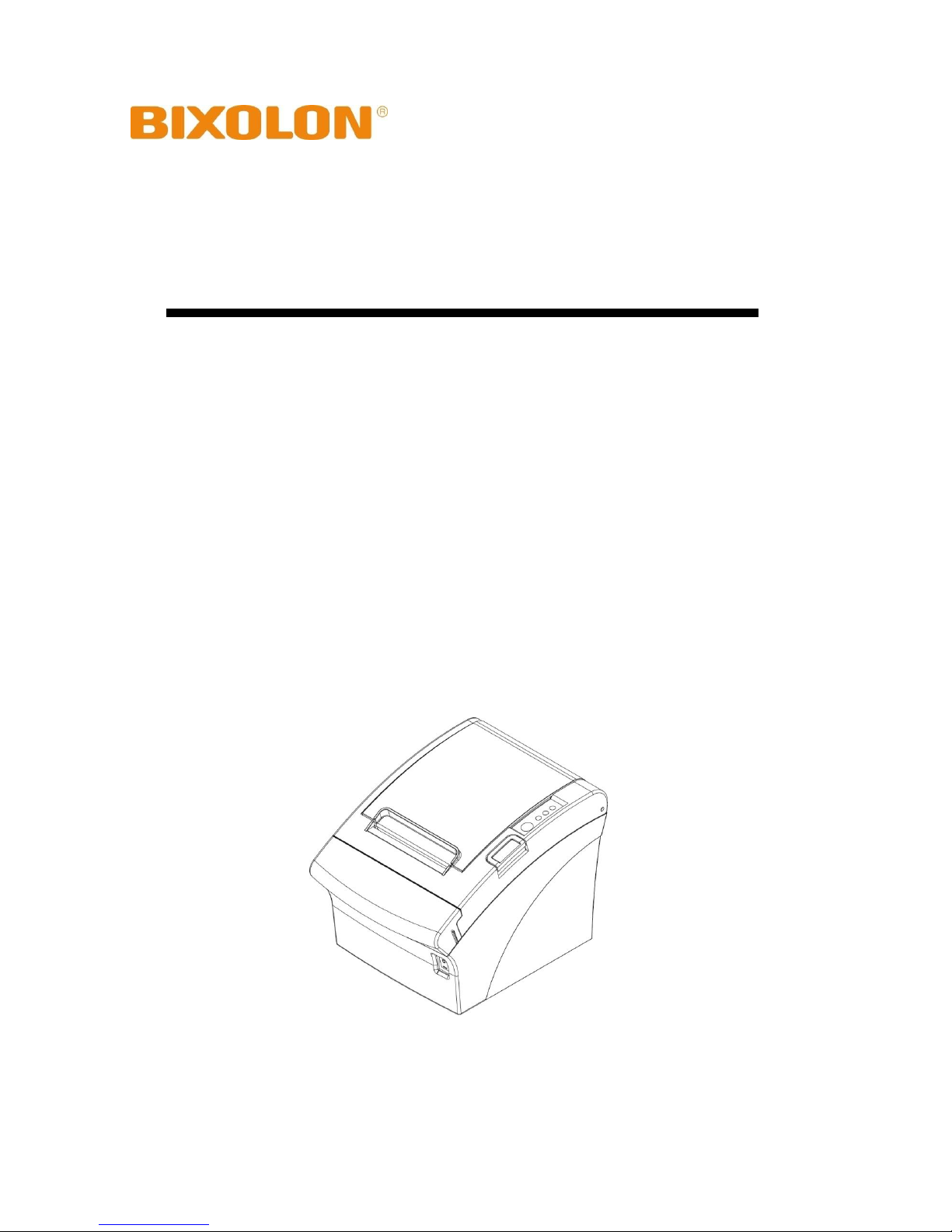
Linux SDK Reference Guide
POS/Mobile Printer
Rev. 1.00
SRP-S300
SRP-380/SRP-382
SRP-350plusIII/SRP-352plusIII
SRP-350III/SRP-352III
SRP-F310II/SRP-F312II
SRP-350IIOBE
SRP-330/SRP-330II
SRP-340
SRP-150
STP-103III
SPP-R200III/SPP-R200II
SPP-R210
SPP-R310/SPP-R300
SPP-R400
SRP-275III/SRP-270/SRP-280
http://www.bixolon.com
Page 2

POS/Mobile Printer
Rev. 1.00
- 2 -
■ Table of Contents
1. About This Manual ......................................................................................................... 3
1-1 Supported Kernel & Platforms .................................................................................... 3
1-2 Supported Interfaces .................................................................................................. 3
2. Property .......................................................................................................................... 4
2-1 CharacterSet (LONG R/W) ......................................................................................... 4
2-2 International CharacterSet (LONG R/W) .................................................................... 5
2-3 State (LONG R) .......................................................................................................... 6
3. Method ............................................................................................................................ 7
3-1 ConnectToPrinter ........................................................................................................ 7
3-2 DisconnectPrinter ....................................................................................................... 8
3-3 InitializePrinter ............................................................................................................ 9
3-4 LineFeed ................................................................................................................... 10
3-5 SetLeftMargin ........................................................................................................... 11
3-6 SetUpsideDown ........................................................................................................ 12
3-7 PartialCut .................................................................................................................. 13
3-8 OpenCashDrawer ..................................................................................................... 14
3-9 PrintText .................................................................................................................... 15
3-10 PrintTextW .............................................................................................................. 17
3-11 PrintBarcode ........................................................................................................... 19
3-12 DirectIO .................................................................................................................. 24
3-13 PrintImage .............................................................................................................. 25
3-14 DownloadNVImage ................................................................................................. 26
3-15 PrintNVImage ......................................................................................................... 27
3-16 RemoveAllNVImage ............................................................................................... 28
3-17 RemoveNVImage ................................................................................................... 29
3-18 GetNVImageKeyCode ............................................................................................ 30
3-19 SetAutoStatusCheck ............................................................................................... 31
3-20 GetStatus ................................................................................................................ 32
3-21 SelectMode ............................................................................................................. 33
3-22 NextPrintPos ........................................................................................................... 34
3-23 AutoCalibration ....................................................................................................... 35
3-24 SelectPageMode .................................................................................................... 36
3-25 PrintDataInPM ........................................................................................................ 37
3-26 SetPrintAreaInPM ................................................................................................... 38
3-27 SetPrintDirectionInPM ............................................................................................ 39
3-28 SetVerticalPositionInPM ......................................................................................... 40
3-29 SetHorizontalPositionInPM ..................................................................................... 41
3-30 ReadStartMSR ........................................................................................................ 42
3-31 ReadCancelMSR .................................................................................................... 43
3-32 ReadMSRData ........................................................................................................ 44
3-33 ScrPowerUp............................................................................................................ 45
3-34 ScrPowerDown ....................................................................................................... 46
3-35 ScrOperationMode .................................................................................................. 47
3-36 ScrExchangeAPDU ................................................................................................ 48
3-37 ScrCheckStatus ...................................................................................................... 49
3-38 ScrSelectCard......................................................................................................... 50
Page 3

POS/Mobile Printer
Rev. 1.00
- 3 -
1. About This Manual
This SDK manual describes the contents of the library required to develop Linux OS
application programs.
At BIXOLON, we are constantly making improvements to the functions and quality of our
products. The specifications and contents of this manual are subject to change without
prior notice for this reason.
1-1 Supported Kernel & Platforms
* Supported Kernel Versions
- Kernel 2.6.32 or higher
* Supported Platforms
- Linux 32bit
- Linux 64bit
- Raspberry PI
1-2 Supported Interfaces
- USB, Serial, Parallel, Bluetooth, Ethernet, WLAN
Page 4
POS/Mobile Printer
Rev. 1.00
- 4 -
2. Property
The constants used by the library are declared in bxlConst.c. The development
environment is based on C.
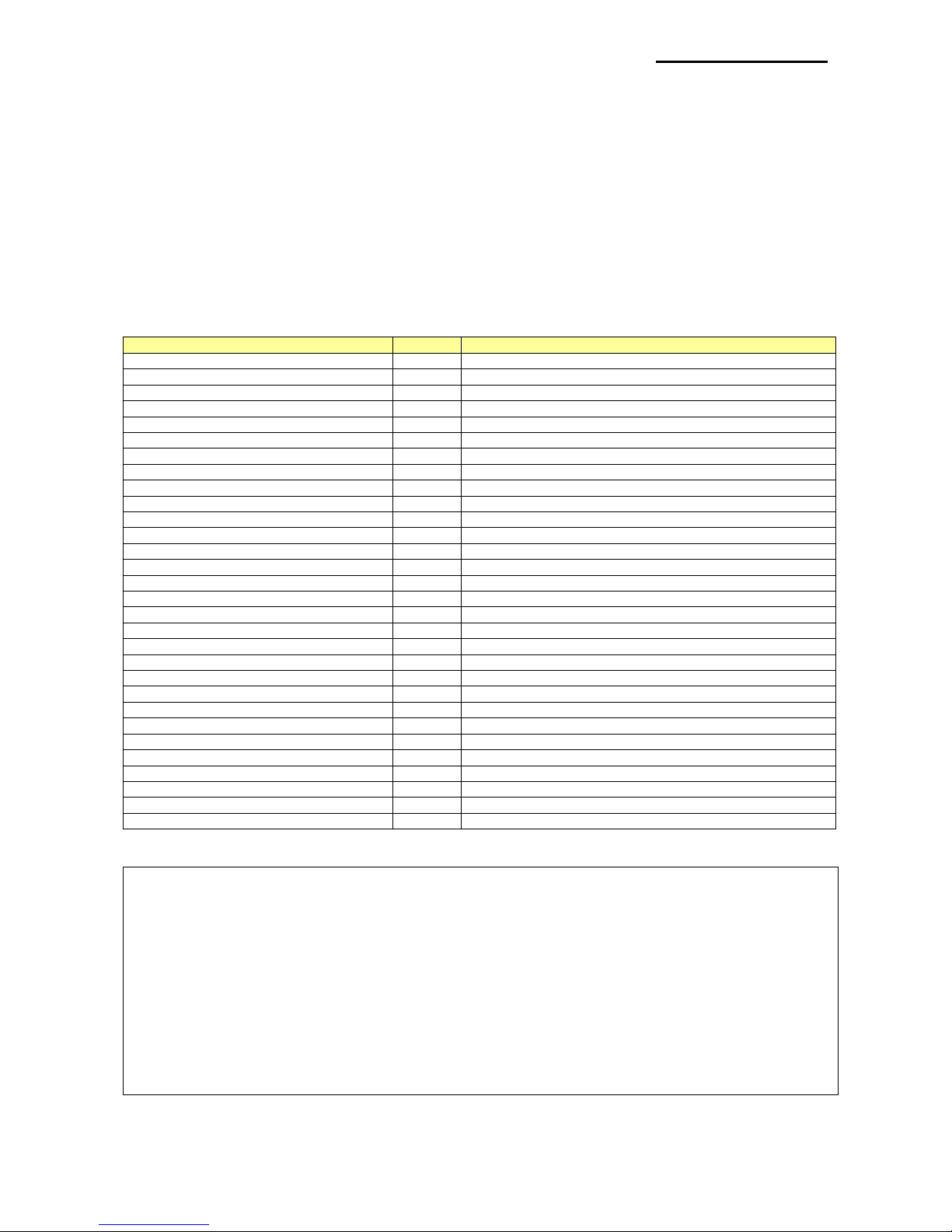
2-1 CharacterSet (LONG R/W)
This is the property for defining the printer's code page and set to BXL_CS_437 by default.
The values can be set and read using SetCharSet() and GetCharSet().
The following code pages can be used:
Constant
Value
Description
CS_PC437
0
Code page PC437
CS_KATAKANA
1
Katakana
CS_PC850
2
Code page PC850
CS_PC860
3
Code page PC860
CS_PC863
4
Code page PC863
CS_PC865
5
Code page PC865
CS_WPC1252
16
Code page WPC1252
CS_PC866
17
Code page PC866
CS_PC852
18
Code page PC852
CS_PC858
19
Code page PC858
CS_PC864
22
Code page PC864
CS_THAI42
23
Code page THAI42
CS_WPC1253
24
Code page WPC1253
CS_WPC1254
25
Code page WPC1254
CS_WPC1257
26
Code page WPC1257
CS_FARSI
27
Code page Farsi
CS_WPC1251
28
Code page WPC1251
CS_PC737
29
Code page PC737
CS_PC775
30
Code page PC775
CS_THAI14
31
Code page THAI14
CS_PC862
33
Code page PC862
CS_PC855
36
Code page PC855
CS_PC857
37
Code page PC857
CS_PC928
38
Code page PC928
CS_THAI16
39
Code page THAI16
CS_WPC1256
40
Code page PC1256
CS_PC1258
41
Code page PC1258
CS_KHMER
42
Code page KHMER
CS_PC1250
47
Code page PC1250
CS_USER
255
User set page
* Example
ConnectToPrinter(port);
……
SetCharSet(CS_PC850);
…...
int32 nCharSet;
nCharSet = GetCharSet();
……
Page 5

POS/Mobile Printer
Rev. 1.00
- 5 -
2-2 International CharacterSet (LONG R/W)
This is the property for defining International character Set and set to ICS_USA by default.
The values can be set or read using SetInternationalChar() and GetInternationalChar().
The following International character Set can be used:
Constant
Value
Description
ICS_USA
0
USA code
ICS_FRANCE
1
FRANCE code
ICS_GERMANY 2 GERMANY code
ICS_UK
3
UK code
ICS_DENMARK1 4 DENMARK1 code
ICS_SWEDEN 5 SWEDEN code
ICS_ITALY
6
ITALY code
ICS_SPAIN
7
SPAIN code
ICS_NORWAY 9 NORWAY code
ICS_DENMARK2
10
DENMARK 2 code
ICS_SPAIN2
11
SPAIN 2 code
ICS_LATIN
12
LATIN AMERICA code
ICS_KOREA
13
KOREA code
* Example
ConnectToPrinter(port)
……
SetInternationalChar(ICS_SPAIN);
…...
int32 nCharSet;
nCharSet = GetInternationalChar();
……
Page 6

POS/Mobile Printer
Rev. 1.00
- 6 -
2-3 State (LONG R)
This is the property that sets the printer status. It is read only and calls GetStatus() to read
the printer status. The status value can be set in duplicate and each value can be checked
using bitwise operation.
These are the printer status values:
Constant
Value
Description
STS_NORMAL
0
The printer status is normal.
STS_PAPEREMPTY
1
There is no paper.
STS_COVEROPEN
2
The paper cover is open.
STS_NEAREND
4
The paper is low (Near end).
* Example
ConnectToprinter(port)
……
SetAutoStatusCheck(true);
int status = GetStatus();
if ((status & STS_PAPEREMPTY) == STS_PAPEREMPTY)
……
if ((status & STS_COVEROPEN) == STS_COVEROPEN)
……
…….
Page 7
POS/Mobile Printer
Rev. 1.00
- 7 -
3. Method
The development environment is based on C.
3-1 ConnectToPrinter
Set the connection for communication with the printer.
int ConnectToPrinter(const char *port)
[Parameters]
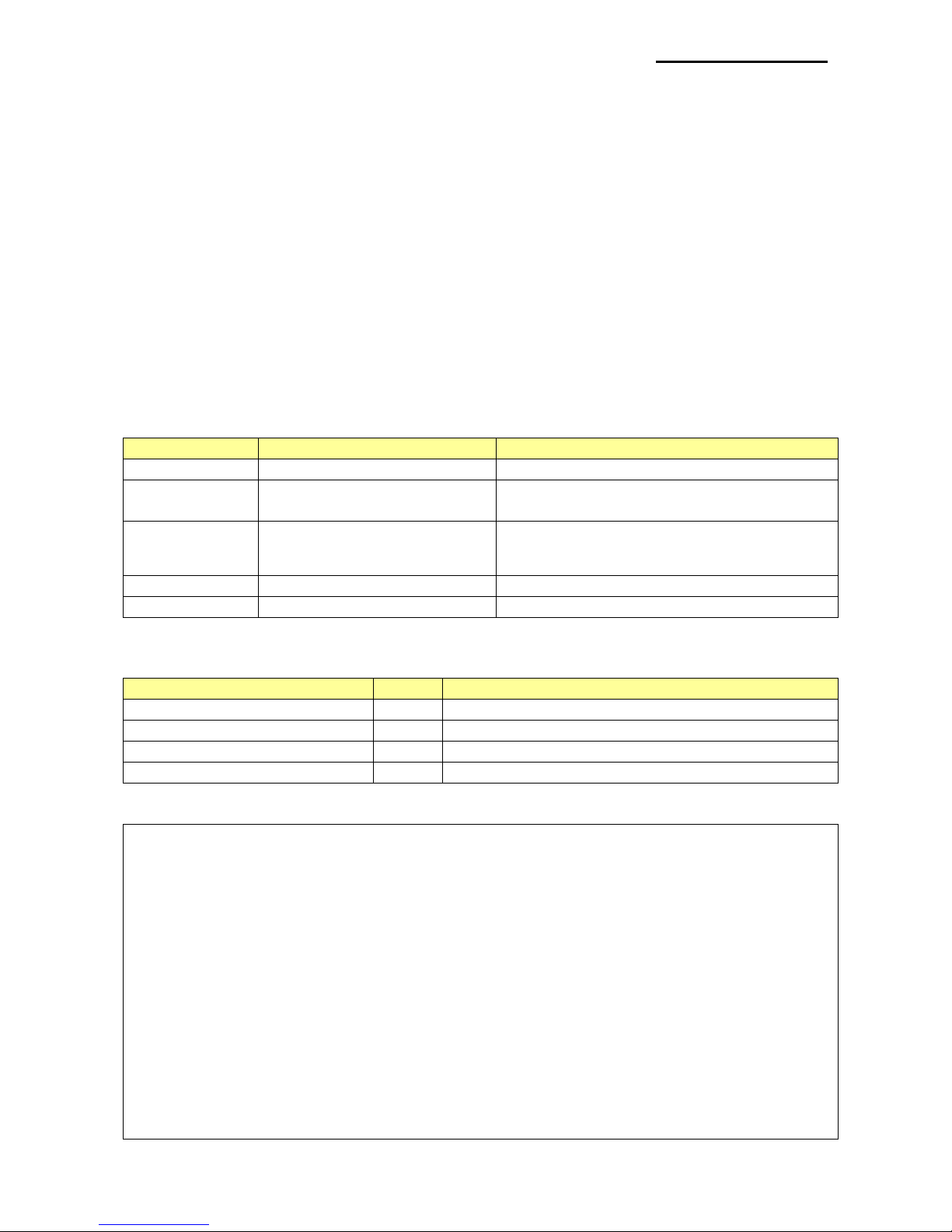
* const char *port
[in] Interface to be connected to the printer
Interface
Input Data
Example
USB
USB:
ConnectToPrinter(“USB:”)
Serial
serial:(baudrate)
/dev/ttyX:(baudrate)
ConnectToPrinter(“serial:115200”)
ConnectToPrinter(“/dev/tty0:115200”)
Parallel
parallel
/dev/lpX
ConnectToPrinter(“parallel”)
ConnectToPrinter(“/dev/lp0”)
Bluetooth
Device MAC address
ConnectToPrinter(“7d:f0:7d:e4:e0:78”)
Ethernet, Wifi
IP address, port no.
ConnectToPrinter(“192.168.0.10:9100”)
[Return Values]
Constant
Value
Description
SUCCESS 0 The operation is successful.
PORT_OPEN_ERROR
-99
The communication port cannot be opened.
NO_CONNECTED_PRINTER
-100
The printer is not connected.
NO_BIXOLON_PRINTER
-101
It is not a BIXOLON printer.
* Example
int ret;
// USB
ret = ConnectToPrinter(“USB:”);
// Serial
ret = ConnectToPrinter(“serial:115200”);
// Parallel
ret = ConnectToPrinter(“parallel”);
// bluetooth
ret = ConnectToPrinter(“7d:f0:7d:e4:e0:78”);
// Ethernet or WiFi
ret = ConnectToPrinter(“192.168.0.10:9100”);
……
Page 8

POS/Mobile Printer
Rev. 1.00
- 8 -
3-2 DisconnectPrinter
Disconnect the printer.
void DisconnectPrinter()
[Parameters]
None
[Return Values]
None
* Example
ConnectToPrinter(………..);
……
DisconnectPrinter();
Page 9

POS/Mobile Printer
Rev. 1.00
- 9 -
3-3 InitializePrinter
Cancel the existing settings and initialize.
int InitializePrinter()
[Parameters]
None
[Return Values]
Constant
Value
Description
SUCCESS 0 The function is successful.
WRITE_ERROR
-105
Data transmission failed.
* Example
……
InitializePrinter();
……
Page 10

POS/Mobile Printer
Rev. 1.00
- 10 -
3-4 LineFeed
Line feed to the amount of the integer value set as a factor.
int LineFeed (const unsigned int lineNum)
[Parameters]
* const unsigned int lineNum
[in] Send the number of line feeding lines in an integer value as a factor.
[Return Values]
Constant
Value
Description
SUCCESS 0 The function is successful.
WRITE_ERROR
-105
Data transmission failed.
FAIL_MEM_ALLOC
-114
The allocation of internal memory failed.
* Example
ConnectToPrinter(………..);
……
LineFeed(5);
……
Page 11

POS/Mobile Printer
Rev. 1.00
- 11 -
3-5 SetLeftMargin
Set the left margin.
int SetLeftMargin (long margin)
[Parameters]
* long margin
[in] Margin size (0 ~ 65535)
[Return Values]
Constant
Value
Description
SUCCESS 0 The function is successful.
WRITE_ERROR
-105
Data transmission failed.
BAD_ARGUMENT
-117
Incorrect values have been entered.
* Example
ConnectToPrinter(………..);
……
SetLeftMargin(10);
……
Page 12

POS/Mobile Printer
Rev. 1.00
- 12 -
3-6 SetUpsideDown
Set the upside-down function.
int SetUpsizeDown (bool upsideDown)
[Parameters]
* bool upsideDown
[in] Enable/disable the upside-down function.
[Return Values]
Constant
Value
Description
SUCCESS 0 The function is successful.
WRITE_ERROR
-105
Data transmission failed.
* Example
ConnectToPrinter(………..);
……
SetUpsideDown(true);
……
Page 13

POS/Mobile Printer
Rev. 1.00
- 13 -
3-7 PartialCut
Enable the partial cut function.
int PartialCut()
[Parameters]
None
[Return Values]
Constant
Value
Description
SUCCESS 0 The function is successful.
WRITE_ERROR
-105
Data transmission failed.
NOT_SUPPORT
-124
The function is not supported.
* Example
ConnectToPrinter(………..);
……
PartialCut();
……
Page 14

POS/Mobile Printer
Rev. 1.00
- 14 -
3-8 OpenCashDrawer
Open the cash drawer.
int OpenCashDrawer (unsigned int milliSec)
[Parameters]
* unsigned int milliSec
[in] Set the open signal length (0 ~ 255).
[Return Values]
Constant
Value
Description
SUCCESS 0 The function is successful.
WRITE_ERROR
-105
Data transmission failed.
NOT_SUPPORT
-124
The function is not supported.
* Example
ConnectToPrinter(………..);
……
OpenCashDrawer(100);
……
Page 15
POS/Mobile Printer
Rev. 1.00
- 15 -
3-9 PrintText
Print texts.
int PrintText(const char* text, const int alignment, const unsigned int attribute,
const unsigned int textSize)
[Parameters]
* const char* text
[in] String with null as a terminator. Send the text data to print.
* const int alignment
[in] Set the text alignment.
Constant
Value
Description
ALIGNMENT_LEFT
0
Align to the left
ALIGNMENT_CENTER
1
Align to the center
ALIGNMENT_RIGHT
2
Align to the right
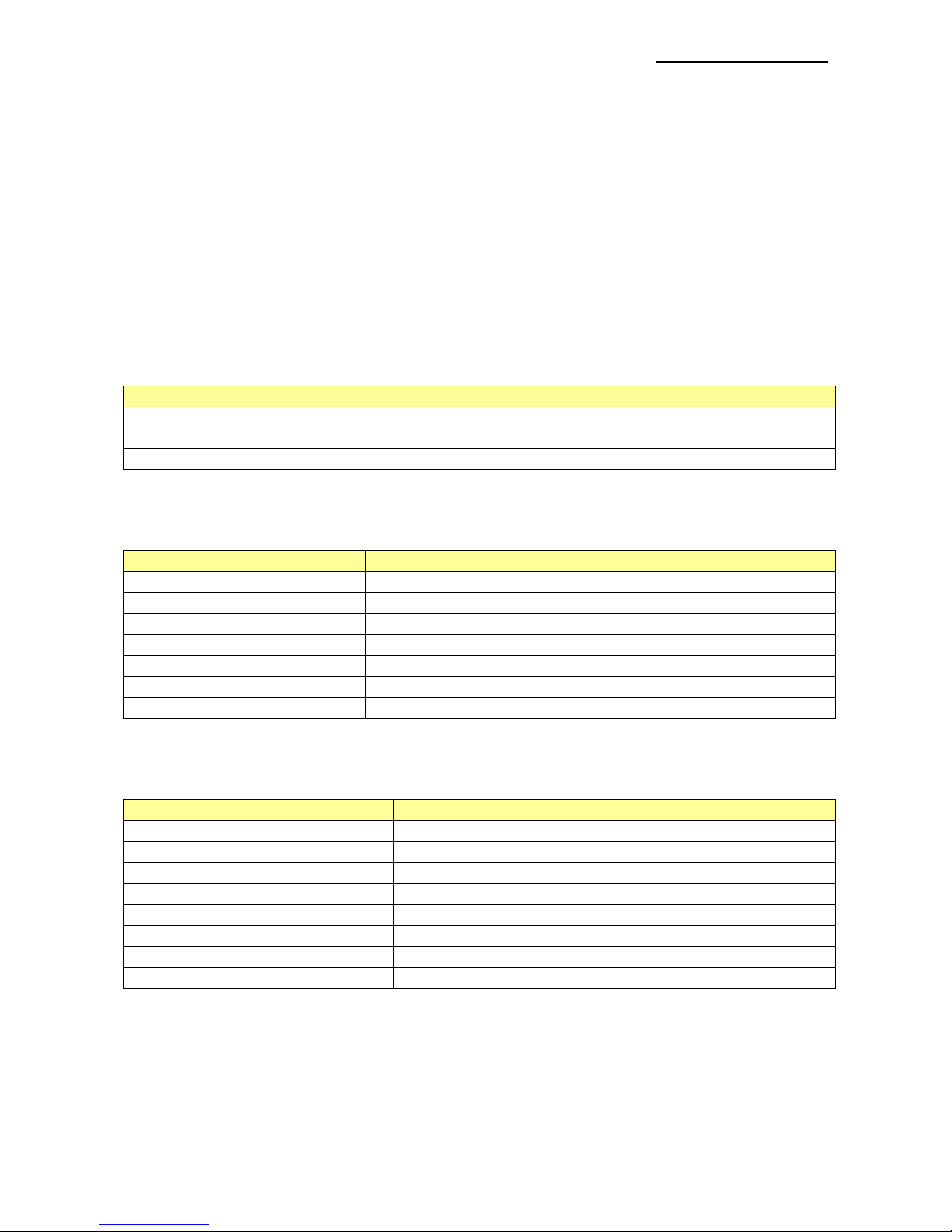
* const unsigned int attribute
[in] Set the text attributes. The following values can be applied in duplicate.
Constant
Value
Description
ATTR_FONTTYPE_A
0
Set to Font A. Print with the default device font.
ATTR_FONTTYPE_B
1
Set to Font B
ATTR_FONTTYPE_C
2
Set to Font C
ATTR_BOLD
4
Add Bold
ATTR_UNDERLINE_1
8
Add 1-dot underline
ATTR_UNDERLINE_2
16
Add 2-dot underline
ATTR_REVERSE
32
Add the reverse text attribute.
* const unsigned int textSize
[in] Set the text size. The width and height scale can be used in duplicate.
Constant
Value
Description
TS_WIDTH_0
0x00
Set the width scale to x1.
TS_WIDTH_1
0x10
Set the width scale to x2.
TS_WIDTH_2
0x20
Set the width scale to x3.
TS_WIDTH_3
0x30
Set the width scale to x4.
TS_WIDTH_4
0x40
Set the width scale to x5.
TS_WIDTH_5
0x50
Set the width scale to x6.
TS_WIDTH_6
0x60
Set the width scale to x7.
TS_WIDTH_7
0x70
Set the width scale to x8.
Page 16
POS/Mobile Printer
Rev. 1.00
- 16 -
Constant
Value
Description
TS_HEIGHT_0
0x00
Set the height scale to x1.
TS_HEIGHT_1
0x01
Set the height scale to x2.
TS_HEIGHT_2
0x02
Set the height scale to x3.
TS_HEIGHT_3
0x03
Set the height scale to x4.
TS_HEIGHT_4
0x04
Set the height scale to x5.
TS_HEIGHT_5
0x05
Set the height scale to x6.
TS_HEIGHT_6
0x06
Set the height scale to x7.
TS_HEIGHT_7
0x07
Set the height scale to x8.
[Return Values]
Constant
Value
Description
SUCCESS 0 The function is successful.
STATUS_ERROR
-103
Not ready to print.
WRITE_ERROR
-300
Data transmission failed.
* Example
ConnectToPrinter(………..);
……
PrintText("Bixolon Linux SDK Text.\n", ALIGNMENT_LEFT,
ATTR_FONTTYPE_A, TS_HEIGHT_0 | TS_WIDTH_0);
……
Page 17
POS/Mobile Printer
Rev. 1.00
- 17 -
3-10 PrintTextW
Print 2Bytes texts.
int PrintTextW(const char* text, const int alignment, const unsigned int attribute,
const unsigned int textSize, const unsigned int codePage)
[Parameters]
* const char* text
[in] String with null as a terminator. Send the text data to print.
* const int alignment
[in] Set the text alignment.
Constant
Value
Description
ALIGNMENT_LEFT
0
Align to the left
ALIGNMENT_CENTER
1
Align to the center
ALIGNMENT_RIGHT
2
Align to the right
* const unsigned int attribute
[in] Set the text attributes. The following values can be applied in duplicate.
Constant
Value
Description
ATTR_FONTTYPE_A
0
Set to Font A. Print with the default device font.
ATTR_FONTTYPE_B
1
Set to Font B
ATTR_FONTTYPE_C
2
Set to Font C
ATTR_BOLD
4
Add Bold
ATTR_UNDERLINE_1
8
Add 1-dot underline
ATTR_UNDERLINE_2
16
Add 2-dot underline
ATTR_REVERSE
32
Add the reverse text attribute.
* const unsigned int textSize
[in] Set the text size. The width and height scale can be used in duplicate.
Constant
Value
Description
TS_WIDTH_0
0x00
Set the width scale to x1.
TS_WIDTH_1
0x10
Set the width scale to x2.
TS_WIDTH_2
0x20
Set the width scale to x3.
TS_WIDTH_3
0x30
Set the width scale to x4.
TS_WIDTH_4
0x40
Set the width scale to x5.
TS_WIDTH_5
0x50
Set the width scale to x6.
TS_WIDTH_6
0x60
Set the width scale to x7.
TS_WIDTH_7
0x70
Set the width scale to x8.
Page 18
POS/Mobile Printer
Rev. 1.00
- 18 -
Constant
Value
Description
TS_HEIGHT_0
0x00
Set the height scale to x1.
TS_HEIGHT_1
0x01
Set the height scale to x2.
TS_HEIGHT_2
0x02
Set the height scale to x3.
TS_HEIGHT_3
0x03
Set the height scale to x4.
TS_HEIGHT_4
0x04
Set the height scale to x5.
TS_HEIGHT_5
0x05
Set the height scale to x6.
TS_HEIGHT_6
0x06
Set the height scale to x7.
TS_HEIGHT_7
0x07
Set the height scale to x8.
* const unsigned int codePage
[in] Set the encoding type for character strings.
Constant
Value
Description
CP_EUCKR
0
Korean. Encode character strings in EUC-KR.
CP_CP949
1
Korean. Encode character strings in CP949.
CP_EUCCN
2
Chinese. Encode character strings in EUC-CN.
CP_GB18030
3
Chinese. Encode character strings in GB18030.
CP_BIG5
4
Chinese. Encode character strings in BIG5.
CP_CP950
5
Chinese. Encode character strings in CP950.
CP_EUCJP
6
Japanese. Encode character strings in EUC-JP.
CP_CP932
7
Japanese. Encode character strings in CP932.
CP_CP874
8
Thai. Encode character strings in CP874.
[Return Values]
Constant
Value
Description
SUCCESS 0 The function is successful.
STATUS_ERROR
-103
Not ready to print.
WRITE_ERROR
-300
Data transmission failed.
* Example
ConnectToPrinter(………..);
……
PrintTextW("Korean Printing Test.\n", ALIGNMENT_LEFT,
ATTR_FONTTYPE_A, TS_HEIGHT_0 | TS_WIDTH_0, CP_CP949);
……
Page 19

POS/Mobile Printer
Rev. 1.00
- 19 -
3-11 PrintBarcode
Print 1- and 2-dimensional barcodes.
int PrintBarcode(const int barcodeType, const char* barcodeData,
const barcodeInfo_s* barcodeInfo)
[Parameters]
* const int barcodeType
[in] Set the barcode type. Defined in bxlConst.c.
Barcode
Value
Description
BARCODE_UPCA
0
Print UPC-A barcode.
BARCODE_UPCE
1
Print UPC-E barcode.
BARCODE_EAN13
BARCODE_JAN13
3
5
Print JAN-13(EAN-13) barcode.
BARCODE_EAN8
BARCODE_JAN8
2
4
Print JAN-8(EAN-8) barcode.
BARCODE_ITF 6 Print ITF barcode.
BARCODE_CODABAR
7
Print CODABAR barcode.
BARCODE_CODE39
8
Print CODE39 barcode.
BARCODE_CODE93
9
Print CODE93 barcode.
BARCODE_CODE128
10
Print CODE128 barcode.
BARCODE_PDF417
11
Print PDF417 barcode.
BARCODE_QRCODE
12
Print QR CODE barcode.
BARCODE_DATAMATRIX
13
Print DATAMATRIX barcode.
BARCODE_MAXICODE
14
Print MAXICODE barcode.
BARCODE_AZTEC
15
Print AZTEC barcode.
BARCODE_GS1
16
Print GS1 barcode.
* const char* barcodeData
[in] Send the barcode data to print.
* const barcodeInfo_s* barcodeInfo
[in] Structure for storing barcode attributes
Struct _barcodeInfo
{
unsigned int mode;
unsigned int height;
unsigned int width;
unsigned int alignment;
unsigned int textPosition;
unsigned int attribute;
};
Page 20
POS/Mobile Printer
Rev. 1.00
- 20 -
- unsigned int mode
[in] Send the model value when printing QR Code.
Constant
Value
Description
BARCODE_QR_MODEL1
1
Model 1
BARCODE_QR_MODEL2
2
Model 2
Send the mode value when printing Maxi Code.
Constant
Value
Description
BARCODE_MAXI_MODE2
1
Mode 2
BARCODE_MAXI_MODE3
2
Mode 3
BARCODE_MAXI_MODE4
3
Mode 4
Send the mode value when printing AZTEC.
Constant
Value
Description
BARCODE_AZTEC_DATAMODE
1
Data mode
BARCODE_AZTEC_GS1MODE
2
gs1 mode
BARCODE_AZTEC_UNICODE
3
Unicode mode
Send the mode value when printing GS1.
Constant
Value
Description
BARCODE_GS1_RSS14
1
GS1 DataBar Omnidirectional
BARCODE_GS1_RSS14TRUNCATED
2
GS1 DataBar Truncated
BARCODE_GS1_RSS14STACKED
3
GS1 DataBar Stacked
BARCODE_GS1_RSS14STACKEDOMNI
4
GS1 DataBar Stacked
Omnidirectional
BARCODE_GS1_UPCA
5
UPC-A
BARCODE_GS1_UPCE
6
UPC-E
BARCODE_GS1_EAN13
7
EAN-13
BARCODE_GS1_EAN8
8
EAN-8
BARCODE_GS1_EAN128AB
9
UCC/EAN-128&CC-A/B
BARCODE_GS1_EAN128C
10
UCC/EAN-128&CC-C
- unsigned int height
[in] Set the barcode height (1~255). If the barcode is larger than the paper size, the
barcode may not be printed. 2-dimensional barcodes are not subject to this value.
- unsigned int width
[in] Set the barcode width (2~7). If the barcode is larger than the paper size, the
barcode may not be printed. 2-dimensional barcodes are not subject to this value.
Page 21
POS/Mobile Printer
Rev. 1.00
- 21 -
- unsigned int alignment
[in] Set the barcode alignment.
Constant
Value
Description
BXL_ALIGNMENT_LEFT
0
Align to the left
BXL_ALIGNMENT_CENTER
1
Align to the center
BXL_ALIGNMENT_RIGHT
2
Align to the right
- unsigned int textPosition
[in] Set the barcode data printing position. 2-dimensional barcode has only
BXL_BC_TEXT_NONE .
Constant
Value
Description
BXL_BC_TEXT_NONE
0
No barcode data is printed.
BXL_BC_TEXT_ABOVE
1
The barcode data is printed above the barcode.
BXL_BC_TEXT_BELOW
2
The barcode data is printed below the barcode.
- unsigned int attribute
[in] Set the separator height of 2D and 1D barcodes when printing GS1 (1 or 2).
[Return Values]
Constant
Value
Description
SUCCESS 0 The function is successful.
WRITE_ERROR
-105
Data transmission failed.
WRONG_BARCODE_TYPE
-115
The barcode type is not supported.
WRONG_BC_DATA_ERROR
-116
The barcode data is incorrect.
NOT_SUPPORT
-124
The barcode is not supported.
* Example
ConnectToPrinter(………..);
char* barcodeData = “123456789012”;
barcodeInfo_s barcodeInfo;
……
barcodeInfo.height = 50;
barcodeInfo.width = 2;
barcodeInfo.textPosition = BARCODE_TEXT_BELOW;
PrintBarcode(BARCDE_UPCA, barcodeData, &barcodeInfo);
barcodeInfo.height = 50;
barcodeInfo.width = 2;
barcodeInfo.textPosition = BARCODE_TEXT_BELOW;
PrintBarcode(BARCDE_UPCE, barcodeData, &barcodeInfo);
barcodeInfo.height = 50;
barcodeInfo.width = 2;
Page 22

POS/Mobile Printer
Rev. 1.00
- 22 -
barcodeInfo.textPosition = BARCODE_TEXT_BELOW;
PrintBarcode(BARCDE_EAN13, barcodeData, &barcodeInfo);
barcodeInfo.height = 50;
barcodeInfo.width = 2;
barcodeInfo.textPosition = BARCODE_TEXT_BELOW;
PrintBarcode(BARCDE_JAN13, barcodeData, &barcodeInfo);
barcodeInfo.height = 50;
barcodeInfo.width = 2;
barcodeInfo.textPosition = BARCODE_TEXT_BELOW;
PrintBarcode(BARCDE_EAN8, “12345678”, &barcodeInfo);
barcodeInfo.height = 50;
barcodeInfo.width = 2;
barcodeInfo.textPosition = BARCODE_TEXT_BELOW;
PrintBarcode(BARCDE_JAN8, “12345678”, &barcodeInfo);
barcodeInfo.height = 50;
barcodeInfo.width = 2;
barcodeInfo.textPosition = BARCODE_TEXT_BELOW;
PrintBarcode(BARCDE_CODE39, barcodeData, &barcodeInfo);
barcodeInfo.height = 50;
barcodeInfo.width = 2;
barcodeInfo.textPosition = BARCODE_TEXT_BELOW;
PrintBarcode(BARCDE_CODE93, barcodeData, &barcodeInfo);
barcodeInfo.height = 50;
barcodeInfo.width = 2;
barcodeInfo.textPosition = BARCODE_TEXT_BELOW;
PrintBarcode(BARCDE_CODE128, barcodeData, &barcodeInfo);
barcodeInfo.height = 50;
barcodeInfo.width = 2;
barcodeInfo.textPosition = BARCODE_TEXT_BELOW;
PrintBarcode(BARCDE_ITF, barcodeData, &barcodeInfo);
barcodeInfo.height = 50;
barcodeInfo.width = 2;
barcodeInfo.textPosition = BARCODE_TEXT_BELOW;
PrintBarcode(BARCDE_CODABAR, barcodeData, &barcodeInfo);
// *************** 2D barcode
barcodeInfo.height = 0;
barcodeInfo.width = 2;
barcodeInfo.attribute = 0;
PrintBarcode(BARCDE_PDF417, barcodeData, &barcodeInfo);
barcodeInfo.mode = BARCODE_QR_MODEL1;
barcodeInfo.height = 0;
barcodeInfo.width = 2;
barcodeInfo.attribute = 0;
PrintBarcode(BARCDE_QRCODE, barcodeData, &barcodeInfo);
barcodeInfo.mode = BARCODE_QR_MODEL2;
barcodeInfo.height = 0;
Page 23

POS/Mobile Printer
Rev. 1.00
- 23 -
barcodeInfo.width = 2;
barcodeInfo.attribute = 0;
PrintBarcode(BARCDE_QRCODE, barcodeData, &barcodeInfo);
barcodeInfo.height = 0;
barcodeInfo.width = 2;
barcodeInfo.attribute = 0;
PrintBarcode(BARCDE_DATAMATRIX, barcodeData, &barcodeInfo);
barcodeInfo.mode = BARCODE_MAXI_MODE4;
barcodeInfo.height = 0;
barcodeInfo.width = 2;
barcodeInfo.attribute = 0;
PrintBarcode(BARCDE_MAXICODE, barcodeData, &barcodeInfo);
Page 24

POS/Mobile Printer
Rev. 1.00
- 24 -
3-12 DirectIO
Send and read the user-defined data.
int DirectIO(char* writeData, int writeLen, char* readData, int* readLen,
unsigned int mTimeout)
[Parameters]
* char* writeData,
[in] Data to be sent to the printer
* int writeLen
[in] Size of data to be sent to the printer
write does not function if 0 is entered to writeData for NULL, writeLen.
* char* readData,
[in] Data to be sent to the printer
* int* readLen
[in] Read the size of the data to be read by the caller.
read does not function if 0 is entered to readData for NULL, readLen.
* unsigned int mTimeout
[in] Waiting time before reading the data. Even if no data has been read, it returns after
the set amount of time. If set to 0, it waits until there is incoming data.
[Return Values]
Constant
Value
Description
SUCCESS 0 The function is successful.
WRITE_ERROR
-105
Data transmission failed.
READ_TIMEOUT
-127
It timed out before reading the data.
* Example
char cmd[3] = { 0x10, 0x04, 0x01};
char readBuf[20] = {0x00,};
int readLen;
ConnectToPrinter(………..);
DirectIO(cmd, sizeof(cmd), readBuf, &readLen, 0);
……
Page 25
POS/Mobile Printer
Rev. 1.00
- 25 -
3-13 PrintImage
Print image files.
int PrintImage (const char *imagePath, const bool compress,
const unsigned int alignment)
[Parameters]
* const char *imagePath
[in] String for the image file path. JPG, BMP and GIF are supported.
* const bool compress
[in] Set whether to compress RLE image.
* const unsigned int alignment
[in] Set the image alignment.
Constant
Value
Description
ALIGNMENT_LEFT
0
Align to the left
ALIGNMENT_CENTER
1
Align to the center
ALIGNMENT_RIGHT
2
Align to the right
[Return Values]
Constant
Value
Description
SUCCESS 0 The function is successful.
IMAGE_OPEN_ERROR
-118
The image file cannot be opened.
MEM_ALLOC_ERROR
-120
The allocation of internal memory failed.
* Example
ConnectToPrinter(………..);
……
PrintBitmap(filePath, true, ALIGNMENT_CENTER);
……
Page 26
POS/Mobile Printer
Rev. 1.00
- 26 -
3-14 DownloadNVImage
Save images to the non-volatile memory area of the printer.
int DownloadNVImage (const char *imagePath, const unsigned int keyCode)
[Parameters]
* const char *imagePath
[in] String for the image file path. JPG, BMP and GIF are supported.
* const unsigned int keyCode
[in] Address of the memory area where image is stored (0 ~ 255).
[Return Values]
Constant
Value
Description
SUCCESS 0 The function is successful.
IMAGE_OPEN_ERROR
-118
The image file cannot be opened.
MEM_ALLOC_ERROR
-120
The allocation of internal memory failed.
* Example
ConnectToPrinter(………..);
……
DownloadNVImage(filePath, 0x01);
……
Page 27

POS/Mobile Printer
Rev. 1.00
- 27 -
3-15 PrintNVImage
Print the images stored in the non-volatile memory area of the printer.
int PrintNVImage (const unsigned int keyCode)
[Parameters]
* const unsigned int keyCode
[in] Address code of the image to be printed (0 ~ 255)
[Return Values]
Constant
Value
Description
SUCCESS 0 The function is successful.
WRITE_ERROR
-105
Data transmission failed.
* Example
ConnectToPrinter(………..);
……
DownloadNVImage(filePath, 0x01);
……
PrintNVImage(0x01);
Page 28
POS/Mobile Printer
Rev. 1.00
- 28 -
3-16 RemoveAllNVImage
Remove all the images stored in the non-volatile memory area of the printer.
int RemoveAllNVImage ()
[Parameters]
None
[Return Values]
Constant
Value
Description
SUCCESS 0 The function is successful.
WRITE_ERROR
-105
Data transmission failed.
NOT_SUPPORT
-124
The function is not supported.
* Example
ConnectToPrinter(………..);
……
RemoveAllNVImage();
Page 29

POS/Mobile Printer
Rev. 1.00
- 29 -
3-17 RemoveNVImage
Remove all the images with the specified address stored in the non-volatile memory area
of the printer.
int RemoveNVImage (const unsigned int keyCode)
[Parameters]
* const unsigned int keyCode
[in] Address code of the image to be printed (0 ~ 255)
[Return Values]
Constant
Value
Description
SUCCESS 0 The function is successful.
WRITE_ERROR
-105
Data transmission failed.
NOT_SUPPORT
-124
The function is not supported.
* Example
ConnectToPrinter(………..);
DownloadNVImage(filePath, 0x01);
…….
RemoveNVImage(0x01);
Page 30

POS/Mobile Printer
Rev. 1.00
- 30 -
3-18 GetNVImageKeyCode
Read the address list of the images stored in the non-volatile memory area of the printer.
int GetNVImageKeyCode (char *keyCodeList, unsigned int *listLen)
[Parameters]
* char *keyCodeList
[in, out] Buffer to save the list of image address
* unsinged int *listLen
[in, out] Length of keyCodeList
[Return Values]
Constant
Value
Description
SUCCESS 0 The function is successful.
WRITE_ERROR
-105
Data transmission failed.
NV_NO_KEY
-121
No NV key is defined.
WRONG_RESPONSE
-122
Incorrect NV data response
NOT_SUPPORT
-124
The function is not supported.
* Example
char keyList[128] = {0x00, };
unsigned int listLen = 0;
int ret;
ConnectToPrinter(………..);
DownloadNVImage(filePath, 0x01);
…….
ret = GetNVImageKeyCode(keyList, &listLen);
Page 31

POS/Mobile Printer
Rev. 1.00
- 31 -
3-19 SetAutoStatusCheck
Enable/disable ASB mode to check the printer status (cover open, no paper).
int SetAutoStatusCheck(bool enable)
[Parameters]
* bool enable
[in] Enable/disable ASB mode.
[Return Values]
Constant
Value
Description
SUCCESS 0 The function is successful.
WRITE_ERROR
-105
Data transmission failed.
* Example
int status = 0x00;
ConnectToPrinter(………..);
SetAutoStatusCheck(true);
…...
status = GetStatus();
……
if ((status & BXL_STS_PAPEREMPTY) == BXL_STS_PAPEREMPTY)
……
Page 32

POS/Mobile Printer
Rev. 1.00
- 32 -
3-20 GetStatus
Read the printer status (cover open, no paper).
int GetStatus()
[Parameters]
None
[Return Values]
Constant
Value
Description
SUCCESS 0 The function is successful.
READ_TIMEOUT
-127
No status data
* Example
int status = 0x00;
ConnectToPrinter(………..);
SetAutoStatusCheck(true);
…...
status = GetStatus();
……
if ((status & BXL_STS_PAPEREMPTY) == BXL_STS_PAPEREMPTY)
……
Page 33

POS/Mobile Printer
Rev. 1.00
- 33 -
3-21 SelectMode
Select Label/Receipt Mode. Only mobile printers are supported.
int SelectMode(bool labelMode)
[Parameters]
* bool labelMode
[in] Send whether to use Label Mode.
If the value is TRUE, the label mode is selected.
[Return Values]
Constant
Value
Description
SUCCESS 0 The function is successful.
WRITE_ERROR
-105
Data transmission failed.
NOT_SUPPORT
-124
The function is not supported.
* Example
ConnectToPrinter(………..);
……
// Select Label Mode
if (SelectMode(true) != SUCCESS)
return;
NextPrintPos();
// Select Receipt Mode
if (SelectMode(false) != SUCCESS)
return;
……
Page 34

POS/Mobile Printer
Rev. 1.00
- 34 -
3-22 NextPrintPos
Feed the paper to the starting point of the next label paper. The function is only enabled if
the mobile printer is set to label mode.
int NextPrintPos()
[Parameters]
None
[Return Values]
Constant
Value
Description
SUCCESS 0 The function is successful.
WRITE_ERROR
-105
Data transmission failed.
NOT_SUPPORT
-124
The function is not supported.
* Example
ConnectToPrinter(………..);
……
if (SelectMode(true) != SUCCESS)
return;
NextPrintPos();
……
Page 35

POS/Mobile Printer
Rev. 1.00
- 35 -
3-23 AutoCalibration
Perform Auto Calibration if set to Label Mode. The function is only enabled if the mobile
printer is set to label mode.
int AutoCalibration()
[Parameters]
None
[Return Values]
Constant
Value
Description
SUCCESS 0 The function is successful.
WRITE_ERROR
-105
Data transmission failed.
NOT_SUPPORT
-124
The function is not supported.
* Example
ConnectToPrinter(………..);
……
if (SelectMode(true) != SUCCESS)
return;
AutoCalibration();
……
Page 36

POS/Mobile Printer
Rev. 1.00
- 36 -
3-24 SelectPageMode
Enable/disable Page Mode.
int SelectPageMode(bool pageMode)
[Parameters]
* bool pageMode
[in] Set whether to use Page Mode.
Page Mode is selected if set to TRUE.
[Return Values]
Constant
Value
Description
SUCCESS 0 The function is successful.
WRITE_ERROR
-105
Data transmission failed.
NOT_SUPPORT
-124
The function is not supported.
* Example
ConnectToPrinter(………..);
……
// Select Page Mode
if (SelectPageMode(true) != SUCCESS)
return;
…....
// Select Standard Mode
if (SelectPageMode(false) != SUCCESS)
return;
……
Page 37

POS/Mobile Printer
Rev. 1.00
- 37 -
3-25 PrintDataInPM
Prints all the data in the printer buffer if set to Page Mode and the printer is switched to
Standard Mode after printing.
int PrintDataInPM()
[Parameters]
None
[Return Values]
Constant
Value
Description
SUCCESS 0 The function is successful.
WRITE_ERROR
-105
Data transmission failed.
NOT_SUPPORT
-124
The function is not supported.
* Example
ConnectToPrinter(………..);
……
// Select Page Mode
if (SelectPageMode(true) != SUCCESS)
return;
……
PrintDataInPM();
Page 38

POS/Mobile Printer
Rev. 1.00
- 38 -
3-26 SetPrintAreaInPM
Sets the size and position of the printing area when set to Page Mode.
int SetPrintAreaInPM (long x, Iong y, Iong width, Iong height)
[Parameters]
* Iong x
[in] x-coordinates of the printing area
* Iong y
[in] y-coordinates of the printing area
* Iong width
[in] width of the printing area
* Iong height
[in] height of the printing area
Width of 58mm: x = 0, y = 0, width = 384, height = 840
[Return Values]
Constant
Value
Description
SUCCESS 0 The function is successful.
WRITE_ERROR
-105
Data transmission failed.
BAD_ARGUMENT
-117
The specified argument is not correct.
NOT_SUPPORT
-124
The function is not supported.
* Example
ConnectToPrinter(………..);
……
// Select Page Mode
if (SelectPageMode(true) != SUCCESS)
return;
SetPrintAreaInPM(0, 0, 416, 416);
……
PrintDataInPM();
Page 39
POS/Mobile Printer
Rev. 1.00
- 39 -
3-27 SetPrintDirectionInPM
Set the printing direction in the Page Mode.
int SetPrintDirectionInPM (int printDirection)
[Parameters]
* int printDirection
printDirection
Value
Direction
Starting Position
Rotation
PAGEMODE_ROTATE_0
48
Left -> Right
Top left
0 degree
PAGEMODE_ROTATE_90
51
Top -> Bottom
Top right
90 degrees
PAGEMODE_ROTATE_180
50
Right -> Left
Bottom right
180 degrees
PAGEMODE_ROTATE_270
49
Bottom -> Top
Bottom left
270 degrees
[Return Values]
Constant
Value
Description
SUCCESS 0 The function is successful.
WRITE_ERROR
-105
Data transmission failed.
BAD_ARGUMENT
-117
The specified argument is not correct.
NOT_SUPPORT
-124
The function is not supported.
* Example
ConnectToPrinter(………..);
……
// Select Page Mode
if (SelectPageMode(true) != SUCCESS)
return;
SetPrintAreaInPM(0, 0, 416, 416);
SetPrintDirectionInPM(PAGEMODE_ROTATE_90);
……
PrintDataInPM();
Page 40

POS/Mobile Printer
Rev. 1.00
- 40 -
3-28 SetVerticalPositionInPM
Set the vertical position for printing in the Page Mode.
int SetVerticalPositionInPM (long position, bool relative)
[Parameters]
* long position
[in] Starting position to be set
* bool relative
[in] Set whether it is relative or absolute position from the current position.
If TRUE, it is set to relative position.
[Return Values]
Constant
Value
Description
SUCCESS 0 The function is successful.
WRITE_ERROR
-105
Data transmission failed.
BAD_ARGUMENT
-117
The specified argument is not correct.
NOT_SUPPORT
-124
The function is not supported.
* Example
ConnectToPrinter(………..);
……
// Select Page Mode
if (SelectPageMode(true) != SUCCESS)
return;
SetPrintAreaInPM(0, 0, 416, 416);
SetPrintDirectionInPM(PAGEMODE_ROTATE_90);
SetVerticalPositionInPM(160, false);
SetHorizontalPositionInPM(40);
PrintText(“Bixolon Printer.”, ALIGNMENT_CENTER, ATTR_FONTTYPE_A,
TS_WIDTH_0 | TS_HEIGHT_0);
……
PrintDataInPM();
Page 41

POS/Mobile Printer
Rev. 1.00
- 41 -
3-29 SetHorizontalPositionInPM
Set the horizontal position for printing.
int SetHorizontalPositionInPM (Iong position, bool relative)
[Parameters]
* long position
[in] Starting position to be set
* bool relative
[in] Set whether it is relative or absolute position from the current position.
If TRUE, it is set to relative position.
[Return Values]
Constant
Value
Description
SUCCESS 0 The function is successful.
WRITE_ERROR
-105
Data transmission failed.
BAD_ARGUMENT
-117
The specified argument is not correct.
NOT_SUPPORT
-124
The function is not supported.
* Example
ConnectToPrinter(………..);
……
// Select Page Mode
if (SelectPageMode(true) != SUCCESS)
return;
SetPrintAreaInPM(0, 0, 416, 416);
SetPrintDirectionInPM(PAGEMODE_ROTATE_90);
SetVerticalPositionInPM(160, false);
SetHorizontalPositionInPM(40, false);
PrintText(“Bixolon Printer.”, ALIGNMENT_CENTER, ATTR_FONTTYPE_A,
TS_WIDTH_0 | TS_HEIGHT_0);
……
PrintDataInPM();
Page 42

POS/Mobile Printer
Rev. 1.00
- 42 -
3-30 ReadStartMSR
Switch the printer status to MSR Ready. If it returns SUCCESS, it is identified as normal.
Only mobile printers are supported.
long ReadStartMSR()
[Parameters]
None
[Return Values]
Constant
Value
Description
SUCCESS 0 The function is successful.
NOT_SUPPORT
-124
MSR function is not supported.
WRITE_ERROR
-105
Data transmission failed.
* Example
int ret;
ConnectToPrinter(………..);
ret = ReadStartMSR();
if (SUCCESS != ret)
return;
……
Page 43

POS/Mobile Printer
Rev. 1.00
- 43 -
3-31 ReadCancelMSR
Disable the MSR Ready status. Only mobile printers are supported.
long ReadCancelMSR()
[Parameters]
None
[Return Values]
Constant
Value
Description
SUCCESS 0 The function is successful.
WRITE_ERROR
-105
Data transmission failed.
NOT_SUPPORT
-124
MSR function is not supported.
* Example
ConnectToPrinter(………..);
ret = ReadStartMSR();
if (SUCCESS != ret)
return;
……
ReadCancelMSR();
……
Page 44

POS/Mobile Printer
Rev. 1.00
- 44 -
3-32 ReadMSRData
Read the MSR data. When the data is read, it returns the data value otherwise the read
mode can be canceled using ReadCancelMSR. Only mobile printers are supported.
long ReadMSRData(char *pMSRData1, char *pMSRData2, char *pMSRData3,
const unsigned int bufLen)
[Parameters]
* char *pMSRData1
[out] Read MSR Data Track 1 to the buffer defined by the caller.
* char *pMSRData2
[out] Read MSR Data Track 2 to the buffer defined by the caller.
* char *pMSRData3
[out] Read MSR Data Track 3 to the buffer defined by the caller.
* const unsigned int bufLen
[in] Buffer size of pMSRData1, pMSRData2, and pMSRData3 buf
[Return Values]
Constant
Value
Description
SUCCESS 0 The function is successful.
NOT_SUPPORT
-124
MSR function is not supported.
* Example
ConnectToPrinter(………..);
……
ret = ReadStartMSR();
if (SUCCESS != ret)
return;
char track1[120] = {0x00, };
char track2[120] = {0x00, };
char track3[120] = {0x00, };
ret = ReadMSRData(track1, track2, track3, sizeof(track1));
if (BXL_MSR_DATAEMPTY == ret)
……
else
……
Page 45

POS/Mobile Printer
Rev. 1.00
- 45 -
3-33 ScrPowerUp
Turn on the SCR. This function is only available on SPP-R210 SCR.
long ScrPowerUp(char *pATR, unsigned int *ATRLen, char *pResponse)
[Parameters]
* char *pATR
[in, out] ATR(Answer To Reset) data
* unsigned int *ATRLen
[in, out] ATR data length
* char *pResponse
[in, out] Response to power up
[Return Values]
Constant
Value
Description
SUCCESS 0 The function is successful.
WRITE_ERROR
-105
Data transmission failed.
BAD_ARGUMENT
-117
The specified argument is not correct.
NOT_SUPPORT
-124
The function is not supported.
SCR_RESPONSE_ERROR
-126
The response data is incorrect.
* Example
int ret;
char response = 0xff;
char pATR[512] = {0x00,};
unsigned int atrLne = 512;
ConnectToPrinter(………..);
…….
ret = ScrPowerUp(pATR, &atrLen, &response);
if (0x00 != scrData.ResponseS)
return;
……
Page 46

POS/Mobile Printer
Rev. 1.00
- 46 -
3-34 ScrPowerDown
Turn off the SCR. This function is only available on SPP-R210 SCR.
long ScrPowerDown(char *pResponse);
[Parameters]
* char *pResponse
[in, out] Response to power up
[Return Values]
Constant
Value
Description
SUCCESS 0 The function is successful.
WRITE_ERROR
-105
Data transmission failed.
BAD_ARGUMENT
-117
The specified argument is not correct.
NOT_SUPPORT
-124
The function is not supported.
SCR_RESPONSE_ERROR
-126
The response data is incorrect.
* Example
int ret;
char response = 0xff;
ConnectToPrinter(………..);
……
ret = ScrPowerDown(&response);
if (0x00 != response)
return;
……
Page 47
POS/Mobile Printer
Rev. 1.00
- 47 -
3-35 ScrOperationMode
Set the operation mode. This function is only available on SPP-R210 SCR.
long ScrOperationMode(uint mode, char *pResponse);
[Parameters]
* UINT mode
[in] Operating mode.
Constant
Value
Description
SCR_MODE_APDU
0
APDU mode
SCR_MODE_TPDU
1
TPDU mode
* char *pResponse
[in, out] Response to power up
[Return Values]
Constant
Value
Description
SUCCESS 0 The function is successful.
WRITE_ERROR
-105
Data transmission failed.
NOT_SUPPORT
-124
The function is not supported.
SCR_RESPONSE_ERROR
-126
The response data is incorrect.
* Example
int ret;
char response = 0xff;
ConnectToPrinter(………..);
……
ret = ScrOperationMode(SCR_MODE_APDU, &response);
if (0x00 != response)
return;
……
Page 48
POS/Mobile Printer
Rev. 1.00
- 48 -
3-36 ScrExchangeAPDU
Enable APDU/TPDU data communication. This function is only available on SPP-R210
SCR.
long ScrExchangeAPDU (const char *APDUCmd, unsigned int APDULen,
char *APDURsp, unsigned int *APDURspLen, char *pResponse);
[Parameters]
* const char *APDUCmd
[in] APDU data command
* unsigned int APDULen
[in] APDU command length
* char *APDURsp
[in, out] APDU data response
* unsigned int APDURspLen
[in, out] APDU response length
* char *pResponse
[in, out] Response to power up
[Return Values]
Constant
Value
Description
SUCCESS 0 The function is successful.
WRITE_ERROR
-105
Data transmission failed.
NOT_SUPPORT
-124
The function is not supported.
SCR_RESPONSE_ERROR
-126
The response data is incorrect.
* Example
int ret;
char response = 0xff;
char cmdAPDU[512] = {0x00, };
char rspAPDU[512] = {0x00, };
unsigned int cmdLen, rspLen;
ConnectToPrinter(………..);
……
scrData = ScrExchangeAPDU(cmdAPDU, cmdLen, rspAPDU, rspLen, &response);
if (0x00 != response)
return;
……
Page 49

POS/Mobile Printer
Rev. 1.00
- 49 -
3-37 ScrCheckStatus
Check the smart card status. This function is only available on SPP-R210 SCR.
long ScrCheckStatus (char *status, char *pResponse);
[Parameters]
* char *status
[in, out] Smart card status data
* char *pResponse
[in, out] Response to the command
[Return Values]
Constant
Value
Description
SUCCESS 0 The function is successful.
WRITE_ERROR
-105
Data transmission failed.
NOT_SUPPORT
-124
The function is not supported.
SCR_RESPONSE_ERROR
-126
The response data is incorrect.
* Example
int ret;
char response = 0xff;
char status = 0x00;
ConnectToPrinter(………..);
……
ret = ScrCheckStatus(&status, &response);
if (0x00 != response)
return;
……
Page 50
POS/Mobile Printer
Rev. 1.00
- 50 -
3-38 ScrSelectCard
Select Smart card, SAM1 and SAM2 for communication. This function is only available on
SPP-R210 SCR.
long ScrSelectCard (uint card, char *pResponse);
[Parameters]
* UINT card
[in] Smart card for communication
Constant
Value
Description
SCR_SMARTCARD
48
Set Smart card for communication.
SCR_SAM1
49
Set SAM1 for communication.
SCR_SAM2
50
Set SAM2 for communication.
* char *pResponse
[in, out] Response to the command
[Return Values]
Constant
Value
Description
SUCCESS 0 The function is successful.
WRITE_ERROR
-105
Data transmission failed.
NOT_SUPPORT
-124
The function is not supported.
SCR_RESPONSE_ERROR
-126
The response data is incorrect.
* Example
int ret;
char response = 0xff;
ConnectToPrinter(………..);
……
ret = ScrSelectCard(SCR_SMARTCARD, &response);
if (0x00 != response)
return;
……
 Loading...