

Page 1
1
BaseLantern BaseLantern XL
IMPORTANT: Read all instructions and
warnings before use.
WARNING: BaseLantern contains
batteries. Keep away from heat. Store
in cool dry area when not in use.
Care & Maintenance: If BaseLantern
gets dirty, wipe down with damp
towel. The BaseLantern is weather
resistant, but not waterproof: do not
leave out in rain for prolonged period
of time and do not submerge in water.
Prior to First Use:
DISABLE DEMO MODE
To disable Demo Mode, hold the power
button for 10 seconds until the lantern
blinks twice. Alternatively, you may also
disable Demo Mode by plugging the
BaseLantern into any USB power source.
SETUP
1
Product Specifications: Water
Resistant. Dimensions: 5.1 x 5.0 x 1.7 in
Weight: 1.29 lbs / 1.44 lbs (XL) Inputs:
Micro USB charge in Outputs: USB
charge out x2, SiteLight port x2 Burn
Time: 54 LO, 5 HI / 78 LO, 7.5 HI (XL)
Lumens: 500 Lm Battery: 7800 / 12000
(XL) mAh lithium-ion
In The Box: BaseLantern /
BaseLantern XL, micro USB cord,
quick start instructions
10 sec.
3
6
7
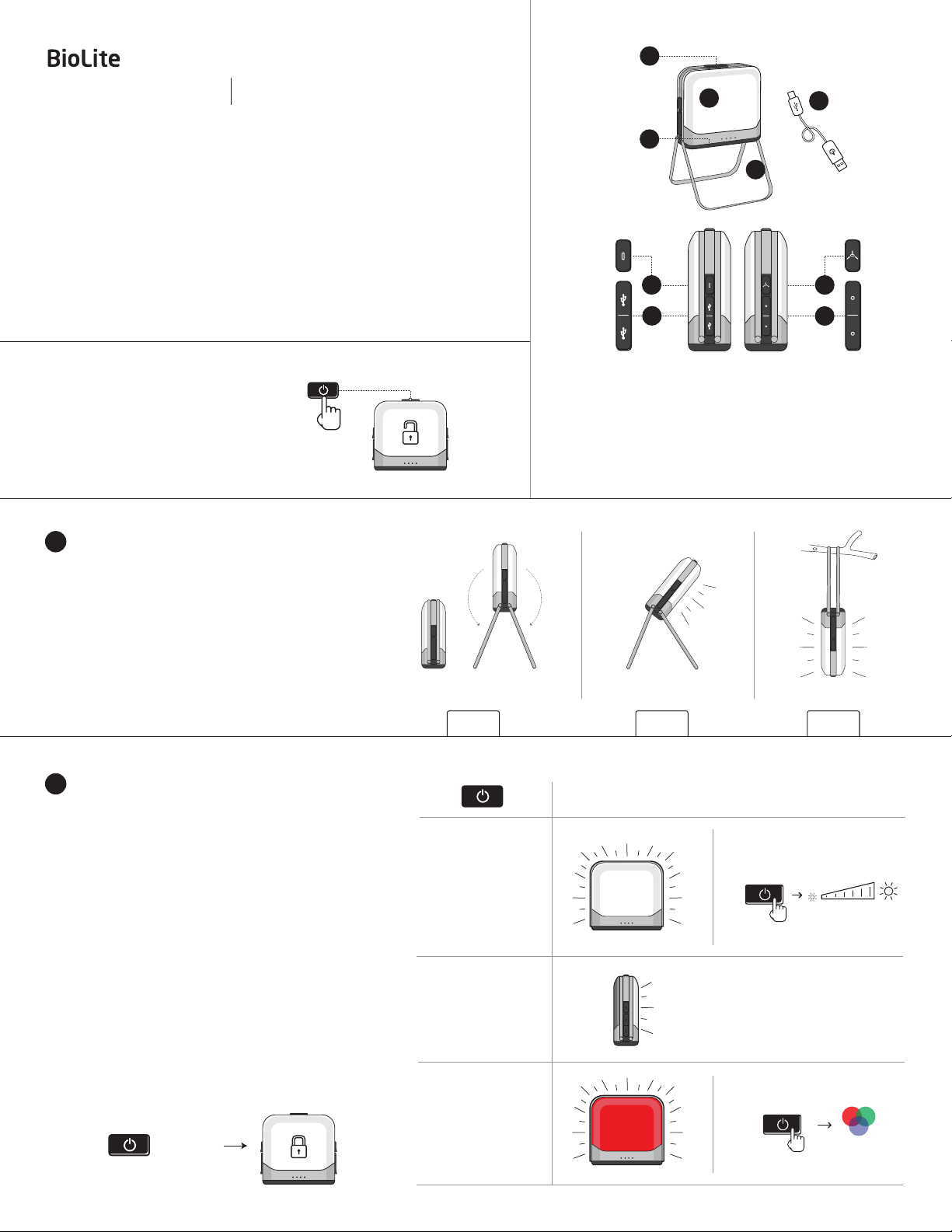
Components & Controls
1. Power Button
2. Lantern Panel
3.
7800/12000 mAh
Rechargeable Battery
4. Folding Legs
2
5
4
8
9
5. Micro USB Cord
6. Micro USB Charge In
7.
USB Charge Out Ports x2
8.
SiteLight Control Button
9.
SiteLight Ports x2
1.
Prior to first use, charge up your BaseLantern via micro
USB. The LED battery life indicator will blink left-to-right to
show BaseLantern is charging and the 4 LEDs will turn solid
when the battery is full (approx. 5 hours / 8 hours XL).
BaseLantern features stainless steel legs that raise
2.
your lantern and create a wider perimeter of light
You can also utilize the legs for angled task-lighting
(1.2)
or hanging the lantern like a lightbulb
LIGHTING
2
BaseLantern has 4 lighting modes that are accessible
through manual operation. To engage additional lighting
functionality, please download the BaseLantern Mobile App
(See Section 5)
BaseLantern Manual Settings
To change lighting modes, press power button in quick
succession (within 2 seconds) until you have reached
desired setting.
USAGE TIPS:
1.
When turning on, BaseLantern’s memory returns to
its last used lighting function. Simply press power
button in quick succession to reach desired setting.
2.
LOCK MODE: To avoid accidental activation of
BaseLantern in transit, hold the power button for 3
seconds while it is OFF. When you want to unlock it,
hold again for 3 seconds. It will flash once to
indicate it is out of Lock Mode.
Press 3 Seconds
and follow setup instructions.
(1.3)
(1.1)
.
.
1.1 1.2 1.3
Press
1X
White Lantern
1X
Activate Charging
Press & Hold
To Dim White Lantern
2X
Single Panel
3X
Red Night Mode
Press & Hold
To activate full color
spectrum control
RGB
Page 2
BASELANTERN + SITELIGHTS
3
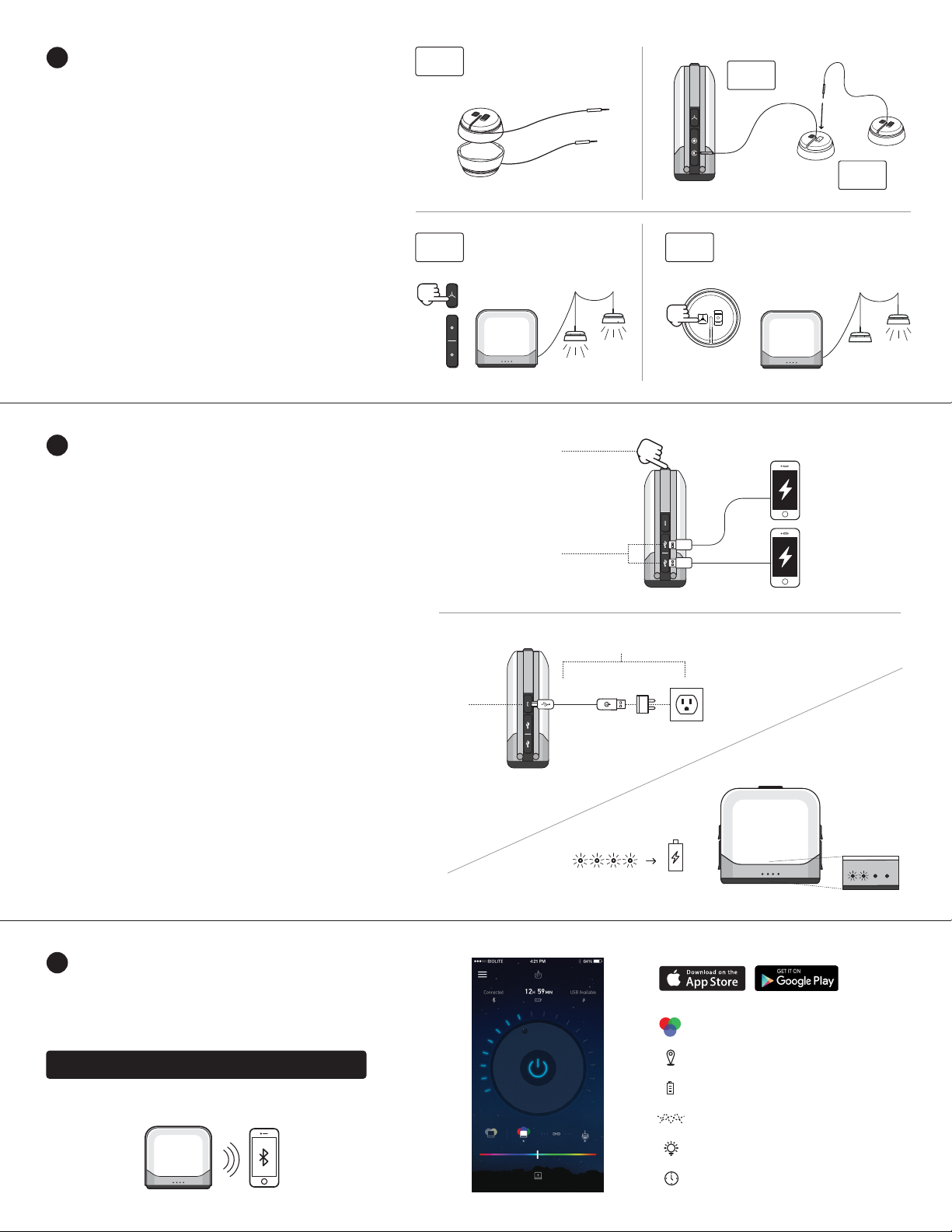
Note: BioLite SiteLights are sold separately from BaseLantern
To expand your outdoor lighting system with overhead lights,
connect daisy-chainable BioLite SiteLights to your
BaseLantern. Featuring 2 SiteLite ports, the BaseLantern
allows you set up string lighting in two directions at once:
1.
Uncouple SiteLights and extend SiteLight cord to desired
length. (3.1)
2.
Plug SiteLight into BaseLantern SiteLight port. (3.2)
3.
Daisy-chain desired network of SiteLights together by
plugging subsequent SiteLight jacks into preceding
SiteLight port. (3.3)
To turn on and dim SiteLights manually, press SiteLight
4.
button located next to SiteLight ports on BaseLantern.
(3.4) You may control each SiteLight individually via their
manual buttons located on top of each light. (3.5)
To turn on and dim SiteLights remotely, please refer to
5.
the BaseLantern mobile app.
CHARGING
4
Charge Out
BaseLantern’s internal li-ion battery may be used for both lighting
and external charging to other devices via USB.
3.1
3.4
3.2
3.3
3.5
4.2
1.
To charge devices, plug charging cord into USB charge-out
port located on side of BaseLantern. (4.1)
2.
If BaseLantern is in OFF setting, press power button once to
activate charging. (4.2) You may then turn light panels off to
conserve battery while keeping devices charging.
3.
BaseLantern features [2] USB charge-out ports allowing you to
charge two devices at once. Note: When charging two devices,
one port will charge at 2.1A while the second will charge at 1A.
Charge In
There are 4 LED lights on the side of your BaseLantern to
represent the power reserves of the internal battery. When your
battery is below 10%, the first LED on the left will begin flashing -
your BaseLantern has entered Low Power Mode and will stop
offering charge-out to external devices.
1.
Plug the included micro-USB cord into BaseLantern input
port. (4.3)
2.
Connect to power source such as wall outlet or car charger. (4.4)
3.
LED battery indicator lights will flash sequentially from left to
right to indicate battery is charging. (4.5)
4.
When battery is fully charged, all 4 LEDs will be lit.
BASELANTERN MOBILE APP
5
4.1
4.4
4.3
4.5
100%
The BaseLantern features a free mobile app for iOS and Android.
This app enables you to activate sleep timers, proximity activation,
color settings, battery life feedback, remote dimming and several
other functions all from your smartphone.
Download at:
Or visit the Apple or GooglePlay app store and search BaseLantern.
BioliteEnergy.com/baselantern-app
Full Color & Warmth Control
Automatic On/Off When In Range
Real Time Power Usage Stats
Lantern Effects
Turn On, Off & Dim
Alarm & Timers
Page 3
TROUBLESHOOTING
Problem Solution
BaseLantern cycles through lighting modes then shuts off.
BaseLantern blinks twice but will not turn on.
BaseLantern color mode is not on the correct color and I want to
control it manually.
BaseLantern not responding to Mobile App commands.
SiteLights are not working.
For videos, FAQs, and more please visit BioLiteEnergy.com/Instructions
WARRANTY
BioLite has a 1 year limited warranty. Should this product not function properly under
normal use within 1 year of purchase, contact BioLite or your local distributor for return
process information. BioLite alone will determine if the problem is due to a manufacturing
flaw. If so, BioLite will repair or replace the unit at its discretion and send it to you, free of
charge. This warranty does not cover any damage or malfunction arising from misuse,
improper maintenance, negligence, normal wear and tear, or accident. Never alter the
BaseLantern in any way or use with any part or accessory not expressly approved by
BioLite. This warranty applies only to the original purchaser and proof of purchase is
required. All implied warranties required under law are limited to one year. BioLite shall
not be liable for any consequential or incidental damages whatsoever. BioLite shall not be
held liable if the product or defect herein causes damage or failure of other equipment.
This warranty gives you specific legal rights. You may also have other rights that vary from
state to state. Some states do not allow the exclusion or limitation of incidental or
consequential damages, or limitation or exclusion of implied warranties, so the above
exclusions or limitations may not apply to you.
BaseLantern is in DEMO MODE. To deactivate, hold power button down on
BaseLantern for 10 seconds until BaseLantern blinks twice.
BaseLantern is in LOCK MODE. This is designed to prevent your light from
accidentally turning on while in transit. To unlock, hold power button down for 3
seconds until BaseLantern blinks twice.
Press and hold to cycle through colors and reach desired color.
Check your device settings to ensure Bluetooth is on and that BaseLantern has
been paired with your phone. Check top left corner of mobile app to verify that
system is connected.
Ensure that all SiteLights are firmly plugged into ports (often requires an extra
push) and individual SiteLites are all in manual ON position in order to be
controlled from mobile app.
This device complies with part 15 of the FCC Rules. Operation is subject to the following two
conditions: (1) This device may not cause harmful interference, and (2) this device must accept
any interference received, including interference that may cause undesired operation.
EU Compliance Statement - BioLite Inc. hereby declares that this device is in compliance with
the essential requirements and other relevant provisions of the R&TTE Directive. A copy of the
EU Declaration of Conformity is available online at bioliteenergy.com/euro-compliance.
BioLite’s EU representative is DSV Solutions Nederland BV, Tradeboulevard 4, Haven 528, 4761
RL Moerdijk, P.O. Box 6086, 4780 LX Moerdijk, The Netherlands.
CALIFORNIA PROPOSITION 65 WARNING: This product contains a chemical known to the State
of California to cause cancer and birth defects or other reproductive harm.
FCC ID: X8WBT600E
UN38.3
 Loading...