

Page 1
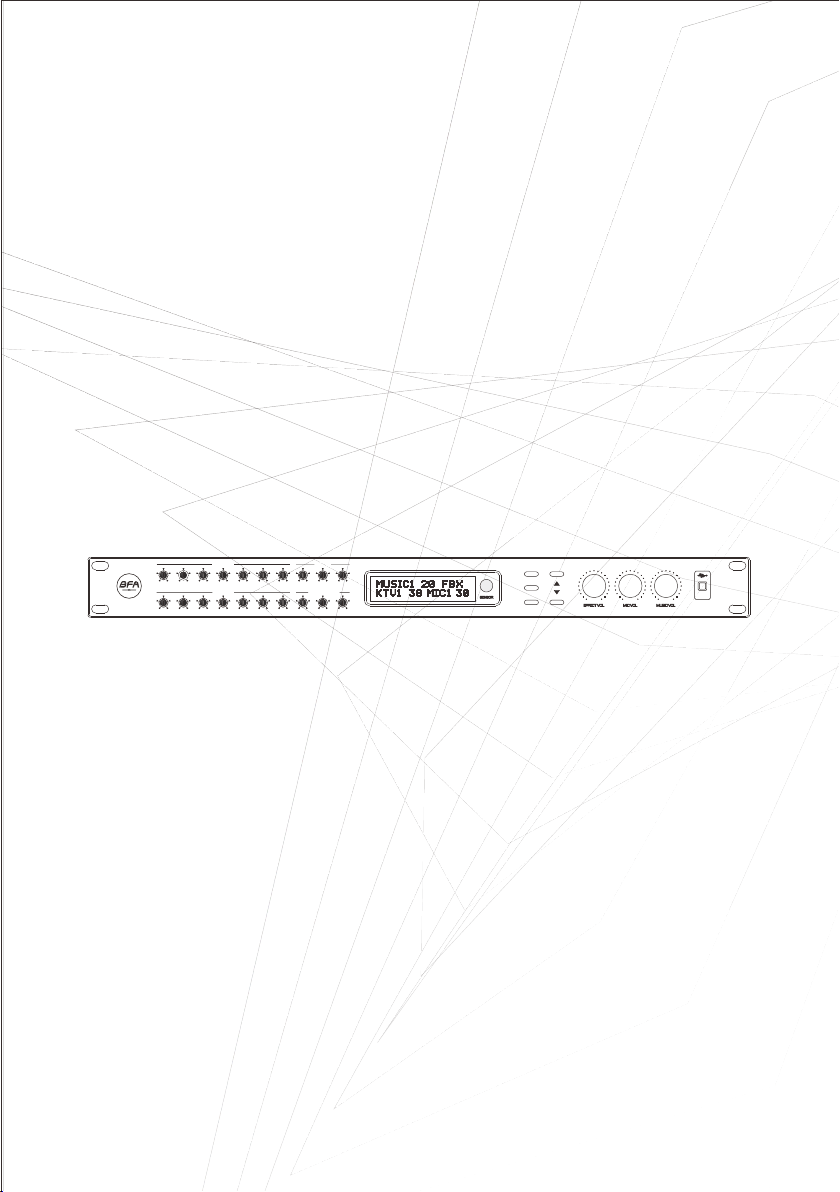
USER’S GUIDE
USER’S GUIDE
MUSIC EQ
57Hz 134Hz 400Hz 1KHz 2.5KHz 6.3KHz 16KHz VOL REP DLY
BFAudioP ro
MIC EQ
57Hz 134Hz 400H z 1KH z 2. 5KHz 6.3 KHz 1 0KHz VOL T IME DLY
ECHO A
ECHO B/RE VERB
K-306 N AUDIO & K TV HOME P RO
DIGITA L MICRO PHONE P ROCES SOR
EFF
FBX
C
M
I
EXCITER
MUSIC
Karaoke Professional Digital Audio Processor
Made in Taiw an
USB
Page 2
NOTE
Thank you for pur cha sin g the p rod ucts of the company!
Please read thi s ins tru cti on ma nual thoroughly before using t he ma chi ne, s o tha t
you can know how to u se th e dev ice c orr ectly. After you fin ish r ead ing t his m anual,
please keep it in a s afe p lac e for f utu re use.
In some countri es, t he sh ape o f the p ower plug and socket may differ f rom t he
shape of the syst em, b ut it i s the s ame a s the c onnection and operation o f thi s
device.
Please pay atte nti on to t he us er: This machine is an el ect ric al pr odu ct, nonprofessiona l mai n ten anc e tec hnicians, can not open the machi ne wi tho ut
authorizati on, s o as to a voi d the d anger of electric shock!
To make the unit work p rop erl y, do not block the heat dissip ati on ho les o n the
front and rear of t he me chi ne.
If there is a probl em, p lea se co nta ct your dealer or manufactuer.
CAUTION
RISK OF ELECTRIC SHOCK
DO NOT OPEN
NON-profes sionals cannot open the c over
WARNING
To reduce the risk of fire or electric shock
Do not expose this equipent to rain or moisture
It is recommend ed no t to us e the m ach ine for a long time. If you leave home o r
have lightnin g, pl eas e unp lug t he power of the machine to avoi d acc ide nts .
1
Page 3

Product Introduction
1: Th is prod uct u se s 24- bi t hig h- per fo rma nce DSP and AD /DA conv ersio n proce ssing , with
the ch aract erist ics of wi de freq uency b and, la rge dyn amic, a nd 48Hz s ampli ng fr eq uen cy o f
prof essio nal dig ital ka raoke p roces sor.
2: It h as the hi gh qu al ity s pe cia li zed s in gin g effect, c omple te audi o proce ssing f uncti on and
full d igita l param eter ba lance . Front p anel ca n be cont rolle d and a dj ust ed , LCD d is pla y
intu itive , faste r and mor e conve nient o perat ion.
3: Us ing 1 00 % pat ch t ech no log y, th e ef fe ct is m or e sta ble.
4: Wi th buil t-i n fe edb ac k sup pr ess io n fun ction a nd prof essio nal ant i-noi se tech nolog y,
huma n voice s are und istor ted and s ound pr essur e is high .
5: VO D song or der in g sys te m has t he i npu t po rt, a nd e qui pped wi th wire less in frare d remot e
cont rol.
6: Wi th USB co mpu te r rea l- tim e co nne ct ion c on tro l, inte rface o perat ion is mo re simp le and
intu itive .
7: Th is prod uct i s su ita bl e for h ig h-e nd n igh tclub s, KTV, HI room, s low roc king ba r room,
KTV, privat e clubs a nd mult i-fun ction al high -end en terta inm en t pla ce s.
2
Page 4
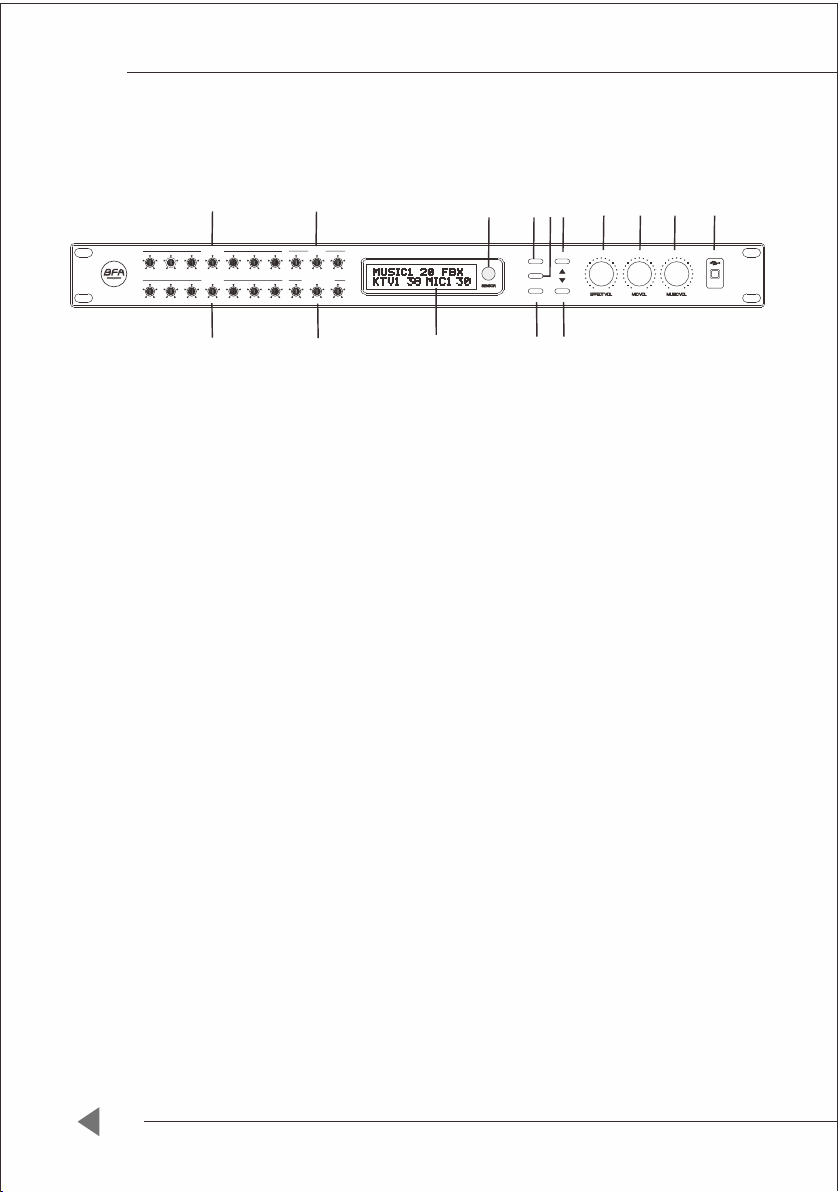
Fr o n t pa n el di a gra m
7
MUSIC EQ
57Hz 134H z 400H z 1K Hz 2.5KH z 6.3K Hz 16KHz VOL R EP DLY
BFAudio Pro
57Hz 134H z 400H z 1K Hz 2.5KH z 6.3K Hz 10KHz VOL TIME DLY
MIC EQ
9
1
Feed back su ppres sor swi tch
8
ECHO A
ECHO B/R EVERB
10
14
Made in Taiw an
USB
K-30 6N AUDI O & KTV HOM E PRO
DIGITA L MICRO PHONE P ROCES SOR
15
11 12 13
5
1
4
6
EFF
FBX
M
C
I
EXCITER
MUSIC
3
2
Tur n on or off fee dback s uppre ssor sw itch, l ong
pres s it to res tore fa ctory S ettin gs
2
Actu ated sw itch
Tur n on or off the Ac tuate d switc h, long p ress it t o
swit ch the so und sou rce inp ut: BGM /AUX/ SPD/B LUE
3
Musi c mode ke y
4
Effect m ode key Swit ch the effe ct mode , long pr ess it to s et the
Swit ch to mus ic mode , long pr ess it to s et boot m ode
,
maxi mum vol ume
5
Micr ophon e mode ke y Swit ch the mi croph one mod e, long p ress it t o set the
boot v olume
6
Infr ared te rmina l recei ver
7
Musi c Volume E quali zer Musi c param eters a djust ment
8
ECHO A
VOL
REP
DEL
9
Mic Vol ume Equ alize r
10
ECHO B / REV
VOL
TIME
DLY
EFFE CT Volume
11
MIC Vol ume
12
13
MUSI C Volume
USB po rt
14
LCD( Liqui d Cryst al Disp lay)
15
Remo te cont rol por t
Echo A parame ters ad justm ent
Echo v olume a djust ment
Echo R epeat
Echo p redel ay
Micr ophon e param eters a djust ment
Echo B a nd Reve rbera tion pa ramet ers adj ustme nt
Reve rbera tion vo lume ad justm ent
Reve rbera tion ti me
Reve rbera tion pr edela y
The effe ct volu me and su b-men u adjus tment
Micr ophon e volum e adjus tment
Musi c volum e adjus tment
Acce ss to com puter
3
Page 5
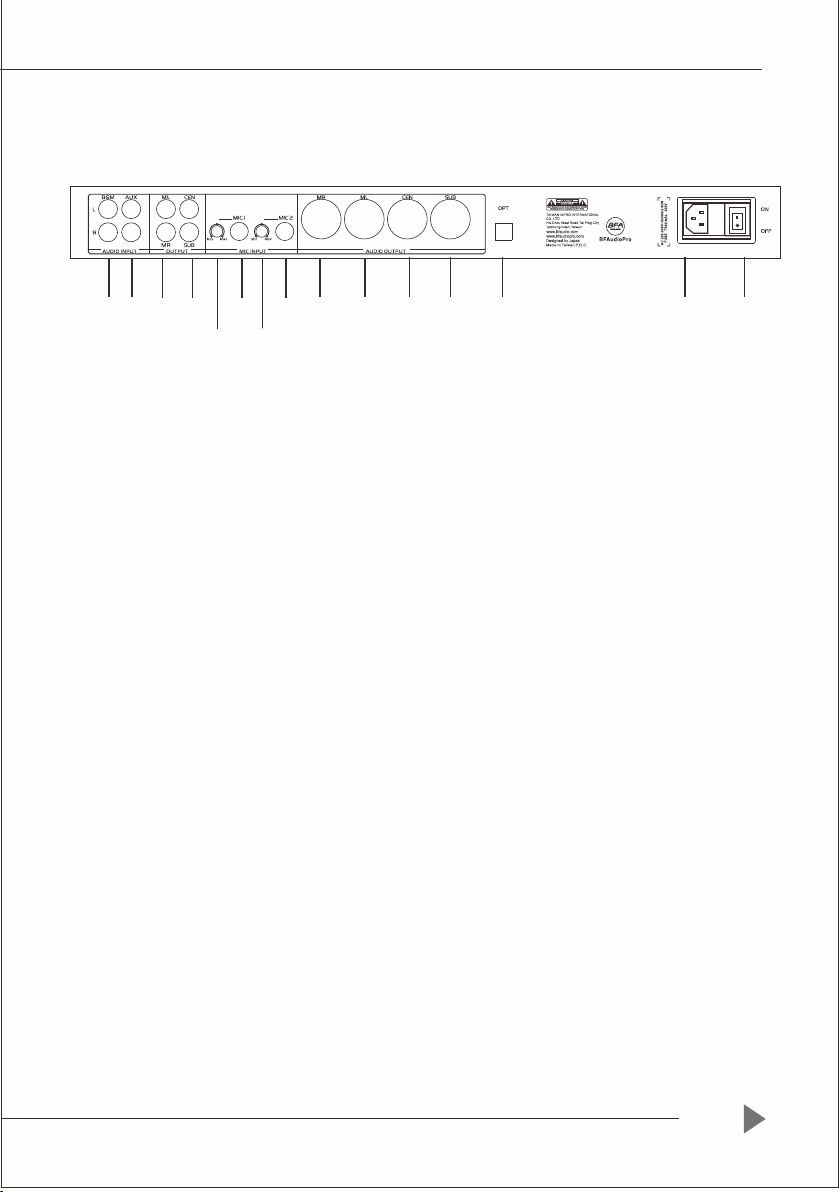
Ba c k p an e l dia g ram
1 2
3
4
5(1) 6(1)
5 6
7
8 9
10
11
K-306N HOME PRO
12
13
Musi c signa l input p ort
1
Musi c signa l input p ort
2
ML/M R
3
CEN/ SUB
4
MIC1 Input
5
MIC1 Vo lume ad justm ent
5(1)
MIC2 I nput MIC2 b alanc ed inpu t jack
6
MIC2 Vo lume ad justm ent
6(1)
Righ t chann el bala nced ou tput
7
Left c hanne l balan ced out put
8
Cent er chan nel bal anced o utput
9
SUB ch annel b alanc ed outp ut
10
Opti cal fib er inpu t port
11
Powe r input p ort
12
Powe r switc h
13
Soun d sourc e input B GM
Soun d sourc e input AU X
Main c hanne l left an d right o utput
Cent er chan nel and S UB chan nel out put
MIC1 b alanc ed inpu t jack
4
Page 6

1)Music part
01 MU S I C EQ /Q E Q 01:0.3 - - 15
02 MU S I C EQ /G E Q 01:- 1 2 dB- - + 12dB
03 MU S I C EQ /V E Q 01:20H z - -20 K H z
04 M u s i c equ i l ibr i u m a dju s t ment : P E Q EQ 1 -- E Q 7
05 M u s i c mod u l ati o n , a sce n d ing mo d u lat i o n , pri m a ry mo d u l ati o n ,
de s c e ndi n g m odu l a t ion
06 M u s i c out p u t lim i t i ng : OF F - 2V
07 M u s i c exc i t ati o n , s wit c h
Press the MUS IC mode button, then turn the pag e left or right to se le ct the parameters to
be adjusted, an d rotate the EFF button to adju st the parameters.
2) Microphone part
01 M i c r oph o n e equ a l i zat i o n adju s t men t : P E Q E Q 1 -- EQ 7
02 MI C L O W CUT : 2 0 Hz -- 20 0 H z
03 MI C F E ED BA C K :F B1、FB 2、F B 3
04 MI C E Q / QEQ 0 1:0 .3-- 1 5
05 MI C E Q / GEQ 0 1 :-12 d B --+ 1 2 dB
06 MI C E Q / VEQ 0 1:2 0Hz - - 2 0KH z
Pres s the MIC m ode but ton, th en turn t he page l eft or ri ght to se lect th e param eters t o
be adj usted , and rot ate the E FF butt on to adj ust the p arame ters.
5
Page 7

3) Effect part
01:E c h o a nd RE V E RB eq u a l iza t i on adj u s tme n t P EQ EQ 1 -- E Q 3
02:EC H O H IGH C U T :4 KHz -- 1 8 K Hz
03:EC H O L OW CU T :2 0 Hz -- 10 0 1 Hz
04:EC H O P RE DE L A Y :0.0m s - - 2 0.0 m s
05:EC H O T IME :0 0 m s -- 400 m s
06:EC H O R EPE A T : 00% -- 1 0 0 %
07:RE V E RB Mo d e : REV E R B ,EF F E CT
08:RE V E RB DE L A Y TIME :0 0 m s -- 10 0 m s
09:RE V E RB TI M E :0 .0s - 10 . 0 s
Press the EFFECT mode but to n, then tur n the page left or rig ht to select the parameter s to
be ad justed, and rotate the EFF button to adjust the pa rameters.
4) CENTER & SUB part
01:Center Sub equalization adjustment: PEQ EQ1- EQ3(Center EQ1-3,SUB EQ1-3)
02:MU S I C TO CE N :0 0 dB-- 8 0 dB
03:MU S I C TO CE N V o lum e :0 0 d B-- 8 0 dB
04:EF F E CT TO C E N :O pen / c l ose
05:SU B H I GH CU T :2 0 Hz-- 4 0 0Hz
06:SU B L O W CUT :2 0 H z--4 0 0 Hz
07:SU B P H ASE R :0°- - 180°
08 SU B V O L :00d B - -80d B
Press the MUSI C mode bu tt on, then turn the page left or right to select the paramet ers to
be adjusted, and rotate the EFF bu tton to adjust the parameters.
6
Page 8

5) Setting part
01:SE T M I C STA R T V OL :0dB - 8 0 d B
02:SE T M I C MAX V O L :0 dB - 80d B
03:SE T M U S ATR T V O L :0dB - 80 d B
04:SE T M U M AX VO L :0 d B - 80dB
05:SE T E F F SAT R T V OL :0dB - 8 0 d B
06:SE T E F F MAX V O L :0 dB - 80d B
07:S E T m u sic m o d e/m i c r oph o n e mode / e ffe c t m ode in b o o t mod e
Long p ress th e MUS-C b utton o n the pan el to ent er the st art-u p mode in terfa ce of set ting
MUSI C/mic ropho ne/effe ct. Then pr ess the c orres pondi ng musi c mod e/ mic ro pho ne m ode /
effect m ode but ton to se t the boo t mode.
Long p ress th e EFF-C b utton o n the pan el to ent er the in terfa ce of set ting th e maxim um
volu me of mus ic/mi croph one/e ff ect, an d then ro tate th e corre spond ing vol ume e nc ode r to
set th e maxim um volu me
Long p ress th e MIC-C b utton o n the pan el to ent er the in terfa ce of set ting th e maxim um
volu me of mus ic/mi croph one/e ff ect, an d then ro tate th e corre spond ing vol ume e nc ode r to
set th e maxim um volu me
Long p ress th e EXCIT ER butt on on the p anel to e nter th e inter face fo r chang ing aud io
sour ce inpu t. In thi s inter face, p ress th e EXCIT ER butt on repe atedl y to chan ge audi o sourc e
inpu t.
6) Restore factory Settings
Unde r the nor mal wor king st ate of th e front -stag e effecto r, long pr ess FBX b utton , rotat e the
effect v olume e ncode r, and whe n the scr een dis plays “ y”, pre ss FBX bu tton ag ain t o re sto re
the fa ctory S ettin gs.Wh en “n” is d ispla yed on th e scree n, exit a nd rest ore the f actor y Setti ngs.
7) Screen lock
Pres s LOCK+ Music +EX on th e remot e contr ol to loc k the scr een. Pr ess LOC K+Mus ic+EX t o
unlo ck the sc reen.
Note : Th ere is on ly effect v olume , micro phone v olume a nd musi c volum e can b e ad jus te d
when l ocked .
8) Auxiliary functions (connecting software)
When t he mous e and key board a re inac tive, t he curr ent effec t param eters w ill b e au tom at ica ll y
back ed up to th e softw are ins talla tion di recto ry (DATA) folde r.
Note : autom atic ba ckup ca n be set fo r 1-5 min utes. I f it is not m oved fo r a long ti me, DATA
back up will b e overw ritte n until t he last s tate.
7
Page 9
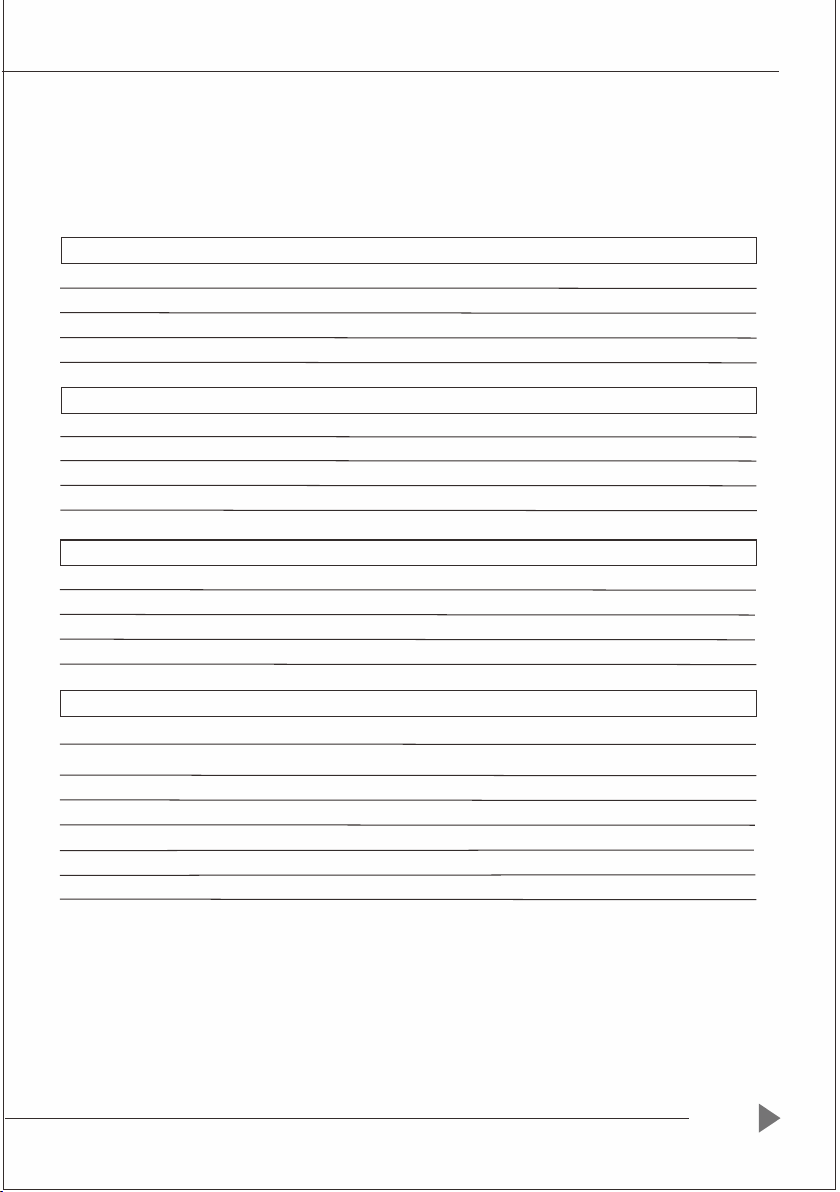
In p u t L eve l
Fre q u enc y r e spon s e
THD
SNR
PEQ
In p u t L eve l
Fre q u enc y r e spon s e
THD
SNR
PEQ
In p u t L eve l
Fre q u enc y r e spon s e
THD
SNR
PEQ
In p u t L eve l
Fre q u enc y r e spon s e
SNR
US B i n t erf a c e
Po w e r s upp l y
Fu s e
Po w e r c ons u m pti o n
Te c h ni c al in d ica t ors
MUS I C P art
77 5 m V rms
20 H z - -20 K H z
<0.1
>80d B
1-- 7 E Q
MIC P a r t(m i c 1-3 in p u t)
20 H z - -20 K H z
<0.1
>80d B ( sho o t -th r o u gh )
1-- 7 E Q
Cen t e r Par t
77 5 m V rms
20 H z - -20 K H z
<0.0 0 3
>80d B
1-3 E Q
SUB P a r t
77 5 m V rms
20 H z - -20 0 H z
>80d B
AC 2 0 0 V-- - 2 40V / 5 0 Hz
T1 A / 2 50V A C
10 W
8
Page 10

Karaoke Professional Digital Audio Processor
 Loading...