

Page 1
User manual
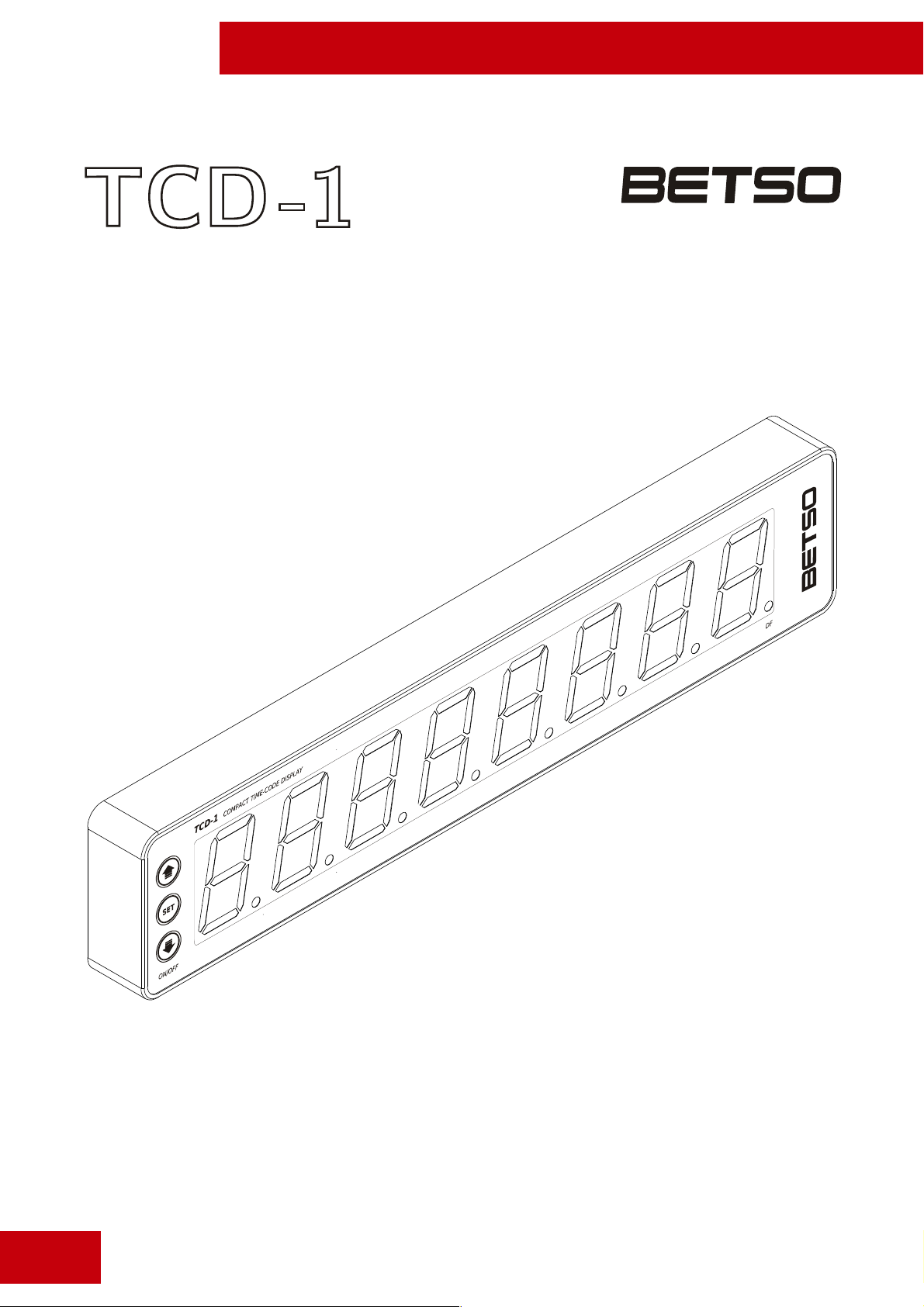
BETSO TCD-1
1“ Compact Time Code display
1
© Copyright BETSO ELECTRONICS Ltd.
Page 2

User manual
BETSO TCD-1
Contents
1. Product description................................................................................................ 3
2. Top features.......................................................................................................... 3
3. Control elements.................................................................................................... 4
4. Charging of accumulators....................................................................................... 5
5. External power.......................................................................................................5
6. Turning on............................................................................................................ 6
7. Control of the menu............................................................................................... 6
8. Settings of the display TCD-1................................................................................. 6
8.1 Display settings – settings of the displayed information........................................6
8.2 Power saving functions – Power efficient functions..............................................7
8.3 TC hold – settings of time for displaying of time code (TC)................................8
8.4 Full brightness – function of full brightness for zeroth frames...............................8
8.5 Auto off – automatic turning on / off................................................................9
8.6 Battery charging – setting of automatic charging after insertion of adapter...........9
9. Control of display.................................................................................................10
9.1 Change of brightness of the display..................................................................10
9.2 Show of TC format........................................................................................10
9.3 Show of accumulators state.............................................................................10
9.4 Indication of drop frame format.......................................................................11
9.5 Indication of user bits...................................................................................... 11
10. Recommended accessories................................................................................... 12
11. Troubleshooting.................................................................................................12
12. Technical specifications.......................................................................................13
13. Schematics of connectors.................................................................................... 13
14. EC Declaration of conformity..............................................................................14
Used symbols
Indicates text that has only informative character. If you overlook this
information, it can't result in product damage by it's mishandling.
Indicates text that has important instruction character. If you overlook this
information, it may result in product damage.
© Copyright BETSO ELECTRONICS Ltd.
2
Page 3

User manual
BETSO TCD-1
Thank you that you have purchased the product BETSO!
Please pay sufficient attention to the following user manual of your new product
BETSO. Following these instructions, you will avoid the possible damages of your new
device and at the same time, they will be presented to you all the available features that
allow you to take advantage of the potential of the product.
For the latest informations about our products BETSO please contact your local
distributor or visit our website http://www.betso.eu.
1. Product description
The Time Code Display BETSO TCD-1 is a small compact, self powered solution
for displaying time code. It supports all frame rates and detects frame rate automatically.
Menu-based settings allow quick setup of brightness, internal battery and external source
voltage readout (for simply check of cart or bag power). Besides other features, we have
also implemented a special power saving modes.
BETSO TCD-1 is made from lightweight aluminum alloy by precise CNC milling
and laser cutting. With its small dimensions and light weight it is ideal for portable use.
2. Top features
• precise mechanic construction from aluminium alloy (CNC, laser technology)
• intuitive control with the possibility of quick settings using menu
• alternative displaying of time code / user bits
• Power Saving functions enabling saving of the energy of the accumulators by
showing only each 2nd, 5th or zeroth frames, alternatively by showing of time code
only on command (On Push function - pressing of button)
• TC hold function for leaving last valid time code on display (after failure or stop of
input time code signal)
• Full brightness function for showing of each zeroth frames with maximum brightness
of display
• Automatic turning on / off function depending on whether valid TC is received or not
• possibility of charging automatically after adapter insertion, alternatively after
confirmation (for prevention of external source energy consumption by unrequested
charging)
• 6 levels of display brightness settings
3
© Copyright BETSO ELECTRONICS Ltd.
Page 4
User manual
BETSO TCD-1
• supports 23.976 fps - 30 fps drop frame and non drop frame SMPTE TC formats
(includes up to two times speeded up TC for use in video clips etc.)
• low power consumption allowing operation time up to 1000 hours in “Power Saving
– 00 Frame” mode and up to 60 hours in basic mode (operation time is strongly
dependent on display brightness level)
• variable powering (integrated Li-Po accumulators or external 9-16V DC power
source)
• advanced monitoring of accumulators energy level with the signalization of low level
3. Control elements
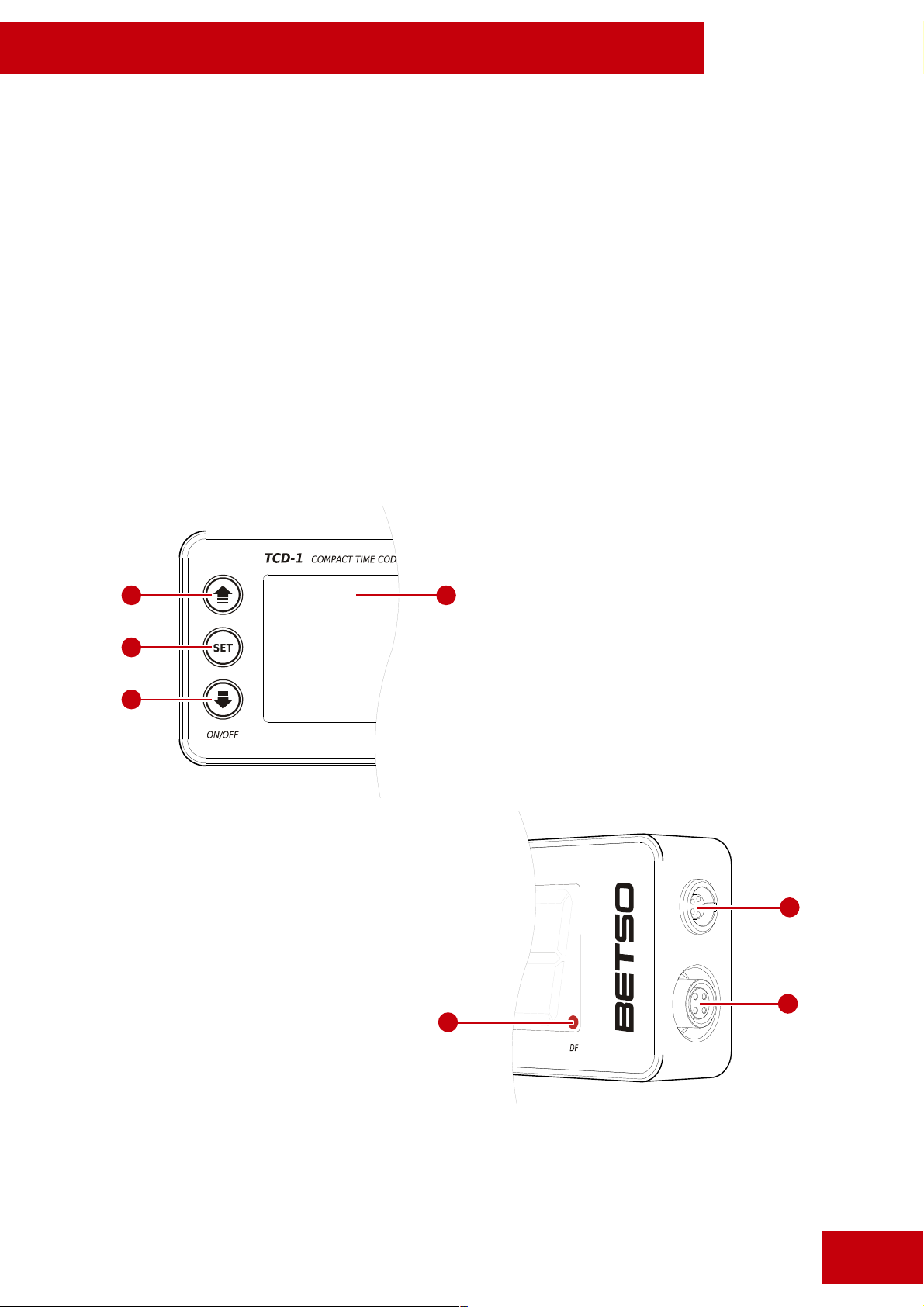
2
3
4
5. Input connector LEMO
5-pin for TC connection
6. Input connector Hirose 4-
pin for external power
source connection
7. Indication of drop frame
format of incoming TC
1. Display
2. Button „UP“
1
3. Button „SET“
4. Button „DOWN“
5
6
7
© Copyright BETSO ELECTRONICS Ltd.
4
Page 5
User manual
BETSO TCD-1
4. Charging of accumulators
Before first use of display BETSO TCD-1 charge inbuilt accumulators on
maximum.
For charging of accumulators insert charging adapter into the connector (see
chapter 3). When the “Battery charging” function is set on the “On Insert” option (see
chapter 8.6) the charging will be started automatically after the adapter insertion. When
the same function is set on the “User Select” option it is necessary to confirm charging by
button SET (option “b. Ch. on”).
If the goal of adapter insertion is only to power the display TCD-1 (not to charge
the inbuilt accumulators), we can set in the menu the function “Battery charging” on
option “User Select” and after adapter insertion we turn off the charging by the option “b.
Ch. oFF”.
Warning: Never connect the power adapter with the voltage higher than 16V. It
could lead to the serious damage of the device.
Warning: Never connect external power with wrong polarity. It would caused
device failure.
When you connect external power and display will not show it immediately,
remove it as soon as possible and check polarity of external power source.
5. External power
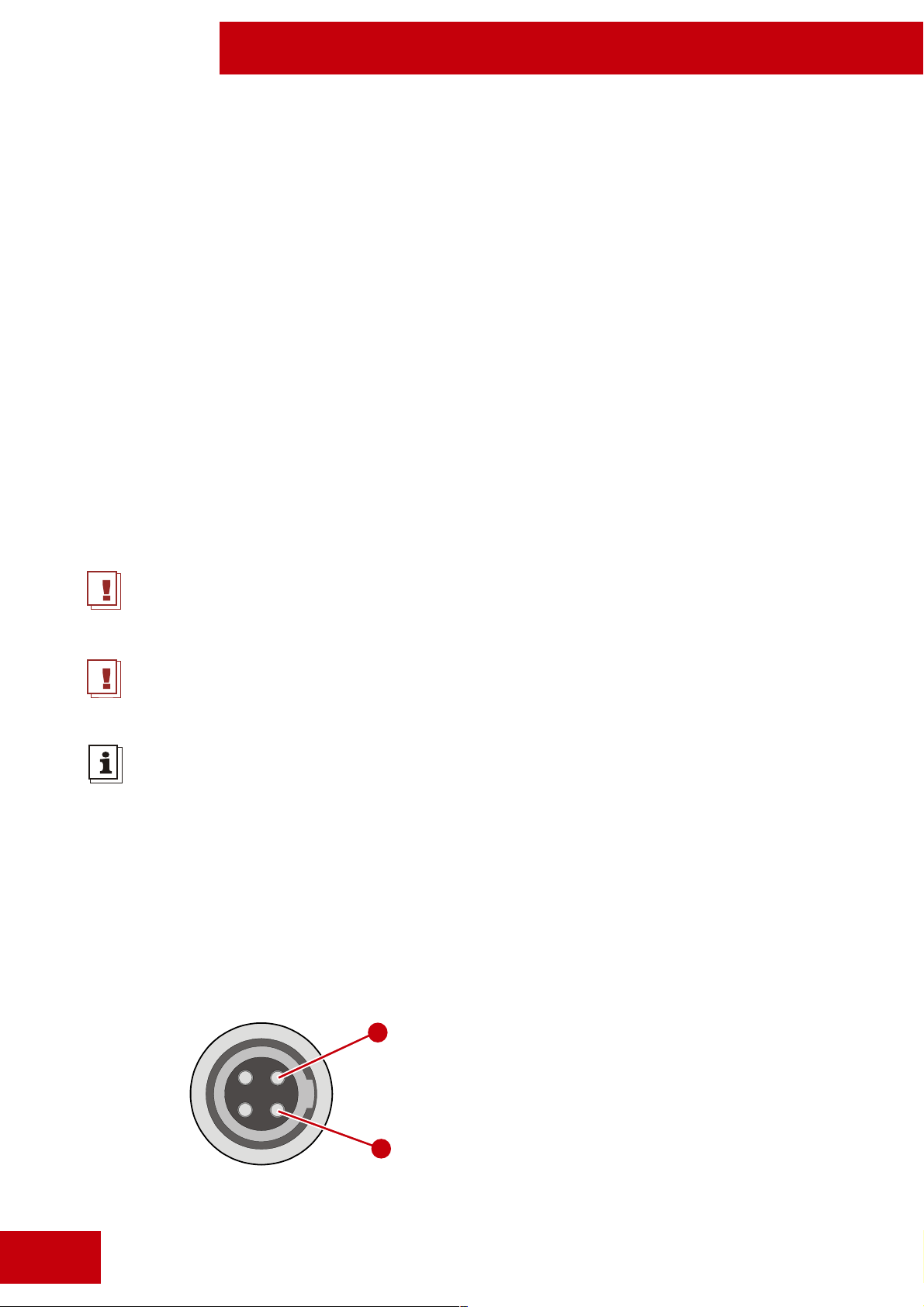
It is possible to lead the external power 6-16V DC by a special cable into input
connector Hirose 4-pin, which is connected like indicated bellow in the picture.
4
1. GND
4. 9-16V DC
1
5
© Copyright BETSO ELECTRONICS Ltd.
Page 6
BETSO TCD-1
Warning: Never connect the power adapter with the voltage higher than 16V. It
could lead to the serious damage of the device.
Warning: Never connect external power with wrong polarity. It would caused
device failure.
When you connect external power and display will not show it immediately,
remove it as soon as possible and check polarity of external power source.
6. Turning on
User manual
Turning on - ON long press of DOWN button
Turning off - OFF long press of DOWN button
After the turning the display TCD-1 on it will show a welcome text "BETSO".
After that the dispaly is immediately ready for use according to the last saved
settings.
7. Control of the menu
Start menu long press of SET button
End menu long press of SET button in the menu
Move up short press of UP button
Move down short press of DOWN button
Enter setting short press of SET button
Change of parameter short press of UP / DOWN button
Save changes short press of SET button
After the closing of the menu all the settings will be automatically saved.
© Copyright BETSO ELECTRONICS Ltd.
6
Page 7

User manual
BETSO TCD-1
8. Settings of the display TCD-1
Control of the menu is described in the previous chapter 7 Control of the menu.
8.1 Display settings – settings of the displayed information
menu / Display settings
Thanks to this function we can set, whether the display should display time code (TC),
user bits (UB), or whether it should periodically switch between these two informations.
TC display will all the time show time code (TC)
UB display will all the time show user bits (UB)
TC-UB display will show during 10 frames time code (TC) and during next 10
frames user bits (UB) and it will all the time periodically switch
between these two informations
8.2 Power saving functions – Power saving functions
menu / Power saving functions
Thanks to this function we can set the way in which the incoming time code (TC)
is displayed, or more precisely whether it should be displayed continually, whether it should
be displayed only each umpteenth frame, or whether the time code (TC) should be
displayed only on command (after pressing of button).
Off the time code is displayed continually
On Push the time code is displayed continually, but only on command (after pressing
of UP or DOWN button. After the pressing of one of the buttons, the time
code is displayed only during the time set in the menu in “TC hold” function
(see chapter 8.3)
00 Fr. it is displayed only each zeroth frame
prolonged operational time: 24-30 times than with Off settings
2 of 10 it is displayed only each fifth frame
prolonged operational time: 5 times than with Off settings
5 of 10 it is displayed only each second frame
prolonged operational time: 2 times than with Off settings
7
© Copyright BETSO ELECTRONICS Ltd.
Page 8

User manual
BETSO TCD-1
This function makes prolonged operational time on inbuilt accumulators possible.
8.3 TC hold – settings of time for displaying of time code (TC)
menu / TC hold
The time set up in this function affects two functions of BETSO TCD-1. First
case where this time is applied is the situation when on the input it stops to receive valid
time code (TC). In this situation it will be shown the last valid time code before this
signal loss during the time set as TC Hold.
Second case is the situation which was already mentioned in the chapter 8.2, when
the “On Push” function is set up and time code is shown only after pressing of one of the
buttons UP or DOWN. In this case it will be shown the time code after the pressing of
one of the buttons continually during the time set as TC Hold.
0 sec function TC hold is turned off
10 sec function TC hold is set on 10 seconds
30 sec function TC hold is set on 30 seconds
60 sec function TC hold is set on 60 seconds
300 sec function TC hold is set on 300 seconds
600 sec function TC hold is set on 600 seconds
8.4 Full brightness – function of full brightness for zeroth frames
menu / Full brightness
This function, when turned on, shows each zeroth frame of receiving time code
(TC) with maximum brightness of the display. Other frames are shown with the brightness
actually set on the display.
on function Full brightness is turned on
off function Full brightness is turned off
© Copyright BETSO ELECTRONICS Ltd.
8
Page 9
User manual
BETSO TCD-1
Allows you to save the energy of the accumulators by the setting the display
brightness to a lower value than would be necessary for a proper camera record
under the actual light conditions. Thanks to this feature all zeroth frames
displayed by BETSO TCD-1 will be always very well readable on the record made
by camera under any light conditions.
8.5 Auto off – automatic turning on / off
menu / Auto off
This function allows automatically turn on and turn off the display BETSO TCD-1
according to whether there is actually receiving valid time code (TC) on the input or not.
If the display is turned off and function “Auto off” is turned on, when we connect valid
time code (TC) on the input of the display BETSO TCD-1, the display will turn on itself.
Contrarily if the display is turned on and we disconnect time code signal from the input,
the display will turn off itself after 5 seconds.
on function of automatic turn on / off is turned on
off function of automatic turn on / off is turned off
Allows to save the inbuilt accumulators during the situations, when the time code
(TC) is often turned on and off.
8.6 Battery charging – setting of automatic charging after insertion of adapter
menu / Battery charging
This function allows set up, whether it should be started the charging of the
accumulators after the insertion of external adapter with a proper voltage level for
charging (9-16V DC), or whether it should be confirmed by user before start of the
charging.
On insert inbuilt accumulators will start to charge after the insertion of external
adapter
User select inbuilt accumulators start to charge when the external adapter is
inserted and when the charging is confirmed by user (“b. Ch. on.” by
button SET)
9
© Copyright BETSO ELECTRONICS Ltd.
Page 10
BETSO TCD-1
If the goal of adapter insertion is only to power the display TCD-1 (not to charge
the inbuilt accumulators), we can set in the menu the function “Battery charging”
on option “User Select” and after adapter insertion we turn off the charging by
the option “b. Ch. oFF”.
9. Control of the display
change of brightness short press of UP / DOWN button
show of TC format long press of UP button
show of accumulators state short pres of SET button
User manual
9.1 Change of brightness of the display
Display BETSO TCD-1 allows adapt brightness of the display to the actual light
conditions of the environment where it is being used. It offers six levels of brightness. The
last setting is always saved.
Function “Full brightness” allows use lower brightness, than would be required by
actual light conditions and save the inbuilt accumulators (see chapter 8.4).
9.2 Show of TC format
This function shows the format of incoming TC signal on the display. Display is
able to recognize all frame rates including speeded up or slowed. (speeded up and slowed
multiplied by 0.5 or 2)
When you push UP button for a while and display show „BUSY“, please wait few
seconds and try it again. Display is in process of checking incomming TC frame
rate.
© Copyright BETSO ELECTRONICS Ltd.
10
Page 11
User manual
BETSO TCD-1
9.3 Show of accumulators state
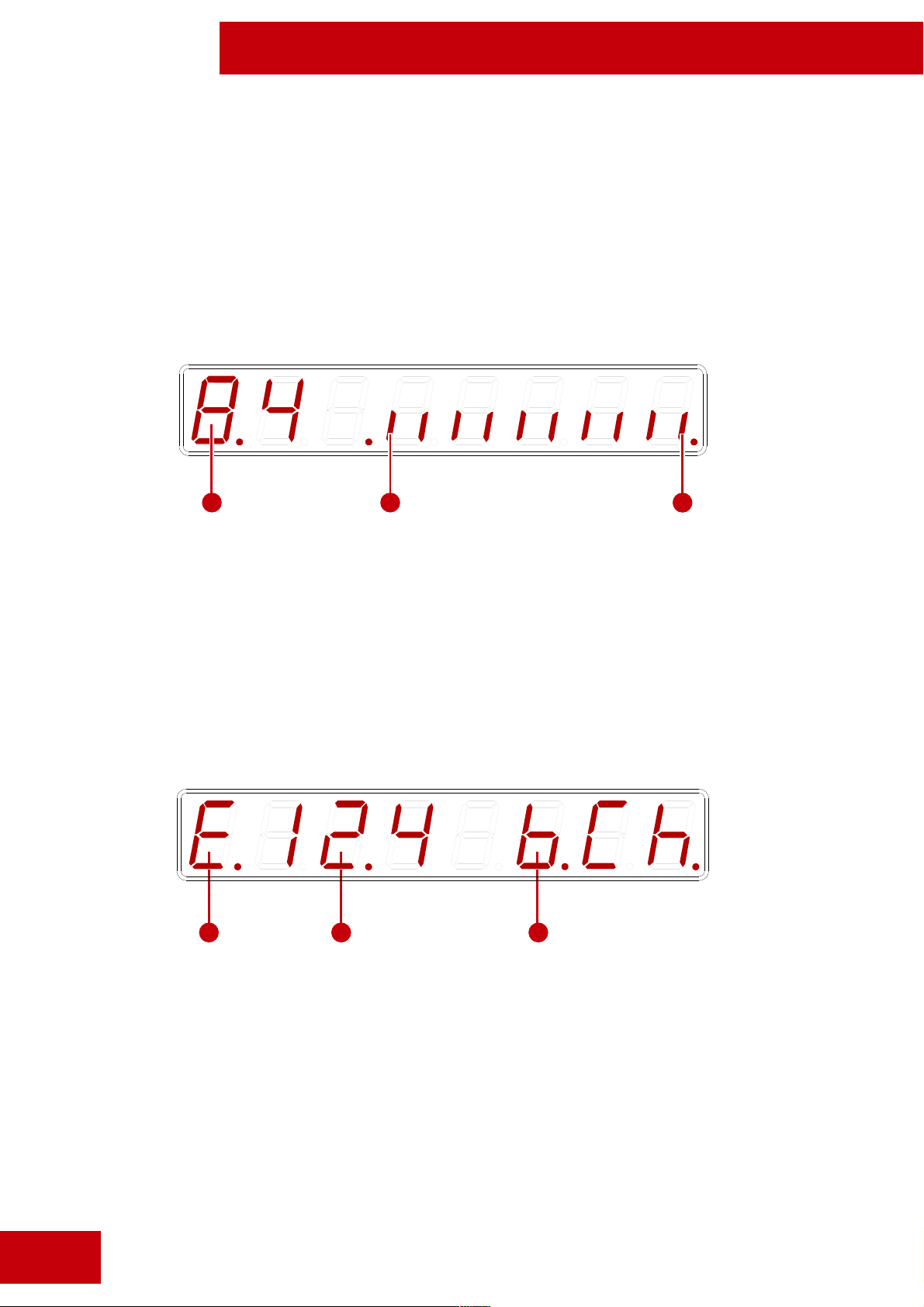
Shows bar graph of the state of the accumulators. If the accumulators are almost
discharged and the last segment of bar graph is already flashing, charge the accumulators
immediately. Display will show the state of the accumulators in this way (without adapter)
1
2 3
1. Voltage of the accumulators in volts
2. Indicator of lower voltage – indicates completely discharged accumulators
3. Indicator of higher voltage – indicates completely charged accumulators
In the case of adapter connected and charging of the accumulators, it will be displayed:
1 2 3
11
1. Indicate proper voltage level of external adapter
2. Voltage of external power source in volts
3. Indicator of charging in progress (in the case, that accumulators are not being
charged or that are already charged, it will be shown only the voltage of external
power source).
© Copyright BETSO ELECTRONICS Ltd.
Page 12

User manual
BETSO TCD-1
9.4 Indication of drop frame format
Drop frame format is indicated by the last decimal point on the display BETSO
TCD-1 in the way that the decimal point shines, when the incoming time code (TC) has
drop frame format.
9.5 Indication of user bits
Displaying of user bits is indicated by 4 decimal points on the display BETSO
TCD-1 in the way, that decimal points shine, when there are actually displayed user bits.
10. Recommended accessories
Optional accessories include various cables for the connection of the TC signal and
the external power supply.
For the latest information about our products BETSO please contact your local
distributor or visit our websites http://www.betso.eu
11. Troubleshooting
It is impossible to turn on the display
Probably means, that accumulators are discharged. For charging of the
accumulators connect adapter of external power source and turn on the charging. When
the accumulators are being charged it is already possible to use the display normally.
Display doesn't respond to the control
For reseting of the display press all three buttons and hold them until “reset”
appears on the display. In this way the display is reseted.
© Copyright BETSO ELECTRONICS Ltd.
12
Page 13

User manual
BETSO TCD-1
Safety instruction
Never open an electrical device! All reparations must be performed by an
authorized service center. In the case of opening of the device away from the
authorized service center, you will automatically loose the warranty of the device.
Do not use the electrical device in the places with high humidity, especially take
care to protect the device against direct contact with water.
To clean the device, use a dampened piece of cloth. Never use any chemical
solvents!
12. Technical specifications
Dimensions (w x h x d) 215 x 44.5 x 21 mm
Weight 283g (incl. accumulators)
Construction anodized aluminium alloy
TC signal (SMPTE) 23,97 fps - 30 fps (incl. up to 2x speeded up signal)
Input level 0,2 - 10 V (p-p)
Power supply Inbuilt Li-Po accumulators / external 9-16V DC
Consumption approx. 1 mA to 550mA (in dependence on the
brightness and setting of the Power Saving functions)
approx. 50μA (when the display is turned off)
Operating time up to 60 h (with lower brightness of the display)
13
© Copyright BETSO ELECTRONICS Ltd.
Page 14
User manual
BETSO TCD-1
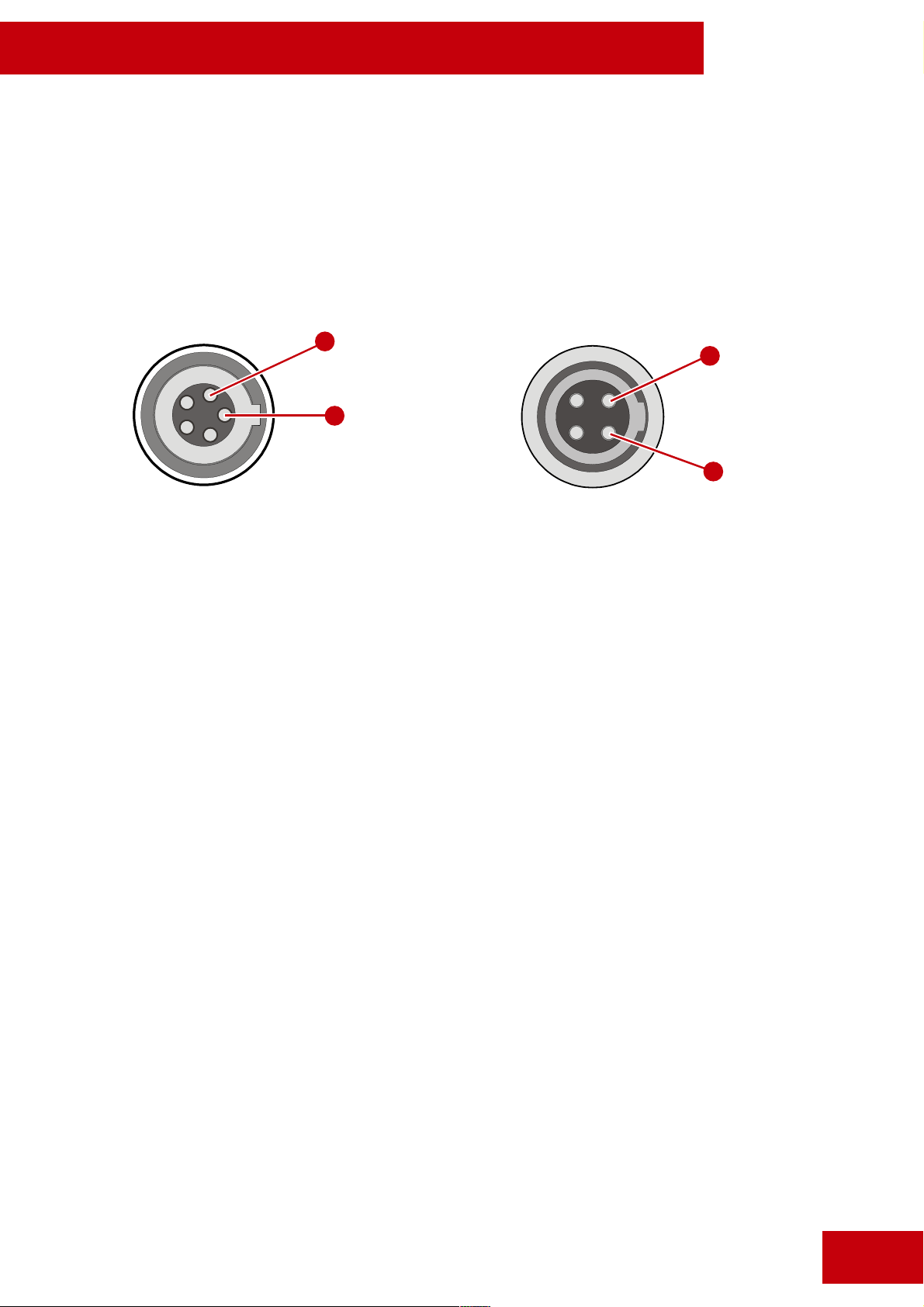
13. Connectors wiring
Connector for connection of TC Connector for connection of external power
LEMO EGG.0B.305.CLL Hirose HR10A-7R-4S(73)
2
1
1. GND 1. GND
2. SMPTE TC input signal 4. External power 9-16V DC
4
1
© Copyright BETSO ELECTRONICS Ltd.
14
Page 15
User manual
BETSO TCD-1
14. EC Declaration of conformity
BETSO ELECTRONICS s.r.o.
Elisky Premyslovny 1335, 156 00 Praha 5 - Zbraslav
Reg. number: 28955706
declares that this device
BETSO TCD-1
specifications: Compact Time Code Display with own power supply
conform to the essential requirements of the R&TTE Directive 1999/5/EC. To demonstrate
compliance with these requirements, the following standards were consulted:
EN 301 489 (Electromagnetic Compatibility)
EN 60065/2002 (Safety of Electrical Equipment)
Conformity assessed via Annex III. using a Technical Construction and Results of measurements.
In Prague 31. 5. 2011
Ing. Jan Zastera
15
general manager
E-mail: [email protected]
© Copyright BETSO ELECTRONICS Ltd.
 Loading...