

Page 1
User Manual
TuneTalk™ Stereo for iPod® video
Introduction
En
En
Fr
De
Es
It
Page 2
Introduction
Congratulations and thank you for purchasing this innovative product from Belkin mobility. Please
review this User Manual carefully in order to get the best performance from your TuneTalk Stereo
for iPod video.
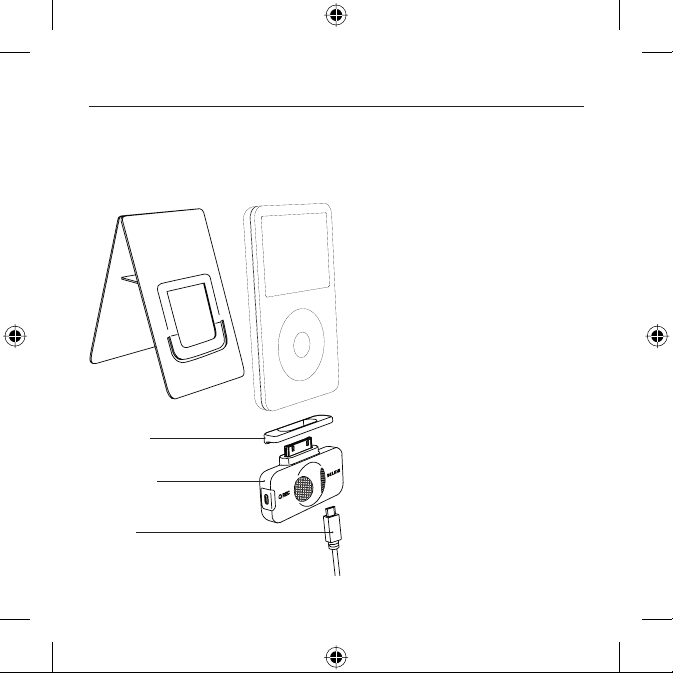
Packag e Includes :
Compact
iPod Stand
Plastic Spacer
TuneTalk Stereo for iPod
video
USB Cable
Introduction | 01
iPod not included
Page 3

Using the TuneTalk Stereo
To select the recording quality:
From the iPod menu, sel ect “Extras > Voice Memos > Qualit y”. Pressing the “S elect” but ton will
toggle b etween Low (22.05kHz, mo no) or High (44.1kHz, stereo).
To record:
1. Connec t the TuneTalk to the b ottom of the iPod vi deo. The iPod vide o will launch the
“Record” function when you do this. With the “Record” option highlighted, press “Play/
Pause” or p ress the “Selec t” button to be gin recording. To paus e recording, press “Play/
Pause” ag ain or highlight “Pause” and t hen press the “Sel ect” butto n on the iPod video.
2. During recording, there are t wo options: “Pause” and “ Stop and Save”. To end a recording,
either press the “Menu” but ton or highlight the “Stop and Save” option, and then p ress the
“Select” bu tton. This saves yo ur recording and lists it by date and time re corded.
NOTE: After stopping a re cording, the reco rding LED remains on until the recording is s aved to
the iPod.
3. To begin another recording, go to the top of the “ Voice Memos” menu an d select “Record
Now”; or, from the iPod m enu, select “Extra s > Voice M emos > Record Now”. Or simply press
the “Quick Memo” but ton on the TuneTalk Stereo.
NOTE: For personal memos or notes, hold the iPod v ideo with the TuneTalk Stereo attached
six to 18 inches f rom your mouth and speak in a nor mal tone. Holdin g the device too close or
speaki ng too loudly may de grade the qualit y of your recordin g.
En
Using the TuneTalk Stereo
| 02
Page 4

Using the TuneTalk Stereo
3.5mm Au xiliary Ste reo Input
The auxi liary input can be used wit h any line-level input, such as amplified microphon es or
other audio devices. The TuneTalk Stereo also provides three-volt (3V) “plug-in power” for
use with an external microphone. When the TuneTalk Stereo senses that an auxiliary source is
connec ted, the on-bo ard microphones are automatically disabled.
Auto-G ain Switch
The TuneTalk Stereo includes a two-leve l auto-gain switch intended to optimize the qua lity of
your recorded audi o. The OFF setting is activated by moving the switc h to the left of the se tting
bar. The OFF setting is f or line-level input sou rces, such as amplified microphon es, other audio
devices, or microphone recordings in very loud environments. The ON setting is activated
by moving the switch to the right of the setting bar, and is suitable fo r most microphon e
recordings.
Auto-G ain Switch
Source Off On
Internal
External
NOTE: Recordi ng quality is dep endent on the type of micro phone used.
Auto-gain off, low amplification. Useful
for recording in loud situations.
Auto-gain off, no amplification.
Useful for recording in very loud
situations, or when the external source
is a line-level audio source, like another
MP3 player or a TV set.
Auto-gain on, with sufficient pre-gain
for normal microphone recordings.
Auto-gain on, with sufficient pre-gain
for normal microphone recordings.
Using the TuneTalk Stereo | 03
Page 5

Using the TuneTalk Stereo
Quick Memo Button
By pressi ng the “Quick Memo” button on the left side of the TuneTalk Stereo, the iPod video
will auto matically go to the “record” screen, no matter where you are in the iPod menu system,
unless a re cording is alread y in progress. Simp ly select “Re cord” or press “Pl ay/Pause” to be gin
recording.
Recor ding LED Indic ator
The TuneTalk Stereo features an LED to help you make the best possible recordings . This LED
helps determine if the auto-gain sw itch is set correctly in conjunction w ith your micropho ne
and/or recordi ng setting. The LED will be off when TuneTalk is conn ected to the iPod video but
not recording. The LED will bli nk twice to verif y connection an d remain solid red to indicate
that the iPo d video is recording. The LED will rapid ly flash red when the sound l evel exceeds
TuneTalk’s input ran ge (e.g., when th e audio is distorted, stat icky, or breaks up [ audio clipping]).
It is advis able to perfor m a quick sound chec k and playback before maki ng longer recordings to
ensure tha t you are using the most appropr iate setting.
USB Power /Sync Cabl e
Connec t the mini-B USB conn ector into the TuneTalk Stereo and the other end into any
powered USB port on your compu ter. iTunes will launch, allowing you to power and sync
simultaneously.
NOTE: In order to p ower and charge, and continue to use the TuneTalk Stereo, you must first
eject the iPod video from within iTunes. T he iPod video will then exit E xtended Mod e and
return to normal operation . The iPod video should stil l display the chargi ng icon in the top
right-hand corner.
You may find th at the battery indicator o n your iPod video sh ows that your iPod vid eo’s battery
drains very quick ly when using your TuneTalk Stereo. The battery indicator ten ds to be very
conser vative when the iPod video’s hard drive is under heav y load, as it is when the iPod vide o
is recording. Even if your battery indicator is in the red, you ’ll often find that you have lots of
recording time left before the iPod video’s battery is completely drained.
Using the TuneTalk Stereo
| 04
En
Page 6

Using the TuneTalk Stereo
To play a recording:
Selec t “Extras > Voice M emos” and choos e the recording. R ecordings are lis ted by date and time
recorde d. Recordings a re saved in a “Recor dings” folder on t he iPod video in WAV fil e format.
To transfer recordings to your Windows-based computer:
Your iPod vid eo must be enable d for use as a hard disk . Connect the iPo d video to your comp uter
and open t he applicatio n you use to listen to aud io. Through the “M y Computer” menu , doubleclick the r emovable drive t hat represents th e iPod video. Dou ble-click o n the “Recording s” folder.
Double-click on a specific audio (WAV format) file to listen to the recording.
NOTE: You can play you r files direc tly from the iPod vi deo and/or tr ansfer recordi ngs to your
compute r by opening this fo lder and draggi ng the audio file s to the desktop.
To transfer recordings using iTunes®:
Connec t the iPod video to yo ur computer. Wait a few se conds while iTunes r ecognizes the
iPod vide o device. Once the d evice is recogniz ed, iTunes will laun ch (if configu red to do so
automati cally). You will b e asked if you would l ike to copy your voice me mos to your music lib rary.
Select “Yes” or “No” to proceed. If you select “Yes”, all voice memos will be copied to your iTunes
Music Lib rary. A default “ Voice Memos” fold er, in which all voice me mos will be store d, will be
created i n your iPod source lis t. Once your recor dings are in iTunes, yo u can rename them an d
add othe r information by se lecting a reco rding and choosi ng “File > Get Info ”.
By defau lt, the iPod video will recor d audio files in WAV for mat. These can be easily conver ted
to altern ate file type s in iTunes to reduce the f ile size. In iTunes, s elect “Edit > Pr eferences >
Advance d > Importing ” and choose the aud io compression fo rmat you want to use. T hen select
one or more recordings from your “Voice Memos” folder, right-click, and choose to convert them
to a new form at.
To locate recordings on the iPod video after syncing with iTunes:
Disconn ect the iPod vide o from the compute r. Sel ect “Playlist s > Voice Memos”
Using the TuneTalk Stereo | 05
Page 7
Using the TuneTalk Stereo
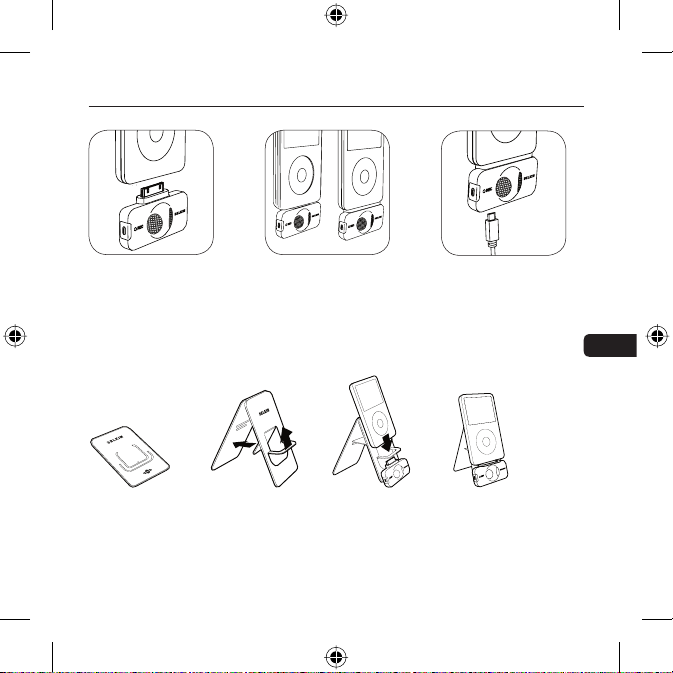
Insert the TuneTalk Stereo
into the iPod video’s do ck
connector.
How to Set U p the TuneTalk Stereo and i Pod with the Com pact Stand
No bigger than a credit card, the iPod stand is small enough to fit in your wallet.
1. Assemb le the stand by placing the plastic tab t hrough the rear pan el for stabilit y (Fig. 1).
2. Conne ct the TuneTalk Ste reo to the iPod as shown above (Fig. 2).
3. When used with the stand, the TuneTalk Stereo can b e positioned towa rd the source, which
greatly improves the recordin g quality (Fig . 3).
Extended connector
provide s compatibilit y with
a case. Use the adapter
when used without a case.
Fig. 1 Fig. 2 Fig. 3
Connect the included USB
cable to the bottom of the
TuneTalk Stere o to p ower
and/or sync your iPod from
any powered USB port.
Using the TuneTalk Stereo
| 06
En
Page 8

Information
FCC Statement
DECLARATION OF CONFORMITY WITH FCC RULES FOR ELECTROMAGNETIC COMPATIBILITY
We, Belkin Corporation, of 501 West Walnut Street, Compton, CA 90220, declare under our sole responsibility
that the product:
to which this declaration relates:
Has been tested and found to comply with the limits for a Class B digital device, pursuant to part 15 of
the FCC Rules. These limits are designed to provide reasonable protection against harmful interference
in a residential installation. This equipment generates, uses, and can radiate radio frequency energy and,
if not installed and used in accordance with the instructions, may cause harmful interference to radio
communications. However, there is no guarantee that interference will not occur in a particular installation.
If this equipment does cause harmful interference to radio or television reception, which can be determined
by turning the equipment off and on, the user is encouraged to try to correct the interference by one or
more of the following measures:
• Reorient or relocate the receiving antenna.
• Increase the separation between the equipment and receiver.
• Connect the equipment into an outlet on a circuit different from that to which the receiver is
connected.
• Consult the dealer or an experienced radio/T V technician for help.
ICES This Class B digital apparatus complies with Canadian ICES-003. Cet appareil numérique de la classe B
conforme á la norme NMB-003 du Canada.
F8Z082 / F8Z082-BLK
Information | 07
Page 9

Belkin Corporation Limited 3-Year Product Warranty
What this warranty covers.
Belkin Corporation warrants to the original purchaser of this Belkin product that the
product shall be free of defects in design, assembly, material, or workmanship.
What the period of coverage is.
Belkin Corporation warrants the Belkin product for three years.
What will we do to correct problems?
Product Warranty.
Belkin will repair or replace, at its option, any defective product free of charge (except for
shipping charges for the product).
What is not covered by this warranty?
All above warranties are null and void if the Belkin product is not provided to Belkin
Corporation for inspection upon Belkin’s request at the sole expense of the purchaser, or
if Belkin Corporation determines that the Belkin product has been improperly installed,
altered in any way, or tampered with. The Belkin Product Warranty does not protect against
acts of God (other than lightning) such as flood, earthquake, war, vandalism, theft, normaluse wear and tear, erosion, depletion, obsolescence, abuse, damage due to low voltage
disturbances (i.e. brownouts or sags), non-authorized program, or system equipment
modification or alteration.
Warranty | 08
En
Page 10

Belkin Corporation Limited 3-Year Product Warranty
How to get service.
To get service for your Belkin product you must take the following steps:
1. Contact Belkin Corporation at 501 W. Walnut St., Compton CA 90220, Attn: Customer
Service, or call (800)-223-5546, within 15 days of the Occurrence. Be prepared to provide
the following information:
a. The part number of the Belkin product.
b. Where you purchased the product.
c. When you purchased the product.
d. Copy of original receipt.
2. Your Belkin Customer Service Representative will then instruct you on how to forward
your receipt and Belkin product and how to proceed with your claim.
Belkin Corporation reserves the right to review the damaged Belkin product. All costs of
shipping the Belkin product to Belkin Corporation for inspection shall be borne solely by
the purchaser. If Belkin determines, in its sole discretion, that it is impractical to ship the
damaged equipment to Belkin Corporation, Belkin may designate, in its sole discretion,
an equipment repair facility to inspect and estimate the cost to repair such equipment.
The cost, if any, of shipping the equipment to and from such repair facility and of such
estimate shall be borne solely by the purchaser. Damaged equipment must remain
available for inspection until the claim is finalized. Whenever claims are settled, Belkin
Corporation reserves the right to be subrogated under any existing insurance policies
the purchaser may have.
Warranty | 09
Page 11

Belkin Corporation Limited 3-Year Product Warranty
How state law relates to the warranty.
THIS WARRANTY CONTAINS THE SOLE WARRANTY OF BELKIN CORPORATION, THERE
ARE NO OTHER WARRANTIES, EXPRESSED OR, EXCEPT AS REQUIRED BY LAW, IMPLIED,
INCLUDING THE IMPLIED WARRANTY OR CONDITION OF QUALITY, MERCHANTABILITY
OR FITNESS FOR A PARTICULAR PURPOSE, AND SUCH IMPLIED WARRANTIES, IF ANY, ARE
LIMITED IN DURATION TO THE TERM OF THIS WARRANTY.
Some states do not allow limitations on how long an implied warranty lasts, so the above
limitations may not apply to you.
IN NO EVENT SHALL BELKIN CORPORATION BE LIABLE FOR INCIDENTAL, SPECIAL, DIRECT,
INDIRECT, CONSEQUENTIAL OR MULTIPLE DAMAGES SUCH AS, BUT NOT LIMITED TO, LOST
BUSINESS OR PROFITS ARISING OUT OF THE SALE OR USE OF ANY BELKIN PRODUCT, EVEN
IF ADVISED OF THE POSSIBILITY OF SUCH DAMAGES.
This warranty gives you specific legal rights, and you may also have other rights, which may
vary from state to state. Some states do not allow the exclusion or limitation of incidental,
consequential, or other damages, so the above limitations may not apply to you.
Warranty | 10
En
Page 12

Belkin Ltd.
Express Business Park, Shipton Way
Rushden, NN10 6GL, United Kingdom
+44 (0) 1933 35 2000
+44 (0) 1933 31 2000 fax
Belkin B.V.
Boeing Avenue 333
1119 PH Schiphol-Rijk, Netherlands
+31 (0) 20 654 7300
+31 (0) 20 654 7349 fax
Belkin GmbH
Hanebergstraße 2,
80637 Munich, Germany
+49 (0) 89 143405 0
+49 (0) 89 143405 100 fax
Belkin SAS
130 rue de Silly
92100 Boulogne Billancourt, France
+33 (0) 1 41 03 14 40
+33 (0) 1 41 31 01 72 fax
Belkin Iberia
Avda. Cerro del Aguila 3
28700 San Sebastián de los Reyes, Spain
+34 9 16 25 80 00
+34 9 02 02 00 34 fax
All trade names are registered trademarks of respective manufacturers listed.
iPod is a trademark of Apple Computer, Inc., registered in the U.S. and other countries.
F8Z082ea /F8Z082e aBLK P75147ea
© 2006 Belkin Corporation. All rights reserved.
Page 13

Manuel de l’utilisateur
TuneTalk™ Stéréo pour iPod® vidéo
Introduction
Fr
Page 14
Introduction
Félicitations et merci d’avoir choisi ce produit novateur dans la gamme mobile de Belkin. Veuillez
lire attentivement ce manuel pour obtenir les meilleures performances possibles de votre TuneTalk
Stéréo pour iPod vidéo.
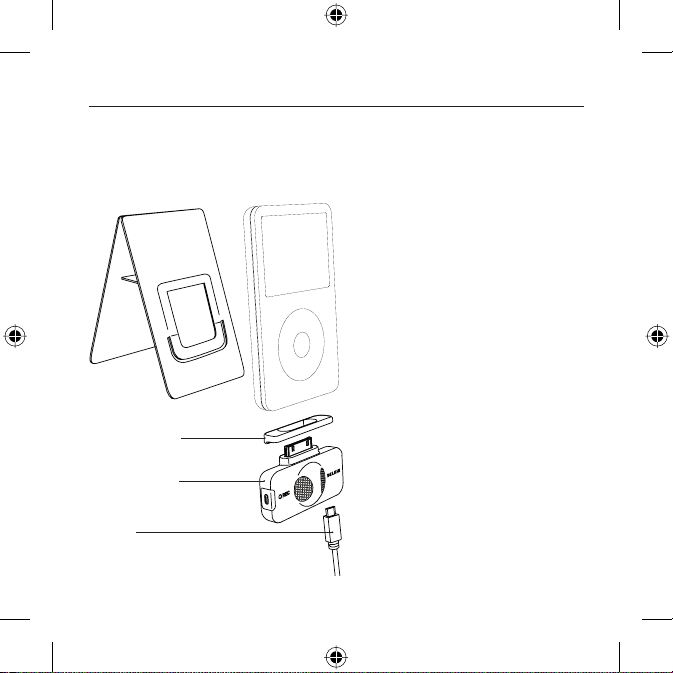
Conten u de l’emballage :
Support compact
pour iPod
Espaceur en plastique
TuneTalk Stéréo pour
iPod vidéo
Câble USB
Introduction | 01
iPod non fourni
Page 15

Utilisation du TuneTalk Stéréo
Pour régler la qualité d’enregistrement :
Dans le men u iPod, sélecti onnez « Extras > Voice Memos » (E xtras > Mémos vocaux) . Appuyez
sur le bou ton « Select » pour aller de « Low »(22,05 kHz, mono) à « High » (4 4.1kHz, stéréo).
Pour enregistrer, procédez comme suit :
1. Branchez le TuneTalk à la parti e inférieure du iPo d vidéo. Lorsque vous effectuez cette
opération, l’iPod vidéo l ance l’applicati on d’enregistrem ent. Lorsque l’option « Record »
(Enregistrer) e st mise en surbrillance, app uyez sur « Play/Pause » (Lec ture/Pause ) ou sur le
bouton « Select » (Sélectionner) p our commencer l’enregistre ment. Pour faire une pause
dans l’enre gistrement, ap puyez de nouveau su r « Play/Pause » ( Lecture/Pause) ou m ettez
« Pause » en surbrillance e t appuyez sur le bouton « Selec t » (Sélectio nner) de l’iPod vi déo.
2. Deux opt ions s’offrent à vous pendant l ’enre gistrement : « Pause » et « Stop and Save »
(Arrête r et enregistrer). Pour arrêter l’enre gistrement, appuyez sur le bouton « Menu » ou
mettez l’option « Stop an d Save » (Arrêter et enre gistrer) en surbrillance. Ensuite, appuyez
sur le bou ton « Select » (Sélectionner). Ce ci permet de sauvegarder votre enregistrement et
de le faire figure r dans une liste trié e par date et heure d’enregistrement.
NOTE : Après avoir arrêté un enre gistrement, le témoin dem eure allumé jusqu ’à ce que
l’enregistrement est sauvegardé sur l’iPod.
3. Pour comme ncer un autre enregistrement, allez e n haut du menu « Voice Memos »
(Mémos vocaux), puis sélectionnez « Record Now » (Enregistrer maintenant). Vous pouvez
égalem ent choisir « Extr as > Voice Memos > Record Now » (Ex tras > Mémos vocau x >
Enregis trer maintenant) d ans le menu iPod. Ou e ncore, appuyez sur le bouton « Quick
Memo » (Mé mo rapide) sur le TuneTalk Stéré o.
REMARQUE : Pour les mémos ou notes personnelle s, tenez l’iPod et l e TuneTalk à une distance
de 15 à 45 cm de votre bouche et parlez normalement. Si vous tenez le TuneTalk trop près ou si
vous parlez trop fort, la qualité de l’enregistrement diminue.
Utilisation du TuneTalk Stéréo
| 02
Fr
Page 16

Utilisation du TuneTalk Stéréo
Prise d’entrée stéréo auxiliaire 3,5 mm
La prise a uxiliaire peut s ervir d’entrée p our différent s matériels, comm e des microphone s ou
d’autres dispositifs audio. Le TuneTalk Stéréo propos e également une pr ise alimentée (3 V) pour
l’utilisation d’un mi crophone exte rne. Lorsque le TuneTalk Stéréo d étecte la présen ce d’une
source auxiliaire, les micro phones intégrés sont désactivés.
Commut ateur de régl age du gain
L’e TuneTalk Stéréo comporte u n commutateur de gai n à deux niveaux pou r optimiser la qualité
du son enregistré. Pour activer la fonction « OFF », déplacez le commutateur vers la gauche
de la barre de réglag e. Cette fonction convient p our les sources auxiliaires, telles que les
microphones amplificateurs ou autres dispositifs audio, ou l’enregistrement avec microphone
dans un environnement bruyant. Pour activer la fonction « ON », déplacez le commutateur vers
la droite de la barre de réglage. Cette fonction convient aux enregistrements avec microphones
courants.
Commutateur de réglage du gain
Source Off (désactivé) On (activé)
Interne
Externe
REMARQUE : La qualité d’enregistrement dépend du type de micro utilisé.
Réglage automatique du gain
désactivé ; amplification faible Idéal
pour les environnements bruyants.
Réglage automatique du gain
désactivé ; aucune amplification
Convient aux environnements très
bruyants ou lorsque la source externe
est une source auxiliaire, tel un autre
lecteur MP3 ou un téléviseur.
Réglage automatique du gain activé ;
gain prédéterminé convenant pour les
enregistrements réguliers avec micro.
Réglage automatique du gain activé ;
gain prédéterminé convenant pour les
enregistrements réguliers avec micro.
Utilisation du TuneTalk Stéréo | 03
Page 17

Utilisation du TuneTalk Stéréo
Bouto n « Qui ck Memo »
Pour aller automatiquement à l ’écran d’enregis trement de l’iPod à p artir de n’impo rte quel
écran, appuyez su r le bouton « Quick Memo » (Mémo rapide) situé du côté ga uche du TuneTalk
Stéréo, à moins qu’un enregistrement soit d éjà en cours. Appuyez simplement sur « Re cord »
(Enregistrer) o u sur « Play/Pause » (Lecture/pause) pour commencer l’enregis trement.
Témoin d’enregistrement
Le TuneTalk Stéréo possède un témoin servant de guide pour l’enregistrement audio. Il vous
permet de savoir si le commutateur de gain e st correctement placé par rappor t à votre micro
et/ou l e type d’enregis trement choisi. Le témoin es t éteint lorsque l e TuneTalk est bra nché à
l’iPod vidéo mais qu’aucun enregistrement n’est en cours. Le témoin clignote deux fois pour
vérifier la connexion et demeure allumé en cont inu pour indique r que l’iPod vidé o enregistre.
Le témoin clignote rapidement lorsque le niveau sonore dépasse la plage du TuneTalk
(disto rsion, statiqu e, coupures, etc. ).
Il est conseillé de ré aliser une rapid e vérification du son et de la lecture avant de fai re de longs
enregis trements afin de vous assurer que vous utilisez le réglage le mieux ad apté.
Câble US B d’alimentat ion/sync hronisati on
Branchez le connecteur USB mini B au TuneTalk Stéréo et branchez l’aut re extrémité du
câble à n’importe quel por t USB alimenté sur vot re ordinateur. Le logiciel iTunes est lancé
automatiquement, vous permettant d’alimenter et de synchroniser votre iPod simultanément.
REMARQUE : Pour alimenter et charger votre iPod tout en utilisant le TuneTalk Stéréo, vous
devez d’ab ord éjecter l’i Pod vidéo via iTunes . L’iPod vidéo quitte le mode éte ndu et reprend
son fonctionnement normal. L’icône de chargement doit apparaître au coin inférieur droit de
l’écran de l’iPod vidéo.
Vous remarq uerez peut-être que l’in dicateur du niveau de la batte rie de votre iPod vid éo
indique que la batterie se vide rapide ment lorsque vous utilisez l e TuneTalk Stéréo. L’indic ateur
de niveau de la batterie fait une estimation prudente lorsque le disque dur de l’iPod vidéo est
surcharg é, comme c’est le cas lo rs de l’enregistre ment. Même si l’indicateur est roug e, il est fort
probab le que vous pourre z enregistrer encore plusi eurs minutes avant q ue la batterie de l ’iPod
ne soit vide.
Fr
Utilisation du TuneTalk Stéréo
| 04
Page 18

Utilisation du TuneTalk Stéréo
Pour lir e un enregist rement, pr océdez comme s uit :
Sélec tionnez « Extr as > Voice Memos » (Ex tras > Mémos voca ux) et choisisse z l’enregistrem ent.
Les enregistrements sont réperto riés par date et heu re d’enregistrem ent. Les enregis trements
sont enre gistrés au forma t WAV sur votr e iPod vidéo dans un d ossier appelé « Re cordings »
(Enregistrements).
Pour tra nsférer vos en registre ments vers l’ord inateur, proc édez comme sui t :
Votre iPod do it être reconnu en t ant que disque dur e xterne par votre o rdinateur. Branch ez l’iPod
sur l’ordin ateur et ouvrez l ’app lication que vous u tilisez pour éco uter des fichiers audio . Dans
le menu « Poste d e travail », cliquez de ux fois le lecteu r amovible qui rep résente l’iPod . Doubleclique z sur le dossier « Recor dings » (Enregis trements). D ouble-cl iquez sur un fich ier audio
(format WAV) pour écouter l’enregistrement.
REMARQUE : Vous pouvez lire l es fichiers di rectement dep uis l’iPod vidé o et/ou les tran sférer vers
votre ordi nateur. Pour ce faire, o uvrez ce dossier et f aites glisser le s fichiers audi o vers le bureau.
Pour tra nsférer des e nregistre ments au moyen i Tune s®, procédez com me suit :
Branch ez l’iPod vidéo su r l’ordinateur. Atten dez quelques se condes qu’iTunes re connaisse l’iPo d
vidéo. U ne fois l’appareil r econnu, iTunes est l ancé (l’opérati on est automatiq ue). Un messag e
vous dema nde si vous souhait ez copier vos mémos vocaux da ns votre bibliothè que musicale.
Sélec tionnez « Yes » (Oui) o u « No » (N on) pour continu er. Si vous choisisse z « Yes » (Oui ), tous
les mémo s vocaux seront cop iés dans votre bib liothèque music ale iTunes. Un dossi er « Voice
Memos » (M émos vocaux) es t créé dans la liste d es sources iPod. Tous vos m émos vocaux y sont
stockés . Lorsque vos enre gistrements s e retrouvent dans i Tunes, vous pouve z les renommer et
ajouter d es information s en sélection nant un enregist rement et en choisi ssant « File > Get Info »
(Fichier > Information).
Par défau t, l’iPod vidéo e nregistre les f ichiers audio a u format WAV. Vous pouvez conver tir les
fichi ers en d’autres for mats avec iTunes, af in d’en réduire la ta ille. Dans iTunes, sé lectionne z « Edit
> Prefere nces > Advanced > Imp orting » (Édit ion > Préférences > Av ancé > Importer ) et choisissez
le forma t de compression au dio désiré. Séle ctionnez ensu ite un ou plusieur s enregistrem ents de
votre doss ier « Voice Memos » (Mém os vocaux), cl iquez avec le bou ton droit de votre souris et
sélectionnez l’option de conversion vers un nouveau format.
Pour rec hercher des e nregistre ments sur l’i Pod vidéo aprè s avoir effec tué la
synch ronisation ave c iTunes, procé dez comme suit :
Débran chez l’iPod de l’ordinateur. Sé lectionnez « Pl aylists > Voice Memo s » (L istes de lectur e >
Mémos vocaux).
Utilisation du TuneTalk Stéréo | 05
Page 19

Utilisation du TuneTalk Stéréo
Insérez l e TuneTalk Stéréo
dans le connecteur
d’ancrage de l’iPod vidéo.
Utilisation du support compact avec le TuneTalk Stéréo et l’iPod
De la taille d’une carte de crédit, le support pour iPod se glisse dans votre poche.
1. Pour assembler le suppo rt, placez la languette d e plastique dans l ’encoc he du panneau
arrière pour plus d e stabilité. (Illustr. 1).
2. Branchez le TuneTalk Stéréo à l’iPod tel que montré ci-dessus ( Illustr. 2).
3. Lorsque vous l’utilisez avec le support, le TuneTalk Stéréo peut se placer en direction de la
source, ce qui amélio re grandement la q ualité de l’enregis trement. (Illustr. 3).
Le connecteur allongé
permet l’utilisation d’un
étui. Servez-vous de
l’adaptateur lorsque vous
n’utilise z pas d’étui.
Illustration 1
Illustration 2
Branchez le câble USB
fourni au bas du Tune Talk
Stéréo pour alimenter et/ou
synchroniser vot re iPod à
partir de n’importe quel
port USB.
Illustration 3
Utilisation du TuneTalk Stéréo
Fr
| 06
Page 20

Information
Déclaration FCC
DÉCLARATION DE CONFORMITÉ À LA RÉGLEMENTATION FCC EN MATIÈRE DE COMPATIBILITÉ
ÉLECTROMAGNÉTIQUE
Nous, Belkin Corporation, sis au 501 West Walnut Street , Compton CA, 90220, États-Unis, déclarons sous
notre seule responsabilité que le produit :
auquel se réfère la présente déclaration :
a été testé et satisfait aux limites de la classe B des appareils numériques, conformément à l’alinéa 15 de la
réglementation de la FCC. Ces limites sont conçues de manière à assurer une protection raisonnable contre
les interférences nuisibles au sein d’une installation domestique. L’appareil génère, utilise et peut irradier
une énergie de fréquence radio. S’il n’est pas installé et utilisé conformément aux instructions, il peut
causer des interférences nuisibles sur le plan de la réception radio ou télévision. Toutefois, il n’est nullement
garanti que des interférences ne se produiront pas dans certaines installations. Si cet équipement cause des
interférences nuisibles sur le plan de la réception radio ou télévision, pouvant être déterminées en mettant
l’appareil sous et hors tension, l’utilisateur est invité à tester et à corriger l’interférence en prenant une des
mesures suivantes :
• Réorienter ou changer de place l’antenne de réception.
• Augmenter la distance entre l’appareil et le récepteur.
• Connecter l’appareil à une prise située sur un circuit différent de celui sur lequel le récepteur est
connecté.
• Consulter le revendeur ou un technicien en radio/TV pour obtenir de l’aide.
ICES This Class B digital apparatus complies with Canadian ICES-003. Cet appareil numérique de la classe B
conforme à la norme NMB-003 du Canada.
F8Z082 / F8Z082-BLK
Information | 07
Page 21

Garantie limitée de 3 ans du produit de Belkin Corporation
Couverture offerte par la garantie
Belkin Corporation garantit à l’acheteur initial de ce produit Belkin que le produit est
exempt de défauts de conception, de montage, de matériau et de fabrication.
Période de garantie.
Belkin Corporation garantit ce produit Belkin pour une période de trois ans.
Mesures correctives.
Garantie du produit
Belkin s’engage à réparer ou à remplacer gratuitement, à sa convenance, tout produit
défectueux (à l’exception des frais d’expédition du produit).
Limites de la couverture offerte par la garantie
Toutes les garanties susmentionnées sont caduques si le produit Belkin n’est pas retourné
à Belkin Corporation à la demande expresse de celui-ci, l’acheteur étant responsable de
l’acquittement des frais d’expédition, ou si Belkin Corporation détermine que le produit
Belkin a été installé de façon inadéquate, a été modifié d’une quelconque façon ou falsifié.
La garantie du produit Belkin ne protège pas contre des calamités naturelles (autre que
la foudre) comme les inondations, les tremblements de terre ou la guerre, le vandalisme,
le vol, l’usure normale, l’érosion, l’épuisement, l’obsolescence, l’abus, les dommages
provoqués par des perturbations de basse tension (baisses ou affaissements de tension, par
exemple), un programme non autorisé ou une modification de l’équipement du système.
à vie | 08
Fr
Page 22

Garantie limitée de 3 ans du produit de Belkin Corporation
Entretien et réparation.
Vous devez prendre les mesures suivantes pour faire réparer ou entretenir votre produit
Belkin :
1. Communiquez avec Belkin Ltd., Express Business Park, Shipton Way, Rushden, NN10 6GL,
Royaume-Uni. Assistance technique Belkin Europe : 00 800 223 55 460, dans les 15 jours
suivant l’événement. Préparez-vous à fournir les informations suivantes
a. Référence du produit Belkin.
b. Lieu d’achat du produit.
c. Date d’achat du produit.
d. Une copie du reçu original.
2. Le représentant du service client Belkin vous donnera alors toutes les instructions sur
la façon d’expédier votre facture et le produit Belkin et la façon de présenter votre
réclamation.
Belkin Corporation se réserve le droit d’examiner le produit Belkin endommagé. Tous
les frais d’expédition du produit Belkin à Belkin Corporation pour inspection seront
entièrement à la charge de l’acheteur. Si Belkin détermine, à son entière discrétion, qu’il
est peu pratique d’expédier l’équipement endommagé à Belkin Corporation, elle peut
désigner, à son entière discrétion, un atelier de réparation pour inspecter l’équipement
et évaluer le coût des réparations. Les coûts, s’il en est, pour l’expédition de l’équipement
jusqu’à l’atelier de réparation et le retour, et pour l’estimation, seront entièrement
assumés par l’acheteur. L’équipement endommagé doit être disponible pour inspection
jusqu’à ce que la demande de réclamation soit réglée. Lorsqu’un règlement intervient,
Belkin Corporation se réserve le droit d’être subrogé en vertu de quelque police
d’assurance que l’acheteur pourrait avoir.
Garantie | 09
Page 23

Garantie limitée de 3 ans du produit de Belkin Corporation
Relation entre le Droit national et la garantie.
BELKIN REJETTE PAR LE PRÉSENT DOCUMENT TOUTES LES AUTRES GARANTIES, EXPLICITES
OU IMPLICITES, Y COMPRIS MAIS SANS S’Y LIMITER, LES GARANTIES IMPLICITES AFFÉRENTES
À LA QUALITÉ LOYALE ET MARCHANDE ET À L’ADÉQUATION À UNE FIN DONNÉE.
Certains états n’autorisent pas de limite quant à la durée d’une garantie implicite; il se
pourrait donc que les limites indiquées ci-dessus ne s’appliquent pas dans votre cas.
“BELKIN CORPORATION NE PEUT EN AUCUN CAS ÊTRE TENU RESPONSABLE DE DOMMAGES
ACCESSOIRES, DIRECTS, INDIRECTS OU MULTIPLES, Y COMPRIS, MAIS SANS S’Y LIMITER,
LA PERTE DE REVENUS OU D’AFFAIRES DÉCOULANT DE LA VENTE OU DE L’UTILISATION
DE TOUT PRODUIT BELKIN, MÊME LORSQU’ELLE EST AVISÉ DE LA PROBABILITÉ DES DITS
DOMMAGES.
La garantie vous confère des droits légaux spécifiques. Vous pouvez également bénéficier
d’autres droits qui varient d’un pays à l’autre. Some states do not allow limitations on how
long an implied warranty lasts, so the above limitations may not apply to you.
à vie | 10
Fr
Page 24

Belkin Ltd.
Express Business Park, Shipton Way
Rushden, NN10 6GL, Royaume-Uni
+44 (0) 1933 35 2000
+44 (0) 1933 31 2000 Fax
Belkin B.V.
Boeing Avenue 333
1119 PH Schiphol-Rijk, Pays-Bas
+31 (0) 20 654 7300
+31 (0) 20 654 7349 Fax
Belkin GmbH
Hanebergstraße 2,
80637 Munich, Allemagne
+49 (0) 89 143405 0
+49 (0) 89 143405 100 Fax
Belkin SAS
130 rue de Silly
92100 Boulogne Billancourt, France
+33 (0) 1 41 03 14 40
+33 (0) 1 41 31 01 72 Fax
Belkin Iberia
Avda. Cerro del Aguila 3
28700 San Sebastián de los Reyes, Espagne
+34 9 16 25 80 00
+34 9 02 02 00 34 Fax
Toutes les raisons commerciales sont des marques déposées de leurs fabricants respectifs.
iPod est une marque de commerce d’Apple Computer, Inc., déposée aux États-Unis et dans d’autres pays.
F8Z082ea /F8Z082e aBLK P75147ea
© 2006 Belkin Corporation. Tous droits réservés.
Page 25

Benutzerhandbuch
TuneTalk™ Stereo für iPod® video
Einleitung
De
Page 26

Einleitung
Wir gratulieren Ihnen zum Kauf dieses innovativen Mobilitätsprodukts von Belkin. Bitte lesen Sie
diese Gebrauchsanweisung sorgfältig durch, um wirklich alle Vorteile des TuneTalk Stereo für iPod
video zu nutzen.
Verpackungsinhalt:
Kompakter
iPod-Ständer
Kunststoffabstandhalter
TuneTalk Stereo für
iPod video
USB-Kabel
Einleitung | 01
iPod nicht enthalten
Page 27

Verwenden des TuneTalk Stereo
Zum Eins tellen der Au fnahmequal ität:
Wählen Sie „Extras > Voice Mem os > Quality” ( Extras > Spra chmemos > Qualität) im iPod -Menü.
Durch Drücken der Taste „ Select” (Auswähle n) kann zwisch en Niedrig (22,0 5 kHz, Mono) oder
Hoch (4 4,1kHz, Ster eo) umgeschaltet werden.
Aufnahme :
1. Schließen Sie den TuneTalk an die Untersei te des iPod video an. Der iPod vi deo startet
darauf hin die Aufnahme funktion (R ecord). Sie können die Aufnahme nun starten, indem Sie
entweder „Play /Pause” (Wiedergab e/Pause) o der die Taste „Selec t” (Auswählen) drücken,
wenn die Option „Record” (Aufnahme) markiert ist. Um die Aufnahme zu unterbrechen,
drücken Sie wieder „Play/ Pause” (Wied ergabe/Pause) ode r markieren „Pause” und dr ücken
dann die Taste „ Select” (Auswähle n) auf dem iPod vid eo.
2. Während einer lauf enden Aufnahme gibt es zwei Möglich keiten: Sie könn en entweder
„Pause” (Pause ) oder „Stop and Save” (Stopp und Speich ern) wählen. Zum Beende n der
Aufnahm e drücken Sie entweder die Taste „ Menu” (Menü ) oder markiere n die Option „Stop
and Save” ( Stopp und Speichern) und drücken dann die Taste „Se lect” (Ausw ählen). Ihre
Aufnahm e wird nun gespeichert und mit dem Datu m und der Uhrzeit der Aufzeichnung
angezeigt.
HINWEIS: Nachdem eine Aufnahme unterbrochen worden ist, leuchtet die Aufnahmeanzeige
weiter, bis die Aufnahm e auf dem iPod gespe ichert ist.
3. Zum Starten einer weiteren Auf nahme können Sie im M enü „Voice Memos” (Spr achmemos)
nach obe n gehen und dort „ Record Now” (Au fnahme) auswählen oder im iPod-Menü
„Extras > Voice Memos > Record Now” (Extras > Sprachmemos > Aufnahme) aus wählen.
Oder drü cken Sie die Taste „Quick Me mo” (Schnellmemo) auf d em TuneTalk Stereo.
HINWEIS: Wenn Sie den i Pod video für per sönliche Memos oder Noti zen verwenden m öchten,
halten Sie das Gerät mit angestecktem TuneTalk Stereo-Mik rofon etwa 15 bis 45 cm von Ihrem
Mund ent fernt und sprech en Sie in normaler Lautst ärke. Wenn Sie das Ge rät zu nahe an den
Mund halten oder zu laut sprechen, kann es zu Verzerrungen bei der Aufnahme kommen.
Verwenden des TuneTalk Stereo
| 02
De
Page 28

Verwenden des TuneTalk Stereo
3,5-mm-Stereoklinken-AUX-Eingang
Der AUX-Ein gang eignet sich für Line- Level-Eingang (Vollaussteuerungspe gel) wie bei
verstärkten Mikrofonen oder anderen Audiogeräten. Der TuneTalk Stereo bietet eine
Anschlus sspannung von drei Volt, die sich für externe Mik rofone eignet. Wenn TuneTalk Stereo
merkt , dass ein extern es Quellgerät an geschlossen wi rd, werden die inte grierten Mikrofone
automatisch deaktiviert.
Auto-Verstärkungsregler
TuneTalk Stereo verfügt über einen automatischen Ver stärkungsreg ler mit zwei
Einstellmöglichkeiten, d en Sie verwenden können, um Tonaufnahm en möglichst hoh er
Qualität zu erzielen. Die Einstellung „OFF” (aus) wird ak tiviert, wenn Sie den Schalter auf
die Position links s tellen. Die Einstellung „OFF” eignet si ch für Line-Level-Ein gabequellen
wie verstärkte M ikrofone, andere Audiog eräte oder Mikrofonauf nahmen in sehr unruhigen
Umgebungen. Die Einstellung „ON” wird aktiviert, wenn Sie den Schalter au f die Position recht s
stellen und eigne t sich für die meisten Mikrofonaufnahmen.
Auto-Verstärkungsregler
Quelle Aus An
Intern
Extern
HINWEIS: Die Aufnahmequal ität ist abhängig vom verwe ndeten Mikrofon.
Auto-Verstärkung aus, niedrige
Verstärkung. Geeignet für Aufnahmen
in unruhigen Umgebungen.
Auto-Verstärkung aus, keine
Verstärkung.
Verwendung in unruhigen
Umgebungen oder wenn die externe
Quelle eine Line-Level-Audioquelle wie
ein MP3-Player oder Fernseher ist.
Auto-Verstärkung an, mit
ausreichender Vorverstärkung für
normale Mikrofonaufnahmen.
Auto-Verstärkung an, mit
ausreichender Vorverstärkung für
normale Mikrofonaufnahmen.
Verwenden des TuneTalk Stereo | 03
Page 29

Verwenden des TuneTalk Stereo
Schnellmemo-Taste
Durch Drücken der Taste „Quick Memo” (Schnellmemo ) an der Seite des TuneTalk Stereo,
wechsel t der iPod video automatisch zur Display anzeige „record” (Aufn ahme), egal wo S ie
gerade i m iPod Menüsystem sind. Dies gilt jedoch nicht, wenn der Auf nahmevorgang be reits
gestar tet wurde. Drücken Sie einf ach auf „Record ” (Aufnahme) oder „Play /Pause” (Wiedergab e/
Pause) , um die Aufnahme zu starte n.
LED-Aufnah meanzeige
TuneTalk Stereo verfügt über eine LED-Anzeige, die Ihnen die bestmöglichen Aufnahme n
ermögl icht. Diese LED-Anzeige hilft Ih nen dabei, die richtige Stellung für de n AutoVerstärkungsregler (Mikrofon und/o der Aufnahmeei nstellung) zu f inden. Die LED -Anzeige
leuchtet nicht, wen n TuneTalk mit dem iPod video verbunde n ist, aber nicht aufnimmt. D ie
LED-Anzeige blinkt zweimal, um die Verbindung zu überprüfen, und zeigt rotes Dauerlicht an,
um anzuzeigen, dass der iPod video aufnimmt. Die LED-Anzeige blinkt in kurzen Abs tänden rot
auf, wenn der Aufnahm epegel den Eing abebereich des TuneTalk überschre itet (z. B. wenn die
Aufnahme verzerrt ist oder wenn elektrostatische Störungen oder Unterbrechungen auftreten).
Es empf iehlt sich, vor einer länge ren Aufnahme einen kurzen Soundch eck und Wiederg abetest
zu machen, um die bes te Einstellung des Verstärk ungsreglers zu f inden.
USB-Strom-/ Sync-Kabel
Schließen Sie den USB-MiniB-Stecker an den TuneTalk Stereo und d as andere Ende des Ka bels
an den USB-Anschluss des Compu ters an. iTunes wird da mit gestartet , so dass Sie gleichzeitig
synchronisiere n und das Gerät mit Strom versorgen können.
HINWEIS: Sie müssen d en iPod video erst bei iTunes „a uswerfen”, um den TuneTalk Stereo
weiterhin zu verwe nden, mit Strom zu versorgen u nd zu laden. Der iPo d video verlässt
darauf hin den „Exte nded Mode” (Erweiterter Mod us) und nimmt den normalen Betrieb wi eder
auf. Auf dem D isplay des iPod vid eo sollte oben re chts immer noch das Ladesy mbol angezeig t
werden.
Ihnen fä llt möglicher weise auf, dass die Ak kuanzeige auf dem iPod vid eo anzeigt, dass d er
Akku des iPod video s chnell entladen wird, wenn d er TuneTalk Stereo verwendet wird. D ie
Akkuan zeige zeigt oft einen nie drigen Ladezustand an , wenn die Festplat te des iPod video
stark beansprucht wird, z. B. während einer Auf nahme. Wenn die Akk uanzeige den roten
Bereich erreicht , steht Ihnen jedo ch häufig noch viel Aufna hmezeit zur Verf ügung, bevor der
Akku des iPod video völlig entladen ist.
Verwenden des TuneTalk Stereo
| 04
De
Page 30

Verwenden des TuneTalk Stereo
Wiede rgabe einer A ufnahme:
Wählen Si e „Extras > Voice M emos” (Ext ras > Sprachmemo s) und die gewüns chte Aufnahme aus.
Die Aufn ahmen sind nach Auf nahmedatum und -z eit sortier t. Aufnahmen wer den im iPod video
in einem Ordner „Recordings” (Aufnahmen) in WAV-Format gespeichert.
Übers pielen von Auf nahmen auf Ih ren Computer :
Ihr iPod vi deo muss hierf ür so konfiguri ert sein, dass S ie Ihn als Festplat te nutzen könne n.
Schlie ßen Sie den iPod vid eo an Ihren Compute r an und öffnen S ie die Anwendung, d ie Sie
zum Anhö ren (Audio) ben utzen. Klicke n Sie im Menü „My Comp uter” (Arbei tsplatz) do ppelt auf
den Wechs eldatenträge r, der Ih ren iPod video re präsentiert . Doppelkli cken Sie auf den Ord er
„Recor dings” (Aufnah men). Dopp elklicken Sie au f eine bestimmte Au diodatei (im WAV-Fo rmat),
um die Aufnahme anzuhören.
HINWEIS: Sie könne n Ihre Audiodatei en auf diese Weise d irekt über den i Pod video abspi elen
und/ oder Aufnahmen a uf den Computer üb erspielen, i ndem Sie diesen Ordner öf fnen und die
Audioda teien auf den Des ktop ziehen.
Übert ragung von Auf nahmen mit iTune s®:
Schlie ßen Sie den iPod vid eo an Ihren Comput er an. Warten Sie ei nige Sekunden , bis iTunes
das iPod vi deo-Ger ät erkennt. Soba ld das Gerät erka nnt wurde, star tet iTunes (wenn die s in
der Einst ellung festgel egt ist). Sie we rden gefragt , ob Sie Ihre Sprach memos in Ihrer „Mu sic
librar y” (Musikb ibliothek) sp eichern möcht en. Wählen Sie „Yes” (Ja) od er „No” (Nein ), um
fort zufahren. Wenn S ie „Yes” (Ja ) wählen, werde n alle Sprachme mos in Ihre iTunes „Mu sic Library ”
(Musik bibliothek ) kopiert. Es w ird automatisch ei n Ordner für „Voice Mem os” (Sprachme mos)
in Ihrer „ iPod source list ” (iPod Quellen liste) angele gt, in der all Ihre Sp rachmemos auf bewahrt
werden . Wenn sich Ihre Aufna hmen in iTunes bef inden, können S ie sie umbenenn en und weitere
Inform ationen ergänz en, indem Sie eine A ufnahme auswäh len und „File > Get I nfo” (Datei >
Infos) wählen.
Werkseitig ist der iPod video so eingestellt, dass er Audiodateien im WAV-Format aufnimmt. Diese
können mi t Hilfe von iTunes einf ach in ein andere s Format konverti ert werden, um di e Größe
zu reduz ieren. Wählen Si e in iTunes „Edit > Prefe rences > Advanced > I mporting” ( Bearbeiten
> Einstel lungen > Erweite rt > Importi eren) und wähle n Sie das Komprimi erungsformat , das
Sie verw enden wollen. Wä hlen Sie dann ein e oder mehrere Auf nahmen aus dem Ord ner
„Spra chmemos” aus, kl icken Sie mit der rec hten Maustaste da rauf und konvert ieren Sie sie in ein
neues Format.
Wiede rfinden I hrer iPod vide o-Aufnah men nach Synch ronisatio n mit iTunes:
Nehmen S ie den iPod vom Compu ter ab. Wählen Sie „Playlist s > Voice M emos”
(Wiedergabelisten> Sprachmemos).
Verwenden des TuneTalk Stereo | 05
Page 31

Verwenden des TuneTalk Stereo
Stecken Sie d en TuneTalk
Stereo in den Dock Connector
des iPod video.
Der erweiterte Stecker eignet
sich zur Verwendung mit
Etuis. Ver wenden Sie den
Adapter, wenn kein Etui
benutzt wird.
Schließ en Sie das enthalte ne
USB-Kabe l an der Unterseite
des TuneTalk Stereo an, um den
iPod über d en USB-Anschlu ss zu
synchronisieren und/oder mit
Strom zu vers orgen.
Aufste llung des TuneTalk Ster eo und iPod mit de m Kompaktst änder
Der iPod-Ständer is t nicht größer als ei ne Kreditkar te und passt beque m in Ihre Brieftasche.
Abb. 1 Abb. 2 Abb. 3
1. Schieben Sie die Plastiklasche d urch die Rücksei te des Ständers, um d ie nötige Stabilität
beim Aufstellen zu erzielen(Fig. 1).
2. Schli eßen Sie den TuneTalk Stereo an den iPod an, wie oben angezeigt (A bb. 2).
3. Mit dem St änder kann der TuneTalk Stereo so ausgerichtet werden, dass die
Aufnahmequalität deutlich verbessert wird(Abb. 3).
Verwenden des TuneTalk Stereo
De
| 06
Page 32

Informationen
FCC-Erklärung
KONFORMITÄTSERKLÄRUNG ZUR EINHALTUNG DER FCC-BESTIMMUNGEN ÜBER ELEKTROMAGNETISCHE
KOMPATIBILITÄT
Wir, Belkin Corporation, eine Gesellschaft mit Sitz in 501 West Walnut Street, Compton, CA 90220,
USA, erklären hiermit in alleiniger Verantwortung, dass dieses Produkt mit der Artikel-Nr. F8Z082ea /
F8Z082eaBLK, auf das sich diese Erklärung bezieht,
nachweislich den Grenzwerten für digitale Geräte der Klasse B gemäß Teil 15 der FCC-Vorgaben entspricht.
Diese Grenzwerte dienen dem angemessenen Schutz vor schädlicher Strahlung beim Betrieb von Geräten
im Wohnbereich. Durch dieses Gerät wird hochfrequente Energie erzeugt, genutzt und unter Umständen
abgestrahlt, und es kann daher bei nicht vorschriftsgemäßer Installation und Nutzung Funkstörungen
verursachen. Eine Garantie dafür, dass entsprechende Störungen am konkreten Installationsort
ausgeschlossen sind, kann nicht abgegeben werden. Verursacht das Gerät Störungen des Radio- oder
Fernsehempfangs (was sich durch Ein- und Ausschalten des Geräts feststellen lässt), so können Sie
versuchen, die Störung auf folgende Weise zu beseitigen:
• Neuausrichtung oder Standor tänderung der Empfangsantenne.
• Vergrößern des Abstands zwischen Gerät und Empfänger.
• Anschluss des Geräts an eine Steckdose in einem anderen Stromkreis als dem des Empfängers.
• Den Händler oder einen er fahrenen Rundfunk- und Fernsehtechniker hinzuziehen.
ICES
Dieses Digitalgerät der Klasse B entspricht der kanadischen Richtlinie ICES-003. Cet appareil numérique de
la classe B conforme á la norme NMB-003 du Canada.
Informationen | 07
Page 33

Drei Jahre beschränkte Produktgarantie von Belkin Corporation
Garantieleistung.
Belkin Corporation garantiert dem ursprünglichen Käufer dieses Belkin-Produkts, dass
dieses Produkt frei von Material-, Verarbeitungs-, und Konstruktionsfehlern ist.
Garantiedauer.
Belkin gewährt für dieses Belkin-Produkt drei Jahre Garantie.
Problembehebung.
Produktgarantie.
Belkin wird das Produkt nach eigenem Ermessen entweder kostenlos (abgesehen von den
Versandkosten) reparieren oder austauschen.
Garantieausschluss.
Alle oben genannten Garantien verlieren ihre Gültigkeit, wenn das Belkin-Produkt
der Belkin Corporation auf Anfrage nicht auf Kosten des Käufers zur Überprüfung
zur Verfügung gestellt wird oder wenn die Belkin Corporation feststellt, dass das
Belkin-Produkt nicht unordnungsgemäß installiert worden ist, und dass unerlaubte
Änderungen daran vorgenommen worden sind. Die Produktgarantie von Belkin gilt nicht
für (Natur)gewalten (mit Ausnahme von Blitzeinschlägen) wie Überschwemmungen
und Erdbeben sowie Krieg, Vandalismus, Diebstahl, normalen Verschleiß, Erosion,
Wertminderung, Veralterung, schlechte Behandlung, Beschädigung durch Störungen
aufgrund von Unterspannung (z. B. Spannungsabfall oder -Senkung) oder nicht erlaubte
Programm- oder Systemänderungen.
Garantie | 08
De
Page 34

Drei Jahre beschränkte Produktgarantie von Belkin Corporation
Service.
Um Unterstützung von Belkin zu bekommen, gehen Sie nach folgenden Schritten vor:
1. Schreiben Sie an Belkin Ltd., Express Business Park, Shipton Way, Rushden, NN10 6GL,
Großbritannien oder wenden Sie sich innerhalb von 15 Tagen nach dem Vorfall
telefonisch an den technischen Support für Europa: 00 800 223 55 460. Halten Sie die
folgenden Informationen bereit:
a. Die Artikelnummer des Belkin-Produkts.
b. Wo Sie das Produkt erworben haben.
c. Das Kaufdatum.
d. Eine Kopie der Originalquittung.
2. Der/die Kundendienstmitarbeiter/in von Belkin erläutert Ihnen dann, wie Sie den
Kaufbeleg und das Belkin-Produkt verschicken können und wie in Ihrem Fall verfahren
wird.
Belkin Corporation behält sich vor, das beschädigte Belkin-Produkt zu überprüfen.
Alle Kosten, die beim Versand des Belkin-Produkts an die Belkin Corporation zum
Zweck der Überprüfung entstehen, sind vollständig durch den Käufer zu tragen.
Wenn Belkin nach eigenem Ermessen entscheidet, dass es unpraktisch ist, das
beschädigte Gerät an die Belkin Corporation zu schicken, kann Belkin nach eigenem
Ermessen eine Reparaturstelle damit beauftragen, das Gerät zu überprüfen und einen
Kostenvoranschlag für die Reparaturkosten des Gerätes zu machen. Die Kosten für
den Versand zu einer solchen Reparaturstelle und die eventuellen Kosten für einen
Kostenvoranschlag gehen vollständig zu Lasten des Käufers. Beschädigte Geräte müssen
zur Überprüfung zur Verfügung stehen, bis das Reklamationsverfahren abgeschlossen
ist. Wenn Ansprüche beglichen werden, behält sich die Belkin Corporation das Recht vor,
Ersatzansprüche an eine bestehende Versicherung des Käufers zu übertragen.
Garantie | 09
Page 35

Drei Jahre beschränkte Produktgarantie von Belkin Corporation
Garantiegesetze.
DIESE GARANTIE IST DIE ALLEINIGE GARANTIE VON BELKIN. ES GIBT KEINE ANDERE
GARANTIE, EXPLIZIT ERWÄHNT ODER IMLIZIT, AUSSER WENN DIES VOM GESETZ
VORGESCHRIEBEN IST, EINSCHLIESSLICH DER IMPLIZITEN GARANTIE ODER DES
QUALITÄTSZUSTANDS, DER ALLGEMEINEN GEBRAUCHSTAUGLICHKEIT ODER EIGNUNG
FÜR EINEN BESTIMMTEN ZWECK, UND SOLCHE IMPLIZITEN GARANTIEN, WENN ES
SOLCHE GIBT, BEZIEHEN SICH AUSSCHLIESSLICH AUF DIE DAUER, DIE IN DIESER GARANTIE
ZUGRUNDEGELEGT WIRD.
In manchen Staaten sind Einschränkungen bezüglich der Dauer der Garantie nicht erlaubt.
Eventuell treffen die oben erwähnten Einschränkungen für Sie dementsprechend nicht zu.
UNTER KEINEN UMSTÄNDEN HAFTET DIE BELKIN CORPORATION FÜR ZUFÄLLIGEN,
BESONDEREN, DIREKTEN, INDIREKTEN, MEHRFACHEN SCHADEN ODER FOLGESCHÄDEN
WIE, ABER NICHT AUSSCHLIESSLICH, ENTGANGENES GESCHÄFT ODER PROFITE, DIE
IHNEN DURCH DEN VERKAUF ODER DIE BENUTZUNG VON IRGENDEINEM BELKINPRODUKT ENTGANGEN SIND, AUCH WENN SIE AUF DIE MÖGLICHKEIT SOLCHER SCHÄDEN
AUFMERKSAM GEMACHT WORDEN SIND.
Diese Garantie räumt Ihnen spezifische Rechte ein, die von Land zu Land unterschiedlich
ausgestaltet sein können. Da in manchen Ländern der Ausschluss oder die Beschränkung
der Haftung für durch Zufall eingetretene oder Folgeschäden nicht zulässig ist, haben die
vorstehenden Beschränkungen und Ausschlussregelungen für Sie möglicherweise keine
Gültigkeit.
Garantie | 10
De
Page 36

Belkin Ltd.
Express Business Park, Shipton Way
Rushden, NN10 6GL, Großbritannien
+44 (0) 1933 35 2000
+44 (0) 1933 31 2000 Fax
Belkin B.V.
Boeing Avenue 333
1119 PH Schiphol-Rijk, Niederlande
+31 (0) 20 654 7300
+31 (0) 20 654 7349 Fax
Belkin GmbH
Hanebergstraße 2,
80637 München, Deutschland
+49 (0) 89 143405 0
+49 (0) 89 143405 100 Fax
Belkin SAS
130 rue de Silly
92100 Boulogne Billancourt, Frankreich
+33 (0) 1 41 03 14 40
+33 (0) 1 41 31 01 72 Fax
Belkin Iberia
Avda. Cerro del Aguila 3
28700 San Sebastián de los Reyes, Spanien
+34 9 16 25 80 00
+34 9 02 02 00 34 Fax
© 2006 Belkin Corporation. Alle Rechte vorbehalten.
Alle Produktnamen sind eingetragene Marken der angegebenen Hersteller.
iPod ist eine Marke der Apple Computer, Inc, die in den USA und anderen Ländern eingetragen ist.
F8Z082ea /F8Z082e aBLK P75147ea
Page 37

Manual del usuario
TuneTalk™ estéreo para iPod® vídeo
Introducción
Es
Page 38

Introducción
Enhorabuena y gracias por haber adquirido este innovador producto de la línea de movilidad de
Belkin. Por favor, lea atentamente este Manual del usuario para asegurarse de que saca el máximo
partido de su TuneTalk estéreo para iPod vídeo.
El paquete incluye:
Soporte compacto
para iPod
Espaciador de plástico
TuneTalk estéreo para
iPod vídeo
Cable USB
Introducción | 01
iPod no incluido
Page 39

Utilización de TuneTalk estéreo
Para seleccionar la calidad de la grabación:
Desde el m enú del iPod, seleccione “ Extras > Voice Mem os > Quality” ( Extras > Recordatorio s
de voz > Calidad). Pulsando e l botón “Selec t” cambiará entre calidad baja, Low (22,05 kHz,
mono) , o alta, High (4 4,1 kHz, estéreo ).
Para grabar:
1. Conecte el TuneTalk en la parte i nferior del iPod v ídeo. Cuando realice este pas o, el iPod
vídeo iniciará la función de grabar (“Record”). Con la opción “Record” destacada, pulse
“Play/ Pause” (Reproducció n/Pausa) o pulse el botón “Sele ct” (Seleccionar) p ara comenzar
a grabar. Par a detener la graba ción pulse “Play /Pause” (Reproducción/ Pausa) de nuevo y
después pulse el botón “Sel ect” (Seleccionar) del iPod ví deo.
2. Durante l a grabación, existen dos opciones : “Pause” (Pausa) y “Stop and Save” ( Detener y
guardar). Para de tener una grabación pulse e l botón “Menu” ( Menú) o destaque la opció n
“Stop and Save” (De tener y guardar) y después pul se el botón “Sele ct” (Sele ccionar). De esta
forma, su grabación quedará almacenada e incluida en un listado según la fecha y la hora en
que fue gr abada.
NOTA: Después de detener una grabación, el indicador LED de grabación permanece
encendi do hasta que la grabación se h aya guardado en el iPod.
3. Para iniciar una nuev a grabación, vay a a la parte superi or del menú “Voice M emos”
(Reco rdatorios de voz) y seleccio ne “Record Now” ( Grabar ahora ); o, desde el menú del iPod,
seleccione “Extras > Voice Memos > Record Now” ( Extras > Recordatori os de voz > Grabar
ahora). O simpl emente pulse el botón “Quick Memo” del TuneTalk estéreo.
NOTA: Para grabar re cordatorios o come ntarios, coloq ue el iPod vídeo con el TuneTalk estéreo
fijado, a una distancia de has ta 45 cm de su boca, y hab le en tono normal. Si el dispositivo se
encuent ra demasiado cerc a o si habla en tono demasiado alto, es posible que baje l a calidad de
su grabación.
Utilización de TuneTalk estéreo
| 02
Es
Page 40

Utilización de TuneTalk estéreo
Entra da de estéreo au xiliar 3,5 mm
La entrada auxiliar se puede utilizar con cualquier entrada de nivel de línea, como micrófonos
con ampli ficadores u otr os dispositivos de a udio. El TuneTalk estéreo también dispo ne de una
“toma de alimentación” de tres voltios (3 V) para utilizarla con un micrófono externo. Cuando el
TuneTalk estéreo detecta que se ha conec tado una fuente au xiliar, los micrófo nos integrados se
desactivan automáticamente.
Interruptor de ganancia automática
El TuneTalk estéreo incluye un interruptor de gananci a automática de dos niveles para
optimizar la calidad de sus grabaciones de audio. El ajuste OFF se activa desplazando el
interruptor hacia la izquierda de la barra de ajuste. El ajuste OFF es para fuentes de entrada
de nivel de l ínea, como micróf onos con amplif icadores, otros disposit ivos de radio, o cuando
se graba con micrófono en entornos con mucho ruido. El ajuste ON se activa desplazando
el interr uptor hacia la dere cha de la barra de ajuste, y es apro piado para la mayor ía de las
grabaciones con micrófono.
Interruptor de ganancia automática
Fuente Off Encendido
Interna
Externa
NOTA: La calidad de l a grabación dependerá del tipo de mi crófono emplea do.
Ganancia automática desactivada,
amplificación baja. Útil para grabar en
situaciones con ruido.
Ganancia automática desactivada, sin
amplificación.
Útil para grabar en situaciones con
mucho ruido, o cuando la fuente
externa es una fuente de audio de
nivel de línea, como otro reproductor
MP3 o un televisor.
Ganancia automática activada, con
suficiente ganancia previa para
grabaciones con micrófonos normales.
Ganancia automática activada, con
suficiente ganancia previa para
grabaciones con micrófonos normales.
Utilización de TuneTalk estéreo | 03
Page 41

Utilización de TuneTalk estéreo
Botón Q uick Memo
Al pulsar el botón “Quick Memo”, en el lado izquierdo del TuneTalk estéreo, el iPod vídeo irá
automáticamente a la pantalla de grabación, independientemente de dónde se encuentre
el sistem a del menú de iPod, a me nos que ya exista una grabación en curs o. Simplemente
seleccione la opción “Record” o pulse “Play/Pause” (Reproducción/Pausa) para comenzar a
grabar.
Indic ador LED de grab ación
El TuneTalk estéreo dis pone de un indica dor LED para ayudar le a hacer las mejores grabaciones
posibles. Este LED le ayuda a determinar si el interruptor de ganancia automática está en la
posició n correcta, ten iendo en cuenta los ajustes de grabación y su micróf ono. El indicado r LED
permanece apagado cuando TuneTalk está conectado al iPod vídeo pero no está grabando. El
indicador LED parpadea dos veces para ve rificar la conexión y pe rmanece ilumina do en color
rojo para indicar que el iPod ví deo está graban do. El indicador LED parpadea rápida mente en
color rojo cuando el nivel de sonido excede el nivel de entrada de TuneTalk (p.ej. cuando el
audio se distorsiona, hay ruido estático o se quiebra, audi o entrecortad o)
Es recomendable realizar una rápid a comprobación del sonido y de la repro ducción antes de
efectuar grabaciones prolongadas con el fin de asegurarse de que esté empleando el ajuste
más apropiado.
Cable de sincronización/alimentación USB
Introdu zca el conector USB mini-B e n el TuneTalk estéreo y el otro e xtremo en cualq uier puerto
USB alimentado de su ordenador. Se iniciará iTunes, permitiéndol e alimentar y sincronizar
simultáneamente su dispositivo.
NOTA: Para alimentar, cargar y continuar utilizando el TuneTalk estéreo, el iPod vídeo debe
salir de i Tunes. El iPod víde o saldrá entonces de Extended Mod e y volverá al funcionamiento
normal. El iPod vídeo debe seguir mostrando el icono de ca rga en la esquina sup erior derecha .
Posiblemente advertirá qu e el indicador de l iPod vídeo muestra que la batería de su iPo d vídeo
se descarga muy rápidamente cuando utiliza su TuneTalk estéreo. El indicador de la batería se
compor ta con mucha cautela cuando e l disco duro del iPod vídeo se encuentra bajo una carg a
impor tante, como cuando el iPod vídeo está gr abando. Incluso si el indicador de su batería est á
en rojo, con f recuencia comprobará qu e aún le queda mucho tiempo de grabació n antes de
que la bate ría del iPod vídeo s e descargue completamente.
Utilización de TuneTalk estéreo
| 04
Es
Page 42

Utilización de TuneTalk estéreo
Para reproducir una grabación:
Selecc ione “Extr as > Voice Memos” (E xtras > Graba ción de voz) y elija l a grabación. La s
grabac iones están enu meradas según l a fecha y la hora en qu e fueron grabad as. Las grabac iones
se almace nan en una carpet a “Recordings ” de grabacione s de iPod con el forma to de archivo WAV.
Para tra nsferir grab aciones a su or denador con Wi ndows:
Su iPod víd eo deberá esta r activado par a funcionar como u n disco duro. Conec te el iPod vídeo a
su ordena dor y abra la apli cación que utili za para escucha r archivos de audio. A t ravés del menú
“Mi PC”, haga doble clic en la unidad extraíble que representa al iPod vídeo. Haga doble clic en la
carpeta “Reco rdings” (Grab aciones). H aga doble clic en un a rchivo de audio esp ecífico (fo rmato
WAV) para escuchar la grabación.
NOTA: Podrá reprod ucir sus archivos dir ectamente des de el iPod vídeo y tr ansferir graba ciones a
su ordenador abriendo esta carpeta y arrastrando los archivos de audio al escritorio.
Para transferir grabaciones empleando iTunes®:
Conec te el iPod vídeo a su ord enador. Espere al gunos segundo s mientras iTunes reco noce el
dispositivo iPod vídeo. Una vez reconocido el dispositivo, iTunes se abrirá (si está configurado
para hace rlo automática mente). Se le pr eguntará si desea copiar sus r ecordatorios de v oz en su
Music Lib rary (colecc ión de música) . Seleccione “ Yes” ( Sí) o “No” para s eguir. Si seleccio na “Yes”
(Sí ), todos los reco rdatorios de voz ser án copiados a su Musi c Library de iTune s. En su lista de
origen d e iPod, se creará au tomáticamente un a carpeta “Voic e Memos” (Reco rdatorios de voz) e n
la que se al macenarán todas l as grabaciones d e voz. Una vez que las gr abaciones se en cuentren
en iTunes, p uede renombra rlas y añadir otra i nformación sel eccionando una g rabación y
eligie ndo “File > Get Inf o”.
De forma p redeterminad a, el iPod vídeo gr aba los archivos de a udio en formato WAV. En iTunes
se pueden convertir de forma sencilla en otros tipos de archivo para reducir el tamaño del
archivo. En i Tunes , seleccione “ Edit > Preferences > A dvanced > Impor ting” y elija el f ormato de
compres ión de audio que des ee utilizar. A conti nuación, sele ccione una o más grabacione s de
su carpe ta “Voice Memos”, haga c lic con el botón dere cho del ratón, y se leccione la conver sión al
nuevo formato.
Para localizar grabaciones en el iPod vídeo después de la sincronización con iTunes:
Descon ecte el iPod víde o del ordenador. Se leccione “Play lists > Voice Memos” ( Listas de títu los >
Recordatorios de voz ).
Utilización de TuneTalk estéreo | 05
Page 43

Utilización de TuneTalk estéreo
Introduzca el TuneTalk
estéreo en el conec tor
dock del iPod vídeo.
Cómo configurar el TuneTalk estéreo y iPod con el soporte compacto
Con el tamaño de una tarjeta de crédito, el soporte para iPod es tan pequeño que cab e en su
cartera.
1. Monte el sopo rte colocando l a pestaña de plás tico a través del pane l trasero para que se
sostenga (Fig. 1) .
2. Conecte el TuneTalk estére o al iPod como se muest ra arriba (Fig. 2).
3. Cuando se utiliza con el sopo rte, el TuneTalk estéreo se pu ede orientar hacia la fuente,
lo que aumenta enor memente la calidad de la grab ación (Fig. 3).
El conec tor más largo
permite utilizarlo con una
funda. Use el espaciador
como adaptador cuando
no se utilice funda.
Fig. 1 Fig. 2 Fig. 3
Conecte el cable USB que se
incluye e n la parte inferi or
del TuneTalk estéreo para
aliment ar y sincronizar su
iPod desd e cualquier puer to
USB alimentado.
Utilización de TuneTalk estéreo
Es
| 06
Page 44

Información
Declaración de la FCC (Comisión de comunicaciones de EE.UU.)
DECLARACIÓN DE CONFORMIDAD CON LAS NORMATIVAS DE LA FCC SOBRE COMPATIBILIDAD
ELECTROMAGNÉTICA
Nosotros, Belkin Corporation, con sede en 501 West Walnut Street, Compton, CA 90220 (EE.UU.), declaramos
bajo nuestra sola responsabilidad que el producto:
al que hace referencia la presente declaración:
Ha sido probado y cumple los límites establecidos para un dispositivo digital de la clase B, según la sección
15 de las normativas de la FCC. Estos límites se han establecido con el fin de proporcionar una protección
suficiente contra interferencias nocivas en zonas residenciales. Este equipo genera, utiliza y puede emitir
energía de radiofrecuencia y, si no se instala y se usa de acuerdo con las instrucciones, puede causar
interferencias nocivas a las comunicaciones de radio. De todos modos, no existen garantías de que las
interferencias no ocurrirán en una instalación en particular. Si este equipo provoca interferencias nocivas en
la recepción de radio y televisión, las cuales se pueden determinar encendiendo y apagando seguidamente
el dispositivo, el propio usuario puede intentar corregir dichas interferencias tomando una o más de las
siguientes medidas:
• Reorientar o colocar en otro lugar la antena de recepción.
• Aumentar la distancia de separación entre el equipo y el receptor.
• Conectar el equipo a la toma de un circuito distinto del que está conectado el receptor.
• Solicitar la ayuda del vendedor o de un técnico experto en radio/televisión.
ICES Este aparato digital de la clase B cumple con la norma canadiense ICES-003. This Class B digital
apparatus complies with Canadian ICES-003. Cet appareil numérique de la classe B conforme á la norme
NMB-003 du Canada.
F8Z082ea / F8Z082eaBLK
Información | 07
Page 45

Garantía del producto de 3 años de Belkin Corporation Limited
La cobertura de la presente garantía.
Belkin Corporation otorga una garantía al comprador original según la cual el producto no
tendrá defectos en cuanto a diseño, montaje, materiales o mano de obra.
Cuál es el período de cobertura.
Belkin Corporation garantiza el producto Belkin durante tres años.
¿Qué haremos para resolver los problemas?
Garantía del producto.
Belkin reparará o sustituirá, según decida, cualquier producto defectuoso sin ningún tipo
de cargo (excepto los gastos de envío del producto).
¿Qué no está cubierto por esta garantía?
Todas las garantías mencionadas anteriormente resultarán nulas y sin valor alguno si
el producto Belkin no se le proporciona a Belkin Corporation para su inspección bajo
requerimiento de Belkin con cargo al comprador únicamente, o si Belkin Corporation
determina que el producto Belkin se ha instalado de un modo inadecuado, alterado de
algún modo o forzado. La garantía del producto de Belkin no lo protege de los desastres
naturales (que no sean relámpagos) tales como inundaciones, terremotos, guerras,
vandalismo, robos, mal uso, erosión, agotamiento, desuso o daño a causa de interrupciones
en la alimentación (p. ej. apagones) modificación o alteración no autorizadas de programas
o sistemas.
Garantía | 08
Es
Page 46

Garantía del producto de 3 años de Belkin Corporation Limited
Cómo acceder a nuestros servicios.
Para obtener asistencia sobre algún producto de Belkin, debe seguir los siguientes pasos:
1. Póngase en contacto con Belkin Ltd., Express Business Park, Shipton Way, Rushden,
NN10 6GL, Reino Unido. O llame al servicio de Asistencia técnica de Belkin en Europa:
00 800 223 55 460, en el plazo de 15 desde el momento de la incidencia.
Tenga preparada la siguiente información:
a. El número de artículo del producto Belkin.
b. El lugar de compra del producto.
c. Cuándo compró el producto.
d. Copia de la factura original.
2. El servicio de atención al cliente de Belkin le informará sobre cómo enviar el recibo y el
producto Belkin y sobre cómo proceder con su reclamación.
Belkin Corporation se reserva el derecho de revisar el producto Belkin dañado. Todos los
costes de envío del producto Belkin a Belkin Corporation para su inspección correrán
a cargo del comprador exclusivamente. Si Belkin determina, según su propio criterio,
que resulta poco práctico el envío de los equipos dañados a Belkin Corporation, Belkin
podrá designar, según su propio criterio, una empresa de reparación de equipos para
que inspeccione y estime el coste de la reparación de dichos equipos. El coste, si
existe, del envío de los equipos hacia y desde dicha empresa de reparaciones, y de la
estimación correspondiente, correrá exclusivamente a cargo del comprador. Los equipos
dañados deberán permanecer disponibles para su inspección hasta que haya finalizado
la reclamación. Siempre que se solucionen las reclamaciones por negociación, Belkin
Corporation se reserva el derecho de ser subrogada en cualquier póliza de seguros
existente de la que pueda disponer el comprador.
Garantía | 09
Page 47

Garantía del producto de 3 años de Belkin Corporation Limited
Relación de la garantía con la legislación estatal.
ESTA GARANTÍA CONTIENE LA GARANTÍA EXCLUSIVA DE BELKIN CORPORATION, NO
EXISTE NINGÚN OTRO TIPO DE GARANTÍAS, EXPRESAS O, EXCEPTO LAS REQUERIDAS POR
LA LEY, IMPLÍCITAS, INCLUYENDO LA GARANTÍA O CONDICIÓN IMPLÍCITA DE CALIDAD,
COMERCIABILIDAD E IDONEIDAD PARA UN FIN PARTICULAR, Y TALES GARANTÍAS, EN CASO
DE EXISTIR, ESTÁN LIMITADAS EN DURACIÓN A LOS TÉRMINOS DE LA PRESENTE GARANTÍA.
Algunas jurisdicciones no permiten la limitación de la duración de las garantías implícitas,
por lo que cabe la posibilidad de que las anteriores limitaciones no le afecten.
EN NINGÚN CASO BELKIN CORPORATION SERÁ RESPONSABLE DE LOS DAÑOS
IMPREVISTOS, ESPECIALES, DIRECTOS, INDIRECTOS, CONSECUENTES O MÚLTIPLES,
INCLUYENDO, AUNQUE NO EXCLUSIVAMENTE, LA PÉRDIDA DE NEGOCIO O BENEFICIOS QUE
PUEDA SURGIR DE LA VENTA O EL EMPLEO DE CUALQUIER PRODUCTO BELKIN, INCLUSO SI
BELKIN HA SIDO INFORMADA DE LA POSIBILIDAD DE DICHOS DAÑOS.
Esta garantía le proporciona derechos legales específicos y usted puede beneficiarse
asimismo de otros derechos que pueden variar entre las distintas jurisdicciones. Algunas
jurisdicciones no permiten la exclusión o limitación de los daños fortuitos, consecuentes, o de
otro tipo, por lo que puede que las limitaciones mencionadas anteriormente no le afecten.
Garantía | 10
Es
Page 48

Belkin Ltd.
Express Business Park, Shipton Way
Rushden, NN10 6GL, Reino Unido
+44 (0) 1933 35 2000
+44 (0) 1933 31 2000 fax
Belkin B.V.
Boeing Avenue 333
1119 PH Schiphol-Rijk, Países Bajos
+31 (0) 20 654 7300
+31 (0) 20 654 7349 fax
Belkin GmbH
Hanebergstraße 2,
80637 Múnich, Alemania
+49 (0) 89 143405 0
+49 (0) 89 143405 100 fax
Belkin SAS
130 rue de Silly
92100 Boulogne-Billancourt, Francia
+33 (0) 1 41 03 14 40
+33 (0) 1 41 31 01 72 fax
Belkin Iberia
Avda. Cerro del Águila 3
28700 San Sebastián de los Reyes, España
+34 91 625 80 00
+34 902 02 00 34 fax
Todos los nombres comerciales son marcas de los correspondientes fabricantes indicados.
iPod es una marca registrada de Apple Computer, Inc., registrada en los EE.UU. y en otros países.
F8Z082ea /F8Z082e aBLK P75147ea
© 2006 Belkin Corporation. Todos los derechos reservados.
Page 49

Manuale d’uso
TuneTalk™ Stereo per iPod® video
Introduzione
It
Page 50

Introduzione
Grazie per aver acquistato questo innovativo prodotto creato da Belkin. Si prega di leggere
attentamente il manuale in modo ottenere le migliori prestazioni dal TuneTalk Stereo per iPod
video.
La confezione comprende:
Supporto
compatto per
iPod
Distanziatore in plastica
TuneTalk Stereo per
iPod video
Cavo USB
Introduzione | 01
iPod non incluso
Page 51

Le funzioni del TuneTalk Stereo
Per selezionare la qualità della registrazione:
Dal menu dell’iPod selezionare “E xtras > Voice Memos > Q uality”. Premend o il tasto “Selec t”
sarà pos sibile passare dalla modalità mono (22.05kHz) a stere o (44.1kHz).
Per registrare:
1. Agganciare il TuneTalk alla par te inferiore dell ’iPod video. L’iPod lancerà l’applicazione
“Record” (Registra). Evidenziare l’opzione “Record” (Registra), quindi premere “Play/
Pause” o premere il tasto “Select” ( Seleziona) per iniziare la registrazio ne. Per fermare la
registrazione, premere nuovamente “Play/ Pause” o evidenziare “Pause” e quind i premere il
tasto “Select ” sull’iPod video.
2. Durante l a registrazione, ci sono du e opzioni: “Pause” (Pausa) e “Sto p and Save” (Ferma e
salva). Per term inare completamente una registraz ione, premere indifferentemente il tasto
“Menu” o evidenziare l’opzio ne “Stop and Save” e, quindi, premere il ta sto “Select ”. In ques to
modo la re gistrazione ve rrà salvata ed el encata in base alla data e all ’ora di registra zione.
NOTA BENE: dopo aver fermato una registrazione, la spia di registrazione rimane accesa finché
il salvataggio della registrazione non è completato.
3. Per iniziare un’altra registrazione, andare al menu “Voice Memos” e, in alto, selezionare
“Record Now” (Registr a ora) o, dal menu dell’iPod s elezionare “E xtras > Voice Memos >
Record Now”. O premere s emplicemente il tasto “Quick Memo” sul TuneTalk Stere o.
NOTA BENE: per registrazioni vocali personali, tenere l’iPod con il TuneTalk agganciato ad una
distanza di 15/45 cm dalla bocca e parlare normalmente. Tenendo il dispositivo a una distanza
troppo r avvicinato o parlando a voce troppo al ta si potrebbe danneggiare la qualità della
registrazione.
It
Le funzioni del TuneTalk Stereo
| 02
Page 52

Le funzioni del TuneTalk Stereo
Presa s tereo ausili aria da 3,5 mm
La presa a usiliaria può ess ere utilizzat a con ogni terminal e di entrata a livell o di linea, quali
microfo ni amplificati o disposit ivi audio. Il TuneTalk Stereo, ino ltre, dispone di una presa di
alimentazione da 3 Volt per l’utilizzo con un microfono esterno. Quando il TuneTalk Stereo
rileva la connessione di un’alimentatore ausiliare, i microfo ni incorporati ve ngono disatti vati
automaticamente.
Regolatore di amplificazione
Il TuneTalk Stereo è dotato di un regol atore di amplifi cazione a due live lli per ottimiz zare la
qualità del suono registrato. Per attivare l’impostaz ione OFF, spostare il reg olatore a sinistra
della ba rra delle impostazioni. L’impostazione OFF è pe r le unità di entrata a livello di linea,
quali mic rofoni amplif icati, dispositivi audio o registrazioni da microfono in ambienti molto
rumorosi. Per attivare l’impostazione ON, muovere il regolatore a destra della barra delle
impost azioni. Quest a impostazion e è adatta per la maggior parte dell e registrazioni da
microfono.
Regolatore di amplificazione
Sorge nte Spento Acceso
Interna
Esterna
NOTA BENE: la qualità della regist razione dipen de dal tipo di microfono utilizzato.
Regolatore spento, amplificazione
bassa. Utile per registrazioni in
ambienti rumorosi.
Regolatore spento, nessuna
amplificazione.
Utile per registrazioni in ambienti
molto rumorosi o quando la sorgente
esterna è un’unità di entrata a livello
di linea, come un lettore MP3 o un
impianto TV.
Regolatore acceso, con guadagno
sufficiente per registrazioni da
microfono normali.
Regolatore acceso, con guadagno
sufficiente per registrazioni da
microfono normali.
Le funzioni del TuneTalk Stereo | 03
Page 53

Le funzioni del TuneTalk Stereo
Memorizzazione rapida
Premend o il tasto “Quick Memo” sul lato si nistro del TuneTalk Stereo, l’iPod video visualiz zerà
automaticamente l a schermata “record” a meno che non vi sia u na registrazio ne in corso.
Selezi onare “Record ” o premere “Play/ Pause” per iniziare la registrazi one.
Indic atore LED per la r egistrazi one
Il TuneTalk Stereo dispo ne di un indicatore LED per gara ntire le migliori registra zioni possibili.
Questo LED aiuta a determinare se il regolatore di amplificazione sia posizi onato corretta mente
rispet to alle imposta zioni del microfono o della registrazione. Questa spia sarà spenta quando
il TuneTalk è collegato all’iPod video ma non sta registrando. La spia lampeggerà due volte per
verificare la connession e e si illuminerà di rosso per se gnalare che l’iPo d video sta regis trando.
La spia emetterà una luce rossa quando il livello dell’audio eccede l’intervallo dei valori della
grandezza in ingresso (per esempio, quando l’audio è disturbato da interferenze el ettrostatich e
o si interrompe [audio clipping]).
Prima di ef fettuare registrazioni più lu nghe, si consiglia d i effettuare u n controllo del suo no e
riascoltarlo per assicurarsi che si stia usando l’impostazione corretta.
Cavo USB pe r alimentaz ione e sincron izzazion e
Collegare il connettore min i-B USB al TuneTalk Stereo e l’altra estremità a una porta USB
del computer. Il sistema avvierà iTunes, consentendo l’aliment azione e la sincro nizzazione
simultanea.
NOTA BENE: per alimentare e ricaricare pur continuando a utilizzare il TuneTalk Stereo, è
necessario prima estrarr e l’iPod video da i Tunes. L’iPod video, quindi, uscirà da questa modalità
ripristinando le normali f unzioni. Sul disp lay dell’iPod, un’icona in alto a destra dovrebbe
segnalare che il dis positivo è in caric a.
Guardan do l’indicatore delle bat terie sull’iPo d video, si potrebbe avere l’i mpressione che le
batterie dell’iPod si consumino molto velocemente quando lo si utilizza con il TuneTalk Stereo.
Ciò si veri fica perché l’ indicatore dell e batterie tende a compor tarsi in modo cautelativo
quando il disco fisso dell’iPod video è sotto carico pesante, come, pe r esempio, quando sta
registrando. Anc he se la spia delle batterie è r ossa, spesso si dispone ancora di molto tempo di
registrazione p rima che le batter ie dell’iPod video si scar ichino completamente.
Le funzioni del TuneTalk Stereo
| 04
It
Page 54

Le funzioni del TuneTalk Stereo
Per ripr odurre una re gistrazio ne:
Selezi onare “Extr as > Voice Memos” e sceg liere la registr azione. Le regi strazioni son o elencate
per data e o ra di registraz ione. Le registr azioni sono sa lvate in una carte lla “Recordin gs”
(Reg istrazioni) d ell’iPod in form ato di file WAV.
Per trasferire le registrazioni sul computer con Windows:
L’iPod video dev e essere abilita to per essere usato co me disco fisso. Co llegare l’iPod a l computer e
aprire l ’app licazione pe r ascoltare il son oro. Dal menu “Risorse del co mputer”, fare dopp io clic sul
drive rim ovibile che rap presenta l’iPo d. Fare doppio clic su lla cartella “ Recordings” ( Registrazi oni).
Fare doppio su un determinato file sonoro (con formato WAV) per ascoltare la registrazione.
NOTA BENE: i file posson o essere ascoltat i direttament e dall’iPod vide o e/o essere tra sferiti sul
computer aprendo la cartella e trascinando i file sul desktop.
Per trasferire registrazioni usando iTunes®:
Collegare l’iPod video al computer. Attendere qualche secondo mentre iTunes rileva il dispositivo
iPod. Do po aver rilevato il d ispositivo, il sis tema lancerà iTunes ( se si è scelto l’imp ostazione
automati ca). Il siste ma richiederà se s i desidera copia re i messaggi voca li nella librer ia musicale.
Selezi onare “Yes” o “No” p er continuare. Se si s eleziona “Yes”, tut ti i messaggi voca li saranno
copiati n ella libreria mus icale di iTunes. Ne lla lista sorgen te dell’iPod verr à creata una cartella di
defaul t “Voice Memos”, nella q uale saranno con servati tutt i i messaggi voca li. Una volta che le
regist razioni sono in i Tunes , è possibile rino minarle e aggiu ngere informaz ioni selezio nando una
regist razione e scegliendo “Fi le > Get Info”.
Per defau lt, l’iPod conver te i file audio ne l formato WAV. I file WAV possono ess ere facilmente
convert iti in altri tipi di f ile in iTunes per rid urre le dimensio ni del file. In iTune s, selezionar e “Edit
> Prefere nces > Advanced > Imp orting” e sce gliere il formato d i compressione au dio desiderato.
Quindi s elezionare un a o più registrazi oni dalla cart ella “Voice Memos ”, clicca re col tasto destr o e
sceglie re di convertire i f ile in un nuovo forma to.
Per trova re le registr azioni sull ’iPod video, d opo averlo sinc ronizzato c on iTunes:
Disconn ettere l’iPod d al computer. Selez ionare “Playlis ts > Voice Memos”.
Le funzioni del TuneTalk Stereo | 05
Page 55

Le funzioni del TuneTalk Stereo
Inserire il TuneTalk Stereo
nel conne ttore dock
dell’iPod video.
Come montare il TuneTalk Stereo e l’iPod sul supporto da tavolo
Piccolo come una car ta di credito, il sup porto per l’iPod si può met tere anche nel po rtafogli.
1. Incastrare la linguetta in plastica tr a le due gambe del sup porto in modo che rimanga
stabile(Fig. 1).
2. Collegare il TuneTalk Stereo all’iPod come illustrato sopra (Fig. 2).
3. Quando lo si utiliz za con il suppor to, il TuneTalk Stereo può esse re posizionato ver so la
sorgente per migliorare considerevo lmente la qualità della reg istrazione ( Fig. 3).
Il connettore è compatibile
con la custodia. Utilizzare
l’adattatore quando non si
utiliz za una custodia.
Fig. 1 Fig. 2 Fig. 3
Collegare il cavo USB al la
parte inferiore del TuneTalk
Stereo per alimenta re e/o
sincronizzare l’iPod da una
porta USB alimentata.
Le funzioni del TuneTalk Stereo
It
| 06
Page 56

Informazioni
Dichiarazione FCC
DICHIARAZIONE DI CONFORMITÀ ALLE NORMATIVE FCC PER LA COMPATIBILITÀ’ ELETTROMAGNETICA
Belkin Corporation, con sede al 501 West Walnut Street, Compton, CA 90220, dichiara sotto la propria piena
responsabilità che il prodotto,
cui questa dichiarazione fa riferimento,
Questa apparecchiatura è stata testata ed è risultata conforme ai limiti previsti per i dispositivi digitali
di classe B, in conformità alla Sezione 15 delle Regole FCC. Questi limiti hanno lo scopo di offrire una
protezione ragionevole dalle interferenze dannose in un’installazione domestica. Questo dispositivo
genera, utilizza e può emettere energia in radiofrequenza e, se non installato ed utilizzato in conformità
alle istruzioni, può causare interferenze dannose alla ricezione radiotelevisiva. Tuttavia, non esiste alcuna
garanzia che in una particolare installazione non possano verificarsi interferenze. Se questo apparecchio
causasse interferenze dannose per la ricezione delle trasmissioni radiotelevisive determinabile spegnendo o
riaccendendo l’apparecchio stesso si suggerisce all’utente di cercare di rimediare all’interferenza adottando
una o più delle seguenti misure:
• Cambiare l’orientamento o la posizione dell’antenna ricevente.
• Aumentare la distanza tra il dispositivo ed il ricevitore.
• Collegare il dispositivo ad una presa di un circuito diversa da quella cui è collegato il ricevitore
• Consultare il rivenditore o un tecnico radio/TV specializzato
ICES Questo apparecchio digitale di classe B è conforme allo standard canadese ICES-003. Cet appareil
numérique de la classe B est conforme á la norme NMB-003 du Canada.
F8Z082ea / F8Z082eaBLK
Informazioni | 7
Page 57

Garanzia limitata di 3 anni offerta da Belkin Corporation
Oggetto della garanzia.
Belkin Corporation garantisce al primo acquirente di qualsiasi adattatore di corrente Belkin
è esente da difetti di progettazione, montaggio, materiale e lavorazione.
Qual è il periodo di copertura.
Belkin Corporation garantisce il prodotto Belkin per tre anni.
Cosa faremo per correggere eventuali problemi?
Garanzia sul prodotto
Belkin provvederà a riparare o sostituire gratuitamente, a sua discrezione, qualsiasi
prodotto che dovesse risultare difettoso (escluse le spese di trasporto).
Cosa non copre la garanzia?
Tutte le garanzie di cui sopra saranno rese nulle qualora il prodotto Belkin non fosse fornito
alla Belkin Corporation per essere sottoposto alle necessarie verifiche dietro espressa
richiesta di Belkin e a spese del cliente, oppure nel caso la Belkin Corporation dovesse
stabilire che il prodotto non è stato correttamente installato o che sia stato in qualche
modo alterato o manomesso. La garanzia sul prodotto Belkin non copre danni da imputarsi
a calamità naturali (tranne i fulmini), tra cui allagamenti o terremoti, da guerre, atti di
vandalismo, furti, usura, erosione, assottigliamento, obsolescenza, abusi, danni dovuti ad
interferenze di bassa tensione (tra cui parziali oscuramenti o abbassamenti di tensione),
programmazione non autorizzata oppure modifiche o alterazioni all’apparecchiatura
dell’impianto.
Garanzia | 08
It
Page 58

Garanzia limitata di 3 anni offerta da Belkin Corporation
Come usufruire del servizio di garanzia.
Per usufruire dell’assistenza per il proprio prodotto Belkin, è necessario:
1. Contact Belkin Ltd., Express Business Park, Shipton Way, Rushden, NN10 6GL,
Regno Unito. O chiamare il servizio di assistenza tecnica Belkin Europe: 00 800 223 55 460,
entro 15 giorni dall’evento. Avere a disposizione le seguenti informazioni:
a. Il codice del prodotto Belkin.
b. Il luogo di acquisto del prodotto.
c. La data di acquisto del prodotto.
d. Copia della ricevuta originale.
2. Il rappresentante del Servizio Clienti Belkin vi spiegherà come inviare la ricevuta e il
prodotto Belkin e come procedere con il reclamo.
Belkin Corporation si riserva il diritto di riesaminare il prodotto Belkin danneggiato.
Tutte le spese di spedizione per il prodotto Belkin restituito alla Belkin Corporation
sono a carico dell’acquirente. Se Belkin determina, a sua discrezione, che inviare
l’apparecchio danneggiato non è pratico, Belkin potrebbe decidere, a sua discrezione di
farlo ispezionare e determinare il costo della riparazione. In caso ci fossero delle spese
di spedizione per inviare e ricevere l’apparecchio dopo l’ispezione, queste saranno a
carico dell’acquirente. Eventuali apparecchi danneggiati dovranno essere mantenuti
disponibili per eventuali verifiche fino alla risoluzione della richiesta di indennizzo. Al
raggiungimento dell’accordo, Belkin Corporation si riserva il diritto di essere surrogato
da eventuali polizze assicurative dell’acquirente.
Garanzia | 09
Page 59

Garanzia limitata di 3 anni offerta da Belkin Corporation
Indicazioni legali relative alla garanzia
LA PRESENTE GARANZIA E L’UNICA GARANZIA, ESPLICITA O IMPLICITA, DELLA BELKIN
CORPORATION. SI ESCLUDE QUALSIASI GARANZIA IMPLICITA, DI COMMERCIABILITÀ E DI
ATTITUDINE PER SCOPI PARTICOLARI CHE VANNO OLTRE QUESTA GARANZIA ESPLICITA
SCRITTA.
Alcune giurisdizioni non consentono l’esclusione o la limitazione delle garanzie implicite
o della responsabilità per i danni accidentali, pertanto i limiti di esclusione di cui sopra
potrebbero non fare al caso vostro.
IN NESSUN CASO BELKIN CORPORATION POTRÀ ESSERE CONSIDERATA RESPONSABILE DI
ALCUN DANNO DIRETTO, INDIRETTO, ACCIDENTALE, SPECIFICO O DANNI MULTIPLI TRA I
QUALI, MA NON SOLO, EVENTUALI DANNI DI MANCATI AFFARI O MANCATO GUADAGNO
DERIVATI DALLA VENDITA O UTILIZZO DELL’ADATTATORE DI CORRENTE BELKIN, ANCHE NEL
CASO IN CUI BELKIN FOSSE STATA INFORMATA DELLA POSSIBILITÀ DI TALI DANNI.
Questa garanzia consente di godere di diritti legali specifici ed eventuali altri diritti che
possono variare di stato in stato. Alcune giurisdizioni non consentono l’esclusione o la
limitazione delle garanzie implicite o della responsabilità per i danni accidentali, pertanto i
limiti di esclusione di cui sopra potrebbero non fare al caso vostro.
Garanzia | 10
It
Page 60

Belkin Ltd.
Express Business Park, Shipton Way
Rushden, NN10 6GL, Regno Unito
+44 (0) 1933 35 2000
+44 (0) 1933 31 2000 fax
Belkin B.V.
Boeing Avenue 333
1119 PH Schiphol-Rijk, Paesi Bassi
+31 (0) 20 654 7300
+31 (0) 20 654 7349 fax
Belkin GmbH
Hanebergstraße 2,
80637 Monaco di Baviera, Germania
+49 (0) 89 143405 0
+49 (0) 89 143405 100 fax
Belkin SAS
130 rue de Silly
92100 Boulogne Billancourt, Francia
+33 (0) 1 41 03 14 40
+33 (0) 1 41 31 01 72 fax
Belkin Iberia
Avda. Cerro del Aguila 3
28700 San Sebastián de los Reyes, Spagna
+34 9 16 25 80 00
+34 9 02 02 00 34 fax
© 2006 Belkin Corporation. Tutti i diritti riservati.
Tutti i nomi commerciali sono marchi registrati dai rispettivi produttori.
iPod è un marchio della Apple Computer, Inc. registrato negli USA e in altri Paesi.
F8Z082ea /F8Z082e aBLK P75147ea
 Loading...