

Page 1
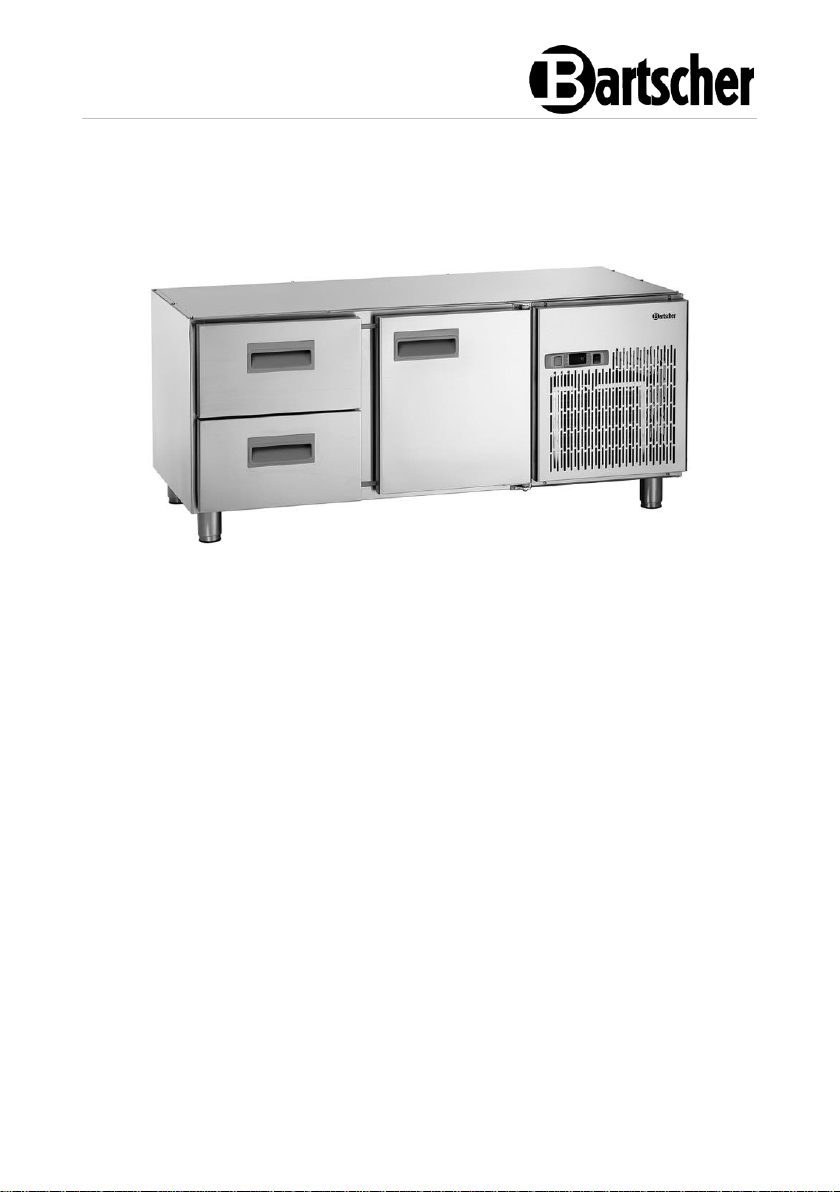
1400T1S2
110903
Page 2
Bartscher GmbH
Franz-Kleine-Str. 28
D-33154 Salzkotten
Germany
Phone: +49 5258 971-0
Fax: +49 5258 971-120
Technical Support Hotline: +49 5258 971-197
www.bartscher.com
Version: 1.0
Date of preparation: 2021-10-25
EN
Page 3

Original instruction manual
1 Safety ............................................................................................................ 2
1.1 Explanation of Signal Words .................................................................... 2
1.2 Safety instructions.................................................................................... 3
1.3 Intended Use ........................................................................................... 6
1.4 Unintended Use ....................................................................................... 6
2 General information ....................................................................................... 7
2.1 Liability and Warranty .............................................................................. 7
2.2 Copyright Protection ................................................................................ 7
2.3 Declaration of Conformity ........................................................................ 7
3 Transport, Packaging and Storage ................................................................ 8
3.1 Delivery Check ......................................................................................... 8
3.2 Packaging ................................................................................................ 8
3.3 Storage .................................................................................................... 8
4 Technical Data ............................................................................................... 9
4.1 Technical Specifications .......................................................................... 9
4.2 Functions of the Appliance ..................................................................... 10
4.3 List of Components of the Appliance ..................................................... 11
5 Installation and operation ............................................................................ 12
5.1 Installation .............................................................................................. 12
5.2 Operation ............................................................................................... 14
6 Cleaning and Maintenance .......................................................................... 19
6.1 Safety Instructions for Cleaning ............................................................. 19
6.2 Cleaning ................................................................................................. 19
6.3 Maintenance .......................................................................................... 20
7 Possible Malfunctions .................................................................................. 20
8 Disposal ....................................................................................................... 22
110903 1 / 24
Page 4
Safety
EN
Read this instruction manual before using and keep it available
at all times!
DANGER!
The signal word DANGER warns against hazards that lead to severe
injuries or death if the hazards are not avoided.
Diese Bedienungsanleitung beschreibt di e Installation, Bedienung und Wartu ng des Geräts und gilt als wichtige Infor mationsquelle und Nachschlagewer k. Die Kenntnis aller enthaltenen Sicherh eitshinweise und Handlungsanweisu ngen schafft die Voraussetzung f ür das sichere und sachgerechte Ar beiten mit dem Gerät. Darüber hinaus müssen die für den Einsatzbereich des Geräts geltenden örtlichen Unfallverh ütungsvorschriften und allgemeinen Sicherheitsbestimmungen eingehalt en werden. Diese Bedienungsanleitung is t Bestandteil des Produkts und muss in unmittelbarer Nähe des Geräts für das In¬stallations-, Bedienu ngs-, Wartungs- und Reinigungspers onal jederzeit zugänglich auf¬bewahrt werd en. Wenn das Gerät an eine dritt e Person
weitergegeben wird, muss die Bedienungsa nleitung mit ausgehändigt werden.
This instruction manual contains information about installation, operation and
maintenance of the appliance and constitutes an important source of information
and reference guide. The knowledge of all operational and safety instructions
included in this manual is a prerequisite for safe and proper handling of the
appliance. Additionally, accident prevention, occupational health and safety, and
legal regulations in force in the area the appliance is used apply.
Before you start using the appliance, especially before turning it on, read this
instruction manual in order to avoid personal injuries and property damages.
Improper use may cause damage.
This instruction manual forms and integral part of the product and must be stored in
an immediate vicinity of the appliance and be available at all times. The instruction
manual should be transferred together with the appliance.
1 Safety
This appliance has been manufactured in accordance with technical standards
currently in force. However, the appliance may be a source of hazards if used
improperly or contrary to its intended purpose. All persons using the appliance must
consider information included in this instruction manual and observe safety
instructions.
1.1 Explanation of Signal Words
Important safety instructions and warning information are indicated in this
instruction manual with appropriate signal words. You must strictly follow the
instructions, to prevent accidents, personal injuries and property damages.
2 / 24 110903
Page 5
Safety
EN
WARNING!
The signal word WARNING warns against hazards that may lead to
moderate or severe injuries or death if the hazards are not avoided.
CAUTION!
The signal word CAUTION warns against hazards that may lead to
light or moderate injuries if the hazards are not avoided.
IMPORTANT!
The signal word IMPORTANT indicates possible property damages,
which may occur if safety instructions are not observed.
NOTE!
The symbol NOTE indicates subsequent information and guidelines
for the user on usage of the appliance.
, die
1.2 Safety instructions
Electrical Current
• Too high a mains voltage or incorrect installation may cause electric shock.
• The appliance may be connected only if data on the rating plate correspond with
the mains voltage.
• To avoid short-circuit, the appliance should be kept dry.
• If there are malfunctions during operation, disconnect the appliance from the
power supply.
• Do not touch the appliance’s plug with wet hands.
• Never take hold of the appliance if it has fallen into water. Immediately
disconnect the appliance from the power supply.
• Any repairs or housing opening may be carried out by professionals and
relevant workshops only.
• Do not transport the appliance, holding it by the power cord.
• Do not allow the power cord to come into contact with heat sources or sharp
edges.
• Do not bend, pinch nor knot the power cord.
110903 3 / 24
Page 6
Safety
EN
• Always completely unwind the power cord.
• Never place the appliance or other objects on the power cord.
• Always take hold of the plug to disconnect the appliance from the power supply.
• Check the power cord regularly for damage. Do not use the appliance if the
power cord is damaged. If this cable is damaged, it must be replaced by
customer service or a qualified electrician in order to avoid dangers.
Incorrect operation of the appliance ma y cause fire or explosion hazard due to igniti on of its content.
Fire hazard / flammable materials hazard / explosion hazard!
• Do not use any electric devices in the appliance.
• Do not store nor use petrol or other flammable liquids and gases in the vicinity of
this or any other appliance. Those gases may cause fire or explosion hazard.
• Do not put into the appliance any explosive materials, like sprays filled with
flammable propellants. Contents of containers filled with flammable gases and
liquids may leak in low temperatures, and the contents may catch fire from
sparks generated by an electric appliance. Explosion hazard!
• In the case of coolant leakage, pull the plug from the socket. Remove all
sources of ignition in the vicinity, ventilate room and contact technical service.
Avoid coolant getting in contact with eyes, as it may cause serious eye damage.
• Never use any flammable liquids for cleaning the appliance or its parts. Gases
released may cause fire or explosion hazard.
• In the case of fire, disconnect the appliance from the power supply before
attempting adequate fire-extinguishing actions.
• Never attempt to extinguish fire with water if the appliance is connected to the
power supply. Following extinction of fire, ensure sufficient fresh air inflow.
• Defrosting process may not be sped up with mechanical means or heat energy
sources (candles or heaters) nor with any other means. Vapour produced may
cause short-circuit and too high temperatures may damage the appliance.
• All ventilation slots should not be obstructed during operation.
• Never attempt to damage cooling installation of the appliance.
Operating Personnel
• The appliance may only be operated by qualified personnel and trained
specialist personnel.
• This appliance may not be operated by persons (including children) with limited
physical, sensory or mental capabilities, nor by persons with limited experience
and/or limited knowledge.
• Children should be supervised to ensure that they are not playing with or
switching on the appliance.
4 / 24 110903
Page 7
Safety
EN
Improper Use
• Unintended or prohibited use may cause damage to the appliance.
• The appliance may only be used when its technical condition is flawless and
allows for safe operation.
• The appliance may only be used when all connections are executed according
to rules of law in force.
• The appliance may only be used when it is clean.
• Use only original spare parts. Never attempt to repair the appliance on your own.
• Do not introduce any changes in the appliance nor modify it.
• Do not drill hole in the appliance nor install any objects on it.
• Do not place any heavy objects on the appliance.
110903 5 / 24
Page 8
Safety
EN
1.3 Intended Use
As described below, every use of the appliance for a purpose differing and/or
diverging from its intended standard use, is prohibited and considered to be an
unintended use.
The following is an intended use:
– Cooling of suitable food products.
The appliance is intended for operation in maximum ambient temperature of 30°C
and relative humidity of 55%.
1.4 Unintended Use
An unintended use may lead to personal injuries or property damages caused by
hazardous voltage, fire or high temperature. The appliance may only be used to
perform tasks described in this instruction manual.
The following is an unintended use:
– Storing flammable or explosive objects and liquids, such as ether,
petroleum or adhesives;
– Storing explosive materials, like sprays filled with flammable propellants;
– Storing pharmaceutical products or preserved blood;
– Storing live pets.
6 / 24 110903
Page 9
General information
EN
2 General information
2.1 Liability and Warranty
All information and instructions in this instruction manual account for legal
regulations in force, current level of technical engineering knowledge as well as our
expertise and experience, developed over the years. If special models or additional
options are ordered, or state-of-the-art technical solutions were implemented, the
actual scope of delivery of the appliance may, in some circumstances, differ from
descriptions and numerous drawings in this instruction manual.
The manufacturer is not liable for any damages nor faults stemming from:
– failure to observe instructions,
– unintended use,
– technical alterations introduced by the user,
– usage of unapproved spare parts.
We reserve the right to introduce technical modifications to the product, intended for
improvement of the appliance and its performance.
The warranty period for this appliance is 24 months, counted from the purchase
date.
2.2 Copyright Protection
This instruction manual, and texts, drawings and images included in it, as well as its
other components are copyright protected. It is prohibited to reproduce this
instruction manual (including its excerpts), in any form and by any means, and to
use and/or transfer its content to third parties without manufacturer’s written
permission. Violation of the above results in obligation to pay compensation. We
reserve the right to claim further damages.
2.3 Declaration of Conformity
The appliance meets the currently applicable standards and guidelines of the
European Union. We confirm the above in the EC Declaration of Conformity. We
may provide relevant Declaration of Conformity upon request.
110903 7 / 24
Page 10
Transport, Packaging and Storage
EN
3 Transport, Packaging and Storage
3.1 Delivery Check
Immediately upon reception, check the delivery for completeness and possible
shipping damage. In the case of visible transport damage refuse to accept the
appliance or accept it conditionally. Mark and note the scope of damage in shipping
documents/consignment list of the shipping company and lodge a complaint.
Concealed damage must be reported immediately upon its discovery, as
compensation claims may only be filed within applicable time limits.
If you find that parts or accessories missing, please contact our Customer Service
Department.
3.2 Packaging
Do not dispose of the appliance cardboard box. It may be used to store the
appliance when relocating or when shipping the appliance to our service point in the
case of any damages.
The packaging and its elements are made of recyclable materials. Particularly,
these are: plastic films and bags, cardboard box.
When disposing of the packaging, observe applicable domestic regulations.
Recyclable packaging materials should be recycled.
3.3 Storage
Leave the packaging closed until installation of the appliance; observe external
indications concerning method of placing and storage. Store the packaging in the
following conditions only:
– in closed rooms;
– in dry and dust-free surrounding;
– away from aggressive agents;
– in a location protected against sunlight;
– in a location protected against mechanical shocks.
In the case of extended storage (over three months), make sure you check the
condition of the packaging and the parts regularly. If needed, replace the packaging
with a new one.
8 / 24 110903
Page 11
Technical Data
EN
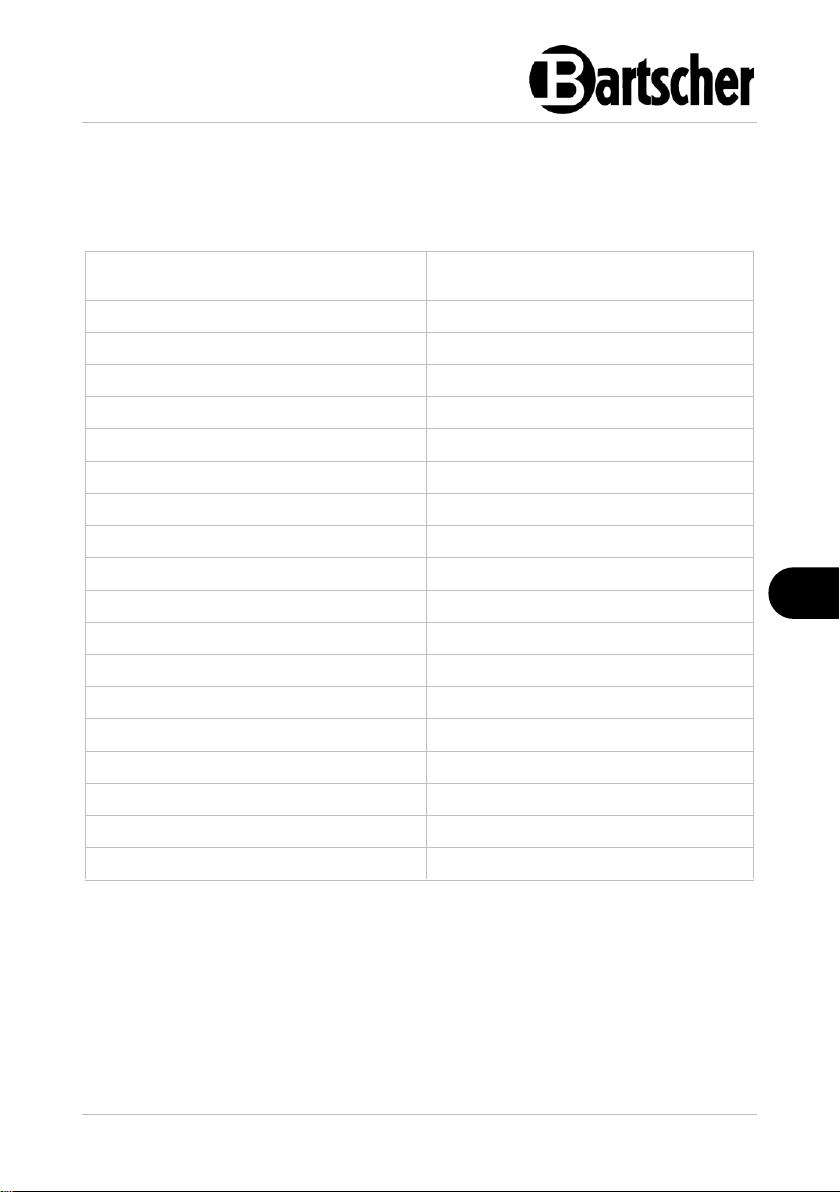
Name:
Refrigerated counter as
substructure 1400T1S2
Art. No.:
110903
Material:
Chrome-nickel steel
Volume, in l:
120
Number of cabinets:
1
Cabinet dimensions (W x D x H), in mm:
388 x 540 x 454
Cabinet Gastro Norm:
1/1 GN
Number of grates:
1 x 1/1 GN
Number of doors:
1
Number of guide rail pairs:
3
Number of drawers:
2
Drawer Gastro Norm:
1/1 GN
Drawers dimensions (W x D x H), in mm:
305 x 520 x 145
Temperature range, min.–max., in °C:
0 - 10
Climate class:
SN
Coolant, amount in kg:
R290 / 0,120 kg
Connected load:
0,507 kW | 230 V | 50 Hz
Dimensions (W x D x H), in mm:
1.400 x 682 x 625
Weight, in kg:
86,0
4 Technical Data
4.1 Technical Specifications
We reserve the right to implement technical modifications.
110903 9 / 24
Page 12
Technical Data
EN
Version / Characteristics
• Cooling: circulating air
• Cooling cabinets and drawers
• Temperature control: digital
• Thermostat
• Control: electronic, button
• Digital display
• ON/OFF switch
• Indicator light: ON/OFF
• Automatic defrosting function
• Evaporation of condensed water
• Door type: leaf door
• Door hinge: right side
• Height-adjustable feet in the range of 625–660 mm
• The set does not include: GN container
4.2 Functions of the Appliance
Food products or meals prepared in suitable containers may be cooled and stored
through a specified time with suitable temperature settings.
10 / 24 110903
Page 13
Technical Data
EN
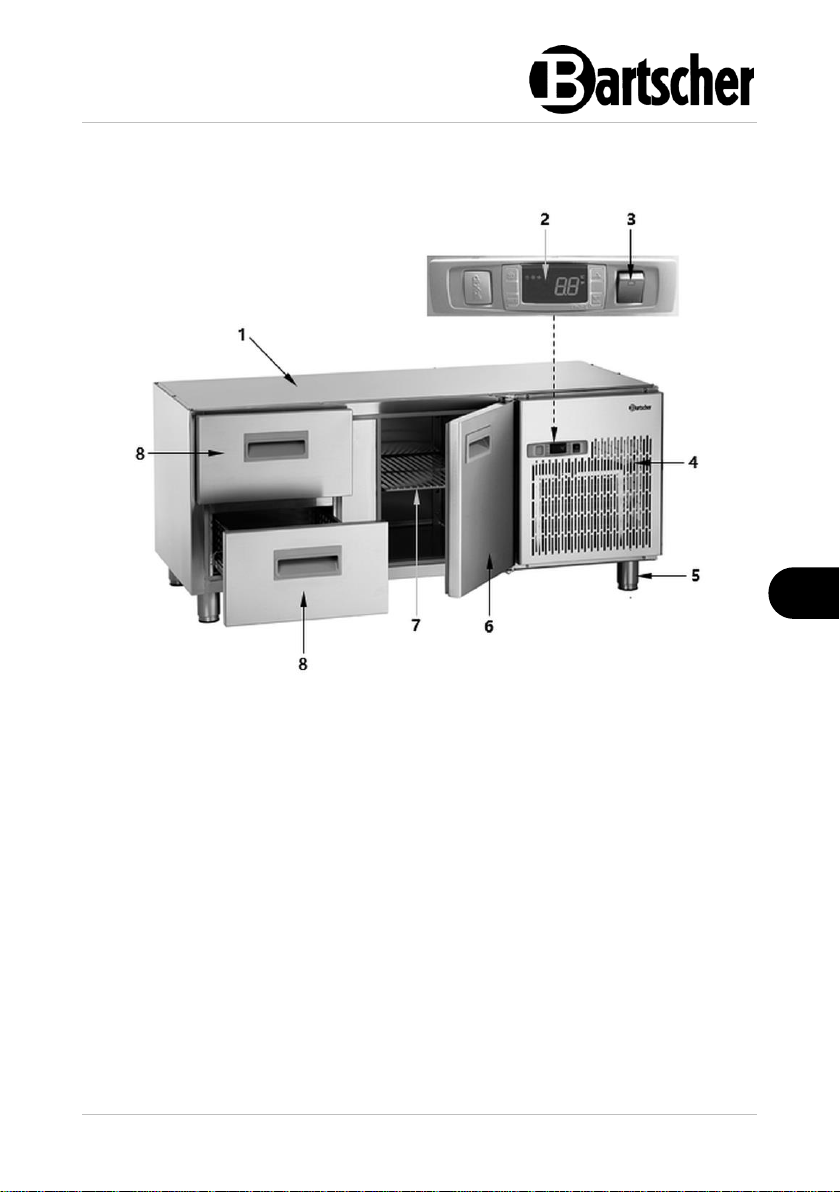
Fig. 1
1. Housing
2. Digital temperature controller
3. ON/OFF switch with integrated
power indicator light (green)
4. Ventilation openings
5. Height-adjustable feet (4 pcs)
6. Door
7. 1/1 GN rack
8. Drawer (2 pcs)
4.3 List of Components of the Appliance
110903 11 / 24
Page 14
Installation and operation
EN
CAUTION!
Incorrect installation, positioning, operation, maintenance or misuse of
the appliance may lead to personal injury or property damage.
Positioning and installation, as well as repairs may be performed by
authorised technical service only and in compliance with the applicable
national law.
CAUTION!
Choking hazard!
Prevent children from accessing package materials, for instance: plastic
bags and EPS.
5 Installation and operation
5.1 Installation
Unpacking / Positioning
• Unpack the appliance, remove all external and internal packaging elements and
shipment safeguards.
• If the appliance is covered with a protective film, remove it. Remove the film
slowly, so no glue residues are left. Remove any glue residues with the use of a
suitable solvent.
• Be careful not to damage the rating plate and warning labels fixed on the
appliance.
• Never place the appliance in humid or wet environment.
• Place the appliance in a way making the connections easily accessible, so that
they may be quickly disconnected if such a need arises.
• The appliance should be placed on surfaces that are:
– even, with sufficient bearing capacity, resistant to water, dry and resistant
to high temperatures;
– sufficiently large, and thus enabling usage of the appliance with no
problems;
– easily accessible;
– well ventilated.
• Nie należy umieszczać urządzenia w gorąc ym otoczeniu a ni w pobliżu m ateriałów łat wopalnych.
• The appliance requires sufficient airflow f or proper operation. Assure a minimu m lateral clearance of the appliance of 10 c m.
• Die Öffnungen am Gerät niemals abdec ken oder blockieren.
12 / 24 110903
Page 15
Installation and operation
EN
• Do not place the appliance in direct sunlight or in the vicinity of heat sources
(cooker, radiator, heating devices, etc.). Heat sources may negatively affect
power consumption, and restrict functions of the appliance, too.
• The electric socket should be easil y accessible so it is possible to quickly discon nect the power cord when necessar y. The electric socket should be easil y accessible so it is possible to quickly discon nect the power cord when necessar y. The electric socket should be easily accessi ble so it is possible to quickly discon nect the power cord when necessar y.
• Nie należy umieszczać urządzenia w gorąc ym otoczeniu a ni w pobliżu m ateriałów łat wopalnych.
• The appliance requires sufficient airflow f or proper operation. Assure a minimu m lateral clearance of the appliance of 10 cm.
• Die Öffnungen am Gerät niemals abdec ken oder blockieren.
• Place the appliance so that sufficient air circulation is ensured. Do not block nor
cover ventilation openings in the rear wall of the appliance.
• Leave at least 10 cm clearance from walls and other objects.
• Nie należy umieszczać urządzenia w gorąc ym otoczeniu a ni w pobliżu m ateriałów łat wopalnych.
• The appliance requires sufficient airflow f or proper operation. Assure a minimu m lateral clearance of the appliance of 10 c m.
• Die Öffnungen am Gerät niemals abdec ken oder blockieren.
• In order to avoid damage to the compressor, do not tilt the appliance more than
45° when positioning or transporting it.
• The electric socket should be easil y accessible so it is possible to quickly discon nect the power cord when necessar y. The electric socket should be easil y accessible so it is possible to quickly disco nnect the power cord when necessar y. The electric socket should be easily accessi ble so it is possible to quickly discon nect the power cord when necessar y.
• To install the appliance, perform the following steps:
– Remove the packaging of the appliance, except for the pallet.
– Lift the appliance with the lift truck and move it to the planned installation
location. Be careful not to damage the appliance. Control the stability in
order not to lose the balance of the appliance.
– Do not drag nor push the appliance, as it may fall down. This may also
cause the damage to external elements or feet.
– As soon as the appliance is in the planned installation location, remove
the pallet.
– Level the appliance by screwing in or out the feet.
– Remove the protective film from the appliance at the end.
Power supply connection
• Verify if technical data of the appliance (see rating plate) correspond with the
local electric power grid specification.
• Connect the appliance to a single, properly grounded mains socket with
protective contact. Do not connect the appliance to a multi-socket.
• The power cord should be laid in a way preventing anyone from threading on it
or tripping against it.
110903 13 / 24
Page 16
Installation and operation
EN
• Prior to first use, the appliance should be installed and left standing upright for at
least 2 hours, before it is connected to power supply.
• After a power failure or when the plug is removed from the socket, do not
reconnect the appliance to power supply for at least 5 minutes.
5.2 Operation
Tips for the User
• Fill the refrigerated counter only when the digital display shows that the required
temperature has been reached.
• Do not fill the refrigerated counter with warm food products nor liquids, as well
as uncovered food products.
• Use seal-tight containers for storing food products and beverages, to protect the
aromas of the food products and beverages and avoid mixing the aromas inside
the refrigerated counter.
• During the first filing or full filling of refrigerated counter always open and fill only
one cabinet to avoid tilting of the appliance.
• While placing food products in the refrigerated counter keep in mind that
sufficient space must be maintained between the internal walls of the device and
stored food products to assure free circulation of air inside the appliance.
• The more items in the refrigerated counter, and the longer the doors/drawers
are kept open, the higher the energy consumption.
• To limit loss of cold air minimize the opening time of doors/drawers. Moreover,
the doors/drawers should not be opened too often.
• To avoid occurrence of unpleasant odour in the device follow the recommended
storage periods of food products.
14 / 24 110903
Page 17
Installation and operation
EN
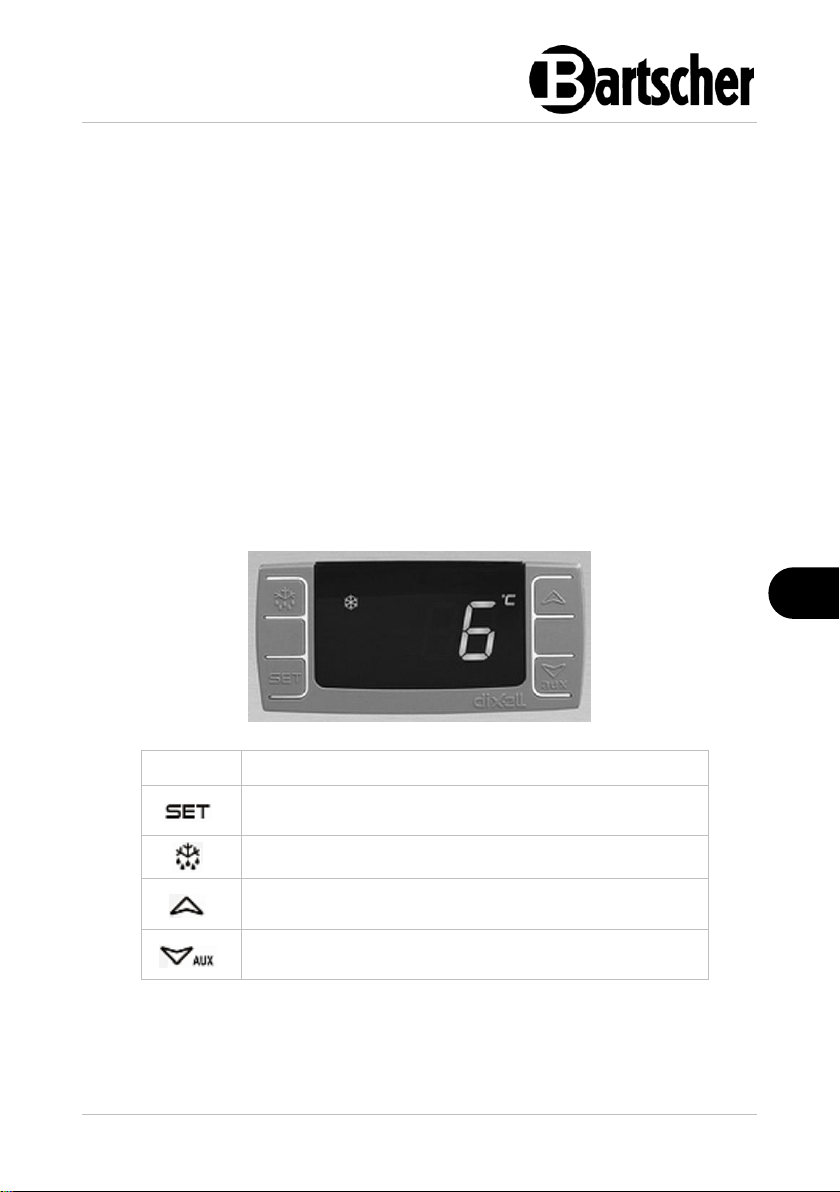
Button
Functions
Showing the set value, selection of parameters in the
programming mode or confirmation of the process
Manual starting of the defrosting
Selection of the parameter code in the programming
mode, increase of the displayed value
Selection of the parameter code in the programming
mode, decrease of the displayed value
Appliance Preparation and Start-Up
1. Before use, clean the appliance and accessories thoroughly, following
indications in section 6 'Cleaning and Maintenance'.
2. To end with, dry the appliance and accessories thoroughly.
3. Plug the appliance into a suitable single socket.
4. Switch the appliance on by setting the switch at the front of the appliance in 'I'
(ON) position.
The green power indicator light in the ON/OFF switch lights up. The digital display
shows current temperature inside the appliance.
5. Switch the appliance on (without food products). Follow indication in the
subsequent sections of the instruction.
6. The appliance should reach the required temperature before filling the drawers
or shelves with food products for the first time.
Control elements and displayed messages
110903 15 / 24
Page 18
Installation and operation
EN
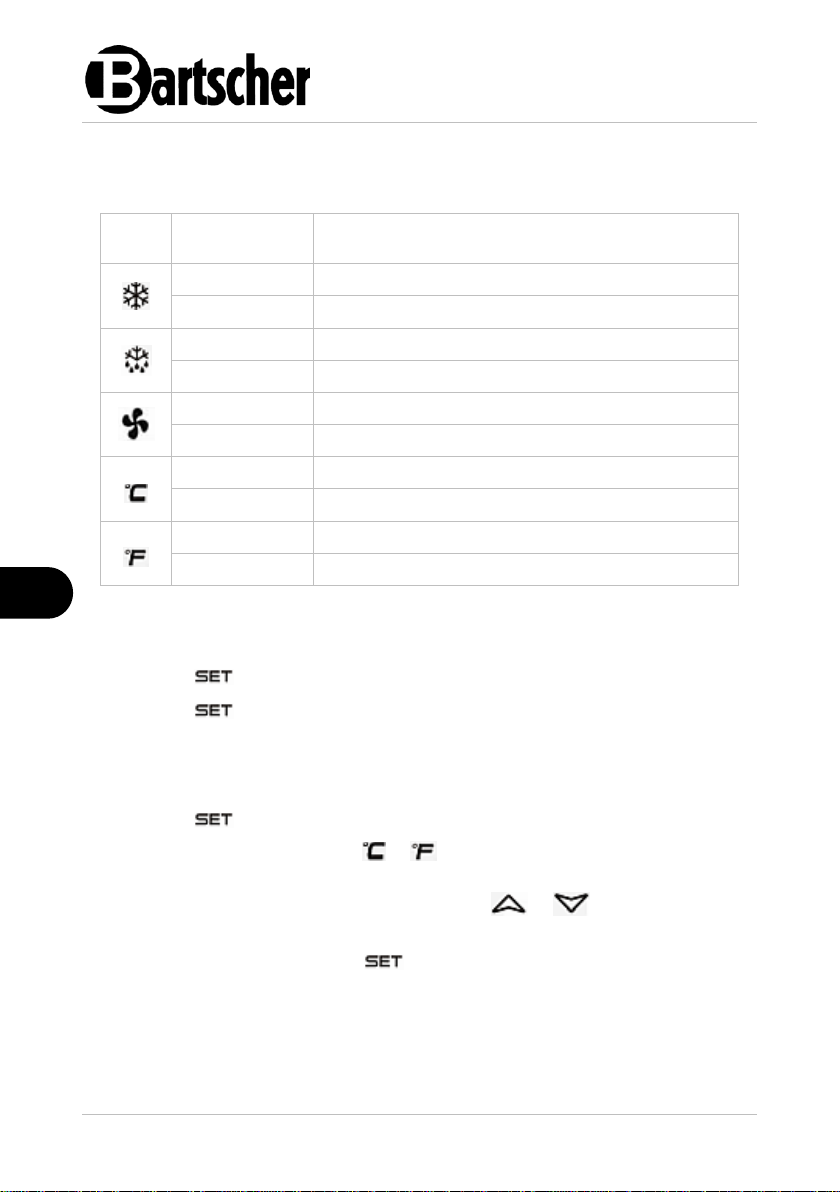
LED
Status of the
active function
Meaning
illuminates
activated compressor
flashes
in delay
illuminates
defrosting in progress
flashes
defrosting delay
illuminates
fan activated
flashes
delay after defrosting
illuminates
degrees Celsius temperature unit indicator
flashes
in the programming mode
illuminates
degrees Fahrenheit temperature unit indicator
flashes
in the programming mode
LED indicators
The LED indicators in the digital display show the status of the active function:
Displaying the set value
1. Press the button shortly, to display the set value.
2. Press the button again or wait 5 seconds, to return to the previous
message.
Changing the set value (i.e. the required temperature)
1. Press the button and hold it pressed for at least 3 seconds.
The set value is displayed and the or LED indicator flashes on the digital
display.
2. The value may be increased or decreased with or button until the
digital display shows the required value.
3. Confirm the new value with the button or wait 10 seconds — then, the
value will be stored automatically.
16 / 24 110903
Page 19
Installation and operation
EN
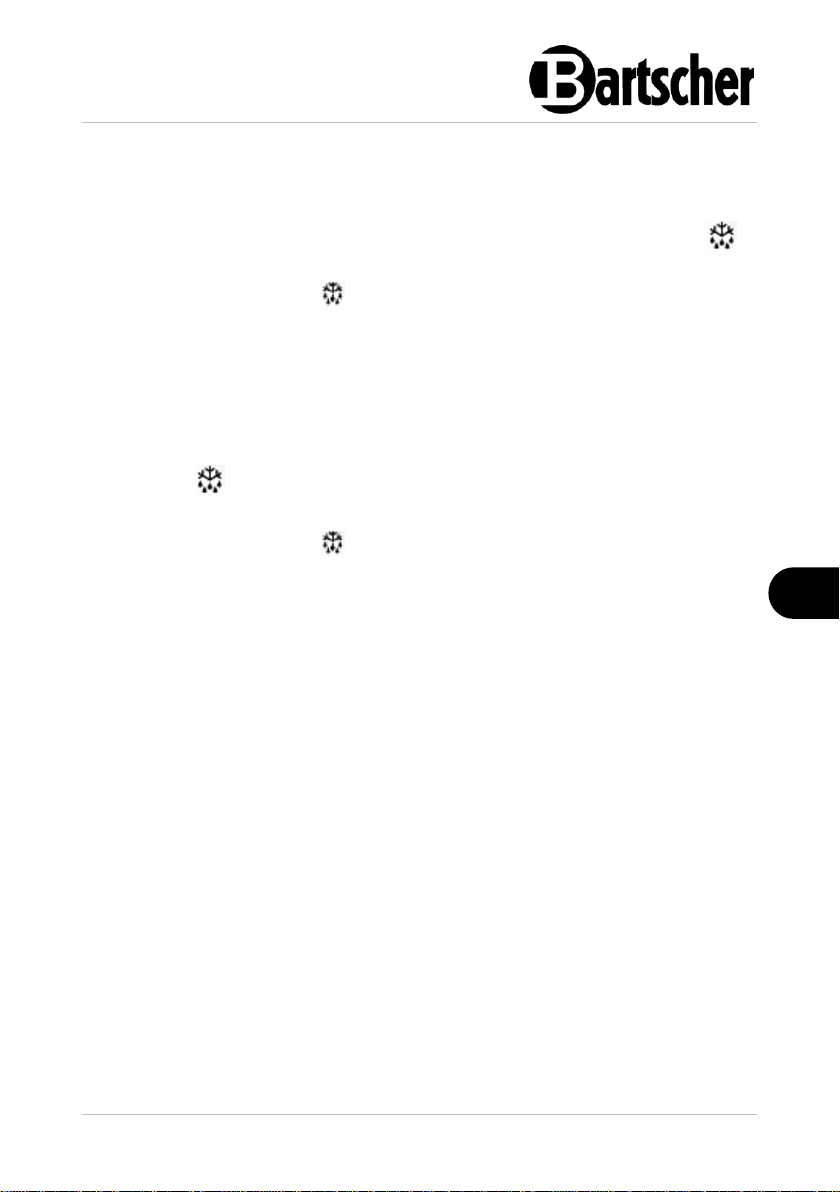
Automatic defrosting
The appliance defrosts automatically 4 times over 24-hour period. The timer
initiates with the first activation.
1. If there is a need for the change of automatic defrosting phases, press the
button and hold it for more than 2 seconds.
The digital display shows the symbol.
The defrosting cycle is immediately initiated; in such a case, the subsequent
defrosting cycle is executed after 6 hours.
Manual defrosting
Additionally, aside of the automatic defrosting, manual defrosting may be activated
any time.
1. Press the button and hold it pressed for more than 2 seconds.
The manual defrosting is initiated.
The digital display shows the symbol.
NOTE!
Water generated during defrosting evaporates automatically.
NOTE!
Subsequent settings or parameter changes should be introduced by
service personnel only.
110903 17 / 24
Page 20
Installation and operation
EN
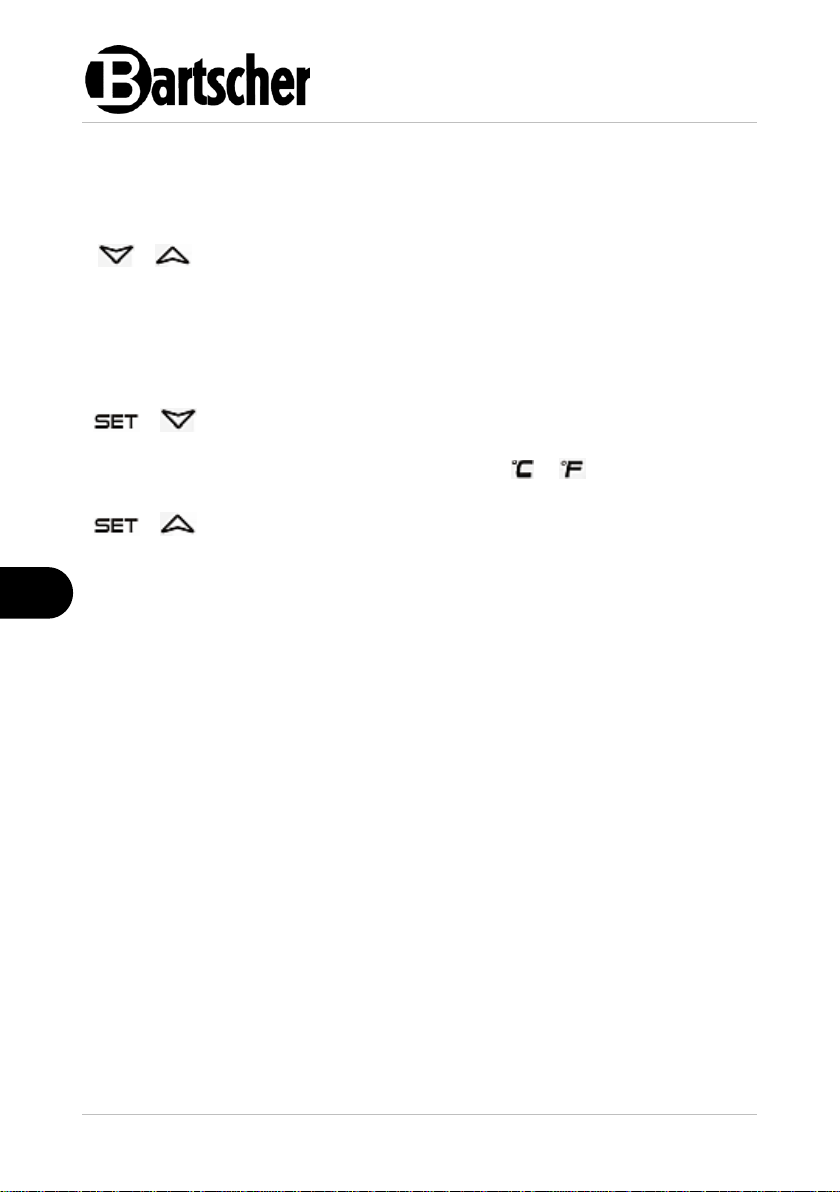
+
Button locking or unlocking:
– to lock, press both buttons concurrently and hold them
pressed for more than 3 seconds, until the digital display
shows the "OFF" message
– to unlock, press these buttons and hold them pressed for
more than 3 seconds, until the digital display shows the "ON"
message
+
Moving to the programming mode:
– press both buttons concurrently and hold them pressed for
more than 3 seconds; when the or LED indicators
flash, subsequent settings may be introduced
+
Return to the previously displayed message:
– press these buttons, to leave the programming mode and
return to the previously displayed message (value of
temperature inside the appliance)
Button combinations
Concurrent pressing of two buttons enable activation/deactivation of a number of
functions.
Switching the Appliance Off
1. If the appliance is not to be used for a longer period of time, set the ON/OFF
switch at the front of the appliance to 'O' (OFF) position.
2. Disconnect the appliance from the mains socket (pull the plug out).
18 / 24 110903
Page 21
Cleaning and Maintenance
EN
6 Cleaning and Maintenance
6.1 Safety Instructions for Cleaning
• Before cleaning, disconnect the appliance from the power supply.
• Leave the appliance to cool down completely.
• Make sure water does not enter the appliance. Do not immerse the appliance in
water or other liquids during cleaning. Do not clean the appliance with a
pressurized water jet.
• Do not use any sharp or pointed, nor metal implements (knife, fork, etc.). Sharp
or pointed implements may damage the appliance, and when in contact with live
parts, they may cause electric shock.
• For cleaning, do not use any scouring agents that contain solvents nor corrosive
cleaning agents. They may damage the surface.
6.2 Cleaning
1. Wash the appliance regularly.
2. Remove all objects from the appliance and store them temporarily in a cool
room or in a refrigerator.
3. Clean the refrigerated counter from the inside (cabinet, door, rack, drawers)
using a food-grade disinfectant.
4. Wipe with a cloth moistened in fresh water.
5. Wipe the housing of the refrigerated counter, drawers, the door from inside and
worktop with a soft, damp cloth. Use a mild cleaning agent if required.
6. Finally, dry the cleaned surfaces and elements thoroughly with a soft cloth.
7. Wash the used GN containers and racks in warm water with a neutral cleaning
agent. Rinse thoroughly with fresh water and dry afterwards.
110903 19 / 24
Page 22
Possible Malfunctions
EN
6.3 Maintenance
The following operations should be regularly (weekly) performed by a qualified
specialist, to provide for prolonged and correct operation of the refrigerating unit:
1. Condenser cleaning:
– undo 4 screws of the protective grid at the front of the appliance;
– remove the protective mesh — the condenser will be freely accessible;
– clean the condenser, gently moving a vacuum cleaner suction nozzle for
upholstered furniture or a soft brush along the condenser ribs;
– after cleaning replace the protective grid.
2. Checking of electrical connections.
3. Checking of thermostat and sensor.
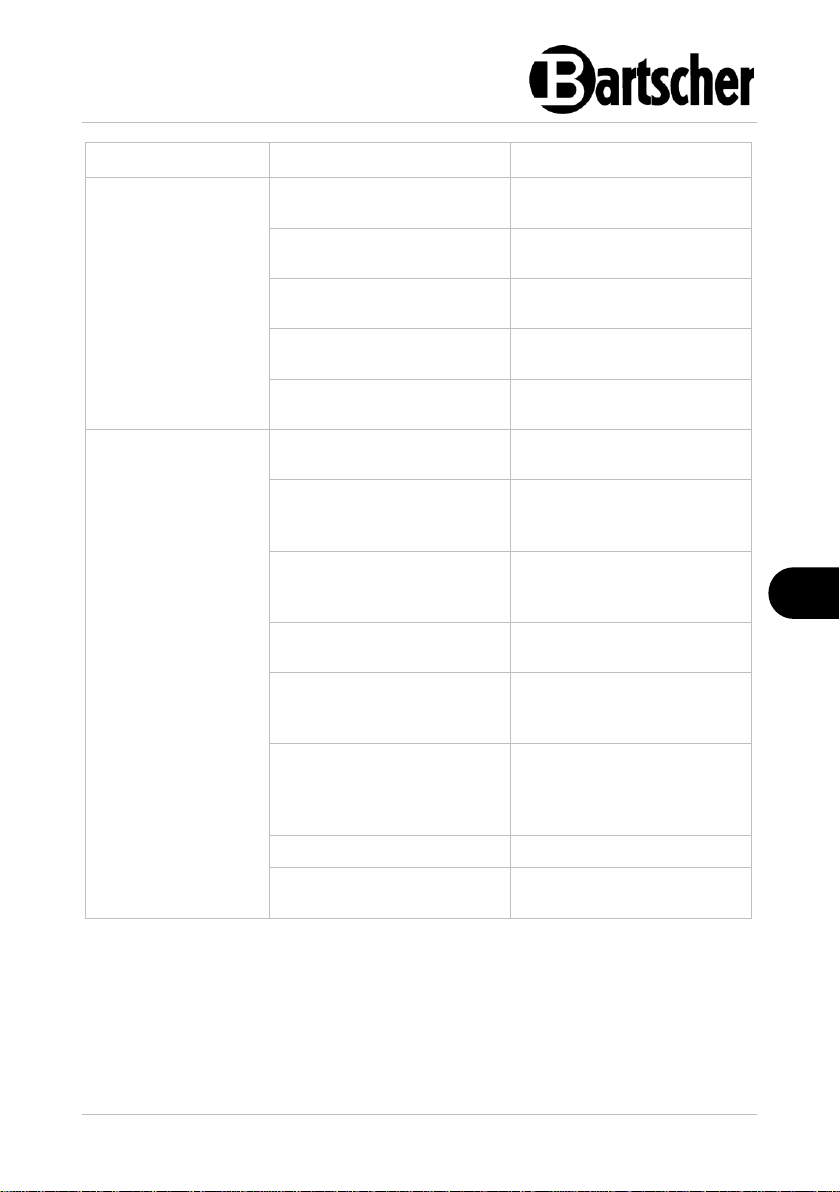
7 Possible Malfunctions
Mögliche
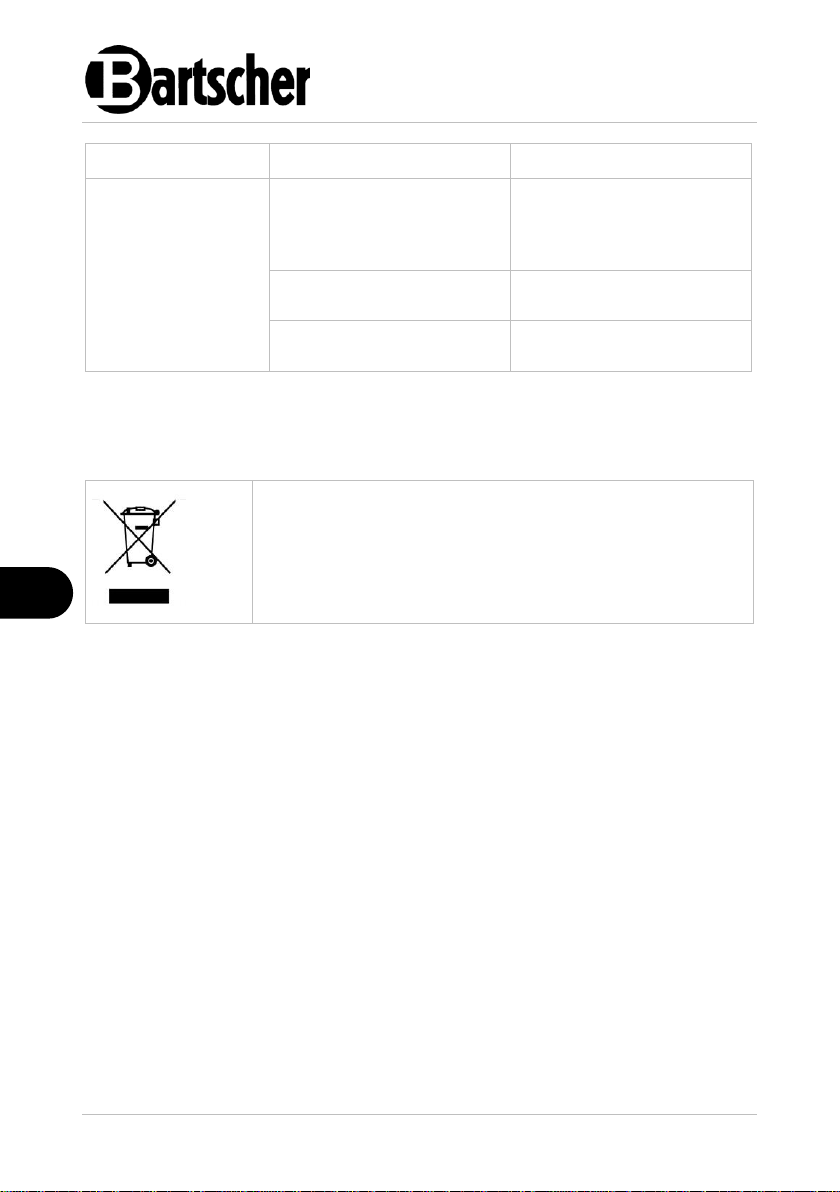
The table below contains descriptions of possible causes and solutions to
malfunctions or errors during operation of the appliance. When malfunction cannot
be removed, contact the technical service.
In such a case, provide article number, model name and serial number. These data
may be found in the rating plate.
20 / 24 110903
Page 23
Possible Malfunctions
EN
Error
Possible Cause
Solution
No cooling
Plug improperly inserted
into socket.
Remove the plug and insert
it properly in the socket
Electric power supply safety
fuse damaged
Check the fuse, connect the
appliance to another socket
No power supply
Check the electric power
supply
Damaged temperature
controller
Contact the service
company
Damaged mains power plug
Contact the service
company
Insufficient cooling
efficiency
Incorrect setting
temperature
Check the temperature
setting, change if needed
Appliance is in defrosting
phase
Wait for the defrosting
phase end. Check the
cooling performance
Direct sunlight or heat
sources in immediate
vicinity
Move the appliance away
from heat sources
Poor air circulation around
the appliance
Keep sufficient clearance
from walls or other objects
The products placed inside
the appliance are too hot.
Leave food products to cool
down before you place them
in the appliance
Products incorrectly
arranged in the appliance
Provide for sufficient
clearance between objects
inside the appliance; do not
cover ventilation openings
The appliance is overfilled
Remove the excess of food
Condenser obstructed with
dust
Clean the condenser
thoroughly
110903 21 / 24
Page 24
Disposal
EN
Error
Possible Cause
Solution
Strange or loud
noises
Appliance is not placed on
an even surface
Place the appliance on an
even surface, level it with
the use of the heightadjustable feet
Doors/drawers are not
closed
Close doors/drawers tightly
Appliance touches walls or
other objects
Keep sufficient clearance
from walls or other objects
Electric appliances are marked with this symbol. Electrical
appliances must be disposed of and recycled in a correct
and environmentally friendly manner. You must not dispose
of electric appliances with household waste. Disconnect the
appliance from the power supply and remove power cord
from the appliance.
8 Disposal
Electrical Appliance
Electrical appliances should be returned to designated collection points.
Coolant
The propellant used in the appliance is flammable. It should be utilised pursuant to
national regulations in force.
22 / 24 110903
 Loading...