

Page 1

AXISQ87BispectralPTZNetworkCameraSeries
AXISQ8741-LEBispectralPTZNetworkCamera
AXISQ8742-LEBispectralPTZNetworkCamera
InstallationGuide
Page 2

InstallationGuide
TableofContents
Safetyinformation..........................................5
Hazardlevels...................................................5
Othermessagelevels.............................................5
Safetyinstructions..........................................6
Transportation..................................................7
Battery.......................................................7
Packagecontents............................................9
Hardwareoverview..........................................10
Howtoinstalltheproduct.....................................13
Mountthebaseunit..............................................14
Routethecables................................................16
Installthenetworklink............................................22
Installtheilluminatorkit..........................................22
Connectthecables...............................................27
Howtoadjusttheweathershield.....................................28
Howtoaccesstheproduct.........................................28
Resettofactorydefaultsettings................................30
Furtherinformation..........................................32
Optionalaccessories..............................................32
Warrantyinformation.............................................32
Specications..............................................33
SDcardslot....................................................33
Connectors....................................................33
Cables........................................................36
Operatingconditions.............................................37
Powerconsumption..............................................37
2
Page 3

Legalconsiderations
Thisproductincludesthefollowinglicences:
•one(1)H.264decoderlicense
Topurchasefurtherlicenses,contactyourreseller.
Thisproductissubjecttoexportcontrolregulations.You
shouldalwaysconsultandcomplywiththeregulationsof
theappropriatelocalexportcontrolauthorities.
Liability
Everycarehasbeentakeninthepreparationofthis
document.PleaseinformyourlocalAxisofceofany
inaccuraciesoromissions.AxisCommunicationsABcannot
beheldresponsibleforanytechnicalortypographicalerrors
andreservestherighttomakechangestotheproductand
manualswithoutpriornotice.AxisCommunicationsAB
makesnowarrantyofanykindwithregardtothematerial
containedwithinthisdocument,including,butnotlimited
to,theimpliedwarrantiesofmerchantabilityandtnessfor
aparticularpurpose.AxisCommunicationsABshallnot
beliablenorresponsibleforincidentalorconsequential
damagesinconnectionwiththefurnishing,performance
oruseofthismaterial.Thisproductisonlytobeusedfor
itsintendedpurpose.
Intellectualpropertyrights
AxisABhasintellectualpropertyrightsrelatingto
technologyembodiedintheproductdescribedinthis
document.Inparticular,andwithoutlimitation,these
intellectualpropertyrightsmayincludeoneormoreof
thepatentslistedataxis.com/patent.htmandoneormore
additionalpatentsorpendingpatentapplicationsinthe
USandothercountries.
Thisproductcontainslicensedthird-partysoftware.See
themenuitem“About”intheproduct’suserinterfacefor
moreinformation.
ThisproductcontainssourcecodecopyrightApple
Computer,Inc.,underthetermsofApplePublicSource
License2.0(seeopensource.apple.com/apsl).Thesource
codeisavailablefromdeveloper.apple.com/bonjour/
Equipmentmodications
Thisequipmentmustbeinstalledandusedin
strictaccordancewiththeinstructionsgiveninthe
userdocumentation.Thisequipmentcontainsno
user-serviceablecomponents.Unauthorizedequipment
changesormodicationswillinvalidateallapplicable
regulatorycerticationsandapprovals.
Trademarkacknowledgements
AXISCOMMUNICATIONS,AXISandVAPIXareregistered
trademarksortrademarkapplicationsofAxisABinvarious
jurisdictions.Allothercompanynamesandproductsare
trademarksorregisteredtrademarksoftheirrespective
companies.
Apple,Boa,Apache,Bonjour,Ethernet,InternetExplorer,
Linux,Microsoft,Mozilla,Real,SMPTE,QuickTime,UNIX,
Windows,WindowsVistaandWWWareregistered
trademarksoftherespectiveholders.Javaandall
Java-basedtrademarksandlogosaretrademarksor
registeredtrademarksofOracleand/oritsafliates.The
UPnPWordMarkandUPnPLogoaretrademarksofOpen
ConnectivityFoundation,Inc.intheUnitedStatesorother
countries.
SD,SDHCandSDXCaretrademarksorregisteredtrademarks
ofSD-3C,LLCintheUnitedStates,othercountriesorboth.
Also,miniSD,microSD,miniSDHC,microSDHC,microSDXC
arealltrademarksorregisteredtrademarksofSD-3C,LLC
intheUnitedStates,othercountriesorboth.
Regulatoryinformation
Europe
ThisproductcomplieswiththeapplicableCEmarking
directivesandharmonizedstandards:
•ElectromagneticCompatibility(EMC)Directive
2014/30/EU.SeeElectromagneticcompatibility(EMC)
onpage3.
•LowVoltage(LVD)Directive2014/35/EU.SeeSafety
onpage4.
•RestrictionsofHazardousSubstances(RoHS)Directive
201 1/65/EU.SeeDisposalandrecyclingonpage4.
Acopyoftheoriginaldeclarationofconformitymaybe
obtainedfromAxisCommunicationsAB.SeeContact
informationonpage4.
Electromagneticcompatibility(EMC)
Thisequipmenthasbeendesignedandtestedtofulll
applicablestandardsfor:
•Radiofrequencyemissionwheninstalledaccordingto
theinstructionsandusedinitsintendedenvironment.
•Immunitytoelectricalandelectromagneticphenomena
wheninstalledaccordingtotheinstructionsandused
initsintendedenvironment.
USA
Thisequipmenthasbeentestedusingashieldednetwork
cable(STP)andfoundtocomplywiththelimitsfora
ClassAdigitaldevice,pursuanttopart15oftheFCCRules.
Theselimitsaredesignedtoprovidereasonableprotection
againstharmfulinterferencewhentheequipmentis
operatedinacommercialenvironment.Thisequipment
generates,uses,andcanradiateradiofrequencyenergy
and,ifnotinstalledandusedinaccordancewiththe
instructionmanual,maycauseharmfulinterferenceto
radiocommunications.Operationofthisequipmentin
aresidentialareaislikelytocauseharmfulinterference
inwhichcasetheuserwillberequiredtocorrectthe
interferenceathisownexpense.Theproductshallbe
connectedusingashieldednetworkcable(STP)thatis
properlygrounded.
Canada
ThisdigitalapparatuscomplieswithCANICES-3(ClassA).
Theproductshallbeconnectedusingashieldednetwork
cable(STP)thatisproperlygrounded.Cetappareil
numériqueestconformeàlanormeCANNMB-3(classeA).
Leproduitdoitêtreconnectéàl'aided'uncâbleréseau
blindé(STP)quiestcorrectementmisàlaterre.
Europe
ThisdigitalequipmentfulllstherequirementsforRF
emissionaccordingtotheClassAlimitofEN55032.The
productshallbeconnectedusingashieldednetworkcable
(STP)thatisproperlygrounded.Notice!ThisisaClassA
product.Inadomesticenvironmentthisproductmaycause
RFinterference,inwhichcasetheusermayberequired
totakeadequatemeasures.
Australia/NewZealand
ThisdigitalequipmentfulllstherequirementsforRF
emissionaccordingtotheClassAlimitofAS/NZSCISPR32.
Theproductshallbeconnectedusingashieldednetwork
cable(STP)thatisproperlygrounded.Notice!Thisisa
ClassAproduct.Inadomesticenvironmentthisproduct
maycauseRFinterference,inwhichcasetheusermaybe
requiredtotakeadequatemeasures.
Japan
この装置は、クラスA情報技術装置です。この装
置を家庭環境で使⽤すると電波妨害を引き起こす
ことがあります。この場合には使⽤者が適切な対
Page 4

策を講ずるよう要求されることがあります。本
製品は、シールドネットワークケーブル(STP)を
使⽤して接続してください。また適切に接地し
てください。
Safety
ThisproductcomplieswithIEC/EN/UL60950-1,safetyof
audio/videoandITequipmentandIEC/EN/UL60950-22,
SafetyofInformationTechnologyEquipment.Theproduct
shallbegroundedusingboththeprotectiveearthwirein
thepowercableandthegroundingbraid.Makesureboth
endsoftheprotectiveearthwireandthegroundingbraid
areincontactwiththeirrespectivegroundingsurfaces.
Thepowersupplyusedwiththisproductshallfulllthe
requirementsforSafetyExtraLowVoltage(SELV)according
toclause2.2ofIEC/UL60950-1orCEC/NECClass2source
ofsupplyasdenedintheCanadianElectricalCode,CSA
C22.1andNationalElectricalCode,ANSI/NFPA70.
Disposalandrecycling
Whenthisproducthasreachedtheendofitsusefullife,
disposeofitaccordingtolocallawsandregulations.For
informationaboutyournearestdesignatedcollectionpoint,
contactyourlocalauthorityresponsibleforwastedisposal.
Inaccordancewithlocallegislation,penaltiesmaybe
applicableforincorrectdisposalofthiswaste.
Europe
Thissymbolmeansthattheproductshallnotbe
disposedoftogetherwithhouseholdorcommercialwaste.
Directive2012/19/EUonwasteelectricalandelectronic
equipment(WEEE)isapplicableintheEuropeanUnion
memberstates.Topreventpotentialharmtohumanhealth
andtheenvironment,theproductmustbedisposedofin
anapprovedandenvironmentallysaferecyclingprocess.
Forinformationaboutyournearestdesignatedcollection
point,contactyourlocalauthorityresponsibleforwaste
disposal.Businessesshouldcontacttheproductsupplierfor
informationabouthowtodisposeofthisproductcorrectly.
Thisproductcomplieswiththerequirementsof
Directive201 1/65/EUontherestrictionoftheuseof
certainhazardoussubstancesinelectricalandelectronic
equipment(RoHS).
China
Thisproductcomplieswiththerequirementsof
SJ/T1 1364-2014,Markingfortherestrictionofhazardous
substancesinelectricalandelectronicproducts.
电
气
实
装
部
分
0:表示该有毒有害物质在该部件所有均质材料中
的含量均在GB/T26572标准规定的限量要求以下。
X:表示该有毒有害物质至少在该部件的某一均质
材料中的含量超出GB/T26572标准规定的限量要
求。
Contactinformation
AxisCommunicationsAB
Emdalavägen14
22369Lund
Sweden
Tel:+46462721800
Fax:+4646136130
axis.com
00000
X
Warrantyinformation
ForinformationaboutAxis’productwarrantyandthereto
relatedinformation,gotoaxis.com/warranty
Support
Shouldyourequireanytechnicalassistance,pleasecontact
yourAxisreseller.Ifyourquestionscannotbeanswered
immediately,yourresellerwillforwardyourqueriesthrough
theappropriatechannelstoensurearapidresponse.Ifyou
areconnectedtotheInternet,youcan:
•downloaduserdocumentationandsoftwareupdates
•ndanswerstoresolvedproblemsintheFAQdatabase,
searchbyproduct,category,orphrase
•reportproblemstoAxissupportstaffbylogginginto
yourprivatesupportarea
•chatwithAxissupportstaff
•visitAxisSupportataxis.com/support
Learnmore!
VisitAxislearningcenteraxis.com/academyforuseful
trainings,webinars,tutorialsandguides.
有毒有害物质或元素
部
铅
件
(Pb)
名
称
汞
镉
六价
多溴
(Hg)
(Cd)
铬
(Cr(VI))
多溴
联苯
二苯
(PB-
醚
B)
(PBDE)
Page 5

AXISQ87BispectralPTZNetworkCameraSeries
Safetyinformation
Hazardlevels
DANGER
Indicatesahazardoussituationwhich,ifnotavoided,willresultindeathorseriousinjury.
WARNING
Indicatesahazardoussituationwhich,ifnotavoided,couldresultindeathorseriousinjury.
CAUTION
Indicatesahazardoussituationwhich,ifnotavoided,couldresultinminorormoderate
injury.
NO
TICE
NO NO
TICE TICE
Indicatesasituationwhich,ifnotavoided,couldresultindamagetoproperty.
Othermessagelevels
Important
Indicatessignicantinformationwhichisessentialfortheproducttofunctioncorrectly.
Note
Indicatesusefulinformationwhichhelpsingettingthemostoutoftheproduct.
5
Page 6

AXISQ87BispectralPTZNetworkCameraSeries
Safetyinstructions
DANGER
Riskofelectricshock.Allcablesshallbede-energizedbeforeinstallingorperforming
maintenanceontheproduct.
WARNING
TheAxisproductshallbeinstalledbyatrainedprofessional,andincompliancewithlocal
lawsandregulations.
WARNING
IRemittedfromthisproduct.Donotstareatoperatinglamp.
CAUTION
Riskofinjury.Movingparts.Keepyourbodypartsawayfromtheproductwhenin
operation.Disconnectfrompowersupplybeforeinstallingorperformingmaintenance
ontheproduct.
CAUTION
Riskofinjury.Hotsurface.Donottouchtheproductwheninoperation.Disconnect
frompowersupplyandallowthesurfacestocoolbeforeperformingmaintenanceon
theproduct.
6
Page 7

AXISQ87BispectralPTZNetworkCameraSeries
NO
TICE
NO NO
TICE TICE
•TheAxisproductshallbeusedincompliancewithlocallawsandregulations.
•StoretheAxisproductinadryandventilatedenvironment.
•AvoidexposingtheAxisproducttoshocksorheavypressure.
•Donotinstalltheproductonunstablepoles,brackets,surfacesorwalls.
•UseonlyapplicabletoolswheninstallingtheAxisproduct.Usingexcessiveforcewith
powertoolscouldcausedamagetotheproduct.
•Donotusechemicals,causticagents,oraerosolcleaners.
•Useacleanclothdampenedwithpurewaterforcleaning.
•Useonlyaccessoriesthatcomplywiththetechnicalspecicationofyourproduct.These
canbeprovidedbyAxisorathirdparty.AxisrecommendsusingAxispowersource
equipmentcompatiblewithyourproduct.
•UseonlysparepartsprovidedbyorrecommendedbyAxis.
•Donotattempttorepairtheproductyourself.ContactAxissupportoryourAxisreseller
forservicematters.
•Donotpointthecameralenstowardthesunorotherhigh-intensityradiationsources
becausethiscouldcausedamagetothecamera.
Transportation
NO
TICE
NO NO
TICE TICE
•WhentransportingtheAxisproduct,usetheoriginalpackagingorequivalenttoprevent
damagetotheproduct.
Battery
TheAxisproductusesa3.0VBR2032lithiumbatteryasthepowersupplyforitsinternalreal-time
clock(RTC).Undernormalconditionsthisbatterywilllastforaminimumofveyears.
LowbatterypoweraffectstheoperationoftheRTC,causingittoresetateverypower-up.When
thebatteryneedsreplacing,alogmessagewillappearintheproduct’sserverreport.Formore
informationabouttheserverreport,seetheproduct´ssetuppagesorcontactAxissupport.
Thebatteryshouldnotbereplacedunlessrequired,butifthebatterydoesneedreplacing,contact
Axissupportataxis.com/supportforassistance.
Lithiumcoincell3.0Vbatteriescontain1,2-dimethoxyethane;ethyleneglycoldimethylether
(EGDME),CASno.110-71-4.
7
Page 8

AXISQ87BispectralPTZNetworkCameraSeries
WARNING
•Riskofexplosionifthebatteryisincorrectlyreplaced.
•ReplaceonlywithanidenticalbatteryorabatterywhichisrecommendedbyAxis.
•Disposeofusedbatteriesaccordingtolocalregulationsorthebatterymanufacturer's
instructions.
8
Page 9

AXISQ87BispectralPTZNetworkCameraSeries
Packagecontents
•AXISQ87-LEBispectralPTZNetworkCamera
•AXISPTIRIlluminatorKitC
•Powerconnector
•I/Oconnector
•Torx®bitT20andT30
•RJ45Mountingtool
•Printedmaterials
-InstallationGuide(thisdocument)
-Extraserialnumberlabel(2x)
-AVHSAuthenticationkey
9
Page 10

AXISQ87BispectralPTZNetworkCameraSeries
Hardwareoverview
Forspecicationsofthehardwarecomponents,seeSpecicationsonpage33.
1
Weathershield
2
Topcover
3
Wiper
4
Frontwithprotectivefoil
5
Innercover
6
Thermallens
7
Visuallens
8
Positioningunit
10
Page 11

AXISQ87BispectralPTZNetworkCameraSeries
9
Lid
10
Baseunit
11
Baseunitscrews
1
SDcardslot(microSDHCUHS-I/microSDXCUHS-I)(cardincluded)
2
Fanconnector
3
StatusLED
4
Factorydefaultswitch
5
Inputpowerconnector
6
I/Oconnector
7
RJ45connector
8
SFPslotforSFPmodule(SFPmodulenotincluded)
11
Page 12

AXISQ87BispectralPTZNetworkCameraSeries
1
Illuminator(x2)
2
Illuminatorbracket
3
Illuminatorconnector(x2)
12
Page 13
AXISQ87BispectralPTZNetworkCameraSeries
Howtoinstalltheproduct
DANGER
Riskofelectricshock.Allcablesshallbede-energizedbeforeinstallingtheproduct.
CAUTION
Theelectricalconnectionsandconduitinstallationsshallbemadebyacertiedelectrician
andincompliancewithlocalregulations.
CAUTION
Riskofinjury.Movingparts.Keepyourbodypartsawayfromtheproductwhenin
operation.Disconnectfrompowersupplybeforeinstallingorperformingmaintenance
ontheproduct.
CAUTION
Riskofinjury.Hotsurface.Donottouchtheproductwheninoperation.Disconnect
frompowersupplyandallowthesurfacestocoolbeforeperformingmaintenanceon
theproduct.
13
Page 14
AXISQ87BispectralPTZNetworkCameraSeries
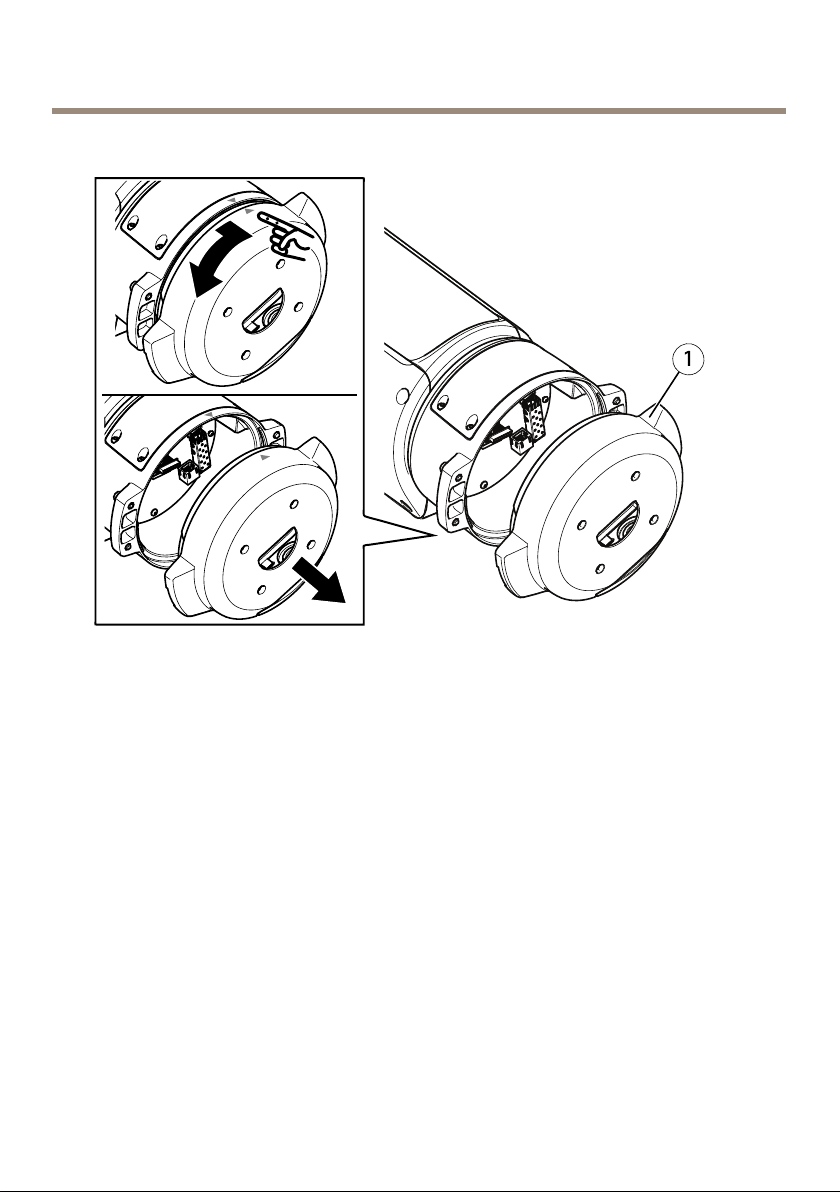
Mountthebaseunit
1
Baseunit
1.Removethefourbaseunitscrews(T30).
2.Simultaneouslypullandturnthebaseunitcounterclockwiseuntilthearrowsonthebase
unitandtherestoftheunitarealigned.
3.Removethebaseunit.
14
Page 15
AXISQ87BispectralPTZNetworkCameraSeries
NO
TICE
NO NO
TICE TICE
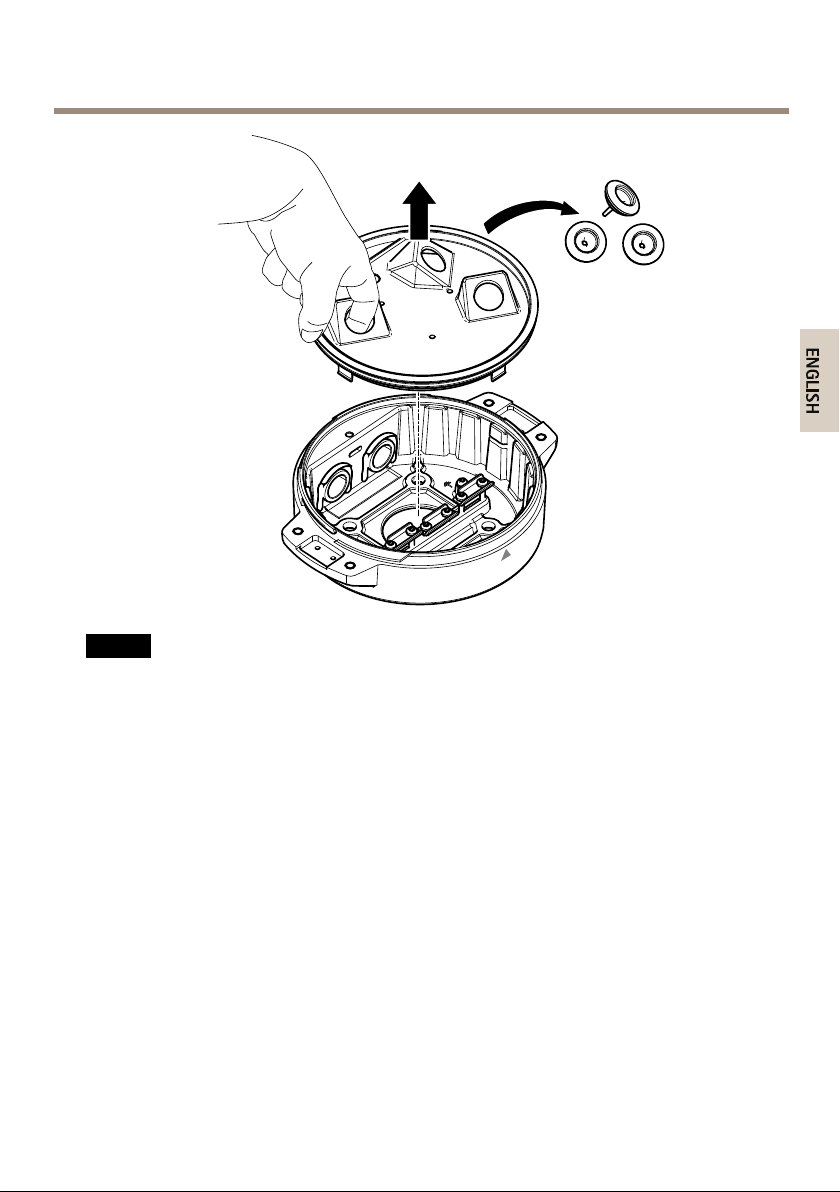
Donotusesharptoolswhenremovingthetransparentbaseunitcover.
4.Removethetransparentbaseunitcover .
15
Page 16
AXISQ87BispectralPTZNetworkCameraSeries
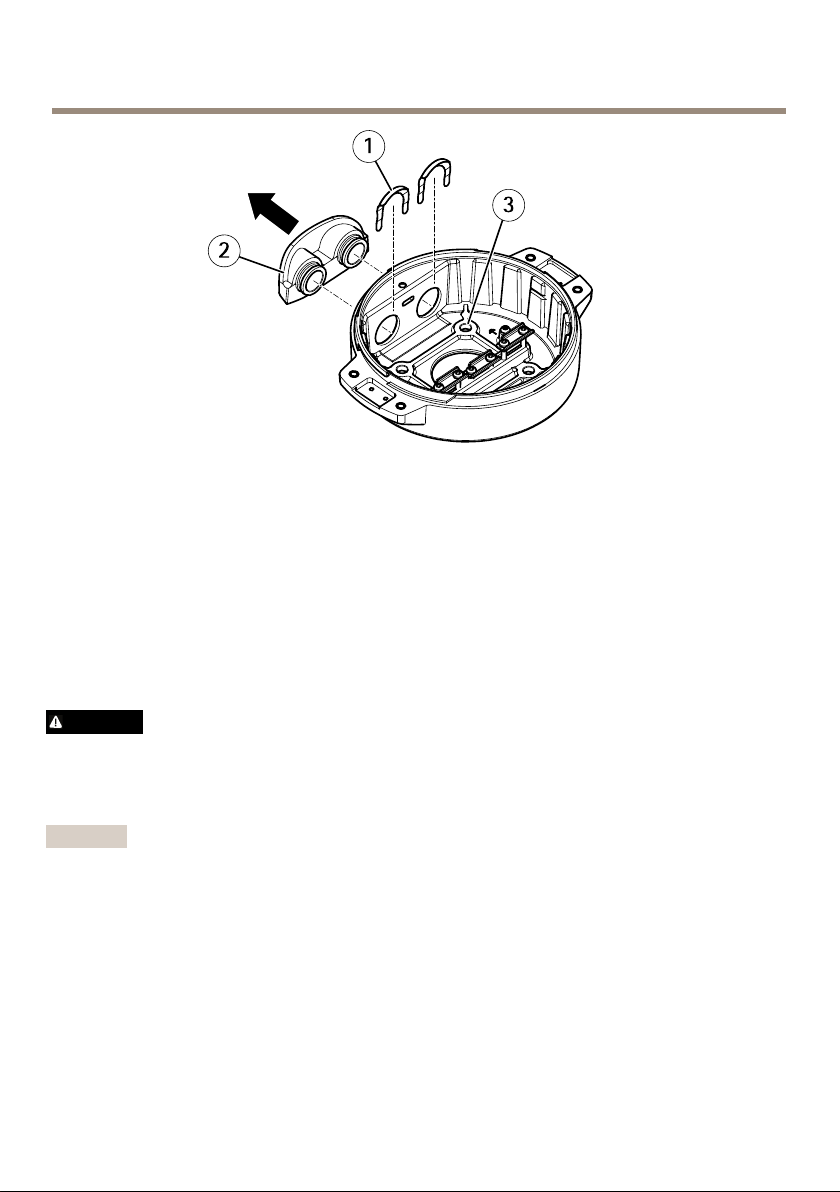
1
Conduitcoverclip
2
Conduitcover
3
Screwhole(x4)
5.Forconduitinstallationsonly:removethetwoconduitcoverclipsfollowedbythe
conduitcover.
6.Attachthebaseunittothemountingsurfaceusingtheappropriatefastenersinthe
fourscrewholes.
Routethecables
WARNING
Riskofelectricshock.Theproductshallbegroundedusingboththeprotectiveearthwire
inthepowercableandthegroundingbraid.Makesurebothendsoftheprotectiveearth
wireandthegroundingbraidareincontactwiththeirrespectivegroundingsurfaces.
Important
Useonlycablesthatcomplywiththespeciedcablearea.Formoreinformation,see
Cablethicknessonpage36.
16
Page 17
AXISQ87BispectralPTZNetworkCameraSeries
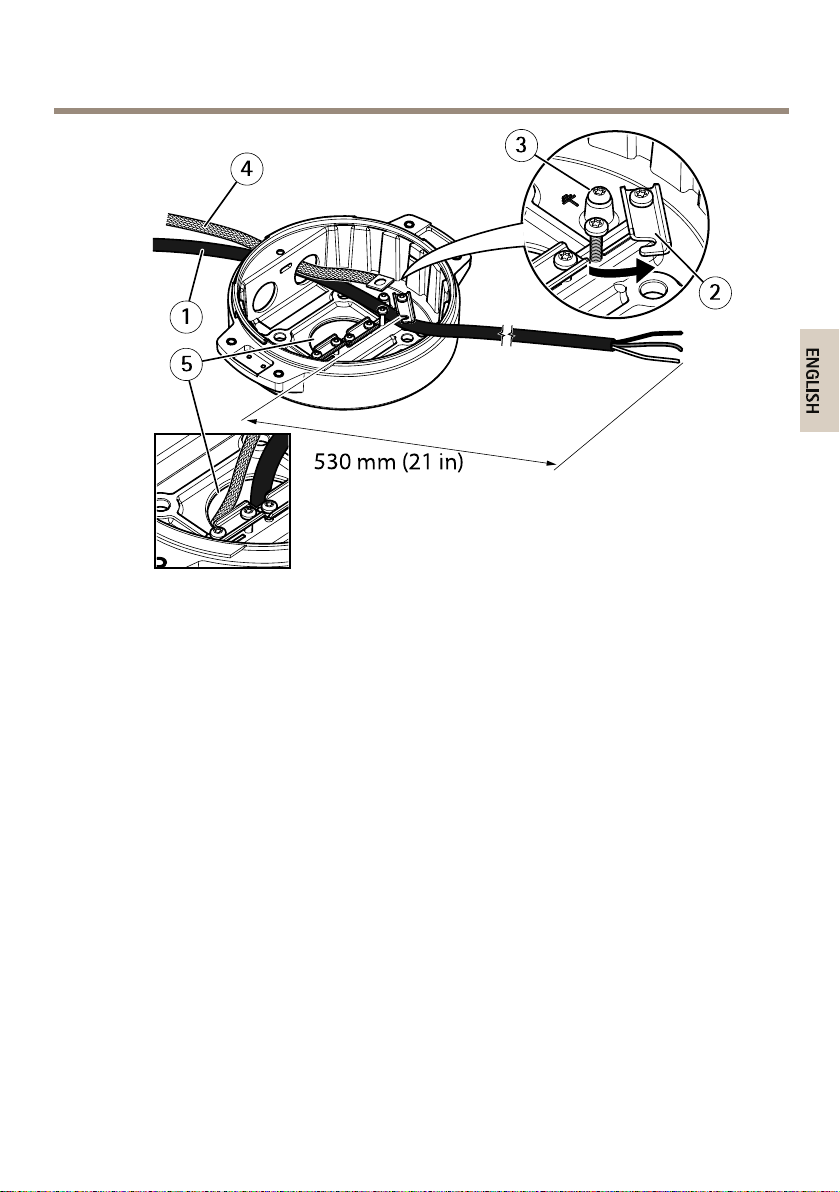
1
Powercable(notincluded)
2
Strainrelief
3
Groundingscrew
4
Groundingbraid(notincluded)
5
Bottomcablehole
1.Installtheoptionalconduitadapters(notincluded).
2.Connectthegroundingbraidtothegroundingscrew.
3.Insertthepowercable,I/Ocableandnetworkcablethroughtheholeinthebaseunitas
shownintheillustrationabove.Alternativelyinsertthemthroughthebottomcablehole.
4.Insertthepowercablethroughthestrainreliefwithadistanceof530mm(21in)from
thestrainrelieftotheendofthecable.
17
Page 18
AXISQ87BispectralPTZNetworkCameraSeries
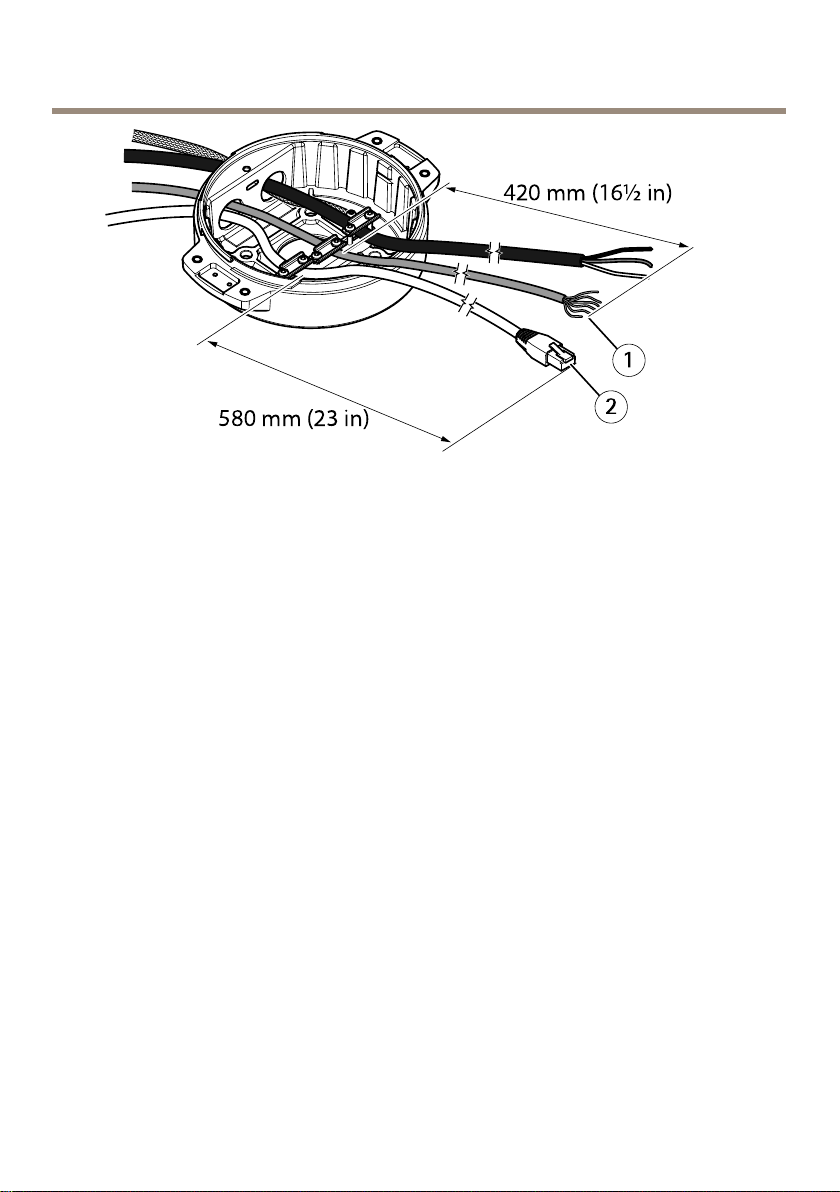
1
I/Ocable(optional,notincluded)
2
Networkcable(notincluded)
5.InserttheI/Ocable(optional)throughthestrainreliefwithadistanceof420mm(16½
in)fromthestrainrelieftotheendofthecable.
6.Insertthenetworkcable(opticalbercableand/orRJ45cable)throughthestrainrelief
withadistanceof580mm(23in)fromthestrainrelieftotheendoftheconnector.
Formoreinformationondifferentnetworkconnectivityoptions,seeInstallthenetwork
linkonpage22.
7.Closeandtightenthethreestrainreliefs.
18
Page 19
AXISQ87BispectralPTZNetworkCameraSeries
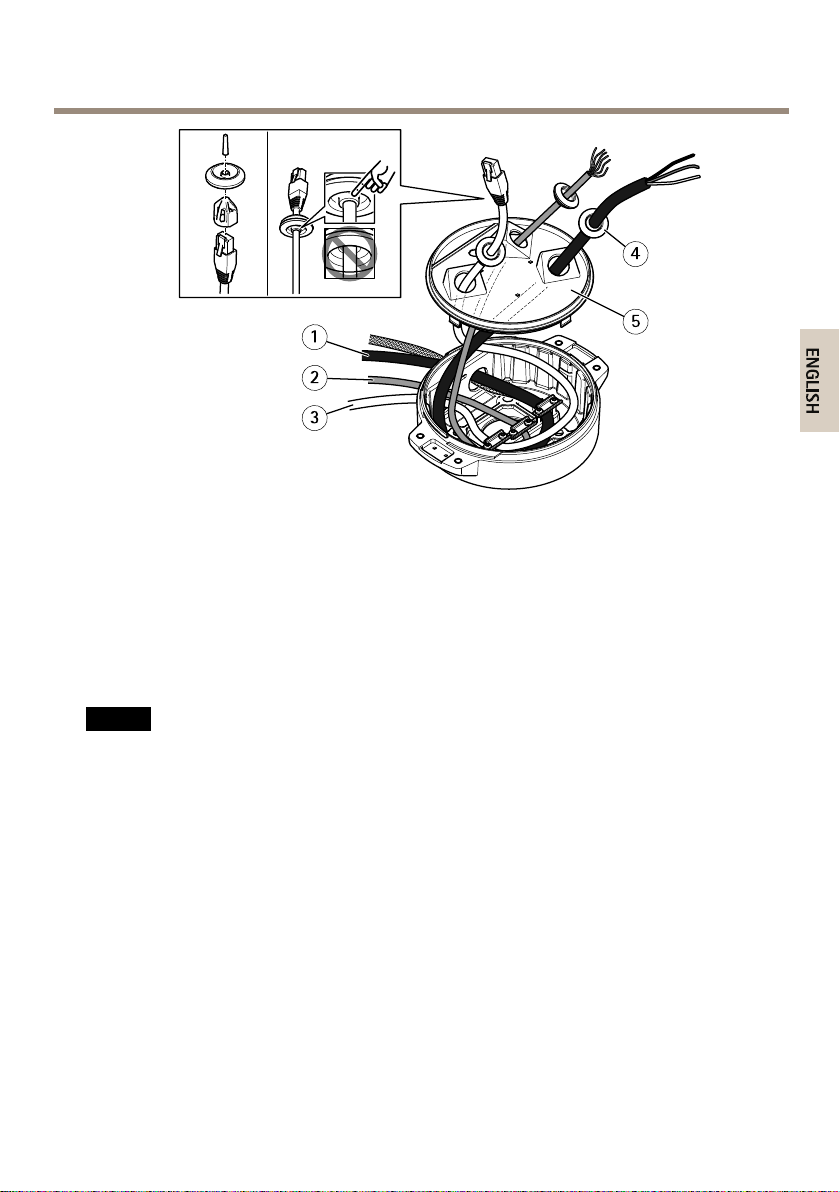
1
Powercable(notincluded)
2
I/Ocable(optional,notincluded)
3
Networkcable(notincluded)
4
Cablegasket
5
Transparentbaseunitcover
8.Fitcablegasketsonthecables.SeeCablethicknessonpage36.
9.Insertthepower,I/Oandnetworkcablesincludingthecablegasketsthroughtheholesin
thetransparentbaseunitcoverandarrangethecablesasshownintheillustrationabove.
NO
TICE
NO NO
TICE TICE
IfyouusebothanopticalbrecableandanRJ45cablefornetworkconnectivity,routethe
opticalbrecablethroughthesamecablegasketastheI/Ocable.Applyasealantbetween
thecablesandthecablegaskettopreventleakage.Formoreinformationondifferent
networkconnectivityoptions,seeInstallthenetworklinkonpage22.
10.Replacethetransparentbaseunitcoveronthebaseunitandtthecablegasketsinside
theholes.
19
Page 20
AXISQ87BispectralPTZNetworkCameraSeries
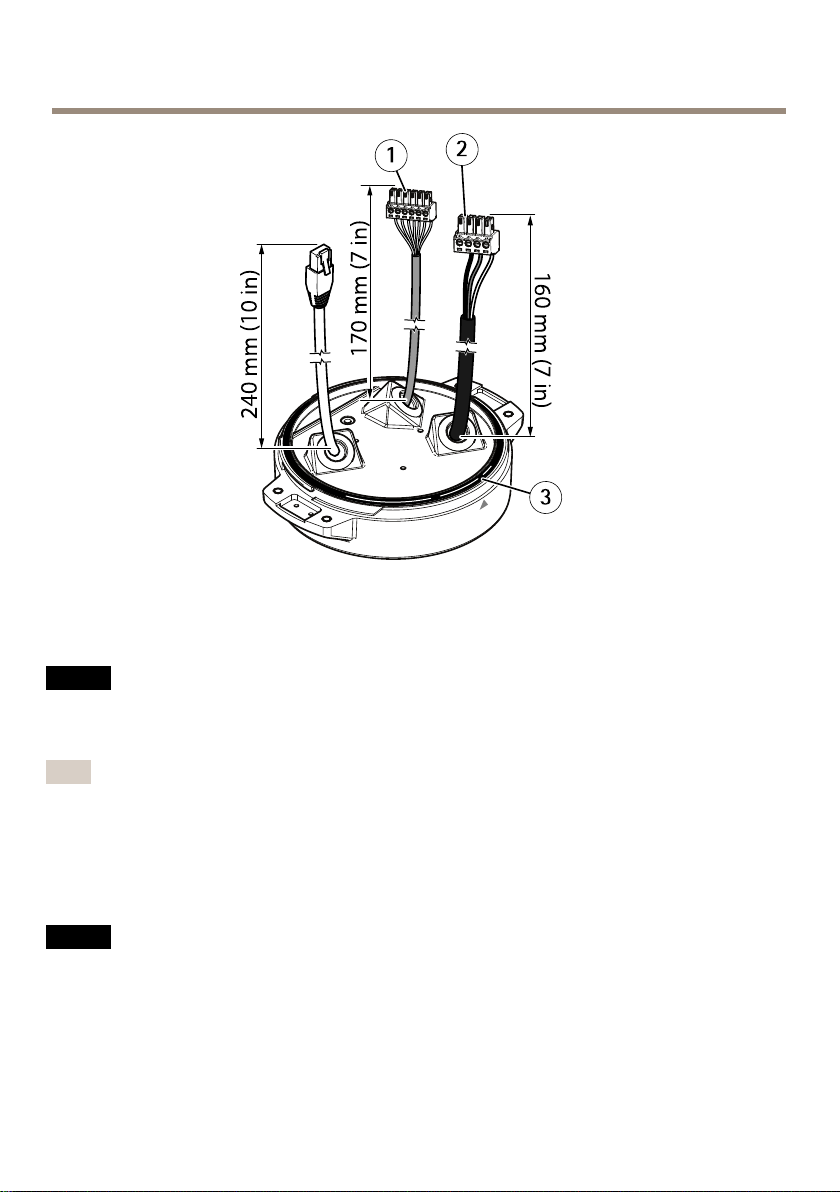
1
I/Oconnector
2
Powerconnector
3
O-ring
NO
TICE
NO NO
TICE TICE
Makesuretheprotectiveearthwireisabout10mm(3/8in)longerthantheothertwo
wires(inthepowercable),sothatitwillnotbedisconnectedaccidentallyifpulled.
Note
Werecommendthatyoustripapproximately90mm(3½in)ofthepowercablejacketand
70mm(2¾in)oftheI/Ocablejacketforeaseofinstallation.
11.InstallthepowerandI/Oconnectors,seeConnectorsonpage33.
12.Adjustthenetwork,I/Oandpowercablessothatthedistancefromthecablegasketto
theendoftheconnectoris240mm(10in),170mm(7in),and160mm(7in)respectively.
NO
TICE
NO NO
TICE TICE
MakesurethattheO-ringisttedcorrectlyaroundthetransparentbaseunitcover.
20
Page 21
AXISQ87BispectralPTZNetworkCameraSeries
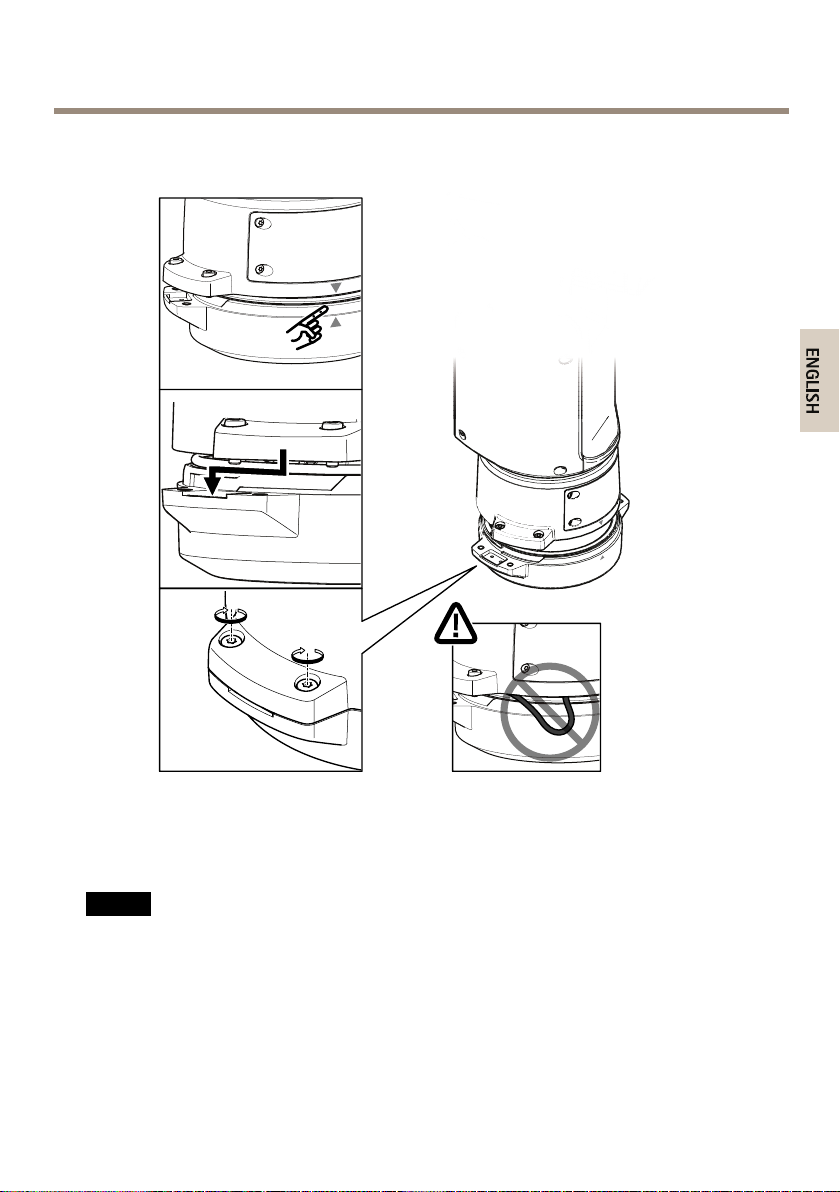
13.Replacethepositioningunitonthebaseunitmakingsurethatthearrowsonthetwo
unitsarealigned.
14.Turnthepositioningunitclockwisebacktoitsoriginalpositionandtightenthefour
baseunitscrews(torque3.0Nm).
NO
TICE
NO NO
TICE TICE
Makesurethatthecablesdonotgetpinchedwhenmountingthetwounits.
21
Page 22
AXISQ87BispectralPTZNetworkCameraSeries
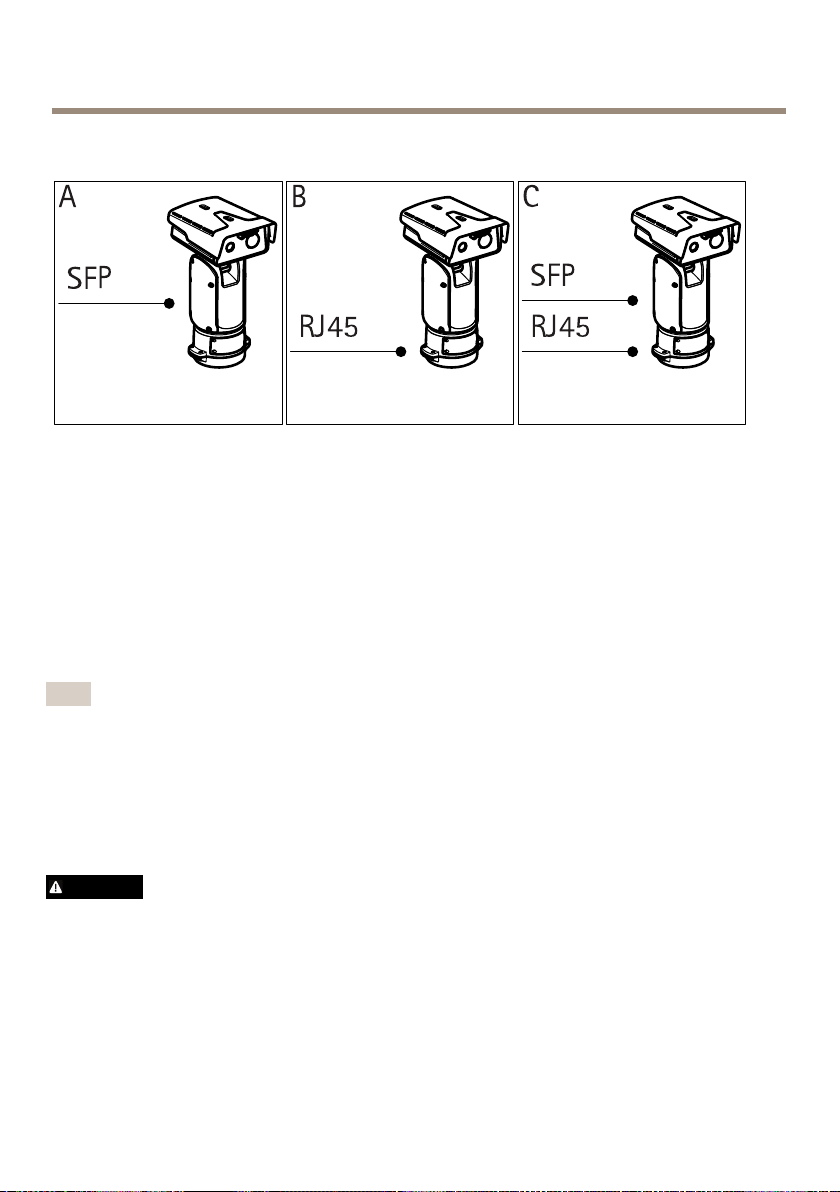
Installthenetworklink
Youhavedifferentoptionsforinstallingthenetworklink:
•A:viaanopticalberorRJ45cableconnectedtotheSFPmodule(witharespective
connector)intheSFPslot.
•B:viaanRJ45cableconnectedtothexedRJ45connector.
•C:viabothoftheabove,inwhichcaseconnectionviatheSFPmodulefunctionsasthe
primarynetworklinkandconnectionviathexedRJ45connectorasthefail-overlink.
Formoreinformationonnetworkconnectorlocations,seeConnectorsonpage33.
Note
•SFPmoduleisnotincluded.FormoreinformationonavailableSFPmodules,see
www.axis.com
•EstablishinganetworklinkonlyviatheopticalbercableusingtherespectiveSFPmodule
worksasastand-alonesolutionforlongrangecablinginstallations.
Installtheilluminatorkit
WARNING
•Riskofelectricshock.Makesurethepowersupplyisdisconnected.
•Emissionofinfraredlight(riskgroup2)fromtheilluminatorscanbeharmfulforeyes.
Payattentiontotheprovidedindications.Toreducetheriskofeyedamage,avoideye
exposure,anduseappropriateshieldingoreyeprotectionatdistancesoflessthan
1.5m(4.9ft).
22
Page 23
AXISQ87BispectralPTZNetworkCameraSeries
CAUTION
Duringnormaloperation,thesurfaceoftheilluminatorcanreachhightemperatures.Do
notallowdirectcontactandpositiontheappliancewhereitisinaccessibletounauthorized
personnel.Beforetouching,switchofftheilluminatorandallowtocoolforaminimum
periodof10minutes.
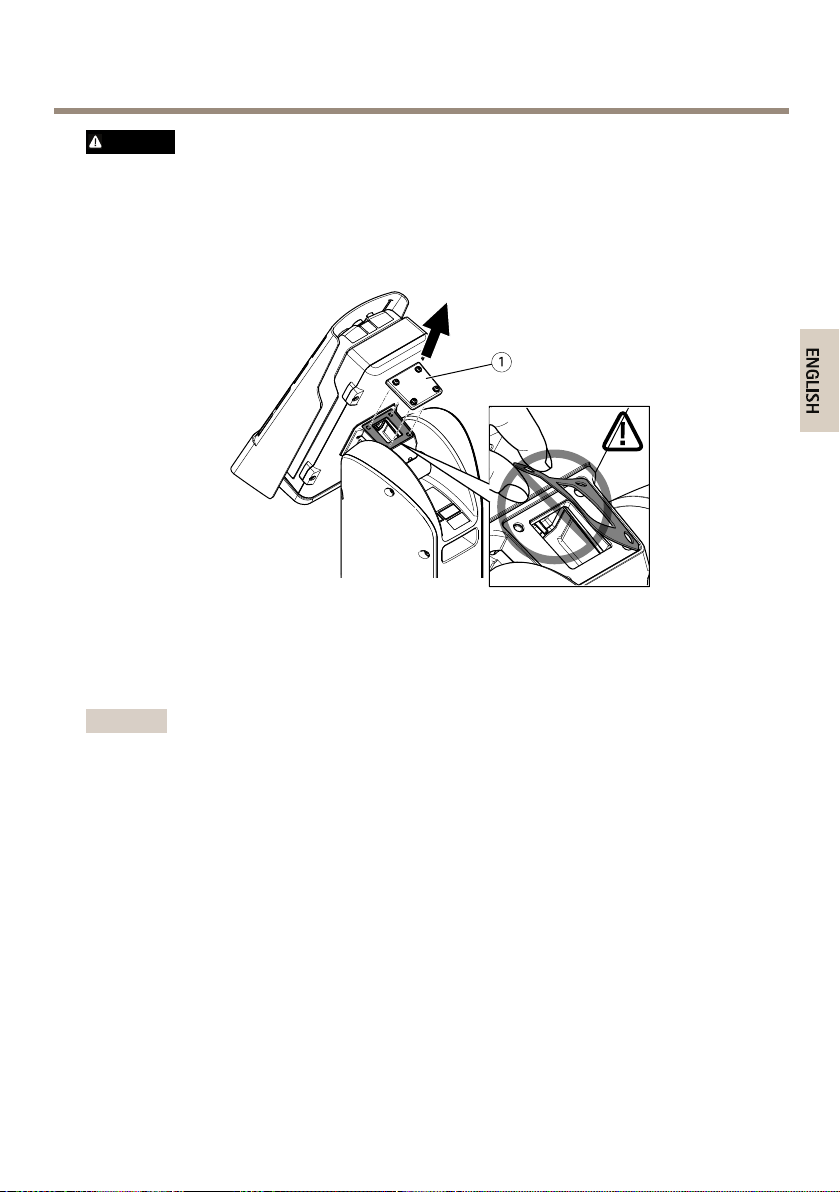
1
Cover
1.Removethefourcoverscrews(T20)andremovethecover .
Important
Makesurethatthegasketunderthecoverremainsinplace.
23
Page 24
AXISQ87BispectralPTZNetworkCameraSeries
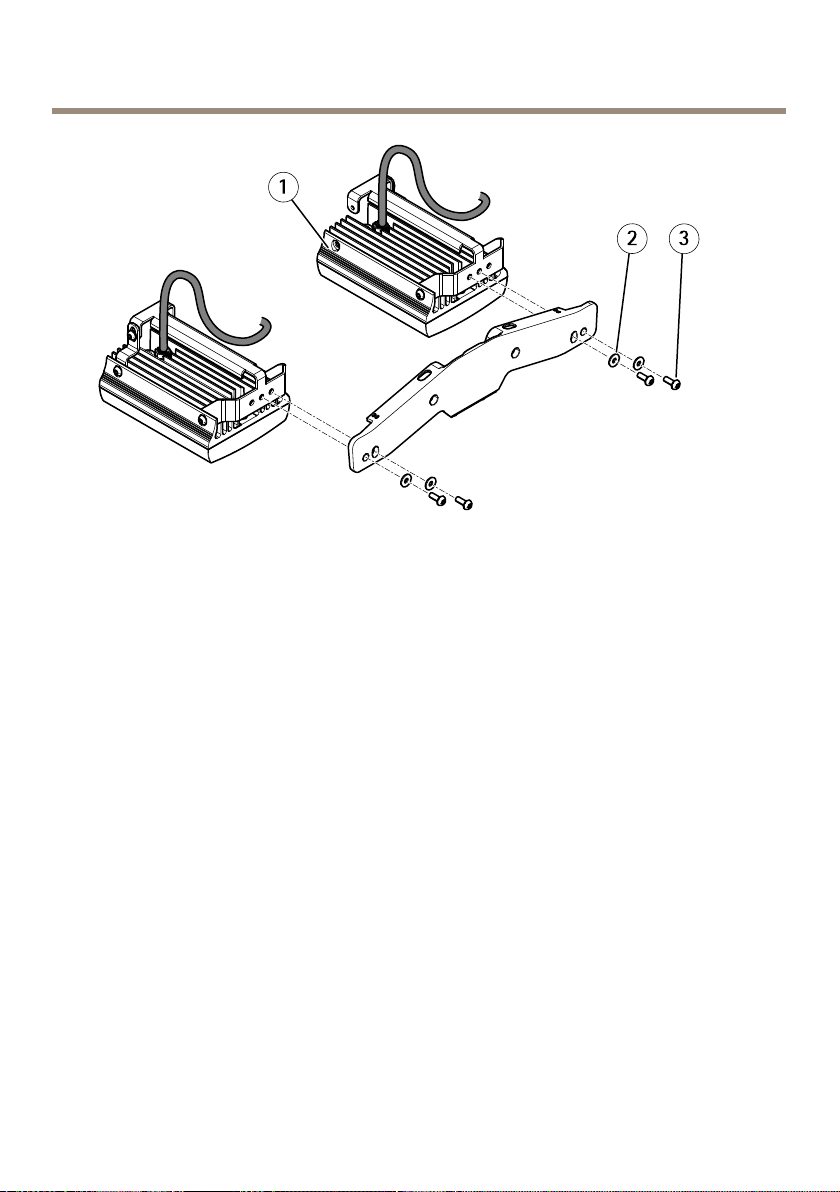
1
Illuminator(x2)
2
Washer(x4)
3
Screw(M6,x4)
2.Attachtheilluminatorstotheilluminatorbracketusingthefourscrews.
24
Page 25
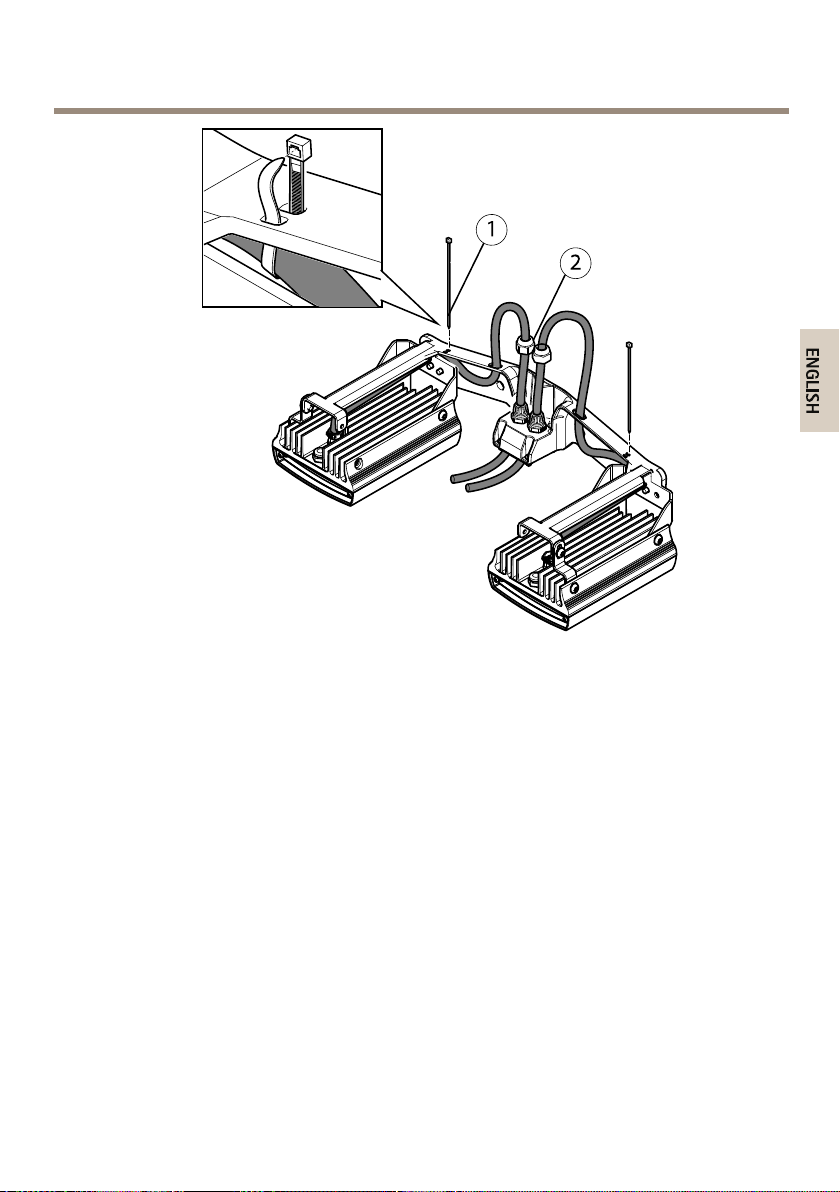
AXISQ87BispectralPTZNetworkCameraSeries
1
Cabletie(x2)
2
Capnut(x2)
3.Routethecablesasshownintheillustrationaboveandtightenthecapnuts(torque
1.5Nm).
4.Strapthecablestotheilluminatorbracketusingcableties.
25
Page 26
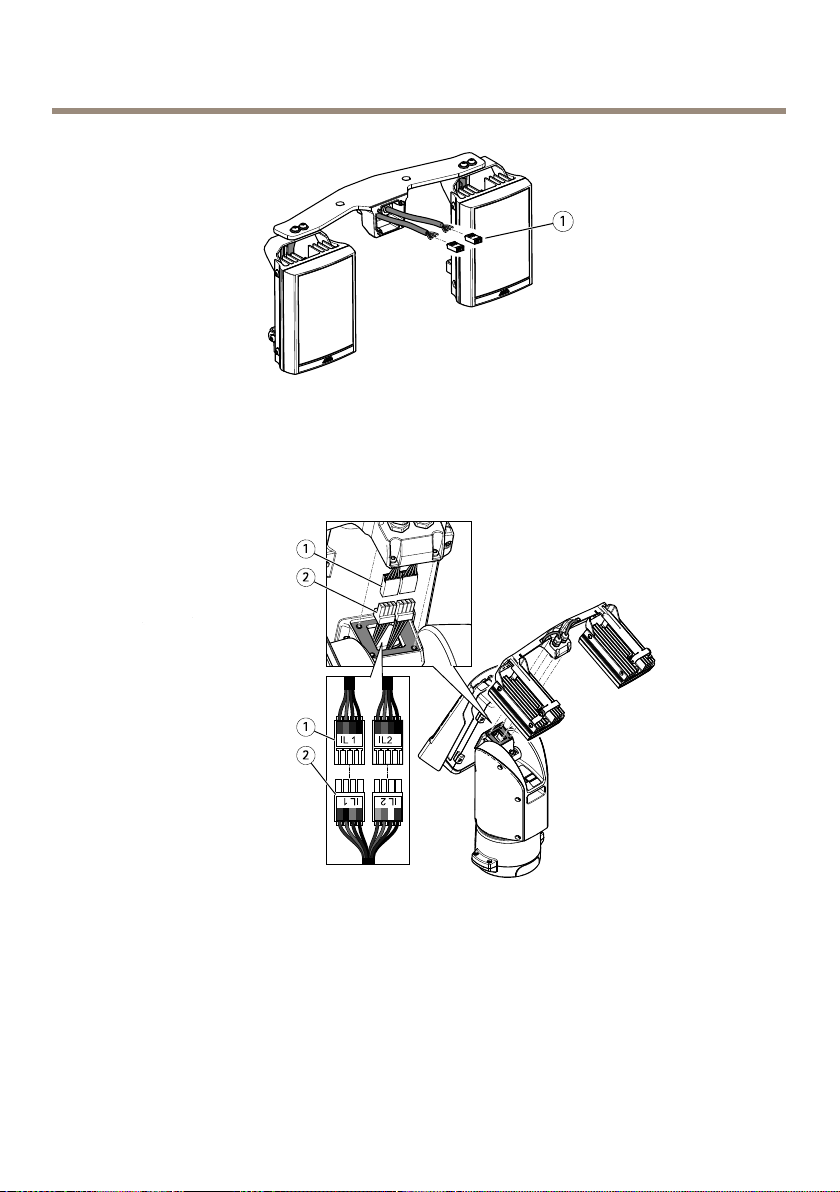
AXISQ87BispectralPTZNetworkCameraSeries
1
Illuminatorconnector(x2)
5.Installtheconnectors.SeeConnectorsonpage33.
1
Connectorfromtheilluminator(x2)
2
Connectorfromthepositioningunit(x2)
6.Connectthecables.SeeConnectorsonpage33.
7.Attachtheilluminatorbrackettothepositioningunitusingthefourscrews(T20,torque
3.0Nm).
26
Page 27
AXISQ87BispectralPTZNetworkCameraSeries
Note
Formoreinformationonoperatingtheilluminators,seetheilluminatorLEDmanual
(checkmodelonproductlabel)andtheUserManualofyourcompatibleAxisproductat
www.axis.com
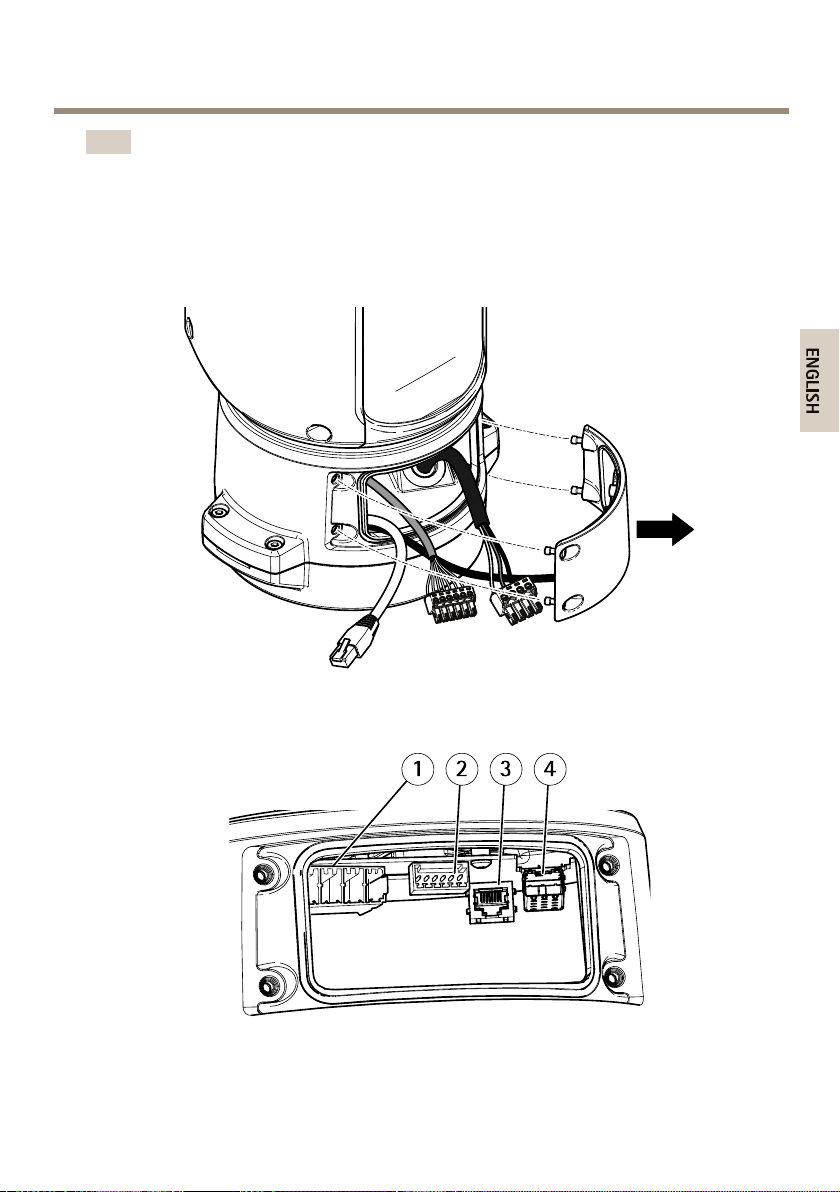
Connectthecables
1.Loosenthefourlidscrews(T20)andremovethelid.
1
Inputpowerconnector
2
I/Oconnector
27
Page 28
AXISQ87BispectralPTZNetworkCameraSeries
3
RJ45connector
4
SFPslotforSFPmodule(SFPmodulenotincluded)
2.Connectthenetwork(opticalbreand/orRJ45),I/Oandpowercables.Formore
informationondifferentnetworkconnectivityoptions,seeInstallthenetworklinkon
page22.
3.Replacethelidandtightenthefourlidscrews(torque3.0Nm).
4.Applypowertotheproduct.
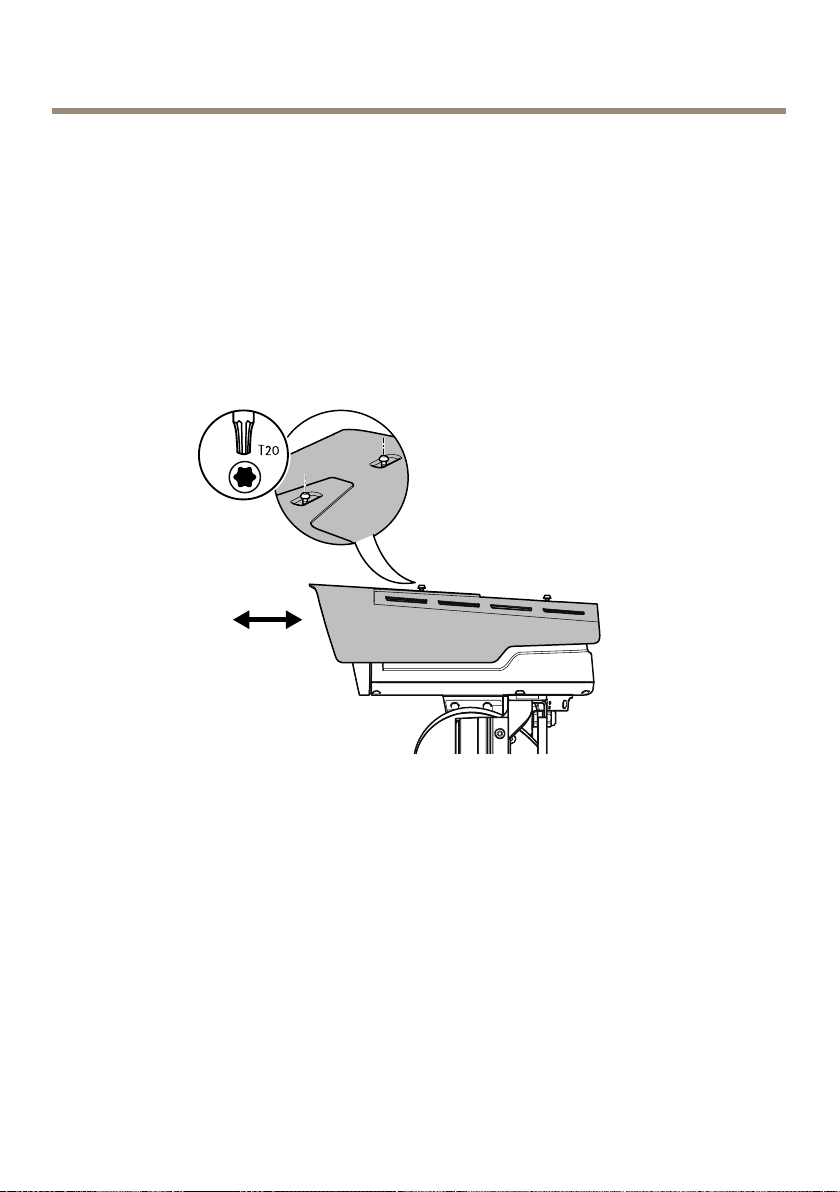
Howtoadjusttheweathershield
1.Loosenthetwoweathershieldscrews.
2.Settheweathershieldinthepreferredposition.
3.Tightenthetwoweathershieldscrews(torque0.8Nm).
Howtoaccesstheproduct
AXISIPUtilityandAXISCameraManagementarerecommendedmethodsforndingAxisproducts
onthenetworkandassigningthemIPaddressesinWindows®.Bothapplicationsarefreeandcan
bedownloadedfromaxis.com/support
Theproductcanbeusedwiththefollowingbrowsers:
•Chrome
TM
(recommended),Firefox
®
®
,Edge
,orOpera
®
withWindows
®
28
Page 29

AXISQ87BispectralPTZNetworkCameraSeries
•Chrome
•Chrome
TM
(recommended)orSafari
TM
orFirefox
®
withotheroperatingsystems.
®
withOSX
®
Tondoutmoreabouthowtousetheproduct,seetheUserManualavailableataxis.com
Ifyouneedmoreinformationaboutrecommendedbrowsers,gotoaxis.com/browser-support
29
Page 30

AXISQ87BispectralPTZNetworkCameraSeries
Resettofactorydefaultsettings
CAUTION
Riskofinjury.Movingparts.Keepyourbodypartsawayfromtheproductwhenin
operation.Disconnectfrompowersupplybeforeinstallingorperformingmaintenance
ontheproduct.
CAUTION
Riskofinjury.Hotsurface.Donottouchtheproductwheninoperation.Disconnect
frompowersupplyandallowthesurfacestocoolbeforeperformingmaintenanceon
theproduct.
NO
TICE
NO NO
TICE TICE
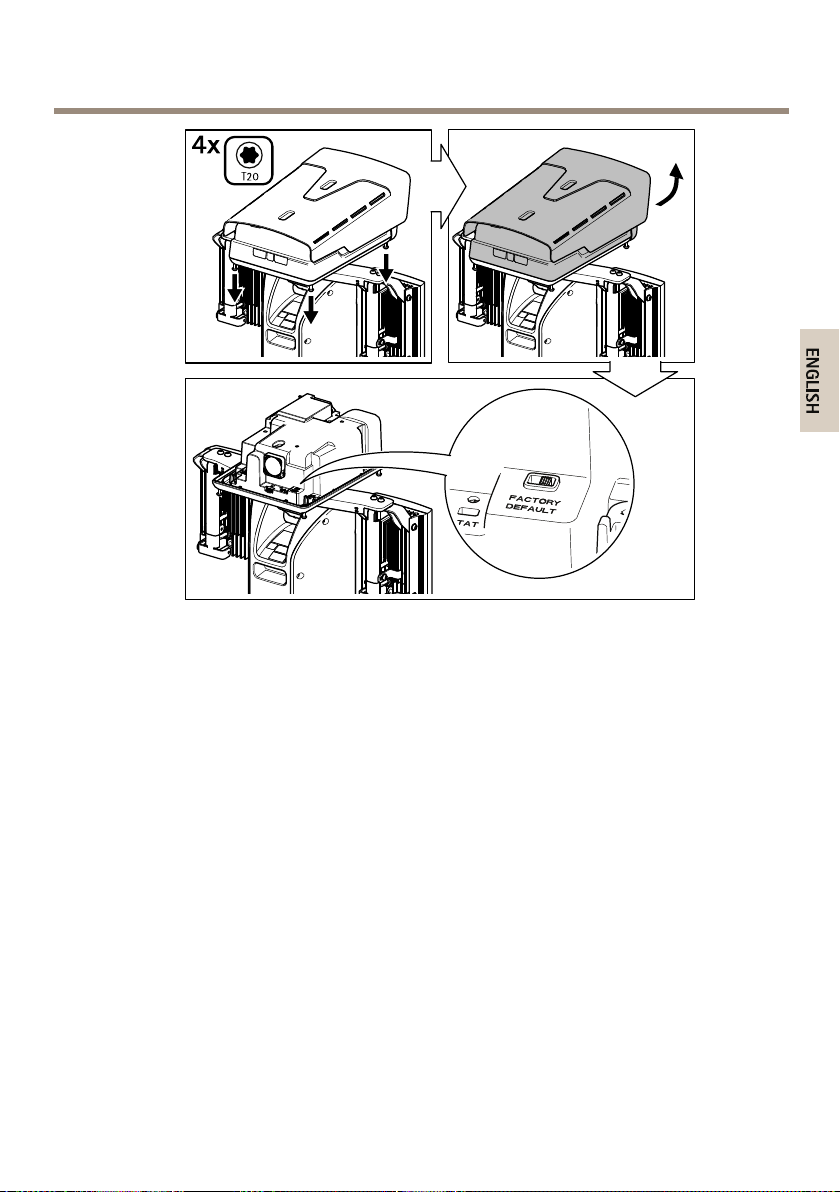
Removingthetopcoverexposespartsofthevisualcamerathataresensitivetoimpact.
Avoidhittingtheunprotectedcamerawiththetopcoveratdisassembly .
Important
Resettofactorydefaultshouldbeusedwithcaution.Aresettofactorydefaultwillreset
allsettings,includingtheIPaddress,tothefactorydefaultvalues.
Note
Theinstallationandmanagementsoftwaretoolsareavailablefromthesupportpageson
www.axis.com/support/downloads
30
Page 31
AXISQ87BispectralPTZNetworkCameraSeries
Toresettheproducttothefactorydefaultsettings:
1.Disconnectpowerfromtheproduct.
2.Unscrewthefourtopcoverscrewsandremovethetopcover.
3.ChangethepositionoftheFactorydefaultswitch.
4.Replacethetopcoverandtightenthescrews(torque2.0Nm).
5.Re-connectpowertotheproduct.
Itisalsopossibletoresetparameterstofactorydefaultviathewebinterface.GotoSettings
>System>MaintenanceandclickDefault.
31
Page 32

AXISQ87BispectralPTZNetworkCameraSeries
Furtherinformation
•Forthelatestversionofthisdocument,seeaxis.com
•Theusermanualisavailableataxis.com
•Tocheckifthereisupdatedrmwareavailableforyourdevice,seeaxis.com/support
•Forusefulonlinetrainingsandwebinars,seeaxis.com/academy
Optionalaccessories
Foracompletelistofavailableaccessoriesforthisproduct,gototheproduct’spageonaxis.com
andselectSoftware&Accessories.
Warrantyinformation
ForinformationaboutAxis’productwarrantyandtheretorelatedinformation,goto
axis.com/warranty
32
Page 33
AXISQ87BispectralPTZNetworkCameraSeries
Specifications
Tondthelatestversionoftheproduct’sdatasheet,gototheproductpageonaxis.comand
locateSupport&Documentation.
SDcardslot
CAUTION
Riskofinjury.Movingparts.Keepyourbodypartsawayfromtheproductwhenin
operation.Disconnectfrompowersupplybeforeinstallingorperformingmaintenance
ontheproduct.
CAUTION
Riskofinjury.Hotsurface.Donottouchtheproductwheninoperation.Disconnect
frompowersupplyandallowthesurfacestocoolbeforeperformingmaintenanceon
theproduct.
NO
TICE
NO NO
TICE TICE
•RiskofdamagetoSDcard.Donotusesharptools,metalobjects,orexcessiveforcewhen
insertingorremovingtheSDcard.Useyourngerstoinsertandremovethecard.
•Riskofdatalossandcorruptedrecordings.DonotremovetheSDcardwhiletheproduct
isrunning.UnmounttheSDcardfromtheproduct’swebpagebeforeremoval.
ThisproductsupportsmicroSD/microSDHC/microSDXCcards.
ForSDcardrecommendations,seeaxis.com
Connectors
Networkconnector
RJ45Ethernetconnector.
SFPconnector.
NO
TICE
NO NO
TICE TICE
Theproductshallbeconnectedusingashieldednetworkcable(STP)oranopticalber
cable.Allcablesconnectingtheproducttothenetworkshallbeintendedfortheir
specicuse.Makesurethatthenetworkdevicesareinstalledinaccordancewith
themanufacturer’sinstructions.Forinformationaboutregulatoryrequirements,see
Electromagneticcompatibility(EMC)onpage3.
33
Page 34
AXISQ87BispectralPTZNetworkCameraSeries
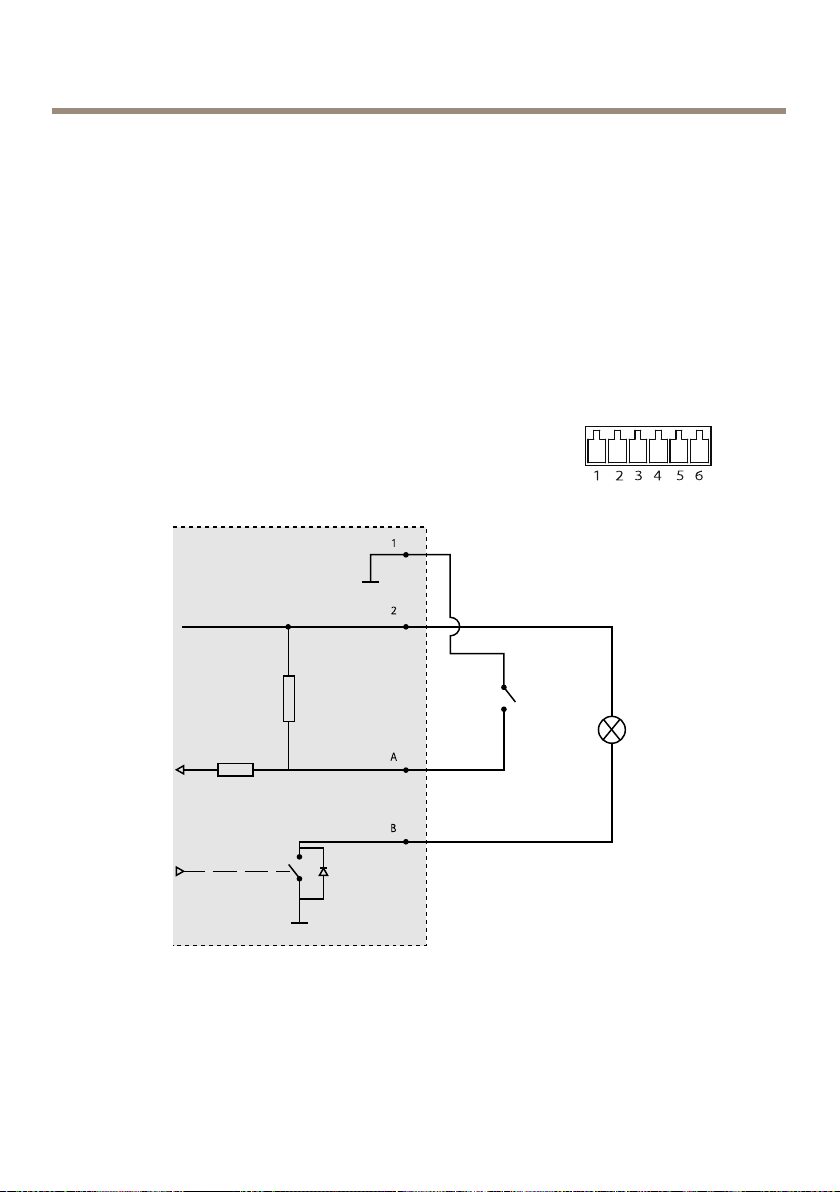
I/Oconnector
UsetheI/Oconnectorwithexternaldevicesincombinationwith,forexample,motiondetection,
eventtriggering,andalarmnotications.Inadditiontothe0VDCreferencepointandpower(DC
output),theI/Oconnectorprovidestheinterfaceto:
Digitalinput-Forconnectingdevicesthatcantogglebetweenanopenandclosedcircuit,for
examplePIRsensors,door/windowcontacts,andglassbreakdetectors.
Digitaloutput-ForconnectingexternaldevicessuchasrelaysandLEDs.Connecteddevicescan
beactivatedbytheVAPIX®ApplicationProgrammingInterfaceorintheproduct’swebpage.
Adigitallightsensor-Forreceivingavalueoftheambientlightintensityfromanexternallight
sensor.Thisisusedtocontroltheproduct’sdayandnightfunctionality.
6-pincongurableterminalblock
1
0VDC(-)
2
DCoutput12V,max50mA
A
I/Oconguredasinput
B
I/Oconguredasoutput
34
Page 35
AXISQ87BispectralPTZNetworkCameraSeries
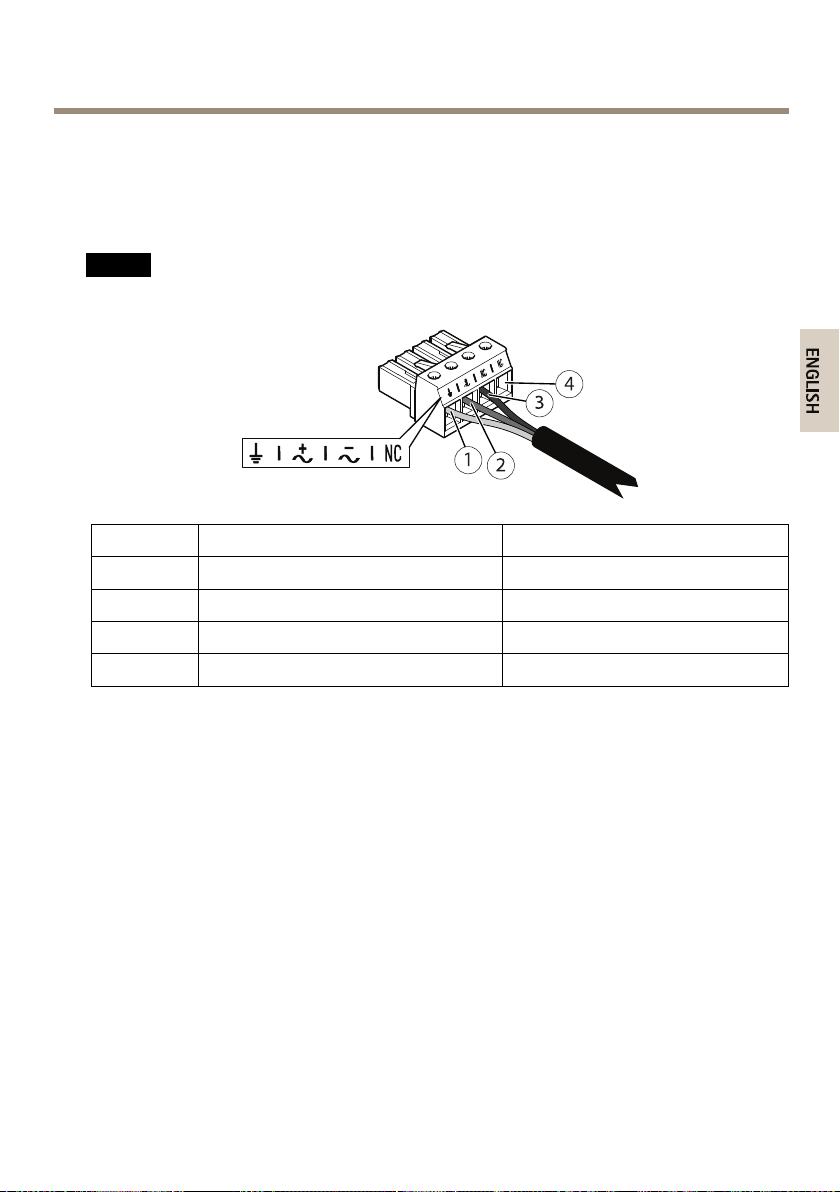
Powerconnector
4-pinterminalblockforpowerinput.
24VAC/DCpowerconnector
NO
TICE
NO NO
TICE TICE
Thissectionisvalidforproductspoweredby24VACand24VDConly.
Position
1
2
3
4
24VAC24VDC
ProtectiveearthProtectiveearth
24VACPhase
24VACNeutral
NotconnectedNotconnected
+24V
0V
35
Page 36
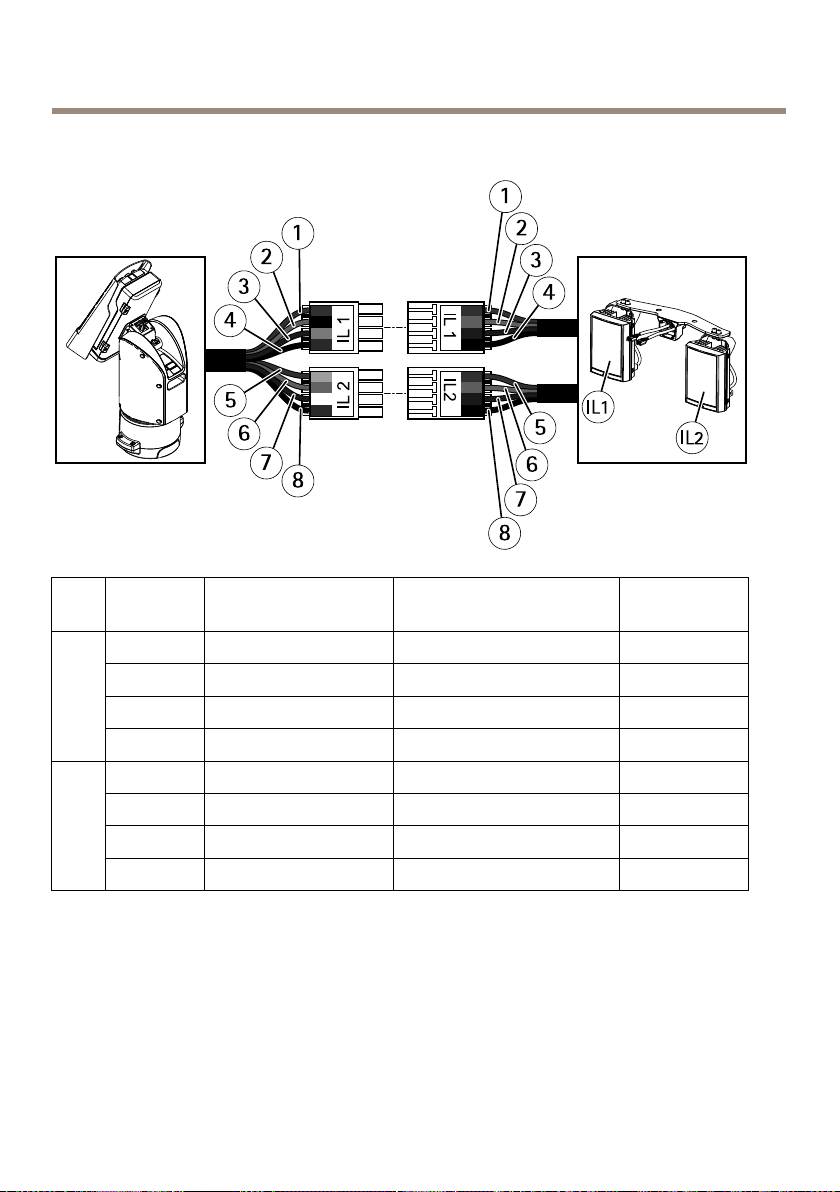
AXISQ87BispectralPTZNetworkCameraSeries
Illuminatorconnectors
Position
1
2
IL1
3
4
5
6
IL2
7
8
Cablecolor(positioning
unit)
RedRed+24VIL
Black
Gray
BlueBlack
YellowRed+24VIL
OrangeOrange
WhitePurpleIL2-VE
Green
Cablecolor(illuminators)
Orange
PurpleIL1-VE
Black
Description
IL1+VE
GND
IL2+VE
GND
Cables
Cablethickness
Thecablediameter,whenusingcablegasketsprovidedwiththeproduct,shouldbeintherangeof
5to1 1mm(0.2to0.4in).
36
Page 37
AXISQ87BispectralPTZNetworkCameraSeries
NO
TICE
NO NO
TICE TICE
•Usecablesthatkeepwithinthespeciedcablearea
•Selectcablesincompliancewithyourlocalregulations
•Makesureallcableholesareproperlysealed
•Usecablegasketsorcableglandsthatmatchboththecableholeandthecablearea
Forinformationaboutaccessories,suchascablegasketsandcableglandsthatallowforother
cableareas,seewww.axis.com
Operatingconditions
TheAxisproductisintendedforindoorandoutdooruse.
TemperatureHumidity
Operatingtemperature:-50°Cto55°C
(-58°Fto131°F)
ColdStartup(<1hstartuptime,tofully
functional):-40°C(-40°F)
10–100%RH(non-condensing)
Powerconsumption
TypicalconsumptionMaxconsumption
Withoutillumination:16W
Withillumination:64W
Important
Whenusingthe22m(72ft)AXISCable24VDC/24–240VAC,apowersupplycapableof
delivering400Wisrequiredtocompensateforthepowerlossinthecable.
Withoutillumination:204W
Withillumination:300W
37
Page 38

AXISQ87BispectralPTZNetworkCameraSeries
NO
TICE
NO NO
TICE TICE
Thetypicalpowerconsumptionvaluesarebasedonthefollowing:
•Anylossesinthepowercabledisregarded
•Nopositioningactive
•Nowipermotoractive
•Temperatureat25°C/77°F(allheatersoff)
•OneH.264streamatmaximumresolution
•MJPEGstreamrecordedtoSDcard
•IRlampson50%ofthetime(withillumination)
38
Page 39

39
Page 40

InstallationGuide
AXISQ87BispectralPTZNetworkCameraSeriesDate:October2017
©AxisCommunicationsAB,2017
Ver.M1.14
PartNo.1716347
 Loading...