

Page 1

AXISQ7404VideoEncoder
UserManual
Page 2

Aboutthisdocument
ThismanualisintendedforadministratorsandusersoftheAXISQ7404
VideoEncoder,andisapplicabletormware5.50andlater .Itincludes
instructionsforusingandmanagingtheproductonyournetwork.
Previousexperienceofnetworkingwillbeofusewhenusingthis
product.SomeknowledgeofUNIXorLinux-basedsystemsmayalsobe
benecial,fordevelopingshellscriptsandapplications.Laterversionof
thisdocumentwillbepostedtotheAxiswebsite,asrequired.Seealso
theproduct’sonlinehelp,availableviatheweb-basedinterface.
LegalConsiderations
Videoandaudiosurveillancecanberegulatedbylawsthatvaryfrom
countrytocountry .Checkthelawsinyourlocalregionbeforeusing
thisproductforsurveillancepurposes.
Thisproductincludesone(1)H.264decoderlicenseandone(1)AAC
decoderlicense.Topurchasefurtherlicenses,contactyourreseller.
Liability
Everycarehasbeentakeninthepreparationofthisdocument.Please
informyourlocalAxisofceofanyinaccuraciesoromissions.Axis
CommunicationsABcannotbeheldresponsibleforanytechnicalor
typographicalerrorsandreservestherighttomakechangestothe
productandmanualswithoutpriornotice.AxisCommunicationsAB
makesnowarrantyofanykindwithregardtothematerialcontained
withinthisdocument,including,butnotlimitedto,theimplied
warrantiesofmerchantabilityandtnessforaparticularpurpose.Axis
CommunicationsABshallnotbeliablenorresponsibleforincidentalor
consequentialdamagesinconnectionwiththefurnishing,performance
oruseofthismaterial.Thisproductisonlytobeusedforitsintended
purpose.
IntellectualPropertyRights
AxisABhasintellectualpropertyrightsrelatingtotechnologyembodied
intheproductdescribedinthisdocument.Inparticular,andwithout
limitation,theseintellectualpropertyrightsmayincludeoneormore
ofthepatentslistedatwww .axis.com/patent.htmandoneormore
additionalpatentsorpendingpatentapplicationsintheUSandother
countries.
Thisproductcontainslicensedthird-partysoftware.Seethemenuitem
“About”intheproduct’suserinterfaceformoreinformation.
ThisproductcontainssourcecodecopyrightAppleComputer,
Inc.,underthetermsofApplePublicSourceLicense2.0(see
www.opensource.apple.com/apsl).Thesourcecodeisavailablefrom
https://developer.apple.com/bonjour/
EquipmentModications
Thisequipmentmustbeinstalledandusedinstrictaccordancewiththe
instructionsgivenintheuserdocumentation.Thisequipmentcontains
nouser-serviceablecomponents.Unauthorizedequipmentchangesor
modicationswillinvalidateallapplicableregulatorycertications
andapprovals.
TrademarkAcknowledgments
AXISCOMMUNICATIONS,AXIS,ETRAX,ARTPECandVAPIXare
registeredtrademarksortrademarkapplicationsofAxisABinvarious
jurisdictions.Allothercompanynamesandproductsaretrademarksor
registeredtrademarksoftheirrespectivecompanies.
Apple,Boa,Apache,Bonjour,Ethernet,InternetExplorer,Linux,
Microsoft,Mozilla,Real,SMPTE,QuickTime,UNIX,Windows,Windows
VistaandWWWareregisteredtrademarksoftherespectiveholders.
JavaandallJava-basedtrademarksandlogosaretrademarksor
registeredtrademarksofOracleand/oritsafliates.UPnP
certicationmarkoftheUPnP
TM
ImplementersCorporation.
TM
isa
RegulatoryInformation
Europe
ThisproductcomplieswiththeapplicableCEmarkingdirectives
andharmonizedstandards:
•ElectromagneticCompatibility(EMC)Directive2014/30/EU.See
ElectromagneticCompatibility(EMC)onpage2.
•LowVoltage(LVD)Directive2014/35/EU.SeeSafetyonpage2.
•RestrictionsofHazardousSubstances(RoHS)Directive201 1/65/EU.
SeeDisposalandRecyclingonpage3.
Acopyoftheoriginaldeclarationofconformitymaybeobtainedfrom
AxisCommunicationsAB.SeeContactInformationonpage3.
ElectromagneticCompatibility(EMC)
Thisequipmenthasbeendesignedandtestedtofulllapplicable
standardsfor:
•Radiofrequencyemissionwheninstalledaccordingtothe
instructionsandusedinitsintendedenvironment.
•Immunitytoelectricalandelectromagneticphenomenawhen
installedaccordingtotheinstructionsandusedinitsintended
environment.
USA
Thisequipmenthasbeentestedusingashieldednetworkcable(STP)
andfoundtocomplywiththelimitsforaClassBdigitaldevice,
pursuanttopart15oftheFCCRules.Theselimitsaredesigned
toprovidereasonableprotectionagainstharmfulinterferenceina
residentialinstallation.Thisequipmentgenerates,usesandcanradiate
radiofrequencyenergyand,ifnotinstalledandusedinaccordance
withtheinstructions,maycauseharmfulinterferencetoradio
communications.However,thereisnoguaranteethatinterference
willnotoccurinaparticularinstallation.Ifthisequipmentdoes
causeharmfulinterferencetoradioortelevisionreception,which
canbedeterminedbyturningtheequipmentoffandon,theuseris
encouragedtotrytocorrecttheinterferencebyoneormoreofthe
followingmeasures:
•Reorientorrelocatethereceivingantenna.
•Increasetheseparationbetweentheequipmentandreceiver.
•Connecttheequipmentintoanoutletonacircuitdifferentfrom
thattowhichthereceiverisconnected.
•Consultthedealeroranexperiencedradio/TVtechnicianforhelp.
Theproductshallbeconnectedusingashieldednetworkcable(STP)
thatisproperlygrounded.
Canada
ThisdigitalapparatuscomplieswithCANICES-3(ClassB).Theproduct
shallbeconnectedusingashieldednetworkcable(STP)thatis
properlygrounded.Cetappareilnumériqueestconformeàlanorme
CANNMB-3(classeB).Leproduitdoitêtreconnectéàl'aided'uncâble
réseaublindé(STP)quiestcorrectementmisàlaterre.
Europe
ThisdigitalequipmentfulllstherequirementsforRFemission
accordingtotheClassBlimitofEN55022.Theproductshallbe
connectedusingashieldednetworkcable(STP)thatisproperly
grounded.
Thisproductfulllstherequirementsforimmunityaccording
toEN61000-6-1residential,commercialandlight-industrial
environments.
Thisproductfulllstherequirementsforimmunityaccordingto
EN61000-6-2industrialenvironments.
Thisproductfulllstherequirementsforimmunityaccordingto
EN55024ofceandcommercialenvironments.
Australia/NewZealand
ThisdigitalequipmentfulllstherequirementsforRFemission
accordingtotheClassBlimitofAS/NZSCISPR22.Theproductshall
beconnectedusingashieldednetworkcable(STP)thatisproperly
grounded.
Japan
この装置は、クラスB情報技術装置です。この装置は、家
庭環境で使⽤することを⽬的としていますが、この装置が
ラジオやテレビジョン受信機に近接して使⽤されると、受
信障害を引き起こすことがあります。取扱説明書に従って
正しい取り扱いをして下さい。本製品は、シールドネット
ワークケーブル(STP)を使⽤して接続してください。また
適切に接地してください。
Safety
ThisproductcomplieswithIEC/EN/UL60950-1,SafetyofInformation
TechnologyEquipment.Ifitsconnectingcablesareroutedoutdoors,
theproductshallbegroundedeitherthroughashieldednetworkcable
(STP)orotherappropriatemethod.
Thepowersupplyusedwiththisproductshallfullltherequirements
forSafetyExtraLowVoltage(SELV)andLimitedPowerSource(LPS)
accordingtoIEC/EN/UL62368-1orIEC/EN/UL60950-1.
Page 3

Battery
LowbatterypoweraffectstheoperationoftheRTC,causingittoreset
ateverypower-up.Whenthebatteryneedsreplacing,alogmessage
willappearintheproduct’sserverreport.Formoreinformationabout
theserverreport,seetheproduct´ssetuppagesorcontactAxissupport.
Thebatteryshouldnotbereplacedunlessrequired,butifthebattery
doesneedreplacing,contactAxissupportatwww .axis.com/techsupfor
assistance.
Lithiumcoincell3.0Vbatteriescontain1,2-dimethoxyethane;ethylene
glycoldimethylether(EGDME),CASno.110-71-4.
WARNING
•Riskofexplosionifthebatteryisincorrectlyreplaced.
•Replaceonlywithanidenticalbatteryorabatterywhichis
recommendedbyAxis.
•Disposeofusedbatteriesaccordingtolocalregulationsor
thebatterymanufacturer'sinstructions.
DisposalandRecycling
Whenthisproducthasreachedtheendofitsusefullife,disposeof
itaccordingtolocallawsandregulations.Forinformationabout
yournearestdesignatedcollectionpoint,contactyourlocalauthority
responsibleforwastedisposal.Inaccordancewithlocallegislation,
penaltiesmaybeapplicableforincorrectdisposalofthiswaste.
Europe
Thissymbolmeansthattheproductshallnotbedisposedof
togetherwithhouseholdorcommercialwaste.Directive2012/19/EU
onwasteelectricalandelectronicequipment(WEEE)isapplicablein
theEuropeanUnionmemberstates.Topreventpotentialharmto
humanhealthandtheenvironment,theproductmustbedisposed
ofinanapprovedandenvironmentallysaferecyclingprocess.For
informationaboutyournearestdesignatedcollectionpoint,contact
yourlocalauthorityresponsibleforwastedisposal.Businessesshould
contacttheproductsupplierforinformationabouthowtodispose
ofthisproductcorrectly.
ThisproductcomplieswiththerequirementsofDirective2011/65/EUon
therestrictionoftheuseofcertainhazardoussubstancesinelectrical
andelectronicequipment(RoHS).
China
Thisproductcomplieswiththerequirementsofthelegislative
actAdministrationontheControlofPollutionCausedbyElectronic
InformationProducts(ACPEIP).
ContactInformation
AxisCommunicationsAB
Emdalavägen14
22369Lund
Sweden
Tel:+46462721800
Fax:+4646136130
www.axis.com
Support
Shouldyourequireanytechnicalassistance,pleasecontactyourAxis
reseller.Ifyourquestionscannotbeansweredimmediately,your
resellerwillforwardyourqueriesthroughtheappropriatechannelsto
ensurearapidresponse.IfyouareconnectedtotheInternet,youcan:
•downloaduserdocumentationandsoftwareupdates
•ndanswerstoresolvedproblemsintheFAQdatabase.Search
byproduct,category,orphrase
•reportproblemstoAxissupportstaffbyloggingintoyourprivate
supportarea
•chatwithAxissupportstaff
•visitAxisSupportatwww.axis.com/techsup/
LearnMore!
VisitAxislearningcenterwww .axis.com/academy/forusefultrainings,
webinars,tutorialsandguides.
Page 4

AXISQ7404VideoEncoder
TableofContents
HardwareOverview..........................................6
ConnectorsandButtons..........................................6
LEDIndicators..................................................8
AccesstheProduct..........................................9
AccessfromaBrowser...........................................9
AccessfromtheInternet..........................................10
SettheRootPassword...........................................10
TheLiveViewPage..............................................11
MediaStreams.............................................14
HowtoStreamH.264............................................14
MJPEG........................................................14
AXISMediaControl(AMC)........................................14
Alternativemethodsofaccessingthevideostream....................15
AccessAudioStreams............................................16
SetUptheProduct..........................................17
BasicSetup....................................................17
VideoandAudio............................................18
SetUpVideoStreams............................................18
StreamProles.................................................20
CameraSettings................................................20
Aboutoverlaytext...............................................21
PrivacyMask...................................................22
SetUpAudio...................................................22
AudioClips....................................................23
ConguretheLiveViewPage.................................24
PTZ(PanTiltZoom).........................................26
PresetPositions.................................................26
GuardTour.....................................................26
Advanced......................................................27
InstallPTZDriver................................................27
ControlQueue..................................................28
Detectors..................................................29
CameraTampering..............................................29
MotionDetection...............................................29
AudioDetection................................................31
Applications...............................................32
ApplicationLicenses.............................................32
UploadApplication..............................................32
ApplicationConsiderations........................................32
Events....................................................34
SetUpActionRules.............................................34
AddRecipients..................................................34
CreateSchedules................................................35
SetUpRecurrences..............................................35
Recordings.................................................37
RecordingList..................................................37
ContinuousRecording............................................37
Languages.................................................38
SystemOptions.............................................39
Security.......................................................39
Date&Time....................................................41
Network.......................................................42
Storage.......................................................46
Ports&Devices.................................................47
Maintenance...................................................47
Support.......................................................48
Advanced......................................................48
ResettoFactoryDefaultSettings...................................49
Troubleshooting............................................50
ChecktheFirmware.............................................50
UpgradetheFirmware...........................................50
4
Page 5

AXISQ7404VideoEncoder
TableofContents
Symptoms,PossibleCausesandRemedialActions.....................51
TechnicalSpecications......................................54
Connectors....................................................56
PerformanceConsiderations.......................................57
5
Page 6

AXISQ7404VideoEncoder
HardwareOverview
HardwareOverview
1.
Audioin/out
2.
I/Oconnectors(x4)
3.
RS-485/RS-422connectors(x4)
4.
Controlbutton
5.
Mountinghole
6.
75Ohmterminationswitch(x4)
7.
BNCconnectors(x4)
8.
LEDindicatorsforpower,status(x4),network
9.
Networkconnector
10.
Powerconnector
ConnectorsandButtons
Fortechnicalspecications,seepage54.
6
Page 7

AXISQ7404VideoEncoder
HardwareOverview
BNCConnector
Eachvideoinputisterminatedusingacoax/BNCconnector.
Connecta75Ohmcoaxialvideocable;therecommendedmaximumlengthis250m(800ft).
Note
IfthevideosourceisconnectedinparallelwithotherequipmentusingaBNCTadaptor,disabletheinputterminationby
settingthe75OhmterminationswitchtoOFFtoavoidreducedimagequality.
NetworkConnector
RJ45Ethernetconnector.
NO
TICE
NO NO
TICE TICE
Theproductshallbeconnectedusingashieldednetworkcable(STP).Allcablesconnectingtheproducttothenetworkshall
beintendedfortheirspecicuse.Makesurethatthenetworkdevicesareinstalledinaccordancewiththemanufacturer’s
instructions.Forinformationaboutregulatoryrequirements,seeElectromagneticCompatibility(EMC)onpage2.
I/OConnector
Usewithexternaldevicesincombinationwith,forexample,tamperingalarms,motiondetection,eventtriggering,timelapserecording
andalarmnotications.Inadditiontothe0VDCreferencepointandpower(DCoutput),theI/Oconnectorprovidestheinterfaceto:
•Digitaloutput–ForconnectingexternaldevicessuchasrelaysandLEDs.Connecteddevicescanbeactivatedbythe
VAPIX®ApplicationProgrammingInterface,outputbuttonsontheLiveViewpageorbyanActionRule.Theoutputwill
showasactive(shownunderSystemOptions>Ports&Devices)ifthealarmdeviceisactivated.
•Digitalinput–Analarminputforconnectingdevicesthatcantogglebetweenanopenandclosedcircuit,forexample:
PIRs,door/windowcontacts,glassbreakdetectors,etc.Whenasignalisreceivedthestatechangesandtheinputbecomes
active(shownunderSystemOptions>Ports&Devices).
PowerConnector
2-pinterminalblockforpowerinput.UseaSafetyExtraLowVoltage(SELV)compliantlimitedpowersource(LPS)witheitherarated
outputpowerlimitedto≤100Woraratedoutputcurrentlimitedto≤5A.
AudioConnector
TheAxisproducthasthefollowingaudioconnectors:
•Audioin(pink)–3.5mminputforamonomicrophone,oraline-inmonosignal.
•Audioout(green)–3.5mmoutputforaudio(linelevel)thatcanbeconnectedtoapublicaddress(PA)systemoran
activespeakerwithabuilt-inamplier.Astereoconnectormustbeusedforaudioout.
Foraudioin,theleftchannelisusedfromastereosignal.
RS485/RS422Connector
TwoterminalblocksforRS485/RS422serialinterfaceusedtocontrolauxiliaryequipmentsuchaspan-tiltdevices.
ControlButton
Forlocationofthecontrolbutton,seeHardwareOverviewonpage6.
Thecontrolbuttonisusedfor:
•Resettingtheproducttofactorydefaultsettings.Seepage49.
7
Page 8

AXISQ7404VideoEncoder
HardwareOverview
•ConnectingtoanAXISVideoHostingSystemservice.Seepage42.Toconnect,pressandholdthebuttonforabout3
secondsuntiltheStatusLEDashesgreen.
•ConnectingtoAXISInternetDynamicDNSService.Seepage43.Toconnect,pressandholdthebuttonforabout3seconds.
LEDIndicators
Note
•TheStatusLEDcanbeconguredtoashwhileaneventisactive.
•TheStatusLEDcanbeconguredtoashforidentifyingtheunit.GotoSetup>SystemOptions>Maintenance.
StatusLED
GreenSteadygreenfornormaloperation.
Amber
RedFlashesredforrmwareupgradefailure.
NetworkLEDIndication
Green
Amber
UnlitNonetworkconnection.
PowerLEDIndication
Green
Amber
Indication
Steadyduringstartup.Flasheswhenrestoringsettings.
Steadyforconnectiontoa100Mbit/snetwork.Flashesfornetworkactivity.
Steadyforconnectiontoa10Mbit/snetwork.Flashesfornetworkactivity.
Normaloperation.
Flashesgreen/amberduringrmwareupgrade.
8
Page 9

AXISQ7404VideoEncoder
AccesstheProduct
AccesstheProduct
ToinstalltheAxisproduct,seetheInstallationGuidesuppliedwiththeproduct.
Theproductcanbeusedwithmostoperatingsystemsandbrowsers.Werecommendthefollowingbrowsers:
•InternetExplorer
•Safari
•Chrome
ToviewstreamingvideoinInternetExplorer,allowinstallationofAXISMediaControl(AMC)whenprompted.
TheAxisproductincludesone(1)H.264decoderlicenseforviewingvideostreamsandone(1)AACaudiolicense.Thelicensesare
automaticallyinstalledwithAMC.Theadministratorcandisabletheinstallationofthedecoderstopreventinstallationofunlicensed
copies.
Note
•QuickTime
®
withOSX
TM
®
withWindows
®
orFirefox
TM
®
withotheroperatingsystems.
isalsosupportedforviewingH.264streamsandforaudio.
®
AccessfromaBrowser
1.Startawebbrowser.
2.EntertheIPaddressorhostnameoftheAxisproductinthebrowser’sLocation/Addresseld.
ToaccesstheproductfromaMaccomputer(OSX),gotoSafari,clickonBonjourandselecttheproductfromthe
drop-downlist.
IfyoudonotknowtheIPaddress,useAXISIPUtilitytolocatetheproductonthenetwork.Forinformationabout
howtodiscoverandassignanIPaddress,seethedocumentAssignanIPAddressandAccesstheVideoStreamonAxis
Supportwebatwww.axis.com/techsup
Note
ToshowBonjourasabrowserbookmark,gotoSafari>Preferences.
3.Enteryourusernameandpassword.Ifthisisthersttimetheproductisaccessed,therootpasswordmustrstbe
congured.Forinstructions,seeSettheRootPasswordonpage10.
4.Theproduct’sLiveViewpageopensinyourbrowser.
Note
ThecontrolsandlayoutoftheLiveViewpagemayhavebeencustomizedtomeetspecicinstallationrequirementsand
userpreferences.Consequently,someoftheexamplesandfunctionsfeaturedheremaydifferfromthosedisplayedin
yourownLiveViewpage.
9
Page 10

AXISQ7404VideoEncoder
AccesstheProduct
AccessfromtheInternet
Onceconnected,theAxisproductisaccessibleonyourlocalnetwork(LAN).ToaccesstheproductfromtheInternetyoumust
congureyournetworkroutertoallowincomingdatatrafctotheproduct.Todothis,enabletheNAT-traversalfeature,which
willattempttoautomaticallyconguretheroutertoallowaccesstotheproduct.ThisisenabledfromSetup>SystemOptions>
Network>TCP/IPAdvanced.
Formoreinformation,seeNATtraversal(portmapping)forIPv4onpage44.SeealsoAXISInternetDynamicDNSServiceat
www.axiscam.net
ForTechnicalnotesonthisandothertopics,visittheAxisSupportwebatwww.axis.com/techsup
SettheRootPassword
ToaccesstheAxisproduct,youmustsetthepasswordforthedefaultadministratoruserroot.ThisisdoneintheCongureRoot
Passworddialog,whichopenswhentheproductisaccessedforthersttime.
Topreventnetworkeavesdropping,therootpasswordcanbesetviaanencryptedHTTPSconnection,whichrequiresanHTTPS
certicate.HTTPS(HypertextTransferProtocoloverSSL)isaprotocolusedtoencrypttrafcbetweenwebbrowsersandservers.The
HTTPScerticateensuresencryptedexchangeofinformation.SeeHTTPSonpage40.
Thedefaultadministratorusernamerootispermanentandcannotbedeleted.Ifthepasswordforrootislost,theproductmustbe
resettothefactorydefaultsettings.SeeResettoFactoryDefaultSettingsonpage49.
TosetthepasswordviaastandardHTTPconnection,enteritdirectlyinthedialog.
TosetthepasswordviaanencryptedHTTPSconnection,followthesesteps:
1.ClickUseHTTPS.
10
Page 11

AXISQ7404VideoEncoder
AccesstheProduct
Atemporarycerticate(validforoneyear)iscreated,enablingencryptionofalltrafctoandfromtheproduct,andthe
passwordcannowbesetsecurely.
2.Enterapasswordandthenre-enterittoconrmthespelling.
3.ClickOK.Thepasswordhasnowbeencongured.
TheLiveViewPage
ThecontrolsandlayoutoftheLiveViewpagemayhavebeencustomizedtomeetspecicinstallationrequirementsanduser
preferences.Consequently,someoftheexamplesandfunctionsfeaturedheremaydifferfromthosedisplayedinyourownLiveView
page.Thefollowingprovidesanoverviewofeachavailablecontrol.
ControlsontheLiveViewPage
SelectastreamprolefortheLiveViewpagefromtheStreamProledrop-downlist.Forinformation
abouthowtocongurestreamproles,seepage20.
ClickPulsetoactivatetheproduct’soutputportforadenedperiodoftime.Forinformationabouthow
toenableandcongureoutputbuttons,seepage25.Theoutputbuttonnamemaydifferdependingon
thenameenteredintheI/OPortsconguration.
ClicktheActive/Inactivebuttonstomanuallyactivateandinactivetheproduct’soutputport.For
informationabouthowtoenableandcongureoutputbuttons,seepage25.
TheManualTriggerbuttonisusedtotriggeranactionrulefromtheLiveViewpage.Forinformation
abouthowtocongureandenablethebutton,seeManualTriggeronpage1 1.
ClickSnapshottosaveasnapshotofthevideoimage.Thisbuttonisprimarilyintendedforusewhen
theAXISMediaControlviewertoolbarisnotavailable.EnablethisbuttonfromLiveViewCong>
ActionButtons.
TheAudioclipdrop-downlistallowsyoutoplayanaudioclipfromtheLiveViewpage.Selectthe
audioclipandclickthePlaybutton.
ManualTrigger
TheManualTriggerisusedtotriggeranactionrulefromtheLiveViewpage.Themanualtriggercanforexamplebeusedto
validateactionsduringproductinstallationandconguration.
Tocongurethemanualtrigger:
1.GotoSetup>Events.
2.ClickAddtoaddanewactionrule.
3.FromtheTriggerdrop-downlist,selectInputSignal.
4.Fromtheseconddrop-downlist,selectManualTrigger.
5.Selectthedesiredactionandconguretheothersettingsasrequired.
Formoreinformationaboutactionrules,seeEventsonpage34.
ToshowthemanualtriggerbuttonsintheLiveViewpage:
11
Page 12

AXISQ7404VideoEncoder
AccesstheProduct
1.GotoSetup>LiveViewCong.
2.UnderActionButtons,selectShowmanualtriggerbutton.
AXISMediaControlviewertoolbar
TheAXISMediaControlviewertoolbarisavailableinInternetExploreronly.SeeAXISMediaControl(AMC)onpage14formore
information.Thetoolbardisplaysthefollowingbuttons:
ThePlaybuttonconnectstotheAxisproductandstartsplayingamediastream.
TheStopbuttonstopsthemediastream.
TheSnapshotbuttontakesasnapshotofthevideoimage.
ClicktheViewFullScreenbuttonandthevideoimagewilllltheentirescreen.PressESC(Escape)onthecomputer
keyboardtocancelfullscreenview.
TheRecordbuttonisusedtorecordthecurrentvideostreamonyourcomputer.Thelocationwheretherecordingissaved
canbespeciedintheAMCControlPanel.EnablethisbuttonfromLiveViewCong>ViewerSettings.
AMCAudioControls
AMCaudiobuttonscontrolthespeakersandmicrophoneconnectedtotheclientcomputer.Thebuttonsareonlyvisiblewhen
audioisenabled.
Forinformationabouthowtocongureaudio,seeSetUpAudioonpage22.
Speakerbutton—Clicktoturnthespeakersonoroff.
Microphonebutton–Clicktomuteorunmutethemicrophone.InSimplex-speakeronlymode,theMicrophoneandTalk
buttonsmustbothbeactivetosendaudiototheAxisproduct.Clickeitherbuttontostopaudiotransmission.
Usetheslidertocontrolthevolumeofthespeakersandthemicrophone.
Half-duplexmode
TheTalk/Listenbuttonisusedtoswitchbetweensendingandreceivingaudio.Thebuttoncanbecongured
fromtheAudiotabintheAMCControlpanel:
Simplex–speakeronlymode
Tosendaudio,theTalkandMicrophonebuttonsmustbothbeactive.Clickeitherbuttontostopaudio
transmission.
TheLiveViewpagealsodisplaysPan/Tilt/Zoom(PTZ)controls.Theadministratorcanenable/disablecontrolsforspeciedusersunder
SystemOptions>Security>Users.
WiththePTZControlQueueenabledthetimeeachuserisincontrolofthePTZsettingsislimited.Clickthebuttonstorequestor
releasecontrolofthePTZcontrols.ThePTZControlQueueissetupunderPTZ>ControlQueue.
•Push-To-Talkmode:Clickandholdthebuttontotalk/send.Releasethebuttontolisten.
•Togglemode:Clickoncetoswitchbetweentalkingandlistening.
12
Page 13

AXISQ7404VideoEncoder
AccesstheProduct
ClicktheEmulatejoystickmodebuttonandclickintheimagetomovethecameraviewinthedirectionofthe
mousepointer.
ClicktheCentermodebuttonandclickintheimagetocenterthecameraviewonthatposition.
Thecentermodebuttoncouldalsobeusedtozoominonaspecicarea.Clickintheimageanddragtodrawa
rectanglesurroundingtheareatobemagnied.Tozoomout,rotatethemousewheel.
ClicktheCtrlpanelbuttontoopenthePTZcontrolpanelwhichprovidesadditionalPTZcontrols.
User-denedbuttonscanalsoappearintheControlpanel.SeeControlsonpage27.
SelectthevideochanneloraPTZpresetpositiontosteerthecameraviewtothesavedposition.See
PresetPositionsonpage26.
PanandTiltbars–Usethearrowstopanandtiltthecameraview,orclickonapositiononthebartosteerthecameraviewto
thatposition.
Zoombar–Usethearrowstozoominandout,orclickonapositiononthebartozoomtothatposition.
Focusbar–Usethearrowstofocusthecamera,orclickonapositiononthebartosetthefocusposition.Usingthefocusbarwill
disabletheproduct’sautofocus.Tore-enable,usethePTZcontrolpanelwhichisopenedbyclickingtheCtrlpanelbutton(seeabove).
Irisbar–Clickonapositiontosetamanualexposureleveltomaketheimagebrighterordarker.Thiswilldisableautoiris(automatic
exposure)andsetxedlevelsoniris,gainandshutterspeed.Tore-enableautoiris,usethePTZcontrolpanelwhichisopenedby
clickingtheCtrlpanelbutton(seeabove).Ifautoirisisenabled,AutoisvisiblenexttotheIrisbarbar.
Important
InanenvironmentwithvaryinglightconditionsitisrecommendedtousetheBrightnessbarinsteadoftheIrisbartoadjust
imagebrightnesssincechangingthebrightnesslevelwillnotdisableautoiris(automaticexposure).
ThePTZcontrolscanbedisabledunderPTZ>Advanced>Controls,seeControlsonpage27.
13
Page 14

AXISQ7404VideoEncoder
MediaStreams
MediaStreams
TheAxisproductprovidesseveralaudioandvideostreamformats.Yourrequirementsandthepropertiesofyournetworkwill
determinethetypeyouuse.
TheLiveViewpageintheproductprovidesaccesstoH.264andMotionJPEGvideostreams,audiostreamsandtothelistofavailable
streamproles.Otherapplicationsandclientscanaccessvideoandaudiostreamsdirectly,withoutgoingviatheLiveViewpage.
HowtoStreamH.264
H.264can,withoutcompromisingimagequality,reducethesizeofadigitalvideolebymorethan80%comparedwiththeMotion
JPEGformatandasmuchas50%morethantheMPEG-4standard.Thismeansthatmuchlessnetworkbandwidthandstoragespace
arerequiredforavideole.Orseenanotherway,muchhighervideoqualitycanbeachievedforagivenbitrate.
Decidingwhichcombinationofprotocolsandmethodstousedependsonyourviewingrequirements,andonthepropertiesof
yournetwork.TheavailableoptionsinAXISMediaControlare:
UnicastRTP
RTPoverRTSP
RTPoverRTSPoverHTTP
MulticastRTP
AXISMediaControlnegotiateswiththeAxisproducttodeterminethetransportprotocoltouse.Theorderofpriority,listedinthe
AMCControlPanel,canbechangedandtheoptionsdisabled,tosuitspecicrequirements.
Note
H.264islicensedtechnology.TheAxisproductincludesoneH.264viewingclientlicense.Installingadditionalunlicensed
copiesoftheclientisprohibited.Topurchaseadditionallicenses,contactyourAxisreseller.
Thisunicastmethod(RTPoverUDP)isused
forliveunicastvideo,especiallywhenitis
importanttohaveanup-to-datevideostream,
evenifsomeframesaredropped.
Thisunicastmethod(RTPtunneledoverRTSP)
isusefulasitisrelativelysimpletocongure
rewallstoallowRTSPtrafc.
Thisunicastmethodcanbeusedtotraverse
rewalls.Firewallsarecommonlyconguredto
allowtheHTTPprotocol,thusallowingRTPto
betunneled.
Thismethod(RTPoverUDP)shouldbeusedforlivemulticastvideo.Thevideostreamisalways
up-to-date,evenifsomeframesaredropped.
Multicastingprovidesthemostefcientusageofbandwidthwhentherearelargenumbersof
clientsviewingsimultaneously.Amulticastcannothowever,passanetworkrouterunlessthe
routerisconguredtoallowthis.ItisnotpossibletomulticastovertheInternet,forexample.
Notealsothatallmulticastviewerscountasoneunicastviewerinthemaximumtotalof20
simultaneousconnections.
Unicastingisusedforvideo-on-demand
transmissionsothatthereisnovideotrafc
onthenetworkuntilaclientconnectsand
requeststhestream.
Notethatthereareamaximumof20
simultaneousunicastconnections.
MJPEG
ThisformatusesstandardJPEGstillimagesforthevideostream.Theseimagesarethendisplayedandupdatedataratesufcient
tocreateastreamthatshowsconstantlyupdatedmotion.
TheMotionJPEGstreamusesconsiderableamountsofbandwidth,butprovidesexcellentimagequalityandaccesstoeveryimage
containedinthestream.TherecommendedmethodofaccessingMotionJPEGlivevideofromtheAxisproductistousetheAXIS
MediaControlinInternetExplorerinWindows.
AXISMediaControl(AMC)
AXISMediaControl(AMC)inInternetExplorerinWindowsistherecommendedmethodofaccessinglivevideofromtheAxisproduct.
14
Page 15

AXISQ7404VideoEncoder
MediaStreams
TheAMCControlPanelcanbeusedtocongurevariousvideoandaudiosettings.PleaseseetheAXISMediaControlUser’s
Manualformoreinformation.
TheAMCControlPanelisautomaticallyinstalledonrstuse,afterwhichitcanbecongured.OpentheAMCControlPanelfrom:
•WindowsControlPanel(fromtheStartscreenorStartmenu)
•Alternatively,right-clickthevideoimageinInternetExplorerandclickSettings.
Alternativemethodsofaccessingthevideostream
YoucanalsoaccessvideoandimagesfromtheAxisproductinthefollowingways:
•MotionJPEGserverpush(ifsupportedbytheclient,ChromeorFirefox,forexample).ThisoptionmaintainsanopenHTTP
connectiontothebrowserandsendsdataasandwhenrequired,foraslongasrequired.
•StillJPEGimagesinabrowser.Enterthepathhttp://<ip>/axis-cgi/jpg/image.cgi?camera=<source
no>
•WindowsMediaPlayer.ThisrequiresAXISMediaControlandtheH.264decodertobeinstalled.Thefollowingpaths
canbeused:
-UnicastviaRTP:axrtpu://<ip>/axis-media/media.amp?camera=<sourceno>
-UnicastviaRTSP:axrtsp://<ip>/axis-media/media.amp?camera=<sourceno>
-UnicastviaRTSP,tunneledviaHTTP:axrtsphttp://<ip>/axis-media/media.amp?camera=
<sourceno>
-Multicast:axrtpm://<ip>/axis-media/media.amp?camera=<sourceno>
•QuickTime
TM
.Thefollowingpathscanbeused:
-rtsp://<ip>/axis-media/media.amp?camera=<sourceno>
-rtsp://<ip>/axis-media/media.3gp?camera=<sourceno>
15
Page 16

AXISQ7404VideoEncoder
MediaStreams
Note
•<ip>=IPaddress
•<sourceno>=1
•TheAxisproductsupportsQuickTime6.5.1andlater.
•QuickTimemayaddlatencytothevideostream.
•ItmaybepossibletouseotherplayerstoviewtheH.264streamusingthepathsabove,althoughAxisdoesnotguarantee
this.
AccessAudioStreams
TheLiveViewpageprovidesaccesstoaudiothroughAXISMediaControl;inadditionaudiocanbeaccessedinthefollowingways:
•VAPIX®ApplicationProgrammingInterface(API)Formoreinformation,visitwww.axis.com/developer
•WindowsMediaPlayersupportssimplexaudio.Thefollowingpathscanbeused:
-UnicastviaRTP:axrtpu://<ip>/axis-media/media.amp
-UnicastviaRTSP:axrtsp://<ip>/axis-media/media.amp
-UnicastviaRTSP,tunneledviaHTTP:axrtsphttp://<ip>/axis-media/media.amp
-Multicast:axrtpm://<ip>/axis-media/media.amp
•QuickTime
TM
supportsG.7 1 1andAACaudioencoding.Thefollowingpathscanbeused:
-rtsp://<ip>/axis-media/media.amp
-rtsp://<ip>/axis-media/media.3gp
16
Page 17

AXISQ7404VideoEncoder
SetUptheProduct
SetUptheProduct
TheAxisproductcanbeconguredbyuserswithadministratororoperatorrights.Toopentheproduct’sSetuppages,clickSetupin
thetopright-handcorneroftheLiveViewpage.
•Administratorshaveunrestrictedaccesstoallsettings.
•Operatorshaverestrictedaccesstosettings,seeUsersonpage39
Seealsotheonlinehelp
.
BasicSetup
BasicSetupprovidesshortcutstothesettingsthatshouldbemadebeforeusingtheAxisproduct:
1.Users.Seepage39.
2.TCP/IP.Seepage42.
3.Date&Time.Seepage41.
4.VideoStream.Seepage18.
5.AudioSettings.Seepage22.
TheBasicSetupmenucanbedisabledfromSystemOptions>Security>Users.
17
Page 18

AXISQ7404VideoEncoder
VideoandAudio
VideoandAudio
Thevideoandaudiosettingscanbeusedtooptimizevideoandaudioquality.Youcancongurethefollowing:
•Videostreamsettings.Seepage18.
•Streamproles.Seepage20.
•Camerasettings.Seepage20.
•Overlayimage.Seepage21.
•Privacymask.Seepage22.
•Audiosettings.Seepage22.
•Audioclips.Seepage23.
SetUpVideoStreams
Tosetuptheproduct’svideostreams,gotoVideo&Audio>VideoStream.
Thevideostreamsettingsaredividedintothefollowingtabs:
•Image.Seepage19.
•Audio.Seepage22.
•H.264.Seepage19.
•MJPEG.Seepage20.
PixelCounter
Thepixelcountershowsthenumberofpixelsinanareaoftheimage.Thepixelcounterisusefulinsituationswherethereis
aspecicsizerequirement,forexampleinfacerecognition.
18
Page 19

AXISQ7404VideoEncoder
VideoandAudio
Thepixelcountercanbeused:
•Whensettingupavideostream,seeSetUpVideoStreamsonpage18.UnderPreview,clickOpenandselecttheShow
pixelcounteroptiontoenabletherectangleintheimage.Usethemousetomoveandresizetherectangle,orenterthe
numberofpixelsintheWidthandHeighteldsandclickApply.
•WhenaccessingtheLiveViewpageinInternetExplorerwithAXISMediaControl(AMC)inWindows.Right-clickinthe
imageandselectPixelcounter.Usethemousetomoveandresizetherectangle.
Image
ThedefaultimagesettingscanbeconguredunderVideo&Audio>VideoStream.SelecttheImagetab.
Thefollowingsettingsareavailable:
•Resolution.Selectthedefaultresolution.
•SelectAspectratiocorrectiontoimprovetheappearanceofimagesinthebrowserwhenthevideostreamhasadifferent
aspectratio.Pixelscomprisingtheimagearerearrangedsoastoprovideamoreaccuraterepresentationoftheimage.
•Compression.Thecompressionlevelaffectstheimagequality,bandwidthandlesizeofsavedimages;thelowerthe
compression,thehighertheimagequalitywithhigherbandwidthrequirementsandlargerlesizes.
•Mirrorimage.Ifrequired,theimagecanbemirrored.
•Rotateimage.Ifrequired,theimagecanberotated.
•Colorsetting.SelecteitherColororBlack&White.Black&WhiteuseslessbandwidththanColor.
•Maximumframerate.Toavoidbandwidthproblems,theframerateallowedtoeachviewercanbeLimitedtoaxed
amount.Alternatively ,theframeratecanbesetasUnlimited,whichmeanstheAxisproductalwaysdeliversthehighest
frameratepossibleunderthecurrentconditions.
•Overlaysettings.SeeAboutoverlaytextonpage21.
ClickSavetoapplythenewsettings.
H.264
H.264,alsoknownasMPEG-4Part10/AVC,isavideocompressionstandardthatprovideshighqualityvideostreamsatlowbitrates.
AnH.264videostreamconsistsofdifferenttypesofframessuchasI-framesandP-frames.AnI-frameisacompleteimagewhereas
P-framesonlycontainthedifferencesfrompreviousframes.
TheH.264streamsettingscanbeconguredfromtheVideo&Audio>VideoStreampage.SelecttheH.264tab.Thesettings
denedinthispagewillapplytoallH.264streamsthatdonotuseastreamprole.
TheGOPlengthisthenumberofframesbetweentwoconsecutiveI-frames.IncreasingtheGOPlengthmaysaveconsiderablyon
bandwidthrequirementsinsomecases,butmayalsohaveanadverseaffectonimagequality .
TheAxisproductsupportsthefollowingH.264prole(s):
ThebitratecanbesetasVariablebitrate(VBR)orConstantbitrate(CBR).VBRadjuststhebitrateaccordingtotheimage
complexity,usingupmorebandwidthforincreasedactivityintheimage,andlessforlowerimageactivity.Whentheactivityin
thesceneincreases,thebitratewouldusuallyincreaseaswell.Ifthereisasurplusinbandwidth,thismaynotbeanissueand
selectingVariablebitrate(VBR)willbesufcient.Butifbandwidthislimited,itisrecommendedtocontrolthebitratebyselecting
Constantbitrate(CBR).Whentheactivityinthesceneincreases,VBRadjuststhebitrateaccordingtothecomplexity,usingup
morebandwidthforincreasedactivityinthescene,andlessforlowersceneactivity.CBRallowsyoutosetatargetbitratethat
limitsthebandwidthconsumption.
TheCBRtargetbitrateworksliketheceilingofatent.Itlimitsthebitrate,whilemaintainingsomeexibility.Thebitratemaybounce
upanddownwithinthesettargetbutwhenitnearsthesettargetvalue,thelimitationkicksin.However,becauseCBRwillalways
prioritizeacontinuousvideostream,itallowstemporaryovershootsfromthetargetbitrate.Becausesettingatargetvalueprevents
thebitratefromincreasing,framerateandimagequalityareaffectednegatively.Topartlycompensateforthis,selectwhichvariable
shallbeprioritized,framerateorimagequality.Notsettingaprioritymeansthatframerateandimagequalityareequallyaffected.
19
Page 20

AXISQ7404VideoEncoder
VideoandAudio
Thecurrentbitratecanbesettoappearastextoverlay .UnderOverlaySettings,selectIncludetextandenterthemodier
#bintheeld.
Toapplythesettings,clickSave.
MJPEG
Sometimestheimagesizeislargeduetolowlightorcomplexscenery.Adjustingthemaximumframesizehelpstocontrolthe
bandwidthandstorageusedbytheMotionJPEGvideostreaminthesesituations.SettingtheframesizetotheDefaultsetting
providesconsistentlygoodimagequalityattheexpenseofincreasedbandwidthandstorageusageinlowlight.Limitingtheframe
sizeoptimizesbandwidthandstorageusage,butmaygivepoorimagequality.Topreventincreasedbandwidthandstorageusage,
themaximumframesizeshouldbesettoanoptimalvalue.
StreamProles
Astreamproleisasetofpredenedstreamsettingsincludingresolution,compression,framerateandoverlaysettings.Stream
prolescanbeused:
•Whensettinguprecordingusingactionrules.SeeEventsonpage34.
•Whensettingupcontinuousrecording.SeeContinuousRecordingonpage37.
•IntheLiveViewpage–selectthestreamprolefromtheStreamproledrop-downlist.
Forquicksetup,useoneofthepredenedstreamproles.Eachpredenedprolehasadescriptivename,indicatingitspurpose.If
required,thepredenedstreamprolescanbemodiedandnewcustomizedstreamprolescanbecreated.
Tocreateanewproleormodifyanexistingprole,gotoSetup>Video&Audio>StreamProles.
ToselectadefaultstreamprolefortheLiveViewpage,gotoSetup>LiveViewCong.
CameraSettings
TheVideo&Audio>CameraSettingspageprovidesaccesstoadvancedimagesettingsfortheAxisproduct.
ImageAppearance
TochangeImageAppearancegotothemenusunderSetup>Video&Audio>CameraSettings.
IncreasingtheColorlevelincreasesthecolorsaturation.Thevalue100givesmaximumcolorsaturationandthevalue0gives
minimumcolorsaturation.
TheimageBrightnesscanbeadjustedintherange0–100,whereahighervalueproducesabrighterimage.
TheContrastchangestherelativedifferencebetweenlightanddark.Itcanbeadjustedusingtheslidebar.
Videoinput
•EnteradescriptivenameforyourvideosourceintheVideosourcenameeld.
•ThevaluesintheOffsetAdjustmentseldsaffectthehorizontalandverticalsynchronizationfortheimage.Thiscan
beusedtoeliminateanyblackbordersurroundingtheimage.Highvalues,bothnegativeandpositivecanputthe
imageoutofsync.
•De-interlacing-isusedtoimprovevideostreamimagequalityfromanalogdevices.Selectanyofthefollowingoptions
fromtheDe-interlacingdrop-downlist.SelectNoneifde-interlacingisnotnecessary;Blendingforimprovedimage
qualitythatisnotasprocessorintensive;AdaptiveInterpolationperformsde-interlacingofthevideostreambyapplying
differentltersontheimage.ThismaygiveabetterresultthanMotionAdaptiveInterpolationinrarecases;Motion
AdaptiveInterpolationperformsde-interlacingofthevideostreambyapplyingdifferentltersdependingonthemotion
indifferentpartsoftheimage.Thiswillinmostcasesresultinthebestimagequality.
20
Page 21

AXISQ7404VideoEncoder
VideoandAudio
•Antialiasingwillminimizedistortionknownasaliasing,whichhappenswhenahigh-resolutionimageisrepresentedat
alowerresolution.
75Ohmvideoterminationcanbedisabledbysettingthe75OhmterminationswitchtoOFF.
Videoterminationisenabledonfactorydefault.Iftheproductisconnectedinparallelwithotherequipment,foroptimumvideo
quality,itisrecommendedthatvideoterminationisenabledonlyforthelastdeviceinthevideosignalchain.
Aboutoverlaytext
Anoverlaytextcandisplaythecurrentdateandtime,oratextstring.Whenusingatextstring,so-calledmodierscanbeusedto
displayinformationsuchasthecurrentbitrateorthecurrentframerate.
Itisalsopossibletodisplaytextwhenanactionruleistriggered,seeHowtoincludeoverlaytextinanactionruleonpage21.
Aboutoverlayimages
Anoverlayimageisastaticimagesuperimposedoverthevideostream.Theimage,forexampleacompanylogo,isrstuploadedto
theAxisproductandthenusedtoprovideextrainformationortomaskapartoftheimage.
Imagespecications:
•TheuploadedimageshouldbeaWindows24-bitBMPimagewithmaximum250colors.
•Theimagewidthandheight,inpixels,mustbeexactlydivisiblebyfour.
•Theimagecannotbelargerthanthemaximumimageresolution.
•Ifcombiningtextandimageoverlays,takeintoconsiderationthatthetextoverlayoccupies16or32pixelsinheight
(dependingontheresolution)andhasthesamewidthasthevideoimage.
Sinceitisstatic,thepositionandsizeofanoverlayimagewillremainthesameregardlessofresolutionandpan,tiltorzoom
movements.
Toalwayscoveraselectedpartofthemonitoredarea,useaprivacymask.SeePrivacyMaskonpage22.
Howtoincludeoverlaytextinanactionrule
Example
Todisplaythetext“Motiondetected”whenmotionisdetected,enter#DintheIncludetexteldandenter“Motiondetected”in
theTexteldwhensettinguptheactionrule.
1.GotoVideo&Audio>VideoStreamandselecttheImagetab.
2.UnderOverlaySettings,selectIncludetext.
3.Enterthemodier#D.Whentheruleistriggered,#Disreplacedbythetextspeciedintheactionrule.
Additionaltextinthiseldwillbedisplayedalsowhentheactionruleisnotactive.
4.GotoEvents>ActionRulesandcreateyouractionrule.
5.FromtheActionslist,selectOverlayText.
6.EnterthetexttodisplayintheTexteld.
7.SpecifytheDuration.Thetextcanbedisplayedwhiletheruleisactiveorforaxednumberofseconds.
21
Page 22

AXISQ7404VideoEncoder
VideoandAudio
PrivacyMask
ThePrivacyMaskList(Video&Audio>PrivacyMask)showsallthemasksthatarecurrentlyconguredintheAxisproductand
indicatesiftheyareenabled.
Youcanaddanewmask,re-sizethemaskwiththemouse,chooseacolorforthemask,andgivethemaskaname.
Formoreinformation,seetheonlinehelp
Important
Addingmanyprivacymasksmayaffecttheproduct’sperformance.
SetUpAudio
Tochangetheproduct’saudiosettings,gotoVideo&Audio>AudioSettings.
Eachstreamproleisaseparatevideostream.Toincludetheaudiostreaminallstreamproles,gototheaudiotabineachstream
prolesettingspageandenableaudio.Formoreinformation,seeStreamProlesonpage20.
AudioModes
TheAxisproductsupportsthefollowingaudiomodes:
•Fullduplex–Simultaneoustwo-wayaudioallowingtheAxisproducttotransmitandreceiveaudioatthesametime.
Thereisnoechocancellation;iffeedbackloopsappear,trymovingthemicrophoneorthespeaker.
•Half-duplex–AudiocanbetransmittedtoandfromtheAxisproductbutonlyinonedirectionatatime.Totransmit
audiousingtheLiveViewpage,usetheTalkandListenbuttons,seeAMCAudioControlsonpage12.
•Simplex–NetworkCameraspeakeronly-AudioistransmittedfromaclienttotheAxisproductandcanbeplayedby
aspeakerconnectedtotheproduct.TotransmitaudiousingtheLiveViewpage,theTalkandMicrophoneonbuttons
mustbothbeactive,seeAMCAudioControlsonpage12.
•Simplex–NetworkCameramicrophoneonly-Audiocapturedbytheproductmicrophoneistransmittedfromthe
Axisproducttooneormoreclients.
Tosettheaudiomode,gotoVideo&Audio>AudioSettingsandselectthedesiredmodefromtheAudiomodedrop-downlist.
AudioInput
AnexternalmicrophoneoralinesourcecanbeconnectedtotheAudio-inconnector.ConguretheaudioinputsettingsunderVideo
&Audio>AudioSettings.
Note
IfusingunbalancedLineinamonocontactmustbeused.Signalontipandgroundonsleeve.
SelectMicrophonetouseanexternalmicrophoneorLinetouseaLineindevice,e.g.anaudiomixerformultiplemicrophones
oramicrophonewithabuilt-inamplier,asaudiosource.
Selectthemicrophonesensitivitylevel(High/Low)dependingonthesoundlevelinthemonitoredarea.Forexample,iftheAxis
productisinstalledinanoisyenvironment,trysettingtheinputsensitivitytoLow.
TheMicrophonepoweroptionprovidesDCpowerforanexternalmicrophone.
Touseaprofessionalmicrophonerequiring48Vphantompower,youneedanexternalpowersupplyandabalanced-unbalanced
converter(audiotransformer)inbetween.
UsetheInputgaintocontrolthevolumeoftheaudioinput.Ifthesoundistoolow,chooseahigherdBvalue,toamplifythe
sound.Ifthesoundistoohigh,choosealowerdBvalue.TheLevelbargivesavisualrepresentationoftheaudiosignallevelindB
relativetothefull-scaleinputlevel.
22
Page 23

AXISQ7404VideoEncoder
VideoandAudio
•Green—thesignalisatagoodlevel.
•Yellow—thesignalisbecomingdistorted.
•Red—thesignalisdistorted.
UsetheEncodingoptiontoselectdigitalaudioencodingformat.
•AACrequiresalicenseforbothencodinganddecoding.AACistheleastcomplicatedandmostwidelyusedcodec.If
achievingthebestpossibleaudioqualityisapriority,AACistherecommendedcodectouse.AnAAClicenseisincluded
intheAxisproduct.
•G71 1isanunlicensedstandardcodecthatisusefulwhenintegratingaudiointoaVoIPsystem
•G726isanunlicensedspeechcodecthatismostcommonlyusedwithinthesecurityindustry.
Note
Ifrecordingaudiotoedgestorage,suchasanetworkshare,useAACencoding.
TheSampleratedenesthenumberoftimespersecondthesoundissampled.Ahighersampleratewillprovidebetteraudio
quality,butalsorequiresagreaterbandwidth.
SettherequiredBitratedependingontheselectedencoding.Ahigherbitratewillgivebetteraudioquality.Alowerbitrate
mayhavelatencyordelay,butwillrequirelessbandwidth.
Formoreinformationaboutthesesettings,pleaseseetheonlinehelp
.
AudioOutput
AnexternalspeakercanbeconnectedtotheAudio-outconnector(anactivespeakerwithbuilt-inamplierisrequiredforthis).The
outputcanbeconnectedtoanotheramplierwithspeakers.Astereoconnectormustbeusedfortheaudioout.
ConguretheaudiooutputsettingsunderVideo&Audio>AudioSettings.
Outputgain-Controlthevolumeofthelineaudiooutput.Ifthesoundistoolow,chooseahigherdBvalue.Ifthesoundis
toohigh,choosealowerdBvalue.
AudioClips
AnaudioclipisasoundlethatcanbeplayedwheneventsoccurordirectlyfromtheLiveViewpage.Theaudioclipmustrstbe
uploadedtotheAxisproductorrecordedbyamicrophoneconnectedtotheproduct.
Toadd,download,modifyorremoveaudioclips,gotoVideo&Audio>AudioClips.Formoreinformationseetheonlinehelp
ToconguretheAxisproducttoplayaudioclipswhenaneventoccurs,anactionrulemustbesetup.Formoreinformation,
seeEventsonpage34.
Note
Audioclipscannotbeusediftheproduct’saudiofunctionalityisenabled.TheaudiofunctionalityisenabledontheAudio
tabunderVideo&Audio>VideoStream.
.
23
Page 24
AXISQ7404VideoEncoder
ConfiguretheLiveViewPage
ConfiguretheLiveViewPage
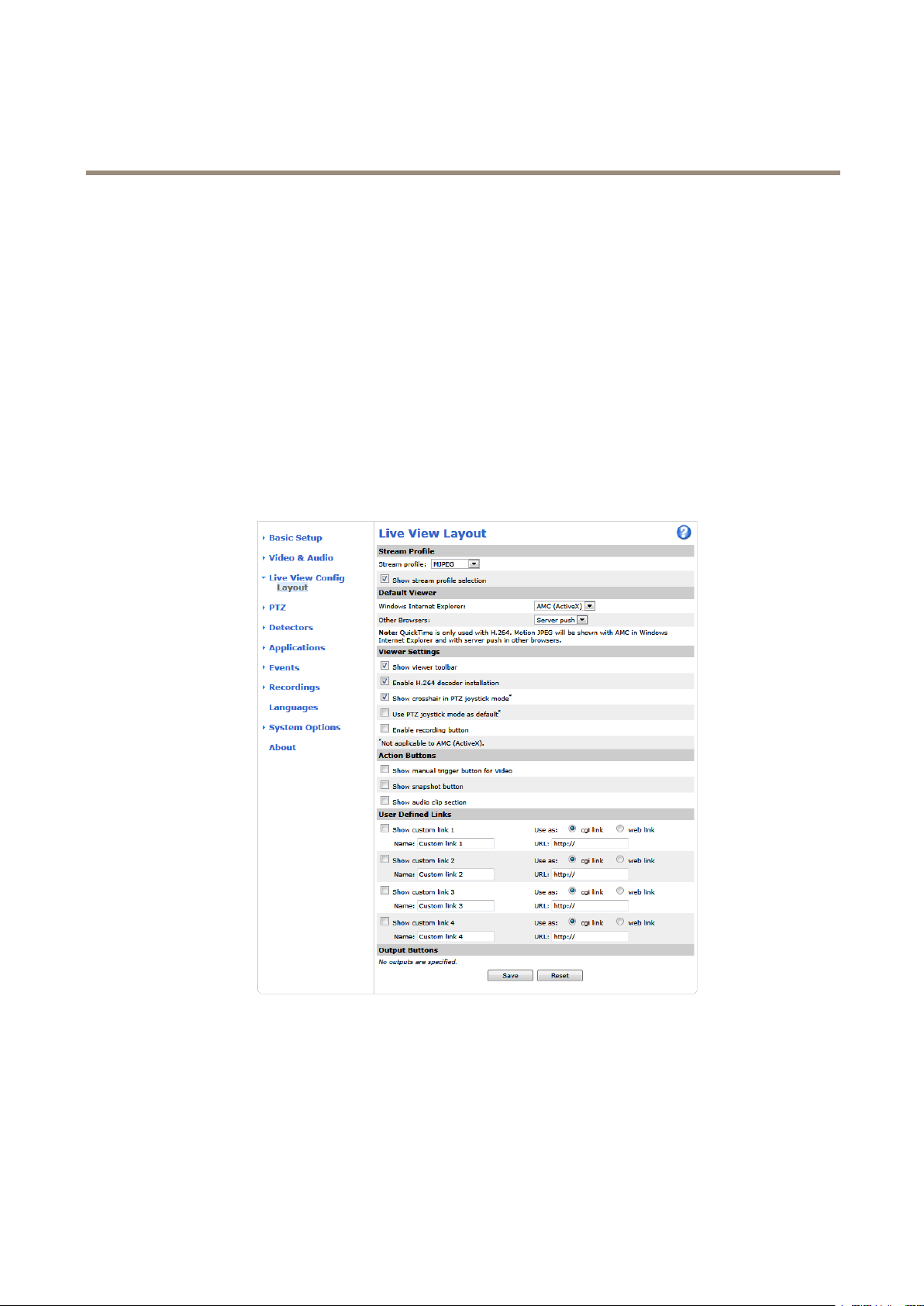
YoucancustomizetheLiveViewpageandalterittosuityourrequirements.Itispossibletodenethefollowingfeaturesof
theLiveViewpage.
•DefaultLiveViewVideo.See.
•StreamProle.Seepage20.
•DefaultViewerforBrowser.Seepage24.
•ViewerSettings.Seepage25.
•ActionButtons.ThesearethebuttonsdescribedinControlsontheLiveViewPageonpage11.
•UserDenedLinks.Seepage25.
•OutputButtons.Seepage25.
DefaultViewerforBrowsers
FromLiveViewCong>DefaultViewerselectthedefaultmethodforviewingvideoimagesinyourbrowser.Theproductattempts
toshowthevideoimagesintheselectedvideoformatandviewer.Ifthisisnotpossible,theproductoverridesthesettingsand
selectsthebestavailablecombination.
24
Page 25

AXISQ7404VideoEncoder
ConfiguretheLiveViewPage
BrowserViewerDescription
WindowsInternetExplorer
Otherbrowsers
Formoreinformation,pleaseseetheonlinehelp.
ViewerSettings
Tocongureoptionsfortheviewer ,gotoLiveViewCong>ViewerSettings.
•SelectShowviewertoolbartodisplaytheAXISMediaControl(AMC)ortheQuickTimeviewertoolbarunderthevideo
imageinyourbrowser.
AMC
QuickTime
StillimageDisplaysstillimagesonly.ClicktheRefreshbuttoninyourbrowsertoviewa
ServerPush
QuickTime
StillimageDisplaysstillimagesonly.ClicktheRefreshbuttoninyourbrowsertoviewa
RecommendedviewerinInternetExplorer(H.264/MotionJPEG).
H.264.
newimage.
Recommendedviewerforotherbrowsers(MotionJPEG).
H.264.
newimage.
•H.264decoderinstallation.TheadministratorcandisableinstallationoftheH.264decoderincludedwithAXISMedia
Control.Thisisusedtopreventinstallationofunlicensedcopies.Furtherdecoderlicensescanbepurchasedfromyour
Axisreseller.
•SelectShowcrosshairinPTZjoystickmodetoenableacrossthatwillindicatethecenteroftheimageinPTZjoystick
mode.
•SelectUsePTZjoystickmodeasdefaulttoenablejoystickmode.Themodecanbechangedtemporarilyfromthe
PTZcontrolpanel.
•SelectEnablerecordingbuttontoenablerecordingfromtheLiveViewpage.Thisbuttonisavailablewhenusingthe
AMCviewer.TherecordingsaresavedtothelocationspeciedintheAMCControlPanel.SeeAXISMediaControl
(AMC)onpage14.
UserDenedLinks
Todisplayuser-denedlinksintheLiveViewpage,selecttheShowcustomlinkoption,givethelinkanameandthenentertheURL
tolinkto.Whendeningaweblinkdonotremovethe'http://'fromtheURLaddress.Customlinkscanbeusedtorunscriptsor
activateexternaldevicesconnectedtotheproduct,ortheycanlinktoawebpage.Customlinksdenedascgilinkswillrunthe
scriptinthebackground,inahiddenframe.Deningthelinkasaweblinkwillopenthelinkinanewwindow.
OutputButtons
ExternalI/OdevicesconnectedtotheAxisproduct’soutputportscanbecontrolleddirectlyfromtheLiveViewpage.
TodisplayoutputbuttonsintheLiveViewpage:
1.GotoSetup>LiveViewCong.
2.UnderOutputButtons,selectthetypeofcontroltouse:
-Pulseactivatestheoutputforadenedperiodoftime.Thepulsetimecanbesetfrom1/100secondto60
seconds.
-Active/Inactivedisplaystwobuttons,oneoreachaction.
Toconguretheactiveandinactivestates,gotoSystemOptions>Ports&Devices>I/OPortsandsettheport’sNormalstate.
FormoreinformationaboutI/Oports,seeI/OPortsonpage47.
25
Page 26
AXISQ7404VideoEncoder
PTZ(PanTiltZoom)
PTZ(PanTiltZoom)
ThePTZmenuisavailableifaPTZdriverhasbeenuploaded.SeeInstallPTZDriveronpage27.
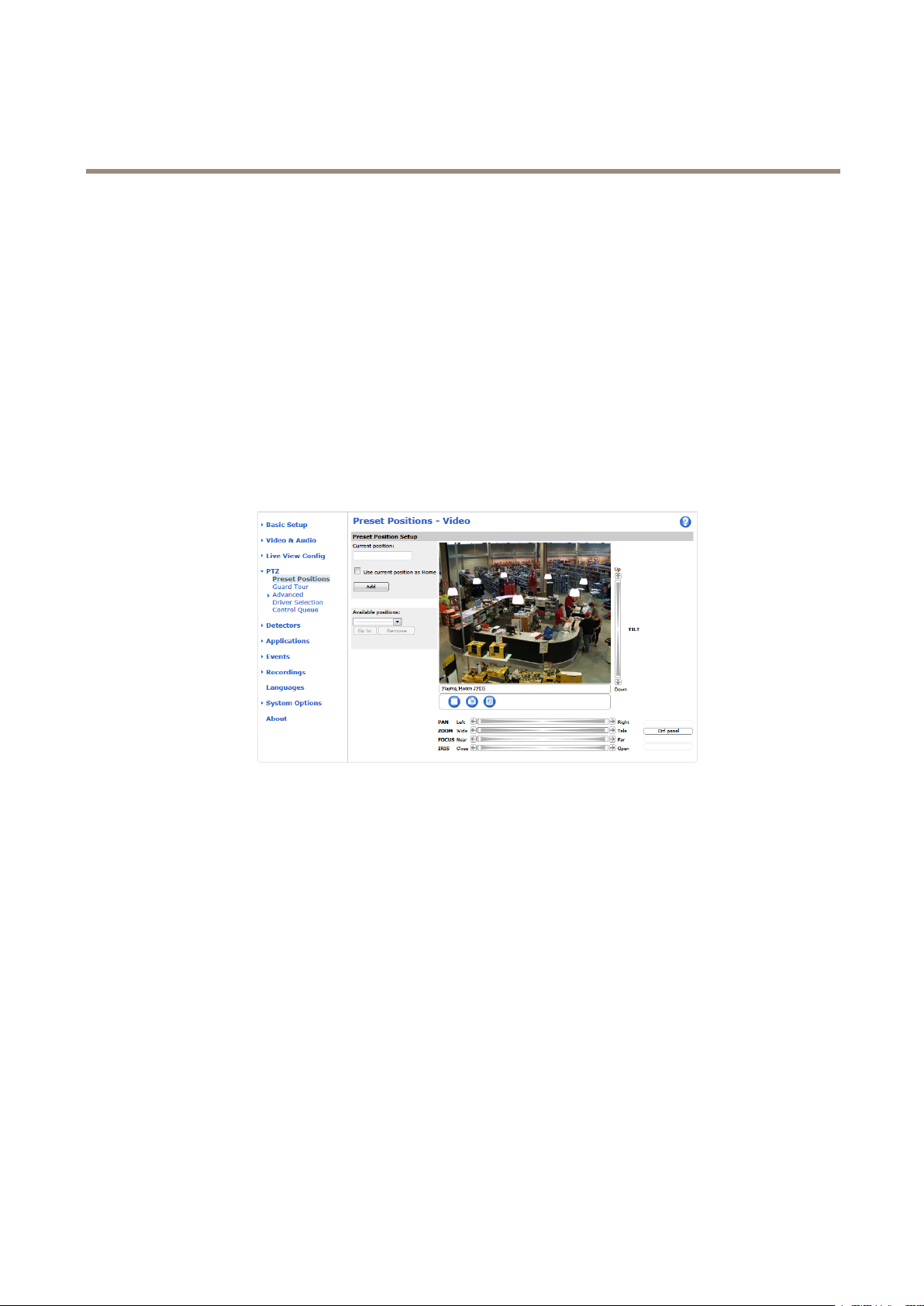
PresetPositions
Apresetpositionisasavedviewthatcanbeusedtoquicklysteerthecameratoaspecicposition.Apresetpositionconsistsof
thefollowingvalues:
•Panandtiltpositions
•Zoomposition
•Focusposition(manualorautomatic)
•Irisposition(manualorautomatic)
GuardTour
Aguardtourdisplaysthevideostreamfromdifferentpresetpositions,one-by-one,inapredeterminedorderoratrandomandfor
congurabletimeperiods.Theenabledguardtourwillkeeprunningaftertheuserhasloggedofforclosedthebrowser.
Toaddaguardtour:
1.GotoPTZ>GuardTourandclickAdd.
2.Enteradescriptivename.
3.Specifythepauselengthbetweenruns.
4.SelectanavailablepresetpositionandclickApply.
5.SpecifytheMoveSpeed.
6.SpecifytheViewTimeinsecondsorminutes.
7.SpecifytheViewOrderorselecttheRandomvieworderoption.
8.ClickSave.
Tomodifyorremoveguardtours,gotoPTZ>GuardTour,selecttheguardtourintheGuardTourListandclickModify/Remove.
26
Page 27

AXISQ7404VideoEncoder
PTZ(PanTiltZoom)
Note
ForproductsthatsupportLimitedGuardTour,theproducthasaxedminimumviewtime
Formoreinformationseetheonlinehelp
.
Advanced
DeviceSettings
TheDeviceSettingswindowdisplaysdriverspecicsettings.Theappearanceofthiswindowcanvarydependingonthedriver
installed.Optionsthatcanbeconguredinclude:
•DriverSpecicSettingsforVideoSource
•MechanicalLimitsforMovingVideoSource
•LightControlVideoSource
•ExtendedDriverSpecicSettingsforVideoSource
FordownloadandinstallationinformationaboutPTZdriversforyourAxisproductpleasevisitwww.axis.com/techsup/
Controls
AdvancedPTZsettingscanbeconguredunderPTZ>Advanced>Controls.
ThePanelShortcutCommandButtonslistshowstheuser-denedbuttonsthatcanbeaccessedfromtheLiveViewpage’sCtrl
panel.ThesebuttonscanbeusedtoprovidedirectaccesstocommandsissuedusingtheVAPIX®applicationprogramminginterface.
ClickAddtoaddanewshortcutcommandbutton.
ThefollowingPTZcontrolsareenabledbydefault:
•Pancontrol
•Tiltcontrol
•Zoomcontrol
•Focuscontrol
•Iriscontrol
Todisablespeciccontrols,deselecttheoptionsunderEnable/Disablecontrols.
Note
DisablingPTZcontrolswillnotaffectpresetpositions.Forexample,ifthetiltcontrolisdisabled,theproductcanstillmoveto
presetpositionsthatrequireatiltmovement.
OSDMenu
IfthePTZunitsupportsaninternalcongurationmenu,thiscanbeaccessedusingtheOn-ScreenDisplay(OSD).Congurethe
analogcamerabyopeningandnavigatingthroughitsinternalmenuinthisdisplay.
InstallPTZDriver
ThisAxisproductsupportsseveralPTZdevices.Pleaseseewww .axis.comforacompletelistofsupporteddevices,andtoobtainthe
correctdriver.ToinstallaPTZdeviceyouneedtoinstallthePTZdriver.
27
Page 28

AXISQ7404VideoEncoder
PTZ(PanTiltZoom)
ToinstallthePTZdrivergotoPTZ>DriverSelection.Browsetondthedriver(e.g.driver.ptz)andUpload.Ifthedriverwas
successfullyuploaded,itappearsintheSelectdrivertousedrop-downlist.Fromthisdrop-downlist,selectthedrivertoinstall
orremove,andclickSave.
SelectActivatePTZtoenablePTZ.TheaddressoftheconnecteddeviceappearsagainstDeviceID.ChoosetheDevicetypefromthe
drop-downlist.Tondwhichdevicetypetouse,consultthedocumentationsuppliedbythePTZdriver.
TocompletetheinstallationgotoSystemOptions>Ports&Devices>COMPortandverifythesettings.
ControlQueue
Note
•TheadministratorcanenableanddisablePTZcontrolsforselectedusers.
•Toidentifydifferentusersintheviewergroup,cookiesmustbeenabledontheclient.
•TheControlqueuepolltimeismeasuredinseconds.Formoreinformationseetheonlinehelp
TheadministratorcansetupaqueueforPTZcontrollersfromPTZ>ControlQueue.Oncesetup,thePTZControlQueuebuttons
appearintheLiveViewpageofferingoneviewerexclusivecontrolforalimitedperiodoftime.Otheruserswillbeplacedinqueue.
Auserwhobelongstoagroup(seeUsersonpage39)withahigherPTZprioritycangobeforeotherusersinthequeueandtake
controloftheproduct.Theorderofpriorityisasfollows:
1.Administrator—AnadministratortakesoverPTZcontrolregardlessofwhoisrstinqueue.Theadministratorwillbe
removedfromthequeue60secondsafterthelastPTZcontrolcommand.
2.Event—TheAxisproductcanbeconguredtogotoapresetpositionwhentriggeredbyanalarm(seeEventsonpage34).
Theeventwillimmediatelybeplacedrstinthequeueexceptwhenanadministratorisincontrol.
3.Operator—Sameasadministratorbutwithlowerpriority
4.GuardTour—Aguardtour(seepage26)hasPTZcontrolforanindeniteperiodoftime.Itmaybeoverriddenbyan
operator,eventoradministrator.Theguardtourwillresumewhenhigherprioritygroupsleavethequeue.
5.Viewer—Multipleviewersmustwaitfortheirturn.Theviewerhas60secondsPTZcontrolbeforecontrolispassed
ontothenextviewerinqueue.
.
28
Page 29

AXISQ7404VideoEncoder
Detectors
Detectors
CameraTampering
CameraTamperingcangenerateanalarmwheneverthecameraisrepositioned,orwhenthelensiscovered,spray-paintedorseverely
defocused.Tosendanalarm,forexampleanemail,anactionrulemustbesetup.
Toconguretamperingdetection:
1.GotoDetectors>CameraTampering.
2.SettheMinimumduration,thatis,thetimethatmustelapsebeforeanalarmisgenerated.Increasetimetoprevent
falsealarmsforknownconditionsthataffecttheimage.
3.SelectAlarmfordarkimagesifanalarmshouldbegeneratediflightsaredimmedorturnedoff,orifthelensissprayed,
covered,orrenderedseverelyoutoffocus.
4.ClickSave.
Toconguretheproducttosendanalarmwhentamperingoccurs:
1.GotoEvents>ActionRules.
2.ClickAddtosetupanewactionrule.
3.EnteraNamefortheactionrule.
4.UnderCondition,selectDetectorsfromtheTriggerlist.
5.SelectTamperingfromthelistofdetectors.
6.Selectthevideochannel.
7.Optionally,selectascheduleandsetadditionalconditions.
8.Selecttheaction.Tosendanemail,selectSendNoticationandselectaRecipientfromthelistofdenedrecipients.
Note
TheWhiletheruleisactiveoptionunderDurationcannotbeusedwithcameratampering,sincecameratamperingdoesnot
haveadurationandonceithasbeentriggereditwillnotautomaticallyreturntoitsuntriggeredstate.
Formoreinformationonactionsrules,seeEventsonpage34.
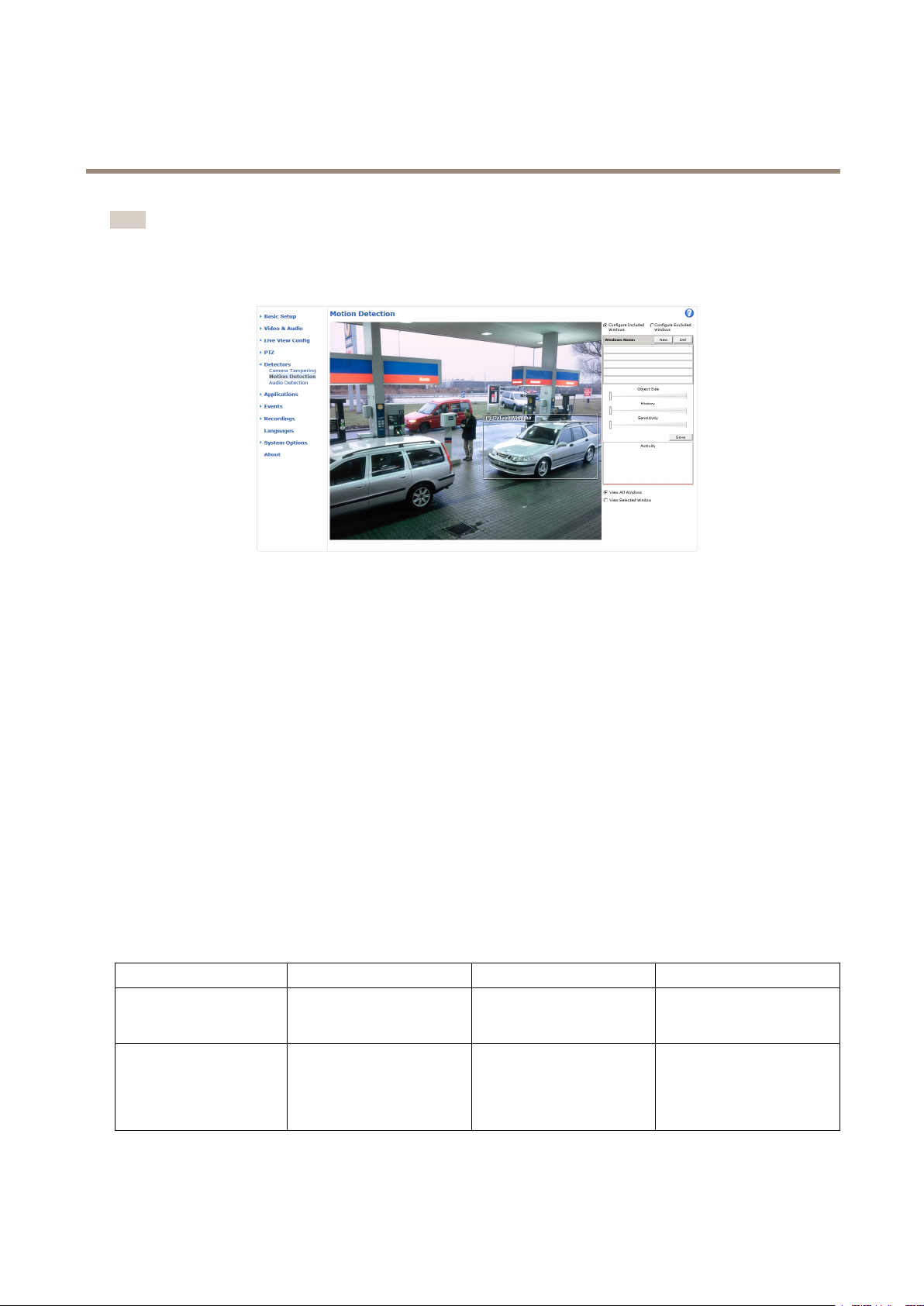
MotionDetection
Motiondetectionisusedtogenerateanalarmwhenevermovementstartsorstopsinthecameraview.
Motiondetectionisconguredbydeningupto10IncludeandExcludewindows:
•Includewindows—deneareaswheremotionshouldbedetected
•Excludewindows—deneareaswithinanIncludewindowthatshouldbeignored(areasoutsideIncludewindows
areautomaticallyignored).
Forinstructions,seeSetUpMotionDetectionWindowsonpage30.
Tocontrolthenumberofmotiondetectionalarms,theparametersObjectSize,HistoryandSensitivitycanbeadjusted.See
MotionDetectionParametersonpage30.
Oncemotiondetectionwindowsarecongured,theAxisproductcanbeconguredtoperformactionswhenmotionisdetected.
Possibleactionsincludeuploadingimagesandstartrecording.Formoreinformation,seeSetUpActionRulesonpage34.
29
Page 30
AXISQ7404VideoEncoder
Detectors
Note
•Usingthemotiondetectionfeaturemaydecreasetheproduct’soverallperformance.
•ThepositionoftheMotionDetectionWindowisrelativetotheorientationoftheCamera.Changingtheorientationofthe
camerawillalsochangethepositionoftheMotionDetectionWindow.
SetUpMotionDetectionWindows
TosetupamotiondetectionIncludeWindow,followtheseinstructions:
1.GotoDetectors>MotionDetection.
2.SelecttheCongureIncludedWindowsoptionandclickNew.Selectthenewwindowinthelistofwindowsand
enteradescriptivename.
3.Adjustthesize(dragthebottomright-handcorner)andtheposition(clickonthetextatthetopanddragtothedesired
position)ofthewindow.
4.AdjusttheObjectSize,HistoryandSensitivityprolesliders(seeMotionDetectionParametersfordetails).Anydetected
motionwithinanactivewindowisindicatedbyredpeaksintheActivitywindow.
5.ClickSave.
Toexcludepartsoftheincludewindow,selecttheCongureExcludedWindowsandpositiontheexcludewindowwithinthe
includewindow.
Todeleteanincludeorexcludewindow,selectthewindowinthelistofwindowsandclickDel.
MotionDetectionParameters
Theparameterscontrollingmotiondetectionaredescribedinthetablebelow:
Parameter
Description
Highlevel(100%)
ObjectSize
Objectsizerelativetowindow
size.
Onlyverylargeobjectstrigger
motiondetection.
History
Objectmemorylength.
Anobjectthatappearsin
thewindowtriggersmotion
detectionforalongtime
beforeitisconsideredas
non-moving.
Sensitivity
Differenceinluminance
betweenbackgroundand
object.
Ordinarycoloredobjectson
ordinarybackgroundstrigger
motiondetection.
30
Page 31

AXISQ7404VideoEncoder
Detectors
Mediumlevel(50%)
Lowlevel(0%)
Recommendedvalues
Defaultvalues
Note
•Totriggeronsmallobjectsormovements,useseveralsmallmotiondetectionwindowsratherthanonelargewindow,
andselectalowobjectsize.
•Toavoidtriggeringonsmallobjects,selectahighobjectsize.
•Whilemonitoringanareawheremovingobjectsarenotexpected,selectahighhistorylevel.Thiswillcausemotion
detectiontotriggeraslongastheobjectispresentinthewindow.
•Toonlydetectashinglight,selectalowsensitivity.Inothercaseshighsensitivityisrecommended.
Evenverysmallobjectstrigger
motiondetection.
5–15%60–90%75–95%
15%90%90%
Anobjectthatappearsin
thewindowtriggersmotion
detectiononlyforaveryshort
timebeforeitisconsideredas
non-moving.
Alargedifferenceinluminance
isrequiredtotriggermotion
detection.
Onlyverybrightobjectson
adarkbackgroundtrigger
motiondetection.
AudioDetection
TheAxisproductcanbeconguredtogenerateanalarmwhenaudiorisesaboveorfallsbelowthethresholdvalue.Thethreshold
valuecanbesetintherange0–100where0isthemostsensitiveand100theleastsensitive.
1.GotoDetectors>AudioDetection.
2.SettheaudioalarmlevelandclickSave.
3.GotoEvents>ActionRulesandsetupanactionrule,seeSetUpActionRulesonpage34.
DetectedaudioisindicatedbycoloredpeaksintheActivityindicator.Aneventistriggeredwhendetectedaudiorisesaboveorfalls
belowthethresholdvalue,whichisrepresentedbythebar.
31
Page 32

AXISQ7404VideoEncoder
Applications
Applications
AXISCameraApplicationPlatform(ACAP)isanopenplatformthatenablesthirdpartiestodevelopanalyticsandotherapplications
forAxisproducts.Forinformationaboutavailableapplications,downloads,trialsandlicenses,gotowww .axis.com/applications
Note
•Itisrecommendedtorunoneapplicationatatime.
•Avoidrunningapplicationswhenthebuilt-inmotiondetectionisactive.
ApplicationLicenses
Someapplicationsneedalicensetorun.Licensescanbeinstalledintwoways:
•Automaticinstallation—requiresaccesstotheInternet
•Manualinstallation—obtainthelicensekeyfromtheapplicationvendoranduploadthekeytotheAxisproduct
Torequestalicense,theAxisproductserialnumber(S/N)isrequired.Theserialnumbercanbefoundontheproductlabelandunder
SystemOptions>Support>SystemOverview.
UploadApplication
Touploadandstartanapplication:
1.GotoSetup>Applications.
2.UnderUploadApplication,clickBrowse.LocatetheapplicationleandclickUploadPackage.
3.Installthelicense(ifapplicable).Forinstructions,seethedocumentationprovidedbytheapplicationvendor.
4.Starttheapplication.GotopageApplications,selecttheapplicationinthelistofinstalledapplicationsandclickStart.
5.Conguretheapplication.Forinstructions,seethedocumentationprovidedbytheapplicationvendor.
Note
•Applicationscanbeuploadedbyproductadministrators.
•ApplicationsandlicensescanbeinstalledonmultipleproductsatthesametimeusingAXISCameraManagement,version
3.10andlater.
Togeneratealoglefortheapplication,gotoApplications.SelecttheapplicationandclickLog.
ApplicationConsiderations
Ifanapplicationisupgraded,applicationsettings,includingthelicense,willberemoved.Thelicensemustbereinstalledand
theapplicationrecongured.
IftheAxisproduct’srmwareisupgraded,uploadedapplicationsandtheirsettingswillremainunchanged,althoughthisisnot
guaranteedbyAxisCommunications.Notethattheapplicationmustbesupportedbythenewrmware.Forinformationabout
rmwareupgrades,seeUpgradetheFirmware.
IftheAxisproductisrestarted,runningapplicationswillrestartautomatically.
IftheAxisproductisrestored,uploadedapplicationsremainunchangedbutmustberestarted.Tostarttheapplication,goto
Setup>Applications.SelecttheapplicationinthelistofinstalledapplicationsandclickStart.Forinformationaboutrestoring
theAxisproduct,seeMaintenance.
32
Page 33

AXISQ7404VideoEncoder
Applications
IftheAxisproductisresettofactorydefault,uploadedapplicationsandtheirsettingsareremoved.Forinformationaboutfactory
default,seeResettoFactoryDefaultSettings.
33
Page 34

AXISQ7404VideoEncoder
Events
Events
TheEventpagesallowyoutoconguretheAxisproducttoperformactionswhendifferenteventsoccur.Forexample,theproduct
canstartarecordingorsendanemailnoticationwhenmotionisdetected.Thesetofconditionsthatdeneshowandwhen
theactionistriggerediscalledanactionrule.
SetUpActionRules
Anactionruledenestheconditionsthatmustbemetfortheproducttoperformanaction,forexamplerecordvideoorsendan
emailnotication.Ifmultipleconditionsaredened,allofthemmustbemettotriggertheaction.
Formoreinformationaboutavailabletriggersandactions,seeand.
Thefollowingexampledescribeshowtosetupanactionruletorecordvideotoanetworkshareifthereismovementinthe
camera’seldofview.
Setupmotiondetectionandaddanetworkshare:
1.GotoDetectors>MotionDetectionandcongureamotiondetectionwindow.Seepage30.
2.GotoSystemOptions>Storageandsetupthenetworkshare.Seepage46.
Setuptheactionrule:
1.GotoEvents>ActionRulesandclickAdd.
2.SelectEnableruleandenteradescriptivenamefortherule.
3.SelectDetectorsfromtheTriggerdrop-downlist.
4.SelectMotionDetectionfromthedrop-downlist.Selectthemotiondetectionwindowtouse.
5.Optionally,selectaScheduleandAdditionalconditions.Seebelow.
6.UnderActions,selectRecordVideofromtheTypedrop-downlist.
7.SelectaStreamproleandconguretheDurationsettingsasdescribedbelow.
8.SelectNetworkSharefromtheStoragedrop-downlist.
Tousemorethanonetriggerfortheactionrule,selectAdditionalconditionsandclickAddtoaddadditionaltriggers.Whenusing
additionalconditions,allconditionsmustbemettotriggertheaction.
Topreventanactionfrombeingtriggeredrepeatedly,aWaitatleasttimecanbeset.Enterthetimeinhours,minutesandseconds,
duringwhichthetriggershouldbeignoredbeforetheactionrulecanbeactivatedagain.
TherecordingDurationofsomeactionscanbesettoincludetimeimmediatelybeforeandaftertheevent.SelectPre-triggertime
and/orPost-triggertimeandenterthenumberofseconds.WhenWhiletheruleisactiveisenabledandtheactionistriggered
againduringthepost-triggertime,therecordingtimewillbeextendedwithanotherpost-triggertimeperiod.
Formoreinformation,seetheonlinehelp
.
AddRecipients
Theproductcansendmedialesandmessagestonotifyusersaboutevents.Beforetheproductcansendmedialesornotication
messages,youmustdeneoneoremorerecipients.Forinformationaboutavailableoptions,see.
Toaddarecipient:
1.GotoEvents>RecipientsandclickAdd.
34
Page 35

AXISQ7404VideoEncoder
Events
2.Enteradescriptivename.
3.SelectarecipientType.
4.Entertheinformationneededfortherecipienttype.
5.ClickTesttotesttheconnectiontotherecipient.
6.ClickOK.
SetUpEmailRecipients
Emailrecipientscanbeconguredbyselectingoneofthelistedemailproviders,orbyspecifyingtheSMTPserver,portand
authenticationusedby,forexample,acorporateemailserver.
Note
Someemailprovidershavesecurityltersthatpreventusersfromreceivingorviewinglargeamountofattachments,from
receivingscheduledemailsandsimilar.Checktheemailprovider’ssecuritypolicytoavoiddeliveryproblemsandlocked
emailaccounts.
Tosetupanemailrecipientusingoneofthelistedproviders:
1.GotoEvents>RecipientsandclickAdd.
2.EnteraNameandselectEmailfromtheTypelist.
3.EntertheemailaddressestosendemailstointheToeld.Usecommastoseparatemultipleaddresses.
4.SelecttheemailproviderfromtheProviderlist.
5.EntertheuserIDandpasswordfortheemailaccount.
6.ClickTesttosendatestemail.
Tosetupanemailrecipientusingforexampleacorporateemailserver ,followtheinstructionsabovebutselectUserdenedas
Provider.EntertheemailaddresstoappearassenderintheFromeld.SelectAdvancedsettingsandspecifytheSMTPserver
address,portandauthenticationmethod.Optionally,selectUseencryptiontosendemailsoveranencryptedconnection.Theserver
certicatecanbevalidatedusingthecerticatesavailableintheAxisproduct.Forinformationonhowtouploadcerticates,
seeCerticatesonpage41.
CreateSchedules
Schedulescanbeusedasactionruletriggersorasadditionalconditions,forexampletorecordvideoifmotionisdetectedoutside
ofcehours.Useoneofthepredenedschedulesorcreateanewscheduleasdescribedbelow.
Tocreateanewschedule:
1.GotoEvents>SchedulesandclickAdd.
2.Enteradescriptivenameandtheinformationneededforadaily,weekly,monthlyoryearlyschedule.
3.ClickOK.
Tousethescheduleinanactionrule,selecttheschedulefromtheScheduledrop-downlistintheActionRuleSetuppage.
SetUpRecurrences
Recurrencesareusedtotriggeractionrulesrepeatedly,forexampleevery5minutesoreveryhour.
Tosetuparecurrence:
1.GotoEvents>RecurrencesandclickAdd.
35
Page 36

AXISQ7404VideoEncoder
Events
2.Enteradescriptivenameandrecurrencepattern.
3.ClickOK.
Tousetherecurrenceinanactionrule,rstselectTimefromtheTriggerdrop-downlistintheActionRuleSetuppageandthen
selecttherecurrencefromtheseconddrop-downlist.
Tomodifyorremoverecurrences,selecttherecurrenceintheRecurrencesListandclickModifyorRemove.
36
Page 37

AXISQ7404VideoEncoder
Recordings
Recordings
TheAxisproductcanbeconguredtorecordvideocontinuouslyoraccordingtoanactionrule:
•Tostartacontinuousrecording,seepage37.
•Tosetupactionrules,seepage34.
•Tocongurecameracontrolledstorage,seeStorageonpage46.
RecordingList
RecordedvideosarelistedontheRecordings>Listpage.Thelistshowseachrecording’sstartdateandtime,durationandthe
eventthattriggeredtherecording.
Toplayordownloadarecording,followthesesteps:
1.GotoRecordings>List.
2.Usetheltertonarrowthelistofrecordings.EnterthedesiredltercriteriaandclickFilter.Someltersmaytake
alongtimetocomplete.
3.Selecttherecording.
4.ClickPlaytoplaytherecording,orclickDownloadtodownloadtherecording.
Multiplerecordingscanbedownloadedatthesametime.SelecttherecordingsandclickDownload.Thedownloadedleisaziple
containingaminimumofthreeles,ofwhichtheMatroska(mkv)lesaretheactualrecordings.Therecordingsaretime-stamped
withthedateandtimetheyweredownloaded(asopposedtothedatetherecordingsweremade).
Note
ToplayrecordingsinWindowsMediaPlayer,AXISMatroskaFileSplittermustbeinstalled.AXISMatroskaFileSplitter
canbedownloadedfromwww.axis.com/techsup/software
Fordetailedrecordingandvideoinformation,selectarecordingandclickProperties.
Toremovearecording,selecttherecordingandclickRemove.
ContinuousRecording
TheAxisproductcanbeconguredtocontinuouslysavevideotoastoragedevice.Forinformationaboutstoragedevices,seeStorage
onpage46.Topreventthediskfrombecomingfull,itisrecommendedtocongurethedisktoautomaticallyremoveoldrecordings.
Ifanewstreamproleisselectedwhilearecordingisongoing,therecordingwillbestoppedandsavedintherecordinglistanda
newrecordingwiththenewstreamprolewillstart.Allpreviouscontinuousrecordingswillremainintherecordinglistuntilthey
areremovedmanuallyorthroughautomaticremovalofoldrecordings.
Tostartacontinuousrecording,followthesesteps:
1.GotoRecordings>Continuous.
2.SelectEnabled.
3.SelectthetypeofstoragedevicefromtheStoragelist.
4.SelectaStreamproletouseforcontinuousrecordings.Toincludeaudiointherecording,useAACaudioencodingand
makesurethataudioisenabledintheselectedstreamprole.
5.ClickSavetosaveandstarttherecording.
37
Page 38

AXISQ7404VideoEncoder
Languages
Languages
MultiplelanguagescanbeinstalledintheAxisproduct.Allwebpagesincludingtheonlinehelpwillbedisplayedintheselected
language.Toswitchlanguages,gotoSetup>Languagesandrstuploadthenewlanguagele.Browseandlocatetheleandclick
theUploadLanguagebutton.SelectthenewlanguagefromthelistandclickSave.
Note
•Resettingtheproducttofactorydefaultsettingswilleraseanyuploadedlanguagelesandresettheproductlanguageto
English.
•ClickingtheRestorebuttonontheMaintenancepagewillnotaffectthelanguage.
•Armwareupgradewillnotaffectthelanguageused.Howeverifyouhaveuploadedanewlanguagetotheproductand
laterupgradethermware,itmayhappenthatthetranslationnolongermatchestheproduct'swebpages.Inthiscase,
uploadanupdatedlanguagele.
•Alanguagealreadyinstalledintheproductwillbereplacedwhenacurrentoralaterversionofthelanguageleisuploaded.
38
Page 39

AXISQ7404VideoEncoder
SystemOptions
SystemOptions
Security
Users
UseraccesscontrolisenabledbydefaultandcanbeconguredunderSystemOptions>Security>Users.Anadministratorcan
setupotherusersbygivingthemusernamesandpasswords.Itisalsopossibletoallowanonymousviewerlogin,whichmeans
thatanybodymayaccesstheLiveViewpage.
Theuserlistdisplaysauthorizedusersandusergroups(accesslevels):
•ViewershaveaccesstotheLiveViewpage
•Operatorshaveaccesstoallsettingsexcept:
-creatingandmodifyingPTZpresets
-creatingandmodifyingPTZcontrolsettings
-creatingandmodifyingprivacymasksettings
-uploadingapplicationsandlanguageles
-anyofthesettingsincludedintheSystemOptions
•Administratorshaveunrestrictedaccesstoallsettings.Theadministratorcanadd,modifyandremoveotherusers.
Note
NotethatwhentheoptionEncrypted&unencryptedisselected,thewebserverwillencryptthepassword.Thisisthedefault
optionforanewunitoraunitresettofactorydefaultsettings.
UnderHTTP/RTSPPasswordSettings,selectthetypeofpasswordtoallow.Youmayneedtoallowunencryptedpasswordsifthereare
viewingclientsthatdonotsupportencryption,orifyouupgradedthermwareandexistingclientssupportencryptionbutneed
tologinagainandbeconguredtousethisfunctionality.
UnderUserSettings,selecttheEnableanonymousviewerloginoptiontoallowanonymoususersaccesstotheLiveViewpage.
SelecttheEnableanonymousPTZcontrollogintoallowanonymoususersaccesstothePTZcontrols.
DeselecttheEnableBasicSetupoptiontohidetheBasicSetupmenu.BasicSetupprovidesquickaccesstosettingsthatshouldbe
madebeforeusingtheAxisproduct.
ONVIF
ONVIF(OpenNetworkVideoInterfaceForum)isaglobalinterfacestandardthatmakesiteasierforendusers,integrators,consultants,
andmanufacturerstotakeadvantageofthepossibilitiesofferedbynetworkvideotechnology.ONVIFenablesinteroperability
betweendifferentvendorproducts,increasedexibility,reducedcostandfuture-proofsystems.
BycreatingauseryouautomaticallyenableONVIFcommunication.UsetheusernameandpasswordwithallONVIFcommunication
withtheproduct.Formoreinformationseewww.onvif.org
IPAddressFilter
IPaddresslteringisenabledontheSystemOptions>Security>IPAddressFilterpage.Onceenabled,thelistedIPaddressare
allowedordeniedaccesstotheAxisproduct.SelectAlloworDenyfromthelistandclickApplytoenableIPaddressltering.
Theadministratorcanaddupto256IPaddressentriestothelist(asingleentrycancontainmultipleIPaddresses).
39
Page 40

AXISQ7404VideoEncoder
SystemOptions
HTTPS
HTTPS(HyperTextTransferProtocoloverSecureSocketLayer,orHTTPoverSSL)isawebprotocolprovidingencryptedbrowsing.
HTTPScanalsobeusedbyusersandclientstoverifythatthecorrectdeviceisbeingaccessed.Thesecuritylevelprovidedby
HTTPSisconsideredadequateformostcommercialexchanges.
TheAxisproductcanbeconguredtorequireHTTPSwhenusersfromdifferentusergroups(administrator,operator,viewer)login.
TouseHTTPS,anHTTPScerticatemustrstbeinstalled.GotoSystemOptions>Security>Certicatestoinstallandmanage
certicates.SeeCerticatesonpage41.
ToenableHTTPSontheAxisproduct:
1.GotoSystemOptions>Security>HTTPS
2.SelectanHTTPScerticatefromthelistofinstalledcerticates.
3.Optionally,clickCiphersandselecttheencryptionalgorithmstouseforSSL.
4.SettheHTTPSConnectionPolicyforthedifferentusergroups.
5.ClickSavetoenablethesettings.
ToaccesstheAxisproductviathedesiredprotocol,intheaddresseldinabrowser,enterhttps://fortheHTTPSprotocol
andhttp://fortheHTTPprotocol.
TheHTTPSportcanbechangedontheSystemOptions>Network>TCP/IP>Advancedpage.
IEEE802.1X
IEEE802.1Xisastandardforport-basedNetworkAdmissionControlprovidingsecureauthenticationofwiredandwirelessnetwork
devices.IEEE802.1XisbasedonEAP(ExtensibleAuthenticationProtocol).
ToaccessanetworkprotectedbyIEEE802.1X,devicesmustbeauthenticated.Theauthenticationisperformedbyanauthentication
server,typicallyaRADIUSserver,examplesofwhichareFreeRADIUSandMicrosoftInternetAuthenticationService.
InAxisimplementation,theAxisproductandtheauthenticationserveridentifythemselveswithdigitalcerticatesusingEAP-TLS
(ExtensibleAuthenticationProtocol-TransportLayerSecurity).ThecerticatesareprovidedbyaCerticationAuthority(CA).
Youneed:
•aCAcerticatetoauthenticatetheauthenticationserver.
•aCA-signedclientcerticatetoauthenticatetheAxisproduct.
Tocreateandinstallcerticates,gotoSystemOptions>Security>Certicates.SeeCerticatesonpage41.ManyCAcerticates
arepreinstalled.
ToallowtheproducttoaccessanetworkprotectedbyIEEE802.1X:
1.GotoSystemOptions>Security>IEEE802.1X.
2.SelectaCACerticateandaClientCerticatefromthelistsofinstalledcerticates.
3.UnderSettings,selecttheEAPOLversionandprovidetheEAPidentityassociatedwiththeclientcerticate.
4.ChecktheboxtoenableIEEE802.1XandclickSave.
Note
Forauthenticationtoworkproperly,thedateandtimesettingsintheAxisproductshouldbesynchronizedwithanNTP
server.SeeDate&Timeonpage41.
40
Page 41

AXISQ7404VideoEncoder
SystemOptions
Certicates
Certicatesareusedtoauthenticatedevicesonanetwork.Typicalapplicationsincludeencryptedwebbrowsing(HTTPS),network
protectionviaIEEE802.1Xandsecureuploadofimagesandnoticationmessagesforexampleviaemail.Twotypesofcerticates
canbeusedwiththeAxisproduct:
Server/Clientcerticates-ToauthenticatetheAxisproduct.
CAcerticates-Toauthenticatepeercerticates,forexamplethecerticateofanauthenticationserverincasetheAxisproductis
connectedtoanIEEE802.1Xprotectednetwork.
Note
Installedcerticates,exceptpreinstalledCAcerticates,willbedeletediftheproductisresettofactorydefault.Preinstalled
CAcerticatesthathavebeendeletedwillbereinstalled.
AServer/Clientcerticatecanbeself-signedorissuedbyaCerticateAuthority(CA).Aself-signedcerticateofferslimited
protectionandcanbeusedbeforeaCA-issuedcerticatehasbeenobtained.
Toinstallaself-signedcerticate:
1.GotoSetup>SystemOptions>Security>Certicates.
2.ClickCreateself-signedcerticateandprovidetherequestedinformation.
TocreateandinstallaCA-signedcerticate:
1.Createaself-signedcerticateasdescribedabove.
2.GotoSetup>SystemOptions>Security>Certicates.
3.ClickCreatecerticatesigningrequestandprovidetherequestedinformation.
4.CopythePEM-formattedrequestandsendtotheCAofyourchoice.
5.Whenthesignedcerticateisreturned,clickInstallcerticateanduploadthecerticate.
Server/ClientcerticatescanbeinstalledasCerticatefromsigningrequestorasCerticateandprivatekey.SelectCerticate
andprivatekeyiftheprivatekeyistobeuploadasaseparateleorifthecerticateisinPKCS#12format.
TheAxisproductisshippedwithseveralpreinstalledCAcerticates.Ifrequired,additionalCAcerticatescanbeinstalled:
1.GotoSetup>SystemOptions>Security>Certicates.
2.ClickInstallcerticateanduploadthecerticate.
AudioSupport
SelectEnableaudiosupporttoallowclientstoretrieveaudiostreamsfromtheAxisproduct.Forinformationonhowtocongure
audiosettings,seeSetUpAudioonpage22.
Note
DeselectingthisoptionwilldisableaudiogloballyintheAxisproduct,forconguredeventsandproleswithaudioaswell.
Date&Time
TheAxisproduct’sdateandtimesettingsareconguredunderSystemOptions>Date&Time.
CurrentServerTimedisplaysthecurrentdateandtime(24hclock).Thetimecanbedisplayedin12hclockinthetextoverlay(see
below).
Tochangethedateandtimesettings,selectthepreferredTimemodeunderNewServerTime:
41
Page 42

AXISQ7404VideoEncoder
SystemOptions
•Synchronizewithcomputertime–Setsdateandtimeaccordingtothecomputer’sclock.Withthisoption,dateand
timearesetonceandwillnotbeupdatedautomatically.
•SynchronizewithNTPServer–ObtainsdateandtimefromanNTPserver.Withthisoption,dateandtimesettingsare
updatedcontinuously.ForinformationonNTPsettings,seeNTPCongurationonpage43.
IfusingahostnamefortheNTPserver,aDNSservermustbecongured.SeeDNSCongurationonpage43.
•Setmanually–Allowsyoutomanuallysetdateandtime.
IfusinganNTPserver,selectyourTimezonefromthedrop-downlist.Ifrequired,checkAutomaticallyadjustfordaylightsaving
timechanges.
TheDate&TimeFormatUsedinImagesisthedateandtimeformatdisplayedasatextoverlayinthevideostream.Usethe
predenedformatsorseeFileNaming&Date/TimeFormatsintheonlinehelp
timeformats.Toincludedateandtimeintheoverlaytext,gotoVideo&AudioandselectIncludedateandIncludetime.
Network
BasicTCP/IPSettings
forinformationonhowtocreatecustomdateand
TheAxisproductsupportsIPversion4andIPversion6.Bothversionscanbeenabledsimultaneously,andatleastoneversion
mustalwaysbeenabled.
IPv4AddressConguration
Bydefault,theAxisproductissettouseIPv4(IPversion4)andtoobtaintheIPaddressautomaticallyviaDHCP.TheIPv4settingsare
conguredunderSystemOptions>Network>TCP/IP>Basic.
DHCP(DynamicHostCongurationProtocol)allowsnetworkadministratorstocentrallymanageandautomatetheassignmentof
IPaddresses.DHCPshouldonlybeenabledifusingdynamicIPaddressnotication,oriftheDHCPcanupdateaDNSserver.Itis
thenpossibletoaccesstheAxisproductbyname(hostname).
IfDHCPisenabledandtheproductcannotbeaccessed,runAXISIPUtilitytosearchthenetworkforconnectedAxisproducts,orreset
theproducttothefactorydefaultsettings(seepage49)andthenperformtheinstallationagain.
TouseastaticIPaddress,checkUsethefollowingIPaddressandspecifytheIPaddress,subnetmaskanddefaultrouter.
IPv6AddressConguration
IfIPv6(IPversion6)isenabled,theAxisproductwillreceiveanIPaddressaccordingtothecongurationinthenetworkrouter.
ToenableIPv6,gotoSystemOptions>Network>TCP/IP>Basic.OthersettingsforIPv6shouldbeconguredinthenetworkrouter.
ARP/Ping
Theproduct’sIPaddresscanbeassignedusingARPandPing.Forinstructions,see.
TheARP/Pingserviceisenabledbydefaultbutisautomaticallydisabledtwominutesaftertheproductisstarted,orassoonasanIP
addressisassigned.Tore-assignIPaddressusingARP/Ping,theproductmustberestartedtoenableARP/Pingforanadditional
twominutes.
Todisabletheservice,gotoSystemOptions>Network>TCP/IP>BasicandcleartheoptionEnableARP/PingsettingofIPaddress.
Pingingtheproductisstillpossiblewhentheserviceisdisabled.
AXISVideoHostingSystem(AVHS)
AVHSusedinconjunctionwithanAVHSservice,provideseasyandsecureInternetaccesstoliveandrecordedvideoaccessiblefrom
anylocation.FormoreinformationandhelptondalocalAVHSServiceProvidergotowww.axis.com/hosting
42
Page 43

AXISQ7404VideoEncoder
SystemOptions
TheAVHSsettingsareconguredunderSystemOptions>Network>TCPIP>Basic.ThepossibilitytoconnecttoanAVHSservice
isenabledbydefault.Todisable,cleartheEnableAVHSbox.
One-clickenabled-Pressandholdtheproduct’scontrolbutton(seeHardwareOverviewonpage6)forabout3secondsto
connecttoanAVHSserviceovertheInternet.Onceregistered,AlwayswillbeenabledandtheAxisproductstaysconnectedto
theAVHSservice.Iftheproductisnotregisteredwithin24hoursfromwhenthebuttonispressed,theproductwilldisconnect
fromtheAVHSservice.
Always-TheAxisproductwillconstantlyattempttoconnecttotheAVHSserviceovertheInternet.Onceregisteredtheproductwill
stayconnectedtotheservice.Thisoptioncanbeusedwhentheproductisalreadyinstalledanditisnotconvenienttousethe
one-clickinstallation.
AXISInternetDynamicDNSService
AXISInternetDynamicDNSServiceassignsahostnameforeasyaccesstotheproduct.Formoreinformation,seewww.axiscam.net
ToregistertheAxisproductwithAXISInternetDynamicDNSService,gotoSystemOptions>Network>TCP/IP>Basic.Under
Services,clicktheAXISInternetDynamicDNSServiceSettingsbutton(requiresaccesstotheInternet).Thedomainnamecurrently
registeredatAXISInternetDynamicDNSservicefortheproductcanatanytimeberemoved.
Note
AXISInternetDynamicDNSServicerequiresIPv4.
AdvancedTCP/IPSettings
DNSConguration
DNS(DomainNameService)providesthetranslationofhostnamestoIPaddresses.TheDNSsettingsareconguredunderSystem
Options>Network>TCP/IP>Advanced.
SelectObtainDNSserveraddressviaDHCPtousetheDNSsettingsprovidedbytheDHCPserver.
Tomakemanualsettings,selectUsethefollowingDNSserveraddressandspecifythefollowing:
Domainname-Enterthedomain(s)tosearchforthehostnameusedbytheAxisproduct.Multipledomainscanbeseparatedby
semicolons.Thehostnameisalwaystherstpartofafullyqualieddomainname,forexample,myserveristhehostnameinthe
fullyqualieddomainnamemyserver.mycompany.comwheremycompany.comisthedomainname.
Primary/SecondaryDNSserver-EntertheIPaddressesoftheprimaryandsecondaryDNSservers.ThesecondaryDNSserveris
optionalandwillbeusediftheprimaryisunavailable.
NTPConguration
NTP(NetworkTimeProtocol)isusedtosynchronizetheclocktimesofdevicesinanetwork.TheNTPsettingsareconguredunder
SystemOptions>Network>TCP/IP>Advanced.
SelectObtainNTPserveraddressviaDHCPtousetheNTPsettingsprovidedbytheDHCPserver.
Tomakemanualsettings,selectUsethefollowingNTPserveraddressandenterthehostnameorIPaddressoftheNTPserver.
HostNameConguration
TheAxisproductcanbeaccessedusingahostnameinsteadofanIPaddress.ThehostnameisusuallythesameastheassignedDNS
name.ThehostnameisconguredunderSystemOptions>Network>TCP/IP>Advanced.
SelectObtainhostnameviaIPv4DHCPtousehostnameprovidedbytheDHCPserverrunningonIPv4.
SelectUsethehostnametosetthehostnamemanually.
SelectEnabledynamicDNSupdatestodynamicallyupdatelocalDNSserverswhenevertheAxisproduct’sIPaddresschanges.
Formoreinformation,seetheonlinehelp
.
43
Page 44

AXISQ7404VideoEncoder
SystemOptions
Link-LocalIPv4Address
Link-LocalAddressisenabledbydefaultandassignstheAxisproductanadditionalIPaddresswhichcanbeusedtoaccess
theproductfromotherhostsonthesamesegmentonthelocalnetwork.TheproductcanhaveaLink-LocalIPandastatic
orDHCP-suppliedIPaddressatthesametime.
ThisfunctioncanbedisabledunderSystemOptions>Network>TCP/IP>Advanced.
HTTP
TheHTTPportusedbytheAxisproductcanbechangedunderSystemOptions>Network>TCP/IP>Advanced.Inadditiontothe
defaultsetting,whichis80,anyportintherange1024–65535canbeused.
HTTPS
TheHTTPSportusedbytheAxisproductcanbechangedunderSystemOptions>Network>TCP/IP>Advanced.Inadditionto
thedefaultsetting,whichis443,anyportintherange1024–65535canbeused.
ToenableHTTPS,gotoSystemOptions>Security>HTTPS.Formoreinformation,seeHTTPSonpage40.
NATtraversal(portmapping)forIPv4
Anetworkrouterallowsdevicesonaprivatenetwork(LAN)toshareasingleconnectiontotheInternet.Thisisdonebyforwarding
networktrafcfromtheprivatenetworktothe“outside”,thatis,theInternet.Securityontheprivatenetwork(LAN)isincreased
sincemostroutersarepre-conguredtostopattemptstoaccesstheprivatenetwork(LAN)fromthepublicnetwork(Internet).
UseNATtraversalwhentheAxisproductislocatedonanintranet(LAN)andyouwishtomakeitavailablefromtheother(WAN)side
ofaNATrouter.WithNATtraversalproperlycongured,allHTTPtrafctoanexternalHTTPportintheNATrouterisforwardedto
theproduct.
NATtraversalisconguredunderSystemOptions>Network>TCP/IP>Advanced.
Note
•ForNATtraversaltowork,thismustbesupportedbytherouter.TheroutermustalsosupportUPnP
•Inthiscontext,routerreferstoanynetworkroutingdevicesuchasaNATrouter,Networkrouter,InternetGateway,
Broadbandrouter,Broadbandsharingdevice,orasoftwaresuchasarewall.
Enable/Disable-Whenenabled,theAxisproductattemptstocongureportmappinginaNATrouteronyournetwork,usingUPnP
NotethatUPnP
UsemanuallyselectedNATrouter-SelectthisoptiontomanuallyselectaNATrouterandentertheIPaddressfortherouterin
theeld.Ifnorouterisspecied,theproductautomaticallysearchesforNATroutersonyournetwork.Ifmorethanonerouteris
found,thedefaultrouterisselected.
AlternativeHTTPport-SelectthisoptiontomanuallydeneanexternalHTTPport.Enteraportintherange1024–65535.Ifthe
porteldisemptyorcontainsthedefaultsetting,whichis0,aportnumberisautomaticallyselectedwhenenablingNATtraversal.
Note
•AnalternativeHTTPportcanbeusedorbeactiveevenifNATtraversalisdisabled.ThisisusefulifyourNATrouterdoesnot
•Ifyouattempttomanuallyenteraportthatisalreadyinuse,anotheravailableportisautomaticallyselected.
•Whentheportisselectedautomaticallyitisdisplayedinthiseld.Tochangethis,enteranewportnumberandclickSave.
TM
mustbeenabledintheproduct(seeSystemOptions>Network>UPnP).
supportUPnPandyouneedtomanuallycongureportforwardingintheNATrouter.
TM
.
TM
.
FTP
TheFTPserverrunningintheAxisproductenablesuploadofnewrmware,userapplications,etc.TheFTPservercanbedisabled
underSystemOptions>Network>TCP/IP>Advanced.
44
Page 45

AXISQ7404VideoEncoder
SystemOptions
Note
ThisFTPserverhasnothingtodowiththeproduct’sabilitytotransferimagesviaFTPtootherlocationsandservers.
RTSP
TheRTSPserverrunningintheAxisproductallowsaconnectingclienttostartanH.264stream.TheRTSPportnumbercanbe
changedunderSystemOptions>Network>TCP/IP>Advanced.Thedefaultportis554.
Note
H.264videostreamswillnotbeavailableiftheRTSPserverisdisabled.
SOCKS
SOCKSisanetworkingproxyprotocol.TheAxisproductcanbeconguredtouseaSOCKSservertoreachnetworksontheother
sideofarewallorproxyserver.ThisfunctionalityisusefuliftheAxisproductislocatedonalocalnetworkbehindarewall,and
notications,uploads,alarms,etcneedtobesenttoadestinationoutsidethelocalnetwork(forexampletheInternet).
SOCKSisconguredunderSystemOptions>Network>SOCKS.Formoreinformation,seetheonlinehelp
.
QoS(QualityofService)
QoS(QualityofService)guaranteesacertainlevelofaspeciedresourcetoselectedtrafconanetwork.AQoS-awarenetwork
prioritizesnetworktrafcandprovidesagreaternetworkreliabilitybycontrollingtheamountofbandwidthanapplicationmayuse.
TheQoSsettingsareconguredunderSystemOptions>Network>QoS.UsingDSCP(DifferentiatedServicesCodepoint)values,the
Axisproductcanmarkdifferenttypesoftrafc.
Note
LiveaudioDSCPwillbeequaltolivevideoDSCPifH.264overRTSPisused.
SNMP
TheSimpleNetworkManagementProtocol(SNMP)allowsremotemanagementofnetworkdevices.AnSNMPcommunityisthe
groupofdevicesandmanagementstationrunningSNMP.Communitynamesareusedtoidentifygroups.
ToenableandcongureSNMPintheAxisproduct,gototheSystemOptions>Network>SNMPpage.
Dependingonthelevelofsecurityrequired,selecttheversiononSNMPtouse.
TrapsareusedbytheAxisproducttosendmessagestoamanagementsystemonimportanteventsandstatuschanges.CheckEnable
trapsandentertheIPaddresswherethetrapmessageshouldbesentandtheTrapcommunitythatshouldreceivethemessage.
Note
IfHTTPSisenabled,SNMPv1andSNMPv2cshouldbedisabled.
TrapsforSNMPv1/v2areusedbytheAxisproducttosendmessagestoamanagementsystemonimportanteventsandstatus
changes.CheckEnabletrapsandentertheIPaddresswherethetrapmessageshouldbesentandtheTrapcommunitythat
shouldreceivethemessage.
Thefollowingtrapsareavailable:
•Coldstart
•Warmstart
•Linkup
•Authenticationfailed
SNMPv3providesencryptionandsecurepasswords.TousetrapswithSNMPv3,anSNMPv3managementapplicationisrequired.
45
Page 46

AXISQ7404VideoEncoder
SystemOptions
TouseSNMPv3,HTTPSmustbeenabled,seeHTTPSonpage40.ToenableSNMPv3,checktheboxandprovidetheinitialuser
password.
Note
Theinitialpasswordcanonlybesetonce.Ifthepasswordislost,theAxisproductmustberesettofactorydefault,see
ResettoFactoryDefaultSettingsonpage49.
TM
UPnP
TheAxisproductincludessupportforUPnP
systemsandclientsthatsupportthisprotocol.
TM
UPnP
canbedisabledunderSystemOptions>Network>UPnP
TM
RTP/H.264
TheRTPportrangeandmulticastsettingsareconguredunderSystemOptions>Network>RTP.
TheRTPportrangedenestherangeofportsfromwhichthevideo/audioportsareautomaticallyselected.Formulticaststreams,
onlycertainIPaddressesandportnumbersshouldbeused.
SelectAlwaysMulticastVideoand/orAlwaysMulticastAudiotostartmulticaststreamingwithoutopeninganRTSPsession.
TM
.UPnP
isenabledbydefaultandtheproductisautomaticallydetectedbyoperating
Bonjour
TheAxisproductincludessupportforBonjour.Bonjourisenabledbydefaultandtheproductisautomaticallydetectedbyoperating
systemsandclientsthatsupportthisprotocol.
BonjourcanbedisabledunderSystemOptions>Network>Bonjour.
Storage
NetworkShare
NetworkshareallowsyoutoaddnetworkstoragesuchasaNAS(network-attachedstorage).TheNASshallbededicatedfor
recordingsanddatafromtheAxisproductsconnectedtothenetwork.ForinformationaboutreferenceNASdevices,goto
www.axis.com/products/axis-camera-companion/support-and-documentation
Note
ForNASrecommendationsseewww.axis.com
Toaddanetworkshare:
1.GotoSystemOptions>Storage.
2.ClickNetworkShare.
3.EntertheIPaddress,DNSorBonjournametothehostserverintheHosteld.
4.EnterthenameoftheshareintheShareeld.Subfolderscannotbeused.
5.Ifrequired,selectThesharerequiresloginandentertheusernameandpassword.
6.ClickConnect.
ToclearallrecordingsanddatafromtheAxisproduct’sfolderonthedesignatedshare,clickClearunderStorageTools.
Toavoidllingtheshare,itisrecommendedtoremoverecordingscontinuously.UnderRecordingSettings,selectRemoverecordings
olderthanandselectthenumberofdaysorweeks.
Tostopwritingtotheshareandprotectrecordingsfrombeingremoved,selectLockunderRecordingSettings.
46
Page 47

AXISQ7404VideoEncoder
SystemOptions
Ports&Devices
I/OPorts
TheAxisproductprovidestwocongurableinputandoutputportsforconnectionofexternaldevices.Forinformationabout
howtoconnectexternaldevices,seeConnectorsonpage56.
ToconguretheI/Oports,gotoSystemOptions>Ports&Devices>I/OPorts.Eachportcanfunctionasinputoroutput:
•InputasOpencircuit–Theinputbecomesactivewhenthecircuitisgroundedby,forexample,aREXdevice.Itremains
inactiveaslongasitsnormalstateequalsitscurrentstatus.
•InputasGroundedcircuit–Theinputbecomesactivewhenthecircuitisopenedbyforexampleamonitor.
•OutputasOpencircuit–Theoutputportisinanon-conductivestatewhenitscurrentstatusisopencircuit.Thecurrent
statusofanoutputportcanbechangedby,forexample,anactionrule.
•OutputasGroundedcircuit–Theoutputportisinaconductivestatewhenitscurrentstatusisgroundedcircuit.
COMPort
TheAxisproducthasoneRS-485/RS-422serialport.Theportsupportsthefollowingmodes:
•GenericHTTPallowstheAxisproducttoreceivedataandsendcommandsviaHTTP .
•PanTiltZoomisusedtocontrolaPTZdevice.ThePTZdevicerequiresadriver.SeeInstallPTZDriverformoreinformation.
Driverscanbedownloadedfromwww.axis.com
•GenericTCP/IPallowstheAxisproducttoreceivedataandsendcommandsviaTCP/IP.
•DaisychainserverallowsDaisychainclientstocommunicatewiththeAxisproduct.
SelectthedesiredPortTypefromthedrop-downlist.Formoreinformation,seetheonlinehelp
.
PortStatus
ThelistontheSystemOptions>Ports&Devices>PortStatuspageshowsthestatusoftheproduct’sinputandoutputports.
Maintenance
TheAxisproductprovidesseveralmaintenancefunctions.TheseareavailableunderSystemOptions>Maintenance.
ClickRestarttoperformacorrectrestartiftheAxisproductisnotbehavingasexpected.Thiswillnotaffectanyofthecurrent
settings.
Note
ArestartclearsallentriesintheServerReport.
ClickRestoretoresetmostsettingstothefactorydefaultvalues.Thefollowingsettingsarenotaffected:
•thebootprotocol(DHCPorstatic)
•thestaticIPaddress
•thedefaultrouter
•thesubnetmask
•thesystemtime
•theIEEE802.1Xsettings
47
Page 48

AXISQ7404VideoEncoder
SystemOptions
•uploadedapplicationsarekeptbutmustberestarted
ClickDefaulttoresetallsettings,includingtheIPaddress,tothefactorydefaultvalues.Thisbuttonshouldbeusedwithcaution.The
Axisproductcanalsoberesettofactorydefaultusingthecontrolbutton,seeResettoFactoryDefaultSettingsonpage49.
ToidentifytheproductortesttheStatusLED,clickFlashLEDunderIdentifyandspecifythedurationinseconds,minutesorhours.
Thiscanbeusefulforidentifyingtheproductamongotherproductsinstalledinthesamelocation.
Forinformationaboutrmwareupgrade,seeUpgradetheFirmwareonpage50.
Support
SupportOverview
TheSystemOptions>Support>SupportOverviewpageprovidesinformationontroubleshootingandcontactinformation,
shouldyourequiretechnicalassistance.
SeealsoTroubleshootingonpage50.
SystemOverview
TogetanoverviewoftheAxisproduct’sstatusandsettings,gotoSystemOptions>Support>SystemOverview.Informationthat
canbefoundhereincludesrmwareversion,IPaddress,networkandsecuritysettings,eventsettings,imagesettingsandrecentlog
items.ManyofthecaptionsarelinkstotheproperSetuppage.
Logs&Reports
TheSystemOptions>Support>Logs&Reportspagegenerateslogsandreportsusefulforsystemanalysisandtroubleshooting.If
contactingAxisSupport,pleaseprovideavalidServerReportwithyourquery.
SystemLog-Providesinformationaboutsystemevents.
AccessLog-Listsallfailedattemptstoaccesstheproduct.TheAccessLogcanalsobeconguredtolistallconnectionstothe
product(seebelow).
ServerReport-Providesinformationabouttheproductstatusinapop-upwindow .TheAccessLogisautomaticallyincluded
intheServerReport.
Youcanviewordownloadtheserverreport.Downloadingtheserverreportcreatesa.ziplethatcontainsacompleteserverreport
textleinUTF–8format.SelecttheIncludesnapshotwithdefaultimagesettingsoptiontoincludeasnapshotoftheproduct’sLive
View.Theserverreport.zipleshouldalwaysbeincludedwhencontactingsupport.
ParameterList-Showstheproduct'sparametersandtheircurrentsettings.Thismayproveusefulwhentroubleshootingor
whencontactingAxisSupport.
ConnectionList-Listsallclientsthatarecurrentlyaccessingmediastreams.
CrashReport-Generatesanarchivewithdebugginginformation.Thereporttakesseveralminutestogenerate.
TheloglevelsfortheSystemLogandtheAccessLogaresetunderSystemOptions>Support>Logs&Reports>Conguration.
TheAccessLogcanbeconguredtolistallconnectionstotheproduct(selectCritical,Warnings&Info).
Advanced
Scripting
Scriptingallowsexperienceduserstocustomizeandusetheirownscripts.
48
Page 49

AXISQ7404VideoEncoder
SystemOptions
NO
TICE
NO NO
TICE TICE
ImproperusemaycauseunexpectedbehaviorandlossofcontactwiththeAxisproduct.
Axisstronglyrecommendsthatyoudonotusethisfunctionunlessyouunderstandtheconsequences.AxisSupportdoesnotprovide
assistanceforproblemswithcustomizedscripts.
ToopentheScriptEditor,gotoSystemOptions>Advanced>Scripting.Ifascriptcausesproblems,resettheproducttoits
factorydefaultsettings,seepage49.
Formoreinformation,seewww.axis.com/developer
FileUpload
Files,forexamplewebpagesandimages,canbeuploadedtotheAxisproductandusedascustomsettings.Touploadale,go
toSystemOptions>Advanced>FileUpload.
Uploadedlesareaccessedthroughhttp://<ipaddress>/local/<user>/<filename>where<user>isthe
selectedusergroup(viewer,operatororadministrator)fortheuploadedle.
PlainCong
PlainCongisforadvanceduserswithexperienceofAxisproductconguration.Mostparameterscanbesetandmodiedfrom
thispage.
ToopenPlainCong,gotoSystemOptions>Advanced>PlainCong.AxisSupportdoesnotprovideassistance.
ResettoFactoryDefaultSettings
Important
Resettofactorydefaultshouldbeusedwithcaution.Aresettofactorydefaultwillresetallsettings,includingtheIP
address,tothefactorydefaultvalues.
Note
Theinstallationandmanagementsoftwaretoolsareavailablefromthesupportpagesonwww.axis.com/techsup
ForproductswithmultipleIPaddresseschannel1willhavetheaddress192.168.0.90,channel2willhavetheaddress
192.168.0.91andsoon.
Toresettheproducttothefactorydefaultsettings:
1.Disconnectpowerfromtheproduct.
2.Pressandholdthecontrolbuttonandreconnectpower.SeeHardwareOverviewonpage6.
3.Keepthecontrolbuttonpressedfor15–30secondsuntilthestatusLEDindicatorashesamber.
4.Releasethecontrolbutton.TheprocessiscompletewhenthestatusLEDindicatorturnsgreen.Theproducthasbeenreset
tothefactorydefaultsettings.IfnoDHCPserverisavailableonthenetwork,thedefaultIPaddressis192.168.0.90
5.Usingtheinstallationandmanagementsoftwaretools,assignanIPaddress,setthepassword,andaccessthevideostream.
Itisalsopossibletoresetparameterstofactorydefaultviathewebinterface.GotoSetup>SystemOptions>Maintenanceand
clickDefault.
49
Page 50

AXISQ7404VideoEncoder
Troubleshooting
Troubleshooting
ChecktheFirmware
Firmwareissoftwarethatdeterminesthefunctionalityofnetworkdevices.Oneofyourrstactionswhentroubleshootingaproblem
shouldbetocheckthecurrentrmwareversion.Thelatestversionmaycontainacorrectionthatxesyourparticularproblem.The
currentrmwareversionintheAxisproductisdisplayedinthepageSetup>BasicSetupandinSetup>About.
UpgradetheFirmware
Important
•Yourdealerreservestherighttochargeforanyrepairattributabletofaultyupgradebytheuser.
•Preconguredandcustomizedsettingsaresavedwhenthermwareisupgraded(providingthefeaturesareavailableinthe
newrmware)althoughthisisnotguaranteedbyAxisCommunicationsAB.
Note
•Aftertheupgradeprocesshascompleted,theproductwillrestartautomatically.Ifrestartingtheproductmanuallyafterthe
upgrade,wait10minutesevenifyoususpecttheupgradehasfailed.
•WhenyouupgradetheAxisproductwiththelatestrmwarefromAxiswebsite,theproductreceivesthelatestfunctionality
available.Alwaysreadtheupgradeinstructionsandreleasenotesavailablewitheachnewreleasebeforeupgrading
thermware.
Toupgradetheproduct’srmware:
1.Downloadthelatestrmwareletoyourcomputer,availablefreeofchargeatwww.axis.com/techsup
2.GotoSetup>SystemOptions>Maintenanceintheproduct’swebpages.
3.UnderUpgradeServer,clickBrowseandlocatetheleonyourcomputer.
4.ClickUpgrade.
5.Waitapproximately10minuteswhiletheproductisbeingupgradedandrestarted.Thenaccesstheproduct.
AXISCameraManagementcanbeusedformultipleupgrades.Seewww.axis.comformoreinformation.
50
Page 51

AXISQ7404VideoEncoder
Troubleshooting
EmergencyRecoveryProcedure
Ifpowerornetworkconnectionislostduringtheupgrade,theprocessfailsandtheproductmaybecomeunresponsive.Flashing
redStatusindicatorindicatesafailedupgrade.Torecovertheproduct,followthestepsbelow.Theserialnumberisfoundon
theproduct’slabel.
1.InUNIX/Linux,typethefollowingfromthecommandline:
arp-s<IPaddress><serialnumber>temp
ping-l408<IPaddress>
InWindows,typethefollowingfromacommand/DOSprompt(thismayrequirethatyourunthecommandpromptas
anadministrator):
arp-s<IPaddress><serialnumber>
ping-l408-t<IPaddress>
2.Iftheproductdoesnotreplyin30seconds,restartitandwaitforareply.PressCTRL+CtostopPing.
3.Openabrowserandtypeintheproduct’sIPaddress.Inthepagethatopens,usetheBrowsebuttontoselecttheupgrade
letouse.ThenclickLoadtorestarttheupgradeprocess.
4.Aftertheupgradeiscomplete(1–10minutes),theproductautomaticallyrestartsandshowsasteadygreenonthe
Statusindicator.
5.Reinstalltheproduct,referringtotheInstallationGuide.
Iftheemergencyrecoveryproceduredoesnotgettheproductupandrunningagain,contactAxissupportatwww.axis.com/techsup/
Symptoms,PossibleCausesandRemedialActions
ProblemssettingtheIPaddress
WhenusingARP/Ping
Theproductislocatedona
differentsubnet
TheIPaddressisbeingused
byanotherdevice
PossibleIPaddressconict
withanotherdeviceonthe
samesubnet.
Theproductcannotbeaccessedfromabrowser
Cannotlogin
Trytheinstallationagain.TheIPaddressmustbesetwithintwominutesafterpowerhasbeen
appliedtotheproduct.EnsurethePinglengthissetto408.Forinstructions,see.
IftheIPaddressintendedfortheproductandtheIPaddressofthecomputerusedtoaccessthe
productarelocatedondifferentsubnets,youwillnotbeabletosettheIPaddress.Contactyour
networkadministratortoobtainanIPaddress.
DisconnecttheAxisproductfromthenetwork.RunthePingcommand(inaCommand/DOS
window,typepingandtheIPaddressoftheproduct):
•Ifyoureceive:Replyfrom<IPaddress>:bytes=32;time=10...
thismeansthattheIPaddressmayalreadybeinusebyanotherdeviceonthenetwork.
ObtainanewIPaddressfromthenetworkadministratorandreinstalltheproduct.
•Ifyoureceive:Requesttimedout,thismeansthattheIPaddressisavailable
forusewiththeAxisproduct.Checkallcablingandreinstalltheproduct.
ThestaticIPaddressintheAxisproductisusedbeforetheDHCPserversetsadynamicaddress.
ThismeansthatifthesamedefaultstaticIPaddressisalsousedbyanotherdevice,theremay
beproblemsaccessingtheproduct.
WhenHTTPSisenabled,ensurethatthecorrectprotocol(HTTPorHTTPS)isusedwhenattempting
tologin.Youmayneedtomanuallytypehttporhttpsinthebrowser’saddresseld.
Ifthepasswordfortheuserrootislost,theproductmustberesettothefactorydefaultsettings.
SeeResettoFactoryDefaultSettingsonpage49.
51
Page 52

AXISQ7404VideoEncoder
Troubleshooting
TheIPaddresshasbeen
changedbyDHCP
Certicateerrorwhenusing
IEEE802.1X
Theproductisaccessiblelocallybutnotexternally
RoutercongurationTocongureyourroutertoallowincomingdatatrafctotheAxisproduct,enabletheNAT-traversal
Firewallprotection
Defaultroutersrequired
ProblemswithstreamingH.264
ProblemswithAXISMedia
Control(InternetExplorer
only)
NoH.264displayedinthe
client
IPaddressesobtainedfromaDHCPserveraredynamicandmaychange.IftheIPaddresshas
beenchanged,useAXISIPUtilityorAXISCameraManagementtolocatetheproductonthe
network.Identifytheproductusingitsmodelorserialnumber,orbytheDNSname(ifthename
hasbeencongured).
Ifrequired,astaticIPaddresscanbeassignedmanually.Forinstructions,seethedocumentAssign
anIPAddressandAccesstheVideoStreamonAxisSupportwebatwww.axis.com/techsup.
Forauthenticationtoworkproperly,thedateandtimesettingsintheAxisproductshouldbe
synchronizedwithanNTPserver.SeeDate&Timeonpage41.
featurewhichwillattempttoautomaticallyconguretheroutertoallowaccesstotheAxis
product,seeNATtraversal(portmapping)forIPv4onpage44.TheroutermustsupportUPnP
ChecktheInternetrewallwithyournetworkadministrator.
CheckifyouneedtoconguretheroutersettingsfromSystemOptions>Network>TCP/IP>
Basic.
ToenabletheupdatingofvideoimagesinInternetExplorer,setthebrowsertoallowActiveX
controls.Also,makesurethatAXISMediaControlisinstalledonyourcomputer.
CheckthattherelevantH.264connectionmethodsandcorrectinterfaceareenabledintheAMC
ControlPanel(streamingtab).SeeAXISMediaControl(AMC)onpage14.
TM
.
MulticastH.264only
accessiblebylocalclients
NomulticastH.264
displayedintheclient
PoorrenderingofH.264
images
Colorsaturationisdifferent
inH.264andMotionJPEG
Lowerframeratethan
expected
IntheAMCControlPanel,selecttheH.264tabandclickSettodefaultH.264decoder.
CheckthatRTSPisenabledunderSystemOptions>Network>TCP/IP>Advanced.
Checkifyourroutersupportsmulticasting,oriftheroutersettingsbetweentheclientandthe
productneedtobecongured.TheTTL(TimeToLive)valuemayneedtobeincreased.
CheckwithyournetworkadministratorthatthemulticastaddressesusedbytheAxisproduct
arevalidforyournetwork.
Checkwithyournetworkadministratortoseeifthereisarewallpreventingviewing.
Ensurethatyourgraphicscardisusingthelatestdriver .Thelatestdriverscanusuallybe
downloadedfromthemanufacturer’swebsite.
Modifythesettingsforyourgraphicsadapter.Refertotheadapter’sdocumentationformore
information.
SeePerformanceConsiderationsonpage57.
Reducethenumberofapplicationsrunningontheclientcomputer.
Limitthenumberofsimultaneousviewers.
Checkwiththenetworkadministratorthatthereisenoughbandwidthavailable.
CheckintheAMCControlPanel(H.264tag)thatvideoprocessingisNOTsettoDecodeonly
keyframes.
Lowertheimageresolution.
52
Page 53

AXISQ7404VideoEncoder
Troubleshooting
StatusandNetworkindicatorLEDsareashingredrapidly
Hardwarefailure
Productdoesnotstartup
ProductdoesnotstartupIftheproductdoesnotstartupkeepthenetworkcableconnectedandre-insertthepowercable
Videoandimageproblems,general
Imageunsatisfactory
MotionDetectiontriggersunexpectedly
Changesinluminance
Noaudio
Incorrectsetup
ContactyourAxisreseller.
tothemidspan.
CheckthevideostreamandcamerasettingsunderSetup>Video&Audio>VideoStreamand
Setup>Video&Audio>CameraSettings.
Motiondetectionisbasedonchangesinluminanceintheimage.Thismeansthatifthereare
suddenchangesinthelighting,motiondetectionmaytriggermistakenly.Lowerthesensitivity
settingtoavoidproblemswithluminance.
Checkthesoundcardinthecomputer.Ensurethatmuteisnotselectedandthatthevolume
settingsarecorrect.
CheckthatEnableaudiosupportisselectedunderSetup>SystemOptions>Security>Audio
Support.
CheckthatthecorrectAudioInputsourceisselectedunderSetup>Video&Audio>Audio
Settings.
Pooraudioquality
Stuttering
Unsynchronizedaudioand
videousingH.264
Distortedaudio
FeedbackloopsFeedbackloopsmightappearinfull-duplexmode.Trymovingthemicrophoneorthespeaker ,or
Storageanddiskmanagementproblems
Storagedisruption
Reducethenumberoflistenersandviewers.Decreaseimageresolutionandcompression.
Synchronizetheproduct’sdateandtimesettingswithanNTPserver.GotoSetup>System
Options>Date&Time.
CheckthatthecorrectAudioInputsourceisselectedunderSetup>Video&Audio>Audio
Settings.
usehalf-duplexmodeinstead.
Astoragedisruptionalarmissentifastoragedeviceisunavailable,removed,full,lockedorifother
readorwriteproblemsoccur.Toidentifythesourceoftheproblem,checktheSystemLogunder
SystemOptions>Support>Logs&Reports.Dependingontheproblem,itmightbenecessaryto
re-mountthestoragedevice.
Forinformationonhowtosetupastoragedisruptionalarm,seeEventsonpage34.
53
Page 54

AXISQ7404VideoEncoder
TechnicalSpecifications
TechnicalSpecifications
Function/group
VideoEncoder
Video
Audio
Network
Item
Model
Pan/Tilt/Zoom
Video
compression
Resolutions
FramerateH.264
Framerate
MotionJPEG
Videostreaming
Imagesettings
AudiostreamingTwoway,half-duplexavailableonchannel1
Audio
compression
Audio
input/output
SecurityPasswordprotection,IPaddressltering,IEEE802.1X**networkaccesscontrol,HTTPS**
Supported
protocols
Specications
AXISQ7404
WiderangeofanalogPTZcamerassupported(driversavailablefordownloadat
www.axis.com)
100presets/camera,guardtour,PTZcontrolqueue
SupportsWindowscompatiblejoysticks
H.264
MotionJPEG
176x120to720x576
30/25(NTSC/PAL)fpsinallresolutions
30/25(NTSC/PAL)fpsinallresolutions
Multi-streamH.264andMotionJPEG:3simultaneous,individuallyconguredstreamsin
max.resolutionat30/25fps;morestreamsifidenticalorlimitedinframerate/resolution
ControllableframerateandbandwidthVBR/CBRH.264
Compression,color,brightness,contrast
Rotation:90°,180°,270°
Aspectratiocorrection
Mirroringofimages
Textandimageoverlay
Privacymask
Enhanceddeinterlacelter
AAC-LC8/16kHz
G.71 1PCM8kHz
G.726ADPCM8kHz
Congurablebitrate
Externalmicrophoneinputorlineinput
Lineoutput
Availableonchannel1
encryption,digestauthentication,useraccesslog.
**ThisproductincludessoftwaredevelopedbytheOpenSSLProjectforuseintheOpenSSL
Toolkit.
IPv4/v6,HTTP,HTTPS**,SSL/TLS**,QoSLayer3DiffServ,FTP,SMB,SMTP,Bonjour,UPnP,
SNMPv1/v2c/v3(MIB-II),DNS,DynDNS,NTP,RTSP,RTP,TCP,UDP,IGMP,RTCP,ICMP,
DHCP,ARP,SOCKS
**ThisproductincludessoftwaredevelopedbytheOpenSSLProjectforuseintheOpenSSL
Toolkit(http://www.openssl.org/),andcryptographicsoftwarewrittenbyEricYoung
([email protected]).
54
Page 55

AXISQ7404VideoEncoder
TechnicalSpecifications
Function/group
System
Integration
General
Item
Application
Programming
Interface
Intelligentvideo
EventtriggersIntelligentvideo,Audiodetection,externalinputs,edgestorageevents
EventsactionsFileuploadviaFTP,HTTPP,networkshareandemail
CasingMetalcasing.Standaloneorwallmount
Processor,
memory
Power
Connectors4analogcompositevideoBNCinput
Edgestorage
Operating
conditions
Approvals
Weight
Included
accessories
Dimensions
(HxWxD)
Specications
OpenAPIforsoftwareintegration,includingVAPIX®fromAxisCommunicationsavailable
atwww.axis.com
IncludestheONVIFProleS;specicationatwww.onvif.orgSupportforAXISVideo
HostingSystem(AVHS)withOne-ClickCameraconnection
Videomotiondetection,activetamperingalarm,audiodetection,SupportforAXIS
CameraApplicationPlatformenablinginstallationofadditionalapplications
Noticationviaemail,HTTPandTCP
PTZpreset
Externaloutputactivation
Playaudioclip
Pre-andpost-alarmvideobuffering
PVCfree
4xARTPEC-3
4x128MBRAM
6x128MBFlash
8-20VDC,max.7.2W
NTSC/PALauto-sensing
RJ-4510BASE-T/100BASE-TX
DCterminalblock:powerin8-20VDC,max.7.2Worpowerout12VDC,max.5W
I/Oterminalblockforfourcongurableinputs/outputs/channel
3.5mmmic/linein,3.5mmlineoutonchannel1
RS-485/RS-422onallchannels
Supportforrecordingtonetworkshare(network-attachedstorageorleserver)
0–50°C(32–122°F)
Humidity20–80%RH(non-condensing)
EN55022ClassB
EN61000-3-2
EN61000-3-3
EN55024
EN61000-6-1
EN61000-6-2
FCCPart15SubpartBClassB
ICES-003ClassB
VCCIClassB
C-tickAS/NZSCISPR22ClassB
IEC/EN/UL60950-1
PowersupplyPS-T:EN60950-1,CSA,C/US
PowersupplyPS-K:EN60950-1,UL,cUL
270g(0.6lb.)
Powersupply,mountingandconnectorkits,InstallationGuide,CDwithinstallationand
managementtools,softwareandUserManual,4Windowsdecoderuserlicenses
30x130x255mm(1.2x5.1x10.0”)
55
Page 56
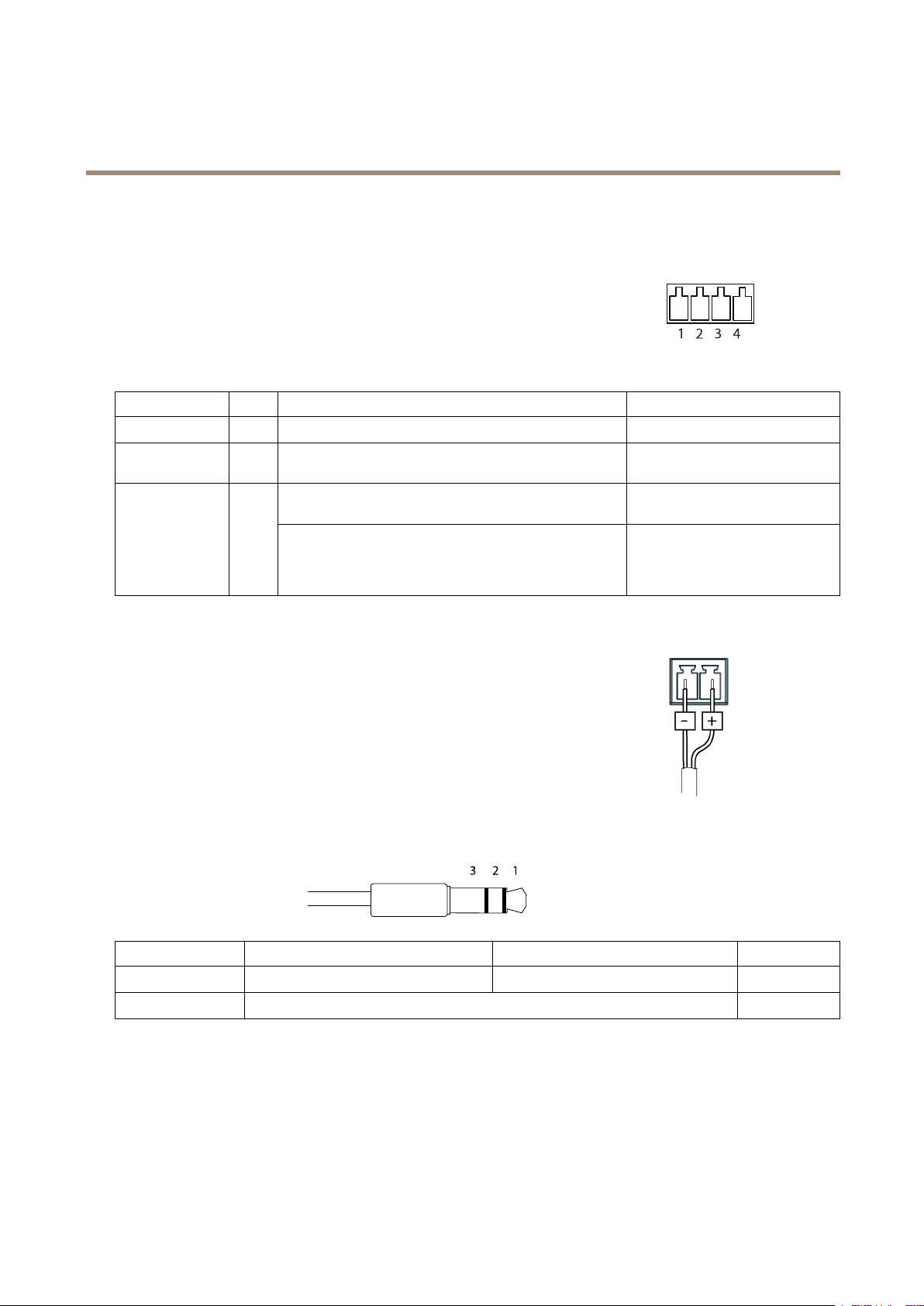
AXISQ7404VideoEncoder
TechnicalSpecifications
Connectors
I/OConnector
4-pinterminalblock
Foranexamplediagram,see.
FunctionPinNotes
0VDC(-)
DCoutput
(InputorOutput)
1
2
3–4
Canbeusedtopowerauxiliaryequipment.
Note:Thispincanonlybeusedaspowerout.
Digitalinput–Connecttopin1toactivate,orleaveoating
(unconnected)todeactivate.
Digitaloutput–Connectedtopin1whenactivated,oating
(unconnected)whendeactivated.Ifusedwithaninductive
load,e.g.arelay,adiodemustbeconnectedinparallelwith
theload,forprotectionagainstvoltagetransients.
PowerConnector
2-pinterminalblockforDCpowerinput.UseaSafetyExtraLowVoltage(SELV)compliant
limitedpowersource(LPS)witheitheraratedoutputpowerlimitedto≤100Woraratedoutput
currentlimitedto≤5A.
AudioConnector
Specications
0VDC
3.3VDC
Maxload=250mA
0tomax40VDC Congurable
0tomax40VDC,opendrain,
100mA
3.5mmaudioconnectors
(stereo)
AudioInput
AudioOutput
1Tip2Ring
Microphone/Linein
Lineout(mono)
56
3Sleeve
Ground
Ground
Page 57

AXISQ7404VideoEncoder
TechnicalSpecifications
RS485/422Connector
Two2-pinterminalblocksforRS485/RS422serialinterface.Theserial
portcanbeconguredtosupport:
•Two-wireRS485halfduplex
•Four-wireRS485fullduplex
•Two-wireRS422simplex
•Four-wireRS422fullduplexpointtopointcommunication
FunctionPinNotes
RS485/RS422RX/TXA
RS485/RS422RX/TXB
RS485/RS422TXA
RS485/RS422TXB
PerformanceConsiderations
1
2
3
4
(RX)ForfullduplexRS485/RS422
(RX/TX)ForhalfduplexRS485
(TX)ForfullduplexRS485/RS422
Whensettingupyoursystem,itisimportanttoconsiderhowvarioussettingsandsituationswillaffectperformance.Somefactors
affecttheamountofbandwidth(thebitrate)required,otherscanaffecttheframerate,andsomeaffectboth.Iftheloadonthe
CPUreachesitsmaximum,thiswillalsoaffecttheframerate.
Thefollowingfactorsareamongthemostimportanttoconsider:
•Highimageresolutionand/orlowercompressionlevelsresultinimagescontainingmoredata.Bandwidthaffected.
•AccessbylargenumbersofMotionJPEGand/orunicastH.264clients.Bandwidthaffected.
•Simultaneousviewingofdifferentstreams(resolution,compression)bydifferentclients.Effectonframerateand
bandwidth.
•AccessingMotionJPEGandH.264videostreamssimultaneously.Framerateandbandwidthaffected.
•Heavyusageofeventsettingsaffecttheproduct’sCPUload.Framerateaffected.
•UsingHTTPSmayreduceframerate,inparticularifstreamingMotionJPEG.
•Heavynetworkutilizationduetopoorinfrastructure.Bandwidthaffected.
•Viewingonpoorlyperformingclientcomputerslowersperceivedperformance.Framerateaffected.
•RunningmultipleAXISCameraApplicationPlatform(ACAP)applicationssimultaneouslymayaffecttheframerateand
thegeneralperformance.
57
Page 58

UserManualVer.M2.2
AXISQ7404VideoEncoderDate:September2017
©AxisCommunicationsAB,2013-2017
PartNo.54416
 Loading...