

Page 1
1
/6
CVT-SDI-MAV
User Manual
SDI to Universal converter
Version: V2017.001
Page 2

2
/6
Contents
1. Introduction
2. Features
3. Specification
4. Packing
5. Panles
6. Operations
6.1 Connection Diagram
6.2 Front button
.............................................................................................................
....................................................................................................................
.............................................................................................................
.....................................................................................................................
.......................................................................................................................
................................................................................................................
......................................................................................................
..................................................................................................................
7. Common issues and troubleshooting
7.1 Common issues
...........................................................................................................
.....................................................................
3
3
3
4
4
4
5
5
5
5
7.2 Attention
8. Afer-sales
8.1 Warranty
8.2 Limits
......................................................................................................................
.................................................................................................................
......................................................................................................................
...........................................................................................................................
9. Version information
.................................................................................................
5
6
6
6
6
Page 3
3
/6
1. Introduction
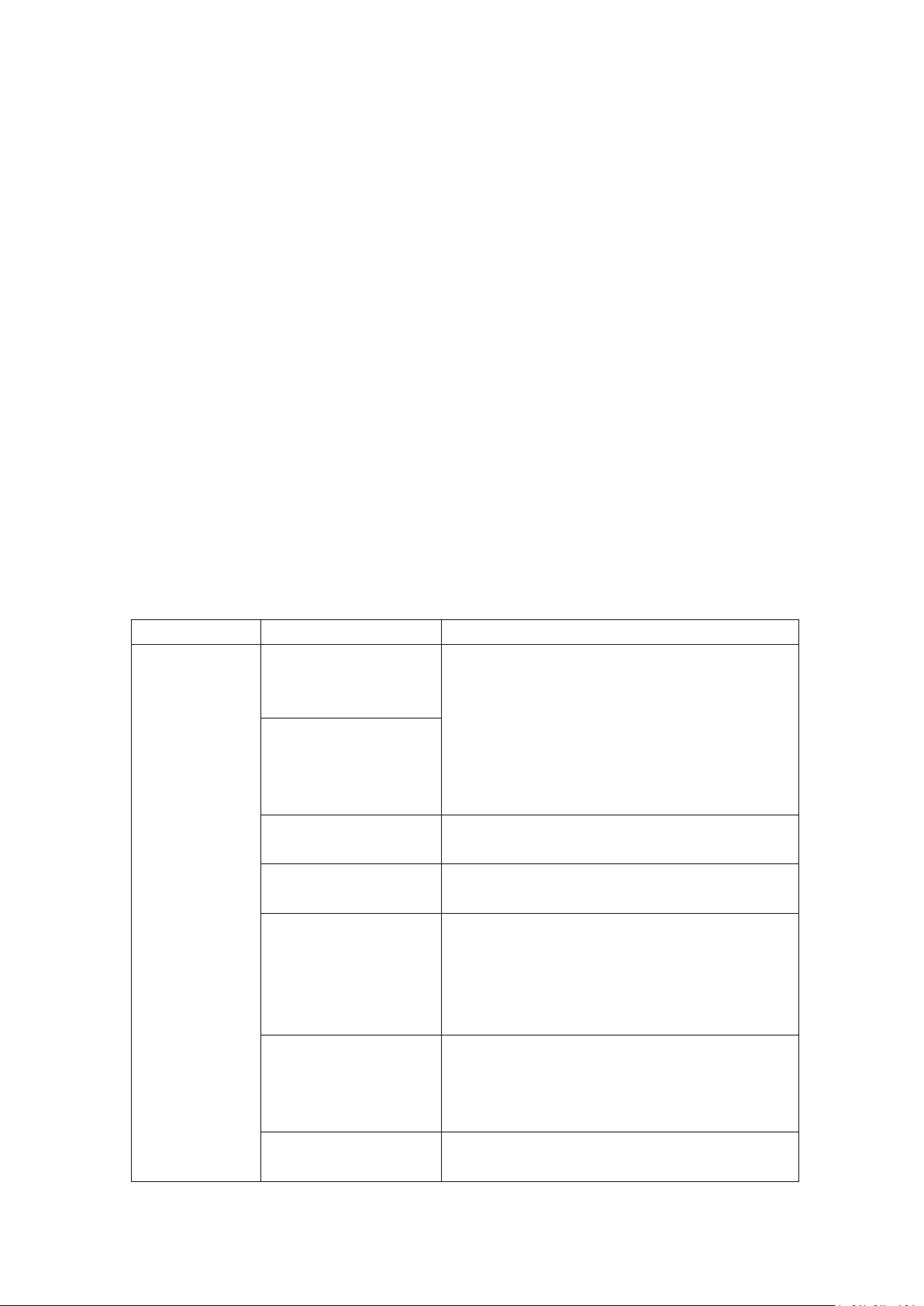
Parameter
Specification
Interface
SD/HD/3G-SDI input
(BNC interface)
Supports 270Mb/s, 1.485Gb/s, and 2.97Gb/s bandwidth
Supports signal models:
SD: 480i59.94 "NTSC", 576i50 "PAL"
HD: 720p24, 25, 30, 50, 59.94, and 60
1080i50, 59.94, and 60
1080p24, 25, and 30
3G: 1080p50, 59.94 and 60.
SD/HD/3G-SDI Loop put
(BNC interface)
CVBS output
(DVI-I interface)
Support NTSC, PAL
1Vp-p, 75
Ω
YPBPR output
(DI-I interface)
Support 480p, 576p, 720p, 1080i, 1080p,
0.7Vp-p, 75
Ω
VGA output
(DVI-I interface)
Support 800*600, 1024*768, 1280*720,1280*800,
1280*1024, 1360*768, 1366*768, 1440*900,
1400*1050,1600*1200, 1680*1050, 1920*1080,
1920*1200,
0.7Vp-pm, 75Ω
DVI output
(DVI-I interface)
Support
800*600,1024*768,1280*720,1280*800,1280*102
4,1360*768,1366*768,1440*900,1400*1050,1600
*1200,1680*1050,1920*1080,1920*1200
HDMI output
(DVI-I interface)
Support
800*600,1024*768,1280*720,1280*800,1280*102
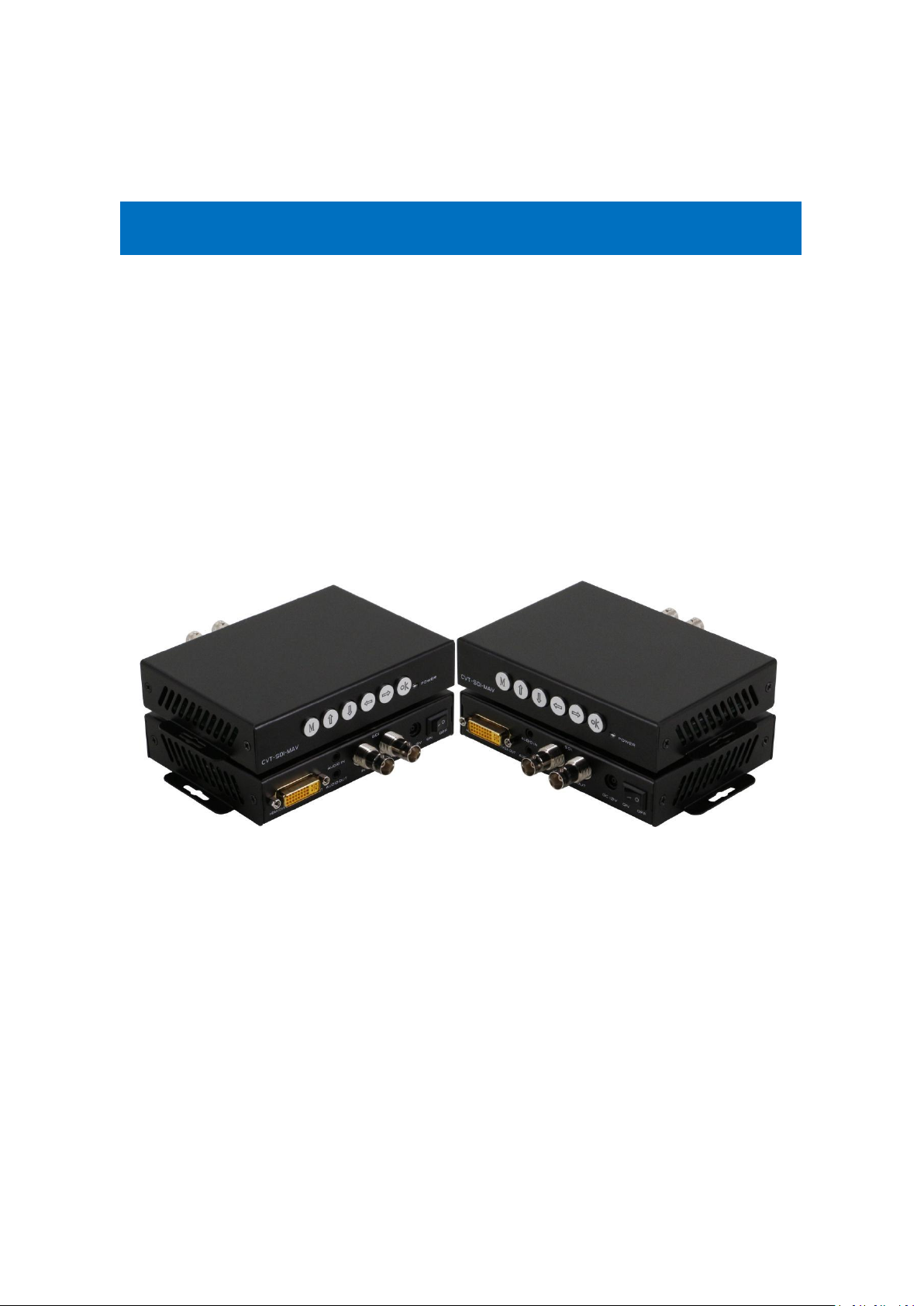
CVT-SDI-MAV is a unique and powerful universal media converter, it can convert the SDI to
CVBS/DVI/VGA/Ypbpr/HDMI. It also support 3.5mm audio embedded and de-embedded. With
front buttons, users can adjust the color, brightness, sharpness, contrast ratio of the output
images. Also supports the advanced mirror and so on functions.
It provides a very stable and universal converting solution, with all kinds of advanced mirror,
scaler functions, it has been popularly used in the conferencing rooms, advertising and security
and protection systems.
2. Features
•
Converts SD/HD/3G-SDI to HDMI/DVI/VGA/YPBPR/CVBS+LR
•
Supports audio embedded and de-embedded, hot-plug
•
With equalization technology, it can realize long distance transmission
•
Resolution adjustable
•
Supports 1 SD/HD/3G-SDI loop out
•
Supports 3.5mm audio embedded and de-embedded
•
Supports color, brightness, contrast ratio and sharpness adjustment of the output images
•
Support advanced MIRROR function(Images rotate off 180 degrees)
3. Specification
Page 4
4
/6
4,1360*768,1366*768,1440*900,1400*1050,1600
*1200,1680*1050,1920*1080,1920*1200
Power
Power adapter
AC: 110V-240V 50/60Hz
DC: 12V 1500mA
Consumption
≤
7W
Temperature
Working
0℃-50
℃
Storage
-10℃-75℃
Humidity
Storage
10%-95%RH
Dimension
Size
152*96*27mm
Weight
200g
4. Packing
SDI to MAV Converter
1
Unit
DC 12V Power adapter
1
Pcs
5. Panels
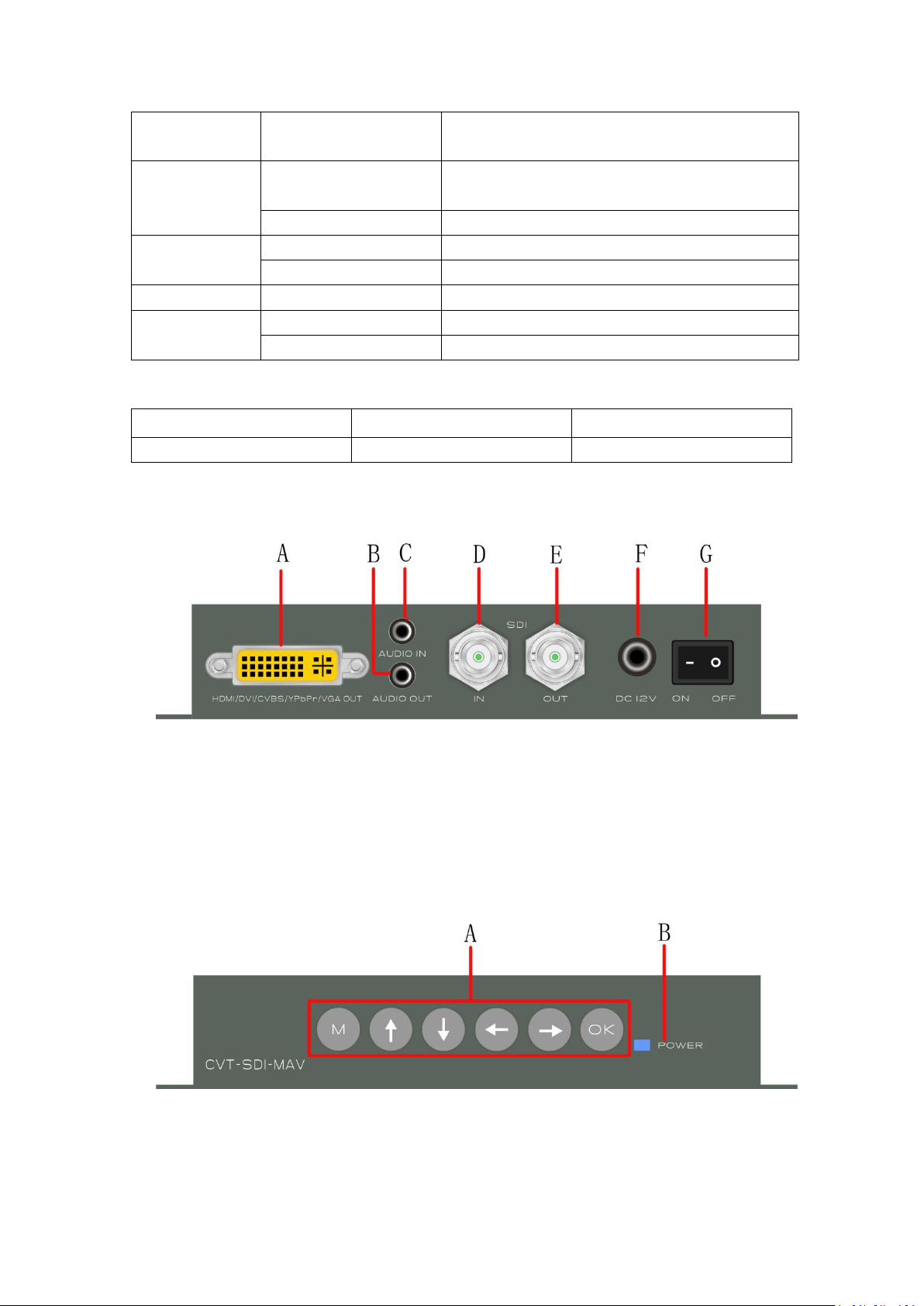
Rear Panel
A: HDMI/DVI/CVBS/VGA/YPbPr source output interface(DVI-I)
B: 3.5mmAudio input port
C: 3.5mmaudio output port
D: SDI input interface
E: SDI loop out
F: DC 12Vpower supply
G: Power switch
Front Panel
A: Function keys: Menu, Up, Down, Left, Right, Enter
B: POWER Indicator
6. Operation
Page 5
5
/6
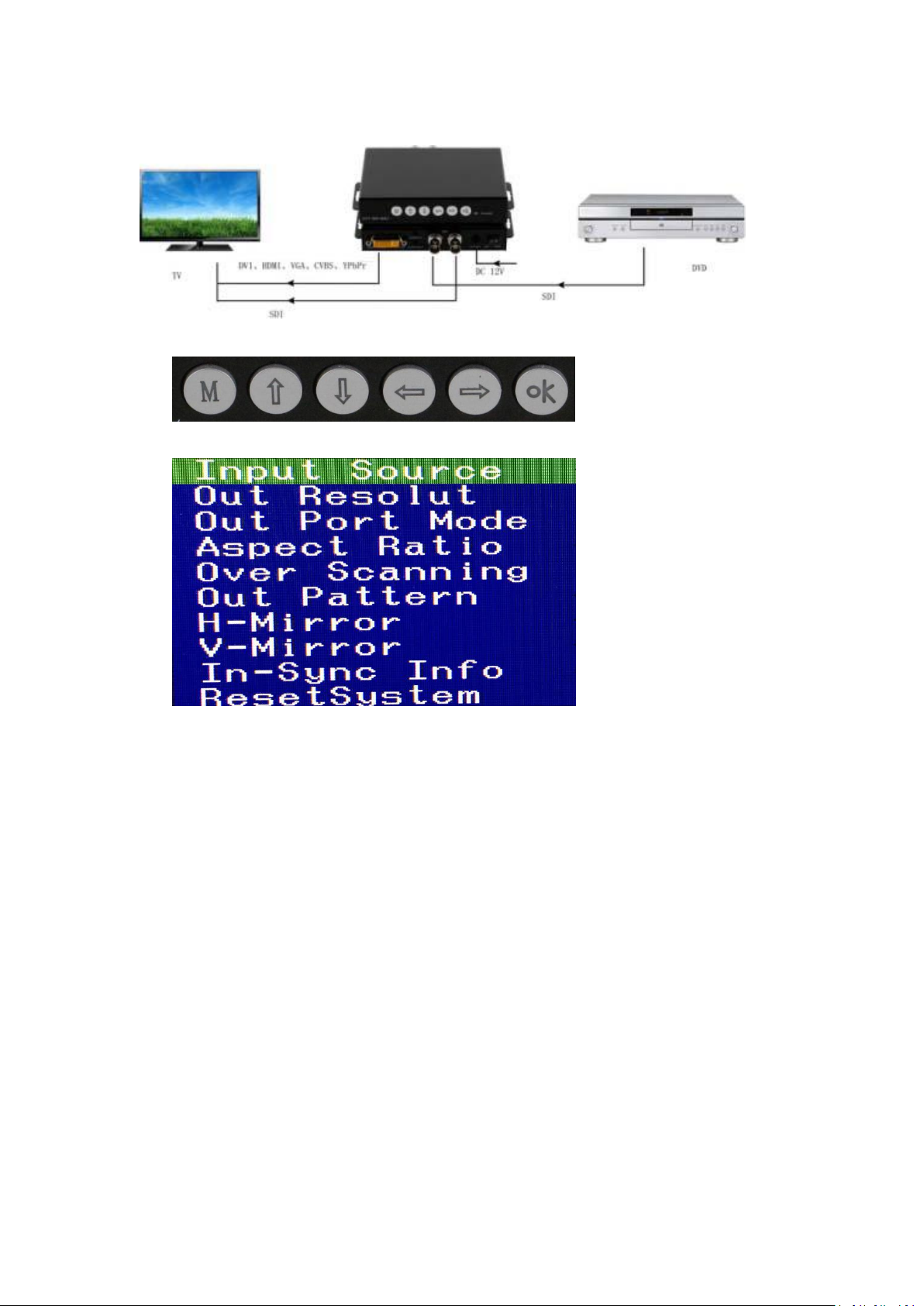
6.1 Connection Diagram
6.2 Operation of the function keys
Press Menu(M) button, it will show below interface on the display:
Note: Users can adjust the needed contents with the direction and Enter buttons
(1) Input Source: It’s automatically detected
(2) Out Resolution: Default resolution is HD(1080P60)
(3) Out Port Mode: Default output connection model is YC 422(16EMB)
(4) Aspect Ratio: Two models to select: 16:9 and 4:3
(5) Over Scanning: Supports images zooming from﹣10% to 10%
(6) Out Pattern: 12 models to select, default one is Disable
(7) H-Mirror: Horizontal 180° rotate off
(8) V-Mirror: Vertical 180° rotate off
(9) In-Sync Info: Default resolution HD(1080p60)
(10) Reset System: Turn on to back to factory model
7. Common issues and attention
7.1 Common issues:
When appearing flicking, blue, black screens during the properly using, please check below
items:
A. Check the input sources to make sure it’s working good
B. Checked the cables, adapters to make sure it’s well connected
7.2 Attention:
Page 6
6
/6
A: Avoid hanging staff above the equipment, cables, in case of causing damages
Description of version(Document number:CVT-SDI-MAV)
Date
Version number
Description
Feb 2017
V1.01.01
First version
B: Tight up the screws
8. After-Sales
8.1 Warranty Information
The Company warrants that the process and materials of the product are not defective
under normal use and service for 3 (3) years following the date of purchase from the
Company or its authorized distributors.
If the product does not work within the guaranteed warranty period, the company will
choose and pay for the repair of the defective product or component, the delivery of the
equivalent product or component to the user for replacement of the defective item, or
refund the payment which users have made.
The replaced product will become the property of the Company.
The replacement product could be new or repaired.
Whichever is longer, any replacement or repaired of the product or component is for a
period of ninety (90) days or the remaining period of the initial warranty. The Company shall
not be responsible for any software, firmware, information, or memory data contained in,
stored in, or integrated with the product repaired by the customer's return, whether or not
during the warranty period.
8.2 Warranty limitations and exceptions
Except above limited warranty, if the product is damaged by over usage, incorrectly use,
ignore, accident, unusual physical pressure or voltage, unauthorized modification, alteration
or services rendered by someone other than the Company or its authorized agent, the
company will not have to bear additional obligations. Except using the product properly in
the proper application or normal usage
9. Version Information
 Loading...