

Page 1
Home Theater DHT-660
5.1 channel home theater speaker system
User's Manual
R
Home Theater System
Page 2
1
8
Introduction
Thank you for purchasing AVIA audio products.Please read
this manual thoroughly and follow the instructions carefully
before operation. Please keep it handy for reference.
DHT-660 is designed to comply with Dolby Digital 5.1
channel standard.The system offers precision performance
in both musical (stereo) and movie theater (5.1) .The compact
system delivers Hi-Fi quality audio with its unique dual-amplifier
design.The speakers bring out the infinite charm of digital
sound in both stereo and 5.1 channel mode.
Features
Placement Diagram
DOWN
VOL
BASS
UP
DOWN
UP
R
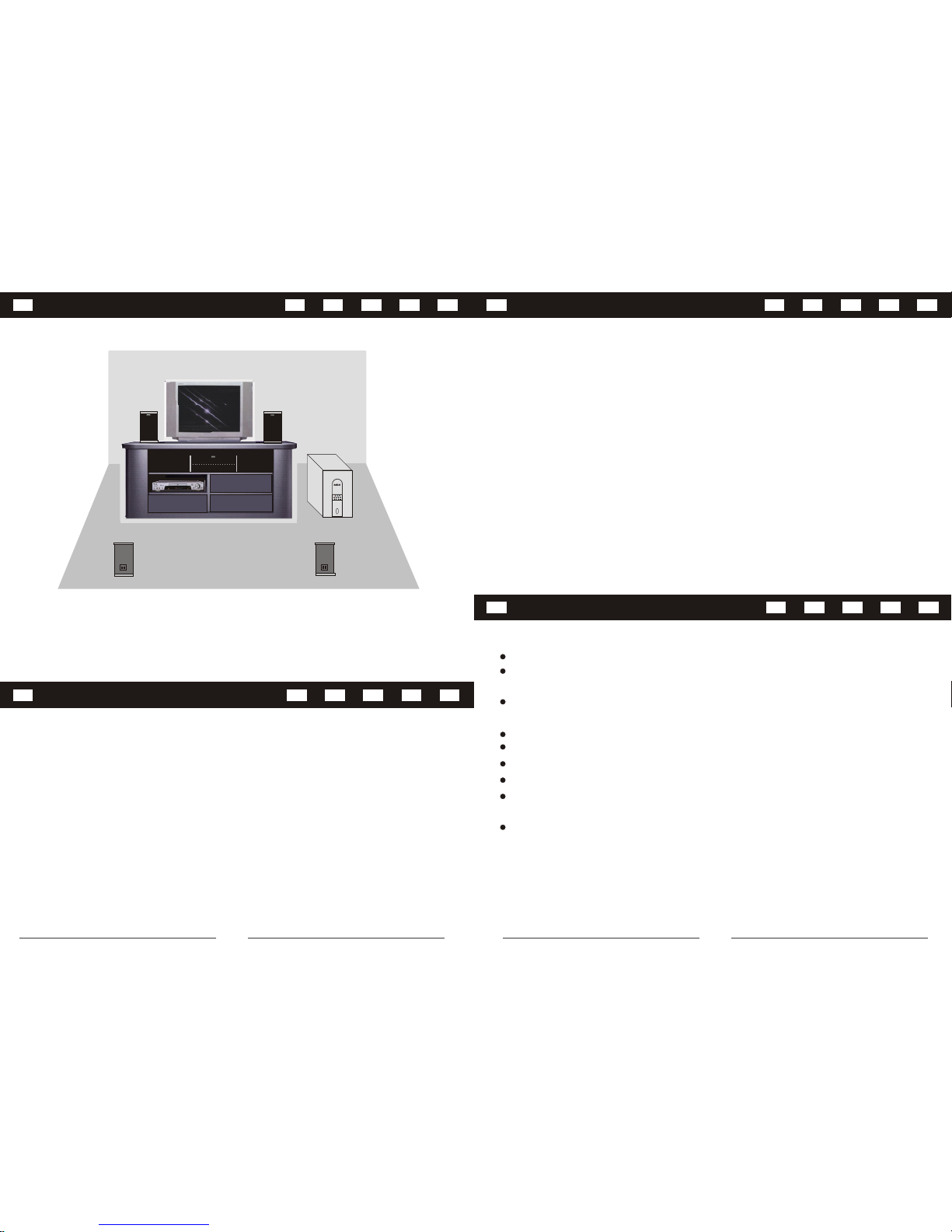
Position Recommendation: When set up this speaker system,
please keep the woofer's airport facing to the wall at around 2 feet.
You'll get a better audio performance.
Dolby AC-3 and DTS ready 5.1 channel input
Hi-Fi class circuit design, perfect Hi-Fi original sound
restoration effect
Double air current volume design, matching large caliber super
heavy bass
LED display control panel
Unique remote control design, easy to operate
Design specially for 5.1 channel sound card and DVD player
Uniquely independent 5.1channel amplifier circuit design
Compatible with DVD/VCD/CD/MD/MP3/TV digital sound
sources
Magnetically shielded satellite speakers
Technical Specifications
Output:
Subwoofer 100 watts max.
Satellites 25 watts x 4 max.
Frequency:
Subwoofer 20Hz-140Hz
Satellites 140Hz-20KHz
Drivers:
Subwoofer 6.5" bass
Front/Rear satellites 3" full-range +1" tweeter
Center satellite 3" full-range x 2 + 1" tweeter
Center satellite 50 watts max.
Page 3
7
2
Notice
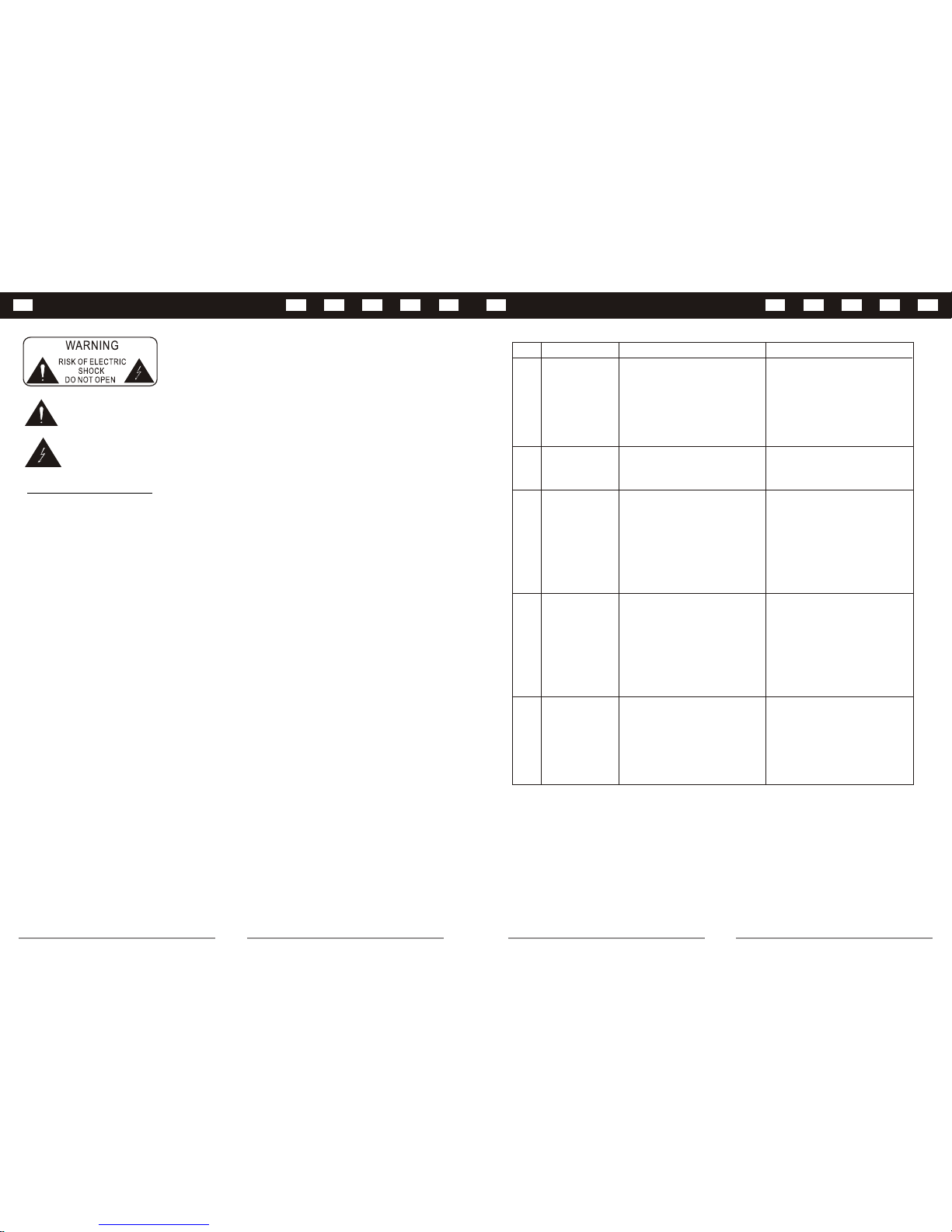
Symptoms and Solutions
Warning:
To avoid the risk of electrode and fire, please do not open the subwoofer. A
qualified technician should do malfunction maintenance.
The exclamation point within an equilateral triangle is intended to alert the users of the presence of
important equipment needing careful protection inside the speakers.
The lightning flash with arrowhead within an equilateral triangle is intended to alert the users of the
presence of un-insulated "dangerous voltage" within a product's enclosurethat may be of sufficient
magnitude to constitute the risk of electric shock to a person.
READ INSTRUCTION - All safety and operating instructions should be read before operating the digital home
theater system.
HEAD WARNINGS - All warning on the subwoofer and in the operating instruction should be strictly adhered to.
FOLLOWING INSTRUCTION - All operating and use instruction should be followed.
CLEANING - Unplug the subwoofer from wall outlet or other power sources before cleaning. Don't use liquid
cleaners or aerosol cleaners. Use damp cloth for cleaning.
PLACEMENT - Don't put the subwoofer and satellite speakers on an unstable table or other object. The subwoofer
or satellites may fall, causing serious injury to a child or adult. Keep 20cm distances between the sounds leading
pore and shielding object to avoid affecting the sound quality.
WATER AND MOISTURE - Do not use the subwoofer near water, for example, near a bathtub, washbowl, kitchen
sink, or a laundry tub or near a swimming pool.
HEAT - The subwoofer should be situated away from heat sources such as a radiator, heat register, stoves and
other products that produce heat.
POWER SOURCES - The subwoofer should be operated only from the type of power sources indicated on the
marked label. If you are not sure of the type of power supply at your home, consult your product dealer or local
power company.
LIGHTNING - For added protection for the subwoofer system during a lightning storm or when it's left unattended
and unused for long periods of time, please unplug it from the wall outlet. This will prevent damage to the subwoofer
from lightning and power line surges.
OVERLOADING - Do not overload the wall outlet, extension cord, or integral convenient receptacles as this can
result in a risk of fire or electric shock.
OBJECT AND LIQUID ENTRY - Never push objects of any kind into subwoofer through openings as they may touch
dangerous voltage point or short out parts that could result in a fire or electric shock. Never spill liquid of any kind
on the subwoofer.
SERVICING - Do not attempt to service the subwoofer yourself as opening or removing covers may expose you to
dangerous voltage or other hazards.
DAMAGE REQUIRING SERVICE - Unplug the subwoofer from the wall outlet or other power source and refer
servicing to qualified service personnel under the following conditions:
1. When the power-supply cord or plug is damaged.
2. If liquid has been spilled or objects have fallen into the subwoofer.
3. If the subwoofer has been exposed to rain or water.
4. If the subwoofer does not operate normally by following the operating instructions or exhibits a distinct change in
performance.
5. If the products has been dropped or damaged in any way.
REPLACEMENT PARTS - When replacement parts are required, be sure the service technician has used
replacement parts that have the same characteristics as the original parts. Unauthorized substitutions may result in
fire, electric shock or other hazards.
Important Safety Warning Items:
1.Review the connection
diagram on the user's
manual
2.Turn the switch to 5.1 position
3.Turn the DVD player to 5.1
channel position
1.Review the connection
diagram on the user's
manual
2.Turn the switch to 2.1
position
3.Adjust the bass volume to
desired output level
1.Remote control is not pointing
to the remote control receiver
2.Battery is not installed
correctly or dead battery
3.Remote control is too far
away from the subwoofer
1.Re-plug the power cord
2.Review the connection
diagram on the user's
manual
3.Adjust the volume to desired
level
1.Power socket is not well
connected
2.Signal cables are not properly
connected
3.Volume is set to the lowest
No sound when
power on
1.Adjust volume to proper level
2.Turn down the volume
1.Volume is too high
2.Volume from VCD/DVD is too
high
Distortion of
sound or bass
No 5.1 channel
output
1.Cables are not connected
correctly
2.2.1/5.1 option switch is not in
correct position
3.DVD player is not installed
correctly
1.Subwoofer input plug is not
connected
2.2.1/5.1 option switch is not in
correct position
3.Bass volume is set too low
Remote control
does not work
No sound when
connect to
stereo input (i.e.
CD players, TV)
Solutions
CausesSymptom
No.
1.Point the remote directly to
the subwoofer
2.Check or replace the battery
3.Operate within 8 meters from
the subwoofer
1
2
3
4
5
Page 4
6
3
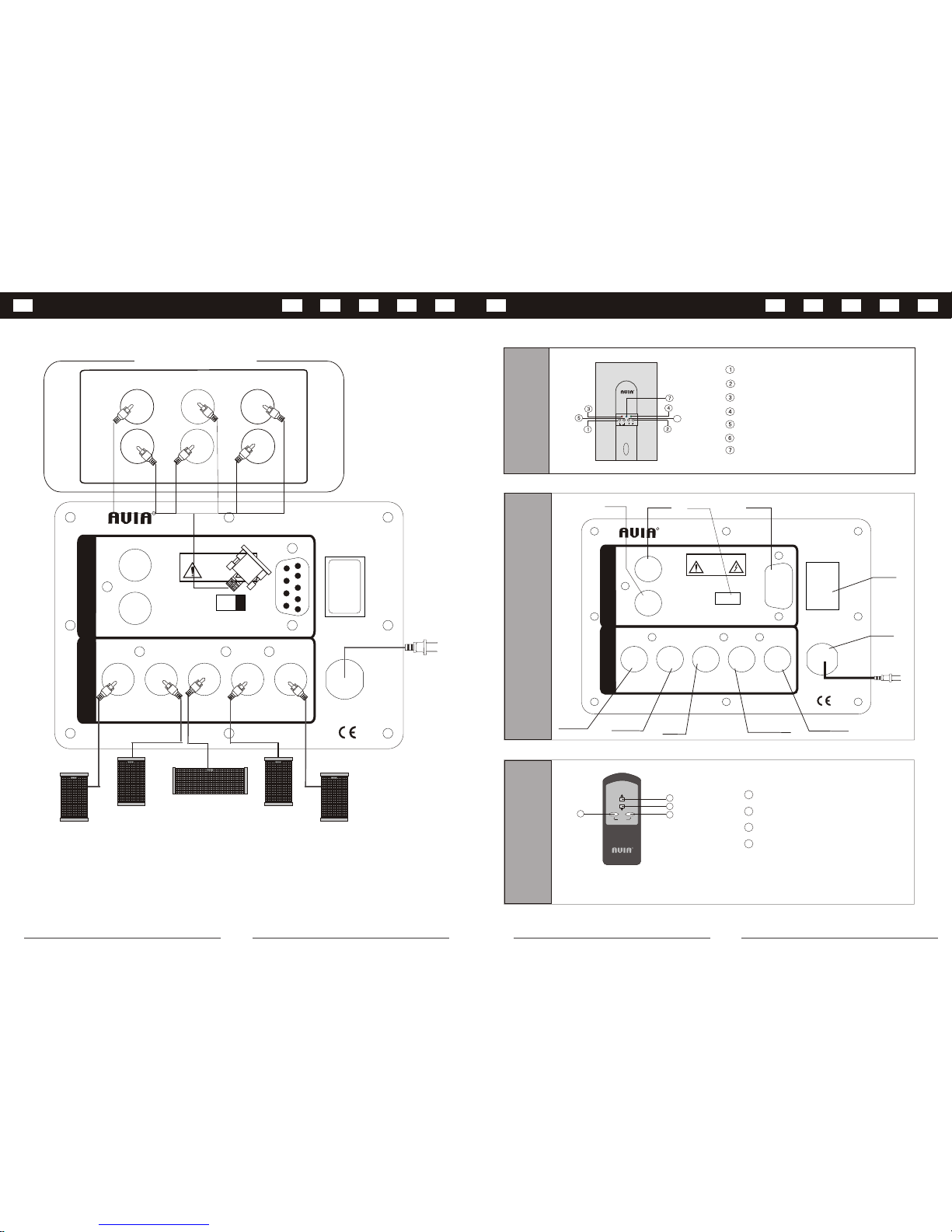
Panel Interface
4
VOL
BASS +
BASS
+
-
1
2
3
Remote
Control
1
2
3
4
Bass up
Bass down
Volume up
Volume down
When press the VOLUME button, the 1st LED will turn red.
When press the BASS button, the 3rd LED will turn green.
R
WARNING
RISK OF ELECTRIC
DO NOT OPEN
SHOCK
2.1
5.1
FR FL
SLCNT SR
OUTPUT
AC110V
60Hz
ON
OFF
L
R
INPUT
INPUT
2.1 CH
5.1 CH
POWER
CEN
SW
INPUT
FL SL
5.1 CHANNEL OUTPUT
SR
FR
DHT-660
R
Note: Please turn off the power before connecting to satellites and DVD player.
Front
Panel
DOWN
VOL
BASS
UP
DOWN
UP
Master volume Bass volume +
Master volume +
Bass indicator
Master volume indicator
6
Power indicator
Bass volume -
R
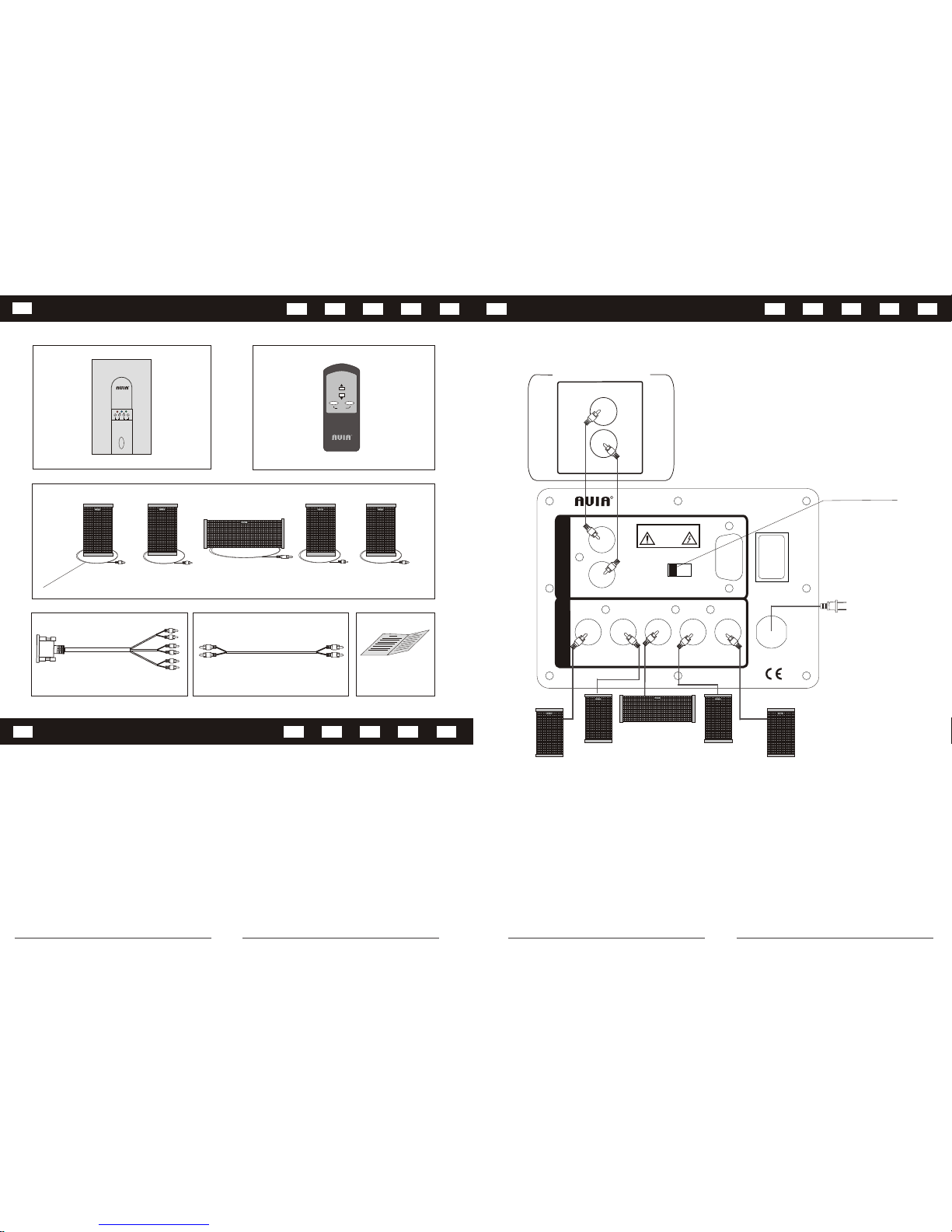
Connection Diagram - To a 5.1 Channel DVD Player
2.1
5.1
FR
FL
SLCNT SR
OUTPUT
AC110V
60Hz
ON
OFF
L
R
INPUT
INPUT
2.1 CH
5.1 CH
POWER
2.1/5.1 OPTION
SWITCH
POWER
SWITCH
2.1 LEFT
INPUT
2.1 RIGHT
INPUT
5.1 INPUT
CENTER
OUTPUT
SURROUND LEFT
OUTPUT
SURROUND RIGHT
OUTPUT
POWER
CORD
FRONT LEFT
OUTPUT
FRONT RIGHT
OUTPUT
WARNING
RISK OF ELECTRIC
DO NOT OPEN
SHOCK
DHT-660
R
Back
Panel
Page 5
5
4
Connection Diagram - To a 2.1 Channel DVD Player
2.1
5.1
FR FL
SLCNT SR
OUTPUT
AC110V
60Hz
ON
OFF
L
R
INPUT
INPUT
2.1 CH
5.1 CH
POWER
L
2.1 CHANNEL OUTPUT
R
2.1/5.1 OPTION
SWITCH
WARNING
RISK OF ELECTRIC
DO NOT OPEN
SHOCK
DHT-660
R
Note: Please turn off the power before connecting to satellites and DVD player.
Package Contents
VOL
BASS +
BASS
+
-
R
DOWN
VOL
BASS
UP
DOWN
UP
R
1
2
4
7
5
3
6
1.
2.
3.
4.
5.
6.
7.User's manual
Wooden subwoofer speaker
Remote control
5.1 Audio cable
RCA type audio cable
Audio signal output cable
Satellite speakers
1 unit
5 units
1 pc
1 copy
1 set
1 set
3mx3 ,5mx2
Package Contents
 Loading...