

Page 1
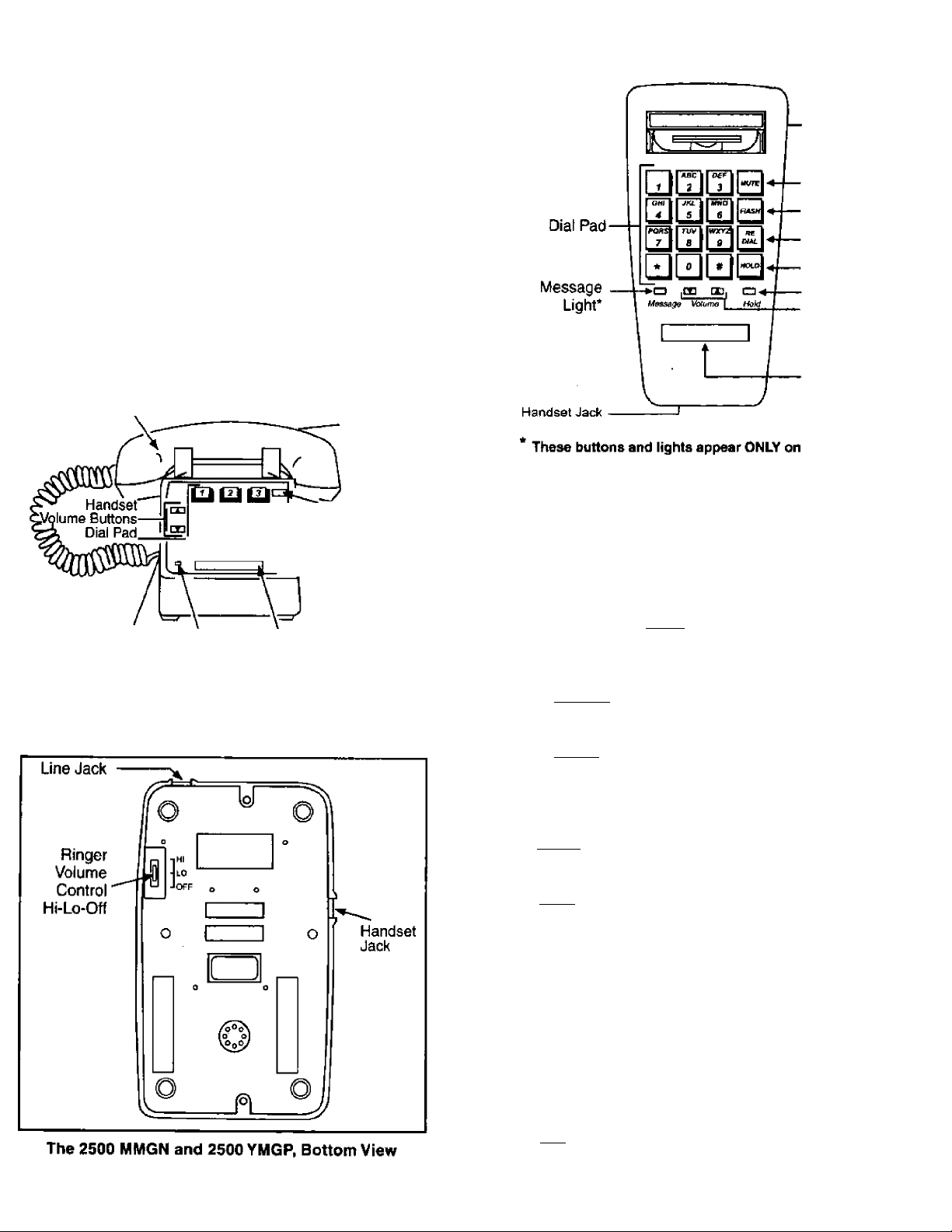
Ringer Volume
Control
AVAyA
2500MMGN and 2500 YMGP Telephones and
the 2554 MMGN and 2554 YMGP Telephones
Quick Reference
Handset
til to ta'^^-.^MLite Button*
^ to til‘=>dLL Redial Button*
^ ^fL^Hold Button*
Handset
Cord Jack
* These buHons and lights appear ONLY on the 2500 YMGP.
Message 'Telephone
Light* Nunnber Card
The 2500 MMGN and 2500 YMGP Telephones, Top View
Line Jack
(on back
of phone)
Flash Button*
■ Hold Light*
Mute Button*
Flash Button*
Redial Button*
Hold Button*
Hold Light*
Handset
Volume
Buttons
Telephone
Number
Card
The 2554 MMGN and 2554 YMGP Telephones, Top View
Special Features on the 2500 MMGN and
2500 YMGP, and the 2554 MMGN and 2554 YMGP
Telephones:
The Mute Button (only on the 2500/2554 YMGP models) Press (and hold down) Iwwtel to turn off the handset
microphone. In this way, the other person on the call cannot
hear your conversation.
The FLASH Button (only on the 2500/2554 YMGP models)
- Press I Flash I instead of pressing the switchhook for
features such as Conference.
The Redial Button (only on the 2500/2554 YMGP models)
- Press ifterf/aiito automatically redial the last number you
dialed. The telephone retains in memory the last number
dialed (up to 24 elements) for a period of 24 hours, provided
line power is maintained to the telephone.
The Hold Button (only on the 2500/2554 YMGP models) Press|Wo/ri1 to put a call on hold until you can return to it.
(The red light next to the button goes on to remind you that
you have a call on hold.) In order to return to the held call,
press iHofril again, or if you have hung up, pick up the
handset. If you desire music-on-hold or a second dial tone,
contact your system manager.
The Message Light (only on the 2500/2554 YMGP models)
A red light which flashes when a message has been left for
you or when a call is coming in (that is, when the telephone
is ringing). In order to retrieve your messages, you may need
to contact you attendant.
The Telephone Number Card (on all telephone models) For writing your area code and telephone number or your
extension.
The Handset Volume Control (on all telephone models)For raising or lowering the receive volume of the handset.
Press rA~lto raise the volume; press [▼Jto lower the
volume.
1
Page 2

The Ringer Volume Control {on all telephone models) For raising or lowering the volume of the tone ringer on your
telephone. There are three settings: Hi, Lo, and Off.
- If the telephone has been dropped or the housing has
been damaged.
- If you note a distinct change in the performance to the
telephone.
IMPORTANT SAFETY INSTRUCTIONS
The most careful attention has been devoted to quality
standards in the manufacture of your new telephone. Safety
is a major factor in the design of every set, but, safety is
YOUR responsibility too.
Please read carefully the helpful tips listed below and on the
next page. These suggestions will enable you to take full
advantage of your new telephone. Then, retain these tips for
later use.
Use
When using your telephone equipment,,the following safety
precautions should always be followed to reduce the risk of
fire, electric shock, and injury to persons.
■ Read and understand all instructions.
■ Follow alt warnings and instructions marked on the
telephone.
• This telephone can be hazardous if immersed in water. To
avoid the possibility of electric shock, do not use if while
you are wet., If you accidentally drop the telephone info
water, do not retrieve it until you have first unplugged the
line cord from the modular jack. Then, call service
personnel to ask about a replacement.
■ Avoid using the telephone during electrical storms in your
immediate area. There is a risk of electric shock from
lightning. Urgent calls should be brief. Even though
protective measures may have been installed to limit
electrical surges from entering your business, absolute
protection from lightning is impossible.
■ If you suspect a natural gas leak, report it immediately, but
use a telephone away from the area in question. The ■
telephone's electrical contacts could generate a tiny spark.
While unlikely, it is possible that this spark could ignite
heavy concentrations of gas.
■ Never push objects of any kind into the equipment through
housing slots since they may touch hazardous voltage
points or short out parts that could result in a risk of electric
shock. Never spill liquid of any kind on the telephone. If
liquid is spilled, however, refer servicing to proper service
personnel.
■ To reduce the risk of electric shock, do not disassemble this
telephone. There are no user serviceable parts. Opening or
removing covers may expose you to hazardous voltages.
Incorrect reassembly can cause electric shock when the
telephone is subsequently used.
Service
■ Before cleaning, unplug the telephone from the modular
wall jack. Do not use liquid cleaners or aerosol cleaners.
Use a damp cloth for cleaning.
■ Be sure to refer servicing to qualified service personnel
when these conditions exist; '
- If liquid has been spilled into the telephone.
- If the telephone has been exposed to rain or water.
SAVE THESE INSTRUCTIONS
When you see this warning symbol on the product,
refer to the instructions booklet packed with the
A
product for more information before proceeding.
CONSIGNES DE SÉCURITÉ
Nous avons porté la plus grande attention au respect des normes de
qualité el de sécurité dans la fabrication de ce téléphone. Cependant
la sécurité relève aussi de VOTRE responsabilité.
Afin de tirer le meilleur parti de votre nouveau téléphone, nous vous
conseillons de tire attentivement ce document.
Conseils d'utilisation
Vous éviterez tout risque d'incendie, de décharge électrique ou de
blessure en respectant scrupuleusement les règles de sécurité
énoncées ci-dessous.
■ Lisez attentivement toute la documentation fournie.
* Respectez les mises en garde et instructions indiquées sur
le téléphone.
■ Protégez-le de la pluie ou de toute autre source d'humidité.
Pour éviter tout risque de dé charge électrique, utilisez-le
avec des mains partaitement sèches. S'il tombait '
accidentellement dans l'eau, n'essayez pas de le récupérer
avant d’avoir débranché le cordon d'alimentation.
Demandez ensuite son remplacement auprès du personnel
qualitié.
■ Évitez de vous servir du téléphone pendant un orage. Si
vous devez l’utiliser pour une urgence, efforcez-vous d’être
bref, é Bien que toutes les précautions aient été prises pour
éviter les surtensions sur votre installation téléphonique, il
est impossible de garantir une protection absolue contre la
foudre.
■ Toute fuite de gaz doit être signalée sans délai à l'aide d'un
poste téléphonique suffisamment éloigné de la zone en
question. En effet, les contacts électriques d un téléphone
peuvent générer de petites étincelles susceptibles de
provoquer une explosion en cas d'accumulation de gaz.
■^Ne jamais introduire quoi que ce soilt dans les ouvertures
du boîtier. Vous risquez de détériorer 1e téléphone et de
recevoir une décharge électrique. Ne jamais verser
deliquide sur l'appareil. Si cela arrivait accidentellement,
débranchez-le et faites appel au personnel qualifié.
■ Ne démontez ce téléphone sous aucune prétexte. Vous
vous exposeriez à des tensions dangereuses et vous
risqueriez de ne pouvoir'le remettre dans son état initial.
Vous ne pouvez en aucun cas le réparer vous-même.
Conseils d'entretien
■ Pour nettoyer le téléphone, débranchez d'abord le cordon
d'alimentation. N'employez aucun produit d'entretien
(liquide, aérosol) mais utilisez un chiffon doux légèrement
humide. ,
■ Faites appel au personnel qualifié, dans tous les cas
suivants: '
2
Page 3
-Un liquide a été renversé sur le téléphone.
-Le téléphone a été exposé à une humidité excessive
{pluie ou autre).
-Le téléphone est tombé. Le boîtier est endommagé.
-Une anomalie est constateé dans le fonctionnement
du téléphone.
CONSERVEZ CE DOCUMENTATION
Avant toute manipulation ou lorque vous rencontrez
A
ce symbole sur le produit, consultez le manuel livré
avec le materiel.
INSTALLING YOURTELEPHONE
On the 2554 models, the 3-inch line cord is already
connected to the back of the telephone; the user must plug
the other end into the wall lack. On the 2500 models, the user
must plug the line cord into the telephone and then plug the
other end into the wall jack. On both models, the user must
connect the handset to the telephone with the coiled handset
cord.
Note: This equipment is registered to be used on telephone
lines with"B" type ringing frequencies. However, some
telephone companies use a variety of other ringing
frequencies (for example, "A" or "C"). As a result, this
telephone may or may not ring properly when connected to
a telephone line that provides other than "B" type ringing.
Consult your Avaya Inc, representative for advice.
Table/Desk Installation for the 2500 Models
Use the 7-foot straight line cord that came with your
telephone to connect the telephone to a modular jack.
WARNING: Do not plug the handset cord into the line jack
on the bottom of your telephone since it could damage your
handset and the telephone.
1 Plug one end of the line cord into the line jack on the base
of the telephone. You should hear the modular jack click
into place.
2 Plug one end of the coiled handset cord into the handset
jack on the base of the telephone until you hear the
modular jack dick into place.
3 Plug the other end of the handset cord into the handset.
4 Put the handset aside and turn the telephone over. Set
the Ring Volume Control switch to the setting your want
(Off/Lo/Hi).
5 Turn the telephone right-side up and place it on your desk
or table.
6 Hang up the handset.
7 Plug the free end of the line cord into a telephone jack in
your office.
8 Fill out the number card and place it on your telephone.
9 Lift the handset and listen for dial tone.
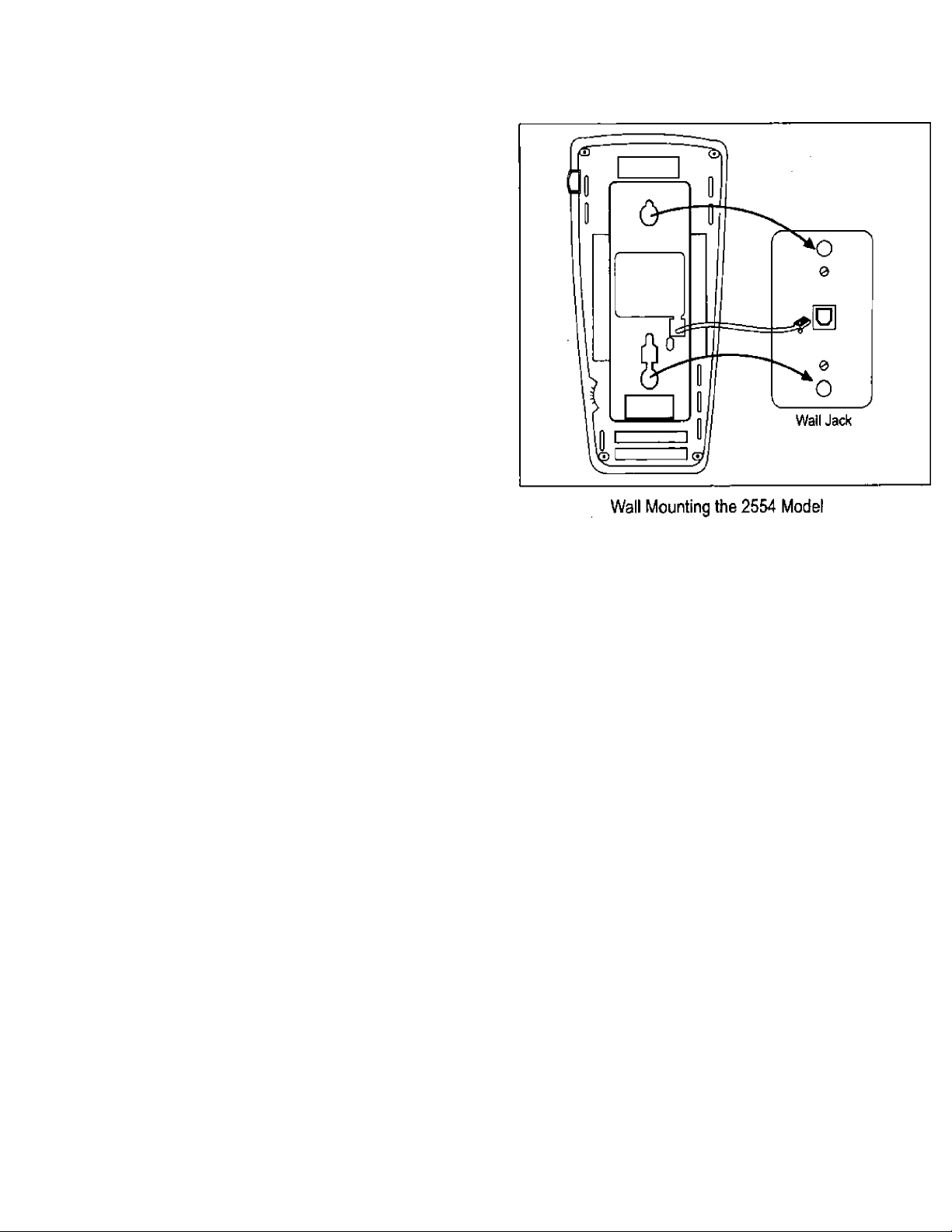
Walt Installation for the 2554 Models
1 Plug the free end of the 3-inch line cord, already connected
to the line jack on the back of the telephone, into the modular
wall jack. You should hear the modular jack click into place.
2 Align the mounting slots on the back of the telephone with
the studs on the wall jack. Then, push the telephone
firmly against the wall jack, and pull down until it is held
securely by the mounting studs, (See the figure below)
3 Plug one end of the coiled handset cord into the handset.
Then, plug the other end into the jack at the base of the
telephone. Hang up the handset.
4 Fill out the number card and place it on your telephone,
5 Lift the handset and listen for dial tone.
FCC REGULATIONS
Pertaining to this equipment
Interference Information (Part 15)
WARNING: Some telephone equipment generates and uses
radio frequency energy and if not installed and used properly,
that is, in strict accordance with the manufacturer's
instructions, may cause interference to radio and television
reception. These telephones have been type tested and
found to comply with the limits for a Class В computing
device in accordance with the specifications in Subpart J of
Part 15 of FCC Rules, which are designed to provide
reasonable protection against such interference in a
residential installation.
However, there is no guarantee that interference will not
occur in a particular installation. If this equipment does cause
interference to radio or television reception, which can be '
determined by turning the equipment on and off, the user is
encouraged to try to correct the interference by one or more
of the following measures:
■ Where it car be done safely, reorient the receiving
television, radio, or radio antennae.
■ To the extent possible, relocate the receiver with respect to
the telephone equipment.
3
Page 4

Consumer Information:
This equipment complies with Part 68 of the FCC rules and the
requirements adopted by the ACTA. On the bottom of this equipment
is a label that contains, among other information, a product identifier
In the format US:AAAEQ##TxXXX. If requested, this number must
be provided to the telephone company.
An applicable certification jacks Universal Service Order Codes (USpC)
for the equipment is provided (i.e.RJIIC)in the packaging with each piece
of approved terminal equipment.
A plug and jack used to connect this equipment to the premises
wirinq and telephone network must comply with the applicable FCC
Part 68 rules and requirements adopted by the ACTA. A compliant
telephone cord and modular plug is provided with this product. It
is designed to be connected to a compatible modular jack that is
also compliant. See installation instructions for details.
The REN is used to determine the number of devices that may be
connected to a telephone line.
Excessive RENs on a telephone line may result in the devices not ringing
in response to an incoming call, in most but not all areas, the sum of RENs
should not exceed five(5.0). To be certain of the number of devices that
may be connected to a line, as determined by the total RENs, contact the
local telephone company. [For products approved after July 23,2001, the
REN for this product is part of the product identifier that has the format
US:AAAEQmTXXXX. The digits represented by ## are the REN without
a decimal point(e.g., 03 is a REN of 0.3). For earlier products, the REN is
separately shown on the label.)
If tnis equipmentfof one mode! among 2500MMGN, 2500YMGP,
2554MMGN or 2554YMGP) causes harm to the telephone network,
the telephone company will notify you in advance that temporary
discontinuance of service may be required But if advance notice
isn't practical, the telephone company will notify the customer as
soon as possible. Also, you will be advised of your right to file a
complaint with the FCC if you believe it is necessary.
The telephone company may make changes in its facilities, equipment.
Operations or procedures that could affect the operation of the equipment.
If this happens the telephone company will provide advance notice in
order for you to make necessary modifications to maintain uninterrupted
service.
Please follow instructions for repairing if any (e.g.battery replacement
section); otherwise do not alternate or repair any parts of device
except specified.
Connection to party line service is subject to state tariffs. Contact the
state public utility commission, public service commission or corporation '
commission for information.
This equipment is hearing aid compatible.
NOTICE: If your home has specially wired alarm equipment connected
to the telephone line, ensure the installation of thisjeguipmenf fDJdoes
not disable your alarm equipment. If you have questions about what will
disable alarm equipment, consult your telephone company or a qualified
Installer.
Should you experience trouble with this equipment, please contact
(company name, repair centre address ana phone number)for répair
or warranty information. If the equipment is causing harm to the
telephone network, the telephone company may request that you
disconnect the equipment until the problem is resolved.
NOTICE: According to telephone company reports, AC electrical
surges, typically resulting from lightning strikes, are very
destructive to telephone equipment connected to AC power
sources. To minimize damage from these types of surges, a surge
arrestor is recommended.
WARRANTY INFORMATION
All terms and conditions specified in your agreement with Avaya
Inc. apply.
CANADIAN REGULATIONS
This digital apparatus does not exceed the Class B limits for radio
noise emissions from digital apparatus set out in the interferencecausing equipment standard entitled "Digital Apparatus, "ICES-003
of the Department of Communications.
Cet appareil numérique respecte les limites de brurit radioélectrique
applicables auux appareil numériques de
Class 6 prescrites dans la norme sur le matériel brouilleur:
"Appareils Numériques. "NMB-003 édictée par le ministère
des Communications.
NOTICE: The Canadian Department of Communications
label identifies certified equipment. This certification means
that the equipment meets certain telecommunications
network protective, operational and safety requirements. The
Department does not guarantee the equipment will operate to
the usèr’s satisfaction.
Before installing this equipment, users should ensure that it is
permissible to be connected to the facilities of the local
telecommunications company. The equipment must also be
installed using an acceptable method of connection. The
customer should be aware that compliance with the above
conditions may not prevent degradation of service in some
situations.
Repairs to certified equipment should be coordinated by a
representative designated by the supplier. Any repairs or
alterations made by the user to this equipment, or equipment
malfunctions, may give the telecommunications company
cause to request the user to disconnect the equipment.
Users should ensure for their own protection that the
electrical ground connections of the power utility, telephone
lines and internal metallic water pipe system, if present, are
connected together, This precaution may be particularly
important in rural areas.
CAUTION: Users should not attempt to make such
connections themselves, but should contact the appropriate
electrical inspection authority, or electrician, as appropriate.
NOTICE: The Ringer Equivalence Number(REN) assigned
to each terminal device provides an indication of the
maximum number of terminals allowed to be connected to a
telephone interface. The termination on an interface may
consist of any combination of devices subject only to the
requirement that the sum of the Ringer Equivalence Numbers
of all the devices does not exceed 5.
Apparatus
Code
Ringer
Equivalence
Number(REN)
Network
Interfaces
CA11A.CA14A;
2500MMGN 1.5B
2500YMGP
1.5B
2554MMGN 1.5B
2554YMGP
Prepared by
BCS Product Documentation Development
Avaya Inc.
Middletown, NJ07748-9972
1.5B
Comcode 108396326
Issue 3
Feb.2004
RJ11C.RJ14C
CA11A,CA14A;
RJ11C.RJ14C
CA11A,CA14W;
RJ11C.RJ14C
CA11A.CA14W;
RJ11C.RJ14C
Copyright ©1999
Avaya Inc
 Loading...