

Page 1
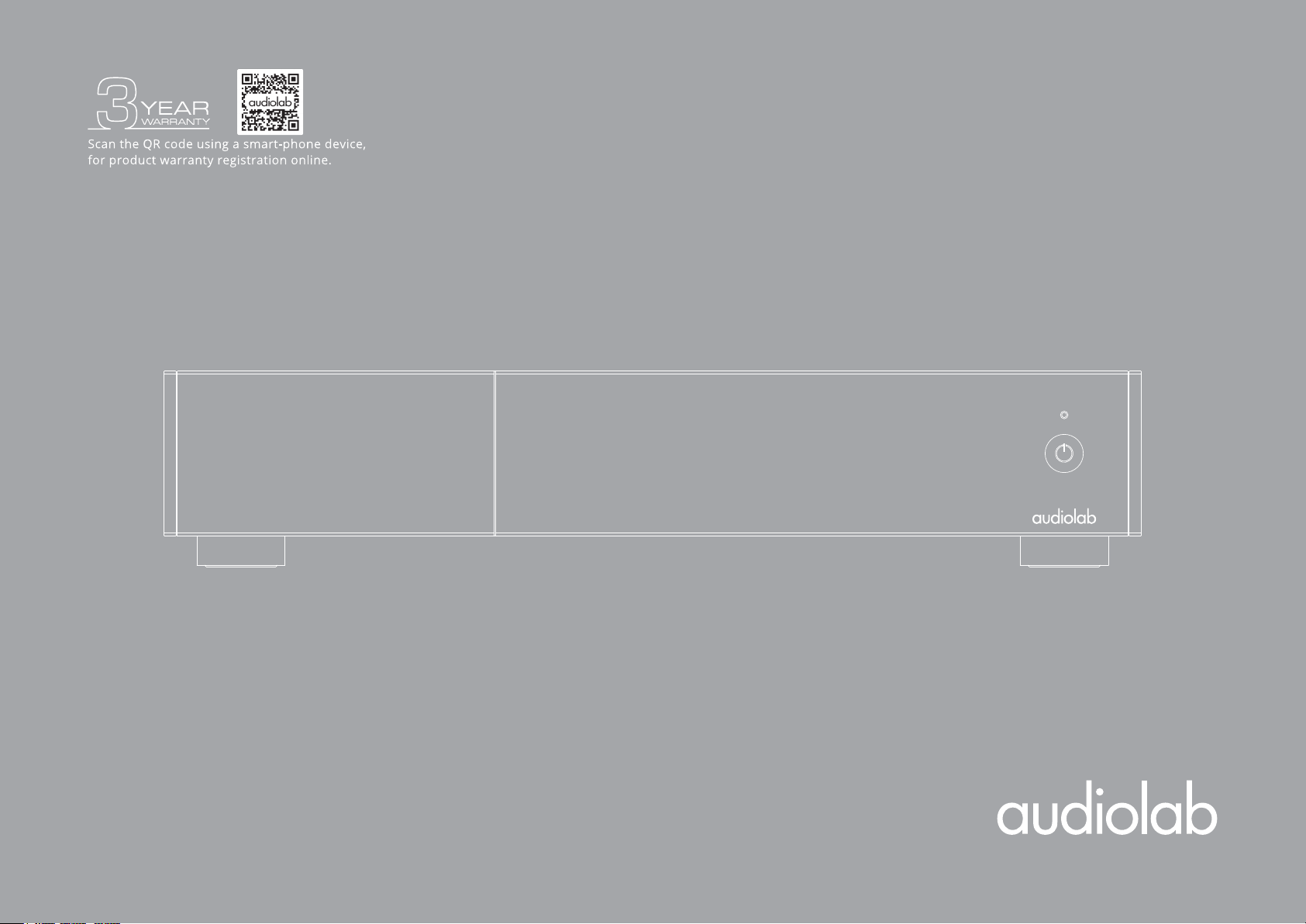
9000P
User Manual
Page 2
Important
Safety Information
Important Safety Information
This lightning flash with an arrowhead symbol within an equilateral triangle is
intended to alert the user to the presence of non-insulated “dangerous voltage”
within the product’s enclosure that may be of sufficient magnitude to constitute a
risk of electric shock.
Warning: To reduce the risk of electric shock, do not remove cover (or back) as
there are no user-serviceable parts inside. Refer servicing to qualified personnel.
The exclamation point within an equilateral triangle is intended to alert the user to
the presence of important operating and maintenance instructions in the literature
accompanying the appliance.
Read these instructions. Keep these instructions. Heed all warnings.
Follow all instructions:
Do not use this apparatus near water. Clean only with a dry cloth.
Do not block any ventilation openings. Install under the manufacturer’s instructions.
Do not install near any heat sources such as radiators, heat registers, stoves, or
other apparatus (including amplifiers) that produce heat.
Do not defeat the safety purpose of the polarised or grounding-type plug. A polarised
plug has two blades with one wider than the other. A grounding plug has two blades
and a third grounding prong. The wide blade or the third prong is provided for your
safety. If the provided plug does not fit into your outlet, consult an electrician for the
replacement of the obsolete outlet.
Protect the power cord from being stepped on or pinched, particularly at the plugs,
convenience receptacles, and at the point where they exit from the apparatus.
Unplug this apparatus during lightning storms or when unused for long periods of time.
Refer all servicing to qualified service personnel. Servicing is required when the
apparatus has been damaged in any way, such as power supply cord or plug is
damaged, liquid has been spilt or objects have fallen into the apparatus, the
apparatus has been exposed to rain or moisture, does not operate normally, or
has been dropped.
CAUTION: These servicing instructions are for use by qualified service personnel
only. To reduce the risk of electric shock, do not perform any servicing other than
that contained in the operating instructions unless you are qualified to do so.
Contents
Getting Started
Controls and Functions
Connections
System Operations
Do not install this equipment in a confined or built-in space such as a bookcase or
similar unit, and keep well ventilated in an open space. The ventilation should not
be impeded by covering the ventilation openings with items such as newspaper,
tablecloths, curtains etc.
WARNING: Only use attachments/accessories specified or provided by the
manufacturer (such as the exclusive supply adapter, battery etc.).
WARNING: Please refer to the information on the exterior panel of the enclosure
for electrical and safety information before installing or operating the apparatus.
WARNING: To reduce the risk of fire or electric shock, do not expose this apparatus
to rain or moisture. The apparatus shall not be exposed to dripping or splashing and
that objects filled with liquids, such as vases, shall not be placed on the apparatus.
WARNING: For the terminals marked with the symbol of “ ” may be of sufficient
magnitude to constitute a risk of electric shock. The external wiring connected to
the terminals requires installation by an instructed person or the use of
ready-made leads or cords.
Ground protection terminal. This product should be connected to a
power outlet with ground protection.
Denmark:
Finland:
Norway:
Sweden:
WARNING: No naked flame sources, such as lighted candles, should be placed on
the apparatus.
WARNING: Attention should be drawn to environmental aspects of battery
disposal. WARNING: Use of the apparatus in tropical climates.
THE FUSE VALUES ARE:
220 – 240V (UK, China, etc.) T3.15AL 250V Slow Blow
100 – 120V (USA, Japan, etc.) T6.3AL 250V Slow Blow
Apparatets stikprop skal tilsluttes en stikkontakt med jord, som giver
forbindelse til stikproppens jord.
Laite on liitettävä suojakoskettimilla varustettuun pistorasiaan.
Apparatet må tilkoples jordet stikkontakt.
Apparaten skall anslutas till jordat uttag.
System Connection
Warranty Coverage
Specification
Page 3

Important
Safety Information
Important Safety Information
FCC Statement
Contents
Getting Started
Controls and Functions
Connections
System Operations
System Connection
Warranty Coverage
Specification
This equipment has been tested and found to comply with the limits for a Class B
digital device, pursuant to part 15 of the FCC Rules. These limits are designed to
provide reasonable protection against harmful interference in a residential
installation. This equipment generates, uses and can radiate radio frequency energy
and, if not installed and used in accordance with the instructions, may cause
harmful interference to radio communications. However, there is no guarantee that
interference will not occur in a particular installation. If this equipment does cause
harmful interference to radio or television reception, which can be determined by
turning the equipment off and on, the user is encouraged to try to correct the
interference by one or more of the following measures:
• Reorient or relocate the receiving antenna.
• Increase the separation between the equipment and receiver.
• Connect the equipment into an outlet on a circuit different from that to
which the receiver is connected.
• Consult the dealer or an experienced radio/TV technician for help.
Caution: Any changes or modifications to this device not explicitly approved by
manufacturer could void your authority to operate this equipment.
This device complies with part 15 of the FCC Rules. Operation is subject to the
following two conditions: (1) This device may not cause harmful interference, and (2)
this device must accept any interference received, including interference that may
cause undesired operation.
• RF Exposure Information
• The device has been evaluated to meet general RF exposure requirement.
• The device can be used in portable exposure condition, compliance with expo
sure requirements.
The digital apparatus complies with Canadian CAN ICES-3 (B)/NMB-3(B).
This device meets the exemption from the routine evaluation limits in section 2.5 of
RSS 102 and compliance with RSS 102 RF exposure, users can obtain Canadian
information on RF exposure and compliance.
This equipment complies with Canada radiation exposure limits set forth for an
uncontrolled environment.
The device has been evaluated to meet general RF exposure requirement. This
equipment should be installed and operated with minimum distance 0mm
between the radiator & your body.
ISED Statement
This device contains license-exempt transmitter(s)/receiver(s) that comply with
Innovation, Science and Economic Development Canada’s licence-exempt RSS(s).
Operation is subject to the following two conditions:
(1) This device may not cause interference.
(2) This device must accept any interference, including interference that may cause
undesired operation of the device.
Page 4
Important
Safety Information
Contents
Audiolab 9000P
Contents
Getting Started
Controls and Functions
Connections
System Operations
System Connection
Warranty Coverage
Specification
1. Getting Started
2. Controls and Functions
3. Connections
4. System Operations
5. System Connection
6. Warranty Coverage
7. Specifications
05
06
07
08
09
11
13
Page 5
Important
Safety Information
Contents
Getting Started
Controls and Functions
Connections
System Operations
System Connection
Warranty Coverage
Specification
1: Getting Started
Introduction of 9000P
Thank you for purchasing the Audiolab 9000P.
Audiolab's new 9000 Series represents a new standard in home audio for the
connoisseur, and the 9000P is no exception.
This dedicated power amplifier has been designed in line with the smart aesthetic
and exemplary performance of the 9000 series - solidly built and impeccably
finished.
Please read through this manual to obtain the very best from your 9000P.
Features
• Class AB power amplifier
• CFB (Complementary Feedback) Technology
• Stereo/Bridge (mono) operation
• 2 x 100W (8 ohms, THD <1%) / 2 x 160W (4 ohms, THD <1%)
• Auto-standby function
• Output short circuit protection
• High-temperature protection
Page 05
Unpacking the Equipment
The carton should contain:
• The Audiolab 9000P
• One IEC power cord suitable for your region
• One instruction manual
If an item is missing or damaged, report this to your dealer as soon as possible.
Remain the packing for safe transport of your unit. If you dispose of the packing,
please do so with regard to any recycling regulations in your area.
Placement
The unit must be mounted on a solid, level and stable surface.
Before you connect the Audiolab 9000P to the AC mains power, ensure your AC
mains voltage corresponds to the rating on the rear panel of the product. If in
doubt, consult your dealer. If you move to an area that has a different mains
voltage, seek advice from an Audiolab appointed dealer or a competent service
technician.
Inputs
• One unbalanced analogue input pair
• One balanced analogue input pair
• One 12V trigger input
Outputs
• Speaker outputs
Page 6
Important
Safety Information
Contents
Getting Started
Controls and Functions
Connections
System Operations
System Connection
Warranty Coverage
Specification
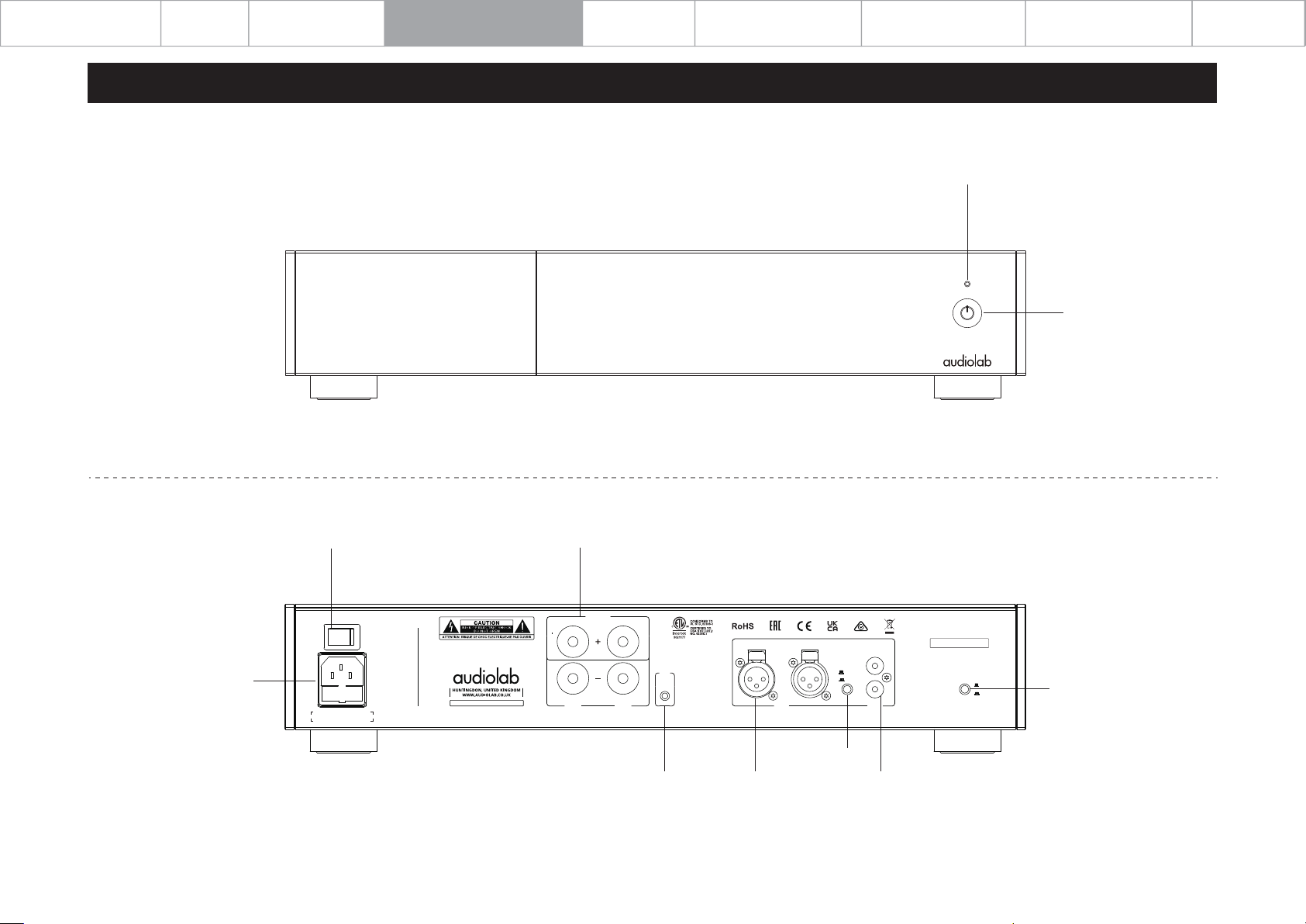
2: Controls and Functions
Page 06
Power LED
Standby Button
Mains Input
Power Switch
POWER
ON
AC 220-240V~50/60Hz 660W
FUSE T3.15AL 250V
Speaker Outputs
OUTPUT
OFF
DESIGNED AND ENGINEERED IN THE U.K.
9000P
Made in China
AMPLIFIER MODEL: 9000P
BRIDGE
RIGHT LEFT
BRIDGE+
RIGHT LEFT
12V
TRIG
IN
XLR
BRIDGE INPUT=LEFT
LINE
XLR
LINE
SN:
L
R
STEREO
BRIDGE
Stereo/bridge
(mono) Mode Switch
LINE/XLR Switch
12V Trigger XLR Input Line Input
Page 7
Important
Safety Information
Contents
Getting Started
Controls and Functions
Connections
System Operations
System Connection
Warranty Coverage
Specification
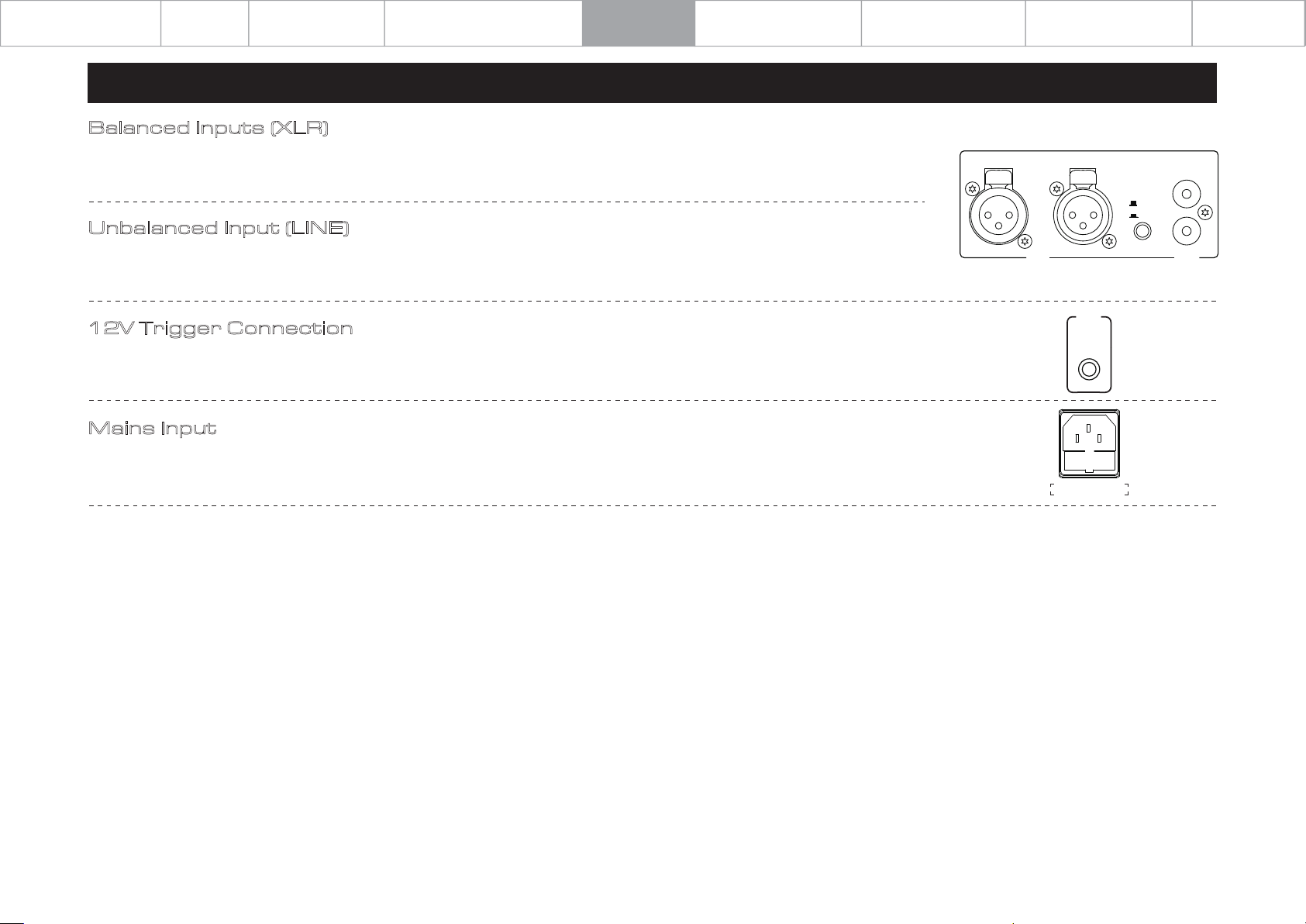
3: Connections
Balanced Inputs (XLR)
Balanced connections provide greater dynamic range and lower noise. If your source has balanced outputs, please connect them
to the balanced input of 9000P. You will need one XLR balanced cable per channel.
Unbalanced Input (LINE)
If you cannot use the XLR inputs, connect a RCA to RCA cable between the unbalanced inputs on the 9000P rear panel with the
matching output of the source unit.
12V Trigger Connection
The 9000P features one 12V trigger in connections. Use the output to control other products. The trigger connections are made
using "3.5 to 3.5mm" jack interconnects (not include).
Mains Input
Before connecting the AC power cord to the 9000P, please make sure the Power Switch is in the OFF position. Switch it to the ON
position after connecting the unit to the AC mains.
RIGHT LEFT
XLR
BRIDGE INPUT=LEFT
TRIG
AC 220-240V~50/60Hz 660W
FUSE T3.15AL 250V
Page 07
LINE
XLR
12V
IN
L
R
LINE
Page 8
Important
Safety Information
Contents
Getting Started
Controls and Functions
Connections
System Operations
System Connection
Warranty Coverage
Specification
4: System Operations
Page 08
Switching on and off
The 9000P should be switched on after the preamplifier or source devices in your system. When switching off your system, turn off the 9000P power amplifier before switching
off the preamplifier or source devices (the 9000P should be ‘last on, first off’).
Standby Mode
The 9000P will enter standby mode after being powered on. Press the “Standby” button to bring the 9000P out of standby, the power indicator LED becomes brighter.
Auto Standby
The auto standby feature will by default put the unit into standby after 20 minutes of inactivity. This feature can be configured and set to 20 minutes, 1h or ‘never’.
Long press the standby button on front panel for 5 seconds to activate the 'auto standby' setting. The standby LED will flash as you cycle 20m, 1h or never.
Standby LED flashes once = Never
Standby LED flashes twice = 20 minutes (Default)
Standby LED flashes three times = 1 hour
Source Select
Press the LINE/XLR button on the rear panel to select different source mode.
Bridge Mode
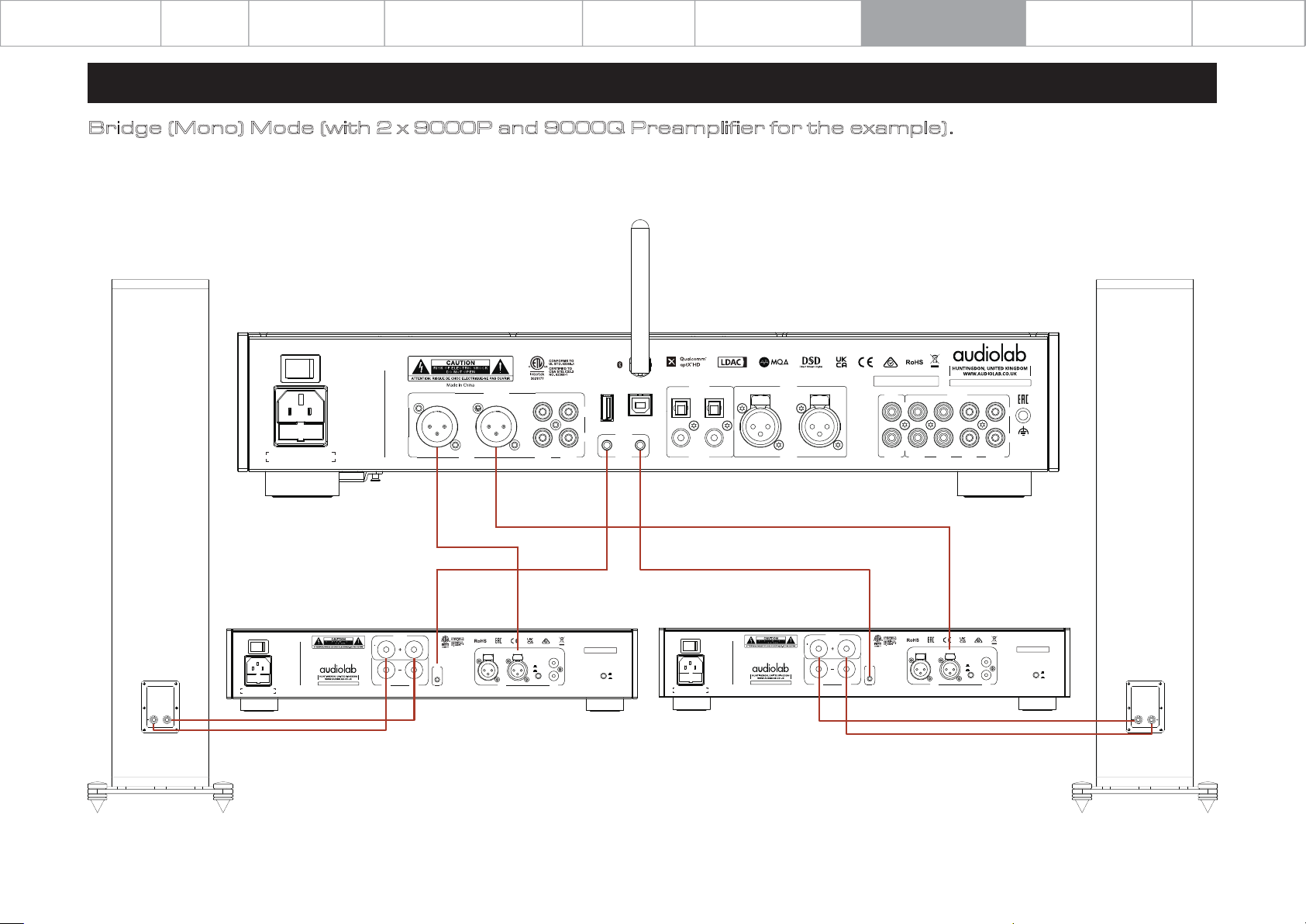
The Audiolab 9000P can operate as a stereo power amplifier (stereo mode) or a mono power amplifier (bridge mode).
To activate MONO mode, press the STEREO/BRIDGE selector ‘in’ on rear panel.
You will need two Audiolab 9000P amplifiers if using bridge mode (one for each channel). Connect the 9000Q to two 9000P units in the bridge mode connection as shown in on
the next page of this manual.
Protection Mode
The Audiolab 9000P is protected by a thermal switch which interrupts the AC power supply if the amplifier is grossly overloaded for a period of time. In case of activation of the
‘protection mode’ the power indicator LED flashes to indicated that the unit is in ‘protection mode’. To restore operation, simply press the standby button on the front panel.
The Audiolab 9000P is fully protected against gross load and a short circuited output. The unit is not necessarily protected against seriously inadequate ventilation, so please
ensure appropriate ventilation to prevent any overheating associated with lack of air-flow or environmental cooling of the unit.
Page 9
Important
Safety Information
Contents
Getting Started
Controls and Functions
Connections
System Operations
System Connection
Warranty Coverage
Specification
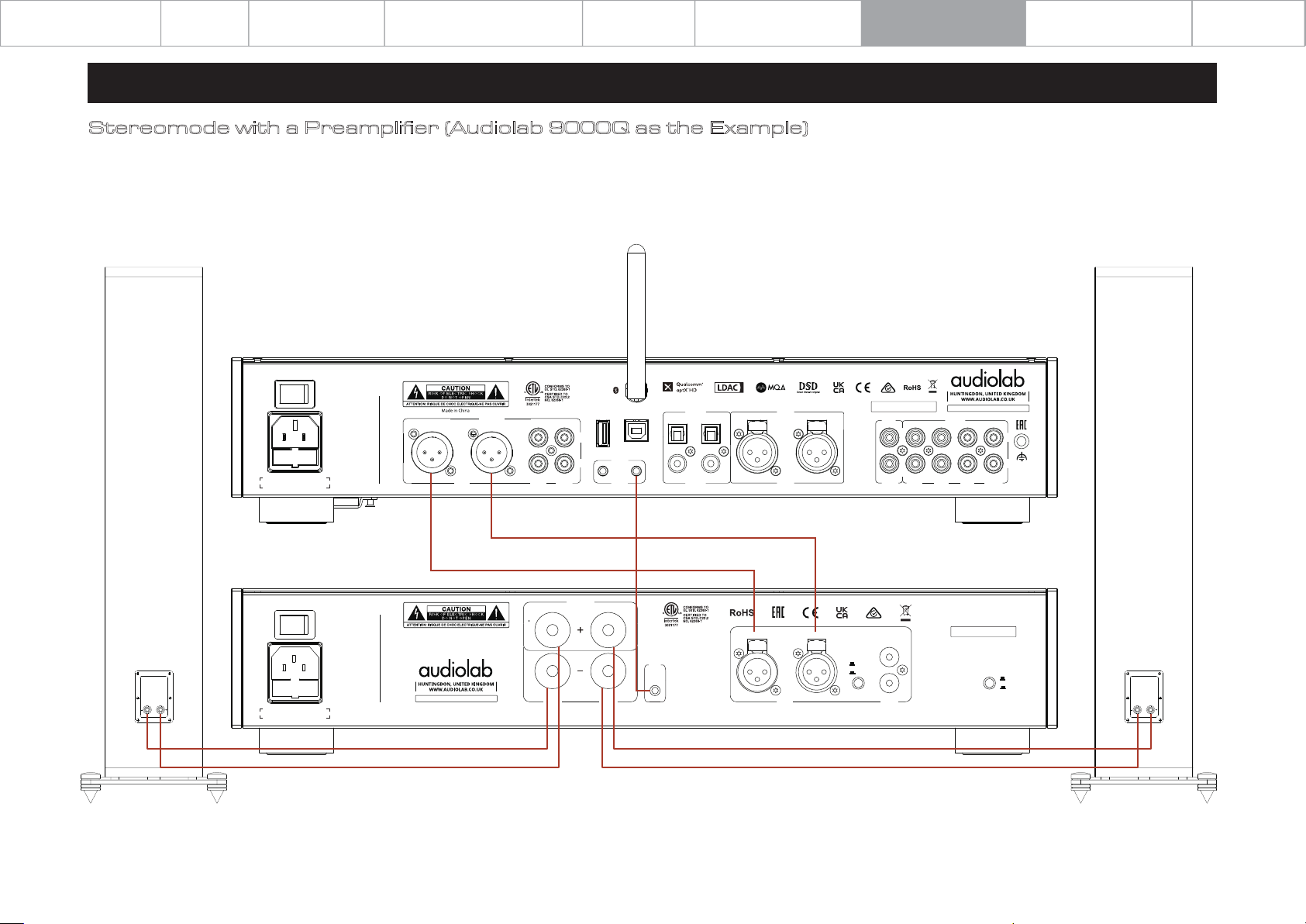
5: System Connection
Stereomode with a Preamplifier (Audiolab 9000Q as the Example)
The STEREO/BRIDGE selector switch should be 'OUT' for the Stereo Power Amplifier mode.
RIGHT
LOUDSPEAKER
POWER
ON
AC 220-240V~50/60Hz 22W
FUSE T630mAL 250V
OFF
INPUT
RIGHT LEFT
XLRXLR
DESIGNED AND ENGINEERED IN THE U.K.
9000Q
RIGHT LEFT
OUTPUT
INPUT
L
R
PRE2PRE1
12V
TRIG
A B
OUT
USBUPDATE
OPT2OPT1
COAX1 COAX2
DIGITAL
Page 09
LEFT
LOUDSPEAKER
AUX1
PRE AMPLIFIER MODEL: 9000Q
INPUT
AUX2
AUX3 PHONO
L
R
SN:
OUT
AUX
POWER
ON
AC 220-240V~50/60Hz 660W
FUSE T3.15AL 250V
OUTPUT
OFF
DESIGNED AND ENGINEERED IN THE U.K.
9000P
Made in China
AMPLIFIER MODEL: 9000P
BRIDGE
RIGHT LEFT
BRIDGE+
RIGHT LEFT
12V
TRIG
IN
XLR
BRIDGE INPUT=LEFT
LINE
XLR
LINE
SN:
L
R
STEREO
BRIDGE
Page 10
Important
Safety Information
Contents
Getting Started
Controls and Functions
Connections
System Operations
System Connection
Warranty Coverage
Specification
5: System Connection
Bridge (Mono) Mode (with 2 x 9000P and 9000Q Preamplifier for the example).
The STEREO/BRIDGE selector switch should be 'IN' for the Bridge (Mono) mode.
RIGHT
LOUDSPEAKER
POWER
ON
AC 220-240V~50/60Hz 22W
FUSE T630mAL 250V
OFF
SN:
OUT
AUX
AUX1
AUX2
DESIGNED AND ENGINEERED IN THE U.K.
9000Q
RIGHT LEFT
OUTPUT
INPUT
L
R
PRE2PRE1
12V
TRIG
A B
OUT
USBUPDATE
OPT2OPT1
COAX1 COAX2
DIGITAL
INPUT
RIGHT LEFT
XLRXLR
Page 10
LEFT
LOUDSPEAKER
PRE AMPLIFIER MODEL: 9000Q
INPUT
L
R
AUX3 PHONO
POWER
ON
AC 220-240V~50/60Hz 660W
FUSE T3.15AL 250V
POWER
ON
AC 220-240V~50/60Hz 660W
FUSE T3.15AL 250V
OFF
DESIGNED AND ENGINEERED IN THE U.K.
9000P
Made in China
AMPLIFIER MODEL: 9000P
OFF
DESIGNED AND ENGINEERED IN THE U.K.
9000P
Made in China
AMPLIFIER MODEL: 9000P
BRIDGE
RIGHT LEFT
OUTPUT
BRIDGE+
12V
TRIG
IN
RIGHT LEFT
XLR
BRIDGE INPUT=LEFT
SN:
L
LINE
XLR
R
LINE
STEREO
BRIDGE
BRIDGE
RIGHT LEFT
OUTPUT
BRIDGE+
12V
TRIG
IN
RIGHT LEFT
XLR
BRIDGE INPUT=LEFT
SN:
L
LINE
XLR
R
LINE
STEREO
BRIDGE
Page 11
Important
Safety Information
Contents
Getting Started
Controls and Functions
Connections
System Operations
System Connection
Warranty Coverage
Specification
6:
Audiolab warrants this product, subject to the terms and conditions below, to be
free from defects in materials and workmanship. During the warranty period
Audiolab will repair or replace (at Audiolab’s option) this product, or any defective
part in this product, if it is found to be defective due to faulty materials,
workmanship or function. The warranty period may vary from country to country.
Warranty Coverage
Online Registration
Scan the QR code using a smart-phone device,
for product warranty registration online.
The three (3) year extended warranty is applicable to items purchased from Jan 1st
2021, onwards. Items purchased prior to this date are not eligible for this extended
warranty service but are subject to statutory warranty claims and all applicable
consumer rights.
To qualify for the extended 3 year warranty, you must register your product within
ninety (90) calendar days from the date of purchase.
Visit audiolab.co.uk/warranty-registration to complete your online registration.
Items not registered online will have a Limited Warranty for one (1) year, or for the
period of your country’s statutory warranty, whichever is longer.
Warranty can only be offered to products registered with proof of purchase with
date, model and details of the authorised dealer clearly stated on the
receipt/invoice. Please keep the original receipt/invoice in case it is required for a
warranty claim.
This Limited Warranty is non-transferable and is offered exclusively to the original
owner.
This Limited Warranty is valid only in the original country of purchase.
Repairs or replacements are provided under this warranty are the exclusive
remedy of the consumer. Audiolab shall not be liable for any incidental or
consequential damages for breach of any expenses or implied warranty with any
product. Except to the extent prohibited by law, this warranty is exclusive and in
lieu of all other warranties whatsoever, both expressed and implied, including but
not limited to the warrant of merchantability and fitness for practical purpose.
Page 11
This warranty provides benefits that are additional to and do not affect your
statutory consumer rights.
This Limited Warranty offer is subject to correct information being submitted in
your application. Incorrect dates or mismatched purchase receipt dates that are
outside of the warranty terms will immediately invalidate any warranty claim.
*Please check with your dealer local distributor for further information.
Exclusions
The following items are excluded from the Audiolab warranty:
Normal wear and tear and cosmetic damage (including but not limited to any wear
from reasonable use, environmental deterioration or neglect)
Products on which the serial number has been removed, altered or otherwise
made illegible.
Products not purchased from an authorised Audiolab dealer.
Products that were not new at the time of original purchase.
Products sold ‘as is’, ‘as seen’ or ‘with faults’
Product not purchased from an Authorised Dealer/Distributor within the region of
the claim (ie parallel imports or grey market products)
Accidental damage or faults caused by commercial use, acts of God, incorrect
installation, incorrect connection, incorrect packaging, misuse or careless
operation or handling which is not in accordance with the user instructions.
Equipment that has been operated in conjunction with unsuitable, inappropriate
or faulty apparatus.
Repairs, alterations or modifications carried out by parties other than Audiolab or
its authorised service partners.
Damage in transit that cannot be attributable to the fault of Audiolab, the
authorised distributor or dealer (ie. claims otherwise covered by transit insurance.)
Faults relating to abnormal or inappropriate power supply voltage or power
surges.
Faults relating to extremities in temperature, exposure to heat, water or other
liquids, insects, excessive moisture, sand, chemicals, battery leakage or any other
contaminants.
Page 12
Important
Safety Information
Contents
Getting Started
Controls and Functions
Connections
System Operations
System Connection
Warranty Coverage
Specification
6: Warranty Coverage
Any force majeure events, including but not limited to any acts of God, fire,
lightning, typhoon, storm, earthquake, hurricane, natural disaster, tsunami, flood,
war, riot, public disturbance.
Any other causes beyond the reasonable control of either Audiolab and its
Authorised Distributor.
Please note items purchased before 1st Jan 2021 are not eligible for the extended
warranty claim.
How to Claim
To obtain warranty service please contact the authorised dealer from which you
purchased this product and present the limited warranty certificate offered upon
registration of your product’s extended warranty offer.
Do not dispatch goods without the prior agreement of the dealer distributor or
authorised service centre.
If asked to return products for inspection and or repair, please pack carefully
preferably in the original carton or packaging affording an equal degree of
protection and returned via insured, trackable courier service.
The authorised dealer or distributor will offer full return details and instructions.
However, please note if unsuitable packaging is used the warranty may be deemed
void due to improper action in return.
Page 12
than the official distributor or authorised service centre.
Other than the warranty and services set out in this warranty, to the fullest extent
permitted by law, Audiolab shall not be liable to you and/or any third party or entity
whatsoever for:
Any loss, damages and/or malfunction caused to any product(s) which is/are
•
connected to any of the products covered by this warranty.
•
Any damages, loss and liability, whether direct, indirect, incidental, consequential
special, punitive or otherwise, howsoever caused by, arising out of or otherwise,
in relation to the installation, delivery, use, service, repair, replacement and/or
maintenance of the product;
•
Any damages, loss and liability under this warranty in respect of any act,
omission, or negligence of any of their technicians, employees, agents,
representatives or independent contractors relating to the actual or purported
performance of any of the obligations under this warranty.
Service Centre Address
Should a fault occur with your product, please pack it correctly using the original
packing, so you can ship it safely. For technical support, servicing or product
queries and information, please contact either your local retailer or the office
below:
Audiolab or the authorised distributor, dealer or service centre may make a charge
for the supply of new packaging for the return of the repaired item. Please note,
insurance is recommended as goods are returned at the owner’s risk. Authorised
distributors or service centres cannot be held liable for loss or damage in transit.
insurance and freight charges on the return journey will be paid for by Audiolab,
authorised dealer, distributor or service centre if corrective work proves to be
necessary.
In the event of ‘no-fault found’ or ‘no repair necessary’, the return shipping charge
will be the responsibility of the owner.
Repairs
All repairs will be carried out by the appointed distributor (or locally appointed
service centre). Repairs handled or processed without authorisation or approval of
the appointed representative will be excluded from this limited warranty. Please
note, Audiolab is not able to supply parts or replacement items to any other entity
IAG Service Dept.
13/14 Glebe Road
Huntingdon
Cambridgeshire
PE29 7DL
UK
Tel: +44(0)1480 452561
Email: [email protected]
For information on other authorised service centres worldwide contact Audiolab
International, UK.
A worldwide distributors list is available on the Audiolab website: www.audiolab.co.uk
Page 13

Important
Safety Information
Contents
Getting Started
Controls and Functions
Connections
System Operations
System Connection
Warranty Coverage
Specification
7: Specifications
BRAND Audiolab
Model
General Description
Design Philosophy and Core Technology
Inputs
Outputs
Power Amplifier Section(STEREO)
Gain
Rated Power Output
Frequency Response
Total Harmonic Distortion (THD)
Input Sensitivity
Input Impedance
Signal-to-Noise Ratio (S/N)
Max. Output Current
9000P
Power Amplifier
Class AB power amplifier
Stereo/Bridge (Mono) Modes
1 x Analogue, 1 x XLR, 1 x 12V Trigger
1 x Stereo Speaker
29dB (RCA) / 23dB (XLR)
Stereo: 2 x 100W ( 8ohms, THD <1%)
Stereo: 2 x 160W (4 ohms, THD <1%)
Bridged (Mono) : 300W (8 ohms, THD <1%)
Bridged (Mono) : 380W (4 ohms, THD <1%)
20Hz - 20kHz (+/-0.3dB)
<0.002% (1kHz)
1Vrms (RCA)
2Vrms (XLR)
10k ohms
> 112dB (A-weighted)
15A
Page 13
General
Standby Power Consumption
Net Weight
Gross Weight
Dimensions (mm) (W x H x D)
Carton Size (mm) (W x H x D)
Finish
Power Requirements
(depending on region)
Standard Accessories
<0.5W
9.2kg
10.6kg
444 x 90 x 327 mm
514 x 165 x 470 mm
Black/Silver
220-240V - 50/60Hz
100-120V - 50/60Hz
Power Cord, User Manual
Page 14
Page 15
Page 16

Audiolab
IAG House,
13 /14 Glebe Road,
Huntingdon,
Cambridgeshire,
PE29 7DL,
UK
Telephone: +44(0)1480 452561
Email: [email protected]
http://www.audiolab.co.uk
 Loading...