

Page 1
Be sure to read this manual before use
• In this manual, the “AQUOS SERIE mini SHV33” is abbreviated as the
“SHV33” or the “product”.
• In this manual, “microSD™ memory card (commercially available)”,
“microSDHC™ memory card (commercially available)” and “microSDXC™
memory card (commercially available)” are abbreviated as “microSD
memory card” or “microSD”.
• For illustrations and descriptions in this manual, refer to “Basic Manual”
available on the au homepage and on the product.
NotesonUsage
December2015,1stEdition
Soldby:KDDICORPORATION,
OKINAWACELLULARTELEPHONECOMPANY
Manufacturedby:SHARPCORPORATION
分
Page 2

When Using the Product
分
Before using the product, be sure to read the “Safety Precautions” for proper
use.
If you think the product may be malfunctioning, first check symptoms with au
Customer Support on the au homepage.
(http://www.au.kddi.com/support/mobile/trouble/repair)
• Communication is not possible even inside the service area in places where
the signal does not reach (e.g. tunnels and basements). Also,
communication may not be possible in poor reception areas. Communication
may be interrupted if you move into a poor reception areas during
communications.
• Since this product uses radio waves, the possibility of communication
intercepts by third parties cannot be eliminated. (Though the LTE/WiMAX 2+/
GSM/UMTS system has highly secure confidential communication features.)
• VoLTE (LTE network) by au is used when connecting with emergency
organizations within Japan. You cannot connect using 3G (circuit-switched
network).
• The product is compatible with the international roaming service. Each
network service varies depending on the area and service content.
For details, refer to “auのネットワークサービス・海外利用” (au Network
Services/International Roaming) described in “Instruction Manual
application” (Japanese) or “Full Instruction Manual” (Japanese) available on
the au homepage.
• Since the product is a radio station under the Radio Law, you may be asked
to temporarily submit the product for inspection in accordance with the Radio
Law.
• The IMEI information of your cell phone is automatically sent to KDDI
CORPORATION for maintenance and monitoring operational status of your
cell phone.
• If you are using the product overseas, check the relevant laws and
regulations of the country/region you visit.
- 1 -
Page 3

• The Company is not liable for any damages arising from earthquakes,
分
lightning, storms, floods or other natural disasters, as well as fires, actions by
third parties, other accidents, intentional or mistaken operation by the
customer, or use under other unusual conditions outside the responsibility of
the Company.
• The Company is not liable for any incidental damages (change/
disappearance of saved content, loss of business income, disruption of
business, etc.) arising from use of or inability to use the product.
It is recommended that you keep a copy of important phone numbers etc.
• The Company is not liable for any damages arising from failure to observe
the described content of this manual.
• The Company is not liable for any damages arising, for example, from
malfunction caused by combination with connected devices or software not
related to the Company.
• Captured image data or downloaded data may sometimes be altered or lost
due to faults, repair or other handling of the product. The Company is not
liable for any damage or lost income resulting from recovery of these data.
• It is recommended you keep a copy of important data on your PC's hard disk,
etc. Whatever the cause of the defect or malfunction may be, the Company
assumes no responsibility for alteration or loss of saved data.
• Contents saved in the product, such as contacts, mails and bookmarks might
be altered or lost by an accident, fault, repair or mishandling. Be sure to keep
a copy of important contents. Note that the Company assumes no
responsibility for any damages or lost profits resulting from altered or lost
contents.
• Note that content data (both charged or free content) saved on the product
cannot be returned to the customer when the product is replaced for repair of
a fault, for example.
• The product uses liquid crystal for its display. The display response speed
may become slow when the ambient temperature is low, which is due to the
property of liquid crystal and not a malfunction. The display response speed
will return to normal at room temperature.
• Although the display used on the product is made using high-precision
technology, some pixels (dots) might be lit or out at all times. This is not a
malfunction.
- 2 -
Page 4

• You are recommended to store copies of individual data such as still
分
pictures/videos you took and music in your PC by sending each file as mail
attachment, etc. Note, however, that you may not be able to make copies of
some copyrighted data even by the above-mentioned means.
• Do not discard the product together with regular trash. Please cooperate in
the collection of the product when it is no longer needed to protect the
environment and effectively use resources. Old products are collected at au
shops and other places.
* “The Company” as appears in this manual refers to the following companies:
Sold by: KDDI CORPORATION, OKINAWA CELLULAR TELEPHONE COMPANY
Manufactured by: SHARP CORPORATION
◎ Reproduction of the content of this manual in part or in whole is
prohibited.
◎ The content of this manual is subject to change without notice.
◎ Every effort has been made in the preparation of this manual. Should you
notice any unclear points, omissions, etc., feel free to contact us.
- 3 -
Page 5
Safety Precautions (Observe Strictly)
分
■ Before using the product, thoroughly read these safety
precautions for proper use. After reading, store the precautions
in a safe place.
These “Safety Precautions” describe instructions that should be observed to
prevent damage to property or injury to the customer or others using the
product.
If the product is going to be used by a child, a parent or guardian should read
the manual and provide instruction in proper use.
These instructions are divided into the following categories.
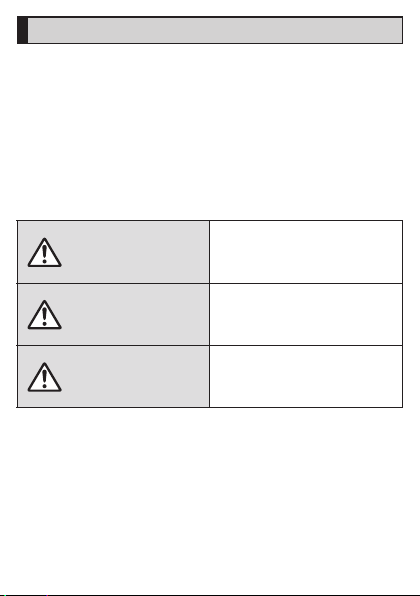
■ Explanation of Indications Used in This Manual
DANGER
WARNING
Indicates imminent risk of death or
serious injury
handling.
Indicates risk of death or serious
injury
*1
with improper
*1
with improper handling.
Indicates risk of minor injury*2 and
CAUTION
*1 Serious injury: This refers to loss of sight, injury, burns (high- and low-temperatu re),
*2 Minor injury: This refers to inju ries, burns (high- and low-temperature), electric
*3 Physical damage: This refers to extended damage to buildings, furniture, livestock
electric shock, broken bones, i njuries with residual aftereffects from
poisoning, etc., and injuries requiring hospital admission for
treatment or long-term hospital attendance as an outp atient.
shock, etc. that do not require hospital admissio n for treatment or
long-term hospital attendance as an outpatien t.
or pets.
physical damage
handling.
*3
with improper
- 4 -
Page 6
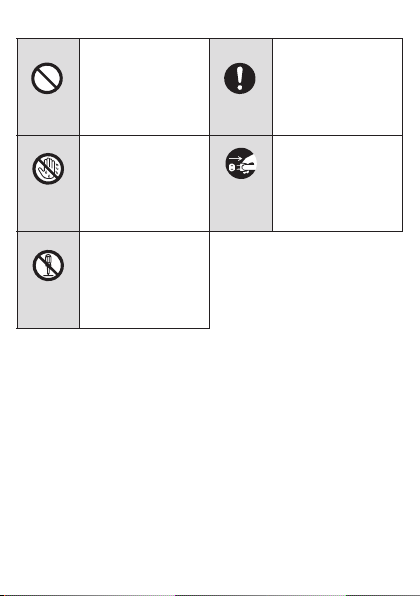
■ Explanation of Graphic Symbols Used in This Manual
Wet hands
prohibited
分
Prohibited
Disassembly
prohibited
Indicates an action that
is not allowed.
Indicates that handling
with wet hands is not
allowed.
Indicates that
disassembly is not
allowed.
Instruction
Disconnect
plug from
power outlet
- 5 -
Indicates an action that
must be done.
Indicates that the power
plug must be
disconnected from the
power outlet.
Page 7
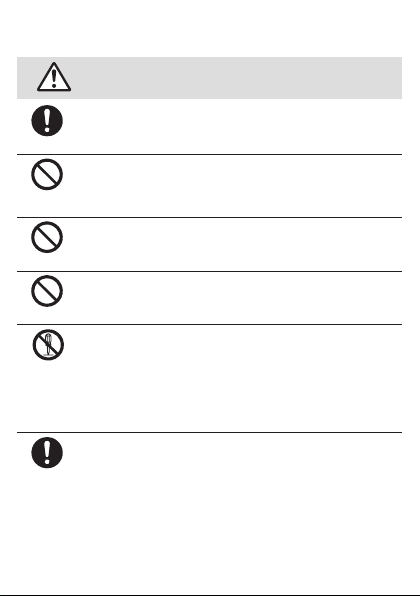
■ Precautions Common to the Main Unit, Charger, au
Instruction
Prohibited
Disassembly
prohibited
分
Nano IC Card 04, Peripheral Devices
Be sure to read the following
hazards before use.
Prohibited
Prohibited
Instruction
DANGER
Be sure to use only the specified peripheral devices. Use of other
peripheral devices might cause overheating, ignition, rupture,
fault, or leakage of liquid.
Do not use, store or leave the product in hot places (e.g. by the
fire, near a heater, under a kotatsu, in direct sunlight, in a car in
the hot sun). Doing so might cause ignition, rupture, fault, fire or
injury.
Do not put the product in a cooking apparatus such as
microwave oven or a pressure vessel. Doing so might cause
leakage of liquid, ignition, rupture, fault, fire or injury.
Do not throw the product into a fire or heat it. Doing so might
cause ignition, rupture or fire.
The customer is not allowed to disassemble, modify or repair the
product. Doing so might cause a fault, ignition, electric shock, or
injury. The Company is not liable even in the event of any
nonconformities arising on the product or peripheral devices as a
result of modification, etc. Modification of the product is in
violation of the Radio Law and/or the Telecommunications
Business Law.
Since the battery is built into the product, you cannot replace it
yourself. For replacing the battery, contact an au shop or
Customer Service Center.
- 6 -
Page 8
Instruction
Prohibited
Prohibited
分
Prohibited
Prohibited
Prohibited
WARNING
Before entering an area where flammable gas is generated such
as a gas station, be sure to turn off the product. Do not charge
the battery. Failure to observe these precautions might cause the
gas to catch fire. In addition, when using Osaifu-Keitai
function at a gas station, be sure to turn off the power in advance.
(If NFC/Osaifu-Keitai
turning off the power.)
When using a metal accessory etc., do not allow the metal part to
come in contact with the external connection jack, earphone/
microphone jack, or power outlet. Doing so might cause electric
shock, ignition, injury or a fault.
Do not drop or subject to strong impact, such as throwing. Doing
so might cause rupture, overheating, ignition or a fault.
Do not use outside when you can hear thunder. Doing so might
risk lightning strikes and electric shock.
To prevent short-circuiting of the external connection jack and
earphone/microphone jack, do not allow your fingers or any other
part of your body or conductive materials (metal, pencil lead,
etc.) to come in contact with or enter these areas. Doing so might
cause overheating, fire, a fault, electric shock, or burns.
If the product is damaged because it is dropped or something,
and its display or camera lens cover is cracked or internal parts
are exposed, do not touch the cracked pieces or exposed parts
with your hands. Doing so might cause electric shock or injury
from damaged parts.
Be sure to read the following
warnings before use.
®
has been set, cancel the lock before
®
payment
- 7 -
Page 9
Prohibited
Prohibited
Prohibited
Instruction
分
Prohibited
Prohibited
Prohibited
Never connect the microUSB plug when the product or specified
charger (sold separately) is wet or dirty.
Although the product is water/dust resistant, the specified
charger (sold separately) is not water/dust resistant. Any water or
foreign matter on the product or microUSB plug when inserting
the microUSB plug while the product/specified charger is wet or
dirty might cause electric shock or short circuit/corrosion causing
abnormal overheating, burnout, fire, burns, or a fault.
Although the product has waterproof/dustproof capability, do not
use if foreign matter such as liquid or dust gets inside the product
from the au Nano IC Card 04/microSD memory card cover, etc.
Continued use of the product in this state might cause
overheating, ignition or a fault.
Do not use product while driving a car or riding a motorbike or
bicycle or while walking. Doing so might cause a traffic accident
or cause you or someone to fall over or off a bike. Use of a cell
phone while driving a car or riding a motorbike is prohibited by
law. Use of a cell phone while riding a bicycle may be punishable
by some regulations.
If charging is not completed after the specified charging time,
stop charging. Failure to do so might cause leakage of liquid,
overheating, rupture or ignition.
Do not leave in places within the reach of small children. Small
children might swallow part of the equipment by mistake and
choke on them, or might drop them by mistake and cause
accidents or injury.
Do not cover or wrap the product with cloth, bedding, etc. while
using or charging the product. Doing so might cause fire, fault or
injury.
When using a charger or external device, insert/remove the
connector straight to/from the jack. Inserting/removing in an
incorrect orientation might cause overheating, fire, damage or a
fault.
- 8 -
Page 10
Prohibited
Prohibited
Prohibited
Prohibited
分
Prohibited
Prohibited
CAUTION
Do not expose the camera lens to direct sunlight for an extended
period. Doing so might cause ignition, rupture, fire or a fault by
the light-collecting mechanism of the lens.
Do not store the product in places subject to direct sunlight
(e.g.in automobiles), places that get hot, places that get
extremely cold, and in humid or dusty places. Doing so might
cause overheating, deformation or a fault.
Do not place the product on top of a wobbly table, sloped
surface, or other unstable location, and do not charge when
placed unstably. Doing so may allow the product to fall and
cause injury or damage. Be careful especially when the product
is set to vibrate. Also use adequate caution with impact, etc.
Failure to do so might cause a fault or injury.
The product may become hot when used for a long period or
when connected to an external power supply. Avoid contact with
the product and specified charger for long periods. Failure to do
so may cause low-temperature burns.
When charging the product, do not exceed the ratings given for
outlets and wiring. Exceeding ratings for power strips, etc. might
cause overheating and result in fire.
Do not place near corrosive chemicals or in places where
corrosive gas is generated. Doing so might cause a fault or loss
of internal data.
Be sure to read the following
cautions before use.
- 9 -
Page 11
Instruction
Instruction
Instruction
7
Instruction
Stop use if there is smoke, abnormal odor or noise, excessive
overheating, or other abnormalities. During charging, disconnect
the specified charger (sold separately) from the power outlet or
the socket, make sure that the product is not overheating before
turning the power off and contact an au shop or Keitai Guarantee
Service Center. Also, if you have dropped or damaged the
product, do not continue to use it in that state, and contact an au
shop or Keitai Guarantee Service Center.
When inserting an earphone, etc. into the product, adjust the
volume to the proper level by increasing it gradually. Suddenly
turning the sound on with the volume set too high, too loud a
volume or using the earphone continuously for a long period of
time might adversely affect your ears. Also, raising the volume too
high might prevent you from hearing sounds around you, which
might in turn lead to a traffic accident at a railroad crossing or
pedestrian crossing.
When using handsfree call, take care to keep the speaker at a
safe distance from your ears, as the speaker volume may be too
loud.
When small children use the equipment, have the guardian teach
them the proper handling procedures so as to avoid potential
dangerous situations. In addition, check that they are using the
equipment as directed during use. Failure to do so might cause
injury etc.
- 10 -
Page 12
■ Main Unit
Prohibited
Prohibited
7
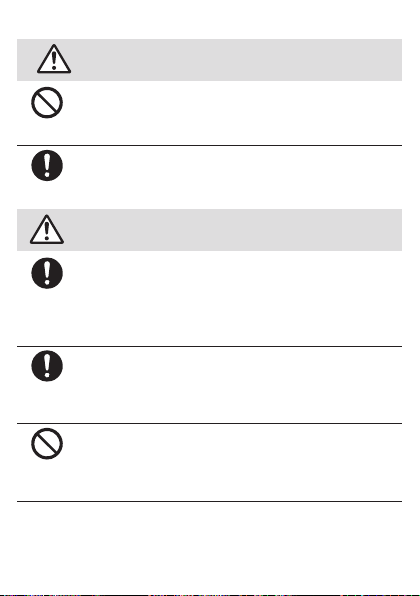
DANGER
Instruction
Be sure to read the following
hazards before use.
Do not puncture the product with a nail, hit it with a hammer or
step on it.
Doing so might cause leakage, overheating, rupture or ignition of
the internal battery.
Take care not to let pets bite the product. Pets biting product
might cause the internal battery to leak, overheat, rupture, or
ignite, or might cause fire, injury, etc.
Instruction
Instruction
WARNING
Turn off the product or set it to Airplane mode before going
aboard an airplane. Since using the product on airplanes is
restricted, follow the instructions given by the respective airlines.
Failure to do so might affect an airplane's electronic
instrumentation. If you commit a prohibited act while using the
product on an airplane, you might be punished by law.
Follow the instructions given by the respective medical institution
regarding the use of the product in a hospital. Turn off the
product in areas where the use of cell phones is prohibited.
Failure to do so might cause interference with the operation of
electronic devices and electronic medical devices.
Do not point the illuminated light directly at someone's eyes, or at
the eyes of someone driving a car or riding a motorbike or
bicycle. Be especially careful not to shoot small children from a
very close distance. Do not use Mobile light near people's faces.
Eyesight may be temporarily affected leading to accidents.
Be sure to read the following
warnings before use.
- 11 -
Page 13
Sometimes, very rarely some people demonstrate symptoms
Instruction
7
such as temporary muscle spasms, loss of consciousness, etc.
by watching repeatedly flickering screens. Those with a past
history of this should consult with a physician beforehand.
CAUTION
Use of the main unit in an automobile might sometimes affect
on-vehicle electronic devices, though this rarely happens. If this
Prohibited
Instruction
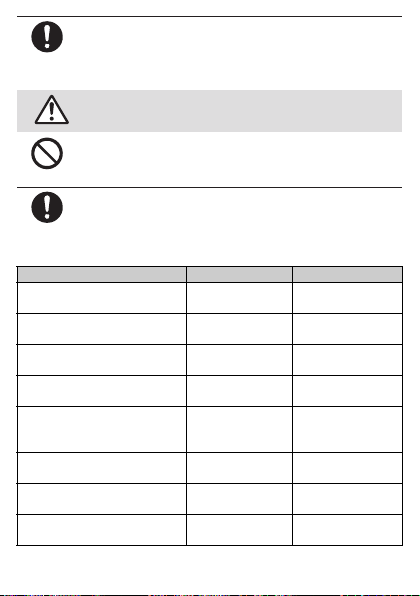
The materials of parts used on the product are as follows.
Outer case (around display) PA resin + GF45% Acrylic UV cured
Outer case (side of display) PC + ABS resin Acrylic UV cured
Outer case (around back cover) PA resin + GF45% Acrylic UV cured
Outer case (bottom) PC resin Acrylic UV cured
Back cover PMMA + PC
External connection jack (metal
exterior)
External connection jack (metal
terminal reinforcement)
External connection jack (resin
terminal portion)
happens, do not use since this may impair safe travel.
If you feel any abnormality with your skin, immediately consult a
dermatologist. Itching, rashes, eczema, etc. sometimes occurs
depending on your physical constitution and condition.
Part Material Surface treatment
Be sure to read the following
cautions before use.
coating
coating
coating
coating
combined plate
SUS Tin plating
SUS None
PA resin None
Hard coating +
anti-smudge
coating
- 12 -
Page 14
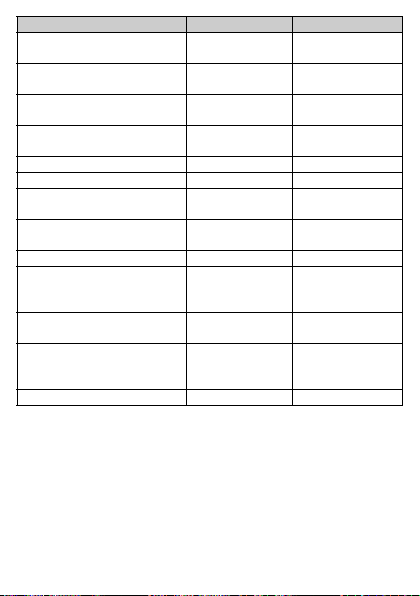
External connection jack
7
(terminal connection)
au Nano IC Card 04/microSD
memory card cover (body)
au Nano IC Card 04/microSD
memory card cover (hinge)
au Nano IC Card 04/microSD
memory card cover (seal)
au Nano IC Card 04 tray POM resin None
IMEI tray PET resin None
Power key Aluminum Diamond cutting +
Volume up/down key Aluminum Diamond cutting +
Display Reinforced glass None
Camera lens cover PMMA + PC
Camera lens fringe Aluminum Diamond cutting +
Protective display film PET Hard coating +
Strap pin SUS Ni plating
Part Material Surface treatment
Copper alloy Gold plating
PC resin Acrylic UV cured
Elastomer resin None
EPDM None
combined plate
coating
anodizing
anodizing
Fingerprint-resistant
coating + AR
coating
anodizing
fingerprint-resistant
coating
- 13 -
Page 15
Prohibited
Prohibited
Instruction
7
Prohibited
Instruction
Instruction
Prohibited
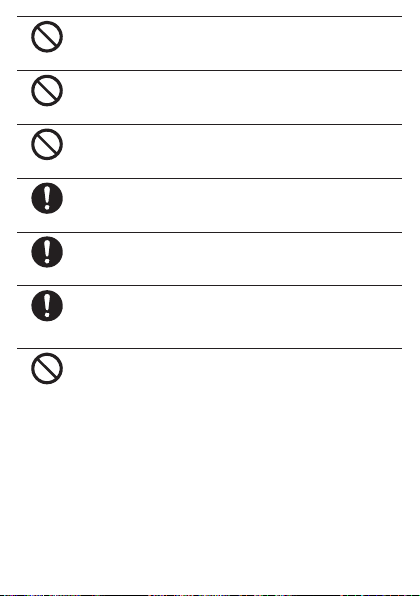
Do not bring the product close to magnetized objects such as
cash cards, floppy disks, credit cards, and prepaid cards. Doing
so might result in loss of recorded information.
Do not allow liquids, metal objects, burnable items, and other
foreign matter to get inside the microSD memory card slot. Doing
so might cause fire, electric shock, a fault, or injury.
Do not swing the product around by holding the strap, etc. Doing
so might cause an accident or damage.
Use the product with the au Nano IC Card 04/microSD memory
card cover closed. If the cover is open, dirt or water may get
inside causing a fault.
If you have a weak heart, be careful when setting the incoming
vibration and ringtone volume to prevent adverse effects on your
heart.
Pay attention to items becoming stuck to the main unit. The
speaker uses magnets, and so thumbtacks, pins, craft knife
blades, staples, and other metal objects sometimes become
stuck to the main unit, and cause unexpected injury.
Do not put the product directly on sand at a beach, etc. Sand or
other small particles might get inside the earpiece, mouthpiece,
speaker or earphone/microphone jack causing the volume to
drop. If sand gets inside the product, it might cause overheating
or a fault.
- 14 -
Page 16
■ Internal Battery
Instruction
Instruction
7
(The internal battery of the product is a lithium-ion battery.)
The internal battery is not fully charged at the time of purchase. Charge the
battery before using the product. Also charge the battery after long periods of
disuse before using the product.
DANGER
Battery fluid on skin and clothes might cause injury; immediately
rinse with water. Battery fluid in eyes can cause blindness; rinse
with water without rubbing, and immediately and seek medical
attention.
The internal battery is a consumable item. If the performance of
the internal battery does not recover (e.g. the usable time after
each charge has become extremely short), the internal battery is
at the end of service life, so stop using it. Failure to do so might
cause overheating, ignition, rupture or leakage. Since the battery
is built-in type, the product will be kept at an au shop etc. and
charges will be incurred for repair. Also, you may not use the
product in certain period of time. Note that the length of service
life varies depending on the usage condition, etc.
Be sure to read the following
hazards before use.
- 15 -
Page 17
■ Charger
Prohibited
Prohibited
7
Instruction
Instruction
Prohibited
WARNING
Do not use at other voltages than the specified power supply
voltage. Doing so might cause ignition, fire, overheating, electric
shock or injury.
• Specified AC adapter (sold separately): 100 V AC to 240 V AC
Do not charge with voltage converter for overseas travel.
• Specified DC adapter (sold separately): 12/24 V DC (for
negative grounded vehicles only)
Firmly insert the power plug of the specified charger (sold
separately) into the power outlet or cigarette lighter socket down
to the base of its pins. Incomplete insertion of the power plug
might result in electric shock, overheating, ignition, fire, or injury.
Do not use damaged specified charger (sold separately) or loose
power outlets or cigarette lighter sockets.
If the fuse in the common DC adapter 03 (sold separately) blows,
replace it with a fuse of the specified type (250 V, 1 A). Replacing
with a different type of fuse might cause overheating or ignition.
(For information about fuse replacement, carefully read the
manual for the common DC adapter 03 (sold separately).)
Do not damage, modify, twist, pull or place a heavy object on the
cable of the specified charger (sold separately). Do not use a
damaged cable. Doing so might cause electric shock or short
circuit causing fire, a fault, or injury.
If you hear thunder, do not touch the specified charger. Doing so
might cause an electric shock as a result of a lightning strike.
Be sure to read the following
warnings before use.
- 16 -
Page 18
Disconnect
plug from
power outlet
Instruction
Wet hands
prohibited
Prohibited
Prohibited
7
Disconnect
plug from
power outlet
Prohibited
Before cleaning the specified charger (sold separately), unplug
its power plug from the outlet or cigarette lighter socket. If the
plug remains plugged in when you clean the charger, it might
cause electric shock or short circuit causing fire, a fault, or injury.
Wipe off dust on the power plug. Failure to do so might cause fire,
burns or electric shock.
When the charger is not to be used for a long time, disconnect
the charger's power plug from the power outlet or cigarette lighter
socket. Failure to do so might cause fire or a fault.
Specified chargers (sold separately) are not waterproof/
dustproof. Never use in places subject to attaching foreign
objects such as liquid or dust or in humid places such as a
bathroom. Doing so might cause overheating, fire, electric shock,
or injury. In the event that foreign objects such as liquid or dust
are attached on a charger, immediately disconnect its power
plug.
Do not plug in or unplug the specified charger (sold separately)
with wet hands. Doing so might cause electric shock, a fault, or
injury.
When not using the specified charger (sold separately), do not
leave it plugged into an outlet or cigarette lighter socket. Do not
wrap power cord of the specified charger (sold separately)
around the charger. Doing so might cause electric shock,
overheating, fire, a fault, or injury.
Do not forcibly bend the charger's plug or the connection
between the connector and power cord. Doing so might cause
electric shock, overheating, fire, a fault, or injury.
- 17 -
Page 19
CAUTION
Instruction
7
When unplugging the power plug of the specified charger (sold
separately) from the outlet or cigarette lighter socket, hold the
Disconnect
charger body to do so. If you pull the cable, it might be damaged,
plug from
power outlet
Prohibited
causing overheating, ignition, electric shock, or injury.
Do not use the common DC adapter 03 (sold separately) with the
car engine stopped. Doing so might result in draining of the car
battery.
■ au Nano IC Card 04
CAUTION
Be careful not to injure your hand or finger when attaching/
Instruction
Prohibited
removing the au Nano IC Card 04.
Do not subject the au Nano IC Card 04 to actions that can
damage it (use in high-temperature conditions, throwing in a fire,
allowing metal contacts to come in contact with foreign objects,
subjecting to shock, bending or pressing, wetting, etc.). Doing so
might erase data or cause a fault.
Store the au Nano IC Card 04 out of reach of small children.
Accidental swallow might cause asphyxiation, injury, etc.
Be sure to read the following
cautions before use.
Be sure to read the following
cautions before use.
- 18 -
Page 20

■ Use near Medical Instruments and Inside Medical
Instruction
7
Facilities
WARNING
When using the product near an implanted pacemaker,
implanted cardioverter-defibrillator or other electronic medical
device, radio waves might affect these units and devices. So,
please observe the following.
1. Those with an implanted pacemaker or implanted
cardioverter-defibrillator should carry or use the product at
least 15 cm away from where the implant is.
2. Change to Airplane mode on the product beforehand or turn
the product off before entering a place where it may not be
possible to maintain a distance of 15 cm, such as where
movement is restricted, since there may be people with a
cardiac pacemaker or implanted cardioverter-defibrillator
nearby.
3. When a medical institution has laid down designated areas
where use of the product is prohibited or is not allowed to be
brought in, abide by the instructions of that medical institution.
4. When using electronic medical devices other than an
implanted pacemaker and implanted cardioverter-defibrillator
outside a medical institution (e.g. home medical treatment),
check individually with the manufacturer of the electronic
medical device regarding the influence of radio waves.
Be sure to read the following
warnings before use.
- 19 -
Page 21

Handling Precautions
7
These precautions are provided to prevent product faults and to ensure that
performance can be fully demonstrated.
Thoroughly read these precautions to ensure correct use.
■ Precautions common to the main unit, internal battery, charger,
au Nano IC Card 04, peripheral devices
● Do not apply excessive force to the product during use. Be sure not to put
the product into a tightly packed bag or place a heavy object on the product
in a bag. Sitting on the product in your pocket might damage the display or
internal circuit board resulting in a malfunction. Keeping an external device
connected to the external connection jack might damage the connector
resulting in a malfunction. Such damage and malfunction are not covered
by the warranty, even if there is no external damage.
● To ensure waterproof/dustproof property (equivalent to IPX5, IPX8 and
IP6X) of the product, use the product with the au Nano IC Card 04/microSD
memory card cover tightly closed.
Note that the waterproof/dustproof property is not guaranteed in every
usage condition. Do not allow foreign objects such as liquid or dust to get
inside the product or attach foreign objects such as liquid or dust to the
charger or optional accessories. Do not open/close the au Nano IC Card 04/
microSD memory card cover in the rain or with water drops on the surface of
the product. Doing so might cause water intrusion resulting in internal
corrosion.
Malfunctions determined to be caused by water intrusion are not covered
by the warranty.
● Do not use the product in extremely hot, cold or humid places. (Use within
an ambient temperature range of 5°C to 35°C and humidity range of 35% to
85%.)
• Charger
• Peripheral devices
- 20 -
Page 22

● Do not use the product in extremely hot, cold or humid places. (Use within
7
an ambient temperature range of 5°C to 35°C and humidity range of 35% to
85%.)
• SHV33
• au Nano IC Card 04 (inserted into the SHV33)
● Do not use in places subject to lots of dust or vibration.
● Clean the product with a soft dry cloth (such as the type used for
eyeglasses). Forceful rubbing with a dry cloth may scratch the display. The
display may be stained if splash or smear is left attached to the surface.
Wiping the product using alcohol, thinner, benzene, detergent, etc. might
erase the printing on the outer casing or cause discoloration.
● Use as far away as possible from fixed-line phones, TVs and radios. Use
nearby might affect them.
● The product may become warm while charging or during other operations,
depending on the situation, but this is not abnormal.
● When the product becomes warm during use, the screen brightness or part
of its functions may be restricted.
■ Main unit
● Do not forcefully press, tap or intentionally subject the display to strong
impact. Doing so might cause scratching or damage.
● Do not forcefully press sharp objects or hard objects against keys or display
surface. Doing so might cause scratching or damage.
The touch panel is designed to be lightly touched by fingers. Do not apply
strong pressure with your fingers or sharp-pointed objects (such as
ballpoint pens and pins) on the touch panel.
In the following cases, the product may not respond to touching the touch
panel, or errors in operation may occur.
• Operation with gloved hands
• Operation with fingernails
• Operation with a foreign object placed on the touch panel
• Operation with a protective film or sticker on the touch panel
• Operation with water drops left or condensation formed on the surface
• Operation with wet or sweaty fingers
• Operation under water
* When “glove mode” is enabled, you can use the p roduct with gloved hands.
*
- 21 -
Page 23

● Never use modified au cell phones. Use of a modified device violates the
7
Radio Law and/or the Telecommunications Business Law.
You can perform the following operations to confirm the unique
authentication and standard marks (including certification/authentication
numbers) for the product.
On the home screen, “Apps Sheet” [[Settings] [[About phone]
[[Authentication].
The product has acquired the certification of conformity with technical
regulations for the specified radio station based on the Radio Law and
certification of conformity with technical regulations for the terminal based
on the Telecommunications Business Law, and the “Technical Conformity
Mark ” can be confirmed in the product as a certificate. Confirm
contents of electrical certificates in the product for information on
certification.
If the screws of the product are removed and modifications are made to the
internal components, the certification of conformity with technical
regulations will become invalid. Never use the product without the valid
certification. Doing so violates the Radio Law and/or the
Telecommunications Business Law.
● Take care not to place magnetized items such as magnetic cards, speakers
and TV sets near the product, as it might cause malfunction.
Putting strong magnetism close to the product might cause false operation.
● When you put the product in your pocket or bag, take care so that the
display does not come in contact with metal objects or other hard objects,
as it might cause scratching or damage. Straps with metal or other hard
parts that may come in contact with the display may cause scratching or
breakage.
● When suddenly brought into a warm place from a cold place, or when in a
humid location, or when used where temperature suddenly changes (e.g.
near the air discharge port of an air conditioner), water drops (i.e.
condensation) sometimes are formed inside the product. Note that when
used under conditions such as this, humidity might cause corrosion or a
fault.
● When wiping the display, wipe with a soft, dry cloth. Use of a moistened
cloth, glass cleaner or other similar liquid might cause a fault.
- 22 -
Page 24

● When connecting/disconnecting an external device to/from the external
7
connection jack or earphone/microphone jack, make sure to insert/remove
the connector or earphone plug of the external device straight to/from the
jack.
● Note that applying unnecessary force with an external device connected to
the external connection jack or earphone/microphone jack may cause
damage.
● Do not exert excessive force when attaching/removing a microSD memory
card. Doing so might injure your hands or fingers.
● While writing/reading data to/from a microSD memory card, do not subject
the product to vibration or impact or turn off the power. Doing so might
cause loss of data or a fault.
● Do not cover the light sensor with your finger or put a sticker on it. Doing so
may hinder the light sensor from detecting the ambient brightness and
functioning correctly.
● Do not put a sticker, etc. on the proximity sensor. Doing so may cause the
sensor to malfunction and make the display always turned off while making
a call or during a call.
● Covering earpiece (receiver), mouthpiece (microphone), speaker or sub
microphone with stickers or fingers may hinder product performance.
● If you hold the phone to talk with hair covering your ear, the proximity sensor
may malfunction. This may cause the display to remain on, allowing the call
to be disrupted if the display is accidentally touched.
● If the display gets damaged, immediately stop use and contact an au shop
or Keitai Guarantee Service Center. Keeping using it may cause injury.
● Putting a sticker, etc. on the display or a key may cause malfunction or
shortened usage time. Also, doing so may damage the product.
● If you put magnetized objects, metal straps, etc. close to the product, the
speaker section sometimes emits sounds. This is not a fault.
● Note that if you forcefully pull the au Nano IC Card 04/microSD memory
card cover or apply excessive force on it, it may be damaged.
● Bright places such as under the direct sunlight sometimes make it hard to
see the display. This is not a fault.
- 23 -
Page 25

■ Touch panel
7
● Use your finger to operate the touch panel. Do not use ballpoint pens,
pencils or other sharp-pointed objects. Using such objects does not only
hinder correct operation of the touch panel, but also might cause scratching
or damage to the display.
● Placing stickers or sheets (e.g. commercially available protective films,
peep prevention sheets) on the display might hinder correct operation of the
touch panel.
● If the display surface is dirty or wet with sweat or water, it may not function
correctly. In such case, wipe the display surface with a dry, soft cloth.
● When carrying the product in your pocket or bag, take care not to put the
touch panel close to metals or other conductive materials, as it might cause
false operation of the touch panel.
■ Internal battery
● Use in very hot or cold environments, for example, when left in an
automobile with the windows closed in summer, will cause the internal
battery capacity to drop and shorten the available battery usage time. This
will also shorten the internal battery's service life. Try to use the internal
battery as much as possible at room temperature.
● The internal battery gradually discharges after charging even if the product
is not used. The internal battery may discharge completely after long time
no use. Charge before using the product.
● Because the internal battery performance or service life will become low, do
not store the product in the following conditions.
• Battery level is full (soon after charging is complete)
• Battery level is empty (to the extent that the product is not powered on)
• In extremely hot or humid conditions
● Internal batteries sometimes swell up as they approach the end of their
service life depending on the usage condition.
This is due to the properties of lithium-ion batteries, and is not a problem in
terms of safety.
- 24 -
Page 26

■ au Nano IC Card 04
7
● Do not forcibly remove or insert the au Nano IC Card 04. Be careful not to
exert excessive force when inserting the card into your au cell phone.
● You are responsible for any damage caused by inserting your au Nano IC
Card 04 into some other IC card reader/writer, etc.
● Keep the IC (metal) part of your au Nano IC Card 04 clean. Wipe the card
with a dry, soft cloth (such as for cleaning eyeglasses) for cleaning.
● Do not put stickers etc. on the au Nano IC Card 04.
■ Camera
● If the camera lens cover breaks, immediately discontinue use, and contact
an au shop or Keitai Guarantee Service Center. Continued use may cause
injury.
● When using the camera, follow common rules of etiquette regarding camera
use.
● When photographing important occasions (such as a wedding), take a trial
shot and check the shot image to make sure it is correctly shot.
● Do not use the camera for recording commercially available books or
information of which photographing is not allowed.
- 25 -
Page 27

■ Copyrights and rights of portrait
7
● If the data you shot or recorded using the product or the data you
downloaded from the Internet etc. is in part or in whole protected by the
third party's copyright, you are not allowed to copy, distribute, publicly
send, modify the data without consent of the copyright holder, except for
personal use, under the copyright law.
In addition, do not use or modify portraits or names of other individuals
without their consent, as it may infringe on rights of portrait.
Note that shooting and recording might be restricted at some live
performances, shows and exhibitions even for personal use.
● Be careful about the copyright and portrait right when posting still pictures
you shot, etc. on Internet homepages.
■ Back up content on the product
● Please back up important content recorded or downloaded to the product
to an outside source. Content recorded to memory on the product
sometimes disappears or is altered by unexpected factors, such as static
electricity or a fault, or by repair, mishandling, etc.
- 26 -
Page 28
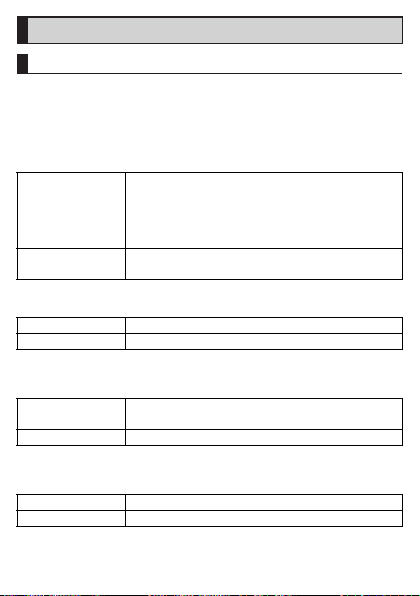
Available Security Codes
7
Security Codes
The product has various security codes that you can use.
The available security codes are as follows. Do not forget the various security
codes that are set as they are necessary for various operations and contracts.
Be sure to change the initial values to your own numbers you have chosen.
■ Security code
Example of usage A To do remote operation of voice mail and call
Initial value
■ Security key
Example of usage
Initial value
Be sure to change the initial values to your own numbers you have chosen.
■ PIN code
Example of usage
Initial value
Be sure to change the initial values to your own numbers you have chosen.
■ Lock No. (NFC/Osaifu-Keitai lock)
Example of usage
Initial value
forwarding services from a landline phone
B To use Customer Service Center and to do various
inquiries, applications, and modifications on the au
homepage
A four digit number chosen by the customer and
noted on the application form
To set and release restriction on voice calls, etc.
1234
To prevent unauthorized use of the au Nano IC Card
04 by third parties
1234
To use the NFC/Osaifu-Keitai lock
1234
- 27 -
Page 29

PIN
7
■ PIN Code
To prevent unauthorized use of the au Nano IC Card 04 by a third party, you
can set the product to require PIN code entry every time the power is turned
on. You also need to enter PIN code when setting whether PIN code entry is
required.
If PIN code is incorrectly entered three times consecutively, the PIN code will
be locked. You can unlock the PIN code using PUK code.
• At the time of purchase, the PIN code is “1234”, and entry requirement is “not
required”. You can change the PIN code to any 4- to 8-digit number and the
entry requirement to “required” if necessary.
To use the product with a PIN code “required”, be sure to change the PIN
code to your own number you have chosen.
■ PUK Code
In case PIN code is locked, you can unlock it by entering PUK code.
• PUK code is an eight-digit number given at the time of purchase, which is
printed on the back side of the plastic card on which your au Nano IC Card
04 is attached.
• After entering PUK code, you need to set a new PIN code.
• If PUK code is incorrectly entered ten times consecutively, contact an au
shop, PiPit or Customer Service Center.
• “PIN code” is not reset by initializing the product.
◎ When the PIN code is locked, the product may restart for the security
reasons.
- 28 -
Page 30

Notes on Waterproof and Dustproof
7
Properties
Before using the product, thoroughly read the contents of “Notes on
Waterproof and Dustproof Properties” to ensure correct use. Failure to follow
the contents described in these sections may cause liquid or dust to get
inside, resulting in overheating, ignition, electric shock, injury or fault.
Proper operations of the product are not guaranteed in every possible
condition during actual use. Faults determined, after an inspection, to be
caused by mishandling by the customer such as by using the product without
following the contents written on “Notes on Waterproof and Dustproof
Properties” are not covered by the warranty.
■ Waterproof and Dustproof Properties of the Product
The product has a protection rating (JIS C 0920) for waterproof property
equivalent to IPX5
*3
IP6X
cover is securely closed (Based on the experiments by the Company).
*1 IPX5 means that the cell phone continues to fu nction as a phone after being
subjected to a water jet (approximately 12.5 liters/min) discharged from a wa ter
pouring nozzle (inner diameter: 6.3 mm), fro m all directions and approximately 3
meters away from the cell phone for at least 3 mi nutes.
*2 IPX8 means that the cell phone continues to functi on as a phone after being gently
lowered into a tank filled with still tap water (at room te mperature) to the depth of
1.5 meter, immersed at the bottom for approximately 30 minutes and then taken out
of the tank.
*3 IP6X means that the cell phone securely con tinues to its function of no grit and dust
getting inside the main unit even after it has been placed in an apparatu s with grit
and dust (diameter: 75 μ m or less) and s haken for 8 hours.
■ Waterproof and dustproof properties of the product enables you
• To talk on the product in the rain without an umbrella (with a precipitation of
20 mm/hour or smaller).
• To use the product at the poolside. However, do not get it wet with water
other than tap water such as water in the swimming pool or submerge it in
water in the swimming pool.
*1
on the condition that the au Nano IC Card 04/microSD memory card
and IPX8*2, as well as dustproof property equivalent to
- 29 -
Page 31

• To wash the product with the low-pressure water flow of a tap water (6 liters/
7
min or lower) at the room temperature (5°C to 35°C).
■ Handling the product
• Close the au Nano IC Card 04/microSD memory card cover securely. Even a
fine obstacle (hair, sand, tiny fiber, etc.) put between contact surface may
cause liquid or dust to get inside.
• If liquid such as water is splashed onto the product with the au Nano IC Card
04/microSD memory card cover opened, the liquid may seep inside and
cause electric shock or fault. Stop using it, turn off the power and then
contact an au shop near you or Keitai Guarantee Service Center.
• When the product is wet, wipe it with a dry and clean cloth.
• When your hand or the product is wet or foreign objects are attached to it,
never open/close the au Nano IC Card 04/microSD memory card cover.
• The product is resistant to fresh and tap water at room temperature (5°C to
35°C) only. If you let the product get wet with or submerged into the liquids
other than fresh and tap water at room temperature, stop using it and wash it
with fresh and tap water at room temperature.
• Do not use the earphone/microphone jack/external connection jack when the
jack is wet or sand or dust is attached to it. Doing so may cause impairment
of the waterproof/dustproof property or cause electric shock, short circuit,
etc. resulting in a fire, burns, or a fault.
■ Dustproof property of the product
• The dustproof property of the product only guarantees a protection rating
equivalent to IP6X and does not guarantee its performance under other using
conditions such as when the product is directly put on sand such as a beach.
• If dust is attached to the product, immediately wash it away with water or
otherwise clear it completely before use.
- 30 -
Page 32

■ Notes on Using the Product
7
• Do not let the product get wet with or submerged into the following liquids.
・ Water containing soap, detergent or bath powder
・ Seawater or water from a swimming pool
・ Hot spring, hot water, etc.
• If foreign object such as salt water, seawater, drink, seasoning, food, dirt or
soil is attached on the product, immediately wash it away.
When it gets dry and coagulated on the product, the stains get hard to get rid
of and may cause scratching or fault.
• Using the product without completely washing sand or mud away may cause
fault such as scratches and damages on the product.
• Do not immerse the product in a bathtub or swimming pool. Also, do not use
it under water. (including key operations.)
• The product is not designed to withstand high water pressure. Do not expose
the product to a strong water flow with tap water, shower, etc. (6 liters/min or
more) or submerge it under water.
• To prevent condensation, wait until the product reaches room temperature
before you bring it from a cold place into a warm place. If condensation
occurs, leave it in room temperature until the condensation is removed.
• Do not get the product wet with hot water, use it in saunas or expose it to hot
air from hair dryer etc.
• Do not place the product where it gets extremely hot or cold such as near a
stove or in a refrigerator.
• Volumes may temporarily become lower due to water entering in the
earpiece, mouthpiece and speaker. Drain water and dry the product well
before use.
• When water drops are attached on the touch panel or you perform touch
operations with your hand wet, the product may not properly function.
• The product does not float on water.
• Do not use the product in heavy rain.
• Do not leave the product wet. Doing so may let the liquids freeze on the
product in cold places or otherwise cause fault.
- 31 -
Page 33

• Do not drop or otherwise subject the product to strong impact or jab the
7
earpiece, mouthpiece, speaker, etc. with a sharp object. Doing so may
cause scratching, deformation, etc. on/of the product, resulting in impairment
of waterproof/dustproof property.
• Do not place the product directly on sand at a beach, sandbox, etc. or on
mud. Grains of sand may get into the earpiece, speaker, etc., causing the
volume to drop.
• If the au Nano IC Card 04/microSD memory card cover degrades or is
damaged, the waterproof/dustproof property cannot be maintained. In such
case, contact an au shop near you.
■ Maintaining the Waterproof and Dustproof Properties
■ Rubber seal
The rubber seal on the au Nano IC Card 04/microSD memory card cover is
important to maintain the waterproof/dustproof property. Be sure to observe
the following items .
• Do not remove or scratch it.
• When closing the au Nano IC Card 04/microSD memory card cover, do not
get the rubber seal caught. Also, do not insert sharp objects into gaps
around the au Nano IC Card 04/microSD memory card cover, the earphone/
microphone jack or external connection jack section.
Doing so may damage the rubber seal and cause liquid or dust to get inside.
• It is recommended to replace the parts for maintaining the waterproof/
dustproof property (pay service) once every two years regardless of whether
any abnormality is present. For information on part replacement, contact an
au shop near you.
- 32 -
Page 34

■ Precautions on Charging
7
Specified charger (sold separately) and optional accessories are not
waterproof/dustproof. Be sure to check the following items before and after
charging.
• Check that there are no water drops or foreign objects on the product. If
foreign objects are attached on the product, immediately wash it away. Also,
if it is wet or after it gets wet, drain water well and wipe remaining water off
with a clean dry cloth etc. before inserting the microUSB plug into the
external connection jack.
• Never connect the microUSB plug when the product or specified charger
(sold separately) is wet or foreign objects are attached to it.
Although the product is water/dust resistant, the specified charger (sold
separately) is not water/dust resistant. Any water or foreign matter on the
product or microUSB plug when inserting the microUSB plug while the
product/specified charger is wet or dirty might cause electric shock or short
circuit/corrosion causing abnormal overheating, burnout, fire, burns, or a
fault.
• Do not touch the specified charger (sold separately) with wet hands. Doing
so may cause electric shock.
• Do not splash water onto the specified charger (sold separately) or optional
accessories when using the equipment. Do not use the equipment in places
where water is regularly used such as a bathroom, shower room, kitchen and
lavatory. Doing so may cause fire, electric shock, a fault, or injury.
- 33 -
Page 35

■ Washing the Product
7
If any stain, dust, sand, soft drink, etc. is attached to the surface of the product,
gently wipe it off with a cloth and wash the product under a mild water flow (up
to 6 liters/min) of tap water at room temperature (5°C to 35°C) approximately
10 cm away from the faucet or shower head.
Hold the au Nano IC Card 04/microSD memory card cover so that it does not
open, and wash the product with your hands without using a brush or sponge.
After washing the product, drain water off and then use the product.
• Make sure that the au Nano IC Card 04/microSD memory card cover is
securely closed before washing the product.
• Do not wash the product with a washing machine or an ultrasound bath.
• The earphone/microphone jack section and external connection jack section
are especially subject to stain such as dust or sand adhesion. Wash away
stain carefully so as not to keep it remaining in the sections. Also, after
washing it away, make sure the sections get sufficiently dried off before using
the product. Using the product with sand or water drops remaining in the
jack sections may cause fault.
• When cleaning the earphone/microphone jack section and external
connection jack section, do not use tools such as a cotton swab or jam a
cloth into the jack sections. Doing so may cause impairment of waterproof/
dustproof property etc., resulting in fire, burns, or a fault.
• Never put the product in a microwave oven for drying it. Doing so may cause
the internal battery to leak liquid, overheat, rupture or ignite. Also, doing so
may cause the product to overheat, emit smoke, ignite or cause destruction
of circuit components.
• Do not expose the product to hot air from a hair dryer or leave it in a high
temperature environment for drying it. Doing so may cause the product to
deform, discolor, get out of order, etc.
- 34 -
Page 36
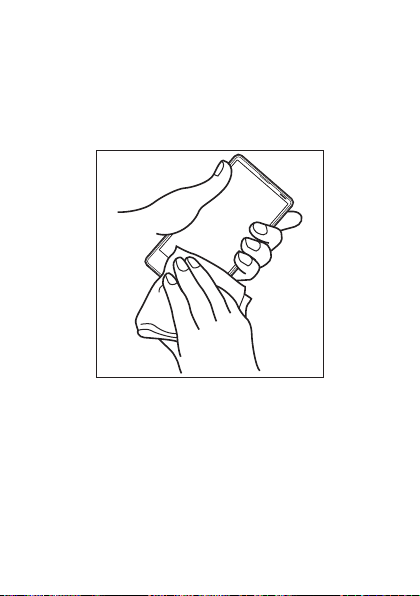
■ Draining Water
7
If the product gets wet, make sure to drain water remaining in the earphone/
microphone jack section, external connection jack section, earpiece (receiver)
section, mouthpiece (microphone) section, speaker section, key section, sub
microphone section, etc.
A Wipe off water on the surface of the product carefully with
a dry and clean cloth etc.
If a strap is attached, dry it sufficiently as well.
- 35 -
Page 37
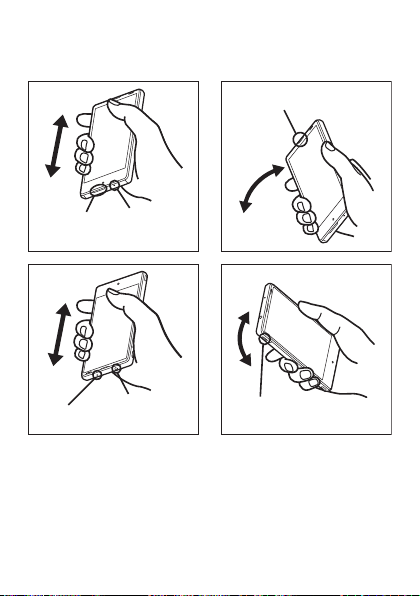
B Hold the product securely and shake it approximately 20
Mouthpiece
(Microphone)
section
Speaker
section
Earpiece (Receiver)
section
Earphone/
Microphone
jack section
Sub
microphone
section
External connection
jack section
7
times until there is no more water splashing.
Make sure of the safety around you and shake the product while holding it
securely not to let it drop.
- 36 -
Page 38
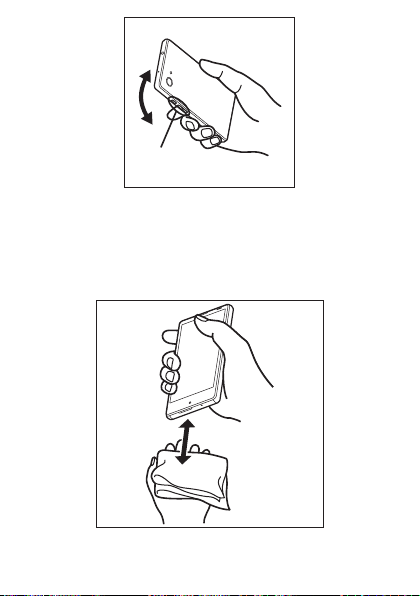
Key section
7
C
Wipe off water remaining in the grooves of each section by
gently putting the product against a dry and clean cloth etc.
Since water is sometimes left in the grooves of each section, clear them of
water by putting a cloth against their openings and gently patting them.
Make sure that there is no more water or foreign objects remaining in
them.
- 37 -
Page 39

D Lay out a dry cloth etc. beneath and leave the product on
7
the cloth at room temperature for approximately 2 to 3
hours to dry it.
Water, if any, remaining in the product may ooze up after wiping off.
Do not wipe off water remaining in the grooves directly by a cotton swab
etc.
■ Precautions to be taken after water draining
Do not use the product with water drops still left on it.
• Doing so may cause call disruption or cause clothes or bags to get wet.
• Doing so may cause the earphone/microphone jack, external connection
jack, etc. to short-circuit, causing fire or a fault.
• Doing so in a cold region may cause a fault due to water drops freezing.
- 38 -
Page 40

Notes on Using Bluetooth®/Wireless LAN
7
(Wi-Fi®) Functions
- 39 -
®
®
) and Bluetooth® devices is
®
devices use
Precautions about Bluetooth
®
• The Bluetooth
of Japan and FCC standards and EC directives, and has been certified.
• The 2.4 GHz band used by wireless LAN (Wi-Fi
shared by various other devices. For this reason, Bluetooth
technologies for minimizing effects from other devices using the same radio
frequency band. In some cases, however, the communication speed and
connectable range may be decreased, or disconnection may occur, due to
interference by other devices.
• The communication speed and connectable range vary depending on the
distance between communication devices, obstacles and the connected
devices used.
function of the product conforms to the domestic standards
Precautions about Wireless LAN (Wi-Fi®)
®
• The wireless LAN (Wi-Fi
standards of Japan, FCC standards and EC directives, and has been
certified.
• Do not use the product in places where electromagnetic waves are
generated or near electric products, AV and OA equipment, or other
magnetized devices.
• Subjecting the product to magnetic or electrical noise might increase noise
and prevent it from performing communications. (The product is particularly
susceptible to noise when it is used near a microwave oven.)
• Using the product near a TV, radio or similar appliance might cause
reception interference and disrupt TV images.
• Searching might not be successful if there are multiple wireless LAN (Wi-Fi
access points near the product and the same channel is being used.
) function of the product conforms to the domestic
®
)
Page 41
• The communication speed and connectable range vary depending on the
7
distance between communication devices, obstacles and the connected
devices used.
Frequency Band
®
and wireless LAN (Wi-Fi®) functions (2.4 GHz band) of the product
Bluetooth
use frequencies in the 2.4 GHz band ranging from 2.402 GHz to 2.480 GHz.
You can perform the following operations to confirm information on frequency
band.
On the home screen, “Apps Sheet” [[Settings] [[About phone]
[[Authentication].
®
• Bluetooth
• Wireless LAN (Wi-Fi
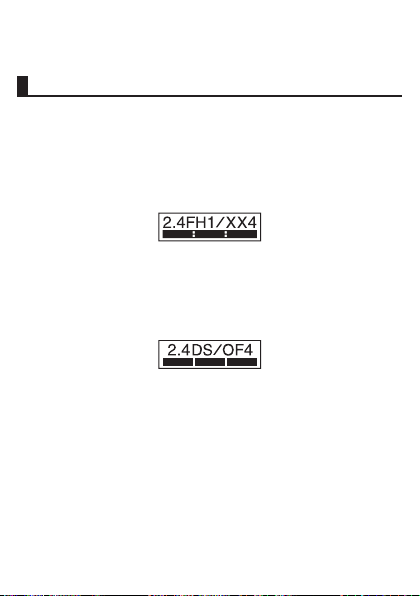
function: 2.4FH1/XX4
The product uses the 2.4 GHz band.
FH1 uses FH-SS as the modulation scheme. The interference distance is
about 10 m or less.
XX4 uses other schemes. The interference distance is about 40 m or less.
Bands of mobile unit identification devices cannot be avoided.
The product uses the 2.4 GHz band.
DS-SS and OFDM are used as the modulation schemes. The interference
distance is about 40 m or less.
Bands of mobile unit identification devices can be avoided.
Channels available with the 2.4 GHz band wireless LAN (Wi-Fi
product are between 1 to 13.
Available channels differ depending on the country.
For use in airplane, check with the airline company in advance.
®
) function: 2.4DS/OF4
®
) of the
- 40 -
Page 42

■ Bluetooth® function precautions
7
The frequencies used by the Bluetooth® function of the product are in the 2.4
GHz band. In this frequency band, in addition to home electrical appliances
such as microwave ovens and industrial, scientific and medical devices, other
similar wireless stations, in-plant wireless stations for mobile unit identification
that require a license for use such as factory production lines, specific small
power wireless stations that do not require licenses, and amateur wireless
stations (collectively called “other wireless stations” from here on) are
operated.
1. Before using the product, make sure that “other wireless stations” are not in
operation nearby.
2. In the event that instances of radio wave interference have occurred
between the product and “other wireless stations”, immediately either
relocate the product or stop operation of the device (stop emission of radio
waves).
3. If you are unclear on any points or are troubled by anything, contact an au
shop or Customer Service Center.
■ 2.4 GHz band wireless LAN (Wi-Fi®) precautions
The frequencies used by the wireless LAN (Wi-Fi®) function of the product are
in the 2.4 GHz and 5 GHz band. In the 2.4 GHz frequency band, in addition to
home electrical appliances such as microwave ovens and industrial, scientific
and medical devices, other similar wireless stations, in-plant wireless stations
for mobile unit identification that require a license for use such as factory
production lines, specific small power wireless stations that do not require
licenses, and amateur wireless stations (collectively called “other wireless
stations” from here on) are operated.
1. Before using the product, make sure that “other wireless stations” are not in
operation nearby.
2. In the event that instances of radio wave interference have occurred
between the product and “other wireless stations”, immediately either
relocate the product or stop operation of the device (stop emission of radio
waves).
3. If you are unclear on any points or are troubled by anything, contact an au
shop or Customer Service Center.
- 41 -
Page 43

■ 5 GHz band wireless LAN (Wi-Fi®) function precautions
7
In the 5 GHz frequency band, three channels of 5.2 GHz/5.3 GHz/5.6 GHz
band (W52/W53/W56) are available.
• W52 (5.2 GHz band/36, 40, 44, 48 ch)
• W53 (5.3 GHz band/52, 56, 60, 64 ch)
• W56 (5.6 GHz band/100, 104, 108, 112, 116, 120, 124, 128, 132, 136, 140
ch)
Making a communication with 5.2 GHz/5.3 GHz band (W52/W53) outdoors is
prohibited by the Radio Law.
◎ Connections between the product and all other Bluetooth® and wireless
◎ The product supports security features for wireless communications that
◎ Wireless LAN (Wi-Fi®) has the advantage that it can be freely connected
◎ The Company assumes no responsibility for leakage of data or
◎ Since Bluetooth® and wireless LAN (Wi-Fi®) functions use the same
®
) devices have not been confirmed. Therefore, connections
LAN (Wi-Fi
with all Bluetooth
are compliant with the Bluetooth
specifications, but the security may not be sufficient depending on the
usage environment and configuration. Be careful when making data
communication using Bluetooth
anywhere within the radio wave range, as it uses radio waves for
exchanging information. At the same time, there is a risk that a malicious
third party may obtain unauthorized access if security settings have not
been configured. You are recommended to configure security settings
before using wireless LAN (Wi-Fi
information that may occur during Bluetooth
communication.
frequency band, using the both functions at the same time may cause
radio wave interference resulting in decreased communication speed or
disconnection from the network. If connection fails, stop using either of
the Bluetooth
®
and wireless LAN (Wi-Fi®) devices are not guaranteed.
®
and wireless LAN (Wi-Fi®) standard
®
or wireless LAN (Wi- Fi®) function.
®
) at your decision and responsibility.
®
/wireless LAN (Wi-Fi®)
®
and wireless LAN (Wi-Fi®) functions.
- 42 -
Page 44

Notes on Packet Communication Charge
7
• Since constant Internet connection is possible with the product, packet
communication may be performed automatically by some applications,
resulting in high packet communication charges. Therefore, subscription to
the flat-rate/discount service for packet communication charges is
recommended.
• To browse homepages, download applications, communicate using
applications, send/receive e-mails and configure various settings,
connection to the Internet is required, to which packet communication
charge applies.
* Packet communication charge does not apply to wirel ess LAN (Wi-Fi®).
Notes on Applications
• Be sure to check the security of the application, then install it at your own risk.
Some applications might cause virus infection, damage various data, and
send out your location information, usage history or personal information
stored in your cell phone via the Internet.
• The Company assumes no responsibility for any problems that might be
caused by applications you have installed. In such case, you may be
charged a repair fee even during the warranty period.
• The Company assumes no responsibility for any disadvantage brought to
you or any third party by applications you have installed.
• Insertion of a microSD memory card is necessary to use some applications.
• Some applications keep the screen turned on while they are active, or rapidly
drain the battery while running in the background.
• Operation procedures and screen appearances of the applications
preinstalled in the product and those installed by you are subject to change
without notice as a result of version upgrade. In addition, operation
procedures described in the “Basic Manual” available on the au homepage
and on the product, “Notes on Usage” (this manual) or “Setting Guide”/“Full
Instruction Manual” (Japanese) available on the au homepage may differ
from the actual procedures.
- 43 -
Page 45
Export Administration Regulations
7
The product and its accessories may be subject to the Japan Export
Administration Regulations (“Foreign Exchange and Foreign Trade Law” and
its related laws). In addition, U.S. Re-export Regulations (Export Administration
Regulations) may apply to the product and its accessories. To export and
re-export the product and its accessories, take the required measures on your
responsibility and at your expenses. For details on the procedures, contact the
Ministry of Economy, Trade and Industry or the U.S. Department of Commerce.
Intellectual Property Rights
■ Trademarks
The company names and product names appearing in this manual are
trademarks or registered trademarks of their respective holders.
• The microSD logo, microSDHC logo and microSDXC logo are trademarks of
SD-3C, LLC.
®
• The Bluetooth
Bluetooth SIG, Inc., and SHARP CORPORATION is licensed to use these
trademarks.
word mark and logo are registered trademarks owned by the
- 44 -
Page 46
®
7
, Wi-Fi CERTIFIED logo, Wi-Fi Protected Setup logo, Wi-Fi Direct®,
• Wi-Fi
®
are registered trademarks of Wi-Fi Alliance®.
Miracast
• Wi-Fi CERTIFIED
Wi-Fi Alliance
™
and Wi-Fi Protected Setup™ are trademarks of
®
.
• “ ” is a trademark of BUFFALO INC.
• The official name for Microsoft
Operating System.
®
• Microsoft
• Microsoft
• QR code is a registered trademark of DENSO WAVE INCORPORATED.
• FeliCa is a contactless IC card technology developed by Sony Corporation.
• & is a registered trademark of FeliCa Networks, Inc.
, Windows®, Windows Vista®, Microsoft® Excel®, Microsoft®
®
PowerPoint
trademarks of Microsoft Corporation in the U.S.A. and other countries.
Corporation in the U.S.A.
, Windows Media® and Exchange® are trademarks or registered
®
Word and Microsoft® Office are product names of Microsoft
FeliCa is a registered trademark of Sony Corporation.
®
Windows® is Microsoft® Windows®
- 45 -
Page 47
• Twitter and Twitter logo are trademarks or registered trademarks of Twitter,
7
Inc.
• Facebook is a registered trademark of Facebook, Inc.
™
, Google logo, Android™, Android logo, Google Play™, Google Play
• Google
logo, Google+
Gmail
Maps
Voice Search
logo, Google Drive
logo and Google Now
• LINE is a trademark or registered trademark of LINE Corporation.
• Rovi, G-GUIDE, G-GUIDE MOBILE and G-Guide related logos are
trademarks or registered trademarks of Rovi Corporation and/or its
subsidiaries in Japan.
• This product includes ZIRENE SOUND of AM3D A/S in Denmark.
ZIRENE SOUND is a registered/trade mark of AM3D A/S.
• DLNA
marks, or certification marks of the Digital Living Network Alliance.
Sharp Corporation has acquired DLNA certification for the device.
• Oracle and Java are registered trademarks of Oracle and/or its affiliates.
Other names may be trademarks of their respective owners.
™
, Google+ logo, Google Settings™, Google Settings logo,
™
, Gmail logo, Google Calendar™, Google Calendar logo, Google
™
, Google Maps logo, Google Chrome™, Google Chrome logo, Google
™
, Google Voice Search logo, Picasa™, YouTube™, YouTube
™
, Google Drive logo, Google™ Search, Google Search
™
are trademarks of Google Inc.
®
, the DLNA Logo and DLNA CERTIFIED™ are trademarks, service
- 46 -
Page 48

• “NightCatch/ナイトキャッチ”, “スマートファミリンク/Smart Familink”, “翻訳
7
ファインダー”, “検索ファインダー”, “検索キャプチャー”, “体験しよう!”, “グ
リップマジック/Grip Magic”, “AQUOS/アクオス” and the “AQUOS” logo, “セ
リエミニ/SERIE mini”, “AV家電リンク”, the “エコ技” symbol, “ワンタッチ
シャッター”, “Bright Keep”, “Sweep ON”, “スロートーク/Slow Talk”, “ウェル
カムシート/Welcome Sheet”, “Feel Home”, “フレーミングアドバイザー/
FramingAdviser”, “「書」メモ”, “EDGESTエフェクト”, “エモパー/emopa”, “エ
モパーク/emopark”, “エモパーメモ”, “ヒカリエモーション”, “スワイプペア/
Swipe Pair”, “PrintSmash”, “エスショイン/S-Shoin”, “LCフォント/LCFONT”
and the LC logo symbol are registered trademarks or trademarks of Sharp
Corporation.
• iWnn of OMRON SOFTWARE Co., Ltd. is used for conversion methods for
Japanese language, and for phrase prediction methods for English.
iWnn © OMRON SOFTWARE Co., Ltd. 2008-2015 All Rights Reserved.
iWnn IME © OMRON SOFTWARE Co., Ltd. 2009-2015 All Rights Reserved.
• The font type pre-installed in this product, Shin Go M, is licensed by
Morisawa Inc. solely for the use with this product.
“Morisawa” and “Shin Go” are registered trademarks or trademarks of
Morisawa Inc.
• Portions Copyright ©2004 Intel Corporation
• aptX is a registered trademark of CSR plc.
• The product includes pictograms that SHARP CORPORATION is licensed by
NTT DOCOMO, INC.
• © 2014 Comic Communication Co., Ltd. All rights reserved.
• VoiceText of HOYA Service Corporation is used for speech synthesis.
VoiceText is a registered trademark of Voiceware co.,ltd.
• Speech recognition technology mimi
®
is a registered trademark of Fairy Devices Inc.
mimi
• DigiOn and DiXiM are trademarks of DigiOn, Inc.
• MPEG Layer-3 audio coding technology licensed from Fraunhofer IIS and
Thomson.
®
is used in emopa 3.1.
- 47 -
Page 49

■ Open Source Software
7
• The product includes software based on GNU General Public License (GPL),
GNU Lesser General Public License (LGPL) and other licenses.
For details on licenses of related software, on the home screen, “Apps Sheet”
[[Settings] [[About phone] [[Legal information] [[Open source
licenses].
• Source codes of software based on GPL, LGPL and Mozilla Public License
(MPL) can be referred to on the following site for free. For details, refer to the
following site.
(http://k-tai.sharp.co.jp/support/developers/oss/)
■ OpenSSL License
【OpenSSL License】
Copyright © 1998-2009 The OpenSSL Project. All rights reserved.
This product includes software developed by the OpenSSL Project for use in
the OpenSSL Toolkit. (http://www.openssl.org/)
THIS SOFTWARE IS PROVIDED BY THE OpenSSL PROJECT “AS IS” AND
ANY EXPRESSED OR IMPLIED WARRANTIES, INCLUDING, BUT NOT
LIMITED TO, THE IMPLIED WARRANTIES OF MERCHANTABILITY AND
FITNESS FOR A PARTICULAR PURPOSE ARE DISCLAIMED. IN NO EVENT
SHALL THE OpenSSL PROJECT OR ITS CONTRIBUTORS BE LIABLE FOR
ANY DIRECT, INDIRECT, INCIDENTAL, SPECIAL, EXEMPLARY, OR
CONSEQUENTIAL DAMAGES (INCLUDING, BUT NOT LIMITED TO,
PROCUREMENT OF SUBSTITUTE GOODS OR SERVICES; LOSS OF USE,
DATA, OR PROFITS; OR BUSINESS INTERRUPTION) HOWEVER CAUSED
AND ON ANY THEORY OF LIABILITY, WHETHER IN CONTRACT, STRICT
LIABILITY, OR TORT (INCLUDING NEGLIGENCE OR OTHERWISE) ARISING
IN ANY WAY OUT OF THE USE OF THIS SOFTWARE, EVEN IF ADVISED OF
THE POSSIBILITY OF SUCH DAMAGE.
【Original SSLeay License】
Copyright © 1995-1998 Eric Young ([email protected]) All rights reserved.
This product includes cryptographic software written by Eric Young
([email protected])
- 48 -
Page 50

THIS SOFTWARE IS PROVIDED BY ERIC YOUNG “AS IS” AND ANY EXPRESS
7
OR IMPLIED WARRANTIES, INCLUDING, BUT NOT LIMITED TO, THE
IMPLIED WARRANTIES OF MERCHANTABILITY AND FITNESS FOR A
PARTICULAR PURPOSE ARE DISCLAIMED. IN NO EVENT SHALL THE
AUTHOR OR CONTRIBUTORS BE LIABLE FOR ANY DIRECT, INDIRECT,
INCIDENTAL, SPECIAL, EXEMPLARY, OR CONSEQUENTIAL DAMAGES
(INCLUDING, BUT NOT LIMITED TO, PROCUREMENT OF SUBSTITUTE
GOODS OR SERVICES; LOSS OF USE, DATA, OR PROFITS; OR BUSINESS
INTERRUPTION) HOWEVER CAUSED AND ON ANY THEORY OF LIABILITY,
WHETHER IN CONTRACT, STRICT LIABILITY, OR TORT (INCLUDING
NEGLIGENCE OR OTHERWISE) ARISING IN ANY WAY OUT OF THE USE OF
THIS SOFTWARE, EVEN IF ADVISED OF THE POSSIBILITY OF SUCH
DAMAGE.
■ Windows Notations
In this manual, operating systems (Japanese editions) are abbreviated as
follows.
• Windows 10 is an abbreviation of Microsoft
Enterprise and Education).
• Windows 8.1 is an abbreviation of Microsoft
®
8.1 Pro, and Microsoft® Windows® 8.1 Enterprise.
Windows
• Windows 8 is an abbreviation of Microsoft
®
8 Pro, and Microsoft® Windows® 8 Enterprise.
Windows
• Windows 7 is an abbreviation of Microsoft
Basic, Home Premium, Professional, Enterprise, Ultimate).
• Windows Vista is an abbreviation of Microsoft
Home Premium, Business, Enterprise, Ultimate).
®
Windows® 10 (Home, Pro,
®
Windows® 8.1, Microsoft®
®
Windows® 8, Microsoft®
®
Windows® 7 (Starter, Home
®
Windows Vista® (Home Basic,
■ More
The software installed on this product or part of it may not be altered,
translated/adapted, reverse-engineered, decompiled or reverse-assembled
and any such actions are prohibited.
Under the MPEG-4 Visual Patent Portfolio License, customers have licensed
permission for the following use of this product to engage in non-profit
personal use. Other uses are not permitted.
- 49 -
Page 51

• Recording MPEG-4 Visual standard video (henceforth referred to as MPEG-4
7
Video)
• Playing back MPEG-4 Video that a customer engaged in personal and
non-profit activities has recorded
• Playing back MPEG-4 Video obtained from a provider licensed by MPEG-LA
When using for promotion, in-house use, profit use, and other intended uses,
contact MPEG LA. LLC.
• This product is licensed under the AVC patent portfolio license for the
personal and noncommercial use of a consumer to (i) encode video in
compliance with the AVC standard (henceforth referred to as AVC video)
and/or (ii) decode AVC video that was encoded by a consumer engaged in a
personal and noncommercial activity and/or was obtained from a video
provider licensed to provide AVC video. No license is granted or shall be
implied for any other use. Additional information may be obtained from MPEG
LA, L.L.C.
Visit (http://www.mpegla.com)
• This product is licensed under the VC-1 Patent Portfolio License for the
personal and noncommercial use of a consumer to (i) encode video in
compliance with the VC-1 standard (henceforth referred to as VC-1 video)
and/or (ii) decode VC-1 video that was encoded by a consumer engaged in
a personal and noncommercial activity and/or was obtained from a video
provider licensed to provide VC-1 video. No license is granted or shall be
implied for any other use. Additional information may be obtained from MPEG
LA, L.L.C.
Visit (http://www.mpegla.com)
- 50 -
Page 52

This product is licensed under the MPEG-4 Visual Patent Portfolio License for
7
the personal and non-commercial use of a consumer to (i) encode video in
compliance with the MPEG-4 Video Standard (“MPEG-4 Video”) and/or (ii)
decode MPEG-4 Video that was encoded by a consumer engaged in a
personal and non-commercial activity and/or was obtained from a licensed
video provider. No license is granted or implied for any other use. Additional
information may be obtained from MPEG LA. See (http://www.mpegla.com).
This product is licensed under the MPEG-4 Systems Patent Portfolio License
for encoding in compliance with the MPEG-4 Systems Standard, except that an
additional license and payment of royalties are necessary for encoding in
connection with (i) data stored or replicated in physical media which is paid for
on a title by title basis and/or (ii) data which is paid for on a title by title basis
and is transmitted to an end user for permanent storage and/or use. Such
additional license may be obtained from MPEG LA, LLC. See (http://
www.mpegla.com) for additional details.
- 51 -
Page 53
CellphoneandPHSoperatorscollectandrecycleunused
telephones,batteriesandbatterychargersatstoresbearing
thelogoregardlessofbrandandmanufacturertoprotect
theenvironmentandreusevaluableresources.
濡れた状態での充電は、
異常な発熱・焼損などの
原因となり大変危険です。
(tollfree)
CustomerServiceCenter
Forinquiries,call:
Forgeneralinformation,charges,andoperationassistance
Fromfixed-linephones: Fromaucellphones:
areacodenotrequired
areacodenotrequired
Fromfixed-linephones: Fromaucellphones:
Incaseabovenumbersarenotavailable,calltoll-free:
0120-977-033
(exceptOkinawa)
0120-977-699(Okinawa)
Forservicecancelationprocedureincaseoflossortheft
(tollfree)
onyouraucellphone.
KeitaiGuaranteeServiceCenter
Forloss,theftordamage(tollfree)
Fromfixed-linephones/aucellphones:
Businesshours:9:00to21:00(7daysaweek)
Businesshours:9:00to20:00(7daysaweek)
Businesshours:24hours(7daysaweek)
0120-925-919
7
 Loading...