

Page 1
A58H / Swisscom EN / A31008-M2055-F151-1-2X19 / overview.fm / 02.12.2008
2
3
5
4
6
7
14
13
11
9
10
8
1
12
15
ÐV
01.10.08 07:15
Hotline Menu
The handset at a glance
The handset at a glance
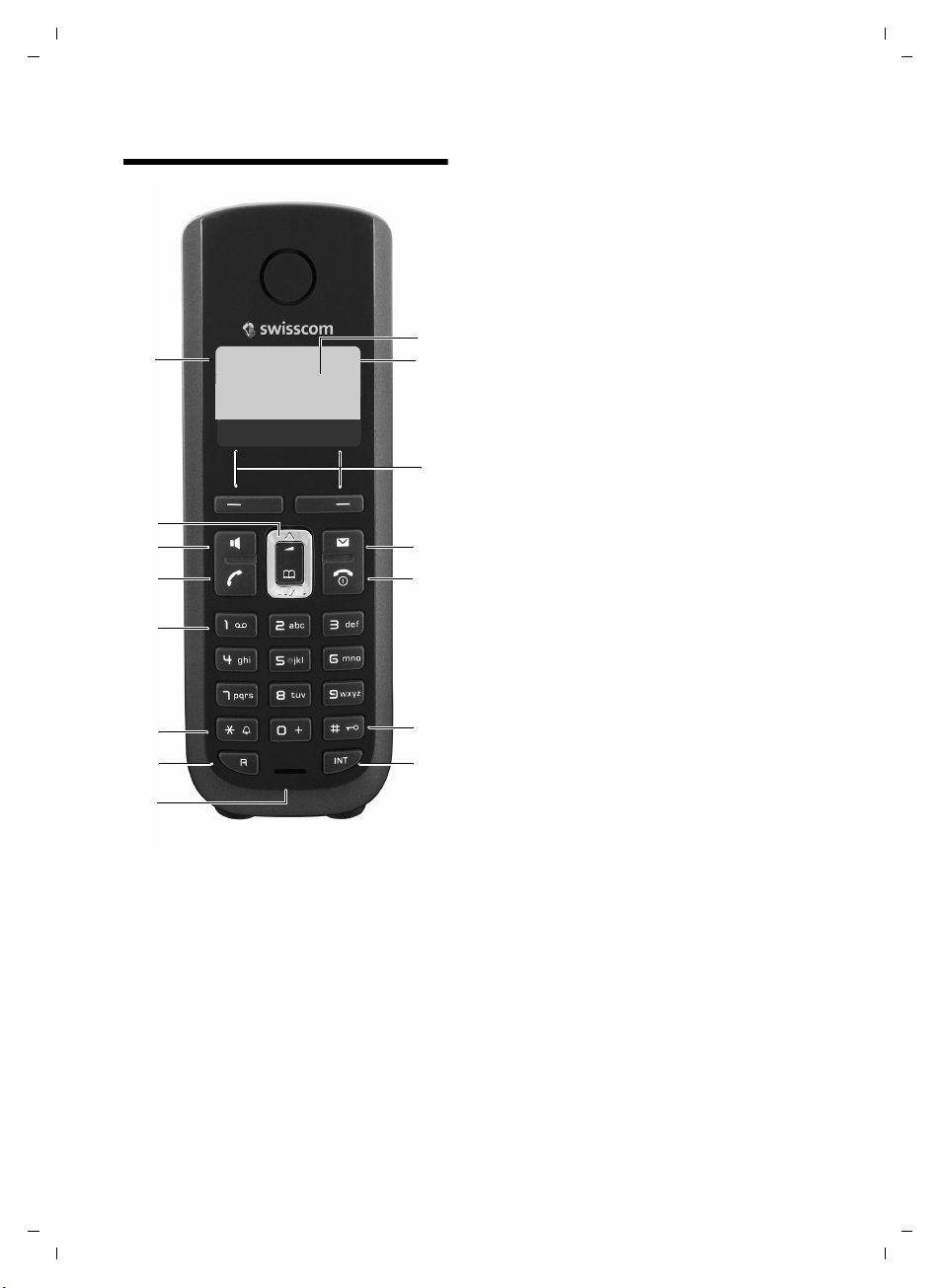
1 Display in idle status (example)
2 Charge status of the
batteries (
3 Display keys (
4 Message key (
Access to calls and message lists;
Flashes: new message or new call
5 End call key, On/Off key
End call, cancel function, go back one menu
level (press briefly), back to idle status
(press and hold), activate/deactivate
handset (press and hold in idle status)
6 Hash key
Keypad lock on/off (press and hold in
idle status);
toggles between upper/lower case
and digits
7 Internal key
Make an internal call (
8 Microphone
9 Recall key
- Consultation call (flash)
- Insert a dialling pause (press and hold)
10 Star key
Ringer melody on/off (press and hold)
11 Key 1
Dial answer machine (depending on the
base station)/network mailbox (press and
hold)
12 Tal k key
Answer a call, open last number redial list
(press briefly), start dialling (press and hold)
13 Handsfree key
Switch between earpiece and
handsfree mode;
Lights up: handsfree activated
Flashes: incoming call
14 Control key (
15 Signal strength (
¢ page 11)
¢ page 17)
¢ page 25)
¢ page 23)
¢ page 17)
¢ page 11)
Version 4, 29.10.2007
1
Page 2

A58H / Swisscom EN / A31008-M2055-F151-1-2X19 / overview.fm / 02.12.2008
Environmental benefits of the Aton CL109/CLT109
Environmental benefits of the Aton CL109/CLT109
The Aton CL109/CLT109 has a low level of energy consumption and reduces radiation.
Reduced power consumption
Your telephone has a power-saving adapter plug and uses 60% less power than standard
devices. Power consumption in standby mode is approx. 1.3 watt.
Minimal radiation
The Aton CL109/CLT109 with its preset Eco Mode plus switches off all radiation when in
idle status. During a call, the handset reduces the transmission power according to the
distance from the base station.
In addition, you also have the option of further reducing the transmission power of your
Aton CL109/CLT109 during a call by reducing the range.
For further information, please see your phone's user guide.
Version 4, 29.10.2007
2
Page 3

A58H / Swisscom EN / A31008-M2055-F151-1-2X19 / C38_A58IVZ.fm / 02.12.2008
Contents
The handset at a glance . . . . . . . . . . . . . . . . . . . . . . . . . . . . . . . . . . 1
Environmental benefits of the Aton CL109/CLT109 . . . . . . . . . . . 2
Safety precautions . . . . . . . . . . . . . . . . . . . . . . . . . . . . . . . . . . . . . . 5
First steps . . . . . . . . . . . . . . . . . . . . . . . . . . . . . . . . . . . . . . . . . . . . . 7
Check the package contents . . . . . . . . . . . . . . . . . . . . . . . . . . . . . . . . . . . . . . 7
Setting up the charging cradle . . . . . . . . . . . . . . . . . . . . . . . . . . . . . . . . . . . . 8
Connecting the charging cradle . . . . . . . . . . . . . . . . . . . . . . . . . . . . . . . . . . . 8
Setting up the handset for use . . . . . . . . . . . . . . . . . . . . . . . . . . . . . . . . . . . . 9
What would you like to do next? . . . . . . . . . . . . . . . . . . . . . . . . . . . . . . . . . . 16
Using the phone . . . . . . . . . . . . . . . . . . . . . . . . . . . . . . . . . . . . . . . 17
Control key . . . . . . . . . . . . . . . . . . . . . . . . . . . . . . . . . . . . . . . . . . . . . . . . . . . 17
Display keys . . . . . . . . . . . . . . . . . . . . . . . . . . . . . . . . . . . . . . . . . . . . . . . . . . 17
Keys on the keypad . . . . . . . . . . . . . . . . . . . . . . . . . . . . . . . . . . . . . . . . . . . . 18
"Swisscom Hotline" . . . . . . . . . . . . . . . . . . . . . . . . . . . . . . . . . . . . . . . . . . . . 18
Correcting incorrect entries . . . . . . . . . . . . . . . . . . . . . . . . . . . . . . . . . . . . . . 18
Menu guidance . . . . . . . . . . . . . . . . . . . . . . . . . . . . . . . . . . . . . . . . . . . . . . . 18
Activating/deactivating the handset . . . . . . . . . . . . . . . . . . . . . . . . . . . . . . . 19
Activating/deactivating the keypad lock . . . . . . . . . . . . . . . . . . . . . . . . . . . . 19
Illustration of operating steps in the user guide . . . . . . . . . . . . . . . . . . . . . . 20
Menu tree . . . . . . . . . . . . . . . . . . . . . . . . . . . . . . . . . . . . . . . . . . . . 21
Making calls . . . . . . . . . . . . . . . . . . . . . . . . . . . . . . . . . . . . . . . . . . 22
Making an external call . . . . . . . . . . . . . . . . . . . . . . . . . . . . . . . . . . . . . . . . . 22
Ending a call . . . . . . . . . . . . . . . . . . . . . . . . . . . . . . . . . . . . . . . . . . . . . . . . . 22
Answering a call . . . . . . . . . . . . . . . . . . . . . . . . . . . . . . . . . . . . . . . . . . . . . . 22
Handsfree talking . . . . . . . . . . . . . . . . . . . . . . . . . . . . . . . . . . . . . . . . . . . . . 22
Muting . . . . . . . . . . . . . . . . . . . . . . . . . . . . . . . . . . . . . . . . . . . . . . . . . . . . . . 22
Making internal calls . . . . . . . . . . . . . . . . . . . . . . . . . . . . . . . . . . . . . . . . . . . 23
Using the directory and lists . . . . . . . . . . . . . . . . . . . . . . . . . . . . . 23
Directory . . . . . . . . . . . . . . . . . . . . . . . . . . . . . . . . . . . . . . . . . . . . . . . . . . . . 23
Last number redial list . . . . . . . . . . . . . . . . . . . . . . . . . . . . . . . . . . . . . . . . . . 25
Opening lists with the message key . . . . . . . . . . . . . . . . . . . . . . . . . . . . . . . 25
Setting the alarm clock . . . . . . . . . . . . . . . . . . . . . . . . . . . . . . . . . 25
Contents
Version 4, 29.10.2007
3
Page 4

A58H / Swisscom EN / A31008-M2055-F151-1-2X19 / C38_A58IVZ.fm / 02.12.2008
Contents
Handset settings . . . . . . . . . . . . . . . . . . . . . . . . . . . . . . . . . . . . . . 26
Changing date and time . . . . . . . . . . . . . . . . . . . . . . . . . . . . . . . . . . . . . . . . 26
Changing the display language . . . . . . . . . . . . . . . . . . . . . . . . . . . . . . . . . . . 26
Setting the display . . . . . . . . . . . . . . . . . . . . . . . . . . . . . . . . . . . . . . . . . . . . . 26
Activating/deactivating auto answer . . . . . . . . . . . . . . . . . . . . . . . . . . . . . . . 26
Changing the handsfree/earpiece volume . . . . . . . . . . . . . . . . . . . . . . . . . . 26
Changing ringer . . . . . . . . . . . . . . . . . . . . . . . . . . . . . . . . . . . . . . . . . . . . . . . 27
Activating/deactivating muting for the first ringer tone . . . . . . . . . . . . . . . . 27
Advisory tones . . . . . . . . . . . . . . . . . . . . . . . . . . . . . . . . . . . . . . . . . . . . . . . . 28
Restoring the handset default settings . . . . . . . . . . . . . . . . . . . . . . . . . . . . . 28
Warranty/Maintenance/Repair/ Approval . . . . . . . . . . . . . . . . . . . 29
Repair/Maintenance . . . . . . . . . . . . . . . . . . . . . . . . . . . . . . . . . . . . . . . . . . . . 29
Faults and self-help with
troubleshooting . . . . . . . . . . . . . . . . . . . . . . . . . . . . . . . . . . . . . . . 30
Approval . . . . . . . . . . . . . . . . . . . . . . . . . . . . . . . . . . . . . . . . . . . . . . . . . . . . . 30
Appendix . . . . . . . . . . . . . . . . . . . . . . . . . . . . . . . . . . . . . . . . . . . . . 31
Care . . . . . . . . . . . . . . . . . . . . . . . . . . . . . . . . . . . . . . . . . . . . . . . . . . . . . . . . 31
Contact with liquid . . . . . . . . . . . . . . . . . . . . . . . . . . . . . . . . . . . . . . . . . . . . 31
Specifications . . . . . . . . . . . . . . . . . . . . . . . . . . . . . . . . . . . . . . . . . . . . . . . . . 31
Writing and editing text . . . . . . . . . . . . . . . . . . . . . . . . . . . . . . . . . . . . . . . . . 32
Accessories . . . . . . . . . . . . . . . . . . . . . . . . . . . . . . . . . . . . . . . . . . . 33
Mounting the charging cradle to the wall . . . . . . . . . . . . . . . . . . 33
Index . . . . . . . . . . . . . . . . . . . . . . . . . . . . . . . . . . . . . . . . . . . . . . . . . 34
Version 4, 29.10.2007
4
Page 5
A58H / Swisscom EN / A31008-M2055-F151-1-2X19 / security.fm / 02.12.2008
$
ƒ
Safety precautions
Warning
Read the safety precautions and the user guide before use.
Explain their contents and the potential hazards associated with using the telephone to
your children.
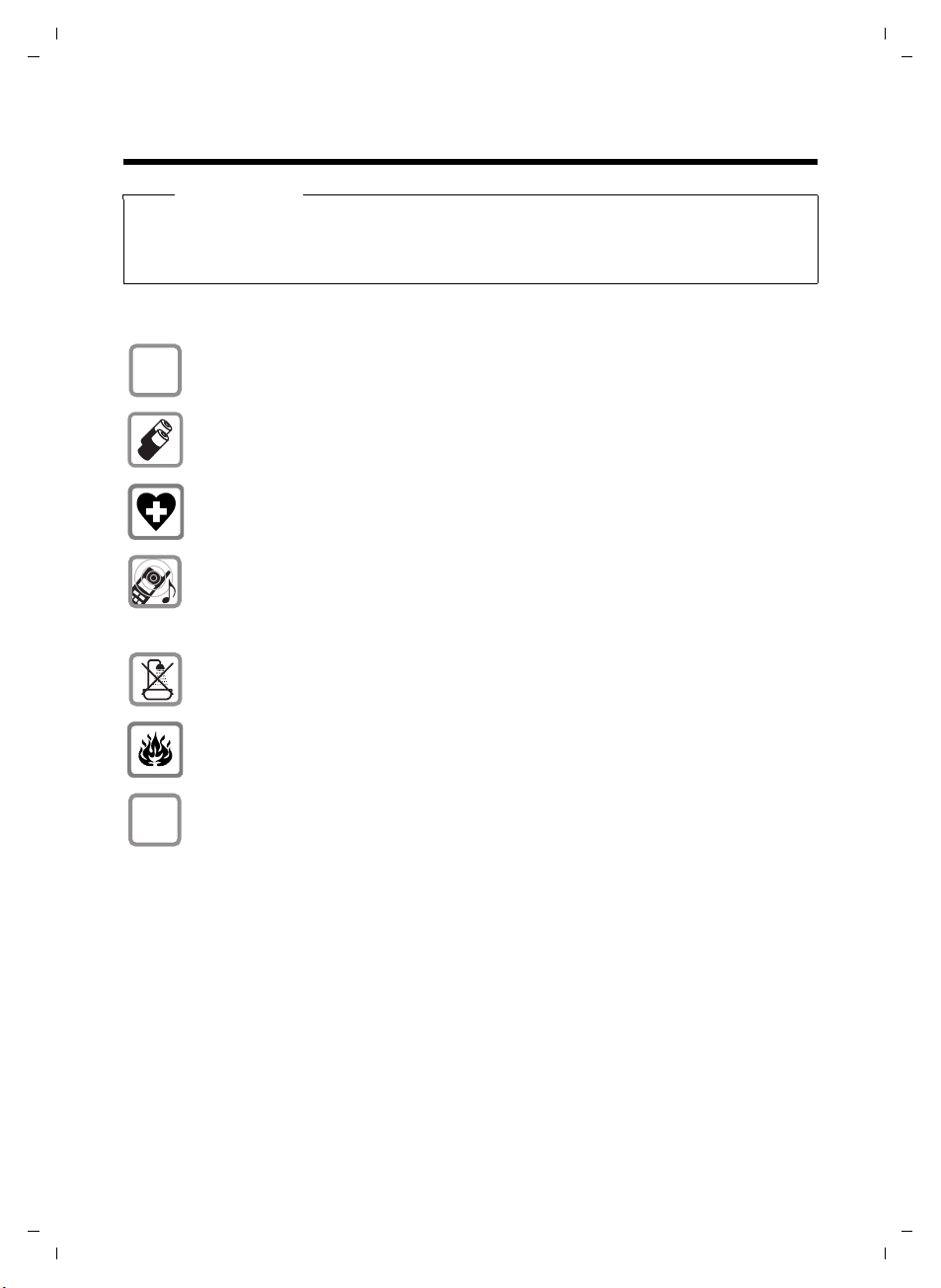
Only use the mains adapter supplied, as indicated on the underside of the
charger.
Safety precautions
Only use the recommended, rechargeable batteries (
use a conventional (non-rechargeable) battery or other battery types as this
could result in significant health risks and personal injury.
The operation of medical appliances may be affected. Be aware of the technical
conditions in your particular environment, e.g. doctor's surgery.
Do not hold the rear of the handset to your ear when it is ringing or when
the handsfree function is activated. Otherwise you risk serious and permanent
damage to your hearing.
The handset may cause an unpleasant humming noise in hearing aids.
Do not install the charging cradle in bathrooms or shower rooms. The charging
cradle is not splashproof (
Do not use your phone in environments with a potential explosion hazard
(e.g. paint shops).
If you give your phone to someone else, make sure you also give them the
user guide.
¢ page 31).
¢ page 31), i. e. never
Version 4, 29.10.2007
5
Page 6

A58H / Swisscom EN / A31008-M2055-F151-1-2X19 / security.fm / 02.12.2008
Safety precautions
Information about disposal
Batteries should not be disposed of in general household waste. Observe the
local waste disposal regulations, details of which can be obtained from your
local authority or the dealer you purchased the product from.
At the end of its service life, this product must not be disposed of with normal
household waste, but must be handed in at the place of purchase or at a collection point for recycling electrical and electronic devices in accordance with the
ordinance governing the return, acceptance and disposal of electrical and electronic equipment (VREG).
The materials can be recycled according to their identification. By reusing and
recycling materials along with other methods of recycling used equipment, you
can make an important contribution to protecting the environment.
Please note
Emergency numbers cannot be dialled if the keypad lock (¢ page 1) is activated!
Not all of the functions described in this user guide are available in all countries.
Version 4, 29.10.2007
6
Page 7
A58H / Swisscom EN / A31008-M2055-F151-1-2X19 / starting.fm / 02.12.2008
21
3
4
5
6
7
First steps
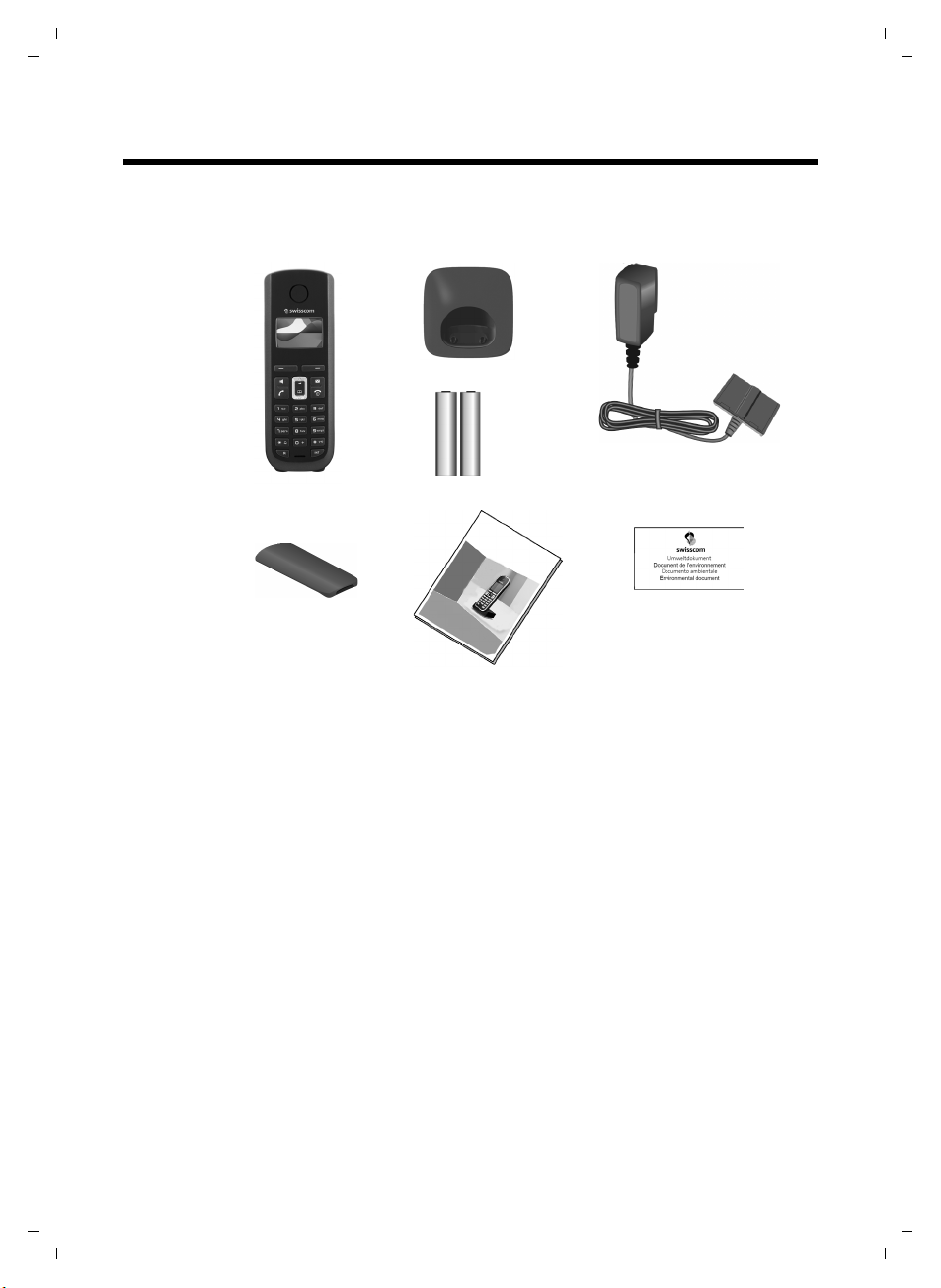
Check the package contents
First steps
Version 4, 29.10.2007
1one handset,
2one charging cradle,
3one mains adapter,
4two batteries,
5one battery cover,
6one user guide,
7environmental leaflet (Swisscom).
7
Page 8
A58H / Swisscom EN / A31008-M2055-F151-1-2X19 / starting.fm / 02.12.2008
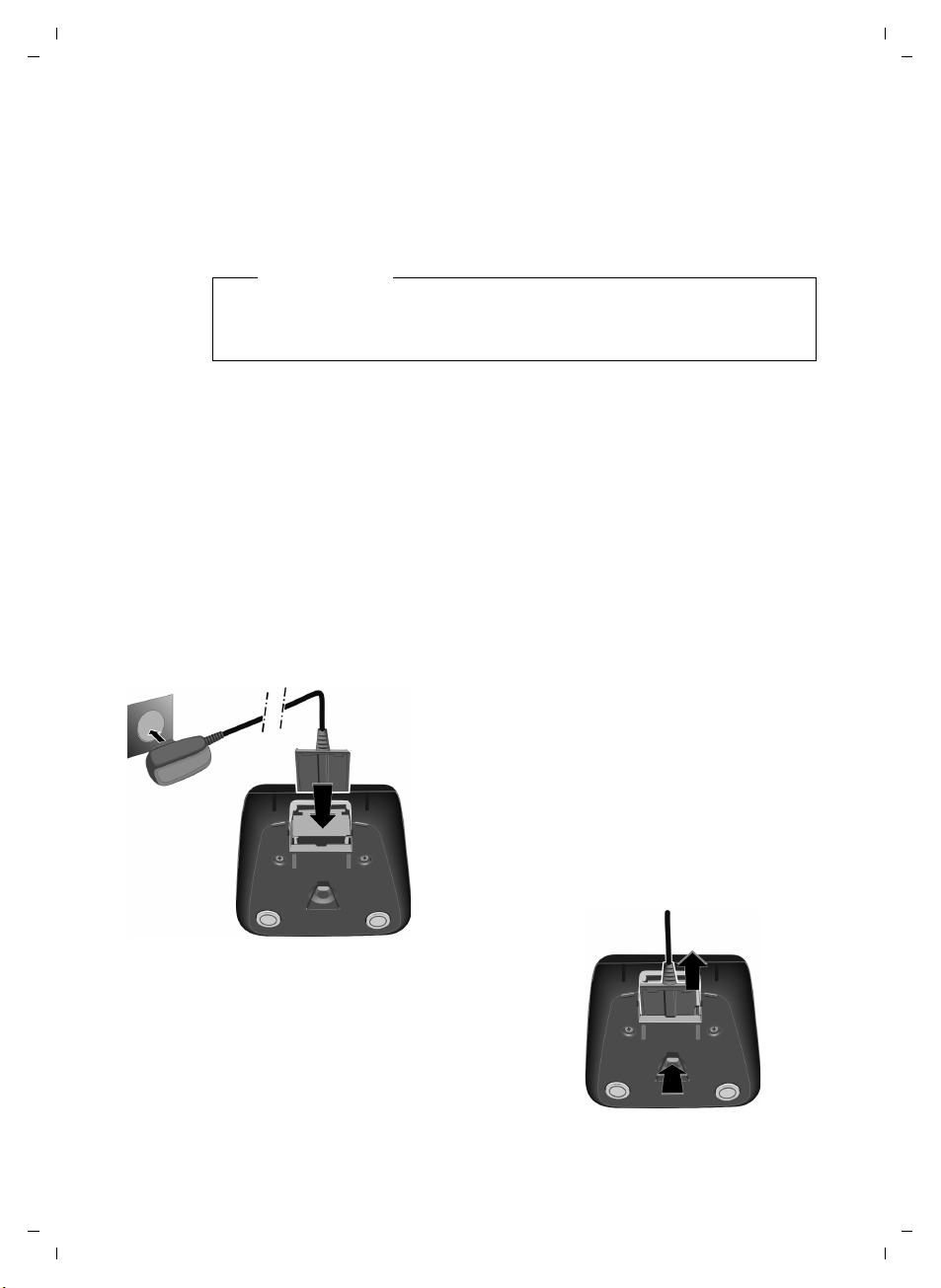
¤ Plug the mains adapter into the plug
socket 2.
¤ Connect the flat plug of the mains
adapter 1.
If you need to disconnect the plug from the
charging cradle, press the release button 1
and disconnect the plug 2.
1
2
1
2
First steps
Setting up the charging cradle
The charging cradle is designed to be operated in enclosed, dry areas at temperatures ranging from +5 °C to +45 °C.
¤ Set up the charging cradles at a central location on a flat, non-slip surface in
your house or apartment.
Please note
Pay attention to the range of the base station.
This is up to 250 m in unobstructed outdoor areas and up to 40 m inside
buildings. The range is reduced when Eco Mode (
The phone's feet do not usually leave any marks on surfaces. However, due to
the multitude of different varnishes and polishes used on today's furnishings,
the occurrence of marks on the surfaces cannot be completely ruled out.
For instructions on how to mount the charging cradle to a wall, please see
¢ page 2) is activated.
¢ page 33.
Please note:
u Never expose the telephone to the influence of heat sources, direct sunlight
or other electrical devices.
u Protect your telephone from moisture, dust, corrosive liquids and vapours.
Connecting the charging cradle
8
Version 4, 29.10.2007
Page 9
A58H / Swisscom EN / A31008-M2055-F151-1-2X19 / starting.fm / 02.12.2008
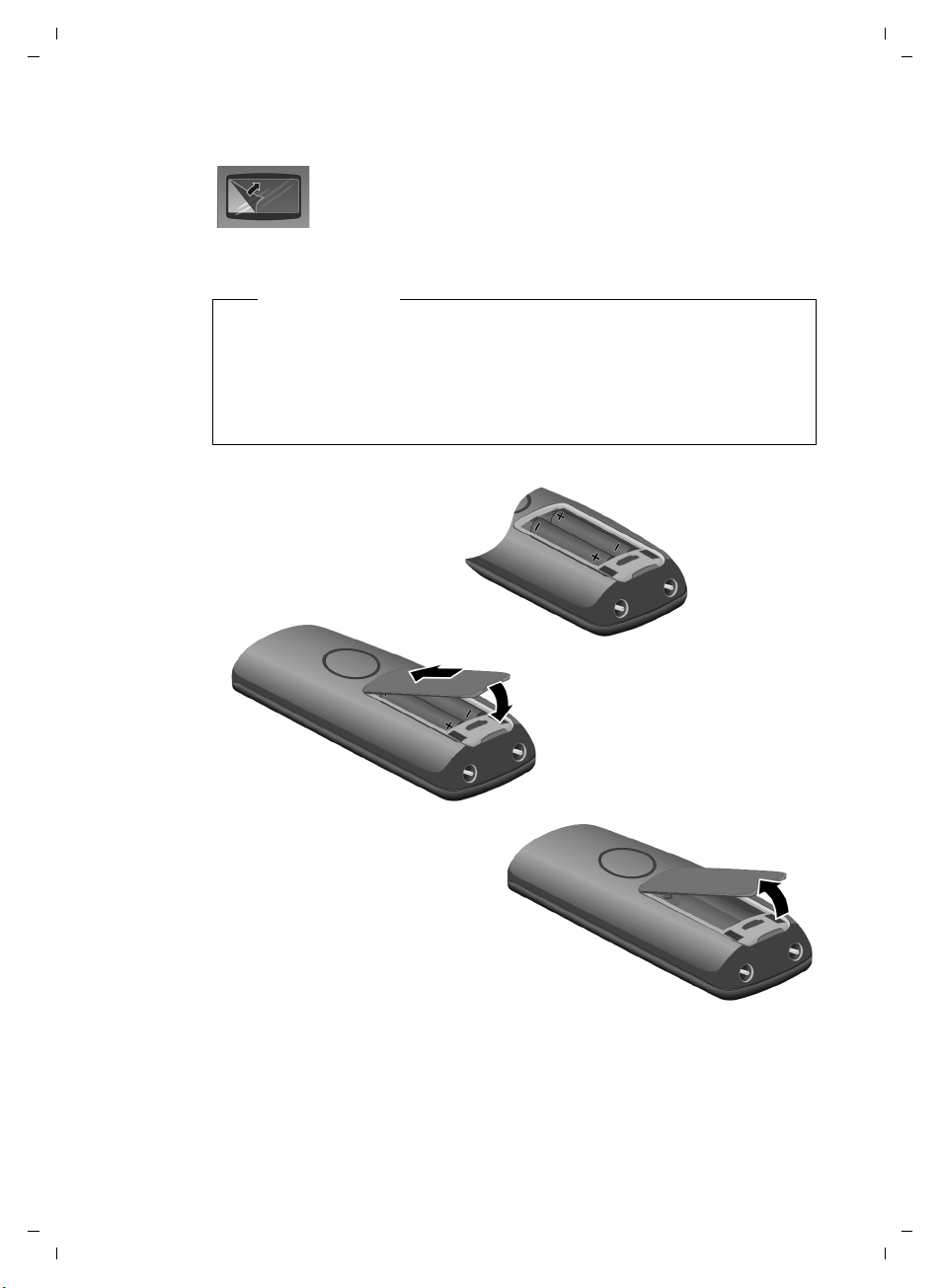
¤ Insert the batteries the
right way round.
The polarity is indicated in/on the battery
compartment.
¤ First insert the battery cover
at the top a.
¤ Then press the cover b until
it clicks into place.
If you need to open the battery
cover, for instance to replace the
batteries, place your fingertip in
the cavity on the casing and pull
the battery cover upwards.
a
b
Setting up the handset for use
The display is protected by a plastic film. Please remove the
protective film!
Inserting the batteries and closing the battery cover
Warning
Use only the rechargeable batteries (¢ page 31). Never use conventional
(non-rechargeable) batteries as this could result in significant health risks
and personal injury. For example, the outer casing of the batteries could be
destroyed or the batteries could explode. The phone could also malfunction
or be damaged as a result of using batteries that are not of the recommended type.
First steps
Version 4, 29.10.2007
9
Page 10
A58H / Swisscom EN / A31008-M2055-F151-1-2X19 / starting.fm / 02.12.2008
Handset is
registering
ë
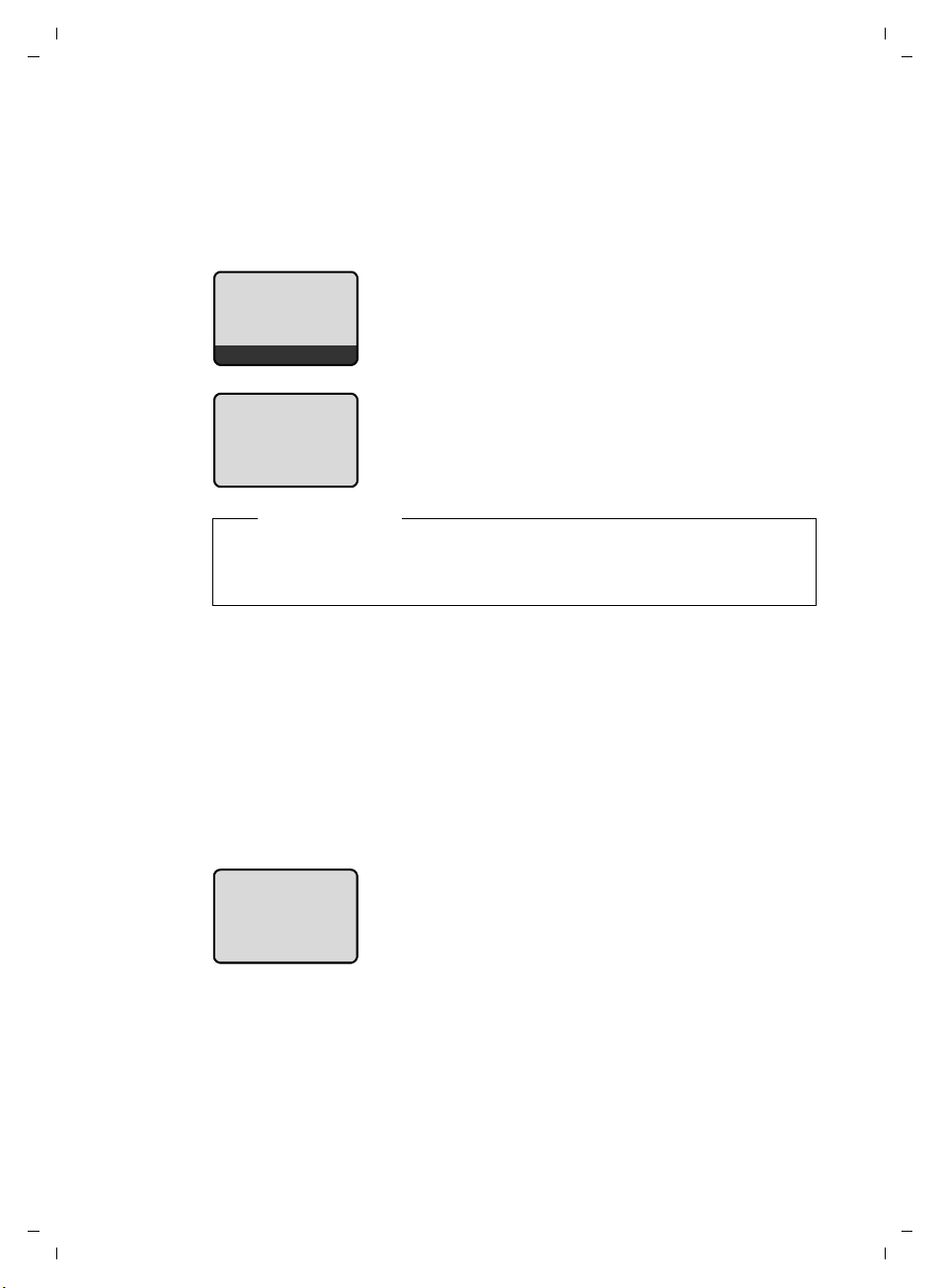
¤ Place the handset with the display facing up
in the base station.
The handset registers automatically.
Registration can take up to 5 minutes.
Do not remove the handset from the base station
during this time.
|V
Place handset
into base
Hotline Menu
Handset is
registering
ë
The registration screen is displayed.
First steps
Registering the handset to the base station
Before you can use the phone, you must first register the handset to the base
station. The actual registration procedure will depend on the type of base station.
Automatically register the handset to the Aton CL109/CLT109 base station
Please note
u Each key press interrupts the automatic registration.
u If automatic registration does not work, the handset will have to be reg-
istered manually.
10
Version 4, 29.10.2007
Manually registering the handset
You must activate manual registration of the handset on both the handset
and the base station.
On the handset:
§Menu§ ¢ Settings ¢ Handset ¢ Register Handset
(If you require further information on the illustration of these operating steps,
please see
~ Enter the system PIN of the base station (the default is 0000) and
¢ page 20.)
§OK§.
press
On the base station:
Within 60 sec. press and hold the registration/paging key on the base station
(approx. 3 sec.).
Page 11
A58H / Swisscom EN / A31008-M2055-F151-1-2X19 / starting.fm / 02.12.2008
ÐV
Hotline Menu
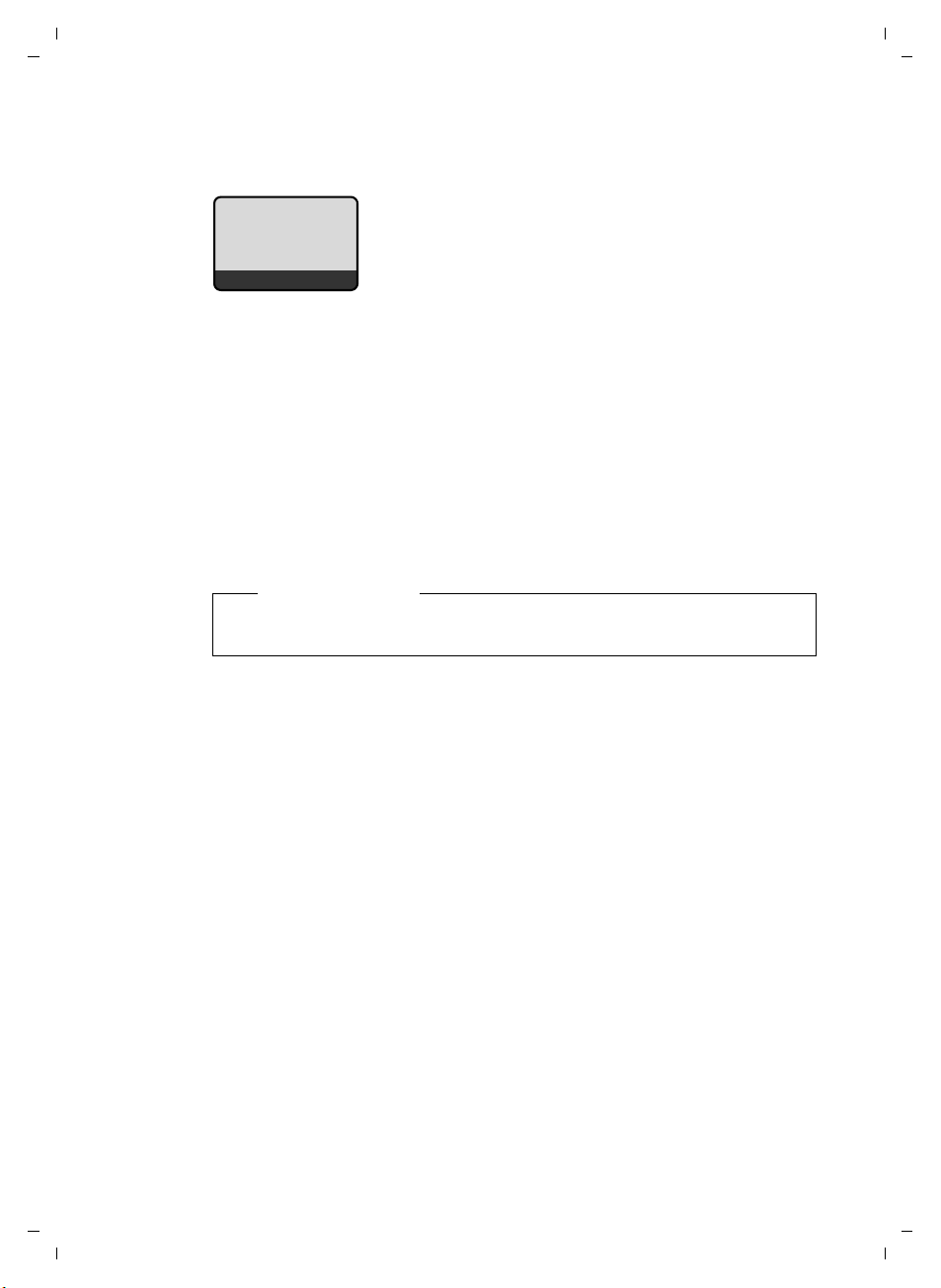
u the strength of the reception signal between
base station and handset:
– good when Eco Mode plus is activated
(default setting): ¼
– good to poor: ÐiÑÒ
–no reception: | flashes
u battery charge status:
– = e V U (flat to full)
– = flashes: batteries almost flat
– e V U flashes: charging procedure
The following is displayed after successful automatic or manual handset
registration:
The handset is assigned the lowest unassigned internal number (1–4). If more
than one handset is registered to the base station, the internal handset number
appears on the display, e.g. INT 2. If the internal numbers 1–4 are already
assigned to other devices, the number 4 will be overwritten.
To charge the batteries, leave the handset in the base station/charging cradle.
First steps
Version 4, 29.10.2007
Please note
Only place the handset in the base station or charging cradle that is
intended for it.
Should you have any questions and problems
¢ page 30.
11
Page 12
A58H / Swisscom EN / A31008-M2055-F151-1-2X19 / starting.fm / 02.12.2008
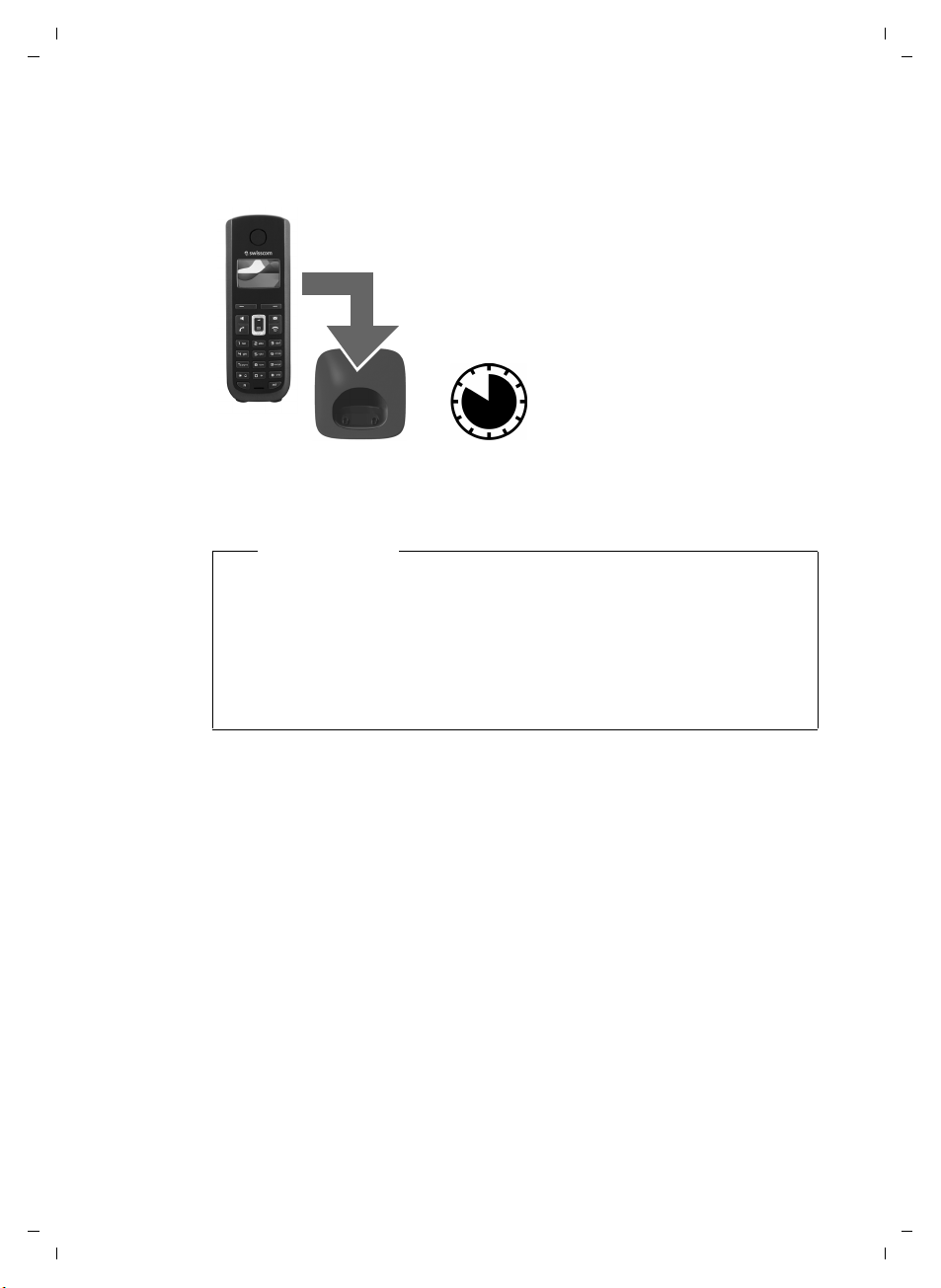
¤ Place the handset in the base station or
charging cradle for ten hours.
¤ Then remove the handset
from the base station or
charging cradle and do not
replace it until the batteries are completely discharged.
10 h
First steps
Initial charging and discharging of the batteries
The correct charge level can only be displayed if the batteries are first fully
charged and discharged.
Please note
u After the first battery charge and discharge you may replace your hand-
set in its base station or charging cradle after every call.
u Always repeat the charging and discharging procedure if you remove the
batteries from the handset and reinsert them.
u The batteries may warm up during charging. This is not dangerous.
u After a while, the charge capacity of the batteries will decrease for tech-
nical reasons.
Version 4, 29.10.2007
12
Page 13
A58H / Swisscom EN / A31008-M2055-F151-1-2X19 / starting.fm / 02.12.2008
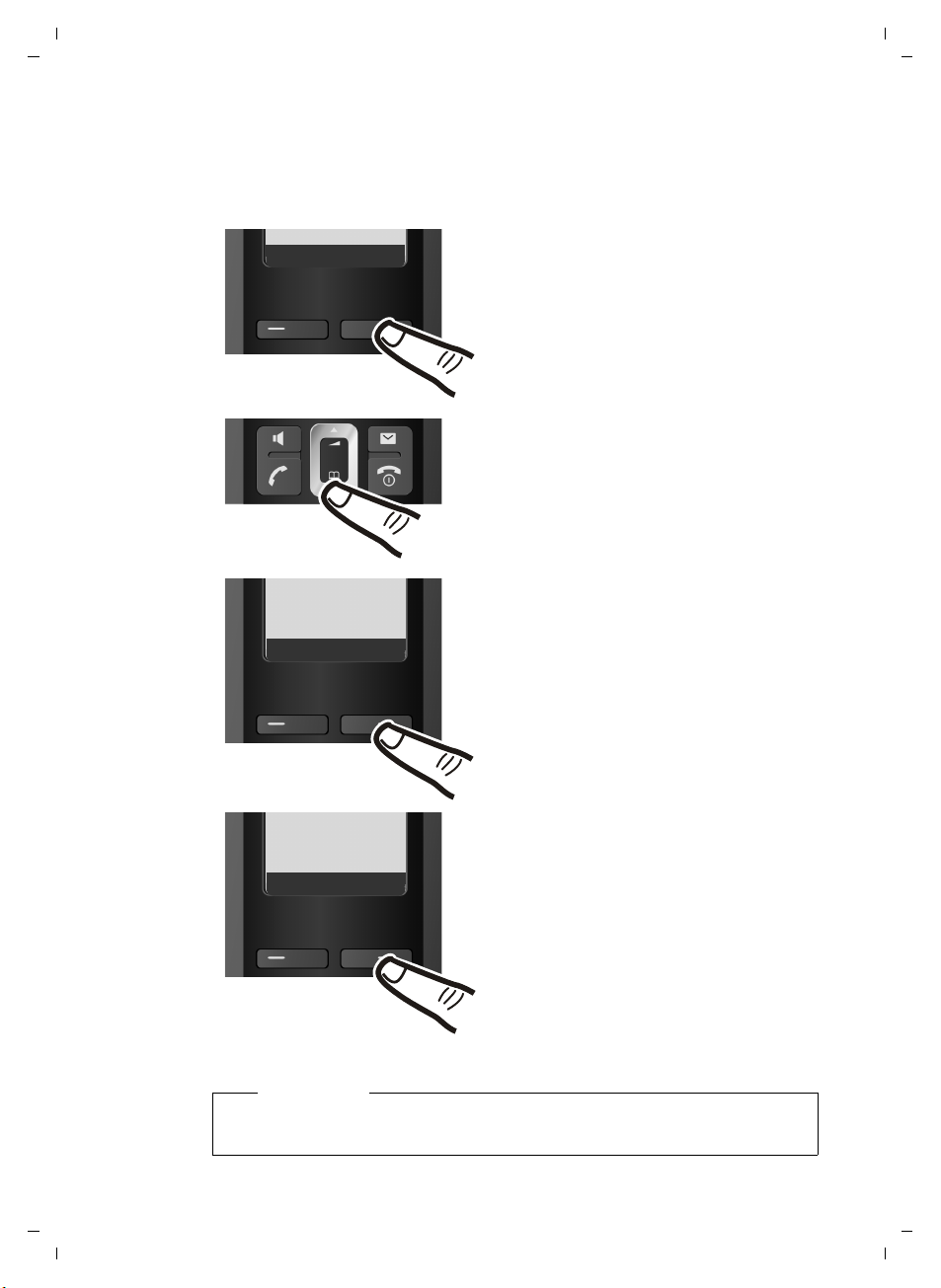
¤ Press the key below §Menu§ on the
display screen to open the main
menu.
¤ Press the bottom of the control
key ...
... until the Settings menu item
appears.
Hotline Menu
Settings
Ç
U OK
¤ Press the key below §OK§ on the
display screen to confirm your
selection.
Date/Time
Ç
U OK
The Date/Time menu item appears
on the display.
¤ Press the key below §OK§ on the
display screen to open the input
field.
Setting the date and time
Set the date and time so that the correct date and time can be assigned to
incoming calls, and so that the alarm can be used.
First steps
Version 4, 29.10.2007
Note
When you receive an incoming call, the date and time are automatically
updated by the network.
13
Page 14
A58H / Swisscom EN / A31008-M2055-F151-1-2X19 / starting.fm / 02.12.2008
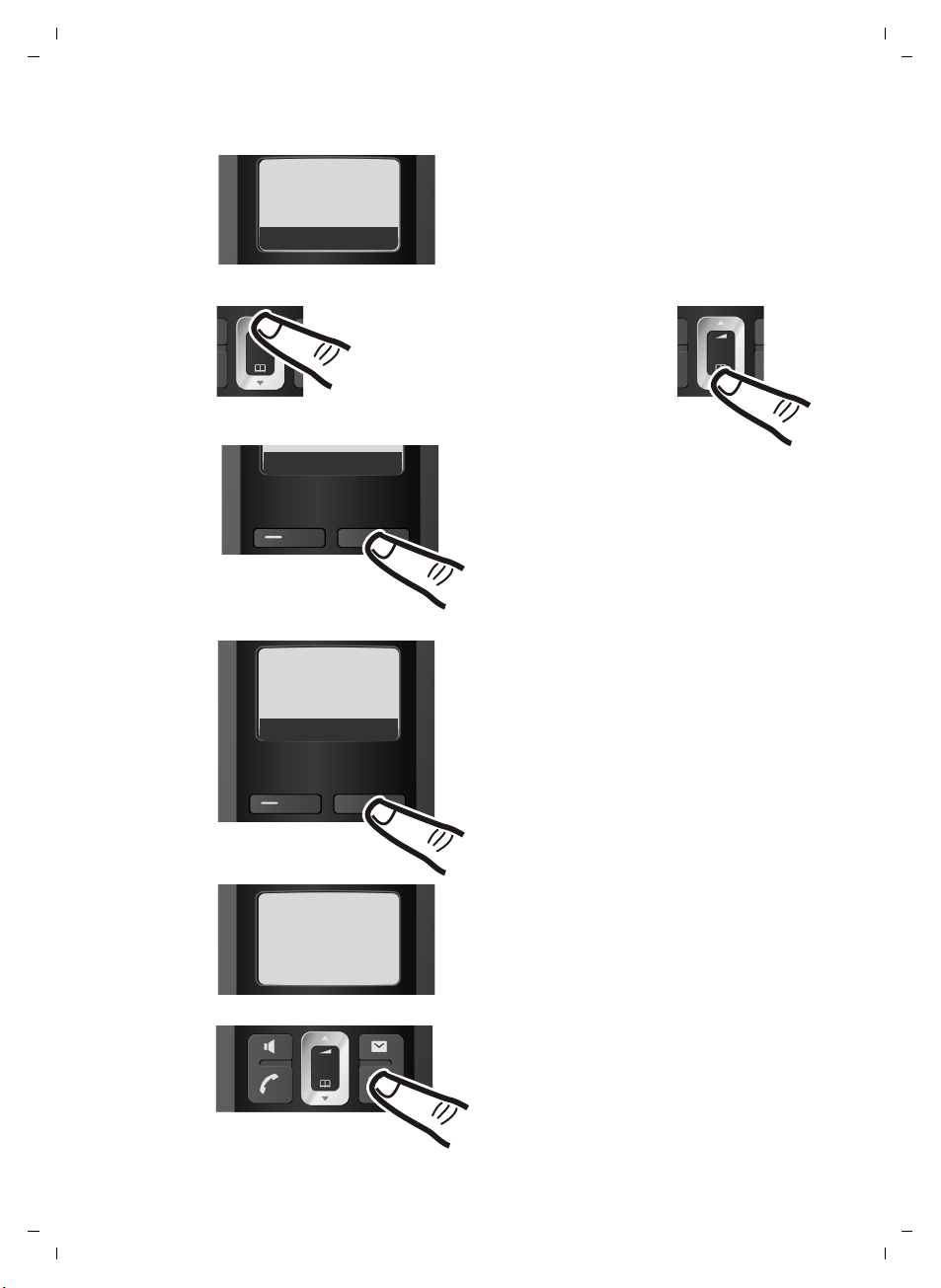
Enter Date:
[01.10.2008]
Ç
T OK
¤ Enter the hours and minutes as
four digit numbers via the handset
e.g. QM5for 07:15 am.
If necessary, use the control key to
toggle between fields.
¤ The active line is marked [...].
Enter day, month and year as an
8-digit number via the handset,
e.g. QQ2QQN
for 01/10/2008.
If you want to correct an entry, press
the top or bottom of the control key
to toggle between fields.
¤ Press the key below §OK§ on the display
screen to confirm your selection.
Enter Time:
[07:15]
Ç
T OK
Ç
T OK
¤ Press and hold the end call key a
to return to the idle status.
The display shows Saved.
You will hear a confirmation tone.
¤ Press the key below §OK§ on the display
screen to confirm your selection.
Saved
First steps
14
Version 4, 29.10.2007
Page 15
A58H / Swisscom EN / A31008-M2055-F151-1-2X19 / starting.fm / 02.12.2008
ÐV
01.10.08 07:15
Þ
Menu
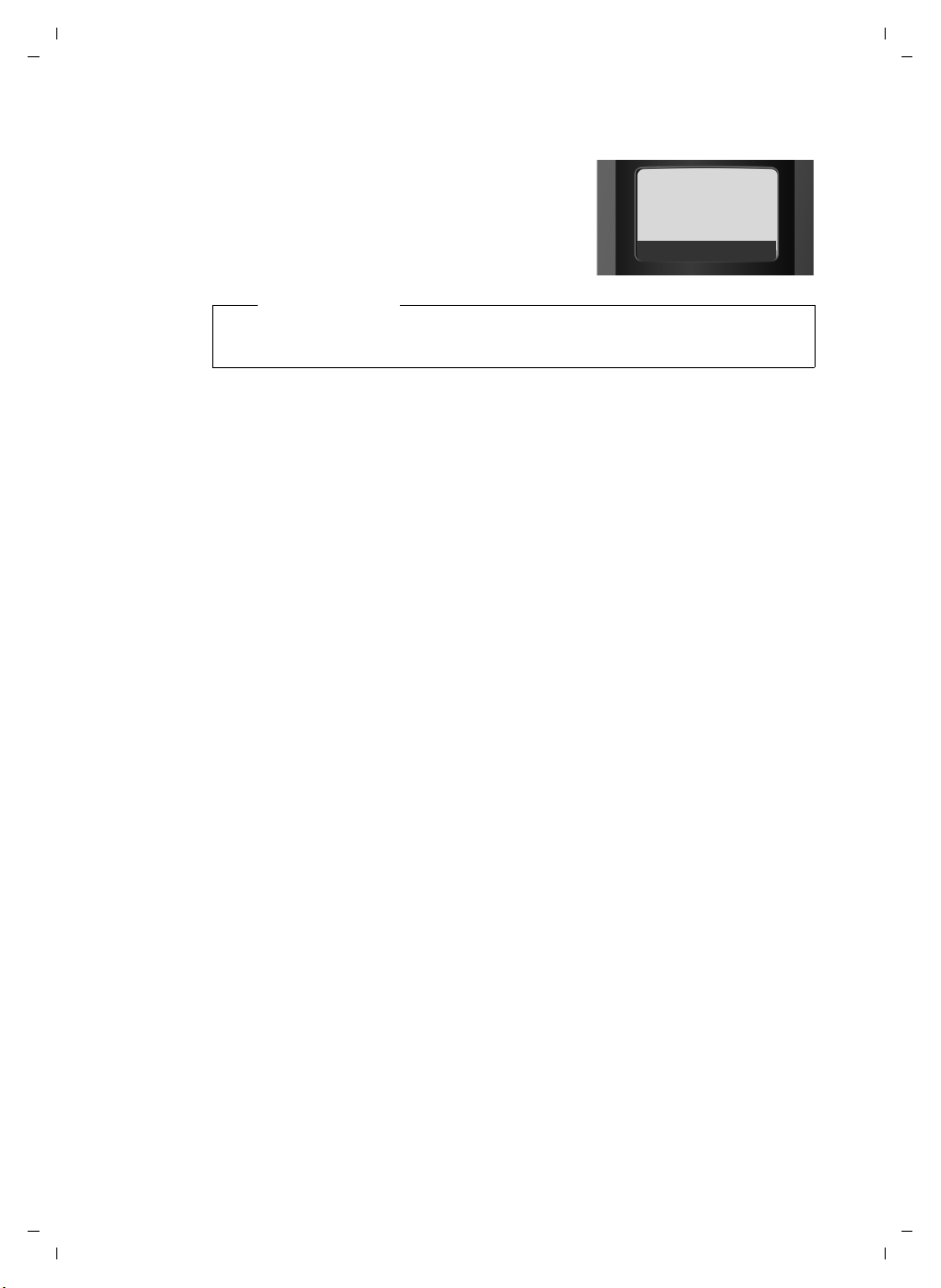
Display in idle status
Once the phone is registered and the time
set, the idle display is shown as in this example
Your phone is now ready for use.
Please note
The range icon is only displayed in idle status if Eco Mode plus is deactivated (depending on the base station, see your phone's user guide).
First steps
Version 4, 29.10.2007
15
Page 16

A58H / Swisscom EN / A31008-M2055-F151-1-2X19 / starting.fm / 02.12.2008
g
g
g
g
First steps
What would you like to do next?
Now you have successfully started your telephone you will probably want to
adapt it to your personal requirements. Use the following guide to quickly
locate the most important subjects.
If you are unfamiliar with menu-driven devices such as other Swisscom telephones you should first read the section entitled "Using the phone"
¢ page 17.
Information on ... ... is located here.
Setting the ringer melody and volume page 27
Setting the handset volume page 26
Setting Eco Mode / Eco Mode+ page 2
Transferring directory entries from existing handsets to
the new handset(s)
If you have any questions about using your phone, please read the tips on
troubleshooting (
¢ page 30) or contact our Customer Care team (¢ page 29).
page 24
Version 4, 29.10.2007
16
Page 17
A58H / Swisscom EN / A31008-M2055-F151-1-2X19 / starting.fm / 02.12.2008
Hotline Menu
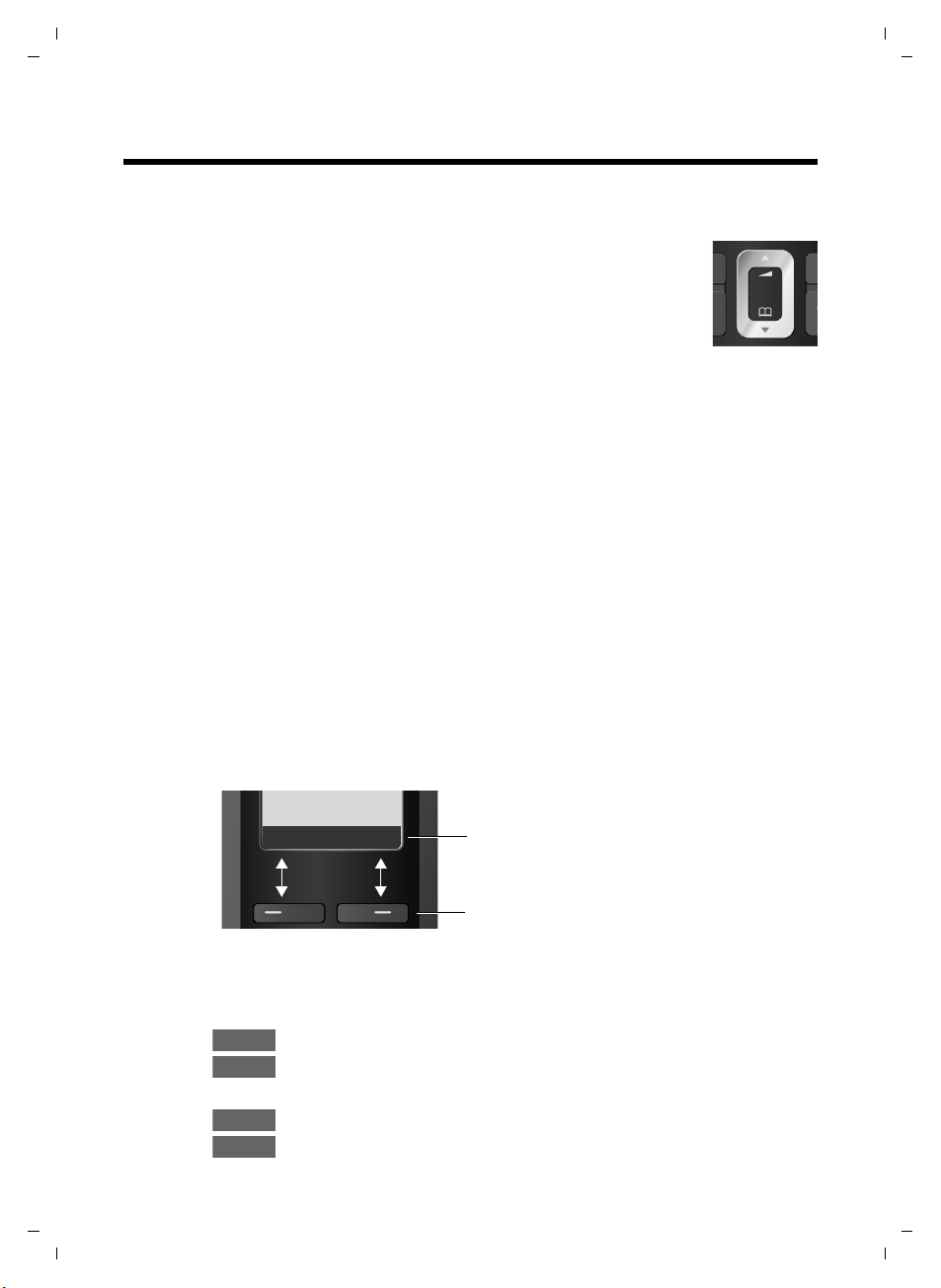
Current display key functions are shown in
the bottom display line.
Display keys
Menu
OK
Ç
Þ
Using the phone
Control key
In the following description the side of the control key you need
to press for each operation is indicated accordingly, e.g.
"press the top of the control key".
The control key has a number of different functions:
When the handset is in idle status
s Open the directory.
t Call up the menu for setting the handset's call volume
¢ page 26), ringer melodies (¢ page 27) and advisory tones
(
¢ page 28).
(
In the main menu, in submenus and lists
t / s Scroll up/down line by line.
In input fields
Use the control key to move the cursor to the left t or right s.
for
t
Using the phone
Display keys
During an external call
s Open the directory.
t Adjust the loudspeaker volume for earpiece and handsfree mode.
The function of the display keys changes depending on the particular operating
situation. Example:
Important display keys:
§§§§Hotline§§§§ Left display key, as long as it has not been assigned a different func-
tion.
Open a context-dependent menu.
Confirm selection.
W Delete key: deletes one character at a time from right to left.
Go back one menu level or cancel operation.
Open the last number redial list.
17
Version 4, 29.10.2007
Page 18
A58H / Swisscom EN / A31008-M2055-F151-1-2X19 / starting.fm / 02.12.2008
Using the phone
Keys on the keypad
c / Q / * etc.
Press the matching key on the handset.
~ Enter digits or letters.
"Swisscom Hotline"
§§§§Hotline§§§§ Press the display key.
Select Hotline. You will be directly connected to the Swisscom Contact Centre.
The access number is pre-programmed as 0800 800 800 cannot be changed.
Please note:
Swisscom Contact Centre 0800 800 800
We will be happy to advise you on this freephone number if you have any questions
relating to telecommunications: fixed line networks, mobiles, DSL Broadband,
Bluewin TV, any questions relating to billing and much more.
Correcting incorrect entries
You can correct incorrect characters in the text by navigating to the incorrect
entry using the control key. You can then:
u press X to delete the character to the left of the cursor,
u insert characters to the left of the cursor,
u overwrite the (flashing) character when entering the time and date etc.
Version 4, 29.10.2007
Menu guidance
Your telephone's functions are accessed using a menu that has a number of levels.
Main menu (first menu level)
¤ When the handset is in idle status, press §Menu§to open the main menu
The main menu functions are shown on the display as a list with name and
icon.
To access a function, i.e. to open the corresponding submenu (next menu
level):
¤ Navigate to the function using the control key q. Press the display key §OK§.
18
Page 19

A58H / Swisscom EN / A31008-M2055-F151-1-2X19 / starting.fm / 02.12.2008
Submenus
The functions in the submenus are displayed as lists.
To access a function:
¤ Scroll to the function with the control key q and press §OK§.
Or:
¤ Enter the corresponding digit combination (¢ page 21).
Briefly press the end call key a once to return to the previous menu level/
cancel the operation.
Reverting to idle status
You can revert to idle status from anywhere in the menu as follows:
¤ Press and hold the end call key a.
Or:
¤ Do not press any key: after 2 minutes the display will automatically revert
to idle status.
Any settings you have not confirmed by pressing
An example of the display in idle status is shown on ¢ page 15.
Activating/deactivating the handset
a With the phone in idle status, press and hold the end call key (con-
firmation tone) to switch off the handset.
Press and hold the end call key again to switch the handset on.
§OK§ will be discarded.
Using the phone
Version 4, 29.10.2007
Activating/deactivating the keypad lock
The keypad lock prevents any inadvertent use of the phone.
# Press and hold the hash key to activate or deactivate the keypad
lock. You will hear the confirmation tone.
When the keypad lock is activated you will see the Ø icon on the display and
a message when you press a key.
The keypad lock is deactivated automatically if someone calls you. It is reactivated when the call is finished.
19
Page 20
A58H / Swisscom EN / A31008-M2055-F151-1-2X19 / starting.fm / 02.12.2008
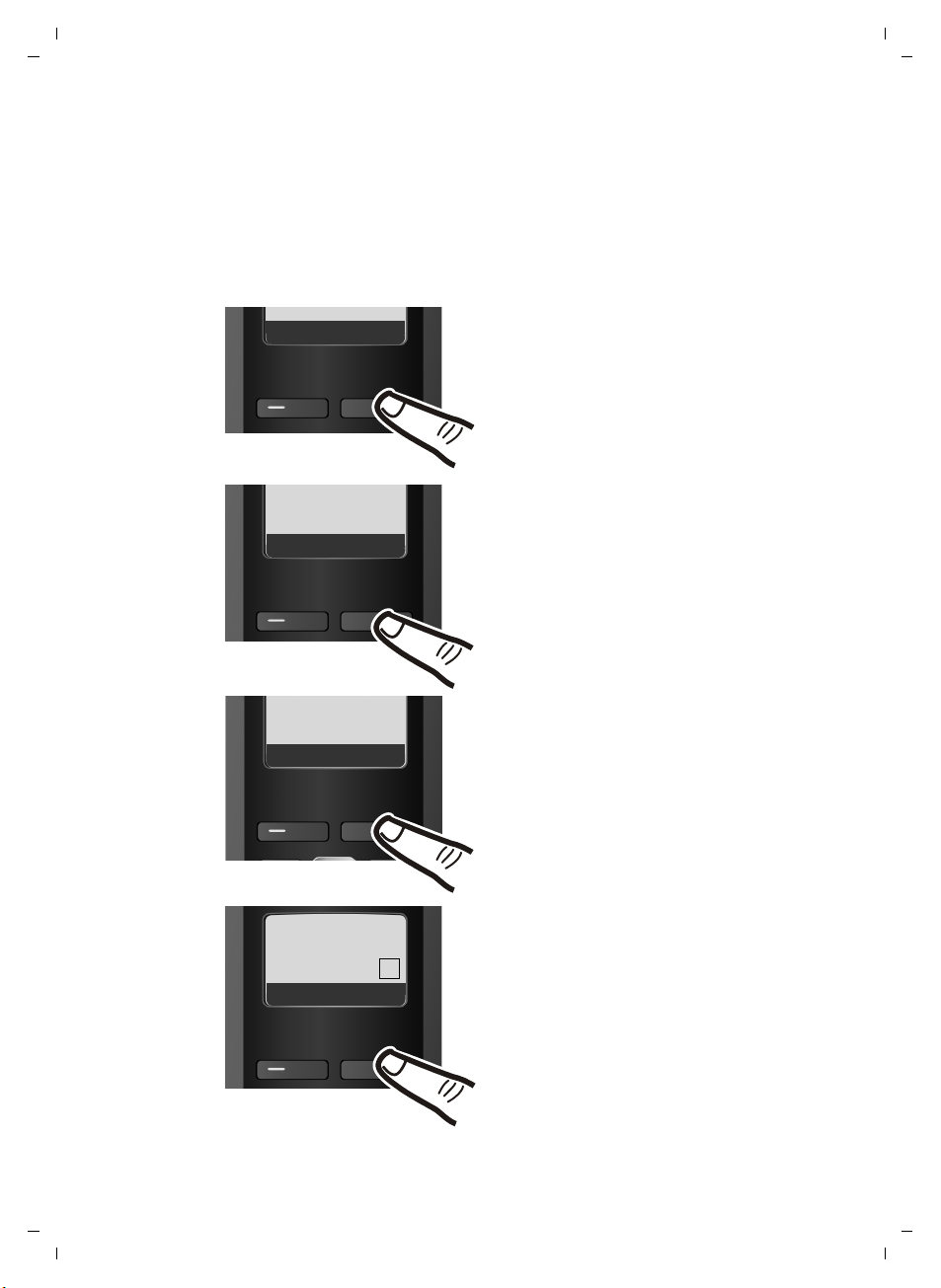
¤ Press the display key §Menu§ to
open the main menu.
¤ Press the bottom of the control
key s until the Settings menu
item appears on the display.
Hotline Menu
¤ Press the display key §OK§ to
confirm your selection.
‰
Auto
Answer
Ç
U OK
¤ Press the bottom of the control
keys until the Auto Answer menu
item appears on the display.
¤ Press the display key §OK§ to activate/
deactivate the function (
‰ =on).
Handset
Ç
U OK
Settings
Ç
U OK
¤ Press the bottom of the control
key s until the Handset menu
item appears on the display.
¤ Press the display key §OK§ to
confirm your selection.
Using the phone
Illustration of operating steps in the user guide
The operating steps are shown in abbreviated form.
Example:
The illustration:
§Menu§ ¢ Settings ¢ Handset ¢ Auto Answer (‰ =on)
means:
20
Version 4, 29.10.2007
Page 21
A58H / Swisscom EN / A31008-M2055-F151-1-2X19 / menuetree.fm / 02.12.2008
Menu tree
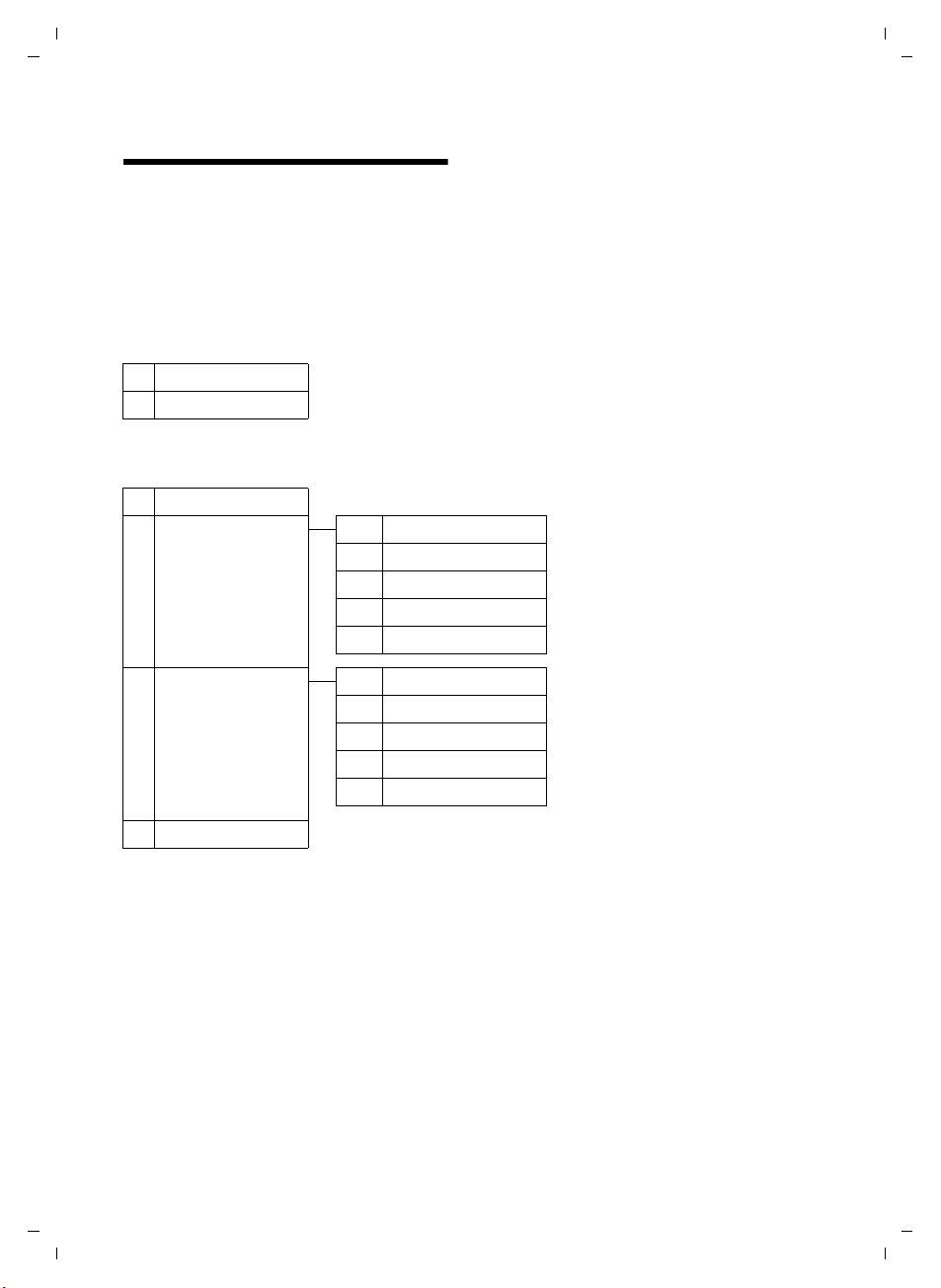
Instead of scrolling to locate a menu function, you can select a function more quickly by
opening the menu and keying in a digit combination (or shortcut).
Example:
With the telephone in idle status, press
1 î SMS (Menu dependent on base station)
4
4-1 Activation
4-2 Wake up time
5
7
7-1 Date/Time
7-2 Audio Settings 7-2-1 Call Volume
§Menu§ M22 for "Set ringer volume".
§Menu§(open main menu):
ì Alarm Clock
¢ page 25
¢ page 25
þ Voice Mail (Menu dependent on base station)
m Settings
¢ page 13
7-2-2 Ringer Volume
7-2-3 Ringer Melody
7-2-4 Advisory Tones
7-2-5 Battery Low
¢ page 26
¢ page 27
¢ page 27
¢ page 28
¢ page 28
Menu tree
7-3 Handset 7-3-1 Display
7-3-2 Language
7-3-3 Auto Answer
7-3-4 Register Handset
7-3-5 Reset Handset
7-4 Base (Menu dependent on base station)
¢ page 26
¢ page 26
¢ page 26
¢ page 10
¢ page 28
21
Version 4, 29.10.2007
Page 22

A58H / Swisscom EN / A31008-M2055-F151-1-2X19 / main.fm / 02.12.2008
Making calls
Making calls
Making an external call
External calls are calls using the public telephone network.
~c Enter the number and press
the talk key.
Or:
c~ Press and hold the talk key c
and then enter the number.
You can cancel the dialling operation with
the end call key a.
You are shown the duration of the call
while the call is in progress.
Please note
u Dialling with the directory
¢ page 23) and last number
(
redial list (
repeated typing of numbers.
u You can assign a number from the
directory to a key for speed dialling
¢ page 24).
(
Ending a call
a Press the end call key.
Answering a call
The handset indicates an incoming call in
three ways: by ringing, by a display on the
screen and by the flashing handsfree
key d.
You can answer the call by:
¤ Pressing the talk key c.
¤ Pressing the handsfree key d.
If the handset is in the charging cradle and
the Auto Answer function is activated
(¢ page 26), the handset automatically
answers the call when you remove it from
the charging cradle.
¢ page 25) saves
To deactivate the ringer, press the
display key and select Silent. You can take
the call as long as it is displayed on the
screen.
§Menu§
Handsfree talking
In handsfree mode, instead of holding the
handset to your ear you can put it down,
for example on the table in front of you.
This allows others to participate in the call.
Activating/deactivating handsfree mode
Activating while dialling
~d Enter the number and press
the handsfree key.
¤ You should inform your caller before
you use the handsfree function so that
they know someone else is listening.
Switching between earpiece and
handsfree mode
d Press the handsfree key.
Activate/deactivate handsfree during a
call.
If you wish to place the handset in the
charging cradle during a call:
¤ Press and hold the handsfree key d
while placing the handset in the base
station. If the handsfree key d does
not light up, press the key again.
For instructions on how to adjust the loudspeaker volume (
Muting
You can deactivate the microphone in
your handset during an external call.
§Mute§ Press the display key to mute
§On§ Press the display key to switch
¢ page 26).
the handset.
the microphone back on.
Version 4, 29.10.2007
22
Page 23

A58H / Swisscom EN / A31008-M2055-F151-1-2X19 / main.fm / 02.12.2008
Using the directory and lists
Making internal calls
Internal calls to other handsets registered
on the same base station are free.
Calling other handsets
k Start internal call. The display
shows Insert INT No..
~ Enter the internal number of
the receiving handset and
§OK§. The handset is
press
called.
or:
§All§ Press the display key and §OK§.
All handsets are called.
Ending a call
a Press the end call key.
Using the directory and lists
The options are:
u Directory
u Last number redial list
u Lists dependent on the base station
¢ base station user guide).
(
Directory
You can save up to 150 numbers and corresponding names in the directory.
You can create a personalised directory for
your own individual handset. However,
you can send the list or individual entries
to other handsets (
¤ With the handset in idle status, open
the directory by pressing the s key.
Length of the entries
Number: max. 32 digits
Name: max. 16 characters
Please note
You can assign a number from the
directory to a key for speed dialling
¢ page 24.
¢ page 24).
Saving the first number in the directory
s ¢ Dir. empty New Entry?
~ Enter the number and press
§OK§.
~ Enter the name and press §OK§.
Saving the first number in the directory
s ¢ §Menu§ ¢ New Entry
~ Enter the number and press
§OK§.
~ Enter the name and press §OK§.
Order of directory entries
The directory entries are usually sorted in
alphabetical order. Spaces and digits take
first priority. The sort order is as follows:
1. Space
2. Digits (0–9)
3. Letters (alphabetical)
4. Other characters
To get round the alphabetical order of the
entries, insert a space or a digit in front of
the name. These entries will then move to
the beginning of the directory.
Selecting a directory entry
s Open the directory.
You have the following options:
u Use q to scroll to the entry until the
required name is selected.
u Enter the first character of the name, or
scroll to the entry using s if required.
Dialling a number from the directory
s ¢ q (Select entry)
c Press the talk key. The number
is dialled.
Version 4, 29.10.2007
23
Page 24

A58H / Swisscom EN / A31008-M2055-F151-1-2X19 / main.fm / 02.12.2008
Using the directory and lists
Managing directory entries
s ¢ q (Select entry)
Editing an entry
§Menu§ ¢ Edit Entry
~ Edit the number if required,
and press
~ Edit the name if required, and
press
§OK§.
§OK§.
Using other functions
§Menu§ Press the display key.
The following functions can be selected
with q:
Use Number
Save or modify a saved number and
then dial with c or save as a new
entry; to do so, press
Directory
appears on the display.
Delete Entry
Delete a selected entry.
Send Entry
Send a single entry to a handset
¢ page 24).
(
Delete List
Delete all directory entries.
Send List
Send complete list to a handset
¢ page 24).
(
Shortcut
Assign the current entry for speed dial
to a selected key.
¢ §OK§after the number
§Menu§ ¢ Copy to
Using speed dial keys
You can assign directory entries to the
keys 0 and 2–9:
¢ q (Select entry) ¢ §Menu§
s
¢ Shortcut ¢ ~ (press the key you
want to assign the number to)
To d ial , press and hold the required speed
dial key.
Sending the directory to another handset
Preconditions:
u The sending and receiving handsets
must both be registered to the same
base station.
u The other handset and the base station
can send and receive directory entries.
¢ q (Select entry) ¢ §Menu§ (open
s
¢ Send Entry / Send List
menu)
~ Enter the internal number of
the receiving handset and
§OK§.
press
Successful transmission is acknowledged
with the message Entry copied. . You can
transfer several individual entries one
after the other by responding
Next entry? prompt.
§OK§ to the
Please note:
u Entries with identical numbers are not
overwritten on the receiving handset.
u The transfer is cancelled if the phone
rings or if the memory of the receiving
handset is full.
Copying a displayed number to the directory
You can copy numbers displayed in a list,
e.g. the call history or the last number
redial list, or in an SMS (depending on the
base station) to the directory.
A number is displayed:
§Menu§ ¢ Copy to Directory
¤ Complete the entry ¢ page 23.
Version 4, 29.10.2007
24
Page 25

A58H / Swisscom EN / A31008-M2055-F151-1-2X19 / main.fm / 02.12.2008
Setting the alarm clock
Using a number from the directory
In some operating situations you can open
the directory to copy a number, for example. Your handset must be in the idle status.
s Open the directory.
q Select entry.
§OK§ Press the display key.
Select function with q.
Last number redial list
The last number redial list contains the ten
numbers last dialled with the handset
(max. 32 numbers). If one of the numbers
is in the directory, the corresponding
name will be displayed.
Manual last number redial
c Press the key briefly.
s Select entry.
c Press the talk key again. The
number is dialled.
Managing entries in the last number redial list
c Press the key briefly.
s Select entry.
§Menu§ Open menu.
The following functions can be selected
with q:
Use Number (as in the directory,
¢ page 24)
Copy to Directory
Copy an entry to the directory
¢ page 23).
(
Delete Entry (as in the directory,
¢ page 24)
Delete List (as in the directory, ¢ page 24)
Opening lists with the message key
An advisory tone sounds as soon as a
new message arrives in a list. The f key
flashes (it goes off when the key is
pressed). In idle status, the display shows
an icon for the new message.
If you press the message key f, you
access the lists that contain new messages.
Setting the alarm clock
Precondition: The date and time have
already been set (
Activating/deactivating the alarm clock
§Menu§ ¢ Alarm Clock ¢ Activation (‰ =on)
After you activate the alarm clock, the
menu for setting the wake up time opens
automatically (
If the alarm clock is set, the wake-up time
appears with the ¼icon in the display
instead of the date.
Setting the wake-up time.
§Menu§ ¢ Alarm Clock ¢ Wake up time
~ Enter the wake-up time in
When the alarm clock rings…
Alarm repeat after 5 minutes
§Snooze§ Press the display key or any
If you press
clock switches off for 24 hours.
Turning off the alarm clock for 24 hours
§Off§ Press the display key.
¢ page 13).
¢ page 25).
hours and minutes, then press
§OK§.
key.
§Snooze§ three times, the alarm
Version 4, 29.10.2007
25
Page 26

A58H / Swisscom EN / A31008-M2055-F151-1-2X19 / main.fm / 02.12.2008
Handset settings
Handset settings
Your handset is preconfigured, but you
can change the settings to suit your individual requirements.
Changing date and time
To change the time, open the input field
with:
§Menu§ ¢ Settings ¢ Date/Time
Enter Date:
Enter the day, month and year in
8-digit format, e.g.
QQ2QQN
for 01/10/08.
Enter Time:
Enter hours and minutes as 4 digits,
e.g. QM5 for 07:15 a.m.
§OK§ Press the display key
Changing the display language
You can view the display texts in different
languages.
§Menu§ ¢ Settings ¢ Handset ¢ Language
The current language is indicated by a ‰.
q Select a language and press
§OK§.
a Press and hold (idle status).
If you accidentally choose a language you
do not understand:
§Menu§ M3 2
Press keys in sequence.
q Select the correct language
and press
§OK§.
Setting the display
You can display a digital clock when the
handset is in idle status.
§Menu§ ¢ Settings ¢ Handset ¢ Display
You have the following options:
Screensaver
The available settings are No Screen-
saver or Digital Clock.
Activating/deactivating auto answer
When this function is activated, when a
call arrives you can simply lift the handset
out of the charging cradle without having
to press the talk key c.
§Menu§ ¢ Settings ¢ Handset
¢ Auto Answer (‰ =on)
a Press and hold (idle status).
Changing the handsfree/ earpiece volume
You can adjust the volume for handsfree
talking to one of five settings (1-5, e.g.
volume 3 =
to one of three (1-3, e.g. volume 2 =
Setting the volume during a call
The setting applies to the current mode
(earpiece or handsfree).
You are conducting an external call.
t Press the control key.
q Set the volume.
The setting will automatically be saved
after approx. 3 seconds, if not then press
the display key
Š) and the earpiece volume
‰
§OK§.
).
Version 4, 29.10.2007
26
Page 27

A58H / Swisscom EN / A31008-M2055-F151-1-2X19 / main.fm / 02.12.2008
Handset settings
Adjusting the volume via the menu
§Menu§ ¢ Settings ¢ Audio Settings
¢ Call Volume ¢Earpiece Volume /
Handsfree Volume
q Adjust the volume and press
§OK§.
a Press and hold (idle status).
Changing ringer
u Volume:
Five volume levels (1–5; e.g. volume 3
= ˆ) and "crescendo" ring (6; volume increases with each ring =
‡).
u Melody:
List of pre-loaded ringer melodies. The
first three melodies are the "classical"
ringer melodies.
You can also set different ringer melodies
for the following functions:
u External Calls: for external calls
u Internal Calls: for internal calls
u Alarm Clock: for the alarm clock
Setting the ringer volume
The ringer volume is the same for all types
of ring.
§Menu§ ¢ Settings ¢ Audio Settings
¢ Ringer Volume
Or in idle status:
t ¢ Ringer Volume.
Then:
q Adjust the volume and press
§OK§.
a Press and hold (idle status).
Setting the ringer melody
Set different ringer melodies for external
calls, internal calls and the alarm clock.
§Menu§ ¢ Settings ¢ Audio Settings
¢ Ringer Melody
External Calls / Internal Calls / Alarm Clock
Select and press
q Select melody (‰ =on) and
§OK§.
press
a Press and hold (idle status).
Activating/deactivating the ringer
You can turn off the ringer on your handset before you take a call or while the
phone is in idle status. You can take a call
so long as it is displayed on the screen.
Deactivating the ringer
* Press the star key and hold,
until the Ú icon appears in the
display.
Reactivating the ringer
* Press and hold the star key in
idle status.
Activating/deactivating muting for the first ringer tone
§Menu§ Press the display key.
M4O22
Press keys.
§OK§ Make the first ring audible.
Q
Or:
§OK§ Mute the first ring.
§OK§.
Version 4, 29.10.2007
27
Page 28

A58H / Swisscom EN / A31008-M2055-F151-1-2X19 / main.fm / 02.12.2008
Ç
Handset settings
Advisory tones
Your handset uses advisory tones to tell
you about different activities and statuses.
The following tones can be activated and
deactivated independently of each other:
u Advisory tones:
– Key click: every key press is con-
firmed.
– Confirmation tone (rising tone
sequence): at the end of an entry/
setting, when replacing the handset
in the charging cradle and when an
SMS is received (depending on the
base station) or a new entry is made
in the calls list.
– Error tone (descending tone
sequence): when you make an
incorrect entry.
– Menu end tone: when scrolling at
the end of a menu.
u Battery low tone: the battery requires
charging.
You cannot deactivate the confirmation
tone for placing the handset in the charging cradle.
Restoring the handset default settings
You can reset individual settings and
changes that you have made. This will not
affect entries in the directory, calls list or
SMS lists (depending on the base station),
or the handset's registration to the base
station.
§Menu§ ¢ Settings ¢ Handset
¢ Reset Handset
Confirm query with §OK§ or reject it
with .
a Press and hold (idle status).
Version 4, 29.10.2007
Activating/deactivating advisory tones
§Menu§ ¢ Settings ¢ Audio Settings
¢ Advisory Tones
Select and press
Setting the battery low tone
§Menu§ ¢ Settings ¢ Audio Settings
§OK§ (‰ =on).
¢ Battery Low
On / Off / During Call
Select and press
The battery low tone is activated or deactivated or sounds
during a call.
28
§OK§ (‰ =on).
Page 29

A58H / Swisscom EN / A31008-M2055-F151-1-2X19 / appendix.fm / 02.12.2008
Warranty/Maintenance/Repair/ Approval
Warranty/Maintenance/Repair/ Approval
Warranty
The warranty period is 2 years as of the
date of purchase. For warranty repair, the
warranty card, filled out and stamped by
the place of purchase must accompany
the faulty device. Excluded from the warranty are damages due to improper use,
wear and tear or tampering by others. The
warranty does not include consumable
materials and faults that have only an
insignificant affect on the value or usability of the product. In case of errors, please
contact your place of purchase.
Repair/Maintenance
Rental devices
If your phone does not operate properly,
notify Technical Assistance (phone
number 0800 800 800).
The repair
charge.
*
and the fault action are free of
Purchased devices
Repair services are performed free of
charge within the warranty period in
accordance with the regulation of the
warranty certificate. If a repair is necessary, the device must be returned to the
place of purchase.
If Technical Assistance is made available
(also during the warranty period
fault action is charged (route lump sum
price as well as expenses for time). The
repair costs are additional outside the warranty period.
*
)), the
Batteries
Battery cells are considered consumed
material, which is not covered by the warranty service. Faulty batteries are not
replaced free of charge. This applies to
rented as well as purchased devices.
Help
If you have any general questions about
products, services etc., please contact
your Swisscom Information Centre (tollfree number 0800 800 800).
Version 4, 29.10.2007
* An exception is damage to wearing parts
(cable, labels, batteries etc.) and due to
improper handling (damage from dropping,
infiltrated fluids etc.).
29
Page 30
A58H / Swisscom EN / A31008-M2055-F151-1-2X19 / appendix.fm / 02.12.2008
Faults and self-help with troubleshooting
Faults and self-help with
troubleshooting
Not every problem signifies a fault in your
telephone. In some cases, problems can
be resolved by briefly interrupting the
power supply to the base station (unplug
the power supply unit and then plug it in
again) or removing the battery cells from
the handset and reinserting them. The following information is designed to help
you with specific problems.
Important: Some problems or faults can
only be resolved if you take the complete
device (base station, handset and connection cable) to the place of purchase.
The display is blank.
1. The handset is not switched on.
¥ Press and hold the end call key a.
2. The batteries are flat.
¥ Charge or replace the batteries
(
¢ page 9).
Base" flashes in the display.
"
1. The handset is outside the range of the
base station.
¥ Move the handset closer to the
base station.
2. The base station's range is reduced
because Eco Mode is activated (depending
on the base station, please see your
phone's user guide).
¥ Deactivate Eco Mode or reduce the dis-
tance between the handset and the
base station.
3. The base station is not turned on.
¥ Check the base station mains adapter.
Handset does not ring.
1. The ringer is deactivated.
¥ Activate the ringer (¢ page 27).
The other party cannot hear you.
You have pressed the §Mute§ display key.
The handset is "muted".
¥ Activate the microphone again
(
¢ page 22).
You hear an error tone (descending tone
sequence) when inputting.
Action has failed/invalid input.
¥ Repeat the operation.
Watch the display and refer to the user
guide if necessary.
Approval
This device is intended for use within the
European Union and Switzerland. If used
in other countries, it must first be
approved nationally in the country in
question.
Country-specific requirements have been
taken into consideration.
If you have any questions about the differences between the public phone networks, please contact your specialist dealer or network provider.
Swisscom hereby declare that this device
meets the essential requirements and
other relevant regulations laid down in
Directive 1999/5/EC.
The Declaration of Conformity can be found on
the following website:
www.swisscom.ch
under the heading "Online Shop", Telephones,
Conformity Declaration.
Version 4, 29.10.2007
30
Page 31
A58H / Swisscom EN / A31008-M2055-F151-1-2X19 / appendix.fm / 02.12.2008
!
Appendix
Appendix
Care
Wipe the charging cradle and the handset
with a damp cloth (do not use solvent) or
an antistatic cloth.
Never use a dry cloth. This can cause
static.
Contact with liquid
If the handset should come into contact
with liquid:
1. Turn the handset off and remove the
batteries immediately.
2. Allow the liquid to drain from thehandset.
3. Pat all parts dry, then place the handset
with the battery compartment open
and the keypad facing down in a dry,
warm place for at least 72 hours
(not in a microwave, oven etc.).
4. Do not switch on the handset again
until it is completely dry.
When it has fully dried out, you will
normally be able to use it again.
Specifications
Recommended batteries
Technology:
Nickel-metal-hydride (NiMH)
Size: AAA (Micro, HR03)
Voltage: 1.2 V
Capacity: 550–1000 mAh
We recommend the following battery
types, because these are the only ones
that guarantee the specified operating
times, full functionality and long service
life:
u GP 700 mAh
u Yuasa Phone 700 mAh
u Yuasa Phone 800 mAh
u Yuasa AAA 800
u Peacebay 600 mAh
The device is supplied with two recommended batteries.
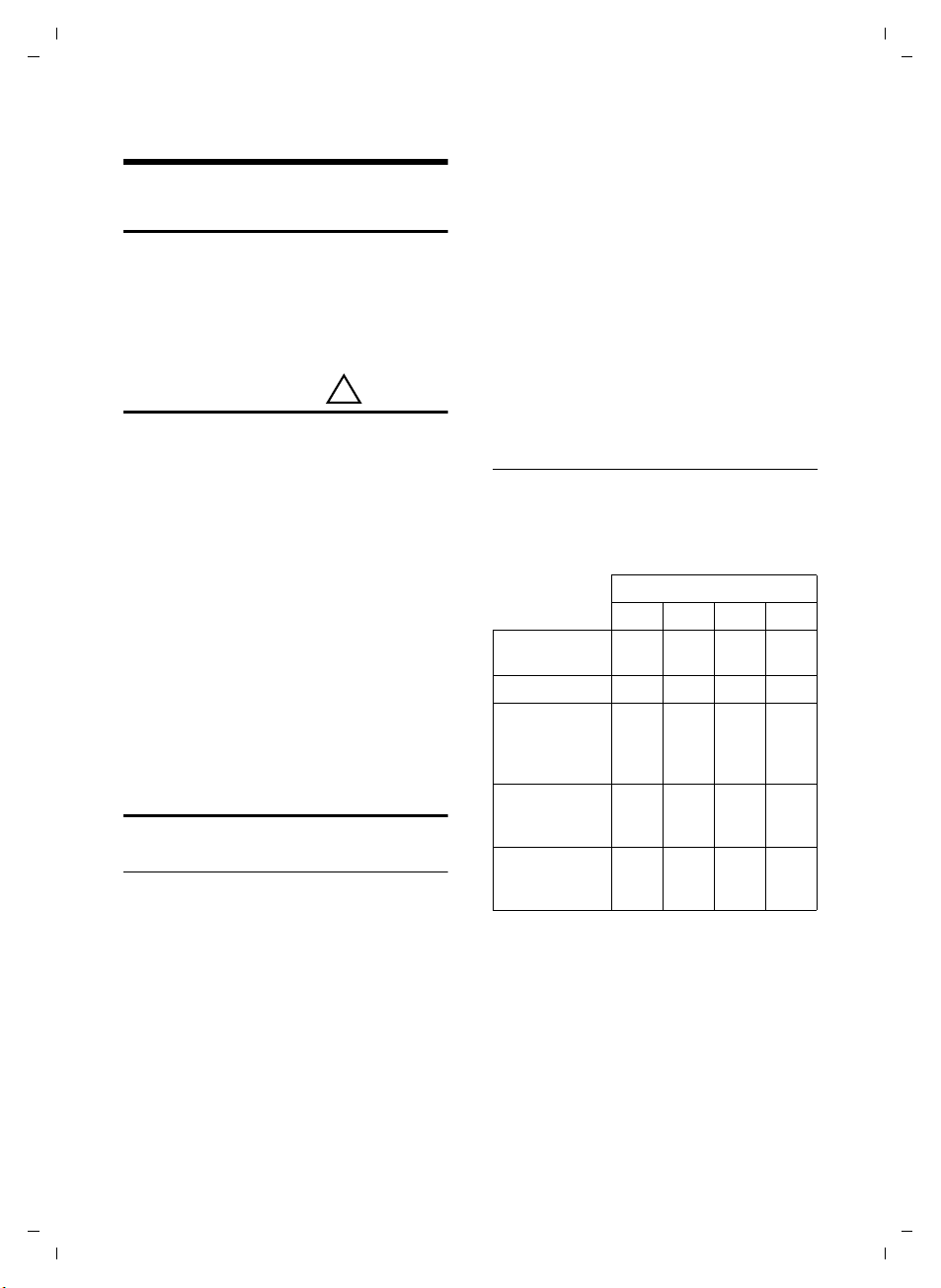
Handset operating times/charging times
The operating time of your telephone
depends on the capacity and age of the
batteries and the way they are used. (All
times are maximum possible times
Capacity (mAh) approx.
550 650 800 1000
Standby time
(hours)
Talktime (hours)23253341
Operating time
for 1.5 hrs of
calls per day
(hours)
Charging time,
base station
(hours)
Charging time,
charging cradle
(hours)
At the time of going to print, batteries up
to 800 mAh were available and had been
tested in the system. Due to the constant
progression in battery development, the
list of recommended batteries is regularly
updated.
180 210 265 330
80 95 115 145
8101215
67911
Version 4, 29.10.2007
31
Page 32

A58H / Swisscom EN / A31008-M2055-F151-1-2X19 / appendix.fm / 02.12.2008
1)
2)
Appendix
Writing and editing text
The following rules apply when writing
text:
u Use ts to move the cursor to the left
or right.
u Characters are inserted to the left of
the cursor.
u The first letter of the name of directory
entries is automatically capitalised, followed by lower case letters.
Writing an SMS (depending on the base station)/name
Press the relevant key several times to
enter the corresponding letters/characters.
Standard characters
1x 2x 3x 4x 5x 6x 7x 8x 9x 10x 11x 12x 13x 14x
2
3
4
5
L
M
N
O
Q
*
#
1) Space
2) Line break
When you press and hold a key, the characters of that key appear in the display and
are highlighted one after the other. When
you release the key, the highlighted character is inserted into the input field.
1€£ $¥¤
abc2дбавгз
def3лйик
gh i4пнмо
jkl5
mno6цсутфх
pqr s7ß
tuv8üúùû
wx y z 9 ÿ ýæøå
.,?!0+-:¿¡“ ‘ ;_
*/()<=>%
#@ \ &§
Setting upper/lower case or digits
Press the hash key # briefly to switch
from "Abc" mode to "123" and from "123"
to "abc" and from "abc" to "Abc" (upper
case: 1st letter upper case, all others lower
case). Press the hash key #before
entering the letter.
You can see briefly in the display whether
upper case, lower case or digits is
selected.
Version 4, 29.10.2007
32
Page 33
A58H / Swisscom EN / A31008-M2055-F151-1-2X19 / accessories_SAG.fm / 02.12.2008
approx.
2.5 mm
21 mm
Accessories
All accessories and batteries are available from your phone retailer or on the following
website: www.swisscom.ch.onlineshop
Only use original accessories. This will avoid possible health risks and damage to property,
and also ensure that all the relevant regulations are complied with.
.
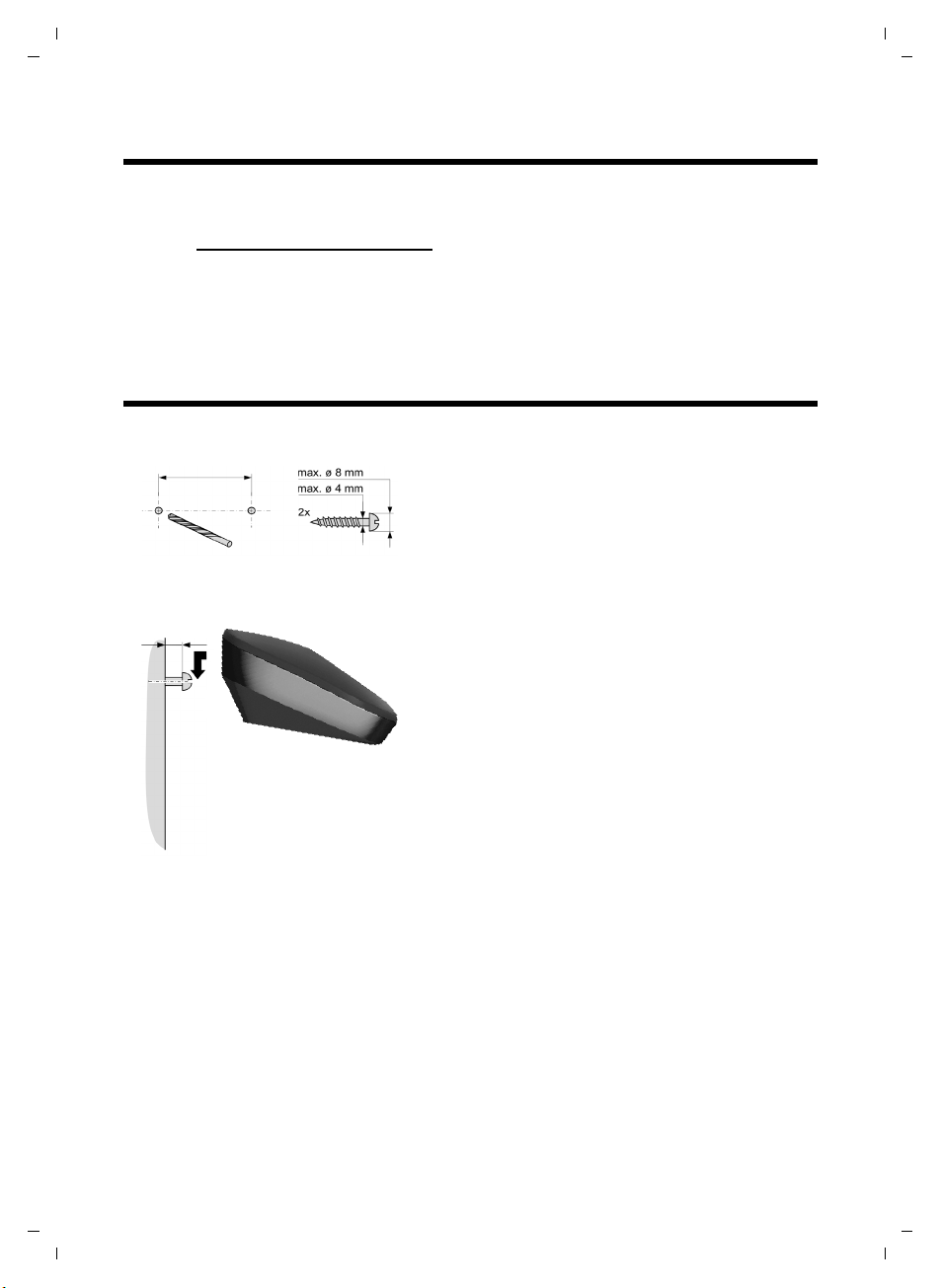
Mounting the charging cradle to the wall
Accessories
Version 4, 29.10.2007
33
Page 34

A58H / Swisscom EN / A31008-M2055-F151-1-2X19 / C38_A58SIX.fm / 02.12.2008
Index
Index
A
Accepting a call . . . . . . . . . . . . . . . . . 22
Accessories
Activating
advisory tones
call acceptance
handset
keypad lock
muting ringer
Advisory tones
Alarm clock
Alarm repeat
Approval
Auto answer
B
Base station
setting up
Battery
charging
display
icon
inserting
recommended batteries
warning tone
C
Call
accepting
ending
external
internal
Call acceptance
Call duration
Calling
external
internal
Care of the telephone
Changing
earpiece volume
handsfree volume
Character set
Charge status display
Confirmation tone
Control key
Correcting incorrect entries
Customer service, Customer Care
. . . . . . . . . . . . . . . . . . . . 33
. . . . . . . . . . . . . . . . 28
. . . . . . . . . . . . . . . . 26
. . . . . . . . . . . . . . . . . . . . . 19
. . . . . . . . . . . . . . . . . . 19
. . . . . . . . . . . . . . . . . 27
. . . . . . . . . . . . . . . . . . 28
. . . . . . . . . . . . . . . . . . . . 25
. . . . . . . . . . . . . . . . . . . 25
. . . . . . . . . . . . . . . . . . . . . . 30
. . . . . . . . . . . . . . . . 22, 26
. . . . . . . . . . . . . . . . . . . . . 8
. . . . . . . . . . . . . . . . . . . 1, 12
. . . . . . . . . . . . . . . . . . . . . . . 1
. . . . . . . . . . . . . . . . . . . . . . 1, 11
. . . . . . . . . . . . . . . . . . . . . 9
. . . . . . . . . 31
. . . . . . . . . . . . . . . . . 28
. . . . . . . . . . . . . . . . . . . . 22
. . . . . . . . . . . . . . . . . . . . . . 22
. . . . . . . . . . . . . . . . . . . . . 22
. . . . . . . . . . . . . . . . . . . . . 23
. . . . . . . . . . . . . . . . . 26
. . . . . . . . . . . . . . . . . . . 22
. . . . . . . . . . . . . . . . . . . . . 22
. . . . . . . . . . . . . . . . . . . . . 23
. . . . . . . . . . . . 31
. . . . . . . . . . . . . . . 26
. . . . . . . . . . . . . . 26
. . . . . . . . . . . . . . . . . . . 32
. . . . . . . . . . . . . . 1
. . . . . . . . . . . . . . . 28
. . . . . . . . . . . . . . . . . . 1, 17
. . . . . . . . 18
. . . . 29
D
Deactivating
advisory tones
call acceptance
handset
keypad lock
muting ringer
Delete key
Deleting characters
Dialling
directory
with speed dial
Dialling pause
entering
Digital clock
Directory
copying number
copying number from text
managing entries
opening
order of entries
saving entry
saving the first number
sending entry/list to handset
Display
changing display language
in idle status
. . . . . . . . . . . . . . . . . . . . . . . 17
keys
screensaver
setting
Display keys
. . . . . . . . . . . . . . . . 28
. . . . . . . . . . . . . . . 26
. . . . . . . . . . . . . . . . . . . . . 19
. . . . . . . . . . . . . . . . . . 19
. . . . . . . . . . . . . . . . 27
. . . . . . . . . . . . . . . . . . . . . 17
. . . . . . . . . . . . . . 18
. . . . . . . . . . . . . . . . . . . . 23
. . . . . . . . . . . . . . . 24
. . . . . . . . . . . . . . . . . . . . . 1
. . . . . . . . . . . . . . . . . . . 26
. . . . . . . . . . . . . . . . . . . . . 23
. . . . . . . . . . . . . . 25
. . . . . . . 24
. . . . . . . . . . . . . . 24
. . . . . . . . . . . . . . . . . . . . 17
. . . . . . . . . . . . . . . 23
. . . . . . . . . . . . . . . . . 23
. . . . . . . . . 23
. . . . . 24
. . . . . . . 26
. . . . . . . . . . . . . . . . . 19
. . . . . . . . . . . . . . . . . . 26
. . . . . . . . . . . . . . . . . . . . . 26
. . . . . . . . . . . . . . . . . . . . 1
E
Earpiece mode . . . . . . . . . . . . . . . . . 22
Earpiece volume
Eco Mode plus
End call key
Ending a call
Ending, see Deactivate
Entry
selecting from directory
Error tone
. . . . . . . . . . . . . 26, 27
. . . . . . . . . . . . . . . . . . 2
. . . . . . . . . . . . . . . . . . 1, 22
. . . . . . . . . . . . . . . . . . . 22
. . . . . . . . . 23
. . . . . . . . . . . . . . . . . . . . . 28
H
Handset
activating/deactivating
advisory tones
contact with liquid
display language
. . . . . . . . . . . . . . . . 28
. . . . . . . . . . 19
. . . . . . . . . . . . . 31
. . . . . . . . . . . . . . 26
Version 4, 29.10.2007
34
Page 35

A58H / Swisscom EN / A31008-M2055-F151-1-2X19 / C38_A58SIX.fm / 02.12.2008
Index
earpiece volume. . . . . . . . . . . . . . . 26
handsfree volume
idle status
muting
restoring to factory settings
setting
setting up
Handsfree key
Handsfree talking
Hash key
Hearing aids
. . . . . . . . . . . . . . . . . . . . . . 22
. . . . . . . . . . . . . . . . . . . . . . 26
. . . . . . . . . . . . . . . . . . . . . 9
. . . . . . . . . . . . . . . . . . . . 1, 19
. . . . . . . . . . . . . . 26
. . . . . . . . . . . . . . . . . . . 19
. . . . . . . 28
. . . . . . . . . . . . . . . . . . . 1
. . . . . . . . . . . . . . . . 22
. . . . . . . . . . . . . . . . . . . . 5
I
Icon
battery
display
for new messages
keypad lock
Idle status
display . . . . . . . . . . . . . . . . . . . . . .19
returning to
Incorrect input (correction)
Installing, base station
Internal
call
key
making calls
. . . . . . . . . . . . . . . . . . . . . . 11
. . . . . . . . . . . . . . . . . . . . . . 17
. . . . . . . . . . . . . . 25
. . . . . . . . . . . . . . . . . . 19
. . . . . . . . . . . . . . . . . . 19
. . . . . . . . . 18
. . . . . . . . . . . . . 8
. . . . . . . . . . . . . . . . . . . . . . . . . 23
. . . . . . . . . . . . . . . . . . . . . . . . . . 1
. . . . . . . . . . . . . . . . . . 23
K
Key 1 (fast access) . . . . . . . . . . . . . . . .1
Key click
Keypad lock
Keys
. . . . . . . . . . . . . . . . . . . . . . 28
. . . . . . . . . . . . . . . . . . . . 19
assigning directory entry
control key
delete key
display keys
end call key
fast access
handsfree key
hash key
internal key
message key
on/off key
recall key
speed dial
star key
talk key
. . . . . . . . . . . . . . . . . 1, 17
. . . . . . . . . . . . . . . . . . . . 17
. . . . . . . . . . . . . . . . 1, 17
. . . . . . . . . . . . . . . . 1, 22
. . . . . . . . . . . . . . . . . . . . 1
. . . . . . . . . . . . . . . . . . 1
. . . . . . . . . . . . . . . . . . . 1, 19
. . . . . . . . . . . . . . . . . . . 1
. . . . . . . . . . . . . . . . . . . 1
. . . . . . . . . . . . . . . . . . . . . 1
. . . . . . . . . . . . . . . . . . . . . 1
. . . . . . . . . . . . . . . . . . . . 24
. . . . . . . . . . . . . . . . . . . 1, 27
. . . . . . . . . . . . . . . . . . . 1, 22
. . . . . . . . . 24
L
Last number redial . . . . . . . . . . . . . . 25
Lock
activating/deactivating keypad lock
. 19
M
Mains adapter. . . . . . . . . . . . . . . . . . . 5
Making calls
answering a call
external
internal
Manual last number redial
Medical appliances
Menu
end tone
overview
prompting
Message key
opening lists
Microphone
Minimal radiation
Muting
first ring
Muting the handset
. . . . . . . . . . . . . . . . . . . . . 22
. . . . . . . . . . . . . . . . . . . . . 23
. . . . . . . . . . . . . . . 22
. . . . . . . . . 25
. . . . . . . . . . . . . . . 5
. . . . . . . . . . . . . . . . . . . . 28
. . . . . . . . . . . . . . . . . . . . 21
. . . . . . . . . . . . . . . . . . . 18
. . . . . . . . . . . . . . . . . . . . 1
. . . . . . . . . . . . . . . . . 25
. . . . . . . . . . . . . . . . . . . . 1
. . . . . . . . . . . . . . . . 2
. . . . . . . . . . . . . . . . . . . . 27
. . . . . . . . . . . . . . 22
N
Number
copying from directory
copying to directory
entering with directory
saving in the directory
. . . . . . . . . . 25
. . . . . . . . . . . . 24
. . . . . . . . . . 25
. . . . . . . . . . 23
O
On/Off key . . . . . . . . . . . . . . . . . . . . . 1
Order in directory
. . . . . . . . . . . . . . . 23
P
Pack contents . . . . . . . . . . . . . . . . . . . 7
Q
Questions and answers . . . . . . . . . . . 30
R
Range. . . . . . . . . . . . . . . . . . . . . . . . . 8
Recall key
Ringer
changing
muting
setting melody
setting volume
. . . . . . . . . . . . . . . . . . . . . . 1
. . . . . . . . . . . . . . . . . . . . 27
. . . . . . . . . . . . . . . . . . . . . 27
. . . . . . . . . . . . . . . . 27
. . . . . . . . . . . . . . . 27
Version 4, 29.10.2007
35
Page 36

A58H / Swisscom EN / A31008-M2055-F151-1-2X19 / C38_A58SIX.fm / 02.12.2008
Index
S
Screen protection, see Screensaver
Screensaver
Searching in directory
Sending
directory entry to handset
Setting
date
melody (ringer)
time
wake up time
Setting up
handset
Shortcut
SMS
writing
Snooze (alarm clock)
Specifications
Speed dial
Star key
. . . . . . . . . . . . . . . . . . . . 26
. . . . . . . . . . . . 23
. . . . . . . . 24
. . . . . . . . . . . . . . . . . . . . . 13, 26
. . . . . . . . . . . . . . . 27
. . . . . . . . . . . . . . . . . . . . . 13, 26
. . . . . . . . . . . . . . . . . 25
. . . . . . . . . . . . . . . . . . . . . . 9
. . . . . . . . . . . . . . . . . . . . . . 21
. . . . . . . . . . . . . . . . . . . . . . 32
. . . . . . . . . . . . . 25
. . . . . . . . . . . . . . . . . . 31
. . . . . . . . . . . . . . . . . . . . . 24
. . . . . . . . . . . . . . . . . . . . . 1, 27
T
Tal k key . . . . . . . . . . . . . . . . . . . . . 1, 22
Tro ubl eshootin g
. . . . . . . . . . . . . . . . . 30
V
Volume
earpiece volume
handset handsfree volume
. . . . . . . . . . . . . . . . . . . . . . . 27
ringer
. . . . . . . . . . . . . . . 26
. . . . . . . 26
W
Warning tone (battery). . . . . . . . . . . . 28
Writing and editing text
. . . . . . . . . . . 32
Version 4, 29.10.2007
36
 Loading...