

Page 1
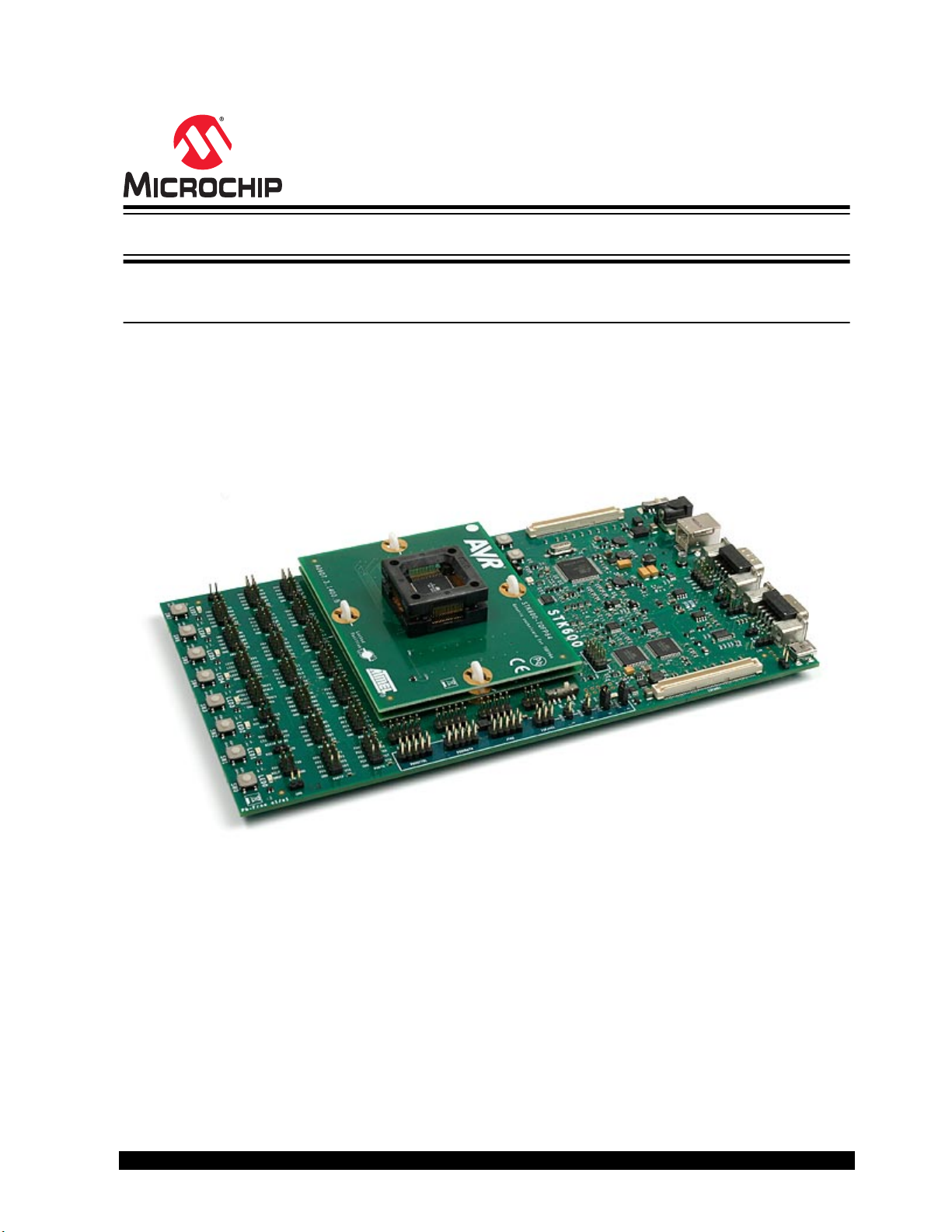
STK600 Starter Kit
STK600 AVR® Flash MCU Starter Kit User's Guide
Overview
The STK600 is a complete starter kit and development system for the AVR® Flash microcontroller. It
allows designers a quick start in developing code on the AVR device, combined with advanced features
for using the starter kit to prototype and test new designs.
New firmware releases for STK600 are embedded with the releases of Atmel Studio. The upgrade
process starts with a connection to the STK600 board (the user will be asked to perform the procedure).
Should the automatic upgrade fail, try the manual upgrade procedure.
© 2018 Microchip Technology Inc.
User Guide
40001904C-page 1
Page 2

STK600 Starter Kit
Table of Contents
Overview..........................................................................................................................1
1. Features.................................................................................................................... 4
2. Known Issues............................................................................................................ 5
3. Device Support.......................................................................................................... 6
4. Getting Started........................................................................................................ 44
4.1. Kit Contents................................................................................................................................44
4.2. Quick Start..................................................................................................................................44
4.3. Connecting the Hardware...........................................................................................................45
5. Target Socket System..............................................................................................46
5.1. Socket System........................................................................................................................... 46
5.2. Socket Card and Routing Card.................................................................................................. 46
5.3. Selecting the Correct Routing and Socket Cards.......................................................................48
5.4. Mounting the Cards.................................................................................................................... 49
5.5. Signal Integrity............................................................................................................................56
5.6. AVR UC3 Routing Card Pin Mapping.........................................................................................56
5.7. SAM Routing Cards....................................................................................................................87
6. Hardware Description.............................................................................................. 88
6.1. STK600 Block Diagram.............................................................................................................. 88
6.2. Target Voltage VTG....................................................................................................................88
6.3. Analog Reference Voltages........................................................................................................89
6.4. RESET Control...........................................................................................................................91
6.5. Port Connectors......................................................................................................................... 92
6.6. LEDs and Switches.................................................................................................................... 94
6.7. Clock Settings............................................................................................................................ 95
6.8. User RS-232 Interface................................................................................................................98
6.9. DataFlash Nonvolatile Memory.................................................................................................. 99
6.10. Expansion Connectors............................................................................................................... 99
6.11. User USB Connector................................................................................................................102
6.12. CAN Transceiver...................................................................................................................... 103
6.13. LIN Transceiver........................................................................................................................ 105
6.14. Miscellaneous...........................................................................................................................106
7. Programming......................................................................................................... 108
7.1. ISP Programming..................................................................................................................... 108
7.2. Parallel High-Voltage Programming......................................................................................... 109
7.3. Serial High-Voltage Programming............................................................................................ 110
7.4. JTAG Programming..................................................................................................................112
7.5. PDI Programming..................................................................................................................... 113
7.6. UPDI Programming.................................................................................................................. 115
© 2018 Microchip Technology Inc.
User Guide
40001904C-page 2
Page 3

STK600 Starter Kit
7.7. aWire Programming..................................................................................................................117
7.8. TPI Programming..................................................................................................................... 119
7.9. In-System Programming of an External Target System........................................................... 121
8. Command Line Utility............................................................................................ 124
9. Troubleshooting and Support................................................................................ 125
9.1. Troubleshooting Guide............................................................................................................. 125
9.2. Routing and Socket Card Issues..............................................................................................127
9.3. Technical Support.....................................................................................................................128
9.4. Firmware Upgrade....................................................................................................................128
10. Revision History.....................................................................................................130
The Microchip Web Site.............................................................................................. 131
Customer Change Notification Service........................................................................131
Customer Support....................................................................................................... 131
Microchip Devices Code Protection Feature............................................................... 131
Legal Notice.................................................................................................................132
Trademarks................................................................................................................. 132
Quality Management System Certified by DNV...........................................................133
Worldwide Sales and Service......................................................................................134
© 2018 Microchip Technology Inc.
User Guide
40001904C-page 3
Page 4

1. Features
• AVR Studio 4/AVR32 Studio/AVR Studio 5/Atmel Studio Compatible
• USB Interface to PC for Programming and Control
• Powered from USB Bus or from an External 10-15V DC Power Supply
• Adjustable Target VCC (0-5.5V)
• Two Adjustable Reference Voltages with High Accuracy (0-5.0V, 10 mV res.)
• Clock Oscillator, Adjustable On-The-Fly from Atmel Studio (0-50 MHz, 0.1% res.)
• Serial In-System Programming (ISP) of tinyAVR® and megaAVR® Devices
• PDI Programming of AVR XMEGA® Devices
• JTAG Programming of megaAVR, AVR XMEGA, and AVR UC3 Devices
• aWire Programming of AVR UC3 Devices
• ISP and JTAG Programming of AVR Devices in External Target Systems
• Flexible Routing and Socket Card System for Easy Mounting of all Supported Devices
• Eight Push Buttons for General Use
• Eight LEDs for General Use
• All AVR I/O Ports are Easily Accessible through Pin Header Connectors
• Expansion Connectors for Plug-In Modules and Prototyping Area
• On-Board 4 Mb DataFlash for Non-volatile Data
• USB mini-AB (On-The-Go) Connector for AVR Devices with USB
• PHY and DSUB-9 Connector for RS-232 Interface
• PHY and DSUB-9 Connector for CAN Bus
• PHY and Header for LIN Bus
• Device Board with an ATmega2560 AVR Microcontroller Included
STK600 Starter Kit
Features
Note: Socket cards and routing cards must be bought separately.
© 2018 Microchip Technology Inc.
User Guide
40001904C-page 4
Page 5

2. Known Issues
There are no known issues with the STK600.
STK600 Starter Kit
Known Issues
© 2018 Microchip Technology Inc.
User Guide
40001904C-page 5
Page 6
3. Device Support
Atmel Studio, AVR Studio 4, 5, and AVR32 Studio has support for a range of devices in all speed grades.
Support for new AVR devices may be added in new versions of the software. Latest versions of the
Integrated Development Environments are always available from www.microchip.com.
Table 3-1. Device Support
Device Routing Card Socket Card Comment
STK600 Starter Kit
Device Support
AT32UC3A0128 ATSTK600-RC33 - STK600-
RCUC3A144-33
AT32UC3A0256 ATSTK600-RC33 - STK600-
RCUC3A144-33
AT32UC3A0512 ATSTK600-RC33 - STK600-
RCUC3A144-33
AT32UC3A1128 ATSTK600-RC28 - STK600-
RCUC3A100-28
AT32UC3A1256 ATSTK600-RC28 - STK600-
RCUC3A100-28
AT32UC3A1512 ATSTK600-RC28 - STK600-
RCUC3A100-28
AT32UC3A3128 ATSTK600-RC32 - STK600-
RCUC3A144-32
AT32UC3A3128S ATSTK600-RC32 - STK600-
RCUC3A144-32
AT32UC3A3256 ATSTK600-RC32 - STK600-
RCUC3A144-32
ATSTK600-SC19 - STK600TQFP144
ATSTK600-SC19 - STK600TQFP144
ATSTK600-SC19 - STK600TQFP144
ATSTK600-SC03 - STK600TQFP100
ATSTK600-SC03 - STK600TQFP100
ATSTK600-SC03 - STK600TQFP100
ATSTK600-SC19 - STK600TQFP144
ATSTK600-SC19 - STK600TQFP144
ATSTK600-SC19 - STK600TQFP144
AT32UC3A3256S ATSTK600-RC32 - STK600-
RCUC3A144-32
AT32UC3A364 ATSTK600-RC32 - STK600-
RCUC3A144-32
AT32UC3A364S ATSTK600-RC32 - STK600-
RCUC3A144-32
AT32UC3B0128 ATSTK600-RC21 - STK600-
RCUC3B0-21
AT32UC3B0128 ATSTK600-RC21 - STK600-
RCUC3B0-21
AT32UC3B0256 ATSTK600-RC21 - STK600-
RCUC3B0-21
AT32UC3B0256 ATSTK600-RC21 - STK600-
RCUC3B0-21
© 2018 Microchip Technology Inc.
ATSTK600-SC19 - STK600TQFP144
ATSTK600-SC19 - STK600TQFP144
ATSTK600-SC19 - STK600TQFP144
ATSTK600-SC14 - STK600TQFP64-2
ATSTK600-SC21 - STK600QFN64
ATSTK600-SC14 - STK600TQFP64-2
ATSTK600-SC21 - STK600QFN64
User Guide
40001904C-page 6
Page 7

STK600 Starter Kit
Device Support
Device Routing Card Socket Card Comment
AT32UC3B0512 ATSTK600-RC21 - STK600-
RCUC3B0-21
AT32UC3B0512 ATSTK600-RC21 - STK600-
RCUC3B0-21
AT32UC3B064 ATSTK600-RC21 - STK600-
RCUC3B0-21
AT32UC3B064 ATSTK600-RC21 - STK600-
RCUC3B0-21
AT32UC3B1128 ATSTK600-RC27 - STK600-
RCUC3B48-27
AT32UC3B1128 ATSTK600-RC27 - STK600-
RCUC3B48-27
AT32UC3B1256 ATSTK600-RC27 - STK600-
RCUC3B48-27
AT32UC3B1256 ATSTK600-RC27 - STK600-
RCUC3B48-27
AT32UC3B1512 ATSTK600-RC27 - STK600-
RCUC3B48-27
ATSTK600-SC14 - STK600TQFP64-2
ATSTK600-SC21 - STK600QFN64
ATSTK600-SC14 - STK600TQFP64-2
ATSTK600-SC21 - STK600QFN64
ATSTK600-SC16 - STK600TQFP48
ATSTK600-SC41 - STK600QFN48
ATSTK600-SC16 - STK600TQFP48
ATSTK600-SC41 - STK600QFN48
ATSTK600-SC16 - STK600TQFP48
AT32UC3B1512 ATSTK600-RC27 - STK600-
RCUC3B48-27
AT32UC3B164 ATSTK600-RC27 - STK600-
RCUC3B48-27
AT32UC3B164 ATSTK600-RC27 - STK600-
RCUC3B48-27
AT32UC3C0128C ATSTK600-RC36 - STK600-
RCUC3C0-36
AT32UC3C0256C ATSTK600-RC36 - STK600-
RCUC3C0-36
AT32UC3C0512C ATSTK600-RC36 - STK600-
RCUC3C0-36
AT32UC3C064C ATSTK600-RC36 - STK600-
RCUC3C0-36
AT32UC3C1128C ATSTK600-RC38 - STK600-
RCUC3C1-38
AT32UC3C1256C ATSTK600-RC38 - STK600-
RCUC3C1-38
ATSTK600-SC41 - STK600QFN48
ATSTK600-SC16 - STK600TQFP48
ATSTK600-SC41 - STK600QFN48
ATSTK600-SC19 - STK600TQFP144
ATSTK600-SC19 - STK600TQFP144
ATSTK600-SC19 - STK600TQFP144
ATSTK600-SC19 - STK600TQFP144
ATSTK600-SC03 - STK600TQFP100
ATSTK600-SC03 - STK600TQFP100
AT32UC3C1512C ATSTK600-RC38 - STK600-
RCUC3C1-38
© 2018 Microchip Technology Inc.
ATSTK600-SC03 - STK600TQFP100
User Guide
40001904C-page 7
Page 8

STK600 Starter Kit
Device Support
Device Routing Card Socket Card Comment
AT32UC3C164C ATSTK600-RC38 - STK600-
RCUC3C1-38
AT32UC3C2128C ATSTK600-RC40 - STK600-
RCUC3C2-40
AT32UC3C2128C ATSTK600-RC40 - STK600-
RCUC3C2-40
AT32UC3C2256C ATSTK600-RC40 - STK600-
RCUC3C2-40
AT32UC3C2256C ATSTK600-RC40 - STK600-
RCUC3C2-40
AT32UC3C2512C ATSTK600-RC40 - STK600-
RCUC3C2-40
AT32UC3C2512C ATSTK600-RC40 - STK600-
RCUC3C2-40
AT32UC3C264C ATSTK600-RC40 - STK600-
RCUC3C2-40
AT32UC3C264C ATSTK600-RC40 - STK600-
RCUC3C2-40
ATSTK600-SC03 - STK600TQFP100
ATSTK600-SC14 - STK600TQFP64-2
ATSTK600-SC21 - STK600QFN64
ATSTK600-SC14 - STK600TQFP64-2
ATSTK600-SC21 - STK600QFN64
ATSTK600-SC14 - STK600TQFP64-2
ATSTK600-SC21 - STK600QFN64
ATSTK600-SC14 - STK600TQFP64-2
ATSTK600-SC21 - STK600QFN64
AT32UC3L0128 ATSTK600-RC34 - STK600-
RCUC3L0-34
AT32UC3L0128 ATSTK600-RC34 - STK600-
RCUC3L0-34
AT32UC3L016 ATSTK600-RC34 - STK600-
RCUC3L0-34
AT32UC3L016 ATSTK600-RC34 - STK600-
RCUC3L0-34
AT32UC3L0256 ATSTK600-RC34 - STK600-
RCUC3L0-34
AT32UC3L0256 ATSTK600-RC34 - STK600-
RCUC3L0-34
AT32UC3L032 ATSTK600-RC34 - STK600-
RCUC3L0-34
AT32UC3L032 ATSTK600-RC34 - STK600-
RCUC3L0-34
AT32UC3L064 ATSTK600-RC34 - STK600-
RCUC3L0-34
ATSTK600-SC16 - STK600TQFP48
ATSTK600-SC41 - STK600QFN48
ATSTK600-SC16 - STK600TQFP48
ATSTK600-SC41 - STK600QFN48
ATSTK600-SC16 - STK600TQFP48
ATSTK600-SC41 - STK600QFN48
ATSTK600-SC16 - STK600TQFP48
ATSTK600-SC41 - STK600QFN48
ATSTK600-SC16 - STK600TQFP48
AT32UC3L064 ATSTK600-RC34 - STK600-
RCUC3L0-34
© 2018 Microchip Technology Inc.
ATSTK600-SC41 - STK600QFN48
User Guide
40001904C-page 8
Page 9

STK600 Starter Kit
Device Support
Device Routing Card Socket Card Comment
AT90CAN128 ATSTK600-RC09 - STK600-
RC064M-9
AT90CAN128 ATSTK600-RC09 - STK600-
RC064M-9
AT90CAN32 ATSTK600-RC09 - STK600-
RC064M-9
AT90CAN32 ATSTK600-RC09 - STK600-
RC064M-9
AT90CAN64 ATSTK600-RC09 - STK600-
RC064M-9
AT90CAN64 ATSTK600-RC09 - STK600-
RC064M-9
AT90PWM1 ATSTK600-RC19 - STK600-
RCPWM-19
AT90PWM161 ATSTK600-RC26 - STK600-
RCPWM-26
AT90PWM216 ATSTK600-RC19 - STK600-
RCPWM-19
ATSTK600-SC02 - STK600TQFP64
ATSTK600-SC21 - STK600QFN64
ATSTK600-SC02 - STK600TQFP64
ATSTK600-SC21 - STK600QFN64
ATSTK600-SC02 - STK600TQFP64
ATSTK600-SC21 - STK600QFN64
ATSTK600-SC11 - STK600SOIC
ATSTK600-SC11 - STK600SOIC
ATSTK600-SC11 - STK600SOIC
AT90PWM2B ATSTK600-RC19 - STK600-
RCPWM-19
AT90PWM316 ATSTK600-RC19 - STK600-
RCPWM-19
AT90PWM3B ATSTK600-RC19 - STK600-
RCPWM-19
AT90PWM81 ATSTK600-RC26 - STK600-
RCPWM-26
AT90USB1286 ATSTK600-RC17 - STK600-
RC064U-17
AT90USB1286 ATSTK600-RC17 - STK600-
RC064U-17
AT90USB1287 ATSTK600-RC17 - STK600-
RC064U-17
AT90USB1287 ATSTK600-RC17 - STK600-
RC064U-17
AT90USB162 ATSTK600-RC20 - STK600-
RC032U-20
ATSTK600-SC11 - STK600SOIC
ATSTK600-SC11 - STK600SOIC
ATSTK600-SC11 - STK600SOIC
ATSTK600-SC11 - STK600SOIC
ATSTK600-SC02 - STK600TQFP64
ATSTK600-SC21 - STK600QFN64
ATSTK600-SC02 - STK600TQFP64
ATSTK600-SC21 - STK600QFN64
ATSTK600-SC12 - STK600QFN32
AT90USB162 ATSTK600-RC20 - STK600-
RC032U-20
© 2018 Microchip Technology Inc.
ATSTK600-SC10 - STK600TQFP32
User Guide
40001904C-page 9
Page 10

STK600 Starter Kit
Device Support
Device Routing Card Socket Card Comment
AT90USB646 ATSTK600-RC17 - STK600-
RC064U-17
AT90USB646 ATSTK600-RC17 - STK600-
RC064U-17
AT90USB647 ATSTK600-RC17 - STK600-
RC064U-17
AT90USB647 ATSTK600-RC17 - STK600-
RC064U-17
AT90USB82 ATSTK600-RC20 - STK600-
RC032U-20
AT90USB82 ATSTK600-RC20 - STK600-
RC032U-20
ATSAMC21E15A ATSTK600-RC89 - STK600-
RC032SAM-89
ATSAMC21E15A ATSTK600-RC89 - STK600-
RC032SAM-89
ATSTK600-SC02 - STK600TQFP64
ATSTK600-SC21 - STK600QFN64
ATSTK600-SC02 - STK600TQFP64
ATSTK600-SC21 - STK600QFN64
ATSTK600-SC12 - STK600QFN32
ATSTK600-SC10 - STK600TQFP32
ATSTK600-SC10 - STK600TQFP32
ATSTK600-SC12 - STK600QFN32
Breakout board
only. STK600
cannot program
this device
Breakout board
only. STK600
cannot program
this device
ATSAMC21E16A ATSTK600-RC89 - STK600-
RC032SAM-89
ATSAMC21E16A ATSTK600-RC89 - STK600-
RC032SAM-89
ATSAMC21E17A ATSTK600-RC89 - STK600-
RC032SAM-89
ATSAMC21E17A ATSTK600-RC89 - STK600-
RC032SAM-89
ATSAMC21E18A ATSTK600-RC89 - STK600-
RC032SAM-89
ATSTK600-SC10 - STK600TQFP32
ATSTK600-SC12 - STK600QFN32
ATSTK600-SC10 - STK600TQFP32
ATSTK600-SC12 - STK600QFN32
ATSTK600-SC10 - STK600TQFP32
Breakout board
only. STK600
cannot program
this device
Breakout board
only. STK600
cannot program
this device
Breakout board
only. STK600
cannot program
this device
Breakout board
only. STK600
cannot program
this device
Breakout board
only. STK600
cannot program
this device
© 2018 Microchip Technology Inc.
User Guide
40001904C-page 10
Page 11

STK600 Starter Kit
Device Support
Device Routing Card Socket Card Comment
ATSAMC21E18A ATSTK600-RC89 - STK600-
RC032SAM-89
ATSAMC21G15A ATSTK600-RC88 - STK600-
RC048SAM-88
ATSAMC21G15A ATSTK600-RC88 - STK600-
RC048SAM-88
ATSAMC21G16A ATSTK600-RC88 - STK600-
RC048SAM-88
ATSAMC21G16A ATSTK600-RC88 - STK600-
RC048SAM-88
ATSTK600-SC12 - STK600QFN32
ATSTK600-SC16 - STK600TQFP48
ATSTK600-SC41 - STK600QFN48
ATSTK600-SC16 - STK600TQFP48
ATSTK600-SC41 - STK600QFN48
Breakout board
only. STK600
cannot program
this device
Breakout board
only. STK600
cannot program
this device
Breakout board
only. STK600
cannot program
this device
Breakout board
only. STK600
cannot program
this device
Breakout board
only. STK600
cannot program
this device
ATSAMC21G17A ATSTK600-RC88 - STK600-
RC048SAM-88
ATSAMC21G17A ATSTK600-RC88 - STK600-
RC048SAM-88
ATSAMC21G18A ATSTK600-RC88 - STK600-
RC048SAM-88
ATSAMC21G18A ATSTK600-RC88 - STK600-
RC048SAM-88
ATSAMC21J15A ATSTK600-RC87 - STK600-
RC064SAM-87
ATSTK600-SC16 - STK600TQFP48
ATSTK600-SC41 - STK600QFN48
ATSTK600-SC16 - STK600TQFP48
ATSTK600-SC41 - STK600QFN48
ATSTK600-SC14 - STK600TQFP64-2
Breakout board
only. STK600
cannot program
this device
Breakout board
only. STK600
cannot program
this device
Breakout board
only. STK600
cannot program
this device
Breakout board
only. STK600
cannot program
this device
Breakout board
only. STK600
cannot program
this device
© 2018 Microchip Technology Inc.
User Guide
40001904C-page 11
Page 12

STK600 Starter Kit
Device Support
Device Routing Card Socket Card Comment
ATSAMC21J15A ATSTK600-RC87 - STK600-
RC064SAM-87
ATSAMC21J16A ATSTK600-RC87 - STK600-
RC064SAM-87
ATSAMC21J16A ATSTK600-RC87 - STK600-
RC064SAM-87
ATSAMC21J17A ATSTK600-RC87 - STK600-
RC064SAM-87
ATSAMC21J17A ATSTK600-RC87 - STK600-
RC064SAM-87
ATSTK600-SC21 - STK600QFN64
ATSTK600-SC14 - STK600TQFP64-2
ATSTK600-SC21 - STK600QFN64
ATSTK600-SC14 - STK600TQFP64-2
ATSTK600-SC21 - STK600QFN64
Breakout board
only. STK600
cannot program
this device
Breakout board
only. STK600
cannot program
this device
Breakout board
only. STK600
cannot program
this device
Breakout board
only. STK600
cannot program
this device
Breakout board
only. STK600
cannot program
this device
ATSAMC21J17AUATSTK600-RC87 - STK600-
RC064SAM-87
ATSAMC21J17AUATSTK600-RC87 - STK600-
RC064SAM-87
ATSAMC21J18A ATSTK600-RC87 - STK600-
RC064SAM-87
ATSAMC21J18A ATSTK600-RC87 - STK600-
RC064SAM-87
ATSAMC21J18AUATSTK600-RC87 - STK600-
RC064SAM-87
ATSTK600-SC14 - STK600TQFP64-2
ATSTK600-SC21 - STK600QFN64
ATSTK600-SC14 - STK600TQFP64-2
ATSTK600-SC21 - STK600QFN64
ATSTK600-SC14 - STK600TQFP64-2
Breakout board
only. STK600
cannot program
this device
Breakout board
only. STK600
cannot program
this device
Breakout board
only. STK600
cannot program
this device
Breakout board
only. STK600
cannot program
this device
Breakout board
only. STK600
cannot program
this device
© 2018 Microchip Technology Inc.
User Guide
40001904C-page 12
Page 13

STK600 Starter Kit
Device Support
Device Routing Card Socket Card Comment
ATSAMC21J18AUATSTK600-RC87 - STK600-
RC064SAM-87
ATSAMC21N17A ATSTK600-RC105 - STK600-
RC100SAM-105
ATSAMC21N18A ATSTK600-RC105 - STK600-
RC100SAM-105
ATSAMD09D14A ATSTK600-RC90 - STK600-
RC024SAM-90
ATSAMD10D13AMATSTK600-RC90 - STK600-
RC024SAM-90
ATSTK600-SC21 - STK600QFN64
ATSTK600-SC03 - STK600TQFP100
ATSTK600-SC03 - STK600TQFP100
ATSTK600-SC62 - STK600QFN24
ATSTK600-SC62 - STK600QFN24
Breakout board
only. STK600
cannot program
this device
Breakout board
only. STK600
cannot program
this device
Breakout board
only. STK600
cannot program
this device
Breakout board
only. STK600
cannot program
this device.
Breakout board
only. STK600
cannot program
this device.
ATSAMD10D14AMATSTK600-RC90 - STK600-
RC024SAM-90
ATSAMD11D14AMATSTK600-RC90 - STK600-
RC024SAM-90
ATSAMD20E14 ATSTK600-RC79 - STK600-
RC032SAM-79
ATSAMD20E14 ATSTK600-RC79 - STK600-
RC032SAM-79
ATSAMD20E14B ATSTK600-RC79 - STK600-
RC032SAM-79
ATSTK600-SC62 - STK600QFN24
ATSTK600-SC62 - STK600QFN24
ATSTK600-SC12 - STK600QFN32
ATSTK600-SC10 - STK600TQFP32
ATSTK600-SC12 - STK600QFN32
Breakout board
only. STK600
cannot program
this device.
Breakout board
only. STK600
cannot program
this device
Breakout board
only. STK600
cannot program
this device.
Breakout board
only. STK600
cannot program
this device.
Breakout board
only. STK600
cannot program
this device.
© 2018 Microchip Technology Inc.
User Guide
40001904C-page 13
Page 14

STK600 Starter Kit
Device Support
Device Routing Card Socket Card Comment
ATSAMD20E14B ATSTK600-RC79 - STK600-
RC032SAM-79
ATSAMD20E15 ATSTK600-RC79 - STK600-
RC032SAM-79
ATSAMD20E15 ATSTK600-RC79 - STK600-
RC032SAM-79
ATSAMD20E15B ATSTK600-RC79 - STK600-
RC032SAM-79
ATSAMD20E15B ATSTK600-RC79 - STK600-
RC032SAM-79
ATSTK600-SC10 - STK600TQFP32
ATSTK600-SC12 - STK600QFN32
ATSTK600-SC10 - STK600TQFP32
ATSTK600-SC12 - STK600QFN32
ATSTK600-SC10 - STK600TQFP32
Breakout board
only. STK600
cannot program
this device.
Breakout board
only. STK600
cannot program
this device.
Breakout board
only. STK600
cannot program
this device.
Breakout board
only. STK600
cannot program
this device.
Breakout board
only. STK600
cannot program
this device.
ATSAMD20E16 ATSTK600-RC79 - STK600-
RC032SAM-79
ATSAMD20E16 ATSTK600-RC79 - STK600-
RC032SAM-79
ATSAMD20E16B ATSTK600-RC79 - STK600-
RC032SAM-79
ATSAMD20E16B ATSTK600-RC79 - STK600-
RC032SAM-79
ATSAMD20E17 ATSTK600-RC79 - STK600-
RC032SAM-79
ATSTK600-SC12 - STK600QFN32
ATSTK600-SC10 - STK600TQFP32
ATSTK600-SC12 - STK600QFN32
ATSTK600-SC10 - STK600TQFP32
ATSTK600-SC12 - STK600QFN32
Breakout board
only. STK600
cannot program
this device.
Breakout board
only. STK600
cannot program
this device.
Breakout board
only. STK600
cannot program
this device.
Breakout board
only. STK600
cannot program
this device.
Breakout board
only. STK600
cannot program
this device.
© 2018 Microchip Technology Inc.
User Guide
40001904C-page 14
Page 15

STK600 Starter Kit
Device Support
Device Routing Card Socket Card Comment
ATSAMD20E17 ATSTK600-RC79 - STK600-
RC032SAM-79
ATSAMD20E18 ATSTK600-RC79 - STK600-
RC032SAM-79
ATSAMD20E18 ATSTK600-RC79 - STK600-
RC032SAM-79
ATSAMD20G14 ATSTK600-RC78 - STK600-
RC048SAM-78
ATSAMD20G14 ATSTK600-RC78 - STK600-
RC048SAM-78
ATSTK600-SC10 - STK600TQFP32
ATSTK600-SC12 - STK600QFN32
ATSTK600-SC10 - STK600TQFP32
ATSTK600-SC16 - STK600TQFP48
ATSTK600-SC41 - STK600QFN48
Breakout board
only. STK600
cannot program
this device.
Breakout board
only. STK600
cannot program
this device.
Breakout board
only. STK600
cannot program
this device.
Breakout board
only. STK600
cannot program
this device.
Breakout board
only. STK600
cannot program
this device.
ATSAMD20G14B ATSTK600-RC78 - STK600-
RC048SAM-78
ATSAMD20G14B ATSTK600-RC78 - STK600-
RC048SAM-78
ATSAMD20G15 ATSTK600-RC78 - STK600-
RC048SAM-78
ATSAMD20G15 ATSTK600-RC78 - STK600-
RC048SAM-78
ATSAMD20G15B ATSTK600-RC78 - STK600-
RC048SAM-78
ATSTK600-SC16 - STK600TQFP48
ATSTK600-SC41 - STK600QFN48
ATSTK600-SC16 - STK600TQFP48
ATSTK600-SC41 - STK600QFN48
ATSTK600-SC16 - STK600TQFP48
Breakout board
only. STK600
cannot program
this device.
Breakout board
only. STK600
cannot program
this device.
Breakout board
only. STK600
cannot program
this device.
Breakout board
only. STK600
cannot program
this device.
Breakout board
only. STK600
cannot program
this device.
© 2018 Microchip Technology Inc.
User Guide
40001904C-page 15
Page 16

STK600 Starter Kit
Device Support
Device Routing Card Socket Card Comment
ATSAMD20G15B ATSTK600-RC78 - STK600-
RC048SAM-78
ATSAMD20G16 ATSTK600-RC78 - STK600-
RC048SAM-78
ATSAMD20G16 ATSTK600-RC78 - STK600-
RC048SAM-78
ATSAMD20G16B ATSTK600-RC78 - STK600-
RC048SAM-78
ATSAMD20G16B ATSTK600-RC78 - STK600-
RC048SAM-78
ATSTK600-SC41 - STK600QFN48
ATSTK600-SC16 - STK600TQFP48
ATSTK600-SC41 - STK600QFN48
ATSTK600-SC16 - STK600TQFP48
ATSTK600-SC41 - STK600QFN48
Breakout board
only. STK600
cannot program
this device.
Breakout board
only. STK600
cannot program
this device.
Breakout board
only. STK600
cannot program
this device.
Breakout board
only. STK600
cannot program
this device.
Breakout board
only. STK600
cannot program
this device.
ATSAMD20G17 ATSTK600-RC78 - STK600-
RC048SAM-78
ATSAMD20G17 ATSTK600-RC78 - STK600-
RC048SAM-78
ATSAMD20G18 ATSTK600-RC78 - STK600-
RC048SAM-78
ATSAMD20G18 ATSTK600-RC78 - STK600-
RC048SAM-78
ATSAMD20J14 ATSTK600-RC72 - STK600-
RC064SAM-72
ATSTK600-SC16 - STK600TQFP48
ATSTK600-SC41 - STK600QFN48
ATSTK600-SC16 - STK600TQFP48
ATSTK600-SC41 - STK600QFN48
ATSTK600-SC14 - STK600TQFP64-2
Breakout board
only. STK600
cannot program
this device.
Breakout board
only. STK600
cannot program
this device.
Breakout board
only. STK600
cannot program
this device.
Breakout board
only. STK600
cannot program
this device.
Breakout board
only. STK600
cannot program
this device.
© 2018 Microchip Technology Inc.
User Guide
40001904C-page 16
Page 17

STK600 Starter Kit
Device Support
Device Routing Card Socket Card Comment
ATSAMD20J14 ATSTK600-RC72 - STK600-
RC064SAM-72
ATSAMD20J14B ATSTK600-RC72 - STK600-
RC064SAM-72
ATSAMD20J14B ATSTK600-RC72 - STK600-
RC064SAM-72
ATSAMD20J15 ATSTK600-RC72 - STK600-
RC064SAM-72
ATSAMD20J15 ATSTK600-RC72 - STK600-
RC064SAM-72
ATSTK600-SC21 - STK600QFN64
ATSTK600-SC14 - STK600TQFP64-2
ATSTK600-SC21 - STK600QFN64
ATSTK600-SC14 - STK600TQFP64-2
ATSTK600-SC21 - STK600QFN64
Breakout board
only. STK600
cannot program
this device.
Breakout board
only. STK600
cannot program
this device.
Breakout board
only. STK600
cannot program
this device.
Breakout board
only. STK600
cannot program
this device.
Breakout board
only. STK600
cannot program
this device.
ATSAMD20J15B ATSTK600-RC72 - STK600-
RC064SAM-72
ATSAMD20J15B ATSTK600-RC72 - STK600-
RC064SAM-72
ATSAMD20J16 ATSTK600-RC72 - STK600-
RC064SAM-72
ATSAMD20J16 ATSTK600-RC72 - STK600-
RC064SAM-72
ATSAMD20J16B ATSTK600-RC72 - STK600-
RC064SAM-72
ATSTK600-SC14 - STK600TQFP64-2
ATSTK600-SC21 - STK600QFN64
ATSTK600-SC14 - STK600TQFP64-2
ATSTK600-SC21 - STK600QFN64
ATSTK600-SC14 - STK600TQFP64-2
Breakout board
only. STK600
cannot program
this device.
Breakout board
only. STK600
cannot program
this device.
Breakout board
only. STK600
cannot program
this device.
Breakout board
only. STK600
cannot program
this device.
Breakout board
only. STK600
cannot program
this device.
© 2018 Microchip Technology Inc.
User Guide
40001904C-page 17
Page 18

STK600 Starter Kit
Device Support
Device Routing Card Socket Card Comment
ATSAMD20J16B ATSTK600-RC72 - STK600-
RC064SAM-72
ATSAMD20J17 ATSTK600-RC72 - STK600-
RC064SAM-72
ATSAMD20J17 ATSTK600-RC72 - STK600-
RC064SAM-72
ATSAMD20J18 ATSTK600-RC72 - STK600-
RC064SAM-72
ATSAMD20J18 ATSTK600-RC72 - STK600-
RC064SAM-72
ATSTK600-SC21 - STK600QFN64
ATSTK600-SC14 - STK600TQFP64-2
ATSTK600-SC21 - STK600QFN64
ATSTK600-SC14 - STK600TQFP64-2
ATSTK600-SC21 - STK600QFN64
Breakout board
only. STK600
cannot program
this device.
Breakout board
only. STK600
cannot program
this device.
Breakout board
only. STK600
cannot program
this device.
Breakout board
only. STK600
cannot program
this device.
Breakout board
only. STK600
cannot program
this device.
ATSAMD21E15A ATSTK600-RC89 - STK600-
RC032SAM-89
ATSAMD21E15A ATSTK600-RC89 - STK600-
RC032SAM-89
ATSAMD21E15B ATSTK600-RC89 - STK600-
RC032SAM-89
ATSAMD21E15B ATSTK600-RC89 - STK600-
RC032SAM-89
ATSAMD21E16A ATSTK600-RC89 - STK600-
RC032SAM-89
ATSTK600-SC10 - STK600TQFP32
ATSTK600-SC12 - STK600QFN32
ATSTK600-SC10 - STK600TQFP32
ATSTK600-SC12 - STK600QFN32
ATSTK600-SC10 - STK600TQFP32
Breakout board
only. STK600
cannot program
this device.
Breakout board
only. STK600
cannot program
this device.
Breakout board
only. STK600
cannot program
this device.
Breakout board
only. STK600
cannot program
this device.
Breakout board
only. STK600
cannot program
this device.
© 2018 Microchip Technology Inc.
User Guide
40001904C-page 18
Page 19

STK600 Starter Kit
Device Support
Device Routing Card Socket Card Comment
ATSAMD21E16A ATSTK600-RC89 - STK600-
RC032SAM-89
ATSAMD21E16B ATSTK600-RC89 - STK600-
RC032SAM-89
ATSAMD21E16B ATSTK600-RC89 - STK600-
RC032SAM-89
ATSAMD21E17A ATSTK600-RC89 - STK600-
RC032SAM-89
ATSAMD21E17A ATSTK600-RC89 - STK600-
RC032SAM-89
ATSTK600-SC12 - STK600QFN32
ATSTK600-SC10 - STK600TQFP32
ATSTK600-SC12 - STK600QFN32
ATSTK600-SC10 - STK600TQFP32
ATSTK600-SC12 - STK600QFN32
Breakout board
only. STK600
cannot program
this device.
Breakout board
only. STK600
cannot program
this device.
Breakout board
only. STK600
cannot program
this device.
Breakout board
only. STK600
cannot program
this device.
Breakout board
only. STK600
cannot program
this device.
ATSAMD21E18A ATSTK600-RC89 - STK600-
RC032SAM-89
ATSAMD21E18A ATSTK600-RC89 - STK600-
RC032SAM-89
ATSAMD21G15A ATSTK600-RC88 - STK600-
RC048SAM-88
ATSAMD21G15A ATSTK600-RC88 - STK600-
RC048SAM-88
ATSAMD21G15B ATSTK600-RC88 - STK600-
RC048SAM-88
ATSTK600-SC10 - STK600TQFP32
ATSTK600-SC12 - STK600QFN32
ATSTK600-SC16 - STK600TQFP48
ATSTK600-SC41 - STK600QFN48
ATSTK600-SC16 - STK600TQFP48
Breakout board
only. STK600
cannot program
this device.
Breakout board
only. STK600
cannot program
this device.
Breakout board
only. STK600
cannot program
this device.
Breakout board
only. STK600
cannot program
this device.
Breakout board
only. STK600
cannot program
this device.
© 2018 Microchip Technology Inc.
User Guide
40001904C-page 19
Page 20

STK600 Starter Kit
Device Support
Device Routing Card Socket Card Comment
ATSAMD21G15B ATSTK600-RC88 - STK600-
RC048SAM-88
ATSAMD21G16A ATSTK600-RC88 - STK600-
RC048SAM-88
ATSAMD21G16A ATSTK600-RC88 - STK600-
RC048SAM-88
ATSAMD21G16B ATSTK600-RC88 - STK600-
RC048SAM-88
ATSAMD21G16B ATSTK600-RC88 - STK600-
RC048SAM-88
ATSTK600-SC41 - STK600QFN48
ATSTK600-SC16 - STK600TQFP48
ATSTK600-SC41 - STK600QFN48
ATSTK600-SC16 - STK600TQFP48
ATSTK600-SC41 - STK600QFN48
Breakout board
only. STK600
cannot program
this device.
Breakout board
only. STK600
cannot program
this device.
Breakout board
only. STK600
cannot program
this device.
Breakout board
only. STK600
cannot program
this device.
Breakout board
only. STK600
cannot program
this device.
ATSAMD21G17A ATSTK600-RC88 - STK600-
RC048SAM-88
ATSAMD21G17A ATSTK600-RC88 - STK600-
RC048SAM-88
ATSAMD21G18A ATSTK600-RC88 - STK600-
RC048SAM-88
ATSAMD21G18A ATSTK600-RC88 - STK600-
RC048SAM-88
ATSAMD21J15A ATSTK600-RC87 - STK600-
RC064SAM-87
ATSTK600-SC16 - STK600TQFP48
ATSTK600-SC41 - STK600QFN48
ATSTK600-SC16 - STK600TQFP48
ATSTK600-SC41 - STK600QFN48
ATSTK600-SC14 - STK600TQFP64-2
Breakout board
only. STK600
cannot program
this device.
Breakout board
only. STK600
cannot program
this device.
Breakout board
only. STK600
cannot program
this device.
Breakout board
only. STK600
cannot program
this device.
Breakout board
only. STK600
cannot program
this device.
© 2018 Microchip Technology Inc.
User Guide
40001904C-page 20
Page 21

STK600 Starter Kit
Device Support
Device Routing Card Socket Card Comment
ATSAMD21J15A ATSTK600-RC87 - STK600-
RC064SAM-87
ATSAMD21J15B ATSTK600-RC87 - STK600-
RC064SAM-87
ATSAMD21J15B ATSTK600-RC87 - STK600-
RC064SAM-87
ATSAMD21J16A ATSTK600-RC87 - STK600-
RC064SAM-87
ATSAMD21J16A ATSTK600-RC87 - STK600-
RC064SAM-87
ATSTK600-SC21 - STK600QFN64
ATSTK600-SC14 - STK600TQFP64-2
ATSTK600-SC21 - STK600QFN64
ATSTK600-SC14 - STK600TQFP64-2
ATSTK600-SC21 - STK600QFN64
Breakout board
only. STK600
cannot program
this device.
Breakout board
only. STK600
cannot program
this device.
Breakout board
only. STK600
cannot program
this device.
Breakout board
only. STK600
cannot program
this device.
Breakout board
only. STK600
cannot program
this device.
ATSAMD21J16B ATSTK600-RC87 - STK600-
RC064SAM-87
ATSAMD21J16B ATSTK600-RC87 - STK600-
RC064SAM-87
ATSAMD21J17A ATSTK600-RC87 - STK600-
RC064SAM-87
ATSAMD21J17A ATSTK600-RC87 - STK600-
RC064SAM-87
ATSAMD21J18A ATSTK600-RC87 - STK600-
RC064SAM-87
ATSTK600-SC14 - STK600TQFP64-2
ATSTK600-SC21 - STK600QFN64
ATSTK600-SC14 - STK600TQFP64-2
ATSTK600-SC21 - STK600QFN64
ATSTK600-SC14 - STK600TQFP64-2
Breakout board
only. STK600
cannot program
this device.
Breakout board
only. STK600
cannot program
this device.
Breakout board
only. STK600
cannot program
this device.
Breakout board
only. STK600
cannot program
this device.
Breakout board
only. STK600
cannot program
this device.
© 2018 Microchip Technology Inc.
User Guide
40001904C-page 21
Page 22

STK600 Starter Kit
Device Support
Device Routing Card Socket Card Comment
ATSAMD21J18A ATSTK600-RC87 - STK600-
RC064SAM-87
ATUC128D3 ATSTK600-RC48 - STK600-
RCUC3D3-48
ATUC128D3 ATSTK600-RC48 - STK600-
RCUC3D3-48
ATUC128D4 ATSTK600-RC49 - STK600-
RCUC3D4-49
ATUC128D4 ATSTK600-RC49 - STK600-
RCUC3D4-49
ATUC128L3U ATSTK600-RC47 - STK600-
RCUC3L3U-47
ATUC128L3U ATSTK600-RC47 - STK600-
RCUC3L3U-47
ATUC128L4U ATSTK600-RC53 - STK600-
RCUC3L4U-53
ATUC128L4U ATSTK600-RC53 - STK600-
RCUC3L4U-53
ATSTK600-SC21 - STK600QFN64
ATSTK600-SC14 - STK600TQFP64-2
ATSTK600-SC21 - STK600QFN64
ATSTK600-SC41 - STK600QFN48
ATSTK600-SC16 - STK600TQFP48
ATSTK600-SC14 - STK600TQFP64-2
ATSTK600-SC21 - STK600QFN64
ATSTK600-SC41 - STK600QFN48
ATSTK600-SC16 - STK600TQFP48
Breakout board
only. STK600
cannot program
this device.
ATUC256L3U ATSTK600-RC47 - STK600-
RCUC3L3U-47
ATUC256L3U ATSTK600-RC47 - STK600-
RCUC3L3U-47
ATUC256L4U ATSTK600-RC53 - STK600-
RCUC3L4U-53
ATUC256L4U ATSTK600-RC53 - STK600-
RCUC3L4U-53
ATUC64D3 ATSTK600-RC48 - STK600-
RCUC3D3-48
ATUC64D3 ATSTK600-RC48 - STK600-
RCUC3D3-48
ATUC64D4 ATSTK600-RC49 - STK600-
RCUC3D4-49
ATUC64D4 ATSTK600-RC49 - STK600-
RCUC3D4-49
ATUC64L3U ATSTK600-RC47 - STK600-
RCUC3L3U-47
ATSTK600-SC14 - STK600TQFP64-2
ATSTK600-SC21 - STK600QFN64
ATSTK600-SC41 - STK600QFN48
ATSTK600-SC16 - STK600TQFP48
ATSTK600-SC14 - STK600TQFP64-2
ATSTK600-SC21 - STK600QFN64
ATSTK600-SC41 - STK600QFN48
ATSTK600-SC16 - STK600TQFP48
ATSTK600-SC14 - STK600TQFP64-2
© 2018 Microchip Technology Inc.
User Guide
40001904C-page 22
Page 23

STK600 Starter Kit
Device Support
Device Routing Card Socket Card Comment
ATUC64L3U ATSTK600-RC47 - STK600-
RCUC3L3U-47
ATUC64L4U ATSTK600-RC53 - STK600-
RCUC3L4U-53
ATUC64L4U ATSTK600-RC53 - STK600-
RCUC3L4U-53
ATmega128 ATSTK600-RC09 - STK600-
RC064M-9
ATmega128 ATSTK600-RC09 - STK600-
RC064M-9
ATmega1280 ATSTK600-RC11 - STK600-
RC100M-11
ATmega1281 ATSTK600-RC09 - STK600-
RC064M-9
ATmega1281 ATSTK600-RC09 - STK600-
RC064M-9
ATmega1284 ATSTK600-RC05 - STK600-
RC040M-5
ATSTK600-SC21 - STK600QFN64
ATSTK600-SC41 - STK600QFN48
ATSTK600-SC16 - STK600TQFP48
ATSTK600-SC02 - STK600TQFP64
ATSTK600-SC21 - STK600QFN64
ATSTK600-SC03 - STK600TQFP100
ATSTK600-SC02 - STK600TQFP64
ATSTK600-SC21 - STK600QFN64
ATSTK600-SC01 - STK600DIP
ATmega1284 ATSTK600-RC31 - STK600-
RC044M-31
ATmega1284 ATSTK600-RC31 - STK600-
RC044M-31
ATmega1284P ATSTK600-RC05 - STK600-
RC040M-5
ATmega1284P ATSTK600-RC31 - STK600-
RC044M-31
ATmega1284P ATSTK600-RC31 - STK600-
RC044M-31
ATmega128A ATSTK600-RC09 - STK600-
RC064M-9
ATmega128A ATSTK600-RC09 - STK600-
RC064M-9
ATmega128RFA1 ATAVR128RFA1-EK1 -
ATmega16 ATSTK600-RC05 - STK600-
RC040M-5
ATSTK600-SC06 - STK600TQFP44
ATSTK600-SC45 - STK600QFN44
ATSTK600-SC01 - STK600DIP
ATSTK600-SC06 - STK600TQFP44
ATSTK600-SC45 - STK600QFN44
ATSTK600-SC02 - STK600TQFP64
ATSTK600-SC21 - STK600QFN64
STK600-ATMEGA128RFA1
ATSTK600-SC01 - STK600DIP
ATmega16 ATSTK600-RC31 - STK600-
RC044M-31
© 2018 Microchip Technology Inc.
ATSTK600-SC06 - STK600TQFP44
User Guide
40001904C-page 23
Page 24

STK600 Starter Kit
Device Support
Device Routing Card Socket Card Comment
ATmega16 ATSTK600-RC31 - STK600-
RC044M-31
ATmega1609 ATSTK600-RC107 - STK600-
RC048M-107
ATmega1609 ATSTK600-RC107 - STK600-
RC048M-107
ATmega162 ATSTK600-RC30 - STK600-
RC044M-30
ATmega162 ATSTK600-RC04 - STK600-
RC040M-4
ATmega162 ATSTK600-RC30 - STK600-
RC044M-30
ATmega164A ATSTK600-RC05 - STK600-
RC040M-5
ATmega164A ATSTK600-RC31 - STK600-
RC044M-31
ATmega164A ATSTK600-RC31 - STK600-
RC044M-31
ATSTK600-SC45 - STK600QFN44
ATSTK600-SC41 - STK600QFN48
ATSTK600-SC16 - STK600TQFP48
ATSTK600-SC06 - STK600TQFP44
ATSTK600-SC01 - STK600DIP
ATSTK600-SC45 - STK600QFN44
ATSTK600-SC01 - STK600DIP
ATSTK600-SC06 - STK600TQFP44
ATSTK600-SC45 - STK600QFN44
ATmega164P ATSTK600-RC05 - STK600-
RC040M-5
ATmega164P ATSTK600-RC31 - STK600-
RC044M-31
ATmega164P ATSTK600-RC31 - STK600-
RC044M-31
ATmega164PA ATSTK600-RC05 - STK600-
RC040M-5
ATmega164PA ATSTK600-RC31 - STK600-
RC044M-31
ATmega164PA ATSTK600-RC31 - STK600-
RC044M-31
ATmega165A ATSTK600-RC10 - STK600-
RC064M-10
ATmega165A ATSTK600-RC10 - STK600-
RC064M-10
ATmega165P ATSTK600-RC10 - STK600-
RC064M-10
ATSTK600-SC01 - STK600DIP
ATSTK600-SC06 - STK600TQFP44
ATSTK600-SC45 - STK600QFN44
ATSTK600-SC01 - STK600DIP
ATSTK600-SC06 - STK600TQFP44
ATSTK600-SC45 - STK600QFN44
ATSTK600-SC02 - STK600TQFP64
ATSTK600-SC21 - STK600QFN64
ATSTK600-SC02 - STK600TQFP64
ATmega165P ATSTK600-RC10 - STK600-
RC064M-10
© 2018 Microchip Technology Inc.
ATSTK600-SC21 - STK600QFN64
User Guide
40001904C-page 24
Page 25

STK600 Starter Kit
Device Support
Device Routing Card Socket Card Comment
ATmega165PA ATSTK600-RC10 - STK600-
RC064M-10
ATmega165PA ATSTK600-RC10 - STK600-
RC064M-10
ATmega168 ATSTK600-RC29 - STK600-
RC032M-29
ATmega168 ATSTK600-RC29 - STK600-
RC032M-29
ATmega168 ATSTK600-RC06 - STK600-
RC028M-6
ATmega168A ATSTK600-RC29 - STK600-
RC032M-29
ATmega168A ATSTK600-RC29 - STK600-
RC032M-29
ATmega168A ATSTK600-RC06 - STK600-
RC028M-6
ATmega168P ATSTK600-RC29 - STK600-
RC032M-29
ATSTK600-SC02 - STK600TQFP64
ATSTK600-SC21 - STK600QFN64
ATSTK600-SC10 - STK600TQFP32
ATSTK600-SC12 - STK600QFN32
ATSTK600-SC01 - STK600DIP
ATSTK600-SC10 - STK600TQFP32
ATSTK600-SC12 - STK600QFN32
ATSTK600-SC01 - STK600DIP
ATSTK600-SC10 - STK600TQFP32
ATmega168P ATSTK600-RC29 - STK600-
RC032M-29
ATmega168P ATSTK600-RC06 - STK600-
RC028M-6
ATmega168PA ATSTK600-RC29 - STK600-
RC032M-29
ATmega168PA ATSTK600-RC29 - STK600-
RC032M-29
ATmega168PA ATSTK600-RC06 - STK600-
RC028M-6
ATmega168PB ATSTK600-RC91 - STK600-
RC032M-91
ATmega168PB ATSTK600-RC91 - STK600-
RC032M-91
ATmega169A ATSTK600-RC10 - STK600-
RC064M-10
ATmega169A ATSTK600-RC10 - STK600-
RC064M-10
ATSTK600-SC12 - STK600QFN32
ATSTK600-SC01 - STK600DIP
ATSTK600-SC10 - STK600TQFP32
ATSTK600-SC12 - STK600QFN32
ATSTK600-SC01 - STK600DIP
ATSTK600-SC10 - STK600TQFP32
ATSTK600-SC12 - STK600QFN32
ATSTK600-SC02 - STK600TQFP64
ATSTK600-SC21 - STK600QFN64
ATmega169P ATSTK600-RC10 - STK600-
RC064M-10
© 2018 Microchip Technology Inc.
ATSTK600-SC02 - STK600TQFP64
User Guide
40001904C-page 25
Page 26

STK600 Starter Kit
Device Support
Device Routing Card Socket Card Comment
ATmega169P ATSTK600-RC10 - STK600-
RC064M-10
ATmega169PA ATSTK600-RC10 - STK600-
RC064M-10
ATmega169PA ATSTK600-RC10 - STK600-
RC064M-10
ATmega16A ATSTK600-RC05 - STK600-
RC040M-5
ATmega16A ATSTK600-RC31 - STK600-
RC044M-31
ATmega16A ATSTK600-RC31 - STK600-
RC044M-31
ATmega16HVB ATSTK600-RC24 - STK600-
RC044M-24
ATmega16HVBrevBATSTK600-RC24 - STK600-
RC044M-24
ATmega16M1 ATSTK600-RC22 - STK600-
RCPWM-22
ATSTK600-SC21 - STK600QFN64
ATSTK600-SC02 - STK600TQFP64
ATSTK600-SC21 - STK600QFN64
ATSTK600-SC01 - STK600DIP
ATSTK600-SC06 - STK600TQFP44
ATSTK600-SC45 - STK600QFN44
ATSTK600-SC13 - STK600TSSOP44
ATSTK600-SC13 - STK600TSSOP44
ATSTK600-SC10 - STK600TQFP32
ATmega16U2 ATSTK600-RC20 - STK600-
RC032U-20
ATmega16U2 ATSTK600-RC20 - STK600-
RC032U-20
ATmega16U4 ATSTK600-RC25 - STK600-
RC044U-25
ATmega16U4 ATSTK600-RC25 - STK600-
RC044U-25
ATmega2560 ATSTK600-RC11 - STK600-
RC100M-11
ATmega2561 ATSTK600-RC09 - STK600-
RC064M-9
ATmega2561 ATSTK600-RC09 - STK600-
RC064M-9
ATmega32 ATSTK600-RC05 - STK600-
RC040M-5
ATmega32 ATSTK600-RC31 - STK600-
RC044M-31
ATSTK600-SC12 - STK600QFN32
ATSTK600-SC10 - STK600TQFP32
ATSTK600-SC06 - STK600TQFP44
ATSTK600-SC45 - STK600QFN44
ATSTK600-SC03 - STK600TQFP100
ATSTK600-SC02 - STK600TQFP64
ATSTK600-SC21 - STK600QFN64
ATSTK600-SC01 - STK600DIP
ATSTK600-SC06 - STK600TQFP44
ATmega32 ATSTK600-RC31 - STK600-
RC044M-31
© 2018 Microchip Technology Inc.
ATSTK600-SC45 - STK600QFN44
User Guide
40001904C-page 26
Page 27

STK600 Starter Kit
Device Support
Device Routing Card Socket Card Comment
ATmega3209 ATSTK600-RC107 - STK600-
RC048M-107
ATmega3209 ATSTK600-RC107 - STK600-
RC048M-107
ATmega324A ATSTK600-RC05 - STK600-
RC040M-5
ATmega324A ATSTK600-RC31 - STK600-
RC044M-31
ATmega324A ATSTK600-RC31 - STK600-
RC044M-31
ATmega324P ATSTK600-RC05 - STK600-
RC040M-5
ATmega324P ATSTK600-RC31 - STK600-
RC044M-31
ATmega324P ATSTK600-RC31 - STK600-
RC044M-31
ATmega324PA ATSTK600-RC05 - STK600-
RC040M-5
ATSTK600-SC41 - STK600QFN48
ATSTK600-SC16 - STK600TQFP48
ATSTK600-SC01 - STK600DIP
ATSTK600-SC06 - STK600TQFP44
ATSTK600-SC45 - STK600QFN44
ATSTK600-SC01 - STK600DIP
ATSTK600-SC06 - STK600TQFP44
ATSTK600-SC45 - STK600QFN44
ATSTK600-SC01 - STK600DIP
ATmega324PA ATSTK600-RC31 - STK600-
RC044M-31
ATmega324PA ATSTK600-RC31 - STK600-
RC044M-31
ATmega324PB ATSTK600-RC101 - STK600-
RC044M-101
ATmega324PB ATSTK600-RC101 - STK600-
RC044M-101
ATmega325 ATSTK600-RC10 - STK600-
RC064M-10
ATmega325 ATSTK600-RC10 - STK600-
RC064M-10
ATmega3250 ATSTK600-RC18 - STK600-
RC100M-18
ATmega3250A ATSTK600-RC18 - STK600-
RC100M-18
ATmega3250P ATSTK600-RC18 - STK600-
RC100M-18
ATSTK600-SC06 - STK600TQFP44
ATSTK600-SC45 - STK600QFN44
ATSTK600-SC06 - STK600TQFP44
ATSTK600-SC45 - STK600QFN44
ATSTK600-SC02 - STK600TQFP64
ATSTK600-SC21 - STK600QFN64
ATSTK600-SC03 - STK600TQFP100
ATSTK600-SC03 - STK600TQFP100
ATSTK600-SC03 - STK600TQFP100
ATmega3250PA ATSTK600-RC18 - STK600-
RC100M-18
© 2018 Microchip Technology Inc.
ATSTK600-SC03 - STK600TQFP100
User Guide
40001904C-page 27
Page 28

STK600 Starter Kit
Device Support
Device Routing Card Socket Card Comment
ATmega325A ATSTK600-RC10 - STK600-
RC064M-10
ATmega325A ATSTK600-RC10 - STK600-
RC064M-10
ATmega325P ATSTK600-RC10 - STK600-
RC064M-10
ATmega325P ATSTK600-RC10 - STK600-
RC064M-10
ATmega325PA ATSTK600-RC10 - STK600-
RC064M-10
ATmega325PA ATSTK600-RC10 - STK600-
RC064M-10
ATmega328 ATSTK600-RC29 - STK600-
RC032M-29
ATmega328 ATSTK600-RC29 - STK600-
RC032M-29
ATmega328 ATSTK600-RC06 - STK600-
RC028M-6
ATSTK600-SC02 - STK600TQFP64
ATSTK600-SC21 - STK600QFN64
ATSTK600-SC02 - STK600TQFP64
ATSTK600-SC21 - STK600QFN64
ATSTK600-SC02 - STK600TQFP64
ATSTK600-SC21 - STK600QFN64
ATSTK600-SC10 - STK600TQFP32
ATSTK600-SC12 - STK600QFN32
ATSTK600-SC01 - STK600DIP
ATmega328P ATSTK600-RC29 - STK600-
RC032M-29
ATmega328P ATSTK600-RC29 - STK600-
RC032M-29
ATmega328P ATSTK600-RC06 - STK600-
RC028M-6
ATmega328PB ATSTK600-RC91 - STK600-
RC032M-91
ATmega328PB ATSTK600-RC91 - STK600-
RC032M-91
ATmega329 ATSTK600-RC10 - STK600-
RC064M-10
ATmega329 ATSTK600-RC10 - STK600-
RC064M-10
ATmega3290 ATSTK600-RC18 - STK600-
RC100M-18
ATmega3290A ATSTK600-RC18 - STK600-
RC100M-18
ATSTK600-SC10 - STK600TQFP32
ATSTK600-SC12 - STK600QFN32
ATSTK600-SC01 - STK600DIP
ATSTK600-SC10 - STK600TQFP32
ATSTK600-SC12 - STK600QFN32
ATSTK600-SC02 - STK600TQFP64
ATSTK600-SC21 - STK600QFN64
ATSTK600-SC03 - STK600TQFP100
ATSTK600-SC03 - STK600TQFP100
ATmega3290P ATSTK600-RC18 - STK600-
RC100M-18
© 2018 Microchip Technology Inc.
ATSTK600-SC03 - STK600TQFP100
User Guide
40001904C-page 28
Page 29

STK600 Starter Kit
Device Support
Device Routing Card Socket Card Comment
ATmega3290PA ATSTK600-RC18 - STK600-
RC100M-18
ATmega329A ATSTK600-RC10 - STK600-
RC064M-10
ATmega329A ATSTK600-RC10 - STK600-
RC064M-10
ATmega329P ATSTK600-RC10 - STK600-
RC064M-10
ATmega329P ATSTK600-RC10 - STK600-
RC064M-10
ATmega329PA ATSTK600-RC10 - STK600-
RC064M-10
ATmega329PA ATSTK600-RC10 - STK600-
RC064M-10
ATmega32A ATSTK600-RC05 - STK600-
RC040M-5
ATmega32A ATSTK600-RC31 - STK600-
RC044M-31
ATSTK600-SC03 - STK600TQFP100
ATSTK600-SC02 - STK600TQFP64
ATSTK600-SC21 - STK600QFN64
ATSTK600-SC02 - STK600TQFP64
ATSTK600-SC21 - STK600QFN64
ATSTK600-SC02 - STK600TQFP64
ATSTK600-SC21 - STK600QFN64
ATSTK600-SC01 - STK600DIP
ATSTK600-SC06 - STK600TQFP44
ATmega32A ATSTK600-RC31 - STK600-
RC044M-31
ATmega32C1 ATSTK600-RC22 - STK600-
RCPWM-22
ATmega32HVB ATSTK600-RC24 - STK600-
RC044M-24
ATmega32HVBrevBATSTK600-RC24 - STK600-
RC044M-24
ATmega32M1 ATSTK600-RC22 - STK600-
RCPWM-22
ATmega32U2 ATSTK600-RC20 - STK600-
RC032U-20
ATmega32U2 ATSTK600-RC20 - STK600-
RC032U-20
ATmega32U4 ATSTK600-RC25 - STK600-
RC044U-25
ATmega32U4 ATSTK600-RC25 - STK600-
RC044U-25
ATSTK600-SC45 - STK600QFN44
ATSTK600-SC10 - STK600TQFP32
ATSTK600-SC13 - STK600TSSOP44
ATSTK600-SC13 - STK600TSSOP44
ATSTK600-SC10 - STK600TQFP32
ATSTK600-SC12 - STK600QFN32
ATSTK600-SC10 - STK600TQFP32
ATSTK600-SC06 - STK600TQFP44
ATSTK600-SC45 - STK600QFN44
ATmega48 ATSTK600-RC29 - STK600-
RC032M-29
© 2018 Microchip Technology Inc.
ATSTK600-SC10 - STK600TQFP32
User Guide
40001904C-page 29
Page 30

STK600 Starter Kit
Device Support
Device Routing Card Socket Card Comment
ATmega48 ATSTK600-RC29 - STK600-
RC032M-29
ATmega48 ATSTK600-RC06 - STK600-
RC028M-6
ATmega4809 ATSTK600-RC107 - STK600-
RC048M-107
ATmega4809 ATSTK600-RC107 - STK600-
RC048M-107
ATmega48A ATSTK600-RC29 - STK600-
RC032M-29
ATmega48A ATSTK600-RC29 - STK600-
RC032M-29
ATmega48A ATSTK600-RC06 - STK600-
RC028M-6
ATmega48P ATSTK600-RC29 - STK600-
RC032M-29
ATmega48P ATSTK600-RC29 - STK600-
RC032M-29
ATSTK600-SC12 - STK600QFN32
ATSTK600-SC01 - STK600DIP
ATSTK600-SC41 - STK600QFN48
ATSTK600-SC16 - STK600TQFP48
ATSTK600-SC10 - STK600TQFP32
ATSTK600-SC12 - STK600QFN32
ATSTK600-SC01 - STK600DIP
ATSTK600-SC10 - STK600TQFP32
ATSTK600-SC12 - STK600QFN32
ATmega48P ATSTK600-RC06 - STK600-
RC028M-6
ATmega48PA ATSTK600-RC29 - STK600-
RC032M-29
ATmega48PA ATSTK600-RC29 - STK600-
RC032M-29
ATmega48PA ATSTK600-RC06 - STK600-
RC028M-6
ATmega48PB ATSTK600-RC91 - STK600-
RC032M-91
ATmega48PB ATSTK600-RC91 - STK600-
RC032M-91
ATmega64 ATSTK600-RC09 - STK600-
RC064M-9
ATmega64 ATSTK600-RC09 - STK600-
RC064M-9
ATmega640 ATSTK600-RC11 - STK600-
RC100M-11
ATSTK600-SC01 - STK600DIP
ATSTK600-SC10 - STK600TQFP32
ATSTK600-SC12 - STK600QFN32
ATSTK600-SC01 - STK600DIP
ATSTK600-SC10 - STK600TQFP32
ATSTK600-SC12 - STK600QFN32
ATSTK600-SC02 - STK600TQFP64
ATSTK600-SC21 - STK600QFN64
ATSTK600-SC03 - STK600TQFP100
ATmega644 ATSTK600-RC05 - STK600-
RC040M-5
© 2018 Microchip Technology Inc.
ATSTK600-SC01 - STK600DIP
User Guide
40001904C-page 30
Page 31

STK600 Starter Kit
Device Support
Device Routing Card Socket Card Comment
ATmega644 ATSTK600-RC31 - STK600-
RC044M-31
ATmega644 ATSTK600-RC31 - STK600-
RC044M-31
ATmega644A ATSTK600-RC05 - STK600-
RC040M-5
ATmega644A ATSTK600-RC31 - STK600-
RC044M-31
ATmega644A ATSTK600-RC31 - STK600-
RC044M-31
ATmega644P ATSTK600-RC05 - STK600-
RC040M-5
ATmega644P ATSTK600-RC31 - STK600-
RC044M-31
ATmega644P ATSTK600-RC31 - STK600-
RC044M-31
ATmega644PA ATSTK600-RC05 - STK600-
RC040M-5
ATSTK600-SC06 - STK600TQFP44
ATSTK600-SC45 - STK600QFN44
ATSTK600-SC01 - STK600DIP
ATSTK600-SC06 - STK600TQFP44
ATSTK600-SC45 - STK600QFN44
ATSTK600-SC01 - STK600DIP
ATSTK600-SC06 - STK600TQFP44
ATSTK600-SC45 - STK600QFN44
ATSTK600-SC01 - STK600DIP
ATmega644PA ATSTK600-RC31 - STK600-
RC044M-31
ATmega644PA ATSTK600-RC31 - STK600-
RC044M-31
ATmega645 ATSTK600-RC10 - STK600-
RC064M-10
ATmega645 ATSTK600-RC10 - STK600-
RC064M-10
ATmega6450 ATSTK600-RC18 - STK600-
RC100M-18
ATmega6450A ATSTK600-RC18 - STK600-
RC100M-18
ATmega6450P ATSTK600-RC18 - STK600-
RC100M-18
ATmega645A ATSTK600-RC10 - STK600-
RC064M-10
ATmega645A ATSTK600-RC10 - STK600-
RC064M-10
ATSTK600-SC06 - STK600TQFP44
ATSTK600-SC45 - STK600QFN44
ATSTK600-SC02 - STK600TQFP64
ATSTK600-SC21 - STK600QFN64
ATSTK600-SC03 - STK600TQFP100
ATSTK600-SC03 - STK600TQFP100
ATSTK600-SC03 - STK600TQFP100
ATSTK600-SC02 - STK600TQFP64
ATSTK600-SC21 - STK600QFN64
ATmega645P ATSTK600-RC10 - STK600-
RC064M-10
© 2018 Microchip Technology Inc.
ATSTK600-SC02 - STK600TQFP64
User Guide
40001904C-page 31
Page 32

STK600 Starter Kit
Device Support
Device Routing Card Socket Card Comment
ATmega645P ATSTK600-RC10 - STK600-
RC064M-10
ATmega649 ATSTK600-RC10 - STK600-
RC064M-10
ATmega649 ATSTK600-RC10 - STK600-
RC064M-10
ATmega6490 ATSTK600-RC18 - STK600-
RC100M-18
ATmega6490A ATSTK600-RC18 - STK600-
RC100M-18
ATmega6490P ATSTK600-RC18 - STK600-
RC100M-18
ATmega649A ATSTK600-RC10 - STK600-
RC064M-10
ATmega649A ATSTK600-RC10 - STK600-
RC064M-10
ATmega649P ATSTK600-RC10 - STK600-
RC064M-10
ATSTK600-SC21 - STK600QFN64
ATSTK600-SC02 - STK600TQFP64
ATSTK600-SC21 - STK600QFN64
ATSTK600-SC03 - STK600TQFP100
ATSTK600-SC03 - STK600TQFP100
ATSTK600-SC03 - STK600TQFP100
ATSTK600-SC02 - STK600TQFP64
ATSTK600-SC21 - STK600QFN64
ATSTK600-SC02 - STK600TQFP64
ATmega649P ATSTK600-RC10 - STK600-
RC064M-10
ATmega64A ATSTK600-RC09 - STK600-
RC064M-9
ATmega64A ATSTK600-RC09 - STK600-
RC064M-9
ATmega64C1 ATSTK600-RC22 - STK600-
RCPWM-22
ATmega64M1 ATSTK600-RC22 - STK600-
RCPWM-22
ATmega8 ATSTK600-RC29 - STK600-
RC032M-29
ATmega8 ATSTK600-RC29 - STK600-
RC032M-29
ATmega8 ATSTK600-RC06 - STK600-
RC028M-6
ATmega8515 ATSTK600-RC30 - STK600-
RC044M-30
ATSTK600-SC21 - STK600QFN64
ATSTK600-SC02 - STK600TQFP64
ATSTK600-SC21 - STK600QFN64
ATSTK600-SC10 - STK600TQFP32
ATSTK600-SC10 - STK600TQFP32
ATSTK600-SC10 - STK600TQFP32
ATSTK600-SC12 - STK600QFN32
ATSTK600-SC01 - STK600DIP
ATSTK600-SC06 - STK600TQFP44
ATmega8515 ATSTK600-RC04 - STK600-
RC040M-4
© 2018 Microchip Technology Inc.
ATSTK600-SC01 - STK600DIP
User Guide
40001904C-page 32
Page 33

STK600 Starter Kit
Device Support
Device Routing Card Socket Card Comment
ATmega8515 ATSTK600-RC30 - STK600-
RC044M-30
ATmega8535 ATSTK600-RC05 - STK600-
RC040M-5
ATmega8535 ATSTK600-RC31 - STK600-
RC044M-31
ATmega8535 ATSTK600-RC31 - STK600-
RC044M-31
ATmega88 ATSTK600-RC29 - STK600-
RC032M-29
ATmega88 ATSTK600-RC29 - STK600-
RC032M-29
ATmega88 ATSTK600-RC06 - STK600-
RC028M-6
ATmega88A ATSTK600-RC29 - STK600-
RC032M-29
ATmega88A ATSTK600-RC29 - STK600-
RC032M-29
ATSTK600-SC45 - STK600QFN44
ATSTK600-SC01 - STK600DIP
ATSTK600-SC06 - STK600TQFP44
ATSTK600-SC45 - STK600QFN44
ATSTK600-SC10 - STK600TQFP32
ATSTK600-SC12 - STK600QFN32
ATSTK600-SC01 - STK600DIP
ATSTK600-SC10 - STK600TQFP32
ATSTK600-SC12 - STK600QFN32
ATmega88A ATSTK600-RC06 - STK600-
RC028M-6
ATmega88P ATSTK600-RC29 - STK600-
RC032M-29
ATmega88P ATSTK600-RC29 - STK600-
RC032M-29
ATmega88P ATSTK600-RC06 - STK600-
RC028M-6
ATmega88PA ATSTK600-RC29 - STK600-
RC032M-29
ATmega88PA ATSTK600-RC29 - STK600-
RC032M-29
ATmega88PA ATSTK600-RC06 - STK600-
RC028M-6
ATmega88PB ATSTK600-RC91 - STK600-
RC032M-91
ATmega88PB ATSTK600-RC91 - STK600-
RC032M-91
ATSTK600-SC01 - STK600DIP
ATSTK600-SC10 - STK600TQFP32
ATSTK600-SC12 - STK600QFN32
ATSTK600-SC01 - STK600DIP
ATSTK600-SC10 - STK600TQFP32
ATSTK600-SC12 - STK600QFN32
ATSTK600-SC01 - STK600DIP
ATSTK600-SC10 - STK600TQFP32
ATSTK600-SC12 - STK600QFN32
ATmega8A ATSTK600-RC29 - STK600-
RC032M-29
© 2018 Microchip Technology Inc.
ATSTK600-SC10 - STK600TQFP32
User Guide
40001904C-page 33
Page 34

STK600 Starter Kit
Device Support
Device Routing Card Socket Card Comment
ATmega8A ATSTK600-RC29 - STK600-
RC032M-29
ATmega8A ATSTK600-RC06 - STK600-
RC028M-6
ATmega8U2 ATSTK600-RC20 - STK600-
RC032U-20
ATmega8U2 ATSTK600-RC20 - STK600-
RC032U-20
ATtiny10 ATSTK600-ATTINY10 -
ATtiny102 ATSTK600-RC102 - STK600-
RC014T-102
ATtiny104 ATSTK600-RC102 - STK600-
RC014T-102
ATtiny11 ATSTK600-RC02 - STK600-
RC008T-2
ATtiny12 ATSTK600-RC02 - STK600-
RC008T-2
ATSTK600-SC12 - STK600QFN32
ATSTK600-SC01 - STK600DIP
ATSTK600-SC12 - STK600QFN32
ATSTK600-SC10 - STK600TQFP32
STK600-ATTINY10
ATSTK600-SC11 - STK600SOIC
ATSTK600-SC11 - STK600SOIC
ATSTK600-SC01 - STK600DIP
ATSTK600-SC01 - STK600DIP
ATtiny13 ATSTK600-RC02 - STK600-
RC008T-2
ATtiny13A ATSTK600-RC02 - STK600-
RC008T-2
ATtiny1604 ATSTK600-RC104 - STK600-
RC020T-104
ATtiny1606 ATSTK600-RC104 - STK600-
RC020T-104
ATtiny1607 ATSTK600-RC103 - STK600-
RC024T-103
ATtiny1614 ATSTK600-RC104 - STK600-
RC020T-104
ATtiny1616 ATSTK600-RC104 - STK600-
RC020T-104
ATtiny1617 ATSTK600-RC103 - STK600-
RC024T-103
ATtiny1634 ATSTK600-RC54 - STK600-
RC020T-54
ATSTK600-SC01 - STK600DIP
ATSTK600-SC01 - STK600DIP
ATSTK600-SC11 - STK600SOIC
ATSTK600-SC11 - STK600SOIC
ATSTK600-SC62 - STK600QFN24
ATSTK600-SC11 - STK600SOIC
ATSTK600-SC11 - STK600SOIC
ATSTK600-SC62 - STK600QFN24
ATSTK600-SC11 - STK600SOIC
ATtiny167 ATSTK600-RC23 - STK600-
RC020T-23
© 2018 Microchip Technology Inc.
ATSTK600-SC11 - STK600SOIC
User Guide
40001904C-page 34
Page 35

STK600 Starter Kit
Device Support
Device Routing Card Socket Card Comment
ATtiny20 ATSTK600-RC42 - STK600-
RC014T-42
ATtiny204 ATSTK600-RC104 - STK600-
RC020T-104
ATtiny214 ATSTK600-RC104 - STK600-
RC020T-104
ATtiny2313 ATSTK600-RC01 - STK600-
RC020T-1
ATtiny2313A ATSTK600-RC01 - STK600-
RC020T-1
ATtiny24 ATSTK600-RC12 - STK600-
RC014T-12
ATtiny24 ATSTK600-RC46 - STK600-
RC014T-46
ATtiny24A ATSTK600-RC12 - STK600-
RC014T-12
ATtiny24A ATSTK600-RC46 - STK600-
RC014T-46
ATSTK600-SC11 - STK600SOIC
ATSTK600-SC11 - STK600SOIC
ATSTK600-SC11 - STK600SOIC
ATSTK600-SC01 - STK600DIP
ATSTK600-SC01 - STK600DIP
ATSTK600-SC01 - STK600DIP
ATSTK600-SC11 - STK600SOIC
ATSTK600-SC01 - STK600DIP
ATSTK600-SC11 - STK600SOIC
ATtiny25 ATSTK600-RC02 - STK600-
RC008T-2
ATtiny26 ATSTK600-RC08 - STK600-
RC020T-8
ATtiny261 ATSTK600-RC08 - STK600-
RC020T-8
ATtiny261A ATSTK600-RC08 - STK600-
RC020T-8
ATtiny3204 ATSTK600-RC104 - STK600-
RC020T-104
ATtiny3206 ATSTK600-RC104 - STK600-
RC020T-104
ATtiny3207 ATSTK600-RC103 - STK600-
RC024T-103
ATtiny3214 ATSTK600-RC104 - STK600-
RC020T-104
ATtiny3216 ATSTK600-RC104 - STK600-
RC020T-104
ATSTK600-SC01 - STK600DIP
ATSTK600-SC01 - STK600DIP
ATSTK600-SC01 - STK600DIP
ATSTK600-SC01 - STK600DIP
ATSTK600-SC11 - STK600SOIC
ATSTK600-SC11 - STK600SOIC
ATSTK600-SC62 - STK600QFN24
ATSTK600-SC11 - STK600SOIC
ATSTK600-SC11 - STK600SOIC
ATtiny3217 ATSTK600-RC103 - STK600-
RC024T-103
© 2018 Microchip Technology Inc.
ATSTK600-SC62 - STK600QFN24
User Guide
40001904C-page 35
Page 36

STK600 Starter Kit
Device Support
Device Routing Card Socket Card Comment
ATtiny4 ATSTK600-ATTINY10 -
STK600-ATTINY10
ATtiny40 ATSTK600-RC44 - STK600-
RC020T-44
ATtiny404 ATSTK600-RC104 - STK600-
RC020T-104
ATtiny406 ATSTK600-RC104 - STK600-
RC020T-104
ATtiny414 ATSTK600-RC104 - STK600-
RC020T-104
ATtiny416 ATSTK600-RC104 - STK600-
RC020T-104
ATtiny417 ATSTK600-RC103 - STK600-
RC024T-103
ATtiny4313 ATSTK600-RC01 - STK600-
RC020T-1
ATtiny43U ATSTK600-Tinyx3U -
ATtiny44 ATSTK600-RC12 - STK600-
RC014T-12
ATSTK600-SC11 - STK600SOIC
ATSTK600-SC11 - STK600SOIC
ATSTK600-SC11 - STK600SOIC
ATSTK600-SC11 - STK600SOIC
ATSTK600-SC11 - STK600SOIC
ATSTK600-SC62 - STK600QFN24
ATSTK600-SC01 - STK600DIP
STK600-TINYX3U
ATSTK600-SC01 - STK600DIP
ATtiny44 ATSTK600-RC46 - STK600-
RC014T-46
ATtiny441 ATSTK600-RC46 - STK600-
RC014T-46
ATtiny44A ATSTK600-RC12 - STK600-
RC014T-12
ATtiny44A ATSTK600-RC46 - STK600-
RC014T-46
ATtiny45 ATSTK600-RC02 - STK600-
RC008T-2
ATtiny461 ATSTK600-RC08 - STK600-
RC020T-8
ATtiny461A ATSTK600-RC08 - STK600-
RC020T-8
ATtiny48 ATSTK600-RC06 - STK600-
RC028M-6
ATtiny48 ATSTK600-RC45 - STK600-
RC032T-45
ATSTK600-SC11 - STK600SOIC
ATSTK600-SC11 - STK600SOIC
ATSTK600-SC01 - STK600DIP
ATSTK600-SC11 - STK600SOIC
ATSTK600-SC01 - STK600DIP
ATSTK600-SC01 - STK600DIP
ATSTK600-SC01 - STK600DIP
ATSTK600-SC01 - STK600DIP
ATSTK600-SC10 - STK600TQFP32
© 2018 Microchip Technology Inc.
User Guide
40001904C-page 36
Page 37

STK600 Starter Kit
Device Support
Device Routing Card Socket Card Comment
ATtiny48 ATSTK600-RC45 - STK600-
RC032T-45
ATtiny5 ATSTK600-ATTINY10 -
ATtiny804 ATSTK600-RC104 - STK600-
RC020T-104
ATtiny806 ATSTK600-RC104 - STK600-
RC020T-104
ATtiny807 ATSTK600-RC103 - STK600-
RC024T-103
ATtiny814 ATSTK600-RC104 - STK600-
RC020T-104
ATtiny816 ATSTK600-RC104 - STK600-
RC020T-104
ATtiny817 ATSTK600-RC103 - STK600-
RC024T-103
ATtiny828 ATSTK600-RC56 - STK600-
RC032T-56
ATSTK600-SC12 - STK600QFN32
STK600-ATTINY10
ATSTK600-SC11 - STK600SOIC
ATSTK600-SC11 - STK600SOIC
ATSTK600-SC62 - STK600QFN24
ATSTK600-SC11 - STK600SOIC
ATSTK600-SC11 - STK600SOIC
ATSTK600-SC62 - STK600QFN24
ATSTK600-SC10 - STK600TQFP32
ATtiny828 ATSTK600-RC56 - STK600-
RC032T-56
ATtiny84 ATSTK600-RC12 - STK600-
RC014T-12
ATtiny84 ATSTK600-RC46 - STK600-
RC014T-46
ATtiny841 ATSTK600-RC46 - STK600-
RC014T-46
ATtiny84A ATSTK600-RC12 - STK600-
RC014T-12
ATtiny84A ATSTK600-RC46 - STK600-
RC014T-46
ATtiny85 ATSTK600-RC02 - STK600-
RC008T-2
ATtiny861 ATSTK600-RC08 - STK600-
RC020T-8
ATtiny861A ATSTK600-RC08 - STK600-
RC020T-8
ATSTK600-SC12 - STK600QFN32
ATSTK600-SC01 - STK600DIP
ATSTK600-SC11 - STK600SOIC
ATSTK600-SC11 - STK600SOIC
ATSTK600-SC01 - STK600DIP
ATSTK600-SC11 - STK600SOIC
ATSTK600-SC01 - STK600DIP
ATSTK600-SC01 - STK600DIP
ATSTK600-SC01 - STK600DIP
ATtiny87 ATSTK600-RC23 - STK600-
RC020T-23
© 2018 Microchip Technology Inc.
ATSTK600-SC11 - STK600SOIC
User Guide
40001904C-page 37
Page 38

STK600 Starter Kit
Device Support
Device Routing Card Socket Card Comment
ATtiny88 ATSTK600-RC06 - STK600-
RC028M-6
ATtiny88 ATSTK600-RC45 - STK600-
RC032T-45
ATtiny88 ATSTK600-RC45 - STK600-
RC032T-45
ATtiny9 ATSTK600-ATTINY10 -
ATxmega128A1 ATSTK600-RC13 - STK600-
RC100X-13
ATxmega128A1 ATSTK600-RC13 - STK600-
RC100X-13
ATxmega128A1U ATSTK600-RC13 - STK600-
RC100X-13
ATxmega128A1U ATSTK600-RC13 - STK600-
RC100X-13
ATxmega128A3 ATSTK600-RC14 - STK600-
RC064X-14
ATSTK600-SC01 - STK600DIP
ATSTK600-SC10 - STK600TQFP32
ATSTK600-SC12 - STK600QFN32
STK600-ATTINY10
ATSTK600-SC03 - STK600TQFP100
ATSTK600-SC03 - STK600TQFP100
ATSTK600-SC03 - STK600TQFP100
ATSTK600-SC03 - STK600TQFP100
ATSTK600-SC02 - STK600TQFP64
since rev.10
(A09-0117/10)
since rev.10
(A09-0117.10)
ATxmega128A3 ATSTK600-RC51 - STK600-
RC064X-51
ATxmega128A3 ATSTK600-RC14 - STK600-
RC064X-14
ATxmega128A3 ATSTK600-RC51 - STK600-
RC064X-51
ATxmega128A3U ATSTK600-RC51 - STK600-
RC064X-51
ATxmega128A3U ATSTK600-RC51 - STK600-
RC064X-51
ATxmega128A4U ATSTK600-RC55 - STK600-
RC044X-55
ATxmega128A4U ATSTK600-RC55 - STK600-
RC044X-55
ATxmega128B1 ATSTK600-RC50 - STK600-
RC100X-50
ATxmega128B3 ATSTK600-RC52 - STK600-
RC064X-52
ATSTK600-SC02 - STK600TQFP64
ATSTK600-SC21 - STK600QFN64
ATSTK600-SC21 - STK600QFN64
ATSTK600-SC02 - STK600TQFP64
ATSTK600-SC21 - STK600QFN64
ATSTK600-SC06 - STK600TQFP44
ATSTK600-SC45 - STK600QFN44
ATSTK600-SC03 - STK600TQFP100
ATSTK600-SC21 - STK600QFN64
ATxmega128B3 ATSTK600-RC52 - STK600-
RC064X-52
© 2018 Microchip Technology Inc.
ATSTK600-SC02 - STK600TQFP64
User Guide
40001904C-page 38
Page 39

STK600 Starter Kit
Device Support
Device Routing Card Socket Card Comment
ATxmega128C3 ATSTK600-RC51 - STK600-
RC064X-51
ATxmega128C3 ATSTK600-RC51 - STK600-
RC064X-51
ATxmega128D3 ATSTK600-RC14 - STK600-
RC064X-14
ATxmega128D3 ATSTK600-RC14 - STK600-
RC064X-14
ATxmega128D4 ATSTK600-RC15 - STK600-
RC044X-15
ATxmega128D4 ATSTK600-RC15 - STK600-
RC044X-15
ATxmega16A4 ATSTK600-RC55 - STK600-
RC044X-55
ATxmega16A4 ATSTK600-RC55 - STK600-
RC044X-55
ATxmega16A4 ATSTK600-RC15 - STK600-
RC044X-15
ATSTK600-SC02 - STK600TQFP64
ATSTK600-SC21 - STK600QFN64
ATSTK600-SC02 - STK600TQFP64
ATSTK600-SC21 - STK600QFN64
ATSTK600-SC06 - STK600TQFP44
ATSTK600-SC45 - STK600QFN44
ATSTK600-SC06 - STK600TQFP44
ATSTK600-SC45 - STK600QFN44
ATSTK600-SC06 - STK600TQFP44
ATxmega16A4 ATSTK600-RC15 - STK600-
RC044X-15
ATxmega16A4U ATSTK600-RC55 - STK600-
RC044X-55
ATxmega16A4U ATSTK600-RC55 - STK600-
RC044X-55
ATxmega16C4 ATSTK600-RC55 - STK600-
RC044X-55
ATxmega16C4 ATSTK600-RC55 - STK600-
RC044X-55
ATxmega16D4 ATSTK600-RC15 - STK600-
RC044X-15
ATxmega16D4 ATSTK600-RC15 - STK600-
RC044X-15
ATxmega16E5 ATSTK600-RC64 - STK600-
RC032X-64
ATxmega16E5 ATSTK600-RC64 - STK600-
RC032X-64
ATSTK600-SC45 - STK600QFN44
ATSTK600-SC06 - STK600TQFP44
ATSTK600-SC45 - STK600QFN44
ATSTK600-SC06 - STK600TQFP44
ATSTK600-SC45 - STK600QFN44
ATSTK600-SC06 - STK600TQFP44
ATSTK600-SC45 - STK600QFN44
ATSTK600-SC10 - STK600TQFP32
ATSTK600-SC12 - STK600QFN32
ATxmega192A3 ATSTK600-RC14 - STK600-
RC064X-14
© 2018 Microchip Technology Inc.
ATSTK600-SC02 - STK600TQFP64
User Guide
40001904C-page 39
Page 40

STK600 Starter Kit
Device Support
Device Routing Card Socket Card Comment
ATxmega192A3 ATSTK600-RC51 - STK600-
RC064X-51
ATxmega192A3 ATSTK600-RC14 - STK600-
RC064X-14
ATxmega192A3 ATSTK600-RC51 - STK600-
RC064X-51
ATxmega192A3U ATSTK600-RC51 - STK600-
RC064X-51
ATxmega192A3U ATSTK600-RC51 - STK600-
RC064X-51
ATxmega192C3 ATSTK600-RC51 - STK600-
RC064X-51
ATxmega192C3 ATSTK600-RC51 - STK600-
RC064X-51
ATxmega192D3 ATSTK600-RC14 - STK600-
RC064X-14
ATxmega192D3 ATSTK600-RC14 - STK600-
RC064X-14
ATSTK600-SC02 - STK600TQFP64
ATSTK600-SC21 - STK600QFN64
ATSTK600-SC21 - STK600QFN64
ATSTK600-SC02 - STK600TQFP64
ATSTK600-SC21 - STK600QFN64
ATSTK600-SC02 - STK600TQFP64
ATSTK600-SC21 - STK600QFN64
ATSTK600-SC02 - STK600TQFP64
ATSTK600-SC21 - STK600QFN64
ATxmega256A3 ATSTK600-RC14 - STK600-
RC064X-14
ATxmega256A3 ATSTK600-RC51 - STK600-
RC064X-51
ATxmega256A3 ATSTK600-RC14 - STK600-
RC064X-14
ATxmega256A3 ATSTK600-RC51 - STK600-
RC064X-51
ATxmega256A3B ATSTK600-RC14 - STK600-
RC064X-14
ATxmega256A3B ATSTK600-RC51 - STK600-
RC064X-51
ATxmega256A3B ATSTK600-RC14 - STK600-
RC064X-14
ATxmega256A3B ATSTK600-RC51 - STK600-
RC064X-51
ATxmega256A3BUATSTK600-RC51 - STK600-
RC064X-51
ATSTK600-SC02 - STK600TQFP64
ATSTK600-SC02 - STK600TQFP64
ATSTK600-SC21 - STK600QFN64
ATSTK600-SC21 - STK600QFN64
ATSTK600-SC02 - STK600TQFP64
ATSTK600-SC02 - STK600TQFP64
ATSTK600-SC21 - STK600QFN64
ATSTK600-SC21 - STK600QFN64
ATSTK600-SC02 - STK600TQFP64
ATxmega256A3BUATSTK600-RC51 - STK600-
RC064X-51
© 2018 Microchip Technology Inc.
ATSTK600-SC21 - STK600QFN64
User Guide
40001904C-page 40
Page 41

STK600 Starter Kit
Device Support
Device Routing Card Socket Card Comment
ATxmega256A3U ATSTK600-RC51 - STK600-
RC064X-51
ATxmega256A3U ATSTK600-RC51 - STK600-
RC064X-51
ATxmega256C3 ATSTK600-RC51 - STK600-
RC064X-51
ATxmega256C3 ATSTK600-RC51 - STK600-
RC064X-51
ATxmega256D3 ATSTK600-RC14 - STK600-
RC064X-14
ATxmega256D3 ATSTK600-RC14 - STK600-
RC064X-14
ATxmega32A4 ATSTK600-RC55 - STK600-
RC044X-55
ATxmega32A4 ATSTK600-RC55 - STK600-
RC044X-55
ATxmega32A4 ATSTK600-RC15 - STK600-
RC044X-15
ATSTK600-SC02 - STK600TQFP64
ATSTK600-SC21 - STK600QFN64
ATSTK600-SC02 - STK600TQFP64
ATSTK600-SC21 - STK600QFN64
ATSTK600-SC02 - STK600TQFP64
ATSTK600-SC21 - STK600QFN64
ATSTK600-SC06 - STK600TQFP44
ATSTK600-SC45 - STK600QFN44
ATSTK600-SC06 - STK600TQFP44
ATxmega32A4 ATSTK600-RC15 - STK600-
RC044X-15
ATxmega32A4U ATSTK600-RC55 - STK600-
RC044X-55
ATxmega32A4U ATSTK600-RC55 - STK600-
RC044X-55
ATxmega32C3 ATSTK600-RC51 - STK600-
RC064X-51
ATxmega32C3 ATSTK600-RC51 - STK600-
RC064X-51
ATxmega32C4 ATSTK600-RC55 - STK600-
RC044X-55
ATxmega32C4 ATSTK600-RC55 - STK600-
RC044X-55
ATxmega32D3 ATSTK600-RC14 - STK600-
RC064X-14
ATxmega32D3 ATSTK600-RC14 - STK600-
RC064X-14
ATSTK600-SC45 - STK600QFN44
ATSTK600-SC06 - STK600TQFP44
ATSTK600-SC45 - STK600QFN44
ATSTK600-SC02 - STK600TQFP64
ATSTK600-SC21 - STK600QFN64
ATSTK600-SC06 - STK600TQFP44
ATSTK600-SC45 - STK600QFN44
ATSTK600-SC02 - STK600TQFP64
ATSTK600-SC21 - STK600QFN64
ATxmega32D4 ATSTK600-RC15 - STK600-
RC044X-15
© 2018 Microchip Technology Inc.
ATSTK600-SC06 - STK600TQFP44
User Guide
40001904C-page 41
Page 42

STK600 Starter Kit
Device Support
Device Routing Card Socket Card Comment
ATxmega32D4 ATSTK600-RC15 - STK600-
RC044X-15
ATxmega32E5 ATSTK600-RC64 - STK600-
RC032X-64
ATxmega32E5 ATSTK600-RC64 - STK600-
RC032X-64
ATxmega384C3 ATSTK600-RC51 - STK600-
RC064X-51
ATxmega384C3 ATSTK600-RC51 - STK600-
RC064X-51
ATxmega384D3 ATSTK600-RC14 - STK600-
RC064X-14
ATxmega384D3 ATSTK600-RC51 - STK600-
RC064X-51
ATxmega384D3 ATSTK600-RC14 - STK600-
RC064X-14
ATxmega384D3 ATSTK600-RC51 - STK600-
RC064X-51
ATSTK600-SC45 - STK600QFN44
ATSTK600-SC10 - STK600TQFP32
ATSTK600-SC12 - STK600QFN32
ATSTK600-SC02 - STK600TQFP64
ATSTK600-SC21 - STK600QFN64
ATSTK600-SC02 - STK600TQFP64
ATSTK600-SC02 - STK600TQFP64
ATSTK600-SC21 - STK600QFN64
ATSTK600-SC21 - STK600QFN64
ATxmega64A1 ATSTK600-RC13 - STK600-
RC100X-13
ATxmega64A1 ATSTK600-RC13 - STK600-
RC100X-13
ATxmega64A1U ATSTK600-RC13 - STK600-
RC100X-13
ATxmega64A1U ATSTK600-RC13 - STK600-
RC100X-13
ATxmega64A3 ATSTK600-RC14 - STK600-
RC064X-14
ATxmega64A3 ATSTK600-RC51 - STK600-
RC064X-51
ATxmega64A3 ATSTK600-RC14 - STK600-
RC064X-14
ATxmega64A3 ATSTK600-RC51 - STK600-
RC064X-51
ATxmega64A3U ATSTK600-RC51 - STK600-
RC064X-51
ATSTK600-SC03 - STK600TQFP100
ATSTK600-SC03 - STK600TQFP100
ATSTK600-SC03 - STK600TQFP100
ATSTK600-SC03 - STK600TQFP100
ATSTK600-SC02 - STK600TQFP64
ATSTK600-SC02 - STK600TQFP64
ATSTK600-SC21 - STK600QFN64
ATSTK600-SC21 - STK600QFN64
ATSTK600-SC02 - STK600TQFP64
since rev.10
(A09-0117.10)
since rev.10
(A09-0117.10)
ATxmega64A3U ATSTK600-RC51 - STK600-
RC064X-51
© 2018 Microchip Technology Inc.
ATSTK600-SC21 - STK600QFN64
User Guide
40001904C-page 42
Page 43

STK600 Starter Kit
Device Support
Device Routing Card Socket Card Comment
ATxmega64A4U ATSTK600-RC55 - STK600-
RC044X-55
ATxmega64A4U ATSTK600-RC55 - STK600-
RC044X-55
ATxmega64B1 ATSTK600-RC50 - STK600-
RC100X-50
ATxmega64B3 ATSTK600-RC52 - STK600-
RC064X-52
ATxmega64B3 ATSTK600-RC52 - STK600-
RC064X-52
ATxmega64C3 ATSTK600-RC51 - STK600-
RC064X-51
ATxmega64C3 ATSTK600-RC51 - STK600-
RC064X-51
ATxmega64D3 ATSTK600-RC14 - STK600-
RC064X-14
ATxmega64D3 ATSTK600-RC14 - STK600-
RC064X-14
ATSTK600-SC06 - STK600TQFP44
ATSTK600-SC45 - STK600QFN44
ATSTK600-SC03 - STK600TQFP100
ATSTK600-SC21 - STK600QFN64
ATSTK600-SC02 - STK600TQFP64
ATSTK600-SC02 - STK600TQFP64
ATSTK600-SC21 - STK600QFN64
ATSTK600-SC02 - STK600TQFP64
ATSTK600-SC21 - STK600QFN64
ATxmega64D3 ATSTK600-RC14 - STK600-
RC064X-14
ATxmega64D4 ATSTK600-RC15 - STK600-
RC044X-15
ATxmega64D4 ATSTK600-RC15 - STK600-
RC044X-15
ATxmega8E5 ATSTK600-RC64 - STK600-
RC032X-64
ATxmega8E5 ATSTK600-RC64 - STK600-
RC032X-64
ATSTK600-SC14 - STK600TQFP64-2
ATSTK600-SC06 - STK600TQFP44
ATSTK600-SC45 - STK600QFN44
ATSTK600-SC10 - STK600TQFP32
ATSTK600-SC12 - STK600QFN32
© 2018 Microchip Technology Inc.
User Guide
40001904C-page 43
Page 44
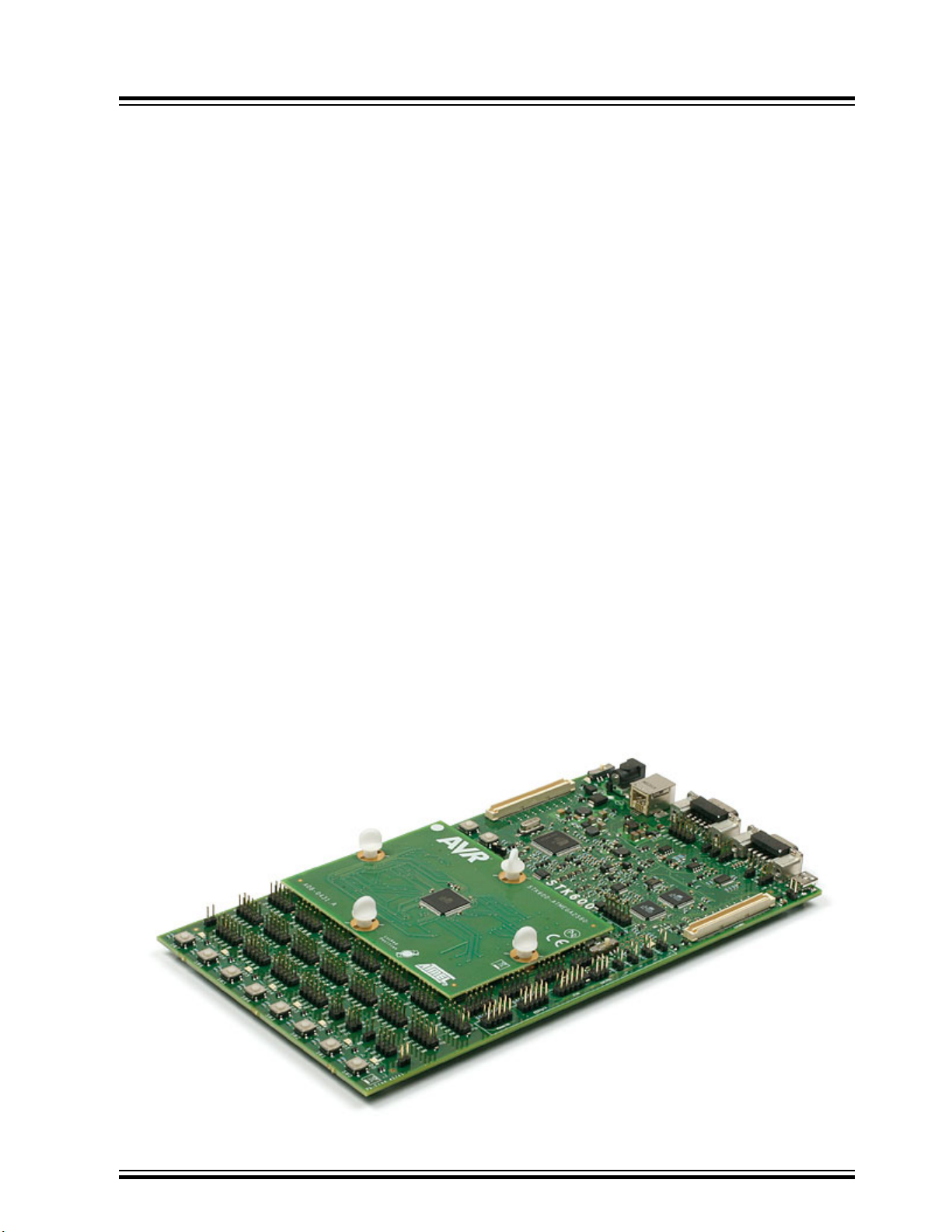
4. Getting Started
4.1 Kit Contents
The box contains:
• STK600 Starter Kit Evaluation Board
• Cables for STK600:
– Two 10-wire cables for I/O ports and Parallel mode programming
– One 6-wire cable for in-system programming
– Four 2-wire cables for UART and DataFlash connections
• USB Cable
• DC Power Cable
• Device Board with an ATmega2560 Device
• Two Sets of Screws and Nuts, and One Set of Clips
STK600 Starter Kit
Getting Started
4.2 Quick Start
The STK600 Starter Kit is shipped with a device board with an ATmega2560 microcontroller.
The STK600 can source power to the microcontroller through the USB cable. Remember that the power
available through the USB cable is limited. If your application attaches several peripherals to the STK600,
you should use an external power source connected to the DC input socket on STK600. The external
power supply should be 9-15V DC with positive center connector.
The power switch turns the STK600 main power ON and OFF. The red LED is lit when power is ON, and
the status LED will turn green. The green LED beside the VTG jumper indicates that the target voltage is
present.
© 2018 Microchip Technology Inc.
User Guide
40001904C-page 44
Page 45

4.3 Connecting the Hardware
The STK600 must be connected to a host PC with a USB cable. Connect the cable to a free USB port on
the PC or on a USB hub. The USB port must be capable of supplying 500 mA. If using a USB hub, make
sure it has an external power supply.
Connect the other end of the USB cable to the USB connector on the STK600 sitting next to the DC jack.
Optionally, if STK600 is to be connected to external hardware that consumes more than 300 mA, an
external DC power supply can be connected to the DC jack on the STK600. The cable supplied with the
kit can be used. Connect the center pin to the positive voltage and the cap to ground.
See 5. Target Socket System on how to set up the routing card and socket card.
STK600 Starter Kit
Getting Started
© 2018 Microchip Technology Inc.
User Guide
40001904C-page 45
Page 46
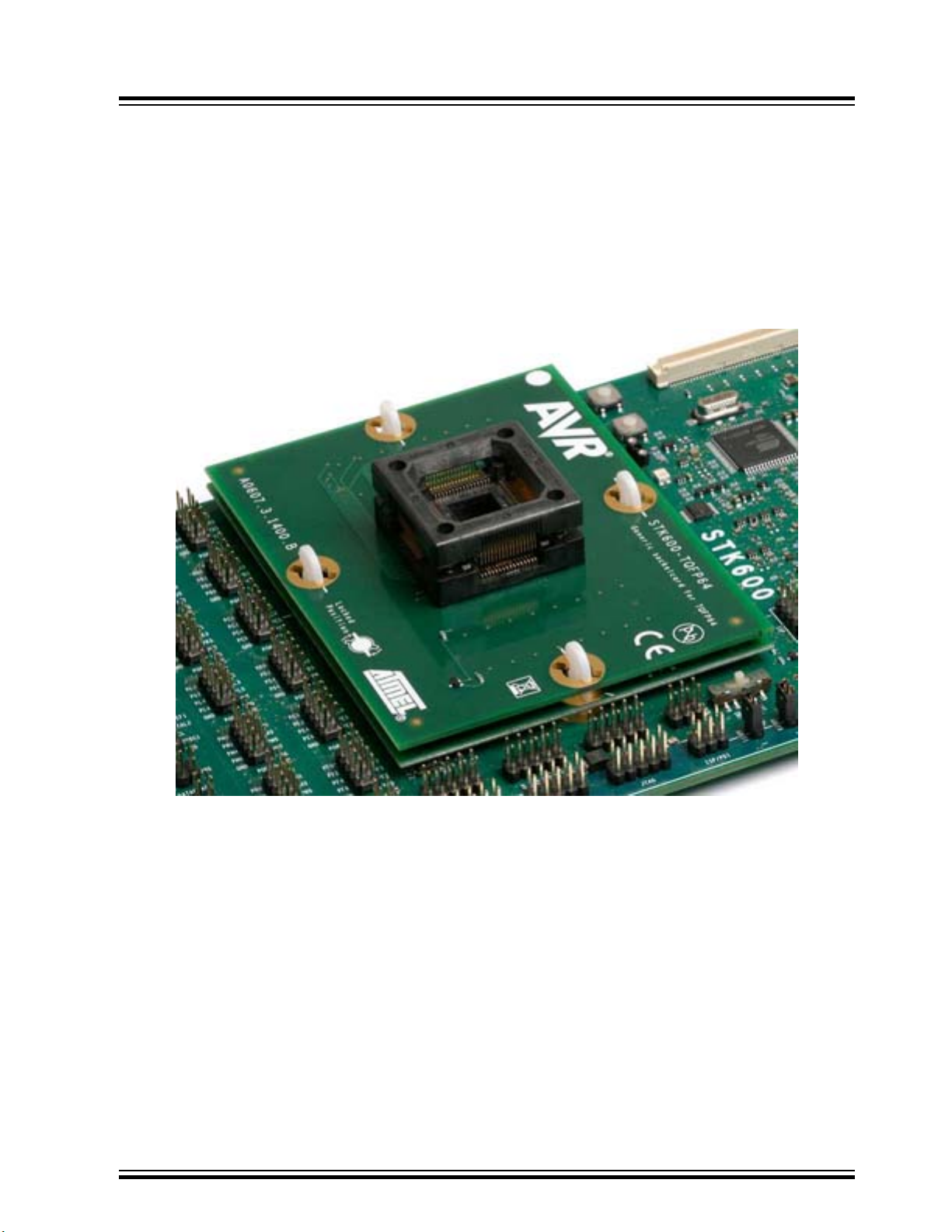
5. Target Socket System
5.1 Socket System
STK600 is designed to support all AVR devices with internal Flash memory. A system based on socket
and routing cards is used to support different package types and pinouts on the STK600 board.
The picture below shows an STK600 with a mounted routing card and socket card.
STK600 Starter Kit
Target Socket System
5.2 Socket Card and Routing Card
A socket card is a general card that does not have any device-specific hardware. E.g., a TQFP-64 socket
card can be used for all devices that come in a TQFP-64 package, regardless of pinout.
© 2018 Microchip Technology Inc.
User Guide
40001904C-page 46
Page 47
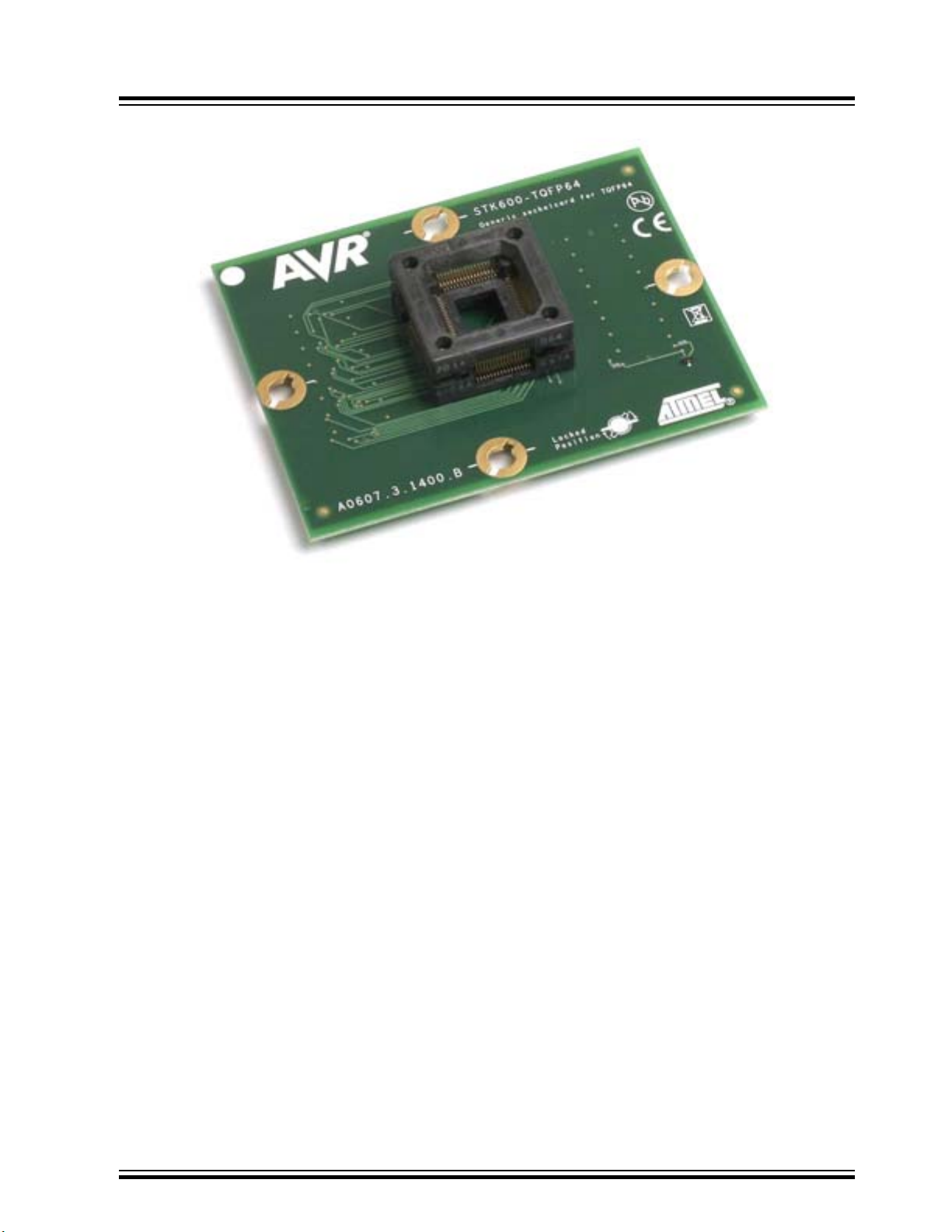
STK600 Starter Kit
Target Socket System
A routing card is a device-specific card. It routes signals between the STK600 motherboard and the
socket card. Note that several devices may use the same routing card if they share the same pinout.
© 2018 Microchip Technology Inc.
User Guide
40001904C-page 47
Page 48
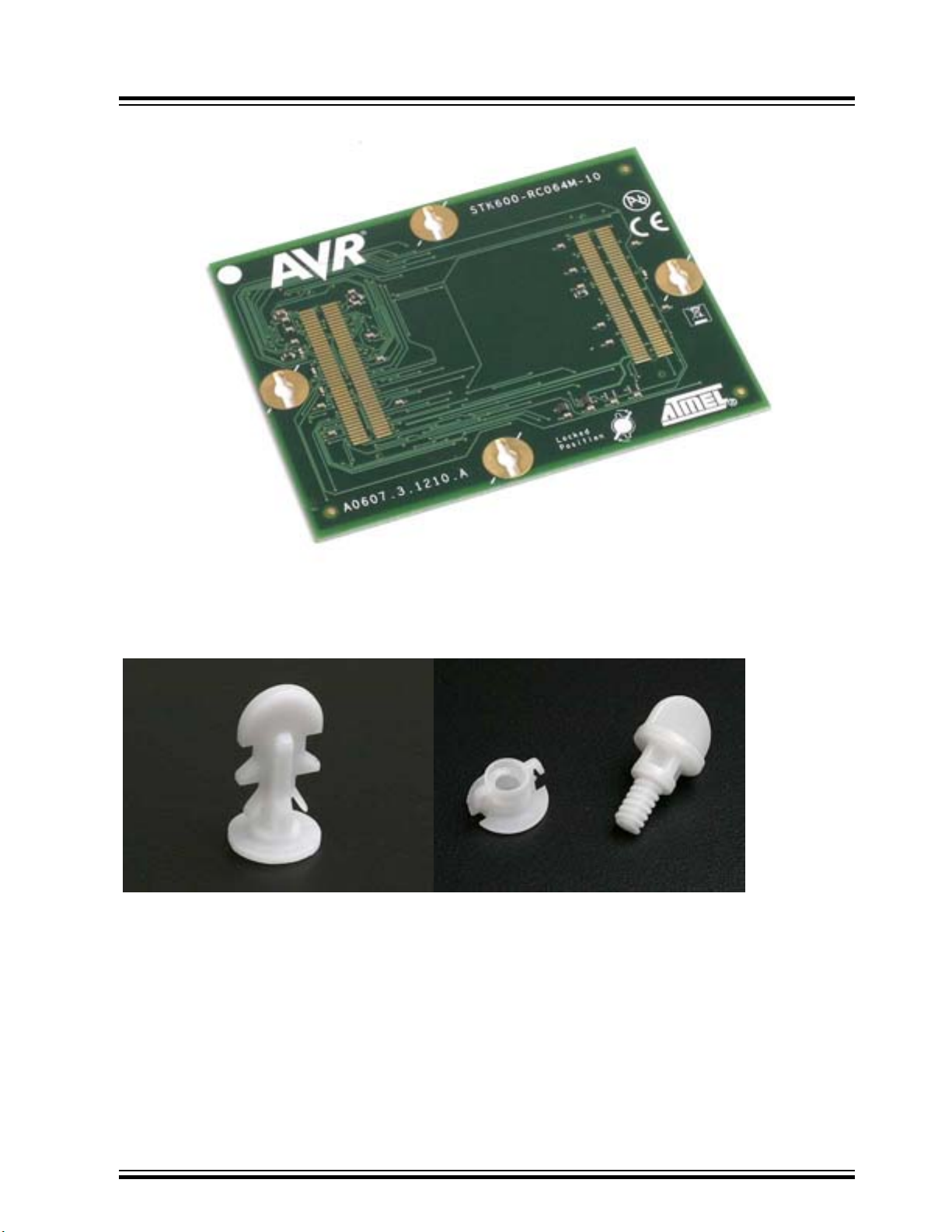
STK600 Starter Kit
Target Socket System
A set of spring loaded connectors makes the connection between the motherboard, routing card, and
socket card. Clips or screws hold the stack of cards together.
In addition to the socket and routing cards included in the kit, there are several add-on packs available to
expand the part support for the STK600. See the 3. Device Support page to get an overview of the
different socket and routing cards.
5.3 Selecting the Correct Routing and Socket Cards
Selecting the correct routing and socket card can be done by looking at the 3. Device Support table.
For Atmel Studio the correct routing and socket card can also be found by selecting the correct device in
the STK600 programming dialog in Atmel Studio. A notification will display the correct routing and socket
© 2018 Microchip Technology Inc.
User Guide
40001904C-page 48
Page 49

card to use unless the STK600 already has the correct cards mounted. More information on the
programming dialog can be found in the Programming Dialog pages in the Atmel Studio help.
Note that some of the devices have a part-specific socket card (i.e., a routing card that has a socket). In
this case, there is only one card to install onto the motherboard.
5.4 Mounting the Cards
Mounting the routing and socket cards can either be done by plastic clips or plastic screws/nuts. Both
sets are included in the STK600 package. Install either the clips or the nuts to the motherboard
depending on what solution you want to use.
5.4.1 Using Clips
5.4.1.1 Motherboard
The clips should be installed from the bottom side of the STK600 motherboard. When properly installed,
two plastic locking springs hold the clip in place.
STK600 Starter Kit
Target Socket System
© 2018 Microchip Technology Inc.
User Guide
40001904C-page 49
Page 50
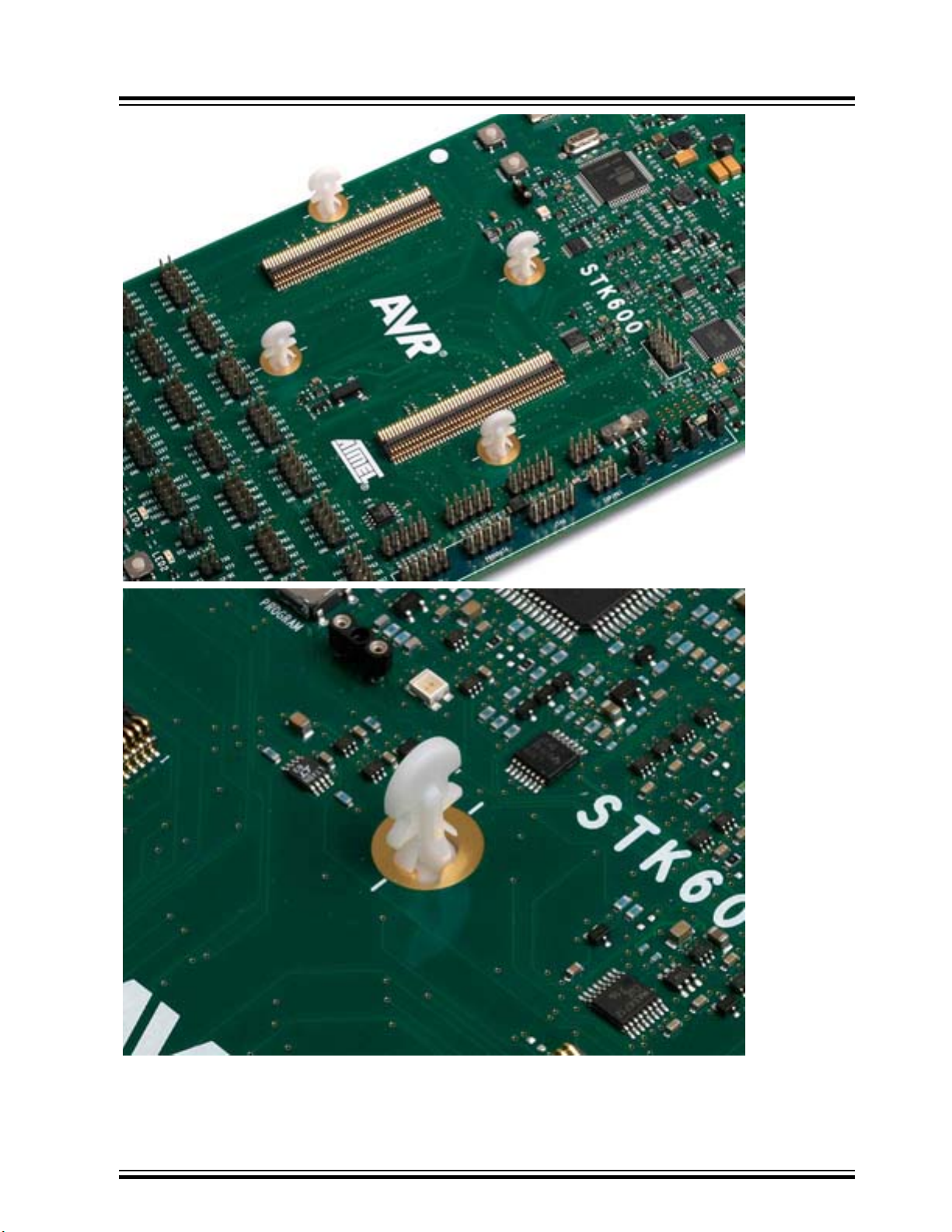
STK600 Starter Kit
Target Socket System
© 2018 Microchip Technology Inc.
User Guide
40001904C-page 50
Page 51

5.4.1.2 Routing Card
Align the clips with the white lines on the motherboard. The routing card can now be placed above the
four clips. Make sure that the routing card has the correct orientation (i.e., the text should face upwards,
and the white dot in the corner should match the one on the STK600). Press down the routing card (i.e.,
compress the spring loaded connector on the STK600) and turn the clip 45 degrees in the clockwise
direction so that it aligns with the white line on the routing card. It is easiest to do two opposite clips
before locking the last two.
STK600 Starter Kit
Target Socket System
© 2018 Microchip Technology Inc.
User Guide
40001904C-page 51
Page 52
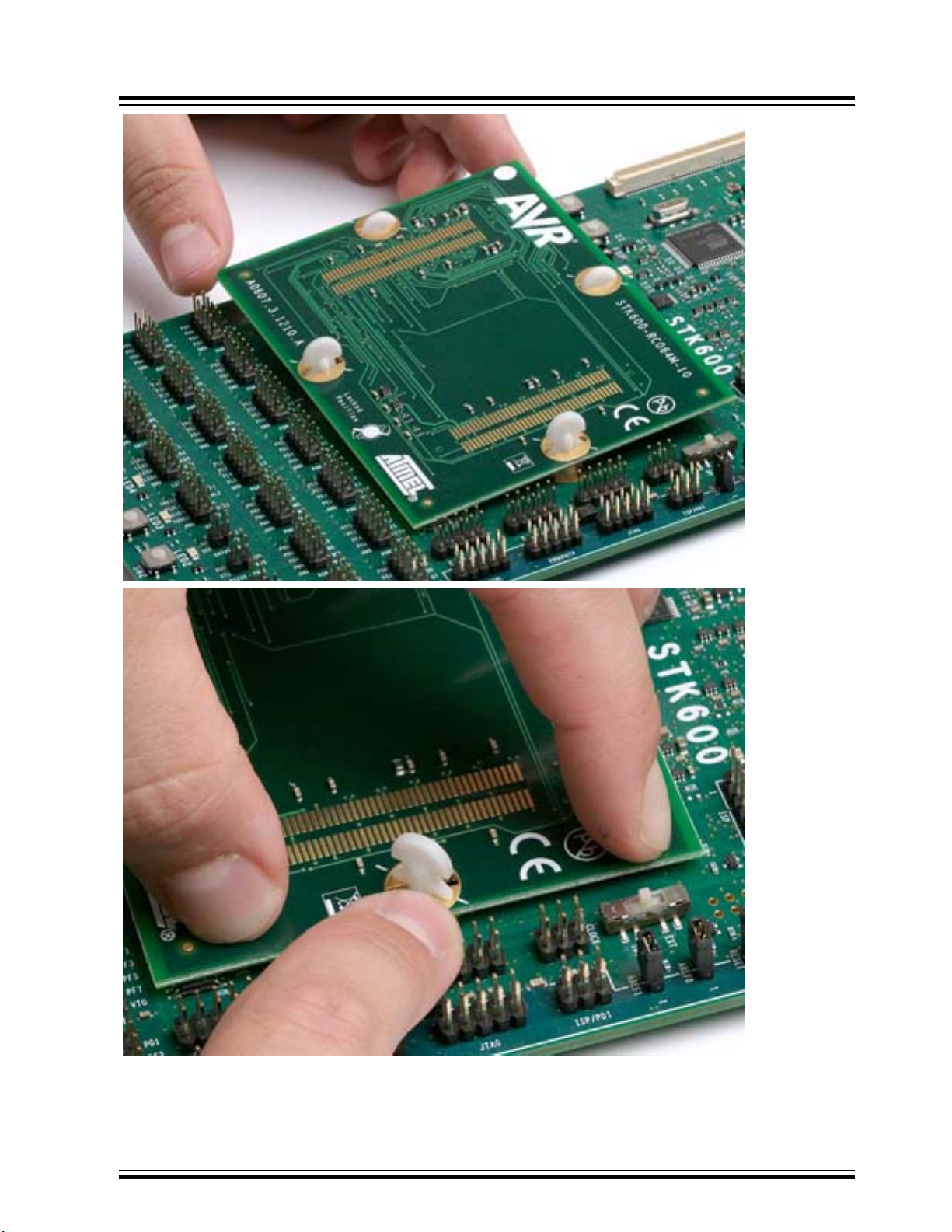
STK600 Starter Kit
Target Socket System
© 2018 Microchip Technology Inc.
User Guide
40001904C-page 52
Page 53
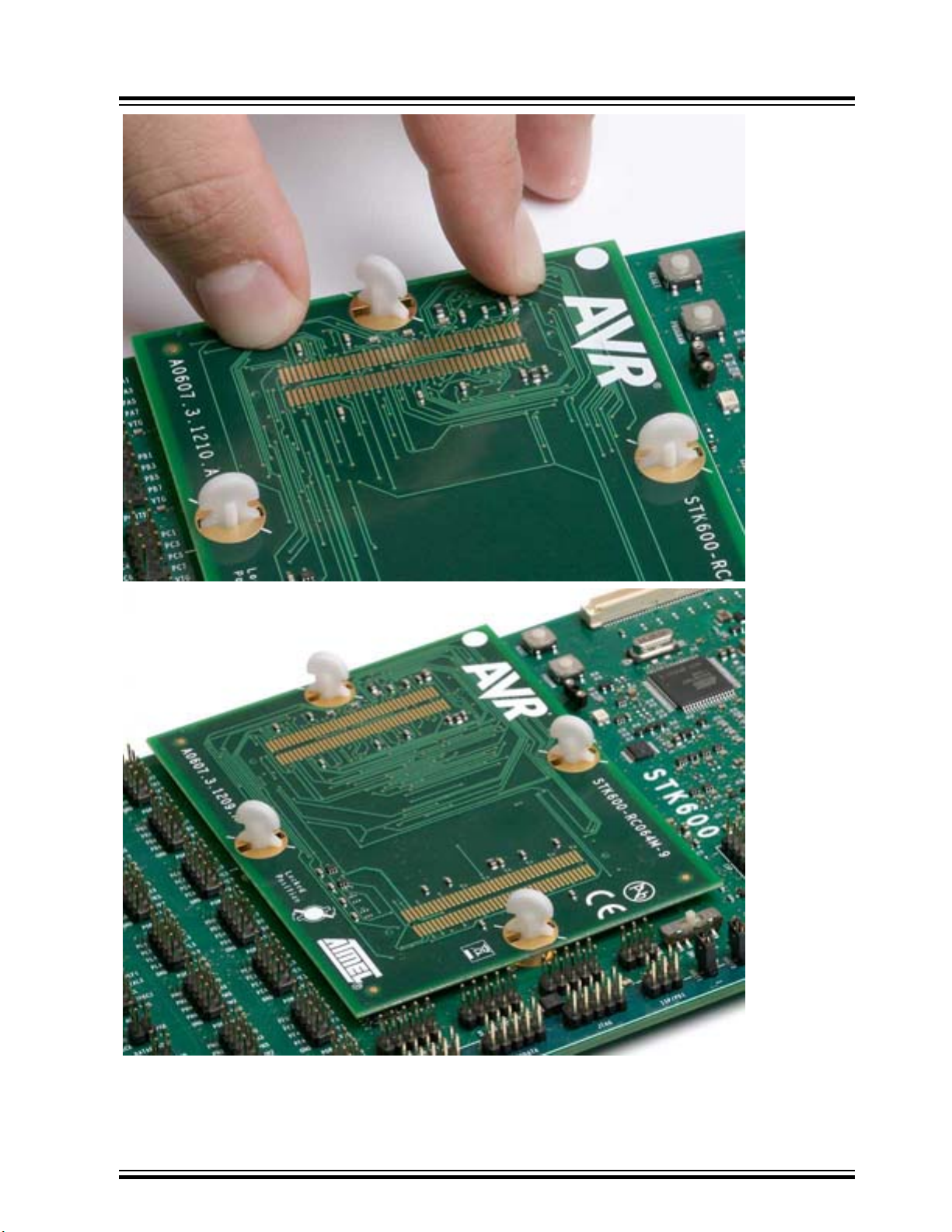
STK600 Starter Kit
Target Socket System
© 2018 Microchip Technology Inc.
User Guide
40001904C-page 53
Page 54
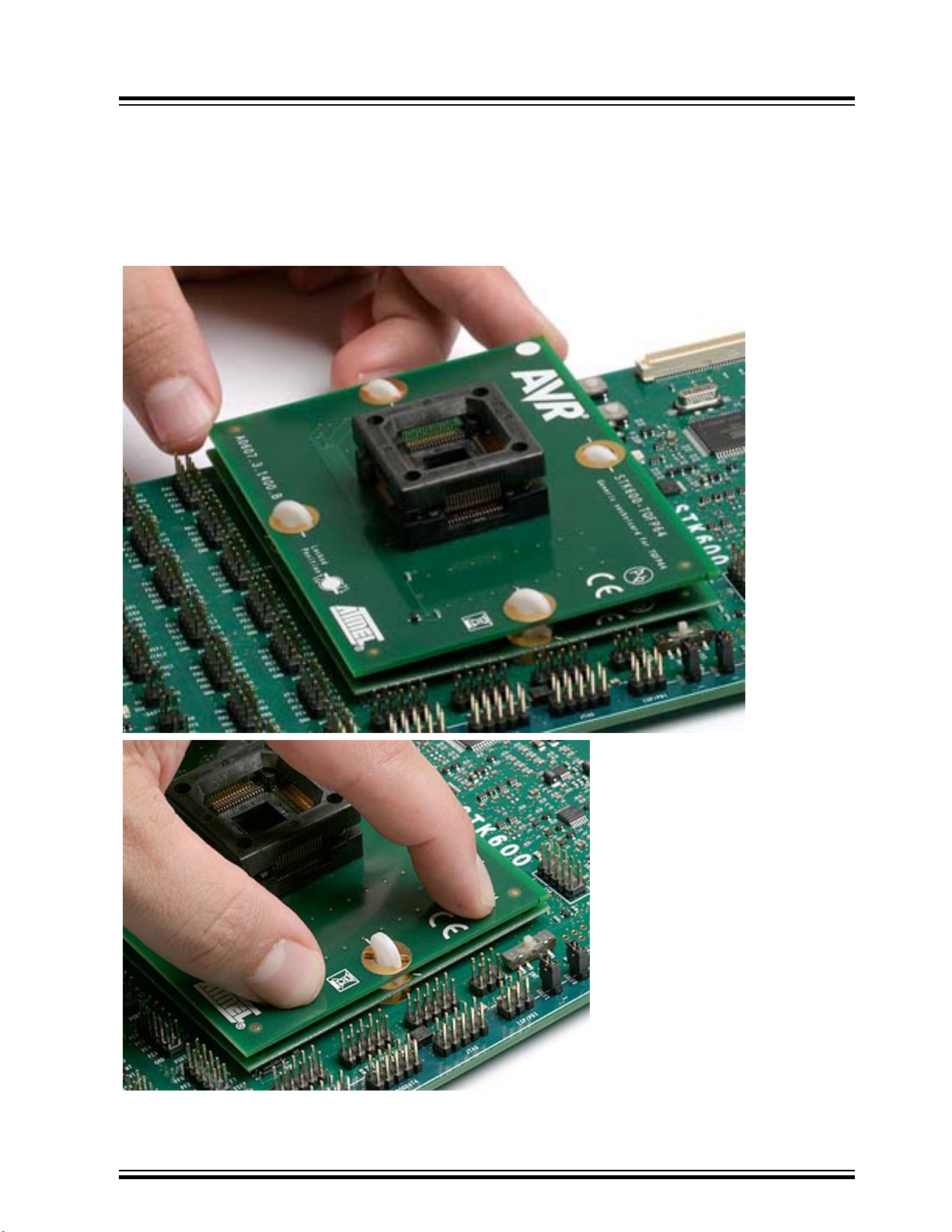
5.4.1.3 Socket Card
Connecting the socket card is done in the same way as the routing card. Make sure that the clips align
with the white line outside the clip holes on the routing card, then mount the socket card. The white spot
on the socket card should align with the one on the routing card. Press down the socket card (i.e.,
compress the spring loaded connector on the socket card) and turn the clip 45 degrees in the clockwise
direction until it aligns with the white line outside the clip hole. It is easiest to do two opposite clips before
locking the last two.
STK600 Starter Kit
Target Socket System
© 2018 Microchip Technology Inc.
User Guide
40001904C-page 54
Page 55
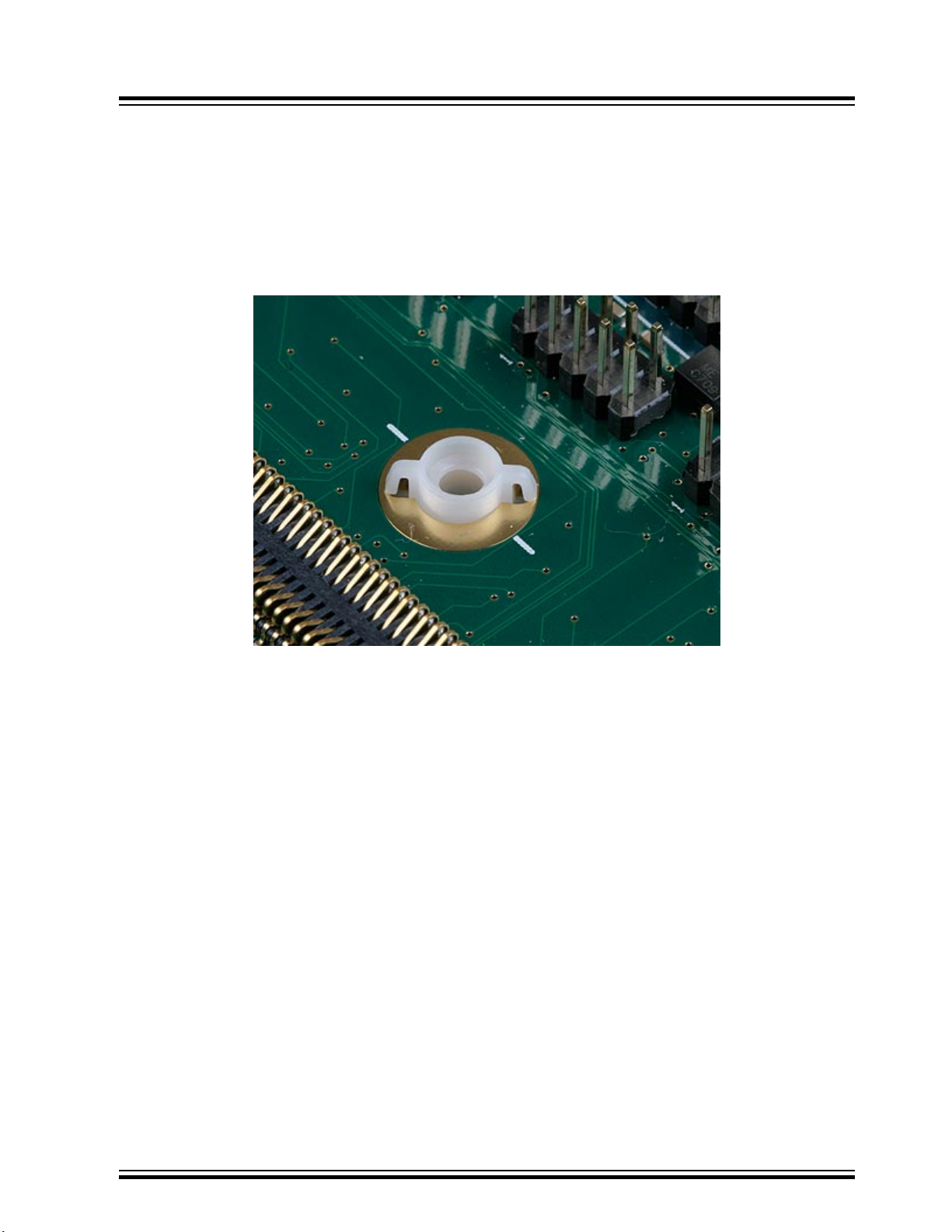
Note:
Always rotate the clips within the 45 degrees window. Do not turn them around, that could cause the
routing card below to unlock from the clip.
5.4.2 Using Screws and Nuts
5.4.2.1 Motherboard
Insert the nuts into the STK600 motherboard from the bottom side. When properly installed the two
locking springs should hold the nut in place.
STK600 Starter Kit
Target Socket System
5.4.2.2 Routing and Socket Card
Place the routing card above the motherboard, make sure that the white spot in the corner matches the
white spot on the motherboard. The small plastic taps on the ends of the spring loaded connectors should
mate with the holes in the routing card. When the routing card is in the correct position, place the socket
card onto the routing card with the white spot matching the one on the routing card. Make sure that the
plastic taps on the connectors on the socket card mates with the routing card as well.
Insert the four screws, and tighten them firmly into the nuts.
© 2018 Microchip Technology Inc.
User Guide
40001904C-page 55
Page 56
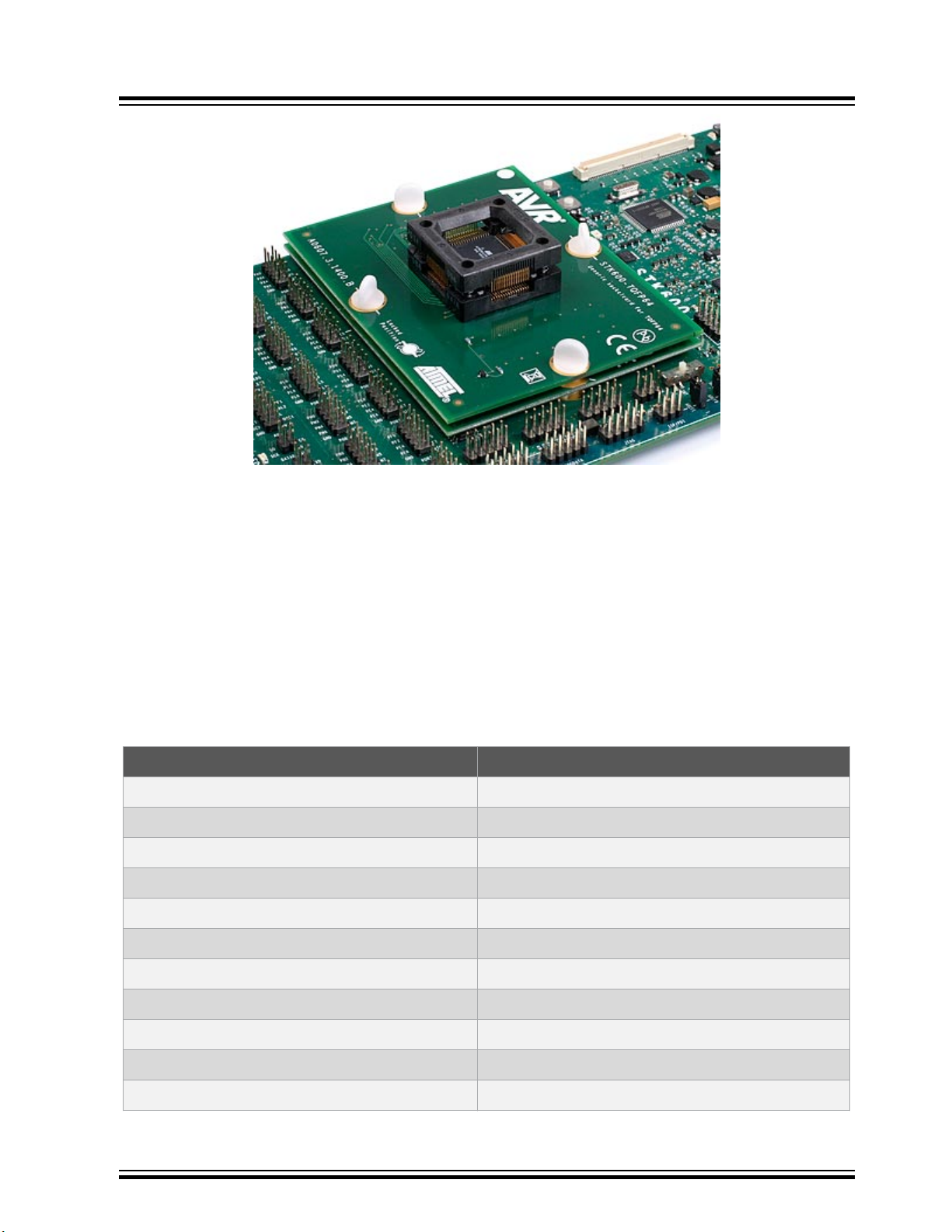
STK600 Starter Kit
Target Socket System
5.5 Signal Integrity
STK600 is designed to support a wide range of devices with different packages and pinouts. Many
compromises have been taken to make this possible with one motherboard. The signal integrity is not
optimized due to this. STK600 is not a reference design in any way, but a kit that serves as socket
programmer with some additional peripheral hardware to get started with the AVR device. Serial
communication at the highest frequencies may not work.
5.6 AVR UC3 Routing Card Pin Mapping
STK600-RCUC3B0-21
Device Pin Name STK600 Pin Name
PA10 PB2
PA11 PB3, TOSC1
PA12 TOSC2, PB4
PA13 PB5
PA14 PB6, MOSI
PA15 PB7, SCK
PA16 PC0
PA17 PC1
PA18 XTAL1, PC2
PA19 PC3, XTAL2
PA20 PC4
© 2018 Microchip Technology Inc.
User Guide
40001904C-page 56
Page 57

Device Pin Name STK600 Pin Name
PA21 PC5
PA22 PC6
PA23 PC7
PA24 PD0
PA25 PD1, MISO
PA26 PD2
PA27 PD3
PA28 PD4
PA29 PD5
PA30 PD6
PA31 PD7
PA3 PA3
STK600 Starter Kit
Target Socket System
PA4 PA4
PA5 PA5
PA6 PA6
PA7 PA7
PA8 PB0
PA9 PB1
PB0 PE0
PB10 PF2
PB11 PF3
PB1 PE1
PB2 PE2
PB3 PE3
PB4 PE4
PB5 PE5
PB6 PE6
PB7 PE7
PB8 PF0
PB9 PF1
RESET RESET
TCK TCK
© 2018 Microchip Technology Inc.
User Guide
40001904C-page 57
Page 58

Device Pin Name STK600 Pin Name
TDI TDI
TDO TDO
TMS TMS
AREF0 AREF0
DN DN
DP DP
VBUS VBUST
VDDANA VTG
VDDCORE
VDDIN VTG
VDDOUT
VDDPLL
STK600 Starter Kit
Target Socket System
GND GND
STK600-RCUC3B48-27
Device Pin Name STK600 Pin Name
PA10 PB2
PA11 PB3, TOSC1
PA12 TOSC2, PB4
PA13 PB5
PA14 PB6, MOSI
PA15 PB7, SCK
PA16 PC0
PA17 PC1
PA18 XTAL1, PC2
PA19 PC3, XTAL2
PA20 PC4
PA21 PC5
PA22 PC6
PA23 PC7
PA24 PD0
PA25 PD1, MISO
© 2018 Microchip Technology Inc.
User Guide
40001904C-page 58
Page 59

Device Pin Name STK600 Pin Name
PA26 PD2
PA27 PD3
PA3 PA3
PA4 PA4
PA5 PA5
PA6 PA6
PA7 PA7
PA8 PB0
PA9 PB1
RESET RESET
TCK TCK
TDI TDI
STK600 Starter Kit
Target Socket System
TDO TDO
TMS TMS
AREF0 AREF0
DN DN
DP DP
VBUS VBUST
VDDANA VTG
VDDCORE
VDDIN VTG
VDDOUT
VDDPLL
GND GND
STK600-RCUC3A100-28
Device Pin Name STK600 Pin Name
PA00 PA0
PA01 PA1
PA02 PA2
PA03 PA3
PA04 PA4
© 2018 Microchip Technology Inc.
User Guide
40001904C-page 59
Page 60

Device Pin Name STK600 Pin Name
PA05 PA5
PA06 PA6
PA07 PA7
PA08 PB0
PA09 PB1
PA10 PB2
PA11 PB3, MISO
PA12 PB4, MOSI
PA13 PB5, SCK
PA14 PB6
PA15 PB7
PA16 PC0
STK600 Starter Kit
Target Socket System
PA17 PC1
PA18 PC2
PA19 PC3
PA20 PC4
PA21 PC5
PA22 PC6
PA23 PC7
PA24 PD0
PA25 PD1
PA26 PD2
PA27 PD3
PA28 PD4
PA29 PD5
PA31 PD7
PB00 PE0
PB01 PE1
PB02 PE2
PB03 PE3
PB04 PE4
PB05 PE5
© 2018 Microchip Technology Inc.
User Guide
40001904C-page 60
Page 61

Device Pin Name STK600 Pin Name
PB06 PE6
PB07 PE7
PB08 PF0
PB09 PF1
PB10 PF2
PB11 PF3
PB12 PF4
PB13 PF5
PB14 PF6
PB15 PF7
PB16 PG0
PB17 PG1
STK600 Starter Kit
Target Socket System
PB18 PG2
PB19 PG3
PB20 PG4
PB21 PG5
PB22 PG6
PB23 PG7
PB24 PH0
PB25 PH1
PB26 PH2
PB27 PH3
PB28 PH4
PB29 PH5
PB30 PH6
PB31 PH7
PC00 TOSC1
PC01 TOSC2
PC02 XTAL1
PC03 XTAL2
PC04
PC05
© 2018 Microchip Technology Inc.
User Guide
40001904C-page 61
Page 62
Device Pin Name STK600 Pin Name
AREF0 AREF0
DN DN
DP DP
RESET RESET
TCK TCK
TDI TDI
TDO TDO
TMS TMS
VBUS VBUST
VDDANA VTG
VDDCORE
VDDIN VTG
STK600 Starter Kit
Target Socket System
VDDPLL
GND GND
STK600-RCUC3A144-32
Device Pin Name STK600 Pin Name
PA00 PA0
PA01 PA1
PA02 PA2
PA03 PA3
PA04 PA4
PA05 PA5
PA06 PA6, UVCON
PA07 PA7
PA08 PB0, SCK
PA09 PB1
PA10 PB2, MOSI
PA11 PB3, MISO
PA12 PB4
PA13 PB5
PA14 PB6
© 2018 Microchip Technology Inc.
User Guide
40001904C-page 62
Page 63

Device Pin Name STK600 Pin Name
PA15 PB7
PA16 PC0
PA17 PC1
PA18 PC2
PA19 PC3
PA20 PC4
PA21 PC5
PA22 PC6
PA23 PC7
PA24 PD0
PA25 PD1
PA26 PD2
STK600 Starter Kit
Target Socket System
PA27 PD3
PA28 PD4
PA29 PD5
PA30 PD6
PA31 PD7
PB00 PE0
PB01 PE1
PB02 PE2
PB03 PE3
PB04 PE4
PB05 PE5
PB06 PE6
PB07 PE7
PB08 PF0
PB09 PF1
PB10 PF2
PB11 PF3
PC00 TOSC1, PG0
PC01 TOSC2, PG1
PC02 XTAL1, PG2
© 2018 Microchip Technology Inc.
User Guide
40001904C-page 63
Page 64

Device Pin Name STK600 Pin Name
PC03 XTAL2, PG3
PC04 PG4
PC05 PG5
PX00 PN2
PX01 PN1
PX02 PN0
PX03 PM7
PX04 PM6
PX05 PM5
PX06 PM4
PX07 PM3
PX08 PM2
STK600 Starter Kit
Target Socket System
PX09 PM1
PX10 PM0
PX11 PP7
PX12 PP5
PX13 PP4
PX14 PP1
PX15 PL3
PX16 PL2
PX17 PL1
PX18 PL0
PX19 PK7
PX20 PK6
PX21 PK5
PX22 PK4
PX23 PK3
PX24 PK2
PX25 PK1
PX26 PK0
PX27 PJ7
PX28 PJ6
© 2018 Microchip Technology Inc.
User Guide
40001904C-page 64
Page 65

Device Pin Name STK600 Pin Name
PX29 PJ5
PX30 PJ4
PX31 PJ3
PX32 PJ2
PX33 PJ1
PX34 PJ0
PX35 PN7
PX36 PN6
PX37 PN5
PX38 PN4
PX39 PN3
PX40 PH0
STK600 Starter Kit
Target Socket System
PX41 PH1
PX42 PH2
PX43 PH3
PX44 PH4
PX45 PH5
PX46 PH6
PX47 PH7
PX48 PL7
PX49 PQ1
PX50 PQ2
PX51 PQ3
PX52 PP3
PX53 PP2
PX54 PP6
PX55 PL6
PX56 PL5
PX57 PL4
PX58 PP0
PX59 PQ5
RESET_N RESET
© 2018 Microchip Technology Inc.
User Guide
40001904C-page 65
Page 66

Device Pin Name STK600 Pin Name
TCK TCK
TDI TDI
TDO TDO
TMS TMS
USB_VBUS VBUST
DN DN
DP DP
FSDM DN
FSDP DP
GND GND
VDDANA VTG
VDDCORE
STK600 Starter Kit
Target Socket System
VDDIN VTG
STK600-RCUC3A144-33
Device Pin Name STK600 Pin Name
PA00 PA0
PA01 PA1
PA02 PA2
PA03 PA3
PA04 PA4
PA05 PA5
PA06 PA6
PA07 PA7
PA08 PB0
PA09 PB1
PA10 PB2
PA11 PB3, MISO
PA12 PB4, MOSI
PA13 PB5, SCK
PA14 PB6
PA15 PB7
© 2018 Microchip Technology Inc.
User Guide
40001904C-page 66
Page 67

Device Pin Name STK600 Pin Name
PA16 PC0
PA17 PC1
PA18 PC2
PA19 PC3
PA20 PC4
PA21 PC5
PA22 PC6
PA23 PC7
PA24 PD0
PA25 PD1, PP0
PA26 PD2, PL4
PA27 PD3, PL5
STK600 Starter Kit
Target Socket System
PA28 PD4, PL6
PA29 PD5
PA30 PD6
PB00 PE0
PB01 PE1
PB02 PE2
PB03 PE3
PB04 PE4, PP3
PB05 PE5
PB06 PE6
PB07 PE7
PB08 PF0
PB09 PF1
PB10 PF2
PB11 PF3
PB12 PF4
PB13 PF5
PB14 PF6
PB15 PF7
PB16 PG0
© 2018 Microchip Technology Inc.
User Guide
40001904C-page 67
Page 68

Device Pin Name STK600 Pin Name
PB17 PG1, UVCON, PL7
PB18 PG2
PB19 PG3
PB20 PG4
PB21 PG5
PB22 PG6
PB23 PG7
PB24 PH0
PB25 PH1
PB26 PH2
PB27 PH3
PB28 PH4
STK600 Starter Kit
Target Socket System
PB29 PH5, PP2
PB30 PH6
PB31 PH7, PP6
PC00 TOSC1
PC01 TOSC2
PC02 XTAL1
PC03 XTAL2
PC04
PC05
PX00 PJ0
PX01 PJ1
PX02 PJ2
PX03 PJ3
PX04 PJ4
PX05 PJ5
PX06 PJ6
PX07 PJ7
PX08 PK0
PX09 PK1
PX10 PK2
© 2018 Microchip Technology Inc.
User Guide
40001904C-page 68
Page 69

Device Pin Name STK600 Pin Name
PX11 PK3
PX12 PK4
PX13 PK5
PX14 PK6
PX15 PK7
PX16 PL0
PX17 PL1
PX18 PL2
PX19 PL3
PX20 PM0
PX21 PM1
PX22 PM2
STK600 Starter Kit
Target Socket System
PX23 PM3
PX24 PM4
PX25 PM5
PX26 PM6
PX27 PM7
PX28 PN0
PX29 PN1
PX30 PN2
PX31 PN3
PX32 PN4
PX33 PN5
PX34 PN6
PX35 PN7
PX36 PP1
PX37 PP4
PX38 PP5
PX39 PP7
RESET_N RESET
TCK TCK
TDI TDI
© 2018 Microchip Technology Inc.
User Guide
40001904C-page 69
Page 70
Device Pin Name STK600 Pin Name
TDO TDO
TMS TMS
VBUS VBUST
ADVREF AREF0
DM DN
DP DP
VDDANA VTG
VDDCORE
VDDIN VTG
GND GND
STK600-RCUC3L0-34
STK600 Starter Kit
Target Socket System
Device Pin Name STK600 Pin Name
PA00 PA0, TCK
PA01 PA1, TMS
PA02 PA2, TDO
PA03 PA3, TDI
PA04 PA4
PA05 PA5
PA06 PA6
PA07 PA7
PA08 PB0, XTAL1
PA09 PB1, XTAL2
PA10 PB2, PH1
PA11 PB3
PA12 PB4
PA13 PB5, PH3
PA14 PB6
PA15 PB7
PA16 PC0
PA17 PC1
PA18 PC2
© 2018 Microchip Technology Inc.
User Guide
40001904C-page 70
Page 71

Device Pin Name STK600 Pin Name
PA19 PC3
PA20 PC4
PA21 PC5
PA22 PC6
PB00 PD0
PB01 PD1
PB02 PD2
PB03 PD3
PB04 PD4
PB05 PD5
PB06 PD6
PB07 PD7
STK600 Starter Kit
Target Socket System
PB08 PE0
PB09 PE1
PB10 PE2
PB11 PE3
PB12 PE4
RESET MISO, RESET
ADVREFP AREF0
VDDIN VTG
VDDCORE
VDDIO VTG
VDDANA
GNDANA GND
VTG VTG
GND GND
STK600-RCUC3C0-36
Device Pin Name STK600 Pin Name
PA00 PA0, TCK
PA01 PA1, TDI
PA02 PA2, TDO
© 2018 Microchip Technology Inc.
User Guide
40001904C-page 71
Page 72

Device Pin Name STK600 Pin Name
PA03 PA3, TMS
PA04 PA4
PA05 PA5
PA06 PA6
PA07 PA7
PA08 PB0
PA09 PB1
PA10 PB2
PA11 PB3, AREF1
PA12 PB4
PA13 PB5
PA14 PB6
STK600 Starter Kit
Target Socket System
PA15 PB7
PA16 PC0, AREF0
PA17 PC1
PA18 PC2
PA19 PC3
PA20 PC4
PA21 PC5
PA22 PC6
PA23 PC7
PA24 PD0
PA25 PD1
PA26 PD2
PA27 PD3
PA28 PD4
PA29 PD5
PB00 PE0, TOSC1
PB01 PE1, TOSC2
PB02 PE2
PB03 PE3
PB04 PE4
© 2018 Microchip Technology Inc.
User Guide
40001904C-page 72
Page 73

Device Pin Name STK600 Pin Name
PB05 PE5
PB06 PE6
PB07 PE7
PB08 PF0
PB09 PF1
PB10 PF2
PB11 PF3
PB12 PF4
PB13 PF5
PB14 PF6
PB15 PF7
PB16 PG0
STK600 Starter Kit
Target Socket System
PB17 PG1
PB18 PG2
PB19 PG3
PB20 PG4
PB21 PG5
PB22 PG6
PB23 PG7
PB24 PH0
PB25 PH1
PB26 PH2
PB27 PH3
PB28 PH4
PB29 PH5
PB30 PH6, XTAL1
PB31 PH7, XTAL2
PC00 PJ0
PC01 PJ1, UVCON
PC02 PJ2
PC03 PJ3
PC04 PJ4
© 2018 Microchip Technology Inc.
User Guide
40001904C-page 73
Page 74

Device Pin Name STK600 Pin Name
PC05 PJ5
PC06 PJ6
PC07 PJ7
PC08 PK0
PC09 PK1
PC10 PK2
PC11 PK3
PC12 PK4
PC13 PK5
PC14 PK6
PC15 PK7
PC16 PL0
STK600 Starter Kit
Target Socket System
PC17 PL1
PC18 PL2
PC19 PL3
PC20 PL4
PC21 PL5
PC22 PL6
PC23 PL7
PC24 PM0
PC25 PM1
PC26 PM2
PC27 PM3
PC28 PM4
PC29 PM5
PC30 PM6
PC31 PM7
PD00 PN0
PD01 PN1
PD02 PN2
PD03 PN3
PD04 PN4
© 2018 Microchip Technology Inc.
User Guide
40001904C-page 74
Page 75

Device Pin Name STK600 Pin Name
PD05 PN5
PD06 PN6
PD07 PN7
PD08 PP0
PD09 PP1
PD10 PP2
PD11 PP3
PD12 PP4
PD13 PP5
PD14 PP6
PD15 PP7
PD16 PQ0
STK600 Starter Kit
Target Socket System
PD17 PQ1
PD18 PQ2
PD19 PQ3
PD20 PQ4
PD21 PQ5
PD22 PQ6
PD23 PQ7
PD24 PDATA0
PD25 PDATA1
PD26 PDATA2
PD27 PDATA3
PD28 PDATA4
PD29 PDATA5
PD30 PDATA6
RESET MISO, RESET
VBUS VBUST
DM DN
DP DP
VDDANA VTG
VDDCORE
© 2018 Microchip Technology Inc.
User Guide
40001904C-page 75
Page 76

Device Pin Name STK600 Pin Name
VDDIN VTG
GND GND
STK600-RCUC3C1-38
Device Pin Name STK600 Pin Name
PA00 PA0, TCK
PA01 PA1, TDI
PA02 PA2, TDO
PA03 PA3, TMS
PA04 PA4
PA05 PA5
PA06 PA6
STK600 Starter Kit
Target Socket System
PA07 PA7
PA08 PB0
PA09 PB1
PA10 PB2
PA11 PB3, AREF1
PA12 PB4
PA13 PB5
PA14 PB6
PA15 PB7
PA16 PC0, AREF0
PA17 PC1
PA18 PC2
PA19 PC3
PA20 PC4
PA21 PC5
PA22 PC6
PA23 PC7
PA24 PD0
PA25 PD1
PB00 PE0, TOSC1
© 2018 Microchip Technology Inc.
User Guide
40001904C-page 76
Page 77

Device Pin Name STK600 Pin Name
PB01 PE1, TOSC2
PB02 PE2
PB03 PE3
PB04 PE4
PB05 PE5
PB06 PE6
PB19 PG3
PB20 PG4
PB21 PG5
PB22 PG6
PB23 PG7
PB30 PH6, XTAL1
STK600 Starter Kit
Target Socket System
PB31 PH7, XTAL2
PC00 PJ0
PC01 PJ1, UVCON
PC02 PJ2
PC03 PJ3
PC04 PJ4
PC05 PJ5
PC06 PJ6
PC07 PJ7
PC11 PK3
PC12 PK4
PC13 PK5
PC14 PK6
PC15 PK7
PC16 PL0
PC17 PL1
PC18 PL2
PC19 PL3
PC20 PL4
PC21 PL5
© 2018 Microchip Technology Inc.
User Guide
40001904C-page 77
Page 78

Device Pin Name STK600 Pin Name
PC22 PL6
PC23 PL7
PC24 PM0
PC31 PM7
PD00 PN0
PD01 PN1
PD02 PN2
PD03 PN3
PD07 PN7
PD08 PP0
PD09 PP1
PD10 PP2
STK600 Starter Kit
Target Socket System
PD11 PP3
PD12 PP4
PD13 PP5
PD14 PP6
PD21 PQ5
PD22 PQ6
PD23 PQ7
PD24 PDATA0
PD27 PDATA3
PD28 PDATA4
PD29 PDATA5
PD30 PDATA6
RESET MISO, RESET
VBUS VBUST
DM DN
DP DP
VDDANA VTG
VDDCORE
VDDIN VTG
GND GND
© 2018 Microchip Technology Inc.
User Guide
40001904C-page 78
Page 79

STK600-RCUC3C2-40
Device Pin Name STK600 Pin Name
PA00 PA0, TCK
PA01 PA1, TDI
PA02 PA2, TDO
PA03 PA3, TMS
PA04 PA4
PA05 PA5
PA06 PA6
PA07 PA7
PA08 PB0
PA09 PB1
PA16 PC0, AREF0
STK600 Starter Kit
Target Socket System
PA17 PC1
PA18 PC2
PA19 PC3
PA20 PC4
PA21 PC5
PA22 PC6
PA23 PC7
PB00 PE0, TOSC1
PB01 PE1, TOSC2
PB30 PH6, XTAL1
PB31 PH7, XTAL2
PC02 PJ2
PC03 PJ3
PC04 PJ4
PC05 PJ5
PC15 PK7
PC16 PL0
PC17 PL1
PC18 PL2
PC19 PL3
© 2018 Microchip Technology Inc.
User Guide
40001904C-page 79
Page 80

Device Pin Name STK600 Pin Name
PC20 PL4
PC21 PL5
PC22 PL6
PD00 PN0
PD01 PN1
PD02 PN2
PD03 PN3
PD11 PP3
PD12 PP4, UVCON
PD13 PP5
PD14 PP6
PD21 PQ5
STK600 Starter Kit
Target Socket System
PD27 PDATA3
PD28 PDATA4
PD29 PDATA5
PD30 PDATA6
RESET MISO, RESET
VBUS VBUST
DM DN
DP DP
VDDANA VTG
VDDCORE
VDDIN VTG
GND GND
STK600-RCUC3L3U-47
Device Pin Name STK600 Pin Name
PA00 TCK, PA0
PA01 PA1, TMS
PA02 PA2, TDO
PA03 PA3, TDI
PA04 PA4
© 2018 Microchip Technology Inc.
User Guide
40001904C-page 80
Page 81

Device Pin Name STK600 Pin Name
PA05 PA5
PA06 PA6
PA07 PA7
PA08 PB0, XTAL1
PA09 PB1, XTAL2
PA10 PB2, PH1
PA11 PB3
PA12 PB4
PA13 PB5, PH3
PA14 PB6
PA15 PB7
PA16 PC0
STK600 Starter Kit
Target Socket System
PA17 PC1
PA18 PC2
PA19 PC3
PA20 PC4
PA21 PC5
PA22 PC6
PB00 PD0
PB01 PD1
PB02 PD2
PB03 PD3
PB04 PD4
PB05 PD5
PB06 PD6
PB07 PD7
PB08 PE0
PB09 PE1
PB10 PE2
PB11 PE3
PB12 PE4
PB13 PE5, DN
© 2018 Microchip Technology Inc.
User Guide
40001904C-page 81
Page 82

Device Pin Name STK600 Pin Name
PB14 PE6, DP
PB15 PE7
PB16 PF0
PB17 PF1
PB18 PF2
PB19 PF3
PB20 PF4
PB21 PF5
PB22 PF6
PB23 PF7
PB24 PG0
PB25 PG1
STK600 Starter Kit
Target Socket System
PB26 PG2
PB27 PG3
RESET MISO, RESET
VDDANA
ADVREFP AREF0
VDDIN VTG
VDDIO VTG
GND GND
STK600-RCUC3D3-48
Device Pin Name STK600 Pin Name
PA0 PA0, TDI
PA10 PB2
PA11 PB3, TOSC1
PA12 PB4, TOSC2
PA13 PB5
PA14 PB6
PA15 PB7
PA16 PC0
PA17 PC1
© 2018 Microchip Technology Inc.
User Guide
40001904C-page 82
Page 83

Device Pin Name STK600 Pin Name
PA18 PC2, XTAL1
PA19 PC3, XTAL2
PA1 PA1, TDO
PA20 PC4
PA21 PC5
PA22 PC6
PA23 PC7
PA24 PD0
PA25 PD1
PA26 PD2
PA27 PD3
PA28 PD4
STK600 Starter Kit
Target Socket System
PA29 PD5
PA2 PA2, TMS
PA30 PD6
PA31 PD7
PA3 PA3
PA4 PA4
PA5 PA5
PA6 PA6
PA7 PA7
PA8 PB0
PA9 PB1
PB0 PE0
PB10 PF2
PB11 PF3
PB12 PF4, TCK
PB13 PF5
PB14 PF6
PB15 PF7
PB16 PG0, VBUST
PB17 PG1
© 2018 Microchip Technology Inc.
User Guide
40001904C-page 83
Page 84

Device Pin Name STK600 Pin Name
PB18 PG2
PB1 PE1
PB2 PE2
PB3 PE3
PB4 PE4
PB5 PE5
PB6 PE6
PB7 PE7
PB8 PF0
PB9 PF1
RESET MISO, RESET
AREF0 AREF0
STK600 Starter Kit
Target Socket System
DN DN
DP DP
VDDANA VTG
VDDCORE
VDDIN VTG
VDDOUT
GND GND
STK600-RCUC3D4-49
Device Pin Name STK600 Pin Name
PA00 PA0, TDI
PA01 PA1, TDO
PA02 PA2, TMS
PA03 PA3
PA04 PA4
PA05 PA5
PA06 PA6
PA07 PA7
PA08 PB0
PA09 PB1
© 2018 Microchip Technology Inc.
User Guide
40001904C-page 84
Page 85

Device Pin Name STK600 Pin Name
PA10 PB2
PA11 PB3, TOSC1
PA12 PB4, TOSC2
PA13 PB5
PA14 PB6
PA15 PB7
PA16 PC0
PA17 PC1
PA18 PC2, XTAL1
PA19 PC3, XTAL2
PA20 PC4
PA21 PC5
STK600 Starter Kit
Target Socket System
PA22 PC6
PA23 PC7
PA24 PD0
PA25 PD1
PA26 PD2
PA27 PD3
PB12 PF4, TCK
PB13 PF5
PB14 PF6
PB15 PF7
PB16 PG0, VBUST
PB17 PG1
PB18 PG2
RESET MISO, RESET
AREF0 AREF0
DN DN
DP DP
VDDANA VTG
VDDCORE
VDDIN VTG
© 2018 Microchip Technology Inc.
User Guide
40001904C-page 85
Page 86

Device Pin Name STK600 Pin Name
VDDOUT
GND GND
STK600-RCUC3L4U-53
Device Pin Name STK600 Pin Name
PA00 PA0, TCK
PA01 PA1, TMS
PA02 PA2, TDO
PA03 PA3, TDI
PA04 PA4
PA05 PA5
PA06 PA6, VBUST
STK600 Starter Kit
Target Socket System
PA08 PB0, XTAL1
PA09 PB1, XTAL2
PA10 PB2, PH1
PA11 PB3
PA12 PB4
PA13 PB5, PH3
PA14 PB6
PA15 PB7
PA16 PC0
PA17 PC1
PA18 PC2
PA19 PC3
PA20 PC4
PA21 PC5
PA22 PC6
PB00 PD0
PB02 PD2
PB03 PD3
PB04 PD4
PB05 PD5
© 2018 Microchip Technology Inc.
User Guide
40001904C-page 86
Page 87

Device Pin Name STK600 Pin Name
PB06 PD6
PB07 PD7
PB08 PE0
PB09 PE1
PB10 PE2
PB11 PE3
PB12 PE4
PB13 PA7, PE5, DN
PB14 PD1, PE6, DP
RESET MISO, RESET
VDDIO VTG
GND GND
STK600 Starter Kit
Target Socket System
5.7 SAM Routing Cards
To allow SAM D20J devices to connect to the STK600, a special RC064SAM-72 routing card has been
made. This breaks out the pins to the pins on the STK600.
Note: The STK600 itself cannot communicate with the SAM device, as the STK600 does not support
SWD or the JTAG commands needed for SAM devices.
© 2018 Microchip Technology Inc.
User Guide
40001904C-page 87
Page 88
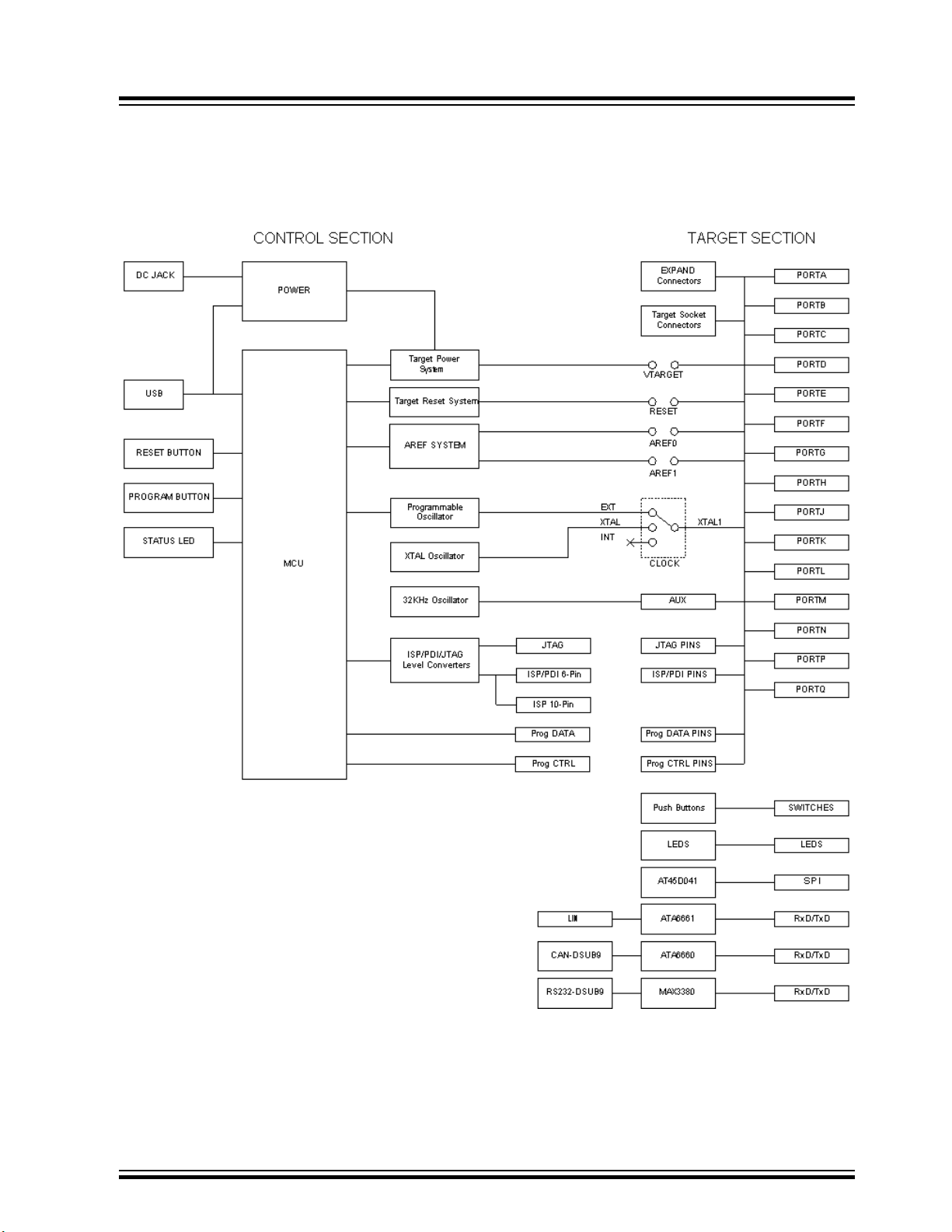
6. Hardware Description
6.1 STK600 Block Diagram
STK600 Starter Kit
Hardware Description
6.2 Target Voltage VTG
The VTG voltage is the supply voltage to the target AVR microcontroller. It is connected to the AVR
device VCC pin. VTG can either be generated by STK600, or be supplied from an external source.
© 2018 Microchip Technology Inc.
User Guide
40001904C-page 88
Page 89
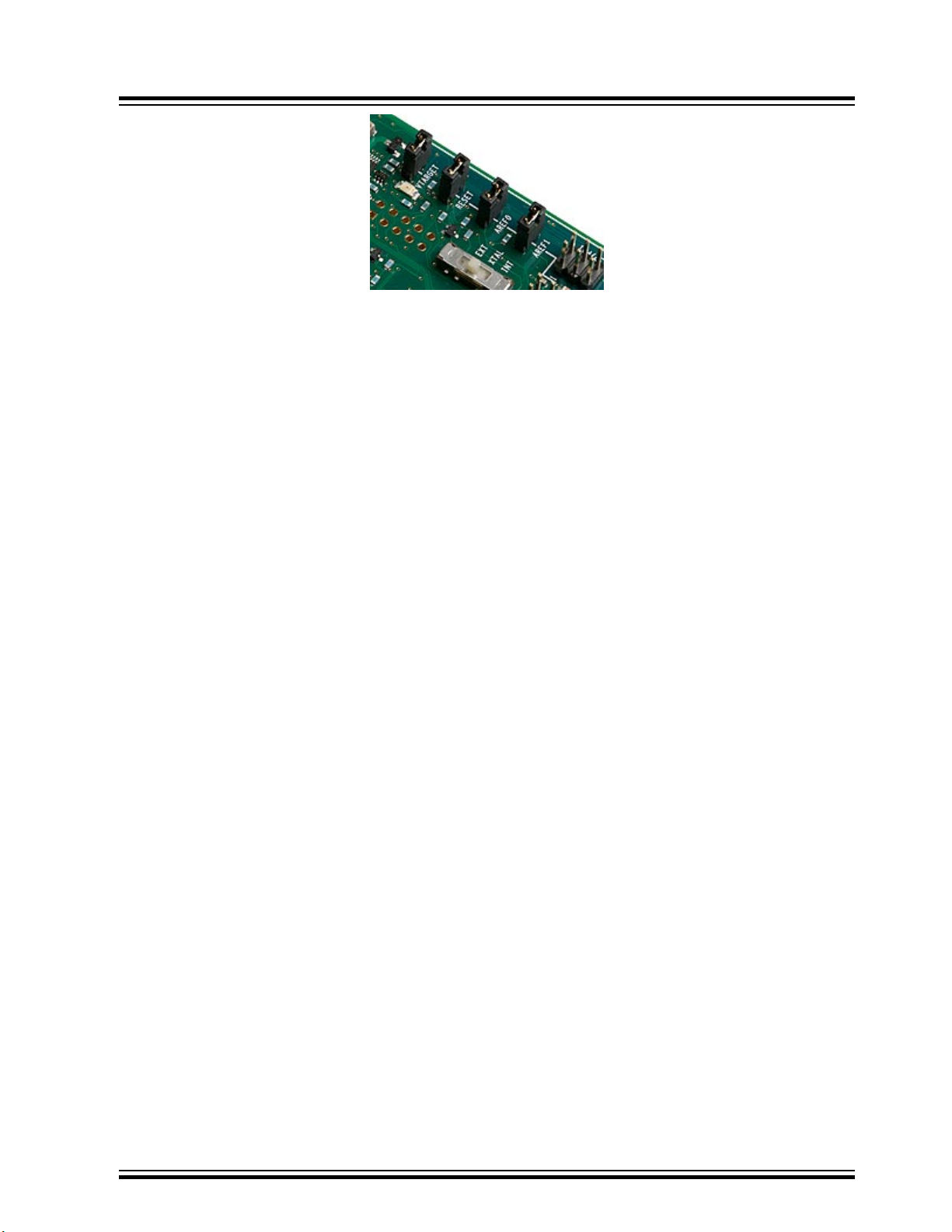
6.2.1 On-board VTG Source
The on-board VTG source is set from Atmel Studio. To use this source, the VTARGET jumper must be
mounted. The on-board supply can be adjusted from 0.9 to 5.5V in steps of 0.1V.
VTG can also be set to 0V, but due to hardware limitations, the on-board generated VTG cannot be set
between 0 and 0.9V.
Note: Always check the AVR device data sheet for operating voltage range before adjusting VTG.
See the help section for the Atmel Studio Programming Dialog for information on how to adjust
VTARGET.
STK600 Starter Kit
Hardware Description
6.2.1.1 Powering STK600 from USB
When the STK600 is powered through the USB cable, approximately 300 mA can be delivered to the
target section.
6.2.1.2 Powering STK600 from an External DC Source
If an external DC jack input is used, approximately 1A can be delivered to the target section.
6.2.2 External VTG
If the VTARGET jumper is removed, the VTG must be supplied from an external source. Connect the
external source to one of the VTG pins on any of the PORT headers. Always connect common ground
(GND) when using an external VTG voltage.
When using an external source, the user must ensure that the VTG is higher than any of the AREF
voltages.
Note:
The kit must always be powered when using an external VTARGET supply. If the VTG voltage is supplied
from an external source while the main power switch is in the OFF position the kit may become damaged.
6.2.3 Status LEDs
6.2.3.1 VTARGET LED
A green LED next to the VTARGET jumper will be lit when there is a voltage of 0.9V or higher available
on the VTG net.
6.2.3.2 STK600 Status LED
If a short circuit is detected when using the on-board VTG supply, the STK600 status LED will blink red.
6.3 Analog Reference Voltages
The A/D converter of the AVR device needs a reference voltage to set its converting range. STK600 can
supply two of these voltages; AREF0 and AREF1.
© 2018 Microchip Technology Inc.
User Guide
40001904C-page 89
Page 90
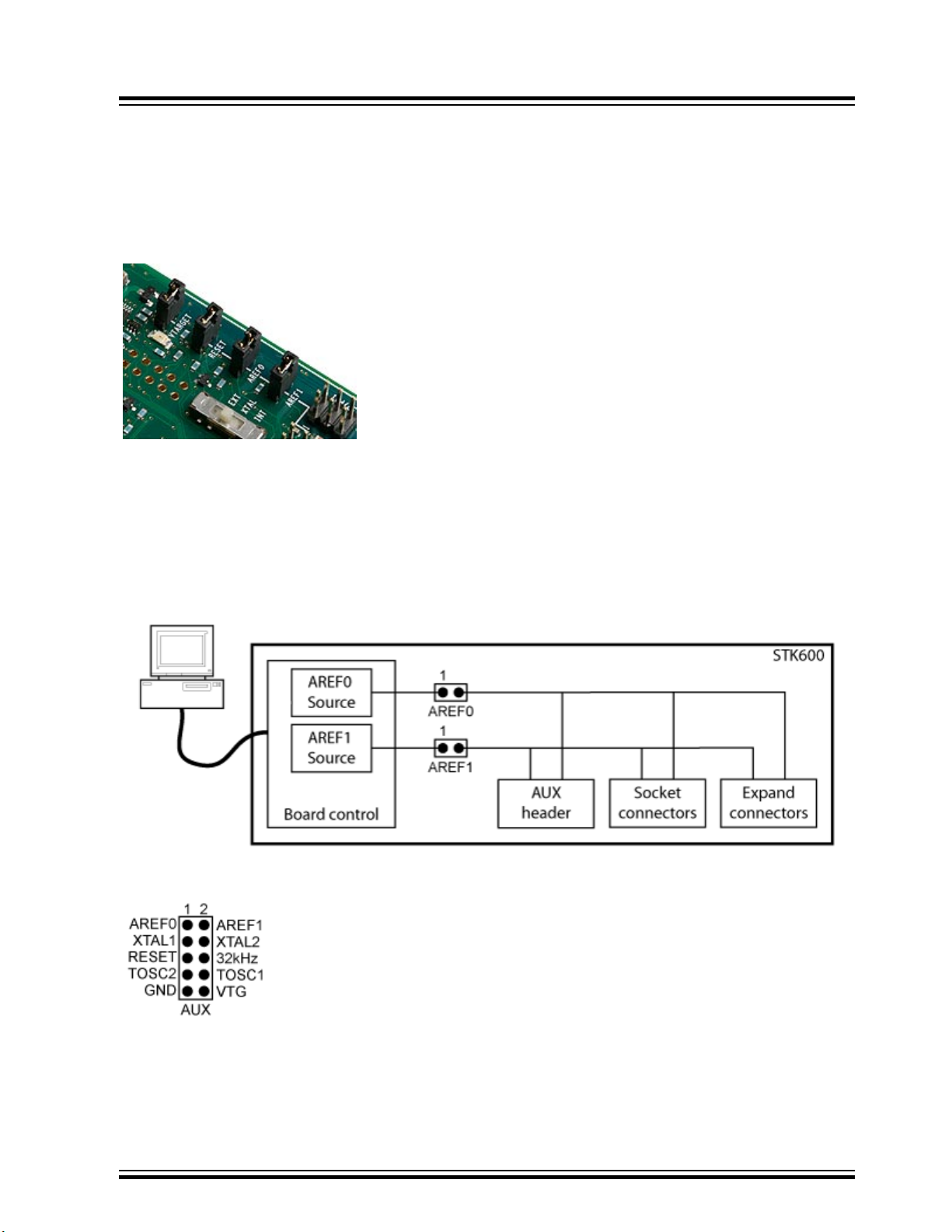
STK600 Starter Kit
Hardware Description
For all tinyAVR and megaAVR devices, only the AREF0 is connected through the routing card, for AVR
XMEGA devices, AREF0 is connected to AREFA and AREF1 is connected to AREFB.
For AVR XMEGA devices the AREF pins are also general purpose I/O pins. Hence, to use the pins as
GPIO the AREF jumpers must be removed.
Note: For routing card “STK600-RC100X-13” revision A and revision B the AREF1 is connected to PA1.
These cards are marked “A0607.3.1213.A” and “A0607.3.1213.B”.
If the AREF0/AREF1 jumpers are mounted, the on-board Analog Reference Voltage sources are
connected to the target AREF pins of the AVR device. The on-board Analog Reference Voltages can be
adjusted from the PC software in the range 0 to 5.5V, but not above VTARGET. The resolution and
accuracy is 10 mV.
The AREF0 and AREF1 generated voltages can also be connected to the analog comparator.
The target AREF signals of the AVR device are accessible on the AUX header. The figure below shows
the connection of the AREF signals, the target section, and the AREF sources.
6.3.1 Using External Voltage Reference
When the AREF0/AREF1 jumper is disconnected, the ADC reference voltage can be supplied from an
external source, by connecting to the AREF0/AREF pins on the AUX header.
© 2018 Microchip Technology Inc.
User Guide
40001904C-page 90
Page 91
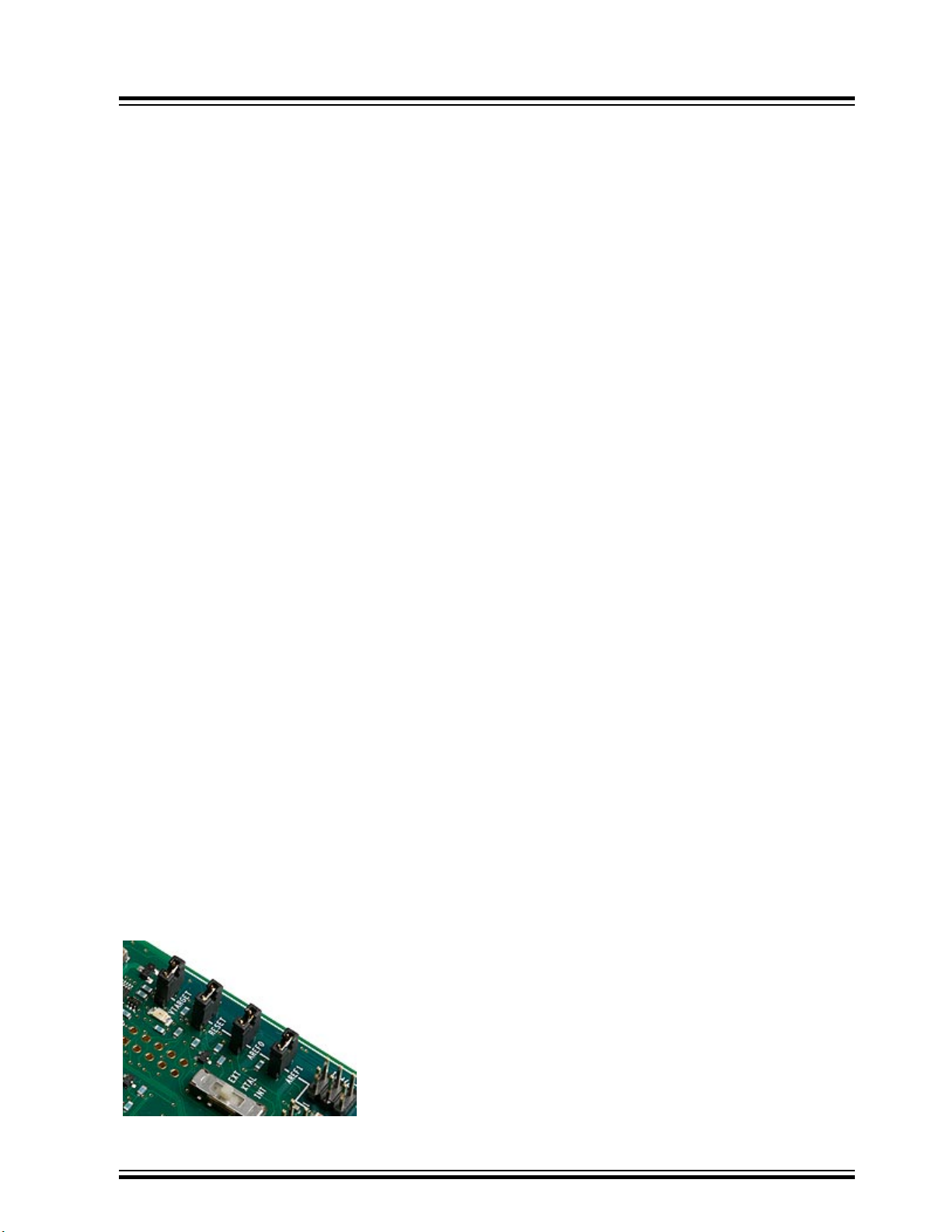
When using an external source for AREF, VTARGET must be controlled at a higher voltage level than
AREF. This can easily be controlled by reading the VTG value from the programming dialog in Atmel
Studio before setting AREF.
Note: The AREF0 and AREF1 voltages, which are visible in the PC software, are the STK600 generated
voltages. Externally applied AREF voltages cannot be read from Atmel Studio.
6.3.2 Using the Internal Voltage Reference
If the internal voltage reference of the AVR device is used, the AREF0/AREF1 jumper must be removed.
6.3.3 Using AREF as Analog Input
AREF0 and AREF1 can also be used as analog inputs to any of the ADC channels.
For tinyAVR and megaAVR devices, where only AREF0 is connected to the device via the routing card,
AREF1 can be connected to an ADC channel by connecting a cable from AREF1 on the AUX header and
to the port pin header corresponding to the ADC channel. (Check the device data sheet for which port pin
header to connect to.)
If the AVR device's internal voltage reference or an external voltage reference is used, the AREF0/AREF1
jumper must be removed. If this is the case, AREF0 or AREF1 can be used as analog inputs by
connecting a cable from pin 1 on the AREF0/AREF1 header to the port pin header corresponding to the
ADC channel.
STK600 Starter Kit
Hardware Description
6.3.4 AREF Decoupling Capacitor
The routing card has a decoupling capacitor on AREF. This is marked with silk print on the PCB. For
some AVR devices, the AREF pin is on a pin which also is part of the high-voltage programming interface.
On these routing cards, the AREF capacitor is not mounted, as it would make it impossible to use the
high-voltage programming interface. A capacitor can be soldered to achieve better noise performance. A
typical value is 10 nF. The footprint for the capacitor is SMD size 0603.
6.3.5 Short Circuit Protection
The internal AREF voltage generators have a short circuit protection. If the STK600 measures the
AREF0/AREF1 to be 0.3V or more below the set-point, AREF will be shut off. When this happens, the
status LED will blink red. The AREF0 and AREF1 will also be shut down by the Master MCU if a short
circuit is detected on VTarget (in addition to shutting down VTarget). In this case, the status LED will blink
red.
6.4 RESET Control
The STK600 controls the RESET signal to the target AVR device. Under normal operation, the RESET
line is held in an inactive high state (pull-up to VTG).
6.4.1 The RESET Jumper
© 2018 Microchip Technology Inc.
User Guide
40001904C-page 91
Page 92
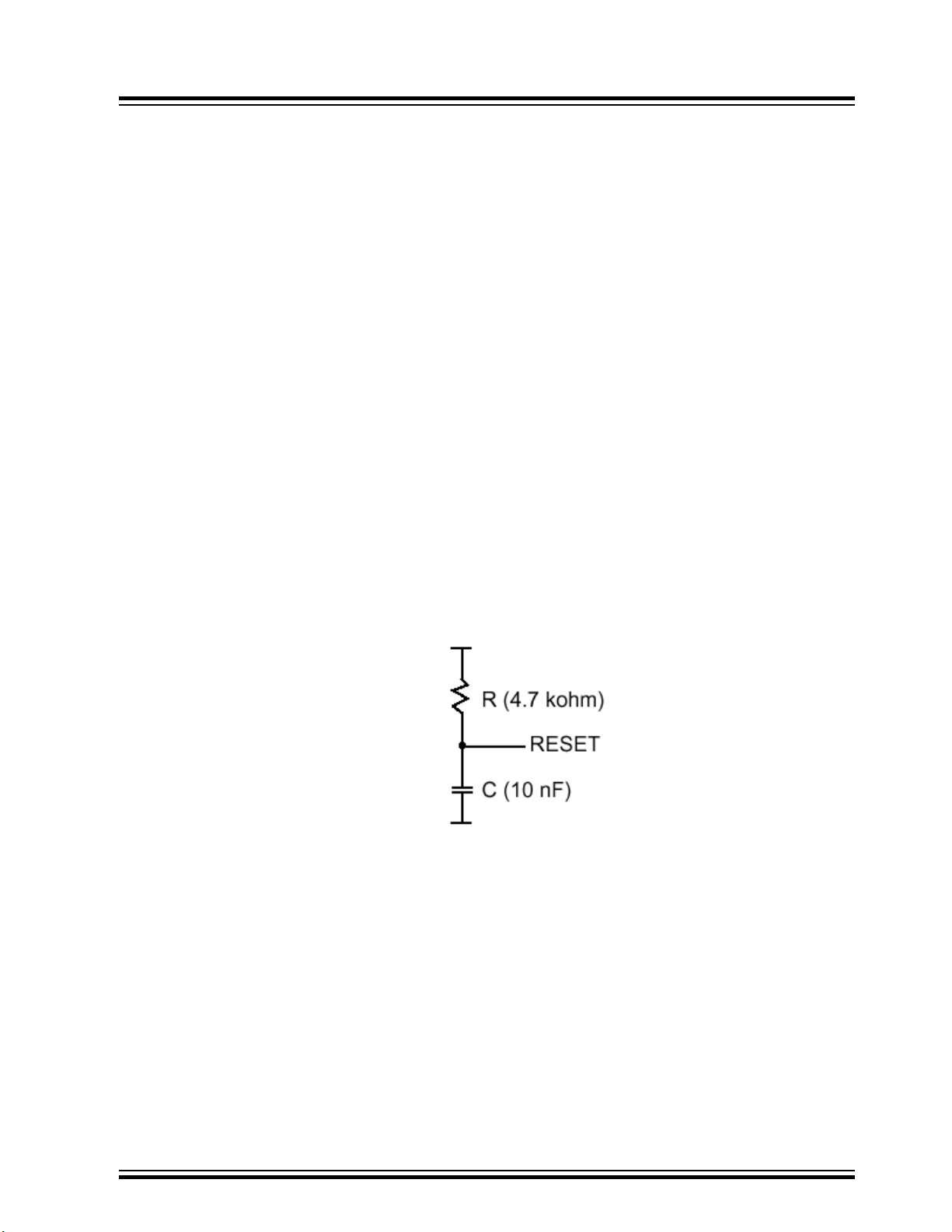
The RESET jumper connects the RESET pin on the target AVR device to the STK600. When the RESET
jumper is mounted, the STK600 controls the RESET signal. When the RESET jumper is not mounted, the
RESET signal is disconnected. This latter is useful for prototyping applications with an external reset
system.
The RESET jumper must always be mounted when high-voltage programming an AVR device. If using an
external reset system, it must allow the reset line to be controlled by the STK600 during programming.
6.4.2 The RESET Button
STK600 has a reset button that resets the target AVR device when being pushed. The button has no
function if the RESET jumper is not mounted.
6.4.3 RESET Signal on AUX Header
The target RESET signal of the AVR device is accessible on the AUX header. This pin can be used to
apply an external RESET signal. When applying an external reset signal, the reset jumper must be
removed.
6.4.4 12V Programming Voltage
During high-voltage programming, STK600 applies 12V to the RESET line of the AVR device Thus, an
external reset circuit not capable of handling this must be disconnected before high-voltage programming
the AVR device.
STK600 Starter Kit
Hardware Description
6.4.5 External RESET Decoupling
When connected to an external system, there is often an external pull-up resistor and a capacitor
connected to the reset line. A typical reset connection is shown below.
If the external pull-up resistor is too strong (i.e, << 4.7 kΩ), STK600 may not be able to pull the RESET
line low.
See also 7.9.1 Reset Line when programming an external target.
6.5 Port Connectors
All I/O port pins on the target AVR device mounted on the STK600 are available on port pin connectors.
These are labeled PORTA, PORTB, PORTC, etc.
Depending on the AVR device in use, different ports will be available.
The picture below shows PORTA. Here, all port pins PA0 to PA7 are available, in addition to the target
voltage VTG and GND.
© 2018 Microchip Technology Inc.
User Guide
40001904C-page 92
Page 93
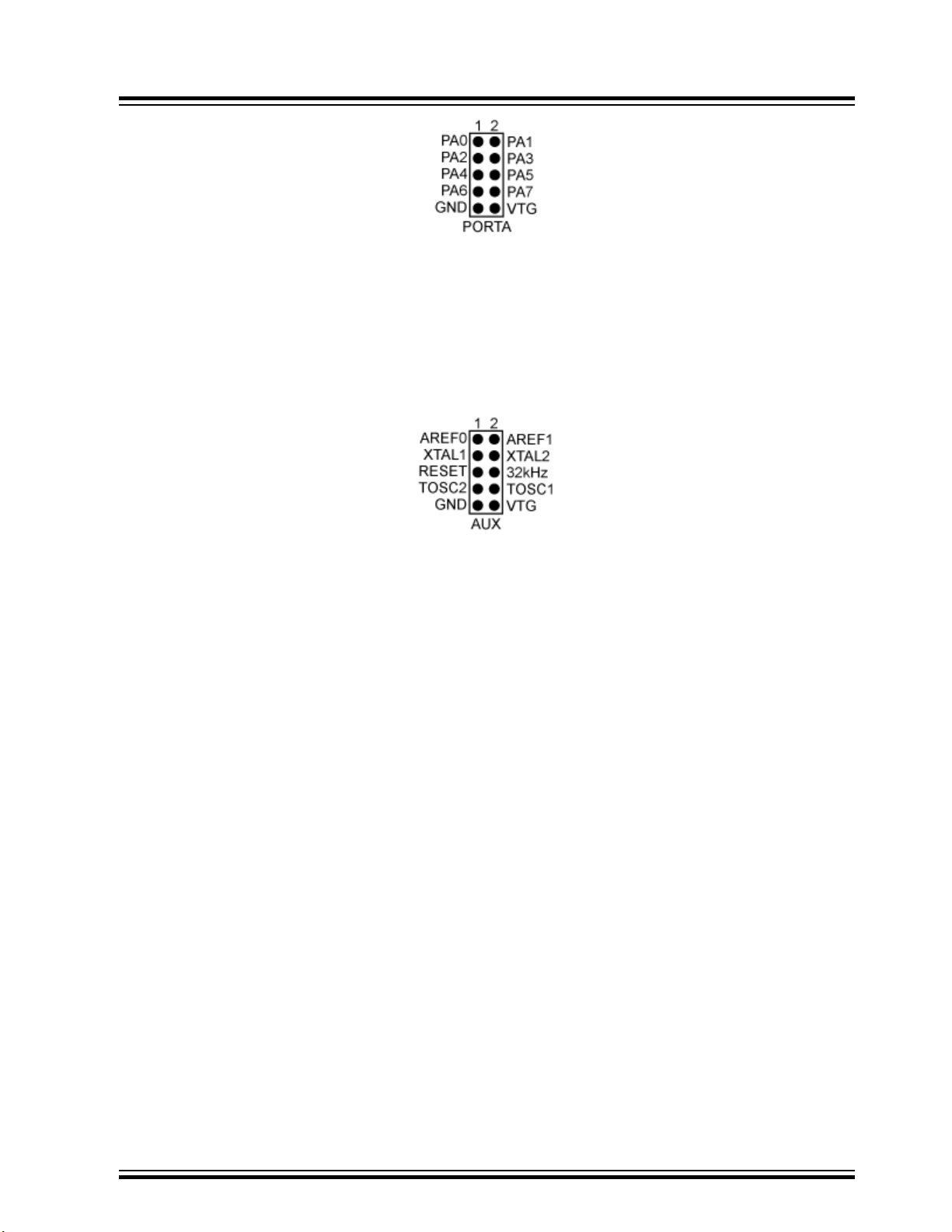
The other port connectors are identical, only with different signal names.
Cables can be mounted between the port connectors and the other peripherals on the board, or to
external hardware.
6.5.1 AUX Port Connector
The AUX connector is located in the port connector area. The figure below shows the pinout for the
connector.
STK600 Starter Kit
Hardware Description
The signals, which are described in the below sections, are available.
6.5.1.1 AREF0
Analog Reference voltage. This pin is connected to the AREF pin on devices having a single separate
analog reference pin. For devices with two AREF pins, this pin is connected to the AREF+ pin. The
AREF0 voltage is controlled from the PC software if the AREF0 jumper is mounted.
6.5.1.2 AREF1
Analog Reference voltage. This pin is connected to the AREF- pin on devices having two separate analog
reference pins. The AREF1 voltage is controlled from the PC software if the AREF1 jumper is mounted.
6.5.1.3 XTAL1
The XTAL1 signal on the AVR device is routed to this pin. If the CLOCK switch is set to the INT position,
this pin can be used to apply an external clock signal.
6.5.1.4 XTAL2
The XTAL2 pin on the AVR device. If the CLOCK switch is set to the INT position, this pin can be used for
an external crystal with the XTAL1 pin.
6.5.1.5 RESET
The RESET pin on the AVR device is available on this pin.
6.5.1.6 32 KHz
A 32 KHz clock signal is available on this pin. It can be connected to a device's TOSC1 pin in order to
implement a real-time clock. Place a jumper between the 32 KHz pin and the neighboring TOSC1 pin.
6.5.1.7 TOSC2 and TOSC1
For AVR devices with a timer that can be clocked from an external low-frequency crystal, these two pins
are available. The TOSC1 pin can easily be connected to the AUX portʼs 32 KHz pin (32 KHz clock
signal) by a jumper.
© 2018 Microchip Technology Inc.
User Guide
40001904C-page 93
Page 94
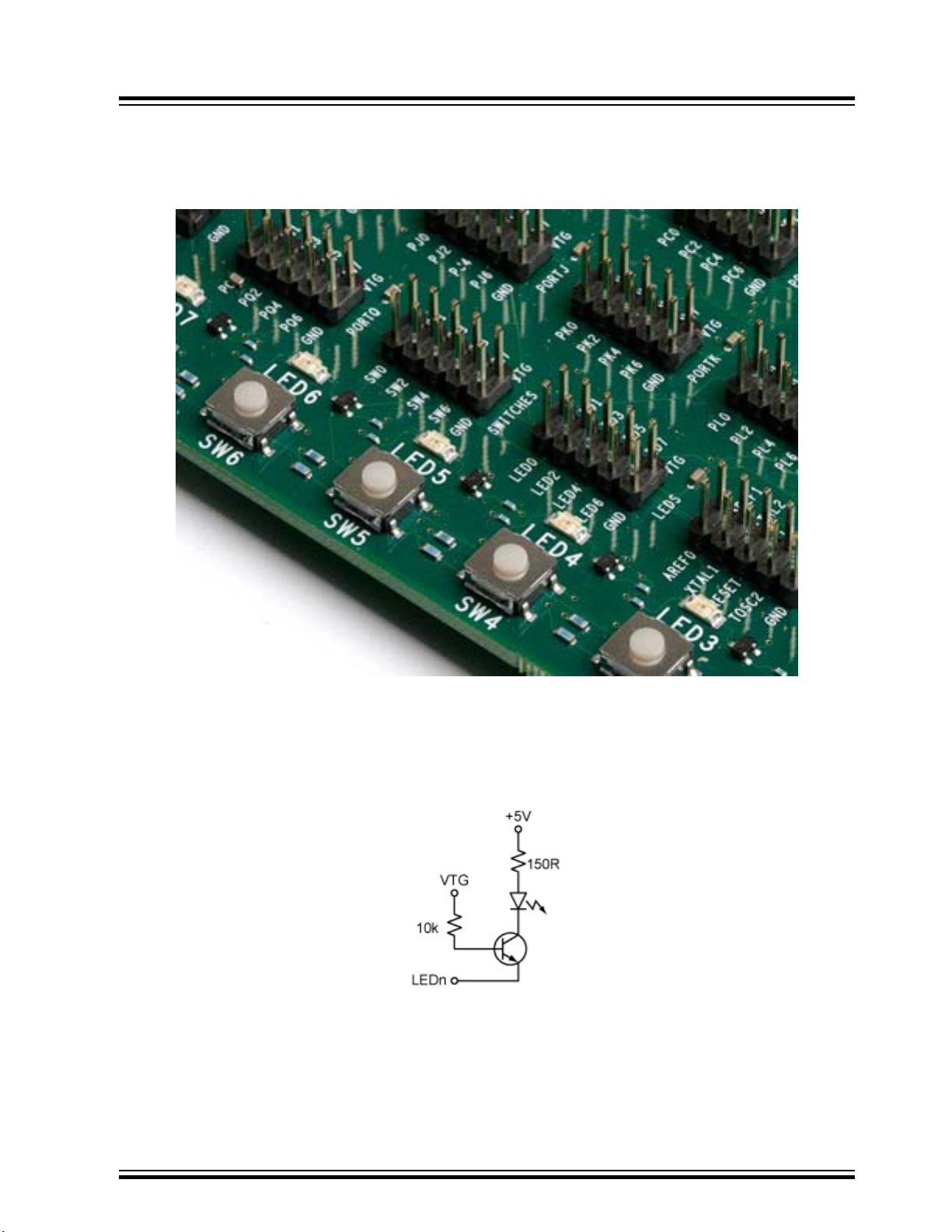
6.6 LEDs and Switches
STK600 has eight LEDs and eight switches that can be connected to I/O pins on the AVR device. The
LEDS and SWITCHES connectors are found in the port connector area.
STK600 Starter Kit
Hardware Description
6.6.1 LEDs
The LEDs are labeled LED0 to LED7. The corresponding pins on the LEDS header have the same labels.
The LED hardware is shown in the figure below. The transistor circuit ensures the LED brightness is
independent of the target voltage.
To light one of the LEDs, the corresponding pin found on the LEDs header must be pulled to GND.
To control the LEDs from the AVR device, connect a cable between the LEDS header and one of the
PORT headers. Use a 10-wire cable to connect to all eight LEDs or a two-wire cable to control one or two
LEDs.
© 2018 Microchip Technology Inc.
User Guide
40001904C-page 94
Page 95
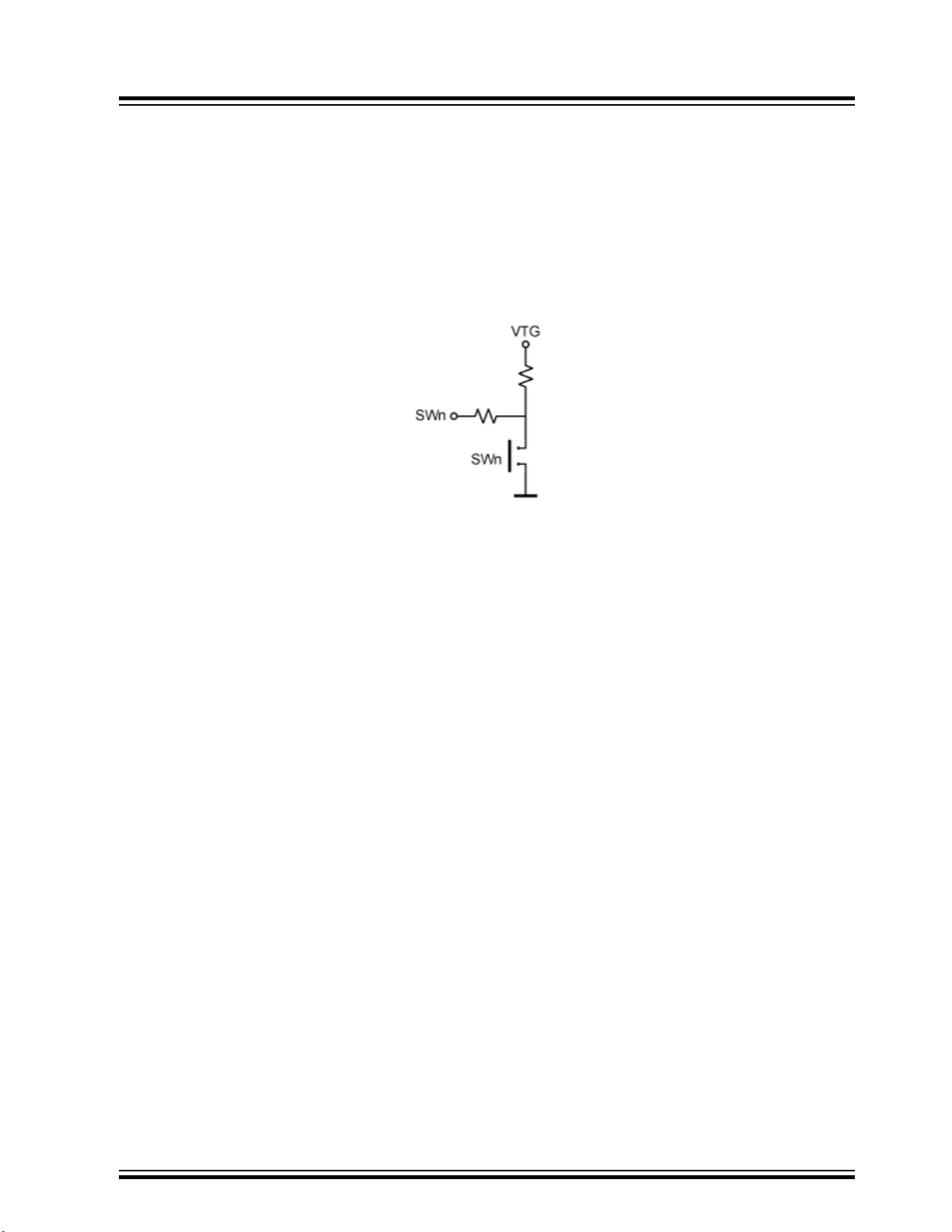
Just like the PORT headers, the LEDS header has GND and VTG on pin 9 and 10. When using a 10-wire
cable, make sure the pin one indication on the cable (red wire with a triangular arrow pointing on pin one)
aligns to pin 1 on both the LEDS header and PORT pin header.
The I/O port connected to LEDn will not source any significant current when LEDn is driven high, but it
will sink a current of approximately 18 mA when LEDn is pulled to GND.
6.6.2 Switches
The switches are labeled SW0 to SW7 and are available on the SWITCHES header. The switch hardware
is shown below:
STK600 Starter Kit
Hardware Description
When pressing one of the switches, the corresponding SW pin on the SWITCHES header will be pulled
low. When the switch is released, the switchʼs 10 kΩ pull-up will pull the line to VTG. The 150Ω resistor
prevents a large current to flow to ground in case of wrong wiring.
Connect a cable between the SWITCHES header and one of the PORT headers. Use a 10-wire cable to
connect to all eight switches or a two-wire cable to connect to one or two switches.
Note: On most AVR device pins configured as input, you can enable an internal pull-up, removing the
need for an external pull-up on the push button. In the STK600 design, an external 10 kΩ pull-up is
present to give all users a logical 1ʼ on SWn when the push button is not pressed, even if the internal pullup is not enabled.
6.7 Clock Settings
STK600 includes several clock options for the target AVR device.
© 2018 Microchip Technology Inc.
User Guide
40001904C-page 95
Page 96
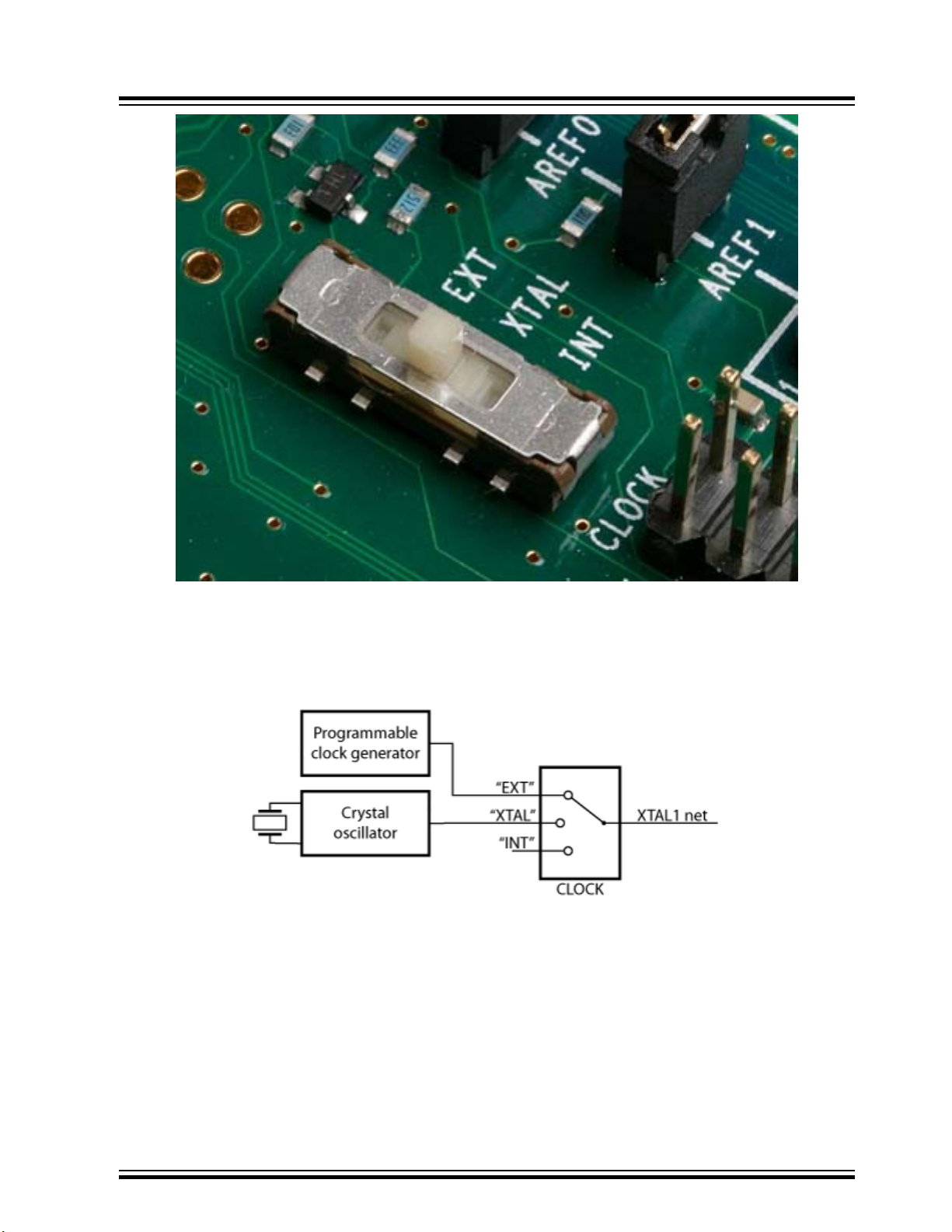
STK600 Starter Kit
Hardware Description
A switch selects between the following three options:
• Programmable clock generator
• Crystal oscillator (with a socket for a crystal)
• XTAL1 Pin tri-stated (to be used with the AVR deviceʼs internal RC oscillator)
6.7.1 Programmable Clock Generator
The programmable clock generator is set from the PC software. The frequency can be set from 1.1 kHz to
66 MHz with 0.5% accuracy.
To use the programmable clock generator as a clock source, set the CLOCK switch to EXT position.
6.7.2 Crystal Oscillator
The on-board crystal oscillator will work with ceramic resonators or crystals between 4 and 24MHz (ATcut, fundamental, and parallel resonant crystals). Place a crystal in the crystal socket (located next to the
PROGRAM button).
© 2018 Microchip Technology Inc.
User Guide
40001904C-page 96
Page 97
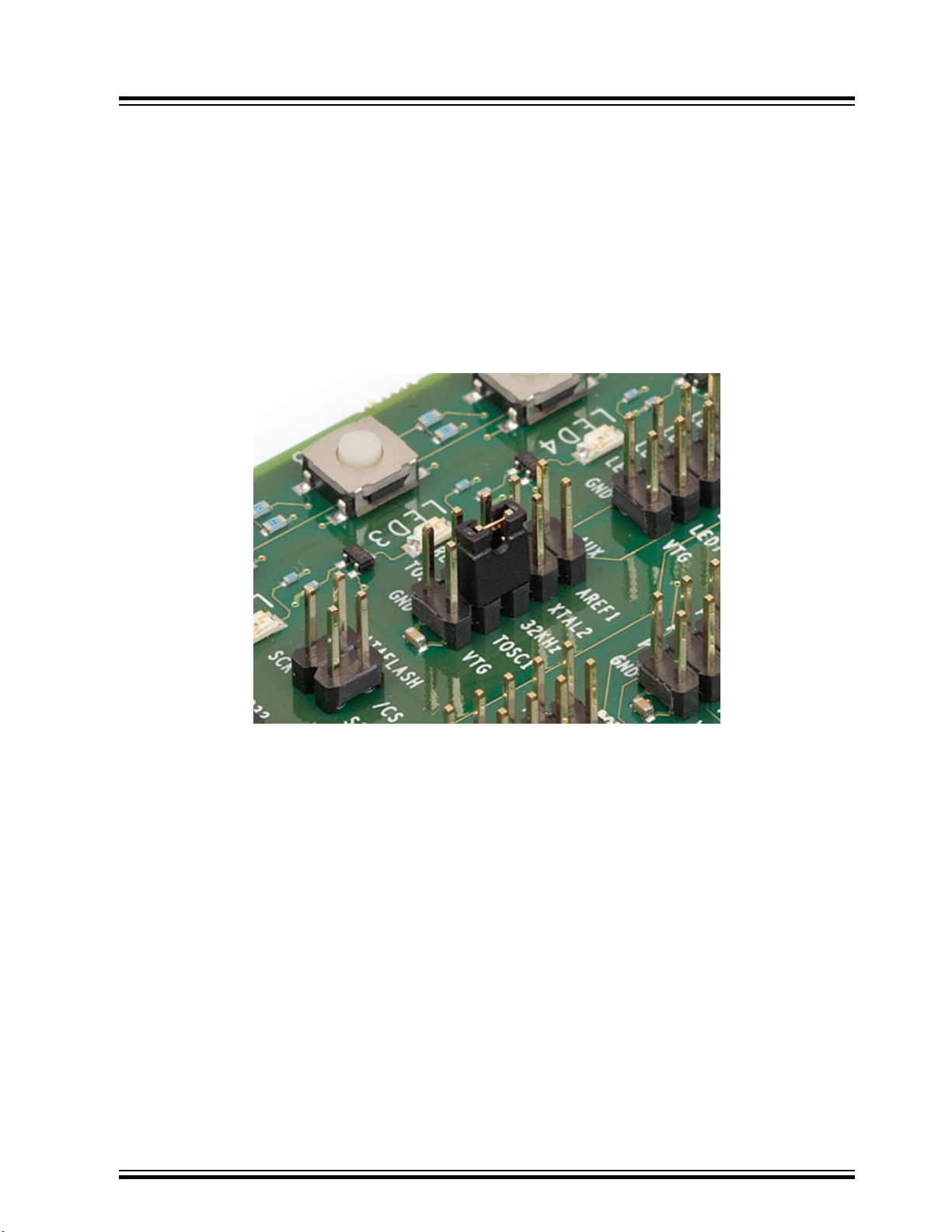
To use the crystal oscillator as a clock source, set the CLOCK switch to the XTAL position.
6.7.3 XTAL1 Pin Tri-stated
If the target AVR device runs on the internal oscillator, the XTAL1 pin can be disconnected from the clock
sources on STK600.
To disconnect the XTAL1 pin, set the CLOCK switch to the INT position.
6.7.4 Real-Time Clock
The STK600 also features a 32768 Hz oscillator, which can be used to make a real-time clock. The
output from the oscillator is available on the 32 KHz pin on the AUX header. This clock can be routed to
the TOSC1 pin on the target AVR device by placing a jumper between the 32 KHz and TOSC1 pin on the
AUX header.
STK600 Starter Kit
Hardware Description
See also 6.5 Port Connectors for more information about the AUX header.
6.7.5 Other Considerations
6.7.5.1 High-Voltage Programming
When programming the target AVR device in High-Voltage Programming mode, the clock settings are
overridden and the device is clocked directly from the STK600 controller. The clock selection switch can
be set to any position.
6.7.5.2 On-chip Crystal Oscillator
In a real-life application where the crystal can be placed close to the AVR deviceʼs XTAL1 and XTAL2
pins, there is no need for an external oscillator circuit. The long clock signal lines and socket system
connectors on STK600 makes it difficult to drive a crystal with the on-chip oscillators. This is resolved by
having a crystal oscillator on STK600. The oscillator is designed to operate over the full target voltage
range.
6.7.5.3 Shared XTAL1/Port Pin
Some AVR devices have an XTAL1 pin, which can also be used as a regular I/O port pin. The routing
card for these devices will connect the device pin to both the XTAL1 net and a port pin header on the
STK600. Hence, to use the pin as an I/O port the clock selection switch must be set to position INT to
disconnect the clock drivers on STK600 from the pin.
© 2018 Microchip Technology Inc.
User Guide
40001904C-page 97
Page 98
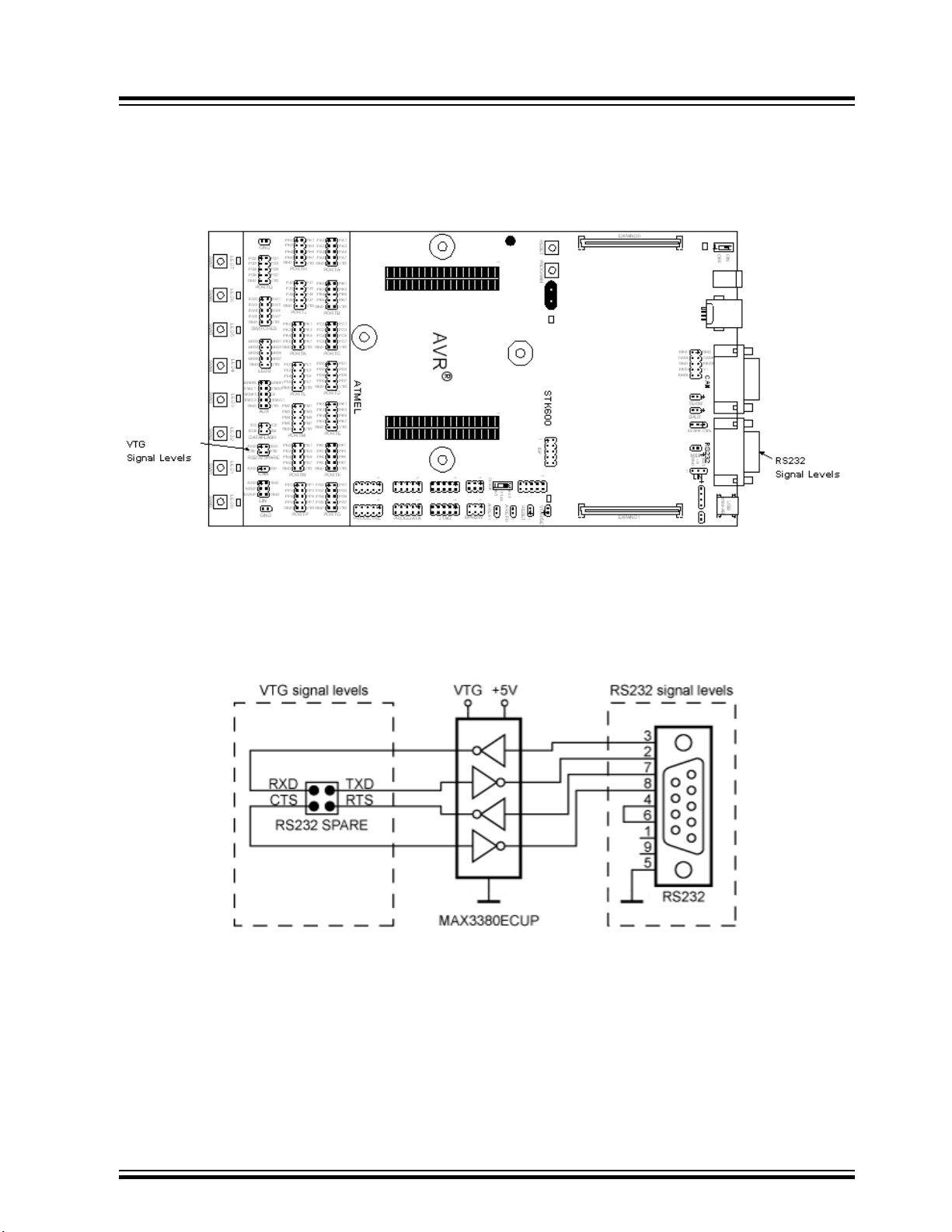
6.8 User RS-232 Interface
The STK600 includes RS-232 hardware that can be used for communication between the target AVR
microcontroller in the socket and a PC serial port. STK600 has a 9-pin DSUB connector that can be
connected to a PC with a straight serial cable (not a null modem cable).
STK600 Starter Kit
Hardware Description
To use the RS-232 interface, the AVR deviceʼs UART pins must be connected to the appropriate pins on
the “RS-232 SPARE” pin header. Use a 2-wire cable to connect the AVR deviceʼs RXD and TXD pins to
the pin header. The “RS-232 SPARE” pin header is found in the target header section, while the DSUB
marked “RS-232” is located on the other end of the card.
Optionally, one can connect the RTS (Request To Send) and CTS (Clear To Send) signals to two free I/O
ports. The RTS and CTS signals are used for flow control. The connection is shown below.
If the RTS and CTS lines are not controlled by the AVR device, a jumper shorting the RTS and CTS pins
on the “RS-232 SPARE” header can resolve communication problems, if the PC side expects these
handshake lines to be active.
6.8.1 Flow Control and RTS/CTS Signaling
Flow control is used to avoid data loss in transmission when one party is unavailable to receive data.
When a DTE (such as a PC) wants to stop the data flow into it, it negates RTS. Read a negated “Request
To Send” as “request NOT to send to me” (stop sending). When the PC is ready for more bytes it asserts
RTS and the flow of bytes to it can resume. Flow control signals are always sent in a direction opposite to
© 2018 Microchip Technology Inc.
User Guide
40001904C-page 98
Page 99
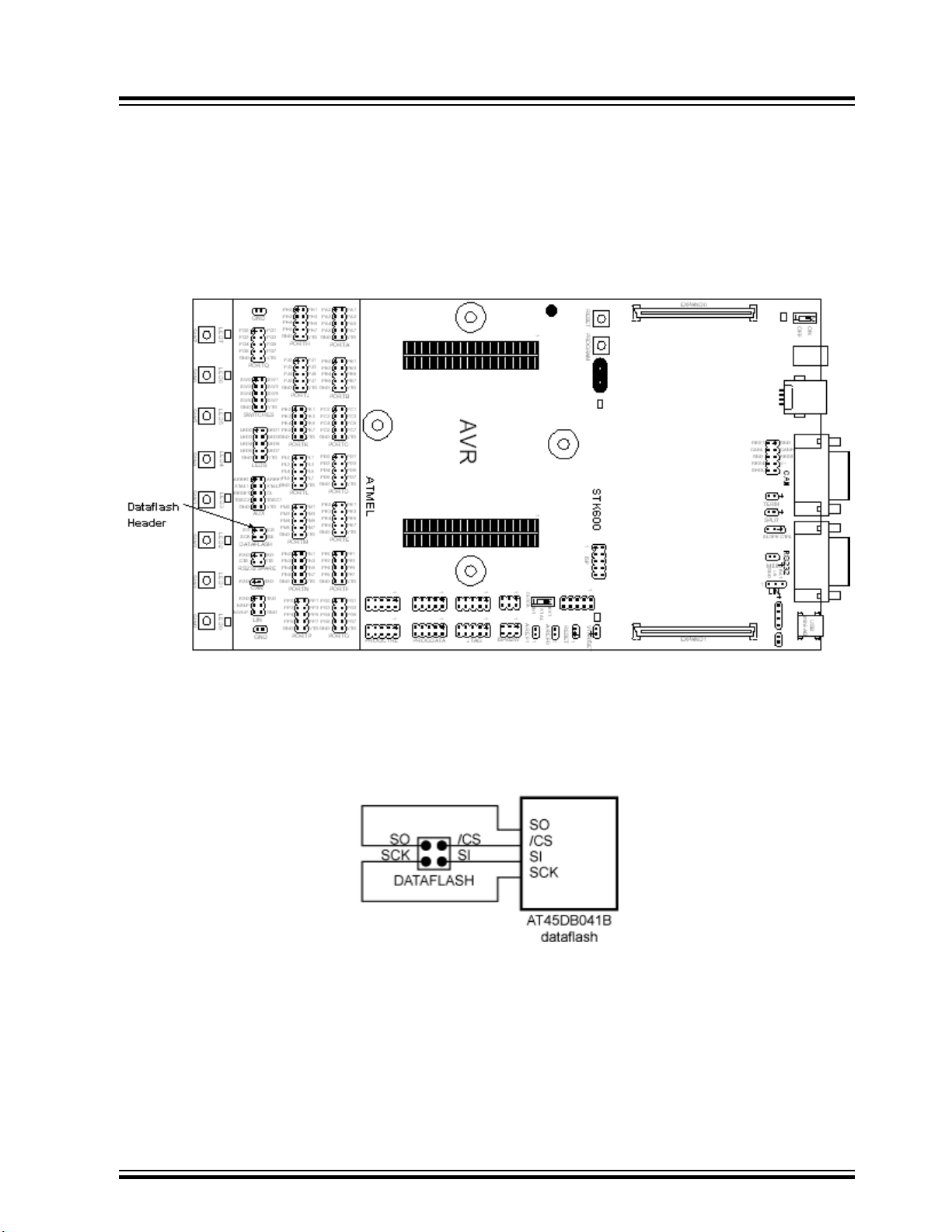
the flow of bytes that is being controlled. DCE equipment (i.e., AVR) works the same way but sends the
stop signal out the CTS pin (negated CTS: “(you are) NOT Cleared To Send”).
6.9 DataFlash Nonvolatile Memory
An AT45DB041B 4 Mb DataFlash is included on the STK600 for nonvolatile data storage. This is a highdensity Flash memory chip with Serial Peripheral Interface (SPI). A detailed data sheet of the DataFlash
can be obtained from the Microchip website.
STK600 Starter Kit
Hardware Description
The DataFlash can be connected to the I/O pins of the microcontroller sockets. The 4-pin header marked
DATAFLASH can be used for connecting the SPI of the DataFlash to the I/O pins on the target AVR
microcontroller in the socket. Two-wire cables are included with STK600 for connecting the DataFlash to
the I/O pins. The connection of the I/O pins is shown in the figure below.
The connection of the DataFlash to the AVR device hardware SPI is shown in the block schematic below.
More information about how to use the DataFlash can be found on http://www.microchip.com/.
6.10 Expansion Connectors
STK600 has two expansion connectors. All AVR device I/O ports, programming signals, and control
signals are routed to the expansion connectors. The expansion connectors allow easy prototyping of
applications with STK600.
© 2018 Microchip Technology Inc.
User Guide
40001904C-page 99
Page 100
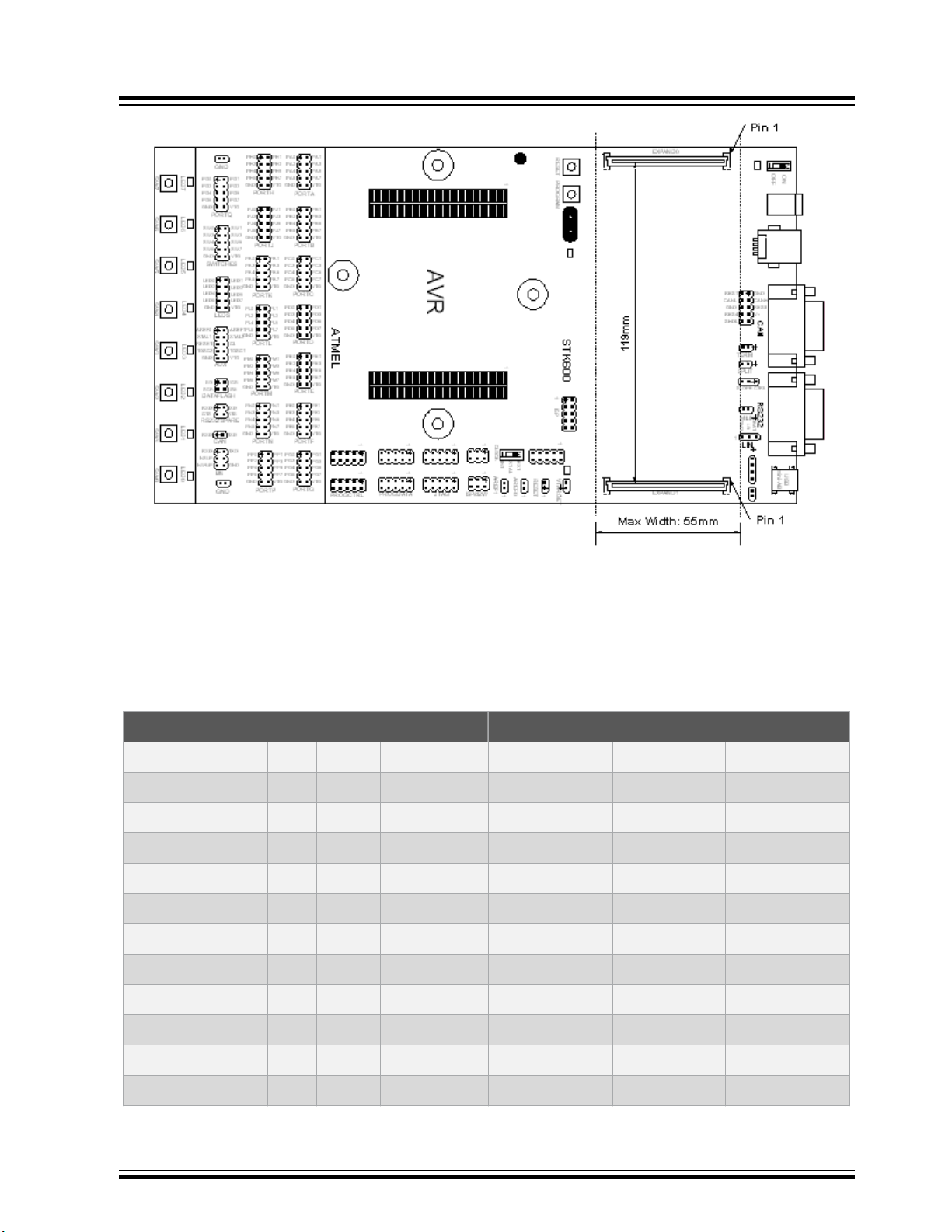
STK600 Starter Kit
Hardware Description
The connectors to be used on an expansion board are manufactured by FCI and have P/N:
61082-101402LF. See also www.fciconnect.com for more information.
The connectors must be placed with exactly 119 mm from center to center. The expansion board must
have a maximum width of 55 mm to avoid collision with components on the main board.
The pinout of the expansion connectors is shown in the table below.
Table 6-1. EXPAND Connector Pinout
EXPAND0 EXPAND1
GND 1 2 VTG GND 1 2 VTG
PA0 3 4 PA1 PJ0 3 4 PJ1
PA2 5 6 PA3 PJ2 5 6 PJ3
PA4 7 8 PA5 PJ4 7 8 PJ5
PA6 9 10 PA7 PJ6 9 10 PJ7
GND 11 12 VTG GND 11 12 VTG
PB0 13 14 PB1 PK0 13 14 PK1
PB2 15 16 PB3 PK2 15 16 PK3
PB4 17 18 PB5 PK4 17 18 PK5
PB6 19 20 PB7 PK6 19 20 PK7
GND 21 22 VTG GND 21 22 VTG
PC0 23 24 PC1 PL0 23 24 PL1
© 2018 Microchip Technology Inc.
User Guide
40001904C-page 100
 Loading...