

Page 1
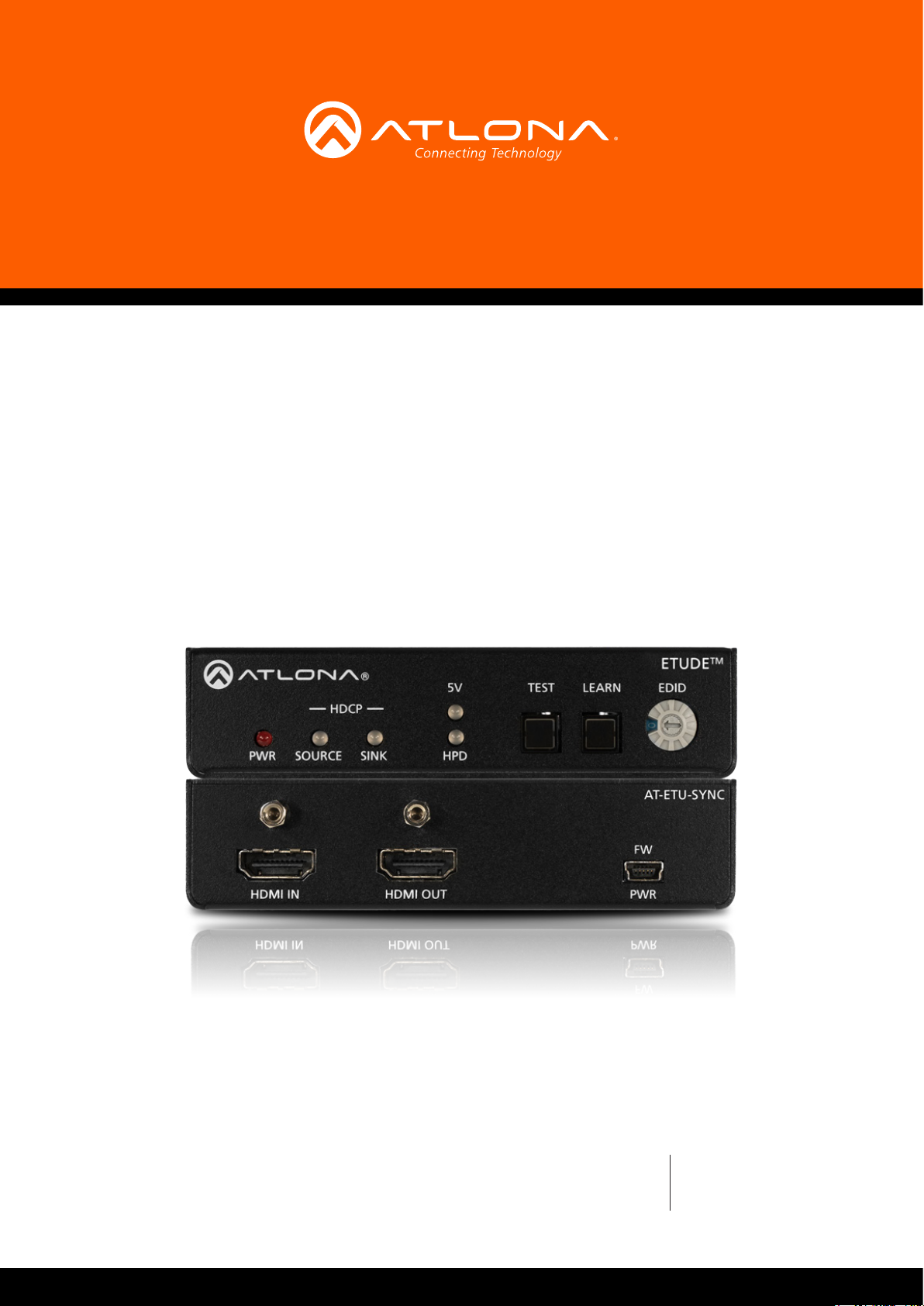
EDID Emulator
for 4K HDR HDMI Signals
AT-ETU-SYNC
Atlona Manuals
Test Equipment
Page 2

Version Information
Version Release Date Notes
1 02/17 Initial release
AT-ETU-SYNC
2
Page 3
Welcome to Atlona!
Thank you for purchasing this Atlona product. We hope you enjoy it and will take a extra few moments to register
your new purchase.
Registration only takes a few minutes and protects this product against theft or loss. In addition, you will receive
notications of product updates and rmware. Atlona product registration is voluntary and failure to register will not
aect the product warranty.
To register your product, go to http://www.atlona.com/registration
Sales, Marketing, and Customer Support
Main Oce
Atlona Incorporated
70 Daggett Drive
San Jose, CA 95134
United States
Oce: +1.877.536.3976 (US Toll-free)
Oce: +1.408.962.0515 (US/International)
Sales and Customer Service Hours
Monday - Friday: 6:00 a.m. - 4:30 p.m. (PST)
http://www.atlona.com/
Operating Notes
IMPORTANT: Visit http://www.atlona.com/product/AT-ETU-SYNC for the latest rmware updates
and User Manual.
International Headquarters
Atlona International AG
Ringstrasse 15a
8600 Dübendorf
Switzerland
Oce: +41 43 508 4321
Sales and Customer Service Hours
Monday - Friday: 09:00 - 17:00 (UTC +1)
©2017 Atlona, Inc. All Rights Reserved. All trademarks are the property of their respective owners.
Atlona reserves the right to make changes to the hardware, packaging, and documentation without notice.
AT-ETU-SYNC
3
Page 4

Atlona, Inc. (“Atlona”) Limited Product Warranty
Coverage
Atlona warrants its products will substantially perform to their published specications and will be free from defects
in materials and workmanship under normal use, conditions and service.
Under its Limited Product Warranty, Atlona, at its sole discretion, will either:
• repair or facilitate the repair of defective products within a reasonable period of time, restore products to their
proper operating condition and return defective products free of any charge for necessary parts, labor and
shipping.
OR
• replace and return, free of charge, any defective products with direct replacement or with similar products
deemed by Atlona to perform substantially the same function as the original products.
OR
• refund the pro-rated value based on the remaining term of the warranty period, not to exceed MSRP, in cases
where products are beyond repair and/or no direct or substantially similar replacement products exist.
Repair, replacement or refund of Atlona products is the purchaser’s exclusive remedy and Atlona liability does not
extend to any other damages, incidental, consequential or otherwise.
This Limited Product Warranty extends to the original end-user purchaser of Atlona products and is non-transferrable
to any subsequent purchaser(s) or owner(s) of these products.
Coverage Periods
Atlona Limited Product Warranty Period begins on the date of purchase by the end-purchaser. The date contained on
the end-purchaser ‘s sales or delivery receipt is the proof purchase date.
Limited Product Warranty Terms – New Products
• 10 years from proof of purchase date for hardware/electronics products purchased on or after June 1, 2013.
• 3 years from proof of purchase date for hardware/electronics products purchased before June 1, 2013.
• Lifetime Limited Product Warranty for all cable products.
Limited Product Warranty Terms – Refurbished (B-Stock) Products
• 3 years from proof of purchase date for all Refurbished (B-Stock) hardware and electronic products purchased
on or after June 1, 2013.
Remedy
Atlona recommends that end-purchasers contact their authorized Atlona dealer or reseller from whom they
purchased their products. Atlona can also be contacted directly. Visit www.atlona.com for Atlona’s contact
information and hours of operation. Atlona requires that a dated sales or delivery receipt from an authorized dealer,
reseller or end-purchaser is provided before Atlona extends its warranty services. Additionally, a return merchandise
authorization (RMA) and/or case number, is required to be obtained from Atlona in advance of returns.
Atlona requires that products returned are properly packed, preferably in the original carton, for shipping. Cartons not
bearing a return authorization or case number will be refused. Atlona, at its sole discretion, reserves the right to reject
any products received without advanced authorization. Authorizations can be requested by calling 1-877-536-3976
(US toll free) or 1-408- 962-0515 (US/international) or via Atlona’s website at www.atlona.com.
Exclusions
This Limited Product Warranty excludes:
• Damage, deterioration or malfunction caused by any alteration, modication, improper use, neglect, improper
packaging or shipping (such claims must be presented to the carrier), lightning, power surges, or other acts of
nature.
AT-ETU-SYNC
4
Page 5

Atlona, Inc. (“Atlona”) Limited Product Warranty
• Damage, deterioration or malfunction resulting from the installation or removal of this product from any
installation, any unauthorized tampering with this product, any repairs attempted by anyone unauthorized by
Atlona to make such repairs, or any other cause which does not relate directly to a defect in materials and/or
workmanship of this product.
• Equipment enclosures, cables, power supplies, batteries, LCD displays, and any accessories used in conjunction
with the product(s).
• Products purchased from unauthorized distributors, dealers, resellers, auction websites and similar unauthorized
channels of distribution.
Disclaimers
This Limited Product Warranty does not imply that the electronic components contained within Atlona’s products
will not become obsolete nor does it imply Atlona products or their electronic components will remain compatible
with any other current product, technology or any future products or technologies in which Atlona’s products may
be used in conjunction with. Atlona, at its sole discretion, reserves the right not to extend its warranty oering in
instances arising outside its normal course of business including, but not limited to, damage inicted to its products
from acts of god.
Limitation on Liability
The maximum liability of Atlona under this limited product warranty shall not exceed the original Atlona MSRP for
its products. To the maximum extent permitted by law, Atlona is not responsible for the direct, special, incidental or
consequential damages resulting from any breach of warranty or condition, or under any other legal theory. Some
countries, districts or states do not allow the exclusion or limitation of relief, special, incidental, consequential or
indirect damages, or the limitation of liability to specied amounts, so the above limitations or exclusions may not
apply to you.
Exclusive Remedy
To the maximum extent permitted by law, this limited product warranty and the remedies set forth above are
exclusive and in lieu of all other warranties, remedies and conditions, whether oral or written, express or implied.
To the maximum extent permitted by law, Atlona specically disclaims all implied warranties, including, without
limitation, warranties of merchantability and tness for a particular purpose. If Atlona cannot lawfully disclaim
or exclude implied warranties under applicable law, then all implied warranties covering its products including
warranties of merchantability and tness for a particular purpose, shall provide to its products under applicable law.
If any product to which this limited warranty applies is a “Consumer Product” under the Magnuson-Moss Warranty
Act (15 U.S.C.A. §2301, ET SEQ.) or other applicable law, the foregoing disclaimer of implied warranties shall not
apply, and all implied warranties on its products, including warranties of merchantability and tness for the particular
purpose, shall apply as provided under applicable law.
Other Conditions
Atlona’s Limited Product Warranty oering gives legal rights, and other rights may apply and vary from country to
country or state to state. This limited warranty is void if (i) the label bearing the serial number of products have been
removed or defaced, (ii) products are not purchased from an authorized Atlona dealer or reseller. A comprehensive
list of Atlona’s authorized distributors, dealers and resellers can be found at www.atlona.com.
AT-ETU-SYNC
5
Page 6
Important Safety Information
CAUTION
RISK OF ELECTRIC SHOCK
DO NOT OPEN
CAUTION: TO REDUCT THE RISK OF
DO NOT OPEN ENCLOSURE OR EXPOSE
The exclamation point within an equilateral triangle is intended to alert the user to
the presence of important operating and maintenance instructions in the literature
accompanying the product.
The information bubble is intended to alert the user to helpful or optional operational instructions in the literature accompanying the product.
ELECTRIC SHOCK
TO RAIN OR MOISTURE.
NO USER-SERVICEABLE PARTS
INSIDE REFER SERVICING TO
QUALIFIED SERVICE PERSONNEL.
1. Read these instructions.
2. Keep these instructions.
3. Heed all warnings.
4. Follow all instructions.
5. Do not use this product near water.
6. Clean only with a dry cloth.
7. Do not block any ventilation openings. Install in
accordance with the manufacturer’s instructions.
8. Do not install or place this product near any heat
sources such as radiators, heat registers, stoves, or
other apparatus (including ampliers) that produce
heat.
9. Do not defeat the safety purpose of a polarized
or grounding-type plug. A polarized plug has two
blades with one wider than the other. A grounding
type plug has two blades and a third grounding
prong. The wide blade or the third prong are
provided for your safety. If the provided plug does
not t into your outlet, consult an electrician for
replacement of the obsolete outlet.
10. Protect the power cord from being walked on
or pinched particularly at plugs, convenience
receptacles, and the point where they exit from the
product.
11. Only use attachments/accessories specied by
Atlona.
12. To reduce the risk of electric shock and/or damage
to this product, never handle or touch this unit or
power cord if your hands are wet or damp. Do not
expose this product to rain or moisture.
13. Unplug this product during lightning storms or when
unused for long periods of time.
14. Refer all servicing to qualied service personnel.
Servicing is required when the product has been
damaged in any way, such as power-supply cord or
plug is damaged, liquid has been spilled or objects
have fallen into the product, the product has been
exposed to rain or moisture, does not operate
normally, or has been dropped.
FCC Statement
FCC Compliance and Advisory Statement: This hardware device complies with
Part 15 of the FCC rules. Operation is subject to the following two conditions: 1)
this device may not cause harmful interference, and 2) this device must accept any
interference received including interference that may cause undesired operation. This
equipment has been tested and found to comply with the limits for a Class A digital
device, pursuant to Part 15 of the FCC Rules. These limits are designed to provide
reasonable protection against harmful interference in a commercial installation.
This equipment generates, uses, and can radiate radio frequency energy and, if not
installed or used in accordance with the instructions, may cause harmful interference
to radio communications. However there is no guarantee that interference will not occur in a particular installation. If
this equipment does cause harmful interference to radio or television reception, which can be determined by turning
the equipment o and on, the user is encouraged to try to correct the interference by one or more of the following
measures: 1) reorient or relocate the receiving antenna; 2) increase the separation between the equipment and the
receiver; 3) connect the equipment to an outlet on a circuit dierent from that to which the receiver is connected;
4) consult the dealer or an experienced radio/TV technician for help. Any changes or modications not expressly
approved by the party responsible for compliance could void the user’s authority to operate the equipment. Where
shielded interface cables have been provided with the product or specied additional components or accessories
elsewhere dened to be used with the installation of the product, they must be used in order to ensure compliance
with FCC regulations.
AT-ETU-SYNC
6
Page 7

Table of Contents
Introduction 8
Features 8
Package Contents 8
Panel Description 9
Installation 10
Connection Diagram 10
Basic Operation 11
Selecting an EDID 11
Learning an EDID 12
Performing System Tests 14
In-Line Testing 14
Source Testing 16
Sink Testing 16
DDC Reclocking 16
Appendix 17
EDID Modes 17
Specications 21
Index 23
AT-ETU-SYNC
7
Page 8

Introduction
The Atlona Etude™ Sync (AT-ETU-SYNC) provides EDID emulation and Hot Plug Detect communication between
HDMI® sink and source devices. It detects and corrects for signal integrity issues associated with cabling or
connections, and can resolve compatibility problems between a source and sink. The Etude Sync is compatible
with high dynamic range (HDR) formats and is HDCP 2.2 compliant. It supports 4K/UHD video @ 60 Hz with 4:4:4
chroma sampling, as well as HDMI data rates up to 18 Gbps. In addition to addressing HDMI signal and devicerelated issues, the Etude Sync reports HDCP compliance at the source and destination, and can manage EDID
communication with the source. This device is ideal for AV system troubleshooting as well as ensuring reliable,
consistent performance.
The Etude Sync is for residential and commercial applications with the latest as well as emerging 4K/UHD and HDR
sources and displays. It is compatible with all video resolutions, audio formats, and color space formats supported
in the HDMI 2.0a specication, plus the ability to pass metadata for HDR content. The Etude Sync includes Atlona’s
award-winning 10-year limited product warranty and customer support services, so that integrators can specify,
purchase, and install with condence.
Features
• 4K/UHD capability @ 60 Hz with 4:4:4 chroma sampling, plus support for HDR (High Dynamic Range) formats
• Supports video, audio, and color space formats in the HDMI 2.0a specication
• HDCP 2.2 and 1.4
• LPCM 7.1 audio, Dolby® Digital, Dolby Digital Plus, Dolby Atmos®, Dolby TrueHD, DTS:X™,
and DTS-HD Master Audio™
• 3D pass through
• 10 EDID modes
• Allows “learning” of EDID from a sink device
• Essential tool for testing and troubleshooting connectivity issues in any system
• Front-panel indicators provide power and signal status information for +5 volt source supply, hot plug detect,
and HDCP
• Restores +5 volt and HPD signals
• Compact and portable
Package Contents
1 x AT-ETU-SYNC
1 x Wall/table mount ears
1 x USB to mini-USB power cable
1 x Installation Guide
AT-ETU-SYNC
8
Page 9
Panel Description
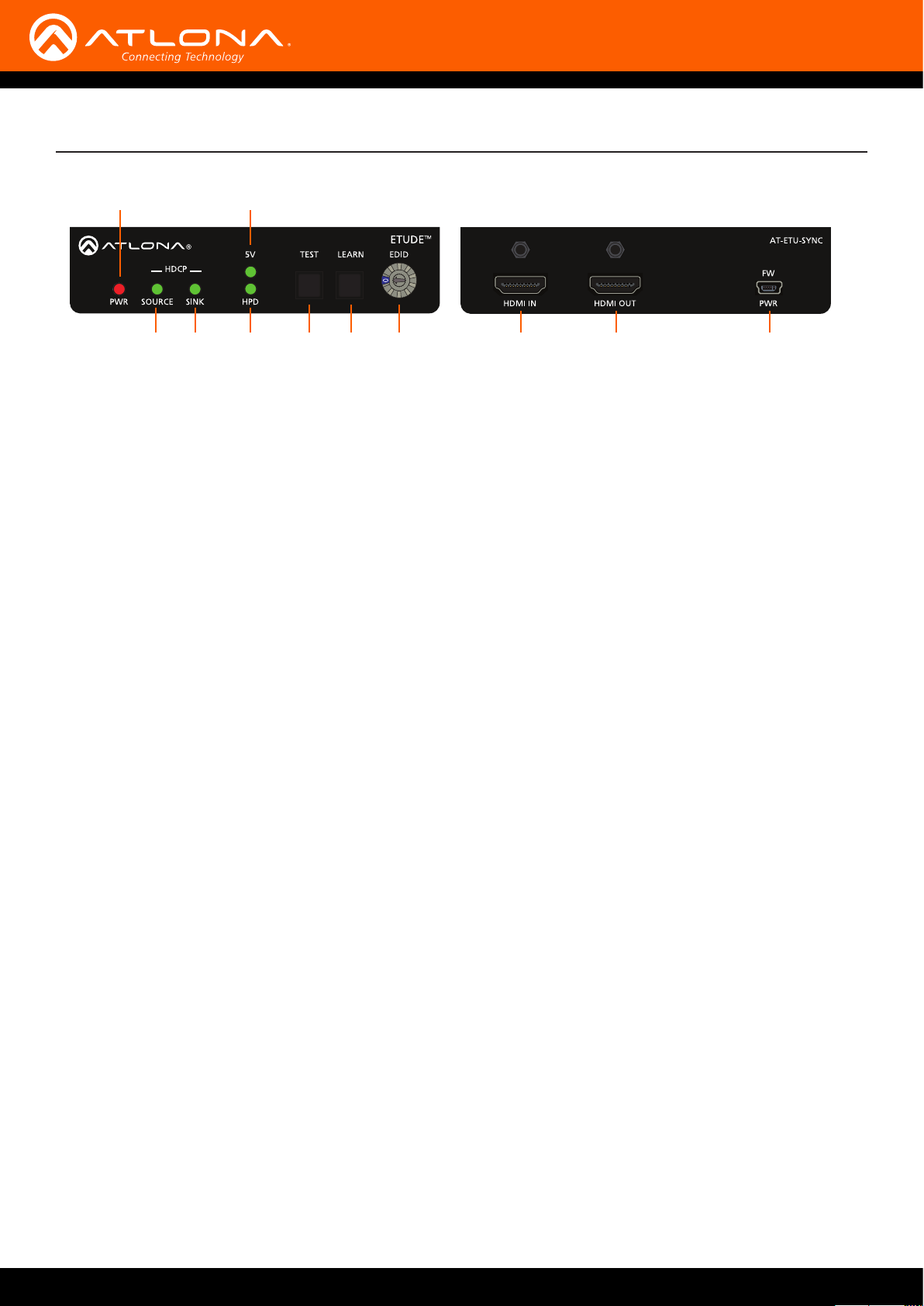
1
Front Rear
4
52 3 6 7 8 9 10 11
1 PWR
Glows red when the unit is powered.
2 SOURCE
Indicates the source status. Refer to Performing
System Tests (page 14) for more information.
3 SINK
Indicates the sink status. Refer to Performing System
Tests (page 14) for more information.
4 5V
Reports the status of the 5V signal from the source
device. Refer to Performing System Tests (page
14) for more information.
5 HPD
Reports the Hot-Plug Detect (HPD) status from the
sink device. Refer to Performing System Tests (page
14) for more information.
6 TEST
Press this button to begin the test procedure. Refer
to Performing System Tests (page 14) for more
information.
7 LEARN
This LED indicator will glow bright green when the
switcher is powered. Refer to Learning an EDID
(page 12) for more information.
8 EDID
Turn this dial to select the desired EDID mode.
Refer to Selecting an EDID (page 11) for more
information.
9 HDMI IN
Connect an HDMI cable from the source to this port.
10 HDMI OUT
Connect an HDMI cable from the sink (display) to this
port.
11 FW / PWR
Connect the included USB cable to this port. This
port is used to power the AT-ETU-SYNC and to
update rmware. As of this writing, no rmware
updates are available.
AT-ETU-SYNC
9
Page 10
Installation
1. Connect an HDMI cable from the source to the HDMI IN port on the AT-ETU-SYNC.
2. Connect an HDMI cable from the sink (display) to the HDMI OUT port on the AT-ETU-SYNC.
3. Connect the included 5V DC power supply to the FW / PWR port on the AT-ETU-SYNC.
4. Connect the 5V DC power supply to an available AC outlet.
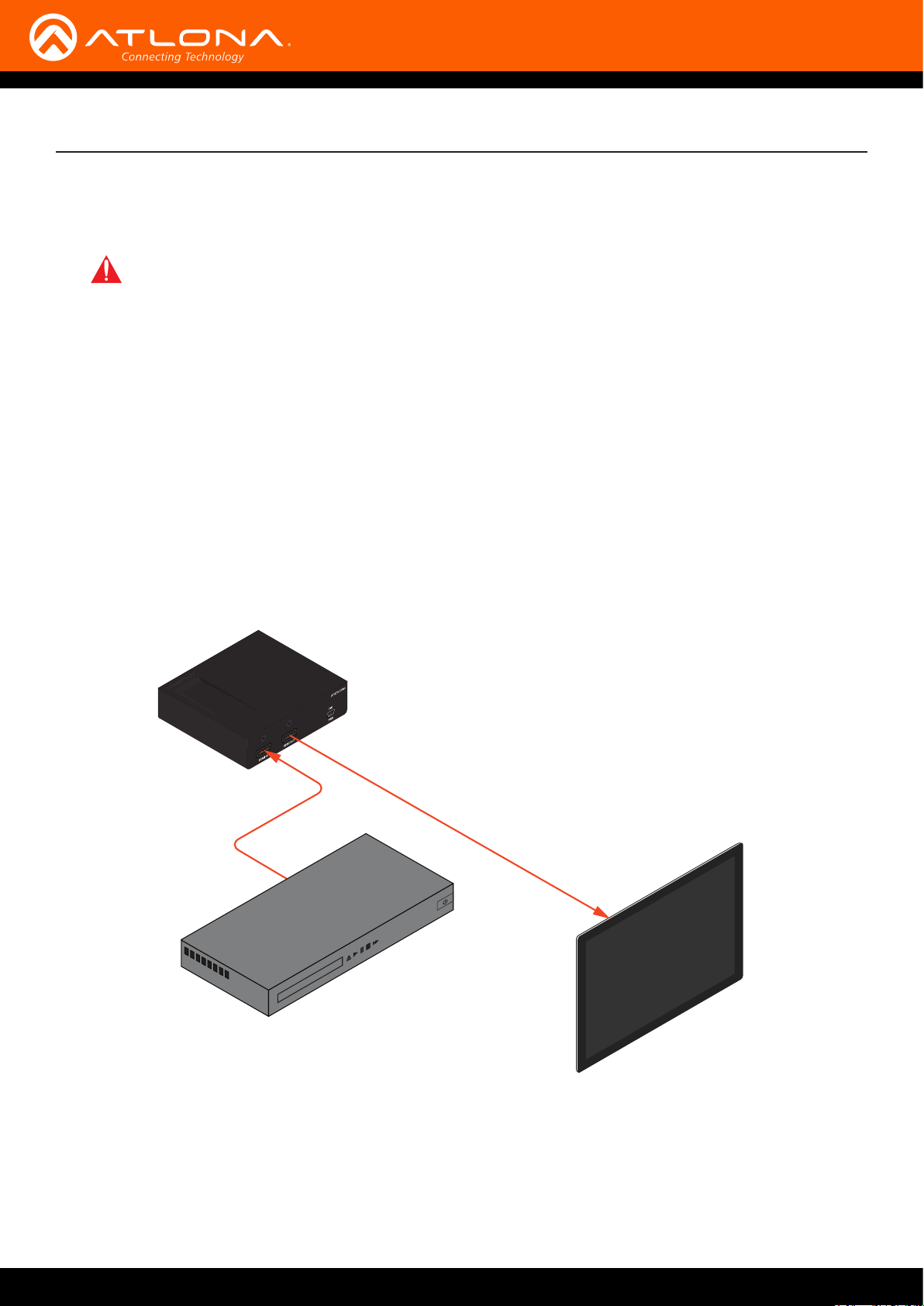
The illustration below, shows the proper location of the AT-ETU-SYNC in a basic source-sink setup. The location of
the AT-ETU-SYNC will vary, depending on the system. Before using the AT-ETU-SYNC as an EDID emulator, an EDID
must be selected or learned. Refer to Selecting an EDID (page 11) and Learning an EDID (page 12) for more
information.
IMPORTANT: The AT-ETU-SYNC is a High Dynamic Range (HDR) device. For best performance,
use premium HDMI cables that are HDR-certied. The HDMI cable between the AT-ETU-SYNC and
the display (sink) and the should not exceed 15 feet (4.5 meters).
Connection Diagram
Video
HD/UHD Source
AT-ETU-SYNC
Video
Display (Sink)
AT-ETU-SYNC
10
Page 11
Basic Operation
Selecting an EDID
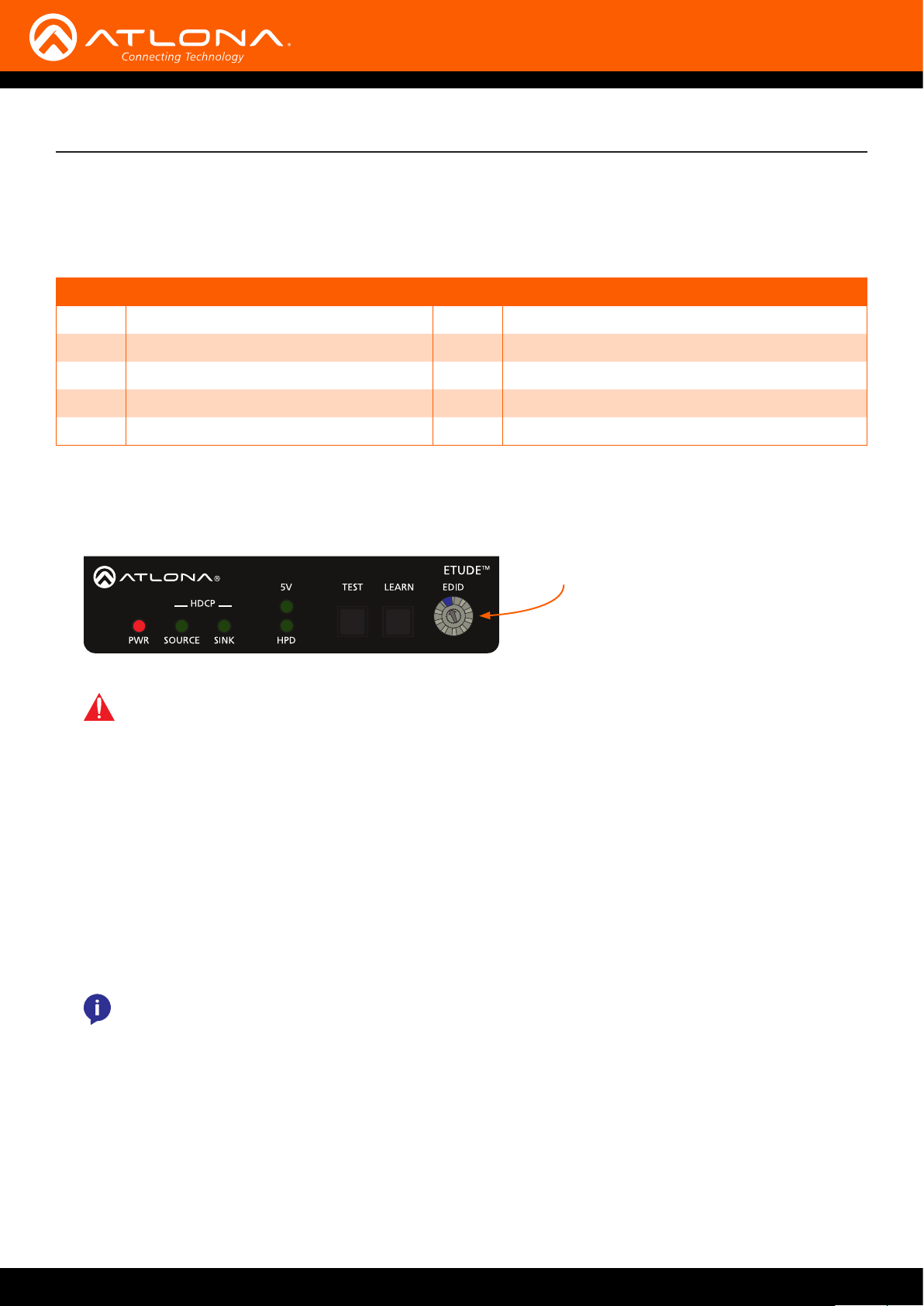
The AT-ETU-SYNC includes 10 EDID modes, which can be selected using the EDID dial. Refer to EDID Modes (page
17), for details on supported features for each EDID mode.
Mode Description Mode Description
0
1
2
3
4
1. Power the AT-ETU-SYNC.
2. Rotate the EDID dial to the desired EDID mode (0 - 9). Refer to the table above for a listing of available EDID
modes.
Learn mode
1080p 3D / 2 channel
1080p 3D / multichannel (lossless)
1080p DVI
4K 60 4:2:0 / 2 channel
IMPORTANT: By default, EDID mode 0 is blank. If an EDID has not been saved to mode 0, then refer
to Learning an EDID (page 12) for information.
5
6
7
8
9
2
4K 60 4:2:0 / multichannel (HD lossless)
4K 60 4:2:0 HDR / 2 channel
4K 60 4:2:0 HDR / multichannel (HD lossless)
4K 60 4:4:4 8-bit / 2 channel
4K 60 4:4:4 8-bit / multichannel (HD lossless)
EDID dial
3. Connect an HDMI cable from the display to the HDMI OUT port on the AT-ETU-SYNC.
4. Connect another HDMI cable from the source to the HDMI IN port on the AT-ETU-SYNC.
5. Connect the 5V DC power supply between the FW / USB port, on the AT-ETU-SYNC,
and an available AC outlet.
6. Power the source.
7. Power the sink device.
8. The source will use the selected EDID mode when sending audio/video data to the sink device.
NOTE: The EDID dial can be set to any EDID mode, while the AT-ETU-SYNC is powered and
connected to the system.
AT-ETU-SYNC
11
Page 12
Basic Operation
Learning an EDID
The AT-ETU-SYNC has the ability to learn the EDID from another device, using EDID mode 0. Once learned, the
EDID data will be read by the source, providing all the necessary details of the type of signal that will be sent to the
sink device.
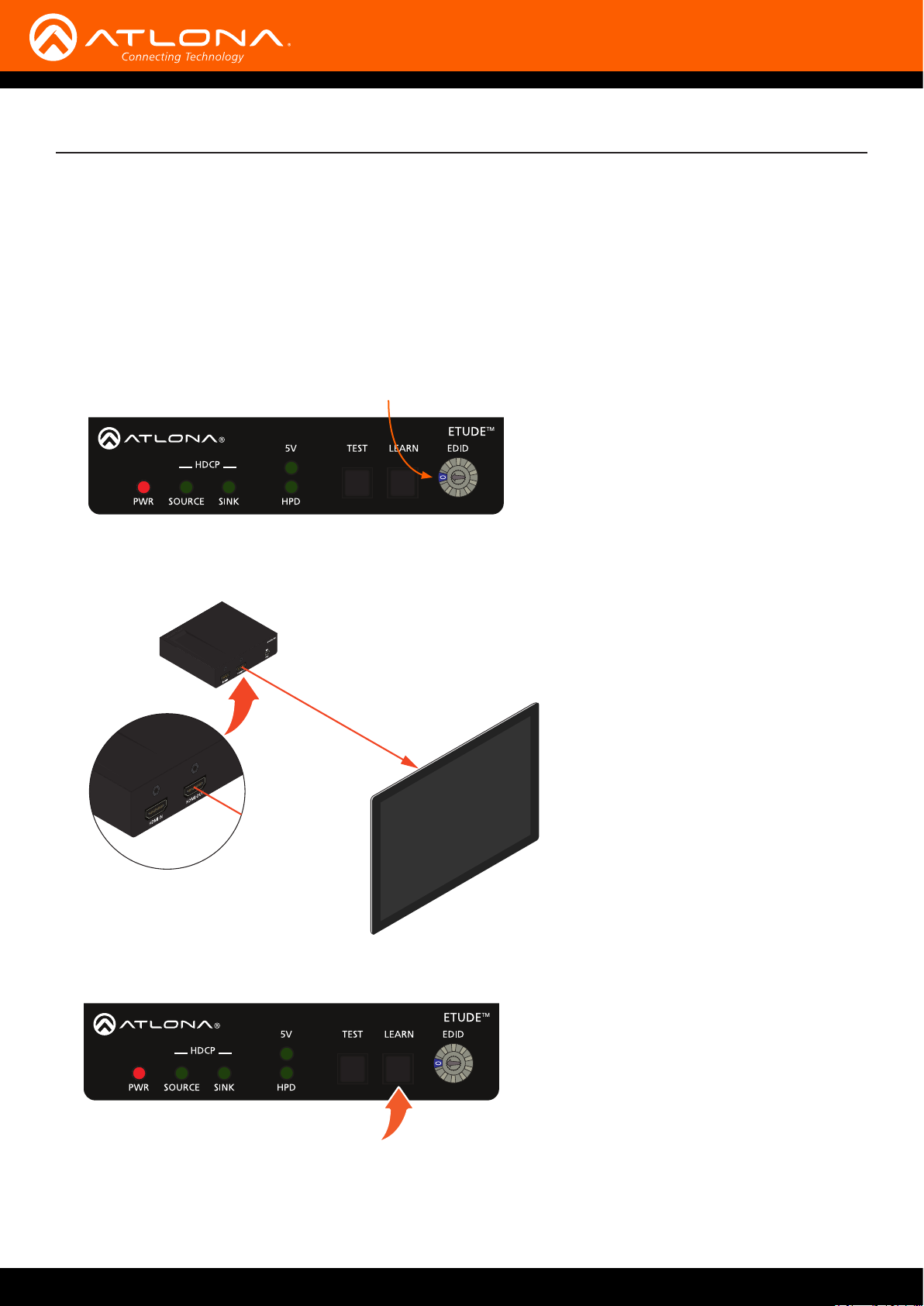
1. Disconnect the AT-ETU-SYNC from the system.
2. Power the AT-ETU-SYNC.
3. Rotate the EDID dial to EDID mode 0, as shown.
4. Connect an HDMI cable from the sink device to the HDMI OUT port on the AT-ETU-SYNC. Make sure that the
sink device is powered-on.
AT-ETU-SYNC
EDID mode 0
Display (Sink)
5. Press and hold the LEARN button on the AT-ETU-SYNC until the HPD light glows green.
6. Release the LEARN button.
AT-ETU-SYNC
12
Page 13
Basic Operation
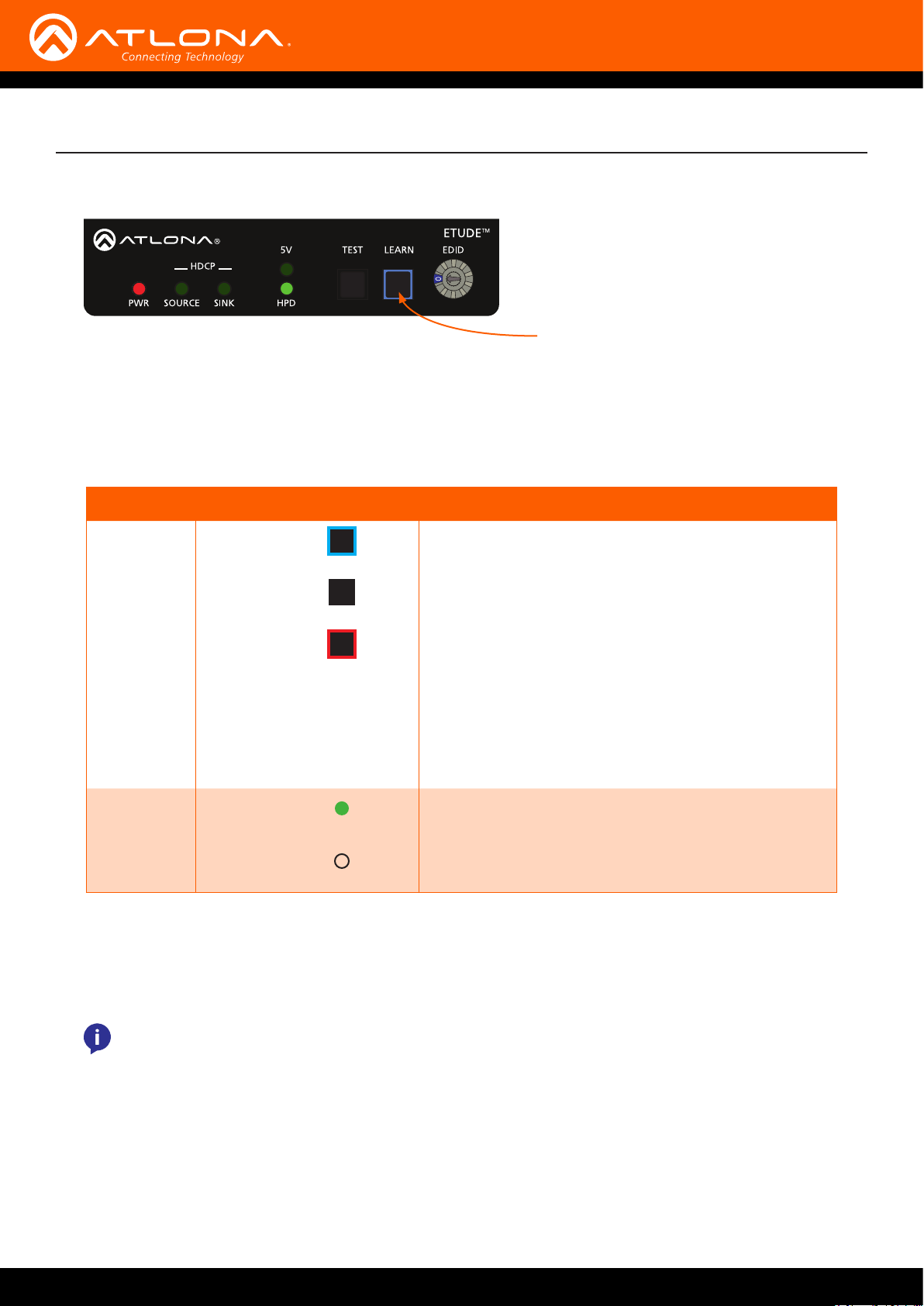
During the process, the LEARN button will ash blue as the EDID data is copied into memory.
Flashes blue while learning EDID
If the EDID was successfully learned, then the LEARN button will turn o. If an error was encountered during the
operation, then the LEARN button will ash red.
If an error is encountered, disconnect the power from the AT-ETU-SYNC, power-cycle the sink device, then
repeat steps 4 through 6. If after several attempts, the error is encountered, then this may indicate that the sink
device has a bad or corrupt EDID.
LED/Button State Description
LEARN Flashing blue EDID being learned.
O EDID learned successfully.
Flashing red Error learned EDID.
• Bad or corrupt EDID on sink.
• No sink device present or detected.
• Make sure sink is powered.
• Check for proper connection between sink device
and
AT-ETU-SYNC.
• Possible bad cable.
HPD Solid green Sink device OK.
O Sink device not detected.
7. Reconnect the source (or other intermediate device) to the HDMI IN port on the AT-ETU-SYNC. The source will
read the EDID data stored in EDID mode 0 and use this information to send the proper audio and video formats
to the sink device.
NOTE: EDID data will remain in EDID mode 0, even after power is disconnected. To learn a new EDID
and overwrite the existing EDID data in mode 0, repeat steps 1 through 6.
AT-ETU-SYNC
13
Page 14
Basic Operation
Performing System Tests
The AT-ETU-SYNC features a TEST button which tests the source, sink, or the entire system to aid in troubleshooting
connectivity issues.
In-Line Testing
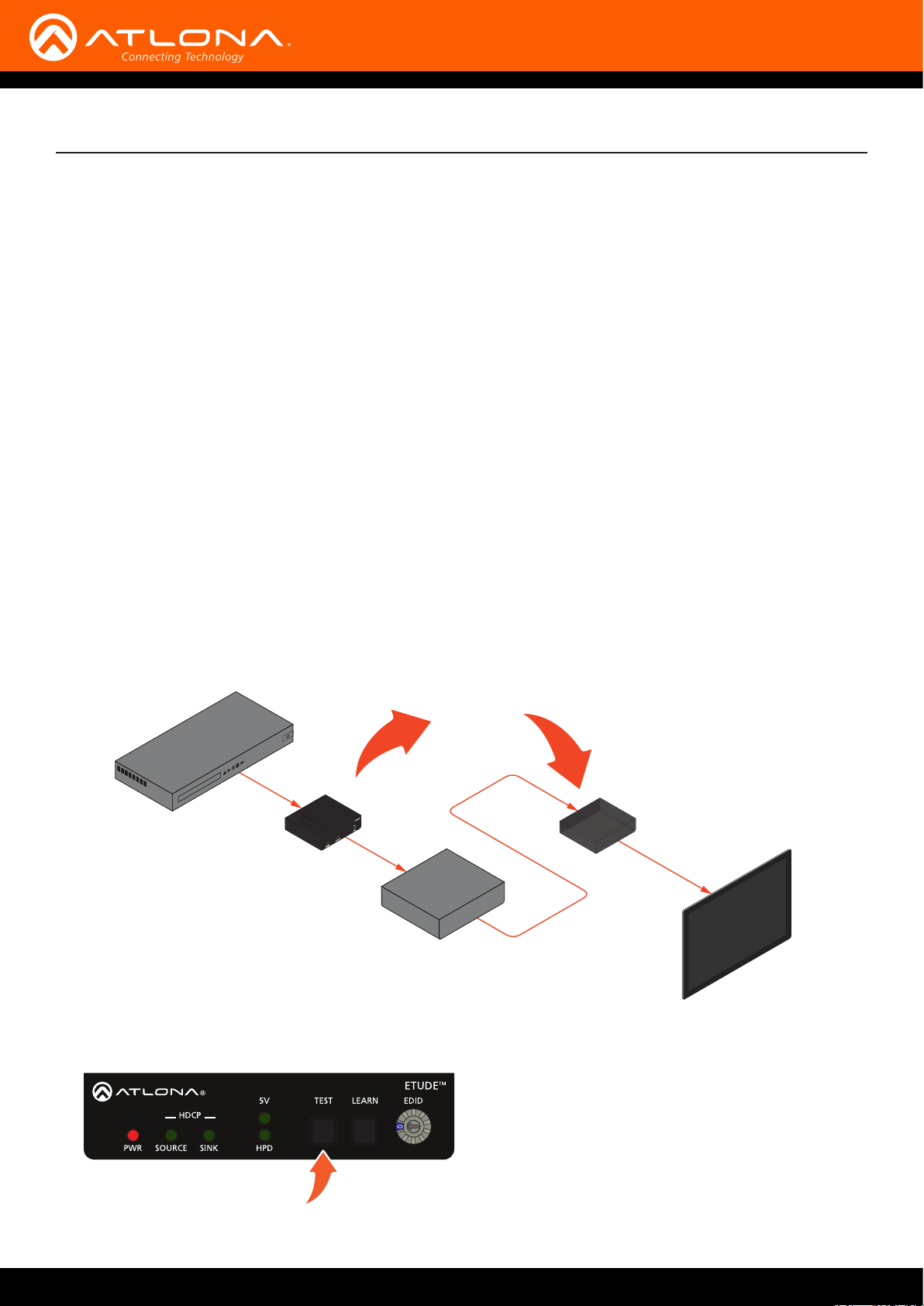
1. Power the AT-ETU-SYNC.
2. Position the AT-ETU-SYNC between the source and sink. The actual position of the AT-ETU-SYNC will depend
upon the setup. In the illustration, below, an intermediate device (such as a switcher, splitter, or matrix) has been
introduced. If no intermediate devices are present, then connect the AT-ETU-SYNC between the source and the
display (sink).
• Problem is suspected between the sink and any upstream devices:
a. Connect an HDMI cable from the intermediate device to the HDMI IN port on the AT-ETU-SYNC.
b. Connect an HDMI cable from the HDMI OUT port on the AT-ETU-SYNC to the display (sink).
• If the problem is suspected between the source and the intermediate device(s):
a. Connect an HDMI cable from the source to the HDMI IN port on the AT-ETU-SYNC.
b. Connect an HDMI cable from the HDMI OUT port on the AT-ETU-SYNC to the intermediate device.
OR
Video
Source
AT-ETU-SYNC
Intermediate
Device
3. Press and release the TEST button on the front panel of the AT-ETU-SYNC.
AT-ETU-SYNC
Video
Display (Sink)
AT-ETU-SYNC
14
Page 15
Basic Operation
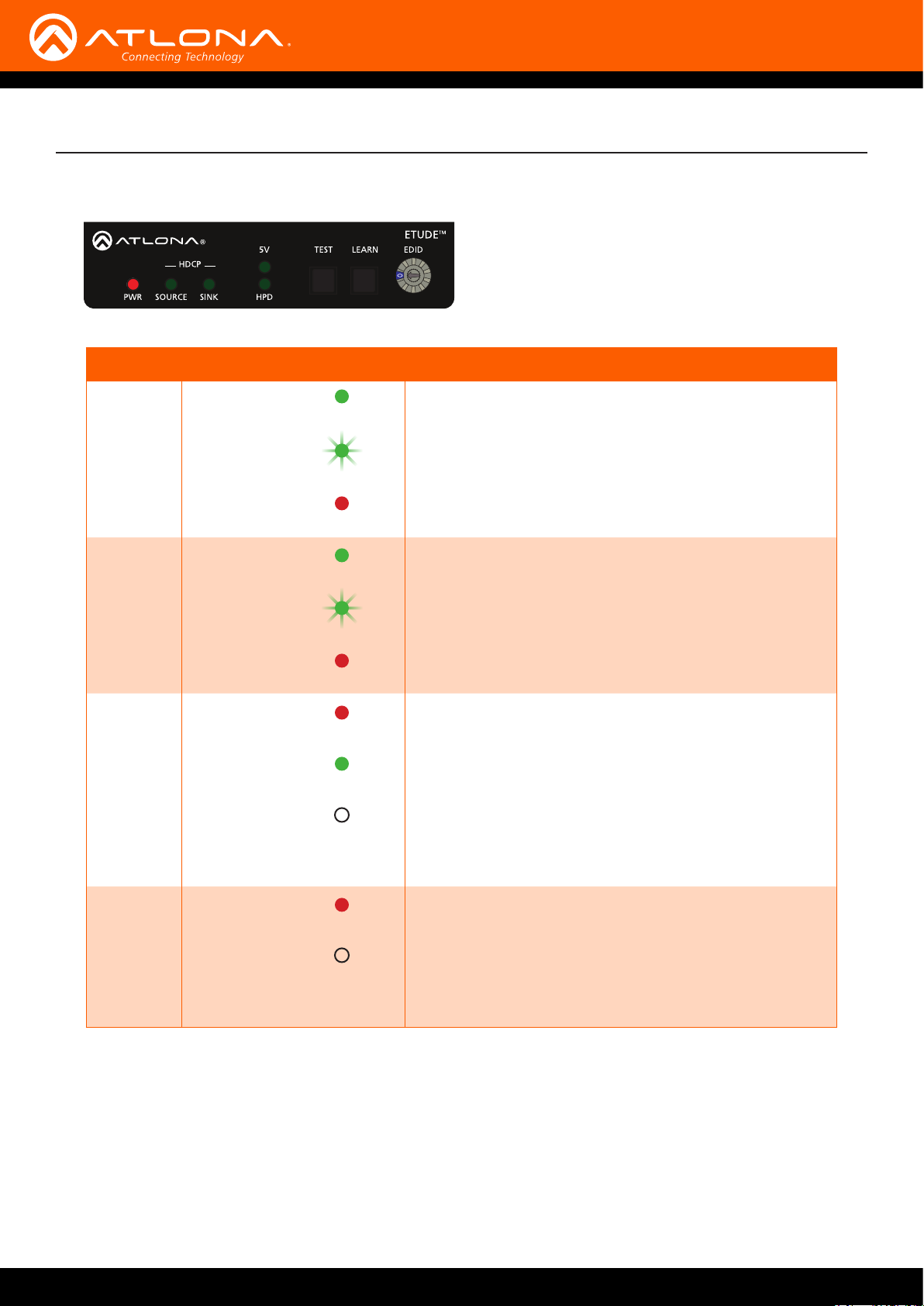
4. The SOURCE, SINK, 5V, and HPD indicators will display the current testing results. Refer to the table, below.
LED State Description
SOURCE Solid green Source is HDCP 2.2
Flashing green Source is HDCP 1.4
Solid red The source is not HDCP-compliant
SINK Solid green Sink is HDCP 2.2
Flashing green Sink is HDCP 1.4
Solid red Sink is not HDCP-compliant
5V Solid red 5V signal from the source is not detected
Solid green 5V signal from the source is present
O No source device is detected
• Check that a source device is connected
• Verify the integrity of the HDMI cable connected to the
source device
HDP Solid red HDP is low. The AT-ETU-SYNC will generate
O No sink device is detected
• Check that a sink device is connected
• Verify the integrity of the HDMI cable connected to the
sink
5. After the test procedure is complete all LED indicators, except for the PWR indicator, will turn o.
AT-ETU-SYNC
15
Page 16
Basic Operation
Source Testing
1. Power the AT-ETU-SYNC.
2. Connect an HDMI cable from the source to the HDMI IN port on the AT-ETU-SYNC.
3. Press and release the TEST button on the front panel of the AT-ETU-SYNC.
4. The SOURCE and 5V indicators will display the testing results. Note that since a sink device is not present,
the HPD and SINK indicators are ignored. Refer to the table on the previous page.
Sink Testing
1. Power the AT-ETU-SYNC.
2. Connect an HDMI cable from the sink to the HDMI OUT port on the AT-ETU-SYNC.
3. Press and release the TEST button on the front panel of the AT-ETU-SYNC.
4. The SINK and HPD indicators will display the testing results. Note that since a source device is not present,
the 5V and SOURCE indicators are ignored. Refer to the table on the previous page.
NOTE: When the EDID dial is set to EDID mode 0, during a test procedure, the LEARN button will
glow blue. If the EDID dial is set to any other mode, then the LEARN button will remain “o”. Setting
the EDID mode will not aect the results of the test procedure.
DDC Reclocking
DDC relocking, sometimes referred to as “clock stretching”, is method for correcting sync issues on the DDC line.
The DDC line (also known as the I2C bus) is part of the HDMI interface and is responsible for transmitting EDID and
HDCP information from the sink to the source. The DDC line contains two signal lanes: SDA (data) and SCL (clock).
Most of the time, the timing between these two lanes is correct. However, lengthy cables and/or intermediate
devices between the source and sink, can introduce synchronization problems between these two lanes. This can
result in a variety of issues, such as ashing picture, drop-outs, artifacts, and incorrect resolution.
Placing the AT-ETU-SYNC in-line, between the source and sink, will usually correct these issues. Experimenting with
the position of the AT-ETU-SYNC, within the system - particularly when intermediate devices are installed - may be
necessary to obtain the correct results. If the problem persists, contact an Atlona Technical Support Engineer for
assistance.
NOTE: Some HDMI devices do not support clock-stretching.
AT-ETU-SYNC
16
Page 17

Appendix
EDID Modes
The AT-ETU-SYNC comes with ten EDID modes. Mode 0 is used to record an external EDID and modes 1 through 9
are pre-programmed. The details for each EDID mode are listed below.
EDID Mode Suppported Features
0 No data until learned
1 1920 x 1080p at 60Hz - HDTV (16:9, 1:1) [Native] (3D support)
1280 x 720p at 60Hz - HDTV (16:9, 1:1) (3D support)
1920 x 1080i at 30Hz - HDTV (16:9, 1:1) (3D support)
720 x 480p at 60Hz - EDTV (16:9, 32:27)
1920 x 1080p at 24Hz - HDTV (16:9, 1:1) (3D support)
1920 x 1080p at 30Hz - HDTV (16:9, 1:1) (3D support)
640 x 480i at 30Hz - SDTV (16:9, 1:1)
YCbCr 4:4:4, YCbCr 4:2:2
Top-Bottom, Side-by-Side
LPCM 2-channel, 16/20/24 bit depths at 44/48/96/192 kHz
FL/FR
2 1920 x 1080p at 60Hz - HDTV (16:9, 1:1) [Native] (3D support)
1280 x 720p at 60Hz - HDTV (16:9, 1:1) (3D support)
1920 x 1080i at 60Hz - HDTV (16:9, 1:1) (3D support)
720 x 480p at 60Hz - EDTV (16:9, 32:27)
1920 x 1080p at 24Hz - HDTV (16:9, 1:1) (3D support)
1920 x 1080p at 30Hz - HDTV (16:9, 1:1) (3D support)
YCbCr 4:4:4, YCbCr 4:2:2
Top-Bottom, Side-by-Side
LPCM 2-channel, 16/20/24 bit depths at 32/44/48/88/96/176/192 kHz
LPCM 6-channel, 16/20/24 bit depths at 32/44/48/88/96/176/192 kHz
LPCM 8-channel, 16/20/24 bit depths at 32/44/48/88/96/176/192 kHz
AC-3 6-channel, 680k max. bit rate at 32/44/48 kHz
DTS 6-channel, 1536k max. bit rate at 32/44/48/88/96 kHz
DD+ 8-channel at 32/44/48 kHz
DVD-A 8-channel at 48/96/192 kHz
DTS-HD 8-channel, 16-bit at 44/48/88/96/176/192 kHz
FL/FR, FLFE, FC, RL/RR, RC, RLC/RRC
3 1920 x 1080p at 60Hz - VESA STD [Native]
720 x 400p at 70Hz - IBM VGA
640 x 480p at 60Hz - IBM VGA
800 x 600p at 60Hz - VESA
1024 x 768p at 60Hz - VESA
1280 x 720p at 60Hz - VESA STD
1280 x 960p at 60Hz - VESA STD
1280 x 1024p at 60Hz - VESA STD
1440 x 900p at 60Hz - VESA STD
1600 x 1200p at 60Hz - VESA STD
1680 x 1050p at 60Hz - VESA STD
4 3840 x 2160p at 60Hz (16:9) [Native]
1920 x 1080p at 60Hz - HDTV (16:9, 1:1)
1920 x 1080p at 50Hz - HDTV (16:9, 1:1)
1920 x 1080i at 60Hz - HDTV (16:9, 1:1)
1920 x 1080i at 50Hz - HDTV (16:9, 1:1)
1920 x 1080p at 24Hz - HDTV (16:9, 1:1)
AT-ETU-SYNC
17
Page 18

EDID Mode Suppported Features
Appendix
4
(continued)
5 3840 x 2160p at 60Hz (16:9) [Native]
1920 x 1080p at 25Hz - HDTV (16:9, 1:1)
1920 x 1080p at 30Hz - HDTV (16:9, 1:1)
1280 x 720p at 60Hz - HDTV (16:9, 1:1)
1280 x 720p at 50Hz - HDTV (16:9, 1:1)
720 x 480p at 60Hz - EDTV (16:9, 32:27)
720 x 576p at 50Hz - EDTV (16:9, 64:45)
720 x 480i at 60Hz - Doublescan (16:9, 32:27)
720 x 576i at 50Hz - Doublescan (16:9, 64:45)
YCbCr 4:4:4, YCbCr 4:2:2
LPCM 2-channel, 16/20/24 bit depths at 44/48/96/192 kHz
FL/FR
1920 x 1080p at 60Hz - HDTV (16:9, 1:1)
1920 x 1080p at 50Hz - HDTV (16:9, 1:1)
1920 x 1080i at 60Hz - HDTV (16:9, 1:1)
1920 x 1080i at 50Hz - HDTV (16:9, 1:1)
1920 x 1080p at 24Hz - HDTV (16:9, 1:1)
1920 x 1080p at 25Hz - HDTV (16:9, 1:1)
1920 x 1080p at 30Hz - HDTV (16:9, 1:1)
1280 x 720p at 60Hz - HDTV (16:9, 1:1)
1280 x 720p at 50Hz - HDTV (16:9, 1:1)
720 x 480p at 60Hz - EDTV (16:9, 32:27)
720 x 576p at 50Hz - EDTV (16:9, 64:45)
720 x 480i at 60Hz - Doublescan (16:9, 32:27)
720 x 576i at 50Hz - Doublescan (16:9, 64:45)
YCbCr 4:4:4, YCbCr 4:2:2
LPCM 2-channel, 16/20/24 bit depths at 32/44/48/88/96/176/192 kHz
LPCM 6-channel, 16/20/24 bit depths at 32/44/48/88/96/176/192 kHz
LPCM 8-channel, 16/20/24 bit depths at 32/44/48/88/96/176/192 kHz
AC-3 6-channel, 640k max. bit rate at 32/44/48 kHz
DTS 6-channel, 1536k max. bit rate at 44/48/88/96 kHz
DD+ 8-channel at 44/48 kHz
DVD-A 8-channel at 48/96/192 kHz
DTS-HD 8-channel, 16-bit at 44/48/88/96/176/192 kHz
FL/FR, FLFE, FC, RL/RR, RLC/RRC
6 3840 x 2160p at 60Hz (16:9) [Native]
1920 x 1080p at 60Hz - HDTV (16:9, 1:1)
1920 x 1080p at 50Hz - HDTV (16:9, 1:1)
1920 x 1080i at 60Hz - HDTV (16:9, 1:1)
1920 x 1080i at 50Hz - HDTV (16:9, 1:1)
1920 x 1080p at 24Hz - HDTV (16:9, 1:1)
1920 x 1080p at 25Hz - HDTV (16:9, 1:1)
1920 x 1080p at 30Hz - HDTV (16:9, 1:1)
1280 x 720p at 60Hz - HDTV (16:9, 1:1)
1280 x 720p at 50Hz - HDTV (16:9, 1:1)
720 x 480p at 60Hz - EDTV (16:9, 32:27)
720 x 576p at 50Hz - EDTV (16:9, 64:45)
720 x 480i at 60Hz - Doublescan (16:9, 32:27)
720 x 576i at 50Hz - Doublescan (16:9, 64:45)
YCbCr 4:4:4, YCbCr 4:2:2
LPCM 2-channel, 16/20/24 bit depths at 44/48/96/192 kHz
FL/FR
AT-ETU-SYNC
18
Page 19

EDID Mode Suppported Features
7 3840 x 2160p at 60Hz (16:9) [Native]
1920 x 1080p at 60Hz - HDTV (16:9, 1:1)
1920 x 1080p at 50Hz - HDTV (16:9, 1:1)
1920 x 1080i at 60Hz - HDTV (16:9, 1:1)
1920 x 1080i at 50Hz - HDTV (16:9, 1:1)
1920 x 1080p at 24Hz - HDTV (16:9, 1:1)
1920 x 1080p at 25Hz - HDTV (16:9, 1:1)
1920 x 1080p at 30Hz - HDTV (16:9, 1:1)
1280 x 720p at 60Hz - HDTV (16:9, 1:1)
1280 x 720p at 50Hz - HDTV (16:9, 1:1)
720 x 480p at 60Hz - EDTV (16:9, 32:27)
720 x 576p at 50Hz - EDTV (16:9, 64:45)
720 x 480i at 60Hz - Doublescan (16:9, 32:27)
720 x 576i at 50Hz - Doublescan (16:9, 64:45)
YCbCr 4:4:4, YCbCr 4:2:2
LPCM 2-channel, 16/20/24 bit depths at 32/44/48/88/96/176/192 kHz
LPCM 6-channel, 16/20/24 bit depths at 44/48/88/96/176/192 kHz
LPCM 8-channel, 16/20/24 bit depths at 32/44/48/88/96/176/192 kHz
AC-3 6-channel, 640k max. bit rate at 32/44/48 kHz
DTS 6-channel, 1536k max. bit rate at 44/48/88/96 kHz
DD+ 8-channel at 44/48 kHz
DTS-HD 8-channel, 16-bit at 44/48/88/96/176/192 kHz
FL/FR, FLFE, FC, RL/RR, RLC/RRC
Appendix
8 3840 x 2160p at 60Hz (16:9) [Native]
1920 x 1080p at 60Hz - HDTV (16:9, 1:1)
1920 x 1080p at 50Hz - HDTV (16:9, 1:1)
1920 x 1080i at 60Hz - HDTV (16:9, 1:1)
1920 x 1080i at 50Hz - HDTV (16:9, 1:1)
1920 x 1080p at 24Hz - HDTV (16:9, 1:1)
1920 x 1080p at 25Hz - HDTV (16:9, 1:1)
1920 x 1080p at 30Hz - HDTV (16:9, 1:1)
1280 x 720p at 60Hz - HDTV (16:9, 1:1)
1280 x 720p at 50Hz - HDTV (16:9, 1:1)
720 x 480p at 60Hz - EDTV (16:9, 32:27)
720 x 576p at 50Hz - EDTV (16:9, 64:45)
720 x 480i at 60Hz - Doublescan (16:9, 32:27)
720 x 576i at 50Hz - Doublescan (16:9, 64:45)
YCbCr 4:4:4, YCbCr 4:2:2
LPCM 2-channel, 16/20/24 bit depths at 44/48/96/192 kHz
FL/FR
9 3840 x 2160p at 60Hz (16:9) [Native]
1920 x 1080p at 60Hz - HDTV (16:9, 1:1)
1920 x 1080p at 50Hz - HDTV (16:9, 1:1)
1920 x 1080i at 60Hz - HDTV (16:9, 1:1)
1920 x 1080i at 50Hz - HDTV (16:9, 1:1)
1920 x 1080p at 24Hz - HDTV (16:9, 1:1)
1920 x 1080p at 25Hz - HDTV (16:9, 1:1)
1920 x 1080p at 30Hz - HDTV (16:9, 1:1)
1280 x 720p at 60Hz - HDTV (16:9, 1:1)
1280 x 720p at 50Hz - HDTV (16:9, 1:1)
720 x 480p at 60Hz - EDTV (16:9, 32:27)
720 x 576p at 50Hz - EDTV (16:9, 64:45)
720 x 480i at 60Hz - Doublescan (16:9, 32:27)
AT-ETU-SYNC
19
Page 20
EDID Mode Suppported Features
Appendix
9
(continued)
720 x 576i at 50Hz - Doublescan (16:9, 64:45)
YCbCr 4:4:4, YCbCr 4:2:2
LPCM 2-channel, 16/20/24 bit depths at 32/44/48/88/96/176/192 kHz
LPCM 6-channel, 16/20/24 bit depths at 32/44/48/88/96/176/192 kHz
LPCM 8-channel, 16/20/24 bit depths at 32/44/48/88/96/176/192 kHz
AC-3 6-channel, 640k max. bit rate at 32/44/48 kHz
DTS 6-channel, 1536k max. bit rate at 44/48/88/96 kHz
DD+ 8-channel at 44/48 kHz
DVD-A 8-channel at 48/96/192 kHz
DTS-HD 8-channel, 16-bit at 44/48/88/96/176/192 kHz
FL/FR, FLFE, FC, RL/RR, RLC/RRC
AT-ETU-SYNC
20
Page 21
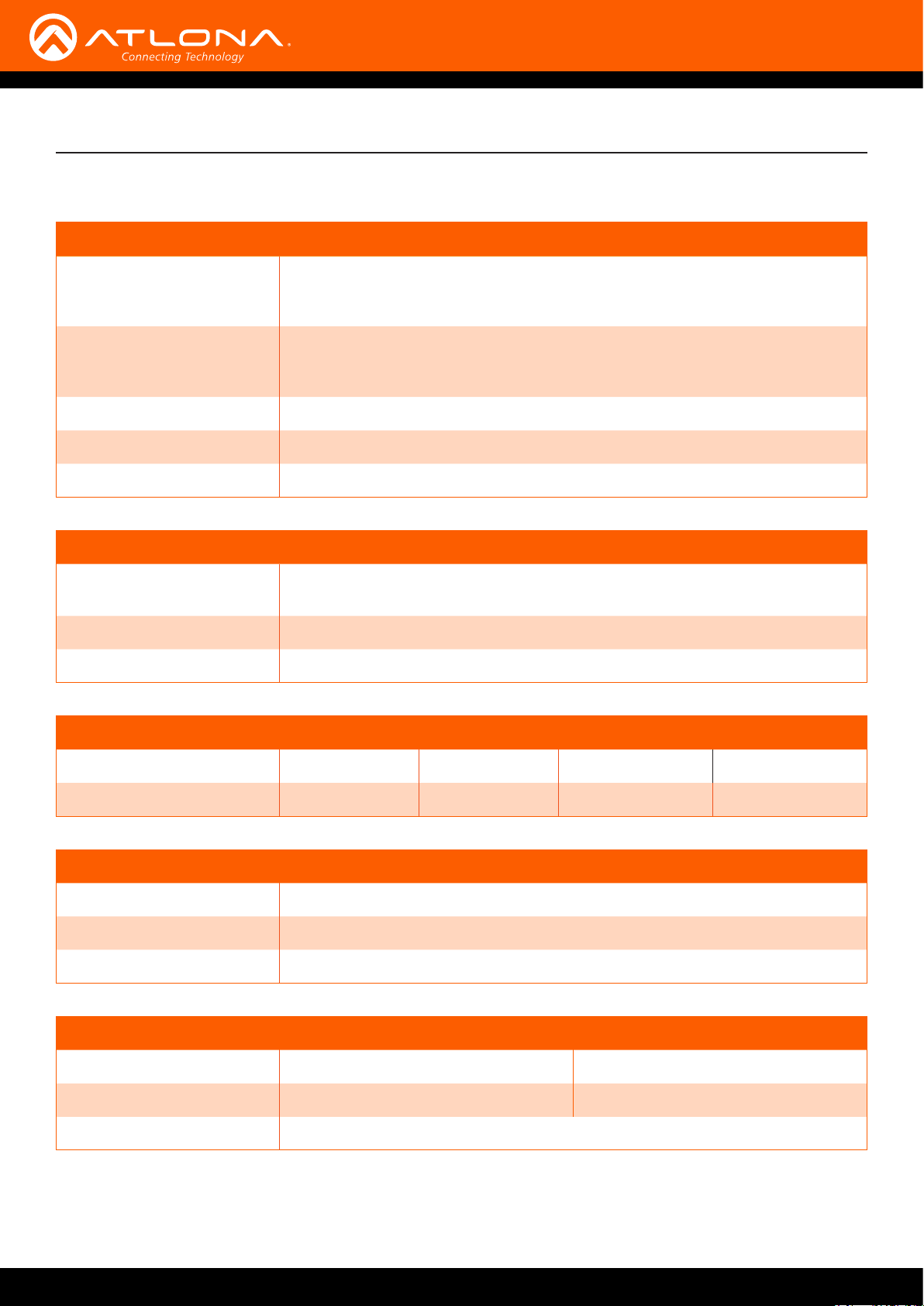
Appendix
Specications
Video
HD/SD 4096×2160@24/25/30/50/60Hz, 3840×2160@24/25/30/50/60Hz, 2048x1080p,
[email protected]/24/25/29.97/30/50/59.94/60Hz, 1080i@50/59.94/60Hz,
720p@50/59.94/60Hz, 576p, 576i, 480p, 480i
VESA 2560x1600, 2048x1536, 1920x1200, 1680x1050, 1600x1200, 1440x900,
1400x1050, 1366x768, 1360x768, 1280x1024, 1280x800, 1152x768, 1024x768,
800x600, 640x480
Color Space YUV, RGB
Chroma Subsampling 4:4:4, 4:2:2, 4:2:0
Color Depth 8-bit, 10-bit, 12-bit
Audio
Analog In PCM 2Ch, LPCM 5.1, LPCM 7.1, Dolby® Digital, Dolby Digital Plus, Dolby
TrueHD, DTS® 5.1, DTS-HD Master Audio™, DTS:X™, Dolby Atmos®
Sample Rate 32 kHz, 44.1 kHz, 48 kHz, 88.2 kHz, 96 kHz, 176.4 kHz, 192 kHz
Bit Rate 24-bit (max.)
Resolution / Distance 4K/UHD - Feet / Meters 1080p - Feet / Meters
HDMI @ 60 Hz 6 2 30 10
HDMI @ 24 Hz 16 5 50 15
Signal
Bandwidth 18 Gbps
CEC No
HDCP 2.2
Temperature Fahrenheit Celsius
Operating 32 to 122 0 to 50
Storage -4 to 140 -20 to 60
Humidity (RH) 20% to 90%, non-condensing
AT-ETU-SYNC
21
Page 22
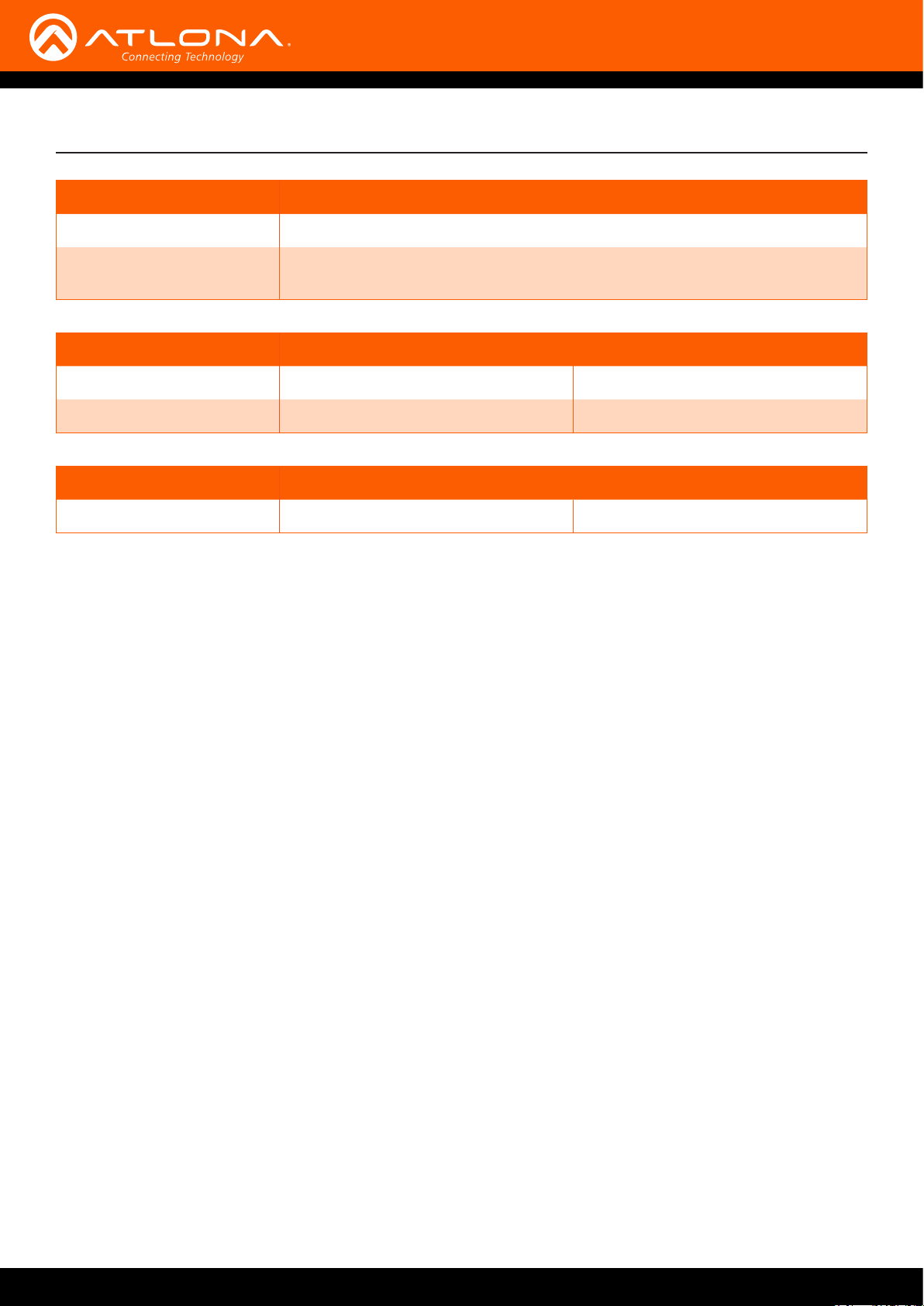
Power
Consumption 6.5 W
Supply Input: 100 - 240 V AC, 50/60 Hz
Output: 5 V DC, 1 A
Dimensions Inches Millimeters
H x W x D 1.02 x 4.29 x 3.50 26 x 109 x 89
H x W x D (w/ ears) 1.02 x 5.00 x 3.74 26 x 127 x 95
Weight Pounds Kilograms
Device 0.6 0.27
Appendix
AT-ETU-SYNC
22
Page 23

Index
C
Connection
diagram 10
instructions 10
Contents
package 8
Customer support 3
D
DDC reclocking 16
Description
front / rear panel 9
E
EDID
dial 9, 11, 12
learning 12
modes 11, 17
pre-programmed 11
selecting 11
F
FCC statement 6
Features 8
FW / PWR
port 9, 10
O
Operating notes 3
P
Panel descriptions 9
PWR
LED 9
S
Safety information 6
SINK
LED 9, 15
SOURCE
LED 15
Specications 21
T
TEST
button 9, 14, 16
Testing
in-line 14
sink 16
source 16
W
Warranty 4
H
HDMI IN 9, 10, 14
HDMI OUT 9, 10, 12, 14
HDP
LED 15
HPD
LED 9, 13
I
Installation 10
L
LEARN
button 9, 12, 13
LED
5V 9, 15
HDP 15
HPD 9
SINK 9, 15
SOURCE 9, 15
AT-ETU-SYNC
23
Page 24

atlona.com • 408.962.0515 • 877.536.3976
© 2017 Atlona Inc. All rights reserved. “Atlona” and the Atlona logo are registered trademarks of Atlona Inc. All other brand names and trademarks or registered trademarks are the property of their respective owners. Pricing, specications and availability
subject to change without notice. Actual products, product images, and online product images may vary from images shown here.
 Loading...