

Page 1
CRICKETMA XX™ 1 . 0
ELECTRONIC DARTBOARD
MODEL #CMX1000
1.800.399.4402
FAX: 215.283.9573
Please have your model number ready when calling.
DMI Sports Inc.
1300 Virginia Drive, Suite 401
Ft. Washington, PA19034
www.dmisports.com
Page 2

For any warranty issues or problems,
DO NOT RETURN THIS PRODUCT TO THE STORE WHERE PURCHASED
WARRANTY: This DMI electronic dartboard is guaranteed against defects in
materials and workmanship for 90 days. (Note: flights, shafts and points wear out
and/or break as a normal part of play; this is not a defect and is not covered under
the guarantee.) This guarantee is void if merchandise is misused, abused,
neglected, shopworn, scratched or if you cannot provide a valid proof of purchase.
Opening this dart game will render your warranty null and void
Warning: Darts are not a toy for use by children. Darts can
cause serious or fatal injury. Keep out of reach of children.
Do not use when any person or animal is in the vicinity of the
intended flight path of the dart or target area.
Page 3
Mounting with either batteries or adapter
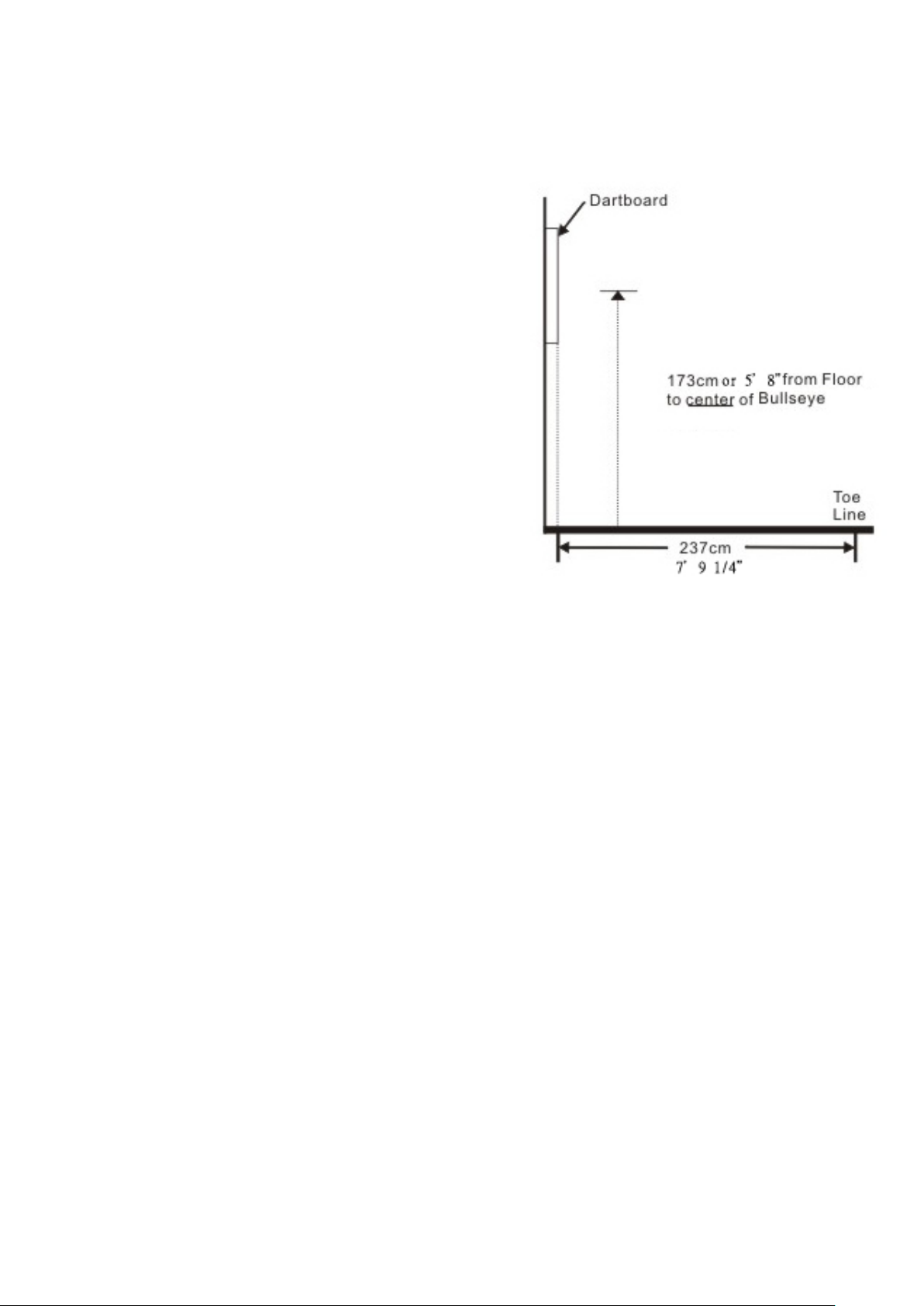
Choose a location to hang the dartboard where is about 10
feet (3.048 m) of open space in front of the board. The
“toe-line” should be 7’9 1/4” to observe steel tip rules, or 8
feet for soft tip rules (2.37 M) from the face of the dartboard.
Since this dartboard is powered with an AC adapter, you
should mount it close to an electric outlet for convenience. .
No matter if the dartboard has horizontal or vertical hang
hole(s), the center of bulls eye should be 5’8” (1.73 m) (68
inches) from the ground. Locate the center of a wall stud
for your mounting. Using a pencil, Make a light mark on the
wall at 68” from the floor. Measure the vertical distance
between the hang hole(s) on the back of the dartboard to the
center of the back of the dart board. Then, using the distance
you just measured, make the first mark for one hang hole on
the wall by that distance above the original 68” mark you
made. That mark should be 77” from the floor. Then make
another mark to the left or right of that mark by 15.75” for
the second hole location. Make sure the second mark for
hang hole is level with the first mark. Drill screws into the
two marks you made. Mount the dartboard on the wall by lining up the hang holes on the back with the
screws. It may be necessary to adjust the screws until the board fits snugly against the wall. If you want to
mount the dartboard even more securely to the wall, you can fasten four screws through the holes located in the
catch ring area (the area outside the scoring segments)
Dartboard Functions (Please note that your dartboard may not include all functions)
POWER switch/button - Located on the lower right corner on the side of the dartboard. Be sure the AC
Adapter is plugged into the jack on the right side of the dartboard or batteries are installed. Press the POWER
switch to turn game on or off.
START/HOLD button - This multi-function button is used to:
• START the game when all options have been selected.
• Put dartboard in HOLD status between rounds to allow player to remove darts from the target area.
GAME GUARD button –After the START button has been pressed and play has begun, the GAME GUARD
feature can be activated. When the button is pressed, all of the keys will ‘lock’. When GAME GUARD is active,
a misguided dart hitting a button will not affecting your game. To deactivate the GAME GUARD, simply press
the button again and the keys will unlock.
BOUNCE OUT button - Decide before play if you want to count darts that do not remain in board
(“bounce-outs”) or not. If not, simply press the BOUNCE OUT button immediately after a bounce out occurs to
deduct the score that registers
DART-OUT/SCORE button - The DART-OUT feature is active only during the “01” games (301, 401, etc.).
When a player’s score falls below 160, he/she can press the DART OUT button to get a suggestion from the
dartboard as to the 3 darts needed to finish the game. Note: doubles and triples are indicated with 2 and 3
Page 4

dashes to the left of the number respectively. The SCORE feature allows player to access score not current on
display.
SOUND button – Sound level adjustable from 0-7 levels (8 levels).
DOUBLE/MISS button – This button is used to activate the Double In/Double Out and Master Out options for
the “01” games. This function is only active when selecting 301, 401, etc. games. Note: not all models have
Master Out option. The M ISS fe atu re i s a ctive du ring play of an y game. Press button to register a “missed” dart.
The player can press this button when dart lands outside target area so computer registers a thrown dart.
PLAYER/PAGE button – This button is used at the start of each game to select the number of players you want
to play the game. In addition, this button allows players to see other player scores of not on active display.
LCD dartboard keeps track of scores for up to 8 players or up to 4 two-person teams. LED dartboard keeps
track of scores for up to 16 players or up to 8 two-person teams.
GAME button – Press to page through the on-screen game menu and select game.
SELECT button – Press to select various difficulty settings for games. Many games contain several difficulty
options that can be accessed by pressing this button
RESET button – Press to clear display and reset dartboard to opening sound.
SOLO PLAY button – This exciting feature allows single player to play against the computer at one of five
different levels of skill! Only 1 player can complete against the Solo Play competitor at a time. The Solo Play
feature adds a level of competition to normally routine practice sessions.
Solo Play Skill Levels Level 1 (C1) Professional
Level 2 (C2) Export
Level 3 (C3) Advanced
Level 4 (C4) Intermediate
Level 5 (C5) Beginners
Press to activate Solo Play feature where you can play against the computer and then press START. When play
begins: the ‘human’ player throws first. After 3 darts art thrown, go to the board to take darts out and press
START to change the next player (Computer Opponent). Watch as the Computer opponent’s dart scores are
registered on the display. The dartboard will indicate the segment the Solo play opponent is throwing for the in
Active Score Display (the ATTEMPT LED will light). Then the Active Score Display will indicate the segment
that the Computer opponent actually scored (the RESULT LED will light)
After the Solo Play opponent completes his round, the board will automatically reset for the ‘human’ player.
Play continues until one player wins. GOOD LUCK!
HECKLER® button: Some electronic dartboards include the exciting interactive Heckler® feature that provide
positive comments for high scoring darts and taunting remarks for poorly thrown darts. The interactive
comments are sure to add plenty of enjoyment to your dart games.
There are fore levels to choose from to control how frequent you will hear these interactive sound effects:
Frequency levels Level 4: Every throw – all throws will include an interactive sound effect
Level 3: Frequently – Frequent interactive sound effects
Level 2: Occasional – occasional interactive sound effects
Level 1: Off – turns OFF the interactive Heckler® sounds
Page 5

The default setting when the dartboard is turned on is level 4. Players do have the ability to change the
frequency level while a game is in process. Simply press the Heckler® button to change the frequency level.
Important! The Heckler® feature can only be used with standard games of Cricket and ‘01’ game.
Electronic Dartboard Operation
1. Press the POWER or switch to ON position (|) to activate dartboard. A short musical introduction is played
as the display goes through power-up test.
2. Press GAME button until desired game is displayed – or press any of the Quick Pick buttons.
3. Press DOUBLE button (optional) to select starting and/or ending on doubles or Master Out (used only in
301 - 901 games). This is explained in the game rules section.
4. Press PLAYER button to select the number of players (1, 2 ... 16). The default setting is 2 players. Or select
Solo Play option by pressing the Solo Play button.
5. Press START/HOLD button (red) to activate game and begin play.
6. Throw darts: When all 3 darts have been thrown, a voice command will indicate “Remove Darts” and the
score will flash. The darts can now be removed without affecting the electronic scoring. When all darts are
removed from the playing surface press the START button to go to next player. Voice command will indicate
which player is up. Also, the player indicator lights will illuminate to show which player’s turn it is.
GAME 1: 301
This popular tournament and pub game is played by subtracting each dart from the starting total until the player
reaches exactly 0 (zero). If a player goes past zero it is considered a “Bust” and the score returns to where it was
at the start of that round. For example, if a player needs a 32 to finish the game and he/she hits a 20, 8, and 10
(totals 38), the score goes back to 32 for the next round.
In playing the game, the double in / double out option can be chosen (double out is the most widely used
option). Simply press the “DOUBLE” button to change this setting. LED indicators will display your current
setting: Note: you can adjust total score of this game.
• Double In - A double must be hit before points are subtracted from the total. In other words, a player’s scoring
does not begin until a double is hit.
• Double Out - A double must be hit to end the game.
• Double In and Double Out - A double is required to start and end scoring of the game by each player.
• Master Out - A double or triple is required to finish the game.
Dart-Out Feature (“01” games only)
This electronic dartboard has a special “Dart Out” feature. When a player requires less than 160 to reach zero,
the estimate feature becomes active. The player can press the DART OUT button to view the darts necessary to
throw to finish the game (reach zero exactly). Doubles and triples are indicated with 2 or 3 lines to the left of
each number respectively.
GAME 2: CRICKET
Cricket is a strategic game for accomplished players and beginners alike. Players throw for numbers best suited
for them and can force opponents to throw for numbers not as suitable for them. The object of Cricket is to
“close” all of the appropriate numbers before one’s opponent while racking up the highest number of points.
Only the numbers 15 through 20 and the inner/outer bulls eye are used. Each player must hit a number 3
times to “open” that segment for scoring. A player is then awarded the number of points of the “open” segment
each time he/she throws a dart that lands in that segment, provided their opponent has not closed that segment.
Hitting the double ring counts as two hits, and the triple ring counts as 3 hits. Numbers can be opened or closed
in any order. A number is “closed” when the other player(s) hit the open segment 3 times. Once a number has
Page 6

been “closed”, any player for the remainder of the game can no longer score on it.
Winning - The side closing all the numbers first and accumulating the highest point total is the winner. If a
player “closes” all numbers first but is behind in points, he/she must continue to score on the “open” numbers.
If the player does not make up the point deficit before the opposing player(s) “closes” all the numbers, the
opposing side wins. Play continues until all segments are closed.
GAME 2-1: NO-SCORE CRICKET
(Press SELECT button when Cricket is displayed) Same rules as standard Cricket except there is no point
scoring. The object of this version is to be the first to simply “close” all the appropriate numbers (15 through 20
and the bullseye). Note: LCD models have cricket and no-score cricket as separate games, but LED models
have these games as 1 game.
Cricket Scoring Display: This dartboard utilizes a dedicated scoreboard that keeps track of each player’s
segment status when playing Cricket. The exclusive Tournament Cricket Scoring display on this dartboard
utilizes traditional X and O style characters to track ‘marks’. When Cricket is selected, the lights on the Cricket
scoreboard are not lit – they will illuminate as ‘marks’ are scored. There are 3 separate lights within each
number (15 through 20 and bulls eye). During play, one of the status lights will turn on as a segment is hit. If a
double or triple of an active number is hit, 2 or 3 lights will turn on respectively.
GAME 3: SCRAM (For 2 players only)
This game is a variation of Cricket. The game consists of two rounds. The players have a different objective in
each round. In round 1, player 1 tries to “close” (score 3 hits in each segment - 15 to 20 and bulls eye). During
this time, player 2 attempts to rack up as many points in the segments that the other player has not yet closed.
Once player 1 has closed all segments, round 1 is complete. In round 2, each player’s roles are reversed. Now,
player 2 tries to close all the segments while player 1 goes for points. The game is over when round 2 is
complete (player 2 closes all segments). The player with the highest point total is the winner.
GAME 4: CUT-THROAT CRICKET
Same basic rules as standard Cricket except once scoring begins, points are added to your opponent(s) total.
The object of this game is to end up with the fewest points. This variation of Cricket offers a different
psychology to the players. Rather than adding to your own score and helping your own cause as in standard
Cricket, Cut-Throat offers the benefit of racking up points for your opponent(s), digging him in a deeper hole.
Competitive players will love this variation!
GAME 5: ENGLISH CRICKET (For 2 players only)
This game is another variation of Cricket that requires precision dart throwing. The game consists of two
rounds. The players have a different objective in each round. During the first round, player 2 attempts to throw
bulls eyes – with the objective of needing 9 to complete round 1. Double bull (red center) counts as 2 scores.
Any throw that does not hit bull’s eye is credited to player 1’s point total. For example, if player 2 throws a 20,
a single bulls eye, and a 7 during his/her turn, player 2 will have one bull’s eye subtracted from the 9 needed,
and 27 points will be credited to player 1’s point total. Player 2 must exhibit accurate bulls eye dart throwing!
Meanwhile, player 1 attempts to score as many points as possible during this first round. Doubles and triples
count 2x and 3x their respective values. However, to score points, player 1 must score over 40 points in each
turn (3 throws) to amass points against player 2. Only those points over 40 are counted toward the cumulative
score. Player 1 must also exhibit precision dart throwing and avoid hitting any bull’s eyes during this first round
because any hits scored by player 1 in the bull’s eye area will be subtracted from player 2’s needed total of 9
bulls eyes. Once player 2 reaches the objective of getting 9 bulls eyes, the roles are reversed for round two.
Page 7

GAME 6: ADVANCED CRICKET
This difficult version of cricket was developed for the advanced player. Players must close out the segments (20,
19, 18,17,16,15 and bulls eye) by using only triples and doubles! In this challenging game, doubles segments
count as 1x the number, and triple segments count as 2x the number. The bulls eye scoring is the same as in
standard cricket. The first player to close out the numbers with the most points is the winner.
GAME 7: SHOOTER
This challenging game tests the players ability to “group together” darts within a segment during each round of
play. The computer will randomly select the segment the players must shoot for at the start of each round –
indicated by a flashing number in the display.
Scoring is as follows: Single segment = 1 Point Double segment = 2 Points
Triple segment = 3 Points Single Bulls eye= 4 Points.
When the computer selects players to hit double Bulls eye, the outer bull scores 2 points and the inner Bull
scores 4 points. The player with the most points at the end of the rounds is the winner. Note: you can adjust
number of rounds.
GAME8: BIG SIX
This game allows players to challenge their opponents to hit the targets of their choice. Similar to the popular
basketball game “HORSE”; however, players must earn the chance of picking the next target for their opponent
by making a hit on the current target first.
Single 6 is the first target to hit when the game begins. Before the game starts, players must agree on how many
lives will be used by pressing SELECT button. Within the three throws, player 1 must hit a 6 to “save” their
life. After the current target is hit, the next dart thrown will determine the opponent’s target. If player 1 fails to
hit the current target within 3 darts, they will lose a life and a chance to determine the next target for player 2.
Player 2 will shoot for the single 6 that player 1 missed – and if it is hit, he can throw for a segment for the next
round. Singles, doubles and triples are all separate targets for this game.
The object of the game is to force your opponent into losing lives by selecting tough targets for your opponent
to hit such as “Double Bulls eye” or “triple 20” The last player with a life left is the winner. Note: you can
adjust number of lives.
GAME 9: OVERS
The object of this game is to simply score higher (“over”) than your own previous three dart total score. Before
play begins, players choose the amount of lives to be used by pressing the SELECT button. When a player fails
to score “over “their previous three-dart total, they will lose one life. When a player “equals” the previous three
dart total, a life will also be lost. The LED screen on the right will light up once for each life taken away. The
last player with a life remaining is the winner. Note: you can adjust number of lives.
GAME 10: UNDERS
This game is the opposite of “Overs ”. Players must score less (“Under”) than their own previous three-dart total.
The game begins with 180 (highest total possible) when the player shoots higher than his or her own previous
three-dart total, they will lose a life. Each dart that hits outside the scoring area, including bounce outs will be
penalized with 60 points added to your score. This will be added at the end of the round when the
“START/HOLD” button is pressed. The last player with a life remaining is the winner. Note: you can adjust
number of lives.
Page 8

GAME 11: COUNT-UP
The object of this game is to be the first player to reach the specified point total (400, 500 …). Point total is
specified when the game is selected. Each player attempts to score as many points as possible per round.
Doubles and triples count 2 or 3 times the numerical value of each segment. For example a dart that lands in the
triple 20 segment is scored as 60 points. The cumulative scores for each player will be displayed in the LED
display as the game progresses. Note: you can adjust total score.
GAME 12: HIGH SCORE
The rules for this competitive game are simple - Rack up the most points in three rounds (nine darts) to win.
Doubles and triples count as 2x and 3x that segment’s score respectively. You can adjust number of rounds.
GAME 13 ROUND-THE-CLOCK
Each player attempts to score in each number from 1 through 20 and bulls eye in order. Each player throws 3
darts per turn. If a correct number is hit, he/she tries for the next number in sequence. The first player to reach
20 is the winner. The display will indicate which segment you are shooting for. A player must continue
shooting for a segment until it is hit. The display will then indicate the next segment you should shoot for.
There are many difficulty settings available for this game. Each game has the same rules, the differences are
detailed as follows:
ROUND-THE-CLOCK 1 - Game starts at segment number 1
ROUND-THE-CLOCK 5 - Game starts at segment number 5
ROUND-THE-CLOCK 10 - Game starts at segment number 10
ROUND-THE-CLOCK 15 - Game starts at segment number 15
Since this game does not utilize point scoring, the double and triple rings count as single numbers.
ROUND-THE-CLOCK Double - Player must score a Double in each segment from 1 through 20 in order.
ROUND-THE-CLOCK Double 5 - Game starts at double segment 5
ROUND-THE-CLOCK Double 10 - Game starts at double segment 10
ROUND-THE-CLOCK Double 15 - Game starts at double segment 15
ROUND-THE-CLOCK Triple - Player must score a Triple in each segment from 1 through 20 in order.
ROUND-THE-CLOCK Triple 5 - Game starts at triple segment 5
ROUND-THE-CLOCK Triple 10 - Game starts at triple segment 10
ROUND-THE-CLOCK Triple 15 - Game starts at triple segment 15
GAME 14: KILLER
This game will really show who your friends are. The game can be played with as few as two players, but the
excitement and challenge builds with even more players. To start, each player must select his number by
throwing a dart at the target area. The LED display will indicate “SEL” at this point. The number each player
gets is his assigned number throughout the game. No two players can have the same number. Once each player
has a number, the action starts.
Your first objective is to establish yourself as a “Killer” by hitting the double segment of your number. Once
your double is hit, you are a “Killer” for the rest of the game. Now, your objective is to “kill” your opponents
by hitting their segment number until all their “lives” are lost. The last player to remain with lives is declared
the winner. It is not uncommon for players to “team up” and go after the better player to knock him out of the
game. Note: you can adjust number of lives. In addition, for those who really want a challenge, there are three
additional difficulty settings: Doubles 3 lives, Doubles 5 lives, and Doubles 7 lives. In these games, you can
only “Kill” opponents by scoring doubles in their number segment.
Page 9
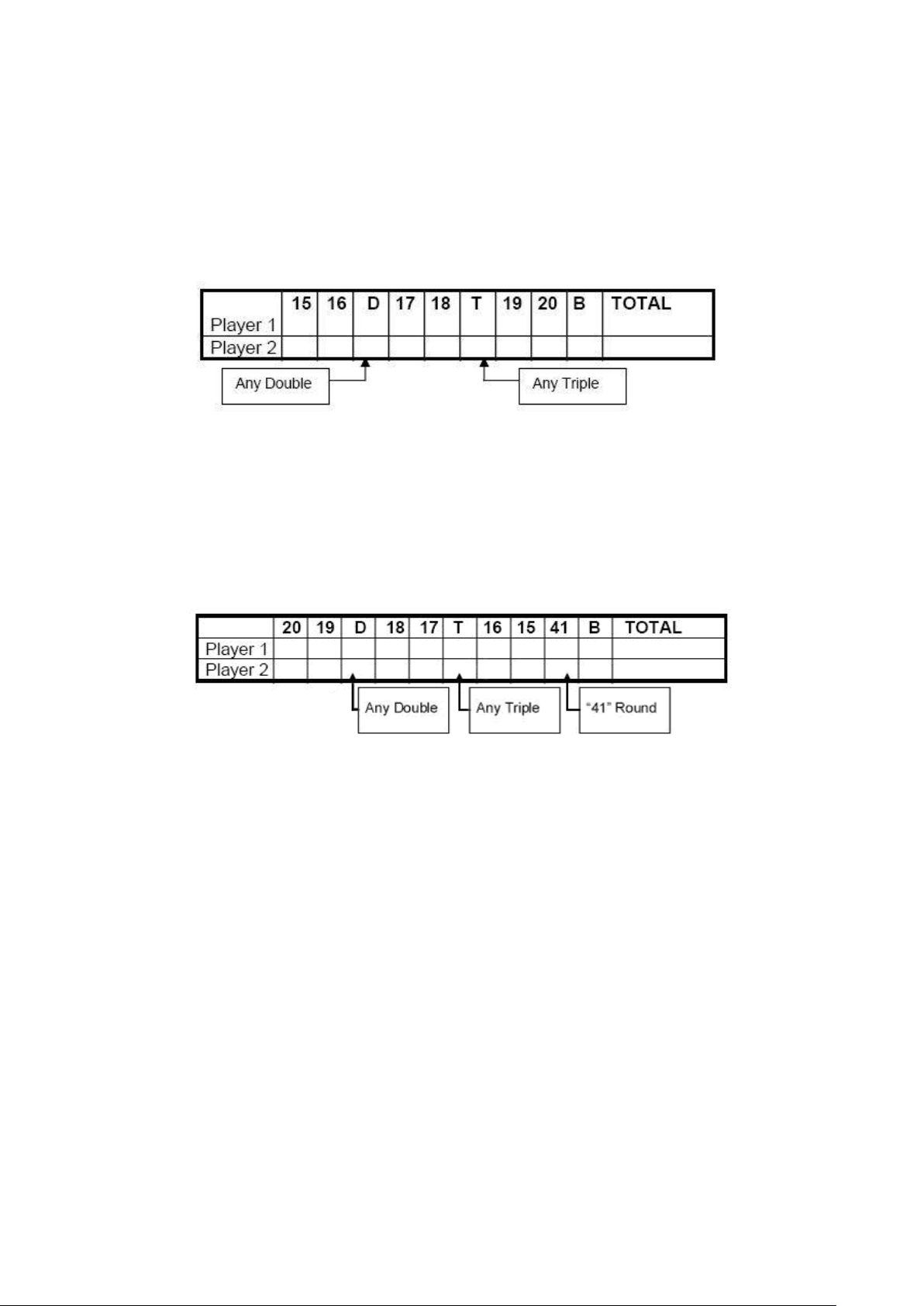
GAME 15: DOUBLE DOWN
Each player starts the game with 40 points. The object is to score as many hits in the active segment of the
current round. The first round, the player must throw for the 15 segment. If no 15’s are hit, his score is cut in
half. If some 15’s are hit, each 15 (doubles and triples count) is added to the starting total. The next round
players throw for the 16 segment and hits are added to the new cumulative point total. Again, if no hits are
registered, the point total is cut in half.
Each player throws for the numbers as indicated in the chart below in order (the LED screen will indicate the
active segment in which to throw). The player who completes the game with the most points is the winner.
GAME 16: FORTY ONE
This game follows similar rules as standard Double Down as described above with two exceptions. First,
instead of going from 15 through 20 and bulls eye, the sequence is reversed which will be indicated on the LED
display. Second, an additional round is included toward the end in which players must attempt to score three
hits that add up to 41 points (20, 20, 1; 19, 19, 3; D10, D10, 1: etc.). This “41” round adds an extra level of
difficulty to the game. Remember, a player’s score is cut in half if not successful, so the “41” round presents
quite a challenge!
GAME 17: ALL FIVES
The entire board is in-play for this game (all segments are active). With each round (of 3 darts) each player has
to score a total which is divisible by 5. Every “five” counts as one point. For example 10, 10, 5 = 25. Since 25
is divisible by 5 fives, this player scores 5 points (5 x 5 = 25).
If a player throws 3 darts that are not divisible by 5, no points are given. Also, the last dart of each round must
land in a segment. If a player throws the third dart and it lands in the catch ring area (or misses the board
completely), he earns no points even if the first two darts are divisible by 5. This prevents a player from
“tanking” the third throw if his first two are good. The first player to total fifty-one (51) “fives” is the winner.
The LED screen will keep track of the point totals. Note: you can adjust number of 5 you need to get.
GAME 18: SHANGHAI
Each player must progress around the board from 1 through 20 in order. Players start at number 1 and throw 3
darts. The object is to score the most points possible in each round of 3 darts. Doubles and triples count toward
your score. The player with the highest score after completing all twenty segments is the winner.
Adjustable Difficulty Settings for Shanghai include the following options:
• SHANGHAI 5 - Game starts at segment 5
• SHANGHAI 10 - Game starts at segment 10
• SHANGHAI 15 - Game starts at segment 15
In addition, we added Super Shanghai as a difficulty option. This game is played exactly as described above
except various doubles and triples must be hit as specified by the LED display.
Page 10
Adjustable Difficulty Settings for Super Shanghai include the following options:
• SUPER SHANGHAI 5 - Game starts at segment 5
• SUPER SHANGHAI 10 - Game starts at segment 10
• SUPER SHANGHAI 15 - Game starts at segment 15
GAME 19: GOLF
This is a dartboard simulation of the game golf (but you don’t need clubs to play). The object is to complete a
round of 9 through 18 “holes” with the lowest score possible. The Championship “course” consists of all par 3
holes making par 27 for a nine hole round or 54 for a round of 18.
The segments 1 through 18 are used with each number representing a “hole.” You must score 3 hits in each
hole to move to the next hole. Obviously, double and triples affect your score as they allow you to finish a hole
with fewer strokes. For example, throwing a triple on the first shot of a hole it is counted as an “eagle” and that
player gets a complete that hole with 1 “stroke.”
Note: The active player continues to throw darts until he “holes out” (scores 3 hits on the current hole). The
voice announcer will indicate the player that is up - listen carefully to avoid shooting out of sequence. By the
way, there are no “gimmes” in this game!
GAME 20: FOOTBALL
Strap your helmet on for this game! The first thing necessary is to select each player’s “playing field.” This can
be done by throwing a dart or by manually pressing a segment on the board by each player. This is entirely up
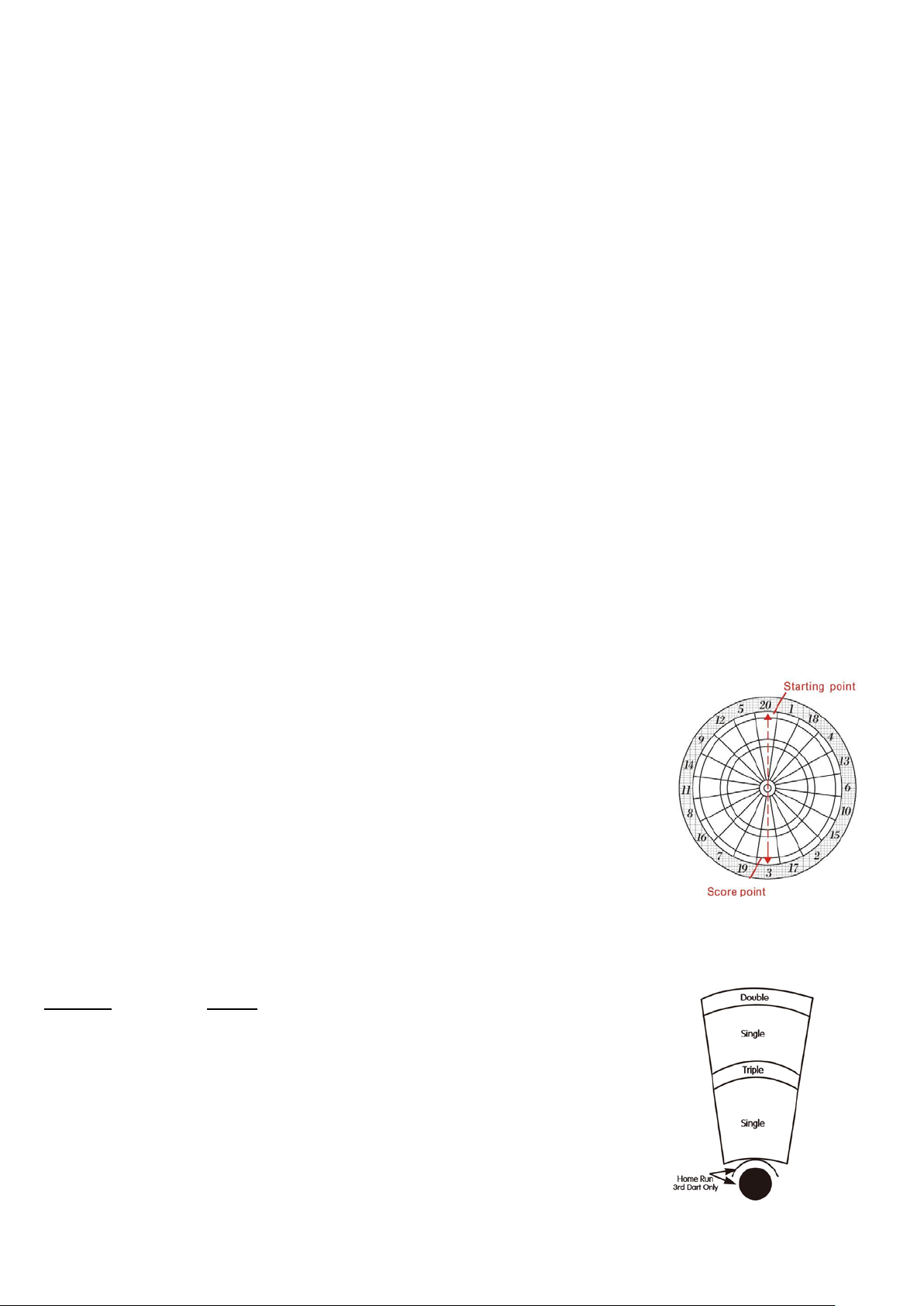
to you, but whichever segment is selected becomes your starting point which carries through the bulls eye and
directly across to the other side of the bulls eye (see diagram). The First player to “score” is the winner. The
LED display will keep track of your progress and indicate the segment you need to throw for next.
For example, if you select the 20 segment, you start on the double 20 (outer ring)
and continue all the way through to the double 3. The “field” is made up of 11
individual segments and must be hit in order. So, keeping with the example above,
you must throw darts in the following segments in this order: Double 20 ...
Outer Single 20(Rectangle) ... Triple 20 ... Inner Single 20(Triangle) ... Outer
Bulls eye ... Inner Bulls eye ... Outer Bulls eye ... Inner Single 3(Triangle) ...
Triple 3 ... Outer Single 3 (Rectangle) ... and finally a Double 3.
GAME 21: BASEBALL
This dartboard version of baseball takes a great deal of skill. As in the real game, a complete game consists of 9
innings. Each player throws 3 darts per “inning.” The field is laid out as shown in the diagram.
Segment Result
Singles segments “Single” - one base
Doubles segment “Double” - two bases
Triples segment “Triple” - Three bases
Bulls eye “Home Run” (can only be attempted on third dart of each
round)
The object of the game is to score as many runs as possible each inning. The
player with the most runs at the end of the game is the winner.
GAME 22: STEEPLECHASE
Page 11
The object of this game is to be the first player to finish the “race” by being the first to complete the “track.”
The track starts at the 20 segment and runs clockwise around the board to the 5 segment and ends with a bulls
eye. Sounds easy right? What has not yet been specified is that you must hit the inner single segment (Triangle)
of each number to get through the course. This is the area between the bulls eye and the triples ring. And, as
with a real steeplechase, there are obstacles throughout the course to hurdle. The four hurdles are found at the
following places:
1st fence Triple 13 2nd fence Triple 17
3rd fence Triple 8 4th fence Triple 5
The first player to complete the course and hit the bulls eye wins the race.
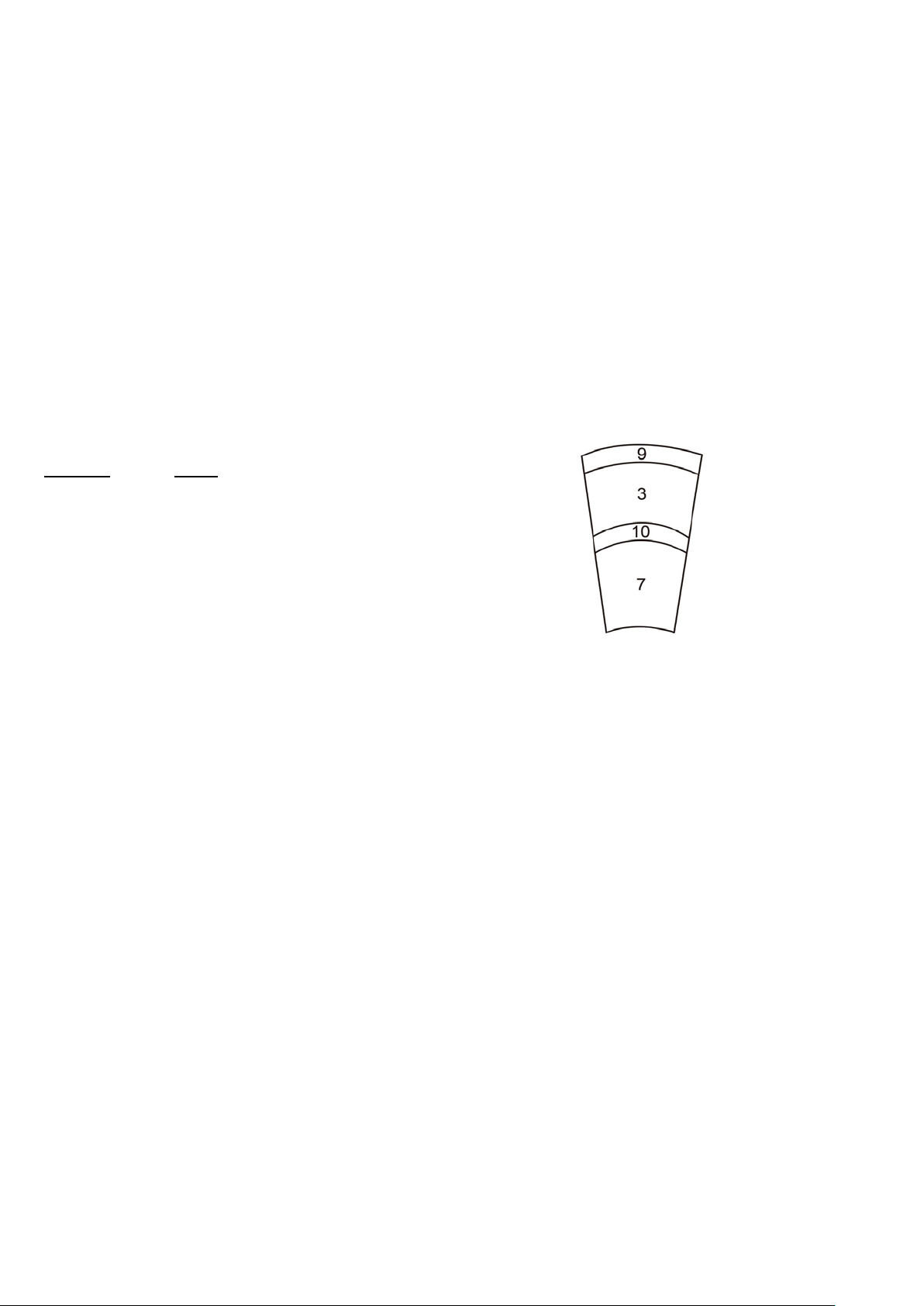
GAME 23:BOWLING
This dartboard adaptation of bowling is a real challenge! It is a difficult game in that you must be very accurate
to rack up a decent score. Player one starts the game. You must select your “alley” by either throwing dart or
manually pressing Diagram segment of choice. Once alley is selected, you have 2 remaining darts to throw in
which to score points or “pins.” Each specific segment in your “alley” is worth a given pin total:
Segment Score
Double 9 pins
Outer Single 3 pins
Triple 10 pins
Inner Single 7 pins
There are several rules for this game as follows:
1. A perfect game score would be 200 in this version of bowling
2. You cannot hit the same singles segment twice within the same “frame” (round). The second hit will count as
zero points. Hint: Try to hit each single to reach 10 points in the frame.
3. You can score 20 points per “frame” by hitting the triple segment twice.
4. If your first dart hits a Double segment, your second dart hits a Double too and the third dart hit any segment,
you will score 10 pins (point) for this round.
5. If your first dart hits a Double segment, your second dart hits an Outer or Inner Single segment and the third
dart hit the Double, this round will only score 9 points.
6. If your first dart hits a Double segment, your second dart hits a Triple and the third dart hit a Double segment,
you will score 19 points total.
GAME24: CAR RALLYING
This game is similar to steeplechase except we let you set up your own “race track.” You can set up as many
obstacles as you wish. The track must be 20 lengths long.
Before the game starts, the LED display will prompt you to select the course (“SEL”). Players should alternate
selecting segments by pressing on the specific segment of your choice. Note: You will have to hit the exact
segment you selected to move on during the race. If you choose inner single 20, that inner single area will need
to be hit during the race. The LED display will indicate inner single with a line next to the bottom of the 1, an
outer single is shown with a line next to the top portion of the 1.
Obstacles usually comprise hitting a difficult number before continuing on the racetrack. Again, the route can
be made as difficult or easy as you wish and can go anywhere on the target area of the board. After the track is
selected, press START to begin the race. The first player to complete the course is the winner.
Page 12

GAME 25: SHOVE A PENNY
Only the numbers 15 through 20 and the bulls eye are used. Singles are worth 1 point, doubles are worth 2, and
triples are worth 3 points. Each player must throw for the numbers in order with the objective of scoring 3
points in each segment to move on to the next. If a player scores more than 3 points in any one number, the
excess points are given to the next player. The first player to score 3 points in all segments (15 - 20 and bull) is
the winner.
GAME 26: NINE-DART CENTURY
The object of this game is to attempt to score 100 points, or come as close as possible, after 3 rounds (9 darts).
Doubles and triples count as 2x and 3x their value respectively. Going over 100 points is considered a “bust”
and causes you to lose unless all players go over. In that case, the player closest to 100 wins (player that scored
the lowest amount over 100.
GAME 27: GREEN VS. RED (2 players only)
This game is a race around the board, where skill at hitting doubles and triples pays off with victory. Player 1 is
“green” and player 2 is “red.” Player 1 shoots for only doubles and triples that are green and works around the
board clockwise. Player 2 starts at 20 and works around the board counter-clockwise, shooting for red segments
(the temporary score display will indicate which segment to throw for). Note: a maximum of one double and
one triple of the same number can be scored in a single round. What’s more, hitting the wrong number (of your
opponent’s color) subtracts that amount from your score - so be careful. The player with the most points after
completion of the game is the winner.
GAME 28: GOLD HUNTING
The object of this game is to find “gold.” You collect gold for each 50 points. Gold is only collected only if
your score is exactly 50 or a multiple of 50 (100, 150, etc.) at any point during a round. However, since “gold”
can make a person greedy, not only do you collect gold for every multiple of 50, you also steal 1 gold from all
other players. Therefore, as you collect a gold, you take 1 gold from all other players who have gold. This is a
real back-and-forth game, but the player who reaches to selected total gold required first is the winner.
GAME 29: ELIMINATION
The object of the game is to “Eliminate” your opponents. The rules are very simple. Each player must score
higher total points with 3 darts than the opponent before them. Each player starts with 3 lives. If the player fails
to score higher total points than the previous opponents score, they lose one life. Tie scores will also result in a
lost life. The winner is the last player with lives remaining. Note: you can adjust number of lives.
GAME 30: HORSESHOES
This 2 -player game uses only the 20 and 3 segments to represent the two horseshoe pits. Player 1 will shoot at
the 20 segment and Player 2 will shoot at the 3 segment. Scoring is cumulated per round. First player to score
15 points is the winner.
Scoring is as follows:
TRIPLE RING = Ringer 3 points INNER SINGLE SEGMENT (Triangle) = 1 point
DOUBLE RING= Leaner 2 points OUTER SINGLE SEGMENT (Rectangle) = 0 point
Scores will only count for the player or team with the most points in that round. For example, if player 1 scores
3 points and player 2 scores 1 point, only player 1 will awarded 3 points for that round. Rounds continue until
15 points are scored. Note: you can adjust the end-game point total.
Page 13
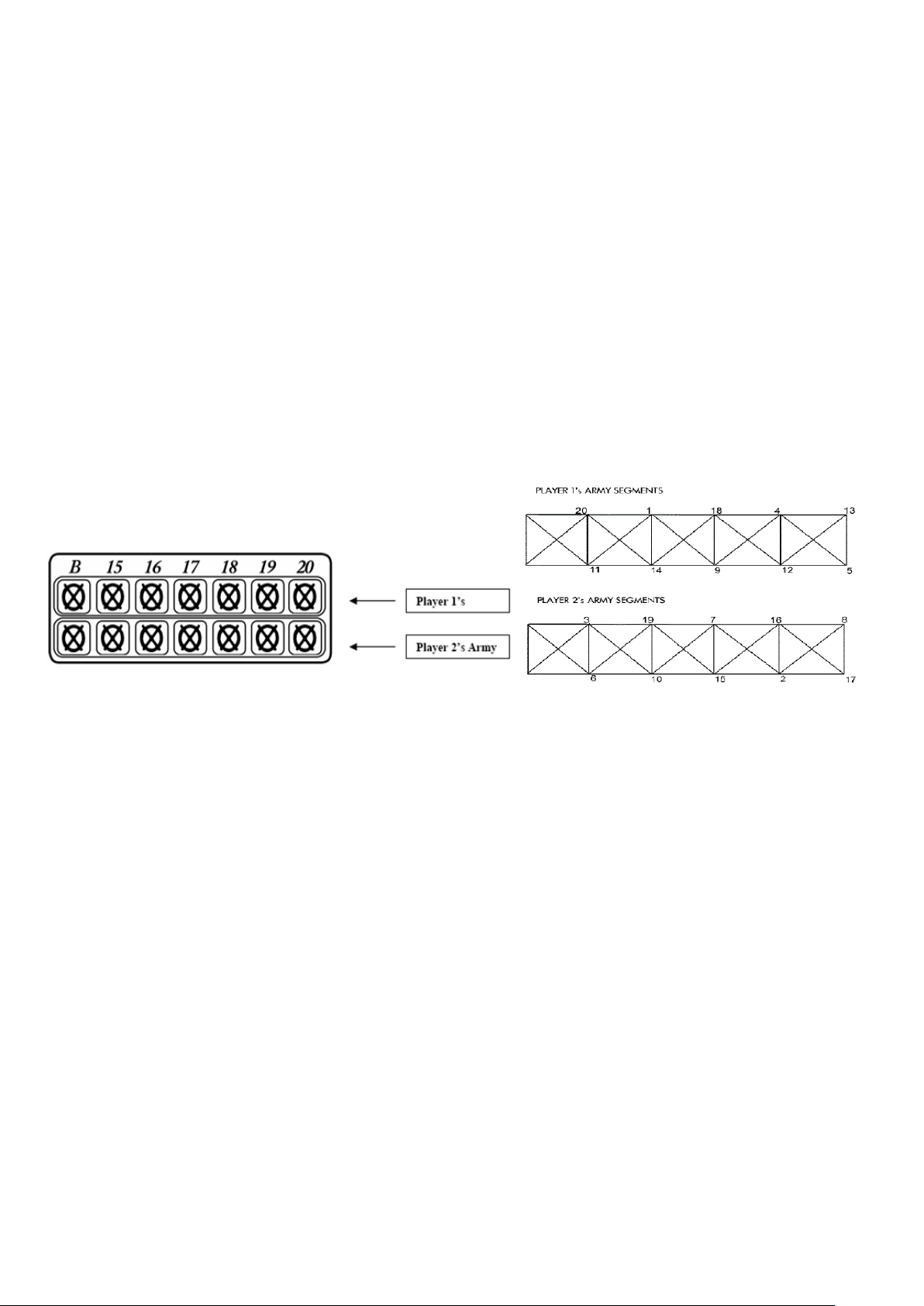
GAME 31: BATTLEGROUND
In this 2-player game, the dartboard is a battleground divided into two halves. The first player to hit all of the
opposing segments (armies) wins the game. Segments do not have to be hit in order.
Player 1 is the “TOP” army and shoots darts at the bottom sections of the board.
Player 1 needs to hit bottom segments (6, 10, 15, 2, 17, 3, 19, 7, 16, and 8)
Player 2 is the “BOTTOM” army and shoots for the top section of the dartboard
Player 2 needs to hit top segments (11, 14, 9, 12, 5, 20, 1, 18, 4, and 13)
Adjustable difficulty settings are as follows:
BATTLEGROUND DOUBLES:
• Players shoot for double segments only to eliminate opponent’s armies
BATTLEGROUND TRIPLES:
• Players shoot for triple segments only to eliminate opponent’s armies
BATTLEGROUND with GENERALS
This variation of the game includes one more obstacle to accomplish. Players must capture the “general” after
all segments (armies) have been hit to win the game. One hit on the bulls eye will capture the general. Hits to
the bulls eye will not count if all segments are not first closed.
The top cricket scoring display on the dartboard shows player 1’s army segments. Player 2’s army segments are
in the second row. Each time a segment is hit, the corresponding light will shut off. Follow the scoreboard map
on the next page to keep track of which segments you need to hit to win.
GAME 32: ADVANCED BATTLEGROUND
The rules are the same as standard Battleground except now there are land mines on the battlefield!
Players must be careful to avoid the land mines located in the Triple and Double rings of opponents segment
numbers.
Any player that hits a double or triple ring on the opposing teams’ battlefield will lose an army of his or her
own. For example, if player 1 mistakenly hit the triple ring of the “6” segment, they would lose their own army
at the “11” segment.
GAME 33: PAINTBALL
This game is similar to “Battleground” except there is an alternative way to win the battle other than just hitting
the opposing teams’ armies segments. As in the real game of paintball, players can also capture the opposing
team’s flag to win the game. To capture the flag, the double bulls eye must be hit 3 times to capture the
opposing teams’ flag! Single bulls eyes will not count towards the 3 needed to capture the flag. Double bulls
eyes do not have to be scored in the same round and will be tallied during the game. First player to either
capture the flag or eliminate the opposing army is the winner.
Adjustable Difficulty Settings
Page 14

Paintball Doubles Players must either hit 3 double bulls eyes to capture the flag or hit double ringed
segments to eliminate armies.
Paintball Triples Players must either hit 3 double bulls eyes to capture the flag or hit triple ringed segments
to eliminate armies.
GAME 34: CAT & MOUSE
This is a very challenging 2-player game that is best suited for players of advanced skill. One player will play
the role of the cat and the other will be the mouse. The object of the game is for the mouse to get back to his
hole before being caught by the cat. The mouse starts first from the “20” segment and proceeds
counter-clockwise around the dartboard by hitting first the double segment and then the single of each segment.
The cat starts back at the “18” segment and proceeds counter clockwise around the dartboard to catch the
mouse by hitting doubles only of each segment. If the mouse makes it all the way around the board back to the
double 20, the mouse wins the game. If the cat hits the double segment that the mouse is on, the cat has caught
the mouse and has won the game.
Caring for your Electronic Dartboard
1. Never use metal tipped darts on this dartboard. Metal tipped darts will seriously damage the circuitry and
electronic operation of this dartboard.
2. Do not use excessive force when throwing darts. Throwing darts too hard will cause frequent tip breakage
and cause excess wear on the board.
3. Turn darts clockwise as you pull them from the board. This makes it easier to remove darts and extends
the life of the tips.
4. Use only the A/C adapter that comes with the dartboard. Using the wrong adapter may cause electrical
shock and damage to the electronic circuits.
5. Remove the batteries when not in use or if using the optional A/C adapter. This will prolong the life of your
batteries.
6. Do not spill liquids on the dartboard. Do not use spray cleaners, or cleaners that contain ammonia or other
harsh chemicals as they may cause damage.
Important Notes
Stuck Segment:
Occasionally, a dart will cause a se gment to beco me wed ged w ithi n the s egment sep arato r web. If this happens,
all games will be suspended and the LCD display will indicate the segment number that is stuck.
To free t he segment, simpl y remove the dart or broken tip from the segment. If the problem is still not solved,
try wigging the segment until it is loose. The game will then resume where it left off.
Broken Tips:
From time to time a tip will break off and become stuck in the segment. Try to remove it with a pair of pliers or
tweezers by grasping the exposed end and pulling it out of the segment. If this is not possible, you can attempt
to push the tip t hrough to the back of the segment. Use a nail that is smaller than the hole and gently push the
tip until it falls through the other side. Be careful not to push too far and damage the circuitry behind the
segment. Don’t be alarmed if tips break. This is a normal occurrence when playing soft tip darts. We included a
pack of replacement tips which should keep you supplied for quite some ti me. W hen replaci ng tips, make sure
you use the same type of tips that come with this dartboard.
Darts:
It is recommended that you use the enclosed darts on this dartboard. Using other darts may cause damage to the
segment and electronic circuit. Replacement tips are available at most retailers carrying dart products
Page 15

Cleaning The Electronic Dartboard:
Your electronic dartboard will provide many hours of competition if cared for properly. Regular dusting of the
cabinet is recommended using a dry cloth. The use of abrasive cleaners or cleaners that contain ammonia
may cause damage and should not be used .Avoid spilling liquid onto the target area since it can result in
permanent damage and is not covered by the warranty.
Game Menu
G01
G02
G03
G04
G05
G06
G07
G08
G09
G10
301
Cricket
Scram
Cut Throat
Eng Cri
Adv-Cri
Shooter
Big Six
Overs
Unders
G20
G21
G22
G23
G24
G25
G26
G27
G28
G29
Football
Baseball
Steeple chase
Bowling
Car Rally
Shove Pen
Nine Darts
G & R
Gold Hunt
Elimintaion
G11
G12
G13
G14
G15
G16
G17
G18
G19
Count Up
High Score
Round Clk
Killer
Doub DN
41
All Fives
ShangHai
Golf
G30
G31
G32
G33
G34
Horseshoes
Battleground Warfare
Advanced Warfare
Paintball
Cat & Mouse
Page 16

REPLACEMENT PARTS INCLUDED WITH YOUR DARTBOARD
AC AD APTE R 3.8MM tip / 300MA MODEL # ADAP9V30038 $13.95
6 Soft tip Darts (traditional 2 pc) MODEL # Rp6softdart2pc $11.95
Replacement parts subject to shipping and handling.
Page 17

 Loading...