

Page 1
K
Service Source
Apple Memory Guide
April 1998
Page 2
Page 3
K
Service Source
Early Macintosh
Page 4
Memory Guide Early Macintosh - 1
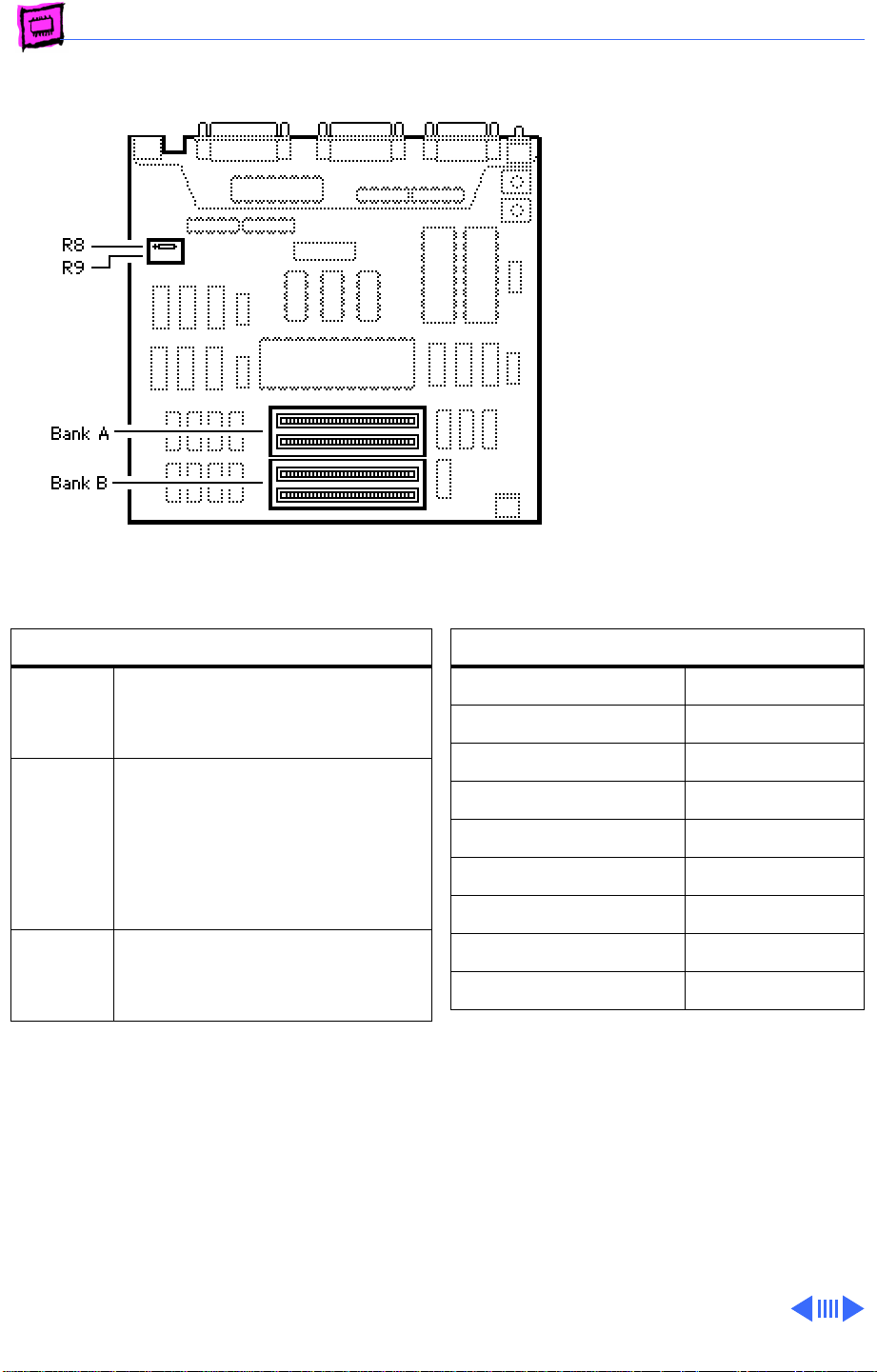
Macintosh Plus
The Macintosh Plus has no
soldered DRAM, but comes
with four 256K DRAM SIMMs
installed. You can expand the
memory to a total of 4 MB by
installing DRAM SIMMs.
Remember to install the
highest density SIMM in Bank
A first.
Note:
When 1 MB SIMMs are
installed, the 256K resistor
(R8 or R9) must be clipped
or removed to enable
recognition of the higher
density SIMMs.
DRAM Configurations
1 MB • Install four 256K SIMMs.
• Leave resistor R8.
• Remove resistor R9.
2.5 MB • Install two 1MB SIMMs
(Bank A).
• Install two 256K SIMMs
(Bank B).
• Remove resistor R8.
• Remove resistor R9.
4 MB • Install four 1MB SIMMs.
• Remove resistor R8.
• Remove resistor R9.
Note:
Clip one lead of the resistor and move
the resistor out of the way so it can be
reinstalled if necessary.
Memory Information
DRAM Speed 150 ns
SIMM Type 30-pin
Soldered DRAM None
Number of SIMM Slots 4
Supported Sizes in MB 256K, 1
Maximum DRAM 4 MB
Virtual Memory No
Soldered VRAM None
Number of VRAM Slots None
Page 5
Memory Guide Early Macintosh - 2
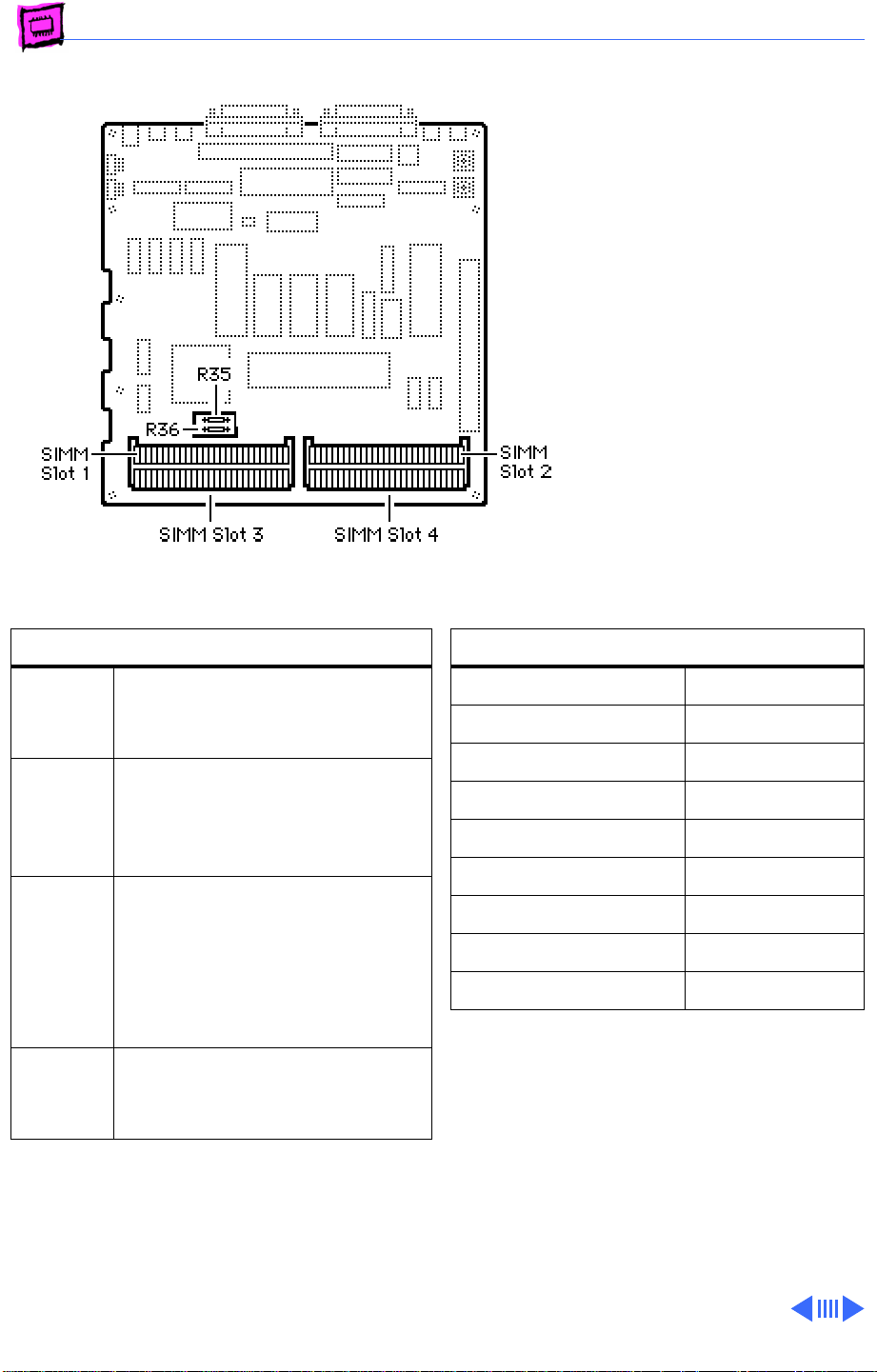
Macintosh SE (Solder Type)
The Macintosh SE has no
soldered memory. You can
expand the memory to a total
of 4 MB by installing DRAM
SIMMs. Remember, the
highest density SIMMs must
be installed in Slot 1 and 2
first.
Note:
There are two different
logic board configurations for
the SE, one with a jumper and
the other with a resistor to
identify the memory level
installed.
DRAM Configurations
1 MB • Install four 256K SIMMs.
• Leave resistor R35.
• Remove resistor R36.
2 MB • Install two 1 MB SIMMs
(Slots 1 & 2).
• Remove resistor R35.
• Leave resistor R36.
2.5 MB • Install two 1MB SIMMs
(Slots 1 & 2.)
• Install two 256K SIMMs
(Slots 3 & 4).
• Remove resistor R35.
• Remove resistor R36.
4 MB • Install four 1MB SIMMs.
• Remove resistor R35.
• Remove resistor R36.
Note:
For a 2.5 MB configuration, clip one
lead of the resistors and move the resistor out
of the way so it can be reinstalled if
necessary.
Memory Information
DRAM Speed 150 ns
SIMM Type 30-pin
Soldered DRAM None
Number of SIMM Slots 4
Supported Sizes in MB 256K, 1
Maximum DRAM 4 MB
Virtual Memory No
Soldered VRAM None
Number of VRAM Slots None
Page 6
Memory Guide Early Macintosh - 3
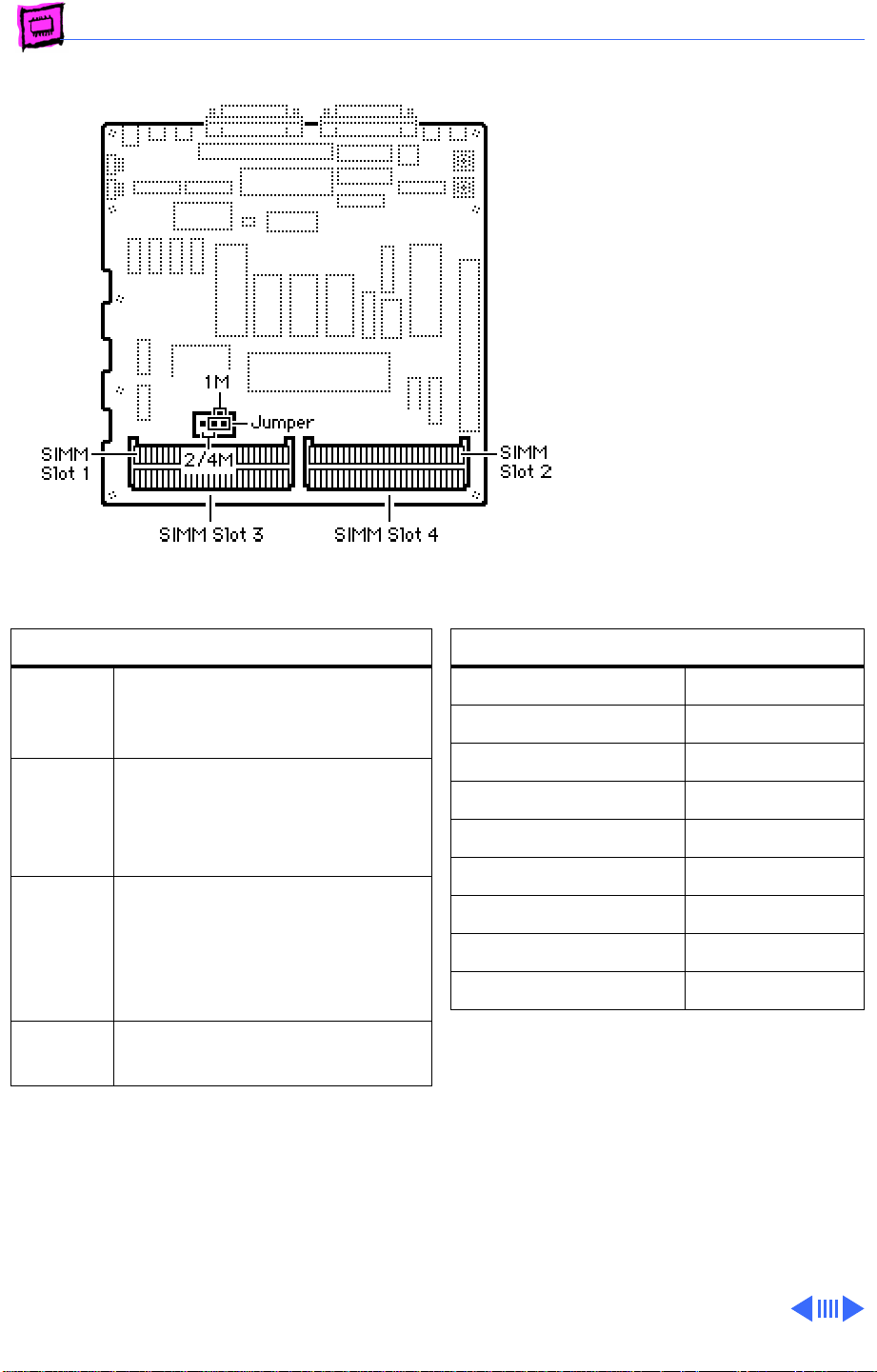
Macintosh SE (Jumper Type)
The Macintosh SE has no
soldered memory. You can
expand the memory to a total
of 4 MB by installing DRAM
SIMMs. Remember the
highest density SIMMs must
be installed in Slot 1 and 2
first.
Note:
There are two different
logic board configurations for
the SE, one with a jumper and
the other with a resistor to
identify the memory level
installed.
DRAM Configurations
1 MB • Install four 256K SIMMs.
• Install jumper in position
“1M”.
2 MB • Install two 1 MB SIMMs
(Slots 3 & 4).
• Install jumper in position
“2/4M”.
2.5 MB • Install two 256K SIMMs
(Slots 1 & 2).
• Install two 1 MB SIMMs
(Slots 3 & 4).
• Remove jumper.
4 MB • Install four 1 MB SIMMs.
• Remove jumper.
Note:
The jumper must be removed for a
2.5 MB configuration. Place the jumper on
one pin so it can be reinstalled if necessary.
Memory Information
DRAM Speed 150 ns
SIMM Type 30-pin
Soldered DRAM None
Number of SIMM Slots 4
Supported Sizes in MB 256K, 1
Maximum DRAM 4 MB
Virtual Memory No
Soldered VRAM None
Number of VRAM Slots None
Page 7
Memory Guide Early Macintosh - 4
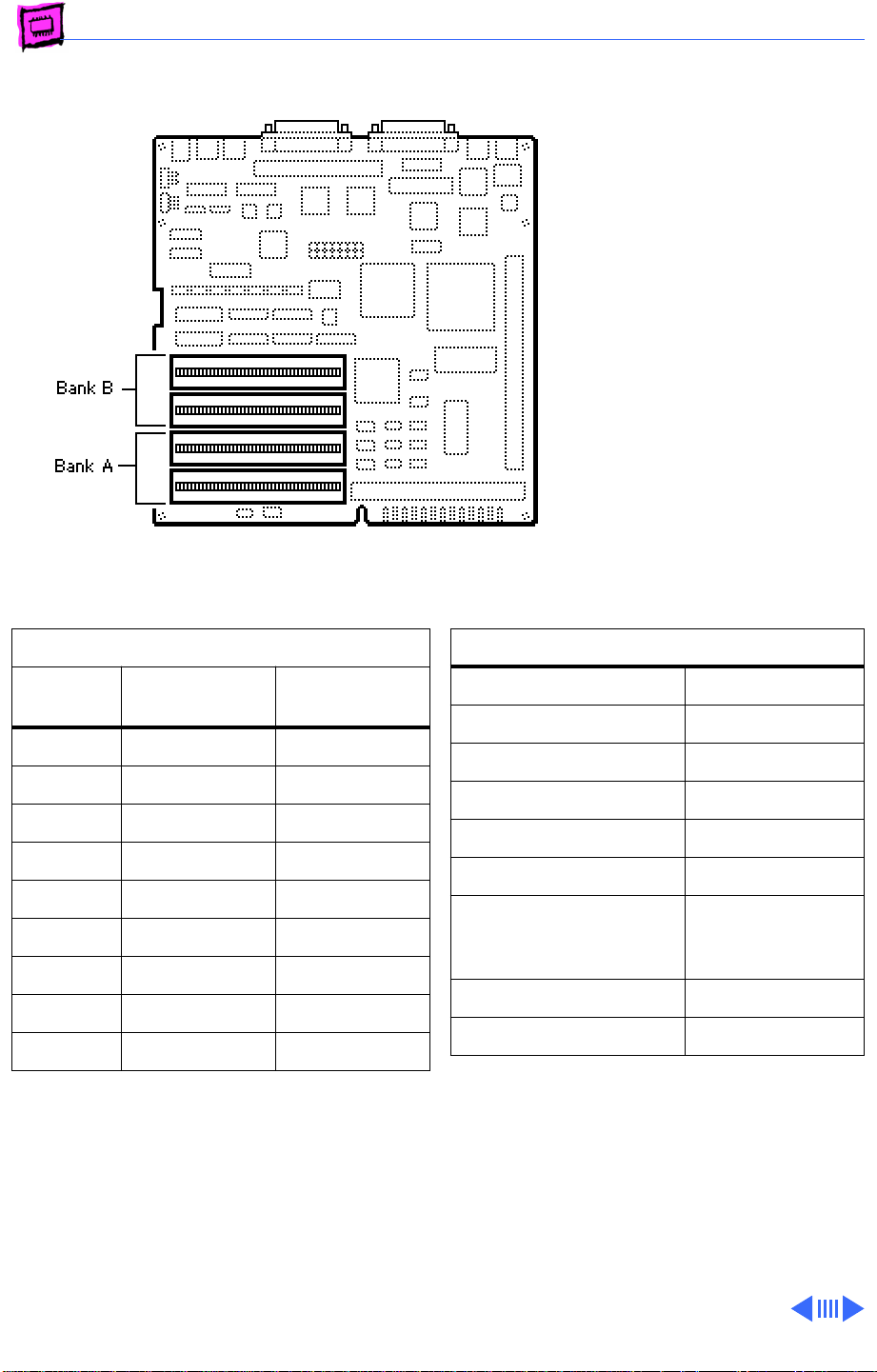
Macintosh SE/30
The Macintosh SE/30 has no
soldered memory. You can
expand the memory to a total
of 32 MB by installing DRAM
SIMMs.
DRAM Configurations
Total
Memory Bank A Bank B
1 MB Four 256K Empty
2 MB Four 256K Four 256K
4 MB Four 1 MB Empty
5 MB Four 1 MB Four 256K
8 MB Four 1 MB Four 1 MB
16 MB Four 4 MB Empty
17 MB Four 256K Four 4 MB
20 MB Four 4 MB Four 1 MB
32 MB Four 4 MB Four 4 MB
Note:
You must fill each bank of four slots
with similar sized SIMMs.
Memory Information
DRAM Speed 120 ns
SIMM Type 30-pin
Soldered DRAM None
Number of SIMM Slots 8
Supported Sizes in MB 256K, 1, 4
Maximum DRAM 32 MB
Virtual Memory 1 GB (with
MODE32 7.5
installed)
Soldered VRAM None
Number of VRAM Slots None
Page 8
Memory Guide Early Macintosh - 5
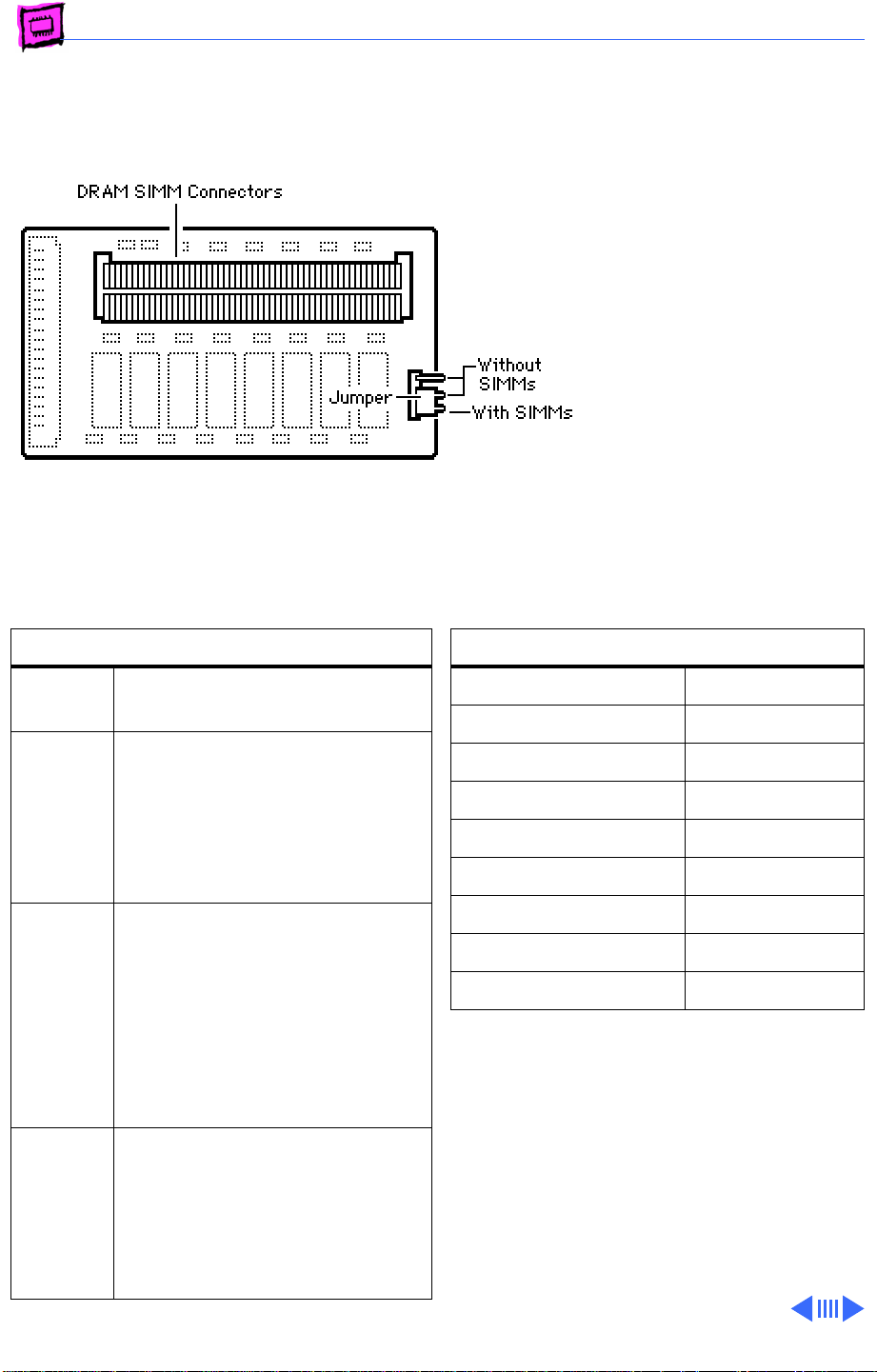
Macintosh Classic
The Macintosh Classic comes
with 1 MB of soldered DRAM.
The memory expansion card
has 1 MB soldered on and two
SIMM slots. Using two 1 MB
SIMMs, a maximum of 4 MB
is possible.
Note:
Be sure to configure
the jumper as shown when
memory is added to the card.
DRAM Configurations
1 MB The Classic logic board has1 MB
of soldered DRAM.
2 MB • Install a Classic Memory
Expansion Board with no
SIMMs installed.
• Install the jumper in the
“Without SIMMs Installed”
position.
2.5 MB • Install a Classic Memory
Expansion Board with two
256K SIMMs installed. Use
120 ns or faster 30-pin
SIMMs.
• Install the jumper in the
“With SIMMs Installed”
position.
4 MB • Install a Classic Memory
Expansion Board with two 1
MB SIMMs installed.
• Install the jumper in the
“With SIMMs Installed”
position.
Memory Information
DRAM Speed 150 ns
SIMM Type 30-pin
Soldered DRAM 1 MB
Number of SIMM Slots 2
Supported Sizes in MB 256K, 1
Maximum DRAM 4 MB
Virtual Memory No
Soldered VRAM None
Number of VRAM Slots None
Note:
The Macintosh Classic can perform
erratically if 1MB SIMMs containing two
chips are installed. When installing
memory, be sure to use 8 chip SIMMs.
Page 9
Memory Guide Early Macintosh - 6
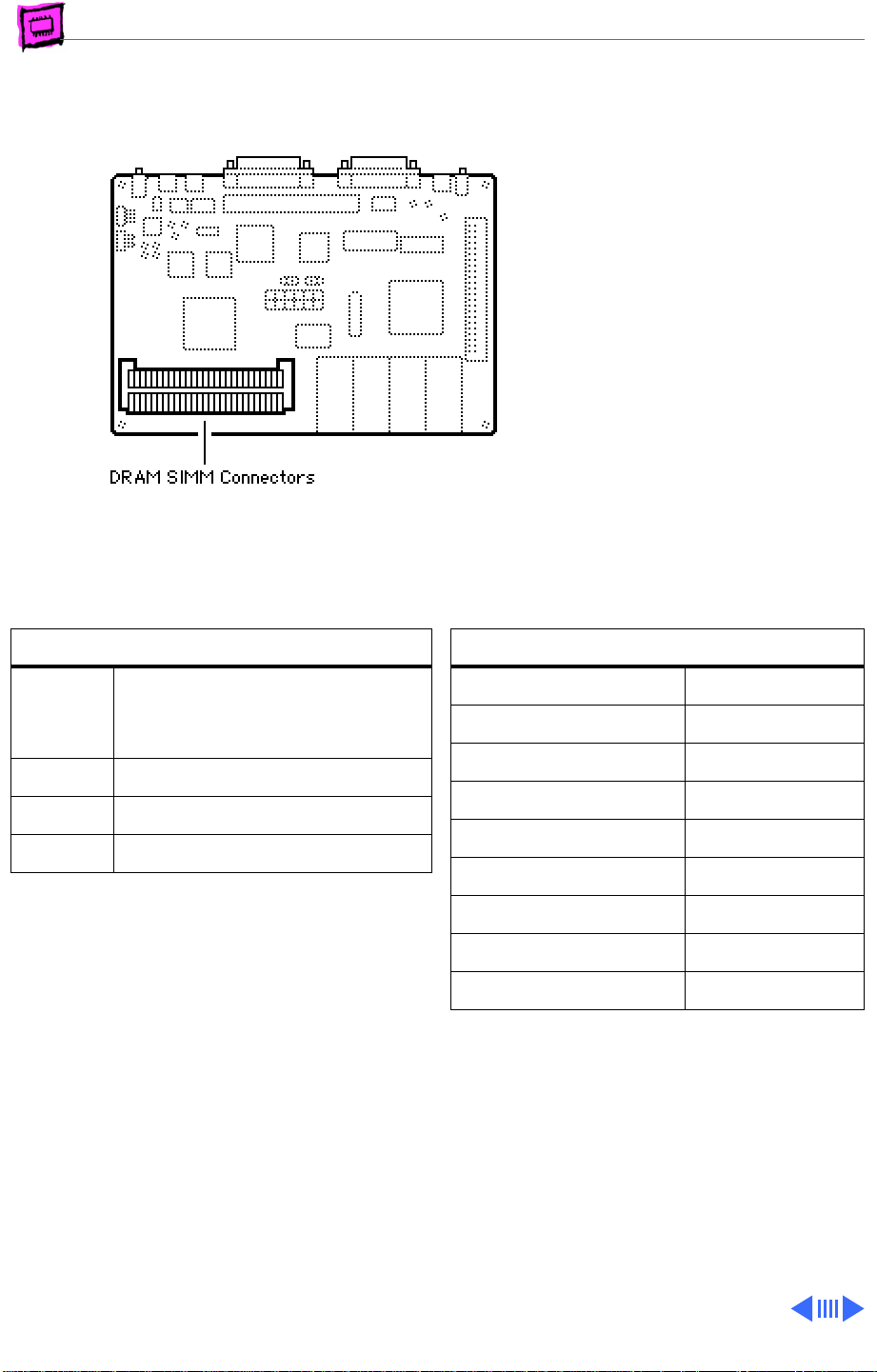
Classic II
The Macintosh Classic II has
2 MB of soldered DRAM. You
can expand the memory to a
total of 10MB by installing
DRAM SIMMs.
DRAM Configurations
2 MB The Macintosh Classic II logic
board has 2 MB of soldered
DRAM.
4 MB Install two 1 MB SIMMs.
6 MB Install two 2 MB SIMMs.
10 MB Install two 4 MB SIMMs.
Note:
You must fill both DRAM slots.
Memory Information
DRAM Speed 100 ns
SIMM Type 30-pin
Soldered DRAM 2 MB
Number of SIMM Slots 2
Supported Sizes in MB 1, 2, 4
Maximum DRAM 10 MB
Virtual Memory 1 GB
Soldered VRAM None
Number of VRAM Slots None
Page 10
Memory Guide Early Macintosh - 7
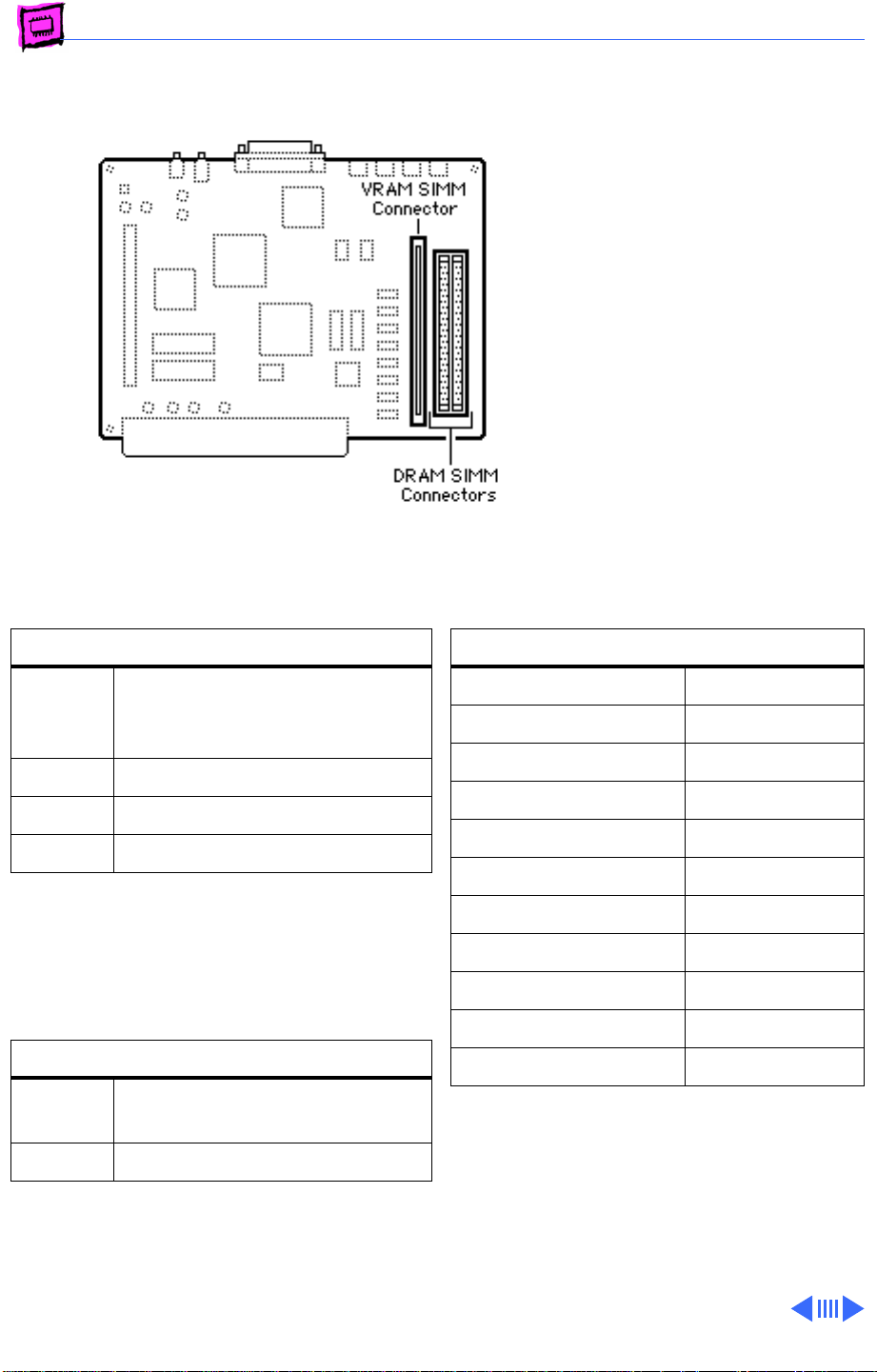
Color Classic
The Macintosh Color Classic
comes with 4 MB of soldered
DRAM. You can expand the
memory to a total of 10 MB
by installing DRAM SIMMs.
(Total memory is 12 MB but
the Color Classic can address
10 MB maximum.)
You must fill both DRAM
slots.
DRAM Configurations
4 MB The Macintosh Color Classic
logic board has 4 MB of soldered
DRAM.
6 MB Install two 1 MB SIMMs.
8 MB Install two 2 MB SIMMs.
10 MB Install two 4 MB SIMMs.
Note:
The Color Classic can address 10 MB of
DRAM maximum. When you install 4 MB
SIMMs, 2 MB of memory can't be addressed.
VRAM Configurations
256K The Color Classic logic board
has 256K of soldered VRAM.
512K Install one 256K VRAM SIMM.
Memory Information
DRAM Speed 100 ns
SIMM Type 30-pin
Soldered DRAM 4 MB
Number of SIMM Slots 2
Supported Sizes in MB 1, 2, 4
Maximum DRAM 10 MB
Virtual Memory 1 GB
Soldered VRAM 256K
Number of VRAM Slots 1
Maximum VRAM 512K
VRAM Speed 100ns
Page 11
Memory Guide Early Macintosh - 8
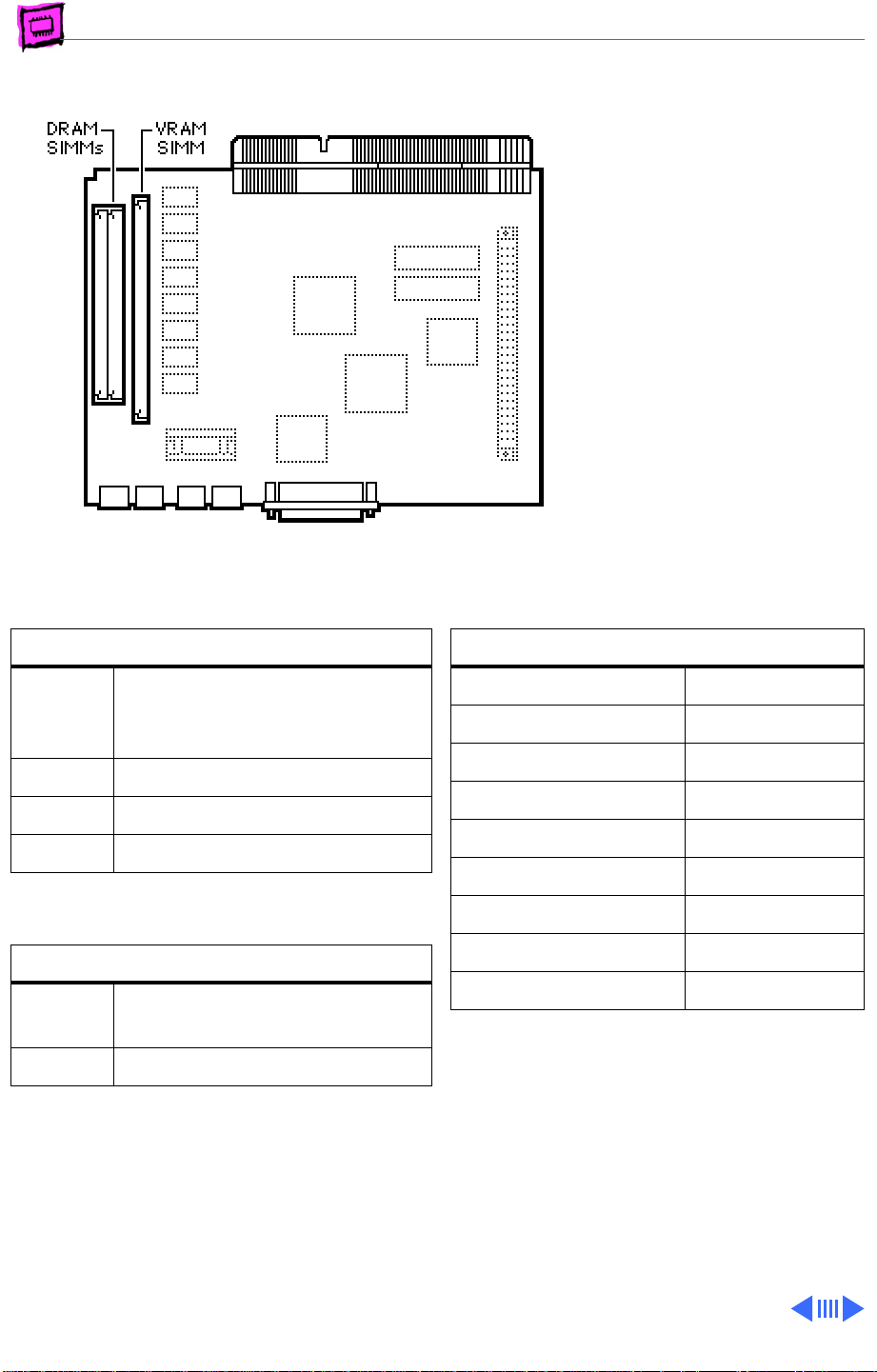
Color Classic II (International Only)
The Color Classic II and
Performa 275 logic boards
have 4 MB of soldered DRAM.
You can expand the memory to
a total of 10 MB by installing
DRAM SIMMs.
DRAM Configurations
4 MB The Macintosh Color Classic
logic board has 4 MB of soldered
DRAM.
6 MB Install two 1 MB SIMMs.
8 MB Install two 2 MB SIMMs.
10 MB Install two 4 MB SIMMs.
VRAM Configurations
256K The Color Classic II logic board
has 256K of soldered VRAM.
512K Install one 256K VRAM SIMM.
Memory Information
DRAM Speed 100 ns
SIMM Type 30-pin
Soldered DRAM 4 MB
Number of SIMM Slots 2
Supported Sizes in MB 1, 2, 4
Maximum DRAM 10 MB
Virtual Memory 1 GB
Soldered VRAM 256K
Number of VRAM Slots 1
Page 12
Memory Guide Early Macintosh - 9
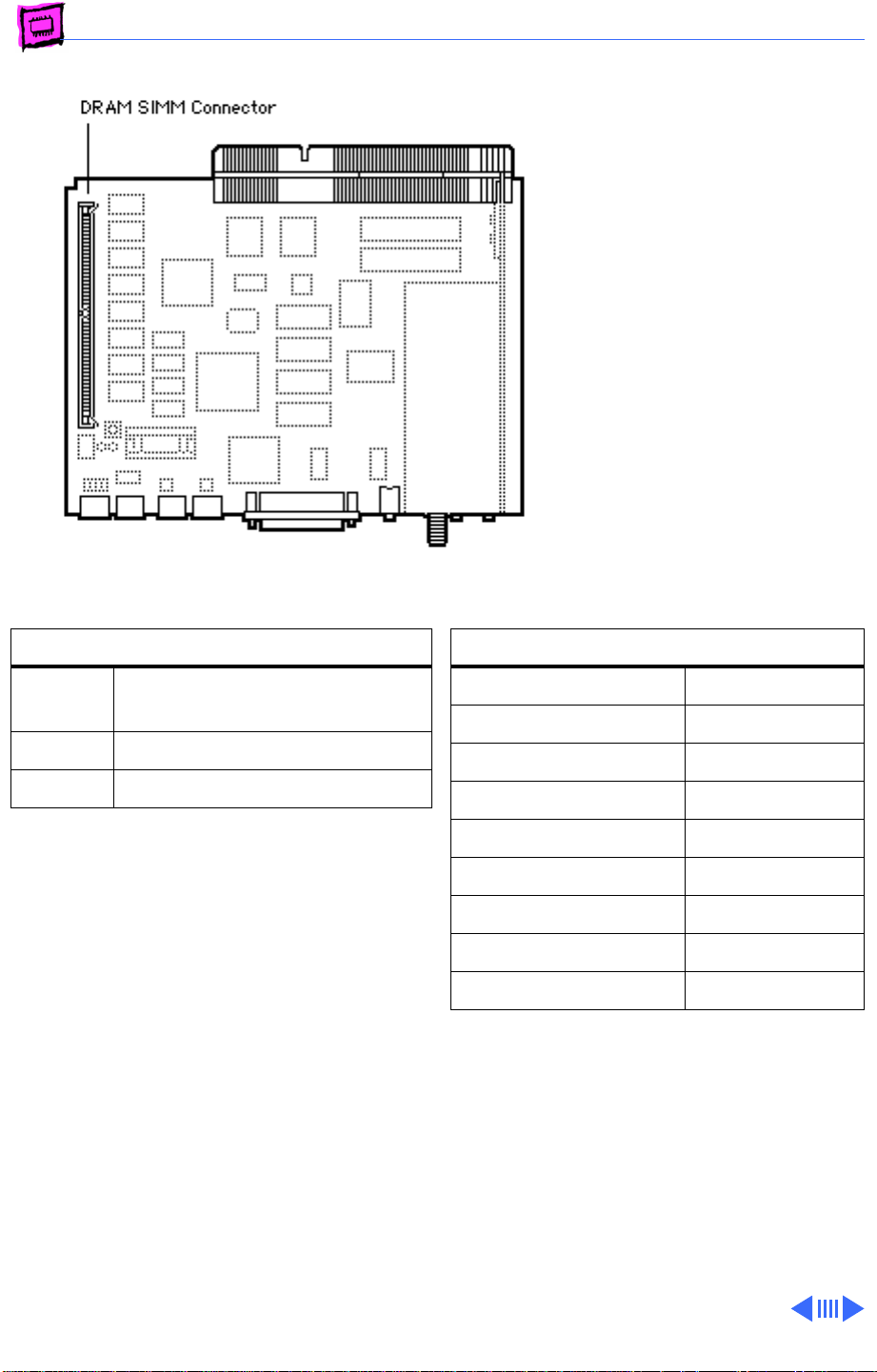
Macintosh TV
The Macintosh TV logic board
has 4 MB of soldered DRAM.
You can expand the memory to
a total of 8 MB by installing
DRAM SIMMs.
DRAM Configurations
4 MB The Macintosh TV logic board
has 4 MB of soldered DRAM.
5 MB Install one 1 MB SIMM.
8 MB Install one 4 MB SIMM.
Note:
A total of 5 MB of memory (soldered
DRAM plus one 1 MB SIMM) is standard.
Note:
The Macintosh TV is not upgradable
beyond 8 MB of RAM.
Memory Information
DRAM Speed 80 ns
SIMM Type 72-pin
Soldered DRAM 4 MB
Number of SIMM Slots 1
Supported Sizes in MB 1, 4
Maximum DRAM 8 MB
Virtual Memory 1 GB
Soldered VRAM 512K
Number of VRAM Slots None
Page 13
Memory Guide Early Macintosh - 10
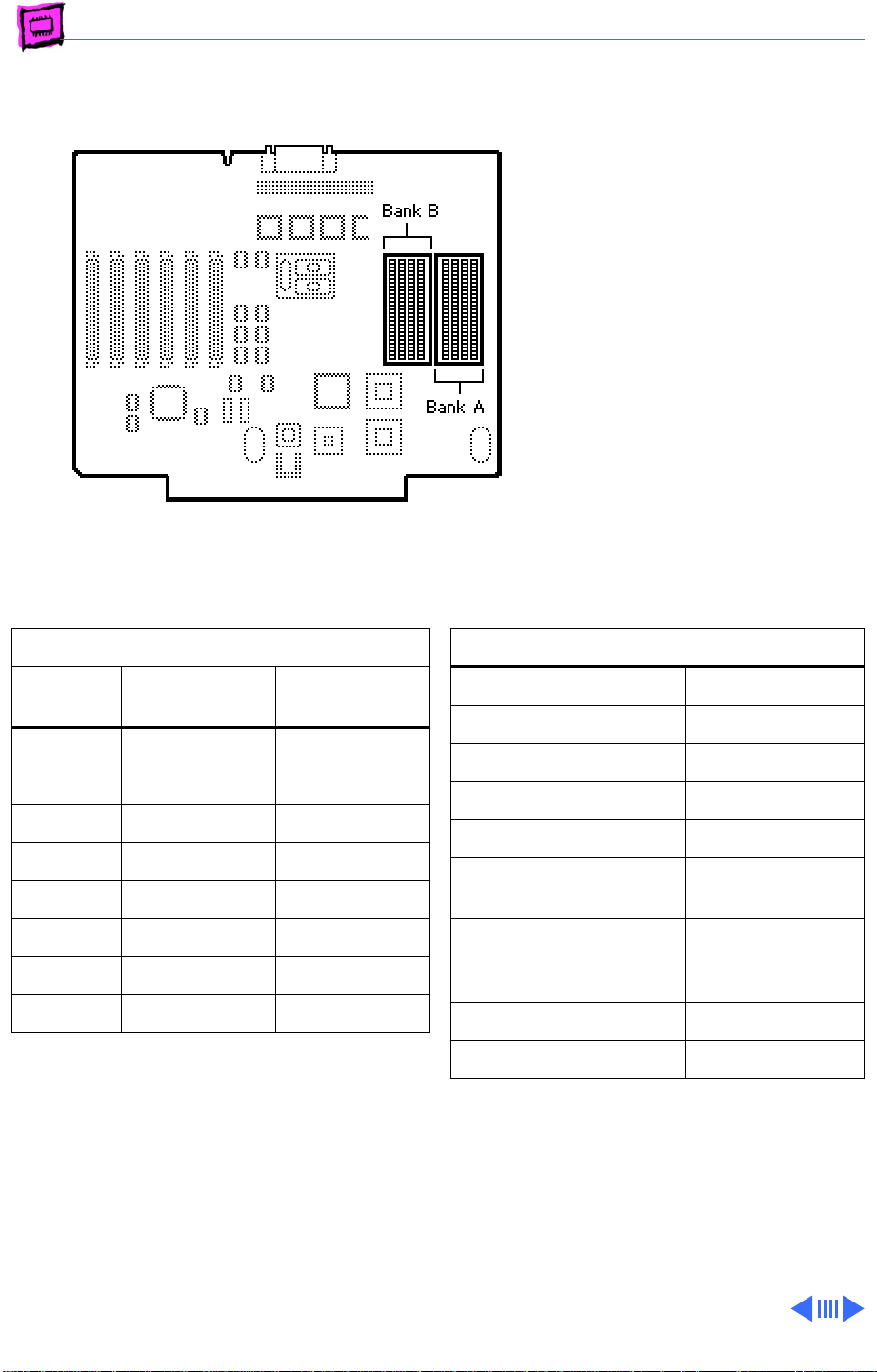
Macintosh II
The Macintosh II originally
shipped in a number of
configurations. It requires
PAL type SIMMs in densities
higher than 1MB. Verify with
your memory vendor that the
SIMMs are compatible with
the Macintosh II.
Note:
Mitsubishi 1 MB
SIMMs for the Macintosh IIx,
which are labeled "For 030
System Only," should be used
only in systems with 68030
microprocessors.
DRAM Configurations
Total
Memory Bank A Bank B
1 MB Four 256K Empty
2 MB Four 256K Four 256K
4 MB Four 1 MB Empty
5 MB Four 1 MB Four 256K
8 MB Four 1 MB Four 1 MB
16 MB Four 4 MB Empty
17 MB Four 4 MB Four 256K
20 MB Four 4 MB Four 1 MB
Note:
You must fill an entire bank of four
SIMMs when upgrading memory.
Memory Information
DRAM Speed 120 ns
SIMM Type 30-pin
Soldered DRAM None
Number of SIMM Slots 8
Supported Sizes in MB 256K, 1, 4, 16
Maximum DRAM 128 MB
(see Note)
Virtual Memory 1 GB (with
MODE32 7.5
installed)
Soldered VRAM None
Number of VRAM Slots None
Note:
If 4 MB or 16 MB SIMMs are used,
they cannot be installed in Bank A. If the
SuperDrive Upgrade (M6051/C) and the
68851 PMMU Upgrade Kit are installed,
this anomaly is alleviated and the128 MB
configuration is possible.
Page 14
Memory Guide Early Macintosh - 11
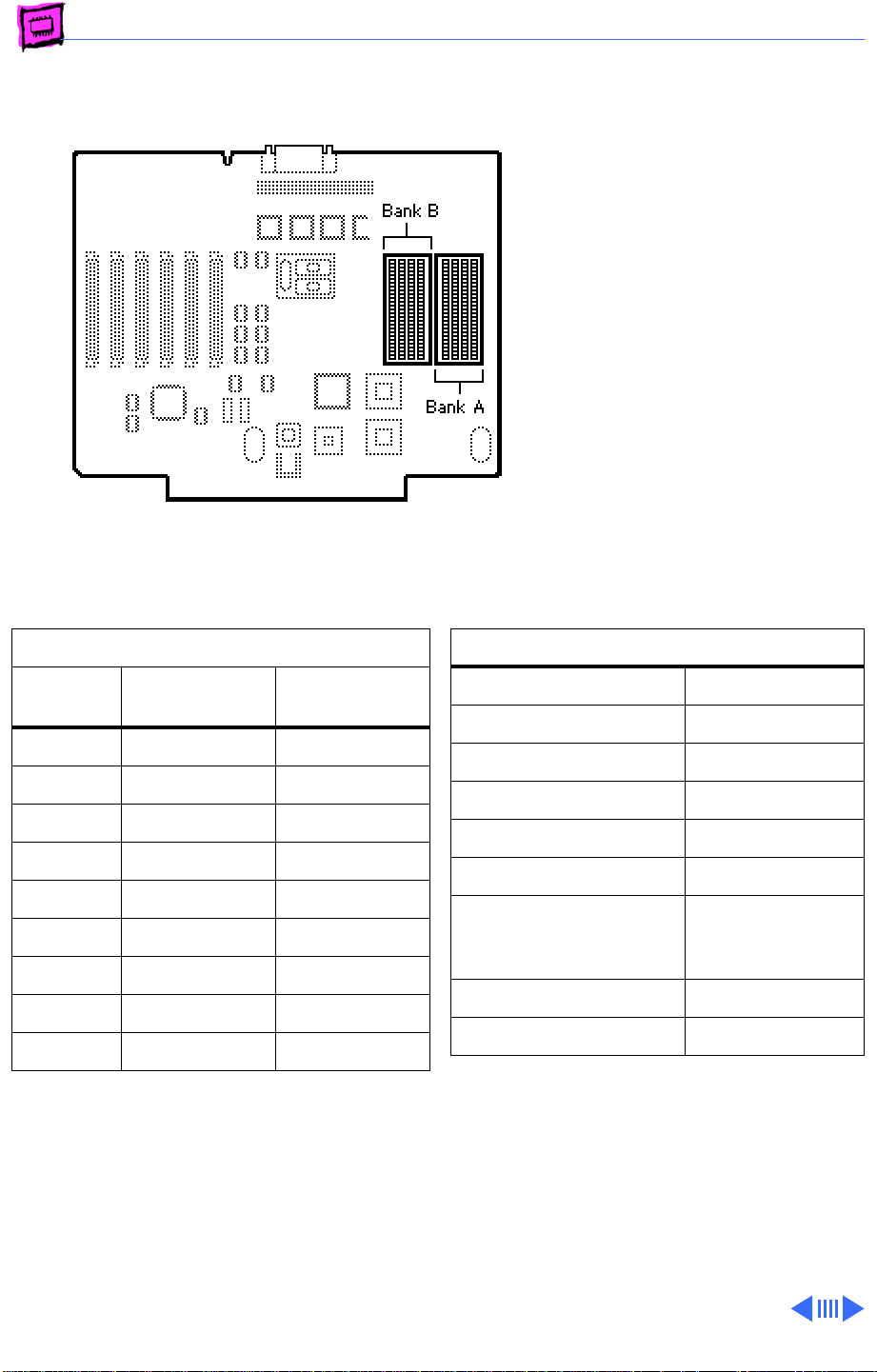
Macintosh IIx
The Macintosh IIx originally
shipped in a number of
configurations. Both systems
require PAL type SIMMs in
densities higher than 1 MB.
Verify with your memory
vendor that the SIMMs are
compatible with the IIx.
You must fill an entire bank
of four SIMMs when
upgrading memory.
DRAM Configurations
Total
Memory Bank A Bank B
1 MB Four 256K Empty
2 MB Four 256K Four 256K
4 MB Four 1 MB Empty
5 MB Four 1 MB Four 256K
8 MB Four 1 MB Four 1 MB
16 MB Four 4 MB Empty
17 MB Four 4 MB Four 256K
20 MB Four 4 MB Four 1 MB
32 MB Four 4 MB Four 4 MB
Note:
You must fill an entire bank of four
SIMMs when upgrading memory.
Memory Information
DRAM Speed 120 ns
SIMM Type 30-pin
Soldered DRAM None
Number of SIMM Slots 8
Supported Sizes in MB 256K, 1, 4, 16
Maximum DRAM 128 MB
Virtual Memory 1 GB (with
MODE32 7.5
installed)
Soldered VRAM None
Number of VRAM Slots None
Page 15
Memory Guide Early Macintosh - 12
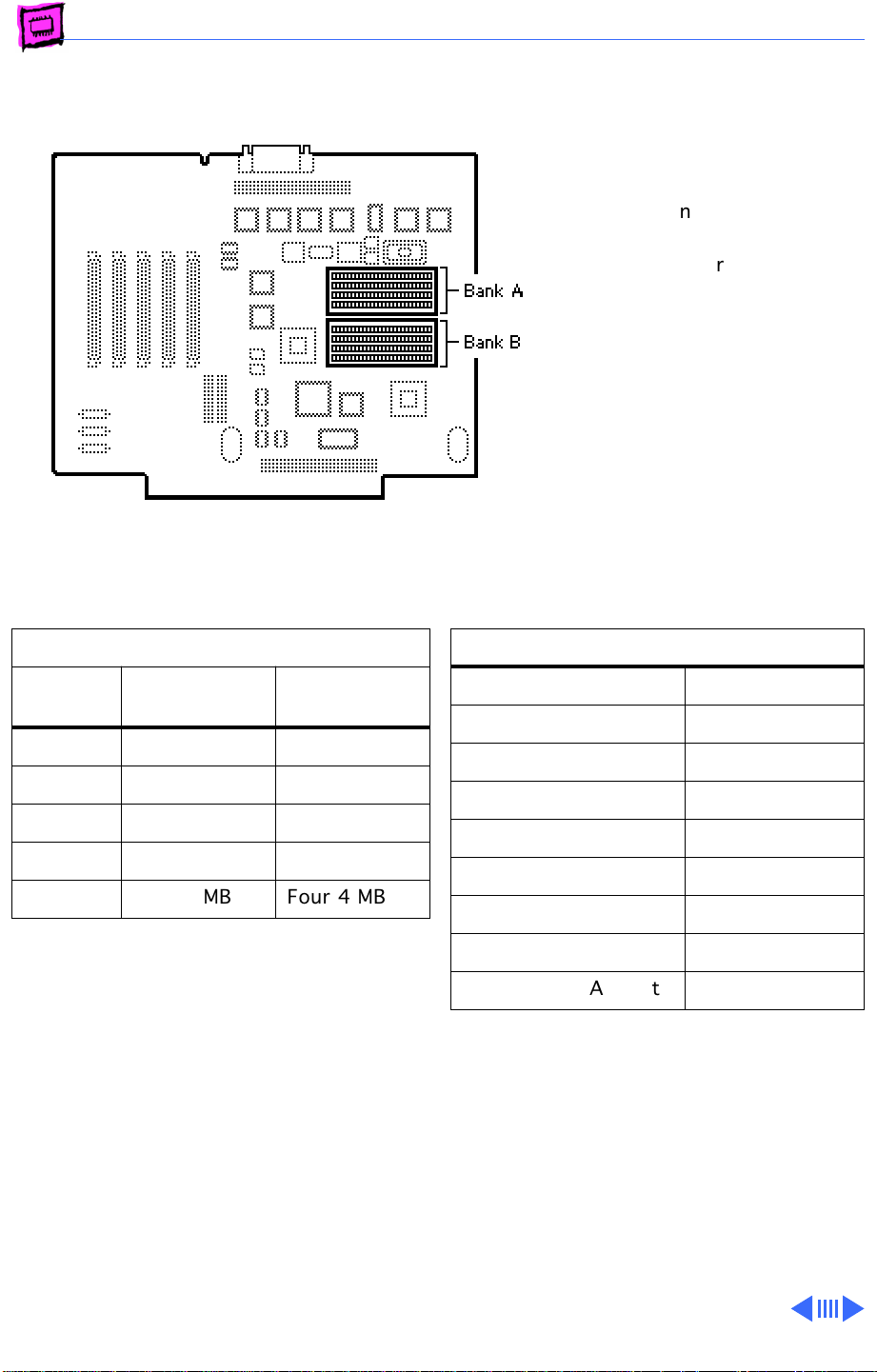
Macintosh IIfx
The Macintosh IIfx uses 64pin SIMMs similar to those
used in the LaserWriter
IINTX. Do
in the Macintosh IIfx as they
are not the correct speed.
not
use NTX SIMMs
DRAM Configurations
Total
Memory Bank A Bank B
4 MB Four 1 MB Empty
8 MB Four 1 MB Four 1 MB
16 MB Four 4 MB Empty
20 MB Four 4 MB Four 1 MB
32 MB Four 4 MB Four 4 MB
Note:
You must fill an entire bank of four
SIMMs when upgrading memory.
Memory Information
DRAM Speed 80 ns
SIMM Type 64-pin
Soldered DRAM None
Number of SIMM Slots 8
Supported Sizes in MB 1, 4, 16
Maximum DRAM 128 MB
Virtual Memory 1 GB
Soldered VRAM None
Number of VRAM Slots None
Page 16
Memory Guide Early Macintosh - 13
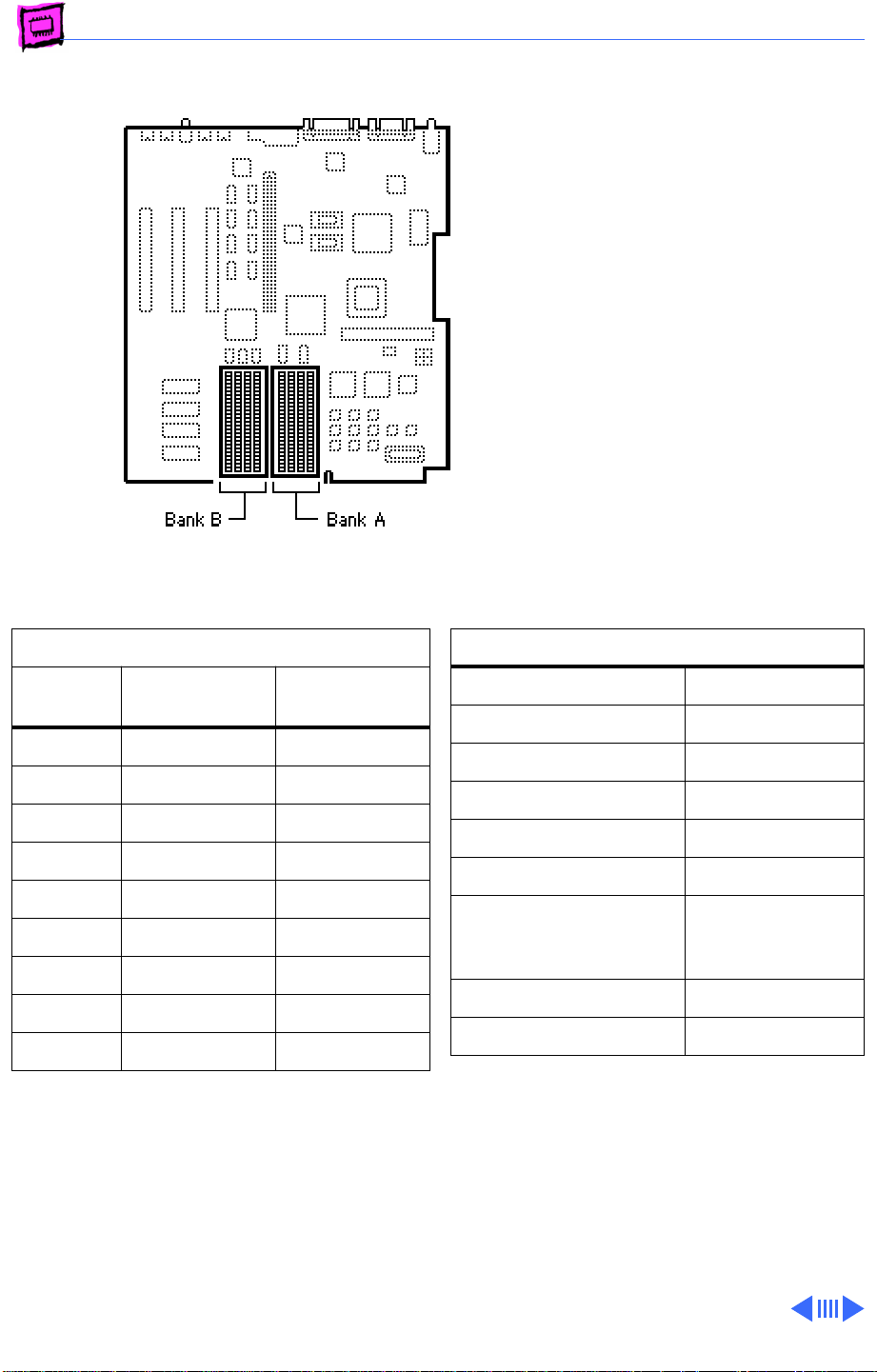
Macintosh IIcx
The IIcx has no soldered
DRAM. You can expand the
memory to a total of 128 MB
by installing DRAM SIMMs.
DRAM Configurations
Total
Memory Bank A Bank B
1 MB Four 256K Empty
2 MB Four 256K Four 256K
4 MB Four 1 MB Empty
5 MB Four 1 MB Four 256K
8 MB Four 1 MB Four 1 MB
16 MB Four 4 MB Empty
17 MB Four 4 MB Four 256K
20 MB Four 4 MB Four 1 MB
32 MB Four 4 MB Four 4 MB
Note:
You must fill an entire bank of four
SIMMs when upgrading memory.
Memory Information
DRAM Speed 120 ns
SIMM Type 30-pin
Soldered DRAM None
Number of SIMM Slots 8
Supported Sizes in MB 256K, 1, 4, 16
Maximum DRAM 128 MB
Virtual Memory 1 GB (with
MODE32 7.5
installed)
Soldered VRAM None
Number of VRAM Slots None
Page 17
Memory Guide Early Macintosh - 14
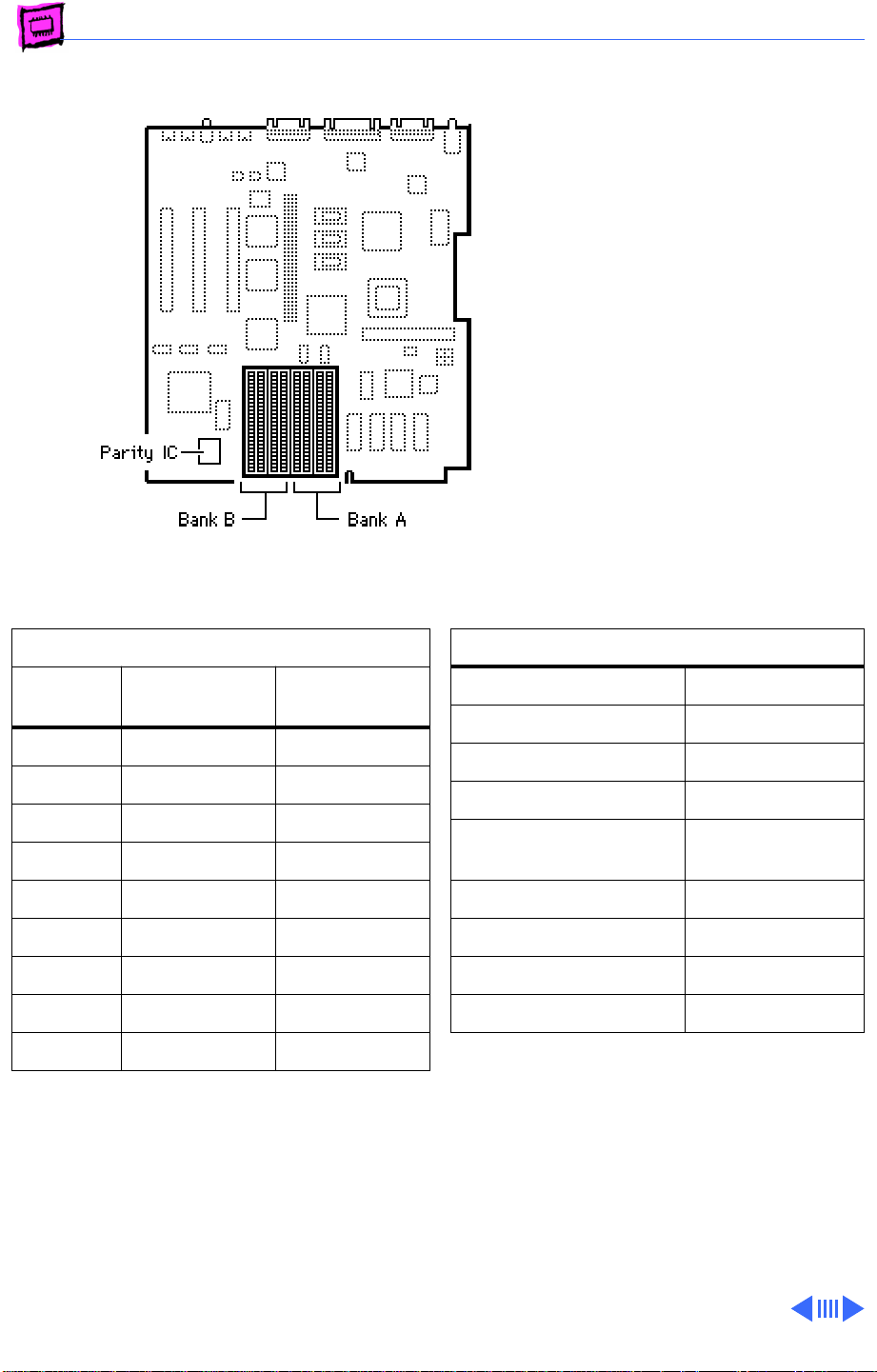
Macintosh IIci
There are two logic boards
for the Macintosh IIci, one
with and one without parity.
You can identify the Parity
logic board by the large
parity IC installed to the left
of the SIMM slots.
If you have a parity logic
board (identified by the
presence of the parity chip at
the location noted), be sure to
install parity SIMMs for
proper operation.
DRAM Configurations
Total
Memory Bank A Bank B
1 MB Four 256K Empty
2 MB Four 256K Four 256K
3 MB Four 512K Four 256K
4 MB Four 1 MB Empty
5 MB Four 1 MB Four 256K
8 MB Four 1 MB Four 1 MB
16 MB Four 4 MB Empty
17 MB Four 4 MB Four 256K
20 MB Four 4 MB Four 1 MB
Note:
The IIci uses DRAM for video and maps
it to Bank A. Contrary to other Macintosh
models, always install the lowest density
SIMMs in Bank A for best performance.
Memory Information
DRAM Speed 80 ns
SIMM Type 30-pin
Soldered DRAM None
Number of SIMM Slots 8
Supported Sizes in MB 256K, 512K,
1, 2, 4, 16
Maximum DRAM 128 MB
Virtual Memory 1 GB
Soldered VRAM None
Number of VRAM Slots None
Note:
Use 80 ns or faster fast-page-mode
SIMMs.
Note:
You must fill an entire bank of four
SIMMs when upgrading memory.
Page 18
Memory Guide Early Macintosh - 15
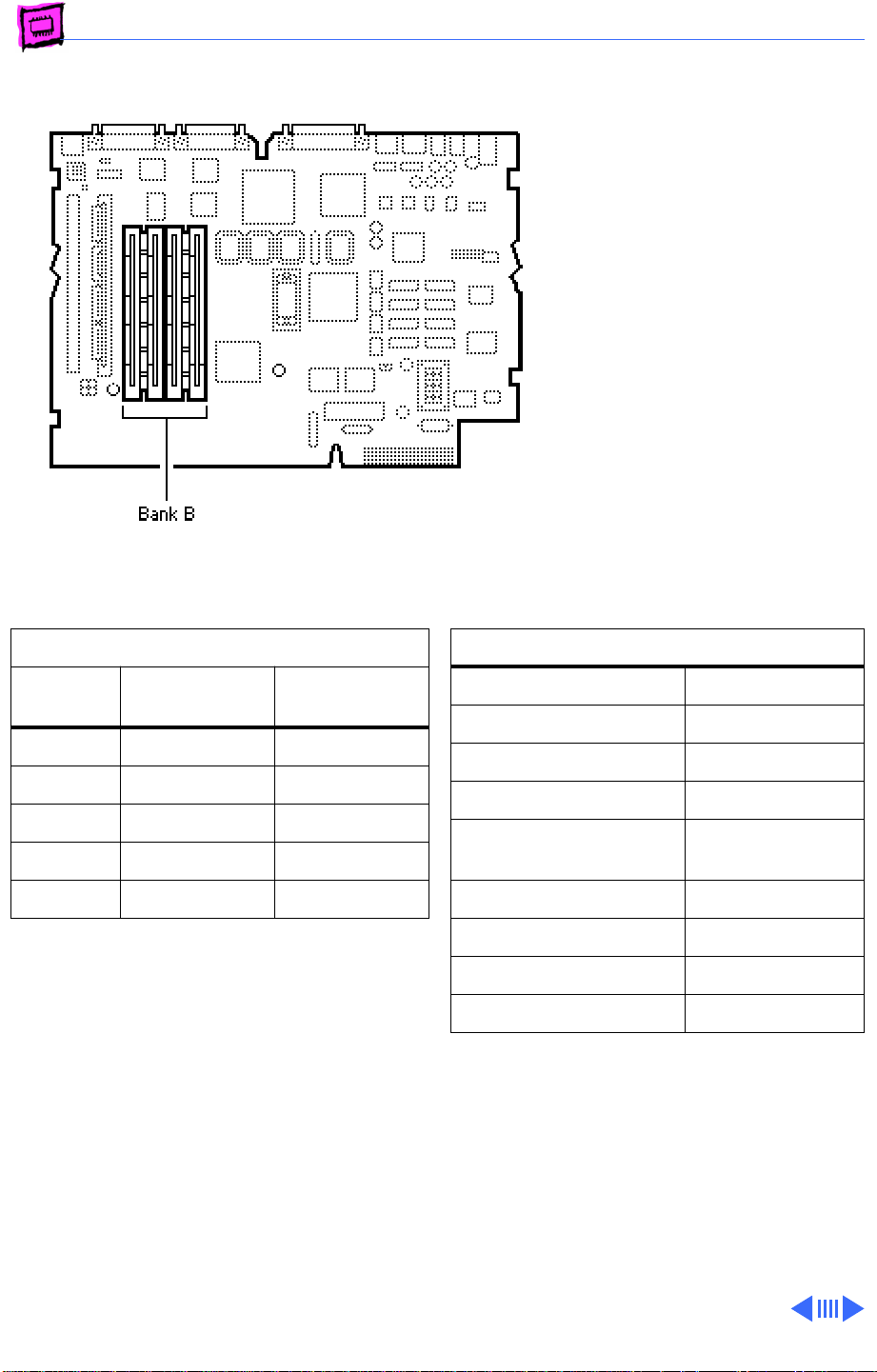
Macintosh IIsi
The Macintosh IIsi has 1 MB
soldered to the logic board and
is expandable to 17 MB
(Bank A).
You must fill all four SIMM
slots in Bank B when
expanding memory.
DRAM Configurations
Total
Memory
2 MB 1 MB Four 256K
3 MB 1 MB Four 512K
5 MB 1 MB Four 1 MB
9 MB 1 MB Four 2 MB
17 MB 1 MB Four 4 MB
Bank A
(soldered) Bank B
Memory Information
DRAM Speed 100 ns
SIMM Type 30-pin
Soldered DRAM 1 MB
Number of SIMM Slots 4
Supported Sizes in MB 256K, 512K,
1, 2, 4
Maximum DRAM 17 MB
Virtual Memory 1 GB
Soldered VRAM None
Number of VRAM Slots None
Page 19
Memory Guide Early Macintosh - 16
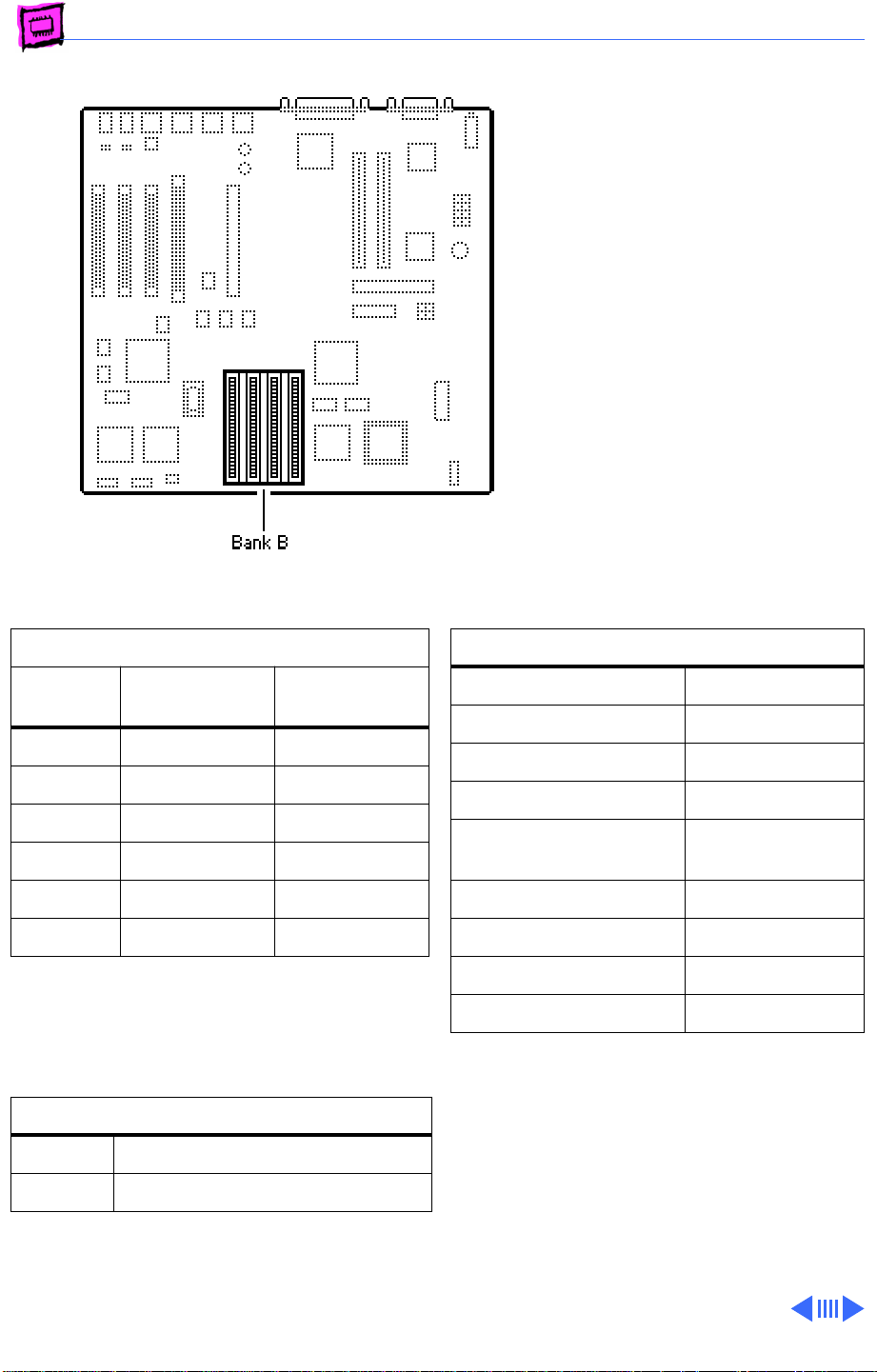
Macintosh IIvx, IIvi
The Macintosh IIvx and IIvi
have 4 MB soldered to the
logic board and are
expandable to 68 MB.
Note:
A total of 5 MB of
memory (soldered DRAM
plus one 1 MB SIMM) is
standard on the Performa
600.
DRAM Configurations
Total
Memory
4 MB 4 MB Empty
5 MB 4 MB Four 256K
8 MB 4 MB Four 1 MB
12 MB 4 MB Four 2 MB
20 MB 4 MB Four 4 MB
68 MB 4 MB Four 16 MB
Note:
You must fill an entire bank of four
SIMMs when upgrading memory.
VRAM Configurations
512K Install two 256K VRAM SIMMs.
1 MB Install two 512K VRAM SIMMs.
Bank A
(soldered) Bank B
Memory Information
DRAM Speed 80 ns
SIMM Type 30-pin
Soldered DRAM 4 MB
Number of SIMM Slots 4
Supported Sizes in MB 256K, 1, 2, 4,
16
Maximum DRAM 68 MB
Virtual Memory 1 GB
Soldered VRAM None
Number of VRAM Slots 2
Note:
Use 80 ns or faster fast-page-mode
SIMMs.
Page 20
K
Service Source
Quadra/Centris
Page 21
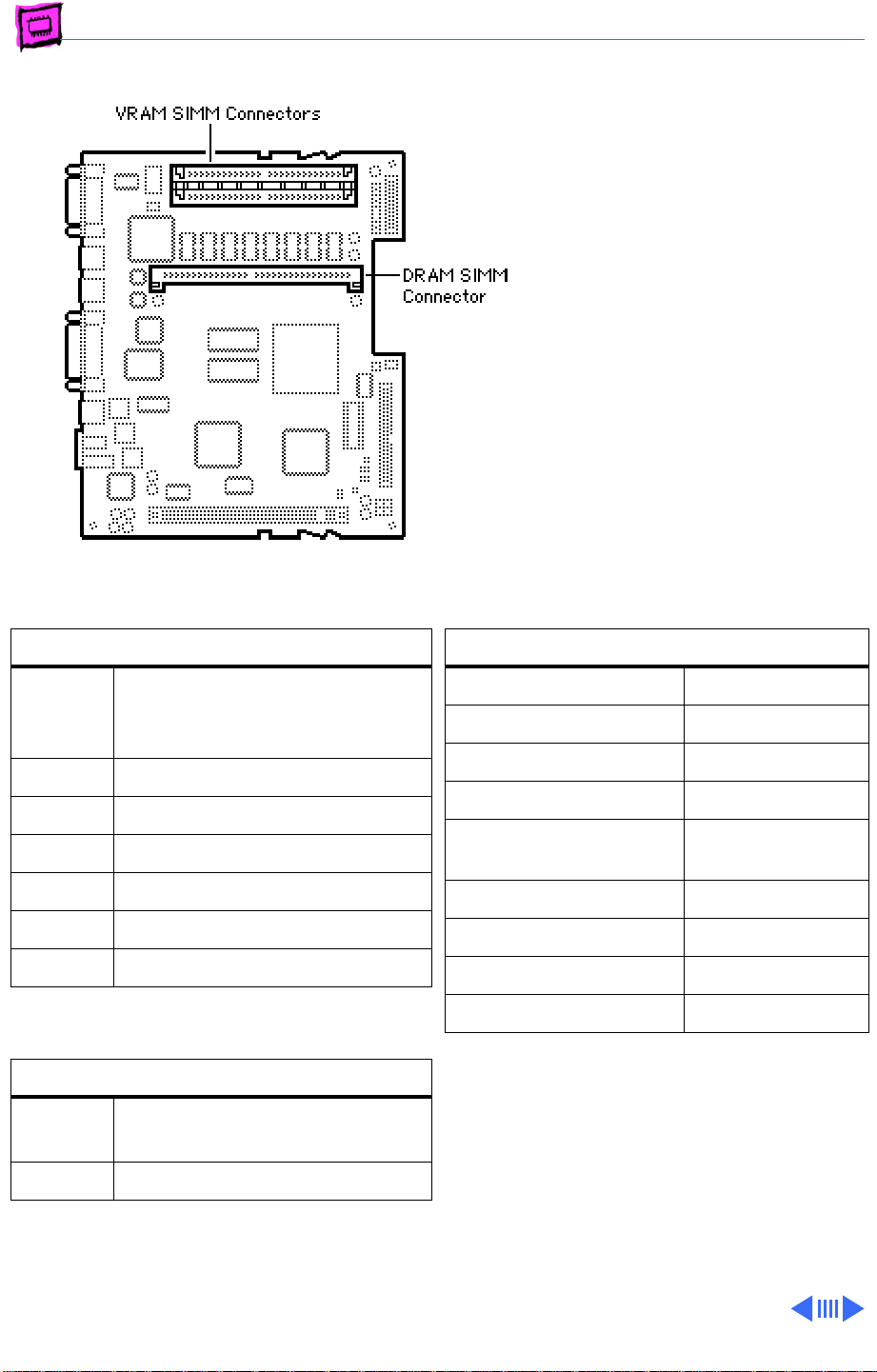
Memory Quadra/Centris - 1
Quadra 605
The Quadra 605 has 4 MB of
DRAM soldered to the logic
board and one expansion slot.
Single-sided SIMMs are
supported in 1, 4, 8, and 16
MB densities; double-sided
SIMMs are supported in 2, 4,
and 32 MB densities.
DRAM Configurations
4 MB The Macintosh Quadra 605 logic
board has 4 MB of soldered
DRAM.
5 MB Install one 1 MB SIMM.
6 MB Install one 2 MB SIMM.
8 MB Install one 4 MB SIMM.
12 MB Install one 8 MB SIMM.
20 MB Install one 16 MB SIMM.
36 MB Install one 32 MB SIMM.
VRAM Configurations
512K The Quadra 605 logic board
has two 256K VRAM SIMMs.
1 MB Install two 512K VRAM SIMMs.
Memory Information
DRAM Speed 80 ns
SIMM Type 72-pin
Soldered DRAM 4 MB
Number of SIMM Slots 1
Supported Sizes in MB 1, 2, 4, 8, 16,
32
Maximum DRAM 36 MB
Virtual Memory 1 GB
Soldered VRAM None
Number of VRAM Slots 2
VRAM Note:
256K VRAM SIMMs installed. You can
upgrade the VRAM to a total of 1 MB by
replacing the two 256K SIMMs with two
512K SIMMs.
The Quadra 605 comes with two
Page 22
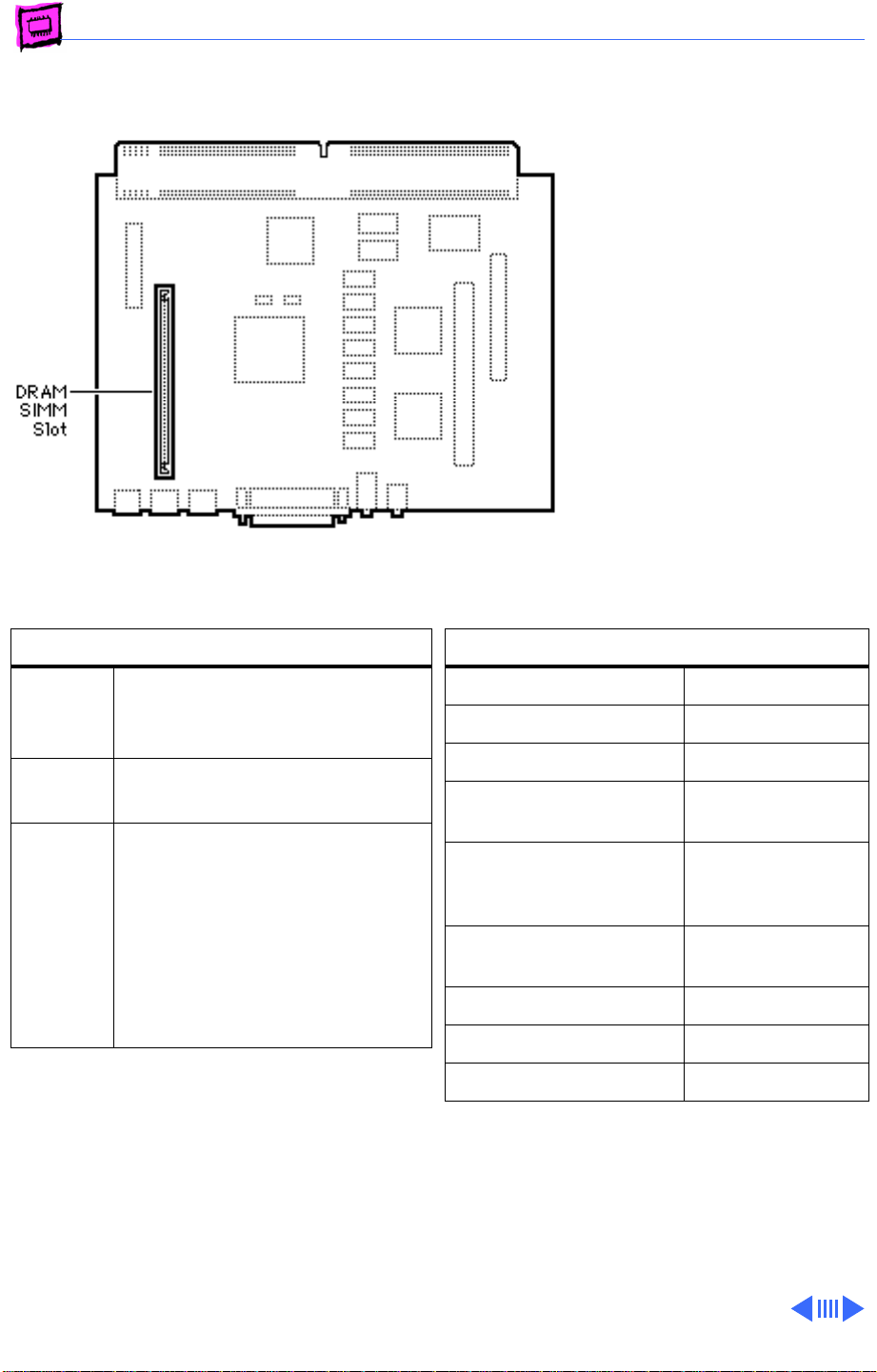
Memory Quadra/Centris - 2
Quadra 630
The Macintosh Quadra 630
has 4 MB of soldered DRAM.
Total memory can be
expanded to 36 MB.
Note:
The Quadra 630 and
Performa 63x cpus may
have one of two logic boards.
One logic board has one SIMM
slot (661-0518), the other
logic board (661-1114)
has two SIMM slots; a
regular SIMM slot and a
“single-sided” SIMM slot;
expandable to 52 MB.
DRAM Configurations
4 MB The Macintosh Quadra 630 logic
board has 4 MB of soldered
DRAM.
36 MB Use 4, 8, 16, or 32 MB 72-pin
SIMMs.
Up to
52 MB
Note
: If the customer has the
logic board with two SIMM slots
(661-1114), the maximum
RAM would be 52 MB. To
upgrade to 52 MB use a 32 MB
SIMM in the regular SIMM slot,
and a 16 MB SIMM in the
single-sided SIMM slot.
Memory Information
DRAM Speed 80 ns
SIMM Type 72-pin
Soldered DRAM 4 MB
Number of SIMM Slots 1 or 2 (see Note
above)
Supported Sizes in MB 1, 2, 4, 8, 16,
32, 52 MB (see
Note above)
Maximum DRAM 36 MB, 52 MB
(see Note above)
Virtual Memory 1 GB
Soldered VRAM 1 MB
Number of VRAM Slots None
Page 23
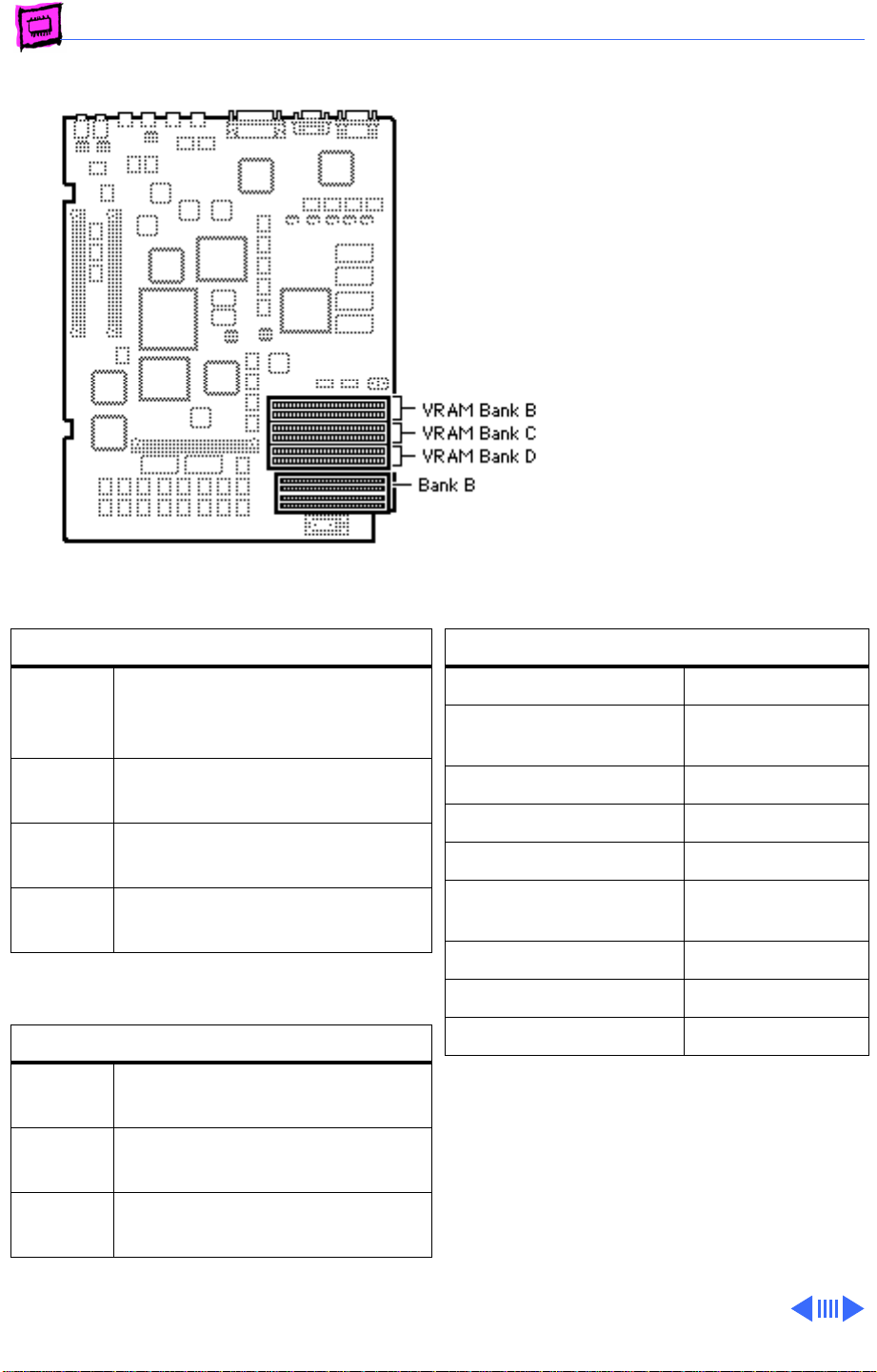
Memory Quadra/Centris - 3
Quadra 700
The Quadra 700 has 4 MB of
DRAM soldered to the logic
board. Total memory can be
expanded to 20 MB (see
note).
DRAM Configurations
4 MB The Macintosh Quadra 700 logic
board has 4 MB of soldered
DRAM (Bank A).
8 MB Install four 1 MB SIMMs (Bank
B).
20 MB Install four 4 MB SIMMs
(Bank B).
68 MB Install four 16 MB SIMMs
(Bank B).
VRAM Configurations
512K The Quadra 605 logic board
has 512K of soldered VRAM.
1 MB Install two 256K or two 512K
VRAM SIMMs.
2 MB Install six 256K or six 512K
VRAM SIMMs.
Memory Information
DRAM Speed 80 ns or faster
SIMM Type 30-pin, fast-
page mode
Soldered DRAM 4 MB
Number of SIMM Slots 4
Supported Sizes in MB 1, 4
Maximum DRAM 20 MB
(see Note)
Virtual Memory 1 GB
Soldered VRAM 512k
Number of VRAM Slots 6
Note:
Memory configurations above 20 MB
have not been tested and are not officially
supported by Apple Computer, Inc.
Note:
VRAM banks must be populated in
order. Install the SIMMs in paired slots (B1
and B2 first, then C1 and C2, etc.).
Note:
The Macintosh Quadra 700 uses only
256K of each 512K VRAM SIMM installed.
Page 24
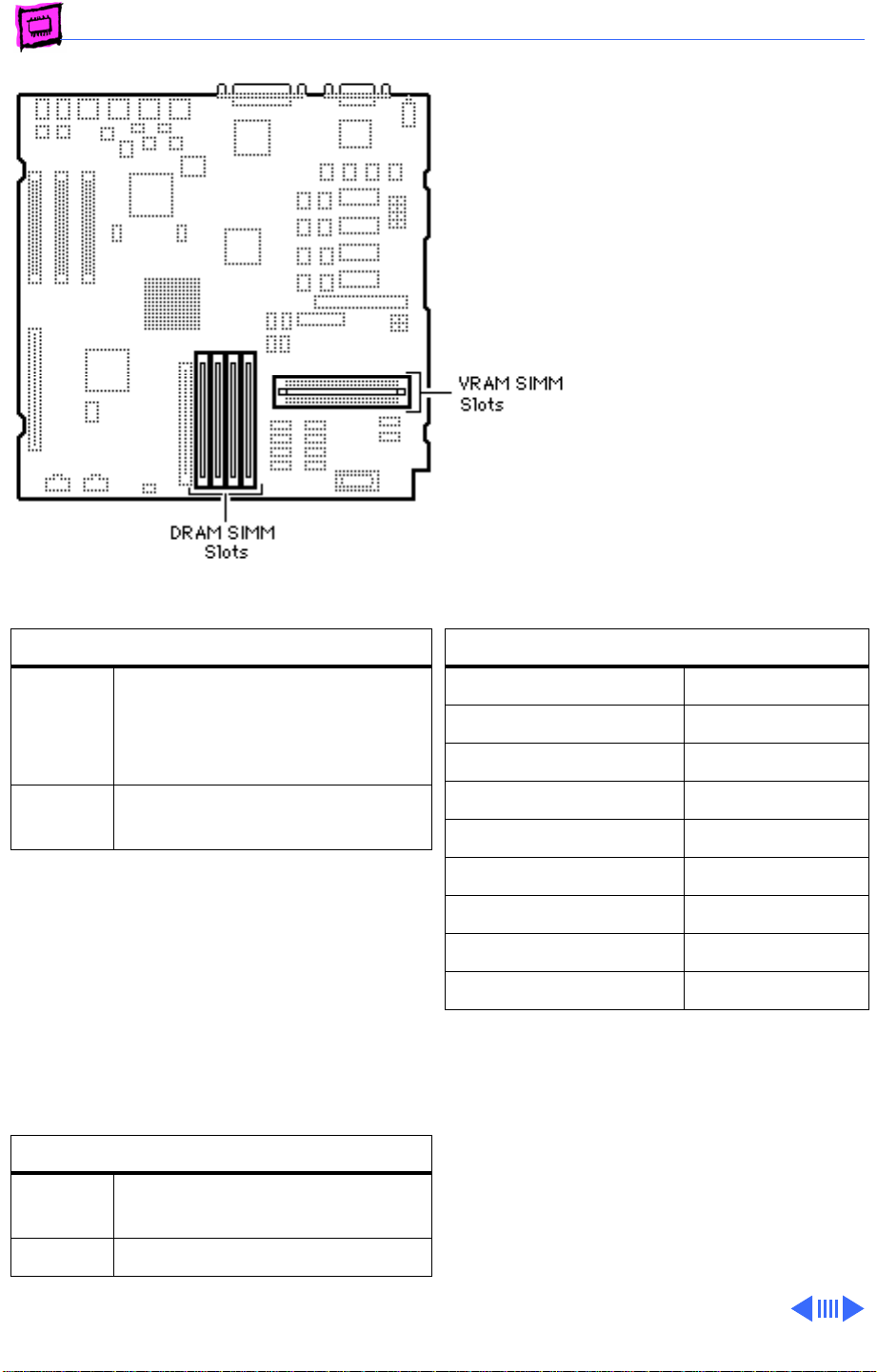
Memory Quadra/Centris - 4
Quadra 800
The Quadra 800 has 8 MB of
DRAM soldered to the logic
board. Total memory can be
expanded to 136 MB.
DRAM Configurations
8 MB The Macintosh Quadra 800 and
Apple WorkGroup Server 80
logic boards have 8 MB of
soldered DRAM.
136 MB Use 1, 4, 8, 16, or 32 MB 72-
pin SIMMs.
The Quadra 800 uses “memory interleaving”
which occurs when like SIMM pairs are used
(for example two 8 MB SIMMs). Basically, it
allows the memory subsystem to write to the
same memory address in different banks of
memory before incrementing the address.
Depending on how memory-intensive the
application is, memory interleaving can
improve performance 5% to 10%.
VRAM Configurations
512K The Quadra 800 logic board has
512K of soldered VRAM.
Memory Information
DRAM Speed 60 ns
SIMM Type 72-pin
Soldered DRAM 8 MB
Number of SIMM Slots 4
Supported Sizes in MB 1, 4, 8, 16, 32
Maximum DRAM 136 MB
Virtual Memory 1 GB
Soldered VRAM 512K
Number of VRAM Slots 2
Note:
Use 80 ns or faster VRAM SIMMs.
1 MB Install two 256K VRAM SIMMs.
Page 25
Memory Quadra/Centris - 5
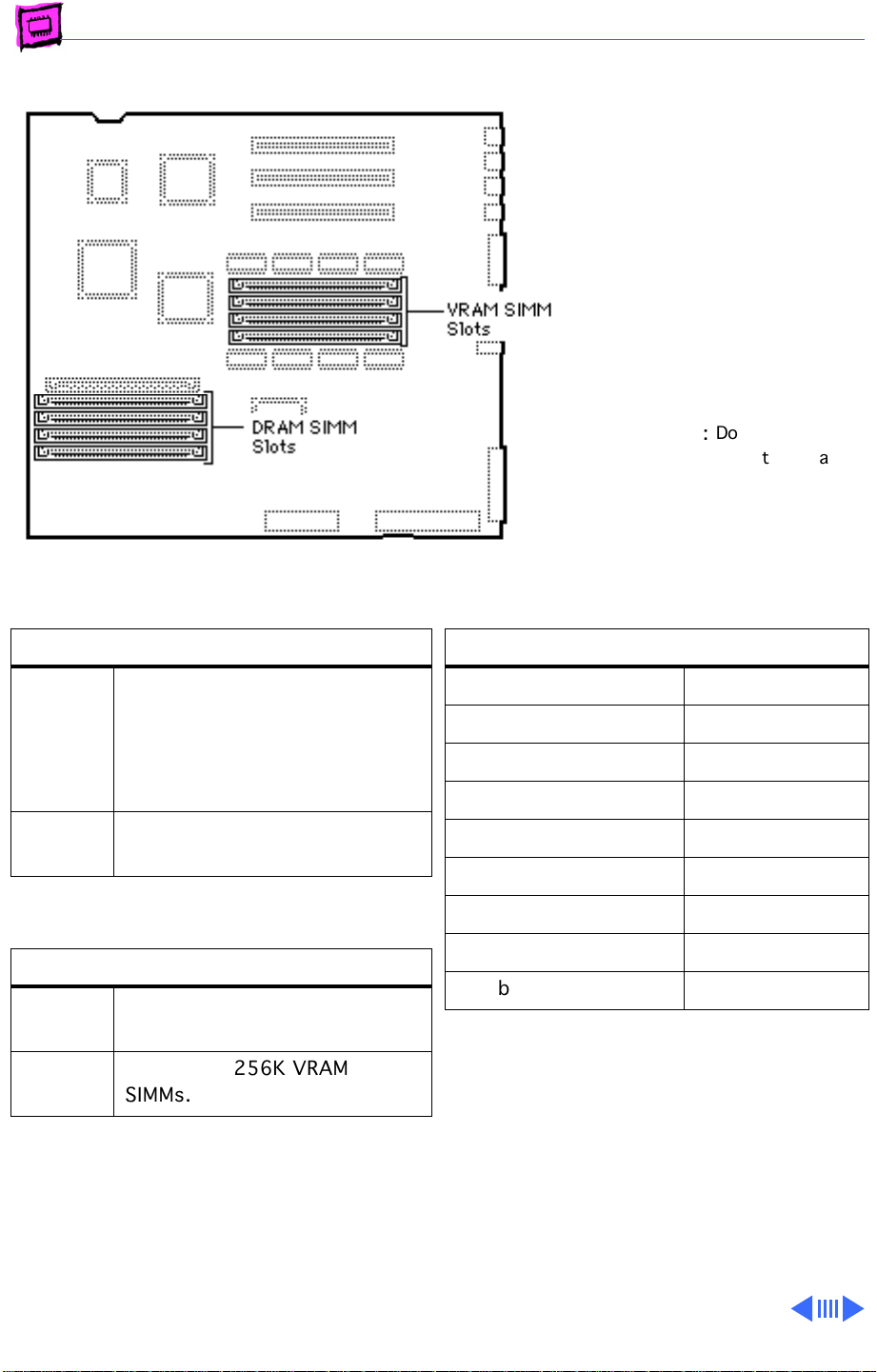
Quadra 840AV
The Quadra 840AV has no
soldered DRAM. Total
memory can be expanded to
128 MB.
The Quadra 840AV does not
support 1 MB, 2 MB, or 64
MB SIMMs. This computer
operates in 32-bit mode at
all times, and cannot be
toggled back to 24-bit mode.
Do
not
IMPORTANT:
composite SIMMs in the Quadra
840AV.!
use
DRAM Configurations
8 MB The Macintosh Quadra 840AV
logic board has no soldered
DRAM. A total of 8 MB of
memory (one 8 MB SIMM) is
standard.
128 MB Use 4, 8, 16, or 32 MB 72-pin
SIMMs.
VRAM Configurations
1 MB The Quadra 840AV logic board
has 1 MB of soldered VRAM.
2 MB Install four 256K VRAM
SIMMs.
Note:
Use 80 ns or faster VRAM SIMMs.
Memory Information
DRAM Speed 60 ns
SIMM Type 72-pin
Soldered RAM None
Number of SIMM Slots 4
Supported Sizes in MB 4, 8, 16, 32
Maximum DRAM 128 MB
Virtual Memory 1 GB
Soldered VRAM 1 MB
Number of VRAM Slots 4
Note:
You can mix SIMM sizes.
Page 26
Memory Quadra/Centris - 6
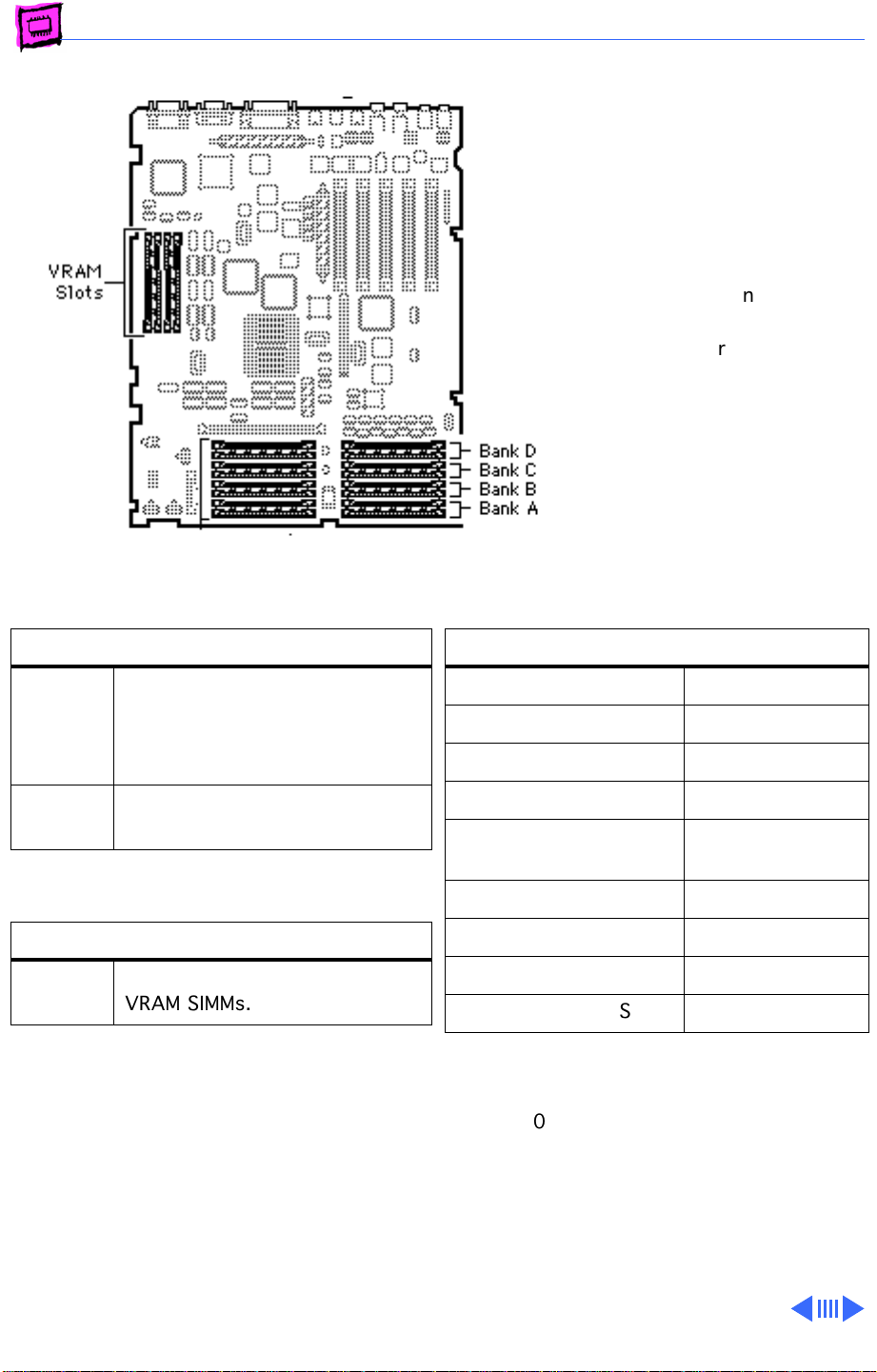
Quadra 900 and 950
The Quadra 900 and 950 have
no soldered DRAM. Total
memory can be expanded to
256 MB.
DRAM Configurations
8 MB The Quadra 900 and 950 logic
boards have no soldered DRAM.
A total of 8 MB of memory (one
8 MB SIMM) is standard.
Up to
256 MB
Use 1, 4, or 16 MB 30-pin
SIMMs.
IMPORTANT
composite SIMMs in the
Quadra 900 or 950.
Memory Information
DRAM Speed 80 ns
SIMM Type 30-pin
Soldered RAM none
Number of SIMM Slots 16
Supported Sizes in MB 1, 4, 8, 16
: Do
not
use
(see Note)
VRAM Configurations
2 MB Install four 256K or two 512K
VRAM SIMMs.
Note:
Use 80 ns or faster VRAM SIMMs. The
Macintosh Quadra 900 and 950 use only
256K of each 512K VRAM SIMM installed.
Maximum DRAM 256 MB
Virtual Memory 1 GB
Soldered VRAM 1 MB
Number of VRAM Slots 4
Note:
8 MB and16 MB SIMMs have not been
tested and are not officially supported on the
Quadra 900 and 950.
Note:
Fill a bank with DRAM SIMMs of the
same size or leave the bank empty (no
partially filled banks).
Page 27
Memory Quadra/Centris - 7
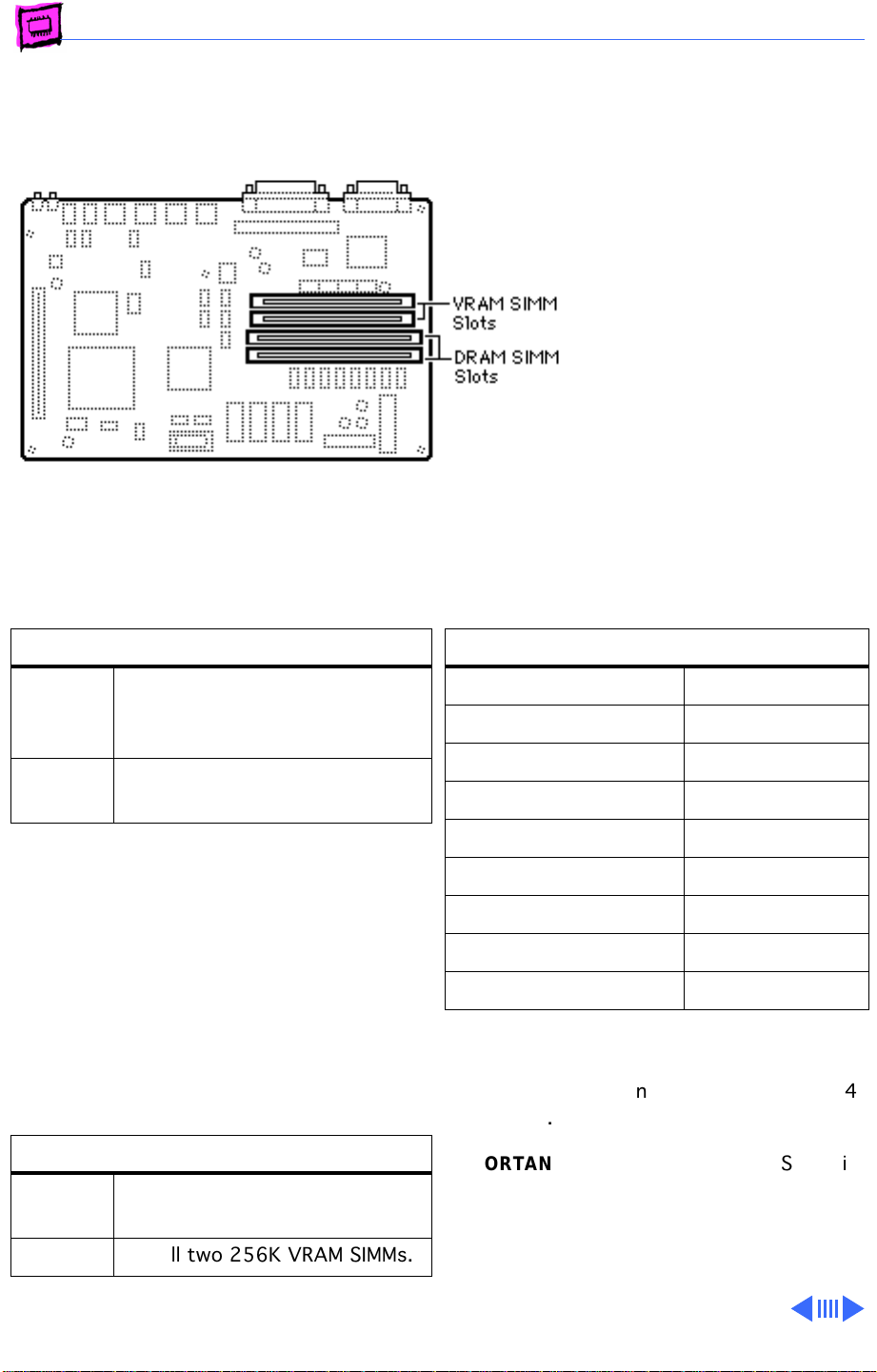
Quadra/Centris 610
The Quadra 610 has 4 MB of
DRAM soldered to the logic
board. It is functionally
equivalent to the Centris 610
and the Workgroup Server
60.
The Quadra 610 has a flexible
memory system, meaning
that any supported SIMM size
can go into any SIMM socket
in any order, and they can
run with partially populated
banks.
DRAM Configurations
4/8 MB The Macintosh Quadra 610 and
Centris 610 logic boards have 4
or 8 MB of soldered DRAM.
Up to 72 MBUse 4, 8, 16, or 32 MB 72-pin
SIMMs.
The Centris/Quadra 610 uses “memory
interleaving” which occurs when like SIMM
pairs are used (for example: two 8MB
SIMMs). Basically, it allows the memory
subsystem to write to the same memory
address in different banks of memory before
incrementing the address. Depending on how
memory intensive the application is, memory
interleaving can improve performance 5% to
10%.
VRAM Configurations
512K The Quadra 610 logic board has
512K of soldered VRAM.
1 MB Install two 256K VRAM SIMMs.
Memory Information
DRAM Speed 80 ns
SIMM Type 72-pin
Soldered DRAM 4 MB
Number of SIMM Slots 2
Supported Sizes in MB 4, 8, 16, 32
Maximum DRAM 68 MB
Virtual Memory 1 GB
Soldered VRAM 512K
Number of VRAM Slots 2
Note:
You can mix SIMM sizes.
Note:
The 610 does
MB SIMMs.
IMPORTANT
the Quadra 610.
Note:
Use 80 ns or faster VRAM SIMMs.
: Do
not
support 1, 2, or 64
not
use composite SIMMs in
Page 28
Memory Quadra/Centris - 8
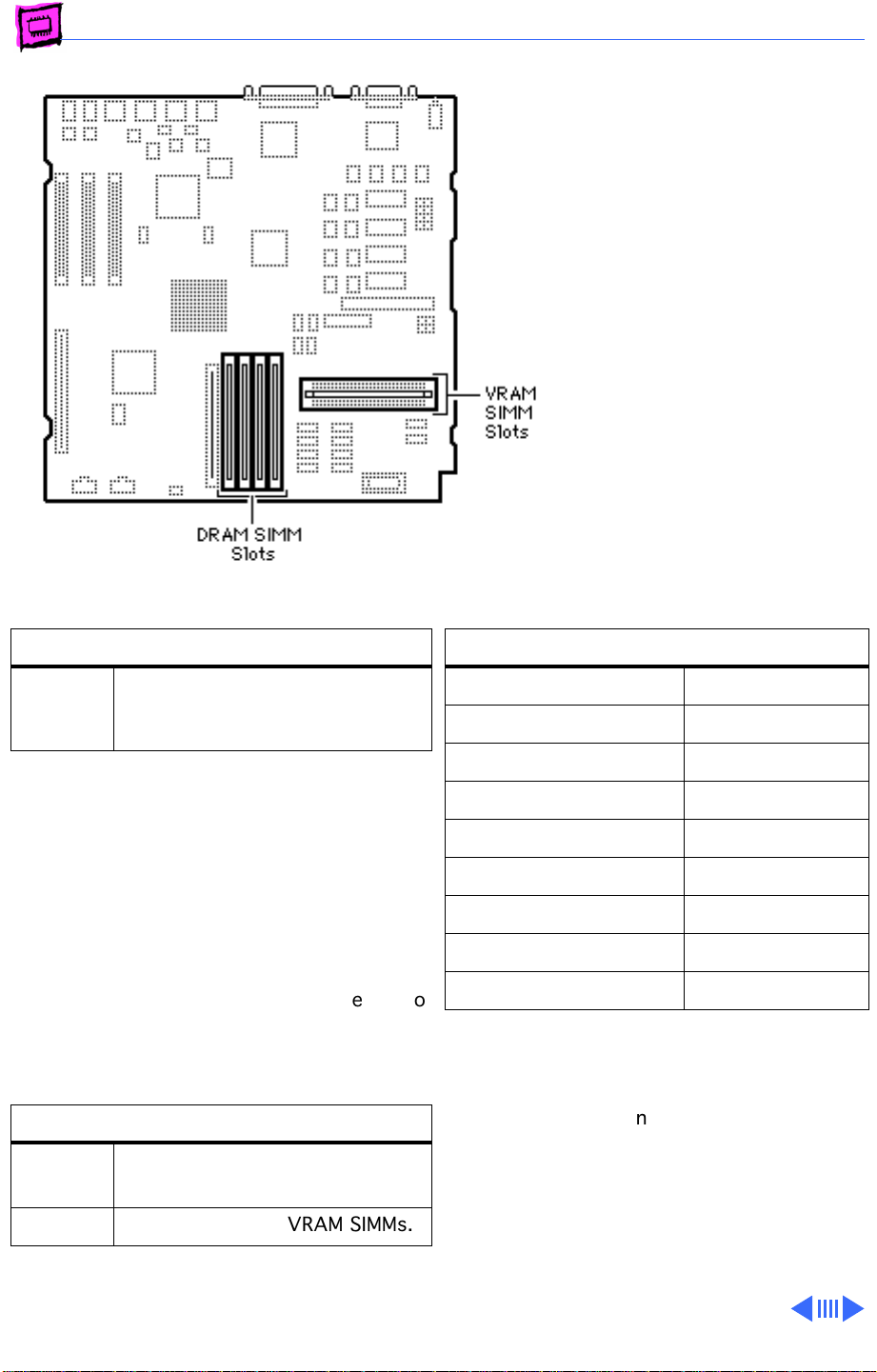
Quadra/Centris 650
The Centris 650 shipped with
4 MB of soldered DRAM, and
the Quadra 650 with 8MB of
soldered DRAM. Total
memory can be expanded to
132 MB and 136 MB
respectively.
Note:
The 650 has a flexible
memory system, meaning
that any supported SIMM size
can go into any SIMM slot in
any order, and they can run
with partially populated
banks.
DRAM Configurations
Up to
132/
136 MB
The Centris/Quadra 650 uses “memory
interleaving” which occurs when like SIMM
pairs are used (for example: two 8MB
SIMMs). Basically, it allows the memory
subsystem to write to the same memory
address in different banks of memory before
incrementing the address. Depending on how
memory intensive the application is, memory
interleaving can improve performance 5% to
10%.
VRAM Configurations
512K The 650 logic board has 512K
Use 4, 8, 16, or 32 MB 72-pin
SIMMs.
of soldered VRAM.
Memory Information
DRAM Speed 80 ns
SIMM Type 72-pin
Soldered DRAM 4/8 MB
Number of SIMM Slots 4
Supported Sizes in MB 4, 8, 16, 32
Maximum DRAM 132/136 MB
Virtual Memory 1 GB
Soldered VRAM 512K
Number of VRAM Slots 2
IMPORTANT
the Centris/Quadra 650.
Note:
The 650 does
MB SIMMs.
: Do not use composite SIMMs in
not
support 1, 2, or 64
1 MB Install two 256K VRAM SIMMs.
Note:
Use 80 ns or faster VRAM SIMMs.
Page 29
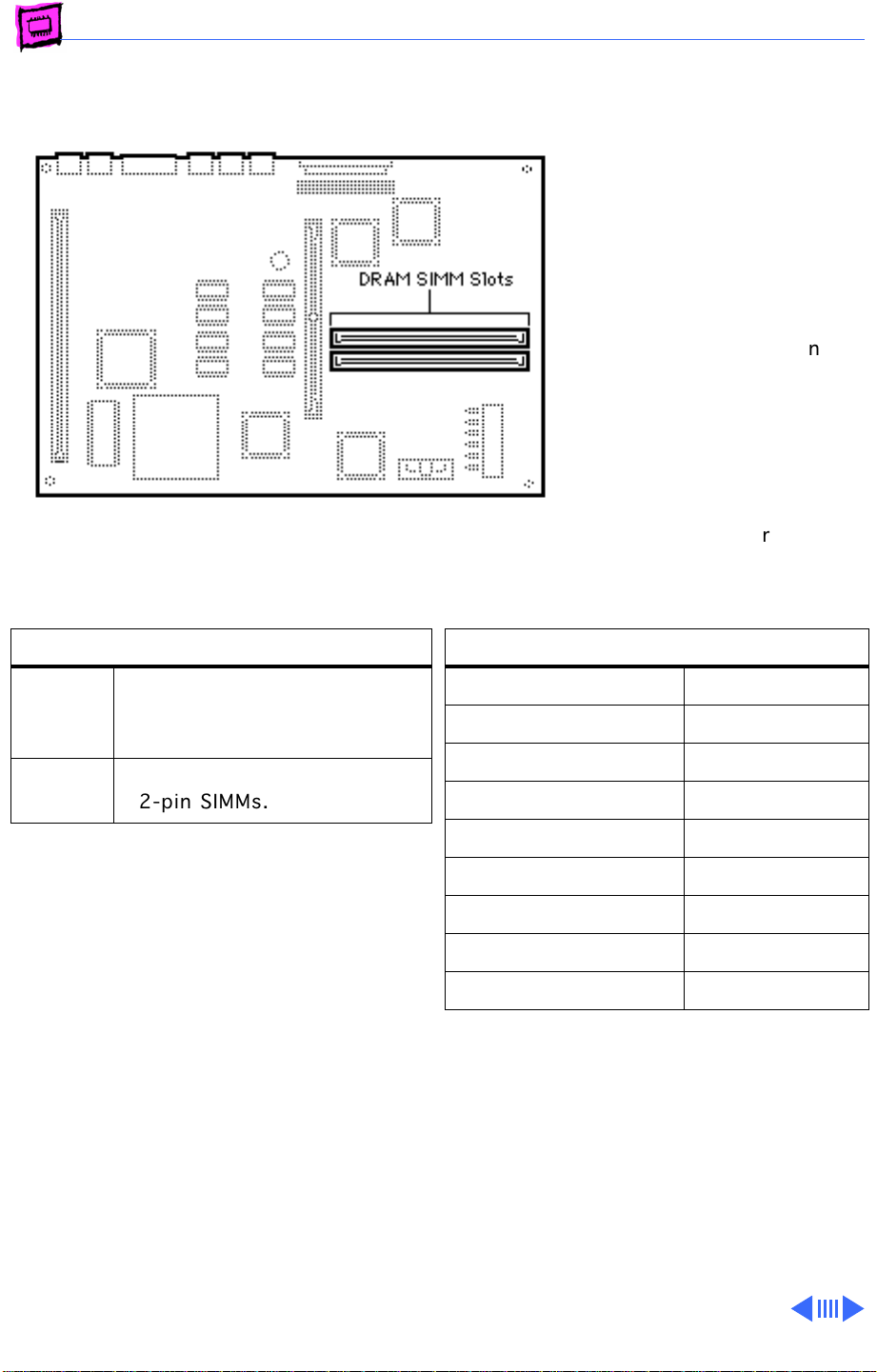
Memory Quadra/Centris - 9
Quadra/Centris 660AV
The Quadra and Centris
660AV machines are
functionally equivalent. Both
operate in 32-bit mode at all
times and cannot be toggled
back to 24-bit mode.
DRAM Configurations
4 MB The Macintosh Quadra 660AV
and Centris 660AV logic boards
have 4 MB of soldered DRAM.
Up to 68 MBUse 1, 2, 4, 8, 16, or 32 MB
72-pin SIMMs.
The Quadra 660AV does
support 1, 2, or 64 MB
SIMMs. However, this
computer can run with
partially populated banks
and you can install any
supported SIMM size in any
SIMM slot in any order.
Memory Information
DRAM Speed 70 ns
SIMM Type 72-pin
Soldered DRAM 4 MB
Number of SIMM Slots 2
Supported Sizes in MB 4, 8, 16, 32
Maximum DRAM 68 MB
not
Virtual Memory 1 GB
Soldered VRAM 1 MB
Number of VRAM Slots None
Note:
You can mix SIMM sizes.
Page 30
K
Service Source
Macintosh LC
Page 31
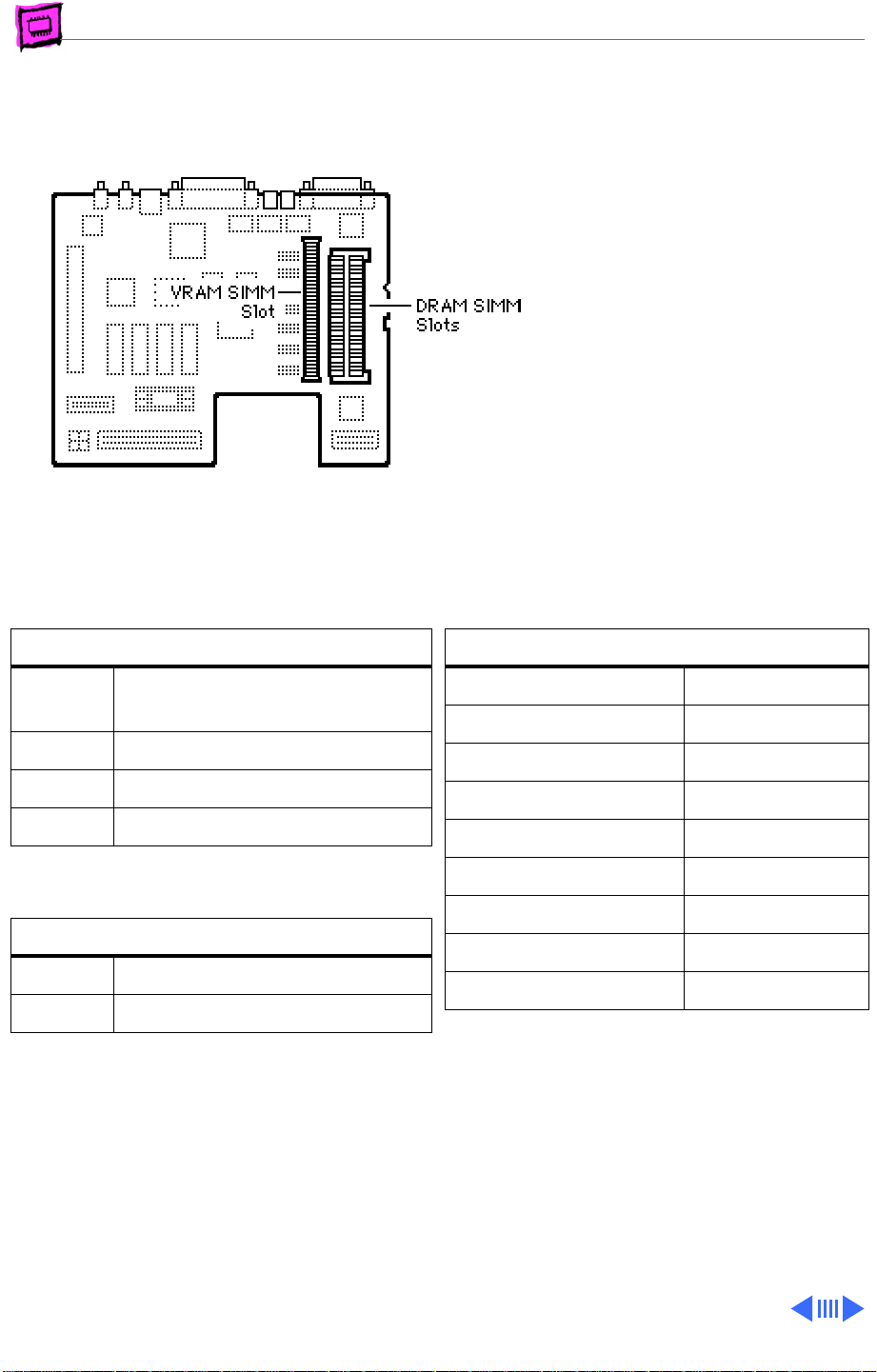
Memory Macintosh LC - 1
Macintosh LC
The Macintosh LC has 2 MB of
soldered DRAM. You can
expand the memory to a total
of 10 MB by installing DRAM
SIMMs.
You must fill both slots when
upgrading memory.
DRAM Configurations
2 MB The Macintosh LC logic board
has 2 MB of soldered DRAM.
4 MB Install two 1 MB SIMMs.
6 MB Install two 2 MB SIMMs.
10 MB Install two 4 MB SIMMs.
VRAM Configurations
256K Install one 256K VRAM SIMM.
512K Install one 512K VRAM SIMM.
Note:
The Macintosh LC has no soldered VRAM
but has one VRAM SIMM slot with a 256K
SIMM installed. VRAM can be upgraded to
512K by removing the 256K SIMM and
replacing it with a 512K SIMM.
Memory Information
DRAM Speed 100 ns
SIMM Type 30-pin
Soldered DRAM 2 MB
Number of SIMM Slots 2
Supported Sizes in MB 1, 2, 4
Maximum DRAM 10 MB
Virtual Memory n/a
Soldered VRAM None
Number of VRAM Slots 1
Note:
SIMMs can be different speeds, as long
as both SIMMs are 100 ns or faster.
Page 32
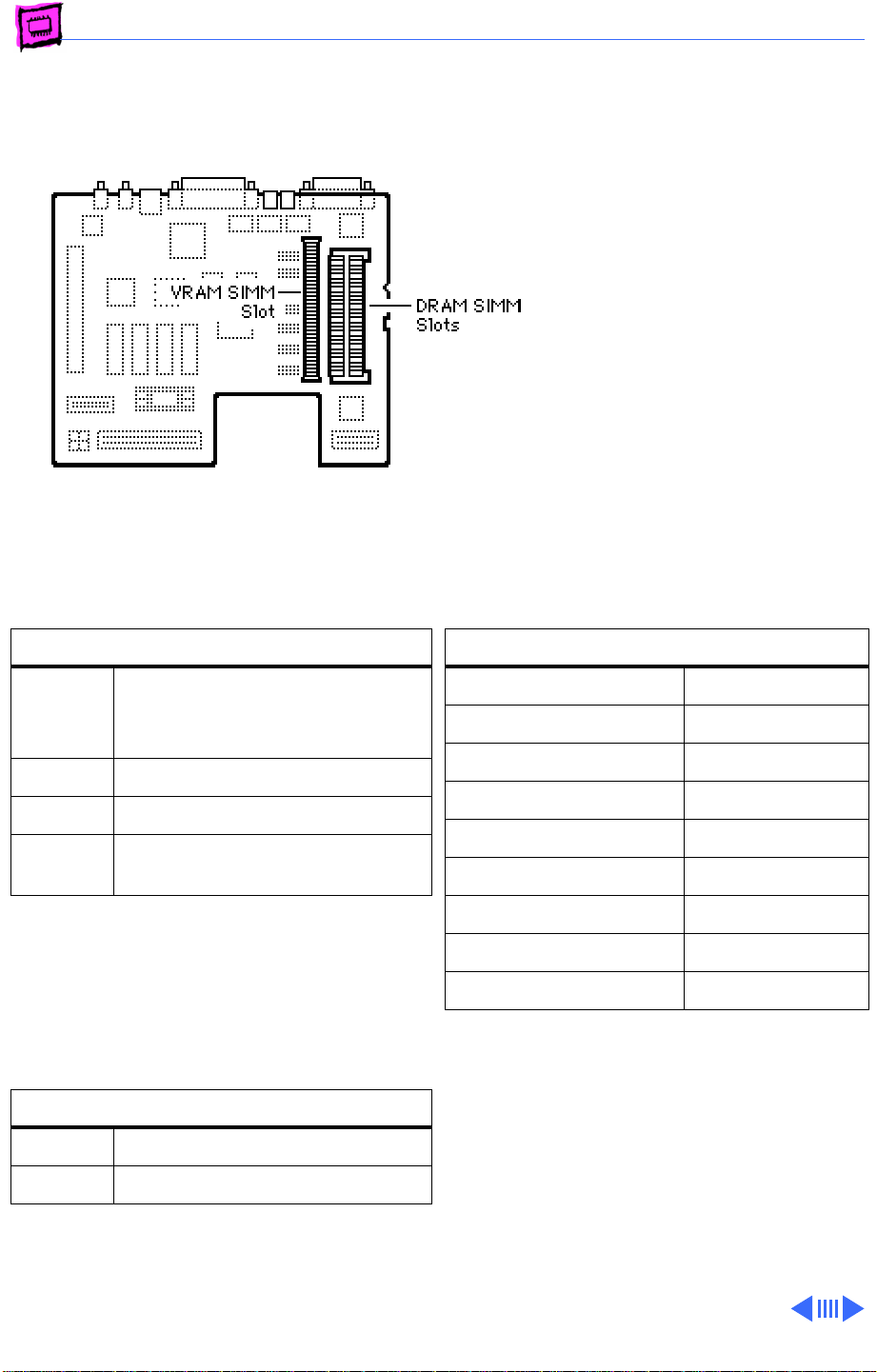
Memory Macintosh LC - 2
Macintosh LC II
The LC II has 2 MB or 4 MB of
soldered DRAM. You can
expand the memory to a total
of 10 MB by installing DRAM
SIMMs.
You must fill both slots with
matching SIMMs when
upgrading memory.
DRAM Configurations
2/4 MB The Macintosh LC II has either
2 MB or 4 MB of soldered
DRAM.
4/6 MB Install two 1 MB SIMMs.
6/8 MB Install two 2 MB SIMMs.
10/12 MBInstall two 4 MB SIMMs.
Note:
The Macintosh LC II can address a
maximum of 10 MB of DRAM. When you
install 4 MB SIMMs, the lower 2 MB of
memory on the logic board can't be addressed.
VRAM Configurations
256K Install one 256K VRAM SIMM.
512K Install one 512K VRAM SIMM.
Memory Information
DRAM Speed 100 ns
SIMM Type 30-pin
Soldered DRAM 4 MB
Number of SIMM Slots 2
Supported Sizes in MB 1, 2, 4
Maximum DRAM 10 MB
Virtual Memory 1 GB
Soldered VRAM None
Number of VRAM Slots 1
Note:
The LC II has no VRAM soldered to the
logic board. It comes with a 256K VRAM
SIMM installed and can be upgraded to 512K
by replacing the 256K SIMM with a 512K
SIMM that is 100 ns or faster.
Page 33
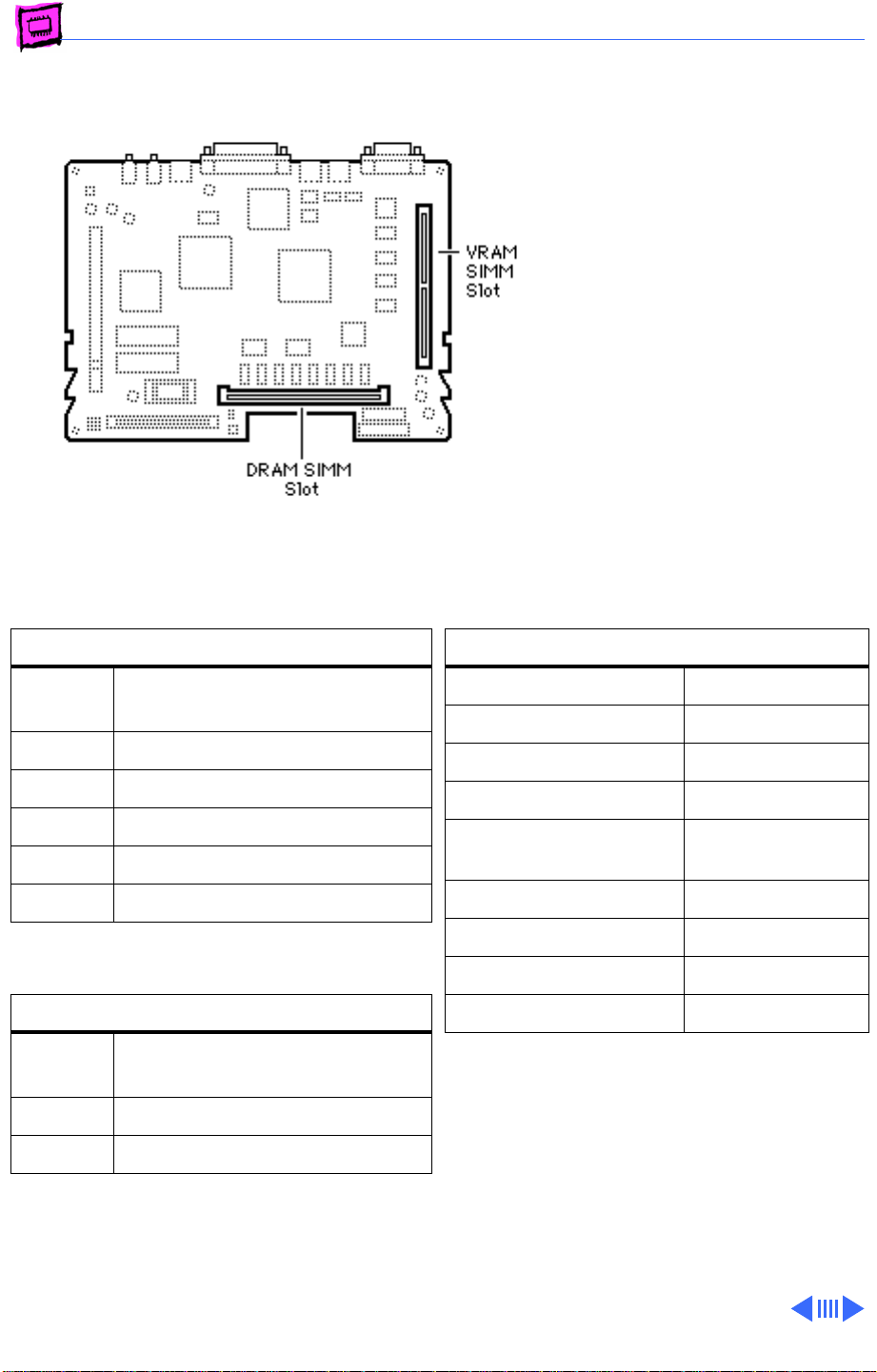
Memory Macintosh LC - 3
Macintosh LC III
The LC III has 4 MB of
soldered DRAM. You can
expand the memory to a total
of 36 MB by installing DRAM
SIMMs.
DRAM Configurations
4 MB The Macintosh LC III has 4 MB
of soldered DRAM.
6 MB Install one 2 MB SIMMs.
8 MB Install one 4 MB SIMMs.
12 MB Install one 8 MB SIMMs.
20 MB Install one 16 MB SIMMs.
36 MB Install one 32 MB SIMMs.
VRAM Configurations
512K The Macintosh LC III logic board
has 512K of soldered VRAM.
768K Install one 256K VRAM SIMM.
1 MB Install one 512K VRAM SIMM.
Memory Information
DRAM Speed 80 ns
SIMM Type 72-pin
Soldered DRAM 4 MB (see Note)
Number of SIMM Slots 1
Supported Sizes in MB 1, 2, 4, 8, 16,
32
Maximum DRAM 36 MB
Virtual Memory 1 GB
Soldered VRAM 512K
Number of VRAM Slots 1
Note:
Some LC III upgrade boards have 2 MB
of DRAM soldered to the logic board.
Page 34
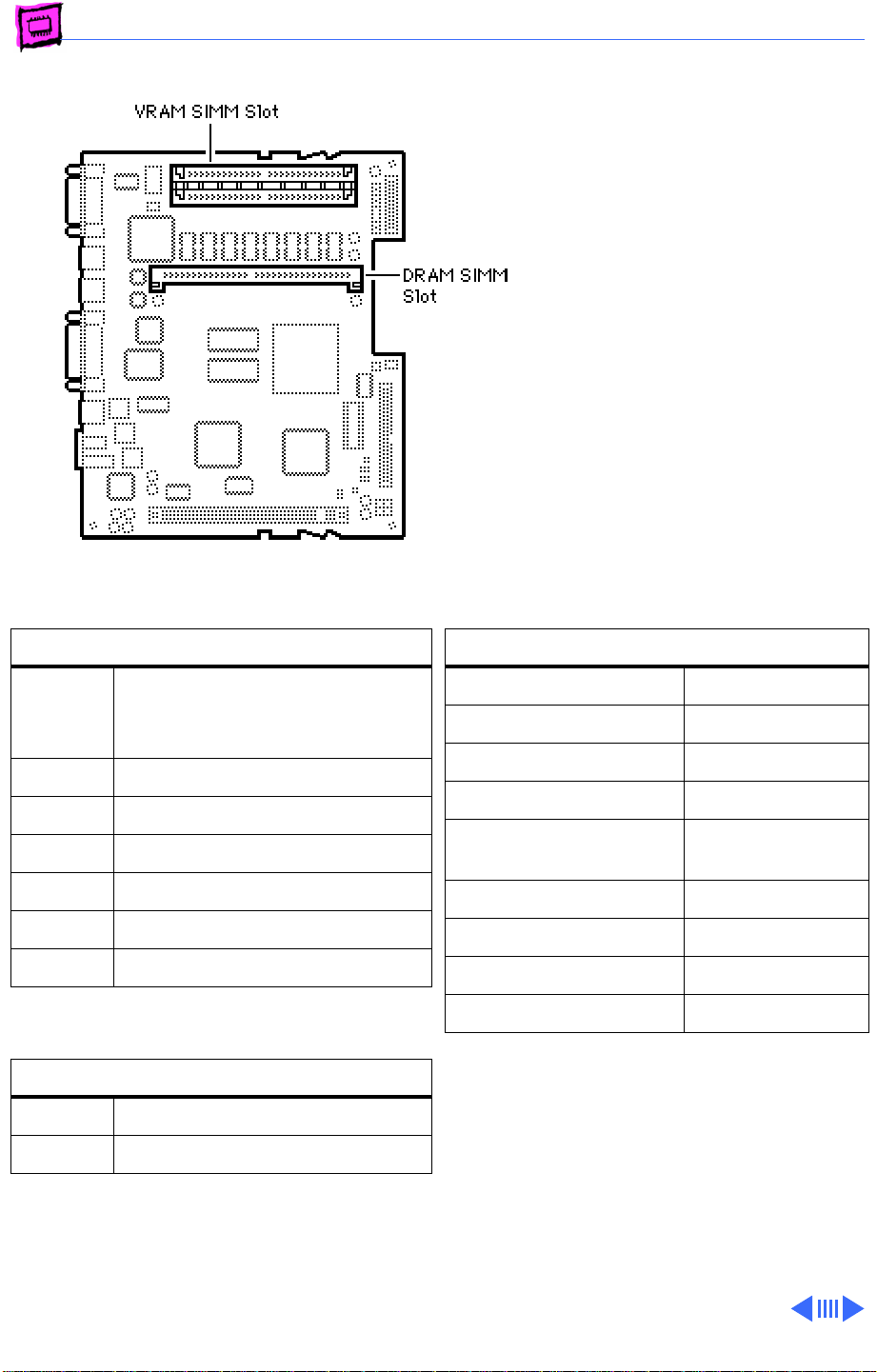
Memory Macintosh LC - 4
Macintosh LC 475
The LC 475 has 4 MB of
soldered DRAM. You can
expand the memory to a total
of 36 MB by installing DRAM
SIMMs.
Single-sided SIMMs in 1, 4,
8, and 16 MB densities and
double-sided SIMMs in 2, 4,
and 32 MB densities are
supported.
DRAM Configurations
4 MB The Macintosh LC 475 logic
board has 4 MB of soldered
DRAM.
5 MB Install one 1 MB SIMM.
6 MB Install one 2 MB SIMM.
8 MB Install one 4 MB SIMM.
12 MB Install one 8 MB SIMM.
20 MB Install one 16 MB SIMM.
36 MB Install one 32 MB SIMM.
VRAM Configurations
512K Install two 256K VRAM SIMMs.
1 MB Install two 512K VRAM SIMMs.
Memory Information
DRAM Speed 80 ns
SIMM Type 72-pin
Soldered DRAM 4 MB
Number of SIMM Slots 1
Supported Sizes in MB 1, 2, 4, 8, 16,
32
Maximum DRAM 36 MB
Virtual Memory 1 GB
Soldered VRAM None
Number of VRAM Slots 2
Note:
The LC 475 has 512K of VRAM
installed via two 256K VRAM SIMMs.
Upgrading to 1 MB of VRAM is accomplished
by replacing those SIMMs with two 512K,
68-pin, 80 ns VRAM SIMMs.
Page 35
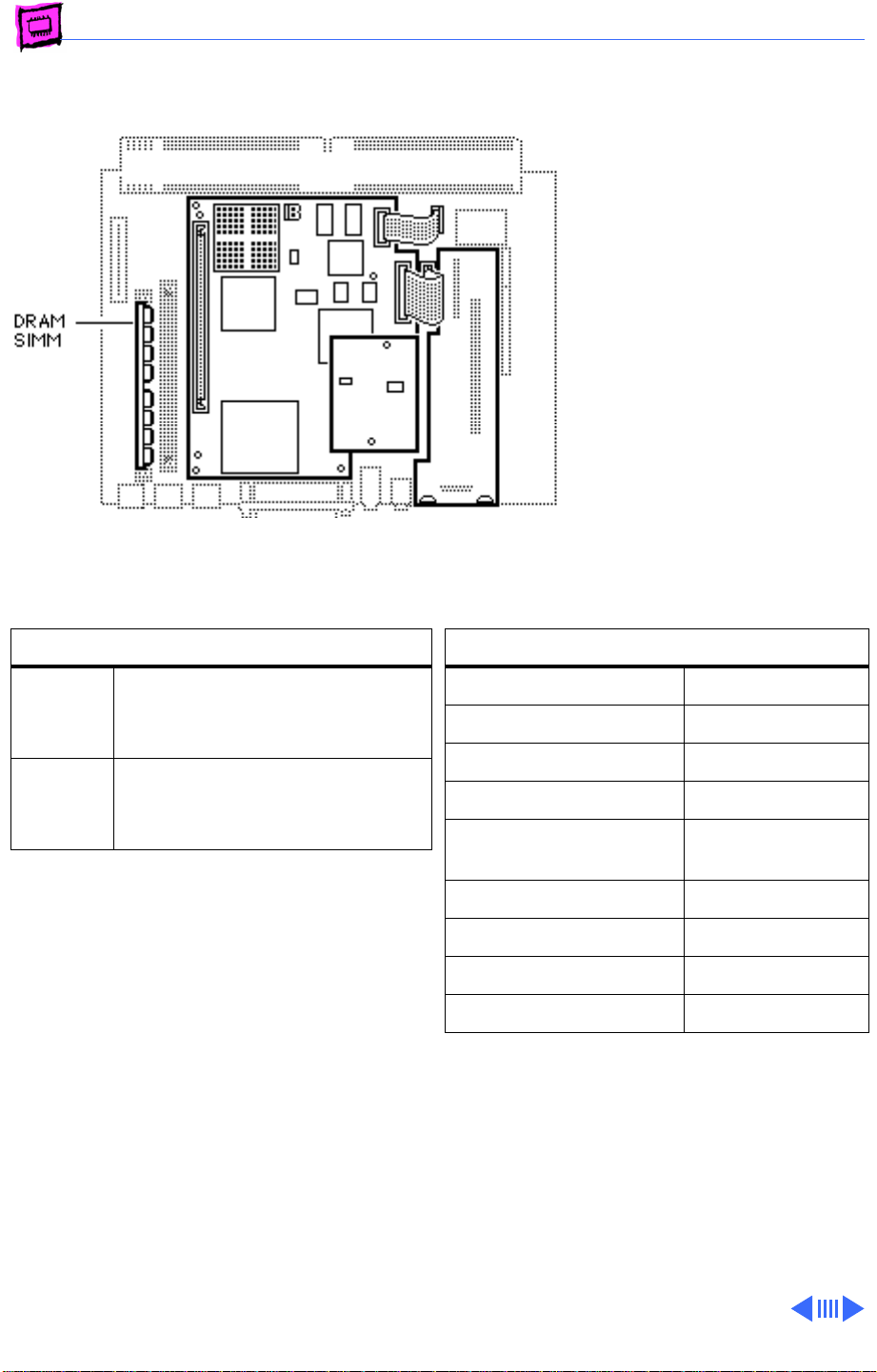
Memory Macintosh LC - 5
Macintosh LC 630 DOS Compatible
The LC 630 DOS Compatible
has 8 MB of DRAM: 4 MB
soldered on the logic board
and one 4 MB SIMM installed.
You can expand the memory
on the main logic board to a
total of 52 MB by installing a
32 MB DRAM SIMM in one
slot and a 16 MB DRAM SIMM
in the second slot.
The DOS Compatible board
ships with one 4 MB DRAM
SIMM, and can be upgraded
to a total of 32 MB.
DRAM Configurations
8 MB The LC 630 DOS Compatible has
8 MB of DRAM: 4 MB soldered,
4 MB SIMM in one slot.
52 MB Use various combinations of
72-pin SIMMs up to a total of
52 MB.
Memory Information
DRAM Speed 80 ns
SIMM Type 72-pin
Soldered DRAM 4 MB
Number of SIMM Slots 1
Supported Sizes in MB 1, 2, 4, 8, 16,
32
Maximum DRAM 52 MB
Virtual Memory 1 GB
Soldered VRAM 1 MB
Number of VRAM Slots None
Page 36
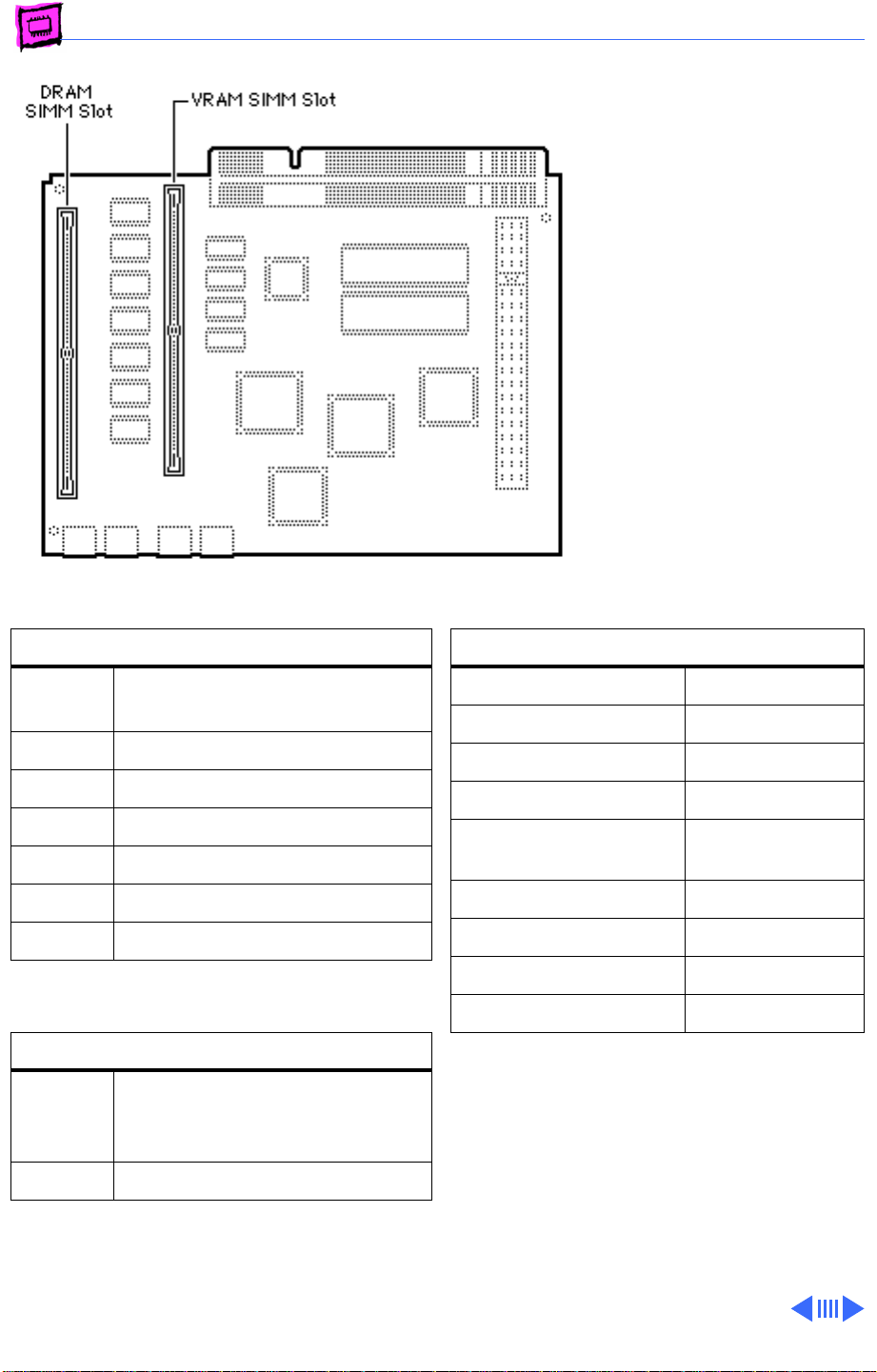
Memory Macintosh LC - 6
LC 520
The Macintosh LC 520 has
4 MB of soldered DRAM and
one 1 MB DRAM SIMM
installed. You can expand the
memory to a total of 36 MB
by installing additional DRAM
SIMMs.
The LC 520 has 512K of
VRAM soldered to the logic
board. It can be upgraded to
768K by adding a 256K
VRAM SIMM that is rated at
80 ns or faster.
DRAM Configurations
4 MB The Macintosh LC 520 has 4 MB
of soldered DRAM.
5 MB Install one 1 MB SIMM.
6 MB Install one 2 MB SIMM.
8 MB Install one 4 MB SIMM.
12 MB Install one 8 MB SIMM.
20 MB Install one 16 MB SIMM.
36 MB Install one 32 MB SIMM.
VRAM Configurations
512K The Macintosh LC 520 logic
board has 512K of soldered
VRAM.
768K Install one 256K VRAM SIMMs.
Memory Information
DRAM Speed 80 ns
SIMM Type 72-pin
Soldered DRAM 4 MB
Number of SIMM Slots 1
Supported Sizes in MB 1, 2, 4, 8, 16,
32
Maximum DRAM 36 MB
Virtual Memory 1 GB
Soldered VRAM 512K
Number of VRAM Slots 1
Note:
Some configurations may come with
768K of VRAM already installed. You can
verify this by checking the number of
available colors in the monitor control
panel. If Thousands of colors are available,
the maximum VRAM is installed.
Page 37
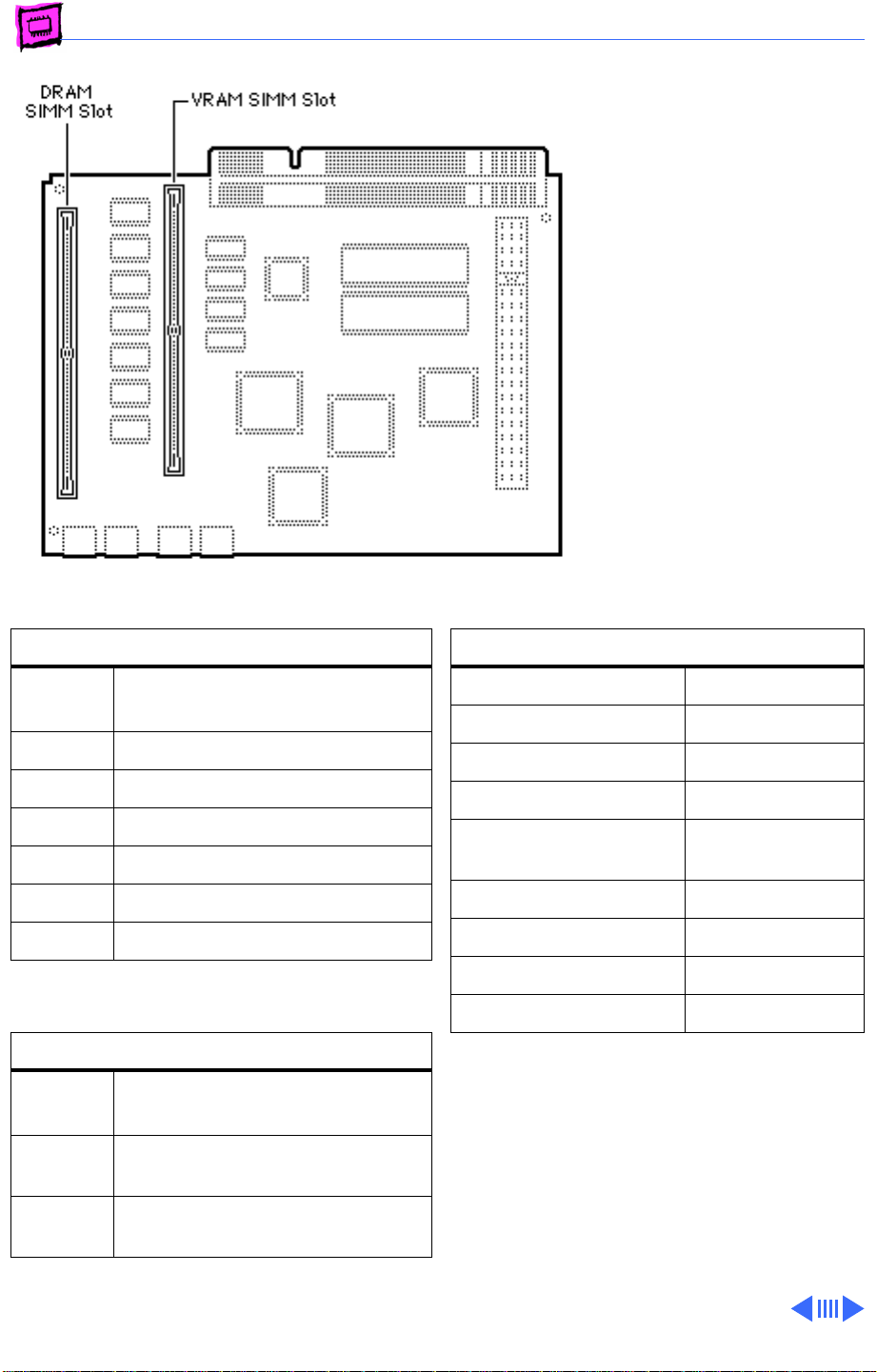
Memory Macintosh LC - 7
LC 550/575
The LC 550 and LC 575 have
4 MB of soldered DRAM. You
can expand the memory to a
total of 36 MB by installing
DRAM SIMMs.
VRAM is unique between the
two machines.
DRAM Configurations
4 MB The LC 550/575 logic boards
have 4 MB of soldered DRAM.
5 MB Install one 1 MB SIMM.
6 MB Install one 2 MB SIMM.
8 MB Install one 4 MB SIMM.
12 MB Install one 8 MB SIMM.
20 MB Install one 16 MB SIMM.
36 MB Install one 32 MB SIMM.
VRAM Configurations
512K
LC 550
1 MB
LC 575
1 MB
LC 550
The LC 550 logic board has
512K of soldered VRAM.
Install two 512K VRAM SIMMs.
Install one 512K VRAM SIMM.
Memory Information
DRAM Speed 80 ns
SIMM Type 72-pin
Soldered DRAM 4 MB
Number of SIMM Slots 1
Supported Sizes in MB 1, 2, 4, 8, 16,
32
Maximum DRAM 36 MB
Virtual Memory 1 GB
Soldered VRAM See VRAM Note
Number of VRAM Slots See VRAM Note
VRAM Note:
512K of VRAM soldered to the logic board and
one expansion slot. Maximum VRAM is 1 MB.
The Macintosh LC 575 has no soldered VRAM
and two VRAM SIMM slots. Maximum VRAM
is 1 MB.
The Macintosh LC 550 has
Page 38
Memory Macintosh LC - 8
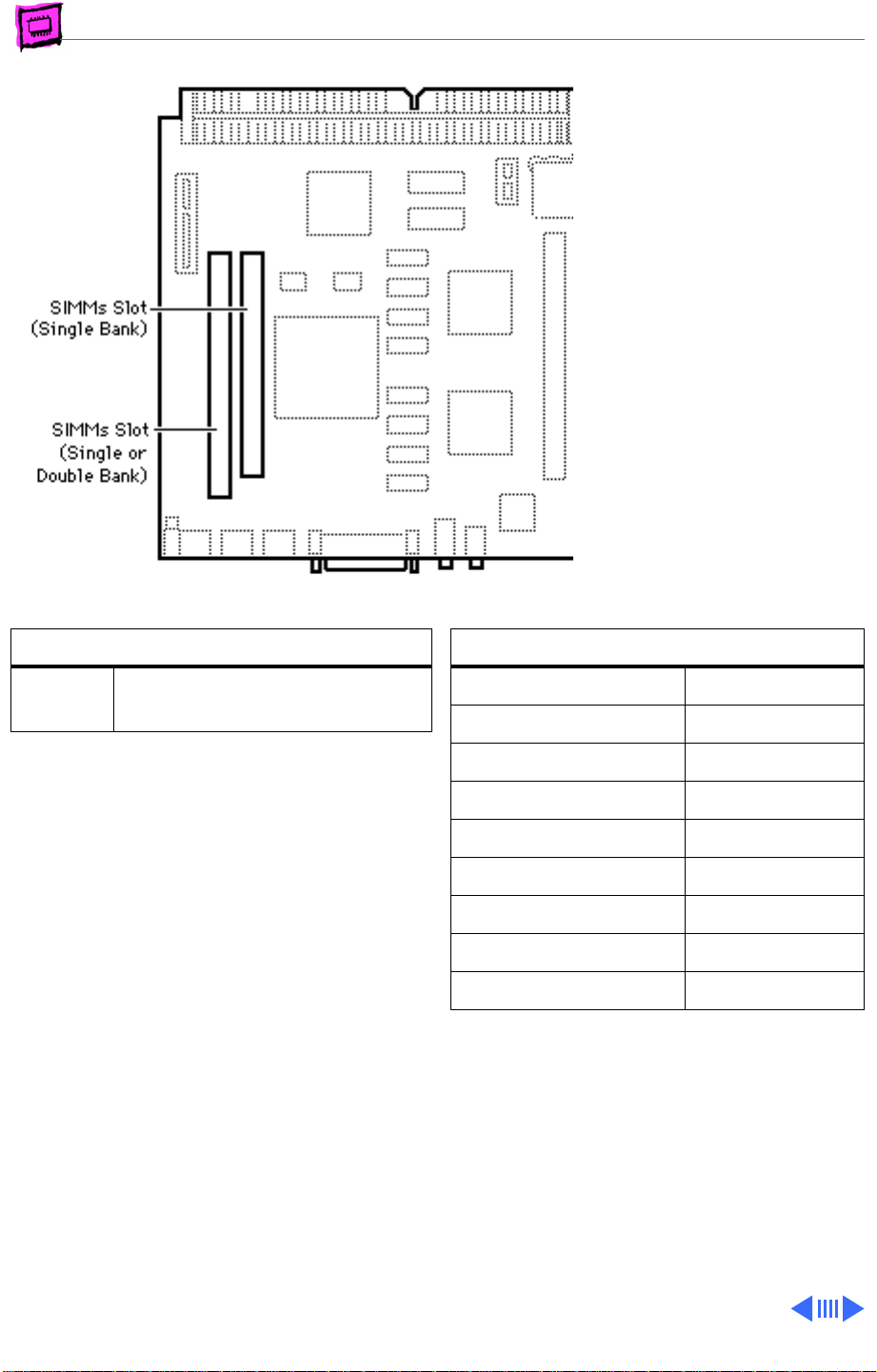
LC 580
The LC 580 logic board has 4
MB of soldered DRAM. You can
expand the memory to a total
of 52 MB by installing DRAM
SIMMs.
The leftmost SIMM slot (as
pictured here) can
accommodate a single-sided
or double-sided 1, 2, 4, 8,
16, or 32 MB SIMM.
The rightmost SIMM slot (as
pictured here) can accept
only a single-sided 1, 4, or
16 MB SIMM.
DRAM Configurations
Up to
52 MB
Note:
The SIMM slots are also marked on the
logic board as to which is the slot for the
single-sided SIMM.
Use various combinations of
72-pin SIMMs.
Memory Information
DRAM Speed 80 ns
SIMM Type 72-pin
Soldered DRAM 4 MB
Number of SIMM Slots 2
Supported Sizes in MB See Note
Maximum DRAM 52 MB
Virtual Memory 1 GB
Soldered VRAM 1 MB DRAM
Number of VRAM Slots None
Note:
Supported memory configurations
include 6, 7, 9, 10, 12, 13, 21, 22, 24,
28, 36, 37, 40, 46, and 52 MB.
Page 39
K
Service Source
Performa
Page 40
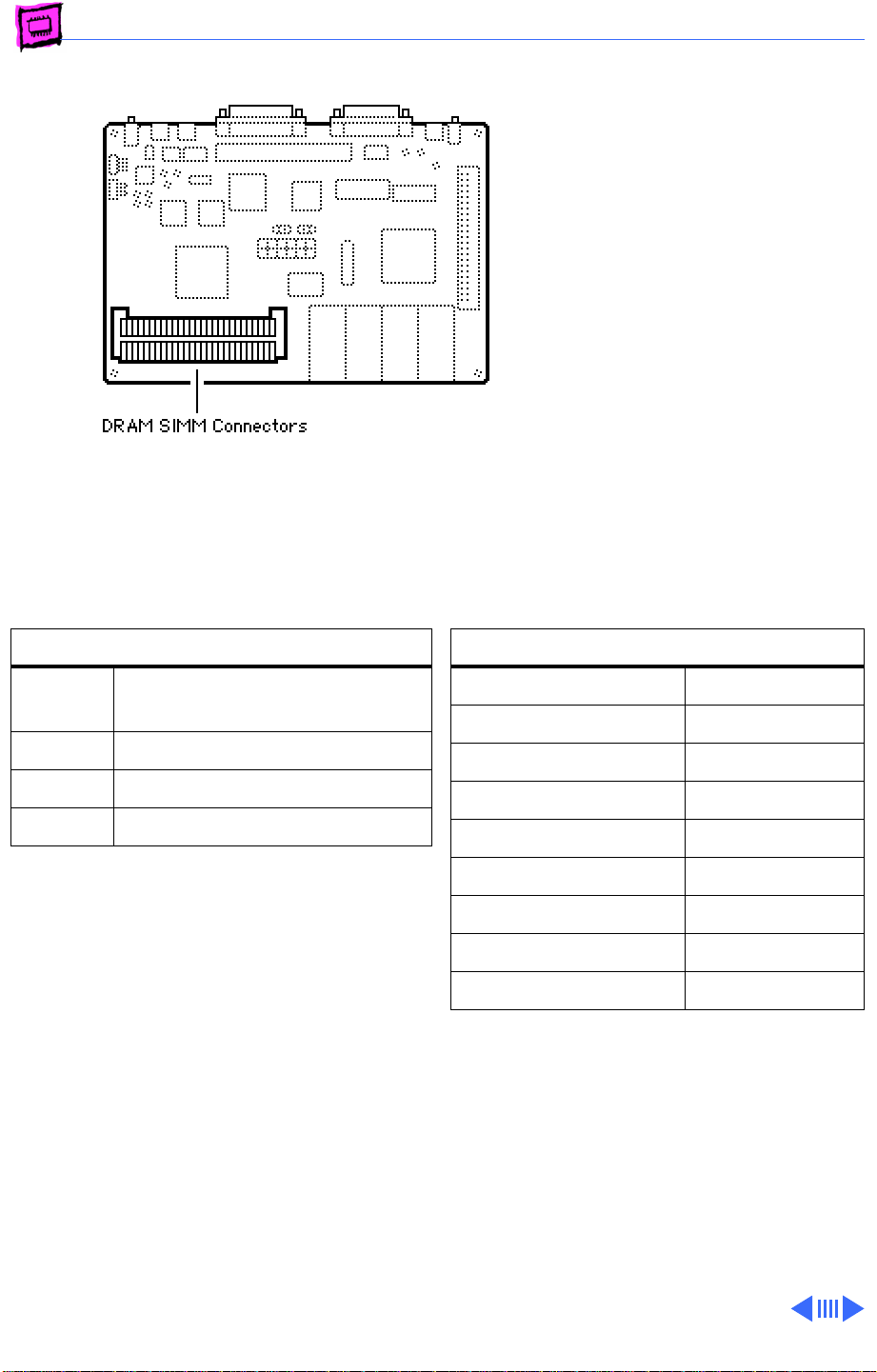
Memory Performa - 1
Performa 200
The Performa 200 has 2 MB
of soldered DRAM and comes
standard with an additional 2
MB of DRAM installed in two
1 MB SIMMs. You can expand
the memory to a total of 10
MB by replacing the two 1
MB SIMMs with two 4 MB
SIMMs.
DRAM Configurations
2 MB The Performa 200 logic board
has 2 MB of soldered DRAM.
4 MB Install two 1 MB SIMMs.
6 MB Install two 2 MB SIMMs.
10 MB Install two 4 MB SIMMs.
Note:
You must install SIMMs in both slots.
Memory Information
DRAM Speed 100 ns
SIMM Type 30-pin
Soldered DRAM 2 MB
Number of SIMM Slots 2
Supported Sizes in MB 1, 2, 4
Maximum DRAM 10 MB
Virtual Memory 1 GB
Soldered VRAM None
Number of VRAM Slots None
Page 41
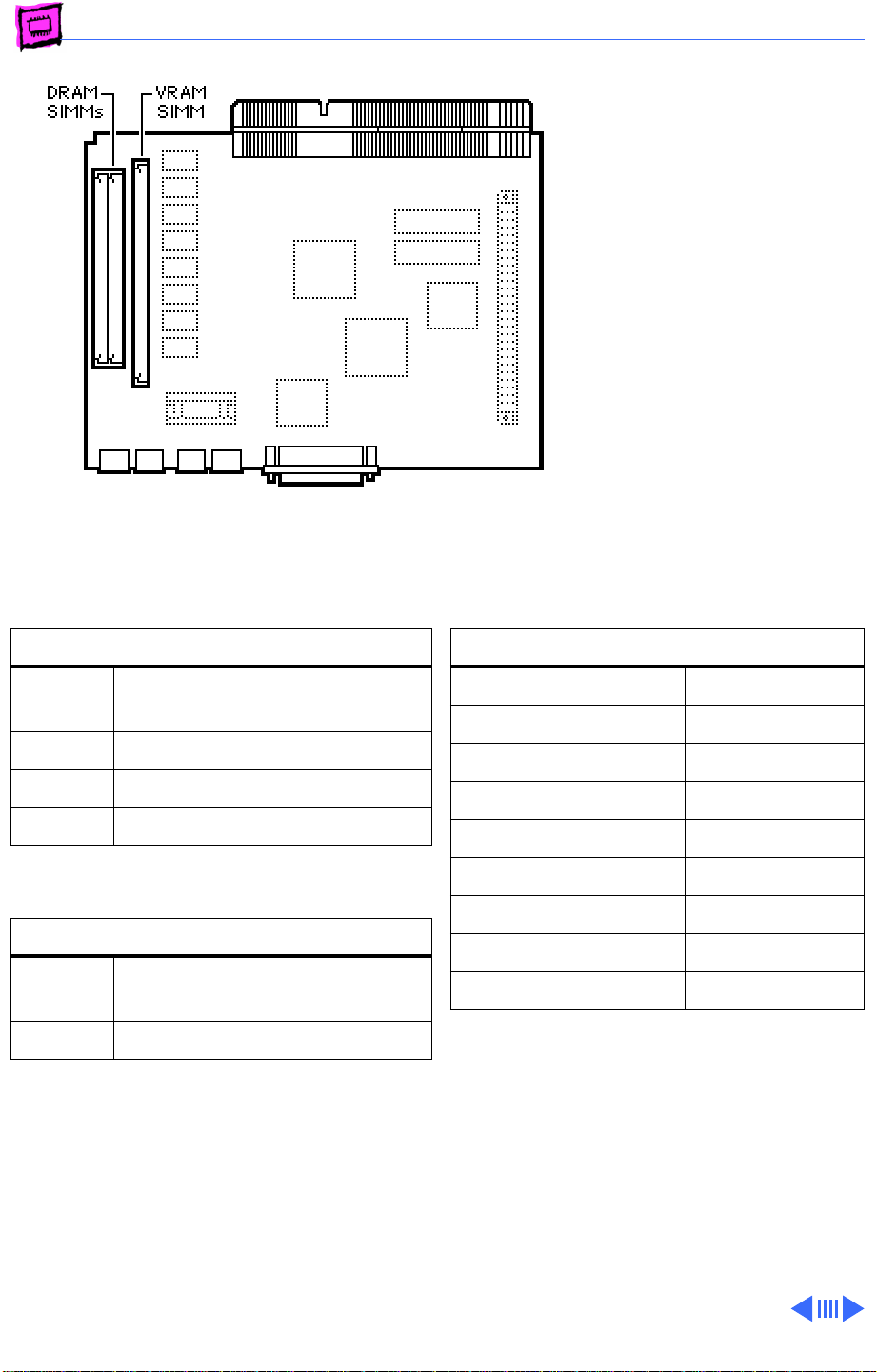
Memory Performa - 2
Performa 275 (International Only)
The Performa 275 logic
board has 4 MB of soldered
DRAM. You can expand the
memory to a total of 10 MB
by installing DRAM SIMMs.
DRAM Configurations
4 MB The Performa 275 logic board
has 4 MB of soldered DRAM.
6 MB Install two 1 MB SIMMs.
8 MB Install two 2 MB SIMMs.
10 MB Install two 4 MB SIMMs.
VRAM Configurations
256K The Performa 275 logic board
has 256K of soldered VRAM.
512K Install one 256K VRAM SIMM.
Memory Information
DRAM Speed 100 ns
SIMM Type 30-pin
Soldered DRAM 4 MB
Number of SIMM Slots 2
Supported Sizes in MB 1, 2, 4
Maximum DRAM 10 MB
Virtual Memory 1 GB
Soldered VRAM 256K
Number of VRAM Slots 1
Page 42
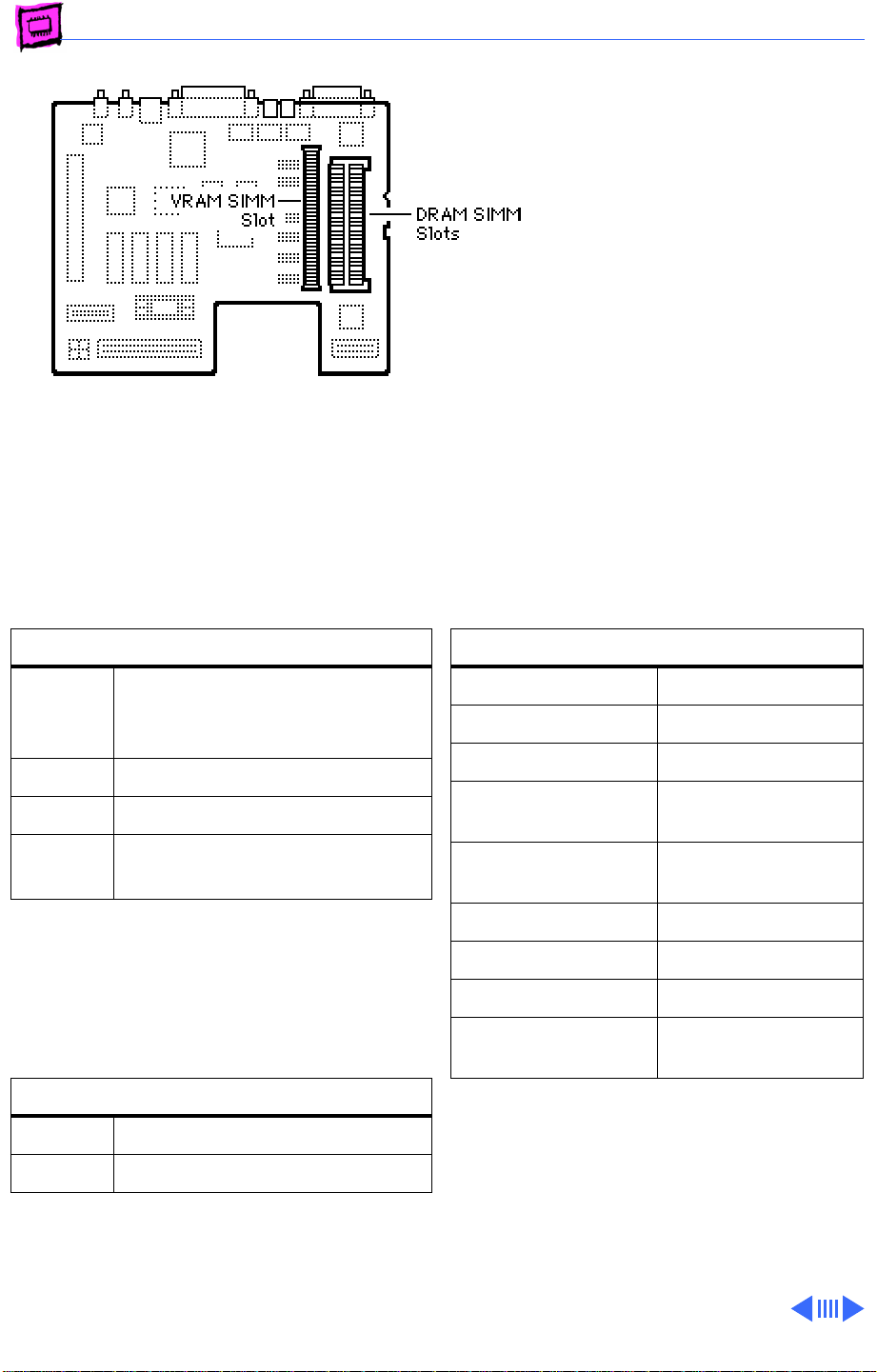
Memory Performa - 3
Performa 400, 405, 410, 430
The Performa 400, 405,
410, and 430 each have 4
MB of soldered DRAM. You can
expand the memory on each
machine to a total of 10 MB
by installing DRAM SIMMs.
DRAM Configurations
4 MB The Performa 400, 405, 410,
and 430 logic boards have 4 MB
of soldered DRAM.
6 MB Install two 1 MB SIMMs.
8 MB Install two 2 MB SIMMs.
10 MB Install two 4 MB SIMMs (see
Note).
Note:
The Performa 400, 405, 410, and
430 can address a maximum of 10 MB of
DRAM. When you install 4 MB SIMMs, the
lower 2 MB of memory on the logic board
can't be addressed.
VRAM Configurations
256K Install one 256K VRAM SIMM.
512K Install one 512K VRAM SIMM.
Memory Information
DRAM Speed 100 ns
SIMM Type 30-pin
Soldered DRAM 4 MB
Number of SIMM
Slots
Supported Sizes in MB1, 2, 4
Maximum DRAM 10 MB
Virtual Memory 1 GB
Soldered VRAM None
Number of VRAM
Slots
Note:
You must fill both slots with matching
DRAM SIMMs when upgrading memory.
2
1
Page 43
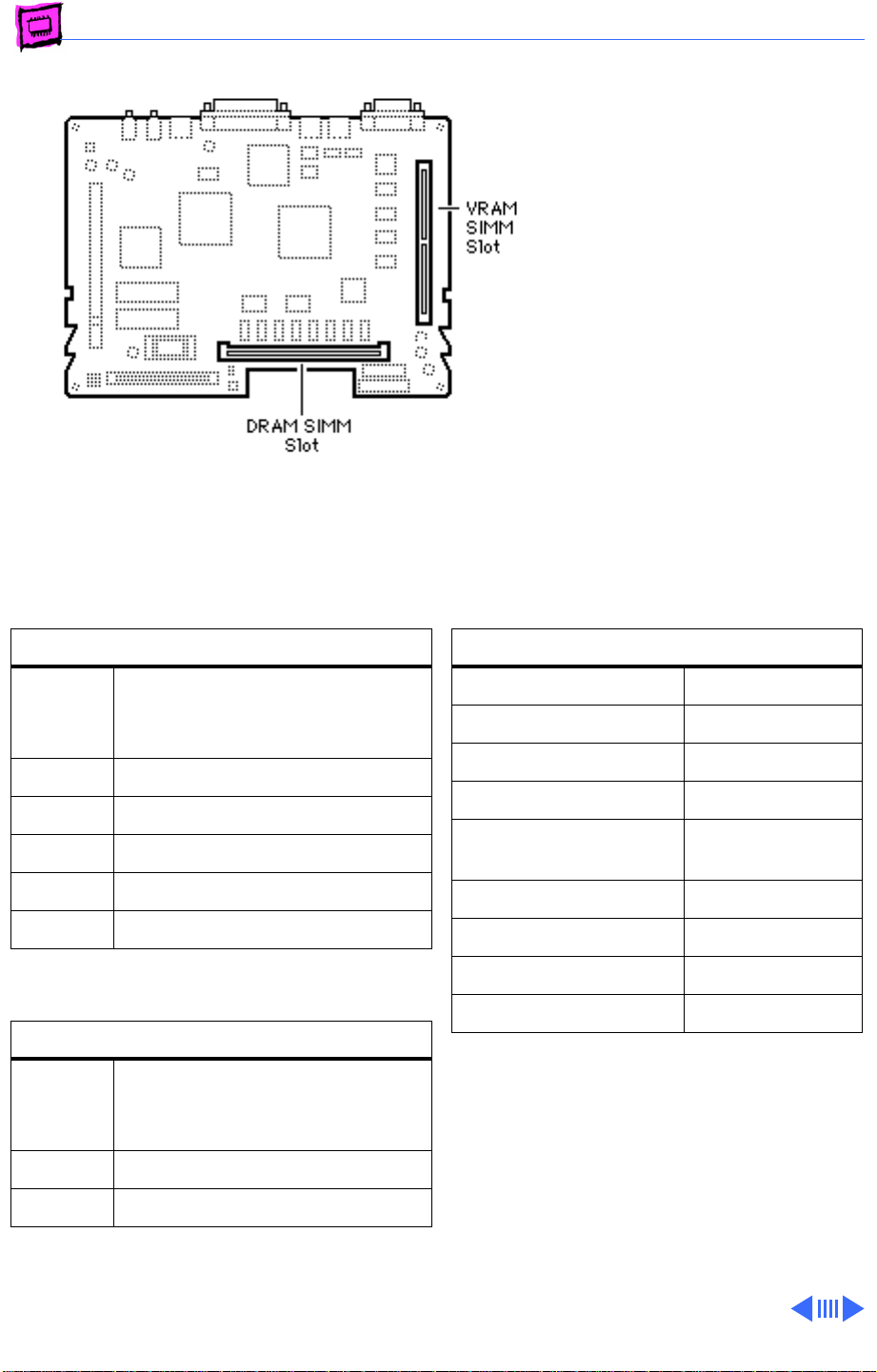
Memory Performa - 4
Performa 450, 460, 466, 467
The Performa 450, 460,
466, and 467 each have 4
MB of soldered DRAM. You can
expand the memory of each
machine to a total of 36 MB
by installing DRAM SIMMs.
DRAM Configurations
4 MB The Performa 450, 460, 466,
and 467 logic boards have 4 MB
of soldered DRAM.
6 MB Install one 2 MB SIMM.
8 MB Install one 4 MB SIMM.
12 MB Install one 8 MB SIMM.
20 MB Install one 16 MB SIMM.
36 MB Install one 32 MB SIMM.
VRAM Configurations
512K The Performa 450, 460, 466,
and 467 logic boards have
512K of soldered VRAM.
768K Install one 256K VRAM SIMM.
Memory Information
DRAM Speed 80 ns
SIMM Type 72-pin
Soldered DRAM 4 MB
Number of SIMM Slots 1
Supported Sizes in MB 1, 2, 4, 8, 16,
32
Maximum DRAM 36 MB
Virtual Memory 1 GB
Soldered VRAM 512K
Number of VRAM Slots 1
1 MB Install one 512K VRAM SIMM.
Page 44
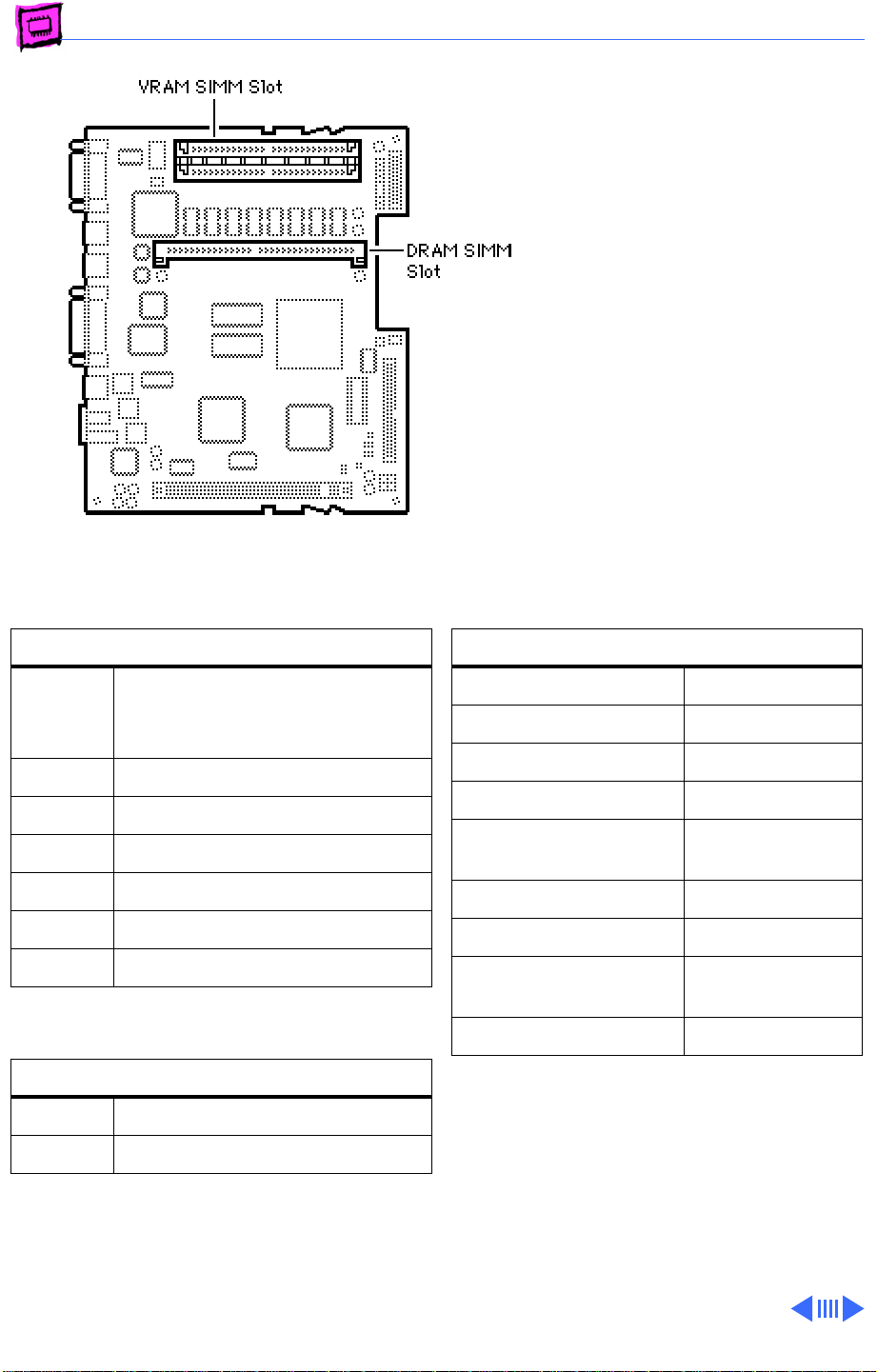
Memory Performa - 5
Performa 475, 476
The Performa 475 and 476
each have 4 MB of soldered
DRAM. You can expand the
memory of each machine to a
total of 36 MB by installing
DRAM SIMMs.
Single-sided SIMMs in 1, 4,
8, and 16 MB densities are
supported, and double-sided
SIMMs in 2, 4, and 32 MB
densities are also supported.
DRAM Configurations
4 MB The Performa 475 and 476
logic boards have 4 MB of
soldered DRAM.
5 MB Install one 1 MB SIMM.
6 MB Install one 2 MB SIMM.
8 MB Install one 4 MB SIMM.
12 MB Install one 8 MB SIMM.
20 MB Install one 16 MB SIMM.
36 MB Install one 32 MB SIMM.
VRAM Configurations
512K Install two 256K VRAM SIMMs.
1 MB Install two 512K VRAM SIMMs.
Memory Information
DRAM Speed 80 ns
SIMM Type 72-pin
Soldered DRAM 4 MB
Number of SIMM Slots 1
Supported Sizes in MB 1, 2, 4, 8, 16,
32
Maximum DRAM 36 MB
Virtual Memory 1 GB
Soldered VRAM (See VRAM
Note)
Number of VRAM Slots 2
VRAM Note:
with two 256K VRAM SIMMs installed. You
can upgrade the machine to 1 MB of VRAM by
replacing the 256K SIMMs with two 512K,
68-pin, 80 ns VRAM SIMMs.
These computers come standard
Page 45
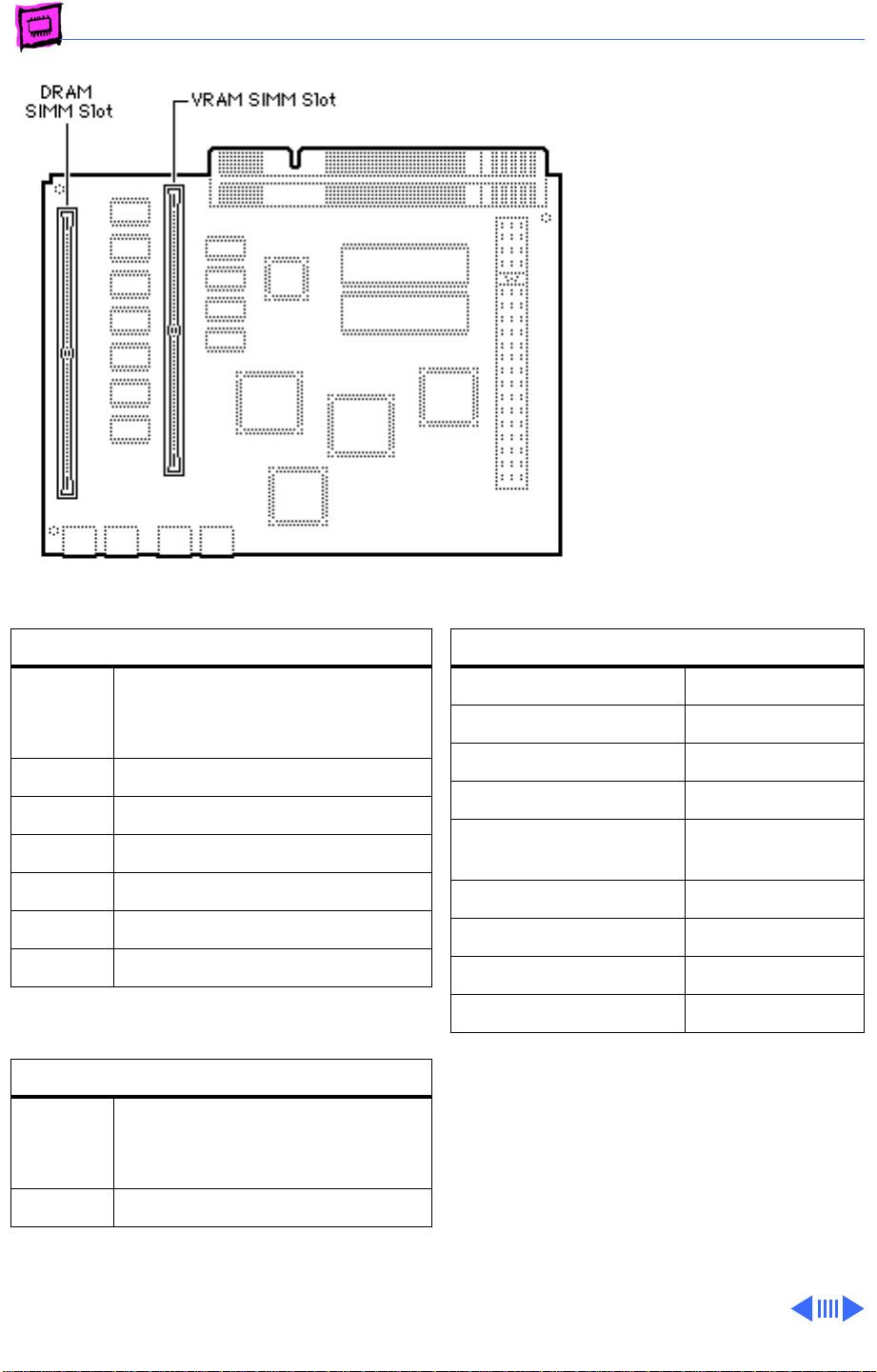
Memory Performa - 6
Performa 550, 560
The Performa 550 and
Performa 560 logic boards
each have 4 MB of soldered
DRAM and one 1 MB DRAM
SIMM installed. You can
expand the memory of each
machine to a total of 36 MB
by installing additional DRAM
SIMMs.
DRAM Configurations
4 MB The Performa 550 and 560
logic boards have 4 MB of
soldered DRAM.
5 MB Install one 1 MB SIMM.
6 MB Install one 2 MB SIMM.
8 MB Install one 4 MB SIMM.
12 MB Install one 8 MB SIMM.
20 MB Install one 16 MB SIMM.
36 MB Install one 32 MB SIMM.
VRAM Configurations
512K The Performa 550 and 560
logic boards have 512K of
soldered VRAM.
768K Install one 256K VRAM SIMMs.
Memory Information
DRAM Speed 80 ns
SIMM Type 72-pin
Soldered DRAM 4 MB
Number of SIMM Slots 1
Supported Sizes in MB 1, 2, 4, 8, 16,
32
Maximum DRAM 36 MB
Virtual Memory 1 GB
Soldered VRAM 512K
Number of VRAM Slots 1
Note:
Some configurations may come with
768K of VRAM already installed. You can
verify this by checking the number of
available colors under the monitors control
panel. If Thousands of colors are available,
the maximum VRAM is installed.
Page 46
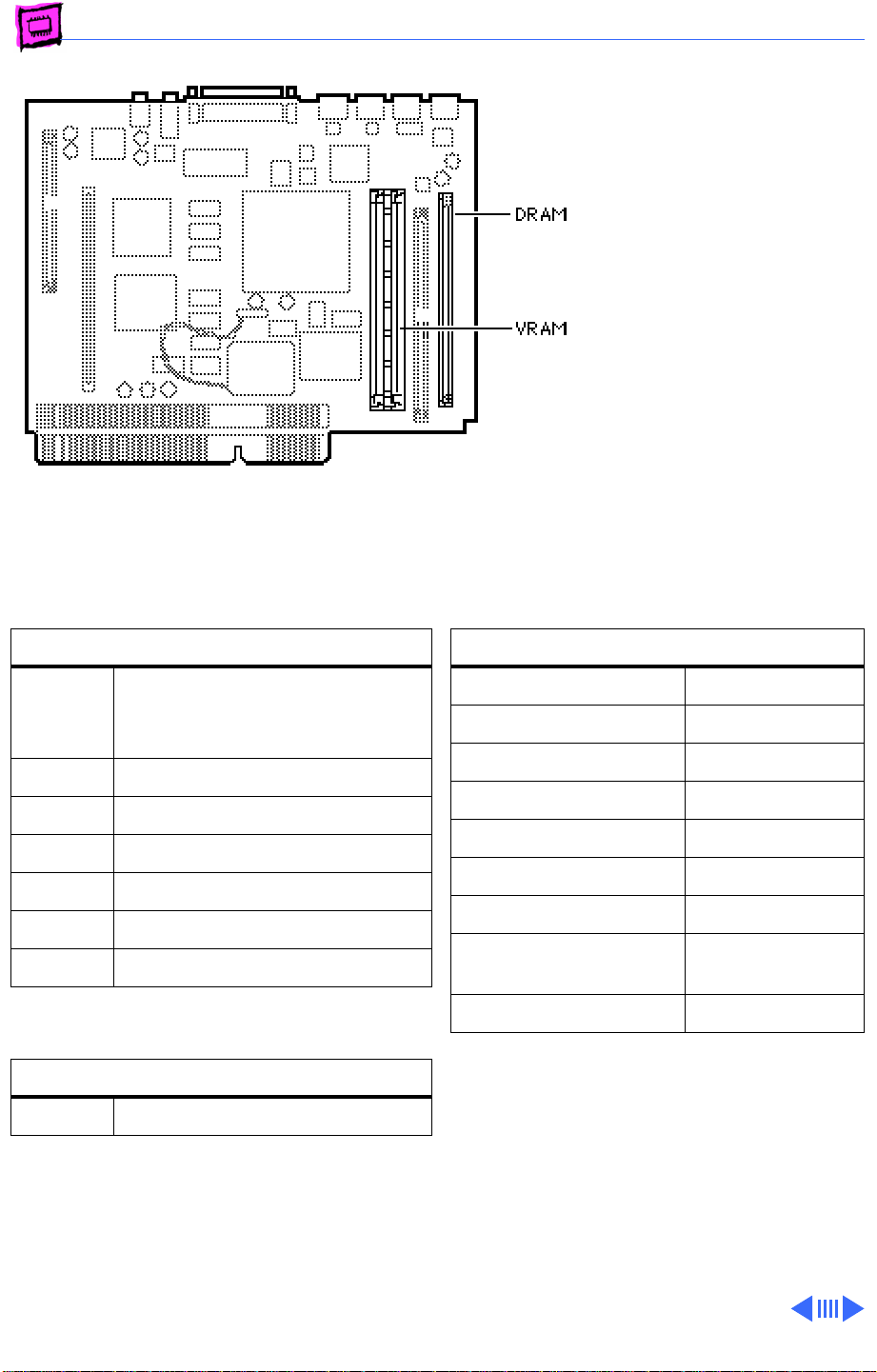
Memory Performa - 7
Performa 575, 577
The Performa 575 and
Performa 577 logic boards
each have 4 MB of soldered
DRAM. You can expand the
memory of each machine to a
total of 36 MB by installing
DRAM SIMMs.
DRAM Configurations
4 MB The LC 575 and 577 logic
boards each have 4 MB of
soldered DRAM.
5 MB Install one 1 MB SIMM.
6 MB Install one 2 MB SIMM.
8 MB Install one 4 MB SIMM.
12 MB Install one 8 MB SIMM.
20 MB Install one 16 MB SIMM.
36 MB Install one 32 MB SIMM.
VRAM Configurations
1 MB Install two 512K VRAM SIMMs.
Memory Information
DRAM Speed 80 ns
SIMM Type 72-pin
Soldered DRAM 4 MB
Number of SIMM Slots 1
Supported Sizes in MB 1, 4, 16
Maximum RAM 36 MB
Virtual Memory 1 GB
Soldered VRAM (See VRAM
Note)
Number of VRAM Slots 2
VRAM Note:
each come with two 512K VRAM SIMMs
installed. VRAM is not upgradeable.
The Performa 575 and 577
Page 47
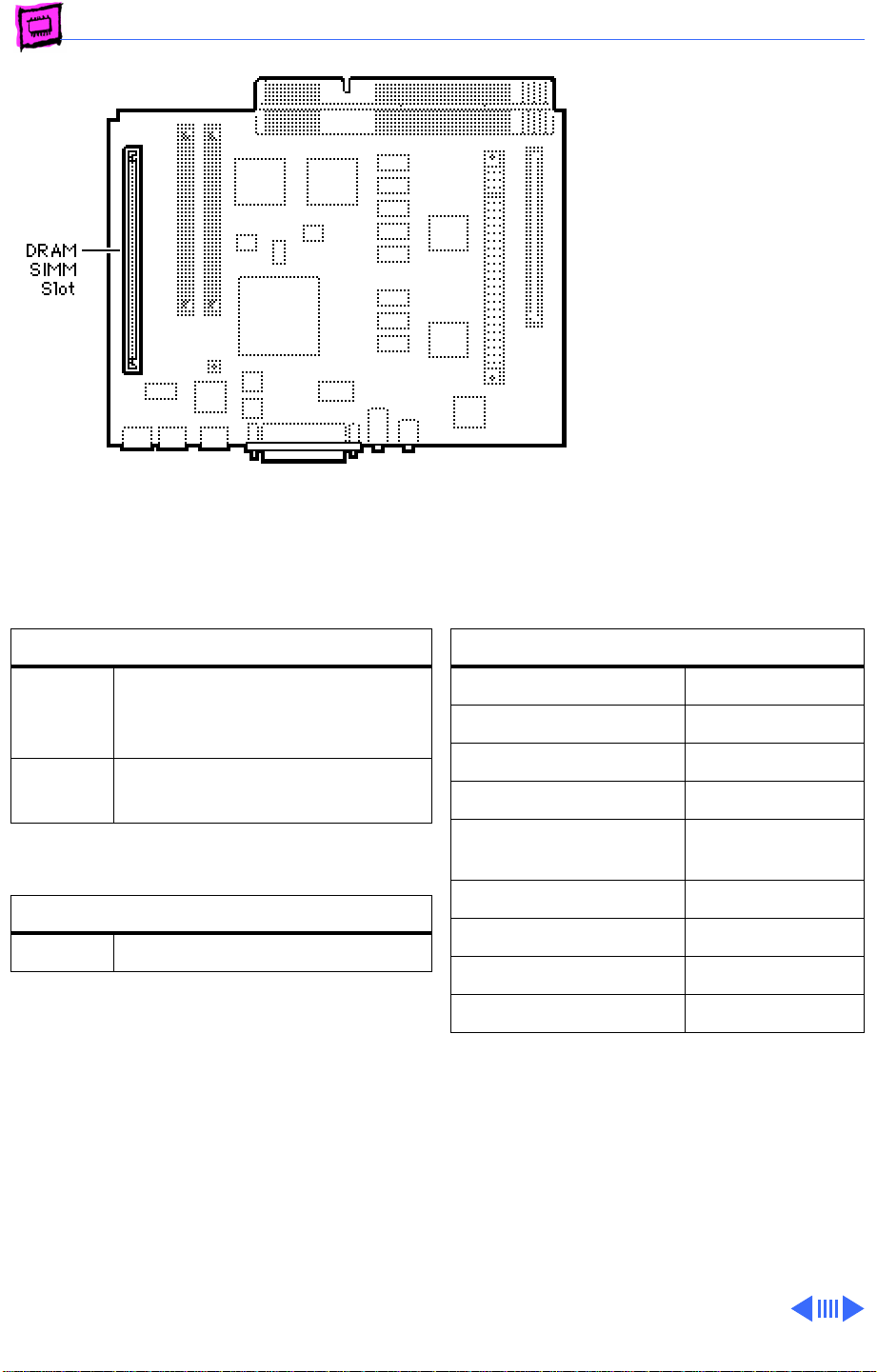
Memory Performa - 8
Performa 578
The Performa 578 logic
board has 8 MB of DRAM, 4
of which are soldered to the
logic board. You can expand
the memory to a total of 36
MB by installing DRAM
SIMMs.
DRAM Configurations
8 MB The Performa 578 logic board
comes with 4 MB of soldered
DRAM and one 4 MB SIMM.
Up to
36 MB
VRAM Configurations
1 MB Install two 512K VRAM SIMMs.
Note:
The Performa 578 comes with two
512K VRAM SIMMs installed. VRAM is not
upgradeable.
Use 1, 2, 4, 8, 16, or 32 MB
72-pin SIMMs.
Memory Information
DRAM Speed 80 ns
SIMM Type 72-pin
Soldered DRAM 4 MB
Number of SIMM Slots 1
Supported Sizes in MB 1, 2, 4, 8, 16,
32 MB
Maximum DRAM 36 MB
Virtual Memory 1 GB
Soldered VRAM None
Number of VRAM Slots 2
Page 48
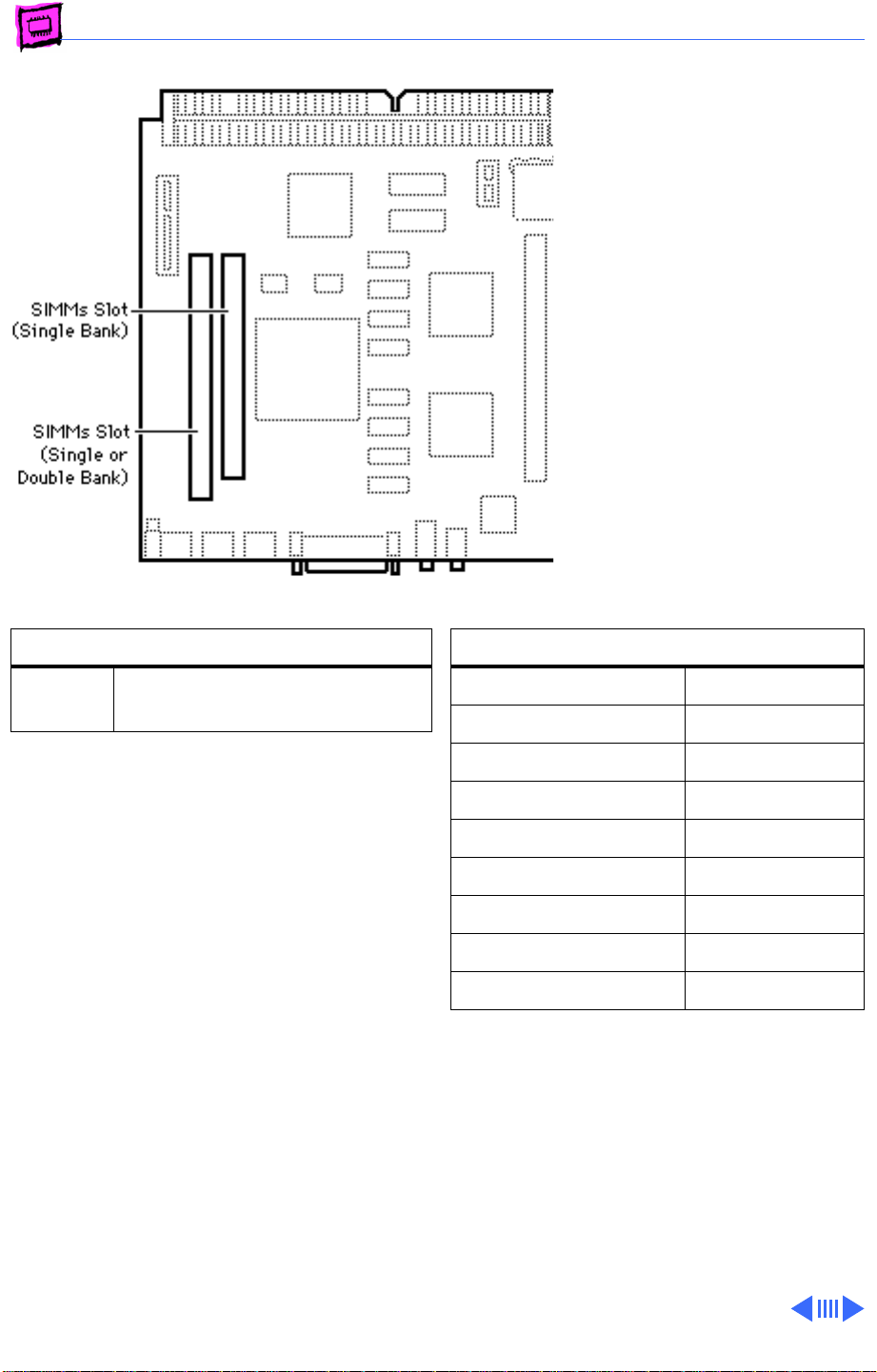
Memory Performa - 9
Performa 580CD
The Performa 580CD logic
board has 4 MB of soldered
DRAM and is expandable to 52
MB.
The leftmost SIMM slot (as
pictured here) can
accommodate a single-sided
or double-sided 1, 2, 4, 8,
16, or 32 MB SIMM.
The rightmost SIMM slot (as
pictured here) can accept
only a single-sided 1, 4, or
16 MB SIMM.
DRAM Configurations
Up to
52 MB
Note:
The SIMM slots are also marked on the
logic board as to which is the slot for the
single-sided SIMM.
Use various combinations of
72-pin SIMMs.
Memory Information
DRAM Speed 80 ns
SIMM Type 72-pin
Soldered DRAM 4 MB
Number of SIMM Slots 2
Supported Sizes in MB See Note
Maximum RAM 52MB
Virtual Memory 1 GB
Soldered VRAM 1 MB
Number of VRAM Slots None
Note:
Supported memory configurations
include 6, 7, 9, 10, 12, 13, 46, 21, 22,
24, 28, 36, 37, 40, and 52 MB.
Page 49
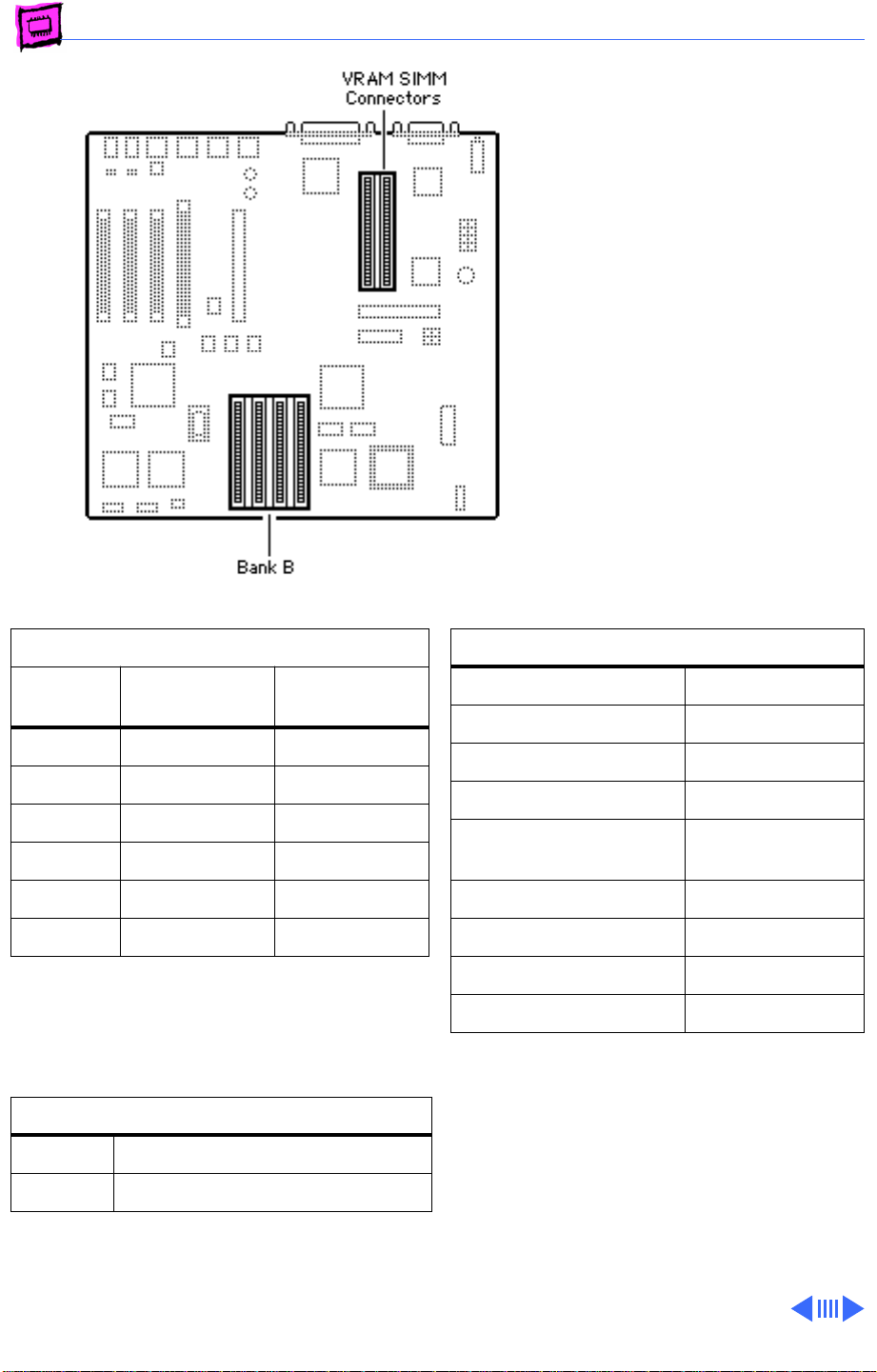
Memory Performa - 10
Performa 600
The Performa 600 has 4 MB
soldered on and is expandable
to 68 MB
Note:
A total of 5 MB of
memory (soldered DRAM
plus one 1 MB SIMM) is
standard on the Performa
600.
DRAM Configurations
Total
Memory
4 MB 4 MB Empty
5 MB 4 MB four 256K
8 MB 4 MB four 1 MB
12 MB 4 MB four 2 MB
20 MB 4 MB four 4 MB
68 MB 4 MB four 16 MB
Note:
You must fill an entire bank of four
SIMMs when upgrading.
VRAM Configurations
512K Install two 256K VRAM SIMMs.
1 MB Install two 512K VRAM SIMMs.
Bank A
(soldered) Bank B
Memory Information
DRAM Speed 80 ns
SIMM Type 30-pin
Soldered DRAM 4 MB
Number of SIMM Slots 4
Supported Sizes in MB .256, 1, 2, 4,
16
Maximum DRAM 68 MB
Virtual Memory 1 GB
Soldered VRAM None
Number of VRAM Slots 2
Page 50
Memory Performa - 11
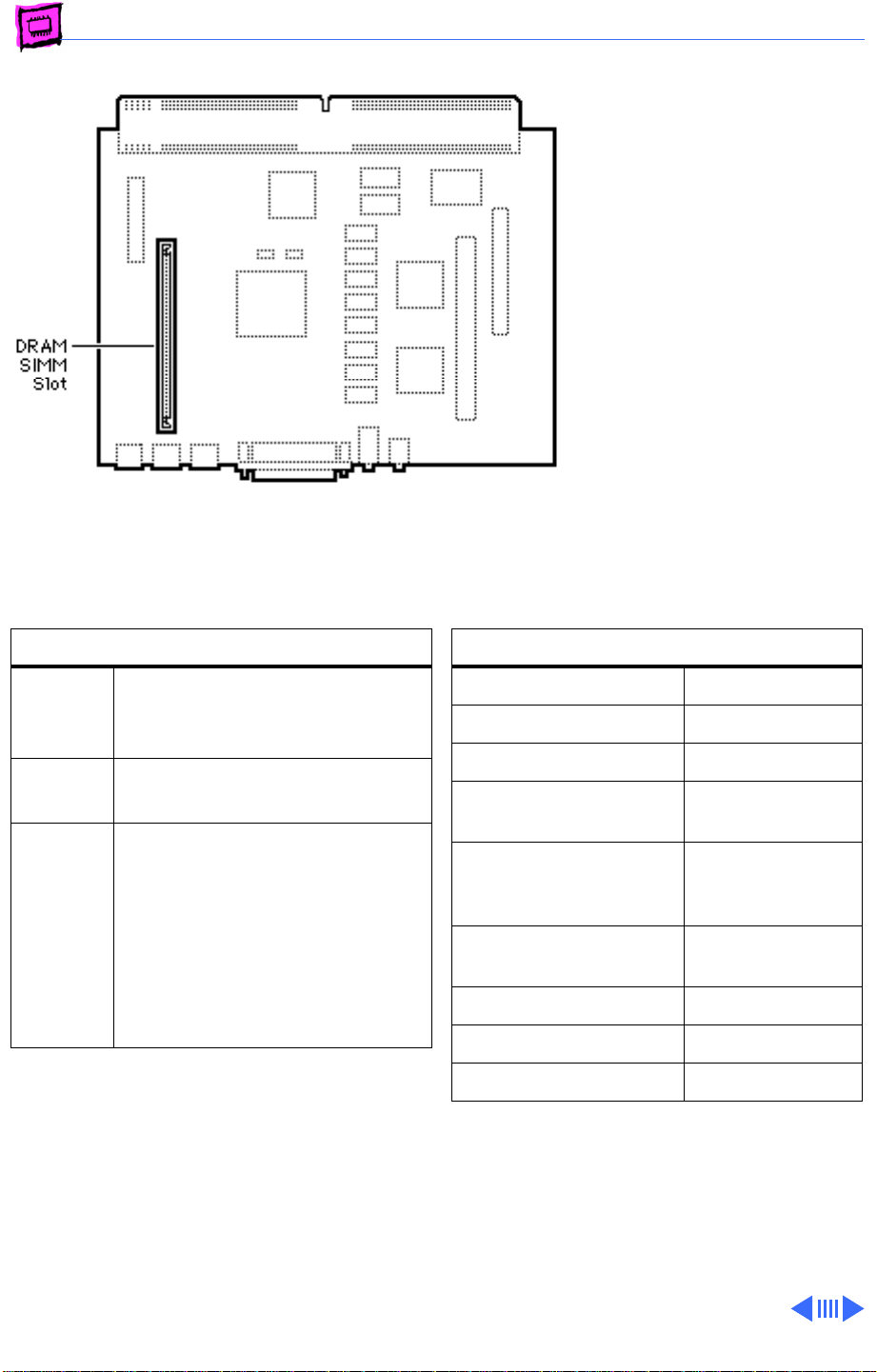
Performa 630, 636
The Performa 630 and
Performa 636 have 4 MB of
soldered DRAM and are
expandable to 36 MB of
memory.
Note:
The Performa 63x and
Quadra 630 cpus may have
one of two logic boards. One
logic board has one SIMM slot
(661-0518), the other
logic board (661-1114)
has two SIMM slots; a
regular SIMM slot and a
“single-sided” SIMM slot;
expandable to 52 MB.
DRAM Configurations
4 MB The Performa 630 and
Performa 636 logic boards
have 4 MB of soldered DRAM.
Up to
36 MB
Up to
52 MB
Use 1, 2, 4, 8, 16, or 32 MB
72-pin SIMMs.
Note
: If the customer has the
logic board with two SIMM slots
(661-1114), the maximum
RAM would be 52 MB. To
upgrade to 52 MB use a 32 MB
SIMM in the regular SIMM slot,
and a 16 MB SIMM in the
single-sided SIMM slot.
Memory Information
DRAM Speed 80 ns
SIMM Type 72-pin
Soldered DRAM 4 MB
Number of SIMM Slots 1 or 2 (see Note
above)
Supported Sizes in MB 1, 2, 4, 8, 16,
32, 52 MB (see
Note above)
Maximum DRAM 36 MB, 52 MB
(see Note above)
Virtual Memory 1 GB
Soldered VRAM 1 MB
Number of VRAM Slots None
Page 51
Memory Performa - 12
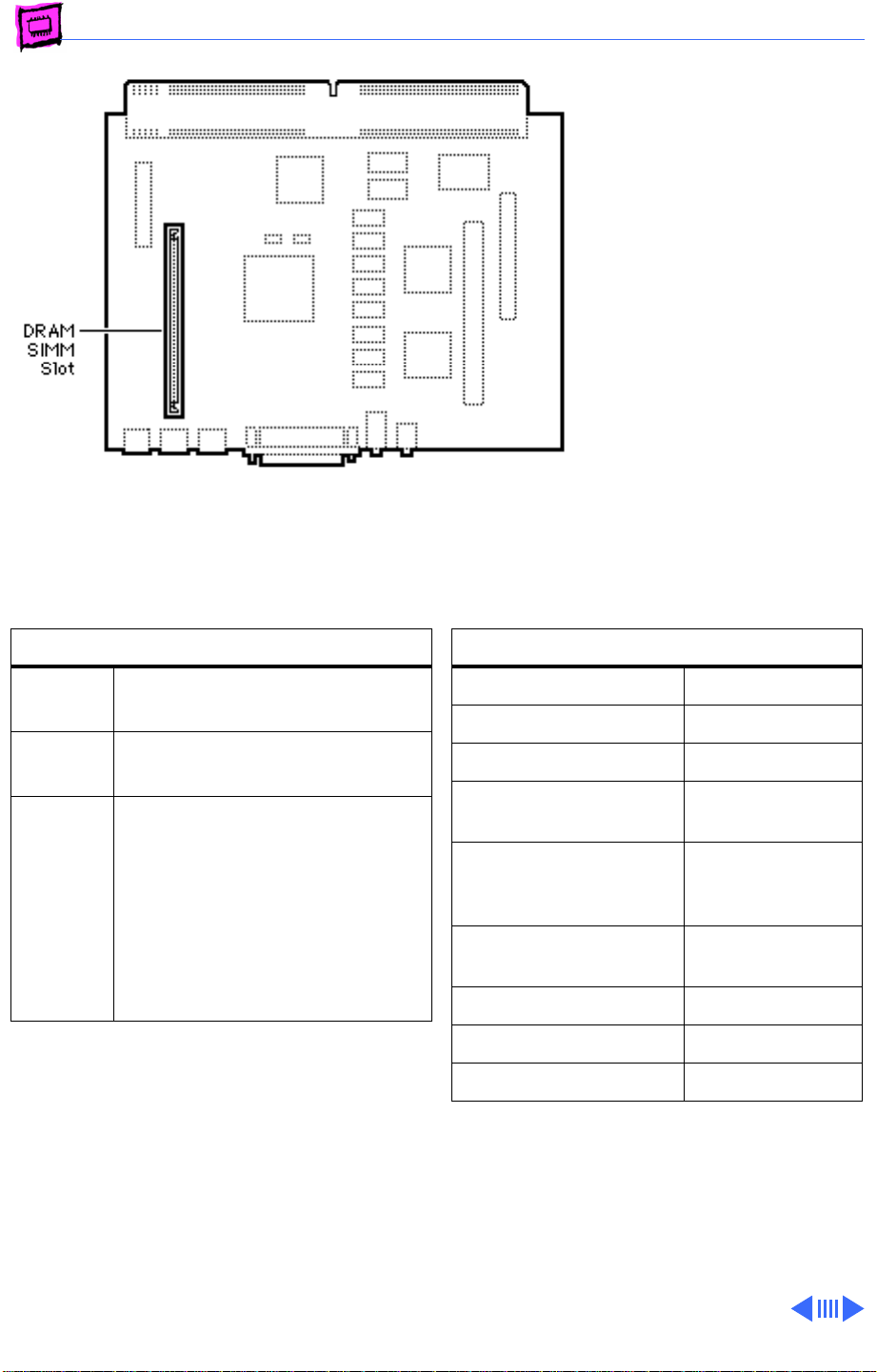
Performa 635 CD
The Performa 635 CD logic
board has 4 MB of soldered
DRAM and is expandable to 36
MB.
Note:
The Performa 63x and
Quadra 630 cpus may have
one of two logic boards. One
logic board has one SIMM slot
(661-0518), the other
logic board (661-1114)
has two SIMM slots; a
regular SIMM slot and a
“single-sided” SIMM slot;
expandable to 52 MB.
DRAM Configurations
5 MB The Performa 635 logic board
has 4 MB of soldered DRAM.
36 MB Use 1, 2, 4, 8, 16, or 32 MB
72-pin SIMMs.
Up to
52 MB
Note
: If the customer has the
logic board with two SIMM slots
(661-1114), the maximum
RAM would be 52 MB. To
upgrade to 52 MB use a 32 MB
SIMM in the regular SIMM slot,
and a 16 MB SIMM in the
single-sided SIMM slot.
Memory Information
DRAM Speed 80 ns
SIMM Type 72-pin
Soldered DRAM 4 MB
Number of SIMM Slots 1 or 2 (see Note
above)
Supported Sizes in MB 1, 2, 4, 8, 16,
32, 52 MB (see
Note above)
Maximum DRAM 36 MB, 52 MB
(see Note above)
Virtual Memory 1 GB
Soldered VRAM 1 MB
Number of VRAM Slots None
Page 52
Memory Performa - 13
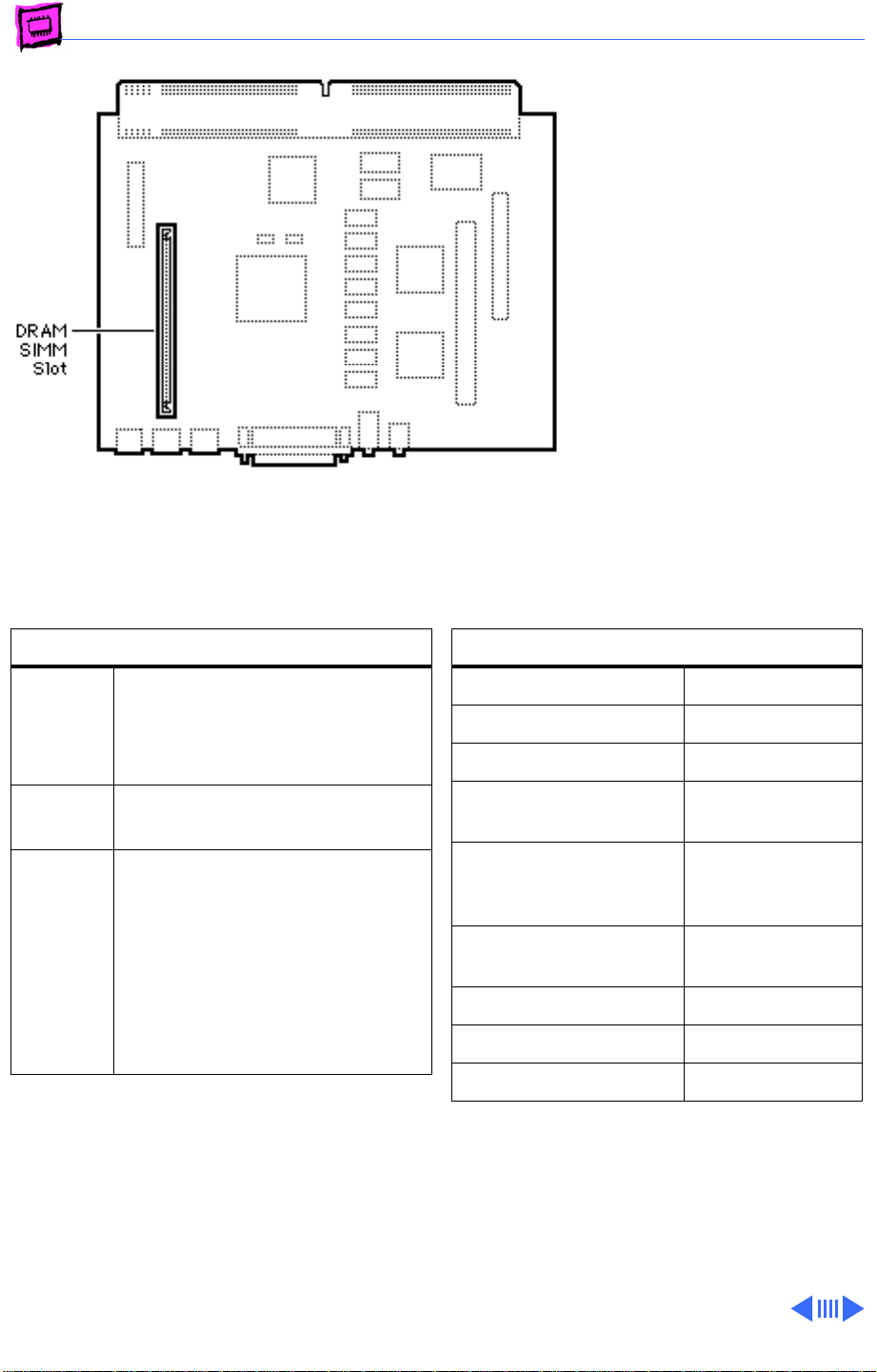
Performa 630 CD, 637 CD, 638 CD
All models have 4 MB of
soldered DRAM and are
expandable to 36 MB.
Note:
The Performa 63x and
Quadra 630 cpus may have
one of two logic boards. One
logic board has one SIMM slot
(661-0518), the other
logic board (661-1114)
has two SIMM slots; a
regular SIMM slot and a
“single-sided” SIMM slot;
expandable to 52 MB.
DRAM Configurations
4 MB The Performa 630 CD,
Performa 637 CD, and
Performa 638 CD logic boards
have 4 MB of soldered DRAM.
36 MB Use 1, 2, 4, 8, 16, or 32 MB
72-pin SIMMs.
Up to
52 MB
Note
: If the customer has the
logic board with two SIMM slots
(661-1114), the maximum
RAM would be 52 MB. To
upgrade to 52 MB use a 32 MB
SIMM in the regular SIMM slot,
and a 16 MB SIMM in the
single-sided SIMM slot.
Memory Information
DRAM Speed 80 ns
SIMM Type 72-pin
Soldered DRAM 4 MB
Number of SIMM Slots 1 or 2 (see Note
above)
Supported Sizes in MB 1, 2, 4, 8, 16,
32, 52 MB (see
Note above)
Maximum DRAM 36 MB, 52 MB
(see Note above)
Virtual Memory 1 GB
Soldered VRAM 1 MB
Number of VRAM Slots None
Page 53
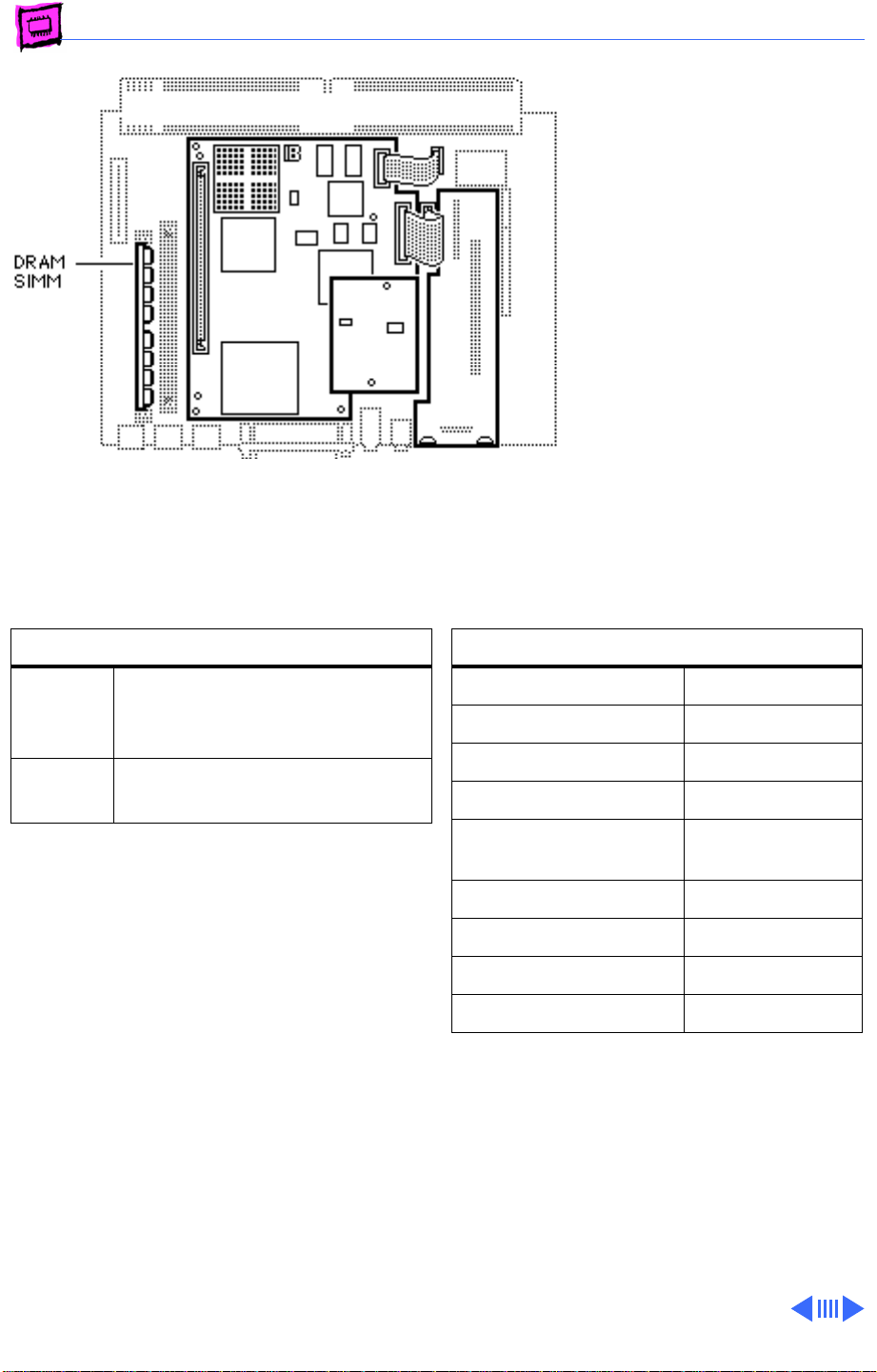
Memory Performa - 14
Performa 640
The Performa 640 has 8 MB
of DRAM: 4 MB soldered and a
4 MB SIMM in one slot. Up to
52 MB is available (4 MB
soldered, 32 MB in one SIMM
slot, and 16 MB in the other
SIMM slot on the DOS Card).
The DOS Compatible board has
a 4 MB SIMM installed and is
expandable to 32 MB.
DRAM Configurations
8 MB The Performa 640 has 8 MB of
DRAM: 4 MB soldered, 4 MB
SIMM in one slot.
52 MB Use various combinations up to
52 MB of 72-pin SIMMs.
Memory Information
DRAM Speed 80 ns
SIMM Type 72-pin
Soldered DRAM 4 MB
Number of SIMM Slots 1
Supported Sizes in MB 1, 2, 4, 8, 16,
32
Maximum DRAM 36 MB
Virtual Memory 1 GB
Soldered VRAM 1 MB
Number of VRAM Slots None
Page 54
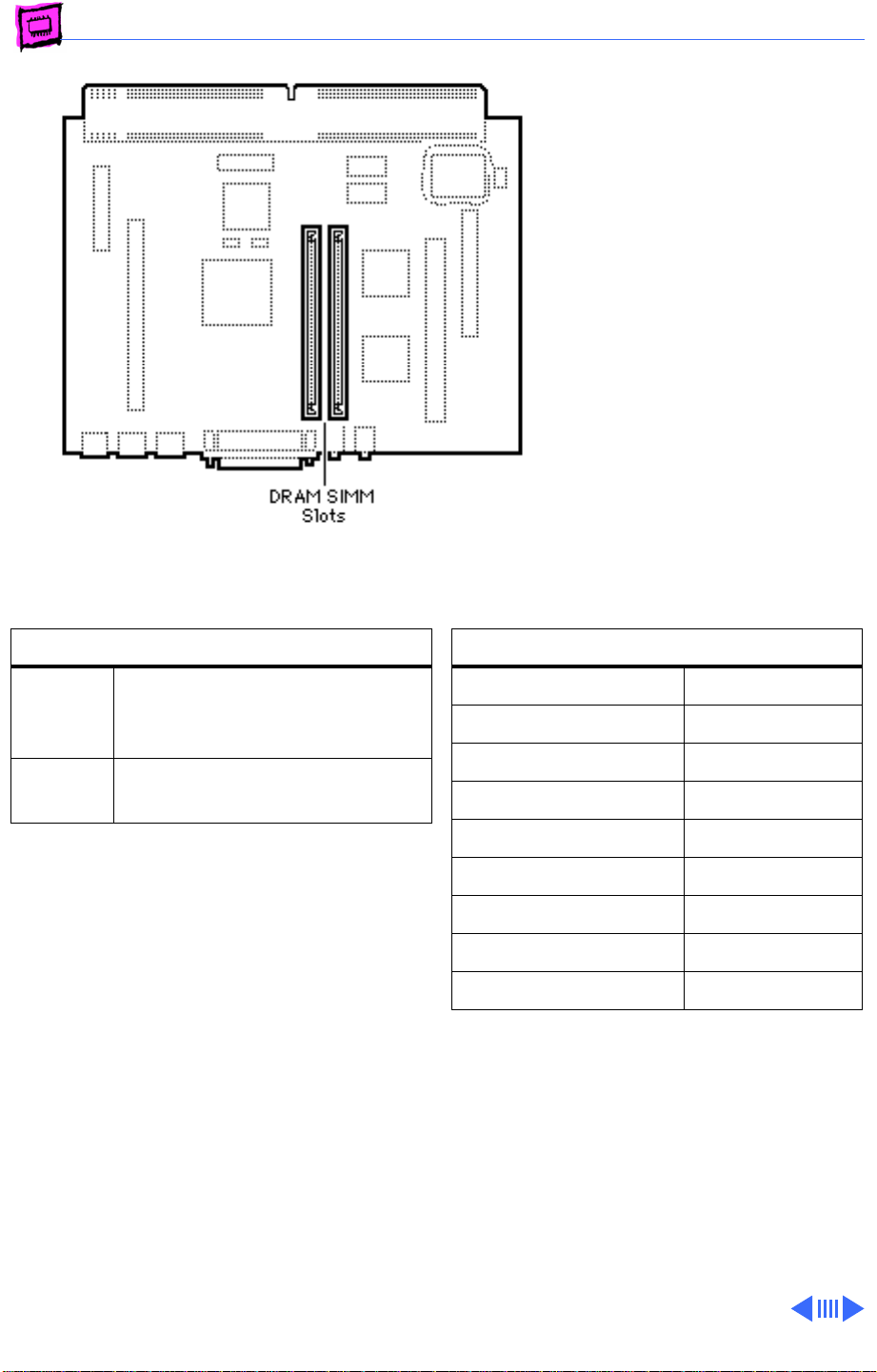
Memory Performa - 15
Performa 5200CD, 5215CD and 5300CD
The Performa 5200CD,
5215CD, and 5300CD
computers have no soldered
DRAM. You can expand the
total memory up to a
maximum of 64 MB by
installing DRAM SIMMs.
DRAM Configurations
8 MB The Performa 5200CD,
5215CD, and 5300CD have a
minimum of 8 MB of DRAM.
Up to 64 MBUse various combinations up to
64 MB of 72-pin SIMMs.
Note:
The Performa 5200 Series computers
have two SIMM slots. You do not have to fill
both slots when upgrading memory, nor do
you have to use SIMMs of the same size.
Note:
Supported memory configurations
include 8, 12, 16, 20, 24, 32, 36, 40, 48,
and 64 MB.
Memory Information
DRAM Speed 80 ns
SIMM Type 72-pin
Soldered DRAM None
Number of SIMM Slots 2
Supported Sizes in MB 4, 8, 16, 32
Maximum DRAM 64 MB
Virtual Memory 1 GB
Soldered VRAM 1 MB
Number of VRAM Slots None
Page 55
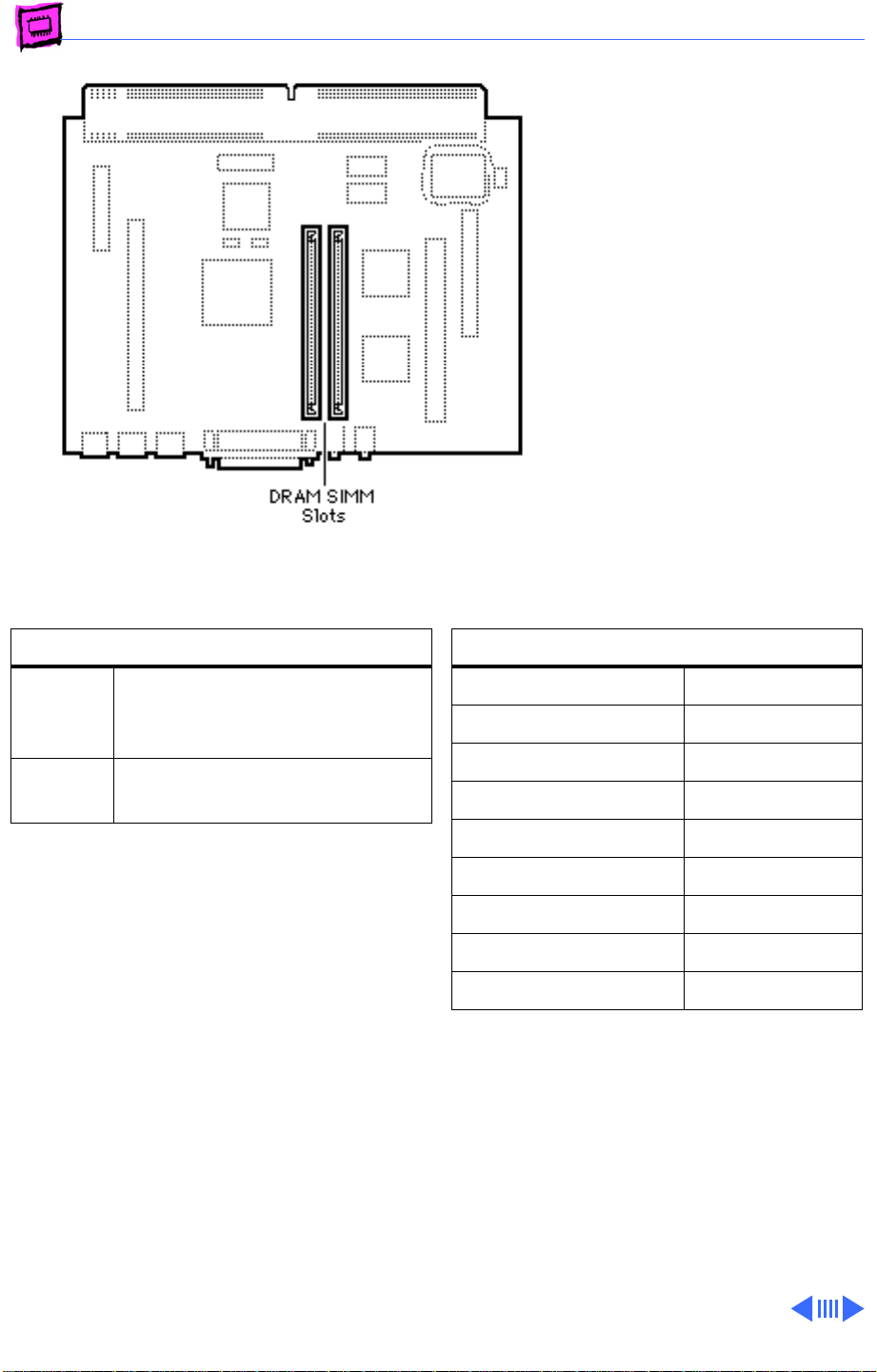
Memory Performa - 16
Performa 5320CD
The Performa 5320CD
computer has no soldered
DRAM. You can expand the
total memory up to a
maximum of 64 MB by
installing DRAM SIMMs.
DRAM Configurations
8 MB The Performa 5200CD,
5215CD, and 5300CD have a
minimum of 8 MB of DRAM.
Up to 64 MBUse various combinations up to
64 MB of 72-pin SIMMs.
Note:
The Performa 5320CD computer has
two SIMM slots. You do not have to fill both
slots when upgrading memory, nor do you
have to use SIMMs of the same size.
Note:
Supported memory configurations
include 8, 12, 16, 20, 24, 32, 36, 40, 48,
and 64 MB.
Memory Information
DRAM Speed 80 ns
SIMM Type 72-pin
Soldered DRAM None
Number of SIMM Slots 2
Supported Sizes in MB 4, 8, 16, 32
Maximum DRAM 64 MB
Virtual Memory 1 GB
Soldered VRAM 1 MB
Number of VRAM Slots None
Page 56
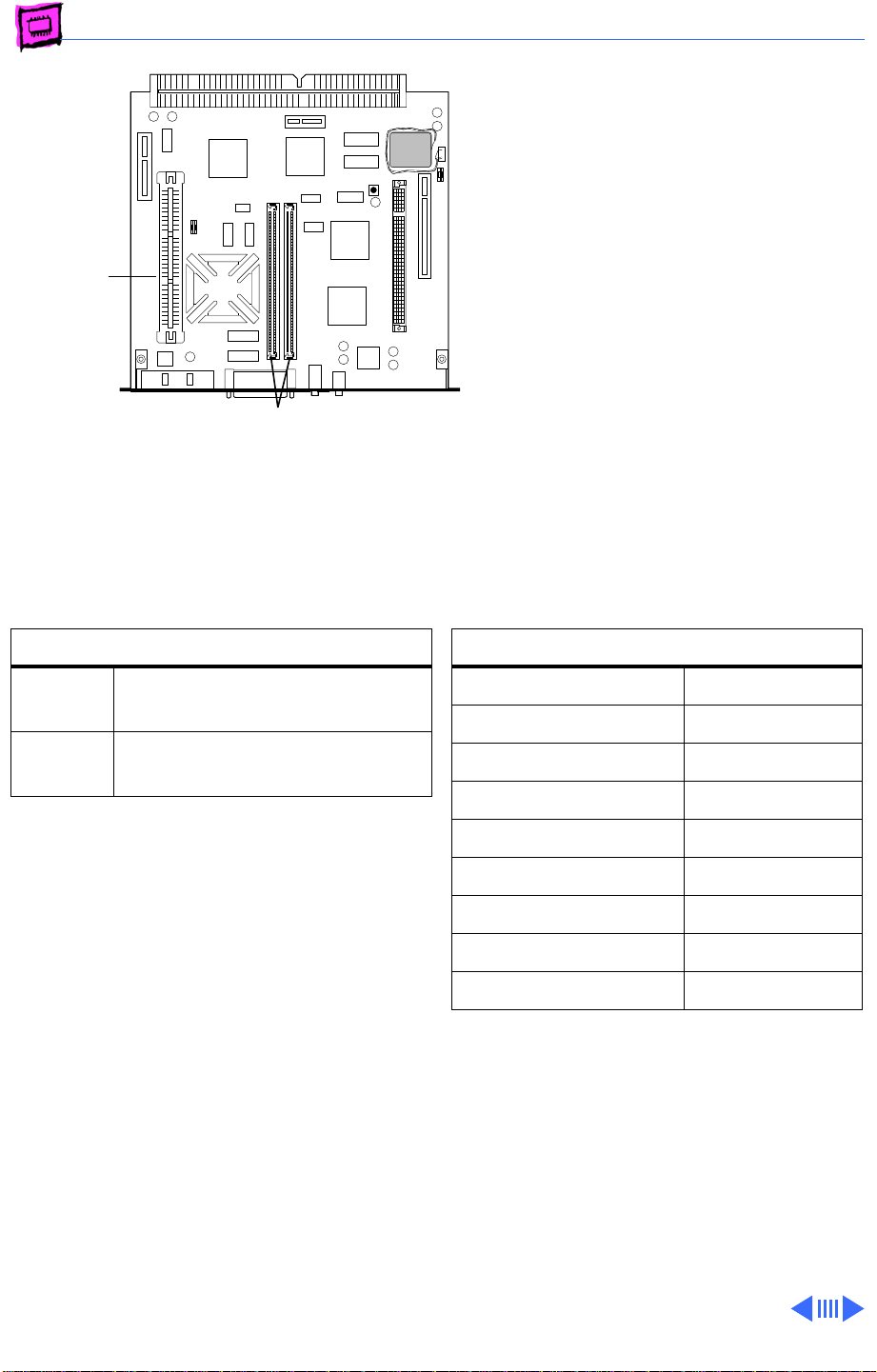
Memory Performa - 17
Performa 5260/120 and 5280
The Performa 5260/120 and
5280 come standard with 16
MB of DRAM. You can expand
the total memory up to a
ROM
Slot
DRAM
SIMM Slot
maximum of 64 MB by
installing DRAM SIMMs.
DRAM Configurations
16 MB The Performa 5260/120 has a
minimum of 16 MB of DRAM.
Up to 64 MBUse various combinations up to
64 MB of 72-pin SIMMs.
Note:
The Performa 5260/120 computer
has two SIMM slots. You do not have to fill
both slots when upgrading memory, nor do
you have to use SIMMs of the same size.
Note:
Supported memory configurations
include 16, 20, 24, 32, 36, 40, 48, and 64
MB.
Memory Information
DRAM Speed 80 ns
SIMM Type 72-pin
Soldered DRAM None
Number of SIMM Slots 2
Supported Sizes in MB 4, 8, 16, 32
Maximum DRAM 64 MB
Virtual Memory 1 GB
Soldered VRAM 1 MB
Number of VRAM Slots None
Page 57
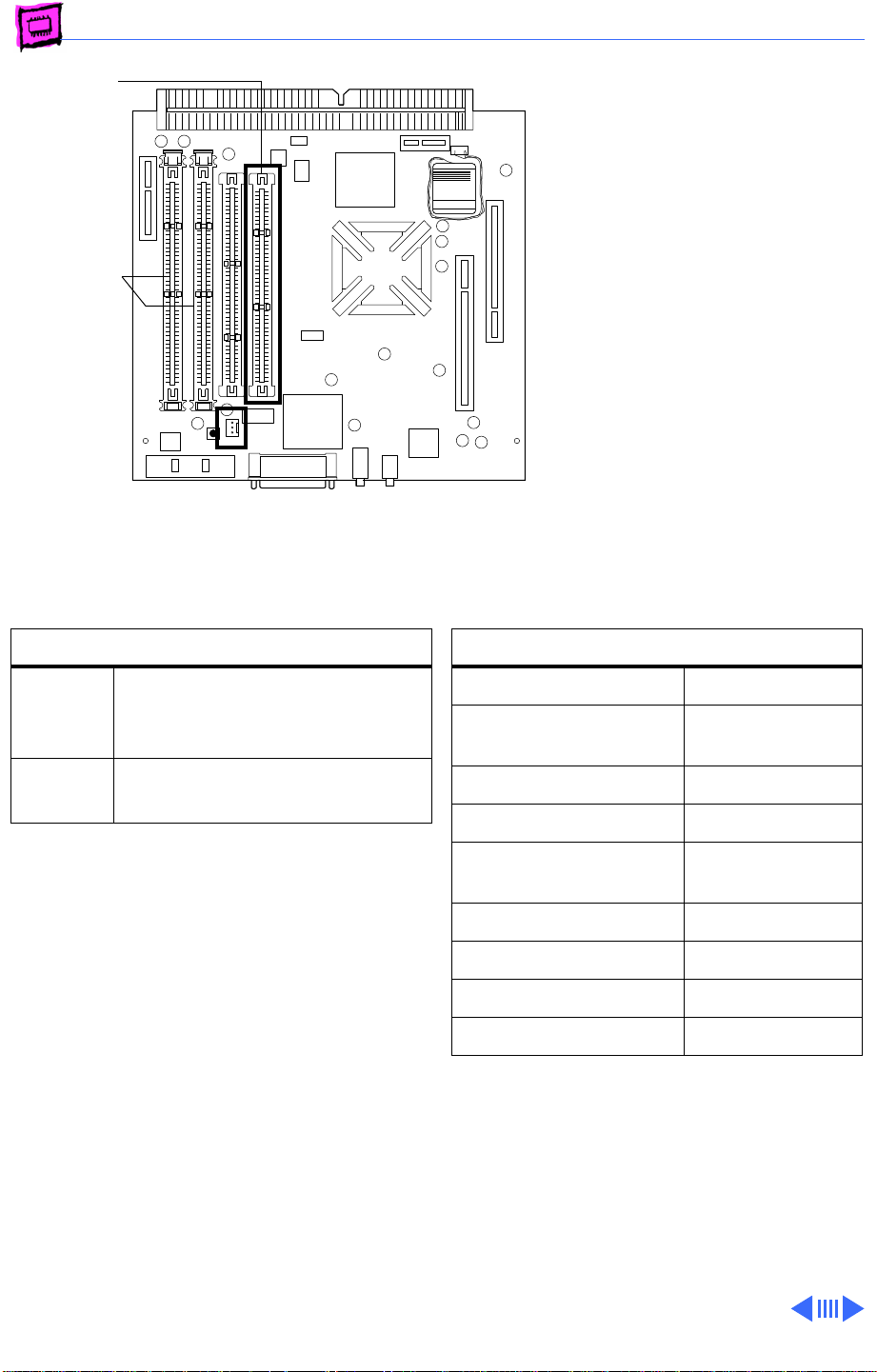
Memory Performa - 18
ROM
DRAM DIMM
Slots (2)
Battery
Clock
Computer
RAYOVAC
Performa 5400 Series
The information presented
here is valid for Performa
5400/160, 5400/180,
5420, and 5420/180
computers. These are
international computers that
come standard with 16 MB of
DRAM. You can expand the
total memory up to a
maximum of 136 MB by
installing DRAM DIMMs.
DRAM Configurations
16 MB The Performa 5400 Series
computers have a minimum of
16 MB of DRAM.
Up to
136 MB
Note:
The Performa 5400 Series computers
Use various combinations up
to 136 MB of 168-pin DIMMs.
have two DIMM slots. You do not have to fill
both slots when upgrading memory, nor do
you have to use DIMMs of the same size.
Note:
Supported memory configurations
include 16, 20, 24, 32, 36, 40, 48, 64, and
136 MB.
Note:
These computers require 2K refresh
rate DIMMs
Memory Information
DRAM Speed 70 ns
DIMM Type 168-pin, 2K
refresh
Soldered DRAM 16 MB
Number of DIMM Slots 2
Supported Sizes in MB 4, 8, 16, 32,
64
Maximum DRAM 136 MB
Virtual Memory 1 GB
Soldered VRAM 1 MB
Number of VRAM Slots None
Page 58
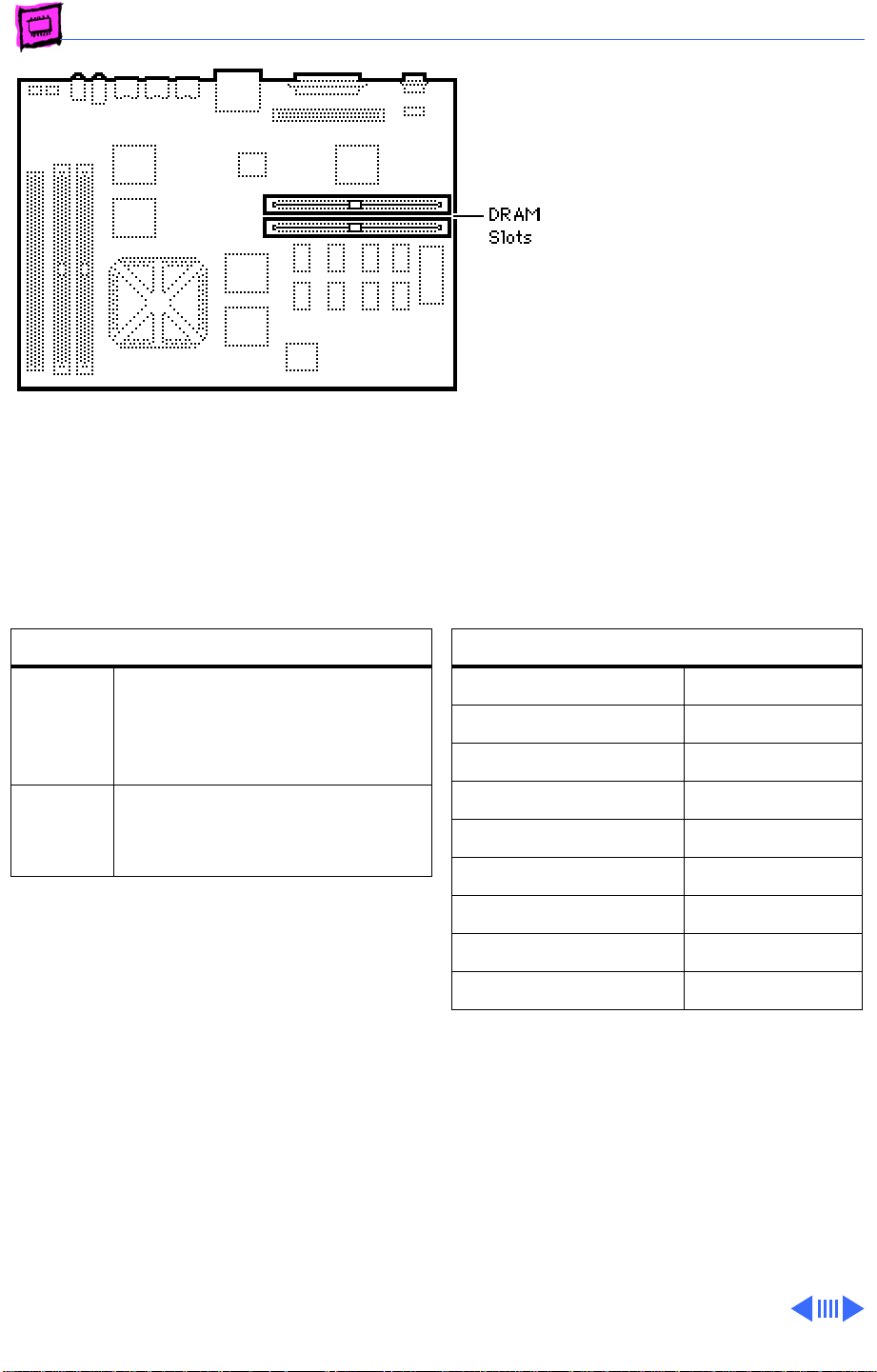
Memory Performa - 19
Performa 6100 Series
The Performa 6110 CD,
6112 CD, 6115 CD, 6117
CD, and 6118 CD logic boards
have 8 MB of soldered DRAM
and are expandable to 72 MB.
DRAM Configurations
8 MB The Performa 6110 CD, 6112
CD, 6115 CD, 6117 CD, and
6118 CD logic boards have 8
MB of soldered DRAM.
72 MB Use a pair of 72-pin SIMMs for
total configurations up to 72
MB
Memory Information
DRAM Speed 80 ns
SIMM Type 72-pin
Soldered DRAM 8 MB
Number of SIMM Slots 2
Supported Sizes in MB 4, 8, 16, 32
Maximum DRAM 72 MB
Virtual Memory 1 GB
Soldered VRAM None
Number of VRAM Slots None
Note:
SIMMs must be installed in matching
pairs. Install noncomposite SIMMs only.
Page 59
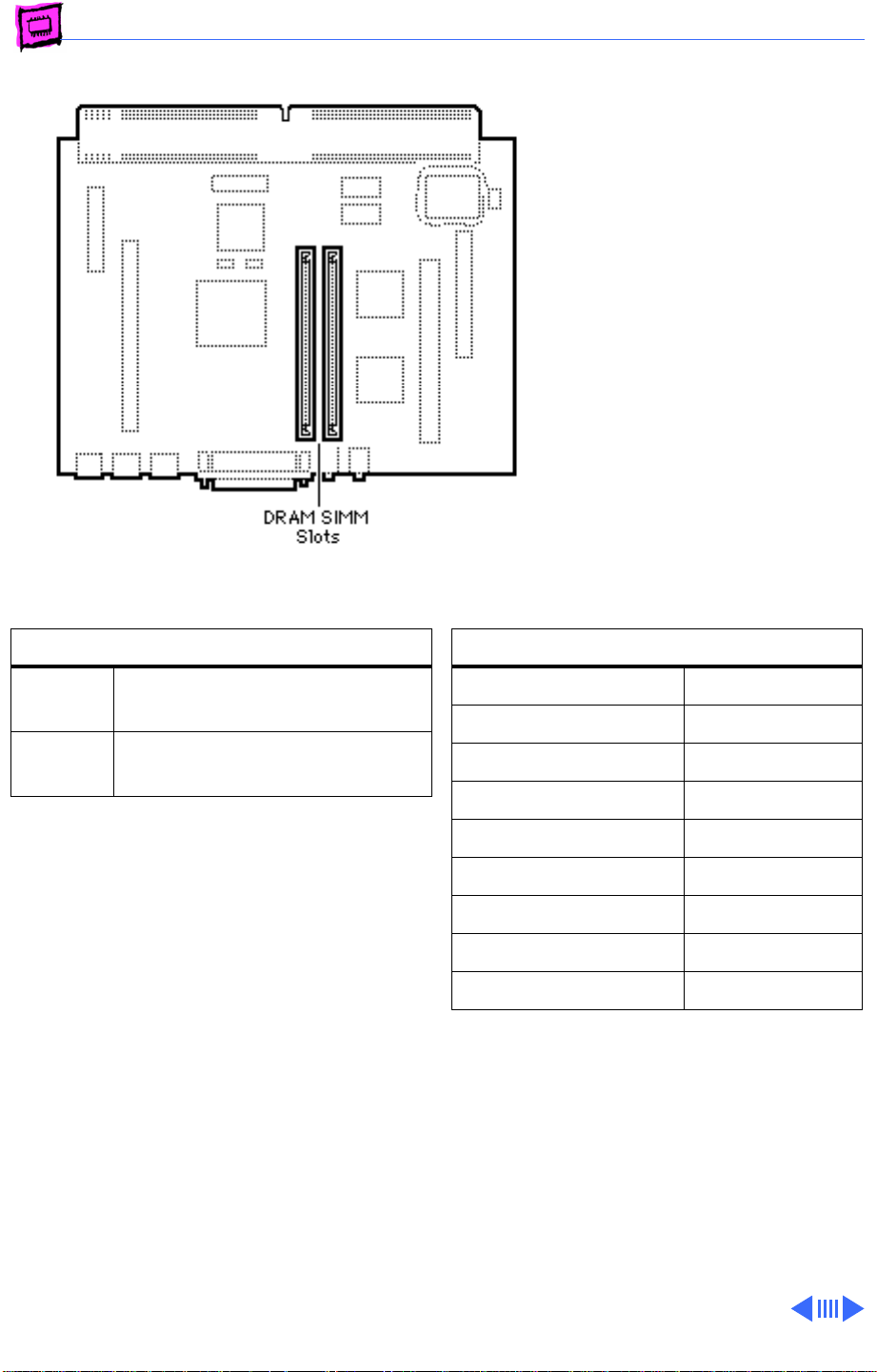
Memory Performa - 20
Performa 6200 Series
The Performa 6200 Series
computers have no soldered
DRAM. You can expand the
total memory up to a
maximum of 64 MB by
installing DRAM SIMMs.
DRAM Configurations
8 MB The Performa 6200 has a
minimum of 8 MB of DRAM.
Up to 64 MBUse various combinations up to
64 MB of 72-pin SIMMs.
Note:
The Performa 6200 Series computers
have two SIMM slots. You do not have to fill
both slots when upgrading memory, nor do
you have to use SIMMs of the same size.
Note:
Supported memory configurations
include 8, 12, 16, 20, 24, 32, 36, 40, 48,
and 64 MB.
Memory Information
DRAM Speed 80 ns
SIMM Type 72-pin
Soldered DRAM None
Number of SIMM Slots 2
Supported Sizes in MB 4, 8, 16, 32
Maximum DRAM 64 MB
Virtual Memory 1 GB
Soldered VRAM 1 MB
Number of VRAM Slots None
Page 60
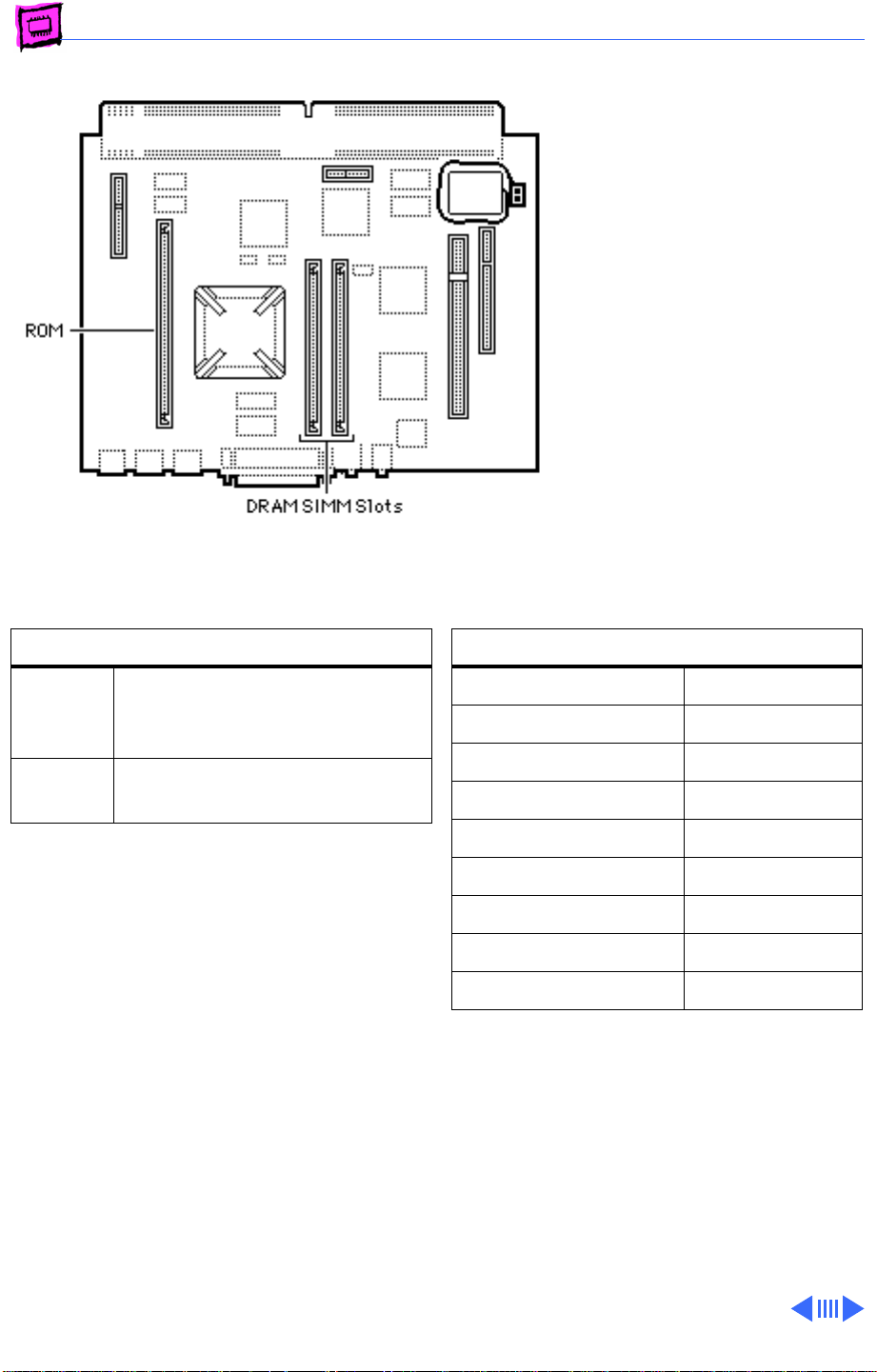
Memory Performa - 21
Performa 6300
Series (except
6360)
The Performa 6300 Series
computers (excluding the
6360) ship with a minimum
of 16 MB of DRAM. You can
expand the total memory up
to a maximum of 64 MB by
installing DRAM SIMMs.
DRAM Configurations
16 MB The Performa 6300 Series
computers have a minimum of
16 MB of DRAM.
Up to 64 MBUse various combinations up to
64 MB of 72-pin SIMMs.
Note:
The Performa 6300 Series computers
have two SIMM slots. You do not have to fill
both slots when upgrading memory, nor do
you have to use SIMMs of the same size.
Note:
Supported memory configurations
include 16, 20, 24, 32, 36, 40, 48, and 64
MB.
Memory Information
DRAM Speed 80 ns
SIMM Type 72-pin
Soldered DRAM None
Number of SIMM Slots 2
Supported Sizes in MB 4, 8, 16, 32
Maximum DRAM 64 MB
Virtual Memory 1 GB
Soldered VRAM 1 MB
Number of VRAM Slots None
Page 61
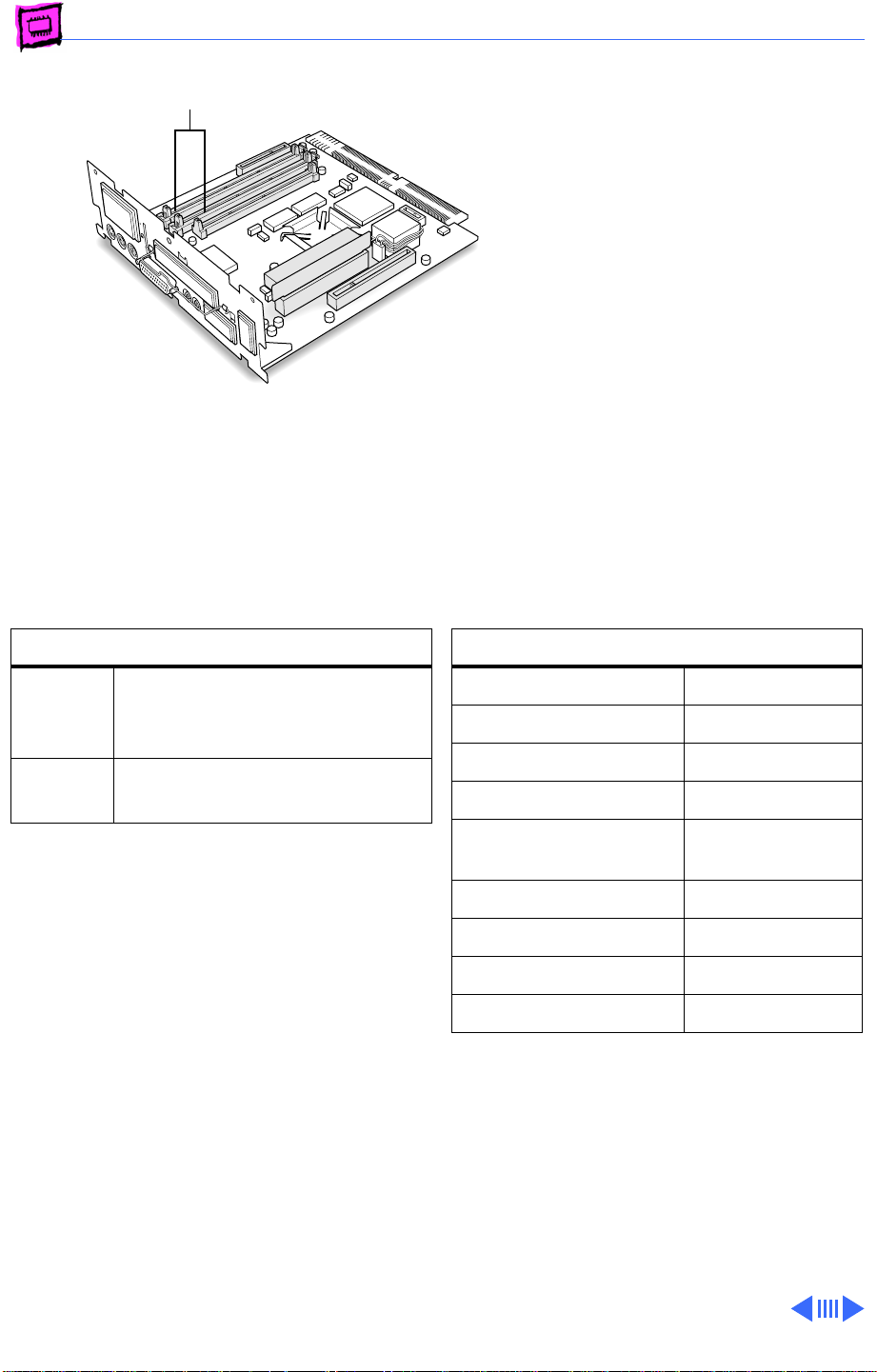
Memory Performa - 22
DRAM DIMM
Slots (2)
Performa 6360
The Performa 6360 ships
with a minimum of 16 MB of
DRAM. You can expand the
total memory up to a
maximum of 136 MB by
installing DRAM DIMMs.
DRAM Configurations
16 MB The Performa 6360 comes
standard with a minimum of 16
MB of DRAM.
Up to
136 MB
Note:
The Performa 6360 has two DIMM
slots. You do not have to fill both slots when
upgrading memory, nor do you have to use
DIMMs of the same size.
Note:
Supported memory configurations
include 16, 20, 24, 32, 36, 40, 48, 64, and
136 MB.
Use various combinations up
to 136 MB of 168-pin DIMMs.
Memory Information
DRAM Speed 70 ns
DIMM Type 168-pin
Soldered DRAM 8 MB
Number of DIMM Slots 2
Supported Sizes in MB 4, 8, 16, 32,
64
Maximum DRAM 136 MB
Virtual Memory 1 GB
Soldered VRAM 1 MB
Number of VRAM Slots None
Page 62
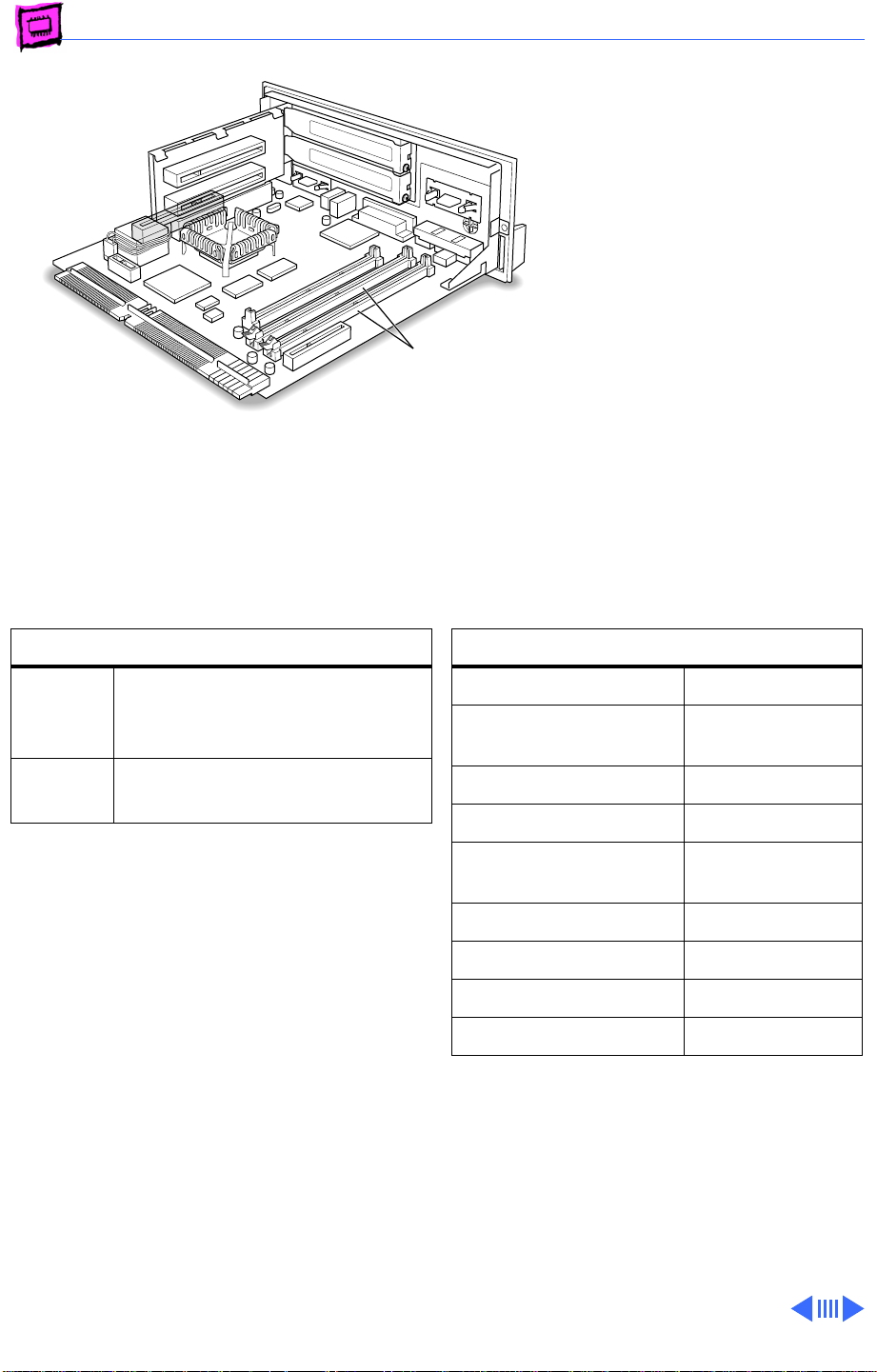
Memory Performa - 23
Performa 6400
The Performa 6400 ships
with a minimum of 16 MB of
DRAM. You can expand the
total memory up to a
maximum of 136 MB by
installing DRAM DIMMs.
DRAM DIMM Slots
DRAM Configurations
16 MB The Performa 6400 comes
standard with a minimum of 16
MB of DRAM.
Up to
136 MB
Note:
The Performa 6400 has two DIMM
slots. You do not have to fill both slots when
upgrading memory, nor do you have to use
DIMMs of the same size.
Note:
Supported memory configurations
include 16, 20, 24, 32, 36, 40, 48, 64, and
136 MB.
Note:
This computer requires 2K refresh
rate DIMMs.
Use various combinations up
to 136 MB of 168-pin DIMMs.
Memory Information
DRAM Speed 70 ns
DIMM Type 168-pin, 2K
refresh
Soldered DRAM 8 MB
Number of DIMM Slots 2
Supported Sizes in MB 4, 8, 16, 32,
64
Maximum DRAM 136 MB
Virtual Memory 1 GB
Soldered VRAM 1 MB
Number of VRAM Slots None
Page 63
K
Service Source
Power Macintosh
Page 64
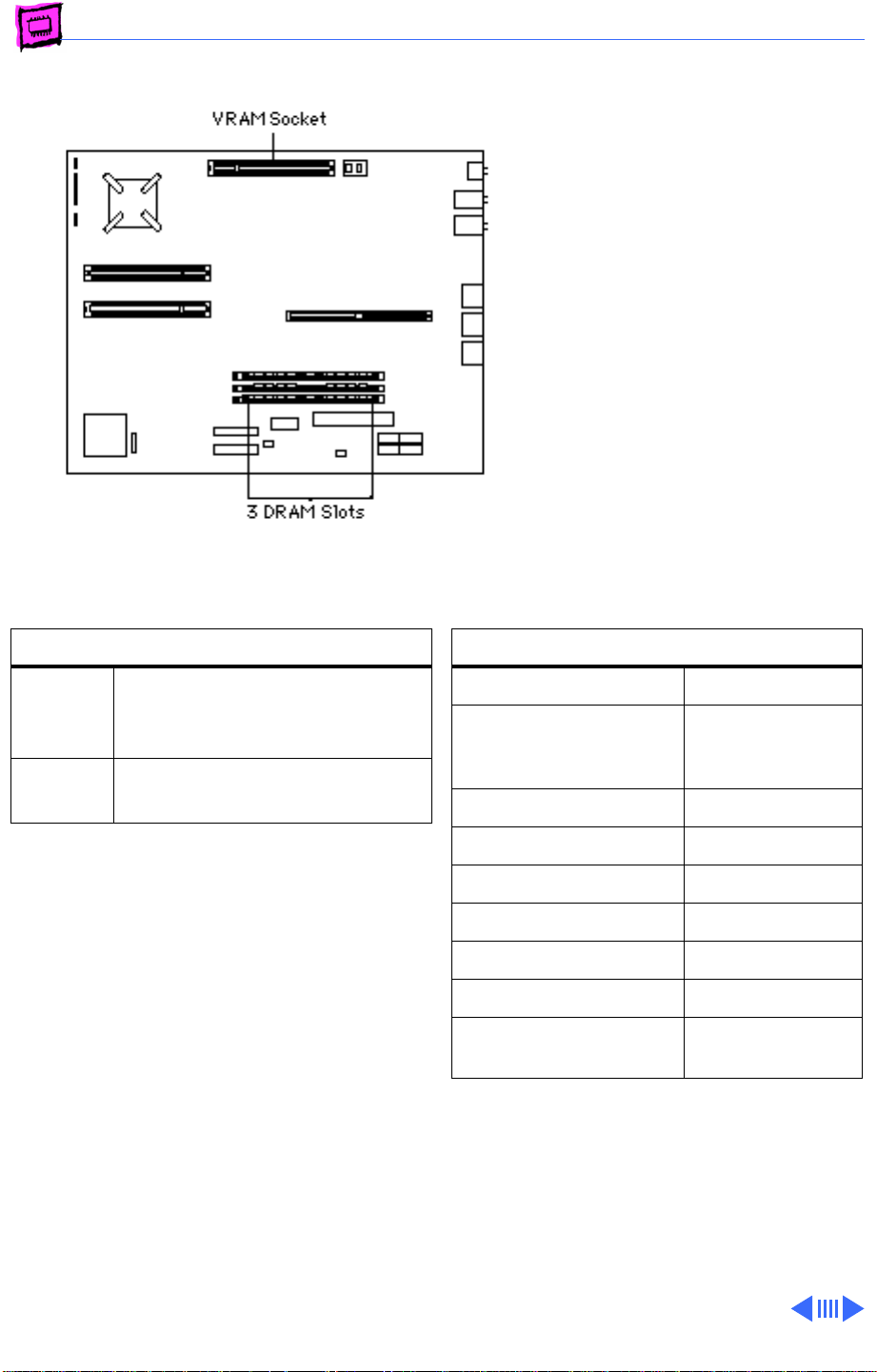
Memory Power Macintosh - 1
Power Macintosh 4400/160
The Power Macintosh 4400/
160 has no DRAM soldered
onto the logic board. You can
expand the amount of memory
to a total of 96 MB by
installing DRAM DIMMs.
DRAM Configurations
16 MB The Power Macintosh 4400/
160 logic board has 16 MB of
installed DRAM.
Up to
96 MB
Note:
DRAM DIMMs can be installed one or
more at a time. Slot 1 supports only singlebank DIMMs. Slots 2 and 3 support both
single-bank and dual-bank DIMMs.
Note:
The Single In-Line Memory Modules
(SIMMs) used in previous Macintosh models
are NOT compatible with the Power
Macintosh 4400.
Note:
This computer does not have any main
memory soldered to the logic board. At least
one DRAM DIMM must be installed for the
computer to operate.
Note:
The PM4400/160 comes with 1 MB of
VRAM installed.
Use 4, 8, 16, or 32 MB
168-pin DIMMs.
Memory Information
DRAM Speed 60 ns
DIMM Type 168-pin, 3.3 V
unbuffered EDO,
1.1 in. high
Soldered DRAM None
Number of DIMM Slots 3
Supported Sizes in MB 4, 8, 16, 32
Maximum DRAM 96 MB
Virtual Memory 1 GB
Soldered Video RAM None
Number of Video RAM
Slots
Note:
The logic board has a 120-pin video
DIMM connector that allows the use of EDO
RAM or SGRAM. The video controller
supports the following for video memory:
• 1 or 2 MB of EDO RAM
• 2 or 4 MB of SGRAM
1
Page 65
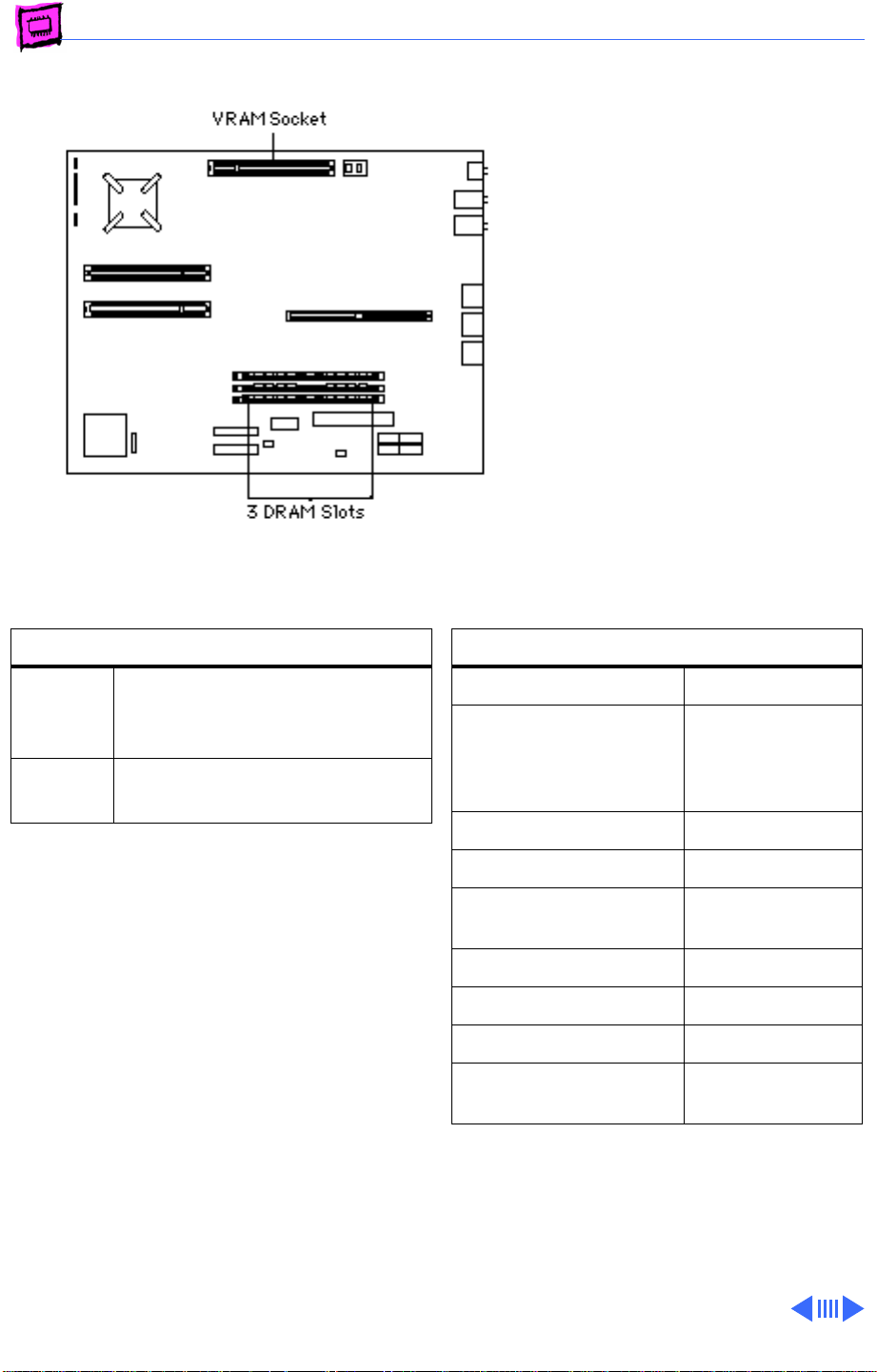
Memory Power Macintosh - 2
Power Macintosh 4400/200 and 7220/200
The Power Macintosh 4400/
200 has no DRAM soldered
onto the logic board. You can
expand the amount of memory
to a total of 160 MB by
installing DRAM DIMMs.
DRAM Configurations
32 MB The Power Macintosh 4400/
200 logic board has 32 MB of
installed DRAM.
Up to
160 MB
Note:
DRAM DIMMs can be installed one or
more at a time. Slot 1 supports only singlebank DIMMs. Slots 2 and 3 support both
single-bank and dual-bank DIMMs.
Note:
The SIMMs used in previous Macintosh
models are NOT compatible with the Power
Macintosh 4400.
Note:
This computer does not have any main
memory soldered to the logic board. At least
one DRAM DIMM must be installed for the
computer to operate.
Note:
The PM 4400/200 comes with 2 MB of
VRAM installed.
Note:
The logic board has a 120-pin video
DIMM connector that allows the use of EDO
Use 4, 8, 16, 32, or 64 MB
168-pin DIMMs.
Memory Information
DRAM Speed 60 ns
DIMM Type 168-pin, 3.3 V
unbuffered EDO,
1.1 in. high, 1K
or 2K refresh
Soldered DRAM None
Number of DIMM Slots 3
Supported Sizes in MB 4, 8, 16, 32,
64
Maximum DRAM 160 MB
Virtual Memory 1 GB
Soldered Video RAM None
Number of Video RAM
Slots
RAM or SGRAM. The video controller
supports the following for video memory:
• 1 or 2 MB of EDO RAM
• 2 or 4 MB of SGRAM
1
Page 66
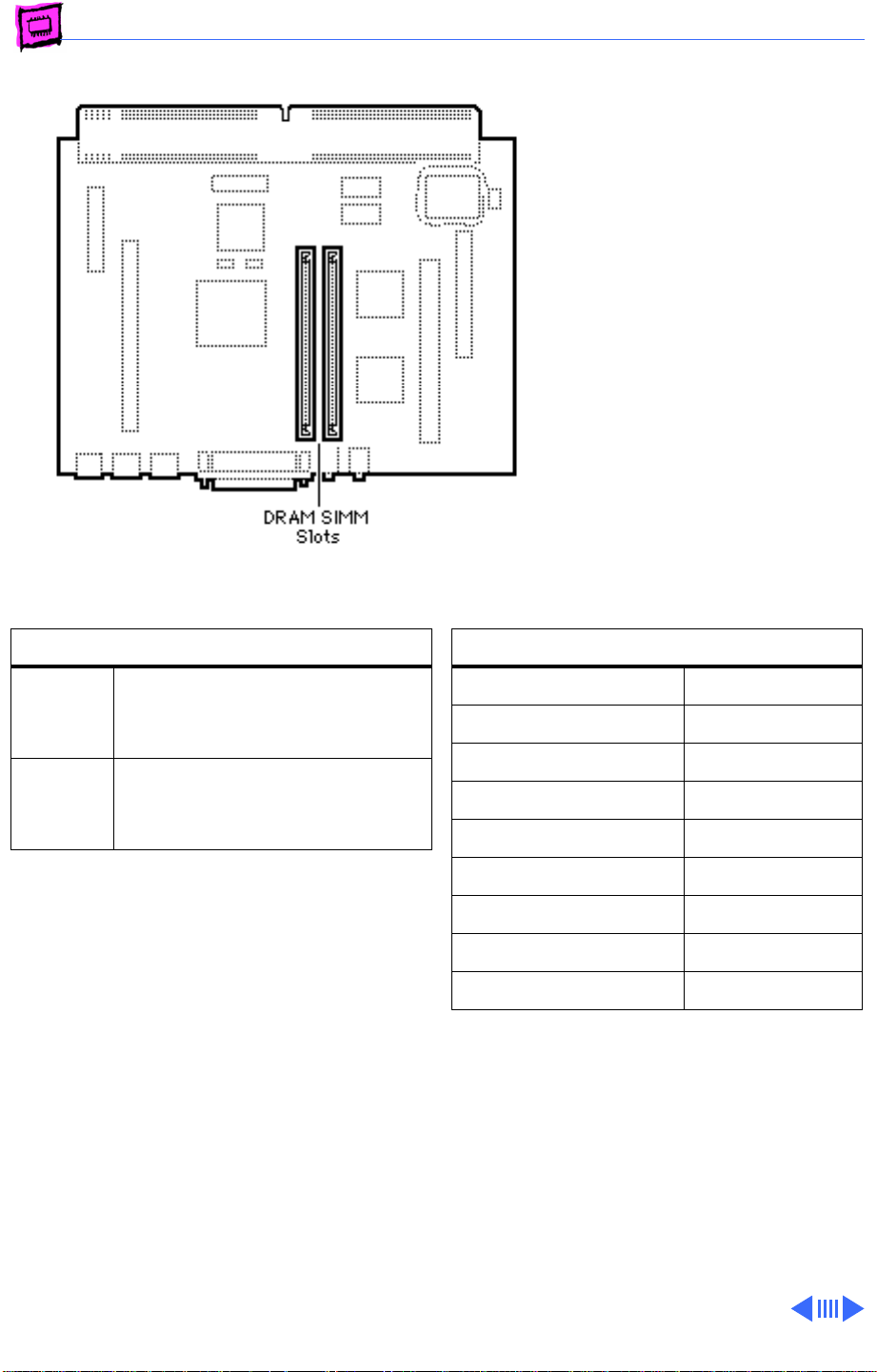
Memory Power Macintosh - 3
Power Macintosh 5200/75 LC
The Power Macintosh 5200/
75 LC has no soldered DRAM.
You can expand the amount of
memory to a total of 64 MB
by installing DRAM SIMMs.
The Power Macintosh 5200/
75 LC has two SIMM slots.
You do not have to fill both
slots when upgrading
memory, nor do you have to
SIMMs of the same size.
DRAM Configurations
8 MB The Power Macintosh 5200/
75 LC has a minimum of 8 MB
of DRAM.
Up to
64 MB
Note:
Supported memory configurations
include 8, 12, 16, 20, 24, 32, 36, 40, 48,
and 64 MB of DRAM.
Use various combinations of
72-pin SIMMs to install up to
64 MB of DRAM.
Memory Information
DRAM Speed 70 ns
SIMM Type 72-pin
Soldered DRAM None
Number of SIMM Slots 2
Supported Sizes in MB 4, 8, 16, 32
Maximum DRAM 64 MB
Virtual Memory 1 GB
Soldered VRAM 1 MB
Number of VRAM Slots None
Page 67
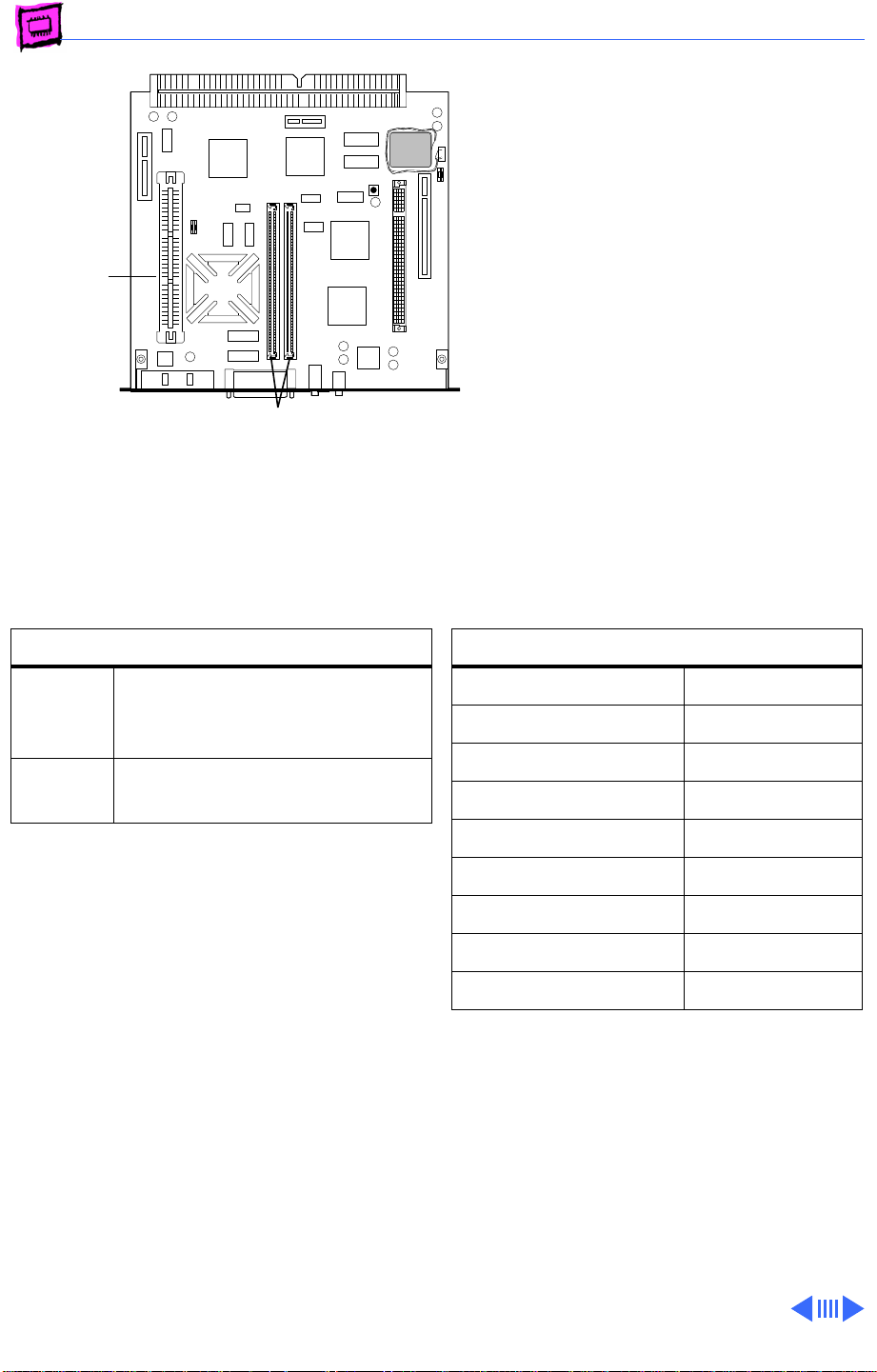
Memory Power Macintosh - 4
Power Macintosh 5260/100 and 5260/120
The Power Macintosh
5260/100 and 5260/120
ROM
Slot
DRAM
SIMM Slot
come standard with 16 MB of
DRAM. You can expand the
total memory up to a
maximum of 64 MB by
installing DRAM SIMMs.
DRAM Configurations
16 MB The Power Macintosh 5260/
100 and 5260/120 have a
minimum of 16 MB of DRAM.
Up to 64 MBUse various combinations up to
64 MB of 72-pin SIMMs.
Note:
The Power Macintosh 5260 computer
has two SIMM slots. You do not have to fill
both slots when upgrading memory, nor do
you have to use SIMMs of the same size.
Note:
Supported memory configurations
include 16, 20, 24, 32, 36, 40, 48, and 64
MB.
Memory Information
DRAM Speed 80 ns
SIMM Type 72-pin
Soldered DRAM None
Number of SIMM Slots 2
Supported Sizes in MB 4, 8, 16, 32
Maximum DRAM 64 MB
Virtual Memory 1 GB
Soldered VRAM 1 MB
Number of VRAM Slots None
Page 68
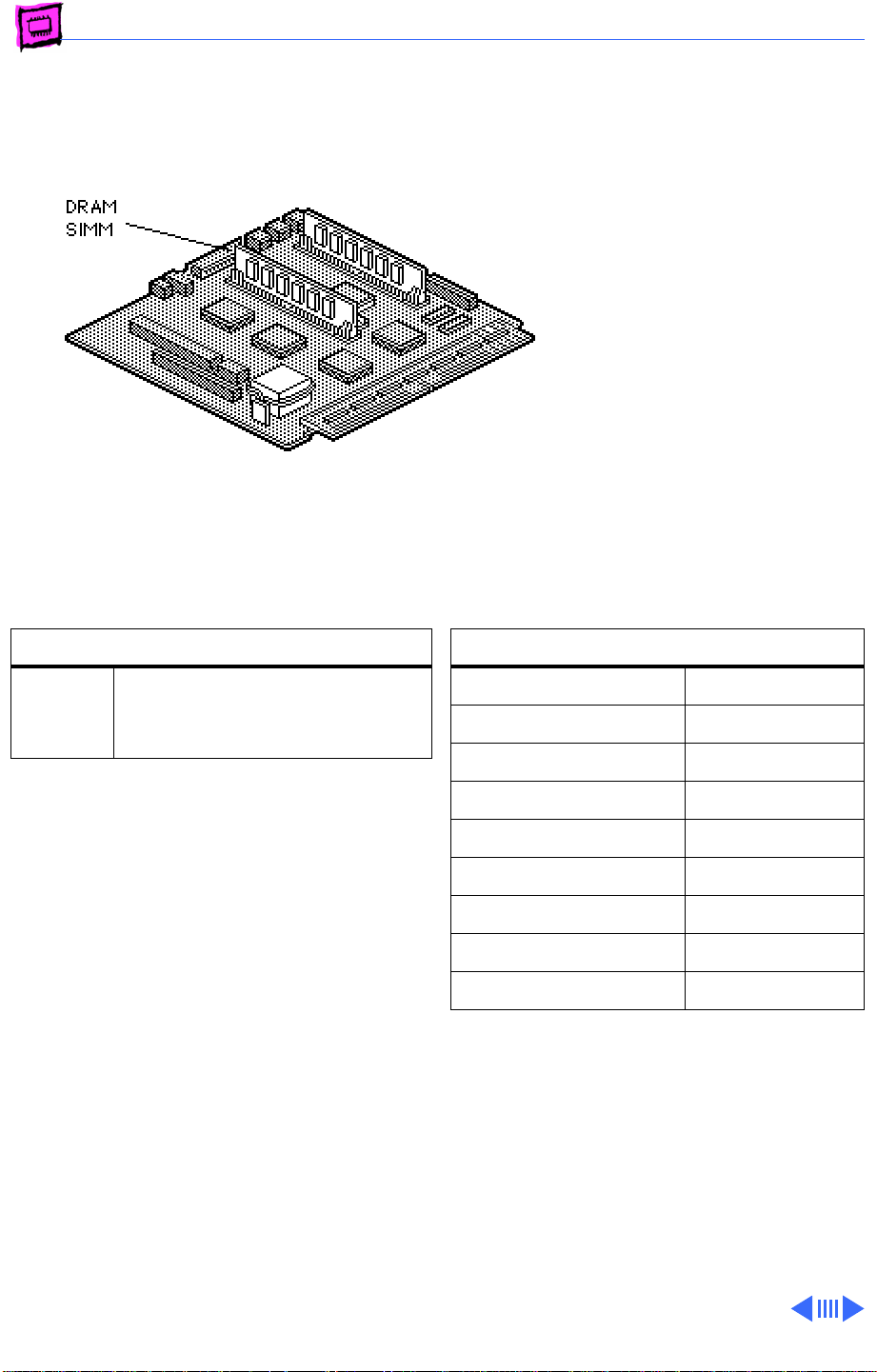
Memory Power Macintosh - 5
Power Macintosh 5300/100 LC
The Power Macintosh
5300/100 LC has no
soldered DRAM. You can
expand the amount of memory
to a total of 64 MB by
installing DRAM SIMMs.
DRAM Configurations
Up to
64 MB
Note:
You must remove the heat sink on the
5300 series logic board to install or replace
a SIMM in the slot next to the processor.
Note:
On the back (tracing side) of the logic
board, pry off the four corner tabs of the heat
sink. Remove the heat sink from the
component side of the logic board, then install
the SIMM. Be sure to replace the heat sink
after the memory upgrade.
Use various sizes of 72-pin
SIMMs to expand to a total of 64
MB of DRAM.
Memory Information
DRAM Speed 80 ns
SIMM Type 72-pin
Soldered DRAM None
Number of SIMM Slots 2
Supported Sizes in MB 4, 8, 16, 32
Maximum DRAM 64 MB
Virtual Memory 1 GB
Soldered VRAM 1 MB DRAM
Number of VRAM Slots None
Page 69
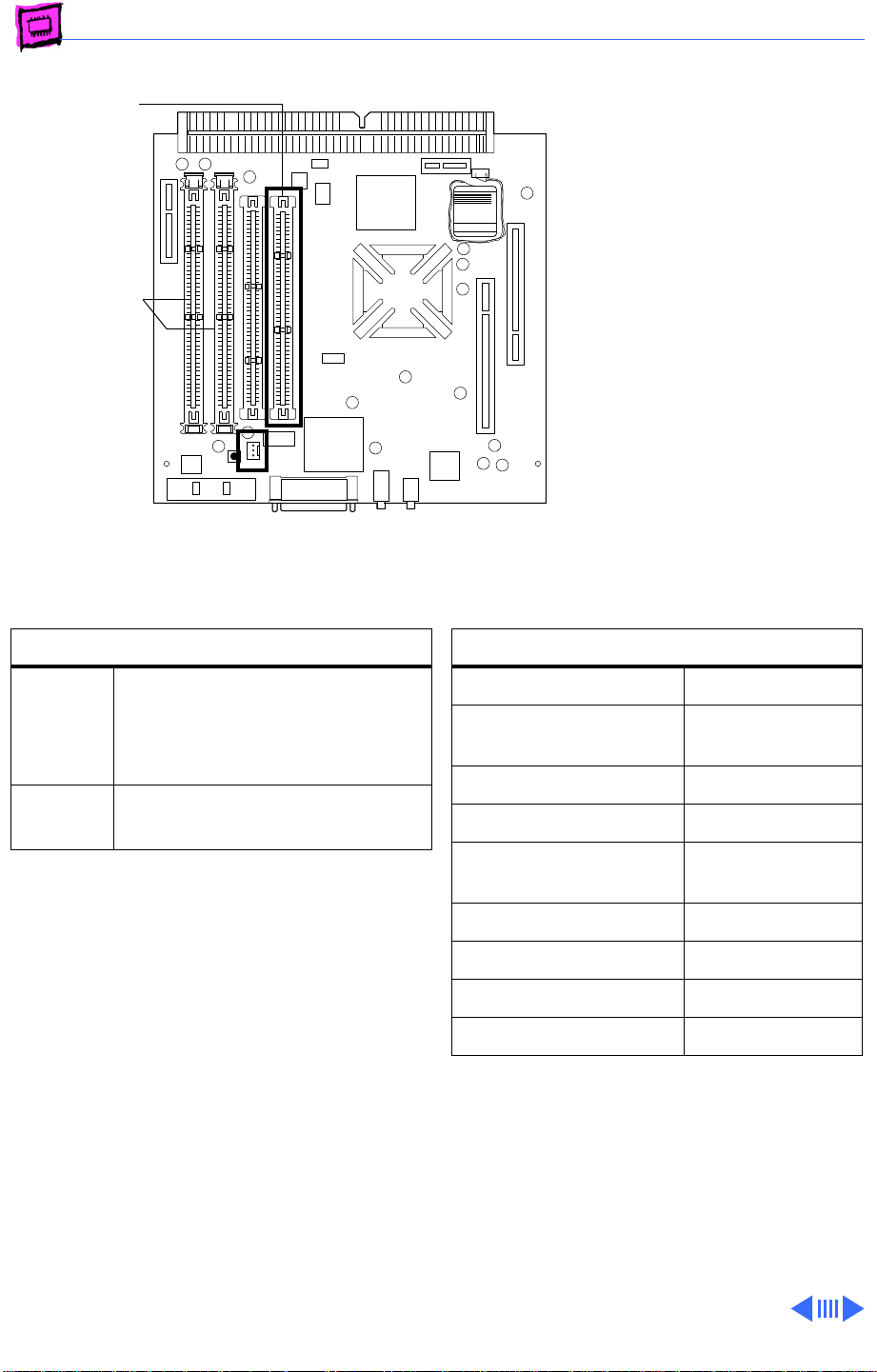
Memory Power Macintosh - 6
ROM
DRAM DIMM
Slots (2)
Battery
Clock
Computer
RAYOVAC
Power Macintosh 5400/120 and 5400/180
The Power Macintosh
5400/120 and 5400/180
computers come standard
with 16 MB of DRAM. You can
expand the total memory up
to a maximum of 136 MB by
installing DRAM DIMMs.
DRAM Configurations
16 MB The Power Macintosh
5400/120 and 5400/180
computers have a minimum of
16 MB of DRAM.
Up to
136 MB
Note:
The Power Macintosh 5400/120 and
Use various combinations up
to 136 MB of 168-pin DIMMs.
5400/180 computers have two DIMM slots.
You do not have to fill both slots when
upgrading memory, nor do you have to use
DIMMs of the same size.
Note:
Supported memory configurations
include 16, 20, 24, 32, 36, 40, 48, 64, and
136 MB.
Note:
This computer requires 2K refresh
rate DIMMs
Memory Information
DRAM Speed 70 ns
DIMM Type 168-pin, 2K
refresh
Soldered DRAM 8 MB
Number of DIMM Slots 2
Supported Sizes in MB 4, 8, 16, 32,
64
Maximum DRAM 136 MB
Virtual Memory 1 GB
Soldered VRAM 1 MB
Number of VRAM Slots None
Page 70
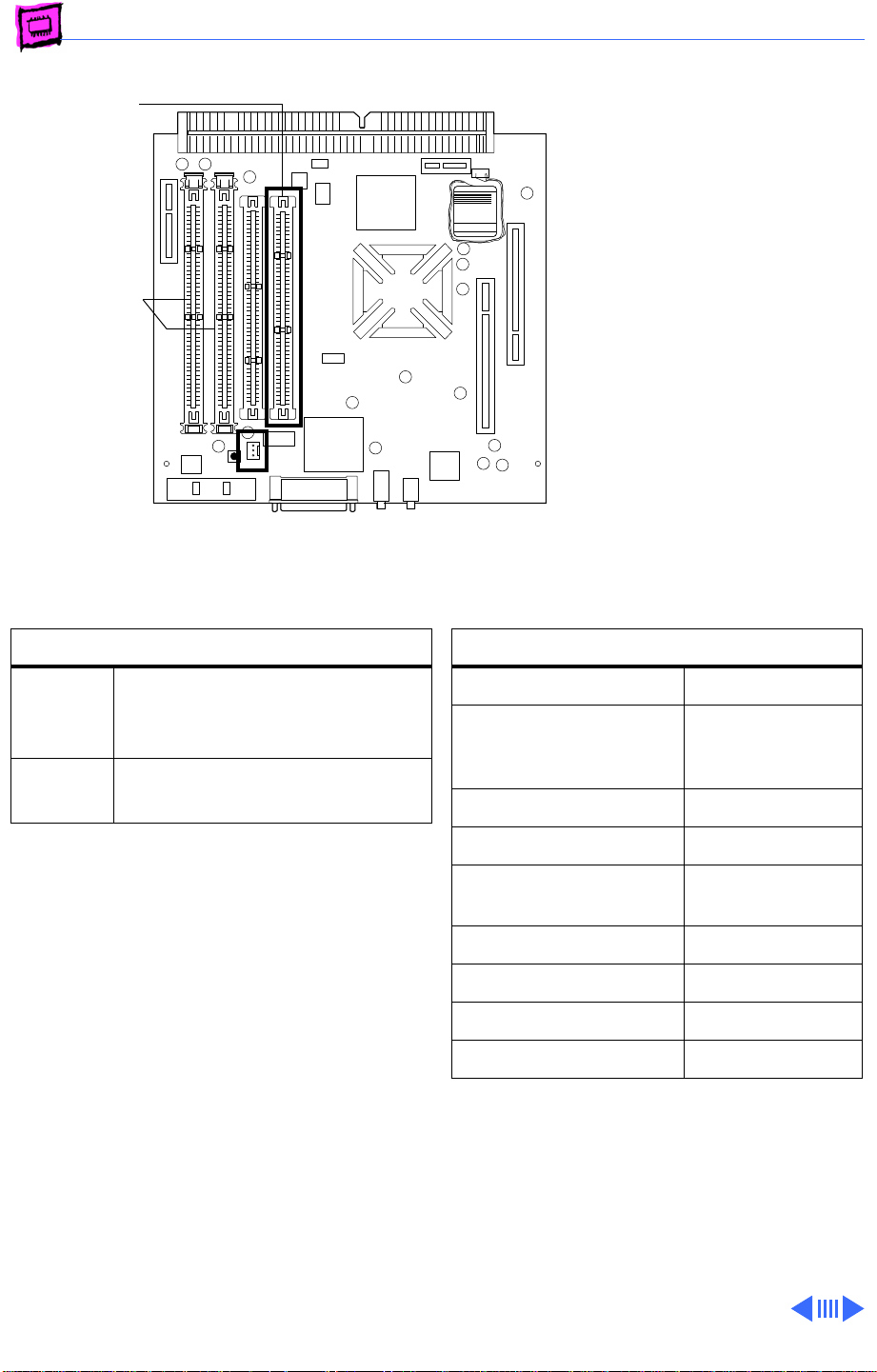
Memory Power Macintosh - 7
ROM
DRAM DIMM
Slots (2)
Battery
Clock
Computer
RAYOVAC
Power Macintosh 5400/200
The Power Macintosh
5400/200 computer comes
standard with 24 MB DRAM
(8 MB soldered on board).
You can expand the total
memory up to a maximum of
136 MB by installing DRAM
DIMMs.
DRAM Configurations
24 MB The Power Macintosh
5400/200 computer has a
minimum of 24 MB of DRAM.
Up to
136 MB
Note:
The Power Macintosh 5400/200
Use various combinations up
to 136 MB of 168-pin DIMMs.
computer has two DIMM slots. You do not have
to fill both slots when upgrading memory,
nor do you have to use DIMMs of the same
size.
Note:
Supported memory configurations
include 16, 20, 24, 32, 36, 40, 48, 64, and
136 MB.
Note:
This computer requires 2K refresh
rate, 5-volt buffered EDO DIMMs
Memory Information
DRAM Speed 60 ns
DIMM Type 168-pin, 2K
refresh, 5V
buffered EDO
Soldered DRAM 8 MB
Number of DIMM Slots 2
Supported Sizes in MB 4, 8, 16, 32,
64
Maximum DRAM 136 MB
Virtual Memory 1 GB
Soldered VRAM 1 MB
Number of VRAM Slots None
Page 71
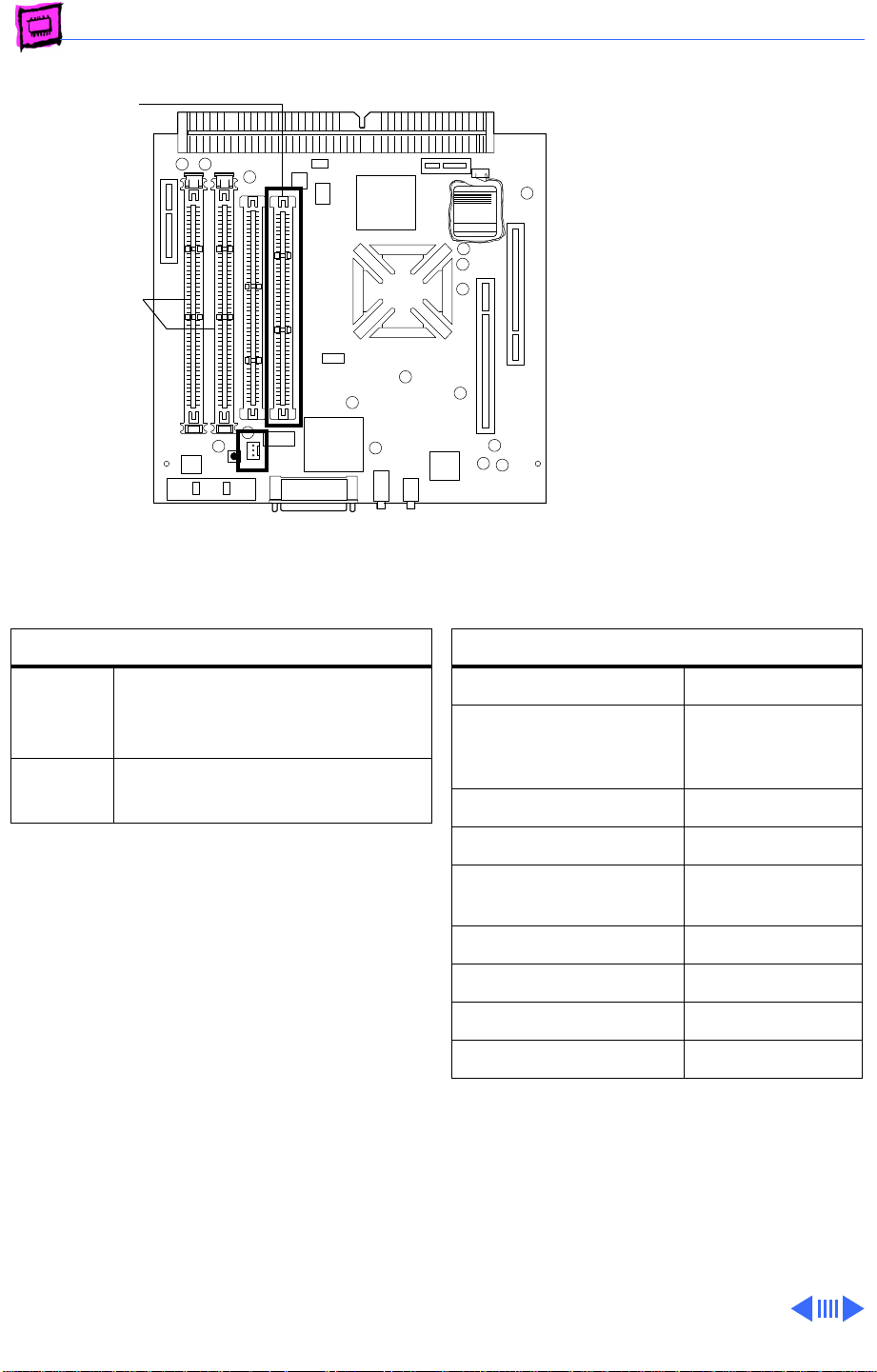
Memory Power Macintosh - 8
ROM
DRAM DIMM
Slots (2)
Battery
Clock
Computer
RAYOVAC
Power Macintosh 5500/225
The Power Macintosh
5500/225 computer comes
standard with 32 MB DRAM
(no DRAM soldered on board).
You can expand the total
memory up to a maximum of
128 MB by installing DRAM
DIMMs.
DRAM Configurations
32 MB The Power Macintosh
5500/225 computer has a
minimum of 32 MB of DRAM.
Up to
128 MB
Note:
The Power Macintosh 5500/225
Use various combinations up
to 128 MB of 168-pin DIMMs.
computer has two DIMM slots. You do not have
to fill both slots when upgrading memory,
nor do you have to use DIMMs of the same
size.
Note:
Supported memory configurations
include 16, 20, 24, 32, 36, 40, 48, 64, and
128 MB.
Note:
This computer requires 2K refresh
rate DIMMs. The 5500 logic board
accommodates 5-volt EDO DIMMs.
Memory Information
DRAM Speed 60 ns
DIMM Type 168-pin, 2K
refresh, 5V
buffered EDO
Soldered DRAM None
Number of DIMM Slots 2
Supported Sizes in MB 4, 8, 16, 32,
64
Maximum DRAM 128 MB
Virtual Memory 1 GB
Soldered VRAM 2 MB
Number of VRAM Slots None
Page 72
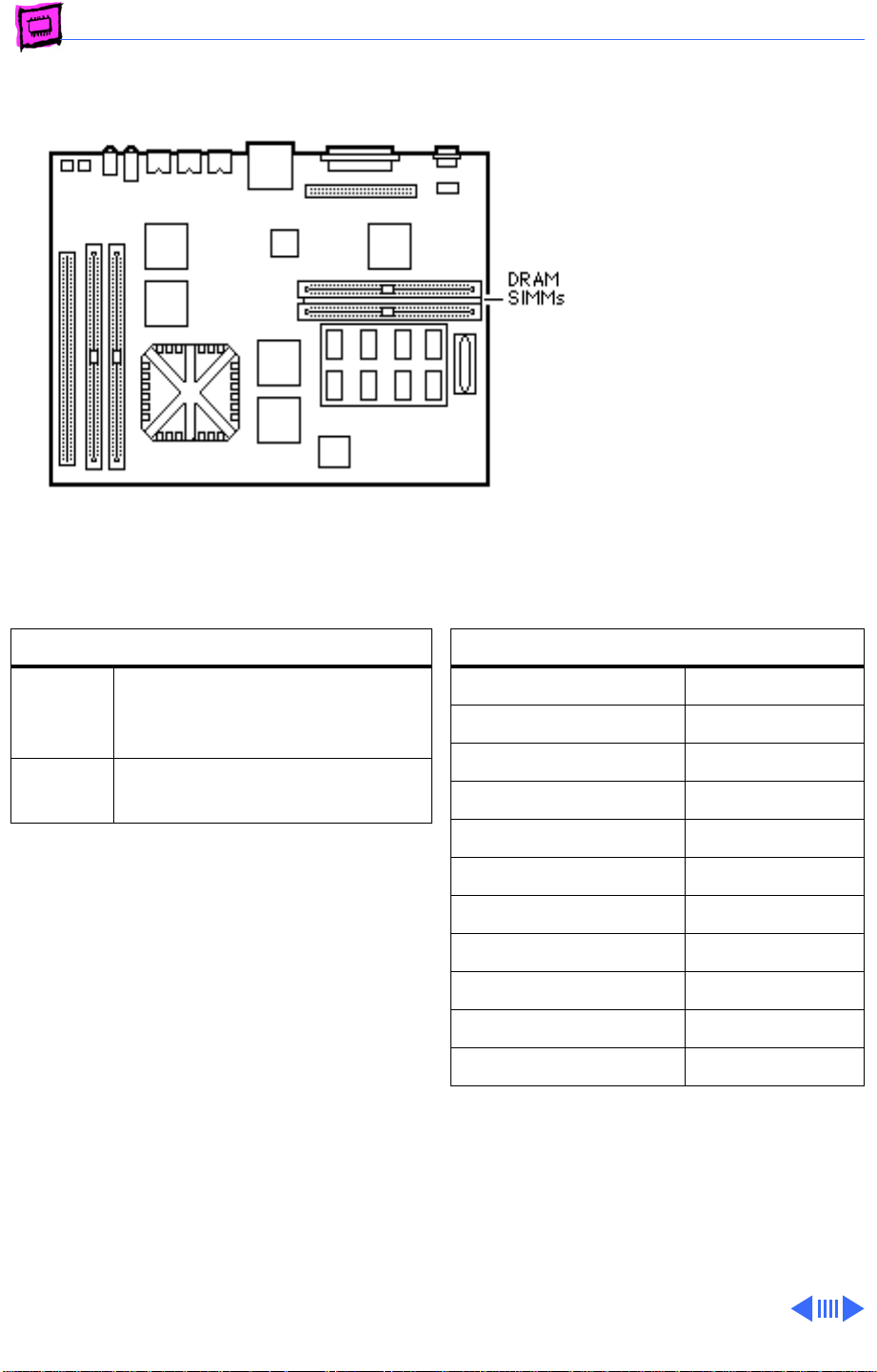
Memory Power Macintosh - 9
Power Macintosh 6100 Series
The Power Macintosh 6100
has 8 MB of DRAM soldered
onto the logic board. You can
expand the amount of memory
to a total of 72 MB by
installing DRAM SIMMs.
The Power Macintosh 6100
operates in 32-bit mode only
and cannot be toggled back to
24-bit mode.
DRAM Configurations
8 MB The Power Macintosh 6100
Series logic boards have 8 MB
of soldered DRAM.
Up to
72 MB
Note:
SIMMs must be installed in pairs of the
same size or the system will read both SIMMs
at the higher density. System crashes are
possible in this situation.
Possible DRAM configurations are 8, 16, 24,
40, and 72 MB.
Use 4, 8, 16, or 32 MB 72-pin
SIMMs.
Memory Information
DRAM Speed 80 ns
SIMM Type 72-pin
Soldered DRAM 8 MB
Number of SIMM Slots 2
Supported Sizes in MB 4, 8, 16, 32
Maximum DRAM 72 MB
Virtual Memory 1 GB
Soldered VRAM None
Number of VRAM Slots None
Cache SIMM slot Yes
Cache SIMM size 128k, 256K
Page 73
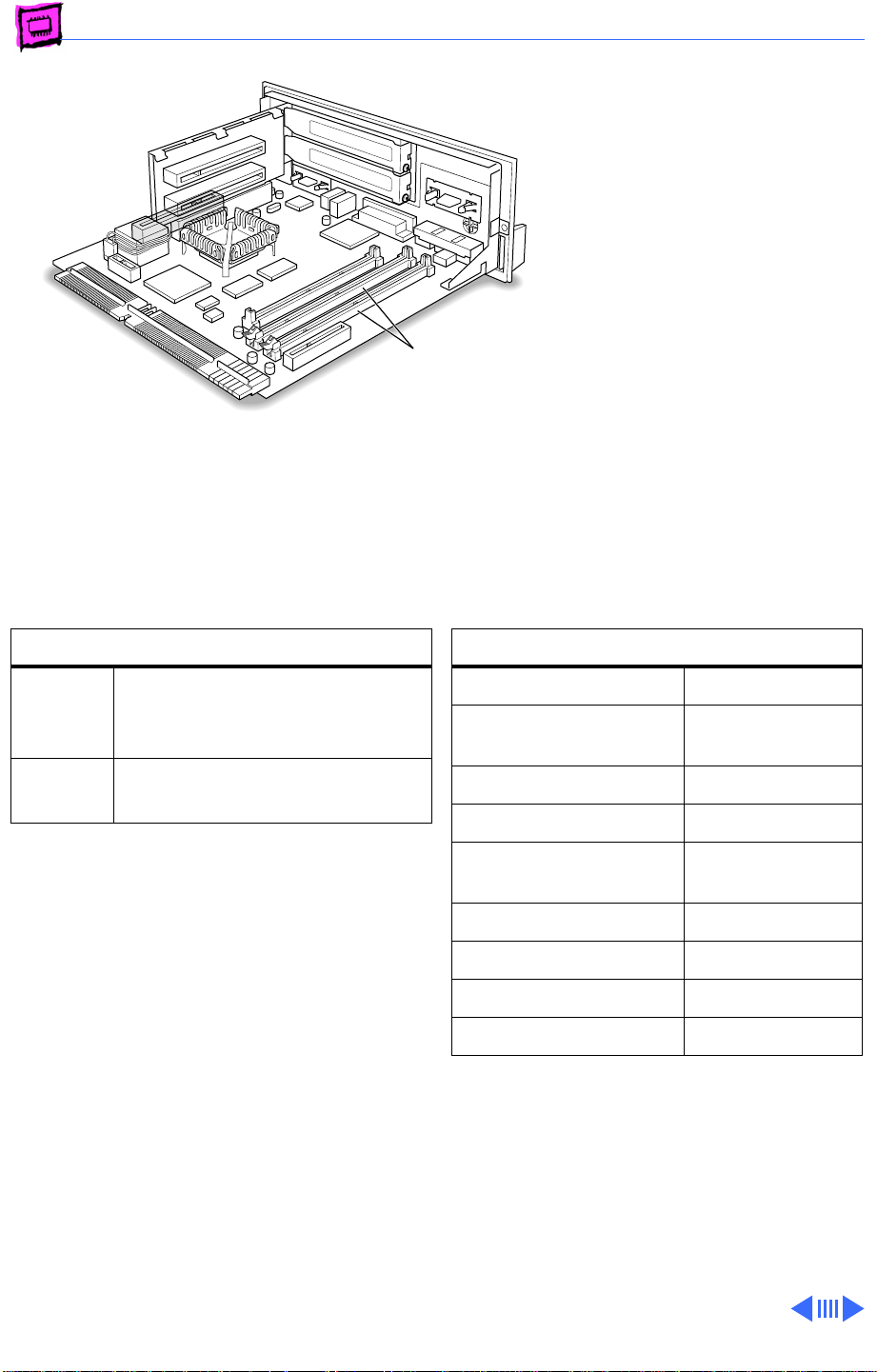
Memory Power Macintosh - 10
Power Macintosh 6400/180 and 6400/200
The Power Macintosh 6400
ships with a minimum of 16
MB of DRAM. You can expand
the total memory up to a
maximum of 136 MB by
DRAM DIMM Slots
installing DRAM DIMMs.
DRAM Configurations
16 MB The Power Macintosh 6400
comes standard with a minimum
of 16 MB of DRAM.
Up to
136 MB
Note:
The Power Macintosh 6400 has two
DIMM slots. You do not have to fill both slots
when upgrading memory, nor do you have to
use DIMMs of the same size. However, if you
wish to take advantage of the computer’s
interleaving capability, which provides
maximum performance, you must install the
DIMMs in matching pairs. DIMMs purchased
from different manufacturers can be paired
as long as they are the same size and speed.
Note:
Supported memory configurations
include 16, 20, 24, 32, 36, 40, 48, 64, and
136 MB.
Use various combinations up
to 136 MB of 168-pin DIMMs.
Memory Information
DRAM Speed 60 ns
DIMM Type 168-pin, 1K or
2K refresh
Soldered DRAM 8 MB
Number of DIMM Slots 2
Supported Sizes in MB 4, 8, 16, 32,
64
Maximum DRAM 136 MB
Virtual Memory 1 GB
Soldered VRAM 1 MB
Number of VRAM Slots None
Note:
This computer requires 1K or 2K
refresh rate EDO DIMMs.
Page 74
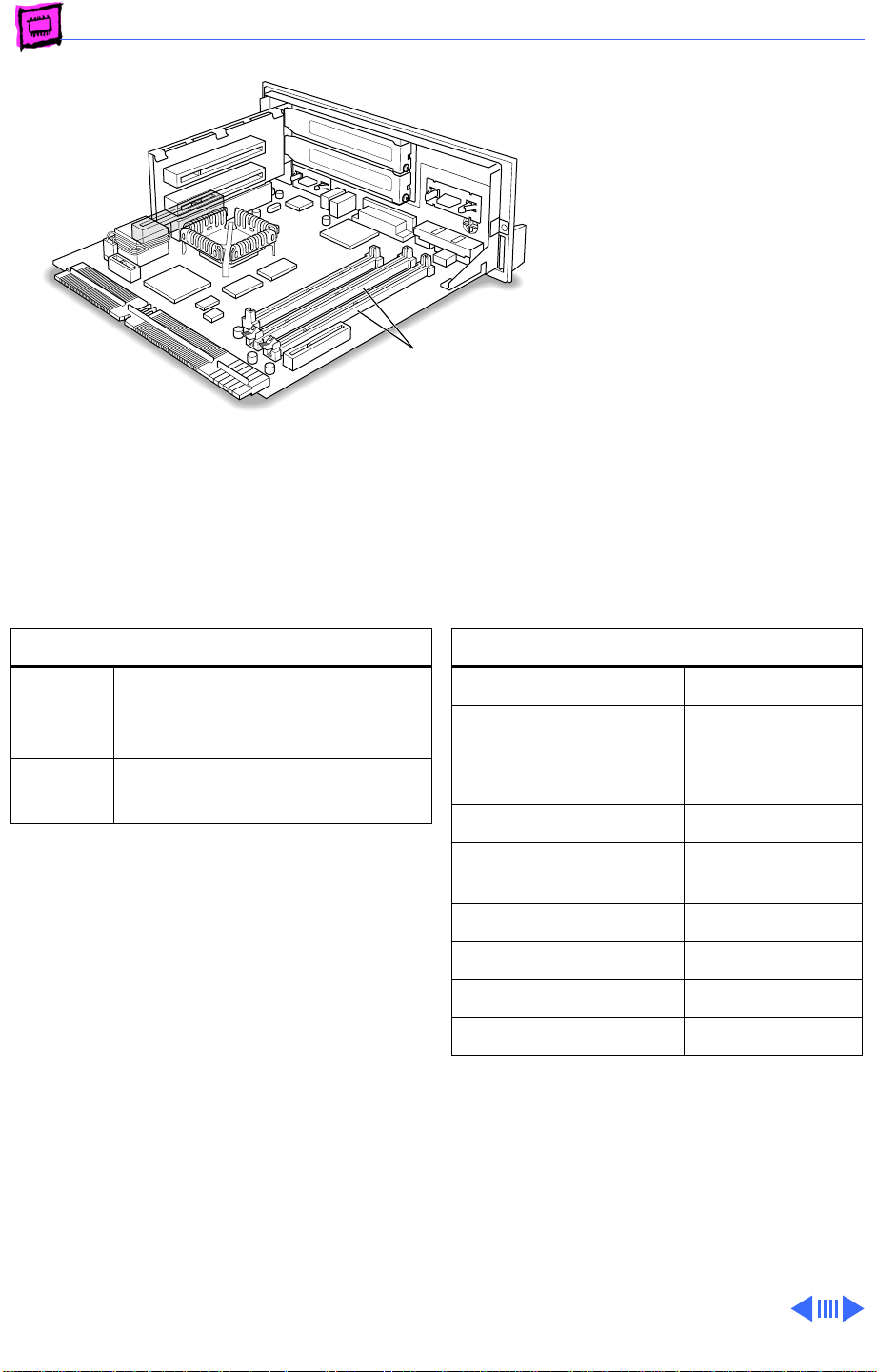
Memory Power Macintosh - 11
Power Macintosh 6500 Series
The information presented
here is valid for the Power
Macintosh 6500/225,
6500/250, 6500/275, and
6500/300. The Power
Macintosh 6500 Series
ships with a minimum of 32
DRAM DIMM Slots
MB of DRAM. The 6500/ 275
comes with 48 MB and the
6500/300 comes with 64
MB DRAM. You can expand the
total memory up to a
maximum of 128 MB by
installing DRAM DIMMs.
DRAM Configurations
32 MB The Power Macintosh 6500
comes standard with a minimum
of 32 MB of DRAM.
Up to
128 MB
Note:
The Power Macintosh 6400 has two
DIMM slots. You do not have to fill both slots
when upgrading memory, nor do you have to
use DIMMs of the same size. However, if you
wish to take advantage of the computer’s
interleaving capability, which provides
maximum performance, you must install the
DIMMs in matching pairs. DIMMs purchased
from different manufacturers can be paired
as long as they are the same size and speed.
Note:
Supported memory configurations
include 16, 20, 24, 32, 36, 40, 48, 64, and
128 MB.
Use various combinations up
to 128 MB of 168-pin DIMMs.
Memory Information
DRAM Speed 60 ns
DIMM Type 168-pin, 1K or
2K refresh
Soldered DRAM None
Number of DIMM Slots 2
Supported Sizes in MB 4, 8, 16, 32,
64
Maximum DRAM 128 MB
Virtual Memory 1 GB
Soldered VRAM 2 MB
Number of VRAM Slots None
Note:
This computer requires 1K or 2K
refresh rate EDO DIMMs.
Page 75
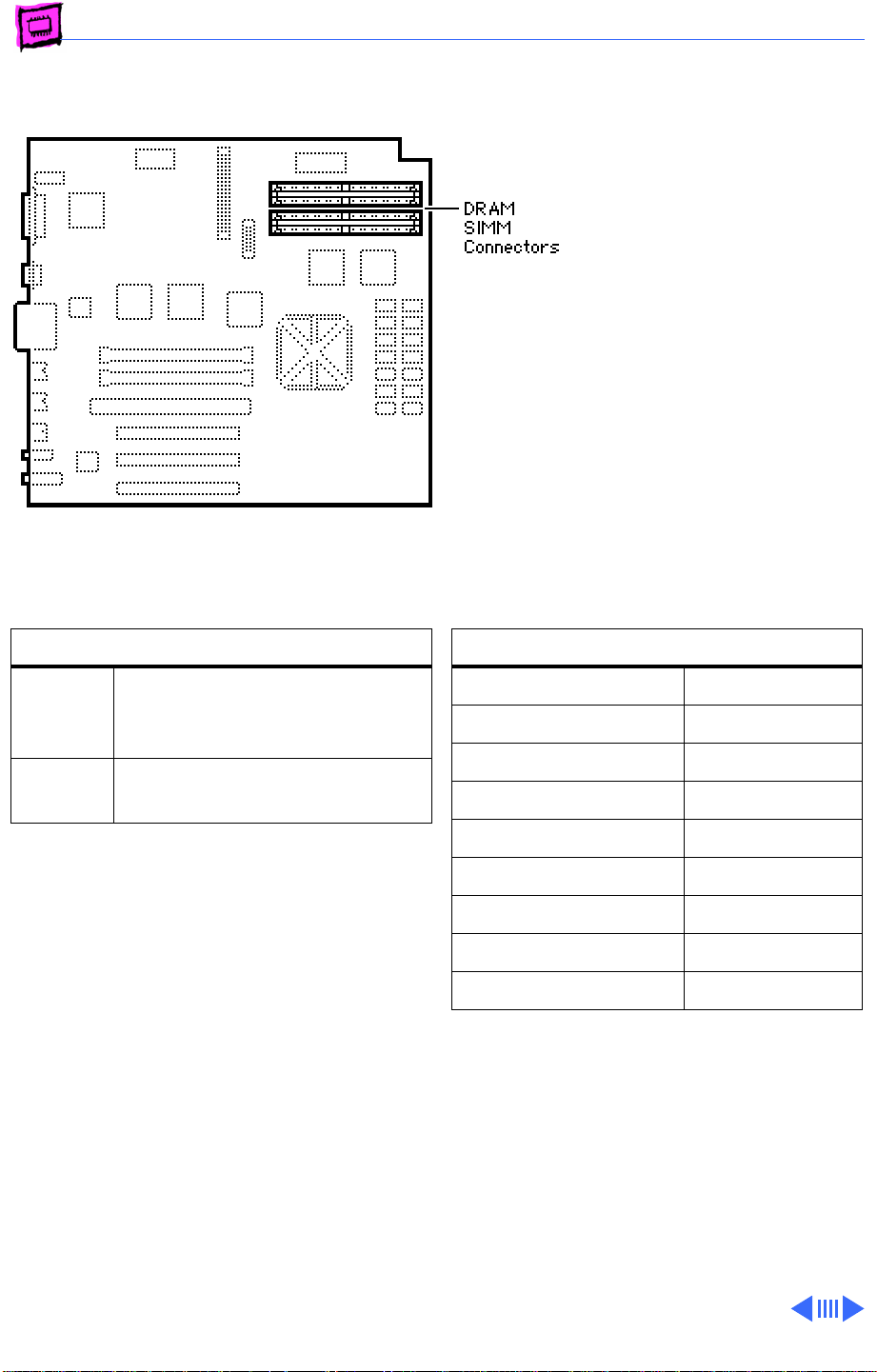
Memory Power Macintosh - 12
Power Macintosh 7100 Series
The Power Macintosh has 8
MB of DRAM soldered onto the
logic board. You can expand
the amount of memory to a
total of 136 MB by installing
DRAM SIMMs.
DRAM Configurations
8 MB The Power Macintosh 7100
Series logic boards have 8 MB
of soldered DRAM.
Up to
136 MB
Note:
SIMMs must be installed in pairs of the
same size or the system will read both SIMMs
at the higher density. System crashes are
possible in this situation.
Note:
The Power Macintosh 7100 operates in
32-bit mode only and cannot be toggled back
to 24-bit mode.
Use 4, 8, 16, or 32 MB 72-pin
SIMMs.
Memory Information
DRAM Speed 80 ns
SIMM Type 72-pin
Soldered DRAM 8 MB
Number of SIMM Slots 4
Supported Sizes in MB 4, 8, 16, 32
Maximum DRAM 136 MB
Virtual Memory 1 GB
Soldered VRAM 1 MB (on card)
Number of VRAM Slots See VRAM Note
VRAM Note:
7100 computers must have the Power
Macintosh 2 MB Video Card installed for
video support. This video card has 1 MB of
soldered VRAM and is expandable to 2 MB of
VRAM using four 256K VRAM SIMMs. The AV
versions of the PM 7100 use the AV card,
which comes with 2 MB of VRAM and is not
upgradeable.
The non-AV versions of the PM
Page 76
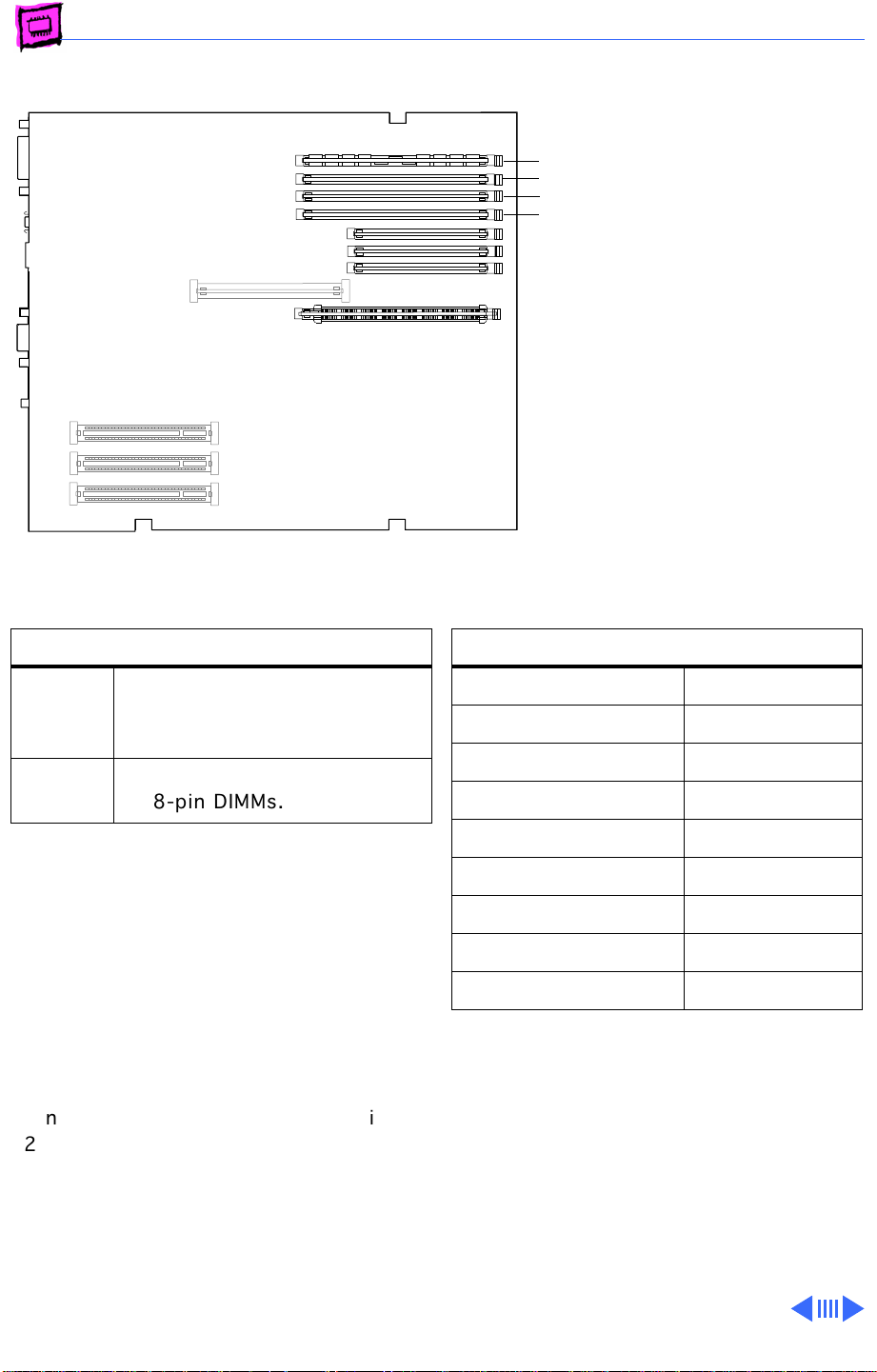
Memory Power Macintosh - 13
Power Macintosh 7200 Series
4
The Power Macintosh 7200
3
2
Series logic boards have four
1
DRAM DIMM slots, each with
a 64-bit data bus. You can
increase the computer’s
DRAM to a total of 256 MB
using 5-volt, 64-bit-wide,
168-pin, fast-paged mode,
70ns DIMMs.
(front of
computer)
DRAM Configurations
8 MB The Power Macintosh 7200
Series logic boards have 8 MB
of DRAM installed.
Up to
256 MB
Note:
individually or in pairs. These computers
support linear memory only; therefore, no
memory gains are seen when two DIMMs of
the same size are installed (that is, memory
interleaving is not supported on the Power
Macintosh 7200 Series computers).
Note:
(SIMMs) used in previous Macintosh models
are
not
7200.
Note:
memory soldered to the logic board. At least
one DRAM DIMM must be installed for the
computer to operate.
Use 4, 8, 16, or 32 MB
168-pin DIMMs.
DRAM DIMMs can be installed
The Single In-Line Memory Modules
compatible with the Power Macintosh
These computers do not have any main
Memory Information
DRAM Speed 70 ns
DIMM Type 168-pin
Soldered DRAM None
Number of DIMM Slots 4
Supported Sizes in MB 4, 8, 16, 32
Maximum DRAM 256 MB
Virtual Memory 1 GB
Soldered VRAM 1 MB
Number of VRAM Slots 3
Page 77
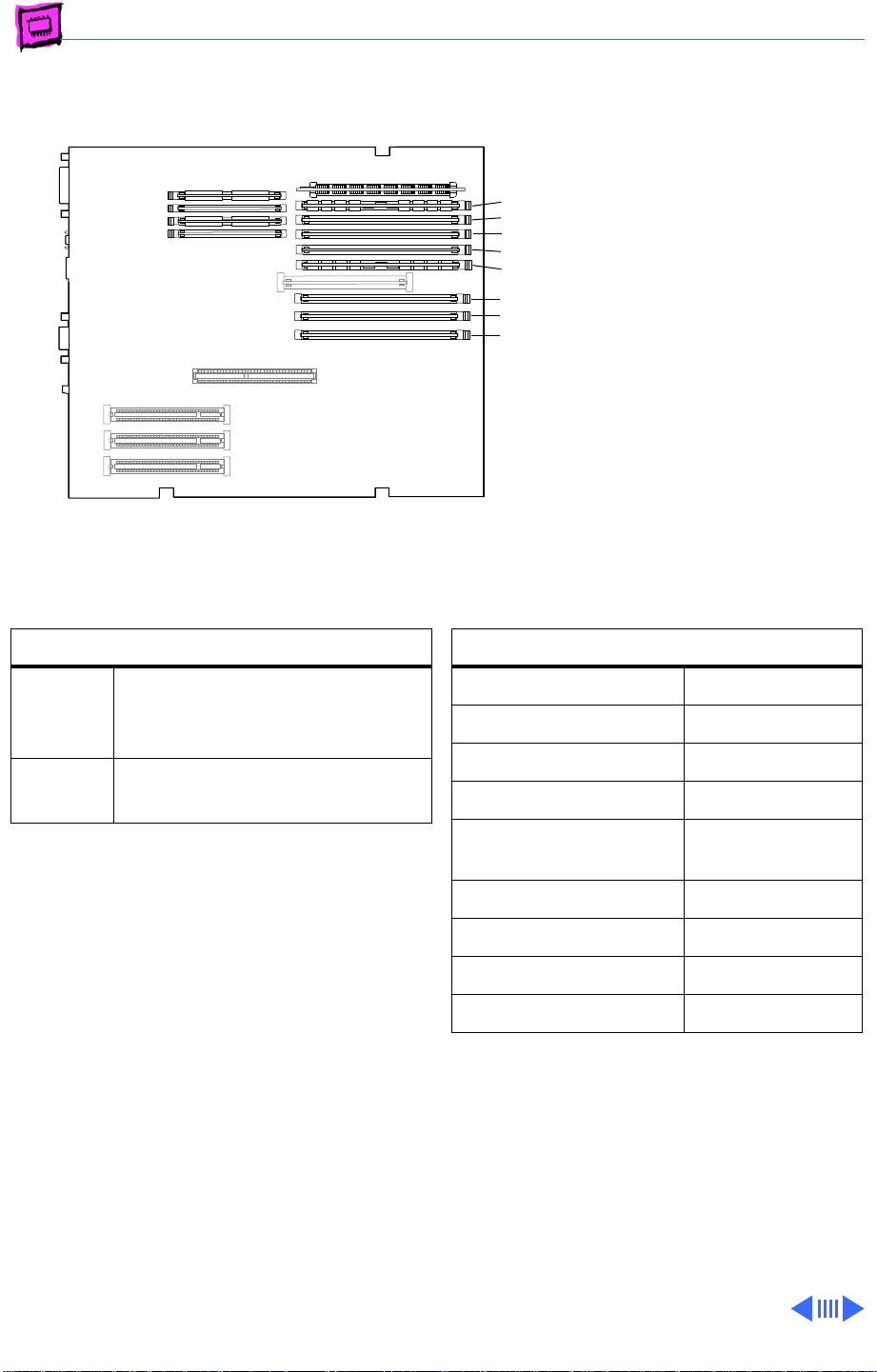
Memory Power Macintosh - 14
Power Macintosh 7300 Series
The Power Macintosh 7300
B4 slot
B3 slot
B2 slot
B1 slot
A4 slot
A3 slot
A2 slot
A1 slot
(front of
computer)
Series computers have no
DRAM soldered onto the logic
board. You can expand the
amount of memory to a total
of 512 MB using 5-volt, 64bit-wide, 168-pin fastpaged mode or EDO DIMMs.
DRAM Configurations
16 or
32 MB
Up to
512 MB
Note:
DRAM DIMMs can be installed
individually; however, to provide maximum
performance, install the DIMMs in matching
pairs and in paired slots (A4 and B4 first,
then A3 and B3, etc.).
Note:
The Single In-Line Memory Modules
(SIMMs) used in previous Macintosh models
are NOT compatible with the Power
Macintosh 7300. This computer supports
+5V DIMMs only.
Note:
These computers do not have any main
memory soldered to the logic board. At least
one DRAM DIMM must be installed for the
computer to operate.
The Power Macintosh 7300
Series logic boards have 16 or
32 MB of installed DRAM.
Use 4, 8, 16, 32, or 64 MB
168-pin DIMMs.
Memory Information
DRAM Speed 70 ns
DIMM Type +5V 168-pin
Soldered DRAM None
Number of DIMM Slots 8
Supported Sizes in MB 4, 8, 16, 32,
64
Maximum DRAM 512 MB
Virtual Memory 1 GB
Soldered VRAM None
Number of VRAM Slots 4
Page 78
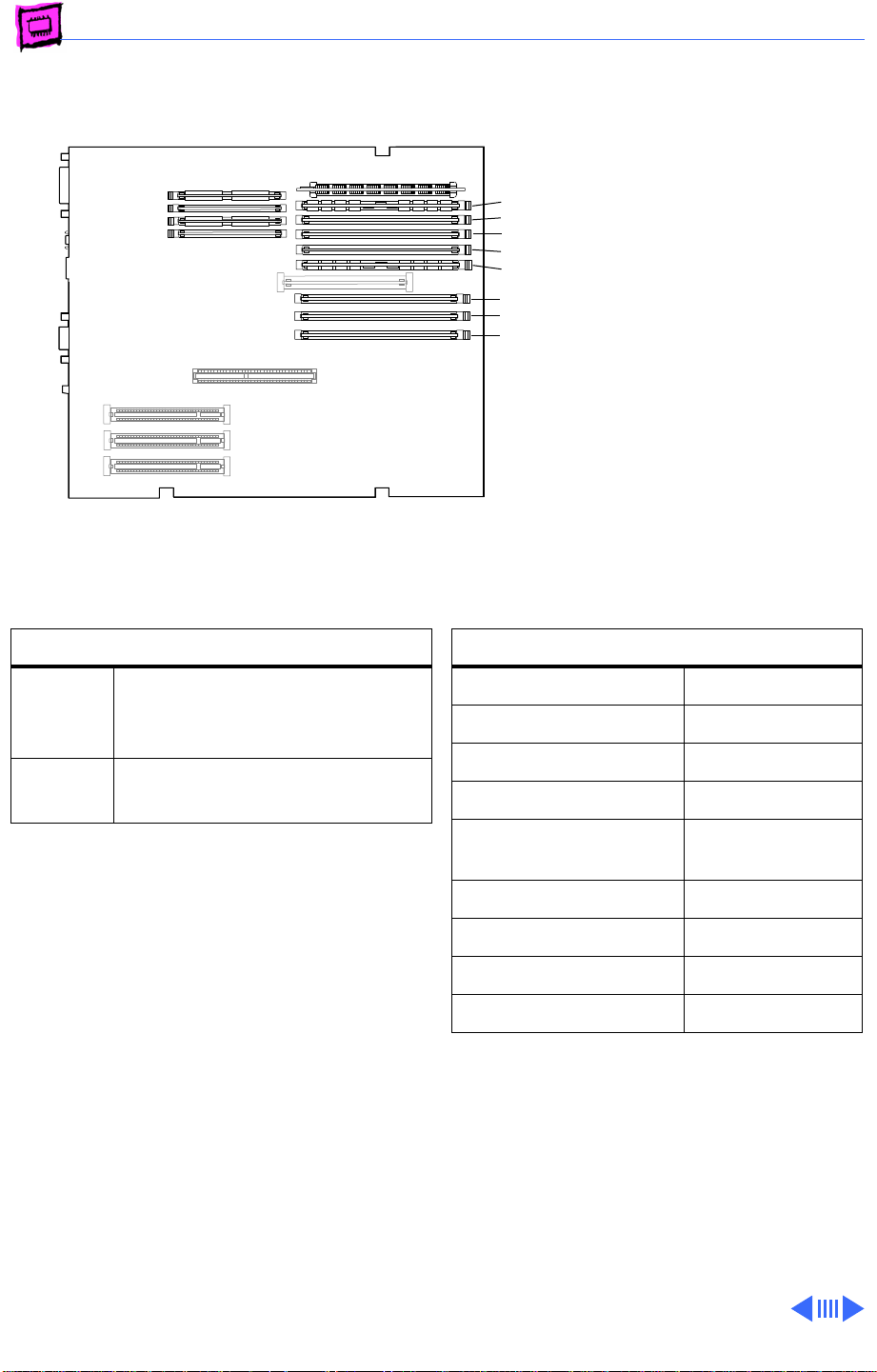
Memory Power Macintosh - 15
Power Macintosh 7500 Series
The Power Macintosh 7500
B4 slot
B3 slot
B2 slot
B1 slot
A4 slot
A3 slot
A2 slot
A1 slot
(front of
computer)
Series computers have no
DRAM soldered onto the logic
board. You can expand the
amount of memory to a total
of 512 MB using 5-volt, 64bit-wide, 168-pin fastpaged mode or EDO DIMMs.
DRAM Configurations
8 MB The Power Macintosh 7500
Series logic boards have 8 MB
of installed DRAM.
Up to
512 MB
Note:
DRAM DIMMs can be installed
individually; however, to provide maximum
performance, install the DIMMs in matching
pairs and in paired slots (A4 and B4 first,
then A3 and B3, etc.).
Note:
The Single In-Line Memory Modules
(SIMMs) used in previous Macintosh models
are NOT compatible with the Power
Macintosh 7500. This computer supports
+5V DIMMs only.
Note:
These computers do not have any main
memory soldered to the logic board. At least
one DRAM DIMM must be installed for the
computer to operate.
Use 4, 8, 16, 32, or 64 MB
168-pin DIMMs.
Memory Information
DRAM Speed 70 ns
DIMM Type +5V 168-pin
Soldered DRAM None
Number of DIMM Slots 8
Supported Sizes in MB 4, 8, 16, 32,
64
Maximum DRAM 512 MB
Virtual Memory 1 GB
Soldered VRAM None
Number of VRAM Slots 4
Page 79
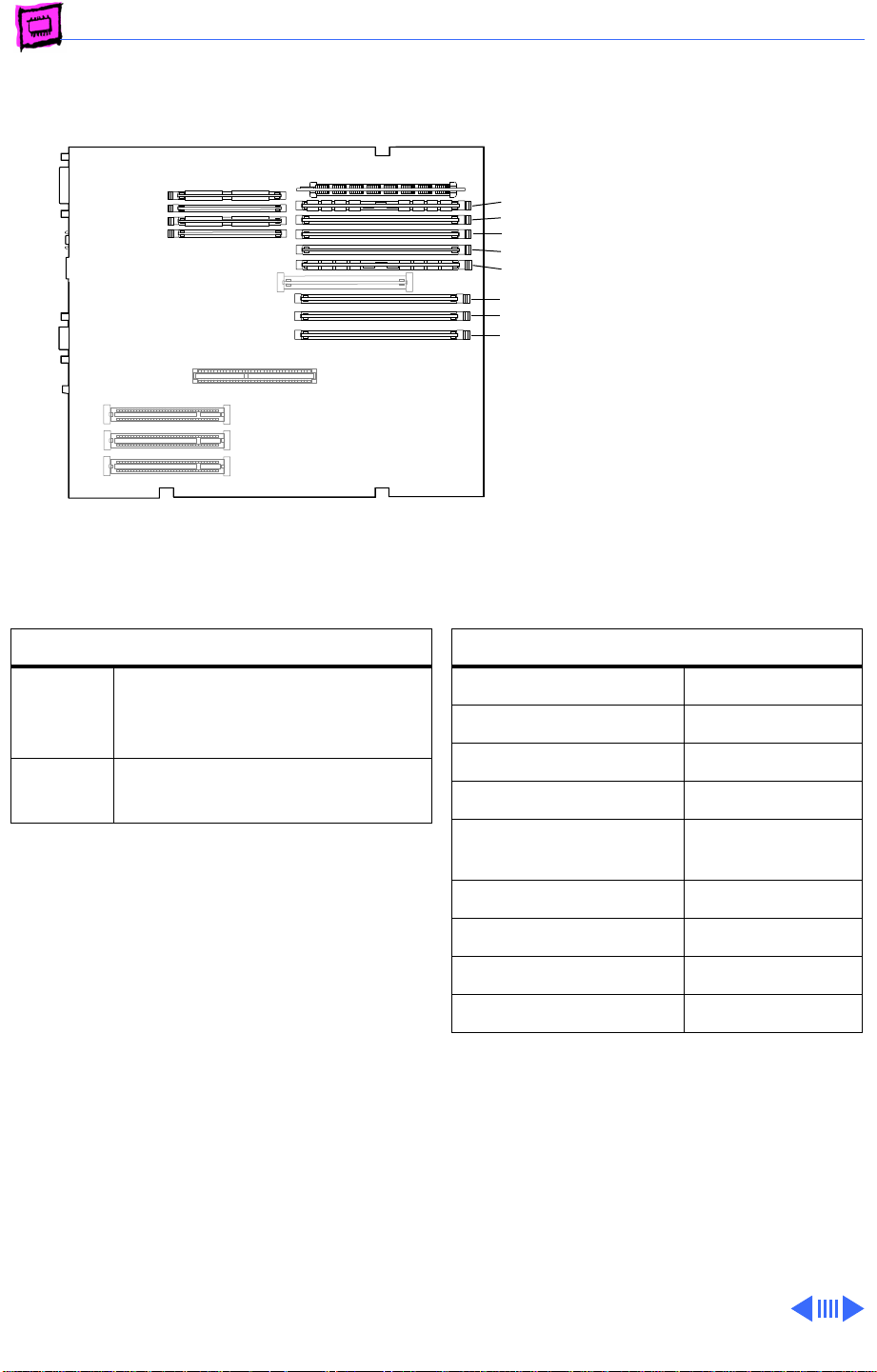
Memory Power Macintosh - 16
Power Macintosh 7600 Series
The Power Macintosh 7600
B4 slot
B3 slot
B2 slot
B1 slot
A4 slot
A3 slot
A2 slot
A1 slot
(front of
computer)
has no DRAM soldered onto
the logic board. You can
expand the amount of memory
to a total of 512 MB using 5volt, 64-bit-wide, 168-pin
fast-paged mode or EDO
DIMMs.
DRAM Configurations
16 or
32 MB
Up to
512 MB
Note:
DRAM DIMMs can be installed
individually; however, to provide maximum
performance, install the DIMMs in matching
pairs and in paired slots (A4 and B4 first,
then A3 and B3, etc.).
Note:
The Single In-Line Memory Modules
(SIMMs) used in previous Macintosh models
are NOT compatible with the Power
Macintosh 7600. This computer supports
+5V DIMMs only.
Note:
The Power Macintosh 7600 does not
have any main memory soldered to the logic
board. At least one DRAM DIMM must be
installed for the computer to operate.
The Power Macintosh 7600
logic board has 16 or 32 MB of
installed DRAM.
Use 4, 8, 16, 32, or 64 MB
168-pin DIMMs.
Memory Information
DRAM Speed 70 ns
DIMM Type +5V 168-pin
Soldered DRAM None
Number of DIMM Slots 8
Supported Sizes in MB 4, 8, 16, 32,
64
Maximum DRAM 512 MB
Virtual Memory 1 GB
Soldered VRAM None
Number of VRAM Slots 4
Page 80
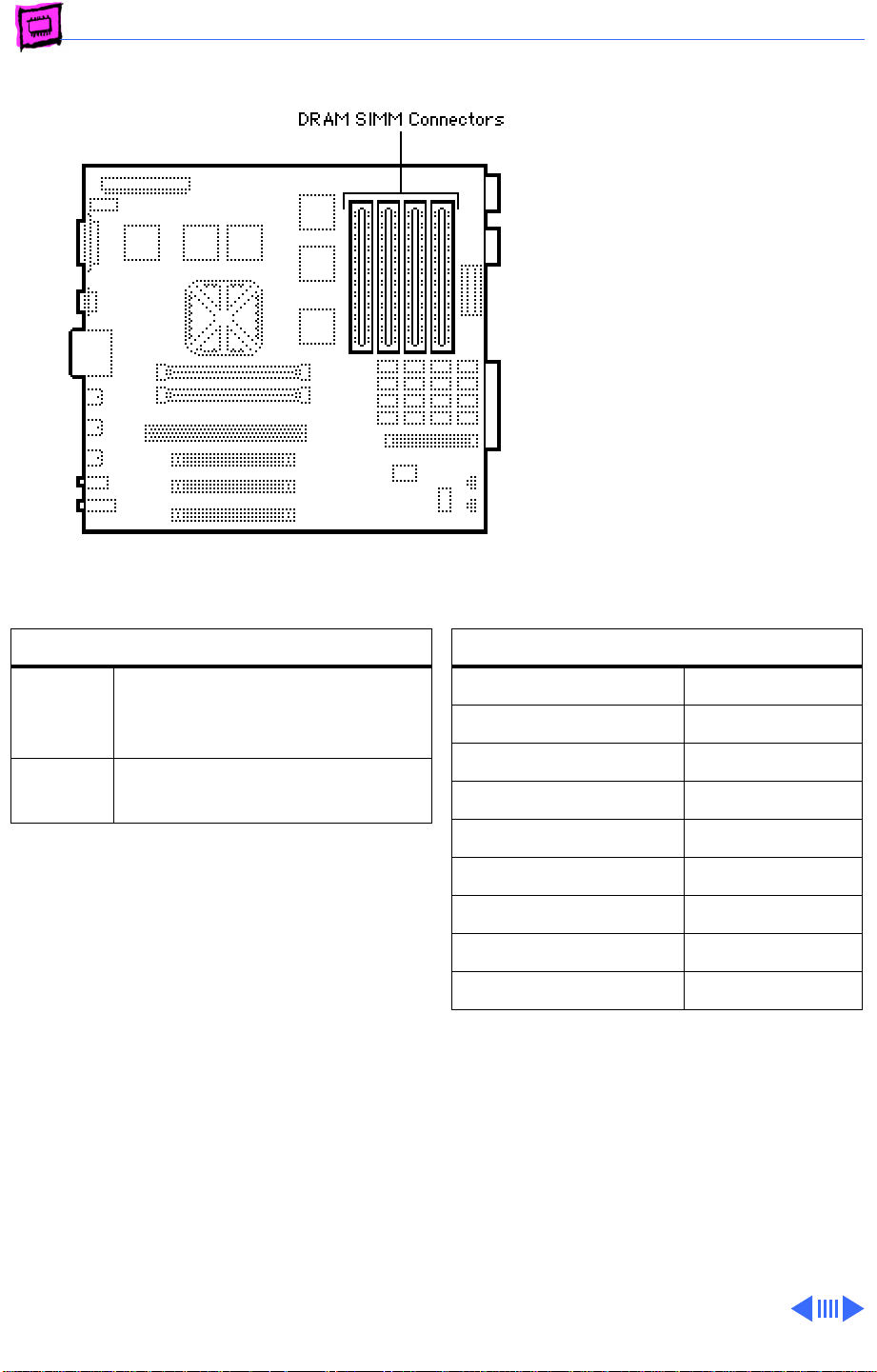
Memory Power Macintosh - 17
Power Macintosh 8100 Series
The Power Macintosh 8100
Series logic boards have 8
MB of soldered DRAM. You can
expand the memory to a total
of 264 MB by installing
DRAM SIMMs.
The Power Macintosh 8100
operates in 32-bit mode only
and cannot be toggled back to
24-bit mode.
DRAM Configurations
8 MB The Power Macintosh 8100
Series logic boards have 8 MB
of soldered DRAM.
Up to
264 MB
Note: SIMMs must be installed in pairs, and
both SIMMs in the pair must be of the same
size; Failure to do so will result in the Power
Mac thinking both SIMMs are of the (wrong)
density. System crashes are possible in this
situation.
You can install different size SIMMs just as
long as you install them in matched pairs; for
example, you could install a pair of 8 MB
SIMMs and a pair of 32 MB SIMMs.
Use 4, 8, 16, or 32 MB 72-pin
SIMMs.
Memory Information
DRAM Speed 80 ns
SIMM Type 72-pin
Soldered DRAM 8 MB
Number of SIMM Slots 8
Supported Sizes in MB 4, 8, 16, 32
Maximum DRAM 264 MB
Virtual Memory 1 GB
Soldered VRAM 2 MB (on card)
Number of VRAM Slots See VRAM Note
VRAM Note: VRAM may be expanded to 4 MB
on a Power Macintosh 8100 Series logic
board by inserting four 68-pin, 80 ns
SIMMs in connectors on the video card.
Page 81
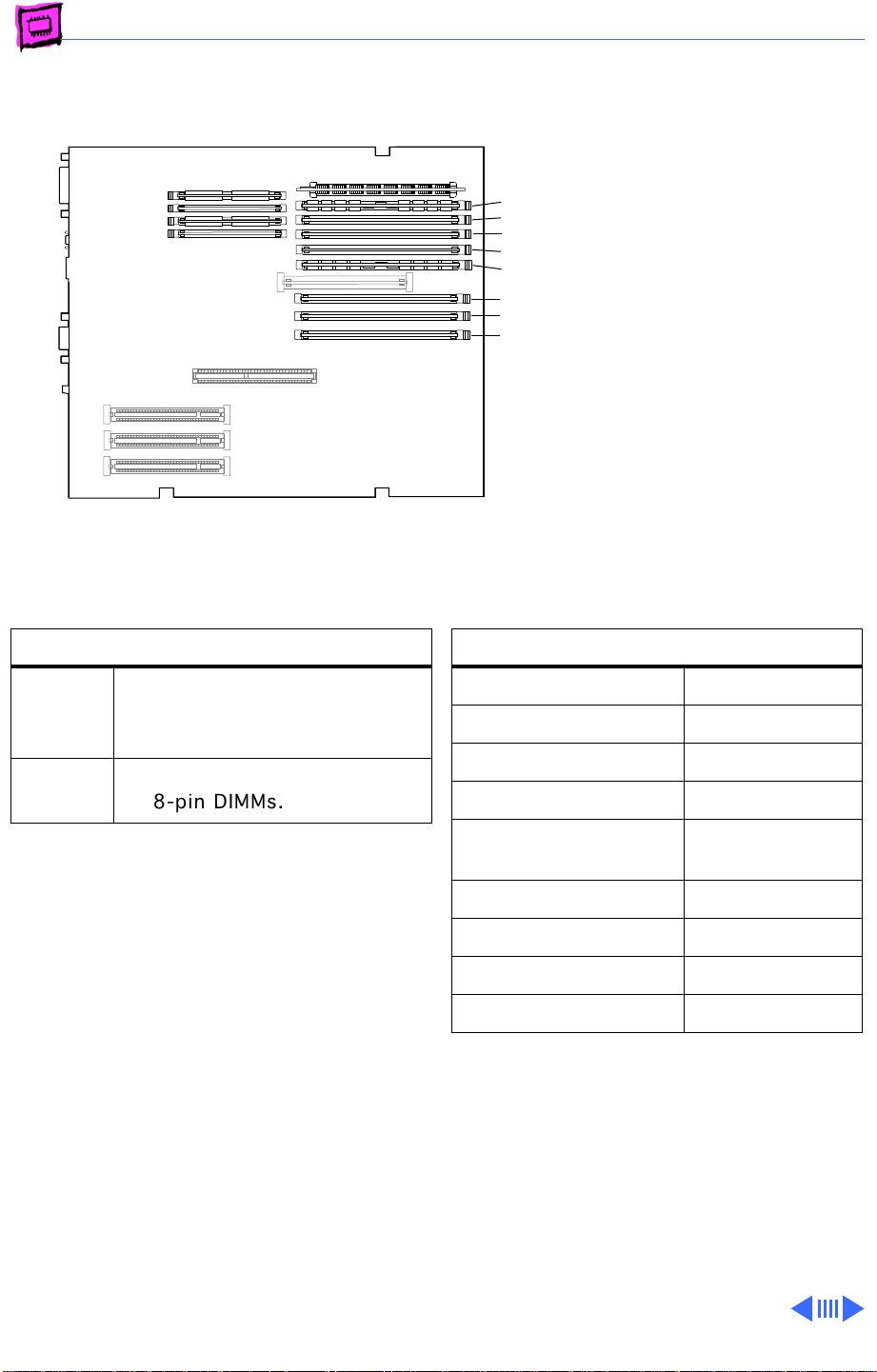
Memory Power Macintosh - 18
Power Macintosh 8500 Series
The Power Macintosh 8500
B4 slot
B3 slot
B2 slot
B1 slot
A4 slot
A3 slot
A2 slot
A1 slot
(front of
computer)
Series logic boards have eight
DRAM DIMM slots, each with
a 64-bit data bus. You can
increase the computer’s
DRAM to a total of 512 MB
using 5-volt, 64-bit-wide,
168-pin fast-paged mode,
70ns DIMMs.
DRAM Configurations
8 MB The Power Macintosh 8500
logic boards have 8 MB of DRAM
installed.
Up to
512 MB
Note: DRAM DIMMs can be installed
individually; however, to provide maximum
performance, install the DIMMs in matching
pairs and in paired slots (A4 and B4 first,
then A3 and B3, etc.).
Note: The Single In-Line Memory Modules
(SIMMs) used in previous Macintosh models
are
not
8500.
Note: These computers do not have any main
memory soldered to the logic board. At least
one DRAM DIMM must be installed for the
computer to operate.
Use 4, 8, 16, 32 or 64 MB
168-pin DIMMs.
compatible with the Power Macintosh
Memory Information
DRAM Speed 70 ns
DIMM Type 168-pin
Soldered DRAM None
Number of DIMM Slots 8
Supported Sizes in MB 4, 8, 16, 32,
64
Maximum DRAM 512 MB
Virtual Memory 1 GB
Soldered VRAM See VRAM Notes
Number of VRAM Slots 4
VRAM Note: This computer also uses VRAM
DIMMs (112-pin 70ns or faster) instead of
VRAM SIMMs. The VRAM SIMMs used in
earlier Power Macintosh models are not
compatible.
Page 82
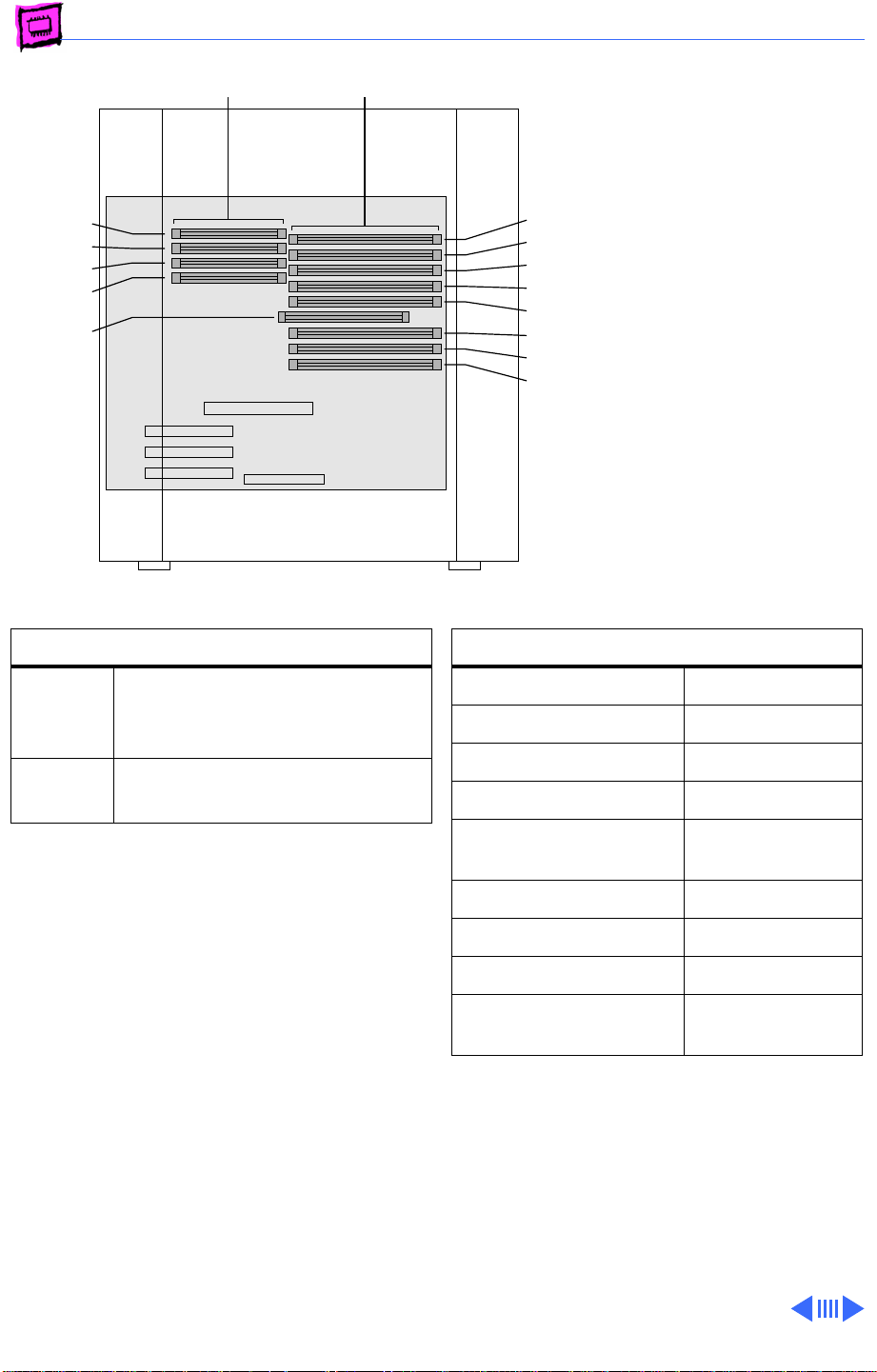
Memory Power Macintosh - 19
Bank 1
Bank 2
Bank 1
Bank 2
RAM
cache slot
VRAM DIMM slots
DRAM DIMM slots
B4
B3
B2
B1
A4
A3
A2
A1
Power Macintosh 8600 Series
The Power Macintosh 8600
Series logic boards have eight
DRAM DIMM slots, each with
a 64-bit data bus. You can
increase the computer’s
DRAM to a total of 512 MB
using 5-volt, 64-bit-wide,
168-pin fast-paged mode or
EDO DIMMs.
DRAM Configurations
32 MB The Power Macintosh 8600
logic board has 32 MB of
installed DRAM.
Up to
512 MB
Use 4, 8, 16, 32, or 64 MB
168-pin DIMMs.
Note: DRAM DIMMs can be installed
individually; however, to provide maximum
performance, install the DIMMs in matching
pairs and in paired slots (A4 and B4 first,
then A3 and B3, etc.).
Note: The Single In-Line Memory Modules
(SIMMs) used in previous Macintosh models
are NOT compatible with the Power
Macintosh 8600. This computer supports
+5V DIMMs only.
Note: The Power Macintosh 8600 does not
have any main memory soldered to the logic
board. At least one DRAM DIMM must be
installed for the computer to operate.
Memory Information
DRAM Speed 70 ns
DIMM Type +5V 168-pin
Soldered DRAM None
Number of DIMM Slots 8
Supported Sizes in MB 4, 8, 16, 32,
64
Maximum DRAM 512 MB
Virtual Memory 1 GB
Soldered VRAM None (See Note)
Number of VRAM Slots 4 (2 MB
installed)
VRAM Note: This computer uses VRAM
DIMMs (112-pin, 70 ns or faster) instead
of VRAM SIMMs. The VRAM SIMMs used in
earlier Power Macintosh models are not
compatible. There are 4 VRAM slots. 1 MB
DIMMs are installed in pairs, making VRAM
expandable to 4MB.
Page 83
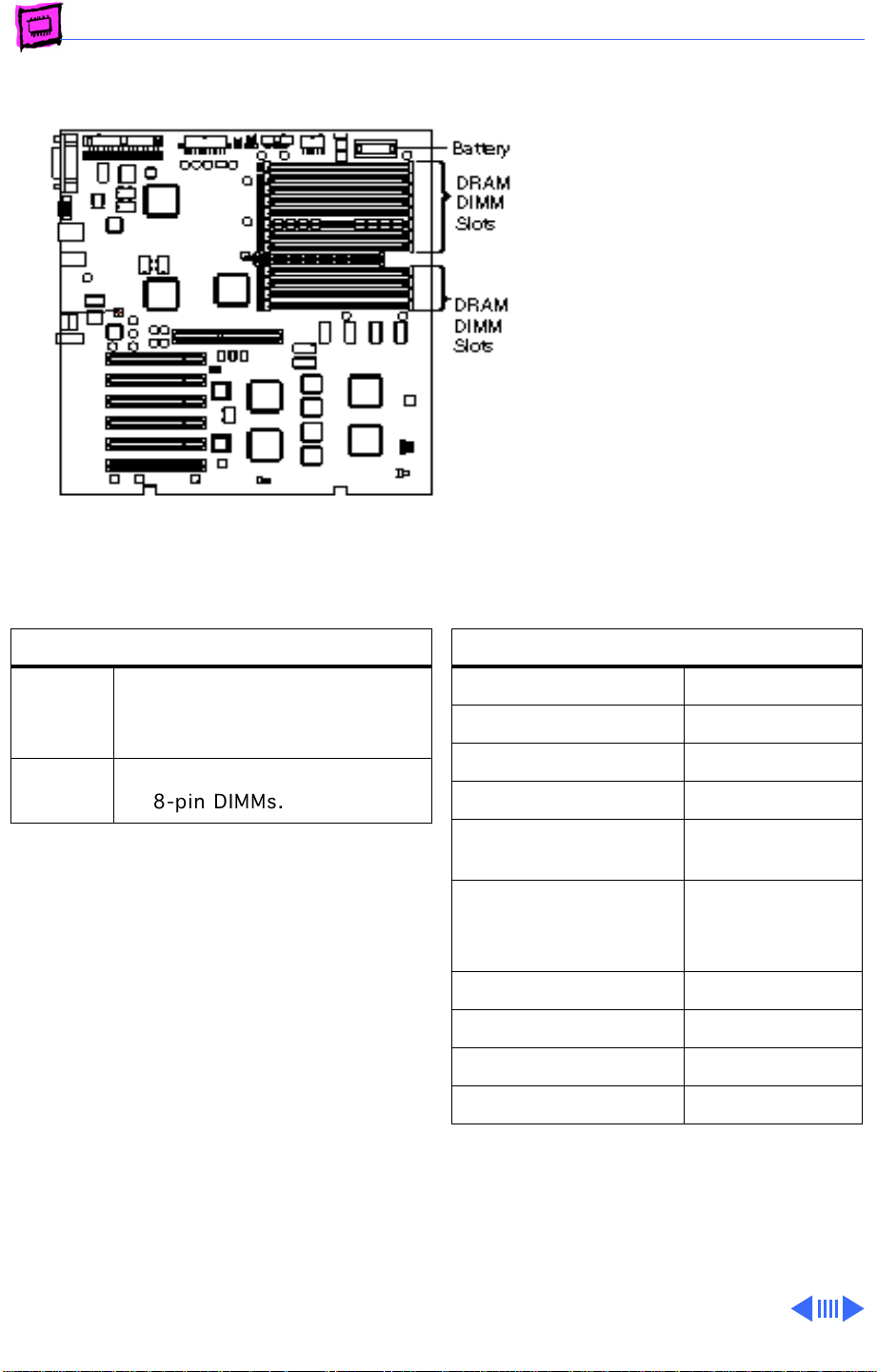
Memory Power Macintosh - 20
Power Macintosh 9500 Series
The Power Macintosh 9500
Series logic boards do not
have any soldered DRAM. At
least one DRAM DIMM must
be installed for the computer
to operate.
You can expand the memory to
a theoretical limit of 1536
MB; however, Apple has
tested only up to a limit of
768 MB.
DRAM Configurations
8 MB The Power Macintosh 9500
logic boards have 8 MB of DRAM
DIMMs installed.
Up to
1.5 GB
Note: DRAM DIMMs can be installed
individually; however, to provide maximum
performance, install the DIMMs in matching
pairs and in paired slots (A6 and B6 first,
then A5 and B5, etc.).
Note: The Single In-Line Memory Modules
(SIMMs) used in previous Macintosh models
are
not
9500.
VRAM Note: No VRAM upgrade is available
from Apple. Since PM 9500 computers
without video cards require third-party PCI
video support, the VRAM requirements and
capabilities vary by manufacturer.
Use 4, 8, 16, 32, or 64 MB
168-pin DIMMs.
compatible with the Power Macintosh
Memory Information
DRAM Speed 70 ns
DIMM Type 168-pin
Soldered DRAM None
Number of DIMM Slots 12
Supported Sizes in MB 4, 8, 16, 32,
64, 128
Maximum DRAM 768 MB tested
and 1536 MB
theoretical limit
Virtual Memory 1 GB
Soldered VRAM See VRAM Note
Number of VRAM Slots See VRAM Note
Cache DIMM Slot No
See additional notes on the following page.
Page 84

Memory Power Macintosh - 21
DIMMs
Whereas SIMMs have 72-pins, DIMMs have
168 pins. The extra pins provide a 64-bit
data path, compared to a 32-bit data path for
SIMMs. In addition, DIMMs do not have to be
installed in pairs like the SIMMs on earlier
Macintosh models. (However, to take
advantage of memory interleaving, the DIMMs
should be installed in paired slots. See
“DIMMs” in Miscellaneous for more
information.)
Memory Configurations
The Power Macintosh 9500 Series logic
boards have 12 DRAM DIMM slots, each with
a 64-bit data bus. You can increase the
computer’s DRAM to a theoretical total of
1536 MB using 5-volt, 64-bit-wide,
168-pin fast-paged mode, 70 ns DIMMs.
When installing DRAM DIMMs in the Power
Macintosh 9500, fill slot A6 first, followed
by B6, then A5, followed by B5, and so on.
DRAM DIMMs can be installed individually;
however, to take advantage of memory
interleaving (see Note below), which
provides maximum performance, you must
install the DIMMs in matching pairs and in
paired slots (A6 and B6 first, then A5 and
B5, and so on).
DIMMs purchased from different
manufacturers can be paired as long as they
are the same size and speed.
Note: Memory interleaving allows the
computer to read or write to its memory
while other memory reads or writes are
occurring, thus providing for faster
performance.
Page 85
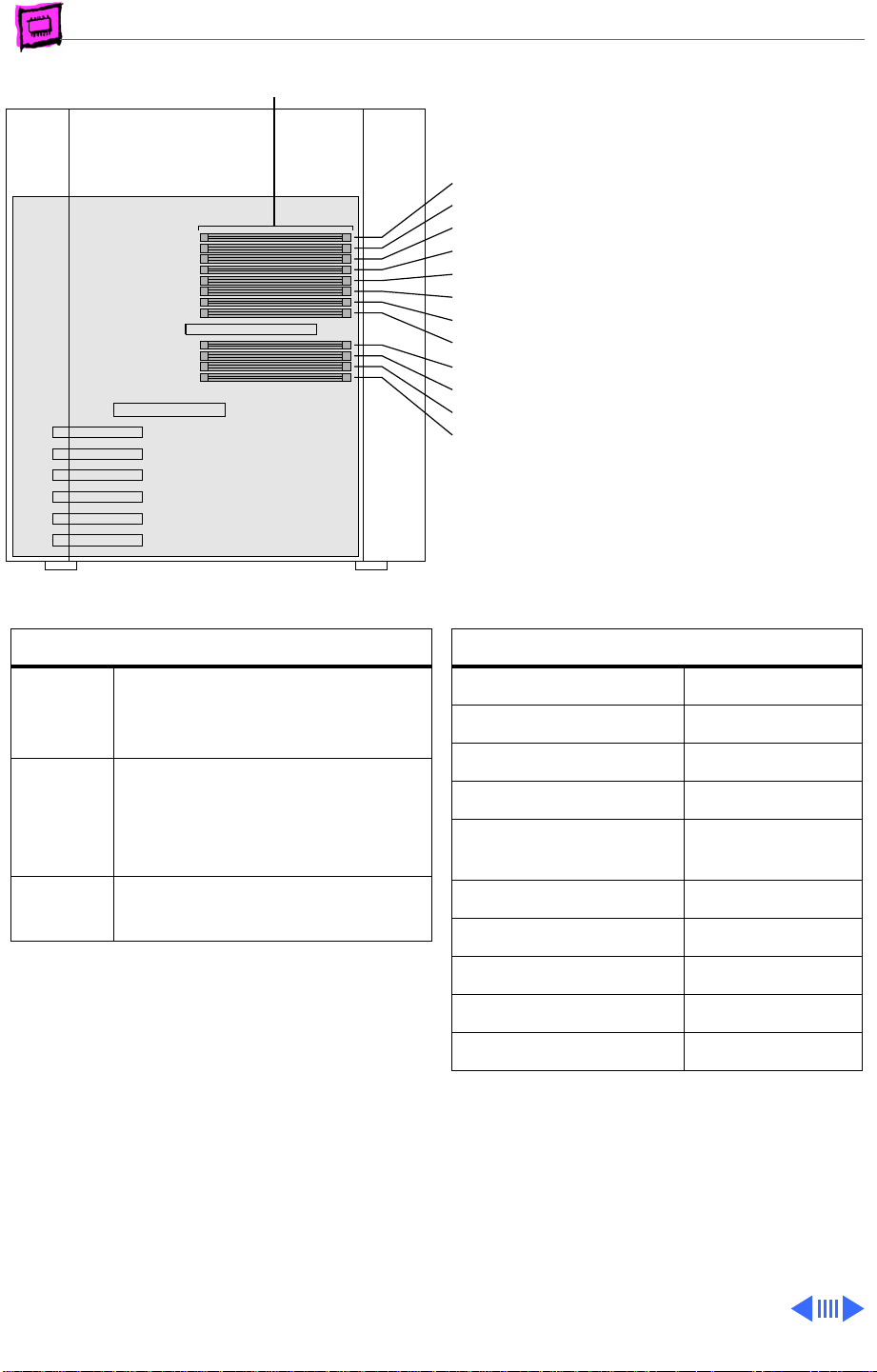
Memory Power Macintosh - 22
DRAM DIMM slots
B6 slot
B5 slot
B4 slot
B3 slot
B2 slot
B1 slot
A6 slot
A5 slot
A4 slot
A3 slot
A2 slot
A1 slot
.
Power Macintosh 9600 Series
The Power Macintosh 9600
Series logic boards do not
have any soldered DRAM. At
least one DRAM DIMM must
be installed for the computer
to operate.
You can expand the memory to
a total of 768 MB using 5volt, 64-bit-wide, 168-pin
fast-paged mode or EDO
DIMMs.
DRAM Configurations
32 MB The Power Macintosh 9600
logic boards have 32 MB of
installed DRAM.
64 MB The Power Macintosh 9600/
300 and 9600/350 logic
boards have 64 MB of installed
DRAM.
Up to
768 MB
Use 4, 8, 16, 32, or 64 MB
168-pin DIMMs.
Note: DRAM DIMMs can be installed
individually; however, to provide maximum
performance, install the DIMMs in matching
pairs and in paired slots (A4 and B4 first,
then A3 and B3, etc.).
Note: The Single In-Line Memory Modules
(SIMMs) used in previous Macintosh models
are NOT compatible with the Power
Macintosh 9600. This computer supports
+5V DIMMs only.
Memory Information
DRAM Speed 70 ns
DIMM Type 168-pin
Soldered DRAM None
Number of DIMM Slots 12
Supported Sizes in MB 4, 8, 16, 32,
64
Maximum DRAM 768 MB
Virtual Memory 1 GB
Soldered VRAM See VRAM Note
Number of VRAM Slots See VRAM Note
Cache DIMM Slot No
VRAM Note: The Power Macintosh 9600
Series computers come standard with 4 MB
of VRAM on the video card (9600/300 and
9600/350 have 8 MB VRAM). There is no
VRAM soldered on the logic board and no
VRAM slots are on the logic board.
See additional notes on the following page
Page 86

Memory Power Macintosh - 23
DIMMs
Whereas SIMMs have 72-pins, DIMMs have
168 pins. The extra pins provide a 64-bit
data path, compared to a 32-bit data path for
SIMMs. In addition, DIMMs do not have to be
installed in pairs like the SIMMs on earlier
Macintosh models. (However, to take
advantage of memory interleaving, the DIMMs
should be installed in paired slots. See
“DIMMs” in Miscellaneous for more
information.)
Memory Configurations
The Power Macintosh 9600 Series logic
boards have 12 DRAM DIMM slots, each with
a 64-bit data bus. You can increase the
computer’s DRAM to 768 MB using 5-volt,
64-bit-wide, 168-pin fast-paged mode or
EDO DIMMs.
When installing DRAM DIMMs in the Power
Macintosh 9600, fill slot A6 first, followed
by B6, then A5, followed by B5, and so on.
DRAM DIMMs can be installed individually;
however, to take advantage of memory
interleaving (see Note below), which
provides maximum performance, you must
install the DIMMs in matching pairs and in
paired slots (A6 and B6 first, then A5 and
B5, and so on).
Page 87
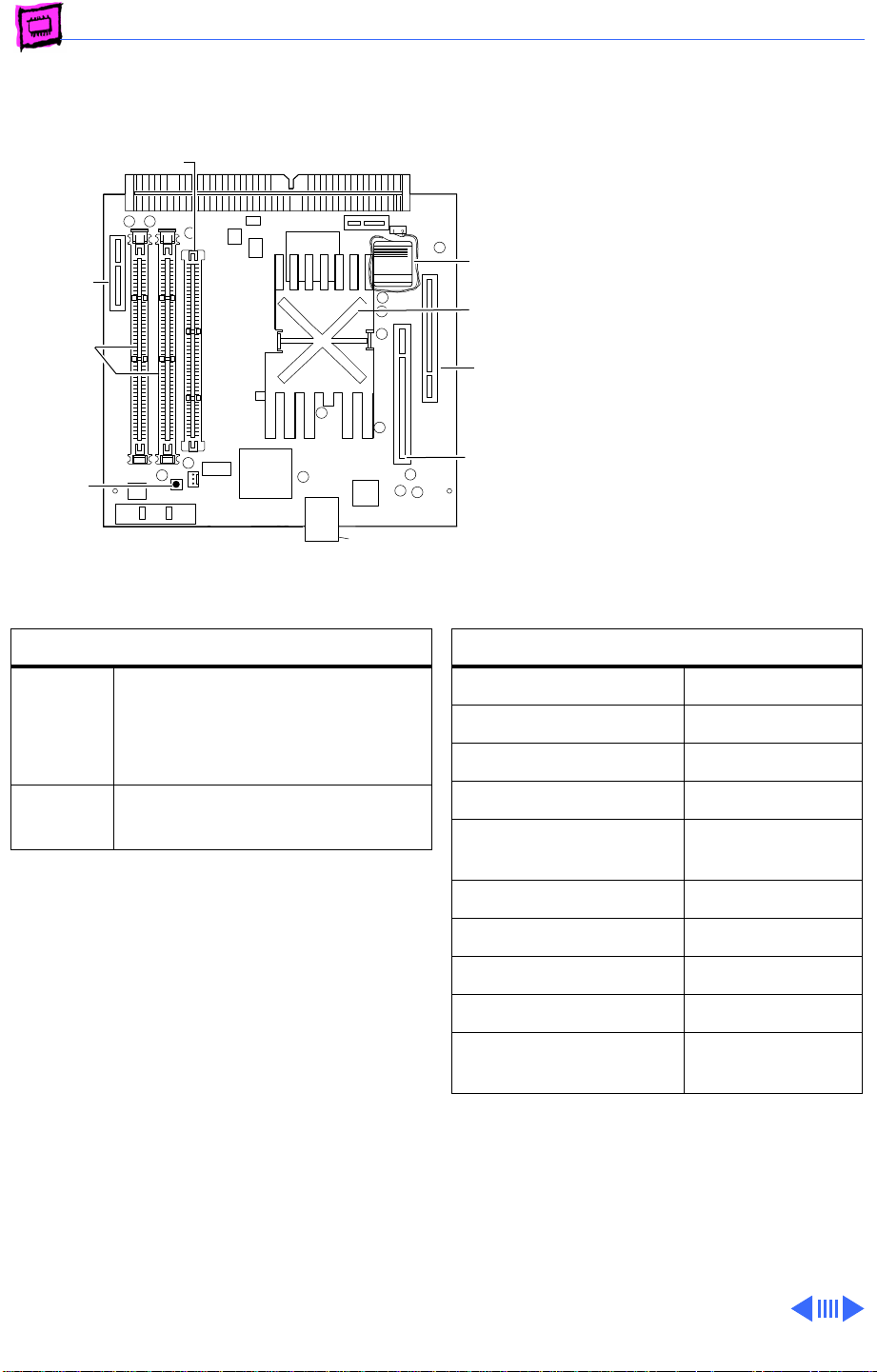
Memory Power Macintosh - 24
Twentieth
Twentieth Anniversary Logic Board
L2 Cache Slot
Video-In
Slot
DRAM
DIMM
Slots (2)
Cuda
Reset
Button
DRAM Configurations
Battery
Processor
with
Heatsink
Communications
Adapter
Card Slot
PCI
Adapter
Card
Slot
Sound InterConnect
Memory Information
Anniversary
Macintosh
The Twentieth Anniversary
Macintosh logic boards do not
have any soldered DRAM. At
least one DRAM DIMM must
be installed for the computer
to operate.
You can expand the memory to
a total of 128 MB using
5-volt, 64-bit-wide, 168pin fast-paged mode or EDO
DIMMs.
32 MB The Twentieth Anniversary
Macintosh logic boards have 32
MB of installed DRAM (one 32
MB DIMM).
Up to
128 MB
Note: The Single In-Line Memory Modules
(SIMMs) used in previous Macintosh models
are NOT compatible with the Twentieth
Anniversary Macintosh. This computer
supports +5V DIMMs only.
Note: Supported memory configurations
include 16, 20, 24, 32, 36, 40, 48, 64,
80, 96, and 128 MB.
Note: This computer requires 64-bit wide,
5-volt, 2K refresh rate EDO or fast-page
mode DIMMs. This computer cannot use 3.3volt and 4K refresh rate DIMMs.
Use 4, 8, 16, 32, or 64 MB
168-pin DIMMs.
DRAM Speed 60 ns
DIMM Type 168-pin
Soldered DRAM None
Number of DIMM Slots 2
Supported Sizes in MB 4, 8, 16, 32,
64
Maximum DRAM 128 MB
Virtual Memory 1 GB
Soldered VRAM 2 MB SGRAM
Number of VRAM Slots 1 already filled
Cache DIMM Slot 1 already filled
with 256K
Page 88
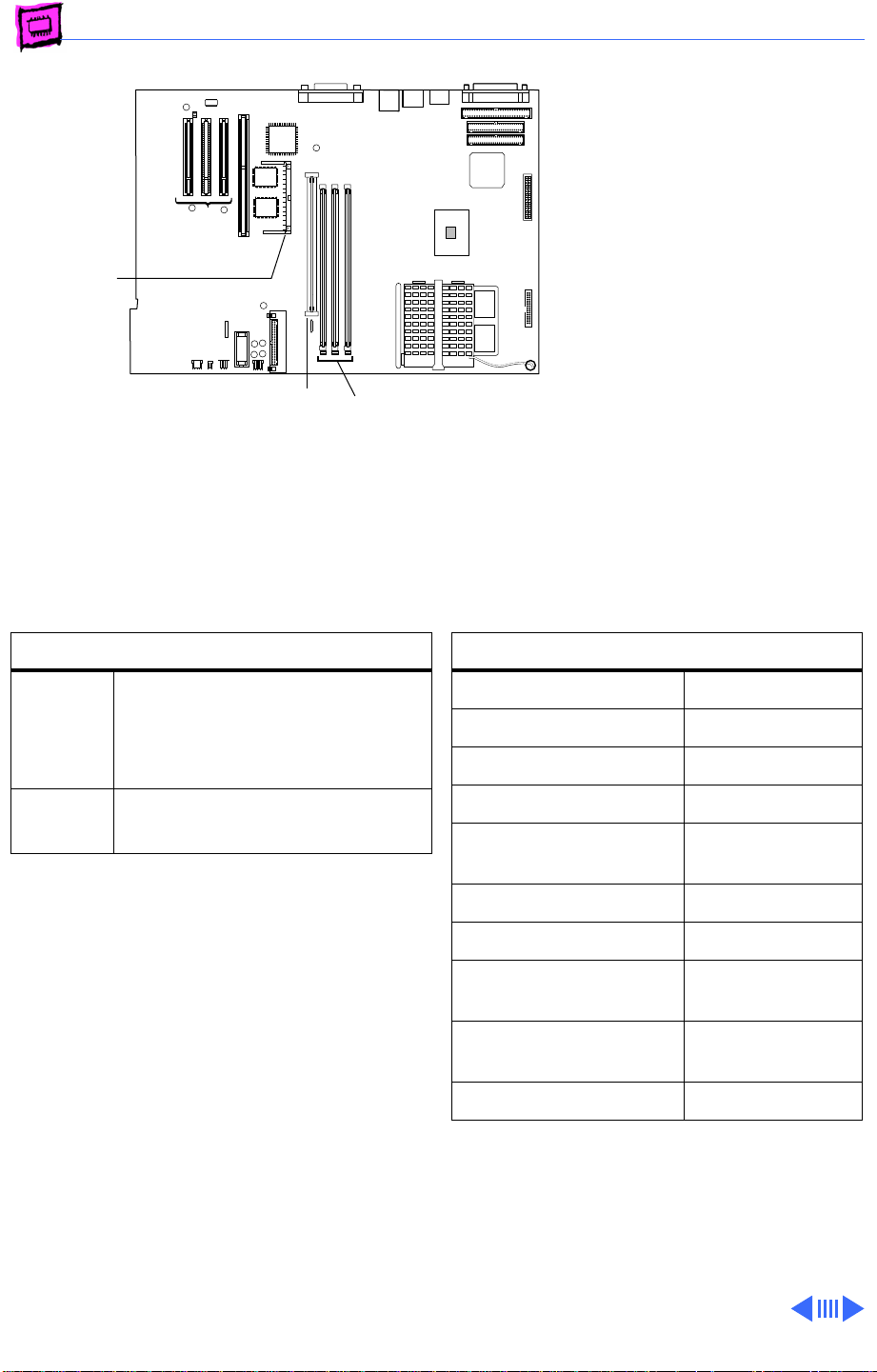
Memory Power Macintosh - 25
Power Macintosh G3 Desktop
The Power Macintosh G3
Desktop computer uses a new
type of memory called
SDRAM.
Video
Memory
SO DIMM
ROM
DIMM
DRAM
DIMM
This computer comes
standard with 32 MB of
SDRAM (one 32 MB DRAM
DIMM). You can expand the
total memory to a maximum
of 192 MB* using 64-bit,
JEDEC standard, 3.3 V,
unbuffered SDRAM DIMMs.
SDRAM Configurations
32 MB The Power Macintosh G3
Desktop logic boards come
standard with 32 MB of SDRAM
(one 32 MB DIMM).
Up to
192 MB
Note: SDRAM DIMMs can be installed one at at
time and in any slot as there are no
interleaving benefits.
*The logic board supports a maximum of 384
MB of DRAM, but 128 MB JEDEC industrystandard DIMMs are too tall to fit in the
chassis, which limits the DRAM to 192 MB.
Use 4, 8, 16, 32, or 64 MB
168-pin DIMMs.
Memory Information
SDRAM Speed 10 ns
DIMM Type 168-pin
Soldered SDRAM None
Number of DIMM Slots 3
Supported Sizes in MB 4, 8, 16, 32,
64
Maximum SDRAM 192 MB
Virtual Memory 1 GB
Soldered Video
Memory
Number of Video
Memory Slots
Cache DIMM Slot No
Video Memory Note: The computer comes
standard with 2 MB of SGRAM video memory.
There is one video memory slot on the board
that accepts up to a 4 MB SGRAM module for
a maximum of 6 MB of video memory.
2 MB SGRAM
1
Page 89
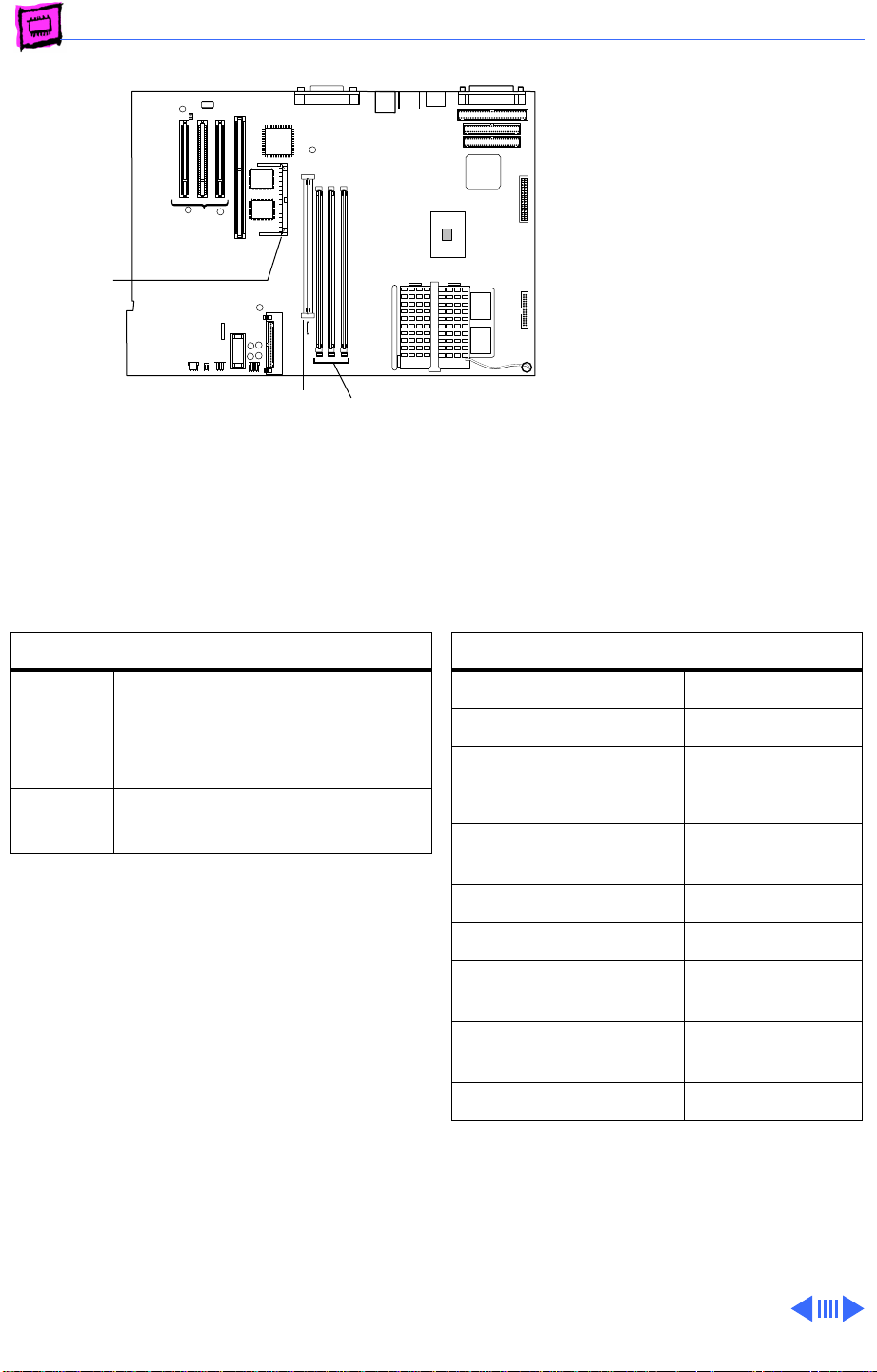
Memory Power Macintosh - 26
Power Macintosh G3 Minitower
The Power Macintosh G3
Minitower computer uses a
new type of memory called
SDRAM.
Video
Memory
SO DIMM
ROM
DIMM
DRAM
DIMM
This computer comes
standard with 32 MB of
SDRAM (one 32 MB DRAM
DIMM). You can expand the
total memory to a maximum
of 384 MB using 64-bit,
JEDEC standard, 3.3 V,
unbuffered SDRAM DIMMs.
DRAM Configurations
32 MB The Power Macintosh G3
Minitower logic boards come
standard with 32 MB of SDRAM
(one 32 MB DIMM).
Up to
384 MB
Note: SDRAM DIMMs can be installed one at at
time and in any slot as there are no
interleaving benefits.
Use 4, 8, 16, 32, 64, or 128
MB 168-pin DIMMs.
Memory Information
SDRAM Speed 10 ns
DIMM Type 168-pin
Soldered SDRAM None
Number of DIMM Slots 3
Supported Sizes in MB 4, 8, 16, 32,
64, 128
Maximum SDRAM 384 MB
Virtual Memory 1 GB
Soldered Video
Memory
Number of Video
Memory Slots
Cache DIMM Slot No
Video Memory Note: The computer comes
standard with 2 MB of SGRAM video memory.
There is one video memory slot on the board
that accepts up to a 4 MB SGRAM module for
a maximum of 6 MB of video memory.
2 MB SGRAM
1
Page 90
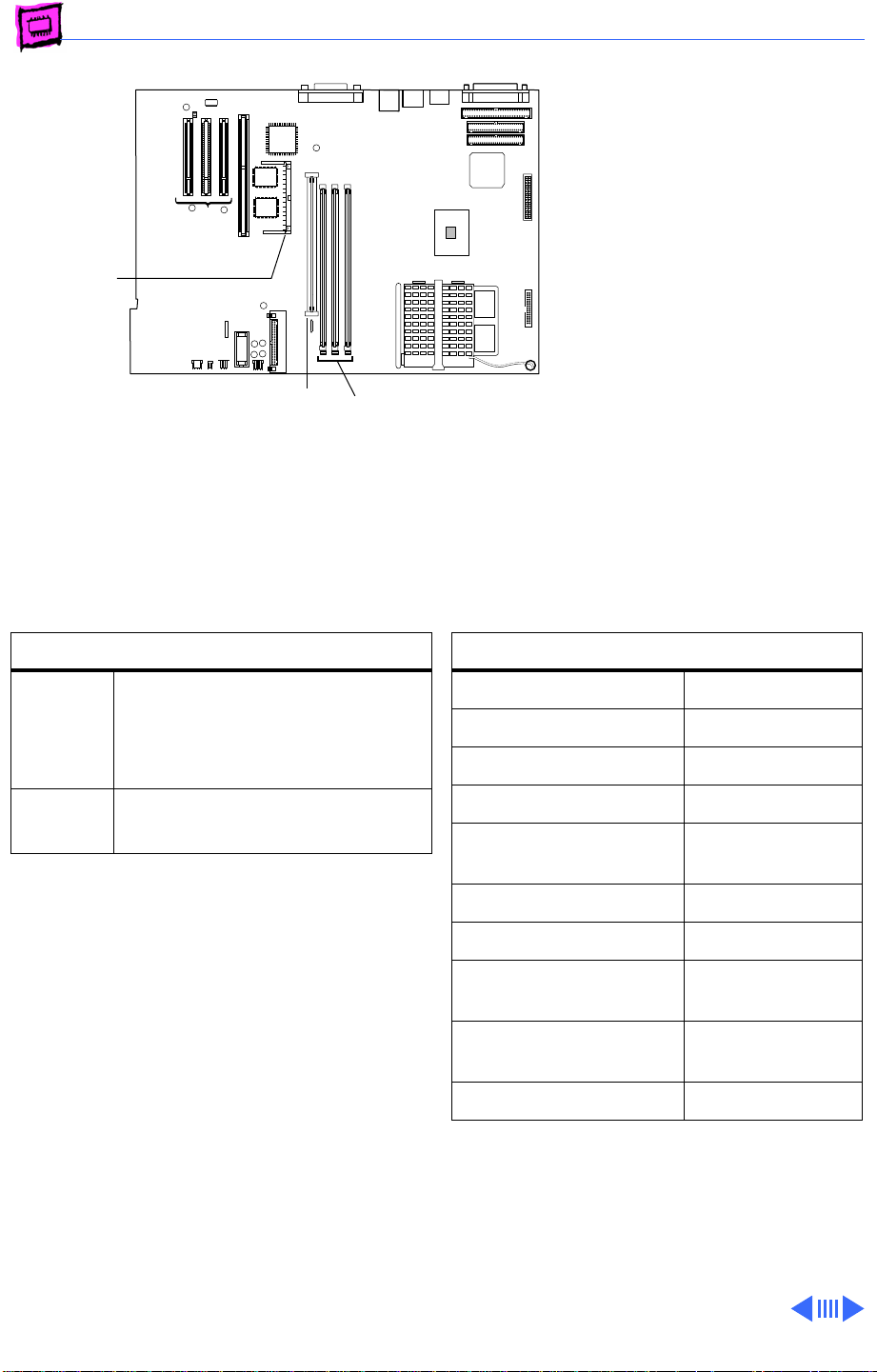
Memory Power Macintosh - 27
Power Macintosh G3 All-In-One
Designed for the K-12
market, the G3 All-In-One
fulfills the needs of teachers
and students.
Video
Memory
SO DIMM
The Power Macintosh G3 AllIn-One computer uses a type
of memory called SDRAM.
ROM
DIMM
DRAM Configurations
32 MB The Power Macintosh G3 All-
In-One logic boards come
standard with 32 MB of SDRAM
(one 32 MB DIMM).
Up to
384 MB
Note: SDRAM DIMMs can be installed one at at
time and in any slot as there are no
interleaving benefits.
Use 4, 8, 16, 32, 64, or 128
MB 168-pin DIMMs.
DRAM
DIMM
This computer comes
standard with 32 MB of
SDRAM (one 32 MB DRAM
DIMM). You can expand the
total memory to a maximum
of 384 MB.
Memory Information
SDRAM Speed 10 ns
DIMM Type 168-pin
Soldered SDRAM None
Number of DIMM Slots 3
Supported Sizes in MB 4, 8, 16, 32,
64, 128
Maximum SDRAM 384 MB
Virtual Memory 1 GB
Soldered Video
Memory
2 MB SGRAM
Number of Video
Memory Slots
Cache DIMM Slot No
Video Memory Note: The computer comes
standard with 2 MB of SGRAM video memory.
There is one video memory slot on the board
that accepts up to a 4 MB SGRAM module for
a maximum of 6 MB of video memory.
1
Page 91
K
Service Source
WorkGroup Servers
Page 92
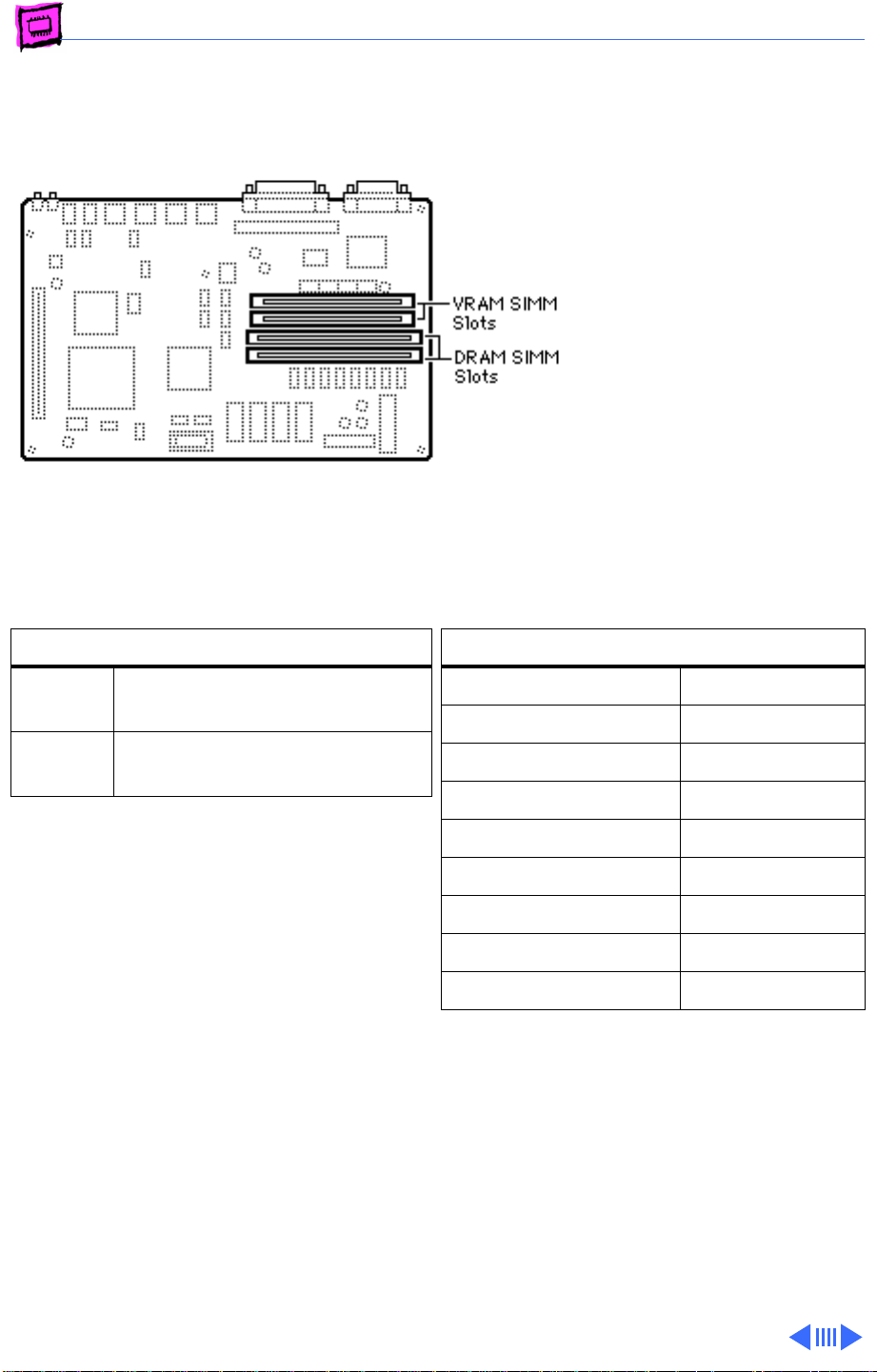
Memory WorkGroup Servers - 1
AWS 60
The Apple WorkGroup
Server 60 has 8 MB of DRAM
soldered to the logic board.
DRAM Configurations
8 MB The AWS 60 logic board has 8
MB of soldered DRAM.
Up to 72 MBUse 4, 8, 16, or 32 MB 72-pin
SIMMs.
The AWS 60 uses “memory interleaving”
which occurs when like SIMM pairs are used
(for example: two 8MB SIMMs). Basically, it
allows the memory subsystem to write to the
same memory address in different banks of
memory before incrementing the address.
Depending on how memory intensive the
application is, memory interleaving can
improve performance 5% to 10%.
Memory Information
DRAM Speed 80 ns
SIMM Type 72-pin
Soldered DRAM 8 MB
Number of SIMM Slots 2
Supported Sizes in MB 4, 8, 16, 32
Maximum DRAM 72 MB
Virtual Memory 1 GB
Soldered VRAM 512K
Number of VRAM Slots 2
Note:
Note:
You can mix SIMM sizes
Use 80 ns or faster VRAM SIMMs.
Page 93
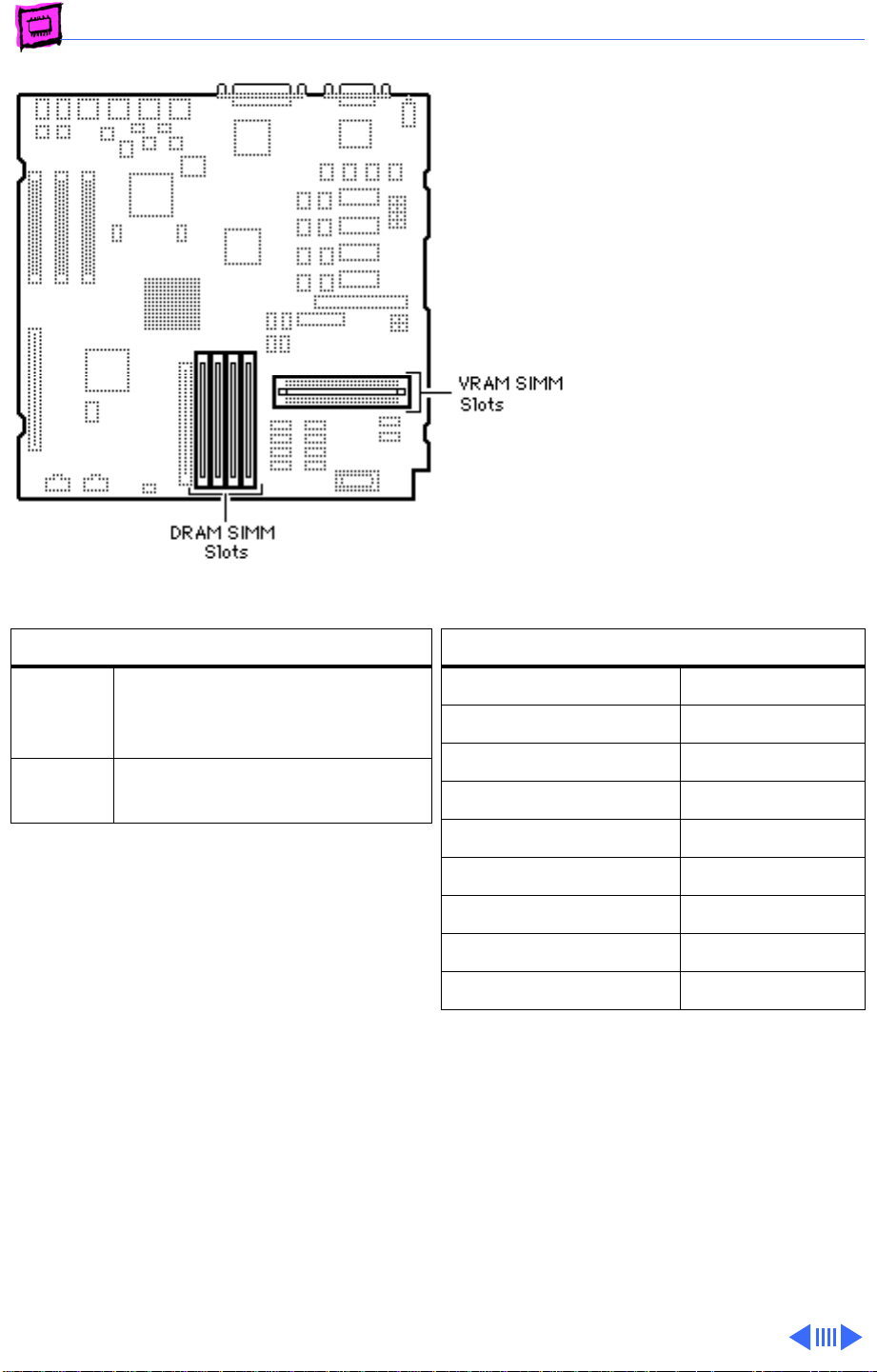
Memory WorkGroup Servers - 2
AWS 80
The AWS 80 has 8 MB of
DRAM soldered to the logic
board. Total memory can be
expanded to 136 MB.
DRAM Configurations
8 MB The Apple Workgroup Server
80 logic board has 8 MB of
soldered DRAM.
136 MB Use 1, 4, 8, 16, or 32 MB 72-
pin SIMMs.
The AWS 80 uses “memory interleaving”
which occurs when like SIMM pairs are used
(for example two 8 MB SIMMs). Basically, it
allows the memory subsystem to write to the
same memory address in different banks of
memory before incrementing the address.
Depending on how memory-intensive the
application is, memory interleaving can
improve performance 5% to 10%.
Memory Information
DRAM Speed 60 ns
SIMM Type 72-pin
Soldered DRAM 8 MB
Number of SIMM Slots 4
Supported Sizes in MB 1, 4, 8, 16, 32
Maximum DRAM 136 MB
Virtual Memory 1 GB
Soldered VRAM 512K
Number of VRAM Slots 2
Note:
Use 80 ns or faster VRAM SIMMs.
Page 94
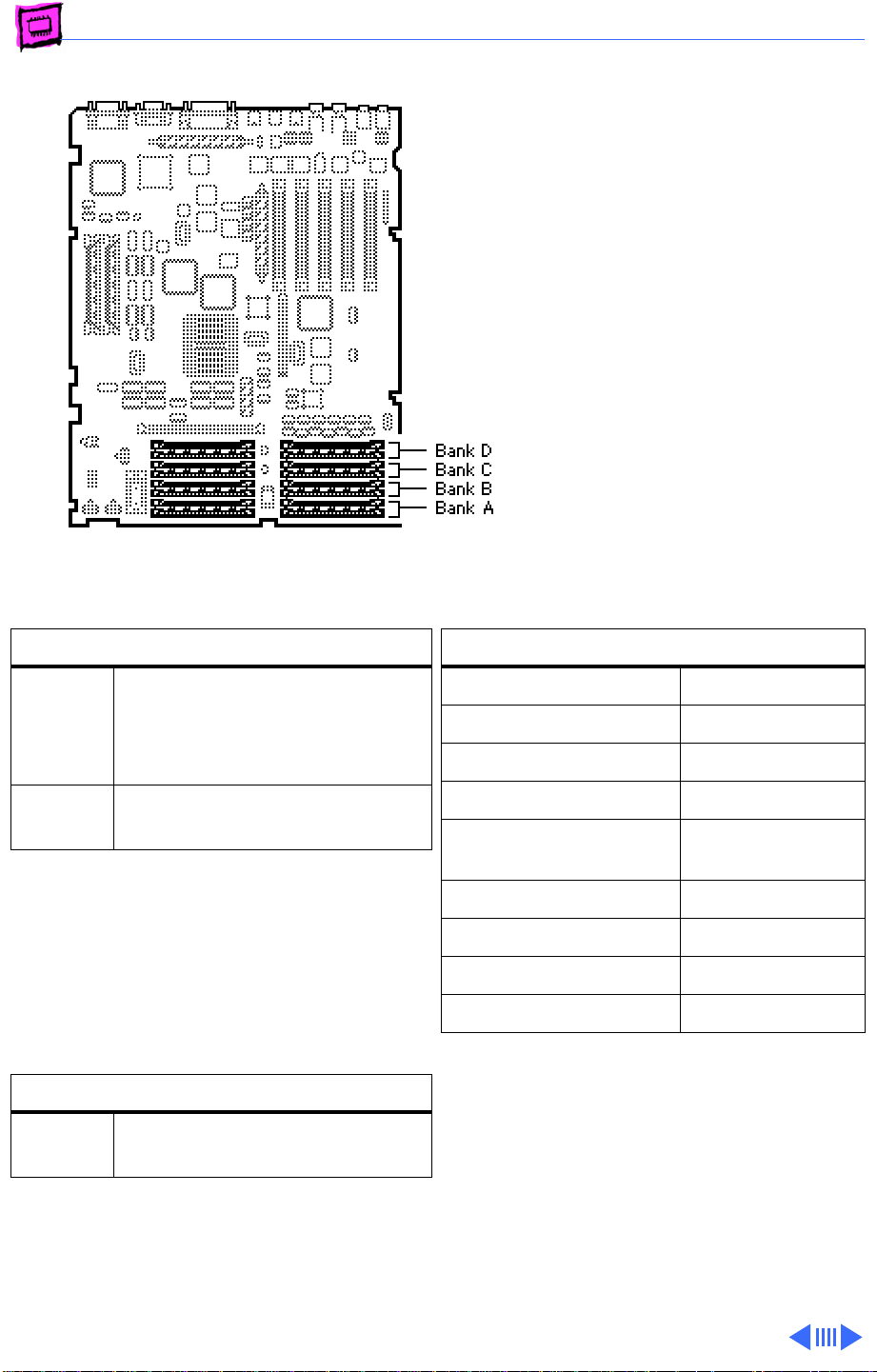
Memory WorkGroup Servers - 3
AWS 95
The Apple WorkGroup
Server 95 has no soldered
DRAM. Total memory can be
expanded to 256 MB.
DRAM Configurations
16 MB The AWS 95 logic board has no
soldered DRAM. A total of 16
MB of memory (two 8 MB
SIMMs) is standard.
Up to
256 MB
Note:
AWS 95 systems are shipped from
Apple with 9-bit parity DRAM installed.
Standard non-parity DRAM can be installed
however, parity checking is disabled when
non-parity DRAM is present.
Use 1, 4, or 16 MB 30-pin
SIMMs.
IMPORTANT:
composite SIMMs in the AWS
95.
Memory Information
DRAM Speed 80 ns
SIMM Type 30-pin
Soldered DRAM none
Number of SIMM Slots 16
Supported Sizes in MB 1, 4, 8, 16
Maximum DRAM 256 MB
Virtual Memory 1 GB
Soldered VRAM 1 MB
Number of VRAM Slots 4
Do
not
use
(see Note)
VRAM Configurations
2 MB Install two 256K or 512K
VRAM SIMMs.
Note:
Use 80 ns or faster VRAM SIMMs. The
AWS 95 uses only 256K of each 512K VRAM
SIMM installed.
Note:
same size or leave the bank empty (no
partially filled banks).
Fill a bank with DRAM SIMMs of the
Page 95
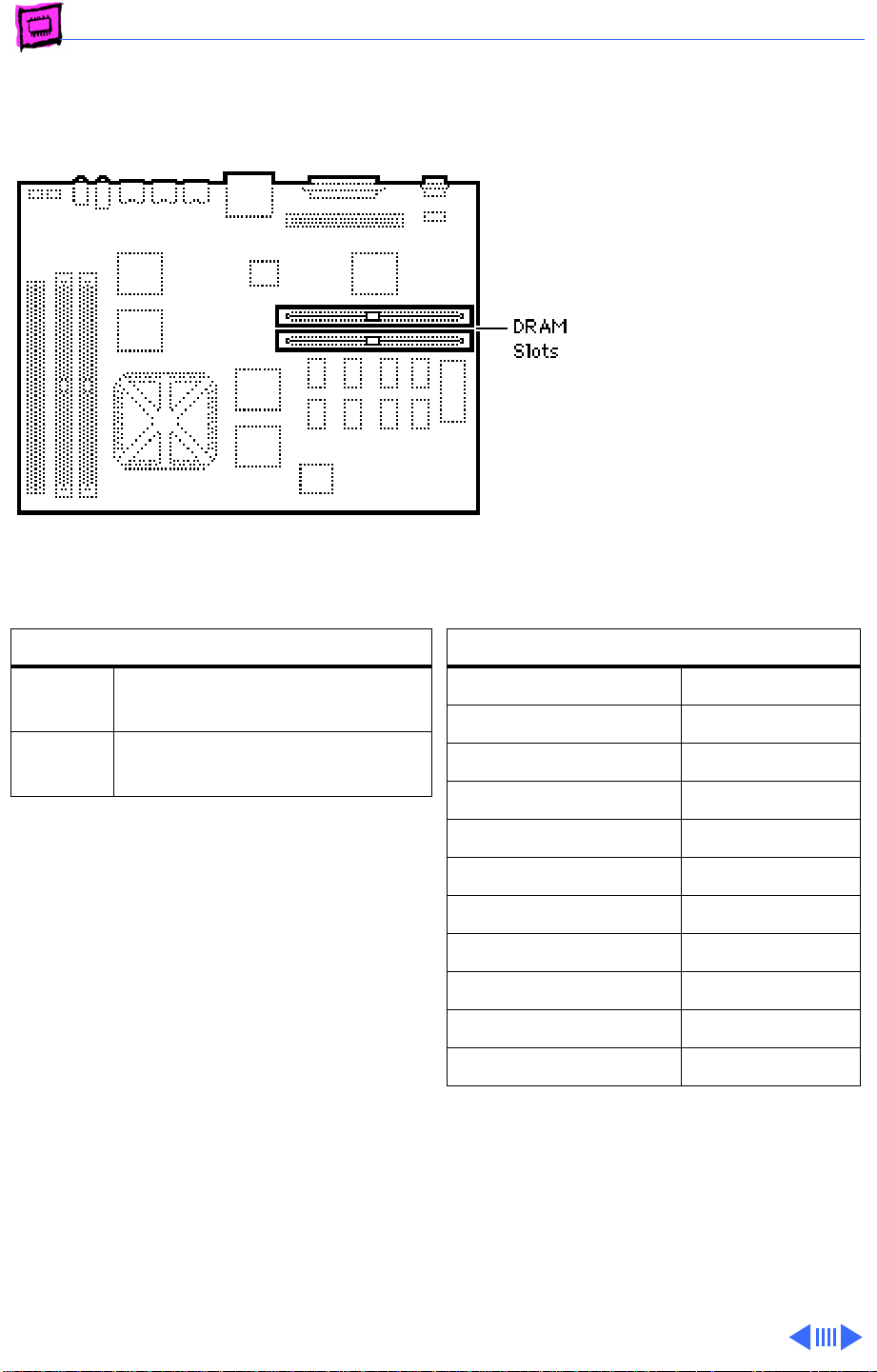
Memory WorkGroup Servers - 4
WorkGroup Server 6150
The WorkGroup Server 6150
has 8 MB of DRAM soldered
onto the logic board. You can
expand the amount of memory
to a total of 72 MB by
installing DRAM SIMMs.
DRAM Configurations
8 MB The WS 6150 logic board has 8
MB of soldered DRAM.
Up to
72 MB
Note:
SIMMs must be installed in matching
pairs. Failure to do so will result in the
system thinking that both SIMMs are of the
higher density. System crashes are possible
in this situation.
Note:
Use 4, 8, 16, or 32 MB 72-pin
SIMMs.
Install noncomposite SIMMs only.
Memory Information
DRAM Speed 80 ns
SIMM Type 72-pin
Soldered DRAM 8 MB
Number of SIMM Slots 2
Supported Sizes in MB 4, 8, 16, 32
Maximum DRAM 72 MB
Virtual Memory 1 GB
Soldered VRAM None
Number of VRAM Slots None
Cache SIMM slot Yes
Cache SIMM size 256K
Page 96
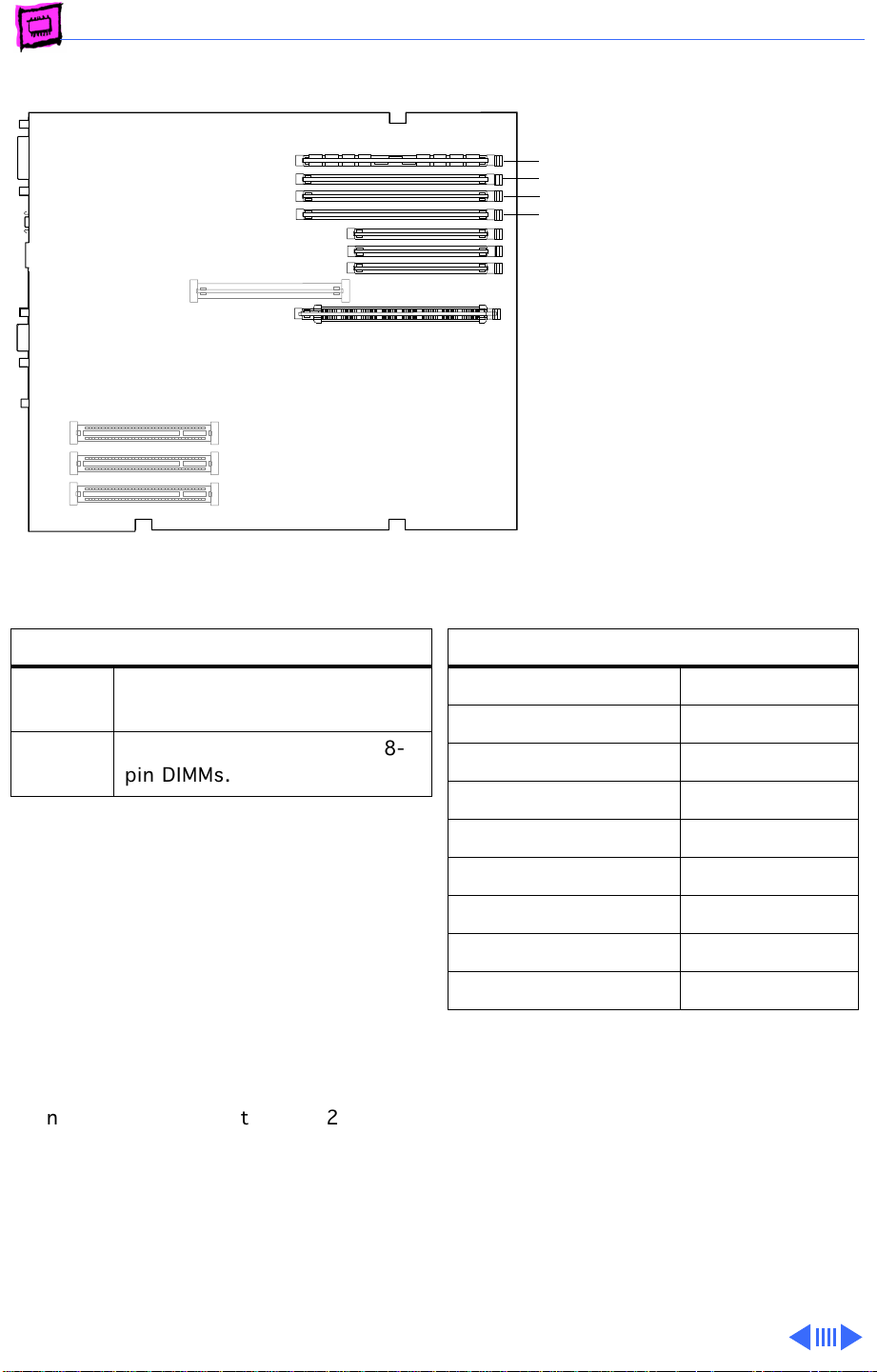
Memory WorkGroup Servers - 5
WorkGroup Server 7250
4
The WorkGroup Server 7250
3
2
logic board has four DRAM
1
DIMM slots, each with a 64bit data bus. You can increase
the computer’s DRAM to a
total of 256 MB using 5volt, 64-bit-wide, 168pin, fast-paged mode, 70ns
DIMMs.
(front of
computer)
DRAM Configurations
16 MB The WS 7250 logic board has
16 MB of DRAM installed.
Up to
256 MB
Note:
individually or in pairs. These computers
support linear memory only; therefore, no
memory gains are seen when two DIMMs of
the same size are installed (that is, memory
interleaving is not supported on the WS 7250
computers). The DRAM slots are numbered,
but DRAM can be installed in any order.
Note:
(SIMMs) used in previous Macintosh models
are
not
Note:
memory soldered to the logic board. At least
one DRAM DIMM must be installed for the
computer to operate.
Use 4, 8, 16, or 32 MB 168pin DIMMs.
DRAM DIMMs can be installed
The Single In-Line Memory Modules
compatible with the WS 7250.
These computers do not have any main
Memory Information
DRAM Speed 70 ns
DIMM Type 168-pin
Soldered DRAM None
Number of DIMM Slots 4
Supported Sizes in MB 4, 8, 16, 32
Maximum DRAM 256 MB
Virtual Memory 1 GB
Soldered VRAM 1 MB
Number of VRAM Slots 3
Page 97
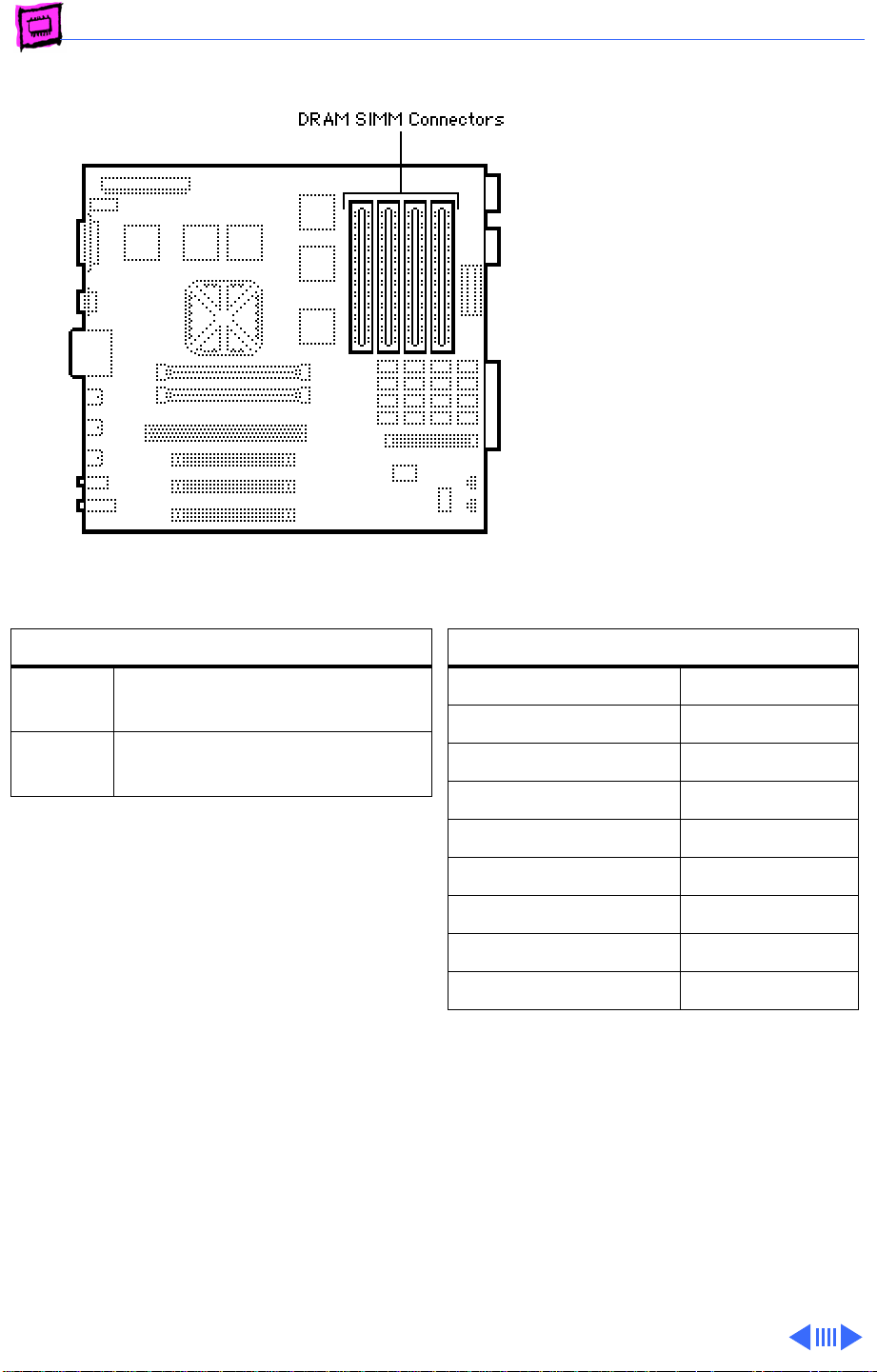
Memory WorkGroup Servers - 6
Workgroup Server 8150
The Workgroup Server
8150 has 8 or 16 MB of
DRAM soldered onto the logic
board. You can expand the
amount of memory to a total
of 264 MB by installing
DRAM SIMMs.
DRAM Configurations
8/16
MB
Up to
264 MB
Note:
SIMMs must be installed in pairs, and
both SIMMs in the pair must be of the same
size; Failure to do so will result in the Power
Mac thinking both SIMMs are of the (wrong)
density. System crashes are possible in this
situation.
You can install different size SIMMs just as
long as you install them in matched pairs; for
example, you could install a pair of 8 MB
SIMMs and a pair of 32 MB SIMMs.
The WS 8150 logic board has
8 or 16 MB of soldered DRAM.
Use 4, 8, 16, or 32 MB 72-pin
SIMMs.
Memory Information
DRAM Speed 80 ns
SIMM Type 72-pin
Soldered DRAM 8/16 MB
Number of SIMM Slots 8
Supported Sizes in MB 4, 8, 16, 32
Maximum DRAM 264 MB
Virtual Memory 1 GB
Soldered VRAM None
Number of VRAM Slots See VRAM Note
VRAM Note:
by inserting four 68-pin, 80 ns SIMMs in
connectors on the VRAM Expansion card.
VRAM can be expanded to 4 MB
Page 98
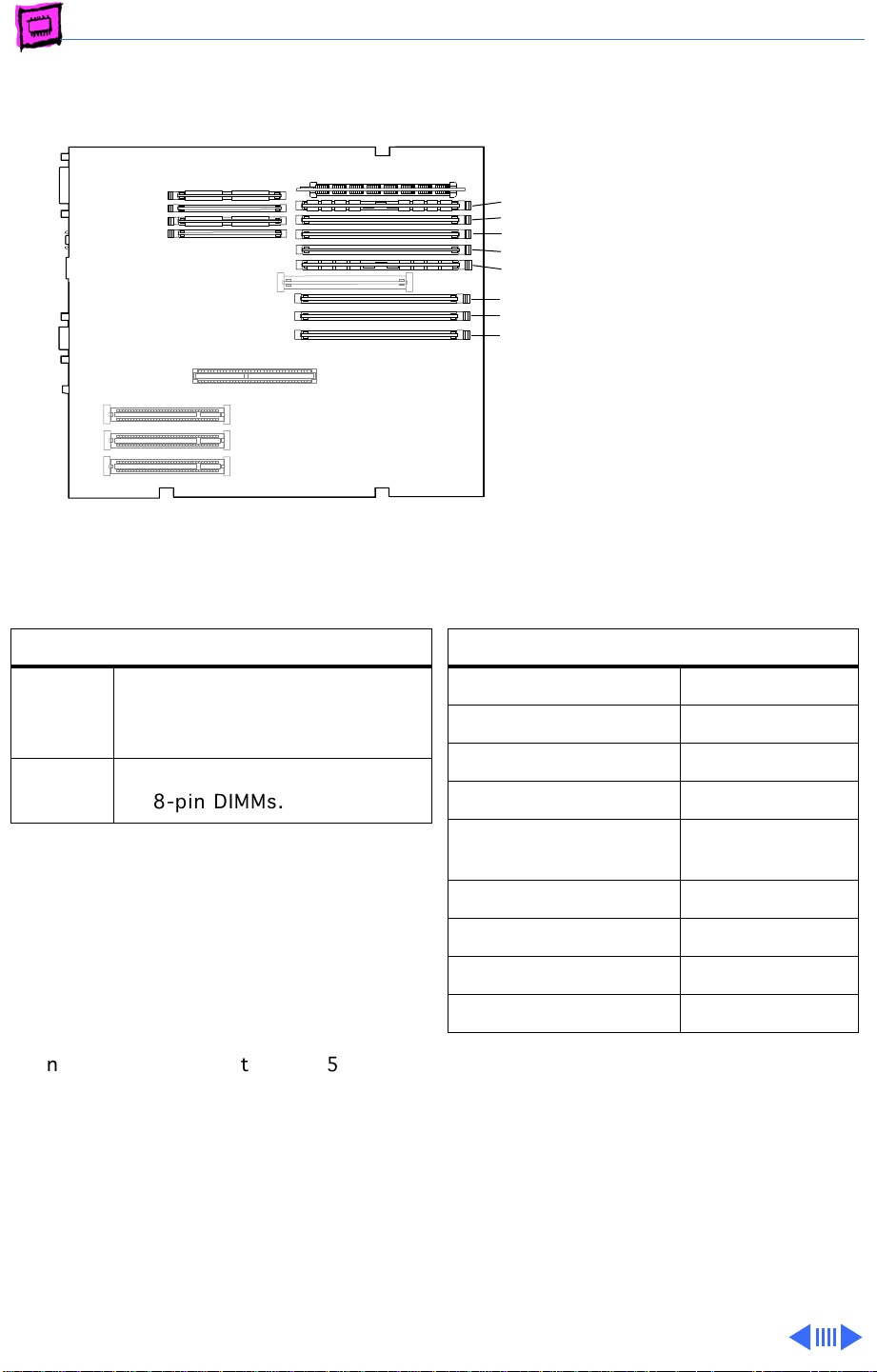
Memory WorkGroup Servers - 7
WorkGroup Server 8550
The WorkGroup Server 8550
B4 slot
B3 slot
B2 slot
B1 slot
A4 slot
A3 slot
A2 slot
A1 slot
(front of
computer)
logic board has eight DRAM
DIMM slots, each with a 64bit data bus. You can increase
the computer’s DRAM to a
total of 512 MB using 5volt, 64-bit-wide, 168-pin
fast-paged mode, 70ns
DIMMs.
DRAM Configurations
24 MB The Power Macintosh 8500
logic boards have 24 MB of
DRAM installed.
Up to
512 MB
Note:
individually; however, to provide maximum
performance, install the DIMMs in matching
pairs and in paired slots (A6 and B6 first,
then A5 and B5, etc.).
Note:
(SIMMs) used in previous Macintosh models
are
not
Note:
memory soldered to the logic board. At least
one DRAM DIMM must be installed for the
computer to operate.
Use 4, 8, 16, 32 or 64 MB
168-pin DIMMs.
DRAM DIMMs can be installed
The Single In-Line Memory Modules
compatible with the WS 8550.
The WS 8550 does not have any main
Memory Information
DRAM Speed 70 ns
DIMM Type 168-pin
Soldered DRAM None
Number of DIMM Slots 8
Supported Sizes in MB 4, 8, 16, 32,
64
Maximum DRAM 512 MB
Virtual Memory 1 GB
Soldered VRAM See VRAM Notes
Number of VRAM Slots 4
VRAM Note:
DIMMs (112-pin 70ns or faster) instead of
VRAM SIMMs. The VRAM SIMMs used in
earlier Power Macintosh models are not
compatible.
This computer uses VRAM
Page 99
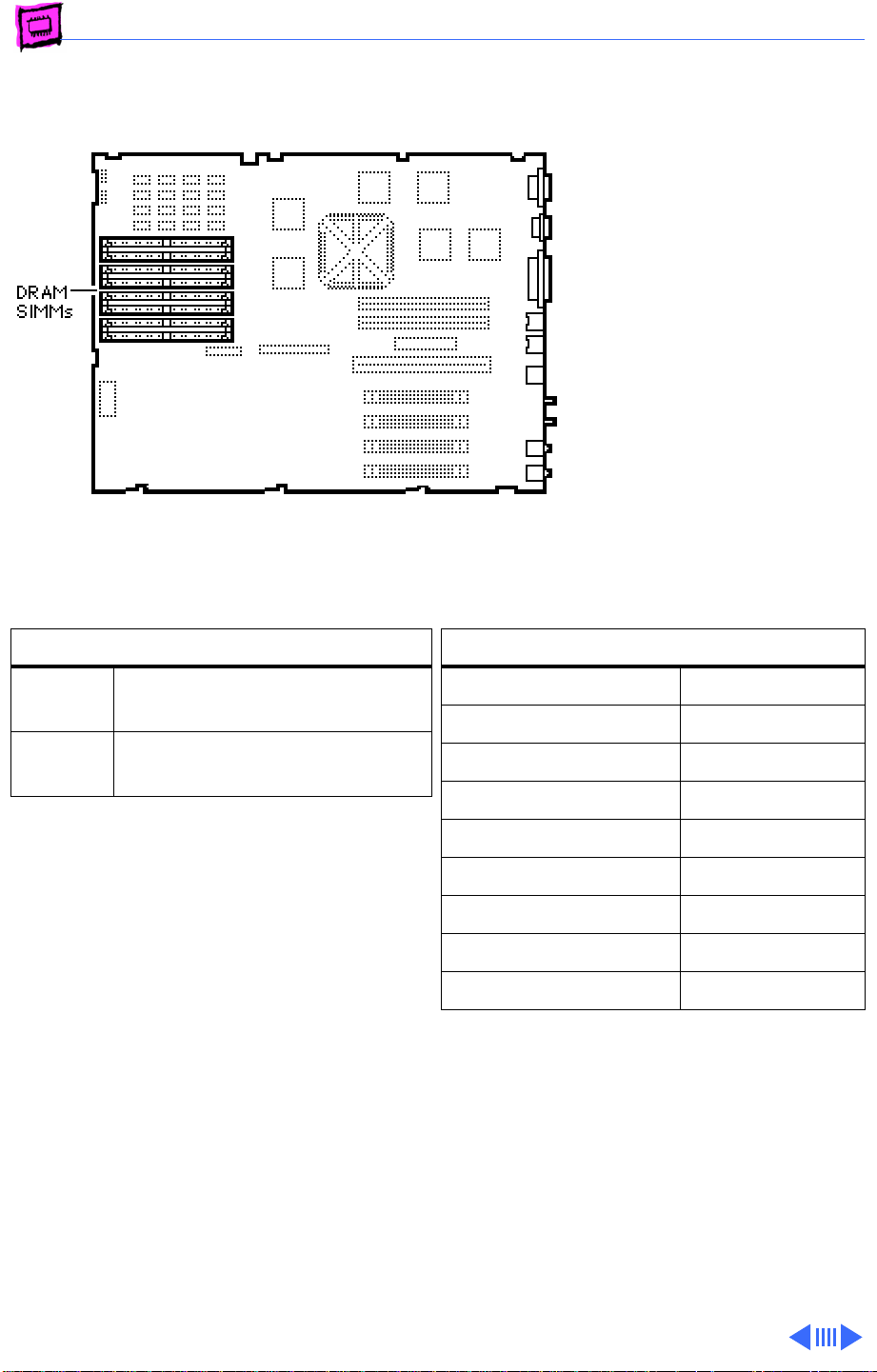
Memory WorkGroup Servers - 8
Workgroup Server 9150
The Workgroup Server
9150 has 8 MB of DRAM
soldered onto the logic board.
You can expand the amount of
memory to a total of 264 MB
by installing DRAM SIMMs.
DRAM Configurations
8 MB The WS 9150 logic board has
8 MB of soldered DRAM.
Up to
264 MB
Note:
Note:
Note:
The WS 9150 operates in 32-bit mode
at all times and cannot be toggled back to
24-bit mode.
Use pairs of 4, 8, 16, or 32 MB
72-pin SIMMs.
SIMMs must be installed in pairs.
You can mix SIMM sizes.
Memory Information
DRAM Speed 80 ns
SIMM Type 72-pin
Soldered DRAM 8 MB
Number of SIMM Slots 8
Supported Sizes in MB 4, 8, 16, 32
Maximum DRAM 264 MB
Virtual Memory 1 GB
Soldered VRAM See VRAM Note
Number of VRAM Slots None
VRAM Note:
provided on the logic board.
1 MB of DRAM video support is
Page 100
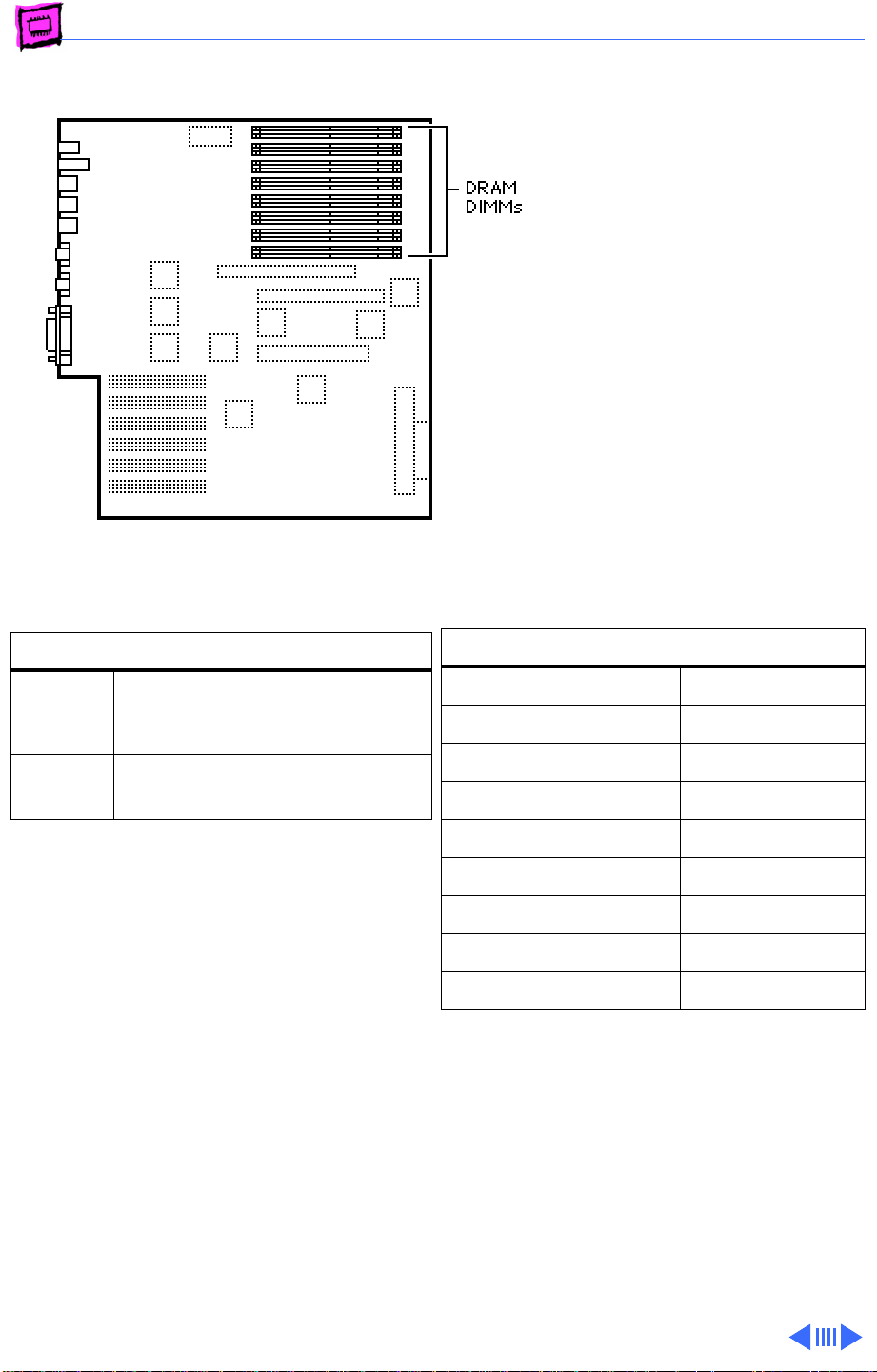
Memory WorkGroup Servers - 9
Network Server 500/700
The Network Server 500 and
700 logic boards have eight
DRAM DIMM slots. You can
increase the computer’s
DRAM to a total of 512 MB
using 5-volt, parity, 64bit-wide, 168-pin fastpaged mode, 60 ns DIMMs.
DRAM Configurations
32 MB
48 MB
Up to
512 MB
Note:
DRAM DIMMs can be installed
individually; however, to provide maximum
performance, install the DIMMs in matching
pairs and in paired slots (1A and 1B first,
then 2A and 2B, etc.).
Note:
The Single In-Line Memory Modules
(SIMMs) used in previous Macintosh models
are NOT compatible with the Network
Servers.
Note:
These computers do not have any main
memory soldered to the logic board. At least
one DRAM DIMM must be installed for the
computer to operate.
Network Server 500
Network Server 700
Use pairs of 4, 8, 16, 32, or
64 MB 168-pin DIMMs.
Memory Information
RAM Speed 60 ns
DIMM Type 168-pin
On-Board RAM None
Number of SIMM Slots 8
Supported Sizes in MB 4, 8, 16, 32, 64
Maximum RAM 512 MB
Virtual Memory 1 GB
On-Board VRAM None
Number of VRAM Slots None
 Loading...