

Page 1

Personal GPS Locator Users Manual (APT-210D)
AnyDATA
AnyTime AnyPlace Any Wireless Data Solutions™
CDMA PERSONAL GPS LOCATOR
Users Manual
May, 2009
APT-210D – v 0.1
All Rights Reserved. 1/17
Page 2

Personal GPS Locator Users Manual (APT-210D)
Contents
AnyDATA CDMA APT-210D
Copyright © 2009 AnyDATA Corp. All Rights Reserved.
Any part of this document may not be distributed, communicated, reproduced
or transmitted in any form or by any means, electronic or mechanical or
otherwise, for any purpose, without the permission of AnyDATA Corp.
This document can be subjected to revision without further notice.
Contact Address
Headquarter
AnyData Corporation
18902 Bardeen Ave, lrvine,
CA 92612-1522 U.S.A.
http://www.anydata.net
e-mail: [email protected]
Rep:1-949-833-0011
Fax: 1-949-833-0022
AnyData(China)
489 Song Tao Road, Sector B,
1st Fl. Pudong ZhanJiang HiTech Park, Shanghai, 201203,
P.R.China
http://www.anydata.net.cn
e-mail: [email protected]
Rep:+86-21-5080-4828
Fax:+86-21-5080-3828
AnyData.Net Inc.(Korea)
DaeGo Bldg, 8th., 1591-10
Kwanyang-dong, Dongan_gu,
Anyang City, Kyunggi-do Korea.
http://www.anydata.co.kr
e-mail: [email protected]
Rep:+82-31-380-7100
Fax:+82-31-476-6021
All Rights Reserved. 2/17
Page 3

Personal GPS Locator Users Manual (APT-210D)
Figures
Contents .............................................................. 2
Figures .............................................................. 3
Tables .............................................................. 4
1 Introduction ......................................................... 5
1.1 Purpose ......................................................... 5
1.2 Technical Detail ................................................ 5
1.3 Revision History ................................................ 5
2 Physical Contents .................................................... 6
3 Description: Personal GPS Locator (APT-210D) ......................... 7
3.1 The Latest in GPS Technology .................................... 7
3.2 Alerts & Messages ............................................... 7
3.3 Tracking Reports ................................................ 7
4 Charging the Personal GPS Locator .................................... 9
4.1 USB Power Adapter (Wall charger & Car charger) .................. 9
4.2 Battery Life .................................................... 9
4.3 Battery Handling ............................................... 10
5 Powering On/Off the Personal GPS Locator ............................ 12
5.1 Powering On/OFF ................................................ 12
5.2 Resetting the APT-210D ......................................... 12
6 Checking the GPS Locator Status ..................................... 13
7 Optional Feature .................................................... 14
7.1 Geo Fence (Optional) ........................................... 14
8 Personal GPS Locator Specifications ................................. 15
8.1 Form Factor .................................................... 15
8.2 Hardware Specifications ........................................ 15
8.3 Software Specifications ........................................ 15
8.4 Mechanical ..................................................... 15
8.5 External INTERFACE ............................................. 16
8.6 Environmental .................................................. 16
9 Limitations of Liability ............................................ 17
All Rights Reserved. 3/17
Page 4
Personal GPS Locator Users Manual (APT-210D)
Tables
!
RF Exposure Warning:
The radiated output power of this device is below the FCC radio
frequency exposure limits. Nevertheless, the device should be
ial for human contact
during normal operation is minimized. In order to avoid the
possibility of exceeding the FCC radio frequency exposure
limit, human proximity to the antenna should not be less than
responsible for compliance could void the user's authority to
Figure 2.1: Package Contents
Figure 3.1: External Interface
Figure 3.2: LED Indicator
Figure 4.1: USB Power Adapter (Wall Charger & Car Charger)
Figure 4.2: Asset Tag w/ External Power
Figure 5.1: Reset Button
Table 1.1: Revision History
............................................................................................ 6
....................................................................................... 8
.................................................................................................. 8
............................. 9
................................................................... 10
.................................................................................................. 12
.............................................................................................. 5
used in such a manner that the potent
15 mm.
Information to user (FCC Part 15.21):
No changes or modifications not expressly approved by the party
operate the equipment.
All Rights Reserved. 4/17
Page 5
Personal GPS Locator Users Manual (APT-210D)
Version
Date
v 0.1
Description
May 2009
Initial Release – APT-210D
1 INTRODUCTION
1.1 PURPOSE
This manual discusses the purpose and usage of the Personal GPS Locator
(APT-210D).
1.2 TECHNICAL DETAIL
Please refer to Technical Manual.pdf
APT-210D.
for a more detailed description of the
1.3 REVISION HISTORY
The revision history for this manual is shown in Table 1.1.
Table 1.1: Revision History
All Rights Reserved. 5/17
Page 6
Personal GPS Locator Users Manual (APT-210D)
2 PHYSICAL CONTENTS
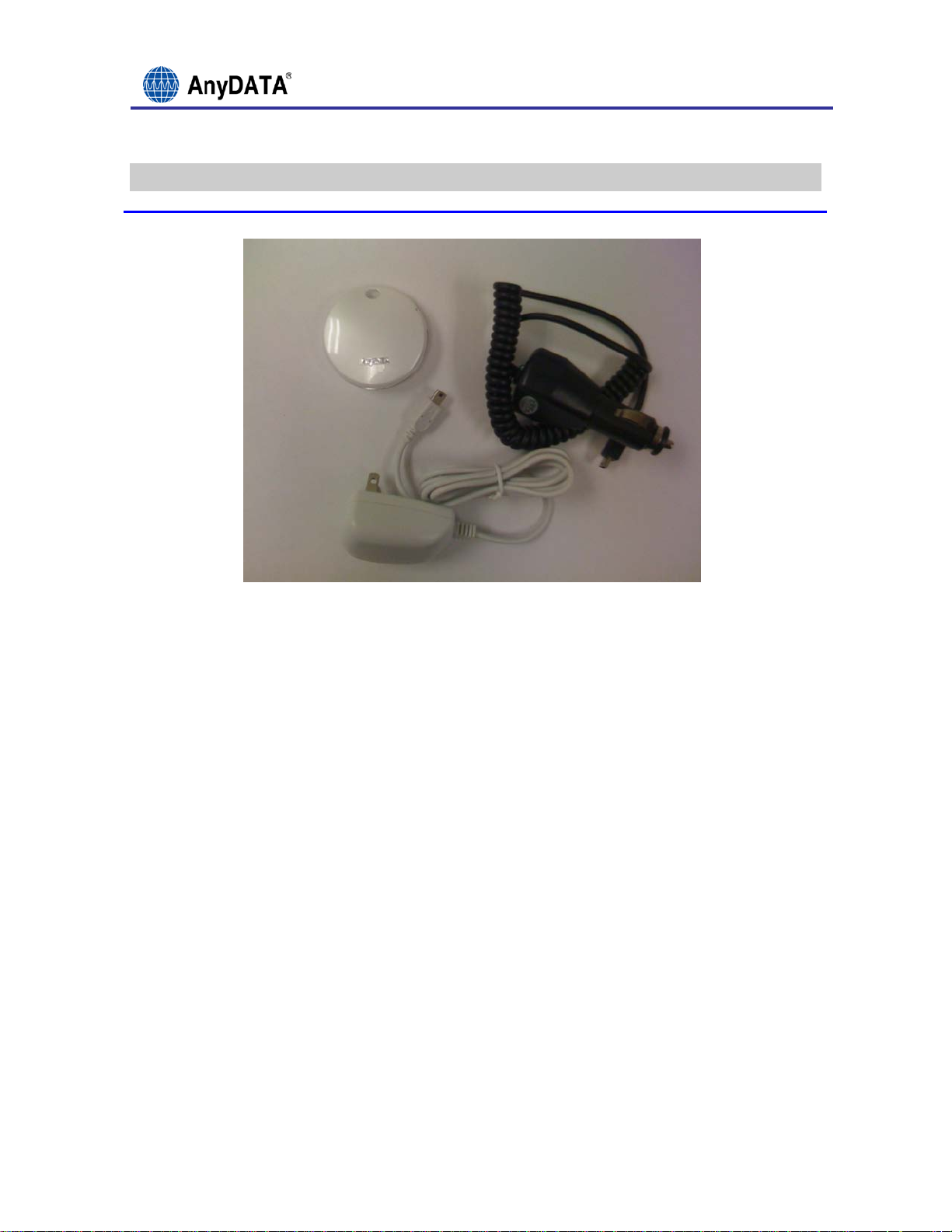
Figure 2.1: Package Contents
The box should contain:
• One APT-210D Personal GPS Locator
• One Power Adapter
• One Car Charger
• One User Guide
If any of items on Figure 2.1 are missing, please contact AnyDATA or
distributor/reseller where device was purchased.
All Rights Reserved. 6/17
Page 7

Personal GPS Locator Users Manual (APT-210D)
3 DESCRIPTION: PERSONAL GPS LOCATOR (APT-210D)
3.1 THE LATEST IN GPS TECHNOLOGY
Utilizing both assisted and standalone GPS, APT-210D is able to determine
your location via a combination of cell triangulation and the greatest
number of GPS satellites available. APT-210D charges via the included USB
wall charger. APT-210D is equipped with a battery life of 3-7 days with
normal usage.
3.2 ALERTS & MESSAGES
APT-210D is equipped a configurable soft button for user-set alert
functions for even more peace of mind.
3.3 TRACKING REPORTS
The APT-210D can be configured to continuously report its location on a
user-defined chronological interval. Th e interval is remote ly configurable
and can be set via appropriate web and mobile software platforms. In
addition to interval tracking, the APT-210D is capable of servicing single
location requests on demand via one-time-fix requests made through the
web/mobile platforms.
All Rights Reserved. 7/17
Page 8
Personal GPS Locator Users Manual (APT-210D)
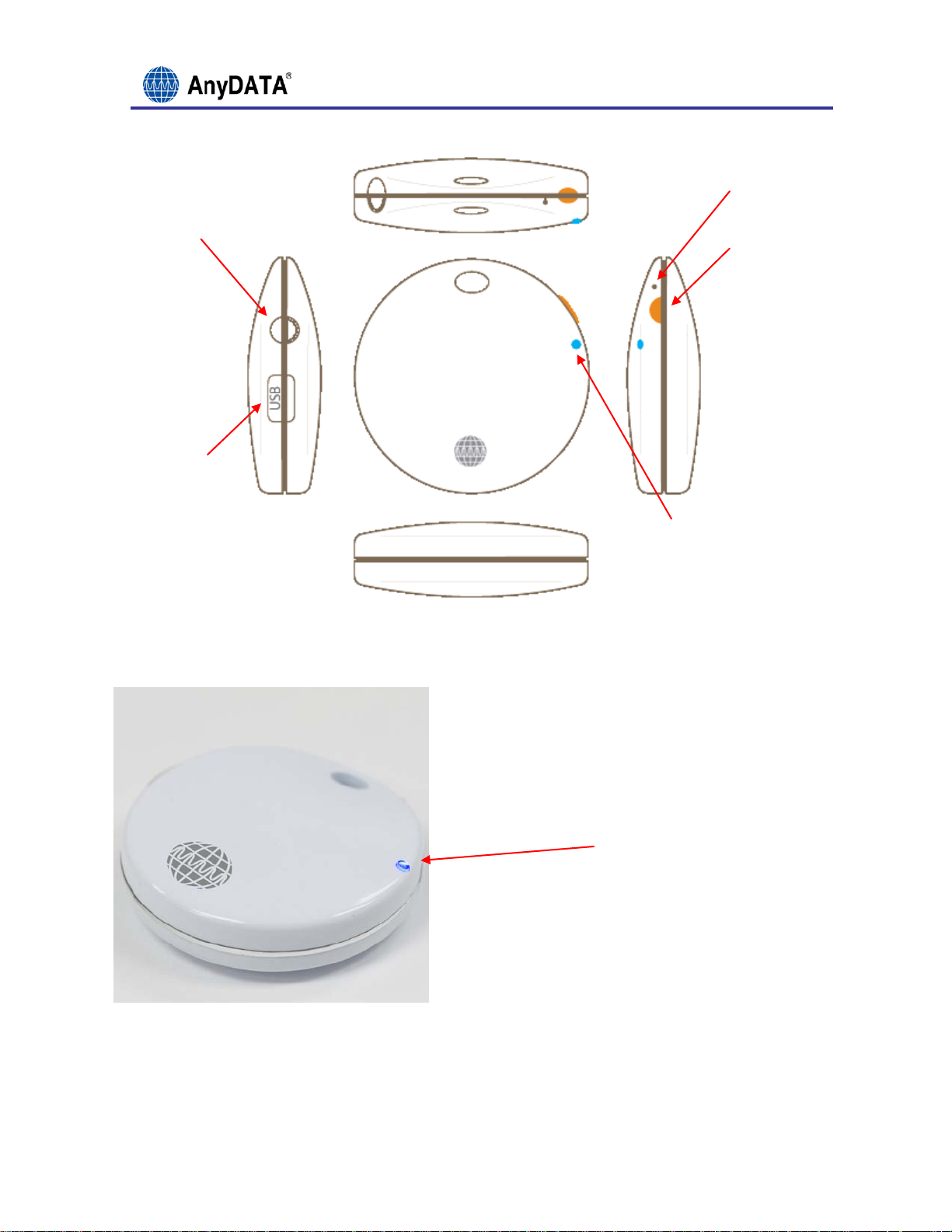
Reset Button
Power On/Off
Charging Port
Top
SOS Button
Left
Front
Bottom
Figure 3.1: External Interface
Right
LED Indicator
LED Indicator
Figure 3.2: LED Indicator
All Rights Reserved. 8/17
Page 9
Personal GPS Locator Users Manual (APT-210D)
4 CHARGING THE PERSONAL GPS LOCATOR
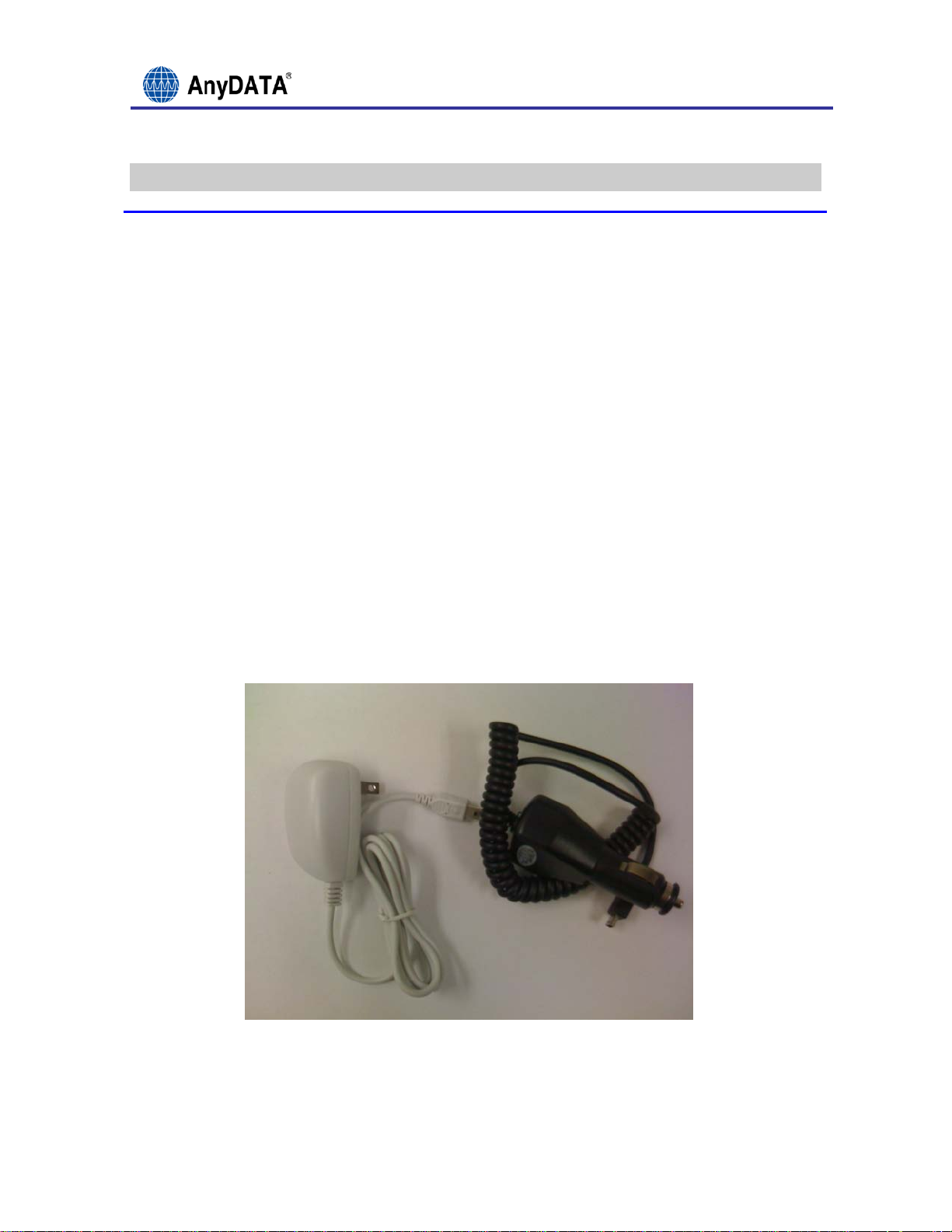
4.1 USB POWER ADAPTER (WALL CH ARGER & CAR CHARGER)
1. Before activating and using the APT-210D Personal GPS Locator for the
first time, you will need to fully charge the battery.
2. The initial battery charge time will be 2 hours; each subsequent
battery charge will be approximately 1 hour.
3. The APT-210D status LED Indicator will glow solid purple, indicating
the APT-210D Locator is charging.
4. Once the APT-210D Status LED Indicator begins blinking blue, the APT-
210D Locator is fully charged.
4.2 BATTERY LIFE
1. Your APT-210D battery will last 3 to 7 days (depending on frequency
of locating the device).
2. In Standby mode, it will last up to 7 days.
Figure 4.1: USB Power Adapter (Wall Charger & Car Charger)
All Rights Reserved. 9/17
Page 10
Personal GPS Locator Users Manual (APT-210D)
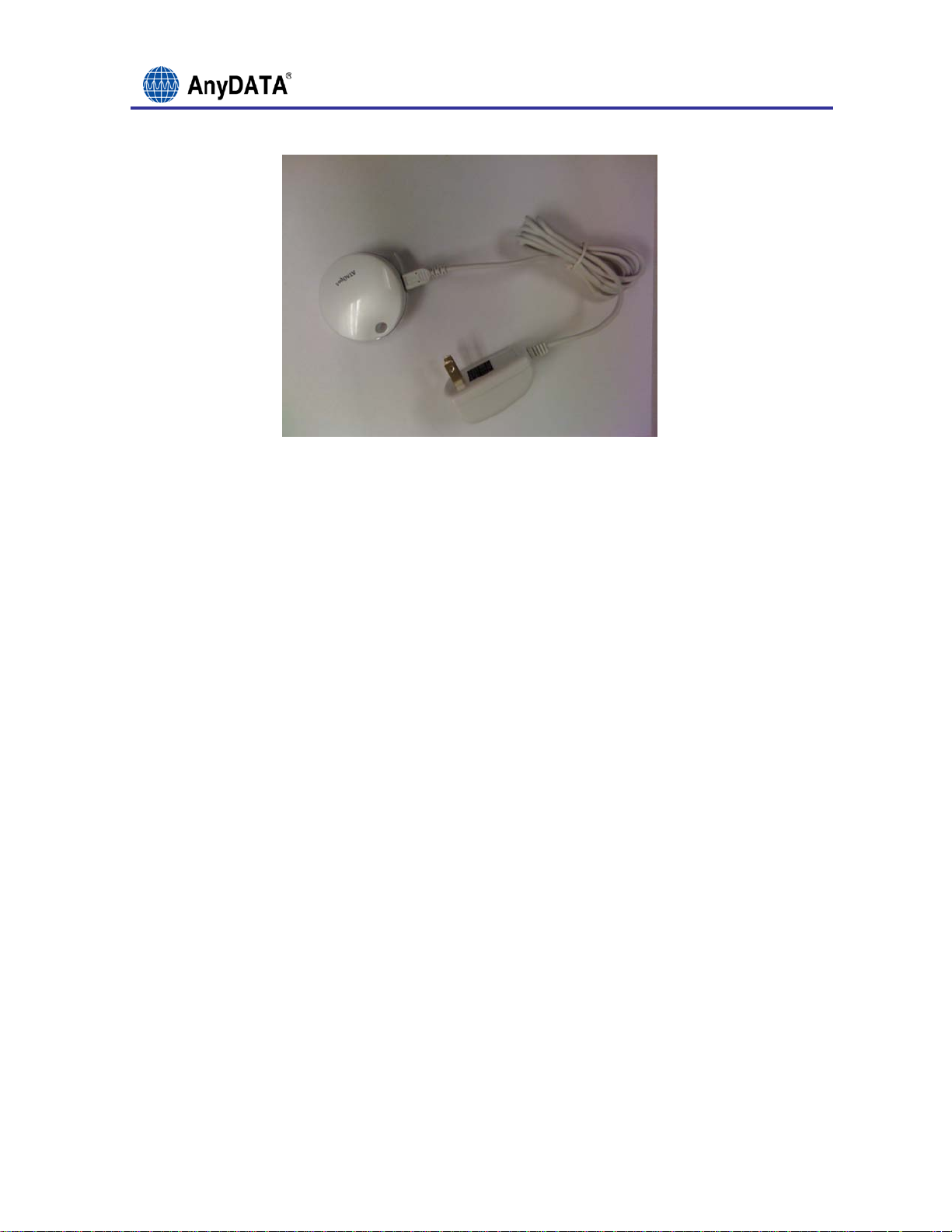
Figure 4.2: Asset Tag w/ External Power
4.3 BATTERY HANDLING
Lithium cells and batteries may get hot, explode or ignite and cause
serious injury if exposed to abuse conditions. Be sure to follow the safety
warnings listed below:
• Do not pierce the battery with nails, strike the battery with a
hammer, step on the battery or otherwise subject it to strong impacts
or shocks.
• Do not solder directly onto the battery.
• Do not expose battery to water or salt water, or allow the battery to
get wet.
• Do not disassemble or modify the battery. The battery contains safety
and protection devices, which, if damaged, may cause the battery to
generate heat, explode or ignite.
• Do not place the battery in or near fire, on stoves or other high
temperature locations.
• If the device is to be used by small children, the caregiver should
explain the contents of this document to the children and provide
adequate supervision to ensure the device is being used appropriately.
All Rights Reserved. 10/17
Page 11

Personal GPS Locator Users Manual (APT-210D)
• Do not place the battery in microwave ovens, high-pressure containers
or on induction cookware.
• In the event the battery leaks and the fluid gets into one’s eye, do
not rub the eye. Rinse well with water and immediately seek medical
care. If left untreated, the battery fluid could cause damage to the
eye.
All Rights Reserved. 11/17
Page 12
Personal GPS Locator Users Manual (APT-210D)
Reset Button
5 POWERING ON/OFF THE PERSONAL GPS LOCATOR
5.1 POWERING ON/OFF
To Power ON:
1. Switch the slider to the ON position.
2. Wait a few seconds until the APT-210D Status LED.
3. Indicator blinks twice quickly.
4. Blinking blue indicates the APT-210D is operating correctly.
To Power OFF:
1. Switch the slider to the OFF position.
2. Wait a few seconds until the APT-210D has properly shut down.
3. The APT-210D Status LED will be solid blue until it shuts OFF.
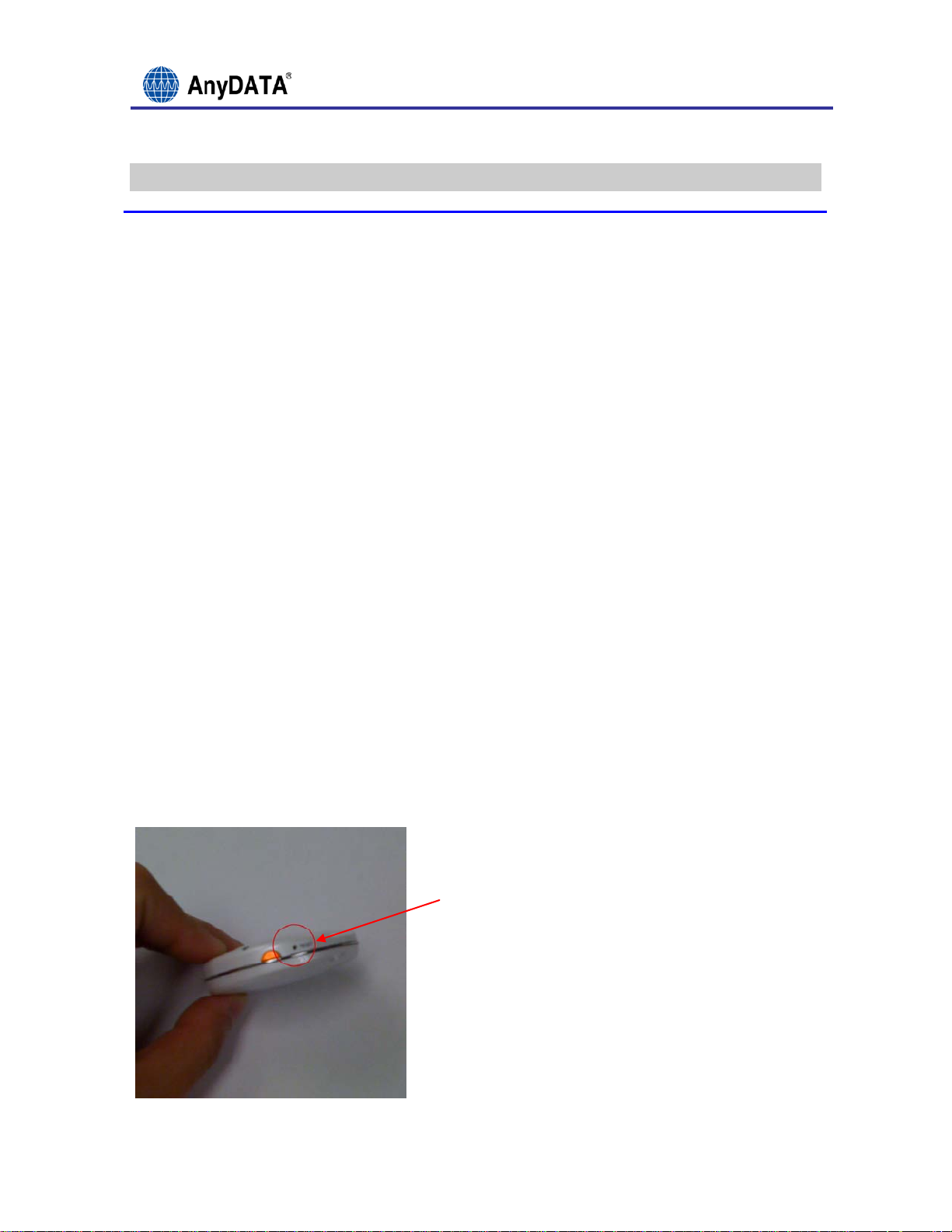
5.2 RESETTING THE APT-210D
1. In the unlikely event your APT-210D needs to be reset, switch the
device to the OFF position.
2. Then, press and hold the Reset Button for 5 seconds with a small
paperclip.
3. Your device is now reset.
4. Switch back to the ON position
.
Figure 5.1: Reset Button
All Rights Reserved. 12/17
Page 13
Personal GPS Locator Users Manual (APT-210D)
Not activated, please contact customer
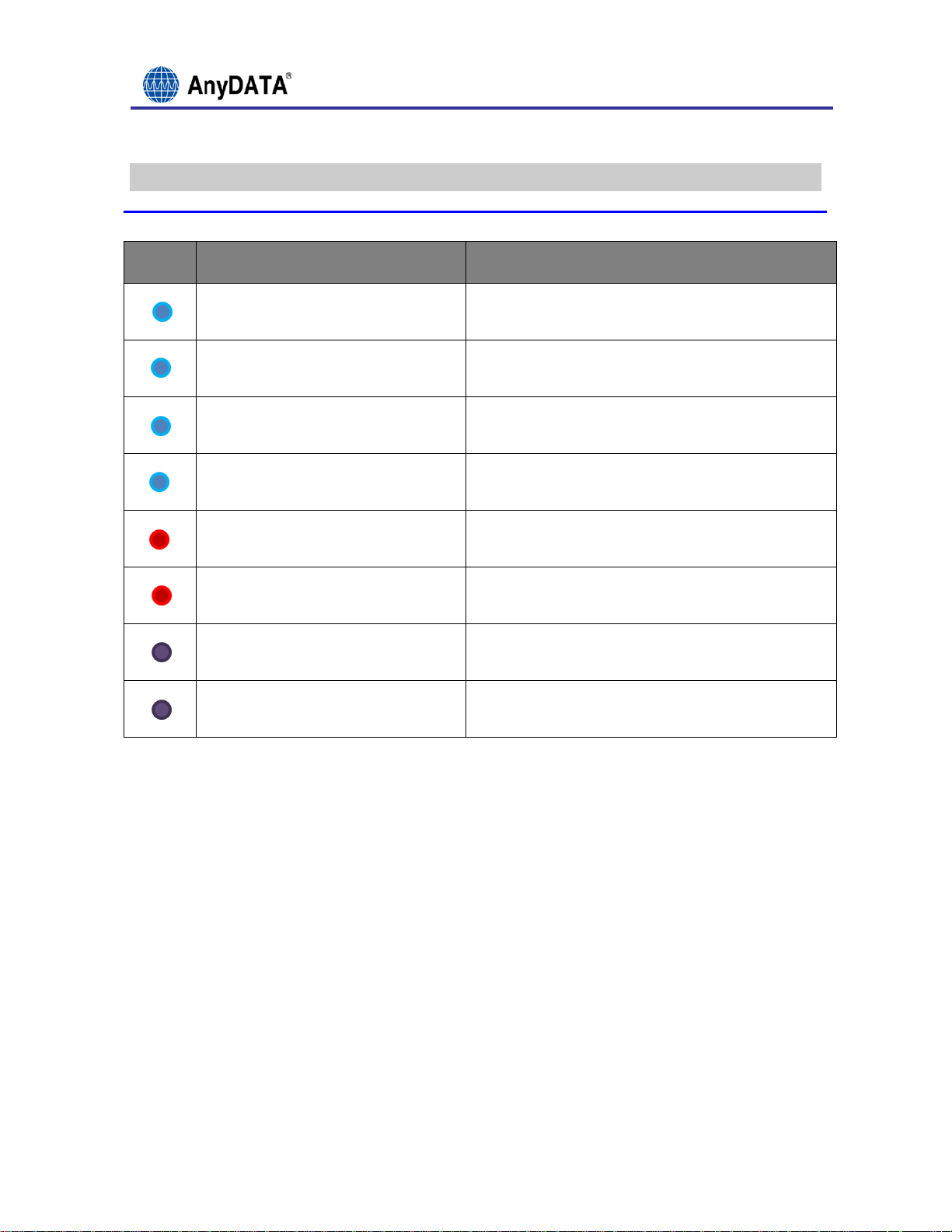
6 CHECKING THE GPS LOCATOR STATUS
COLOR
LED INDICATOR STATUS
BLUE, 2 QUICK BLINKS
BLINKING BLUE
BLINKING BLUE
(W/ POWER ADAPTER)
SOLID BLUE UNTIL NO COLOR
SOLID RED
BLINKING RED
SOLID PURPLE
BLINKING PURPLE
Power ON
Locator is on Standby
Charge is Complete
Powering OFF
Alert
Low Battery
Battery Charging
service for unit servicing
All Rights Reserved. 13/17
Page 14

Personal GPS Locator Users Manual (APT-210D)
7 OPTIONAL FEATURE
NOTE: This feature is enabled/disabled by the application provider and may
not be supported by the device you have purchased.
7.1 GEO FENCE (OPTIONAL)
Set GEO Fence On:
1. Press and hold the SET button for approx 3 seconds.
2. The GEO Fence LED will blink continuously while it sets the origin.
3. If the origin is set, the LED will stay ON, if it fails, the led will
turn OFF.
Set Geo Fence Off:
1. Press and hold the SET button for approx 3 seconds.
2. The GEO Fence LED will stay turned OFF when the GEO Fence is off.
NOTE: The Radius and Interval will be set to the current setting. If no
Radius or Interval has been set, this will be set to the default values.
Radius = 100M, Interval = 5 Minutes. The Origin will be set to the current
location of the device. Please note the Origin can take up to 10 minutes to
set depending in the environment the device is currently in.
All Rights Reserved. 14/17
Page 15

Personal GPS Locator Users Manual (APT-210D)
8 PERSONAL GPS LOCATOR SPECIFICATIONS
8.1 FORM FACTOR
• Dimensions 56mm in diameter, 18mm in thickness
• Weight 40.7g or 1.44oz
8.2 HARDWARE SPECIFICATIONS
• Full TIA/EIA/IS-98D Compliance Assisted & Standalone GPS
• Operating Voltage Battery 3.4 ~ 4.3V, 500mAh Li-polymer
• Max Output Power 0.3W
• Battery Life Time 3 to 7 days (depending on frequency of locating the
device)
• Current Consumption Idle mode (100mA)
• Sleep mode (1mA)
• Sensitivity Less than -104dBm
• Receive Frequency 869.04 ~ 893.97MHz for BC0, 1931.25 ~ 1988.75MHz
for BC1.
• Transmit Frequency 824.04 ~848.97MHz for BC0, 1851.25 ~ 1908.75MHz
8.3 SOFTWARE SPECIFICATIONS
• CDMA2000: CDMA2000 protocol between IS-707-A.5: Packet Data Service
for Mobile and Base Station
• IS-95A/B: CDMA protocol between TIA/EIA-637: Short Message Service
for Mobile and Base Station
• IS-801 & TIA-801-A: Position determination Built-in TCP/IP service
standard for Dual-Mode spread spectrum systems
8.4 MECHANICAL
• Dimensions 56mm in diameter, 18mm in thickness
• Weight 40.7g or 1.44oz
All Rights Reserved. 15/17
Page 16

Personal GPS Locator Users Manual (APT-210D)
8.5 EXTERNAL INTERFACE
• USB
• Power/Service LED
• Configurable Soft Button
• External Reset
• Power On/Off Button
8.6 ENVIRONMENTAL
• Operating Temperature -4 ~ 140F (-20 ~ +60C)
• Storage Temperature -22 ~ 140F (-30 ~ +60C)
• Humidity (Operating) 0% ~ 95% non-condensing, 95F (35C)
All Rights Reserved. 16/17
Page 17

Personal GPS Locator Users Manual (APT-210D)
9 LIMITATIONS OF LIABILITY
AnyDATA expressly assumes no responsibility for any error, omission,
interruption, deletion, defect, delay in operation or transmission,
communications failure, theft or destruction or unauthorized access to, or
alteration of, any use of the AnyDATA Locating Service through the Internet
or other communication services.
TO THE MAXIMUM EXTENT PERMITTED BY APPLICABLE LAW, IN NO EVENT SHALL
TRIPTRAK OR ITS SUPPLIERS BE LIABLE FOR ANY SPECIAL, INCIDENTAL, INDIRECT,
PUNITIVE OR CONSEQUENTIAL DAMAGES WHATSOEVER, INCLUDING, BUT NOT LIMITED TO,
DAMAGES FOR: LOSS OF PROFITS OR REVENUES, LOSS OF CONFIDENTIAL OR OTHER
INFORMATION, BUSINESS INTERRUPTION, PERSONAL INJURY, DEATH, LOSS OF
PRIVACY, CORRUPTION OR LOSS OF DATA, FAILURES TO TRANSMIT OR RECEIVE DATA
OR ANY OTHER PECUNIARY LOSS WHATSOEVER ARISING OUT OF OR IN ANY WAY RELATED
TO THE USE OF OR INABILITY TO USE THE DEVICE, TRIPTRAK LOCATING SERVICE, OR
THE SUPPORT SERVICES OR OTHERWISE IN CONNECTION WITH ANY PROVISION OF THIS
AGREEMENT, EVEN IF COMPANY OR ANY SUPPLIER HAS BEEN ADVISED OF THE
POSSIBILITY OF SUCH DAMAGES.
All Rights Reserved. 17/17
 Loading...